The era of agentic commerce is coming, and it brings with it significant new challenges for security. That’s why Cloudflare is partnering with Visa and Mastercard to help secure automated commerce as AI agents search, compare, and purchase on behalf of consumers.
Through our collaboration, Visa developed the Trusted Agent Protocol and Mastercard developed Agent Pay to help merchants distinguish legitimate, approved agents from malicious bots. Both Trusted Agent Protocol and Agent Pay leverage Web Bot Auth as the agent authentication layer to allow networks like Cloudflare to verify traffic from AI shopping agents that register with a payment network.
The challenges with agentic commerce
Agentic commerce is commerce driven by AI agents. As AI agents execute more transactions, merchants need to protect themselves and maintain trust with their customers. Merchants are beginning to see the promise of agentic commerce but face significant challenges:
How can they distinguish a helpful, approved AI shopping agent from a malicious bot or web crawler?
Is the agent representing a known, repeat customer or someone entirely new?
Are there particular instructions the consumer gave to their agent that the merchant should respect?
We are working with Visa and Mastercard, two of the most trusted consumer brands in payments, to address each of these challenges.
Web Bot Auth is the foundation to securing agentic commerce
In May, we shared a new proposal called Web Bot Auth to cryptographically authenticate agent traffic. Historically, agent traffic has been classified using the user agent and IP address. However, these fields can be spoofed, leading to inaccurate classifications and bot mitigations can be applied inaccurately. Web Bot Auth allows an agent to provide a stable identifier by using HTTP Message Signatures with public key cryptography.
As we spent time collaborating with the teams at Visa and Mastercard, we found that we could leverage Web Bot Auth as the foundation to ensure that each commerce agent request was verifiable, time-based, and non-replayable.
Visa’s Trusted Agent Protocol and Mastercard’s Agent Pay present three key solutions for merchants to manage agentic commerce transactions. First, merchants can identify a registered agent and distinguish whether a particular interaction is intended to browse or to pay. Last, merchants can indicate to agents how a payment is expected, whether that is through a network token, browser-use guest checkout, or a micropayment.
This allows merchants that integrate with these protocols to instantly recognize a trusted agent during two key interactions: the initial browsing phase to determine product details and final costs, and the final payment interaction to complete a purchase. Ultimately, this provides merchants with the tools to verify these signatures, identify trusted interactions, and securely manage how these agents can interact with their site.
How it works: leveraging HTTP message signatures
To make this work, an ecosystem of participants need to be on the same page. It all starts with agentdevelopers, who build the agents to shop on behalf of consumers. These agents then interact with merchants, who need a reliable way to assess the request is made on behalf of consumers. Merchants rely on networks like Cloudflare to verify the agent’s cryptographic signatures and ensure the interaction is legitimate. Finally, there are payment networks like Visa and Mastercard, who can link cardholder identity to agentic commerce transactions, helping ensure that transactions are verifiable and accountable.
When developing their protocols, Visa and Mastercard needed a secure way to authenticate each agent developer and securely transmit information from the agent to the merchant’s website. That’s where we came in and worked with their teams to build upon Web Bot Auth. Web Bot Auth proposals specify how developers of bots and agents can attach their cryptographic signatures in HTTP requests by using HTTP Message Signatures.
Both Visa and Mastercard protocols require agents to register and have their public keys (referenced as the keyid in the Signature-Input header) in a well-known directory, allowing merchants and networks to fetch the keys to validate these HTTP message signatures. To start, Visa and Mastercard will be hosting their own directories for Visa-registered and Mastercard-registered agents, respectively
The newly created agents then communicate their registration, identity, and payment details with the merchant using these HTTP Message Signatures. Both protocols build on Web Bot Auth by introducing a new tag that agents must supply in the Signature-Input header, which indicates whether the agent is browsing or purchasing. Merchants can use the tag to determine whether to interact with the agent. Agents must also include the nonce field, a unique sequence included in the signature, to provide protection against replay attacks.
An agent visiting a merchant’s website to browse a catalog would include an HTTP Message Signature in their request to verify their agent is authorized to browse the merchant’s storefront on behalf of a specific Visa cardholder:
Trusted Agent Protocol and Agent Pay are designed for merchants to benefit from its validation mechanisms without changing their infrastructure. Instead, merchants can set the rules for agent interactions on their site and rely upon Cloudflare as the validator. For these requests, Cloudflare will run the following checks:
Confirm the presence of the Signature-Input and Signature headers.
Pull the keyid from the Signature-Input. If Cloudflare has not previously retrieved and cached the key, fetch it from the public key directory.
Confirm the current time falls between the created and expires timestamps.
Check nonce uniqueness in the cache. By checking if a nonce has been recently used, Cloudflare can reject reused or expired signatures, ensuring the request is not a malicious copy of a prior, legitimate interaction.
Check the validity of the tag, as defined by the protocol. If the agent is browsing, the tag should be agent-browser-auth. If the agent is paying, the tag should be agent-payer-auth.
We recently introduced support for x402 transactions into Cloudflare’s Agent SDK, allowing anyone building an agent to easily transact using the new x402 protocol. We will similarly be working with Visa and Mastercard over the coming months to bring support for their protocols directly to the Agents SDK. This will allow developers to manage their registered agent’s private keys and to easily create the correct HTTP message signatures to authorize their agent to browse and transact on a merchant website.
Conceptually, the requests in a Cloudflare Worker would look something like this:
/**
 * Pseudocode example of a Cloudflare Worker acting as a trusted agent.
 * This version explicitly illustrates the signing logic to show the core flow.
 */


// Helper function to encapsulate the signing protocol logic.
async function createSignatureHeaders(targetUrl, credentials) {
    // Internally, this function would perform the detailed cryptographic steps:
    // 1. Generate timestamps and a unique nonce.
    // 2. Construct the 'Signature-Input' header string with all required parameters.
    // 3. Build the canonical 'Signature Base' string according to the spec.
    // 4. Use the private key to sign the base string.
    // 5. Return the fully formed 'Signature-Input' and 'Signature' headers.

    const signedHeaders = new Headers();

    signedHeaders.set('Signature-Input', 'sig2=(...); keyid="..."; ...');
    signedHeaders.set('Signature', 'sig2=:...');
    return signedHeaders;
}


export default {
    async fetch(request, env) {
        // 1. Load the final API endpoint and private signing credentials.
        const targetUrl = new URL(request.url).searchParams.get('target');
        const credentials = {
            privateKey: env.PAYMENT_NETWORK_PRIVATE_KEY,
            keyId: env.PAYMENT_NETWORK_KEY_ID
        };


        // 2. Generate the required signature headers using the helper.
        const signatureHeaders = await createSignatureHeaders(targetUrl, credentials);


        // 3. Attach the newly created signature headers to the request for authentication.
        const signedRequestHeaders = new Headers(request.headers);
        signedRequestHeaders.set('Host', new URL(targetUrl).hostname);
        signedRequestHeaders.set('Signature-Input', signatureHeaders.get('Signature-Input'));
        signedRequestHeaders.set('Signature', signatureHeaders.get('Signature'));


       // 4. Forward the fully signed request to the protected API.
        return fetch(targetUrl, { headers: signedRequestHeaders });
    },
};
We’ll also be creating new managed rulesets for our customers that make it easy to allow agents that are using the Trusted Agent Protocol or Agent Pay. You might want to disallow most automated traffic to your storefront but not miss out on revenue opportunities from agents authorized to make a purchase on behalf of a cardholder. A managed rule would make this straightforward to implement. As the website owner, you could enable a managed rule that automatically allows all trusted agents registered with Visa or Mastercard to come to your site, passing your other bot protection & WAF rules.
These will continue to evolve, and we will incorporate feedback to ensure that agent registration and validation works seamlessly across all networks and aligns with the Web Bot Auth proposal. American Express will also be leveraging Web Bot Auth as the foundation to their agentic commerce offering.
Open-source foundations and projects that have charity status in
the US may want to see if GoFundMe has created a profile
for them without permission. The company has operated since 2010 as a
self-service fundraising platform; individuals or groups could create
pages to raise money for all manner of causes. In June, the company announced
that it would expand its offerings to “manage all aspects of
charitable giving” for users through its platform. That seems to
include creating profiles for nonprofit organizations without their
involvement. After pushback, the company said
on October 23 that it would be removing the pages. It has not
answered more fundamental questions about how it planned to disburse
funds to nonprofits that had no awareness of the GoFundMe pages in the
first place.
Two people found the solution. They used the power of research, not cryptanalysis, finding clues amongst the Sanborn papers at the Smithsonian’s Archives of American Art.
This comes as an awkward time, as Sanborn is auctioning off the solution. There were legal threats—I don’t understand their basis—and the solvers are not publishing their solution.
Решението на президента Румен Радев да пътува с личен автомобил „Шкода Октавия“ звучи като неплатена реклама, макар че някои се умилиха на училищната пиеска. Един от близките на Радев бизнесмени, свързал биографията си с „Мултигруп“ като негов вицепрезидент – Николай Вълканов, можеше да му отстъпи за временно ползване някоя лимузина. Все пак Вълканов беше дарен, макар и някак срамливо, с орден „Стара планина“ от самия Радев и служебното му правителство с премиер Гълъб Донев.
Лидерът на „Величие“ Ивелин Михайлов получи два автомобила – „Макларън“ и „Ферари“, от един от едрите зърнопроизводители – Светослав Илчовски, за партийна дейност, за да показва „лицето на българската мафия“. Нали за това са спонсорите! През 2021 г. Илчовски беше доведен в парламента от Мая Манолова, по онова време депутатка от „Изправи се! Мутри вън!“ и председателка на временната комисия по ревизия на управлението на ГЕРБ и Бойко Борисов, за да разкаже как е бил изнудван.
А междувременно подкастът „Свободен глас“, един от комуникационните канали на „Величие“, изрази подкрепа за държавния глава и излезе с призив:
Да застанем зад президента, който служи на народа, а не на мафията! Отсега нататък той ще се охранява от будните самоинициативни българи, които няма да позволят повече прасетата да се гаврят с държавността!
Комичното в цялата ситуация с колите за президентската институция е, че Националната служба за охрана (НСО) така или иначе ще ескортира Радев – длъжна е да го прави. В действителност с атаката срещу колите на НСО, които сътрудниците на президента ползват, и с отнемането на това им право предводителят на ДПС – Ново начало Делян Пеевски се оказа в доста жалко положение в опита си да унижи Радев. Вместо да го принизи, го качи на бял кон.
Първо, президентът се солидаризира с екипа си и също отказа да ползва автомобилите на държавните гардове. Точка за него. Второ, самият Радев призова депутатите да слязат от служебните автомобили, а един от съветниците му разкри, че в деня, в който са отнели 7 автомобила на Президентството, парламентът си е купил 70 нови. Още една точка. Трето, ДПС – Ново начало се обърна към министъра на финансите да отпусне средства за служебни коли на президентската институция. Пак точка – и признак за поражение. Четвърто, накрая и Бойко Борисов „разпореди“ всички коли и шофьори, използвани от президента, с постановление да бъдат прехвърлени на Президентството.
Румен Радев се възползва от ситуацията, за да засегне и двамата:
Аз не идвам от улични банди, нито от политическа епруветка. Аз съм се оформил като ценностна система именно сред тези хора – хората със сини пагони, където понятията „дълг“, „отговорност“ и „солидарност“ не са празни понятия.
Човек би помислил, че Борисов и Пеевски работят за имиджа на държавния глава.
В действителност същественото е невидимо.
Важният въпрос
Когато на политическата сцена се готви да излезе нов играч, комуто звезди и анализатори предричат успех, въпросът е как ще реагират основните играчи – ГЕРБ–СДС, ПП–ДБ, ДПС – Ново начало и националистическите формации. Няма да се посместят, за да му направят място.
За проекта, който може да задържи Радев в активната политика, се мисли като за фактор, способен да пренареди баланса на силите – макар електоралният му потенциал засега да остава неясен. Ако се окаже мощен, ще блесне като свръхнова. Ако не прояви такава енергия, ще се нареди на опашката на борците за второ-трето място редом с ПП–ДБ, ДПС – Ново начало и „Възраждане“.
Настоящата политическа констелация се характеризира с изострено съперничество – ГЕРБ се бори да оцелее на върха, докато лидерът ѝ демонстрира как е НАЙ.
ДПС – Ново начало с тарана Делян Пеевски действа брутално и прагматично в преследване на интересите и на враговете си.
ПП–ДБ се стреми да остане видима, да се представя като алтернатива, търсейки по-убедителна идентичност.
„Възраждане“ се опитва да се маскира като ПП–ДБ, като борец срещу корупцията и като „Има такъв народ“, но изглежда като в костюм за Хелоуин.
ГЕРБ е всеяден
ГЕРБ–СДС вероятно ще възприемат проекта на Радев като пряка заплаха, особено ако президентът се опита да обедини антисистемния вот и разочарованите от статуквото избиратели. За ГЕРБ ще бъде ключово да представят Радев като фактор на нестабилност и популизъм, а в онази реч Борисов дори го определи като „проруска алтернатива“.
Дилема за ПП–ДБ
ПП–ДБ ще бъдат изправени пред дилема – от една страна, влизали са в конфликт с президента по теми като съдебната реформа и позицията към Русия, но от друга, част от техния електорат споделя антисистемните настроения, на които Радев разчита.
В 51-вия парламент те нямат истински съюзници, освен че им се налага да формират плаващи мнозинства по вотове на недоверие с руските мажоретки националисти.
В последните месеци Румен Радев обаче се държи като един от тях, изостави реториката за Русия, еврото и Брюксел, охлади антиевропейските нотки и започна да говори на езика на институционалната отговорност и „европейския прагматизъм“. Изглежда, си е избрал политическия център, където стои все по-уверено.
Умерено патриотичен
Националистическите партии може да видят в Радев естествен съюзник по теми като суверенитет, миграция и дистанция от Запада. Ако проектът му заеме умерено патриотична линия, той може да отнеме от техния електорат, но и да създаде основа за бъдещи коалиции, които да обединят патриотични, проевропейски и центристки сили.
Но Румен Радев има и друга политическа биография, включваща онова, за което днес избягва да говори – неподкрепените от него санкции срещу Русия, станали още по-тежки, заиграването му с различни бизнес кръгове, опитите за влияние във външната и вътрешната политика чрез служебните му правителства, които се опитва да омаловажи и представи като спасение на отечеството. Тази част от биографията му напомня, че настоящото му поведение е по-скоро тактически инструмент, а не вътрешно убеждение.
А въпросът кои от партиите ще танцуват в политиката с Румен Радев, си стои.
The Ubuntu Project has announced
that a bug in the Rust-based uutils version of the date command shipped with Ubuntu 25.10 broke automatic
updates:
Some Ubuntu 25.10 systems have been unable to automatically check
for available software updates. Affected machines include cloud
deployments, container images, Ubuntu Desktop and Ubuntu Server
installs.
The announcement includes remediation instructions for those
affected by the bug. Systems with the rust-coreutils package
version 0.2.2-0ubuntu2 or earlier have the bug, it is fixed in
0.2.2-0ubuntu2.1 or later. It does not impact manual updates using the apt command or other utilities.
Ubuntu embarked on a project to “oxidize” the distribution by
switching to uutils and sudo-rs
for the 25.10 release, and to see if the Rust-based utilities would be
suitable for the long-term-release slated for next April. LWN covered that project in
March.
Efficient real-time synchronization of data within data lakes present challenges. Any data inaccuracies or latency issues can significantly compromise analytical insights and subsequent business strategies. Organizations increasingly require synchronized data in near real-time to extract actionable intelligence and respond promptly to evolving market dynamics. Additionally, scalability remains a concern for data lake implementations, which must accommodate expanding volumes of streaming data and maintain optimal performance without incurring high operational costs.
Schema evolution is the process of modifying the structure (schema) of a data table to accommodate changes in the data over time, such as adding or removing columns, without disrupting ongoing operations or requiring a complete data rewrite. Schema evolution is vital in streaming data environments for several reasons. Unlike batch processing, streaming pipelines operate continuously, ingesting data in real time from sources that are actively serving production applications. Source systems naturally evolve over time as businesses add new features, refine data models, or respond to changing requirements. Without proper schema evolution capabilities, even minor changes to source schemas can force streaming pipeline shutdowns, requiring developers to manually reconcile schema differences and rebuild tables.
Such disruptions reduce the core value proposition of streaming architectures—continuous, low-latency data processing. Organizations can maintain uninterrupted data flows and keep source systems evolving independently by using the seamless schema evolution provided by Apache Iceberg. This reduces operational friction and maintains the availability of real-time analytics and applications even as underlying data structures change.
Apache Iceberg is an open table format, delivering essential capabilities for streaming workloads, including robust schema evolution support. This critical feature enables table schemas to adapt dynamically as source database structures evolve, maintaining operational continuity. Consequently, when database columns undergo additions, removals, or modifications, the data lake accommodates these changes seamlessly without requiring manual intervention or risking data inconsistencies.
Our comprehensive solution showcases an end-to-end real-time CDC pipeline that enables immediate processing of data modifications from Amazon Relational Database Service (Amazon RDS) for MySQL, streaming altered records directly to AWS Glue streaming jobs using Amazon Managed Streaming for Apache Kafka (Amazon MSK) Serverless. These jobs continually process incoming changes and update Iceberg tables on Amazon Simple Storage Service (Amazon S3) so that the data lake reflects the current state of the operational database environment in real time. By using Apache Iceberg’s comprehensive schema evolution support, our ETL pipeline automatically adapts to database schema modifications, providing data lake consistency and currentness without manual intervention. This approach combines complete process control with instantaneous analytics on operational data, eliminating traditional latency, and future-proofs the solution to address evolving organizational data needs. The architecture’s inherent flexibility facilitates adaptation to diverse use cases requiring immediate data insights.
Solution overview
To effectively address streaming challenges, we propose an architecture using Amazon MSK Serverless, a comprehensive managed Apache Kafka service that autonomously provisions and scales computational and storage resources. This solution offers a frictionless mechanism for ingesting and processing streaming data without the complexity of capacity management. Our implementation uses Amazon MSK Connect with the Debezium MySQL connector to capture and stream database modifications in real time. Rather than employing traditional batch processing methodologies, we implement an AWS Glue streaming job that directly consumes data from Kafka topics, processes CDC events as they occur, and writes transformed data to Apache Iceberg tables on Amazon S3.
The workflow consists of the following:
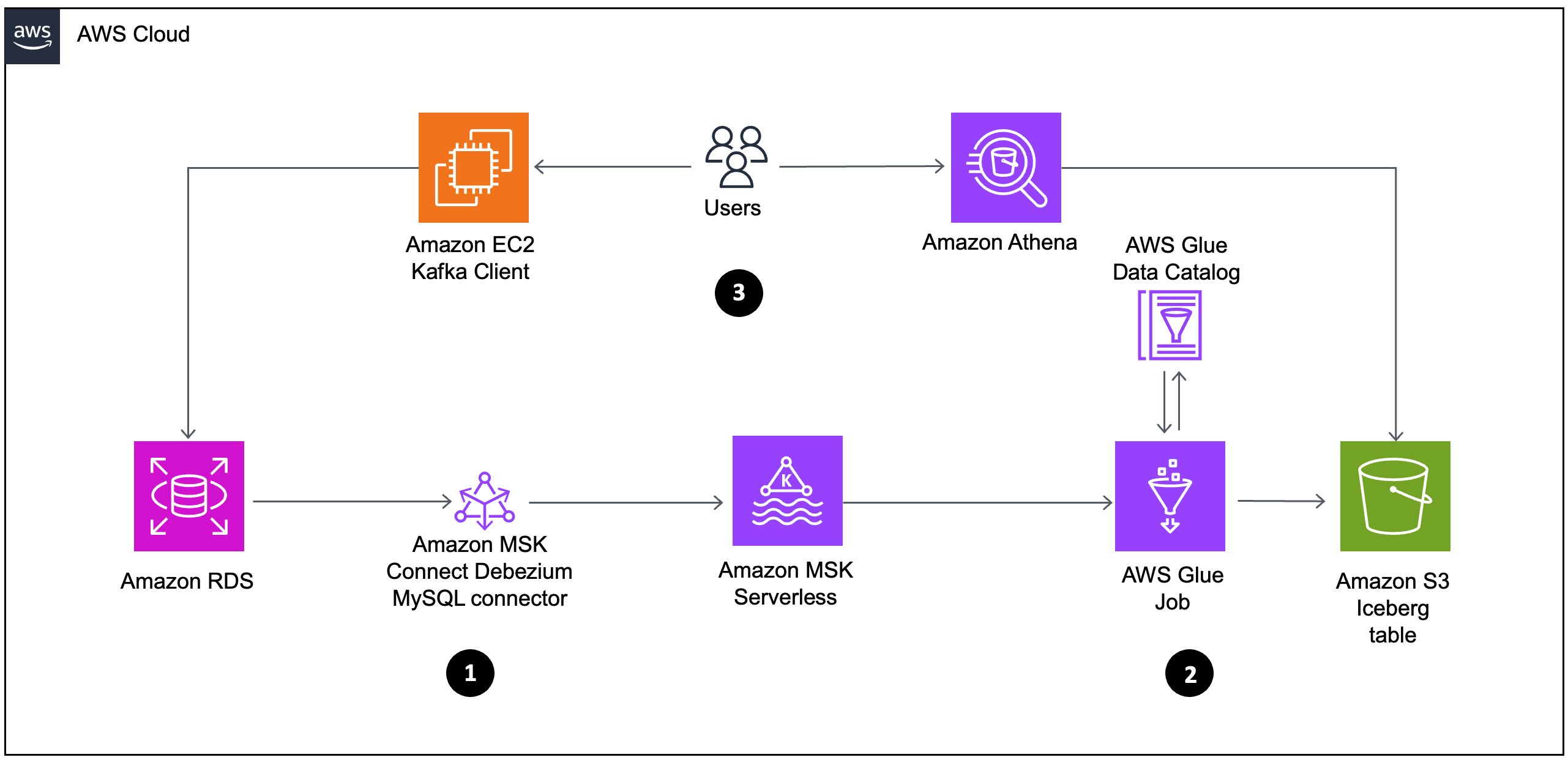
Data flows from Amazon RDS through Amazon MSK Connect using the Debezium MySQL connector to Amazon MSK Serverless. This represents a CDC pipeline that captures database changes from the relational database and streams them to Kafka.
From Amazon MSK Serverless, the data then moves to AWS Glue job, which processes the data and stores it in Amazon S3 as Iceberg tables. The AWS Glue job interacts with the AWS Glue Data Catalog to maintain metadata about the datasets.
Analyze the data using the serverless interactive query service Amazon Athena, which can be used to query the iceberg table created in Data Catalog. This allows for interactive data analysis without managing infrastructure.
The following diagram illustrates the architecture that we implement through this post. Each number corresponds to the preceding list and shows major components that you implement.
Prerequisites
Before getting started, make sure you have the following:
An active AWS account with billing enabled
An AWS Identity and Access Management (IAM) user with specific permissions to create and manage resources, such as a virtual private cloud (VPC), subnet, security group, IAM roles, NAT gateway, internet gateway, Amazon Elastic Compute Cloud (Amazon EC2) client, MSK Serverless, MSK Connector and its plugin AWS Glue job, and S3 buckets.
Sufficient VPC capacity in your chosen AWS Region.
For this post, we create the solution resources in the US East (N. Virginia) – us-east-1 Region using AWS CloudFormation templates. In the following sections, we show you how to configure your resources and implement the solution.
Configuring CDC and processing using AWS CloudFormation
In this post, you use the CloudFormation template vpc-msk-mskconnect-rds-client-gluejob.yaml. This template sets up the streaming CDC pipeline resources such as a VPC, subnet, security group, IAM roles, NAT, internet gateway, EC2 client, MSK Serverless, MSK Connect, Amazon RDS, S3 buckets, and AWS Glue job.
To create the solution resources for the CDC pipeline, complete the following steps:
Launch the stack vpc-msk-mskconnect-rds-client-gluejob.yaml using the CloudFormation template:
Provide the parameter values as listed in the following table.
A
B
C
1
Parameters
Description
Sample value
2
EnvironmentName
An environment name that is prefixed to resource names.
msk-iceberg-cdc-pipeline
3
DatabasePassword
Database admin account password.
****
4
InstanceType
MSK client EC2 instance type.
t2.micro
5
LatestAmiId
Latest AMI ID of Amazon Linux 3 for ec2 instance. You can use the default value.
IP range (CIDR notation) for the public subnet in the first Availability Zone.
10.192.10.0/24
8
PublicSubnet2CIDR
IP range (CIDR notation) for the public subnet in the second Availability Zone.
10.192.11.0/24
9
PrivateSubnet1CIDR
IP range (CIDR notation) for the private subnet in the first Availability Zone.
10.192.20.0/24
10
PrivateSubnet2CIDR
IP range (CIDR notation) for the private subnet in the second Availability Zone.
10.192.21.0/24
11
NumberOfWorkers
Number of workers for AWS Glue streaming job.
3
12
GlueWorkerType
Worker type for AWS Glue streaming job. For example, G.1X.
G.1X
13
GlueDatabaseName
Name of the AWS Glue Data Catalog database.
glue_cdc_blogdb
14
GlueTableName
Name of the AWS Glue Data Catalog table.
iceberg_cdc_tbl
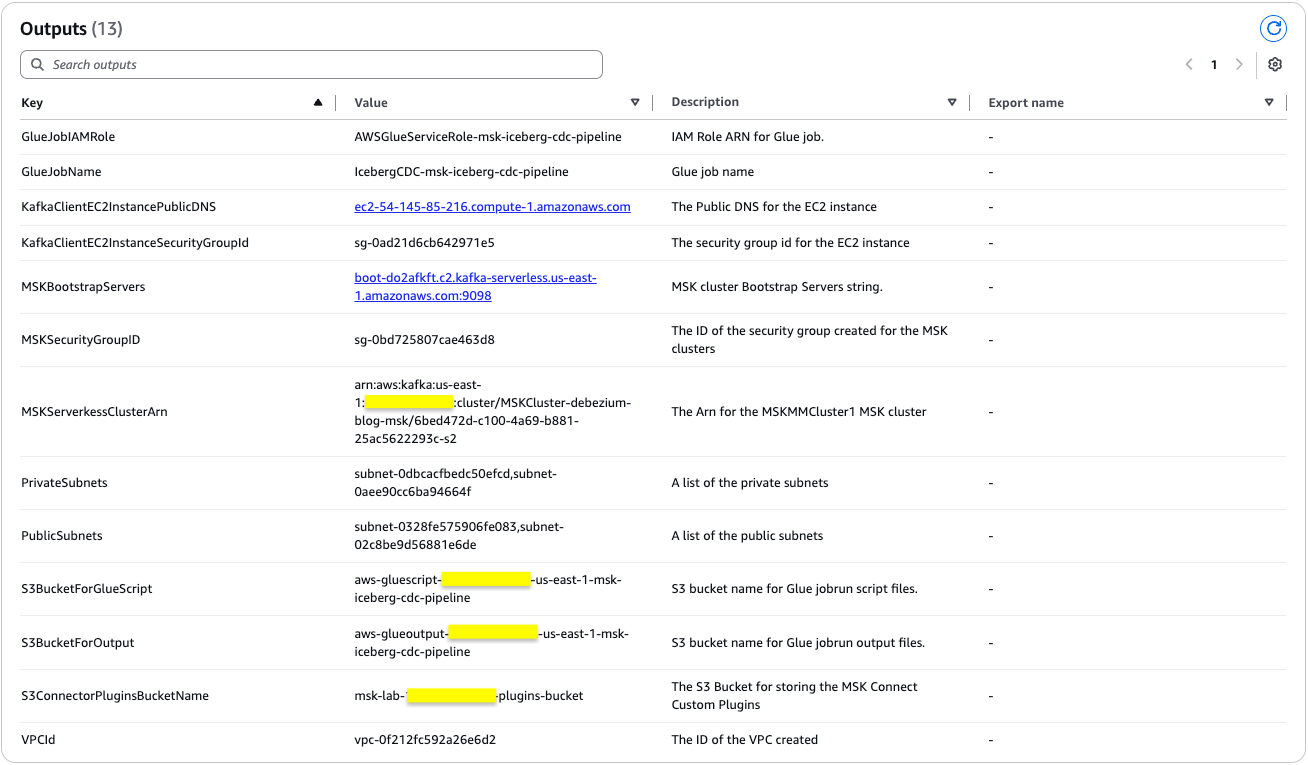
The stack creation process can take approximately 25 minutes to complete. You can check the Outputs tab for the stack after the stack is created, as shown in the following screenshot.
Following the successful deployment of the CloudFormation stack, you now have a fully operational Amazon RDS database environment. The database instance contains the salesdb database with the customer table populated with 30 data records.
These records have been streamed to the Kafka topic through the Debezium MySQL connector implementation, establishing a reliable CDC pipeline. With this foundation in place, proceed to the next phase of the data architecture: near real-time data processing using the AWS Glue streaming job.
Run the AWS Glue streaming job
To transfer the data load from the Kafka topic (created by the Debezium MySQL connector for database table customer) to the Iceberg table, run the AWS Glue streaming job configured by the CloudFormation setup. This process will migrate all existing customer data from the source database table to the Iceberg table. Complete the following steps:
On the CloudFormation console, choose the stack vpc-msk-mskconnect-rds-client-gluejob.yaml
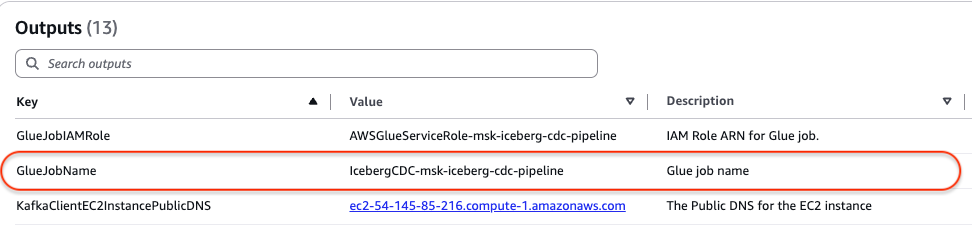
On the Outputs tab, retrieve the name of the AWS Glue streaming job from the GlueJobName row. In the following screenshot, the name is IcebergCDC-msk-iceberg-cdc-pipeline.
On the AWS Glue console, choose ETL jobs in the navigation pane.
Search for the AWS Glue job named IcebergCDC-msk-iceberg-cdc-pipeline.
Choose the job name to open its details page.
Choose Run to start the job. On the Runs tab, confirm if the job ran without failure.
You need to wait approximately 2 minutes for the job to process before continuing. This pause allows the jobrun to fully process records from the Kafka topic (initial load) and create the Iceberg table.
Query the Iceberg table using Athena
After the AWS Glue streaming job has successfully started and the Iceberg table has been created in the Data Catalog, follow these steps to validate the data using Athena:
On the Athena console, navigate to the query editor.
Choose the Data Catalog as the data source.
Choose the database glue_cdc_blogdb.
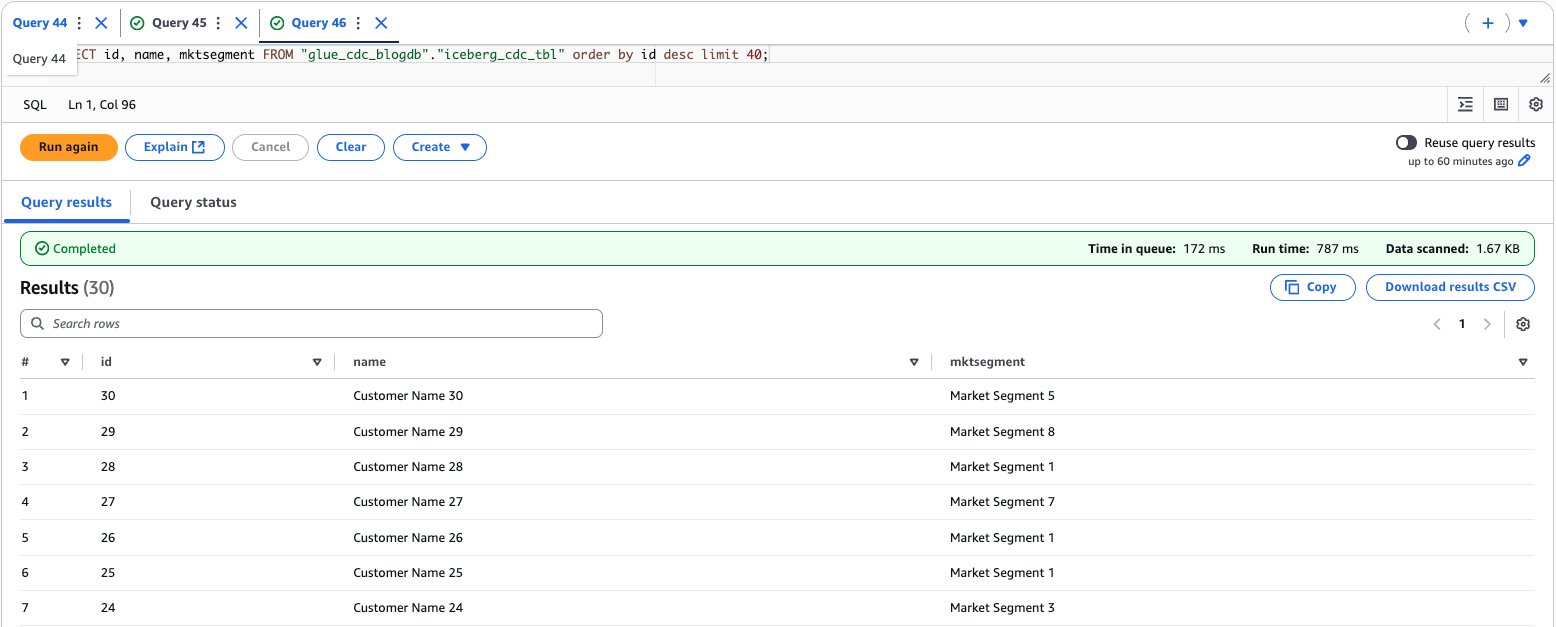
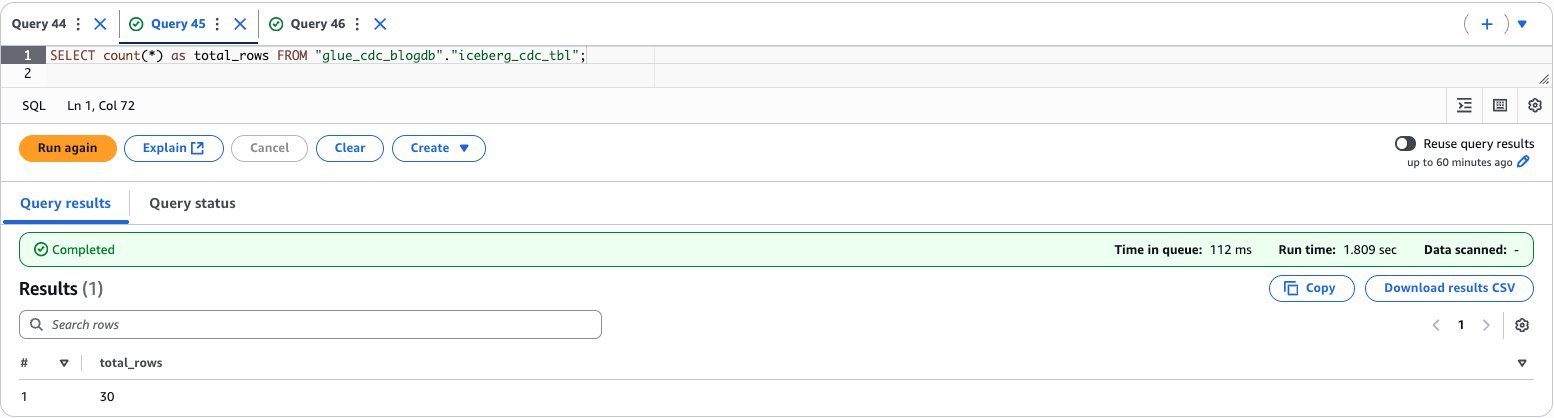
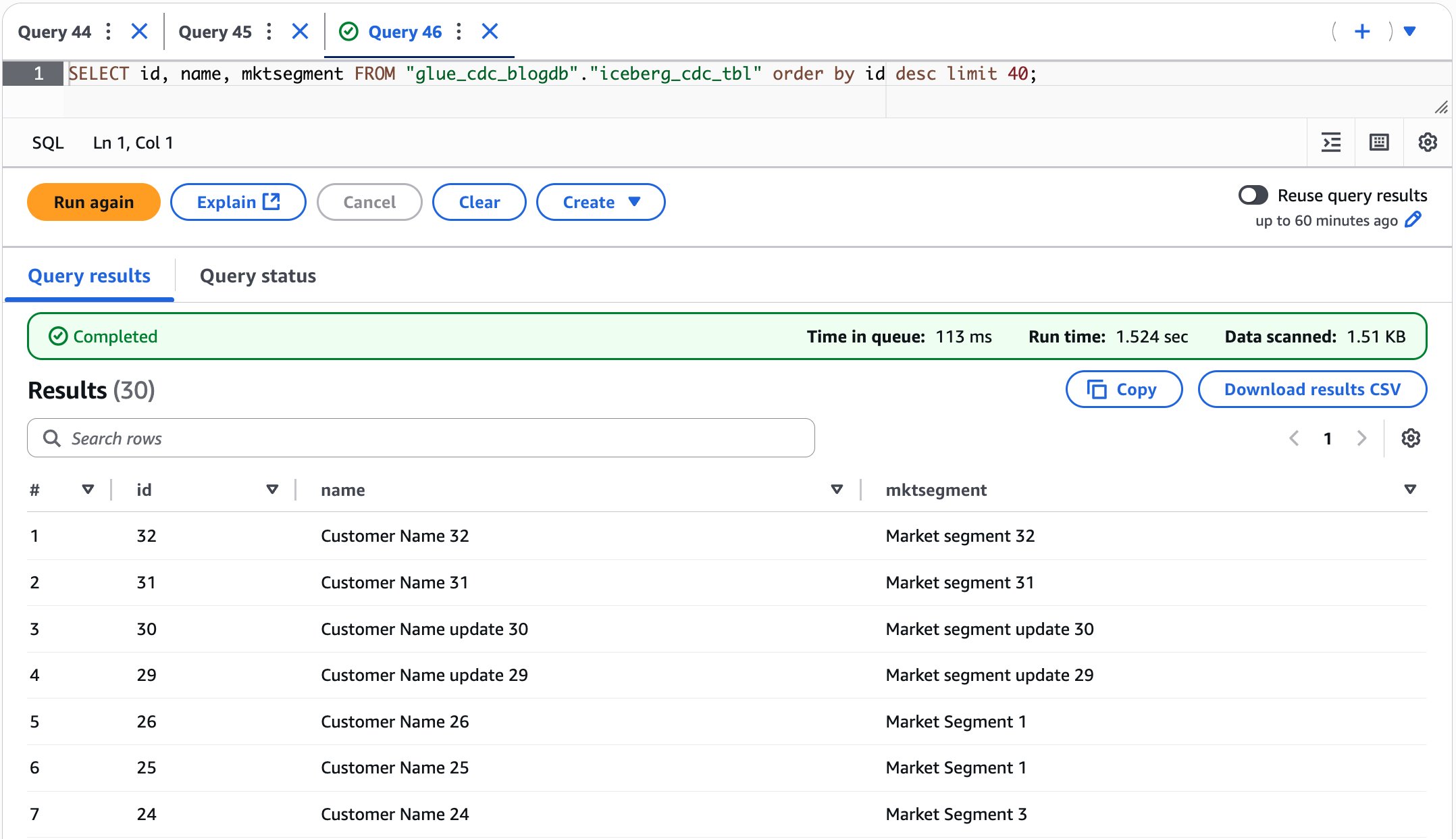
To validate the data, enter the following query to preview the data and find the total count:
SELECT id, name, mktsegment FROM "glue_cdc_blogdb"."iceberg_cdc_tbl" order by id desc limit 40;

SELECT count(*) as total_rows FROM "glue_cdc_blogdb"."iceberg_cdc_tbl";
The following screenshot shows the output of the example query.
After performing the preceding steps, you’ve established a complete near real-time data processing pipeline by running an AWS Glue streaming job that transfers data from Kafka topics to an Apache Iceberg table, then verified the successful data migration by querying the results through Amazon Athena.
Upload incremental (CDC) data for further processing
Now that you’ve successfully completed the initial full data load, it’s time to focus on the dynamic aspects of the data pipeline. In this section, we explore how the system handles ongoing data modifications such as insertions, updates, and deletions in Amazon RDS for MySQL database. These changes won’t go unnoticed. Our Debezium MySQL connector stands ready to capture each modification event, transforming database changes into a continuous stream of data. Working in tandem with our AWS Glue streaming job, this architecture is designed to promptly process and propagate every change in our source database through our data pipeline.Let’s see this real-time data synchronization mechanism in action, demonstrating how our modern data infrastructure maintains consistency across systems with minimal latency. Follow these steps:
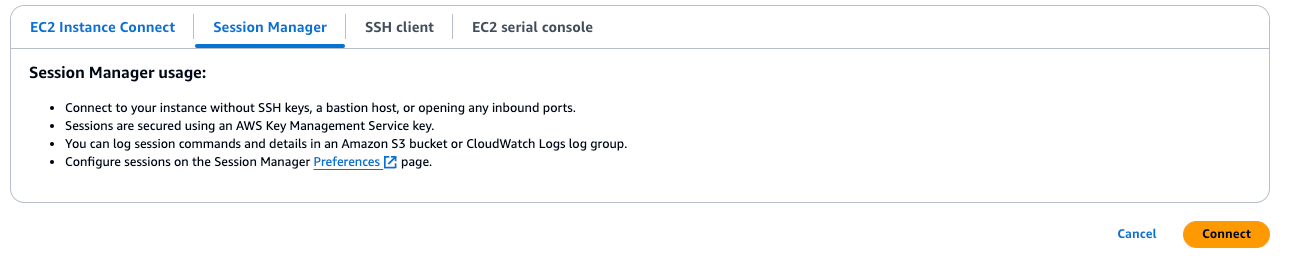
On the Amazon EC2 console, access the EC2 instance that you created using the CloudFormation template named as KafkaClientInstance.
Log in to the EC2 instance using AWS Systems Manager Agent (SSM Agent). Select the instance named as KafkaClientInstance and then choose Connect.
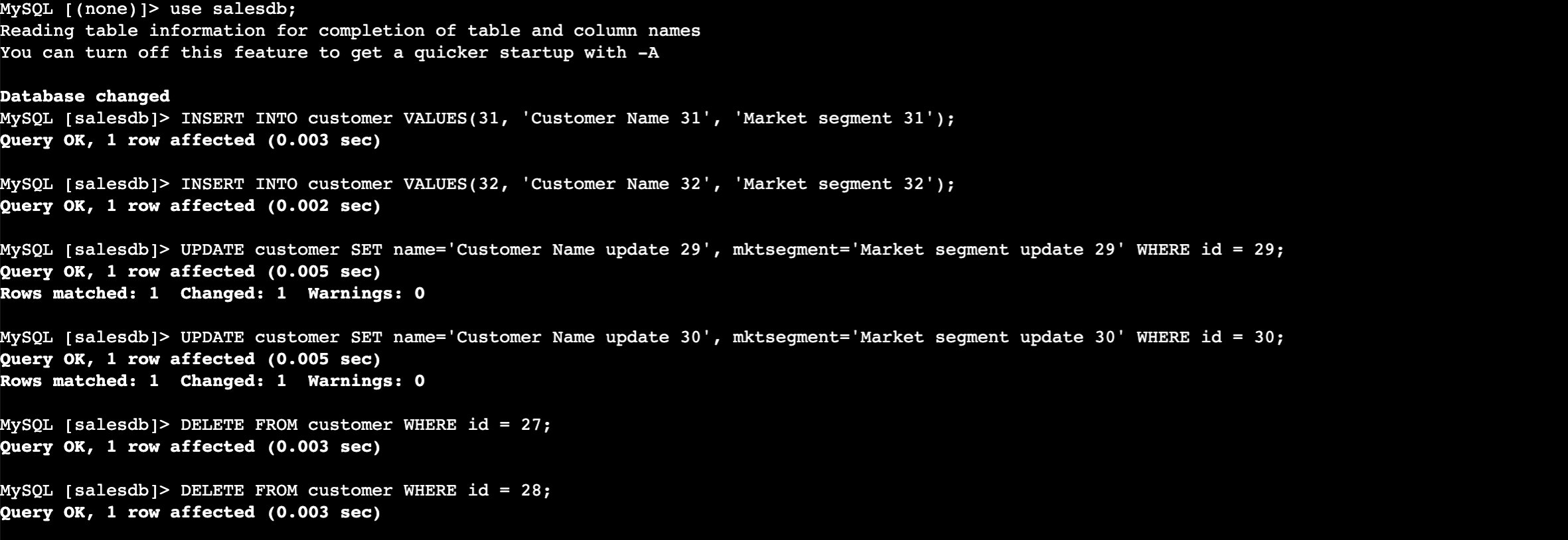
Enter the following commands to insert the data into the RDS table. Use the same database password you entered when you created the CloudFormation stack.
Now perform the insert, update, and delete in the CUSTOMER table.
use salesdb;

INSERT INTO customer VALUES(31, 'Customer Name 31', 'Market segment 31');
INSERT INTO customer VALUES(32, 'Customer Name 32', 'Market segment 32');

UPDATE customer SET name='Customer Name update 29', mktsegment='Market segment update 29' WHERE id = 29;
UPDATE customer SET name='Customer Name update 30', mktsegment='Market segment update 30' WHERE id = 30;

DELETE FROM customer WHERE id = 27;
DELETE FROM customer WHERE id = 28;
Validate the data to verify the insert, update, and delete records in the Iceberg table from Athena, as shown in the following screenshot.
After performing the preceding steps, you’ve learned how our CDC pipeline handles ongoing data modifications by performing insertions, updates, and deletions in the MySQL database and verifying how these changes are automatically captured by Debezium MySQL connector, streamed through Kafka, and reflected in the Iceberg table in near real time.
Schema evolution: Adding new columns to the Iceberg table
The schema evolution mechanism in this implementation provides an automated approach to detecting and adding new columns from incoming data to existing Iceberg tables. Although Iceberg inherently supports robust schema evolution capabilities (including adding, dropping, and renaming columns, updating types, and reordering), this code specifically automates the column addition process for streaming environments. This automation uses Iceberg’s underlying schema evolution capabilities, which guarantee correctness through unique column IDs that ensure new columns never read existing values from another column. By handling column additions programmatically, the system reduces operational overhead in streaming pipelines where manual schema management would create bottlenecks. However, dropping and renaming columns, updating types, and reordering still required manual intervention.
When new data arrives through Kafka streams, the handle_schema_evolution() function orchestrates a four-step process to ensure seamless table schema updates.
It analyzes the incoming batch DataFrame to infer its schema structure, cataloging all column names and their corresponding data types.
It retrieves the existing Iceberg table’s schema from the AWS Glue catalog to establish a baseline for comparison.
The system then performs a schema comparison using method compare_schemas() between batch schema with existing table schema.
If the incoming frame contains fewer columns than the catalog table, no action is taken.
It identifies any new columns present in the incoming data that don’t exist in the current table structure and returns a list of new columns that need to be added.
New columns will be added at the last.
Handle type evolution isn’t supported. If needed, you can handle the same at comment # Handle type evolution in the compare_schemas() method.
If the destination table has columns that are dropped in the source table, it doesn’t drop those columns. If that is required for your use case, you can use drop column manually usingALTER TABLE ... DROP COLUMN.
Renaming the column isn’t supported. To rename the column use case, manually evolve the schema using ALTER TABLE … RENAME COLUMN.
Finally, if new columns are discovered, the function executes ALTER TABLE … ADD COLUMN statements to evolve the Iceberg table schema, adding the new columns with their appropriate data types.
This approach eliminates the need for manual schema management and prevents data pipeline failures that would typically occur when encountering unexpected fields in streaming data. The implementation also includes proper error handling and logging to track schema evolution events, making it particularly valuable for environments where data structures frequently change.
def infer_schema_from_batch(batch_df):
    """
    Infer schema from the batch DataFrame
    Returns a dictionary with column names and their inferred types
    """
    schema_dict = {}
    for field in batch_df.schema.fields:
        schema_dict[field.name] = field.dataType
    return schema_dict

def get_existing_table_schema(spark, table_identifier):
    """
    Read the existing table schema from the Iceberg table
    Returns a dictionary with column names and their types
    """
    try:
        existing_df = spark.table(table_identifier)
        schema_dict = {}
        for field in existing_df.schema.fields:
            schema_dict[field.name] = field.dataType
        return schema_dict
    except Exception as e:
        print(f"Error reading existing table schema: {e}")
        return {}

def compare_schemas(batch_schema, existing_schema):
    """
    Compare batch schema with existing table schema
    Returns a list of new columns that need to be added
    """
    new_columns = []

    for col_name, col_type in batch_schema.items():
        if col_name not in existing_schema:
            new_columns.append((col_name, col_type))
        elif existing_schema[col_name] != col_type:
            # Handle type evolution if needed
            print(f"Warning: Column {col_name} type mismatch - existing: {existing_schema[col_name]}, new: {col_type}")

    return new_columns

def spark_type_to_sql_string(spark_type):
    """
    Convert Spark DataType to SQL string representation for ALTER TABLE
    """
    type_mapping = {
        'IntegerType': 'INT',
        'LongType': 'BIGINT',
        'StringType': 'STRING',
        'BooleanType': 'BOOLEAN',
        'DoubleType': 'DOUBLE',
        'FloatType': 'FLOAT',
        'TimestampType': 'TIMESTAMP',
        'DateType': 'DATE'
    }

    type_name = type(spark_type).__name__
    return type_mapping.get(type_name, 'STRING')

def evolve_table_schema(spark, table_identifier, new_columns):
    """
    Alter the Iceberg table to add new columns
    """
    if not new_columns:
        return

    try:
        for col_name, col_type in new_columns:
            sql_type = spark_type_to_sql_string(col_type)
            alter_sql = f"ALTER TABLE {table_identifier} ADD COLUMN {col_name} {sql_type}"
            print(f"Executing schema evolution: {alter_sql}")
            spark.sql(alter_sql)
            print(f"Successfully added column {col_name} with type {sql_type}")
    except Exception as e:
        print(f"Error during schema evolution: {e}")
        raise e

def handle_schema_evolution(spark, batch_df, table_identifier):
    """
    schema evolution steps
    1. Infer schema from batch DataFrame
    2. Read existing table schema
    3. Compare schemas and identify new columns
    4. Alter table if schema evolved
    """
    # Step 1: Infer schema from batch DataFrame
    batch_schema = infer_schema_from_batch(batch_df)
    print(f"Batch schema: {batch_schema}")

    # Step 2: Read existing table schema
    existing_schema = get_existing_table_schema(spark, table_identifier)
    print(f"Existing table schema: {existing_schema}")

    # Step 3: Compare schemas
    new_columns = compare_schemas(batch_schema, existing_schema)

    # Step 4: Evolve schema if needed
    if new_columns:
        print(f"Schema evolution detected. New columns: {new_columns}")
        evolve_table_schema(spark, table_identifier, new_columns)
        return True
    else:
        print("No schema evolution needed")
        return False
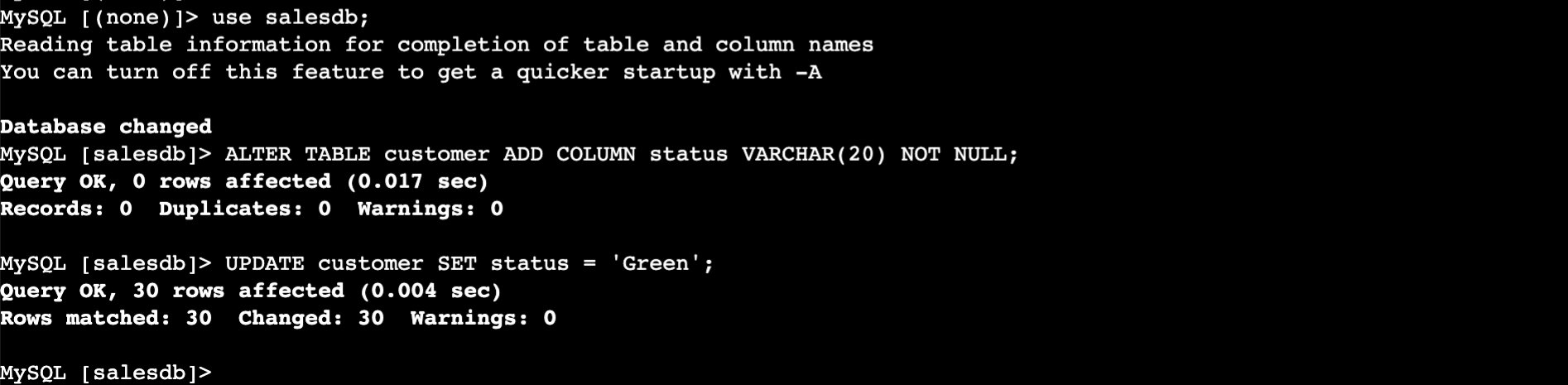
In this section, we demonstrate how our system handles structural changes to the underlying data model by adding a new status column to the customer table and populating it with default values. Our architecture is designed to seamlessly propagate these schema modifications throughout the pipeline so that downstream analytics and processing capabilities remain uninterrupted while accommodating the enhanced data model. This flexibility is essential for maintaining a responsive, business-aligned data infrastructure that can evolve alongside changing organizational needs.
Add a new status column to the customer table and populate it with default values as Green.
use salesdb;

ALTER TABLE customer ADD COLUMN status VARCHAR(20) NOT NULL;

UPDATE customer SET status = 'Green';
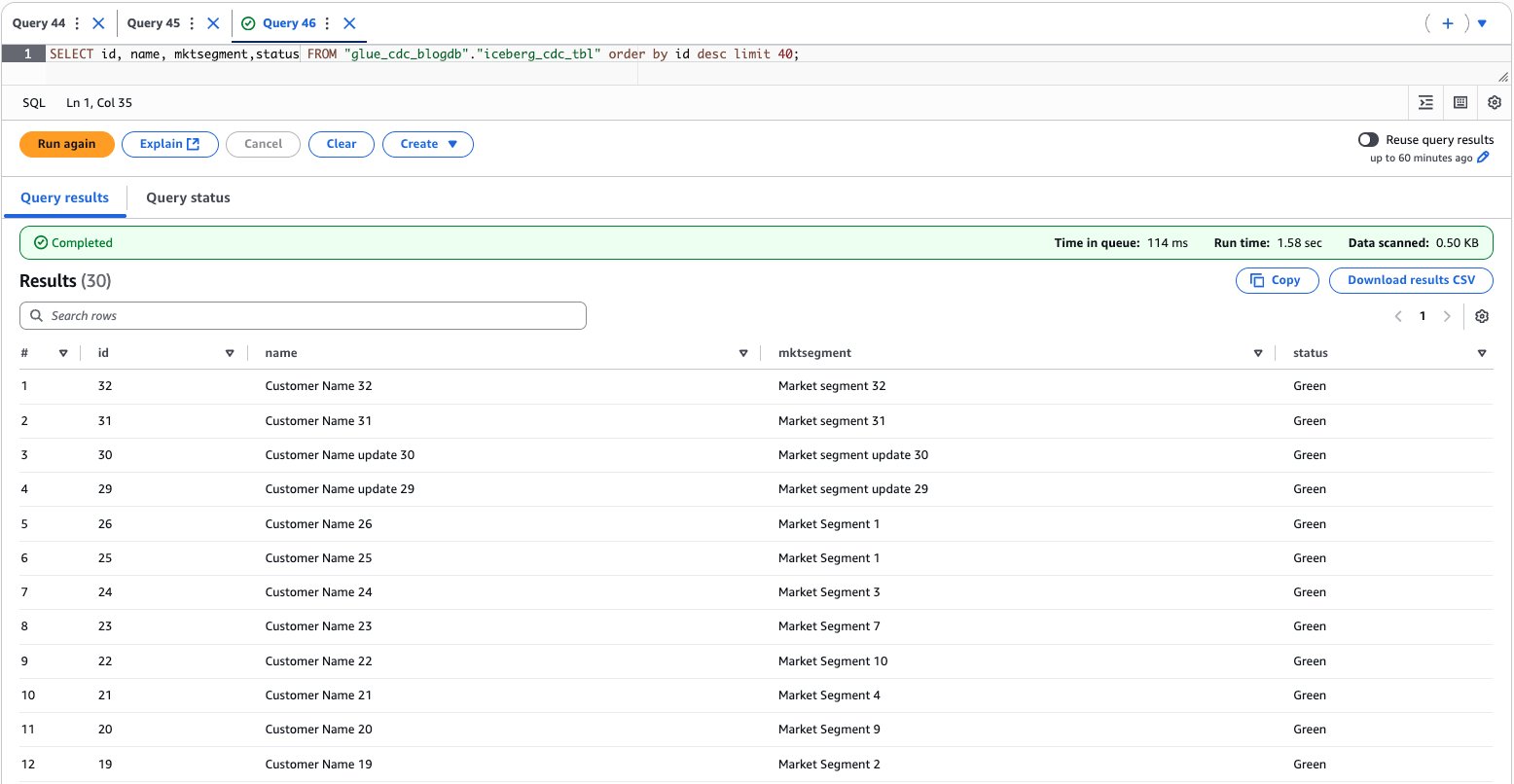
Use the Athena console to validate the data and schema evolution, as shown in the following screenshot.
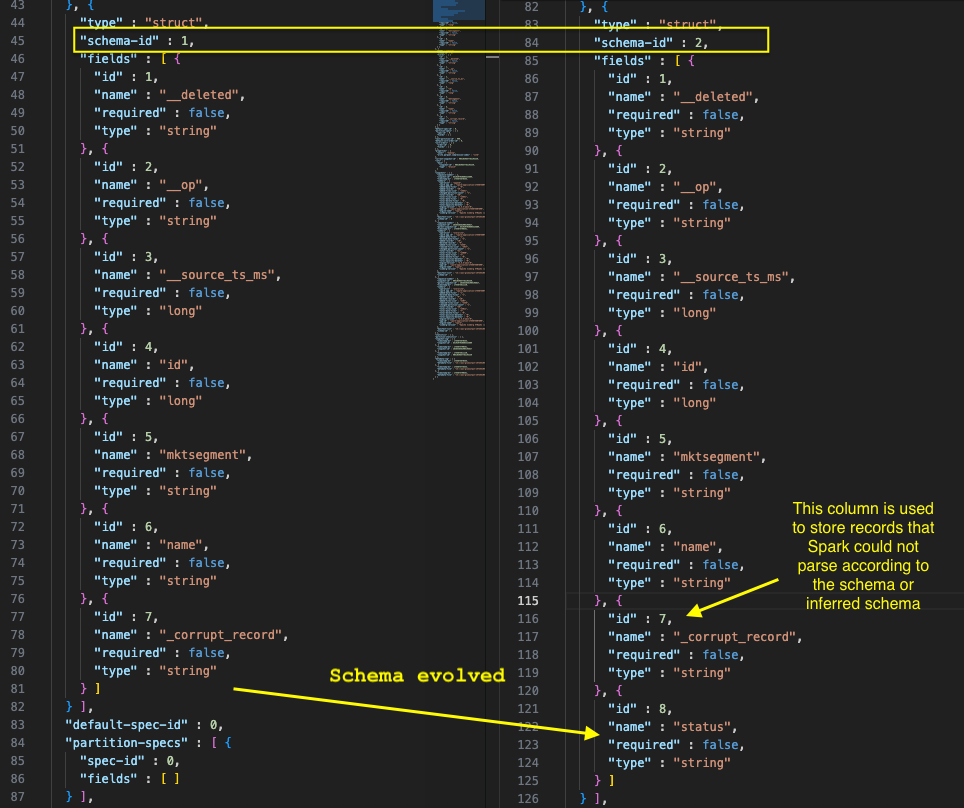
When schema evolution occurs in an Iceberg table, the metadata.json file undergoes specific updates to track and manage these changes. In job when schema evolution detected, it ran the following query to evolve the schema for the Iceberg table.
ALTER TABLE glue_catalog.glue_cdc_blogdb.iceberg_cdc_tbl ADD COLUMN status string
We checked the metadata.json file in Amazon S3 for iceberg table location, and the following screenshot shows how the schema evolved.
We now explain how our implementation handles schema evolution by automatically detecting and adding new columns from incoming data streams to existing Iceberg tables. The system employs a four-step process that analyzes incoming data schemas, compares them with existing table structures, identifies new columns, and executes the necessary ALTER TABLE statements to evolve the schema without manual intervention, though certain schema changes still require manual handling.
Clean up
To clean up your resources, complete the following steps:
Stop the running AWS Glue streaming job:
On the AWS Glue console, choose ETL jobs in the navigation pane.
Search for the AWS Glue job named IcebergCDC-msk-iceberg-cdc-pipeline.
Choose the job name to open its details page.
On the Runs tab, select running jobrun and choose Stop job run. Confirm that the job stopped successfully.
Remove the AWS Glue database and table:
On the AWS Glue console, choose Tables in the navigation pane, select iceberg_cdc_tbl, and choose Delete.
Choose Databases in the navigation pane, select glue_cdc_blogdb, and choose Delete.
Delete the CloudFormation stack vpc-msk-mskconnect-rds-client-gluejob.yaml.
Conclusion
This post showcases a solution that businesses can use to access real-time data insights without the traditional delays between data creation and analysis. By combining Amazon MSK Serverless, Debezium MySQL connector, AWS Glue streaming, and Apache Iceberg tables, the architecture captures database changes instantly and makes them immediately available for analytics through Amazon Athena. A standout feature is the system’s ability to automatically adapt when database structures change—such as adding new columns—without disrupting operations or requiring manual intervention. This eliminates the technical complexity typically associated with real-time data pipelines and provides business users with the most current information for decision-making, effectively bridging the gap between operational databases and analytical systems in a cost-effective, scalable way.
Generative AI video is exploding. Platforms can turn prompts into polished clips, and models churn through massive training sets of images and footage. Behind the magic, though, is the unavoidable reality of storing and moving petabytes of data.
Training runs require archiving colossal datasets, then pulling them back in full when it’s time to retrain. Once models go live, the output itself becomes another major workload to manage, whether that’s endless libraries of user-generated videos or fast-cycling streams of ephemeral content. These challenges are part of life for every GenAI company, but the costs of handling them vary widely depending on the provider.Those cloud storage costs can spiral quickly out of control. The big cloud providers lure teams in with low headline rates, but the fine print tells a different story. Pricing depends on which storage tier you pick, how often you move data between regions, and how many API requests your pipeline makes. Founders end up building workflows around cloud quirks instead of what’s fastest and simplest for their teams.
Free ebook: The Cost of Cloud Storage for AI
Struggling to keep AI storage costs under control? Download our free ebook to discover how to optimize cloud storage for AI workloads—without compromising performance.
Hidden cost #1: Storage tiers and complexity
AI video data doesn’t behave neatly. Training sets might sit untouched for long stretches before being needed again all at once. User-facing content might accumulate forever, or spike and crash depending on the latest trend. For lean engineering teams, predicting these swings is nearly impossible.
On major cloud providers, the stakes are high. Choose a hot tier and you’ll overpay when data goes cold. Pick an archive tier and you’ll face delays and penalties when you suddenly need that dataset tomorrow. Constantly shifting petabytes between tiers adds both operational overhead and surprise costs.
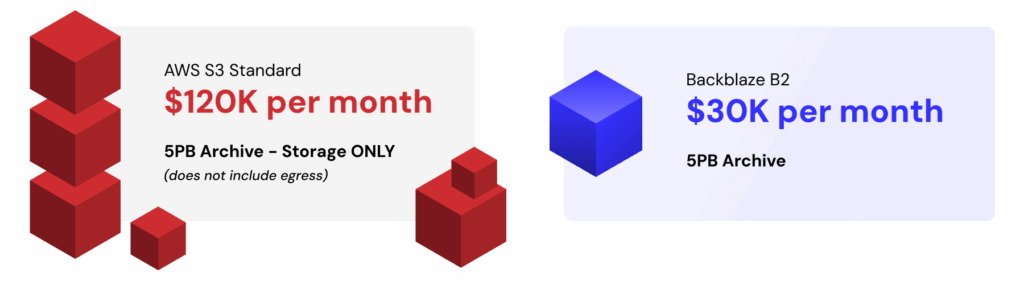
The numbers tell the story: a 5PB archive costs about $120K a month on AWS S3 Standard for storage alone, before any egress charges. The same capacity runs closer to $30K on Backblaze B2 Cloud Storage—a $90K delta that could fund another GPU cluster or extend a startup’s runway.
Backblaze B2 comes in at around one-fifth the cost of S3, with no tiering games to manage. And when workloads demand maximum throughput, B2 Overdrive scales while delivering a stronger price-to-performance ratio than others offer. That means less time modeling cost scenarios and more time iterating on product and model design.
Hidden cost #2: Egress fees
AI development thrives on iteration. Training and retraining cycles shuffle enormous datasets across clusters, often more than once a month. Each transfer can rival the cost of storage itself. And the faster a team wants to move, the more those bills stack up.
The big cloud providers introduce friction at every step. They charge not only when data exits their cloud but also when it crosses between their own regions. At petabyte scale, those tolls can reach five or even six figures in a single month, forcing founders into an impossible tradeoff: experiment less or drain the budget.
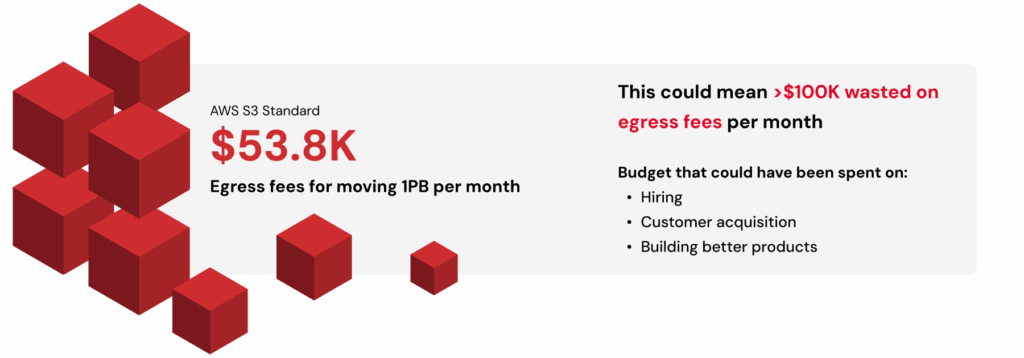
Consider that moving just 1PB once per month on AWS in the US East (N. Virginia) region racks up around $53.8K. Double that transfer frequency and you’re staring at over $100K in egress fees. That’s budget better spent on hiring, acquiring customers, or building better products.
Backblaze removes this bottleneck. Backblaze B2 already includes free egress to leading GPU and CDN partners. For companies operating at AI scale, B2 Overdrive goes further with unlimited free egress to any destination. That means models can be trained, tuned, and distributed globally without a single surprise charge standing in the way of progress.
Mirage, an AI video platform, experienced this firsthand. By eliminating egress costs, they cut storage-related expenses by up to 95% compared to their previous provider—freeing resources to reinvest in growth and product innovation.
Hidden cost #3: API requests and transaction fees
Not every AI video workflow interacts with storage the same way. Some stream large video files in big chunks, keeping the number of calls manageable. Others slice data into millions or billions of tiny objects—frames, embeddings, or metadata—and rely heavily on listing and indexing operations. In those cases, what looks like spare change per request quickly compounds into thousands of dollars in charges every month.
Major cloud storage providers are relentless here. Every PUT, GET, LIST, or HEAD operation comes with a fee, no matter how small. At scale, those fractions of a cent add up fast, leaving engineers designing around billing quirks instead of choosing the cleanest solution for their pipelines.
Picture a pipeline that generates one billion writes and two billion reads in a single month. On AWS, the tab for those transactions alone would run close to $5.8K. On Backblaze B2, writes are free and reads cost just $0.004 per 10,000 requests, bringing the same workload down to about $800. And the first 2,500 Class B and Class C transactions each day are free, further shrinking the bill. On B2 Overdrive, all API calls are included at no additional cost.
Whether your architecture leans toward billions of tiny objects or more efficient streaming, Backblaze keeps request charges predictable and manageable. That makes API calls something your team doesn’t need to obsess over, which is exactly how it should be.
Bringing it together: Simple, predictable economics
Taken together, these hidden costs show why storing AI video on “the big three” often feels like playing a rigged game. The pricing looks straightforward until the bills arrive, padded with charges for tiers, transfers, and transactions. Each one eats away at budget and slows the pace of innovation.
Backblaze offers a different path. By stripping out the fine print and focusing on price-to-performance, it makes storage a stable foundation instead of a moving target. Mirage proves what that means in practice: eliminating egress fees drove huge savings and freed resources to reinvest in their product.
For founders, that kind of predictability turns storage from a frustrating line item into the fuel for faster iteration, bolder experimentation, and sustainable growth.
Greg Kroah-Hartman has released the 6.17.5, 6.12.55, and 6.6.114 stable kernels. As usual, each
contains important fixes throughout the tree; users are advised to
upgrade.
The Spectre class of hardware vulnerabilities truly is a gift that keeps on
giving. New variants are still being discovered in current CPUs nearly
eight years after the disclosure of this
problem, and developers are still working to minimize the performance costs
that come from defending against it. The masked user-space access
mechanism is a case in point: it reduces the cost of defending against some
speculative attacks, but it brought some challenges of its own that are
only now being addressed.
The AlmaLinux project has announced
that the upcoming 10.1 release will include support for
Btrfs:
Btrfs support encompasses both kernel and userspace enablement, and
it is now possible to install AlmaLinux OS with a Btrfs filesystem
from the very beginning. Initial enablement was scoped to the
installer and storage management stack, and broader support within the
AlmaLinux software collection for Btrfs features is forthcoming.
Btrfs support in AlmaLinux OS did not happen in isolation. This was
proposed and scoped in RFC 0005, and has been built upon prior efforts
by the Fedora
Btrfs SIG in Fedora Linux and the CentOS Hyperscale SIG
in CentOS Stream.
AlmaLinux OS is designed to be binary compatible with Red Hat
Enterprise Linux (RHEL); Btrfs, however, has never been supported in
RHEL. A technology preview of Btrfs in RHEL 6 and 7 ended with the
filesystem being dropped from RHEL 8 and
onward. AlmaLinux OS 10.1 is currently
in beta.
Security updates have been issued by AlmaLinux (ipa, kernel, and thunderbird), Debian (gdk-pixbuf, gegl, gimp, intel-microcode, raptor2, request-tracker4, and request-tracker5), Fedora (samba and wireshark), Mageia (haproxy, nginx, openssl, and python-django), Oracle (kernel and thunderbird), Red Hat (redis and redis:7), Slackware (bind), SUSE (aws-cli, local-npm-registry, python-boto3, python- botocore, python-coverage, python-flaky, python-pluggy, python-pytest, python- pytest-cov, python-pytest-html, python-pytest-metada, cargo-audit-advisory-db-20251021, fetchmail, git-bug, ImageMagick, istioctl, kernel, krb5, libsoup, libxslt, python-Authlib, and sccache), and Ubuntu (bind9, linux, linux-aws, linux-azure, linux-azure-6.8, linux-gcp, linux-gkeop,
linux-ibm, linux-ibm-6.8, linux-lowlatency, linux-lowlatency-hwe-6.8,
linux-oracle, linux-azure, linux-azure-5.15, linux-gcp-5.15, linux-gcp-6.8, linux-gke, linux-nvidia, linux-nvidia-6.8,
linux-nvidia-lowlatency, and linux-realtime, linux-realtime-6.8).
The collective thoughts of the interwebz
Manage Consent
To provide the best experiences, we use technologies like cookies to store and/or access device information. Consenting to these technologies will allow us to process data such as browsing behavior or unique IDs on this site. Not consenting or withdrawing consent, may adversely affect certain features and functions.
Functional
Always active
The technical storage or access is strictly necessary for the legitimate purpose of enabling the use of a specific service explicitly requested by the subscriber or user, or for the sole purpose of carrying out the transmission of a communication over an electronic communications network.
Preferences
The technical storage or access is necessary for the legitimate purpose of storing preferences that are not requested by the subscriber or user.
Statistics
The technical storage or access that is used exclusively for statistical purposes.The technical storage or access that is used exclusively for anonymous statistical purposes. Without a subpoena, voluntary compliance on the part of your Internet Service Provider, or additional records from a third party, information stored or retrieved for this purpose alone cannot usually be used to identify you.
Marketing
The technical storage or access is required to create user profiles to send advertising, or to track the user on a website or across several websites for similar marketing purposes.