InsightIDR AI Alert Triage Automatically Classifies Alerts with 99.93% Accuracy

Post Syndicated from Chris Wraight original https://blog.rapid7.com/2025/04/29/insightidr-ai-alert-triage-automatically-classifies-alerts-with-99-93-accuracy/

Rapid7 AI Alert Triage helps SOC analysts quickly and accurately triage thousands of daily alerts, improving efficiency and enabling focus.

InsightIDR AI Alert Triage Automatically Classifies Alerts with 99.93% Accuracy

One universal truth in Security Operations Centers (SOCs) is that analysts are overwhelmed by the high volume of alerts they receive. In a recent survey, SOC teams reported they are inundated with an average of 4,484 alerts daily, with a staggering 67% being ignored due to alert fatigue and the high volume of false positives. Also reported in the same survey, the number of security alerts they received had “significantly increased” in the last three years. All this can lead to alert fatigue, resulting in missed or ignored alerts and potentially exposing an organization to legitimate threats, impacting SOC performance.

Introducing AI Alert Triage for InsightIDR

Rapid7’s AI Alert Triage –  trained and tested by the Rapid7 global MDR service across trillions of alerts worldwide — will soon be available to users of our next-gen SIEM, InsightIDR, at no additional cost. The AI Alert Triage engine quickly suggests an initial disposition (benign or malicious) for alerts, providing clarity into why that disposition was chosen and supporting information from the investigation.

InsightIDR AI Alert Triage Automatically Classifies Alerts with 99.93% Accuracy
The new AI Suggested Disposition field shows the alert classification, along with detailed information to assist the SOC analyst.

Without access to the Rapid7 AI Alert Triage capability, SOC teams can waste significant time manually evaluating and correctly classifying malicious alerts, increasing their threat exposure and contributing to SOC inefficiency. With AI Alert Triage, SOC analysts can automatically and accurately focus limited security resources on legitimate threats and improve SOC performance.

Built on Decades of AI Expertise in Security

Rapid7 is not new to infusing AI with its security applications. Rapid7 is a pioneer in AI development for security use cases, starting in our earliest days with our VM Expert System in the early 2000s. Since then, Rapid7 has integrated Generative AI into the Command Platform to supercharge SecOps and augment MDR services.

Our AI-powered platform processes 4.8 trillion alerts weekly for our MDR customer base with a 99.93% benign alert closure rate. This has resulted in hundreds of hours of manual effort saved for the SOC analysts.

AI Alert Triage Improves Your SOC’s Effectiveness

InsightIDR AI Alert Triage Automatically Classifies Alerts with 99.93% Accuracy
Having thousands of daily alerts automatically and correctly classified is a huge productivity boost for overwhelmed SOC analysts.

SOC analysts being overwhelmed by high volumes of daily alerts is hardly a new phenomenon. However, up until now, SOC analysts have been unable to effectively deal with this massive number of alerts, and organizations have become victims of alert fatigue. The same survey referenced above reports that analysts spend nearly 3 hours (2.7) each day manually triaging alerts, a figure rising to more than 4 hours a day for 27% of respondents. And, on average, security analysts are unable to deal with over two-thirds (67%) of the daily alerts they receive. What’s more, they say 83% of these alerts are false positives and not worth their time.

By using AI Alert Triage, Rapid7 customers can leverage decades of proven Rapid7 AI technology to quickly and accurately classify the deluge of alerts and not be forced into a situation where they intentionally ignore alerts. Key capabilities include:

  • Rapid identification and prioritization of genuine threats: AI Alert Triage helps customers quickly distinguish true positives from noise, enabling security teams to prioritize investigations based on validated, high-confidence alerts.
  • Enhanced Threat Detection Speed and Accuracy: Leveraging MDR-validated AI ensures alerts reflect real threats, helping SOC teams respond swiftly and confidently to advanced threats and subtle attack indicators.
  • Human oversight of automatic classification: AI Alert Triage has attained a 99.93% benign alert closure rate with nearly 5 trillion weekly alerts; every alert is documented, with full transparency and opportunity for human intervention.
  • Reduced Alert Fatigue and False Positives: With AI Alert Triage validated by MDR analysts, customers experience dramatically reduced false positives, significantly cutting down time wasted on non-critical alerts.
  • Streamlined Workflows and Focus: AI Alert Triage automates repetitive tasks to streamline initial analysis, enabling security teams to jumpstart investigations and dedicate more time and resources to critical initiatives.

Transform Your SOC Performance Through Proven AI Assistance

Unmatched 99.93% accuracy and speed in Rapid7’s AI models drive trust and confidence in automatic decision-making and reduce alert fatigue for SOC analysts, improving SOC performance and speed. At Rapid7, we are pioneering the infusion of artificial intelligence into the Command platform, empowering  SOCs around the globe and dramatically transforming their effectiveness through GenAI.

To learn more about AI Alert Triage, contact your account team or your Customer Success Advisor.

Deepening the MDR partnership: Rapid7 now delivers Active Remediation with Velociraptor

Post Syndicated from Conner Goldstein original https://blog.rapid7.com/2025/04/29/deepening-the-mdr-partnership-rapid7-now-delivers-active-remediation-with-velociraptor/

Rapid7 is expanding its response capabilities to meet the demands and relentless pace of today’s threat landscape – and the operational needs of our customers.

Deepening the MDR partnership: Rapid7 now delivers Active Remediation with Velociraptor

Partnership means many things to us here at Rapid7. It means showing up with trusted expertise, providing clear guidance in moments of uncertainty, and helping security teams stay ahead of ever-evolving threats. Most of all, we see partnership as foundational to building security resilience – and that requires not only a proactive,  risk-aware mindset but also the capability to respond when the inevitable happens.

As attacks grow faster, more complex, and more persistent, the need for decisive, transparent remediation has become more urgent – some estimates place the average time-to-ransom at just 16.88 hours1 –  with that kind of speed, every moment matters. We pride our Managed Detection and Response (MDR) service on delivering best-in-class detection, investigation, and actionable response guidance. Now, we are evolving that partnership – and the strength of your security program – even further.

Introducing Active Remediation with Velociraptor

Powered by our best-in-class, open-source digital forensics and incident response (DFIR) tool, Rapid7 MDR analysts can take direct, approved remediation actions on your behalf – removing malware, terminating rogue processes, and restoring system integrity while minimizing the need to reimage affected endpoints unless it’s truly required. Every action is executed with precision, transparency, and within clearly defined boundaries.

This is more than a new capability. It’s a reflection of our commitment to move in lockstep with you – not just at the point of detection, but all the way through to resolution. From unlimited incident response support to deeply collaborative investigations and tailored recommendations, Rapid7 has always prioritized being hands-on when you need us most. Active Remediation with Velociraptor extends that same principle to the final – and often most difficult – step: taking action on your behalf to eradicate threats.

Delivered with Precision, Transparency, and Trust

Active Remediation with Velociraptor is designed not just to take action, but to take the right action, the right way. Every remediation workflow is executed by Rapid7’s expert analysts using Velociraptor’s purpose-built query language (VQL) – a DFIR language engineered for precision, traceability, and scale. This allows the analyst to target specific artifacts, processes, and configurations – avoiding the blunt-force actions that often lead to full endpoint reimaging.

  • You stay in control – Remediation is performed based on clearly defined and approved scopes and parameters aligned to your security policies.
  • You see what we do – Every action is logged, auditable, and built using readable logic within Velociraptor, with full visibility provided through detailed post-incident reports.
  • You gain precision without disruption – Remove only what’s malicious and reverse unauthorized configurations without pulling systems offline or fully reimaging machines.

Rapid7’s New Response Workflow

Deepening the MDR partnership: Rapid7 now delivers Active Remediation with Velociraptor
  1. Alert detection: Identify malicious activity across customer endpoints and network.
  2. Active Response: Quarantine affected endpoints to stem the spread of the attack.
  3. Rapid7 investigation: SOC validates threat, determines scope, and develops response plan.
  4. Active Remediation with Velociraptor: Rapid7 analysts remove malicious artifacts with precision.
  5. Mitigation guidance: Recommendations to help your team prevent threat reemergence.

Remediating in the Real World

Our approach brings analyst-led, logic-driven remediation into live environments – solving the post-containment challenges security teams face every day. Unlike session-based access that relies on endpoints being on and connected to the internet, Rapid7 are delivering remediation that meets the auditability, practicality, and scalability needs of the real world:

  • Targeted threat removal without reimaging: Identify and remove only malicious artifacts – files, processes, persistence mechanisms, or unauthorized configurations – linked to a confirmed threat.
  • Outcome: Your endpoints stay online and productive, while the threat is neutralized with minimal disruption. Avoiding unnecessary reimaging means faster recovery, reduced IT workload, and less downtime for end users.
  • Controlled execution with transparent logic: Every remediation workflow is written in VQL – visible and reviewable by customers before deployment. There’s no scripting or ‘trust us’ execution.
  • Outcome: Builds trust and accountability into the remediation process. You get full visibility into every action, supporting compliance requirements and reducing uncertainty in regulated environments.
  • Distributed remediation across endpoints: When multiple endpoints are compromised by a single campaign – such as credential theft malware – we will queue high-fidelity remediation workflows across many machines simultaneously – even if some are offline.
  • Outcome: Lays the foundation for consistent threat removal across your environment without manual intervention or system-by-system cleanup. This enables a timely, coordinated response that keeps pace with fast-moving attacks.
  • Reducing friction between security and IT teams
    Rather than working through lengthy remediation steps with your IT team, we execute the most critical actions directly – within approved scope – and document every step.
  • Outcome: Fewer delays and less back-and-forth between teams. With Rapid7 handling the complete, end-to-end lifecycle of an alert, internal teams stay focused on business priorities, knowing remediation is being executed safely and effectively.

Setting the stage for remediation with Active Response

Remediation begins with strategic containment and detailed investigation. Rapid7’s Active Response enables rules-based quarantining of affected endpoints in the immediate aftermath of a credible threat detection. This stops lateral movement before it begins and preserves the system state for investigation.

Active Remediation builds directly on this foundation. By first containing the threat, we can then investigate confidently and move quickly to identify and remove malicious artifacts – mitigating the risk of reinfection or spread. The integrated workflow – from containment to investigation to remediation – helps ensure our response is not only fast, but precise.

Together, Active Response and Active Remediation form the cornerstone of a continuous response pipeline that reduces attacker dwell time, limits impact, and restores normal operations faster.

Unlimited incident response – now deeper than ever

Rapid7 MDR customers have long relied on Rapid7’s unlimited DFIR support to guide them through the most critical moments of a threat. That hands-on expertise – delivered without surprise fees, hourly caps, or the need to navigate third-party providers and tools – is a defining part of how we ensure customers receive the fastest, most comprehensive response possible.

Active Remediation builds on that foundation by closing the final gap in the response lifecycle. Where detection, containment, and investigation have long been Rapid7’s strengths, we can now fully execute on the next step: resolving the threat. This combination of expert-led triage with decisive, hands-on remediation, delivers a more unified, end-to-end response – minimizing delays, reducing reliance on your internal resources, and accelerating your path to recovery. It’s not just about reacting faster – it’s about responding smarter, start to finish.

More than a capability – it’s a commitment

The Rapid7 MDR service has always been built around standing shoulder to shoulder with our customers, especially when it matters most. As we expand this partnership through the finale of the detection and response lifecycle – taking action to remove threats, reduce disruption, and accelerate recovery – we do it with the same transparency, accountability, and respect for your control that defines every part of the Rapid7 experience. In the name of building true security resilience, partnership doesn’t end with guidance – it means staying with you all the way through to resolution. Active Remediation with Velociraptor is in closed early access and will roll out to MDR customers in mid-May. To learn more, please contact your account team or Cybersecurity Advisor.

1 gbhackers

[$] Cache awareness for the CPU scheduler

Post Syndicated from corbet original https://lwn.net/Articles/1018334/

The kernel’s CPU scheduler has to balance a wide range of objectives. The
tasks in the system must be scheduled fairly, with latency for any given
task kept within bounds. All of the CPUs in the system should be kept busy
if there is enough work to do, but unneeded CPUs should be shut down to
reduce power consumption. A task should also run on the CPU that is most
likely to have cached the memory that task is using. This patch
series
from Chen Yu aims to improve how the scheduler handles cache
locality for multi-threaded processes.

Driving down MTTR with Remediation Hub, Available in Rapid7 Exposure Command

Post Syndicated from Rapid7 original https://blog.rapid7.com/2025/04/29/driving-down-mttr-with-remediation-hub-available-in-rapid7-exposure-command/

Driving down MTTR with Remediation Hub, Available in Rapid7 Exposure Command

Co-authored by Peter Whibley, Ed Montgomery, and Joel Alcon

Technology innovation combined with the highly fragmented nature of today’s IT landscape means that vulnerabilities are being exploited faster and at greater scale than ever. Security teams contend with a daily surge of new threat actors and attack vectors. Without a unified view of assets, business context, and compensating controls, they waste weeks identifying which risks are truly critical.

Many organizations try to tackle this challenge by implementing exposure management  and risk-based vulnerability management (RBVM) approaches, where vulnerability data from various tools is consolidated into one dashboard. But many of these tools present risk scores without demonstrating a holistic view of the business impact of vulnerabilities, mitigating controls for endpoints, patch management status, and remediation steps.

Without that end-to-end context, security teams are struggling to keep up with the volume of new vulnerabilities. In fact, once the National Vulnerability Database (NVD) announced in February 2024 that it would no longer provide vulnerability scores for all CVEs, the shortcomings of traditional vulnerability management, including RBVM, became more evident.

From chasing vulnerabilities, to proactively mitigating risk

Rapid7’s Remediation Hub enables security teams to go beyond simply identifying vulnerabilities and focus more on remediating risk. By augmenting vulnerability findings with business context, threat intelligence, and compensating controls, organizations gain a continuous, all-in-one view of how to detect and respond to risks across their enterprise. These new capabilities empower security teams to:

  1. Assess the impact of remediation steps. Reimagine your attack surface by viewing the number of vulnerabilities addressed by each remediation action.
  2. Prioritize remediation with confidence. Leverage dynamic, threat-aware risk scores to assess the criticality of issues and quickly go from vulnerability to action.
  3. Optimize risk mitigation. Accelerate risk response through streamlined remediation workflows.

Third-party vulnerability findings elevate risk remediation

Security teams leverage multiple vulnerability scanning tools for different parts of their infrastructure, including cloud environments, containers, web applications, and endpoints. Each tool reports findings in its own format and utilizes different scoring methods, making it difficult to get a clear, unified picture of an organization’s risk exposure.

By unifying this data into a centralized platform, security teams reduce unnecessary noise caused by redundant vulnerability findings, streamlining triage efforts, reducing silos, and driving faster, more informed remediation efforts.

Driving down MTTR with Remediation Hub, Available in Rapid7 Exposure Command

Rapid7 Remediation Hub delivers this normalized view of third-party vulnerabilities, enabling teams to stop wasting time chasing low-impact issues or overlook high-severity threats. The solution takes this unified lens further via risk scores that combine these vulnerability findings with business context to help security teams quickly identify the most critical vulnerabilities, allocate resources efficiently, and communicate risk more effectively to stakeholders. These capabilities not only boost operational efficiency, but also strengthen an organization’s security posture.

Context-based visibility into endpoint protection and patch management

Context is an essential component of managing risk in today’s increasingly complex technology landscape. By solely relying on vulnerability scores without also understanding business impact or breach likelihood, security teams are left with a hazy, incomplete view of their attack surface.

Rapid7 Exposure Command empowers security teams to prioritize vulnerabilities based on attacker behavior, exploitability, and potential impact – all without the need to export data into separate security tools. Rapid7 delivers deep, multi-layered risk scores calculated from Rapid7 Labs’s threat intelligence, first-party scans, third-party vulnerability findings, and an organization’s unique mitigating controls. Furthermore, Remediation Hub is seamlessly integrated with Rapid7 Surface Command, arming security teams with a continuous view of key mitigating controls of assets across the enterprise, including endpoint protection and patch management in place.

Driving down MTTR with Remediation Hub, Available in Rapid7 Exposure Command
  • Endpoint protection – Remediation Hub displays which assets have active endpoint protection, as well as the protection type on the asset. Users can use intuitive filters to hone in on critical findings, such as the assets that lack endpoint protection and prioritize remediation efforts via a risk-based approach that gives higher priority to assets that lack endpoint protection.
  • Patch management – Remediation Hub shows the patch management availability status of each asset, arming security teams with a view of assets that are available for patching by a patch management system. Users can filter on assets with vulnerabilities where no patching is active.

Faster risk response, fewer security silos

Security teams often operate in silos, with a team handling risk identification and another focused on remediation. CISA recommends that critical vulnerabilities be remediated within 15 calendar days of initial detection, but to achieve this, organizations require tight collaboration between these disparate teams.

Unfortunately, because these groups operate with poorly integrated security tools, going from vulnerability finding to risk remediation can take months, with some vulnerabilities going unpatched for years. For instance, the 2024 Verizon Data Breach Investigations Report finds that it takes an estimated 55 days to remediate 50% of critical vulnerabilities once their patches are available.

Driving down MTTR with Remediation Hub, Available in Rapid7 Exposure Command

Remediation Hub tackles this challenge with purpose-built SOAR integrations that help improve collaboration and drive down MTTR (mean time to remediate). The new capabilities automatically trigger remediation workflows, with notifications auto-generated and sent to adjacent teams responsible for implementing the recommended remediations.

For example, users can leverage Remediation Hub to automatically trigger a workflow in Jira or create an incident report in ServiceNow based on the severity or business impact of a vulnerability. Each workflow is fully customizable based on unique security thresholds.

Embracing faster, continuous exposure management

Organizations are rapidly transitioning from traditional vulnerability management to more continuous, exposure management approaches. Rapid7’s Remediation Hub – an integral component of the Exposure Command platform – empowers security teams to embrace the shift.

With a remediation-based approach to vulnerability management and risk reduction, organizations are taking command of their attack surface and discovering a simpler, more effective approach to managing and truly mitigating risk.

If you are interested in learning more about Remediation Hub and our Exposure Command platform, check out our Exposure Command product tour.

From Exposure to Assurance: Unified Remediation Across the Security Lifecycle

Post Syndicated from Rapid7 original https://blog.rapid7.com/2025/04/29/from-exposure-to-assurance-unified-remediation-across-the-security-lifecycle/

From Exposure to Assurance: Unified Remediation Across the Security Lifecycle

When it comes to defending your organization, every second counts. The time to detect, respond, and remediate is critical, but speed alone isn’t enough. Fragmentation across security tools, siloed teams, and manual workflows leaves organizations constantly reactive, overwhelmed by alerts, and at risk of breaches. Rapid7 is here to change that.

Organizations need solutions that unify their approach, streamline processes, and accelerate response times. Rapid7 delivers the industry’s broadest, most unified view of the attack and detection surface. Today, we’re thrilled to announce a series of strategic launches that further this integrated approach and deliver unified remediation across the full breach timeline, integrating proactive exposure management with intelligent detection and automated response. This comprehensive approach provides security teams with the precise tools and deep insights needed to effectively secure their organization and shift from proactively reducing vulnerabilities to swiftly resolving active threats.

From Exposure to Assurance: Unified Remediation Across the Security Lifecycle

Left of Boom: Proactive Exposure Remediation

The most effective security strategy begins before a breach ever happens. Rapid7’s Exposure Command directly addresses this gap, combining advanced risk-based vulnerability management (RBVM) with environmental context, threat intelligence, and native workflow automation.

Launching this week at RSA, we’re excited to announce a trio of updates to Remediation Hub aimed at helping organizations unify and modernize their vulnerability management programs:

  • Enhanced Automated Remediation Workflows: We’ve significantly expanded our workflow automation capabilities to streamline exposure remediation. Users can now easily launch both pre-built and fully customizable remediation workflows—including notifications, ticketing, and patch deployment—directly from the intuitive Remediation Hub interface. This seamless integration simplifies the remediation process, allowing teams to swiftly address vulnerabilities and maintain robust security hygiene.
  • Advanced Compensating Controls Assessment: Remediation Hub now provides comprehensive insights into existing compensating controls, empowering teams to strategically deprioritize vulnerabilities that present minimal or no practical risk due to limited accessibility or exploitability—such as a compromised asset running antivirus or behavior prevention. This enhanced visibility is particularly vital for managing unpatchable workloads or addressing vulnerabilities where patches or permanent fixes are currently unavailable.
  • Expanded Third-Party Vulnerability Integration: Exposure Command has always integrated valuable telemetry from third-party vulnerability scanners such as Tenable, Qualys, and Wiz. Now, we’ve enhanced this capability by incorporating vulnerability findings and detailed risk scoring directly into the Remediation Hub. This allows vulnerabilities identified from any 3rd-party integration to be effectively prioritized using Active Risk assessments and effortlessly embedded into your team’s existing remediation and patch management workflows, streamlining vulnerability management across diverse scanning solutions.

With these new enhancements to Remediation Hub, security teams are empowered with a real-time, validated understanding of exposures enriched with business context, adversary intelligence, and insight into existing compensating controls, not just a list of CVEs. And because the Exposure Command platform brings together native scanning from Rapid7 and vulnerability findings from third-party tools, teams can prioritize vulnerabilities based on attacker behavior, exploitability, and potential impact without spending valuable time porting data into separate tools.

Instead of just alerting your team to a vulnerability, Exposure Command helps you own the risk conversation with the business by aligning on what matters most to the business, the risks already addressed, and outlining a path to closing any remaining gaps. Security teams no longer have to guess which vulnerabilities pose the most risk; instead, they can proactively remediate with certainty, preventing vulnerabilities from escalating into incidents.

Right of Boom: Intelligent Detection, Confident Response, and Financial Assurance

Despite best efforts, security incidents and breaches are ever-present. To reduce their impact and the cost of remediation, security teams need rapid, intelligent responses to evolving incidents, helping them to prioritize and triage, and leverage automation to reduce the volume of potential investigations, and improve their ability to scale to meet remediation tasks. This is why Rapid7 is focusing efforts around building in support post event, marking a significant shift in our capabilities to remediate malicious attacker behavior:

  • AI Triage and Transparency within InsightIDR: Rapid7 was a pioneer in AI development for security use cases, starting in our earliest days with our VM Expert System in the early 2000s. Since then, Rapid7 has integrated Generative AI into the Command Platform to supercharge SecOps and augment MDR services. This has culminated in Rapid7’s AI-Assisted Triage delivering industry-leading precision, accurately distinguishing critical threats from benign alerts with a 99.89% accuracy rate.  Without access to the Rapid7 AI Alert Triage capability, SOC teams waste significant time manually evaluating and correctly classifying malicious alerts, increasing their threat exposure and contributing to SOC inefficiency. With AI Alert Triage, SOC analysts can automatically and accurately focus limited security resources on legitimate threats and improve SOC performance.
  • Active Remediation with Velociraptor: The response capabilities of the Rapid7 SOC have expanded to include the swift and precise removal of malware and breach artifacts from impacted endpoints. This progression beyond remote containment and guided remediation represents a significant deepening of the MDR partnership between Rapid7 and customers. It relieves security teams not only from the burden of coordinating remediation actions with IT teams, but also helps preserve endpoint integrity, reduce downtime, and avoid unnecessary endpoint rebuilds. With real-time remediation capabilities, the Command Platform links actions directly back to known vulnerabilities, providing valuable context for future prevention and significantly shortening incident response cycles.
  • Breach Protection Warranty: Investing in security solutions is about more than technology and expert service delivery. It’s about guaranteed results and peace of mind. The Rapid7 SOC analyzes trillions of events each year, and 99.6% of MDR customers remain unaffected by ransomware. Recognizing this, and reinforcing our commitment to ensuring cybersecurity resilience, customers in our premium tier, Managed Threat Complete Ultimate, will now receive up to $1 million in breach-related financial coverage through our Breach Protection Warranty. This represents a tangible demonstration of our confidence in our solutions and our commitment to protecting your organization’s critical assets while also assuring you that, in the unlikely event of a compromise, we are right there by your side.

As our detection and response capabilities continue to expand, we’re pushing to deliver smarter, faster, and more complete security outcomes for our customers. With alert fatigue diminished through precise AI-Assisted Alert Triage, security analysts can spend more time on validated threats and strategic initiatives to enhance organizational posture. The expansion of Rapid7’s response workflow to include remediation redefines effective response while ensuring customer visibility and control. And now, our Breach Protection Warranty offers up to $1 million in breach-related financial coverage: we’re not just preventing and helping you recover from threats, we’re standing behind our ability to do so. Together, these capabilities mark a meaningful shift in how Rapid7 supports customers post-incident: with intelligence, speed, and confidence that extends all the way through recovery.

One Connected Journey, End-to-End

Cybersecurity incidents are complex, evolving threats requiring seamless integration of proactive and reactive security measures. Rapid7’s Command Platform bridges the traditional divides between proactive vulnerability management, intelligent threat detection, and automated incident remediation. With a unified, continuous security lifecycle, your organization can remain agile, informed, and resilient against emerging threats.

Take your cybersecurity posture to the next level. Discover how Rapid7’s unified remediation strategy delivers measurable results and helps secure your organization effectively against breaches. Interested in learning more about how Rapid7’s unified remediation strategy can transform your organization’s security posture? Learn more here.

Getting Started with Zabbix – Hosts, Items, and Triggers

Post Syndicated from Arturs Lontons original https://blog.zabbix.com/getting-started-with-zabbix-hosts-items-and-triggers/30190/

Hosts, items, and triggers are some of the most basic concepts in Zabbix. To successfully configure their monitoring workflows, Zabbix users need to have a clear understanding of how these entities are used. This article is aimed at Zabbix beginners and should help anyone better understand the basics of Zabbix while providing guidance on how to start monitoring your initial set of hosts.

Table of Contents

Hosts

Hosts are top-level entities in Zabbix and represent your monitored endpoints. Whenever we need to monitor a device, web application, service, or anything else – we start by creating a host.

The host acts as a container for our items (representing the metrics we wish to collect) and triggers (problem threshold definitions). These entities can be created directly on the host or inherited from predefined templates.

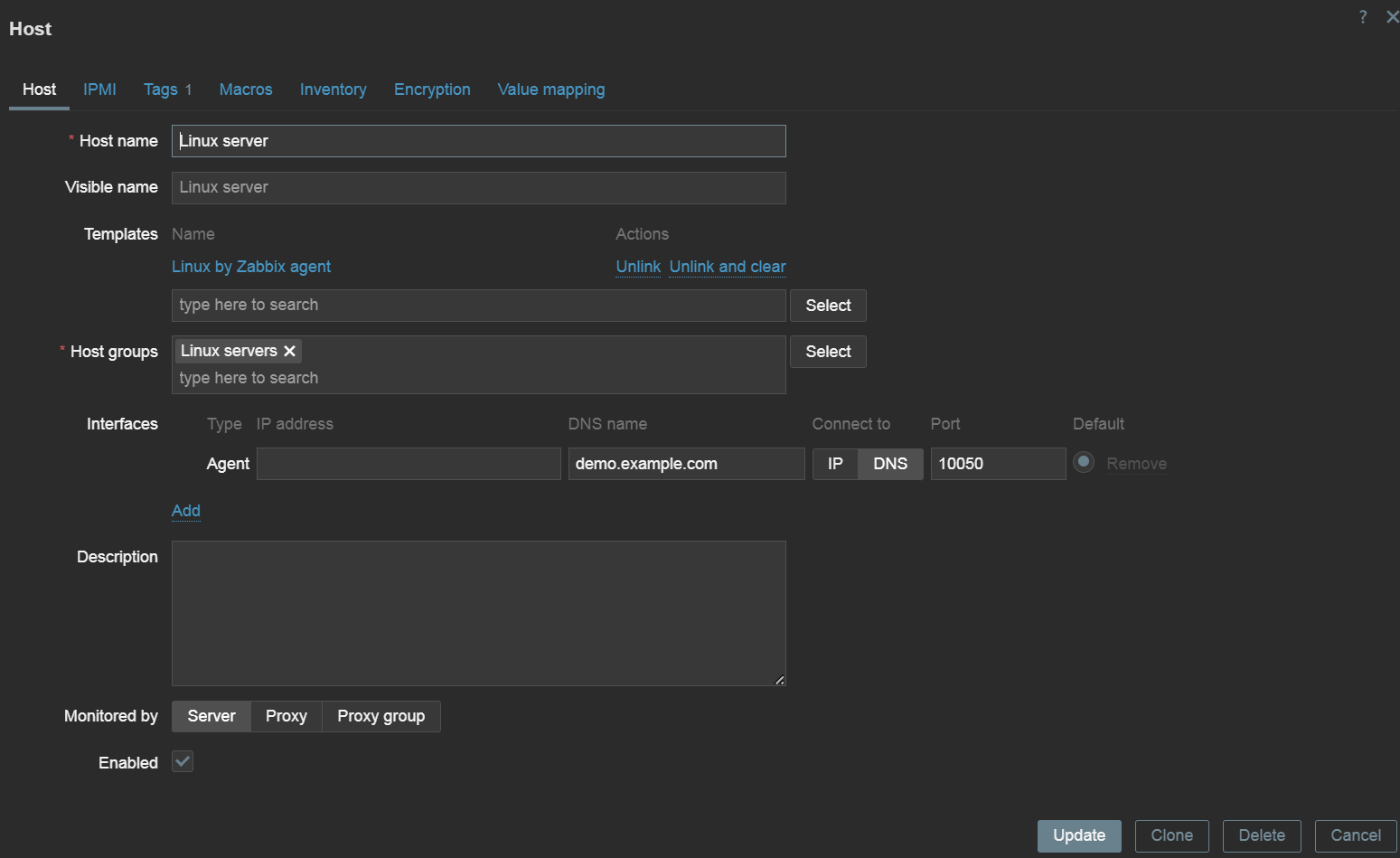
Every host has 2 mandatory parameters – its unique name and at least a single host group. Host groups are used for grouping, filtering, and assigning read/write permissions to hosts. Hosts are not limited when it comes to the number of host groups they are assigned to.

A simple Linux server host with an agent interface and a Linux template

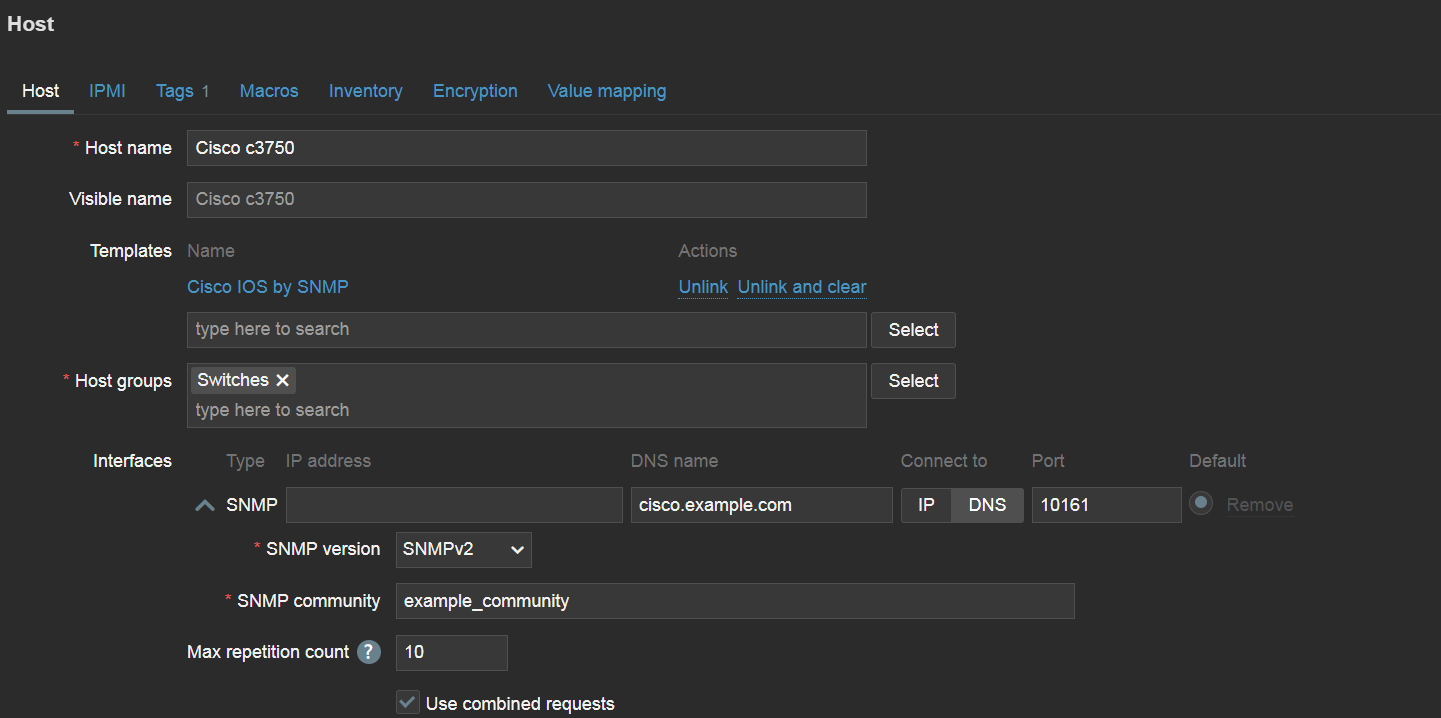
An interface might also be required, depending on the type of items we will create on the host. Interfaces define host addresses and, in case of SNMP interfaces, some additional authentication and security parameters.

There are 4 types of interfaces in total, representing 4 different data collection methods:

  • Agent
  • SNMP
  • JMX
  • IPMI
An SNMP device host with SNMP interface

Zabbix supports other types of data collection methods, but for these 4 methods in particular an interface is required on the host. Other data collection methods define endpoint addresses directly in the item configuration or use push data collection (trapping) where Zabbix is not required to know the endpoint address.

Templates

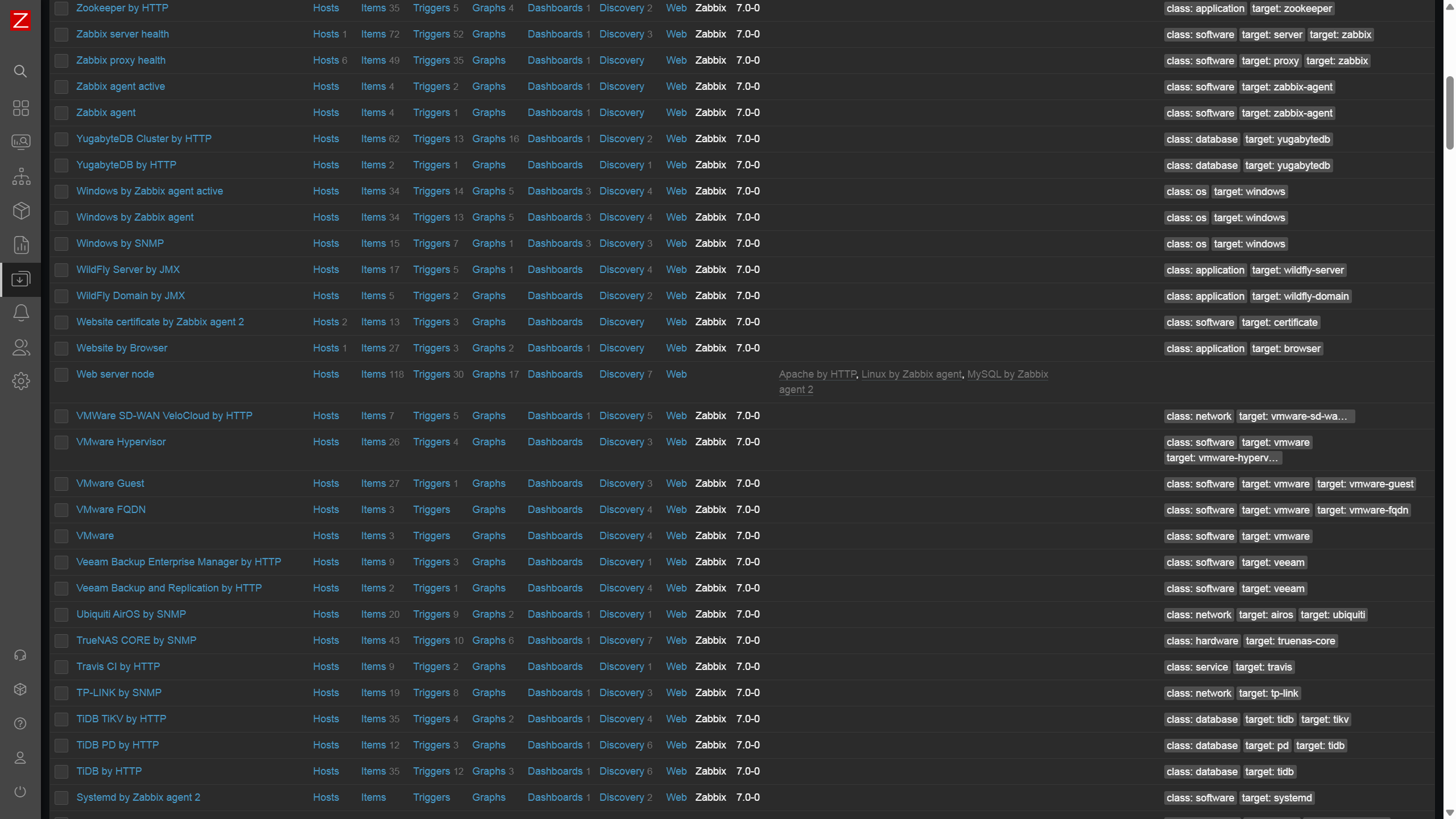
Templates contain a set of predefined items and triggers and can be linked to hosts. This enables the standardization of monitoring workflows in your environment. Changes made on the template will be immediately applied on the hosts to which the template is linked. Zabbix comes prepackaged with over 300 templates for a variety of vendors and endpoint types.

Zabbix comes pre-packaged with over 300 official templates

Zabbix users aren’t limited to just the official templates – anyone can create their own templates with items and triggers tailored to the requirements of a particular environment. We also recommend adjusting the official templates – disable the unnecessary items and adjust the triggers so they don’t generate any unnecessary noise.

Items

Items are used to define the metrics that we wish to collect, and are configured on hosts or templates. Items can be of various types. The type of the item usually defines the protocol and the methods used to collect metrics via this item. Some examples of item types:

  • Zabbix agent
  • SNMP agent
  • SNMP trap
  • Simple check
  • HTTP agent
  • IPMI agent
  • JMX agent
  • SSH agent
  • …and many others.

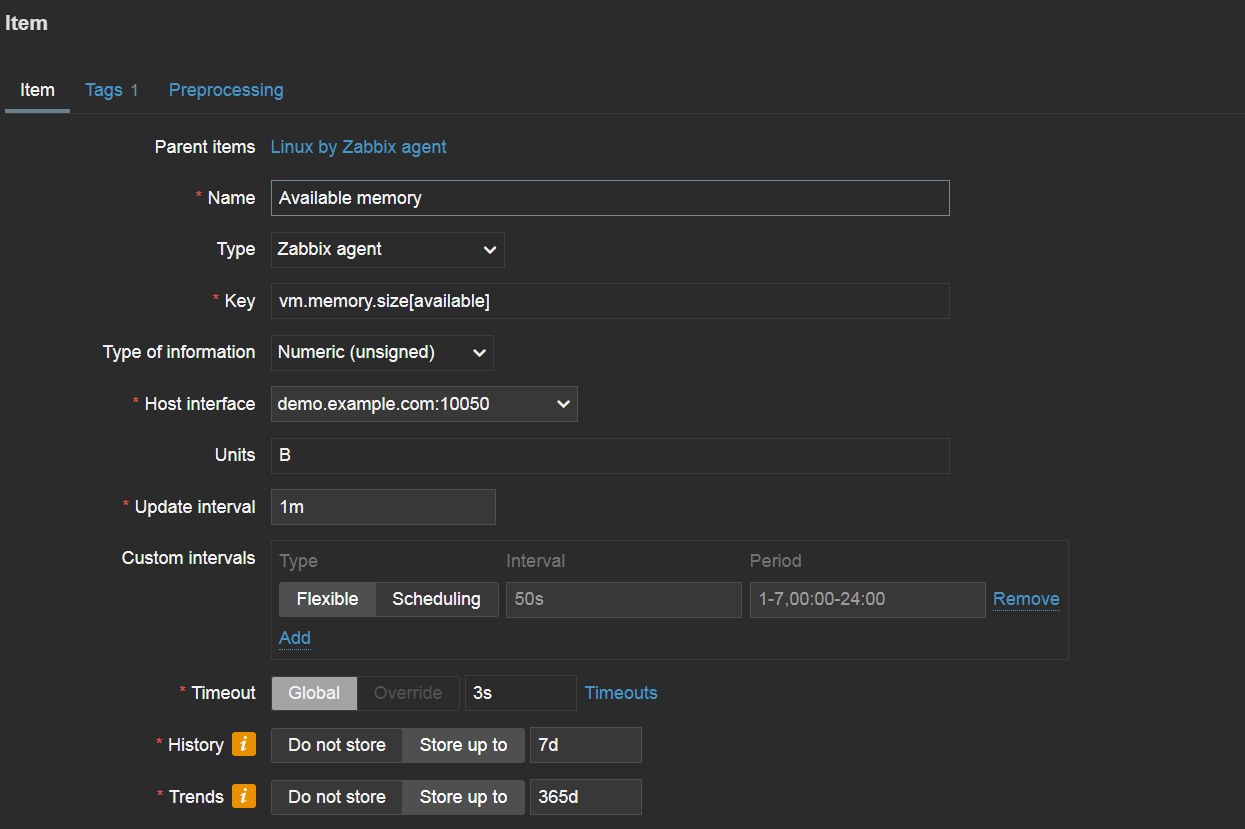
The key of the item is used to specify what particular metric should be collected. There are some exceptions to this – for example, for SNMP agent items it’s the OID field, while the key can be written arbitrarily. The key should be unique per host.

Available memory Zabbix agent item

The key uses a <key>[<parameters>] format. For example, if we wish to collect available memory by utilizing Zabbix agent, we will use the vm.memory.size[available] item key. If we wish to collect available memory in percent, we would use the vm.memory.size[pavailable] item key. A quick item key reference is available by pressing select next to the Key field. You can find more about the available item keys and other configuration details in our documentation.

The update interval specifies how often metrics should be collected for this key, and the history/trend storage periods define for how long the collected data should be retained.

Triggers

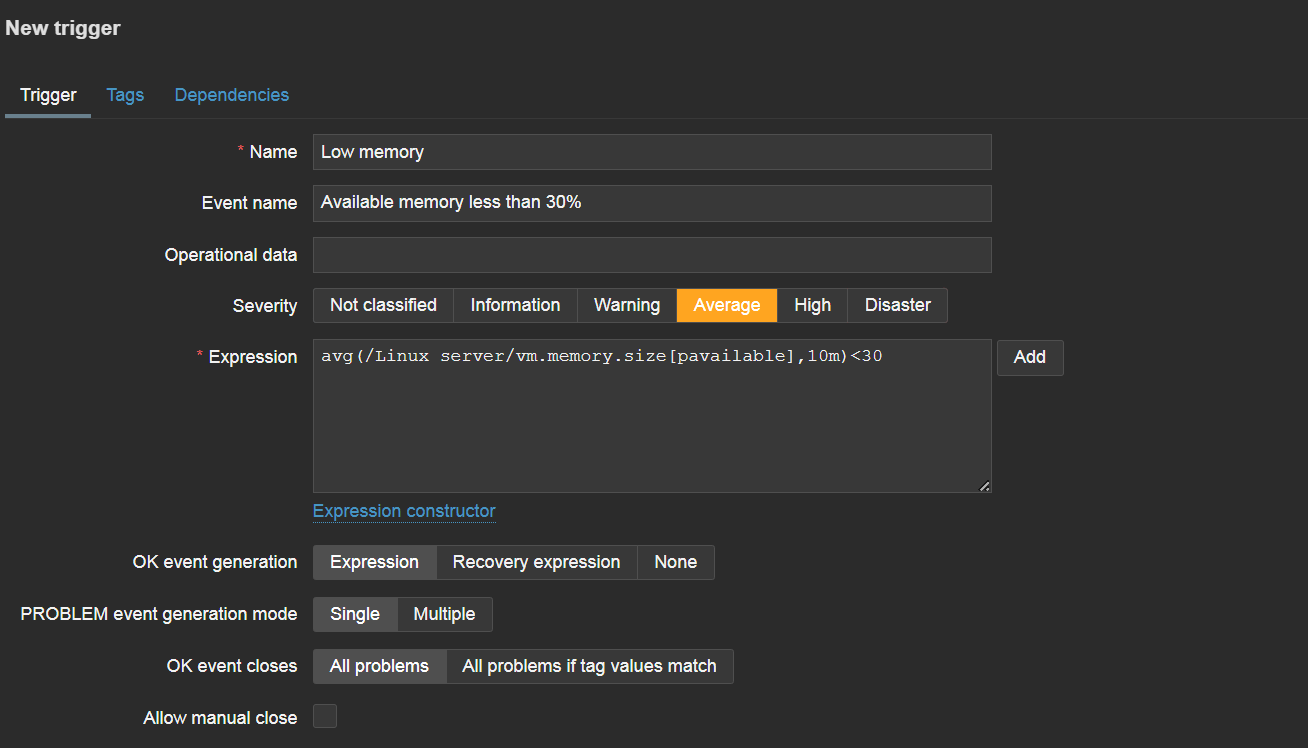
Once we have configured our items, we should create triggers to react to item values reaching problem thresholds. First, let’s define a simple trigger name. The name should be simple enough for our Zabbix administrators to understand the goal of the trigger simply by glancing at it.

Trigger reaction to low available memory over the last 10 minutes

The event name field is used to define the name with which our problems will be displayed. Since the problem event name is often used not just in Zabbix but also in the alerts that your administrators will receive in their mailboxes or via messaging and ITSM systems, the event name should be more descriptive, giving general details about the problematic situation.

Operational data fields are used to display information about the current state of items analyzed by the trigger. By default, the field will display the current value of our item (available memory, for example). This allows users to compare the current item values with item values at the time of problem creation and decide if any additional interference is necessary to resolve the problem.

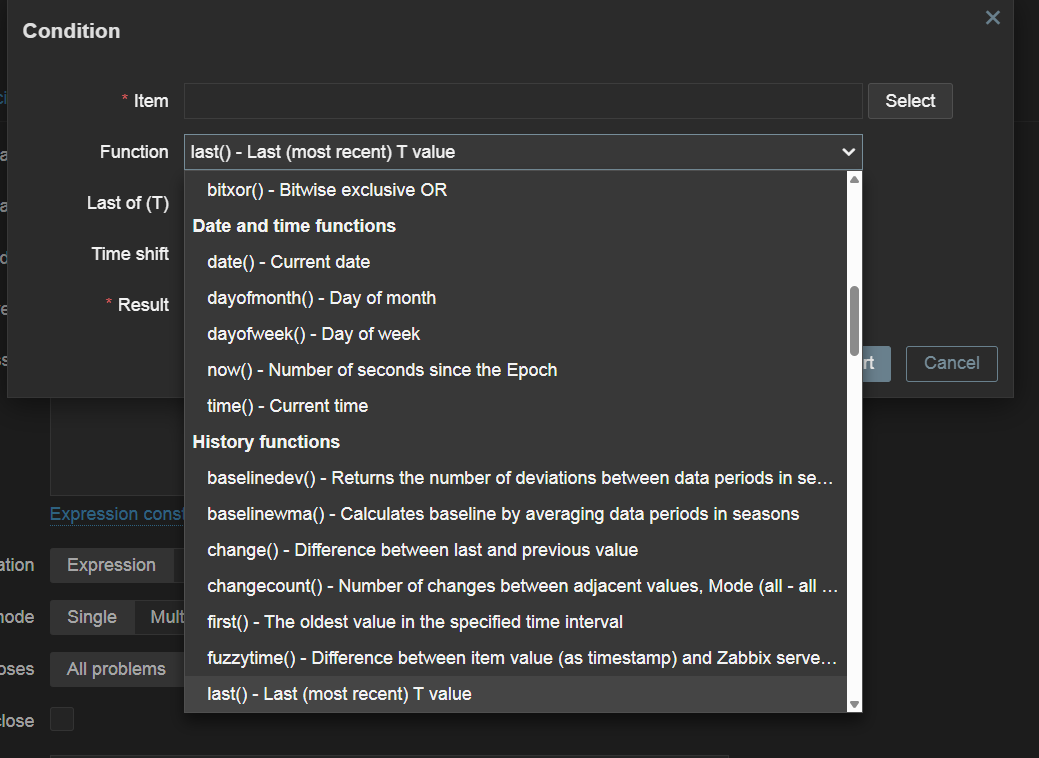
The expression field defines the logic behind detecting a problem. Here, we can either type in the expression manually or press the add button and build the expression by selecting the item that we wish to analyze – plus one of the various functions used for analysis. For example, the last function is used to analyze only the last received value and can generate a lot of noise when used for resource monitoring. Meanwhile, average, minimum, and maximum functions can be used to analyze values less sensitively over time. There are many more functions available for a variety of more advanced use cases – from string analysis functions to predictive functions and many others.

A large selection of functions can be used in trigger expressions to detect problems

Once the trigger is created, it will be recalculated every time any of the related items receive a new value.

This article covered only the basics of Host, item and trigger configuration. There are many more options for more advanced use cases. If you’re interested or need help with more advanced Zabbix features, please check out a variety of tutorials, how-tos and case studies in our blog and YouTube channel.

The post Getting Started with Zabbix – Hosts, Items, and Triggers appeared first on Zabbix Blog.

Signing key change for Kali Linux

Post Syndicated from corbet original https://lwn.net/Articles/1019255/

The Kali Linux distribution has announced
that software updates will soon start failing for all users:

This is not only you, this is for everyone, and this is entirely
our fault. We lost access to the signing key of the repository, so
we had to create a new one. At the same time, we froze the
repository (you might have noticed that there was no update since
Friday 18th), so nobody was impacted yet. But we’re going to
unfreeze the repository this week, and it’s now signed with the new
key.

The announcement includes instructions for how to recover from the problem.

Security updates for Tuesday

Post Syndicated from corbet original https://lwn.net/Articles/1019272/

Security updates have been issued by AlmaLinux (glibc, php:8.1, and thunderbird), Debian (libreoffice), Fedora (caddy), Mageia (chromium-browser-stable), Red Hat (php:8.1), SUSE (glow), and Ubuntu (kicad, linux-aws-5.15, linux-azure-nvidia, linux-gcp-5.15, mistral, python-mistral-lib, tomcat8, and trafficserver).

Applying Security Engineering to Prompt Injection Security

Post Syndicated from Bruce Schneier original https://www.schneier.com/blog/archives/2025/04/applying-security-engineering-to-prompt-injection-security.html

This seems like an important advance in LLM security against prompt injection:

Google DeepMind has unveiled CaMeL (CApabilities for MachinE Learning), a new approach to stopping prompt-injection attacks that abandons the failed strategy of having AI models police themselves. Instead, CaMeL treats language models as fundamentally untrusted components within a secure software framework, creating clear boundaries between user commands and potentially malicious content.

[…]

To understand CaMeL, you need to understand that prompt injections happen when AI systems can’t distinguish between legitimate user commands and malicious instructions hidden in content they’re processing.

[…]

While CaMeL does use multiple AI models (a privileged LLM and a quarantined LLM), what makes it innovative isn’t reducing the number of models but fundamentally changing the security architecture. Rather than expecting AI to detect attacks, CaMeL implements established security engineering principles like capability-based access control and data flow tracking to create boundaries that remain effective even if an AI component is compromised.

Research paper. Good analysis by Simon Willison.

I wrote about the problem of LLMs intermingling the data and control paths here.

Should we ditch the term ‘digital native’? The latest conversation on the podcast

Post Syndicated from Meg Wang original https://www.raspberrypi.org/blog/should-we-ditch-the-term-digital-native-the-latest-conversation-on-the-podcast/

The term ‘digital native’ was coined in 2001 to describe young people who grew up surrounded by technology, implying they possess an almost instinctive understanding of digital tools. But how accurate is that label today? Are they truly tech-savvy, or are they simply fluent in using user-friendly devices without a deeper understanding of how they work? 

Thumbnail titled 'Are young people really tech-savvy?'

In our latest podcast episode, we explore this crucial question: does growing up with technology automatically make someone digitally literate, or just digitally dependent?

Host James Robinson (Raspberry Pi Foundation) is joined by colleague Sway Grantham, Anna Lahtinen (Haaga-Helia University), and Nicole O’Connor (Digi Know This) to unpack the complexities of digital skills, access, and education, and to explore how the label of digital native can sometimes hide broader challenges.

This episode wraps up our three-part mini-series on digital literacy. Each episode builds on the conversations from the latest issue of Hello World magazine, offering expert insight and practical ideas from educators driving real change.

Who are the guests on the podcast, and what will I learn?

We’ve assembled a panel of expert guests to discuss and debate the concept of the digital native.

Square headshot of Anna Lahtinen who featured on the Hello World podcast.
Anna Lahtinen, Haaga-Helia University of Applied Sciences

Anna is an internationally recognised scholar who specialises in the transformative effects of artificial intelligence (AI) on working life, businesses, and careers. In the latest issue of Hello World, Anna and her colleague Antonia O’Connell write about assumptions regarding high digital literacy among youth in the setting of a work environment.

In the podcast, Anna explains that the term ‘digital native’ can be useful for starting conversations about the skills, access, and confidence people need to navigate technology, particularly in the workplace. However, she warns that the term can be misleading, as it often assumes that young people have strong digital skills, when many struggle with the practical demands of using technology at work.

Anna also highlights the importance of supporting young people to use technology responsibly and develop a healthy relationship with it. As she puts it:

“If we instil the right values in students, that will eventually lead to a healthy relationship with technology and ethical use of new tools in both their work and their lives.”

Square headshot of Nicole O'Connor who featured on the Hello World podcast.
Nicole O’Connor, Digi Know This

Nicole O’Connor is a two-time female founder who brings her expertise to improving teaching and learning through innovative EdTech, digital literacy, and accessibility.

In the podcast, Nicole challenges the idea of the digital native, calling it both problematic and overly simplistic. She explains that the term overlooks important differences, like access, privilege, and levels of exposure to technology, which all shape a person’s digital skills. For Nicole, it’s a “grey area” that proves we can’t assume young people are automatically tech-savvy just because they grew up with devices.

Nicole sees digital literacy as a journey, not something people are born with. She compares it to learning a language: while young people may be familiar with technology, they still need to develop deeper skills to become critical thinkers, careful users, and aware of issues like data privacy and online safety. As she puts it:

“They might have had some exposure, but over time they need to learn the skills to be digitally literate… They’re not even close to that.”

Listen or watch now

To hear more, listen to or watch the full episode.

You can watch or listen to each episode of our podcast on YouTube, or listen via your preferred audio streaming service, whether that’s Apple Podcasts, Spotify, or Amazon Music. 

You’ve listened to the podcast, now subscribe to the magazine

We hope this episode, along with the others in the series, inspires you and helps you to engage your students more in computing. In the comments section below, we’d love to hear your thoughts and experience around digital literacy.

The latest issue of Hello World magazine features more insightful articles on digital literacy. Don’t miss out on this discussion — subscribe to Hello World today to ensure you never miss a podcast episode or issue of the magazine.

The post Should we ditch the term ‘digital native’? The latest conversation on the podcast appeared first on Raspberry Pi Foundation.

NVIDIA DOCA Argus Adds New Cybersecurity Functions to NVIDIA BlueField-3 DPUs

Post Syndicated from Cliff Robinson original https://www.servethehome.com/nvidia-doca-argus-adds-new-cybersecurity-functions-to-nvidia-bluefield-3-dpus/

The new NVIDIA DOCA Argus adds new cybersecurity functions to NVIDIA BlueField-3 DPUs in AI factories

The post NVIDIA DOCA Argus Adds New Cybersecurity Functions to NVIDIA BlueField-3 DPUs appeared first on ServeTheHome.

Llama 4 models from Meta now available in Amazon Bedrock serverless

Post Syndicated from Danilo Poccia original https://aws.amazon.com/blogs/aws/llama-4-models-from-meta-now-available-in-amazon-bedrock-serverless/

The newest AI models from Meta, Llama 4 Scout 17B and Llama 4 Maverick 17B, are now available as a fully managed, serverless option in Amazon Bedrock. These new foundation models (FMs) deliver natively multimodal capabilities with early fusion technology that you can use for precise image grounding and extended context processing in your applications.

Llama 4 uses an innovative mixture-of-experts (MoE) architecture that provides enhanced performance across reasoning and image understanding tasks while optimizing for both cost and speed. This architectural approach enables Llama 4 to offer improved performance at lower cost compared to Llama 3, with expanded language support for global applications.

The models were already available on Amazon SageMaker JumpStart, and you can now use them in Amazon Bedrock to streamline building and scaling generative AI applications with enterprise-grade security and privacy.

Llama 4 Maverick 17B – A natively multimodal model featuring 128 experts and 400 billion total parameters. It excels in image and text understanding, making it suitable for versatile assistant and chat applications. The model supports a 1 million token context window, giving you the flexibility to process lengthy documents and complex inputs.

Llama 4 Scout 17B – A general-purpose multimodal model with 16 experts, 17 billion active parameters, and 109 billion total parameters that delivers superior performance compared to all previous Llama models. Amazon Bedrock currently supports a 3.5 million token context window for Llama 4 Scout, with plans to expand in the near future.

Use cases for Llama 4 models
You can use the advanced capabilities of Llama 4 models for a wide range of use cases across industries:

Enterprise applications – Build intelligent agents that can reason across tools and workflows, process multimodal inputs, and deliver high-quality responses for business applications.

Multilingual assistants – Create chat applications that understand images and provide high-quality responses across multiple languages, making them accessible to global audiences.

Code and document intelligence – Develop applications that can understand code, extract structured data from documents, and provide insightful analysis across large volumes of text and code.

Customer support – Enhance support systems with image analysis capabilities, enabling more effective problem resolution when customers share screenshots or photos.

Content creation – Generate creative content across multiple languages, with the ability to understand and respond to visual inputs.

Research – Build research applications that can integrate and analyze multimodal data, providing insights across text and images.

Using Llama 4 models in Amazon Bedrock
To use these new serverless models in Amazon Bedrock, I first need to request access. In the Amazon Bedrock console, I choose Model access from the navigation pane to toggle access to Llama 4 Maverick 17B and Llama 4 Scout 17B models.

Console screenshot.

The Llama 4 models can be easily integrated into your applications using the Amazon Bedrock Converse API, which provides a unified interface for conversational AI interactions.

Here’s an example of how to use the AWS SDK for Python (Boto3) with Llama 4 Maverick for a multimodal conversation:

import boto3
import json
import os

AWS_REGION = "us-west-2"
MODEL_ID = "us.meta.llama4-maverick-17b-instruct-v1:0"
IMAGE_PATH = "image.jpg"


def get_file_extension(filename: str) -> str:
    """Get the file extension."""
    extension = os.path.splitext(filename)[1].lower()[1:] or 'txt'
    if extension == 'jpg':
        extension = 'jpeg'
    return extension


def read_file(file_path: str) -> bytes:
    """Read a file in binary mode."""
    try:
        with open(file_path, 'rb') as file:
            return file.read()
    except Exception as e:
        raise Exception(f"Error reading file {file_path}: {str(e)}")

bedrock_runtime = boto3.client(
    service_name="bedrock-runtime",
    region_name=AWS_REGION
)

request_body = {
    "messages": [
        {
            "role": "user",
            "content": [
                {
                    "text": "What can you tell me about this image?"
                },
                {
                    "image": {
                        "format": get_file_extension(IMAGE_PATH),
                        "source": {"bytes": read_file(IMAGE_PATH)},
                    }
                },
            ],
        }
    ]
}

response = bedrock_runtime.converse(
    modelId=MODEL_ID,
    messages=request_body["messages"]
)

print(response["output"]["message"]["content"][-1]["text"])

This example demonstrates how to send both text and image inputs to the model and receive a conversational response. The Converse API abstracts away the complexity of working with different model input formats, providing a consistent interface across models in Amazon Bedrock.

For more interactive use cases, you can also use the streaming capabilities of the Converse API:

response_stream = bedrock_runtime.converse_stream(
    modelId=MODEL_ID,
    messages=request_body['messages']
)

stream = response_stream.get('stream')
if stream:
    for event in stream:

        if 'messageStart' in event:
            print(f"\nRole: {event['messageStart']['role']}")

        if 'contentBlockDelta' in event:
            print(event['contentBlockDelta']['delta']['text'], end="")

        if 'messageStop' in event:
            print(f"\nStop reason: {event['messageStop']['stopReason']}")

        if 'metadata' in event:
            metadata = event['metadata']
            if 'usage' in metadata:
                print(f"Usage: {json.dumps(metadata['usage'], indent=4)}")
            if 'metrics' in metadata:
                print(f"Metrics: {json.dumps(metadata['metrics'], indent=4)}")

With streaming, your applications can provide a more responsive experience by displaying model outputs as they are generated.

Things to know
The Llama 4 models are available today with a fully managed, serverless experience in Amazon Bedrock in the US East (N. Virginia) and US West (Oregon) AWS Regions. You can also access Llama 4 in US East (Ohio) via cross-region inference.

As usual with Amazon Bedrock, you pay for what you use. For more information, see Amazon Bedrock pricing.

These models support 12 languages for text (English, French, German, Hindi, Italian, Portuguese, Spanish, Thai, Arabic, Indonesian, Tagalog, and Vietnamese) and English when processing images.

To start using these new models today, visit the Meta Llama models section in the Amazon Bedrock User Guide. You can also explore how our Builder communities are using Amazon Bedrock in their solutions in the generative AI section of our community.aws site.

— Danilo


How is the News Blog doing? Take this 1 minute survey!

(This survey is hosted by an external company. AWS handles your information as described in the AWS Privacy Notice. AWS will own the data gathered via this survey and will not share the information collected with survey respondents.)

How the power outage of April 28, 2025, in Portugal and Spain impacted Internet traffic and connectivity

Post Syndicated from David Belson original https://blog.cloudflare.com/how-power-outage-in-portugal-spain-impacted-internet/

A massive power outage struck significant portions of Portugal and Spain at 10:34 UTC on April 28, grinding transportation to a halt, shutting retail businesses, and otherwise disrupting everyday activities and services. Parts of France were also reportedly impacted by the power outage. Portugal’s electrical grid operator blamed the outage on a “fault in the Spanish electricity grid”, and later stated that “due to extreme temperature variations in the interior of Spain, there were anomalous oscillations in the very high voltage lines (400 kilovolts), a phenomenon known as ‘induced atmospheric vibration’” and that “These oscillations caused synchronisation failures between the electrical systems, leading to successive disturbances across the interconnected European network.”

The breadth of Cloudflare’s network and our customer base provides us with a unique perspective on Internet resilience, enabling us to observe the Internet impact of this power outage at both a local and national level, as well as at a network level, across traffic, network quality, and routing metrics.

Impacts in Portugal

Country level

In Portugal, Internet traffic dropped as the power grid failed, with traffic immediately dropping by half as compared to the previous week, falling to approximately 90% below the previous week within the next five hours.


Request traffic from users in Portugal to Cloudflare’s 1.1.1.1 DNS resolver also fell when the power went out, initially dropping by 40% as compared to the previous week, and falling further over the next several hours. 


Network level

At a network level, the loss of Internet traffic from local providers including NOS, Vodafone, MEO, and NOWO was swift and significant. The Cloudflare Radar graphs below show that traffic from those networks effectively evaporated over the hours after the power outage began. The autonomous systems (ASNs) shown below for these providers may carry a mix of fixed and mobile broadband traffic. However, MEO breaks out at least some of their mobile traffic onto a separate ASN, and the graph below for MEO-MOVEL (AS42863) shows that request traffic from that network more than doubled after the power went out, as subscribers turned to their mobile devices for information about what was happening. However, despite the initial spike, this mobile traffic also fell over the next several hours, dropping to approximately half of the volume seen the prior week.


Regional level

In addition to looking at traffic at a national and network level, we can also look at traffic at a regional level. As noted above, the power outage did not impact every region of the country. The traffic graphs below show the changes in Internet traffic from the parts of Portugal where an impact was observed.

In Lisbon and Porto, a sharp, but limited drop in traffic was observed as the power outage began, with traffic recovering slightly almost as quickly. However, traffic gradually declined in the subsequent hours, in contrast to the other regions reviewed below.


The most significant immediate traffic drops were observed in Aveiro, Beja, Bragança, Castelo Branco, Évora, Faro, Guarda, Portalegre, Santarém, Viana do Castelo, Vila Real, and Viseu. In these areas, traffic fell and then quickly stabilized at very low volumes. In Braga and Setúbal, traffic declined more gradually after the initial drop.


Network quality

The power outage also impacted the quality of connectivity at a national level in Portugal. Prior to the loss of power, median download speeds across the country were around 40 Mbps, but within several hours after the state of the outage, fell as low as 15 Mbps. As expected, latency at a country level saw an opposite impact. Prior to the loss of power, median latency was around 20 ms. However, it gradually grew to as much as 50 ms. The lower download speeds and higher latency are likely due to the congestion of the network links that remained available.


Routing

Network infrastructure in Portugal was also impacted by the power outage, with the impact seen as a drop in announced IP address space. (This means that portions of Portuguese providers’ networks are no longer visible to the rest of the Internet.) The number of announced IPv4 /24s (blocks of 256 IPv4 addresses) dropped by ~300 (around 1.2%), and the number of announced IPv6 /48s (blocks of over 1.2 octillion IPv6 addresses) dropped from 17,928,551 to 16,355,607 (around 9%). Address space began to drop further after 16:00 UTC, possibly as a result of backup power being exhausted and associated network infrastructure falling offline.


Impacts in Spain

Country level

In Spain, Internet traffic dropped as the power grid failed, with traffic immediately dropping by around 60% as compared to the previous week, falling to approximately 80% below the previous week within the next five hours.


Request traffic from users in Spain to Cloudflare’s 1.1.1.1 DNS resolver also fell when the power went out, initially dropping by 54% as compared to the previous week, but quickly stabilizing. 


Network level

At a network level, traffic volumes from the top five ASNs in Spain fell rapidly once power was lost, with most declining gradually over the next several hours. In contrast, traffic from Digi Spain Telecom (AS57269) fell quickly, but then stabilized at the lower level. In comparison to the previous week, traffic from these providers fell between 75% and 93% in the hours after the power outage began.


Regional level

In most of the impacted regions in Spain, traffic dropped off quickly and stabilized, or continued to fall further. However, some recovery in traffic is also evident, and can be seen in Navarre, La Rioja, Cantabria, and Basque Country. This traffic recovery is likely associated with an initial restoration of power in those regions, as an update from Red Eléctrica (operator of Spain’s national electricity grid) noted that “Electricity is now available in parts of Catalonia, Aragon, the Basque Country, Galicia, Asturias, Navarre, Castile and León, Extremadura, Andalusia, and La Rioja.”


Network quality

The power outage also impacted the quality of connectivity at a national level in Spain. Prior to the loss of power, median download speeds across the country were around 35 Mbps, but within several hours after the state of the outage, fell as low as 19 Mbps. Interestingly, the median bandwidth didn’t see the clean gradual decline as it did in Portugal, instead falling and recovering twice before gradually declining.

As expected, latency at a country level saw a significant increase. Prior to the loss of power, median latency was around 22 ms, but grew to as much as 40 ms. As in Portugal, the lower download speeds and higher latency are likely due to the congestion of the network links that remained available.


Routing

Similar to Portugal, network infrastructure in Spain was also impacted by the power outage, with the impact seen as a drop in announced IP address space. By 14:30 UTC, the number of announced IPv4 /24 address blocks had fallen by around 2.4%, and continued to drop further over the following hours. The number of announced IPv6 /48 address blocks fell by over 8% during that same time span, and also continued to drop in the following hours.


Impacts in other European countries

Parts of Andorra and France were also reportedly impacted by the power outage, with additional outages reported as far away as Belgium. At a national level, no traffic disruptions were evident in any of the countries.

Analysis of traffic at a regional level in France shows a slight decline concurrent with the power outage in several regions, but the drops were nominal in comparison to Spain and Portugal, and traffic volumes recovered to expected levels within 90 minutes. No impact was evident at a regional level in Andorra.

It appears that Morocco may have been impacted in some fashion by the power outage, or at least Orange Maroc was. In a post on X, the provider stated (translated) “Internet traffic has been disrupted following a massive power outage in Spain and Portugal, which is affecting international connections.” Cloudflare Radar shows that traffic from the network fell sharply around 12:00 UTC, 90 minutes after the power outage began, with a full outage beginning around 15:00 UTC.


Conclusion

Power restoration in Spain had already started as this post was being written, and full recovery will likely take hours to days. As power is restored, Internet traffic and other metrics will recover as well. The current state of Internet connectivity in Spain and Portugal can be tracked on Cloudflare Radar.

The Cloudflare Radar team is constantly monitoring for Internet disruptions, sharing our observations on the Cloudflare Radar Outage Center, via social media, and in posts on blog.cloudflare.com. Follow us on social media at @CloudflareRadar (X), noc.social/@cloudflareradar (Mastodon), and radar.cloudflare.com (Bluesky), or contact us via email.

Reduce your operational overhead today with Amazon CloudFront SaaS Manager

Post Syndicated from Veliswa Boya original https://aws.amazon.com/blogs/aws/reduce-your-operational-overhead-today-with-amazon-cloudfront-saas-manager/

Today, I’m happy to announce the general availability of Amazon CloudFront SaaS Manager, a new feature that helps software-as-a-service (SaaS) providers, web development platform providers, and companies with multiple brands and websites efficiently manage delivery across multiple domains. Customers already use CloudFront to securely deliver content with low latency and high transfer speeds. CloudFront SaaS Manager addresses a critical challenge these organizations face: managing tenant websites at scale, each requiring TLS certificates, distributed denial-of-service (DDoS) protection, and performance monitoring.

With CloudFront Saas Manager, web development platform providers and enterprise SaaS providers who manage a large number of domains will use simple APIs and reusable configurations that use CloudFront edge locations worldwide, AWS WAF, and AWS Certificate Manager. CloudFront SaaS Manager can dramatically reduce operational complexity while providing high-performance content delivery and enterprise-grade security for every customer domain.

How it works
In CloudFront, you can use multi-tenant SaaS deployments, a strategy where a single CloudFront distribution serves content for multiple distinct tenants (users or organizations). CloudFront SaaS Manager uses a new template-based distribution model called a multi-tenant distribution to serve content across multiple domains while sharing configuration and infrastructure. However, if supporting single websites or application, a standard distribution would be better or recommended.

A template distribution defines the base configuration that will be used across domains such as origin configurations, cache behaviors, and security settings. Each template distribution has a distribution tenant to represent domain-specific origin paths or origin domain names including web access control list (ACL) overrides and custom TLS certificates.

Optionally, multiple distribution tenants can use the same connection group that provides the CloudFront routing endpoint that serves content to viewers. DNS records point to the CloudFront endpoint of the connection group using a Canonical Name Record (CNAME).

To learn more, visit Understand how multi-tenant distributions work in the Amazon CloudFront Developer Guide.

CloudFront SaaS Manager in action
I’d like to give you an example to help you understand the capabilities of CloudFront SaaS Manager. You have a company called MyStore, a popular e-commerce platform that helps your customer easily set up and manage an online store. MyStore’s tenants already enjoy outstanding customer service, security, reliability, and ease-of-use with little setup required to get a store up and running, resulting in 99.95 percent uptime for the last 12 months.

Customers of MyStore are unevenly distributed across three different pricing tiers: Bronze, Silver, and Gold, and each customer is assigned a persistent mystore.app subdomain. You can apply these tiers to different customer segments, customized settings, and operational Regions. For example, you can add AWS WAF service in the Gold tier as an advanced feature. In this example, MyStore has decided not to maintain their own web servers to handle TLS connections and security for a growing number of applications hosted on their platform. They are evaluating CloudFront to see if that will help them reduce operational overhead.

Let’s find how as MyStore you configure your customer’s websites distributed in multiple tiers with the CloudFront SaaS Manager. To get started, you can create a multi-tenant distribution that acts as a template corresponding to each of the three pricing tiers the MyStore offers: Bronze, Sliver, and Gold shown in Multi-tenant distribution under the SaaS menu on the Amazon CloudFront console.

To create a multi-tenant distribution, choose Create distribution and select Multi-tenant architecture if you have multiple websites or applications that will share the same configuration. Follow the steps to provide basic details such as a name for your distribution, tags, and wildcard certificate, specify origin type and location for your content such as a website or app, and enable security protections with AWS WAF web ACL feature.

When the multi-tenant distribution is created successfully, you can create a distribution tenant by choosing Create tenant in the Distribution tenants menu in the left navigation pane. You can create a distribution tenant to add your active customer to be associated with the Bronze tier.

Each tenant can be associated with up to one multi-tenant distribution. You can add one or more domains of your customers to a distribution tenant and assign custom parameter values such as origin domains and origin paths. A distribution tenant can inherit the TLS certificate and security configuration of its associated multi-tenant distribution. You can also attach a new certificate specifically for the tenant, or you can override the tenant security configuration.

When the distribution tenant is created successfully, you can finalize this step by updating a DNS record to route traffic to the domain in this distribution tenant and creating a CNAME pointed to the CloudFront application endpoint. To learn more, visit Create a distribution in the Amazon CloudFront Developer Guide.

Now you can see all customers in each distribution tenant to associate multi-tenant distributions.

By increasing customers’ business needs, you can upgrade your customers from Bronze to Silver tiers by moving those distribution tenants to a proper multi-tenant distribution.

During the monthly maintenance process, we identify domains associated with inactive customer accounts that can be safely decommissioned. If you’ve decided to deprecate the Bronze tier and migrate all customers who are currently in the Bronze tier to the Silver tier, then you can delete a multi-tenant distribution to associate the Bronze tier. To learn more, visit Update a distribution or Distribution tenant customizations in the Amazon CloudFront Developer Guide.

By default, your AWS account has one connection group that handles all your CloudFront traffic. You can enable Connection group in the Settings menu in the left navigation pane to create additional connection groups, giving you more control over traffic management and tenant isolation.

To learn more, visit Create custom connection group in the Amazon CloudFront Developer Guide.

Now available
Amazon CloudFront SaaS Manager is available today. To learn about, visit CloudFront SaaS Manager product page and documentation page. To learn about SaaS on AWS, visit AWS SaaS Factory.

Give CloudFront SaaS Manager a try in the CloudFront console today and send feedback to AWS re:Post for Amazon CloudFront or through your usual AWS Support contacts.

— Veliswa.
_______________________________________________

How is the News Blog doing? Take this 1 minute survey!

(This survey is hosted by an external company. AWS handles your information as described in the AWS Privacy Notice. AWS will own the data gathered via this survey and will not share the information collected with survey respondents.)

The collective thoughts of the interwebz