Considerations for the security operations center in the cloud: deployment using AWS security services

Post Syndicated from Stuart Gregg original https://aws.amazon.com/blogs/security/considerations-for-the-security-operations-center-in-the-cloud-deployment-using-aws-security-services/

Welcome back. If you’re joining this series for the first time, we recommend that you read the first blog post in this series, Considerations for security operations in the cloud, for some context on what we will discuss and deploy in this blog post. In the earlier post, we talked through the different operating models (centralized, decentralized, or hybrid) that you can deploy for a Security Operations Center (SOC) function when you operate in the cloud. We covered the advantages of each model and some of the potential drawbacks you might see when you start to scale up operations within the cloud.

This post will focus on the Amazon Web Services (AWS) native security service, AWS Security Hub, that you can use to deploy in different SOC operating models. AWS Security Hub is a cloud security posture management service that SOC teams can use to perform security best practice checks and aggregate alerts. AWS Security Hub accepts findings from multiple sources, whether native to AWS, from the pre-built integrations, or from your own sources converted into the AWS Security Finding Format (ASFF). The data collected in Security Hub facilitates response and remediation actions.

Although the models we describe here use services that are native to AWS, the reference architectures that correspond to each operating model can be applied to a variety of deployments, including multi-cloud and traditional on-premises deployments. The majority of this post will focus on the decentralized and hybrid models—the centralized model is well documented and has reference architectures already available for you today.

Each organization is different, and no one operating model will fit everyone. You should choose the model that works best for your organizational landscape, with an understanding that the landscape will change and evolve over time. Using feedback loops and being open to change is important to help you meet the continued needs of your business. Additional factors to consider include, but are not limited to: staff skills, compliance requirements, previous operating model, and budget.

The centralized model

The centralized operating model for the SOC is well documented and frequently discussed, both at AWS and in the security community. According to AWS best practices, typically you designate a central security tooling account that is dedicated to operating security services, monitoring AWS accounts, and automating security alerting and response. The security tooling account serves as the administrator account for security services that are managed in an administrator/member structure across your AWS accounts. The key objectives for establishing a security tooling account are the following:

  • Provide a dedicated enclave with controlled access for managing security guardrails, monitoring, and response.
  • Maintain the appropriate centralized security infrastructure to monitor security operations data and maintain traceability across the security lifecycle.

Figure 1 demonstrates the variety of AWS security services that you can deploy in the central security account. For example, Security Hub within the security tooling account can act as the administrator to enable Security Hub in the member accounts, as well as view findings, view insights, and set security standards across member accounts, which can help simplify security posture management across your existing and future accounts.

Figure 1: Reference architecture for the security tooling account in a centralized model

Figure 1: Reference architecture for the security tooling account in a centralized model

As mentioned earlier, you can enable Security Hub to administer and enable member accounts. This is achieved by using AWS Organizations and the delegated administrator functionality. In addition, you can use Security Hub cross-Region aggregation within the delegated administrator account to aggregate findings, finding updates, insights, control compliance statuses, and security scores from multiple Regions to a single aggregation Region. You can then manage this data from the aggregation Region. Figure 2 shows the reference architecture for this functionality.

Figure 2: Reference architecture for Security Hub in the delegated administrator model

Figure 2: Reference architecture for Security Hub in the delegated administrator model

The AWS Security Reference Architecture (AWS SRA) is a great starting point for establishing the centralized security operations model. The AWS SRA is a holistic set of guidelines for deploying the full complement of AWS security services in a multi-account environment. You can use it to help design, implement, and manage AWS security services so that they align with AWS best practices. The AWS SRA’s Security Hub Organization solution provides deployable templates and examples that automate the process of enabling Security Hub by delegating administration to an account and configuring Security Hub for the existing and future AWS Organizations accounts.

The decentralized and hybrid models

As mentioned in Considerations for security operations in the cloud, the decentralized and hybrid SOC models provide many benefits for organizations. The flexibility of these operating models allows organizational units (OUs) to control how they deal with security-related incidents while still having organization-wide visibility into security posture. This flexibility is important as organizations start to scale up activities within the cloud.

The reference architecture in Figure 3 shows how the benefits we discussed in our earlier blog post can be architected in the decentralized and hybrid operating models in the AWS Cloud.

Figure 3: Reference architecture for the decentralized and hybrid operating models in AWS

Figure 3: Reference architecture for the decentralized and hybrid operating models in AWS

The key features of this architecture are as follows:

  1. The organization root account is separate, according to AWS Organizations best practices. By using service control policies (SCPs), the root account can still achieve a level of governance across the business.
  2. Dedicated accounts have been created for each OU for the Security Hub administration. The model we will use for this deployment is the invite model. In this reference architecture and as an example, we’re using Amazon GuardDuty to flow findings into Security Hub. When you use this model, each OU can manage findings for that OU. This gives you flexibility to work from the Security Hub admin with full visibility of the OU and accounts associated with that OU, or to work in each member account and view findings for that account only.
  3. (Optional, for use with the hybrid model) Each OU’s Security Hub member accounts first send events to their Security Hub admin account. The Security Hub admin account will then send events for that OU to the local Amazon EventBridge bus. You can then set up rules to forward events to a central EventBridge bus in a dedicated AWS account. In the architecture in Figure 3, this account is named SecAnalytics. This step will follow a similar flow as the one described in this AWS Cloud Operations & Migrations blog post.
  4. (Optional, for use with the hybrid model) After the OUs have sent data to the central bus, you can use a capability similar to the one in this AWS Architecture Blog post to start organizing the findings and gain organization-wide visibility. The solution in the earlier post used Amazon QuickSight to visualize the data, but you can use another tool or pre-existing data pipeline.

Items 3 and 4 labeled with (Optional) are capabilities that enable the hybrid model; these are not required if you only want to enable the decentralized model.

Considerations for all deployments

Keep the following considerations in mind for all deployments:

  • Steady state operations should be considered for whichever model you deploy in. For the centralized model, you can use functionality within AWS Organizations to automatically enable Security Hub for accounts within the organization. In the decentralized and hybrid models, you will need to build out this capability or use a similar capability as described in this repo.
  • Alert fatigue happens when humans work on the same repetitive tasks’ day in and day out. To help reduce this, within the reference architecture and solution overview, we’ve added the capability described in this Security Blog post to automatically suppress findings based on criteria set by you. For the centralized model, you can add this capability in the delegated admin account for Security Hub. For the decentralized and hybrid models, we recommend that you put the auto-suppression capability in the Security Hub admin account, and then centralize the rules for suppression for that OU at the Security Hub admin level. This will reduce the overhead for deploying suppression rules multiple times and give a single location where rules are placed for that OU.
  • Context is key. Within the reference architecture and solution overview for decentralized and hybrid deployments, we’ve added the capability described in this Security Blog post. This capability will add additional context, such as the account name, the OU associated with the account, security contact information, and account tags. This information is pulled from AWS Organizations to enrich Security Hub findings. This additional context can also be used in the centralized model.

Deploy the decentralized and hybrid models

In this section, we’ll walk you through the deployment that reflects the reference architecture for the decentralized and hybrid models. Figure 4 shows the solution architecture, including the solution that needs to be deployed in the Security Hub admin account and in the aggregation Region for each business unit within the organization. The solution provides the capability to suppress Security Hub findings, enrich the findings, and propagate findings to central security accounts.

Figure 4: Reference architecture for the decentralized and hybrid deployment

Figure 4: Reference architecture for the decentralized and hybrid deployment

The solution architecture consists of the following:

  • An EventBridge rule to invoke a Lambda function (Suppression Lambda) as the target to suppress any findings based on specific generator IDs within specific member accounts.

    Note: The Security Hub Generator IDs and AWS Account IDs in the EventBridge rule are left as placeholders so that you can fill based on your needs.

  • An EventBridge rule to invoke a Lambda function (Enrichment Lambda) as the target to enrich the findings with AWS account and OU related metadata, along with alternate contact information to better prioritize the findings. The API calls to AWS Organizations and AWS account management services are optimized by caching the metadata in an Amazon DynamoDB table with a time-to-live (TTL) value of 24 hours.
  • An EventBridge rule to post the enriched findings that were not suppressed to a custom EventBridge event bus in the organization-level Security Tooling/SecAnalytics account.

Prerequisites

The following are the prerequisites for this deployment:

  • AWS Organizations is utilized across the business. In this scenario, AWS Organizations will be used to group AWS accounts into OUs, as well as to provide enrichment data for Security Hub findings.
  • Alternative contacts for AWS accounts have been filled out with the most up-to-date information. This is a best practice recommendation. This information will be used for enrichment of the Security Hub findings.
  • Your organization already has a pipeline in place for indexing Security Hub findings and visualizing them.
  • Security Hub is set up in the invite model. OU-level Security Hub accounts have been invited and accepted to be managed by the OU-level Security Hub admin account.
  • The grouping of findings across multiple OU-level Security Hub admin accounts uses Amazon EventBridge to forward events to a centralized bus. You should have the event bus set up ready for this deployment.

Deploy the solution

This solution deployment consists of two parts:

  1. Create an IAM role in your Organizations management account that allows BU-level Security Hub admin to access account metadata, as described in the Create the IAM role procedure that follows.
  2. Deploy the Enrichment Lambda function, the Suppression Lambda function, and the associated EventBridge event rules within the BU-level Security Hub administrator account.

Create the IAM role

Follow the instructions in Creating a role to delegate permissions to an IAM user to create an IAM role by using the IAM console, AWS Command Line Interface (AWS CLI), or AWS API. Create the role in the AWS Organizations management account with the role name as account-contact-readonly, based on the following trust and permission policy templates. You will need the account ID of your BU-level Security Hub administrator account.

The IAM trust policy allows the Security Hub administrator account to assume the role in your Organizations management account.

Note: The following trust policy shows only one BU Security admin account. You will need to add all BU Security admin accounts to the trust policy.

IAM role trust policy

{
   "Version": "2012-10-17",
   "Statement": [
     {
       "Effect": "Allow",
       "Principal": {
         "AWS": "arn:aws:iam::<BU SecHubAdmin Account ID>:root"
       },
       "Action": "sts:AssumeRole",
       "Condition": {}
     }
   ]
 }

Note: Replace <BU SecHubAdmin Account ID> with the account ID of your decentralized BU-level Security Hub administrator account. After the solution is deployed, you should update the principal in the preceding trust policy to use the new IAM role created for the solution.

IAM permission policy

{
     "Version": "2012-10-17",
     "Statement": [
         {
            "Action": "Account:GetAlternateContact",
            "Resource": [
                "arn:aws:account::<Org Management Account ID>:account/o-*/*"
            ],
            "Effect": "Allow"
        },
        {
            "Action": [
                "organizations:DescribeAccount",
                "organizations:ListTagsForResource",
                "organizations:DescribeOrganizationalUnit",
                "organizations:ListParents"
            ],
            "Resource": [
                "arn:aws:organizations::<Org Management Account ID>:account/o-*/*",
                "arn:aws:organizations::<Org Management Account ID>:ou/o-*/ou-*"
            ],
            "Effect": "Allow"
        }
     ]
 }

The IAM permission policy allows the Security Hub administrator account to look up the alternate contact information for the member accounts.

Make a note of the role Amazon Resource Name (ARN) for the IAM role, which will be similar to this format:
arn:aws:iam::<Org Management Account ID>:role/account-contact-readonly.

You will need this ARN when you deploy the solution in the next procedure.

Use AWS CloudFormation to create the IAM role

Alternatively, you can use the CloudFormation template we provide in our GitHub repository to create the role in the management account. The IAM role ARN is available in the Outputs section of the created CloudFormation stack.

Deploy the solution to your BU-level Security Hub administrator account

After you have the IAM role created, you can deploy the solution either from the AWS Management Console, or from our GitHub repository by using the AWS SAM CLI.

Note: If you’ve designated an aggregation Region within the BU-level Security Hub administrator account, you can deploy this solution only in the aggregation Region. Otherwise, you need to deploy this solution separately in each Region of the BU-level Security Hub administrator account where Security Hub is enabled.

To deploy the solution by using the AWS Management Console

  1. In your Security Hub administrator account, launch the template by choosing the following Launch Stack button, which creates the stack the in us-east-1 Region.

    Launch Stack stack

    Note: If your Security Hub aggregation Region is different than us-east-1 or you want to deploy the solution in a different AWS Region, you can deploy the solution from the GitHub repository described in the next section.

  2. On the Quick create stack page, for Stack name, enter a unique stack name for this account; for example, aws-security-hub-decentralized-deployment-stack
     
    Figure 5: Quick create CloudFormation stack for the solution

    Figure 5: Quick create CloudFormation stack for the solution

  3. For SecurityToolingAccountEventBus, provide the EventBus ARN in the security tooling account to post the Security Hub findings from the BU-level Security Hub administrator account.
  4. For OrgManagementAccountContactRole, enter the role ARN of the role you created previously in the Create IAM role procedure.
  5. Choose Create stack.
  6. After the stack is created, go to the Resources tab and take note of the name of the IAM role that was created.
  7. Update the principal element of the IAM role trust policy that you previously created in the Organizations management account in the Create the IAM role procedure, replacing the existing value with the role name you noted down.

To deploy the solution from our GitHub repository and AWS SAM CLI

  1. Install the AWS SAM CLI.
  2. Download or clone the GitHub repository by using the following commands.

    git clone https://github.com/aws-samples/aws-securityhub-decentralized-operations-solution.git
    cd aws-securityhub-decentralized-operations-solution

  3. Update the content of the profile.txt file with the profile name you want to use for the deployment.
  4. To create a new bucket for deployment artifacts, run create-bucket.sh by specifying the Region as argument.

    $ ./create-bucket.sh us-east-1

  5. Deploy the solution to the account by running the deploy.sh script by specifying the Region as argument.

    $ ./deploy.sh us-east-1

  6. After the stack is created, go to the Resources tab and take note of the name of the IAM role that was created.
  7. Update the principal element of the IAM role trust policy that you previously created in the Organizations management account in the Create the IAM role procedure, replacing it with the role name you noted down.

    "AWS": "arn:aws:iam::<BU SH Delegated Account ID>: role/<Role Name>"

Note: The EventBridge rule to invoke the findings suppression Lambda function uses placeholders for the generator IDs and AWS account IDs. You need to update the EventBridge rule to meet your specific organizational requirements.

Further enhancements and conclusion

Beyond what is described in the decentralized and hybrid models, you can extend the solution to include the following aspects to meet your security operational needs:

  • In Considerations for security operations in the cloud, we spoke about the role of ChatOps. AWS Chatbot can enable OUs to set up rules to post notifications directly into chat rooms such as Amazon Chime or Slack. You can define rules to send only certain severity notifications or findings that are important to your OU to the chat room.
  • SCPs give organizations a level of control and governance. See this blog post for some best practices for deploying SCPs, as well as example policies that could be beneficial for your organization in any model you operate in.
  • We’ve performed testing of the decentralized and hybrid models in the reference architecture within one AWS Region. Although we don’t see any reason why this solution would not work in multiple Regions, if you do operate in multiple Regions you would need to deploy the CloudFormation template in each Region that you operate in. At this stage, you can keep findings within a Region or choose to centralize across multiple Regions by sending to the single central bus in Amazon EventBridge—the flexibility is yours.
  • The decentralized and hybrid models can also be extended if you operate in multiple organizations in AWS Organizations or have standalone accounts outside of your organization that you want to monitor. Interesting use cases could be in mergers and acquisitions scenarios, when newly acquired accounts need to be monitored to understand their posture before bringing them fully into the organization.

Throughout this two-part blog series, we’ve explored the role of the Security Operations Center (SOC) function, both traditionally in an on-premises environment and in the cloud. We’ve explored different operating models, from the traditional centralized deployment to the decentralized and hybrid models. We’ve also demonstrated, with reference architectures and deployable solutions, how you can achieve the different operating models in the AWS Cloud by using native AWS services. In the end, you should choose the model that works best for your environment and the security landscape you work in.

 
If you have feedback about this post, submit comments in the Comments section below. If you have questions about this post, contact AWS Support.

Want more AWS Security news? Follow us on Twitter.
Stuart Gregg

Stuart Gregg

Stuart enjoys providing thought leadership and being a trusted advisor to customers. In his spare time Stuart can be seen either training for an Ironman or snacking.

Author

Siva Rajamani

Siva is a Boston-based Enterprise Solutions Architect. He enjoys working closely with customers and supporting their digital transformation and AWS adoption journey. His core areas of focus are Serverless, Application Integration, and Security.

GitHub Actions: Introducing faster GitHub-hosted x64 macOS runners

Post Syndicated from Stephen Glass original https://github.blog/2023-03-01-github-actions-introducing-faster-github-hosted-x64-macos-runners/

Today, GitHub is releasing a public beta for all new, more powerful hosted macOS runners for GitHub Actions. Teams who are looking to speed up their macOS jobs now have new options to meet their needs.

Faster GitHub-hosted macOS runners

When developers use GitHub-hosted runners for GitHub Actions, GitHub is always working to give teams performance and flexibility to quickly build for different platforms. The new GitHub-hosted macOS runners are based on the most current x64 Apple hardware and reduce the time it takes to run your jobs. This means less time waiting on your CI and more time building and rapidly testing code.

In addition to the existing 3-core macOS hosted runners, we are also introducing a new “XL” size, 12-core macOS runner to allow you to pay for that extra performance when you need it. Increasing your runner size is as simple as changing a single line in your workflow file, making it super easy to speed up lagging builds, and with on-demand availability when you want it, you only pay for what you use.

PyTorch, the open source machine learning framework, has used the new runner to improve build times from 1.5 hours to 30 minutes!

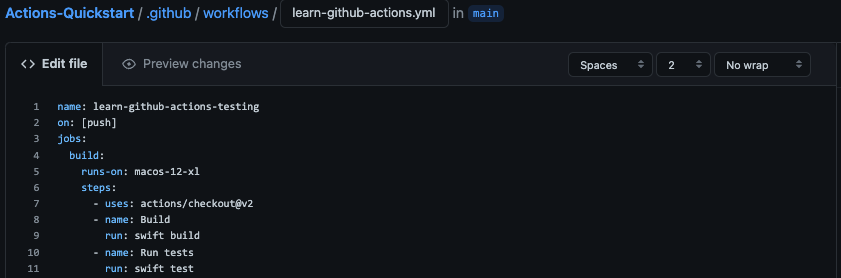
If you’re already using the 3-core macOS runners, simply request to join the beta, and we’ll give you access to the hardware to our new fleet. To try the new 12-core runner runner, update the runs-on: key in your GitHub Actions workflow YAML to target the macos-12-xl or macos-latest-xl runner images once you’re in the beta.

The new macOS XL runner is always billed in both private and public repositories and so does not consume any of the free included GitHub Action minutes. To learn more about runner per job minute pricing, check out the docs.

Learn more and join the beta

To learn more about using the new macOS runner, check out the hosted runner docs.

Apple silicon is on the way!

We’ve started racking up and testing out Apple silicon-based machines in the hosted runner data centers. Follow this roadmap item to track progress. We hope to be offering a limited beta in CY2023 depending on hardware availability, but keep your eyes on the GitHub blog for more information.

Security updates for Wednesday

Post Syndicated from original https://lwn.net/Articles/924794/

Security updates have been issued by Debian (multipath-tools and syslog-ng), Fedora (gnutls and guile-gnutls), Oracle (git, httpd, lua, openssl, php, python-setuptools, python3.9, sudo, tar, and vim), Red Hat (kpatch-patch), Scientific Linux (git), SUSE (compat-openssl098, glibc, openssl, postgresql13, python-Django, webkit2gtk3, and xterm), and Ubuntu (awstats, expat, firefox, gnutls28, lighttpd, php7.2, php7.4, php8.1, python-pip, and tar).

Трансът на Върховния касационен съд

Post Syndicated from Светла Енчева original https://www.toest.bg/transut-na-vurhovniia-kasatsionien-sud/

Вместо увод: няколко терминологични уточнения

Трансът на Върховния касационен съд

Какво означава „транс“? С тази съставна част на думите се означава преминаване на някаква граница или на друго място – например трансатлантически полет или транснационална инициатива. В този смисъл „да изпаднеш в транс“ ще рече, че съзнанието се „пренася“ някъде другаде.

Трансхора пък са онези, чиято джендър идентичност не съответства на пола, с който са се родили, един вид – преминава „границата“ му. Трансмъжете са се родили като жени, но имат устойчива мъжка идентичност (често – от ранна детска възраст); при трансжените е обратното. В българските официални документи се използва терминът „транссексуалност“, макар че в строгия смисъл на думата транссексуалните са само част от трансхората – тези от тях, които променят пола си с хормони и/или операции.

Въпреки демонизирането на понятието „джендър“ в резултат на кампанията против Конвенцията на Съвета на Европа за превенция и борба с насилието над жени и домашното насилие, по-известна като Истанбулската конвенция (ИК), има смисъл то да се употребява и да се разграничава от „пол“. „Джендър“ са социалните и психологическите измерения на пола.

Пример: няма различия между половите признаци на жените в България и Афганистан, но първите имат право на образование, а вторите – не. Освен това едни и същи афганистанки доскоро са имали право на образование, а вече нямат, без нищо в биологията им да се е променило. Как едно общество разбира ролята (включително биологичната) на жената, е въпрос на джендър, не на пол.

Решението на Върховния касационен съд за трансхората накратко

В България е възможно трансчовек да смени пола си по документи, или поне беше повече от 30 години – до 20 февруари т.г. Възможността се предвижда в Закона за гражданската регистрация (чл. 75, ал. 5) и в Правилника за издаване на български лични документи (чл. 20, ал. 2, т. 4). А в Допълнителните разпоредби на Закона за защита от дискриминация изрично се казва, че в дискриминационния признак „пол“ се включват и случаите на промяна на пола (§ 1, т. 17). Тъй като обаче няма ясни правила какви са критериите, за да се допусне такава промяна, съдебната практика в това отношение е противоречива.

На 20 февруари Върховният касационен съд (ВКС) в свое тълкувателно решение отговори на въпроса: „Допустимо ли е и при какви предпоставки съдът да допусне по реда на Закона за гражданската регистрация промяна на данните в съставените актове за гражданско състояние на молител, който твърди, че е транссексуален?“

Краткият отговор на този въпрос според ВКС, е „не“, с което на практика съдът забрани юридическата смяна на пола:

Обективното материално право, действащо на територията на Република България, не предвижда възможност съдът да допусне в производството по реда на глава III, раздел VIII от Закона за гражданската регистрация промяна на данните относно пола, името и единния граждански номер в актовете за гражданско състояние на молител, който твърди, че е транссексуален.

Така смятат 28 от общо 49 съдии, а 21 са на обратната позиция и се подписват под особено мнение, в което мотивират несъгласието си. Според тях решението „трябва да бъде точно в противоположен смисъл. Съдът може да допусне правна промяна на пола на транссексуален човек, като съобрази характерните особености на всеки конкретен случай и наличието на баланс между обществените и личните интереси“.

Решението на ВКС не пада като гръм от ясно небе. Преди него беше Конституционният съд

На 27.07.2018 г. КС отсъди, че ИК противоречи на Конституцията на България, с аргумента, че понятието „джендър идентичност“ не съответства на „половата бинарност“, т.е. на разбирането, че съществуват само два пола. КС също заключи, че само биологичният пол е конституционен и социалната роля на жената е да бъде майка. Да се чуди човек защо конституционни съдийки, подписали се под решението, са станали такива, вместо само да раждат деца.

На 26.10.2021 г. КС постанови в духа на предишното си решение, че полът според Конституцията има единствено биологичен смисъл и няма социално или психологическо изражение, отделно от биологичното. Нищо че в Основния закон не се обяснява какво е пол (както впрочем и в ИК). В мотивите ставаше дума не за човешки права, а за семейство, традиции, религия, църква и бинарност на пола.

Ако след първото решение на КС съдилищата, които трябваше да се произнасят по дела за юридическа смяна на пола на транслица, започнаха да постановяват повече откази, то след второто отказите се увеличиха в още по-голяма степен.

Мисловните еквилибристики на ВКС

В двете си решения КС интерпретира както Конституцията, така и международни документи, които България е ратифицирала, доста фриволно спрямо съдържанието и духа им, но в унисон с доминиращата антиджендър реторика. ВКС не просто се съобразява с КС като с по-висша инстанция, а и надгражда интерпретативните му прийоми в опитите да подчини изцяло правото на личен живот на обществения интерес.

Тълкувайки решението на КС от 2021 г. например, ВКС буквално отменя статута на светска държава на България: понеже „ценностните разбирания на обществото“ са „формирани от религията и морала“ (а кой реши, че именно от това са формирани?), „налагането от страна на държавата на правни разрешения, намиращи се в колизия с установени морални и/или религиозни норми и принципи, би се характеризирало със спорна легитимност и би компрометирало регулативния им потенциал“.

За да останем в религиозната стилистика, ВКС тълкува и конвенциите за правата на човека, които България е ратифицирала, а също и практиките на Европейския съд за правата на човека, както дяволът чете евангелието. България бива съдена от Европейския съд за правата на човека (ЕСПЧ) отново и отново за случаи на отказ за смяна на пола, а едно от най-важните дела е „Я.Т. срещу България“. В същото време ВКС твърди, че тази тема е от компетентността на държавите членки на ЕС. Което е само частично вярно – държавите сами решават как точно да спазват човешките права, но са длъжни да ги спазват.

В особеното си мнение несъгласните с решението съдии посочват и абсурда в разбирането за „биологичен пол“ и на ВКС, и на КС:

Според общоупотребимия български език „биологичен“ означава „който е свързан с живота, с живите организми“. Нито българският съд, в продължение на повече от тридесет години, е допускал правна промяна на пола на починали лица, нито ЕСПЧ е приемал, че съществува такава правна възможност. Транссексуалните лица, интерсексуалните лица и другите лица, при които е необходима промяна на пола по медицински причини, са живи хора и техният пол е биологичен според Конституцията на РБ.

Ходещото опровержение на половата бинарност

„Решението на ВКС бетонира юридически дискриминацията на трансхората. Трансчовек вече не може да се оплаче, че е дискриминиран в резултат на отказа за юридическа промяна на пола си, защото според решението няма дискриминация. Най-циничното е, че ВКС не спира трансхората да водят дела, само предопределя изхода им – тези дела трябва да получат отказ“, отбелязва Пол Найденов в разговор с „Тоест“.

Пол Найденов е интерсекс – тоест човек, чийто пол не е ясен по рождение, и то не в смисъла на джендър, а чисто биологически. Той е с мъжки хромозоми и мъжка джендър идентичност, но е резистентен към мъжки полови хормони. При раждането си е записан като жена, а през пубертета насилствено е опериран, за да заприлича на такава, но женска идентичност така и не придобива.

Пол е първият интерсекс човек в България, който завежда дело за промяна на пола в личните си документи. Печели го през 2017 г. Хора като него са живо опровержение на схващането на КС и ВКС, че полът е само бинарен. Опровержение, което няма нищо общо нито с морала, нито с религията.

Пол Найденов обръща внимание, че освен всичките си проблеми, решението на ВКС е противоконституционно спрямо предходното на КС. Защото според ВКС полът, с който човек се е родил, е непроменим. По тази логика интерсекс хората не могат да си сменят пола в документите, а КС подчертава, че това е възможно.

Въпреки че не е транс, на Пол не са му чужди проблемите на трансхората. Преди да спечели делото, му се е случвало да не го назначат на работа след спечелен конкурс само защото в автобиографията си е Пол Найденов, държи се и изглежда като мъж, а името в личната му карта е женско. Опитът го е научил да забелязва неловките детайли във всекидневието на трансхората, чиито документи не са сменени:

В решението на ВКС се казва, че то не накърнява правата на трансхората, но когато трансчовек, изглеждащ като мъж, отиде в болницата и го викат пред всички с женско име, това не е въпрос на човещина.

Според Пол най-неприятното е, че ВКС „препраща топката във вратата на правотворчеството, тоест той буквално настоява да се създаде закон за смяна на пола, което най-вероятно ще рефлектира в абсолютно мракобесно законодателство“. Под „мракобесно“ има предвид например налагането на задължителна кастрация. Така пола си по документи ще могат да сменят само хора, които са готови да се подложат на такава процедура и чието финансово и здравословно състояние я позволява. Той се тревожи, че няма обединена общност на трансхората в България, която да отстоява интересите си, поради което такъв закон няма да е разработен съвместно с тях.

А какво всъщност пише в Конституцията

Ако четем Конституцията по логиката на КС и респективно на ВКС, излиза, че мъжът има само една социална роля. И тя е… да се ожени. Защото единственият път, когато се споменава думата „мъж“ в Основния закон, е в чл. 46, т. 1, в която се казва, че бракът е доброволен съюз между мъж и жена. Споделям това прозрение с Пол Найденов, който продължава логиката на разсъждение:

Пряко следствие от решението на ВКС е, че чисто хипотетично може да се окаже, че изнасилването не е противоконституционно, защото, ако жената зачене в резултат на него, това значи, че тя изпълнява конституционната си роля да бъде майка.

Ако излезем от паралелната реалност на мисловния транс на ВКС и КС, както и от политическите злоупотреби с темата, Конституцията изглежда съвсем различно.

В Основния ни закон не става дума за биологичен пол. Единствените биологични неща, които се споменават в нея, са ресурси на морските пространства, силно действащи вещества и препарати.

Не се споменават нито „традиционно семейство“, нито „традиционни ценности“, нито „традиции“. Единствената употреба на дума с този корен е в чл. 13, ал. 3, която гласи, че традиционната религия в България е православието. Но в горната алинея се подчертава, че религиозните институции са отделени от държавата, а в долната – че религиозните общности и институции, както и верските убеждения не могат да се използват за политически цели.

По логиката на горното и КС, и ВКС, и партии като БСП, която предизборно обещава да инициира референдум за „джендър идеологията“, пряко нарушават Конституцията.

Ценностите, за които става дума в Основния закон, са два вида – общочовешки (споменават се два пъти) и национални (веднъж). За националните ценности не е уточнено какви са, а общочовешките са шест – „свобода, мир, хуманизъм, равенство, справедливост и търпимост“. Поне пет от тях решенията на КС и ВКС нарушават (за мира може да се спори).

Що се отнася до религията, в Конституцията се търси баланс между религиозната свобода и светското законодателство. „Религиозните и другите убеждения не са основание за отказ да се изпълняват задълженията, установени в Конституцията и законите“, се казва в ал. 2 на чл. 58. Не личи КС и ВКС да се съобразяват и с това.

Малко вероятно е съдиите от КС и ВКС да не си дават сметка колко абсурдни решения вземат и какви може да бъдат последствията от тях. Не само за транс и по-общо за ЛГБТИ хората, нито само за жените, преживели насилие, а за България и международния ѝ авторитет като цяло. Тези последствия ще лежат на тяхната съвест.

За финал – опит за нотка оптимизъм

„Надявам се, че ще напишеш оптимистична статия, защото в момента много трансхора буквално са изтрещели. Десетки дела за промяна на пола отлежаваха и сега ще завършат с отрицателни решения“, споделя Пол Найденов в края на разговора ни. Отговарям, че идеята ми беше по-скоро да напиша иронична статия.

Опитвам се да намеря нещо оптимистично в цялата ситуация. И то е в предположението, че абсурдният транс, в която се вкара България в резултат на антиджендър кампанията и чийто последен връх е решението на ВКС, не може да продължава вечно. Рано или късно ще се блъсне в нещо, което ще го спре или поне ограничи. Например в европейските институции.

Но пък не е много оптимистично да се надяваме все някой отвън да ни спасява. Ще ми се жените и трансхората в България повече да се борят за правата си. Както и партиите, които претендират да са демократични и проевропейски, да не се снишават от страх да не им падне рейтингът. И да не оставят само „Възраждане“, БСП, радикални националисти и ултраконсервативни религиозни организации да се изказват по темата.

Чисто теоретично не е невъзможно всичко това да се случи. По-добре теоретичен оптимизъм, отколкото никакъв, нали?

Заглавно изображение: Един от лъвовете пред сградата на Съдебната палата в София, където заседава ВКС.
Снимка: Wikimedia Commons / Bin im Garten
Колаж: „Тоест“

Securing GitOps pipelines

Post Syndicated from Grab Tech original https://engineering.grab.com/securing-gitops-pipeline

Introduction

Grab’s real-time data platform team, Coban, has been managing infrastructure resources via Infrastructure-as-code (IaC). Through the IaC approach, Terraform is used to maintain infrastructure consistency, automation, and ease of deployment of our streaming infrastructure, notably:

With Grab’s exponential growth, there needs to be a better way to scale infrastructure automatically. Moving towards GitOps processes benefits us in many ways:

  • Versioned and immutable: With our source code being stored in Git repositories, the desired state of infrastructure is stored in an environment that enforces immutability, versioning, and retention of version history, which helps with auditing and traceability.
  • Faster deployment: By automating the process of deploying resources after code is merged, we eliminate manual steps and improve overall engineering productivity while maintaining consistency.
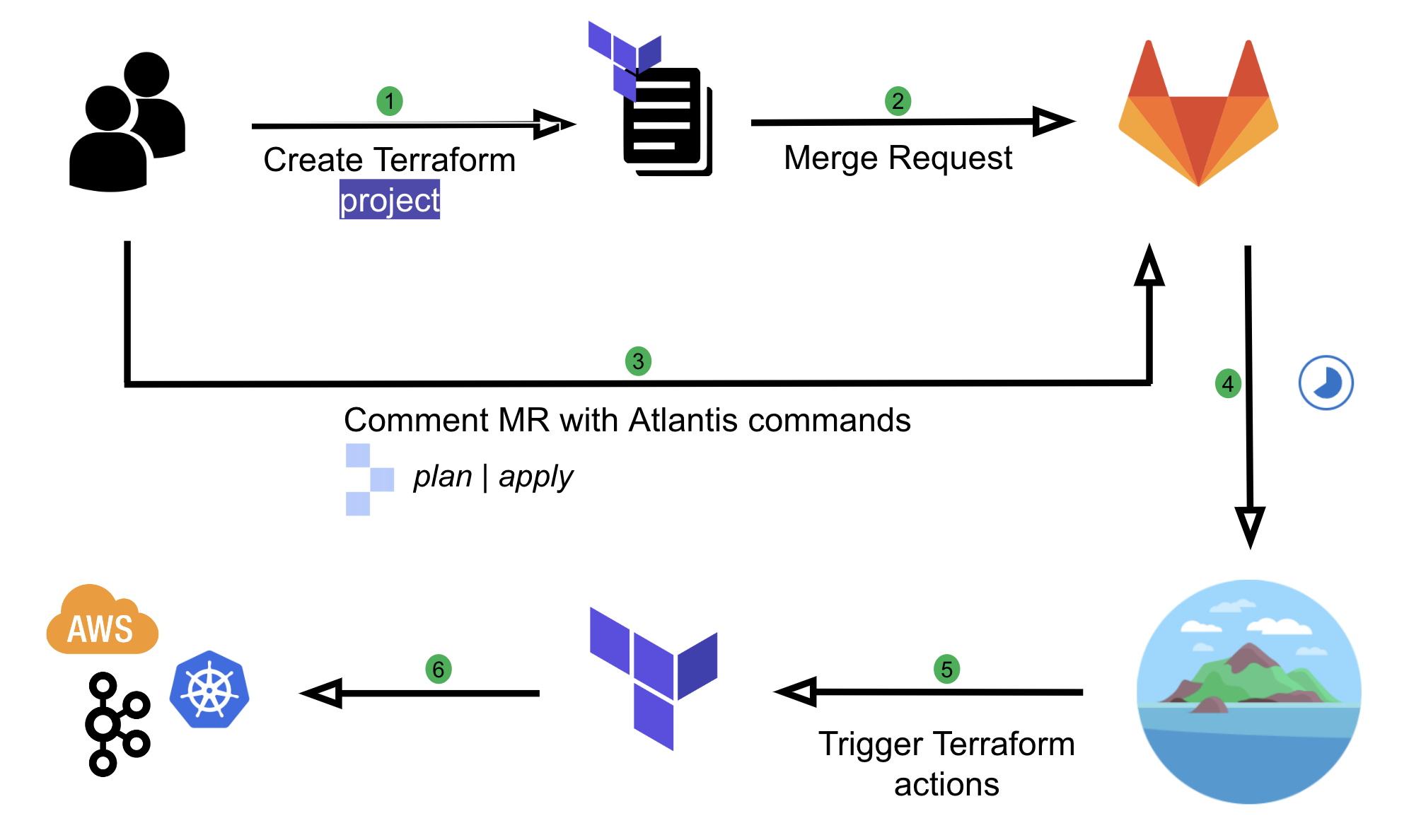
  • Easier rollbacks: It’s as simple as making a revert for a Git commit as compared to creating a merge request (MR) and commenting Atlantis commands, which add extra steps and contribute to a higher mean-time-to-resolve (MTTR) for incidents.

Background

Originally, Coban implemented automation on Terraform resources using Atlantis, an application that operates based on user comments on MRs.

Fig. 1 User flow with Atlantis

We have come a long way with Atlantis. It has helped us to automate our workflows and enable self-service capabilities for our engineers. However, there were a few limitations in our setup, which we wanted to improve:

  • Course grained: There is no way to restrict the kind of Terraform resources users can create, which introduces security issues. For example, if a user is one of the Code owners, they can create another IAM role with Admin privileges with approval from their own team anywhere in the repository.
  • Limited automation: Users are still required to make comments in their MR such as atlantis apply. This requires the learning of Atlantis commands and is prone to human errors.
  • Limited capability: Having to rely entirely on Terraform and Hashicorp Configuration Language (HCL) functions to validate user input comes with limitations. For example, the ability to validate an input variable based on the value of another has been a requested feature for a long time.
  • Not adhering to Don’t Repeat Yourself (DRY) principle: Users need to create an entire Terraform project with boilerplate codes such as Terraform environment, local variables, and Terraform provider configurations to create a simple resource such as a Kafka topic.

Solution

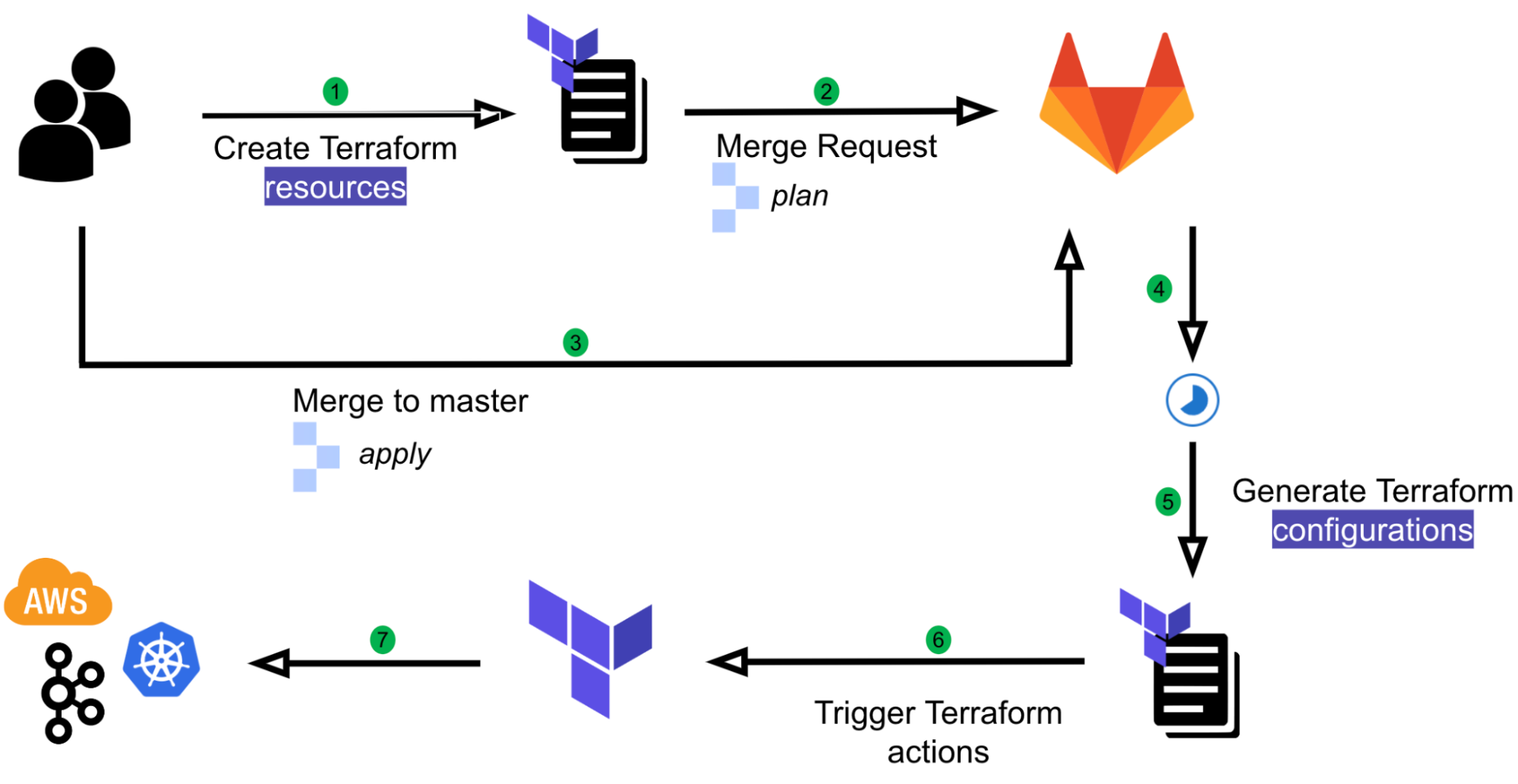
We have developed an in-house GitOps solution named Khone. Its name was inspired by the Khone Phapheng Waterfall. We have evaluated some of the best and most widely used GitOps products available but chose not to go with any as the majority of them aim to support Kubernetes native or custom resources, and we needed infrastructure provisioning that is beyond Kubernetes. With our approach, we have full control of the entire user flow and its implementation, and thus we benefit from:

  • Security: The ability to secure the pipeline with many customised scripts and workflows.
  • Simple user experience (UX): Simplified user flow and prevents human errors with automation.
  • DRY: Minimise boilerplate codes. Users only need to create a single Terraform resource and not an entire Terraform project.
Fig. 2 User flow with Khone

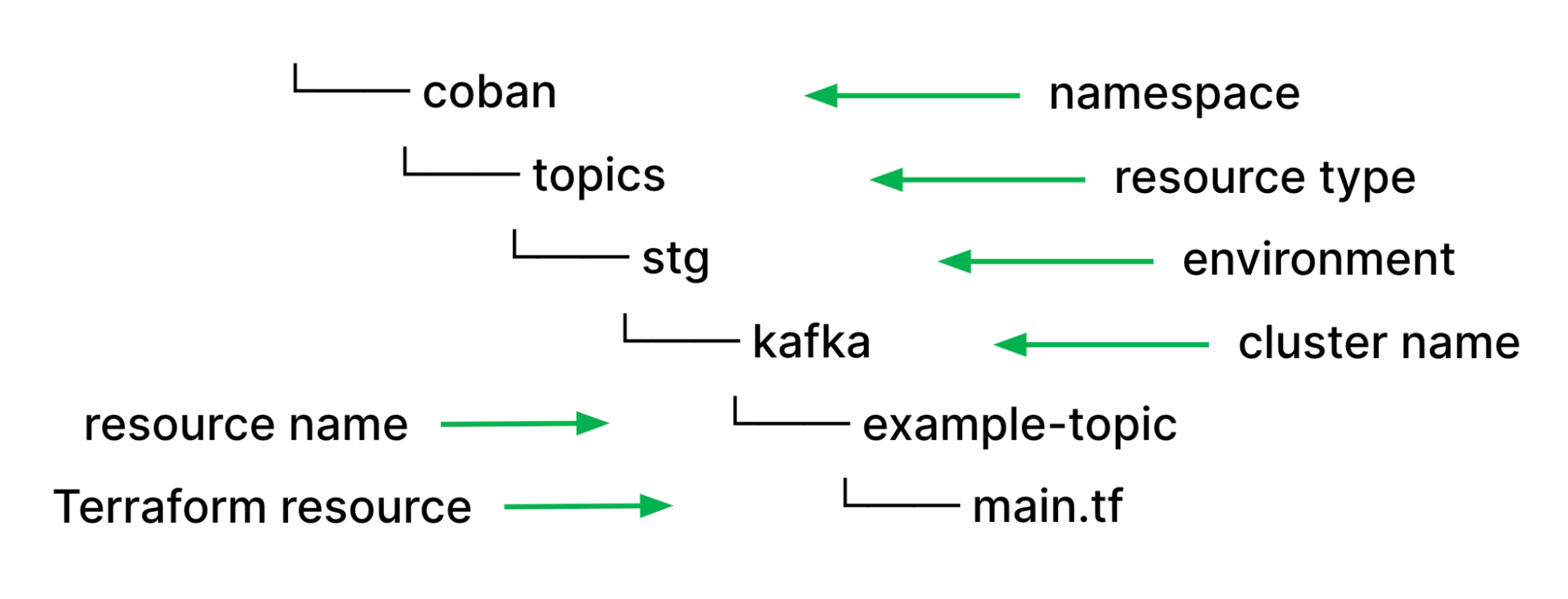
With all types of streaming infrastructure resources that we support, be it Kafka topics or Flink pipelines, we have identified they all have common properties such as namespace, environment, or cluster name such as Kafka cluster and Kubernetes cluster. As such, using those values as file paths help us to easily validate users input and de-couple them from the resource specific configuration properties in their HCL source code. Moreover, it helps to remove redundant information to maintain consistency. If the piece of information is in the file path, it won’t be elsewhere in resource definition.

Fig. 3 Khone directory structure

With this approach, we can utilise our pipeline scripts, which are written in Python and perform validations on the types of resources and resource names using Regular Expressions (Regex) without relying on HCL functions. Furthermore, we helped prevent human errors and improved developers’ efficiency by deriving these properties and reducing boilerplate codes by automatically parsing out other necessary configurations such as Kafka brokers endpoint from the cluster name and environment.

Pipeline stages

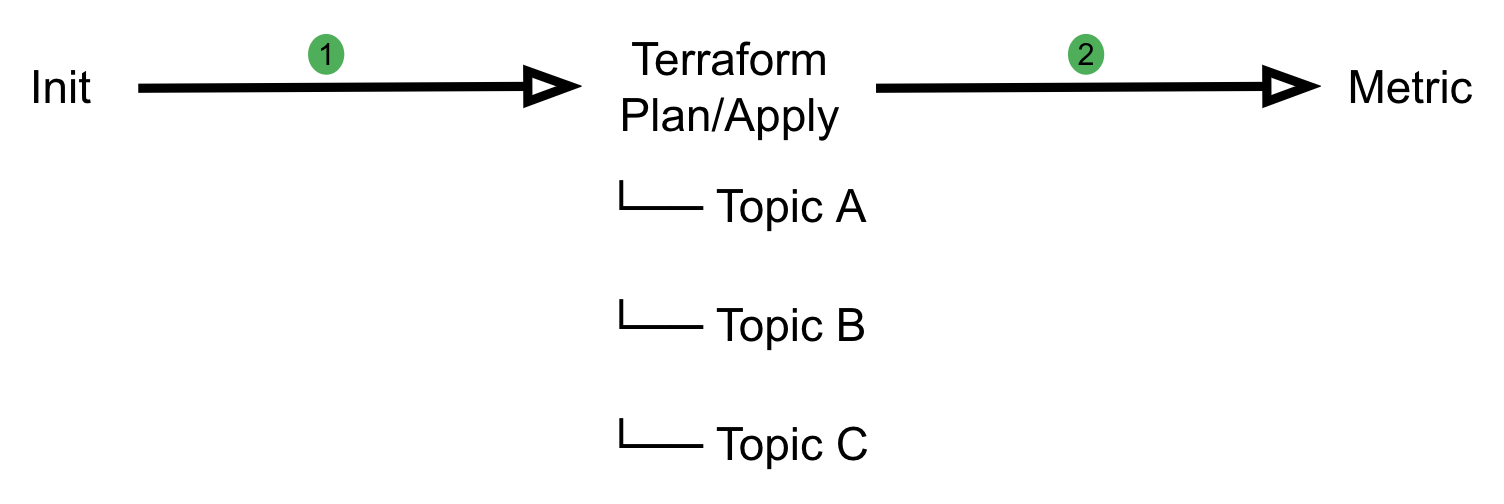
Khone’s pipeline implementation is designed with three stages. Each stage has different duties and responsibilities in verifying user input and securely creating the resources.

Fig. 4 An example of a Khone pipeline

Initialisation stage

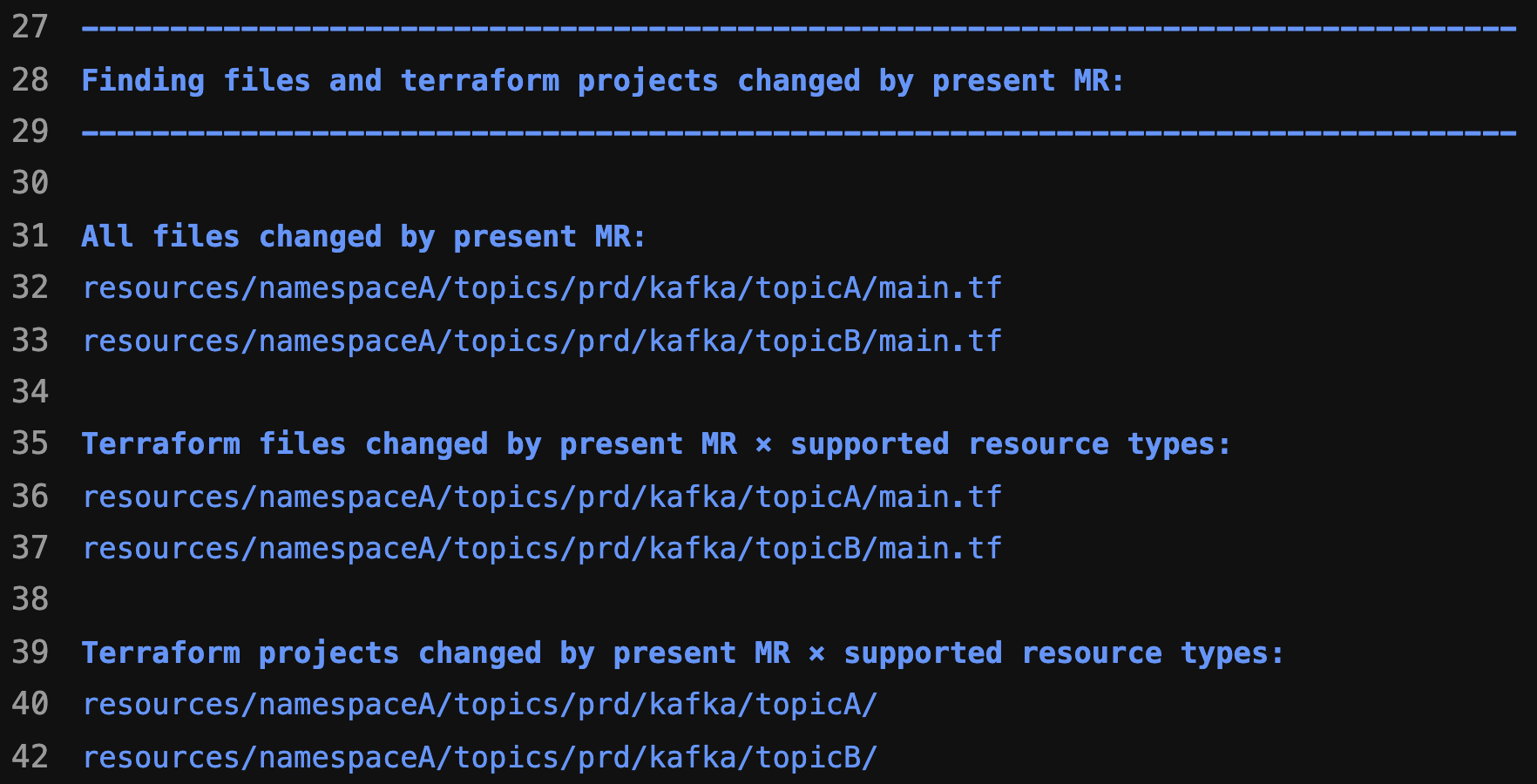
At this stage, we categorise the changes into Deleted, Created or Changed resources and filter out unsupported resource types. We also prevent users from creating unintended resources by validating them based on resource path and inspecting the HCL source code in their Terraform module. This stage also prepares artefacts for subsequent stages.

Fig. 5 Terraform changes detected by Khone

Terraform stage

This is a downstream pipeline that runs either the Terraform plan or Terraform apply command depending on the state of the MR, which can either be pending review or merged. Individual jobs run in parallel for each resource change, which helps with performance and reduces the overall pipeline run time.

For each individual job, we implemented multiple security checkpoints such as:

  • Code inspection: We use the python-hcl2 library to read HCL content of Terraform resources to perform validation, restrict the types of Terraform resources users can create, and ensure that resources have the intended configurations. We also validate whitelisted Terraform module source endpoint based on the declared resource type. This enables us to inherit the flexibility of Python as a programming language and perform validations more dynamically rather than relying on HCL functions.
  • Resource validation: We validate configurations based on resource path to ensure users are following the correct and intended directory structure.
  • Linting and formatting: Perform HCL code linting and formatting using Terraform CLI to ensure code consistency.

Furthermore, our Terraform module independently validates parameters by verifying the working directory instead of relying on user input, acting as an additional layer of defence for validation.

path = one(regexall(join("/",
[
    "^*",
    "(?P<repository>khone|khone-dev)",
    "resources",
    "(?P<namespace>[^/]*)",
    "(?P<resource_type>[^/]*)",
    "(?P<env>[^/]*)",
    "(?P<cluster_name>[^/]*)",
    "(?P<resource_name>[^/]*)$"
]), path.cwd))

Metric stage

In this stage, we consolidate previous jobs’ status and publish our pipeline metrics such as success or error rate.

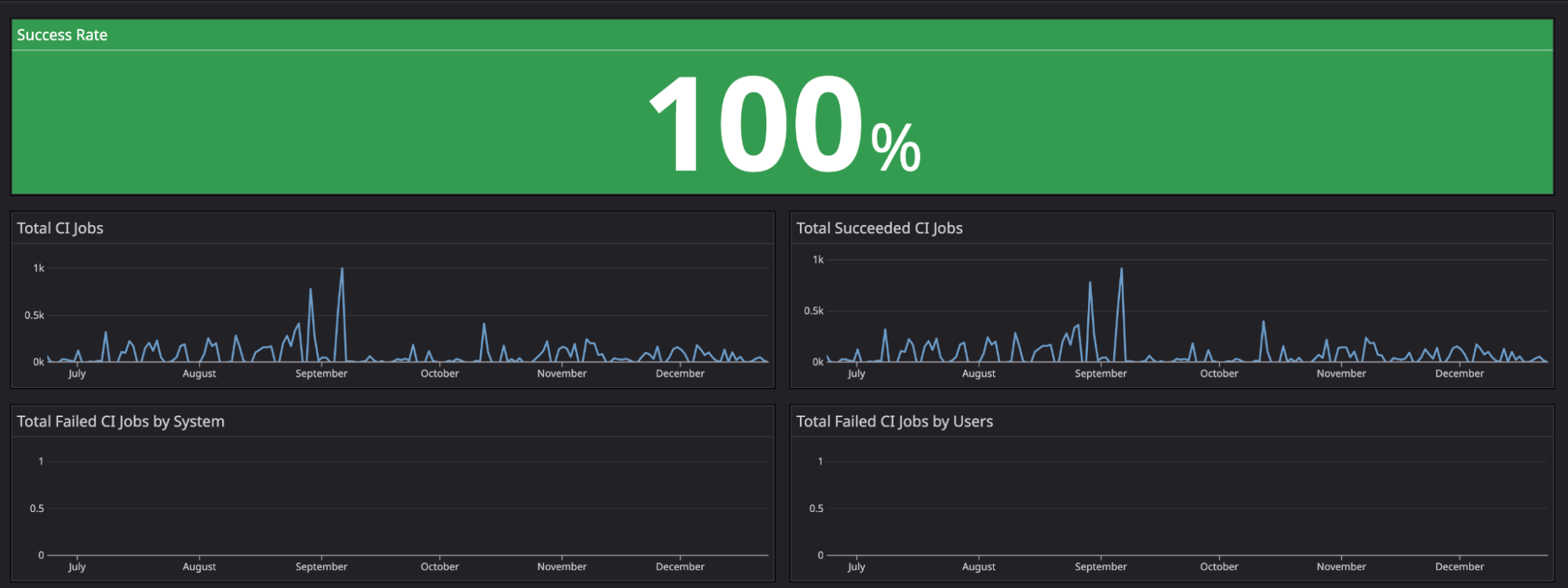
For our metrics, we identified actual users by omitting users from Coban. This helps us measure success metrics more consistently as we could isolate metrics from test continuous integration/continuous deployment (CI/CD) pipelines.

For the second half of 2022, we achieved a 100% uptime for Khone pipelines.

Fig. 6 Khone’s success metrics for the second half of 2022

Preventing pipeline config tampering

By default, with each repository on GitLab that has CI/CD pipelines enabled, owners or administrators would need to have a pipeline config file at the root directory of the repository with the name .gitlab-ci.yml. Other scripts may also be stored somewhere within the repository.

With this setup, whenever a user creates an MR, if the pipeline config file is modified as part of the MR, the modified version of the config file will be immediately reflected in the pipeline’s run. Users can exploit this by running arbitrary code on the privileged GitLab runner.

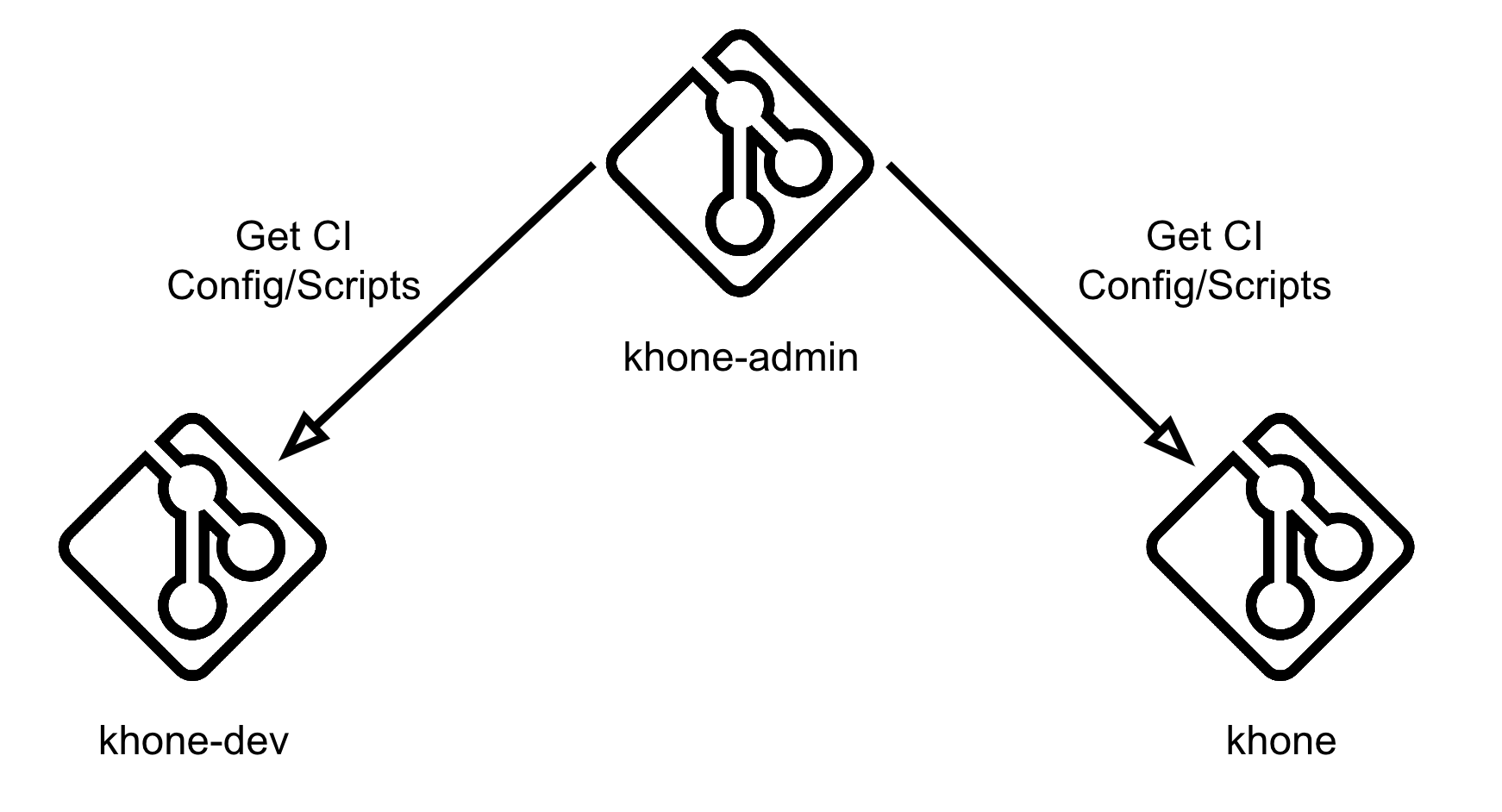
In order to prevent this, we utilise GitLab’s remote pipeline config functionality. We have created another private repository, khone-admin, and stored our pipeline config there.

Fig. 7 Khone’s remote pipeline config

In Fig. 7, our configuration is set to a file called khone-gitlab-ci.yml residing in the khone-admin repository under snd group.

Preventing pipeline scripts tampering

We had scripts that ran before the MR and they were approved and merged to perform preliminary checks or validations. They were also used to run the Terraform plan command. Users could modify these existing scripts to perform malicious actions. For example, they could bypass all validations and directly run the Terraform apply command to create unintended resources.

This can be prevented by storing all of our scripts in the khone-admin repository and cloning them in each stage of our pipeline using the before_script clause.

default:
  before_script:
    - rm -rf khone_admin
    - git clone --depth 1 --single-branch https://gitlab-ci-token:${CI_JOB_TOKEN}@gitlab.myteksi.net/snd/khone-admin.git khone_admin

Even though this adds an overhead to each of our pipeline jobs and increases run time, the amount is insignificant as we have optimised the process by using shallow cloning. The Git clone command included in the above script with depth=1 and single-branch flag has reduced the time it takes to clone the scripts down to only 0.59 seconds.

Testing our pipeline

With all the security measures implemented for Khone, this raises a question of how did we test the pipeline? We have done this by setting up an additional repository called khone-dev.

Fig. 8 Repositories relationship

Pipeline config

Within this khone-dev repository, we have set up a remote pipeline config file following this format:

<File Name>@<Repository Ref>:<Branch Name>

Fig. 9 Khone-dev’s remote pipeline config

In Fig. 9, our configuration is set to a file called khone-gitlab-ci.yml residing in the khone-admin repository under the snd group and under a branch named ci-test. With this approach, we can test our pipeline config without having to merge it to master branch that affects the main Khone repository. As a security measure, we only allow users within a certain GitLab group to push changes to this branch.

Pipeline scripts

Following the same method for pipeline scripts, instead of cloning from the master branch in the khone-admin repository, we have implemented a logic to clone them from the branch matching our lightweight directory access protocol (LDAP) user account if it exists. We utilised the GITLAB_USER_LOGIN environment variable that is injected by GitLab to each individual CI job to get the respective LDAP account to perform this logic.

default:
  before_script:
    - rm -rf khone_admin
    - |
      if git ls-remote --exit-code --heads "https://gitlab-ci-token:${CI_JOB_TOKEN}@gitlab.myteksi.net/snd/khone-admin.git" "$GITLAB_USER_LOGIN" > /dev/null; then
        echo "Cloning khone-admin from dev branch ${GITLAB_USER_LOGIN}"
        git clone --depth 1 --branch "$GITLAB_USER_LOGIN" --single-branch "https://gitlab-ci-token:${CI_JOB_TOKEN}@gitlab.myteksi.net/snd/khone-admin.git" khone_admin
      else
        echo "Dev branch ${GITLAB_USER_LOGIN} not found, cloning from master instead"
        git clone --depth 1 --single-branch "https://gitlab-ci-token:${CI_JOB_TOKEN}@gitlab.myteksi.net/snd/khone-admin.git" khone_admin
      fi

What’s next?

With security being our main focus for our Khone GitOps pipeline, we plan to abide by the principle of least privilege and implement separate GitLab runners for different types of resources and assign them with just enough IAM roles and policies, and minimal network security group rules to access our Kafka or Kubernetes clusters.

Furthermore, we also plan to maintain high standards and stability by including unit tests in our CI scripts to ensure that every change is well-tested before being deployed.

References

Special thanks to Fabrice Harbulot for kicking off this project and building a strong foundation for it.

Join us

Grab is the leading superapp platform in Southeast Asia, providing everyday services that matter to consumers. More than just a ride-hailing and food delivery app, Grab offers a wide range of on-demand services in the region, including mobility, food, package and grocery delivery services, mobile payments, and financial services across 428 cities in eight countries.

Powered by technology and driven by heart, our mission is to drive Southeast Asia forward by creating economic empowerment for everyone. If this mission speaks to you, join our team today!

New – Amazon Lightsail for Research with All-in-One Research Environments

Post Syndicated from Channy Yun original https://aws.amazon.com/blogs/aws/new-amazon-lightsail-for-research-with-all-in-one-research-environments/

Today we are announcing the general availability of Amazon Lightsail for Research, a new offering that makes it easy for researchers and students to create and manage a high-performance CPU or a GPU research computer in just a few clicks on the cloud. You can use your preferred integrated development environments (IDEs) like preinstalled Jupyter, RStudio, Scilab, VSCodium, or native Ubuntu operating system on your research computer.

You no longer need to use your own research laptop or shared school computers for analyzing larger datasets or running complex simulations. You can create your own research environments and directly access the application running on the research computer remotely via a web browser. Also, you can easily upload data to and download from your research computer via a simple web interface.

You pay only for the duration the computers are in use and can delete them at any time. You can also use budgeting controls that can automatically stop your computer when it’s not in use. Lightsail for Research also includes all-inclusive prices of compute, storage, and data transfer, so you know exactly how much you will pay for the duration you use the research computer.

Get Started with Amazon Lightsail for Research
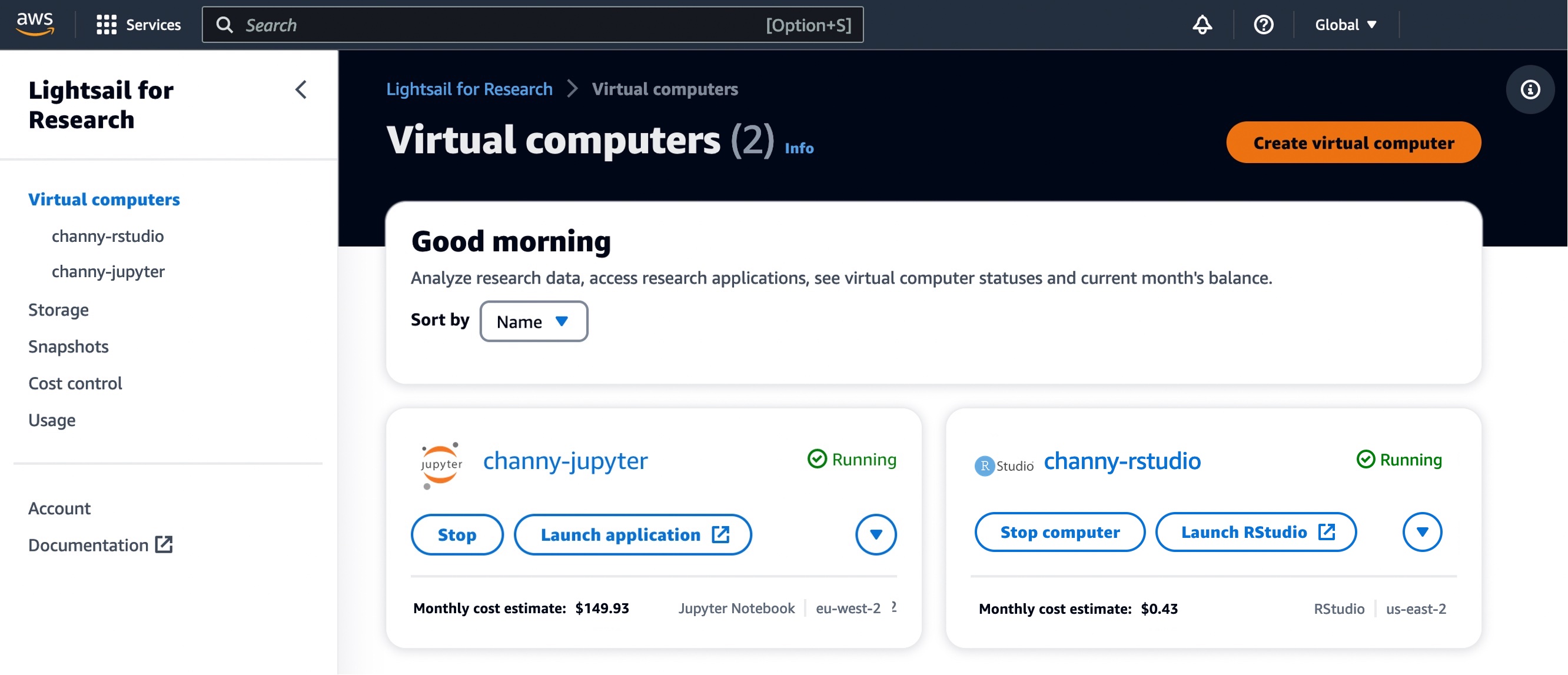
To get started, navigate to the Lightsail for Research console, and choose Virtual computers in the left menu. You can see my research computers naming “channy-jupyter” or “channy-rstudio” already created.

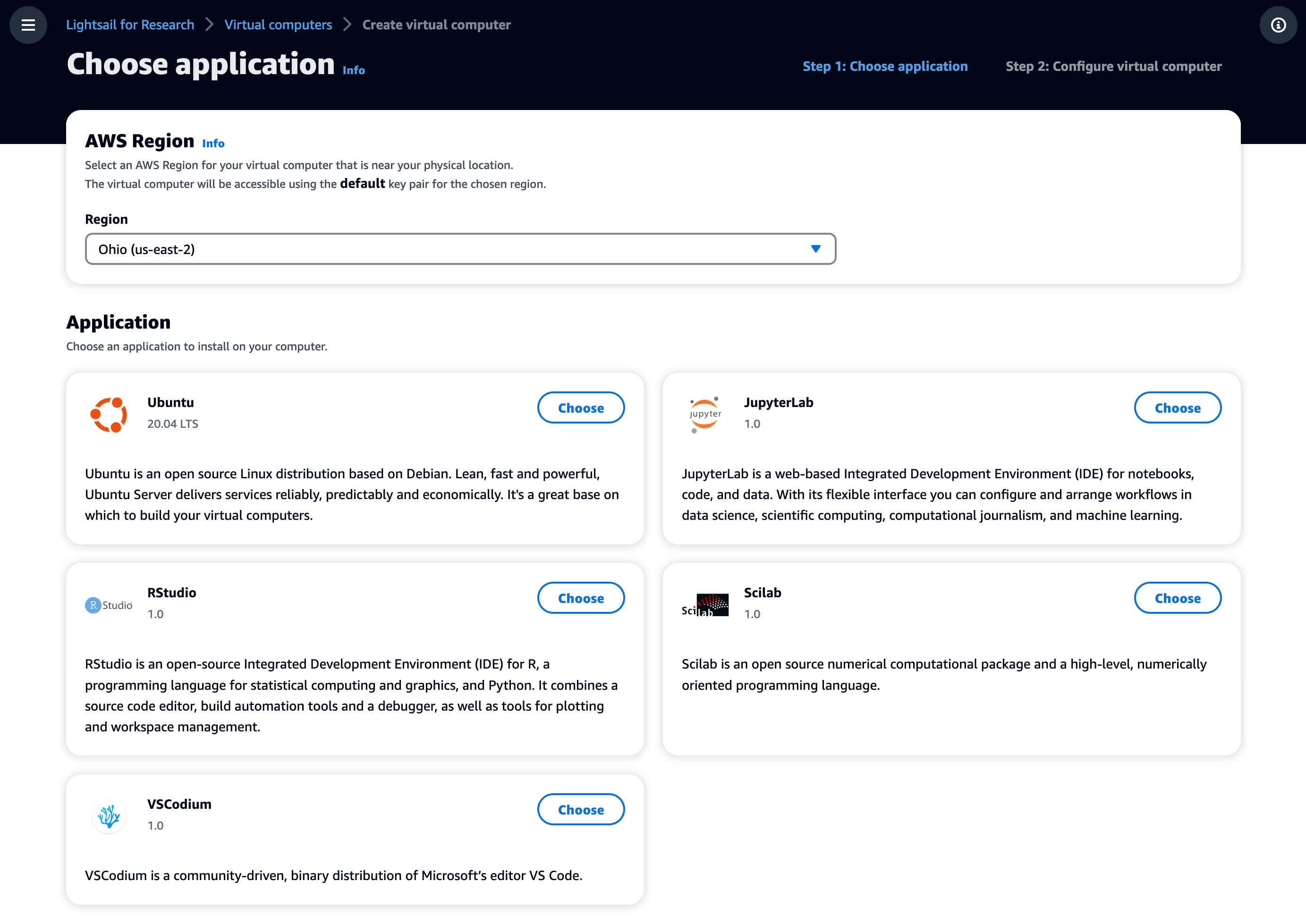
Choose Create virtual computer to create a new research computer, and select which software you’d like preinstalled on your computer and what type of research computer you’d like to create.

In the first step, choose the application you want installed on your computer and the AWS Region to be located in. We support Jupyter, RStudio, Scilab, and VSCodium. You can install additional packages and extensions through the interface of these IDE applications.

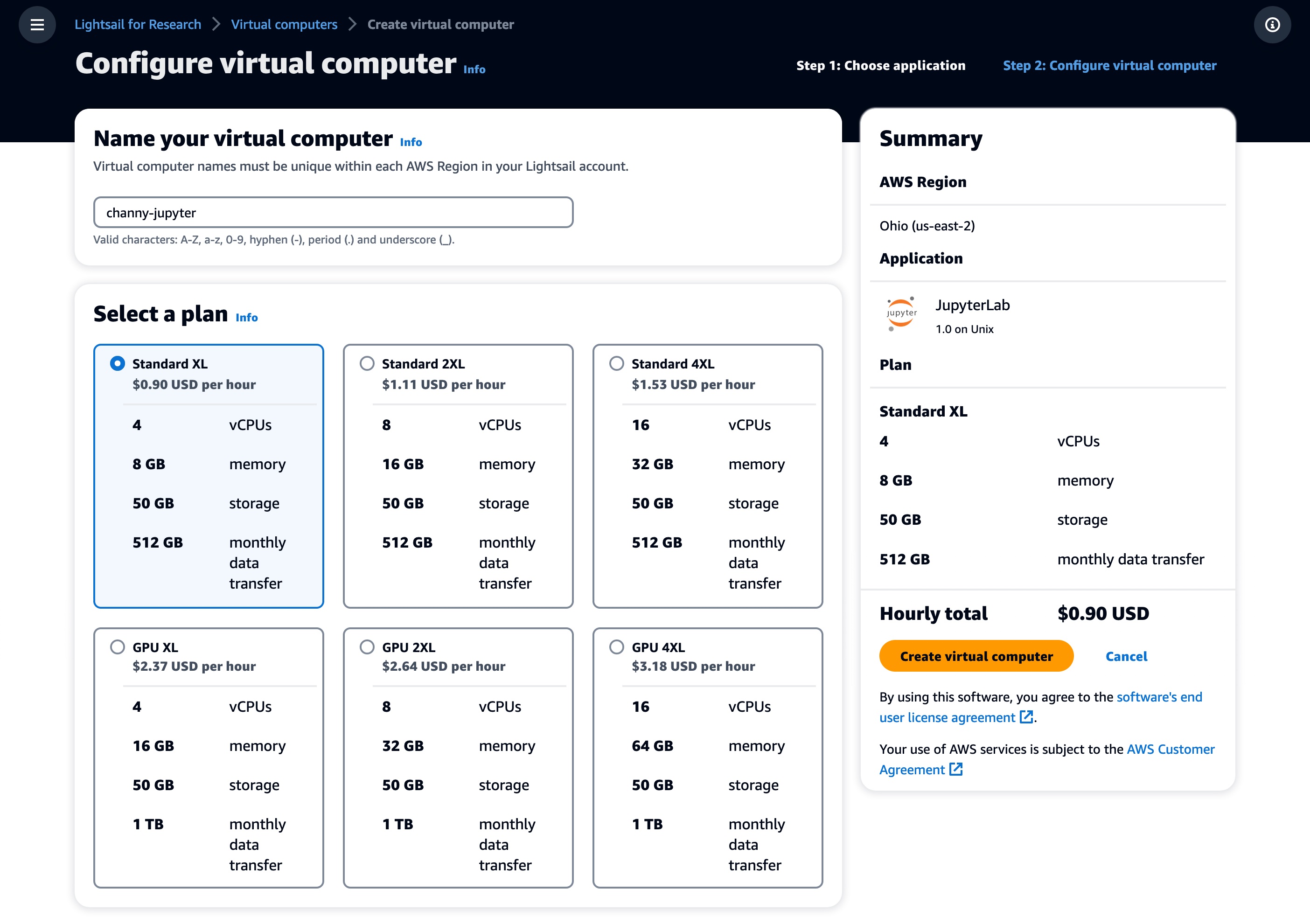
Next, choose the desired virtual hardware type, including a fixed amount of compute (vCPUs or GPUs), memory (RAM), SSD-based storage volume (disk) space, and a monthly data transfer allowance. Bundles are charged on an hourly and on-demand basis.

Standard types are compute-optimized and ideal for compute-bound applications that benefit from high-performance processors.

Name vCPUs Memory Storage Monthly data
transfer allowance*
Standard XL 4 8 GB 50 GB 0.5TB
Standard 2XL 8 16 GB 50 GB 0.5TB
Standard 4XL 16 32 GB 50 GB 0.5TB

GPU types provide a high-performance platform for general-purpose GPU computing. You can use these bundles to accelerate scientific, engineering, and rendering applications and workloads.

Name GPU vCPUs Memory Storage Monthly data
transfer allowance*
GPU XL 1 4 16 GB 50 GB 1 TB
GPU 2XL 1 8 32 GB 50 GB 1 TB
GPU 4XL 1 16 64 GB 50 GB 1 TB

* AWS created the Global Data Egress Waiver (GDEW) program to help eligible researchers and academic institutions use AWS services by waiving data egress fees. To learn more, see the blog post.

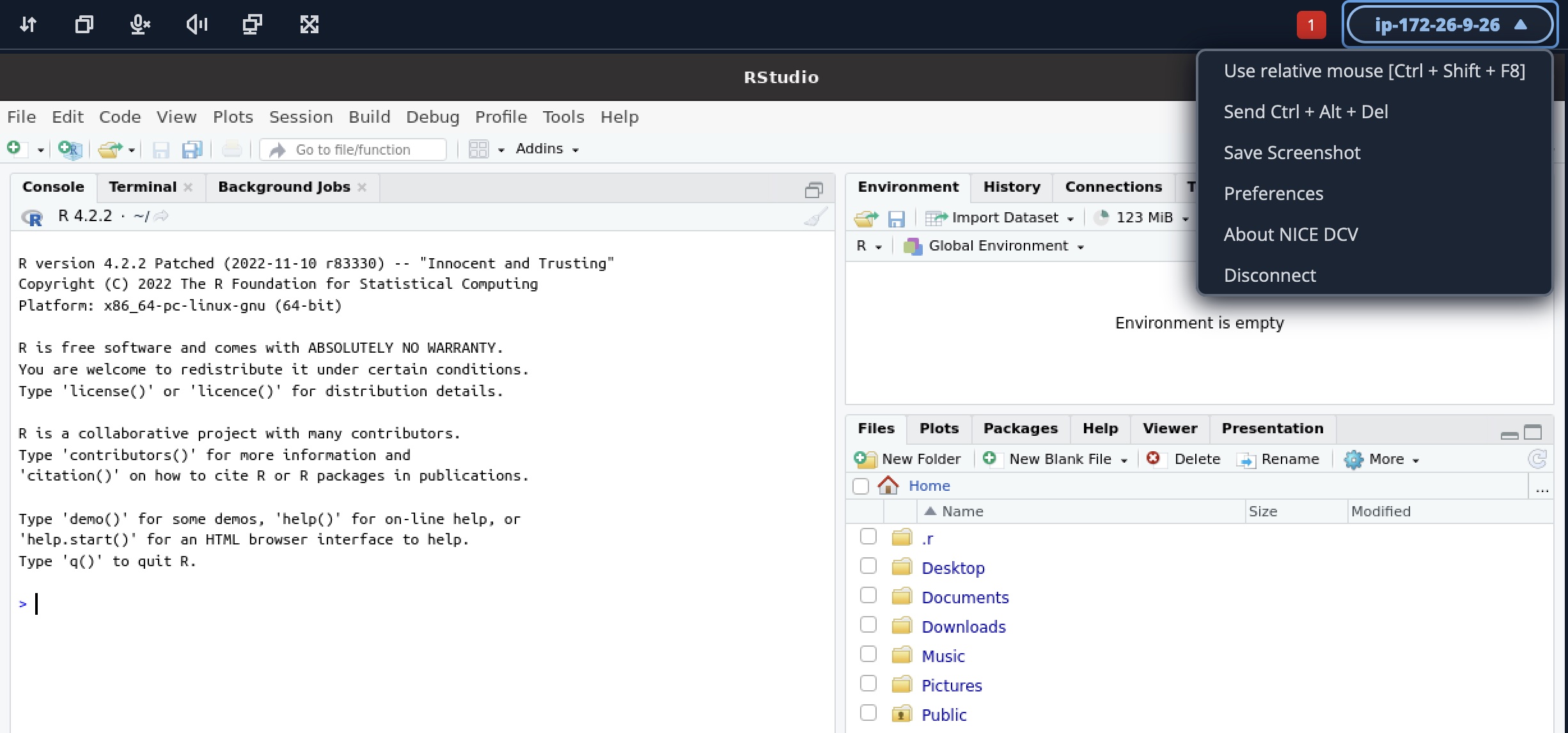
After making your selections, name your computer and choose Create virtual computer to create your research computer. Once your computer is created and running, choose the Launch application button to open a new window that will display the preinstalled application you selected.

Lightsail for Research Features
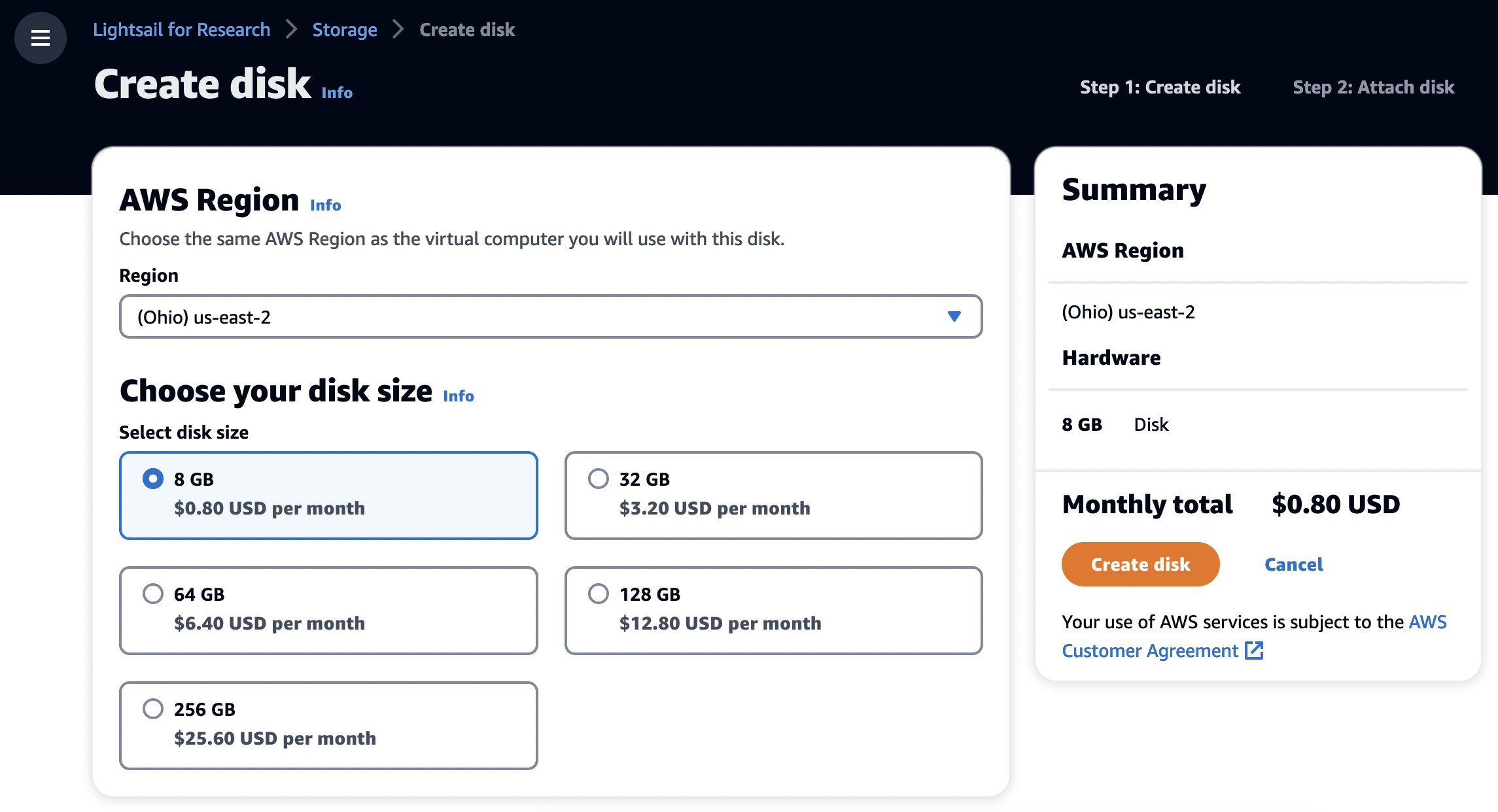
As with existing Lightsail instances, you can create additional block-level storage volumes (disks) that you can attach to a running Lightsail for Research virtual computer. You can use a disk as a primary storage device for data that requires frequent and granular updates. To create your own storage, choose Storage and Create disk.

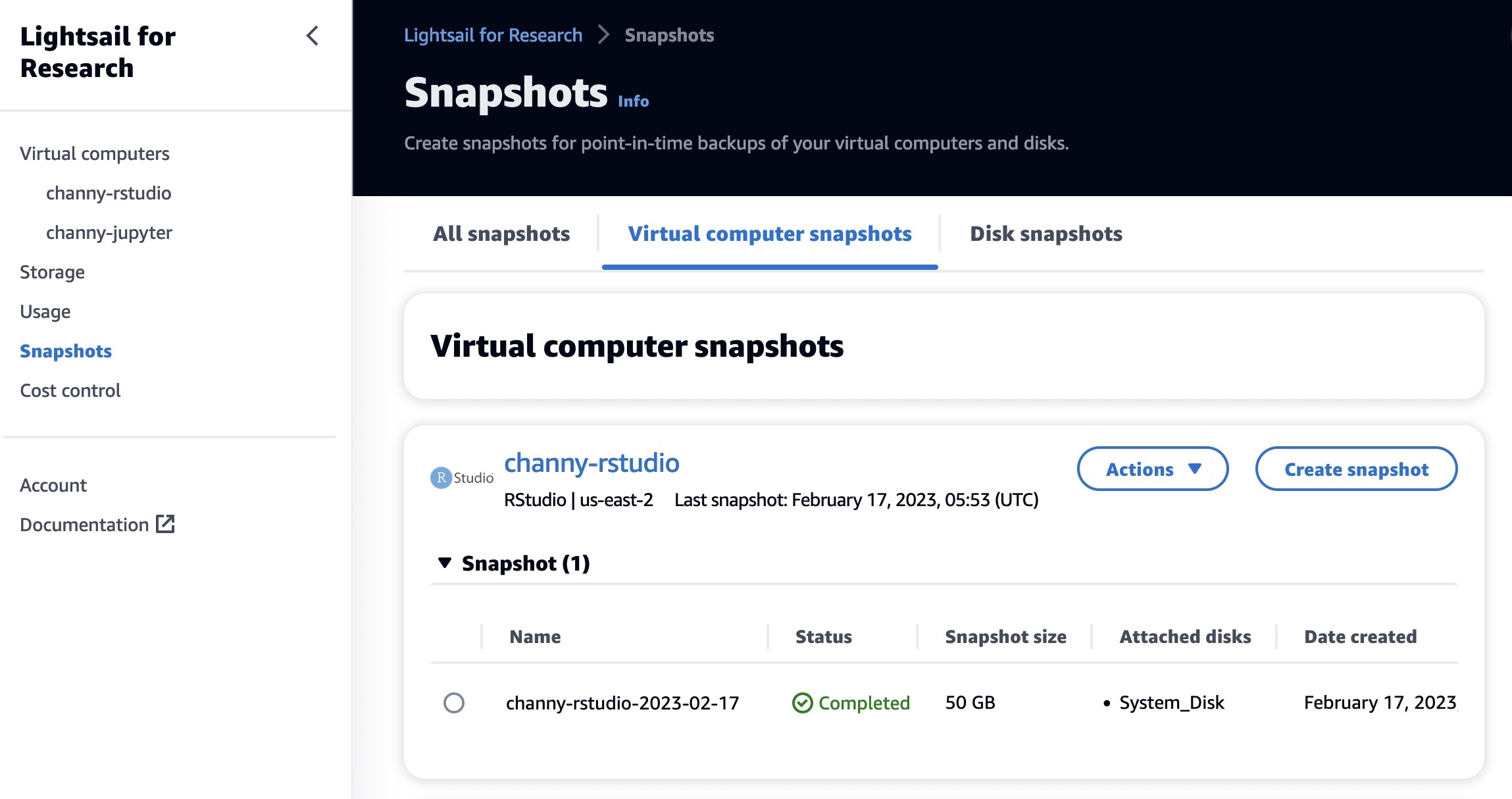
You can also create Snapshots, a point-in-time copy of your data. You can create a snapshot of your Lightsail for Research virtual computers and use it as baselines to create new computers or for data backup. A snapshot contains all of the data that is needed to restore your computer from the moment when the snapshot was taken.

When you restore a computer by creating it from a snapshot, you can easily create a new one or upgrade your computer to a larger size using a snapshot backup. Create snapshots frequently to protect your data from corrupt applications or user errors.

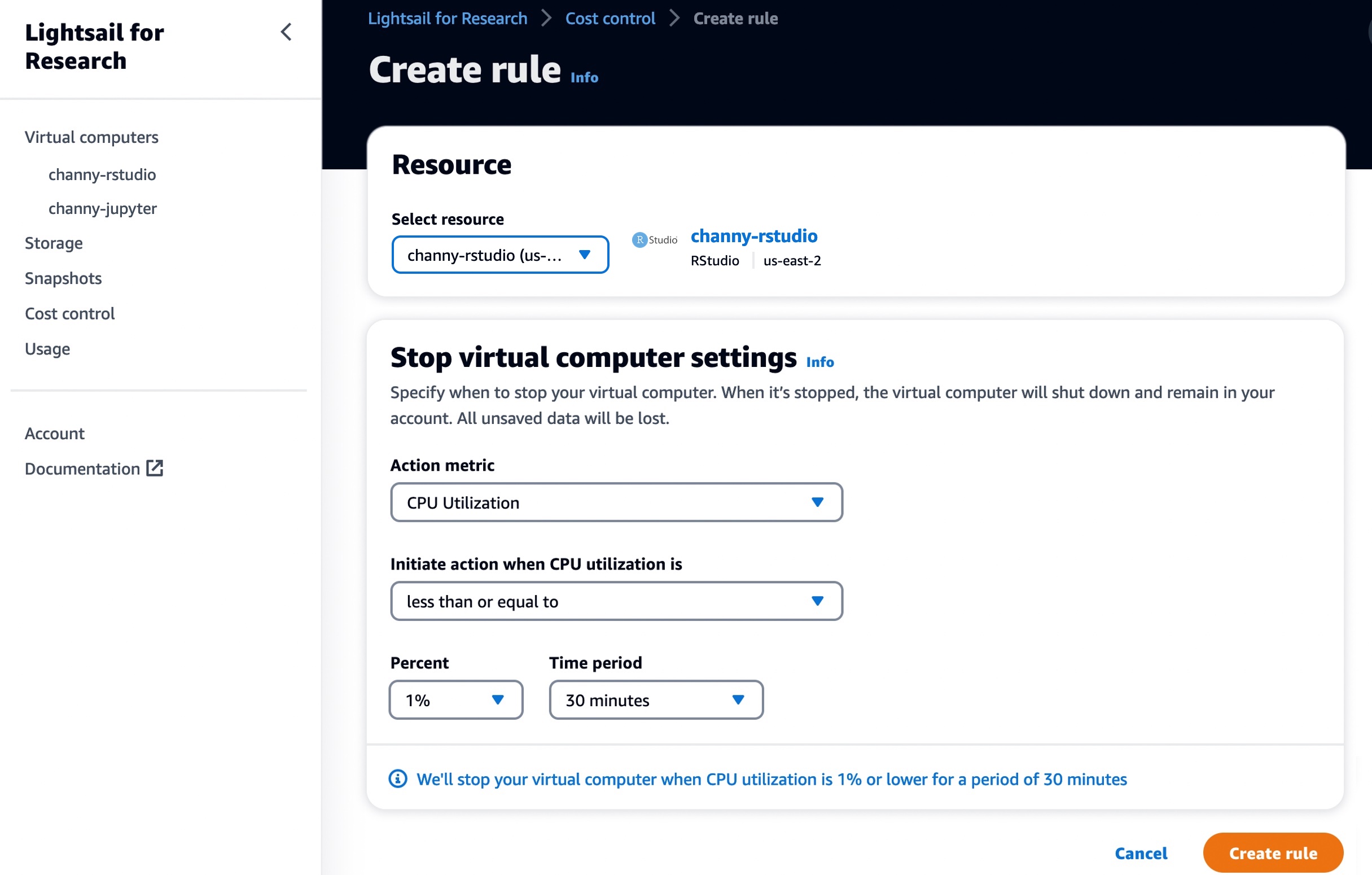
You can use Cost control rules that you define to help manage the usage and cost of your Lightsail for Research virtual computers. You can create rules that stop running computers when average CPU utilization over a selected time period falls below a prescribed level.

For example, you can configure a rule that automatically stops a specific computer when its CPU utilization is equal to or less than 1 percent for a 30-minute period. Lightsail for Research will then automatically stop the computer so that you don’t incur charges for running computers.

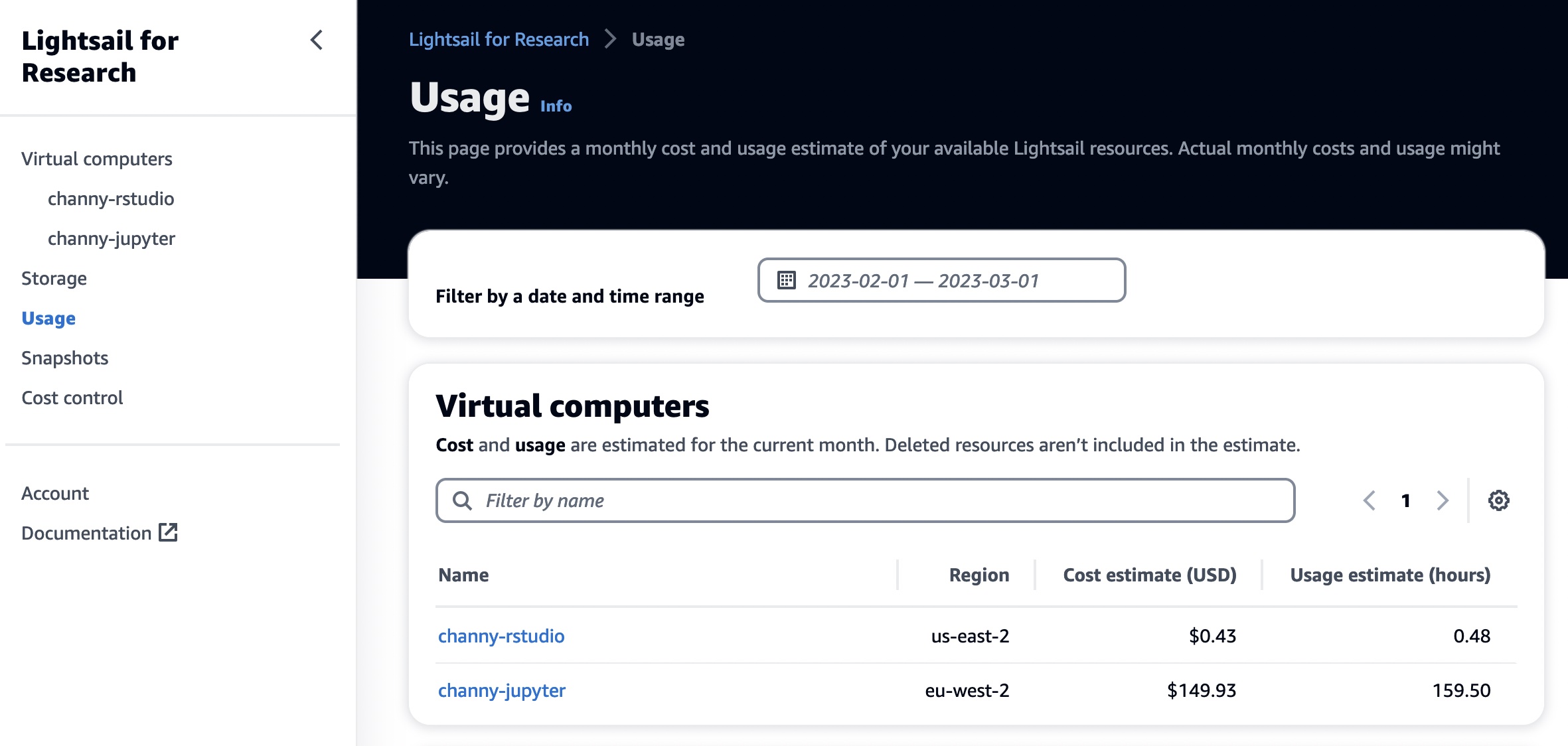
In the Usage menu, you can view the cost estimate and usage hours for your resources during a specified time period.

Now Available
Amazon Lightsail for Research is now available in the US East (Ohio), US West (Oregon), Asia Pacific (Mumbai), Asia Pacific (Seoul), Asia Pacific (Singapore), Asia Pacific (Sydney), Asia Pacific (Tokyo), Canada (Central), Europe (Frankfurt), Europe (Ireland), Europe (London), Europe (Paris), Europe (Stockholm), and Europe (Sweden) Regions.

Now you can start using it today. To learn more, see the Amazon Lightsail for Research User Guide, and please send feedback to AWS re:Post for Amazon Lightsail or through your usual AWS support contacts.

Channy

[$] Some useful tools for binary formats

Post Syndicated from original https://lwn.net/Articles/924133/

Linux users often work with text files; tools like grep,
awk,
and sed are standard utilities in their toolbox. However, these
tools fall
short when trying to extract or edit data from files in a binary format, analyze
corrupt
media files, or for parsing a binary data format. FOSDEM 2023 in Brussels had a whole binary tools
devroom
dedicated to open-source programs that deal with binary data.

Разследване на Валя Ахчиева Как скандал между НЗОК и “Пирогов” бе решен от съда на база на липсващи доказателства

Post Syndicated from Екип на Биволъ original https://bivol.bg/nzok-pirogov-skandal.html

сряда 1 март 2023


Спомняте ли си скандала с бившия служебен министър на здравеопазването – д-р Стойчо Кацаров, през лятото на 2021-ва година, по време на COVID пандемията? Тогава той публично обяви, че е…

Reduce Amazon EMR cluster costs by up to 19% with new enhancements in Amazon EMR Managed Scaling

Post Syndicated from Sushant Majithia original https://aws.amazon.com/blogs/big-data/reduce-amazon-emr-cluster-costs-by-up-to-19-with-new-enhancements-in-amazon-emr-managed-scaling/

In June 2020, AWS announced the general availability of Amazon EMR Managed Scaling. With EMR Managed Scaling, you specify the minimum and maximum compute limits for your clusters, and Amazon EMR automatically resizes your cluster for optimal performance and resource utilization. EMR Managed Scaling constantly monitors key workload-related metrics and uses an algorithm that optimizes the cluster size for best resource utilization. Given that the feature is completely managed, improvements to the algorithm are immediately realized without needing a version upgrade. Amazon EMR can scale the cluster up during peaks and scale it down gracefully during idle periods, reducing your costs and optimizing cluster capacity for the best performance.

Throughout 2022, we made multiple enhancements to the EMR Managed Scaling algorithm. With these improvements, we observed that for clusters enabled with EMR Managed Scaling, utilization improved by up to 15 percent, and total costs were reduced further by up to 19 percent. Starting mid-December 2022, EMR Managed Scaling enhancements were enabled by default for clusters using Amazon EMR versions 5.34.0 and later and Amazon EMR versions 6.4.0 and later for both new and existing clusters. Further, given that the feature is completely managed, you will get the new optimized Managed Scaling algorithm by default, and no action is needed on your end.

Listed below are some of the key enhancements we enabled for EMR Managed Scaling:

  • Improved cluster utilization with targeted scale-down of your EMR cluster
  • Reduced costs by preventing scale-down of instances that store intermediate shuffle data using Spark Shuffle data awareness
  • Improved cluster utilization and reduce costs with gradual scale-up of your EMR cluster

Customer success stories

How the enhanced EMR Managed Scaling algorithm helped a technology enterprise reduce costs:

To illustrate the cost savings by examples, we looked at an EMR clusters for a technology enterprise, which heavily uses Amazon EMR to process real time billing data between Kafka and S3 using Spark. They run a persistent EMR cluster with EMR version 5.35 and have EMR Managed Scaling turned-on. The following Amazon CloudWatch dashboard shows how starting December 21, the enhanced Managed Scaling algorithm provisioned (total nodes requested) only 70 nodes vs. the previous Managed Scaling algorithm which provisioned 179 nodes for a similar job profile. The lower the number of resources provisioned to run your jobs, the lower the total cost of your EMR cluster.

How the enhanced EMR Managed Scaling algorithm helped an advertising enterprise reduce costs:

We also looked at an EMR cluster for an advertising enterprise, which leverages Amazon EMR for their data analytics strategy and executes their batch ETL jobs using Spark. They run their clusters on EMR version 6.5 and have EMR Managed Scaling turned-on. The following Amazon CloudWatch dashboard shows how starting December 15, the enhanced Managed Scaling algorithm provisioned (total units requested) only 41 nodes vs. the previous Managed Scaling algorithm which provisioned 86 nodes for a similar job profile.

Estimating the cost savings and utilization improvements for your EMR clusters:

Cluster cost savings:

To view estimated cost savings for your EMR cluster with the EMR Managed Scaling enhancements, please follow the steps below:

  • Open the CloudWatch metrics console and, under EMR, search by your ClusterId.
  • From the list of metrics available for EMR, select the following two metrics:
    • Running capacity – Based on the unit type you specified in your Managed Scaling policy, this will be available as either “TotalUnitsRunning” or “TotalNodesRunning” or “TotalVCPURunning
    • Capacity requested by Managed Scaling – Based on the unit type you specified in your Managed Scaling policy, this will be available as either “TotalUnitsRequested” or “TotalNodesRequested” or “TotalVCPURequested
  •  Plot both of the metrics to your CloudWatch dashboard.
  • Select the time frame as the 3 months between November 2022 and January 2023 to view the improvements with the enhanced Managed Scaling algorithm when compared to the previous Managed Scaling algorithm.

Cluster utilization improvements:

To estimate the improvements in your EMR cluster utilization with the EMR Managed Scaling enhancements, please follow the steps below:

  • Open the CloudWatch metrics console and, under EMR, search by your ClusterId.
  • From the list of metrics available for EMR, select the “YARNMemoryAvailablePercentage” metric.
  • To derive memory utilized by YARN, add a math expression such as “Add Math → Start with empty expression”
    • For the new math expression, set Label=Yarn Utilization and set Details=100-YARNMemoryAvailablePercentage.
  • Plot the cluster utilization metric to your CloudWatch dashboard.
  • Select the time frame as the 3 months between November 2022 and January 2023 to view the improvements with the enhanced Managed Scaling algorithm when compared to the previous Managed Scaling algorithm.

What’s next

We will continue to tune the Managed Scaling algorithm with every new EMR release and thereby improve the customer experience when scaling clusters with EMR Managed Scaling.

Conclusion

In this post, we provided an overview of the key enhancement we launched in EMR Managed Scaling. With these enhancements, we observed that the cluster utilization improved by up to 15 percent, and cluster cost was reduced by up to 19 percent. Starting mid-December 2022, these enhancements were enabled by default for EMR clusters using Amazon EMR versions 5.34.0 and later, and Amazon EMR versions 6.4.0 and later. Given that EMR Managed Scaling is a completely managed feature, you will get the new, optimized EMR Managed Scaling algorithm by default, and no action is needed from your end.

To learn more and get started with EMR Managed Scaling, visit the EMR Managed Scaling documentation page.


About the Authors

Sushant Majithia is a Principal Product Manager for EMR at Amazon Web Services.

 Vishal Vyas is a Senior Software Engineer for EMR at Amazon Web Services.

Matthew Liem is a Senior Solution Architecture Manager at AWS.

How to build a consistent workflow for development and operations teams

Post Syndicated from Mark Paulsen original https://github.blog/2023-02-28-how-to-build-a-consistent-workflow-for-development-and-operations-teams/

In GitHub’s recent 2022 State of the Octoverse report, HashiCorp Configuration Language (HCL) was the fastest growing programming language on GitHub. HashiCorp is a leading provider of Infrastructure as Code (IaC) automation for cloud computing. HCL is HashiCorp’s configuration language used with tools like Terraform and Vault to deliver IaC capabilities in a human-readable configuration file across multi-cloud and on-premises environments.

HCL’s growth shows the importance of bringing together the worlds of infrastructure, operations, and developers. This was always the goal of DevOps. But in reality, these worlds remain siloed for many enterprises.

In this post we’ll look at the business and cultural influences that bring development and operations together, as well as security, governance, and networking teams. Then, we’ll explore how GitHub and HashiCorp can enable consistent workflows and guardrails throughout the entire CI/CD pipeline.

The traditional world of operations (Ops)

Armon Dadgar, co-founder of HashiCorp, uses the analogy of a tree to explain the traditional world of Ops. The trunk includes all of the shared and consistent services you need in an enterprise to get stuff done. Think of things like security requirements, Active Directory, and networking configurations. A branch represents the different lines of business within an enterprise, providing services and products internally or externally. The leaves represent the different environments and technologies where your software or services are deployed: cloud, on-premises, and container environment, among others.

In many enterprises, the communication channels and processes between these different business areas can be cumbersome and expensive. If there is a significant change to the infrastructure or architecture, multiple tickets are typically submitted to multiple teams for reviews and approvals across different parts of the enterprise. Change Advisory Boards are commonly used to protect the organization. The change is usually unable to proceed unless the documentation is complete. Commonly, there’s a set of governance logs and auditable artifacts which are required for future audits.

Wouldn’t it be more beneficial for companies if teams had an optimized, automated workflow that could be used to speed up delivery and empower teams to get the work done in a set of secure guardrails? This could result in significant time and cost savings, leading to added business value.

After all, a recent Forrester report found that over three years, using GitHub drove 433% ROI for a composite organization simply with the combined power of all GitHub’s enterprise products. Not to mention the potential for time savings and efficiency increase, along with other qualitative benefits that come with consistency and streamlining work.

Your products and services would be deployed through an optimized path with security and governance built-in, rather than a sluggish, manual and error-prone process. After all, isn’t that the dream of DevOps, GitOps, and Cloud Native?

Introducing IaC

Let’s use a different analogy. Think of IaC as the blueprint for resources (such as servers, databases, networking components, or PaaS services) that host our software and services.

If you were architecting a hospital or a school, you wouldn’t use the same overall blueprint for both scenarios as they serve entirely different purposes with significantly different requirements. But there are likely building blocks or foundations that can be reused across the two designs.

IaC solutions, such as HCL, allow us to define and reuse these building blocks, similarly to how we reuse methods, modules, and package libraries in software development. With it being IaC, we can start adopting the same recommended practices for infrastructure that we use when collaborating and deploying on applications.

After all, we know that teams that adopt DevOps methodologies will see improved productivity, cloud-enabled scalability, collaboration, and security.

A better way to deliver

With that context, let’s explore the tangible benefits that we gain in codifying our infrastructure and how they can help us transform our traditional Ops culture.

Storing code in repositories

Let’s start with the lowest-hanging fruit. With it being IaC, we can start storing infrastructure and architectural patterns in source code repositories such as GitHub. This gives us a single source of truth with a complete version history. This allows us to easily rollback changes if needed, or deploy a specific version of the truth from history.

Teams across the enterprise can collaborate in separate branches in a Git repository. Branches allow teams and individuals to be productive in “their own space” and not have to worry about negatively impacting the in-progress work of other teams, away from the “production” source of truth (typically, the main branch).

Terraform modules, the reusable building blocks mentioned in the last section, are also stored and versioned in Git repositories. From there, modules can be imported to the private registry in Terraform Cloud to make them easily discoverable by all teams. When a new release version is tagged in GitHub, it is automatically updated in the registry.

Collaborate early and often

As we discussed above, teams can make changes in separate branches to not impact the current state. But what happens when you want to bring those changes to the production codebase? If you’re unfamiliar with Git, then you may not have heard of a pull request before. As the name implies, we can “pull” changes from one branch into another.

Pull requests in GitHub are a great way to collaborate with other users in the team, being able to get peer reviews so feedback can be incorporated into your work. The pull request process is deliberately very social, to foster collaboration across the team.

In GitHub, you could consider setting branch protection rules so that direct changes to your main branch are not allowed. That way, all users must go through a pull request to get their code into production. You can even specify the minimum number of reviewers needed in branch protection rules.

Tip: you could use a special type of file, the CODEOWNERS file in GitHub, to automatically add reviewers to a pull request based on the files being edited. For example, all HCL files may need a review by the core infrastructure team. Or IaC configurations for line of business core banking systems might require review by a compliance team.

Unlike Change Advisory Boards, which typically take place on a specified cadence, pull requests become a natural part of the process to bring code into production. The quality of the decisions and discussions also evolves. Rather than being a “yes/no” decision with recommendations in an external system, the context and recommendations can be viewed directly in the pull request.

Collaboration is also critical in the provisioning process, and GitHub’s integrations with Terraform Cloud will help you scale these processes across multiple teams. Terraform Cloud offers workflow features like secure storage for your Terraform state and direct integration with your GitHub repositories for a turnkey experience around the pull request and merge lifecycle.

Bringing automated quality reviews into the process

Building on from the previous section, pull requests also allow us to automatically check the quality of the changes that are being proposed. It is common in software to check that the application still compiles correctly, that unit tests pass, that no security vulnerabilities are introduced, and more.

From an IaC perspective, we can bring similar automated checks into our process. This is achieved by using GitHub status checks and gives us a clear understanding of whether certain criteria has been met or not.

GitHub Actions are commonly used to execute some of these automated checks in pull requests on GitHub. To determine the quality of IaC, you could include checks such as:

  • Validating that the code is syntactically correct (for example, Terraform validate).
  • Linting the code to ensure a certain set of standards are being followed (for example, TFLint or Terraform format).
  • Static code analysis to identify any misconfigurations in your infrastructure at “design time” (for example, tfsec or terrascan).
  • Relevant unit or integration tests (using tools such as Terratest).
  • Deploying the infrastructure into a “smoke test”environment to verify that the infrastructure configuration (along with a known set of parameters) results deploy into a desired state.

Getting started with Terraform on GitHub is easy. Versions of Terraform are installed on our Linux-based GitHub-hosted runners, and HashiCorp has an official GitHub Action to set up Terraform on a runner using a Terraform version that you specify.

Compliance as an automated check

We recently blogged about building compliance, security, and audit into your delivery pipelines and the benefits of this approach. When you add IaC to your existing development pipelines and workflows, you’ll have the ability to describe previously manual compliance testing and artifacts as code directly into your HCL configurations files.

A natural extension to IaC, policy as code allows your security and compliance teams to centralize the definitions of your organization’s requirements. Terraform Cloud’s built-in support for the HashiCorp Sentinel and Open Policy Agent (OPA) frameworks allows policy sets to be automatically ingested from GitHub repositories and applied consistently across all provisioning runs. This ensures policies are applied before misconfigurations have a chance to make it to production.

An added bonus mentioned in another recent blog is the ability to leverage AI-powered compliance solutions to optimize your delivery even more. Imagine a future where generative AI could create compliance-focused unit-tests across your entire development and infrastructure delivery pipeline with no manual effort.

Security in the background

You may have heard of Dependabot, our handy tool to help you keep your dependencies up to date. But did you know that Dependabot supports Terraform? That means you could rely on Dependabot to help keep your Terraform provider and module versions up to date.

Checks complete, time to deploy

With the checks complete, it’s now time for us to deploy our new infrastructure configuration! Branching and deployment strategies is beyond the scope of this post, so we’ll leave that for another discussion.

However, GitHub Actions can help us with the deployment aspect as well! As we explained earlier, getting started with Terraform on GitHub is easy. Versions of Terraform are installed on our Linux-based GitHub-hosted runners, and HashiCorp has an official GitHub Action to set up Terraform on a runner using a Terraform version that you specify.

But you can take this even further! In Terraform, it is very common to use the command terraform plan to understand the impact of changes before you push them to production. terraform apply is then used to execute the changes.

Reviewing environment changes in a pull request

HashiCorp provides an example of automating Terraform with GitHub Actions. This example orchestrates a release through Terraform Cloud by using GitHub Actions. The example takes the output of the terraform plan command and copies the output into your pull request for approval (again, this depends on the development flow that you’ve chosen).

Reviewing environment changes using GitHub Actions environments

Let’s consider another example, based on the example from HashiCorp. GitHub Actions has a built-in concept of environments. Think of these environments as a logical mapping to a target deployment location. You can associate a protection rule with an environment so that an approval is given before deploying.

So, with that context, let’s create a GitHub Action workflow that has two environments—one which is used for planning purposes, and another which is used for deployment:

name: 'Review and Deploy to EnvironmentA'
on: [push]

jobs:
  review:
    name: 'Terraform Plan'
    environment: environment_a_plan
    runs-on: ubuntu-latest

    steps:
      - name: 'Checkout'
        uses: actions/checkout@v2

      - name: 'Terraform Setup'
        uses: hashicorp/setup-terraform@v2
        with:
          cli_config_credentials_token: ${{ secrets.TF_API_TOKEN }}

      - name: 'Terraform Init'
        run: terraform init


      - name: 'Terraform Format'
        run: terraform fmt -check

      - name: 'Terraform Plan'
        run: terraform plan -input=false

  deploy:
    name: 'Terraform'
    environment: environment_a_deploy
    runs-on: ubuntu-latest
    needs: [review]

    steps:
      - name: 'Checkout'
        uses: actions/checkout@v2

      - name: 'Terraform Setup'
        uses: hashicorp/setup-terraform@v2
        with:
          cli_config_credentials_token: ${{ secrets.TF_API_TOKEN }}

      - name: 'Terraform Init'
        run: terraform init

      - name: 'Terraform Plan'
        run: terraform apply -auto-approve -input=false

Before executing the workflow, we can create an environment in the GitHub repository and associate protection rules with the environment_a_deploy. This means that a review is required before a production deployment.

Learn more

Check out HashiCorp’s Practitioner’s Guide to Using HashiCorp Terraform Cloud with GitHub for some common recommendations on getting started. And find out how we at GitHub are using Terraform to deliver mission-critical functionality faster and at lower cost.

10 things you didn’t know you could do with GitHub Codespaces

Post Syndicated from Rizel Scarlett original https://github.blog/2023-02-28-10-things-you-didnt-know-you-could-do-with-github-codespaces/

Ever feel like you’re coding on a plane mid-flight? When I first learned to code about five years ago, my laptop was painstakingly slow, but I couldn’t afford a better one. That’s why I relied on browser-based IDEs like jsbin.com to run my code.

Now fast forward to today, where GitHub Codespaces provides a fully-fledged, browser-based Integrated Development Environment (IDE) on a virtual machine. This means you can code without draining your local machine’s resources. Cloud-powered development is a game-changer for folks with less powerful machines, but that barely scratches the surface of GitHub Codespaces’ versatility.

In this blog post, we’ll discuss a few ways that you can get the most out of GitHub Codespaces!

Generate AI images 🎨

You can run Stable Diffusion with GitHub Codespaces. Like DALL-E and Midjourney, Stable Diffusion is one of many machine-learning models using deep learning to convert text into art.

Stable Diffusion takes the following steps to convert text into art:

  • AI receives an image
  • AI adds noise to the image until the image becomes completely unrecognizable. (Noise is another way of saying pixelated dots.)
  • AI removes the noise until it produces a clear, high-quality image
  • AI learns from a database called LAION-Aesthetics. The database has image-text pairs to learn to convert text into images.

This entire process is resource-intensive! Experts recommend using a computer with a powerful graphics processing unit (GPU) to run data-heavy tasks like Stable Diffusion. However, not everyone has a computer with that type of computing power (including me), so instead, I use GitHub Codespaces.

Since your codespace is hosted on a virtual machine, you can set the machine type from 2-core to 32-core. You can request access to a GPU-powered codespace if you need a more powerful machine. This means a machine learning engineer can use an iPad or Chromebook to perform data-heavy deep learning computations via GitHub Codespaces.

Check out my DEV post and repository to learn more about how I generated art inside my codespace.

Below you can see the code and AI image that GitHub Codespaces helped me produce:


from torch import autocast # Change prompt for image here! prompt = "a cartoon black girl with cotton candy hair and a pink dress standing in front of a pink sky with cotton candy clouds" with autocast(device): image = pipe(prompt, height=768, width=768).images[0] image

Computer-generated drawing-style image of a Black woman wearing a pink t-shirt, standing in front of a green field and some trees, with a pink cloud floating above her in the blue sky.

Manage GitHub Codespaces from the command line 🧑‍💻

Back in the 2000s, I would inadvertently close my documents, or my computer would suddenly shut down, and my work would be lost forever. Fortunately, it’s 2023, and many editors protect against that, including GitHub Codespaces. If you close a codespace, it will save your work even if you forget to commit your changes.

However, if you’re done with a codespace because you pushed your code to a repository, you can feel free to delete it. GitHub Codespace management is important for the following reasons:

  • You don’t want to get confused with all your GitHub Codespaces and accidentally delete the wrong one.
  • By default, inactive GitHub Codespaces automatically delete every 30 days.

You can manage your GitHub Codespaces through the GitHub UI or GitHub CLI. The GitHub CLI allows you to do things like:

Create a codespace

gh codespace create -r OWNER/REPO_NAME [-b BRANCH]

List all your codespaces

gh codespace list

Delete a codespace:

gh codespace delete -c CODESPACE-NAME

Rename a codespace

gh codespace edit -c CODESPACE-NAME -d DISPLAY-NAME

Change the machine type of a codepace

gh codespace edit -m MACHINE-TYPE-NAME

This is not an exhaustive list of all ways you can manage GitHub Codespaces via the CLI. You learn more about managing your codespaces from the command line here!

Pair program with a teammate 👥

Pair programming when you’re working remotely is challenging. It’s harder to share your screen and your code when you’re not sitting next to your teammate. However, it’s worthwhile when it works because it helps both parties improve their communication and technical skills. Installing the Live Share extension and forward ports can make remote pair programming easier with GitHub Codespaces.

Share your forwarded ports

You can share the URL of your locally hosted web app and make it available to your teammates or collaborators. If you right-click on the port you’d like to share, you’ll see the option to switch the port visibility from “Private” to “Public.” If you copy the value in the local address and share it with necessary collaborators, they can view, test, and debug your locally hosted web app even though they’re in a different room than you.

Screenshot of how to share the URL of your locally hosted web app by setting its port to public.

Live Share

The Live Share extension allows you and your teammate(s) to type in the same project simultaneously. It highlights your teammate’s cursor versus your cursor, so you can easily identify who is typing, and it’s completely secure!

Screenshot of code in an editor showing sections highlighted and labeled with the names of users currently working on those lines.

Pair program with AI 🤖

Visual Studio Code’s marketplace offers a wide variety of extensions compatible with GitHub Codespaces, including GitHub Copilot. If you need to exchange ideas while you code, but there’s no one around, try installing the GitHub Copilot extension to pair program with AI. GitHub Copilot is an AI-powered code completion tool that helps you write code faster by suggesting code snippets and completing code for you.

Beyond productivity through code completion, GitHub Copilot empowers developers of varied backgrounds. One of my favorite GitHub Copilot tools is “Hey, GitHub,” a hands-free, voice-activated AI programmer. Check out the video below to learn how “Hey, GitHub” improves the developer experience for folks with limited physical dexterity or visual impairments.


Learn about more use cases for GitHub Copilot here.

Gif demonstrating how Copilot can recommend lines of code.

Teach people to code 👩‍🏫

While educating people about coding via bootcamps, classrooms, meetups, and conferences, I’ve learned that teaching people how to code is hard. Sometimes in workshops, attendees spend most of the time trying to set up their environment so that they can follow along. However, teaching people to code or running a workshop in GitHub Codespaces creates a better experience for all participants. Instead of expecting beginner developers to understand how to clone repositories to work with a template, they can open up a codespace and work in a development environment you’ve configured. Now, you can have the peace of mind that everyone has the same environment as you and can easily follow along. This reduces tons of time, stress, and chaos.

We made GitHub Codespaces more accessible for teachers and students by offering 180 free hours of usage (equivalent to five assignments per month for a class of 50). Check out my tutorial on configuring GitHub Codespaces and leveraging extensions like CodeTour to run self-guided workshops.

Learn how CS50, Harvard’s largest class, uses GitHub Codespaces to teach students to code.

Learn a new framework 📝

When you’re learning to code, it’s easy to over-invest your time into following tutorials. Learning is often more effective when you balance tutorial consumption with building projects. GitHub Codespaces’ quickstart templates are a speedy and efficient way to learn a framework.

Quickstart templates include boilerplate code, forwarded ports, and a configured development container for some of the most common application frameworks, including Next.js, React.js, Django, Express, Ruby on Rails, Preact, Flask, and Jupyter Notebook. Templates provide developers with a sandbox to build, test, and debug applications in a codespace. It only takes one click to open a template and experiment with a new framework.

Experimenting with a framework in a codespace can help developers better understand a framework’s structure and functionalities, leading to better retention and mastery. For example, I’m not familiar with Jupyter Notebook, but I’ve used a Jupyter Notebook template in GitHub Codespaces. The boilerplate code helped me to experiment with and better understand the structure of a Jupyter Notebook. I even built a small project with it!

Check out this blog post and template, where we use GitHub Codespaces to guide developers through writing their first lines of React.

Screenshot showing a list of available codespace templates.

Store environment variables 🔐

In the past, I’ve had multiple moments where I’ve accidentally shared or mishandled my environment variables. Here are a few cringe-worthy moments where I’ve mishandled environment variables:

  • I’ve shown them to an audience during a live demo.
  • I’ve pushed them to GitHub.
  • I couldn’t figure out a great way to share the values with teammates.

To avoid these moments, I could’ve used GitHub Codespaces secrets. You can store API Keys, environment variables, and secret credentials in your GitHub Codespaces secrets for each of your GitHub Codespaces.

After you store them in your GitHub Codespaces secrets, you can refer to the environment variables in your code as: process.env.{SUPER_SECRET_API_KEY}.

Check out this tutorial for more information on securely storing your environment variables with GitHub Codespaces

Screenshot showing how to securely store your environment variables with GitHub Codespaces.

Onboard developers faster 🏃💨

Typically, software engineers are responsible for setting up their local environment when they join a team. Local environment setup can take a day or a week, depending on the quality of the documentation. Fortunately, organizations can automate the onboarding process using GitHub Codespaces to configure a custom environment. When a new engineer joins the team, they can open a codespace and skip the local environment setup because the required extensions, dependencies, and environment variables exist within the codespace.

In 2021, the GitHub Engineering Team migrated from our macOS model to GitHub Codespaces for the development of GitHub.com. After over 14 years, our repository accrued almost 13 GB on disk. It took approximately 45 minutes to clone, set up dependencies, and bootstrap our repository. After fully migrating to GitHub Codespaces, it only takes 10 seconds to launch GitHub.com in a preconfigured, reliable codespace.

However, you don’t have to take our word for it. Ketan Shah, Manager of Information Services at TELUS, a telecommunications company, attests, “GitHub shaves off entire days from the new employee onboarding process. New developers are up and running within minutes because everything is all in one place.”

Learn more about GitHub Codespaces can quickly onboard developers:

Conduct technical interviews 💼

Take-home projects, technical screens, and live coding are often painful, but necessary parts of the interview experience for software developers, but using GitHub Codespaces can help ease some of the difficulties. By providing candidates with a well-configured and reliable environment, interviewers can help reduce anxiety and improve performance. With GitHub Codespaces, candidates no longer have to worry about setting up their environment. Interviewers can use GitHub codespaces to provide real-time feedback and collaborate using built-in tools like Visual Studio Code Live Share. Furthermore, GitHub Codespaces offers a secure and isolated environment for the interview process, ensuring that sensitive information and data remain protected.

Learn how various engineering teams at GitHub use GitHub Codespaces to conduct interviews.

Code in the cloud with your preferred editor ☁

I love Visual Studio Code; it’s my primary editor. However, depending on your role and other factors, you might have a different preference. GitHub Codespaces supports the following editors, in addition to Visual Studio Code:

  • Jupyter Notebook
  • IntelliJ IDEA
  • RubyMine
  • GoLand
  • PyCharm
  • PhpStorm
  • WebStorm

But, wait, there’s more!

GitHub Codespaces’ superpower is that you can code from any device and get a standardized environment as long as you have internet. However, it also includes features that make software development workflows easier. With 60 hours of free access per month for GitHub users and 90 hours per month for GitHub Pro users, there’s no reason not to try it out and experience its benefits for yourself. So why not give it a try today?

CISO’s Guide to Ransomware

Post Syndicated from Mark Potter original https://www.backblaze.com/blog/cisos-guide-to-ransomware/

The job of a Chief Information Security Officer (CISO) is never truly done. Just as soon as one threat is neutralized and mitigating controls have been put in place, some industrious cybercriminal finds a new way to make life miserable.

Even those of us working in information technology aren’t immune to these attacks. For example, Coinbase recently shared lessons learned from a phishing attempt on one of their employees. No customer account information was compromised, but the incident goes to show that “anyone can be social engineered.”

Coinbase took the right approach by assuming they’d be attacked and understanding that humans make mistakes, even the most diligent among us. In sharing what they learned, they make the whole community more aware. A rising tide lifts all boats, as they say. In that spirit, I’m sharing some of the lessons I’ve learned over the course of my career as a CISO that might help you be better prepared for the inevitable cyberattack.

Read on for best practices you can follow to mitigate your ransomware risk.

Ransomware Prevention, Detection, Mitigation, and Recovery Best Practices

The best way to address the threat of ransomware is to reduce the likelihood of a successful attack. First, help your employees through training and mitigating controls:

  • User Training: Making sure end users are savvy enough to spot a malicious email will ensure that you get fewer well-intentioned folks clicking on links. Things like phishing simulations can train users not to click on suspicious links or download unexpected attachments. While training is the first line of defense, you can’t rely on it alone. Even gold standard security training companies have been hit with successful phishing attacks.
  • Endpoint Detection and Response: An endpoint detection and response (EDR) tool can provide additional guardrails. Backblaze leverages EDR to help block and quarantine malicious payloads as they attempt to execute on the workstation.
  • Multifactor Authentication: Password strength can be weak, and people often reuse passwords across websites, so another essential component is multifactor authentication (MFA). If you click on a phishing link, or a cybercriminal gains privileged access to your system through some other means, they may be able to retrieve your account password from memory using readily available tools like Mimikatz on Windows or dscl on a Mac. MFA in the form of a logical or physical token, provides for an additional authentication credential that is random, and changes after a brief period of time.
  • Limiting Applications: Only allowing authorized applications to be installed by users, either through operating system configuration or third-party software, can help limit what employees can download. Be sure that people aren’t permitted to install applications that may open up additional vulnerabilities.

In addition to helping end users from falling for phishing, there are some best practices you can implement on your systems, network, and backend to reduce vulnerabilities as well.

  • Implement a Strong Vulnerability Management Program: A robust program can help you reduce your overall risk by being proactive in identifying and remediating your vulnerabilities.
  • Conduct Static Analysis Security Tests: These focus on looking for vulnerabilities in source code.
  • Perform Dynamic Application Security Tests: These look for vulnerabilities in running applications.
  • Execute Software Composition Analysis Security Tests: These can focus on enumerating and identifying vulnerabilities in versions of the third-party libraries and frameworks leveraged by your application.
  • Engage Third Parties to Conduct Penetration Testing: Third parties can discover weaknesses in your systems that your own team may miss.
  • Implement a Bug Bounty Program: Security researchers are incentivized to find security vulnerabilities in your application through bug bounty program rewards.
  • Stay on Top of Your Patching Cadence: Test and deploy system and application updates as soon as possible, but also have a rollback strategy in the event of a bad patch.
  • Implement Least Privilege: Users and programs/processes should only have the privileges they need to accomplish their tasks.
  • Use Standard User Accounts for Non-Admin Tasks: Admins can fall for the same types of phishing attacks as any other user. Using a regular non-admin account to read email, browse the web, etc., can help protect the admin from drive-by downloads, phishing, ransomware, and other forms of attack.
  • Segment Your Network: Implement physical separation, virtual local area networks (VLAN), and/or microsegmentation to limit what a server or device is able to communicate with.

Finally, stay up to date on guidance from sources such as the White House, the National Institute of Standards and Technology (NIST), the Federal Bureau of Investigation (FBI), and the Cybersecurity and Infrastructure Security Agency (CISA). The FBI and CISA also issued holiday and weekend ransomware advisories after a pattern of increased attacks was observed during those periods.

Responding If an Attack Slips Through

Realistically, attacks may slip through, and smart CISOs work from that assumption (and assume breach mindset).

Limiting the Blast Radius

As I mentioned during a 2021 SpiceWorld presentation, limiting the blast radius is key. When you’re experiencing a ransomware attack, you also want to isolate the infected system before the ransomware can attempt to access and encrypt other files on network shares. Once it has been isolated, you can investigate whether or not the ransomware has spread to other systems, collect digital forensics, wipe the system, reimage the system, restore the data from backup, and block the command and control IP addresses while monitoring the network to see if other systems attempt to communicate with those IP addresses.

Restoring Your Data

Once you have identified and remediated the root cause of the compromise, you can restore the data from backup after making sure that the backup doesn’t contain the malware you just cleaned up.

Of course, you can only back up if you’ve planned ahead. If you haven’t, you now have a difficult choice.

Should I Pay?

That really depends on what you have done to prepare for a ransomware attack. If you have backups that are disconnected, there’s a high likelihood you will be able to successfully recover to a known good state. It’s in everybody’s best interest not to pay the ransom, because it continues to fuel this type of criminal activity, and there’s no guarantee that any decrypter or key that a cybercriminal gives you is going to unlock your files. Ransomware, like any other code, can contain bugs, which may add to the recovery challenges.

There is, of course, cyber insurance, but you should know that organizations that have been hit are likely to pay higher premiums or have a more difficult time securing cyber insurance that covers ransomware.

Planning for a Fast Recovery

It is important to have a robust recovery plan, and to practice executing the plan. Some elements of a strong recovery plan include:

  • Train and Test Your Team: Regularly test your plan and train those with incident response and recovery responsibilities on what to do if and when an incident occurs. Tensions are high when an incident occurs, and regular testing and training builds muscle memory and increases familiarity so your team knows exactly what to do.
  • Plan, Implement, and Test Your Backups: Ensure that you have immutable backups that cannot be compromised during an attack. Test your restore process frequently to ensure backups are working properly. Focus on your data most importantly, but also your system images and configurations. Have a solid change management process that includes updating the system images and configuration files/scripts.
  • Know Who to Call: Maintain a list of internal and external contacts, so you know who to contact within your organization.
  • Establish Relationships With Law Enforcement: Building relationships with your local FBI field office and local law enforcement before an attack goes a long way toward being able to take the steps required to recover quickly from a ransomware attack while also collecting legally defensible evidence. Sharing indicators of compromise with the FBI or other partner law enforcement agencies may help with attribution and (later) prosecution efforts.

Don’t Be a Soft Target

Ransomware continues to cause problems for companies large and small. It’s not going away anytime soon. Cybercriminals are also targeting backups and Windows Shadow Volumes as part of their attacks. As a backup provider, of course, we have some thoughts on tools that can help, including:

Object Lock: Object Lock provides the immutability you need to know your backups are protected from ransomware. With Object Lock, no one can modify or delete your data, including cybercriminals and even the person who set the lock.

Instant Recovery in Any Cloud: Integrated with Veeam, this solution gives you your data back with a single command.

The reality is that attacks happen all the time, but you can take steps to prepare, prevent, respond to, and then recover from them in a way that doesn’t take your business down for weeks or months.

The post CISO’s Guide to Ransomware appeared first on Backblaze Blog | Cloud Storage & Cloud Backup.

The collective thoughts of the interwebz