Tag Archives: news

AWS Chatbot Now Integrates With Microsoft Teams

Post Syndicated from Sébastien Stormacq original https://aws.amazon.com/blogs/aws/aws-chatbot-now-integrates-with-microsoft-teams/

I am pleased to announce that, starting today, you can use AWS Chatbot to troubleshoot and operate your AWS resources from Microsoft Teams.

Communicating and collaborating on IT operation tasks through chat channels is known as ChatOps. It allows you to centralize the management of infrastructure and applications, as well as to automate and streamline your workflows. It helps to provide a more interactive and collaborative experience, as you can communicate and work with your colleagues in real time through a familiar chat interface to get the job done.

We launched AWS Chatbot in 2020 with Amazon Chime and Slack integrations. Since then, the landscape of chat platforms has evolved rapidly, and many of you are now using Microsoft Teams.

AWS Chatbot Benefits
When using AWS Chatbot for Microsoft Teams or other chat platforms, you receive notifications from AWS services directly in your chat channels, and you can take action on your infrastructure by typing commands without having to switch to another tool.

Typically you want to receive alerts about your system health, your budget, any new security threat or risk, or the status of your CI/CD pipelines. Sending a message to the chat channel is as simple as sending a message on an Amazon Simple Notification Service (Amazon SNS) topic. Thanks to the native integration between Amazon CloudWatch alarms and SNS, alarms are automatically delivered to your chat channels with no additional configuration step required. Similarly, thanks to the integration between Amazon EventBridge and SNS, any system or service that emits events to EventBridge can send information to your chat channels.

But ChatOps is more than the ability to spot problems as they arise. AWS Chatbot allows you to receive predefined CloudWatch dashboards interactively and retrieve Logs Insights logs to troubleshoot issues directly from the chat thread. You can also directly type in the chat channel most AWS Command Line Interface (AWS CLI) commands to retrieve additional telemetry data or resource information or to run runbooks to remediate the issues.

Typing and remembering long commands is difficult. With AWS Chatbot, you can define your own aliases to reference frequently used commands and their parameters. It reduces the number of steps to complete a task. Aliases are flexible and can contain one or more custom parameters injected at the time of the query.

And because chat channels are designed for conversation, you can also ask questions in natural language and have AWS Chatbot answer you with relevant extracts from the AWS documentation or support articles. Natural language understanding also allows you to make queries such as “show me my ec2 instances in eu-west-3.”

Let’s Configure the Integration Between AWS Chatbot and Microsoft Teams
Getting started is a two-step process. First, I configure my team in Microsoft Teams. As a Teams administrator, I add the AWS Chatbot application to the team, and I take note of the URL of the channel I want to use for receiving notifications and operating AWS resources from Microsoft Teams channels.
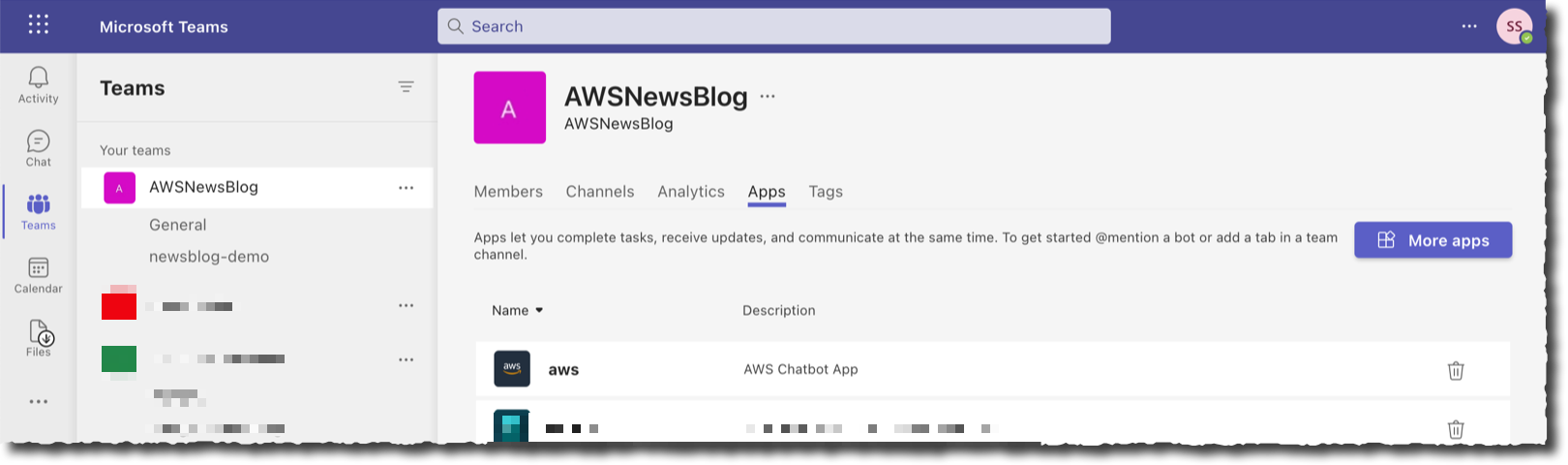
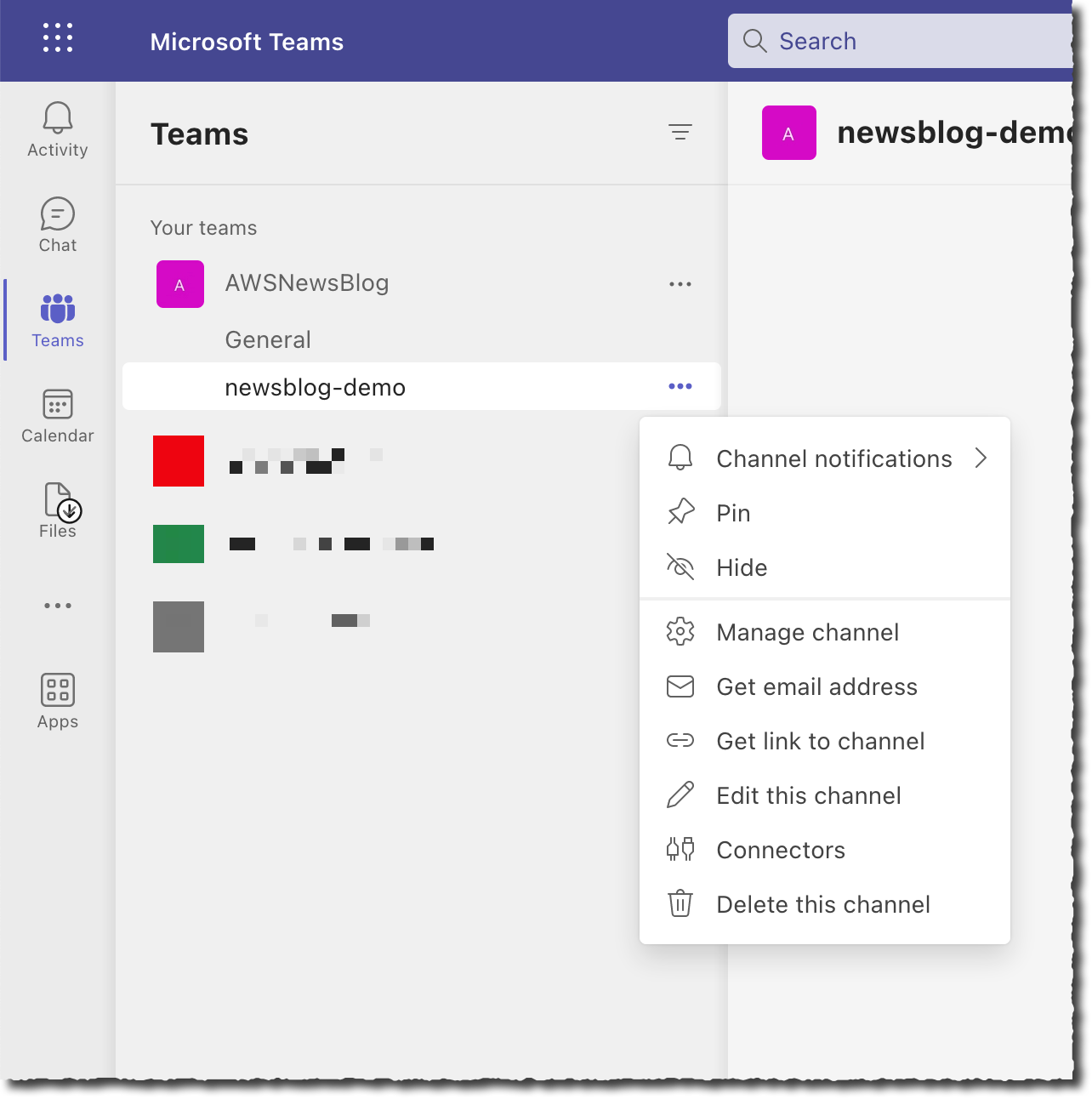
Second, I register Microsoft Teams channels in AWS Chatbot. I also assign IAM permissions on what channel members can do in this channel and associate SNS topics to receive notifications. I may configure AWS Chatbot with the AWS Management Console, an AWS CloudFormation template, or the AWS Cloud Development Kit (AWS CDK). For this demo, I choose to use the console.

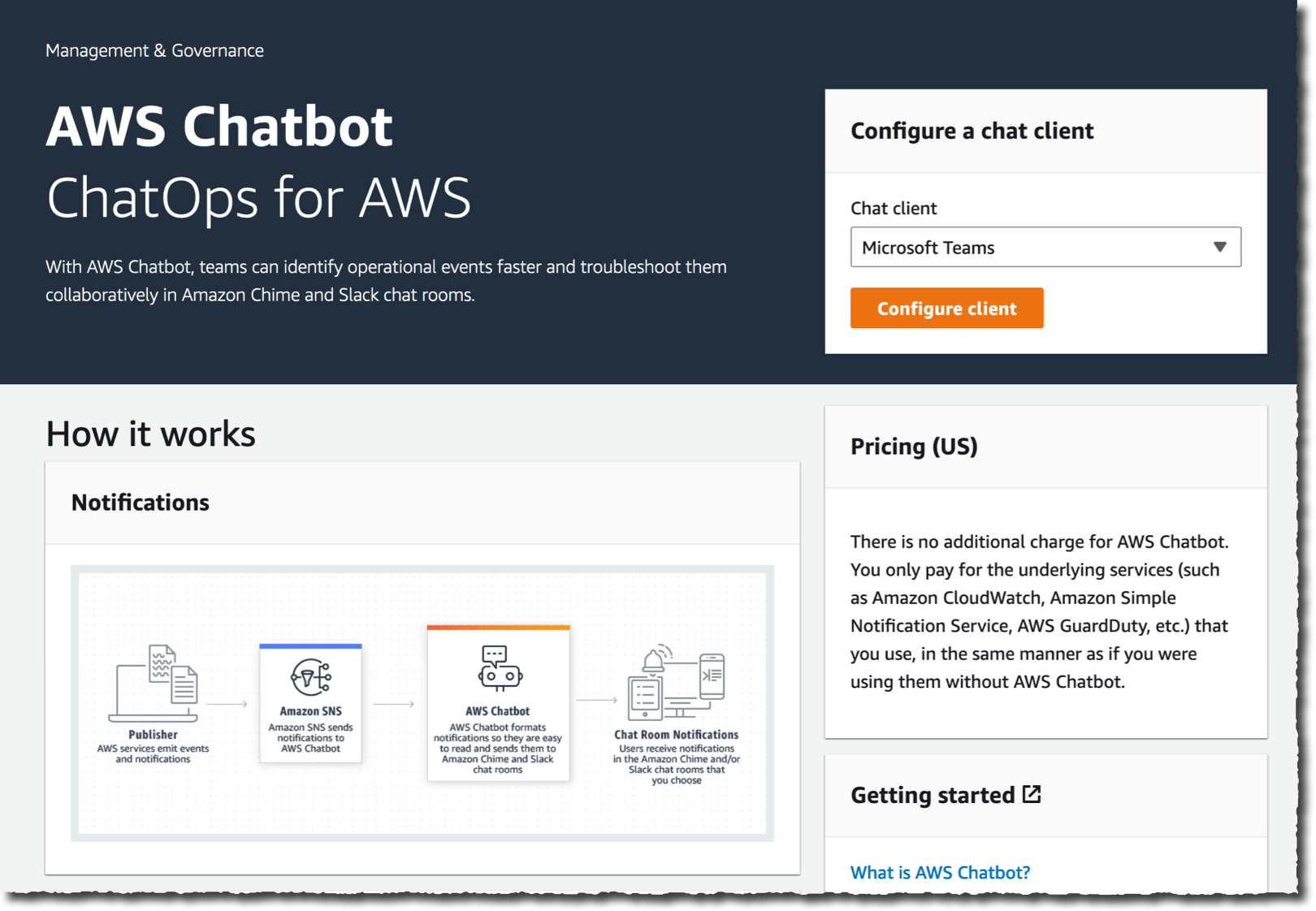
I open the Management Console and navigate to the AWS Chatbot section. On the top right side of the screen, in the Configure a chat client box, I select Microsoft Teams and then Configure client.
I enter the Microsoft Teams channel URL I noted in the Teams app.
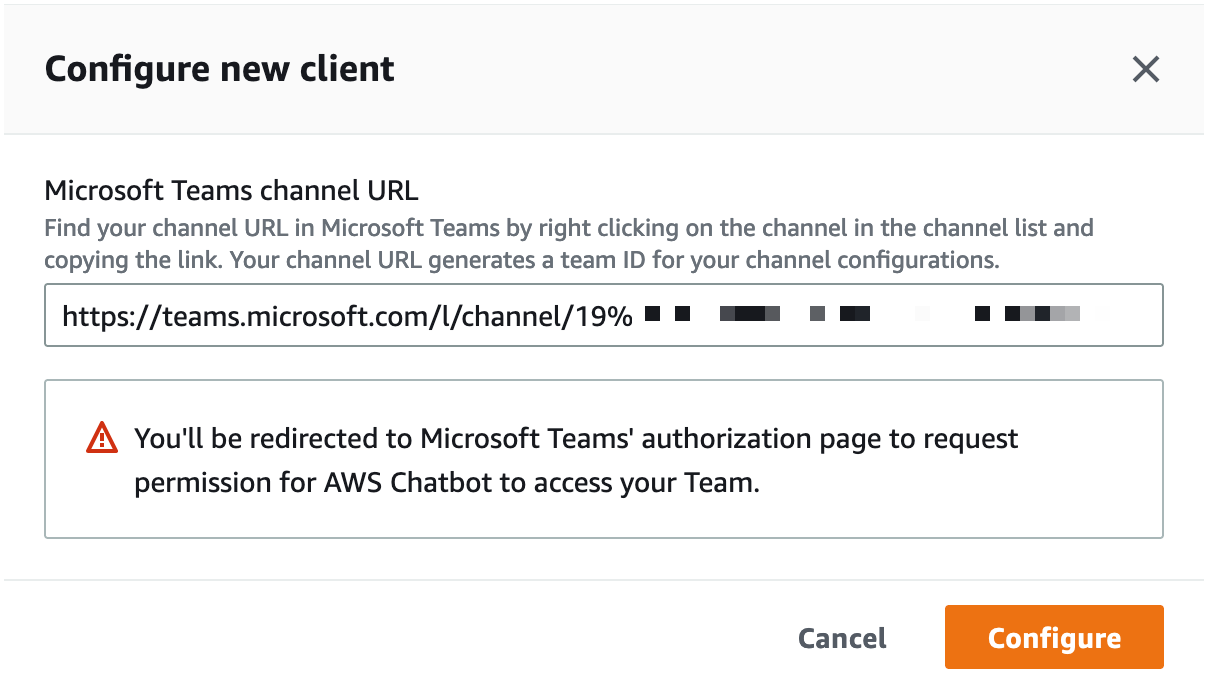
Add the team channel URL to ChatbotAt this stage, Chatbot redirects my browser to Microsoft Teams for authentication. If I am already authenticated, I will be redirected back to the AWS console immediately. Otherwise, I enter my Microsoft Teams credentials and one-time password and wait to be redirected.

At this stage, my Microsoft Teams team is registered with AWS Chatbot and ready to add Microsoft Teams channels. I select Configure new channel.
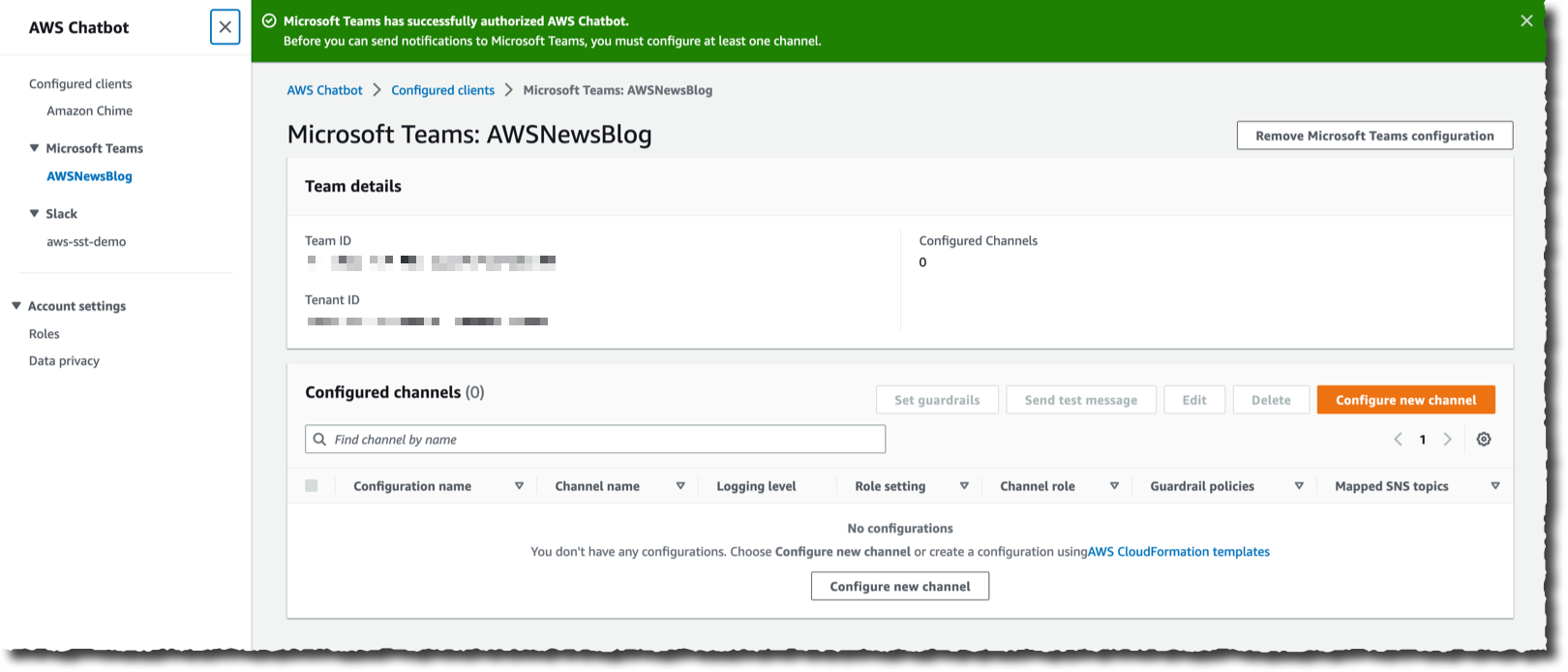
Chabot is now linked to your Microsoft Teams There are four sections to enter the details of the configuration. In the first section, I enter a Configuration name for my channel. Optionally, I also define the Logging details. In the second section, I paste—again—the Microsoft Teams Channel URL.

Configure chatbot section one and two

In the third section, I configure the Permissions. I can choose between the same set of permissions for all Microsoft Teams users in my team, or I can set User-level roles permission to enable user-specific permissions in the channel. In this demo, I select Channel role, and I assign an IAM role to the channel. The role defines the permissions shared by all users in the channel. For example, I can assign a role that allows users to access configuration data from Amazon EC2 but not from Amazon S3. Under Channel role, I select Use an existing IAM role. Under Existing role, I select a role I created for my 2019 re:Invent talk about ChatOps: chatbot-demo. This role gives read-only access to all AWS services, but I could also assign other roles that would allow Chatbot users to take actions on their AWS resources.

To mitigate the risk that another person in your team accidentally grants more than the necessary privileges to the channel or user-level roles, you might also include Channel guardrail policies. These are the maximum permissions your users might have when using the channel. At runtime, the actual permissions are the intersection of the channel or user-level policies and the guardrail policies. Guardrail policies act like a boundary that channel users will never escape. The concept is similar to permission boundaries for IAM entities or service control policies (SCP) for AWS Organizations. In this example, I attach the ReadOnlyAccess managed policy.

Configure chatbot section three

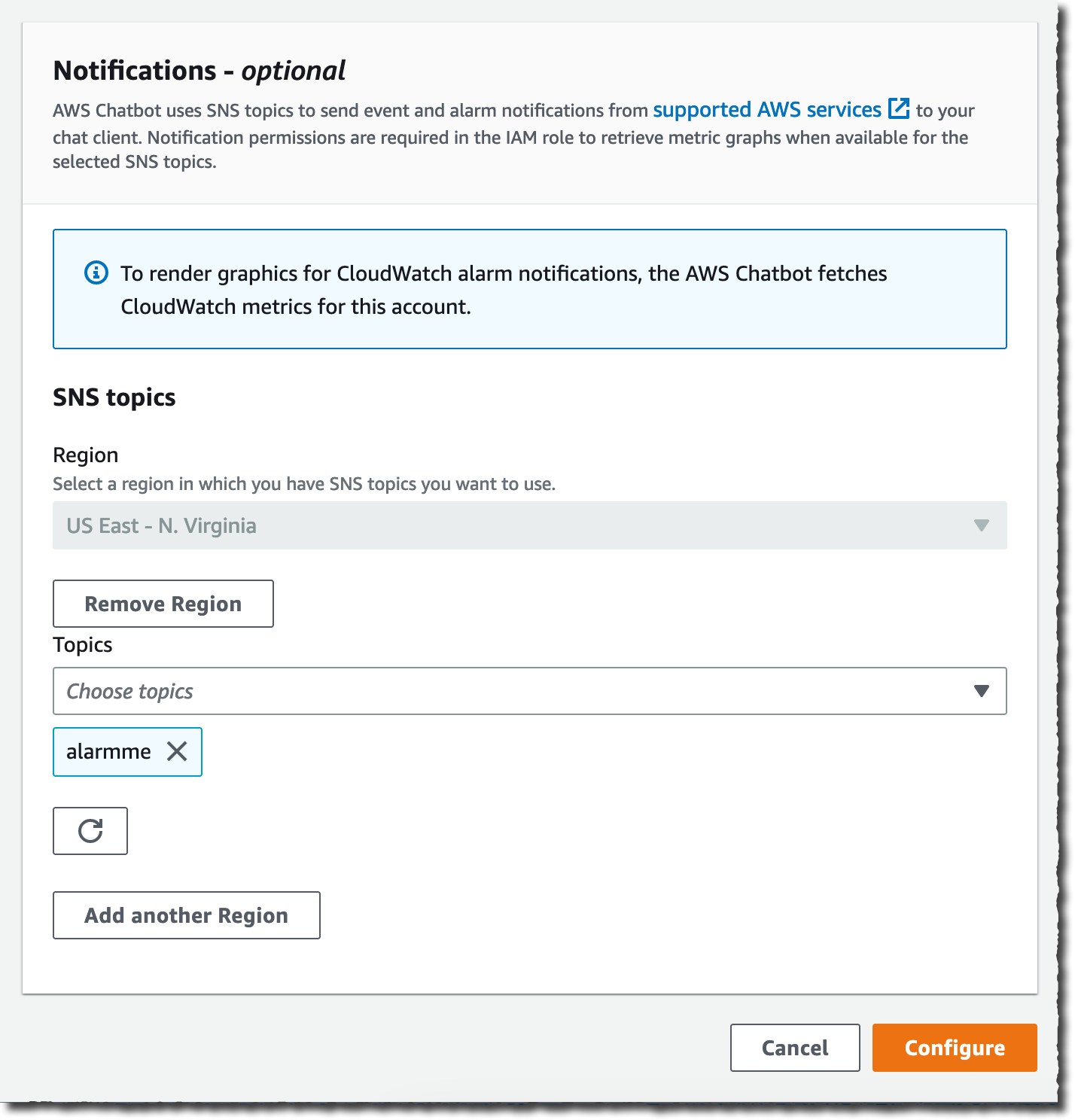
The fourth and last section allows you to specify the SNS topic that will be the source for notifications sent to your team’s channel. Your applications or AWS services, such as CloudWatch alarms, can send messages to this topic, and AWS Chatbot will relay all messages to the configured Microsoft Teams channel. Thanks to the integration between Amazon EventBridge and SNS, any application able to send a message to EventBridge is able to send a message to Microsoft Teams.

For this demo, I select an existing SNS topic: alarmme in the us-east-1 Region. You can configure multiple SNS topics to receive alarms from various Regions. I then select Configure.
Configure chatbot section fourLet’s Test the Integration
That’s it. Now I am ready to test my setup.

On the AWS Chatbot configuration page, I first select the Send test message. I also have an alarm defined when my estimated billing goes over $500. On the CloudWatch section of the Management Console, I configure the alarm to post a message on the SNS topic shared with Microsoft Teams.

Within seconds, I receive the test message and the alarm message on the Microsoft Teams channel.
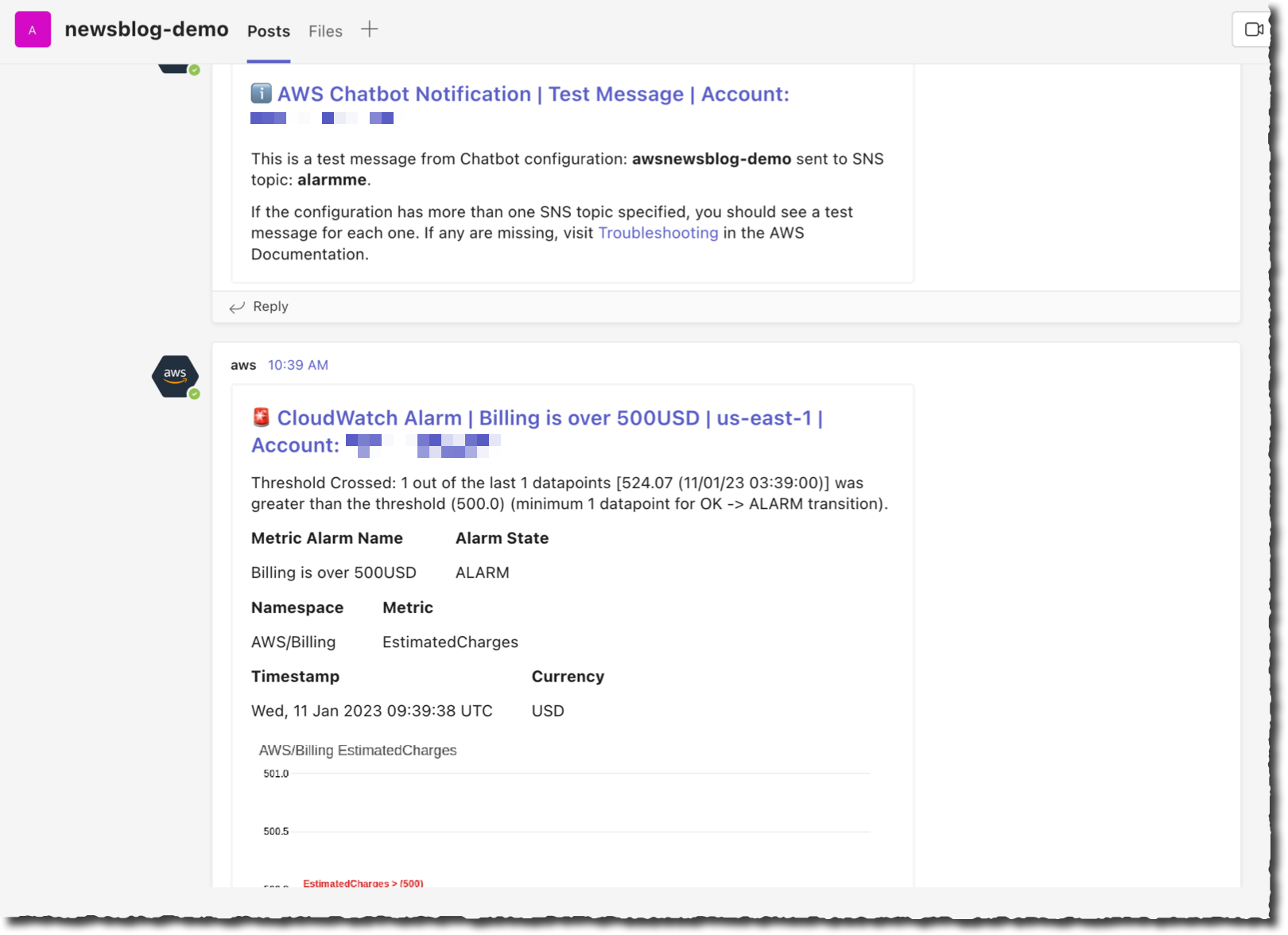
AWS Chatbot with Microsoft Teams, first messages received on the channel

Then I type a command to understand where the billing alarm comes from. I want to understand how many EC2 instances are running.

On the chat client channel, I type @aws to select Chatbot as the destination, then the rest of the CLI command, as I would do in a terminal: ec2 describe-instances --region us-east-1 --filters "Name=architecture,Values=arm64_mac" --query "Reservations[].Instances[].InstanceId"

Chatbot answers within seconds.

AWS chatbot describe instances

I can create aliases for commands I frequently use. Aliases may have placeholder parameters that I can give at runtime, such as the Region name for example.

I create an alias to get the list of my macOS instance IDs with the command: aws alias create mac ec2 describe-instances --region $region --filters "Name=architecture,Values=arm64_mac" --query "Reservations[].Instances[].InstanceId"

Now, I can type @aws alias run mac us-east-1 as a shortcut to get the same result as above. I can also manage my aliases with the @aws alias list, @aws alias get, and @aws alias delete commands.

I don’t know about you, but for me it is hard to remember commands. When I use the terminal, I rely on auto-complete to remind me of various commands and their options. AWS Chatbot offers similar command completion and guides me to collect missing parameters.
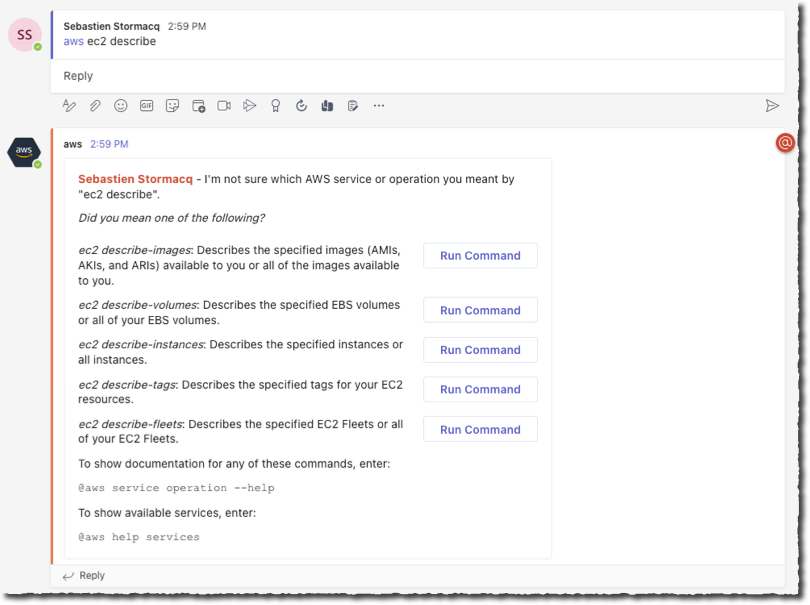
AWS Chatbot command completion

When using AWS Chatbot, I can also ask questions using natural English language. It can help to find answers from the AWS docs and from support articles by typing questions such as @aws how can I tag my EC2 instances? or @aws how do I configure Lambda concurrency setting?

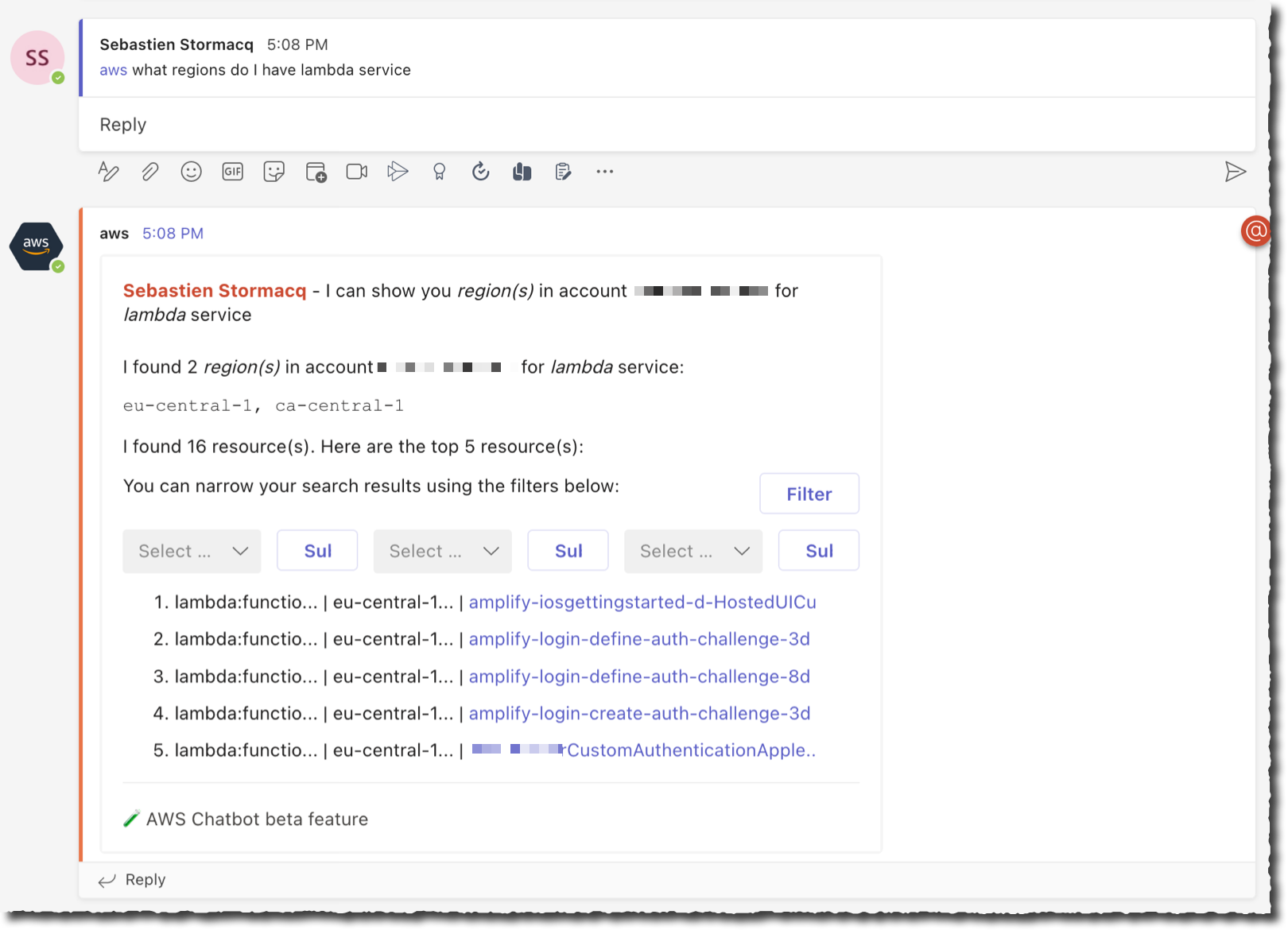
It can also find resources in my account when AWS Resource Explorer is activated. For example, I asked the bot: @aws what are the tags for my ec2 resources? and @aws what Regions do I have Lambda service?

And I received these responses.

AWS Chatbot NLP Response 1AWS Chatbot NLP Response 2Thanks to AWS Chatbot, I realized that I had a rogue Lambda function left in ca-central-1. I used the AWS console to delete it.

Available Now
You can start to use AWS Chatbot with Microsoft Teams today. AWS Chatbot for Microsoft Teams is available to download from Microsoft Teams app at no additional cost. AWS Chatbot is available in all public AWS Regions, at no additional charge. You pay for the underlying resources that you use. You might incur charges from your chat client.

Get started today and configure your first integration with Microsoft Teams.
— seb

Amazon Linux 2023, a Cloud-Optimized Linux Distribution with Long-Term Support

Post Syndicated from Sébastien Stormacq original https://aws.amazon.com/blogs/aws/amazon-linux-2023-a-cloud-optimized-linux-distribution-with-long-term-support/

I am excited to announce the general availability of Amazon Linux 2023 (AL2023). AWS has provided you with a cloud-optimized Linux distribution since 2010. This is the third generation of our Amazon Linux distributions.

Every generation of Amazon Linux distribution is secured, optimized for the cloud, and receives long-term AWS support. We built Amazon Linux 2023 on these principles, and we go even further. Deploying your workloads on Amazon Linux 2023 gives you three major benefits: a high-security standard, a predictable lifecycle, and a consistent update experience.

Let’s look at security first. Amazon Linux 2023 includes preconfigured security policies that make it easy for you to implement common industry guidelines. You can configure these policies at launch time or run time.

For example, you can configure the system crypto policy to enforce system-wide usage of a specific set of cipher suites, TLS versions, or acceptable parameters in certificates and key exchanges. Also, the Linux kernel has many hardening features enabled by default.

Amazon Linux 2023 makes it easier to plan and manage the operating system lifecycle. New Amazon Linux major versions will be available every two years. Major releases include new features and improvements in security and performance across the stack. The improvements might include major changes to the kernel, toolchain, GLib C, OpenSSL, and any other system libraries and utilities.

During those two years, a major release will receive an update every three months. These updates include security updates, bug fixes, and new features and packages. Each minor version is a cumulative list of updates that includes security and bug fixes in addition to new features and packages. These releases might include the latest language runtimes such as Python or Java. They might also include other popular software packages such as Ansible and Docker. In addition to these quarterly updates, security updates will be provided as soon as they are available.

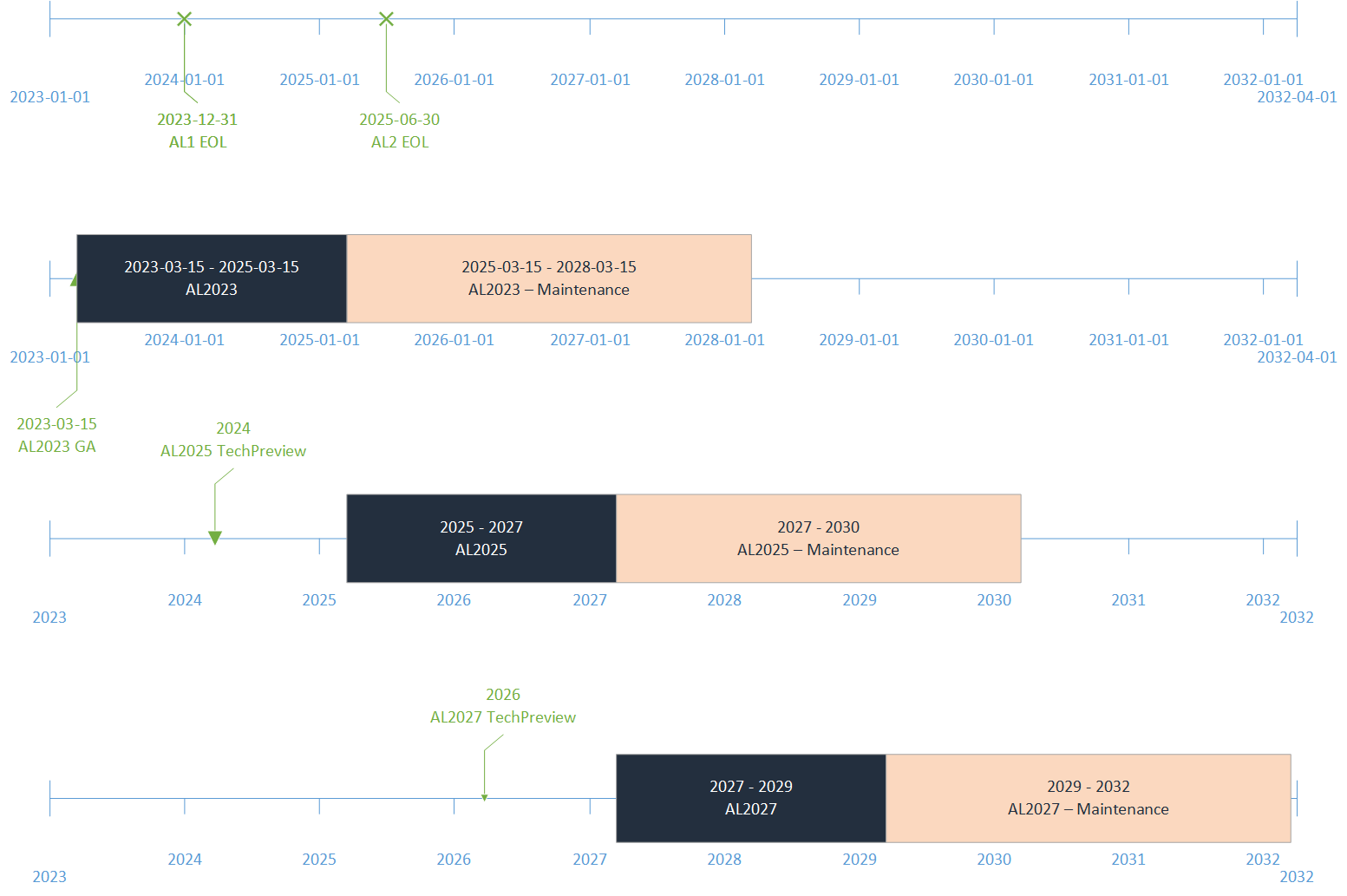
Each major version, including 2023, will come with five years of long-term support. After the initial two-year period, each major version enters a three-year maintenance period. During the maintenance period, it will continue to receive security bug fixes and patches as soon as they are available. This support commitment gives you the stability you need to manage long project lifecycles.

The following diagram illustrates the lifecycle of Amazon Linux distributions:

Last—and this policy is by far my favorite—Amazon Linux provides you with deterministic updates through versioned repositories, a flexible and consistent update mechanism. The distribution locks to a specific version of the Amazon Linux package repository, giving you control over how and when you absorb updates. By default, and in contrast with Amazon Linux 2, a dnf update command will not update your installed packages (dnf is the successor to yum). This helps to ensure that you are using the same package versions across your fleet. All Amazon Elastic Compute Cloud (Amazon EC2) instances launched from an Amazon Machine Image (AMI) will have the same version of packages. Deterministic updates also promote usage of immutable infrastructure, where no infrastructure is updated after deployment. When an update is required, you update your infrastructure as code scripts and redeploy a new infrastructure. Of course, if you really want to update your distribution in place, you can point dnf to an updated package repository and update your machine as you do today. But did I tell you this is not a good practice for production workloads? I’ll share more technical details later in this blog post.

How to Get Started
Getting started with Amazon Linux 2023 is no different than with other Linux distributions. You can use the EC2 run-instances API, the AWS Command Line Interface (AWS CLI), or the AWS Management Console, and one of the four Amazon Linux 2023 AMIs that we provide. We support two machine architectures (x86_64 and Arm) and two sizes (standard and minimal). Minimal AMIs contain the most basic tools and utilities to start the OS. The standard version comes with the most commonly used applications and tools installed.

To retrieve the latest AMI ID for a specific Region, you can use AWS Systems Manager get-parameter API and query the /aws/service/ami-amazon-linux-latest/<alias> parameter.

Be sure to replace <alias> with one of the four aliases available:

  • For arm64 architecture (standard AMI): al2023-ami-kernel-default-arm64
  • For arm64 architecture (minimal AMI): al2023-ami-minimal-kernel-default-arm64
  • For x86_64 architecture (standard AMI): al2023-ami-kernel-default-x86_64
  • For x86_64 architecture (minimal AMI): al2023-ami-minimal-kernel-default-x86_64

For example, to search for the latest Arm64 full distribution AMI ID, I open a terminal and enter:

~ aws ssm get-parameters --region us-east-2 --names /aws/service/ami-amazon-linux-latest/al2023-ami-kernel-default-arm64
{
    "Parameters": [
        {
            "Name": "/aws/service/ami-amazon-linux-latest/al2023-ami-kernel-default-arm64",
            "Type": "String",
            "Value": "ami-02f9b41a7af31dded",
            "Version": 1,
            "LastModifiedDate": "2023-02-24T22:54:56.940000+01:00",
            "ARN": "arn:aws:ssm:us-east-2::parameter/aws/service/ami-amazon-linux-latest/al2023-ami-kernel-default-arm64",
            "DataType": "text"
        }
    ],
    "InvalidParameters": []
}

To launch an instance, I use the run-instances API. Notice how I use Systems Manager resolution to dynamically lookup the AMI ID from the CLI.

➜ aws ec2 run-instances                                                                            \
       --image-id resolve:ssm:/aws/service/ami-amazon-linux-latest/al2023-ami-kernel-default-arm64  \
       --key-name my_ssh_key_name                                                                   \
       --instance-type c6g.medium                                                                   \
       --region us-east-2 
{
    "Groups": [],
    "Instances": [
        {
          "AmiLaunchIndex": 0,
          "ImageId": "ami-02f9b41a7af31dded",
          "InstanceId": "i-0740fe8e23f903bd2",
          "InstanceType": "c6g.medium",
          "KeyName": "my_ssh_key_name",
          "LaunchTime": "2023-02-28T14:12:34+00:00",

...(redacted for brevity)
}

When the instance is launched, and if the associated security group allows SSH (TCP 22) connections, I can connect to the machine:

~ ssh [email protected]
Warning: Permanently added '3.145.19.213' (ED25519) to the list of known hosts.
   ,     #_
   ~\_  ####_        Amazon Linux 2023
  ~~  \_#####\       Preview
  ~~     \###|
  ~~       \#/ ___   https://aws.amazon.com/linux/amazon-linux-2023
   ~~       V~' '->
    ~~~         /
      ~~._.   _/
         _/ _/
       _/m/'
Last login: Tue Feb 28 14:14:44 2023 from 81.49.148.9
[ec2-user@ip-172-31-9-76 ~]$ uname -a
Linux ip-172-31-9-76.us-east-2.compute.internal 6.1.12-19.43.amzn2023.aarch64 #1 SMP Thu Feb 23 23:37:18 UTC 2023 aarch64 aarch64 aarch64 GNU/Linux

We also distribute Amazon Linux 2023 as Docker images. The Amazon Linux 2023 container image is built from the same software components that are included in the Amazon Linux 2023 AMI. The container image is available for use in any environment as a base image for Docker workloads. If you’re using Amazon Linux for applications in EC2, you can containerize your applications with the Amazon Linux container image.

These images are available from Amazon Elastic Container Registry (Amazon ECR) and from Docker Hub. Here is a quick demo to start a Docker container using Amazon Linux 2023 from Elastic Container Registry.

$ aws ecr-public get-login-password --region us-east-1 | docker login --username AWS --password-stdin public.ecr.aws
Login Succeeded
~ docker run --rm -it public.ecr.aws/amazonlinux/amazonlinux:2023 /bin/bash
Unable to find image 'public.ecr.aws/amazonlinux/amazonlinux:2023' locally
2023: Pulling from amazonlinux/amazonlinux
b4265814d5cf: Pull complete 
Digest: sha256:bbd7a578cff9d2aeaaedf75eb66d99176311b8e3930c0430a22e0a2d6c47d823
Status: Downloaded newer image for public.ecr.aws/amazonlinux/amazonlinux:2023
bash-5.2# uname -a 
Linux 9d5b45e9f895 5.15.49-linuxkit #1 SMP PREEMPT Tue Sep 13 07:51:32 UTC 2022 aarch64 aarch64 aarch64 GNU/Linux
bash-5.2# exit 

When pulling from Docker Hub, you can use this command to pull the image: docker pull amazonlinux:2023.

What Are the Main Differences Compared to Amazon Linux 2?
Amazon Linux 2023 has some differences compared to Amazon Linux 2. The documentation explains these differences in detail. The two differences I would like to focus on are dnf and the package management policies.

AL2023 comes with Fedora’s dnf, the successor to yum. But don’t worry, dnf provides similar commands as yum to search, install, or remove packages. Where you used to run the commands yum list or yum install httpd, you may now run dnf list or dnf install httpd. For convenience, we create a symlink for /usr/bin/yum, so you can run your scripts unmodified.

$ which yum
/usr/bin/yum
$ ls -al /usr/bin/yum
lrwxrwxrwx. 1 root root 5 Jun 19 18:06 /usr/bin/yum -> dnf-3

The biggest difference, in my opinion, is the deterministic updates through versioned repositories. By default, the software repository is locked to the AMI version. This means that a dnf update command will not return any new packages to install. Versioned repositories give you the assurance that all machines started from the same AMI ID are identical. Your infrastructure will not deviate from the baseline.

$ sudo dnf update 
Last metadata expiration check: 0:14:10 ago on Tue Feb 28 14:12:50 2023.
Dependencies resolved.
Nothing to do.
Complete!

Yes, but what if you want to update a machine? You have two options to update an existing machine. The cleanest one for your production environment is to create duplicate infrastructure based on new AMIs. As I mentioned earlier, we publish updates for every security fix and a consolidated update every three months for two years after the initial release. Each update is provided as a set of AMIs and their corresponding software repository.

For smaller infrastructure, such as test or development machines, you might choose to update the operating system or individual packages in place as well. This is a three-step process:

  • first, list the available updated software repositories;
  • second, point dnf to a specific software repository;
  • and third, update your packages.

To show you how it works, I purposely launched an EC2 instance with an “old” version of Amazon Linux 2023 from February 2023. I first run dnf check-release-update to list the available updated software repositories.

$ dnf check-release-update
WARNING:
  A newer release of "Amazon Linux" is available.

  Available Versions:

  Version 2023.0.20230308:
    Run the following command to upgrade to 2023.0.20230308:

      dnf upgrade --releasever=2023.0.20230308

    Release notes:
     https://docs.aws.amazon.com/linux/al2023/release-notes/relnotes.html

Then, I might either update the full distribution using dnf upgrade --releasever=2023.0.20230308 or point dnf to the updated repository to select individual packages.

$ dnf check-update --releasever=2023.0.20230308

Amazon Linux 2023 repository                                                    28 MB/s |  11 MB     00:00
Amazon Linux 2023 Kernel Livepatch repository                                  1.2 kB/s | 243  B     00:00

amazon-linux-repo-s3.noarch                          2023.0.20230308-0.amzn2023                amazonlinux
binutils.aarch64                                     2.39-6.amzn2023.0.5                       amazonlinux
ca-certificates.noarch                               2023.2.60-1.0.amzn2023.0.1                amazonlinux
(redacted for brevity)
util-linux-core.aarch64 2.37.4-1.amzn2022.0.1 amazonlinux

Finally, I might run a dnf update <package_name> command to update a specific package.

This might look like overkill for a simple machine, but when managing enterprise infrastructure or large-scale fleets of instances, this facilitates the management of your fleet by ensuring that all instances run the same version of software packages. It also means that the AMI ID is now something that you can fully run through your CI/CD pipelines for deployment and that you have a way to roll AMI versions forward and backward according to your schedule.

Where is Fedora?
When looking for a base to serve as a starting point for Amazon Linux 2023, Fedora was the best choice. We found that Fedora’s core tenets (Freedom, Friends, Features, First) resonate well with our vision for Amazon Linux. However, Amazon Linux focuses on a long-term, stable OS for the cloud, which is a notable different release cycle and lifecycle than Fedora. Amazon Linux 2023 provides updated versions of open-source software, a larger variety of packages, and frequent releases.

Amazon Linux 2023 isn’t directly comparable to any specific Fedora release. The Amazon Linux 2023 GA version includes components from Fedora 34, 35, and 36. Some of the components are the same as the components in Fedora, and some are modified. Other components more closely resemble the components in CentOS Stream 9 or were developed independently. The Amazon Linux kernel, on its side, is sourced from the long-term support options that are on kernel.org, chosen independently from the kernel provided by Fedora.

Like every good citizen in the open-source community, we give back and contribute our changes to upstream distributions and sources for the benefit of the entire community. Amazon Linux 2023 itself is open source. The source code for all RPM packages that are used to build the binaries that we ship are available through the SRPM yum repository (sudo dnf install -y 'dnf-command(download)' && dnf download --source bash)

One More Thing: Amazon EBS Gp3 Volumes
Amazon Linux 2023 AMIs use gp3 volumes by default.

Gp3 is the latest generation general-purpose solid-state drive (SSD) volume for Amazon Elastic Block Store (Amazon EBS). Gp3 provides 20 percent lower storage costs compared to gp2. Gp3 volumes deliver a baseline performance of 3,000 IOPS and 125MB/s at any volume size. What I particularly like about gp3 volumes is that I can now provision performance independently of capacity. When using gp3 volumes, I can now increase IOPS and throughput without incurring charges for extra capacity that I don’t actually need.

With the availability of gp3-backed AL2023 AMIs, this is the first time a gp3-backed Amazon Linux AMI is available. Gp3-backed AMIs have been a common customer request since gp3 was launched in 2020. It is now available by default.

Price and Availability
Amazon Linux 2023 is provided at no additional charge. Standard Amazon EC2 and AWS charges apply for running EC2 instances and other services. This distribution includes full support for five years. When deploying on AWS, our support engineers will provide technical support according to the terms and conditions of your AWS Support plan. AMIs are available in all AWS Regions.

Amazon Linux is the most used Linux distribution on AWS, with hundreds of thousands of customers using Amazon Linux 2. Dozens of Independent Software Vendors (ISVs) and hardware partners are supporting Amazon Linux 2023 today. You can adopt this new version with the confidence that the partner tools you rely on are likely to be supported. We are excited about this release, which brings you an even higher level of security, a predictable release lifecycle, and a consistent update experience.

Now go build and deploy your workload on Amazon Linux 2023 today.

— seb

Celebrate Amazon S3’s 17th birthday at AWS Pi Day 2023

Post Syndicated from Sébastien Stormacq original https://aws.amazon.com/blogs/aws/celebrate-amazon-s3s-17th-birthday-at-aws-pi-day-2023/

AWS Pi Day 2023 is live today starting at 13:00 PDT; join us on the AWS on Air channel on Twitch.

On this day 17 years ago, we launched a very simple object storage service. It allowed developers to create, list, and delete private storage spaces (known as buckets), upload and download files, and manage their access permissions. The service was available only through a REST and SOAP API. It was designed to provide highly durable data storage with 99.999999999 percent data durability (that’s 11 nines!).

Fast forward to 2023, Amazon Simple Storage Service (Amazon S3) holds more than 280 trillion objects and averages over 100 million requests per second. To protect data integrity, Amazon S3 performs over four billion checksum computations per second. Over the years, we added many capabilities, such as a range of storage classes, to store your colder data cost effectively. Every day, you restore on average more than 1 petabyte from the S3 Glacier Flexible Retrieval and S3 Glacier Deep Archive storage classes. Since launch, you have saved $1 billion from using Amazon S3 Intelligent-Tiering. In 2015, we added the possibility of replicating your data across Regions. Every week, Amazon S3 Replication moves more than 100 petabytes of data. Amazon S3 is also at the core of hundreds of thousands of data lakes. It also has become a critical component of a growing ecosystem of serverless applications. Every day, Amazon S3 sends over 125 billion event notifications to serverless applications. Altogether, Amazon S3 is helping people around the world securely store and extract value from their data.

AWS Pi Day 2023 Small

To celebrate Amazon S3‘s birthday AWS is hosting the AWS Pi Day event for the third consecutive year. This live online event starts at 13:00 PDT today (March 14, 2023) on the AWS On Air channel on Twitch and will feature four hours of fresh educational content from AWS experts. We will discuss not only Amazon S3 best practices, we will also dive into the latest innovations across AWS data services, from storage to analytics and AI/ML. Tune in to learn how to get the most out of your data by making it more secure, available, accessible, and connected, and to help you respond to rapid growth and changing demand. You will also learn how to optimize your data costs, automate your cost savings, eliminate operational complexity, and get new insights from your data. Have a look at the full agenda on the registration page.

At AWS, we innovate on your behalf. During the last few weeks, we announced a 99.99 percent SLA for Amazon MemoryDB for Redis, enhanced I/O multiplexing for Amazon ElastiCache for Redis, and encryption by default for new objects on Amazon S3.

But we are not stopping there, and today we take the occasion of this celebration to announce seven new capabilities across our data services.

Mountpoint for Amazon S3 (alpha release): an open-source file client for Amazon S3
Mountpoint for Amazon S3 is an open-source file client for Amazon S3 that you can install on your compute instance. It translates local file storage API calls to REST API calls on objects in Amazon S3. When using Mountpoint for Amazon S3, data lake applications that access objects using file APIs can achieve high single-instance transfer rates, saving on compute costs.

You can get started with Mountpoint for Amazon S3 by mounting an Amazon S3 bucket at a local mount point on your compute instance. Once mounted, applications read objects as files available locally. Mountpoint for Amazon S3 supports sequential and random read operations on existing S3 objects. It is available to download for Linux operating systems as an alpha release and is not yet intended for production workloads. Instead, we want to collect your feedback early and incorporate your input into the design and implementation. To get started, visit the Mountpoint for Amazon S3 GitHub repo, read the technical launch blog, and share your feedback.

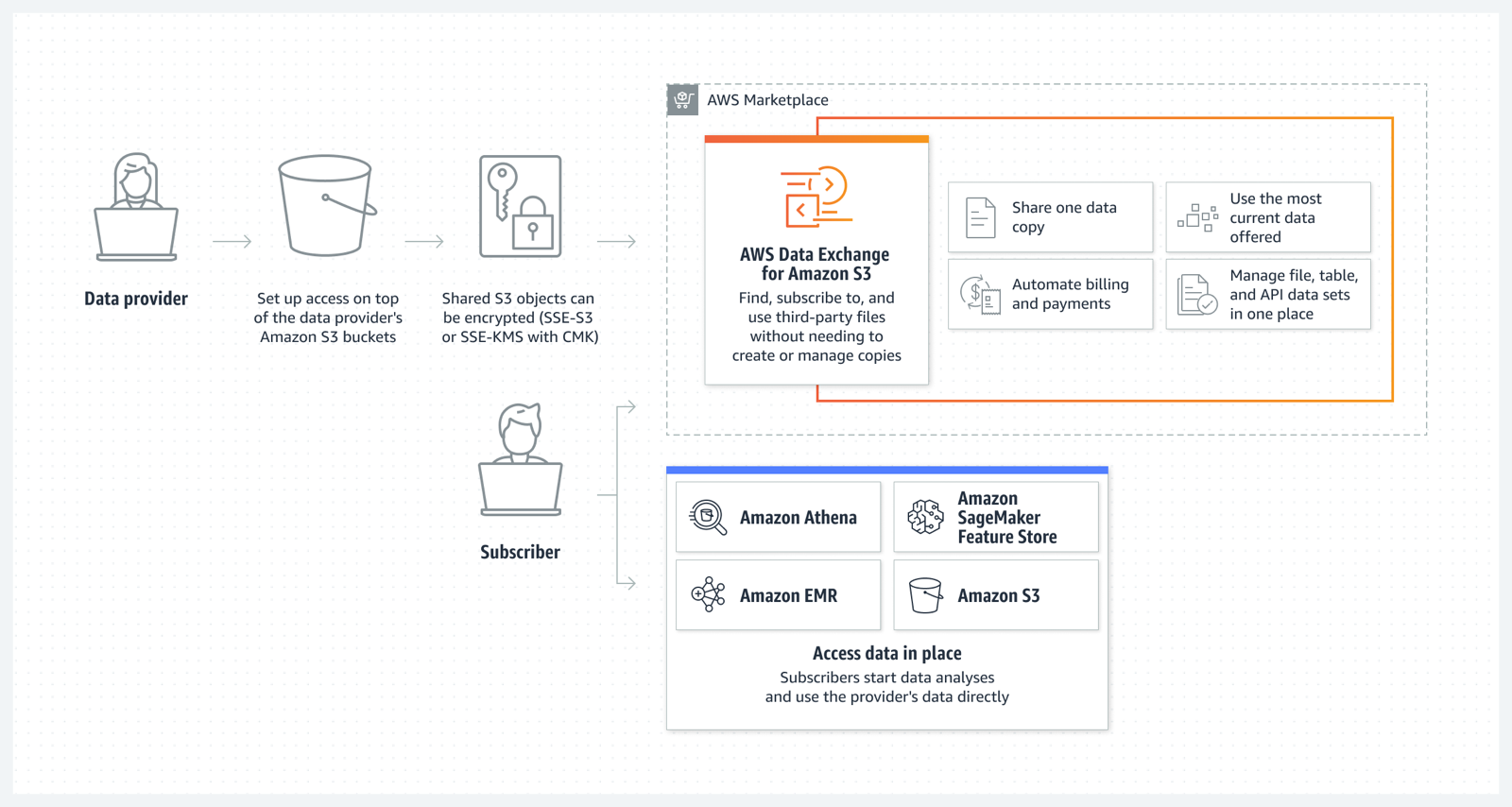
Now Generally Available: AWS Data Exchange for Amazon S3
AWS Data Exchange for Amazon S3 enables you to easily find, subscribe to, and use third-party data files for faster time to insight, storage cost optimization, simplified data licensing management, and more. Data Exchange subscribers can directly use files from data providers’ Amazon S3 buckets for their analysis with AWS services without needing to create or manage copies to their account. Data providers can license in-place access to data hosted in their Amazon S3 buckets.

To learn more about how data providers can simplify and scale access management to multiple data subscribers, you can read this blog.

AWS Data Exchange for S3

Amazon S3 Multi-Region Access Points now support replicated datasets that span multiple AWS accounts
We launched Amazon S3 Multi-Region Access Points in September 2021. We added failover control in November 2022. Amazon S3 Multi-Region Access Points now support datasets that are replicated across multiple AWS accounts. Cross-account Multi-Region Access Points simplify object storage access for applications that span both AWS Regions and accounts, avoiding the need for complex request routing logic in your application. They provide a single global endpoint for your multi-Region applications and dynamically route S3 requests based on policies that you define. This helps you to easily implement multi-Region resilience, latency-based routing, and active/passive failover, even when your data is stored in multiple AWS accounts.

You can learn more about S3 Multi-Region Access Points on the Amazon S3 FAQs.

Aliases for S3 Object Lambda Access Points as CloudFront origin
Amazon S3 Object Lambda, launched in March 2021, lets you add your own code to S3 GET, HEAD, and LIST API requests to modify data as it is returned to an application. With today’s launch of aliases for S3 Object Lambda Access Points any application that requires an S3 bucket name can easily present different views of data depending on the requester. You can now use an S3 Object Lambda Access Point alias as an origin for your Amazon CloudFront distribution to modify the data requested. For example, you can dynamically transform an image depending on the device that a user is visiting from, such as a desktop or a smartphone.

If you want to learn more, my colleague Danilo wrote a blog post with more details and code examples.

Simplify private connectivity from on-premises networks
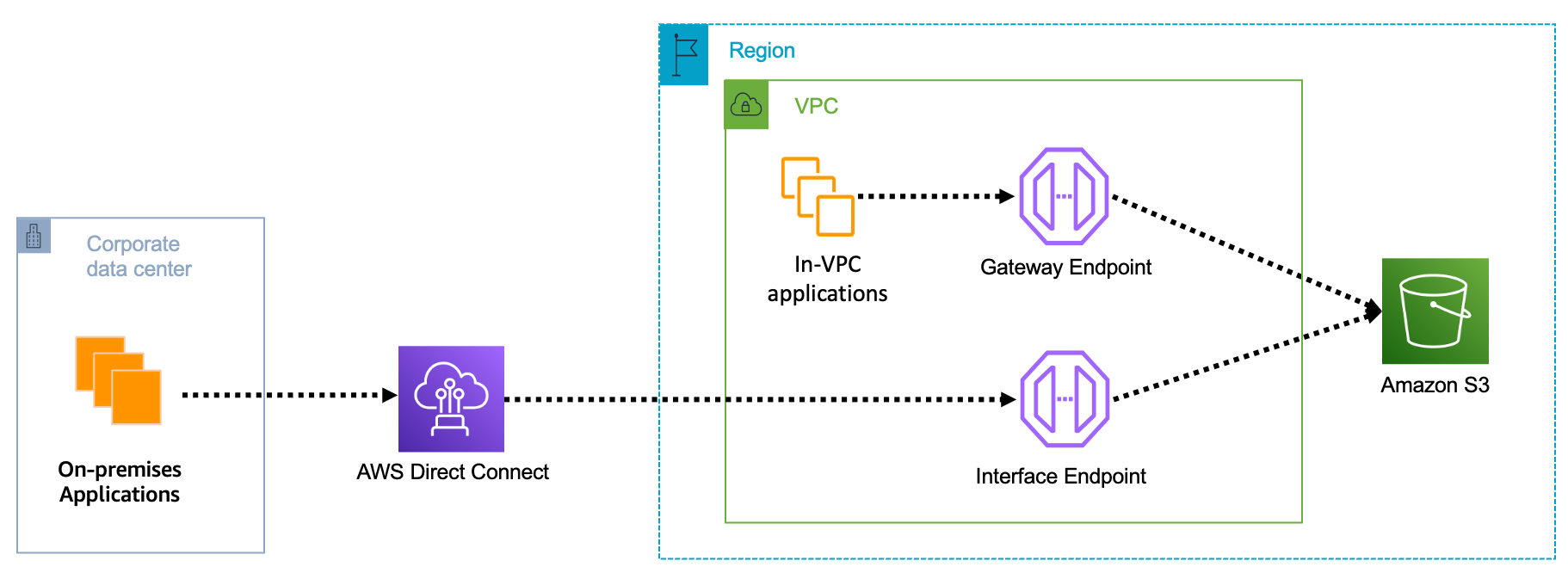
Amazon Virtual Private Cloud (Amazon VPC) interface endpoints for Amazon S3 now offer private DNS options that can help you more easily route Amazon S3 requests to the lowest-cost endpoint in your VPC. With private DNS for Amazon S3, your on-premises applications can use AWS PrivateLink to access Amazon S3 over an interface endpoint, while requests from your in-VPC applications access Amazon S3 using gateway endpoints. Routing requests like this helps you take advantage of the lowest-cost private network path without having to make code or configuration changes to your clients.

S3 private connectivity

You can learn more on the AWS PrivateLink for Amazon S3 documentation.

Local Amazon S3 Replication on Outposts
Amazon S3 on Outposts now supports S3 replication on Outposts. This extends S3’s fully managed approach to replication to S3 on Outposts buckets. It helps you meet your data residency and data redundancy requirements. With local S3 Replication on Outposts, you can create and configure replication rules to automatically replicate your S3 objects to another Outpost or to another bucket on the same Outpost. During replication, your S3 on Outposts objects are always sent over your local gateway, and objects do not travel back to the AWS Region. S3 Replication on Outposts provides an easy and flexible way to automatically replicate data within a specific data perimeter to address your data redundancy and compliance requirements.

Amazon OpenSearch Security Analytics
The new Amazon OpenSearch Service’s security analytics capability enables your Security Operations (SecOps) teams to detect potential threats quickly while having the tools to help with security investigations on historical data—all with lower data storage costs. Like many other advanced capabilities of Amazon OpenSearch Service, there is no additional charge for security analytics.

You can learn more about Amazon OpenSearch security analytics by reading this blog post.

Join Us Online Today
You will learn more about these launches and about AWS data services in general. We have also prepared some live demos. We designed the AWS Pi Day event for system administrators, engineers, developers, and architects. Our sessions will bring you the latest and greatest information on storage, security, backup, archiving, training and certification, and more.

And to dive deeper, get Pi Day started early by attending AWS Innovate: Data and AI/ML Edition to learn about cutting-edge machine learning tools, strategies for building future-proof applications, and making data-driven decisions for your organization. Don’t miss Swami Sivasubramanian‘s keynote, starting at 9:00 PDT.

Join us today on the AWS Pi Day live stream. Kevin Miller, VP and GM of Amazon S3, will kick off the event with a keynote at 13:00 PDT.

See you there!

— seb

New – Use Amazon S3 Object Lambda with Amazon CloudFront to Tailor Content for End Users

Post Syndicated from Danilo Poccia original https://aws.amazon.com/blogs/aws/new-use-amazon-s3-object-lambda-with-amazon-cloudfront-to-tailor-content-for-end-users/

With S3 Object Lambda, you can use your own code to process data retrieved from Amazon S3 as it is returned to an application. Over time, we added new capabilities to S3 Object Lambda, like the ability to add your own code to S3 HEAD and LIST API requests, in addition to the support for S3 GET requests that was available at launch.

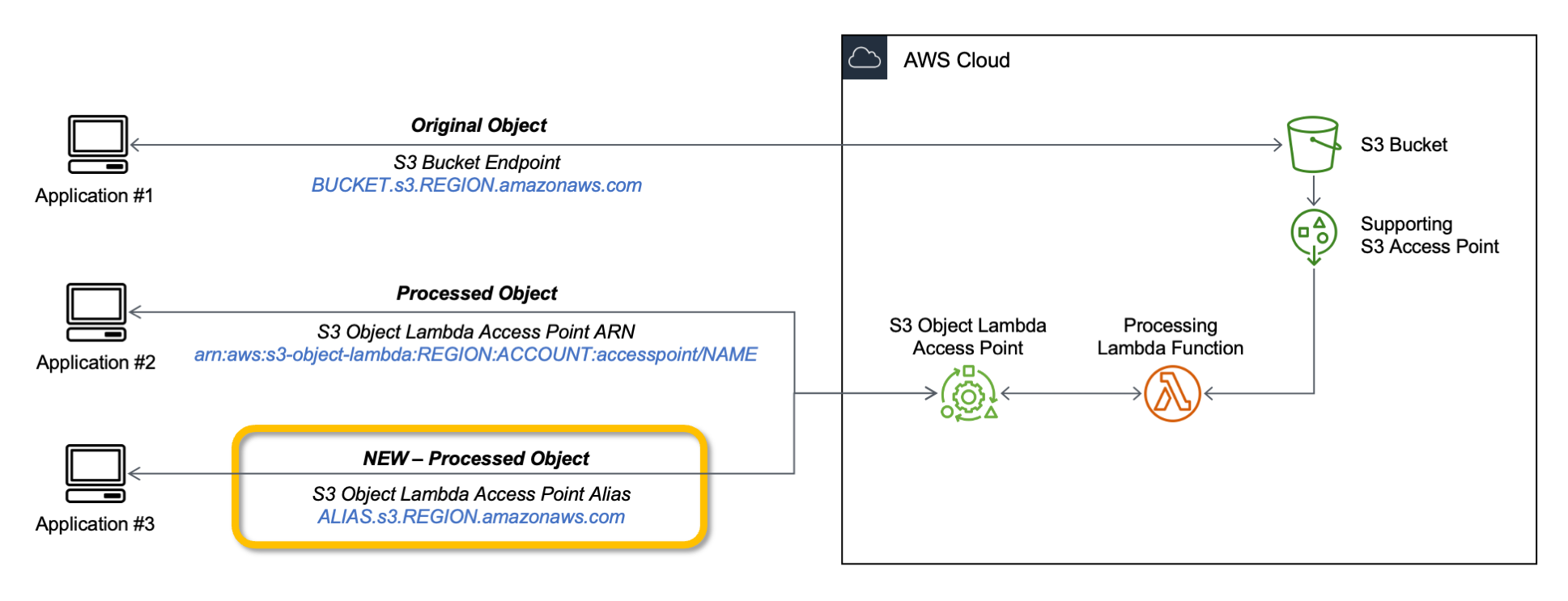
Today, we are launching aliases for S3 Object Lambda Access Points. Aliases are now automatically generated when S3 Object Lambda Access Points are created and are interchangeable with bucket names anywhere you use a bucket name to access data stored in Amazon S3. Therefore, your applications don’t need to know about S3 Object Lambda and can consider the alias to be a bucket name.

Architecture diagram.

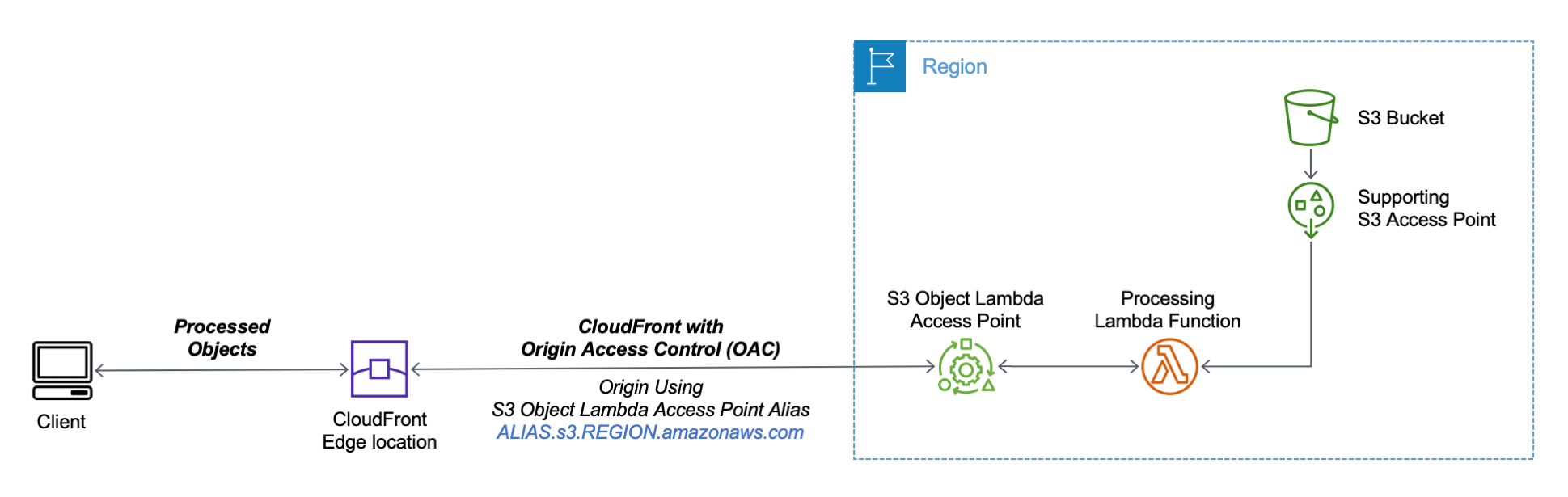
You can now use an S3 Object Lambda Access Point alias as an origin for your Amazon CloudFront distribution to tailor or customize data for end users. You can use this to implement automatic image resizing or to tag or annotate content as it is downloaded. Many images still use older formats like JPEG or PNG, and you can use a transcoding function to deliver images in more efficient formats like WebP, BPG, or HEIC. Digital images contain metadata, and you can implement a function that strips metadata to help satisfy data privacy requirements.

Architecture diagram.

Let’s see how this works in practice. First, I’ll show a simple example using text that you can follow along by just using the AWS Management Console. After that, I’ll implement a more advanced use case processing images.

Using an S3 Object Lambda Access Point as the Origin of a CloudFront Distribution
For simplicity, I am using the same application in the launch post that changes all text in the original file to uppercase. This time, I use the S3 Object Lambda Access Point alias to set up a public distribution with CloudFront.

I follow the same steps as in the launch post to create the S3 Object Lambda Access Point and the Lambda function. Because the Lambda runtimes for Python 3.8 and later do not include the requests module, I update the function code to use urlopen from the Python Standard Library:

import boto3
from urllib.request import urlopen

s3 = boto3.client('s3')

def lambda_handler(event, context):
  print(event)

  object_get_context = event['getObjectContext']
  request_route = object_get_context['outputRoute']
  request_token = object_get_context['outputToken']
  s3_url = object_get_context['inputS3Url']

  # Get object from S3
  response = urlopen(s3_url)
  original_object = response.read().decode('utf-8')

  # Transform object
  transformed_object = original_object.upper()

  # Write object back to S3 Object Lambda
  s3.write_get_object_response(
    Body=transformed_object,
    RequestRoute=request_route,
    RequestToken=request_token)

  return

To test that this is working, I open the same file from the bucket and through the S3 Object Lambda Access Point. In the S3 console, I select the bucket and a sample file (called s3.txt) that I uploaded earlier and choose Open.

Console screenshot.

A new browser tab is opened (you might need to disable the pop-up blocker in your browser), and its content is the original file with mixed-case text:

Amazon Simple Storage Service (Amazon S3) is an object storage service that offers...

I choose Object Lambda Access Points from the navigation pane and select the AWS Region I used before from the dropdown. Then, I search for the S3 Object Lambda Access Point that I just created. I select the same file as before and choose Open.

Console screenshot.

In the new tab, the text has been processed by the Lambda function and is now all in uppercase:

AMAZON SIMPLE STORAGE SERVICE (AMAZON S3) IS AN OBJECT STORAGE SERVICE THAT OFFERS...

Now that the S3 Object Lambda Access Point is correctly configured, I can create the CloudFront distribution. Before I do that, in the list of S3 Object Lambda Access Points in the S3 console, I copy the Object Lambda Access Point alias that has been automatically created:

Console screenshot.

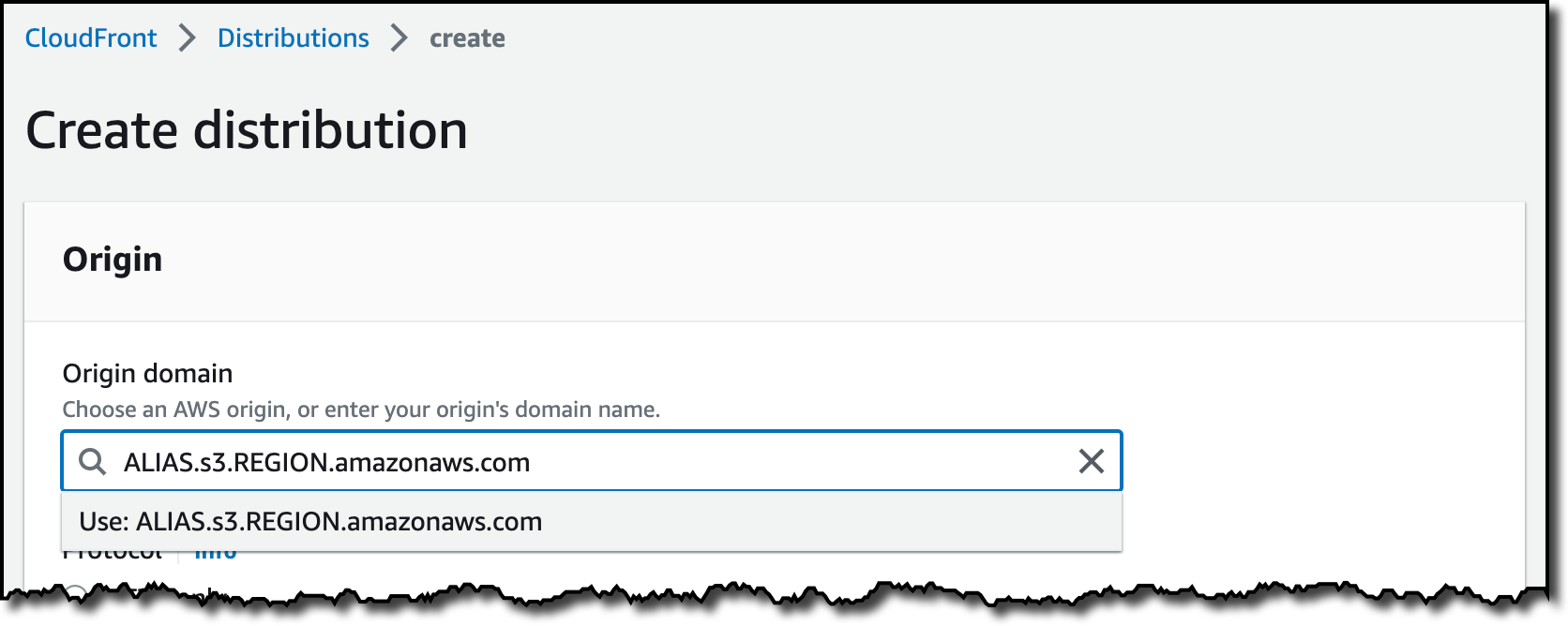
In the CloudFront console, I choose Distributions in the navigation pane and then Create distribution. In the Origin domain, I use the S3 Object Lambda Access Point alias and the Region. The full syntax of the domain is:

ALIAS.s3.REGION.amazonaws.com

Console screenshot.

S3 Object Lambda Access Points cannot be public, and I use CloudFront origin access control (OAC) to authenticate requests to the origin. For Origin access, I select Origin access control settings and choose Create control setting. I write a name for the control setting and select Sign requests and S3 in the Origin type dropdown.

Console screenshot.

Now, my Origin access control settings use the configuration I just created.

Console screenshot.

To reduce the number of requests going through S3 Object Lambda, I enable Origin Shield and choose the closest Origin Shield Region to the Region I am using. Then, I select the CachingOptimized cache policy and create the distribution. As the distribution is being deployed, I update permissions for the resources used by the distribution.

Setting Up Permissions to Use an S3 Object Lambda Access Point as the Origin of a CloudFront Distribution
First, the S3 Object Lambda Access Point needs to give access to the CloudFront distribution. In the S3 console, I select the S3 Object Lambda Access Point and, in the Permissions tab, I update the policy with the following:

{
    "Version": "2012-10-17",
    "Statement": [
        {
            "Effect": "Allow",
            "Principal": {
                "Service": "cloudfront.amazonaws.com"
            },
            "Action": "s3-object-lambda:Get*",
            "Resource": "arn:aws:s3-object-lambda:REGION:ACCOUNT:accesspoint/NAME",
            "Condition": {
                "StringEquals": {
                    "aws:SourceArn": "arn:aws:cloudfront::ACCOUNT:distribution/DISTRIBUTION-ID"
                }
            }
        }
    ]
}

The supporting access point also needs to allow access to CloudFront when called via S3 Object Lambda. I select the access point and update the policy in the Permissions tab:

{
    "Version": "2012-10-17",
    "Id": "default",
    "Statement": [
        {
            "Sid": "s3objlambda",
            "Effect": "Allow",
            "Principal": {
                "Service": "cloudfront.amazonaws.com"
            },
            "Action": "s3:*",
            "Resource": [
                "arn:aws:s3:REGION:ACCOUNT:accesspoint/NAME",
                "arn:aws:s3:REGION:ACCOUNT:accesspoint/NAME/object/*"
            ],
            "Condition": {
                "ForAnyValue:StringEquals": {
                    "aws:CalledVia": "s3-object-lambda.amazonaws.com"
                }
            }
        }
    ]
}

The S3 bucket needs to allow access to the supporting access point. I select the bucket and update the policy in the Permissions tab:

{
    "Version": "2012-10-17",
    "Statement": [
        {
            "Effect": "Allow",
            "Principal": {
                "AWS": "*"
            },
            "Action": "*",
            "Resource": [
                "arn:aws:s3:::BUCKET",
                "arn:aws:s3:::BUCKET/*"
            ],
            "Condition": {
                "StringEquals": {
                    "s3:DataAccessPointAccount": "ACCOUNT"
                }
            }
        }
    ]
}

Finally, CloudFront needs to be able to invoke the Lambda function. In the Lambda console, I choose the Lambda function used by S3 Object Lambda, and then, in the Configuration tab, I choose Permissions. In the Resource-based policy statements section, I choose Add permissions and select AWS Account. I enter a unique Statement ID. Then, I enter cloudfront.amazonaws.com as Principal and select lambda:InvokeFunction from the Action dropdown and Save. We are working to simplify this step in the future. I’ll update this post when that’s available.

Testing the CloudFront Distribution
When the distribution has been deployed, I test that the setup is working with the same sample file I used before. In the CloudFront console, I select the distribution and copy the Distribution domain name. I can use the browser and enter https://DISTRIBUTION_DOMAIN_NAME/s3.txt in the navigation bar to send a request to CloudFront and get the file processed by S3 Object Lambda. To quickly get all the info, I use curl with the -i option to see the HTTP status and the headers in the response:

curl -i https://DISTRIBUTION_DOMAIN_NAME/s3.txt

HTTP/2 200 
content-type: text/plain
content-length: 427
x-amzn-requestid: a85fe537-3502-4592-b2a9-a09261c8c00c
date: Mon, 06 Mar 2023 10:23:02 GMT
x-cache: Miss from cloudfront
via: 1.1 a2df4ad642d78d6dac65038e06ad10d2.cloudfront.net (CloudFront)
x-amz-cf-pop: DUB56-P1
x-amz-cf-id: KIiljCzYJBUVVxmNkl3EP2PMh96OBVoTyFSMYDupMd4muLGNm2AmgA==

AMAZON SIMPLE STORAGE SERVICE (AMAZON S3) IS AN OBJECT STORAGE SERVICE THAT OFFERS...

It works! As expected, the content processed by the Lambda function is all uppercase. Because this is the first invocation for the distribution, it has not been returned from the cache (x-cache: Miss from cloudfront). The request went through S3 Object Lambda to process the file using the Lambda function I provided.

Let’s try the same request again:

curl -i https://DISTRIBUTION_DOMAIN_NAME/s3.txt

HTTP/2 200 
content-type: text/plain
content-length: 427
x-amzn-requestid: a85fe537-3502-4592-b2a9-a09261c8c00c
date: Mon, 06 Mar 2023 10:23:02 GMT
x-cache: Hit from cloudfront
via: 1.1 145b7e87a6273078e52d178985ceaa5e.cloudfront.net (CloudFront)
x-amz-cf-pop: DUB56-P1
x-amz-cf-id: HEx9Fodp184mnxLQZuW62U11Fr1bA-W1aIkWjeqpC9yHbd0Rg4eM3A==
age: 3

AMAZON SIMPLE STORAGE SERVICE (AMAZON S3) IS AN OBJECT STORAGE SERVICE THAT OFFERS...

This time the content is returned from the CloudFront cache (x-cache: Hit from cloudfront), and there was no further processing by S3 Object Lambda. By using S3 Object Lambda as the origin, the CloudFront distribution serves content that has been processed by a Lambda function and can be cached to reduce latency and optimize costs.

Resizing Images Using S3 Object Lambda and CloudFront
As I mentioned at the beginning of this post, one of the use cases that can be implemented using S3 Object Lambda and CloudFront is image transformation. Let’s create a CloudFront distribution that can dynamically resize an image by passing the desired width and height as query parameters (w and h respectively). For example:

https://DISTRIBUTION_DOMAIN_NAME/image.jpg?w=200&h=150

For this setup to work, I need to make two changes to the CloudFront distribution. First, I create a new cache policy to include query parameters in the cache key. In the CloudFront console, I choose Policies in the navigation pane. In the Cache tab, I choose Create cache policy. Then, I enter a name for the cache policy.

Console screenshot.

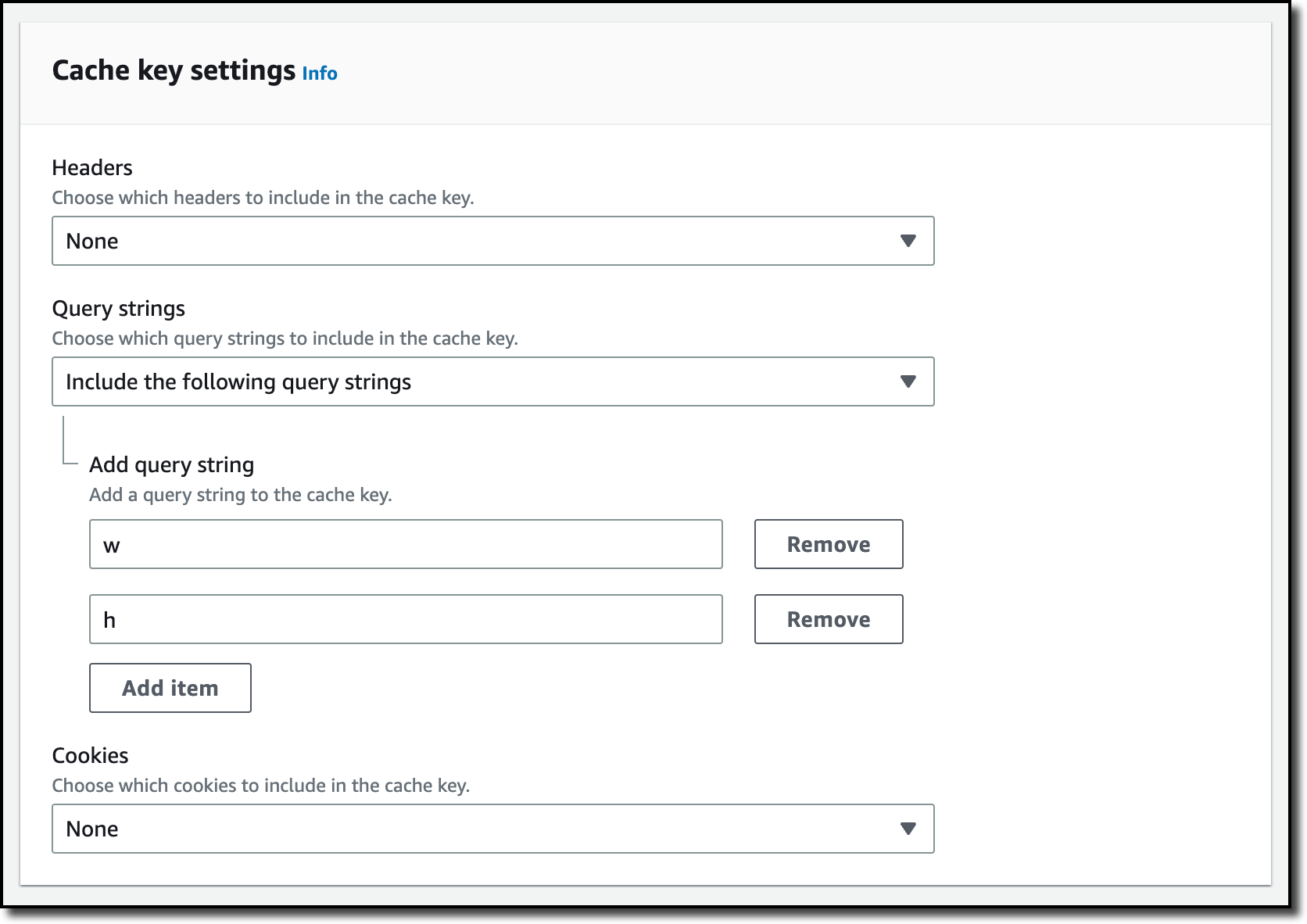
In the Query settings of the Cache key settings, I select the option to Include the following query parameters and add w (for the width) and h (for the height).

Console screenshot.

Then, in the Behaviors tab of the distribution, I select the default behavior and choose Edit.

There, I update the Cache key and origin requests section:

  • In the Cache policy, I use the new cache policy to include the w and h query parameters in the cache key.
  • In the Origin request policy, use the AllViewerExceptHostHeader managed policy to forward query parameters to the origin.

Console screenshot.

Now I can update the Lambda function code. To resize images, this function uses the Pillow module that needs to be packaged with the function when it is uploaded to Lambda. You can deploy the function using a tool like the AWS SAM CLI or the AWS CDK. Compared to the previous example, this function also handles and returns HTTP errors, such as when content is not found in the bucket.

import io
import boto3
from urllib.request import urlopen, HTTPError
from PIL import Image

from urllib.parse import urlparse, parse_qs

s3 = boto3.client('s3')

def lambda_handler(event, context):
    print(event)

    object_get_context = event['getObjectContext']
    request_route = object_get_context['outputRoute']
    request_token = object_get_context['outputToken']
    s3_url = object_get_context['inputS3Url']

    # Get object from S3
    try:
        original_image = Image.open(urlopen(s3_url))
    except HTTPError as err:
        s3.write_get_object_response(
            StatusCode=err.code,
            ErrorCode='HTTPError',
            ErrorMessage=err.reason,
            RequestRoute=request_route,
            RequestToken=request_token)
        return

    # Get width and height from query parameters
    user_request = event['userRequest']
    url = user_request['url']
    parsed_url = urlparse(url)
    query_parameters = parse_qs(parsed_url.query)

    try:
        width, height = int(query_parameters['w'][0]), int(query_parameters['h'][0])
    except (KeyError, ValueError):
        width, height = 0, 0

    # Transform object
    if width > 0 and height > 0:
        transformed_image = original_image.resize((width, height), Image.ANTIALIAS)
    else:
        transformed_image = original_image

    transformed_bytes = io.BytesIO()
    transformed_image.save(transformed_bytes, format='JPEG')

    # Write object back to S3 Object Lambda
    s3.write_get_object_response(
        Body=transformed_bytes.getvalue(),
        RequestRoute=request_route,
        RequestToken=request_token)

    return

I upload a picture I took of the Trevi Fountain in the source bucket. To start, I generate a small thumbnail (200 by 150 pixels).

https://DISTRIBUTION_DOMAIN_NAME/trevi-fountain.jpeg?w=200&h=150

Picture of the Trevi Fountain with size 200x150 pixels.

Now, I ask for a slightly larger version (400 by 300 pixels):

https://DISTRIBUTION_DOMAIN_NAME/trevi-fountain.jpeg?w=400&h=300

Picture of the Trevi Fountain with size 400x300 pixels.

It works as expected. The first invocation with a specific size is processed by the Lambda function. Further requests with the same width and height are served from the CloudFront cache.

Availability and Pricing
Aliases for S3 Object Lambda Access Points are available today in all commercial AWS Regions. There is no additional cost for aliases. With S3 Object Lambda, you pay for the Lambda compute and request charges required to process the data, and for the data S3 Object Lambda returns to your application. You also pay for the S3 requests that are invoked by your Lambda function. For more information, see Amazon S3 Pricing.

Aliases are now automatically generated when an S3 Object Lambda Access Point is created. For existing S3 Object Lambda Access Points, aliases are automatically assigned and ready for use.

It’s now easier to use S3 Object Lambda with existing applications, and aliases open many new possibilities. For example, you can use aliases with CloudFront to create a website that converts content in Markdown to HTML, resizes and watermarks images, or masks personally identifiable information (PII) from text, images, and documents.

Customize content for your end users using S3 Object Lambda with CloudFront.

— Danilo

AWS Week in Review – March 13, 2023

Post Syndicated from Steve Roberts original https://aws.amazon.com/blogs/aws/aws-week-in-review-march-13-2023/

It seems like only yesterday I was last writing the Week in Review post, at the end of January, and now here we are almost mid-way through March, almost into spring in the northern hemisphere, and close to a quarter way through 2023. Where does time fly?!

Last Week’s Launches
Here’s some of the launches and other news from the past week that I want to bring to your attention:

New AWS Heroes: At the center of the AWS Community around the globe, Heroes share their knowledge and enthusiasm. Welcome to Ananda in Indonesia, and Aidan and Wendy in Australia, our newly announced Heroes!

General Availability of AWS Application Composer: Launched in preview during Dr. Werner Vogel’s re:Invent 2022 keynote, AWS Application Composer is a tool enabling the composition and configuration of serverless applications using a visual design surface. The visual design is backed by an AWS CloudFormation template, making it deployment ready.

What I find particularly cool about Application Composer is that it also works on existing serverless application templates, and round-trips changes to the template made in either a code editor or the visual designer. This makes it ideal for both new developers, and experienced serverless developers with existing applications.

My colleague Channy’s post provides an introduction, and Application Composer is also featured in last Friday’s AWS on Air show, available to watch on-demand.

Get daily feature updates via Amazon SNS: One thing I’ve learned since joining AWS is that the service teams don’t stand still, and are releasing something new pretty much every day. Sometimes, multiple things! This can, however, make it hard to keep up. So, I was interested to read that you can now receive daily feature updates, in email, by subscribing to an Amazon Simple Notification Service (Amazon SNS) topic. As usual, Jeff’s post has all the details you need to get started.

Using up to 10GB of ephemeral storage for AWS Lambda functions: If you use Lambda for Extract-Transform-Load (ETL) jobs, or any data-intensive jobs that require temporary storage of data during processing, you can now configure up to 10GB of ephemeral storage, mounted at /tmp, for your functions in six additional Regions – Asia Pacific (Hyderabad), Asia Pacific (Jakarta), Asia Pacific (Melbourne), Europe (Spain), Europe (Zurich), and Middle East (UAE). More information on using ephemeral storage with Lambda functions can be found in this blog post.

Increased table counts for Amazon Redshift: workloads that require large numbers of tables can now take advantage of using up to 200K tables, avoiding the need to split tables across multiple data warehouses. The updated limit is available to workloads using the ra3.4xlarge, ra3.16xlarge, and dc2.8xlarge node types with Redshift Serverless and data warehouse clusters.

Faster, simpler permissions setup for AWS Glue: Glue is a serverless data integration and ETL service for discovering, preparing, moving, and integrating data intended for use in analytics and machine learning (ML) workloads. A new guided permissions setup process, available in the AWS Management Console, makes it simpler and easier to grant access to AWS Identity and Access Management (IAM) Roles and users to Glue, and use a default role for running jobs and working with notebooks. This simpler, guided approach helps users start authoring jobs, and work with the Data Catalog, without further setup. 

Microsoft Active Directory authentication for the MySQL-Compatible Edition of Amazon Aurora: You can now use Active Directory, either with an existing on-premises directory or with AWS Directory Service for Microsoft Active Directory, to authenticate database users when accessing Amazon Aurora MySQL-Compatible Edition instances, helping reduce operational overhead. It also enables you to make use of native Active Directory credential management capabilities to manage password complexities and rotation, helping you stay in step with your compliance and security requirements.

Launch of the 2023 AWS DeepRacer League and new competition structure: The DeepRacer tracks are one of my favorite things to visit and watch at AWS events, so I was happy to learn the new 2023 league is now underway. If you’ve not heard of DeepRacer, it’s the world’s first global racing league featuring autonomous vehicles, enabling developers of all skill levels to not only compete to complete the track in the shortest time but also to advance their knowledge of machine learning (ML) in the process. Along with the new league, there are now more chances to earn achievements and prizes using an all new three-tier competition spanning national and regional races. Racers compete for a chance to win a spot in the World Championship, held at AWS re:Invent, and a $43,000 prize purse. What are you waiting for, start your (ML) engines today!

AWS open-source news and updates: The latest newsletter highlighting open-source projects, tools, and demos from the AWS Community is now available. The newsletter is published weekly, and you can find edition 148 here.

For a full list of AWS announcements, be sure to keep an eye on the What’s New at AWS page.

Upcoming AWS Events
Here’s some upcoming events you may be interested in checking out:

AWS Pi Day: March 14th is the third annual AWS Pi Day. Join in with the celebrations of the 17th birthday of Amazon Simple Storage Service (Amazon S3) and the cloud in a live virtual event hosted on the AWS on Air channel. There’ll also be news and discussions on the latest innovations across Data services on AWS, including storage, analytics, AI/ML, and more.

.NET developers and architects looking to modernize their applications will be interested in an upcoming webinar, Modernize and Optimize by Containerizing .NET Applications on AWS, scheduled for March 22nd. In this webinar, you’ll find demonstrations on how you can enhance the security of legacy .NET applications through modernizing to containers, update to a modern version of .NET, and run them on the latest versions of Windows. Registration for the online event is open now.

You can find details on all upcoming events, in-person and virtual, here.

New Livestream Shows
There’s some new livestream shows that launched recently I’d like to bring to your attention:

My colleague Isaac has started a new .NET on AWS show, streaming on Twitch. The second episode was live last week; catch up here on demand. Episode 1 is also available here.

I mentioned AWS on Air earlier in this post, and hopefully you’ve caught our weekly Friday show streaming on Twitch, Twitter, YouTube, and LinkedIn. Or, maybe you’ve seen us broadcasting live from AWS events such as Summits or AWS re:Invent. But did you know that some of the hosts of the shows have recently started their own individual shows too? Check out these new shows below:

  • AWS on Air: Startup! – hosted by Jillian Forde, this show focuses on learning technical and business strategies from startup experts to build and scale your startup in AWS. The show runs every Tuesday at 10am PT/1pm ET.
  • AWS On Air: Under the Hood with AWS – in this show, host Art Baudo chats with guests, including AWS technical leaders and customers, about Cloud infrastructure. In last week’s show, the discussion centered around Amazon Elastic Compute Cloud (Amazon EC2) Mac Instances. Watch live every Tuesday at 2pm PT/5pm ET. 
  • AWS on Air: Lockdown! – join host Kyle Dickinson each Tuesday at 11am PT/2pm ET for this show, covering a breadth of AWS security topics in an approachable way that’s suitable for all levels of AWS experience. You’ll encounter demos, guest speakers from AWS, AWS Heroes, and AWS Community Builders. 
  • AWS on Air: Step up your GameDay – hosts AM Grobelny and James Spencer are joined by special guests to strategize and navigate through an AWS GameDay, a fun and challenge-oriented way to learn about AWS. You’ll find this show every second Wednesday at 11am PT/2pm ET.
  • AWS on Air: AMster & the Brit’s Code Corner – join AM Grobelny and myself as we chat about and illustrate cloud development. In Beginners Corner, we answer your questions and try to demystify this strange thing called “coding”, and in Project Corner we tackle slightly larger projects of interest to more experienced developers. There’s something for everyone in Code Corner, live on the 3rd Thursday of each month at 11am PT/2pm ET.

You’ll find all these AWS on Air shows in the published schedule. We hope you can join us!

That’s all for this week – check back next Monday for another AWS Week in Review.

This post is part of our Week in Review series. Check back each week for a quick roundup of interesting news and announcements from AWS!

Meet the Newest AWS Heroes – March 2023

Post Syndicated from Taylor Jacobsen original https://aws.amazon.com/blogs/aws/meet-the-newest-aws-heroes-march-2023/

The AWS Heroes are passionate AWS experts who are dedicated to sharing their in-depth knowledge within the community. They inspire, uplift, and motivate the global AWS community, and today, we’re excited to announce and recognize the newest Heroes in 2023!

Aidan Steele – Melbourne, Australia

Serverless Hero Aidan Steele is a Senior Engineer at Nightvision. He is an avid AWS user, and has been using the first platform and EC2 since 2008. Fifteen years later, EC2 still has a special place in his heart, but his interests are in containers and serverless functions, and blurring the distinction between them wherever possible. He enjoys finding novel uses for AWS services, especially when they have a security or network focus. This is best demonstrated through his open source contributions on GitHub, where he shares interesting use cases via hands-on projects.

Ananda Dwi Rahmawati – Yogyakarta, Indonesia

Container Hero Ananda Dwi Rahmawati is a Sr. Cloud Infrastructure Engineer, specializing in system integration between cloud infrastructure, CI/CD workflows, and application modernization. She implements solutions using powerful services provided by AWS, such as Amazon Elastic Kubernetes Service (EKS), combined with open source tools to achieve the goal of creating reliable, highly available, and scalable systems. She is a regular technical speaker who delivers presentations using real-world case studies at several local community meetups and conferences, such as Kubernetes and OpenInfra Days Indonesia, AWS Community Day Indonesia, AWS Summit ASEAN, and many more.

Wendy Wong – Sydney, Australia

Data Hero Wendy Wong is a Business Performance Analyst at Service NSW, building data pipelines with AWS Analytics and agile projects in AI. As a teacher at heart, she enjoys sharing her passion as a Data Analytics Lead Instructor for General Assembly Sydney, writing technical blogs on dev.to. She is both an active speaker for AWS analytics and an advocate of diversity and inclusion, presenting at a number of events: AWS User Group Malaysia, Women Who Code, AWS Summit Australia 2022, AWS BuildHers, AWS Innovate Modern Applications, and many more.

Learn More

If you’d like to learn more about the new Heroes or connect with a Hero near you, please visit the AWS Heroes website or browse the AWS Heroes Content Library.

— Taylor

AWS Application Composer Now Generally Available – Visually Build Serverless Applications Quickly

Post Syndicated from Channy Yun original https://aws.amazon.com/blogs/aws/aws-application-composer-now-generally-available-visually-build-serverless-applications-quickly/

At AWS re:Invent 2022, we previewed AWS Application Composer, a visual builder for you to compose and configure serverless applications from AWS services backed by deployment-ready infrastructure as code (IaC).

In the keynote, Dr. Werner Vogels, CTO of Amazon.com said:

Developers that never used serverless before. How do they know where to start? Which services do they need? How do they work together? We really wanted to make this easier. AWS Application Composer simplifies and accelerates the architecting, configuring, and building of serverless applications.

During the preview, we had lots of interest and great feedback from customers. Today, I am happy to announce the general availability of AWS Application Composer with new improvements based on customer feedback. I want to quickly review its features and introduce some improvements.

Introduction to AWS Application Composer
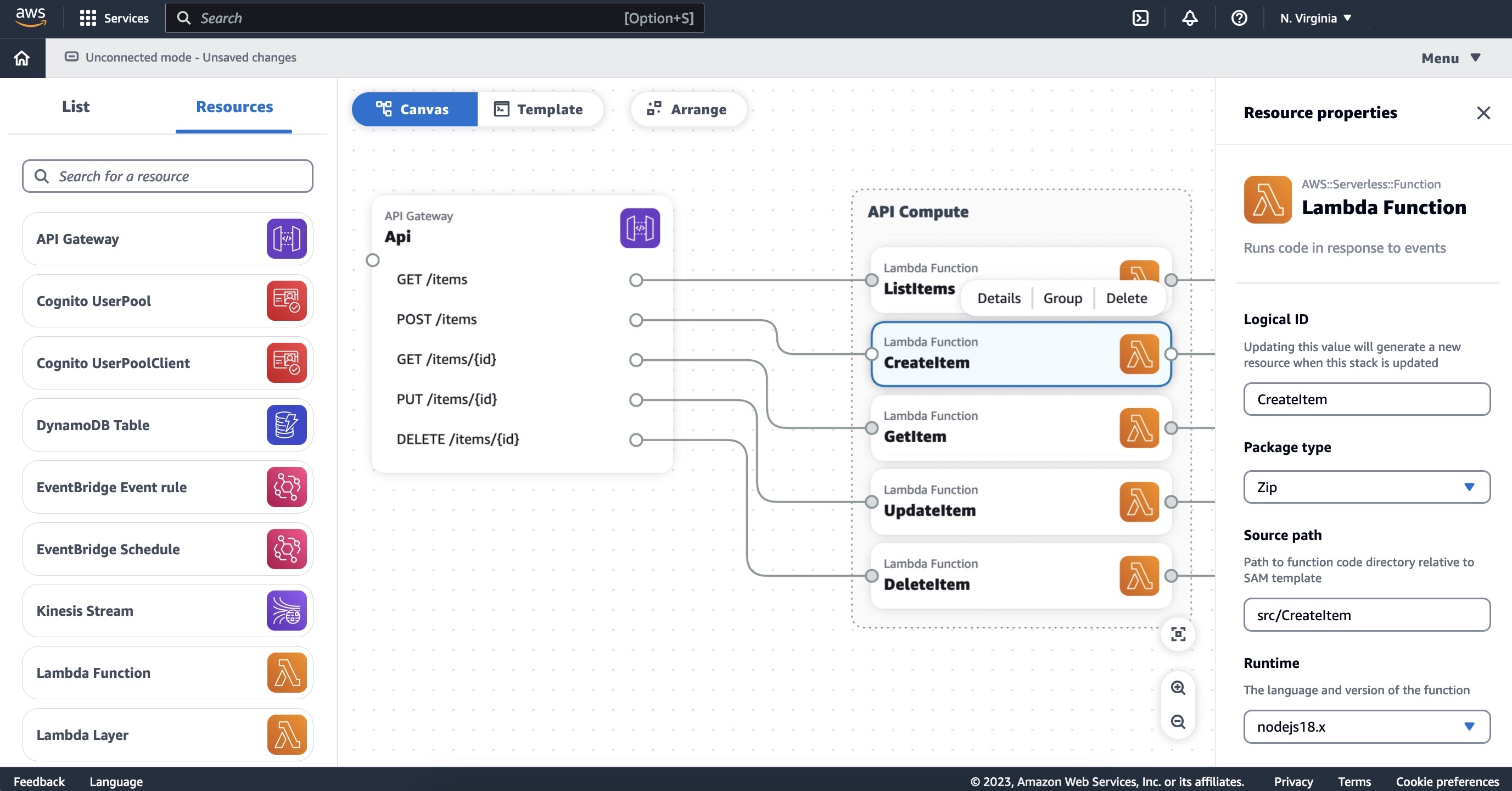
To get started with AWS Application Composer, choose Open demo in the AWS Management Console. This demo shows a simple cart application with Amazon API Gateway, AWS Lambda, and Amazon DynamoDB resources.

You can easily browse and search for AWS services in the left Resources panel and drag and drop them onto the canvas to expand your architecture.

In the middle Canvas panel, you can connect resources together by clicking and dragging from one resource port to another. Permissions are automatically composed for these resources to interact with each other using policy template, environment variables, and event subscriptions. Grouping resources is very useful to select one visual organization. For above example, API Compute group is compsite of Lambda functions. When you double-click on a specific resource, you can name and configure your properties in the right Resource properties panel.

As well as featured resources available in the visual resource palette, you can use hidden and read-only resources will populate on the canvas when you load an existing template that includes them.

In this example, the MyHttpApi resource is a hidden resource. It is not available from the resource palette but does appear on the canvas in color. The resource named MyHttpApiRole (in this case, an AWS::IAM::Role resource) is read-only. It grayed out on the canvas greyed out. To learn more about all supported resources, see AWS Application Composer featured resources in the AWS documentation.

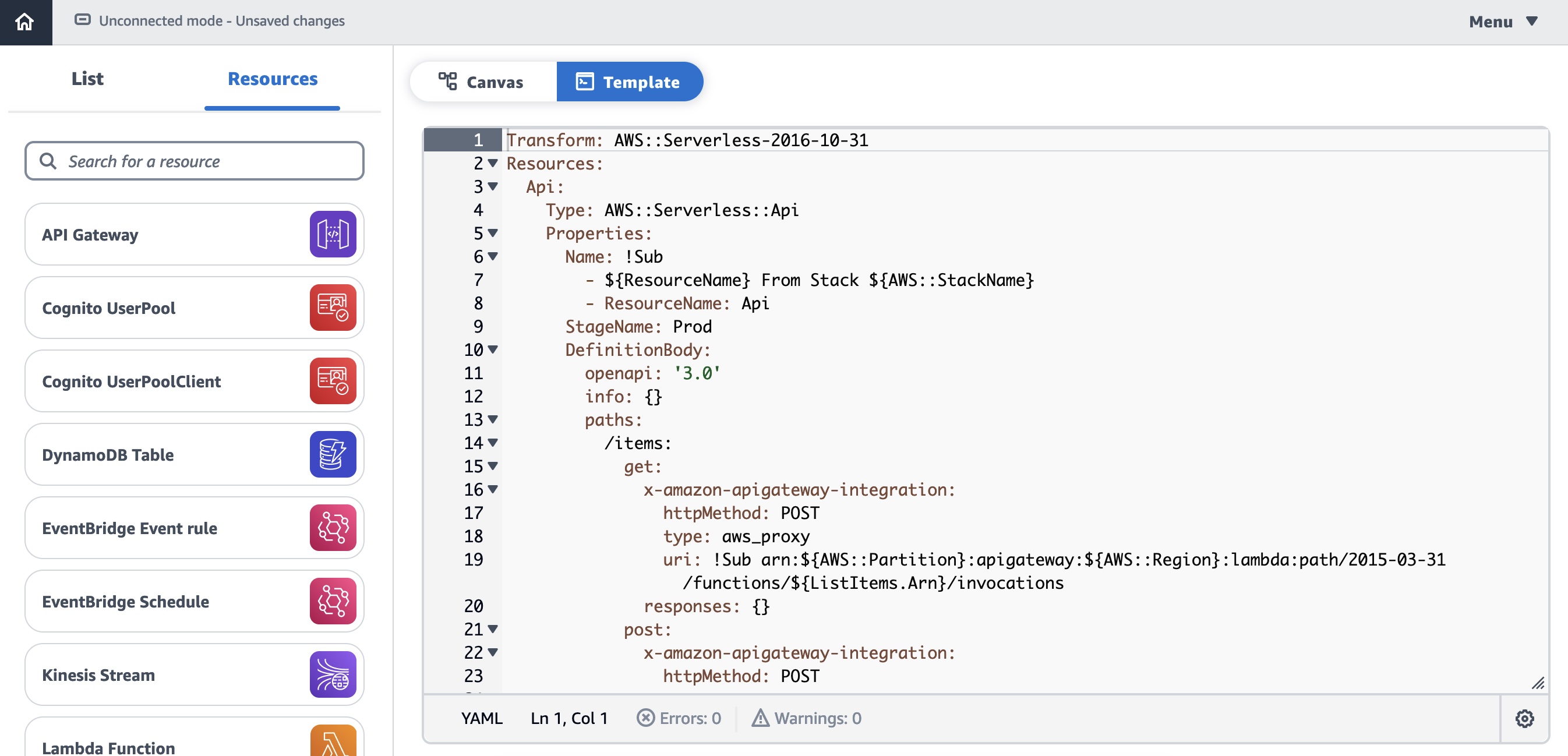
When you select the Template menu, you can view, edit or manually download your IaC, such as AWS Serverless Application Model (AWS SAM). Your changes are automatically synced with your canvas.

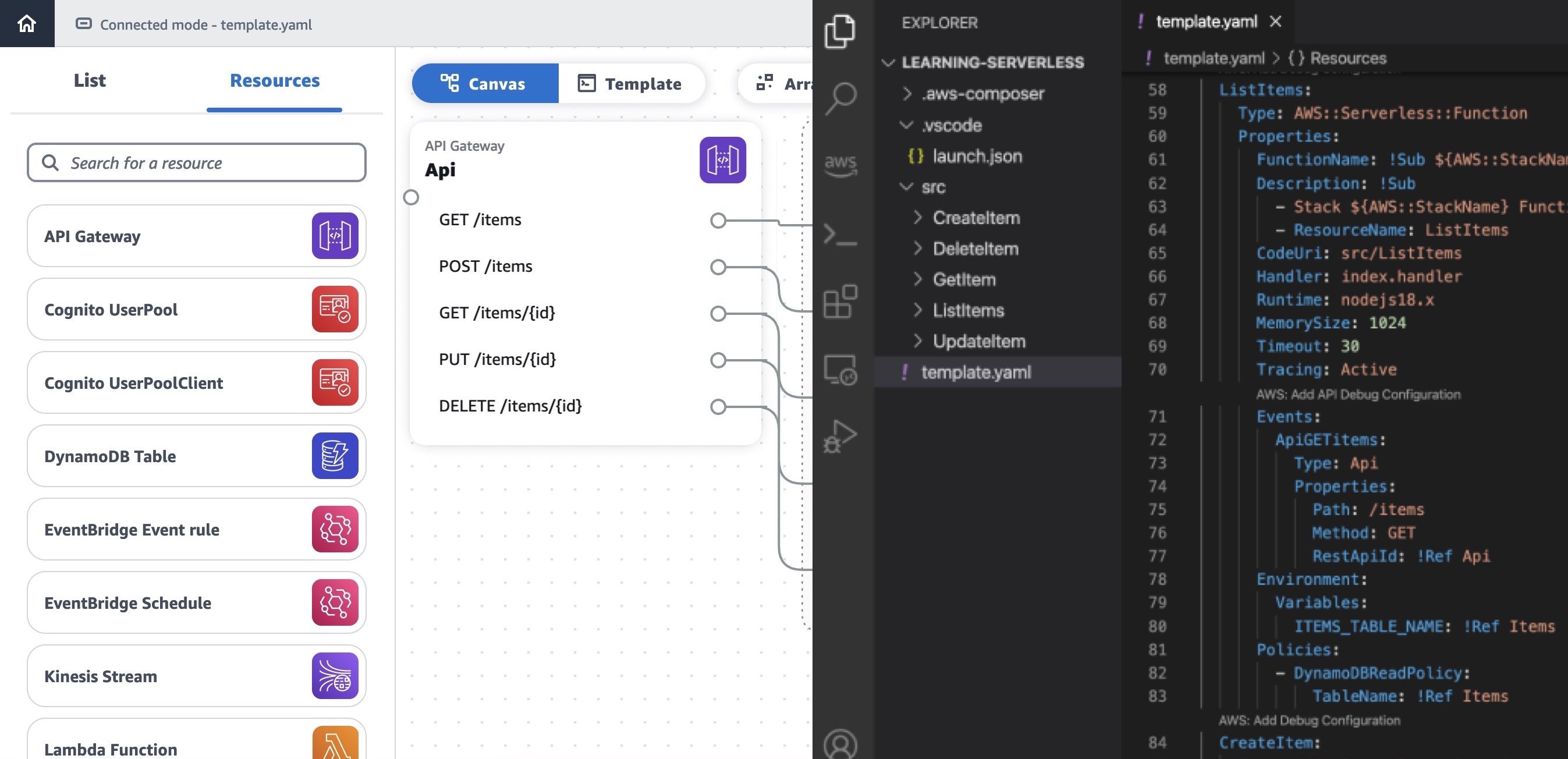
When you start Connected mode, you can use Application Composer with local tools such as an integrated development environment (IDE). Any changes activate the automatic synchronization of your project template and files between Application Composer and your local project directory.

It is useful to incorporate into your existing team processes, such as local testing with AWS SAM Command Line Interface (CLI), peer review through version control, or deployment through AWS CloudFormation and continuous integration and delivery (CI/CD) pipelines.

This mode is supported on Chrome and Edge browsers and requires you to grant temporary local file system access to your browser.

AWS Application Composer can be used in real-world scenarios such as:

  • Building a prototype of serverless applications
  • Reviewing and collaboratively evolving existing serverless projects
  • Generating diagrams for documentation or Wikis
  • Onboarding new team members to a project
  • Reducing the first steps to deploy something in an AWS account

To learn more real-world examples, see Visualize and create your serverless workloads with AWS Application Composer in the AWS Compute Blog, How I Used AWS Application Composer to Make Analyzing My Meetup Data Easy in BuildOn.AWS, or watch a breakout session video (SVS211) from AWS re:Invent 2022.

Improvements Since Preview Launch
Here is a new feature to improve how you work with Amazon Simple Queue Service (Amazon SQS) queues.

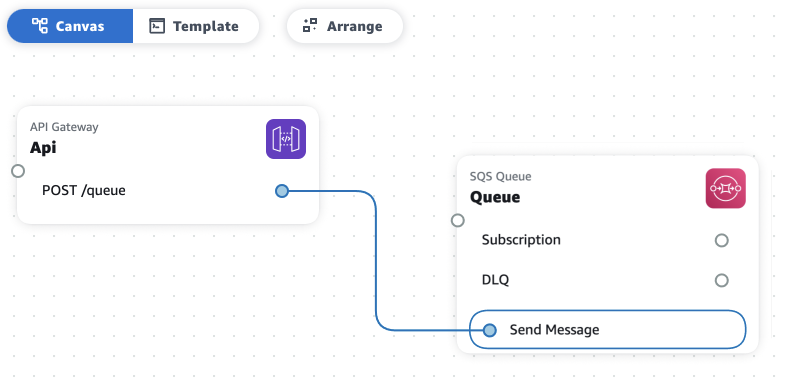
You can now directly connect Amazon API Gateway resources to Amazon SQS without routing requests through AWS Lambda function. You can remove the complexity of the Lambda function’s execution and increase the reliability while reducing lines of code.

For example, you can drag API Gateway and Amazon SQS onto the canvas and connect the two resources. When the user drags the connector from API route to SQS, Send message appears. You can connect the API route to the SQS queue via their choice of integration target.

The new Change Inspector provides a visual diff of template changes made when you connect two resources on the canvas. This information is available as a notification when you make the connection, which helps you understand how Composer manages integration configuration in your IaC template as you build.

Here are some more improvements to your experience in the user interface!

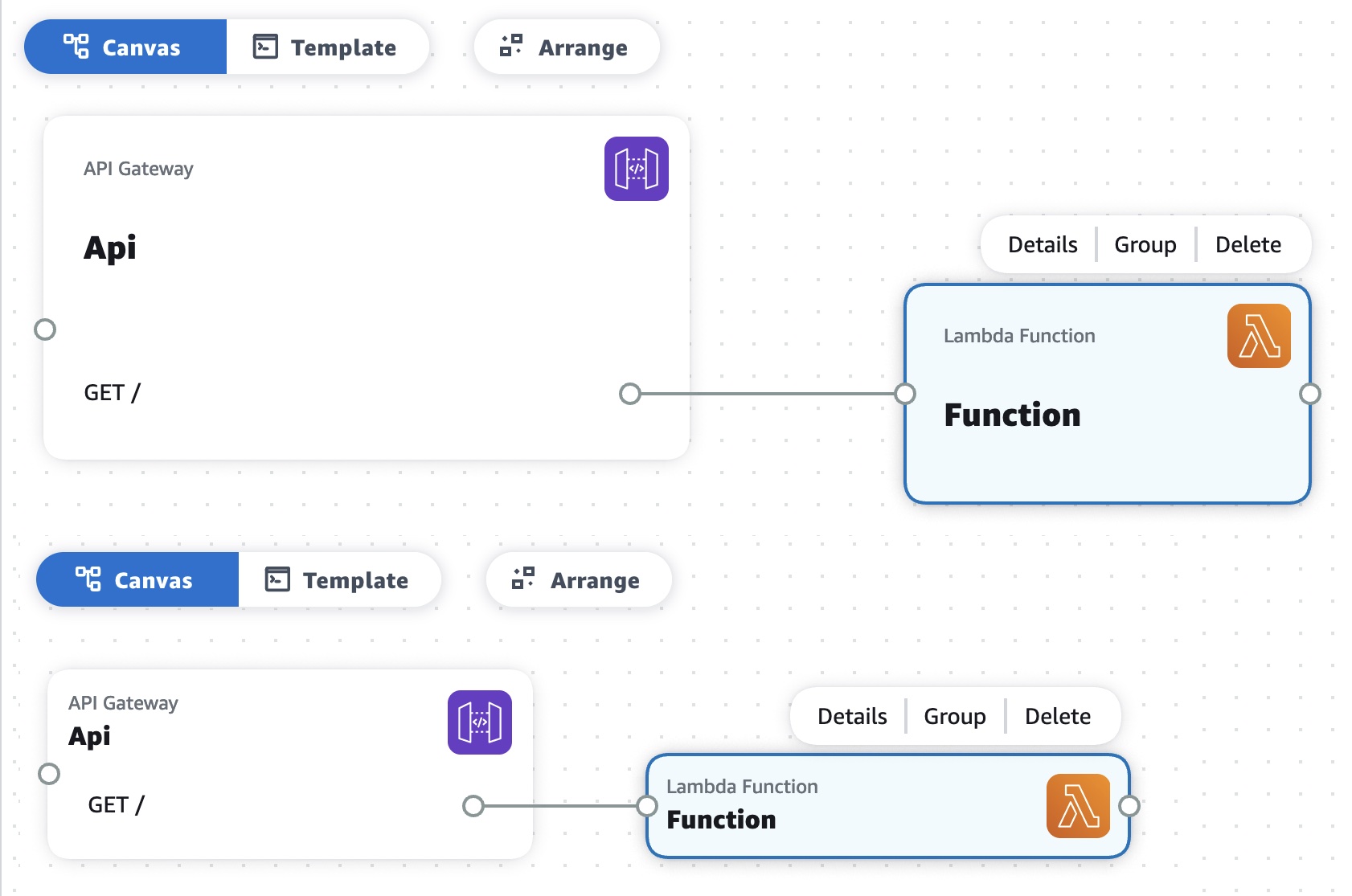
First, we reduced the size of resource cards. The larger cards made it difficult for the users to read and view their template on the canvas. Now, you can arrange more resource cards easily and save space on the canvas.

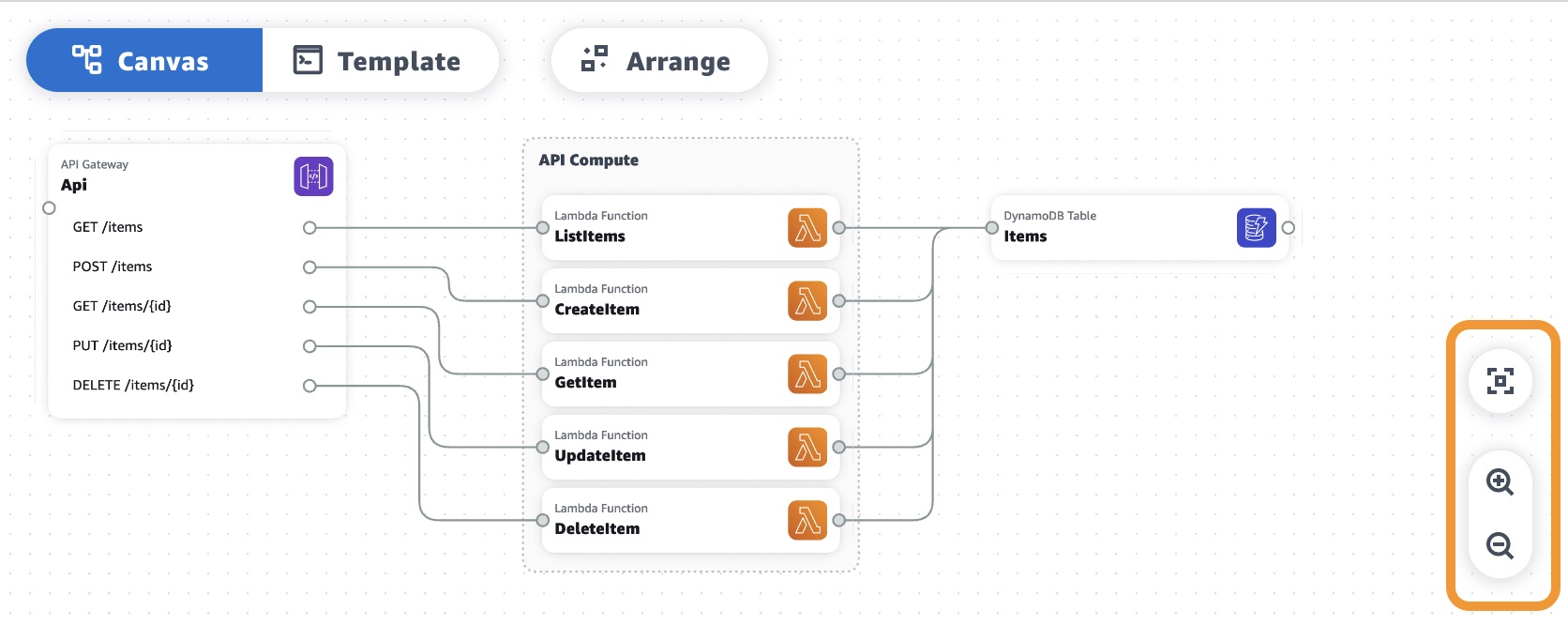
Also, we added zoom in and out and zoom to fit buttons so that users can quickly view the entire screen or zoom to the desired level. When you load a large template onto the canvas, you can easily see all the resource cards in any size.

Now Available
AWS Application Composer is now generally available in the US East (Ohio), US East (N. Virginia), US West (Oregon), Asia Pacific (Singapore), Asia Pacific (Sydney), Asia Pacific (Tokyo), Europe (Frankfurt), Europe (Ireland), and Europe (Stockholm) Regions, adding three more Regions to the six Regions available during preview. There is no additional cost, and you can start using it today.

To learn more, see the AWS Application Composer Developer Guide and send feedback to AWS re:Post for AWS Application Composer or through your usual AWS support contacts.

– Channy

Subscribe to AWS Daily Feature Updates via Amazon SNS

Post Syndicated from Jeff Barr original https://aws.amazon.com/blogs/aws/subscribe-to-aws-daily-feature-updates-via-amazon-sns/

Way back in 2015 I showed you how to Subscribe to AWS Public IP Address Changes via Amazon SNS. Today I am happy to tell you that you can now receive timely, detailed information about releases and updates to AWS via the same, simple mechanism.

Daily Feature Updates
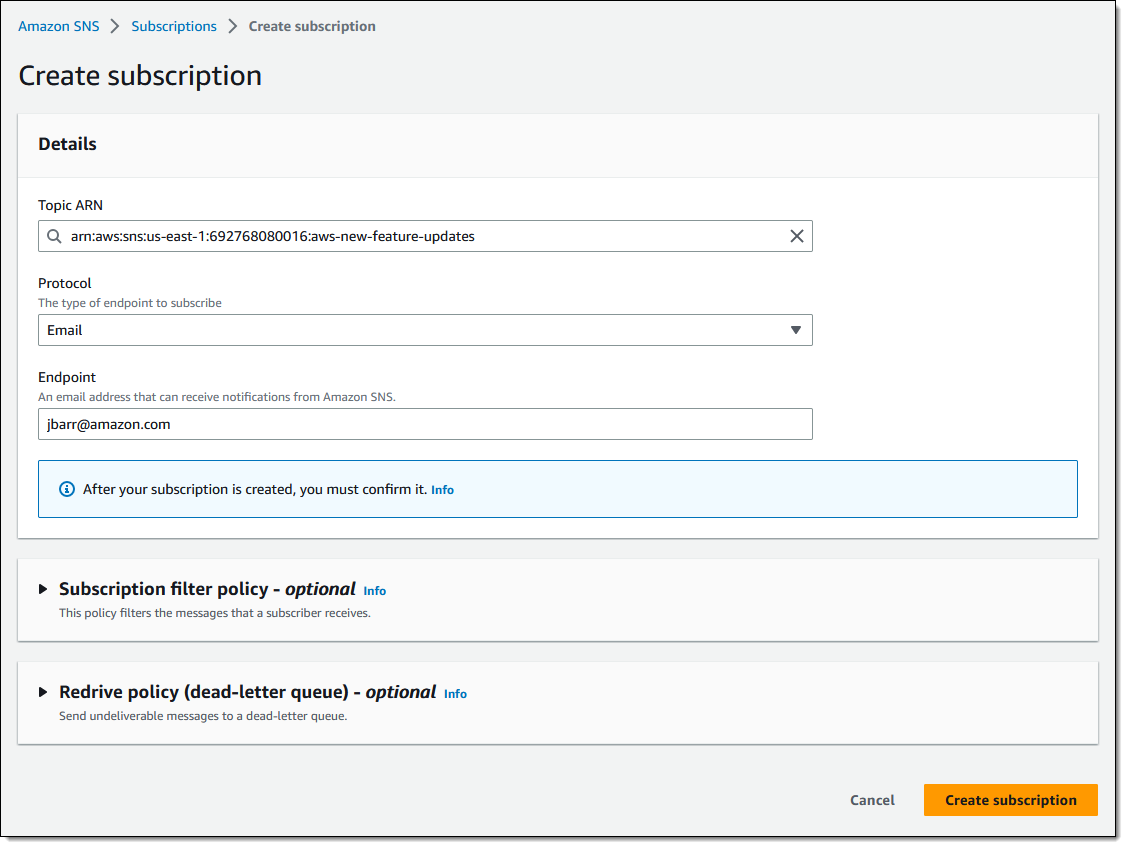
Simply subscribe to topic arn:aws:sns:us-east-1:692768080016:aws-new-feature-updates using the email protocol and confirm the subscription in the usual way:

You will receive daily emails that start off like this, with an introduction and a summary of the update:

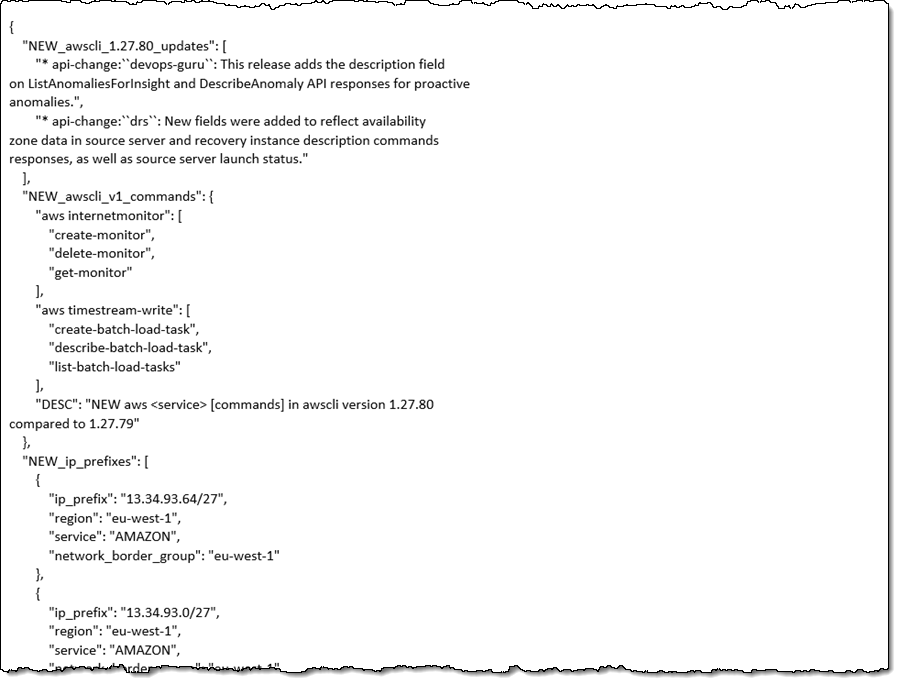
After the introduction, the email contains a JSON representation of the daily feature updates:

As noted in the message, the JSON content is also available online at URLs that look like https://aws-new-features.s3.us-east-1.amazonaws.com/update/2023-02-27.json . You can also edit the date in the URL to access historical data going back up to six months.

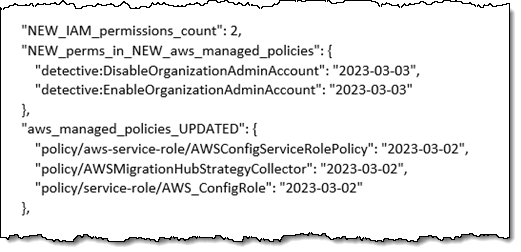
The email message also includes detailed information about changes and additions to managed policies that will be of particular interest to AWS customers who currently manually track and then verify the impact that these changes may have on their security profile. Here’s a sample list of changes (additional permissions) to existing managed policies:

And here’s a new managed policy:

Even More Information
The header of the email contains a link to a treasure trove of additional information. Here are some examples:

AWS Regions and AWS Services – A pair of tables. The first one includes a row for each AWS Region and a column for each service, and the second one contains the transposed version:

AWS Regions and EC2 Instance Types – Again, a pair of tables. The first one includes a row for each AWS Region and a column for each EC2 instance type, and the second one contains the transposed version:

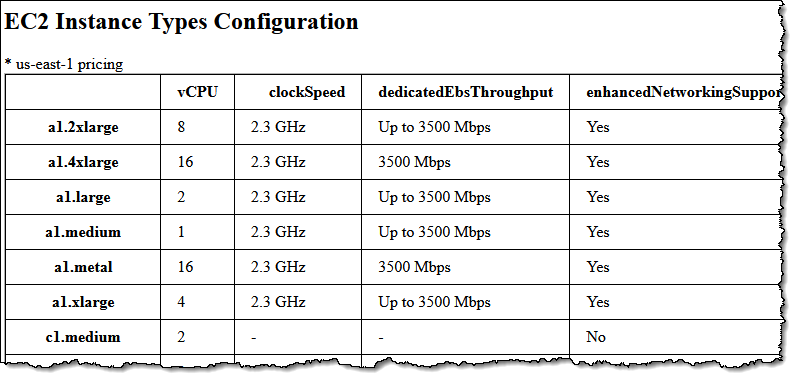
The EC2 Instance Types Configuration link leads to detailed information about each instance type:

Each page also includes a link to the same information in JSON form. For example (EC2 Instance Types Configuration), starts like this:

{
    "a1.2xlarge": {
        "af-south-1": "-",
        "ap-east-1": "-",
        "ap-northeast-1": "a1.2xlarge",
        "ap-northeast-2": "-",
        "ap-northeast-3": "-",
        "ap-south-1": "a1.2xlarge",
        "ap-south-2": "-",
        "ap-southeast-1": "a1.2xlarge",
        "ap-southeast-2": "a1.2xlarge",
        "ap-southeast-3": "-",
        "ap-southeast-4": "-",
        "ca-central-1": "-",
        "eu-central-1": "a1.2xlarge",
        "eu-central-2": "-",
        "eu-north-1": "-",
        "eu-south-1": "-",
        "eu-south-2": "-",
        "eu-west-1": "a1.2xlarge",
        "eu-west-2": "-",
        "eu-west-3": "-",
        "me-central-1": "-",
        "me-south-1": "-",
        "sa-east-1": "-",
        "us-east-1": "a1.2xlarge",
        "us-east-2": "a1.2xlarge",
        "us-gov-east-1": "-",
        "us-gov-west-1": "-",
        "us-west-1": "-",
        "us-west-2": "a1.2xlarge"
    },

Other information includes:

  • VPC Endpoints
  • AWS Services Integrated with Service Quotas
  • Amazon SageMaker Instance Types
  • RDS DB Engine Versions
  • Amazon Nimble Instance Types
  • Amazon MSK Apache Kafka Versions

Information Sources
The information is pulled from multiple public sources, cross-checked, and then issued. Here are some of the things that we look for:

Things to Know
Here are a couple of things that you should keep in mind about the AWS Daily Feature Updates:

Content – The content provided in the Daily Feature Updates and in the treasure trove of additional information will continue to grow as new features are added to AWS.

Region Coverage – The Daily Feature Updates cover all AWS Regions in the public partition. Where possible, it also provides information about GovCloud regions; this currently includes EC2 Instance Types, SageMaker Instance Types, and Amazon Nimble Instance Types.

Region Mappings – The internal data that drives all of the information related to AWS Regions is updated once a day if there are applicable new features, and also when new AWS Regions are enabled.

Updates – On days when there are no updates, there will not be an email notification.

Usage – Similar to the updates on the What’s New page and the associated RSS feed, the updates are provided for informational purposes, and you still need to do your own evaluation and testing before deploying to production.

??? –

— Jeff;

Zabbix 6.4 is out now!

Post Syndicated from Arturs Lontons original https://blog.zabbix.com/zabbix-6-4-is-out-now/25444/

Zabbix team is pleased to announce the release of the latest Zabbix major version – Zabbix 6.4. The release delivers many long-awaited improvements, such as Just-in-time LDAP and SAML user provisioning; support of older Zabbix proxy versions for simplified proxy management and zero–downtime Zabbix upgrades; near-instant configuration sync across Zabbix agents and proxies, and much more! 

New features and improvements

Just-in-time (JIT) user provisioning 

Zabbix 6.4 adds support of JIT user provisioning for LDAP and SAML authentication.

JIT user provisioning can be enabled in LDAP/SAML authentication settings

Zabbix administrators can now configure user provisioning by selecting the LDAP group pattern for matching and automatically assign User groups and User roles to the discovered users. Media types can also be mapped based on LDAP/SAML attributes.

A media can be assigned to the provisioned users based on their LDAP/SAML attributes
A group and role is assigned to the provisioned users

Cause and symptom events 

Zabbix 6.4 adds the ability to mark events as Cause or Symptom events. This allows us to filter events in a way, where we can see only root cause problems instead of being overwhelmed by symptom events. It is also possible to pause action operations for symptom events as to avoid unnecessary noise.

Multiple symptom events can be linked to a single cause event
Any event can be marked as a symptom or converted to a cause event
Action operations can be paused for symptom problems

Instant propagation of configuration changes 

Continuing to build on changes introduced in Zabbix 6.2 (Collecting only configuration change deltas), Zabbix 6.4 introduces instant configuration synchronization across passive and active agents and proxies.

  • Instead of receiving the full configuration copy every 2 minutes (old behavior), in Zabbix 6.4 active agent receives the configuration copy only when changes have been performed
  • RefreshActiveChecks parameter now supports a range 1-86400 (old range: 60-3600)
  • The ProxyConfigFrequency parameter is now used in both Zabbix server (for passive mode) and Zabbix proxy (for active mode) configuration files
  • ConfigFrequency parameter in Zabbix proxy configuration is now deprecated
  • Default ProxyConfigFrequency parameter is 10 seconds (down from 1 hour)

This also improves the performance of Zabbix servers and proxies, since only configuration deltas are synced. As for active agents – the active agent receives a full configuration copy only when any changes are detected in the configuration instead of receiving it every RefreshActiveChecks interval (old behavior)

New SNMP walk item for bulk collection and discovery of SNMP metrics 

A new SNMP agent walk item has been introduced. The item looks at a specified OID or OIDs and polls their indexes by suing the SNMP GetBulk requests. An SNMP GetBulk request can provide better performance and more rapid metric collection and discovery from enterprise-tier SNMP devices.

For example:

walk[1.3.6.1.1,1.3.6.2]

Result:

1.3.6.1.2.1.1 = STRING: "<value1>"
1.3.6.1.2.1.2 = STRING: "<value2>"
1.3.6.1.2.1.3 = STRING: "<value3>"
1.3.6.2.1 = INTEGER: 10
1.3.6.2.2 = INTEGER: 20

Textual values can then be transformed to JSON, which can serve as a master item for low-level discovery rules:

SNMP walk to JSON transforms the obtained data to JSON

Resulting values:

[
{"{#SNMPINDEX}":"7","{#IFALIAS}":"Uplink PT","{#IFTYPE}":"6"},
{"{#SNMPINDEX}": "8","{#IFALIAS}": "Uplink FB","{#IFTYPE}":"6"},
{"{#SNMPINDEX}": "473","{#IFALIAS}":"lag","{#IFTYPE}":"161"}
]

Once the data is converted to JSON, we can use SNMP walk value preprocessing step together with LLD macros, to create dependent item prototypes:

SNMP walk value preprocessing step can be used to specify value for extraction in item prototypes

Support of data collection for outdated proxies

To improve the Zabbix component upgrade workflows (especially for large environments), outdated proxies can still perform data collection with a newer Zabbix server version:

  • Proxy is fully supported if it has the same major version as the Zabbix server
  • Proxy is marked as outdated if its major version is older than the Zabbix server but not older than the previous LTS release
  • Outdated proxies still support data collection and remote command execution
  • In other scenarios, the proxy becomes not supported
Deployed proxy compatibility can be seen in Zabbix frontend
Server version Current proxy version Outdated proxy version Unsupported proxy version
6.4 6.4 6.0, 6.2 Older than 6.0; newer than 6.4
7.0 7.0 6.0, 6.2, 6.4 Older than 6.0; newer than 7.0
7.2 7.2 7.0 Older than 7.0; newer than 7.2

New menu layout 

Zabbix menu layout has been redesigned. The goal of the new menu layout is to provide logical and consistent access to main Zabbix features.

The new menu provides a more consistent and logical layout to Zabbix features

Real-time streaming of metrics and events over HTTP

In addition to streaming collected metrics and events to files, Zabbix 6.4 adds the option to stream metrics and events over HTTP. Zabbix administrators have the option to filter the data for streaming by using tag filters. A new Connectors section has been introduced under Administration – General. Here Zabbix administrators can define an external system where item values and events should be pushed to.

Define a new connector to stream metrics and events over HTTP

Zabbix 6.4 can be used as a source of information for other applications, analytics reports, and AI engines by streaming metrics and events over HTTP in real time. Metrics and events can be streamed to message brokers like Kafka, RabbitMQ, or Amazon Kinesis to adapt the behavior of external systems in real time. 

Template versioning 

Template versioning has been introduced to improve template management and ease of use. Templates are now marked with vendor ar version fields, which are visible in Zabbix frontend; these fields can also be added when writing a custom template.

Template version and vendor fields are visible in the frontend

Development framework for Zabbix widget creation 

Zabbix has a large developer community creating their own custom frontend modules, widgets and Go plugins. In Zabbix 6.4, our goal was to streamline this process by creating a development framework for widget creation. To achieve this, the following changes have been introduced:

  • Widgets have been converted to modules
  • Modules are now fully self-contained and modular
  • Built-in widgets reside in ui/widgets
  • Custom widgets reside in ui/modules/<widget>
  • Adding new widgets is as simple as adding new files without changing the existing files

In addition to these changes, we have also added a new Developer Center section to our documentation. The section contains guides, tutorials and code examples to guide our community in developing Frontend modules and widgets, as well as help with Zabbix agent 2 custom Go plugin development.

The Developer Center section contains guides, tutorials, and code examples for extending Zabbix

Other features and improvements 

The release includes many other changes:

  • Simple check, External check, SSH agent, Telnet agent item types now do not require an interface to be present on the host 
  • Pre-configured email media type settings for Gmail and O365 email providers 
  • Dynamic item value widget thresholds
  • Option to define custom labeled links for hosts and events
  • Ability to label trigger URLs
  • Improved preprocessing performance and thread-based preprocessing workers
  • Ability to label aggregated datasets in Graph widget
  • SQLite3 Zabbix proxies now automatically recreate the SQLite3 database file during an upgrade
  • A host status filter (enabled/disabled) has been added under Data collection – Hosts
  • Additional filtering options have been added to the Action log
  • Action log now supports import to CSV
  • Multiple context menu improvements to Host, Item and Event context menus
  • Old password verification is now required when changing your internal Zabbix user password
  • Value cache performance improvements when working with metrics that get updated less frequently than once per day
  • Added commands to enable profiling of rwlocks/mutexes (for debugging)

The full list of changes, bug fixes, and new features can be found in the Zabbix 6.4 release notes

New templates and integrations

Zabbix 6.4 comes pre-packaged with many new templates and integrations for the most popular vendors and cloud providers. Multiple existing templates have also received improvements:

  • Microsoft Azure MySQL servers 
  • Microsoft Azure PostgreSQL servers 
  • Microsoft Azure virtual machines 
  • Low-level discovery improvements in AWS by HTTP template 
  • Veeam Backup Enterprise Manager 
  • Veeam Backup and Replication 
  • Cisco Nexus 9000 Series 
  • BMC Control-M 
  • Cisco Meraki dashboard 
  • OS processes by Zabbix agent 
  • Improvements to filesystem discovery in official Zabbix OS templates 

Zabbix 6.4 introduces a webhook integration for the Line messaging app, allowing Zabbix events to be forwarded to the Line messenger. 

Zabbix 6.4 adds a variety of new templates and integrations

Zabbix 6.4 packages and images

Official Zabbix packages and images are available for: 

  • Linux distributions for different hardware platforms on RHEL, CentOS, Oracle Linux, Debian, SUSE, Ubuntu, Raspbian 
  • Virtualization platforms based on VMWare, VirtualBox, Hyper-V, XEN 
  • Docker 
  • Packages and pre-compiled agents for the most popular platforms, including macOS and MSI packages for Microsoft Windows 

You can find the download instructions and download the new version on the Download page.

One-click deployments for the following cloud platforms are coming soon: 

  • AWS, Azure, Google Cloud Platform, Digital Ocean 

Upgrading to Zabbix 6.4

In order to upgrade to Zabbix 6.4 you need to upgrade your repository package and download and install the new Zabbix component packages (Zabbix server, proxy, frontend, and other Zabbix components). When you start the Zabbix server, an automatic database schema upgrade will be performed. Zabbix agents are backward compatible; therefore, it is not required to install the new agent versions. You can perform the agent upgrade at a later time. 

If you’re using the official Docker container images – simply deploy a new set of containers for your Zabbix components. Once the Zabbix server container connects to the backend database, the database upgrade will be performed automatically.

You can find detailed step-by-step upgrade instructions on our Upgrade procedure page. 

Join the webinar

If you wish to learn more about the Zabbix 6.4 features and improvements, we invite you to join our What’s new in Zabbix 6.4 public webinar.

During the webinar, you will get the opportunity to:

  • Learn about Zabbix 6.4 features and improvements
  • See the latest Zabbix templates and integrations
  • Participate in a Q&A session with Zabbix founder and CEO Alexei Vladishev
  • Discuss the latest Zabbix version with Zabbix community and Zabbix team members

This is a public webinar – anyone can sign up, attend and have their questions answered by the Zabbix team!

AWS Week in Review – March 6, 2023

Post Syndicated from Jeff Barr original https://aws.amazon.com/blogs/aws/aws-week-in-review-march-6-2023/

It has been a week full of interesting launches and I am thrilled to be able to share them with you today. We’ve got a new region in the works, a new tool for researchers, updates to Amazon Timestream, Control Tower, and Amazon Inspector, Lambda Powertools for .NET, existing services in new locations, lots of posts from other AWS blogs, upcoming events, and more.

Last Week’s Launches
Here are some of the launches that caught my eye this past week:

AWS Region in Malaysia – We are working on an AWS Region in Malaysia, bringing the number of regions that are currently in the works to five. The upcoming region will include three Availability Zones, and represents our commitment to invest at least $6 Billion in Malaysia by 2037. You can read my post to learn about how our enterprise, startup, and public sector customers are already using AWS.

Amazon Lightsail for Research – You can get access to analytical applications such as Scilab, RStudio, and Jupyter with just a couple of couple of clicks. Instead of processing large data sets on your laptop, you can get to work quickly without having to deal with hardware setup, software setup, or tech support.

Batch Loading of Data into Amazon Timestream – You can now batch-load time series data into Amazon Timestream. You upload the data to an Amazon Simple Storage Service (Amazon S3) bucket in CSV form, specify a target database and table, and a data model. The ingestion happens automatically and reliably, with parallel processes at work for efficiency.

Control Tower Progress Tracker – AWS Control Tower now includes a progress tracker that shows you the milestones (and their status) of the landing zone setup and upgrade process. Milestones such as updating shared accounts for logging, configuring Account Factory, and enabling mandatory controls are tracked so that you have additional visibility into the status of your setup or upgrade process.

Kinesis Data Streams Throughput Increase – Each Amazon Kinesis Data Stream now supports up to 1 GB/second of write throughput and 2 GB/second of read throughput, both in On-Demand capacity mode. To reach this level of throughput for your data streams you will need to submit a Support Ticket, as described in the What’s New.

Lambda Powertools for .NET – This open source developer library is now generally available. It helps you to incorporate Well-Architected serverless best practices into your code, with a focus on observability features including distributed tracing, structured logging, and asynchronous metrics (both business and applications).

Amazon Inspector Code Scans for Lambda Functions – This preview launch gives Amazon Inspector the power to scan your AWS Lambda functions for vulnerabilities such as injection flaws, data leaks, weak cryptography, or missing encryption. Findings are aggregated in the Amazon Inspector console, routed to AWS Security Hub, and pushed to Amazon EventBridge.

X in Y – We made existing services and features available in additional regions and locations:

For a full list of AWS announcements, take a look at the What’s New at AWS page, and consider subscribing to the page’s RSS feed.

Interesting Blog Posts

Other AWS Blogs – Here are some fresh posts from a few of the other AWS Blogs:

AWS Open Source – My colleague Ricardo writes a weekly newsletter to highlight new open source projects, tools, and demos from the AWS Community. Read edition #147 to learn more.

Upcoming AWS Events
Check your calendar and be sure to attend these upcoming events:

AWSome Women Community Summit LATAM 2023 – Organized by members of the woman-led AWS communities in Perú, Chile, Argentina, Guatemala, Colombia, this event will take place in Bogotá, Colombia with an online option as well.

AWS Pi Day 2023 SmallAWS Pi Day – Join us on March 14th for the third annual AWS Pi Day live, virtual event hosted on the AWS On Air channel on Twitch as we celebrate the 17th birthday of Amazon S3 and the cloud.

We will discuss the latest innovations across AWS Data services, from storage to analytics and AI/ML. If you are curious about how AI can transform your business, register here and join my session.

AWS Innovate Data and AI/ML edition – AWS Innovate is a free online event to learn the latest from AWS experts and get step-by-step guidance on using AI/ML to drive fast, efficient, and measurable results. Register now for EMEA (March 9) and the Americas (March 14th).

You can browse all upcoming AWS-led in-person, virtual events and developer focused events such as Community Days.

And that’s all for today!

Jeff;

In the Works – AWS Region in Malaysia

Post Syndicated from Jeff Barr original https://aws.amazon.com/blogs/aws/in-the-works-aws-region-in-malaysia/

We launched an AWS Region in Australia earlier this year, four more (Switzerland, Spain, the United Arab Emirates, and India) in 2022, and are working on regions in Canada, Israel, New Zealand, and Thailand. All told, we now have 99 Availability Zones spread across 31 geographic regions.

Malaysia in the Works
Today I am happy to announce that we are working on an AWS region in Malaysia. This region will give AWS customers the ability to run workloads and store data that must remain in-country.

The region will include three Availability Zones (AZs), each one physically independent of the others in the region yet far enough apart to minimize the risk that an AZ-level event will have on business continuity. The AZs will be connected to each other by high-bandwidth, low-latency network connections over dedicated, fully-redundant fiber.

AWS in Malaysia
We are planning to invest at least $6 Billion (25.5 billion Malaysian ringgit) in Malaysia by 2037.

Many organizations in Malaysia are already making use of the existing AWS Regions. This includes enterprise and public sector organizations such as Axiata Group, Baba Products, Bank Islam Malaysia, Celcom Digi, PayNet, PETRONAS, Tenaga Nasional Berhad (TNB), Asia Pacific University of Technology & Innovation, Cybersecurity Malaysia, Department of Statistics Malaysia, Ministry of Higher Education Malaysia, and Pos Malaysia, and startups like Baba’s, BeEDucation Adventures, CARSOME, and StoreHub.

Here’s a small sample of some of the exciting and innovative work that our customers are doing in Malaysia:

Johor Corporation (JCorp) is the principal development institution that drives the growth of the state of Johor’s economy through its operations in the agribusiness, wellness, food and restaurants, and real estate and infrastructure sectors. To power JCorp’s digital transformation and achieve the JCorp 3.0 reinvention plan goals, the company is leveraging the AWS cloud to manage its data and applications, serving as a single source of truth for its business and operational knowledge, and paving the way for the company to tap on artificial intelligence, machine learning and blockchain technologies in the future.

Radio Televisyen Malaysia (RTM), established in 1946, is the national public broadcaster of Malaysia, bringing news, information, and entertainment programs through its six free-to-air channels and 34 radio stations to millions of Malaysians daily. Bringing cutting-edge AWS technologies closer to RTM in Malaysia will accelerate the time it takes to develop new media services, while delivering a better viewer experience with lower latency.

Bank Islam, Malaysia’s first listed Islamic banking institution, provides end-to-end financial solutions that meet the diverse needs of their customers. The bank taps AWS’ expertise to power its digital transformation and the development of Be U digital bank through its Centre of Digital Experience, a stand-alone division that creates cutting-edge financial services on AWS to enhance customer experiences.

Malaysian Administrative Modernization Management Planning Unit (MAMPU) encourages public sector agencies to adopt cloud in all ICT projects in order to accelerate emerging technologies application and increase the efficiency of public service. MAMPU believes the establishment of the AWS Region in Malaysia will further accelerate digitalization of the public sector, and bolster efforts for public sector agencies to deliver advanced citizen services seamlessly.

Malaysia is also home to both Independent Software Vendors (ISVs) and Systems Integrators that are members of the AWS Partner Network (APN). The ISV partners build innovative solutions on AWS and the SIs provide business, technical, marketing, and go-to-market support to customers. AWS Partners based in Malaysia include Axrail, eCloudvalley, Exabytes, G-AsiaPacific, GHL, Maxis, Radmik Solutions Sdn Bhd, Silverlake, Tapway, Fourtitude, and Wavelet.

New Explainer Video
To learn more about our global infrastructure, be sure to watch our new AWS Global Infrastructure Explainer video:

Stay Tuned
As usual, subscribe to this blog so that you will be among the first to know when the new region is open!

— Jeff;

New – Amazon Lightsail for Research with All-in-One Research Environments

Post Syndicated from Channy Yun original https://aws.amazon.com/blogs/aws/new-amazon-lightsail-for-research-with-all-in-one-research-environments/

Today we are announcing the general availability of Amazon Lightsail for Research, a new offering that makes it easy for researchers and students to create and manage a high-performance CPU or a GPU research computer in just a few clicks on the cloud. You can use your preferred integrated development environments (IDEs) like preinstalled Jupyter, RStudio, Scilab, VSCodium, or native Ubuntu operating system on your research computer.

You no longer need to use your own research laptop or shared school computers for analyzing larger datasets or running complex simulations. You can create your own research environments and directly access the application running on the research computer remotely via a web browser. Also, you can easily upload data to and download from your research computer via a simple web interface.

You pay only for the duration the computers are in use and can delete them at any time. You can also use budgeting controls that can automatically stop your computer when it’s not in use. Lightsail for Research also includes all-inclusive prices of compute, storage, and data transfer, so you know exactly how much you will pay for the duration you use the research computer.

Get Started with Amazon Lightsail for Research
To get started, navigate to the Lightsail for Research console, and choose Virtual computers in the left menu. You can see my research computers naming “channy-jupyter” or “channy-rstudio” already created.

Choose Create virtual computer to create a new research computer, and select which software you’d like preinstalled on your computer and what type of research computer you’d like to create.

In the first step, choose the application you want installed on your computer and the AWS Region to be located in. We support Jupyter, RStudio, Scilab, and VSCodium. You can install additional packages and extensions through the interface of these IDE applications.

Next, choose the desired virtual hardware type, including a fixed amount of compute (vCPUs or GPUs), memory (RAM), SSD-based storage volume (disk) space, and a monthly data transfer allowance. Bundles are charged on an hourly and on-demand basis.

Standard types are compute-optimized and ideal for compute-bound applications that benefit from high-performance processors.

Name vCPUs Memory Storage Monthly data
transfer allowance*
Standard XL 4 8 GB 50 GB 0.5TB
Standard 2XL 8 16 GB 50 GB 0.5TB
Standard 4XL 16 32 GB 50 GB 0.5TB

GPU types provide a high-performance platform for general-purpose GPU computing. You can use these bundles to accelerate scientific, engineering, and rendering applications and workloads.

Name GPU vCPUs Memory Storage Monthly data
transfer allowance*
GPU XL 1 4 16 GB 50 GB 1 TB
GPU 2XL 1 8 32 GB 50 GB 1 TB
GPU 4XL 1 16 64 GB 50 GB 1 TB

* AWS created the Global Data Egress Waiver (GDEW) program to help eligible researchers and academic institutions use AWS services by waiving data egress fees. To learn more, see the blog post.

After making your selections, name your computer and choose Create virtual computer to create your research computer. Once your computer is created and running, choose the Launch application button to open a new window that will display the preinstalled application you selected.

Lightsail for Research Features
As with existing Lightsail instances, you can create additional block-level storage volumes (disks) that you can attach to a running Lightsail for Research virtual computer. You can use a disk as a primary storage device for data that requires frequent and granular updates. To create your own storage, choose Storage and Create disk.

You can also create Snapshots, a point-in-time copy of your data. You can create a snapshot of your Lightsail for Research virtual computers and use it as baselines to create new computers or for data backup. A snapshot contains all of the data that is needed to restore your computer from the moment when the snapshot was taken.

When you restore a computer by creating it from a snapshot, you can easily create a new one or upgrade your computer to a larger size using a snapshot backup. Create snapshots frequently to protect your data from corrupt applications or user errors.

You can use Cost control rules that you define to help manage the usage and cost of your Lightsail for Research virtual computers. You can create rules that stop running computers when average CPU utilization over a selected time period falls below a prescribed level.

For example, you can configure a rule that automatically stops a specific computer when its CPU utilization is equal to or less than 1 percent for a 30-minute period. Lightsail for Research will then automatically stop the computer so that you don’t incur charges for running computers.

In the Usage menu, you can view the cost estimate and usage hours for your resources during a specified time period.

Now Available
Amazon Lightsail for Research is now available in the US East (Ohio), US West (Oregon), Asia Pacific (Mumbai), Asia Pacific (Seoul), Asia Pacific (Singapore), Asia Pacific (Sydney), Asia Pacific (Tokyo), Canada (Central), Europe (Frankfurt), Europe (Ireland), Europe (London), Europe (Paris), Europe (Stockholm), and Europe (Sweden) Regions.

Now you can start using it today. To learn more, see the Amazon Lightsail for Research User Guide, and please send feedback to AWS re:Post for Amazon Lightsail or through your usual AWS support contacts.

– Channy

New: AWS Telco Network Builder – Deploy and Manage Telco Networks

Post Syndicated from Jeff Barr original https://aws.amazon.com/blogs/aws/new-aws-telco-network-builder-deploy-and-manage-telco-networks/

Over the course of more than one hundred years, the telecom industry has become standardized and regulated, and has developed methods, technologies, and an entire vocabulary (chock full of interesting acronyms) along the way. As an industry, they need to honor this tremendous legacy while also taking advantage of new technology, all in the name of delivering the best possible voice and data services to their customers.

Today I would like to tell you about AWS Telco Network Builder (TNB). This new service is designed to help Communications Service Providers (CSPs) deploy and manage public and private telco networks on AWS. It uses existing standards, practices, and data formats, and makes it easier for CSPs to take advantage of the power, scale, and flexibility of AWS.

Today, CSPs often deploy their code to virtual machines. However, as they look to the future they are looking for additional flexibility and are increasingly making use of containers. AWS TNB is intended to be a part of this transition, and makes use of Kubernetes and Amazon Elastic Kubernetes Service (EKS) for packaging and deployment.

Concepts and Vocabulary
Before we dive in to the service, let’s take a look some concepts and vocabulary that are unique to this industry, and are relevant to AWS TNB:

European Telecommunications Standards Institute (ETSI) – A European organization that defines specifications suitable for global use. AWS TNB supports multiple ETSI specifications including ETSI SOL001 through ETSI SOL005, and ETSI SOL007.

Communications Service Provider (CSP) – An organization that offers telecommunications services.

Topology and Orchestration Specification for Cloud Applications (TOSCA) – A standardized grammar that is used to describe service templates for telecommunications applications.

Network Function (NF) – A software component that performs a specific core or value-added function within a telco network.

Virtual Network Function Descriptor (VNFD) – A specification of the metadata needed to onboard and manage a Network Function.

Cloud Service Archive (CSAR) – A ZIP file that contains a VNFD, references to container images that hold Network Functions, and any additional files needed to support and manage the Network Function.

Network Service Descriptor (NSD) – A specification of the compute, storage, networking, and location requirements for a set of Network Functions along with the information needed to assemble them to form a telco network.

Network Core – The heart of a network. It uses control plane and data plane operations to manage authentication, authorization, data, and policies.

Service Orchestrator (SO) – An external, high-level network management tool.

Radio Access Network (RAN) – The components (base stations, antennas, and so forth) that provide wireless coverage over a specific geographic area.

Using AWS Telco Network Builder (TNB)
I don’t happen to be a CSP, but I will do my best to walk you through the getting-started experience anyway! The primary steps are:

  1. Creating a function package for each Network Function by uploading a CSAR.
  2. Creating a network package for the network by uploading a Network Service Descriptor (NSD).
  3. Creating a network by selecting and instantiating an NSD.

To begin, I open the AWS TNB Console and click Get started:

Initially, I have no networks, no function packages, and no network packages:

My colleagues supplied me with sample CSARs and an NSD for use in this blog post (the network functions are from Free 5G Core):

Each CSAR is a fairly simple ZIP file with a VNFD and other items inside. For example, the VNFD for the Free 5G Core Session Management Function (smf) looks like this:

tosca_definitions_version: tnb_simple_yaml_1_0

topology_template:

  node_templates:

    Free5gcSMF:
      type: tosca.nodes.AWS.VNF
      properties:
        descriptor_id: "4b2abab6-c82a-479d-ab87-4ccd516bf141"
        descriptor_version: "1.0.0"
        descriptor_name: "Free5gc SMF 1.0.0"
        provider: "Free5gc"
      requirements:
        helm: HelmImage

    HelmImage:
      type: tosca.nodes.AWS.Artifacts.Helm
      properties:
        implementation: "./free5gc-smf"

The final section (HelmImage) of the VNFD points to the Kubernetes Helm Chart that defines the implementation.

I click Function packages in the console, then click Create function package. Then I upload the first CSAR and click Next:

I review the details and click Create function package (each VNFD can include a set of parameters that have default values which can be overwritten with values that are specific to a particular deployment):

I repeat this process for the nine remaining CSARs, and all ten function packages are ready to use:

Now I am ready to create a Network Package. The Network Service Descriptor is also fairly simple, and I will show you several excerpts. First, the NSD establishes a mapping from descriptor_id to namespace for each Network Function so that the functions can be referenced by name:

vnfds:
  - descriptor_id: "aa97cf70-59db-4b13-ae1e-0942081cc9ce"
    namespace: "amf"
  - descriptor_id: "86bd1730-427f-480a-a718-8ae9dcf3f531"
    namespace: "ausf"
...

Then it defines the input variables, including default values (this reminds me of a AWS CloudFormation template):

  inputs:
    vpc_cidr_block:
      type: String
      description: "CIDR Block for Free5GCVPC"
      default: "10.100.0.0/16"

    eni_subnet_01_cidr_block:
      type: String
      description: "CIDR Block for Free5GCENISubnet01"
      default: "10.100.50.0/24"
...

Next, it uses the variables to create a mapping to the desired AWS resources (a VPC and a subnet in this case):

   Free5GCVPC:
      type: tosca.nodes.AWS.Networking.VPC
      properties:
        cidr_block: { get_input: vpc_cidr_block }
        dns_support: true

    Free5GCENISubnet01:
      type: tosca.nodes.AWS.Networking.Subnet
      properties:
        type: "PUBLIC"
        availability_zone: { get_input: subnet_01_az }
        cidr_block: { get_input: eni_subnet_01_cidr_block }
      requirements:
        route_table: Free5GCRouteTable
        vpc: Free5GCVPC

Then it defines an AWS Internet Gateway within the VPC:

    Free5GCIGW:
      type: tosca.nodes.AWS.Networking.InternetGateway
      capabilities:
        routing:
          properties:
            dest_cidr: { get_input: igw_dest_cidr }
      requirements:
        route_table: Free5GCRouteTable
        vpc: Free5GCVPC

Finally, it specifies deployment of the Network Functions to an EKS cluster; the functions are deployed in the specified order:

    Free5GCHelmDeploy:
      type: tosca.nodes.AWS.Deployment.VNFDeployment
      requirements:
        cluster: Free5GCEKS
        deployment: Free5GCNRFHelmDeploy
        vnfs:
          - amf.Free5gcAMF
          - ausf.Free5gcAUSF
          - nssf.Free5gcNSSF
          - pcf.Free5gcPCF
          - smf.Free5gcSMF
          - udm.Free5gcUDM
          - udr.Free5gcUDR
          - upf.Free5gcUPF
          - webui.Free5gcWEBUI
      interfaces:
        Hook:
          pre_create: Free5gcSimpleHook

I click Create network package, select the NSD, and click Next to proceed. AWS TNB asks me to review the list of function packages and the NSD parameters. I do so, and click Create network package:

My network package is created and ready to use within seconds:

Now I am ready to create my network instance! I select the network package and choose Create network instance from the Actions menu:

I give my network a name and a description, then click Next:

I make sure that I have selected the desired network package, review the list of functions packages that will be deployed, and click Next:

Then I do one final review, and click Create network instance:

I select the new network instance and choose Instantiate from the Actions menu:

I review the parameters, and enter any desired overrides, then click Instantiate network:

AWS Telco Network Builder (TNB) begins to instantiate my network (behind the scenes, the service creates a AWS CloudFormation template, uses the template to create a stack, and executes other tasks including Helm charts and custom scripts). When the instantiation step is complete, my network is ready to go. Instantiating a network creates a deployment, and the same network (perhaps with some parameters overridden) can be deployed more than once. I can see all of the deployments at a glance:

I can return to the dashboard to see my networks, function packages, network packages, and recent deployments:

Inside an AWS TNB Deployment
Let’s take a quick look inside my deployment. Here’s what AWS TNB set up for me:

Network – An Amazon Virtual Private Cloud (Amazon VPC) with three subnets, a route table, a route, and an Internet Gateway.

Compute – An Amazon Elastic Kubernetes Service (EKS) cluster.

CI/CD – An AWS CodeBuild project that is triggered every time a node is added to the cluster.

Things to Know
Here are a couple of things to know about AWS Telco Network Builder (TNB):

Access – In addition to the console access that I showed you above, you can access AWS TNB from the AWS Command Line Interface (AWS CLI) and the AWS SDKs.

Deployment Options – We are launching with the ability to create a network that spans multiple Availability Zones in a single AWS Region. Over time we expect to add additional deployment options such as Local Zones and Outposts.

Pricing – Pricing is based on the number of Network Functions that are managed by AWS TNB and on calls to the AWS TNB APIs, but the first 45,000 API requests per month in each AWS Region are not charged. There are also additional charges for the AWS resources that are created as part of the deployment. To learn more, read the TNB Pricing page.

Getting Started
To learn more and to get started, visit the AWS Telco Network Builder (TNB) home page.

— Jeff;

AWS Week in Review – February 20, 2023

Post Syndicated from Channy Yun original https://aws.amazon.com/blogs/aws/aws-week-in-review-february-20-2023/

Since the devastating earthquake in Türkiye and Syria, Amazon has activated disaster relief services to quickly provide relief items to impacted areas. The company and Amazon customers have donated nearly 100,000 relief items so far, and donations continue to come in.

The AWS Disaster Preparedness and Response team is providing trained technical volunteers and solutions to Help.NGO, a United Nations standby partner assisting in the region.

We continue to support field requests for winter survival equipment, clothing, hygiene products, and other items. If you wish to donate, check out our blog post to find your local donation site and to learn more about how we’ve supported relief efforts so far. Thank you for your support!

Last Week’s Launches
As usual, let’s take a look at some launches from the last week that I want to remind you of:

New Amazon EC2 M7g and R7g instances – Since we launched C7g instances in May 2022, the General Purpose (M7g) and the Memory-Optimized (R7g) instances are generally available. Both types are powered by the latest generation AWS Graviton3 processors, and are designed to deliver up to 25 percent better performance than the equivalent sixth-generation (M6g and R6g) instances, making them the best performers in Amazon EC2.

Here is my infographic to highlight the principal performance and capacity improvements that we have made available with the new instances:

Enable AWS Systems Manager across all Amazon EC2 instances – All EC2 instances in your account become managed instances, with a single action using the Default Host Management Configuration (DHMC) Agent without changing existing instance profile roles. DHMC is ideal for all EC2 users, and offers a simple, scalable process to standardize the availability of System Manager tools for users who manage many instances. To learn more, see Default Host Management Configuration in the AWS documentation.

Programmatically manage opt-in AWS Regions – You can now view and manage enabled and disabled opt-in AWS Regions on your AWS accounts using AWS APIs. You can enable, disable, read, and list Region opt status by using the following AWS CLI commands in case of enabling Africa (Cape Town) Region:

$ aws account enable-region --region-name af-south-1
$ aws account get-region-opt-status --region-name af-south-1 
{ 
   "RegionName": "af-south-1", 
   "RegionOptStatus": "ENABLING" 
}

It will save you the time and effort of doing it through the AWS Management Console. To learn more, see Specifying which AWS Regions your account can use in the AWS documentation.

Pictured: A 3D rendering of the AWS Modular Data Center (MDC) unit.AWS Modular Data Center (AWS MDC) – AWS MDC is available as a self-contained modular data center unit: an environmentally controlled physical enclosure that can host racks of AWS Outposts or AWS Snow Family devices. AWS MDC lets defense customers run low-latency applications in infrastructure-limited environments for scenarios like large-scale military operations, crisis response, and security cooperation.

At this time, AWS MDC is now available in the AWS GovCloud Regions, and this service can only be purchased by the U.S. Department of Defense under the Joint Warfighting Cloud Capability (JWCC) contract. To learn more, read the AWS Public Sector Blog post.

A picture of a cute English bulldog on top of 3 AWS Snowball Edge device. Amazon EKS Anywhere on Snow – This is a new deployment option that helps you create and operate Kubernetes clusters on AWS Snowball Edge devices for provisioning and familiar operational visibility tooling of container applications deployed at the edge.

Amazon EKS Anywhere on Snow is ideal for customers who run their operations using secure and durable AWS Snow Family devices in unconditioned or mobile environments such as construction sites, ships, and rapidly deployed military forces. To learn more, read the AWS Container Blog post.

For a full list of AWS announcements, be sure to keep an eye on the What’s New at AWS page.

Other AWS News
Here are some other news items that you may find interesting in the last week:

Upcoming AWS Events
Check your calendars and sign up for these AWS-led events:

AWS at MWC 2023 – Join AWS at MWC23 in Barcelona, Spain, February 27 – March 2, and interact with upcoming innovative new service demonstrations, be inspired at one of our many sessions, or request a more personal meeting with us onsite.

AWS Innovate Data and AI/ML edition – AWS Innovate is a free online event to learn the latest from AWS experts and get step-by-step guidance on using AI/ML to drive fast, efficient, and measurable results. Register now for Asia Pacific & Japan (February 22, 2023), EMEA (March 9), and the Americas (March 14).

AWS Summits – AWS Global Summits are free events that bring the cloud computing community together to connect, collaborate, and learn about AWS. We kick off Paris and Sydney on April 4th and schedule most other Summits from April to June. Please stay tuned and watch for the dates and locations to be announced.

You can browse all upcoming AWS-led in-person, virtual events, and developer focused events such as Community Days.

That’s all for this week. Check back next Monday for another Week in Review!

— Channy

This post is part of our Week in Review series. Check back each week for a quick roundup of interesting news and announcements from AWS!

Behind the Scenes at AWS – DynamoDB UpdateTable Speedup

Post Syndicated from Jeff Barr original https://aws.amazon.com/blogs/aws/behind-the-scenes-at-aws-dynamodb-updatetable-speedup/

We often talk about the Pace of Innovation at AWS, and share the results in this blog, in the AWS What’s New page, and in our weekly AWS on Air streams. Today I would like to talk about a slightly different kind of innovation, the kind that happens behind the scenes.
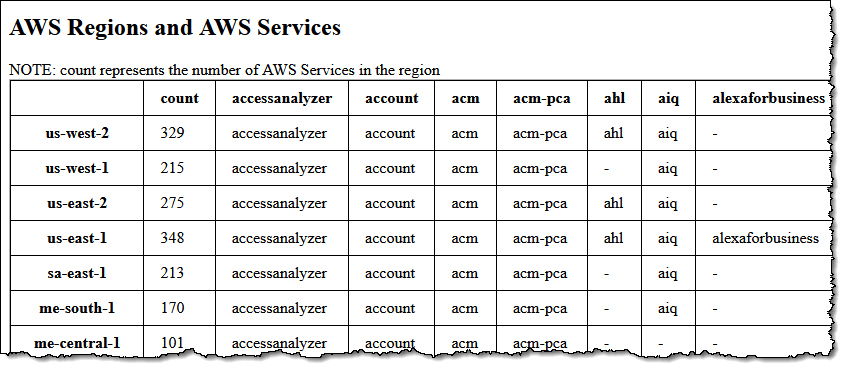
Each AWS customer uses a different mix of services, and uses those services in unique ways. Every service is instrumented and monitored, and the team responsible for designing, building, running, scaling, and evolving the service pays continuous attention to all of the resulting metrics. The metrics provide insights into how the service is being used, how it performs under load, and in many cases highlights areas for optimization in pursuit of higher availability, better performance, and lower costs.

Once an area for improvement has been identified, a plan is put in to place, changes are made and tested in pre-production environments, then deployed to multiple AWS regions. This happens routinely, and (to date) without fanfare. Each part of AWS gets better and better, with no action on your part.

DynamoDB UpdateTable
In late 2021 we announced the Standard-Infrequent Access table class for Amazon DynamoDB. As Marcia noted in her post, using this class can reduce your storage costs by 60% compared to the existing (Standard) class. She also showed you how you could modify a table to use the new class. The modification operation calls the UpdateTable function, and that function is the topic of this post!

As is the case with just about every AWS launch, customers began to make use of the new table class right away. They created new tables and modified existing ones, benefiting from the lower pricing as soon as the modification was complete.

DynamoDB uses a highly distributed storage architecture. Each table is split into multiple partitions; operations such as changing the storage class are done in parallel across the partitions. After looking at a lot of metrics, the DynamoDB team found ways to increase parallelism and to reduce the amount of time spent managing the parallel operations.

This change had a dramatic effect for Amazon DynamoDB tables over 500 GB in size, reducing the time to update the table class by up to 97%.

Each time we make a change like this, we capture the “before” and “after” metrics, and share the results internally so that other teams can learn from the experience while they are in the process of making similar improvements of their own. Even better, each change that we make opens the door to other ones, creating a positive feedback loop that (once again) benefits everyone that uses a particular service or feature.

Every DynamoDB user can take advantage of this increased performance right away without the need for a version upgrade or downtime for maintenance (DynamoDB does not even have maintenance windows).

Incremental performance and operational improvements like this one are done routinely and without much fanfare. However it is always good to hear back from our customers when their own measurements indicate that some part of AWS became better or faster.

Leadership Principles
As I was thinking about this change while getting ready to write this post, several Amazon Leadership Principles came to mind. The DynamoDB team showed Customer Obsession by implementing a change that would benefit any DynamoDB user with tables over 500 GB in size. To do this they had to Invent and Simplify, coming up with a better way to implement the UpdateTable function.

While you, as an AWS customer, get the benefits with no action needed on your part, this does not mean that you have to wait until we decide to pay special attention to your particular use case. If you are pushing any aspect of AWS to the limit (or want to), I recommend that you make contact with the appropriate service team and let them know what’s going on. You might be running into a quota or other limit, or pushing bandwidth, memory, or other resources to extremes. Whatever the case, the team would love to hear from you!

Stay Tuned
I have a long list of other internal improvements that we have made, and will be working with the teams to share more of them throughout the year.

— Jeff;

How to Connect Business and Technology to Embrace Strategic Thinking (Book Review)

Post Syndicated from Danilo Poccia original https://aws.amazon.com/blogs/aws/how-to-connect-business-and-technology-to-embrace-strategic-thinking-book-review/

The Value Flywheel Effect: Power the Future and Accelerate Your Organization to the Modern Cloud
by David Anderson with Mark McCann and Michael O’Reilly

With this post, I’d like to share a new book that got my attention. It’s a book at the intersection of business, technology, and people. This is a great read for anyone who wants to understand how organizations can evolve to maximize the business impact of new technologies and speed up their internal processes.

The Value FlyWheel Effect book with David Anderson and Danilo Poccia

Last year at re:Invent, I had the opportunity to meet David Anderson. As Director of Technology at Liberty Mutual, he drove the technology change when the global insurance company, founded in 1912, moved its services to the cloud and adopted a serverless-first strategy. He created an environment where experimentation was normal, and software engineers had time and space to learn. This worked so well that, at some point, he had four AWS Heroes in his extended team.

A few months before, I heard that David was writing a book with Mark McCann and Michael O’Reilly. They all worked together at Liberty Mutual, and they were distilling their learnings to help other organizations implement a similar approach. The book was just out when we met, and I was curious to learn more, starting from the title. We met in the expo area, and David was kind enough to give me a signed copy of the book.

The book is published by IT Revolution, the same publisher behind some of my favorite books such as The Phoenix Project, Team Topologies, and Accelerate. The book is titled The Value Flywheel Effect because when you connect business and technology in an organization, you start to turn a flywheel that builds momentum with each small win.

The Value Flywhell
The four phases of the Value Flywheel are:

  1. Clarity of Purpose – This is the part where you look at what is really important for your organization, what makes your company different, and define your North Star and how to measure your distance from it. In this phase, you look at the company through the eyes of the CEO.
  2. Challenge & Landscape – Here you prepare the organization and set up the environment for the teams. We often forget the social aspect of technical teams and great focus is given here on how to set up the right level of psychological safety for teams to operate. This phase is for engineers.
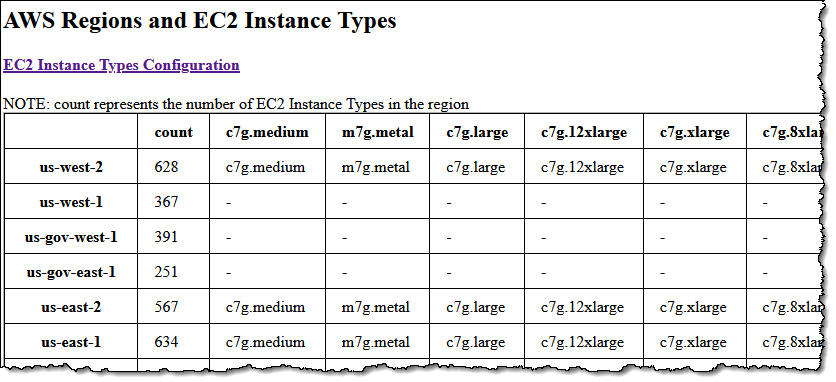
  3. Next Best Action – In this phase, you think like a product leader and plan the next steps with a focus on how to improve the developer experience. One of the key aspects is that “code is a liability” and the less code you write to solve a business problem, the better it is for speed and maintenance. For example, you can avoid some custom implementations and offload their requirements to capabilities offered by cloud providers.
  4. Long-Term Value – This is the CTO perspective, looking at how to set up a problem-preventing culture with well-architected systems and a focus on observability and sustainability. Sustainability here is not just considering the global environment but also the teams and the people working for the organization.

As you would expect from a flywheel, you should iterate on these four phases so that every new spin gets easier and faster.

Wardley Mapping
One thing that I really appreciate from the book is how it made it easy for me to use Wardley mapping (usually applied to a business context) in a technical scenario. Wardley maps, invented by Simon Wardley, provide a visual representation of the landscape in which a business operates.

Each map consists of a value chain, where you draw the components that your customers need. The components are connected to show how they depend on each other. The position of the components is based on how visible they are to customers (vertical) and their evolution status from genesis to being a product or a commodity (horizontal). Over time, some components evolve from being custom-built to becoming a product or being commoditized. This displays on the map with a natural movement to the right as things evolve. For example, data centers were custom-built in the past, but then they became a standard product, and cloud computing made them available as a commodity.

Wardley mapping – Basic elements of a map

Basic elements of a map – Provided courtesy of Simon Wardley, CC BY-SA 4.0.

With mapping, you can more easily understand what improvements you need and what gaps you have in your technical solution. In this way, engineers can identify which components they should focus on to maximize their impact and what parts are not strategic and can be offloaded to a SaaS solution. It’s a sort of evolutionary architecture where mapping gives a way to look ahead at how the system should evolve over time and where inertia can slow down the evolution of part of the system.

Sometimes it seems the same best practices apply everywhere but this is not true. An advantage of mapping is that it helps identify the best team and methodology to use based on a component evolution status as described by its horizontal position on a map. For example, an “explorer” attitude is best suited for components in their genesis or being custom built, a “villager” works best on products, and when something becomes a commodity you need a “town planner.”

More Tools and Less Code
The authors look at many available tools and frameworks. For example, the book introduces the North Star Framework, a way to manage products by first identifying their most important metric (the North Star), and Gojko Adzic‘s Impact Mapping, a collaborative planning technique that focuses on leading indicators to help teams make a big impact with their software products. By the way, Gojko is also an AWS Serverless Hero.

Another interesting point is how to provide engineers with the necessary time and space to learn. I specifically like how internal events are called out and compared to public conferences. In internal events, engineers have a chance to use a new technology within their company environment, making it easier to demonstrate what can be done with all the limits of an actual scenario.

Finally, I’d like to highlight this part that clearly defines what the book intends by the statements, “code is a liability”:

“When you ask a software team to build something, they deliver a system, not lines of code. The asset is not the code; the asset is the system. The less code in the system, the less overhead you have bought. Some developers may brag about how much code they’ve written, but this isn’t something to brag about.”

This is not a programming book, and serverless technologies are used as examples of how you can speed up the flywheel. If you are looking for a technical deep dive on serverless technologies, you can find more on Serverless Land, a site that brings together the latest information and learning resources for serverless computing, or have a look at the Serverless Architectures on AWS book.

Now that every business is a technology business, The Value Flywheel Effect is about how to accelerate and transform an organization. It helps set the right environment, purpose, and stage to modernize your applications as you adopt cloud computing and get the benefit of it.

You can meet David, Mark, and Michael at the Serverless Edge, where a team of engineers, tech enthusiasts, marketers, and thought leaders obsessed with technology help learn and communicate how serverless can transform a business model.

— Danilo

New Graviton3-Based General Purpose (m7g) and Memory-Optimized (r7g) Amazon EC2 Instances

Post Syndicated from Jeff Barr original https://aws.amazon.com/blogs/aws/new-graviton3-based-general-purpose-m7g-and-memory-optimized-r7g-amazon-ec2-instances/

We’ve come a long way since the launch of the m1.small instance in 2006, adding instances with additional memory, compute power, and your choice of Intel, AMD, or Graviton processors. The original general-purpose “one size fits all” instance has evolved into six families, each one optimized for specific uses cases, with over 600 generally available instances in all.

New M7g and R7g
Today I am happy to tell you about the newest Amazon EC2 instance types, the M7g and the R7g. Both types are powered by the latest generation AWS Graviton3 processors, and are designed to deliver up to 25% better performance than the equivalent sixth-generation (M6g and R6g) instances, making them the best performers in EC2.

The M7g instances are for general purpose workloads such as application servers, microservices, gaming servers, mid-sized data stores, and caching fleets. The R7g instances are a great fit for memory-intensive workloads such as open-source databases, in-memory caches, and real-time big data analytics.

Here are the specs for the M7g instances:

Instance Name vCPUs
Memory
Network Bandwidth
EBS Bandwidth
m7g.medium 1 4 GiB up to 12.5 Gbps up to 10 Gbps
m7g.large 2 8 GiB up to 12.5 Gbps up to 10 Gbps
m7g.xlarge 4 16 GiB up to 12.5 Gbps up to 10 Gbps
m7g.2xlarge 8 32 GiB up to 15 Gbps up to 10 Gbps
m7g.4xlarge 16 64 GiB up to 15 Gbps up to 10 Gbps
m7g.8xlarge 32 128 GiB 15 Gbps 10 Gbps
m7g.12xlarge 48 192 GiB 22.5 Gbps 15 Gbps
m7g.16xlarge 64 256 GiB 30 Gbps 20 Gbps
m7g.metal 64 256 GiB 30 Gbps 20 Gbps

And here are the specs for the R7g instances:

Instance Name vCPUs
Memory
Network Bandwidth
EBS Bandwidth
r7g.medium 1 8 GiB up to 12.5 Gbps up to 10 Gbps
r7g.large 2 16 GiB up to 12.5 Gbps up to 10 Gbps
r7g.xlarge 4 32 GiB up to 12.5 Gbps up to 10 Gbps
r7g.2xlarge 8 64 GiB up to 15 Gbps up to 10 Gbps
r7g.4xlarge 16 128 GiB up to 15 Gbps up to 10 Gbps
r7g.8xlarge 32 256 GiB 15 Gbps 10 Gbps
r7g.12xlarge 48 384 GiB 22.5 Gbps 15 Gbps
r7g.16xlarge 64 512 GiB 30 Gbps 20 Gbps
r7g.metal 64 512 GiB 30 Gbps 20 Gbps

Both types of instances are equipped with DDR5 memory, which provides up to 50% higher memory bandwidth than the DDR4 memory used in previous generations. Here’s an infographic that I created to highlight the principal performance and capacity improvements that we have made available with the new instances:

If you are not yet running your application on Graviton instances, be sure to take advantage of the AWS Graviton Ready Program. The partners in this program provide services and solutions that will help you to migrate your application and to take full advantage of all that the Graviton instances have to offer. Other helpful resources include the Porting Advisor for Graviton and the Graviton Fast Start program.

The instances are built on the AWS Nitro System, and benefit from multiple features that enhance security: always-on memory encryption, a dedicated cache for each vCPU, and support for pointer authentication. They also support encrypted EBS volumes, which protect data at rest on the volume, data moving between the instance and the volume, snapshots created from the volume, and volumes created from those snapshots. To learn more about these and other Nitro-powered security features, be sure to read The Security Design of the AWS Nitro System.

On the network side the instances are EBS-Optimized with dedicated networking between the instances and the EBS volumes, and also support Enhanced Networking (read How do I enable and configure enhanced networking on my EC2 instances? for more info). The 16xlarge and metal instances also support Elastic Fabric Adapter (EFA) for applications that need a high level of inter-node communication.

Pricing and Regions
M7g and R7g instances are available today in the US East (N. Virginia), US East (Ohio), US West (Oregon), and Europe (Ireland) AWS Regions in On-Demand, Spot, Reserved Instance, and Savings Plan form.

— Jeff;

PS – Launch one today and let me know what you think!

Week in Review – February 13, 2023

Post Syndicated from Sébastien Stormacq original https://aws.amazon.com/blogs/aws/week-in-review-february-13-2023/

AWS announced 32 capabilities since we published the last Week in Review blog post a week ago. I also read a couple of other news and blog posts.

Here is my summary.

The VPC section of the AWS Management Console now allows you to visualize your VPC resources, such as the relationships between a VPC and its subnets, routing tables, and gateways. This visualization was available at VPC creation time only, and now you can go back to it using the Resource Map tab in the console. You can read the details in Channy’s blog post.

CloudTrail Lake now gives you the ability to ingest activity events from non-AWS sources. This lets you immutably store and then process activity events without regard to their origin–AWS, on-premises servers, and so forth. All of this power is available to you with a single API call: PutAuditEvents. We launched AWS CloudTrail Lake about a year ago. It is a managed organization-scale data lake that aggregates, immutably stores, and allows querying of events recorded by CloudTrail. You can use it for auditing, security investigation, and troubleshooting. Again, my colleague Channy wrote a post with the details.

There are three new Amazon CloudWatch metrics for asynchronous AWS Lambda function invocations: AsyncEventsReceived, AsyncEventAge, and AsyncEventsDropped. These metrics provide visibility for asynchronous Lambda function invocations. They help you to identify the root cause of processing issues such as throttling, concurrency limit, function errors, processing latency because of retries, or missing events. You can learn more and have access to a sample application in this blog post.

Amazon Simple Notification Service (Amazon SNS) now supports AWS X-Ray to visualize, analyze, and debug applications. Developers can now trace messages going through Amazon SNS, making it easier to understand or debug microservices or serverless applications.

Amazon EC2 Mac instances now support replacing root volumes for quick instance restoration. Stopping and starting EC2 Mac instances trigger a scrubbing workflow that can take up to one hour to complete. Now you can swap the root volume of the instance with an EBS snapshot or an AMI. It helps to reset your instance to a previous known state in 10–15 minutes only. This significantly speeds up your CI and CD pipelines.

Amazon Polly launches two new Japanese NTTS voices. Neural Text To Speech (NTTS) produces the most natural and human-like text-to-speech voices possible. You can try these voices in the Polly section of the AWS Management Console. With this addition, according to my count, you can now choose among 52 NTTS voices in 28 languages or language variants (French from France or from Quebec, for example).

The AWS SDK for Java now includes the AWS CRT HTTP Client. The HTTP client is the center-piece powering our SDKs. Every single AWS API call triggers a network call to our API endpoints. It is therefore important to use a low-footprint and low-latency HTTP client library in our SDKs. AWS created a common HTTP client for all SDKs using the C programming language. We also offer 11 wrappers for 11 programming languages, from C++ to Swift. When you develop in Java, you now have the option to use this common HTTP client. It provides up to 76 percent cold start time reduction on AWS Lambda functions and up to 14 percent less memory usage compared to the Netty-based HTTP client provided by default. My colleague Zoe has more details in her blog post.

X in Y Jeff started this section a while ago to list the expansion of new services and capabilities to additional Regions. I noticed 10 Regional expansions this week:

Other AWS News
This week, I also noticed these AWS news items:

My colleague Mai-Lan shared some impressive customer stories and metrics related to the use and scale of Amazon S3 Glacier. Check it out to learn how to put your cold data to work.

Space is the final (edge) frontier. I read this blog post published on avionweek.com. It explains how AWS helps to deploy AIML models on observation satellites to analyze image quality before sending them to earth, saving up to 40 percent satellite bandwidth. Interestingly, the main cause for unusable satellite images is…clouds.

Upcoming AWS Events
Check your calendars and sign up for these AWS events:

AWS re:Invent recaps in your area. During the re:Invent week, we had lots of new announcements, and in the next weeks, you can find in your area a recap of all these launches. All the events are posted on this site, so check it regularly to find an event nearby.

AWS re:Invent keynotes, leadership sessions, and breakout sessions are available on demand. I recommend that you check the playlists and find the talks about your favorite topics in one collection.

AWS Summits season will restart in Q2 2023. The dates and locations will be announced here. Paris and Sidney are kicking off the season on April 4th. You can register today to attend these in-person, free events (Paris, Sidney).

Stay Informed
That was my selection for this week! To better keep up with all of this news, do not forget to check out the following resources:

— seb
This post is part of our Week in Review series. Check back each week for a quick roundup of interesting news and announcements from AWS!

New – Visualize Your VPC Resources from Amazon VPC Creation Experience

Post Syndicated from Channy Yun original https://aws.amazon.com/blogs/aws/new-visualize-your-vpc-resources-from-amazon-vpc-creation-experience/

Today we are announcing Amazon Virtual Private Cloud (Amazon VPC) resource map, a new feature that simplifies the VPC creation experience in the AWS Management Console. This feature displays your existing VPC resources and their routing visually on a single page, allowing you to quickly understand the architectural layout of the VPC.

A year ago, in March 2022, we launched a new VPC creation experience that streamlines the process of creating and connecting VPC resources. With just one click, even across multiple Availability Zones (AZs), you can create and connect VPC resources, eliminating more than 90 percent of the manual steps required in the past. The new creation experience is centered around an interactive diagram that displays a preview of the VPC architecture and updates as options are selected, providing a visual representation of the resources and their relationships within the VPC that you are about to create.

However, after the creation of the VPC, the diagram that was available during the creation experience that many of our customers loved was no longer available. Today we are changing that! With VPC resource map, you can quickly understand the architectural layout of the VPC, including the number of subnets, which subnets are associated with the public route table, and which route tables have routes to the NAT Gateway.

You can also get to the specific resource details by clicking on the resource. This eliminates the need for you to map out resource relationships mentally and hold the information in your head while working with your VPC, making the process much more efficient and less prone to mistakes.

Getting Started with VPC Resource Map
To get started, choose an existing VPC in the VPC console. In the details section, select the Resource map tab. Here, you can see the resources in your VPC and the relationships between those resources.

As you hover over a resource, you can see the related resources and the connected lines highlighted. If you click to select the resource, you can see a few lines of details and a link to see the details of the selected resource.

Getting Started with VPC Creation Experience
I want to explain how to use the VPC creation experience to improve your workflow to create a new VPC to make a high-availability three-tier VPC easily.

Choose Create VPC and select VPC and more in the VPC console. You can preview the VPC resources that you are about to create all on the same page.

In Name tag auto-generation, you can specify a prefix value for Name tags. This value is used to generate Name tags for all VPC resources in the preview. If I change the default value, which is project to channy, the Name tag in the preview changes to channy- something, such as channy-vpc. You can customize a Name tag per resource in the preview by clicking each resource and making changes.

You can easily change the default CIDR value (10.0.0.0/16) when you click the IPv4 CIDR block field to reveal the CIDR joystick. Use the left or right arrow to move to the previous (9.255.0.0/16) or next (10.0.1.0/16) CIDR block within the /16 network mask. You can also change the subnet mask to /17 by using the down arrow, or go back to /16 using the up arrow.

Choose the number of Availability Zones (AZs) up to 3. The number of public and private subnet types changes based on the number of AZs and shows the total number of each subnet type it will create.

I want a high-availability VPC in three AZs and select 6 for the number of private subnets. In the preview panel, you can see that there are 9 subnets. When I hover over channy-rtb-public, I can visually confirm that this route table is connected to three public subnets and also routed to the internet gateway (channy-igw). The dotted lines indicate routes to network node, and the solid lines indicate relationships such as implicit or explicit associations.

Adding NAT gateways and VPC endpoints is easy. You can simply change the number of NAT gateways in or per Availability Zone (AZ). Note that there is a charge for each NAT gateway. We always recommend having one NAT gateway per AZ and route traffic from subnets in an AZ to the NAT gateway in the same AZ for high availability and to avoid inter-AZ data charges.

To route traffic to Amazon Simple Storage Service (Amazon S3) buckets more securely, you can choose the S3 Gateway endpoint by default. The S3 Gateway endpoint is free of charge and does not use NAT gateways when moving data from private subnets.

You can create additional tags and assign them to all resources in the VPC in no time. I select Add new tag and enter environment for the Key and test for the Value. This key-value pair will be added to every resource here.

Choose Create VPC at the bottom of the page and see the resources and the IDs of those resources that are being created. Before creating, please validate resources from the preview.

Once all the resources are created, choose View VPC at the bottom. The button takes you directly to the VPC resource map, where you can see a visual representation of what you created.

Now Available
Amazon VPC resource map is now available in all AWS Regions where Amazon VPC is available, and you can start using it today.

The VPC resource map and creation experience now only displays VPC, subnets, route tables, internet gateway, NAT gateways, and Amazon S3 gateway. The Amazon VPC console teams and user experience teams will continue to improve the console experience using customer feedback.

To learn more, see the Amazon VPC User Guide, and please send feedback to AWS re:Post for Amazon VPC or through your usual AWS support contacts.

– Channy