An integrated experience for all your data and AI with Amazon SageMaker Unified Studio (preview)

Post Syndicated from Noritaka Sekiyama original https://aws.amazon.com/blogs/big-data/an-integrated-experience-for-all-your-data-and-ai-with-amazon-sagemaker-unified-studio-preview/

Organizations are building data-driven applications to guide business decisions, improve agility, and drive innovation. Many of these applications are complex to build because they require collaboration across teams and the integration of data, tools, and services. Data engineers use data warehouses, data lakes, and analytics tools to load, transform, clean, and aggregate data. Data scientists use notebook environments (such as JupyterLab) to create predictive models for different target segments.

However, building advanced data-driven applications poses several challenges. First, it can be time consuming for users to learn multiple services’ development experiences. Second, because data, code, and other development artifacts like machine learning (ML) models are stored within different services, it can be cumbersome for users to understand how they interact with each other and make changes. Third, configuring and governing access to appropriate users for data, code, development artifacts, and compute resources across services is a manual process.

To address these challenges, organizations often build bespoke integrations between services, tools, and their own access management systems. Organizations want the flexibility to adopt the best services for their use cases while empowering their data practitioners with a unified development experience.

We launched Amazon SageMaker Unified Studio in preview to tackle these challenges. SageMaker Unified Studio is an integrated development environment (IDE) for data, analytics, and AI. Discover your data and put it to work using familiar AWS tools to complete end-to-end development workflows, including data analysis, data processing, model training, generative AI app building, and more, in a single governed environment. Create or join projects to collaborate with your teams, share AI and analytics artifacts securely, and discover and use your data stored in Amazon S3, Amazon Redshift, and more data sources through the Amazon SageMaker Lakehouse. As AI and analytics use cases converge, transform how data teams work together with SageMaker Unified Studio.

This post demonstrates how SageMaker Unified Studio unifies your analytic workloads.

The following screenshot illustrates the SageMaker Unified Studio.

The SageMaker Unified Studio provides the following quick access menu options from Home:

  • Discover:
    • Data catalog – Find and query data assets and explore ML models
    • Generative AI playground – Experiment with the chat or image playground
    • Shared generative AI assets – Explore generative AI applications and prompts shared with you.
  • Build with projects:
    • ML and generative AI model – Build, train, and deploy ML and foundation models with fully managed infrastructure, tools, and workflows.
    • Generative AI app development – Build generative AI apps and experiment with foundation models, prompts, agents, functions, and guardrails in Amazon Bedrock IDE.
    • Data processing and SQL analytics – Analyze, prepare, and integrate data for analytics and AI using Amazon Athena, Amazon EMR, AWS Glue, and Amazon Redshift.
    • Data and AI governance – Publish your data products to the catalog with glossaries and metadata forms. Govern access securely in the Amazon SageMaker Catalog built on Amazon DataZone.

With SageMaker Unified Studio, you now have a unified development experience across these services. You only need to learn these tools once and then you can use them across all services.

With SageMaker Unified Studio notebooks, you can use Python or Spark to interactively explore and visualize data, prepare data for analytics and ML, and train ML models. With the SQL editor, you can query data lakes, databases, data warehouses, and federated data sources. The SageMaker Unified Studio tools are integrated with Amazon Q, can quickly build, refine, and maintain applications with text-to-code capabilities.

In addition, SageMaker Unified Studio provides a unified view of an application’s building blocks such as data, code, development artifacts, and compute resources across services to approved users. This allows data engineers, data scientists, business analysts, and other data practitioners working from the same tool to quickly understand how an application works, seamlessly review each other’s work, and make the required changes.

Furthermore, SageMaker Unified Studio automates and simplifies access management for an application’s building blocks. After these building blocks are added to a project, they are automatically accessible to approved users from all tools—SageMaker Unified Studio configures any required service-specific permissions. With SageMaker Unified Studio, data practitioners can access all the capabilities of AWS purpose-built analytics, AI/ML, and generative AI services from a single unified development experience.

In the following sections, we walk through how to get started with SageMaker Unified Studio and some example use cases.

Create a SageMaker Unified Studio domain

Complete the following steps to create a new SageMaker Unified Studio domain:

  1. On the SageMaker platform console, choose Domains in the navigation pane.
  2. Choose Create domain.
  3. For How do you want to set up your domain?, select Quick setup (recommended for exploration).

Initially, no virtual private cloud (VPC) has been specifically set up for use with SageMaker Unified Studio, so you will see a dialog box prompting you to create a VPC.

  1. Choose Create VPC.

You’re redirected to the AWS CloudFormation console to deploy a stack to configure VPC resources.

  1. Choose Create stack, and wait for the stack to complete.
  2. Return to the SageMaker Unified Studio console, and inside the dialog box, choose the refresh icon.
  3. Under Quick setup settings, for Name, enter a name (for example, demo).
  4. For Domain Execution role, Domain Service role, Provisioning role, and Manage Access role, leave as default.
  5. For Virtual private cloud (VPC), verify that the new VPC you created in the CloudFormation stack is configured.
  6. For Subnets, verify that the new private subnets you created in the CloudFormation stack are configured.
  7. Choose Continue.
  8. For Create IAM Identity Center user, search for your SSO user through your email address.

If you don’t have an IAM Identity Center instance, you will be prompted to enter your name after your email address. This will create a new local IAM Identity Center instance.

  1. Choose Create domain.

Log in to the SageMaker Unified Studio

Now that you have created your new SageMaker Unified Studio domain, complete the following steps to visit the SageMaker Unified Studio:

  1. On the SageMaker platform console, open the details page of your domain.
  2. Choose the link for Amazon SageMaker Unified Studio URL.
  3. Log in with your SSO credentials.

Now you signed in to the SageMaker Unified Studio.

Create a project

The next step is to create a project. Complete the following steps:

  1. On the SageMaker Unified Studio, choose Select a project on the top menu, and choose Create project.
  2. For Project name, enter a name (for example, demo).
  3. For Project profile, choose Data analytics and AI-ML model development.
  4. Choose Continue.
  5. Review the input, and choose Create project.

You need to wait for the project to be created. Project creation can take about 5 minutes. Then the SageMaker Unified Studio console navigates you to the project’s home page.

Now you can use a variety of tools for your analytics, ML, and AI workload. In the following sections, we provide a few example use cases.

Process your data through a multi-compute notebook

SageMaker Unified Studio provides a unified JupyterLab experience across different languages, including SQL, PySpark, and Scala Spark. It also supports unified access across different compute runtimes such as Amazon Redshift and Amazon Athena for SQL, Amazon EMR Serverless, Amazon EMR on EC2, and AWS Glue for Spark.

Complete the following steps to get started with the unified JupyterLab experience:

  1. Open your SageMaker Unified Studio project page.
  2. On the top menu, choose Build, and under IDE & APPLICATIONS, choose JupyterLab.
  3. Wait for the space to be ready.
  4. Choose the plus sign and for Notebook, choose Python 3.

The following screenshot shows an example of the unified notebook page.

There are two dropdown menus on the top left of each cell. The Connection Type menu corresponds to connection types such as Local Python, PySpark, SQL, and so on.

The Compute menu corresponds to compute options such as Athena, AWS Glue, Amazon EMR, and so on.

  1. For the first cell, choose PySpark, spark, which defaults to AWS Glue for Spark, and enter the following code to initialize SparkSession and create a DataFrame from an Amazon Simple Storage Service (Amazon S3) path, then run the cell:
    from pyspark.sql import SparkSession
    
    spark = SparkSession.builder.getOrCreate()
    
    df1 = spark.read.format("csv") \
        .option("multiLine", "true") \
        .option("header", "false") \
        .option("sep", ",") \
        .load("s3://aws-blogs-artifacts-public/artifacts/BDB-4798/data/venue.csv")
    
    df1.show()

  2. For the next cell, enter the following code to rename columns and filter the records, and run the cell:
    df1_renamed = df1.withColumnsRenamed(
        {
            "_c0" : "venueid", 
            "_c1" : "venuename", 
            "_c2" : "venuecity", 
            "_c3" : "venuestate", 
            "_c4" : "venueseats"
        }
    )
    
    df1_filtered = df1_renamed.filter("`venuestate` == 'DC'")
    
    df1_filtered.show()

  3. For the next cell, enter the following code to create another DataFrame from another S3 path, and run the cell:
    df2 = spark.read.format("csv") \
        .option("multiLine", "true") \
        .option("header", "false") \
        .option("sep", ",") \
        .load("s3://aws-blogs-artifacts-public/artifacts/BDB-4798/data/events.csv")
    df2_renamed = df2.withColumnsRenamed(
        {
            "_c0" : "eventid", 
            "_c1" : "e_venueid", 
            "_c2" : "catid", 
            "_c3" : "dateid", 
            "_c4" : "eventname", 
            "_c5" : "starttime"
        }
    )
    
    df2_renamed.show()

  4. For the next cell, enter the following code to join the frames and apply custom SQL, and run the cell:
    df_joined = df2_renamed.join(df1_filtered, (df2_renamed['e_venueid'] == df1_filtered['venueid']), "inner")
    
    df_sql = spark.sql("""
        select 
            venuename, 
            count(distinct eventid) as eventid_count
        from {myDataSource}
        group by venuename
    """, myDataSource = df_joined)
    
    df_sql.show()

  5. For the next cell, enter following code to write to a table, and run the cell (replace the AWS Glue database name with your project database name, and the S3 path with your project’s S3 path):
    df_sql.write.format("parquet") \
        .option("path", "s3://amazon-sagemaker-123456789012-us-east-2-xxxxxxxxxxxxx/dzd_1234567890123/xxxxxxxxxxxxx/dev/venue_event_agg/") \
        .option("header", False) \
        .option("compression", "snappy") \
        .mode("overwrite") \
        .saveAsTable("`glue_db_abcdefgh`.`venue_event_agg`")

Now you have successfully ingested data to Amazon S3 and created a new table called venue_event_agg.

  1. In the next cell, switch the connection type from PySpark to SQL.
  2. Run following SQL against the table (replace the AWS Glue database name with your project database name):
    SELECT * FROM glue_db_abcdefgh.venue_event_agg

The following screenshot shows an example of the results.

The SQL ran on AWS Glue for Spark. Optionally, you can switch to other analytics engines like Athena by switching the compute.

Explore your data through a SQL Query Editor

In the previous section, you learned how the unified notebook works with different connection types and different compute engines. Next, let’s use the data explorer to explore the table you created using a notebook. Complete the following steps:

  1. On the project page, choose Data.
  2. Under Lakehouse, expand AwsDataCatalog.
  3. Expand your database starting from glue_db_.
  4. Choose venue_event_agg, choose Query with Athena.
  5. Choose Run all.

The following screenshot shows an example of the query result.

As you enter text in the query editor, you will notice it provides suggestions for statements. The SQL query editor provides real-time autocomplete suggestions as you write SQL statements, covering DML/DDL statements, clauses, functions, and schemas of your catalogs like databases, tables, and columns. This enables faster, error-free query building.

You can complete editing the query and run it.

You can also open a generative SQL assistant powered by Amazon Q to help your query authoring experience.

For example, you can ask “Calculate the sum of eventid_count across all venues” in the assistant, and the query is automatically suggested. You can choose Add to querybook to copy the suggested query is copied to the querybook, and run it.

Next, coming back to the original query, and let’s try a quick visualization to analyze the data distribution.

  1. Choose the chart view icon.
  2. Under Structure, choose Traces.
  3. For Type, choose Pie.
  4. For Values, choose eventid_count.
  5. For Labels, choose venuename.

The query result will display as a pie chart like the following example. You can customize the graph title, axis title, subplot styles, and more on the UI. The generated images can also be downloaded as PNG or JPEG files.

In the above instruction, you learned how the data explorer works with different visualizations.

Clean up

To clean up your resources, complete the following steps:

  1. Delete the AWS Glue table venue_event_agg and S3 objects under the table S3 path.
  2. Delete the project you created.
  3. Delete the domain you created.
  4. Delete the VPC named SageMakerUnifiedStudioVPC.

Conclusion

In this post, we demonstrated how SageMaker Unified Studio (preview) unifies your analytics workload. We also explained the end-to-end user experience of the SageMaker Unified Studio for two different use cases of notebook and query. Discover your data and put it to work using familiar AWS tools to complete end-to-end development workflows, including data analysis, data processing, model training, generative AI app building, and more, in a single governed environment. Create or join projects to collaborate with your teams, share AI and analytics artifacts securely, and discover and use your data stored in Amazon S3, Amazon Redshift, and more data sources through the Amazon SageMaker Lakehouse. As AI and analytics use cases converge, transform how data teams work together with SageMaker Unified Studio.

To learn more, visit Amazon SageMaker Unified Studio (preview).


About the Authors

Noritaka Sekiyama is a Principal Big Data Architect on the AWS Glue team. He works based in Tokyo, Japan. He is responsible for building software artifacts to help customers. In his spare time, he enjoys cycling with his road bike.

Chiho Sugimoto is a Cloud Support Engineer on the AWS Big Data Support team. She is passionate about helping customers build data lakes using ETL workloads. She loves planetary science and enjoys studying the asteroid Ryugu on weekends.

Zach Mitchell is a Sr. Big Data Architect. He works within the product team to enhance understanding between product engineers and their customers while guiding customers through their journey to develop data lakes and other data solutions on AWS analytics services.

Chanu Damarla is a Principal Product Manager on the Amazon SageMaker Unified Studio team. He works with customers around the globe to translate business and technical requirements into products that delight customers and enable them to be more productive with their data, analytics, and AI.

AI 101: Building and Deploying an AI Model

Post Syndicated from Stephanie Doyle original https://www.backblaze.com/blog/ai-101-building-and-deploying-an-ai-model/

A decorative image showing a computer, a cloud, and a building.

Should you build your own AI model? Or use other services to help you accelerate the process?

Once you’ve defined the problem you’re trying to solve and the AI model type that best fits your needs, these are the questions you’re faced with next—where to deploy an AI model and how to go about doing it. In most cases, there is very little reason for you to build, train, and deploy your AI model from scratch, particularly as more and more vendors are stepping in to help companies with all or some of the process. It’s fundamentally complex, takes tons of resources and requires specialized knowledge to do correctly. 

Still, you should have a basic understanding of the AI model training and deployment processes, as these learnings will be useful as later on as you explore various predefined tools, applications, and services you can use to expedite or enhance your ability to use AI within your organization. That’s what I’m digging into today.

How AI model training works

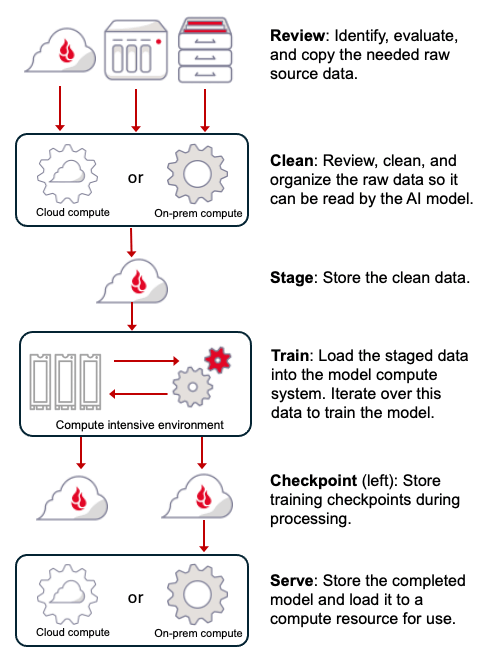
There are several steps in training an AI model which include identification and gathering the data required, data cleansing and assembly, training the model, checkpointing, and, finally, model serving where the model is deployed into the production environment. Here’s an overview of the process. 

A diagram that explains the AI model training process.

Let’s take a minute to explore each of the steps in a little more detail.

Step 1: Review 

The organizational data needed to help educate your model will either be structured or unstructured. Structured data is found in databases, tables, and so on. Unstructured data is basically everything else. Some unstructured data is easy to process, such as text files, while other data is harder to extract, such as PDFs and images. 

In general, the more data you can provide, the better your trained model can be. But, remember to include data that is not what you want as well—this helps models to hone in on the specific piece of information when things are similar. Take this example scenario, for instance:  

You are monitoring hundreds of thousands of wooded acres to determine if there is a fire on the land. As part of training the model, you need to provide images of the legitimate flora and fauna along with images of fire. But you should also provide images of what is not fire, for example reflections of the sun or moon on a lake, a group of lightning bugs at night, car headlights, and so on.

Step 2: Clean 

As the data is collected, it will need to be pre-processed, which involves several techniques such as cleaning the data to handle missing values, removing outliers, scaling features, encoding categorical variables, and splitting the data into training and testing sets. The data needs to be arranged in a manner acceptable to the model itself. This sounds relatively simple, but some studies show that this can take up to 80% of the total model development process time

Step 3: Stage 

This is a collection point for all of the clean, ready to be processed, data. This data will arrive as it is processed (cleaned) which can occur over several days or even weeks. Having this data on hand will be useful if the model is not generated correctly or in the future as a starting point to retrain the model.

Typically large amounts of your data will be cleaned and staged as it is readied to train the AI model. But, there are no special storage requirements for this data. It just needs to be readily available to be uploaded to the AI training environment when the time comes. 

Step 4: Train 

Model training is a resource intensive process where data is copied from staging to high-performance storage located in close proximity to whatever high-powered processor you’re rocking, usually a graphical processing unit (GPU). The GPUs then run the algorithms developed specifically for training the model, and the data is iteratively read and processed an indeterminate number of times until training is complete. Minimizing the time spent utilizing these expensive, high-powered storage and processing resources is critical in managing the overall cost of building the model. In other words: get in, process, and get out.

Step 5: Checkpoint 

During the building of the model, the programming will often create snapshots of the status of the training process. This will include various variables, state changes, and so on. These snapshots are referred to as checkpoints. They initially will be written to local storage within the model training system, and are used to restart the training process from a known good state if something goes wrong. 

Once the model training process is complete, checkpoints should be written to the same centralized data storage location as your staged data. The checkpoint data will become part of the documentation of the model and may be used for forensic purposes should the model not behave appropriately once it is deployed.

Step 6: Serve 

Once the training process is complete, the model can be exported to your central storage location. This will once again help document the system, and from there the model can then be uploaded to the local or cloud compute environment where it will be used.  

At this point you have a clean version of the source data, the checkpoints of the model created, and a copy of the model itself, all stored in your centralized location under your control and readily available should they be needed in the future. 

AI model inference

The term inference is derived from the AI model’s perspective. At a high level, when given a prompt, the model infers its response from the trained model and its data. In simple terms, you’ve trained your model to recognize cats, and then you bring it new data (a picture of a family reunion) and ask your model if it sees any cats in the photo (I’m hoping the answer is yes). 

In AI, the prompt is viewed as new data which is compared to the model’s existing data to determine a response typically in the form of a decision, prediction, or new content as is the case with generative AI models. 

An overview of the inference process is below:

A diagram of the AI inference process.

In some AI systems, the inference process flow includes some additional code to help improve your model. These types of filters can have a range of uses and can happen on either the input or the output stage. For example, if you want to filter inappropriate queries or information, you could include something like keyword filtering when data (the prompt) is input. Or, you could introduce a toxicity detection filter on the output side, which reviews responses and prevents harmful or offensive content to be presented to the user.  

A perhaps better understood problem that filters like this can address is how to get accurate and up-to-date information out of your queried response. On the input flow side of things, retrieval-augmented generation (RAG) directs a trained model to incorporate and weight more heavily information from trusted sources that the user designates. On the output side, you might add a hallucination prevention filter, which would stop the model from presenting false or misleading information.  

More broadly, you’ll notice that both the prompt and response are saved. It is important to review this information on a periodic basis. This is especially true if the model is public facing, if  you are using a model which can change over time such as a foundation model, or if you are using a model which utilizes RAG techniques to include new or external content. 

In all of those examples, your model can drift as new information is introduced, and, as we noted above, getting the right information and cleaning it properly is likely the most time-intensive and important stage of this process. Not for nothing is the phrase “knowledge is power” a truism—in the age of AI, knowledge is power and good data is king. 

The post AI 101: Building and Deploying an AI Model appeared first on Backblaze Blog | Cloud Storage & Cloud Backup

[$] Auto-tuning the kernel

Post Syndicated from daroc original https://lwn.net/Articles/998576/

The Linux kernel has many tunable parameters. While there is much advice
available on the internet about how to set them, few people have the time to
weed through the (often contradictory) explanations and choose appropriate
values. One possible way to address this is

a project called bpftune
, a
program that uses BPF to track various metrics about a running system and
adjust the sysctl knobs appropriately. The program is developed by Oracle, and
is available under a GPLv2 license. Bpftune is currently mostly
focused on optimizing network settings, but the authors hope that the system is
flexible enough to be extended to cover other settings.

Security updates for Wednesday

Post Syndicated from jzb original https://lwn.net/Articles/1001728/

Security updates have been issued by Debian (proftpd-dfsg and smarty3), Fedora (python3.14), Gentoo (Distrobox, eza, idna, libvirt, and OpenSC), Red Hat (container-tools:rhel8 and edk2), SUSE (avahi, curl, libsoup2, lxd, nodejs20, python-Django, python310-Django4, python312, squid, and webkit2gtk3), and Ubuntu (expat, intel-microcode, linux, linux-aws, linux-kvm, linux-lts-xenial, and shiro).

See what’s possible in Zabbix 7.2!

Post Syndicated from Arturs Lontons original https://blog.zabbix.com/see-whats-possible-in-zabbix-7-2/29373/

Zabbix 7.2 is out now and available for download! The latest Zabbix major release introduces a range of new visualization features and widgets while adding a variety of updated monitoring features to support new use cases and scenarios. Read more to find out about the latest Zabbix features and improvements.

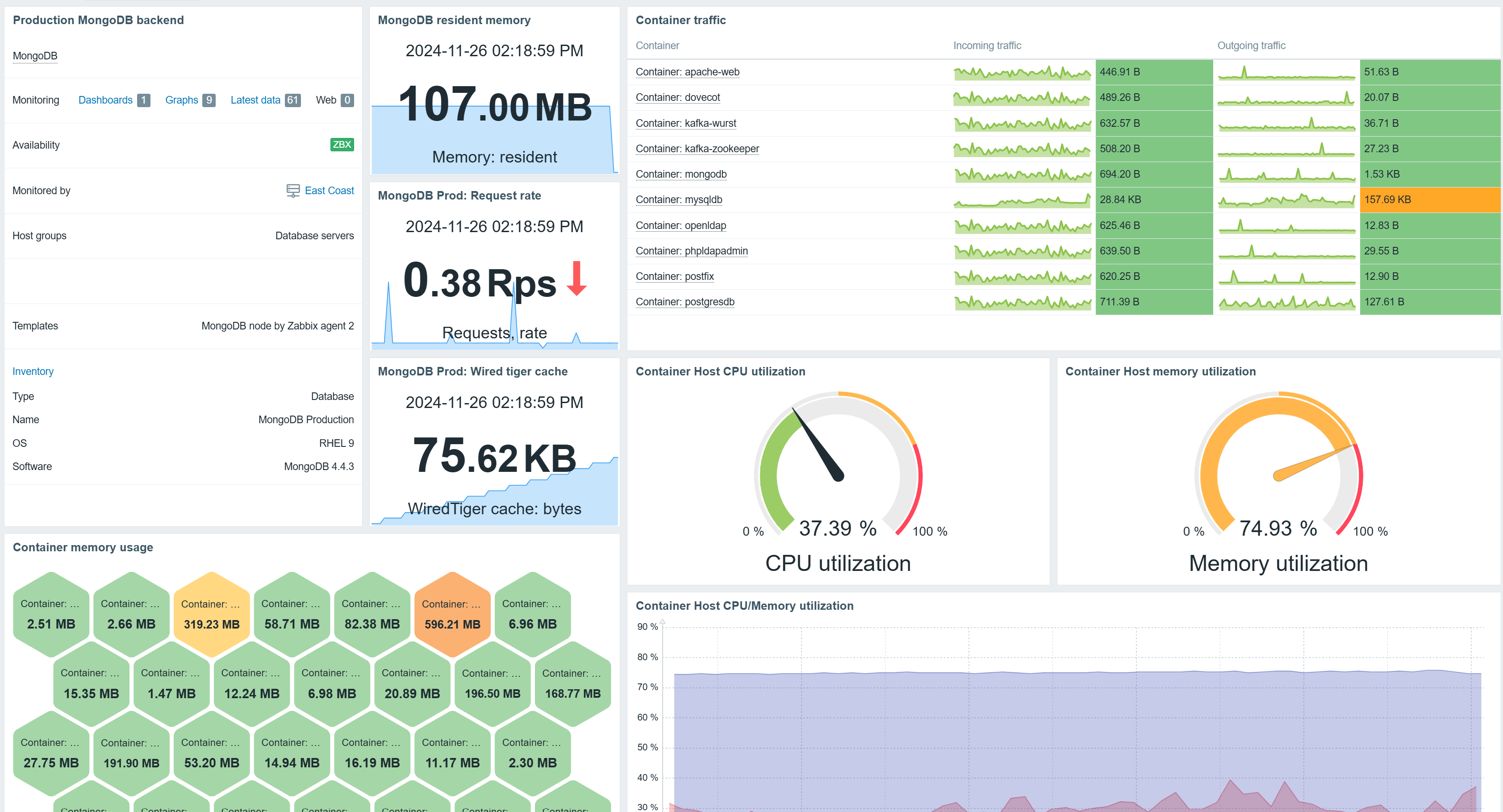
Top items widget

The previously deprecated Data overview widget has been converted to the new Top items widget. The Top items widget enables item selection via item patterns. The selected items are then displayed for hosts based on host and host group filters. This means that users are not limited to explicitly selected items or hosts, which enables dynamically matching items in rapidly changing environments.


Items can be matched using pattern matching in the Top items widget

The widget supports Bar, Indicator, Sparkline, and As-is value visualization as well as defining value thresholds, enabling value highlighting for values exceeding the defined threshold.

Top items widget supports As-is, Bar, Indicator, and Sparkline value visualization

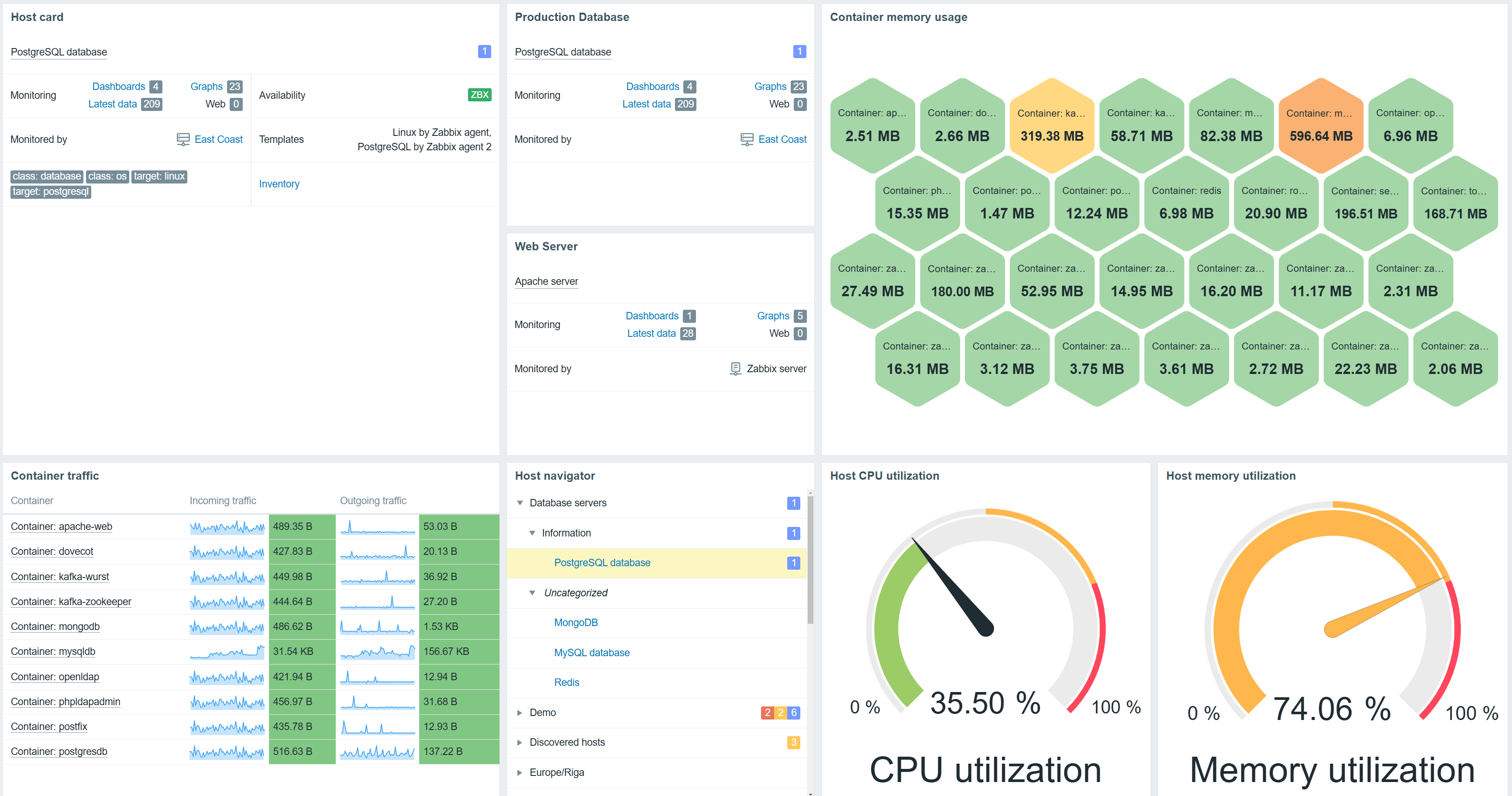
Host card widget

The Host card widget adds the ability to display host information on Zabbix dashboards. The widget configuration supports selecting and ordering fields containing a variety of information about the host.

The Host card widget allows for selecting and ordering host information fields

The widget also supports a multi-column layout. Host information can be displayed in 1-3 columns, depending on how the widget is placed on the dashboard.

The host card widget layout can be customized by resizing the widget

Sparkline chart

Sparkline charts have been introduced in Zabbix 7.2 as an additional visualization option for existing widgets. The goal of a sparkline chart is to provide additional over-time context when viewing collected values in widgets, such as the Item value widget. Sparkline charts are supported in Top items, Top hosts, and Item value widgets.

Sparkline charts can be displayed in Item value, Top Items, and Top hosts widgets

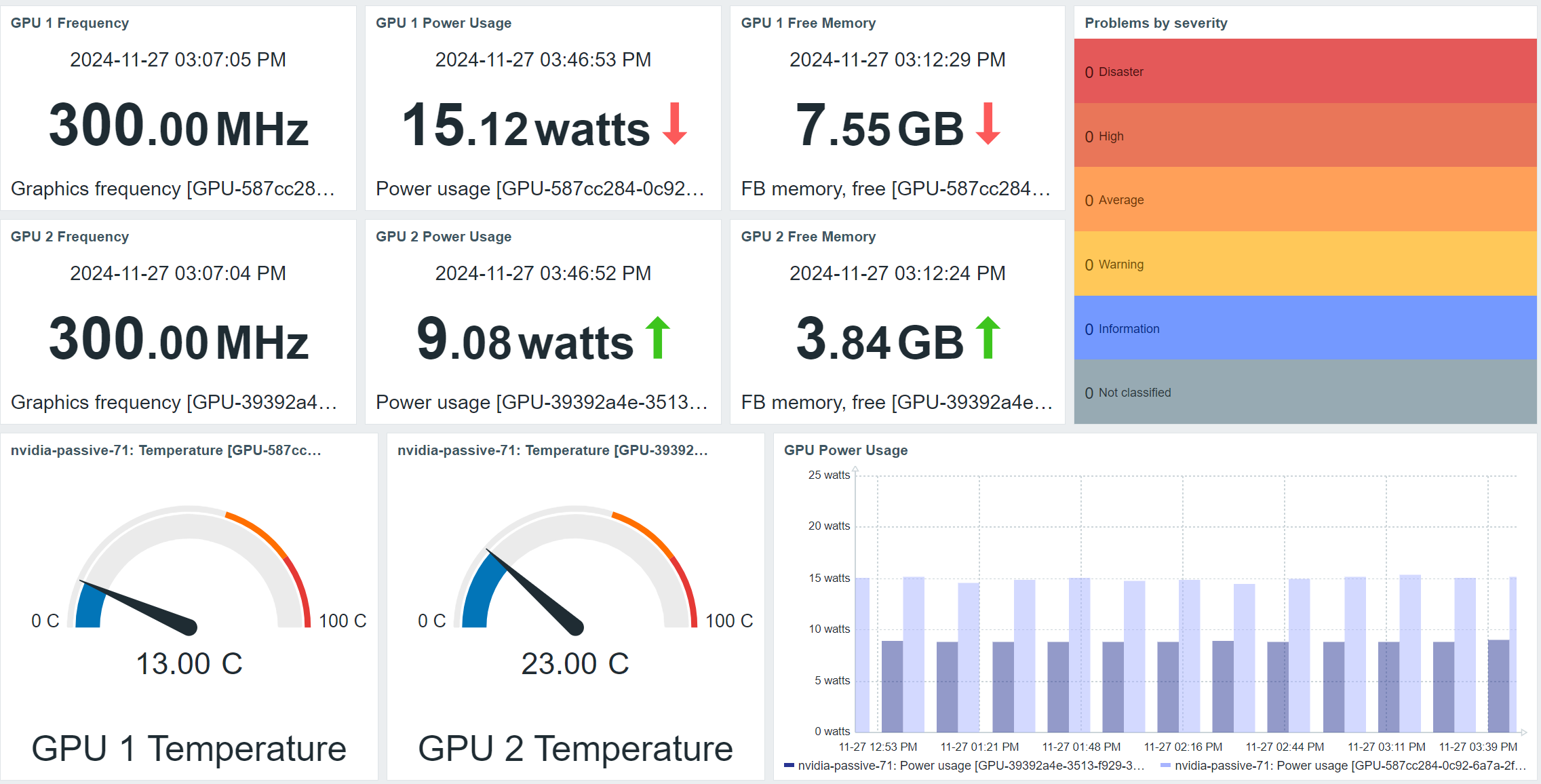
NVIDIA GPU monitoring template and Zabbix agent 2 plugin

Starting with Zabbix release 7.2.1, the newly released NVIDIA GPU monitoring template and Zabbix agent 2 plugin will allow agent 2 to automatically discover NVIDIA GPUs on Windows and Linux environments and start monitoring items such as GPU temperature, power usage, memory, frequency, and much more. The list of discovered and supported metrics may vary depending on the GPU model.

GPU metrics can be automatically discovered and displayed on Zabbix dashboards

NETCONF monitoring with SSH item subsystem support

SSH subsystems are a set of remote commands predefined on the monitored endpoint. A common use case of an SSH subsystem is the NETCONF subsystem, used to manage network device configuration.

Zabbix 7.2 introduces a new parameter for the SSH monitoring item  –  ssh.run[unique short description,<ip>,<port>,<encoding>,<ssh options>,<subsystem>]

The subsystem parameter is used to specify an SSH subsystem and can be used to execute commands via SSH subsystems such as NETCONF or SFTP.

New and updated macros

  • New {*.TIMESTAMP} macros can be used to populate alerts with the UNIXTIME value of problem detection, recovery, and update timestamps.
  • The {EVENT.UPDATE.ACTIONJSON} macro resolves to a JSON array containing details of the actions performed during a problem update. This JSON value can be later used in integrations or scripts.
  • The {SERVICE.ID} macro resolves to the numeric ID of the service that triggered the action.
  • The {HOST.PORT} macro can now be used in the same locations as the {HOST.CONN} macro.
  • The new {FUNCTION.VALUE<1-9>} and {FUNCTION.RECOVERY.VALUE<1-9>} macros can be used in expression macros to display a value of the Nth item-based function in the trigger expression. This can be used to display values in map labels or graph names.

VMware monitoring improvements

VMware monitoring has received multiple improvements and fixes in Zabbix 7.2:

  • In addition to the previously supported VMware hypervisor discovery workflow, the template  VMware Hypervisor can now be manually linked to a stand-alone hypervisor host.
  • There is now a new item used to monitor the VMware virtual machine hypervisor maintenance status: vmware.vm.hv.maintenance[url,uuid]
  • VMware event collection has been improved by adding the support of pagination. This reduces memory consumption resulting from a large number of collected VMware events.

New and updated templates

Zabbix 7.2 introduces multiple new templates:

  • A variety of templates for LAMP stack monitoring by Zabbix agent active
  • NVIDIA GPU
  • Juniper MX series
  • Huawei OceanStor V6 Dorado
  • Nutanix Prism Element
  • Website certificate by Zabbix agent 2 active

The following existing templates have also received fixes and updates:

  • Dell iDrac and PowerEdge updated to use SNMP walk items
  • Proxmox VE by HTTP – new disk space usage items/triggers
  • MSSQL by ODBC performance counter query fixes
  • Linux and Nextcloud – removed unnecessary discard unchanged preprocessing from LLD rules
  • Microsoft 365 reports by HTTP description fixes


Additional changes and improvements

Additional changes and improvements introduced in Zabbix 7.2:

  • Added support for CP_SPIN CPU state on OpenBSD
  • Implemented new column configuration options in the Top hosts widget and support for binary item display
  • Added support for LLD Macro {#UNIT.SERVICETYPE} in systemd.unit.discovery for Zabbix agent 2
  • Updated maximum supported TimescaleDB version to 2.17
  • Updated maximum supported PostgreSQL version to 17
  • Added PubkeyAcceptedKeyTypes SSH public key algorithm configuration option
  • Items now become unsupported when there are no pollers
  • Removed support for Oracle DB
  • Removed the dependent item count limit
  • Added support of logarithmic Y-axis scaling in graphs
  • Increased the max number of rows for some widgets, such as Top hosts
  • Enabled usage of the mediatype.get method for users with the User role with a limited field scope
  • Added the ability to assign override host (Widget, Dashboard) for graph widget data sets
  • Implemented automatic selection of the first element of a broadcast-capable widget
  • Implemented a new filter in media type list view to filter out media types by their usage in action

Download and install Zabbix 7.2

You can find instructions and download the new version on the download page .

In order to  upgrade to Zabbix 7.2  you need to upgrade your repository package and download and install the new Zabbix component packages (Zabbix server, proxy, frontend, and other Zabbix components). When you start the Zabbix server, an automatic database schema upgrade will be performed. Zabbix agents are backward compatible, so installing the new agent versions is not required. Agent upgrade can be performed at a later time.  

You can find detailed step-by-step upgrade instructions on our Upgrade procedure page.  

Learn about new features and changes introduced in Zabbix 7.2 by visiting  the “What’s new in Zabbix 7.2” page .

A detailed description of the new features can be found in the “What’s new” documentation section .

Take a look at the release notes  to see the full list of new features and improvements. 


The post See what’s possible in Zabbix 7.2! appeared first on Zabbix Blog.

„Той е моя вяра, мой свят, болест моя, лекар мой.“ Хомосексуалност и ислям

Post Syndicated from Атанас Шиников original https://www.toest.bg/toy-e-moya-vyara-moy-svyat-bolest-moya-lekar-moy-homoseksualnost-i-islyam/

„Той е моя вяра, мой свят, болест моя, лекар мой.“ Хомосексуалност и ислям

Този път използвам като трамплин предишния си текст тук – за алкохола в обществата, където мюсюлманите са мнозинство, за да надзърнем към една малко по-чувствителна тема. Без да го обличаме в сложна терминология, е ясно, че често съществува разрив между доктрина и дела. Това важи за всички религии, нали? Естествено, с различно съдържание. С други думи, за да не ме обвинят в прекомерна абстрактност – мюсюлманите пият. Понякога ядат свинска пържола и сланина. Правят секс преди брака, че и извънбрачен (зина). А дори се случва да не изпълняват задължителните пет молитви (салат) на ден. Нарушават поста (саум) по време на месеца за пост (рамадан). Не дават задължителната милостиня (закат). Или имат хомосексуални връзки. 

А за всяка от изброените по-горе примерни простъпки огромният, непроницаем и исторически развил се конструкт на мюсюлманския свещен закон (шари‘а) определя различни санкции. Затова и тук предлагам да повдигнем леко булото на арабския език и сложната, определяна пейоративно като „средновековна“ мюсюлманска доктрина относно хомосексуалността чрез някои едри исторически и религиозни щрихи. 

Но преди да се превърна в оня Кирчо, когото „техните го търсят да го бият“ от филма „С деца на море“, да погледнем отново заглавното изображение.

Какво виждате?

На пръв поглед – това, което е. Нали според правилата на „патешкия тест“, ако изглежда като патица, плува като патица, квака като патица, вероятно е патица. Двама брадати мъже на възраст, в роби и с тюрбани, яхнали камили, се прегръщат, хванати за ръце. Не само се прегръщат, ами и направо се целуват уста в уста. Ако се подхлъзнем по първото впечатление, лесно може да се подведем и да пуснем на воля фантазията си. Погледнете и камилите – пъргави, палави, игриви, с преплитащи се крачета. Ами интимността на преплетените пръсти? 

Обърнете внимание на детайлите: сочещия към главата на сивата камила крак на белобрадия, докато е обърнат към чернобрадия си другар. Вижте и колко хармонично белият тюрбан си хармонира с бялата дреха на другия, а синият тюрбан – със синята дреха. Не е ли всичко това пример за един чувствен мъжки съюз? За да не си мислите, че преувеличавам, има представители на академията, които смятат точно това. 

В статия от 2022 г. австралийската изследователка на хомосексуалността Айся Захарин използва горната миниатюра. А тезата ѝ е, че консервативните религиозни авторитети в исляма винаги са представяли хомосексуалността през призмата на цис-хетеро морални стандарти, а не толкова от гледна точка на задълбочено разбиране на мюсюлманското Свещено писание (Корана) и традицията (Сунна). И като част от изложението се появява по-горното изображение. Както се обяснява в статията, то е илюстрация в ръкопис от XIII век, включващ истории (макамат) в поетична форма от Ал-Харири (1054–1122) от Басра. Ръкописът съдържа 99 запазени до днес миниатюри, които са високоценени, защото показват автентично живота на мюсюлманите през онова столетие. В изображението, категорично твърди авторката, са изобразени Абу Зайд и Ал-Харис, основните герои на „Макамите“ на Ал-Харири, яхнали камилите си, докато са се прегърнали през раменете, ръка за ръка, лице в лице, всъщност, „може би по-точно казано, уста в уста“. А над главите им, продължава авторката, има „сърцевидна форма“. Оттук и се прави вметката, че в обществата в исляма от дълго време съществуват сведения както за еротично привличане, така и за сексуални отношения между хора от един и същ пол. 

Но ако се върна към патешкия тест, понякога сме склонни да припознаваме патица там, където такава няма. 

Миниатюрата наистина е от препис на „Макамите“ на Ал-Харири, съхраняван във френската Национална библиотека. Но е твърде съмнително доколко въобще показва хомосексуални отношения. Гледането и четенето на стари извори може да бъде много хлъзгава територия. Или „совите не са това, което са“.

Тук ключът се крие в самия текст на историята. Цялото съчинение се води стара класика, преподавана в часовете по арабска литература. Представлява сборник от 50 на брой истории, че и в един от любимите ми периоди, единадесетото столетие, времето на Абасидския халифат. Разказвачът в историите се нарича Ал-Харис ибн Хаммам, но той разказва предимно за Абу Зайд. А Абу Зайд е типичен сладкодумен хитрец и в повечето случаи прави неща, които сега англоговорещите биха нарекли pranks. Гевезлъци, тарикатлъци и маймунджилъци, казано по нашенски. Всяка от тези истории в повечето случаи си има заглавие, свързано с някакво име на място. Например №9 – „От Александрия“ или „Александрийска“. №12 – „Дамаска“. №28 – „Самаркандска“, и т.н. Историята, в която се появяват двамата другари, е №31. Така се чете и в ръкописа, който гледаме, с малки сини букви под заглавието „Трийсет и първа макама (нещо като седянка)“ – „Рамлия“. Тоест „от Рамла“, което сега е в Израел. 

Историята разказва за група поклонници, които попадат на Абу Зайд. Той им дръпва назидателна реч в поезия около ползата от поклонничеството и духовния път на правоверните, след което тайнствено се отдръпва. А Ал-Харис, разбрал, че това е неговият стар познайник, се опитва да го прегърне, но Абу Зайд изчезва в пустинята, поел обет за самотно поклонение по пътя към светите места на исляма. Няма и най-малък намек за хомоеротичност. И тук, и в целия текст на Ал-Харири. Има други смешни и позорни моменти, свързани с показване на срамни части, но не и свързани с мъжката любов. Ала в капана на подлъгващата привидност падат и други автори, които масово започват да използват тази илюстрация като визуален материал по темата за сексуалното привличане между мъже, например тук или тук, в материали, свързани с халифите гейове.

С други думи, ако искаме да покажем, че в мюсюлманския свят съществуват хомосексуални практики, може да стъпим на други, по-солидни доказателства. А такива никак не липсват. И докато през първите векове след появата на исляма свидетелствата за хомосексуални отношения са оскъдни, положението се променя с династията на Абасидите от средата на VIII век нататък. Тогава живее и enfant terrible на поезията Абу Нуас, чиято любов към младите момчета е равна само на любовта му към виното, откъдето и двете му слабости намират въплъщение във фигурата на младежа виночерпец (саки). Хомоеротичната му поезия и до днес е еталон в жанра. Но Абу Нуас не е сам.

Любовта към младежите е възпята от персийските поети, при които „тюрк“ започва да обозначава любовник,

доколкото робите – войници и слуги, обект на въжделение, са с такъв произход. А думата за момче, младеж, слуга, роб (гулам, мн.ч. гилман) носи отчетливи сексуални конотации, при все че изначално се появява в Корана като описание на прислужващите в Рая (Джанна) „юноши, които сякаш са скрити бисери“ (52:24). Оттук и е някак логично да открием мистична окраска в тези на пръв поглед хомоеротични мотиви. 

Самите халифи, чиято титла означава ни повече, ни по-малко, а „наместник“, и то на самия Пророк, не остават настрани от историческата мода. Злите езици говорят за пламенната любов между халифа Ал-Амин, син на Харун ар-Рашид (онзи, когото познавате от „Хиляда и една нощ“), и неговия верен роб Каусар. 

Той е моя вяра, мой свят, болест моя, лекар мой, 

бил казал халифът. И заради този възлюбен майката на халифа Зубайда се опитва да привлече вниманието му и да го приклони към по-традиционната любов към нежния пол. Хитростта, която използва, е да му изпраща жени, облечени в мъжки дрехи. Тактиката не сработва, разказва средновековната историопис, но пък научаваме един любопитен термин – гуламийат, тоест „жени, които се обличат като момчета“, днес може да означава и „мъжкарани“.

Братът на Ал-Амин – халифът Ал-Мамун, също не изостава. Поел властта след кървав братоубийствен конфликт, той става известен и с любовта си към двата пола. Отвъд тази информация за жълтата преса, на нас в полето на арабистиката ни е познат повече като владетел, при когото процъфтяват интелектуалният живот, отношенията с Византия и преводаческата дейност на античното наследство от гръцки на арабски.

Възходът в описанието на любовта между възрастни мъже и младежи в този исторически период е забелязан от багдадски интелектуалци като Ал-Джахиз от VIII–IX век, който съставя краткото съчинение „Възхвала на робините и юношите“. Кратък, пикантен, че и нелишен от ирония, трактатът представлява въображаема размяна на реплики между любителите на юношите и на женската красота. А предимството на юношите пред робините ясно си личи – ако искат да опишат някоя робиня, че е красива, казвали: „Като че ли е юноша!“ 

И тенденцията не изчезва. Дворцовият живот, пировете и хамамите на владетелите и елита от мюсюлманска Испания, през Египет и Османската империя, до Иран и Индия – всички те стават свидетели на любовни увлечения между мъже. Западните ориенталисти през XIX век с почуда, отвращение и любопитство описват феномени като

мъжките танцьори в Египет, облечени като жени (хауал), или турските женствени момчета танцьори (осм.-тур. кючек).

И забавленията, предлагани от хауалите, далеч не се изчерпват с визуално-сценичните изкуства. 

Днес пък същата дума, която обозначава пасивната страна в една мъжка хомосексуална връзка, се използва в Египет като обида, еквивалент е на нашенската, започваща с п. Впрочем научих я от египетски дипломати, които така наричаха софийските автоджигити по улиците.

А пък османската „порнотопия“, както я нарича изследователят на османската еротика Ирвин Джемил Шик, успява да произведе и илюстрации на гей практиките от XVIII век. Няма да ги привеждаме тук, за да не скандализираме по-чувствителните читатели. Не е ли вярно, че на едно по-прозаично и съвременно ниво винаги ще се намери някой познат, пътувал в арабския свят, който ни носи истории как там е „пълно с мъже, които се държат за ръка“. Доколко това непременно афишира влечение към същия пол, е съмнително, но знае ли човек? Във всеки случай привлича вниманието ни.

Тази нишка на един исторически и съвременен разказ върви доста приемливо от съвременна гледна точка, нали? Ориентът, от една страна, погледнато на повърхността, е традиционен и патриархален. Но

отвъд привидната консервативност, в пласта на едно бълбукащо от екзотизъм ежедневие, той се оказва пищен, щедър, пъстър и приемащ.

В него има ниша за всякакви сантименти и влечения. Да не се преструваме, че такива не съществуват. Тук една основна популярна аргументативна пътечка върви така – от много рано в мюсюлманските общества са налице хомосексуални практики. Те са масови. Значи всичко е наред. Ако има доказателства за наличието на нещо, съществуването му го оправдава и от нормативна гледна точка. Какво правим, е по-важно от това, което някой твърди, че е правилно. 

„Той е моя вяра, мой свят, болест моя, лекар мой.“ Хомосексуалност и ислям
Пророкът Лут бяга от бедствието, нанесено на народа му от Аллах, ръкопис от френската Национална библиотека

Но да погледнем от другата страна на бариерата. Защото такава съществува. 

Тук може да оставим забавните разкази и да започнем с шокиращата част. Помните какво правеха от ИДИЛ с мъжете, заподозрени в хомосексуални връзки. Имаха си доста постоянна практика. Хвърляха ги от покривите на сгради или ги пребиваха с камъни, като документираха с видеа или снимки „налагането на наказание според шариата“.

Това беше отразено и в докладите на Държавния департамент на САЩ от 2016 г. относно човешките права в Ирак и Сирия. „Собственият ми баща би оставил ИДИЛ да ме убие“, казва в материал за BBC през 2015 г. Таим, тогава 24-годишен студент по медицина, който успява да избегне подобна злочеста участ, като бяга от Ирак в Ливан. Там продължава да бъде тормозен от рода си заради това, че е гей. Както разкрива статия на Вашингтонския институт за близкоизточна политика,

може да се идентифицират поне 27 случая на убийство на хора, за които се твърди, че са гей. Предпочитаният метод е хвърляне от високо, но има и случаи на убиване с камъни, обезглавяване или застрелване.

За да не си помислите, че ИДИЛ е изолиран случай, уязвимото положение на ЛГБТ общността се отбелязва и в справки като тази на Комисията по международна религиозна свобода в САЩ под надслова „Шариатът и ЛГБТИ хората“. Там се прокарва и връзката между свещения закон и смъртното наказание на членове на ЛГБТИ общността в страни, в които правната регулация е повлияна от шариата. Публикувано през 2021 г., в обобщението се отбелязва, че в подобни страни съществуват и наказания относно сексуални отношения извън брака, богохулство и отстъпничество. Според по-нови справки, към 2024 г. хомосексуалността е криминализирана в 64 страни в глобален план, а смъртно наказание е възможно да получите в Афганистан, Бруней, Иран, Йемен, Катар, Мавритания, Нигерия, ОАЕ, Пакистан, Саудитска Арабия, Сомалия и Уганда. 

Като гротесков случай може да припомним и как скандалният Абу Нуас попада в арабските медии през 2001 г. Новинарските емисии на арабски съобщават, че

египетското Министерство на културата е подложило на аутодафе около 6000 тома с поезия на средновековния любител на виното и юношите заради хомоеротично съдържание,

което подрива обществения морал и обижда добрите нрави. Министерството отрича, но новината стига и до The Economist

В тази връзка е възможно да си помислим следното: исторически наблюдаваме изключително много хомосексуални практики в общества с мюсюлманско мнозинство. Групировки като ИДИЛ са инцидентни, предимно модерни и изразяват изключително фундаментализирани, радикализирани, уродливи и следователно нелегитимни гледни точки. Отприщванията на хомофобски прояви са спорадични и непредставителни, пък и понякога могат да бъдат приписани на външно влияние, промени в обществения контекст, местни племенни или общностни традиции. Следователно

няма как тази чудовищност да бъде устойчиво мотивирана от религиозна гледна точка, тоест почива на напълно погрешна интерпретация на догмата.

Но нека се върнем крачка назад и потърсим историческата перспектива към хомосексуалните практики в мюсюлманския свещен закон.

(Следва продължение.)


В рубриката „Ориент кафе“ Атанас Шиников поднася любопитни теми, свързани не толкова с горещата политика, колкото с историята и културата на Близкия изток. А той, древен и днешен, е по-близко до нас и съвремието ни, отколкото си представяме.

A Note from our Executive Director

Post Syndicated from Let's Encrypt original https://letsencrypt.org/2024/12/11/eoy-letter-2024/

Josh Aas

This letter was originally published in our 2024 Annual Report.

The past year at ISRG has been a great one and I couldn’t be more proud of our staff,
community, funders, and other partners that made it happen. Let’s Encrypt continues to
thrive, serving more websites around the world than ever before with excellent security
and stability. Our understanding of what it will take to make more privacy-preserving
metrics more mainstream via our Divvi Up project is evolving in important ways.

Prossimo has made important investments in making software critical infrastructure safer, from TLS and DNS to the Linux kernel.

Next year is the 10th anniversary of the launch of Let’s Encrypt. Internally things have changed dramatically from what they looked like ten years ago, but outwardly our service hasn’t changed much since launch. That’s because the vision we had for how best to do our job remains as powerful today as it ever was: free 90-day TLS certificates via an automated API. Pretty much as many as you need. More than 500,000,000 websites benefit from this offering today, and the vast majority of the web is encrypted.

Our longstanding offering won’t fundamentally change next year, but we are going to introduce a new offering that’s a big shift from anything we’ve done before – short-lived certificates. Specifically, certificates with a lifetime of six days. This is a big upgrade for the security of the TLS ecosystem because it minimizes exposure time during a key compromise event.

Because we’ve done so much to encourage automation over the past decade, most of our subscribers aren’t going to have to do much in order to switch to shorter lived certificates. We, on the other hand, are going to have to think about the possibility that we will need to issue 20x as many certificates as we do now. It’s not inconceivable that at some point in our next decade we may need to be prepared to issue 100,000,000 certificates per day.

That sounds sort of nuts to me today, but issuing 5,000,000 certificates per day
would have sounded crazy to me ten years ago. Here’s the thing though, and this is
what I love about the combination of our staff, partners, and funders – whatever it
is we need to do to doggedly pursue our mission, we’re going to get it done. It was
hard to build Let’s Encrypt. It was difficult to scale it to serve half a billion websites. Getting our Divvi Up service up and running from scratch in three months to service exposure notification applications was not easy. Our Prossimo project was a primary contributor to the creation of a TLS library that provides memory safety while outperforming its peers – a heavy lift.

Charitable contributions from people like you and organizations around the world
make this stuff possible. Since 2015, tens of thousands of people have donated.
They’ve made a case for corporate sponsorship, given through their DAFs, or set up
recurring donations, sometimes to give $3 a month. That’s all added up to millions
of dollars that we’ve used to change the Internet for nearly everyone using it. I hope
you’ll join these people and help lay the foundation for another great decade.

Josh Aas

Executive Director

Systemd 257 released

Post Syndicated from corbet original https://lwn.net/Articles/1001657/

Systemd 257 has been released. As usual, the list of changes is long; it
includes support for multipath TCP in socket units, the ability to run
processes as init in their own PID namespace, a new tool for signing EFI
binaries for secure boot,
and a superhero emoji in the run0 shell prompt, among many other things.
Also, support for version-1 control groups has been disabled and requires
an elaborate dance to re-enable; it will be removed entirely in the next
release, along with support for System V service scripts.

Patch Tuesday – December 2024

Post Syndicated from Adam Barnett original https://blog.rapid7.com/2024/12/10/patch-tuesday-december-2024/

Patch Tuesday - December 2024

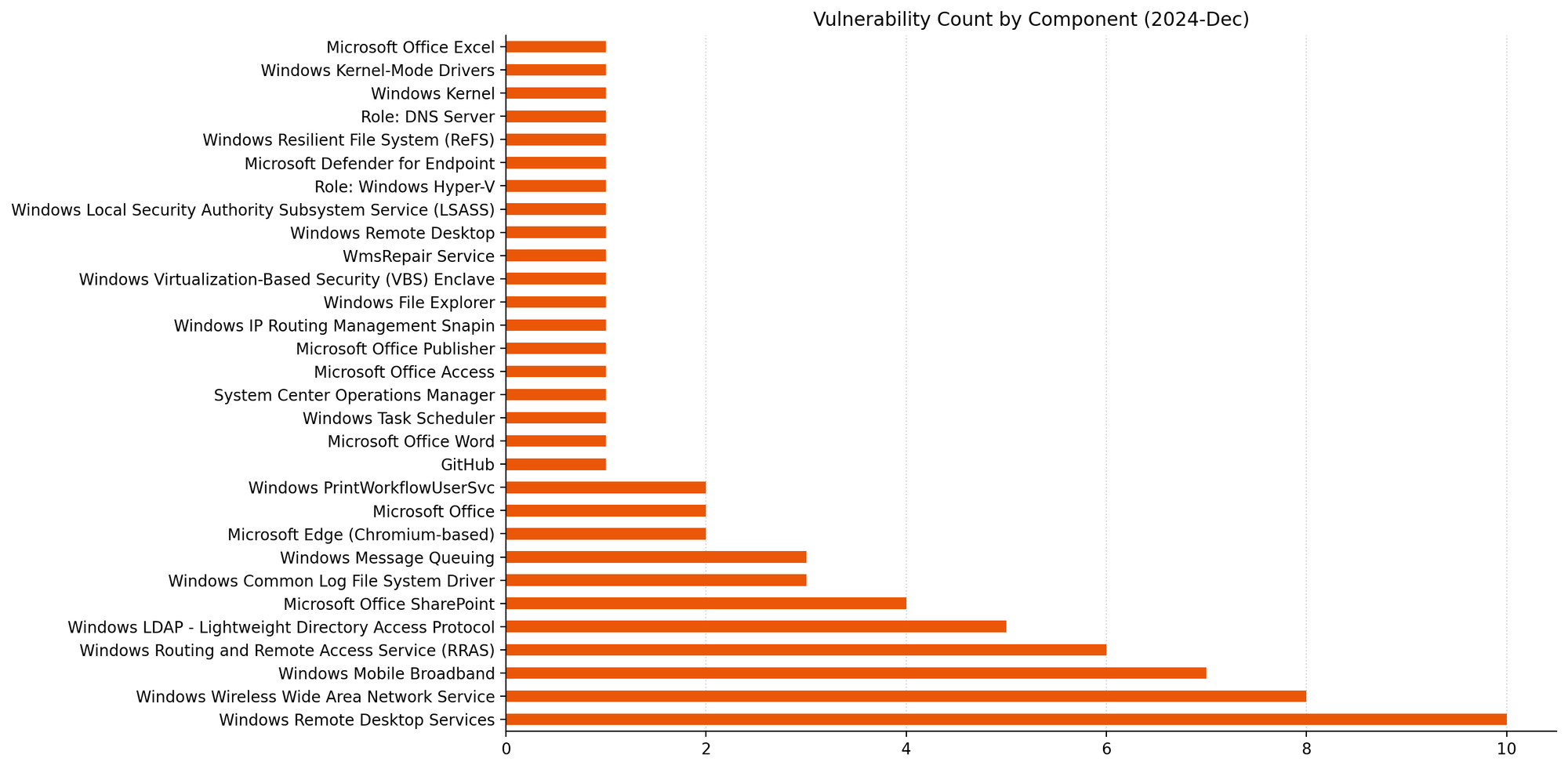
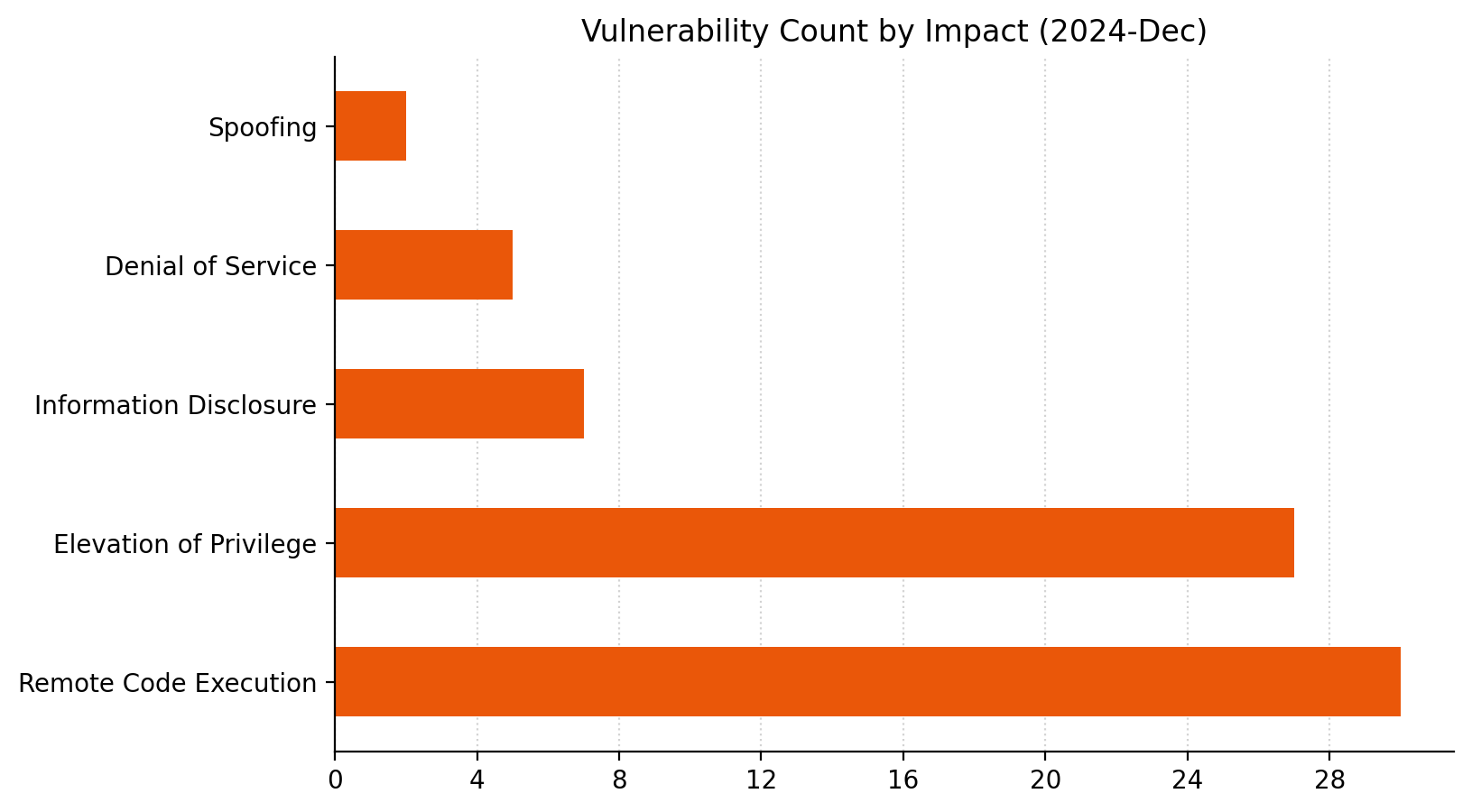
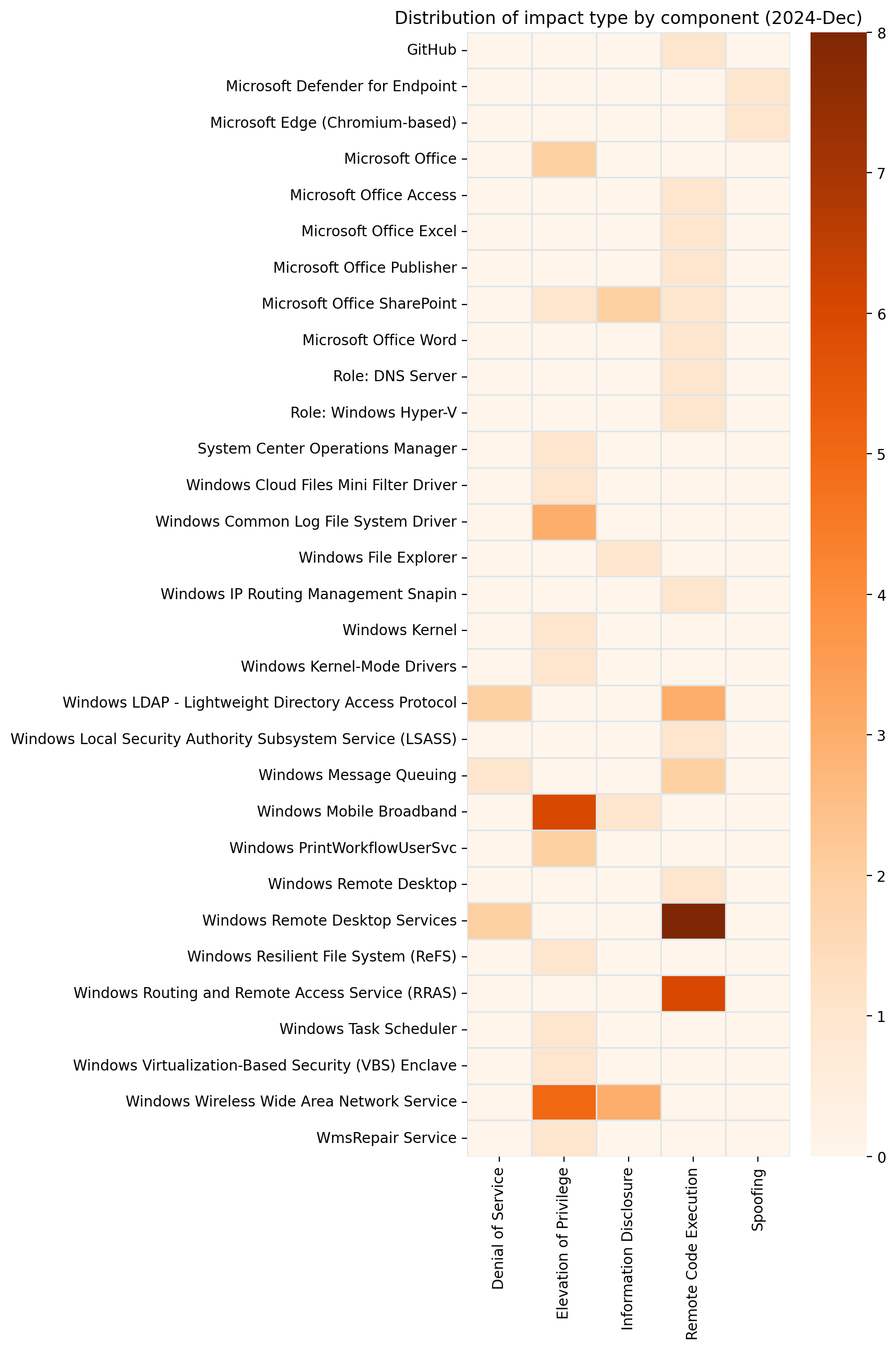
Microsoft is addressing 70 vulnerabilities this December 2024 Patch Tuesday. Microsoft has evidence of in-the-wild exploitation and public disclosure for one of the vulnerabilities published today, and this is reflected in a CISA KEV entry. For the third month in a row, Microsoft has published zero-day vulnerabilities on Patch Tuesday without evaluating any of them as critical severity at time of publication. Today sees the publication of 16 critical remote code execution (RCE) vulnerabilities, which is more than usual. Two browser vulnerabilities have already been published separately this month, and are not included in the total.

Common Log File System: zero-day EoP

This month’s zero-day vulnerability is CVE-2024-49138, an elevation of privilege vulnerability in the Windows Common Log File System (CLFS) driver, a general-purpose Windows logging service that can be used by software clients running in user-mode or kernel-mode. Exploitation leads to SYSTEM privileges, and if this all sounds familiar, it should.

There have been a series of zero-day elevation of privilege vulnerabilities in CLFS over the past few years. Past offenders are CVE-2022-24521, CVE-2023-23376, CVE-2022-37969, and CVE-2023-28252; today’s addition of CVE-2024-49138 is the first CLFS zero-day vulnerability which Microsoft has published in 2024. Although the advisory doesn’t provide much detail on the means of exploitation, the weakness is CWE-122: Heap-based Buffer Overflow, which most commonly leads to crashes/denial of service, but can also lead to code execution.

Ransomware authors who have abused previous CLFS vulnerabilities will be only too pleased to get their hands on a fresh one. Expect more CLFS zero-day vulnerabilities to emerge in the future, unless Microsoft decides to perform a full replacement of the aging CLFS codebase instead of offering spot fixes for specific flaws. Patches are available for all versions of Windows.

Groups of critical RCE

Patterns emerge when we consider the 16 critical RCE vulnerabilities published today as a whole, which might somewhat reduce the level of alarm that unusually large number might otherwise cause weary defenders.

LDAP: critical RCE

A trio of Windows LDAP critical RCE vulnerabilities receive patches this month, including CVE-2024-49112, which has a  CVSSv3 base score of 9.8, which is the highest of any of the vulnerabilities which Microsoft has published today. Exploitation is via a specially crafted set of LDAP calls, and leads to code execution within the context of the LDAP service; although the advisory doesn’t specify, the LDAP service runs in a SYSTEM context. Microsoft advises defenders who still permit domain controllers to receive inbound RPC calls from untrusted networks or to access the internet to stop doing that.

LSASS: critical RCE

Another potential cause for concern this month: CVE-2024-49126 is a critical RCE in the Local Security Authority Subsystem Service (LSASS). Exploitation could potentially be carried out remotely, and the attacker needs no privileges, nor does the user need to perform any action; the only silver lining is that an attacker must win a race condition. Although the advisory says that code execution would be in the context of the server’s account, it might be safest to assume that code execution would be in a SYSTEM context.

Hyper-V: container escape

CVE-2024-49117 describes a container escape for Hyper-V; exploitation requires that the attacker make specially crafted file operation requests on the virtual machine (VM) to hardware resources on the VM, which could result in remote code execution on the hypervisor. The FAQ on the advisory sets out that no special privileges are required in the context of the VM, so any level of access is enough to break free from the VM. We also learn that the container escape could be lateral, where an attacker moves from one VM to another, rather than to the hypervisor.

Remote Desktop Services: 8 critical RCEs

All eight critical RCE vulnerabilities in Remote Desktop Services published today (e.g. CVE-2024-49106) share a number of similarities: they have identical CVSS vectors, exploitation requires that an attacker win a race condition, and the same research group is credited in each case.

Microsoft lifecycle update

There are no significant Microsoft product lifecycle transitions this month.

Summary charts

Patch Tuesday - December 2024

Summary tables

Browser vulnerabilities

CVE Title Exploited? Publicly disclosed? CVSSv3 base score
CVE-2024-49041 Microsoft Edge (Chromium-based) Spoofing Vulnerability No No 4.3
CVE-2024-12053 Chromium: CVE-2024-12053 Type Confusion in V8 No No N/A

Developer Tools vulnerabilities

CVE Title Exploited? Publicly disclosed? CVSSv3 base score
CVE-2024-49063 Microsoft/Muzic Remote Code Execution Vulnerability No No 8.4

Microsoft Office vulnerabilities

CVE Title Exploited? Publicly disclosed? CVSSv3 base score
CVE-2024-49068 Microsoft SharePoint Elevation of Privilege Vulnerability No No 8.2
CVE-2024-43600 Microsoft Office Elevation of Privilege Vulnerability No No 7.8
CVE-2024-49069 Microsoft Excel Remote Code Execution Vulnerability No No 7.8
CVE-2024-49142 Microsoft Access Remote Code Execution Vulnerability No No 7.8
CVE-2024-49070 Microsoft SharePoint Remote Code Execution Vulnerability No No 7.4
CVE-2024-49059 Microsoft Office Elevation of Privilege Vulnerability No No 7
CVE-2024-49064 Microsoft SharePoint Information Disclosure Vulnerability No No 6.5
CVE-2024-49062 Microsoft SharePoint Information Disclosure Vulnerability No No 6.5
CVE-2024-49065 Microsoft Office Remote Code Execution Vulnerability No No 5.5

System Center vulnerabilities

CVE Title Exploited? Publicly disclosed? CVSSv3 base score
CVE-2024-49057 Microsoft Defender for Endpoint on Android Spoofing Vulnerability No No 8.1
CVE-2024-43594 System Center Operations Manager Elevation of Privilege Vulnerability No No 7.3

Windows vulnerabilities

CVE Title Exploited? Publicly disclosed? CVSSv3 base score
CVE-2024-49093 Windows Resilient File System (ReFS) Elevation of Privilege Vulnerability No No 8.8
CVE-2024-49117 Windows Hyper-V Remote Code Execution Vulnerability No No 8.8
CVE-2024-49106 Windows Remote Desktop Services Remote Code Execution Vulnerability No No 8.1
CVE-2024-49108 Windows Remote Desktop Services Remote Code Execution Vulnerability No No 8.1
CVE-2024-49115 Windows Remote Desktop Services Remote Code Execution Vulnerability No No 8.1
CVE-2024-49119 Windows Remote Desktop Services Remote Code Execution Vulnerability No No 8.1
CVE-2024-49123 Windows Remote Desktop Services Remote Code Execution Vulnerability No No 8.1
CVE-2024-49132 Windows Remote Desktop Services Remote Code Execution Vulnerability No No 8.1
CVE-2024-49116 Windows Remote Desktop Services Remote Code Execution Vulnerability No No 8.1
CVE-2024-49076 Windows Virtualization-Based Security (VBS) Enclave Elevation of Privilege Vulnerability No No 7.8
CVE-2024-49074 Windows Kernel-Mode Driver Elevation of Privilege Vulnerability No No 7.8
CVE-2024-49114 Windows Cloud Files Mini Filter Driver Elevation of Privilege Vulnerability No No 7.8
CVE-2024-49075 Windows Remote Desktop Services Denial of Service Vulnerability No No 7.5
CVE-2024-49107 WmsRepair Service Elevation of Privilege Vulnerability No No 7.3
CVE-2024-49097 Windows PrintWorkflowUserSvc Elevation of Privilege Vulnerability No No 7
CVE-2024-49095 Windows PrintWorkflowUserSvc Elevation of Privilege Vulnerability No No 7
CVE-2024-49073 Windows Mobile Broadband Driver Elevation of Privilege Vulnerability No No 6.8
CVE-2024-49092 Windows Mobile Broadband Driver Elevation of Privilege Vulnerability No No 6.8
CVE-2024-49077 Windows Mobile Broadband Driver Elevation of Privilege Vulnerability No No 6.8
CVE-2024-49078 Windows Mobile Broadband Driver Elevation of Privilege Vulnerability No No 6.8
CVE-2024-49083 Windows Mobile Broadband Driver Elevation of Privilege Vulnerability No No 6.8
CVE-2024-49110 Windows Mobile Broadband Driver Elevation of Privilege Vulnerability No No 6.8
CVE-2024-49094 Wireless Wide Area Network Service (WwanSvc) Elevation of Privilege Vulnerability No No 6.6
CVE-2024-49101 Wireless Wide Area Network Service (WwanSvc) Elevation of Privilege Vulnerability No No 6.6
CVE-2024-49111 Wireless Wide Area Network Service (WwanSvc) Elevation of Privilege Vulnerability No No 6.6
CVE-2024-49081 Wireless Wide Area Network Service (WwanSvc) Elevation of Privilege Vulnerability No No 6.6
CVE-2024-49109 Wireless Wide Area Network Service (WwanSvc) Elevation of Privilege Vulnerability No No 6.6
CVE-2024-49087 Windows Mobile Broadband Driver Information Disclosure Vulnerability No No 4.6
CVE-2024-49098 Windows Wireless Wide Area Network Service (WwanSvc) Information Disclosure Vulnerability No No 4.3
CVE-2024-49099 Windows Wireless Wide Area Network Service (WwanSvc) Information Disclosure Vulnerability No No 4.3
CVE-2024-49103 Windows Wireless Wide Area Network Service (WwanSvc) Information Disclosure Vulnerability No No 4.3

Windows ESU vulnerabilities

CVE Title Exploited? Publicly disclosed? CVSSv3 base score
CVE-2024-49112 Windows Lightweight Directory Access Protocol (LDAP) Remote Code Execution Vulnerability No No 9.8
CVE-2024-49085 Windows Routing and Remote Access Service (RRAS) Remote Code Execution Vulnerability No No 8.8
CVE-2024-49086 Windows Routing and Remote Access Service (RRAS) Remote Code Execution Vulnerability No No 8.8
CVE-2024-49102 Windows Routing and Remote Access Service (RRAS) Remote Code Execution Vulnerability No No 8.8
CVE-2024-49104 Windows Routing and Remote Access Service (RRAS) Remote Code Execution Vulnerability No No 8.8
CVE-2024-49125 Windows Routing and Remote Access Service (RRAS) Remote Code Execution Vulnerability No No 8.8
CVE-2024-49080 Windows IP Routing Management Snapin Remote Code Execution Vulnerability No No 8.8
CVE-2024-49120 Windows Remote Desktop Services Remote Code Execution Vulnerability No No 8.1
CVE-2024-49128 Windows Remote Desktop Services Remote Code Execution Vulnerability No No 8.1
CVE-2024-49126 Windows Local Security Authority Subsystem Service (LSASS) Remote Code Execution Vulnerability No No 8.1
CVE-2024-49127 Windows Lightweight Directory Access Protocol (LDAP) Remote Code Execution Vulnerability No No 8.1
CVE-2024-49122 Microsoft Message Queuing (MSMQ) Remote Code Execution Vulnerability No No 8.1
CVE-2024-49118 Microsoft Message Queuing (MSMQ) Remote Code Execution Vulnerability No No 8.1
CVE-2024-49124 Lightweight Directory Access Protocol (LDAP) Client Remote Code Execution Vulnerability No No 8.1
CVE-2024-49072 Windows Task Scheduler Elevation of Privilege Vulnerability No No 7.8
CVE-2024-49138 Windows Common Log File System Driver Elevation of Privilege Vulnerability Yes Yes 7.8
CVE-2024-49088 Windows Common Log File System Driver Elevation of Privilege Vulnerability No No 7.8
CVE-2024-49090 Windows Common Log File System Driver Elevation of Privilege Vulnerability No No 7.8
CVE-2024-49079 Input Method Editor (IME) Remote Code Execution Vulnerability No No 7.8
CVE-2024-49129 Windows Remote Desktop Gateway (RD Gateway) Denial of Service Vulnerability No No 7.5
CVE-2024-49121 Windows Lightweight Directory Access Protocol (LDAP) Denial of Service Vulnerability No No 7.5
CVE-2024-49113 Windows Lightweight Directory Access Protocol (LDAP) Denial of Service Vulnerability No No 7.5
CVE-2024-49096 Microsoft Message Queuing (MSMQ) Denial of Service Vulnerability No No 7.5
CVE-2024-49089 Windows Routing and Remote Access Service (RRAS) Remote Code Execution Vulnerability No No 7.2
CVE-2024-49091 Windows Domain Name Service Remote Code Execution Vulnerability No No 7.2
CVE-2024-49084 Windows Kernel Elevation of Privilege Vulnerability No No 7
CVE-2024-49082 Windows File Explorer Information Disclosure Vulnerability No No 6.8

Simplify Multi-Region Email Sending with Simple Email Service’s Deterministic Easy DKIM

Post Syndicated from Zip Zieper original https://aws.amazon.com/blogs/messaging-and-targeting/simplify-multi-region-email-sending-with-simple-email-services-deterministic-easy-dkim/

Introduction

Amazon Simple Email Service (SES) provides customers with a robust, scalable email solution to send large-scale, global email communications. The service offers customers many benefits, including scalability, high deliverability rates, cost effective pay-as-you go pricing, availability in over a dozen AWS regions, and tight integration with other AWS services.

We’ve heard from customers who want to synchronise domain identities across multiple AWS regions that it can be difficult to configure and maintain. These customers have shared that establishing and maintaining AWS region specific domain verifications can be confusing, time-consuming, and that it’s difficult to coordinate the many details across their users, customers and service providers.

In this post, we’ll explore the newly introduced SES feature called Deterministic Easy DKIM (aka “DEED”), which solves critical challenges in multi-region email identity management for SES customers. DEED generates consistent DKIM tokens across multiple AWS Regions based on a Parent (domain) Identity that is configured with SES Easy DKIM. DEED uses the Parent Identity’s Easy DKIM configuration to automatically provide the same DKIM signing configuration for a Replica (domain) Identity in a AWS Replica Region. With DEED, you only need to publish DNS records once for the Parent Identity. The Replica Identity will automatically use these same DNS records to verify domain ownership and manage DKIM signing. DEED streamlines multi-region email operations by simplifying DNS management and ensuring consistent DKIM signing across AWS regions, maintaining best-practice email authentication while reducing operational complexity.

Background and key challenges

SES introduced Easy DKIM over a decade ago as an innovative, streamlined solution to help customers create, verify, and manage domain identities with automated DKIM signing. Easy DKIM is simple to set-up, and works by generating pre-determined tokens that customers add to their DNS configurations. Once Easy DKIM is enabled, SES generates a public/private signing key for each domain identity and updates the verified identity’s CNAME public key. SES’ Easy DKIM simplifies email authentication by managing and rotating DKIM keys on behalf of customers.

Before DEED, customers who wanted to expand their SES email infrastructure across multiple regions faced complexity, operational challenges and a substantial administrative burden configuring and maintaining DKIM across AWS regions. This made it very difficult for customers to scale their email infrastructure efficiently, and often dissuaded customers from fully leveraging the potential of a multi-region email sending strategy. These challenges are more pronounced for Independent Software Vendors (ISVs) and email service providers using SES. Frequently these organizations don’t own or control the domains used by their end-customers, who must manually update their DNS entries each time the ISV expanded or shifted their SES sending infrastructure between AWS regions.

Solution Overview

Deterministic Easy DKIM (DEED) allows SES customers to set up email identities across multiple regions, leveraging an existing domain identity configuration in a single region without the need to make companion DNS changes in all other regions. This innovative approach eliminates the manual overhead of creating region-specific DNS entries, and provides a streamlined solution to configure and maintain global email infrastructure for organizations and ISVs alike.

The key benefits of using DEED include:

  • Simplified DNS Management – Publish DNS records once for the Parent Identity and the replica identity is automatically synced.
  • Easier Multi-Region Operations – Simplifies the process of expanding email sending operations to new AWS regions.
    Reduced Administrative Overhead – Manage DKIM configurations centrally from the Parent Identity.

Terminology:

To understand DEED, let’s explore the key terminology that underpins this innovative approach:

  • Deterministic – a process or system where the same input will always produce the same output, with no randomness or unpredictability involved. In other words, if all the starting conditions are known, the outcome can be precisely predicted or determined.
  • Parent Region – The original AWS Region where the primary email identity is initially established.
  • Parent Identity – A verified email identity configured with Easy DKIM that serves as the authoritative source for DKIM configuration across regions.
  • Replica Region – An AWS Region where an identical email identity is replicated without additional configuration.
  • Replica Identity – An identity that shares identical DNS configuration and DKIM signing configuration of a parent identity.
  • DEED Identity – Any identity that is used as either a parent identity or a replica identity. (When a new identity is created, it is initially treated as a regular (non-DEED) identity. However, once a replica is created, the identity is then considered a DEED identity.)

How DEED works

DEED flow

DEED is built on the existing Easy DKIM framework:

  1. Using Easy DKIM, SES generates a public-private key pair and automatically adds a DKIM signature to every message sent from a SES verified identity in the Parent Region.
  2. To accommodate authenticated SES sending from multiple AWS regions, DEED automatically synchronizes the signing keys from the Parent Region and Parent Identity to the Replica Region and Replica Identity.
  3. This automated process ensures that both the Parent and Replica Identities receive and use identical keys for DKIM signing, maintaining consistent authentication across different AWS regions.
  4. SES manages the complex process of key rotation across Parent Identity and Replica Identities, further simplifying email infrastructure management across multiple AWS regions.
  5. Replica Identities inherit the DKIM signing configuration of the parent identity. Because of this dependency, you cannot delete a Parent Identity until all Replica Identities are deleted.
  6. The receiving email server/service validates DKIM from DNS.

We recommend customers take advantage of DEED for single-Region sending, as this new capability is included, at no additional cost, in the base SES pricing.

Steps to setup SES DEED Replica in a second AWS region

These steps assume that you are already using SES in the Parent Region, and have a fully verified domain identity that is configured to use Easy DKIM. You can also use the AWS CLI.

Step 1 – Update the Parent Identity

  1. Login to the AWS SES Console in the Parent Region
  2. Click on the Identities link in the SES navigation panel (far left) and click on the verified identity you want to use in other AWS regions.
    1. The Parent Identity must have Easy DKIM enabled.
    2. You cannot create Replicas of Identities that use BYODKIM or self-signed identities.
  3. Click on the Authorization tab
  4. Click Create Policy and select Create custom policy from the drop-down menu.
  5. Name the policy (for example, DEED-example_com)
  6. Modify the IAM policy (below) with your AWS account ID and AWS region, and paste it into the IAM Policy document to grant permission on the Parent Identity to allow the desired Replica Region to replicate the Parent Identity’s DKIM Signing Attributes:
{
"Version": "2012-10-17",
"Statement": [
{
"Sid": "AllowDKIMReplication",
"Effect": "Allow",
"Principal": {
"AWS": "arn:aws:iam::YOUR_ACCOUNT_ID:root"
},
"Action": "ses:ReplicateEmailIdentityDKIMSigningKey",
"Resource": "arn:aws:ses:us-east-1:123456789124:identity/example.com",
"Condition": {
"ForAllValues:StringEquals": {
"ses:ReplicaRegion": ["us-west-2", "eu-west-1"]
}
}
}
]
}

Note – Use consistent IAM policies that all allow for DKIM replication across intended Replica Regions.

Step -2 – Setup DEED Replica Identity

  1. Login to the AWS SES Console in the Replica Region
  2. Click on the Identities link in the SES navigation panel (far left) and click Create identity
  3. Under Identity details, Identity type, click Domain
  4. Type the domain name exactly as it appears in the Parent Identity
  5. Under Verifying your domain, click Deterministic Easy DKIM
  6. Select the Parent Region in the Parent region drop-down
  7. Ensure DKIM Signature is Enabled
  8. Click Create identity

create DEED ID

  1. The Replica Identity in the Replica Region will now automatically synchronize DKIM with the Parent Identity in the Parent Region and your apps/services can be configured to use either Parent or Replica Region & Identity to send DKIM authenticated email.
  2. Repeat the process if you want to create additional Replica Regions.

You can verify that the replica identity was configured correctly with the parent identity’s DKIM signing configuration by using the get-email-identity command and specifying the Replica’s domain name and region:

`aws sesv2 get-email-identity --email-identity [example.com](http://example.com/) —region us-west-2`

The response will include the value of the Parent Region in the DomainSigningAttributesOrigin parameter, signifying that the Replica Identity has been successfully configured with the Parent Identity’s DKIM signing configuration:

{
  "DkimAttributes": {
    "SigningAttributesOrigin": "AWS_SES_US_EAST_1"
  }
}

Conclusion

Deterministic Easy DKIM (DEED) represents a significant leap forward in multi-region email management for Amazon SES users. By eliminating the need for manually configured region-specific DNS configurations, DEED streamlines the process of expanding email operations across multiple AWS regions. This innovation not only reduces administrative overhead but also opens up new possibilities for organizations and ISVs to implement robust, globally distributed email infrastructures. With DEED, businesses can now leverage the full potential of Amazon SES across regions, ensuring consistent authentication, improved disaster recovery, and optimal performance without the previous complexities of multi-region setup.

Call to Action

Are you ready to simplify your multi-region email strategy with Amazon SES and DEED? Take the next step in optimizing your email infrastructure:

  1. Explore the DEED feature in your Amazon SES console today.
  2. Set up a test environment to experience the seamless multi-region configuration firsthand.
  3. For more detailed information, check out our comprehensive documentation on implementing DEED.
  4. Have questions or need assistance? Reach out to our AWS support team or join the AWS community forums to connect with other users.

Don’t let regional boundaries limit your email capabilities. Embrace the power of Deterministic Easy DKIM and transform your global email strategy with Amazon SES. Start your DEED journey today and unlock new levels of efficiency and scalability in your email operations.

Run Apache Spark Structured Streaming jobs at scale on Amazon EMR Serverless

Post Syndicated from Anubhav Awasthi original https://aws.amazon.com/blogs/big-data/run-apache-spark-structured-streaming-jobs-at-scale-on-amazon-emr-serverless/

As data is generated at an unprecedented rate, streaming solutions have become essential for businesses seeking to harness near real-time insights. Streaming data—from social media feeds, IoT devices, e-commerce transactions, and more—requires robust platforms that can process and analyze data as it arrives, enabling immediate decision-making and actions.

This is where Apache Spark Structured Streaming comes into play. It offers a high-level API that simplifies the complexities of streaming data, allowing developers to write streaming jobs as if they were batch jobs, but with the power to process data in near real time. Spark Structured Streaming integrates seamlessly with various data sources, such as Amazon Managed Streaming for Apache Kafka (Amazon MSK) and Amazon Kinesis Data Streams, providing a unified solution that supports complex operations like windowed computations, event-time aggregation, and stateful processing. By using Spark’s fast, in-memory processing capabilities, businesses can run streaming workloads efficiently, scaling up or down as needed, to derive timely insights that drive strategic and critical decisions.

The setup of a computing infrastructure to support such streaming workloads poses its challenges. Here, Amazon EMR Serverless emerges as a pivotal solution for running streaming workloads, enabling the use of the latest open source frameworks like Spark without the need for configuration, optimization, security, or cluster management.

Starting with Amazon EMR 7.1, we introduced a new job --mode on EMR Serverless called Streaming. You can submit a streaming job from the EMR Studio console or the StartJobRun API:

aws emr-serverless start-job-run \
 --application-id APPPLICATION_ID \
 --execution-role-arn JOB_EXECUTION_ROLE \
 --mode 'STREAMING' \
 --job-driver '{
     "sparkSubmit": {
         "entryPoint": "s3://streaming script",
         "entryPointArguments": ["s3://DOC-EXAMPLE-BUCKET-OUTPUT/output"],
         "sparkSubmitParameters": "--conf spark.executor.cores=4
            --conf spark.executor.memory=16g
            --conf spark.driver.cores=4
            --conf spark.driver.memory=16g
            --conf spark.executor.instances=3"
     }
 }'

In this post, we highlight some of the key enhancements introduced for streaming jobs.

Performance

The Amazon EMR runtime for Apache Spark delivers a high-performance runtime environment while maintaining 100% API compatibility with open source Spark. Additionally, we have introduced the following enhancements to provide improved support for streaming jobs.

Amazon Kinesis connector with Enhanced Fan-Out Support

Traditional Spark streaming applications reading from Kinesis Data Streams often face throughput limitations due to shared shard-level read capacity, where multiple consumers compete for the default 2 MBps per shard throughput. This bottleneck becomes particularly challenging in scenarios requiring real-time processing across multiple consuming applications.

To address this challenge, we released the open source Amazon Kinesis Data Streams Connector for Spark Structured Streaming that supports enhanced fan-out for dedicated read throughput. Compatible with both provisioned and on-demand Kinesis Data Streams, enhanced fan-out provides each consumer with dedicated throughput of 2 MBps per shard. This enables streaming jobs to process data concurrently without the constraints of shared throughput, significantly reducing latency and facilitating near real-time processing of large data streams. By eliminating competition between consumers and enhancing parallelism, enhanced fan-out provides faster, more efficient data processing, which boosts the overall performance of streaming jobs on EMR Serverless. Starting with Amazon EMR 7.1, the connector comes pre-packaged on EMR Serverless, so you don’t need to build or download any packages.

The following diagram illustrates the architecture using shared throughput.

The following diagram illustrates the architecture using enhanced fan-out and dedicated throughput.

Refer to Build Spark Structured Streaming applications with the open source connector for Amazon Kinesis Data Streams for additional details on this connector.

Cost optimization

EMR Serverless charges are based on the total vCPU, memory, and storage resources utilized during the time workers are active, from when they are ready to execute tasks until they stop. To optimize costs, it is crucial to scale streaming jobs effectively. We have introduced the following enhancements to improve scaling at both the task level and across multiple tasks.

Fine-Grained Scaling

In practical scenarios, data volumes can be unpredictable and exhibit sudden spikes, necessitating a platform capable of dynamically adjusting to workload changes. EMR Serverless eliminates the risks of over- or under-provisioning resources for your streaming workloads. EMR Serverless scaling uses Spark dynamic allocation to correctly scale the executors according to demand. The scalability of a streaming job is also influenced by its data source to make sure Kinesis shards or Kafka partitions are also scaled accordingly. Each Kinesis shard and Kafka partition corresponds to a single Spark executor core. To achieve optimal throughput, use a one-to-one ratio of Spark executor cores to Kinesis shards or Kafka partitions.

Streaming operates through a sequence of micro-batch processes. In cases of short-running tasks, overly aggressive scaling can lead to resource wastage due to the overhead of allocating executors. To mitigate this, consider modifying spark.dynamicAllocation.executorAllocationRatio. The scaling down process is shuffle aware, avoiding executors holding shuffle data. Although this shuffle data is usually subject to garbage collection, if it’s not being cleared fast enough, the spark.dynamicAllocation.shuffleTracking.timeout setting can be adjusted to determine when executors should be timed out and removed.

Let’s examine fine-grained scaling with an example of a spiky workload where data is periodically ingested, followed by idle intervals. The following graph illustrates an EMR Serverless streaming job processing data from an on-demand Kinesis data stream. Initially, the job handles 100 records per second. As tasks queue, dynamic allocation adds capacity, which is quickly released due to short task durations (adjustable using executorAllocationRatio). When we increase input data to 10,000 records per second, Kinesis adds shards, triggering EMR Serverless to provision more executors. Scaling down happens as executors complete processing and are released after the idle timeout (spark.dynamicAllocation.executorIdleTimeout, default 60 seconds), leaving only the Spark driver running during the idle window. (Full scale-down is source dependent. For example, a provisioned Kinesis data stream with a fixed number of shards may have limitations in fully scaling down even when shards are idle.) This pattern repeats as bursts of 10,000 records per second alternate with idle periods, allowing EMR Serverless to scale resources dynamically. This job uses the following configuration:

--conf spark.dynamicAllocation.shuffleTracking.timeout=300s
--conf spark.dynamicAllocation.executorAllocationRatio=0.7

Resiliency

EMR Serverless ensures resiliency in streaming jobs by leveraging automatic recovery and fault-tolerant architectures

Built-in Availability Zone resiliency

Streaming applications drive critical business operations like fraud detection, real-time analytics, and monitoring systems, making any downtime particularly costly. Infrastructure failures at the Availability Zone level can cause significant disruptions to distributed streaming applications, potentially leading to extended downtime and data processing delays.

Amazon EMR Serverless now addresses this challenge with built-in Availability Zone failover capabilities: jobs are initially provisioned in a randomly selected Availability Zone, and, in the event of an Availability Zone failure, the service automatically retries the job in a healthy Availability Zone, minimizing interruptions to processing. Although this feature greatly enhances application reliability, achieving full resiliency requires input data sources that also support Availability Zone failover. Additionally, if you’re using a custom virtual private cloud (VPC) configuration, it is recommended to configure EMR Serverless to operate across multiple Availability Zones to optimize fault tolerance.

The following diagram illustrates a sample architecture.

Auto retry

Streaming applications are susceptible to various runtime failures caused by transient issues such as network connectivity problems, memory pressure, or resource constraints. Without proper retry mechanisms, these temporary failures can lead to permanently stopping jobs, requiring manual intervention to restart the jobs. This not only increases operational overhead but also risks data loss and processing gaps, especially in continuous data processing scenarios where maintaining data consistency is crucial.

EMR Serverless streamlines this process by automatically retrying failed jobs. Streaming jobs use checkpointing to periodically save the computation state to Amazon Simple Storage Service (Amazon S3), allowing failed jobs to restart from the last checkpoint, minimizing data loss and reprocessing time. Although there is no cap on the total number of retries, a thrash prevention mechanism allows you to configure the number of retry attempts per hour, ranging from 1–10, with the default being set to five attempts per hour.

See the following example code:

aws emr-serverless start-job-run \
 --application-id <APPPLICATION_ID>  \
 --execution-role-arn <JOB_EXECUTION_ROLE> \
 --mode 'STREAMING' \
 --retry-policy '{
    "maxFailedAttemptsPerHour": 5
 }'
 --job-driver '{
    "sparkSubmit": {
         "entryPoint": "/usr/lib/spark/examples/jars/spark-examples-does-not-exist.jar",
         "entryPointArguments": ["1"],
         "sparkSubmitParameters": "--class org.apache.spark.examples.SparkPi"
    }
 }'

Observability

EMR Serverless provides robust log management and enhanced monitoring, enabling users to efficiently troubleshoot issues and optimize the performance of streaming jobs.

Event log rotation and compression

Spark streaming applications continuously process data and generate substantial amounts of event log data. The accumulation of these logs can consume significant disk space, potentially leading to degraded performance or even system failures due to disk space exhaustion.

Log rotation mitigates these risks by periodically archiving old logs and creating new ones, thereby maintaining a manageable size of active log files. Event log rotation is enabled by default for both batch as well as streaming jobs and can’t be disabled. Rotating logs doesn’t affect the logs uploaded to the S3 bucket. However, they will be compressed using zstd standard. You can find rotated event logs under the following S3 folder:

<S3-logUri>/applications/<application-id>/jobs/<job-id>/sparklogs/

The following table summarizes key configurations that govern event log rotation.

Configuration Value Comment
spark.eventLog.rotation.enabled TRUE
spark.eventLog.rotation.interval 300 seconds Specifies time interval for the log rotation
spark.eventLog.rotation.maxFilesToRetain 2 Specifies how many rotated log files to keep during cleanup
spark.eventLog.rotation.minFileSize 1 MB Specifies a minimum file size to rotate the log file

Application log rotation and compression

One of the most common errors in Spark streaming applications is the no space left on disk errors, primarily caused by the rapid accumulation of application logs during continuous data processing. These Spark streaming application logs from drivers and executors can grow exponentially, quickly consuming available disk space.

To address this, EMR Serverless has introduced rotation and compression for driver and executor stderr and stdout logs. Log files are refreshed every 15 seconds and can range from 0–128 MB. You can find the latest log files at the following Amazon S3 locations:

<S3-logUri>/applications/<application-id>/jobs/<job-id>/SPARK_DRIVER/stderr.gz
<S3-logUri>/applications/<application-id>/jobs/<job-id>/SPARK_DRIVER/stdout.gz
<S3-logUri>/applications/<application-id>/jobs/<job-id>/SPARK_EXECUTOR/stderr.gz
<S3-logUri>/applications/<application-id>/jobs/<job-id>/SPARK_EXECUTOR/stdout.gz

Rotated application logs are pushed to archive available under the following Amazon S3 locations:

<S3-logUri>/applications/<application-id>/jobs/<job-id>/SPARK_DRIVER/archived/
<S3-logUri>/applications/<application-id>/jobs/<job-id>/SPARK_EXECUTOR/<executor-id>/archived/

Enhanced monitoring

Spark provides comprehensive performance metrics for drivers and executors, including JVM heap memory, garbage collection, and shuffle data, which are valuable for troubleshooting performance and analyzing workloads. Starting with Amazon EMR 7.1, EMR Serverless integrates with Amazon Managed Service for Prometheus, enabling you to monitor, analyze, and optimize your jobs using detailed engine metrics, such as Spark event timelines, stages, tasks, and executors. This integration is available when submitting jobs or creating applications. For setup details, refer to Monitor Spark metrics with Amazon Managed Service for Prometheus. To enable metrics for Structured Streaming queries, set the Spark property --conf spark.sql.streaming.metricsEnabled=true

You can also monitor and debug jobs using the Spark UI. The web UI presents a visual interface with detailed information about your running and completed jobs. You can dive into job-specific metrics and information about event timelines, stages, tasks, and executors for each job.

Service integrations

Organizations often struggle with integrating multiple streaming data sources into their data processing pipelines. Managing different connectors, dealing with varying protocols, and providing compatibility across diverse streaming platforms can be complex and time-consuming.

EMR Serverless supports Kinesis Data Streams, Amazon MSK, and self-managed Apache Kafka clusters as input data sources to read and process data in near real time.

Whereas the Kinesis Data Streams connector is natively available on Amazon EMR, the Kafka connector is an open source connector from the Spark community and is available in a Maven repository.

The following diagram illustrates a sample architecture for each connector.

Refer to Supported streaming connectors to learn more about using these connectors.

Additionally, you can refer to the aws-samples GitHub repo to set up a streaming job reading data from a Kinesis data stream. It uses the Amazon Kinesis Data Generator to generate test data.

Conclusion

Running Spark Structured Streaming on EMR Serverless offers a robust and scalable solution for real-time data processing. By taking advantage of the seamless integration with AWS services like Kinesis Data Streams, you can efficiently handle streaming data with ease. The platform’s advanced monitoring tools and automated resiliency features provide high availability and reliability, minimizing downtime and data loss. Furthermore, the performance optimizations and cost-effective serverless model make it an ideal choice for organizations looking to harness the power of near real-time analytics without the complexities of managing infrastructure.

Try out using Spark Structured Streaming on EMR Serverless for your own use case, and share your questions in the comments.


About the Authors

AAAnubhav Awasthi is a Sr. Big Data Specialist Solutions Architect at AWS. He works with customers to provide architectural guidance for running analytics solutions on Amazon EMR, Amazon Athena, AWS Glue, and AWS Lake Formation.

Kshitija Dound is an Associate Specialist Solutions Architect at AWS based in New York City, focusing on data and AI. She collaborates with customers to transform their ideas into cloud solutions, using AWS big data and AI services. In her spare time, Kshitija enjoys exploring museums, indulging in art, and embracing NYC’s outdoor scene.

Paul Min is a Solutions Architect at AWS, where he works with customers to advance their mission and accelerate their cloud adoption. He is passionate about helping customers reimagine what’s possible with AWS. Outside of work, Paul enjoys spending time with his wife and golfing.

Introducing an enhanced version of the AWS Secrets Manager transform: AWS::SecretsManager-2024-09-16

Post Syndicated from Sanjay Varma Datla original https://aws.amazon.com/blogs/security/introducing-an-enhanced-version-of-the-aws-secrets-manager-transform-awssecretsmanager-2024-09-16/

We’re pleased to announce an enhanced version of the AWS Secrets Manager transform: AWS::SecretsManager-2024-09-16. This update is designed to simplify infrastructure management by reducing the need for manual security updates, bug fixes, and runtime upgrades.

AWS Secrets Manager helps you manage, retrieve, and rotate database credentials, API keys, and other secrets throughout their lifecycles. Some AWS services offer managed rotation of secrets, but for other secrets, you perform rotation by using an AWS Lambda function that updates your secret and the database or service.

Transforms are macros hosted by AWS CloudFormation that enable you to create or manage complex infrastructure setups. For general information on transforms, see the AWS CloudFormation documentation.

The AWS::SecretsManager transforms are used in conjunction with the AWS::SecretsManager::RotationSchedule resource type and HostedRotationLambda property to automatically extend your CloudFormation template to include a nested stack that creates the appropriate rotation Lambda function for your database or service. The transforms provide a convenient way to deploy an AWS vended rotation Lambda function into your own account as part of your CloudFormation templates, without having to rely on creating rotation Lambda functions through the AWS Serverless Application Repository or the AWS Management Console.

In this post, we’ll explore the new features of the transform, compare them to the previous version, and guide you through updating an existing Lambda function that was created using the old transform version to use the new transform version.

New features in AWS::SecretsManager-2024-09-16

The new transform version introduces several enhancements over the previous version (AWS::SecretsManager-2020-07-23):

  • Automatic Lambda upgrades: Your rotation Lambda functions’ runtime configuration and internal dependencies now update automatically when you update your CloudFormation stacks. This helps you verify that you’re using the most secure and stable versions of Secrets Manager vended rotation Lambda function code and runtimes. Currently, AWS Lambda supports Python runtimes 3.9 and above. With Python 3.8 being deprecated, this feature allows for a seamless transition to newer supported runtimes. For more information on runtime deprecations, see the AWS Lambda runtimes documentation and the Python version guide.
  • Additional resource attributes: The new transform now supports additional resource attributes for the AWS::SecretsManager::RotationSchedule resource type when used with the HostedRotationLambda property. The following attributes are applied to the nested stack (of type AWS::CloudFormation::Stack) that creates the rotation Lambda function:
    • CreationPolicy
    • DependsOn
    • Metadata
    • UpdatePolicy
    • Condition

For more information on these resource attributes, see the AWS CloudFormation resource attribute reference.

Resource attributes comparison

The following table shows which resource attributes are supported by the two versions of the Secrets Manager transform.

Attribute AWS::SecretsManager-2020-07-23 AWS::SecretsManager-2024-09-16
DeletionPolicy Supported Supported
UpdateReplacePolicy Supported Supported
CreationPolicy Not Supported Supported
DependsOn Not Supported Supported
Metadata Not Supported Supported
UpdatePolicy Not Supported Supported
Condition Not Supported Supported

Important considerations

Before you use the AWS::SecretsManager-2024-09-16 transform, it’s essential to be aware of the following considerations so that you can make sure your CloudFormation stacks are properly created or updated:

  • Non-backward compatibility: The new transform version isn’t backward compatible with the previous version. If you downgrade from AWS::SecretsManager-2024-09-16 to AWS::SecretsManager-2020-07-23, the additional resource attributes won’t be supported, which might change the behavior of existing stacks.
  • Rollback behavior during upgrade: When you upgrade to the AWS::SecretsManager-2024-09-16 transform from the previous version and a stack rollback occurs for any reason, the rotation Lambda function might not revert to its previous state. This is because the older transform’s nested stack might not use the same Lambda deployment package that was used before the upgrade.
  • Direct Lambda changes: If you make direct changes to the Lambda function created by the new transform outside of a CloudFormation stack update, those modifications might be overwritten during subsequent CloudFormation stack updates or rollbacks.
  • Lambda runtime management: When you use the new transform version, the rotation Lambda function’s runtime aligns with the compiled binaries that are vended in Secrets Manager rotation Lambda templates, without you needing to specify a Runtime value in the HostedRotationLambda property. If you specify a Runtime value, make sure it’s the same version that is supported by Secrets Manager vended rotation Lambda templates. Otherwise, the Lambda runtime will be incompatible with the binaries that are published in the rotation Lambda function. For more information on the supported runtime, see the rotation function templates documentation.
  • End of support plans: AWS Secrets Manager will end support for the previous transform version (AWS::SecretsManager-2020-07-23) in the future. We recommend that you migrate your stacks to the new transform to benefit from improvements and security enhancements going forward.

How to upgrade

To upgrade to the new transform version, follow these steps:

  1. Review your existing CloudFormation stacks that use the AWS::SecretsManager-2020-07-23 transform.
  2. Update your CloudFormation stack templates to use AWS::SecretsManager-2024-09-16 in the Transform key at the top of your template: Transform: AWS::SecretsManager-2024-09-16
  3. If you have previously defined a Runtime value in the HostedRotationLambda property, remove it from your template so that your rotation Lambda function’s runtime is updated properly in future stack updates.
  4. Incorporate the new resource attributes as needed. We recommend that you minimize all other template changes while upgrading to reduce the likelihood of rollbacks.
  5. Deploy the changes by updating your CloudFormation stack with the revised template.

By following these steps, your Secrets Manager vended rotation Lambda functions will benefit from the latest improvements and security enhancements. Remember to test the changes in a non-production environment before you apply them to your production stacks. If you encounter any issues during the upgrade process, refer to our documentation or contact AWS Support for assistance.

 
If you have feedback about this post, submit comments in the Comments section below. If you have questions about this post, contact AWS Support.
 

Sanjay Varma Datla
Sanjay Varma Datla

Sanjay is a Software Development Engineer at AWS Secrets Manager. With a strong background in software engineering and a passion for secure application design, he focuses on empowering developers to manage sensitive information safely. Outside of work, Sanjay enjoys hiking and exploring new cuisines.
Rob Stevens
Rob Stevens

Rob is a System Development Engineer for AWS Secrets Manager and is committed to building secure and scalable distributed systems for AWS and its customers. Outside of work, Rob is a fitness enthusiast and also enjoys traveling.