Retail purchases can supplement clinical surveillance because changes in demand for some over-the-counter (OTC) products may appear before confirmed case reports. This article describes an early-stage concept for analysing aggregated GrabMart transaction data to identify unusual changes in product demand. The concept is not a deployed system, and it would require validation by public health experts, privacy review, and regulatory approval before any implementation.
Introduction
Public health agencies use sources such as clinical case reports, laboratory results, and hospital records to monitor disease activity. Retail data may offer an additional signal when demand changes across groups of symptom-related products. It cannot establish a diagnosis or replace clinical evidence.
When using indirect signals, we should assess whether they remain relevant to the outcome we want to measure. This includes considering how changes in user behaviour could affect their interpretation. A retail-based signal can experience similar drift, selection bias, and false alarms. Any useful design must therefore combine statistical validation with careful privacy and governance controls.
Background
Syndromic surveillance tracks patterns that may indicate emerging illness before diagnoses are confirmed. Retail surveillance applies this idea to changes in demand for products associated with symptoms, such as fever remedies or cough medicines.
The proposed method groups eligible products into broad symptom classes and measures changes in aggregate demand over time. An anomaly score can indicate that observed demand differs from an expected seasonal pattern. The score is a statistical signal, not an estimate of how many people have a disease.
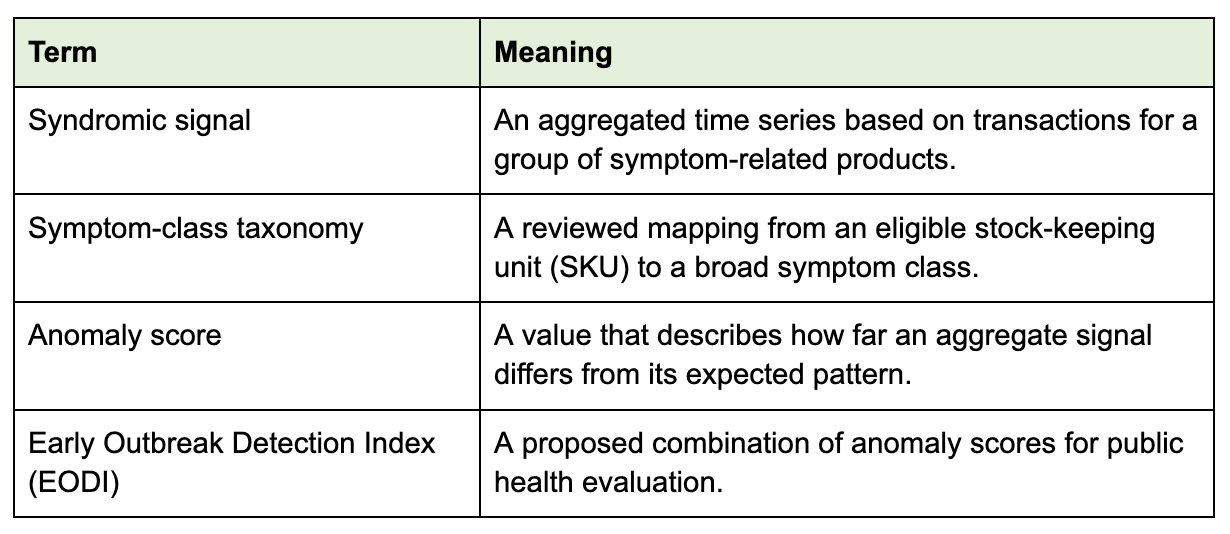
The design uses the following terms:
Proposed solution
The proposed pipeline would process only transactions that meet documented eligibility rules. It would map eligible SKUs to symptom classes, aggregate counts across approved time periods and geographic areas, and compare each series with an appropriate baseline. Public health experts would review the resulting Early Outbreak Detection Index alongside independent evidence.
The method deliberately excludes identity linkage and individual-level health inference. It also avoids using a single purchase to classify a customer, target an advertisement, adjust an insurance decision, or change access to a product.
Conceptual data flow
Eligible transactions
        |
        v
Reviewed SKU-to-symptom mapping
        |
        v
Aggregate by approved time period and geographic area
        |
        v
Compare with seasonal and historical baselines
        |
        v
Privacy and quality checks
        |
        v
Aggregate signal for authorised public health evaluation
Analysis and validation
Several statistical methods could model expected demand, including seasonal time-series models and spatial scan statistics. Model selection should follow retrospective evaluation against approved public health data. Evaluation should measure sensitivity, false-alert rate, calibration, geographic stability, and performance during seasonal changes.
The system would also need ongoing monitoring. Product catalogues change, purchasing behaviour shifts, promotions affect demand, and access to GrabMart varies across populations and locations. These factors can produce anomalies unrelated to disease activity.
Privacy and governance
Privacy protection starts with data minimisation. The analysis should use only eligible product categories, coarse geographic areas, and aggregate time windows approved for the stated public health purpose. It should not expose raw transactions or personally identifiable information (PII).
The release process could apply minimum-count thresholds and differential privacy (DP), subject to a documented privacy analysis. Privacy specialists would need to set and review any privacy budget. Access controls, retention limits, audit logs, and contractual restrictions would govern any approved data exchange.
An independent review should cover privacy law, health-related inference, fairness, scientific validity, and the risk of harm from false alerts. An authorised public health body, rather than an automated model, should decide whether and how to communicate a possible outbreak.
Potential applications
If research validates the signal and the required approvals are in place, aggregate trends could support:
public health research alongside established surveillance sources;
operational planning for broad categories of health supplies; and
evaluation of whether retail demand contributes useful evidence during an emerging event.
These applications should use aggregate trends only. The signal should not drive personalised medical advice, individual targeting, insurance decisions, or automatic changes to medicine search rankings.
Limitations
Retail demand is an indirect and incomplete measure of illness. Purchases may reflect promotions, weather, media coverage, household stocking, or changes in product availability. GrabMart customers are not representative of the full population, and the available product mix differs by market.
Mapping a product to a symptom class is also uncertain because many products have several uses. Aggregation and privacy controls reduce disclosure risk but can weaken statistical utility. These limitations require local validation and documented thresholds before anyone interprets the index.
Conclusion
Aggregated retail transactions may add a timely signal to public health research, but they cannot replace clinical surveillance. A responsible design must minimise data, prohibit individual health inference, test the model against independent evidence, and place public health experts in control of interpretation and communication.
This concept remains in the early planning phase. No production deployment, measured performance result, or public health integration is claimed.
Join us
Grab is a leading superapp in Southeast Asia, operating across the deliveries, mobility, and digital financial services sectors. Serving over 900 cities in eight Southeast Asian countries: Cambodia, Indonesia, Malaysia, Myanmar, the Philippines, Singapore, Thailand, and Vietnam. Grab enables millions of people every day to order food or groceries, send packages, hail a ride or taxi, pay for online purchases or access services such as lending and insurance, all through a single app. We operate supermarkets in Malaysia under Jaya Grocer and Everrise, which enables us to bring the convenience of on-demand grocery delivery to more consumers in the country. As part of our financial services offerings, we also provide digital banking services through GXS Bank in Singapore and GXBank in Malaysia. Grab was founded in 2012 with the mission to drive Southeast Asia forward by creating economic empowerment for everyone. Grab strives to serve a triple bottom line. We aim to simultaneously deliver financial performance for our shareholders and have a positive social impact, which includes economic empowerment for millions of people in the region, while mitigating our environmental footprint.
Powered by technology and driven by heart, our mission is to drive Southeast Asia forward by creating economic empowerment for everyone. If this mission speaks to you, join our team today!
Bad data rarely announces itself. It slips into an Amazon EMR pipeline quietly. A null where there should be a value. A timestamp in the wrong format. A referential key that no longer exists. It travels downstream until it surfaces as a wrong number in a dashboard, a failed downstream job, or a business decision made on data nobody verified.
For teams running large-scale data processing on Amazon EMR, choosing a data quality strategy has meant picking between two trade-offs. You can build your own quality checks in Apache Spark using an open source library like Deequ. With this approach, you can customize checks to your exact pipeline, but it adds custom code your team must maintain, with no centralized ruleset management and no consistent quality catalog across pipelines. Or you can route your data through AWS Glue to access its managed data quality capabilities. This approach minimizes the code you need to maintain but turns data quality validation into a separate step and adds another engine to your pipeline.
Today, there is a third option.
Amazon EMR Data Quality built on AWS Glue is now available natively on Amazon EMR, bundled in AWS runtime for Apache Spark (emr-spark-8.1.0) and later versions. You can write data quality rules using the same Data Quality Definition Language (DQDL) used in AWS Glue. Run them directly inside your Amazon EMR Spark jobs, across each of the three Amazon EMR deployment modes: Amazon EMR on EC2, Amazon EMR Serverless, and Amazon EMR on EKS.
This post walks through two patterns for using AWS Glue Data Quality, a capability of AWS Glue, on Amazon EMR. The first shows a lightweight ad hoc validation workflow, useful for exploratory processing and pipeline-local checks. The second builds on the Apache Iceberg Write-Audit-Publish (WAP) pattern. An extract, transform, and load (ETL) job writes data to an Iceberg branch, retrieves a managed ruleset from the AWS Glue Data Catalog, and validates the branch. Only if the data passes your quality bar does it merge to the main table. By the end of this post, you will have working examples of both patterns ready to run on any mode of Amazon EMR.
What is Amazon EMR Data Quality?
With Amazon EMR Data Quality, you can define and run data quality rules against your datasets. At its core is the Data Quality Definition Language (DQDL), a declarative rule syntax. With DQDL, you can express constraints like completeness, uniqueness, value ranges, referential integrity, and statistical distributions in plain, readable statements.
DQDL also includes machine learning (ML)-based anomaly detection. Rather than setting explicit thresholds, DetectAnomalies rules learn the statistical baseline of your data across runs and flag deviations automatically. This is useful for metrics that shift over time, like daily record counts or revenue totals, where a fixed range rule would require constant maintenance.
You can define rules inline within a job or store them as managed rulesets in the AWS Glue Data Catalog, a centralized metadata repository for table definitions and data quality rulesets. After the rules are stored, you can version these rulesets, share them across teams, and reuse them across multiple pipelines. The evaluator returns per-rule pass or fail results and an overall quality score. Your job can inspect the score to take action: fail the pipeline, write results to Amazon Simple Storage Service (Amazon S3), trigger an alert, or conditionally merge data.
You can now run this rule engine directly inside your Spark jobs on Amazon EMR. The same DQDL rulesets you author for AWS Glue work without modification.
For a full reference on DQDL syntax and rule types, see the AWS Glue Data Quality documentation.
Prerequisites and setup
Amazon EMR is a managed service for running Apache Spark and other open source big data frameworks on AWS. It offers three deployment modes: Amazon EMR on EC2, Amazon EMR Serverless, and Amazon EMR on EKS.
Before running the examples in this post, make sure you have the following in place.
Amazon EMR release: Amazon EMR Data Quality is bundled in AWS runtime for Apache Spark (emr-spark-8.1.0) and later versions across Amazon EMR on EC2, Amazon EMR on EKS, and Amazon EMR Serverless. No bootstrap action or additional installation is required. The library is available as part of the release.
AWS Identity and Access Management (IAM) permissions: The execution role for your Amazon EMR job needs the following permissions:
glue:AccessDataQualityRuntimeConfiguration to publish data quality results to the AWS Glue Data Catalog.
glue:CreateDataQualityRuleset to create managed rulesets in the AWS Glue Data Catalog.
glue:GetDataQualityRuleset to retrieve managed rulesets from the AWS Glue Data Catalog.
glue:GetDataQualityResult to read prior quality results.
glue:PublishDataQuality to submit data quality results to the AWS Glue Data Catalog.
glue:GetDatabase and glue:GetTable for catalog access.
Standard Amazon S3 read/write permissions for your data and output locations.
Pattern 1: Ad hoc data quality validation
This pattern defines data quality rules directly inside your Amazon EMR Spark job, with no externally managed ruleset to maintain.
The use case
Your team ingests a raw CSV file from a third-party vendor and needs to validate it before loading it into your data lake. The rules are straightforward: check that the record ID is never null, that revenue values are non-negative, and that country codes conform to an allowed list. This is a one-off check that lives entirely within the job. There is no centralized ruleset to manage, and the goal is to validate data quality before the load.
This pattern works well for:
Exploratory or one time processing pipelines.
Early-stage pipelines where rules are still evolving.
Lightweight validation that does not require centralized governance.
How it works
You define your DQDL rules inline as a string, pass your DataFrame and the rules to EvaluateDataQuality, and inspect the results to decide how the job should proceed.
To validate data quality inline using PySpark
To implement this pattern using PySpark, see the following code sample, which can be run on all three Amazon EMR deployment modes:
import os
from pyspark.sql import SparkSession
from awsdataquality.transforms import EvaluateDataQuality

spark = SparkSession.builder \
    .appName("dq-ruleset-catalog") \
    .enableHiveSupport() \
    .getOrCreate()

# Read new incoming data
input_df = spark.read.parquet("s3://amzn-s3-demo-sales-data/sales_data/incoming_data/")

# Contains our DQDL rules and analyzers. Analyzers submit statistics to the AWS Glue service for inspection. This can help create new rules.
ruleset = """
Rules = [
    RowCount > 0,
    IsPrimaryKey "order_id",
    Completeness "customer_email" >= 0.95,
    ColumnValues "order_status" in ["PENDING","SHIPPED","DELIVERED","RETURNED"],
    ColumnValues "net_amount" between 0.0 and 25000.0
]
Analyzers = [
    AllStatistics "net_amount",
    DistinctValuesCount "country",
    RowCount
]
"""

# Publishing options for the results of the data quality evaluation
publishing_opts = {
    "dataQualityEvaluationContext": "blog-post-dq-evaluation-context",
    "enableDataQualityResultsPublishing": "true"
}

# AWS Glue Data Quality uses the additional_options parameter to configure advanced evaluation behaviors, output formats, anomaly detection and performance tuning for data quality checks.
additional_opts = {"compositeRuleEvaluation.method": "ROW"}

# This set tells the Data Quality Evaluator if there are other data sources that
# we need to pull in for checks such as cross table reference checking.
additional_sources = {}

# Evaluate the ruleset against the data frame created by reading the parquet files and save
# the results in dq_results as a DataFrame.
dq_results = EvaluateDataQuality.apply(input_df, ruleset, publishing_opts, additional_opts,
    additional_sources)

print(f"{dq_results.count()} rule result row(s)")  # forces evaluation

# Iterate through the DQ results for any failed rules and if there are any failed
# rules, throw an exception to stop the job.
failures = []
for row in dq_results.collect():
    if row["Outcome"] == "Failed":
        failures.append(f"Rule: {row['Rule']} | Reason: {row['FailureReason']}")

if failures:
    failure_summary = "\n".join(failures)
    raise RuntimeError(f"Data quality checks failed:\n{failure_summary}")

# Write out data into the Iceberg table sales_data table
input_df.writeTo("company_sales.sales_data").append()
print(f"all rules passed; appending {input_df.count()} row(s) to company_sales.sales_data")
The preceding script passes the incoming DataFrame, an inline ruleset, and publishing options to EvaluateDataQuality, which runs the ruleset and returns a results DataFrame. The results DataFrame lists each rule with a Passed or Failed outcome and, for failed rules, the reason. The publishing options control if and where the results get published. The script raises an error and stops if any rule fails. If every rule passes, it appends the incoming data to the company_sales.sales_data table.
What the data quality results look like
The EvaluateDataQuality.apply() function returns the results as a DataFrame containing each rule, whether it passed or failed, and the evaluated rule. Your job can read this DataFrame and branch its logic accordingly: writing clean records to Amazon S3, routing failed records to a quarantine path, or halting the pipeline entirely. Following is sample output of the code earlier:
Rule
Outcome
FailureReason
EvaluatedMetrics
RowCount > 0
Passed
NULL
{RowCount -> 50000.0}
IsPrimaryKey “order_id”
Passed
NULL
{Uniqueness -> 1.0, Completeness -> 1.0}
Completeness “customer_email” >= 0.95
Passed
NULL
{Completeness -> 0.97924}
ColumnValues “order_status” in […]
Failed
Value: 0.99598 does not meet …
{ColumnValues.Compliance -> 0.99598}
ColumnValues “net_amount” between 0.0 and 25000.0
Failed
Value: -2228.87 does not meet …
{Minimum -> -2228.87, Maximum -> 3394.51}
RuntimeError: Data quality checks failed:
Rule: ColumnValues "order_status" in ["PENDING","SHIPPED","DELIVERED","RETURNED"] | Reason: Value: 0.99598 ...
Rule: ColumnValues "net_amount" between 0.0 and 25000.0 | Reason: Value: -2228.87 ...
Pattern 2: Iceberg Write-Audit-Publish with managed rulesets
This pattern gates data promotion on a centrally managed ruleset, merging new data into your main table only after it passes your quality checks.
The use case
Your team runs a nightly ETL job that transforms raw transactional data and writes it to an Apache Iceberg table. Apache Iceberg is an open table format for large analytic datasets that supports schema evolution, time travel, and branching on Amazon S3. Rather than writing directly to the production table and discovering quality issues after the fact, you want a safety gate. Write to a staging branch, validate it against your organization’s data quality standards, and only promote the data to the main table if it passes.
When combining AWS Glue Data Quality with WAP, you define your quality rules once in the AWS Glue Data Catalog and have your data governance team own them. You enforce them automatically at promotion time, without touching the pipeline code. Combined with managed rulesets in the AWS Glue Data Catalog, you get quality enforcement that is consistent and auditable. The data quality rules are also decoupled from the job code and changing them does not require touching the pipeline.
This pattern works well for:
Production ETL pipelines where bad data reaching the main table has downstream consequences.
Organizations with centralized data governance teams that own and version quality standards.
Apache Iceberg-based lakehouses where the WAP pattern is already in use.
How it works
The flow has four steps:
Retrieve the ruleset – Call the AWS Glue Data Catalog to fetch the managed ruleset for this table. The ruleset is owned by your governance team and versioned in the catalog.
Write to a branch – Before writing the ETL output, create an Apache Iceberg branch on the target table. Write all transformed records to this branch rather than to main.
Evaluate – Run EvaluateDataQuality against the branch data using the retrieved ruleset.
Merge or discard – If the quality score meets your threshold, merge the branch into main. If not, discard the branch and trigger your alerting workflow.
Creating a managed ruleset: To create a ruleset in the AWS Glue Data Catalog that targets the same database and table, you can create one using the AWS Command Line Interface (AWS CLI). For example:
The --target-table values must match the ICEBERG_DATABASE and ICEBERG_TABLE environment variables used in the Pattern 2 job. The job discovers the ruleset at runtime using list_data_quality_rulesets filtered by that target table.
To validate data quality inline using PySpark
To implement this pattern, see the following code sample which can be run on all three Amazon EMR deployment modes:
import os
import boto3
from pyspark.sql import SparkSession
from awsdataquality.transforms import EvaluateDataQuality

spark = (SparkSession.builder.appName("blog-wap-dq")
    .config("spark.sql.catalog.iceberg", "org.apache.iceberg.spark.SparkCatalog")
    .config("spark.sql.catalog.iceberg.warehouse", "s3://amzn-s3-demo-bucket/warehouse/")
    .config("spark.sql.catalog.iceberg.catalog-impl", "org.apache.iceberg.aws.glue.GlueCatalog")
    .enableHiveSupport().getOrCreate())

database = os.environ["ICEBERG_DATABASE"]
table = os.environ["ICEBERG_TABLE"]
input_path = os.environ["WAP_INPUT_PATH"]
threshold = float(os.environ.get("WAP_SCORE_THRESHOLD", "1.0"))
region = os.environ.get("AWS_REGION", "us-east-1")
ruleset_name = os.environ.get("GLUE_DQ_RULESET_NAME")

# Branch name carries the Spark application id so concurrent nightly runs, and reruns
# of a failed one, never collide on the same branch.
branch = os.environ.get("WAP_BRANCH") or f"audit_{spark.sparkContext.applicationId}"
branch = branch.replace("-", "_")
fqtn = f"iceberg.`{database}`.`{table}`"
branch_fqtn = f"iceberg.`{database}`.`{table}`.branch_{branch}"

glue = boto3.client("glue", region_name=region)

# ---------------------------------------------------------- 1. DQ RULESET
# We will then get the data quality rules.
ruleset = glue.get_data_quality_ruleset(Name=ruleset_name)["Ruleset"]
print(f"auditing against catalog ruleset '{ruleset_name}':\n{ruleset}")

# ---------------------------------------------------------- 2. WRITE
main_before = spark.table(fqtn).count()
print(f"main has {main_before} row(s) before this batch")

# CREATE BRANCH (not CREATE OR REPLACE): if the branch somehow already exists, that is
# a concurrent or half-finished run and silently replacing it would discard its state.
spark.sql(f"ALTER TABLE {fqtn} CREATE BRANCH {branch}")
print(f"created branch {branch}")

# Write out our batch to our new branch
batch = spark.read.parquet(input_path)
batch.writeTo(branch_fqtn).append()
print(f"wrote {batch.count()} row(s) to branch {branch}")

# Reread the branch and create a data frame to perform our data quality checks.
branch_df = spark.read.option("branch", branch).table(f"iceberg.`{database}`.`{table}`")

# ---------------------------------------------------------- 3. AUDIT
# Will now evaluate the ruleset against the branch
publishing_opts = {
    "dataQualityEvaluationContext": ruleset_name,
    "publishToDataCatalogTarget": {
        "DatabaseName": database,
        "TableName": table
    },
    "enableDataQualityResultsPublishing": "true"
}

# See the AWS Glue Data Quality additional_options reference for advanced configuration:
# https://docs.aws.amazon.com/glue/latest/dg/data-quality-additional-options.html
additional_opts = {}
additional_sources = {}

# Run EvaluateDataQuality.
dq_results = EvaluateDataQuality.apply(branch_df, ruleset, publishing_opts,
    additional_opts, additional_sources)

# ---------------------------------------------------------- 4. PUBLISH or discard
# Iterate through the DQ results for any failed rules and if there are any failed
# rules, throw an exception to stop the job.
failures = []
for row in dq_results.collect():
    if row["Outcome"] == "Failed":
        failures.append(f"Rule: {row['Rule']} | Reason: {row['FailureReason']}")

# If there are any failures of any rule, we will drop the branch, and throw an error
if failures:
    # Drop first, then raise: an exception alone would leave the rejected branch (and
    # its data files) behind on the table for every failed night.
    spark.sql(f"ALTER TABLE {fqtn} DROP BRANCH {branch}")
    main_after = spark.table(fqtn).count()
    print(f"REJECTED: branch {branch} dropped; main unchanged at {main_after} row(s)")
    failure_summary = "\n".join(r for r in failures)
    raise RuntimeError(f"Data quality checks failed:\n{failure_summary}")

# fast_forward moves main's pointer to the branch's snapshot. It requires main to
# be an ancestor of the branch, which holds here because the branch was cut from
# main and only appended to --- no rewrite of the promoted data, no second copy.
spark.sql(f"CALL iceberg.system.fast_forward("
    f"table => '{database}.{table}', branch => 'main', to => '{branch}')")
spark.sql(f"ALTER TABLE {fqtn} DROP BRANCH {branch}")
main_after = spark.table(fqtn).count()
print(f"PUBLISHED: main fast-forwarded to {branch} "
    f"({main_before} -> {main_after} row(s)); branch dropped")

spark.stop()
This code demonstrates a sample WAP approach using Apache Iceberg. We start by retrieving the ruleset from the AWS Glue service that will run against the table. We then create a branch within the Apache Iceberg table and apply new data against it. We then run our data quality checks using EvaluateDataQuality with the ruleset that we earlier obtained. If any of the data quality rules fail, a branch that holds the new version of the table gets dropped. Otherwise, it will be committed as the new main branch and made available for all consumers.
In this example, you will notice that the publishing_opts (publishing options) look different. For the dataQualityEvaluationContext, we set the ruleset name. We also fill in the publishToDataCatalogTarget with the database and table name within the AWS Glue Data Catalog. This tags the data quality run and its results to that table for easier lookups if you want to view the history of data quality runs on the table.
Clean up
To avoid ongoing charges, remove the resources that you no longer need:
Shut down Amazon EMR on EC2 clusters, Amazon EMR Serverless applications, or Amazon EMR on EKS.
Delete the tables that you created. The table mentioned in this blog post is company_sales.sales_data.
Delete the data quality ruleset created in Pattern 2.
Delete any Amazon S3 data that was generated for the purposes of this blog post.
Conclusion
Data quality is a concern for most production data pipelines. Until now, teams running on Amazon EMR had to build that quality layer themselves or bring in AWS Glue as a separate processing engine to get managed quality capabilities.
With AWS Glue Data Quality now bundled in AWS runtime for Apache Spark (emr-spark-8.1.0) and later versions, that gap is closed. You write your DQDL rules once and store them in the AWS Glue Data Catalog. From there, run them across each of the three Amazon EMR deployment modes.
The patterns in this post represent two points on that spectrum: a lightweight inline check for ad hoc workloads, and a full WAP workflow for production pipelines that need atomic, auditable data promotion.
Today, we’re announcing AWS Lambda Web Functions, a new form factor that lets you run standard HTTP web applications on Lambda without rewriting your code into an event handler. You can take a standard port-listening server built with Express, Hono, Fastify, Next.js, or any Node.js framework, deploy it with a single command, and Lambda automatically handles scaling, multi-region distribution, and active CPU billing. No adapters, no infrastructure to manage, and no framework lock-in.
With this launch, AWS Lambda now offers three distinct form factors, each built on the same Firecracker isolation technology and designed for a different programming model.
Lambda Event Functions are what you already know as Lambda functions. They use the event-driven, single-concurrent handler model with wall-clock billing. We’re introducing the “Event Functions” name to highlight that programming model: your function receives an event, processes it, and returns a response. The event-driven programming model is ideal for event processing, queue consumers, and invocations triggered by other AWS services.
Lambda Web Functions use an HTTP-native programming model with multi-concurrent execution and active CPU billing. Your code listens on a port and handles standard HTTP requests. That programming model is ideal for web applications, API backends, and interactive HTTP workloads where multiple concurrent requests and I/O-heavy processing are the norm.
Lambda MicroVMs provide isolated, stateful sandbox environments with customer-managed lifecycles for running untrusted or user-generated code.
The three complement each other. An application might use Event Functions for asynchronous backend processing, Web Functions for the user-facing API and server-side rendering layer, and MicroVMs for interactive code execution features, all within the same AWS account and sharing the same operational model.
Why Web Functions
Modern web applications need to serve global audiences with fast, consistent response times while giving developers the freedom to use standard frameworks and iterate quickly. Building this today typically requires assembling multiple infrastructure components, configuring multi-region deployments, setting up latency-based routing, and tuning billing models to avoid paying for I/O wait. Developers often find themselves adapting their application code to fit a specific compute model rather than deploying the HTTP server they already have.
Lambda Web Functions removes this complexity. Each execution environment handles multiple requests simultaneously (up to 128 concurrent requests per environment), which means a burst of incoming traffic can share warm environments instead of mapping each request to a new one. Web Functions meter the CPU time your code uses, so time spent waiting on a database query or an API call consumes little CPU. Memory is metered for as long as the execution environment exists. For I/O-heavy web workloads like server-side rendering, API backends, and AI inference endpoints streaming token responses, this can reduce compute costs.
Let’s try it out
To get started, I wrote a simple Express.js server. This is the same code I run locally with node index.js, no Lambda-specific adapters or wrappers required.
import express from 'express';

const app = express();
const [host, port] = process.env.AWS_LAMBDA_HTTP_ENDPOINT.split(':');

app.get('/', (req, res) => {
  res.json({ message: 'Hello from Lambda Web Functions!' });
});

app.listen(port, host, () => {
  console.log(`Server running on port ${port}`);
});
The only difference from running locally is the AWS_LAMBDA_HTTP_ENDPOINT environment variable, which Lambda sets to the host and port your server must listen on. To run locally, set it yourself, for example AWS_LAMBDA_HTTP_ENDPOINT=127.0.0.1:3000 node index.js.
One command. No prior resource setup. The CLI bundled my source, created the Web Function, published its first revision, attached a Web Function endpoint, and returned a live HTTPS URL in under a minute.
A revision is an immutable snapshot of the code I deployed. The endpoint is the HTTPS URL that routes traffic to a revision, or splits traffic across revisions. Those are the resources I use to iterate and to control how traffic moves to new code.
I tested it immediately:
$ curl https://<domain-id>.<shard-id>.lambda-web.us-east-1.on.aws/
{"message":"Hello from Lambda Web Functions!"}
Next, I wanted my application to serve users in Europe and Asia with lower latency. I redeployed with multiple regions:
Lambda Web Functions replicated my code to all three regions and configured latency-based routing automatically. Each request now routes to the Region with the lowest latency for the caller, on a best-effort basis, through one global URL (<domain-id>.lambda-web.global.on.aws).
When I updated my code and ran the same deploy command again, the CLI detected the existing function, uploaded the new revision, and pointed the endpoint at it. Total turnaround from code change to live: seconds.
For production workflows that require a more gradual rollout, I can shift traffic between revisions with a single API call:
This sends 90% of endpoint traffic to the current revision and 10% to the new one, giving me a canary deployment without additional tooling.
Better together with Amazon CloudFront
For applications that combine static and dynamic content, Web Functions works well alongside Amazon CloudFront. You can select a Web Function endpoint as the origin for your CloudFront distribution. Static assets are served from the cache while dynamic requests route to your Web Function, giving you CDN performance for static content with serverless compute for the dynamic parts.
Web Functions improves the private-origin experience with CloudFront. With this launch, you attach CloudFront origin access control (OAC) to a Web Function endpoint instead. CloudFront signs requests to the origin, and the endpoint allows only your distribution to invoke it. You get the same private-origin pattern CloudFront already provides for Amazon Simple Storage Service (Amazon S3), without exposing the endpoint or adding custom authorization to your app.
Now available
AWS Lambda Web Functions is available today in US East (N. Virginia), US East (Ohio), US West (Oregon), Asia Pacific (Tokyo), and Europe (Ireland). Web Functions run Node.js 24 (nodejs24.x) on Arm64 at launch and support Amazon Virtual Private Cloud (VPC) connectivity, allowing your function to access resources that exist within a VPC.
To get started, deploy your first Web Function in under a minute:
Amazon GuardDutyExtended Threat Detection correlates weak GuardDuty signals into a single, critical-severity attack sequence finding when their composition crosses a threshold of credibility. On May 20, 2026, the service started attaching five new indicator types to those sequences: MALICIOUS_PACKAGE, MISCONFIGURATION, REACHABILITY, SENSITIVE_DATA, and VULNERABILITY. For more information, see Document history for Amazon GuardDuty and Attack sequence finding details.
In GuardDuty, a signal is any event it evaluates when looking for suspicious activity. A weak signal is one that, on its own, doesn’t clearly point to a threat which the five new indicators fall into. A single Common Vulnerabilities and Exposures (CVE) finding on a host, for instance, tells you a vulnerability exists not that an attacker is exploiting it. These findings earn their value when GuardDuty correlates them with the suspicious-activity signals it already tracks, as shown in the following table:
Potential sensitive data has been discovered in the resource.
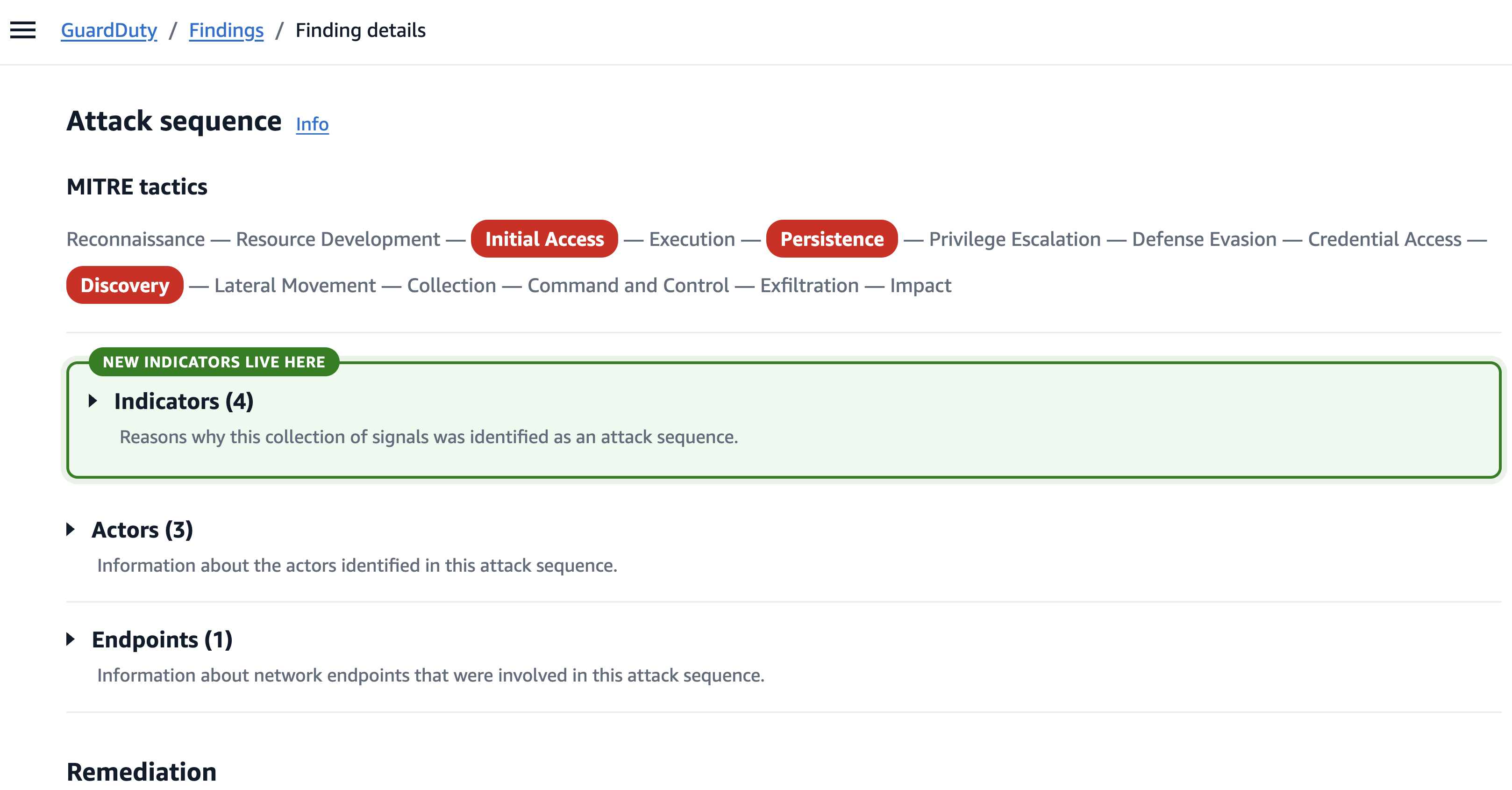
The five values appear on the Indicators tab of the attack-sequence finding in the AWS Management Console for GuardDuty and in the GetFindings JSON file.
Figure 1: Indicators section of an attack sequence finding
A note on EPSS, because the VULNERABILITY indicator carries it. According to the FIRST EPSS overview, the score is the probability that a published CVE will be exploited in the wild in the next 30 days ranging from 0 to 1. EPSS doesn’t replace CVSS, which describes the inherent severity of a vulnerability, whereas EPSS describes how likely it is to be exploited soon making it the more useful number for incident response.
Prerequisites
To populate the indicators, you need to have the following AWS services enabled:
Amazon Inspector on Amazon EC2 and Amazon EKS to support VULNERABILITY and MALICIOUS_PACKAGE.
Runtime signals such as a process invocation, a pod exec, or a syscall pattern can be noisy sometimes. A single runtime signal that doesn’t match a known offensive-tool path isn’t significant on its own, and without resource-state context it typically stays below the threshold for a Critical attack sequence.
The new indicators supply that missing context. When Extended Threat Detection sees a weak runtime signal on a host that also carries a combination of high-priority unpatched CVEs, a known malicious package, an IMDS misconfiguration, and internet reachability, it promotes the collection to a single CRITICAL attack sequence with high confidence. Customer feedback on individual GuardDuty runtime findings has consistently identified noise as a major pain point and adding this resource-state context is what turns those weak signals into actionable alerts.
In practice, this surfaces as a substantial increase in net-new attack-sequence findings on the runtime-process surface to roughly one in four prioritized runtime-process attack sequences, with little change on the network-indicator of compromise (IOC) surface. Within the first week of launch, this pattern showed up across many customer accounts where attack sequences that would previously have surfaced as a collection of weaker, unconnected findings now surface as a single CRITICAL finding.
Example: A net-new attack sequence on Amazon EKS
Now that you understand how Extended Threat Detection has improved through additional indicators, let’s walk through an example of how these indicators add value. In this example we analyze an actual scenario that was observed on an Amazon EKS cluster. The observed activity occurred over an 8-day period with eleven different GuardDuty findings.
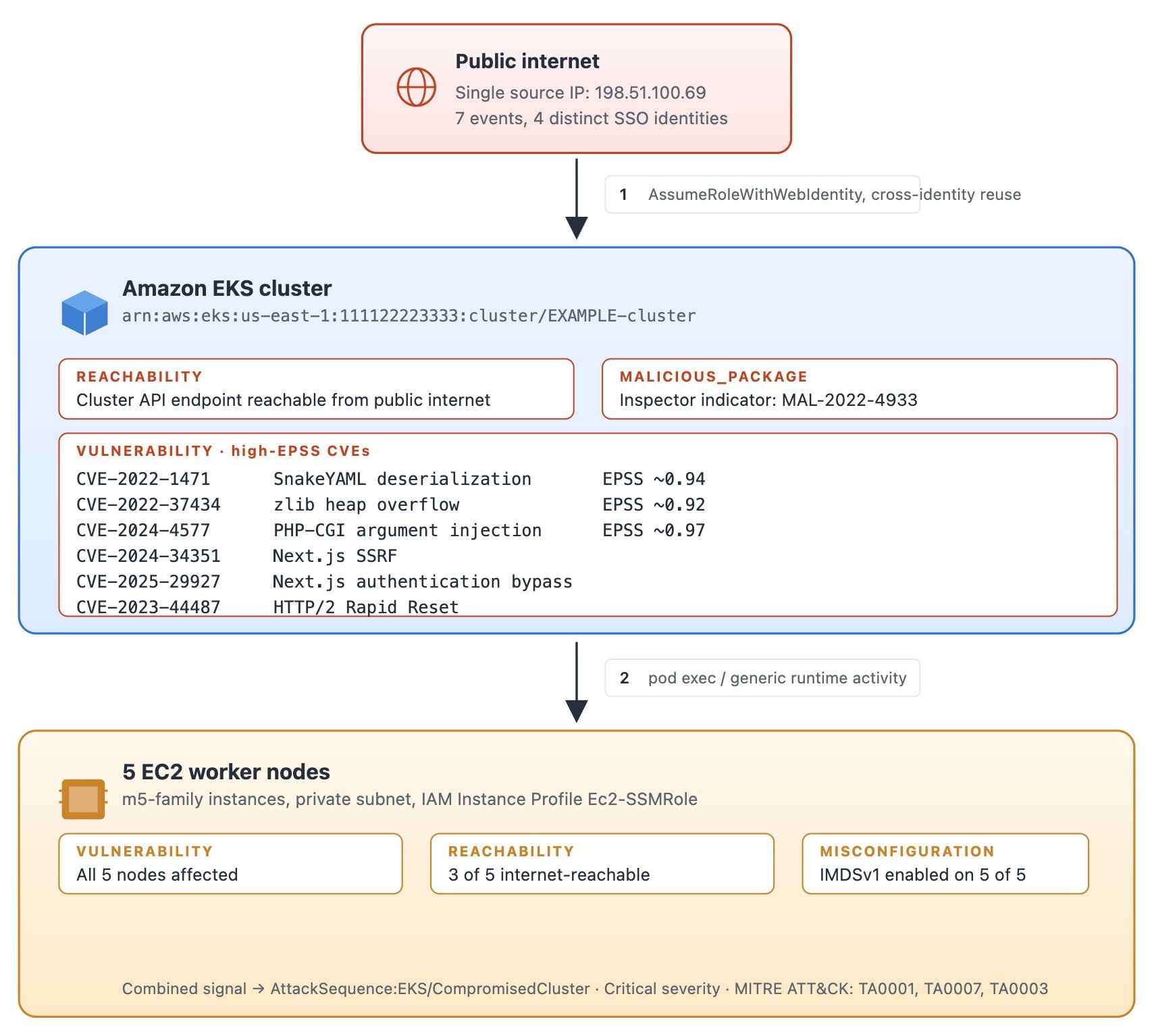
Figure 2: Activity summary for the EKS cluster before Extended Threat Detection correlated the signals
What GuardDuty saw on the activity surface over 8 days as shown in Figure 2 was 55 EKS_AUDIT_LOGS signals across pod execs, role assumptions, and AssumeRoleWithWebIdentity calls and 18 finding-level signals all originating from one external IP address of 198.51.100.69. This IP address authenticated as four distinct AWS Identity and Access Management (IAM) identities to the same EKS cluster. Runtime activity on the worker nodes was generic because there was no process that matched a known offensive-tool path and no execution-profile flag was fired. Under the pre-launch correlation, this sequence would have needed the EKS_MALICIOUS_PROCESS rule to fire, which requires either a malicious exec path or an unusual-suspicious-tool profile. Neither was present in this activity, so no correlated attack-sequence finding was raised.
What the new GuardDuty Extended Threat Detection indicators added to the EKS example:
MALICIOUS_PACKAGE on the cluster: Amazon Inspector identifier MAL-2022-4933.
VULNERABILITY (full Amazon Inspector output) on the cluster: 42 CVEs total, 33 rated CRITICAL by CVSS.
On the cluster: 12 CVEs including CVE-2022-1471 (SnakeYAML deserialization, EPSS 0.94), CVE-2024-4577 (PHP-CGI argument injection, EPSS 0.97), CVE-2024-34351 (Next.js SSRF), CVE-2025-29927 (Next.js authentication bypass), CVE-2023-44487 (HTTP/2 Rapid Reset), and CVE-2022-37434 (zlib heap overflow, EPSS 0.92).
Across the five worker nodes: 379 CVEs total, with 68 of them marked CRITICAL by Amazon Inspector.
REACHABILITY: Cluster API endpoint internet-reachable and three of five worker nodes also internet-reachable.
MISCONFIGURATION (EC2 IMDS): All five worker nodes still expose IMDSv1.
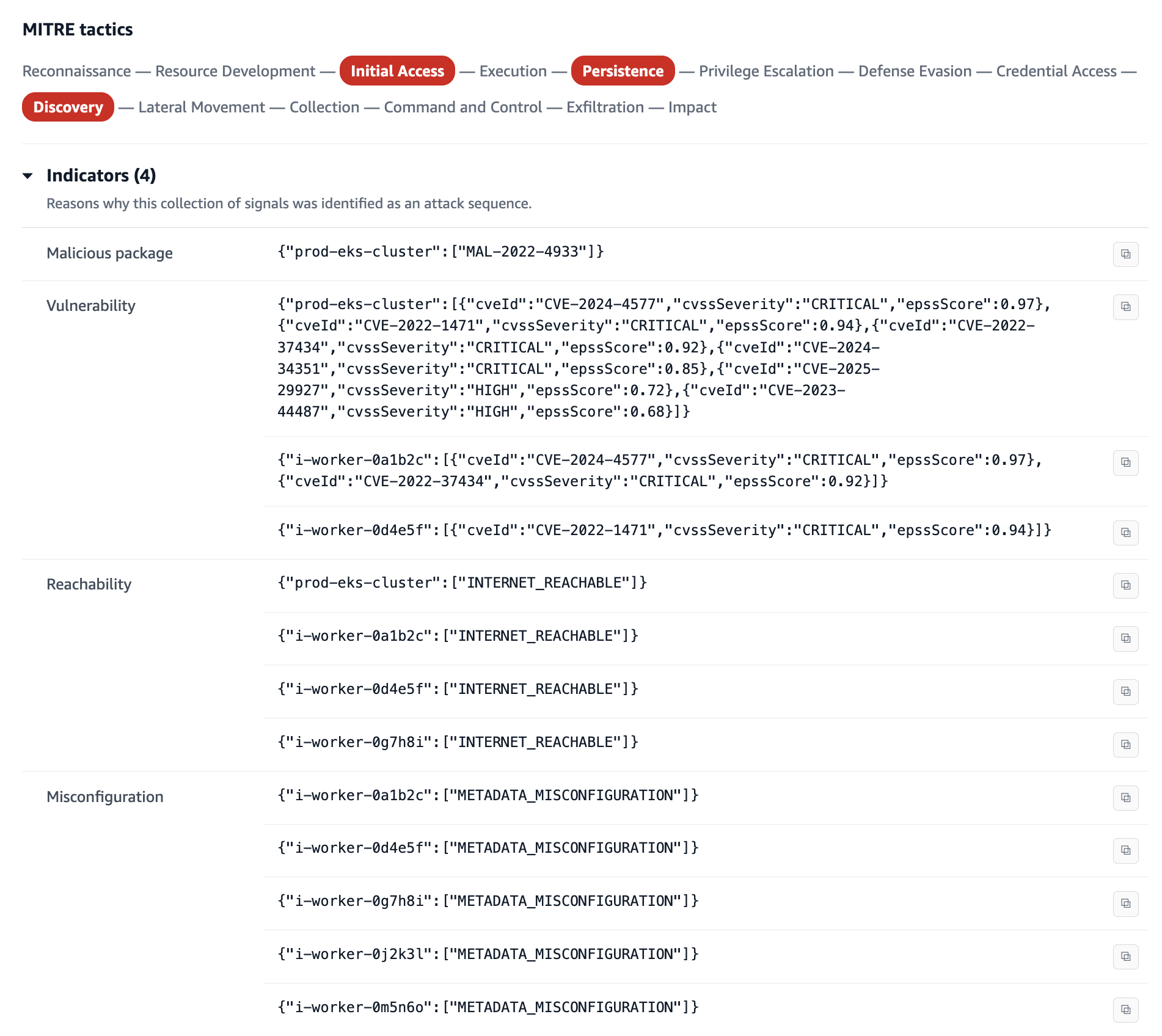
When these additional indicators are taken into consideration, this surfaces as a single AttackSequence:EKS/CompromisedCluster with a CRITICAL severity, with all four populated indicators on the Indicators tab and a MITRE ATT&CK® mapping to Initial Access (External Remote Services), Discovery, and Persistence.
Figure 3: New vulnerability indicators within an attack sequence
The finding lists more than 100 Amazon EC2 CVEs at the worker-node level, one CRITICAL CVSS, plus a long HIGH tail, but most are LOW vulnerability priority because their EPSS scores are low. Rather than sifting through more than 100 findings to decide which to address first, GuardDuty highlights the high-priority ones so you can focus your response efforts where they have the most impact.
Example: Cryptomining and a vulnerable host
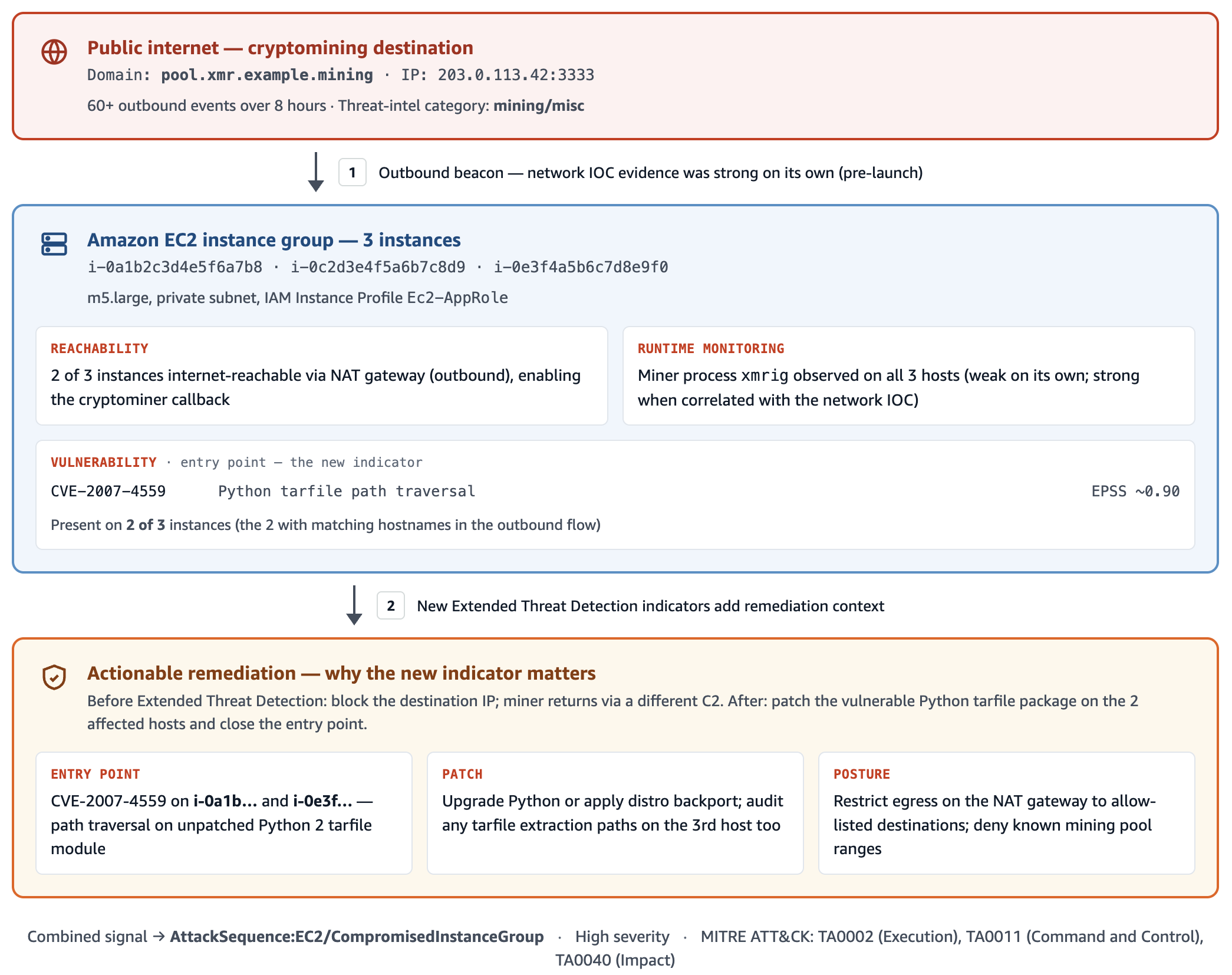
In this second example we walk through an EC2 instance group where GuardDuty already had a strong network-based finding for cryptomining and the new indicators provided additional remediation context that made incident response faster.
Figure 4: Cryptomining attack on EC2 instances
A set of EC2 instances was communicating with a known cryptomining destination, which was flagged by threat intelligence as mining/misc. The network IOC evidence was strong on its own.
Observations added by the new indicators: VULNERABILITY listed CVE-2007-4559 Python tarfile with EPSS around 0.9 on two of the three involved instances.
Result: The AttackSequence:EC2/CompromisedInstanceGroup finding is now actionable beyond block the destination IP; it tells you which patch will remediate the vulnerability the cryptominer likely came in through so you can address the underlying entry point rather than only removing the outbound connection.
This attack sequence would have been generated without the vulnerability context because GuardDuty had strong evidence of cryptomining of the EC2 instance group, however, triaging is faster with more context.
Indicators of compromise observed across the first-week launch sample
The following CVEs listed, along with their EPSS scores at the time, were observed on hosts across the customer accounts that received the new Extended Threat Detection indicators during the first week after launch at the moment each indicator finding was generated. EPSS scores are point-in-time, so a CVE’s listed priority on any future finding will reflect the current EPSS rather than the values shown here.
CVE-2024-4577 – PHP-CGI argument injection on Windows. EPSS 0.97+.
CVE-2007-4559 – Python tarfile path-traversal. EPSS still 0.9+ in 2026.
CVE-2025-29927 – Next.js authentication bypass. Frequent on Node web tiers.
CVE-2024-34351 – Next.js SSRF.
CVE-2023-44487 – HTTP/2 Rapid Reset.
Runtime monitoring surfaced weak signals tied to malware and tooling artifacts recovered from the compromised hosts:
HackTool family Linux/frp (Fast Reverse Proxy variants were used as command-and-control tunnels), often disguised as kuboard-agent and kuboard-agent-server binaries on Amazon EKS worker nodes. Container-snapshot path matches were also observed under /var/lib/containerd/io.containerd.snapshotter.v1.overlayfs/snapshots/.../usr/bin/. The frp binaries are present inside the container image and on the node, which means rebuilding the node from an unpatched AMI won’t be sufficient remediation.
BurpCollaborator out-of-band callback hostnames were found under *[.]oastify[.]com, matching pattern <35-char base32>[.]oastify[.]com. These co-occurred with frp on the same EKS sequence, probably a second tool or actor on shared infrastructure.
The Amazon Inspector malicious-package indicator MAL-2022-4933 was found in both Amazon EC2 and Amazon EKS contexts.
Identity and access patterns correlated with the tooling signals above:
A single external source IP authenticated as multiple distinct human IAM identities across separate Amazon EKS, Amazon ECS, and Amazon EC2 surfaces over a short window. This was the most common identity signature on the new Amazon EKS-process net-new class.
Responding to attack sequences with these indicators
The new indicators don’t change incident-response runbooks for attack sequences that have already occurred. They matter for new findings, which are concentrated on enhancing signals related to runtime monitoring. For those:
Treat the sequence with urgency. MALICIOUS_PACKAGE and a high-priority VULNERABILITY mean the host was, and still is, at risk of being compromised. Contain the exposures and remediate the vulnerabilities. Rotate every IAM credential, instance profile, or IAM Roles for Service Accounts (IRSA)-bound role that could have been exposed.
Patch on EPSS-weighted priority, not alone on raw CVSS. The finding’s high-priority VULNERABILITY list is already filtered to high-EPSS CVEs.
Isolate public resources indicated by REACHABILITY indicators. An internet-reachable host with exploitable vulnerabilities should be isolated for remediation.
GuardDuty Extended Threat Detection can deliver more high-confidence attack sequence findings on the runtime workload surfaces where your security teams often need help most: Amazon EC2, Amazon ECS, and Amazon EKS. It does this by combining GuardDuty activity signals with resource-state context from other AWS services. Customer feedback on individual GuardDuty runtime findings has consistently identified noise as a major pain point, and correlating those weak signals with vulnerability, package-risk, reachability, misconfiguration, and sensitive-data indicators is how Extended Threat Detection turns the noise into actionable CRITICAL findings. If you’ve already enabled AWS Security Hub, Amazon Inspector, Amazon VPC Reachability Analyzer, Macie, and GuardDuty Runtime Monitoring, the new indicators automatically start showing up on your attack-sequence findings. If you aren’t using these services, we encourage you to explore enabling them to access the new GuardDuty Extended Threat Detection indicators and the value that these individual services deliver.
If you have feedback about this post, submit comments in the Comments section below. If you have questions about this post, start a new thread on AWS re:Post or contact AWS Support.
You want to set a cryptographic algorithm policy and stop non-compliant choices from being made in your Amazon Web Services (AWS) environment. This post shows you how. As you adopt post-quantum cryptography, one of the first decisions you face is which algorithms and parameter sets fit your business needs, balancing security against signature size, key size, and performance. Your cloud environment’s job is to let you express that decision and enforce it consistently, so an approved choice stays fully usable while an excluded one cannot be introduced. This post works through one concrete example on AWS: taking an organization’s cryptographic algorithm policy and turning it into preventive and detective controls. The same patterns apply to whatever your approved set is today and whatever it becomes as standards evolve.
This post is Part 2 of a two-part series on quantum-resistant signing on AWS. Part 1, Build a software supply chain with ML-DSA, is for builders and constructs an end-to-end ML-DSA signing pipeline for binaries, container images, and software bills of materials. This part is for the security, governance, and compliance teams who decide which algorithms that pipeline, and everything else in the organization, is permitted to use, and who need that decision enforced.
AWS Key Management Service (AWS KMS) supports the ML-DSA digital signature scheme (FIPS 204) through three parameter sets, ML-DSA-44, ML-DSA-65, and ML-DSA-87, targeting NIST security categories 2, 3, and 5. All three are strong, standardized choices. Each one trades signature size, key size, and speed against security margin, the amount of cryptographic strength a parameter set holds in reserve above its target security category. ML-DSA-44 is the most compact and fastest. ML-DSA-65 and ML-DSA-87 carry a larger security margin, which is what you want for signatures that must stay trustworthy over a long lifetime.
Throughout this post, the examples use the same example policy: an organization that has standardized on ML-DSA-65 and ML-DSA-87 and wants ML-DSA-44 kept out of its approved set. That is a standardization decision, not a judgment that ML-DSA-44 is insecure (see the following note). Wherever you see ML-DSA-44 in the controls that follow, read it as the variant your policy doesn’t include; the mechanics are identical for any allow/deny split you choose. The approved set here is also the one the Part 1 architecture deploys: ML-DSA-87 for the root certificate authority (CA) and ML-DSA-65 for the subordinate CA and the code-signing key. Part 1 makes the choice; this post makes it stick.
Note: ML-DSA-44 is a valid choice. ML-DSA-44 is a fully NIST-standardized parameter set (FIPS 204) at NIST security category 2, which targets roughly 128-bit-class classical security (category 2 is benchmarked against the collision resistance of SHA-256). It produces the smallest signatures and public keys of the three variants (a 1312-byte public key and 2420-byte signature) and is the fastest to sign and verify, which makes it a strong fit for constrained devices, high-volume signing, and bandwidth- or storage-sensitive workloads. You would choose ML-DSA-65 or ML-DSA-87 instead to gain extra security margin for long-lived signatures or to align with an internal standard, not because ML-DSA-44 is weak.
What success looks like
The approved variants (ML-DSA-65 and ML-DSA-87 in the example) remain fully usable throughout. What you want to rule out is the introduction of a variant outside the policy (here, ML-DSA-44). Concretely, within the AWS service surfaces in scope, principals shouldn’t be able to:
Create ML-DSA-44 key material
Use existing ML-DSA-44 keys for signing or verification
Stand up private certificate authorities (CAs) that would introduce ML-DSA-44.
And any drift from those settings should be detected.
Certificate material brought in through acm:ImportCertificate or iam:UploadServerCertificate is also not algorithm-aware (see the Private CA section). Other TLS-terminating or signing services (for example Amazon CloudFront and Amazon API Gateway) and AWS IAM Roles Anywhere aren’t covered in this post and should be assessed separately. (Part 1 of this series uses IAM Roles Anywhere with ML-DSA certificates; controls for that service are out of scope here.)
These controls are intended to be applied as defense in depth. You can apply all of them or only a subset, depending on how prescriptive you want to be:
A blanket SCP at the organization root prevents member accounts from creating or using ML-DSA-44 keys. (SCPs don’t apply to the management account, so workloads there aren’t restricted.)
An SCP at a production organizational unit (OU) restricts keys only in production accounts.
If you need flexibility inside an account, use IAM permission boundaries instead of account-wide settings enforced through an SCP.
Choose the combination that matches your operating model. The policy examples here are written to apply across all AWS Regions. If you need to scope a control to specific Regions, add an aws:RequestedRegion condition.
The policies in this post are illustrative starting points. Authoring, validating, and maintaining the specific SCPs, IAM policies, and permission boundaries for your environment is your responsibility. Test all policies in a non-production environment before deployment and adjust example values (such as policy names and key Amazon Resource Names (ARNs)) to match your organization’s approved standards.
A note on cryptographic agility
Your algorithm policy isn’t fixed forever, and these controls shouldn’t be either. The point of expressing the policy as AWS controls is that you can revise it as your needs and the relevant standards change, tightening, loosening, or swapping the approved set without re-architecting. Treat the examples here as a template you adjust to whatever your current policy is.
A deny-based control that names specific algorithms is, in effect, an allow-list of everything it does not name. The risk is default-allow: any parameter set you have not explicitly denied is permitted, so a newly introduced variant, including one you have not yet evaluated, becomes usable until you notice it and add it to the deny list. Deprecation of an already-approved variant is easy to handle in this model, because you simply add the deprecated variant to the deny list. What the model does not catch on its own is the arrival of something new. Review these controls periodically and pair the deny-list with detection so a variant outside your policy surfaces quickly rather than waiting to be discovered.
The alternative is to write the condition against the approved set rather than the excluded one. A Deny that uses StringNotEquals with a list of approved key specs fires when the request’s key spec matches none of them, so a new or not-yet-evaluated variant is blocked by default until you add it. That closes the default-allow gap, at the cost of a policy update before anyone can use a newly approved variant. The family-level SCP in Part 1 of this series takes this shape: it denies creation of any signing key whose key spec isn’t ML_DSA_*. The examples in this post take the other shape and name the excluded variant, so that approved variants stay usable without a policy change. Both are valid. Choose based on whether you would rather block something new first and approve it later, or notice it first and decide then.
The StringLike clause scopes the statement to ML-DSA key specs so it doesn’t affect other key types; the StringNotEquals clause denies any ML-DSA variant outside the approved list.
Just as algorithms and key sizes will be introduced over time, or move from approved to unapproved, so will AWS service operations. The set of operations through which an ML-DSA-44 key can be used today (AWS KMS Sign, Verify, and GetPublicKey) reflects current service capabilities and might expand as AWS releases new features. If your policy is to block use in addition to creation, you should periodically review the list of operations you restrict, because services evolve over time.
Background: Key spec compared to signing algorithm
AWS KMS support for ML-DSA introduces three key specs—ML_DSA_44, ML_DSA_65, and ML_DSA_87—that all use a single post-quantum signing algorithm: ML_DSA_SHAKE_256. This distinction drives which controls are effective.
kms:KeySpec: Reflects the KeySpec property of the key. It’s evaluated both on CreateKey (the requested key spec) and on AWS KMS key resource operations that act on a specific key, including Sign, Verify, and GetPublicKey. This makes kms:KeySpec a reliable lever for both preventing creation of ML-DSA-44 keys and restricting use of existing ones, because it can single out ML_DSA_44 from ML_DSA_65 and ML_DSA_87.
kms:SigningAlgorithm: Reflects the signing algorithm supplied on Sign and Verify, which is ML_DSA_SHAKE_256 for all three variants. It therefore can’t distinguish ML-DSA-44 from the approved variants and shouldn’t be used for this purpose.
The practical consequence: for keys held in AWS KMS, preventing ML-DSA-44 key material from being created is the most robust single control. If no ML-DSA-44 KMS keys exist, none can be used for signing through AWS KMS and none can become the subject key of a certificate. CA keys and TLS server keys are separate material: AWS Private CA generates and holds a CA’s key pair in its own HSMs, and ACM-issued, imported, or uploaded TLS certificates carry their own keys, so those surfaces are governed by the AWS Private CA and certificate controls later in this post. Where ML-DSA-44 KMS keys already exist, their use can additionally be restricted with kms:KeySpec.
Organization and account-level blocking using SCPs
SCPs can be applied at the organization root or to a specific OU to restrict ML-DSA-44. Placement determines the effective scope: it applies organization-wide when attached at the root; attached to an OU, it applies to the accounts within that OU. An SCP is the broadest-scope preventive control available.
Note that SCPs apply to member accounts and OUs but not to the organization’s management account, so avoid running ML-DSA-44-capable workloads in the management account, where an SCP will not restrict them.
The following example SCP denies both the creation of ML-DSA-44 keys (kms:CreateKey) and their use (kms:Sign, kms:Verify, kms:GetPublicKey), matching on the ML_DSA_44 key spec in each case. The creation deny stops new keys from being created; the usage deny covers keys that already exist, whether created before the SCP was attached or living in an account that later joins the OU, because kms:KeySpec is also evaluated at request time on those usage operations.SCPs are guardrails: a Deny in an SCP can’t be overridden by any IAM policy within member accounts.
Attach the following SCP at the organization root (or relevant OU):
Scope the usage deny to the three key-spec-aware actions. Limit the use of Deny to kms:Sign, kms:Verify, and kms:GetPublicKey (testing confirmed kms:KeySpec is evaluated on all three). Avoid a blanket kms:*: a wildcard that would also catch management operations such as DescribeKey, DisableKey, and ScheduleKeyDeletion, which you need to inspect or clean up those same keys, effectively locking you out of managing the keys you’re trying to remove. If you use multi-Region keys, also add kms:ReplicateKey to the creation deny: replicating an ML-DSA-44 primary key creates a new ML-DSA-44 key in another Region, and kms:KeySpec is evaluated on ReplicateKey as well.
Combining with a family-level guardrail. This SCP governs which ML-DSA parameter set is allowed; it says nothing about RSA or ECDSA. Part 1 of this series includes a complementary SCP that denies creation of any signing key whose key spec isn’t ML-DSA. Attached together, they require every new signing key to be ML-DSA and to be an approved variant.
Operational considerations. A blanket Deny at the organization root is the strongest control but has trade-offs: it removes any ability to create ML-DSA-44 keys anywhere in scope, with no exception path, which can block legitimate testing and might cause infrastructure as code (IaC) or pipeline runs that attempt ML-DSA-44 creation to fail. To preserve flexibility, consider scoping the Deny to a production OU and using IAM permission boundaries (see the following section) in build and non-production accounts.
What the caller sees. When an SCP denies a request, the caller receives an AccessDenied error indicating an explicit deny in a service control policy. For same-account and same-organization requests, the error includes the type of the denying policy and, as the enhanced error messages roll out across services, its ARN. The error doesn’t expose the SCP policy contents, and the user being blocked often can’t see the SCPs applied to their environment. Document the SCP ARN and its purpose internally so support teams can map an AccessDenied quickly.
Prevent ML-DSA-44 key creation in AWS KMS (principal-level)
The following IAM policy blocks ML-DSA-44 at the principal level. It is the identity-based counterpart to the SCP shown earlier, useful when you want per-account or per-role control rather than an organization-wide guardrail. Attach it to the IAM role or user you want to constrain.
The condition value is ML_DSA_44 (underscores, not hyphens).
This policy blocks CreateKey only. To also block use of existing ML-DSA-44 keys at the principal level, add the Sign, Verify, and GetPublicKey deny shown in the Restricting use of existing ML-DSA-44 keys section.
For comprehensive, non-overridable coverage, deploy as an SCP rather than relying solely on principal-level policies.
IAM permission boundaries
IAM permission boundaries set the maximum permissions an identity-based policy can grant to an IAM role or user and can be used as an alternative or complement to using SCPs. The effective permissions are the intersection of the identity-based policy and the boundary, and a Deny in a boundary can’t be overridden by an attached policy. Boundaries are useful where you want per-account or per-role flexibility (for example, in build or non-production accounts) rather than a blanket, multi-account deny.
Operational consideration. A permission boundary only takes effect on principals that have it attached. To rely on boundaries as a control, you need a mechanism to enforce the boundary on all IAM principals programmatically. One example enforcement mechanism would be an SCP that denies iam:CreateRole, iam:CreateUser, iam:PutRolePermissionsBoundary, and iam:PutUserPermissionsBoundary unless the approved boundary is set (using the iam:PermissionsBoundary condition key), and denies iam:DeleteRolePermissionsBoundary and iam:DeleteUserPermissionsBoundary outright so the boundary can’t be removed after the fact. You would also want to probe for non-conforming principals periodically and respond, perhaps by automatically attaching the PermissionsBoundary. IAM users shouldn’t be used, but the enforcement should account for the possibility that they exist.
Because a boundary only sets a ceiling and does not itself grant anything, it opens with Allow on all actions, then denies ML-DSA-44 key creation specifically. The following permission boundary denies creation of ML-DSA-44 keys:
To also block use of existing ML-DSA-44 keys for the principals carrying this boundary, add the Sign, Verify, and GetPublicKey deny statement shown in the following section (which also uses kms:KeySpec).
Restricting use of existing ML-DSA-44 keys
As described in the Background section, kms:KeySpec is also evaluated on Sign, Verify, and GetPublicKey, reflecting the KeySpec of the key being used. You can therefore deny those operations when kms:KeySpec equals ML_DSA_44 while continuing to permit ML_DSA_65 and ML_DSA_87. The IAM policy below, attached to an IAM principal, does exactly that.
This deny can also live in an AWS KMS key policy. The same kms:KeySpec deny can be placed directly in the key policy of an AWS KMS key. A key policy is a resource policy, so the statement must include a Principal element. Identity policies and SCPs do not name principals to which they apply. A deny in the key policy is a resource-side backstop that protects a specific key, while an SCP gives non-overridable organization-wide coverage. To turn the previous example into an AWS KMS key policy, add a Principal element to the statement (for example "Principal": {"AWS": "*"}, or a more specific principal), and keep the rest of it the same.
Additional approaches
Depending on your goals you might also want to remove the key material itself rather than only deny its use. Remember that it is difficult to know what data has been signed by a specific key, unless you track that somehow. Deleting a key that was used will make signature verification impossible. Take great care to make sure keys are not used before deleting them.
Disable or schedule deletion of the keys. Disabling stops key use immediately and is reversible. Key deletion is definitive but irreversible after the waiting period, so confirm before scheduling.
Deny Sign, Verify, and GetPublicKey by specific key ARN. You can target named keys rather than the whole key spec. To do this, you would list the exact key ARNs in the Resource element of the IAM policy (no condition key required). This is effective for targeting a single key specifically, but it is difficult to maintain lists of key ARNs. Use this strategy sparingly. If you’re considering using an IAM policy naming a key ARN, remember that a Deny in the key policy of the target key accomplishes the same goal and is attached to the key itself.
Finding existing keys (only needed if you disable or delete). A Deny in an IAM policy or SCP, based on kms:KeySpec, doesn’t require you to know which keys exist – it applies by key spec at request time. If you want to disable or delete existing ML-DSA-44 keys, you need to locate them. AWS KMS has no server-side filter for key spec, so you must enumerate keys with ListKeys and call DescribeKey and inspect each KeySpec. This client-side filtering pattern is common across AWS APIs and is well supported by pagination in the AWS SDKs. You can also use AWS Config to record and query KMS key resources.
Approved ML-DSA variants and control of AWS Private CA
AWS Private CA sets a certificate authority’s (CA’s) signing algorithm at creation time, in the CertificateAuthorityConfiguration parameter of CreateCertificateAuthority (valid values include ML_DSA_44, ML_DSA_65, and ML_DSA_87). There is currently no condition key for the algorithm, so an SCP cannot enforce signing algorithm. The approach in this section controls who can create CAs and pins the algorithm in that trusted path, backed by AWS CloudTrail-based detection.
Recommended approach
Restrict who can create CAs. Deny acm-pca:CreateCertificateAuthority broadly via SCP, and allow it only for a small set of trusted roles or an approved provisioning pipeline. This removes the ability for arbitrary principals to stand up a CA with an unapproved algorithm.
Pin the algorithm in the trusted path. Have that approved pipeline or infrastructure-as-code template hard-code SigningAlgorithm to ML_DSA_65 or ML_DSA_87 in CertificateAuthorityConfiguration. Because AWS Private CA exposes no algorithm condition key, this provisioning path is the enforcement point. Note that the CA’s algorithm pins the signature on the certificates it issues; the subject key in each certificate comes from the CSR, which AWS Private CA copies without validating its algorithm, so pin the CSR key algorithm in the same issuance pipeline.
Control the trust chain. On the PKI side, only add approved CAs to your trust stores and issuance hierarchies, and do not trust or subordinate CAs that could issue ML-DSA-44. This prevents an unapproved CA from being introduced into a trusted path.
Detect drift. Use CloudTrail to capture CreateCertificateAuthority calls and AWS Config to flag any CA whose configuration uses ML_DSA_44, so an unapproved CA is caught quickly.
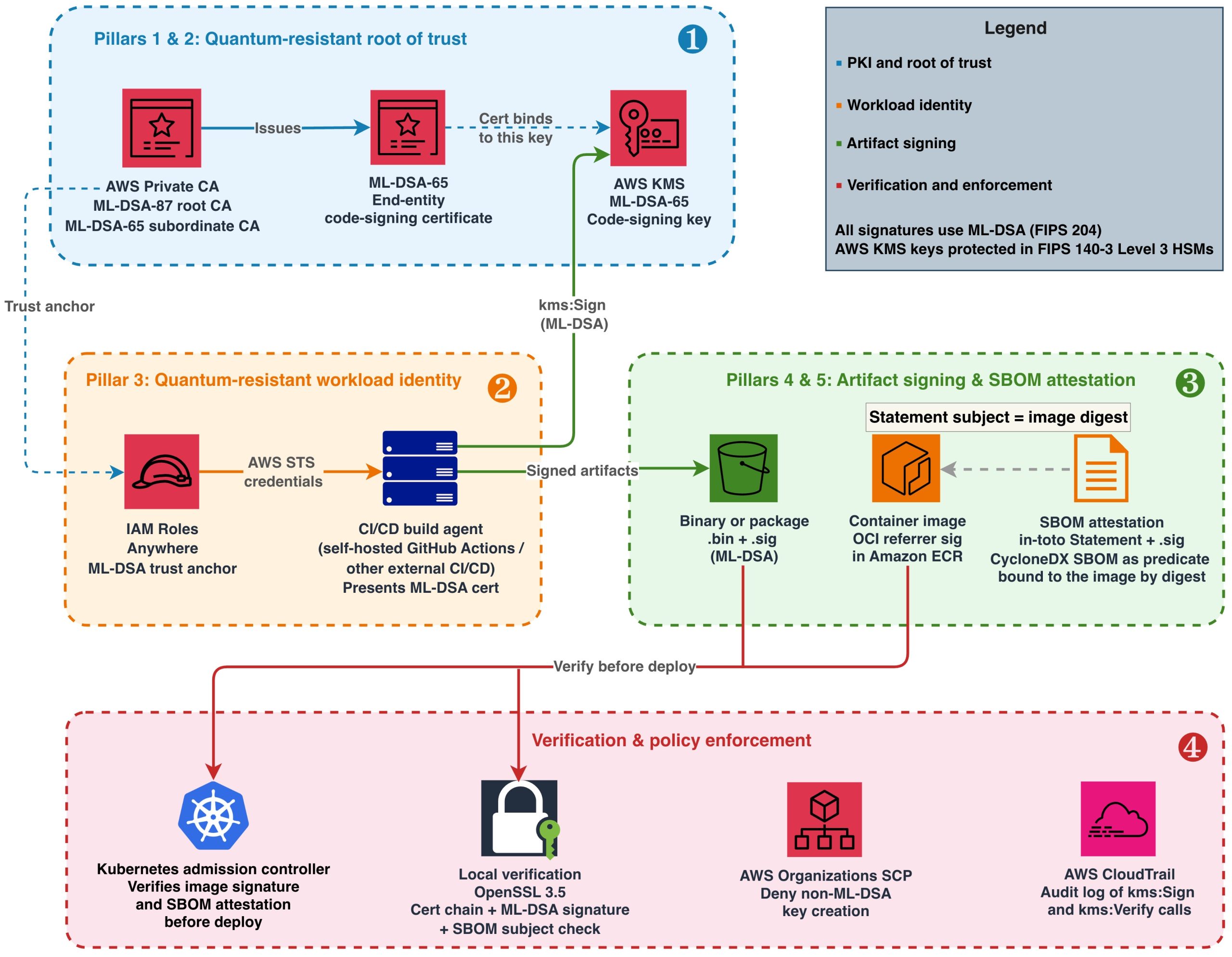
Part 1 of this series shows what this looks like in practice: it creates an ML-DSA-87 root CA and an ML-DSA-65 subordinate CA with CreateCertificateAuthority, activates them, and distributes the resulting chain to verifiers. In the model described here, those are the calls that only your approved provisioning pipeline is allowed to make.
Setting the ML-DSA value in CertificateAuthorityConfiguration. The same variant goes in both the KeyAlgorithm and SigningAlgorithm fields (for example, KeyAlgorithm=ML_DSA_65 with SigningAlgorithm=ML_DSA_65). Note a difference in signing algorithms between AWS KMS and AWS Private CA. With AWS Private CA, the SigningAlgorithm takes the variant value directly (ML_DSA_44, ML_DSA_65, and ML_DSA_87), and doesn’t accept ML_DSA_SHAKE_256. In contrast, AWS KMS uses ML_DSA_SHAKE_256 as its signing algorithm. Be aware that some older AWS Command Line Interface (AWS CLI) builds omitted descriptions of the ML-DSA variants from the built-in CLI help, so don’t rely on the help in the AWS CLI to determine valid values. For more information, see CertificateAuthorityConfiguration API Reference.
Known limitation. Some surfaces have no algorithm condition key, so you enforce them through provisioning and detection rather than policy. acm-pca:CreateCertificateAuthority has no condition key for the algorithm, and acm:ImportCertificate and iam:UploadServerCertificate are not algorithm-aware, so a disallowed signature setting on a created, imported, or uploaded certificate cannot be blocked by an IAM policy or SCP condition. Govern these through your provisioning process, restrict who can call them, and deny the import and upload actions entirely where they are not required. The controls above remain the available mitigation.
In particular, iam:UploadServerCertificate doesn’t support any method to prevent use of particular algorithms, and AWS doesn’t recommend using this API to generate and upload certificates. This API predates ACM and exists mainly to cover AWS Regions or partitions where ACM is not yet available. While a new Region or partition is being built out, workloads can still need a TLS server certificate before ACM support has shipped there, and uploading a certificate to IAM gives you a place to store and reference it in the meantime. Once ACM is available in that Region, you should use ACM instead. Outside that narrow case, deny iam:UploadServerCertificate unless it is genuinely required.
ACM-issued leaf certificates. A CA’s own key and signing algorithm are separate from the leaf certificates that ACM issues from it. If you use ACM to request leaf certificates, you can constrain the leaf’s key algorithm with the acm:KeyAlgorithm condition key on acm:RequestCertificate. This lets you allow-list approved algorithms for leaf certificates using SCPs or IAM policies, similar to the AWS KMS examples earlier in this post. Be aware that, at the time of writing, ACM doesn’t offer ML-DSA leaf certificates. So a policy like this is a forward-looking defense-in-depth control rather than an immediate ML-DSA-44 risk. The IAM example below is illustrative (using example approved algorithms). Since this is an evolving part of the service, be sure to validate this in your environment before relying on it.
This example uses StringNotEqualsIfExists so it denies only requests that specify a disallowed algorithm. With plain StringNotEquals, a request that omits acm:KeyAlgorithm would also be denied, because the missing key makes the condition evaluate true. Choose the operator that matches whether you want to block requests that leave the algorithm unspecified.
Prevent ML-DSA-44 usage in TLS for NLB and ALB
Elastic Load Balancing, for both network load balancers (NLB) and application load balancers (ALB), terminates TLS on behalf of your applications. The certificates used by these listeners are requested through or imported into ACM, or uploaded to IAM. A listener’s configured security policy and its certificate determine what’s offered during negotiation. At the time of writing, ACM requests and imports accept RSA and ECDSA keys only, and NLB and ALB listeners accept RSA and ECDSA certificates only, so no ML-DSA certificate can be bound to a listener today. As with the ACM leaf-certificate policy earlier, the controls in this section are forward-looking defense in depth rather than a mitigation of an immediate ML-DSA-44 risk.
Certificate controls (the effective mechanism for ML-DSA-44)
Because the listener API calls reference a certificate only by ARN, you can’t write an SCP on CreateListener, ModifyListener, or AddListenerCertificates that inspects the certificate’s algorithm. IAM conditions can’t reference attributes of a separately-referenced resource. Keeping ML-DSA-44 out of TLS therefore relies on there being no ML-DSA-44 certificate material to associate:
Configure your private CA to issue only ML_DSA_65 or ML_DSA_87 certificates, and control who can create CAs.
Prevent ML-DSA-44 key creation in AWS KMS, so that no KMS-held ML-DSA-44 key can become the subject key of a certificate. TLS server keys for ACM-issued, imported, or uploaded certificates are not KMS keys; those are governed by items 1 and 3.
Control imported and uploaded certificates through your provisioning process or deny the import and upload actions where not required, as described in the AWS Private CA section.
Detective controls
CloudTrail records the certificate and listener API calls in this section: certificate creation and import (acm-pca:CreateCertificateAuthority, acm:ImportCertificate, iam:UploadServerCertificate) and listener configuration (CreateListener, ModifyListener, AddListenerCertificates). Whether the algorithm shows up in the event depends on what the call itself carries. Creation calls that take the algorithm as an input record it: kms:CreateKey logs the KeySpec, and acm-pca:CreateCertificateAuthority logs the signing algorithm. That makes CloudTrail effective for catching the creation of ML-DSA-44 key material or a CA. A listener binding references its certificate only by ARN, so the certificate’s algorithm does not appear in that event. To evaluate the algorithm of a bound or imported certificate, use AWS Config resource evaluation as the detective backstop.
Summary for TLS
The primary preventive control is the certificate material itself: with no ML-DSA-44 CA, no ML-DSA-44 KMS key, and certificate import and upload controlled, no ML-DSA-44 certificate can be issued or bound. Where you also operate an allow-list of permitted TLS security policies, the elasticloadbalancing:SecurityPolicy condition key (on CreateListener and ModifyListener) can additionally constrain which TLS policies listeners can use.
Summary of controls
The following table maps the example policy (allow ML-DSA-65 or ML-DSA-87, exclude ML-DSA-44) to the available controls. Modify the controls to limit use to the approved set of algorithms your policies require.
Area
Control
Status
Block ML-DSA-44 key creation (Organization-wide or for all accounts in an organization OU)
SCP on kms:CreateKey using kms:KeySpec
Fully supported via condition key
Block ML-DSA-44 key creation (per account or per role)
IAM policy or permission boundary using kms:KeySpec
Supported; requires programmatic enforcement of boundaries
Block use of existing ML-DSA-44 keys
Deny Sign, Verify, and GetPublicKey using kms:KeySpec (key policy, IAM, or SCP); optionally disable and delete keys
Supported using kms:KeySpec (not kms:SigningAlgorithm)
Only allow approved variants in Private CA
Restrict who can create CAs; pin ML_DSA_65 or ML_DSA_87 in provisioning path
No algorithm condition key; enforce using process and detection
Limit variants in imported or uploaded TLS certificates
Process controls, or deny import or upload APIs (prefer ACM over iam:UploadServerCertificate)
APIs aren’t algorithm-aware
Block use of ML-DSA-44 in TLS with network load balancers (NLB) and application load balancers (ALB)
Restrict TLS policy using elasticloadbalancing:SecurityPolicy; control cert material
TLS-policy restriction supported; no per-cert algorithm condition
Detect use of unapproved variants
CloudTrail (API-level) and AWS Config custom rules
Supported using custom AWS Config rules; not managed rules
Conclusion
In this post, you learned how to use ML-DSA as an example of turning a cryptographic algorithm policy into enforceable AWS controls. The key lever is the kms:KeySpec condition key: it keeps your approved parameter sets (ML-DSA-65 and ML-DSA-87) fully usable while preventing the creation and use of a parameter set you’ve excluded (ML-DSA-44) on the CreateKey, in addition to the Sign, Verify, and GetPublicKey operations, where kms:SigningAlgorithm can’t tell the variants apart. Applied as defense in depth across SCPs, IAM policies, permission boundaries, and KMS key policies, and extended to the surfaces that have no algorithm condition key (AWS Private CA, certificate import, and Elastic Load Balancing TLS) through provisioning controls plus AWS CloudTrail and AWS Config drift detection, these controls give you a consistent way to keep an unapproved variant out of your accounts.
The pattern isn’t specific to ML-DSA-44. Because your algorithm policy will change as standards and your own requirements evolve, treat these controls as a reusable template and re-point the same condition keys and guardrails at whatever your approved set becomes. This adaptability is the practical meaning of cryptographic agility: changing what you allow without re-engineering how you enforce it.
To see the workloads these controls govern, read Part 1 of this series, which builds a complete ML-DSA signing pipeline, from key creation and PKI through artifact signing and verification, using the approved set enforced here.
Software supply chain attacks have grown in both frequency and sophistication. Recent high-profile compromises of build systems and open source dependencies demonstrate that attackers increasingly target the trust mechanisms that verify software integrity. Those trust mechanisms rely on digital signature algorithms, and today many use traditional algorithms such as Rivest-Shamir-Adleman (RSA) and the Elliptic Curve Digital Signature Algorithm (ECDSA). If a sufficiently powerful quantum computer could forge these signatures, an attacker could potentially inject unauthorized code into signed artifacts, fabricate build attestations, or impersonate legitimate publishers. Using quantum-resistant signatures today defends against threats that might emerge in the future.
Since 2025, the Commercial National Security Algorithm Suite 2.0 (CNSA 2.0), published by the US National Security Agency (NSA), has required US National Security Systems (NSS) to “support and prefer” quantum-resistant signatures for software and firmware, with exclusive use mandated by 2030. The EU Cyber Resilience Act (CRA) takes full effect in December 2027. It requires manufacturers to maintain verifiable software integrity throughout a product’s lifecycle. Organizations that ship software to US federal agencies or sell products in the European market face converging deadlines that demand action now.
This post is Part 1 of a two-part series on adopting ML-DSA signatures, standardized in NIST FIPS 204 (ML-DSA) signatures, on AWS. As of Oct 2026, this series is the first end-to-end guide from any cloud provider for post-quantum signing across the software supply chain, from establishing an ML-DSA root of trust to enforcing algorithm policy across an organization. This part is for builders and walks through constructing and operating the signing pipeline. Part 2, Enforce your ML-DSA algorithm policy with SCPs and IAM, is for security and governance teams and shows how to turn the algorithm choices made here into preventive and detective controls across an organization.
Understanding the harvest now, forge later threat
After a cryptographically relevant quantum computer (CRQC) exists, the mathematical problems protecting today’s public-key cryptography can be solved efficiently. Attacks that are impractical today because of the computational complexity suddenly become practical using a CRQC. Most discussions of post-quantum cryptography (PQC) focus on the harvest now, decrypt later threat to data confidentiality. The asymmetric keys protecting data in transit can be efficiently derived using a CRQC, exposing the data that was meant to be protected. Digital signatures rely on the same asymmetric mathematical problems that a CRQC would break. This means that software supply chains face a parallel threat that targets integrity rather than confidentiality. An attacker who records signed artifacts today can forge those signatures in the future on a totally different artifact, using a CRQC.
Consider firmware signed with ECDSA P-256 and deployed to a fleet of embedded devices in 2026. These devices verify the firmware signature on every boot for their 15-year operational lifetime and can’t be recalled to re-sign after deployment. If a CRQC becomes operational in 2035, an attacker could produce a valid-looking signature over tampered firmware, and every device in the fleet would accept it as authentic on next restart. For organizations that rely on classical digital signatures as the primary mechanism for verifying software integrity, this weakens a critical link in the verification chain. This is why CNSA 2.0 specifies aggressive timelines for digital signatures: the artifacts you sign today must remain trustworthy for their full operational lifetime.
ML-DSA is designed to resist attacks from both classical and quantum computers. AWS KMS, AWS Private CA, and AWS IAM Roles Anywhere all support ML-DSA, making it possible to address the forge-later threat across your supply chain today without additional tooling.
Architecture overview: Five pillars of a quantum-resistant supply chain
The architecture comprises five trust pillars that together protect your software delivery pipeline:
ML-DSA key management in AWS KMS – All signing keys are generated and protected in FIPS 140-3 Security Level 3 hardware security modules (HSMs). Private keys never leave the HSM boundary.
ML-DSA public key infrastructure (PKI) throughAWS Private CA – A certificate hierarchy (root CA, subordinate CA, end-entity certificates) binds ML-DSA public keys to identities, establishing who signed what. CA private keys are generated and stored in hardware-protected HSMs managed by the service and never leave the HSM boundary.
Quantum-resistant workload identity (for external build agents) – For continuous integration and delivery (CI/CD) agents running outside AWS that authenticate through X.509 certificates, IAM Roles Anywhere with ML-DSA certificates ties the signer’s identity back to the same quantum-resistant root of trust.
ML-DSA SBOM integrity attestation – The SBOM for each release is wrapped in an in-toto Statement that names the artifact it describes by digest, and the Statement is signed with the same ML-DSA code-signing key. This provides quantum-resistant proof that the dependency manifest hasn’t been tampered with and that it belongs to the artifact it accompanies.
These pillars create a chain of trust: AWS Private CA protects the root CA key in its own HSMs, issues certificates that bind identities to AWS KMS code-signing keys, IAM Roles Anywhere uses those certificates to authenticate build agents, and authenticated agents sign every artifact and SBOM they produce.
Figure 1: End-to-end quantum-resistant software supply chain on AWS
Figure 1 illustrates this architecture in four layers, numbered in the order you build them:
Root of trust (Pillars 1 and 2) – Establish your AWS Private CA hierarchy and create your code-signing key in AWS KMS.
Workload identity (Pillar 3) – Register the CA as an IAM Roles Anywhere trust anchor and issue ML-DSA certificates to build agents, ensuring the signer’s identity chains back to the same quantum-resistant root of trust.
Artifact signing (Pillars 4 and 5) – Sign binaries, container images, and SBOMs using the authenticated build agent.
Verification and enforcement – Validate signatures at deployment and enforce ML-DSA-only policies.
Prerequisites
To follow along, you need:
An AWS account with permissions to create resources in AWS KMS, AWS Private CA, IAM Roles Anywhere, and Amazon ECR.
IAM Roles Anywhere credential helper (aws_signing_helper) v1.8.0 or later, the first release that supports ML-DSA keys and certificates, for workload authentication. Download from the IAM Roles Anywhere documentation.
OpenSSL 3.5 or later (required for ML-DSA signature verification and mu computation).
ORAS CLI v1.2 or later (for attaching Open Container Initiative (OCI) referrer artifacts to container images). Alternatively, you can use the Notation CLI with a custom plugin or any OCI-compliant client that supports the OCI Referrers API.
jq, for constructing and parsing the in-toto Statements used for SBOM attestation and for parsing ORAS output.
Amazon Inspector SBOM Generator (Sbomgen), or another tool that produces a CycloneDX JSON SBOM, for the SBOM example. Sbomgen runs only on Linux (x86-64 and ARM64), so run that step on a Linux build agent or container. It uses the registry credentials that oras login stores in the Docker config file, and it also accepts them through --username or the INSPECTOR_SBOMGEN_USERNAME and INSPECTOR_SBOMGEN_PASSWORD environment variables.
Java 11 or later and Apache Maven, to run the diy-code-signing-kms-private-ca sample that produces the code-signing CSR in Step 4 of Building the ML-DSA PKI foundation.
A container image pushed to Amazon ECR (for the container signing example).
Building the ML-DSA PKI foundation
Start by creating the certificate hierarchy that will anchor your supply chain trust. AWS Private CA generates and stores its own CA signing keys internally in hardware-protected HSMs when you create a certificate authority. Use ML-DSA-87 (NIST security category 5, defined as at least as hard to break as exhaustive key search on AES-256) for the root CA because it protects the longest-lived trust anchor. Use ML-DSA-65 (NIST security category 3) for the subordinate CA to balance security with smaller signature sizes for frequently issued certificates.
The parameter sets used here, ML-DSA-87 and ML-DSA-65, are also the approved set in the example algorithm policy that Part 2 of this series turns into enforceable controls. If your organization has standardized on a different set, substitute it in the commands that follow; the build steps don’t change.
Step 1: Create the root CA in AWS Private CA
When you specify KeyAlgorithm: ML_DSA_87, Private CA generates an ML-DSA-87 key pair internally. You don’t need to create a separate AWS KMS key for the CA.
After creation, the root CA is in PENDING_CERTIFICATE state. Activate it by self-signing its certificate. This is where you set the root CA’s validity period (10 years is typical for a root):
After creation, the subordinate CA enters PENDING_CERTIFICATE state with no link to the root. Activate it by signing its certificate signing request (CSR) with the root CA:
# Retrieve the subordinate CA's certificate signing request
aws acm-pca get-certificate-authority-csr \
  --certificate-authority-arn <sub-ca-arn> \
  --output text > sub-ca.csr

# Sign the CSR using the root CA (this establishes the trust hierarchy)
SUB_CERT_ARN=$(aws acm-pca issue-certificate \
  --certificate-authority-arn <root-ca-arn> \
  --csr fileb://sub-ca.csr \
  --signing-algorithm ML_DSA_87 \
  --validity Value=1825,Type=DAYS \
  --template-arn arn:aws:acm-pca:::template/SubordinateCACertificate_PathLen0/V1 \
  --query CertificateArn --output text)

# Retrieve the signed certificate and import it to activate the subordinate CA
aws acm-pca get-certificate \
  --certificate-authority-arn <root-ca-arn> \
  --certificate-arn $SUB_CERT_ARN \
  --query Certificate --output text > sub-ca-cert.pem

aws acm-pca import-certificate-authority-certificate \
  --certificate-authority-arn <sub-ca-arn> \
  --certificate fileb://sub-ca-cert.pem \
  --certificate-chain fileb://root-ca-cert.pem
Step 3: Create the code-signing key in AWS KMS
Your build agents use this key to sign artifacts, so their IAM roles need the kms:Sign permission on it. The end-entity certificate issued by your subordinate CA binds an identity to this key’s public key.
Step 4: Issue the end-entity code signing certificate
To issue a certificate, you need a CSR. Because the ML-DSA private key never leaves the AWS KMS HSM, you can’t generate the CSR locally with OpenSSL. Instead, you construct the CSR’s TBS (to-be-signed) structure containing your subject name and public key, sign it remotely by calling aws kms sign, and assemble the final CSR from those components.
For a working implementation that assembles an ML-DSA CSR around a KMS-managed private key and signs it with AWS KMS, see Post-quantum (ML-DSA) code signing with AWS Private CA and AWS KMS and its diy-code-signing-kms-private-ca sample on GitHub (Java, built with Maven). There is no AWS CLI-only path for this step: the CSR must be constructed and signed in code, and the sample is the reference implementation.
After you have the code-signing.csr file, issue the certificate from your subordinate CA:
# Issue a code-signing certificate valid for one year, signed by the subordinate CA using ML-DSA-65.
# Replace <sub-ca-arn> with the ARN that create-certificate-authority returned for the subordinate CA in Step 2.
CODE_SIGNING_CERT_ARN=$(aws acm-pca issue-certificate \
  --certificate-authority-arn <sub-ca-arn> \
  --csr fileb://code-signing.csr \
  --signing-algorithm ML_DSA_65 \
  --validity Value=365,Type=DAYS \
  --template-arn arn:aws:acm-pca:::template/CodeSigningCertificate/V1 \
  --query CertificateArn --output text)

# Retrieve the issued certificate
aws acm-pca get-certificate \
  --certificate-authority-arn <sub-ca-arn> \
  --certificate-arn $CODE_SIGNING_CERT_ARN \
  --query Certificate --output text > code-signing-cert.pem
This certificate binds the signer identity to the AWS KMS code-signing key material. Note that the certificate validity period (365 days in this example) determines how long verifiers can validate signatures by checking the certificate alone. AWS Private CA lets you choose the validity period of an issued certificate, as long as it ends no later than the issuing CA’s own certificate; in this example the subordinate CA certificate from Step 2 is valid for 1,825 days, so the three-year option below fits inside it. For artifacts that must remain verifiable beyond the certificate’s expiry, consider these approaches:
Longer certificate validity – For private PKI, code-signing certificates are commonly issued with multi-year validity (for example, Value=1095,Type=DAYS for 3 years) because you control the issuance policy.
Trusted timestamping (RFC 3161) – Countersign each signature with an RFC 3161 timestamp from a Time Stamping Authority (TSA) at signing time. The timestamp proves the signature was created while the certificate was valid, allowing verification indefinitely. AWS doesn’t provide a managed TSA; use a third-party TSA or operate your own.
Re-signing – Before a certificate expires, re-sign active artifacts with a newly issued certificate.
Distribute the certificate chain (root CA certificate, subordinate CA certificate, and end-entity certificate) to systems that need to verify your signatures.
Signing artifacts with ML-DSA in your CI/CD pipeline
With the PKI hierarchy in place, integrate ML-DSA signing into your build process. The approach depends on artifact type. ML-DSA-65 signatures are 3,309 bytes (compared to 64 bytes for ECDSA P-256), and the latency of the AWS KMS Sign operation for ML-DSA is comparable to existing asymmetric operations. The larger signature size has negligible impact when stored alongside multi-megabyte container images or packages, but is worth accounting for in size-constrained environments like embedded device images transmitted over low-bandwidth links.
Binary and package signing
Most build outputs, including compiled binaries and packages, are far larger than the 4,096-byte limit that AWS KMS places on the message passed to aws kms sign. Make the EXTERNAL_MU method your pipeline’s default: compute the 64-byte message representative (mu) externally with OpenSSL 3.5, then pass only mu to AWS KMS. This handles an artifact of any size and never needs to change as your artifacts grow. AWS KMS also accepts content directly with --message-type RAW, up to 4,096 bytes. Use RAW only for inputs whose size is fixed by construction, such as the 71-character manifest digest in the container image example that follows. An artifact that fits today is likely to outgrow the limit later, and a pipeline that depends on RAW fails when it does. Both methods produce cryptographically identical signatures. The verifier doesn’t need to know which method was used; standard ML-DSA verification applies in either case.
# Retrieve the public key
aws kms get-public-key --key-id alias/pqc-code-signing \
  --query PublicKey --output text | base64 --decode > pk.der

# Extract raw public key bytes from the DER-encoded SubjectPublicKeyInfo.
# The BIT STRING starts at offset 17 for all ML-DSA key sizes.
# Expected output: 1,312 bytes (ML-DSA-44), 1,952 bytes (ML-DSA-65), or 2,592 bytes (ML-DSA-87).

openssl asn1parse -inform DER -in pk.der -strparse 17 -noout -out pk_raw.bin

# Compute mu per FIPS 204 Section 6.2
printf '\x00\x00' | cat - artifact.bin > m_prime.bin
openssl dgst -shake256 -xoflen 64 -binary pk_raw.bin > pk_hash.bin
cat pk_hash.bin m_prime.bin | openssl dgst -shake256 -xoflen 64 -binary > mu.bin

# Sign the mu value
aws kms sign \
  --key-id alias/pqc-code-signing \
  --message fileb://mu.bin \
  --message-type EXTERNAL_MU \
  --signing-algorithm ML_DSA_SHAKE_256 \
  --query Signature --output text | base64 --decode > artifact.bin.sig
Store the .sig file alongside the artifact in Amazon S3 or your package repository. Protect the integrity of both the artifact and its signature by enabling S3 Object Lock (WORM protection) or at minimum S3 Versioning with restricted write access. If an attacker can modify or delete either file, verification can’t be trusted. For comprehensive guidance, see Security best practices for Amazon S3.
Container image signing
For container image signing, use the OCI referrer pattern, defined in the OCI Image and Distribution Specifications v1.1. A referrer is an artifact, such as a signature or an SBOM, whose manifest names another image in its subject field. Registries that support the pattern, including Amazon ECR, return these artifacts when a client asks for an image’s referrers. This approach uses AWS KMS ML-DSA keys to generate the signature and stores it as a referrer of the image:
# Repository URI used by ORAS here and in the SBOM steps; replace the account ID and Region
ECR_URI=111122223333.dkr.ecr.us-east-1.amazonaws.com/myapp

# Authenticate ORAS to Amazon ECR
aws ecr get-login-password --region us-east-1 | \
  oras login --username AWS --password-stdin 111122223333.dkr.ecr.us-east-1.amazonaws.com

# Get the image manifest digest
IMAGE_DIGEST=$(aws ecr batch-get-image \
  --repository-name myapp \
  --image-ids imageTag=v1.2.0 \
  --query 'images[0].imageId.imageDigest' --output text)

# Sign the digest. It is a fixed 71 characters, so RAW is safe here (see Binary and package signing).
# AWS CLI v2 expects blob parameters to be base64, so write the digest to a file and pass it with fileb://
echo -n "$IMAGE_DIGEST" > digest.txt
aws kms sign \
  --key-id alias/pqc-code-signing \
  --message fileb://digest.txt \
  --message-type RAW \
  --signing-algorithm ML_DSA_SHAKE_256 \
  --query Signature --output text | base64 --decode > image.mldsa.sig

# Attach signature as OCI referrer using ORAS
oras attach $ECR_URI@$IMAGE_DIGEST \
  --artifact-type "application/vnd.example.mldsa-signature.v1" \
  image.mldsa.sig:application/octet-stream
At deployment time, your admission controller retrieves the referrer artifact and verifies the ML-DSA signature before allowing the image to run. See Verifying a container image signature before deployment later in this post for the full verification workflow and admission control implementation.
SBOM signing
A software bill of materials (SBOM) is a structured inventory of every component, library, and dependency included in a software release. It lists package names, versions, suppliers, and dependency relationships. Organizations use SBOMs to track vulnerabilities, verify license compliance, and respond quickly when a compromised component is disclosed.
Signing the SBOM file on its own proves that the inventory hasn’t been tampered with since it was signed, but not which artifact it describes. If the image signature and the SBOM signature are independent of each other, an attacker who holds a legitimately signed SBOM for a clean image can present it alongside a different signed image and claim that the two correspond. Attaching the SBOM to the image as an OCI referrer doesn’t close this gap by itself, because the subject field of a referrer manifest is set by whoever pushes the referrer; it’s a discovery mechanism, not a cryptographic binding. The binding must be inside the bytes that the signature covers.
To create that binding, wrap the SBOM in an in-toto Statement before signing it. A Statement names the artifacts it describes in its subject field, by digest, and carries the SBOM as its predicate. Because the image manifest digest is part of the signed content, a verifier can confirm that the SBOM in hand was issued for exactly the image it is about to deploy, and a swapped SBOM or a swapped digest fails verification. Embedding the SBOM in the image filesystem is another way to bind the two, because the image digest then covers the SBOM bytes. This post uses the Statement approach because it also works for SBOMs generated by scanning a finished image, for artifacts that have no filesystem such as binaries and firmware, and for images that are already in your registry, and because the SBOM stays readable from the registry without pulling the image.
Generate the SBOM with your preferred tool (such as Amazon Inspector SBOM Generator (Sbomgen) for container images), wrap it in a Statement, and sign the Statement with the same EXTERNAL_MU step you use for binaries:
# Scan the pushed image by digest so the inventory describes exactly the manifest you signed.
# Sbomgen reuses the registry login from the oras login step in the previous section.
inspector-sbomgen container --image $ECR_URI@$IMAGE_DIGEST -o sbom.json

# Wrap the SBOM in an in-toto Statement whose subject is the image manifest digest.
# This puts the digest inside the signed bytes, which binds this SBOM to this image.
jq -n \
  --arg name "$ECR_URI" \
  --arg digest "${IMAGE_DIGEST#sha256:}" \
  --slurpfile sbom sbom.json \
  '{
    "_type": "https://in-toto.io/Statement/v1",
    "subject": [{"name": $name, "digest": {"sha256": $digest}}],
    "predicateType": "https://cyclonedx.org/bom",
    "predicate": $sbom[0]
  }' > sbom.statement.json

# Sign using EXTERNAL_MU (same mu computation as binary signing above,
# with sbom.statement.json as the input)
# ... compute mu from sbom.statement.json ...
aws kms sign \
  --key-id alias/pqc-code-signing \
  --message fileb://mu.bin \
  --message-type EXTERNAL_MU \
  --signing-algorithm ML_DSA_SHAKE_256 \
  --query Signature --output text | base64 --decode > sbom.statement.json.sig

# Attach the Statement and its signature to the image as an OCI referrer so
# verifiers discover them alongside the image signature
oras attach $ECR_URI@$IMAGE_DIGEST \
  --artifact-type "application/vnd.example.mldsa-sbom-attestation.v1" \
  sbom.statement.json:application/vnd.in-toto+json \
  sbom.statement.json.sig:application/octet-stream
Ship the Statement and its .sig file together; the SBOM itself is the Statement’s predicate field, and verifiers extract it after verification. The same pattern binds an SBOM to a binary or package: set the subject digest to the SHA-256 of the file instead of an image manifest digest. The Verifying a binary or SBOM signature section later in this post walks through the full verification workflow, including the subject check that completes the binding.
Quantum-resistant workload identity for build agents
Signing artifacts with ML-DSA keys addresses the integrity of the artifacts themselves. Separately, build agents running outside AWS (on-premises Jenkins, self-hosted GitHub Actions runners, or third-party CI/CD systems) authenticate using X.509 certificates or OIDC tokens typically signed with RSA or ECDSA. These authentication credentials represent a classical cryptographic dependency in the pipeline. IAM Roles Anywhere with ML-DSA certificates replaces that dependency: the credential that the external build agent presents, and the CA that vouches for it, no longer rely on algorithms that are vulnerable to quantum attack. (The TLS connection that carries the request still authenticates the AWS endpoint with a traditional certificate, as public TLS does today; that is a transport concern separate from the signing identity this post is about.) Build agents running on AWS with an attached IAM role don’t have this dependency: their API requests are authenticated with AWS Signature Version 4 (SigV4), which uses a symmetric hash-based message authentication code (HMAC-SHA256). Symmetric schemes like this are already considered quantum-resistant, so no additional action is needed.
Step 1: Register a workload identity CA as a trust anchor
For this walkthrough, reuse the subordinate CA that you created earlier; that avoids the monthly charge for a second CA, and the commands that follow assume it. In production, use a dedicated subordinate CA for workload identity certificates, separate from your code-signing CA. This limits the blast radius if either CA is compromised and has to be revoked, and it lets you apply different issuance policies to the two certificate types.
# Use the ARN that create-certificate-authority returned when you created the
# subordinate CA earlier. If you no longer have it, list your CAs and copy the
# ARN of the SUBORDINATE one.
aws acm-pca list-certificate-authorities \
  --query "CertificateAuthorities[?Type=='SUBORDINATE'].[Arn,Status,CertificateAuthorityConfiguration.Subject.CommonName]" \
  --output table
SUB_CA_ARN=arn:aws:acm-pca:us-east-1:111122223333:certificate-authority/abc-123   # replace with yours

# Register the subordinate CA as an IAM Roles Anywhere trust anchor
aws rolesanywhere create-trust-anchor \
  --name "PQC-CI-CD-Trust-Anchor" \
  --source "sourceType=AWS_ACM_PCA,sourceData={acmPcaArn=$SUB_CA_ARN}" \
  --enabled
Step 2: Create the build agent role and a profile that references it
An IAM Roles Anywhere profile specifies which IAM roles a workload can assume after it authenticates with a certificate from your trust anchor. Create the role first. Its trust policy lets IAM Roles Anywhere assume it only through your trust anchor and only for a certificate whose subject common name identifies the build agent; without those conditions, any certificate that the trust anchor CA issues could assume the role. Its permissions policy grants only what signing requires, on only the code-signing key. Save the trust policy as build-agent-trust.json, replacing the trust anchor ARN with the one that create-trust-anchor returned in Step 1:
Save the permissions policy as build-agent-permissions.json, replacing the resource with your key’s ARN (aws kms describe-key --key-id alias/pqc-code-signing --query KeyMetadata.Arn --output text):
Step 3: Issue the build agent certificate and configure the credential helper
Generate the build agent’s ML-DSA-65 key pair and CSR locally with OpenSSL, have the subordinate CA issue a client authentication certificate for it, and then configure the IAM Roles Anywhere credential helper to present that certificate:
# Generate the build agent's key pair and CSR. The CN must match the
# aws:PrincipalTag/x509Subject/CN condition in the role's trust policy.
openssl genpkey -algorithm ML-DSA-65 -out build-agent-mldsa-key.pem
chmod 400 build-agent-mldsa-key.pem
openssl req -new -key build-agent-mldsa-key.pem \
  -subj "/C=US/O=Example Corp/CN=pqc-build-agent-01" \
  -out build-agent.csr

# Issue a 30-day client authentication certificate from the subordinate CA
# registered as the trust anchor in Step 1.
BUILD_AGENT_CERT_ARN=$(aws acm-pca issue-certificate \
  --certificate-authority-arn $SUB_CA_ARN \
  --csr fileb://build-agent.csr \
  --signing-algorithm ML_DSA_65 \
  --validity Value=30,Type=DAYS \
  --template-arn arn:aws:acm-pca:::template/EndEntityClientAuthCertificate/V1 \
  --query CertificateArn --output text)

aws acm-pca get-certificate \
  --certificate-authority-arn $SUB_CA_ARN \
  --certificate-arn $BUILD_AGENT_CERT_ARN \
  --query Certificate --output text > build-agent-mldsa.pem

# In production, store the private key in a TPM or HSM rather than as a plaintext file.
aws_signing_helper credential-process \
  --certificate build-agent-mldsa.pem \
  --private-key build-agent-mldsa-key.pem \
  --trust-anchor-arn arn:aws:rolesanywhere:us-east-1:111122223333:trust-anchor/ta-id \
  --profile-arn arn:aws:rolesanywhere:us-east-1:111122223333:profile/profile-id \
  --role-arn arn:aws:iam::111122223333:role/PQCBuildAgentRole
The helper produces short-lived AWS Security Token Service (AWS STS) credentials scoped to the build role, replacing long-lived AWS access keys. In production, protect the ML-DSA private key with hardware-backed storage such as a Trusted Platform Module (TPM), an HSM, or an encrypted credential store with restricted file permissions. The plaintext file path shown here is for demonstration purposes. The private key authorizes access to your code-signing infrastructure and should be treated with the same protection level as any signing key. On Linux build agents, at minimum restrict the file to chmod 400 owned by the service account and consider using a PKCS#11 provider to avoid storing the raw key on disk entirely.
Verification and policy enforcement
A signing architecture is only as strong as its verification. Producing signatures is half the story. The other half is giving the systems and people that deploy your artifacts, such as deployment pipelines, Kubernetes admission controllers, and engineers installing a package, a concrete way to verify those signatures and make trust decisions before an artifact is deployed or run.
Distributing your trust chain
Before any verifier can check a signature, it needs to trust the CA that issued the code-signing certificate. This trust is established through a trust store: a local collection of root CA certificates that a system treats as authoritative. Trust stores exist in operating systems (such as /etc/pki/ca-trust/ on Linux, Keychain on macOS), language run-times (Java cacerts), container base images, and custom application configurations.
For private PKI hierarchies like the one in this post, your root CA certificate isn’t in any default public trust store. You must explicitly add it to the trust stores of every system that will verify your signatures. Common approaches include:
Baking the root CA certificate into your container base images during the build process
Publishing it to an internal S3 bucket with versioning and access logging
Storing it as an OCI artifact in Amazon ECR alongside the images it protects
Treat trust store management with the same rigor as credential management. If an attacker can inject a rogue root certificate into your trust stores, they can make forged signatures appear valid. Restrict write access to trust stores and audit changes through AWS CloudTrail or your system-level audit logs.
Exporting your certificate chain requires exporting the root CA, and then any subordinate CAs that issue certificates that will be involved in verifying signatures:
# Export the root CA certificate
aws acm-pca get-certificate-authority-certificate \
  --certificate-authority-arn <root-ca-arn> \
  --query Certificate --output text > root-ca.pem

# Export the subordinate CA certificate. Select only the Certificate field: for a
# subordinate CA this call also returns CertificateChain, and --output text would
# print both on one tab-separated line, producing a file that OpenSSL can't parse.
aws acm-pca get-certificate-authority-certificate \
  --certificate-authority-arn <sub-ca-arn> \
  --query Certificate --output text > sub-ca.pem

# Bundle the full chain for verifiers
cat root-ca.pem sub-ca.pem > trust-chain.pem
Verifiers use this chain to confirm that the code-signing public key was issued by a CA they trust.
The CAs in this post are created without a revocation configuration, and the verification commands that follow don’t check revocation status, which keeps the walkthrough short. In production, configure a certificate revocation list (CRL) or an Online Certificate Status Protocol (OCSP) responder on the subordinate CA (see Plan your AWS Private CA certificate revocation method in the AWS Private CA User Guide; both work with ML-DSA CAs). If you use a CRL, distribute it alongside the trust chain and add -crl_check -CRLfile <crl-file> to the openssl verify command below, where <crl-file> is the CRL that AWS Private CA publishes to your S3 bucket, so that a revoked code-signing certificate fails verification.
Verifying a binary or SBOM signature
Verify the code-signing certificate against the trust chain, confirm that it is a code-signing certificate issued to the signer you expect, extract its public key, and then verify the signature with OpenSSL 3.5. The second check matters: a chain check alone accepts every certificate that the CA hierarchy has issued, including the build agent client certificates from the previous section, so pin the expected subject in your verifier configuration:
# Step 1: Verify that the code-signing certificate chains to the trusted root CA and carries the
# Code Signing extended key usage. -purpose codesign (OpenSSL 3.2 and later) rejects a certificate
# that chains correctly but was issued for another purpose, such as a build agent's client
# authentication certificate from the same subordinate CA.
# trust-chain.pem contains the root CA and subordinate CA certificates distributed in the previous section.
openssl verify -CAfile trust-chain.pem -purpose codesign code-signing-cert.pem
# Confirm that the certificate was issued to the signer you expect. Replace <signer-cn> with the
# common name in your code-signing certificate's subject.
openssl x509 -in code-signing-cert.pem -noout -subject -nameopt RFC2253 | grep -q "CN=<signer-cn>" || { echo "Unexpected signer"; exit 1; }

# Step 2: Extract the public key from the verified certificate.
openssl x509 -in code-signing-cert.pem -pubkey -noout > signing-key.pem

# Step 3: Verify the artifact signature using the trusted public key.
openssl pkeyutl -verify \
  -pubin -inkey signing-key.pem \
  -in artifact.bin \
  -sigfile artifact.bin.sig \
  -rawin
A successful verification prints Signature Verified Successfully and returns an exit status of 0. A failed verification prints Signature Verification Failure and returns a nonzero exit status. In shell scripts, check the exit status of each command, or run the block with set -e, so that a failed certificate chain check stops the script before signature verification and a failed signature check blocks downstream actions.
For an SBOM, run the same three steps with sbom.statement.json as the -in file and sbom.statement.json.sig as the -sigfile, then add a fourth: confirm that the subject digest inside the verified Statement is the digest of the artifact you are about to deploy. Signature verification proves the Statement is authentic; the subject check proves it describes this artifact and not another one. The digest you compare against must come from the artifact itself, resolved from the registry for an image or computed from the file for a binary, never from the Statement. For an image, this is the same digest you verify the image signature against, so the two checks together establish that this SBOM describes this signed image.
# Step 4 (SBOM only): the signed Statement must name the image being deployed.
# Resolve the digest from Amazon ECR, not from the Statement.
IMAGE_DIGEST=$(aws ecr batch-get-image \
  --repository-name myapp \
  --image-ids imageTag=v1.2.0 \
  --query 'images[0].imageId.imageDigest' --output text)
SUBJECT_DIGEST=$(jq -r '.subject[0].digest.sha256' sbom.statement.json)
[ "sha256:$SUBJECT_DIGEST" = "$IMAGE_DIGEST" ] || { echo "SBOM does not describe this image"; exit 1; }

# Only now extract the SBOM for downstream tooling
jq '.predicate' sbom.statement.json > sbom.json
For a binary, compare the subject digest to the output of sha256sum artifact.bin instead. Reject the SBOM if either the signature or the subject check fails.
Verifying a container image signature before deployment
Pull the ML-DSA signature from the OCI referrer artifact in Amazon ECR, then verify it against the image manifest digest:
# Pull the signature referrer. ORAS 1.2 lists referrers under "manifests";
# ORAS 1.3 and later list them under "referrers". The jq filter accepts either.
oras discover $ECR_URI@$IMAGE_DIGEST \
  --artifact-type "application/vnd.example.mldsa-signature.v1" --format json | \
  jq -r '(.referrers // .manifests)[0].digest' | \
  xargs -I{} oras pull $ECR_URI@{} -o /tmp/sig/

# Re-derive the image digest and verify
echo -n "$IMAGE_DIGEST" > /tmp/digest.txt
openssl pkeyutl -verify \
  -pubin -inkey signing-key.pem \
  -in /tmp/digest.txt \
  -sigfile /tmp/sig/image.mldsa.sig \
  -rawin

# Exit code 0 = image is authentic; non-zero = reject deployment
The same oras discover command with --artifact-type "application/vnd.example.mldsa-sbom-attestation.v1" retrieves the SBOM attestation and its signature; verify them as described in the previous section, including the subject check. The jq filter shown takes the first referrer of the requested type. Don’t rely on the order in which a registry lists referrers, and expect more than one after an image has been re-signed: a production verifier should check every referrer of that type and accept the image if at least one signature verifies against a certificate that chains to your trust store. Taking only the first can reject a correctly signed image, but it can never accept an unsigned one.
To enforce these checks at deployment time, run them in a Kubernetes admission controller, a component that the API server calls before it accepts a pod and that can reject the request. You can write one as a validating admission webhook (see Dynamic Admission Control in the Kubernetes documentation), or use Open Policy Agent (OPA) Gatekeeper, an admission webhook that enforces policies evaluated by the OPA policy engine, and package the verification steps as a Gatekeeper external data provider that a constraint calls. For a worked example of gating Amazon EKS deployments on image signatures, see Announcing Container Image Signing with AWS Signer and Amazon EKS, which verifies AWS Signer signatures at admission with Kyverno and discusses the Gatekeeper and custom webhook alternatives. The ML-DSA signature referrer in this post is a custom artifact type that those tools don’t verify out of the box, so the verification steps in this section run in code you supply. In either design, the controller runs before any pod is scheduled, rejecting images that lack a valid ML-DSA signature referrer in Amazon ECR or whose SBOM attestation doesn’t name the image being deployed.
Preventive and detective controls
Signature verification stops the use of an untrusted artifact at deployment. Organization-level controls apply earlier and more broadly: preventive controls stop teams from creating new traditional signing keys, and detective controls record every signing operation so you can audit which principal signed each artifact and when.
Preventive guardrails. Use an AWS OrganizationsService control policy (SCP) to block creation of traditional signing keys in security-critical accounts, forcing all new signing workloads to use ML-DSA:
This SCP prevents teams from creating new RSA or ECDSA signing keys, enforcing quantum-resistant signatures as the only option for new workloads. Note that this SCP constrains the algorithm family, not the parameter set: it would still permit an ML-DSA-44 key, which this architecture doesn’t use. Part 2 of this series picks up at exactly this point. It shows how to express a complete algorithm policy (in its example, approve ML-DSA-65 and ML-DSA-87 and exclude ML-DSA-44) as layered controls using the kms:KeySpec condition key in SCPs, IAM permission boundaries, and AWS KMS key policies; how to restrict the use of keys that already exist; and how to govern surfaces such as AWS Private CA that have no algorithm condition key. This SCP and the parameter-set SCP in Part 2 work together: attach both, and every new signing key must use an approved parameter set.
Audit trail.AWS CloudTrail logs every kms:Sign and kms:Verify API call, providing an immutable record of when each artifact was signed and by which principal. Use an organization trail and query its logs with Amazon Athena to analyze signing activity across accounts and correlate it with your deployment events.
Regulatory timeline and recommended actions
The following table maps regulatory milestones to specific actions you can take today using the architecture described in this post. This information is provided for general awareness only and does not constitute legal or compliance advice. Consult your legal and compliance teams to determine your organization’s specific obligations. For a broader overview of global PQC regulatory timelines, see Migrating to Post-Quantum Cryptography.
Regulation
Deadline
Regulatory language
Action on AWS
CNSA 2.0: Support and prefer
2025 (in effect)
CNSA 2.0 timeline (Sep 2022, FAQ v2.1 Dec 2024): Software and firmware signing must “support and prefer” CNSA 2.0 algorithms by 2025
Create ML-DSA keys in AWS KMS, begin signing artifacts with ML-DSA alongside existing traditional signatures
CNSA 2.0: New system acquisitions
January 2027
CNSA 2.0 FAQ v2.1 (Dec 2024): “All new NSS acquisitions must be CNSA 2.0 compliant at deployment, effective 1 January 2027”
Full ML-DSA PKI operational, IAM Roles Anywhere trust anchors using ML-DSA, all new builds carry ML-DSA signatures
EU Cyber Resilience Act
11 December 2027
Regulation (EU) 2024/2847, Annex I, Part I(2)(f): Products must “protect the integrity of stored, transmitted or otherwise processed data, personal or other, commands, programs and configuration against any manipulation or modification not authorised by the user, and report on corruptions”; Part II(7): Manufacturers must “provide for mechanisms to securely distribute updates”
ML-DSA code signing for all software updates shipped to EU markets, signed SBOMs accompany every release
CNSA 2.0: Exclusive use
2030
CNSA 2.0 timeline: Software and firmware signing must “exclusively use” CNSA 2.0 algorithms by 2030
Remove traditional signing keys from supply chain, SCP enforcement of ML-DSA-only key creation
PCI DSS 4.0 Req 12.3.3
Mandatory since March 2025
PCI DSS v4.0.1, Requirement 12.3.3: “Cryptographic cipher suites and protocols in use are documented and reviewed at least once every 12 months”, including an up-to-date inventory of the cipher suites and protocols in use
Document cryptographic inventory in AWS KMS, tag ML-DSA versus traditional keys, maintain migration progress tracking
Note for NSS customers and other CNSA 2.0 adopters: CNSA 2.0 is the quantum-resistant algorithm suite that the NSA requires for NSS, the federal systems that carry classified information or support intelligence, cryptologic, military command and control, and weapons functions. When ML-DSA is used for any signature purpose, including software and firmware signing, CNSA 2.0 permits only the ML-DSA-87 parameter set. (For software and firmware signing it also approves the stateful hash-based schemes LMS and XMSS, which this post doesn’t cover.) The ML-DSA-65 parameter set used in this post’s code-signing examples is appropriate for commercial workloads but isn’t permitted on NSS. CNSA 2.0 is binding only for NSS, but it’s followed voluntarily well beyond that boundary: by suppliers to the US defense and intelligence market, in the United States and allied countries, whose products must meet NSS requirements, and by commercial organizations in and outside the United States that adopt it as a conservative baseline because it specifies the highest NIST security category and removes the need to revisit parameter choices later. If your systems fall under CNSA 2.0 scope, or you’ve chosen to align with it, substitute ML-DSA-87 for all signing keys and certificates. Part 2 of this series shows how to make that substitution enforceable: the same kms:KeySpec controls that exclude ML-DSA-44 in its example can be pointed at ML_DSA_87 as the only approved key spec.
For organizations serving both US government and EU commercial markets, the January 2027 and December 2027 deadlines converge into a single migration window. Starting now provides margin for testing, key rotation planning, and certificate chain validation.
Clean up
You created a number of cryptographic resources in the prior steps and examples. AWS Private CA charges a monthly fee per CA and AWS KMS charges per key per month. To avoid ongoing charges, delete them if you aren’t actively using them. Start by listing what exists, so that you catch every resource you created, including duplicates from repeated runs. These commands list one Region; if you worked in more than one, repeat them with --region for each.
# List every private CA with its type, status, key algorithm, and subject.
# A CA you already deleted shows DELETED until its restoration window ends.
aws acm-pca list-certificate-authorities \
  --query 'CertificateAuthorities[].[Arn,Type,Status,CertificateAuthorityConfiguration.KeyAlgorithm,CertificateAuthorityConfiguration.Subject.CommonName]' \
  --output table

# List every ML-DSA key in AWS KMS with its state and creation date.
# A key already scheduled for deletion shows PendingDeletion.
for KEY_ID in $(aws kms list-keys --query 'Keys[].KeyId' --output text); do
  aws kms describe-key --key-id "$KEY_ID" \
    --query 'KeyMetadata.[KeyId,KeySpec,KeyState,CreationDate]' --output text
done | grep ML_DSA

# Show which alias points at which key. A key that no alias points at
# is usually a leftover from an earlier run.
aws kms list-aliases --query 'Aliases[].[AliasName,TargetKeyId]' --output text | grep -v '^alias/aws/'
AWS Private CA has no command that lists the certificates a CA has issued. If you need serial numbers for the revocation step that follows, generate an audit report with aws acm-pca create-certificate-authority-audit-report, which writes a list of every certificate the CA has issued or revoked to an S3 bucket that grants the service write access.
Delete each resource that you don’t need, including any extra copies that the listing revealed, then run the listing again to confirm that nothing is left:
# Revoke any issued end-entity certificates while the subordinate CA is still active
aws acm-pca revoke-certificate \
  --certificate-authority-arn <sub-ca-arn> \
  --certificate-serial <serial-number> \
  --revocation-reason CESSATION_OF_OPERATION

# Delete the IAM Roles Anywhere resources that reference the CA
aws rolesanywhere delete-profile --profile-id <profile-id>
aws rolesanywhere delete-trust-anchor --trust-anchor-id <trust-anchor-id>

# Delete the build agent role that the profile referenced, and the local copy of its private key
aws iam delete-role-policy --role-name PQCBuildAgentRole --policy-name pqc-code-signing
aws iam delete-role --role-name PQCBuildAgentRole
rm -f build-agent-mldsa-key.pem

# Delete the AWS KMS code-signing key (schedule 7-day waiting period).
# ScheduleKeyDeletion doesn't accept an alias, so resolve the key ID first.
KEY_ID=$(aws kms describe-key --key-id alias/pqc-code-signing \
  --query KeyMetadata.KeyId --output text)
aws kms schedule-key-deletion --key-id $KEY_ID --pending-window-in-days 7

# Remove the alias. It survives key deletion and would otherwise show up in the
# listing above on your next run.
aws kms delete-alias --alias-name alias/pqc-code-signing

# Disable and delete the subordinate CA
aws acm-pca update-certificate-authority \
  --certificate-authority-arn <sub-ca-arn> --status DISABLED
aws acm-pca delete-certificate-authority \
  --certificate-authority-arn <sub-ca-arn> --permanent-deletion-time-in-days 7

# Disable and delete the root CA
aws acm-pca update-certificate-authority \
  --certificate-authority-arn <root-ca-arn> --status DISABLED
aws acm-pca delete-certificate-authority \
  --certificate-authority-arn <root-ca-arn> --permanent-deletion-time-in-days 7
If you are adapting this for long-term use, plan for log retention. CloudTrail Event History keeps only the last 90 days of management events and is not a substitute for a trail. For the audit trail described earlier, create a trail that delivers to an S3 bucket with the lifecycle policy and access controls your retention requirements call for.
Conclusion
In this post, I showed you how to build a quantum-resistant software supply chain on AWS by combining ML-DSA signing in AWS KMS, ML-DSA certificate hierarchies in AWS Private CA, and ML-DSA workload authentication through IAM Roles Anywhere. The architecture covers the full pipeline; from authenticated build agents through signed binaries, container images, and SBOMs, to verification and policy enforcement at deployment.
Every ML-DSA capability used in this post is generally available. AWS Private CA and IAM Roles Anywhere support ML-DSA in all commercial AWS Regions, the AWS GovCloud (US) Regions, and the China Regions, and AWS KMS supports ML-DSA in commercial AWS Regions. You don’t need to wait for a standards body or third-party tool to finalize PQC support. The primitives are ready.
To get started, create your first ML-DSA key in AWS KMS and sign a test artifact. From there, extend to your PKI hierarchy, integrate IAM Roles Anywhere for your build agents, and add ML-DSA signatures to your container and SBOM workflows.
Building the pipeline is half the work. The other half is making sure the algorithm choices you made stay in force as accounts, teams, and standards change. That’s the subject of Part 2 of this series, Enforce your ML-DSA algorithm policy with SCPs and IAM, written for the security and governance teams who own that problem.
Intel today has unveiled its official performance specifications and branding for its upcoming “Crescent Island” data center AI inference cards. Going under the name Intel GPU D-Series, the D270 will offer 1.3 PLFOPs of dense FP8 and 1.5TB/second of memory bandwidth
Organizations use real-time streaming to act on data the moment it arrives. They detect fraud, personalize customer experiences, and respond to infrastructure events, all within milliseconds. Amazon Kinesis Data Streams ingests and processes millions of records per second with sub-second latency. With multi-account deployment, you can enforce strict security boundaries, satisfy regulatory requirements, and contain scope using Amazon Kinesis Data Streams. This approach still delivers the high-throughput performance that streaming pipelines require. Realizing these benefits, however, requires configuring producers and consumers to operate across account boundaries. This involves coordinating AWS Identity and Access Management (IAM) policies, encryption keys, and monitoring across accounts, which can extend delivery timelines.
This post addresses that complexity directly. We first examine the common architectural patterns for producing and consuming data from Amazon Kinesis Data Streams across multiple AWS accounts. This post has a detailed walkthrough of the most isolated configuration, in which the producer, the stream, and the consumer each reside in a separate AWS account. This illustrates the best practices for enterprise-scale streaming with maximum security isolation.
Amazon Kinesis Data Streams integrates directly with services such as AWS Lambda, Amazon Data Firehose, and Amazon Managed Service for Apache Flink. Granting cross-account access to other service is usually done through Kinesis resource policies. However, many enterprise workloads run on custom applications. Two open source libraries let these applications produce and consume streams:
Amazon Kinesis Producer Library (KPL) – Writes records to a Kinesis data stream at high throughput. KPL aggregates multiple user records into a single Kinesis record to maximize shard utilization. It retries failed records with exponential backoff. It also publishes per-instance Amazon CloudWatch metrics for operational visibility.
Kinesis Client Library (KCL) – Consumes and processes records from a Kinesis data stream. KCL 3.5 discovers shards automatically and coordinates leases through Amazon DynamoDB. It checkpoints progress so that a failed worker resumes from the last saved position. It performs graceful lease handover during resharding. It also balances shard assignments across workers to distribute load evenly.
Both libraries support Java. KCL also supports other languages through the MultiLangDaemon. This walkthrough uses both libraries.
Challenges enterprises face with multi-account streaming
Large enterprises commonly encounter the following challenges when building cross-account streaming architectures:
Account boundary enforcement: Producers (app teams) and consumers (analytics teams) sit in separate accounts for isolation and cost attribution. Access is denied by default, so each path is granted explicitly. The producer needs write access to a stream it does not own, the consumer needs read access to that foreign stream, and encrypted streams add AWS Key Management Service (AWS KMS) key access on both sides.
Cross-account access has policy complexity and requires coordinating three policies across accounts: a resource-based policy on the stream, identity-based policies on producers and consumers, and AWS KMS key sharing for encrypted streams.
Encryption across boundaries: Streams encrypted with AWS managed keys cannot be shared cross-account. Customer managed AWS KMS keys are required.
Monitoring across accounts: Amazon CloudWatch metrics for producer throughput, stream utilization, and consumer lag live in different accounts, requiring cross-account observability.
Cross-account deployment patterns
The following table illustrates common permutations of KPL, Kinesis data stream, and KCL placement across accounts:
Pattern
KPL (Producer)
Kinesis data stream
KCL (Consumer)
All-in-one account
Account A
Account A
Account A
Cross-account Consumer
Account A
Account A
Account B
Cross-account Producer
Account A
Account B
Account B
Full separation
Account A
Account B
Account C
Each pattern requires specific IAM configurations. The full-separation pattern (Account A to Account B to Account C) demonstrates the most complex scenario and is what we walk through in the following sections.
Solution architecture
Our reference implementation deploys three AWS accounts:
Account B (Stream): Owns the Kinesis data stream. Hosts a cross-account IAM role for the producer (Account A) and a resource-based policy granting read access to the consumer (Account C). Also pre-registers an Enhanced Fan-Out consumer shared with Account C through a consumer resource policy. The stream is encrypted with a customer managed AWS KMS key shared with both accounts.
Account C (Consumer): Runs the KCL 3.5 application with its own DynamoDB lease table and CloudWatch metrics. It reads the cross-account stream directly through a resource-based policy (no role assumption). The policy authorizes GetRecords, GetShardIterator, DescribeStream, and ListShards. Enhanced Fan-Out (EFO) is supported for dedicated 2 MB/s per-shard throughput and ~70 ms latency. It uses SubscribeToShard, which must be authorized separately, and Account B must pre-register the EFO consumer and share the consumer ARN.
How the cross-account access works
Producer path (Account A to B):
The KPL app runs with KPLProducerRole (Account A EC2 instance profile).
At startup it calls sts:AssumeRole on KinesisProducerCrossAccountRole in Account B (with external ID).
The assumed temporary credentials are used for Kinesis PutRecords calls.
CloudWatch metrics are published to Account A using local instance profile credentials.
Consumer path (Account C to B):
The KCL app runs with KCLConsumerRole (Account C EC2 instance profile).
It calls Kinesis GetRecords using its local credentials (KCLConsumerRole).
The stream’s resource-based policy in Account B authorizes the request.
DynamoDB lease tables and CloudWatch metrics use the local KCLConsumerRole credentials (Account C).
The following figure shows how cross-account access works.
Figure 1: Cross-account streaming architecture across the producer, stream, and consumer accounts
Deployment walkthrough
The solution is deployed using AWS CloudFormation templates across three accounts. Clone the repository from GitHub and follow these steps:
Prerequisites
Three AWS accounts (Producer, Stream, Consumer) with AWS Command Line Interface (AWS CLI) configured.
AWS CLI v2 installed with named profiles for each account.
Java 11+ and Maven installed (for building KPL and KCL applications).
Clone the repository: git clone https://github.com/aws-samples/sample-kinesis-cross-account-kpl-kcl.git.
Step 1: Deploy the stream stack (Account B: Stream Account)
Deploy the CloudFormation template that creates the Kinesis data stream, customer managed AWS KMS key, cross-account producer role, resource-based consumer policy, and pre-registered EFO consumer. Navigate to the cloudformation/ directory.
Connect to the EC2 instance through Systems Manager, clone the repository, then build and run.
The following screenshot shows the output for the consumer CloudFormation stack.
Figure 4: CloudFormation outputs for the consumer stack
Testing end-to-end data flow
After all three stacks are deployed, start the applications to verify end-to-end cross-account streaming:
Start the KPL producer (Account A)
Connect to the producer EC2 instance through Session Manager, then run CrossAccountKPLProducer. The application assumes the cross-account role, connects to the Kinesis data stream in Account B, and begins publishing aggregated records:
aws ssm start-session --target <ProducerInstanceId> --profile <account-a-profile>

# On the instance:
git clone https://github.com/aws-samples/sample-kinesis-cross-account-kpl-kcl.git
cd sample-kinesis-cross-account-kpl-kcl/producer
mvn clean package -q
java -jar target/cross-account-kpl-producer-1.0.jar <StreamArn> <region> <ProducerCrossAccountRoleArn>
Figure 5: KPL producer publishing aggregated records to the cross-account stream
Start the KCL consumer (Account C)
Connect to the consumer EC2 instance through Session Manager, then run CrossAccountKCLConsumer. The KCL application uses its local credentials, and the stream’s resource-based policy authorizes read access without role assumption:
aws ssm start-session --target <ConsumerInstanceId> --profile <account-c-profile>

# On the instance:
git clone https://github.com/aws-samples/sample-kinesis-cross-account-kpl-kcl.git
cd sample-kinesis-cross-account-kpl-kcl/consumer
mvn clean package -q
java -jar target/cross-account-kcl-consumer-1.0.jar <StreamArn> <region> StockTradeConsumer
To use Enhanced Fan-Out (dedicated 2 MB/s per consumer, approximately 70 ms latency), pass --efo with the pre-registered consumer ARN:
Note: With resource-based policies, KCL cannot auto-register stream consumers cross-account. The stream owner (Account B) pre-registers the consumer through CloudFormation, and you pass the resulting EFOConsumerArn.
The following screenshot shows the KCL consumer logs after the consumer has started.
Figure 6: KCL consumer startup logs
Verify in CloudWatch (Account B: Stream metrics)
In the stream-owning account, verify the IncomingRecords and GetRecords.Success metrics in Amazon CloudWatch to confirm records are flowing end to end across all three accounts.
The following screenshot shows the CloudWatch metrics for the stream.
Figure 7: CloudWatch metrics confirming records flow end to end across all three accounts
Key considerations
Use stream ARN, not stream name: Cross-account KCL configuration must reference the full stream ARN. Stream names resolve only within the owning account.
AWS KMS key sharing is mandatory for encrypted streams: AWS managed keys can’t be shared. Create a customer managed key and add cross-account key policies.
Minimum library versions: KCL 2.5.3+ or KCL 1.15.0+ is required for resource-based policy support. For best performance and cost, use KCL 3.5.
Enhanced Fan-Out works cross-account: The stream owner must pre-register the consumer and attach a resource policy to the consumer ARN (SubscribeToShard, DescribeStreamConsumer). Pass the consumer ARN to KCL with --efo. Auto-registration does not work cross-account with resource policies.
Clean up
To avoid ongoing charges, delete the CloudFormation stacks in reverse deployment order:
Consumer Account (Account C): Delete the kinesis-cross-account-consumer stack.
Producer Account (Account A): Delete the kinesis-cross-account-producer stack.
Stream Account (Account B): Delete the kinesis-cross-account-stream stack.
This removes all CloudFormation-managed resources across the three accounts, including the Kinesis data stream, customer managed AWS KMS key, IAM roles, and EC2 instances. Stack deletion typically completes within 5–10 minutes per account.
Note: The DynamoDB tables created by KCL at runtime (StockTradeConsumer, StockTradeConsumer-WorkerMetricStats, StockTradeConsumer-CoordinatorState, and the corresponding StockTradeConsumerEFO-* tables if you ran the EFO consumer) are not managed by CloudFormation and must be deleted manually from Account C.
Common errors in cross-account
AccessDenied on AssumeRole (producer): Account B’s role trust policy is missing Account A’s principal or the external ID doesn’t match.
AccessDenied on reads despite the resource policy (consumer): Granted on the stream but not on the consumer’s own identity policy. Cross-account needs both.
AWS KMS AccessDenied: The key policy in the stream account does not grant the foreign producer or consumer GenerateDataKey/Decrypt.
EFO failures: Resource policy missing SubscribeToShard, or the EFO consumer was not pre-registered or shared.
Expired temporary credentials (producer): Long-running KPL must refresh assumed-role credentials, not assume once at startup.
What’s new in KPL and KCL
Kinesis Client Library (KCL) 3.5: The newest minor version of KCL introduces a streamlined single-table format and leader-driven migration paths for high-scale stream processing applications. KCL 3.5 consolidates all internal tracking (including worker leases, coordinator states, and resource utilization metrics) into a single unified Amazon DynamoDB table, rather than spreading data across multiple tables. This translates directly into lower baseline AWS database costs, reduced operational complexity, and simpler IAM cross-account permission models for enterprise stream consumer fleets.
Kinesis Client Library (KCL) 3.0: The latest major version of KCL introduces graceful load balancing and reduced compute costs for stream processing applications. KCL 3.0 dynamically assigns shards based on actual CPU and memory utilization rather than distributing them evenly across workers. As a result, you can process the same streaming volume with fewer compute instances. This translates directly into lower infrastructure spend for cross-account architectures where consumer fleets must be right-sized.
Kinesis Client Library (KCL) 2.5.3+: Added native support for cross-account access through resource-based policies, so KCL consumers can read from streams in other accounts without complex IAM role chaining. For KCL 1.x users, version 1.15.0 or higher is required for cross-account support.
Kinesis Producer Library (KPL) 1.x: KPL continues to provide high-throughput, batched record aggregation with automatic retries. When used cross-account, KPL assumes an IAM role in the stream-owning account to publish records, using AWS Security Token Service (AWS STS) for temporary credential exchange.
Conclusion
In this post, we demonstrated how to build a cross-account streaming pipeline using Amazon Kinesis Data Streams with KPL and KCL deployed across three separate AWS accounts. With this pattern, you can maintain security isolation, cost attribution, and operational independence while processing real-time data at scale. The resource-based policy model introduced for Kinesis Data Streams simplifies cross-account access without complex IAM role chaining, and KCL’s intelligent load balancing helps you right-size consumer compute regardless of deployment topology.
The Maintainers Summit is a one-day, invitation-only gathering of about 30
kernel developers; it is held once each year to discuss policy-related issues
that are not always amenable to resolution via email. The 2026 event was
scheduled for October 8 in Prague, Czechia. Unsurprisingly, the discussion
there was dominated by large language models (LLMs) and their effect on the
development community, but some time was also found to talk about security
bugs and long-term succession planning.
In September, hackers from a group called ShinyHunters announced that they stole a trove of FBI data about its own agents. It was an intelligence disaster.
Last week, the FBI arrested (alternate link) someone associated with that crime.
Logpush delivers logs in batches as quickly as possible, enabling Cloudflare to provide information almost in real time. During our recent Birthday Week, we made Logpush available on all self-serve plans and Transformers generally available.
Those changes were among eight major updates to Cloudflare Observability and reflect our commitment to make every Cloudflare feature available to everyone. This post takes a deeper look at how Transformers work inside Logpush's export pipeline. Observability teams use Logpush to export Cloudflare logs to security information and event management systems (SIEMs), analytics platforms, and object storage. Before those logs reach their destination, teams may need to remove health checks, omit sensitive fields, or reshape records for dashboards and investigations. Today, this often requires a separate processing service that teams must deploy, scale, monitor, and maintain.
For example, a team that collects logs from multiple CDNs can add a static provider field to normalize records before they reach its analytics platform. Teams also pay to export, ingest, and store records they discard as soon as they arrive, so filtering them before delivery can reduce downstream data volume and cost.
With Transformers, that processing moves into the Logpush export workflow.Teams define a SQL query to filter records, redact sensitive data, and reshape the output by adding, renaming, removing, or nesting fields. Logpush applies the query before export, so each destination receives data in the form it needs. We made this workflow simple for customers by embedding a SQL transformation engine in Logpush's high-throughput export pipeline while keeping performance and resource use predictable.
How Logpush Transformers work
A Transformer is a SQL query written for a specific Logpush dataset. The query references fields from that dataset and defines which records and fields Logpush should export. Logpush applies the query to each batch before export. Records that do not match the WHERE clause are removed. For the remaining records, the output of the SELECT statement becomes the exported record. Transformers can change the structure and contents of each record, and the transformed results are exported in NDJSON format.
Customers can create, preview, and manage Transformers in the Cloudflare dashboard through Transformer Studio or programmatically through the API. After saving a Transformer, they can attach it to a compatible NDJSON Logpush job that uses the same dataset. Each update creates a new version, so customers can review how a Transformer has changed over time.
The following example reshapes a Cloudflare HTTP request log to match a team-defined schema used across CDN providers. It does not convert between serialization formats: both the input and output use NDJSON.
The Transformer renames and nests fields, redacts part of the client IP address, adds provider and error information, removes unused fields, and filters out internal and health-check traffic:
The resulting NDJSON record uses the normalized schema:
How Transformers executes SQL with Apache DataFusion and Arrow
Cloudflare's data pipeline ingests more than one billion events per second. Its Logpush delivery service, which we call Bufstream, delivers more than 110 million Logpush records per second to customer destinations. It runs across hundreds of Kubernetes pods, each claiming a time slice of data from Buftee, Cloudflare's distributed log-based in-house message broker. This model distributes work horizontally across Logpush jobs. Job volume follows a Pareto-like distribution: most jobs operate at lower volumes, while a small number of high-volume jobs process millions of logs each second. Transformers needed to meet the same operational requirements as the rest of Logpush: reliable delivery, high throughput, and predictable resource use without introducing additional failure scenarios into the export hot path.
Our initial prototype ran customer-defined WebAssembly Transformers in Cloudflare Workers, which provides globally distributed, isolated compute. However, invoking a Worker would insert a network call into the Logpush export path. That remote dependency could introduce transient timeouts and retries, reducing delivery throughput and increasing delivery latency.
We decided to keep Transformer execution in-process within our delivery service to prioritize reliability and delivery throughput. We evaluated several SQL execution engines and selected Apache DataFusion, which already powers Cloudflare Basin.
Apache DataFusion is a Rust query engine built on Apache Arrow, with a SQL planner and vectorized, columnar execution engine. In a benchmark, executing a prepared Transformer against a synthetic 5,000-row http_requests batch from a single Go goroutine took about 3 ms, equivalent to roughly 1.6 million rows per second.
Attaching a Transformer to a job adds CPU work to its processing path. Bufstream uses per-job transform parallelism so high-volume jobs can execute transform batches concurrently. Embedding DataFusion in Bufstream lets those batches use the service's existing delivery infrastructure, including its scheduling, batching, and destination controls, without introducing a separate transformation tier or network hop.
Choosing DataFusion meant connecting Bufstream, which is written in Go, to an engine written in Rust. The next challenge was moving typed batches efficiently across that boundary.
The final design of the in-process Transformer pipeline is shown in the diagram below.
From records to columns
Bufstream receives compressed Logpush batches containing Cap'n Proto records from Buftee. For a job with a Transformer attached, Bufstream decompresses the batch, parses the eligible logs, and builds a typed Apache Arrow RecordBatch before executing the transform.
Apache Arrow is a language-independent, columnar in-memory format designed for efficient analytics on modern CPUs and GPUs. It represents flat and nested data as typed, contiguous columns. Arrow IPC gives Bufstream and DataFusion a standard way to exchange batches across the foreign function interface (FFI) boundary between Go and Rust, exposed through a C application binary interface (ABI) and called from Go using cgo, Go's mechanism for calling C code.
The Go and Rust runtimes do not share ownership of transform data. Go passes a pointer to its input Arrow IPC buffer to Rust only for the duration of the cgo call, and Rust does not retain that pointer after returning. Rust owns the transformed output buffer; Go copies it into Go-managed memory and then explicitly releases the Rust allocation. This makes ownership and lifetimes explicit across the language boundary, avoiding cross-runtime memory-management bugs.
Using Arrow IPC means the Rust DataFusion wrapper can use an Arrow StreamReader to read typed RecordBatch values, rather than parse individual rows from an intermediate format such as JSON and rebuild typed Arrow columns for execution. Field types, nullability, and nested values are represented consistently on both sides of the boundary, so DataFusion receives data in its native columnar model.
Crossing the Go/Rust boundary is not free: batches still need to be serialized, decoded, and managed in memory. Arrow IPC keeps that work batch-oriented and avoids per-record parsing and conversion. This makes the boundary a better fit for Logpush's high-throughput delivery pipeline while retaining schema validation against the Logpush dataset definition.
Every Arrow batch needs a schema describing its fields and types. Rather than infer that schema from the logs in a particular batch, Bufstream supplies a generated schema from each Logpush dataset's specification. This gives DataFusion a stable view of the available fields and types, enabling query validation. The table named in a Transformer's FROM clause selects which dataset schema the query uses. For example, this Transformer queries the http_requests dataset:
Executing the transform
When a customer saves a Transformer through the API or Transformer Studio, Cloudflare stores its SQL query in R2. Bufstream retrieves the query through a multi-layer cache and translates it into a reusable DataFusion logical plan that defines the scan, filters, projections, and expressions. Bufstream prepares this plan once per time slice of a job's data and reuses it for every Arrow batch in that slice. For every new Arrow batch, the Rust wrapper binds the batch as the plan’s table input, executes the query, and returns Arrow batches containing the selected records and fields.
Transformers are designed to fail closed. If a transform cannot be executed, Bufstream neither advances the job's delivery offset nor sends the untransformed batch. Delivering raw data in place of transformed data could violate the schema, filtering, or redaction assumptions of downstream pipelines, so Bufstream opts to re-attempt failed transforms instead.
To prevent a persistently failing job from consuming capacity needed by healthy jobs, Bufstream progressively delays retries and reports errors on the job. Jobs that remain in a failing state for an extended period are automatically disabled. Customers can monitor successful and failed transformations, data volume before and after transformation, and transformation duration in the Transformer Health view of the Health tab in Logpush.
Returning to the export pipeline
After execution, Bufstream converts the Arrow output into NDJSON logs. It batches, gzip-compresses, and uploads those logs to the configured destination. Destinations accept data at different rates and can temporarily slow down. Bufstream adjusts the number of upload goroutines while respecting destination concurrency limits.
By embedding SQL execution in Bufstream, Transformers use Logpush’s existing distributed infrastructure, batching, and destination controls. Cloudflare’s data pipeline handles that complexity, while customers create and apply a Transformer with only a few steps.
Get started
Open Transformer Studio from the Logpush page in the Cloudflare dashboard and follow these steps:
Choose the Logpush dataset you want to transform.
Write your SQL query and preview it against a sample record.
Turn public sequencing data into plain-language answers about resistance genes, without writing bioinformatics code or SQL.
Bacterial antimicrobial resistance (AMR) is one of the top public health threats of our time. A systematic analysis published in The Lancet estimated that AMR was directly responsible for 1.27 million deaths in 2019 and associated with 4.95 million (Murray et al., 2022). Surveillance programs work to slow that trend by tracking which resistance genes circulate, in which organisms, and how the picture shifts over time.
The raw material for that work is already public. Sequencing archives such as the NCBI Sequence Read Archive (SRA) hold hundreds of thousands of bacterial whole-genome sequencing runs, and the data is mirrored on the Registry of Open Data on AWS. The constraint isn’t access to data. It’s the work of turning a raw sequencing run into an answer. That path normally means assembling a genome, screening it for resistance genes with specialized tools, loading the results into an analytical store, and writing SQL to explore them. Each step assumes bioinformatics skills, so the people who ask the epidemiological questions often depend on a specialist to answer them.
In this post, we present a reference architecture that shortens that path. A researcher signs in to a web application, submits a public SRA accession, and after the pipeline finishes asks, in plain language, “What AMR genes were found in Salmonella?” The system answers with the genes detected, the tool that found each one, and a confidence value taken from the data. The architecture is defined entirely in AWS Cloud Development Kit (AWS CDK) and deploys into an account with a single command. This is a demonstration architecture rather than a clinical system, and the accompanying code is available for you to deploy and adapt.
How this architecture differs from variant interpretation
The variant interpretation solution starts from a Variant Call Format (VCF) file, where variants have already been called, and annotates them. This solution starts a step earlier, from raw sequencing reads, and performs read quality control, de novo assembly, and gene detection before results exist to store. It adds an ingestion stage that pulls reads directly from a public archive and deduplicates work across runs, and it merges detection output into Iceberg idempotently so that reprocessing an isolate updates its rows in place. Those differences, public-data ingestion, assembly-based detection, and idempotent storage, are where the engineering effort of this architecture sits.
Solution overview
The solution is a set of loosely coupled stages, and data moves in one direction from ingestion through processing and storage to a conversational query layer. The following stages map to the numbered zones in Figure 2.
Figure 2: Solution architecture, organized as the five stages the data passes through
Ingestion: An Amazon EventBridge Scheduler rule or an on-demand REST call starts an AWS Step Functions workflow. An Amazon Elastic Container Service (Amazon ECS) task on AWS Fargate fetches and converts the sequencing run for the requested accession from the NCBI SRA mirror on the Registry of Open Data, and Amazon DynamoDB records processed isolates so that repeat runs skip work that’s already done.
Genomics processing:AWS HealthOmics runs a single managed Nextflow workflow that chains read quality control with fastp, de novo assembly with SKESA, and resistance gene detection with AMRFinderPlus. Container images come from Amazon Elastic Container Registry (Amazon ECR), and the AMRFinderPlus reference database is built into the image because HealthOmics tasks run without internet access.
Harmonization and storage: An AWS Lambda function normalizes the detection output into the community hAMRonization schema (a standard from PHA4GE for reporting AMR detection results), and an AWS Glue job merges it into Iceberg tables on Amazon S3 Tables. The merge is idempotent, so rerunning an isolate updates rows rather than duplicating them.
Analytical store: Amazon Athena queries the Iceberg tables through the AWS Glue Data Catalog, which gives the agent a fast SQL surface over the harmonized results.
Conversational agent and web application: A Strands agent hosted on AgentCore runtime answers questions through a set of Athena-backed tools, with Amazon Bedrock Guardrails keeping responses grounded. A React single-page application on Amazon S3 and Amazon CloudFront, protected by AWS WAF and authenticated with Amazon Cognito, is the front door. Amazon API Gateway serves REST calls and streams the chat over WebSocket.
Ingesting public sequencing data
Ingestion has one job: given an accession, get the reads into the account without manual downloads or credentials. Because the SRA mirror is part of the Registry of Open Data, an anonymous Amazon S3 read is enough. A Step Functions workflow drives the process. It starts a Fargate task that downloads the sequencing run for the accession from the public bucket and converts it to paired-end FASTQ in a staging bucket, then hands off to the genomics stage.
Two design choices keep the stage predictable. A DynamoDB table records every isolate that has been processed, so a scheduled weekly run or a repeated manual submission doesn’t reprocess the same accession. Fargate runs the copy as a long-running task because fetching and converting a large sequencing run can take well beyond a few minutes. The result is a loop that runs on a schedule or on demand from the web application, without an operator in the middle.
Detecting resistance genes with AWS HealthOmics
Turning reads into a list of resistance genes is the compute-heavy part of the pipeline. AWS HealthOmics runs Nextflow workflows without a cluster to provision or scale, which suits teams that do not run a bioinformatics system of their own.
The workflow is a single HealthOmics run with three tasks connected by Nextflow channels. fastp trims adapters and low-quality bases from the raw reads. SKESA assembles the trimmed reads into contigs. AMRFinderPlus screens those contigs for known resistance genes. Combining assembly and screening in one run avoids a fragile handoff between two separate runs and matches how community AMR pipelines are structured.
Running third-party bioinformatics tools on HealthOmics calls for a few adaptations worth stating plainly:
HealthOmics tasks have no internet access, so the AMRFinderPlus database is baked into the container image rather than downloaded at runtime.
Container image URIs are passed as workflow parameters instead of hardcoded, which keeps the workflow independent of account and AWS Region and lets HealthOmics verify image access before a run starts.
Task outputs are published to the run output path that HealthOmics exports to Amazon S3, rather than to arbitrary locations.
Each container image is built from official tool releases with pinned versions and scanned with Amazon ECR image scanning, so the pipeline doesn’t depend on a floating latest tag.
Harmonizing and storing results
AMRFinderPlus emits a tab-separated file per isolate, which is awkward to analyze across many samples. A Lambda function first normalizes that output into the hAMRonization schema. An AWS Glue job then reshapes the harmonized data into two Iceberg tables on Amazon S3 Tables: amr_profiles, with one row per detected gene, and isolate_metadata, with one row per isolate carrying its provenance and license.
The AWS Glue job writes with a MERGE keyed on the isolate and gene, so processing the same isolate twice updates the existing rows instead of appending duplicates. That idempotency matters for surveillance, where the same accession can arrive again through a scheduled run, and it keeps the tables consistent without a separate deduplication step. Storing the results as Iceberg gives the agent a columnar, transactional surface to query with low latency, and because Amazon S3 Tables registers the schema in the AWS Glue Data Catalog, Athena reads the same tables without extra setup. Converting per-sample files into a structured store is what makes conversational querying across the whole corpus possible.
Asking questions in natural language
The conversational layer uses the Strands Agents SDK and runs on Amazon Bedrock AgentCore, a platform to build, connect, and optimize agents at scale, with any framework or model. This solution uses AgentCore runtime, its serverless agent-hosting environment. It gives each user session an isolated environment, integrates with AWS Identity and Access Management (IAM), and traces the agent’s reasoning and tool calls. The team runs the agent without managing servers or scaling logic.
The agent reasons over four tools, and each one turns a natural-language request into a targeted Athena query against the Iceberg tables:
query_amr_profiles finds resistance genes for an organism over an optional date range.
get_resistance_trends summarizes how gene detections trend month over month.
compare_isolates compares resistance profiles across isolates.
lookup_gene_info returns detail on a specific resistance gene.
Grounding is enforced in two places. The system prompt requires the agent to cite the gene ID, the detecting tool, and a confidence value for every claim. It must also say plainly when no data supports an answer rather than guess. Amazon Bedrock Guardrails add a second layer, with a contextual grounding check and denied topics that keep responses tied to the returned rows and off medical or patient advice. The agent uses Anthropic Claude Opus 4.7 on Amazon Bedrock, invoked through a cross-Region inference profile, for the reasoning and synthesis those rules depend on. Model availability varies by AWS Region. See the Amazon Bedrock model support by Region documentation for current availability.
After an isolate has been processed, a researcher explores it through conversation instead of SQL. Asked “What AMR genes were found in Salmonella?”, the agent calls query_amr_profiles, retrieves the matching rows from Iceberg through Athena, and replies with the detected genes. Each gene is annotated with the detecting tool and its confidence value, along with a short reading of what the genes represent. A follow-up such as “Tell me more about mdsB” triggers lookup_gene_info without the user thinking about tables or queries.
Benefits
The architecture turns four recurring pain points into managed, repeatable steps.
Challenge
How the architecture addresses it
Fetching and assembling public sequencing data by hand
A Step Functions workflow pulls reads from the AWS Open Data SRA mirror and runs assembly and screening on managed HealthOmics compute.
Reconciling detection output across many samples
A Lambda function harmonizes results and AWS Glue merges them idempotently into Iceberg tables on Amazon S3 Tables.
SQL and bioinformatics skills needed to ask a question
A Strands agent on AgentCore turns plain-language questions into Athena queries and answers with cited evidence.
Reproducing the environment in another account
The solution is defined in AWS CDK with no hardcoded identifiers, so it deploys with a single command.
Because this is a reference architecture rather than a customer deployment, its proof is that anyone can stand it up. The CDK application provisions every component described here, from the ingestion workflow to the Iceberg tables to the agent runtime and the web front end. It needs no hardcoded account identifiers or manual setup steps. Running costs depend on how many isolates you process and how often, because HealthOmics runs, AWS Glue jobs, and agent calls are billed per use. The architecture stays inexpensive when idle.
Conclusion
Pairing AWS HealthOmics for managed genomics processing with Amazon Bedrock AgentCore for grounded interpretation lets a surveillance team move from a public accession number to an answer about resistance genes in one continuous flow. Assembly, gene detection, harmonization, and storage happen without manual steps, and the analytical layer is reached through a conversation rather than a query console. The pattern reuses the S3 Tables and agent querying approach from earlier work and applies it to a different genomics problem. That problem begins at raw reads and depends on public-data ingestion and idempotent storage.
The solution is defined entirely in AWS CDK and deploys into your own account. Explore the accompanying repository on GitHub and adapt the pattern to your own surveillance and life-sciences use cases.
The LineageOS project, which produces an
Android-based distribution for mobile devices, has announced the release of
LineageOS 24.0.
We’re a bit sentimental about this release, as it precedes a really fun
upcoming milestone.
On December 24, 2026, LineageOS will celebrate 10 years. It’s a remarkable
milestone for a project built by a passionate community of developers,
maintainers, contributors, and users who have kept so many devices alive along
the way.
[…] We’ve been hard at work rebasing all of our changes and features since
Android 17’s release in June. Android 17’s first release mainly contained
iterative improvements and some UI/UX refinements, but due to our previous
efforts adapting to Google’s heavy refactoring over the last several versions,
we were able to rebase onto Android 17’s code-base faster than anticipated. Yes
you read that right: We’re early this year!
numbat monitors Claude Code, Codex and other AI coding agents and rebuilds their sessions. Tested on a staged session; its blocking is opt-in and narrow.
Following the recent launch of AMD’s EPYC 8005 Sorano server CPUs, we are taking a look at the various SKU options among chips, and what configurations offer the best value for different needs
To provide the best experiences, we use technologies like cookies to store and/or access device information. Consenting to these technologies will allow us to process data such as browsing behavior or unique IDs on this site. Not consenting or withdrawing consent, may adversely affect certain features and functions.
Functional
Always active
The technical storage or access is strictly necessary for the legitimate purpose of enabling the use of a specific service explicitly requested by the subscriber or user, or for the sole purpose of carrying out the transmission of a communication over an electronic communications network.
Preferences
The technical storage or access is necessary for the legitimate purpose of storing preferences that are not requested by the subscriber or user.
Statistics
The technical storage or access that is used exclusively for statistical purposes.The technical storage or access that is used exclusively for anonymous statistical purposes. Without a subpoena, voluntary compliance on the part of your Internet Service Provider, or additional records from a third party, information stored or retrieved for this purpose alone cannot usually be used to identify you.
Marketing
The technical storage or access is required to create user profiles to send advertising, or to track the user on a website or across several websites for similar marketing purposes.