How to evaluate and use ECDSA certificates in AWS Certificate Manager

Post Syndicated from Zachary Miller original https://aws.amazon.com/blogs/security/how-to-evaluate-and-use-ecdsa-certificates-in-aws-certificate-manager/

AWS Certificate Manager (ACM) is a managed service that enables you to provision, manage, and deploy public and private SSL/TLS certificates that you can use to securely encrypt network traffic. You can now use ACM to request Elliptic Curve Digital Signature Algorithm (ECDSA) certificates and associate the certificates with AWS services like Application Load Balancer (ALB) or Amazon CloudFront. As a result, you get the benefit of managed renewal, where ACM can automatically renew ECDSA certificates before they expire. Previously, you could only request certificates with an RSA 2048 key algorithm from ACM. ECDSA certificates could be imported to ACM, but imported certificates cannot use managed renewal.

You can request both ECDSA P-256 and P-384 certificates from ACM. If you do not request an ECDSA certificate, ACM will issue an RSA 2048 certificate by default.

In this blog post, we will briefly examine the differences between RSA and ECDSA certificates, discuss some important considerations when evaluating which certificate type to use, and walk through how you can request an ECDSA certificate and associate it with an application load balancer in AWS.

Cryptographic certificates overview

TLS certificates are used to secure network communications and establish the identity of websites over the internet, as well as the identity of resources on private networks. Public certificates that you request through ACM are obtained from Amazon Trust Services, which is an Amazon managed public certificate authority (CA).

Private certificates are issued through certificate authorities, which you can create and manage by using AWS Private Certificate Authority (AWS Private CA).

Both public and private certificates can help customers identify resources on networks and secure communication between these resources. Public certificates identify resources on the public internet, whereas private certificates do the same for private networks. One key difference is that applications and browsers trust public certificates by default, but an administrator must explicitly configure applications and devices to trust private certificates.

RSA and ECDSA primer

RSA and ECDSA are two widely used public-key cryptographic algorithms—algorithms that use two different keys to encrypt and decrypt data. In the case of TLS, a public key is used to encrypt data, and a private key is used to decrypt data. Public key (or asymmetric key) algorithms are not as computationally efficient as symmetric key algorithms like AES. For this reason, public key algorithms like RSA and ECDSA are primarily used to exchange secrets between two parties initiating a TLS connection. These secrets are then used by both parties to decipher the same symmetric key that actually encrypts the data in transit.

RSA stands for Rivest, Shamir, and Adleman: the researchers who first publicly described this algorithm in 1977. The basic functionality of RSA relies on the idea that large prime numbers are very difficult to efficiently factor. ECDSA, or Elliptic Curve Digital Signature Algorithm, is based on certain unique mathematical properties of elliptic curves that make them very useful for cryptographic operations. The cryptographic utility of ECDSA comes from a concept called the discrete logarithm problem.

Considerations when choosing between RSA and ECDSA

What are the important differences between RSA and ECDSA certificates? When should you choose ECDSA certificates to encrypt network traffic? In this section, we’ll examine the security and performance considerations that help to determine whether ECDSA or RSA certificates are the best choice for your workload.

Security

In cryptography, security is measured as the computational work it takes to exhaust all possible values of a symmetric key in an ideal cipher. An ideal cipher is a theoretical algorithm that has no weaknesses, so you must try every possible key to discover which is the correct key. This is similar to the idea of “brute forcing” a password: trying every possible character combination to find the correct password.

Let’s imagine you have a 112-bit key ideal cipher, which means it would take 2112 tries to exhaust the key space—we would say this cipher has a 112-bit security strength. However, it is important to realize that security strength and key length are not always equal—meaning that an encryption key with a length of 112 bits will not always have a 112-bit security strength.

ECDSA provides higher security strength for lower computational cost. ECDSA P-256, for example, provides 128-bit security strength and is equivalent to an RSA 3072 key. Meanwhile, ECDSA P-384 provides 192-bit security strength, equivalent to the key associated with an RSA 7680 certificate. In other words, an ECDSA P-384 key would require 2192 tries to exhaust the key space.

The following table provides an in-depth comparison of the different security strengths for RSA key lengths and ECDSA curve types. Note that only RSA 2048 and ECDSA P-256 and P-384 are currently issued by ACM. However, ACM does support the import and usage of the other certificate types listed in the table. For more information, see Importing certificates into AWS Certificate Manager.

Security strength RSA key length ECDSA curve type
80-bit 1024 160
112-bit 2048 224
128-bit 3072 256
192-bit 7680 384
256-bit 15360 512

Performance

ECDSA provides a higher security strength (for a given key length) than RSA but does not add performance overhead. For example, ECDSA P-256 is as performant as RSA 2048 while providing security strength that is comparable to RSA 3072.

ECDSA certificates also have up to a 50% smaller certificate size when compared to RSA certificates, and are therefore more suitable to protect data-in-transit over low bandwidth or for applications with limited memory and storage, such as Internet of Things (IoT) devices.

Take a look at the following certificate examples; you can see the size difference between RSA and ECDSA certificates.

RSA 2048: ECDSA P-256 (EC_prime256v1):
-----BEGIN CERTIFICATE-----
MIIDLjCCAhYCCQCgZT9jmNNbmjANBgkqhkiG9w0BAQsFADBZMQswCQYDVQQGEwJV
UzETMBEGA1UECAwKV2FzaGluZ3RvbjEQMA4GA1UEBwwHU2VhdHRsZTEPMA0GA1UE
CgwGQW1hem9uMRIwEAYDVQQDDAllY2RzYWJsb2cwHhcNMjIxMDE4MTcxMTUyWhcN
MjMxMDE4MTcxMTUyWjBZMQswCQYDVQQGEwJVUzETMBEGA1UECAwKV2FzaGluZ3Rv
bjEQMA4GA1UEBwwHU2VhdHRsZTEPMA0GA1UECgwGQW1hem9uMRIwEAYDVQQDDAll
Y2RzYWJsb2cwggEiMA0GCSqGSIb3DQEBAQUAA4IBDwAwggEKAoIBAQC64mquZoJ5
tJVmiUK0vKRYyYqHYYV/sTqwcW2u7MNP/mvCWd6K8rFBcxdBcscGFZR5tZa7OzTu
XUdwqdj13Gjl/euG4c8rlIWY+5HtybXI7vBRrf6YCNZWIAucRQesycmhtf9bjB7v
mgBpy7XVEweBZ++Ve3IynsNBD0O4C0w5y1HuaFFCsxF+dsrcgofVIMcjIEs/by65
JqIQMvjDExjxkkSFfyhrSd3f78EDp3WtEATD67zMTZGKgHNc1J/7V7vMRfb0qyqr
WxWUQVMRMzo1LdC3vpF57aMP/b6amQBSU5lP0nMBLfqA3oHQ3hvXEUaNrxcvHdyb
CUmd9On5cPMjAgMBAAEwDQYJKoZIhvcNAQELBQADggEBAGudUVlz0x/OJGCORjoo
KuGjvlY2pztMkj3KA6/DO2eYYeYwrAcBuO7Ycc18XDnTwGfsZmkV1INVd2NNoqSX
PxsY21y/7ely8ZK1f7lMCtxWaHdlz4nzxtrEN/YRrFZ0VoGmBgQutRou0fIdn9ax
+J4zUwDQYqXyppIqTmSxajvzrfl0YYUZ5xd4gGGTLah7gzqqv2H/KTAUck0mr9B7
o3hh9Oe8MNsUJhMp1s1c8MTOZzvY+yadDlG4zIXKdZPUxuAvdxpWPEWntsPQIxo7
8m09RAttvA+/WKfuXbCXNILj9MwH6cRAnq/8DVFmgWnZIz4YSpNk9TinN3U0hcoi
PU4=
-----END CERTIFICATE-----
-----BEGIN CERTIFICATE-----
MIIBoTCCAUgCCQD+ccox1RgzgTAKBggqhkjOPQQDAjBZMQswCQYDVQQGEwJVUzET
MBEGA1UECAwKV2FzaGluZ3RvbjEQMA4GA1UEBwwHU2VhdHRsZTEPMA0GA1UECgwG
QW1hem9uMRIwEAYDVQQDDAllY2RzYWJsb2cwHhcNMjIxMDE4MTcwNzAzWhcNMjMx
MDE4MTcwNzAzWjBZMQswCQYDVQQGEwJVUzETMBEGA1UECAwKV2FzaGluZ3RvbjEQ
MA4GA1UEBwwHU2VhdHRsZTEPMA0GA1UECgwGQW1hem9uMRIwEAYDVQQDDAllY2Rz
YWJsb2cwWTATBgcqhkjOPQIBBggqhkjOPQMBBwNCAASsxNpbxi5xcRwIBN1M1M4s
tDyyPILqwGjlvfruLZDqPHB7EVSV78TjN4+/a3KO0bl8cYolLBm31rlLAxZfejgK
MAoGCCqGSM49BAMCA0cAMEQCIF7FSzRha4KATIgj8C6i0NfNomHAX8I0lPtMgHrN
YGOOAiAlBpqNQU8e2i9zHzU9rQx7rZJnm4iepImKvodfSCXJ/A==
-----END CERTIFICATE-----

Consider a small IoT sensor device that tracks temperature in an office building. This device typically has very low storage capacity and compute power, so the smaller ECDSA certificate will be easier to process and store. In the case of an IoT device, you might not be able to store the entire RSA certificate chain on the device due to memory limitations and the larger size of RSA certificates. This can make it more difficult to validate the chain of trust for that certificate.

Using ECDSA, customers can take advantage of the smaller size of the certificates (and the certificate trust chain) and store the entire chain of trust on the IoT device itself, enabling the IoT device to more easily validate the certificate.

When should I use ECDSA certificates from ACM?

In general, you should consider using ECDSA certificates wherever possible, because they provide stronger security (for a given key length) compared to RSA, without impacting performance. You can also choose to issue ECDSA certificates from ACM to implement 128-bit or 192-bit TLS security, where previously you could request up to 112-bit security from ACM by using RSA 2048 certificates.

ECDSA certificates are strongly recommended for applications that need to securely send data over low-bandwidth connections, or when you are using IoT devices that might not have much memory or computational power to store and process the larger certificate sizes that RSA offers.

If your application is not ECDSA compatible, you will need to continue using RSA certificates. RSA 2048 remains the default certificate type issued by ACM, in order to prevent compatibility issues with legacy applications or with applications that do not support ECDSA certificate types. We will provide links to check if your application is compatible with ECDSA certificate types in the next section of this blog.

Getting started with ECDSA certificates

Modern browsers and operating systems are ECDSA compatible. That said, some custom applications might not be ECDSA compatible. You can check whether your calling application is ECDSA compatible by accessing the following links from your application:

ECDSA P-256

ECDSA P-384

When you access one of these links, you should see a message stating “Expected Status: good”. This indicates that the application is ECDSA compatible. See Figure 1 for an example of a successful result.

Figure 1: ECDSA application compatibility example

Figure 1: ECDSA application compatibility example

When you terminate your TLS traffic with ALB, you can work around compatibility concerns by binding both ECDSA and RSA certificates for a given domain. ALB will prioritize and present the ECDSA certificate when the calling application is ECDSA compatible and will use the RSA certificate if the calling application is not ECDSA compatible. We’ll walk through this configuration in the demonstration portion of this post.

How to request an ECDSA certificate from ACM

You can use the ACM console, APIs, or AWS Command Line Interface (AWS CLI) to issue public or private ECDSA P-256 and P-384 TLS certificates. When you request certificates by using the API or AWS CLI, you can use the request-certificate API action with either EC_prime256v1 or EC_secp384r1 as the key-algorithm parameter to request a P-256 or P-384 ECDSA certificate, respectively.

Certificates have a defined validity period, and ACM will attempt to renew certificates that were issued by ACM and that are in use before they expire. ACM will also attempt to automatically bind the renewed certificates with an integrated service. ACM issued private ECDSA certificates can also be exported and used on other workloads to terminate TLS traffic.

Associate an ECDSA certificate with an Application Load Balancer for TLS

To demonstrate how to request and use ECDSA certificates from ACM, let’s examine a common use case: requesting a public certificate from ACM and associating it with an ALB. This walkthrough will also include requesting an RSA 2048 certificate and associating it with the same ALB, to facilitate TLS connections for applications that do not support ECDSA. ALB will prioritize and present the ECDSA certificate when the calling application is ECDSA compatible, and will use the RSA certificate if the calling application is not ECDSA compatible.

This procedure has the following prerequisites:

  • An AWS Identity and Access Management (IAM) user or role that has the appropriate permissions to request certificates from ACM and create an ALB
  • A public domain that you own
  • A public subnet, or IAM permissions to create one

To request an ECDSA certificate from ACM

  1. Navigate to the ACM console and choose Request a certificate.
  2. Choose Request a public certificate, and then choose Next.
  3. For Fully qualified domain name, enter your domain name.
  4. Choose DNS validation. DNS validation is recommended wherever possible, because it enables automatic renewal of ACM issued certificates with no action required by the domain owner. If you use Amazon Route 53, you can use ACM to directly update your DNS records. DNS-validated certificates will be renewed by ACM as long as the certificate is in use and the DNS record is in place.
    Figure 2: Requesting a public ECDSA certificate

    Figure 2: Requesting a public ECDSA certificate

  5. In the Key algorithm options section, select your preferred algorithm based on your security requirements:
    • ECDSA P-256 — Equivalent in security strength to RSA 3072
    • ECDSA P-384 — Equivalent in security strength to RSA 7680
    Figure 3: Key algorithms

    Figure 3: Key algorithms

  6. (Optional) Add tags to help you identify and manage your certificate. You can find more information on using tags in Tagging AWS resources in the AWS General Reference.
  7. Choose Request to request the public certificate.

    The certificate will now be in the Pending Validation state until the domain can be validated, either through DNS or email validation, depending on your selection in the previous steps. For information on how to validate ownership of the domain name or names, see Validating domain ownership in the AWS Certificate Manager User Guide.

  8. Take note of the certificate ARN; you will need this later to identify the certificate.

To request an RSA 2048 certificate from ACM

  1. To request a public RSA 2048 certificate, use the same steps noted in the preceding section, but select RSA 2048 in the Key algorithm options section.
  2. Make sure that both certificates you request have the same fully qualified domain name.

    For more information on requesting public certificates from ACM, see Requesting a public certificate.

To create a new Application Load Balancer and associate a default certificate

  1. Navigate to the Amazon Elastic Compute Cloud (EC2) console. In the left navigation pane, under Load Balancing, choose Load Balancers.
  2. Choose Create Load Balancer.

    For this post, we will use an Application Load Balancer. You can view more details on each type of Load Balancer, and see a feature-to-feature breakdown, on the Elastic Load Balancing features page.

  3. For the Application Load Balancer type, choose Create.
  4. Enter a name for your load balancer.
  5. Select the scheme and IP address type of the application load balancer. For this post, we will choose Internet-facing for the scheme and use the IPv4 address type.
    Figure 4: Create an application load balancer

    Figure 4: Create an application load balancer

  6. In the Network mapping section of this page, you will need to select a VPC and at least two Availability Zones and one public subnet per zone. If you do not already have a public subnet in two Availability Zones, see these instructions for creating a public subnet.
    Figure 5: Network mapping for ALB

    Figure 5: Network mapping for ALB

  7. Next, you need to create a secure listener. Under Listeners and routing, choose the HTTPS protocol (Port 443) in the drop-down list.
  8. Under Default action, choose Forward. For Target Group, select a target group for the ALB to send traffic to.
  9. Under Secure listener settings, you will associate the RSA 2048 certificate with the new Application Load Balancer.

    Choose the appropriate security policy for your organization—you can compare policies on this page.

  10. Under Default SSL/TLS certificate, verify that From ACM is selected, and then in the drop-down list, select the RSA certificate you requested earlier.

    Note: We are using the RSA certificate as the default so that the ALB will use this certificate if the connecting client does not support ECDSA or the Server Name Indication (SNI) protocol. This is to maximize availability and compatibility with legacy applications.

    Figure 6: Secure listener settings

    Figure 6: Secure listener settings

  11. (Optional) Add tags to the Application Load Balancer.
  12. Review your selections, and then choose Create load balancer.
    Figure 7: Review and create load balancer

    Figure 7: Review and create load balancer

To associate the ECDSA certificate with the Application Load Balancer

  1. In the EC2 console, select the new ALB you just created, and choose the Listeners tab.
  2. In the SSL Certificate column, you should see the default certificate you added when you created the ALB. Choose View/edit certificates to see the full list of certificates associated with this ALB.
    Figure 8: ALB listeners

    Figure 8: ALB listeners

  3. Under Listener certificates for SNI, choose Add certificate.
    Figure 9: Listener certificates for SNI

    Figure 9: Listener certificates for SNI

  4. Under ACM and IAM certificates, select the ECDSA certificate you requested earlier.

    Note: You can use the certificate ARN to identify the appropriate certificate.

  5. Choose Include as pending below to add the ECDSA certificate to the listener.
    Figure 10: Adding the ECDSA certificate to the load balancer listener

    Figure 10: Adding the ECDSA certificate to the load balancer listener

  6. Under Listener certificates for SNI, confirm that the ECDSA certificate is listed as pending, and choose Add pending certificates.
    Figure 11: Confirm addition of pending certificates

    Figure 11: Confirm addition of pending certificates

Great! We’ve used ACM to request a public ECDSA certificate and a public RSA 2048 certificate. Next, we associated both of these certificates with an Application Load Balancer to facilitate TLS communications between the load balancer and client devices.

If clients support the SNI protocol, the ALB uses a smart certificate selection algorithm. The load balancer will select the best certificate that the client can support from the certificate list. Certificate selection is based on the following criteria, in the following order:

  • Public key algorithm (prefer ECDSA over RSA)
  • Hashing algorithm (prefer SHA over MD5)
  • Key length (prefer the longest key)
  • Validity period

In the earlier example, this means if clients support SNI and ECDSA, the ECDSA certificate will be prioritized and presented to the client. If the client does not support SNI or ECDSA, the RSA certificate will be used to maximize compatibility with legacy applications.

Conclusion

In this blog post, we discussed the basic differences between RSA and ECDSA certificates, when you might choose ECDSA over RSA, and how you can use AWS Certificate Manager to request public or private ECDSA certificates. We also covered how to request a public ECDSA certificate from ACM and associate it with an Application Load Balancer. Finally, we showed you how to request an RSA 2048 certificate and associate it with the same load balancer to facilitate TLS for applications that do not support ECDSA certificates.

To learn more about using ACM to issue ECDSA certificates, see our YouTube video: AWS Certificate Manager (ACM) – How to evaluate and use ECDSA certificates. You can also refer to the AWS Certificate Manager documentation for more details, and then get started issuing ECDSA certificates with AWS Certificate Manager.

 
If you have feedback about this post, submit comments in the Comments section below. If you have questions about this post, contact AWS Support.

Want more AWS Security news? Follow us on Twitter.
Zach Miller

Zach Miller

Zach is a Senior Security Specialist Solutions Architect at AWS. His background is in data protection and security architecture, focused on a variety of security domains, including cryptography, secrets management, and data classification. Today, he is focused on helping enterprise AWS customers adopt and operationalize AWS security services to increase security effectiveness and reduce risk.

Chandan Kundapur

Chandan Kundapur

Chandan is a Senior Technical Product Manager on the AWS Certificate Manager (ACM) team. With over 15 years of cybersecurity experience, he has a passion for driving PKI product strategy.

Backblaze Launches Comprehensive Partner Program

Post Syndicated from Elton Carneiro original https://www.backblaze.com/blog/backblaze-launches-comprehensive-partner-program/

Support from our partners is part of what makes Backblaze so easy to use for so many folks, and today we’re continuing our efforts to make working with us even easier with the launch of our new Partner Program.

For businesses, it cuts through the complexity and cost that may have stopped them from adopting cloud storage and backup. For partners—including resellers, integrators, managed service providers, and more—it boosts their array of cloud solutions and brings even more value to their clients. The program builds on our long commitment to develop new solutions for partners and help them grow their businesses.

Partner Program Offerings

The program provides new opportunities for four key partner groups: Channel Partners, Technology Partners, Managed Service Providers (MSPs), and Affiliates.

As part of this new program, Channel Partners can take advantage of special capacity-based pricing with B2 Reserve, as well as a self-service resource providing discounts, deal registration, and in-house support. It also offers training and education resources.

Technology Partners can enjoy complimentary solution expertise and joint go-to-market and co-branding opportunities. MSPs will notice the ease of the new admin console and the utility of in-house support, digital assets, training materials, and data sheets, not to mention the recurring 10% commissions on computer backup. And of course, Affiliates, too, can enjoy recurring 10% commissions.

With the launch of the program, Backblaze is doubling down on its commitment to its partners, proving why Backblaze has built its reputation on easy-to-use, affordable cloud storage.

“Ease of use and accessibility can have a significant impact for our partners and their business. We are continuously looking for ways to innovate and develop for our partners. Offering this easy, accessible, and efficient resource will strengthen our relationship with our customers.”
—Nilay Patel, Vice President of Sales, Backblaze

Visit our Partner page to learn more about the Partner Program, visit the Partner Portal, or get started as a new partner.

The post Backblaze Launches Comprehensive Partner Program appeared first on Backblaze Blog | Cloud Storage & Cloud Backup.

Security updates for Tuesday

Post Syndicated from original https://lwn.net/Articles/914119/

Security updates have been issued by Debian (pixman and sudo), Fedora (mingw-binutils and mingw-gdb), Red Hat (bind, bind9.16, container-tools:3.0, container-tools:4.0, container-tools:rhel8, dnsmasq, dotnet7.0, dovecot, e2fsprogs, flatpak-builder, freetype, fribidi, gdisk, grafana, grafana-pcp, gstreamer1-plugins-good, httpd:2.4, kernel, kernel-rt, libldb, libreoffice, libtiff, libxml2, mingw-expat, mingw-zlib, mutt, nodejs:14, nodejs:18, openblas, openjpeg2, osbuild, pcs, php:7.4, php:8.0, pki-core:10.6 and pki-deps:10.6, poppler, protobuf, python27:2.7, python38:3.8 and python38-devel:3.8, python39:3.9 and python39-devel:3.9, qt5, redis:6, rsync, unbound, virt:rhel, virt-devel:rhel, wavpack, webkit2gtk3, xmlrpc-c, xorg-x11-server, xorg-x11-server-Xwayland, and yajl), SUSE (exiv2, expat, rubygem-nokogiri, sudo, and vsftpd), and Ubuntu (isc-dhcp, libraw, sqlite3, and tiff).

Using Wi-FI to See through Walls

Post Syndicated from Bruce Schneier original https://www.schneier.com/blog/archives/2022/11/using-wi-fi-to-see-through-walls.html

This technique measures device response time to determine distance:

The scientists tested the exploit by modifying an off-the-shelf drone to create a flying scanning device, the Wi-Peep. The robotic aircraft sends several messages to each device as it flies around, establishing the positions of devices in each room. A thief using the drone could find vulnerable areas in a home or office by checking for the absence of security cameras and other signs that a room is monitored or occupied. It could also be used to follow a security guard, or even to help rival hotels spy on each other by gauging the number of rooms in use.

There have been attempts to exploit similar WiFi problems before, but the team says these typically require bulky and costly devices that would give away attempts. Wi-Peep only requires a small drone and about $15 US in equipment that includes two WiFi modules and a voltage regulator. An intruder could quickly scan a building without revealing their presence.

Research paper.

At what age can a child start coding?

Post Syndicated from Marc Scott original https://www.raspberrypi.org/blog/what-age-can-a-child-start-coding/

Coding, or computer programming, is a way of writing instructions so that computers can complete tasks. Those instructions can be as simple as ‘move a toy robot forwards for three seconds and then make a beep’, or more complicated instructions, such as ‘check the weather in my local area and then adjust the heating in my house accordingly’.

A boy types code at a CoderDojo coding club.

Why should kids learn to code? 

Even if your child never writes computer programs, it is likely they already use software that coders have created, and in the future they may work with, manage, or hire people who write code. This is why it is important that everyone has an understanding of what coding is all about, and why we at the Raspberry Pi Foundation are passionate about inspiring and supporting children to learn to code for free.

When young people are given opportunities to create with code, they can do incredible things — from expressing themselves, to addressing real-world issues, to trying out the newest technologies. Learning to code also helps them develop resilience and problem-solving skills.

But at what age should you start your child on their journey to learn about coding? Is there a too young age? Will they miss out on opportunities if they start too late?

No matter at what age you introduce children to coding, one key element is empowering them to create things that are relevant to them. Above all else, coding should be a fun activity for kids.

Learning programming 

You might be surprised how young you can start children on their coding adventure. My own child started to learn when they were about six years old. And you can never be too old to learn to code. I didn’t start learning to program until I was in my late thirties, and I know many learners who decided to take up coding after their retirement.

Acquiring new skills and knowledge is often best accomplished when you are young. Learning a programming language is a little like learning a new spoken or written language. There are strict rules, special words to be used in specific orders and in different contexts, and even different ways of thinking depending on the languages you already know.

Two children code together on Code Club World.

When people first introduced computer programming into the world, there were big barriers to entry. People had to pay thousands of dollars for a computer and program it using punch cards. It was very unlikely that any child had access to the money or the skills required to create computer programs. Today’s world is very different, with computers costing as little as $35, companies creating tools and toys aimed at coding for children, and organisations such as ours, the Raspberry Pi Foundation and our children’s coding club networks Code Club and CoderDojo, that have the mission to introduce children to the world of coding for free.

Getting hands-on with coding

By the age of about four, a child is likely to have the motor skills and understanding to begin to interact with simple toys that introduce the very basics of coding. Bee-Bot and Cubelets are both excellent examples of child-friendly toy robots that can be programmed.

Bee-Bot is a small floor robot that children program by pressing simple combinations of direction buttons so that it moves following the instructions provided. This is a great way of introducing children to the concept of sequencing. Sequencing is the way computers follow instructions one after the other, executing each command in turn.

A woman and child follow instructions to build a digital making project at South London Raspberry Jam.

Cubelets can be used to introduce physical computing to children. With Cubelets, children can snap together physical blocks to create their own unique robots. These robots will perform actions such as moving or lighting up, depending on their surroundings, such as the distance your hand is from the robot or the brightness of light in the room. These are a good example of teaching how inputs to a program can affect the outputs — another key concept in coding.

Visual programming 

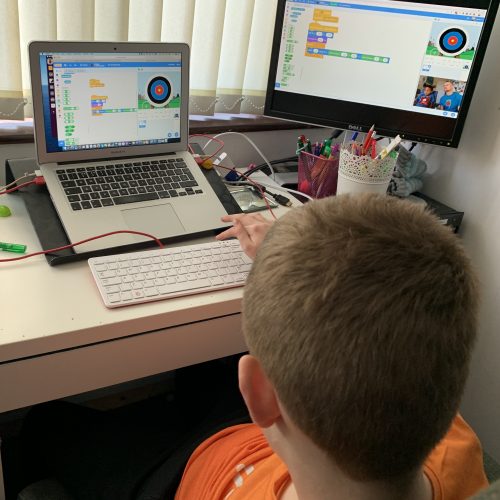
As your child gets older and becomes more used to using technology, and their eye-hand coordination improves, they might want to try out tools for visual programming. They can use free online programming platforms, such as ScratchJr on a tablet or phone or Scratch or Code Club World in a computer’s web browser. To learn more about these visual programming tools and what your child can create with them, read our blog post How do I start my child coding.

a sighted boy using Scratch on a laptop at home

Children can begin to explore Scratch or Code Club World from about the age of six, although it is important to understand that all young people develop at different speeds. We offer many free resources to help learners get started with visual, block-based programming languages, and the easiest places to start are our Introduction to Scratch path and the home island on Code Club World. Children and adults of all ages can learn a lot from Scratch, develop their own engaging activities, and most importantly, have fun doing so.

Text-based coding 

At around the ages of nine or ten, children’s typing skills are often sufficient for them to start using text-based languages. Again, it is important that they are allowed to have fun and express themselves, especially if they are moving on from Scratch. Our Introduction to Python path allows children to continue creating graphics while they program, as they are used to doing in Scratch; our Introduction to Web path will let them build their own simple websites to allow them to express their creative selves.

Two girls code at a laptop.
Picture: Conor McCabe Photography

There is no correct age to start learning

In my time at the Raspberry Pi Foundation, I have taught children as young as five and adults as old as seventy. There is no correct age at which a child can begin coding, and there are opportunities to begin at almost any age. The key to introducing coding to anyone is to make it engaging, relevant, and most of all fun!

The post At what age can a child start coding? appeared first on Raspberry Pi.

AWS Week in Review – November 7, 2022

Post Syndicated from Jeff Barr original https://aws.amazon.com/blogs/aws/aws-week-in-review-november-7-2022/

With three weeks to go until AWS re:Invent opens in Las Vegas, the AWS News Blog Team is hard at work creating blog posts to share the latest launches and previews with you. As usual, we have a strong mix of new services, new features, and a surprise or two.

Last Week’s Launches
Here are some launches that caught my eye last week:

Amazon SNS Data Protection and Masking – After a quick public preview, this cool feature is now generally available. It uses pattern matching, machine learning models, and content policies to help protect data at scale. You can find many different kinds of personally identifiable information (PII) and protected health information (PHI) in message bodies and either block message delivery or mask (de-identify) the sensitive data, all in real-time and on a per-topic basis. To learn more, read the blog post or the message data protection documentation.

Amazon Textract Updates – This service extracts text, handwriting, and data from any document or image. This past week we updated the AnalyzeID function so that it can now extract the machine readable zone (MRZ) on passports issued by the United States, and we added the entire OCR output to the API response. We also updated the machine learning models that power the AnalyzeDocument function, with a focus on single-character boxed forms commonly found on tax and immigration documents. Finally, we updated the AnalyzeExpense function with support for new fields and higher accuracy for existing fields, bringing the total field count to more than 40.

Another Amazon Braket Processor – Our quantum computing service now supports Aquila, a new 256-qubit quantum computer from QuEra that is based on a programmable array of neutral Rubidium atoms. According to the What’s New, Aquila supports the Analog Hamiltonian Simulation (AHS) paradigm, allowing it to solve for the static and dynamic properties of quantum systems composed of many interacting particles.

Amazon S3 on Outposts – This service now lets you use additional S3 Lifecycle rules to optimize capacity management. You can expire objects as they age or are replaced with newer versions, with control at the bucket level, or for subsets defined by prefixes, object tags, or object sizes. There’s more info in the What’s New and in the S3 documentation.

AWS CloudFormation – There were two big updates last week: support for Amazon RDS Multi-AZ deployments with two readable standbys, and better access to detailed information on failed stack instances for operations on CloudFormation StackSets.

Amazon MemoryDB for Redis – You can now use data tiering as a lower cost way to to scale your clusters up to hundreds of terabytes of capacity. This new option uses a combination of instance memory and SSD storage in each cluster node, with all data stored durably in a multi-AZ transaction log. There’s more information in the What’s New and the blog post.

Amazon EC2 – You can now remove launch permissions for Amazon Machine Images (AMIs) that are directly shared with your AWS account.

X in Y – We launched existing AWS services and instance types in additional Regions:

For a full list of AWS announcements, be sure to keep an eye on the What’s New at AWS page.

Other AWS News
Here are some additional news items that you may find interesting:

AWS Open Source News and Updates – My colleague Ricardo Sueiras highlights new open source projects, tools, and demos from the AWS Community. Read Installment 134 to see what’s going on!

New Case Study – A new AWS case study describes how Taggle (a company focused on smart water solutions in Australia) created an IoT platform that runs on AWS and uses Amazon Kinesis Data Streams to store & ingest data in real time. Using AWS allowed them to scale to accommodate 80,000 additional sensors that will roll out in 2022.

Upcoming AWS Events
re:Invent 2022AWS re:Invent is just three weeks away! Join us live from November 28th to December 2nd for keynotes, training and certification opportunities, and over 1,500 technical sessions. If you cannot make it to Las Vegas you can also join us online to watch the keynotes and leadership sessions live. Be sure to check out the re:Invent 2022 Attendee Guides, each curated by an AWS Hero, AWS industry team, or AWS partner.

PeerTalk – If you will be attending re:Invent in person and are interested in meeting with me or any of our featured experts, be sure to check out PeerTalk, our new onsite networking program.

That’s all for this week!

Jeff;

This post is part of our Week in Review series. Check back each week for a quick roundup of interesting news and announcements from AWS.

Querying a Decade of Drive Stats Data

Post Syndicated from Pat Patterson original https://www.backblaze.com/blog/querying-a-decade-of-drive-stats-data/

Last week, we published Backblaze Drive Stats for Q3 2022, sharing the metrics we’ve gathered on our fleet of over 230,000 hard drives. In this blog post, I’ll explain how we’re now using the Trino open source SQL query engine in ensuring the integrity of Drive Stats data, and how we plan to use Trino in future to generate the Drive Stats result set for publication.

Converting Zipped CSV Files into Parquet

In his blog post Storing and Querying Analytical Data in Backblaze B2, my colleague Greg Hamer explained how we started using Trino to analyze Drive Stats data earlier this year. We quickly discovered that formatting the data set as Apache Parquet minimized the amount of data that Trino needed to download from Backblaze B2 Cloud Storage to process queries, resulting in a dramatic improvement in query performance over the original CSV-formatted data.

As Greg mentioned in the earlier post, Drive Stats data is published quarterly to Backblaze B2 as a single .zip file containing a CSV file for each day of the quarter. Each CSV file contains a record for each drive that was operational on that day (see this list of the fields in each record).

When Greg and I started working with the Parquet-formatted Drive Stats data, we took a simple, but somewhat inefficient, approach to converting the data from zipped CSV to Parquet:

  • Download the existing zip files to local storage.
  • Unzip them.
  • Run a Python script to read the CSV files and write Parquet-formatted data back to local storage.
  • Upload the Parquet files to Backblaze B2.

We were keen to automate this process, so we reworked the script to use the Python ZipFile module to read the zipped CSV data directly from its Backblaze B2 Bucket and write Parquet back to another bucket. We’ve shared the script in this GitHub gist.

After running the script, the drivestats table now contains data up until the end of Q3 2022:

trino:ds> SELECT DISTINCT year, month, day 
FROM drivestats ORDER BY year DESC, month DESC, day DESC LIMIT 1;
year | month | day 
------+-------+-----
 2022 |     9 |  30 
(1 row)

In the last article, we were working with data running until the end of Q1 2022. On March 31, 2022, the Drive Stats dataset comprised 296 million records, and there were 211,732 drives in operation. Let’s see what the current situation is:

trino:ds> SELECT COUNT(*) FROM drivestats;
   _col0 
-----------
 346006813 
(1 row) 

trino:ds> SELECT COUNT(*) FROM drivestats 
    WHERE year = 2022 AND month = 9 AND day = 30;
   _col0 
--------
 230897 
(1 row)

So, since the end of March, we’ve added 50 million rows to the dataset, and Backblaze is now spinning nearly 231,000 drives—over 19,000 more than at the end of March 2022. Put another way, we’ve added more than 100 drives per day to the Backblaze Cloud Storage Platform in the past six months. Finally, how many exabytes of raw data storage does Backblaze now manage?

trino:ds> SELECT ROUND(SUM(CAST(capacity_bytes AS bigint))/1e+18, 2)
FROM drivestats WHERE year = 2022 AND month = 9 AND day = 30;
 _col0 
-------
  2.62 
(1 row)

Will we cross the three exabyte mark this year? Stay tuned to find out.

Ensuring the Integrity of Drive Stats Data

As Andy Klein, the Drive Stats supremo, collates each quarter’s data, he looks for instances of healthy drives being removed and then returned to service. This can happen for a variety of operational reasons, but it shows up in the data as the drive having failed, then later revived. This subset of data shows the phenomenon:

trino:ds> SELECT year, month, day, failure FROM drivestats WHERE 
serial_number = 'ZHZ4VLNV' AND year >= 2021 ORDER BY year, month, 
day;
 year | month | day | failure 
------+-------+-----+---------
...
 2021 |    12 |  26 |       0 
 2021 |    12 |  27 |       0 
 2021 |    12 |  28 |       0 
 2021 |    12 |  29 |       1 
 2022 |     1 |   3 |       0 
 2022 |     1 |   4 |       0 
 2022 |     1 |   5 |       0 
...

This drive appears to have failed on Dec 29, 2021, but was returned to service on Jan 3, 2022.

Since these spurious “failures” would skew the reliability statistics, Andy searches for and removes them from each quarter’s data. However, even Andy can’t see into the future, so, when a drive is taken offline at the end of one quarter and then returned to service in the next quarter, as in the above case, there is a bit of a manual process to find anomalies and clean up past data.

With the entire dataset in a single location, we can now write a SQL query to find drives that were removed, then returned to service, no matter when it occurred. Let’s build that query up in stages.

We start by finding the serial numbers and failure dates for each drive failure:

trino:ds> SELECT serial_number, DATE(FORMAT('%04d-%02d-%02d', year, 
month, day)) AS date 
FROM drivestats 
WHERE failure = 1;
  serial_number  |    date    
-----------------+------------
 ZHZ3KMX4        | 2021-04-01 
 ZA12RBBM        | 2021-04-01 
 S300Z52X        | 2017-03-01 
 Z3051FWK        | 2017-03-01 
 Z304JQAE        | 2017-03-02 
...
(17092 rows)

Now we find the most recent record for each drive:

trino:ds> SELECT serial_number, MAX(DATE(FORMAT('%04d-%02d-%02d', 
year, month, day))) AS date
    FROM drivestats 
    GROUP BY serial_number;
  serial_number   |    date    
------------------+------------
 ZHZ65F2W         | 2022-09-30 
 ZLW0GQ82         | 2022-09-30 
 ZLW0GQ86         | 2022-09-30 
 Z8A0A057F97G     | 2022-09-30 
 ZHZ62XAR         | 2022-09-30 
...
(329908 rows)

We then join the two result sets to find spurious failures; that is, failures where the drive was later returned to service. Note the join condition—we select records whose serial numbers match and where the most recent record is later than the failure:

trino:ds> SELECT f.serial_number, f.failure_date
FROM (
    SELECT serial_number, DATE(FORMAT('%04d-%02d-%02d', year, month, 
day)) AS failure_date
    FROM drivestats 
    WHERE failure = 1
) AS f
INNER JOIN (
    SELECT serial_number, MAX(DATE(FORMAT('%04d-%02d-%02d', year, 
month, day))) AS last_date
    FROM drivestats 
    GROUP BY serial_number
) AS l
ON f.serial_number = l.serial_number AND l.last_date > f.failure_date;
  serial_number  | failure_date 
-----------------+--------------
 2003261ED34D    | 2022-06-09 
 W300STQ5        | 2022-06-11 
 ZHZ61JMQ        | 2022-06-17 
 ZHZ4VL2P        | 2022-06-21 
 WD-WX31A2464044 | 2015-06-23 
(864 rows)

As you can see, the current schema makes date comparisons a little awkward, pointing the way to optimizing the schema by adding a DATE-typed column to the existing year, month, and day. This kind of denormalization is common in analytical data.

Calculating the Quarterly Failure Rates

In calculating failure rates per drive model for each quarter, Andy loads the quarter’s data into MySQL and defines a set of views. We additionally define the current_quarter view to restrict the failure rate calculation to data in July, August, and September 2022:

CREATE VIEW current_quarter AS 
    SELECT * FROM drivestats
    WHERE year = 2022 AND month in (7, 8, 9);

CREATE VIEW drive_days AS 
    SELECT model, COUNT(*) AS drive_days 
    FROM current_quarter
    GROUP BY model;

CREATE VIEW failures AS
    SELECT model, COUNT(*) AS failures
    FROM current_quarter
    WHERE failure = 1
    GROUP BY model
UNION
    SELECT DISTINCT(model), 0 AS failures
    FROM current_quarter
    WHERE model NOT IN
    (
        SELECT model
        FROM current_quarter
        WHERE failure = 1
        GROUP BY model
    );

CREATE VIEW failure_rates AS
    SELECT drive_days.model AS model,
           drive_days.drive_days AS drive_days,
           failures.failures AS failures, 
           100.0 * (1.0 * failures) / (drive_days / 365.0) AS 
annual_failure_rate
    FROM drive_days, failures
    WHERE drive_days.model = failures.model;

Running the above statements in Trino, then querying the failure_rates view, yields a superset of the data that we published in the Q3 2022 Drive Stats report. The difference is that this result set includes drives that Andy excludes from the Drive Stats report: SSD boot drives, drives that were used for testing purposes, and drive models which did not have at least 60 drives in service:

trino:ds> SELECT * FROM failure_rates ORDER BY model;
        model         | drive_days | failures | annual_failure_rate 
----------------------+------------+----------+---------------------
 CT250MX500SSD1       |      32171 |        2 |                2.27 
 DELLBOSS VD          |      33706 |        0 |                0.00 
 HGST HDS5C4040ALE630 |       2389 |        0 |                0.00 
 HGST HDS724040ALE640 |         92 |        0 |                0.00 
 HGST HMS5C4040ALE640 |     341509 |        3 |                0.32 
 ...
 WDC WD60EFRX         |        276 |        0 |                0.00 
 WDC WDS250G2B0A      |       3867 |        0 |                0.00 
 WDC WUH721414ALE6L4  |     765990 |        5 |                0.24 
 WDC WUH721816ALE6L0  |     242954 |        0 |                0.00 
 WDC WUH721816ALE6L4  |     308630 |        6 |                0.71 
(74 rows)

Query 20221102_010612_00022_qscbi, FINISHED, 1 node
Splits: 139 total, 139 done (100.00%)
8.63 [82.4M rows, 5.29MB] [9.54M rows/s, 628KB/s]

Optimizing the Drive Stats Production Process

Now that we have shown that we can derive the required statistics by querying the Parquet-formatted data with Trino, we can streamline the Drive Stats process. Starting with the Q4 2022 report, rather than wrangling each quarter’s data with a mixture of tools on his laptop, Andy will use Trino to both clean up the raw data and produce the Drive Stats result set for publication.

Accessing the Drive Stats Parquet Dataset

When Greg and I started experimenting with Trino, our starting point was Brian Olsen’s Trino Getting Started GitHub repository, in particular, the Hive connector over MinIO file storage tutorial. Since MinIO and Backblaze B2 both have S3-compatible APIs, it was easy to adapt the tutorial’s configuration to target the Drive Stats data in Backblaze B2, and Brian was kind enough to accept my contribution of a new tutorial showing how to use the Hive connector over Backblaze B2 Cloud Storage. This tutorial will get you started using Trino with data stored in Backblaze B2 Buckets, and includes a section on accessing the Drive Stats dataset.

You might be interested to know that Backblaze is sponsoring this year’s Trino Summit, taking place virtually and in person in San Francisco, on November 10. Registration is free; if you do attend, come say hi to Greg and me at the Backblaze booth and see Trino in action, querying data stored in Backblaze B2.

The post Querying a Decade of Drive Stats Data appeared first on Backblaze Blog | Cloud Storage & Cloud Backup.

[$] Better CPU selection for timer expiration

Post Syndicated from original https://lwn.net/Articles/913568/

On the surface, the kernel’s internal timer mechanism would not appear to
have changed much in a long time; the core API looks quite similar to the
one present in the 1.0 release. Underneath the API, naturally, quite a bit
of complexity has been added over the years. The implementation of this
API looks to become even more complex — but faster — if and when this
patch set
from Anna-Maria Behnsen finds its way into the mainline.

Deploying IBM Cloud Pak for integration on Red Hat OpenShift Service on AWS

Post Syndicated from Eduardo Monich Fronza original https://aws.amazon.com/blogs/architecture/deploying-ibm-cloud-pak-for-integration-on-red-hat-openshift-service-on-aws/

Customers across many industries use IBM integration software, such as IBM MQ, DataPower, API Connect, and App Connect, as the backbone that integrates and orchestrates their business-critical workloads.

These customers often tell Amazon Web Services (AWS), they want to migrate their applications to AWS Cloud, as part of their business strategy: to lower costs, gain agility, and innovate faster.

In this blog, we will explore how customers, who are looking at ways to run IBM software on AWS, can use Red Hat OpenShift Service on AWS (ROSA) to deploy IBM Cloud Pak for Integration (CP4I) with modernized versions of IBM integration products.

As ROSA is a fully managed OpenShift service that is jointly supported by AWS and Red Hat, plus managed by Red Hat site reliability engineers, customers benefit from not having to manage the lifecycle of Red Hat OpenShift Container Platform (OCP) clusters.

This post explains the steps to:

  • Create a ROSA cluster
  • Configure persistent storage
  • Install CP4I and the IBM MQ 9.3 operator

Cloud Pak for integration architecture

In this blog, we are implementing a highly available ROSA cluster with three Availability Zones (AZ), three master nodes, three infrastructure nodes, and three worker nodes.

Review the AWS documentation for Regions and AZs and the regions where ROSA is available to choose the best region for your deployment.

Figure 1 demonstrates the solution’s architecture.

IBM Cloud Pak for Integration on ROSA architecture

Figure 1. IBM Cloud Pak for Integration on ROSA architecture

In our scenario, we are building a public ROSA cluster, with an internet-facing Classic Load Balancer providing access to Ports 80 and 443. Consider using a ROSA private cluster when you are deploying CP4I in your AWS account.

We are using Amazon Elastic File System (Amazon EFS) and Amazon Elastic Block Store (Amazon EBS) for our cluster’s persistent storage. Review the IBM CP4I documentation for information about supported AWS storage options.

Review AWS prerequisites for ROSA and AWS Security best practices in IAM documentation, before deploying CP4I for production workloads, to protect your AWS account and resources.

Cost

You are responsible for the cost of the AWS services used when deploying CP4I in your AWS account. For cost estimates, see the pricing pages for each AWS service you use.

Prerequisites

Before getting started, review the following prerequisites:

Installation steps

To deploy CP4I on ROSA, complete the following steps:

  1. From the AWS ROSA console, click Enable ROSA to active the service on your AWS account (Figure 2).

    Enable ROSA on your AWS account

    Figure 2. Enable ROSA on your AWS account

  2. Create an AWS Cloud9 environment to run your CP4I installation. We used a t3.small instance type.
  3. When it comes up, close the Welcome tab and open a new Terminal tab to install the required packages:
    curl "https://awscli.amazonaws.com/awscli-exe-linux-x86_64.zip" -o "awscliv2.zip"
    unzip awscliv2.zip
    sudo ./aws/install
    wget https://mirror.openshift.com/pub/openshift-v4/clients/rosa/latest/rosa-linux.tar.gz
    sudo tar -xvzf rosa-linux.tar.gz -C /usr/local/bin/
    
    rosa download oc
    sudo tar -xvzf openshift-client-linux.tar.gz -C /usr/local/bin/
    
    sudo yum -y install jq gettext
  4. Ensure the ELB service-linked role exists in your AWS account:
    aws iam get-role --role-name 
    "AWSServiceRoleForElasticLoadBalancing" || aws iam create-service-linked-role --aws-service-name 
    "elasticloadbalancing.amazonaws.com"
  5. Create an IAM policy named cp4i-installer-permissions with the following permissions:
    {
        "Version": "2012-10-17",
        "Statement": [
            {
                "Effect": "Allow",
                "Action": [
                    "autoscaling:*",
                    "cloudformation:*",
                    "cloudwatch:*",
                    "ec2:*",
                    "elasticfilesystem:*",
                    "elasticloadbalancing:*",
                    "events:*",
                    "iam:*",
                    "kms:*",
                    "logs:*",
                    "route53:*",
                    "s3:*",
                    "servicequotas:GetRequestedServiceQuotaChange",
                    "servicequotas:GetServiceQuota",
                    "servicequotas:ListServices",
                    "servicequotas:ListServiceQuotas",
                    "servicequotas:RequestServiceQuotaIncrease",
                    "sts:*",
                    "support:*",
                    "tag:*"
                ],
                "Resource": "*"
            }
        ]
    }
  6. Create an IAM role:
    1. Select AWS service and EC2, then click Next: Permissions.
    2. Select the cp4i-installer-permissions policy, and click Next.
    3. Name it cp4i-installer, and click Create role.
  7. From your AWS Cloud9 IDE, click the grey circle button on the top right, and select Manage EC2 Instance (Figure 3).

    Manage the AWS Cloud9 EC2 instance

    Figure 3. Manage the AWS Cloud9 EC2 instance

  8. On the Amazon EC2 console, select the AWS Cloud9 instance, then choose Actions / Security / Modify IAM Role.
  9. Choose cp4i-installer from the IAM Role drop down, and click Update IAM role (Figure 4).

    Attach the IAM role to your workspace

    Figure 4. Attach the IAM role to your workspace

  10. Update the IAM settings for your AWS Cloud9 workspace:
    aws cloud9 update-environment --environment-id $C9_PID --managed-credentials-action DISABLE
    rm -vf ${HOME}/.aws/credentials
  11. Configure the following environment variables:
    export ACCOUNT_ID=$(aws sts get-caller-identity --output text --query Account)
    export AWS_REGION=$(curl -s 169.254.169.254/latest/dynamic/instance-identity/document | jq -r '.region')
    export ROSA_CLUSTER_NAME=cp4iblog01
  12. Configure the aws cli default region:
    aws configure set default.region ${AWS_REGION}
  13. Navigate to the Red Hat Hybrid Cloud Console, and copy your OpenShift Cluster Manager API Token.
  14. Use the token and log in to your Red Hat account:
    rosa login --token=<your_openshift_api_token>
  15. Verify that your AWS account satisfies the quotas to deploy your cluster:
    rosa verify quota
  16. When deploying ROSA for the first time, create the account-wide roles:
    rosa create account-roles --mode auto --yes
  17. Create your ROSA cluster:
    rosa create cluster --cluster-name $ROSA_CLUSTER_NAME --sts \
      --multi-az \
      --region $AWS_REGION \
      --version 4.10.35 \
      --compute-machine-type m5.4xlarge \
      --compute-nodes 3 \
      --operator-roles-prefix cp4irosa \
      --mode auto --yes \
      --watch
  18. Once your cluster is ready, create a cluster-admin user (it takes approximately 5 minutes):
    rosa create admin --cluster=$ROSA_CLUSTER_NAME
  19. Log in to your cluster using the cluster-admin credentials. You can copy the command from the output of the previous step. For example:
    oc login https://<your_cluster_api_address>:6443 \
      --username cluster-admin \
      --password <your_cluster-admin_password>
  20. Create an IAM policy allowing ROSA to use Amazon EFS:
    cat <<EOF > $PWD/efs-policy.json
    {
      "Version": "2012-10-17",
      "Statement": [
     {
       "Effect": "Allow",
       "Action": [
         "elasticfilesystem:DescribeAccessPoints",
         "elasticfilesystem:DescribeFileSystems"
       ],
       "Resource": "*"
     },
     {
       "Effect": "Allow",
       "Action": [
         "elasticfilesystem:CreateAccessPoint"
       ],
       "Resource": "*",
       "Condition": {
         "StringLike": {
           "aws:RequestTag/efs.csi.aws.com/cluster": "true"
         }
       }
     },
     {
       "Effect": "Allow",
       "Action": "elasticfilesystem:DeleteAccessPoint",
       "Resource": "*",
       "Condition": {
         "StringEquals": {
           "aws:ResourceTag/efs.csi.aws.com/cluster": "true"
         }
       }
     }
      ]
    }
    EOF
    POLICY=$(aws iam create-policy --policy-name "${ROSA_CLUSTER_NAME}-cp4i-efs-csi" --policy-document file://$PWD/efs-policy.json --query 'Policy.Arn' --output text) || POLICY=$(aws iam list-policies --query 'Policies[?PolicyName==`cp4i-efs-csi`].Arn' --output text)
  21. Create an IAM trust policy:
    export OIDC_PROVIDER=$(oc get authentication.config.openshift.io cluster -o json | jq -r .spec.serviceAccountIssuer| sed -e "s/^https:\/\///")
    cat <<EOF > $PWD/TrustPolicy.json
    {
      "Version": "2012-10-17",
      "Statement": [
     {
       "Effect": "Allow",
       "Principal": {
         "Federated": "arn:aws:iam::${ACCOUNT_ID}:oidc-provider/${OIDC_PROVIDER}"
       },
       "Action": "sts:AssumeRoleWithWebIdentity",
       "Condition": {
         "StringEquals": {
           "${OIDC_PROVIDER}:sub": [
             "system:serviceaccount:openshift-cluster-csi-drivers:aws-efs-csi-driver-operator",
             "system:serviceaccount:openshift-cluster-csi-drivers:aws-efs-csi-driver-controller-sa"
           ]
         }
       }
     }
      ]
    }
    EOF
  22. Create an IAM role with the previously created policies:
    ROLE=$(aws iam create-role \
      --role-name "${ROSA_CLUSTER_NAME}-aws-efs-csi-operator" \
      --assume-role-policy-document file://$PWD/TrustPolicy.json \
      --query "Role.Arn" --output text)
    aws iam attach-role-policy \
      --role-name "${ROSA_CLUSTER_NAME}-aws-efs-csi-operator" \
      --policy-arn $POLICY
  23. Create an OpenShift secret to store the AWS access keys:
    cat <<EOF | oc apply -f -
    apiVersion: v1
    kind: Secret
    metadata:
      name: aws-efs-cloud-credentials
      namespace: openshift-cluster-csi-drivers
    stringData:
      credentials: |-
        [default]
        role_arn = $ROLE
        web_identity_token_file = /var/run/secrets/openshift/serviceaccount/token
    EOF
  24. Install the Amazon EFS CSI driver operator:
    cat <<EOF | oc create -f -
    apiVersion: operators.coreos.com/v1
    kind: OperatorGroup
    metadata:
      generateName: openshift-cluster-csi-drivers-
      namespace: openshift-cluster-csi-drivers
    ---
    apiVersion: operators.coreos.com/v1alpha1
    kind: Subscription
    metadata:
      labels:
        operators.coreos.com/aws-efs-csi-driver-operator.openshift-cluster-csi-drivers: ""
      name: aws-efs-csi-driver-operator
      namespace: openshift-cluster-csi-drivers
    spec:
      channel: stable
      installPlanApproval: Automatic
      name: aws-efs-csi-driver-operator
      source: redhat-operators
      sourceNamespace: openshift-marketplace
    EOF
  25. Track the operator installation:
    watch oc get deployment aws-efs-csi-driver-operator \
     -n openshift-cluster-csi-drivers
  26. Install the AWS EFS CSI driver:
    cat <<EOF | oc apply -f -
    apiVersion: operator.openshift.io/v1
    kind: ClusterCSIDriver
    metadata:
      name: efs.csi.aws.com
    spec:
      managementState: Managed
    EOF
  27. Wait until the CSI driver is running:
    watch oc get daemonset aws-efs-csi-driver-node \
     -n openshift-cluster-csi-drivers
  28. Create a rule allowing inbound NFS traffic from your cluster’s VPC Classless Inter-Domain Routing (CIDR):
    NODE=$(oc get nodes --selector=node-role.kubernetes.io/worker -o jsonpath='{.items[0].metadata.name}')
    VPC_ID=$(aws ec2 describe-instances --filters "Name=private-dns-name,Values=$NODE" --query 'Reservations[*].Instances[*].{VpcId:VpcId}' | jq -r '.[0][0].VpcId')
    CIDR=$(aws ec2 describe-vpcs --filters "Name=vpc-id,Values=$VPC_ID" --query 'Vpcs[*].CidrBlock' | jq -r '.[0]')
    SG=$(aws ec2 describe-instances --filters "Name=private-dns-name,Values=$NODE" --query 'Reservations[*].Instances[*].{SecurityGroups:SecurityGroups}' | jq -r '.[0][0].SecurityGroups[0].GroupId')
    aws ec2 authorize-security-group-ingress \
      --group-id $SG \
      --protocol tcp \
      --port 2049 \
      --cidr $CIDR | jq .
  29. Create an Amazon EFS file system:
    EFS_FS_ID=$(aws efs create-file-system --performance-mode generalPurpose --encrypted --region ${AWS_REGION} --tags Key=Name,Value=ibm_cp4i_fs | jq -r '.FileSystemId')
    SUBNETS=($(aws ec2 describe-subnets --filters "Name=vpc-id,Values=${VPC_ID}" "Name=tag:Name,Values=*${ROSA_CLUSTER_NAME}*private*" | jq --raw-output '.Subnets[].SubnetId'))
    for subnet in ${SUBNETS[@]}; do
      aws efs create-mount-target \
        --file-system-id $EFS_FS_ID \
        --subnet-id $subnet \
        --security-groups $SG
    done
  30. Create an Amazon EFS storage class:
    cat <<EOF | oc apply -f -
    kind: StorageClass
    apiVersion: storage.k8s.io/v1
    metadata:
      name: efs-sc
    provisioner: efs.csi.aws.com
    parameters:
      provisioningMode: efs-ap
      fileSystemId: $EFS_FS_ID
      directoryPerms: "750"
      gidRangeStart: "1000"
      gidRangeEnd: "2000"
      basePath: "/ibm_cp4i_rosa_fs"
    EOF
  31. Add the IBM catalog sources to OpenShift:
    cat <<EOF | oc apply -f -
    apiVersion: operators.coreos.com/v1alpha1
    kind: CatalogSource
    metadata:
      name: ibm-operator-catalog
      namespace: openshift-marketplace
    spec:
      displayName: IBM Operator Catalog
      image: 'icr.io/cpopen/ibm-operator-catalog:latest'
      publisher: IBM
      sourceType: grpc
      updateStrategy:
        registryPoll:
          interval: 45m
    EOF
  32. Get the console URL of your ROSA cluster:
    rosa describe cluster --cluster=$ROSA_CLUSTER_NAME | grep Console
  33. Copy your entitlement key from the IBM container software library.
  34. Log in to your ROSA web console, navigate to Workloads > Secrets.
  35. Set the project to openshift-config; locate and click pull-secret (Figure 5).

    Edit the pull-secret entry

    Figure 5. Edit the pull-secret entry

  36. Expand Actions and click Edit Secret.
  37. Scroll to the end of the page, and click Add credentials (Figure 6):
    1. Registry server address: cp.icr.io
    2. Username field: cp
    3. Password: your_ibm_entitlement_key

      Configure your IBM entitlement key secret

      Figure 6. Configure your IBM entitlement key secret


  38. Next, navigate to Operators > OperatorHub. On the OperatorHub page, use the search filter to locate the tile for the operators you plan to install: IBM Cloud Pak for Integration and IBM MQ. Keep all values as default for both installations (Figure 7). For example, IBM Cloud Pak for Integration:

    Figure 7. Install CP4I operators

    Figure 7. Install CP4I operators

  39. Create a namespace for each CP4I workload that will be deployed. In this blog, we’ve created for the platform UI and IBM MQ:
    oc new-project integration
    oc new-project ibm-mq
  40. Review the IBM documentation to select the appropriate license for your deployment.
  41. Deploy the platform UI:
    cat <<EOF | oc apply -f -
    apiVersion: integration.ibm.com/v1beta1
    kind: PlatformNavigator
    metadata:
      name: integration-quickstart
      namespace: integration
    spec:
      license:
        accept: true
        license: L-RJON-CD3JKX
      mqDashboard: true
      replicas: 3  # Number of replica pods, 1 by default, 3 for HA
      storage:
        class: efs-sc
      version: 2022.2.1
    EOF
  42. Track the deployment status, which takes approximately 40 minutes:
    watch oc get platformnavigator -n integration
  43. Create an IBM MQ queue manager instance:
    cat <<EOF | oc apply -f -
    apiVersion: mq.ibm.com/v1beta1
    kind: QueueManager
    metadata:
      name: qmgr-inst01
      namespace: ibm-mq
    spec:
      license:
        accept: true
        license: L-RJON-CD3JKX
        use: NonProduction
      web:
        enabled: true
      template:
        pod:
          containers:
            - env:
                - name: MQSNOAUT
                  value: 'yes'
              name: qmgr
      queueManager:
        resources:
          limits:
            cpu: 500m
          requests:
            cpu: 500m
        availability:
          type: SingleInstance
        storage:
          queueManager:
            type: persistent-claim
            class: gp3
            deleteClaim: true
            size: 2Gi
          defaultClass: gp3
        name: CP4IQMGR
      version: 9.3.0.1-r1
    EOF
  44. Check the status of the queue manager:
    oc describe queuemanager qmgr-inst01 -n ibm-mq

Validation steps

Let’s verify our installation!

  1. Run the commands to retrieve the CP4I URL and administrator password:
    oc describe platformnavigator integration-quickstart \
      -n integration | grep "^.*UI Endpoint" | xargs | cut -d ' ' -f3
    oc get secret platform-auth-idp-credentials \
      -n ibm-common-services -o jsonpath='{.data.admin_password}' \
      | base64 -d && echo
  2. Using the information from the previous step, access your CP4I web console.
  3. Select the option to authenticate with the IBM provided credentials (admin only) to login with your admin password.
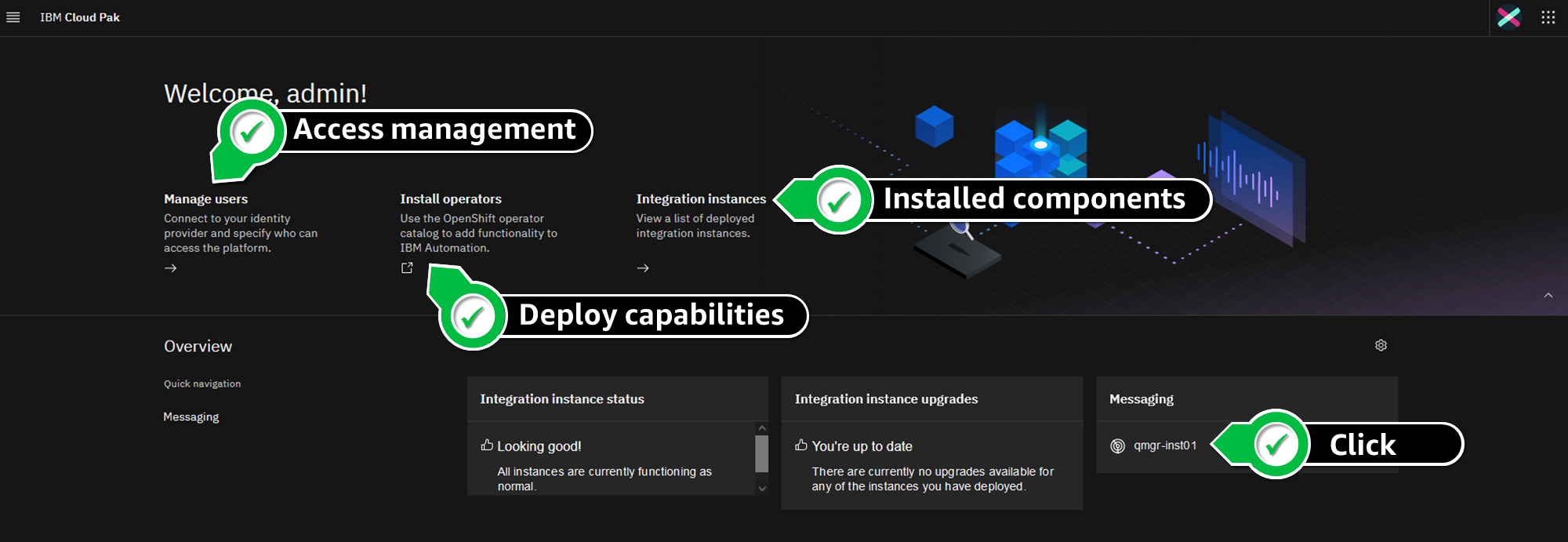
  4. From the CP4I console, you can manage users and groups allowed to access the platform, install new operators, and view the components that are installed.
  5. Click qmgr-inst01 in the Messaging widget to bring up your IBM MQ setup (Figure 8).

    CP4I console features

    Figure 8. CP4I console features

  6. In the Welcome to IBM MQ panel, click the CP4IQMGR queue manager. This shows the state, resources, and allows you to configure your instances (Figure 9).

    Queue manager details

    Figure 9. Queue manager details

Congratulations! You have successfully deployed IBM CP4I on Red Hat OpenShift on AWS.

Post installation

Review the following topics, when you are installing CP4I on production environments:

Cleanup

Connect to your Cloud9 workspace, and run the following steps to delete the CP4I installation, including ROSA. This avoids incurring future charges on your AWS account:

EFS_EF_ID=$(aws efs describe-file-systems \
  --query 'FileSystems[?Name==`ibm_cp4i_fs`].FileSystemId' \
  --output text)
MOUNT_TARGETS=$(aws efs describe-mount-targets --file-system-id $EFS_EF_ID --query 'MountTargets[*].MountTargetId' --output text)
for mt in ${MOUNT_TARGETS[@]}; do
  aws efs delete-mount-target --mount-target-id $mt
done
aws efs delete-file-system --file-system-id $EFS_EF_ID

rosa delete cluster -c $ROSA_CLUSTER_NAME --yes --region $AWS_REGION

Monitor your cluster uninstallation logs, run:

rosa logs uninstall -c $ROSA_CLUSTER_NAME --watch

Once the cluster is uninstalled, remove the operator-roles and oidc-provider, as informed in the output of the rosa delete command. For example:

rosa delete operator-roles -c 1vepskr2ms88ki76k870uflun2tjpvfs --mode auto –yes
rosa delete oidc-provider -c 1vepskr2ms88ki76k870uflun2tjpvfs --mode auto --yes

Conclusion

This post explored how to deploy CP4I on AWS ROSA. We also demonstrated how customers can take full advantage of managed OpenShift service, focusing on further modernizing application stacks by using AWS managed services (like ROSA) for their application deployments.

If you are interested in learning more about ROSA, take part in the AWS ROSA Immersion Workshop.

Check out the blog on Running IBM MQ on AWS using High-performance Amazon FSx for NetApp ONTAP to learn how to use Amazon FSx for NetApp ONTAP for distributed storage and high availability with IBM MQ.

For more information and getting started with IBM Cloud Pak deployments, visit the AWS Marketplace for new offerings.

Further reading

Security updates for Monday

Post Syndicated from original https://lwn.net/Articles/914012/

Security updates have been issued by Debian (ffmpeg, libxml2, python-django, python-scciclient, and xen), Fedora (ghc-cmark-gfm, java-latest-openjdk, and vim), Mageia (expat, ntfs-3g, and wkhtmltopdf), Oracle (kernel), Slackware (sudo), and SUSE (expat, libxml2, rubygem-loofah, and xmlbeans).

Server-side rendering micro-frontends – the architecture

Post Syndicated from James Beswick original https://aws.amazon.com/blogs/compute/server-side-rendering-micro-frontends-the-architecture/

This post is written by Luca Mezzalira, Principal Specialist Solutions Architect, Serverless.

Microservices are a common pattern for building distributed systems. As frontend developers have modified their approaches to build architectures at scale, many are building micro-frontends.

This blog series explores how to implement micro-frontends using a server-side rendering (SSR) approach with AWS services. This first article covers the architecture characteristics and building blocks for designing a successful micro-frontends architecture in the AWS Cloud.

What are micro-frontends?

Micro-frontends are the technical representation of a business subdomain. They allow independent teams to work in parallel, reducing external dependencies and increasing delivery throughput. They embody several microservices characteristics such as governance decentralization, design for failure, and evolutionary design.

The main difference between micro-frontends and components is related to the domain ownership present inside a micro-frontend. With components, the domain knowledge is usually delegated to its container, which knows how to use the component’s property based on the context. Owning the domain inside a micro-frontend enables the independence that you expect in a distributed system. This doesn’t mean that micro-frontends cannot communicate or share resources, but the mindset is different compared with components.

If you are using microservices today, you may benefit from micro-frontends for scaling your frontend applications. Before micro-frontends, scaling was based primarily on developers’ expertise. Micro-frontends allow you to modernize frontend applications iteratively like you would with microservices. Every user downloads only the code needed for accomplishing a specific task, increasing the performance and users experience of a web application.

Architecture characteristics

This blog series builds a product details page of an example ecommerce website using micro-frontends with serverless infrastructure.

Page layout

The page is composed of:

  • A template that includes a header. This could include more common parts but uses one in this example.
  • A notifications micro-frontend that is client-side rendered. The notifications system must react to user interactions, so cannot be server-side rendered with the rest of the page.
  • A product details micro-frontend.
  • A reviews micro-frontend.

Every micro-frontend is independent and can be developed by different teams working on the same project. This can reduce external dependencies and potential bugs across the entire application.

The key system characteristics of this project are:

  1. Server-side rendering: The system must be designed with a server-side rendering approach. This provides fast rendering of the page inside modern browsers and reduces the need of client-side JavaScript for rendering the page.
  2. Framework agnostic: The solution must work with a broad variety of JavaScript libraries available and not be bound or optimized to a specific framework.
  3. Use optimizations best practices: Optimization is a key feature for server-side rendering applications. Many industries rely on these characteristics for increasing sales. This example encapsulates core web vitals metrics, progressive hydration, and different levels of caches to speed up the response times of the webpages.
  4. Team independence: Every micro-frontend must be developed with minimum external dependencies. Constant coordination across teams can be a sign of design-time coupling that invalidates the purpose behind a distributed system.
  5. Serverless infrastructure for frontend developers: The serverless paradigm helps developers focus on the business logic instead of infrastructure, using a “pay for value” model, which helps to reduce costs. You can cache micro-frontend responses and reduce the traffic on the origin and the need to scale every part of the system in the same way.

High-level architecture design

This is the high-level design to incorporate these architectural characteristics:

Architectural overview

  1. The application entry point is a content delivery network (CDN) that is used for caching, performance, and security reasons.
  2. The server-side rendering approach requires a place to store all the static files to hydrate the JavaScript code in the browser and for styling components.
  3. Pages requests require a UI composer that retrieves the micro-frontends and stitches them together to provide the page consumed by a browser. It streams the final HTML page to the browser to enhance the largest contentful paint (LCP) metric from the core web vitals.
  4. Decouple micro-frontends from the UI composer relies on two mechanisms: A micro-frontends discovery that acts like a service discovery in a microservice architecture, and an HTML template per page that describes where to inject the micro-frontends inside a page. The templates can live in the same repository where the other static files are present.
  5. The notification micro-frontend reacts to user interactions, providing a notification when a user adds a product in the cart.
  6. The product details micro-frontend has highly cacheable data that doesn’t require many changes over time.
  7. The reviews micro-frontend must retrieve user reviews of a specific product.

The key element for avoiding design-time coupling in this architecture is the micro-frontends discovery. The main advantages of this approach are to provide discoverability to simplify multi-environments strategies, and also to reduce the blast radius thanks to using blue/green deployments or canary releases. This topic will be covered in depth in an upcoming post.

From high-level design into implementation

The framework-agnostic approach helps to enable control over system evolution. It achieves this by using HTML-over-the-wire, where every micro-frontend renders an HTML fragment and returns it to the UI composer.

When the UI composer gathers the HTML fragments, it composes the final page to render using transclusion. Every page is represented by a specific template hosted in static files. The UI composer retrieves the template and then retrieves placeholder references in the template that can be replaced with the micro-frontend fragments.

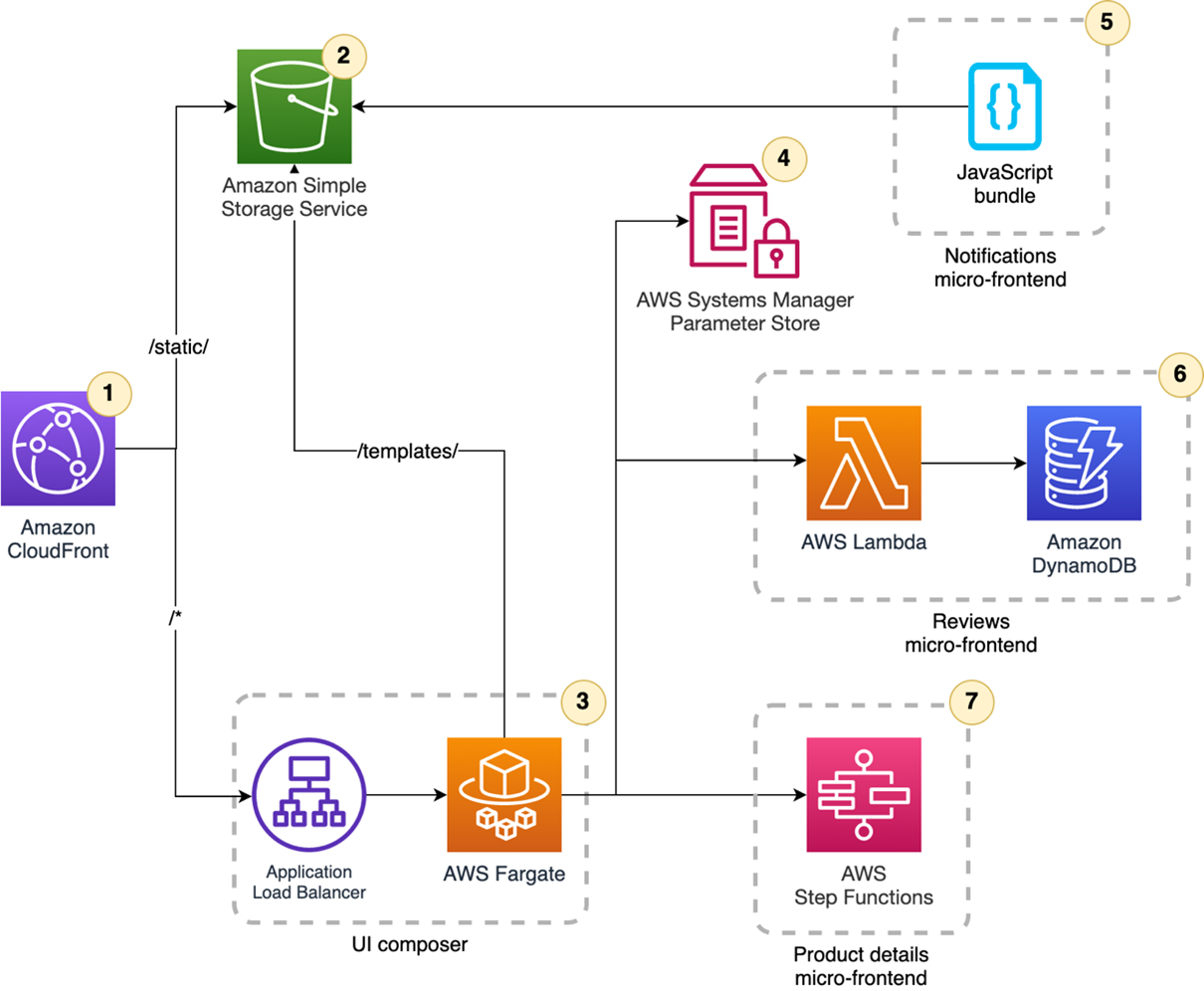
This is the architecture used:

Architecture diagram

  1. Amazon CloudFront provides a unique entry point to the application. The distribution has two origins: the first for static files and the second for the UI composer.
  2. Static files are hosted in an Amazon S3 bucket. They are consumed by the browser and the UI composer for HTML templates.
  3. The UI composer runs on a containers cluster in AWS Fargate. Using a containerized solution allows you to use streaming capabilities and multithreading rendering if needed.
  4. AWS Systems Manager Parameter Store is used as a basic micro-frontends discovery system. This service is a key-value store used by the UI composer for retrieving the micro-frontends endpoints to consume.
  5. The notifications micro-frontend stores the optimized JavaScript bundle in the S3 bucket. This renders on the client since it must react to user interactions.
  6. The reviews micro-frontend is composed by an AWS Lambda function with the user reviews stored in Amazon DynamoDB. It’s rendered fully server-side and it outputs an HTML fragment.
  7. The product details micro-frontend is a low-code micro-frontend using AWS Step Functions. The Express Workflow can be invoked synchronously and contains the logic for rendering the HTML fragment and a caching layer. This increases performance due to the native integration with over 200 AWS services.

Using this approach, every team developing a micro-frontend is independent to build and evolve their business domain. The main touchpoints with other teams are related to the initial integrations and the communication mechanism between micro-frontends present in the same page. When these points are achieved, every team reduces external dependencies and can embrace the evolutionary nature of micro-frontends.

Conclusion

This first post starts the journey into micro-frontends, a distributed architecture for frontend applications. The next post will explore the UI composer and micro-frontends discovery implementations.

If you are interested in learning more about micro-frontends, see the micro-frontends decisions framework, a mental model created for the initial complexity of approaching micro-frontends design. When used as a north star, the decisions framework simplifies the development of micro-frontends applications.

In the AWS reference architectures section, you can find a complete diagram similar to the application described in this blog series with additional details.

For more serverless learning resources, visit Serverless Land.

The collective thoughts of the interwebz