Post Syndicated from Explosm.net original https://explosm.net/comics/30991
New Cyanide and Happiness Comic
Post Syndicated from Explosm.net original https://explosm.net/comics/30991
New Cyanide and Happiness Comic
Post Syndicated from Julien Pivotto (@roidelapluie) original https://prometheus.io/blog/2023/03/21/stringlabel/
Prometheus 2.43 has just been released, and it brings some exciting features and
enhancements. One of the significant improvements is the stringlabels release,
which uses a new data structure for labels. This blog post will answer some
frequently asked questions about the 2.43 release and the stringlabels
optimizations.
stringlabels release?The stringlabels release is a Prometheus 2.43 version that uses a new data
structure for labels. It stores all the label/values in a single string,
resulting in a smaller heap size and some speedups in most cases. These
optimizations are not shipped in the default binaries and require compiling
Prometheus using the Go tag stringlabels.
We considered using a feature flag but it would have a memory overhead that was
not worth it. Therefore, we decided to provide a separate release with these
optimizations for those who are interested in testing and measuring the gains on
their production environment.
These optimizations will be available in the upcoming Prometheus 2.44 release
by default.
The Prometheus 2.43 release is available on the official Prometheus GitHub
releases page, and users can download the binary files directly from there.
Additionally, Docker images are also available for those who prefer to use
containers.
The stringlabels optimization is not included in these default binaries. To use
this optimization, users will need to download the 2.43.0+stringlabels
release
binary or the Docker images tagged
v2.43.0-stringlabels specifically.
v2.43.0+stringlabels and the Docker tag v2.43.0-stringlabels?In semantic versioning, the plus sign (+) is used to denote build
metadata. Therefore, the Prometheus 2.43 release with the stringlabels
optimization is named 2.43.0+stringlabels to signify that it includes the
experimental stringlabels feature. However, Docker tags do not allow the use of
the plus sign in their names. Hence, the plus sign has been replaced with a dash
(-) to make the Docker tag v2.43.0-stringlabels. This allows the Docker tag to
pass the semantic versioning checks of downstream projects such as the
Prometheus Operator.
Apart from the stringlabels optimizations, the Prometheus 2.43 release
brings several new features and enhancements. Some of the significant additions
include:
include_scrape_configs to include scrape configs fromno_proxy to excludeproxy_from_environment to read proxies fromYou can learn more about features and bugfixes in the
full changelog.
Post Syndicated from Crosstalk Solutions original https://www.youtube.com/watch?v=-7I_XjF4EvQ
Post Syndicated from original https://lwn.net/Articles/926676/
Version 9.2 of the GNU coreutils collection — the home of common tools like
cp, mv, ls, rm, and more — is out. The
changes are mostly minor; numerous bugs have been fixes and a few new
command-line options have been added.
Post Syndicated from Mahesh Pasupuleti original https://aws.amazon.com/blogs/big-data/accelerating-revenue-growth-with-real-time-analytics-poshmarks-journey/
This post was co-written by Mahesh Pasupuleti and Gaurav Shah from Poshmark.
Poshmark is a leading social marketplace for new and secondhand styles for women, men, kids, pets, home, and more. By combining the human connection of physical shopping with the scale, ease, and selection benefits of Ecommerce, Poshmark makes buying and selling simple, social, and sustainable. Its community of more than 80 million registered users across the US, Canada, Australia, and India is driving a more sustainable future for the fashion industry.
An important goal to achieve for any organization is to grow the top line revenue. Top line revenue refers to the total value of sales of an organization’s services or products. The two main approaches organizations employ to increase revenue are to expand geographically to enter new markets and to increase market share within a market by improving customer experience (CX).
Improving CX is a well-known guideline to attract and retain customers and thereby increase the market share. In this post, we share how Poshmark improved CX and accelerated revenue growth by using a real-time analytics solution. We discuss how to create such a solution using Amazon Kinesis Data Streams, Amazon Managed Streaming for Kafka (Amazon MSK), Amazon Kinesis Data Analytics for Apache Flink; the design decisions that went into the architecture; and the observed business benefits by Poshmark.
Previous efforts at Poshmark for improving CX through analytics were based on batch processing of analytics data and using it on a daily basis to improve CX. Although these batch analytics-based efforts were successful to some extent, they saw opportunities to improve the customer experience with real-time personalization and security guidance during the customer’s interaction with the Poshmark app. The customer insights gathered from the batch analytics couldn’t be paired with the current customer activities in real time due to the latencies involved in enriching the current activities with the knowledge gained through batch processes. Therefore, the opportunity to provide tailored offers or showcase products based on customers’ preference and behaviors in near-real time, which contributes to a much better customer experience, was missing. Similarly, the opportunity to catch fraud within a second, before checkout, was also missing.
To improve the customer experience, Poshmark decided to invest in building a real-time analytics platform to enable real-time capabilities, as explained further in this post. Poshmark engineers worked closely with AWS architects through the AWS Data Lab program. The AWS Data Lab offers accelerated, joint engineering engagements between customers and AWS technical resources to create tangible deliverables that accelerate data and analytics modernization initiatives. The Design Lab is one half to two day engagement with customer team offering prescriptive guidance to arrive at the optimal solution architecture design before you embark on building the platform.
The business and technical stakeholders from Poshmark and the AWS Data Lab architects discussed near-to-long-term business requirements along with the functional and non-functional capabilities required to decide on the architecture approach. They reviewed the current state architecture and constraints to understand data flow and technical integration points. The joint team discussed the pros and cons of various AWS services that already exist in Poshmark’s current architecture, as well as other AWS services that can meet the requirements.
Poshmark wanted to address the following business use cases via the real-time analytics platform:
One common pattern identified for these use cases was the need for a central data enrichment pipeline to enrich incoming raw events before event data can be utilized for actual business processing. In the Design Lab, we focused on design for data enrichment pipelines aimed at enriching events with data from static files, dynamic data stores such as databases, APIs, or within the same event stream for the aforementioned streaming use cases. Later in this post, we cover the salient points discussed during the lab around design and architecture.
The following diagram shows the previous architecture at Poshmark. For brevity, only the flow pertaining to the real-time analytics platform is explained.

User interactions on Poshmark web and mobile applications generate server-side events. These events include add to cart, orders, transactions, and more on application servers, and the page view, clicks, and more on tracking servers. Fluentd with an Amazon Kinesis plugin is set up on both the application and tracking servers to send these events to Amazon Kinesis Data Streams. The Fluentd Kinesis plugin aggregates events before sending to Kinesis Data Streams. A single Kinesis data stream is currently set up to capture these events. A random partition key is configured in Fluentd for the events to allow even distribution of events across shards. The event data format is nested JSON. Poshmark maintains the same schema grammar at the first level of JSON for both server-side and client-side server events. The attributes at nested level can differ between server-side and client-side events.
Poshmark receives around 1 billion events per day (100 million per hour during peak hours, 10 million per hour during non-peak hours). The average size of the event record is 1.2 KB.
The data from the Kinesis data stream is consumed by two applications:
The use cases discussed during the architecture sessions fall into one or more combinations of the following stream processing requirements:
To meet these requirements, the streaming platform is divided into two layers:
For central data enrichment, we made the following enhancements to the platform:
Poshmark made the following design decisions for central data enrichment:

The following diagram illustrates the solution architecture for real-time analytics with Amazon MSK and Kinesis Data Analytics for Apache Flink.

The workflow is as follows:
In this section, we discuss the different steps to enrich the captured event data.
Kinesis Data Analytics for Apache Flink provides the underlying infrastructure for the Apache Flink applications. It handles core capabilities like provisioning compute resources, parallel computation, automatic scaling, and application backups (implemented as checkpoints and snapshots). You can use the high-level Flink programming features (such as operators, functions, sources, and sinks) in the same way that you use them when hosting the Flink infrastructure yourself.
Flink on Amazon EMR gives the flexibility to choose your Flink version, installation, configuration, instances, and storage. However, you also have to take care of cluster management and operational requirements such as scaling, application backup, and provisioning.
The AsyncFunction in the Flink async I/O operator isn’t multi-threaded and won’t work in a truly asynchronous way if the call is blocked or waiting for a response. The enrichment lookup API should handle requests and responses asynchronously coming from Flink async I/O operators. The enrichment lookup API can be hosted on Amazon EC2 or containers such as Amazon Elastic Container Service (Amazon ECS) or Amazon Elastic Kubernetes Service (Amazon EKS).
A number of server-side and client-side events are generated when a user interacts with a Poshmark application. As a result, the same information is required to enrich each event. This frequently accessed information cached in a centralized cache can optimize fetch time. The latency to the centralized cache can be further reduced by hosting the client (enrichment lookup API) and cache server in the same Availability Zone.
The event enrichment can fail in data enrichment applications for various reasons, such as the external store timing out or missing information in the store. The enriched fields may or may not be critical for downstream streaming applications. You should build your downstream streaming applications considering that these failures can occur and implement a fallback mechanism, for example retrying on-demand enrichment from the application. The failure handling will also be governed by latency tolerance of the application.
The processing of data is based on event time. In some situations, data can arrive late in the platform. Both Flink and Spark allow lateness and watermarks for users to handle late-arriving data by defining thresholds. Late-arriving data beyond the threshold is discarded from processing. It’s possible to get this discarded too-late data in Flink using a side output. There is no such provision in Spark Structured Streaming.
A few streaming applications require their batch counterpart to reconcile data hourly or daily to handle data mismatch or data discrepancy due to late-arriving data or missing data.
The new real-time architecture offered the following benefits for an improved customer experience:
Improvement in these three factors helped end-customers gain confidence in the Poshmark app and website, which in turn enabled customers to increase their interaction with the app and helped accelerate customer engagement and growth.
In this post, we discussed the ingestion of real-time clickstream and log event data into Amazon MSK. We showed how enrichment of the captured data can be performed through Kinesis Data Analytics for Apache Flink. We broke up the enrichment processing into multiple components, such as Kinesis Data Analytics for Apache Flink, the enrichment microservices and the enrichment lookup store, and an enrichment cache. We discussed the downstream applications that used this enriched customer information to perform real-time security checks and offer personalized recommendations to end-users. We also discussed some of the areas that may need attention in case there are failures in the pipeline. Lastly, we showed how Poshmark improved their customer experience and gained market share by implementing this real-time analytics pipeline.
 Mahesh Pasupuleti is a VP of Data & Machine Learning Engineering at Poshmark. He has helped several startups succeed in different domains, including media streaming, healthcare, the financial sector, and marketplaces. He loves software engineering, building high performance teams, and strategy, and enjoys gardening and playing badminton in his free time.
 Gaurav Shah is Director of Data Engineering and ML at Poshmark. He and his team help build data-driven solutions to drive growth at Poshmark.
 Raghu Mannam is a Sr. Solutions Architect at AWS in San Francisco. He works closely with late-stage startups, many of which have had recent IPOs. His focus is end-to-end solutioning including security, DevOps automation, resilience, analytics, machine learning, and workload optimization in the cloud.
 Deepesh Malviya is Solutions Architect Manager on the AWS Data Lab team. He and his team help customers architect and build data, analytics, and machine learning solutions to accelerate their key initiatives as part of the AWS Data Lab.
Post Syndicated from Matt Granger original https://www.youtube.com/watch?v=ybKrOsS2z18
Post Syndicated from Noritaka Sekiyama original https://aws.amazon.com/blogs/big-data/part-2-glue-studio-visual-editor-introducing-native-support-for-apache-hudi-delta-lake-and-apache-iceberg-on-aws-glue-for-apache-spark/
In the first post of this series, we described how AWS Glue for Apache Spark works with Apache Hudi, Linux Foundation Delta Lake, and Apache Iceberg datasets tables using the native support of those data lake formats. This native support simplifies reading and writing your data for these data lake frameworks so you can more easily build and maintain your data lakes in a transactionally consistent manner. This feature removes the need to install a separate connector and reduces the configuration steps required to use these frameworks in AWS Glue for Apache Spark jobs.
These data lake frameworks help you store data more efficiently and enable applications to access your data faster. Unlike simpler data file formats such as Apache Parquet, CSV, and JSON, which can store big data, data lake frameworks organize distributed big data files into tabular structures that enable basic constructs of databases on data lakes.
Expanding on the functionality we announced at AWS re:Invent 2022, AWS Glue now natively supports Hudi, Delta Lake and Iceberg through the AWS Glue Studio visual editor. If you prefer authoring AWS Glue for Apache Spark jobs using a visual tool, you can now choose any of these three data lake frameworks as a source or target through a graphical user interface (GUI) without any custom code.
Even without prior experience using Hudi, Delta Lake or Iceberg, you can easily achieve typical use cases. In this post, we demonstrate how to ingest data stored in Hudi using the AWS Glue Studio visual editor.
To demonstrate the visual editor experience, this post introduces the Global Historical Climatology Network Daily (GHCN-D) dataset. The data is publicly accessible through an Amazon Simple Storage Service (Amazon S3) bucket. For more information, see the Registry of Open Data on AWS. You can also learn more in Visualize over 200 years of global climate data using Amazon Athena and Amazon QuickSight.
The Amazon S3 location s3://noaa-ghcn-pds/csv/by_year/ has all the observations from 1763 to the present organized in CSV files, one file for each year. The following block shows an example of what the records look like:
The records have fields including ID, DATE, ELEMENT, and more. Each combination of ID, DATE, and ELEMENT represents a unique record in this dataset. For example, the record with ID as AE000041196, ELEMENT as TAVG, and DATE as 20220101 is unique.
In this tutorial, we assume that the files are updated with new records every day, and want to store only the latest record per the primary key (ID and ELEMENT) to make the latest snapshot data queryable. One typical approach is to do an INSERT for all the historical data, and calculate the latest records in queries; however, this can introduce additional overhead in all the queries. When you want to analyze only the latest records, it’s better to do an UPSERT (update and insert) based on the primary key and DATE field rather than just an INSERT in order to avoid duplicates and maintain a single updated row of data.
To continue this tutorial, you need to create the following AWS resources in advance:
hudi_nativeLet’s author an AWS Glue job to read daily records in 2022, and write the latest snapshot into the Hudi table on your S3 bucket using UPSERT. Complete following steps:
A new visual job configuration appears. The next step is to configure the data source to read an example dataset:
s3://noaa-ghcn-pds/csv/by_year/2022.csv.The data source is configured.

The next step is to configure the data target to ingest data in Apache Hudi on your S3 bucket:
ghcn.ID.DATE.s3://<Your S3 bucket name>/<Your S3 bucket prefix>/hudi_native/ghcn/. (Provide your S3 bucket name and prefix.)To make it easy to discover the sample data, and also make it queryable from Athena, configure the job to create a table definition on the AWS Glue Data Catalog:
hudi_native.ghcn.ELEMENT.Now your data integration job is authored in the visual editor completely. Let’s add one remaining setting about the IAM role, then run the job:


Now that the job has successfully created the Hudi table, you can query the table through different engines, including Amazon Athena, Amazon EMR, and Amazon Redshift Spectrum, in addition to AWS Glue for Apache Spark.
To query through Athena, complete the following steps:
SELECT * FROM "hudi_native"."ghcn" limit 10;The following screenshot shows the query result.

Let’s dive deep into the table to understand how the data is ingested and focus on the records with ID=’AE000041196′.
ID='AE000041196':SELECT * FROM "hudi_native"."ghcn" WHERE ID='AE000041196';The following screenshot shows the query result.

The original source file 2022.csv has historical records for record ID='USW00012894' from 20220101 to 20221231, however the query result shows only four records, one record per ELEMENT at the latest snapshot of the day 20221230 or 20221231. Because we used the UPSERT write option when writing data, we configured the ID field as a Hudi record key field, the DATE field as a Hudi precombine field, and the ELEMENT field as partition key field. When two records have the same key value, Hudi picks the one with the largest value for the precombine field. When the job ingested data, it compared all the values in the DATE field for each pair of ID and ELEMENT, and then picked the record with the largest value in the DATE field.
According to the preceding result, we were able to ingest the latest snapshot from all the 2022 data. Now let’s do an UPSERT of the new 2023 data to overwrite the records on the target Hudi table.
s3://noaa-ghcn-pds/csv/by_year/2023.csv, then save and run the job.

Now you see that the four records have been updated with the new records in 2023.
If you have further future records, this approach works well to upsert new records based on the Hudi record key and Hudi precombine key.
Now to the final step, cleaning up the resources:
hudi_native.ghcn.s3://<Your S3 bucket name>/<Your S3 bucket prefix>/hudi_native/ghcn2022/.This post demonstrated how to process Hudi datasets using the AWS Glue Studio visual editor. The AWS Glue Studio visual editor enables you to author jobs while taking advantage of data lake formats and without needing expertise in them. If you have comments or feedback, please feel free to leave them in the comments.
 Noritaka Sekiyama is a Principal Big Data Architect on the AWS Glue team. He is responsible for building software artifacts to help customers. In his spare time, he enjoys cycling with his new road bike.
 Scott Long is a Front End Engineer on the AWS Glue team. He is responsible for implementing new features in AWS Glue Studio. In his spare time, he enjoys socializing with friends and participating in various outdoor activities.
 Sean Ma is a Principal Product Manager on the AWS Glue team. He has an 18+ year track record of innovating and delivering enterprise products that unlock the power of data for users. Outside of work, Sean enjoys scuba diving and college football.
Post Syndicated from Rapid7 original https://blog.rapid7.com/2023/03/20/practice-operations-manager-looks-back-on-first-three-months-with-rapid7/

Elianna Sfez is a Detection and Response Practice Operations Manager based in Rapid7’s Tel Aviv office. As she approaches her six month anniversary with the company, we sat down to chat about her new hire journey, initial impressions and experiences in her new role, Rapid7 culture, and more.
Tell me about your role at Rapid7.
I am the Threat Intelligence Practice Operations Manager. My main goal is to help our teams work more efficiently on cross functional projects, whether that’s within our specific practices or between practice teams. Most of the projects I deal with are aimed at supporting the customer experience and improving the customer journey. In my role, I look at everything from R&D to Customer Success and Product and look for ways to deliver the best experience and journey for our customers. Typically, that means identifying bottlenecks and looking for ways to make things better.
What made you excited to join Rapid7?
In my career, I’ve worked with a mix of true startups, as well as companies that were transitioning from the startup phase to a more mature corporation by way of acquisition. This specific type of growth is really interesting to me—seeing the transformation happen as they move from a small startup to a larger company. With Rapid7, I was excited about the challenge of the role. With the maturity of the company and its acquisition of IntSights, I was really excited to be part of navigating that change for the team and building out this new role in Tel Aviv.
What are the major differences you see between working in a startup environment vs. a more global corporation?
There are a lot of differences moving from a startup to a larger corporation, mostly in the way you work and the pressure of the environment. In a startup, you have to be very reactive and respond to challenges at any time—even if it means being up at 3:00 am to troubleshoot issues. There’s a ‘whatever it takes’ mentality and as you are trying to build something from the ground up. It’s important to get that momentum going and have the ability to wear a lot of different hats to solve challenges. The CTO is often right in the trenches with you, and everyone is working around the clock to keep the business moving forward.
As you get larger, you have to get better at being proactive and seeing that fire coming, and figuring out how to fix it before it becomes an issue. Cybersecurity is a field where this is really important because hackers are advancing every day. We’re challenging ourselves to anticipate what customers are going to need 6 months, a year, or two years from now, so we can continue to stay ahead. In a bigger company you have more resources and people who are able to be experts in their areas of focus. We have teams that we can rely on for their insights and expertise, and you aren’t on your own to solve problems. You have more of a support system to lean on and that also helps you grow and learn too.
How would you describe your onboarding experience?
My onboarding experience was interesting, mostly because I don’t have any team members locally in Israel. My manager is in the US and we’re truly a global team. Regardless, people were really welcoming and amazing each step of the way. It was nice to meet other new hires from around the world during the global onboarding sessions, and everyone in the local office was eager to learn more about what I do, and how they can help.
My manager created an onboarding project plan which was also really helpful. I got to see an overview of what my first week would look like, what my first month would look like, and felt confident knowing everything was set up already. There was a good mix of meetings on my calendar with people my manager wanted me to connect with, but I also had enough unscheduled time where I was encouraged to do my own outreach and determine who else I would want to connect with and learn from as well.
Having ownership in the process made it really exciting and gave me permission to ask questions and learn more about the business. My manager even asked me to think about three things I wanted to go and learn more about or become an expert in. That permission to grow and learn right from the start is really empowering in terms of creating your own career path.
What do you enjoy most about your role?
I enjoy the challenge of working with a global team to help build and improve on our customer experiences. I feel I am creating an impact, and that I have the support of the people around me. One thing I’ve found here is that even if someone doesn’t have an answer to your question, they are more than happy to help you find the right person or go find out and circle back with you. Everyone here has new ideas, and those ideas are really welcome. People are curious and ask the right questions to get to the root of a challenge, and there’s an appetite to keep trying new things to find solutions.
How would you describe R7 to someone outside the company?
Everyone has a shared goal of bringing more value to our customers. That alignment helps us all feel connected and committed to helping each other get to the best outcomes possible. It’s a big job and it takes a lot of work, but it also gives you an incredible opportunity to grow in a place where you are supported and encouraged to try new things.
How do the Rapid7 values influence workplace culture?
The company is really living their core values, it’s not just something that they promote externally. Everyone is expected to be transparent and open, and everyone is really supportive in helping you grow and do the best work possible.
When it comes to workplace flexibility, there’s a culture where everyone trusts one another to do what they need to do. As a mom, this means I’m able to leave early and pick up my son and then jump on after hours to wrap things up. I’m having my second child in April, and Rapid7 hired me while I was pregnant. All of my team members were so welcoming and wonderful about this. I’ve even recommended a friend to cover for my role while I’m on maternity leave.
I honestly can’t say enough good things about the culture of the company, the values they have, and the exciting and interesting work that’s being done. There’s an opportunity to do really incredible and impactful work, but also have that space to create balance in our lives without being judged or feeling guilty.
To learn more about opportunities available at Rapid7, visit: careers.rapid7.com.
Post Syndicated from Nicholas Doropoulos original https://aws.amazon.com/blogs/security/how-to-use-amazon-macie-to-reduce-the-cost-of-discovering-sensitive-data/
Amazon Macie is a fully managed data security service that uses machine learning and pattern matching to discover and help protect your sensitive data, such as personally identifiable information (PII), payment card data, and Amazon Web Services (AWS) credentials. Analyzing large volumes of data for the presence of sensitive information can be expensive, due to the nature of compute-intensive operations involved in the process.
Macie offers several capabilities to help customers reduce the cost of discovering sensitive data, including automated data discovery, which can reduce your spend with new data sampling techniques that are custom-built for Amazon Simple Storage Service (Amazon S3). In this post, we will walk through such Macie capabilities and best practices so that you can cost-efficiently discover sensitive data with Macie.
Let’s do a quick recap of how customers pay for the Macie service. With Macie, you are charged based on three dimensions: the number of S3 buckets evaluated for bucket inventory and monitoring, the number of S3 objects monitored for automated data discovery, and the quantity of data inspected for sensitive data discovery. You can read more about these dimensions on the Macie pricing page.
The majority of the cost incurred by customers is driven by the quantity of data inspected for sensitive data discovery. For this reason, we will limit the scope of this post to techniques that you can use to optimize the quantity of data that you scan with Macie.
Broadly speaking, you can choose to scan your data in two ways—run full scans on your data or sample a portion of it. When to use which method depends on your use cases and business objectives. Full scans are useful when customers have identified what they want to scan. A few examples of such use cases are: scanning buckets that are open to the internet, monitoring a bucket for unintentionally added sensitive data by scanning every new object, or performing analysis on a bucket after a security incident.
The other option is to use sampling techniques for sensitive data discovery. This method is useful when security teams want to reduce data security risks. For example, just knowing that an S3 bucket contains credit card numbers is enough information to prioritize it for remediation activities.
Macie offers both options, and you can discover sensitive data either by creating and running sensitive data discovery jobs that perform full scans on targeted locations, or by configuring Macie to perform automated sensitive data discovery for your account or organization. You can also use both options simultaneously in Macie.
Automated data discovery in Macie minimizes the quantity of data scanning that is needed to a fraction of your S3 estate.
When you enable Macie for the first time, automated data discovery is enabled by default. When you already use Macie in your organization, you can enable automatic data discovery in the management console of the Amazon Macie administrator account. This Macie capability automatically starts discovering sensitive data in your S3 buckets and builds a sensitive data profile for each bucket. The profiles are organized in a visual, interactive data map, and you can use the data map to identify data security risks that need immediate attention.
Automated data discovery in Macie starts to evaluate the level of sensitivity of each of your buckets by using intelligent and fully managed data sampling techniques to minimize the quantity of data scanning needed. During evaluation, objects are organized with similar S3 metadata, such as bucket names, object-key prefixes, file-type extensions, and storage class, into groups that are likely to have similar content. Macie then selects small, but representative, samples from each identified group of objects and scans them to detect the presence of sensitive data. Macie has a feedback loop that uses the results of previously scanned samples to prioritize the next set of samples to inspect.
The automated sensitive data discovery feature is designed to detect sensitive data at scale across hundreds of buckets and accounts, which makes it easier to identify the S3 buckets that need to be prioritized for more focused scanning. Because the amount of data that needs to be scanned is reduced, this task can be done at fraction of the cost of running a full data inspection across all your S3 buckets. The Macie console displays the scanning results as a heat map (Figure 1), which shows the consolidated information grouped by account, and whether a bucket is sensitive, not sensitive, or not analyzed yet.

Figure 1: A heat map showing the results of automated sensitive data discovery
There is a 30-day free trial period when you enable automatic data discovery on your AWS account. During the trial period, in the Macie console, you can see the estimated cost of running automated sensitive data discovery after the trial period ends. After the evaluation period, we charge based on the total quantity of S3 objects in your account, as well as the bytes that are scanned for sensitive content. Charges are prorated per day. You can disable this capability at any time.
To further reduce your monthly spend on automated sensitive data, Macie allows you to exclude buckets from automated discovery. For example, you might consider excluding buckets that are used for storing operational logs, if you’re sure they don’t contain any sensitive information. Your monthly spend is reduced roughly by the percentage of data in those excluded buckets compared to your total S3 estate.
Figure 2 shows the setting in the heatmap area of the Macie console that you can use to exclude a bucket from automated discovery.

Figure 2: Excluding buckets from automated sensitive data discovery from the heatmap
You can also use the automated data discovery settings page to specify multiple buckets to be excluded, as shown in Figure 3.

Figure 3: Excluding buckets from the automated sensitive data discovery settings page
Making your sensitive data discovery jobs more targeted make them more cost-efficient, because it reduces the quantity of data scanned. Consider using the following strategies:

Figure 4: Adjusting the scope of a sensitive data discovery job
Options to make discovery jobs more targeted include:

Figure 5: Specifying the frequency of a sensitive data discovery job

Figure 6: Pausing a scheduled sensitive data discovery job
In this post, we highlighted the best practices to keep in mind and configuration options to use when you discover sensitive data with Amazon Macie. We hope that you will walk away with a better understanding of when to use the automated data discovery capability and when to run targeted sensitive data discovery jobs. You can use the pointers in this post to tune the quantity of data you want to scan with Macie, so that you can continuously optimize your Macie spend.
If you have feedback about this post, submit comments in the Comments section below. If you have questions about this post, start a new thread on Amazon Macie re:Post.
Want more AWS Security news? Follow us on Twitter.
Post Syndicated from Explosm.net original https://explosm.net/comics/caution
New Cyanide and Happiness Comic
Post Syndicated from original https://www.darknet.org.uk/2023/03/datasurgeon-extract-sensitive-information-pii-from-logs/
DataSurgeon (ds) is a versatile tool designed to Extract Sensitive Information (PII) From Logs, it’s intended to be used for incident response, penetration testing, and CTF challenges.
Post Syndicated from original https://lwn.net/Articles/926020/
The kernel’s direct map makes all of a system’s physical memory available
to the kernel within its address space — on 64-bit systems, at least. This
seemingly simple feature has proved to be hard to maintain, in the face of
the requirements faced by current systems, while keeping good performance.
The latest attempt to address this issue is this patch
set from Mike Rapoport adding more direct-map awareness to the kernel’s
page allocator.
Post Syndicated from original https://lwn.net/Articles/926636/
Security updates have been issued by Debian (firefox-esr, imagemagick, sox, thunderbird, and xapian-core), Fedora (chromium, containernetworking-plugins, guile-gnutls, mingw-python-OWSLib, pack, pypy3.7, sudo, thunderbird, tigervnc, and vim), Mageia (apache, epiphany, heimdal, jasper, libde265, libtpms, liferea, mysql-connector-c++, perl-HTML-StripScripts, protobuf, ruby-git, sqlite3, woodstox-core, and xfig), Oracle (kernel), Red Hat (firefox, nss, and openssl), SUSE (apache2, docker, drbd, kernel, and oracleasm), and Ubuntu (curl, python2.7, python3.10, python3.5, python3.6, python3.8, and vim).
Post Syndicated from Patrick Kennedy original https://www.servethehome.com/smallest-10gbps-router-ikoolcore-r1-review-intel-n6005-vmware-ubunutu-pfsense-opnsense-proxmox/
We test the crazy small 4x 2.5GbE iKoolCore R1 with VMware ESXi, Ubuntu, Proxmox VE, Windows, OPNsense, and pfSense.
The post Crazy Small Router Firewall and Virtualization Node iKoolCore R1 Review 4x 2.5GbE appeared first on ServeTheHome.
Post Syndicated from VassilKendov original http://kendov.com/english-learning-with-koleva-from-patriarh-evtimii-plovdiv/
 Английски с г-жа Илиева в Лиляната (Училище Патриах Евтимий Пловдив) – ЧАСТ 3
Прочетете първо Част 1 Училище Патриарх Евтимий – Пловдив (Голямата Лиляна) ЧАСТ 1 – МАТЕМАТИЧКАТА КОЛЕВА
Вече 3-та седмица откакто не сме в Лиляната.
Вчера вечерта пихме по едно вино със съпругата и отчетохме резултатите от преместването на детето в друго училище.
Ами какво да ви кажа …
Ако някой ми беше казал, нямаше да му повярвам. Сам учи с желание, ходи на училище с мотивация, вдигна си успеха, вече е спокоен и доволен…
Липсата на стрес го промени изцяло. Това е мисля най-доброто решение свързано с образованието, което сме взимали.
За актуални финансови новини можете да използвате Telegram канала Kendov.com
Най-добър пример за това как се руши мотивацията и желанието за учене у децата, мога да дам с един тест по английски при г-жа Илиева. Този тест в комбинация с родителската среща, проведена от класната г-жа Златка Ранджева и разговорът с директорката, ме накараха да спра детето от училище, дори преди да сме решили къде ще учим.
След прословутата родителска среща, у нас идва този тест:

Тогава все още бяхме на фаза „детето го мързи да учи, трябва да направим нещо” и „Ти защо не учиш?”
Така де, но какво да направим повече. От 2 години ходи на курсове по английски в Максимум и се справя добре.
Откъде знам, че се справя добре ли?
Ами възпитаник съм на прословутата английска гимназия в Пловдив, прекарал съм известно време в UK и ползвам английски ежедневно в работата си. Все си мисля, че мога да преценя кое е добро справяне и кое не е. Защото директорката на Лиляната (Патриарх Евтимий Пловдив) се оказа, че не знае и бъкел английски, но за това в следващата история.
Поглеждам аз теста и започвам да ровя в спомените. „Абе това building site не си ли е строеж отвсякъде. Термина строителна площадка го използваме единствено в документацията за „откриване на строителна площадка” и в делата в съда. На английски строеж си е точно building site. Освен ако не се има предвид структура като устройство. Ама тогава може да е и texture (текстура). Ако трябва да преведа от български на английски – Отивам на строежа, как бих го превел. Ами така бих го превел – I’m going to the building site. Просто в българския език като се казва строеж, се има предвид строителна площадка. В крайна сметка това са деца, трябва ли на 11 да правят тази разлика. Аз това съм го учил в езиковата на 17 примерно.”

После погледът ми спря върху “straight”. Според г-жа Илиева, това било „права коса”. Тук вече намесих и майката на госпожата. От 15 неща, които може да значи straight, най-редкия случай е когато се използва за коса и то почти винаги с приложението hair. Евентуално в контекст нещо, когато описваш човек, но тук няма контекст. Това са само думи.
После и Стрелец видях, който трябвало детето да се сети, че е зодията, защото е с главна буква. А толкова ли е трудно ако искаш да провериш дали я знае като зодия, да напишеш в теста за превод „Зодия Стрелец”?
Реших, че може аз нещо да не разбирам отново и тагнах във ФБ англоезичните приятели и по специално Ивета Иванова. Бяхме съученици и тя се разви във филологията. Преподава английски на учители от цял свят, които после сертифицира преподават в British Council. Самата тя също преподаваше в British Council началото.
Рядко се виждаме с Ивета, но ме изуми с професионализъм. Това бе нейния коментар:

Виждате ли какво значи професионализъм? Изобщо няма коментар за знания, правопис, значение на думи… Директно на проблема – Учителката иска да ги забие! Ще рече, че лошите резултати са следствието а не проблемът!
Подобно твърдение изказа и Митко Германов – отново съученик от английската и преподавател по математика (на английски) в частно училище. Според него ако искаш да провериш тези знания у детето, това не е начина. Да де, ама Митко завърши университета Корнел в САЩ и преподава няколко години в Барселона, преди да се прибере в България. А нашата директорка на Лиляната даже не знае английски – wtf. На срещата ми каза „-Г-жа Илиева си има диплома и висше, всичко и е наред.”
И тези хора ще учат детето ми на английски, а аз трябва да му обяснявам как некомпетентното е за уважение, щото били учители и имали дипломи?!?
Ами ето – има и други хора с дипломи, които също са учители. Верно, по-различни дипломи, но никога не съм ги чул да се жалват от родители.
Тук не говорим за разлика в знанията, а в отношението и манталитета. Другата класа си е друга класа.
Можете да се включите в дискусията в Telegram канала Kendov.com
Мислете хора, това са вашите деца. Мислете сега, защото в тази работа няма да има после!
Сега вече знаете какво се случва в Лиляната (Училище Патриах Евтимий Пловдив). Преценявайте спрямо житейския си опит! Не всички учители са такива, но точно този екип е ужасен.
И помнете – Избягвахте Лиляната, но ако все пак сте решили да сте там, в никакъв случай в обикновена паралелка! Там явно слагат най-слабите преподаватели. За някои от останалите съм чувал и добри неща.
Ако може също не си мълчете, когато тъпчат детето Ви. Пишете ми, ще помогна с каквото мога на всеки. Последствията могат да бъдат трагични.
Следващата статия – Беседи с директорката на Училище Патриарх Евтимий Пловдив – г-жа Валентина Стоенчева.
За срещa моля използвайте посочената форма.
[contact-form-7]
The post Английски с г-жа Илиева в Лиляната (Училище Патриах Евтимий Пловдив) – ЧАСТ 3 appeared first on Kendov.com.
Post Syndicated from original https://lwn.net/Articles/926560/
Daniel Stenberg observes
the 25th anniversary of the curl project.
We really have no idea exactly how many users or installations of
libcurl there are now. It is easy to estimate that it runs in way
more than ten billion installations purely based on the fact that
there are 7 billion smart phones and 1 billion tablets in the world
, and we know that each of them run at least one, but likely many
more curl installs.
Curl
8.0.0 has also been released (quickly followed by 8.0.1).
Post Syndicated from Bozho original https://techblog.bozho.net/nothing-is-secure-slides/
Yesterday I gave a talk on a local BSides conference in Bulgaria titled “Nothing is secure”.
The point is simple: security is very hard, there are many details, many tools, many processes that we need to tackles and many problems that we need to solve day and night. And this, combined with the inherent complexity of IT systems, makes things inherently insecure. We have to manage risks and governments need to have long-term policies in education (in order to have trained experts), in standardization (in order to let systems “talk” to each other easily and reduce moving parts) and responsibility of vendors for (at least) critical infrastructure. Below are my slides:
The post Nothing Is Secure [slides] appeared first on Bozho's tech blog.
Post Syndicated from Jakub Sitnicki original https://blog.cloudflare.com/the-quantum-state-of-a-tcp-port/


Have you noticed how simple questions sometimes lead to complex answers? Today we will tackle one such question. Category: our favorite – Linux networking.
If I navigate to https://blog.cloudflare.com/, my browser will connect to a remote TCP address, might be 104.16.132.229:443 in this case, from the local IP address assigned to my Linux machine, and a randomly chosen local TCP port, say 192.0.2.42:54321. What happens if I then decide to head to a different site? Is it possible to establish another TCP connection from the same local IP address and port?
To find the answer let’s do a bit of learning by discovering. We have prepared eight quiz questions. Each will let you discover one aspect of the rules that govern local address sharing between TCP sockets under Linux. Fair warning, it might get a bit mind-boggling.
Questions are split into two groups by test scenario:
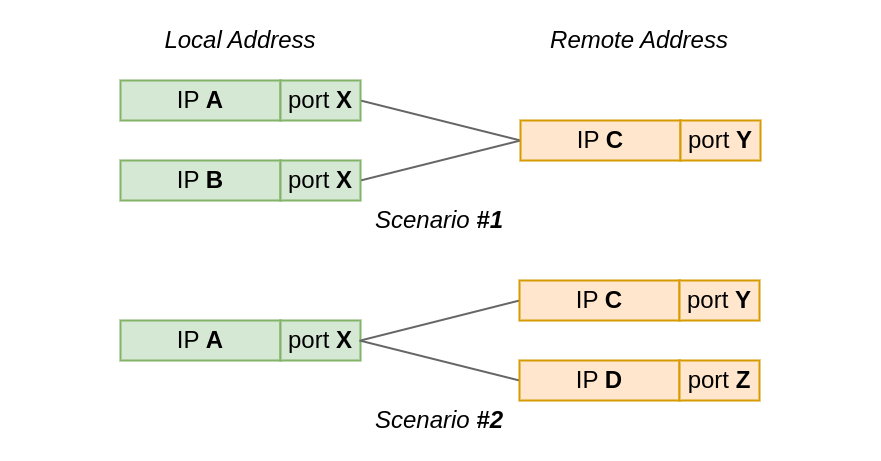
In the first test scenario, two sockets connect from the same local port to the same remote IP and port. However, the local IP is different for each socket.
While, in the second scenario, the local IP and port is the same for all sockets, but the remote address, or actually just the IP address, differs.
In our quiz questions, we will either:
bind() before connect()’ing the socket; a method also known as bind-before-connect.Because we will be examining corner cases in the bind() logic, we need a way to exhaust available local addresses, that is (IP, port) pairs. We could just create lots of sockets, but it will be easier to tweak the system configuration and pretend that there is just one ephemeral local port, which the OS can assign to sockets:
sysctl -w net.ipv4.ip_local_port_range='60000 60000'
Each quiz question is a short Python snippet. Your task is to predict the outcome of running the code. Does it succeed? Does it fail? If so, what fails? Asking ChatGPT is not allowed 😉
There is always a common setup procedure to keep in mind. We will omit it from the quiz snippets to keep them short:
from os import system
from socket import *

# Missing constants
IP_BIND_ADDRESS_NO_PORT = 24

# Our network namespace has just *one* ephemeral port
system("sysctl -w net.ipv4.ip_local_port_range='60000 60000'")

# Open a listening socket at *:1234. We will connect to it.
ln = socket(AF_INET, SOCK_STREAM)
ln.bind(("", 1234))
ln.listen(SOMAXCONN)
With the formalities out of the way, let us begin. Ready. Set. Go!
In Scenario #1 we connect two sockets to the same remote address – 127.9.9.9:1234. The sockets will use different local IP addresses, but is it enough to share the local port?
| local IP | local port | remote IP | remote port |
|---|---|---|---|
| unique | same | same | same |
| 127.0.0.1 127.1.1.1 127.2.2.2 |
60_000 | 127.9.9.9 | 1234 |
On the local side, we bind two sockets to distinct, explicitly specified IP addresses. We will allow the OS to select the local port. Remember: our local ephemeral port range contains just one port (60,000).
s1 = socket(AF_INET, SOCK_STREAM)
s1.bind(('127.1.1.1', 0))
s1.connect(('127.9.9.9', 1234))
s1.getsockname(), s1.getpeername()

s2 = socket(AF_INET, SOCK_STREAM)
s2.bind(('127.2.2.2', 0))
s2.connect(('127.9.9.9', 1234))
s2.getsockname(), s2.getpeername()
GOTO Answer #1
Here, the setup is almost identical as before. However, we ask the OS to select the local IP address and port for the first socket. Do you think the result will differ from the previous question?
s1 = socket(AF_INET, SOCK_STREAM)
s1.connect(('127.9.9.9', 1234))
s1.getsockname(), s1.getpeername()

s2 = socket(AF_INET, SOCK_STREAM)
s2.bind(('127.2.2.2', 0))
s2.connect(('127.9.9.9', 1234))
s2.getsockname(), s2.getpeername()
GOTO Answer #2
This quiz question is just like the one above. We just changed the ordering. First, we connect a socket from an explicitly specified local address. Then we ask the system to select a local address for us. Obviously, such an ordering change should not make any difference, right?
s1 = socket(AF_INET, SOCK_STREAM)
s1.bind(('127.1.1.1', 0))
s1.connect(('127.9.9.9', 1234))
s1.getsockname(), s1.getpeername()

s2 = socket(AF_INET, SOCK_STREAM)
s2.connect(('127.9.9.9', 1234))
s2.getsockname(), s2.getpeername()
GOTO Answer #3
In Scenario #2 we reverse our setup. Instead of multiple local IP’s and one remote address, we now have one local address 127.0.0.1:60000 and two distinct remote addresses. The question remains the same – can two sockets share the local port? Reminder: ephemeral port range is still of size one.
| local IP | local port | remote IP | remote port |
|---|---|---|---|
| same | same | unique | same |
| 127.0.0.1 | 60_000 | 127.8.8.8 127.9.9.9 |
1234 |
Let’s start from the basics. We connect() to two distinct remote addresses. This is a warm up 🙂
s1 = socket(AF_INET, SOCK_STREAM)
s1.connect(('127.8.8.8', 1234))
s1.getsockname(), s1.getpeername()

s2 = socket(AF_INET, SOCK_STREAM)
s2.connect(('127.9.9.9', 1234))
s2.getsockname(), s2.getpeername()
GOTO Answer #4
What if we bind() to a local IP explicitly but let the OS select the port – does anything change?
s1 = socket(AF_INET, SOCK_STREAM)
s1.bind(('127.0.0.1', 0))
s1.connect(('127.8.8.8', 1234))
s1.getsockname(), s1.getpeername()

s2 = socket(AF_INET, SOCK_STREAM)
s2.bind(('127.0.0.1', 0))
s2.connect(('127.9.9.9', 1234))
s2.getsockname(), s2.getpeername()
GOTO Answer #5
This time we explicitly specify the local address and port. Sometimes there is a need to specify the local port.
s1 = socket(AF_INET, SOCK_STREAM)
s1.bind(('127.0.0.1', 60_000))
s1.connect(('127.8.8.8', 1234))
s1.getsockname(), s1.getpeername()

s2 = socket(AF_INET, SOCK_STREAM)
s2.bind(('127.0.0.1', 60_000))
s2.connect(('127.9.9.9', 1234))
s2.getsockname(), s2.getpeername()
GOTO Answer #6
Just when you thought it couldn’t get any weirder, we add SO_REUSEADDR into the mix.
First, we ask the OS to allocate a local address for us. Then we explicitly bind to the same local address, which we know the OS must have assigned to the first socket. We enable local address reuse for both sockets. Is this allowed?
s1 = socket(AF_INET, SOCK_STREAM)
s1.setsockopt(SOL_SOCKET, SO_REUSEADDR, 1)
s1.connect(('127.8.8.8', 1234))
s1.getsockname(), s1.getpeername()

s2 = socket(AF_INET, SOCK_STREAM)
s2.setsockopt(SOL_SOCKET, SO_REUSEADDR, 1)
s2.bind(('127.0.0.1', 60_000))
s2.connect(('127.9.9.9', 1234))
s2.getsockname(), s2.getpeername()
GOTO Answer #7
Finally, a cherry on top. This is Quiz #7 but in reverse. Common sense dictates that the outcome should be the same, but is it?
s1 = socket(AF_INET, SOCK_STREAM)
s1.setsockopt(SOL_SOCKET, SO_REUSEADDR, 1)
s1.bind(('127.0.0.1', 60_000))
s1.connect(('127.9.9.9', 1234))
s1.getsockname(), s1.getpeername()

s2 = socket(AF_INET, SOCK_STREAM)
s2.setsockopt(SOL_SOCKET, SO_REUSEADDR, 1)
s2.connect(('127.8.8.8', 1234))
s2.getsockname(), s2.getpeername()
GOTO Answer #8
Is it all clear now? Well, probably no. It feels like reverse engineering a black box. So what is happening behind the scenes? Let’s take a look.
Linux tracks all TCP ports in use in a hash table named bhash. Not to be confused with with ehash table, which tracks sockets with both local and remote address already assigned.
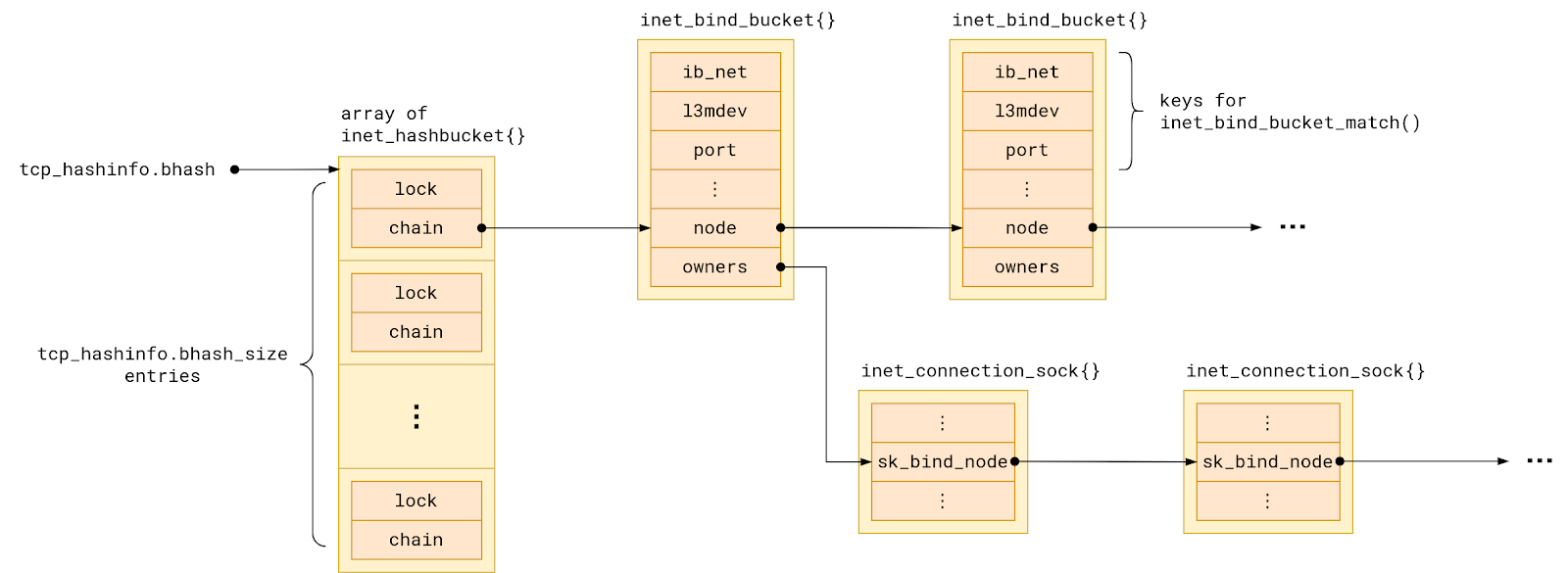
Each hash table entry points to a chain of so-called bind buckets, which group together sockets which share a local port. To be precise, sockets are grouped into buckets by:
But in the simplest possible setup – single network namespace, no VRFs – we can say that sockets in a bind bucket are grouped by their local port number.
The set of sockets in each bind bucket, that is sharing a local port, is backed by a linked list named owners.
When we ask the kernel to assign a local address to a socket, its task is to check for a conflict with any existing socket. That is because a local port number can be shared only under some conditions:
/* There are a few simple rules, which allow for local port reuse by
 * an application.  In essence:
 *
 *   1) Sockets bound to different interfaces may share a local port.
 *      Failing that, goto test 2.
 *   2) If all sockets have sk->sk_reuse set, and none of them are in
 *      TCP_LISTEN state, the port may be shared.
 *      Failing that, goto test 3.
 *   3) If all sockets are bound to a specific inet_sk(sk)->rcv_saddr local
 *      address, and none of them are the same, the port may be
 *      shared.
 *      Failing this, the port cannot be shared.
 *
 * The interesting point, is test #2.  This is what an FTP server does
 * all day.  To optimize this case we use a specific flag bit defined
 * below.  As we add sockets to a bind bucket list, we perform a
 * check of: (newsk->sk_reuse && (newsk->sk_state != TCP_LISTEN))
 * As long as all sockets added to a bind bucket pass this test,
 * the flag bit will be set.
 * ...
 */
The comment above hints that the kernel tries to optimize for the happy case of no conflict. To this end the bind bucket holds additional state which aggregates the properties of the sockets it holds:
struct inet_bind_bucket {
        /* ... */
        signed char          fastreuse;
        signed char          fastreuseport;
        kuid_t               fastuid;
#if IS_ENABLED(CONFIG_IPV6)
        struct in6_addr      fast_v6_rcv_saddr;
#endif
        __be32               fast_rcv_saddr;
        unsigned short       fast_sk_family;
        bool                 fast_ipv6_only;
        /* ... */
};
Let’s focus our attention just on the first aggregate property – fastreuse. It has existed since, now prehistoric, Linux 2.1.90pre1. Initially in the form of a bit flag, as the comment says, only to evolve to a byte-sized field over time.
The other six fields came on much later with the introduction of SO_REUSEPORT in Linux 3.9. Because they play a role only when there are sockets with the SO_REUSEPORT flag set. We are going to ignore them today.
Whenever the Linux kernel needs to bind a socket to a local port, it first has to look for the bind bucket for that port. What makes life a bit more complicated is the fact that the search for a TCP bind bucket exists in two places in the kernel. The bind bucket lookup can happen early – at bind() time – or late – at connect() – time. Which one gets called depends on how the connected socket has been set up:
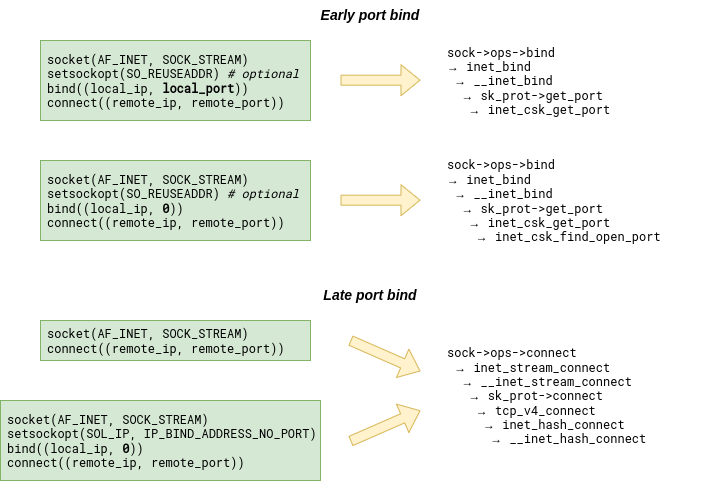
However, whether we land in inet_csk_get_port or __inet_hash_connect, we always end up walking the bucket chain in the bhash looking for the bucket with a matching port number. The bucket might already exist or we might have to create it first. But once it exists, its fastreuse field is in one of three possible states: -1, 0, or +1. As if Linux developers were inspired by quantum mechanics.
That state reflects two aspects of the bind bucket:
So let us try to decipher the three possible fastreuse states then, and what they mean in each case.
First, what does the fastreuse property say about the owners of the bucket, that is the sockets using that local port?
| fastreuse is | owners list contains |
|---|---|
| -1 | sockets connect()’ed from an ephemeral port |
| 0 | sockets bound without SO_REUSEADDR |
| +1 | sockets bound with SO_REUSEADDR |
While this is not the whole truth, it is close enough for now. We will soon get to the bottom of it.
When it comes port sharing, the situation is far less straightforward:
| Can I … when … | fastreuse = -1 | fastreuse = 0 | fastreuse = +1 |
|---|---|---|---|
| bind() to the same port (ephemeral or specified) | yes IFF local IP is unique ① | ← idem | ← idem |
| bind() to the specific port with SO_REUSEADDR | yes IFF local IP is unique OR conflicting socket uses SO_REUSEADDR ① | ← idem | yes ② |
| connect() from the same ephemeral port to the same remote (IP, port) | yes IFF local IP unique ③ | no ③ | no ③ |
| connect() from the same ephemeral port to a unique remote (IP, port) | yes ③ | no ③ | no ③ |
① Determined by inet_csk_bind_conflict() called from inet_csk_get_port() (specific port bind) or inet_csk_get_port() → inet_csk_find_open_port() (ephemeral port bind).
② Because inet_csk_get_port() skips conflict check for fastreuse == 1 buckets.
③ Because inet_hash_connect() → __inet_hash_connect() skips buckets with fastreuse != -1.
While it all looks rather complicated at first sight, we can distill the table above into a few statements that hold true, and are a bit easier to digest:
bind(), or early local address allocation, always succeeds if there is no local IP address conflict with any existing socket,connect(), or late local address allocation, always fails when TCP bind bucket for a local port is in any state other than fastreuse = -1,connect() only succeeds if there is no local and remote address conflict,SO_REUSEADDR socket option allows local address sharing, if all conflicting sockets also use it (and none of them is in the listening state).Fortunately, you don’t have to. With drgn, the programmable debugger, we can examine the bind bucket state on a live kernel:
#!/usr/bin/env drgn

"""
dump_bhash.py - List all TCP bind buckets in the current netns.

Script is not aware of VRF.
"""

import os

from drgn.helpers.linux.list import hlist_for_each, hlist_for_each_entry
from drgn.helpers.linux.net import get_net_ns_by_fd
from drgn.helpers.linux.pid import find_task


def dump_bind_bucket(head, net):
    for tb in hlist_for_each_entry("struct inet_bind_bucket", head, "node"):
        # Skip buckets not from this netns
        if tb.ib_net.net != net:
            continue

        port = tb.port.value_()
        fastreuse = tb.fastreuse.value_()
        owners_len = len(list(hlist_for_each(tb.owners)))

        print(
            "{:8d}  {:{sign}9d}  {:7d}".format(
                port,
                fastreuse,
                owners_len,
                sign="+" if fastreuse != 0 else " ",
            )
        )


def get_netns():
    pid = os.getpid()
    task = find_task(prog, pid)
    with open(f"/proc/{pid}/ns/net") as f:
        return get_net_ns_by_fd(task, f.fileno())


def main():
    print("{:8}  {:9}  {:7}".format("TCP-PORT", "FASTREUSE", "#OWNERS"))

    tcp_hashinfo = prog.object("tcp_hashinfo")
    net = get_netns()

    # Iterate over all bhash slots
    for i in range(0, tcp_hashinfo.bhash_size):
        head = tcp_hashinfo.bhash[i].chain
        # Iterate over bind buckets in the slot
        dump_bind_bucket(head, net)


main()
Let’s take this script for a spin and try to confirm what Table 1 claims to be true. Keep in mind that to produce the ipython --classic session snippets below I’ve used the same setup as for the quiz questions.
Two connected sockets sharing ephemeral port 60,000:
>>> s1 = socket(AF_INET, SOCK_STREAM)
>>> s1.connect(('127.1.1.1', 1234))
>>> s2 = socket(AF_INET, SOCK_STREAM)
>>> s2.connect(('127.2.2.2', 1234))
>>> !./dump_bhash.py
TCP-PORT  FASTREUSE  #OWNERS
    1234          0        3
   60000         -1        2
>>>
Two bound sockets reusing port 60,000:
>>> s1 = socket(AF_INET, SOCK_STREAM)
>>> s1.setsockopt(SOL_SOCKET, SO_REUSEADDR, 1)
>>> s1.bind(('127.1.1.1', 60_000))
>>> s2 = socket(AF_INET, SOCK_STREAM)
>>> s2.setsockopt(SOL_SOCKET, SO_REUSEADDR, 1)
>>> s2.bind(('127.1.1.1', 60_000))
>>> !./dump_bhash.py
TCP-PORT  FASTREUSE  #OWNERS
    1234          0        1
   60000         +1        2
>>>
A mix of bound sockets with and without REUSEADDR sharing port 60,000:
>>> s1 = socket(AF_INET, SOCK_STREAM)
>>> s1.setsockopt(SOL_SOCKET, SO_REUSEADDR, 1)
>>> s1.bind(('127.1.1.1', 60_000))
>>> !./dump_bhash.py
TCP-PORT  FASTREUSE  #OWNERS
    1234          0        1
   60000         +1        1
>>> s2 = socket(AF_INET, SOCK_STREAM)
>>> s2.bind(('127.2.2.2', 60_000))
>>> !./dump_bhash.py
TCP-PORT  FASTREUSE  #OWNERS
    1234          0        1
   60000          0        2
>>>
With such tooling, proving that Table 2 holds true is just a matter of writing a bunch of exploratory tests.
But what has happened in that last snippet? The bind bucket has clearly transitioned from one fastreuse state to another. This is what Table 1 fails to capture. And it means that we still don’t have the full picture.
We have yet to find out when the bucket’s fastreuse state can change. This calls for a state machine.
As we have just seen, a bind bucket does not need to stay in the initial fastreuse state throughout its lifetime. Adding sockets to the bucket can trigger a state change. As it turns out, it can only transition into fastreuse = 0, if we happen to bind() a socket that:
SO_REUSEADDR option enabled.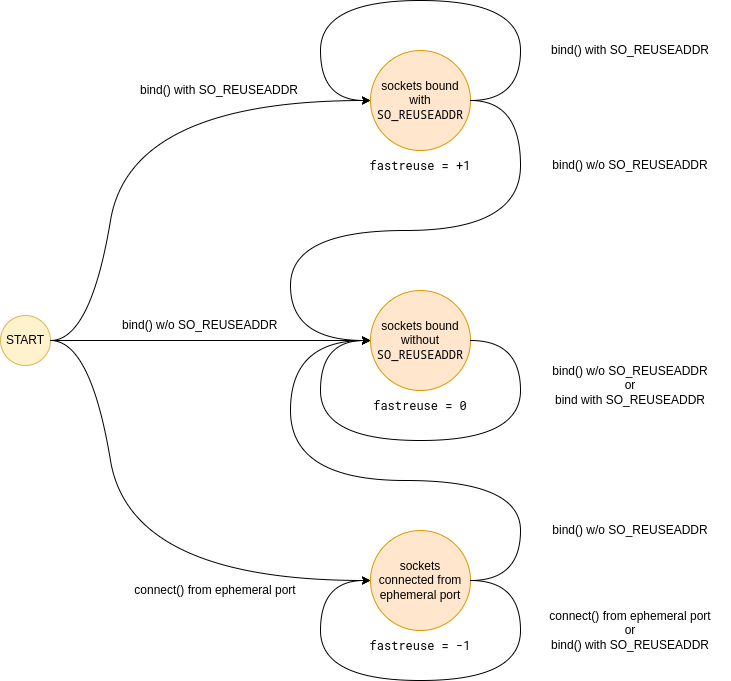
And while we could have figured it all out by carefully reading the code in inet_csk_get_port → inet_csk_update_fastreuse, it certainly doesn’t hurt to confirm our understanding with a few more tests.
Now that we have the full picture, this begs the question…
Firstly, so that the next time bind() syscall rejects your request with EADDRINUSE, or connect() refuses to cooperate by throwing the EADDRNOTAVAIL error, you will know what is happening, or at least have the tools to find out.
Secondly, because we have previously advertised a technique for opening connections from a specific range of ports which involves bind()’ing sockets with the SO_REUSEADDR option. What we did not realize back then, is that there exists a corner case when the same port can’t be shared with the regular, connect()‘ed sockets. While that is not a deal-breaker, it is good to understand the consequences.
To make things better, we have worked with the Linux community to extend the kernel API with a new socket option that lets the user specify the local port range. The new option will be available in the upcoming Linux 6.3. With it we no longer have to resort to bind()-tricks. This makes it possible to yet again share a local port with regular connect()‘ed sockets.
Today we posed a relatively straightforward question – when can two TCP sockets share a local address? – and worked our way towards an answer. An answer that is too complex to compress it into a single sentence. What is more, it’s not even the full answer. After all, we have decided to ignore the existence of the SO_REUSEPORT feature, and did not consider conflicts with TCP listening sockets.
If there is a simple takeaway, though, it is that bind()’ing a socket can have tricky consequences. When using bind() to select an egress IP address, it is best to combine it with IP_BIND_ADDRESS_NO_PORT socket option, and leave the port assignment to the kernel. Otherwise we might unintentionally block local TCP ports from being reused.
It is too bad that the same advice does not apply to UDP, where IP_BIND_ADDRESS_NO_PORT does not really work today. But that is another story.
Until next time 🖖.
If you enjoy scratching your head while reading the Linux kernel source code, we are hiring.
Post Syndicated from Reid Tatoris original https://blog.cloudflare.com/security-week-2023-wrap-up/


Security Week 2023 is officially in the books. In our welcome post last Saturday, I talked about Cloudflare’s years-long evolution from protecting websites, to protecting applications, to protecting people. Our goal this week was to help our customers solve a broader range of problems, reduce external points of vulnerability, and make their jobs easier.
We announced 34 new tools and integrations that will do just that. Combined, these announcement will help you do five key things faster and easier:
And to help you respond to the most current attacks in real time, we reported on how we’re seeing scammers use the Silicon Valley Bank news to phish new victims, and what you can do to protect yourself.
In case you missed any of the announcements, take a look at the summary and navigation guide below.
| Blog | Summary |
|---|---|
| Top phished brands and new phishing and brand protections | Today we have released insights from our global network on the top 50 brands used in phishing attacks coupled with the tools customers need to stay safer. Our new phishing and brand protection capabilities, part of Security Center, let customers better preserve brand trust by detecting and even blocking “confusable” and lookalike domains involved in phishing campaigns. |
| How to stay safe from phishing | Phishing attacks come in all sorts of ways to fool people. Email is definitely the most common, but there are others. Following up on our Top 50 brands in phishing attacks post, here are some tips to help you catch these scams before you fall for them. |
| Locking down your JavaScript: positive blocking with Page Shield policies | Page Shield now ensures only vetted and secure JavaScript is being executed by browsers to stop unwanted or malicious JavaScript from loading to keep end user data safer. |
| Cloudflare Aegis: dedicated IPs for Zero Trust migration | With Aegis, customers can now get dedicated IPs from Cloudflare we use to send them traffic. This allows customers to lock down services and applications at an IP level and build a protected environment that is application, protocol, and even IP-aware. |
| Mutual TLS now available for Workers | mTLS support for Workers allows for communication with resources that enforce an mTLS connection. mTLS provides greater security for those building on Workers so they can identify and authenticate both the client and the server helps protect sensitive data. |
| Using Cloudflare Access with CNI | We have introduced an innovative new approach to secure hosted applications via Cloudflare Access without the need for any installed software or custom code on application servers. |
| Blog | Summary |
|---|---|
| No hassle migration from Zscaler to Cloudflare One with The Descaler Program | Cloudflare is excited to launch the Descaler Program, a frictionless path to migrate existing Zscaler customers to Cloudflare One. With this announcement, Cloudflare is making it even easier for enterprise customers to make the switch to a faster, simpler, and more agile foundation for security and network transformation. |
| The state of application security in 2023 | For Security Week 2023, we are providing updated insights and trends related to mitigated traffic, bot and API traffic, and account takeover attacks. |
| Adding Zero Trust signals to Sumo Logic for better security insights | Today we’re excited to announce the expansion of support for automated normalization and correlation of Zero Trust logs for Logpush in Sumo Logic’s Cloud SIEM. Joint customers will reduce alert fatigue and accelerate the triage process by converging security and network data into high-fidelity insights. |
| Cloudflare One DLP integrates with Microsoft Information Protection labels | Cloudflare One now offers Data Loss Prevention (DLP) detections for Microsoft Purview Information Protection labels. This extends the power of Microsoft’s labels to any of your corporate traffic in just a few clicks. |
| Scan and secure Atlassian with Cloudflare CASB | We are unveiling two new integrations for Cloudflare CASB: one for Atlassian Confluence and the other for Atlassian Jira. Security teams can begin scanning for Atlassian- and Confluence-specific security issues that may be leaving sensitive corporate data at risk. |
| Zero Trust security with Ping Identity and Cloudflare Access | Cloudflare Access and Ping Identity offer a powerful solution for organizations looking to implement Zero Trust security controls to protect their applications and data. Cloudflare is now offering full integration support, so Ping Identity customers can easily integrate their identity management solutions with Cloudflare Access to provide a comprehensive security solution for their applications |
| Blog | Summary |
|---|---|
| Announcing Cloudflare Fraud Detection | We are excited to announce Cloudflare Fraud Detection that will provide precise, easy to use tools that can be deployed in seconds to detect and categorize fraud such as fake account creation or card testing and fraudulent transactions. Fraud Detection will be in early access later this year, those interested can sign up here. |
| Automatically discovering API endpoints and generating schemas using machine learning | Customers can use these new features to enforce a positive security model on their API endpoints even if they have little-to-no information about their existing APIs today. |
| Detecting API abuse automatically using sequence analysis | With our new Cloudflare Sequence Analytics for APIs, organizations can view the most important sequences of API requests to their endpoints to better understand potential abuse and where to apply protections first. |
| Using the power of Cloudflare’s global network to detect malicious domains using machine learning | Read our post on how we keep users and organizations safer with machine learning models that detect attackers attempting to evade detection with DNS tunneling and domain generation algorithms. |
| Announcing WAF Attack Score Lite and Security Analytics for business customers | We are making the machine learning empowered WAF and Security analytics view available to our Business plan customers, to help detect and stop attacks before they are known. |
| Analyze any URL safely using the Cloudflare Radar URL Scanner | We have made Cloudflare Radar’s newest free tool available, URL Scanner, providing an under-the-hood look at any webpage to make the Internet more transparent and secure for all. |
| Blog | Summary |
|---|---|
| Post-quantum crypto should be free, so we’re including it for free, forever | One of our core beliefs is that privacy is a human right. To achieve that right, we are announcing that our implementations of post-quantum cryptography will be available to everyone, free of charge, forever. |
| No, AI did not break post-quantum cryptography | The recent news reports of AI cracking post-quantum cryptography are greatly exaggerated. In this blog, we take a deep dive into the world of side-channel attacks and how AI has been used for more than a decade already to aid it. |
| Super Bot Fight Mode is now configurable | We are making Super Bot Fight Mode even more configurable with new flexibility to allow legitimate, automated traffic to access their site. |
| How Cloudflare and IBM partner to help build a better Internet | IBM and Cloudflare continue to partner together to help customers meet the unique security, performance, resiliency and compliance needs of their customers through the addition of exciting new product and service offerings. |
| Protect your key server with Keyless SSL and Cloudflare Tunnel integration | Customers will now be able to use our Cloudflare Tunnels product to send traffic to the key server through a secure channel, without publicly exposing it to the rest of the Internet. |
| Blog | Summary |
|---|---|
| Stop Brand Impersonation with Cloudflare DMARC Management | Brand impersonation continues to be a big problem globally. Setting SPF, DKIM and DMARC policies is a great way to reduce that risk, and protect your domains from being used in spoofing emails. But maintaining a correct SPF configuration can be very costly and time consuming, and that’s why we’re launching Cloudflare DMARC Management. |
| How we built DMARC Management using Cloudflare Workers | At Cloudflare, we use the Workers platform and our product stack to build new services. Read how we made the new DMARC Management solution entirely on top of our APIs. |
| Cloudflare partners with KnowBe4 to equip organizations with real-time security coaching to avoid phishing attacks | Cloudflare’s cloud email security solution now integrates with KnowBe4, allowing mutual customers to offer real-time coaching to employees when a phishing campaign is detected by Cloudflare. |
| Introducing custom pages for Cloudflare Access | We are excited to announce new options to customize user experience in Access, including customizable pages including login, blocks and the application launcher. |
| Cloudflare Access is the fastest Zero Trust proxy | Cloudflare Access is 75% faster than Netskope and 50% faster than Zscaler, and our network is faster than other providers in 48% of last mile networks. |
| Blog | Summary |
|---|---|
| One-click ISO 27001 certified deployment of Regional Services in the EU | Cloudflare announces one-click ISO certified region, a super easy way for customers to limit where traffic is serviced to ISO 27001 certified data centers inside the European Union. |
| Account level Security Analytics and Security Events: better visibility and control over all account zones at once | All WAF customers will benefit fromAccount Security Analytics and Events. This allows organizations to new eyes on your account in Cloudflare dashboard to give holistic visibility. No matter how many zones you manage, they are all there! |
| Wildcard and multi-hostname support in Cloudflare Access | We are thrilled to announce the full support of wildcard and multi-hostname application definitions in Cloudflare Access. Until now, Access had limitations that restricted it to a single hostname or a limited set of wildcards |
Watch all of the Cloudflare TV segments here.
While that’s it for Security Week 2023, you all know by now that Innovation weeks never end for Cloudflare. Stay tuned for a week full of new developer tools coming soon, and a week dedicated to making the Internet faster later in the year.
Post Syndicated from The History Guy: History Deserves to Be Remembered original https://www.youtube.com/watch?v=agwBZqRIfAY