Amazon Redshift adds new AI capabilities, including Amazon Q, to boost efficiency and productivity

Post Syndicated from Sébastien Stormacq original https://aws.amazon.com/blogs/aws/amazon-redshift-adds-new-ai-capabilities-to-boost-efficiency-and-productivity/

Amazon Redshift puts artificial intelligence (AI) at your service to optimize efficiencies and make you more productive with two new capabilities that we are launching in preview today.

First, Amazon Redshift Serverless becomes smarter. It scales capacity proactively and automatically along dimensions such as the complexity of your queries, their frequency, the size of the dataset, and so on to deliver tailored performance optimizations. This allows you to spend less time tuning your data warehouse instances and more time getting value from your data.

Second, Amazon Q generative SQL in Amazon Redshift Query Editor generates SQL recommendations from natural language prompts. This helps you to be more productive in extracting insights from your data.

Let’s start with Amazon Redshift Serverless
When you use Amazon Redshift Serverless, you can now opt in for a preview of AI-driven scaling and optimizations. When enabled, the system observes and learns from your usage patterns, such as the concurrent number of queries, their complexity, and the time it takes to run them. Then, it automatically optimizes your serverless endpoint to meet your price performance target. Based on AWS internal testing, this new capability may give you up to ten times better price performance for variable workloads without any manual intervention.

AI-driven scaling and optimizations eliminate the time and effort to manually resize your workgroup and plan background optimizations based on workload needs. It continually runs automatic optimizations when they are most valuable for better performance, avoiding performance cliffs and time-outs.

This new capability goes beyond the existing self-tuning capabilities of Amazon Redshift Serverless, such as machine learning (ML)-enhanced techniques to adjust your compute, modify the physical schema of the database, create or drop materialized views as needed (the one we manage automatically, not yours), and vacuum tables. This new capability brings more intelligence to decide how to adjust the compute, what background optimizations are required, and when to apply them, and it makes its decisions based on more dimensions. We also orchestrate ML-based optimizations for materialized views, table optimizations, and workload management when your queries need it.

During the preview, you must opt in to enable these AI-driven scaling and optimizations on your workgroups. You configure the system to balance the optimization for price or performance. There is only one slider to adjust in the console.

Redshift serverless - AI driven workgoups

As usual, you can track resource usage and associated changes through the console, Amazon CloudWatch metrics, and the system table SYS_SERVERLESS_USAGE.

Now, let’s look at Amazon Q generative SQL in Amazon Redshift Query Editor
What if you could use generative AI to help analysts write effective SQL queries more rapidly? This is the new experience we introduce today in Amazon Redshift Query Editor, our web-based SQL editor.

You can now describe the information you want to extract from your data in natural language, and we generate the SQL query recommendations for you. Behind the scenes, Amazon Q generative SQL uses a large language model (LLM) and Amazon Bedrock to generate the SQL query. We use different techniques, such as prompt engineering and Retrieval Augmented Generation (RAG), to query the model based on your context: the database you’re connected to, the schema you’re working on, your query history, and optionally the query history of other users connected to the same endpoint. The system also remembers previous questions. You can ask it to refine a previously generated query.

The SQL generation model uses metadata specific to your data schema to generate relevant queries. For example, it uses the table and column names and the relationship between the tables in your database. In addition, your database administrator can authorize the model to use the query history of all users in your AWS account to generate even more relevant SQL statements. We don’t share your query history with other AWS accounts and we don’t train our generation models with any data coming from your AWS account. We maintain the high level of privacy and security that you expect from us.

Using generated SQL queries helps you to get started when discovering new schemas. It does the heavy lifting of discovering the column names and relationships between tables for you. Senior analysts also benefit from asking what they want in natural language and having the SQL statement automatically generated. They can review the queries and run them directly from their notebook.

Let’s explore a schema and extract information
For this demo, let’s pretend I am a data analyst at a company that sells concert tickets. The database schema and data are available for you to download. My manager asks me to analyze the ticket sales data to send a thank you note with discount coupons to the highest-spending customers in Seattle.

I connect to Amazon Redshift Query Editor and connect the analytic endpoint. I create a new tab for a Notebook (SQL generation is available from notebooks only).

Instead of writing a SQL statement, I open the chat panel and type, “Find the top five users from Seattle who bought the most number of tickets in 2022.” I take the time to verify the generated SQL statement. It seems correct, so I decide to run it. I select Add to notebook and then Run. The query returns the list of the top five buyers in Seattle.

sql generation - top 5 users

I had no previous knowledge of the data schema, and I did not type a single line of SQL to find the information I needed.

But generative SQL is not limited to a single interaction. I can chat with it to dynamically refine the queries. Here is another example.

I ask “Which state has the most venues?” Generative SQL proposes the following query. The answer is New York, with 49 venues, if you’re curious.

generative sql chat 01

I changed my mind, and I want to know the top three cities with the most venues. I simply rephrase my question: “What about the top three venues?

generative sql chat 02

I add the query to the notebook and run it. It returns the expected result.

generative sql chat 03

Best practices for prompting
Here are a couple of tips and tricks to get the best results out of your prompts.

Be specific – When asking questions in natural language, be as specific as possible to help the system understand exactly what you need. For example, instead of writing “find the top venues that sold the most tickets,” provide more details like “find the names of the top three venues that sold the most tickets in 2022.” Use consistent entity names like venue, ticket, and location instead of referring to the same entity in different ways, which can confuse the system.

Iterate – Break your complex requests into multiple simple statements that are easier for the system to interpret. Iteratively ask follow-up questions to get more detailed analysis from the system. For example, start by asking, “Which state has the most venues?” Then, based on the response, ask a follow-up question like “Which is the most popular venue from this state?”

Verify – Review the generated SQL before running it to ensure accuracy. If the generated SQL query has errors or does not match your intent, provide instructions to the system on how to correct it instead of rephrasing the entire request. For example, if the query is missing a filter clause on year, write “provide venues from year 2022.”

Availability and pricing
AI-driven scaling and optimizations are in preview in six AWS Regions: US East (Ohio, N. Virginia), US West (Oregon), Asia Pacific (Tokyo), and Europe (Ireland, Stockholm). They come at no additional cost. You pay only for the compute capacity your data warehouse consumes when it is active. Pricing is per Redshift Processing Unit (RPU) per hour. The billing is per second of used capacity. The pricing page for Amazon Redshift has the details.

Amazon Q generative SQL for Amazon Redshift Query Editor is in preview in two AWS Regions today: US East (N. Virginia) and US West (Oregon). There is no charge during the preview period.

These are two examples of how AI helps to optimize performance and increase your productivity, either by automatically adjusting the price-performance ratio of your Amazon Redshift Serverless endpoints or by generating correct SQL statements from natural language prompts.

Previews are essential for us to capture your feedback before we make these capabilities available for all. Experiment with these today and let us know what you think on the re:Post forums or using the feedback button on the bottom left side of the console.

— seb

AWS Clean Rooms Differential Privacy enhances privacy protection of your users data (preview)

Post Syndicated from Donnie Prakoso original https://aws.amazon.com/blogs/aws/aws-clean-rooms-differential-privacy-enhances-privacy-protection-of-your-users-data-preview/

Starting today, you can use AWS Clean Rooms Differential Privacy (preview) to help protect the privacy of your users with mathematically backed and intuitive controls in a few steps. As a fully managed capability of AWS Clean Rooms, no prior differential privacy experience is needed to help you prevent the reidentification of your users.

AWS Clean Rooms Differential Privacy obfuscates the contribution of any individual’s data in generating aggregate insights in collaborations so that you can run a broad range of SQL queries to generate insights about advertising campaigns, investment decisions, clinical research, and more.

Quick overview on differential privacy
Differential privacy is not new. It is a strong, mathematical definition of privacy compatible with statistical and machine learning based analysis, and has been used by the United States Census Bureau as well as companies with vast amounts of data.

Differential privacy helps with a wide variety of use cases involving large datasets, where adding or removing a few individuals has a small impact on the overall result, such as population analyses using count queries, histograms, benchmarking, A/B testing, and machine learning.

The following illustration shows how differential privacy works when it is applied to SQL queries.

When an analyst runs a query, differential privacy adds a carefully calibrated amount of error (also referred to as noise) to query results at run-time, masking the contribution of individuals while still keeping the query results accurate enough to provide meaningful insights. The noise is carefully fine-tuned to mask the presence or absence of any possible individual in the dataset.

Differential privacy also has another component called privacy budget. The privacy budget is a finite resource consumed each time a query is run and thus controls the number of queries that can be run on your datasets, helping ensure that the noise cannot be averaged out to reveal any private information about an individual. When the privacy budget is fully exhausted, no more queries can be run on your tables until it is increased or refreshed.

However, differential privacy is not easy to implement because this technique requires an in-depth understanding of mathematically rigorous formulas and theories to apply it effectively. Configuring differential privacy is also a complex task because customers need to calculate the right level of noise in order to preserve the privacy of their users without negatively impacting the utility of query results.

Customers also want to enable their partners to conduct a wide variety of analyses including highly complex and customized queries on their data. This requirement is hard to support with differential privacy because of the intricate nature of the calculations involved in calibrating the noise while processing various query components such as aggregations, joins, and transformations.

We created AWS Clean Rooms Differential Privacy to help you protect the privacy of your users with mathematically backed controls in a few clicks.

How differential privacy works in AWS Clean Rooms
While differential privacy is quite a sophisticated technique, AWS Clean Rooms Differential Privacy makes it easy for you to apply it and protect the privacy of your users with mathematically backed, flexible, and intuitive controls. You can begin using it with just a few steps after starting or joining an AWS Clean Rooms collaboration as a member with abilities to contribute data.

You create a configured table, which is a reference to your table in the AWS Glue Data Catalog, and choose to turn on differential privacy while adding a custom analysis rule to the configured table.

Next, you associate the configured table to your AWS Clean Rooms collaboration and configure a differential privacy policy in the collaboration to make your table available for querying. You can use a default policy to quickly complete the setup or customize it to meet your specific requirements. As part of this step, you will configure the following:

Privacy budget
Quantified as a value that we call epsilon, the privacy budget controls the level of privacy protection. It is a common, finite resource that is applied for all of your tables protected with differential privacy in the collaboration because the goal is to preserve the privacy of your users whose information can be present in multiple tables. The privacy budget is consumed every time a query is run on your tables. You have the flexibility to increase the privacy budget value any time during the collaboration and automatically refresh it each calendar month.

Noise added per query
Measured in terms of the number of users whose contributions you want to obscure, this input parameter governs the rate at which the privacy budget is depleted.

In general, you need to balance your privacy needs against the number of queries you want to permit and the accuracy of those queries. AWS Clean Rooms makes it easy for you to complete this step by helping you understand the resulting utility you are providing to your collaboration partner. You can also use the interactive examples to understand how your chosen settings would impact the results for different types of SQL queries.

Now that you have successfully enabled differential privacy protection for your data, let’s see AWS Clean Rooms Differential Privacy in action. For this demo, let’s assume I am your partner in the AWS Clean Rooms collaboration.

Here, I’m running a query to count the number of overlapping customers and the result shows there are 3,227,643 values for tv.customer_id.

Now, if I run the same query again after removing records about an individual from coffee_customers table, it shows a different result, 3,227,604 tv.customer_id. This variability in the query results prevents me from identifying the individuals from observing the difference in query results.

I can also see the impact of differential privacy, including the remaining queries I can run.

Available for preview
Join this preview and start protecting the privacy of your users with AWS Clean Rooms Differential Privacy. During this preview period, you can use AWS Clean Rooms Differential Privacy wherever AWS Clean Rooms is available. To learn more on how to get started, visit the AWS Clean Rooms Differential Privacy page.

Happy collaborating!
Donnie

AWS Clean Rooms ML helps customers and partners apply ML models without sharing raw data (preview)

Post Syndicated from Donnie Prakoso original https://aws.amazon.com/blogs/aws/aws-clean-rooms-ml-helps-customers-and-partners-apply-ml-models-without-sharing-raw-data-preview/

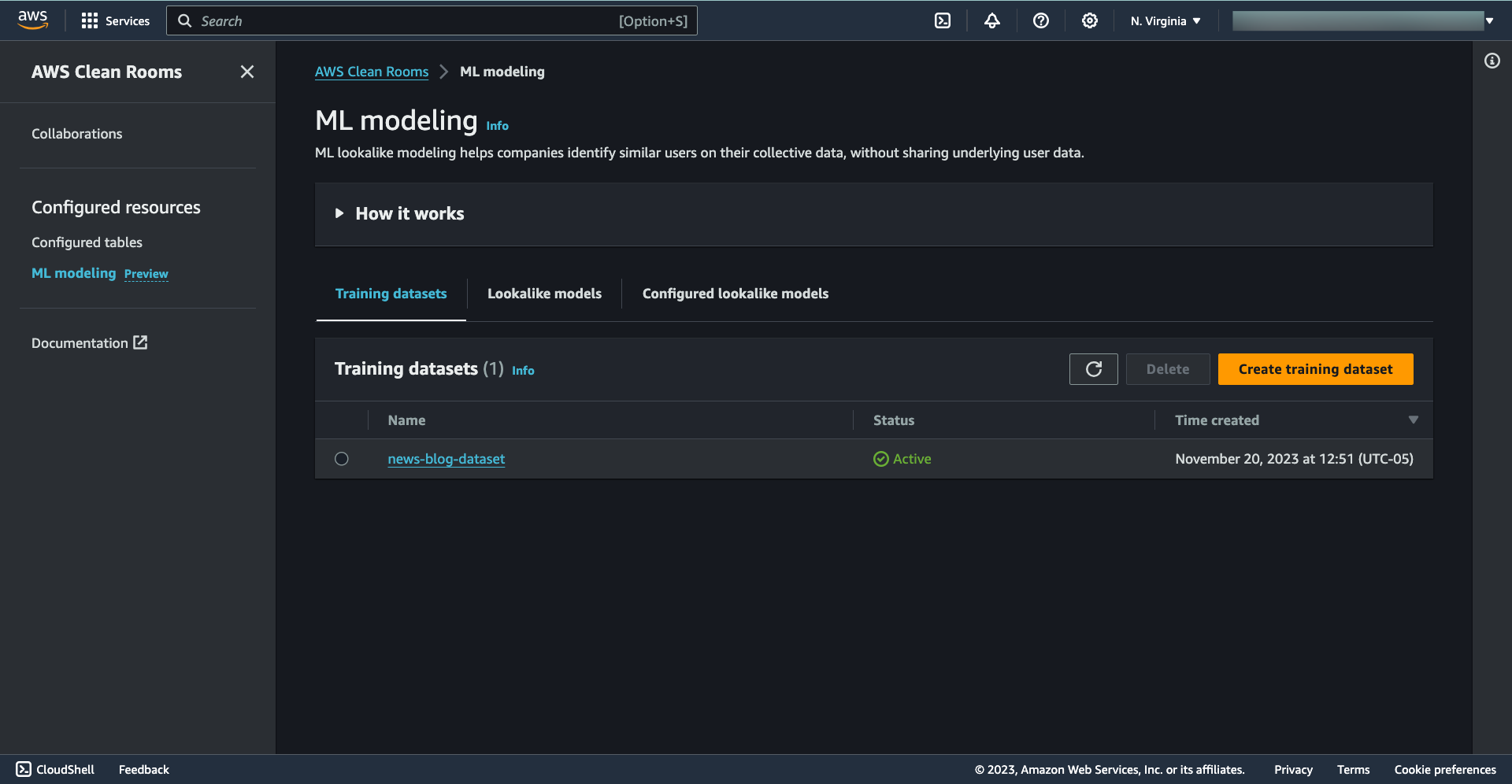
Today, we’re introducing AWS Clean Rooms ML (preview), a new capability of AWS Clean Rooms that helps you and your partners apply machine learning (ML) models on your collective data without copying or sharing raw data with each other. With this new capability, you can generate predictive insights using ML models while continuing to protect your sensitive data.

During this preview, AWS Clean Rooms ML introduces its first model specialized to help companies create lookalike segments for marketing use cases. With AWS Clean Rooms ML lookalike, you can train your own custom model, and you can invite partners to bring a small sample of their records to collaborate and generate an expanded set of similar records while protecting everyone’s underlying data.

In the coming months, AWS Clean Rooms ML will release a healthcare model. This will be the first of many models that AWS Clean Rooms ML will support next year.

AWS Clean Rooms ML helps you to unlock various opportunities for you to generate insights. For example:

  • Airlines can take signals about loyal customers, collaborate with online booking services, and offer promotions to users with similar characteristics.
  • Auto lenders and car insurers can identify prospective auto insurance customers who share characteristics with a set of existing lease owners.
  • Brands and publishers can model lookalike segments of in-market customers and deliver highly relevant advertising experiences.
  • Research institutions and hospital networks can find candidates similar to existing clinical trial participants to accelerate clinical studies (coming soon).

AWS Clean Rooms ML lookalike modeling helps you apply an AWS managed, ready-to-use model that is trained in each collaboration to generate lookalike datasets in a few clicks, saving months of development work to build, train, tune, and deploy your own model.

How to use AWS Clean Rooms ML to generate predictive insights
Today I will show you how to use lookalike modeling in AWS Clean Rooms ML and assume you have already set up a data collaboration with your partner. If you want to learn how to do that, check out the AWS Clean Rooms Now Generally Available — Collaborate with Your Partners without Sharing Raw Data post.

With your collective data in the AWS Clean Rooms collaboration, you can work with your partners to apply ML lookalike modeling to generate a lookalike segment. It works by taking a small sample of representative records from your data, creating a machine learning (ML) model, then applying the particular model to identify an expanded set of similar records from your business partner’s data.

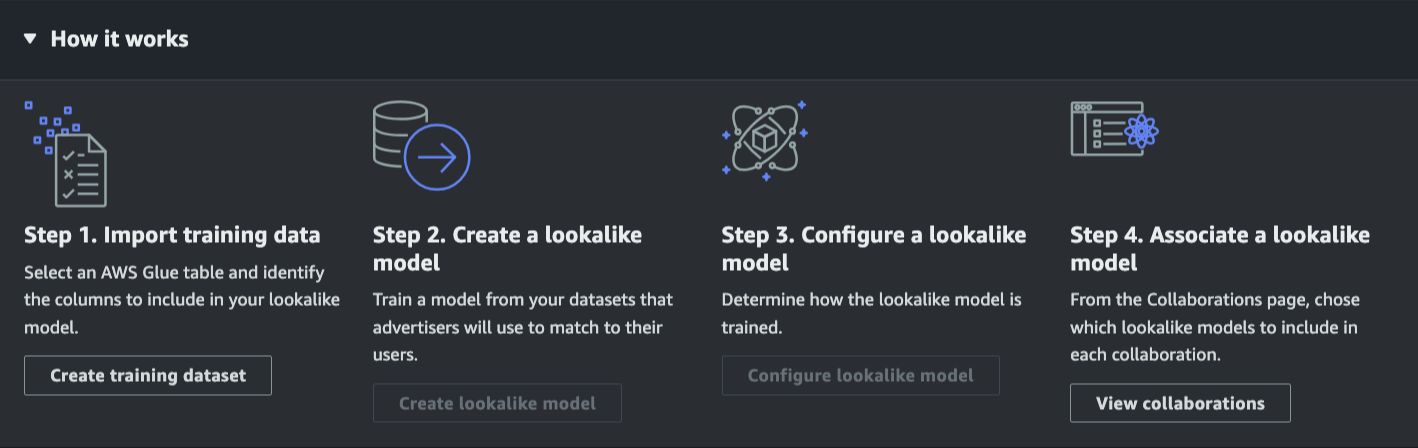
The following screenshot shows the overall workflow for using AWS Clean Rooms ML.

By using AWS Clean Rooms ML, you don’t need to build complex and time-consuming ML models on your own. AWS Clean Rooms ML trains a custom, private ML model, which saves months of your time while still protecting your data.

Eliminating the need to share data
As ML models are natively built within the service, AWS Clean Rooms ML helps you protect your dataset and customer’s information because you don’t need to share your data to build your ML model.

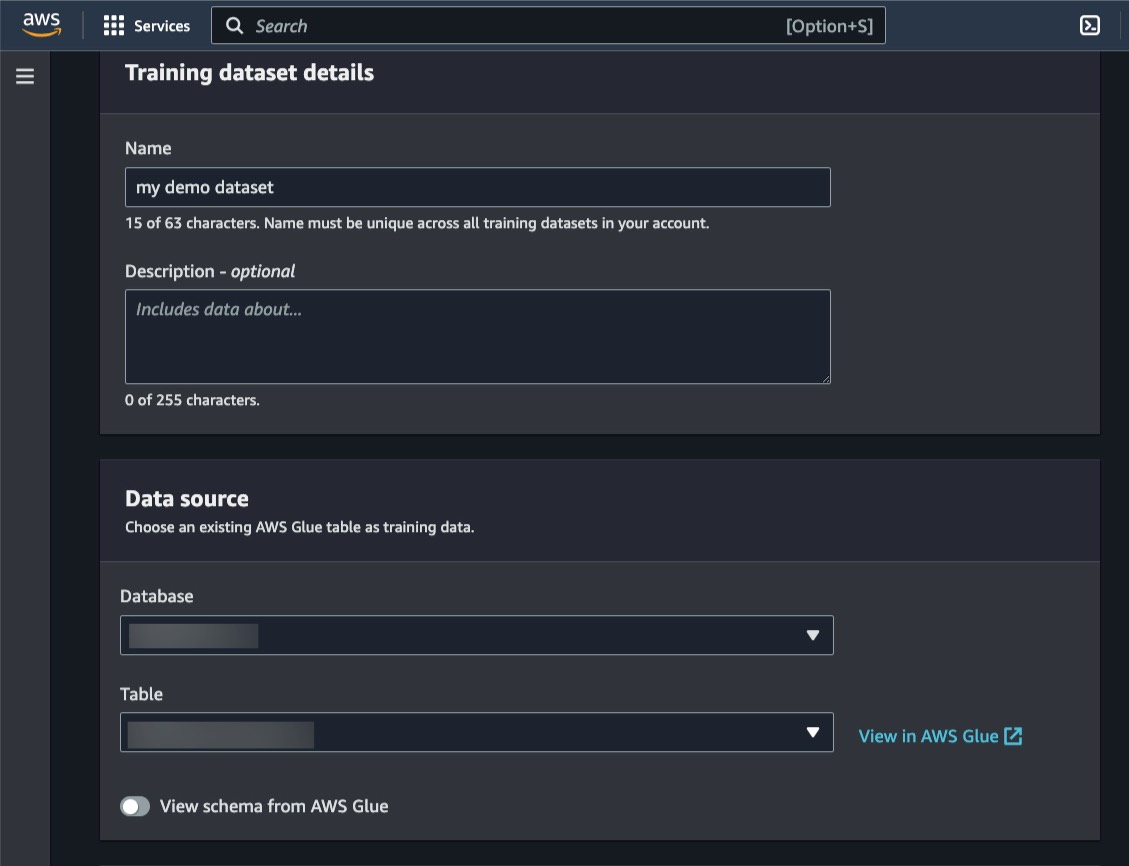
You can specify the training dataset using the AWS Glue Data Catalog table, which contains user-item interactions.

Under Additional columns to train, you can define numerical and categorical data. This is useful if you need to add more features to your dataset, such as the number of seconds spent watching a video, the topic of an article, or the product category of an e-commerce item.

Applying custom-trained AWS-built models
Once you have defined your training dataset, you can now create a lookalike model. A lookalike model is a machine learning model used to find similar profiles in your partner’s dataset without either party having to share their underlying data with each other.

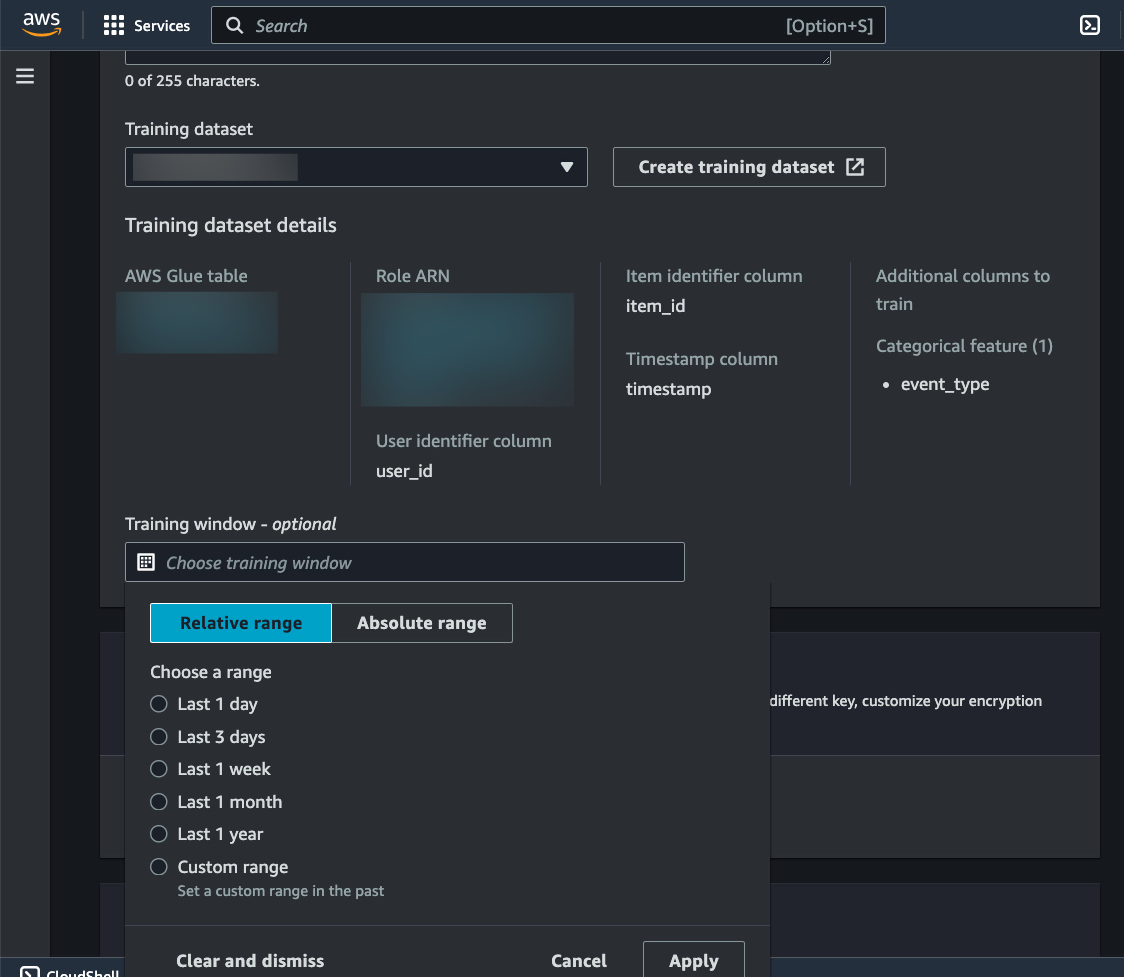
When creating a lookalike model, you need to specify the training dataset. From a single training dataset, you can create many lookalike models. You also have the flexibility to define the date window in your training dataset using Relative range or Absolute range. This is useful when you have data that is constantly updated within AWS Glue, such as articles read by users.

Easy-to-tune ML models
After you create a lookalike model, you need to configure it to use in AWS Clean Rooms collaboration. AWS Clean Rooms ML provides flexible controls that enable you and your partners to tune the results of the applied ML model to garner predictive insights.

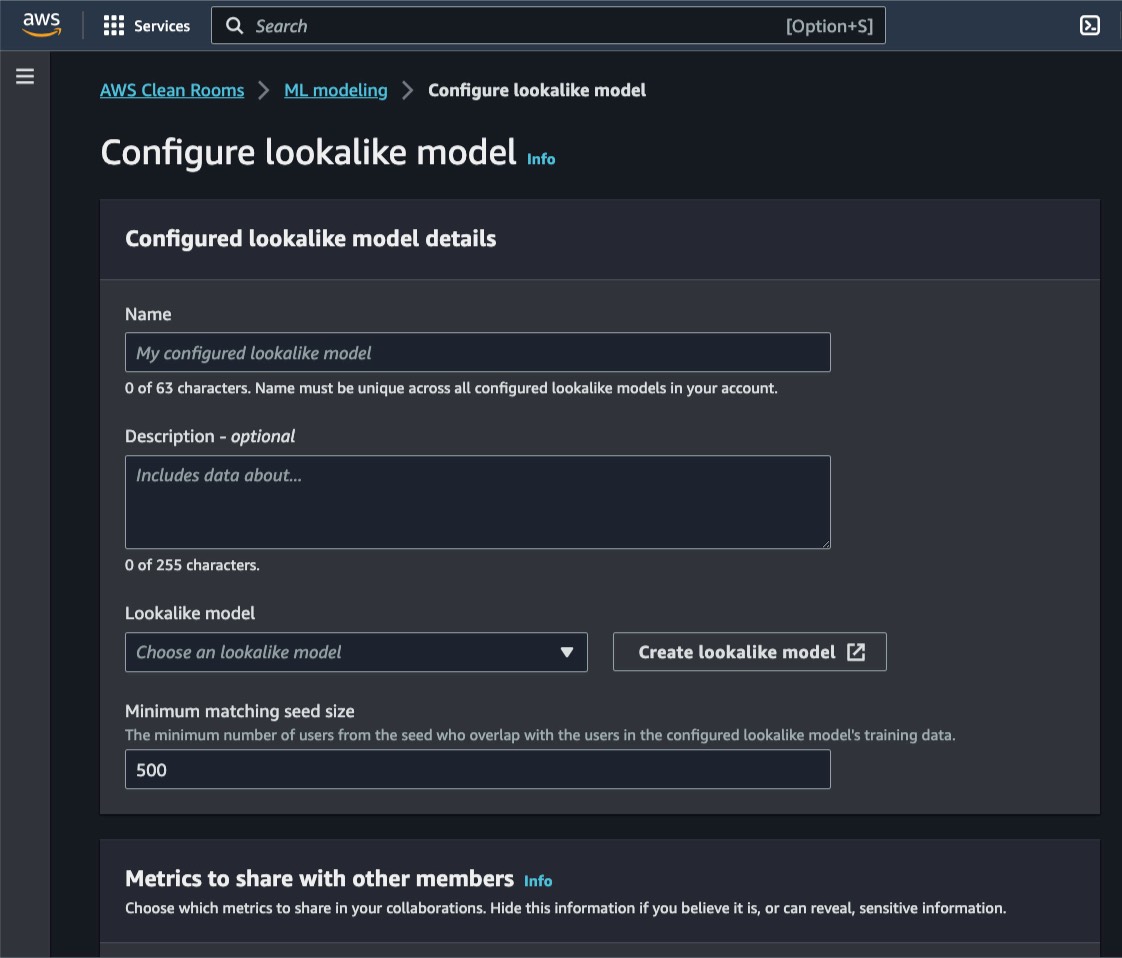
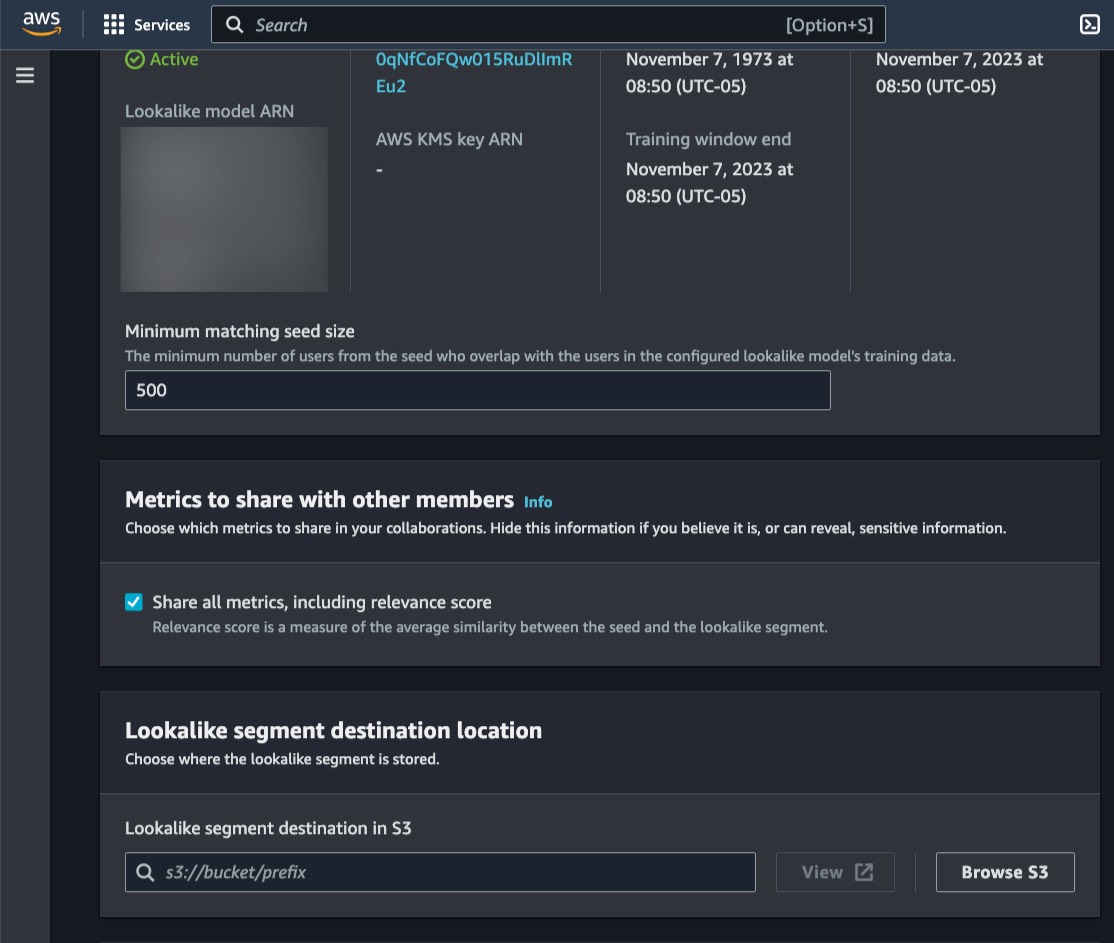
On the Configure lookalike model page, you can choose which Lookalike model you want to use and define the Minimum matching seed size you need. This seed size defines the minimum number of profiles in your seed data that overlap with profiles in the training data.

You also have the flexibility to choose whether the partner in your collaboration receives metrics in Metrics to share with other members.

With your lookalike models properly configured, you can now make the ML models available for your partners by associating the configured lookalike model with a collaboration.

Creating lookalike segments
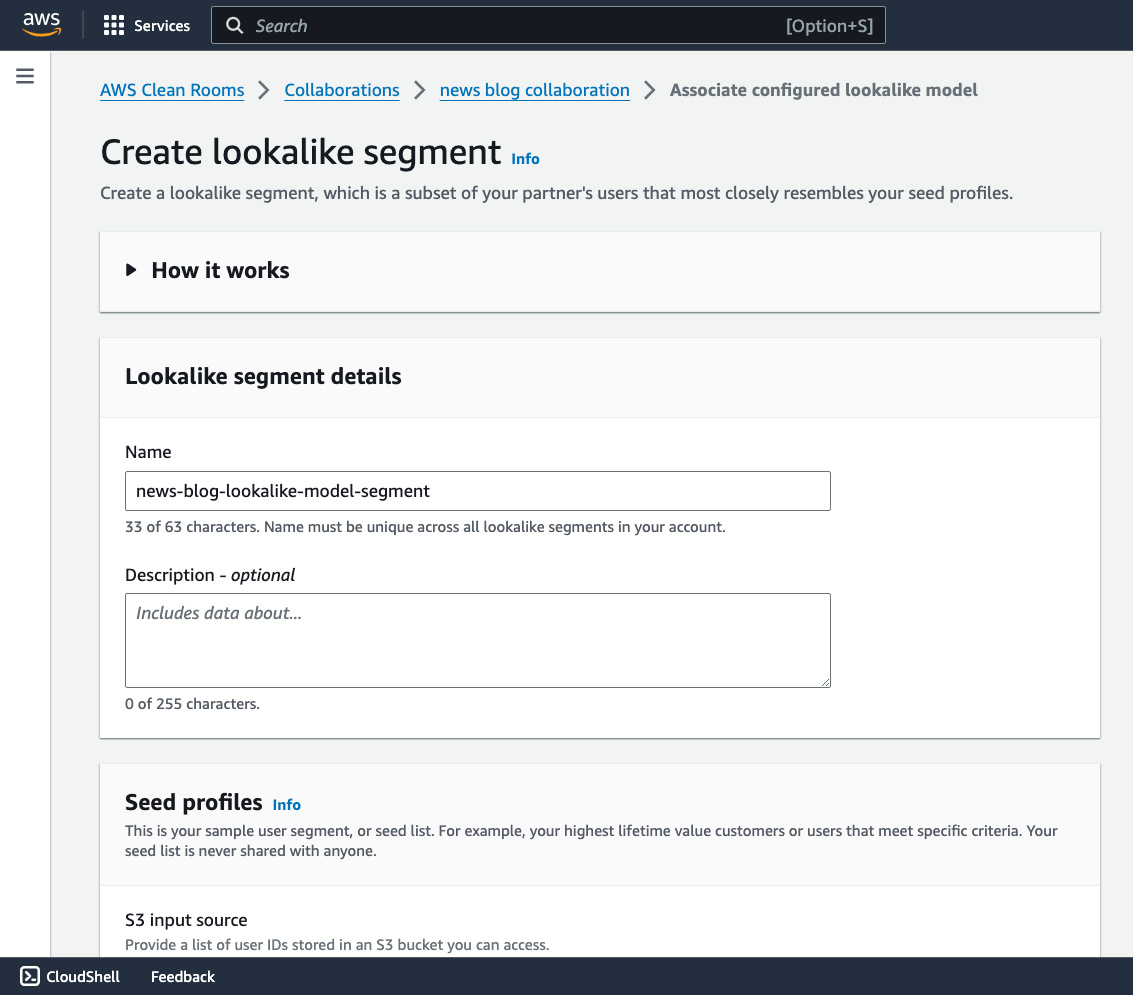
Once the lookalike models have been associated, your partners can now start generating insights by selecting Create lookalike segment and choosing the associated lookalike model for your collaboration.

Here on the Create lookalike segment page, your partners need to provide the Seed profiles. Examples of seed profiles include your top customers or all customers who purchased a specific product. The resulting lookalike segment will contain profiles from the training data that are most similar to the profiles from the seed.

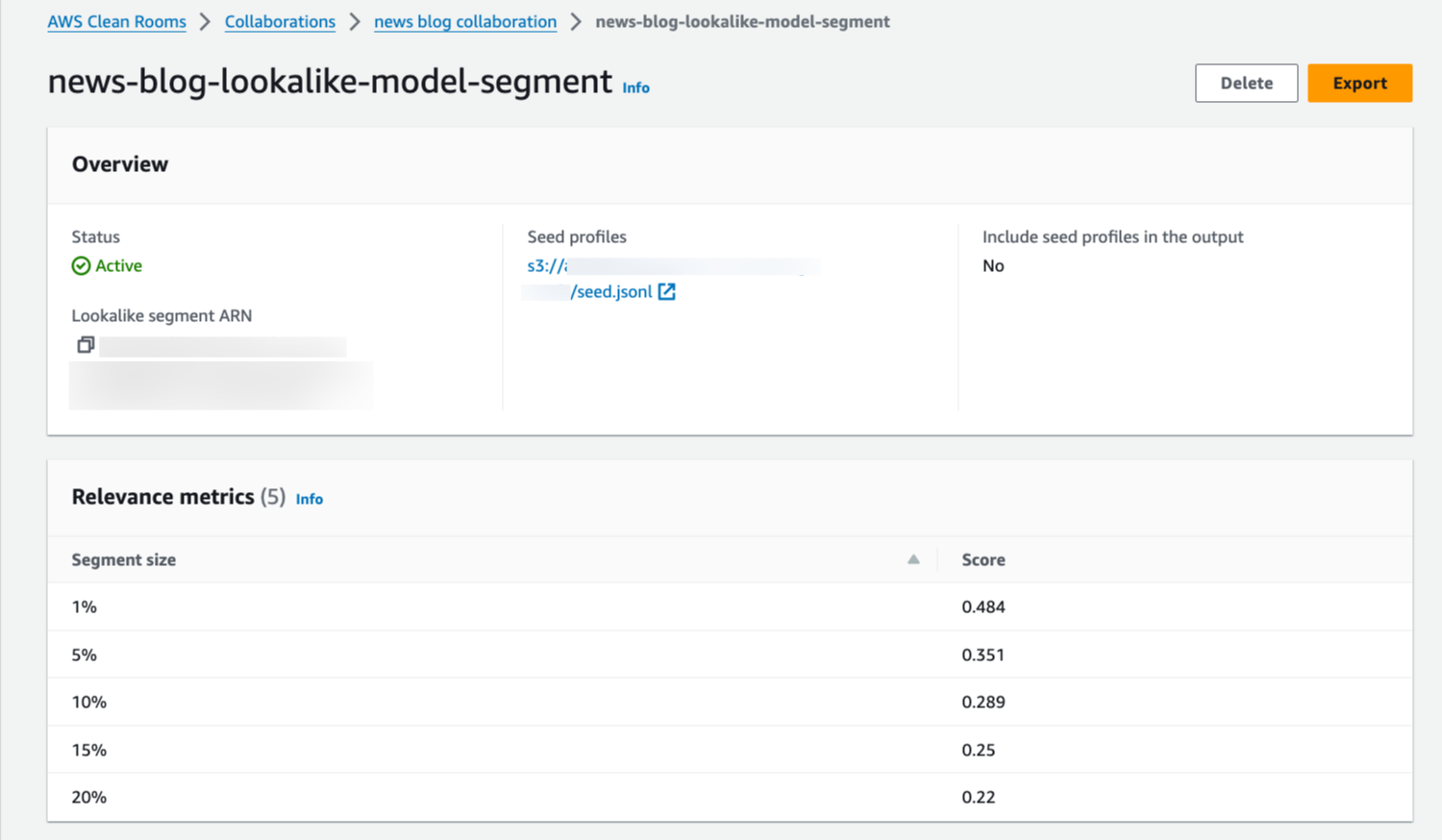
Lastly, your partner will get the Relevance metrics as the result of the lookalike segment using the ML models. At this stage, you can use the Score to make a decision.

Export data and use programmatic API
You also have the option to export the lookalike segment data. Once it’s exported, the data is available in JSON format and you can process this output by integrating with AWS Clean Rooms API and your applications.

Join the preview
AWS Clean Rooms ML is now in preview and available via AWS Clean Rooms in US East (Ohio, N. Virginia), US West (Oregon), Asia Pacific (Seoul, Singapore, Sydney, Tokyo), and Europe (Frankfurt, Ireland, London). Support for additional models is in the works.

Learn how to apply machine learning with your partners without sharing underlying data on the AWS Clean Rooms ML page.

Happy collaborating!
— Donnie

Announcing Amazon OpenSearch Service zero-ETL integration with Amazon S3 (preview)

Post Syndicated from Channy Yun original https://aws.amazon.com/blogs/aws/amazon-opensearch-service-zero-etl-integration-with-amazon-s3-preview/

Today we are announcing a preview of Amazon OpenSearch Service zero-ETL integration with Amazon S3, a new way to query operational logs in Amazon S3 and S3-based data lakes without needing to switch between services. You can now analyze infrequently queried data in cloud object stores and simultaneously use the operational analytics and visualization capabilities of OpenSearch Service.

Amazon OpenSearch Service direct queries with Amazon S3 provides a zero-ETL integration to reduce the operational complexity of duplicating data or managing multiple analytics tools by enabling customers to directly query their operational data, reducing costs and time to action. This zero-ETL integration will be configurable within OpenSearch Service, where you can take advantage of various log type templates, including predefined dashboards, and configure data accelerations tailored to that log type. Templates include VPC Flow Logs, Elastic Load Balancing logs, and NGINX logs, and accelerations include skipping indexes, materialized views, and covered indexes.

With direct queries with Amazon S3, you can perform complex queries critical to security forensic and threat analysis that correlate data across multiple data sources, which aids teams in investigating service downtime and security events. After creating an integration, you can start querying their data directly from the OpenSearch Dashboards or OpenSearch API. You can easily audit connections to ensure that they are set up in a scalable, cost-efficient, and secure way.

Getting started with direct queries with Amazon S3
You can easily get started by creating a new Amazon S3 direct query data source for OpenSearch Service through the AWS Management Console or the API. Each new data source uses AWS Glue Data Catalog to manage tables that represent S3 buckets. Once you create a data source, you can configure Amazon S3 tables and data indexing and query data in OpenSearch Dashboards.

1. Create a data source in OpenSearch Service
Before you create a data source, you should have an OpenSearch Service domain with version 2.11 or later and a target Amazon S3 table in AWS Glue Data Catalog with the appropriate IAM permissions. IAM will need access to the desired S3 bucket(s) and read and write access to AWS Glue Data Catalog. To learn more about IAM prerequisites, see Creating a data source in the AWS documentation.

Go to the OpenSearch Service console and choose the domain you want to set up a new data source for. In the domain details page, choose the Connections tab below the general information and see the Direct Query section.

To create a new data source, choose Create, input the name of your new data source, select the data source type as Amazon S3 with AWS Glue Data Catalog, and choose the IAM role for your data source.

Once you create a data source, you can go to the OpenSearch Dashboards of the domain, which you use to configure access control, define tables, set up log type–based dashboards for popular log types, and query your data.

2. Configuring your data source in OpenSearch Dashboards
To configure data source in OpenSearch Dashboards, choose Configure in the console and go to OpenSearch Dashboards. In the left-hand navigation of OpenSearch Dashboards, under Management, choose Data sources. Under Manage data sources, choose the name of the data source you created in the console.

Direct queries from OpenSearch Service to Amazon S3 use Spark tables within AWS Glue Data Catalog. To create a new table you want to direct query, go to the Query Workbench in the Open Search Plugins menu.

Now run as in the following SQL statement to create http_logs table and run MSCK REPAIR TABLE mys3.default.http_logs command to update the metadata in the catalog

CREATE EXTERNAL TABLE IF NOT EXISTS mys3.default.http_logs (
   `@timestamp` TIMESTAMP,
    clientip STRING,
    request STRING, 
    status INT, 
    size INT, 
    year INT, 
    month INT, 
    day INT) 
USING json PARTITIONED BY(year, month, day) OPTIONS (path 's3://mys3/data/http_log/http_logs_partitioned_json_bz2/', compression 'bzip2')

To ensure a fast experience with your data in Amazon S3, you can set up any of three different types of accelerations to index data into OpenSearch Service, such as skipping indexes, materialized views, and covering indexes. To create OpenSearch indexes from external data connections for better performance, choose the Accelerate Table.

  • Skipping indexes allow you to index only the metadata of the data stored in Amazon S3. Skipping indexes help quickly identify data stored by narrowing down a specific location of where the data is stored.
  • Materialized views enable you to use complex queries such as aggregations, which can be used for querying or powering dashboard visualizations. Materialized views ingest data into OpenSearch Service for anomaly detection or geospatial capabilities.
  • Covering indexes will ingest all the data from the specified table column. Covering indexes are the most performant of the three indexing types.

3. Query your data source in OpenSearch Dashboards
After you set up your tables, you can query your data using Discover. You can run a sample SQL query for the http_logs table you created in AWS Glue Data Catalog tables.

To learn more, see Working with Amazon OpenSearch Service direct queries with Amazon S3 in the AWS documentation.

Join the preview
Amazon OpenSearch Service zero-ETL integration with Amazon S3 is now previewed in the AWS US East (Ohio), US East (N. Virginia), US West (Oregon), Asia Pacific (Tokyo), Europe (Frankfurt), and Europe (Ireland) Regions.

OpenSearch Service separately charges for only the compute needed as OpenSearch Compute Units to query your external data as well as maintain indexes in OpenSearch Service. For more information, see Amazon OpenSearch Service Pricing.

Give it a try and send feedback to the AWS re:Post for Amazon OpenSearch Service or through your usual AWS Support contacts.

Channy

Analyze large amounts of graph data to get insights and find trends with Amazon Neptune Analytics

Post Syndicated from Sébastien Stormacq original https://aws.amazon.com/blogs/aws/introducing-amazon-neptune-analytics-a-high-performance-graph-analytics/

I am happy to announce the general availability of Amazon Neptune Analytics, a new analytics database engine that makes it faster for data scientists and application developers to quickly analyze large amounts of graph data. With Neptune Analytics, you can now quickly load your dataset from Amazon Neptune or your data lake on Amazon Simple Storage Service (Amazon S3), run your analysis tasks in near real time, and optionally terminate your graph afterward.

Graph data enables the representation and analysis of intricate relationships and connections within diverse data domains. Common applications include social networks, where it aids in identifying communities, recommending connections, and analyzing information diffusion. In supply chain management, graphs facilitate efficient route optimization and bottleneck identification. In cybersecurity, they reveal network vulnerabilities and identify patterns of malicious activity. Graph data finds application in knowledge management, financial services, digital advertising, and network security, performing tasks such as identifying money laundering networks in banking transactions and predicting network vulnerabilities.

Since the launch of Neptune in May 2018, thousands of customers have embraced the service for storing their graph data and performing updates and deletion on specific subsets of the graph. However, analyzing data for insights often involves loading the entire graph into memory. For instance, a financial services company aiming to detect fraud may need to load and correlate all historical account transactions.

Performing analyses on extensive graph datasets, such as running common graph algorithms, requires specialized tools. Utilizing separate analytics solutions demands the creation of intricate pipelines to transfer data for processing, which is challenging to operate, time-consuming, and prone to errors. Furthermore, loading large datasets from existing databases or data lakes to a graph analytic solution can take hours or even days.

Neptune Analytics offers a fully managed graph analytics experience. It takes care of the infrastructure heavy lifting, enabling you to concentrate on problem-solving through queries and workflows. Neptune Analytics automatically allocates compute resources according to the graph’s size and quickly loads all the data in memory to run your queries in seconds. Our initial benchmarking shows that Neptune Analytics loads data from Amazon S3 up to 80x faster than existing AWS solutions.

Neptune Analytics supports 5 families of algorithms covering 15 different algorithms, each with multiple variants. For example, we provide algorithms for path-finding, detecting communities (clustering), identifying important data (centrality), and quantifying similarity. Path-finding algorithms are used for use cases such as route planning for supply chain optimization. Centrality algorithms like page rank identify the most influential sellers in a graph. Algorithms like connected components, clustering, and similarity algorithms can be used for fraud-detection use cases to determine whether the connected network is a group of friends or a fraud ring formed by a set of coordinated fraudsters.

Neptune Analytics facilitates the creation of graph applications using openCypher, presently one of the widely adopted graph query languages. Developers, business analysts, and data scientists appreciate openCypher’s SQL-inspired syntax, finding it familiar and structured for composing graph queries.

Let’s see it at work
As we usually do on the AWS News blog, let’s show how it works. For this demo, I first navigate to Neptune in the AWS Management Console. There is a new Analytics section on the left navigation pane. I select Graphs and then Create graph.

Neptune Analytics - create graph 1

On the Create graph page, I enter the details of my graph analytics database engine. I won’t detail each parameter here; their names are self-explanatory.

Neptune Analytics - Create graph 1

Pay attention to Allow from public because, the vast majority of the time, you want to keep your graph only available from the boundaries of your VPC. I also create a Private endpoint to allow private access from machines and services inside my account VPC network.

Neptune Analytics - Create graph 2

In addition to network access control, users will need proper IAM permissions to access the graph.

Finally, I enable Vector search to perform similarity search using embeddings in the dataset. The dimension of the vector depends on the large language model (LLM) that you use to generate the embedding.

Neptune Analytics - Create graph 3

When I am ready, I select Create graph (not shown here).

After a few minutes, my graph is available. Under Connectivity & security, I take note of the Endpoint. This is the DNS name I will use later to access my graph from my applications.

I can also create Replicas. A replica is a warm standby copy of the graph in another Availability Zone. You might decide to create one or more replicas for high availability. By default, we create one replica, and depending on your availability requirements, you can choose not to create replicas.

Neptune Analytics - create graph 3

Business queries on graph data
Now that the Neptune Analytics graph is available, let’s load and analyze data. For the rest of this demo, imagine I’m working in the finance industry.

I have a dataset obtained from the US Securities and Exchange Commission (SEC). This dataset contains the list of positions held by investors that have more than $100 million in assets. Here is a diagram to illustrate the structure of the dataset I use in this demo.

Nuptune graph analytics - dataset structure

I want to get a better understanding of the positions held by one investment firm (let’s name it “Seb’s Investments LLC”). I wonder what its top five holdings are and who else holds more than $1 billion in the same companies. I am also curious to know what are other investment companies that have a similar portfolio as Seb’s Investments LLC.

To start my analysis, I create a Jupyter notebook in the Neptune section of the AWS Management Console. In the notebook, I first define my analytics endpoint and load the data set from an S3 bucket. It takes only 18 seconds to load 17 million records.

Neptune Analytics - load data

Then, I start to explore the dataset using openCypher queries. I start by defining my parameters:

params = {'name': "Seb's Investments LLC", 'quarter': '2023Q4'}

First, I want to know what the top five holdings are for Seb’s Investments LLC in this quarter and who else holds more than $1 billion in the same companies. In openCypher, it translates to the query hereafter. The $name parameter’s value is “Seb’s Investment LLC” and the $quarter parameter’s value is 2023Q4.

MATCH p=(h:Holder)-->(hq1)-[o:owns]->(holding)
WHERE h.name = $name AND hq1.name = $quarter
WITH DISTINCT holding as holding, o ORDER BY o.value DESC LIMIT 5
MATCH (holding)<-[o2:owns]-(hq2)<--(coholder:Holder)
WHERE hq2.name = '2023Q4'
WITH sum(o2.value) AS totalValue, coholder, holding
WHERE totalValue > 1000000000
RETURN coholder.name, collect(holding.name)

Neptune Analytics - query 1

Then, I want to know what the other top five companies are that have similar holdings as “Seb’s Investments LLC.” I use the topKByNode() function to perform a vector search.

MATCH (n:Holder)
WHERE n.name = $name
CALL neptune.algo.vectors.topKByNode(n)
YIELD node, score
WHERE score >0
RETURN node.name LIMIT 5

This query identifies a specific Holder node with the name “Seb’s Investments LLC.” Then, it utilizes the Neptune Analytics custom vector similarity search algorithm on the embedding property of the Holder node to find other nodes in the graph that are similar. The results are filtered to include only those with a positive similarity score, and the query finally returns the names of up to five related nodes.

Neptune Analytics - query 2

Pricing and availability
Neptune Analytics is available today in seven AWS Regions: US East (Ohio, N. Virginia), US West (Oregon), Asia Pacific (Singapore, Tokyo), and Europe (Frankfurt, Ireland).

AWS charges for the usage on a pay-as-you-go basis, with no recurring subscriptions or one-time setup fees.

Pricing is based on configurations of memory-optimized Neptune capacity units (m-NCU). Each m-NCU corresponds to one hour of compute and networking capacity and 1 GiB of memory. You can choose configurations starting with 128 m-NCUs and up to 4096 m-NCUs. In addition to m-NCU, storage charges apply for graph snapshots.

I invite you to read the Neptune pricing page for more details

Neptune Analytics is a new analytics database engine to analyze large graph datasets. It helps you discover insights faster for use cases such as fraud detection and prevention, digital advertising, cybersecurity, transportation logistics, and bioinformatics.

Get started
Log in to the AWS Management Console to give Neptune Analytics a try.

— seb

Vector search for Amazon DocumentDB (with MongoDB compatibility) is now generally available

Post Syndicated from Channy Yun original https://aws.amazon.com/blogs/aws/vector-search-for-amazon-documentdb-with-mongodb-compatibility-is-now-generally-available/

Today, we are announcing the general availability of vector search for Amazon DocumentDB (with MongoDB compatibility), a new built-in capability that lets you store, index, and search millions of vectors with millisecond response times within your document database.

Vector search is an emerging technique used in machine learning (ML) to find similar data points to given data by comparing their vector representations using distance or similarity metrics. Vectors are numerical representation of unstructured data created from large language models (LLM) hosted in Amazon Bedrock, Amazon SageMaker, and other open source or proprietary ML services. This approach is useful in creating generative artificial intelligence (AI) applications, such as intuitive search, product recommendation, personalization, and chatbots using Retrieval Augmented Generation (RAG) model approach. For example, if your data set contained individual documents for movies, you could semantically search for movies similar to Titanic based on shared context such as “boats”, “tragedy”, or “movies based on true stories” instead of simply matching keywords.

With vector search for Amazon DocumentDB, you can effectively search the database based on nuanced meaning and context without spending time and cost to manage a separate vector database infrastructure. You also benefit from the fully managed, scalable, secure, and highly available JSON-based document database that Amazon DocumentDB provides.

Getting started with vector search on Amazon DocumentDB
The vector search feature is available on your Amazon DocumentDB 5.0 instance-based clusters. To implement a vector search application, you generate vectors using embedding models for fields inside your document and store vectors side by side your source data inside Amazon DocumentDB.

Next, you create a vector index on a vector field that will help retrieve similar vectors and can search the Amazon DocumentDB database using semantic search. Finally, user-submitted queries are converted to vectors using the same embedding model to get semantically similar documents and return them to the client.

Let’s look at how to implement a simple semantic search application using vector search on Amazon DocumentDB.

Step 1. Create vector embeddings using the Amazon Titan Embeddings model
Let’s use the Amazon Titan Embeddings model to create an embedding vector. Amazon Titan Embeddings model is available in Amazon Bedrock, a serverless generative AI service. You can easily access it using a single API and without managing any infrastructure.

prompt = "I love dog and cat."
response = bedrock_runtime.invoke_model(
    body= json.dumps({"inputText": prompt}), 
    modelId='amazon.titan-embed-text-v1', 
    accept='application/json', 
    contentType='application/json'
)
response_body = json.loads(response['body'].read())
embedding = response_body.get('embedding')

The returned vector embedding will look similar to this:

[0.82421875, -0.6953125, -0.115722656, 0.87890625, 0.05883789, -0.020385742, 0.32421875, -0.00078201294, -0.40234375, 0.44140625, ...]

Step 2. Insert vector embeddings and create a vector index
You can add generated vector embeddings using the insertMany( [{},...,{}] ) operation with a list of the documents that you want added to your collection in Amazon DocumentDB.

db.collection.insertMany([
    {sentence: "I love a dog and cat.", vectorField: [0.82421875, -0.6953125,...]},
    {sentence: "My dog is very cute.", vectorField: [0.05883789, -0.020385742,...]},
    {sentence: "I write with a pen.", vectorField: [-0.020385742, 0.32421875,...]},
  ...
]);

You can create a vector index using the createIndex command. Amazon DocumentDB performs an approximate nearest neighbor (ANN) search using the inverted file with flat compression (IVFFLAT) vector index. The feature supports three distance metrics: euclidean, cosine, and inner product. We will use the euclidean distance, a measure of the straight-line distance between two points in space. The smaller the euclidean distance, the closer the vectors are to each other.

db.collection.createIndex (
   { vectorField: "vector" },
   { "name": "index name",
     "vectorOptions": {
        "dimensions": 100, // the number of vector data dimensions
        "similarity": "euclidean", // Or cosine and dotProduct
        "lists": 100 
      }
   }
);

Step 3.  Search vector embeddings from Amazon DocumentDB
You can now search for similar vectors within your documents using a new aggregation pipeline operator within $search. The example code to search “I like pets” is as follows:

db.collection.aggregate ({
  $search: {
    "vectorSearch": {
      "vector": [0.82421875, -0.6953125,...], // Search for ‘I like pets’
      "path": vectorField,
      "k": 5,
      "similarity": "euclidean", // Or cosine and dotProduct
      "probes": 1 // the number of clusters for vector search
      }
     }
   });

This returns search results such as “I love a dog and cat.” which is semantically similar.

To learn more, see Amazon DocumentDB documentation. To see a more practical example—a semantic movie search with Amazon DocumentDB—find the Python source codes and data-sets in the GitHub repository.

Now available
Vector search for Amazon DocumentDB is now available at no additional cost to all customers using Amazon DocumentDB 5.0 instance-based clusters in all AWS Regions where Amazon DocumentDB is available. Standard compute, I/O, storage, and backup charges will apply as you store, index, and search vector embeddings on Amazon DocumentDB.

To learn more, see the Amazon DocumentDB documentation and send feedback to AWS re:Post for Amazon DocumentDB or through your usual AWS Support contacts.

Channy

Vector engine for Amazon OpenSearch Serverless is now available

Post Syndicated from Channy Yun original https://aws.amazon.com/blogs/aws/vector-engine-for-amazon-opensearch-serverless-is-now-generally-available/

Today we are announcing the general availability of the vector engine for Amazon OpenSearch Serverless with new features. In July 2023, we introduced the preview release of the vector engine for Amazon OpenSearch Serverless, a simple, scalable, and high-performing similarity search capability. The vector engine makes it easy for you to build modern machine learning (ML) augmented search experiences and generative artificial intelligence (generative AI) applications without needing to manage the underlying vector database infrastructure.

You can now store, update, and search billions of vector embeddings with thousands of dimensions in milliseconds. The highly performant similarity search capability of vector engine enables generative AI-powered applications to deliver accurate and reliable results with consistent milliseconds-scale response times.

The vector engine also enables you to optimize and tune results with hybrid search by combining vector search and full-text search in the same query, removing the need to manage and maintain separate data stores or a complex application stack. The vector engine provides a secure, reliable, scalable, and enterprise-ready platform to cost effectively build a prototyping application and then seamlessly scale to production.

You can now get started in minutes with the vector engine by creating a specialized vector engine–based collection, which is a logical grouping of embeddings that works together to support a workload.

The vector engine uses OpenSearch Compute Units (OCUs), compute capacity unit, to ingest and run similarity search queries. One OCU can handle up to 2 million vectors for 128 dimensions or 500,000 for 768 dimensions at 99 percent recall rate.

The vector engine built on OpenSearch Serverless is a highly available service by default. It requires a minimum of four OCUs (2 OCUs for the ingest, including primary and standby, and 2 OCUs for the search with two active replicas across Availability Zones) for the first collection in an account. All subsequent collections using the same AWS Key Management Service (AWS KMS) key can share those OCUs.

What’s new at GA?
Since the preview, the vector engine for Amazon OpenSearch Serverless became one of the vector database options in the knowledge base of Amazon Bedrock to build generative AI applications using a Retrieval Augmented Generation (RAG) concept.

Here are some new or improved features for this GA release:

Disable redundant replica (development and test focused) option
As we announced in our preview blog post, this feature eliminates the need to have redundant OCUs in another Availability Zone solely for availability purposes. A collection can be deployed with two OCUs – one for indexing and one for search. This cuts the costs in half compared to default deployment with redundant replicas. The reduced cost makes this configuration suitable and economical for development and testing workloads.

With this option, we will still provide durability guarantees since the vector engine persists all the data in Amazon S3, but single-AZ failures would impact your availability.

If you want to disable a redundant replica, uncheck Enable redundancy when creating a new vector search
collection.

Fractional OCU for the development and test focused option
Support for fractional OCU billing for development and test focused workloads (that is, no redundant replica option) reduces the floor price for vector search collection. The vector engine will initially deploy smaller 0.5 OCUs while providing the same capabilities at lower scale and will scale up to a full OCU and beyond to meet your workload demand. This option will further reduce the monthly costs when experimenting with using the vector engine.

Automatic scaling for a billion scale
With vector engine’s seamless auto-scaling, you no longer have to reindex for scaling purposes. At preview, we were supporting about 20 million vector embeddings. With the general availability of vector engine, we have raised the limits to support a billion vector scale.

Now available
The vector engine for Amazon OpenSearch Serverless is now available in all AWS Regions where Amazon OpenSearch Serverless is available.

To get started, you can refer to the following resources:

Give it a try and send feedback to AWS re:Post for Amazon OpenSearch Service or through your usual AWS support contacts.

Channy

Introducing Amazon SageMaker HyperPod, a purpose-built infrastructure for distributed training at scale

Post Syndicated from Antje Barth original https://aws.amazon.com/blogs/aws/introducing-amazon-sagemaker-hyperpod-a-purpose-built-infrastructure-for-distributed-training-at-scale/

Today, we are introducing Amazon SageMaker HyperPod, which helps reducing time to train foundation models (FMs) by providing a purpose-built infrastructure for distributed training at scale. You can now use SageMaker HyperPod to train FMs for weeks or even months while SageMaker actively monitors the cluster health and provides automated node and job resiliency by replacing faulty nodes and resuming model training from a checkpoint.

The clusters come preconfigured with SageMaker’s distributed training libraries that help you split your training data and model across all the nodes to process them in parallel and fully utilize the cluster’s compute and network infrastructure. You can further customize your training environment by installing additional frameworks, debugging tools, and optimization libraries.

Let me show you how to get started with SageMaker HyperPod. In the following demo, I create a SageMaker HyperPod and show you how to train a Llama 2 7B model using the example shared in the AWS ML Training Reference Architectures GitHub repository.

Create and manage clusters
As the SageMaker HyperPod admin, you can create and manage clusters using the AWS Management Console or AWS Command Line Interface (AWS CLI). In the console, navigate to Amazon SageMaker, select Cluster management under HyperPod Clusters in the left menu, then choose Create a cluster.

Amazon SageMaker HyperPod Clusters

In the setup that follows, provide a cluster name and configure instance groups with your instance types of choice and the number of instances to allocate to each instance group.

Amazon SageMaker HyperPod

You also need to prepare and upload one or more lifecycle scripts to your Amazon Simple Storage Service (Amazon S3) bucket to run in each instance group during cluster creation. With lifecycle scripts, you can customize your cluster environment and install required libraries and packages. You can find example lifecycle scripts for SageMaker HyperPod in the GitHub repo.

Using the AWS CLI
You can also use the AWS CLI to create and manage clusters. For my demo, I specify my cluster configuration in a JSON file. I choose to create two instance groups, one for the cluster controller node(s) that I call “controller-group,” and one for the cluster worker nodes that I call “worker-group.” For the worker nodes that will perform model training, I specify Amazon EC2 Trn1 instances powered by AWS Trainium chips.

// demo-cluster.json
{
   "InstanceGroups": [
        {
            "InstanceGroupName": "controller-group",
            "InstanceType": "ml.m5.xlarge",
            "InstanceCount": 1,
            "lifecycleConfig": {
                "SourceS3Uri": "s3://<your-s3-bucket>/<lifecycle-script-directory>/",
                "OnCreate": "on_create.sh"
            },
            "ExecutionRole": "arn:aws:iam::111122223333:role/my-role-for-cluster",
            "ThreadsPerCore": 1
        },
        {
            "InstanceGroupName": "worker-group",
            "InstanceType": "trn1.32xlarge",
            "InstanceCount": 4,
            "lifecycleConfig": {
                "SourceS3Uri": "s3://<your-s3-bucket>/<lifecycle-script-directory>/",
                "OnCreate": "on_create.sh"
            },
            "ExecutionRole": "arn:aws:iam::111122223333:role/my-role-for-cluster",
            "ThreadsPerCore": 1
        }
    ]
}

To create the cluster, I run the following AWS CLI command:

aws sagemaker create-cluster \
--cluster-name antje-demo-cluster \
--instance-groups file://demo-cluster.json

Upon creation, you can use aws sagemaker describe-cluster and aws sagemaker list-cluster-nodes to view your cluster and node details. Note down the cluster ID and instance ID of your controller node. You need that information to connect to your cluster.

You also have the option to attach a shared file system, such as Amazon FSx for Lustre. To use FSx for Lustre, you need to set up your cluster with an Amazon Virtual Private Cloud (Amazon VPC) configuration. Here’s an AWS CloudFormation template that shows how to create a SageMaker VPC and how to deploy FSx for Lustre.

Connect to your cluster
As a cluster user, you need to have access to the cluster provisioned by your cluster admin. With access permissions in place, you can connect to the cluster using SSH to schedule and run jobs. You can use the preinstalled AWS CLI plugin for AWS Systems Manager to connect to the controller node of your cluster.

For my demo, I run the following command specifying my cluster ID and instance ID of the control node as the target.

aws ssm start-session \
--target sagemaker-cluster:ntg44z9os8pn_i-05a854e0d4358b59c \
--region us-west-2

Schedule and run jobs on the cluster using Slurm
At launch, SageMaker HyperPod supports Slurm for workload orchestration. Slurm is a popular an open source cluster management and job scheduling system. You can install and set up Slurm through lifecycle scripts as part of the cluster creation. The example lifecycle scripts show how. Then, you can use the standard Slurm commands to schedule and launch jobs. Check out the Slurm Quick Start User Guide for architecture details and helpful commands.

For this demo, I’m using this example from the AWS ML Training Reference Architectures GitHub repo that shows how to train Llama 2 7B on Slurm with Trn1 instances. My cluster is already setup with Slurm, and I have an FSx for Lustre filesystem mounted.

Note
The Llama 2 model is governed by Meta. You can request access through the Meta request access page.

Set up the cluster environment
SageMaker HyperPod supports training in a range of environments, including Conda, venv, Docker, and enroot. Following the instructions in the README, I build my virtual environment aws_neuron_venv_pytorch and set up the torch_neuronx and neuronx-nemo-megatron libraries for training models on Trn1 instances.

Prepare model, tokenizer, and dataset
I follow the instructions to download the Llama 2 model and tokenizer and convert the model into the Hugging Face format. Then, I download and tokenize the RedPajama dataset. As a final preparation step, I pre-compile the Llama 2 model using ahead-of-time (AOT) compilation to speed up model training.

Launch jobs on the cluster
Now, I’m ready to start my model training job using the sbatch command.

sbatch --nodes 4 --auto-resume=1 run.slurm ./llama_7b.sh

You can use the squeue command to view the job queue. Once the training job is running, the SageMaker HyperPod resiliency features are automatically enabled. SageMaker HyperPod will automatically detect hardware failures, replace nodes as needed, and resume training from checkpoints if the auto-resume parameter is set, as shown in the preceding command.

You can view the output of the model training job in the following file:

tail -f slurm-run.slurm-<JOB_ID>.out

A sample output indicating that model training has started will look like this:

Epoch 0:  22%|██▏       | 4499/20101 [22:26:14<77:48:37, 17.95s/it, loss=2.43, v_num=5563, reduced_train_loss=2.470, gradient_norm=0.121, parameter_norm=1864.0, global_step=4512.0, consumed_samples=1.16e+6, iteration_time=16.40]
Epoch 0:  22%|██▏       | 4500/20101 [22:26:32<77:48:18, 17.95s/it, loss=2.43, v_num=5563, reduced_train_loss=2.470, gradient_norm=0.121, parameter_norm=1864.0, global_step=4512.0, consumed_samples=1.16e+6, iteration_time=16.40]
Epoch 0:  22%|██▏       | 4500/20101 [22:26:32<77:48:18, 17.95s/it, loss=2.44, v_num=5563, reduced_train_loss=2.450, gradient_norm=0.120, parameter_norm=1864.0, global_step=4512.0, consumed_samples=1.16e+6, iteration_time=16.50]

To further monitor and profile your model training jobs, you can use SageMaker hosted TensorBoard or any other tool of your choice.

Now available
SageMaker HyperPod is available today in AWS Regions US East (Ohio), US East (N. Virginia), US West (Oregon), Asia Pacific (Singapore), Asia Pacific (Sydney), Asia Pacific (Tokyo), Europe (Frankfurt), Europe (Ireland), and Europe (Stockholm).

Learn more:

— Antje

PS: Writing a blog post at AWS is always a team effort, even when you see only one name under the post title. In this case, I want to thank Brad Doran, Justin Pirtle, Ben Snyder, Pierre-Yves Aquilanti, Keita Watanabe, and Verdi March for their generous help with example code and sharing their expertise in managing large-scale model training infrastructures, Slurm, and SageMaker HyperPod.

Amazon Titan Image Generator, Multimodal Embeddings, and Text models are now available in Amazon Bedrock

Post Syndicated from Antje Barth original https://aws.amazon.com/blogs/aws/amazon-titan-image-generator-multimodal-embeddings-and-text-models-are-now-available-in-amazon-bedrock/

Today, we’re introducing two new Amazon Titan multimodal foundation models (FMs): Amazon Titan Image Generator (preview) and Amazon Titan Multimodal Embeddings. I’m also happy to share that Amazon Titan Text Lite and Amazon Titan Text Express are now generally available in Amazon Bedrock. You can now choose from three available Amazon Titan Text FMs, including Amazon Titan Text Embeddings.

Amazon Titan models incorporate 25 years of artificial intelligence (AI) and machine learning (ML) innovation at Amazon and offer a range of high-performing image, multimodal, and text model options through a fully managed API. AWS pre-trained these models on large datasets, making them powerful, general-purpose models built to support a variety of use cases while also supporting the responsible use of AI.

You can use the base models as is, or you can privately customize them with your own data. To enable access to Amazon Titan FMs, navigate to the Amazon Bedrock console and select Model access on the bottom left menu. On the model access overview page, choose Manage model access and enable access to the Amazon Titan FMs.

Amazon Titan Models

Let me give you a quick tour of the new models.

Amazon Titan Image Generator (preview)
As a content creator, you can now use Amazon Titan Image Generator to quickly create and refine images using English natural language prompts. This helps companies in advertising, e-commerce, and media and entertainment to create studio-quality, realistic images in large volumes and at low cost. The model makes it easy to iterate on image concepts by generating multiple image options based on the text descriptions. The model can understand complex prompts with multiple objects and generates relevant images. It is trained on high-quality, diverse data to create more accurate outputs, such as realistic images with inclusive attributes and limited distortions.

Titan Image Generator’s image editing features include the ability to automatically edit an image with a text prompt using a built-in segmentation model. The model supports inpainting with an image mask and outpainting to extend or change the background of an image. You can also configure image dimensions and specify the number of image variations you want the model to generate.

In addition, you can customize the model with proprietary data to generate images consistent with your brand guidelines or to generate images in a specific style, for example, by fine-tuning the model with images from a previous marketing campaign. Titan Image Generator also mitigates harmful content generation to support the responsible use of AI. All images generated by Amazon Titan contain an invisible watermark, by default, designed to help reduce the spread of misinformation by providing a discreet mechanism to identify AI-generated images.

Amazon Titan Image Generator in action
You can start using the model in the Amazon Bedrock console by submitting either an English natural language prompt to generate images or by uploading an image for editing. In the following example, I show you how to generate an image with Amazon Titan Image Generator using the AWS SDK for Python (Boto3).

First, let’s have a look at the configuration options for image generation that you can specify in the body of the inference request. For task type, I choose TEXT_IMAGE to create an image from a natural language prompt.

import boto3
import json

bedrock = boto3.client(service_name="bedrock")
bedrock_runtime = boto3.client(service_name="bedrock-runtime")

# ImageGenerationConfig Options:
#   numberOfImages: Number of images to be generated
#   quality: Quality of generated images, can be standard or premium
#   height: Height of output image(s)
#   width: Width of output image(s)
#   cfgScale: Scale for classifier-free guidance
#   seed: The seed to use for reproducibility  

body = json.dumps(
    {
        "taskType": "TEXT_IMAGE",
        "textToImageParams": {
            "text": "green iguana",   # Required
#           "negativeText": "<text>"  # Optional
        },
        "imageGenerationConfig": {
            "numberOfImages": 1,   # Range: 1 to 5 
            "quality": "premium",  # Options: standard or premium
            "height": 768,         # Supported height list in the docs 
            "width": 1280,         # Supported width list in the docs
            "cfgScale": 7.5,       # Range: 1.0 (exclusive) to 10.0
            "seed": 42             # Range: 0 to 214783647
        }
    }
)

Next, specify the model ID for Amazon Titan Image Generator and use the InvokeModel API to send the inference request.

response = bedrock_runtime.invoke_model(
    body=body, 
    modelId="amazon.titan-image-generator-v1" 
    accept="application/json", 
    contentType="application/json"
)

Then, parse the response and decode the base64-encoded image.

import base64
from PIL import Image
from io import BytesIO

response_body = json.loads(response.get("body").read())
images = [Image.open(BytesIO(base64.b64decode(base64_image))) for base64_image in response_body.get("images")]

for img in images:
    display(img)

Et voilà, here’s the green iguana (one of my favorite animals, actually):

Green iguana generated by Amazon Titan Image Generator

To learn more about all the Amazon Titan Image Generator features, visit the Amazon Titan product page. (You’ll see more of the iguana over there.)

Next, let’s use this image with the new Amazon Titan Multimodal Embeddings model.

Amazon Titan Multimodal Embeddings
Amazon Titan Multimodal Embeddings helps you build more accurate and contextually relevant multimodal search and recommendation experiences for end users. Multimodal refers to a system’s ability to process and generate information using distinct types of data (modalities). With Titan Multimodal Embeddings, you can submit text, image, or a combination of the two as input.

The model converts images and short English text up to 128 tokens into embeddings, which capture semantic meaning and relationships between your data. You can also fine-tune the model on image-caption pairs. For example, you can combine text and images to describe company-specific manufacturing parts to understand and identify parts more effectively.

By default, Titan Multimodal Embeddings generates vectors of 1,024 dimensions, which you can use to build search experiences that offer a high degree of accuracy and speed. You can also configure smaller vector dimensions to optimize for speed and price performance. The model provides an asynchronous batch API, and the Amazon OpenSearch Service will soon offer a connector that adds Titan Multimodal Embeddings support for neural search.

Amazon Titan Multimodal Embeddings in action
For this demo, I create a combined image and text embedding. First, I base64-encode my image, and then I specify either inputText, inputImage, or both in the body of the inference request.

# Maximum image size supported is 2048 x 2048 pixels
with open("iguana.png", "rb") as image_file:
    input_image = base64.b64encode(image_file.read()).decode('utf8')

# You can specify either text or image or both
body = json.dumps(
    {
        "inputText": "Green iguana on tree branch",
        "inputImage": input_image
    }
)

Next, specify the model ID for Amazon Titan Multimodal Embeddings and use the InvokeModel API to send the inference request.

response = bedrock_runtime.invoke_model(
	body=body, 
	modelId="amazon.titan-embed-image-v1", 
	accept="application/json", 
	contentType="application/json"
)

Let’s see the response.

response_body = json.loads(response.get("body").read())
print(response_body.get("embedding"))

[0.005087942, -0.004392853, -0.04764151, -0.024312444, 0.049922388, 0.0132532045, 0.014374298, 0.005523709, -0.015199458, 0.02182385, ...]

I redacted the output for brevity. The distance between multimodal embedding vectors, measured with metrics like cosine similarity or euclidean distance, shows how similar or different the represented information is across modalities. Smaller distances mean more similarity, while larger distances mean more dissimilarity.

As a next step, you could build an image database by storing and indexing the multimodal embeddings in a vector store or vector database. To implement text-to-image search, query the database with inputText. For image-to-image search, query the database with inputImage. For image+text-to-image search, query the database with both inputImage and inputText.

Amazon Titan Text
Amazon Titan Text Lite and Amazon Titan Text Express are large language models (LLMs) that support a wide range of text-related tasks, including summarization, translation, and conversational chatbot systems. They can also generate code and are optimized to support popular programming languages and text formats like JSON and CSV.

Titan Text Express – Titan Text Express has a maximum context length of 8,192 tokens and is ideal for a wide range of tasks, such as open-ended text generation and conversational chat, and support within Retrieval Augmented Generation (RAG) workflows.

Titan Text Lite – Titan Text Lite has a maximum context length of 4,096 tokens and is a price-performant version that is ideal for English-language tasks. The model is highly customizable and can be fine-tuned for tasks such as article summarization and copywriting.

Amazon Titan Text in action
For this demo, I ask Titan Text to write an email to my team members suggesting they organize a live stream: “Compose a short email from Antje, Principal Developer Advocate, encouraging colleagues in the developer relations team to organize a live stream to demo our new Amazon Titan V1 models.”

body = json.dumps({
    "inputText": prompt, 
    "textGenerationConfig":{  
        "maxTokenCount":512,
        "stopSequences":[],
        "temperature":0,
        "topP":0.9
    }
})

Titan Text FMs support temperature and topP inference parameters to control the randomness and diversity of the response, as well as maxTokenCount and stopSequences to control the length of the response.

Next, choose the model ID for one of the Titan Text models and use the InvokeModel API to send the inference request.

response = bedrock_runtime.invoke_model(
    body=body,
	# Choose modelID
	# Titan Text Express: "amazon.titan-text-express-v1"
	# Titan Text Lite: "amazon.titan-text-lite-v1"
	modelID="amazon.titan-text-express-v1"
    accept="application/json", 
    contentType="application/json"
)

Let’s have a look at the response.

response_body = json.loads(response.get('body').read())
outputText = response_body.get('results')[0].get('outputText')

text = outputText[outputText.index('\n')+1:]
email = text.strip()
print(email)

Subject: Demo our new Amazon Titan V1 models live!

Dear colleagues,

I hope this email finds you well. I am excited to announce that we have recently launched our new Amazon Titan V1 models, and I believe it would be a great opportunity for us to showcase their capabilities to the wider developer community.

I suggest that we organize a live stream to demo these models and discuss their features, benefits, and how they can help developers build innovative applications. This live stream could be hosted on our YouTube channel, Twitch, or any other platform that is suitable for our audience.

I believe that showcasing our new models will not only increase our visibility but also help us build stronger relationships with developers. It will also provide an opportunity for us to receive feedback and improve our products based on the developer’s needs.

If you are interested in organizing this live stream, please let me know. I am happy to provide any support or guidance you may need. Together, let’s make this live stream a success and showcase the power of Amazon Titan V1 models to the world!

Best regards,
Antje
Principal Developer Advocate

Nice. I could send this email right away!

Availability and pricing
Amazon Titan Text FMs are available today in AWS Regions US East (N. Virginia), US West (Oregon), Asia Pacific (Singapore, Tokyo), and Europe (Frankfurt). Amazon Titan Multimodal Embeddings is available today in the AWS Regions US East (N. Virginia) and US West (Oregon). Amazon Titan Image Generator is available in public preview in the AWS Regions US East (N. Virginia) and US West (Oregon). For pricing details, see the Amazon Bedrock Pricing page.

Learn more

Go to the AWS Management Console to start building generative AI applications with Amazon Titan FMs on Amazon Bedrock today!

— Antje

Amazon Bedrock now provides access to Anthropic’s latest model, Claude 2.1

Post Syndicated from Channy Yun original https://aws.amazon.com/blogs/aws/amazon-bedrock-now-provides-access-to-anthropics-latest-model-claude-2-1/

Today, we’re announcing the availability of Anthropic’s Claude 2.1 foundation model (FM) in Amazon Bedrock. Last week, Anthropic introduced its latest model, Claude 2.1, delivering key capabilities for enterprises such as an industry-leading 200,000 token context window (2x the context of Claude 2.0), reduced rates of hallucination, improved accuracy over long documents, system prompts, and a beta tool use feature for function calling and workflow orchestration.

With Claude 2.1’s availability in Amazon Bedrock, you can build enterprise-ready generative artificial intelligence (AI) applications using more honest and reliable AI systems from Anthropic. You can now use the Claude 2.1 model provided by Anthropic in the Amazon Bedrock console.

Here are some key highlights about the new Claude 2.1 model in Amazon Bedrock:

200,000 token context window – Enterprise applications demand larger context windows and more accurate outputs when working with long documents such as product guides, technical documentation, or financial or legal statements. Claude 2.1 supports 200,000 tokens, the equivalent of roughly 150,000 words or over 500 pages of documents. When uploading extensive information to Claude, you can summarize, perform Q&A, forecast trends, and compare and contrast multiple documents for drafting business plans and analyzing complex contracts.

Strong accuracy upgrades – Claude 2.1 has also made significant gains in honesty, with a 2x decrease in hallucination rates, 50 percent fewer hallucinations in open-ended conversation and document Q&A, a 30 percent reduction in incorrect answers, and a 3–4 times lower rate of mistakenly concluding that a document supports a particular claim compared to Claude 2.0. Claude increasingly knows what it doesn’t know and will more likely demur rather than hallucinate. With this improved accuracy, you can build more reliable, mission-critical applications for your customers and employees.

System prompts – Claude 2.1 now supports system prompts, a new feature that can improve Claude’s performance in a variety of ways, including greater character depth and role adherence in role-playing scenarios, particularly over longer conversations, as well as stricter adherence to guidelines, rules, and instructions. This represents a structural change, but not a content change from former ways of prompting Claude.

Tool use for function calling and workflow orchestration – Available as a beta feature, Claude 2.1 can now integrate with your existing internal processes, products, and APIs to build generative AI applications. Claude 2.1 accurately retrieves and processes data from additional knowledge sources as well as invokes functions for a given task.  Claude 2.1 can answer questions by searching databases using private APIs and a web search API, translate natural language requests into structured API calls, or connect to product datasets to make recommendations and help customers complete purchases. Access to this feature is currently limited to select early access partners, with plans for open access in the near future. If you are interested in gaining early access, please contact your AWS account team.

To learn more about Claude 2.1’s features and capabilities, visit Anthropic Claude on Amazon Bedrock and the Amazon Bedrock documentation.

Claude 2.1 in action
To get started with Claude 2.1 in Amazon Bedrock, go to the Amazon Bedrock console. Choose Model access on the bottom left pane, then choose Manage model access on the top right side, submit your use case, and request model access to the Anthropic Claude model. It may take several minutes to get access to models. If you already have access to the Claude model, you don’t need to request access separately for Claude 2.1.

To test Claude 2.1 in chat mode, choose Text or Chat under Playgrounds in the left menu pane. Then select Anthropic and then Claude v2.1.

By choosing View API request, you can also access the model via code examples in the AWS Command Line Interface (AWS CLI) and AWS SDKs. Here is a sample of the AWS CLI command:

$ aws bedrock-runtime invoke-model \
      --model-id anthropic.claude-v2:1 \
      --body "{\"prompt\":\"Human: \\n\\nHuman: Tell me funny joke about outer space!\n\nAssistant:", "max_tokens_to_sample": 50}' \
      --cli-binary-format raw-in-base64-out \
      invoke-model-output.txt

You can use system prompt engineering techniques provided by the Claude 2.1 model, where you place your inputs and documents before any questions that reference or utilize that content. Inputs can be natural language text, structured documents, or code snippets using <document>, <papers>, <books>, or <code> tags, and so on. You can also use conversational text, such as chat history, and Retrieval Augmented Generation (RAG) results, such as chunked documents.

Here is a system prompt example for support agents to respond to customer questions based on corporate documents.

Here are some documents for you to reference for your task:
<documents>
 <document index="1">
  <document_content>
  (the text content of the document - could be a passage, web page, article, etc)
   </document_content>
<document index="2">
  <source>https://mycompany.repository/userguide/what-is-it.html</source>
</document>
<document index="3">
  <source>https://mycompany.repository/docs/techspec.pdf</source>
 </document>
...
</documents>

You are Larry, and you are a customer advisor with deep knowledge of your company's products. Larry has a great deal of patience with his customers, even when they say nonsense or are sarcastic. Larry's answers are polite but sometimes funny. However, he only answers questions about the company's products and doesn't know much about other questions. Use the provided documentation to answer user questions.

Human: Your product is making a weird stuttering sound when I operate. What might be the problem?

To learn more about prompt engineering on Amazon Bedrock, see the Prompt engineering guidelines included in the Amazon Bedrock documentation. You can learn general prompt techniques, templates, and examples for Amazon Bedrock text models, including Claude.

Now available
Claude 2.1 is available today in the US East (N. Virginia) and US West (Oregon) Regions.

You only pay for what you use, with no time-based term commitments for on-demand mode. For text generation models, you are charged for every input token processed and every output token generated. Or you can choose the provisioned throughput mode to meet your application’s performance requirements in exchange for a time-based term commitment. To learn more, see Amazon Bedrock Pricing.

Give Anthropic Claude 2.1 a try in Amazon Bedrock console today and send feedback to AWS re:Post for Amazon Bedrock or through your usual AWS Support contacts.

Channy

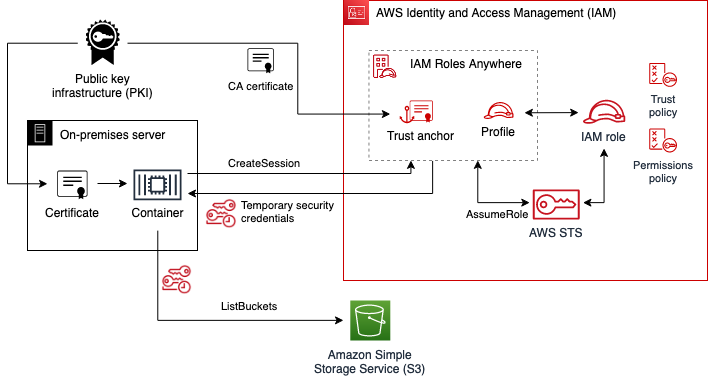
Use IAM Roles Anywhere to help you improve security in on-premises container workloads

Post Syndicated from Ulrich Hinze original https://aws.amazon.com/blogs/security/use-iam-roles-anywhere-to-help-you-improve-security-in-on-premises-container-workloads/

This blog post demonstrates how to help meet your security goals for a containerized process running outside of Amazon Web Services (AWS) as part of a hybrid cloud architecture. Managing credentials for such systems can be challenging, including when a workload needs to access cloud resources. IAM Roles Anywhere lets you exchange static AWS Identity and Access Management (IAM) user credentials with temporary security credentials in this scenario, reducing security risks while improving developer convenience.

In this blog post, we focus on these key areas to help you set up IAM Roles Anywhere in your own environment: determining whether an existing on-premises public key infrastructure (PKI) can be used with IAM Roles Anywhere, creating the necessary AWS resources, creating an IAM Roles Anywhere enabled Docker image, and using this image to issue AWS Command Line Interface (AWS CLI) commands. In the end, you will be able to issue AWS CLI commands through a Docker container, using credentials from your own PKI.

The AWS Well-Architected Framework and AWS IAM best practices documentation recommend that you use temporary security credentials over static credentials wherever possible. For workloads running on AWS—such as Amazon Elastic Compute Cloud (Amazon EC2) instances, AWS Lambda functions, or Amazon Elastic Kubernetes Service (Amazon EKS) pods—assigning and assuming IAM roles is a secure mechanism for distributing temporary credentials that can be used to authenticate against the AWS API. Before the release of IAM Roles Anywhere, developers had to use IAM users with long-lived, static credentials (access key IDs and secret access keys) to call the AWS API from outside of AWS. Now, by establishing trust between your on-premises PKI or AWS Private Certificate Authority (AWS Private CA) with IAM Roles Anywhere, you can also use IAM roles for workloads running outside of AWS.

This post provides a walkthrough for containerized environments. Containers make the setup for different environments and operating systems more uniform, making it simpler for you to follow the solution in this post and directly apply the learnings to your existing containerized setup. However, you can apply the same pattern to non-container environments.

At the end of this walkthrough, you will issue an AWS CLI command to list Amazon S3 buckets in an AWS account (aws s3 ls). This is a simplified mechanism to show that you have successfully authenticated to AWS using IAM Roles Anywhere. Typically, in applications that consume AWS functionality, you instead would use an AWS Software Development Kit (SDK) for the programming language of your application. You can apply the same concepts from this blog post to enable the AWS SDK to use IAM Roles Anywhere.

Prerequisites

To follow along with this post, you must have these tools installed:

  • The latest version of the AWS CLI, to create IAM Roles Anywhere resources
  • jq, to extract specific information from AWS API responses
  • Docker, to create and run the container image
  • OpenSSL, to create cryptographic keys and certificates

Make sure that the principal used by the AWS CLI has enough permissions to perform the commands described in this blog post. For simplicity, you can apply the following least-privilege IAM policy:

{
    "Version": "2012-10-17",
    "Statement": [
        {
            "Sid": "IAMRolesAnywhereBlog",
            "Effect": "Allow",
            "Action": [
                "iam:CreateRole",
                "iam:DeleteRole",
                "iam:PutRolePolicy",
                "iam:DeleteRolePolicy",
                "iam:PassRole",
                "rolesanywhere:CreateTrustAnchor",
                "rolesanywhere:ListTrustAnchors",
                "rolesanywhere:DeleteTrustAnchor",
                "rolesanywhere:CreateProfile",
                "rolesanywhere:ListProfiles",
                "rolesanywhere:DeleteProfile"
            ],
            "Resource": [
                "arn:aws:iam::*:role/bucket-lister",
                "arn:aws:rolesanywhere:*:*:trust-anchor/*",
                "arn:aws:rolesanywhere:*:*:profile/*"
            ]
        }
    ]
}

This blog post assumes that you have configured a default AWS Region for the AWS CLI. If you have not, refer to the AWS CLI configuration documentation for different ways to configure the AWS Region.

Considerations for production use cases

To use IAM Roles Anywhere, you must establish trust with a private PKI. Certificates that are issued by this certificate authority (CA) are then used to sign CreateSession API requests. The API returns temporary AWS credentials: the access key ID, secret access key, and session key. For strong security, you should specify that the certificates are short-lived and the CA automatically rotates expiring certificates.

To simplify the setup for demonstration purposes, this post explains how to manually create a CA and certificate by using OpenSSL. For a production environment, this is not a suitable approach, because it ignores security concerns around the CA itself and excludes automatic certificate rotation or revocation capabilities. You need to use your existing PKI to provide short-lived and automatically rotated certificates in your production environment. This post shows how to validate whether your private CA and certificates meet IAM Roles Anywhere requirements.

If you don’t have an existing PKI that fulfils these requirements, you can consider using AWS Private Certificate Authority (Private CA) for a convenient way to help you with this process.

In order to use IAM Roles Anywhere in your container workload, it must have access to certificates that are issued by your private CA.

Solution overview

Figure 1 describes the relationship between the different resources created in this blog post.

Figure 1: IAM Roles Anywhere relationship between different components and resources

Figure 1: IAM Roles Anywhere relationship between different components and resources

To establish a trust relationship with the existing PKI, you will use its CA certificate to create an IAM Roles Anywhere trust anchor. You will create an IAM role with permissions to list all buckets in the account. The IAM role’s trust policy states that it can be assumed only from IAM Roles Anywhere, narrowing down which exact end-entity certificate can be used to assume it. The IAM Roles Anywhere profile defines which IAM role can be assumed in a session.

The container that is authenticating with IAM Roles Anywhere needs to present a valid certificate issued by the PKI, as well as Amazon Resource Names (ARNs) for the trust anchor, profile, and role. The container finally uses the certificate’s private key to sign a CreateSession API call, returning temporary AWS credentials. These temporary credentials are then used to issue the aws s3 ls command, which lists all buckets in the account.

Create and verify the CA and certificate

To start, you can either use your own CA and certificate or, to follow along without your own CA, manually create a CA and certificate by using OpenSSL. Afterwards, you can verify that the CA and certificate comply with IAM Roles Anywhere requirements.

To create the CA and certificate

Note: Manually creating and signing RSA keys into X.509 certificates is not a suitable approach for production environments. This section is intended only for demonstration purposes.

  1. Create an OpenSSL config file called v3.ext, with the following content.
    [ req ]
    default_bits                    = 2048
    distinguished_name              = req_distinguished_name
    x509_extensions                 = v3_ca
    
    [ v3_cert ]
    basicConstraints                = critical, CA:FALSE
    keyUsage                        = critical, digitalSignature
    
    [ v3_ca ]
    subjectKeyIdentifier            = hash
    authorityKeyIdentifier          = keyid:always,issuer:always
    basicConstraints                = CA: true
    keyUsage                        = Certificate Sign
    
    [ req_distinguished_name ]
    countryName                     = Country Name (2 letter code)
    countryName_default             = US
    countryName_min                 = 2
    countryName_max                 = 2
    
    stateOrProvinceName             = State or Province Name (full name)
    stateOrProvinceName_default     = Washington
    
    localityName                    = Locality Name (eg, city)
    localityName_default            = Seattle

  2. Create the CA RSA private key ca-key.pem and choose a passphrase.
    openssl genrsa -aes256 -out ca-key.pem 2048

  3. Create the CA X.509 certificate ca-cert.pem, keeping the default settings for all options.
    openssl req -new -x509 -nodes -days 1095 -config v3.ext -key ca-key.pem -out ca-cert.pem

    The CA certificate is valid for three years. For recommendations on certificate validity, refer to the AWS Private CA documentation.

  4. Create an RSA private key key.pem, choose a new passphrase, and create a certificate signing request (CSR) csr.pem for the container. For Common Name (eg, fully qualified host name), enter myContainer. Leave the rest of the options blank.
    openssl req -newkey rsa:2048 -days 1 -keyout key.pem -out csr.pem

  5. Use the CA private key, CA certificate, and CSR to issue an X.509 certificate cert.pem for the container.
    openssl x509 -req -days 1 -sha256 -set_serial 01 -in csr.pem -out cert.pem -CA ca-cert.pem -CAkey ca-key.pem -extfile v3.ext -extensions v3_cert

To verify the CA and certificate

  1. Check whether your CA certificate satisfies IAM Roles Anywhere constraints.
    openssl x509 -text -noout -in ca-cert.pem

    The output should contain the following.

    Certificate:
        Data:
            Version: 3 (0x2)
        ...
        Signature Algorithm: sha256WithRSAEncryption
        ...
            X509v3 extensions:
        ...
                X509v3 Basic Constraints:
                    CA:TRUE
                X509v3 Key Usage:
                    Certificate Sign
        ...

  2. Check whether your certificate satisfies IAM Roles Anywhere constraints.
    openssl x509 -text -noout -in cert.pem

    The output should contain the following.

    Certificate:
        Data:
            Version: 3 (0x2)
        ...
        Signature Algorithm: sha256WithRSAEncryption
        ...
            X509v3 extensions:
        ...
                X509v3 Basic Constraints:
                    CA:FALSE
                X509v3 Key Usage:
                    Digital Signature
        ...

    Note that IAM Roles Anywhere also supports stronger encryption algorithms than SHA256.

Create IAM resources

After you verify that your PKI complies with IAM Roles Anywhere requirements, you’re ready to create IAM resources. Before you start, make sure you have configured the AWS CLI, including setting a default AWS Region.

To create the IAM role

  1. Create a file named policy.json that specifies a set of permissions that your container process needs. For this walkthrough, you will issue the simple AWS CLI command aws s3 ls, which needs the following permissions:
    {
      "Version": "2012-10-17",
      "Statement": [
        {
          "Effect": "Allow",
          "Action": [
             "s3:ListAllMyBuckets"
          ],
          "Resource": "*"
        }
      ]
    }

  2. Create a file named trust-policy.json that contains the assume role policy for an IAM role by the service IAM Roles Anywhere. Note that this policy defines which certificate can assume the role. We define this based on the common name (CN) of the certificate, but you can explore other possibilities in the IAM Roles Anywhere documentation.
    {
      "Version": "2012-10-17",
      "Statement": [
        {
          "Effect": "Allow",
          "Principal": {
              "Service": "rolesanywhere.amazonaws.com"
          },
          "Action": [
            "sts:AssumeRole",
            "sts:TagSession",
            "sts:SetSourceIdentity"
          ],
          "Condition": {
            "StringEquals": {
              "aws:PrincipalTag/x509Subject/CN": "myContainer"
            }
          }
        }
      ]
    }

  3. Create the IAM role named bucket-lister.
    aws iam create-role --role-name bucket-lister --assume-role-policy-document file://trust-policy.json

    The response should be a JSON document that describes the role.

  4. Attach the IAM policy document that you created earlier.
    aws iam put-role-policy --role-name bucket-lister --policy-name list-buckets --policy-document file://policy.json

    This command returns without a response.

To enable authentication with IAM Roles Anywhere

  1. Establish trust between IAM Roles Anywhere and an on-premises PKI by making the CA certificate known to IAM Roles Anywhere using a trust anchor. Create an IAM Roles Anywhere trust anchor from the CA certificate by using the following command:
    aws rolesanywhere create-trust-anchor --enabled --name myPrivateCA --source sourceData={x509CertificateData="$(cat ca-cert.pem)"},sourceType=CERTIFICATE_BUNDLE

    The response should be a JSON document that describes the trust anchor.

  2. Create an IAM Roles Anywhere profile. Make sure to replace <AWS_ACCOUNT ID> with your own information.
    aws rolesanywhere create-profile --enabled --name bucket-lister --role-arns "arn:aws:iam::<AWS_ACCOUNT_ID>:role/bucket-lister"

    The response should be a JSON document that describes the profile.

Create the Docker image

The Docker image that you will create in this step enables you to issue commands with the AWS CLI that are authenticated by using IAM Roles Anywhere.

To create the Docker image

  1. Create a file named docker-entrypoint.sh that configures the AWS CLI to use the IAM Roles Anywhere signing helper.
    #!/bin/sh
    set -e
    
    openssl rsa -in $ROLESANYWHERE_KEY_LOCATION -passin env:ROLESANYWHERE_KEY_PASSPHRASE -out /tmp/key.pem > /dev/null 2>&1
    
    echo "[default]" > ~/.aws/config
    echo "  credential_process = aws_signing_helper credential-process \
        --certificate $ROLESANYWHERE_CERT_LOCATION \
        --private-key /tmp/key.pem \
        --trust-anchor-arn $ROLESANYWHERE_TRUST_ANCHOR_ARN \
        --profile-arn $ROLESANYWHERE_PROFILE_ARN \
        --role-arn $ROLESANYWHERE_ROLE_ARN" >> ~/.aws/config
    
    exec "$@"

  2. Create a file named Dockerfile. This contains a multi-stage build. The first stage builds the IAM Roles Anywhere signing helper. The second stage copies the compiled signing helper binary into the official AWS CLI Docker image and changes the container entry point to the script you created earlier.
    FROM ubuntu:22.04 AS signing-helper-builder
    WORKDIR /build
    
    RUN apt update && apt install -y git build-essential golang-go
    
    RUN git clone --branch v1.1.1 https://github.com/aws/rolesanywhere-credential-helper.git
    RUN go env -w GOPRIVATE=*
    RUN go version
    
    RUN cd rolesanywhere-credential-helper && go build -buildmode=pie -ldflags "-X main.Version=1.0.2 -linkmode=external -extldflags=-static -w -s" -trimpath -o build/bin/aws_signing_helper main.go
    
    
    FROM amazon/aws-cli:2.11.27
    COPY --from=signing-helper-builder /build/rolesanywhere-credential-helper/build/bin/aws_signing_helper /usr/bin/aws_signing_helper
    
    RUN yum install -y openssl shadow-utils
    
    COPY ./docker-entrypoint.sh /docker-entrypoint.sh
    RUN chmod +x /docker-entrypoint.sh
    
    RUN useradd user
    USER user
    
    RUN mkdir ~/.aws
    
    ENTRYPOINT ["/bin/bash", "/docker-entrypoint.sh", "aws"]

    Note that the first build stage can remain the same for other use cases, such as for applications using an AWS SDK. Only the second stage would need to be adapted. Diving deeper into the technical details of the first build stage, note that building the credential helper from its source keeps the build independent of the processor architecture. The build process also statically packages dependencies that are not present in the official aws-cli Docker image. Depending on your use case, you may opt to download pre-built artifacts from the credential helper download page instead.

  3. Create the image as follows.
    docker build -t rolesanywhere .

Use the Docker image

To use the Docker image, use the following commands to run the created image manually. Make sure to replace <PRIVATE_KEY_PASSSPHRASE> with your own data.

profile_arn=$(aws rolesanywhere list-profiles  | jq -r '.profiles[] | select(.name=="bucket-lister") | .profileArn')
trust_anchor_arn=$(aws rolesanywhere list-trust-anchors | jq -r '.trustAnchors[] | select(.name=="myPrivateCA") | .trustAnchorArn')
role_arn=$(aws iam list-roles | jq -r '.Roles[] | select(.RoleName=="bucket-lister") | .Arn')

docker run -it -v $(pwd):/rolesanywhere -e ROLESANYWHERE_CERT_LOCATION=/rolesanywhere/cert.pem -e ROLESANYWHERE_KEY_LOCATION=/rolesanywhere/key.pem -e ROLESANYWHERE_KEY_PASSPHRASE=<PRIVATE_KEY_PASSSPHRASE> -e ROLESANYWHERE_TRUST_ANCHOR_ARN=$trust_anchor_arn -e ROLESANYWHERE_PROFILE_ARN=$profile_arn -e ROLESANYWHERE_ROLE_ARN=$role_arn rolesanywhere s3 ls

This command should return a list of buckets in your account.

Because we only granted permissions to list buckets, other commands that use this certificate, like the following, will fail with an UnauthorizedOperation error.

docker run -it -v $(pwd):/rolesanywhere -e ROLESANYWHERE_CERT_LOCATION=/rolesanywhere/cert.pem -e ROLESANYWHERE_KEY_LOCATION=/rolesanywhere/key.pem -e ROLESANYWHERE_KEY_PASSPHRASE=<PRIVATE_KEY_PASSSPHRASE> -e ROLESANYWHERE_TRUST_ANCHOR_ARN=$trust_anchor_arn -e ROLESANYWHERE_PROFILE_ARN=$profile_arn -e ROLESANYWHERE_ROLE_ARN=$role_arn rolesanywhere ec2 describe-instances --region us-east-1

Note that if you use a certificate that uses a different common name than myContainer, this command will instead return an AccessDeniedException error as it fails to assume the role bucket-lister.

To use the image in your own environment, consider the following:

  • How to provide the private key and certificate to your container. This depends on how and where your PKI provides certificates. As an example, consider a PKI that rotates certificate files in a host directory, which you can then mount as a directory to your container.
  • How to configure the environment variables. Some variables mentioned earlier, like ROLESANYWHERE_TRUST_ANCHOR_ARN, can be shared across containers, while ROLESANYWHERE_PROFILE_ARN and ROLESANYWHERE_ROLE_ARN should be scoped to a particular container.

Clean up

None of the resources created in this walkthrough incur additional AWS costs. But if you want to clean up AWS resources you created earlier, issue the following commands.

  • Delete the IAM policy from the IAM role.
    aws iam delete-role-policy --role-name bucket-lister --policy-name list-buckets

  • Delete the IAM role.
    aws iam delete-role --role-name bucket-lister

  • Delete the IAM Roles Anywhere profile.
    profile_id=$(aws rolesanywhere list-profiles | jq -r '.profiles[] | select(.name=="bucket-lister") | .profileId')
    aws rolesanywhere delete-profile --profile-id $profile_id

  • Delete the IAM Roles Anywhere trust anchor.
    trust_anchor_id=$(aws rolesanywhere list-trust-anchors | jq -r '.trustAnchors[] | select(.name=="myPrivateCA") | .trustAnchorId')
    aws rolesanywhere delete-trust-anchor --trust-anchor-id $trust_anchor_id

  • Delete the key material you created earlier to avoid accidentally reusing it or storing it in version control.
    rm ca-key.pem ca-cert.pem key.pem csr.pem cert.pem

What’s next

After you reconfigure your on-premises containerized application to access AWS resources by using IAM Roles Anywhere, assess your other hybrid workloads running on-premises that have access to AWS resources. The technique we described in this post isn’t limited to containerized workloads. We encourage you to identify other places in your on-premises infrastructure that rely on static IAM credentials and gradually switch them to use IAM Roles Anywhere.

Conclusion

In this blog post, you learned how to use IAM Roles Anywhere to help you meet security goals in your on-premises containerized system. Improve your security posture by using temporary credentials instead of static credentials to authenticate against the AWS API. Use your existing private CA to make credentials short-lived and automatically rotate them.

For more information, check out the IAM Roles Anywhere documentation. The workshop Deep Dive on AWS IAM Roles Anywhere provides another walkthrough that isn’t specific to Docker containers. If you have any questions, you can start a new thread on AWS re:Post or reach out to AWS Support.

Want more AWS Security news? Follow us on Twitter.

Ulrich Hinze

Ulrich Hinze

Ulrich is a Solutions Architect at AWS. He partners with software companies to architect and implement cloud-based solutions on AWS. Before joining AWS, he worked for AWS customers and partners in software engineering, consulting, and architecture roles for over 8 years.

Alex Paramonov

Alex Paramonov

Alex is an AWS Solutions Architect for Independent Software Vendors in Germany, passionate about Serverless and how it can solve real world problems. Before joining AWS, he worked with large and medium software development companies as a Full-stack Software Engineer and consultant.

MERDA – A Framework For Countering Disinformation

Post Syndicated from Bozho original https://techblog.bozho.net/merda-a-framework-for-countering-disinformation/

Yesterday, on an conference about disinformation, I jokingly coined the acronym MERDA (Monitor, Educate, React, Disrupt, Adapt) for countering disinformation. Now I’ll put the pretentious label “framework” and describe what I mean by that. While this may not seem a very technical topic, fit for a techblog, in fact it has a lot of technical aspects, as disinformation today is spread through technical means (social networks, anonymous websites, messengers). And therefore especially the “Disrupt” part is quite technical.

Monitor – in order to tackle disinformation narratives, we need to monitor them. This includes media monitoring tools (including social media) and building reports on rising narratives that may potentially be disinformation campaigns. These tools include a lot of scraping online content, and consuming APIs where such exist and are accessible. Notably, Facebook removed much of their API access to content, which makes it harder to monitor for trends. It has to be noted that this doesn’t mean monitoring individuals – it’s just about trends, keywords, phrases – sometimes known, sometimes unknown (e.g. the tool can look for very popular tweets, extract the key phrases from it, and then search for that). Governments can list their “named entities” and keep track of narratives/keywords/phrases relating to these named entities (ministers, prime minister, ministries, parties, etc.)

Educate – media literacy, and social media literacy, is a skill. Knowing that “Your page will be disabled if you don’t click here” is a skill. Being able to recognize logical fallacies and propaganda techniques is also a skill and it needs to be taught. Ultimately, the best defense against disinformation is a well informed and prepared public.

React – public institutions need to know how and when to react to certain narratives. It helps if they know them (through monitoring), but they need the so called “strategic communications” in order to respond adequately to disinformation about current events, debunking, pre-bunking and giving the official angle (note that I’m not saying the official angle is always right – it sometimes isn’t, that’s why it has to be supported by credible evidence).

Disrupt – this is the hard part – how to disrupt disinformation campaigns. How to identify and disable troll farms, which engage in coordinated inauthentic behavior – sharing, liking, commenting, cross-posting in groups – creating an artificial buzz around a topic. Facebook is, I think, quite bad at that – this is why I have proposed a local legislation that requires following certain guidelines for identifying troll farms (groups of fake accounts). Then we need a mechanism to take them down, which takes into account freedom of speech – i.e. the possibility that someone is not, in fact, a troll, but merely a misled observer. Fortunately, the digital services act provides for out-of-court appeals for moderator decisions.

The “disrupt” part is not just about troll farms – it’s about fake websites as well. Tracking linked websites, identifying the flow of narratives through these websites, trying to find the ultimate owners, is a hard and quite technical task. We know that there are thousands such anonymous websites that repost, in various languages, disinformation narratives – but taking down a website requires good legal reasons. “I don’t like their articles” is not a good reason.

The “disrupt” part also needs to tackle ad networks – some obscure ad networks are the way disinformation websites get financial support. They usually advertise not-so-legal products. Stopping the inflow of money is one way to reduce disinformation.

Adapt – threat actors in the disinformation space (usually nation-states like Russia) are dynamic and they change their tactics, techniques and procedures (TTPs). Institutions that are trying to reduce the harm of disinformation also need to be adaptable, to constantly look for new ways of getting the false or misleading information through.

Tackling disinformation is walking on thin ice. A wrong step may be seen as curbing free speech. But if we analyze patterns and techniques, rather than content itself, then we are on mostly on the safe side – it doesn’t matter what the article says, if it’s shared by 100 fake accounts and the website is supported by ads of illegal drugs that use deep fakes of famous physicians.

And it’s a complicated technical task – I’ve seen companies claiming they identify troll farms, rings of fake news website, etc. But I haven’t seen any tool that’s good enough. And MERDA … is the situation we are in – active, coordinated exploitation of misleading and incorrect information for political and geopolitical purposes.

The post MERDA – A Framework For Countering Disinformation appeared first on Bozho's tech blog.

Rapid7 Takes Next Step in AI Innovation with New AI-Powered Threat Detections

Post Syndicated from Laura Ellis original https://blog.rapid7.com/2023/11/29/rapid7-takes-next-step-in-ai-innovation-with-new-ai-powered-threat-detections/

Rapid7 Takes Next Step in AI Innovation with New AI-Powered Threat Detections

Digital transformation has created immense opportunity to generate new revenue streams, better engage with customers and drive operational efficiency. A decades-long transition to cloud as the de-facto delivery model of choice has delivered undeniable value to the business landscape. But any change in operating model brings new challenges too.

The speed, scale and complexity of modern IT environments results in security teams being tasked with analyzing mountains of data to keep pace with the ever-expanding threat landscape. This dynamic puts security analysts on their heels, constantly reacting to incoming threat signals from tools that weren’t purpose-built to solve hybrid environments, creating coverage gaps and a need to swivel-chair between a multitude of point solutions. Making matters worse? Attackers have increasingly looked to weaponize AI technologies to launch sophisticated attacks, benefiting from increased scale, easy access to AI-generated malware packages, as well as more effective social engineering and phishing using generative AI.

To combat these challenges, we need to equip our security teams with modern solutions leveraging AI to cut through the noise and boost signals that matter.  Our AI algorithms alleviate alert and action fatigue by delivering visibility across your IT environment and intelligently prioritizing the most important risk signals.

Rapid7 Has Been an AI Innovator for Decades

There has been a groundswell of development and corresponding interest in generative AI, particularly in the last few years as mainstream adoption of large language models (LLMs) grows. Most notably OpenAI’s ChatGPT – has brought AI to the forefront of people’s minds. This buzz has resulted in a number of vendors in the security space launching their own intelligent assistants and working to incorporate AI/ML into their respective solutions to keep pace.

From our perspective, this is great news and a huge step forward in the data & AI space. Rapid7 is also accelerating investment, but we’re certainly not starting from scratch. In fact, Rapid7 was a pioneer in AI development for security use cases, starting all the way back to our earliest days with our VM Expert System in the early 2000’s.

Rapid7 Takes Next Step in AI Innovation with New AI-Powered Threat Detections

Built on decades of risk analysis and continuously trained by our expert SOC team, Rapid7 AI enables your team to focus on what matters most by proactively shrinking your attack surface and intelligently re-balancing the scales between signal and noise.

With visibility across your hybrid attack surface, the Insight Platform enables proactive prevention, leveraging a proprietary AI-based detection engine to spot threats faster than ever and automatically prioritize the signals that matter most based on likelihood of exploitation and potential business impact. Based on learnings from your own environment and security operations over time, the platform will intelligently recommend updates to detection rule settings in an effort to reduce excess noise and eliminate false positives.

By integrating our AI capabilities into the Rapid7 platform, customers benefit from:

  • World class threat efficacy, with AI-driven detection of anomalous activity.  With a vast amount of legitimate activity occurring across customer environments, our AI algorithms validate if activity is actually malicious, allowing teams to spot unknown threats faster than ever.
  • Help to cut through the noise, by identifying the signals that matter most.  Our AI algorithms  automatically prioritize risks and threats, intelligently, suppressing benign alerts to eliminate the noise so analysts can focus on what matters most.
  • The confidence that they’re taking action on AI-generated insights they can trust, built on decades of risk and threat analysis and trained by a team of recognized innovators in AI-driven security.

Recent Innovations in AI-driven Threat Detection

We’ve recently announced two new AI/ML-powered threat detection capabilities aimed at enabling teams to detect unknown threats across a customer’s  environment faster than ever before without introducing excess noise.

  • Cloud Anomaly Detection
    Cloud Anomaly Detection is an AI-powered, agentless detection capability designed to detect and prioritize anomalous activity within an organization’s own cloud environment. The proprietary AI engine goes beyond simply detecting suspicious behavior; it automatically suppresses benign signals to reduce noise, eliminate false positives, and enable teams to focus on investigating highly-probable active threats. For more information on Cloud Anomaly Detection, check out the launch blog here.
  • Intelligent Kerberoasting Detection
    We’ve expanded existing AI-driven detections for attack types such as data exfiltration, phishing and credential theft to include intelligent detection, validation and prioritization of Kerberoasting attacks. The platform goes beyond traditional tactics for detecting Kerberoasting by applying a deep understanding of typical user activity across the organization. With this context, SOC teams can respond with confidence knowing the signals they are receiving are actually indicative of a Kerberoasting attack.

Rapid7 continues to explore and invest in ways we can leverage AI/ML to better-equip our customers to defend their organizations against the ever-expanding threat landscape. Keep an eye out in the near-future for additional innovations to come out in this space.

For now, be sure to stop by the Rapid7 booth (#1270) at AWS Re:Invent, where we’ll be showcasing Cloud Anomaly Detection and talk to us about how your team is thinking about utilizing AI.

Roundcube becomes part of Nextcloud

Post Syndicated from corbet original https://lwn.net/Articles/953228/

Nextcloud has announced
the “acquisition” of the Roundcube webmail system.

As a product, Roundcube has an established path to success on its
own. With opportunities remaining to be explored, a direct merger
between Roundcube and Nextcloud is not planned. Neither will
Roundcube replace Nextcloud Mail or the other way around. The
products both have strengths and weaknesses and as open source
products they already do share some underlying libraries and tools,
but remain independent offerings for overlapping but different use
scenarios. Nextcloud Mail will evolve as it is, focused on being
used naturally within Nextcloud. Roundcube will continue to serve
its active and new users as a stand-alone secure mail client.

Security updates for Wednesday

Post Syndicated from corbet original https://lwn.net/Articles/953226/

Security updates have been issued by Debian (gst-plugins-bad1.0 and postgresql-multicorn), Fedora (golang-github-nats-io, golang-github-nats-io-jwt-2, golang-github-nats-io-nkeys, golang-github-nats-io-streaming-server, libcap, nats-server, openvpn, and python-geopandas), Mageia (kernel), Red Hat (c-ares, curl, fence-agents, firefox, kernel, kernel-rt, kpatch-patch, libxml2, pixman, postgresql, and tigervnc), SUSE (python-azure-storage-queue, python-Twisted, and python3-Twisted), and Ubuntu (afflib, ec2-hibinit-agent, linux-nvidia-6.2, linux-starfive-6.2, and poppler).

Proxmox VE 8.1 Brings SDN and More for its Popular Virtualization Platform

Post Syndicated from Eric Smith original https://www.servethehome.com/proxmox-ve-8-1-brings-sdn-and-more-for-its-popular-virtualization-platform/

Proxmox VE 8.1 is out and adds several new features including a new software-defined networking (SDN) capability

The post Proxmox VE 8.1 Brings SDN and More for its Popular Virtualization Platform appeared first on ServeTheHome.

Breaking Laptop Fingerprint Sensors

Post Syndicated from Bruce Schneier original https://www.schneier.com/blog/archives/2023/11/breaking-laptop-fingerprint-sensors.html

They’re not that good:

Security researchers Jesse D’Aguanno and Timo Teräs write that, with varying degrees of reverse-engineering and using some external hardware, they were able to fool the Goodix fingerprint sensor in a Dell Inspiron 15, the Synaptic sensor in a Lenovo ThinkPad T14, and the ELAN sensor in one of Microsoft’s own Surface Pro Type Covers. These are just three laptop models from the wide universe of PCs, but one of these three companies usually does make the fingerprint sensor in every laptop we’ve reviewed in the last few years. It’s likely that most Windows PCs with fingerprint readers will be vulnerable to similar exploits.

Details.

The collective thoughts of the interwebz