Post Syndicated from Matt Granger original https://www.youtube.com/watch?v=ftEU3Wsl6bg
Maggie Jackson | Uncertain: The Wisdom and Wonder of Being Unsure | Talks at Google
Post Syndicated from Talks at Google original https://www.youtube.com/watch?v=f9OrJEASRuI
Command Like a Pro with New Backblaze B2 CLI Enhancements
Post Syndicated from Bala Krishna Gangisetty original https://www.backblaze.com/blog/command-like-a-pro-with-new-backblaze-b2-cli-enhancements/

The tools you use impact your efficiency, productivity, and the quality of your work. That’s true whether you’re a carpenter looking for the best saw blades, a chef choosing high-quality knives, or a developer or programmer investing in top-notch software. The B2 Command Line Interface (CLI) is one tool that you can use to interact with B2 Cloud Storage, and some recent improvements make it a more powerful, intuitive part of your arsenal.
It’s been a while since our last blog about the Backblaze B2 Command Line Tool (B2 CLI for short). Today, we’re sharing more details on the key enhancements and new features as part of the B2 CLI version 4.1.0.
Let’s dive into the highlights of these changes and explore how they can elevate your B2 CLI experience.
User experience enhancements
1. A new nested command structure
Gone are the days of sifting through a long list of commands to find what you need. The B2 command structure has been revamped to be more intuitive and organized. With the new nested command structure, related commands are logically grouped together. The new structure looks like b2 <resource>. It makes it easier for you to locate and utilize the functionality you require. Whether you’re managing files, buckets, keys, or accounts, commands are now categorized in a way that aligns with their functions. This gives you a clearer and more concise enhanced user experience.

2. Streamlined ls and rm commands
Why use two when one will do? The b2 ls and b2 rm commands can now accept a single cohesive string, B2 URI (e.g., b2://bucketName/path), instead of two separate positional arguments, giving you enhanced consistency and usability. It simplifies the command syntax and reduces potential for errors by eliminating the chance of misplacing or mistyping one of the separate arguments. And it ensures that the bucket and file path are always correctly associated with each other. This change minimizes confusion and helps to avoid common mistakes that can occur with multiple arguments.
In addition, some commands, such as b2 file large parts, accept a B2 ID URI (e.g. b2id://4_zf1f51fb…), which specifies a file by its unique identifier (a.k.a. Fguid).
Some redundant commands have also been deprecated with the introduction of the B2 and B2 URIs. For example: download-file-by-id and download-file-by-name functionality is available through b2 file download b2://bucketname/path and b2 file download b2id://fileid command.
3. Enhanced credential management
To enhance security and performance, the CLI will no longer persist credentials on disk if they are passed through B2_* environment variables (that is, B2_application_key_id and B2_application_key). This reduces the risk of unauthorized access to your credentials and improves the overall security of your environment.
At the same time, it’s important that security is balanced with performance. To address this, you can persist your credentials to local cache and can continue using local cache for better performance. You can explicitly choose to persist your credentials by using the b2 account authorize command.
By eliminating the automatic persistence of credentials from environment variables and providing a clear method to manage local caching, you now have a balanced approach that keeps your data secure while ensuring efficient CLI operations.
4. Transition to kebab-case flags
Previously CLI flags had mixed camelCase and kebab-case styles. Users needed to remember the style to use it along with the name for the option. But kebab-case, where words are separated by hyphens (e.g., --my-flag), offers a clearer and more straightforward way to read and interpret flags. We’ve transitioned all CLI flags to --kebab-case. This style not only enhances readability, making it easier to understand complex commands at a glance, but also makes it easy to remember. It’s particularly beneficial when flags are composed of multiple words, as it reduces visual clutter and makes the flag names more accessible.
5. Simplified listing with ls
Ever wondered how to list all your buckets in one go? Now, you can call b2 ls without any arguments to do this. Whether you’re managing multiple buckets or just need a quick overview of your entire bucket inventory, the ability to list all buckets with a single command saves you time and effort. The enhancement to the b2 ls command is all about making your life easier. (As an aside, it’s also the quickest way to check that Backblaze B2 is correctly configured and you’re using the right set of credentials.)
6. Handy aliases for common flags
Why go the long way when you can take shortcuts? You can now use -r as an alias for the --recursive argument and -q for the --quiet argument. These shortcuts make your command-line interactions quicker and more efficient. You can get things done with fewer presses.
7. Global quiet mode
The --quiet option is now available for all commands, allowing you to suppress all messages printed to stdout and stderr. This is particularly useful for scripting and automation, where you want to minimize output.
8. Autocomplete
This enhancement for the B2 CLI means that you no longer have to remember and type out lengthy command arguments or options manually. As you start typing a command, the CLI will provide you with suggestions for completing the command, options, and arguments based on the context of your input. This can significantly save up your time and help you avoid typos or incorrect entries.
New features to boost your productivity
In addition to the CLI enhancements, we’ve also recently announced a few new features and capabilities for Backblaze B2, including:
- Event Notifications: Event Notifications helps you automate workflows and integrate Backblaze B2 with other tools and systems. You can now manage Event Notification rules through
b2 bucket notification-rulecommands directly from the CLI. The feature is available in public preview. If you’re interested, check out the announcement and sign up here. - Unhide files with ease: Previously, if you needed to reverse the hiding of a file, the process could be cumbersome or require multiple steps. To restore hidden files, using the
b2 file unhidecommand is now as simple as it sounds. You only need to specify the file you want to unhide, and the command will handle the rest. This ensures that you can quickly and accurately restore file visibility without unnecessary complications. Whether you’ve hidden previous backup files and need to access them again, or when reorganizing your storage or adjusting file visibility for different users, or if you unintentionally hide files and need to make them visible for auditing or review purposes, you can use this command swiftly. - Custom file upload timestamps: You can now enable custom file upload timestamps on your account, enabling you to preserve original upload times for your files. This feature is ideal for maintaining accurate records for compliance and reporting, and it gives you greater control over the file metadata. If you’d like to enable the feature, please reach out to Backblaze Support.
In addition to the above highlights, we’ve implemented crucial fixes to improve the stability and reliability of the CLI. We’ve also made several improvements to our documentation, ensuring you have the guidance you need right at your fingertips.
Start using the new features today
The easier we can make your CLI experience, the easier your job becomes and the more you can get out of Backblaze B2. Install or upgrade the B2 CLI today to take advantage of all the new features.
As always, we value your feedback. If you have any thoughts or experiences to share as you start using the new enhancements and features, please let us know in the comments or submit feedback via our Product Portal. Your input is crucial in helping us continue to improve and innovate.
Happy coding, and enjoy the new B2 CLI offerings!
The post Command Like a Pro with New Backblaze B2 CLI Enhancements appeared first on Backblaze Blog | Cloud Storage & Cloud Backup
WD Ultrastar DC HC690 32TB HDD and 128TB NVMe SSD Shown
Post Syndicated from Eric Smith original https://www.servethehome.com/wd-ultrastar-dc-hc690-32tb-hdd-and-128tb-nvme-ssd-shown/
We saw a 32TB WD Ultrastar DC HC690 hard drive and a 128TB or 122.88TB NVMe SSD running recently at FMS 2024
The post WD Ultrastar DC HC690 32TB HDD and 128TB NVMe SSD Shown appeared first on ServeTheHome.
AWS Lambda introduces recursive loop detection APIs
Post Syndicated from Julian Wood original https://aws.amazon.com/blogs/compute/aws-lambda-introduces-recursive-loop-detection-apis/
This post is written by James Ngai, Senior Product Manager, AWS Lambda, and Aneel Murari, Senior Specialist SA, Serverless.
Today, AWS Lambda is announcing new recursive loop detection APIs that allow you to set recursive loop detection configuration on individual Lambda functions. This allows you to turn off recursive loop detection on functions that intentionally use recursive patterns, avoiding disruption of these workloads. You can use these APIs to avoid disruption to any intentionally recursive workflows as Lambda expands support of recursive loop detection to other AWS services.
Overview
AWS Lambda functions are triggered in response to events generated by various AWS services. These Lambda functions may interact with other AWS services by invoking the corresponding service APIs. Typically, the service and resource that generates the triggering event is distinct from the service and resource that the Lambda function calls. However, due to coding errors or configuration issues, there may be situations where these two resources are the same, leading to an infinite or recursive loop. Such misconfigurations can result in runaway workloads, which can incur unplanned usage and charges to your AWS account. For example, a Lambda function processes messages from an Amazon Simple Notification Service (SNS) topic but then puts the resulting notification back to the same SNS topic. This causes an infinite loop.
Lambda provides a built-in preventative guardrail that detects and stops functions running in a recursive or infinite loop between Lambda, Amazon Simple Queue Service (SQS), and SNS. This feature, known as recursive loop detection, is enabled by default for all Lambda functions. This serves as a protective mechanism against unintended usage and unexpected billing from runaway workloads.
Lambda uses an AWS X-Ray trace header primitive called “lineage” to track the number of times a function has been invoked with an event. When your function code sends an event using a supported AWS SDK version, Lambda increments the counter in the lineage header. If your function is then invoked with the same triggering event more than 16 times, Lambda stops the next invocation for that event and emits an Amazon CloudWatch RecursiveInvocationsDropped metric. If the function is invoked synchronously, Lambda returns a RecursiveInvocationException to the caller. For asynchronous invocations, Lambda sends the event to a dead-letter queue or on-failure destination if one is configured.
You do not need to configure active X-Ray tracing for this feature to work. For more information on this feature and an example scenario, please refer to Detecting and stopping recursive loops in AWS Lambda functions.
Although AWS generally discourages this practice due to the possibility of runaway workloads, some customers intentionally employ recursive patterns in their workflows. Previously, customers that run workloads that intentionally use recursive patterns could only opt-out of recursive loop detection on a per-account basis by contacting AWS Support. With these new APIs, customers can selectively opt-out of recursive loop detection on individual functions while maintaining this preventative guardrail for the remaining functions in their account that do not use recursive code.
Today we are introducing two new API actions for recursive loop detection:
GetFunctionRecursiveConfigreturns details about a function’s recursive loop detection configuration.PutFunctionRecursiveConfigsets the recursive loop detection configuration for a function. By default, recursive loop detection is turned ON for all functions.
How to use the new recursive loop detection APIs
You can configure recursive loop detection for Lambda functions through the Lambda Console, the AWS CLI, or Infrastructure as Code tools like AWS CloudFormation, AWS Serverless Application Model (AWS SAM), or AWS Cloud Development Kit (CDK). This new configuration option is supported in AWS SAM CLI version 1.123.0 and CDK v2.153.0.
If you turn recursive loop detection off for a function, the metric for RecursiveInvocationsDropped is no longer emitted for that function.
Turning off recursive loop detection on your function means that Lambda no longer prevents recursive invocations caused by misconfiguration. This may lead to unexpected usage and billing to your AWS account. You should explore alternate ways of architecting your workload that do not use recursive patterns. AWS recommends you exercise caution when turning off this guardrail feature.
Setting recursive loop detection configuration on a function using the Lambda Console
You can get recursive loop detection configuration in the AWS Lambda console:
- In the AWS Lambda Console, navigate to the Functions page. Select the function that uses intentionally recursive patterns.
- Select Configuration. You can find recursive loop detection controls under the Concurrency and recursion detection section.
- Recursive loop detection is turned on by default for all functions. You can change the recursive loop detection configuration of a function by choosing Edit.
- To turn off recursive loop detection for a function, select Allow recursive loops and select Save.

Recursive loop detection controls in the Lambda console

Setting to allow recursive loops
Setting recursive loop detection configuration using the AWS CLI
You can get the current recursion loop detection configuration of a Lambda function by using the following CLI command:
aws lambda get-function-recursion-config \
--region $AWS_REGION \
--function-name $FUNCTION_NAME
You can update the recursion loop detection configuration for a Lambda function by using the following CLI command:
aws lambda put-function-recursion-config \
--region $AWS_REGION \
--function-name $FUNCTION_NAME \
--recursive-loop Allow|Terminate
Make sure to set appropriate values for AWS_REGION and FUNCTION_NAME in the previous commands. Setting the put-function-recursion-config parameter to Allow turns off the default behavior of detecting recursive loops. Set this value to Terminate to switch back to default behavior.
Setting recursive loop detection configuration using AWS CloudFormation
You can control the recursive loop detection configuration for a Lambda function by setting the RecursiveLoop resource property in CloudFormation. Setting the value of this property to Allow turns off the default behavior of automatically detecting recursive loops. Set this property to Terminate if you want to switch it back to the default behavior. The following CloudFormation snippet shows RecursiveLoop set to Allow.
LambdaFunction:
    Type: AWS::Lambda::Function
    Properties:
      Code:
        S3Bucket:S3_BUCKET
        S3Key: S3_KEY
      Handler: com.example.App::handleRequest
      MemorySize: 1024
      Role:
        Fn::GetAtt:
        - LambdaFunctionRole
        - Arn
      Runtime: java17
      RecursiveLoop : Allow
      Timeout: 20
      TracingConfig:
        Mode: Active
Extending recursive loop detection to additional AWS services
Today, recursive loop detection detects and stops loops between Lambda, SQS, and SNS after approximately 16 invocations. Lambda plans to extend support for recursive loop detection to additional AWS services. Using the APIs, you can turn off recursive loop detection for specific functions that use recursive patterns so that they are not impacted when Lambda expands recursive loop detection to additional AWS services in the future.
One way you can identify functions that use recursive patterns is by using the CloudWatch metric RecursiveInvocationsDropped.
- Set a CloudWatch alarm on all Lambda functions for the CloudWatch metric
RecursiveInvocationsDropped. Configure the alarm to trigger when the metric is greater than a threshold of zero. Refer to CloudWatch documentation to set alarms. You can use the following CLI command to set this alarm: - When Lambda detects recursive invocations, it will emit the
RecursiveInvocationsDroppedmetric, which will trigger the alarm. Note that Lambda will only detect and stop recursive invocations if all the services within the loop support recursive loop detection. - Navigate to the CloudWatch Console and determine which function has emitted the
RecursiveInvocationsDroppedmetric. On the Browse tab, under Metrics, choose to view metrics By Function Name and search forRecursiveInvocationsDropped. This will list all functions that have emitted that metric. - Determine if recursion is the intended pattern for that function. If so, use the recursive loop detection API to turn off recursive loop detection for this function.
aws cloudwatch put-metric-alarm --alarm-name lambda-recursive-alarm --metric-name RecursiveInvocationsDropped --namespace AWS/Lambda --statistic Sum --period 60 --threshold 0 --comparison-operator GreaterThanOrEqualToThreshold --evaluation-periods 1 --alarm-actions $arn-of-sns-notification-topic
RecursiveInvocationsDropped metric
Conclusion
Lambda recursive loop detection automatically detects and stops recursive invocations between Lambda and supported services, preventing runaway workloads. In most cases, you should architect your workloads to avoid any recursive loops. In rare and special circumstances, you may want to turn off the default behavior on a case-by-case basis. The recursive loop detection APIs allow you to set recursive loop detection configuration on individual functions.
This feature is available in all AWS Regions where Lambda supports recursive loop detection.
To learn more about these APIs, refer to the AWS Lambda API Reference.
For more serverless learning resources, visit Serverless Land
Reducing long-term logging expenses by 4,800% with Amazon OpenSearch Service
Post Syndicated from Jon Handler original https://aws.amazon.com/blogs/big-data/reducing-long-term-logging-expenses-by-4800-with-amazon-opensearch-service/
When you use Amazon OpenSearch Service for time-bound data like server logs, service logs, application logs, clickstreams, or event streams, storage cost is one of the primary drivers for the overall cost of your solution. Over the last year, OpenSearch Service has released features that have opened up new possibilities for storing your log data in various tiers, enabling you to trade off data latency, durability, and availability. In October 2023, OpenSearch Service announced support for im4gn data nodes, with NVMe SSD storage of up to 30 TB. In November 2023, OpenSearch Service introduced or1, the OpenSearch-optimized instance family, which delivers up to 30% price-performance improvement over existing instances in internal benchmarks and uses Amazon Simple Storage Service (Amazon S3) to provide 11 nines of durability. Finally, in May 2024, OpenSearch Service announced general availability for Amazon OpenSearch Service zero-ETL integration with Amazon S3. These new features join OpenSearch’s existing UltraWarm instances, which provide an up to 90% reduction in storage cost per GB, and UltraWarm’s cold storage option, which lets you detach UltraWarm indexes and durably store rarely accessed data in Amazon S3.
This post works through an example to help you understand the trade-offs available in cost, latency, throughput, data durability and availability, retention, and data access, so that you can choose the right deployment to maximize the value of your data and minimize the cost.
Examine your requirements
When designing your logging solution, you need a clear definition of your requirements as a prerequisite to making smart trade-offs. Carefully examine your requirements for latency, durability, availability, and cost. Additionally, consider which data you choose to send to OpenSearch Service, how long you retain data, and how you plan to access that data.
For the purposes of this discussion, we divide OpenSearch instance storage into two classes: ephemeral backed storage and Amazon S3 backed storage. The ephemeral backed storage class includes OpenSearch nodes that use Nonvolatile Memory Express SSDs (NVMe SSDs) and Amazon Elastic Block Store (Amazon EBS) volumes. The Amazon S3 backed storage class includes UltraWarm nodes, UltraWarm cold storage, or1 instances, and Amazon S3 storage you access with the service’s zero-ETL with Amazon S3. When designing your logging solution, consider the following:
- Latency – if you need results in milliseconds, then you must use ephemeral backed storage. If seconds or minutes are acceptable, you can lower your cost by using Amazon S3 backed storage.
- Throughput – As a general rule, ephemeral backed storage instances will provide higher throughput. Instances that have NVMe SSDs, like the im4gn, generally provide the best throughput, with EBS volumes providing good throughput. or1 instances take advantage of Amazon EBS storage for primary shards while using Amazon S3 with segment replication to reduce the compute cost of replication, thereby offering indexing throughput that can match or even exceed NVMe-based instances.
- Data durability – Data stored in the hot tier (you deploy these as data nodes) has the lowest latency, and also the lowest durability. OpenSearch Service provides automated recovery of data in the hot tier through replicas, which provide durability with added cost. Data that OpenSearch stores in Amazon S3 (UltraWarm, UltraWarm cold storage, zero-ETL with Amazon S3, and or1 instances) gets the benefit of 11 nines of durability from Amazon S3.
- Data availability – Best practices dictate that you use replicas for data in ephemeral backed storage. When you have at least one replica, you can continue to access all of your data, even during a node failure. However, each replica adds a multiple of cost. If you can tolerate temporary unavailability, you can reduce replicas through or1 instances, with Amazon S3 backed storage.
- Retention – Data in all storage tiers incurs cost. The longer you retain data for analysis, the more cumulative cost you incur for each GB of that data. Identify the maximum amount of time you must retain data before it loses all value. In some cases, compliance requirements may restrict your retention window.
- Data access – Amazon S3 backed storage instances generally have a much higher storage to compute ratio, providing cost savings but with insufficient compute for high-volume workloads. If you have high query volume or your queries span a large volume of data, ephemeral backed storage is the right choice. Direct query (Amazon S3 backed storage) is perfect for large volume queries for infrequently queried data.
As you consider your requirements along these dimensions, your answers will guide your choices for implementation. To help you make trade-offs, we work through an extended example in the following sections.
OpenSearch Service cost model
To understand how to cost an OpenSearch Service deployment, you need to understand the cost dimensions. OpenSearch Service has two different deployment options: managed clusters and serverless. This post considers managed clusters only, because Amazon OpenSearch Serverless already tiers data and manages storage for you. When you use managed clusters, you configure data nodes, UltraWarm nodes, and cluster manager nodes, selecting Amazon Elastic Compute Cloud (Amazon EC2) instance types for each of these functions. OpenSearch Service deploys and manages these nodes for you, providing OpenSearch and OpenSearch Dashboards through a REST endpoint. You can choose Amazon EBS backed instances or instances with NVMe SSD drives. OpenSearch Service charges an hourly cost for the instances in your managed cluster. If you choose Amazon EBS backed instances, the service will charge you for the storage provisioned, and any provisioned IOPs you configure. If you choose or1 nodes, UltraWarm nodes, or UltraWarm cold storage, OpenSearch Service charges for the Amazon S3 storage consumed. Finally, the service charges for data transferred out.
Example use case
We use an example use case to examine the trade-offs in cost and performance. The cost and sizing of this example are based on best practices, and are directional in nature. Although you can expect to see similar savings, all workloads are unique and your actual costs may vary substantially from what we present in this post.
For our use case, Fizzywig, a fictitious company, is a large soft drink manufacturer. They have many plants for producing their beverages, with copious logging from their manufacturing line. They started out small, with an all-hot deployment and generating 10 GB of logs daily. Today, that has grown to 3 TB of log data daily, and management is mandating a reduction in cost. Fizzywig uses their log data for event debugging and analysis, as well as historical analysis over one year of log data. Let’s compute the cost of storing and using that data in OpenSearch Service.
Ephemeral backed storage deployments
Fizzywig’s current deployment is 189 r6g.12xlarge.search data nodes (no UltraWarm tier), with ephemeral backed storage. When you index data in OpenSearch Service, OpenSearch builds and stores index data structures that are usually about 10% larger than the source data, and you need to leave 25% free storage space for operating overhead. Three TB of daily source data will use 4.125 TB of storage for the first (primary) copy, including overhead. Fizzywig follows best practices, using two replica copies for maximum data durability and availability, with the OpenSearch Service Multi-AZ with Standby option, increasing the storage need to 12.375 TB per day. To store 1 year of data, multiply by 365 days to get 4.5 PB of storage needed.
To provision this much storage, they could also choose im4gn.16xlarge.search instances, or or1.16.xlarge.search instances. The following table gives the instance counts for each of these instance types, and with one, two, or three copies of the data.
| . | Max Storage (GB) per Node |
Primary (1 Copy) |
Primary + Replica (2 Copies) |
Primary + 2 Replicas (3 Copies) |
| im4gn.16xlarge.search | 30,000 | 52 | 104 | 156 |
| or1.16xlarge.search | 36,000 | 42 | 84 | 126 |
| r6g.12xlarge.search | 24,000 | 63 | 126 | 189 |
The preceding table and the following discussion are strictly based on storage needs. or1 instances and im4gn instances both provide higher throughput than r6g instances, which will reduce cost further. The amount of compute saved varies between 10–40% depending on the workload and the instance type. These savings do not pass straight through to the bottom line; they require scaling and modification of the index and shard strategy to fully realize them. The preceding table and subsequent calculations take the general assumption that these deployments are over-provisioned on compute, and are storage-bound. You would see more savings for or1 and im4gn, compared with r6g, if you had to scale higher for compute.
The following table represents the total cluster costs for the three different instance types across the three different data storage sizes specified. These are based on on-demand US East (N. Virginia) AWS Region costs and include instance hours, Amazon S3 cost for the or1 instances, and Amazon EBS storage costs for the or1 and r6g instances.
| . |
Primary (1 Copy) |
Primary + Replica (2 Copies) |
Primary + 2 Replicas (3 Copies) |
| im4gn.16xlarge.search | $3,977,145 | $7,954,290 | $11,931,435 |
| or1.16xlarge.search | $4,691,952 | $9,354,996 | $14,018,041 |
| r6g.12xlarge.search | $4,420,585 | $8,841,170 | $13,261,755 |
This table gives you the one-copy, two-copy, and three-copy costs (including Amazon S3 and Amazon EBS costs, where applicable) for this 4.5 PB workload. For this post, “one copy” refers to the first copy of your data, with the replication factor set to zero. “Two copies” includes a replica copy of all of the data, and “three copies” includes a primary and two replicas. As you can see, each replica adds a multiple of cost to the solution. Of course, each replica adds availability and durability to the data. With one copy (primary only), you would lose data in the case of a single node outage (with an exception for or1 instances). With one replica, you might lose some or all data in a two-node outage. With two replicas, you could lose data only in a three-node outage.
The or1 instances are an exception to this rule. or1 instances can support a one-copy deployment. These instances use Amazon S3 as a backing store, writing all index data to Amazon S3, as a means of replication, and for durability. Because all acknowledged writes are persisted in Amazon S3, you can run with a single copy, but with the risk of losing availability of your data in case of a node outage. If a data node becomes unavailable, any impacted indexes will be unavailable (red) during the recovery window (usually 10–20 minutes). Carefully evaluate whether you can tolerate this unavailability with your customers as well as your system (for example, your ingestion pipeline buffer). If so, you can drop your cost from $14 million to $4.7 million based on the one-copy (primary) column illustrated in the preceding table.
Reserved Instances
OpenSearch Service supports Reserved Instances (RIs), with 1-year and 3-year terms, with no up-front cost (NURI), partial up-front cost (PURI), or all up-front cost (AURI). All reserved instance commitments lower cost, with 3-year, all up-front RIs providing the deepest discount. Applying a 3-year AURI discount, annual costs for Fizzywig’s workload gives costs as shown in the following table.
| . | Primary | Primary + Replica | Primary + 2 Replicas |
| im4gn.16xlarge.search | $1,909,076 | $3,818,152 | $5,727,228 |
| or1.16xlarge.search | $3,413,371 | $6,826,742 | $10,240,113 |
| r6g.12xlarge.search | $3,268,074 | $6,536,148 | $9,804,222 |
RIs provide a straightforward way to save cost, with no code or architecture changes. Adopting RIs for this workload brings the im4gn cost for three copies down to $5.7 million, and the one-copy cost for or1 instances down to $3.2 million.
Amazon S3 backed storage deployments
The preceding deployments are useful as a baseline and for comparison. In actuality, you would choose one of the Amazon S3 backed storage options to keep costs manageable.
OpenSearch Service UltraWarm instances store all data in Amazon S3, using UltraWarm nodes as a hot cache on top of this full dataset. UltraWarm works best for interactive querying of data in small time-bound slices, such as running multiple queries against 1 day of data from 6 months ago. Evaluate your access patterns carefully and consider whether UltraWarm’s cache-like behavior will serve you well. UltraWarm first-query latency scales with the amount of data you need to query.
When designing an OpenSearch Service domain for UltraWarm, you need to decide on your hot retention window and your warm retention window. Most OpenSearch Service customers use a hot retention window that varies between 7–14 days, with warm retention making up the rest of the full retention period. For our Fizzywig scenario, we use 14 days hot retention and 351 days of UltraWarm retention. We also use a two-copy (primary and one replica) deployment in the hot tier.
The 14-day, hot storage need (based on a daily ingestion rate of 4.125 TB) is 115.5 TB. You can deploy six instances of any of the three instance types to support this indexing and storage. UltraWarm stores a single replica in Amazon S3, and doesn’t need additional storage overhead, making your 351-day storage need 1.158 PiB. You can support this with 58 UltraWarm1.large.search instances. The following table gives the total cost for this deployment, with 3-year AURIs for the hot tier. The or1 instances’ Amazon S3 cost is rolled into the S3 column.
| . | Hot | UltraWarm | S3 | Total |
| im4gn.16xlarge.search | $220,278 | $1,361,654 | $333,590 | $1,915,523 |
| or1.16xlarge.search | $337,696 | $1,361,654 | $418,136 | $2,117,487 |
| r6g.12xlarge.search | $270,410 | $1,361,654 | $333,590 | $1,965,655 |
You can further reduce the cost by moving data to UltraWarm cold storage. Cold storage reduces cost by reducing availability of the data—to query the data, you must issue an API call to reattach the target indexes to the UltraWarm tier. A typical pattern for 1 year of data keeps 14 days hot, 76 days in UltraWarm, and 275 days in cold storage. Following this pattern, you use 6 hot nodes and 13 UltraWarm1.large.search nodes. The following table illustrates the cost to run Fizzywig’s 3 TB daily workload. The or1 cost for Amazon S3 usage is rolled into the UltraWarm nodes + S3 column.
| . | Hot | UltraWarm nodes + S3 | Cold | Total |
| im4gn.16xlarge.search | $220,278 | $377,429 | $261,360 | $859,067 |
| or1.16xlarge.search | $337,696 | $461,975 | $261,360 | $1,061,031 |
| r6g.12xlarge.search | $270,410 | $377,429 | $261,360 | $909,199 |
By employing Amazon S3 backed storage options, you’re able to reduce cost even further, with a single-copy or1 deployment at $337,000, and a maximum of $1 million annually with or1 instances.
OpenSearch Service zero-ETL for Amazon S3
When you use OpenSearch Service zero-ETL for Amazon S3, you keep all your secondary and older data in Amazon S3. Secondary data is the higher-volume data that has lower value for direct inspection, such as VPC Flow Logs and WAF logs. For these deployments, you keep the majority of infrequently queried data in Amazon S3, and only the most recent data in your hot tier. In some cases, you sample your secondary data, keeping a percentage in the hot tier as well. Fizzywig decides that they want to have 7 days of all of their data in the hot tier. They will access the rest with direct query (DQ).
When you use direct query, you can store your data in JSON, Parquet, and CSV formats. Parquet format is optimal for direct query and provides about 75% compression on the data. Fizzywig is using Amazon OpenSearch Ingestion, which can write Parquet format data directly to Amazon S3. Their 3 TB of daily source data compresses to 750 GB of daily Parquet data. OpenSearch Service maintains a pool of compute units for direct query. You are billed hourly for these OpenSearch Compute Units (OCUs), scaling based on the amount of data you access. For this conversation, we assume that Fizzywig will have some debugging sessions and run 50 queries daily over one day worth of data (750 GB). The following table summarizes the annual cost to run Fizzywig’s 3 TB daily workload, 7 days hot, 358 days in Amazon S3.
| . | Hot | DQ Cost | OR1 S3 | Raw Data S3 | Total |
| im4gn.16xlarge.search | $220,278 | $2,195 | $0 | $65,772 | $288,245 |
| or1.16xlarge.search | $337,696 | $2,195 | $84,546 | $65,772 | $490,209 |
| r6g.12xlarge.search | $270,410 | $2,195 | $0 | $65,772 | $338,377 |
That’s quite a journey! Fizzywig’s cost for logging has come down from as high as $14 million annually to as low as $288,000 annually using direct query with zero-ETL from Amazon S3. That’s a savings of 4,800%!
Sampling and compression
In this post, we have looked at one data footprint to let you focus on data size, and the trade-offs you can make depending on how you want to access that data. OpenSearch has additional features that can further change the economics by reducing the amount of data you store.
For logs workloads, you can employ OpenSearch Ingestion sampling to reduce the size of data you send to OpenSearch Service. Sampling is appropriate when your data as a whole has statistical characteristics where a part can be representative of the whole. For example, if you’re running an observability workload, you can often send as little as 10% of your data to get a representative sampling of the traces of request handling in your system.
You can further employ a compression algorithm for your workloads. OpenSearch Service recently released support for Zstandard (zstd) compression that can bring higher compression rates and lower decompression latencies as compared to the default, best compression.
Conclusion
With OpenSearch Service, Fizzywig was able to balance cost, latency, throughput, durability and availability, data retention, and preferred access patterns. They were able to save 4,800% for their logging solution, and management was thrilled.
Across the board, im4gn comes out with the lowest absolute dollar amounts. However, there are a couple of caveats. First, or1 instances can provide higher throughput, especially for write-intensive workloads. This may mean additional savings through reduced need for compute. Additionally, with or1’s added durability, you can maintain availability and durability with lower replication, and therefore lower cost. Another factor to consider is RAM; the r6g instances provide additional RAM, which speeds up queries for lower latency. When coupled with UltraWarm, and with different hot/warm/cold ratios, r6g instances can also be an excellent choice.
Do you have a high-volume, logging workload? Have you benefitted from some or all of these methods? Let us know!
About the Author
 Jon Handler is a Senior Principal Solutions Architect at Amazon Web Services based in Palo Alto, CA. Jon works closely with OpenSearch and Amazon OpenSearch Service, providing help and guidance to a broad range of customers who have vector, search, and log analytics workloads that they want to move to the AWS Cloud. Prior to joining AWS, Jon’s career as a software developer included 4 years of coding a large-scale, ecommerce search engine. Jon holds a Bachelor’s of the Arts from the University of Pennsylvania, and a Master’s of Science and a PhD in Computer Science and Artificial Intelligence from Northwestern University.
SMLight web flasher for not only SLZB products
Post Syndicated from BeardedTinker original https://www.youtube.com/watch?v=Mbp7q61rtJs
[$] Per-call-site slab caches for heap-spraying protection
Post Syndicated from corbet original https://lwn.net/Articles/986174/
One tactic often used by attackers set on compromising a system is heap spraying; in
short, the attacker fills as much of the heap as possible with crafted data
in the hope of getting the target system to use that data in a bad way. If
heap spraying can be blocked, attackers will lose an important tool. The
kernel has some heap-spraying defenses now, including the dedicated bucket allocator merged for the
upcoming 6.11 release, but its author, Kees Cook, thinks that more can be
done.
Security updates for Tuesday
Post Syndicated from corbet original https://lwn.net/Articles/986450/
Security updates have been issued by Debian (squid), Fedora (putty), Mageia (quictls), Oracle (bind, curl, python-setuptools, python3.11-setuptools, and python3.12-setuptools), Red Hat (kernel, kpatch-patch-4_18_0-305_120_1, kpatch-patch-4_18_0-372_87_1 and kpatch-patch-4_18_0-372_91_1, kpatch-patch-4_18_0-477_43_1, kpatch-patch-4_18_0-553, kpatch-patch-5_14_0-284_48_1 and kpatch-patch-5_14_0-284_52_1, kpatch-patch-5_14_0-427_13_1, and libreoffice), SUSE (cosign, dri3proto, presentproto, wayland-protocols, xwayland, freerdp, fwupdate, git, gnome-settings-daemon, hdf5, jasper, java-17-openjdk, java-1_8_0-ibm, java-1_8_0-openjdk, kernel, kernel-firmware, libaom, libqt5-qt3d, libqt5-qtquick3d, ntfs-3g_ntfsprogs, osc, python, python-aiohttp, python-azure-core, python-azure-storage-blob, python- azure-storage-queue, python-typing, python-typing_extensions, python-Jinja2, python-PyMySQL, python-requests, python-tqdm, python-WebOb, python3-sqlparse, python310, python311, qemu, sssd, thunderbird, tiff, unixODBC, uriparser, and wireshark), and Ubuntu (intel-microcode, linux-azure-5.4, and postgresql-12, postgresql-14, postgresql-16).
NIST’s first post-quantum standards
Post Syndicated from Luke Valenta original https://blog.cloudflare.com/nists-first-post-quantum-standards

On August 13th, 2024, the US National Institute of Standards and Technology (NIST) published the first three cryptographic standards designed to resist an attack from quantum computers: ML-KEM, ML-DSA, and SLH-DSA. This announcement marks a significant milestone for ensuring that today’s communications remain secure in a future world where large-scale quantum computers are a reality.
In this blog post, we briefly discuss the significance of NIST’s recent announcement, how we expect the ecosystem to evolve given these new standards, and the next steps we are taking. For a deeper dive, see our March 2024 blog post.
Why are quantum computers a threat?
Cryptography is a fundamental aspect of modern technology, securing everything from online communications to financial transactions. For instance, when visiting this blog, your web browser used cryptography to establish a secure communication channel to Cloudflare’s server to ensure that you’re really talking to Cloudflare (and not an impersonator), and that the conversation remains private from eavesdroppers.
Much of the cryptography in widespread use today is based on mathematical puzzles (like factoring very large numbers) which are computationally out of reach for classical (non-quantum) computers. We could likely continue to use traditional cryptography for decades to come if not for the advent of quantum computers, devices that use properties of quantum mechanics to perform certain specialized calculations much more efficiently than traditional computers. Unfortunately, those specialized calculations include solving the mathematical puzzles upon which most widely deployed cryptography depends.
As of today, no quantum computers exist that are large and stable enough to break today’s cryptography, but experts predict that it’s only a matter of time until such a cryptographically-relevant quantum computer (CRQC) exists. For instance, more than a quarter of interviewed experts in a 2023 survey expect that a CRQC is more likely than not to appear in the next decade.
What is being done about the quantum threat?
In recognition of the quantum threat, the US National Institute of Standards and Technology (NIST) launched a public competition in 2016 to solicit, evaluate, and standardize new “post-quantum” cryptographic schemes that are designed to be resistant to attacks from quantum computers. On August 13, 2024, NIST published the final standards for the first three post-quantum algorithms to come out of the competition: ML-KEM for key agreement, and ML-DSA and SLH-DSA for digital signatures. A fourth standard based on FALCON is planned for release in late 2024 and will be dubbed FN-DSA, short for FFT (fast-Fourier transform) over NTRU-Lattice-Based Digital Signature Algorithm.
The publication of the final standards marks a significant milestone in an eight-year global community effort managed by NIST to prepare for the arrival of quantum computers. Teams of cryptographers from around the world jointly submitted 82 algorithms to the first round of the competition in 2017. After years of evaluation and cryptanalysis from the global cryptography community, NIST winnowed the algorithms under consideration down through several rounds until they decided upon the first four algorithms to standardize, which they announced in 2022.
This has been a monumental effort, and we would like to extend our gratitude to NIST and all the cryptographers and engineers across academia and industry that participated.
Security was a primary concern in the selection process, but algorithms also need to be performant enough to be deployed in real-world systems. Cloudflare’s involvement in the NIST competition began in 2019 when we performed experiments with industry partners to evaluate how algorithms under consideration performed when deployed on the open Internet. Gaining practical experience with the new algorithms was a crucial part of the evaluation process, and helped to identify and remove obstacles for deploying the final standards.
Having standardized algorithms is a significant step, but migrating systems to use these new algorithms is going to require a multi-year effort. To understand the effort involved, let’s look at two classes of traditional cryptography that are susceptible to quantum attacks: key agreement and digital signatures.
Key agreement allows two parties that have never communicated before to establish a shared secret over an insecure communication channel (like the Internet). The parties can then use this shared secret to encrypt future communications between them. An adversary may be able to observe the encrypted communication going over the network, but without access to the shared secret they cannot decrypt and “see inside” the encrypted packets.
However, in what is known as the “harvest now, decrypt later” threat model, an adversary can store encrypted data until some point in the future when they gain access to a sufficiently large quantum computer, and then can decrypt at their leisure. Thus, today’s communication is already at risk from a future quantum adversary, and it is urgent that we upgrade systems to use post-quantum key agreement as soon as possible.
In 2022, soon after NIST announced the first set of algorithms to be standardized, Cloudflare worked with industry partners to deploy a preliminary version of ML-KEM to protect traffic arriving at Cloudflare’s servers (and our internal systems), both to pave the way for adoption of the final standard and to start protecting traffic as soon as possible. As of mid-August 2024, over 16% of human-generated requests to Cloudflare’s servers are already protected with post-quantum key agreement.
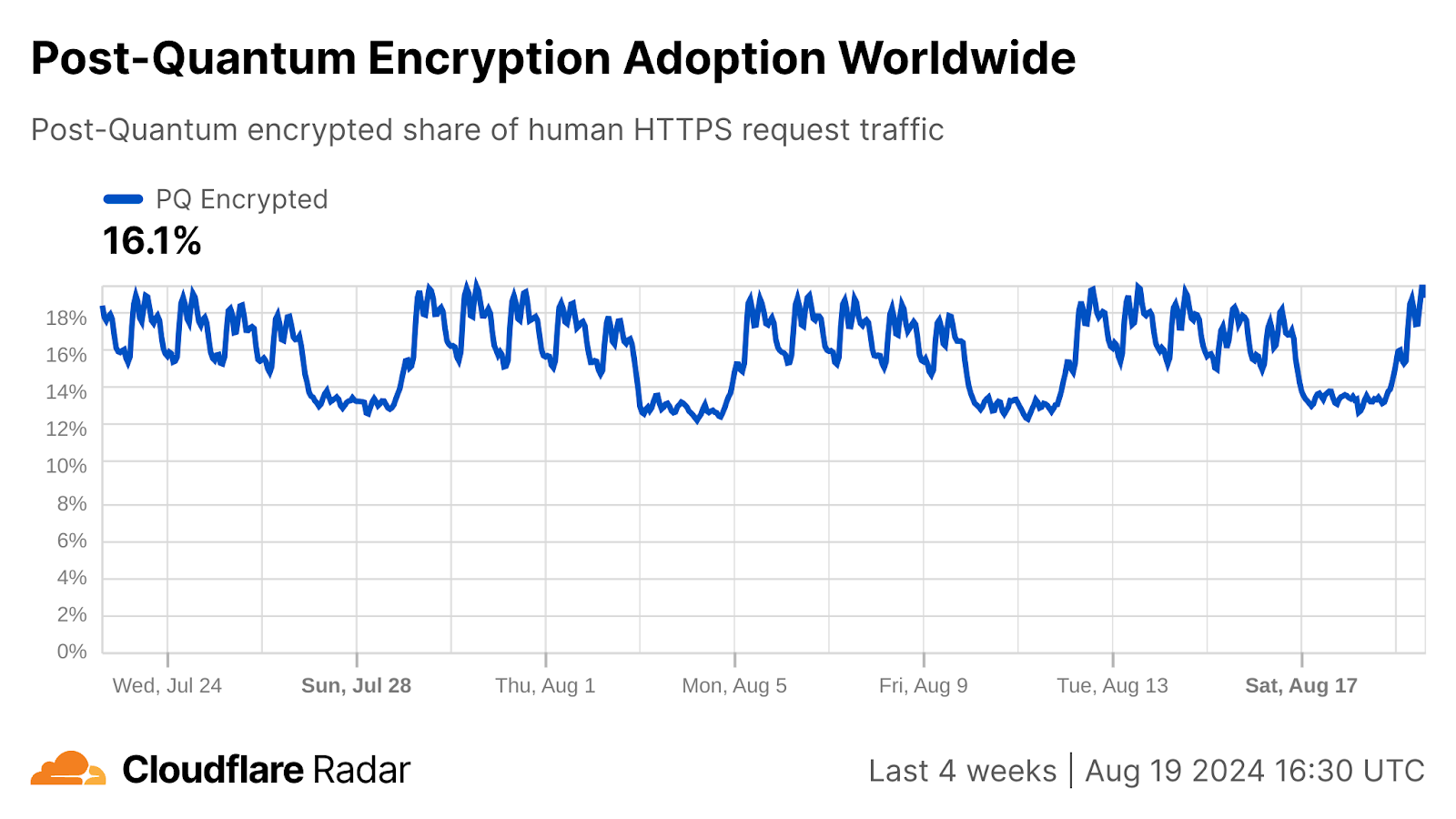
Other players in the tech industry have deployed post-quantum key agreement as well, including Google, Apple, Meta, and Signal.
Signatures are crucial to ensure that you’re communicating with who you think you are communicating. In the web public key infrastructure (WebPKI), signatures are used in certificates to prove that a website operator is the rightful owner of a domain. The threat model for signatures is different than for key agreement. An adversary capable of forging a digital signature could carry out an active attack to impersonate a web server to a client, but today’s communication is not yet at risk.
While the migration to post-quantum signatures is less urgent than the migration for key agreement (since traffic is only at risk once CRQCs exist), it is much more challenging. Consider, for instance, the number of parties involved. In key agreement, only two parties need to support a new key agreement protocol: the client and the server. In the WebPKI, there are many more parties involved, from library developers, to browsers, to server operators, to certificate authorities, to hardware manufacturers. Furthermore, post-quantum signatures are much larger than we’re used to from traditional signatures. For more details on the tradeoffs between the different signature algorithms, deployment challenges, and out-of-the-box solutions see our previous blog post.
Reaching consensus on the right approach for migrating to post-quantum signatures is going to require extensive effort and coordination among stakeholders. However, that work is already well underway. For instance, in 2021 we ran large scale experiments to understand the feasibility of post-quantum signatures in the WebPKI, and we have more studies planned.
What’s next?
Now that NIST has published the first set of standards for post-quantum cryptography, what comes next?
In 2022, Cloudflare deployed a preliminary version of the ML-KEM key agreement algorithm, Kyber, which is now used to protect double-digit percentages of requests to Cloudflare’s network. We use a hybrid with X25519, to hedge against future advances in cryptanalysis and implementation vulnerabilities. In coordination with industry partners at the NIST NCCoE and IETF, we will upgrade our systems to support the final ML-KEM standard, again using a hybrid. We will slowly phase out support for the pre-standard version X25519Kyber768 after clients have moved to the ML-KEM-768 hybrid, and will quickly phase out X25519Kyber512, which hasn’t seen real-world usage.
Now that the final standards are available, we expect to see widespread adoption of ML-KEM industry-wide as support is added in software and hardware, and post-quantum becomes the new default for key agreement. Organizations should look into upgrading their systems to use post-quantum key agreement as soon as possible to protect their data from future quantum-capable adversaries. Check if your browser already supports post-quantum key agreement by visiting pq.cloudflareresearch.com, and if you’re a Cloudflare customer, see how you can enable post-quantum key agreement support to your origin today.
Adoption of the newly-standardized post-quantum signatures ML-DSA and SLH-DSA will take longer as stakeholders work to reach consensus on the migration path. We expect the first post-quantum certificates to be available in 2026, but not to be enabled by default. Organizations should prepare for a future flip-the-switch migration to post-quantum signatures, but there is no need to flip the switch just yet.
We’ll continue to provide updates in this blog and at pq.cloudflareresearch.com. Don’t hesitate to reach out to us at [email protected] with any questions.
Selling Ransomware Breaches: 4 Trends Spotted on the RAMP Forum
Post Syndicated from Christiaan Beek original https://blog.rapid7.com/2024/08/20/selling-ransomware-breaches-4-trends-spotted-on-the-ramp-forum/

The sale and purchase of unauthorized access to compromised enterprise networks has become a linchpin for cybercriminal operations, particularly in facilitating ransomware attacks. Underground forums are sharing guidelines on breaching networks and selling the access they obtain, leaving the exploitation to other malicious actors.
On underground criminal forums, these transactions allow actors with complementary skills to collaborate, amplifying the impact and reach of cyberattacks. The market for such access has grown notably, especially as ransomware operators increasingly employ double-extortion tactics. A foothold in a victim’s network, with credentials that enable stealthy operations, has never been a more lucrative — and popular — business model.
Organizations across all sectors and regions are vulnerable and a target. The collective shift to remote work during the COVID-19 pandemic has expanded the attack surface, as more remote access tools remain in use to this day. In our 2024 Attack Intelligence Report, we noted that 36% of all widespread threat events Rapid7 tracked in 2023 involved the exploitation of network edge device vulnerabilities. This trend has continued into 2024.
In this blog, we delve into a major forum frequented by ransomware actors and affiliates, called RAMP. As part of our research for the Rapid7 Ransomware Radar Report, we analyzed RAMP postings offering corporate access from January 1, 2024 to June 30, 2024, uncovering 4 key trends within this underground marketplace.
The forum: RAMP
Re-launched/branded in July 2021, the RAMP (Ransomware and Advanced Malware Protection) forum is an underground cybercriminal hub originally known as Payload.bin, tracing its roots back to 2012 when it first operated on the Tor network. With a primary focus on ransomware, RAMP is a multilingual platform catering to Russian, Chinese, and English speakers and boasts over 14,000 registered members. Access to RAMP is highly restricted; potential users must have been active members on the XSS and Exploit forums for at least two months, have posted at least ten times, and maintain a good reputation, or alternatively, pay a $500 registration fee for anonymity.

RAMP serves as both a forum and a marketplace, offering ransomware kits, malware, and stolen data, while also providing comprehensive guides and tutorials for cyberattacks. It facilitates ransomware-as-a-service (RaaS) operations, enabling affiliates to deploy ransomware for a share of the profits. Despite its high registration fee, a stark contrast to the $120 annual fee for premium XSS users, RAMP’s closed community is a critical resource for many threat actors. The forum’s design mimics Silk Road-like darknet markets, including escrow features, and it operates primarily off-the-record to avoid law enforcement detection. Its administrator claims an annual revenue of around $250,000, benefiting from its predominantly Russian user base and a strict policy against selling certain illegal goods and services.
Selling Access
To investigate the trends and context around the selling of access into corporate networks, we analyzed all the postings on the RAMP forum from January through June 2024. Some of these posts were cross-posted on other underground forums as well. In most of the cases, the initial access was mentioned and/or the price asked. Where this data was not available, we classified that as ‘unknown’ in our dataset for analysis.

So what are some of the trends we discovered?
Trend #1: Country Distribution
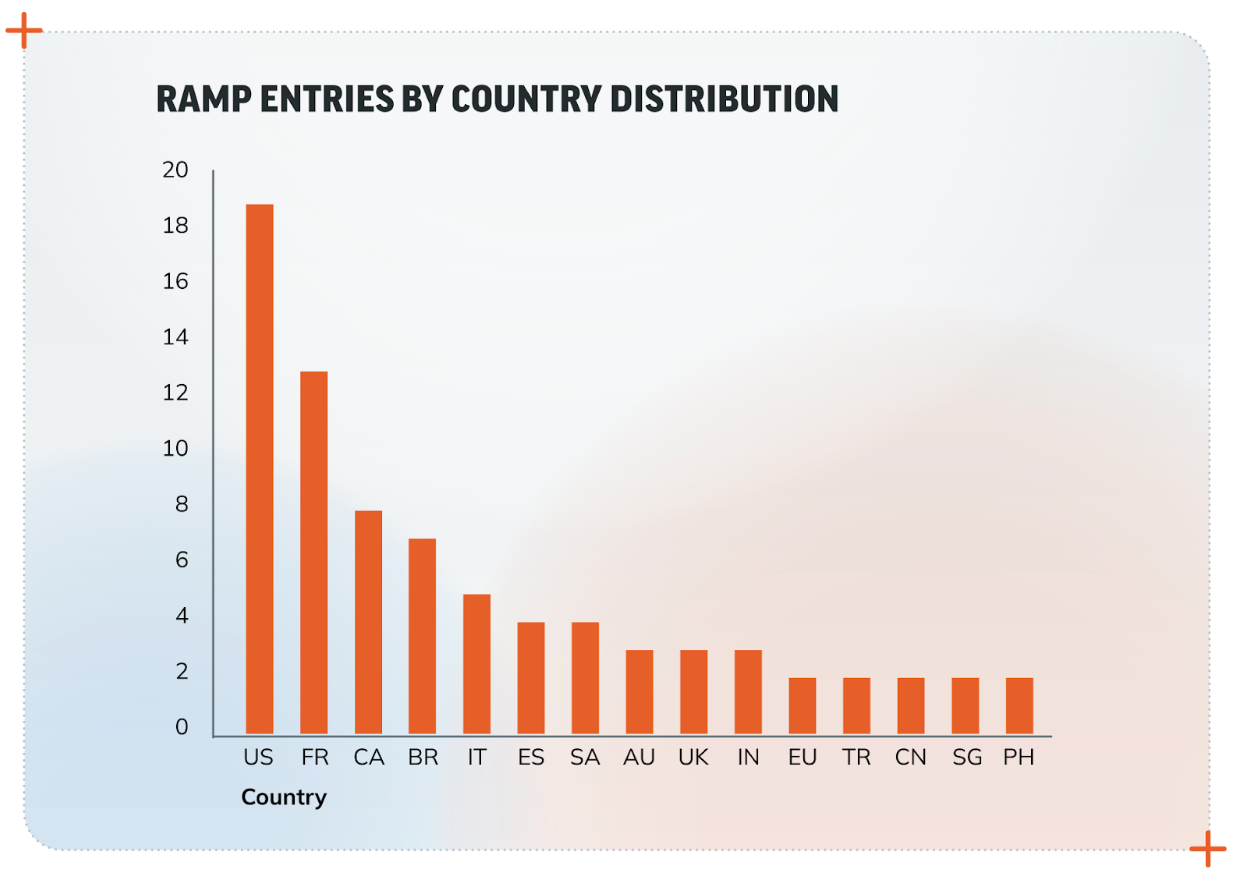
The United States leads the pack with the highest number of entries referencing the country of the company attackers have credentials or access to, followed by France and Brazil. Companies based in Western countries command a higher price due to their perceived wealth and easier access to resources for payment, so what we’re seeing thus far in 2024 (per the chart below) is what would be expected. The only exception to this is Brazil, likely due to Brazilian affiliates that target larger Brazilian businesses.
Trend #2: Revenue Distribution
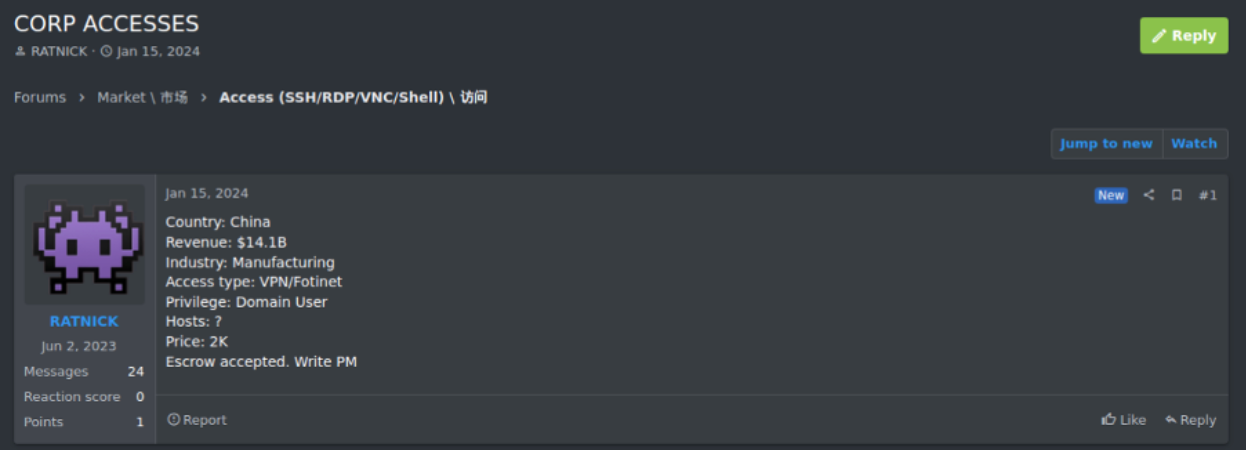
One of the variables that determine the asking price for network access is the revenue made by the target. Very often, sites like ZoomInfo are used to look up the annual revenue, which is then mentioned in the posting, as in our example below.
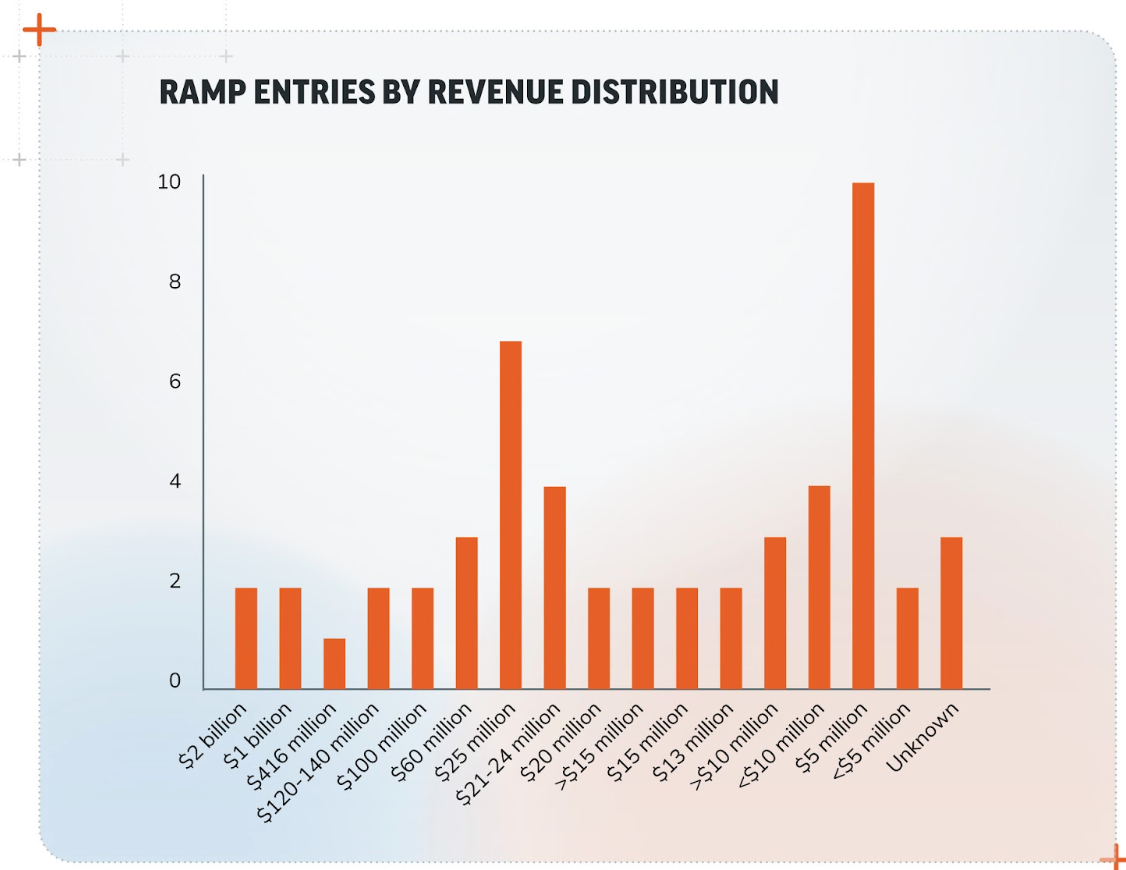
As the chart below shows, we observed a broad range of revenue values within the RAMP dataset, where some entries specified exact amounts and others used ranges. A significant number of entries included revenues in the millions, particularly around $5 million USD.
In fact, companies with revenues in the $5 million range appeared twice as often as those in the $30-50 million range and 5 times more frequently than those with a $100 million revenue. This could indicate that such companies are large enough to hold valuable data but perhaps not as well protected as larger corporations. Regardless, this finding shows that companies with $5 million in revenue are attractive targets and represents an interesting shift from access brokers only targeting the “big fish.”
Trend #3: Access Type Distribution
How are threat actors getting in? Our analysis shows that Remote Desktop Protocol (RDP) is the most common access type, followed by VPN. VPN presents a greater possibility of remaining undetected. That, in combination with the level of access (user or privileged user), demands a higher price.
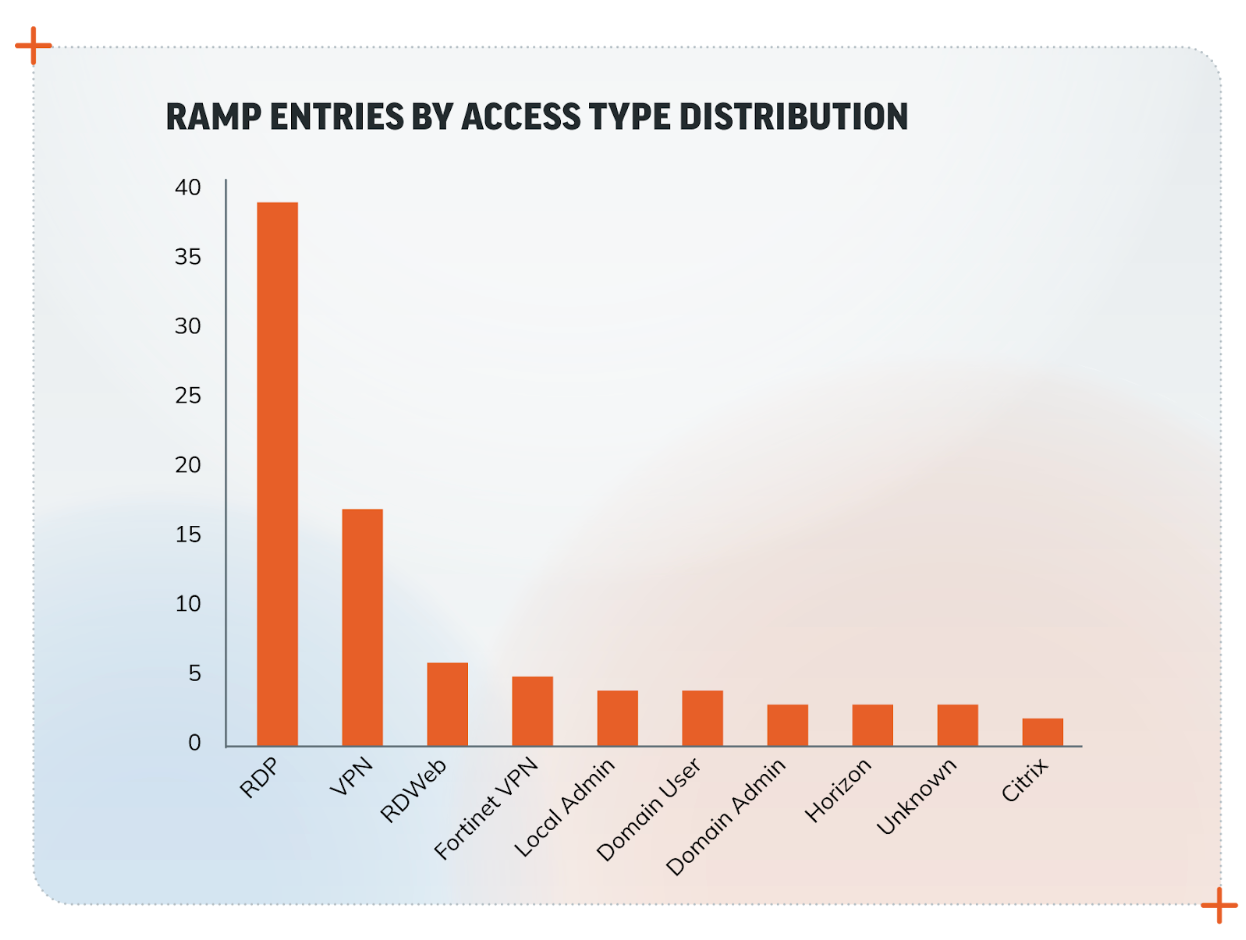
RDP is often used for remote work and system management, and it can be a significant vulnerability if not properly secured. The prevalence of RDP underscores the importance of securing remote access points.
As noted in our 2024 Attack Intelligence Report, missing or unenforced multi-factor authentication (MFA) gave rise to 41% of the incidents Rapid7 MDR observed in 2023. Companies should ensure robust security measures like MFA and proper network segmentation to protect RDP endpoints. Also, if we consider the combined value of VPN and such technologies, then the trend of targeting network edge devices will certainly continue.
Trend #4: Price Distribution
Many RAMP entries list unknown prices. Among the known prices, amounts like $500, $800, and $1000 are common. Company revenue, headquarter location, and the type of access are each a basis for how the threat actor formulates their asking price, which can range widely based on the perceived value of the target network. It is common for prices to spike based on the specific attributes of the target (e.g., revenue, security posture, type of data accessible).
Conclusion
Our analysis highlights key areas of concern for companies looking to protect themselves against access brokers. Businesses in the US, France, and Brazil, as well as those with revenues around $5 million, should be particularly vigilant. Securing remote access points, investing in robust solutions, and understanding the pricing dynamics of the black market for network access can help companies bolster their defenses against this pervasive threat.
By staying informed about these and other ransomware trends, businesses can better understand the risks and implement effective measures to safeguard their networks against unauthorized access.
If your organization needs assistance responding to a ransomware incident, Rapid7 Incident Response can help.
THG Podcast: Explorers: Magellan and Bering
Post Syndicated from The History Guy: History Deserves to Be Remembered original https://www.youtube.com/watch?v=niopv2pL81s
Hacking Wireless Bicycle Shifters
Post Syndicated from Bruce Schneier original https://www.schneier.com/blog/archives/2024/08/hacking-wireless-bicycle-shifters.html
This is yet another insecure Internet-of-things story, this one about wireless gear shifters for bicycles. These gear shifters are used in big-money professional bicycle races like the Tour de France, which provides an incentive to actually implement this attack.
Research paper. Another news story.
Slashdot thread.
Is Wokeness Dead?
Post Syndicated from The Atlantic original https://www.youtube.com/watch?v=iuWR4Fih4QU
За правомощията на президента в новия модел на служебно правителство
Post Syndicated from Bozho original https://blog.bozho.net/blog/4346
Чета недобросъвестни интерпретации на процедурата за назначаване на служебно правителство (чл. 99, ал. 5), според които президентът нямал право да не подписва указа.
Припомням, че на консултациите в президентството преди 2 седмици обърнахме внимание, че президентът не е безгласен в процеса и че фактът, че той назначава правителството с указ, му дава възможност да влияе чрез неподписването му.
Такива правомощия има президентът и в други случаи. Дори по-неявни правомощия за вето са били ползвани – напр. когато Плевнелиев блокира клетвата на избрана за конституционен съдия и така я върна за нов избор.
Нещо повече – в мотивите на конституционните съдии, гласували за оставане в сила на промените, се посочва, че президентът носи отговорност за служебното правителство. Носейки тази отговорност, макар и в намалена степен, заради стесняването на избора му, той не само по процедурна логика, а и по пълната логика на разпоредбата може не само да откаже да подпише указа, а и да влияе върху състава.
Логиката на новия модел на служебно правителство е да има баланс – министър-председателят да е имал доверието на парламента (за друга роля), партиите да изразят своето мнение в процеса по консултации, а президентът да може да влияе на състава чрез правото му да откаже да подпише указа.
Целта е да се предотврати еднолична власт – преди това беше президентско правителство. А след вчерашното нелепо твърдение на Горица Грънчарова-Кожарева, че Калин Стоянов е единственият възможен министър на вътрешните работи в тази страна, стана ясно, че новият конституционен текст не дава еднолична власт и на Пеевски.
Та предлагам да спрем със спекулациите колко е лош текстът – той постига целта си да има баланс и никой да не може еднолично да управлява чрез служебна власт.
Материалът За правомощията на президента в новия модел на служебно правителство е публикуван за пръв път на БЛОГодаря.
Titanic Thompson
Post Syndicated from The History Guy: History Deserves to Be Remembered original https://www.youtube.com/watch?v=LhwPXQhdAcI
Comic for 2024.08.19 – Bad Dreams
Post Syndicated from Explosm.net original https://explosm.net/comics/bad-dreams
New Cyanide and Happiness Comic
Add macOS to your continuous integration pipelines with AWS CodeBuild
Post Syndicated from Sébastien Stormacq original https://aws.amazon.com/blogs/aws/add-macos-to-your-continuous-integration-pipelines-with-aws-codebuild/
Starting today, you can build applications on macOS with AWS CodeBuild. You can now build artifacts on managed Apple M2 machines that run on macOS 14 Sonoma. AWS CodeBuild is a fully managed continuous integration service that compiles source code, runs tests, and produces ready-to-deploy software packages.
Building, testing, signing, and distributing applications for Apple systems (iOS, iPadOS, watchOS, tvOS, and macOS) requires the use of Xcode, which runs exclusively on macOS. When you build for Apple systems in the AWS Cloud, it is very likely you configured your continuous integration and continuous deployment (CI/CD) pipeline to run on Amazon Elastic Cloud Compute (Amazon EC2) Mac instances.
Since we launched Amazon EC2 Mac in 2020, I have spent a significant amount of time with our customers in various industries and geographies, helping them configure and optimize their pipelines on macOS. In the simplest form, a customer’s pipeline might look like the following diagram.

The pipeline starts when there is a new commit or pull request on the source code repository. The repository agent installed on the machine triggers various scripts to configure the environment, build and test the application, and eventually deploy it to App Store Connect.
Amazon EC2 Mac drastically simplifies the management and automation of macOS machines. As I like to describe it, an EC2 Mac instance has all the things I love from Amazon EC2 (Amazon Elastic Block Store (Amazon EBS) volumes, snapshots, virtual private clouds (VPCs), security groups, and more) applied to Mac minis running macOS in the cloud.
However, customers are left with two challenges. The first is to prepare the Amazon Machine Image (AMI) with all the required tools for the build. A minimum build environment requires Xcode, but it is very common to install Fastlane (and Ruby), as well as other build or development tools and libraries. Most organizations require multiple build environments for multiple combinations of macOS and Xcode versions.
The second challenge is to scale your build fleet according to the number and duration of builds. Large organizations typically have hundreds or thousands of builds per day, requiring dozens of build machines. Scaling in and out of that fleet helps to save on costs. EC2 Mac instances are reserved for your dedicated use. One instance is allocated to one dedicated host. Scaling a fleet of dedicated hosts requires a specific configuration.
To address these challenges and simplify the configuration and management of your macOS build machines, today we introduce CodeBuild for macOS.
CodeBuild for macOS is based on the recently introduced reserved capacity fleet, which contains instances powered by Amazon EC2 that are maintained by CodeBuild. With reserved capacity fleets, you configure a set of dedicated instances for your build environment. These machines remain idle, ready to process builds or tests immediately, which reduces build durations. With reserved capacity fleets, your machines are always running and will continue to incur costs as long as they’re provisioned.
CodeBuild provides a standard disk image (AMI) to run your builds. It contains preinstalled versions of Xcode, Fastlane, Ruby, Python, Node.js, and other popular tools for a development and build environment. The full list of tools installed is available in the documentation. Over time, we will provide additional disk images with updated versions of these tools. You can also bring your own custom disk image if you desire.
In addition, CodeBuild makes it easy to configure auto scaling. You tell us how much capacity you want, and we manage everything from there.
Let’s see CodeBuild for macOS in action
To show you how it works, I create a CI/CD pipeline for my pet project: getting started with AWS Amplify on iOS. This tutorial and its accompanying source code explain how to create a simple iOS app with a cloud-based backend. The app uses a GraphQL API (AWS AppSync), a NoSQL database (Amazon DynamoDB), a file-based storage (Amazon Simple Storage Service (Amazon S3)), and user authentication (Amazon Cognito). AWS Amplify for Swift is the piece that glues all these services together.
The tutorial and the source code of the app are available in a Git repository. It includes scripts to automate the build, test, and deployment of the app.
Configuring a new CI/CD pipeline with CodeBuild for macOS involves the following high-level steps:
- Create the build project.
- Create the dedicated fleet of machines.
- Configure one or more build triggers.
- Add a pipeline definition file (
buildspec.yaml) to the project.
To get started, I open the AWS Management Console, select CodeBuild, and select Create project.

I enter a Project name and configure the connection to the Source code repository. I use GitHub in this example. CodeBuild also supports GitLab and BitBucket. The documentation has an up-to-date list of supported source code repositories.

For the Provisioning model, I select Reserved capacity. This is the only model where Amazon EC2 Mac instances are available. I don’t have a fleet defined yet, so I decide to create one on the flight while creating the build project. I select Create fleet.

On the Compute fleet configuration page, I enter a Compute fleet name and select macOS as Operating system. Under Compute, I select the amount of memory and the quantity of vCPUs needed for my build project, and the number of instances I want under Capacity.
For this example, I am happy to use the Managed image. It includes Xcode 15.4 and the simulator runtime for iOS 17.5, among other packages. You can read the list of packages preinstalled on this image in the documentation.
When finished, I select Create fleet to return to the CodeBuild project creation page.

As a next step, I tell CodeBuild to create a new service role to define the permissions I want for my build environment. In the context of this project, I must include permissions to pull an Amplify configuration and access AWS Secrets Manager. I’m not sharing step-by-step instructions to do so, but the sample project code contains the list of the permissions I added.

I can choose between providing my set of build commands in the project definition or in a buildspec.yaml file included in my project. I select the latter.

This is optional, but I want to upload the build artifact to an S3 bucket where I can archive each build. In the Artifact 1 – Primary section, I therefore select Amazon S3 as Type, and I enter a Bucket name and artifact Name. The file name to upload is specified in the buildspec.yaml file.

Down on the page, I configure the project trigger to add a GitHub WebHook. This will configure CodeBuild to start the build every time a commit or pull request is sent to my project on GitHub.

Finally, I select the orange Create project button at the bottom of the page to create this project.
Testing my builds
My project already includes build scripts to prepare the build, build the project, run the tests, and deploy it to Apple’s TestFlight.

I add a buildspec.yaml file at the root of my project to orchestrate these existing scripts.
version: 0.2

phases:

  install:
    commands:
      - code/ci_actions/00_install_rosetta.sh
  pre_build:
    commands:
      - code/ci_actions/01_keychain.sh
      - code/ci_actions/02_amplify.sh
  build:
    commands:
      - code/ci_actions/03_build.sh
      - code/ci_actions/04_local_tests.sh
  post_build:
    commands:
      - code/ci_actions/06_deploy_testflight.sh
      - code/ci_actions/07_cleanup.sh
artifacts:
   name: $(date +%Y-%m-%d)-getting-started.ipa
   files:
    - 'getting started.ipa'
  base-directory: 'code/build-release'
I add this file to my Git repository and push it to GitHub with the following command: git commit -am "add buildpsec" buildpec.yaml
On the console, I can observe that the build has started.

When I select the build, I can see the log files or select Phase details to receive a high-level status of each phase of the build.

When the build is successful, I can see the iOS application IPA file uploaded to my S3 bucket.

The last build script that CodeBuild executes uploads the binary to App Store Connect. I can observe new builds in the TestFlight section of the App Store Connect.

Things to know
It takes 8-10 minutes to prepare an Amazon EC2 Mac instance and to accept the very first build. This is not specific to CodeBuild. The builds you submit during the machine preparation time are queued and will be run in order as soon as the machine is available.
CodeBuild for macOS works with reserved fleets. Contrary to on-demand fleets, where you pay per minute of build, reserved fleets are charged for the time the build machines are reserved for your exclusive usage, even when no builds are running. The capacity reservation follows the Amazon EC2 Mac 24-hour minimum allocation period, as required by the Software License Agreement for macOS (article 3.A.ii).
A fleet of machines can be shared across CodeBuild projects on your AWS account. The machines in the fleet are reserved for your exclusive use. Only CodeBuild can access the machines.
CodeBuild cleans the working directory between builds, but the machines are reused for other builds. It allows you to use the CodeBuild local cache mechanism to quickly restore selected files after a build. If you build different projects on the same fleet, be sure to reset any global state, such as the macOS keychain, and build artifacts, such as the SwiftPM and Xcode package caches, before starting a new build.
When you work with custom build images, be sure they are built for a 64-bit Mac-Arm architecture. You also must install and start the AWS Systems Manager Agent (SSM Agent). CodeBuild uses the SSM Agent to install its own agent and to manage the machine. Finally, make sure the AMI is available to the CodeBuild organization ARN.
CodeBuild for macOS is available in the following AWS Regions: US East (Ohio, N. Virginia), US West (Oregon), Asia Pacific (Sydney), and Europe (Frankfurt). These are the same Regions that offer Amazon EC2 Mac M2 instances.
Get started today and create your first CodeBuild project on macOS.
Summer 2024 weather report: Cloudflare with a chance of Intern-ets
Post Syndicated from Aaron Snell original https://blog.cloudflare.com/2024-interns
During the summer of 2024, Cloudflare welcomed approximately 60 Intern-ets from all around the globe on a mission to #HelpBuildABetterInternet. Over the course of their internships, our wonderful interns tackled real-world challenges from different teams all over the company and contributed to cutting-edge projects. As returning interns, we – Shaheen, Aaron, and Jada – would like to show off the great work our cohort has done and experiences we’ve had throughout our time here.
Austin Interns after volunteering at the Central Texas Food Bank.
Putting the SHIP in internSHIP
Cloudflare interns take pride in driving high-impact initiatives, playing a vital role in advancing Cloudflare’s mission. With our diverse roles and projects this summer, we’d love to highlight some of the exciting work we’ve been involved in:
Rahul, a Software Engineer intern, built a system to autograde intern application assignments for future students looking to join Cloudflare. It was built entirely on the Cloudflare Developer Platform, using Cloudflare Access, Browser Rendering, D1, Durable Objects, R2, and Workers!
Jessica, a Software Engineer intern, created a new threads api for the Workers AI team that automatically recalls past messages when running inference, helping developers to generate chat sessions when building personalized chatbots.
Anshika, an Internal Audit intern, worked on SOX & ISO testing for the first quarter of 2024, a data center audit, and is helping to roll out the automation of SOC 2 testing.
Jake, a Business Development Relations intern, led the creation and launch of an outbound BDR campaign that generated new pipeline for Cloudflare involving tailored messaging, account criteria, and enablement materials.
Utkarsh, a Software Engineer intern, built an internal tool for the Capacity Planning team to simulate unforeseen scenarios and changes within the Cloudflare network infrastructure, to help them provision new servers more efficiently.
Shaheen, a Product Management intern, and Anantharaman, a Software Engineer Intern, collaboratively enhanced Cloudflare D1 with improvements in billing observability, the dashboard, and Wrangler commands while also launching billing alerts and audit logs.
Jada, a Software Engineer intern, developed a Policy Tester feature for the Zero Trust Access Policies page to enable Cloudflare customers to view policy update statistics, using Cloudflare Durable Objects for the RESTful API.
Dhravya, a Software Engineer intern, helped launch function calling in Workers AI, a feature that enables LLMs to dynamically perform actions or retrieve data.
Prajjwal, a Research intern, focused on personalizing the WAF attack score and enhancing the overall user experience while experimenting with zero-shot learning techniques to detect new and evolving attacks.
Megan, a Security Analytics intern, ensured a smooth transition to an in-house security access tool by managing internal user access, aligning group rules, and addressing missing or duplicated groups/users during system migrations.
Intern events
In-person
For the first time since the pandemic, Cloudflare had over half of our interns in-person in our Austin, Lisbon and London offices. As the saying goes, everything is bigger in Texas and our new Austin office intern class shows it, with over 20 interns working in-person throughout the summer! Some of our favorite events were…
Intern ping-pong tournament
After weeks of ping-pong classes, our interns got to put their skills to the test with a ping-pong tournament! The competition was fierce, with paddles flying and cheers echoing throughout the office as everyone battled for the title of Ping-Pong Champion. In the end, Josh, a PM intern on Workers, stole the show and was crowned as the 2024 Ping-Pong Champion.
Interns in the Austin office participating in the Ping-Pong tournament.
Food Bank Volunteering
The Austin interns got the opportunity to give back to the community this summer at the Central Texas Food Bank. With the help of our full-timers the team got to work instantly, from packing food boxes to helping organize donations. Thanks to all the hard work, the team was able to feed a total of 9,000 people!
Austin Interns volunteering at the Central Texas Food Bank.
Austin Game Show
The Austin interns had the exciting opportunity to participate in an exciting game show with their wonderful recruiters. This competitive showdown saw the “Winter-nets” face off against the “Return-ets” in a series of fun and challenging activities, including Family Feud and Wheel of Fortune. In the end, the Return-ets took the victory, with perhaps one too many pictures to prove it. Events like this are among the best, fostering bonding and friendly competition that bring everyone closer together.
“Return-ets” posing with the trophy they won.
Our Lisbon office also had 10 interns join Cloudflare and spend time doing some awesome things, including…
Visiting the Lisbon Data Center
One of the most impressive parts of Cloudflare is its infrastructure, which spans hundreds of data centers worldwide. This summer, our interns were able to get up close and personal with our Lisbon data center where they ventured through Cloudflare’s state-of-the-art server rooms. They witnessed the security measures that are in place to ensure the safety of our data and the support systems that ensure that the facility is able to run nonstop.
Interns and Cloudflarians taking a photo in the Lisbon data center.
Remote
Our remote interns got to take on some virtual adventures throughout the summer, building friendships and memories from all around the globe! Some of the highlights were…
Snack time
Interns all over the globe were shipped a box filled with an assortment of Japanese snacks and got to spend time together snacking on unique and new foods. This event not only satisfied our snack cravings but also strengthened our global connections with a fun, shared experience.
Remote interns showing their favorite snacks from the snack boxes we received.
Mingling meetups
Throughout the summer, interns got the chance to mingle with one another as well as the rest of the company. For a break from project work and a time to socialize, interns looked forward to Virtual Intern Game Days and Gatheround meetups. These designated online hangout blocks made for a more fun and inclusive experience for the remote interns. Along with that, remote interns near Cloudflare offices were welcome to join in-person events throughout the summer: from team lunches to arts & crafts and social mixers, visiting the office is always worth the trip!
Group photo of a Gatherround session with the interns and Cloudfriends.
Executive chats
Executive chats have been a key part of ensuring our interns get to truly know our top leaders and ask them questions 1-on-1. This summer was no exception, with interns hosting over eight executive chats filled with inspiring stories, valuable knowledge, and meaningful connections. Here’s what our interns had to say about it…
Alex enjoyed talking with Matthew Prince, Chief Executive Officer: “It was so heartfelt and emotional. I had heard the story of Lee Holloway before, but hearing it from Matthew himself was really impactful.”
Chantal loved the talk with Michele Yetman, Chief People Officer: “I enjoyed hearing about her job history and how she carefully adapted skill sets from her previous jobs to craft her career. Also, she was curious to hear our perspective and answered our questions in honest detail.”
Anantharaman liked the talk with Dane Knecht, SVP of Emerging Technology and Innovation: “Learning about the growth of ETI, the Austin office and the mission to move fast and break things within ETI to nurture a startup-y culture was very interesting.”
Matilde valued the talk with Nitin Rao, Interim Chief Product Officer: “I didn’t know much about him beforehand, but I found it fascinating to learn about his role at the company and the great impact of his contributions to Cloudflare’s current infrastructure.”
Company-wide intern presentations
Each summer, Cloudflare Intern-ets have the opportunity to showcase their work during the annual Intern Presentations series. Hundreds of Cloudflarians join in to support and celebrate the interns including Matthew Prince and Michelle Zatlyn. As Jake, a BDR Operations Intern, puts it, “The opportunity to present in front of the founders and the rest of the company speaks volumes about how much Cloudflare values its interns’ projects.”
Cloudfriends
Cloudfriends is a program specifically for interns to socialize with people throughout Cloudflare. Cloudflare employees from various departments signed up, and we were able to schedule meetings with all of them. These meetings let us get to know more people, share experiences, and keep in touch (even after our internships have ended). On a similar note, Cloudflare has a program for Random Employee Chats that interns can also take part in. These chats randomly pair you with another Cloudflare employee once a week and allow you to do even more socializing.
Unforgettable memories
Throughout our time here at Cloudflare, we formed numerous unforgettable memories that truly made our internship experience one of a kind.
The people
Cloudflare is filled with the most driven, passionate, and all around amazing people, so it’s no wonder that we all had a spectacular time interacting with everyone!
Ananya took networking to the next level by engaging with 49 people throughout her internship, forging valuable connections across the company. Meanwhile, Yomna wasted no time setting up 25 1:1s by the end of her second week, meeting a bunch of awesome people along the way.
Alex, Shaheen, Jack, Jake, Jaden, and Josh hit up a local Austin restaurant and spent SIX hours bonding over laughs, talks, and good vibes. From strangers to friends, this was a moment that will last well beyond their internships.
Carol and Jessica enjoyed their teams’ on-site events in the Austin office. They were able to meet all of their team members face-to-face and work and have fun together. The numerous on-site events that took place over the summer let the Austin Intern-ets connect with people from all over the company, including other Intern-ets that were remote or working out of another office.
Dhanush and Utkarsh gathered the interns to enjoy the Olympics in the Austin office. They all sat in the same area, talked with each other, and while watching the intense competition.
The activities
Aaron, Carol, and Tara enjoyed all the game nights the R2 team hosted. They played a variety of board and card games from For Sale to Brass: Birmingham that everyone enjoyed, and they even did some late-night karaoke. Anshika also enjoyed the games that the Internal Audit team played before their all-hands meetings, such as skribbl.io. These events let everyone on the team be more connected and overall just have fun.
The Austin interns filled their time with loads of different activities. From a dinner with Matthew, to visiting Barton Springs, to hosting a 4th of July barbecue party on top of a high-rise and overlooking Austin’s skyline, they certainly didn’t miss an opportunity to get out and have fun.
Meanwhile, in Europe, the London interns enjoyed their lunches on the beach. They were able to talk, swim, and get to know each other. The Lisbon office also hosted a bunch of team lunches that allowed everyone to work together and enjoy the sun.
Summer shenanigans
Dhravya’s caffeine fix: Dhravya drank around 250 cups of coffee over the course of his 12-week internship.
Matilde the bus marathoner: Every week, Matilde traveled 740 km from Braga to the Lisbon office by bus. By the end of her internship, she had accumulated 108 hours and 8880 km.
Anantharaman’s epic commute: Anantharaman chose to turn his daily commute into a marathon, walking over 100 miles during his 14-week internship.
Jack the Linux legend: Jack was the second most active Linux-based developer for dash.cloudflare.com.
Josh the Ping-Pong prodigy: Josh started his internship as a ping-pong newbie but after daily break-time practice, he smashed his way to win the intern ping-pong tournament.
Wing night warriors: The Austin interns PROUDLY placed 24th in the Pluckers Wing night trivia.
Byte-sized intern advice
Wondering how to get the most out of your time as an intern? We surveyed the Intern-ets for some insider hints…
Be curious and don’t be afraid to ask questions: An overwhelming number of Intern-ets and executives alike emphasized the importance of staying curious and keeping an open mind. Aside from that, asking questions can make a huge difference to get unstuck or even think ahead on problems; As Nikhil, a SWE Intern, points out, “Cloudflare is vast, and people are super friendly + eager to help.”
The importance of introductions: PM Intern Yomna notes how “cross-functional work…always works best when you are able to establish proper connections, a unified voice, and an open space that is dedicated to tackling the problem/situation at hand” and BDR Operations Intern Blaise recommends that interns “…make meetings with everyone on your team just to understand what each person is working on, and where you may be able to slot in”
Data on data: Marketing Analytics Intern Tanuj provides some insight, highlighting how “In analytics, it’s crucial to be data-informed rather than just data-driven. For instance, data might suggest cutting a high-spend marketing campaign due to low short-term ROI. However, understanding the business context – such as the campaign’s role in building brand loyalty can reveal its long-term value. Always consider the broader picture for more impactful insights.”
Want to become an Intern-et or Cloudflarian?
Sign up here to be notified of new graduate and internship opportunities for 2025. Cloudflare is also hiring for full-time opportunities: check out open positions and apply today!
AWS Weekly Roundup: G6e instances, Karpenter, Amazon Prime Day metrics, AWS Certifications update and more (August 19, 2024)
Post Syndicated from Prasad Rao original https://aws.amazon.com/blogs/aws/aws-weekly-roundup-g6e-instances-karpenter-amazon-prime-day-metrics-aws-certifications-update-and-more-august-19-2024/
You know what I find more exciting than the Amazon Prime Day sale? Finding out how Amazon Web Services (AWS) makes it all happen. Every year, I wait eagerly for Jeff Barr’s annual post to read the chart-topping metrics. The scale never ceases to amaze me.
This year, Channy Yun and Jeff Barr bring us behind the scenes of how AWS powered Prime Day 2024 for record-breaking sales. I will let you read the post for full details, but one metric that blows my mind every year is that of Amazon Aurora. On Prime Day, 6,311 Amazon Aurora database instances processed more than 376 billion transactions, stored 2,978 terabytes of data, and transferred 913 terabytes of data.

Other news I’m excited to share is that registration is open for two new AWS Certification exams. You can now register for the beta version of the AWS Certified AI Practitioner and AWS Certified Machine Learning Engineer – Associate. These certifications are for everyone—from line-of-business professionals to experienced machine learning (ML) engineers—and will help individuals prepare for in-demand artificial intelligence and machine learning (AI/ML) careers. You can prepare for your exam by following a four-step exam prep plan for AWS Certified AI Practitioner and AWS Certified Machine Learning Engineer – Associate.
Last week’s launches
Here are some launches that got my attention:
General availability of Amazon Elastic Compute Cloud (Amazon EC2) EC2 G6e instances – Powered by NVIDIA L40S Tensor Core GPUs, G6e instances can be used for a wide range of ML and spatial computing use cases. You can use G6e instances to deploy large language models (LLMs) with up to 13B parameters and diffusion models for generating images, video, and audio.
Release of Karpenter 1.0 – Karpenter is a flexible, efficient, and high-performance Kubernetes compute management solution. You can use Karpenter with Amazon Elastic Kubernetes Service (Amazon EKS) or any conformant Kubernetes cluster. To learn more, visit the Karpenter 1.0 launch post.
Drag-and-drop UI for Amazon SageMaker Pipelines – With this launch, you can now quickly create, execute, and monitor an end-to-end AI/ML workflow to train, fine-tune, evaluate, and deploy models without writing code. You can drag and drop various steps of the workflow and connect them together in the UI to compose an AI/ML workflow.
Split, move and modify Amazon EC2 On-Demand Capacity Reservations – With the new capabilities for managing Amazon EC2 On-Demand Capacity Reservations, you can split your Capacity Reservations, move capacity between Capacity Reservations, and modify your Capacity Reservation’s instance eligibility attribute. To learn more about these features, refer to Split off available capacity from an existing Capacity Reservation.
Document-level sync reports in Amazon Q Business – This new feature of Amazon Q Business provides you with a comprehensive document-level report including granular indexing status, metadata, and access control list (ACL) details for every document processed during a data source sync job. You have the visibility of the status of the documents Amazon Q Business attempted to crawl and index as well as the ability to troubleshoot why certain documents were not returned with the expected answers.
Landing zone version selection in AWS Control Tower – Starting with landing zone version 3.1 and above, you can update or reset in-place your landing zone on the current version, or upgrade to a version of your choice. To learn more, visit Select a landing zone version in the AWS Control Tower user guide.
Launch of AWS Support Official channel on AWS re:Post – You now have access to curated content for operating at scale on AWS, authored by AWS Support and AWS Managed Services (AMS) experts. In this new channel, you can find technical solutions for complex problems, operational best practices, and insights into AWS Support and AMS offerings. To learn more, visit the AWS Support Official channel on re:Post.
For a full list of AWS announcements, be sure to keep an eye on the What’s New at AWS page.
Regional expansion of AWS Services
Here are some of the expansions of AWS services into new AWS Regions that happened this week:
Amazon VPC Lattice is now available in 7 additional Regions – Amazon VPC Lattice is now available in US West (N. California), Africa (Cape Town), Europe (Milan), Europe (Paris), Asia Pacific (Mumbai), Asia Pacific (Seoul), and South America (São Paulo). With this launch, Amazon VPC Lattice is now generally available in 18 AWS Regions.
Amazon Q in QuickSight is now available in 5 additional Regions – Amazon Q in QuickSight is now generally available in Asia Pacific (Mumbai), Canada (Central), Europe (Ireland), Europe (London), and South America (São Paulo), in addition to the existing US East (N. Virginia), US West (Oregon), and Europe (Frankfurt) Regions.
AWS Wickr is now available in the Europe (Zurich) Region – AWS Wickr adds Europe (Zurich) to the US East (N. Virginia), Asia Pacific (Singapore), Asia Pacific (Sydney), Asia Pacific (Tokyo), Canada (Central), Europe (London), Europe (Frankfurt), and Europe (Stockholm) Regions that it’s available in.
You can browse the full list of AWS Services available by Region.
Upcoming AWS events
Check your calendars and sign up for these AWS events:
AWS re:Invent 2024 – Dive into the first-round session catalog. Explore all the different learning opportunities at AWS re:Invent this year and start building your agenda today. You’ll find sessions for all interests and learning styles.
AWS Summits – The 2024 AWS Summit season is starting to wrap up! Join free online and in-person events that bring the cloud computing community together to connect, collaborate, and learn about AWS. Register in your nearest city: Jakarta (September 5), and Toronto (September 11).
AWS Community Days – Join community-led conferences that feature technical discussions, workshops, and hands-on labs led by expert AWS users and industry leaders from around the world: Colombia (August 24), New York (August 28), Belfast (September 6), and Bay Area (September 13).
AWS GenAI Lofts – Meet AWS AI experts and attend talks, workshops, fireside chats, and Q&As with industry leaders. All lofts are free and are carefully curated to offer something for everyone to help you accelerate your journey with AI. There are lofts scheduled in San Francisco (August 14–September 27), São Paulo (September 2–November 20), London (September 30–October 25), Paris (October 8–November 25), and Seoul (November).
You can browse all upcoming in-person and virtual events.
That’s all for this week. Check back next Monday for another Weekly Roundup!
This post is part of our Weekly Roundup series. Check back each week for a quick roundup of interesting news and announcements from AWS!