Post Syndicated from Explosm.net original https://explosm.net/comics/feeling-worthless
New Cyanide and Happiness Comic
Post Syndicated from Explosm.net original https://explosm.net/comics/feeling-worthless
New Cyanide and Happiness Comic
Post Syndicated from The History Guy: History Deserves to Be Remembered original https://www.youtube.com/watch?v=vKffghswoqc
Post Syndicated from daroc original https://lwn.net/Articles/984733/
Mozilla has announced that Puppeteer, a browser automation and testing library, now has first-class support for Firefox using the
WebDriver BiDi protocol. Puppeteer can be used to drive headless browser instances, and is commonly used for automated end-to-end web-site tests.
Whilst the features offered by Puppeteer won’t be a surprise,
bringing support to multiple browsers has been a significant
undertaking. The Firefox support is not based on a Firefox-specific
automation protocol, but on WebDriver BiDi, a cross browser protocol
that’s undergoing standardization at the W3C, and currently has
implementation in both Gecko and Chromium. This use of a
cross-browser protocol should make it much easier to support many
different browsers going forward.
Post Syndicated from Ryan Yanchuleff original https://aws.amazon.com/blogs/devops/generating-accurate-git-commit-messages-with-amazon-q-developer-cli-context-modifiers/
Writing clear and concise Git commit messages is crucial for effective version control and collaboration. However, when working with complex projects or codebases, providing additional context can be challenging. In this blog post, we’ll explore how to leverage Amazon Q Developer to analyze our code changes for us and produce meaningful commit messages for Git.
Amazon Q is the most capable generative AI-powered assistant for accelerating software development and leveraging companies’ internal data. It assists developers and IT professionals with all their tasks—from coding, testing, and upgrading applications, to diagnosing errors, performing security scanning and fixes, and optimizing AWS resources. Amazon Q Developer has advanced, multistep planning and reasoning capabilities that can transform (for example, perform Java version upgrades) and implement new features generated from developer requests. Q Developer is available in the IDE, the AWS Console, and on the command line interface (CLI).
With the Amazon Q Developer CLI, you can engage in natural language conversations, ask questions, and receive responses from Amazon Q Developer, all from your terminal’s command-line interface. One of the powerful features of the Amazon Q Developer CLI is its ability to integrate contextual information from your local development environment. A context modifier in the Amazon Q CLI is a special keyword that allows you to provide additional context to Amazon Q from your local development environment. This context helps Amazon Q better understand the specific use case you’re working on and provide more relevant and accurate responses.
The Amazon Q CLI supports three context modifiers:
By using these context modifiers, you can enhance Amazon Q’s understanding of your specific use case, enabling it to provide more relevant and context-aware responses tailored to your local development environment.
Now let’s dive deeper into how we can use the @git context modifier to craft better Git commit messages. By incorporating the @git context modifier, you can provide additional details about the changes made to your Git repository, such as the affected files, branches, and other Git-related metadata. This not only improves code comprehension but also facilitates better collaboration within your team. We’ll walk through practical examples and best practices, equipping you with the knowledge to take your Git commit messages to the next level using the @git context modifier.
For this walkthrough, you should have the following prerequisites:
git status command to view which files have been modified or added since your last commit. Any untracked files (new files) will appear in red, and modified files will be shown in green.

Figure 1 – git status execution from within your project director
git add command to stage the files you want to commit. For example, git add app.py requirements.txt perm_policies/explicit_dependencies_stack.py will stage the specific files, or git add . will add all modified and untracked files in the current directory recursively.q chat command to generate commit message using the @git context modifier. From within the Q Developer Chat context, attach @git to the end of your prompt to engage the context modifier.

Figure 2 – Amazon Q chat interaction using @git context modifier to generate a commit message

Figure 3 – paste copied git commit message
In this post, we looked at how to maximize your productivity by using Amazon Q Developer. Using the @git context modifier in Amazon Q Developer CLI enables you to enrich your Git commit messages with relevant details about the changes made to your codebase. Clear and informative commit messages are essential for effective collaboration and code maintenance. By leveraging this powerful feature, you can provide valuable context, such as affected files, branches, and other Git metadata, making it easier for team members to understand the scope and purpose of each commit.
To continue improving your software lifecycle management (SLCM) you can also check out other Amazon Q Developer capabilities, such as code analysis, debugging, and refactoring suggestions. Finally, stay tuned for upcoming Amazon Q Developer features and enhancements that could further streamline your development processes.
Learn more and get started with the Amazon Q Developer Free Tier.
Post Syndicated from Ryan Yanchuleff original https://aws.amazon.com/blogs/devops/implementing-identity-aware-sessions-with-amazon-q-developer/
“Be yourself; everyone else is already taken.”
-Oscar Wilde
In the real world as in the world of technology and authentication, the ability to understand who we are is important on many levels. In this blog post, we’ll look at how the ability to uniquely identify ourselves in the AWS console can lead to a better overall experience, particularly when using Amazon Q Developer. We explore the features that become available to us when Q Developer can uniquely identify our sessions in the console and match them with our subscriptions and resources. We’ll look at how we can accomplish this goal using identity-aware sessions, a capability now available with AWS IAM Identity Center. Finally, we’ll walk through the steps necessary to enable it in your AWS Organization today.
Amazon Q Developer is a generative AI-powered assistant for software development. Accessible from multiple contexts including the IDE, the command line, and the AWS Management Console, the service offers two different pricing tiers: free and Pro. In this post, we’ll explore how to use Q Developer Pro in the AWS Console with identity-aware sessions. We’ll also explore the recently introduced ability to chat about AWS account resources within the Q Developer Chat window in the AWS Console to inquire about resources in an AWS account when identity-aware sessions are enabled.
Connecting your corporate source of identities to IAM Identity Center creates a shared record of your workforce and users’ group associations. This allows AWS applications to interact with one another efficiently on behalf of your users because they all reference this shared record of attributes. As a result, users have a consistent, continuous experience across AWS applications. Once your source of identities is connected to IAM Identity Center, your identity provider administrator can decide which users and groups will be synchronized with Identity Center. Your Amazon Q Developer administrator sees these synchronized users and groups only within Amazon Q Developer and can assign Q Developer Pro subscriptions to them.
To access the AWS Console, you must first obtain an IAM session – most commonly by using Identity Center Access Portal, IAM federation, or IAM (or root) users. Users can also use IAM Identity Center or a third party federated login mechanism. In this post, we’ll be using Microsoft Entra ID, but many other providers are available. Of all these options, however, only logging in with IAM Identity Center provides us with enough context to uniquely identity the user automatically by default. Identity-aware sessions will make this work.
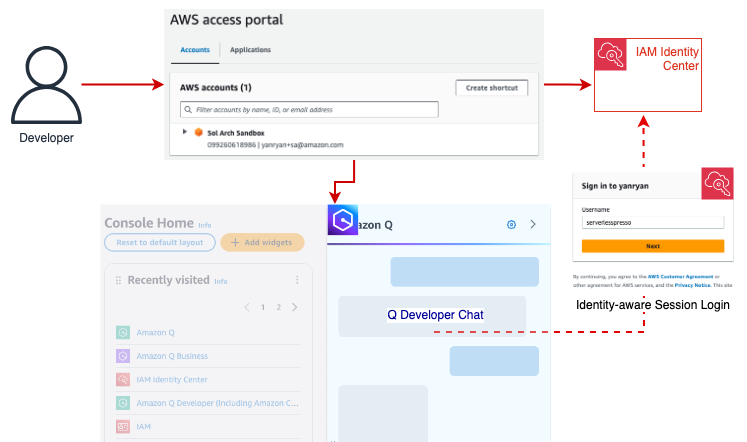
Figure 1: Logging into an AWS account via the IAM Identity Center enables Q Developer to match the user with an active Pro subscription.
To meet customers where they are and allow them to build on their existing configurations, IAM Identity Center includes a mechanism that allows users to obtain an identity-aware session to access Q in the Console, regardless of how they originally logged in to the Console.
Let’s look at a real-world example to explore how this might work. Let’s assume our organization is currently using Microsoft Entra ID alongside AWS Organizations to federate our users into AWS accounts. This grants them access to the AWS console for accounts in our AWS Organization and enables our users to be assigned IAM roles and permissions. While secure, this access method does not allow Q Developer to easily associate the user with their Entra ID identity and to match them to a Q Developer subscription.
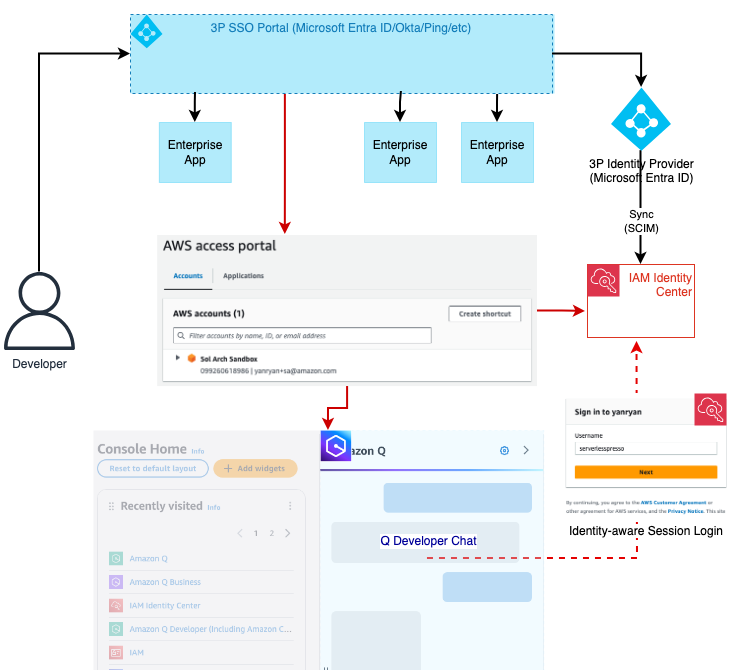
Figure 2: Using Entra ID, the user is federated into the AWS account and assumes an IAM role without further context in the console. Q Developer can obtain that context by authenticating the user with identity-aware sessions. This process is first attempted manually before prompting the user for credentials
To provide identity-aware sessions to these users, we can enable IAM Identity Center for the Organization and integrate it with our Entra ID instance. This allows us to sync our users and groups from Entra ID and assign them to subscriptions in our AWS Applications such as Amazon Q Developer.
We then go one step further and enable identity-aware sessions for our Identity Center instance. Identity-aware sessions allow Amazon Q to access user’s unique identifier in Identity Center so that it can then look up a user’s subscription and chat history. When the user opens the Console Chat, Q Developer checks whether the current IAM session already includes a valid identity-aware context. If this context is not available, Q will then verify the account is part of an Organization and has an IAM Identity Center instance with identity-aware sessions enabled. If so, it will prompt the user to authenticate with IAM Identity Center. Otherwise, the chat will throw an error.
With a valid Q Developer Pro subscription now verified, the user’s interactions with the Q Chat window will include personalization such as access to prior chat history, the ability to chat about AWS account resources, and higher request limits for multiple capabilities included with Q Developer Pro. This will persist with the user for the duration of their AWS Console session.
Identity-aware sessions are only available for instances of IAM Identity Center deployed at the AWS Organization level. (Account-level instances of IAM Identity Center do not support this feature). Once IAM Identity Center is configured, the option to enable Identity-aware sessions needs to be manually selected. (NOTE: This is a one-way door option which, once enabled, cannot be disabled. For more information about prerequisites and considerations for this feature, you can review the documentation here.)
To begin, verify that you have enabled AWS Organizations across your accounts. Once you have completed this, you are ready to enable IAM Identity Center and enable identity-aware sessions. The steps below should be completed by a member of your infrastructure administration team.
For customers who already have an Organization-based instance of IAM Identity Center configured, skip to Step 4 below. For those organizations who would like to read more about IAM Identity Center before completing the following steps, you can find details in the documentation available here.


In this final section, we’ll explore the benefits of using Amazon Q Developer Pro. There are three main areas of benefit:
Q Developer Pro can store your chat history and restore it from previous sessions each time you begin. This enables you to develop a context within the chat about things that are relevant to your interests and in turn inform the feedback you receive from Q going forward.
Q Developer Pro can leverage your IAM permissions to make requests regarding resources and costs associated with your account (assuming you have the appropriate policies). This enables you to inquire about certain resources deployed in a given region, or ask questions about cost such as the overall EC2 spend in a given period of time.
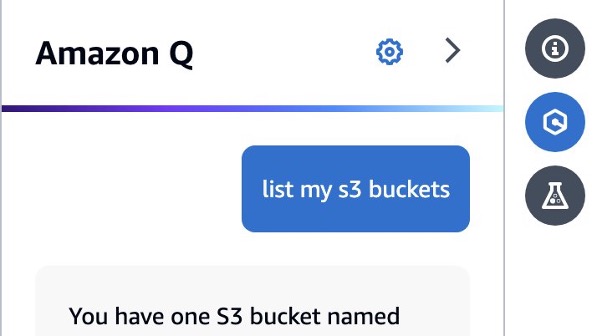
Figure 4: From the Q Chat panel, you can inquire about resources deployed in your account. (This capability requires you to have the necessary permissions to view information about the requested resource.)
Identity-aware sessions also enable you to benefit from custom settings in your Q Chat. For example, you can enable cross-region access for your Q Chat sessions which enable you to ask questions about resources in the current region but also all other regions in your account.
As a new feature of IAM Identity Center, identity-aware sessions enable an AWS Console user to access their Q Developer Pro subscription in the Q Chat panel. This provides them with richer conversations with Q Developer about their accounts and maintains those conversations over time with stored chat history. Enabling this feature involves no additional cost and only a single setting change in a configured IAM Identity Center organization instance. Once made, users will be able to benefit from the full feature set of Amazon Q Developer regardless of how they log into the account.
Post Syndicated from Cedric Pelvet original https://aws.amazon.com/blogs/big-data/opensearch-optimized-instance-or1-is-game-changing-for-indexing-performance-and-cost/
Amazon OpenSearch Service securely unlocks real-time search, monitoring, and analysis of business and operational data for use cases like application monitoring, log analytics, observability, and website search.
In this post, we examine the OR1 instance type, an OpenSearch optimized instance introduced on November 29, 2023.
OR1 is an instance type for Amazon OpenSearch Service that provides a cost-effective way to store large amounts of data. A domain with OR1 instances uses Amazon Elastic Block Store (Amazon EBS) volumes for primary storage, with data copied synchronously to Amazon Simple Storage Service (Amazon S3) as it arrives. OR1 instances provide increased indexing throughput with high durability.
To learn more about OR1, see the introductory blog post.
While actively writing to an index, we recommend that you keep one replica. However, you can switch to zero replicas after a rollover and the index is no longer being actively written.
This can be done safely because the data is persisted in Amazon S3 for durability.
Note that in case of a node failure and replacement, your data will be automatically restored from Amazon S3, but would be partially unavailable during the repair operation, so you should not consider it for cases where searches on non-actively written indices require high availability.
In this blog post, we’ll explore how OR1 impacts the performance of OpenSearch workloads.
By providing segment replication, OR1 instances save CPU cycles by indexing only on the primary shards. By doing that, the nodes are able to index more data with the same amount of compute, or to use fewer resources for indexing and thus have more available for search and other operations.
For this post, we’re going to consider an indexing-heavy workload and do some performance testing.
Traditionally, Amazon Elastic Compute Cloud (Amazon EC2) R6g instances are a high performant choice for indexing-heavy workloads, relying on Amazon EBS storage. Im4gn instances provide local NVMe SSD for high throughput and low latency disk writes.
We will compare OR1 indexing performance relative to these two instance types, focusing on indexing performance only for scope of this blog.
For our performance testing, we set up multiple components, as shown in the following figure:

For the testing process:
The index mapping, which is part of our initialization step, is as follows:
As you can see, we’re using a data stream to simplify the rollover configuration and keep the maximum primary shard size under 50 GiB, as per best practices.
We optimized the mapping to avoid any unnecessary indexing activity and use the flat_object field type to avoid field mapping explosion.
For reference, the Index State Management (ISM) policy we used is as follows:
Our average document size is 1.6 KiB and the bulk size is 4,000 documents per bulk, which makes approximately 6.26 MiB per bulk (uncompressed).
The protocol parameters are as follows:
| Cluster | Instance type | vCPU | RAM | JVM size |
| or1-target | or1.4xlarge.search | 16 | 128 | 32 |
| im4gn-target | im4gn.4xlarge.search | 16 | 64 | 32 |
| r6g-target | r6g.4xlarge.search | 16 | 128 | 32 |
Note that the im4gn cluster has half the memory of the other two, but still each environment has the same JVM heap size of approximately 32 GiB.
For the performance testing, we started with 75 parallel jobs and 750 batches of 4,000 documents per client (a total 225 million documents). We then adjusted the number of shards, data nodes, replicas, and jobs.
For this configuration, we used 6 data nodes, 12 primary shards, and 1 replica, we observed the following performance:
| Cluster | CPU usage | Time taken | Indexing speed | |
| or1-target | 65-80% | 24 min | 156 kdoc/s | 243 MiB/s |
| im4gn-target | 89-97% | 34 min | 110 kdoc/s | 172 MiB/s |
| r6g-target | 88-95% | 34 min | 110 kdoc/s | 172 MiB/s |
Highlighted in this table, im4gn and r6g clusters have very high CPU usage, triggering admission control, which rejects document.
The OR1 shows a CPU below 80 percent sustained, which is a very good target.
Things to keep in mind:
By reducing the number of parallel jobs from 75 to 40, while maintaining 750 batches of 4,000 documents per client (total 120M documents), we get the following:
| Cluster | CPU usage | Time taken | Indexing speed | |
| or1-target | 25-60% | 20 min | 100 kdoc/s | 156 MiB/s |
| im4gn-target | 75-93% | 19 min | 105 kdoc/s | 164 MiB/s |
| r6g-target | 77-90% | 20 min | 100 kdoc/s | 156 MiB/s |
The throughput and CPU usage decreased, but the CPU remains high on Im4gn and R6g, while the OR1 is showing more CPU capacity to spare.
For this configuration, we increased the number of primary shards from 12 to 48, which provides more parallelism for indexing:
| Cluster | CPU usage | Time taken | Indexing speed | |
| or1-target | 60-80% | 21 min | 178 kdoc/s | 278 MiB/s |
| im4gn-target | 67-95% | 34 min | 110 kdoc/s | 172 MiB/s |
| r6g-target | 70-88% | 37 min | 101 kdoc/s | 158 MiB/s |
The indexing throughput increased for the OR1, but the Im4gn and R6g didn’t see an improvement because their CPU utilization is still very high.
Reducing the parallel jobs to 40 and keeping 48 primary shards, we can see that the OR1 gets a little more pressure as the minimum CPU increases from 12 primary shards, and the CPU for R6g looks much better. For the Im4gn however, the CPU is still high.
| Cluster | CPU usage | Time taken | Indexing speed | |
| or1-target | 40-60% | 16 min | 125 kdoc/s | 195 MiB/s |
| im4gn-target | 80-94% | 18 min | 111 kdoc/s | 173 MiB/s |
| r6g-target | 70-80% | 21 min | 95 kdoc/s | 148 MiB/s |
For this configuration, we started with the original configuration and added more compute capacity, moving from 6 nodes to 12 and increasing the number of primary shards to 96.
| Cluster | CPU usage | Time taken | Indexing speed | |
| or1-target | 40-60% | 18 min | 208 kdoc/s | 325 MiB/s |
| im4gn-target | 74-90% | 20 min | 187 kdoc/s | 293 MiB/s |
| r6g-target | 60-78% | 24 min | 156 kdoc/s | 244 MiB/s |
The OR1 and the R6g are performing well with CPU usage below 80 percent, with OR1 giving 33 percent better performance with 30 percent less CPU usage compared to R6g.
The Im4gn is still at 90 percent CPU, but the performance is also very good.
Reducing the number of parallel jobs from 75 to 40, we get:
| Cluster | CPU usage | Time taken | Indexing speed | |
| or1-target | 40-60% | 11 min | 182 kdoc/s | 284 MiB/s |
| im4gn-target | 70-90% | 11 min | 182 kdoc/s | 284 MiB/s |
| r6g-target | 60-77% | 12 min | 167 kdoc/s | 260 MiB/s |
Reducing the number of parallel jobs to 40 from 75 brought the OR1 and Im4gn instances on par and the R6g very close.
The OR1 instances speed up indexing because only the primary shards need to be written while the replica is produced by copying segments. While being more performant compared to Img4n and R6g instances, the CPU usage is also lower, which gives room for additional load (search) or cluster size reduction.
We can compare a 6-node OR1 cluster with 48 primary shards, indexing at 178 thousand documents per second, to a 12-node Im4gn cluster with 96 primary shards, indexing at 187 thousand documents per second or to a 12-node R6g cluster with 96 primary shards, indexing at 156 thousand documents per second.
The OR1 performs almost as well as the larger Im4gn cluster, and better than the larger R6g cluster.
As you can see in the results, OR1 instances can process more data at higher throughput rates. However, when increasing the number of primary shards, they don’t perform as well because of the remote backed storage.
To get the best throughput from the OR1 instance type, you can use larger batch sizes than usual, and use an Index State Management (ISM) policy to roll over your index based on size so that you can effectively limit the number of primary shards per index. You can also increase the number of connections because the OR1 instance type can handle more parallelism.
For search, OR1 doesn’t directly impact the search performance. However, as you can see, the CPU usage is lower on OR1 instances than on Im4gn and R6g instances. That enables either more activity (search and ingest), or the possibility to reduce the instance size or count, which would result in a cost reduction.
The new OR1 instance type gives you more indexing power than the other instance types. This is important for indexing-heavy workloads, where you index in batch every day or have a high sustained throughput.
The OR1 instance type also enables cost reduction because their price for performance is 30 percent better than existing instance types. When adding more than one replica, price for performance will decrease because the CPU is barely impacted on an OR1 instance, while other instance types would have indexing throughput decrease.
Check out the complete instructions for optimizing your workload for indexing using this repost article.

Cédric Pelvet is a Principal AWS Specialist Solutions Architect. He helps customers design scalable solutions for real-time data and search workloads. In his free time, his activities are learning new languages and practicing the violin.
Post Syndicated from Edward Ondari original https://aws.amazon.com/blogs/big-data/aws-glue-mutual-tls-authentication-for-amazon-msk/
In today’s landscape, data streams continuously from countless sources such as social media interactions to Internet of Things (IoT) device readings. This torrent of real-time information presents both a challenge and an opportunity for businesses. To harness the power of this data effectively, organizations need robust systems for ingesting, processing, and analyzing streaming data at scale. Enter Apache Kafka: a distributed streaming platform that has revolutionized how companies handle real-time data pipelines and build responsive, event-driven applications. AWS Glue is used to process and analyze large volumes of real-time data and perform complex transformations on the streaming data from Apache Kafka.
Amazon Managed Streaming for Apache Kafka (Amazon MSK) is a fully managed Apache Kafka service. You can activate a combination of authentication modes on new or existing MSK clusters. The supported authentication modes are AWS Identity and Access Management (IAM) access control, mutual Transport Layer Security (TLS), and Simple Authentication and Security Layer/Salted Challenge Response Mechanism (SASL/SCRAM). For more information about using IAM authentication, refer to Securely process near-real-time data from Amazon MSK Serverless using an AWS Glue streaming ETL job with IAM authentication.
Mutual TLS authentication requires both the server and the client to present certificates to prove their identity. It’s ideal for hybrid applications that need a common authentication model. It’s also a commonly used authentication mechanism for business-to-business applications and is used in standards such as open banking, which enables secure open API integrations for financial institutions. For Amazon MSK, AWS Private Certificate Authority (AWS Private CA) is used to issue the X.509 certificates and for authenticating clients.
This post describes how to set up AWS Glue jobs to produce, consume, and process messages on an MSK cluster using mutual TLS authentication. AWS Glue will automatically infer the schema from the streaming data and store the metadata in the AWS Glue Data Catalog for analysis using analytics tools such as Amazon Athena.
In our example use case, a hospital facility regularly monitors the body temperatures for patients admitted in the emergency ward using smart thermometers. Each device automatically records the patients’ temperature readings and posts the records to a central monitoring application API. Each posted record is a JSON formatted message that contains the deviceId that uniquely identifies the thermometer, a patientId to identify the patient, the patient’s temperature reading, and the eventTime when the temperature was recorded.

The central monitoring application checks the hourly average temperature readings for each patient and notifies the hospital’s healthcare workers when a patient’s average temperature exceeds accepted thresholds (36.1–37.2°C). In our case, we use the Athena console to analyze the readings.
In this post, we use an AWS Glue Python shell job to simulate incoming data from the hospital thermometers. This job produces messages that are securely written to an MSK cluster using mutual TLS authentication.
To process the streaming data from the MSK cluster, we deploy an AWS Glue Streaming extract, transform, and load (ETL) job. This job automatically infers the schema from the incoming data, stores the schema metadata in the Data Catalog, and then stores the processed data as efficient Parquet files in Amazon Simple Storage Service (Amazon S3). We use Athena to query the output table in the Data Catalog and uncover insights.
The following diagram illustrates the architecture of the solution.

The solution workflow consists of the following steps:
You should have the following prerequisites:

This template creates two NAT gateways as shown in the following diagram. However, it’s possible to route the traffic to a single NAT gateway in one Availability Zone for test and development workloads. For redundancy in production workloads, it’s recommended that there is one NAT gateway available in each Availability Zone.

The stack also creates a security group with a self-referencing rule to allow communication between AWS Glue components.
Complete the following steps to create a root CA. For more details, refer to Creating a private CA.


Before setting up the MSK cluster, make sure you have a VPC with at least two private subnets in different Availability Zones and a NAT gateway with a route to the internet. A CloudFormation template is provided in the prerequisites section.
Complete the following steps to set up your cluster:
The MSK cluster creation can take up to 30 minutes to complete.
Using the root CA, you generate client certificates to use for authentication. The following instructions are for CloudShell, but can also be adapted for a client machine with Java and the AWS CLI installed.
certs directory and install Java:keytool -genkey -keystore kafka.client.keystore.jks -validity 300 -storepass Your-Store-Pass -keypass Your-Key-Pass -dname "CN=Distinguished-Name" -alias Example-Alias -storetype pkcs12
keytool -keystore kafka.client.keystore.jks -certreq -file csr.pem -alias Example-Alias -storepass Your-Store-Pass -keypass Your-Key-Pass
sed -i -E '1,$ s/NEW //' csr.pem
The file should start with -----BEGIN CERTIFICATE REQUEST----- and end with -----END CERTIFICATE REQUEST-----
aws acm-pca issue-certificate --certificate-authority-arn Private-CA-ARN --csr fileb://csr.pem --signing-algorithm "SHA256WITHRSA" --validity Value=300,Type="DAYS"
The command should print out the ARN of the issued certificate. Save the CertificateArn value for use in the next step.
CertificateArn (arn:aws:acp-pca:<region>:...) generated in the preceding step to retrieve the signed client certificate. This will create a client-cert.pem file.aws acm-pca get-certificate --certificate-authority-arn Private-CA-ARN --certificate-arn Certificate-ARN | jq -r '.Certificate + "\n" + .CertificateChain' >> client-cert.pem
keytool -keystore kafka.client.keystore.jks -import -file client-cert.pem -alias Example-Alias -storepass Your-Store-Pass -keypass Your-Key-Pass -noprompt
destkeypass and deststorepass and enter the keystore password when prompted.keytool -importkeystore -srckeystore kafka.client.keystore.jks -destkeystore keystore.p12 -srcalias Example-Alias -deststorepass Your-Store-Pass -destkeypass Your-Key-Pass -deststoretype PKCS12
openssl pkcs12 -in keystore.p12 -nodes -nocerts -out private-key.pem
Bag Attributes.. from the top of the file:sed -i -ne '/-BEGIN PRIVATE KEY-/,/-END PRIVATE KEY-/p' private-key.pem
client-cert.pem, client.keystore.jks, and private-key.pem files to Amazon S3. You can either create a new S3 bucket or use an existing bucket to store the following objects. Replace <s3://aws-glue-assets-11111111222222-us-east-1/certs/> with your S3 location.aws s3 sync ~/certs s3://aws-glue-assets-11111111222222-us-east-1/certs/ --exclude '*' --include 'client-cert.pem' --include 'private-key.pem' --include 'kafka.client.keystore.jks'
Complete the following steps to create a Kafka connection:

-storepass and -keypass
Kafka-connection) and choose Create connection.In this section, you create a Python shell job to create a new Kafka topic and push JSON messages to the topic. Complete the following steps:

Kafka-msk-producer.Kafka-connection connection you created.--additional-python-modules, value: kafka-python.--client-cert, value: s3://aws-glue-assets-11111111222222-us-east-1/certs/client-cert.pem. Replace with your client-cert.pem Amazon S3 location from earlier.--private-key, value: s3://aws-glue-assets-11111111222222-us-east-1/certs/private-key.pem. Replace with your private-key.pem Amazon S3 location from earlier.
You can confirm that the job run status is Running on the Runs tab.
At this point, we have successfully created a Python shell job to simulate the thermometers sending temperature readings to the monitoring application. The job will run for approximately 1 hour and push 1,200 records to Amazon MSK.
Alternatively, you can replace the Python shell job with a Scala ETL job to act as a producer to send messages to the MSK cluster. In this case, use the JKS file for authentication using ssl.keystore.type=JKS. If you’re using PEM format keys, the current version of Kafka clients libraries (2.4.1) installed in AWS Glue version 4 don’t yet support authentication through certificates in PEM format (as of this writing).
You can now create an AWS Glue ETL job to consume and process the messages in the Kafka topic. AWS Glue will automatically infer the schema from the files. Complete the following steps:
example_topic) you created earlier.
Amazon S3 to store the output Parquet files generated from the streaming data.
60 (for the job to stop after 60 minutes).You can confirm the S3 output location for new Parquet files created under the prefixes s3://<output-location>/ingest_year=XXXX/ingest_month=XX/ingest_day=XX/ingest_hour=XX/.
At this point, you have created a streaming job to process events from Amazon MSK and store the JSON formatted records as Parquet files in Amazon S3. AWS Glue streaming jobs are meant to be running continuously to process streaming data. We have set the timeout to stop the job after 60 minutes. You can also stop the job manually after the records have been processed to Amazon S3.
Going back to our example use case, you can run the following query in Athena to monitor and track the hourly average temperature readings for patients that exceed the normal thresholds (36.1–37.2°C):

Run the query multiple times and observe how the average_temperature and the number of readings changes with new incoming data from the AWS Glue Streaming job. In our example scenario, healthcare workers can use this information to identify patients who are experiencing consistent high or low body temperatures and give the required attention.
At this point, we have successfully created and ingested streaming data to our MSK cluster using mutual TLS authentication. We only needed the certificates generated by AWS Private CA to authenticate our AWS Glue clients to the MSK cluster and process the streaming data with an AWS Glue Streaming job. Finally, we used Athena to visualize the data and observed how the data changes in near real time.
To clean up the resources created in this post, complete the following steps:
This post demonstrated how you can use AWS Glue to consume, process, and store streaming data for Amazon MSK using mutual TLS authentication. AWS Glue Streaming automatically infers the schema and creates a table in the Data Catalog. You can then query the table using other data analysis tools like Athena, Amazon Redshift, and Amazon QuickSight to provide insights into the streaming data.
Try out the solution for yourself, and let us know your questions and feedback in the comments section.
 Edward Okemwa is a Big Data Cloud Support Engineer (ETL) at AWS Nairobi specializing in AWS Glue and Amazon Athena. He is dedicated to providing customers with technical guidance and resolving issues related to processing and analyzing large volumes of data. In his free time, he enjoys singing choral music and playing football.
 Emmanuel Mashandudze is a Senior Big Data Cloud Engineer specializing in AWS Glue. He collaborates with product teams to help customers efficiently transform data in the cloud. He helps customers design and implements robust data pipelines. Outside of work, Emmanuel is an avid marathon runner, sports enthusiast and enjoys creating memories with his family.
Post Syndicated from Aman Lal original https://aws.amazon.com/blogs/architecture/tenant-portability-move-tenants-across-tiers-in-a-saas-application/
In today’s fast-paced software as a service (SaaS) landscape, tenant portability is a critical capability for SaaS providers seeking to stay competitive. By enabling seamless movement between tiers, tenant portability allows businesses to adapt to changing needs. However, manual orchestration of portability requests can be a significant bottleneck, hindering scalability and requiring substantial resources. As tenant volumes and portability requests grow, this approach becomes increasingly unsustainable, making it essential to implement a more efficient solution.
This blog post delves into the significance of tenant portability and outlines the essential steps for its implementation, with a focus on seamless integration into the SaaS serverless reference architecture. The following diagram illustrates the tier change process, highlighting the roles of tenants and admins, as well as the impact on new and existing services in the architecture. The subsequent sections will provide a detailed walkthrough of the sequence of events shown in this diagram.

Figure 1. Incorporating tenant portability within a SaaS serverless reference architecture
Tenant portability is generally achieved through a well-orchestrated process that ensures seamless tier transitions. This process comprises of the following steps:

Figure 2. High-level tenant portability flow
We’ll now delve into each step of the portability workflow, highlighting key considerations for a successful implementation.
The key consideration for porting identity is migrating user identities while maintaining a consistent end-user experience, without requiring password resets or changes to user IDs.
Create a new identity store and associated application client that the frontend can use; after that, we’ll need a mechanism to migrate users. In the reference architecture using Amazon Cognito, a silo refers to each tenant having its own user pool, while a pool refers to multiple tenants sharing a user pool through user groups.
To ensure a smooth migration process, it’s important to communicate with users and provide them with options to avoid password resets. One approach is to notify users to log in before a deadline to avoid password resets. Employ just-in-time migration, enabling password retention during login for uninterrupted user experience with existing passwords.
However, this requires waiting for all users to migrate, potentially leading to a prolonged migration window. As a complementary measure, after the deadline, the remaining users can be migrated by using bulk import, which enforces password resets. This ensures a consistent migration within a defined timeframe, albeit inconveniencing some users.
SaaS providers rely on metadata stores to maintain all tenant-related configuration. Updates to tenant metadata should be completed carefully during the porting process. When you update the tenant configuration for the new tier, two key aspects must be considered:
To handle this, a new tenant portability service can be introduced in the SaaS reference architecture. This service assigns a different AWS API Gateway usage plan to the tenant based on the requested tier change, and orchestrates calls to other downstream services. Subsequently, the existing tenant management service will need an extension to handle tenant metadata updates (tier, user-pool-id, app-client-id) based on the incoming porting request.
Successful portability hinges on two crucial aspects during infrastructure provisioning:
To handle infrastructure provisioning and deprovisioning in the reference architecture, extend the tenant provisioning service:
Finally, ensure new resources comply with required compliance standards by applying relevant security configurations and deploying a compliant version of the application.
By addressing these aspects, SaaS providers can ensure a seamless transition while maintaining tenant isolation and operational continuity.
The data migration strategy is heavily influenced by architectural decisions such as the storage engine and isolation approach. Minimizing user downtime during migration requires a focus on accelerating the migration process, maintaining service availability, and setting up a replication channel for incremental updates. Additionally, it’s crucial to address schema changes made by tenants in a silo model to ensure data integrity and avoid data loss when transitioning to a pool model.
Extending the reference architecture, a new data porting service can be introduced to enable Amazon DynamoDB data migration between different tiers. DynamoDB partition migration can be accomplished through multiple approaches, including AWS Glue, custom scripts, or duplicating DynamoDB tables and bulk-deleting partitions. We recommend a hybrid approach to achieve zero-downtime migration. This solution applies only when the DynamoDB schema remains consistent across tiers. If the schema has changed, a custom solution is required for data migration.
The cutover phase involves redirecting users to the new infrastructure, disabling continuous data replication, and ensuring that compliance requirements are met. This includes running tests or obtaining audits/certifications, especially when moving to high-sensitivity silos. After a successful cutover, cleanup activities are necessary, including removing temporary infrastructure and deleting historical tenant data from the previous tier. However, before deleting data, ensure that audit trails are preserved and compliant with regulatory requirements, and that data deletion aligns with organizational policies.
In conclusion, portability is a vital feature for multi-tenant SaaS. It allows tenants to move data and configurations between tiers effortlessly and can be incorporated in reference architecture as above. Key considerations include maintaining consistent identities, staying compliant, reducing downtime and automating the process.
Post Syndicated from Macey Neff original https://aws.amazon.com/blogs/compute/using-amazon-aperf-to-go-from-50-below-to-36-above-performance-target/
This post is written by Tyler Jones, Senior Solutions Architect – Graviton, AWS.
Performance tuning the Renaissance Finagle-http benchmark
Sometimes software doesn’t perform the way it’s expected to across different systems. This can be due to a configuration error, code bug, or differences in hardware performance. Amazon APerf is a powerful tool designed to help identify and address performance issues on AWS instances and other computers. APerf captures comprehensive system metrics simultaneously and then visualizes them in an interactive report. The report allows users to analyze metrics such as CPU usage, interrupts, memory usage, and CPU core performance counters (PMU) together. APerf is particularly useful for performance tuning workloads across different instance types, as it can generate side-by-side reports for easy comparison. APerf is valuable for developers, system administrators, and performance engineers who need to optimize application performance on AWS. From here on we use the Renaissance benchmark as an example to demonstrate how APerf is used to debug and find performance bottlenecks.
The Renaissance finagle-http benchmark was unexpectedly found to run 50% slower on a c7g.16xl Graviton3 than on a reference instance, both initially using the Linux-5.15.60 kernel. This is unexpected behavior.Graviton3 should be performing as good or better than our reference instance as it does for other Java based workloads. It’s likely there is a configuration problem somewhere. The Renaissance finagle-http benchmark is written in Scala but produces Java byte code, so our investigation will focus on the Java JVM as well as system-level configurations.
System performance tuning is an iterative process that is conducted in two main phases, the first focuses on overall system issues, and the second focuses on CPU core bottlenecks. APerf is used to assist in both phases.
APerf can render several instances’ data in one report, side by side, typically a reference system and the system to be tuned. The reference system provides values to compare against. In isolation, metrics are harder to evaluate. A metric may be acceptable in general but the comparison to the reference system makes it easier to spot room for improvement.
APerf helps to identify unusual system behavior, such as high interrupt load, excessive I/O wait, unusual network layer patterns, and other such issues in the first phase. After adjustments are made to address these issues, for example by modifying JVM flags, the second phase starts. Using the system tuning of the first phase, fresh APerf data is collected and evaluated with a focus on CPU core performance metrics.
Any inferior metric of the SUT CPU core, as compared to the reference system, holds potential for improvement. In the following section we discuss the two phases in detail.
For more background on system tuning, refer to the Performance Runbook in the AWS Graviton Getting Started guide.
Here is an example for how 240 seconds of system data is collected with APerf:
The APerf report is generated as follows:
./aperf report --run finagle_1
Then, the report can be viewed with a web browser:
firefox aperf_report_finagle_1/index.html
The APerf report can render several data sets in the same report, side-by-side.
./aperf report --run finagle_1_c7g --run finagle_1_reference --run ...
Note that it is crucial to examine the CPU usage over time shown in APerf. Some data may be gathered while the system is idle. The metrics during idle times have no significant value.
In this phase we look for differences on the system level. To do this APerf collects data during runs of finagle-http on c7g.16xl and the reference. The reference system provides the target numbers to compare against. Any large difference warrants closer inspection.
The first differences can be seen in the following figure.
The APerf CPU usage plot shows larger drops on Graviton3 (highlighted in red) at the beginning of each run than on the reference instance.
Figure 1: CPU usage. c7g.16xl on the left, reference on the right.


The log messages about the GC runtime hint at a possible reason as they coincide with the dips in CPU usage.
The JVM tends to spend a significant amount of time in garbage collection, during which time it has to suspend all threads, and choosing a different GC may have a positive impact.
The default GC on OpenJDK17 is G1GC. Using parallelGC is an alternative given that the instances have 64 CPUs, and thus GC can be performed highly parallel. The Graviton Getting Started guide also recommends checking the GC log when working on Java performance issues. A cross check using the JVM’s -Xlog:gc option confirms the reduced GC time with parallelGC.
The second difference is evident in the following figure, the CPU-to-CPU interrupts (IPI). There is more than 10x higher activity on Graviton 3, which means additional IRQ work c7g.16xl on which the reference system does not have to spend CPU cycles.
Figure 2: IPI0/RES Interrupts. c7g.16xl on the left, reference on the right.


Grepping through kernel commit messages can help find patches that address a particular issue, such as IPI inefficiencies.
This scheduling patch improves performance by 19%. Another IPI patch provides an additional 1% improvement. Switching to Linux-5.15.61 allows us to use these IPI improvements. The following figure shows the effect in APerf.
Figure 3: IPI0 Interrupts (c7g.16xl)

Now that the system level issues are mitigated, the focus is on the CPU cores. The data collected by APerf shows PMU data where the reference instance and Graviton3 differ significantly.
| PMU metric | Graviton3 | Reference system |
| Branch Prediction Misses/1000 Instructions | 16 | 4 |
| Instruction Translation Lookaside Buffer (TLB) Misses/1000 Instructions | 8.3 | 4 |
| Instructions Per Clock cycle | 0.6 | 0.6* |
*Note that reference has a 20% higher CPU clock than c7g.16xl. As a rule of thumb, instructions per clock (IPC) multiplied by clock rate equals work done by a CPU.
The first improvement in PMU metrics stems from the parallelGC option. Although the intention was to increase CPU usage, the following figure shows lowered branch miss counts as well. Limiting the JIT tiered compilation to only use C2 mode helps branch prediction by reducing branch indirection and increasing the locality of executed code. Finally adding Transparent Huge Pages helps branch prediction logic and avoids lengthy address translation look-ups in DDR memory. The following graphs show the effects of the chosen JVM options.
Branch misses/1000 instructions (c7g.16xl)
Figure 4: Branch misses per 1k instructions

JVM Options from left to right:
-XX:+UseParallelGC-XX:+UseParallelGC -XX:-TieredCompilation-XX:+UseParallelGC -XX:-TieredCompilation -XX:+UseTransparentHugePagesWith the options listed under the preceding figure, APerf shows the branch prediction miss rate decreasing from the initial 16 to 11. Branch mis-predictions incur significant performance penalties as they result in wasted cycles spent computing results that ultimately need to be discarded. Furthermore, these mis-predictions cause the prefetching and cache subsystems to fail to load the necessary subsequent instructions into cache. Consequently, costly pipeline stalls and frontend stalls occur, preventing the CPU from executing instructions.
Figure 5: Code sparsity

JVM Options from left to right:
-XX:+UseParallelGC-XX:+UseParallelGC -XX:-TieredCompilation-XX:+UseParallelGC -XX:-TieredCompilation -XX:+UseTransparentHugePagesCode sparsity is a measure of how compact the instruction code is packed and how closely related code is placed. This is where turning off tiered compilation shows its effect. Lower sparsity helps branch prediction and the cache subsystem.
Figure 6: Instruction TLB misses per 1k Instructions

JVM Options from left to right:
-XX:+UseParallelGC-XX:+UseParallelGC -XX:-TieredCompilation-XX:+UseParallelGC -XX:-TieredCompilation -XX:+UseTransparentHugePagesThe big decrease in TLB misses is caused by the use of transparent huge pages, which increase the likelihood that a virtual address translation is present in the TLB, since fewer entries are needed. Translation table walks are avoided that otherwise need to traverse entries in DDR memory that cost hundreds of CPU cycles to read.
Figure 7: Instructions per clock cycle

JVM Options from left to right:
-XX:+UseParallelGC-XX:+UseParallelGC -XX:-TieredCompilation-XX:+UseParallelGC -XX:-TieredCompilation -XX:+UseTransparentHugePagesThe preceding figure shows IPC increasing from 0.58 to 0.71 as JVM flags are added.
This table summarizes the measures taken for performance improvement and their results.
| JVM option set | baseline | 1 | 2 | 3 |
| IPC | 0.6 | 0.6 | 0.63 | 0.71 |
| Branch misses/1000 instructions | 16 | 14 | 12 | 11 |
| ITLB misses/1000 instructions | 8.3 | 7.7 | 8.8 | 1.1 |
| Benchmark runtime [ms] | 6000 | 3922 | 3843 | 3512 |
| execution time improvement vs baseline |
+parallelGC+parallelGC -tieredCompilation+parallelGC -tieredCompilation +UseTransparentHugePages With the preceding efforts, c7g.16xl is within 91% of the reference system. The c7g.16xl branch prediction miss rate is still higher at 11 than the references at 4. As shown in the preceding figure, reduced branch prediction misses have a strong positive effect on performance. What follows is an experiment to achieve parity or better with the reference system based on the reduction of branch prediction misses.
Finagle-http serves HTTP requests generated by wrk2, which is a load generator implemented in C. The expectation is that the c7g.16xl branch predictor works better with the native wrk2 binary, unlike the Renaissance load generator, which is executing on the JVM. The wrk2 load generator and the finagle-http are assigned through taskset to separate sets of CPUs: 16 CPUs for wrk2 and 48 CPUs for finagle-http. The idea here is to have the branch predictors on these CPU sets focus on a limited code set. The following diagram illustrates the difference between the Renaissance and the experimental setup.

With this CPU performance tuned setup, c7g.16xl can now handle a 36% higher request load than the reference using the same configuration, at an average latency limit of 1.5ms. This illustrates the impact that system tuning with APerf can have. The same system that scored 50% lower than the comparison system now exceeds it by 36%.
The following APerf data shows the improvement of key PMU metrics that lead to the performance jump.
Figure 8: Branch misses per 1k instructions

Left chart: Optimized Java-only setup. Right chart: Finagle-http with wrk2 load generator
The branch prediction miss rate is reduced to 1.5 from 11 with the Java-only setup.
Figure 9: Instructions Per Clock Cycle

Left chart: Optimized Java-only setup. Right chart: Finagle-http with wrk2 load generator
The IPC steps up from 0.7 to 1.5 due to the improvement in branch prediction.
Figure 10: Code Sparsity

Left chart: Optimized Java-only setup. Right chart: Finagle-http with wrk2 load generator
The code sparsity decreases to 0.014 from 0.21, a factor of 15.
AWS created the APerf tool to aid in root cause analysis and help address performance issues for any workload. APerf is a standalone binary that captures relevant data simultaneously as a time series, such as CPU usage, interrupt frequency, memory usage, and CPU core metrics (PMU counters). APerf can generate reports for multiple data captures, making it easy to spot differences between instance types. We were able to use this data to analyze why Graviton3 was underperforming and to also see the impact of our changes in terms of performance. Using APerf we were able to successfully adjust configuration parameters and go from 50% below our performance target to 36% more performant than our reference system and associated performance target. Without Aperf, collecting these metrics and visualizing them is a non-trival task. With Aperf you can capture and visualize these metrics with two short commands, saving you time and effort so you can focus on what matters most: getting the most performance from your application.
Post Syndicated from Cliff Robinson original https://www.servethehome.com/phison-pascari-d200v-pcie-gen5-nvme-ssd-with-122-88tb-of-capacity-announced/
The Phison Pascari D200V is the company’s 122.88TB NVMe SSD that uses PCIe Gen5 to deliver up to 3M IOPS and 14000MB/s of read bandwidth
The post Phison Pascari D200V PCIe Gen5 NVMe SSD with 122.88TB of Capacity Announced appeared first on ServeTheHome.
Post Syndicated from corbet original https://lwn.net/Articles/984313/
The desire for the ability to checkpoint a process — to record its state in
a form that can be restarted at a future time — on Linux is almost as old as
Linux itself. See, for example, this announcement of a checkpoint
project that appeared in LWN in 1998. While working solutions exist, they
can be somewhat fragile and difficult to use; it is not surprising that
some people are interested in finding a better alternative. A current
effort goes by the name CRIB,
for Checkpoint/Restore in (naturally) BPF. It is far from clear that CRIB
will replace the existing solutions, but it is an interesting look at a
different way of solving the problem.
Post Syndicated from Riya Dani original https://aws.amazon.com/blogs/devops/how-to-use-amazon-q-developer-to-deploy-a-serverless-web-application-with-aws-cdk/
Did you know that Amazon Q Developer, a new type of Generative AI-powered (GenAI) assistant, can help developers and DevOps engineers accelerate Infrastructure as Code (IaC) development using the AWS Cloud Development Kit (CDK)?
IaC is a practice where infrastructure components such as servers, networks, and cloud resources are defined and managed using code. Instead of manually configuring and deploying infrastructure, with IaC, the desired state of the infrastructure is specified in a machine-readable format, like YAML, JSON, or modern programming languages. This allows for consistent, repeatable, and scalable infrastructure management, as changes can be easily tracked, tested, and deployed across different environments. IaC reduces the risk of human errors, increases infrastructure transparency, and enables the application of DevOps principles, such as version control, testing, and automated deployment, to the infrastructure itself.
There are different IaC tools available to manage infrastructure on AWS. To manage infrastructure as code, one needs to understand the DSL (domain-specific language) of each IaC tool and/or construct interface and spend time defining infrastructure components using IaC tools. With the use of Amazon Q Developer, developers can minimize time spent on this undifferentiated task and focus on business problems. In this post, we will go over how Amazon Q Developer can help deploy a fully functional three-tier web application infrastructure on AWS using CDK. AWS CDK is an open-source software development framework to define cloud infrastructure in modern programming languages and provision it through AWS CloudFormation.
Amazon Q Developer is a generative artificial intelligence (AI)-powered conversational assistant that can help you understand, build, extend, and operate AWS applications. You can ask questions about AWS architecture, your AWS resources, best practices, documentation, support, and more. Amazon Q Developer is constantly updating its capabilities so your questions get the most contextually relevant and actionable answers.
In the following sections, we will take a real-world three-tier web application that uses serverless architecture and showcase how you can accelerate AWS CDK code development using Amazon Q Developer as an AI coding companion and thus improve developer productivity.
To begin using Amazon Q Developer, the following are required:
You are a DevOps engineer at a software company and have been tasked with building and launching a new customer-facing web application using a serverless architecture. It will have three tiers, as shown below, consisting of the presentation layer, application layer, and data layer. You have decided to utilize Amazon Q Developer to deploy the application components using AWS CDK.

Figure 1 – Serverless Application Architecture
Let’s dive into how Amazon Q Developer can be used as an expert companion to accelerate the deployment of the above serverless application resources using AWS CDK.
Creating a secured Amazon S3 bucket to host static assets and front it using Amazon CloudFront
When building modern serverless web applications that host large static content, a key architecture consideration is how to efficiently and securely serve static assets such as images, CSS, and JavaScript files. Simply serving these from your application servers can lead to scaling and performance bottlenecks with increased resource utilization (e.g., CPU, I/O, network) on servers. This is where leveraging AWS services like Amazon Simple Storage Service (Amazon S3) and Amazon CloudFront can be a game-changer. By hosting your static content in a secured S3 bucket, you unlock several powerful benefits. First and foremost, you get robust security controls through S3 bucket policies and CloudFront Origin Access Control (OAC) to ensure only authorized access. This is critical for protecting your assets. Secondly, you take load off your application servers by having CloudFront directly serve static assets from its globally distributed edge locations. This improves application performance and reduces operational costs. AWS CDK helps to simplify the infrastructure provisioning by allowing developers to define S3 bucket and CloudFront resource configurations in a modern programming language using CDK constructs that enhance security and include best practices recommendations.
In this application architecture, we will use Amazon Q Developer to develop AWS CDK code to provision presentation layer resources, which include a secured S3 bucket with public access disabled and an Origin Access Control (OAC) that is used to grant CloudFront access to the S3 bucket to securely serve the static assets of the application.
Prompt: Create a cdk stack with python that creates an s3 bucket for cloudfront/s3 static asset, ensure it is secured by using Origin Access Control (OAC)
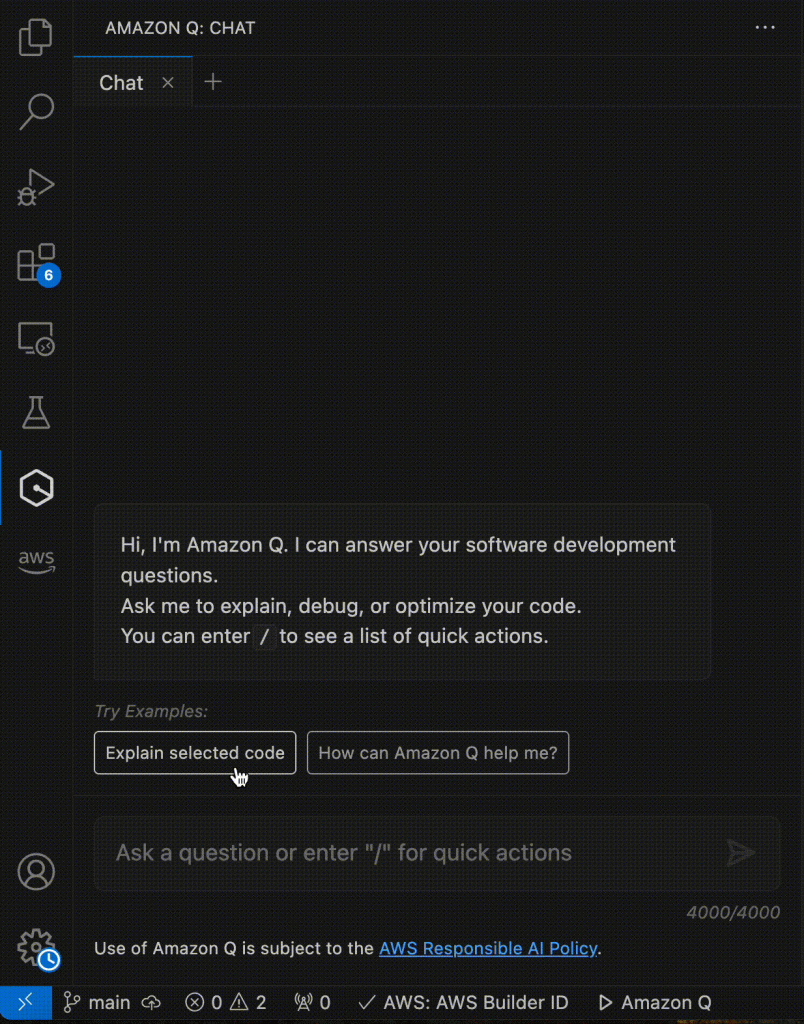
Using Amazon Q to Generate python CDK code for the presentation layer resources
Developers can customize these configurations using Amazon Q Developer based on your specific security requirements, such as implementing access controls through IAM policies or enabling bucket logging for audit trails. This approach ensures that the S3 bucket is configured securely, aligning with best practices for data protection and access management.
Lets look at an example of adding CloudTrail logging to the S3 bucket:
Prompt: Update the code to include cloudtrail logging to the S3 bucket created

Using Amazon Q Developer to add CloudTrail logging to the S3 bucket
Provision AWS Lambda and Amazon API Gateway to serve end-user requests
Amazon Q Developer makes it easy to provision serverless application backend infrastructure such as AWS Lambda and Amazon API Gateway using AWS CDK. In the above architecture, you can deploy the Lambda function hosting application code, with just a few lines of CDK code along with Lambda configuration such as function name, runtime, handler, timeouts, and environment variables. This Lambda function is fronted using Amazon API Gateway to serve user requests. Anything from a simple micro-service to a complex serverless application can be defined through code in CDK using Amazon Q assistance and deployed repeatedly through CI/CD pipelines. This enables infrastructure automation and consistent governance for applications on AWS.
Prompt: Create a CDK stack that creates a AWS Lambda function that is invoked by Amazon API Gateway

Using Amazon Q Developer to generate CDK code to create an AWS Lambda function that is invoked by Amazon API Gateway
By leveraging Amazon Q Developer, we can generate CDK code to provision DynamoDB tables using CDK constructs that offer AWS default best practice recommendations. With Amazon Q Developer, using the CDK construct library, we can define DynamoDB table names, attributes, secondary indexes, encryption, and auto-scaling in just a few lines of CDK code in our programming language of choice. With CDK, this table definition is synthesized into an AWS CloudFormation template that is deployed as a stack to provision the DynamoDB table with all the desired settings. Any data layer resources can be defined this way as Infrastructure as Code (IAC) using Amazon Q Developer. Overall, Amazon Q Developer drastically simplifies deploying managed data backends on AWS through CDK while enforcing best practices around data security, access control, and scalability leveraging CDK constructs.
Prompt: Create a CDK stack of a DynamoDB table with 100 read capacity units and 100 write capacity units.

Using Amazon Q Developer to generate CDK code to create a DynamoDB with 100 read capacity units and 100 write capacity units
Once the application infrastructure stack has been provisioned, it’s important to setup observability to monitor key metrics, detect any issues proactively, and alert operational teams to troubleshoot and fix issues to minimize application downtime. To get started with observability, developers can leverage Amazon CloudWatch, a fully managed monitoring service. With the use of AWS CDK, it is easy to codify CloudWatch components such as dashboards, metrics, log groups, and alarms alongside the application infrastructure and deploy them in an automated and repeatable way leveraging the AWS CDK construct library. Developers can customize these metrics and alarms to meet their workload requirements. All the monitoring configuration gets deployed as part of the infrastructure stack.
Developers can use Amazon Q Developer to assist with setting up application monitoring in AWS using CloudWatch and CDK. With Q, you can describe the resources you want to monitor, such as EC2 instances, Lambda functions, and RDS databases. Q will then generate the necessary CDK code to provision the appropriate CloudWatch alarms, metrics, and dashboards to monitor the resources. By describing what you want to monitor in natural language, Q handles the underlying complexity of generating code.
Prompt: Create a CDK stack of a Cloudwatch event rule to stop web instance EC2 instance every day at 15:00 UTC

Using Amazon Q Developer to generate CDK code to create a CloudWatch event rule to stop an EC2 instance at 15:00 UTC
As you iterate on your serverless application, you’ll want a smooth, automated way to reliably deploy infrastructure changes using a CI/CD pipeline. This is where implementing a CDK pipeline, an automated deployment pipeline, becomes useful. As we’ve seen, AWS Cloud Development Kit (CDK) allows you to define your entire multi-tier infrastructure as a reusable, version-controlled code construct. From S3 buckets to CloudFront, API Gateway, Lambda functions, databases and more, all of these can be deployed with IaC. This CI/CD pipeline streamlines the process of deploying both infrastructure and application code, integrating seamlessly with CI/CD best practices.
Here’s how you can leverage Amazon Q Developer to streamline the process of creating a CDK pipeline.
Prompt: Using python, create a CDK pipeline that deploys a three tier serverless application.

Using Amazon Q Developer to generate CDK pipeline using Python
By leveraging Amazon Q Developer in your IDE for CDK pipeline creation, you can speed up adoption of CI/CD best practices, and receive real-time guidance on CDK deployment patterns, making the development process smoother. This CI/CD integration accelerates your CDK development experience, and allows you to focus on building robust and scalable AWS applications.
In this post, you have learned how developers can leverage Amazon Q Developer, a generative-AI powered assistant, as a true expert AI companion in assisting with accelerating Infrastructure As Code (IaC) Development using AWS CDK and seen how to deploy and manage AWS resources of a three-tier serverless application using AWS CDK. In addition to Infrastructure As Code, Amazon Q Developer can be leveraged to accelerate software development, minimize time spent on undifferentiated coding tasks, and help with troubleshooting, so that developers can focus on creative business problems to delight end-users. See the Amazon Q Developer documentation to get started.
Happy Building with Amazon Q Developer!
Post Syndicated from Anna Katarina Quinn original https://blog.rapid7.com/2024/08/07/keys-to-the-kingdom-gaining-access-to-the-physical-facility-through-internal-access/

This is a story of network segmentation and the impact that seemingly trivial misconfigurations can have for your organization.
This is one of those occasions.
This particular pen test asked for goals-based assessment focusing on post-compromise activities — an attempt by the client to discover how vulnerable internal systems were to lateral movement by an attacker who had compromised the domain. Among the goals was a request to attempt to compromise the client’s Amazon Web Services (AWS) infrastructure and a secondary request to access and exploit any systems discovered to contain sensitive or critical operational data .
The domain for the internal environment was compromised within an hour and a half using common attack vectors: Responder network poisoning to obtain low-level network credentials followed by exploitation of Active Directory Certificate Services (ADCS) web enrollment vulnerabilities to escalate to a member of the ‘Domain Administrators’ group. While performing credential-stuffing attacks against several devices within the network to determine what previously compromised user accounts could access, it was noted that the testing device could access subnets containing user devices due to a lack of segmentation and access control policies. These configurations are known to provide additional layers of security to the network which can help to mitigate damage after compromises by preventing attacker movement to sensitive resources within the network .
Upon initially attempting to access the company’s confidential Google Suite resources, it was found that all requests redirected to a required Multi-Factor Authentication (MFA) request. Additionally, Remote Desktop Protocol (RDP) services had been properly secured, preventing sessions from the network of the attacking device.
Devices within the user environment were accessed through use of a common suite of testing tools which aid penetration testers in testing Windows environments and connecting to devices with compromised credentials, Impacket. Using the ‘wmiexec’ script provided within the suite to explore the file system for a known Software Architect’s machine, a hidden AWS folder was discovered. This folder contained credential files holding what appeared to be a recently authenticated and currently active AWS session. Through testing the credentials from the attacking machine two discoveries were made:
Using a tool called ‘aws_consoler’, a session was generated to allow for administrative access to the AWS Console. As MFA sessions within AWS expire within an hour by default, the first action performed with this session was to create a user account. The new account gave persistent access to the environment without needing to rely on another session credential file being obtained. While exploring virtual machines deployed within AWS, it was noted that there appeared to be no network filtering of RDP between the internal environment and the AWS environment.
An in-browser RDP session within AWS provided a graphical user interface on the EC2 instance for a server on a separate network, which then allowed for an RDP chain to be established to user devices. Upon connection to the user device, active authenticated sessions to multiple confidential resources, including event monitoring systems and GitLab, were discovered. Further enumeration revealed something that would pique the interest of any tester: access to the company’s secrets vault. This allowed access to a device with ‘Security’ in the name. This was surely an opportunity no tester would ever willingly pass up.
After successful authentication to the machine, the motherload was discovered: unrestricted feeds of all cameras on the campus, unrestricted access to file shares, and, most importantly, access to the badge printing system. Through the camera feeds, the data center could be analyzed for any potential physical vulnerabilities which might allow for physical access to the servers. Within the file shares, multiple files were discovered detailing physical security in such granularity it could be determined which rooms were left unlocked after business hours. A file containing the door pin codes and alarm codes for every employee as well as the combination to the Network Operation Center’s (NOC) physical key safe was also discovered.
This left only one piece of information needed to access the facility unimpeded: the badge. Exploring the badge printing system, the algorithm used in badge creation was discovered to be Wiegand 26 bit. This made it a simple task to create a proper access badge as all data needed to create one within the system had been obtained: the facility code and badge id for the impersonated user. Both pieces of information existed within the system for a user with free access to the entire facility and data center. Using all of the acquired data, the hex value of the code, which would be written to the card during the badge creation process, was synthesized and the card created using the popular Proxmark badge creation tool. In the process of the enumeration the picture used on the badge was also acquired, allowing for the created badge to be a high-quality facsimile of the user’s own card.
With this we had the card, the door pins, and alarm codes. These are all of the pieces needed to infiltrate the campus undetected and without restriction — a malicious actor’s dream. Add access to the NOC key safe, which would lead to Data Center access, as the cherry on the cake. All from one door control and badge system device which had not been properly protected and a lack of proper segmentation and access controls.
Penetration testers typically approach physical assessments from the angle of internal network access as a result of a physical breach, however, these configurations show that it is possible to breach the facility with information obtained from an internal breach, flipping the situation around completely. This access could be devastating to a company reliant on 24/7 business continuity, especially for clients who use and maintain Operational Technology (OT) on their campus. A network breach could lead to an attacker selling off the ‘keys to the kingdom,’ leading to additional potential physical and network breaches further down the line. When reviewing your internal environment, make sure to properly protect and segment critical security devices, and ensure adequate protections are in place on sensitive files and documents as well.
Post Syndicated from jake original https://lwn.net/Articles/984556/
There are lots of places in the kernel where an EINVAL can be
returned to user space, but it is often unclear what the actual underlying
problem is because the errno
error codes are too generic. That is the problem that Miklos Szeredi
wanted to discuss in a filesystem session that he led remotely at the 2024 Linux Storage,
Filesystem, Memory Management, and BPF Summit. He would like to help
those who are trying to debug problems trace where in the kernel a
particular error code is being generated.
Post Syndicated from Riggs Goodman III original https://aws.amazon.com/blogs/security/network-perimeter-security-protections-for-generative-ai/
Generative AI–based applications have grown in popularity in the last couple of years. Applications built with large language models (LLMs) have the potential to increase the value companies bring to their customers. In this blog post, we dive deep into network perimeter protection for generative AI applications. We’ll walk through the different areas of network perimeter protection you should consider, discuss how those apply to generative AI–based applications, and provide architecture patterns. By implementing network perimeter protection for your generative AI–based applications, you gain controls to help protect from unauthorized use, cost overruns, distributed denial of service (DDoS), and other threat actors or curious users.
Network perimeter protection for web applications helps answer important questions, for example:
For the most part, the same network protection methods used for other web apps also work for generative AI apps. The main focus of these methods is controlling network traffic that is trying to access the app, not the specific requests and responses the app creates. We’ll focus on three key areas of network perimeter protection:
The security concerns of using LLMs in these apps, including issues with prompt injections, sensitive information leaks, or excess agency, is beyond the scope of this post.
When designing network perimeter protection, you first need to decide whether you will allow certain users to access the application, based on whether they are authenticated (AuthN) and whether they are authorized (AuthZ) to ask certain questions of the generative AI–based applications. Many generative AI–based applications sit behind an authentication layer so that a user must sign in to their identity provider before accessing the application. For public applications that are not behind any authentication (a chatbot, for example), additional considerations are required with regard to AWS WAF and DDoS protection, which we discuss in the next two sections.
Let’s look at an example. Amazon API Gateway is an option for customers for the application frontend, providing metering of users or APIs with authentication and authorization. It’s a fully managed service that makes it convenient for developers to publish, maintain, monitor, and secure APIs at scale. With API Gateway, you create AWS Lambda authorizers to control access to APIs within your application. Figure 1 shows how access works for this example.

Figure 1: An API Gateway, Lambda authorizer, and basic filter in the signal path between client and LLM
The workflow in Figure 1 is as follows:
The combination of Lambda authorizers and throttling helps support a number of perimeter protection mechanisms. First, only authorized users gain access to the application, helping to prevent bots and the public from accessing the application. Second, for authorized users, you limit the rate at which they can invoke the LLM to prevent excessive costs related to requests and responses to the LLM. Third, after users have been authenticated and authorized by the application, the application can pass identity information to the backend data access layer in order to restrict the data available to the LLM, aligning with what the user is authorized to access.
Besides API Gateway, AWS provides other options you can use to provide frontend authentication and authorization. AWS Application Load Balancer (ALB) supports OpenID Connect (OIDC) capabilities to require authentication to your OIDC provider prior to access. For internal applications, AWS Verified Access combines both identity and device trust signals to permit or deny access to your generative AI application.
Once the authentication or authorization decision is made, the next consideration for network perimeter protection is on the application side. New security risks are being identified for generative AI–based applications, as described in the OWASP Top 10 for Large Language Model Applications. These risks include insecure output handling, insecure plugin design, and other mechanisms that cause the application to provide responses that are outside the desired norm. For example, a threat actor could craft a direct prompt injection to the LLM, which causes the LLM behave improperly. Some of these risks (insecure plugin design) can be addressed by passing identity information to the plugins and data sources. However, many of those protections fall outside the network perimeter protection and into the realm of security within the application. For network perimeter protection, the focus is on validating the users who have access to the application and supporting rules that allow, block, or monitor web requests based on network rules and patterns at the application level prior to application access.
In addition, bot traffic is an important consideration for web-based applications. According to Security Today, 47% of all internet traffic originates from bots. Bots that send requests to public applications drive up the cost of using generative AI–based applications by causing higher request loads.
To protect against bot traffic before the user gains access to the application, you can implement AWS WAF as part of the perimeter protection. Using AWS WAF, you can deploy a firewall to monitor and block the HTTP(S) requests that are forwarded to your protected web application resources. These resources exist behind Amazon API Gateway, ALB, AWS Verified Access, and other resources. From a web application point of view, AWS WAF is used to prevent or limit access to your application before invocation of your LLM takes place. This is an important area to consider because, in addition to protecting the prompts and completions going to and from the LLM itself, you want to make sure only legitimate traffic can access your application. AWS Managed Rules or AWS Marketplace managed rule groups provide you with predefined rules as part of a rule group.
Let’s expand the previous example. As your application shown in Figure 1 begins to scale, you decide to move it behind Amazon CloudFront. CloudFront is a web service that gives you a distributed ingress into AWS by using a global network of edge locations. Besides providing distributed ingress, CloudFront gives you the option to deploy AWS WAF in a distributed fashion to help protect against SQL injections, bot control, and other options as part of your AWS WAF rules. Let’s walk through the new architecture in Figure 2.

Figure 2: Adding AWS WAF and CloudFront to the client-to-model signal path
The workflow shown in Figure 2 is as follows:
Note: It is recommended that you restrict access to the API Gateway so users cannot bypass the CloudFront distribution to access the API Gateway. An example of how to accomplish this goal can be found in the Restricting access on HTTP API Gateway Endpoint with Lambda Authorizer blog post.
To dive into more detail, let’s focus on bot traffic. With AWS WAF Bot Control, you can monitor, block, or rate limit bots such as scrapers, scanners, crawlers, status monitors, and search engines. Bot Control provides multiple options in terms of configured rules and inspection levels. For example, if you use the targeted inspection level of the rule group, you can challenge bots that don’t self-identify, making it harder and more expensive for malicious bots to operate against your generative AI–based application. You can use the Bot Control managed rule group alone or in combination with other AWS Managed Rules rule groups and your own custom AWS WAF rules. Bot Control also provides granular visibility on the number of bots that are targeting your application, as shown in Figure 3.

Figure 3: Bot control dashboard for bot requests and non-bot requests
How does this functionality help you? For your generative AI–based application, you gain visibility into how bots and other traffic are targeting your application. AWS WAF provides options to monitor and customize the web request handling of bot traffic, including allowing specific bots or blocking bot traffic to your application. In addition to bot control, AWS WAF provides a number of different managed rule groups, including baseline rule groups, use-case specific rule groups, IP reputation rules groups, and others. For more information, take a look at the documentation on both AWS Managed Rules rule groups and AWS Marketplace managed rule groups.
The last topic we’ll cover in this post is DDoS with LLMs. Similar to threats against other Layer 7 applications, threat actors can send requests that consume an exceptionally high amount of resources, which results in a decline in the service’s responsiveness or an increase in the cost to run the LLMs that are handling the high number of requests. Although throttling can help support a per-user or per-method rate limit, DDoS attacks use more advanced threat vectors that are difficult to protect against with throttling.
AWS Shield helps to provide protection against DDoS for your internet-facing applications, both at Layer 3/4 with Shield standard or Layer 7 with Shield Advanced. For example, Shield Advanced responds automatically to mitigate application threats by counting or blocking web requests that are part of the exploit by using web access control lists (ACLs) that are part of your already deployed AWS WAF. Depending on your requirements, Shield can provide multiple layers of protection against DDoS attacks.
Figure 4 shows how your deployment might look after Shield is added to the architecture.

Figure 4: Adding Shield Advanced to the client-to-model signal path
The workflow in Figure 4 is as follows:
When you implement AWS Shield and Shield Advanced, you gain protection against security events and visibility into both global and account-level events. For example, at the account level, you get information on the total number of events seen on your account, the largest bit rate and packet rate for each resource, and the largest request rate for CloudFront. With Shield Advanced, you also get access to notifications of events that are detected by Shield Advanced and additional information about detected events and mitigations. These metrics and data, along with AWS WAF, provide you with visibility into the traffic that is trying to access your generative AI–based applications. This provides mitigation capabilities before the traffic accesses your application and before invocation of the LLM.
When deploying network perimeter protection with generative AI applications, consider the following:
In this blog post, we discussed how traditional network perimeter protection strategies can provide defense in depth for generative AI–based applications. We discussed the similarities and differences between LLM workloads and other web applications. We walked through why authentication and authorization protection is important, showing how you can use Amazon API Gateway to throttle through usage plans and to provide authentication through Lambda authorizers. Then, we discussed how you can use AWS WAF to help protect applications from bots. Lastly, we talked about how AWS Shield can provide advanced protection against different types of DDoS attacks at scale. For additional information on network perimeter protection and generative AI security, take a look at other blogs posts in the AWS Security Blog Channel.
If you have feedback about this post, submit comments in the Comments section below. If you have questions about this post, contact AWS Support.
Post Syndicated from jzb original https://lwn.net/Articles/984702/
Security updates have been issued by Debian (firefox-esr, openjdk-17, and wpa), Gentoo (aiohttp, Bitcoin, Cairo, Go, json-c, Levenshtein, libXpm, nghttp2, PostgreSQL, and Redis), Red Hat (kernel, kernel-rt, python-setuptools, python-urllib3, python3.11-setuptools, and wget), Slackware (mozilla), SUSE (bind, curl, docker, ffmpeg, ffmpeg-4, kernel, kernel-firmware, libnbd, patch, shadow, and thunderbird), and Ubuntu (python-django and wpa).
Post Syndicated from The History Guy: History Deserves to Be Remembered original https://www.youtube.com/watch?v=yLlQW2mLRdw
Post Syndicated from Bruce Schneier original https://www.schneier.com/blog/archives/2024/08/problems-with-georgias-voter-registration-portal.html
It’s possible to cancel other people’s voter registrations:
On Friday, four days after Georgia Democrats began warning that bad actors could abuse the state’s new online portal for canceling voter registrations, the Secretary of State’s Office acknowledged to ProPublica that it had identified multiple such attempts…
…the portal suffered at least two security glitches that briefly exposed voters’ dates of birth, the last four digits of their Social Security numbers and their full driver’s license numbers—the exact information needed to cancel others’ voter registrations.
I get that this is a hard problem to solve. We want the portal to be easy for people to use—even non-tech-savvy people—and hard for fraudsters to abuse, and it turns out to be impossible to do both without an overarching digital identity infrastructure. But Georgia is making it easy to abuse.
EDITED TO ADD (8/14): There was another issue with the portal, making it easy to request cancellation of any Georgian’s registration. The elections director said that cancellations submitted this way wouldn’t have been processed because they didn’t have all the necessary information, which I guess is probably true, but it shows just how sloppy the coding is.
Post Syndicated from The History Guy: History Deserves to Be Remembered original https://www.youtube.com/watch?v=k65tqfKvcO8
Post Syndicated from Explosm.net original https://explosm.net/comics/land-fish
New Cyanide and Happiness Comic