Migrate workloads from AWS Data Pipeline

Post Syndicated from Noritaka Sekiyama original https://aws.amazon.com/blogs/big-data/migrate-workloads-from-aws-data-pipeline/

AWS Data Pipeline helps customers automate the movement and transformation of data. With Data Pipeline, customers can define data-driven workflows, so that tasks can be dependent on the successful completion of previous tasks. Launched in 2012, Data Pipeline predates several popular Amazon Web Services (AWS) offerings for orchestrating data pipelines such as AWS Glue, AWS Step Functions, and Amazon Managed Workflows for Apache Airflow (Amazon MWAA).

Data Pipeline has been a foundational service for getting customer off the ground for their extract, transform, load (ETL) and infra provisioning use cases. Some customers want a deeper level of control and specificity than possible using Data Pipeline. With the recent advancements in the data industry, customers are looking for a more feature-rich platform to modernize their data pipelines to get them ready for data and machine learning (ML) innovation. This post explains how to migrate from Data Pipeline to alternate AWS services to serve the growing needs of data practitioners. The option you choose depends on your current workload on Data Pipeline. You can migrate typical use cases of Data Pipeline to AWS Glue, Step Functions, or Amazon MWAA.

Note that you will need to modify the configurations and code in the examples provided in this post based on your requirements. Before starting any production workloads after migration, you need to test your new workflows to ensure no disruption to production systems.

Migrating workloads to AWS Glue

AWS Glue is a serverless data integration service that helps analytics users to discover, prepare, move, and integrate data from multiple sources. It includes tooling for authoring, running jobs, and orchestrating workflows. With AWS Glue, you can discover and connect to hundreds of different data sources and manage your data in a centralized data catalog. You can visually create, run, and monitor ETL pipelines to load data into your data lakes. Also, you can immediately search and query cataloged data using Amazon Athena, Amazon EMR, and Amazon Redshift Spectrum.

We recommend migrating your Data Pipeline workload to AWS Glue when:

  • You’re looking for a serverless data integration service that supports various data sources, authoring interfaces including visual editors and notebooks, and advanced data management capabilities such as data quality and sensitive data detection.
  • Your workload can be migrated to AWS Glue workflows, jobs (in Python or Apache Spark) and crawlers (for example, your existing pipeline is built on top of Apache Spark).
  • You need a single platform that can handle all aspects of your data pipeline, including ingestion, processing, transfer, integrity testing, and quality checks.
  • Your existing pipeline was created from a pre-defined template on the AWS Management Console for Data Pipeline, such as exporting a DynamoDB table to Amazon S3, or importing DynamoDB backup data from S3, and you’re looking for the same template.
  • Your workload doesn’t depend on a specific Hadoop ecosystem application such as Apache Hive.
  • Your workload doesn’t require orchestrating on-premises servers, user-managed Amazon Elastic Compute Cloude (Amazon EC2) instances, or a user-managed Amazon EMR cluster.

Example: Migrate EmrActivity on EmrCluster to export DynamoDB tables to S3

One of the most common workloads on Data Pipeline is to backup Amazon DynamoDB tables to Amazon Simple Storage Service (Amazon S3). Data Pipeline has a pre-defined template named Export DynamoDB table to S3 to export DynamoDB table data to a given S3 bucket.

The template uses EmrActivity (named TableBackupActivity) which runs on EmrCluster (named EmrClusterForBackup) and backs up data on DynamoDBDataNode to S3DataNode.

You can migrate these pipelines to AWS Glue because it natively supports reading from DynamoDB.

To define an AWS Glue job for the preceding use case:

  1. Open the AWS Glue console.
  2. Choose ETL jobs.
  3. Choose Visual ETL.
  4. For Sources, select Amazon DynamoDB.
  5. On the node Data source - DynamoDB, for DynamoDB source, select Choose the DynamoDB table directly, then select your source DynamoDB table from the menu.
  6. For Connection options, enter s3.bucket and dynamodb.s3.prefix.
  7. Choose + (plus) to add a new node.
  8. For Targets, select Amazon S3.
  9. On the node Data target - S3 bucket, for Format, select your preferred format, for example, Parquet.
  10. For S3 Target location, enter your destination S3 path.
  11. On Job details tab, select IAM role. In case you do not have the IAM role, follow Configuring IAM permissions for AWS Glue.
  12. Choose Save and Run.

Your AWS Glue job has been successfully created and started.

You might notice that there is no property to manage read I/O rate. It’s because the default DynamoDB reader used in Glue Studio does not scan the source DynamoDB table. Instead it uses DynamoDB export.

Example: Migrate EmrActivity on EmrCluster to import DynamoDB from S3

Another common workload on Data Pipeline is to restore DynamoDB tables using backup data on Amazon S3. Data Pipeline has a pre-defined template named Import DynamoDB backup data from S3 to import DynamoDB table data from a given S3 bucket.

The template uses EmrActivity (named TableLoadActivity) which runs on EmrCluster (named EmrClusterForLoad) and loads data from S3DataNode to DynamoDBDataNode.

You can migrate these pipelines to AWS Glue because it natively supports writing to DynamoDB.

Prerequisites are to create a destination DynamoDB table and catalog it on Glue Data Catalog using Glue crawler, Glue console, or the API.

  1. Open the AWS Glue console.
  2. Choose ETL jobs.
  3. Choose Visual ETL.
  4. For Sources, select Amazon S3.
  5. On the node Data source - S3 bucket, for S3 URL, enter your S3 path.
  6. Choose + (plus) to add a new node.
  7. For Targets, select AWS Glue Data Catalog.
  8. On the node Data target - Data Catalog, for Database, select your destination database on Data Catalog.
  9. For Table, select your destination table on Data Catalog.
  10. On Job details tab, select IAM role. In case you do not have the IAM role, follow Configuring IAM permissions for AWS Glue.
  11. Choose Save and Run.

Your AWS Glue job has been successfully created and started.

Migrating workloads to Step Functions

AWS Step Functions is a serverless orchestration service that lets you build workflows for your business-critical applications. With Step Functions, you use a visual editor to build workflows and integrate directly with over 11,000 actions for over 250 AWS services, including AWS Lambda, Amazon EMR, DynamoDB, and more. You can use Step Functions for orchestrating data processing pipelines, handling errors, and working with the throttling limits on the underlying AWS services. You can create workflows that process and publish machine learning models, orchestrate micro-services, as well as control AWS services, such as AWS Glue, to create ETL workflows. You also can create long-running, automated workflows for applications that require human interaction.

We recommend migrating your Data Pipeline workload to Step Functions when:

  • You’re looking for a serverless, highly available workflow orchestration service.
  • You’re looking for a cost-effective solution that charges at single-task granularity.
  • Your workloads are orchestrating tasks for multiple AWS services, such as Amazon EMR, AWS Lambda, AWS Glue, or DynamoDB.
  • You’re looking for a low-code solution that comes with a drag-and-drop visual designer for workflow creation and doesn’t require learning new programming concepts.
  • You’re looking for a service that provides integrations with over 250 AWS services covering over 11,000 actions out-of-the-box, as well as allowing integrations with custom non-AWS services and activities.
  • Both Data Pipeline and Step Functions use JSON format to define workflows. This allows you to store your workflows in source control, manage versions, control access, and automate with continuous integration and development (CI/CD). Step Functions use a syntax called Amazon State Language, which is fully based on JSON and allows a seamless transition between the textual and visual representations of the workflow.
  • Your workload requires orchestrating on-premises servers, user-managed EC2 instances, or a user-managed EMR cluster.

With Step Functions, you can choose the same version of Amazon EMR that you’re currently using in Data Pipeline.

For migrating activities on Data Pipeline managed resources, you can use AWS SDK service integration on Step Functions to automate resource provisioning and cleaning up. For migrating activities on on-premises servers, user-managed EC2 instances, or a user-managed EMR cluster, you can install an SSM agent to the instance. You can initiate the command through the AWS Systems Manager Run Command from Step Functions. You can also initiate the state machine from the schedule defined in Amazon EventBridge.

Example: Migrate HadoopActivity on EmrCluster

To migrate HadoopActivity on EmrCluster on Data Pipeline to Step Functions:

  1. Open the AWS Step Functions console.
  2. Choose State machines.
  3. Choose Create state machine.
  4. In the Choose a template wizard, search for emr, select Manage an EMR job, and choose Select.
  1. For Choose how to use this template, select Build on it.
  2. Choose Use template.
  1. For Create an EMR cluster state, configure API Parameters based on the EMR release label, EMR capacity, IAM role, and so on based on the existing EmrClusternode configuration on Data Pipeline.
  1. For Run first step state, configure API Parameters based on the JAR file and arguments based on the existing HadoopActivity node configuration on Data Pipeline.
  2. If you have further activities configured on the existing HadoopActivity, repeat step 8.
  3. Choose Create.

Your state machine has been successfully configured. Learn more in Manage an Amazon EMR Job.

Migrating workloads to Amazon MWAA

Amazon MWAA is a managed orchestration service for Apache Airflow that lets you use the Apache Airflow platform to set up and operate end-to-end data pipelines in the cloud at scale. Apache Airflow is an open-source tool used to programmatically author, schedule, and monitor sequences of processes and tasks referred to as workflows. Apache Airflow brings in new concepts like executors, pools, and SLAs that provide you with superior data orchestration capabilities. With Amazon MWAA, you can use Airflow and Python programming language to create workflows without having to manage the underlying infrastructure for scalability, availability, and security. Amazon MWAA automatically scales its workflow runtime capacity to meet your needs and is integrated with AWS security services to help provide you with fast and secure access to your data.

We recommend migrating your Data Pipeline workloads to Amazon MWAA when:

  • You’re looking for a managed, highly available service to orchestrate workflows written in Python.
  • You want to transition to a fully managed, widely adopted open source technology—Apache Airflow—for maximum portability.
  • You require a single platform that can handle all aspects of your data pipeline, including ingestion, processing, transfer, integrity testing, and quality checks.
  • You’re looking for a service designed for data pipeline orchestration with features such as rich UI for observability, restarts for failed workflows, backfills, retries for tasks, and lineage support with OpenLineage.
  • You’re looking for a service that comes with more than 1,000 pre-built operators and sensors, covering AWS as well as non-AWS services.
  • Your workload requires orchestrating on-premises servers, user-managed EC2 instances, or a user-managed EMR cluster.

Amazon MWAA workflows are defined as directed acyclic graphs (DAGs) using Python, so you can also treat them as source code. Airflow’s extensible Python framework enables you to build workflows connecting with virtually any technology. It comes with a rich user interface for viewing and monitoring workflows and can be easily integrated with version control systems to automate the CI/CD process. With Amazon MWAA, you can choose the same version of Amazon EMR that you’re currently using in Data Pipeline.

Example: Migrate HadoopActivity on EmrCluster

Complete the following steps in case you do not have existing MWAA environments:

  1. Create an AWS CloudFormation template on your computer by copying the template from the quick start guide into a local text file.
  2. On the CloudFormation console, choose Stacks in the navigation pane.
  3. Choose Create stack with the option With new resources (standard).
  4. Choose Upload a template file and select the local template file.
  5. Choose Next.
  6. Complete the setup steps, entering a name for the environment, and leave the rest of the parameters as default.
  7. On the last step, acknowledge that resources will be created and choose Submit.

The creation can take 20–30 minutes, until the status of the stack changes to CREATE_COMPLETE. The resource that will take the most time is the Airflow environment. While it’s being created, you can continue with the following steps, until you’re required to open the Airflow UI.

An Airflow workflow is based on a DAG, which is defined by a Python file that programmatically specifies the different tasks involved and its interdependencies. Complete the following scripts to create the DAG:

  1. Create a local file named emr_dag.py using a text editor with following snippets, and configure the EMR related parameters based on the existing Data Pipeline definition:
    from airflow import DAG
    from airflow.providers.amazon.aws.operators.emr import (
        EmrCreateJobFlowOperator,
        EmrAddStepsOperator,
    )
    from airflow.providers.amazon.aws.sensors.emr import EmrStepSensor
    from airflow.utils.dates import days_ago
    from datetime import timedelta
    import os
    DAG_ID = os.path.basename(__file__).replace(".py", "")
    SPARK_STEPS = [
        {
            'Name': 'calculate_pi',
            'ActionOnFailure': 'CONTINUE',
            'HadoopJarStep': {
                'Jar': 'command-runner.jar',
                'Args': ['spark-example', 'SparkPi', '10'],
            },
        }
    ]
    JOB_FLOW_OVERRIDES = {
        'Name': 'my-demo-cluster',
        'ReleaseLabel': 'emr-6.1.0',
        'Applications': [
            {
                'Name': 'Spark'
            },
        ],
        'Instances': {
            'InstanceGroups': [
                {
                    'Name': "Master nodes",
                    'Market': 'ON_DEMAND',
                    'InstanceRole': 'MASTER',
                    'InstanceType': 'm5.xlarge',
                    'InstanceCount': 1,
                },
                {
                    'Name': "Slave nodes",
                    'Market': 'ON_DEMAND',
                    'InstanceRole': 'CORE',
                    'InstanceType': 'm5.xlarge',
                    'InstanceCount': 2,
                }
            ],
            'KeepJobFlowAliveWhenNoSteps': False,
            'TerminationProtected': False,
        },
        'VisibleToAllUsers': True,
        'JobFlowRole': 'EMR_EC2_DefaultRole',
        'ServiceRole': 'EMR_DefaultRole'
    }
    with DAG(
        dag_id=DAG_ID,
        start_date=days_ago(1),
        schedule_interval='@once',
        dagrun_timeout=timedelta(hours=2),
        catchup=False,
        tags=['emr'],
    ) as dag:
        cluster_creator = EmrCreateJobFlowOperator(
            task_id='create_job_flow',
            job_flow_overrides=JOB_FLOW_OVERRIDES,
            aws_conn_id='aws_default',
        )
        step_adder = EmrAddStepsOperator(
            task_id='add_steps',
            job_flow_id=cluster_creator.output,
            aws_conn_id='aws_default',
            steps=SPARK_STEPS,
        )
        step_checker = EmrStepSensor(
            task_id='watch_step',
            job_flow_id=cluster_creator.output,
            step_id="{{ task_instance.xcom_pull(task_ids='add_steps')[0] }}",
            aws_conn_id='aws_default',
        )
        cluster_creator >> step_adder >> step_checker

Defining the schedule in Amazon MWAA is as simple as updating the schedule_interval parameter for the DAG. For example, to run the DAG daily, set schedule_interval='@daily'.

Now, you create a workflow that invokes the Amazon EMR step you just created:

  1. On the Amazon S3 console, locate the bucket created by the CloudFormation template, which will have a name starting with the name of the stack followed by -environmentbucket- (for example, myairflowstack-environmentbucket-ap1qks3nvvr4).
  2. Inside that bucket, create a folder called dags, and inside that folder, upload the DAG file emr_dag.py that you created in the previous section.
  3. On the Amazon MWAA console, navigate to the environment you deployed with the CloudFormation stack.

If the status is not yet Available, wait until it reaches that state. It shouldn’t take longer than 30 minutes after you deployed the CloudFormation stack.

  1. Choose the environment link on the table to see the environment details.

It’s configured to pick up DAGs from the bucket and folder you used in the previous steps. Airflow will monitor that folder for changes.

  1. Choose Open Airflow UI to open a new tab accessing the Airflow UI, using the integrated IAM security to sign you in.

If there are issues with the DAG file you created, it will display an error on top of the page indicating the lines affected. In that case, review the steps and upload again. After a few seconds, it will parse it and update or remove the error banner.

Clean up

After you migrate your existing Data Pipeline workload and verify that the migration was successful, delete your pipelines in Data Pipeline to stop further runs and billing.

Conclusion

In this blog post, we outlined a few alternate AWS services for migrating your existing Data Pipeline workloads. You can migrate to AWS Glue to run and orchestrate Apache Spark applications, AWS Step Functions to orchestrate workflows involving various other AWS services, or Amazon MWAA to help manage workflow orchestration using Apache Airflow. By migrating, you will be able to run your workloads with a broader range of data integration functionalities. If you have additional questions, post in the comments or read about migration examples in our documentation.


About the authors

Noritaka Sekiyama is a Principal Big Data Architect on the AWS Glue team and AWS Data Pipeline team. He is responsible for building software artifacts to help customers. In his spare time, he enjoys cycling with his road bike.

Vaibhav Porwal is a Senior Software Development Engineer on the AWS Glue and AWS Data Pipeline team. He is working on solving problems in orchestration space by building low cost, repeatable, scalable workflow systems that enables customers to create their ETL pipelines seamlessly.

Sriram Ramarathnam is a Software Development Manager on the AWS Glue and AWS Data Pipeline team. His team works on solving challenging distributed systems problems for data integration across AWS serverless and serverfull compute offerings.

Matt Su is a Senior Product Manager on the AWS Glue team and AWS Data Pipeline team. He enjoys helping customers uncover insights and make better decisions using their data with AWS Analytics services. In his spare time, he enjoys skiing and gardening.

Transition from Amazon CloudSearch to Amazon OpenSearch Service

Post Syndicated from Arvind Mahesh original https://aws.amazon.com/blogs/big-data/transition-from-amazon-cloudsearch-to-amazon-opensearch-service/

At AWS, we are constantly innovating and evolving our services to meet the ever-changing needs of our customers. In this post, we want to help you understand the differences between Amazon CloudSearch and Amazon OpenSearch Service, and how you can transition to OpenSearch Service.

Comparing Amazon CloudSearch and Amazon OpenSearch Service

CloudSearch is a fully managed service in the cloud that makes it straightforward to set up, manage, and scale a search solution for your website or application. With CloudSearch, you can search large collections of data such as webpages, document files, forum posts, or product information. You can quickly add search capabilities without having to become a search expert or worry about hardware provisioning, setup, and maintenance. As your volume of data and traffic fluctuates, CloudSearch scales to meet your needs. CloudSearch is internally powered by a customized version of Apache Solr, and supports features such as full-text search, Boolean search, prefix search, term boosting, faceting, hit highlighting, and auto-complete suggestions.

OpenSearch Service is a managed service that makes it seamless to deploy, operate, and scale OpenSearch, a popular open source search and analytics engine. OpenSearch provides best-in-class search capabilities, providing you with all the search features of CloudSearch plus a vector engine supporting semantic search on vector embeddings, and support for both dense and sparse vectors. In addition, with OpenSearch Service, you get advanced security with fine-grained access control, the ability to store and analyze log data for observability and security, along with dashboarding and alerting. You’ll have all of CloudSearch’s capabilities and more.

With OpenSearch Serverless, you get improved, out-of-the-box, hands-free operation. Like CloudSearch, OpenSearch Serverless lets you deploy and use OpenSearch through a REST endpoint. You send your documents to OpenSearch Serverless, which indexes them for search using the OpenSearch REST API. If you want deeper control over your infrastructure for cost and latency optimization, you can choose OpenSearch Service’s managed clusters deployment option. With managed clusters, you get granular control over the instances you would like to use, indexing and data-sharding strategy, and more. OpenSearch Service brings with it the flexibility and extensibility of open source, provides powerful querying and analytics capabilities, and enables cost-effective scalability for growing workloads, with high availability and durability. For more information on the capabilities and benefits of using OpenSearch Service, see Amazon OpenSearch Service.

Transitioning to OpenSearch Service

When transitioning from CloudSearch to OpenSearch Service, you need to re-ingest and index your data into OpenSearch Service. Because OpenSearch Service uses a REST API, numerous methods exist for indexing documents. You can use standard clients like curl or any programming language that can send HTTP requests. To further simplify the process of interacting with it, OpenSearch Service has clients for many programming languages. We recommend that you use Amazon OpenSearch Ingestion to ingest data. OpenSearch Ingestion is a fully managed data collector built within OpenSearch Service that can route data to an OpenSearch Service domain or an OpenSearch Serverless collection. OpenSearch Ingestion can ingest data from a wide variety of sources, such as Amazon Simple Storage Service (Amazon S3) buckets and HTTP endpoints, and has a rich ecosystem of built-in processors to take care of your most complex data transformation needs. OpenSearch Ingestion is serverless in nature and will scale automatically to meet the requirements of your most demanding workloads, helping you focus on your business logic while abstracting away the complexity of managing complex data pipelines for your ingestion use cases. For more information about how to ingest a document into an OpenSearch Serverless collection or a managed cluster using OpenSearch ingestion, see Getting started with Amazon OpenSearch Ingestion. For detailed information on using OpenSearch Ingestion to ingest data into OpenSearch Service, refer to Amazon OpenSearch Ingestion.

Summary

AWS continues to support CloudSearch and continues to invest in security and availability improvements. However, with the advancements in OpenSearch, we recommend that you explore OpenSearch Service to get the latest search capabilities and to meet the rapid evolution of search experience users have come to expect in the machine learning age.


About the Authors

Arvind Mahesh is a Senior Manager-Product at Amazon Web Services for Amazon OpenSearch Service. He has close to two decades of technology experience across a variety of domains such as Analytics, Search, Cloud, Network Security, and Telecom.

Jon Handler is a Senior Principal Solutions Architect at Amazon Web Services based in Palo Alto, CA. Jon works closely with OpenSearch and Amazon OpenSearch Service, providing help and guidance to a broad range of customers who have search and log analytics workloads that they want to move to the AWS Cloud. Prior to joining AWS, Jon’s career as a software developer included 4 years of coding a large-scale, ecommerce search engine. Jon holds a Bachelor of the Arts from the University of Pennsylvania, and a Master of Science and a PhD in Computer Science and Artificial Intelligence from Northwestern University.

How to migrate your AWS CodeCommit repository to another Git provider

Post Syndicated from Rodney Bozo original https://aws.amazon.com/blogs/devops/how-to-migrate-your-aws-codecommit-repository-to-another-git-provider/

Customers can migrate their AWS CodeCommit Git repositories to other Git providers using several methods, such as cloning the repository, mirroring, or migrating specific branches. This blog describes a basic use case to mirror a repository to a generic provider, and links to instructions for mirroring to more specific providers. Your exact steps could vary depending on the type or complexity of your repository, and the decisions made on what and how you want to migrate. This post only describes how to migrate Git repository data, and does not describe exporting other data from CodeCommit such as pull requests.

Pre-requisites

  1. Before you can migrate your CodeCommit repository to another provider, make sure that you have the necessary credentials and permissions to both the AWS Management Console and the other provider’s account. For migrating to GitHub and Gitlab, use CodeCommit static credentials as described in HTTPS users using Git credentials. If you choose to use the generic migration option process described below, any type of CodeCommit credentials can be used. To learn more about setting up AWS CodeCommit access control see Setting up for AWS CodeCommit.
  2. In the AWS CodeCommit console, select the clone URL for the repository you will migrate. The correct clone URL (HTTPS, SSH, or HTTPS (CRC)) depends on which credential type and network protocol you have chosen to use.

Figure 1: Clone repositories

Migrating your AWS CodeCommit repository to a GitLab repository

Using the CodeCommit clone URL in combination with the HTTPS Git repository credentials, follow the guidance in GitLab’s documentation for importing source code from a repository by URL.

Migrating your AWS CodeCommit repository to a GitHub repository

Using the CodeCommit clone URL in combination with the HTTPS Git repository credentials, follow the guidance in GitHub’s documentation for importing source code.

Generic migration to a different repository provider

1.     Clone the AWS CodeCommit Repository
Clone the repository from AWS CodeCommit to your local machine using Git. If you’re using HTTPS, you can do this by running the following command:

git clone --mirror https://your-aws-repository-url your-aws-repository

Replace your-aws-repository-url with the URL of your AWS CodeCommit repository.
Replace your-aws-repository with a name for this repository. Example:

git clone https://git-codecommit.us-east-2.amazonaws.com/v1/repos/MyDemoRepo my-demo-repo

2.     Set up new remote repository

Navigate to the directory of your cloned AWS CodeCommit repository. Then, add the repository URL from the new repository provider as a remote:

git remote add <provider name> <provider-repository-url>

Replace <provider name> with the provider name of your choice. (Example: gitlab)
Replace <provider-repository-url> with the URL of your new repository provider’s repository.

3.     Push your local repository to the new remote repository

This will push all branches and tags to your new repository provider’s repository. The provider name must match the provider name from step 2.

git push <provider name> --mirror

Notes:

  • The remote repository should be empty
  • The remote repository may have protected branches not allowing force push. In this case, navigate to your new repository provider and disable branch protections to allow force push.

4.     Verify the Migration

Once the push is complete, verify that all files, branches, and tags have been successfully migrated to the new repository provider. You can do this by browsing your repository online or by cloning it to another location and checking it locally.

5.     Update Remote URLs

If you plan to continue working with the migrated repository locally, you may want to update the remote URL to point to the new provider’s repository instead of AWS CodeCommit. You can do this using the following command:

git remote set-url origin <provider-repository-url>

Replace <provider-repository-url> with the URL of your new repository provider’s repository.

6.     Update CI/CD Pipelines and fix protected branches

If you have CI/CD pipelines set up that interact with your repository, such as GitLab, GitHub or AWS CodePipeline, update their configuration to reflect the new repository URL. If you removed protected branch permissions in Step 3 you may want to add these back to your main branch.

7.     Inform Your Team

If you’re migrating a repository that others are working on, be sure to inform your team about the migration and provide them with the new repository URL.

8.     Delete the, now migrated, AWS CodeCommit repository

This action cannot be undone. Navigate back to the AWS CodeCommit console and delete the repository that you have migrated using the “Delete Repository” button.

Figure 2: Delete repositories

Conclusion

This post described a few methods to migrate your existing AWS CodeCommit repository to another Git provider. After migration, you have the option to continue to use your current AWS CodeCommit repository, but doing so will likely require a regular sync operation between AWS CodeCommit and the new repository provider. For more information about repository migration, please see the following resources:

Migrate a repository incrementally – This guide is written to migrate a repository to CodeCommit incrementally but can also be used for other Git providers.

How to migrate from AWS Cloud9 to AWS IDE Toolkits or AWS Cloudshell

Post Syndicated from Rodney Bozo original https://aws.amazon.com/blogs/devops/how-to-migrate-from-aws-cloud9-to-aws-ide-toolkits-or-aws-cloudshell/

Building with AWS requires you to interact with and manipulate your AWS resources, whether it’s to manage infrastructure, deploy applications, or troubleshoot issues and many AWS customers use AWS Cloud9 to do so today. However, developers want the ability to work with AWS resources within their own Integrated Development Environment (IDE) because it allows them to streamline their workflows and leverage familiar tools. Other customers still want the security and flexibility of working with their resources in the AWS Management Console, but with quicker access and portability across different pages. In this blog, we will discuss two solutions, the AWS IDE Toolkits and AWS CloudShell, and why you may want to migrate from AWS Cloud9 to one of these solutions.

Overview

The AWS IDE Toolkits are a set of open-source plugins that integrate AWS services directly into popular IDEs like Visual Studio Code, IntelliJ, and PyCharm. With these toolkits, you can manage AWS resources, deploy applications, and debug code without leaving your familiar development environment. Key features of the AWS IDE Toolkits include seamless access to AWS services, resource exploration and management, local debugging capabilities, and integration with AWS deployment tools like AWS CloudFormation and AWS SAM. The AWS IDE Toolkits saves you the hassle of deploying and managing an AWS Cloud9 EC2 instance in your account and allows you to interact with AWS services in the context of your IDE’s source code.

AWS CloudShell is a browser-based shell available directly in the AWS Management Console that provides a pre-authenticated and pre-configured environment for running interacting with AWS resources. AWS CLI is pre-installed in the AWS CloudShell environment, eliminating the need for you to install and configure the AWS CLI locally, making it easier to interact with AWS resources from anywhere. You can use AWS CloudShell to check or adjust a configuration file, make a quick fix to a production environment, or even experiment with new AWS services or features. Best of all, usage of AWS CloudShell is free. CloudShell’s accessibility from anywhere in the AWS Management Console makes it an ideal alternative when you want to interact with AWS resources via the command line over the web because you have limitations doing so on your local desktop.

Getting started

If you’re interested in leveraging the AWS IDE Toolkits, the onboarding process is straightforward. In many popular IDE’s like Visual Studio Code, you can simply install the AWS Toolkits extension in the IDE’s extension marketplace and authenticate with your AWS credentials to begin taking advantage of all of the AWS Toolkits features. For more detailed information about installation, you can see the onboarding steps for each supported IDE. To begin using AWS CloudShell, simply click the CloudShell icon in the AWS Management Console and follow the prompts to launch your shell environment. CloudShell leverages the credentials from your AWS Management Console sessions to provide a pre-authenticated shell environment. You can also explore detailed user guides and sample use cases to help you get familiar with the tool.


Figure 1: Click on the AWS CloudShell icon

Summary

Both the AWS IDE Toolkits and AWS CloudShell offer powerful capabilities for interacting with AWS resources. Whether you prefer working within your local IDE or a web-based terminal directly in the AWS Management Console, these solutions provide a seamless and efficient way to manage your AWS infrastructure and applications. Take the time to explore these options and see how they can enhance your development workflows. Finally, don’t forget to delete your AWS Cloud9 EC2 instances once you migrate to avoid incurring unnecessary future costs.

[$] What became of getrandom() in the vDSO

Post Syndicated from corbet original https://lwn.net/Articles/983186/

In the previous episode of the
vgetrandom() story, Jason Donenfeld had put together a version of
the getrandom()
system call that ran in user space, significantly improving performance for
applications that need a lot of random data while retaining all of the
guarantees provided by the system call. At that time, it seemed that a
consensus had built around the implementation and that it was headed toward
the mainline in that form. A few milliseconds after that article was
posted, though, a Linus-Torvalds-shaped obstacle appeared in its path.
That obstacle has been overcome and this work has now been merged for the
6.11 kernel, but its form has changed somewhat.

[$] More informative kernel panics for Fedora

Post Syndicated from daroc original https://lwn.net/Articles/982398/

On July 12, Jocelyn Falempe

proposed
a change to the configuration options that Fedora sets for its
kernels, in order to make kernel panics easier to report.
Falempe would like to enable the kernel’s recently added
DRM-panic feature, which adds
a graphical crash screen that is reminiscent of the infamous
Windows “blue screen of death” for kernel panics. The feature introduces a few
tradeoffs, including currently limited driver support, so the proposal spawned a
good deal of discussion.

What Do Teachers, Parents, and Students Have in Common? The Need to Back Up

Post Syndicated from Yev original https://www.backblaze.com/blog/what-do-teachers-parents-and-students-have-in-common-the-need-to-back-up/

Our world has moved more online, and blackboards have taken a backseat to laptops in classrooms and lecture halls alike. From homework to lesson planning and grading, to communicating with students and parents, educators and students rely heavily on their computers and sync drives like Google Drive, Dropbox, or OneDrive. And, when it comes to digital resources, there’s always a risk of data loss, which, when it strikes, can wipe out hours or days of work. 

This is where backup solutions come into play. In this blog post, we will explore the benefits of computer backup for both students and educators, highlight the importance of choosing an affordable and reliable backup solution, and give you some talking points to help others in your educational community understand the importance of backing up.

Risks of data loss

Data loss can happen for a variety of reasons, including hardware failure, accidental deletion, theft, or cyber attacks. 

Imagine this scenario: You’ve spent hours building a detailed lesson plan, preparing engaging multimedia presentations, and grading student assignments. Suddenly, your computer crashes, and you can’t get it to turn back on. Or, you lose your USB drive that has years of work, including lesson plans. Both situations are not great and the result is that all of your hard work is gone in an instant. 

Data loss is an issue for anyone, but for educators, the consequences can affect not only your work but also your students’ learning experience. And the same scenario is true for students—working on a research project last minute only to have a blue screen of death five minutes before the deadline can be a frustrating turn of events—and one that affects your grade long-term. 

The 3-2-1 backup rule

The good news about avoiding data loss is that there are some established best practices that can give you a great place to start. The most fundamental of these, the 3-2-1 backup rule, says you should have three copies of your data on two types of storage media with one copy stored off-site. 

Sync is not backup

Sync services like Google Drive, OneDrive, and Dropbox are great, but they are not the same thing as a true backup. Sync drives are designed to keep all versions consistent with each other, which makes them vulnerable to things like accidental deletion and ransomware attacks. While some may have limited version history or “backup,” those features are typically for a limited amount of time (i.e., 30 days), or are lacking in some of the key areas that schools need to maintain compliance with data protection standards. 

Cloud backup services are using a different tool for a different job—you want your synced files to change, whereas you want your backup to be a fixed point in time you can restore if you need to. That’s not to say that you won’t have your backup files constantly up-to-date, like you do with an automatic backup solution, just that you’ll be able to restore a file, or all of your files, to whatever time you choose. 

And, if you think the difference is just splitting hairs, studies show that 58% of organizations that experienced data loss last year had some amount of unrecovered data. And, in that same pool of survey takers, 84% of organizations were relying on cloud sync services. 

Benefits of backing up

  1. Protection against data loss: The primary benefit of a backup solution is the protection it offers against data loss. By regularly backing up your files, you can ensure that your important documents are safe and can be restored quickly in case of any mishap, or even if you forget your laptop at home.
  2. Enhanced productivity: With a reliable backup system in place, you can focus on what you’re working on without worrying about it getting lost. This peace of mind allows you to work more efficiently and creatively, knowing that your files are secure.
  3. Compliance and accountability: While not at the top of many student’s minds, many educators know that educational institutions have policies and regulations regarding data storage and protection. Having a robust backup solution helps teachers, professors, and the organizations they work for stay compliant with these regulations.
  4. Cost savings: Investing in a backup solution can save you money in the long run. Data recovery services can be expensive after the fact, and the time lost in trying to recreate lost work can be even more costly. An affordable backup solution provides a safety net that prevents these potential expenses.

Students: Back up your data regularly

Often, students are given space on cloud drives or required to submit assignments through learning management systems like Blackboard. But, even with cloud drives, many tools don’t account for adequate backups. When it comes down to it, students are responsible for turning in their work on time. 

Getting a backup in place protects you and all the effort you’re putting into your coursework, and you can try it for free to see if it’s right for you. 

Educators and faculty members often drive change

Collaboration is one of the hallmarks of an educational environment, and educators and students are often just as responsible for driving change as administrators are. Whatever role you take in your educational community, there are many ways you can make to help others understand why backup is so crucial, and how to choose the tool that’s right for you. 

Choosing an affordable and reliable backup solution

When selecting a backup solution, affordability and reliability are key factors to consider. Here are some decision criteria you can share with others to help in choosing a backup solution:

  • Assess your needs. Determine the amount of data you need to back up and how frequently it changes. This will help you choose a solution that meets your specific requirements without overpaying for unnecessary features.
  • Cloud vs. local backup. Cloud-based backups offer the advantage of remote access and easy storage to a geographically separate location, while local backups (such as external hard drives) can provide faster recovery times. Both methods have a place in a solid 3-2-1 backup strategy. 
  • Ease of use. Look for a backup solution that is user-friendly and doesn’t require extensive technical knowledge. The easier it is to use, the more likely you are to maintain regular backups.
  • Security features. Ensure that the backup solution you choose has robust security features, such as encryption, to protect your data from unauthorized access and cyber threats.
  • Cost-effective plans. Many backup service providers offer tiered pricing plans based on storage needs and features, or are based on the number of devices you need protected.  Backblaze Computer Backup, for example, starts at $9 per computer per month for unlimited backup, with discounts for one year or two year plans. 

Share resources to facilitate discussion

If you don’t have a robust backup strategy in place through your IT department or district, send them this article or this Texas A&M case study and recommend that they get started with a backup strategy.

Save your data (and yourself!): Think about backups ahead of time

Remember, regardless of how you’re creating data, the question isn’t if you will experience data loss, but when. Be prepared and make backup a priority—if not in your organization, then definitely in your personal tech choices.

The post What Do Teachers, Parents, and Students Have in Common? The Need to Back Up appeared first on Backblaze Blog | Cloud Storage & Cloud Backup

Security updates for Thursday

Post Syndicated from jake original https://lwn.net/Articles/983328/

Security updates have been issued by AlmaLinux (containernetworking-plugins, cups, edk2, httpd, httpd:2.4, libreoffice, libuv, libvirt, python3, and runc), Fedora (exim, python-zipp, xdg-desktop-portal-hyprland, and xmedcon), Red Hat (cups, fence-agents, freeradius, freeradius:3.0, httpd:2.4, kernel, kernel-rt, nodejs:18, podman, and resource-agents), Slackware (htdig and libxml2), SUSE (exim), and Ubuntu (ocsinventory-server, php-cas, and poppler).

Linux Mint 22 “Wilma” released

Post Syndicated from jzb original https://lwn.net/Articles/983301/

Linux Mint has announced version 22 of
the distribution in three editions: Cinnamon, MATE, and Xfce. Mint 22
is based on Ubuntu 24.04 and uses kernel version 6.8.0:

Linux Mint 22 is a long term support release which will be supported
until 2029. It comes with updated software and brings refinements and
many new features to make your desktop even more comfortable to use.

LWN covered the
Linux Mint 22 beta in early July. See the new
features
page and release notes for
more information on this release.

Buying Stuff For Free From Shopping Websites

Post Syndicated from Marcus Chang original https://blog.rapid7.com/2024/07/25/buying-stuff-for-free-from-shopping-websites/

Buying Stuff For Free From Shopping Websites

Rapid7 is often tasked with evaluating the security of e-commerce sites. When dealing directly with customer financials, the security of these transactions is a top concern. Fortunately, there are ample pre-built e-commerce platforms one can simply purchase or install. From an attacker’s perspective, these are annoying to attack since they’re tested so often by the vendors maintaining the e-commerce platform.

So how do you exploit a site that’s already been thoroughly tested? There are many ways, but we’ll go over two.

One exploitation path is through insecure custom code added to the e-commerce framework. Often, the framework won’t come pre-installed with a business need of the organization and it’s up to your team to create custom code to perform it. If this code isn’t tested and secure, there’s a chance a vulnerability can be introduced.

Another way is the leaking of secrets or guessable credentials (yes, it still happens in 2024 ). Think an admin password being somewhere it shouldn’t be, credentials sold underground from a data breach, or a password that’s just the company name.

A web application security scanner can often find straightforward vulnerabilities, such as outdated software easily, but other types often require a more human touch.

What follows are two real-world examples from the Rapid7 Penetration Testing team.

Site 1 – Insecure Custom Code:

The site we were testing was geared toward both businesses and consumers using a moderately customized e-commerce platform. Business customers received special offers and bulk deals, while non-business customers didn’t. The first instinct here is to sign up as a fake business in order to get discounted products. Easy, right? But this wasn’t possible because business customers were verified manually by the site’s sales team before they could create an account, verifying the customer by asking for an account ID and invoice ID from a previous purchase. Business accounts had the ability to assign roles within their account to other users, so sales users under the business account could be configured by admin users within the business account. In theory, everyday consumers had no way of getting a business account.

As our testing continued, this functionality stayed in the back of our minds while the application was enumerated to find other functionality. The more complex the site becomes, the more functionality exists to be found, and the more likely a vulnerability is to exist. Enumeration is a tedious process, but it answers questions like: What’s in the JavaScript files? How are invoices served? How did the developers plan the authentication flow? Are there quirks with the website framework that the developers didn’t think about? Every factor is considered, because you can’t hack it without understanding it. Even if you don’t know the code, you have to at least guess what’s going on.

Eventually we found an API request in the site’s JavaScript which returned the account ID of your current company along with the last 10 invoice IDs. This was not that interesting, since we didn’t have a company account, so it was assumed it wouldn’t return anything. After leaving it on the backburner for a while we thought, “let’s run it anyway… for fun.”

We discovered we could create a modified version of the request that returned a company ID and 10 invoice IDs. Running the request as a separate consumer account also returned the same IDs, which could only mean one thing: One business account contained a large number of individual consumers as users..

Once the IDs were found we went through the business account creation flow as the average business user would with the two IDs. The result was admin privileges over every consumer user — all 11,000 of them. This also allowed access to user addresses, phone numbers, emails, and even invoices.

From here, it would be fairly trivial to buy things as other users by managing their settings.

This vulnerability was reported to the client and mitigated by requiring business users to go through a more stringent verification process.

Site 2 – Leaked Credentials:

This site was just a normal e-commerce site; you login and buy the product you need, and then logout. That’s it. It had virtually no custom code implemented, so most of the site was limited to the standard functionality that came with the framework. Not much complexity meant not much room to play around with vulnerabilities.

Even though few high severity vulnerabilities were found, it is important that every avenue for exploitation be attempted — within scope, of course.

This includes open source intelligence (OSINT), and when it comes to web applications there’s plenty to look for.

For web applications, this typically comes down to searching Google and Wayback Machine for URLs. From a hacker’s perspective, it’s a good idea to have as many URLs as possible to access just to increase the attack surface. One can’t really hack a website if one doesn’t know its URL.

Another target to search is the developer’s previous project. Any code they’ve ever written becomes fair game. You can often find code posted online related to the thing you’re hacking. Which is exactly what we found! A developer was posting test code in a public GitHub repo, and included a folder they shouldn’t have. Inside this testing code were credentials to pull the source code for the real site from another code repository site.

Buying Stuff For Free From Shopping Websites

Inside that source code for the site were approximately 5,000 gift card codes, worth an average of $200 each.

This vulnerability was reported to the client and was mitigated by simply deleting the GitHub repository and changing the leaked credentials.

Conclusion

These are just two examples of what a successful pen test of an e-commerce site looks like. Most e-commerce platforms are heavily tested for security issues since they hold payment information, but custom code and/or configurations can often create security holes due to the additional complexity. An extremely complex exploit chain sometimes isn’t really necessary to perform an exploit with high financial impact. All it really takes is a solid understanding of enumeration and a hacker’s mind to process potential security holes.

Making WAF ML models go brrr: saving decades of processing time

Post Syndicated from Alex Bocharov original https://blog.cloudflare.com/making-waf-ai-models-go-brr


We made our WAF Machine Learning models 5.5x faster, reducing execution time by approximately 82%, from 1519 to 275 microseconds! Read on to find out how we achieved this remarkable improvement.

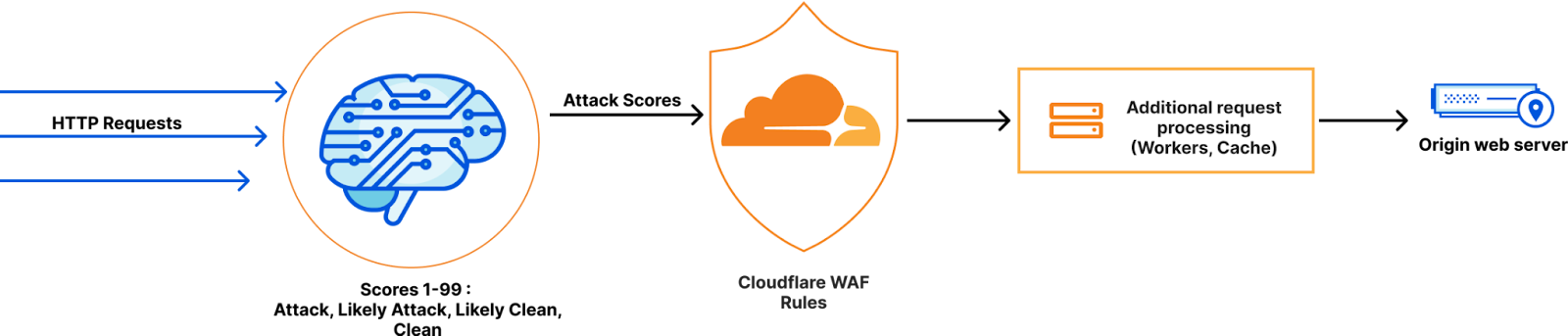
WAF Attack Score is Cloudflare’s machine learning (ML)-powered layer built on top of our Web Application Firewall (WAF). Its goal is to complement the WAF and detect attack bypasses that we haven’t encountered before. This has proven invaluable in catching zero-day vulnerabilities, like the one detected in Ivanti Connect Secure, before they are publicly disclosed and enhancing our customers’ protection against emerging and unknown threats.

Since its launch in 2022, WAF attack score adoption has grown exponentially, now protecting millions of Internet properties and running real-time inference on tens of millions of requests per second. The feature’s popularity has driven us to seek performance improvements, enabling even broader customer use and enhancing Internet security.

In this post, we will discuss the performance optimizations we’ve implemented for our WAF ML product. We’ll guide you through specific code examples and benchmark numbers, demonstrating how these enhancements have significantly improved our system’s efficiency. Additionally, we’ll share the impressive latency reduction numbers observed after the rollout.

Before diving into the optimizations, let’s take a moment to review the inner workings of the WAF Attack Score, which powers our WAF ML product.

WAF Attack Score system design

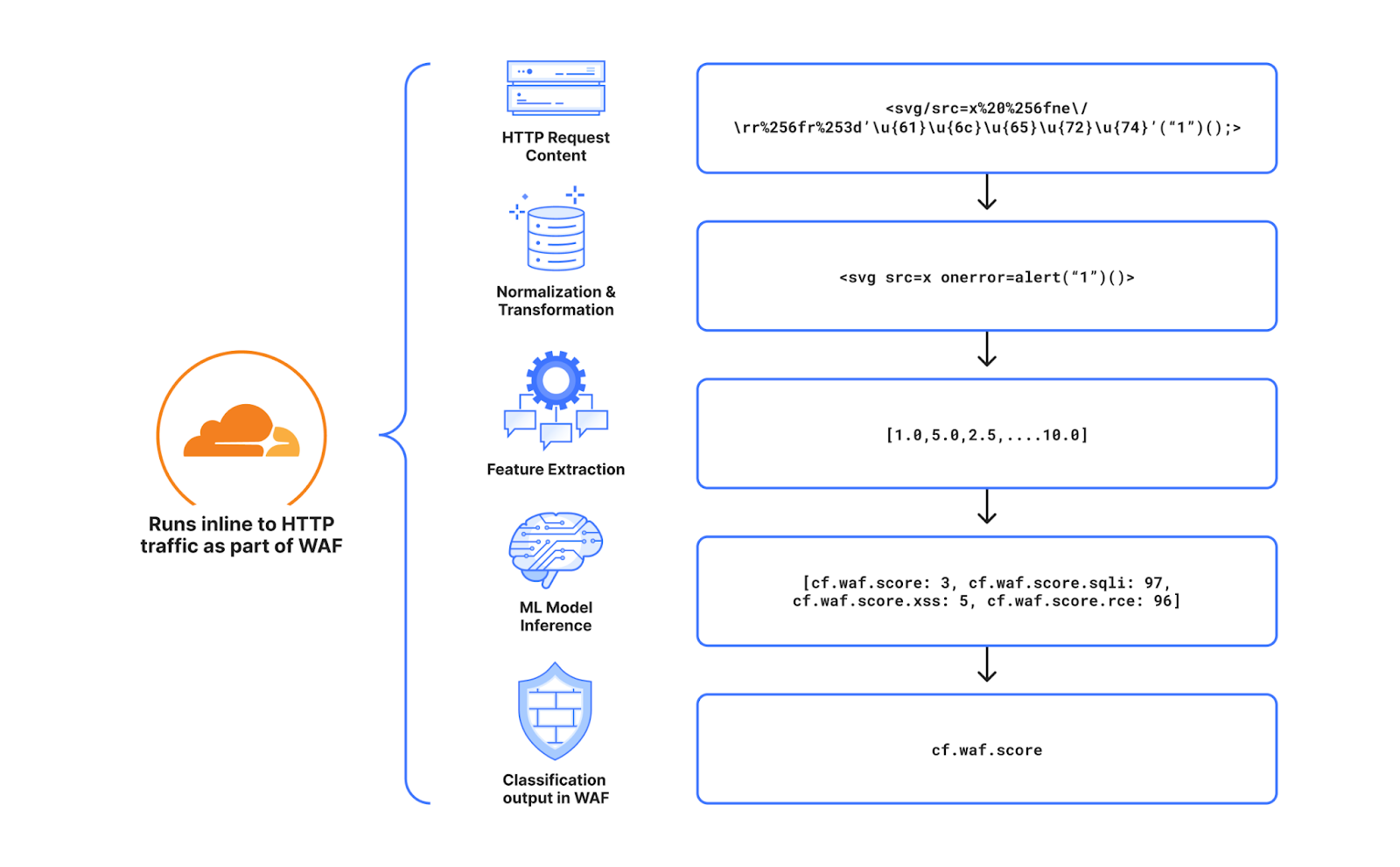
Cloudflare’s WAF attack score identifies various traffic types and attack vectors (SQLi, XSS, Command Injection, etc.) based on structural or statistical content properties. Here’s how it works during inference:

  1. HTTP Request Content: Start with raw HTTP input.

  2. Normalization & Transformation: Standardize and clean the data, applying normalization, content substitutions, and de-duplication.

  3. Feature Extraction: Tokenize the transformed content to generate statistical and structural data.

  4. Machine Learning Model Inference: Analyze the extracted features with pre-trained models, mapping content representations to classes (e.g., XSS, SQLi or RCE) or scores.

  5. Classification Output in WAF: Assign a score to the input, ranging from 1 (likely malicious) to 99 (likely clean), guiding security actions.

Next, we will explore feature extraction and inference optimizations.

Feature extraction optimizations

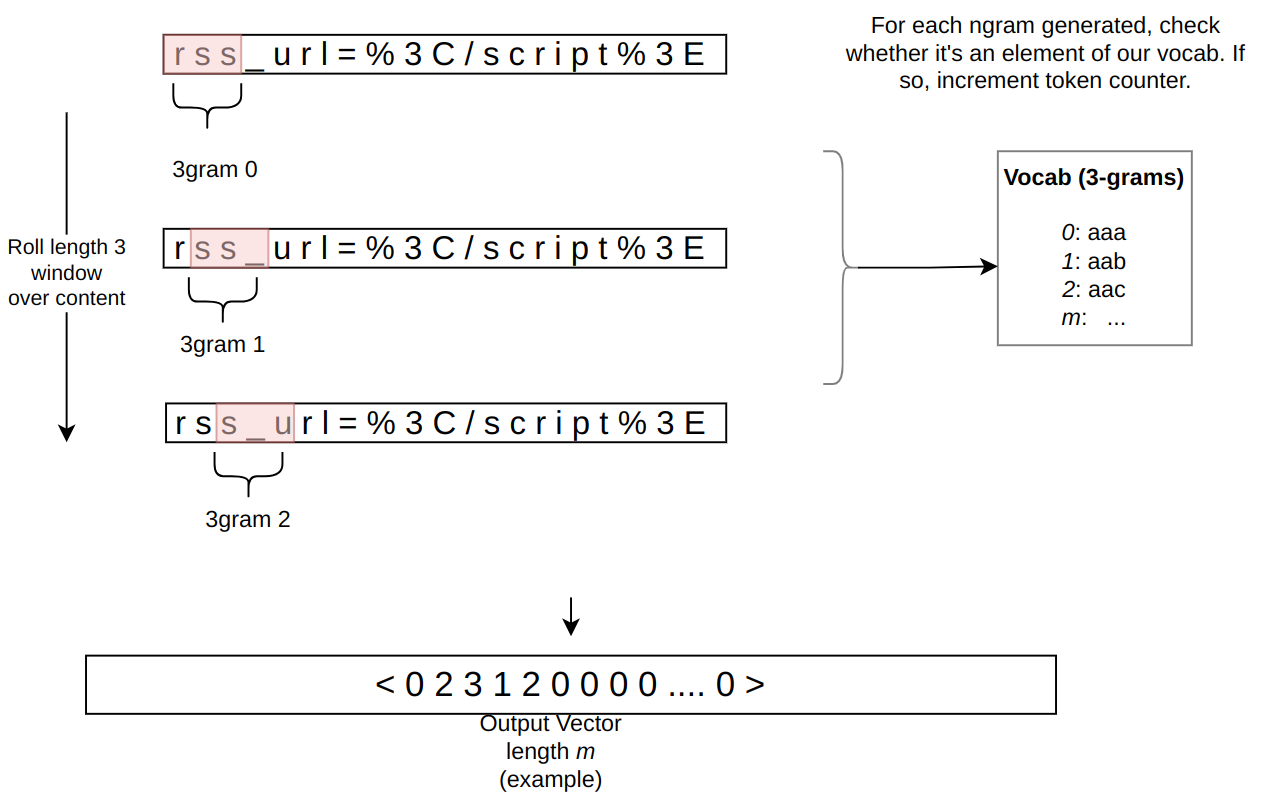
In the context of the WAF Attack Score ML model, feature extraction or pre-processing is essentially a process of tokenizing the given input and producing a float tensor of 1 x m size:

In our initial pre-processing implementation, this is achieved via a sliding window of 3 bytes over the input with the help of Rust’s std::collections::HashMap to look up the tensor index for a given ngram.

Initial benchmarks

To establish performance baselines, we’ve set up four benchmark cases representing example inputs of various lengths, ranging from 44 to 9482 bytes. Each case exemplifies typical input sizes, including those for a request body, user agent, and URI. We run benchmarks using the Criterion.rs statistics-driven micro-benchmarking tool:

RUSTFLAGS="-C opt-level=3 -C target-cpu=native" cargo criterion

Here are initial numbers for these benchmarks executed on a Linux laptop with a 13th Gen Intel® Core™ i7-13800H processor:

Benchmark case Pre-processing time, μs Throughput, MiB/s
preprocessing/long-body-9482 248.46 36.40
preprocessing/avg-body-1000 28.19 33.83
preprocessing/avg-url-44 1.45 28.94
preprocessing/avg-ua-91 2.87 30.24

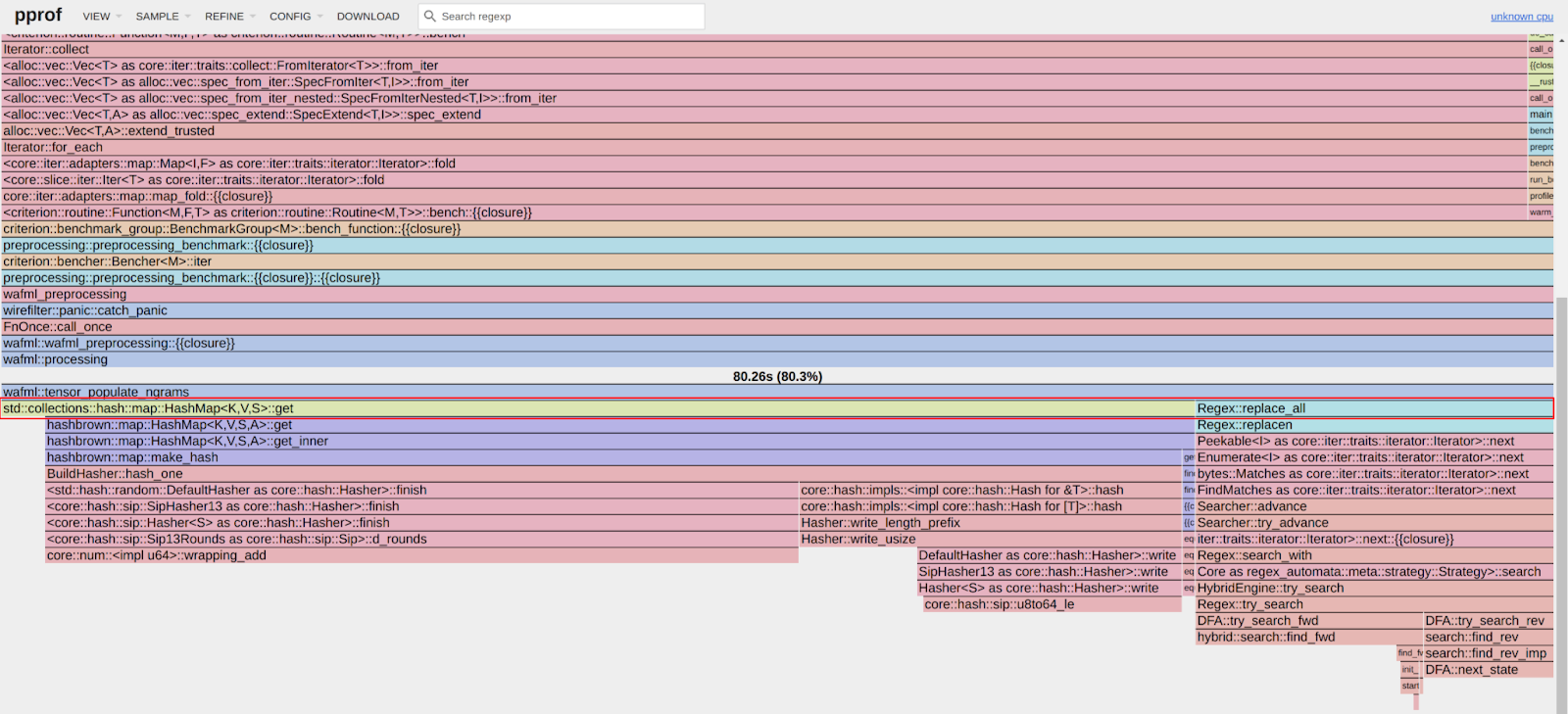
An important observation from these results is that pre-processing time correlates with the length of the input string, with throughput ranging from 28 MiB/s to 36 MiB/s. This suggests that considerable time is spent iterating over longer input strings. Optimizing this part of the process could significantly enhance performance. The dependency of processing time on input size highlights a key area for performance optimization. To validate this, we should examine where the processing time is spent by analyzing flamegraphs created from a 100-second profiling session visualized using pprof:

RUSTFLAGS="-C opt-level=3 -C target-cpu=native" cargo criterion -- --profile-time 100
 
go tool pprof -http=: target/criterion/profile/preprocessing/avg-body-1000/profile.pb

Looking at the pre-processing flamegraph above, it’s clear that most of the time was spent on the following two operations:

Function name % Time spent
std::collections::hash::map::HashMap<K,V,S>::get 61.8%
regex::regex::bytes::Regex::replace_all 18.5%

Let’s tackle the HashMap lookups first. Lookups are happening inside the tensor_populate_ngrams function, where input is split into windows of 3 bytes representing ngram and then lookup inside two hash maps:

fn tensor_populate_ngrams(tensor: &mut [f32], input: &[u8]) {   
   // Populate the NORM ngrams
   let mut unknown_norm_ngrams = 0;
   let norm_offset = 1;
 
   for s in input.windows(3) {
       match NORM_VOCAB.get(s) {
           Some(pos) => {
               tensor[*pos as usize + norm_offset] += 1.0f32;
           }
           None => {
               unknown_norm_ngrams += 1;
           }
       };
   }
 
   // Populate the SIG ngrams
   let mut unknown_sig_ngrams = 0;
   let sig_offset = norm_offset + NORM_VOCAB.len();
 
   let res = SIG_REGEX.replace_all(&input, b"#");
 
   for s in res.windows(3) {
       match SIG_VOCAB.get(s) {
           Some(pos) => {
               // adding +1 here as the first position will be the unknown_sig_ngrams
               tensor[*pos as usize + sig_offset + 1] += 1.0f32;
           }
           None => {
               unknown_sig_ngrams += 1;
           }
       }
   }
}

So essentially the pre-processing function performs a ton of hash map lookups, the volume of which depends on the size of the input string, e.g. 1469 lookups for the given benchmark case avg-body-1000.

Optimization attempt #1: HashMap → Aho-Corasick

Rust hash maps are generally quite fast. However, when that many lookups are being performed, it’s not very cache friendly.

So can we do better than hash maps, and what should we try first? The answer is the Aho-Corasick library.

This library provides multiple pattern search principally through an implementation of the Aho-Corasick algorithm, which builds a fast finite state machine for executing searches in linear time.

We can also tune Aho-Corasick settings based on this recommendation:

“You might want to use AhoCorasickBuilder::kind to set your searcher to always use AhoCorasickKind::DFA if search speed is critical and memory usage isn’t a concern.”

static ref NORM_VOCAB_AC: AhoCorasick = AhoCorasick::builder().kind(Some(AhoCorasickKind::DFA)).build(&[    
    "abc",
    "def",
    "wuq",
    "ijf",
    "iru",
    "piw",
    "mjw",
    "isn",
    "od ",
    "pro",
    ...
]).unwrap();

Then we use the constructed AhoCorasick dictionary to lookup ngrams using its find_overlapping_iter method:

for mat in NORM_VOCAB_AC.find_overlapping_iter(&input) {
    tensor_input_data[mat.pattern().as_usize() + 1] += 1.0;
}

We ran benchmarks and compared them against the baseline times shown above:

Benchmark case Baseline time, μs Aho-Corasick time, μs Optimization
preprocessing/long-body-9482 248.46 129.59 -47.84% or 1.64x
preprocessing/avg-body-1000 28.19 16.47 -41.56% or 1.71x
preprocessing/avg-url-44 1.45 1.01 -30.38% or 1.44x
preprocessing/avg-ua-91 2.87 1.90 -33.60% or 1.51x

That’s substantially better – Aho-Corasick DFA does wonders.

Optimization attempt #2: Aho-Corasick → match

One would think optimization with Aho-Corasick DFA is enough and that it seems unlikely that anything else can beat it. Yet, we can throw Aho-Corasick away and simply use the Rust match statement and let the compiler do the optimization for us!

#[inline]
const fn norm_vocab_lookup(ngram: &[u8; 3]) -> usize {     
    match ngram {
        b"abc" => 1,
        b"def" => 2,
        b"wuq" => 3,
        b"ijf" => 4,
        b"iru" => 5,
        b"piw" => 6,
        b"mjw" => 7,
        b"isn" => 8,
        b"od " => 9,
        b"pro" => 10,
        ...
        _ => 0,
    }
}```

Here’s how it performs in practice, based on the assembly generated by the Godbolt compiler explorer. The corresponding assembly code efficiently implements this lookup by employing a jump table and byte-wise comparisons to determine the return value based on input sequences, optimizing for quick decisions and minimal branching. Although the example only includes ten ngrams, it’s important to note that in applications like our WAF Attack Score ML models, we deal with thousands of ngrams. This simple match-based approach outshines both HashMap lookups and the Aho-Corasick method.

Benchmark case Baseline time, μs Match time, μs Optimization
preprocessing/long-body-9482 248.46 112.96 -54.54% or 2.20x
preprocessing/avg-body-1000 28.19 13.12 -53.45% or 2.15x
preprocessing/avg-url-44 1.45 0.75 -48.37% or 1.94x
preprocessing/avg-ua-91 2.87 1.4076 -50.91% or 2.04x

Switching to match gave us another 7-18% drop in latency, depending on the case.

Optimization attempt #3: Regex → WindowedReplacer

So, what exactly is the purpose of Regex::replace_all in pre-processing? Regex is defined and used like this:

pub static SIG_REGEX: Lazy =
    Lazy::new(|| RegexBuilder::new("[a-z]+").unicode(false).build().unwrap());
    ... 
    let res = SIG_REGEX.replace_all(&input, b"#");
    for s in res.windows(3) {
        tensor[sig_vocab_lookup(s.try_into().unwrap())] += 1.0;
    }

Essentially, all we need is to:

  1. Replace every sequence of lowercase letters in the input with a single byte “#”.

  2. Iterate over replaced bytes in a windowed fashion with a step of 3 bytes representing an ngram.

  3. Look up the ngram index and increment it in the tensor.

This logic seems simple enough that we could implement it more efficiently with a single pass over the input and without any allocations:

type Window = [u8; 3];
type Iter<'a> = Peekable>;

pub struct WindowedReplacer<'a> {
    window: Window,
    input_iter: Iter<'a>,
}

#[inline]
fn is_replaceable(byte: u8) -> bool {
    matches!(byte, b'a'..=b'z')
}

#[inline]
fn next_byte(iter: &mut Iter) -> Option {
    let byte = iter.next().copied()?;
    if is_replaceable(byte) {
        while iter.next_if(|b| is_replaceable(**b)).is_some() {}
        Some(b'#')
    } else {
        Some(byte)
    }
}

impl<'a> WindowedReplacer<'a> {
    pub fn new(input: &'a [u8]) -> Option {
        let mut window: Window = Default::default();
        let mut iter = input.iter().peekable();
        for byte in window.iter_mut().skip(1) {
            *byte = next_byte(&mut iter)?;
        }
        Some(WindowedReplacer {
            window,
            input_iter: iter,
        })
    }
}

impl<'a> Iterator for WindowedReplacer<'a> {
    type Item = Window;

    #[inline]
    fn next(&mut self) -> Option {
        for i in 0..2 {
            self.window[i] = self.window[i + 1];
        }
        let byte = next_byte(&mut self.input_iter)?;
        self.window[2] = byte;
        Some(self.window)
    }
}

By utilizing the WindowedReplacer, we simplify the replacement logic:

if let Some(replacer) = WindowedReplacer::new(&input) {                
    for ngram in replacer.windows(3) {
        tensor[sig_vocab_lookup(ngram.try_into().unwrap())] += 1.0;
    }
}

This new approach not only eliminates the need for allocating additional buffers to store replaced content, but also leverages Rust’s iterator optimizations, which the compiler can more effectively optimize. You can view an example of the assembly output for this new iterator at the provided Godbolt link.

Now let’s benchmark this and compare against the original implementation:

Benchmark case Baseline time, μs Match time, μs Optimization
preprocessing/long-body-9482 248.46 51.00 -79.47% or 4.87x
preprocessing/avg-body-1000 28.19 5.53 -80.36% or 5.09x
preprocessing/avg-url-44 1.45 0.40 -72.11% or 3.59x
preprocessing/avg-ua-91 2.87 0.69 -76.07% or 4.18x

The new letters replacement implementation has doubled the preprocessing speed compared to the previously optimized version using match statements, and it is four to five times faster than the original version!

Optimization attempt #4: Going nuclear with branchless ngram lookups

At this point, 4-5x improvement might seem like a lot and there is no point pursuing any further optimizations. After all, using an ngram lookup with a match statement has beaten the following methods, with benchmarks omitted for brevity:

Lookup method Description
std::collections::HashMap Uses Google’s SwissTable design with SIMD lookups to scan multiple hash entries in parallel.
Aho-Corasick matcher with and without DFA Also utilizes SIMD instructions in some cases.
phf crate A library to generate efficient lookup tables at compile time using perfect hash functions.
ph crate Another Rust library of data structures based on perfect hashing.
quickphf crate A Rust crate that allows you to use static compile-time generated hash maps and hash sets using PTHash perfect hash functions.

However, if we look again at the assembly of the norm_vocab_lookup function, it is clear that the execution flow has to perform a bunch of comparisons using cmp instructions. This creates many branches for the CPU to handle, which can lead to branch mispredictions. Branch mispredictions occur when the CPU incorrectly guesses the path of execution, causing delays as it discards partially completed instructions and fetches the correct ones. By reducing or eliminating these branches, we can avoid these mispredictions and improve the efficiency of the lookup process. How can we get rid of those branches when there is a need to look up thousands of unique ngrams?

Since there are only 3 bytes in each ngram, we can build two lookup tables of 256 x 256 x 256 size, storing the ngram tensor index. With this naive approach, our memory requirements will be: 256 x 256 x 256 x 2 x 2 = 64 MB, which seems like a lot.

However, given that we only care about ASCII bytes 0..127, then memory requirements can be lower: 128 x 128 x 128 x 2 x 2 = 8 MB, which is better. However, we will need to check for bytes >= 128, which will introduce a branch again.

So can we do better? Considering that the actual number of distinct byte values used in the ngrams is significantly less than the total possible 256 values, we can reduce memory requirements further by employing the following technique:

1. To avoid the branching caused by comparisons, we use precomputed offset lookup tables. This means instead of comparing each byte of the ngram during each lookup, we precompute the positions of each possible byte in a lookup table. This way, we replace the comparison operations with direct memory accesses, which are much faster and do not involve branching. We build an ngram bytes offsets lookup const array, storing each unique ngram byte offset position multiplied by the number of unique ngram bytes:

const NGRAM_OFFSETS: [[u32; 256]; 3] = [
    [
        // offsets of first byte in ngram
    ],
    [
        // offsets of second byte in ngram
    ],
    [
        // offsets of third byte in ngram
    ],
];

2. Then to obtain the ngram index, we can use this simple const function:

#[inline]
const fn ngram_index(ngram: [u8; 3]) -> usize {
    (NGRAM_OFFSETS[0][ngram[0] as usize]
        + NGRAM_OFFSETS[1][ngram[1] as usize]
        + NGRAM_OFFSETS[2][ngram[2] as usize]) as usize
}

3. To look up the tensor index based on the ngram index, we construct another const array at compile time using a list of all ngrams, where N is the number of unique ngram bytes:

const NGRAM_TENSOR_IDX: [u16; N * N * N] = {
    let mut arr = [0; N * N * N];
    arr[ngram_index(*b"abc")] = 1;
    arr[ngram_index(*b"def")] = 2;
    arr[ngram_index(*b"wuq")] = 3;
    arr[ngram_index(*b"ijf")] = 4;
    arr[ngram_index(*b"iru")] = 5;
    arr[ngram_index(*b"piw")] = 6;
    arr[ngram_index(*b"mjw")] = 7;
    arr[ngram_index(*b"isn")] = 8;
    arr[ngram_index(*b"od ")] = 9;
    ...
    arr
};

4. Finally, to update the tensor based on given ngram, we lookup the ngram index, then the tensor index, and then increment it with help of get_unchecked_mut, which avoids unnecessary (in this case) boundary checks and eliminates another source of branching:

#[inline]
fn update_tensor_with_ngram(tensor: &mut [f32], ngram: [u8; 3]) {
    let ngram_idx = ngram_index(ngram);
    debug_assert!(ngram_idx < NGRAM_TENSOR_IDX.len());
    unsafe {
        let tensor_idx = *NGRAM_TENSOR_IDX.get_unchecked(ngram_idx) as usize;
        debug_assert!(tensor_idx < tensor.len());
        *tensor.get_unchecked_mut(tensor_idx) += 1.0;
    }
}

This logic works effectively, passes correctness tests, and most importantly, it’s completely branchless! Moreover, the memory footprint of used lookup arrays is tiny – just ~500 KiB of memory – which easily fits into modern CPU L2/L3 caches, ensuring that expensive cache misses are rare and performance is optimal.

The last trick we will employ is loop unrolling for ngrams processing. By taking 6 ngrams (corresponding to 8 bytes of the input array) at a time, the compiler can unroll the second loop and auto-vectorize it, leveraging parallel execution to improve performance:

const CHUNK_SIZE: usize = 6;

let chunks_max_offset =
    ((input.len().saturating_sub(2)) / CHUNK_SIZE) * CHUNK_SIZE;
for i in (0..chunks_max_offset).step_by(CHUNK_SIZE) {
    for ngram in input[i..i + CHUNK_SIZE + 2].windows(3) {
        update_tensor_with_ngram(tensor, ngram.try_into().unwrap());
    }
}

Tying up everything together, our final pre-processing benchmarks show the following:

Benchmark case Baseline time, μs Branchless time, μs Optimization
preprocessing/long-body-9482 248.46 21.53 -91.33% or 11.54x
preprocessing/avg-body-1000 28.19 2.33 -91.73% or 12.09x
preprocessing/avg-url-44 1.45 0.26 -82.34% or 5.66x
preprocessing/avg-ua-91 2.87 0.43 -84.92% or 6.63x

The longer input is, the higher the latency drop will be due to branchless ngram lookups and loop unrolling, ranging from six to twelve times faster than baseline implementation.

After trying various optimizations, the final version of pre-processing retains optimization attempts 3 and 4, using branchless ngram lookup with offset tables and a single-pass non-allocating replacement iterator.

There are potentially more CPU cycles left on the table, and techniques like memory pre-fetching and manual SIMD intrinsics could speed this up a bit further. However, let’s now switch gears into looking at inference latency a bit closer.

Model inference optimizations

Initial benchmarks

Let’s have a look at original performance numbers of the WAF Attack Score ML model, which uses TensorFlow Lite 2.6.0:

Benchmark case Inference time, μs
inference/long-body-9482 247.31
inference/avg-body-1000 246.31
inference/avg-url-44 246.40
inference/avg-ua-91 246.88

Model inference is actually independent of the original input length, as inputs are transformed into tensors of predetermined size during the pre-processing phase, which we optimized above. From now on, we will refer to a singular inference time when benchmarking our optimizations.

Digging deeper with profiler, we observed that most of the time is spent on the following operations:

Function name % Time spent
tflite::tensor_utils::PortableMatrixBatchVectorMultiplyAccumulate 42.46%
tflite::tensor_utils::PortableAsymmetricQuantizeFloats 30.59%
tflite::optimized_ops::SoftmaxImpl 12.02%
tflite::reference_ops::MaximumMinimumBroadcastSlow 5.35%
tflite::ops::builtin::elementwise::LogEval 4.13%

The most expensive operation is matrix multiplication, which boils down to iteration within three nested loops:

void PortableMatrixBatchVectorMultiplyAccumulate(const float* matrix,
                                                 int m_rows, int m_cols,
                                                 const float* vector,
                                                 int n_batch, float* result) {
  float* result_in_batch = result;
  for (int b = 0; b < n_batch; b++) {
    const float* matrix_ptr = matrix;
    for (int r = 0; r < m_rows; r++) {
      float dot_prod = 0.0f;
      const float* vector_in_batch = vector + b * m_cols;
      for (int c = 0; c < m_cols; c++) {
        dot_prod += *matrix_ptr++ * *vector_in_batch++;
      }
      *result_in_batch += dot_prod;
     ++result_in_batch;
    }
  }
}

This doesn’t look very efficient and many blogs and research papers have been written on how matrix multiplication can be optimized, which basically boils down to:

  • Blocking: Divide matrices into smaller blocks that fit into the cache, improving cache reuse and reducing memory access latency.

  • Vectorization: Use SIMD instructions to process multiple data points in parallel, enhancing efficiency with vector registers.

  • Loop Unrolling: Reduce loop control overhead and increase parallelism by executing multiple loop iterations simultaneously.

To gain a better understanding of how these techniques work, we recommend watching this video, which brilliantly depicts the process of matrix multiplication:

Tensorflow Lite with AVX2

TensorFlow Lite does, in fact, support SIMD matrix multiplication – we just need to enable it and re-compile the TensorFlow Lite library:

if [[ "$(uname -m)" == x86_64* ]]; then
    # On x86_64 target x86-64-v3 CPU to enable AVX2 and FMA.
    arguments+=("--copt=-march=x86-64-v3")
fi

After running profiler again using the SIMD-optimized TensorFlow Lite library:

Top operations as per profiler output:

Function name % Time spent
tflite::tensor_utils::SseMatrixBatchVectorMultiplyAccumulateImpl 43.01%
tflite::tensor_utils::NeonAsymmetricQuantizeFloats 22.46%
tflite::reference_ops::MaximumMinimumBroadcastSlow 7.82%
tflite::optimized_ops::SoftmaxImpl 6.61%
tflite::ops::builtin::elementwise::LogEval 4.63%

Matrix multiplication now uses AVX2 instructions, which uses blocks of 8×8 to multiply and accumulate the multiplication result.

Proportionally, matrix multiplication and quantization operations take a similar time share when compared to non-SIMD version, however in absolute numbers, it’s almost twice as fast when SIMD optimizations are enabled:

Benchmark case Baseline time, μs SIMD time, μs Optimization
inference/avg-body-1000 246.31 130.07 -47.19% or 1.89x

Quite a nice performance boost just from a few lines of build config change!

Tensorflow Lite with XNNPACK

Tensorflow Lite comes with a useful benchmarking tool called benchmark_model, which also has a built-in profiler.

The tool can be built locally using the command:

bazel build -j 4 --copt=-march=native -c opt tensorflow/lite/tools/benchmark:benchmark_model

After building, benchmarks were run with different settings:

Benchmark run Inference time, μs
benchmark_model –graph=model.tflite –num_runs=100000 –use_xnnpack=false 105.61
benchmark_model –graph=model.tflite –num_runs=100000 –use_xnnpack=true –xnnpack_force_fp16=true 111.95
benchmark_model –graph=model.tflite –num_runs=100000 –use_xnnpack=true 49.05

Tensorflow Lite with XNNPACK enabled emerges as a leader, achieving ~50% latency reduction, when compared to the original Tensorflow Lite implementation.

More technical details about XNNPACK can be found in these blog posts:

Re-running benchmarks with XNNPack enabled, we get the following results:

Benchmark case Baseline time, μs
TFLite 2.6.0
SIMD time, μs
TFLite 2.6.0
SIMD time, μs
TFLite 2.16.1
SIMD + XNNPack time, μs
TFLite 2.16.1
Optimization
inference/avg-body-1000 246.31 130.07 115.17 56.22 -77.17% or 4.38x

By upgrading TensorFlow Lite from 2.6.0 to 2.16.1 and enabling SIMD optimizations along with the XNNPack, we were able to decrease WAF ML model inference time more than four-fold, achieving a 77.17% reduction.

Caching inference result

While making code faster through pre-processing and inference optimizations is great, it’s even better when code doesn’t need to run at all. This is where caching comes in. Amdahl’s Law suggests that optimizing only parts of a program has diminishing returns. By avoiding redundant executions with caching, we can achieve significant performance gains beyond the limitations of traditional code optimization.

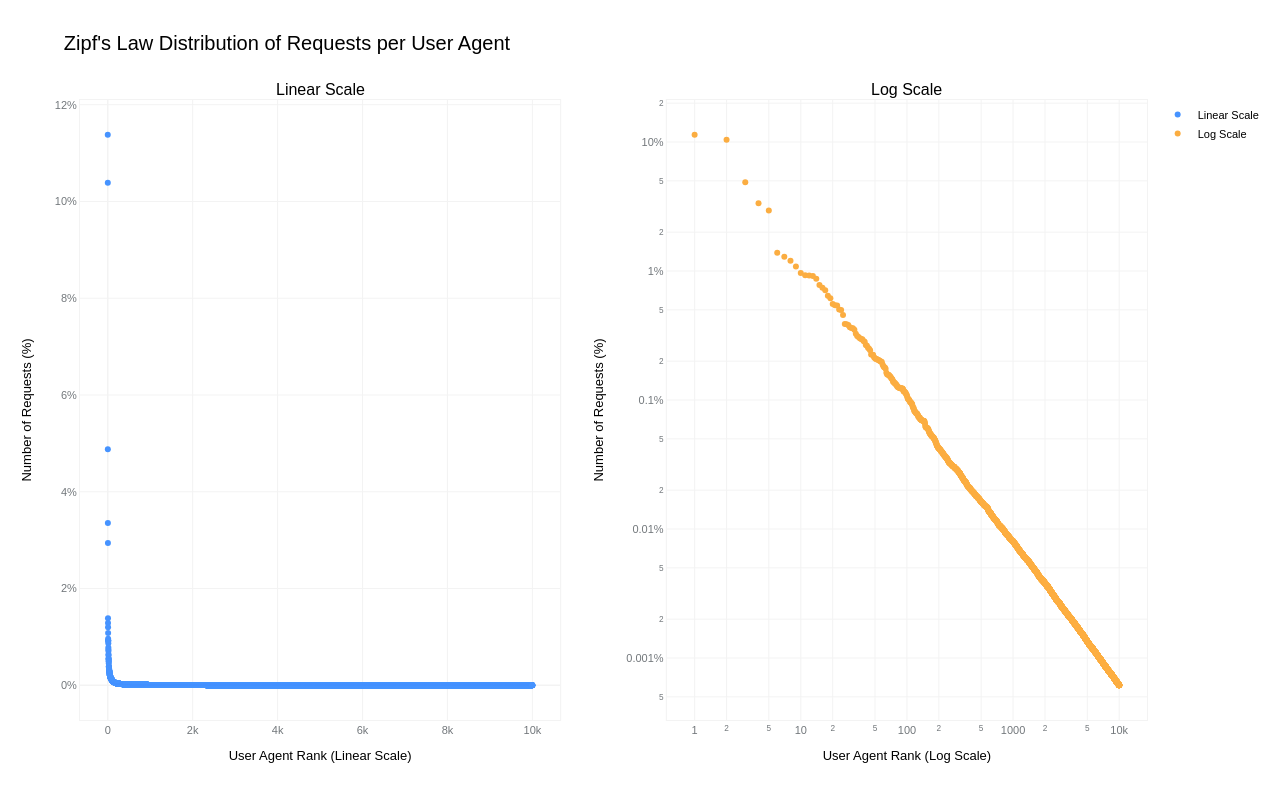
A simple key-value cache would quickly occupy all available memory on the server due to the high cardinality of URLs, HTTP headers, and HTTP bodies. However, because “everything on the Internet has an L-shape” or more specifically, follows a Zipf’s law distribution, we can optimize our caching strategy.

Zipf‘s law states that in many natural datasets, the frequency of any item is inversely proportional to its rank in the frequency table. In other words, a few items are extremely common, while the majority are rare. By analyzing our request data, we found that URLs, HTTP headers, and even HTTP bodies follow this distribution. For example, here is the user agent header frequency distribution against its rank:

By caching the top-N most frequently occurring inputs and their corresponding inference results, we can ensure that both pre-processing and inference are skipped for the majority of requests. This is where the Least Recently Used (LRU) cache comes in – frequently used items stay hot in the cache, while the least recently used ones are evicted.

We use lua-resty-mlcache as our caching solution, allowing us to share cached inference results between different Nginx workers via a shared memory dictionary. The LRU cache effectively exploits the space-time trade-off, where we trade a small amount of memory for significant CPU time savings.

This approach enables us to achieve a ~70% cache hit ratio, significantly reducing latency further, as we will analyze in the final section below.

Optimization results

The optimizations discussed in this post were rolled out in several phases to ensure system correctness and stability.

First, we enabled SIMD optimizations for TensorFlow Lite, which reduced WAF ML total execution time by approximately 41.80%, decreasing from 1519 ➔ 884 μs on average.

Next, we upgraded TensorFlow Lite from version 2.6.0 to 2.16.1, enabled XNNPack, and implemented pre-processing optimizations. This further reduced WAF ML total execution time by ~40.77%, bringing it down from 932 ➔ 552 μs on average. The initial average time of 932 μs was slightly higher than the previous 884 μs due to the increased number of customers using this feature and the months that passed between changes.

Lastly, we introduced LRU caching, which led to an additional reduction in WAF ML total execution time by ~50.18%, from 552 ➔ 275 μs on average.

Overall, we cut WAF ML execution time by ~81.90%, decreasing from 1519 ➔ 275 μs, or 5.5x faster!

To illustrate the significance of this: with Cloudflare’s average rate of 9.5 million requests per second passing through WAF ML, saving 1244 microseconds per request equates to saving ~32 years of processing time every single day! That’s in addition to the savings of 523 microseconds per request or 65 years of processing time per day demonstrated last year in our Every request, every microsecond: scalable machine learning at Cloudflare post about our Bot Management product.

Conclusion

We hope you enjoyed reading about how we made our WAF ML models go brrr, just as much as we enjoyed implementing these optimizations to bring scalable WAF ML to more customers on a truly global scale.

Looking ahead, we are developing even more sophisticated ML security models. These advancements aim to bring our WAF and Bot Management products to the next level, making them even more useful and effective for our customers.

Making WAF ML models go brrr: saving decades of processing time

Post Syndicated from Alex Bocharov original https://blog.cloudflare.com/making-waf-ai-models-go-brr


We made our WAF Machine Learning models 5.5x faster, reducing execution time by approximately 82%, from 1519 to 275 microseconds! Read on to find out how we achieved this remarkable improvement.

WAF Attack Score is Cloudflare’s machine learning (ML)-powered layer built on top of our Web Application Firewall (WAF). Its goal is to complement the WAF and detect attack bypasses that we haven’t encountered before. This has proven invaluable in catching zero-day vulnerabilities, like the one detected in Ivanti Connect Secure, before they are publicly disclosed and enhancing our customers’ protection against emerging and unknown threats.

Since its launch in 2022, WAF attack score adoption has grown exponentially, now protecting millions of Internet properties and running real-time inference on tens of millions of requests per second. The feature’s popularity has driven us to seek performance improvements, enabling even broader customer use and enhancing Internet security.

In this post, we will discuss the performance optimizations we’ve implemented for our WAF ML product. We’ll guide you through specific code examples and benchmark numbers, demonstrating how these enhancements have significantly improved our system’s efficiency. Additionally, we’ll share the impressive latency reduction numbers observed after the rollout.

Before diving into the optimizations, let’s take a moment to review the inner workings of the WAF Attack Score, which powers our WAF ML product.

WAF Attack Score system design

Cloudflare’s WAF attack score identifies various traffic types and attack vectors (SQLi, XSS, Command Injection, etc.) based on structural or statistical content properties. Here’s how it works during inference:

  1. HTTP Request Content: Start with raw HTTP input.
  2. Normalization & Transformation: Standardize and clean the data, applying normalization, content substitutions, and de-duplication.
  3. Feature Extraction: Tokenize the transformed content to generate statistical and structural data.
  4. Machine Learning Model Inference: Analyze the extracted features with pre-trained models, mapping content representations to classes (e.g., XSS, SQLi or RCE) or scores.
  5. Classification Output in WAF: Assign a score to the input, ranging from 1 (likely malicious) to 99 (likely clean), guiding security actions.

Next, we will explore feature extraction and inference optimizations.

Feature extraction optimizations

In the context of the WAF Attack Score ML model, feature extraction or pre-processing is essentially a process of tokenizing the given input and producing a float tensor of 1 x m size:

In our initial pre-processing implementation, this is achieved via a sliding window of 3 bytes over the input with the help of Rust’s std::collections::HashMap to look up the tensor index for a given ngram.

Initial benchmarks

To establish performance baselines, we’ve set up four benchmark cases representing example inputs of various lengths, ranging from 44 to 9482 bytes. Each case exemplifies typical input sizes, including those for a request body, user agent, and URI. We run benchmarks using the Criterion.rs statistics-driven micro-benchmarking tool:

RUSTFLAGS="-C opt-level=3 -C target-cpu=native" cargo criterion

Here are initial numbers for these benchmarks executed on a Linux laptop with a 13th Gen Intel® Core™ i7-13800H processor:

Benchmark case Pre-processing time, μs Throughput, MiB/s
preprocessing/long-body-9482 248.46 36.40
preprocessing/avg-body-1000 28.19 33.83
preprocessing/avg-url-44 1.45 28.94
preprocessing/avg-ua-91 2.87 30.24

An important observation from these results is that pre-processing time correlates with the length of the input string, with throughput ranging from 28 MiB/s to 36 MiB/s. This suggests that considerable time is spent iterating over longer input strings. Optimizing this part of the process could significantly enhance performance. The dependency of processing time on input size highlights a key area for performance optimization. To validate this, we should examine where the processing time is spent by analyzing flamegraphs created from a 100-second profiling session visualized using pprof:

RUSTFLAGS="-C opt-level=3 -C target-cpu=native" cargo criterion -- --profile-time 100
 
go tool pprof -http=: target/criterion/profile/preprocessing/avg-body-1000/profile.pb

Looking at the pre-processing flamegraph above, it’s clear that most of the time was spent on the following two operations:

Function name % Time spent
std::collections::hash::map::HashMap<K,V,S>::get 61.8%
regex::regex::bytes::Regex::replace_all 18.5%

Let’s tackle the HashMap lookups first. Lookups are happening inside the tensor_populate_ngrams function, where input is split into windows of 3 bytes representing ngram and then lookup inside two hash maps:

fn tensor_populate_ngrams(tensor: &mut [f32], input: &[u8]) {   
   // Populate the NORM ngrams
   let mut unknown_norm_ngrams = 0;
   let norm_offset = 1;
 
   for s in input.windows(3) {
       match NORM_VOCAB.get(s) {
           Some(pos) => {
               tensor[*pos as usize + norm_offset] += 1.0f32;
           }
           None => {
               unknown_norm_ngrams += 1;
           }
       };
   }
 
   // Populate the SIG ngrams
   let mut unknown_sig_ngrams = 0;
   let sig_offset = norm_offset + NORM_VOCAB.len();
 
   let res = SIG_REGEX.replace_all(&input, b"#");
 
   for s in res.windows(3) {
       match SIG_VOCAB.get(s) {
           Some(pos) => {
               // adding +1 here as the first position will be the unknown_sig_ngrams
               tensor[*pos as usize + sig_offset + 1] += 1.0f32;
           }
           None => {
               unknown_sig_ngrams += 1;
           }
       }
   }
}

So essentially the pre-processing function performs a ton of hash map lookups, the volume of which depends on the size of the input string, e.g. 1469 lookups for the given benchmark case avg-body-1000.

Optimization attempt #1: HashMap → Aho-Corasick

Rust hash maps are generally quite fast. However, when that many lookups are being performed, it’s not very cache friendly.

So can we do better than hash maps, and what should we try first? The answer is the Aho-Corasick library.

This library provides multiple pattern search principally through an implementation of the Aho-Corasick algorithm, which builds a fast finite state machine for executing searches in linear time.

We can also tune Aho-Corasick settings based on this recommendation:

“You might want to use AhoCorasickBuilder::kind to set your searcher to always use AhoCorasickKind::DFA if search speed is critical and memory usage isn’t a concern.”

static ref NORM_VOCAB_AC: AhoCorasick = AhoCorasick::builder().kind(Some(AhoCorasickKind::DFA)).build(&[    
    "abc",
    "def",
    "wuq",
    "ijf",
    "iru",
    "piw",
    "mjw",
    "isn",
    "od ",
    "pro",
    ...
]).unwrap();

Then we use the constructed AhoCorasick dictionary to lookup ngrams using its find_overlapping_iter method:

for mat in NORM_VOCAB_AC.find_overlapping_iter(&input) {
    tensor_input_data[mat.pattern().as_usize() + 1] += 1.0;
}

We ran benchmarks and compared them against the baseline times shown above:

Benchmark case Baseline time, μs Aho-Corasick time, μs Optimization
preprocessing/long-body-9482 248.46 129.59 -47.84% or 1.64x
preprocessing/avg-body-1000 28.19 16.47 -41.56% or 1.71x
preprocessing/avg-url-44 1.45 1.01 -30.38% or 1.44x
preprocessing/avg-ua-91 2.87 1.90 -33.60% or 1.51x

That’s substantially better – Aho-Corasick DFA does wonders.

Optimization attempt #2: Aho-Corasick → match

One would think optimization with Aho-Corasick DFA is enough and that it seems unlikely that anything else can beat it. Yet, we can throw Aho-Corasick away and simply use the Rust match statement and let the compiler do the optimization for us!

#[inline]
const fn norm_vocab_lookup(ngram: &[u8; 3]) -> usize {     
    match ngram {
        b"abc" => 1,
        b"def" => 2,
        b"wuq" => 3,
        b"ijf" => 4,
        b"iru" => 5,
        b"piw" => 6,
        b"mjw" => 7,
        b"isn" => 8,
        b"od " => 9,
        b"pro" => 10,
        ...
        _ => 0,
    }
}```

Here’s how it performs in practice, based on the assembly generated by the Godbolt compiler explorer. The corresponding assembly code efficiently implements this lookup by employing a jump table and byte-wise comparisons to determine the return value based on input sequences, optimizing for quick decisions and minimal branching. Although the example only includes ten ngrams, it’s important to note that in applications like our WAF Attack Score ML models, we deal with thousands of ngrams. This simple match-based approach outshines both HashMap lookups and the Aho-Corasick method.

Benchmark case Baseline time, μs Match time, μs Optimization
preprocessing/long-body-9482 248.46 112.96 -54.54% or 2.20x
preprocessing/avg-body-1000 28.19 13.12 -53.45% or 2.15x
preprocessing/avg-url-44 1.45 0.75 -48.37% or 1.94x
preprocessing/avg-ua-91 2.87 1.4076 -50.91% or 2.04x

Switching to match gave us another 7-18% drop in latency, depending on the case.

Optimization attempt #3: Regex → WindowedReplacer

So, what exactly is the purpose of Regex::replace_all in pre-processing? Regex is defined and used like this:

pub static SIG_REGEX: Lazy<Regex> =
    Lazy::new(|| RegexBuilder::new("[a-z]+").unicode(false).build().unwrap());
    ... 
    let res = SIG_REGEX.replace_all(&input, b"#");
    for s in res.windows(3) {
        tensor[sig_vocab_lookup(s.try_into().unwrap())] += 1.0;
    }

Essentially, all we need is to:

  1. Replace every sequence of lowercase letters in the input with a single byte “#”.
  2. Iterate over replaced bytes in a windowed fashion with a step of 3 bytes representing an ngram.
  3. Look up the ngram index and increment it in the tensor.

This logic seems simple enough that we could implement it more efficiently with a single pass over the input and without any allocations:

type Window = [u8; 3];
type Iter<'a> = Peekable<std::slice::Iter<'a, u8>>;

pub struct WindowedReplacer<'a> {
    window: Window,
    input_iter: Iter<'a>,
}

#[inline]
fn is_replaceable(byte: u8) -> bool {
    matches!(byte, b'a'..=b'z')
}

#[inline]
fn next_byte(iter: &mut Iter) -> Option<u8> {
    let byte = iter.next().copied()?;
    if is_replaceable(byte) {
        while iter.next_if(|b| is_replaceable(**b)).is_some() {}
        Some(b'#')
    } else {
        Some(byte)
    }
}

impl<'a> WindowedReplacer<'a> {
    pub fn new(input: &'a [u8]) -> Option<Self> {
        let mut window: Window = Default::default();
        let mut iter = input.iter().peekable();
        for byte in window.iter_mut().skip(1) {
            *byte = next_byte(&mut iter)?;
        }
        Some(WindowedReplacer {
            window,
            input_iter: iter,
        })
    }
}

impl<'a> Iterator for WindowedReplacer<'a> {
    type Item = Window;

    #[inline]
    fn next(&mut self) -> Option<Self::Item> {
        for i in 0..2 {
            self.window[i] = self.window[i + 1];
        }
        let byte = next_byte(&mut self.input_iter)?;
        self.window[2] = byte;
        Some(self.window)
    }
}

By utilizing the WindowedReplacer, we simplify the replacement logic:

if let Some(replacer) = WindowedReplacer::new(&input) {                
    for ngram in replacer.windows(3) {
        tensor[sig_vocab_lookup(ngram.try_into().unwrap())] += 1.0;
    }
}

This new approach not only eliminates the need for allocating additional buffers to store replaced content, but also leverages Rust’s iterator optimizations, which the compiler can more effectively optimize. You can view an example of the assembly output for this new iterator at the provided Godbolt link.

Now let’s benchmark this and compare against the original implementation:

Benchmark case Baseline time, μs Match time, μs Optimization
preprocessing/long-body-9482 248.46 51.00 -79.47% or 4.87x
preprocessing/avg-body-1000 28.19 5.53 -80.36% or 5.09x
preprocessing/avg-url-44 1.45 0.40 -72.11% or 3.59x
preprocessing/avg-ua-91 2.87 0.69 -76.07% or 4.18x

The new letters replacement implementation has doubled the preprocessing speed compared to the previously optimized version using match statements, and it is four to five times faster than the original version!

Optimization attempt #4: Going nuclear with branchless ngram lookups

At this point, 4-5x improvement might seem like a lot and there is no point pursuing any further optimizations. After all, using an ngram lookup with a match statement has beaten the following methods, with benchmarks omitted for brevity:

Lookup method Description
std::collections::HashMap Uses Google’s SwissTable design with SIMD lookups to scan multiple hash entries in parallel.
Aho-Corasick matcher with and without DFA Also utilizes SIMD instructions in some cases.
phf crate A library to generate efficient lookup tables at compile time using perfect hash functions.
ph crate Another Rust library of data structures based on perfect hashing.
quickphf crate A Rust crate that allows you to use static compile-time generated hash maps and hash sets using PTHash perfect hash functions.

However, if we look again at the assembly of the norm_vocab_lookup function, it is clear that the execution flow has to perform a bunch of comparisons using cmp instructions. This creates many branches for the CPU to handle, which can lead to branch mispredictions. Branch mispredictions occur when the CPU incorrectly guesses the path of execution, causing delays as it discards partially completed instructions and fetches the correct ones. By reducing or eliminating these branches, we can avoid these mispredictions and improve the efficiency of the lookup process. How can we get rid of those branches when there is a need to look up thousands of unique ngrams?

Since there are only 3 bytes in each ngram, we can build two lookup tables of 256 x 256 x 256 size, storing the ngram tensor index. With this naive approach, our memory requirements will be: 256 x 256 x 256 x 2 x 2 = 64 MB, which seems like a lot.

However, given that we only care about ASCII bytes 0..127, then memory requirements can be lower: 128 x 128 x 128 x 2 x 2 = 8 MB, which is better. However, we will need to check for bytes >= 128, which will introduce a branch again.

So can we do better? Considering that the actual number of distinct byte values used in the ngrams is significantly less than the total possible 256 values, we can reduce memory requirements further by employing the following technique:

1. To avoid the branching caused by comparisons, we use precomputed offset lookup tables. This means instead of comparing each byte of the ngram during each lookup, we precompute the positions of each possible byte in a lookup table. This way, we replace the comparison operations with direct memory accesses, which are much faster and do not involve branching. We build an ngram bytes offsets lookup const array, storing each unique ngram byte offset position multiplied by the number of unique ngram bytes:

const NGRAM_OFFSETS: [[u32; 256]; 3] = [
    [
        // offsets of first byte in ngram
    ],
    [
        // offsets of second byte in ngram
    ],
    [
        // offsets of third byte in ngram
    ],
];

2. Then to obtain the ngram index, we can use this simple const function:

#[inline]
const fn ngram_index(ngram: [u8; 3]) -> usize {
    (NGRAM_OFFSETS[0][ngram[0] as usize]
        + NGRAM_OFFSETS[1][ngram[1] as usize]
        + NGRAM_OFFSETS[2][ngram[2] as usize]) as usize
}

3. To look up the tensor index based on the ngram index, we construct another const array at compile time using a list of all ngrams, where N is the number of unique ngram bytes:

const NGRAM_TENSOR_IDX: [u16; N * N * N] = {
    let mut arr = [0; N * N * N];
    arr[ngram_index(*b"abc")] = 1;
    arr[ngram_index(*b"def")] = 2;
    arr[ngram_index(*b"wuq")] = 3;
    arr[ngram_index(*b"ijf")] = 4;
    arr[ngram_index(*b"iru")] = 5;
    arr[ngram_index(*b"piw")] = 6;
    arr[ngram_index(*b"mjw")] = 7;
    arr[ngram_index(*b"isn")] = 8;
    arr[ngram_index(*b"od ")] = 9;
    ...
    arr
};

4. Finally, to update the tensor based on given ngram, we lookup the ngram index, then the tensor index, and then increment it with help of get_unchecked_mut, which avoids unnecessary (in this case) boundary checks and eliminates another source of branching:

#[inline]
fn update_tensor_with_ngram(tensor: &mut [f32], ngram: [u8; 3]) {
    let ngram_idx = ngram_index(ngram);
    debug_assert!(ngram_idx < NGRAM_TENSOR_IDX.len());
    unsafe {
        let tensor_idx = *NGRAM_TENSOR_IDX.get_unchecked(ngram_idx) as usize;
        debug_assert!(tensor_idx < tensor.len());
        *tensor.get_unchecked_mut(tensor_idx) += 1.0;
    }
}

This logic works effectively, passes correctness tests, and most importantly, it’s completely branchless! Moreover, the memory footprint of used lookup arrays is tiny – just ~500 KiB of memory – which easily fits into modern CPU L2/L3 caches, ensuring that expensive cache misses are rare and performance is optimal.

The last trick we will employ is loop unrolling for ngrams processing. By taking 6 ngrams (corresponding to 8 bytes of the input array) at a time, the compiler can unroll the second loop and auto-vectorize it, leveraging parallel execution to improve performance:

const CHUNK_SIZE: usize = 6;

let chunks_max_offset =
    ((input.len().saturating_sub(2)) / CHUNK_SIZE) * CHUNK_SIZE;
for i in (0..chunks_max_offset).step_by(CHUNK_SIZE) {
    for ngram in input[i..i + CHUNK_SIZE + 2].windows(3) {
        update_tensor_with_ngram(tensor, ngram.try_into().unwrap());
    }
}

Tying up everything together, our final pre-processing benchmarks show the following:

Benchmark case Baseline time, μs Branchless time, μs Optimization
preprocessing/long-body-9482 248.46 21.53 -91.33% or 11.54x
preprocessing/avg-body-1000 28.19 2.33 -91.73% or 12.09x
preprocessing/avg-url-44 1.45 0.26 -82.34% or 5.66x
preprocessing/avg-ua-91 2.87 0.43 -84.92% or 6.63x

The longer input is, the higher the latency drop will be due to branchless ngram lookups and loop unrolling, ranging from six to twelve times faster than baseline implementation.

After trying various optimizations, the final version of pre-processing retains optimization attempts 3 and 4, using branchless ngram lookup with offset tables and a single-pass non-allocating replacement iterator.

There are potentially more CPU cycles left on the table, and techniques like memory pre-fetching and manual SIMD intrinsics could speed this up a bit further. However, let’s now switch gears into looking at inference latency a bit closer.

Model inference optimizations

Initial benchmarks

Let’s have a look at original performance numbers of the WAF Attack Score ML model, which uses TensorFlow Lite 2.6.0:

Benchmark case Inference time, μs
inference/long-body-9482 247.31
inference/avg-body-1000 246.31
inference/avg-url-44 246.40
inference/avg-ua-91 246.88

Model inference is actually independent of the original input length, as inputs are transformed into tensors of predetermined size during the pre-processing phase, which we optimized above. From now on, we will refer to a singular inference time when benchmarking our optimizations.

Digging deeper with profiler, we observed that most of the time is spent on the following operations:

Function name % Time spent
tflite::tensor_utils::PortableMatrixBatchVectorMultiplyAccumulate 42.46%
tflite::tensor_utils::PortableAsymmetricQuantizeFloats 30.59%
tflite::optimized_ops::SoftmaxImpl 12.02%
tflite::reference_ops::MaximumMinimumBroadcastSlow 5.35%
tflite::ops::builtin::elementwise::LogEval 4.13%

The most expensive operation is matrix multiplication, which boils down to iteration within three nested loops:

void PortableMatrixBatchVectorMultiplyAccumulate(const float* matrix,
                                                 int m_rows, int m_cols,
                                                 const float* vector,
                                                 int n_batch, float* result) {
  float* result_in_batch = result;
  for (int b = 0; b < n_batch; b++) {
    const float* matrix_ptr = matrix;
    for (int r = 0; r < m_rows; r++) {
      float dot_prod = 0.0f;
      const float* vector_in_batch = vector + b * m_cols;
      for (int c = 0; c < m_cols; c++) {
        dot_prod += *matrix_ptr++ * *vector_in_batch++;
      }
      *result_in_batch += dot_prod;
     ++result_in_batch;
    }
  }
}

This doesn’t look very efficient and many blogs and research papers have been written on how matrix multiplication can be optimized, which basically boils down to:

  • Blocking: Divide matrices into smaller blocks that fit into the cache, improving cache reuse and reducing memory access latency.
  • Vectorization: Use SIMD instructions to process multiple data points in parallel, enhancing efficiency with vector registers.
  • Loop Unrolling: Reduce loop control overhead and increase parallelism by executing multiple loop iterations simultaneously.

To gain a better understanding of how these techniques work, we recommend watching this video, which brilliantly depicts the process of matrix multiplication:

Tensorflow Lite with AVX2

TensorFlow Lite does, in fact, support SIMD matrix multiplication – we just need to enable it and re-compile the TensorFlow Lite library:

if [[ "$(uname -m)" == x86_64* ]]; then
    # On x86_64 target x86-64-v3 CPU to enable AVX2 and FMA.
    arguments+=("--copt=-march=x86-64-v3")
fi

After running profiler again using the SIMD-optimized TensorFlow Lite library:

Top operations as per profiler output:

Function name % Time spent
tflite::tensor_utils::SseMatrixBatchVectorMultiplyAccumulateImpl 43.01%
tflite::tensor_utils::NeonAsymmetricQuantizeFloats 22.46%
tflite::reference_ops::MaximumMinimumBroadcastSlow 7.82%
tflite::optimized_ops::SoftmaxImpl 6.61%
tflite::ops::builtin::elementwise::LogEval 4.63%

Matrix multiplication now uses AVX2 instructions, which uses blocks of 8×8 to multiply and accumulate the multiplication result.

Proportionally, matrix multiplication and quantization operations take a similar time share when compared to non-SIMD version, however in absolute numbers, it’s almost twice as fast when SIMD optimizations are enabled:

Benchmark case Baseline time, μs SIMD time, μs Optimization
inference/avg-body-1000 246.31 130.07 -47.19% or 1.89x

Quite a nice performance boost just from a few lines of build config change!

Tensorflow Lite with XNNPACK

Tensorflow Lite comes with a useful benchmarking tool called benchmark_model, which also has a built-in profiler.

The tool can be built locally using the command:

bazel build -j 4 --copt=-march=native -c opt tensorflow/lite/tools/benchmark:benchmark_model

After building, benchmarks were run with different settings:

Benchmark run Inference time, μs
benchmark_model –graph=model.tflite –num_runs=100000 –use_xnnpack=false 105.61
benchmark_model –graph=model.tflite –num_runs=100000 –use_xnnpack=true –xnnpack_force_fp16=true 111.95
benchmark_model –graph=model.tflite –num_runs=100000 –use_xnnpack=true 49.05

Tensorflow Lite with XNNPACK enabled emerges as a leader, achieving ~50% latency reduction, when compared to the original Tensorflow Lite implementation.

More technical details about XNNPACK can be found in these blog posts:

Re-running benchmarks with XNNPack enabled, we get the following results:

Benchmark case Baseline time, μs
TFLite 2.6.0
SIMD time, μs
TFLite 2.6.0
SIMD time, μs
TFLite 2.16.1
SIMD + XNNPack time, μs
TFLite 2.16.1
Optimization
inference/avg-body-1000 246.31 130.07 115.17 56.22 -77.17% or 4.38x

By upgrading TensorFlow Lite from 2.6.0 to 2.16.1 and enabling SIMD optimizations along with the XNNPack, we were able to decrease WAF ML model inference time more than four-fold, achieving a 77.17% reduction.

Caching inference result

While making code faster through pre-processing and inference optimizations is great, it’s even better when code doesn’t need to run at all. This is where caching comes in. Amdahl’s Law suggests that optimizing only parts of a program has diminishing returns. By avoiding redundant executions with caching, we can achieve significant performance gains beyond the limitations of traditional code optimization.

A simple key-value cache would quickly occupy all available memory on the server due to the high cardinality of URLs, HTTP headers, and HTTP bodies. However, because “everything on the Internet has an L-shape” or more specifically, follows a Zipf’s law distribution, we can optimize our caching strategy.

Zipf‘s law states that in many natural datasets, the frequency of any item is inversely proportional to its rank in the frequency table. In other words, a few items are extremely common, while the majority are rare. By analyzing our request data, we found that URLs, HTTP headers, and even HTTP bodies follow this distribution. For example, here is the user agent header frequency distribution against its rank:

By caching the top-N most frequently occurring inputs and their corresponding inference results, we can ensure that both pre-processing and inference are skipped for the majority of requests. This is where the Least Recently Used (LRU) cache comes in – frequently used items stay hot in the cache, while the least recently used ones are evicted.

We use lua-resty-mlcache as our caching solution, allowing us to share cached inference results between different Nginx workers via a shared memory dictionary. The LRU cache effectively exploits the space-time trade-off, where we trade a small amount of memory for significant CPU time savings.

This approach enables us to achieve a ~70% cache hit ratio, significantly reducing latency further, as we will analyze in the final section below.

Optimization results

The optimizations discussed in this post were rolled out in several phases to ensure system correctness and stability.

First, we enabled SIMD optimizations for TensorFlow Lite, which reduced WAF ML total execution time by approximately 41.80%, decreasing from 1519 ➔ 884 μs on average.

Next, we upgraded TensorFlow Lite from version 2.6.0 to 2.16.1, enabled XNNPack, and implemented pre-processing optimizations. This further reduced WAF ML total execution time by ~40.77%, bringing it down from 932 ➔ 552 μs on average. The initial average time of 932 μs was slightly higher than the previous 884 μs due to the increased number of customers using this feature and the months that passed between changes.

Lastly, we introduced LRU caching, which led to an additional reduction in WAF ML total execution time by ~50.18%, from 552 ➔ 275 μs on average.

Overall, we cut WAF ML execution time by ~81.90%, decreasing from 1519 ➔ 275 μs, or 5.5x faster!

To illustrate the significance of this: with Cloudflare’s average rate of 9.5 million requests per second passing through WAF ML, saving 1244 microseconds per request equates to saving ~32 years of processing time every single day! That’s in addition to the savings of 523 microseconds per request or 65 years of processing time per day demonstrated last year in our Every request, every microsecond: scalable machine learning at Cloudflare post about our Bot Management product.

Conclusion

We hope you enjoyed reading about how we made our WAF ML models go brrr, just as much as we enjoyed implementing these optimizations to bring scalable WAF ML to more customers on a truly global scale.

Looking ahead, we are developing even more sophisticated ML security models. These advancements aim to bring our WAF and Bot Management products to the next level, making them even more useful and effective for our customers.

Marvell Teralynx 10 51.2T Switch in Volume Production with SONiC Support

Post Syndicated from Rohit Kumar original https://www.servethehome.com/marvell-teralynx-10-51-2t-switch-in-volume-production-with-sonic-support/

The Marvell Teralynx 10 51.2T switch chip is now in volume production and the company announced SONiC support

The post Marvell Teralynx 10 51.2T Switch in Volume Production with SONiC Support appeared first on ServeTheHome.

Data Wallets Using the Solid Protocol

Post Syndicated from Bruce Schneier original https://www.schneier.com/blog/archives/2024/07/data-wallets-using-the-solid-protocol.html

I am the Chief of Security Architecture at Inrupt, Inc., the company that is commercializing Tim Berners-Lee’s Solid open W3C standard for distributed data ownership. This week, we announced a digital wallet based on the Solid architecture.

Details are here, but basically a digital wallet is a repository for personal data and documents. Right now, there are hundreds of different wallets, but no standard. We think designing a wallet around Solid makes sense for lots of reasons. A wallet is more than a data store—data in wallets is for using and sharing. That requires interoperability, which is what you get from an open standard. It also requires fine-grained permissions and robust security, and that’s what the Solid protocols provide.

I think of Solid as a set of protocols for decoupling applications, data, and security. That’s the sort of thing that will make digital wallets work.

The collective thoughts of the interwebz