AWS End User Computing Innovation Day 2023: Architecting End User Computing for Change and Agility

Post Syndicated from Irshad Buchh original https://aws.amazon.com/blogs/aws/aws-end-user-computing-innovation-day-2023-architecting-end-user-computing-for-change-and-agility/

Join us on Wednesday, September 13, for a free-to-attend online event, AWS End User Computing Innovation Day 2023. AWS will stream the event simultaneously across multiple platforms, including LinkedIn Live, Twitter, YouTube, and Twitch.

Adapting to a complex landscape shaped by return-to-office mandates, pressure to migrate out of self-operated data centers, escalating security concerns, scarcity of in-house IT expertise, and constant focus on controlling expenses creates numerous challenges for IT teams responsible for providing the tools employees need to do their jobs.

AWS End User Computing Innovation Day 2023 is a one-day, free virtual event designed to dissect these very challenges. Join us as we delve into how AWS End User Computing (EUC) services can be harnessed to navigate this transformative era. Discover how to construct a remarkably agile and secure foundation poised to support the immediate and future requirements of remote and hybrid workforces.

During this event, you will have the opportunity to hear directly from senior leaders at AWS. Here are some of the highlights you can expect from this event.

KeynoteMuneer Mirza, General Manager of AWS End User Computing, will kick off with a keynote session. Muneer will explore an array of strategic approaches primed to maximize agility and foster seamless adaptation to change.

Browser-based workload security – Brett Taylor, General Manager of Amazon WorkSpaces Web, will discuss ways to secure web-based applications using Amazon WorkSpaces Web, so you can strengthen your security and compliance posture.

You can add an event reminder to your calendar by registering on the event page.

See you there.

— Irshad

How Vercel Shipped Cron Jobs in 2 Months Using Amazon EventBridge Scheduler

Post Syndicated from Marcia Villalba original https://aws.amazon.com/blogs/aws/how-vercel-shipped-cron-jobs-in-2-months-using-amazon-eventbridge-scheduler/

Vercel implemented Cron Jobs using Amazon EventBridge Scheduler, enabling their customers to create, manage, and run scheduled tasks at scale. The adoption of this feature was rapid, reaching over 7 million weekly cron invocations within a few months of release. This article shows how they did it and how they handle the massive scale they’re experiencing.

Vercel builds a front-end cloud that makes it easier for engineers to deploy and run their front-end applications. With more than 100 million deployments in Vercel in the last two years, Vercel helps users take advantage of best-in-class AWS infrastructure with zero configuration by relying heavily on serverless technology. Vercel provides a lot of features that help developers host their front-end applications. However, until the beginning of this year, they hadn’t built Cron Jobs yet.

A cron job is a scheduled task that automates running specific commands or scripts at predetermined intervals or fixed times. It enables users to set up regular, repetitive actions, such as backups, sending notification emails to customers, or processing payments when a subscription needs to be renewed. Cron jobs are widely used in computing environments to improve efficiency and automate routine operations, and they were a commonly requested feature from Vercel’s customers.

In December 2022, Vercel hosted an internal hackathon to foster innovation. That’s where Vincent Voyer and Andreas Schneider joined forces to build a prototype cron job feature for the Vercel platform. They formed a team of five people and worked on the feature for a week. The team worked on different tasks, from building a user interface to display the cron jobs to creating the backend implementation of the feature.

Amazon EventBridge Scheduler
When the hackathon team started thinking about solving the cron job problem, their first idea was to use Amazon EventBridge rules that run on a schedule. However, they realized quickly that this feature has a limit of 300 rules per account per AWS Region, which wasn’t enough for their intended use. Luckily, one of the team members had read the announcement of Amazon EventBridge Scheduler in the AWS Compute blog and they thought this would be a perfect tool for their problem.

By using EventBridge Scheduler, they could schedule one-time or recurrently millions of tasks across over 270 AWS services without provisioning or managing the underlying infrastructure.

How cron jobs work

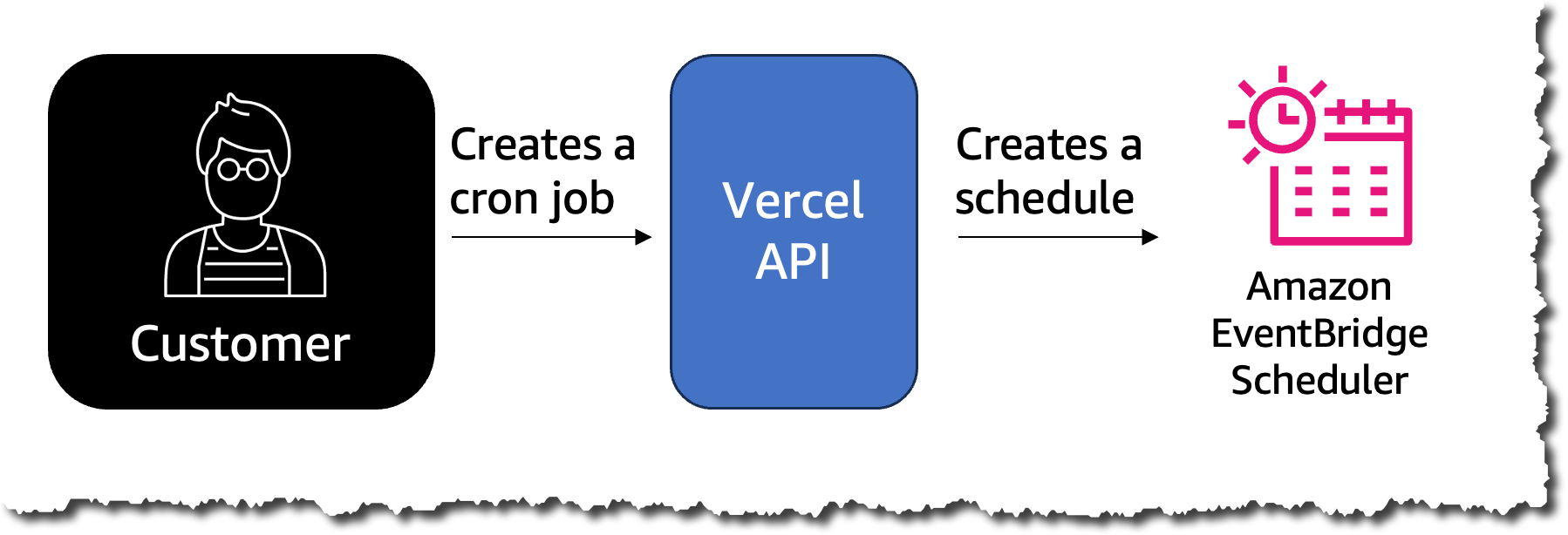
For creating a new cron job in Vercel, a customer needs to define the frequency in which this task will run and the API they want to invoke. Vercel, in the backend, uses EventBridge Scheduler and creates a new schedule when a new cron job is created.

To call the endpoint, the team used an AWS Lambda function that receives the path that needs to be invoked as input parameters.

How cron jobs works

When the time comes for the cron job to run, EventBridge Scheduler invokes the function, which then calls the customer website endpoint that was configured.

By the end of the week, Vincent and his team had a working prototype version of the cron jobs feature, and they won a prize at the hackathon.

Building Vercel Cron Jobs
After working for one week on this prototype in December, the hackathon ended, and Vincent and his team returned to their regular jobs. In early January 2023, Vicent and the Vercel team decided to take the project and turn it into a real product.

During the hackathon, the team built the fundamental parts of the feature, but there were some details that they needed to polish to make it production ready. Vincent and Andreas worked on the feature, and in less than two months, on February 22, 2023, they announced Vercel Cron Jobs to the public. The announcement tweet got over 400 thousand views, and the community loved the launch.

Tweet from Vercel announcing cron jobs

The adoption of this feature was very rapid. Within a few months of launching Cron Jobs, Vercel reached over 7 million cron invocations per week, and they expect the adoption to continue growing.

Cron jobs adoption

How Vercel Cron Jobs Handles Scale
With this pace of adoption, scaling this feature is crucial for Vercel. In order to scale the amount of cron invocations at this pace, they had to make some business and architectural decisions.

From the business perspective, they defined limits for their free-tier customers. Free-tier customers can create a maximum of two cron jobs in their account, and they can only have hourly schedules. This means that free customers cannot run a cron job every 30 minutes; instead, they can do it at most every hour. Only customers on Vercel paid tiers can take advantage of EventBridge Scheduler minute granularity for scheduling tasks.

Also, for free customers, minute precision isn’t guaranteed. To achieve this, Vincent took advantage of the time window configuration from EventBridge Scheduler. The flexible time window configuration allows you to start a schedule within a window of time. This means that the scheduled tasks are dispersed across the time window to reduce the impact of multiple requests on downstream services. This is very useful if, for example, many customers want to run their jobs at midnight. By using the flexible time window, the load can spread across a set window of time.

From the architectural perspective, Vercel took advantage of hosting the APIs and owning the functions that the cron jobs invoke.

Validating the calls

This means that when the Lambda function is started by EventBridge Scheduler, the function ends its run without waiting for a response from the API. Then Vercel validates if the cron job ran by checking if the API and Vercel function ran correctly from its observability mechanisms. In this way, the function duration is very short, less than 400 milliseconds. This allows Vercel to run a lot of functions per second without affecting their concurrency limits.

Lambda invocations and duration dashboard

What Was The Impact?
Vercel’s implementation of Cron Jobs is an excellent example of what serverless technologies enable. In two months, with two people working full time, they were able to launch a feature that their community needed and enthusiastically adopted. This feature shows the completeness of Vercel’s platform and is an important feature to convince their customers to move to a paid account.

If you want to get started with EventBridge Scheduler, see Serverless Land patterns for EventBridge Scheduler, where you’ll find a broad range of examples to help you.

Marcia

AWS SAM support for HashiCorp Terraform now generally available

Post Syndicated from Eric Johnson original https://aws.amazon.com/blogs/compute/aws-sam-support-for-hashicorp-terraform-now-generally-available/

In November 2022, AWS announced the public preview of AWS Serverless Application Model (AWS SAM) support for HashiCorp Terraform. The public preview introduces a subset of features to help Terraform users test serverless applications locally. Today, AWS is announcing the general availability of Terraform support in AWS SAM. This GA release expands AWS SAM’s feature set to enhance the local development of serverless applications.

Terraform and AWS SAM are both open-source frameworks allowing developers to define infrastructure as code (IaC). Developers can version and share infrastructure definitions in the same way they share code. However, because AWS SAM is specifically designed for serverless, it includes a command line interface (CLI) designed for serverless development. The CLI enables developers to create, debug, and deploy serverless applications using local emulators along with build and deployment tools. In this release, AWS SAM is making a subset of those tools to Terraform users as well.

Terraform support

The public preview blog demonstrated the initial support for Terraform. This blog demonstrates AWS SAM’s expanded feature set for local development. The blog also simplifies the implementation by using the Serverless.tf modules for AWS Lambda functions and layers rather than the native Terraform resources.

Modules can build the deployment artifacts for the Lambda functions and layers. Additionally, the module automatically generates the metadata required by AWS SAM to interface with the Terraform resources. To use the native Terraform resources, refer to the preview blog for metadata configuration.

Downloading the code

To explore AWS SAM’s support for Terraform, visit the aws-sam-terraform-examples repository. Clone the repository and change to the ga directory to get started:

git clone https://github.com/aws-samples/aws-sam-terraform-examples

cd ga

In this directory, there are two demo applications. Both of the applications are identical except for api_gateway_v1 uses an Amazon API Gateway REST API (v1) and api_gateway_v2 uses an Amazon API Gateway HTTP API (v2). Choose one and change to the tf-resources folder in that directory.

cd api_gateway_v1/tf-resources

Unless indicated otherwise, examples in this post reference the api_gateway_v1 application.

Code structure

Code structure diagram

Code structure diagram

Terraform supports spreading IaC across multiple files. Because of this, developers often collect all the Terraform files in a single directory and keep the resource files elsewhere. The example applications are configured this way.

Any Terraform or AWS SAM command must run from the location of the main.tf file, in this case, the tf-resources directory. Because AWS SAM commands are generally run from the project root, AWS SAM has a command to support nested structures. If running the sam build command from a nested folder, pass the flag terraform-project-root-path with a relative or absolute path to the root of the project.

Local invoke

The preview version of Terraform supported local invocation but the team simplified the experience with support for Serverless.tf. The demonstration applications have two functions in them. A responder function is the backend integration for the API Gateway endpoints and the Auth function is a custom authorizer. Find both module definitions in the functions.tf file.

Responder function

module "lambda_function_responder" {
  source        = "terraform-aws-modules/lambda/aws"
  version       = "~> 6.0"
  timeout       = 300
  source_path   = "${path.module}/src/responder/"
  function_name = "responder"
  handler       = "app.open_handler"
  runtime       = "python3.9"
  create_sam_metadata = true
  publish       = true
  allowed_triggers = {
    APIGatewayAny = {
      service    = "apigateway"
      source_arn = "${aws_api_gateway_rest_api.api.execution_arn}/*/*"
    }
  }
}

There are two important parameters:

  • source_path, which points to a local folder. Because this is not a zip file, Serverless.tf builds the artifacts as needed.
  • create_sam_data, which generates the metadata required for AWS SAM to locate the necessary files and modules.

To invoke the function locally, run the following commands:

  1. Run build to run any build scripts
    sam build --hook-name terraform --terraform-project-root-path ../
  2. Run local invoke to invoke the desired Lambda function
    sam local invoke --hook-name terraform --terraform-project-root-path ../ 'module.lambda_function_responder.aws_lambda_function.this[0]’

Because the project is Terraform, the hook-name parameter with the value terraform is required to let AWS SAM know how to proceed. The function name is a combination of the module name and the resource type that it becomes. If you are unsure of the name, run the command without the name:

sam local invoke --hook-name terraform

AWS SAM evaluates the template. If there is only one function, AWS SAM proceeds to invoke it. If there are more than one, as is the case here, AWS SAM asks you which one and provides a list of options.

Example error text

Example error text

Auth function

The authorizer function requires some input data as a mock event. To generate a mock event for the api_gateway_v1 project:

sam local generate-event apigateway authorizer

For the api_gateway_v2 project use:

sam local generate-event apigateway request-authorizer

The resulting events are different because API Gateway REST and HTTP APIs can handle custom authorizers differently. In these examples, REST uses a standard token authorizer and returns the proper AWS Identity and Access Management (IAM) role. The HTTP API example uses a simple pass or fail option.

Each of the examples already has the properly formatted event for testing included at events/auth.json. To invoke the Auth function, run the following:

sam local invoke --hook-name terraform 'module.lambda_function_auth.aws_lambda_function.this[0]' -e events/auth.json

There is no need to run the sam build command again because the application has not changed.

Local start-api

You can now emulate a local version of API Gateway with the generally available release. Each of these examples have two endpoints. One endpoint is open and a custom authorizer secures the other. Both return the same response:

{
  “message”: “Hello TF World”,
  “location”: “ip address”
}

To start the local emulator, run the following:

sam local start-api –hook-name terraform

AWS SAM starts the emulator and exposes the two endpoints for local testing.

Open endpoint

Using curl, test the open endpoint:

curl --location http://localhost:3000/open

The local emulator processes the request and provides a response in the terminal window. The emulator also includes logs from the Lambda function.

Open endpoint example output

Open endpoint example output

Auth endpoint

Test the secure endpoint and pass the extra required header, myheader:

curl -v --location http://localhost:3000/secure --header 'myheader: 123456789'

The endpoint returns an authorized response with the “Hello TF World” messaging. Try the endpoint again with an invalid header value:

curl --location http://localhost:3000/secure --header 'myheader: IamInvalid'

The endpoint returns an unauthenticated response.

Unauthenticated response

Unauthenticated response

Parameters

There are several options when using AWS SAM with Terraform:

  • Hook-name: required for every command when working with Terraform. This informs AWS SAM that the project is a Terraform application.
  • Skip-prepare-infra: AWS SAM uses the terraform plan command identify and process all the required artifacts. However, it should only be run when new resources are added or modified. This option keeps AWS SAM from running the terraform plan command. If this flag is passed and a plan does not exist, AWS SAM ignores the flag and run the terraform plan command anyway.
  • Prepare-infra: forces AWS SAM to run the terraform plan command.
  • Terraform-project-root-path: overrides the current directory as the root of the project. You can use an absolute path (/path/to/project/root) or relative path (../ or ../../).
  • Terraform-plan-file: allows a developer to specify a specific Terraform plan file. This command also enables Terraform users to use local commands.

Combining these options can create long commands:

sam build --hook-name terraform --terraform-project-root-path ../

or

sam local invoke –hook-name terraform –skip-prepare-infra 'module.lambda_function_responder.aws_lambda_function.this[0]'

You can use the samconfig file to set defaults, shorten commands, and optimize the development process. Using the new samconfig YAML support, the file looks like this:

version: 0.1
default:
  global:
    parameters:
      hook_name: terraform
      skip_prepare_infra: true
  build:
    parameters:
      terraform_project_root_path: ../

By setting these defaults, the command is now shorter:

sam local invoke 'module.lambda_function_responder.aws_lambda_function.this[0]'

AWS SAM now knows it is a Terraform project and skips the preparation task unless the Terraform plan is missing. If a plan refresh is required, add the –prepare-infra flag to override the default setting.

Deployment and remote debugging

The applications in these projects are regular Terraform applications. Deploy them as any other Terraform project.

terraform plan
terraform apply

Currently, AWS SAM accelerate does not support Terraform projects. However, because Terraform deploys using the API method, serverless applications deploy quickly. Use a third party watch and the terraform apply –auto-approve command to approximate this experience.

For logging, take advantage of the sam logs command. Refer to the deploy output of the projects for an example of tailing the logs for one or all of the resources.

HashiCorp Cloud Platform

HashiCorp Cloud Platform allows developers to run deployments using a centralized location to maintain security and state. When developers run builds in the cloud, a local plan file is not available for AWS SAM to use in local testing and debugging. However, developers can generate a plan in the cloud and use the plan locally for development. For instructions, refer to the documentation.

Conclusion

HashiCorp Terraform is a popular IaC framework for building applications in the AWS Cloud. AWS SAM is an IaC framework and the CLI is specifically designed to help developers build serverless applications.

This blog covers the new AWS SAM support for Terraform and how developers can use them together to maximize the development experience. The blog covers locally invoking a single function, emulating API Gateway endpoints locally, and testing a Lambda authorizer locally before deploying. Finally, the blog deploys the application and uses AWS SAM to monitor the deployed resources.

For more serverless learning resources, visit Serverless Land.

[$] Reducing the bandwidth needs for fwupd

Post Syndicated from jake original https://lwn.net/Articles/943498/

The Linux Vendor Firmware Service (LVFS)
provides a repository where vendors can upload firmware updates that can be
accessed by the fwupd
firmware update daemon on Linux systems. That mechanism allows users to keep
the hardware components of their systems up to date with the latest firmware
releases, but it has gotten so
popular that the daily metadata queries are starting to swamp the LVFS
content delivery network (CDN) server. So Richard Hughes, who developed
fwupd and LVFS, suggested
that it would make sense to start looking at ways to reduce that burden;
the idea was discussed in a recent thread on the Fedora devel mailing list.

KDE Gear 23.08 Arrived With Plenty of Changes (FOSS Force)

Post Syndicated from corbet original https://lwn.net/Articles/943596/

FOSS Force looks
at the KDE Gear 23.08 release
.

For this release, developers have been working in high gear (no pun
intended) as there were important improvements made to many of
Gear’s most iconic applications. Not only that: just a little over
a year after its arrival, the Kalendar app is going through a name
change as it morphs into what appears will eventually become a
full-featured email application.

Reduce the security and compliance risks of messaging apps with AWS Wickr

Post Syndicated from Anne Grahn original https://aws.amazon.com/blogs/security/reduce-the-security-and-compliance-risks-of-messaging-apps-with-aws-wickr/

Effective collaboration is central to business success, and employees today depend heavily on messaging tools. An estimated 3.09 billion mobile phone users access messaging applications (apps) to communicate, and this figure is projected to grow to 3.51 billion users in 2025.

This post highlights the risks associated with messaging apps and describes how you can use enterprise solutions — such as AWS Wickr — that combine end-to-end encryption with data retention to drive positive security and business outcomes.

The business risks of messaging apps

Evolving threats, flexible work models, and a growing patchwork of data protection and privacy regulations have made maintaining secure and compliant enterprise messaging a challenge.

The use of third-party apps for business-related messages on both corporate and personal devices can make it more difficult to verify that data is being adequately protected and retained. This can lead to business risk, particularly in industries with unique record-keeping requirements. Organizations in the financial services industry, for example, are subject to rules that include Securities and Exchange Commission (SEC) Rule 17a-4 and Financial Industry Regulatory Authority (FINRA) Rule 3120, which require them to preserve all pertinent electronic communications.

A recent Gartner report on the viability of mobile bring-your-own-device (BYOD) programs noted, “It is now logical to assume that most financial services organizations with mobile BYOD programs for regulated employees could be fined due to a lack of compliance with electronic communications regulations.”

In the public sector, U.S. government agencies are subject to records requests under the Freedom of Information Act (FOIA) and various state sunshine statutes. For these organizations, effectively retaining business messages is about more than supporting security and compliance—it’s about maintaining public trust.

Securing enterprise messaging

Enterprise-grade messaging apps can help you protect communications from unauthorized access and facilitate desired business outcomes.

Security — Critical security protocols protect messages and files that contain sensitive and proprietary data — such as personally identifiable information, protected health information, financial records, and intellectual property — in transit and at rest to decrease the likelihood of a security incident.

Control — Administrative controls allow you to add, remove, and invite users, and organize them into security groups with restricted access to features and content at their level. Passwords can be reset and profiles can be deleted remotely, helping you reduce the risk of data exposure stemming from a lost or stolen device.

Compliance — Information can be preserved in a customer-controlled data store to help meet requirements such as those that fall under the Federal Records Act (FRA) and National Archives and Records Administration (NARA), as well as SEC Rule 17a-4 and Sarbanes-Oxley (SOX).

Marrying encryption with data retention

Enterprise solutions bring end-to-end encryption and data retention together in support of a comprehensive approach to secure messaging that balances people, process, and technology.

End-to-end encryption

Many messaging apps offer some form of encryption, but not all of them use end-to-end encryption. End-to-end encryption is a secure communication method that protects data from unauthorized access, interception, or tampering as it travels from one endpoint to another.

In end-to-end encryption, encryption and decryption take place locally, on the device. Every call, message, and file is encrypted with unique keys and remains indecipherable in transit. Unauthorized parties cannot access communication content because they don’t have the keys required to decrypt the data.

Encryption in transit compared to end-to-end encryption

Encryption in transit encrypts data over a network from one point to another (typically between one client and one server); data might remain stored in plaintext at the source and destination storage systems. End-to-end encryption combines encryption in transit and encryption at rest to secure data at all times, from being generated and leaving the sender’s device, to arriving at the recipient’s device and being decrypted.

“Messaging is a critical tool for any organization, and end-to-end encryption is the security technology that provides organizations with the confidence they need to rely on it.” — CJ Moses, CISO and VP of Security Engineering at AWS

Data retention

While data retention is often thought of as being incompatible with end-to-end encryption, leading enterprise-grade messaging apps offer both, giving you the option to configure a data store of your choice to retain conversations without exposing them to outside parties. No one other than the intended recipients and your organization has access to the message content, giving you full control over your data.

How AWS can help

AWS Wickr is an end-to-end encrypted messaging and collaboration service that was built from the ground up with features designed to help you keep internal and external communications secure, private, and compliant. Wickr protects one-to-one and group messaging, voice and video calling, file sharing, screen sharing, and location sharing with 256-bit Advanced Encryption Standard (AES) encryption, and provides data retention capabilities.

Figure 1: How Wickr works

Figure 1: How Wickr works

With Wickr, each message gets a unique AES private encryption key, and a unique Elliptic-curve Diffie–Hellman (ECDH) public key to negotiate the key exchange with recipients. Message content — including text, files, audio, or video — is encrypted on the sending device (your iPhone, for example) using the message-specific AES key. This key is then exchanged via the ECDH key exchange mechanism, so that only intended recipients can decrypt the message.

“As former employees of federal law enforcement, the intelligence community, and the military, Qintel understands the need for enterprise-federated, secure communication messaging capabilities. When searching for our company’s messaging application we evaluated the market thoroughly and while there are some excellent capabilities available, none of them offer the enterprise security and administrative flexibility that Wickr does.”
Bill Schambura, CEO at Qintel

Wickr network administrators can configure and apply data retention to both internal and external communications in a Wickr network. This includes conversations with guest users, external teams, and other partner networks, so you can retain messages and files sent to and from the organization to help meet internal, legal, and regulatory requirements.

Figure 2: Data retention process

Figure 2: Data retention process

Data retention is implemented as an always-on recipient that is added to conversations, not unlike the blind carbon copy (BCC) feature in email. The data-retention process participates in the key exchange, allowing it to decrypt messages. The process can run anywhere: on-premises, on an Amazon Elastic Compute Cloud (Amazon EC2) instance, or at a location of your choice.

Wickr is a Health Insurance Portability and Accountability Act of 1996 (HIPAA)-eligible service, helping healthcare organizations and medical providers to conduct secure telehealth visits, send messages and files that contain protected health information, and facilitate real-time patient care.

Wickr networks can be created through the AWS Management Console, and workflows can be automated with Wickr bots. Wickr is currently available in the AWS US East (Northern Virginia), AWS GovCloud (US-West), AWS Canada (Central), and AWS Europe (London) Regions.

Keep your messages safe

Employees will continue to use messaging apps to chat with friends and family, and boost productivity at work. While many of these apps can introduce risks if not used properly in business settings, Wickr combines end-to-end encryption with data-retention capabilities to help you achieve security and compliance goals. Incorporating Wickr into a comprehensive approach to secure enterprise messaging that includes clear policies and security awareness training can help you to accelerate collaboration, while protecting your organization’s data.

To learn more and get started, visit the AWS Wickr webpage, or contact us.

Want more AWS Security news? Follow us on Twitter.

Anne Grahn

Anne Grahn

Anne is a Senior Worldwide Security GTM Specialist at AWS, based in Chicago. She has more than a decade of experience in the security industry, and focuses on effectively communicating cybersecurity risk. She maintains a Certified Information Systems Security Professional (CISSP) certification.

Tanvi Jain

Tanvi Jain

Tanvi is a Senior Technical Product Manager at AWS, based in New York. She focuses on building security-first features for customers, and is passionate about improving collaboration by building technology that is easy to use, scalable, and interoperable.

Security updates for Tuesday

Post Syndicated from corbet original https://lwn.net/Articles/943584/

Security updates have been issued by Debian (file and thunderbird), Fedora (exercism, libtommath, moby-engine, and python-pyramid), Oracle (cups and kernel), Red Hat (firefox, kernel, kernel-rt, kpatch-patch, and thunderbird), SUSE (amazon-ecs-init, buildah, busybox, djvulibre, exempi, firefox, gsl, keylime, kubernetes1.18, php7, and sccache), and Ubuntu (docker-registry and linux-azure-5.4).

Establishing a data perimeter on AWS: Allow access to company data only from expected networks

Post Syndicated from Laura Reith original https://aws.amazon.com/blogs/security/establishing-a-data-perimeter-on-aws-allow-access-to-company-data-only-from-expected-networks/

A key part of protecting your organization’s non-public, sensitive data is to understand who can access it and from where. One of the common requirements is to restrict access to authorized users from known locations. To accomplish this, you should be familiar with the expected network access patterns and establish organization-wide guardrails to limit access to known networks. Additionally, you should verify that the credentials associated with your AWS Identity and Access Management (IAM) principals are only usable within these expected networks. On Amazon Web Services (AWS), you can use the network perimeter to apply network coarse-grained controls on your resources and principals. In this fourth blog post of the Establishing a data perimeter on AWS series, we explore the benefits and implementation considerations of defining your network perimeter.

The network perimeter is a set of coarse-grained controls that help you verify that your identities and resources can only be used from expected networks.

To achieve these security objectives, you first must define what expected networks means for your organization. Expected networks usually include approved networks your employees and applications use to access your resources, such as your corporate IP CIDR range and your VPCs. There are also scenarios where you need to permit access from networks of AWS services acting on your behalf or networks of trusted third-party partners that you integrate with. You should consider all intended data access patterns when you create the definition of expected networks. Other networks are considered unexpected and shouldn’t be allowed access.

Security risks addressed by the network perimeter

The network perimeter helps address the following security risks:

Unintended information disclosure through credential use from non-corporate networks

It’s important to consider the security implications of having developers with preconfigured access stored on their laptops. For example, let’s say that to access an application, a developer uses a command line interface (CLI) to assume a role and uses the temporary credentials to work on a new feature. The developer continues their work at a coffee shop that has great public Wi-Fi while their credentials are still valid. Accessing data through a non-corporate network means that they are potentially bypassing their company’s security controls, which might lead to the unintended disclosure of sensitive corporate data in a public space.

Unintended data access through stolen credentials

Organizations are prioritizing protection from credential theft risks, as threat actors can use stolen credentials to gain access to sensitive data. For example, a developer could mistakenly share credentials from an Amazon EC2 instance CLI access over email. After credentials are obtained, a threat actor can use them to access your resources and potentially exfiltrate your corporate data, possibly leading to reputational risk.

Figure 1 outlines an undesirable access pattern: using an employee corporate credential to access corporate resources (in this example, an Amazon Simple Storage Service (Amazon S3) bucket) from a non-corporate network.

Figure 1: Unintended access to your S3 bucket from outside the corporate network

Figure 1: Unintended access to your S3 bucket from outside the corporate network

Implementing the network perimeter

During the network perimeter implementation, you use IAM policies and global condition keys to help you control access to your resources based on which network the API request is coming from. IAM allows you to enforce the origin of a request by making an API call using both identity policies and resource policies.

The following two policies help you control both your principals and resources to verify that the request is coming from your expected network:

  • Service control policies (SCPs) are policies you can use to manage the maximum available permissions for your principals. SCPs help you verify that your accounts stay within your organization’s access control guidelines.
  • Resource based policies are policies that are attached to resources in each AWS account. With resource based policies, you can specify who has access to the resource and what actions they can perform on it. For a list of services that support resource based policies, see AWS services that work with IAM.

With the help of these two policy types, you can enforce the control objectives using the following IAM global condition keys:

  • aws:SourceIp: You can use this condition key to create a policy that only allows request from a specific IP CIDR range. For example, this key helps you define your expected networks as your corporate IP CIDR range.
  • aws:SourceVpc: This condition key helps you check whether the request comes from the list of VPCs that you specified in the policy. In a policy, this condition key is used to only allow access to an S3 bucket if the VPC where the request originated matches the VPC ID listed in your policy.
  • aws:SourceVpce: You can use this condition key to check if the request came from one of the VPC endpoints specified in your policy. Adding this key to your policy helps you restrict access to API calls that originate from VPC endpoints that belong to your organization.
  • aws:ViaAWSService: You can use this key to write a policy to allow an AWS service that uses your credentials to make calls on your behalf. For example, when you upload an object to Amazon S3 with server-side encryption with AWS Key Management Service (AWS KMS) on, S3 needs to encrypt the data on your behalf. To do this, S3 makes a subsequent request to AWS KMS to generate a data key to encrypt the object. The call that S3 makes to AWS KMS is signed with your credentials and originates outside of your network.
  • aws:PrincipalIsAWSService: This condition key helps you write a policy to allow AWS service principals to access your resources. For example, when you create an AWS CloudTrail trail with an S3 bucket as a destination, CloudTrail uses a service principal, cloudtrail.amazonaws.com, to publish logs to your S3 bucket. The API call from CloudTrail comes from the service network.

The following table summarizes the relationship between the control objectives and the capabilities used to implement the network perimeter.

Control objective Implemented by using Primary IAM capability
My resources can only be accessed from expected networks. Resource-based policies aws:SourceIp
aws:SourceVpc
aws:SourceVpce
aws:ViaAWSService
aws:PrincipalIsAWSService
My identities can access resources only from expected networks. SCPs aws:SourceIp
aws:SourceVpc
aws:SourceVpce
aws:ViaAWSService

My resources can only be accessed from expected networks

Start by implementing the network perimeter on your resources using resource based policies. The perimeter should be applied to all resources that support resource- based policies in each AWS account. With this type of policy, you can define which networks can be used to access the resources, helping prevent access to your company resources in case of valid credentials being used from non-corporate networks.

The following is an example of a resource-based policy for an S3 bucket that limits access only to expected networks using the aws:SourceIp, aws:SourceVpc, aws:PrincipalIsAWSService, and aws:ViaAWSService condition keys. Replace <my-data-bucket>, <my-corporate-cidr>, and <my-vpc> with your information.

{
  "Version": "2012-10-17",
  "Statement": [
    {
      "Sid": "EnforceNetworkPerimeter",
      "Effect": "Deny",
      "Principal": "*",
      "Action": "s3:*",
      "Resource": [
        "arn:aws:s3:::<my-data-bucket>",
        "arn:aws:s3:::<my-data-bucket>/*"
      ],
      "Condition": {
        "NotIpAddressIfExists": {
          "aws:SourceIp": "<my-corporate-cidr>"
        },
        "StringNotEqualsIfExists": {
          "aws:SourceVpc": "<my-vpc>"
        },
        "BoolIfExists": {
          "aws:PrincipalIsAWSService": "false",
          "aws:ViaAWSService": "false"
        }
      }
    }
  ]
}

The Deny statement in the preceding policy has four condition keys where all conditions must resolve to true to invoke the Deny effect. Use the IfExists condition operator to clearly state that each of these conditions will still resolve to true if the key is not present on the request context.

This policy will deny Amazon S3 actions unless requested from your corporate CIDR range (NotIpAddressIfExists with aws:SourceIp), or from your VPC (StringNotEqualsIfExists with aws:SourceVpc). Notice that aws:SourceVpc and aws:SourceVpce are only present on the request if the call was made through a VPC endpoint. So, you could also use the aws:SourceVpce condition key in the policy above, however this would mean listing every VPC endpoint in your environment. Since the number of VPC endpoints is greater than the number of VPCs, this example uses the aws:SourceVpc condition key.

This policy also creates a conditional exception for Amazon S3 actions requested by a service principal (BoolIfExists with aws:PrincipalIsAWSService), such as CloudTrail writing events to your S3 bucket, or by an AWS service on your behalf (BoolIfExists with aws:ViaAWSService), such as S3 calling AWS KMS to encrypt or decrypt an object.

Extending the network perimeter on resource

There are cases where you need to extend your perimeter to include AWS services that access your resources from outside your network. For example, if you’re replicating objects using S3 bucket replication, the calls to Amazon S3 originate from the service network outside of your VPC, using a service role. Another case where you need to extend your perimeter is if you integrate with trusted third-party partners that need access to your resources. If you’re using services with the described access pattern in your AWS environment or need to provide access to trusted partners, the policy EnforceNetworkPerimeter that you applied on your S3 bucket in the previous section will deny access to the resource.

In this section, you learn how to extend your network perimeter to include networks of AWS services using service roles to access your resources and trusted third-party partners.

AWS services that use service roles and service-linked roles to access resources on your behalf

Service roles are assumed by AWS services to perform actions on your behalf. An IAM administrator can create, change, and delete a service role from within IAM; this role exists within your AWS account and has an ARN like arn:aws:iam::<AccountNumber>:role/<RoleName>. A key difference between a service-linked role (SLR) and a service role is that the SLR is linked to a specific AWS service and you can view but not edit the permissions and trust policy of the role. An example is AWS Identity and Access Management Access Analyzer using an SLR to analyze resource metadata. To account for this access pattern, you can exempt roles on the service-linked role dedicated path arn:aws:iam::<AccountNumber>:role/aws-service-role/*, and for service roles, you can tag the role with the tag network-perimeter-exception set to true.

If you are exempting service roles in your policy based on a tag-value, you must also include a policy to enforce the identity perimeter on your resource as shown in this sample policy. This helps verify that only identities from your organization can access the resource and cannot circumvent your network perimeter controls with network-perimeter-exception tag.

Partners accessing your resources from their own networks

There might be situations where your company needs to grant access to trusted third parties. For example, providing a trusted partner access to data stored in your S3 bucket. You can account for this type of access by using the aws:PrincipalAccount condition key set to the account ID provided by your partner.

The following is an example of a resource-based policy for an S3 bucket that incorporates the two access patterns described above. Replace <my-data-bucket>, <my-corporate-cidr>, <my-vpc>, <third-party-account-a>, <third-party-account-b>, and <my-account-id> with your information.

{
    "Version": "2012-10-17",
    "Statement": [
        {
            "Sid": "EnforceNetworkPerimeter",
            "Principal": "*",
            "Action": "s3:*",
            "Effect": "Deny",
            "Resource": [
              "arn:aws:s3:::<my-data-bucket>",
              "arn:aws:s3:::<my-data-bucket>/*"
            ],
            "Condition": {
                "NotIpAddressIfExists": {
                  "aws:SourceIp": "<my-corporate-cidr>"
                },
                "StringNotEqualsIfExists": {
                    "aws:SourceVpc": "<my-vpc>",
       "aws:PrincipalTag/network-perimeter-exception": "true",
                    "aws:PrincipalAccount": [
                        "<third-party-account-a>",
                        "<third-party-account-b>"
                    ]
                },
                "BoolIfExists": {
                    "aws:PrincipalIsAWSService": "false",
                    "aws:ViaAWSService": "false"
                },
                "ArnNotLikeIfExists": {
                    "aws:PrincipalArn": "arn:aws:iam::<my-account-id>:role/aws-service-role/*"
                }
            }
        }
    ]
}

There are four condition operators in the policy above, and you need all four of them to resolve to true to invoke the Deny effect. Therefore, this policy only allows access to Amazon S3 from expected networks defined as: your corporate IP CIDR range (NotIpAddressIfExists and aws:SourceIp), your VPC (StringNotEqualsIfExists and aws:SourceVpc), networks of AWS service principals (aws:PrincipalIsAWSService), or an AWS service acting on your behalf (aws:ViaAWSService). It also allows access to networks of trusted third-party accounts (StringNotEqualsIfExists and aws:PrincipalAccount: <third-party-account-a>), and AWS services using an SLR to access your resources (ArnNotLikeIfExists and aws:PrincipalArn).

My identities can access resources only from expected networks

Applying the network perimeter on identity can be more challenging because you need to consider not only calls made directly by your principals, but also calls made by AWS services acting on your behalf. As described in access pattern 3 Intermediate IAM roles for data access in this blog post, many AWS services assume an AWS service role you created to perform actions on your behalf. The complicating factor is that even if the service supports VPC-based access to your data — for example AWS Glue jobs can be deployed within your VPC to access data in your S3 buckets — the service might also use the service role to make other API calls outside of your VPC. For example, with AWS Glue jobs, the service uses the service role to deploy elastic network interfaces (ENIs) in your VPC. However, these calls to create ENIs in your VPC are made from the AWS Glue managed network and not from within your expected network. A broad network restriction in your SCP for all your identities might prevent the AWS service from performing tasks on your behalf.

Therefore, the recommended approach is to only apply the perimeter to identities that represent the highest risk of inappropriate use based on other compensating controls that might exist in your environment. These are identities whose credentials can be obtained and misused by threat actors. For example, if you allow your developers access to the Amazon Elastic Compute Cloud (Amazon EC2) CLI, a developer can obtain credentials from the Amazon EC2 instance profile and use the credentials to access your resources from their own network.

To summarize, to enforce your network perimeter based on identity, evaluate your organization’s security posture and what compensating controls are in place. Then, according to this evaluation, identify which service roles or human roles have the highest risk of inappropriate use, and enforce the network perimeter on those identities by tagging them with data-perimeter-include set to true.

The following policy shows the use of tags to enforce the network perimeter on specific identities. Replace <my-corporate-cidr>, and <my-vpc> with your own information.

{
  "Version": "2012-10-17",
  "Statement": [
    {
      "Sid": "EnforceNetworkPerimeter",
      "Effect": "Deny",
      "Action": "*",
      "Resource": "*",
      "Condition": {
        "BoolIfExists": {
          "aws:ViaAWSService": "false"
        },
        "NotIpAddressIfExists": {
          "aws:SourceIp": [
            "<my-corporate-cidr>"
          ]
        },
        "StringNotEqualsIfExists": {
          "aws:SourceVpc": [
            "<my-vpc>"
          ]
        }, 
       "ArnNotLikeIfExists": {
          "aws:PrincipalArn": [
            "arn:aws:iam::*:role/aws:ec2-infrastructure"
          ]
        },
        "StringEquals": {
          "aws:PrincipalTag/data-perimeter-include": "true"
        }
      }
    }
  ]
}

The above policy statement uses the Deny effect to limit access to expected networks for identities with the tag data-perimeter-include attached to them (StringEquals and aws:PrincipalTag/data-perimeter-include set to true). This policy will deny access to those identities unless the request is done by an AWS service on your behalf (aws:ViaAWSService), is coming from your corporate CIDR range (NotIpAddressIfExists and aws:SourceIp), or is coming from your VPCs (StringNotEqualsIfExists with the aws:SourceVpc).

Amazon EC2 also uses a special service role, also known as infrastructure role, to decrypt Amazon Elastic Block Store (Amazon EBS). When you mount an encrypted Amazon EBS volume to an EC2 instance, EC2 calls AWS KMS to decrypt the data key that was used to encrypt the volume. The call to AWS KMS is signed by an IAM role, arn:aws:iam::*:role/aws:ec2-infrastructure, which is created in your account by EC2. For this use case, as you can see on the preceding policy, you can use the aws:PrincipalArn condition key to exclude this role from the perimeter.

IAM policy samples

This GitHub repository contains policy examples that illustrate how to implement network perimeter controls. The policy samples don’t represent a complete list of valid access patterns and are for reference only. They’re intended for you to tailor and extend to suit the needs of your environment. Make sure you thoroughly test the provided example policies before implementing them in your production environment.

Conclusion

In this blog post you learned about the elements needed to build the network perimeter, including policy examples and strategies on how to extend that perimeter. You now also know different access patterns used by AWS services that act on your behalf, how to evaluate those access patterns, and how to take a risk-based approach to apply the perimeter based on identities in your organization.

For additional learning opportunities, see the Data perimeters on AWS. This information resource provides additional materials such as a data perimeter workshop, blog posts, whitepapers, and webinar sessions.

If you have feedback about this post, submit comments in the Comments section below. If you have questions about this post, start a new thread on the AWS Security, Identity, & Compliance re:Post or contact AWS Support.

Want more AWS Security news? Follow us on Twitter.

Author

Laura Reith

Laura is an Identity Solutions Architect at Amazon Web Services. Before AWS, she worked as a Solutions Architect in Taiwan focusing on physical security and retail analytics.

Monitoring green power and distributed edge computing infrastructure with Hiroshi Abe

Post Syndicated from Michael Kammer original https://blog.zabbix.com/monitoring-green-power-and-distributed-edge-computing-infrastructure-with-hiroshi-abe/26451/

With Zabbix Summit 2023 almost upon us, we’ve prepared a short and direct interview with Summit presenter Dr. Hiroshi Abe. Dr. Abe, a Research Engineer at the Toyota Motor Corporation, will share his thoughts about how Zabbix is the ideal solution when it comes to monitoring green power and distributed edge computing.

Please tell us a bit about yourself and your work.

I have been working for the Toyota Motor Corporation as a Research Engineer since 2019. My current research topics are related to large-scale monitoring systems that target connected car communications, edge computing, and green IT.

How long have you been using Zabbix? What Zabbix tasks are you involved in every day at your company?

Although I am technically retired, since 2015 I have been a member of the Monitoring team of the Network Operation Center, which is part of the ShowNet building team for the “Interop Tokyo” show event in Japan. I have been working with Kodai Terashima, CEO of Zabbix Japan, to build a monitoring system using Zabbix to monitor the event network required for ShowNet. In my office, we use Zabbix to monitor network and server equipment as well as our R&D environment.

Can you give us a sneak peek at what we can expect to hear during your Zabbix Summit speech?

You might expect to hear something deeply related to cars, and it’s true that much of the data created by cars can be processed using edge computing before being transported to the cloud. However, edge computing for the optimal use of green power will be the main topic of my talk. I’ll discuss a distributed monitoring system that uses Zabbix and Zabbix Proxy as a monitoring system for edge environments and green power in multiple data centers.

What made you go with Zabbix as a monitoring solution for green power and edge computing?

Zabbix Proxy is an easy-to-use distributed monitoring solution. A distributed monitoring system is a must for us because there will be multiple edge computing locations all over Japan.

Are you deploying Zabbix using containers to monitor your DCs?

We used RedHat’s OpenShift to implement the edge computing and data synchronization mechanism. We were able to easily deploy Zabbix in OpenShift as a container using Operator, and the monitoring environment using Zabbix containers is implemented in multiple DCs.

The post Monitoring green power and distributed edge computing infrastructure with Hiroshi Abe appeared first on Zabbix Blog.

Inconsistencies in the Common Vulnerability Scoring System (CVSS)

Post Syndicated from Bruce Schneier original https://www.schneier.com/blog/archives/2023/09/inconsistencies-in-the-common-vulnerability-scoring-system-cvss.html

Interesting research:

Shedding Light on CVSS Scoring Inconsistencies: A User-Centric Study on Evaluating Widespread Security Vulnerabilities

Abstract: The Common Vulnerability Scoring System (CVSS) is a popular method for evaluating the severity of vulnerabilities in vulnerability management. In the evaluation process, a numeric score between 0 and 10 is calculated, 10 being the most severe (critical) value. The goal of CVSS is to provide comparable scores across different evaluators. However, previous works indicate that CVSS might not reach this goal: If a vulnerability is evaluated by several analysts, their scores often differ. This raises the following questions: Are CVSS evaluations consistent? Which factors influence CVSS assessments? We systematically investigate these questions in an online survey with 196 CVSS users. We show that specific CVSS metrics are inconsistently evaluated for widespread vulnerability types, including Top 3 vulnerabilities from the ”2022 CWE Top 25 Most Dangerous Software Weaknesses” list. In a follow-up survey with 59 participants, we found that for the same vulnerabilities from the main study, 68% of these users gave different severity ratings. Our study reveals that most evaluators are aware of the problematic aspects of CVSS, but they still see CVSS as a useful tool for vulnerability assessment. Finally, we discuss possible reasons for inconsistent evaluations and provide recommendations on improving the consistency of scoring.

Here’s a summary of the research.

AWS Weekly Roundup: Farewell EC2-Classic, EBS at 15 Years, and More (Sept. 4, 2023)

Post Syndicated from Channy Yun original https://aws.amazon.com/blogs/aws/aws-weekly-roundup-farewell-ec2-classic-ebs-at-15-years-and-more-sept-4-2023/

Last week, there was some great reading about Amazon Elastic Compute Cloud (Amazon EC2) and Amazon Elastic Block Store (Amazon EBS) written by AWS tech leaders.

Dr. Werner Vogels wrote Farewell EC2-Classic, it’s been swell, celebrating the 17 years of loyal duty of the original version that started what we now know as cloud computing. You can read how it made the process of acquiring compute resources simple, even though the stack running behind the scenes was incredibly complex.

We have come a long way since 2006, and we’re not done innovating for our customers. As celebrated in this year’s AWS Storage Day, Amazon EBS was launched 15 years ago this month. James Hamilton, SVP and distinguished engineer at Amazon, wrote Amazon EBS at 15 Years, about how the service has evolved to handle over 100 trillion I/O operations a day, and transfers over 13 exabytes of data daily.

As Dr. Werner said in his piece, “it’s a reminder that building evolvable systems is a strategy, and revisiting your architectures with an open mind is a must.” Our innovation efforts driven by customer feedback continue today, and this week is no different.

Last Week’s Launches
Here are some launches that got my attention:

Renaming Amazon Kinesis Data Analytics to Amazon Managed Service for Apache Flink – You can now use Amazon Managed Service for Apache Flink, a fully managed and serverless service for you to build and run real-time streaming applications using Apache Flink. All your existing running applications in Kinesis Data Analytics will work as-is, without any changes. To learn more, see my blog post.

Extended Support for Amazon Aurora and Amazon RDS – You can now get more time for support, up to three years, for Amazon Aurora and Amazon RDS database instances running MySQL 5.7, PostgreSQL 11, and higher major versions. This e will allow you time to upgrade to a new major version to help you meet your business requirements even after the community ends support for these versions.

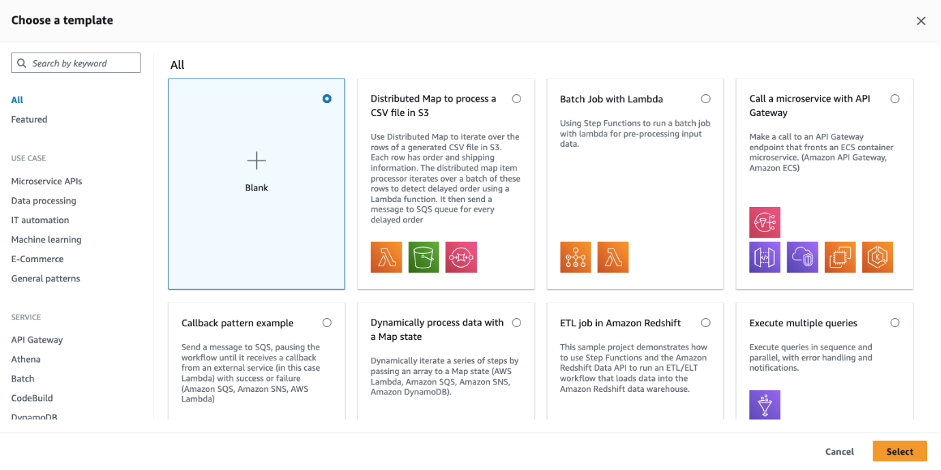
Enhanced Starter Template for AWS Step Functions Workflow Studio – You can now use starter templates to streamline the process of creating and prototyping workflows swiftly, plus a new code mode, which enables builders to move easily between design and code authoring views. With the improved authoring experience in Workflow Studio, you can seamlessly alternate between a drag-and-drop visual builder experience or the new code editor so that you can pick your preferred tool to accelerate development.

To learn more, see Enhancing Workflow Studio with new features for streamlined authoring in the AWS Compute Blog.

Email Delivery History for Every Email in Amazon SES – You can now troubleshoot individual email delivery problems, confirm delivery of critical messages, and identify engaged recipients on a granular, single email basis. Email senders can investigate trends in delivery performance and see delivery and engagement status for each email sent using Amazon SES Virtual Deliverability Manager.

Response Streaming through Amazon SageMaker Real-time Inference – You can now continuously stream inference responses back to the client to help you build interactive experiences for various generative AI applications such as chatbots, virtual assistants, and music generators.

For more details on how to use response streaming along with examples, see Invoke to Stream an Inference Response and How containers should respond in the AWS documentation, and Elevating the generative AI experience: Introducing streaming support in Amazon SageMaker hosting in the AWS Machine Learning Blog.

For a full list of AWS announcements, be sure to keep an eye on the What’s New at AWS page.

Other AWS News
Some other updates and news that you might have missed:

AI & Sports: How AWS & the NFL are Changing the Game – Over the last 5 years, AWS has partnered with the National Football League (NFL), helping fans better understand the game, helping broadcasters tell better stories, and helping teams use data to improve operations and player safety. Watch AWS CEO, Adam Selipsky, former NFL All-Pro Larry Fitzgerald, and the NFL Network’s Cynthia Frelund during their earlier livestream discussing the intersection of artificial intelligence and machine learning in sports.

Amazon Bedrock Story from Amazon Science – This is a good article explaining the benefits of using Amazon Bedrock to build and scale generative AI applications with leading foundation models, including Amazon’s Titan FMs, which focus on responsible AI to avoid toxic content.

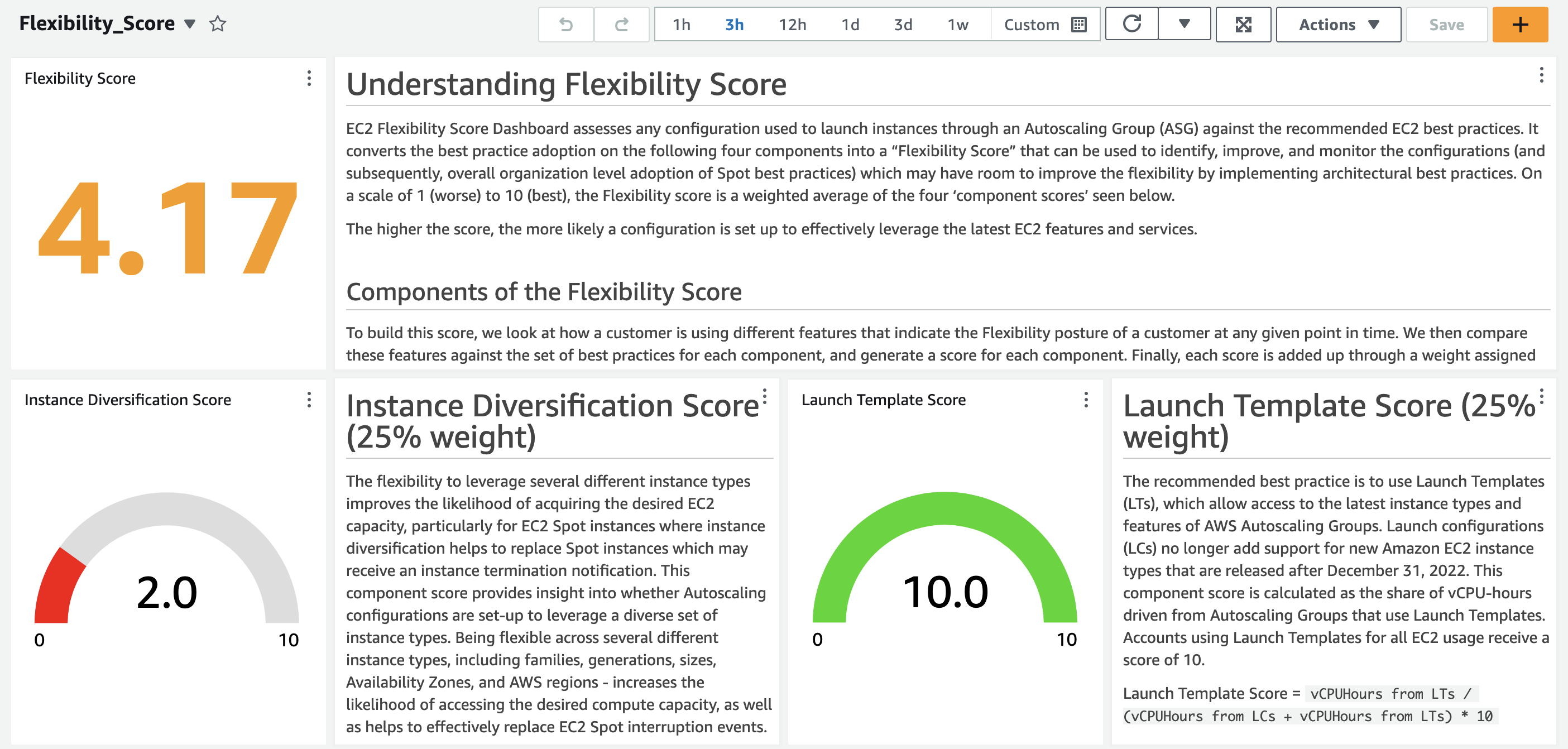
Amazon EC2 Flexibility Score – This is an open source tool developed by AWS to assess any configuration used to launch instances through an Auto Scaling Group (ASG) against the recommended EC2 best practices. It converts the best practice adoption into a “flexibility score” that can be used to identify, improve, and monitor the configurations.

To learn more open-source news and updates, see this newsletter curated by my colleague Ricardo to bring you the latest open source projects, posts, events, and more.

Upcoming AWS Events
Check your calendars and sign up for these AWS events:

AWS re:InventAWS re:Invent 2023Ready to start planning your re:Invent? Browse the session catalog now. Join us to hear the latest from AWS, learn from experts, and connect with the global cloud community.

AWS Global SummitsAWS Summits – The last in-person AWS Summit will be held in Johannesburg on Sept. 26.

AWS Community Days AWS Community Day– Join a community-led conference run by AWS user group leaders in your region: Aotearoa (Sept. 6), Lebanon (Sept. 9), Munich (Sept. 14), Argentina (Sept. 16), Spain (Sept. 23), and Chile (Sept. 30). Visit the landing page to check out all the upcoming AWS Community Days.

CDK Day – A community-led fully virtual event on Sept. 29 with tracks in English and Spanish about CDK and related projects. Learn more at the website.

You can browse all upcoming AWS-led in-person and virtual events, and developer-focused events such as AWS DevDay.

Channy

This post is part of our Weekly Roundup series. Check back each week for a quick roundup of interesting news and announcements from AWS!

MaxLinear MxL86282 for 8x 2.5GbE and 2x 10GbE Low Power Managed Switches Coming

Post Syndicated from Cliff Robinson original https://www.servethehome.com/maxlinear-mxl86282-for-8x-2-5gbe-and-2x-10gbe-low-power-managed-switches-coming/

The new MaxLinear MxL86282 is an 8-port 2.5GbE and 2-port 10GbE switch chip that is set to deliver lower power switches soon

The post MaxLinear MxL86282 for 8x 2.5GbE and 2x 10GbE Low Power Managed Switches Coming appeared first on ServeTheHome.

Данните на “Биволъ” – потвърдени при оперативно заснемане Забранената в Молдова партия “Шор” е плащала на гласуващите за ДПС

Post Syndicated from Николай Марченко original https://bivol.bg/moldova-dps-gagauzia-izborite-sor.html

понеделник 4 септември 2023


Представители на забранената в Република Молдова партия “Шор” на проруския олигарх беглец Илан Шор са агитирали и плащали в Гагаузия на гласуващите за ДПС. Това става ясно от видеоклиповете, публикувани…

[$] Security topics: io_uring, VM attestation, and random-reseed notifications

Post Syndicated from corbet original https://lwn.net/Articles/943239/

The kernel-development community has recently been discussing a number of
independent patches, each of which is intended to help improve the security
of deployed systems in some way. They touch on a number of areas within the
kernel, including the question of how widely io_uring should be available,
how to allow virtual machines to attest to their integrity, and the best
way to inform applications when their random-number generators need to be
reseeded.

The collective thoughts of the interwebz