Let’s Encrypt Continues Partnership with Princeton to Bolster Internet Security

Post Syndicated from Let's Encrypt original https://letsencrypt.org/2024/05/30/princeton-partnership.html

Let’s Encrypt is proud to have been partnering with the Center for Information Technology Policy team at Princeton University since 2018 to bolster defenses against Border Gateway Protocol (BGP) attacks. We’re thrilled to continue this partnership thanks to renewed funding from the Open Technology Fund.

“Let’s Encrypt has played a pivotal role in driving our research around protecting against BGP attacks and preventing the disruption such attacks can cause. We’re grateful for the partnership with Let’s Encrypt, as the largest Certificate Authority, in this critical work.” – Jennifer Rexford, Provost, Princeton University

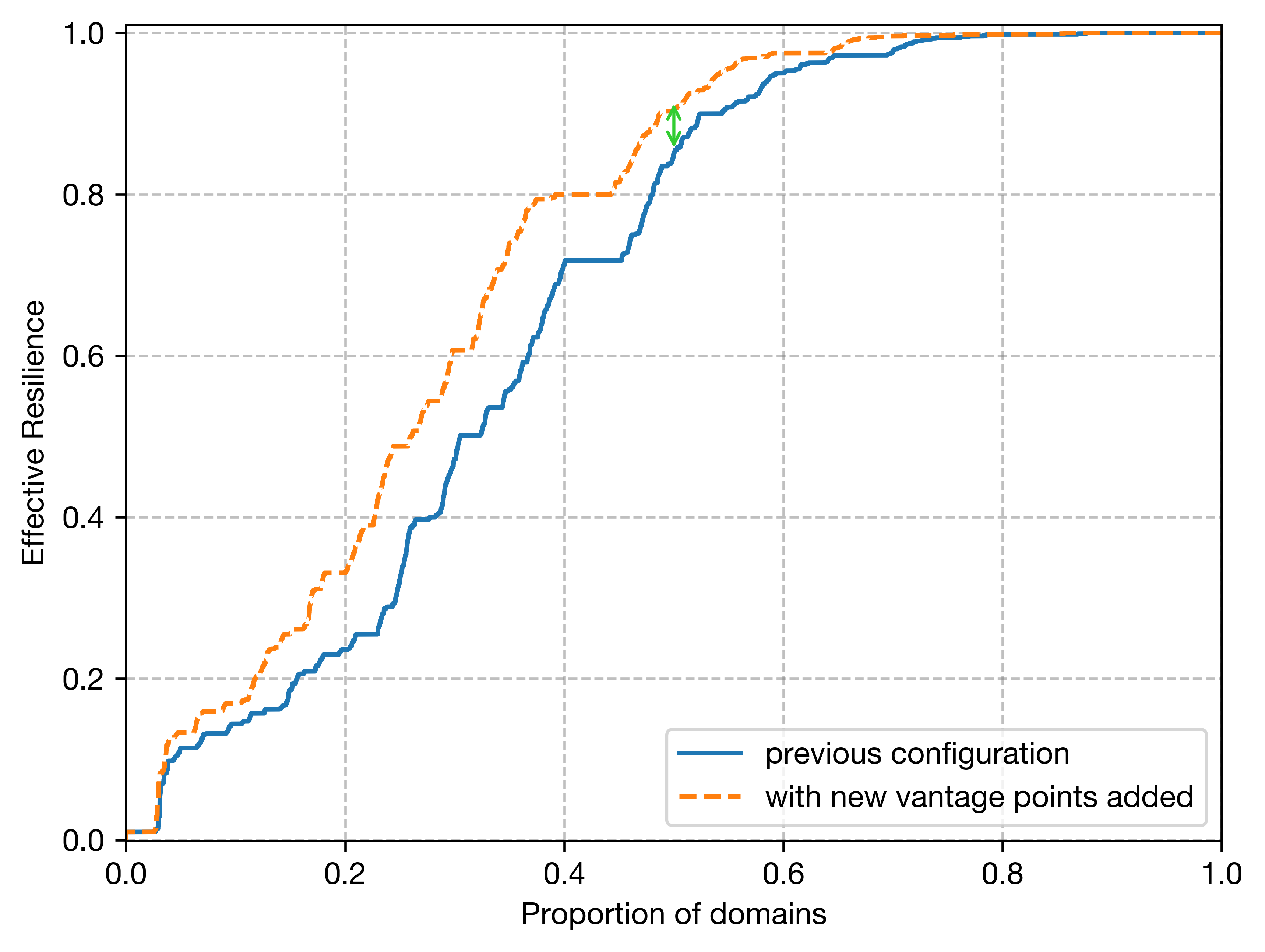
To date, our work with Princeton has focused on defending against BGP attacks on domain control validation via Multi-Perspective Issuance Corroboration (MPIC). This year, Let’s Encrypt is adding two new remote perspectives for domain validation. This means we will make five total validation requests, one from the primary datacenter and four from remote perspectives (previously two). Increased perspectives provide more domain validation security, thus improving visibility and protection against BGP attacks.

Additional global vantage points increase resilience of Let’s Encrypt issuance. Source: Princeton Center for Information Technology Policy

Additionally, we will be facilitating the adoption of ACME Renewal Information (ARI) in order to enable certificate authorities (CAs) to maintain continuity of service in a mass revocation/replacement event. If a BGP attack does occur, ARI will allow CAs to quickly and automatically revoke and replace certificates associated with the victim domain. Learn more about how to integrate ARI into an existing ACME client.

Our team will be working with the research groups of Professor Prateek Mittal to provide secure data related to increased perspectives and ARI, and contributing to research analysis and discoveries.

We’d like to thank Princeton University for their partnership on this important work, and Open Technology Fund for making it possible.

Internet Security Research Group (ISRG) is the parent organization of Let’s Encrypt, Prossimo, and Divvi Up. ISRG is a 501(c)(3) nonprofit. If you’d like to support our work, please consider getting involved, donating, or encouraging your company to become a sponsor.

Introducing support for Apache Kafka on Raft mode (KRaft) with Amazon MSK clusters

Post Syndicated from Kalyan Janaki original https://aws.amazon.com/blogs/big-data/introducing-support-for-apache-kafka-on-raft-mode-kraft-with-amazon-msk-clusters/

Organizations are adopting Apache Kafka and Amazon Managed Streaming for Apache Kafka (Amazon MSK) to capture and analyze data in real time. Amazon MSK helps you build and run production applications on Apache Kafka without needing Kafka infrastructure management expertise or having to deal with the complex overhead associated with setting up and running Apache Kafka on your own. Since its inception, Apache Kafka has depended on Apache Zookeeper for storing and replicating the metadata of Kafka brokers and topics. Starting from Apache Kafka version 3.3, the Kafka community has adopted KRaft (Apache Kafka on Raft), a consensus protocol, to replace Kafka’s dependency on ZooKeeper for metadata management. In the future, the Apache Kafka community plans to remove the ZooKeeper mode entirely.

Today, we’re excited to launch support for KRaft on new clusters on Amazon MSK starting from version 3.7. In this post, we walk you through some details around how KRaft mode helps over the ZooKeeper approach. We also guide you through the process of creating MSK clusters with KRaft mode and how to connect your application to MSK clusters with KRaft mode.

Why was ZooKeeper replaced with KRaft mode

The traditional Kafka architecture relies on ZooKeeper as the authoritative source for cluster metadata. Read and write access to metadata in ZooKeeper is funneled through a single Kafka controller. For clusters with a large number of partitions, this architecture can create a bottleneck during scenarios such as an uncontrolled broker shutdown or controller failover, due to a single-controller approach.

KRaft mode addresses these limitations by managing metadata within the Kafka cluster itself. Instead of relying on a separate ZooKeeper cluster, KRaft mode stores and replicates the cluster metadata across multiple Kafka controller nodes, forming a metadata quorum. The KRaft controller nodes comprise a Raft quorum that manages the Kafka metadata log. By distributing the metadata management responsibilities across multiple controller nodes, KRaft mode improves recovery time for scenarios such as uncontrolled broker shutdown or controller failover. For more details on KRaft mode and its implementation, refer to the KIP-500: Replace ZooKeeper with a Self-Managed Metadata Quorum.

The following figure compares the three-node MSK cluster architecture with ZooKeeper vs. KRaft mode.

Amazon MSK with KRaft mode

Until now, Amazon MSK has supported Kafka clusters that rely on ZooKeeper for metadata management. One of the key benefits of Amazon MSK is that it handles the complexity of setting up and managing the ZooKeeper cluster at no additional cost. Many organizations use Amazon MSK to run large, business-critical streaming applications that require splitting their traffic across thousands of partitions. As the size of a Kafka cluster grows, the amount of metadata generated within the cluster increases proportionally to the number of partitions.

Two key properties govern the number of partitions a Kafka cluster can support: the per-node partition count limit and the cluster-wide partition limit. As mentioned earlier, the metadata management system based on ZooKeeper imposed a bottleneck on the cluster-wide partition limitation in Apache Kafka. However, with the introduction of KRaft mode in Amazon MSK starting with version 3.7, Amazon MSK now enables the creation of clusters with up to 60 brokers vs. the default quota of 30 brokers in ZooKeeper mode. Kafka’s scalability still fundamentally relies on expanding the cluster by adding more nodes to increase overall capacity. Consequently, the cluster-wide partition limit continues to define the upper bounds of scalability within the Kafka system, because it determines the maximum number of partitions that can be distributed across the available nodes. Amazon MSK manages the KRaft controller nodes at no additional cost.

Create and access an MSK cluster with KRaft mode

Complete the following steps to configure an MSK cluster with KRaft mode:

  1. On the Amazon MSK console, choose Clusters in the navigation pane.
  2. Choose Create cluster.
  3. For Cluster creation method, select Custom create.
  4. For Cluster name, enter a name.
  5. For Cluster type¸ select Provisioned.
  6. For Apache Kafka version, choose 3.7.x.
  7. For Metadata mode, select KRaft.
  8. Leave the other settings as default and choose Create cluster.

When the cluster creation is successful, you can navigate to the cluster and choose View client integration information, which will provide details about the cluster bootstrap servers.

Adapt your client applications and tools for accessing MSK clusters with KRaft mode

With the adoption of KRaft mode in Amazon MSK, customers using client applications and tools that connect to ZooKeeper to interact with MSK clusters will need to update them to reflect the removal of ZooKeeper from the architecture. Starting with version 1.0, Kafka introduced the ability for admin tools to use the bootstrap servers (brokers) as input parameters instead of a ZooKeeper connection string, and started deprecating ZooKeeper connection strings starting with version 2.5. This change was part of the efforts to decouple Kafka from ZooKeeper and pave the way for its eventual replacement with KRaft mode for metadata management. Instead of specifying the ZooKeeper connection string, clients will need to use the bootstrap.servers configuration option to connect directly to the Kafka brokers. The following table summarizes these changes.

. With Zookeeper With KRaft
Client and Services bootstrap.servers=broker:<port> or zookeeper.connect=zookeeper:2181 (deprecated) bootstrap.servers=broker:<port>
Admin Tools kafka-topics --zookeeper zookeeper:2181 (deprecated) or kafka-topics —bootstrap-server broker:<port> … —command-config kafka-topics —bootstrap-server broker:<port> … —command-config

Summary

In this post, we discussed how Amazon MSK has launched support for KRaft mode for metadata management. We also described how KRaft works and how it’s different from ZooKeeper.

To get started, create a new cluster with KRaft mode using the AWS Management Console, and refer to the Amazon MSK Developer Guide for more information.


About the author

Kalyan Janaki is Senior Big Data & Analytics Specialist with Amazon Web Services. He helps customers architect and build highly scalable, performant, and secure cloud-based solutions on AWS.

Establishing a data perimeter on AWS: Analyze your account activity to evaluate impact and refine controls

Post Syndicated from Achraf Moussadek-Kabdani original https://aws.amazon.com/blogs/security/establishing-a-data-perimeter-on-aws-analyze-your-account-activity-to-evaluate-impact-and-refine-controls/

A data perimeter on Amazon Web Services (AWS) is a set of preventive controls you can use to help establish a boundary around your data in AWS Organizations. This boundary helps ensure that your data can be accessed only by trusted identities from within networks you expect and that the data cannot be transferred outside of your organization to untrusted resources. Review the previous posts in the Establishing a data perimeter on AWS series for information about the security objectives and foundational elements needed to define and enforce each perimeter type.

In this blog post, we discuss how to use AWS logging and analytics capabilities to help accelerate the implementation and effectively operate data perimeter controls at scale.

You start your data perimeter journey by identifying access patterns that you want to prevent and defining what trusted identities, trusted resources, and expected networks mean to your organization. After you define your trust boundaries based on your business and security requirements, you can use policy examples provided in the data perimeter GitHub repository to design the authorization controls for enforcing these boundaries. Before you enforce the controls in your organization, we recommend that you assess the potential impacts on your existing workloads. Performing the assessment helps you to identify unknown data access patterns missed during the initial design phase, investigate, and refine your controls to help ensure business continuity as you deploy them.

Finally, you should continuously monitor your controls to verify that they operate as expected and consistently align with your requirements as your business grows and relationships with your trusted partners change.

Figure 1 illustrates common phases of a data perimeter journey.

Figure 1: Data perimeter implementation journey

Figure 1: Data perimeter implementation journey

The usual phases of the data perimeter journey are:

  1. Examine your security objectives
  2. Set your boundaries
  3. Design data perimeter controls
  4. Anticipate potential impacts
  5. Implement data perimeter controls
  6. Monitor data perimeter controls
  7. Continuous improvement

In this post, we focus on phase 4: Anticipate potential impacts. We demonstrate how to analyze activity observed in your AWS environment to evaluate impact and refine your data perimeter controls. We also demonstrate how you can automate the analysis by using the data perimeter helper open source tool.

You can use the same techniques to support phase 6: Monitor data perimeter controls, where you will continuously monitor data access patterns in your organization and potentially troubleshoot permissions issues caused by overly restrictive or overly permissive policies as new data access paths are introduced.

Setting prerequisites for impact analysis

In this section, we describe AWS logging and analytics capabilities that you can use to analyze impact of data perimeter controls on your environment. We also provide instructions for configuring them.

While you might have some capabilities covered by other AWS tools (for example, AWS Security Lake) or external tools, the proposed approach remains applicable. For instance, if your logs are stored in an external security data lake or your configuration state recording is performed by an external cloud security posture management (CSPM) tool, you can extract and adapt the logic from this post to suit your context. The flexibility of this approach allows you to use the existing tools and processes in your environment while benefiting from the insights provided.

Pricing

Some of the required capabilities can generate additional costs in your environment.

AWS CloudTrail charges based on the number of events delivered to Amazon Simple Storage Service (Amazon S3). Note that the first copy of management events is free. To help control costs, you can use advanced event selectors to select only events that matter to your context. For more details, see CloudTrail pricing.

AWS Config charges based on the number of configuration items delivered, the AWS Config aggregator and advanced queries are included in AWS Config pricing. To help control costs, you can select which resource types AWS Config records or change the recording frequency. For more details, see AWS Config pricing.

Amazon Athena charges based on the number of terabytes of data scanned in Amazon S3. To help control costs, use the proposed optimized tables with partitioning and reduce the time frame of your queries. For more details, see Athena pricing.

AWS Identity and Access Management Access Analyzer doesn’t charge additional costs for external access findings. For more details, see IAM Access Analyzer pricing.

Create a CloudTrail trail to record access activity

The primary capability that you will use is a CloudTrail trail. CloudTrail records AWS API calls and events from your AWS accounts that contain the following information relevant to data perimeter objectives:

  • API calls performed by your identities or on your resources (record fields: eventSource, eventName)
  • Identity that performed API calls (record field: userIdentity)
  • Network origin of API calls (record fields: sourceIPAddress, vpcEndpointId)
  • Resources API calls are performed on (record fields: resources, requestParameters)

See the CloudTrail record contents page for the description of all available fields.

Data perimeter controls are meant to be applied across a broad set of accounts and resources, therefore, we recommend using a CloudTrail organization trail that collects logs across the AWS accounts in your organization. If you don’t have an organization trail configured, follow these steps or use one of the data perimeter helper templates for deploying prerequisites. If you use AWS services that support CloudTrail data events and want to analyze the associated API calls, enable the relevant data events.

Though CloudTrail provides you information about parameters of an API request, it doesn’t reflect values of AWS Identity and Access Management (IAM) condition keys present in the request. Thus, you still need to analyze the logs to help refine your data perimeter controls.

Create an Athena table to analyze CloudTrail logs

To ease and accelerate logs analysis, use Athena to query and extract relevant data from the log files stored by CloudTrail in an S3 bucket.

To create an Athena table

  1. Open the Athena console. If this is your first time visiting the Athena console in your current AWS Region, choose Edit settings to set up a query result location in Amazon S3.
  2. Next, navigate to the Query editor and create a SQL table by entering the following DDL statement into the Athena console query editor. Make sure to replace s3://<BUCKET_NAME_WITH_PREFIX>/AWSLogs/<ORGANIZATION_ID>/ to point to the S3 bucket location that contains your CloudTrail log data and <REGIONS> with the list of AWS regions where you want to analyze API calls. For example, to analyze API calls made in the AWS Regions Paris (eu-west-3) and North Virginia (us-east-1), use eu-west-3,us-east-1. We recommend that you include us-east-1 to retrieve API calls performed on global resources such as IAM roles.
    CREATE EXTERNAL TABLE IF NOT EXISTS cloudtrail_logs (
        eventVersion STRING,
        userIdentity STRUCT<
            type: STRING,
            principalId: STRING,
            arn: STRING,
            accountId: STRING,
            invokedBy: STRING,
            accessKeyId: STRING,
            userName: STRING,
            sessionContext: STRUCT<
                attributes: STRUCT<
                    mfaAuthenticated: STRING,
                    creationDate: STRING>,
                sessionIssuer: STRUCT<
                    type: STRING,
                    principalId: STRING,
                    arn: STRING,
                    accountId: STRING,
                    userName: STRING>,
                ec2RoleDelivery: STRING,
                webIdFederationData: MAP<STRING,STRING>>>,
        eventTime STRING,
        eventSource STRING,
        eventName STRING,
        awsRegion STRING,
        sourceIpAddress STRING,
        userAgent STRING,
        errorCode STRING,
        errorMessage STRING,
        requestParameters STRING,
        responseElements STRING,
        additionalEventData STRING,
        requestId STRING,
        eventId STRING,
        readOnly STRING,
        resources ARRAY<STRUCT<
            arn: STRING,
            accountId: STRING,
            type: STRING>>,
        eventType STRING,
        apiVersion STRING,
        recipientAccountId STRING,
        serviceEventDetails STRING,
        sharedEventID STRING,
        vpcEndpointId STRING,
        tlsDetails STRUCT<
            tlsVersion:string,
            cipherSuite:string,
            clientProvidedHostHeader:string
        >
    )
    PARTITIONED BY (
    `p_account` string,
    `p_region` string,
    `p_date` string
    )
    ROW FORMAT SERDE 'org.apache.hive.hcatalog.data.JsonSerDe'
    STORED AS INPUTFORMAT 'com.amazon.emr.cloudtrail.CloudTrailInputFormat'
    OUTPUTFORMAT 'org.apache.hadoop.hive.ql.io.HiveIgnoreKeyTextOutputFormat'
    LOCATION 's3://<BUCKET_NAME_WITH_PREFIX>/AWSLogs/<ORGANIZATION_ID>/'
    TBLPROPERTIES (
        'projection.enabled'='true',
        'projection.p_date.type'='date',
        'projection.p_date.format'='yyyy/MM/dd', 
        'projection.p_date.interval'='1', 
        'projection.p_date.interval.unit'='DAYS', 
        'projection.p_date.range'='2022/01/01,NOW', 
        'projection.p_region.type'='enum',
        'projection.p_region.values'='<REGIONS>',
        'projection.p_account.type'='injected',
    'storage.location.template'='s3://<BUCKET_NAME_WITH_PREFIX>/AWSLogs/<ORGANIZATION_ID>/${p_account}/CloudTrail/${p_region}/${p_date}'
    )

  3. Finally, run the Athena query and confirm that the cloudtrail_logs table is created and appears under the list of Tables.

Create an AWS Config aggregator to enrich query results

To further reduce manual steps for retrieval of relevant data about your environment, use the AWS Config aggregator and advanced queries to enrich CloudTrail logs with the configuration state of your resources.

To have a view into the resource configurations across the accounts in your organization, we recommend using the AWS Config organization aggregator. You can use an existing aggregator or create a new one. You can also use one of the data perimeter helper templates for deploying prerequisites.

Create an IAM Access Analyzer external access analyzer

To identify resources in your organization that are shared with an external entity, use the IAM Access Analyzer external access analyzer with your organization as the zone of trust.

You can use an existing external access analyzer or create a new one.

Install the data perimeter helper tool

Finally, you will use the data perimeter helper, an open-source tool with a set of purpose-built data perimeter queries, to automate the logs analysis process.

Clone the data perimeter helper repository and follow instructions in the Getting Started section.

Analyze account activity and refine your data perimeter controls

In this section, we provide step-by-step instructions for using the AWS services and tools you configured to effectively implement common data perimeter controls. We first demonstrate how to use the configured CloudTrail trail, Athena table, and AWS Config aggregator directly. We then show you how to accelerate the analysis with the data perimeter helper.

Example 1: Review API calls to untrusted S3 buckets and refine your resource perimeter policy

One of the security objectives targeted by companies is ensuring that their identities can only put or get data to and from S3 buckets belonging to their organization to manage the risk of unintended data disclosure or access to unapproved data. You can help achieve this security objective by implementing a resource perimeter on your identities using a service control policy (SCP). Start crafting your policy by referring to the resource_perimeter_policy template provided in the data perimeter policy examples repository:

{
  "Version": "2012-10-17",
  "Statement": [
    {
      "Sid": "EnforceResourcePerimeterAWSResourcesS3",
      "Effect": "Deny",
      "Action": [
        "s3:GetObject",
        "s3:PutObject",
        "s3:PutObjectAcl"
      ],
      "Resource": "*",
      "Condition": {
        "StringNotEqualsIfExists": {
          "aws:ResourceOrgID": "<my-org-id>",
          "aws:PrincipalTag/resource-perimeter-exception": "true"
        },
        "ForAllValues:StringNotEquals": {
          "aws:CalledVia": [
            "dataexchange.amazonaws.com",
            "servicecatalog.amazonaws.com"
          ]
        }
      }
    }
  ]
}

Replace the value of the aws:ResourceOrgID condition key with your organization identifier. See the GitHub repository README file for information on other elements of the policy.

As a security engineer, you can anticipate potential impacts by reviewing account activity and CloudTrail logs. You can perform this analysis manually or use the data perimeter helper tool to streamline the process.

First, let’s explore the manual approach to understand each step in detail.

Perform impact analysis without tooling

To assess the effects of the preceding policy before deployment, review your CloudTrail logs to understand on which S3 buckets API calls are performed. The targeted Amazon S3 API calls are recorded as CloudTrail data events, so make sure you enable the S3 data event for this example. CloudTrail logs provide request parameters from which you can extract the bucket names.

Below is an example Athena query to list the targeted S3 API calls made by principals in the selected account within the last 7 days. The 7-day timeframe is set to verify that the query runs quickly, but you can adjust the timeframe later to suit your specific requirements and obtain more realistic results. Replace <ACCOUNT_ID> with the AWS account ID you want to analyze the activity of.

SELECT
  useridentity.sessioncontext.sessionissuer.arn AS principal_arn,
  useridentity.type AS principal_type,
  eventname,
  JSON_EXTRACT_SCALAR(requestparameters, '$.bucketName') AS bucketname,
  resources,
  COUNT(*) AS nb_reqs
FROM "cloudtrail_logs"
WHERE
  p_account = '<ACCOUNT_ID>'
  AND p_date BETWEEN DATE_FORMAT(CURRENT_DATE - INTERVAL '7' day, '%Y/%m/%d') AND DATE_FORMAT(CURRENT_DATE, '%Y/%m/%d')
  AND eventsource = 's3.amazonaws.com'
  -- Get only requests performed by principals in the selected account
  AND useridentity.accountid = '<ACCOUNT_ID>'
  -- Keep only the targeted API calls
  AND eventname IN ('GetObject', 'PutObject', 'PutObjectAcl')
  -- Remove API calls made by AWS service principals - `useridentity.principalid` field in CloudTrail log equals `AWSService`.
  AND useridentity.principalid != 'AWSService'
  -- Remove API calls made by service-linked roles in the selected account
    AND COALESCE(NOT regexp_like(useridentity.sessioncontext.sessionissuer.arn, '(:role/aws-service-role/)'), True)
  -- Remove calls with errors
  AND errorcode IS NULL
GROUP BY
  useridentity.sessioncontext.sessionissuer.arn,
  useridentity.type,
  eventname,
  JSON_EXTRACT_SCALAR(requestparameters, '$.bucketName'),
  resources

As shown in Figure 2, this query provides you with a list of the S3 bucket names that are being accessed by principals in the selected account, while removing calls made by service-linked roles (SLRs) because they aren’t governed by SCPs. In this example, the IAM roles AppMigrator and PartnerSync performed API calls on S3 buckets named app-logs-111111111111, raw-data-111111111111, expected-partner-999999999999, and app-migration-888888888888.

Figure 2: Sample of the Athena query results

Figure 2: Sample of the Athena query results

The CloudTrail record field resources provides information on the list of resources accessed in an event. The field is optional and can notably contain the resource Amazon Resource Names (ARNs) and the account ID of the resource owner. You can use this record field to detect resources owned by accounts not in your organization. However, because this record field is optional, to scale your approach you can also use the AWS Config aggregator data to list resources currently deployed in your organization.

To know if the S3 buckets belong to your organization or not, you can run the following AWS Config advanced query. This query lists the S3 buckets inventoried in your AWS Config organization aggregator.

SELECT
  accountId,
  awsRegion,
  resourceId
WHERE
  resourceType = 'AWS::S3::Bucket'

As shown in Figure 3, buckets expected-partner-999999999999 and app-migration-888888888888 aren’t inventoried and therefore don’t belong to this organization.

Figure 3: Sample of the AWS Config advanced query results

Figure 3: Sample of the AWS Config advanced query results

By combining the results of the Athena query and the AWS Config advanced query, you can now pinpoint S3 API calls made by principals in the selected account on S3 buckets that are not part of your AWS organization.

If you do nothing, your starting resource perimeter policy would block access to these buckets. Therefore, you should investigate with your development teams why your principals performed those API calls and refine your policy if there is a legitimate reason, such as integration with a trusted third party. If you determine, for example, that your principals have a legitimate reason to access the bucket expected-partner-999999999999, you can discover the account ID (<third-party-account-a>) that owns the bucket by reviewing the record field resources in your CloudTrail logs or investigating with your developers and edit the policy as follows:

{
  "Version": "2012-10-17",
  "Statement": [
    {
      "Sid": "EnforceResourcePerimeterAWSResourcesS3",
      "Effect": "Deny",
      "Action": [
        "s3:GetObject",
        "s3:PutObject",
        "s3:PutObjectAcl"
      ],
      "Resource": "*",
      "Condition": {
        "StringNotEqualsIfExists": {
          "aws:ResourceOrgID": "<my-org-id>",
          "aws:ResourceAccount": "<third-party-account-a>",
          "aws:PrincipalTag/resource-perimeter-exception": "true"
        },
        "ForAllValues:StringNotEquals": {
          "aws:CalledVia": [
            "dataexchange.amazonaws.com",
            "servicecatalog.amazonaws.com"
          ]
        }
      }
    }
  ]
}

Now your resource perimeter policy helps ensure that access to resources that belong to your trusted third-party partner aren’t blocked by default.

Automate impact analysis with the data perimeter helper

Data perimeter helper provides queries that perform and combine the results of Athena and AWS Config aggregator queries on your behalf to accelerate policy impact analysis.

For this example, we use the s3_scp_resource_perimeter query to analyze S3 API calls made by principals in a selected account on S3 buckets not owned by your organization or inventoried in your AWS Config aggregator.

You can first add the bucket names of your trusted third-party partners that are already known in the data perimeter helper configuration file (resource_perimeter_trusted_bucket parameter). You then run the data perimeter helper query using the following command. Replace <ACCOUNT_ID> with the AWS account ID you want to analyze the activity of.

data_perimeter_helper --list-account <ACCOUNT_ID> --list-query s3_scp_resource_perimeter

Data perimeter helper performs these actions:

  • Runs an Athena query to list S3 API calls made by principals in the selected account, filtering out:
    • S3 API calls made at the account level (for example, s3:ListAllMyBuckets)
    • S3 API calls made on buckets that your organization owns
    • S3 API calls made on buckets listed as trusted in the data perimeter helper configuration file (resource_perimeter_trusted_bucket parameter)
    • API calls made by service principals and SLRs because SCPs don’t apply to them
    • API calls with errors
  • Gets the list of S3 buckets in your organization using an AWS Config advanced query.
  • Removes from the Athena query’s results API calls performed on S3 buckets inventoried in your AWS Config aggregator. This is done as a second clean-up layer in case the optional CloudTrail record field resources isn’t populated.

Data perimeter helper exports the results in the selected format (HTML, Excel, or JSON) so that you can investigate API calls that don’t align with your initial resource perimeter policy. Figure 4 shows a sample of results in HTML:

Figure 4: Sample of the s3_scp_resource_perimeter query results

Figure 4: Sample of the s3_scp_resource_perimeter query results

The preceding data perimeter helper query results indicate that the IAM role PartnerSync performed API calls on S3 buckets that aren’t part of the organization, giving you a head start in your investigation efforts. Following the investigation, you can document a trusted partner bucket in the data perimeter helper configuration file to filter out the associated API calls from subsequent queries:

111111111111:
  network_perimeter_expected_public_cidr: [
  ]
  network_perimeter_trusted_principal: [
  ]
  network_perimeter_expected_vpc: [
  ]
  network_perimeter_expected_vpc_endpoint: [
  ]
  identity_perimeter_trusted_account: [
  ]
  identity_perimeter_trusted_principal: [
  ]
  resource_perimeter_trusted_bucket: [
    expected-partner-999999999999
  ]

With a single command line, you have identified for your selected account the S3 API calls crossing your resource perimeter boundaries. You can now refine and implement your controls while lowering the risk of potential impacts. If you want to scale your approach to other accounts, you just need to run the same query against them.

Example 2: Review granted access and API calls by untrusted identities on your S3 buckets and refine your identity perimeter policy

Another security objective pursued by companies is ensuring that their S3 buckets can be accessed only by principals belonging to their organization to manage the risk of unintended access to company data. You can help achieve this security objective by implementing an identity perimeter on your buckets. You can start by crafting your identity perimeter policy using policy samples provided in the data perimeter policy examples repository.

{
  "Version": "2012-10-17",
  "Statement": [
    {
      "Sid": "EnforceIdentityPerimeter",
      "Effect": "Deny",
      "Principal": "*",
      "Action": "s3:*",
      "Resource": [
        "arn:aws:s3:::<my-data-bucket>",
        "arn:aws:s3:::<my-data-bucket>/*"
      ],
      "Condition": {
        "StringNotEqualsIfExists": {
          "aws:PrincipalOrgID": "<my-org-id>",
          "aws:PrincipalAccount": [
            "<load-balancing-account-id>",
            "<third-party-account-a>",
            "<third-party-account-b>"
          ]
        },
        "BoolIfExists": {
          "aws:PrincipalIsAWSService": "false"
        }
      }
    }
  ]
}

Replace values of the aws:PrincipalOrgID and aws:PrincipalAccount condition keys based on what trusted identities mean for your organization and on your knowledge of the intended access patterns you need to support. See the GitHub repository README file for information on elements of the policy.

To assess the effects of the preceding policy before deployment, review your IAM Access Analyzer external access findings to discover the external entities that are allowed in your S3 bucket policies. Then to accelerate your analysis, review your CloudTrail logs to learn who is performing API calls on your S3 buckets. This can help you accelerate the removal of granted but unused external accesses.

Data perimeter helper provides queries that streamline these processes for you:

Run these queries by using the following command, replacing <ACCOUNT_ID> with the AWS account ID of the buckets you want to analyze the access activity of:

data_perimeter_helper --list-account <ACCOUNT_ID> --list-query s3_external_access_org_boundary s3_bucket_policy_identity_perimeter_org_boundary

The query s3_external_access_org_boundary performs this action:

  • Extracts IAM Access Analyzer external access findings from either:
    • IAM Access Analyzer if the variable external_access_findings in the data perimeter variable file is set to IAM_ACCESS_ANALYZER
    • AWS Security Hub if the same variable is set to SECURITY_HUB. Security Hub provides cross-Region aggregation, enabling you to retrieve external access findings across your organization

The query s3_external_access_org_boundary performs this action:

  • Runs an Athena query to list S3 API calls made on S3 buckets in the selected account, filtering out:
    • API calls made by principals in the same organization
    • API calls made by principals belonging to trusted accounts listed in the data perimeter configuration file (identity_perimeter_trusted_account parameter)
    • API calls made by trusted identities listed in the data perimeter configuration file (identity_perimeter_trusted_principal parameter)

Figure 5 shows a sample of results for this query in HTML:

Figure 5: Sample of the s3_bucket_policy_identity_perimeter_org_boundary and s3_external_access_org_boundary queries results

Figure 5: Sample of the s3_bucket_policy_identity_perimeter_org_boundary and s3_external_access_org_boundary queries results

The result shows that only the bucket my-bucket-open-to-partner grants access (PutObject) to principals not in your organization. Plus, in the configured time frame, your CloudTrail trail hasn’t recorded S3 API calls made by principals not in your organization on buckets that the account 111111111111 owns.

This means that your proposed identity perimeter policy accounts for the access patterns observed in your environment. After reviewing with your developers, if the granted action on the bucket my-bucket-open-to-partner is not needed, you could deploy it on the analyzed account with a reduced risk of impacting business applications.

Example 3: Investigate resource configurations to support network perimeter controls implementation

The blog post Require services to be created only within expected networks provides an example of an SCP you can use to make sure that AWS Lambda functions can only be created or updated if associated with an Amazon Virtual Private Cloud (Amazon VPC).

{
  "Version": "2012-10-17",
  "Statement": [
    {
      "Sid": "EnforceVPCFunction",
      "Action": [
          "lambda:CreateFunction",
          "lambda:UpdateFunctionConfiguration"
       ],
      "Effect": "Deny",
      "Resource": "*",
      "Condition": {
        "Null": {
           "lambda:VpcIds": "true"
        }
      }
    }
  ]
}

Before implementing the preceding policy or to continuously review the configuration of your Lambda functions, you can use your AWS Config aggregator to understand whether there are functions in your environment that aren’t attached to a VPC.

Data perimeter helper provides the referential_lambda_function query that helps you automate the analysis. Run the query by using the following command:

data_perimeter_helper --list-query referential_lambda_function

Figure 6 shows a sample of results for this query in HTML:

Figure 6: Sample of the referential_lambda_function query results

Figure 6: Sample of the referential_lambda_function query results

By reviewing the inVpc column, you can quickly identify functions that aren’t currently associated with a VPC and investigate with your development teams before enforcing your network perimeter controls.

Example 4: Investigate access denied errors to help troubleshoot your controls

While you refine your data perimeter controls or after deploying them, you might encounter API calls that fail with an access denied error message. You can use CloudTrail logs to review those API calls and use the record to investigate the root-cause.

Data perimeter helper provides the common_only_denied query, which lists the API calls with access denied errors in the configured time frame. Run the query by using the following command, replacing <ACCOUNT_ID> with your account ID:

data_perimeter_helper --list-account <ACCOUNT_ID> --list-query common_only_denied

Figure 7 shows a sample of results for this query in HTML:

Figure 7: Sample of the common_only_denied query results

Figure 7: Sample of the common_only_denied query results

Let’s say you want to review S3 API calls with access denied error messages for one of your developers who uses a role called DevOps. You can update, in the HTML report, the input fields below the principal_arn and eventsource columns to match your lookup.

Then by reviewing the columns principal_arn, eventname, isAssumableBy, and nb_reqs, you learn that the role DevOps is assumable through a SAML provider and performed two GetObject API calls that failed with an access denied error message. By reviewing the sourceipaddress field you discover that the request has been performed from an IP address outside of your network perimeter boundary, you can then advise your developer to perform the API calls again from an expected network.

Data perimeter helper provides several ready-to-use queries and a framework to add new queries based on your data perimeter objectives and needs. See Guidelines to build a new query for detailed instructions.

Clean up

If you followed the configuration steps in this blog only to test the solution, you can clean up your account to avoid recurring charges.

If you used the data perimeter helper deployment templates, use the respective infrastructure as code commands to delete the provisioned resources (for example, for Terraform, terraform destroy).

To delete configured resources manually, follow these steps:

  • If you created a CloudTrail organization trail:
    • Navigate to the CloudTrail console, select the trail your created, and choose Delete.
    • Navigate to the Amazon S3 console and delete the S3 bucket you created to store CloudTrail logs from all accounts.
  • If you created an Athena table:
    • Navigate to the Athena console and select Query editor in the left navigation panel.
    • Run the following SQL query by replacing <TABLE_NAME> with the name of the created table:
      DROP TABLE <TABLE_NAME>

  • If you created an AWS Config aggregator:
    • Navigate to the AWS Config console and select Aggregators in the left navigation panel.
    • Select the created aggregator and select Delete from the Actions drop-down list.
  • If you installed data perimeter helper:
    • Follow the uninstallation steps in the data perimeter helper README file.

Conclusion

In this blog post, we reviewed how you can analyze access activity in your organization by using the CloudTrail logs to evaluate impact of your data perimeter controls and perform troubleshooting. We discussed how the log events data can be enriched using resource configuration information from AWS Config to streamline your analysis. Finally, we introduced the open source tool, data perimeter helper, that provides a set of data perimeter tailored queries to speed up your review process and a framework to create new queries.

For additional learning opportunities, see the Data perimeters on AWS page, which provides additional material such as a data perimeter workshop, blog posts, whitepapers, and webinar sessions.

If you have feedback about this post, submit comments in the Comments section below. If you have questions about this post, start a new thread on the AWS Security, Identity, and Compliance re:Post or contact AWS Support.

Want more AWS Security news? Follow us on X.
Achraf Moussadek-Kabdani

Achraf Moussadek-Kabdani

Achraf is a Senior Security Specialist at AWS. He works with global financial services customers to assess and improve their security posture. He is both a builder and advisor, supporting his customers to meet their security objectives while making security a business enabler.

Tatyana Yatskevich

Tatyana Yatskevich

Tatyana is a Principal Solutions Architect in AWS Identity. She works with customers to help them build and operate in AWS in the most secure and efficient manner.

Бенямин Нетаняху – между опазването на Израел и борбата за лично политическо оцеляване

Post Syndicated from Искрен Иванов original https://www.toest.bg/benyamin-netanyahu-mejdu-opazvaneto-na-izrael-i-borbata-za-lichno-politichesko-otselyavane/

Бенямин Нетаняху – между опазването на Израел и борбата за лично политическо оцеляване

Фигурата на Бенямин Нетаняху винаги е предизвиквала и продължава да предизвиква противоречиви реакции сред евреите по цял свят. За някои Нетаняху остава един от символите на еврейската държава – привържениците му го описват като най-големия политически лидер на Израел от Давид Бен Гурион насам. Противниците му пък го смятат за консервативен и краен държавник, който използва еврейската държава и религиозните ѝ доктрини, за да гарантира политическото си оцеляване и да ухажва избирателите си. 

Но един факт е неоспорима историческа реалност, която и двете фракции няма как да отрекат: Нетаняху е политикът, който най-дълго е служил като премиер на Израел досега – близо две десетилетия. 

За този период доверието в неговата партия „Ликуд“, макар и колебливо, се радва на устойчива положителна тенденция, за която много израелски политици могат само да мечтаят. В биографията на Нетаняху се вижда съчетание на най-доброто от интелектуалната традиция на юдаизма с няколко образователни и научни степени от водещи американски университети – Масачузетския технологичен институт и Харвард. 

По време на Студената война в Белия дом го наричат „любимецът на Рейгън“, а няколко десетилетия по-късно той шокира политиците в САЩ, като състави коалиционно правителство с ултраконсервативното хасидско крило в Израел. 

Как се стигна дотук и защо името на този израелски лидер предизвиква толкова разностранни оценки и сред най-демократично мислещите му колеги на Запад?

Държавата Израел като политико-цивилизационна концепция

Съществуват много подходи към осмислянето на Държавата Израел като политическа система. Това, което ги обединява, е, че те приемат като отправна точка за съществуването ѝ Втората световна война. За западната мисъл – особено за държавите, които победиха във войната – съществуването на Израел винаги се е свързвало с един своеобразен жест на международната общност към еврейския народ, преживял кошмара на Холокоста. 

Макар и достоверен в исторически план, този подход е силно подвеждащ, тъй като не взема предвид предобразите на еврейската държава, дали тласък на модерния ционизъм, които по-късно унгарският поет Теодор Херцел ще синтезира в произведенията си.

Макар създаването на Израел и последващата подкрепа от САЩ винаги да се считат за даденост в системата на международните отношения, много изследователи пропускат факта, че еврейската културна традиция има доста по-дълбоки корени, които сами по себе си предпоставят съществуването на държавност много преди гръко-римските образци на Платон и Аристотел, с които Европа така се гордее. В този смисъл представянето на Запада като приемник на античния свят е политическа реалност, но тя не важи за Израел, макар днес той да е обвързан със западните държави повече от всякога. 

Съществуват няколко основни характеристики, които изграждат принципа на израелската държавност, и те далеч не могат да бъдат изчерпани само с политическата идеология на ционизма.

Както пише в своите произведения покойният американски политолог Даниел Истън, крайъгълен камък на еврейското политическо цяло е заветът на Бог с народа му. Идеята за еманципирането на еврейския народ от езическия свят в лицето на Египет и сключването на завет (договор с Бога) поставят началото на онова културно-историческо цяло, което по-късно ще положи предобраза на еврейската държава върху руините на Ханаан. Този свещен за евреите акт има ключова роля за изграждането на израелската държавност, тъй като позиционира Израел като самостоятелна и самобитна цивилизация със своя култура и обичаи. Затова Истън говори за „еврейско политическо цяло“, което под водачеството на Мойсей достига Обетованата земя, където реализира на практика този завет с Бога. 

Ето защо политическите корени на израелската държава не следва да се търсят единствено във връзката, която съществува между нея и САЩ, или пък в Холокоста, а много по-назад – в една епоха, която предшества западната цивилизация. Макар по-късно идеята за еврейска държава да е силно повлияна от модерния европейски национализъм, нейните корени продължават да черпят вдъхновение от свещените книги на юдаизма и от преданието на еврейските старейшини, съхранило народа през вековете.

Вторият елемент от израелската държавност се отнася до самата политическа концепция за обединение на евреите. За разлика от християнството и исляма, които имат силен сантимент към монархията, юдаизмът я приема не като „богоизбрана“, а като наложена от хората. Затова и религията има ключова роля за осмислянето на Израел като държавно обединение, тъй като без нея съществуването му би било равнозначно на онова, което английският философ Томас Хобс дефинира като „мъртъв Левиатан“ – държавно тяло, служещо само за да налага реда и да управлява. 

Това е и причината, поради която концепцията за израелската държавност съвършено се отличава от идеологиите на либерализма и консерватизма, смятани за най-висшия философски продукт на западната политическа мисъл. Макар модерната политическа и съдебна система на Израел да почива върху тези светски образци, съществуването на реда в държавата е вдъхновено от Мойсеевия закон, който, наред с интерпретацията на старейшините, е ключов за осмислянето на справедливостта като категория в юдаизма. Или казано с други думи, по същия начин, по който не можеш да осмислиш Китай, без да четеш Конфуций и следреволюционните автори едновременно, така не можеш да разбереш Израел, без да си запознат с юдаизма и политическите образци на ционизма.

И накрая, Израел няма как да бъде разбран извън своята антитеза – антисемитизма. Това, разбира се, не означава, че държавата дължи съществуването си единствено на антисемитизма – теза, застъпвана именно от антисемитските движения в Европа, много от които са автори на редица конспиративни теории в това отношение.

По-скоро става дума за факта, че борбата с антисемитизма винаги е заемала и ще заема ключово място в политиката на Израел, тъй като антисемитската идеология отрича всичко онова, в което вярват евреите. И тук не говорим единствено за Холокоста, но и за епизодичните прояви на антисемитизъм при гоненията от времето на Римската империя, Испанската инквизиция, Романовата династия в Русия и разбира се, неразказаната история на фашистката фракция в Британия в лицето на Чембърлейновите последователи и аристократичната фамилия Моузли, призоваващи към съюз с Хитлер срещу Сталин.

Тези исторически епизоди са живи и до днес в политическото самосъзнание на Израел, но за жалост, често са и повод за спекулации от страна на ултраконсервативните кръгове в страната. В съвременния политически дебат дори съществува спор дали светът вече не става свидетел на нова вълна от антисемитизъм, която избухна след атаките на „Хамас“ срещу Израел от октомври 2023 г. На Нетаняху се падна нелекият жребий да преведе Израел през този период на несигурност и нестабилност, който може да се окаже пагубен и за неговата политическа кариера.

Защо Нетаняху?

Всъщност Нетаняху има незавидната съдба да се окаже между чука и наковалнята точно когато Израел е най-малко готов да воюва. Как се стигна дотук и защо държава, която се слави като една от най-неуязвимите в света, стана жертва на подобен атентат? 

Първата и основна причина се крие в самото разделение на израелското общество. Историята на Израел ясно сочи, че винаги когато държавата е била разделена, последиците са били фатални за единството или съществуването ѝ. В конкретния случай е доста трудно да търсим едностранно вината за подобно разделение, но факт е, че то се изостри след началото на протестите срещу спорната съдебна реформа, която правителството на Нетаняху се опита да прокара. В тези условия обществото в Израел беше силно разединено, а хората, които протестираха по улиците, едва ли си даваха сметка, че техните протести ще отслабят държавата до такава степен, че тя няма да може да отчете нарастващата заплаха от „Хамас“. 

Пренебрегнати бяха и предупрежденията от САЩ, които на няколко пъти алармираха израелското правителство, че се готви атентат. Последва катастрофално разделение в сектора за сигурност и той от своя страна приоритизира вътрешния ред пред външните заплахи, чието неутрализиране се считаше за даденост. 

Втората причина за сложната ситуация бяха ултраконсервативните партньори на Нетаняху. Ако Биби управляваше сам, сигурно щеше да му бъде доста по-лесно да постигне консенсус с протестиращите и да възстанови реда в държавата, но когато властта му зависи от хора, възприемащи Израел като лъва от Сион, който трябва да унищожи древния Вавилон, нещата стоят по различен начин. 

Нетаняху всъщност се оказа в ситуацията, в която се намираше американският президент Джордж Буш-младши след терористичните атентати от 11 септември 2001 г. Тогава Буш се озова в лапите на пуританското крило в САЩ, което призова за кръстоносен поход срещу исляма и беше основен гарант, че републиканците ще удържат двете камари на Конгреса.

В тези условия Буш нареди САЩ да нападнат Ирак и Афганистан, но след началото на двете операции той беше „посъветван“ от кликата си да остави американските войски в региона до пълното изкореняване на талибаните и „Ал-Кайда“. Самият президент нямаше такова желание, защото Америка беше започнала сериозно да задлъжнява на Китай, а Русия постепенно се съвземаше след първия мандат на Путин. Но тъй като все пак на момчето от Тексас му се искаше още един мандат в Белия дом, прие да удължи американското военно присъствие в региона за неопределен период.

Третата причина може да бъде търсена в политическите качества на самия Нетаняху. Като прагматичен политик израелският премиер си дава сметка, че войната в ивицата Газа не е просто военностратегически, а геополитически залог. Големият проблем тук е, че Нетаняху не е любимец на демократите и в този смисъл няма безусловната подкрепа на САЩ.

Тук е мястото да кажем, че няма президент на САЩ, който да е направил повече за Израел от Джо Байдън. Още като млад сенатор Байдън оглавява няколко комисии в Конгреса, които в продължение на години формират основите на израелската отбранителна индустрия, много преди „Железен купол“. Именно Байдън застава зад Израел дори като вицепрезидент, когато Барак Обама иска да свие американския чадър над Тел Авив. Но проблемът с Байдън е, че в момента също е в доста деликатна ситуация, тъй като доминиращата позиция в неговата партия е, че демократите подкрепят Израел, но не и Нетаняху.

Ето защо президентът на САЩ и неговите съветници решиха да оттеглят подкрепата си за военните операции на Израел на думи, но не и на дела. Това е видимо от действията на Вашингтон, който говори за спиране на подкрепата за Израел, но в същото време последователно лансира свой план за примирие в ивицата Газа.

Нетаняху и новото разделение в Израел

Накрая е добре да споменем, че наред с всичко друго Нетаняху има „късмета“ да управлява в условията на сложна геополитическа надпревара, чийто изход ще реши бъдещето на глобалната политика за следващите десетилетия.

В този смисъл Нетаняху не успя да предвиди, че собствената му политика може да послужи за инструмент в ръцете на държави като Русия за отслабването на американското глобално лидерство. Огромният успех на Москва в Близкия изток далеч не е военното ѝ присъствие в Сирия или опитите ѝ да играе ролята на държава покровител на Иран. Успехът се състои в това, че Русия успя да „скара“ еврейското лоби в САЩ с Израел. Мостът, който крепеше единството между двете държави, беше подронен и от китайската позиция, че създаването на независима палестинска държава ще поправи една историческа несправедливост. 

Това ще има сериозни, ако не и катастрофални последици както за бъдещето на Израел, така и за бъдещето на Америка като глобален лидер, тъй като този неин статут почива именно върху системата от съюзи и върху образа, който си е извоювала след края на Втората световна война. Ако този мост напълно рухне – което все пак е малко вероятно дори в случай че Доналд Тръмп спечели втори мандат, – тогава едва ли ще се намери съюзник на САЩ, който да не се усъмни в силата на обещанията им.

Eдва ли ще се намери либерал в Америка, който да не осъди нечовешката стратегия на Израел в Газа. Големият проблем е, че такива коментари вече се чуват и от либерали, и от консерватори, а ироничното е, че много хора в Израел и САЩ обвиняват за това политическата коректност, защото тя е отслабила двете държави и съюза между тях.

Но ако погледнем внимателно как тази нова вълна от ценности набира сила в САЩ и Европа, ще видим, че тя тръгва именно от лобистките кръгове. Mного движения, имащи и свои лобита в полза на демократите (например Black Lives Matter), сега подкрепят палестинската кауза, въпреки че преди началото на войната не бяха така ангажирани с нея, а по-скоро приоритизираха своята кауза. Тоест палестинската кауза вече е припозната като своя. Съответно Израел е заклеймен като вреден, а Нетаняху – като корумпиран политик, който се бори единствено за политическото си оцеляване.

Или казано с други думи, Нетаняху се превърна в заложник на геополитическото разделение между „либералните“ и „консервативните“ евреи. Първите – с мнозинство в САЩ, а вторите – в Израел. Първите – виждащи идващия месия като метафора в юдаизма, която изразява надеждата на еврейския народ за по-добър живот, а вторите – възприемащи го като реална личност, която следва да се появи съгласно вярата на бащите им.

Такива разделения са налице във всички монотеистични религии и щом погледнем историята, ще видим кога свършват те – когато една от тези фракции се наложи над другата по начин, който да формира нови културно-цивилизационни образци на подражание. До момента и едната, и другата фракция намират начин да съжителстват в полза на целия народ, независимо от различията помежду си. Съществуването и благоденствието на Израел и неговите добри съюзнически отношения с Америка са основните приоритети, около които либерали и консерватори са сплотили своите усилия. Този съюз се пропука, когато влиянието на Америка в глобален план започна да отслабва, а Русия взе под крилото си „Хамас“.

С атаката срещу Израел „Хамас“ индиректно извоюва за Москва още една „победа“. Русия показа на Израел колко много го „обича“ Европа и колко е солидарна в подкрепата си за него – дотолкова, че жилищни сгради в Берлин осъмнаха с нарисувани Давидови звезди, а месеци по-късно Международният наказателен съд поиска заповед за арест за Нетаняху.

В крайна сметка какво би било бъдещето на Израел в една така динамично развиваща се система на все по-очертаващ се двуполюсен свят? Ако либералното крило, за което вече стана дума, надделее, то либерализацията на Израел ще бъде неизбежна. В най-добрият случай това ще доведе до протести и период на латентна нестабилност, а в най-лошия – до нова, още по-голяма война в Близкия изток.

Тъй като консервативните кръгове в страната няма да приемат ценностна рамка, която е чужда на еврейската традиция, Израел може да отслабне дотолкова, че да стане напълно зависим от американската помощ и позиция. Причината – самата държава няма как да съществува без този консервативен пояс, защото, както вече стана ясно, той е стимул за политическо вдъхновение на голяма част от избирателите в страната. 

Ако пък консерваторите успеят да се наложат в сблъсъка, това ще запрати Израел в руския лагер, което няма как да не се отрази на системата от съюзи, върху които почива глобалното лидерство на Вашингтон. Не защото Израел обича Русия повече от Америка, а защото мрази да бъде унижаван и от враговете, и от приятелите си.

[$] Fedora approves shipping pre-built macOS binaries

Post Syndicated from jzb original https://lwn.net/Articles/975445/

The Asahi Linux project works
to support Linux on Apple Silicon hardware. The
project’s flagship
distribution is the Fedora
Asahi Remix
, which has its own installer (rather than Anaconda) to
accommodate the unique requirements of installing on Apple’s
hardware. Previously the installer was built by the Asahi project, but it has asked for (and received) an exception
from the Fedora
Engineering Steering Committee
(FESCo) to include two binaries
from upstream open-source projects so that the installer can be built on Fedora
infrastructure.

Results from the 2024 FreeBSD Community Survey Report

Post Syndicated from jzb original https://lwn.net/Articles/975807/

The FreeBSD Foundation has announced
the 2024
FreeBSD Community Survey Report
. The report provides a summary of
1,446 responses to an anonymous online survey of FreeBSD users. It
provides insights into user profiles, typical usage, how the FreeBSD
project is viewed, as well as recommendations for expanding the
FreeBSD community and contributor base:

Currently fewer than half of users consider FreeBSD their daily
driver; Individuals are less likely than Corporate Users to consider
FreeBSD primary. The barrier seems to be less about software and more
about hardware support, particularly around Wi-Fi drivers (which are
at the top of the wish list for the Foundation to focus on in the
coming year). A relatively high number of those who don’t consider
FreeBSD their main OS say they would consider doing so with hardware
support for desktops and laptops that was equivalent to Linux.

The raw
data
for the survey is available as well.

AWS analytics services streamline user access to data, permissions setting, and auditing

Post Syndicated from Sébastien Stormacq original https://aws.amazon.com/blogs/aws/aws-analytics-services-streamline-user-access-to-data-permissions-setting-and-auditing/

I am pleased to announce a new use case based on trusted identity propagation, a recently introduced capability of AWS IAM Identity Center.

Tableau, a commonly used business intelligence (BI) application, can now propagate end-user identity down to Amazon Redshift. This has a triple benefit. It simplifies the sign-in experience for end users. It allows data owners to define access based on real end-user identity. It allows auditors to verify data access by users.

Trusted identity propagation allows applications that consume data (such as Tableau, Amazon QuickSight, Amazon Redshift Query Editor, Amazon EMR Studio, and others) to propagate the user’s identity and group memberships to the services that store and manage access to the data, such as Amazon Redshift, Amazon Athena, Amazon Simple Storage Service (Amazon S3), Amazon EMR, and others. Trusted identity propagation is a capability of IAM Identity Center that improves the sign-in experience across multiple analytics applications, simplifies data access management, and simplifies audit. End users benefit from single sign-on and do not have to specify the IAM roles they want to assume to connect to the system.

Before diving into more details, let’s agree on terminology.

I use the term “identity providers” to refer to the systems that hold user identities and group memberships. These are the systems that prompt the user for credentials and perform the authentication. For example, Azure Directory, Okta, Ping Identity, and more. Check the full list of identity providers we support.

I use the term “user-facing applications” to designate the applications that consume data, such as Tableau, Microsoft PowerBI, QuickSight, Amazon Redshift Query Editor, and others.

And finally, when I write “downstream services”, I refer to the analytics engines and storage services that process, store, or manage access to your data: Amazon Redshift, Athena, S3, EMR, and others.

Trusted Identity Propagation - high-level diagram

To understand the benefit of trusted identity propagation, let’s briefly talk about how data access was granted until today. When a user-facing application accesses data from a downstream service, either the upstream service uses generic credentials (such as “tableau_user“) or assumes an IAM role to authenticate against the downstream service. This is the source of two challenges.

First, it makes it difficult for the downstream service administrator to define access policies that are fine-tuned for the actual user making the request. As seen from the downstream service, all requests originate from that common user or IAM role. If Jeff and Jane are both mapped to the BusinessAnalytics IAM role, then it is not possible to give them different levels of access, for example, readonly and read-write. Furthermore, if Jeff is also in the Finance group, he needs to choose a role in which to operate; he cannot access data from both groups in the same session.

Secondly, the task of associating a data-access event to an end user involves some undifferentiated heavy lifting. If the request originates from an IAM role called BusinessAnalytics, then additional work is required to figure out which user was behind that action.

Well, this particular example might look very simple, but in real life, organizations have hundreds of users and thousands of groups to match to hundreds of datasets. There was an opportunity for us to Invent and Simplify.

Once configured, the new trusted identity propagation provides a technical mechanism for user-facing applications to access data on behalf of the actual user behind the keyboard. Knowing the actual user identity offers three main advantages.

First, it allows downstream service administrators to create and manage access policies based on actual user identities, the groups they belong to, or a combination of the two. Downstream service administrators can now assign access in terms of users, groups, and datasets. This is the way most of our customers naturally think about access to data—intermediate mappings to IAM roles are no longer necessary to achieve these patterns.

Second, auditors now have access to the original user identity in system logs and can verify that policies are implemented correctly and follow all requirements of the company or industry-level policies.

Third, users of BI applications can benefit from single sign-on between applications. Your end-users no longer need to understand your company’s AWS accounts and IAM roles. Instead, they can sign in to EMR Studio (for example) using their corporate single sign-on that they’re used to for so many other things they do at work.

How does trusted identity propagation work?
Trusted identity propagation relies on standard mechanisms from our industry: OAuth2 and JWT. OAuth2 is an open standard for access delegation that allows users to grant third-party user-facing applications access to data on other services (downstream services) without exposing their credentials. JWT (JSON Web Token) is a compact, URL-safe means of representing identities and claims to be transferred between two parties. JWTs are signed, which means their integrity and authenticity can be verified.

How to configure trusted identity propagation
Configuring trusted identity propagation requires setup in IAM Identity Center, at the user-facing application, and at the downstream service because each of these needs to be told to work with end-user identities. Although the particulars will be different for each application, they will all follow this pattern:

  1. Configure an identity source in AWS IAM Identity Center. AWS recommends enabling automated provisioning if your identity provider supports it, as most do. Automated provisioning works through the SCIM synchronization standard to synchronize your directory users and groups into IAM Identity Center. You probably have configured this already if you currently use IAM Identity Center to federate your workforce into the AWS Management Console. This is a one-time configuration, and you don’t have to repeat this step for each user-facing application.
  2. Configure your user-facing application to authenticate its users with your identity provider. For example, configure Tableau to use Okta.
  3. Configure the connection between the user-facing application and the downstream service. For example, configure Tableau to access Amazon Redshift. In some cases, it requires using the ODBC or JDBC driver for Redshift.

Then comes the configuration specific to trusted identity propagation. For example, imagine your organization has developed a user-facing web application that authenticates the users with your identity provider, and that you want to access data in AWS on behalf of the current authenticated user. For this use case, you would create a trusted token issuer in IAM Identity Center. This powerful new construct gives you a way to map your application’s authenticated users to the users in your IAM Identity Center directory so that it can make use of trusted identity propagation. My colleague Becky wrote a blog post to show you how to develop such an application. This additional configuration is required only when using third-party applications, such as Tableau, or a customer-developed application, that authenticate outside of AWS. When using user-facing applications managed by AWS, such as Amazon QuickSight, no further setup is required.

setup an external IdP to issue trusted token

Finally, downstream service administrators must configure the access policies based on the user identity and group memberships. The exact configuration varies from one downstream service to the other. If the application reads or writes data in Amazon S3, the data owner may use S3 Access Grants in the Amazon S3 console to grant access for users and groups to prefixes in Amazon S3. If the application makes queries to an Amazon Redshift data warehouse, the data owner must configure IAM Identity Center trusted connection in the Amazon Redshift console and match the audience claim (aud) from the identity provider.

Now that you have a high-level overview of the configuration, let’s dive into the most important part: the user experience.

The end-user experience
Although the precise experience of the end user will obviously be different for different applications, in all cases, it will be simpler and more familiar to workforce users than before. The user interaction will begin with a redirect-based authentication single sign-on flow that takes the user to their identity provider, where they can sign in with credentials, multi-factor authentication, and so on.

Let’s look at the details of how an end user might interact with Okta and Tableau when trusted identity propagation has been configured.

Here is an illustration of the flow and the main interactions between systems and services.

Trusted Identity Propagation flow

Here’s how it goes.

1. As a user, I attempt to sign in to Tableau.

2. Tableau initiates a browser-based flow and redirects to the Okta sign-in page where I can enter my sign-in credentials. On successful authentication, Okta issues an authentication token (ID and access token) to Tableau.

3. Tableau initiates a JDBC connection with Amazon Redshift and includes the access token in the connection request. The Amazon Redshift JDBC driver makes a call to Amazon Redshift. Because your Amazon Redshift administrator enabled IAM Identity Center, Amazon Redshift forwards the access token to IAM Identity Center.

4. IAM Identity Center verifies and validates the access token and exchange the access token for an Identity Center issued token.

5. Amazon Redshift will resolve the Identity Center token to determine the corresponding Identity Center user and authorize access to the resource. Upon successful authorization, I can connect from Tableau to Amazon Redshift.

Once authenticated, I can start to use Tableau as usual.

Trusted Identity Propagation - Tableau usage

And when I connect to Amazon Redshift Query Editor, I can observe the sys_query_history table to check who was the user who made the query. It correctly reports awsidc:<email address>, the Okta email address I used when I connected from Tableau.

Trusted Identity Propagation - audit in Redshift

You can read Tableau’s documentation for more details about this configuration.

Pricing and availability
Trusted identity propagation is provided at no additional cost in the 26 AWS Regions where AWS IAM Identity Center is available today.

Here are more details about trusted identity propagation and downstream service configurations.

Happy reading!

With trusted identity propagation, you can now configure analytics systems to propagate the actual user identity, group membership, and attributes to AWS services such as Amazon Redshift, Amazon Athena, or Amazon S3. It simplifies the management of access policies on these services. It also allows auditors to verify your organization’s compliance posture to know the real identity of users accessing data.

Get started now and configure your Tableau integration with Amazon Redshift.

— seb

PS: Writing a blog post at AWS is always a team effort, even when you see only one name under the post title. In this case, I want to thank Eva Mineva, Laura Reith, and Roberto Migli for their much-appreciated help in understanding the many subtleties and technical details of trusted identity propagation.

A plea for more thoughtful comments

Post Syndicated from corbet original https://lwn.net/Articles/975597/

When redesigning the LWN site in 2002, we thought long and hard about
whether the ability to post comments should be part of it; LWN had not
offered that feature for the first four years of its existence. There were
already plenty of examples of how comments can go bad by then, but we
decided to trust our readers to keep things under control. Much of the
time, that trust has proved justified, but there have been times where
things have not gone so well. This time is quickly becoming one of those
others.

Simplify data lake access control for your enterprise users with trusted identity propagation in AWS IAM Identity Center, AWS Lake Formation, and Amazon S3 Access Grants

Post Syndicated from Shoukat Ghouse original https://aws.amazon.com/blogs/big-data/simplify-data-lake-access-control-for-your-enterprise-users-with-trusted-identity-propagation-in-aws-iam-identity-center-aws-lake-formation-and-amazon-s3-access-grants/

Many organizations use external identity providers (IdPs) such as Okta or Microsoft Azure Active Directory to manage their enterprise user identities. These users interact with and run analytical queries across AWS analytics services. To enable them to use the AWS services, their identities from the external IdP are mapped to AWS Identity and Access Management (IAM) roles within AWS, and access policies are applied to these IAM roles by data administrators.

Given the diverse range of services involved, different IAM roles may be required for accessing the data. Consequently, administrators need to manage permissions across multiple roles, a task that can become cumbersome at scale.

To address this challenge, you need a unified solution to simplify data access management using your corporate user identities instead of relying solely on IAM roles. AWS IAM Identity Center offers a solution through its trusted identity propagation feature, which is built upon the OAuth 2.0 authorization framework.

With trusted identity propagation, data access management is anchored to a user’s identity, which can be synchronized to IAM Identity Center from external IdPs using the System for Cross-domain Identity Management (SCIM) protocol. Integrated applications exchange OAuth tokens, and these tokens are propagated across services. This approach empowers administrators to grant access directly based on existing user and group memberships federated from external IdPs, rather than relying on IAM users or roles.

In this post, we showcase the seamless integration of AWS analytics services with trusted identity propagation by presenting an end-to-end architecture for data access flows.

Solution overview

Let’s consider a fictional company, OkTank. OkTank has multiple user personas that use a variety of AWS Analytics services. The user identities are managed externally in an external IdP: Okta. User1 is a Data Analyst and uses the Amazon Athena query editor to query AWS Glue Data Catalog tables with data stored in Amazon Simple Storage Service (Amazon S3). User2 is a Data Engineer and uses Amazon EMR Studio notebooks to query Data Catalog tables and also query raw data stored in Amazon S3 that is not yet cataloged to the Data Catalog. User3 is a Business Analyst who needs to query data stored in Amazon Redshift tables using the Amazon Redshift Query Editor v2. Additionally, this user builds Amazon QuickSight visualizations for the data in Redshift tables.

OkTank wants to simplify governance by centralizing data access control for their variety of data sources, user identities, and tools. They also want to define permissions directly on their corporate user or group identities from Okta instead of creating IAM roles for each user and group and managing access on the IAM role. In addition, for their audit requirements, they need the capability to map data access to the corporate identity of users within Okta for enhanced tracking and accountability.

To achieve these goals, we use trusted identity propagation with the aforementioned services and use AWS Lake Formation and Amazon S3 Access Grants for access controls. We use Lake Formation to centrally manage permissions to the Data Catalog tables and Redshift tables shared with Redshift datashares. In our scenario, we use S3 Access Grants for granting permission for the Athena query result location. Additionally, we show how to access a raw data bucket governed by S3 Access Grants with an EMR notebook.

Data access is audited with AWS CloudTrail and can be queried with AWS CloudTrail Lake. This architecture showcases the versatility and effectiveness of AWS analytics services in enabling efficient and secure data analysis workflows across different use cases and user personas.

We use Okta as the external IdP, but you can also use other IdPs like Microsoft Azure Active Directory. Users and groups from Okta are synced to IAM Identity Center. In this post, we have three groups, as shown in the following diagram.

User1 needs to query a Data Catalog table with data stored in Amazon S3. The S3 location is secured and managed by Lake Formation. The user connects to an IAM Identity Center enabled Athena workgroup using the Athena query editor with EMR Studio. The IAM Identity Center enabled Athena workgroups need to be secured with S3 Access Grants permissions for the Athena query results location. With this feature, you can also enable the creation of identity-based query result locations that are governed by S3 Access Grants. These user identity-based S3 prefixes let users in an Athena workgroup keep their query results isolated from other users in the same workgroup. The following diagram illustrates this architecture.

User2 needs to query the same Data Catalog table as User1. This table is governed using Lake Formation permissions. Additionally, the user needs to access raw data in another S3 bucket that isn’t cataloged to the Data Catalog and is controlled using S3 Access Grants; in the following diagram, this is shown as S3 Data Location-2.

The user uses an EMR Studio notebook to run Spark queries on an EMR cluster. The EMR cluster uses a security configuration that integrates with IAM Identity Center for authentication and uses Lake Formation for authorization. The EMR cluster is also enabled for S3 Access Grants. With this kind of hybrid access management, you can use Lake Formation to centrally manage permissions for your datasets cataloged to the Data Catalog and use S3 Access Grants to centrally manage access to your raw data that is not yet cataloged to the Data Catalog. This gives you flexibility to access data managed by either of the access control mechanisms from the same notebook.

User3 uses the Redshift Query Editor V2 to query a Redshift table. The user also accesses the same table with QuickSight. For our demo, we use a single user persona for simplicity, but in reality, these could be completely different user personas. To enable access control with Lake Formation for Redshift tables, we use data sharing in Lake Formation.

Data access requests by the specific users are logged to CloudTrail. Later in this post, we also briefly touch upon using CloudTrail Lake to query the data access events.

In the following sections, we demonstrate how to build this architecture. We use AWS CloudFormation to provision the resources. AWS CloudFormation lets you model, provision, and manage AWS and third-party resources by treating infrastructure as code. We also use the AWS Command Line Interface (AWS CLI) and AWS Management Console to complete some steps.

The following diagram shows the end-to-end architecture.

Prerequisites

Complete the following prerequisite steps:

  1. Have an AWS account. If you don’t have an account, you can create one.
  2. Have IAM Identity Center set up in a specific AWS Region.
  3. Make sure you use the same Region where you have IAM Identity Center set up throughout the setup and verification steps. In this post, we use the us-east-1 Region.
  4. Have Okta set up with three different groups and users, and enable sync to IAM Identity Center. Refer to Configure SAML and SCIM with Okta and IAM Identity Center for instructions.

After the Okta groups are pushed to IAM Identity Center, you can see the users and groups on the IAM Identity Center console, as shown in the following screenshot. You need the group IDs of the three groups to be passed in the CloudFormation template.

  1. For enabling User2 access using the EMR cluster, you need have an SSL certificate .zip file available in your S3 bucket. You can download the following sample certificate to use in this post. In production use cases, you should create and use your own certificates. You need to reference the bucket name and the certificate bundle .zip file in AWS CloudFormation. The CloudFormation template lets you choose the components you want to provision. If you do not intend to deploy the EMR cluster, you can ignore this step.
  2. Have an administrator user or role to run the CloudFormation stack. The user or role should also be a Lake Formation administrator to grant permissions.

Deploy the CloudFormation stack

The CloudFormation template provided in the post lets you choose the components you want to provision from the solution architecture. In this post, we enable all components, as shown in the following screenshot.

Run the provided CloudFormation stack to create the solution resources. Refer to the following table for a list of important parameters.

Parameter Group Description Parameter Name Expected Value
Choose components to provision. Choose the components you want to be provisioned. DeployAthenaFlow Yes/No. If you choose No, you can ignore the parameters in the “Athena Configuration” group.
DeployEMRFlow Yes/No. If you choose No, you can ignore the parameters in the “EMR Configuration” group.
DeployRedshiftQEV2Flow Yes/No. If you choose No, you can ignore the parameters in the “Redshift Configuration” group.
CreateS3AGInstance Yes/No. If you already have an S3 Access Grants instance, choose No. Otherwise, choose Yes to allow the stack create a new S3 Access Grants instance. The S3 Access Grants instance is needed for User1 and User2.
Identity Center Configuration IAM Identity Center parameters. IDCGroup1Id Group ID corresponding to Group1 from IAM Identity Center.
IDCGroup2Id Group ID corresponding to Group2 from IAM Identity Center.
IDCGroup3Id Group ID corresponding to Group3 from IAM Identity Center.
IAMIDCInstanceArn IAM Identity Center instance ARN. You can get this from the Settings section of IAM Identity Center.
Redshift Configuration

Redshift parameters.

Ignore if you chose DeployRedshiftQEV2Flow as No.

RedshiftServerlessAdminUserName Redshift admin user name.
RedshiftServerlessAdminPassword Redshift admin password.
RedshiftServerlessDatabase Redshift database to create the tables.
EMR Configuration

EMR parameters.

Ignore if you chose parameter DeployEMRFlow as No.

SSlCertsS3BucketName Bucket name where you copied the SSL certificates.
SSlCertsZip Name of SSL certificates file (my-certs.zip) to use the sample certificate provided in the post.
Athena Configuration

Athena parameters.

Ignore if you chose parameter DeployAthenaFlow as No.

IDCUser1Id User ID corresponding to User1 from IAM Identity Center.

The CloudFormation stack provisions the following resources:

  • A VPC with a public and private subnet.
  • If you chose the Redshift components, it also creates three additional subnets.
  • S3 buckets for data and Athena query results location storage. It also copies some sample data to the buckets.
  • EMR Studio with IAM Identity Center integration.
  • Amazon EMR security configuration with IAM Identity Center integration.
  • An EMR cluster that uses the EMR security group.
  • Registers the source S3 bucket with Lake Formation.
  • An AWS Glue database named oktank_tipblog_temp and a table named customer under the database. The table points to the Amazon S3 location governed by Lake Formation.
  • Allows external engines to access data in Amazon S3 locations with full table access. This is required for Amazon EMR integration with Lake Formation for trusted identity propagation. As of this writing, Amazon EMR supports table-level access with IAM Identity Center enabled clusters.
  • An S3 Access Grants instance.
  • S3 Access Grants for Group1 to the User1 prefix under the Athena query results location bucket.
  • S3 Access Grants for Group2 to the S3 bucket input and output prefixes. The user has read access to the input prefix and write access to the output prefix under the bucket.
  • An Amazon Redshift Serverless namespace and workgroup. This workgroup is not integrated with IAM Identity Center; we complete subsequent steps to enable IAM Identity Center for the workgroup.
  • An AWS Cloud9 integrated development environment (IDE), which we use to run AWS CLI commands during the setup.

Note the stack outputs on the AWS CloudFormation console. You use these values in later steps.

Choose the link for Cloud9URL in the stack output to open the AWS Cloud9 IDE. In AWS Cloud9, go to the Window tab and choose New Terminal to start a new bash terminal.

Set up Lake Formation

You need to enable Lake Formation with IAM Identity Center and enable an EMR application with Lake Formation integration. Complete the following steps:

  1. In the AWS Cloud9 bash terminal, enter the following command to get the Amazon EMR security configuration created by the stack:
aws emr describe-security-configuration --name TIP-EMRSecurityConfig | jq -r '.SecurityConfiguration | fromjson | .AuthenticationConfiguration.IdentityCenterConfiguration.IdCApplicationARN'
  1. Note the value for IdcApplicationARN from the output.
  2. Enter the following command in AWS Cloud9 to enable the Lake Formation integration with IAM Identity Center and add the Amazon EMR security configuration application as a trusted application in Lake Formation. If you already have the IAM Identity Center integration with Lake Formation, sign in to Lake Formation and add the preceding value to the list of applications instead of running the following command and proceed to next step.
aws lakeformation create-lake-formation-identity-center-configuration --catalog-id <Replace with CatalogId value from Cloudformation output> --instance-arn <Replace with IDCInstanceARN value from CloudFormation stack output> --external-filtering Status=ENABLED,AuthorizedTargets=<Replace with IdcApplicationARN value copied in previous step>

After this step, you should see the application on the Lake Formation console.

This completes the initial setup. In subsequent steps, we apply some additional configurations for specific user personas.

Validate user personas

To review the S3 Access Grants created by AWS CloudFormation, open the Amazon S3 console and Access Grants in the navigation pane. Choose the access grant you created to view its details.

The CloudFormation stack created the S3 Access Grants for Group1 for the User1 prefix under the Athena query results location bucket. This allows User1 to access the prefix under in the query results bucket. The stack also created the grants for Group2 for User2 to access the raw data bucket input and output prefixes.

Set up User1 access

Complete the steps in this section to set up User1 access.

Create an IAM Identity Center enabled Athena workgroup

Let’s create the Athena workgroup that will be used by User1.

Enter the following command in the AWS Cloud9 terminal. The command creates an IAM Identity Center integrated Athena workgroup and enables S3 Access Grants for the user-level prefix. These user identity-based S3 prefixes let users in an Athena workgroup keep their query results isolated from other users in the same workgroup. The prefix is automatically created by Athena when the CreateUserLevelPrefix option is enabled. Access to the prefix was granted by the CloudFormation stack.

aws athena create-work-group --cli-input-json '{
"Name": "AthenaIDCWG",
"Configuration": {
"ResultConfiguration": {
"OutputLocation": "<Replace with AthenaResultLocation from CloudFormation stack>"
},
"ExecutionRole": "<Replace with TIPStudioRoleArn from CloudFormation stack>",
"IdentityCenterConfiguration": {
"EnableIdentityCenter": true,
"IdentityCenterInstanceArn": "<Replace with IDCInstanceARN from CloudFormation stack>"
},
"QueryResultsS3AccessGrantsConfiguration": {
"EnableS3AccessGrants": true,
"CreateUserLevelPrefix": true,
"AuthenticationType": "DIRECTORY_IDENTITY"
},
"EnforceWorkGroupConfiguration":true
},
"Description": "Athena Workgroup with IDC integration"
}'

Grant access to User1 on the Athena workgroup

Sign in to the Athena console and grant access to Group1 to the workgroup as shown in the following screenshot. You can grant access to the user (User1) or to the group (Group1). In this post, we grant access to Group1.

Grant access to User1 in Lake Formation

Sign in to the Lake Formation console, choose Data lake permissions in the navigation pane, and grant access to the user group on the database oktank_tipblog_temp and table customer.

With Athena, you can grant access to specific columns and for specific rows with row-level filtering. For this post, we grant column-level access and restrict access to only selected columns for the table.

This completes the access permission setup for User1.

Verify access

Let’s see how User1 uses Athena to analyze the data.

  1. Copy the URL for EMRStudioURL from the CloudFormation stack output.
  2. Open a new browser window and connect to the URL.

You will be redirected to the Okta login page.

  1. Log in with User1.
  2. In the EMR Studio query editor, change the workgroup to AthenaIDCWG and choose Acknowledge.
  3. Run the following query in the query editor:
SELECT * FROM "oktank_tipblog_temp"."customer" limit 10;


You can see that the user is only able to access the columns for which permissions were previously granted in Lake Formation. This completes the access flow verification for User1.

Set up User2 access

User2 accesses the table using an EMR Studio notebook. Note the current considerations for EMR with IAM Identity Center integrations.

Complete the steps in this section to set up User2 access.

Grant Lake Formation permissions to User2

Sign in to the Lake Formation console and grant access to Group2 on the table, similar to the steps you followed earlier for User1. Also grant Describe permission on the default database to Group2, as shown in the following screenshot.

Create an EMR Studio Workspace

Next, User2 creates an EMR Studio Workspace.

  1. Copy the URL for EMR Studio from the EMRStudioURL value from the CloudFormation stack output.
  2. Log in to EMR Studio as User2 on the Okta login page.
  3. Create a Workspace, giving it a name and leaving all other options as default.

This will open a JupyterLab notebook in a new window.

Connect to the EMR Studio notebook

In the Compute pane of the notebook, select the EMR cluster (named EMRWithTIP) created by the CloudFormation stack to attach to it. After the notebook is attached to the cluster, choose the PySpark kernel to run Spark queries.

Verify access

Enter the following query in the notebook to read from the customer table:

spark.sql("select * from oktank_tipblog_temp.customer").show()


The user access works as expected based on the Lake Formation grants you provided earlier.

Run the following Spark query in the notebook to read data from the raw bucket. Access to this bucket is controlled by S3 Access Grants.

spark.read.option("header",True).csv("s3://tip-blog-s3-s3ag/input/*").show()

Let’s write this data to the same bucket and input prefix. This should fail because you only granted read access to the input prefix with S3 Access Grants.

spark.read.option("header",True).csv("s3://tip-blog-s3-s3ag/input/*").write.mode("overwrite").parquet("s3://tip-blog-s3-s3ag/input/")

The user has access to the output prefix under the bucket. Change the query to write to the output prefix:

spark.read.option("header",True).csv("s3://tip-blog-s3-s3ag/input/*").write.mode("overwrite").parquet("s3://tip-blog-s3-s3ag/output/test.part")

The write should now be successful.

We have now seen the data access controls and access flows for User1 and User2.

Set up User3 access

Following the target architecture in our post, Group3 users use the Redshift Query Editor v2 to query the Redshift tables.

Complete the steps in this section to set up access for User3.

Enable Redshift Query Editor v2 console access for User3

Complete the following steps:

  1. On the IAM Identity Center console, create a custom permission set and attach the following policies:
    1. AWS managed policy AmazonRedshiftQueryEditorV2ReadSharing.
    2. Customer managed policy redshift-idc-policy-tip. This policy is already created by the CloudFormation stack, so you don’t have to create it.
  2. Provide a name (tip-blog-qe-v2-permission-set) to the permission set.
  3. Set the relay state as https://<region-id>.console.aws.amazon.com/sqlworkbench/home (for example, https://us-east-1.console.aws.amazon.com/sqlworkbench/home).
  4. Choose Create.
  5. Assign Group3 to the account in IAM Identity Center, select the permission set you created, and choose Submit.

Create the Redshift IAM Identity Center application

Enter the following in the AWS Cloud9 terminal:

aws redshift create-redshift-idc-application \
--idc-instance-arn '<Replace with IDCInstanceARN value from CloudFormation Output>' \
--redshift-idc-application-name 'redshift-iad-<Replace with CatalogId value from CloudFormation output>-tip-blog-1' \
--identity-namespace 'tipblogawsidc' \
--idc-display-name 'TIPBlog_AWSIDC' \
--iam-role-arn '<Replace with TIPRedshiftRoleArn value from CloudFormation output>' \
--service-integrations '[
  {
    "LakeFormation": [
    {
     "LakeFormationQuery": {
     "Authorization": "Enabled"
    }
   }
  ]
 }
]'

Enter the following command to get the application details:

aws redshift describe-redshift-idc-applications --output json

Keep a note of the IdcManagedApplicationArn, IdcDisplayName, and IdentityNamespace values in the output for the application with IdcDisplayName TIPBlog_AWSIDC. You need these values in the next step.

Enable the Redshift Query Editor v2 for the Redshift IAM Identity Center application

Complete the following steps:

  1. On the Amazon Redshift console, choose IAM Identity Center connections in the navigation pane.
  2. Choose the application you created.
  3. Choose Edit.
  4. Select Enable Query Editor v2 application and choose Save changes.
  5. On the Groups tab, choose Add or assign groups.
  6. Assign Group3 to the application.

The Redshift IAM Identity Center connection is now set up.

Enable the Redshift Serverless namespace and workgroup with IAM Identity Center

The CloudFormation stack you deployed created a serverless namespace and workgroup. However, they’re not enabled with IAM Identity Center. To enable with IAM Identity Center, complete the following steps. You can get the namespace name from the RedshiftNamespace value of the CloudFormation stack output.

  1. On the Amazon Redshift Serverless dashboard console, navigate to the namespace you created.
  2. Choose Query Data to open Query Editor v2.
  3. Choose the options menu (three dots) and choose Create connections for the workgroup redshift-idc-wg-tipblog.
  4. Choose Other ways to connect and then Database user name and password.
  5. Use the credentials you provided for the Redshift admin user name and password parameters when deploying the CloudFormation stack and create the connection.

Create resources using the Redshift Query Editor v2

You now enter a series of commands in the query editor with the database admin user.

  1. Create an IdP for the Redshift IAM Identity Center application:
CREATE IDENTITY PROVIDER "TIPBlog_AWSIDC" TYPE AWSIDC
NAMESPACE 'tipblogawsidc'
APPLICATION_ARN '<Replace with IdcManagedApplicationArn value you copied earlier in Cloud9>'
IAM_ROLE '<Replace with TIPRedshiftRoleArn value from CloudFormation output>';
  1. Enter the following command to check the IdP you added previously:
SELECT * FROM svv_identity_providers;

Next, you grant permissions to the IAM Identity Center user.

  1. Create a role in Redshift. This role should correspond to the group in IAM Identity Center to which you intend to provide the permissions (Group3 in this post). The role should follow the format <namespace>:<GroupNameinIDC>.
Create role "tipblogawsidc:Group3";
  1. Run the following command to see role you created. The external_id corresponds to the group ID value for Group3 in IAM Identity Center.
Select * from svv_roles where role_name = 'tipblogawsidc:Group3';

  1. Create a sample table to use to verify access for the Group3 user:
CREATE TABLE IF NOT EXISTS revenue
(
account INTEGER ENCODE az64
,customer VARCHAR(20) ENCODE lzo
,salesamt NUMERIC(18,0) ENCODE az64
)
DISTSTYLE AUTO
;

insert into revenue values (10001, 'ABC Company', 12000);
insert into revenue values (10002, 'Tech Logistics', 175400);
  1. Grant access to the user on the schema:
-- Grant usage on schema
grant usage on schema public to role "tipblogawsidc:Group3";
  1. To create a datashare and add the preceding table to the datashare, enter the following statements:
CREATE DATASHARE demo_datashare;
ALTER DATASHARE demo_datashare ADD SCHEMA public;
ALTER DATASHARE demo_datashare ADD TABLE revenue;
  1. Grant usage on the datashare to the account using the Data Catalog:
GRANT USAGE ON DATASHARE demo_datashare TO ACCOUNT '<Replace with CatalogId from Cloud Formation Output>' via DATA CATALOG;

Authorize the datashare

For this post, we use the AWS CLI to authorize the datashare. You can also do it from the Amazon Redshift console.

Enter the following command in the AWS Cloud9 IDE to describe the datashare you created and note the value of DataShareArn and ConsumerIdentifier to use in subsequent steps:

aws redshift describe-data-shares

Enter the following command in the AWS Cloud9 IDE to the authorize the datashare:

aws redshift authorize-data-share --data-share-arn <Replace with DataShareArn value copied from earlier command’s output> --consumer-identifier <Replace with ConsumerIdentifier value copied from earlier command’s output >

Accept the datashare in Lake Formation

Next, accept the datashare in Lake Formation.

  1. On the Lake Formation console, choose Data sharing in the navigation pane.
  2. In the Invitations section, select the datashare invitation that is pending acceptance.
  3. Choose Review invitation and accept the datashare.
  4. Provide a database name (tip-blog-redshift-ds-db), which will be created in the Data Catalog by Lake Formation.
  5. Choose Skip to Review and Create and create the database.

Grant permissions in Lake Formation

Complete the following steps:

  1. On the Lake Formation console, choose Data lake permissions in the navigation pane.
  2. Choose Grant and in the Principals section, choose User3 to grant permissions with the IAM Identity Center-new option. Refer to the Lake Formation access grants steps performed for User1 and User2 if needed.
  3. Choose the database (tip-blog-redshift-ds-db) you created earlier and the table public.revenue, which you created in the Redshift Query Editor v2.
  4. For Table permissions¸ select Select.
  5. For Data permissions¸ select Column-based access and select the account and salesamt columns.
  6. Choose Grant.

Mount the AWS Glue database to Amazon Redshift

As the last step in the setup, mount the AWS Glue database to Amazon Redshift. In the Query Editor v2, enter the following statements:

create external schema if not exists tipblog_datashare_idc_schema from DATA CATALOG DATABASE 'tip-blog-redshift-ds-db' catalog_id '<Replace with CatalogId from CloudFormation output>';

grant usage on schema tipblog_datashare_idc_schema to role "tipblogawsidc:Group3";

grant select on all tables in schema tipblog_datashare_idc_schema to role "tipblogawsidc:Group3";

You are now done with the required setup and permissions for User3 on the Redshift table.

Verify access

To verify access, complete the following steps:

  1. Get the AWS access portal URL from the IAM Identity Center Settings section.
  2. Open a different browser and enter the access portal URL.

This will redirect you to your Okta login page.

  1. Sign in, select the account, and choose the tip-blog-qe-v2-permission-set link to open the Query Editor v2.

If you’re using private or incognito mode for testing this, you may need to enable third-party cookies.

  1. Choose the options menu (three dots) and choose Edit connection for the redshift-idc-wg-tipblog workgroup.
  2. Use IAM Identity Center in the pop-up window and choose Continue.

If you get an error with the message “Redshift serverless cluster is auto paused,” switch to the other browser with admin credentials and run any sample queries to un-pause the cluster. Then switch back to this browser and continue the next steps.

  1. Run the following query to access the table:
SELECT * FROM "dev"."tipblog_datashare_idc_schema"."public.revenue";

You can only see the two columns due to the access grants you provided in Lake Formation earlier.

This completes configuring User3 access to the Redshift table.

Set up QuickSight for User3

Let’s now set up QuickSight and verify access for User3. We already granted access to User3 to the Redshift table in earlier steps.

  1. Create a new IAM Identity Center enabled QuickSight account. Refer to Simplify business intelligence identity management with Amazon QuickSight and AWS IAM Identity Center for guidance.
  2. Choose Group3 for the author and reader for this post.
  3. For IAM Role, choose the IAM role matching the RoleQuickSight value from the CloudFormation stack output.

Next, you add a VPC connection to QuickSight to access the Redshift Serverless namespace you created earlier.

  1. On the QuickSight console, manage your VPC connections.
  2. Choose Add VPC connection.
  3. For VPC connection name, enter a name.
  4. For VPC ID, enter the value for VPCId from the CloudFormation stack output.
  5. For Execution role, choose the value for RoleQuickSight from the CloudFormation stack output.
  6. For Security Group IDs, choose the security group for QSSecurityGroup from the CloudFormation stack output.

  1. Wait for the VPC connection to be AVAILABLE.
  2. Enter the following command in AWS Cloud9 to enable QuickSight with Amazon Redshift for trusted identity propagation:
aws quicksight update-identity-propagation-config --aws-account-id "<Replace with CatalogId from CloudFormation output>" --service "REDSHIFT" --authorized-targets "< Replace with IdcManagedApplicationArn value from output of aws redshift describe-redshift-idc-applications --output json which you copied earlier>"

Verify User3 access with QuickSight

Complete the following steps:

  1. Sign in to the QuickSight console as User3 in a different browser.
  2. On the Okta sign-in page, sign in as User 3.
  3. Create a new dataset with Amazon Redshift as the data source.
  4. Choose the VPC connection you created above for Connection Type.
  5. Provide the Redshift server (the RedshiftSrverlessWorkgroup value from the CloudFormation stack output), port (5439 in this post), and database name (dev in this post).
  6. Under Authentication method, select Single sign-on.
  7. Choose Validate, then choose Create data source.

If you encounter an issue with validating using single sign-on, switch to Database username and password for Authentication method, validate with any dummy user and password, and then switch back to validate using single sign-on and proceed to the next step. Also check that the Redshift serverless cluster is not auto-paused as mentioned earlier in Redshift access verification.

  1. Choose the schema you created earlier (tipblog_datashare_idc_schema) and the table public.revenue
  2. Choose Select to create your dataset.

You should now be able to visualize the data in QuickSight. You are only able to only see the account and salesamt columns from the table because of the access permissions you granted earlier with Lake Formation.

This finishes all the steps for setting up trusted identity propagation.

Audit data access

Let’s see how we can audit the data access with the different users.

Access requests are logged to CloudTrail. The IAM Identity Center user ID is logged under the onBehalfOf tag in the CloudTrail event. The following screenshot shows the GetDataAccess event generated by Lake Formation. You can view the CloudTrail event history and filter by event name GetDataAccess to view similar events in your account.

You can see the userId corresponds to User2.

You can run the following commands in AWS Cloud9 to confirm this.

Get the identity store ID:

aws sso-admin describe-instance --instance-arn <Replace with your instance arn value> | jq -r '.IdentityStoreId'

Describe the user in the identity store:

aws identitystore describe-user --identity-store-id <Replace with output of above command> --user-id <User Id from above screenshot>

One way to query the CloudTrail log events is by using CloudTrail Lake. Set up the event data store (refer to the following instructions) and rerun the queries for User1, User2, and User3. You can query the access events using CloudTrail Lake with the following sample query:

SELECT eventTime,userIdentity.onBehalfOf.userid AS idcUserId,requestParameters as accessInfo, serviceEventDetails
FROM 04d81d04-753f-42e0-a31f-2810659d9c27
WHERE userIdentity.arn IS NOT NULL AND eventName='BatchGetTable' or eventName='GetDataAccess' or eventName='CreateDataSet'
order by eventTime DESC

The following screenshot shows an example of the detailed results with audit explanations.

Clean up

To avoid incurring further charges, delete the CloudFormation stack. Before you delete the CloudFormation stack, delete all the resources you created using the console or AWS CLI:

  1. Manually delete any EMR Studio Workspaces you created with User2.
  2. Delete the Athena workgroup created as part of the User1 setup.
  3. Delete the QuickSight VPC connection you created.
  4. Delete the Redshift IAM Identity Center connection.
  5. Deregister IAM Identity Center from S3 Access Grants.
  6. Delete the CloudFormation stack.
  7. Manually delete the VPC created by AWS CloudFormation.

Conclusion

In this post, we delved into the trusted identity propagation feature of AWS Identity Center alongside various AWS Analytics services, demonstrating its utility in managing permissions using corporate user or group identities rather than IAM roles. We examined diverse user personas utilizing interactive tools like Athena, EMR Studio notebooks, Redshift Query Editor V2, and QuickSight, all centralized under Lake Formation for streamlined permission management. Additionally, we explored S3 Access Grants for S3 bucket access management, and concluded with insights into auditing through CloudTrail events and CloudTrail Lake for a comprehensive overview of user data access.

For further reading, refer to the following resources:


About the Author

Shoukat Ghouse is a Senior Big Data Specialist Solutions Architect at AWS. He helps customers around the world build robust, efficient and scalable data platforms on AWS leveraging AWS analytics services like AWS Glue, AWS Lake Formation, Amazon Athena and Amazon EMR.

AWS completes the 2024 Cyber Essentials Plus certification

Post Syndicated from Tariro Dongo original https://aws.amazon.com/blogs/security/aws-completes-the-2024-cyber-essentials-plus-certification/

Amazon Web Services (AWS) is pleased to announce the successful renewal of the United Kingdom Cyber Essentials Plus certification. The Cyber Essentials Plus certificate is valid for one year until March 22, 2025.

Cyber Essentials Plus is a UK Government–backed, industry-supported certification scheme intended to help organizations demonstrate controls against common cyber security threats. An independent third-party auditor certified by Information Assurance for Small and Medium Enterprises (IASME) completed the audit. The scope of our Cyber Essentials Plus certificate covers the AWS corporate network for the United Kingdom, Ireland, and Germany.

AWS compliance status is available on the AWS Cyber Essentials Plus compliance page, and through AWS Artifact. AWS Artifact is a self-service portal for on-demand access to AWS compliance reports. Sign in to AWS Artifact in the AWS Management Console, or learn more at Getting Started with AWS Artifact.

As always, we value your feedback and questions. Reach out to the AWS Compliance team through the Contact Us page. If you have feedback about this post, submit a comment in the Comments section below. To learn more about our other compliance and security programs, see AWS Compliance Programs.

 
Want more AWS Security news? Follow us on X.

Tariro Dongo

Tariro Dongo

Tariro is a Security Assurance Program Manager at AWS, based in London. Tari is responsible for third-party and customer audits, attestations, certifications, and assessments across EMEA. Previously, Tari worked in security assurance and technology risk in the Big Four accounting firms and the financial services industry over the last 12 years.

На 1 юни „Алеф” награждава победителите в единадесетия литературен конкурс

Post Syndicated from Биволъ original https://bivol.bg/%D0%BD%D0%B0-1-%D1%8E%D0%BD%D0%B8-%D0%B0%D0%BB%D0%B5%D1%84-%D0%BD%D0%B0%D0%B3%D1%80%D0%B0%D0%B6%D0%B4%D0%B0%D0%B2%D0%B0-%D0%BF%D0%BE%D0%B1%D0%B5%D0%B4%D0%B8%D1%82%D0%B5%D0%BB%D0%B8.html

сряда 29 май 2024


На 1 юни на официална церемония Център „Алеф” ще награди победителите в XI Единадесетият Международен литературен ученически конкурс „Който спаси един човешки живот, спасява цяла вселена”. Церемонията по награждаване ще…

Security updates for Wednesday

Post Syndicated from jzb original https://lwn.net/Articles/975737/

Security updates have been issued by AlmaLinux (glibc and tomcat), Fedora (chromium, fcitx5-qt, python-pyqt6, qadwaitadecorations, qgnomeplatform, qt6, qt6-qt3d, qt6-qt5compat, qt6-qtbase, qt6-qtcharts, qt6-qtcoap, qt6-qtconnectivity, qt6-qtdatavis3d, qt6-qtdeclarative, qt6-qtgraphs, qt6-qtgrpc, qt6-qthttpserver, qt6-qtimageformats, qt6-qtlanguageserver, qt6-qtlocation, qt6-qtlottie, qt6-qtmqtt, qt6-qtmultimedia, qt6-qtnetworkauth, qt6-qtopcua, qt6-qtpositioning, qt6-qtquick3d, qt6-qtquick3dphysics, qt6-qtquicktimeline, qt6-qtremoteobjects, qt6-qtscxml, qt6-qtsensors, qt6-qtserialbus, qt6-qtserialport, qt6-qtshadertools, qt6-qtspeech, qt6-qtsvg, qt6-qttools, qt6-qttranslations, qt6-qtvirtualkeyboard, qt6-qtwayland, qt6-qtwebchannel, qt6-qtwebengine, qt6-qtwebsockets, qt6-qtwebview, and zeal), Red Hat (glibc, kernel, kernel-rt, kpatch-patch, linux-firmware, mod_http2, pcp, pcs, protobuf, python3, rpm-ostree, and rust), SUSE (git, glibc-livepatches, kernel, libxml2, openssl-1_1, SUSE Manager Client Tools, SUSE Manager Client Tools, salt, and xdg-desktop-portal), and Ubuntu (amavisd-new, firefox, flask-security, frr, git, intel-microcode, jinja2, libreoffice, linux-intel-iotg, unbound, and webkit2gtk).

The art of possible: Three themes from RSA Conference 2024

Post Syndicated from Anne Grahn original https://aws.amazon.com/blogs/security/the-art-of-possible-three-themes-from-rsa-conference-2024/

San Francisco skyline with Oakland Bay Bridge at sunset, California, USA

RSA Conference 2024 drew 650 speakers, 600 exhibitors, and thousands of security practitioners from across the globe to the Moscone Center in San Francisco, California from May 6 through 9.

The keynote lineup was diverse, with 33 presentations featuring speakers ranging from WarGames actor Matthew Broderick, to public and private-sector luminaries such as Cybersecurity and Infrastructure Security Agency (CISA) Director Jen Easterly, U.S. Secretary of State Antony Blinken, security technologist Bruce Schneier, and cryptography experts Tal Rabin, Whitfield Diffie, and Adi Shamir.

Topics aligned with this year’s conference theme, “The art of possible,” and focused on actions we can take to revolutionize technology through innovation, while fortifying our defenses against an evolving threat landscape.

This post highlights three themes that caught our attention: artificial intelligence (AI) security, the Secure by Design approach to building products and services, and Chief Information Security Officer (CISO) collaboration.

AI security

Organizations in all industries have started building generative AI applications using large language models (LLMs) and other foundation models (FMs) to enhance customer experiences, transform operations, improve employee productivity, and create new revenue channels. So it’s not surprising that AI dominated conversations. Over 100 sessions touched on the topic, and the desire of attendees to understand AI technology and learn how to balance its risks and opportunities was clear.

“Discussions of artificial intelligence often swirl with mysticism regarding how an AI system functions. The reality is far more simple: AI is a type of software system.” — CISA

FMs and the applications built around them are often used with highly sensitive business data such as personal data, compliance data, operational data, and financial information to optimize the model’s output. As we explore the advantages of generative AI, protecting highly sensitive data and investments is a top priority. However, many organizations aren’t paying enough attention to security.

A joint generative AI security report released by Amazon Web Services (AWS) and the IBM Institute for Business Value during the conference found that 82% of business leaders view secure and trustworthy AI as essential for their operations, but only 24% are actively securing generative AI models and embedding security processes in AI development. In fact, nearly 70% say innovation takes precedence over security, despite concerns over threats and vulnerabilities (detailed in Figure 1).

Figure 1: Generative AI adoption concerns

Figure 1: Generative AI adoption concerns, Source: IBM Security

Because data and model weights—the numerical values models learn and adjust as they train—are incredibly valuable, organizations need them to stay protected, secure, and private, whether that means restricting access from an organization’s own administrators, customers, or cloud service provider, or protecting data from vulnerabilities in software running in the organization’s own environment.

There is no silver AI-security bullet, but as the report points out, there are proactive steps you can take to start protecting your organization and leveraging AI technology to improve your security posture:

  1. Establish a governance, risk, and compliance (GRC) foundation. Trust in gen AI starts with new security governance models (Figure 2) that integrate and embed GRC capabilities into your AI initiatives, and include policies, processes, and controls that are aligned with your business objectives.

    Figure 2: Updating governance, risk, and compliance models

    Figure 2: Updating governance, risk, and compliance models, Source: IBM Security

    In the RSA Conference session AI: Law, Policy, and Common Sense Suggestions to Stay Out of Trouble, digital commerce and gaming attorney Behnam Dayanim highlighted ethical, policy, and legal considerations—including AI-specific regulations—as well as governance structures such as the National Institute of Standards and Technology (NIST) AI Risk Management Framework (AI RMF 1.0) that can help maximize a successful implementation and minimize potential risk.

  2. Strengthen your security culture. When we think of securing AI, it’s natural to focus on technical measures that can help protect the business. But organizations are made up of people—not technology. Educating employees at all levels of the organization can help avoid preventable harms such as prompt-based risks and unapproved tool use, and foster a resilient culture of cybersecurity that supports effective risk mitigation, incident detection and response, and continuous collaboration.

    “You’ve got to understand early on that security can’t be effective if you’re running it like a project or a program. You really have to run it as an operational imperative—a core function of the business. That’s when magic can happen.” — Hart Rossman, Global Services Security Vice President at AWS
  3. Engage with partners. Developing and securing AI solutions requires resources and skills that many organizations lack. Partners can provide you with comprehensive security support—whether that’s informing and advising you about generative AI, or augmenting your delivery and support capabilities. This can help make your engineers and your security controls more effective.

    While many organizations purchase security products or solutions with embedded generative AI capabilities, nearly two-thirds, as detailed in Figure 3, report that their generative AI security capabilities come through some type of partner.

    Figure 3: More than 90% of security gen AI capabilities are coming from third-party products or partners

    Figure 3: Most security gen AI capabilities are coming from third-party products or partners, Source: IBM Security

    Tens of thousands of customers are using AWS, for example, to experiment and move transformative generative AI applications into production. AWS provides AI-powered tools and services, a Generative AI Innovation Center program, and an extensive network of AWS partners that have demonstrated expertise delivering machine learning (ML) and generative AI solutions. These resources can support your teams with hands-on help developing solutions mapped to your requirements, and a broader collection of knowledge they can use to help you make the nuanced decisions required for effective security.

View the joint report and AWS generative AI security resources for additional guidance.

Secure by Design

Building secure software was a popular and related focus at the conference. Insecure design is ranked as the number four critical web application security concern on the Open Web Application Security Project (OWASP) Top 10.

The concept known as Secure by Design is gaining importance in the effort to mitigate vulnerabilities early, minimize risks, and recognize security as a core business requirement. Secure by Design builds off of security models such as Zero Trust, and aims to reduce the burden of cybersecurity and break the cycle of constantly creating and applying updates by developing products that are foundationally secure.

More than 60 technology companies—including AWS—signed CISA’s Secure by Design Pledge during RSA Conference as part of a collaborative push to put security first when designing products and services.

The pledge demonstrates a commitment to making measurable progress towards seven goals within a year:

  • Broaden the use of multi-factor authentication (MFA)
  • Reduce default passwords
  • Enable a significant reduction in the prevalence of one or more vulnerability classes
  • Increase the installation of security patches by customers
  • Publish a vulnerability disclosure policy (VDP)
  • Demonstrate transparency in vulnerability reporting
  • Strengthen the ability of customers to gather evidence of cybersecurity intrusions affecting products

“From day one, we have pioneered secure by design and secure by default practices in the cloud, so AWS is designed to be the most secure place for customers to run their workloads. We are committed to continuing to help organizations around the world elevate their security posture, and we look forward to collaborating with CISA and other stakeholders to further grow and promote security by design and default practices.” — Chris Betz, CISO at AWS

The need for security by design applies to AI like any other software system. To protect users and data, we need to build security into ML and AI with a Secure by Design approach that considers these technologies to be part of a larger software system, and weaves security into the AI pipeline.

Since models tend to have very high privileges and access to data, integrating an AI bill of materials (AI/ML BOM) and Cryptography Bill of Materials (CBOM) into BOM processes can help you catalog security-relevant information, and gain visibility into model components and data sources. Additionally, frameworks and standards such as the AI RMF 1.0, the HITRUST AI Assurance Program, and ISO/IEC 42001 can facilitate the incorporation of trustworthiness considerations into the design, development, and use of AI systems.

CISO collaboration

In the RSA Conference keynote session CISO Confidential: What Separates The Best From The Rest, Trellix CEO Bryan Palma and CISO Harold Rivas noted that there are approximately 32,000 global CISOs today—4 times more than 10 years ago. The challenges they face include staffing shortages, liability concerns, and a rapidly evolving threat landscape. According to research conducted by the Information Systems Security Association (ISSA), nearly half of organizations (46%) report that their cybersecurity team is understaffed, and more than 80% of CISOs recently surveyed by Trellix have experienced an increase in cybersecurity threats over the past six months. When asked what would most improve their organizations’ abilities to defend against these threats, their top answer was industry peers sharing insights and best practices.

Building trusted relationships with peers and technology partners can help you gain the knowledge you need to effectively communicate the story of risk to your board of directors, keep up with technology, and build success as a CISO.

AWS CISO Circles provide a forum for cybersecurity executives from organizations of all sizes and industries to share their challenges, insights, and best practices. CISOs come together in locations around the world to discuss the biggest security topics of the moment. With NDAs in place and the Chatham House Rule in effect, security leaders can feel free to speak their minds, ask questions, and get feedback from peers through candid conversations facilitated by AWS Security leaders.

“When it comes to security, community unlocks possibilities. CISO Circles give us an opportunity to deeply lean into CISOs’ concerns, and the topics that resonate with them. Chatham House Rule gives security leaders the confidence they need to speak openly and honestly with each other, and build a global community of knowledge-sharing and support.” — Clarke Rodgers, Director of Enterprise Strategy at AWS

At RSA Conference, CISO Circle attendees discussed the challenges of adopting generative AI. When asked whether CISOs or the business own generative AI risk for the organization, the consensus was that security can help with policies and recommendations, but the business should own the risk and decisions about how and when to use the technology. Some attendees noted that they took initial responsibility for generative AI risk, before transitioning ownership to an advisory board or committee comprised of leaders from their HR, legal, IT, finance, privacy, and compliance and ethics teams over time. Several CISOs expressed the belief that quickly taking ownership of generative AI risk before shepherding it to the right owner gave them a valuable opportunity to earn trust with their boards and executive peers, and to demonstrate business leadership during a time of uncertainty.

Embrace the art of possible

There are many more RSA Conference highlights on a wide range of additional topics, including post-quantum cryptography developments, identity and access management, data perimeters, threat modeling, cybersecurity budgets, and cyber insurance trends. If there’s one key takeaway, it’s that we should never underestimate what is possible from threat actors or defenders. By harnessing AI’s potential while addressing its risks, building foundationally secure products and services, and developing meaningful collaboration, we can collectively strengthen security and establish cyber resilience.

Join us to learn more about cloud security in the age of generative AI at AWS re:Inforce 2024 June 10–12 in Pennsylvania. Register today with the code SECBLOfnakb to receive a limited time $150 USD discount, while supplies last.

 
If you have feedback about this post, submit comments in the Comments section below. If you have questions about this post, contact AWS Support.

Want more AWS Security news? Follow us on Twitter.

Anne Grahn

Anne Grahn

Anne is a Senior Worldwide Security GTM Specialist at AWS, based in Chicago. She has more than a decade of experience in the security industry, and focuses on effectively communicating cybersecurity risk. She maintains a Certified Information Systems Security Professional (CISSP) certification.

Danielle Ruderman

Danielle Ruderman

Danielle is a Senior Manager for the AWS Worldwide Security Specialist Organization, where she leads a team that enables global CISOs and security leaders to better secure their cloud environments. Danielle is passionate about improving security by building company security culture that starts with employee engagement.

Privacy Implications of Tracking Wireless Access Points

Post Syndicated from Bruce Schneier original https://www.schneier.com/blog/archives/2024/05/privacy-implications-of-tracking-wireless-access-points.html

Brian Krebs reports on research into geolocating routers:

Apple and the satellite-based broadband service Starlink each recently took steps to address new research into the potential security and privacy implications of how their services geolocate devices. Researchers from the University of Maryland say they relied on publicly available data from Apple to track the location of billions of devices globally—including non-Apple devices like Starlink systems—and found they could use this data to monitor the destruction of Gaza, as well as the movements and in many cases identities of Russian and Ukrainian troops.

Really fascinating implications to this research.

Research paper: “Surveilling the Masses with Wi-Fi-Based Positioning Systems:

Abstract: Wi-Fi-based Positioning Systems (WPSes) are used by modern mobile devices to learn their position using nearby Wi-Fi access points as landmarks. In this work, we show that Apple’s WPS can be abused to create a privacy threat on a global scale. We present an attack that allows an unprivileged attacker to amass a worldwide snapshot of Wi-Fi BSSID geolocations in only a matter of days. Our attack makes few assumptions, merely exploiting the fact that there are relatively few dense regions of allocated MAC address space. Applying this technique over the course of a year, we learned the precise
locations of over 2 billion BSSIDs around the world.

The privacy implications of such massive datasets become more stark when taken longitudinally, allowing the attacker to track devices’ movements. While most Wi-Fi access points do not move for long periods of time, many devices—like compact travel routers—are specifically designed to be mobile.

We present several case studies that demonstrate the types of attacks on privacy that Apple’s WPS enables: We track devices moving in and out of war zones (specifically Ukraine and Gaza), the effects of natural disasters (specifically the fires in Maui), and the possibility of targeted individual tracking by proxy—all by remotely geolocating wireless access points.

We provide recommendations to WPS operators and Wi-Fi access point manufacturers to enhance the privacy of hundreds of millions of users worldwide. Finally, we detail our efforts at responsibly disclosing this privacy vulnerability, and outline some mitigations that Apple and Wi-Fi access point manufacturers have implemented both independently and as a result of our work.

Операция „Дежавю“, или как МВР се бори с купуването на гласове

Post Syndicated from Светла Енчева original https://www.toest.bg/operatsiya-dejavyu-ili-kak-mvr-se-bori-s-kupuvaneto-na-glasove/

Операция „Дежавю“, или как МВР се бори с купуването на гласове

Наближават избори и темата за контролирания вот отново е актуална. Значимостта на гласовете, които не са дадени като израз на свободната воля на избирателите, е обратнопропорционална на избирателната активност. А тя все повече намалява – след поредицата от пет гласувания за парламент през последните три години и разочарованията от различните форми на съвместни действия с доскорошни непримирими политически противници.

За да е успешна борбата с контролирания вот, са необходими, на първо място, институции с воля да я водят смело и последователно. Смело – тъй като истинските виновници за наличието на контролиран вот се намират в партийните централи. И последователно – защото е необходима поредица от усилия да се стигне до поръчителите, вината им да се докаже и те да понесат своята отговорност.

Служебното правителство на Димитър Главчев запази вътрешния министър от кабинета на Николай Денков – Калин Стоянов. Стоянов, който беше представен като номинация на ПП–ДБ в разпадналия се ротационен кабинет, се оказа далеч по-близък до ДПС и ГЕРБ. Според резултатите от анализ на Антикорупционния фонд от 2021 г. именно това са двете партии, които имат най-голям дял гласове в т.нар. рискови секции. Затова е важно да се проследи дали и доколко МВР си поставя като приоритет справянето с контролирания вот.

Нова акция със старо име

Още в първата седмица от предизборната кампания МВР даде да се разбере, че се бори с купуването на гласове. На 13 май медиите разпространиха информация за акция „Респект“ в два бургаски квартала с преобладаващо ромско население. Стана ясно, че служители на реда проверяват магазини, продаващи „на вересия“, лихвари, заложни къщи, както и местни лидери и местния криминален контингент, изземват списъци с имена и извършват арести. И смятат да правят подобни проверки в ромски квартали из цялата страна.

На 21 май аналогична акция се проведе и във варненската махала „Максуда“, където полицията арестува повече от 40 души. Ден по-късно силите на реда влязоха и в столичния квартал „Христо Ботев“. От МВР се похвалиха как са открили „наркотици, фалшиви документи, стоки без бандерол и други вещи и предмети“, например оръжия и откраднати автомобили – все неща без ясна връзка с целта на акцията. Но не пропуснаха да повторят онова, което подчертаваха и когато оповестяваха действията си в Бургас и Варна – че цената на един купен глас е между 50 и 100 лв.

Не стана ясно дали името на акцията – „Респект“ – се отнася само до реализацията в Бургас, или важи за цялата страна. При всички случаи обаче онези, които са се спрели на него, не се отличават с особена оригиналност. Въпреки че изборът им предизвиква повдигане на вежди у хората, които си спомнят една акция със същото име отпреди близо двайсет години.

Акция „Респект“ на Румен Петков

През 2005 г. на власт дойде тройната коалиция между БСП, НДСВ и тогавашния мандатоносител ДПС. Вътрешен министър стана Румен Петков. Той обяви акция „Респект“, чиято основна цел беше борбата с организираната престъпност. Като повод за нея се сочеше убийството на банкера Емил Кюлев по-рано същата година.

Акцията на Румен Петков се запомни най-вече с полицейското насилие и с неуспеха ѝ. Скоро след нейното начало полицаи пребиха до смърт в центъра на Благоевград Ангел Димитров – Чората, един от местните тартори. След силен политически натиск и множество обрати делото за убийството на Чората приключи по давност през 2021 г., а петимата обвиняеми не бяха наказани въпреки всички данни за вината им.

Широкият обществен отзвук от убийството на Чората не спря акцията. Служителите на реда упорито „респектираха“ населението, спирайки за проверка всеки, който им се струва съмнителен (примерно, защото е хипи с дълга коса и брада).

Зрелищните демонстрации на активност обаче не спряха нито организираната престъпност, нито показните убийства. През 2006 г. беше застрелян Иван Тодоров – Доктора, друг от хората с прякори. А през 2007 г. го последва Десимир Иванов – бивш бодигард на Георги Илиев, който пък беше убит през 2005 г., малко преди Емил Кюлев. На 7 април 2008 г. при тях в отвъдното се пресели и Георги Стоев бивш борец, превърнал се в писател. Близо седмица по-късно Румен Петков най-сетне подаде оставка. Избраният след това главен секретар на МВР Павлин Димитров обяви край на полицейските акции с гръмки имена.

Други акции „Респект“

Дали защото ерата на Румен Петков се позабрави, или напротив – от носталгия по нея, акция „Респект“ се завърна. Преди парламентарните избори през юли 2021 г. се проведе акция срещу контролирания вот със същото име. Това беше времето на първия служебен кабинет на Стефан Янев, чийто вътрешен министър Бойко Рашков правеше всичко по силите си, за да не се върне ГЕРБ на власт с (към онзи момент) неявната подкрепа на ДПС. Затова неговата акция не се ограничи само в ромските махали, а се опита да намали влиянието и на корпоративния вот с множество проверки във фирми. МВР се похвали с близо 700 арестувани.

В края на 2023 г., по времето на настоящия министър Калин Стоянов, пак имаше акция „Респект“. Полицията обяви, че е претърсила столичния квартал „Христо Ботев“ и е открила сума ти незаконни неща – от храни с изтекъл срок на годност, през лице, склонявано да проституира, до фалшиви банкноти и незаконно оръжие. Поводът за акцията така и не стана ясен.

Така че бургаската акция „Респект“ е поне четвъртата с това име. И както е тръгнало, едва ли ще бъде последната.

Защо все ромските махали са на фокус?

С много малки изключения демонстрирането на борба с контролирания вот се свежда до акции в ромски квартали. Не се иска особена изобретателност органите на реда да намерят нещо подозрително в тях.

Известно е например, че много хора в махалите пазаруват на вересия и си връщат задълженията, когато могат (например когато роднините им, работещи в Западна Европа, им изпратят пари). Логично е продавачите в тези магазини да имат тефтери със списъци с имена и суми, за да са наясно кой колко им дължи.

Известно е също, че в ромските квартали има лихвари. Те разполагат не само със списъци с имена и пари, а някои от тях прибират и лични карти, за да държат собствениците им в зависимост. Дейността им не е законна, но пък е обяснима. Трудно може да се намери банка или друга легална институция, която да отпусне пари на изпаднали в материално затруднение роми от махалите. Дори да не си личи визуално етническият произход, дори човекът да работи, много банки биха отказали кредит веднага щом видят адреса.

Освен това по данни от 2022 г. над 220 000 български граждани нямат документи за самоличност. Това са основно хора от ромски квартали, чиито жилища нямат законен адрес, поради което местната администрация отказва да ги регистрира. Тези хора са лишени от право на глас, както и от всички други права (например на здравеопазване, образование, брак, законна работа), за които са им нужни лични документи. Те нямат дори теоретичната възможност да вземат заем не само от банка, а дори от фирма за бързи кредити. Единствената възможност за тях са лихварите.

Така че ако полицията търси списъци с имена и суми срещу тях, както и незаконно събрани лични карти, знае къде да ги намери. По-трудната задача е да се докаже, че списъците и документите за самоличност действително се използват за купуване на гласове. В редица случаи това може да е така, в други – да арестуват някой човек заради добрината му да продава на вересия. Повече усилия са необходими, за да се стигне до действителните поръчители на търговията с вот.

„Нагоре вече е опасно“

Защо не се стига до действителните поръчители? Експертът по сигурност и борба с престъпността и бивш заместник-министър на вътрешните работи Филип Гунев каза пред „България Он Еър“, че за МВР е най-лесно да се концентрира върху криминалния контингент, защото „нагоре вече е опасно“. Подобно усилие би станало „политически рисково“, защото би стигнало до централите на политическите партии.

Според Калин Славов от „Прозрачност без граници“ „самото купуване на гласове е може би е най-ниското стъпало на изборната манипулация“. Като по-високи „стъпала“ той посочва контролирания вот и клиентелизма.

Контролиран вот означава принуда да се гласува за определена политическа сила или определен кандидат – защото в противен случай човек може да си загуби работата, жилището, да остане без дърва за зимата, да бъде лишен от земеделски субсидии и т.н. Клиентелизмът е достъп до определени блага срещу политическа преданост. Примерно, ако гласуваш за определена партия, ще печелиш обществени поръчки, няма да ти правят ревизия…

Ще увеличим заплатите на университетските преподаватели, ще отпускаме безлихвени кредити на държавните служители – когато тези обещания се дават по време на предизборна кампания, също става въпрос за клиентелизъм. „И всъщност създаването на стабилни клиентелистки кръгове е начинът на успех на българските политически партии“, смята Калин Славов. А „тези клиентелистки кръгове не са така директно уловими в акция на МВР“, допълва той.

Вотът се манипулира и в избирателните комисии. Било от човещинка – да се помогне на някой баче Цено, било заради поръчения отгоре. И пак стигаме дотам, че „нагоре вече е опасно“.

Но МВР все пак демонстрира някаква активност. За разлика от прокуратурата (можем да се сетим само за единични случаи на дребни местни политици, осъдени за купуване на гласове). И особено от ДАНС, които се занимават с какво ли не, освен с реалните заплахи за националната сигурност, сред които е и подмяната на вота на избирателите. Например с „Витоша ски“, с проекта за детска болница и дори с изтичането на информация за матурите по български език.

Дежавю на предизборен расизъм

Независимо кой е на власт, полицейските акции срещу купуването на гласове в ромските махали са толкова подобни при всяка предизборна кампания, че ако телевизиите излъчват репортажи от минали години, може и никой да не забележи.

Освен да „профилактират“ най-ниското звено във веригата, за да не се забъркват по-нагоре, където „вече е опасно“, тези акции изпълняват и друга функция. Те внушават, че ако има манипулиране на вота, виновни са ромите. А това отвлича вниманието от истинските виновници – политическите партии, които са реалните купувачи на гласове.

Преди избори традиционно се нарочват врагове. Този път другите „дежурни плашила“, като етническите турци, ЛГБТИ хората, бежанците и шофьорите, дали положителен полеви тест за наркотици, могат да си поемат глътка въздух. Но за ромите няма почивка.

Така е по-лесно не само за МВР, а и за политическите партии, които намират с кого да си измият ръцете. И за тези, които печелят от контролирания вот. И за конкурентите им, на които е по-лесно да обвиняват „рисковите“ избирателни секции, вместо да намерят подходящи послания, за да мотивират негласуващите да отидат до урните, и така да намалят тежестта на контролирания вот.

Но защо ни е да търсим собствената си отговорност, като си имаме роми?

The collective thoughts of the interwebz