CVE-2023-27350: Ongoing Exploitation of PaperCut Remote Code Execution Vulnerability

Post Syndicated from Caitlin Condon original https://blog.rapid7.com/2023/05/17/etr-cve-2023-27350-ongoing-exploitation-of-papercut-remote-code-execution-vulnerability/

CVE-2023-27350: Ongoing Exploitation of PaperCut Remote Code Execution Vulnerability

CVE-2023-27350 is an unauthenticated remote code execution vulnerability in PaperCut MF/NG print management software that allows attackers to bypass authentication and execute arbitrary code as SYSTEM on vulnerable targets.

A patch is available for this vulnerability and should be applied on an emergency basis.

Overview

The vulnerability was published in March 2023 and is being broadly exploited in the wild by a wide range of threat actors, including multiple APTs and ransomware groups like Cl0p and LockBit. Several other security firms and news outlets have already published articles on threat actors’ use of CVE-2023-27350, including Microsoft’s threat intelligence team, who is tracking exploitation by multiple Iranian state-sponsored threat actors.

The U.S. Cybersecurity and Infrastructure Security Agency (CISA) and the FBI released a joint alert on May 11, 2023 warning that CVE-2023-27350 had been exploited since at least mid-April and was being used in ongoing Bl00dy ransomware attacks targeting “the Education Facilities Subsector.” Their alert includes indicators of compromise (IOCs) and reinforces the need for immediate patching.

Internet-exposed attack surface area for CVE-2023-27350 appears to be modest, with under 2,000 vulnerable instances of PaperCut identified as of April 2023. However, the company claims to have more than 100 million users, which is a strong motivator for a wide range of threat actors.

Affected Products

According to the vendor’s advisory, CVE-2023-27350 affects PaperCut MF or NG 8.0 and later across all platforms. This includes the following versions:

  • 8.0.0 to 19.2.7 (inclusive)
  • 20.0.0 to 20.1.6 (inclusive)
  • 21.0.0 to 21.2.10 (inclusive)
  • 22.0.0 to 22.0.8 (inclusive)

PaperCut has an FAQ available for customers at the end of their advisory. Note that updating to a fixed version of PaperCut resolves both CVE-2023-27350 and CVE-2023-27351.

Rapid7 Customers

The following product coverage is available to Rapid7 customers:

InsightVM and Nexpose

An authenticated check for CVE-2023-27350 on Windows and MacOS systems is available to Nexpose and InsightVM customers as of April 28, 2023.

A remote, unauthenticated check for PaperCut MF is expected to ship in the May 17 content-only release.  

InsightIDR and Managed Detection and Response

The following rule has been added for Rapid7 InsightIDR and Managed Detection and Response (MDR) customers and will fire on known malicious behavior stemming from PaperCut exploitation:

  • Suspicious Process - PaperCut Process Spawning Powershell or CMD

[$] FUSE passthrough for file I/O

Post Syndicated from original https://lwn.net/Articles/932060/

There are some filesystems that use the Filesystem
in Userspace
(FUSE) framework but only to provide a different view of
an underlying filesystem, such as different file
metadata, a changed directory hierarchy, or other changes of that sort.
The read-only filtered
filesystem
, which simply filters the view of which files
are available, is one example; the file data could come directly from the
underlying
filesystem, but currently needs to traverse the FUSE user-space server
process. Finding a way to bypass the server, so that the file I/O operations go
directly from the application to the underlying filesystem would be beneficial.
In
a filesystem session at the 2023 Linux Storage,
Filesystem, Memory-Management and BPF Summit
, Miklos Szeredi wanted to explore
different options
for adding such a mechanism, which was referred to as
a “FUSE passthrough”—though “bypass” might be a better alternative.

Inside GitHub: Working with the LLMs behind GitHub Copilot

Post Syndicated from Sara Verdi original https://github.blog/2023-05-17-inside-github-working-with-the-llms-behind-github-copilot/

The first time that engineers at GitHub worked with one of OpenAI’s large language models (LLM), they were equal parts excited and astonished. Alireza Goudarzi, a senior researcher of machine learning at GitHub recounts, “As a theoretical AI researcher, my job has been to take apart deep learning models to make sense of them and how they learn, but this was the first time that a model truly astonished me.” Though the emergent behavior of the model was somewhat surprising, it was obviously powerful. Powerful enough, in fact, to lead to the creation of GitHub Copilot.

Due to the growing interest in LLMs and generative AI models, we decided to speak to the researchers and engineers at GitHub who helped build the early versions of GitHub Copilot and talk through what it was like to work with different LLMs from OpenAI, and how model improvements have helped evolve GitHub Copilot to where it is today—and beyond.

A brief history of GitHub Copilot

In June 2020, OpenAI released GPT-3, an LLM that sparked intrigue in developer communities and beyond. Over at GitHub, this got the wheels turning for a project our engineers had only talked about before: code generation.

“Every six months or so, someone would ask in our meetings, ‘Should we think about general purpose code generation,’ but the answer was always ‘No, it’s too difficult, the current models just can’t do it,’” says Albert Ziegler, a principal machine learning engineer and member of the GitHub Next research and development team.

But GPT-3 changed all that—suddenly the model was good enough to begin considering how a code generation tool might work.

“OpenAI gave us the API to play around with,” Ziegler says. “We assessed it by giving it coding-like tasks and evaluated it in two different forms.”

For the first form of evaluation, the GitHub Next team crowdsourced self-contained problems to help test the model. “The reason we don’t do this anymore is because the models just got too good,” Ziegler laughs.

In the beginning, the model could solve about half of the problems it was posed with, but soon enough, it was solving upwards of 90 percent of the problems.

This original testing method sparked the first ideas for how to harness the power of this model, and they began to conceptualize an AI-powered chatbot for developers to ask coding questions and receive immediate, runnable code snippets. “We built a prototype, but it turned out there was a better modality for this technology available,” Ziegler says. “We thought, ‘Let’s try to put this in the IDE.’”

“The moment we did that and saw how well it worked, the whole static question-and-answer modality was forgotten,” he says. “This new approach was interactive and it was useful in almost every situation.”

And with that, the development of GitHub Copilot began.

Exploring model improvements

To keep this project moving forward, GitHub returned to OpenAI to make sure that they could stay on track with the latest models. “The first model that OpenAI gave us was a Python-only model,” Ziegler remembers. “Next we were delivered a JavaScript model and a multilingual model, and it turned out that the Javascript model had particular problems that the multilingual model did not. It actually came as a surprise to us that the multilingual model could perform so well. But each time, the models were just getting better and better, which was really exciting for GitHub Copilot’s progress.”

In 2021, OpenAI released the multilingual Codex model, which was built in partnership with GitHub. This model was an offshoot of GPT-3, so its original capability was generating natural language in response to text prompts. But what set the Codex model apart was that it was trained on billions of lines of public code—so that, in addition to natural language outputs, it also produced code suggestions.

This model was open for use via an API that businesses could build on, and while this breakthrough was huge for GitHub Copilot, the team needed to work on internal model improvements to ensure that it was as accurate as possible for end users.

As the GitHub Copilot product was prepared for launch as a technical preview, the team split off into further functional teams, and the Model Improvements team became responsible for monitoring and improving GitHub Copilot’s quality through communicating with the underlying LLM. This team also set out to work on improving completion for users. Completion refers to when users accept and keep GitHub Copilot suggestions in their code, and there are several different levers that the Model Improvements team works on to increase completion, including prompt crafting and fine tuning.

An example of completion in action with GitHub Copilot
An example of completion in action with GitHub Copilot.

Prompt crafting

When working with LLMs, you have to be very specific and intentional with your inputs to receive your desired output, and prompt crafting explores the art behind communicating these requests to get the optimal completion from the model.

“In very simple terms, the LLM is, at its core, just a document completion model. For training it was given partial documents and it learned how to complete them one token at a time. Therefore, the art of prompt crafting is really all about creating a ‘pseudo-document’ that will lead the model to a completion that benefits the customer,” John Berryman, a senior researcher of machine learning on the Model Improvements team explains. Since LLMs are trained on partial document completion, then if the partial document is code, then this completion capability lends itself well to code completion, which is, in its base form, exactly what GitHub Copilot does.

To better understand how the model could be applied to code completion, the team would provide the model with a file and evaluate the code completions it returned.

“Sometimes the results are ok, sometimes they are quite good, and sometimes the results seem almost magical,” Berryman says. “The secret is that we don’t just have to provide the model with the original file that the GitHub Copilot user is currently editing; instead we look for additional pieces of context inside the IDE that can hint the model towards better completions.”

He continues, “There have been several changes that helped get GitHub Copilot where it is today, but one of my favorite tricks was when we pulled similar texts in from the user’s neighboring editor tabs. That was a huge lift in our acceptance rate and characters retained.”

Generative AI and LLMs are incredibly fascinating, but Berryman still seems to be most excited about the benefit that the users are seeing from the research and engineering efforts.

“The idea here is to make sure that we make developers more productive, but the way we do that is where things start to get interesting: we can make the user more productive by incorporating the way they think about code into the algorithm itself,” Berryman says. “Where the developer might flip back and forth between tabs to reference code, we just can do that for them, and the completion is exactly what it would be if the user had taken all of the time to look that information up.”

Fine-tuning

Fine-tuning is a technique used in AI to adapt and improve a pre-trained model for a specific task or domain. The process involves taking a pre-trained model that has been trained on a large dataset and training it on a smaller, more specific dataset that is relevant to a particular use case. This enables the model to learn and adapt to the nuances of the new data, thus improving its performance on the specific task.

These larger, more sophisticated LLMs can sometimes produce outputs that aren’t necessarily helpful because it’s hard to statistically define what constitutes a “good” response. It’s also incredibly difficult to train a model like Codex that contains upwards of 170 billion parameters.

“Basically, we’re training the underlying Codex model on a user’s specific codebase to provide more focused, customized completions,” Goudarzi adds.

“Our greatest challenge right now is to consider why the user rejects or accepts a suggestion,” Goudarzi adds. “We have to consider what context, or information, that we served to the model caused the model to output something that was either helpful or not helpful. There’s no way for us to really troubleshoot in the typical engineering way, but what we can do is figure out how to ask the right questions to get the output we desire.”

Read more about how GitHub Copilot is getting better at understanding your code to provide a more customized coding experience here.

GitHub Copilot—then and now

As the models from OpenAI got stronger—and as we identified more areas to build on top of those LLMs in house—GitHub Copilot has improved and gained new capabilities with chat functionality, voice-assisted development, and more via GitHub Copilot X on the horizon.

Johan Rosenkilde, a staff researcher on the GitHub Next team remembers, “When we received the latest model drops from OpenAI in the past, the improvements were good, but they couldn’t really be felt by the end user. When the third iteration of Codex dropped, you could feel it, especially when you were working with programming languages that are not one of the top five languages,” Rosenkilde says.

He continues, “I happened to be working on a programming competition with some friends on the weekend that model version was released, and we were programming with F#. In the first 24 hours, we evidently had the old model for GitHub Copilot, but then BOOM! Magic happened,” he laughs. “There was an incredibly noticeable difference.”

In the beginning, GitHub Copilot also had the tendency to suggest lines of code in a completely different programming language, which created a poor developer experience (for somewhat obvious reasons).

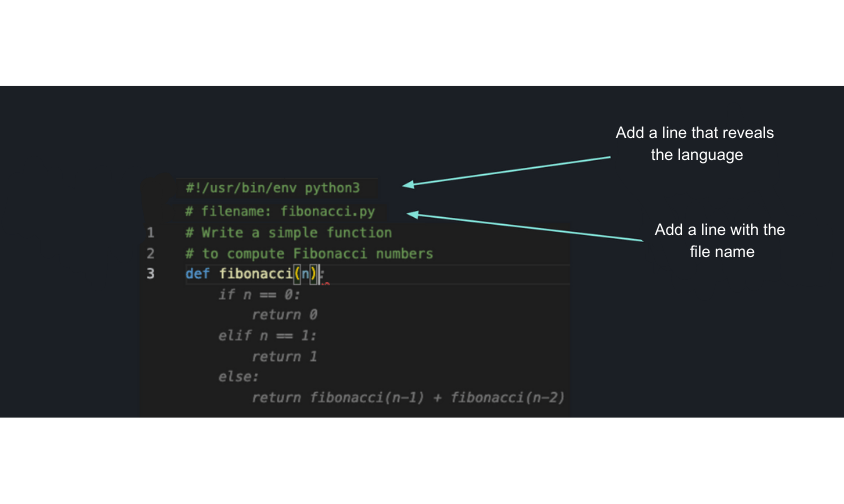
“You could be working in a C# project, then all of the sudden at the top of a new file, it would suggest Python code,” Rosenkilde explains. So, the team added a headline to the prompt which listed the language you were working in. “Now this had no impact when you were deep down in the file because Copilot could understand which language you were in. But at the top of the file, there could be some ambiguity, and those early models just defaulted to the top popular languages.”

About a month following that improvement, the team discovered that it was much more powerful to put the path of the file at the top of the document.

A diagram of the file path improvement
A diagram of the file path improvement.

“The end of the file name would give away the language in most cases, and in fact the file name could provide crucial, additional information,” Rosenkilde says. “For example, the file might be named ‘connectiondatabase.py.’ Well that file is most likely about databases or connections, so you might want to import an SQL library, and that file was written in Python. So, that not only solved the language problem, but it also improved the quality and user experience by a surprising margin because GitHub Copilot could now suggest boilerplate code.”

After a few more months of work, and several iterations, the team was able to create a component that lifted code from other files, which is a capability that had been talked about since the genesis of GitHub Copilot. Rosenkilde recalls, “this never really amounted to anything more than conversations or a draft pull request because it was so abstract. But then, Albert Ziegler built this component that looked at other files you have open in the IDE at that moment in time and scanned through those files for similar text to what’s in your current cursor. This was a huge boost in code acceptance because suddenly, GitHub Copilot knew about other files.”

What’s next for GitHub Copilot

After working with generative AI models and LLMs over the past three years, we’ve seen their transformative value up close. As the industry continues to find new uses for generative AI, we’re working to continue building new developer experiences. And in March 2023, GitHub announced the future of Copilot, GitHub Copilot X, our vision for an AI-powered developer experience. GitHub Copilot X aims to bring AI beyond the IDE to more components of the overall platform, such as docs and pull requests. LLMs are changing the ways that we interact with technology and how we work, and ideas like GitHub Copilot X are just an example of what these models, along with some dedicated training techniques, are capable of.

How GitHub Copilot is getting better at understanding your code

Post Syndicated from Johan Rosenkilde original https://github.blog/2023-05-17-how-github-copilot-is-getting-better-at-understanding-your-code/

To make working with GitHub Copilot feel like a meeting of the minds between developers and the pair programmer, GitHub’s machine learning experts have been busy researching, developing, and testing new capabilities—and many are focused on improving the AI pair programmer’s contextual understanding. That’s because good communication is key to pair programming, and inferring context is critical to making good communication happen.

To pull back the curtain, we asked GitHub’s researchers and engineers about the work they’re doing to help GitHub Copilot improve its contextual understanding. Here’s what we discovered.

From OpenAI’s Codex model to GitHub Copilot

When OpenAI released GPT-3 in June 2020, GitHub knew developers would benefit from a product that leveraged the model specifically for coding. So, we gave input to OpenAI as it built Codex, a descendant of GPT-3 and the LLM that would power GitHub Copilot. The pair programmer launched as a technical preview in June 2021 and became generally available in June 2022 as the world’s first at-scale generative AI coding tool.

To ensure that the model has the best information to make the best predictions with speed, GitHub’s machine learning (ML) researchers have done a lot of work called prompt engineering (which we’ll explain in more detail below) so that the model provides contextually relevant responses with low latency.

Though GitHub’s always experimenting with new models as they come out, Codex was the first really powerful generative AI model that was available, said David Slater, a ML engineer at GitHub. “The hands-on experience we gained from iterating on model and prompt improvements was invaluable.”

All that experimentation resulted in a pair programmer that, ultimately, frees up a developer’s time to focus on more fulfilling work. The tool is often a huge help even for starting new projects or files from scratch because it scaffolds a starting point that developers can adapt and tweak as desired, said Alice Li, a ML researcher at GitHub.

I still find myself impressed and even surprised by what GitHub Copilot can do, even after having worked on it for some time now.

– Alice Li, ML researcher at GitHub

Why context matters

Developers use details from pull requests, a folder in a project, open issues, and more to contextualize their code. When it comes to a generative AI coding tool, we need to teach that tool what information to use to do the same.

Transformer LLMs are good at connecting the dots and big-picture thinking. Generative AI coding tools are made possible by large language models (LLMs). These models are sets of algorithms trained on large amounts of code and human language. Today’s state-of-the-art LLMs are transformers, which makes them adept at making connections between text in a user’s input and the output that the model has already generated. This is why today’s generative AI tools are providing responses that are more contextually relevant than previous AI models.

But they need to be told what information is relevant to your code. Right now, transformers that are fast enough to power GitHub Copilot can process about 6,000 characters at a time. While that’s been enough to advance and accelerate tasks like code completion and code change summarization, the limited amount of characters means that not all of a developer’s code can be used as context.

So, our challenge is to figure out not only what data to feed the model, but also how to best order and enter it to get the best suggestions for the developer.

Learn more about LLMs, generative AI coding tools, and how they’re changing the way developers work.

How GitHub Copilot understands your code

It all comes down to prompts, which are compilations of IDE code and relevant context that’s fed to the model. Prompts are generated by algorithms in the background, at any point in your coding. That’s why GitHub Copilot will generate coding suggestions whether you’re currently writing or just finished a comment, or in the middle of some gnarly code.

  • Here’s how a prompt is created: a series of algorithms first select relevant code snippets or comments from your current file and other sources (which we’ll dive into below). These snippets and comments are then prioritized, filtered, and assembled into the final prompt.

GitHub Copilot’s contextual understanding has continuously matured over time. The first version was only able to consider the file you were working on in your IDE to be contextually relevant. But we knew context went beyond that. Now, just a year later, we’re experimenting with algorithms that will consider your entire codebase to generate customized suggestions.

Let’s look at how we got here:

  • Prompt engineering is the delicate art of creating a prompt so that the model makes the most useful prediction for the user. The prompt tells LLMs, including GitHub Copilot, what data, and in what order, to process in order to contextualize your code. Most of this work takes place in what’s called a prompt library, which is where our in-house ML experts work with algorithms to extract and prioritize a variety of sources of information about the developer’s context, creating the prompt that’ll be processed by the GitHub Copilot model.

  • Neighboring tabs is what we call the technique that allows GitHub Copilot to process all of the files open in a developer’s IDE instead of just the single one the developer is working on. By opening all files relevant to their project, developers automatically invoke GitHub Copilot to comb through all of the data and find matching pieces of code between their open files and the code around their cursor—and add those matches to the prompt.

When developing neighboring tabs, the GitHub Next team and in-house ML researchers did A/B tests to figure out the best parameters for identifying matches between code in your IDE and code in your open tabs. They found that setting a very low bar for when to include a match actually made for the best coding suggestions.

By including every little bit of context, neighboring tabs helped to relatively increase user acceptance of GitHub Copilot’s suggestions by 5%**.

Even if there was no perfect match—or even a very good one—picking the best match we found and including that as context for the model was better than including nothing at all.

– Albert Ziegler, principal ML engineer at GitHub
  • The Fill-In-the-Middle (FIM) paradigm widened the context aperture even more. Prior to FIM, only the code before your cursor would be put into the prompt—ignoring the code after your cursor. (At GitHub, we refer to code before the cursor as the prefix and after the cursor as the suffix.) With FIM, we can tell the model which part of the prompt is the prefix, and which part is the suffix.

Even if you’re creating something from scratch and have a skeleton of a file, we know that coding isn’t linear or sequential. So, while you bounce around your file, FIM helps GitHub Copilot offer better coding suggestions for the part in your file where your cursor is located, or the code that’s supposed to come between the prefix and suffix.

Based on A/B testing, FIM gave a 10% relative boost in performance, meaning developers accepted 10% more of the completions that were shown to them. And thanks to optimal use of caching, neighboring tabs and FIM work in the background without any added latency.

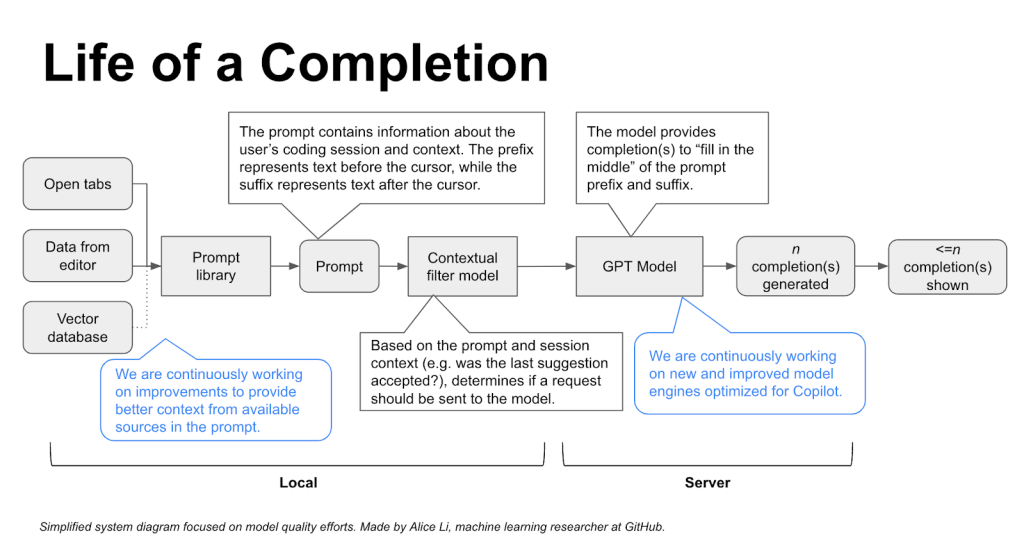
System diagram focused on model quality efforts. The diagram starts on the left with inputs from open tabs, data from editor, and vector database, which feed into a prompt library. (We are continuously working on improvements to provide better context from available sources in the prompt.) This then goes into the prompt, which is fed through a contextual filter model and a GPT model. (We are continuously working on new and improved model engines optimized for GitHub Copilot.) This model provides completions to fill in the middle of the prompt prefix and suffix. From the models, n completions are generated, and less than or equal to n completions are shown.

Improving semantic understanding

Today, we’re experimenting with vector databases that could create a customized coding experience for developers working in private repositories or with proprietary code. Generative AI coding tools use something called embeddings to retrieve information from a vector database.

  • What’s a vector database? It’s a database that indexes high-dimensional vectors.

  • What’s a high-dimensional vector? They’re mathematical representations of objects, and because these vectors can model objects in a number of dimensions, they can capture complexities of that object. When used properly to represent pieces of code, they may represent both the semantics and even intention of the code—not just the syntax.

  • What’s an embedding? In the context of coding and LLMs, an embedding is the representation of a piece of code as a high-dimensional vector. Because of the “knowledge” the LLM has of both programming and natural language, it’s able to capture both the syntax and semantics of the code in the vector.

Here’s how they’d all work together:

  • Algorithms would create embeddings for all snippets in the repository (potentially billions of them), and keep them stored in the vector database.
  • Then, as you’re coding, algorithms would embed the snippets in your IDE.
  • Algorithms would then make approximate matches—also, in real time—between the embeddings that are created for your IDE snippets and the embeddings already stored in the vector database. The vector database is what allows algorithms to quickly search for approximate matches (not just exact ones) on the vectors it stores, even if it’s storing billions of embedded code snippets.

Developers are familiar with retrieving data with hashcodes, which typically look for exact character by character matches, explained Alireza Goudarzi, senior ML researcher at GitHub. “But embeddings—because they arise from LLMs that were trained on a vast amount of data—develop a sense of semantic closeness between code snippets and natural language prompts.”

Read the three sentences below and identify which two are the most semantically similar.

  • Sentence A: The king moved and captured the pawn.
  • Sentence B: The king was crowned in Westminster Abbey.
  • Sentence C: Both white rooks were still in the game.

The answer is sentences A and C because both are about chess. While sentences A and B are syntactically, or structurally similar because both have a king as the subject, they’re semantically different because “king” is used in different contexts.

Here’s how each of those statements could translate to Python. Note the syntactic similarity between snippets A and B despite their semantic difference, and the semantic similarity between snippets A and C despite their syntactic difference.

Snippet A:

if king.location() == pawn.location():
    board.captures_piece(king, pawn)

Snippet B:

if king.location() == "Westminster Abbey":
    king.crown()

Snippet C:

if len([ r for r in board.pieces("white") if r.type == "rook" ]) == 2:
    return True

As mentioned above, we’re still experimenting with retrieval algorithms. We’re designing the feature with enterprise customers in mind, specifically those who are looking for a customized coding experience with private repositories and would explicitly opt in to use the feature.

Take this with you

Last year, we conducted quantitative research on GitHub Copilot and found that developers code up to 55% faster while using the pair programmer. This means developers feel more productive, complete repetitive tasks more quickly, and can focus more on satisfying work. But our work won’t stop there.

The GitHub product and R&D teams, including GitHub Next, have been collaborating with Microsoft Azure AI-Platform to continue bringing improvements to GitHub Copilot’s contextual understanding. So much of the work that helps GitHub Copilot contextualize your code happens behind the scenes. While you write and edit your code, GitHub Copilot is responding to your writing and edits in real time by generating prompts–or, in other words, prioritizing and sending relevant information to the model based on your actions in your IDE—to keep giving you the best coding suggestions.


Learn more

Spring 2023 SOC reports now available with 158 services in scope

Post Syndicated from Andrew Najjar original https://aws.amazon.com/blogs/security/spring-2023-soc-reports-now-available-with-158-services-in-scope/

At Amazon Web Services (AWS), we’re committed to providing our customers with continued assurance over the security, availability, confidentiality, and privacy of the AWS control environment.

We’re proud to deliver the Spring 2023 System and Organization Controls (SOC) 1, 2 and 3 reports, which cover October 1, 2022, to March 31, 2023, to support your confidence in AWS services. SOC reports are independent third-party examination reports that demonstrate how AWS achieves key compliance controls and objectives.

In the past, the Privacy SOC 2 report was issued separately from the other reports. However, starting with this Spring 2023 reporting cycle, the SOC 2 report is now consolidated and covers the Security, Availability, Confidentiality, and Privacy Trust Service Criteria.

The Spring 2023 SOC reports include four additional services in scope, for a total of 158 services. See the full list on our Services in Scope by Compliance Program page.

The following are the four additional services now in scope for the Spring 2023 SOC reports:

Five additional AWS Regions have been added to the scope, for a total of 29 Regions. The following are the five additional Regions now in scope for the Spring 2023 SOC reports:

  • Australia: Asia Pacific (Melbourne) (ap-southeast-4)
  • India: Asia Pacific (Hyderabad) (ap-south-2)
  • Spain: Europe (Spain) (eu-south-2)
  • Switzerland: Europe (Zurich) (eu-central-2)
  • United Arab Emirates: Middle East (UAE) (me-central-1)

Customers can download the Spring 2023 SOC reports through AWS Artifact in the AWS Management Console. You can also download the SOC 3 report as a PDF file from AWS.

AWS strives to bring services into the scope of its compliance programs to help you meet your architectural and regulatory needs. If there are additional AWS services you would like to see added to the scope of our SOC reports (or other compliance programs), reach out to your AWS representatives.

As always, we value your feedback and questions. Feel free to reach out to the team through the Contact Us page. If you have feedback about this post, submit comments in the Comments section below.

Want more AWS Security how-to-content, news, and feature announcements? Follow us on Twitter.

Andrew Najjar

Andrew Najjar

Andrew is a Compliance Program Manager at AWS. He leads multiple security and privacy initiatives within AWS and has 9 years of experience in security assurance. Andrew holds a master’s degree in information systems and bachelor’s degree in accounting from Indiana University. He is a CPA and AWS Certified Solution Architect – Associate.

ryan wilks

Ryan Wilks

Ryan is a Compliance Program Manager at AWS. He leads multiple security and privacy initiatives within AWS. Ryan has 12 years of experience in information security and holds ITIL, CISM, and CISA certifications.

Nathan Samuel

Nathan Samuel

Nathan is a Compliance Program Manager at AWS. He leads multiple security and privacy initiatives within AWS. Nathan has a bachelor’s of commerce degree from the University of the Witwatersrand, South Africa, and has over 20 years of experience in security assurance. He holds the CISA, CRISC, CGEIT, CISM, CDPSE, and Certified Internal Auditor certifications.

Brownell Combs

Brownell Combs

Brownell is a Compliance Program Manager at AWS. He leads multiple security and privacy initiatives within AWS. Brownell holds a master’s degree in computer science from the University of Virginia and a bachelor’s degree in computer science from Centre College. He has over 20 years of experience in information technology risk management and CISSP, CISA, and CRISC certifications.

Amazon SES – How to set up EasyDKIM for a new domain

Post Syndicated from Vinay Ujjini original https://aws.amazon.com/blogs/messaging-and-targeting/amazon-ses-how-to-set-up-easydkim-for-a-new-domain/

What is email authentication and why is it important?

Amazon Simple Email Service (SES) lets you reach customers confidently without an on-premises Simple Mail Transfer Protocol (SMTP) system. Amazon SES provides built-in support for email authentication protocols, including DKIM, SPF, and DMARC, which help improve the deliverability and authenticity of outgoing emails.

Email authentication is the process of verifying the authenticity of an email message to ensure that it is sent from a legitimate source and has not been tampered with during transmission. Email authentication methods use cryptographic techniques to add digital signatures or authentication headers to outgoing emails, which can be verified by email receivers to confirm the legitimacy of the email.

Email authentication helps establish a sender’s reputation as a trusted sender. Additionally, when email receivers can verify that emails are legitimately sent from a sender’s domain using authentication methods, it also helps establish the sender’s reputation as a trusted sender. Email authentication involves one or more technical processes used by mail systems (sending and receiving) that make certain key information in an email message verifiable. Email authentication generates signals about the email, which can be utilized in decision-making processes related to spam filtering and other email handling tasks.

There are currently two widely used email authentication mechanisms – SPF (Sender Policy Framework) and DKIM (DomainKeys Identified Mail). They provide information that the receiving domain can use to verify that the sending of the message was authorized in some way by the sending domain. DKIM can also help determine that the content was not altered in transit. And the DMARC (Domain-based Message Authentication, Reporting and Conformance) protocol allows sending domains to publish verifiable policies that can help receiving domains decide how best to handle messages that fail authentication by SPF and DKIM.

Email authentication protocols:

  1. SPF (Sender Policy Framework): SPF is an email authentication protocol that checks which IP addresses are authorized to send mail on behalf of the originating domain. Domain owners use SPF to tell email providers which servers are allowed to send email from their domains. This is an email validation standard that’s designed to prevent email spoofing.
  2. DKIM (DomainKeys Identified Mail): DKIM is an email authentication protocol that allows a domain to attach its identifier to a message. This asserts some level of responsibility or involvement with the message. A sequence of messages signed with the same domain name is assumed to provide a reliable base of information about mail associated with the domain name’s owner, which may feed into an evaluation of the domain’s “reputation”. It uses public-key cryptography to sign an email with a private key. Recipient servers can then use a public key published to a domain’s DNS to verify that parts of the emails have not been modified during the transit.
  3. DMARC (Domain-based Message Authentication, Reporting and Conformance): is an email authentication protocol that uses Sender Policy Framework (SPF) and DomainKeys Identified Mail (DKIM) to detect email spoofing. In order to comply with DMARC, messages must be authenticated through either SPF or DKIM, or both.

Let us dive deep into DKIM in this blog. Amazon SES provides three options for signing your messages using a DKIM signature:

  1. Easy DKIM: To set up a sending identity so that Amazon SES generates a public-private key pair and automatically adds a DKIM signature to every message that you send from that identity.
  2. BYODKIM (Bring Your Own DKIM): To provide your own public-private key pair for so SES adds a DKIM signature to every message that you send from that identity, see Provide your own DKIM authentication token (BYODKIM) in Amazon SES.
  3. Manually add DKIM signature: To add your own DKIM signature to email that you send using the SendRawEmail API, see Manual DKIM signing in Amazon SES.

The purpose of EasyDKIM is to simplify the process of generating DKIM keys, adding DKIM signatures to outgoing emails, and managing DKIM settings, making it easier for users to implement DKIM authentication for their email messages. Using EasyDKIM, Amazon SES aims to improve email deliverability, prevent email fraud and phishing attacks, establish sender reputation, enhance brand reputation, and comply with industry regulations or legal requirements. EasyDKIM doubles as domain verification (simplification) and it eliminates the need for customers to worry about DKIM key rotation (managed automation). By automating and simplifying the DKIM process, EasyDKIM helps users ensure the integrity and authenticity of their email communications, while reducing the risk of fraudulent activities and improving the chances of emails being delivered to recipients’ inboxes.

Setting up Easy DKIM in Amazon SES:

When you set up Easy DKIM for a domain identity, Amazon SES automatically adds a 2048-bit DKIM signature to every email that you send from that identity. You can configure EasyDKIM by using the Amazon SES console, or by using the API.

The procedure in this section is streamlined to just show the steps necessary to configure Easy DKIM on a domain identity that you’ve already created. If you haven’t yet created a domain identity or you want to see all available options for customizing a domain identity, such as using a default configuration set, custom MAIL FROM domain, and tags, see Creating a domain identity. Part of creating an Easy DKIM domain identity is configuring its DKIM-based verification where you will have the choice to either accept the Amazon SES default of 2048 bits, or to override the default by selecting 1024 bits. Steps to set up easyDKIM for a verified identity:

  1. Sign in to the AWS Management Console and open the Amazon SES console at https://console.aws.amazon.com/ses/
  2. In the navigation pane, under Configuration, choose Verified identities.
  3. List of verified identities in SES console

    Verified identities

  4. In the list of identities, choose an identity where the Identity type is Domain.
  5. Under the Authentication tab, in the DomainKeys Identified Mail (DKIM) container, choose Edit.
  6. In the Advanced DKIM settings container, choose the Easy DKIM button in the Identity type field.
  7. Choose EasyDKIM as identity type; RSA_2048_BITT in DKIM signing key length; Check Enabled checkbox under DKIM signatures.

    DKIM settings

  8. In the DKIM signing key length field, choose either RSA_2048_BIT or RSA_1024_BIT.
  9. In the DKIM signatures field, check the Enabled box.
  10. Choose Save changes.
  11. After configuring your domain identity with Easy DKIM, you must complete the verification process with your DNS provider – proceed to Verifying a DKIM domain identity with your DNS provider and follow the DNS authentication procedures for Easy DKIM.

Conclusion:

Email authentication, especially DKIM, is crucial in securing your emails, establishing sender reputation, and improving email deliverability. EasyDKIM provides a simplified and automated way to implement DKIM authentication. It removes the hassles of generating DKIM keys and managing settings, while additionally reducing risks and and enhancing sender authenticity. By following the steps outlined in this blog post, you can easily set up easyDKIM in Amazon SES and start using DKIM authentication for your email campaigns.

About the Author

Vinay Ujjini is an Amazon Pinpoint and Amazon Simple Email Service Worldwide Principal Specialist Solutions Architect at AWS. He has been solving customer’s omni-channel challenges for over 15 years. He is an avid sports enthusiast and in his spare time, enjoys playing tennis & cricket.

QNAP QSW-2104-2T-A Review a 4x 2.5GbE 2x 10Gbase-T Switch Option

Post Syndicated from Bryan Young original https://www.servethehome.com/qnap-qsw-2104-2t-a-review-a-4x-2-5gbe-2x-10gbase-t-switch-option/

The QNAP QSW-2104-2T-A takes over our top 2x 10Gbase-T and 4x 2.5GbE switch recommendation spot after we review the switch and look at our data

The post QNAP QSW-2104-2T-A Review a 4x 2.5GbE 2x 10Gbase-T Switch Option appeared first on ServeTheHome.

Peloton embraces Amazon Redshift to unlock the power of data during changing times

Post Syndicated from Phil Goldstein original https://aws.amazon.com/blogs/big-data/peloton-embraces-amazon-redshift-to-unlock-the-power-of-data-during-changing-times/

Jerry Wang, Peloton’s Director of Data Engineering (left), and Evy Kho, Peloton's Manager of Subscription Analytics, discuss how the company has benefited from using Amazon Redshift.

Credit: Phil Goldstein
Jerry Wang, Peloton’s Director of Data Engineering (left), and Evy Kho, Peloton’s Manager of Subscription Analytics, discuss how the company has benefited from using Amazon Redshift.

New York-based Peloton, which aims to help people around the world reach their fitness goals through its connected fitness equipment and subscription-based classes, saw booming growth in the early stage of the COVID-19 pandemic. In 2020, as gyms shuttered and people looked for ways to stay active from the safety of their homes, the company’s annual revenue soared from $915 million in 2019 to $4 billion in 2021. Meanwhile, the company’s subscribers jumped from around 360,000 in 2019 to 2.76 million at the end of 2022.

As Peloton’s business continued to evolve amid a changing macroeconomic environment, it was essential that it could make smart business decisions quickly, and one of the best ways to do that was to harness insights from the huge amount of data that it had been gathering over recent years.

During that same time, AWS has been focused on helping customers manage their ever-growing volumes of data with tools like Amazon Redshift, the first fully managed, petabyte-scale cloud data warehouse. The service has grown into a multifaceted service used by tens of thousands of customers to process exabytes of data on a daily basis (1 exabyte is equivalent to 119 billion song downloads). With Amazon Redshift, you get access to a modern data architecture that helps you break down internal data silos, share data securely and seamlessly, and support multiple users who don’t have specialized data and analytics skills.

When Jerry Wang, Peloton’s director of data engineering, joined the company in 2019, he needed to make sure the service would handle the company’s massive and growing amounts of data. He also needed to ensure Amazon Redshift could help the company efficiently manage the wide variety of data and the users who would need to access it, and deliver insights on that data at high velocity—all while being cost-effective and secure.

Wang was delighted to see that as Peloton experienced its massive growth and change, AWS continued to release new Amazon Redshift features and associated capabilities that would perfectly suit his company’s needs at just the right time.

“Over the years, I’ve always been in the stage where I hope Redshift can have a new, specific feature,” Wang says, “and then, in a very limited amount of time, AWS releases that kind of feature.”

Peloton’s data volumes soar as the business grows

Man working out with a weight while viewing a Peloton class on his TV in a living room.

Credit: Peloton

As Peloton’s business has evolved, the amount of data it is generating and analyzing has grown exponentially. From 2019 to now, Wang reports the amount of data the company holds has grown by a factor of 20. In fact, a full 95% of the total historical data the company has generated has come in the last 4 years. This growth has been driven both by surges in the number of users on Peloton’s platform and the variety of data the company is collecting.

Peloton collects reams of data on its sales of internet-connected exercise equipment like stationary bikes and treadmills. The company also collects data on customers’ workouts, which it then provides back to them in various reports such as a monthly summary, giving them insights into how often they worked out, their best output, trends in their workouts, the instructor they used the most, how many calories they burned, and more. All of this data helps Peloton make strategic business decisions, refine its operations to become more efficient, adjust its programming, and drive subscriber engagement and growth.

In 2019 and into 2020, as Peloton’s business boomed, the company needed an analytics system that could help it manage an explosion of data, both from users and related to its business. The company embraced Amazon Redshift because of the service’s versatility, ease of use, price-performance at scale, continuous pace of innovation, and ability to handle concurrent queries from dozens of internal data teams.

Wang said that when he joined the company, there were two kinds of users who were performing daily data operations in Peloton’s Amazon Redshift data warehouse. One group performed extract, transform, and load (ETL) operations to take raw data and make it available for analysis. The other was a group of business users who, each morning, would perform queries to generate local data visualizations, creating a surge of capacity on the Amazon Redshift data warehouse. “So, when these two loads ran together, the performance suffered directly,” Wang says.

One of the features Peloton adopted was Amazon Redshift Concurrency Scaling, which provides consistent and fast query performance even across thousands of concurrent users and concurrent queries. This helped solve the problem by automatically adding query processing power in seconds and processing queries without delays. When the workload demand subsided, the extra processing power was automatically removed, so Peloton only had to pay for the time when Concurrency Scaling data warehouses were in use. Wang says Peloton was running about 10 hours of Concurrency Scaling on a consistent daily basis to deal with the congestion, which, he says, “solved my problem at that moment.”

In 2020, as the pandemic inspired hoards to hop on bikes in their living rooms, Wang also upgraded Amazon Redshift with the newly introduced Amazon Redshift RA3 instances with managed storage (RMS). These represented a new generation of compute instances with managed, analytics-optimized storage designed for high-transaction, fast query performance and lower costs.

“The new instance … was a great feature for us,” Wang says. “It solved our concern about moving from terabyte scale to petabyte scale.”

Peloton’s business is driven by a variety of data for a wide range of users

Man watching a female Peloton biking instructor through a touch screen display on his Peloton bike.

Credit: Peloton

Peloton’s business model is driven by a wide variety of large volumes of data. In addition to selling bikes, treadmills, and indoor rowing machines, and expanding its subscription platform to include non-equipment-based workouts, the company has dozens of instructors in five countries, and it licenses music from three major music licensors. In 2022, it began renting bikes as well as selling them. Internally, Peloton employees working in finance, accounting, marketing, supply chain operations, music and content, and more are using data to track subscriber growth, content engagement, and which sales channels are leading to the most net new subscriptions.

“There was a time when we were just a bike company, and now we’re so much more than that,” says Evy Kho, manager of subscription analytics at Peloton.

There is also a much wider range of sales channels for Peloton equipment than just a few years ago. In the past, Peloton customers could only purchase bikes through the Peloton website or secondhand. Now, customers can purchase hardware from third-party sites like Amazon. That introduced “a really interesting data problem” for Peloton, says Kho, as it strives to determine how to link subscription signups back to exercise equipment sales.

In the face of this variability, complexity, and need for instant access to data to inform business decision-makers, Peloton embraced Amazon Redshift Serverless as an early adopter after AWS introduced the feature in late 2021. Redshift Serverless allows companies to quickly run and scale analytics capacity without database managers and data engineers needing to manage data warehouse infrastructure.

Redshift Serverless also has the ability to quickly spin up analytics capacity for different users, or personas, within an organization. This allows different teams across Peloton to perform analytics on the same datasets at the same time to generate insights on their individual parts of the business. It’s “incredibly important in terms of assessing what’s been good for our business,” Kho says.

Wang also says Peloton is considering supporting specific personas for those who need analytics around financial information governed by securities regulations, and another for users who need to perform analytics on data governed by regulations around personally identifiable information (PII).

Wang points out that Redshift Serverless also allows him to spin up Amazon Redshift data warehouses to handle special usage patterns. For example, ETL loads are often high I/O but require low CPU resources, and are very predictable because Peloton controls the process. However, when internal users want to perform data analytics or machine learning, the company doesn’t have control over the demand for those queries, and the load on Amazon Redshift data warehouses can be variable, with some queries more CPU-intensive than others. Previously, any provisioned data warehouse would have a fixed cost, and it would have to be provisioned to cope with the highest possible workloads even if the utilization rates turned out to be low. Now, for these different scenarios, Wang creates different Amazon Redshift instances to handle that variability without those heavy, fixed costs.

As Peloton’s use of Amazon Redshift has evolved and matured, its costs have gone down, according to Wang. “If you look at Serverless, the amount … that we spend on the Serverless is actually much smaller than we did previously, compared to the Concurrency Scaling cost.”

In a serverless environment, there is no upfront cost to Peloton. “I can set it up as quickly as I can and we pay as we need it,” Wang says. “It scales up when the load goes up. So, it’s a perfect fit.”

Peloton uses Amazon Redshift to get to insights faster

Women running on a Peloton treadmill with a touch screen display

Credit: Peloton

Peloton’s focus on efficiency and sustainable growth has meant that it needs to act more quickly than ever to make sound, data-informed business decisions. Peloton, Wang notes, is long past the stage where all it cared about was growth. “We are a mature company now, so operational efficiency is very important; it’s key to the business,” he says.

When Peloton launches new products, for example, two things typically happen, Wang says. One is that there is a spike in data volumes, both in traffic to its website and the number of sales transactions it’s processing. The second is that the company’s management team will want real-time updates and analysis of how sales are performing.

Redshift Serverless and data sharing lets users quickly start performing real-time analytics and build reporting and dashboard applications without any additional engineering required. Wang confirms this benefit, especially in the example of a new product launch, saying it “will scale up by itself without me having to intervene. I don’t need to allocate a budget. I don’t need to change any configurations.”

In the past, when Peloton only offered its fitness equipment through its own website, it was easy to associate fulfillment data on orders with subscriptions. However, as those channels grew and became more complex, Peloton turned to the data sharing capabilities of Amazon Redshift to share data quickly and easily across teams. Peloton’s teams for subscriber analytics, supply chain, accounting, and more need fast access to fulfillment data to ensure they can track it accurately, respond if changes are needed, and determine how fulfillment data aligns with subscriptions and revenue.

“Getting them those results even faster has been incredibly helpful, and is only becoming more important as we have become far more data-driven than I think you could argue we were before,” Kho says.

Amazon Redshift marries data security, governance, and compliance with innovation

Like all customers, Peloton is concerned about data security, governance, and compliance. With security features like dynamic data masking, role-based access control, and row-level security, Amazon Redshift protects customers’ data with granular authorization features and comprehensive identity management.

Customers also are able to easily provide authorizations for the right users or groups. These features are available out of the box, within the standard pricing model.

Wang notes that Amazon Redshift’s security model is based on a traditional database model, which is a well-understood and robust model. “So for us, to provision access on that model is quite straightforward,” Wang says.

At every stage of Peloton’s evolution over the last 4 years, the company has been able to turn to AWS and Amazon Redshift to help it effectively manage that growth and complexity.

“When I started,” Wang says, “I said, OK, I need a temporary boost in capacity. Then came Concurrency Scaling. And then I said, I need cheaper storage, and [RA3] comes along. And then the ultimate challenge [was], I’m no longer satisfied with a monolithic Redshift instance. Serverless solved that issue.”

Join AWS Data Insights Day 2023

If you want to learn how your company can use Amazon Redshift to analyze large volumes of data in an easy-to-use, scalable, cost-effective, and secure way, don’t miss AWS Data Insights Day on May 24, 2023. During the day-long virtual event, learn from AWS leaders, experts, partners, and customers—including Peloton, Gilead, McDonald’s, Global Foundries, Schneider Electric, and Flutter Entertainment—how Amazon Redshift and features like Amazon Redshift ML are helping drive business innovation, optimization, and cost savings, especially in today’s uncertain economic times.

Register Now for a calendar reminder.

To learn more about Amazon Redshift, see Amazon Redshift and Amazon Redshift: Ten years of continuous reinvention.


About the author

Phil Goldstein is a copywriter and editor with AWS product marketing. He has 15 years of technology writing experience, and prior to joining AWS was a senior editor at a content marketing agency and a business journalist covering the wireless industry.

[$] The state of the page in 2023

Post Syndicated from original https://lwn.net/Articles/931794/

The conversion of the kernel’s memory-management subsystem over to folios was never going to be done in a day.
At a plenary session at the start of the second day of the 2023 Linux Storage, Filesystem,
Memory-Management and BPF Summit
, Matthew Wilcox discussed the current
state and future direction of this work. Quite a lot of progress has been
made — and a lot of work remains to be done.

Debian pauses its /usr merge — again

Post Syndicated from original https://lwn.net/Articles/932158/

The Debian Technical Committee has announced
a new moratorium on moving files from the root into /usr, a
necessary part of its UsrMerge
project
. Many distributions have made this change, but Debian has had
more difficulties than most; LWN last looked at
this project
one year ago.

This moratorium lasts until we vote to repeal it. We expect to do
that during the trixie development cycle, and sooner rather than
later. We will continue to facilitate efforts to resolve the
remaining issues that stand in the way of safely repealing the
moratorium.

Trixie is the codename
for Debian 13, the upcoming major release cycle.

[$] Computational storage

Post Syndicated from original https://lwn.net/Articles/931949/

A new development in the NVMe world was the subject of a combined storage
and filesystem session led by Stephen Bates at the 2023 Linux Storage, Filesystem,
Memory-Management and BPF Summit
. Computational storage namespaces
will allow NVMe devices to offer various types of computation—anything from
simple compression through complex queries and data manipulations—to be
performed
on the data stored on the device.

dApp authentication with Amazon Cognito and Web3 proxy with Amazon API Gateway

Post Syndicated from Nicolas Menciere original https://aws.amazon.com/blogs/architecture/dapp-authentication-with-amazon-cognito-and-web3-proxy-with-amazon-api-gateway/

If your decentralized application (dApp) must interact directly with AWS services like Amazon S3 or Amazon API Gateway, you must authorize your users by granting them temporary AWS credentials. This solution uses Amazon Cognito in combination with your users’ digital wallet to obtain valid Amazon Cognito identities and temporary AWS credentials for your users. It also demonstrates how to use Amazon API Gateway to secure and proxy API calls to third-party Web3 APIs.

In this blog, you will build a fully serverless decentralized application (dApp) called “NFT Gallery”. This dApp permits users to look up their own non-fungible token (NFTs) or any other NFT collections on the Ethereum blockchain using one of the following two Web3 providers HTTP APIs: Alchemy or Moralis. These APIs help integrate Web3 components in any web application without Blockchain technical knowledge or access.

Solution overview

The user interface (UI) of your dApp is a single-page application (SPA) written in JavaScript using ReactJS, NextJS, and Tailwind CSS.

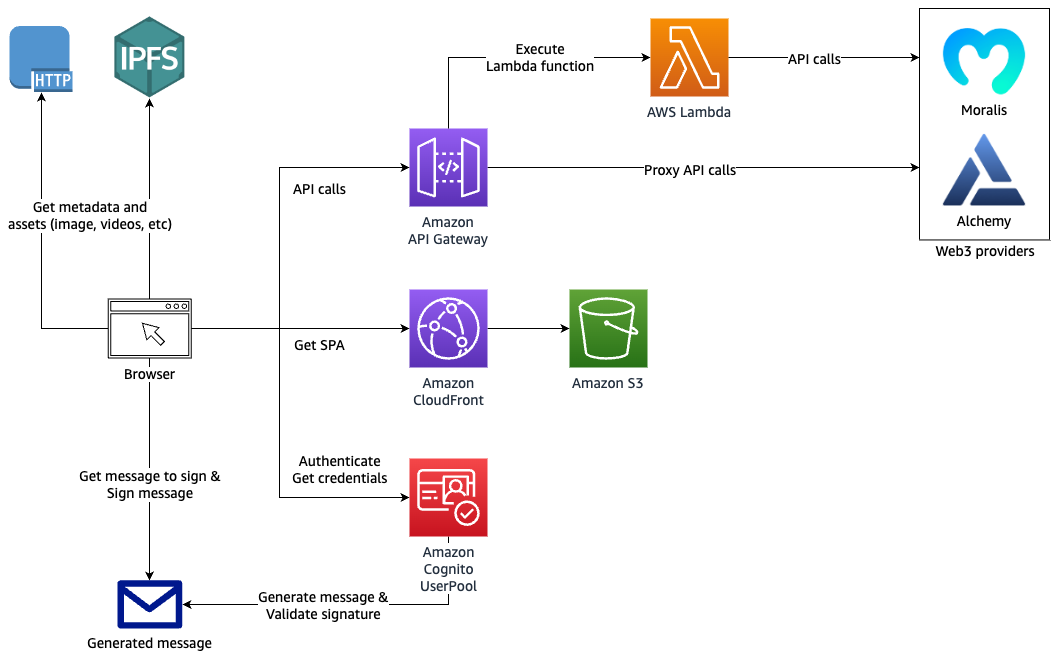
The dApp interacts with Amazon Cognito for authentication and authorization, and with Amazon API Gateway to proxy data from the backend Web3 providers’ APIs.

Architecture diagram

Architecture diagram showing authentication and API request proxy solution for Web3

Figure 1. Architecture diagram showing authentication and API request proxy solution for Web3

Prerequisites

Using the AWS SAM framework

You’ll use AWS SAM as your framework to define, build, and deploy your backend resources. AWS SAM is built on top of AWS CloudFormation and enables developers to define serverless components using a simpler syntax.

Walkthrough

Clone this GitHub repository.

Build and deploy the backend

The source code has two top level folders:

  • backend: contains the AWS SAM Template template.yaml. Examine the template.yaml file for more information about the resources deployed in this project.
  • dapp: contains the code for the dApp

1. Go to the backend folder and copy the prod.parameters.example file to a new file called prod.parameters. Edit it to add your Alchemy and Moralis API keys.

2. Run the following command to process the SAM template (review the sam build Developer Guide).

sam build

3. You can now deploy the SAM Template by running the following command (review the sam deploy Developer Guide).

sam deploy --parameter-overrides $(cat prod.parameters) --capabilities CAPABILITY_NAMED_IAM --guided --confirm-changeset

4. SAM will ask you some questions and will generate a samconfig.toml containing your answers.

You can edit this file afterwards as desired. Future deployments will use the .toml file and can be run using sam deploy. Don’t commit the samconfig.toml file to your code repository as it contains private information.

Your CloudFormation stack should be deployed after a few minutes. The Outputs should show the resources that you must reference in your web application located in the dapp folder.

Run the dApp

You can now run your dApp locally.

1. Go to the dapp folder and copy the .env.example file to a new file named .env. Edit this file to add the backend resources values needed by the dApp. Follow the instructions in the .env.example file.

2. Run the following command to install the JavaScript dependencies:

yarn

3. Start the development web server locally by running:

yarn dev

Your dApp should now be accessible at http://localhost:3000.

Deploy the dApp

The SAM template creates an Amazon S3 bucket and an Amazon CloudFront distribution, ready to serve your Single Page Application (SPA) on the internet.

You can access your dApp from the internet with the URL of the CloudFront distribution. It is visible in your CloudFormation stack Output tab in the AWS Management Console, or as output of the sam deploy command.

For now, your S3 bucket is empty. Build the dApp for production and upload the code to the S3 bucket by running these commands:

cd dapp
yarn build
cd out
aws s3 sync . s3://${BUCKET_NAME}

Replace ${BUCKET_NAME} by the name of your S3 bucket.

Automate deployment using SAM Pipelines

SAM Pipelines automatically generates deployment pipelines for serverless applications. If changes are committed to your Git repository, it automates the deployment of your CloudFormation stack and dApp code.

With SAM Pipeline, you can choose a Git provider like AWS CodeCommit, and a build environment like AWS CodePipeline to automatically provision and manage your deployment pipeline. It also supports GitHub Actions.

Read more about the sam pipeline bootstrap command to get started.

Host your dApp using Interplanetary File System (IPFS)

IPFS is a good solution to host dApps in a decentralized way. IPFS Gateway can serve as Origin to your CloudFront distribution and serve IPFS content over HTTP.

dApps are often hosted on IPFS to increase trust and transparency. With IPFS, your web application source code and assets are not tied to a DNS name and a specific HTTP host. They will live independently on the IPFS network.

Read more about hosting a single-page website on IPFS, and how to run your own IPFS cluster on AWS.

Secure authentication and authorization

In this section, we’ll demonstrate how to:

  • Authenticate users via their digital wallet using Amazon Cognito user pool
  • Protect your API Gateway from the public internet by authorizing access to both authenticated and unauthenticated users
  • Call Alchemy and Moralis third party APIs securely using API Gateway HTTP passthrough and AWS Lambda proxy integrations
  • Use the JavaScript Amplify Libraries to interact with Amazon Cognito and API Gateway from your web application

Authentication

Your dApp is usable by both authenticated and unauthenticated users. Unauthenticated users can look up NFT collections while authenticated users can also look up their own NFTs.

In your dApp, there is no login/password combination or Identity Provider (IdP) in place to authenticate your users. Instead, users connect their digital wallet to the web application.

To capture users’ wallet addresses and grant them temporary AWS credentials, you can use Amazon Cognito user pool and Amazon Cognito identity pool.

You can create a custom authentication flow by implementing an Amazon Cognito custom authentication challenge, which uses AWS Lambda triggers. This challenge requires your users to sign a generated message using their digital wallet. If the signature is valid, it confirms that the user owns this wallet address. The wallet address is then used as a user identifier in the Amazon Cognito user pool.

Figure 2 details the Amazon Cognito authentication process. Three Lambda functions are used to perform the different authentication steps.

Amazon Cognito authentication process

Figure 2. Amazon Cognito authentication process

  1. To define the authentication success conditions, the Amazon Cognito user pool calls the “Define auth challenge” Lambda function (defineAuthChallenge.js).
  2. To generate the challenge, Amazon Cognito calls the “Create auth challenge” Lambda function (createAuthChallenge.js). In this case, it generates a random message for the user to sign. Amazon Cognito forwards the challenge to the dApp, which prompts the user to sign the message using their digital wallet and private key. The dApp then returns the signature to Amazon Cognito as a response.
  3. To verify if the user’s wallet effectively signed the message, Amazon Cognito forwards the user’s response to the “Verify auth challenge response” Lambda function (verifyAuthChallengeResponse.js). If True, then Amazon Cognito authenticates the user and creates a new identity in the user pool with the wallet address as username.
  4. Finally, Amazon Cognito returns a JWT Token to the dApp containing multiple claims, one of them being cognito:username, which contains the user’s wallet address. These claims will be passed to your AWS Lambda event and Amazon API Gateway mapping templates allowing your backend to securely identify the user making those API requests.

Authorization

Amazon API Gateway offers multiple ways of authorizing access to an API route. This example showcases three different authorization methods:

  • AWS_IAM: Authorization with IAM Roles. IAM roles grant access to specific API routes or any other AWS resources. The IAM Role assumed by the user is granted by Amazon Cognito identity pool.
  • COGNITO_USER_POOLS: Authorization with Amazon Cognito user pool. API routes are protected by validating the user’s Amazon Cognito token.
  • NONE: No authorization. API routes are open to the public internet.

API Gateway backend integrations

HTTP proxy integration

The HTTP proxy integration method allows you to proxy HTTP requests to another API. The requests and responses can passthrough as-is, or you can modify them on the fly using Mapping Templates.

This method is a cost-effective way to secure access to any third-party API. This is because your third-party API keys are stored in your API Gateway and not on the frontend application.

You can also activate caching on API Gateway to reduce the amount of API calls made to the backend APIs. This will increase performance, reduce cost, and control usage.

Inspect the GetNFTsMoralisGETMethod and GetNFTsAlchemyGETMethod resources in the SAM template to understand how you can use Mapping Templates to modify the headers, path, or query string of your incoming requests.

Lambda proxy integration

API Gateway can use AWS Lambda as backend integration. Lambda functions enable you to implement custom code and logic before returning a response to your dApp.

In the backend/src folder, you will find two Lambda functions:

  • getNFTsMoralisLambda.js: Calls Moralis API and returns raw response
  • getNFTsAlchemyLambda.js: Calls Alchemy API and returns raw response

To access your authenticated user’s wallet address from your Lambda function code, access the cognito:username claim as follows:

var wallet_address = event.requestContext.authorizer.claims["cognito:username"];

Using Amplify Libraries in the dApp

The dApp uses the AWS Amplify Javascript Libraries to interact with Amazon Cognito user pool, Amazon Cognito identity pool, and Amazon API Gateway.

With Amplify Libraries, you can interact with the Amazon Cognito custom authentication flow, get AWS credentials for your frontend, and make HTTP API calls to your API Gateway endpoint.

The Amplify Auth library is used to perform the authentication flow. To sign up, sign in, and respond to the Amazon Cognito custom challenge, use the Amplify Auth library. Examine the ConnectButton.js and user.js files in the dapp folder.

To make API calls to your API Gateway, you can use the Amplify API library. Examine the api.js file in the dApp to understand how you can make API calls to different API routes. Note that some are protected by AWS_IAM authorization and others by COGNITO_USER_POOL.

Based on the current authentication status, your users will automatically assume the CognitoAuthorizedRole or CognitoUnAuthorizedRole IAM Roles referenced in the Amazon Cognito identity pool. AWS Amplify will automatically use the credentials associated with your AWS IAM Role when calling an API route protected by the AWS_IAM authorization method.

Amazon Cognito identity pool allows anonymous users to assume the CognitoUnAuthorizedRole IAM Role. This allows secure access to your API routes or any other AWS services you configured, even for your anonymous users. Your API routes will then not be publicly available to the internet.

Cleaning up

To avoid incurring future charges, delete the CloudFormation stack created by SAM. Run the sam delete command or delete the CloudFormation stack in the AWS Management Console directly.

Conclusion

In this blog, we’ve demonstrated how to use different AWS managed services to run and deploy a decentralized web application (dApp) on AWS. We’ve also shown how to integrate securely with Web3 providers’ APIs, like Alchemy or Moralis.

You can use Amazon Cognito user pool to create a custom authentication challenge and authenticate users using a cryptographically signed message. And you can secure access to third-party APIs, using API Gateway and keep your secrets safe on the backend.

Finally, you’ve seen how to host a single-page application (SPA) using Amazon S3 and Amazon CloudFront as your content delivery network (CDN).

A whole new Quick Edit in Cloudflare Workers

Post Syndicated from Samuel Macleod original http://blog.cloudflare.com/improved-quick-edit/

A whole new Quick Edit in Cloudflare Workers

A whole new Quick Edit in Cloudflare Workers

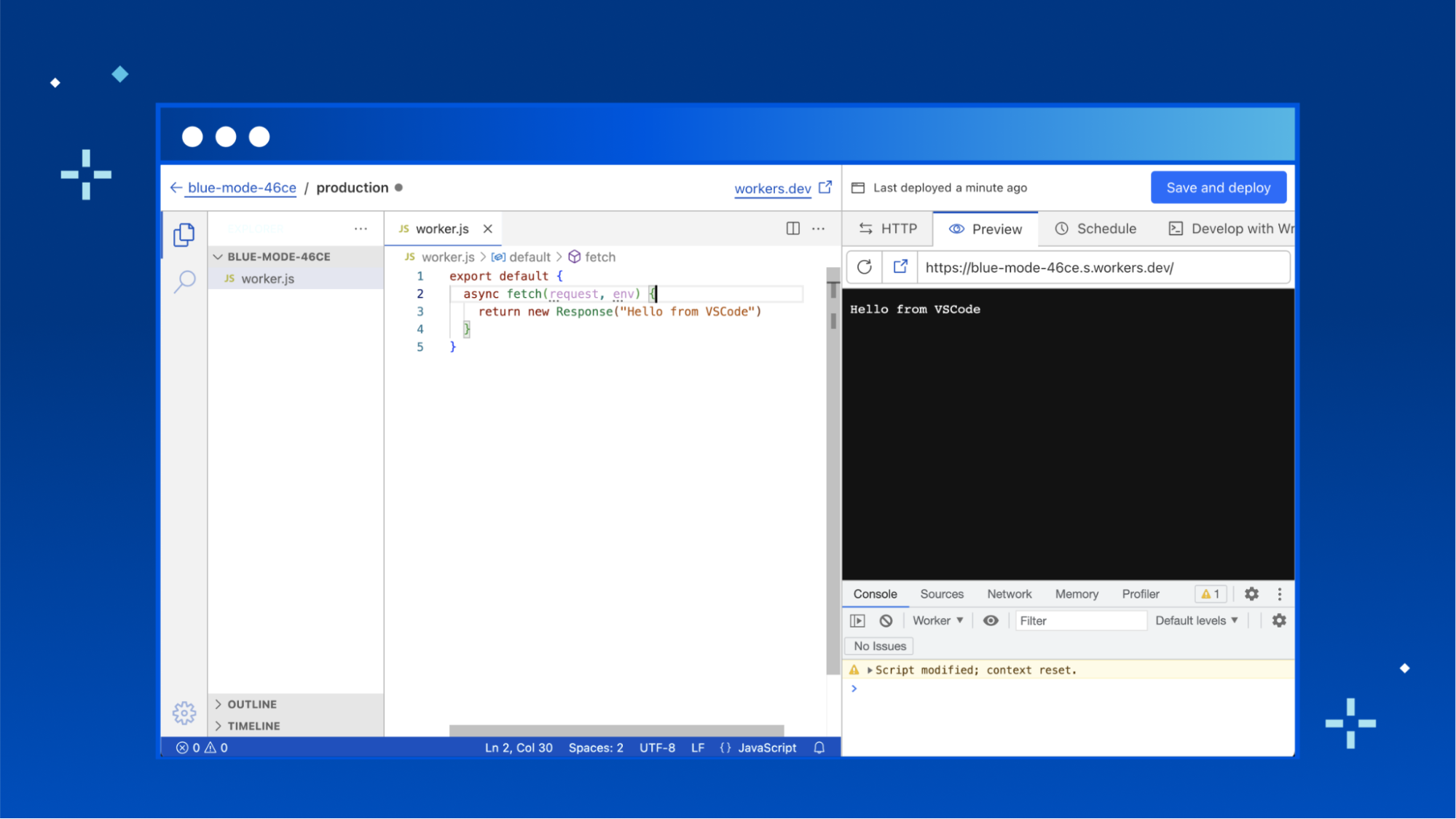
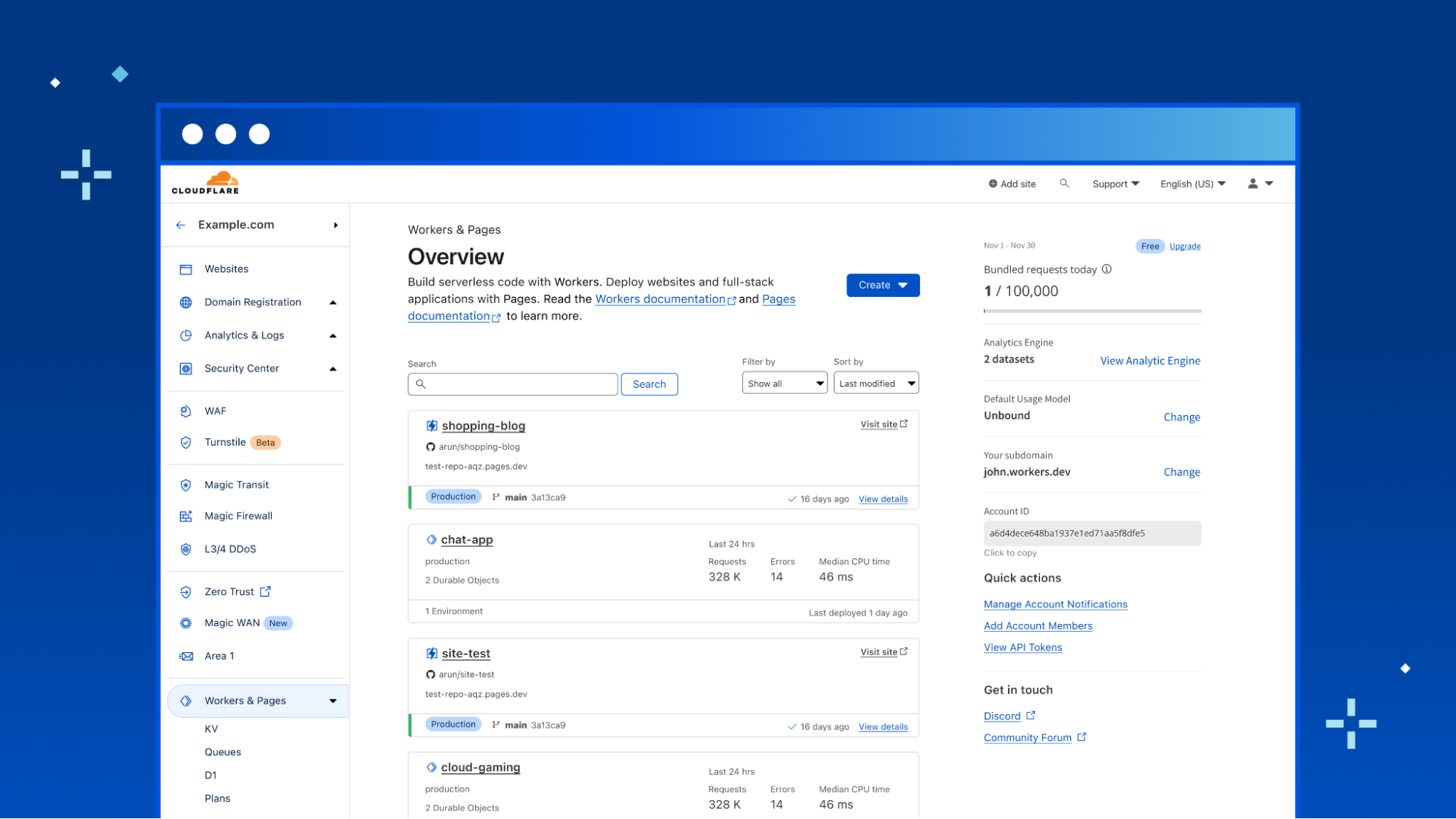
Quick Edit is a development experience for Cloudflare Workers, embedded right within the Cloudflare dashboard. It’s the fastest way to get up and running with a new worker, and lets you quickly preview and deploy changes to your code.

We’ve spent a lot of recent time working on upgrading the local development experience to be as useful as possible, but the Quick Edit experience for editing Workers has stagnated since the release of workers.dev. It’s time to give Quick Edit some love and bring it up to scratch with the expectations of today's developers.

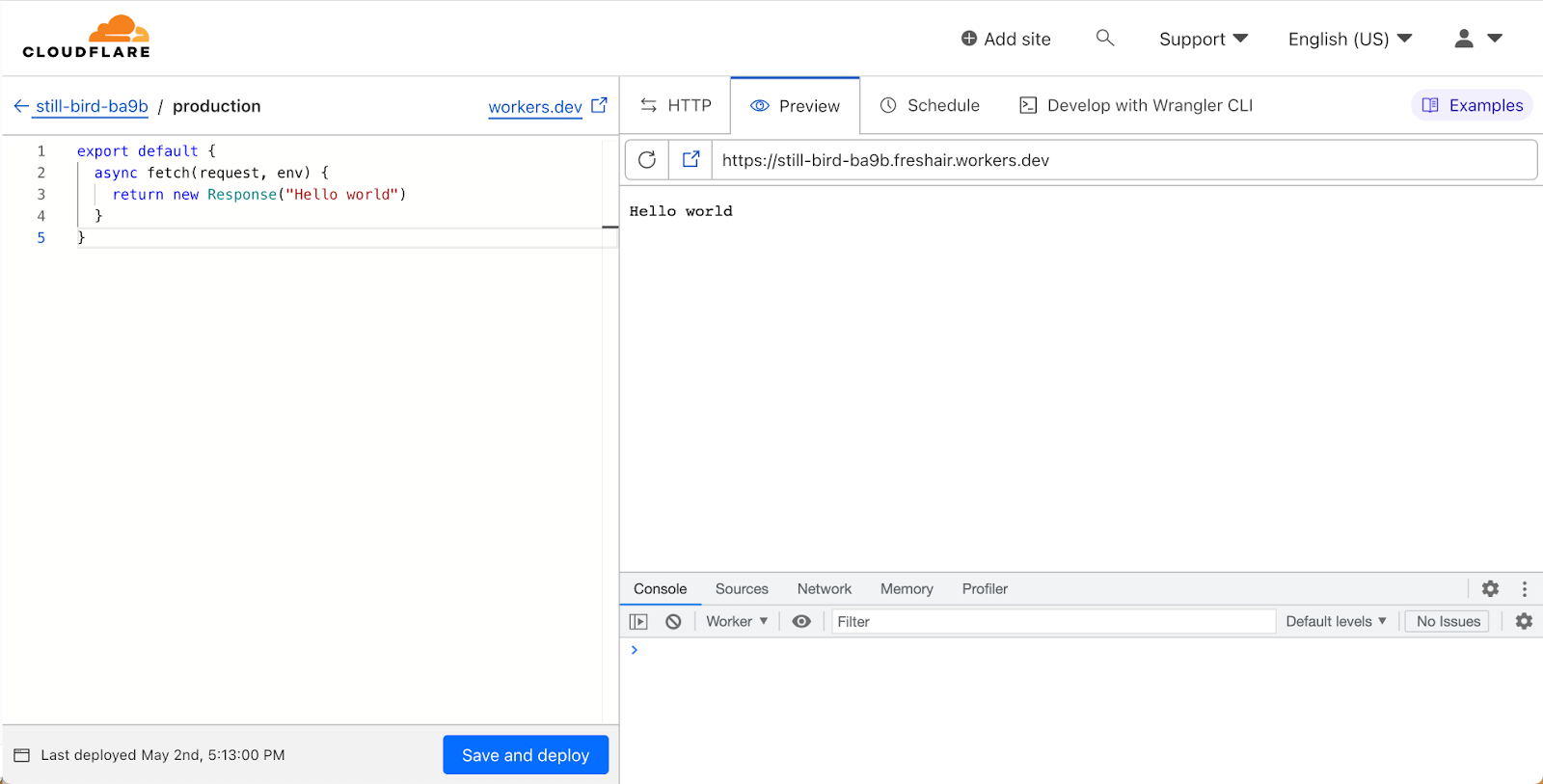
Before diving into what’s changed—a quick overview of the current Quick Edit experience:

A whole new Quick Edit in Cloudflare Workers

We used the robust Monaco editor, which took us pretty far—it’s even what VSCode uses under the hood! However, Monaco is fairly limited in what it can do. Developers are used to the full power of their local development environment, with advanced IntelliSense support and all the power of a full-fledged IDE. Compared to that, a single file text editor is a step-down in expressiveness and functionality.

VSCode for Web

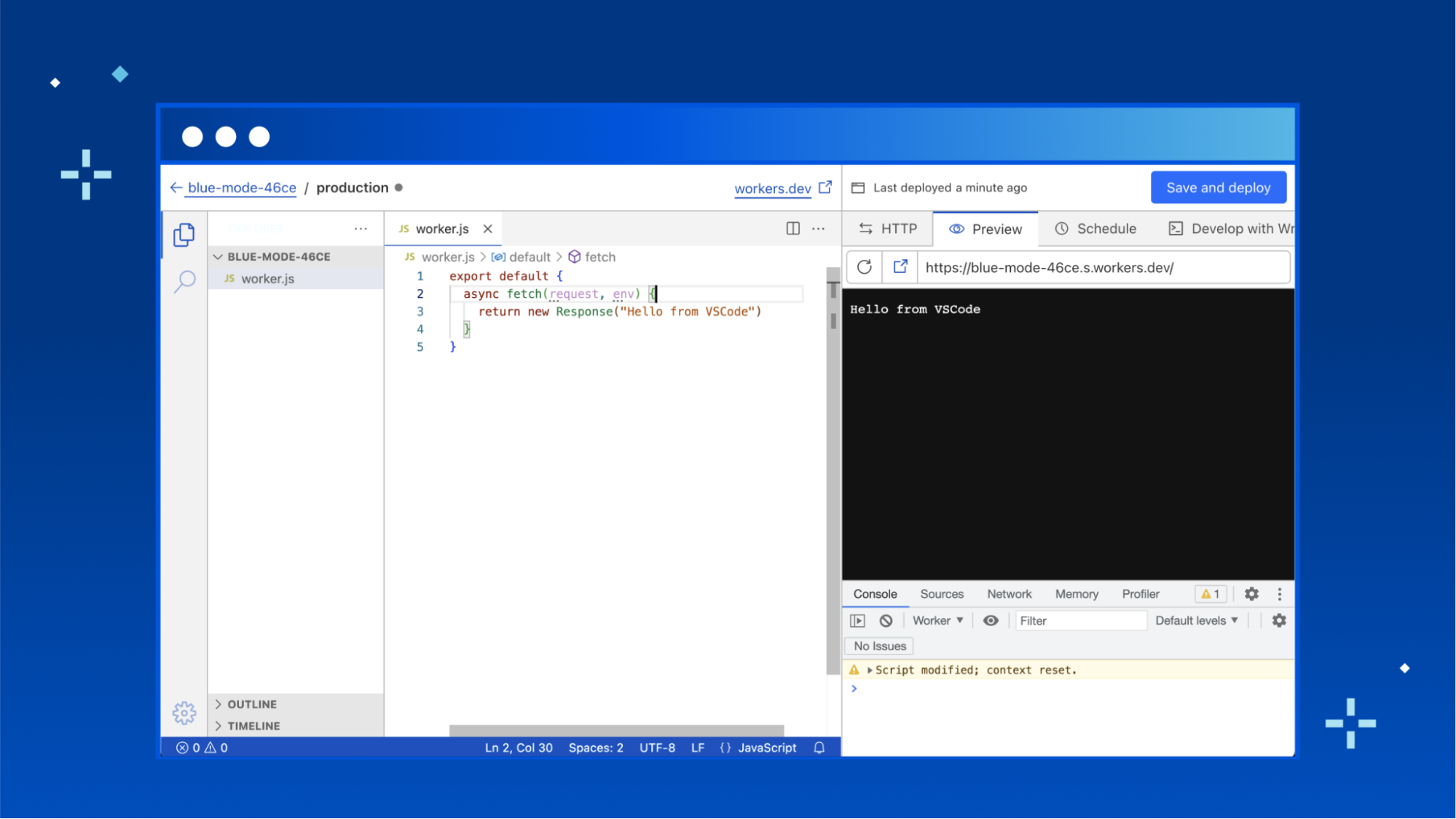
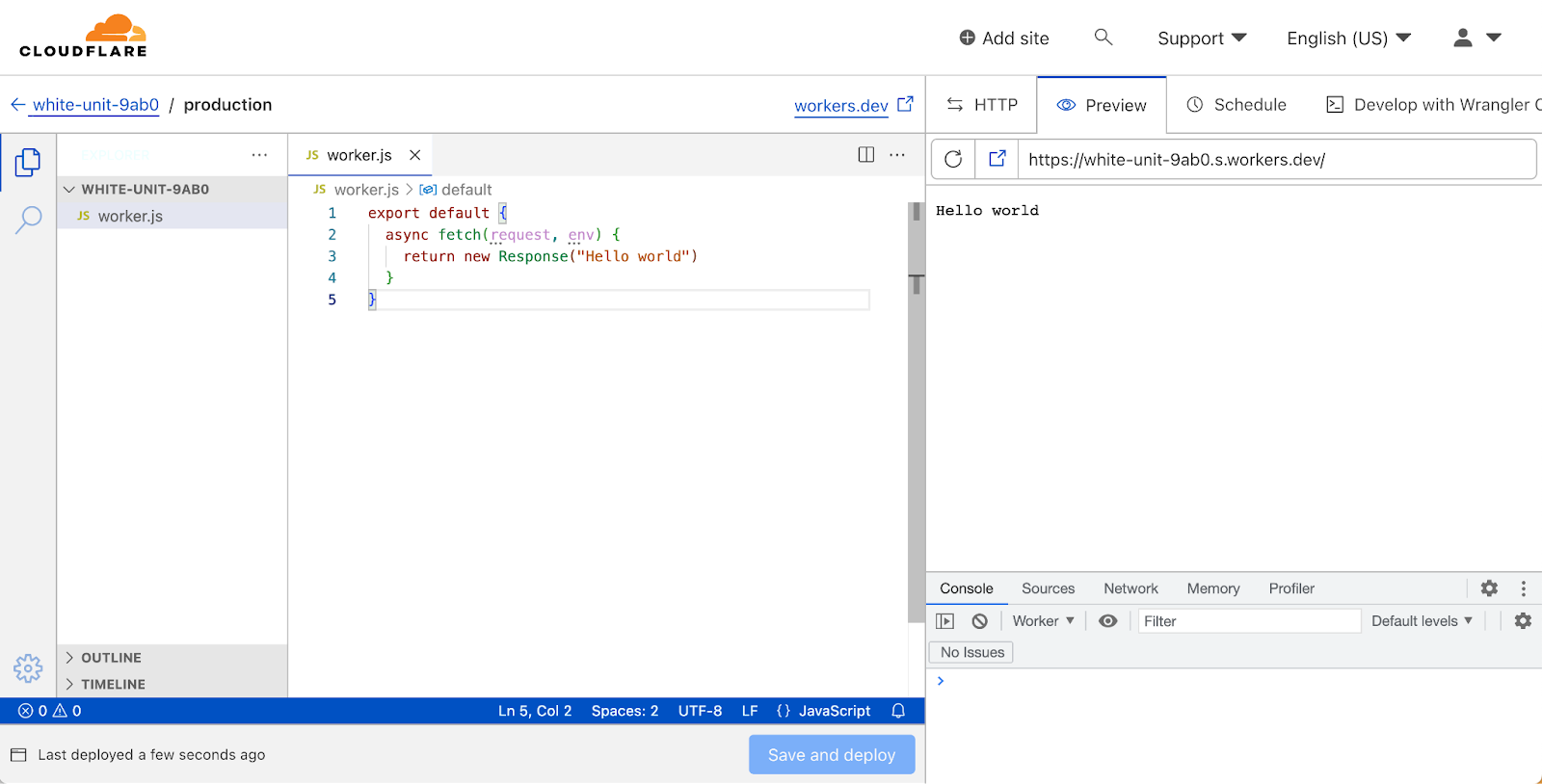
Today, we’re rolling out a new Quick Edit experience for Workers, powered by VSCode for Web. This is a huge upgrade, allowing developers to work in a familiar environment. This isn’t just about familiarity though—using VSCode for Web to power Quick Edit unlocks significant new functionality that was previously only possible with a local development setup using Wrangler.

A whole new Quick Edit in Cloudflare Workers

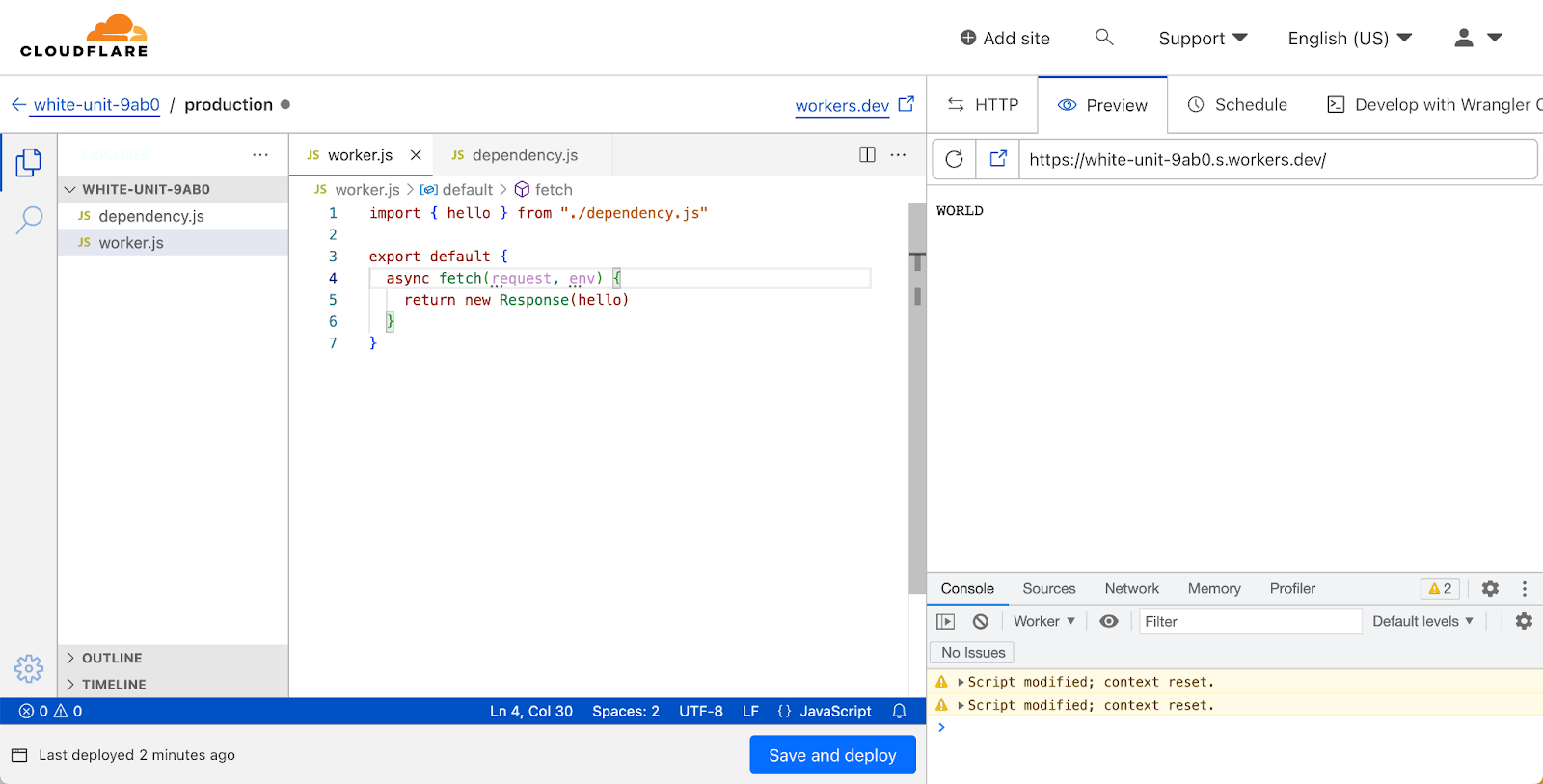
Support for multiple modules!

Cloudflare Workers released support for the Modules syntax in 2021, which is the recommended way to write Workers. It leans into modern JavaScript by leveraging the ES Module syntax, and lets you define Workers by exporting a default object containing event handlers.

export default {
 async fetch(request, env) {
   return new Response("Hello, World!")
 }
}

There are two sides of the coin when it comes to ES Modules though: exports and imports. Until now, if you wanted to organise your worker in multiple modules you had to use Wrangler and a local development setup. Now, you’ll be able to write multiple modules in the dashboard editor, and import them, just as you can locally. We haven’t enabled support for importing modules from npm yet, but that’s something we’re actively exploring—stay tuned!

A whole new Quick Edit in Cloudflare Workers

Edge Preview

A whole new Quick Edit in Cloudflare Workers

When editing a worker in the dashboard, Cloudflare spins up a preview of your worker, deployed from the code you’re currently working on. This helps speed up the feedback loop when developing a worker, and makes it easy to test changes without impacting production traffic (see also, wrangler dev).

However, the in-dashboard preview hasn’t historically been a high-fidelity match for the deployed Workers runtime. There were various differences in behaviour between the dashboard preview environment and a deployed worker, and it was difficult to have full confidence that a worker that worked in the preview would work in the deployed environment.

That changes today! We’ve changed the dashboard preview environment to use the same system that powers wrangler dev. This means that your preview worker will be run on Cloudflare's global network, the same environment as your deployed workers.

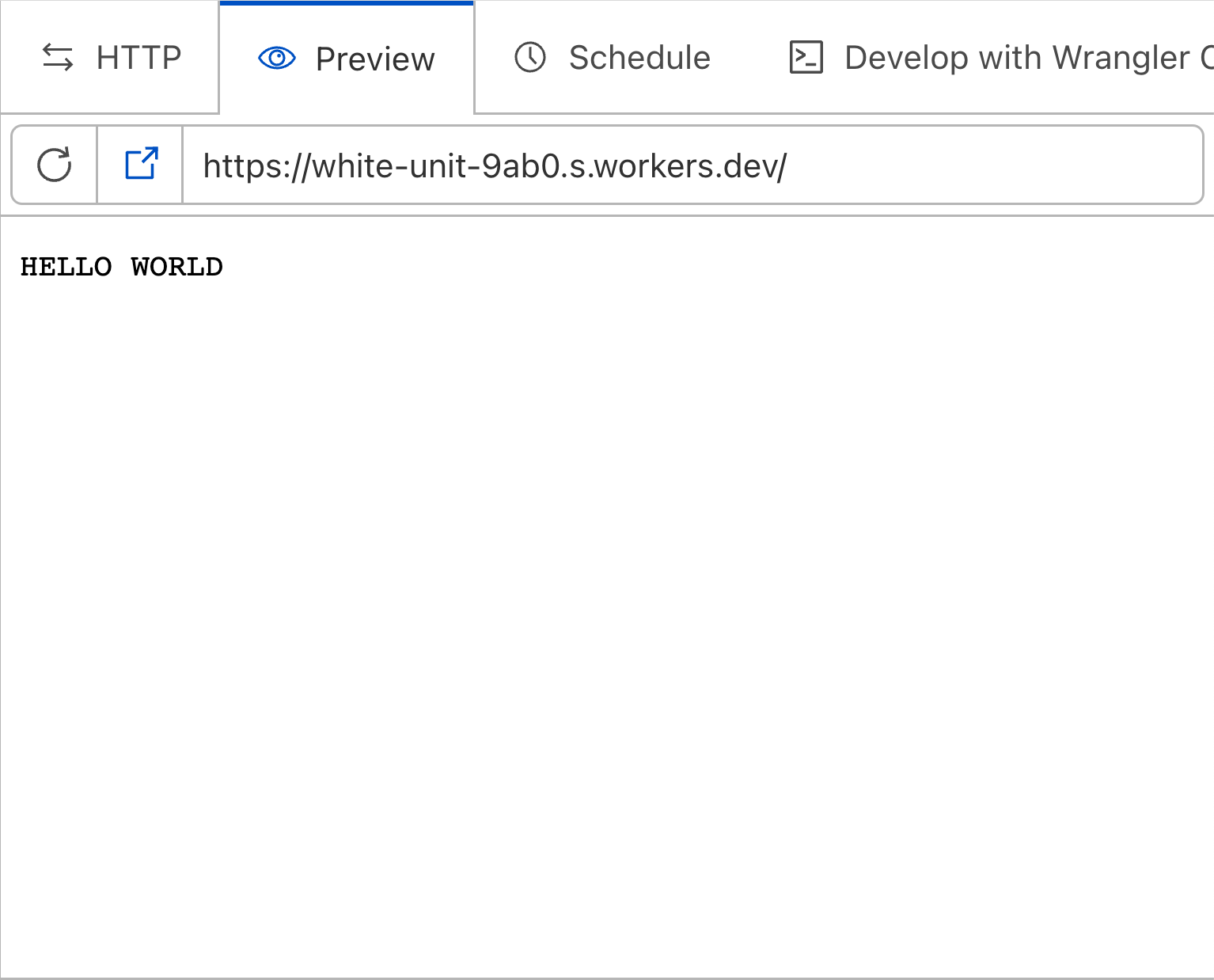
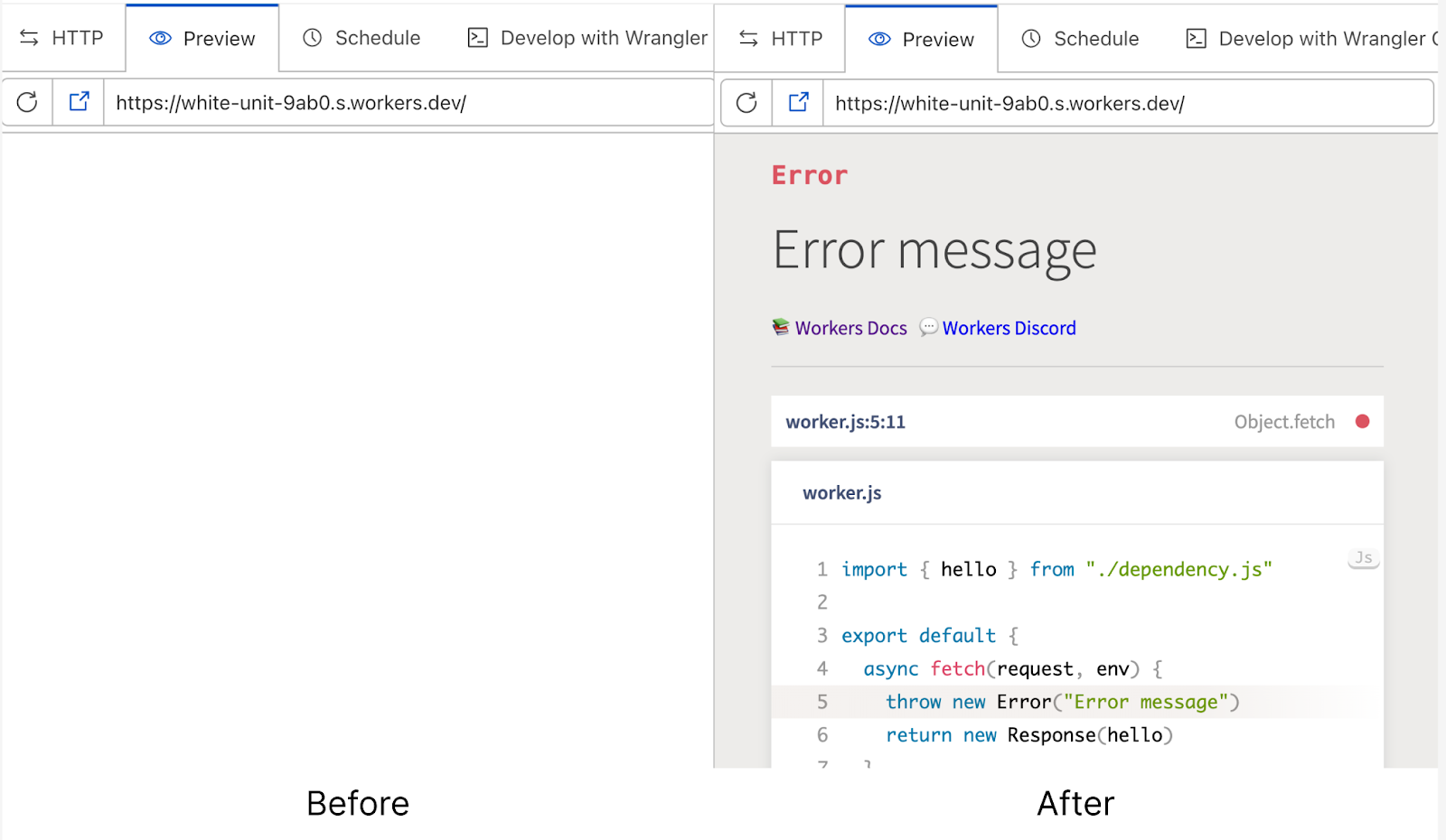
Helpful error messages

In the previous dashboard editor, the experience when your code throws an error wasn’t great. Unless you wrap your worker code in a try-catch handler, the preview will show a blank page when your worker throws an error. This can make it really tricky to debug your worker, and is pretty frustrating. With the release of the new Quick Editor, we now wrap your worker with error handling code that shows helpful error pages, complete with error stack traces and detailed descriptions.

A whole new Quick Edit in Cloudflare Workers

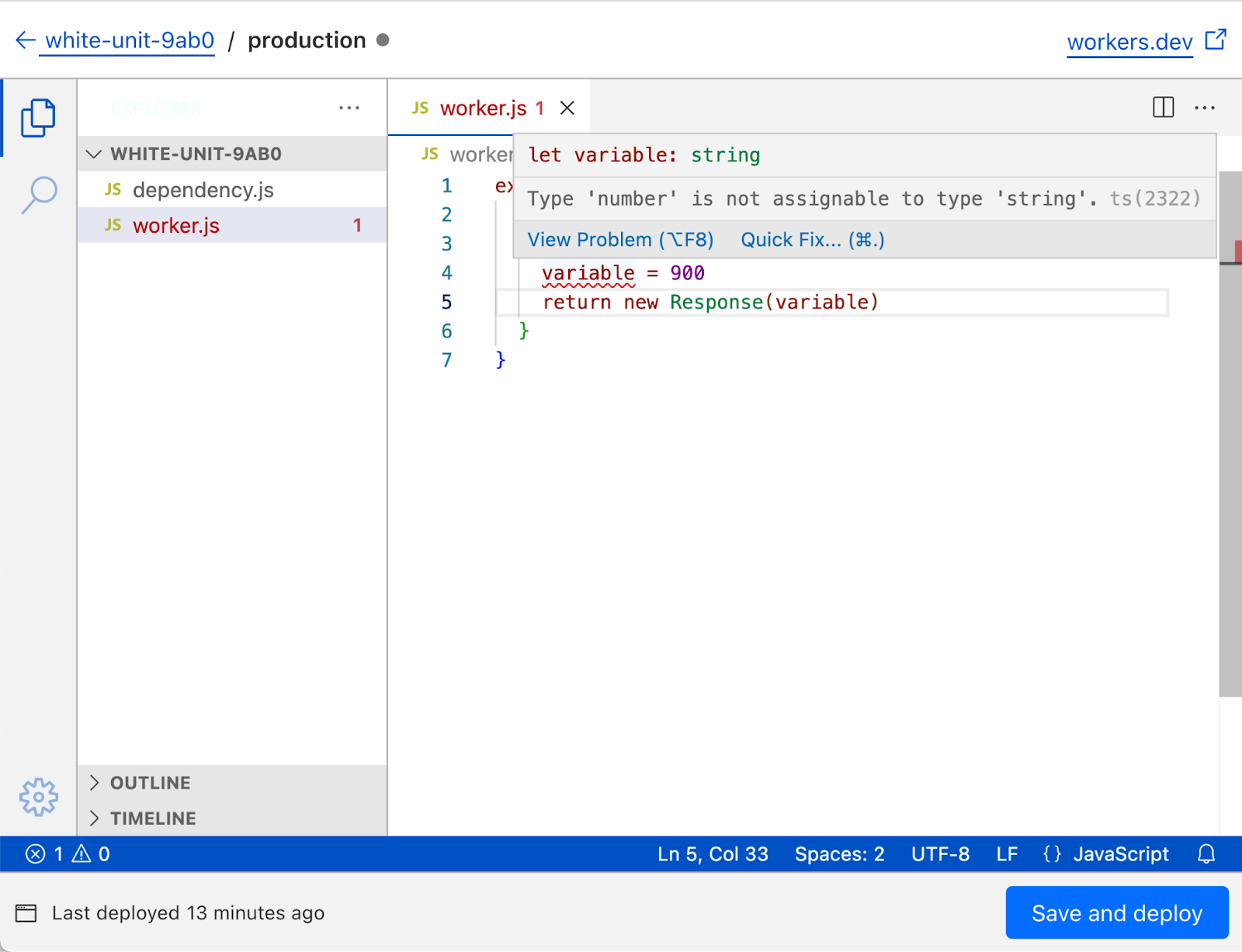
Typechecking

TypeScript is incredibly popular, and developers are more and more used to writing their workers in TypeScript. While the dashboard editor still only allows JavaScript files (and you’re unable to write TypeScript directly) we wanted to support modern typed JavaScript development as much as we could. To that end, the new dashboard editor has full support for JSDoc TypeScript syntax, with the TypeScript environment for workers (link) preloaded. This means that writing code with type errors will show a familiar squiggly red line, and Cloudflare APIs like HTMLRewriter will be autocompleted.

A whole new Quick Edit in Cloudflare Workers

How we built it

It wouldn’t be a Cloudflare blog post without a deep dive into the nuts and bolts of what we’ve built!

First, an overview—how does this work at a high level? We embed VSCode for Web in the Cloudflare dashboard as an iframe, and communicate with it over a MessageChannel. When the iframe is loaded, the Cloudflare dashboard sends over the contents of your worker to a VSCode for Web extension. This extension seeds an in-memory filesystem from which VSCode for Web reads. When you edit files in VSCode for Web, the updated files are sent back over the same MessageChannel to the Cloudflare dashboard, where they’re uploaded as a previewed worker to Cloudflare's global network.

As with any project of this size, the devil is in the details. Let’s focus on a specific area —how we communicate with VSCode for Web’s iframe from the Cloudflare dashboard.

The MessageChannel browser API enables relatively easy cross-frame communication—in this case, from an iframe embedder to the iframe itself. To use it, you construct an instance and access the port1 and port2 properties:

const channel = new MessageChannel()

// The MessagePort you keep a hold of
channel.port1

// The MessagePort you send to the iframe
channel.port2

We store a reference to the MessageChannel to use across component renders with useRef(), since React would otherwise create a new MessageChannel instance with every render.

With that out of the way, all that remains is to send channel.port2 to VSCode for Web’s iframe, via a call to postMessage().

// A reference to the iframe embedding VSCode for Web
const editor = document.getElementById("vscode")

// Wait for the iframe to load 
editor.addEventListener('load', () => {
	// Send over the MessagePort
editor.contentWindow.postMessage('PORT', '*', [
channel.port2
]);
});

An interesting detail here is how the MessagePort is sent over to the iframe. The third argument to postMessage() indicates a sequence of Transferable objects. This transfers ownership of port2 to the iframe, which means that any attempts to access it in the original context will throw an exception.

At this stage the dashboard has loaded an iframe containing VSCode for Web, initialised a MessageChannel, and sent over a MessagePort to the iframe. Let’s switch context—the iframe now needs to catch the MessagePort and start using it to communicate with the embedder (Cloudflare’s dashboard).

window.onmessage = (e) => {
if (e.data === "PORT") {
	// An instance of a MessagePort
const port = e.ports[0]
}
};

Relatively straightforward! With not that much code, we’ve set up communication and can start sending more complex messages across. Here’s an example of how we send over the initial worker content from the dashboard to the VSCode for Web iframe:

// In the Cloudflare dashboard

// The modules that make up your worker
const files = [
  {
    path: 'index.js',
    contents: `
		import { hello } from "./world.js"
export default {
			fetch(request) {
				return new Response(hello)
			}
		}`
  },
  {
    path: 'world.js',
    contents: `export const hello = "Hello World"`
  }
];

channel.port1.postMessage({
  type: 'WorkerLoaded',
  // The worker name
  name: 'your-worker-name',
  // The worker's main module
  entrypoint: 'index.js',
  // The worker's modules
  files: files
});

If you’d like to learn more about our approach, you can explore the code we’ve open sourced as part of this project, including the VSCode extension we’ve written to load data from the Cloudflare dashboard, our patches to VSCode, and our VSCode theme.

We’re not done!

This is a huge overhaul of the dashboard editing experience for Workers, but we’re not resting on our laurels! We know there’s a long way to go before developing a worker in the browser will offer the same experience as developing a worker locally with Wrangler, and we’re working on ways to close that gap. In particular, we’re working on adding Typescript support to the editor, and supporting syncing to external Git providers like GitHub and GitLab.

We’d love to hear any feedback from you on the new editing experience—come say hi and ask us any questions you have on the Cloudflare Discord!

Bringing a unified developer experience to Cloudflare Workers and Pages

Post Syndicated from Nevi Shah original http://blog.cloudflare.com/pages-and-workers-are-converging-into-one-experience/

Bringing a unified developer experience to Cloudflare Workers and Pages

Bringing a unified developer experience to Cloudflare Workers and Pages

Today, we’re thrilled to announce that Pages and Workers will be joining forces into one singular product experience!

We’ve all been there. In a surge of creativity, you visualize in your head the application you want to build so clearly with the pieces all fitting together – maybe a server side rendered frontend and an SQLite database for your backend. You head to your computer with the wheels spinning. You know you can build it, you just need the right tools. You log in to your Cloudflare dashboard, but then you’re faced with an incredibly difficult decision:

Cloudflare Workers or Pages?

Both seem so similar at a glance but also different in the details, so which one is going to make your idea become a reality? What if you choose the wrong one? What are the tradeoffs between the two? These are questions our users should never have to think about, but the reality is, they often do. Speaking with our wide community of users and customers, we hear it ourselves! Decision paralysis hits hard when choosing between Pages and Workers with both products made to build out serverless applications.

In short, we don’t want this for our users — especially when you’re on the verge of a great idea – no, a big idea. That’s why we’re excited to show off the first milestone towards bringing together the best of both beloved products — Workers and Pages into one powerful development platform! This is the beginning of the journey towards a shared fate between the two products, so we wanted to take the opportunity to tell you why we were doing this, what you can use today, and what’s next.

More on the “why”

The relationship between Pages and Workers has always been intertwined. Up until today, we always looked at the two as siblings — each having their own distinct characteristics but both allowing their respective users to build rich and powerful applications. Each product targeted its own set of use cases.

Workers first started as a way to extend our CDN and then expanded into a highly configurable general purpose compute platform. Pages first started as a static web hosting that expanded into Jamstack territory. Over time, Pages began acquiring more of Workers' powerful compute features, while Workers began adopting the rich developer features introduced by Pages. The lines between these two products blurred, making it difficult for our users to understand the differences and pick the right product for their application needs.

We know we can do better to help alleviate this decision paralysis and help you move fast throughout your development experience.

Cool, but what do you mean?

Instead of being forced to make tradeoffs between these two products, we want to bring you the best of the both worlds: a single development platform that has both powerful compute and superfast static asset hosting – that seamlessly integrates with our portfolio of storage products like R2, Queues, D1, and others, and provides you with rich tooling like CI/CD, git-ops workflows, live previews, and flexible environment configurations.

All the details in one place

Today, a lot of our developers use both Pages and Workers to build pieces of their applications. However, they still live in separate parts of the Cloudflare dashboard and don’t always translate from one to the other, making it difficult to combine and keep track of your app’s stack. While we’re still vision-boarding the look and feel, we’re planning a world where users have the ability to manage all of their applications in one central place.

Bringing a unified developer experience to Cloudflare Workers and Pages

No more scrambling all over the dashboard to find the pieces of your application – you’ll have all the information you need about a project right at your fingertips.

Primitives

With Pages and Workers converging, we’ll also be redefining the concept of a “project” , introducing a new blank canvas of possibilities to plug and play. Within a project, you will be able to add (1) static assets, (2) serverless functions (Workers), (3) resources or (4) any combination of each.

To unlock the full potential of your application, we’re exploring project capabilities that allow you to auto-provision and directly integrate with resources like KV, Durable Objects, R2 and D1. With the possibility of all of these primitives on a project, more importantly, you'll be able to safely perform rollbacks and previews, as we'll keep the versions of your assets, functions and resources in sync with every deployment. No need to worry about any of them becoming stale on your next deployment.

Bringing a unified developer experience to Cloudflare Workers and Pages

Deployments

One of Pages’ most notable qualities is its git-ops centered deployments. In our converged world, you’ll be able to optionally connect, build and deploy git repos that contain any combination of static assets, serverless functions and bindings to resources, as well as take advantage of the same high-performance CI system that exists in Pages today.

Like Pages, you will be able to preview deployments of your project with unique URLs protected by Cloudflare Access, available in your PRs or via Wrangler command. Because we know that great ideas take lots of vetting before the big release, we’ll also have a first-class concept of environments to enable testing in different setups.

Local development

Arguably one of the most important parts to consider is our local development story in a post-converged world. This developer experience should be no different from how we’re converging the products. In the future, as you work with our Wrangler CLI, you can expect a unified and predictable set of commands to use on your project – e.g. a simple wrangler dev and wrangler deploy. Using a configuration file that applies to your entire project along with all of its components, you can have the confidence that your command will act on the entire project – not just pieces of it!

What are the benefits?

With Workers and Pages converging, we’re not just unlocking all the golden developer features of each product into one development platform. We’re bringing all the performance, cost and load benefits too. This includes:

  • Super low latency with globally distributed static assets and compute on our network that is just 50ms away from 95% of Internet-connected world-wide population.
  • Free egress and also free static asset hosting.
  • Standards-based JavaScript runtime with seamless compatibility across the packages and libraries you're already familiar with.

Seamless migrations for all

If you’re already a Pages or Workers user and are starting to get nervous about what this means for your existing projects – never fear. As we build out this merged architecture, seamless migration is our top priority and the North Star for every step on the way to a unified development platform. Existing projects on both Pages and Workers will continue to work without users needing to lift a finger. Instead, you'll see more and more features become available to enrich your existing projects and workflows, regardless of the product you started with.

What’s new today?

We’ll be working over the next year to converge Pages and Workers into one singular experience, blending not only the products themselves but also our product, engineering and design teams behind the scenes.

While we can’t wait to welcome you to the new converged world, this change unfortunately won’t happen overnight. We’re planning to hit some big but incremental milestones over the next few quarters to ensure a smooth transition into convergence, and this Developer Week, we’re excited to take our first step toward convergence. In the dashboard, things might feel a bit different!

Get started together

Combining the onboarding experience for Pages and Workers into one flow, you’ll notice some changes on our dashboard when you’re creating a project. We’re slowly bringing the two products closer together by unifying the creation flow giving you access to create either a Pages project or Worker from one screen.

Bringing a unified developer experience to Cloudflare Workers and Pages

Go faster with templates

We understand the classic developer urge to immediately get hands dirty and hit the ground running on their big vision. We’re making it easier than ever to go from an idea to an application that’s live on the Cloudflare network. In a couple of clicks, you can deploy a starter template, ranging from a simple Hello World Worker to a ChatGPT plugin. In the future, we’re working on Pages templates in our dashboard, allowing you to automatically create a new repo and deploy starter full-stack apps with a couple of buttons.

Bringing a unified developer experience to Cloudflare Workers and Pages

Your favorite full stack frameworks at your fingertips

We're not stopping with static templates or our dashboard either. Bringing the framework of your choice doesn't mean you have to leave behind the tools you already know and love. If you’re itching to see just what we mean when we say “deploy with your favorite full-stack framework” or “check out the power of Workers”, simply execute:

npm create cloudflare@latest

from your terminal and enjoy the ride! This new CLI experience integrates with CLIs from some of our first class and solidly supported full-stack frameworks like Angular, Next, Qwik and Remix giving you full control of how you create new projects. From this tool you can also deploy a variety of Workers using our powerful starter templates, with a wizard-like experience.

One singular place to find all of your applications

We’re taking one step closer to a unified experience by merging the Pages and Workers project list dashboards together. Once you’ve deployed your application, you’ll notice all of your Pages and Workers on one page, so you don’t have to navigate to different parts of your dashboard. Track your usage analytics for Workers / Pages Functions in one spot. In the future, these cards won’t be identifiable as Pages and Workers – just “projects” with a combination of assets, functions and resources!

Bringing a unified developer experience to Cloudflare Workers and Pages

What’s next?

As we begin executing, you’ll notice that each product will slowly become more and more similar as we unlock features for each platform until they’re ready to be one such as git integration for your Workers and a config file for your Pages projects!

Keep an eye out on Twitter to hear about the newest capabilities and more on what’s to come in every milestone.

Have thoughts?

Of course, we wouldn’t be able to build an amazing platform without first listening to the voice of our community. In fact, we’ve put together a survey to collect more information about our users and receive input on what you’d like to see. If you have a few minutes, you can fill it out or reach out to us on the Cloudflare Developers Discord or Twitter @CloudflareDev.

Modernizing the toolbox for Cloudflare Pages builds

Post Syndicated from Greg Brimble original http://blog.cloudflare.com/moderizing-cloudflare-pages-builds-toolbox/

Modernizing the toolbox for Cloudflare Pages builds

Modernizing the toolbox for Cloudflare Pages builds

Cloudflare Pages launched over two years ago in December 2020, and since then, we have grown Pages to build millions of deployments for developers. In May 2022, to support developers with more complex requirements, we opened up Pages to empower developers to create deployments using their own build environments — but that wasn't the end of our journey. Ultimately, we want to be able to allow anyone to use our build platform and take advantage of the git integration we offer. You should be able to connect your repository and have it just work on Cloudflare Pages.

Today, we're introducing a new beta version of our build system (a.k.a. "build image") which brings the default set of tools and languages up-to-date, and sets the stage for future improvements to builds on Cloudflare Pages. We now support the latest versions of Node.js, Python, Hugo and many more, putting you on the best path for any new projects that you undertake. Existing projects will continue to use the current build system, but this upgrade will be available to opt-in for everyone.

New defaults, new possibilities

The Cloudflare Pages build system has been updated to not only support new versions of your favorite languages and tools, but to also include new versions by default. The versions of 2020 are no longer relevant for the majority of today's projects, and as such, we're bumping these to their more modern equivalents:

  • Node.js' default is being increased from 12.18.0 to 18.16.0,
  • Python 2.7.18 and 3.10.5 are both now available by default,
  • Ruby's default is being increased from 2.7.1 to 3.2.2,
  • Yarn's default is being increased from 1.22.4 to 3.5.1,
  • And we're adding pnpm with a default version of 8.2.0.

These are just some of the headlines — check out our documentation for the full list of changes.

We're aware that these new defaults constitute a breaking change for anyone using a project without pinning their versions with an environment variable or version file. That's why we're making this new build system opt-in for existing projects. You'll be able to stay on the existing system without breaking your builds. If you do decide to adventure with us, we make it easy to test out the new system in your preview environments before rolling out to production.

Modernizing the toolbox for Cloudflare Pages builds

Additionally, we're now making your builds more reproducible by taking advantage of lockfiles with many package managers. npm ci and yarn --pure-lockfile are now used ahead of your build command in this new version of the build system.

For new projects, these updated defaults and added support for pnpm and Yarn 3 mean that more projects will just work immediately without any undue setup, tweaking, or configuration. Today, we're launching this update as a beta, but we will be quickly promoting it to general availability once we're satisfied with its stability. Once it does graduate, new projects will use this updated build system by default.

We know that this update has been a long-standing request from our users (we thank you for your patience!) but part of this rollout is ensuring that we are now in a better position to make regular updates to Cloudflare Pages' build system. You can expect these default languages and tools to now keep pace with the rapid rate of change seen in the world of web development.

We very much welcome your continued feedback as we know that new tools can quickly appear on the scene, and old ones can just as quickly drop off. As ever, our Discord server is the best place to engage with the community and Pages team. We’re excited to hear your thoughts and suggestions.

Our modular and scalable architecture

Powering this updated build system is a new architecture that we've been working on behind-the-scenes. We're no strangers to sweeping changes of our build infrastructure: we've done a lot of work to grow and scale our infrastructure. Moving beyond purely static site hosting with Pages Functions brought a new wave of users, and as we explore convergence with Workers, we expect even more developers to rely on our git integrations and CI builds. Our new architecture is being rolled out without any changes affecting users, so unless you're interested in the technical nitty-gritty, feel free to stop reading!

The biggest change we're making with our architecture is its modularity. Previously, we were using Kubernetes to run a monolithic container which was responsible for everything for the build. Within the same image, we'd stream our build logs, clone the git repository, install any custom versions of languages and tools, install a project's dependencies, run the user's build command, and upload all the assets of the build. This was a lot of work for one container! It meant that our system tooling had to be compatible with versions in the user's space and therefore new default versions were a massive change to make. This is a big part of why it took us so long to be able to update the build system for our users.

In the new architecture, we've broken these steps down into multiple separate containers. We make use of Kubernetes' init containers feature and instead of one monolithic container, we have three that execute sequentially:

  1. clone a user's git repository,
  2. install any custom versions of languages and tools, install a project's dependencies, run the user's build command, and
  3. upload all the assets of a build.

We use a shared volume to give the build a persistent workspace to use between containers, but now there is clear isolation between system stages (cloning a repository and uploading assets) and user stages (running code that the user is responsible for). We no longer need to worry about conflicting versions, and we've created an additional layer of security by isolating a user's control to a separate environment.

Modernizing the toolbox for Cloudflare Pages builds

We're also aligning the final stage, the one responsible for uploading static assets, with the same APIs that Wrangler uses for Direct Upload projects. This reduces our maintenance burden going forward since we'll only need to consider one way of uploading assets and creating deployments. As we consolidate, we're exploring ways to make these APIs even faster and more reliable.

Logging out

You might have noticed that we haven't yet talked about how we're continuing to stream build logs. Arguably, this was one of the most challenging pieces to work out. When everything ran in a single container, we were able to simply latch directly into the stdout of our various stages and pipe them through to a Durable Object which could communicate with the Cloudflare dashboard.

By introducing this new isolation between containers, we had to get a bit more inventive. After prototyping a number of approaches, we've found one that we like. We run a separate, global log collector container inside Kubernetes which is responsible for collating logs from a build, and passing them through to that same Durable Object infrastructure. The one caveat is that the logs now need to be annotated with which build they are coming from, since one global log collector container accepts logs from multiple builds. A Worker in front of the Durable Object is responsible for reading the annotation and delegating to the relevant build's Durable Object instance.

Modernizing the toolbox for Cloudflare Pages builds

Caching in

With this new modular architecture, we plan to integrate a feature we've been teasing for a while: build caching. Today, when you run a build in Cloudflare Pages, we start fresh every time. This works, but it's inefficient.

Very often, only small changes are actually made to your website between deployments: you might tweak some text on your homepage, or add a new blog post; but rarely does the core foundation of your site actually change between deployments. With build caching, we can reuse some of the work from earlier builds to speed up subsequent builds. We'll offer a best-effort storage mechanism that allows you to persist and restore files between builds. You'll soon be able to cache dependencies, as well as the build output itself if your framework supports it, resulting in considerably faster builds and a tighter feedback loop from push to deploy.

This is possible because our new modular design has clear divides between the stages where we'd want to restore and cache files.

Modernizing the toolbox for Cloudflare Pages builds

Start building

We're excited about the improvements that this new modular architecture will afford the Pages team, but we're even more excited for how this will result in faster and more scalable builds for our users. This architecture transition is rolling out behind-the-scenes, but the updated beta build system with new languages and tools is available to try today. Navigate to your Pages project settings in the Cloudflare Dashboard to opt-in.

Let us know if you have any feedback on the Discord server, and stay tuned for more information about build caching in upcoming posts on this blog. Later today (Wednesday 17th, 2023), the Pages team will be hosting a Q&A session to talk about this announcement on Discord at 17:30 UTC.

Making Cloudflare the best place for your web applications

Post Syndicated from Igor Minar original http://blog.cloudflare.com/making-cloudflare-for-web/

Making Cloudflare the best place for your web applications

Making Cloudflare the best place for your web applications

Hey web developers! We are about to shake things up a bit here at Cloudflare and wanted to give you a heads-up, so that you know what we are doing and where we are going. You might know Cloudflare as one of the best places to come to when you need to protect, speed up, or scale your web application, but increasingly Cloudflare is also becoming the best place to deploy and run your application!

Why deploy your application to Cloudflare? Two simple reasons. First, it removes lots of hassle of managing many separate systems and allows you to develop, deploy, monitor, and tune your application all in one place. Second, by deploying to Cloudflare directly, there is so much more we can do to optimize your application and get it to the hands, ears, or eyes of your users more quickly and smoothly.

So what’s changing? Quite a bit, actually. I’m not going to bore you with rehashing all the details as my most-awesome colleagues have written separate blog posts with all the details, but here is a high level rundown.

Cloudflare Workers + Pages = awesome development platform

Cloudflare Pages and Workers are merging into a single unified development and application hosting platform that offers:

  • Super low latency globally: your static assets and compute are less than 50ms away from 95% of the world’s Internet-connected population.
  • Free egress including free static asset hosting.
  • Standards-based JavaScript and WASM runtime that already serves over 10 million requests per second at peak globally.
  • Access to powerful features like R2 (object storage with an S3-compatible API), low-latency globally replicated KV storage, Queues, D1 database, and many more.
  • Support for GitOps and CI/CD workflows and preview environments to boost development velocity.
  • … and so much more.

While mathematically proven to be wrong, we stubbornly believe that 1+1=3, and in this case this translates to Cloudflare Pages + Workers = way more than the sum of the parts. In fact, it’s an awesome foundation for one of a kind development platform that we are thrilled to be building for you.

We started this product convergence journey a few quarters ago, and early on agreed upon not leaving any of the existing applications behind. Instead, we’ll be bringing them over to this new world. Today we are ready to start sharing the incremental results, with so much more to come over the upcoming quarters. Want to know more? My colleague Nevi posted lots of spicy details in her blog post.

Smart Placement for Workers takes us beyond the edge!

Smart placement is, to put it simply, revolutionary for Cloudflare. It enables a new compute paradigm on our platform, unmatched by any other application hosting providers today. Do you have a typical full-stack application built with one of the many popular web frameworks? This feature is for you! And it works with both Workers and Pages!

While previously we always executed all applications at the “edge” of our global network — meaning, as close to the user as possible. With smart placement, we intelligently determine the best location within our network where the compute (your application) should run. We do this by observing your application’s behavior and what other network resources or endpoints the application interacts with. We then transparently spawn your application at an optimal location, usually close to where your data is stored, and route the incoming requests via our network to this location.

Smart placement enables applications to run near to the data these applications need to get stuff done. This is especially powerful for applications that interact with databases, object stores, or other backend endpoints, especially if these are centralized and not globally distributed.

Your user or clients requests still enter our lightning fast network in one of our 285+ datacenters in the world, close to their current location, but instead of spawning the application right there, we route the request to the most optimal datacenter, the one that is near the data or backend system the application talks to.

This doesn’t mean that compute at the edge is not cool anymore! It is! There are still many use-cases where running your application at the edge makes sense, and smart placement will determine this scenario and keep the application at the edge if that’s the right place for it to be. A/B testing, localization, asset serving, and others are use-cases that should almost always happen at the edge.

Sounds interesting? Check out this visual demo and read up on Smart Placement in a blog post from my colleague Tanushree to get started.

Develop locally or in the browser!

We continue to deliver on our goal to build the best development environment integrated directly into our lightning fast and globally distributed application platform. We’re launching Wrangler v3, with complete support for local-by-default development workflow. Powered by the open-source Cloudflare Workers JavaScript runtime — workerd, this change reduces development server startup time by 10x and script reload times by 60x — boosting your productivity and keeping you in the flow longer.

In the dashboard, we're introducing an upgraded and far more powerful online editor powered by VSCode – you can now finally edit multiple JavaScript modules in your browser, get an accurate edge preview of your code, friendly error pages, and type checking!

Finally, in both our dashboard editor and Wrangler, we've updated our workerd-customized Chrome DevTools to the latest version, providing even greater debugging and profiling capabilities, wherever you choose to work.

This is just the first wave of improvements to our development tooling space, you’ll see us iterating in this space over the next few quarters, but in the meantime, check out in-depth posts from Adam, Brendan, and Samuel with all the Wrangler v3 details and VSCode and dash editor improvements.

Increased memory, CPU, and application size limits and simplified pricing!

In the age of AI, WASM, and powerful full-stack applications, we’ve noticed that developers are hitting our current resource limits with increased frequency. We want to be a place where these applications thrive and developers are empowered to build bigger and more sophisticated applications. Therefore, within the next week we’ll be increasing application size limits (JavaScript/WASM bundle size) to 10MB (after gzip) and startup latency limit (script compile time) is being increased from 200ms to 400ms.

To further empower developers, we’re thinking about how to unify and simplify our billing model to make our pricing more straightforward, and increase limits such as memory limits by introducing tiers. Stay tuned for more information on these!

With these changes developers can build cooler apps and operate them for less! Cool, right?!?

Pages CI now with a modern build image!

The wait is finally over! Pages now use a modern build image to power the CI and integrated build system. With this improvement you can finally use recent versions of Node.js, pnpm, and many other tools used by developers today.

While delivering this improvement, we made it much easier for us to keep things up to date in the future, but also unlocked new features like build caching!

The updates are available to all new projects by default, while existing projects can opt in to newer defaults. Sounds like your cup of coffee? Read on in this blog post by Greg.

Enough already, let’s get started! …with your framework of choice and C3!

In addition to being a CDN, and place to deploy your Worker applications, Cloudflare is now also becoming the best place to run your full-stack web applications. This includes all full-stack web frameworks like Angular, Astro, Next, Nuxt, Qwik, Remix, Solid, Svelte, Vue, and others.

Our overall mission is to help build a better Internet, and my team’s contribution to this mission is to enable developers, but really just about anyone, to go from an idea to a deployed application in no time.

To enable developers to turn their ideas into deployed applications quickly and without any hassle we’ve built two things.

First, we partnered with many web framework authors to build new or improve existing adapters for all the popular JavaScript web frameworks. These adapters ensure that your application runs on our platform in the most efficient way, while having access to all the capabilities and features of our platform.

These adapters include the highly requested Next.js adapter, that we’ve just overhauled to be production ready and are launching 1.0.0 today! In partnership with the respective teams, we’ve built brand-new adapters for Angular, and Qwik, while improving Astro, Nuxt, Solid, and a few others.

Second, we developed a brand new sassy CLI we call C3 — short for create-cloudflare CLI, a sibling to our existing Wrangler CLI. If you are a developer who lives your life in terminal or local editors like VSCode, then this CLI is your single entry-point to the Cloudflare universe.

Run the C3 command, and we’ll get you started. You pick your framework of choice, we hand the control over to the CLI of the chosen framework as we don’t want to stand in between you and the hard-working framework authors that craft the experience for their framework. A minute or so later once all npm dependencies are installed, you get a URL from us with your application deployed. That’s it. From an idea to a URL that you can share with friends almost instantly! Boom.

The best place for your web applications

So to recap, our first class support for full-stack web frameworks, combined with the low latency and cost-effectiveness of our platform, as well as smart placement that allows the backend of the full-stack web application to run in the optimal location automagically, and all the remaining significant improvements in our developer tooling, makes Cloudflare THE best place to build and host web applications. This is our contribution to our mission to build a better Internet and push the Web forward.

We aspire to be the place people turn to when they want to get business done, or when they just want to be creative, explore ideas and have fun. It’s a long journey, and we’ve got a lot of interesting challenges ahead of us. Your input will be critical in guiding us. We are all thrilled to have the opportunity to be part of it and give it our best shot. You can join this journey too, and get started today:

npm create cloudflare my-first-app

Improved local development with wrangler and workerd, Developer Week

Post Syndicated from Brendan Coll original http://blog.cloudflare.com/wrangler3/

Improved local development with wrangler and workerd, Developer Week

Improved local development with wrangler and workerd, Developer Week

For over a year now, we’ve been working to improve the Workers local development experience. Our goal has been to improve parity between users' local and production environments. This is important because it provides developers with a fully-controllable and easy-to-debug local testing environment, which leads to increased developer efficiency and confidence.

To start, we integrated Miniflare, a fully-local simulator for Workers, directly into Wrangler, the Workers CLI. This allowed users to develop locally with Wrangler by running wrangler dev --local. Compared to the wrangler dev default, which relied on remote resources, this represented a significant step forward in local development. As good as it was, it couldn’t leverage the actual Workers runtime, which led to some inconsistencies and behavior mismatches.

Last November, we announced the experimental version of Miniflare v3, powered by the newly open-sourced workerd runtime, the same runtime used by Cloudflare Workers. Since then, we’ve continued to improve upon that experience both in terms of accuracy with the real runtime and in cross-platform compatibility.

As a result of all this work, we are proud to announce the release of Wrangler v3 – the first version of Wrangler with local-by-default development.

A new default for Wrangler

Starting with Wrangler v3, users running wrangler dev will be leveraging Miniflare v3 to run your Worker locally. This local development environment is effectively as accurate as a production Workers environment, providing an ability for you to test every aspect of your application before deploying. It provides the same runtime and bindings, but has its own simulators for KV, R2, D1, Cache and Queues. Because you’re running everything on your machine, you won’t be billed for operations on KV namespaces or R2 buckets during development, and you can try out paid-features like Durable Objects for free.

In addition to a more accurate developer experience, you should notice performance differences. Compared to remote mode, we’re seeing a 10x reduction to startup times and 60x reduction to script reload times with the new local-first implementation. This massive reduction in reload times drastically improves developer velocity!

Improved local development with wrangler and workerd, Developer Week

Remote development isn’t going anywhere. We recognise many developers still prefer to test against real data, or want to test Cloudflare services like image resizing that aren’t implemented locally yet. To run wrangler dev on Cloudflare’s network, just like previous versions, use the new --remote flag.

Deprecating Miniflare v2

For users of Miniflare, there are two important pieces of information for those updating from v2 to v3. First, if you’ve been using Miniflare’s CLI directly, you’ll need to switch to wrangler dev. Miniflare v3 no longer includes a CLI. Secondly, if you’re using Miniflare’s API directly, upgrade to miniflare@3 and follow the migration guide.

How we built Miniflare v3

Miniflare v3 is now built using workerd, the open-source Cloudflare Workers runtime. As workerd is a server-first runtime, every configuration defines at least one socket to listen on. Each socket is configured with a service, which can be an external server, disk directory or most importantly for us, a Worker! To start a workerd server running a Worker, create a worker.capnp file as shown below, run npx workerd serve worker.capnp and visit http://localhost:8080 in your browser:

using Workerd = import "/workerd/workerd.capnp";


const helloConfig :Workerd.Config = (
 services = [
   ( name = "hello-worker", worker = .helloWorker )
 ],
 sockets = [
   ( name = "hello-socket", address = "*:8080", http = (), service = "hello-worker" )
 ]
);


const helloWorker :Workerd.Worker = (
 modules = [
   ( name = "worker.mjs",
     esModule =
       `export default {
       `  async fetch(request, env, ctx) {
       `    return new Response("Hello from workerd! 👋");
       `  }
       `}
   )
 ],
 compatibilityDate = "2023-04-04",
);

If you’re interested in what else workerd can do, check out the other samples. Whilst workerd provides the runtime and bindings, it doesn’t provide the underlying implementations for the other products in the Developer Platform. This is where Miniflare comes in! It provides simulators for KV, R2, D1, Queues and the Cache API.

Improved local development with wrangler and workerd, Developer Week

Building a flexible storage system

As you can see from the diagram above, most of Miniflare’s job is now providing different interfaces for data storage. In Miniflare v2, we used a custom key-value store to back these, but this had a few limitations. For Miniflare v3, we’re now using the industry-standard SQLite, with a separate blob store for KV values, R2 objects, and cached responses. Using SQLite gives us much more flexibility in the queries we can run, allowing us to support future unreleased storage solutions. 👀

A separate blob store allows us to provide efficient, ranged, streamed access to data. Blobs have unguessable identifiers, can be deleted, but are otherwise immutable. These properties make it possible to perform atomic updates with the SQLite database. No other operations can interact with the blob until it's committed to SQLite, because the ID is not guessable, and we don't allow listing blobs. For more details on the rationale behind this, check out the original GitHub discussion.

Running unit tests inside Workers

One of Miniflare’s primary goals is to provide a great local testing experience. Miniflare v2 provided custom environments for popular Node.js testing frameworks that allowed you to run your tests inside the Miniflare sandbox. This meant you could import and call any function using Workers runtime APIs in your tests. You weren’t restricted to integration tests that just send and receive HTTP requests. In addition, these environments provide per-test isolated storage, automatically undoing any changes made at the end of each test.

In Miniflare v2, these environments were relatively simple to implement. We’d already reimplemented Workers Runtime APIs in a Node.js environment, and could inject them using Jest and Vitest’s APIs into the global scope.

Improved local development with wrangler and workerd, Developer Week

For Miniflare v3, this is much trickier. The runtime APIs are implemented in a separate workerd process, and you can’t reference JavaScript classes across a process boundary. So we needed a new approach…

Improved local development with wrangler and workerd, Developer Week

Many test frameworks like Vitest use Node’s built-in worker_threads module for running tests in parallel. This module spawns new operating system threads running Node.js and provides a MessageChannel interface for communicating between them. What if instead of spawning a new OS thread, we spawned a new workerd process, and used WebSockets for communication between the Node.js host process and the workerd “thread”?

Improved local development with wrangler and workerd, Developer Week

We have a proof of concept using Vitest showing this approach can work in practice. Existing Vitest IDE integrations and the Vitest UI continue to work without any additional work. We aren’t quite ready to release this yet, but will be working on improving it over the next few months. Importantly, the workerd “thread” needs access to Node.js built-in modules, which we recently started rolling out support for.

Improved local development with wrangler and workerd, Developer Week

Running on every platform

We want developers to have this great local testing experience, regardless of which operating system they’re using. Before open-sourcing, the Cloudflare Workers runtime was originally only designed to run on Linux. For Miniflare v3, we needed to add support for macOS and Windows too. macOS and Linux are both Unix-based, making porting between them relatively straightforward. Windows on the other hand is an entirely different beast… 😬

The workerd runtime uses KJ, an alternative C++ base library, which is already cross-platform. We’d also migrated to the Bazel build system in preparation for open-sourcing the runtime, which has good Windows support. When compiling our C++ code for Windows, we use LLVM's MSVC-compatible compiler driver clang-cl, as opposed to using Microsoft’s Visual C++ compiler directly. This enables us to use the "same" compiler frontend on Linux, macOS, and Windows, massively reducing the effort required to compile workerd on Windows. Notably, this provides proper support for #pragma once when using symlinked virtual includes produced by Bazel, __atomic_* functions, a standards-compliant preprocessor, GNU statement expressions used by some KJ macros, and understanding of the .c++ extension by default. After switching out unix API calls for their Windows equivalents using #if _WIN32 preprocessor directives, and fixing a bunch of segmentation faults caused by execution order differences, we were finally able to get workerd running on Windows! No WSL or Docker required! 🎉

Let us know what you think!

Wrangler v3 is now generally available! Upgrade by running npm install --save-dev wrangler@3 in your project. Then run npx wrangler dev to try out the new local development experience powered by Miniflare v3 and the open-source Workers runtime. Let us know what you think in the #wrangler channel on the Cloudflare Developers Discord, and please open a GitHub issue if you hit any unexpected behavior.

[$] High-granularity mappings for huge pages

Post Syndicated from original https://lwn.net/Articles/931773/

The use of huge pages can make memory management more efficient in a number
of ways, but it can also impose costs in the form of internal fragmentation and
I/O amplification. At the 2023 Linux
Storage, Filesystem, Memory-Management and BPF Summit
, James Houghton
ran a session on a scheme to get the best of both worlds: using huge pages
while maintaining base-page mappings within them.

The collective thoughts of the interwebz