Analysts need to analyse and simulate a rule on historical data to check the performance and accuracy of the rule. Backtesting enables analysts to run simulations of the rules and manage the results from the rule engine UI.
Backtesting helps analysts to:
Define the desired impact of the rule for our business and users.
Evaluate the accuracy of the rule based on historical data.
Compare and analyse results with data points, such as known false positives, user segments, risk profile of a user or transaction, and so on.
Currently, the analytics process to test performance of a rule is not standardised, and is inaccurate and inefficient. Analysts from different teams have different approaches:
Offline process using Presto tables. This process is lengthy and inaccurate.
Offline process based on the rule engine payload. The setup takes time, and the process is not streamlined.
Running rules in shadow mode. This process takes days to get the desired result.
A team in Grab uses different rule engines to manage rules and do backtesting. This doubles the effort for analysts and engineers.
In our vision for backtesting, it should allow analysts to:
Efficiently run and manage their jobs.
Create custom metrics, reports and dimensions for backtesting.
Add external data points and metrics to do a deep dive.
For the purpose of establishing a minimum viable product (MVP), backtesting will support basic capabilities and enable analysts to access required metrics and data points. Thus, analysts can:
Run backtesting jobs from the rule engine UI.
Get fixed reports and dimensions for every checkpoint.
Get access to relevant data to analyse backtesting results.
Background
Assume a simple use case: A rule to detect the transaction risk.
Each transaction has a transaction_id, user_id, currency, amount, timestamp. The rule engine also provides a treatment (Approve or Decline) based on the rule logic for the transaction.
In this specific use case, we would like to see what will be the aggregation number of the total transactions, total distinct users, and the sum of the amount, based on the dimensions of date, treatment, and currency in the last couple of weeks.
The result may look like the following data:
Dimension
Dimension
Dimension
metric
metric
metric
Date
Treatment
Currency
Total tx
Distinct user
Total amount
2020-05-1
Approve
SGD
100
80
10020
2020-05-1
Decline
SGD
50
40
450
2020-05-1
Approve
MYR
110
100
1200
2020-05-1
Decline
MYR
30
15
400
* This data does not reflect actual Grab data and is for illustrative purposes only.
Solution
Use a cloud-agnostic Spark-based data pipeline to replay any existing or proposed rule to check performance.
Use a Web Portal to:
Create or select a rule to replay, with replay time range.
Display and download the result, such as total events and hit counts.
Replay any existing or proposed rule for checking performance.
Allow users to create or select a rule to replay in the rule engine UI, with provided replay time range.
Display the replay result in the rule engine UI, such as total events and hit counts.
Provide a way to download all testing results in the rule engine UI (for example, all rule responses).
Remove dependency on the specific cloud provider stack, so other teams in Grab can use it instead of Google Cloud Platform (GCP).
Architecture details
The rule editor UI reacts to the user input. Its engine sends a job command to the Amazon Simple Queue Service (SQS) to initialise the job. After that, the rule editor also performs the following processes in the background:
Lambda listens to the request SQS queue and invokes a job via the Spark jobs API.
The job fetches the executable artifacts, data source. After the job is completed, the job script saves the result sheet as required to S3.
The Spark script pushes the job final status (success, failure, timeout) through the shutdown hook to respond to the SQS queue.
The rule editor engine listens to response callback messages, and processes the job metadata to the database, or sends notifications.
The rule editor displays the job metadata on the UI.
The package pipeline builds and deploys the executable artifacts to S3 as a manageable structure.
The Spark script takes the filter logic as its input parameters.
Workflow
Historical data preparation
The historical events are published by the rule engine through Kafka, and stored into the S3 bucket based on time. The Backtesting system then fetches these data for testing based on the time range requested.
By using a Kubernetes stream pipeline, we also save the trust inference stream to Trust AWS subaccount. With the customer bucket and file format, we can improve the efficiency of the data processing, and also avoid any delay from the data lake.
Description: Following the fields of steam definition, the engine name would be ruleengine, or catwalk. The predict-name would be preride (checkpoint name), or cnpu (model name).
File Format: avro
File Compression: Snappy
There is no auto retention on sub-account S3. We will implement the archive process in the future.
The default pipeline and the new pipeline will run in parallel until the Data Engineering team is ready to retire the default pipeline.
Backtesting
Upon scheduling, the Backtesting Portal sends a message to SQS, which is then captured by the listening Lambda.
Lambda invokes a Spark job over the AWS elastic mapreduce engine (EMR).
The EMR engine fetches the executable artifacts containing the rule script and historical data from S3, and starts a Spark job to apply the rule script over historical data. Depending on the size of data, the Spark cluster will scale automatically to ensure timely completion.
Once completed, a report file is generated and available on Backtesting UI.
UI
Learnings and conclusions
After the release, here’s what our data analysers had to say:
For trust analysts, testing a rule on historical data happens outside the rule engine UI and is not user-friendly, leading to analysts wasting significant time.
For financial analysts, as analysts migrate to the rule engine UI, the existing solution will be deprecated with no other solution.
An alternative to simulate a rule; we no longer need to run a rule in shadow mode because we can use historical data to determine the outcome. This new approach saves us weeks of effort on the rule onboarding process.
What’s next?
The underlying Spark jobs in this tool were developed by knowledgeable data engineers, which is a disadvantage because it requires a high level of expertise to modify the analytics. To mitigate this restriction, we are looking into using domain-specific language (DSL) to allow users to input desired attributes and dimensions, and provide the job release pipeline for self-serving jobs.
Thanks to Jia Long Loh for the support on the offline infrastructure engineering.
Join us
Grab is the leading superapp platform in Southeast Asia, providing everyday services that matter to consumers. More than just a ride-hailing and food delivery app, Grab offers a wide range of on-demand services in the region, including mobility, food, package and grocery delivery services, mobile payments, and financial services across 428 cities in eight countries.
Powered by technology and driven by heart, our mission is to drive Southeast Asia forward by creating economic empowerment for everyone. If this mission speaks to you, join our team today!
In August, we experienced one incident resulting in significant impact and degraded state of availability to Codespaces. This report also sheds light into an incident that impacted Codespaces in July.
August 29 12:51 UTC (lasting 5 hours and 40 minutes)
Our alerting systems detected an incident that impacted most Codespaces customers. Due to the recency of this incident, we are still investigating the contributing factors and will provide a more detailed update on cause and remediation in the September Availability Report, which will publish the first Wednesday of October.
Follow up to July 27 22:29 UTC (lasting 7 hours and 55 minutes)
As mentioned in the July Availability Report, we are now providing a more detailed update on this incident following further investigation. During this incident, a subset of codespaces in the East US and West US regions using 2-core and 4-core machine types could not be created or restarted.
On July 27, 2022 at approximately 21:30 UTC we started experiencing a high rate of failures creating new virtual machines (VMs) for Codespaces in the East US and West US regions. The rate of codespace creations and starts on the 2-core and 4-core machine types exceeded the rate of successful VM creations needed to run, which eventually led to resource exhaustion of the underlying VMs. At 22:29 UTC, the pools for 2-core and 4-core VMs were drained and unable to keep up with demand, so we statused yellow. Impacted codespaces took longer than normal to start while waiting for an available VM, and many ended up timing out and failing.
Each codespace runs on an isolated VM for security. The Codespaces platform builds a host VM image on a regular cadence, and then all host VMs are instantiated from that base image. This incident started when our cloud provider began rolling out an update in the East US and West US regions that was incompatible with the way we built our host VM image. Troubleshooting the failures was difficult because our cloud provider was reporting that the VMs were being created successfully even though some critical processes that were required to be started during VM creation were not running.
We applied temporary mitigations, including scaling up our VM pools to absorb the high failure rate, as well as adjusting timeouts to accelerate failure for VMs that were unlikely to succeed. While these mitigations helped, the failure rate continued to increase as our cloud provider’s update rolled out more broadly. Our cloud provider recommended adjusting our image generalization process in a way that would work with the new update. Once we made the recommended change to our image build pipeline, VM creation success rates recovered and enabled the backlog of queued codespace creation and start requests to be fulfilled with VMs to run the codespaces.
Following this incident, we have audited our VM image building process to ensure it aligns with our cloud provider’s guidance to prevent similar issues going forward. In addition, we have improved our service logic and monitoring to be able to verify that all critical operations are executed during VM creation rather than only looking at the result reported by our cloud provider. We have also updated our alerting to detect VM creation failures earlier before there is any user impact. Together, these changes will prevent this class of issue from happening, detect other failure modes earlier, and enable us to quickly diagnose and mitigate other VM creation errors in the future.
In summary
We will continue to keep you updated on the progress and investments we’re making to ensure the reliability of our services. To receive real-time updates on status changes, please follow our status page. You can also learn more about what we’re working on on the GitHub Engineering Blog.
Ariel Deitcher (@mntlty) is a Senior Software Engineer at GitHub, working on Pull Requests and Merge Queue (beta). In this post, he shares the challenges he encountered finding his path to contributing to open source, what it was like contributing to open source at GitHub, and some of the lessons he learned.
Getting started with open source can be overwhelming
As a computer science graduate in 2011 and searching for my first tech job, I read that contributing to an open source project could help. It was a great way to build skills, make industry connections, and gain practical experience with a real-world problem. Perfect, I thought, I’ll just pick an open source project on this new website called GitHub, and, well, actually I wasn’t sure how to do that. Finding that “Goldilocks” project (where the size, language(s), domain, and community felt just right) was a lot harder than I thought, and I didn’t feel self-confident enough to make much progress. Overwhelmed, I decided the timing wasn’t right but resolved to try again someday.
It bugged me that the contribution graph on my GitHub profile remained stubbornly empty, as all the code I had committed lived in private repositories. That changed in 2016 when contributions to private repositories could be shown on my profile, but my contributions to open source had not. Between my family, work, life, and the explosive growth in projects to choose from, making that first contribution to open source felt more daunting than ever.
The opportunity to contribute to open source at GitHub
Fast forward to 2021. I read Working in Public: The Making and Maintenance of Open Source Software by Nadia Eghbal while interviewing at GitHub. I was especially captivated by the Stadium model of open source projects, where a small number of maintainers and occasional contributors are vastly outnumbered by a project’s users. This aligned with my mental model of open source projects, where a few performers on a digital stage would conjure feats of coding wizardry. I could only imagine how vulnerable working in public could be, and hoped it would feel less intimidating working at GitHub.
I joined the GitHub team building Merge Queue (beta), a feature which helps users coordinate their merges to a protected branch, ensures that changes are up to date, and that all required checks pass before automatically merging a pull request. Early on, I shared my long-held goal of contributing code to an open source project with my manager, and discussed the GitHub CLI, an open source tool written in Go which lets users interact with GitHub from the command line, as a possible candidate.
While building Merge Queue, our team carefully integrated it with GitHub’s many APIs and tools, checking each one for compatibility and correctness. Testing different scenarios of merging a pull request with the GitHub CLI, I saw that once a Merge Queue was required, running the CLI command gh pr merge would fail in most cases. The Merge Queue was correctly preventing direct merges to its protected branch, and so I began scoping out what changes the CLI might need to support Merge Queue.
As I didn’t have write access to the CLI repository, I forked it, started a new Codespace, and spent some time getting familiar with the CLI’s contributing guidelines and code. Wanting to minimize my changes, I targeted a few places in the merge command to modify. When I was ready, I pushed a commit to my fork and opened a pull request to share with the CLI maintainers. I expected that I would provide support but defer to them for the final implementation.
In reviewing my pull request with the CLI maintainers, it quickly became clear that my changes were hard to reason about. The merge command had accumulated sufficient technical debt that adding more complexity to it was risky. The team asked if I could refactor the merge command in an initial pull request and follow up with a subsequent pull request for the Merge Queue changes after the first was merged. What I had thought would be a rough guide of changes for the CLI maintainers was, in fact, the opportunity I had been looking for to contribute to open source at GitHub. I confirmed that my manager was onboard with this increased commitment, and was ready to get started.
Refactoring the merge command and adding Merge Queue support
I set out to refactor the merge command with a focus on simplicity, readability, and returning early over deeply nested conditionals. The existing test coverage gave me a confidence boost as I began stepping through the code, copying each section into a separate file for later reference, and wrote comments which I felt captured the intent of the removed section. I then grouped related Git and API operations, consolidated common code into appropriately named functions and variables, trimmed unreachable code paths, created a MergeContext struct to encapsulate state, and leaned into Go’s explicit error returns – all of which gave the code a more linear and consistent structure.
func mergeRun(opts *MergeOptions) error {
    ctx, err := NewMergeContext(opts)
    if err != nil {
        return err
    }

    // no further action is possible when disabling auto merge
    if opts.AutoMergeDisable {
        return ctx.disableAutoMerge()
    }

    ctx.warnIfDiverged()

    if err := ctx.canMerge(); err != nil {
        return err
    }

    if err := ctx.merge(); err != nil {
        return err
    }

    if err := ctx.deleteLocalBranch(); err != nil {
        return err
    }

    if err := ctx.deleteRemoteBranch(); err != nil {
        return err
    }

    return nil
}
When I was finished, I opened a pull request from my fork to the CLI repository, and was blown away by how supportive the code review process was. After a few rounds of feedback, my code was merged and ready to ship in the next release. I was an open source contributor at GitHub!
Returning to my fork, my original Merge Queue changes were now completely out of date. In fact, much of the code I had on my branch no longer existed on the CLI’s trunk branch. Fortunately, I was now intimately familiar with the merge command and was able to make the Merge Queue changes and tests in a subsequent pull request quickly and with confidence.
Lessons learned
Looking back, I learned that searching for the right open source project on my own, trying to create time outside of work, and context switching from my existing projects were obstacles I could not overcome. Instead, the key for me was to find an open source project that was important to what I was already working on, and that I was accountable for. If this sounds familiar, consider asking your manager if you can devote some time to work on an issue in an open source project that you or your team rely on. It’s much easier to get started with an open source project you know and can align with work you’re already committed to. I recognize how fortunate I was to be in the right place at the right time, and with the right support from my manager, but it wasn’t easy.
Many people I know struggle with impostor syndrome, and working in public made me even more aware of mine. I am learning to accept that even though my commits aren’t perfect, and that I’m afraid of being judged for creating bugs like this regression, which will be discoverable forever, I should still contribute. Despite these challenges, I enjoy picking up new issues in the CLI labeled “help wanted (contributions welcome)” whenever I can, and hope you will too!
This week, we are exploring Git’s internals with the following concept in mind:
Git is the distributed database at the core of your engineering system.
When the database at the core of an application approaches scale limits of a single database node, a common strategy is to shard the database. By splitting the database into multiple components, we can scale beyond the limits of a single node.
For Git, large repositories can have a similar feeling. While there exist some extremely large monorepos operating with success, they require careful attention and advanced features. For some, that effort is better spent sharding the repository. Just like sharding an application database, there are many ways to split a Git repository, with various trade-offs.
When sharding an application database, there are a number of factors to consider.
Some application databases include automatic horizontal sharding based on a shard key, which is usually a string literal that can be sorted lexicographically so related values appear in the same shard due to a common prefix in the shard key. There is no immediate way to shard Git’s object store in this way. The object IDs are hashes of the object contents and have essentially random prefixes.
Instead, we think of sharding strategies that split the repository by other structures, including logical components, paths in the worktree, and time periods in the commit history.
Component sharding: multi-repo
One way to shard an application database is to split out entire tables that can be operated independently and managed by independent services. The Git equivalent is to split a repository in to multiple smaller repositories with no concrete links between them. This creates a multi-repo sharding strategy.
The common approach to this strategy is to extract functionality out of a monolith into a microservice, but that microservice exists in its own Git repository that is not linked at all to the monolith’s repository. This effort might remove code from the monolith across multiple path prefixes due to the monolith’s architecture.
Using this strategy works best if each microservice is paired with a team that manages that repository, including full responsibility for developing, testing, deploying, and monitoring that service. This is very similar to the application database sharding strategy, where there is typically one application component connected to that database shard. There is no need for other components to be aware of that database since it is hidden by the component interface.
Multi-repo environments work best when there is a similar “human abstraction” where the team is autonomous as long as their service satisfies certain contracts that other teams depend on.
The tricky part of the multi-repo setup is that it requires human overhead to track where these component repositories live and how they link together. The only way to link the connections of the larger service ecosystem is through documentation and siloed experiential knowledge. System-wide efforts, such as security audits, become difficult to track to completion.
Another main downside to the multi-repo organization is that shared dependencies become difficult to manage. Common dependencies must be imported using package managers instead of using source control updates. This can make it difficult to track the consumers of those dependencies, leading to a lack of test coverage when updating those core components.
The next sharding strategy solves some of these multi-repo issues by collecting all of the smaller repositories into one larger super-repository.
Horizontal sharding: submodules
Git submodules allow a repository to include a link to another repository within its worktree. The super repository contains one or more submodules at specific paths in the worktree. The information for each submodule is stored in the .gitmodules file, but the tree entry for that submodule’s path points to a commit in the submodule repository.
Submodules create a way to stitch several smaller repositories into a single larger repository. Each has its own distinct commit history, ref store, and object store. Each has its own set of remotes to synchronize. When cloning the super repository, Git does not recursively clone the submodule by default, allowing the user to opt-in to the submodules they want to have locally.
One main benefit of using a super repository is that it becomes the central hub for finding any of the smaller repositories that form a multi-repo setup. This is similar to a horizontally sharded application database that uses a shard coordinator database to actively balance the shards and run queries on the correct shard.
Further, certain global properties can be guaranteed via continuous integration builds such as cross-submodule source dependencies. In this setup, the super project creates requirements that it cannot advance a submodule unless all builds and tests in the super project pass. This creates some safety that a core component does not break any consumer in the super project.
This global structure has a cost. The submodule repositories become less independent. Since they have their own Git hosting location, users can update them by pushing changes. This can even be done with local builds that make sure that component is self-consistent. However, any update to the submodule repository is incomplete until the super project updates its path pointer to that commit. At the same time, should the submodule repository move forward before that change has been validated within the super repository?
This contention between the independence of the submodule repository and the inter-dependence of submodules in the super repository is a major hurdle. It is up to the architects of this arrangement to create policies and procedures to ensure that all of the components interact well with the entire system.
One common issue developers have in a submodule environment is when there is a source dependency across multiple submodules. If a breaking change is introduced in one submodule repository, the consumer repositories need to be updated to take advantage of those changes. However, this means that all of the submodules need to coordinate when they are updated into the super repository.
There are a lot of tools out there in the wild to help manage submodules, all built on top of the git submodule command. One famous example is Google’s repo tool that coordinates changes across multiple submodules.
If you are interested in submodules and super repository workflows, then you would likely benefit from coming to Git Merge 2022 (or, watching the videos afterward), especially Emily Shaffer’s talk, “An Improved Workflow for Submodules.”
Using a single worktree: Monorepos
The previous two examples focused on reducing the size of Git repositories by breaking them up based on the worktree. By having fewer files in each repository, fewer developers are interacting with each and the repositories grow more slowly. Each approach had its benefits and trade-offs, and one big issue with each was build-time source dependencies between components.
Another common way to avoid source dependencies across multiple repositories is to only have one repository: a monorepo. Here, I’m defining a monorepo as a repository containing all source code required to build and ship a large system. This does not mean that every single file written by an employee of the company must be tracked in “the monorepo.” Instead, monorepos are defined by their strategy for how they choose to include components in the same repository:
If it ships together, it merges together.
One pattern that is increasing in popularity is the service-oriented architecture (SOA) monorepo. In this environment, all of the code for the application is contained in the same repository, but each component deploys as an independent service. In this pattern, each component can be tested against the current version of all of the other services before it is deployed.
The monorepo pattern solves many of the coordination issues discussed in the previous sharding strategies. The biggest downside is that the repository itself grows very quickly. As discussed in the previous parts of this series, Git has many advanced features that improve performance even for large repositories. Monorepos more frequently need to enable those advanced Git features, even for client repositories.
One of the main costs of a monorepo is actually the build system. If every change to the monorepo requires passing builds across the entire system, then the build system needs to take advantage of incremental builds so updates to a single component do not require building the entire monorepo. Most groups using large monorepos have a team dedicated to the developer experience, including improving the build system. Frequently, these build improvements can also lead to being able to use advanced Git features such as sparse-checkout and partial clone, which can greatly reduce the amount of data necessary for client repositories to interact with the monorepo.
Even with a carefully designed architecture and the best Git features available, monorepos can still grow incredibly fast. It may be valuable to take a monorepo and find creative ways to split it and reset the size to something smaller.
Time-based sharding
One solution to a fast-growing monorepo is to consider it as if it was a time-series database: the changes over time are important, so what if it shards based on time instead of based on the worktree?
When performing a time-based shard, first determine a point in time where the existing monorepo can be paused and all movement on the trunk branch can be blocked. Pausing work on a monorepo is very unusual, so should be done with extreme care and preparation.
After pausing the changes to the monorepo’s trunk, create a new repository with the same root tree as the current trunk of the old monorepo, but with a brand new root commit. Be sure to reference the old monorepo and its tip commit somewhere in the message of that new root commit. This commit can be pushed to a new repository.
For a quick refresher on how we represent Git objects, see the key below.
Any ongoing work in the old monorepo must be replayed on top of the new repository. One way to do this is to rebase each topic branch onto the final commit of the trunk branch, then generate patches with git format-patch and then apply those patches in the new repository with git am.
After the new monorepo shard is created, the old monorepo can be archived as a read-only repository as all new work continues in the new monorepo. There are likely many updates required to ensure that everyone knows the new monorepo location as well as repository secrets to update. If your repository uses infrastructure as code patterns, then almost all of the information for building, testing, and deploying the monorepo will automatically be ready in the new monorepo.
Even with all of these precautions, performing a time-based shard like this is disruptive and requires a timeframe where no new work is merging into the trunk. If you are considering doing this in your engineering system, then I highly recommend doing a few test runs to make sure you minimize the time between locking the old shard and deploying out of the new shard.
The biggest benefit of this approach is that it can be done at any time regardless of the shape of your worktree. The other sharding methods require some amount of architecture changes in order to split into multiple repos or submodules. This approach cuts out the potentially large commit history and all of the old versions of files without changing the repository structure at the tip.
A time-based shard might be particularly beneficial if your commit history includes some anti-patterns for Git repositories, such as large binary files. If you have done the hard work to clean up the worktree at the tip of your repository, you may still want to clear those old files. This sharding approach is similar to rewriting history, except that the new monorepo can have an even smaller size.
However, that commit history from the old monorepo is still important! We just discussed commit history and file history queries in this blog series. It is extremely important to be able to find the reasons why the code is in its current form. In the new monorepo shard, it will look like the entire codebase was created in a single commit!
To satisfy these history queries, Git can combine the two histories in a way that allows a seamless history query, though at some performance cost. The good news is that these history queries across the shard boundary may be common at first, but become less common as time goes on.
The first step to combining the two shards together is to have a local clone of each. In the new shard, add the object store of the old repository as a Git alternate. Add the full path to the .git/objects directory of the old repository into the .git/objects/info/alternates file in the new repository. While this file exists, it allows Git processes in the new repository to see the objects in the old one.
The second step is to use git replace to create a reference that tells Git to swap the contents of the new root commit with the tip of the old repository. Since those commits share the same root tree, the only change will be the message and commit parents at that point. This allows walking “through” the link into the previous commit history.
It is important to note that operating with replace objects enabled comes at some performance cost. In addition to having the large commit history that existed before the split, some features like the commit-graph file discussed in part II are not compatible with replace objects. For this reason, operating in this combined mode should only be done when it is critical to do history queries across the shard boundary.
One way to guarantee that the combined history is quickly available, but does not affect normal Git operations is to “hide” the replace references using the GIT_REPLACE_REF_BASE environment variable. This writes the replace reference in a non-standard location, so the replacement is only effective when that environment variable is set to your custom value.
Using replace references to view a combined form of the history can also help transition ongoing work from the old repository to the new one. While in the combined mode, users can use git rebase to move their topics from the old history to the new history. They no longer need to use the git format-patch and git am transformation.
Here is a concrete example for how I created a time-based shard of the Git repository starting at the v2.37.0 tag:
You can follow the instructions in the sharded repository to experience cloning the two repositories and using the combined history as needed.
Time-based shards can be successful in reducing several dimensions of scale that cause friction in a large monorepo. However, the hurdle of transitioning work to a new repository location may be too disruptive for your group. There is one final sharding strategy I’ll discuss today, and it keeps the logistical structure of the monorepo in a single location while still improving how client repositories interact with the remote repository.
Data offloading
When a database grows, it may be beneficial to recognize that some data elements are infrequently accessed and to move that data to less expensive, but also lower performance storage mechanisms. It is possible to do this with Git repositories as well!
It is possible to think about partial clone as a way to offload data to secondary storage. A blobless clone (created by git clone --filter=blob:none) downloads the full commit history and all reachable trees from the origin server, but only downloads blob contents when necessary. In this way, the initial clone can be much faster and the amount of local storage greatly reduced. This comes at a cost that when Git needs a blob to satisfy a git checkout or git blame query, Git needs to communicate across the network to get that information. Frequently, that network hop requires going great distances across the internet and not just a local area network.
This idea of offloading data to secondary storage can work even better if there is a full clone of the remote repository available to add as an alternate. Perhaps the repository lives on a network fileshare that is accessible on the local network. Perhaps your IT department sets up new machines with a hard-disk drive containing a static copy of the repository from certain points in time. In either case, a blobless partial clone can add that static repository as an alternate, providing a faster lookup location for the blobs that do not exist in the local object store.
One major benefit of this kind of setup is that most custom query indexes, such as the commit-graph and changed-path Bloom filters, work automatically in this environment. This can be a great way to bootstrap local clones while minimizing the effect of missing blobs in a partial clone.
However, the current organization only helps at clone time. All fetches and future operations still grow the local repository size at the same rate, without ever reducing the size of the repository.
It is possible to take this idea of data offloading and use it to move data out of your local repository and into secondary storage, freeing up your expensive-but-fast storage for cheap-but-slower storage.
The key idea is again to use Git alternates, and create an alternate that points to some area of secondary storage. The second step is to discover objects in the repository history that are infrequently used, then copy them to that alternate and delete them from the local copy.
To decide what is an “infrequently used” object, we can use the commit history. The commits themselves are cheap and used for many commit history queries, so always keep those in the local storage. Similarly, keep each root tree. Also, objects reachable from recent root trees should be kept locally. (Feel free to be flexible to what you think “recent” means.)
After we know that we care about these objects, there are many ways we can decide what else should be kept. We could have a hard cutoff where we only keep root trees and no other objects older than that cutoff. We could also taper off the object list by first moving the blobs older than the cutoff, then slowly removing trees at certain depths, keeping fewer and fewer trees as the history gets older and older. There are a lot of possibilities to explore in this space.
I don’t know of any existing tool that does this kind of secondary storage offloading based on recency, but I think it could be really useful for some of these large monorepos. If this is something you think would work for your team, then try building it yourself tailored to your specific needs. Just promise that you’ll tell me if you do, because I want to see it!
Let’s keep the conversation going!
Thank you for reading this blog series! I had a lot of fun writing it and thinking about these advanced Git features and some potential extensions.
This may be the end of my prepared writing, but I will keep thinking of Git like a database for a very long time. If you have additional ideas to share, then please ping me on Twitter so we can keep the conversation going. I’ll also be speaking at Git Merge 2022 covering all five parts of this blog series, so I look forward to seeing you there!
This week, we are exploring Git’s internals with the following concept in mind:
Git is the distributed database at the core of your engineering system.
Git’s distributed nature comes from its decentralized architecture. Each repository can act independently on its own without needing to connect to a central server. Repository hosting providers, such as GitHub, create a central place where contributors can collaborate on changes, but developers can work on their own and share their code with the “official” copy when they are ready. CI/CD systems like GitHub Actions help build farms get the latest changes then run builds and tests.
Instead of guaranteeing consistency across the entire repository, the git fetch and git push commands provide ways for repository owners to synchronize select portions of their repositories through reference updates and sharing Git objects. All of these operations require sharing just enough of the Git object data. Git uses several mechanisms to efficiently compute a small set of objects to share without requiring a full list of objects on each side of the exchange. Doing so requires taking advantage of the object store’s shape, including commit history, tree walking, and custom data structures.
Distributed in the most disconnected way
The first thing to consider about a distributed system is the CAP theorem, which states that the system cannot simultaneously be consistent, available, and resilient to partitions (network disconnections). For most distributed systems, network partitions are supposed to be rare and short, even if they are unavoidable.
With Git, partitions are the default state. Each user chooses when to synchronize information across these distributed copies. Even when they do connect, it can be only a partial update, such as when a user pushes one of their local branches to a remote server.
With this idea of being disconnected by default, Git needs to consider its synchronization mechanisms differently than other databases. Each copy can have an incredibly different state and each synchronization has a different goal state.
To start, let’s focus on the case of git fetch run on a client repository and trying to synchronize with a remote repository. Further, let’s assume that we are trying to get all objects reachable from the remote’s branches in refs/heads/ and we will write copies of those refs in refs/remotes/<remote>.
The first thing that happens in this process is called the ref advertisement where the client requests the list of references available on the remote. There are some subtleties about how this works, such as when using Git’s protocol v2. For our purposes, we can assume that the client sends a request and the server sends back a list of every branch in the refs/heads/ and refs/tags/ namespaces along with the current object ID at that branch. The client then filters from that list of references and continues the rest of the communication using object IDs.
You can test the ref advertisement directly using the git ls-remote command, which requests the ref advertisement but does not download any new objects.
Since client repositories usually only synchronize with remotes when the user manually runs git fetch or git pull, it can be helpful to reduce the amount of object transfer required by synchronizing more frequently. When there are fewer “new” objects, less work is required for the synchronization.
The simplest way to do that is to use Git’s background maintenance feature. The git maintenance start command configures regularly-scheduled maintenance, including an hourly “prefetch” task that downloads the latest objects from all remotes. The remote refs are copied into the hidden refs/prefetch/ namespace instead of the usual refs/remotes/ namespace. This allows foreground git fetch commands to update the refs/remotes/ namespace only when requested manually.
This idea is very simple, since it speeds up foreground synchronizations by making sure there is less work to do. Frequently, it can mean that the only work to do is to update the refs in refs/remotes/ since all of the Git objects already exist in the client repository. Those background fetches are made more efficient by running frequently, but let’s discover exactly what happens during a fetch in order to understand how this is possible.
The ultimate question: Which objects are in one copy but not in another?
This synchronization boils down to a new type of query. In its simplest form, this query needs to find a set of objects that is in one repository but not in another. This is a set difference query. If we had the entire repository contents available, then we could list each object in one copy and check if that object exists in the other. Even if we were not working over a network connection, that algorithm takes time on the order of the number of objects in the repository, far more than the number of objects in the result set difference.
We also care about Git’s object graph. We only want objects that are reachable from some set of references and do not care about unreachable objects. Naively iterating over the object store will pick up objects that are not reachable from our chosen refs, adding wasted objects to the set.
Let’s modify our understanding of this query. Instead of being a simple set difference query where we want all objects that are in one repository but not in another, we actually want a reachable set difference query. We are looking for the set of objects that are reachable from a set of objects and not reachable from another set of objects.
Note that I am using objects as the starting point of the reachable set difference query. The Git client is asking to fetch a given set of objects based on the ref advertisement that is already complete. If the server updates a ref in between, the client will not see that change until the next time it fetches and gets a new copy of the ref advertisement.
Git uses the terms wants and haves to define the starting points of this reachable set difference query.
A want is an object that is in the serving repository and the client repository requests. These object IDs come from the server’s ref advertisement that do not exist on the client.
A have is an object that the client repository has in its object store. These object IDs come from the client’s references, both in refs/heads/ and in refs/remotes/<remote>/.
At this point, we can define the reachable set difference as the objects reachable from any of the wants but not reachable from any haves. In the most extreme case, the fetch operation done as part of git clone uses no haves and only lists a set of wants.
Given a set of wants and haves, we have an additional wrinkle: the remote might not contain the ‘have’ objects. Using tips of refs/remotes/<remote>/ is a good heuristic for finding objects that might exist on the server, but it is no guarantee.
For this reason, Git uses a fetch negotiation step where the client and server communicate back and forth about sets of wants and haves where they can communicate about whether each is known or not. This allows the server to request that the client looks deeper in its history for more ‘have’ objects that might be in common between the client and the server. After a few rounds of this, the two sides can agree that there is enough information to compute a reachable set difference.
Now that the client and server have agreed on a set of haves and wants, let’s dig into the algorithms for computing the object set.
Walking to discover reachable set differences
Let’s start by talking about the simplest way to compute a reachable set difference: use a graph walk to discover the objects reachable from the haves, then use a graph walk to discover the objects reachable from the wants that were not already discovered.
For a quick refresher on how we represent Git objects, see the key below.
As discussed in part II, Git’s commit history can be stored in the commit-graph file for fast commit history queries. In this way, Git could walk all of the commits from the haves, then walk to their root trees, then recursively walk trees until finding all trees and blobs reachable from those commits. During this walk, Git can mark each object in-memory with a special flag indicating it is in this reachable set.
To find the reachable set difference, Git can walk from the want objects following each commit parent, root tree, and recursively through the trees. This second walk ignores the objects that were marked in the previous step so each visited object is part of the set difference.
In the figure below, the commit B is a have and the commit A is a want. Two sets are shown. First, everything reachable from B is grouped into a set. The second set is the reachable set difference containing everything reachable from A but not reachable from B.
While this walking algorithm is a natural one to consider, it has a number of significant performance penalties.
First, we will spend a lot of time parsing trees in order to discover their tree entries. We noted in part III that tree parsing is expensive and that was when talking about file history where we only needed to parse trees along a single path. In addition, there are usually many tree entries that point to the same object. For example, an open source license file is usually added once and never modified in a repository. By contrast, almost every commit has a distinct root tree. Thus, each commit introduces a tree with a tree entry pointing to that license file. Git needs to test if the license file is already in the set each time it parses that tree entry. That’s a lot of work. We will revisit how to reduce the time spent parsing trees and following tree entries later, though it will require a new data structure.
The second performance penalty is that this walk requires visiting the entire commit history and likely walking a majority of the Git objects. That cost is paid even if the only objects in the reachable set difference is one commit that changes the README, resulting in a total of one commit, one tree, and one blob in the set difference. The fact that the cost does not scale with the expected output means that even frequent fetches will not reduce this cost.
Thankfully, there is a way to tweak this algorithm to reduce this second cost without needing any new data structures.
Discovering a frontier
If we think about the reachable set difference problem from the perspective of an arbitrary directed graph, then the full walk algorithm of the previous section is the best we can do. However, the Git object graph has additional structure, including different types of objects. Git uses the structure of the commit history to its advantage here, as well as some assumptions about how Git repositories are typically used.
If we think about Git repositories as storing source code, we can expect that code is mostly changed by creating new code. It is rare that we revert changes and reintroduce the exact copy of a code file that existed in the past. With that in mind, walking the full commit history to find every possible object that ever existed is unlikely to be helpful in determining the set of “new” objects.
Instead of walking every object in the full commit history, Git uses the commit history of the haves and wants to discover a frontier of commits. These commits are the commits that are reachable from the haves but are on the boundary between the reachable set difference and the common history. For a commit A to be in the frontier, there must be at least one commit B whose parent is A and B is reachable from the wants but not reachable from the haves.
This idea of a frontier can be visualized using the git log --boundary query with a commit range parameter. In the example below, we are exploring the commits reachable from d02cc45c7a but not reachable from 3d8e3dc4fc. The commits marked with o are on this boundary.
$ git log --graph --oneline --boundary 3d8e3dc4fc..d02cc45c7a
*   acdb1e1053 Merge branch 'mt/checkout-count-fix'
|\
| * 611c7785e8 checkout: fix two bugs on the final count of updated entries
| * 11d14dee43 checkout: show bug about failed entries being included in final report
| * ed602c3f44 checkout: document bug where delayed checkout counts entries twice
* |   f0f9a033ed Merge branch 'cl/rerere-train-with-no-sign'
|\ \
| * | cc391fc886 contrib/rerere-train: avoid useless gpg sign in training
| o | bbea4dcf42 Git 2.37.1
|  /
o / 3d8e3dc4fc Merge branch 'ds/rebase-update-ref'
 /
o e4a4b31577 Git 2.37
Once Git has determined the commit frontier, it can simplify the object walk somewhat. Starting at the frontier, Git walks those root trees and then recursively all of the reachable trees. These objects are marked as reachable from the wants. Then, the second walk from the haves continues as normal, stopping when it sees objects in this smaller set.
With this new algorithm, we see that the cost of the object walk can be much smaller: we expect the algorithm to walk about as many objects as there exist from a few root trees, plus the new objects in the reachable set difference. This could still be a large set, but at least it does not visit every object in the full history. As part of this, we have many fewer repeated tree entries since they are rarely repeated within a walk from a few root trees.
There is an additional cost to this algorithm, though. We might increase the size of the resulting set! If some of the commits in the set difference really are reverts, then they could be “reintroducing” an older object into the resulting set. If this commit reverted the file at a given path, then every commit in the frontier must not have that version of the file at its root tree. This exact revert case is rare enough that these new objects do not account for a significant drawback, but it is worth mentioning.
We can still do better! In the case of a monorepo, that cost of walking all of the trees in the frontier can still be significant. Is there a way that we can compute a reachable set difference more quickly? Yes, but it requires new data structures!
Reachability bitmaps
When considering set arithmetic, such as set differences, a natural data structure to use is a bitmap. Bitmaps represent sets by associating every possible object with a position, and then using an array of bits over those positions to indicate if each object is in the set. Bitmaps are frequently used by application databases as a query index. A bitmap can store a precomputed set of rows in a table that satisfy some property, helping to speed up queries that request data in that set.
The figure below shows how the object graph from the previous figures is laid out so that every object is associated with a bit position. The bitmap at the top has a 1 in the positions corresponding to objects reachable from the commit A. The other positions have value 0 showing that A cannot reach that object.
Computing the set difference between two bitmaps requires iterating over the bit positions and reporting the positions that have a 1 in the first bitmap and a 0 in the second bitmap. This is identical to the logical operation of “A AND NOT B,” but applied to every bit position.
In this way, Git can represent the reachable sets using bitmaps and then perform the set difference. However, computing each bitmap is at least as expensive as walking all of the reachable objects. Further, as currently defined, bitmaps take at least one bit of memory per object in the repository, which can also become too expensive.
The critical thing that Git does to solve this cost of constructing the bitmaps is by precomputing the reachability bitmaps and storing them on disk. Recall from part I that Git uses compressed object storage files called packfiles to store the object contents. The git repack command takes all of the objects and creates a new packfile along with a pack-index.
The git repack --write-bitmap-index option computes reachability bitmaps at the same time as it repacks the Git object data into a new packfile. Each bit position is associated with an object in the packfile based on the order the objects appear in that packfile. In addition to the .pack and .idx files, a new .bitmap file stores these bitmaps. Git can also store reachability bitmaps across multiple packfiles using a multi-pack-index.
Each reachability bitmap is associated with a single Git commit. The bitmap stores the set of objects reachable from that commit. A .bitmap file can store reachability bitmaps corresponding to one or more commits.
If every commit had a reachability bitmap, then we could compute the reachable set difference from a set of haves and wants using the following process:
Take the bitmap for each ‘have’ commit and merge them together into the union bitmap storing every object reachable from at least one ‘have’ commit.
Take the bitmap for each ‘want’ commit and merge them together into the union bitmap storing every object reachable from at least one ‘want’ commit.
Perform a set difference on the bitmaps created in the previous step.
The figure below shows this third step of performing the set difference on the two reachability bitmaps. The “A – B” bitmap is formed by including a 1 if and only if that position has a 1 in the A bitmap and a 0 in the B bitmap.
Unfortunately, computing and storing a reachability bitmap for every commit in the entire repository is not realistic. First, consider that each bitmap can take up one bit per object in the repository, then multiply that by the number of commits in the repository to get quadratic growth! This isn’t exactly a lower bound on the size of these bitmaps since Git uses a compressed bitmap encoding as well as a form of delta compression between bitmaps. However, the cost of computing and storing each bitmap is still significant.
Even if we were able to store a reachability bitmap for every commit, it is possible that a new commit is pushed to the repository and then is requested by a fetch before a reachability bitmap could be computed for it. Thus, Git needs some way to compute the reachable set difference even when the requested haves and wants do not have pre-computed bitmaps.
Git solves this by using a commit history walk. Starting at the haves, Git walks the commit history until finding a commit that has a precomputed reachability bitmap. That bitmap is used as a starting point, and the commit walk halts when it finds another reachability bitmap or finds a commit that is already contained in the reachable set because its bit is 1 in the bitmap. After the commit set is explored, Git walks the trees starting at the root trees, ignoring any trees that already exist in the reachability bitmap.
In this way, Git can dynamically compute the reachability bitmap containing the full set of objects reachable from the haves. The process is repeated with the wants. Then, the set difference is computed from those two bitmaps.
If the set of precomputed bitmaps is chosen carefully enough and the object order is selected in such a way that the bitmaps compress efficiently, these operations can be done while walking an incredibly small number of objects and using significantly less memory.
With proper maintenance of the reachability bitmap index, these reachable set difference queries can be much faster than the previous frontier walking strategy while also computing the exact set difference. The extra objects that could appear using the frontier algorithm do not appear using the precomputed bitmaps.
If you want to read more about how commits are chosen for bitmaps or how the bitmaps are compressed, read the original announcement of reachability bitmaps which goes into even greater detail. In particular, that post goes very deep on the fact that the object data is sent over the wire using the same packfile format as the on-disk representation discussed in part I, except that Git allows reference deltas to refer to objects already on the client’s machine. The fact that the on-disk representation and the network transfer format use this common format is one of Git’s strengths.
Pushing to a remote
The previous algorithms were focused on computing the reachable set difference required during a git fetch command. After the client sends the list of haves and wants, the server computes the set difference and uses that to send the objects to the client. The natural opposite of this operation is the git push command where the client sends new objects to the server.
We could use the existing algorithm, but we need to flip around some meanings. The haves and wants become commits that “the server has” and “the client wants the server to have”. One caveat is that, by default, git push doesn’t do a negotiation at the start and instead thinks about the references in refs/remotes/<remote> as the set of haves. You can enable the push.negotiate config option if you find this negotiation to be valuable. This negotiation is important if you have not updated your refs/remotes/<remote> references through a git fetch in a while. The negotiation is more useful if you are using background maintenance because you are more likely to have most of the objects the remote will advertise in the negotiation.
Other than reversing the roles of the haves and wants, the goals of git push are exactly the same as git fetch. The command synchronizes objects from one repository to another. However, we can again think about the typical use of the commands to see that there are some asymmetries.
When a client runs git fetch, that command will typically download new objects from several other contributors to that repository, perhaps merged together by pull requests. These changes are likely to include changes to many files across several directories. When a client runs git push, the information that is new to the remote is typically a single topic branch created by a single contributor. The files modified by this effort are likely to be smaller in number than the git fetch case.
Git exploits this asymmetry using a custom reachable set difference algorithm tailored to these expectations.
Sparse reachable set difference
One major asymmetry with git push is that clients rarely find it worth the cost to precompute reachability bitmaps. That maintenance cost is too CPU intensive compared to the number of times git push is run by a typical user. For Git servers, reachability bitmaps are absolutely critical to efficient function, so that extra maintenance is easy to justify.
Without reachability bitmaps, Git falls back to the frontier algorithm when computing the reachable set difference. This works mostly fine for small projects, but when the client repository is very large, the cost of walking every object reachable from even a single root tree becomes too expensive.
This motivated the sparse reachable set difference algorithm. This algorithm is enabled by the pack.useSparse config option, which is now enabled by default. In addition to using the commit history to construct a frontier of commits, the sparse algorithm uses the structure of the trees themselves to compute the reachable set difference.
Just like the frontier algorithm, Git computes the commit frontier as a base of which objects are in common between the haves and wants. Then, instead of walking all the trees reachable from the root trees in the frontier and then walking the root trees from the wants, Git walks these trees in a single walk.
Instead of exploring the object graph directly by walking from tree to tree one at a time, Git changes the walk to do a breadth-first search on the paths available in these trees. Each node of this walk consists of a path and a set of trees. Each tree is marked as uninteresting or interesting, depending on whether they come from the commit frontier or not, respectively.
The walk is initialized with the empty path and the set of root trees from our commit frontier and the commits reachable from the wants. As Git explores a node, it iterates over each tree in the associated set. For each of those trees, it parses the tree entries and considers the path component from each. If the entry points to a blob, then those blobs are marked as interesting or uninteresting. If the entry points to a tree, then the path component leads to a new node and that tree is added to that node’s tree set.
During this walk, uninteresting trees mark their child trees as uninteresting. When visiting a node, Git skips the node if every contained tree is uninteresting.
These “all uninteresting” nodes represent directories where there are no new objects in the reference being pushed relative to the commit frontier. For a large repository and most changes, the vast majority of trees fit in this category. In this way, this sparse algorithm walks only the trees that are necessary to discover these new objects.
This sparse algorithm is discussed in more detail in the blog post announcing the option when it was available in Git 2.21.0, though the pack.useSparse option was enabled by default starting in Git 2.27.0.
Heuristics and query planning
In this blog series, we are exploring Git’s internals as if they were a database. This goes both directions: we can apply database concepts such as query indexes to frame these advanced Git features, but we can also think about database features that do not have counterparts in Git.
This area of synchronization is absolutely one area where database concepts could apply, but currently do not. The concept I’m talking about is query planning.
When an application database is satisfying a query, it looks at the query and the available query indexes, then constructs a plan for executing the query. Most query languages are declarative in that they define what output they want, but not how to do that operation. This gives the database engine flexibility in how to best use the given information to satisfy the query.
When Git is satisfying a reachable set difference query, it does the most basic level of query planning. It considers its available query indexes and makes a choice on which to use:
If reachability bitmaps exist, then use the bitmap algorithm.
Otherwise, if pack.useSparse is enabled, then use the sparse algorithm.
If neither previous case holds, then use the frontier algorithm.
This is a simple, and possibly unsatisfying way to do query planning. It takes the available indexes into account, but does not check how well those indexes match with the input data.
What if the reachability bitmaps are stale? We might spend more time in the dynamic bitmap computation than we would in the frontier algorithm.
We can walk commits really quickly with the commit-graph. What if there are only a few commits reachable from the wants but not reachable from the frontier? The sparse algorithm might be more efficient than using reachability bitmaps.
This is an area where we could perform some experiments and create a new, dynamic query planning strategy that chooses the best algorithm based on some heuristics and the shape of the commit history.
Already there is some ability to customize this yourself. You can choose to precompute reachability bitmaps or not. You can modify pack.useSparse to opt out of the sparse algorithm.
A change was merged into the Git project that creates a push.useBitmaps config option so you can compute reachability bitmaps locally but also opt out of using them during git push. Reachability bitmaps are integrated with other parts of Git, so it can be helpful to have them around. However, due to the asymmetry of git fetch and git push, the sparse algorithm can still be faster than the bitmap algorithm. Thus, this config will allow you to have the benefits of precomputed reachability bitmaps while also having fast git push commands. Look forward to this config value being available soon in Git 2.38.0!
Come back tomorrow for the final installment!
Now that we’ve explored all of the different ways Git operates on a repository, we have a better grasp on how Git scales its algorithms with the size of the repository. When application databases grow too quickly, many groups resort to sharding their database. In the next (and final!) part of this blog series, we will consider the different ways to scale a Git repository, including by sharding it into smaller components.
I’ll also be speaking at Git Merge 2022 covering all five parts of this blog series, so I look forward to seeing you there!
This week, we are exploring Git’s internals with the following concept in mind:
Git is the distributed database at the core of your engineering system.
Before making a change to a large software system, it can be critical to understand the reasons why the code is in its current form. Looking at commit messages alone is insufficient for this discovery, and instead it is important to find the changes that modified a specific file or certain lines in that file. Git’s file history commands help users find these important points in time where changes were introduced.
Today, let’s dig into these different file history commands and consider them as a set of queries. We will learn how Git optimizes these queries based on the typical structure of file history and how merges work most of the time. Some additional history options may be required to discover what happened in certain special cases, such as using cherry-picks across multiple branches or mistakenly resolving merge conflicts incorrectly. Further, we will see some specialized data structures that accelerate these queries as repositories grow.
git log as file history
The primary way to discover which commits recently changed a file is to use git log -- <path>. This shows commits where their parent has a different Git object at <path>, but there are some subtleties as to which commits are shown, exactly.
One thing to keep in mind with file history queries is that the commit graph structure is still important. It is possible for two changes to happen in parallel and then be connected to the trunk through a merge. To help clarify what is happening with these queries, all examples in this section will assume that the --graph and --oneline options are also specified. The --graph option shows the relationships between commits and in particular will show when two commits are parallel to each other in the history. It also avoids interleaving two parallel sequences of commits that happen to have been created at the same time. I personally recommend that you use --graph whenever using these history walks.
The most important thing to remember is that commits are snapshots, not diffs. For a quick refresher on how we represent Git objects, see the key below.
Git needs to dynamically compute the difference between two commits to see if <path> was changed. This means that Git loads the root trees for those two commits, then compares their tree entry for the first directory of <path> and compares the object ID found in each. This comparison is done recursively until equal object IDs are found (no difference) or all parts of <path> are walked and we find the two different objects at <path> for the two commits.
If we find equality during this process, we say that the two commits are treesame on this path.
For a commit with only one parent, we say that commit is interesting if it is not treesame. This is a natural idea, since this matches the only meaningful diff we could compute for that commit.
Similarly, a merge commit is considered interesting if it is not treesame to any of its parents. The figure below shows a number of interesting commits for a given path based on these treesame relationships.
In the case of an uninteresting merge commit where there is at least one treesame parent, Git makes different decisions based on the history query type.
Simplified history
By default, git log -- <path> shows the simplified history of <path>. This is defined in the git log documentation, but I’ll present an alternative definition here.
When the simplified history mode encounters a merge commit, it compares the merge commit to each parent in order. If Git finds a treesame parent, then it stops computing diffs at the current merge, marks the merge as uninteresting, and moves on to that parent. If all parents are not treesame, then Git marks the merge as interesting and adds all parents to the walk.
For a path that is not changed very often, almost every merge commit will be treesame to its first parent. This allows Git to skip checking all of the commits made reachable by merges that did not “introduce” a change to the trunk. When a topic branch is merged into the trunk, the new merge commit rarely has any merge conflicts, so it will be treesame to its second parent for all the files that were changed in that topic. The merge would then not be treesame to its first parent on any of these paths.
In the case that the merge commit is different from all of its parents on the path, then the merge is marked as interesting and all parents are added to the walk. This happens frequently when the path is a directory that has different sets of files change, but can also happen if the same file is modified by parallel changes and conflicts were resolved during the merge.
Here is an example query where two parallel topics both modified files inside the src/ directory:
$ git log --graph --oneline -- src/
*   80423fa Merge pull request #800 from ...
|\
| * 9313670 build(deps): bump Newtonsoft.Json in /src/shared/Core
* | 47ba58f diagnose: don't await Git exit on config list
|/
* 5637aa9 macos build: use runtime instead of osx-x64
* 7a99cc0 Fixes typo in Mac dist script
Note that the merge commits with a treesame parent are marked as uninteresting, even if they are different to their first parent. This means that the merge commit will not appear in the file history, even if it is responsible for introducing that change into the commit history. You can add the –show-pulls option to git log to make it output the merge commits that are different to their first parent. This can be particularly helpful if you are trying to also track which pull request was involved in that change.
Here is the output for the previous example, except that --show-pulls is added. Notice the additional “Merge pull request…” lines:
$ git log --graph --oneline --show-pulls -- src/
*   80423fa Merge pull request #800 from ...
|\
| * 9313670 build(deps): bump Newtonsoft.Json in /src/shared/Core
* | 77f7922 Merge pull request #804 from ...
* | 47ba58f diagnose: don't await Git exit on config list
|/
* b83bf02 Merge pull request #788 from ...
* 5637aa9 macos build: use runtime instead of osx-x64
* cf5a693 Merge pull request #778 from ...
* 7a99cc0 Fixes typo in Mac dist script
While this logic to skip huge chunks of history may seem confusing at first, it is a critical performance feature. It allows skipping commits that did not contribute to the latest version of the file. This works almost all of the time, but it is important to know some of the reasons why commits that might be interesting would be skipped by the simplified history mode.
Reverted Changes. Sometimes a pull request changes a file in its first version, but review feedback finds a different way to solve the problem without changing the file. The author might remove the changes to that file within their branch, but really has at least two commits editing the file. The end result makes no changes to the file since one commit reverts the previous changes. When that topic is merged, the merge commit is treesame to its first parent on that path and the topic branch is skipped.
Cherry-picks. Some bug fixes are critical to apply in multiple places, such as maintenance branches to solve security issues. If a commit is cherry-picked in multiple places, then it can look like “the same change” is happening in several parallel branches. If those branches eventually merge, they might merge automatically without conflict because all of the tips agree on the file contents. Thus, the simplified history walk will choose only one of these branches to walk and will discover one of the cherry-picks but not the others.
The previous two reasons are common but mostly harmless reasons why a commit could be skipped during simplified history. As someone who has worked on Git for several years, I can attest that the most common reason someone asks “what happened to my change?” is because of the more difficult third reason:
Merge conflict resolution. When resolving a merge, it is possible to make any number of mistakes. In particular, a common case is that someone gets confused and takes all of their changes and drops all changes from the other side of the merge. When this happens, simplified history works against us because Git sees a treesame parent and ignores the other side that had meaningful changes that were dropped by the merge conflict resolution.
These kinds of merge resolution issues are confusing on first glance, but we can use other history modes to discover what happened.
Full history
The --full-history mode changes from the simplified history mode by walking every commit in the history, regardless of treesame parents on merge commits. A merge commit is marked as interesting if there is at least one parent that is different at the path.
When used with --graph, Git performs parent rewriting to connect the parent links to the next interesting commit reachable from that parent. While the --full-history mode is sure to show all of the possible changes to the path, it is overly noisy. Here is the same repository used in the previous examples, but with --full-history we see many more merge commits:
$ git log --graph --oneline --full-history -- src/
*   5d869d9 Merge pull request #806 from ...
|\
* \   80423fa Merge pull request #800 from ...
|\ \
| |/
|/|
| * 9313670 build(deps): bump Newtonsoft.Json in /src/shared/Core
* |   77f7922 Merge pull request #804 from ...
|\ \
| * | 47ba58f diagnose: don't await Git exit on config list
* | | 162d657 Merge pull request #803 from ...
|/ /
* / 10935fb Merge pull request #700 from ...
|/
*   2d79a03 Merge pull request #797 from ...
|\
* | e209b3d Merge pull request #790 from ...
|/
*   b83bf02 Merge pull request #788 from ...
|\
| * 5637aa9 macos build: use runtime instead of osx-x64
Notice that these new merge commits have a second parent that wraps around and links back into the main history line. This is because that merge brought in a topic branch that did not change the src/ directory, but the first parent of the merge had some changes to the src/ directory relative to the base of the topic branch.
In this way, --full-history will show merges that bring in a topic branch whose history goes “around” meaningful changes. In a large repository, this noise can be so much that it is near impossible to find the important changes you are looking for.
The next history mode was invented to remove this extra noise.
Full history with simplified merges
In addition to --full-history, you can add the --simplify-merges option. This mode performs extra smoothing on the output of the --full-history mode, specifically dropping merge commits unless they actually are important for showing meaningful changes.
Recall from the --full-history example that some merge commits rewrote the second parent to be along the first-parent history. The --simplify-merges option starts by removing those parent connections and instead showing the merge as having a single parent. Then, Git inspects that commit as if it had a single parent from the beginning. If it is treesame to its only parent then that commit is removed. Git then rewrites any connections to that commit as going to its parent instead. This process continues until all simplifications are made, then the resulting history graph is shown.
$ git log --graph --oneline --full-history --simplify-merges -- src/
*   80423fa Merge pull request #800 from ...
|\
| * 9313670 build(deps): bump Newtonsoft.Json in /src/shared/Core
* | 47ba58f diagnose: don't await Git exit on config list
|/
* 5637aa9 macos build: use runtime instead of osx-x64
* 7a99cc0 Fixes typo in Mac dist script
Notice that this history is exactly the same as the simplified history example for this query. That is intentional: these should be the same results unless there really was an interesting change that was skipped.
If these history modes usually have the same output, then why wouldn’t we always use --full-history --simplify-merges? The reason is performance. Not only does simplified history speed up the query by skipping a large portion of commits, it also allows iterative output. The simplified history can output portions of the history without walking the entire history. By contrast, the --simplify-merges algorithm is defined recursively starting at commits with no parents. Git cannot output a single result until walking all reachable commits and computing their diffs on the input path. This can be extremely slow for large repositories.
One common complaint I have heard from Git users is “Git lost my change!” This typically takes the form where a developer knows that they merged in a commit that updated a file, but that change is no longer in the tip of that branch and running git log -- <path> does not show the commit they wrote! This kind of problem is due to file history simplification working as designed and skipping that commit, but it’s because someone created a faulty merge commit that is causing this unexpected behavior. If there is any chance that Git is skipping a commit that you know changed a file, then try to use --full-history with --simplify-merges.
To demonstrate, I took the previous example repository and created a branch that improperly resolved a merge to ignore valid changes that already existed in the trunk. Look carefully at the difference between the two history modes:
$ git log --graph --oneline -- src
* 5637aa9 macos build: use runtime instead of osx-x64
* 7a99cc0 Fixes typo in Mac dist script

$ git log --graph --oneline --full-history --simplify-merges -- src
*   7da271b Update with latest trunk
|\
| *   80423fa Merge pull request #800 from ...
| |\
| | * 9313670 build(deps): bump Newtonsoft.Json in /src/shared/Core
* | | 0b408b0 Resolve merge conflicts
|\| |
| |/
|/|
| * 47ba58f diagnose: don't await Git exit on config list
|/
* 5637aa9 macos build: use runtime instead of osx-x64
* 7a99cc0 Fixes typo in Mac dist script
When the actual history is shown, you can see that I created two “bad” merge commits: 7da271b Update with latest trunk and 0b408b0 Resolve merge conflicts. These both set the src directory equal to their first parents instead of allowing the merge to take the changes from both sides.
This history mode is a good tool to have in your arsenal.
Unfortunately, --full-history with --simplify-merges remains an expensive operation and I do not recommend using it by default. There remains no way to perform merge simplification without exploring the entire commit graph, even with the generation numbers discussed in part II. This remains an open problem, so if you have ideas about how to speed up this operation, then please bring those ideas to the Git developer community! I, for one, will be particularly interested!
Other history queries
Now that we’ve gone deep on the query modes for git log -- <path>, let’s consider a few other file history queries that shift the formula slightly in their own ways.
git log -L
The git log -L option allows specifying a portion of a file instead of an entire file. This helps you focus your history query to a specific function or set of lines. There are two main ways to use it:
git log -L<from>,<to>:<path>: In the file at <path> show any changes in the lines between <from> and <to>.
git log -L:<identifier>:<path>: In the file at <path>, find the code associated with <identifier> and show any changes to those lines. Usually, <identifier> is a function name, but it can also refer to a class or struct.
The -L mode modifies the definition of “treesame” to also consider two versions of the file to be the same if they have the same content at these lines. Importantly, Git will track how the line numbers change as the line content stays the same, but other changes to earlier lines might add or delete lines to the file outside of this range. After that definition of treesame is updated, the history walk is the same as in the simplified history mode.
In this way, the -L mode is more expensive because it needs to compute blob content diffs instead of only comparing object IDs. However, that performance difference can be worthwhile, as it reduces your time spent reading changes to the file that are not important to the section of the file you are reading.
git blame and git annotate
While git log will show all the commits that have changed a given file, the git blame and git annotate commands show the commits that most-recently changed each line of the file. The only difference between the commands is the output style.
To compute these most-recent changes, Git tracks each line in a similar way as it does for git log -L, but then drops the line from consideration once it has found a commit that changed that line.
Speeding up file history queries
The previous sections detailed the types of file history queries available in Git. These queries are similar to the commit history queries from part II in that it helps to walk the commits more quickly. However, file history queries spend a significant amount of time testing treesame relationships by computing diffs.
Recall from part I that we can navigate to the Git object specified by a path at a given commit by following a sequence of object links:
First, the commit has a root tree object ID that points to a tree object. The commit-graph file speeds this up slightly by including the root tree inside the commit-graph file instead of needing to parse the commit object directly.
Next, for each directory component in the path, Git parses a tree to find the matching tree entry and discovers the object ID of the next tree in the list.
Finally, the last tree entry points to the object ID for the object at the path. This could be a tree or a blob object.
The git log -L and git blame queries go an additional step further by computing a content diff of two blobs. We will not focus on this part right now, because this only happens if the blobs are already different.
Structuring repositories for fast history queries
Git spends most of its time parsing trees to satisfy these file history queries. There are a few different dimensions in the structure of the repository that can affect how much time is spent parsing trees:
Tree depth: The number of directories required to reach the specified path means that more trees need to be parsed before finding the object ID for that path. For example, Java namespaces are tied to the directory structure of the source files, so the tree depth tends to be high in these repositories.
Adjacent changes: When comparing two commits at a given path, Git can walk both sides of the comparison at the same time. If two tree entries point to the same object ID at any point along the list of trees, then Git can stop parsing trees and determine the commits are treesame at the path. This happens less frequently if the path is in a directory full of other files that are changed often. For example, a README file for a subproject might be rarely changed, but lives next to the code for that project that changes frequently.
If you are making choices to structure your repository, you might notice that these two dimensions are competing with each other. If you try to reduce the tree depth by using wider directory structures, then you will create more frequent adjacent changes. In reality, a middle ground is best between the two extremes of a very wide or very deep repository.
The other way your repository structure can change the performance of file history queries is actually in the commit history itself. Some repositories require a linear history through rebases or squash-merges. These repositories do not gain any performance benefits from the commit-skipping feature of simplified file history. On the other hand, a linear history will have the exact same history output for all of the history modes, so there is no need to use the advanced modes.
Luckily, Git has a feature that can speed up these file history queries regardless of the repository shape.
Changed-path Bloom filters
To speed up file history queries, Git has an optional query index that allows it to skip parsing trees in the vast majority of cases.
The changed path Bloom filters index stores a data structure called a Bloom filter for every commit. This index is stored in the commit-graph file, so you can compute it yourself using the git commit-graph write --reachable --changed-paths command. Once the changed-path Bloom filters are enabled in your commit-graph, all future writes will update them. This includes the commit-graph writes done by background maintenance enabled by git maintenance start.
A commit’s Bloom filter is a probabilistic set. It stores the information for each path changed between the first parent and that commit. Instead of storing those paths as a list, the Bloom filter uses hash algorithms to flip a set of bits that look random, but are predictable for each input path.
This Bloom filter allows us to ask the question: Is a given path treesame between the first parent and this commit? The answer can be one of two options:
Yes, probably different. In this case, we don’t know for sure that the path is different, so we need to parse trees to compute the diff.
No, definitely treesame. In this case, we can trust the filter and continue along the first-parent history without parsing any trees.
The parameters of the Bloom filter are configured in such a way that a random treesame path has a 98% likelihood of being reported as definitely treesame by the filter.
While running git log -- <path>, Git is in simplified history mode and checks the first parent of each commit to see if it is treesame. If the changed-path Bloom filter reports that the commit is treesame, then Git ignores the other parents and moves to the next commit without parsing any trees! If <path> is infrequently changed, then almost all commits will be treesame to their first parents for <path> and the Bloom filters can save 98% of the tree-parsing time!
It is reasonable to consider the overhead of checking the Bloom filters. Fortunately, the filters use hash algorithms in such a way that it is possible to hash the input <path> value into a short list of integers once at the start of the query. The remaining effort is to load the filter from the commit-graph file, modulo those integers based on the size of the filter, then check if certain bits are set in the filter. In this way, a single key is being tested against multiple filters, which is a bit unusual compared to the typical application of Bloom filters.
Git also takes advantage of the directory structure of <path>. For example, if the path is given as A/B/C/d.txt, then any commit that changed this path also changed A, A/B, and A/B/C. All of these strings are stored in the changed-path Bloom filter. Thus, we can reduce the number of false positives by testing all of these paths against each filter. If any of these paths is reported as treesame, then the full path must also be treesame.
To test the performance of these different modes, I found a deep path in the Linux kernel repository that was infrequently changed, but some adjacent files are frequently changed: drivers/gpu/drm/i915/TODO.txt.
For queries such as git log -L and git blame, the changed-path Bloom filters only prevent that initial treesame check. When there is a difference between two commits, the content-based diff algorithm still needs to do the same amount of work. This means the performance improvements are more modest for these queries.
For this example, I used a path that is changed slightly more frequently than the previous one, but in the same directory: drivers/gpu/drm/i915/Makefile.
Command
No commit-graph
No Bloom filters
Bloom filters
git blame <path>
1.04s
0.82s
0.21s
git log -L100,110:<path>
9.67s
2.64s
1.38s
These performance gains are valuable for a normal user running Git commands in their terminal, but they are extremely important for Git hosting services such as GitHub that use these same Git history queries to power the web history interface. Computing the changed-path Bloom filters in advance can save thousands of CPU hours due to the frequency that users request this data from that centralized source.
Come back tomorrow for more!
Today, we went even deeper into Git’s internals and how its file history modes act as specialized queries into the commit history. Learning these advanced query types is similar to learning advanced language features of SQL such as different JOIN types. The commit-graph file again operated as a query index to accelerate these history queries.
In the next part of this blog series, we will explore how Git acts as a distributed database. Specifically, we will dig into how git fetch and git push help synchronize remote copies of a repository. The structure of the commit graph will be critical, but the cost of parsing trees will be even more immediate. We’ll talk about how reachability bitmaps can speed up some of these operations, but also explore some reasons why bitmaps are not always used.
I’ll also be speaking at Git Merge 2022 covering all five parts of this blog series, so I look forward to seeing you there!
This week, we are exploring Git’s internals with the following concept in mind:
Git is the distributed database at the core of your engineering system.
Git’s role as a version control system has multiple purposes. One is to help your team make collaborative changes to a common repository. Another purpose is to allow individuals to search and investigate the history of the repository. These history investigations form an interesting query type when thinking of Git as a database.
Not only are history queries an interesting query type, but Git commit history presents interesting data shapes that inform how Git’s algorithms satisfy those queries.
Let’s dig into some common history queries now.
Git history queries
History queries can take several forms. For this post, we are focused only on history queries based entirely on the commits themselves. In part III we will explore file history queries.
Recent commits
Users most frequently interact with commit history using git log to see the latest changes in the current branch. git log shows the commit history which relies on starting at some known commits and then visiting their parent commits and continuing to “walk” parent relationships until all interesting commits are shown to the user. This command can be modified to compare the commits in different branches or display commits in a graphical visualization.
We sometimes also need to get extra information about our commit history, such as asking “which tags contain this commit?” The git tag --contains command is one way to answer that question.
The similar git branch --contains command will report all branches that can reach a given commit. These queries can be extremely valuable. For example, they can help identify which versions of a product have a given bugfix.
Merge base queries
When creating a merge commit, Git uses a three-way merge algorithm to automatically resolve the differences between the two independent commits being merged. As the name implies, a third commit is required: a merge base.
A merge base between two commits is a commit that is in the history of both commits. Technically, any commit in their common history is sufficient, but the three-way merge algorithm works better if the difference between the merge base and each side of the merge is as small as possible.
Git tries to select a single merge base that is not reachable from any other potential merge base. While this choice is usually unique, certain commit histories can permit multiple “best” merge bases, in which case Git prints all of them.
The git merge-base command takes two commits and outputs the object ID of the merge base commit that satisfies all of the properties described earlier.
One thing that can help to visualize merge commits is to explore the boundary between two commit histories. When considering the commit range B..A, a commit C is on the boundary if it is reachable from both A and B and there is at least one commit that is reachable from A and not reachable from B and has C as its parent. In this way, the boundary commits are the commits in the common history that are parents of something in the symmetric difference. There are a number of commits on the boundary of these two example commits, but one of them can reach all of the others providing the unique choice in merge base.
$ git log --graph --oneline --boundary 3d8e3dc4fc..d02cc45c7a
* d02cc45c7a2c Merge branch 'mt/pkt-line-comment-tweak'
|\
| * ce5f07983d18 pkt-line.h: move comment closer to the associated code
* | acdb1e1053c5 Merge branch 'mt/checkout-count-fix'
|\ \
| * | 611c7785e8e2 checkout: fix two bugs on the final count of updated entries
| * | 11d14dee4379 checkout: show bug about failed entries being included in final report
| * | ed602c3f448c checkout: document bug where delayed checkout counts entries twice
* | | f0f9a033ed3c Merge branch 'cl/rerere-train-with-no-sign'
|\ \ \
| * | | cc391fc88663 contrib/rerere-train: avoid useless gpg sign in training
| o | | bbea4dcf42b2 Git 2.37.1
| / /
o / / 3d8e3dc4fc22 Merge branch 'ds/rebase-update-ref' <--- Merge Base
/ /
o / e4a4b31577c7 Git 2.37
/
o 359da658ae32 Git 2.35.4
These simple examples are only a start to the kind of information Git uses from a repository’s commit history. We will discuss some of the important ways the structure of commits can be used to accelerate these queries.
The object ID for the tree representing the root of the worktree at this point in time.
The object IDs for any number of parent commits representing the previous points in time leading to this commit. We use different names for commits based on their parent count:
Zero parents: these commits are the starting point for the history and are called root commits.
One parent: these are typical commits that modify the repository with respect to the single parent. These commits are frequently referred to as patches, since their differences can be communicated in patch format using git format-patch.
Two parents: these commits are called merges because they combine two independent commits into a common history.
Three or more parents: these commits are called _octopus merges_since they combine an arbitrary number of independent commits.
Time information for the author time and committer time, which can be different.
A commit message, which represents additional metadata. This information is mostly intended for human consumption, so you should write it carefully. Some carefully-formatted trailer lines in the message can be useful for automation. One such trailer is the Co-authored-by: trailer which allows having multiple authors of a single commit.
The commit graph is the directed graph whose vertices are the commits in the repository and where a commit has a directed edge to each of its parents. With this representation in mind, we can visualize the commit history as dots and arrows.
Graph databases need not apply
There are a number of graph databases that store general-purpose graph relationships. While it would be possible to store commits, trees, and blobs in such a database, those databases are instead designed for queries of limited-depth. They expect to walk only a few relationships, and maybe there are many relationships from a single node.
When considering general-purpose graph databases, think about social networks. Think about the concept of six degrees of separation and how almost every node is reachable within a short distance. In these graphs, the number of relationships at a given node can vary wildly. Further, the relationships are mainly unordered.
Git is not like that. It is rare to refer to a commit directly by its object ID. Instead Git commands focus on the current set of references. The references are much smaller in number than the total number of commits, and we might need to walk thousands of commit-parent edges before satisfying even the simplest queries.
Git also cares about the order of the parent relationships. When a merge commit is created, the parents are ordered. The first parent has a special role here. The convention is that the first parent is the previous value of the branch being updated by the merge operation. If you use pull requests to update a branch, then you can use git log --first-parent to show the list of merge commits created by that pull request.
$ git log --oneline --first-parent
2d79a03 Merge pull request #797 from ldennington/ssl-cert-updates
e209b3d Merge pull request #790 from cornejom/gitlab-support-docs
b83bf02 Merge pull request #788 from ldennington/arm-fix
cf5a693 (tag: v2.0.785) Merge pull request #778 from GyroJoe/main
dd4fe47 Merge pull request #764 from timsu92/patch-1
428b40a Merge pull request #759 from GitCredentialManager/readme-update
0d6f1c8 (tag: v2.0.779) Merge pull request #754 from mjcheetham/bb-newui
a9d78c1 Merge pull request #756 from mjcheetham/win-manifest
Git’s query pattern is so different from general-purpose graph databases that we need to use specialized storage and algorithms suited to its use case.
Git’s commit-graph file
All of Git’s functionality can be done by loading each commit’s contents out of the object store, parsing its header to discover its parents, and then repeating that process for each commit we need to examine. This is fast enough for small repositories, but as the repository increases in size the overhead of parsing these plain-text files to get the graph relationships becomes too expensive. Even the fact that we need a binary search to locate the object within the packfile begins to add up.
Git’s solution is the commit-graph file. You can create one in your own repository using git commit-graph write --reachable, but likely you already get one through git gc --auto or through background maintenance.
The file acts as a query index by storing a structured version of the commit graph data, such as the parent relationships as well as the commit date and root tree information. This information is sufficient to satisfy the most expensive parts of most history queries. This avoids the expensive lookup and parsing of the commit messages from the object store except when a commit needs to be output to the user.
We can think about the commit-graph as a pair of database tables. The first table stores each commit with its object ID, root tree, date, and first two parents as the columns. A special value, -1, is used to indicate that there is no parent in that position, which is important for root commits and patches.
The vast majority of commits have at most two parents, so these two columns are sufficient. However, Git allows an arbitrary number of parents, forming octopus merges. If a commit has three or more parents, then the second parent column has a special bit indicating that it stores a row position in a second table of overflow edges. The remaining parents form a list starting at that row of the overflow edges table, each position stores the integer position of a parent. The list terminates with a parent listed along with a special bit.
In the figure below, the commit at row 0 has a single parent that exists at row 2. The commit at row 4 is a merge whose second parent is at row 5. The commit at row 8 is an octopus merge with first parent at row 3 and the remaining parents come from the parents table: 2, 5, and 1.
One important thing about the commit-graph file is that it is closed under reachability. That means that if a commit is in the file, then so is its parent. This means that a commit’s parents can be stored as row numbers instead of as full object IDs. This provides a constant-time lookup when traversing between a commit and its parent. It also compresses the commit-graph file since it only needs four bytes per parent.
The structure of the commit-graph file speeds up commit history walks significantly, without any changes to the commit walk algorithms themselves. This is mainly due to the time it takes to visit a commit. Without the commit-graph file, we follow this pattern:
Start with an Object ID.
Do a lookup in the object store to see where that object is stored.
Load the object content from the loose object or pack, decompressing the data from disk.
Parse that object file looking for the parent object IDs.
This loop is visualized below.
When a commit-graph file exists, we have a way to eject out of this loop and into a much tighter loop. We add an extra step before doing a generic object lookup in the object store: use a binary search to find that object ID in the commit-graph file. This operation is logarithmic in the number of commits, not in the total number of objects in the repository. If the commit-graph does not have that commit, then continue in the old loop. Check the commit-graph each time so we can eventually find a commit and its position in the commit-graph file.
Once we have a commit in the commit-graph file, we can navigate immediately to the row that stores that commit’s information, then load the parent commits by their position. This means that we can lookup the parents in constant time without doing any binary search! This loop is visualized below.
This reduced data footprint makes it clear that we can speed up certain queries on the basis of parsing speed alone. The git rev-list command is great for showing this because it prints the object IDs of the commits and not the commit messages. Thus, we can test how long it takes to walk the full commit graph with and without the commit-graph file.
The Linux kernel repository is an excellent candidate for testing these queries, since it is publicly available and has over a million commits. You can replicate these tests by writing a commit-graph file and toggling the core.commitGraph config setting.
Command
Without commit-graph
With commit-graph
git rev-list v5.19
6.94s
0.98s
git rev-list v5.0..v5.19
2.51s
0.30s
git merge-base v5.0 v5.19
2.59s
0.24s
Avoiding the expensive commit parsing results in a nice constant factor speedup (about 6x in these examples), but we need something more to get even better performance out of certain queries.
Reachability indexes
One of the most important questions we ask about commits is “can commit A reach commit B?” If we can answer that question quickly, then commands such as git tag --contains and git branch --contains become very fast.
Providing a positive answer can be very difficult, and most times we actually want to traverse the full path from A to B, so there is not too much value in that answer. However, we can learn a lot from the opposite answer when we can be sure that A cannot reach B.
The commit-graph file provides a location for adding new information to our commits that do not exist in the commit object format by default. The new information that we store is called a generation number. There are multiple ways to compute a generation number, but the most important property we need to guarantee is the following:
If the generation number of a commit A is less than the generation number of a commit B, then A cannot reach B.
In this way, generation numbers form a negative reachability index in that they can help us determine that some commits definitely cannot reach some other set of commits.
The simplest generation number is called topological level and it is defined this way:
If a commit has no parents, then its topological level is 1.
Otherwise, the topological level of a commit is one more than the maximum of the topological level of its parents.
Our earlier commit graph figure was already organized by topological level, but here it is shown with those levels marked by dashed lines.
The topological level satisfies the property of a generation number because every commit has topological level strictly larger than its parents, which implies that everything that commit can reach has strictly smaller topological level. Conversely, if something has larger topological level, then it is not reachable from that commit.
You may have noticed that I did not mention what is implied when two commits have the same generation number. While we could surmise that equal topological level implies that neither commit can reach the other, it is helpful to leave equality as an unknown state. This is because commits that are in the repository but have not yet been added to the commit-graph file do not have a precomputed generation number. Internally, Git treats these commits as having generation number infinity which is larger than all of the precomputed generation numbers in the commit-graph. However, Git can do nothing when two commits with generation number infinity are compared. Instead of special-casing these commits, Git does not assume anything about equal generation number.
Stopping walks short with generation numbers
Let’s explore how we can use generation numbers to speed up commit history queries. The first category to explore are reachability queries, such as:
git tag --contains <b> returns the list of tags that can reach the commit <b>.
git merge-base --is-ancestor <b> <a> returns an exit code of 0 if and only if <b> is an ancestor of <a> (<b> is reachable from <a>)
Both of these queries seek to find paths to a given point <b>. The natural algorithm is to start walking and report success if we ever discover the commit <b>. However, this might lead to walking every single commit before determining that we cannot in fact reach <b>. Before generation numbers, the best approach was to use a breadth-first search using commit date as a heuristic for walking the most recent commits first. This minimized the number of commits to walk in the case that we did eventually find <b>, but does not help at all if we cannot find <b>.
With generation numbers, we can gain two new enhancements to this search.
The first enhancement is that we can stop exploring a commit if its generation number is below the generation number of our target commit. Those commits of smaller generation could never contribute to a path to the target, so avoid walking them. This is particularly helpful if the target commit is very recent, since that cuts out a huge amount of commits from the search space.
In the figure below, we discover that commit A can reach commit B, but we explored every reachable commit with higher generation. We know that we do not need to explore below generation number 4.
The second enhancement is that we can switch from breadth-first search to a depth-first search. This heuristic exploits some structure about typical repositories. The first parent of a commit is typically special, representing the previous value of the branch before the merge. The later parents are typically small topic branches merging a few new commits into the trunk of the repository. By walking the first parent history, we can navigate quickly to the generation number cutoff where the target commit is likely to be. As we backtrack from that cutoff, we are likely to find the merge commit that introduced the target commit sooner than if we had walked all recent commits first.
In the figure below, we demonstrate the same reachability query from commit A to commit B, where Git avoids walking below generation 4, but the depth-first search also prevents visiting a number of commits that were marked as visited in the previous figure.
Note that this depth-first search approach is less efficient if we do not have the first generation number cutoff optimization, because the walk would spend most of its time exploring very old commits.
These two walks together can introduce dramatic improvements to our reachability queries.
Command
Without commit-graph
With commit-graph
git tag --contains v5.19~100
7.34s
0.04s
git merge-base --is-ancestor v5.0 v5.19
2.64s
0.02s
Note that since git tag --contains is checking reachability starting at every tag, it needs to walk the entire commit history even from old tags in order to be sure they cannot reach the target commit. With generation numbers, the cutoff saves Git from even starting a walk from those old tags. The git merge-base --is-ancestor command is faster even without generation numbers because it can terminate early once the target commit is found.
However, with the commit-graph file and generation numbers, both commands benefit from the depth-first search as the target commit is on the first-parent history from the starting points.
If you’re interested to read the code for this depth-first search in the Git codebase, then read the can_all_from_reach_with_flags() method which is a very general form of the walk. Take a look at how it is used by other callers such as repo_is_descendant_of() and notice how the presence of generation numbers determines which algorithm to use.
Topological sorting
Generation numbers can help other queries where it is less obvious that a reachability index would help. Specifically, git log --graph displays all reachable commits, but uses a special ordering to help the graphical visualization.
git log --graph uses a sorting algorithm called topological sort to present the commits in a pleasing order. This ordering has one hard requirement and one soft requirement.
The hard requirement is that every commit appears before its parents. This is not guaranteed by default in git log, since the default sort uses commit dates as a heuristic during the walk. Commit dates could be skewed and a commit could appear after one of its parents because of date skew.
The soft requirement is that commits are grouped together in an interesting way. When git log --graph shows a merge commit, it shows the commits “introduced” by the merge before showing the first parent. This means that the second parent is shown first followed by all of the commits it can reach that the first parent cannot reach. Typically, this will look like the commits from the topic branch that were merged in that pull request. We can see how this works with the following example from the git/git repository.
Notice that the first example with only --graph brought the commits introduced by the merge to the top of the order. Adding --date-order changes this ordering goal to instead present commits by their commit date, hiding those introduced commits below a long list of merge commits.
The basic algorithm for topological sorting is Kahn’s algorithm which follows two big steps:
Walk all reachable commits, counting the number of times a commit appears as a parent of another commit. Call these numbers the in-degree of the commit, referencing the number of incoming edges.
Walk the reachable commits, but only visit a commit if its in-degree value is zero. When visiting a commit, decrement the in-degree value of each parent.
This algorithm works because at least one of our starting points will have in-degree zero, and then decrementing the in-degree value is similar to deleting the commit from the graph, always having at least one commit with in-degree zero.
But there’s a huge problem with this algorithm! It requires walking all reachable commits before writing even one commit for the user to see. It would be much better if our algorithm would be fast to show the first page of information, so the computation could continue while the user has something to look at.
Typically, Git will show the results in a pager such as less, but we can emulate that experience using a commit count limit with the -n 100 argument. Trying this in the Linux kernel takes over seven seconds!
With generation numbers, we can perform an in-line form of Kahn’s algorithm to quickly show the first page of results. The trick is to perform both steps of the algorithm at the same time.
To perform two walks at the same time, Git creates structures that store the state of each walk. The structures are initialized with the starting commits. The in-degree walk uses a priority queue ordered by generation number and that walk starts by computing in-degrees until the maximum generation in that priority queue is below the minimum generation number of the starting positions. The output walk uses a stack, which gives us the nice grouping of commits, but commits are not added unless their in-degree value is zero.
To guarantee that the output walk can add a commit to the stack, it first checks with the status of the in-degree walk to see that the maximum generation in its queue is below the generation number of that commit. In this way, Git alternates between the two walks. It computes just enough of the in-degrees to know that certain commits have an in-degree of zero, then pauses that walk to output some commits to the user.
This has a significant performance improvement for our topological sorting commands.
Command
Without commit-graph
With commit-graph
git rev-list --topo-order -n 100 v5.19
6.88s
0.02s
git log --graph -n 100 v5.19
7.73s
0.03s
git rev-list --topo-order -n 100 v5.18..v5.19
0.39s
0.02s
git log --graph -n 100 v5.18..v5.19
0.43s
0.03s
The top two commands use an unbounded commit range, which is why the old algorithm takes so long: it needs to visit every reachable commit in the in-degree walk before writing anything to output. The new algorithm with generation numbers can explore only the recent commits.
The second two commands use a commit range (v5.18..v5.19) which focuses the search on the commits that are reachable from one commit, but not reachable from another. This actually adds a third stage to the algorithm, where first Git determines which commits are in this range. That algorithm can use a priority queue based on commit date to discover that range without walking the entire commit history, so the old algorithm speeds up for these cases. The in-degree walk still needs to walk that entire range, so it is still slower than the new algorithm as long as that range is big enough.
This idea of a commit range operating on a smaller subgraph than the full commit history actually requires that our interleaved topological sort needs a third walk to determine which commits should be excluded from the output. If you want to learn more about this three-stage algorithm, then read the commit that introduced the walk to Git’s codebase for the full details.
Generation number v2: corrected commit dates
The earlier definition of a generation number was intentionally generic. This is because there are actually multiple possible generation numbers even in the Git codebase!
The definition of topological level essentially uses the smallest possible integer that could be used to satisfy the property of a generation number. The simplicity is nice for understanding, but it has a drawback. It is possible to make the algorithms using generation number worse if you create your commit history in certain ways.
Most of the time, merge commits introduce a short list of recent commits into the commit history. However, some times those merges introduce a commit that’s based on a very old commit. This can happen when fixing a bug in a really old area of code and the developer wants to apply the fix as early as possible so it can merge into old maintenance branches. However, this means that the topological level is much smaller for that commit than for other commits created at similar times.
In this sense, the commit date is a much better heuristic for limiting the commit walk. The only problem is that we can’t trust it as an accurate generation number! Here is where a solution was found: a new generation number based on commit dates. This was implemented as part of a Google Summer of Code project in 2020.
The corrected commit date is defined as follows:
If a commit has no parents, then its corrected commit date is the same as its commit date.
Otherwise, determine the maximum corrected commit date of the commit’s parents. If that maximum is larger than the commit date, then add one to that maximum. Otherwise, use the commit date.
Using corrected commit date leads to a wider variety of values in the generation number of each commit in the commit graph. The figure below is the same graph as in the earlier examples, but the commits have been shifted as they could be using corrected commit dates on the horizontal axis.
This definition flips the generation number around. If possible, use the commit date. If not, use the smallest possible value that satisfies the generation number properties with respect to the corrected commit dates of the commit’s parents.
In performance testing, corrected commit dates solve these performance issues due to recent commits based on old commits. In addition, some Git commands generally have slight improvements over topological levels.
For example, the search from A to C in the figure below shows how many commits must be visited to determine that A cannot reach C when using topological level.
However, switching to using corrected commit dates, the search space becomes much smaller.
We’ve gone very deep into the commit-graph file and reachability algorithms. The on-disk file format is customized to Git’s needs when answering these commit history queries. Thus, it is a type of query index much like one could define in an application database. The rabbit hole goes deeper, though, with yet another level of query index specialized to other queries.
Make sure that you have a commit-graph file accelerating your Git repositories! You can ensure this happens in one of several ways:
Manually run git commit-graph write --reachable.
Enable the fetch.writeCommitGraph config option.
Run git maintenance start and let Git write it in the background.
In the next part of this blog series, we will explore how Git file history queries use the structure of tree objects and the commit graph to limit how many objects need to be parsed. We’ll also talk about a special file history index that is stored in the commit-graph and greatly accelerates file history queries in large repositories.
I’ll also be speaking at Git Merge 2022 covering all five parts of this blog series, so I look forward to seeing you there!
Developers collaborate using Git. It is the medium that allows us to share code, work independently on our own machines, and then finally combine our efforts into a common understanding. For many, this is done by following some well-worn steps and sticking to that pattern. This works in the vast majority of use cases, but what happens when we need to do something new with Git? Knowing more about Git’s internals helps when exploring those new solutions.
In this five-part blog post series, we will illuminate Git’s internals to help you collaborate via Git, especially at scale.
It might also be interesting because you love data structures and algorithms. That’s what drives me to be interested in and contribute to Git.
Git’s architecture follows patterns that may be familiar to developers, except the patterns come from a different context. Almost all applications use a database to persist and query data. When building software based on an application database system, it’s easy to get started without knowing any of the internals. However, when it’s time to scale your solution, you’ll have to dive into more advanced features like indexes and query plans.
The core idea I want to convey is this:
Git is the distributed database at the core of your engineering system.
Here are some very basic concepts that Git shares with application databases:
Data is persisted to disk.
Queries allow users to request information based on that data.
The data storage is optimized for these queries.
The query algorithms are optimized to take advantage of these structures.
Distributed nodes need to synchronize and agree on some common state.
While these concepts are common to all databases, Git is particularly specialized. Git was built to store plain-text source code files, where most change are small enough to read in a single sitting, even if the codebase contains millions of lines. People use Git to store many other kinds of data, such as documentation, web pages, or configuration files.
While many application databases use long-running processes with significant amounts of in-memory caching, Git uses short-lived processes and uses the filesystem to persist data between executions. Git’s data types are more restrictive than a typical application database. These aspects lead to very specialized data storage and access patterns.
Today, let’s dig into the basics of what data Git stores and how it accesses that data. Specifically, we will learn about Git’s object store and how it uses packfiles to compress data that would otherwise contain redundant information.
Git’s object store
The most fundamental concepts in Git are Git objects. These are the “atoms” of your Git repository. They combine in interesting ways to create the larger structure. Let’s start with a quick overview of the important Git objects. Feel free to skip ahead if you know this, or you can dig deep into Git’s object model if you’re interested.
In your local Git repositories, your data is stored in the .git directory. Inside, there is a .git/objects directory that contains your Git objects.
$ ls .git/objects/
01  34  9a  df  info    pack

$ ls .git/objects/01/
12010547a8990673acf08117134bdc181bd735

$ ls .git/objects/pack/
multi-pack-index
pack-7017e6ce443801478cf19006fc5499ba1c4d2960.idx
pack-7017e6ce443801478cf19006fc5499ba1c4d2960.pack
pack-9f9258a8ffe4187f08a93bcba47784e07985d999.idx
pack-9f9258a8ffe4187f08a93bcba47784e07985d999.pack
The .git/objects directory is called the object store. It is a content-addressable data store, meaning that we can retrieve the contents of an object by providing a hash of those contents.
In this way, the object store is like a database table with two columns: the object ID and the object content. The object ID is the hash of the object content and acts like a primary key.
Upon first encountering content-addressable data stores, it is natural to ask, “How can we access an object by hash if we don’t already know its content?” We first need to have some starting points to navigate into the object store, and from there we can follow links between objects that exist in the structure of the object data.
First, Git has references that allow you to create named pointers to keys in the object database. The reference store mainly exists in the .git/refs/ directory and has its own advanced way of storing and querying references efficiently. For now, think of the reference store as a two-column table with columns for the reference name and the object ID. In the reference store, the reference name is the primary key.
Now that we have a reference store, we can navigate into the object store from some human-readable names. In addition to specifying a reference by its full name, such as refs/tags/v2.37.0, we can sometimes use short names, such as v2.37.0 where appropriate.
In the Git codebase, we can start from the v2.37.0 reference and follow the links to each kind of Git object.
The refs/tags/v2.37.0 reference points to an annotated tag object. An annotated tag contains a reference to another object (by object ID) and a plain-text message.
That tag’s object references a commit object. A commit is a snapshot of the worktree at a point in time, along with connections to previous versions. It contains links to parent commits, a root tree, as well as metadata, such as commit time and commit message.
That commit’s root tree references a tree object. A tree is similar to a directory in that it contains entries that link a path name to an object ID.
From that tree, we can follow the entry for README.md to find a blob object. Blobs store file contents. They get their name from the tree that points to them.
From this example, we navigated from a ref to the contents of the README.md file at that position in the history. This very simple request of “give me the README at this tag” required several hops through the object database, linking an object ID to that object’s contents.
These hops are critical to many interesting Git algorithms. We will explore how the graph structure of the object store is used by Git’s algorithms in parts two through four. For now, let’s focus on the critical operation of linking an object ID to the object contents.
Object store queries
To store and access information in an application database, developers interact with the database using a query language such as SQL. Git has its own type of query language: the command-line interface. Git commands are how we interact with the Git object store. Since Git has its own structure, we do not get the full flexibility of a relational database. However, there are some parallels.
To select object contents by object ID, the git cat-file command will do the object lookup and provide the necessary information. We’ve already been using git cat-file -p to present “pretty” versions of the Git object data by object ID. The raw content is not always fit for human readers, with object IDs stored as raw hashes and not hexadecimal digits, among other things like null bytes. We can also use git cat-file -t to show the type of an object, which is discoverable from the initial few bytes of the object data.
To insert an object into the object store, we can write directly to a blob using git hash-object. This command takes file content and writes it into a blob in the object store. After the input is complete, Git reports the object ID of the written blob.
More commonly, we not only add a file’s contents to the object store, but also prepare to create new commit and tree objects to reference that new content. The git add command hashes new changes in the worktree and stores their blobs in the object store then writes the list of objects to a staging area known as the Git index. The git commit command takes those staged changes and creates trees pointing to all of the new blobs, then creates a new commit object pointing to the new root tree. Finally, git commit also updates the current branch to point to the new commit.
The figure below shows the process of creating several Git objects and finally updating a reference that happens when running git commit -a -m "Update README.md" when the only local edit is a change to the README.md file.
We can do slightly more complicated queries based on object data. Using git log --pretty=format:<format-string>, we can make custom queries into the commits by pulling out “columns” such as the object ID and message, and even the committer and author names, emails, and dates. See the git log documentation for a full column list.
There are also some prebuilt formats ready for immediate use. For example, we can get a simple summary of a commit using git log --pretty=reference -1 <ref>. This query parses the commit at <ref> and provides the following information:
Now that we’ve explored some of the queries we can make in Git, let’s dig into the actual storage of this data.
Compressed object storage: packfiles
Looking into the .git/objects directory again, we might see several directories with two-digit names. These directories then contain files with long hexadecimal names. These files are called loose objects, and the filename corresponds to the object ID of an object: the first two hexadecimal characters form the directory name while the rest form the filename. While the files themselves are compressed, there is not much interesting about querying these files, since Git relies on filesystem queries to satisfy most of these needs.
However, it does not take many objects before it is infeasible to store an entire Git repository using only loose objects. Not only does it strain the filesystem to have so many files, it is also inefficient when storing many versions of the same text file. Thus, Git’s packed object store in the .git/objects/pack/ directory forms a more efficient way to store Git objects.
Packfiles and pack-indexes
Each *.pack file in .git/objects/pack/ is called a packfile. Packfiles store multiple objects in compressed forms. Not only is each object compressed individually, they can also be compressed against each other to take advantage of common data.
At its simplest, a packfile contains a concatenated list of objects. It only stores the object data, not the object ID. It is possible to read a packfile to find objects by object ID, but it requires decompressing and hashing each object to compare it to the input hash. Instead, each packfile is paired with a pack-index file ending with .idx. The pack-index file stores the list of object IDs in lexicographical order so a quick binary search is sufficient to discover if an object ID is in the packfile, then an offset value points to where the object’s data begins within the packfile. The pack-index operates like a query index that speeds up read queries that rely on the primary key (object ID).
One small optimization is that a fanout table of 256 entries provides boundaries within the full list of object IDs based on their first byte. This reduces the time spent by the binary search, specifically by focusing the search on a smaller number of memory pages. This works particularly well because object IDs are uniformly distributed so the fanout ranges are well-balanced.
If we have a number of packfiles, then we could ask each pack-index in sequence to look up the object. A further enhancement to packfiles is to put several pack-indexes together in a single multi-pack-index, which stores the same offset data plus which packfile the object is in.
Lookups and prefixes work the same as in pack-indexes, except now we can skip the linear issue with many packs. You can read more about the multi-pack-index file and how it helps scale monorepo maintenance at GitHub.
Diffable object content
Packfiles also have a hyper-specialized version of row compression called deltification. Since read queries are only indexed by the object ID, we can perform extra compression on the object data part.
Git was built to store source code, which consists of plain-text files that are used as input to a compiler or interpreter to create applications. Git was also built to store many versions of this source code as it is changed by humans. This provides additional context about the kind of data typically stored in Git: diffable files with significant portions in common. If you’ve ever wondered why you shouldn’t store large binary files in Git repositories, this is the reason.
The field of software engineering has made it clear that it is difficult to understand applications in their entirety. Humans can grasp a very high-level view of an architecture and can parse small sections of code, but we cannot store enough information in our brains to grasp huge amounts of concrete code at once. You can read more about this in the excellent book, The Programmer’s Brain by Dr. Felienne Hermans.
Because of the limited size of our working memory, it is best to change code in small, well-documented iterations. This helps the code author, any code reviewers, and future developers looking at the code history. Between iterations, a significant majority of the code remains fixed while only small portions change. This allows Git to use difference algorithms to identify small diffs between the content of blob objects.
There are many ways to compute a difference between two blobs. Git has several difference algorithms implemented which can have drastically different results. Instead of focusing on unstructured differences, I want to focus on differences between structured object data. Specifically, tree objects usually change in small ways that are easy to compress.
Tree diffs
Git’s tree objects can also be compared using a difference algorithm that is aware of the structure of tree entries. Each tree entry stores a mode (think Unix file permissions), an object type, a name, and an object ID. Object IDs are for all intents and purposes random, but most edits will change a file without changing its mode, type, or name. Further, large trees are likely to have only a few entries change at a time.
For example, the tip commit at any major Git release only changes one file: the GIT-VERSION-GEN file. This means also that the root tree only has one entry different from the previous root tree:
Once we have an algorithm that can compute diffs for Git objects, the packfile format can take advantage of that.
Delta compression
The packfile format begins with some simple header information, but then it contains Git object data concatenated together. Each object’s data starts with a type and a length. The type could be the object type, in which case the content in the packfile is the full object content (subject to DEFLATE compression). The object’s type could instead be an offset delta, in which case the data is based on the content of a previous object in the packfile.
An offset delta begins with an integer offset value pointing to the relative position of a previous object in the packfile. The remaining data specifies a list of instructions which either instruct how to copy data from the base object or to write new data chunks.
Thinking back to our example of the root tree for Git’s v2.37.0 tag, we can store that tree as an offset delta to the previous root tree by copying the tree up until the object ID 120af37..., then write the new object ID b210b30..., and finally copy the rest of the previous root tree.
Keep in mind that these instructions are also DEFLATE compressed, so the new data chunks can also be compressed similarly to the base object. For the example above, we can see that the root tree for v2.37.0 is around 19KB uncompressed, 14KB compressed, but can be represented as an offset delta in only 50 bytes.
Also, an offset delta can be based on another object that is also an offset delta. This creates a delta chain that requires computing the object data for each object in the list. In fact, we need to traverse the delta links in order to even determine the object type.
For this reason, there is a cost to storing objects efficiently this way. At read time, we need to do a bit extra work to materialize the raw object content Git needs to parse to satisfy its queries. There are multiple ways that Git tries to optimize this trade-off.
One way Git minimizes the extra work when parsing delta chains is by keeping the delta-chains short. The pack.depth config value specifies an upper limit on how long delta chains can be while creating a packfile. The default limit is 50.
When writing a packfile, Git attempts to use a recent object as the base and order the delta chain in reverse-chronological order. This allows the queries that involve recent objects to have minimum overhead, while the queries that involve older objects have slightly more overhead.
However, while thinking about the overhead of computing object contents from a delta chain, it is important to think about what kind of resources are being used. For example, to compute the diff between v2.37.0 and its parent, we need to load both root trees. If these root trees are in the same delta chain, then that chain’s data on disk is smaller than if they were stored in raw form. Since the packfile also places delta chains in adjacent locations in the packfile, the cost of reading the base object and its delta from disk is almost identical to reading just the base object. The extra overhead of some CPU during the parse is very small compared to the disk read. In this way, reading multiple objects in the same delta chain is faster than reading multiple objects across different chains.
In addition, some Git commands query the object store in such a way that we are very likely to parse multiple objects in the same delta chain. We will cover this more in part III when discussing file history queries.
In addition to persisting data efficiently to disk, the packfile format is also critical to how Git synchronizes Git object data across distributed copies of the repository during git fetch and git push. We will learn more about this in part IV when discussing distributed synchronization.
Packfile maintenance
In order to take advantage of packfiles and their compressed representation of Git objects, Git needs to actually write these packfiles. It is too expensive to create a packfile for every object write, so Git batches the packfile write into certain commands.
You could roll your own packfile using git pack-objects and create a pack-index for it using git index-pack. However, you instead might want to recompute a new packfile containing your entire object store using git repack -a or git gc.
As your repository grows, it becomes more difficult to replace your entire object store with a new packfile. For starters, you need enough space to store two copies of your Git object data. In addition, the computation effort to find good delta compression is very expensive and demanding. An optimal way to do delta compression takes quadratic time over the number objects, which is quickly infeasible. Git uses several heuristics to help with this, but still the cost of repacking everything all at once can be more than we are willing to spend, especially if we are just a client repository and not responsible for serving our Git data to multiple users.
There are two primary ways to update your object store for efficient reads without rewriting the entire object store into a new packfile. One is the geometric repacking option where you can run git repack --geometric to repack only a portion of packfiles until the resulting packfiles form a geometric sequence. That is, each packfile is some fixed multiple smaller than the next largest one. This uses the multi-pack-index to keep logarithmic performance for object lookups, but will occasionally tip over to repack all of the object data. That “tip over” moment only happens when the repository doubles in size, which does not happen very often.
Another approach to reducing the amount of work spent repacking is the incremental repack task in the git maintenance command. This task collects packfiles below a fixed size threshold and groups them together, at least until their total size is above that threshold. The default threshold is two gigabytes. This task is used by default when you enable background maintenance with the git maintenance start command. This also uses the multi-pack-index to keep fast lookups, but also will not rewrite the entire object store for large repositories since once a packfile is larger than the threshold it is not considered for repacking. The storage is slightly inefficient here, since objects in newer packfiles could be stored as deltas to objects in those fixed packs, but the simplicity in avoiding expensive repository maintenance is worth that slight overhead.
If you’re interested in keeping your repositories well maintained, then think about these options. You can always perform a full repack that recomputes all delta chains using git repack -adf at any time you are willing to spend that upfront maintenance cost.
What could Git learn from other databases?
Now that we have some understanding about how Git stores and accesses packed object data, let’s think about features that exist in application database systems that might be helpful here.
One thing to note is that there are no B-trees to be found! Almost every database introduction talks about how B-trees are used to efficiently index data in a database table. Why are they not present here in Git?
The main reason Git does not use B-trees is because it doesn’t do “live updating” of packfiles and pack-indexes. Once a packfile is written, it is static until it is replaced by another packfile containing its objects. That packfile is also not accessed by Git processes until its pack-index is completely written.
In this world, objects are dynamically added to the object store by adding new loose object files (such as in git add or git commit) or by adding new packfiles (such as in git fetch). If a packfile has fixed content, then we can do the most space-and-time efficient index: a binary search tree. Specifically, performing binary search on the list of object IDs in a pack-index is very efficient. It’s not an exact binary search because there is an initial fan-out table for the first byte of the object ID. It’s kind of like a rooted binary tree, except the root node has 256 children instead of only two.
B-trees excel when data is being inserted or removed from the tree. Being able to track those modifications with minimal modifications to the overall tree structure is critical for an application database serving many concurrent requests.
Git does not currently have the capability to update a packfile in real time without shutting down concurrent reads from that file. Such a change could be possible, but it would require updating Git’s storage significantly. I think this is one area where a database expert could contribute to the Git project in really interesting ways.
Another difference between Git and most database systems is that Git runs as short-lived processes. Typically, we think of the database as a process that has data cached in memory. We send queries to the existing process and it returns results and keeps running. Instead, Git starts a new process with every “query” and relies on the filesystem for persisted state. Git also relies on the operating system to cache the disk pages during and between the processes. Expert database systems tell the kernel to stop managing disk pages and instead the database manages the page cache since it knows its usage needs better than a general purpose operating system could predict.
What if Git had a long-running daemon that could satisfy queries on-demand, but also keep that in-memory representation of data instead of needing to parse objects from disk every time? Although the current architecture of Git is not well-suited to this, I believe it is an idea worth exploring in the future.
Come back tomorrow for more!
In the next part of this blog series, we will explore how Git commit history queries use the structure of Git commits to present interesting information to the user. We’ll also explore the commit-graph file and how it acts as a specialized query index for these commands.
I’ll also be speaking at Git Merge 2022 covering all five parts of this blog series, so I look forward to seeing you there!
We’ve open sourced the database adapter we use at GitHub to connect Ruby on Rails and Active Record clients to MySQL-compatible database servers.
Trilogy is a client library for MySQL-compatible database servers, designed for performance, flexibility, and ease of embedding. We released Trilogy, with its Ruby-native wrapper, in December, and have now rounded out the set with the release of activerecord-trilogy-adapter, an Active Record adapter that allows a Ruby on Rails application to use Trilogy in place of the built-in mysql2-based adapter.
Why does Trilogy exist?
The Trilogy library is specifically designed to perform efficiently when embedded in environments like the Ruby VM, which benefits from special handling of blocking syscalls, and conscious use of dynamic memory allocation. It also aims to provide strong portability and compatibility, using a custom implementation of the network protocol to minimize dependencies needed for compilation.
After starting off on the original mysql gem, GitHub switched to mysql2 in 2011, gaining performance and reliability. But over the following years, we found it was still not quite meeting our needs. Trilogy was initially developed by Hailey Somerville and Brian Lopez to further improve GitHub’s performance and reliability, and has been backing all of our Rails monolith’s query activity since 2015. (The name is a pun: it’s the third adapter GitHub has used, and it’s used to query sequel.)
Open sourcing this adapter is the culmination of a long term effort, primarily championed first by Aaron Patterson and then by Eileen M. Uchitelle, to extract valuable database-communication behavior we’d collected and upstream it into other layers of Active Record—most recently, deferred connection verification and automatic reconnection.
Should you use Trilogy?
Compared to the mysql2 gem, Trilogy avoids a dependency on the libmariadb / libmysqlclient library, which can simplify gem installation and eliminate version mismatch issues, and minimizes the number of times data must be copied in memory when building and parsing network packets. It should simplify gem installation and be more efficient under heavy query loads.
Trilogy is thoroughly production-tested to work well for our applications, but there may be protocol features it doesn’t support (yet?) that other database configurations might require. For that reason, while we do encourage other Rails applications to try using Trilogy to interface with their MySQL-compatible database servers, it would be prudent to check things out in a staging environment first. Other than that, it should be a drop-in compatible change.
The Trilogy adapter is currently only compatible with the version of Rails that we use to run GitHub: the in-development main branch of rails/rails. After Active Record 7.1.0 is released, we will maintain a release that is compatible with the current supported release series.
Trilogy is a strong option when connecting to a MySQL-compatible database server, and we would love to hear from you if you give it a try.
In the real world, after a passenger places a GrabFood order from the Grab App, the merchant-partner will prepare the order. A driver-partner will then collect the food and deliver it to the passenger. Have you ever wondered what happens in the backend system? The Grab Order Platform is a distributed system that processes millions of GrabFood or GrabMart orders every day. This post aims to share the journey of how we designed the database solution that powers the order platform.
Background
What are the design goals when building the database solution? We collected the requirements by analysing query patterns and traffic patterns.
Query patterns
Here are some important query examples that the Order Platform supports:
Write queries:
a. Create an order.
b. Update an order.
Read queries:
a. Get order by id.
b. Get ongoing orders by passenger id.
c. Get historical orders by various conditions.
d. Get order statistics (for example, get the number of orders)
We can break down queries into two categories: transactional queries and analytical queries. Transactional queries are critical to online order creation and completion, including the write queries and read queries such as 2a or 2b. Analytical queries like 2c and 2d retrieves historical orders or order statistics on demand. Analytical queries are not essential to the oncall order processing.
Traffic patterns
Grab’s Order Platform processes a significant amount of transaction data every month.
During peak hours, the write Queries per Second (QPS) is three times of primary key reads; whilst the range Queries per Second are four times of the primary key reads.
Design goals
From the query and traffic patterns, we arrived at the following three design goals:
Stability – the database solution must be able to handle high read and write QPS. Online order processing queries must have high availability. Even when some part of the system is down, we must be able to provide a degraded experience to the end users allowing them to still be able to create and complete an order.
Scalability and cost – the database solution must be able to support fast evolution of business requirements, given now we handle up to a million orders per month. The solution must also be cost effective at a large scale.
Consistency – strong consistency for transactional queries, and eventually consistency for analytical queries.
Solution
The first design principle towards a stable and scalable database solution is to use different databases to serve transactional and analytical queries, also known as OLTP and OLAP queries. An OLTP database serves queries critical to online order processing. This table keeps data for only a short period of time. Meanwhile, an OLAP database has the same set of data, but serves our historical and statistical queries. This database keeps data for a longer time.
What are the benefits from this design principle? From a stability point of view, we can choose different databases which can better fulfil our different query patterns and QPS requirements. An OLTP database is the single source of truth for online order processing; any failure in the OLAP database will not affect online transactions. From a scalability and cost point of view, we can choose a flexible database for OLAP to support our fast evolution of business requirements. We can maintain less data in our OLTP database while keeping some older data in our OLAP database.
To ensure that the data in both databases are consistent, we introduced the second design principle – data ingestion pipeline. In Figure 1, Order Platform writes data to the OLTP database to process online orders and asynchronously pushes the data into the data ingestion pipeline. The data ingestion pipeline ensures that the OLAP database data is eventually consistent.
Figure 1: Order Platform database solution overview
Architecture details
OLTP database
There are two categories of OLTP queries, the key-value queries (for example, load by order id) and the batch queries (for example, Get ongoing orders by passenger id). We use DynamoDB as the database to support these OLTP queries.
Why DynamoDB?
Scalable and highly available: the tables of DynamoDB are partitioned and each partition is three-way replicated.
Support for strong consistent reads by primary key.
DynamoDB has a mechanism called adaptive capacity to handle hotkey traffic. Internally, DynamoDB will distribute higher capacity to high-traffic partitions, and isolate frequently accessed items to a dedicated partition. This way, the hotkey can utilise the full capacity of an entire partition, which is up to 3000 read capacity units and 1000 write capacity units.
In each DynamoDB table, it has many items with attributes. In each item, it has a partition key and sort key. The partition key is used for key-value queries, and the sort key is used for range queries. In our case, the table contains multiple order items. The partition key is order ID. We can easily support key-value queries by the partition key.
order_id (PK)
state
pax_id
created_at
pax_id_gsi
order1
Ongoing
Alice
9:00am
order2
Ongoing
Alice
9:30am
order3
Completed
Alice
8:30am
Batch queries like ‘Get ongoing orders by passenger id’ are supported by DynamoDB Global Secondary Index (GSI). A GSI is like a normal DynamoDB table, which also has keys and attributes.
In our case, we have a GSI table where the partition key is the pax_id_gsi. The attribute pax_id_gsi is linked to the main table. It is eventually consistent with the main table that is maintained by DynamoDB. If the Order Platform queries ongoing orders for Alice, two items will be returned from the GSI table.
pax_id_gsi (PK)
created_at (SK)
order_id
Alice
9:00am
order1
Alice
9:30am
order2
We also make use of an advanced feature of GSI named sparse index to support ongoing order queries. When we update order status from ongoing to completed, at the same time, we set the pax_id_gsi to empty, so that the linked item in the GSI will be automatically deleted by DynamoDB. At any time, the GSI table only stores the ongoing orders. We use a sparse index mechanism to control our table size for better performance and to be more cost effective.
The next problem is data retention. This is achieved with the DynamoDB Time To Live (TTL) feature. DynamoDB will auto-scan expired items and delete them. But the challenge is when we add TTL to big tables, it will bring a heavy load to the background scanner and might result in an outage. Our solution is to only add a TTL attribute to the new items in the table. Then, we manually delete the items without TTL attributes, and run a script to delete items with TTL attributes that are too old. After this process, the table size will be quite small, so we can enable the TTL feature on the TTL attribute that we previously added without any concern. The retention period of our DynamoDB data is three months.
Costwise, DynamoDB is charged by storage size and the provision of the read write capability. The provision capability is actually auto scalable. The cost is on-demand. So it’s generally cheaper than RDS.
OLAP database
We use MySQL RDS as the database to support historical and statistical OLAP queries.
Why not Aurora? We choose RDS mainly because it is a mature database solution. Even if Aurora can provide better high-availability, RDS is enough to support our less critical use cases. Costwise, Aurora charges by data storage and the number of requested Input/Output Operations per Second (IOPS). RDS charges only by data storage. As we are using General Purpose (SSD) storage, IOPS is free and supports up to 16k IOPS.
We use MySQL partitioning for data retention. The order table is partitioned by creation time monthly. Since the data access pattern is mostly by month, the partition key can reduce cross-partition queries. Partitions older than six months are dropped at the beginning of each month.
Data ingestion pipeline
Figure 3: Data Ingestion Pipeline Architecture.
A Kafka stream is used to process data in the data ingestion pipeline. We choose the Kafka stream, because it has 99.95% SLA. It is not restricted by the OLTP and OLAP database types.
Even if Kafka can provide 99.95% SLA, there is still the chance of stream producer failures. When the producer fails, we will store the message in an Amazon Simple Queue Service (SQS) and retry. If the retry also fails, it will be moved to the SQS dead letter queue (DLQ), to be consumed at a later time.
On the stream consumer side, we use back-off retry at both stream and database levels to ensure consistency. In a worst-case scenario, we can rewind the stream events from Kafka.
It is important for the data ingestion pipeline to handle duplicate messages and out-of-order messages.
Duplicate messages are handled by the database level unique key (for example, order ID + creation time).
For the out-of-order messages, we implemented the following two mechanisms:
Version update: we only update the most recently updated data. The precision of the update time is in microseconds, which is enough for most of the use cases.
Upsert: if the update events occur before the create events, we simulate an upsert operation.
Impact
After launching our solution this year, we have saved significantly on cloud costs. In the earlier solution, Order Platform synchronously writes to DynamoDB and Aurora and the data is kept forever.
Conclusion
In terms of stability, we use DynamoDB as the critical OLTP database to ensure high availability for online order processing. Scalability wise, we use RDS as the OLAP database to support our quickly evolving business requirements by using a rich, multiple index. Cost efficiency is achieved by data retention in both databases. For consistency, we built a single source of truth OLTP database and an OLAP database that is eventually consistent with the help of the data ingestion pipeline.
What’s next?
Currently, the database solution is running on the production environment. Even though the database solution is proven to be stable, scalable and consistent, we still see some potential areas of improvement.
We use MySQL RDS for OLAP data storage. Even though MySQL is stable and cost effective, it is difficult to serve more complicated queries like free text search. Hence, we plan to explore other NoSQL databases like ElasticSearch.
We hope this post helps you understand how we store Grab orders and fulfil the queries from the Grab Order Platform.
Grab is the leading superapp platform in Southeast Asia, providing everyday services that matter to consumers. More than just a ride-hailing and food delivery app, Grab offers a wide range of on-demand services in the region, including mobility, food, package and grocery delivery services, mobile payments, and financial services across 428 cities in eight countries.
Powered by technology and driven by heart, our mission is to drive Southeast Asia forward by creating economic empowerment for everyone. If this mission speaks to you, join our team today!
In July, we experienced one incident that resulted in degraded performance for Codespaces. This report also sheds light into two incidents in June that impacted multiple GitHub.com services.
July 27 22:29 UTC (lasting 5 hours and 55 minutes)
Our alerting systems detected degraded availability for Codespaces in the US West and East regions during this time. Due to the recency of this incident, we are still investigating the contributing factors and will provide a more detailed update on cause and remediation in the August Availability Report, which will publish the first Wednesday of September.
Follow up to June 28 17:16 UTC (lasting 26 minutes)
During this incident, Codespaces was made unavailable due to issues introduced when migrating a DNS record to a new load balancer.
Codespaces runs a set of microservices in each region where Codespaces can be created. In order to route requests to the nearest region for each user, we have a global DNS record that uses a load balancer to resolve to the nearest regional backend. When performing an infrastructure migration, we needed to switch this record to point to a new load balancer. In order to do that, we deleted the existing global record in order to replace it with a record that pointed to the new balancer. Unfortunately, adding the new replacement record failed. Thus, any requests made to the global DNS record that pointed to Codespaces services were denied. Our alerting systems detected this almost immediately; however, our attempt to rollback the DNS update to switch to the old configuration also failed. We then disabled an endpoint in the old load balancer, upon which the rollback succeeded and all metrics recovered (after some time due to DNS caching and TTL).
As a follow-up, we are investigating safer mechanisms for testing the new load balancers and atomic DNS record updates, including setting up a mirrored testing DNS zone. We are also following up with our cloud provider to understand why the initial rollback failed and whether this is a bug.
Follow up to June 29 14:48 UTC (lasting 1 hour and 27 minutes)
During this incident, services including GitHub Actions, API Requests, Codespaces, Git Operations, GitHub Packages, and GitHub Pages were impacted. This was due to excessive load on a proxy server that routes traffic to the database.
At approximately 14:14 UTC, the internal APIs that a data migration service uses to communicate with GitHub.com began returning 502 Service Unavailable errors to requests. This migration service allows customers to migrate to GitHub.com from other external sources, including GitHub Enterprise Server. As part of its exception handling, the service contains retry logic to requeue jobs. However, this logic captured all exceptions rather than just a subset. The 502 errors it caught triggered a bug that caused jobs to continuously requeue themselves to be retried. The situation quickly escalated when hundreds of thousands of jobs made identical API requests, overwhelming the database’s proxy server.
We mitigated the situation by pausing the processing of all new customer-initiated migrations performed with the data migration service at 15:07 UTC. We also pruned the queues of all jobs associated with in-progress migrations to alleviate the pressure on the proxy server. Approximately nine minutes later, we began to see affected services recover.
We have updated exception handling to only retry jobs in cases of a specific set of errors. We have also adjusted our logic to retry a fixed number of times before logging the exception and giving up. These actions eliminate the possibility of continuous requeuing. We are also investigating whether changes are needed to the rate limits of our internal APIs.
In summary
Please follow our status page for real-time updates on status changes. To learn more about what we’re working on, check out the GitHub Engineering Blog.
The JavaScript community downloads over 5 billion packages from npm a day, and we at GitHub recognize how important it is that developers can do so with confidence. As stewards of the npm registry, it’s important that we continue to invest in improvements that increase developer trust and the overall security of the registry itself.
Today, we are announcing the general availability of an enhanced 2FA experience on npm, as well as sharing additional investments we’ve made to the verification process of accounts and packages.
The following improvements to npm are available today, including:
A streamlined login and publishing experience with the npm CLI.
The ability to connect GitHub and Twitter accounts to npm.
All packages on npm have been re-signed and we’ve added a new npm CLI command to audit package integrity.
Streamlined login and publishing experience
Account security is significantly improved by adopting 2FA, but if the experience adds too much friction, we can’t expect customers to adopt it. We recently announced a variety of enhancements to the npm registry to make 2FA adoption easier for developers—in a public beta release. Early adopters of our new 2FA experience shared feedback around the process of logging in and publishing with the npm CLI, and we recognized there was room for improvement. Our initial design was created to be backwards compatible with npm 6 and other clients; in fact the Yarn project was able to backport support for our new experience to Yarn 1 in less than 10 lines of code!
We’ve been hard at work making the CLI experience better than ever based on this feedback, and the improved login and publish experience is now available in npm 8.15.0 today. With the new experience, users will benefit from:
Login and publish authentication are managed in the browser.
Login can use an existing session only prompting for your second factor or email verification OTP to create a new session.
Publish now supports “remember me for 5 minutes” and allows for subsequent publishes from the same IP + access token to avoid the 2FA prompt for a 5-minute period. This is especially useful when publishing from a npm workspace.
It is currently opt-in with the --auth-type=web flag and will be the default experience in npm 9.
These improved experiences will make it easier for users to secure their accounts. A secure account is the beginning of a secure ecosystem. Check out our documentation to learn more about 2FA in npm.
Connecting GitHub and Twitter Accounts to npm
Developers have been able to include their GitHub and Twitter handles on their npm profiles for almost as long as npm accounts have been available. This data has been helpful to connect the identity of an account on npm to an identity on other platforms; however this data has historically been a free-form text field that wasn’t validated or verified.
That’s why today we are launching the ability to link your npm account to your GitHub and Twitter accounts. Linking of these accounts is performed via official integrations with both GitHub and Twitter and ensures that verified account data are included on npm profiles moving forward. We will no longer be showing the previously unverified GitHub or Twitter data on public user profiles, making it possible for developers to audit identities and trust that an account is who they say they are.
Having a verified link between your identities across platforms significantly improves our ability to do account recovery. This new verified data lays the foundation for automating identity verification as part of account recovery. Over time, we will deprecate this legacy data, but we will continue to honor it for now to ensure that customers do not get locked out of their accounts.
You can verify your packages locally with npm audit signatures
Until today npm users have had to rely on a multi-step process to validate the signature of npm packages. This PGP based process was both complex and required users to have knowledge on cryptographic tools which provided a poor developer experience. Developers relying on this existing process should soon start using the new “audit signatures” command. The PGP keys are set to expire early next year with more details to follow.
Recently, we began work to re-sign all npm packages with new signatures relying on the secure ECDSA algorithm and using an HSM for key management, and you can now rely on this signature to verify the integrity of the packages you install from npm.
We have introduced a new audit signatures command in npm CLI version 8.13.0 and above.
Example of a successful audit signature verification
The below sample GitHub Actions workflow with audit signature in action.
Our primary goal continues to be protecting the npm registry, and our next major milestone will be enforcing 2FA for all high-impact accounts, those that manage packages with more than 1 million weekly downloads or 500 dependents, tripling the number of accounts we will require to adopt a second factor. Prior to this enforcement we will be making even more improvements to our account recovery process, including introducing additional forms of identity verification and automating as much of the process as possible.
Learn more about these features by visiting our documentation:
In today’s world, a well-tuned CI/CD pipeline is a critical component for any development team looking to build and ship high-quality software fast. But here’s the thing: It’s rare you’ll find two CI/CD pipelines that are exactly the same. And that’s by design. Every CI/CD pipeline should be built to meet a team’s specific needs.
Despite this, there are levels of maturity when building a CI/CD pipeline that range from basic implementations to more advanced automation workflows. But wherever you are on your CI/CD journey, there are a few things you can do to level up your CI/CD pipeline.
With that, here are six strategic things I often see missing from CI/CD pipelines that can help any developer or team advance and improve their workflows.
Need a primer on how to build a CI/CD pipeline on GitHub? Check out our guide
1. Add performance, device compatibility, and accessibility testing
Performance, device compatibility, and accessibility testing are often a manual exercise—and something that some teams are only partially doing. Manually testing for these things can slow down your delivery cycle, so many teams either eat the costs or just don’t do it.
But if these things are important to you—and they should be—there are tools that can be included in your CI/CD pipeline to automate the testing for and discovery of any issues.
Performance and device compatibility testing
One tool, for example, is Playwright which can do end-to-end testing, automated testing, and everything in between. You can also use it to do UI testing so you can catch issues in your product.
Visual regression testing
There’s another class of tools that can help you automate visual regression testing to make sure you haven’t changed the UI when you weren’t intending to do so. That means you haven’t introduced any unexpected UI changes. This can be super useful for device compatibility testing too. If something looks bad on one device, you can quickly correct it.
Accessibility testing
This is another incredibly impactful class of automated tests to add to your CI/CD pipeline. Why? Because every one of your customers should be valuable to you—and if even just a fraction of your customers have trouble using your product, that matters.
There are a ton of accessibility testing tools that can tell you things like if you have appropriate content for screen readers or if the colors on your website make sense to someone with color blindness. A great example is Pa11y, an open source tool you can use to run automated accessibility tests via the command line or Node.js.
2. Incorporate more automated security testing
Security should always be part of your software delivery pipeline, and it’s incredibly vital in today’s environments. Even still, I’ve seen a number of teams and companies who aren’t incorporating automated security tests in their CI/CD pipelines and instead treat security as something that happens after the DevOps process takes place.
Here’s the good news: There are a lot of tools that can help you do this without too much effort—including GitHub-native tools like Dependabot, code scanning, secret scanning, and if you’re a GitHub Enterprise user, you can bundle all the security functionality GitHub offers and more with GitHub Advanced Security. But even with a free GitHub account, you still can use Dependabot on any public or private repository, and code scanning and secret scanning are available on all public repositories, too.
Dependabot, for example, can help you mitigate any potential issues in your dependencies by scanning them for outdated packages and automatically creating pull requests for teams to fix them. It can also be configured to automatically update any project dependencies, too.
This is super impactful. Developers and teams often don’t update their dependencies because of the time it takes—or, sometimes they even just forget to update their dependencies. Dependencies are a legitimate source of vulnerabilities that are all too often overlooked.
Additionally, code scanning and secret scanning are offered on the GitHub platform and can be built into your CI/CD pipeline to improve your security profile. Where code scanning offers SAST capabilities that show if your code itself contains any known vulnerabilities, secret scanning makes sure you’re not leaking any credentials to your repositories. It can also be used to prevent any pushes to your repository if there are any exposed credentials.
The biggest thing is that teams should treat security as something you do throughout the SDLC—and, not just before and after something goes to production. You should, of course, always be checking for security issues. But the earlier you can catch issues, the better (hello DevSecOps). So including security testing within your CI/CD pipeline is an essential practice.
A screenshot of automated security testing workflows on GitHub.
3. Build a phased testing strategy
Phased testing is a great strategy for making sure you’re able to deliver secure software fast and at scale. But it’s also something that takes time to build. And consequently, a lot of teams just aren’t doing it.
Often, developers will put all or most of their automated testing at the build phase in their CI/CD pipelines. That means the build can take a long time to execute. And while there’s nothing necessarily wrong with this, you may find that it takes longer to get feedback on your code.
With phased testing, you can catch the big things early and get faster feedback on your codebase. The goal is to have a quick build that rapidly tests the fundamentals with simpler tests such as unit tests. After this, you may then perhaps deploy your build to a test environment to execute additional tests such as some accessibility testing, user testing, and other things that may take longer to execute. This means you’re working your way through a number of possible issues starting with the most critical elements first.
As you get closer to production in a phased testing model, you’ll want to test more and more things. This will likely include key items such as regression testing to make sure previous bugs aren’t reappearing in your codebase. At this stage, things are less likely to go wrong. But you’ll want to effectively catch the big things early and then narrow your testing down to ensure you’re shipping a very high-quality application.
Oh, and of course, there’s also testing in production, which is its own thing. But you can incorporate post-deployment tests into your production environment. You may have a hypothesis you want to test about if something works in production and execute tests to find out. At GitHub, we do this a lot by releasing new features behind feature flags and then enabling that flag for a subset of our user base to collect feedback.
4. Invest in blue-green deployments for easier rollouts
When it comes to releasing a new version of an application, what’s one word you think of? For me, the big word is “stress” (although “excitement” and “relief” are a close second and third). Blue-green deployments are one way to improve how you roll out a new version of an application in your CI/CD pipeline, but it can also be a bit more complex, too.
In the simplest terms, a blue-green deployment involves having two or more versions of your application in production and slowly moving your users from an older version to a newer one. This means that when you need to update or deploy a new version of an application, it goes to an “unused” production environment, and you can slowly move your users across safely.
The benefit of this is you can quickly roll back any changes by redirecting users to another prod environment. It also leads to drastically reduced downtime while you’re deploying a new application version. You can get everything set up in the environment and then just point people to a new one.
Blue-green deployments are perfect when you have two environments that are interchangeable. In reality with larger systems, you may have a suite of web servers or a number of serverless applications running. In practice, this means you might be using a load balancer that can distribute traffic across multiple locations. The canonical example of a load balancer is nginx—but every cloud has its own offerings (like Azure Front Door or Elastic Load Balancing on AWS).
This kind of strategy is common among organizations using Kubernetes. You may have a number of pods that are running and when you do a deployment, Kubernetes will deploy updates to new instances and redirects traffic. The management of which ones are up and running operates under the same principles as blue-green deployments—but you’re also navigating a far more complex architecture.
5. Adopt infrastructure-as-code for greater flexibility
Infrastructure provisioning is the practice of building IT infrastructure as you need it—and some teams will adopt infrastructure-as-code (IaC) in their CI/CD pipelines to provision resources automatically at specific points in the pipeline.
I strongly recommend doing this. The goal of IaC is that when you’re deploying your application, you’re also deploying your infrastructure. That means you always know what your infrastructure looks like in production, and your testing environment is also replicable to what’s in production.
There are two benefits to building IaC into your CI/CD pipeline:
It helps you make sure that your application and the infrastructure it runs on are routinely being tested in tandem. The old school way of doing things was to say that this is a production machine and it looks like this—and this is our testing machine and we want it to be as close to production as possible. But almost always, you’ll find that production environments change over time—and it makes it harder to know what your production environment is.
It helps you mitigate any real-time issues with your infrastructure. That means if your production server goes down, it’s not a disaster—you can just re-deploy it (and even automate your redeployment at that).
Last but not least: building IaC into your CI/CD pipeline means you can more effectively do things like blue-green deployments. You can deploy a new version of an application—code and infrastructure included—and reroute your DNS to go to that version. If it doesn’t work, that’s fine—you can quickly roll back to your previous version.
A screenshot of a GitHub Actions Terraform workflow.
6. Create checkpoints for automated rollbacks
Ideally, you want to avoid ever having to roll back a software release. But let’s be honest. We all make mistakes and sometimes code that worked in your development or test environment doesn’t work perfectly in production.
When you need to roll back a release to a previous application version, automation makes it much easier to do so quickly. I think of a rollback as a general term for mitigating production problems by reverting to a previous version, whether that’s redeploying or restoring from backup. If you have a great CI/CD pipeline, you can ideally fix a problem and roll out an update immediately—so you can avoid having to go to a previous app version.
Looking for more ways to improve your CI/CD pipeline?
Try exploring the GitHub Marketplace for CI/CD and automation workflow templates. At the time I’m writing this, there are more than 14,000 pre-built, community-developed CI/CD and automation actions in the GitHub Marketplace. And, of course, you can always build your own custom workflows with GitHub Actions.
Cloudflare has been using Kafka in production since 2014. We have come a long way since then, and currently run 14 distinct Kafka clusters, across multiple data centers, with roughly 330 nodes. Between them, over a trillion messages have been processed over the last eight years.
Cloudflare uses Kafka to decouple microservices and communicate the creation, change or deletion of various resources via a common data format in a fault-tolerant manner. This decoupling is one of many factors that enables Cloudflare engineering teams to work on multiple features and products concurrently.
We learnt a lot about Kafka on the way to one trillion messages, and built some interesting internal tools to ease adoption that will be explored in this blog post. The focus in this blog post is on inter-application communication use cases alone and not logging (we have other Kafka clusters that power the dashboards where customers view statistics that handle more than one trillion messages each day). I am an engineer on the Application Services team and our team has a charter to provide tools/services to product teams, so they can focus on their core competency which is delivering value to our customers.
In this blog I’d like to recount some of our experiences in the hope that it helps other engineering teams who are on a similar journey of adopting Kafka widely.
Tooling
One of our Kafka clusters is creatively named Messagebus. It is the most general purpose cluster we run, and was created to:
Prevent data silos;
Enable services to communicate more clearly with basically zero integration cost (more on how we achieved this below);
Encourage the use of a self-documenting communication format and therefore removing the problem of out of date documentation.
To make it as easy to use as possible and to encourage adoption, the Application Services team created two internal projects. The first is unimaginatively named Messagebus-Client. Messagebus-Client is a Go library that wraps the fantastic Shopify Sarama library with an opinionated set of configuration options and the ability to manage the rotation of mTLS certificates.
The success of this project is also somewhat its downfall. By providing a ready-to-go Kafka client, we ensured teams got up and running quickly, but we also abstracted some core concepts of Kafka a little too much, meaning that small unassuming configuration changes could have a big impact.
One such example led to partition skew (a large portion of messages being directed towards a single partition, meaning we were not processing messages in real time; see the chart below). One drawback of Kafka is you can only have one consumer per partition, so when incidents do occur, you can’t trivially scale your way to faster throughput.
That also means before your service hits production it is wise to do some back of the napkin math to figure out what throughput might look like, otherwise you will need to add partitions later. We have since amended our library to make events like the below less likely.
The reception for the Messagebus-Client has been largely positive. We spent time as a team to understand what the predominant use cases were, and took the concept one step further to build out what we call the connector framework.
Connectors
The connector framework is based on Kafka-connectors and allows our engineers to easily spin up a service that can read from a system of record and push it somewhere else (such as Kafka, or even Cloudflare’s own Quicksilver). To make this as easy as possible, we use Cookiecutter templating to allow engineers to enter a few parameters into a CLI and in return receive a ready to deploy service.
We provide the ability to configure data pipelines via environment variables. For simple use cases, we provide the functionality out of the box. However, extending the readers, writers and transformations is as simple as satisfying an interface and “registering” the new entry.
Read messages from Kafka topic “topic1” and “topic2”;
Transform the message using a transformation function called “pf_edge” which maps the request from a Kafka protobuf to a Quicksilver request;
Write the result to Quicksilver.
Connectors come readily baked with basic metrics and alerts, so teams know they can move to production quickly but with confidence.
Below is a diagram of how one team used our connector framework to read from the Messagebus cluster and write to various other systems. This is orchestrated by a system the Application Service team runs called Communication Preferences Service (CPS). Whenever a user opts in/out of marketing emails or changes their language preferences on cloudflare.com, they are calling CPS which ensures those settings are reflected in all the relevant systems.
Strict Schemas
Alongside the Messagebus-Client library, we also provide a repo called Messagebus Schema. This is a schema registry for all message types that will be sent over our Messagebus cluster. For message format, we use protobuf and have been very happy with that decision. Previously, our team had used JSON for some of our kafka schemas, but we found it much harder to enforce forward and backwards compatibility, as well as message sizes being substantially larger than the protobuf equivalent. Protobuf provides strict message schemas (including type safety), the forward and backwards compatibility we desired, the ability to generate code in multiple languages as well as the files being very human-readable.
We encourage heavy commentary before approving a merge. Once merged, we use prototool to do breaking change detection, enforce some stylistic rules and to generate code for various languages (at time of writing it’s just Go and Rust, but it is trivial to add more).
An example Protobuf message in our schema
Furthermore, in Messagebus Schema we store a mapping of proto messages to a team, alongside that team’s chat room in our internal communication tool. This allows us to escalate issues to the correct team easily when necessary.
One important decision we made for the Messagebus cluster is to only allow one proto message per topic. This is configured in Messagebus Schema and enforced by the Messagebus-Client. This was a good decision to enable easy adoption, but it has led to numerous topics existing. When you consider that for each topic we create, we add numerous partitions and replicate them with a replication factor of at least three for resilience, there is a lot of potential to optimize compute for our lower throughput topics.
Observability
Making it easy for teams to observe Kafka is essential for our decoupled engineering model to be successful. We therefore have automated metrics and alert creation wherever we can to ensure that all the engineering teams have a wealth of information available to them to respond to any issues that arise in a timely manner.
We use Salt to manage our infrastructure configuration and follow a Gitops style model, where our repo holds the source of truth for the state of our infrastructure. To add a new Kafka topic, our engineers make a pull request into this repo and add a couple of lines of YAML. Upon merge, the topic and an alert for high lag (where lag is defined as the difference in time between the last committed offset being read and the last produced offset being produced) will be created. Other alerts can (and should) be created, but this is left to the discretion of application teams. The reason we automatically generate alerts for high lag is that this simple alert is a great proxy for catching a high amount of issues including:
Your consumer isn’t running.
Your consumer cannot keep up with the amount of throughput or there is an anomalous amount of messages being produced to your topic at this time.
Your consumer is misbehaving and not acknowledging messages.
For metrics, we use Prometheus and display them with Grafana. For each new topic created, we automatically provide a view into production rate, consumption rate and partition skew by producer/consumer. If an engineering team is called out, within the alert message is a link to this Grafana view.
In our Messagebus-Client, we expose some metrics automatically and users get the ability to extend them further. The metrics we expose by default are:
For producers:
Messages successfully delivered.
Message failed to deliver.
For consumer:
Messages successfully consumed.
Message consumption errors.
Some teams use these for alerting on a significant change in throughput, others use them to alert if no messages are produced/consumed in a given time frame.
A Practical Example
As well as providing the Messagebus framework, the Application Services team looks for common concerns within Engineering and looks to solve them in a scalable, extensible way which means other engineering teams can utilize the system and not have to build their own (thus meaning we are not building lots of disparate systems that are only slightly different).
One example is the Alert Notification System (ANS). ANS is the backend service for the “Notifications” tab in the Cloudflare dashboard. You may have noticed over the past 12 months that new alert and policy types have been made available to customers very regularly. This is because we have made it very easy for other teams to do this. The approach is:
Create a new entry into ANS’s configuration YAML (We use CUE lang to validate the configuration as part of our continuous integration process);
Import our Messagebus-Client into your code base;
Emit a message to our alert topic when an event of interest takes place.
That’s it! The producer team now has a means for customers to configure granular alerting policies for their new alert that includes being able to dispatch them via Slack, Google Chat or a custom webhook, PagerDuty or email (by both API and dashboard). Retrying and dead letter messages are managed for them, and a whole host of metrics are made available, all by making some very small changes.
What’s Next?
Usage of Kafka (and our Messagebus tools) is only going to increase at Cloudflare as we continue to grow, and as a team we are committed to making the tooling around Messagebus easy to use, customizable where necessary and (perhaps most importantly) easy to observe. We regularly take feedback from other engineers to help improve the Messagebus-Client (we are on the fifth version now) and are currently experimenting with abstracting the intricacies of Kafka away completely and allowing teams to use gRPC to stream messages to Kafka. Blog post on the success/failure of this to follow!
If you’re interested in building scalable services and solving interesting technical problems, we are hiring engineers on our team inAustin, and Remote US.
Knowledge management is often one of the biggest challenges most companies face internally. Teams spend several working hours trying to either inefficiently look for information or constantly asking colleagues about information already documented somewhere. A lot of time is spent on the internal employee communication channels (in our case, Slack) simply trying to figure out answers to repetitive questions. On our journey to automate the responses to these repetitive questions, we needed first to figure out exactly how much time and effort is spent by on-call engineers answering such repetitive questions.
We soon identified that many of the internal engineering tools’ on-call activities involve answering users’ (internal users) questions on various Slack channels. Many of these questions have already been asked or documented on the wiki. These inquiries hinder on-call engineers’ productivity and affect their ability to focus on operational tasks. Once we figured out that on-call employees spend a lot of time answering Slack queries, we decided on a journey to determine the top questions.
We considered smaller groups of teams for this study and found out that:
The topmost user queries are “How do I do ABC?” or “Is XYZ broken?”.
The second most commonly asked questions revolve around access requests, approvals, or other permissions. The answer to such questions is often URLs to existing documentation.
These findings informed us that we didn’t just need an artificial intelligence (AI) based autoresponder to repetitive questions. We must, in fact, also leverage these channels’ chat histories to identify patterns.
Gathering user votes for shortlisted vendors
In light of saving costs and time and considering the quality of existing solutions already available in the market, we decided not to reinvent the wheel and instead purchase an existing product. And to figure out which product to purchase, we needed to do a comparative analysis. And thus began our vendor comparison journey!
While comparing the feature sets offered by different vendors, we understood that our users need to play a part in this decision-making process. However, sharing our vendor analysis with our users and allowing them to choose the bot of their choice posed several challenges:
Users could be biased towards known bots (from previous experiences).
Users could be biased towards big brands with a preconceived notion that big brands mean better features and better user support.
Users may likely pick the most expensive vendor, assuming that a higher cost means higher efficiency.
To ensure that we receive unbiased feedback, here’s how we opened users up to voting. We highlighted the top features of each vendor’s bot compared to other shortlisted bots. We hid the names of the bots to avoid brand attraction. At a high level, here’s what the categorisation looked like:
Features
Vendor 1 (name hidden)
Vendor 2 (name hidden)
Vendor 3 (name hidden)
Enables crowdsourcing, everyone is incentivised to participate. Participants/SME names are visible. Everyone can access the web UI and see how the responses configured on the bot.
–
–
Lowers discussions on channels by providing easy ways to raise tickets to the team instead of discussing on Slack.
–
Only a specific set of admins (or oncall engineers) feed and maintain the bot thus ensuring information authenticity and reliability.
Easy bot feeding mechanism/web UI to update FAQs.
–
Superior natural language processing capabilities.
–
Please vote
Vendor 1
Vendor 2
Vendor 3
Although none of the options had all the features our users wanted, about 60% chose Vendor 1 (OneBar). From this, we discovered the core features that our users needed while keeping them involved in the decision-making process.
Matching our requirements with available vendors’ feature sets
Although our users made their preferences clear, we still needed to ensure that the feature sets available in the market suited our internal requirements in terms of the setup and the features available in portals that we envisioned replacing. As part of our requirements gathering process, here are some of the critical conditions that became more and more prominent:
An ability to crowdsource Slack discussions/conclusions and save them directly from Slack (preferably with a single command).
An ability to auto-respond to Slack queries without calling the bot manually.
The bot must be able to respond to queries only on the preconfigured Slack channel (not a Slack-wide auto-responder that is already available).
Ability to auto-detect frequently asked questions on the channels would mean less work for platform engineers to feed the bot manually and periodically.
A trusted and secured data storage setup and a responsive customer support team.
Proof of concept
We considered several tools (including some of the tools used by our HR for auto-answering employee questions). We then decided to do a complete proof of concept (POC) with OneBar to check if it fulfils our internal requirements.
These were the phases in which we conducted the POC for the shortlisted vendor (OneBar):
Phase 1: Study the traffic, see what insights OneBar shows and what it could/should potentially show. Then think about how an ideal oncall or support should behave in such an environment. i.e. we could identify specific messages in history and describe what should’ve happened to each one of them.
Phase 2: Create required records in OneBar and configure it to match the desired behaviour as closely as possible.
Phase 3: Let the tool run for a couple of weeks and then evaluate how well it responds to questions, how often people search directly, how much information they add, etc. Onebar adds all these metrics in the app making it easier to monitor activity.
In addition to the Onebar POC, we investigated other solutions and did a thorough vendor comparison and analysis. After running the POC and investigating other vendors, we decided to use OneBar as its features best meet our needs.
Prioritising Slack channels
While we had multiple Slack channels that we’d love to have enabled the shortlisted bot on, our initial contract limited our use of the bot to only 20 channels. We could not use OneBar to auto-scan more than 20 Slack channels.
Users could still chat directly with the bot to get answers to FAQs based on what was fed to the bot’s knowledge base (KB). They could also access the web login, which displays its KB, other valuable features, and additional features for admins/experts.
Slack channels that we enabled the licensed features on were prioritised based on:
Most messages sent on the channel per month, i.e. most active channels.
Most members impacted, i.e. channels with a large member count.
To do this, we used Slack analytics reports and identified the channels that fit our prioritisation criteria.
Change is difficult but often essential
Once we’d onboarded the vendor, we began training and educating employees on using this new Knowledge Management system for all their FAQs. It was a challenge as change is always complex but essential for growth.
A series of tech talks and training conducted across the company and at more minor scales also helped guide users about the bot’s features and capabilities.
At the start, we suffered from a lack of data resulting in incorrect responses from the bot. But as the team became increasingly aware of the features and learned more about its capabilities, the bot’s number of KB items grew, resulting in a much more efficient experience. It took us around one quarter to feed the bot consistently to see accurate and frequent responses from it.
Crowdsourcing our internal glossary
With an increasing number of acronyms and company-specific words emerging each year, the number of acronyms and company-specific abbreviations that new joiners face is immense.
We solved this issue by using the bot’s channel-specific KB feature. We created a specific Slack channel dedicated to storing and retrieving definitions of acronyms and other words. This solution turned out to be a big hit with our users.
And who fed the bot with the terms and glossary items? Who better than our onboarding employees to train the bot to help other onboarders. A targeted campaign dedicated to feeding the bot excited many of our onboarders. They began to play around with the bot’s features and provide it with as many glossary items as possible, thus winning swags!
In a matter of weeks, the user base grew from a couple of hundred to around 3000. This effort was also called out in one of our company-wide All Hands meetings, a big win for our team!
Join us
Grab is the leading superapp platform in Southeast Asia, providing everyday services that matter to consumers. More than just a ride-hailing and food delivery app, Grab offers a wide range of on-demand services in the region, including mobility, food, package and grocery delivery services, mobile payments, and financial services across 428 cities in eight countries.
Powered by technology and driven by heart, our mission is to drive Southeast Asia forward by creating economic empowerment for everyone. If this mission speaks to you, join our team today!
In June, we experienced four incidents resulting in significant impact and degraded state of availability to multiple GitHub.com services. This report also sheds light into an incident that impacted multiple GitHub.com services in May.
June 1 09:40 UTC (lasting 48 minutes)
During this incident, customers experienced delays in the start up of their GitHub Actions workflows. The cause of these delays was excessive load on a proxy server that routes traffic to the database.
At 09:37 UTC, Actions service noticed a marked increase in the time it takes customer jobs to start. Our on-call engineer was paged and Actions was statused red. Once we started to investigate, we noticed that the pods running the proxy server for the database were crash-looping due to out-of-memory errors. A change was created to increase the available memory to these pods, which fully rolled out by 10:08 UTC. We started to see recovery in Actions even before 10:08 UTC, and statused to yellow at 10:17 UTC. By 10:28 UTC, we were confident that the memory increase had mitigated the issue, and statused Actions green.
Ultimately, this issue was traced back to a set of data analysis queries being pointed at an incorrect database. The large load they placed on the database caused the crash loops and the broader impact. These queries have been moved to a dedicated analytics setup that does not serve production traffic.
We are adding alerts to identify increases in load to the proxy server to catch issues like this early. We are also investigating how we can put in guardrails to ensure production database access is limited to services that own the data.
June 21 17:02 UTC (lasting 1 hour and 10 minutes)
During this incident, shortly after the GA of Copilot, users with either a Marketplace or Sponsorship plan were unable to use Copilot. Users with those subscriptions received an error from our API responsible for creating authentication tokens. This impacted a little less than 20% of our active users at the time.
At approximately 16:45 UTC, we were alerted and noticed elevated error rates in the API and began investigating causes. We were able to identify the issue and statused red. Our engineers worked quickly to roll out a fix to the API endpoint and we saw API error rates begin lowering at approximately 17:45 UTC. By 18:00 UTC, we were no longer seeing this issue but decided to wait for 10 more minutes to status back to green to ensure there were no regressions.
We have increased our testing around this particular combination of subscription types, added these scenarios to our user testing and will add additional data shape testing before future rollouts.
June 28 17:16 UTC (lasting 26 minutes)
Our alerting systems detected degraded availability for Codespaces during this time. Due to the recency of this incident, we are still investigating the contributing factors and will provide a more detailed update on the causes and remediations in the July Availability Report, which will be published the first Wednesday of August.
June 29 14:48 UTC (lasting 1 hour and 27 minutes)
During this incident, services including GitHub Actions, API Requests, Codespaces, Git Operations, GitHub Packages, and GitHub Pages were impacted. As we continue to investigate the contributing factors, we will provide a more detailed update in the July Availability Report. We will also share more about our efforts to minimize the impact of similar incidents in the future.
Follow up to May 27 04:26 UTC (lasting 21 minutes) and May 27 07:36 UTC (lasting 1 hour and 21 minutes)
As mentioned in the May Availability Report, we are now providing a more detailed update on this incident following further investigation.
Both instances that occurred at 04:26 and 07:36 UTC were caused by the same contributing factors. In the first instance, an individual service team noticed higher than normal load and an increase in error rate on API requests and statused red. The load was particularly high on our login endpoint. While this did elevate error rates, it was not enough to cause a widespread outage and we should have likely statused yellow in this instance.
After follow-up that indicated the load pattern had subsided, our on-call team determined it was safe to report the situation was mitigated and began to investigate further.
However, three hours later, we again experienced a degradation of service from a sustained high load in traffic. This was again concentrated on our login endpoint. We statused all services red, since we were seeing sustained error rates for a variety of clients and situations, and then updated individual service statuses based on their SLOs. Services that were affected by the load pattern statused to yellow, while services that were not impacted statused back to green.
The duration of impact to GitHub.com from the second instance of the load pattern lasted about 15 minutes. We continued to see elevated traffic during this time and waited until a network-level mitigation was rolled out before statusing all affected services back to green.
In addition to network mitigation, we were able to use the data from this incident to add additional mitigations on the application side for a sustained load of this type, as well as inform architectural changes we can make in the future to make our services more resilient.
Following this incident, we are improving our on-call procedures to ensure we always report the correct status level based on SLO review. While we always want to over-communicate issues with customers for awareness, we want to only status red when necessary.
In summary
We will continue to keep you updated on the progress and investments we’re making to ensure the reliability of our services. To receive real-time updates on status changes, please follow our status page. You can also learn more about what we’re working on on the GitHub Engineering Blog.
Is this comment out-of-date? I don’t think it describes what I’m seeing.
This pull request is massive, where do I start?
Where did this bug come from?
These questions all reflect the limitations of collaboratively-developed source code as a communication medium. While there are ways to mitigate these issues (code comments, style guides, documentation requirements), we still inevitably find ourselves spending hours on just trying to understand code. Luckily, the tools needed to solve these problems have been here all along!
Commits in Git repositories are more than just save points or logs of incremental progress in a larger project. In the words of GitHub’s “Git Guides“:
[Commits] are snapshots of your entire repository at specific times…based around logical units of change. Over time, commits should tell a story of the history of your repository and how it came to be the way that it currently is.
Commits are a firsthand historical record of exactly how and why each line of code came to be. They even come with human-readable messages! As a result, a repository’s commit history is the best tool a developer can use to explain and understand code.
It’s been my experience that commits are most effective when they’re tweaked and polished to deliberately convey a message to their audiences: reviewers, other contributors, and even your future self. This post will:
Introduce some guidelines for organizing and revising commits.
Outline pragmatic approaches for applying those guidelines.
Describe some of the practical applications of a well-crafted commit history.
Writing better commits
Software development involves a lot of creativity, so your commits will reflect the context of your changes, your goals, and your personal style. The guidelines below are presented to help you utilize that creative voice to make your commits effective tools of communication.
As you read these guidelines, don’t worry about how you’ll be able to utilize all of this advice in the midst of writing code. Although you may naturally incorporate them into your development process with practice, each can be applied iteratively after you’ve written all of your code.
Structure the narrative
Like your favorite novel, a series of commits has a narrative structure that contextualizes the “plot” of your change with the code. Before any polishing, the narrative of a branch typically reflects an improvised stream of consciousness. It might contain:
A commit working on component A, followed by one on component B, followed by one finishing component A
A multi-commit detour into trying again and again to get the right CI syntax
A commit fixing a typo from an earlier commit
A commit with a mixed bag of all of the review feedback
A merge commit resolving conflicts with the main branch
Although an accurate retelling of your journey, a branch like this tells a “story” that is neither coherent nor memorable.
The problem
Disorganized commits that eschew a clear narrative will affect two people: the reviewer, and the developer themself.
Reviewing commit-by-commit is the easiest way to avoid being overwhelmed by the changes in a sufficiently large pull request. If those commits do not tell a singular, easy-to-follow story, the reviewer will need to context-switch as the author’s commits jump from topic to topic. To ensure earlier commits properly set up later ones (for example, verifying a newly-created function is used properly), the reviewer ultimately needs to piece together the narrative on their own; for each commit, figure out which earlier changes establish the relevant background context and tediously click back and forth between them. Alternatively, they’ll remember some vague details and simply assume earlier commits properly set up later ones, failing to identify potential issues.
But how does a scatterbrained narrative hurt the developer? A developer’s first instinct when working on a new project is often to hack on it until they get something functional. Fluctuating between “fun” and “frustrating,” this approach eventually yields good results, but it’s far from efficient. Jumping in without a plan – the mindset of following a narrative – makes that process slower than it needs to be.
The solution
Outline your narrative, and reorganize your commits to match it.
The narrative told by your commits is the vehicle by which you convey the meaning of your changes. Also, like a story, it can take on many structures or forms.
Your branch is your story to tell. While the narrative is up to you, here are some editorial tips on how to keep it organized:
DO
DON’T
Write an outline and include it in the pull request description.
Wait until the end to form the outline – try using it to guide your work!
Stick to one high-level concept per branch.
Go down a tangentially-related “rabbit hole”.
Add your “implement feature” commit immediately after the refactoring that sets it up.
Jump back and forth between topics throughout your branch.
Treat commits as “building blocks” of different types: bugfix, refactor, stylistic change, feature, etc.
Mix multiple building block types in a single commit.
Resize and stabilize the commits
Although the structure of a commit series can tell the high-level story of an author’s feature, it’s the code within each commit that creates software. Code itself can be complex, dense, and cryptic but in order to collaborate, others need to understand it.
The problem
The cognitive burden of parsing code is exacerbated by having either too much or not enough information presented at once. Too much, and your reader will need to read and understand multiple conceptually-different topics that could get jumbled, misinterpreted, or simply missed; too little, and your reader will develop an incomplete mental model of a change.
For a reviewer, one of the big benefits of a commit-by-commit review is – like individual lectures in a semester-long course – pacing the development of their mental model with small, easy-to-digest changes. When a large commit doesn’t provide that sustainable learning pace, the reviewer may fail fail to identify questionable architectural decisions because they conflate unrelated topics, or even miss a bug because it’s in a section seemingly irrelevant to the impacted feature.
You might think reviewers’ problems would be solved with commits as small as possible, but an incomplete change leaves them unable to evaluate it fully as they read it. When a later commit “completes” the change, a reviewer may not easily draw connections to the earlier context. This is made worse when a later commit undoes something from the earlier, partial commit. The “churn” in these situations leads to the same weakened mental model – and same consequences – as when dealing with too-large commits.
Poorly-sized commits present more tangible issues as well. Most apparent is the inability to roll back your repository to a commit (for example, when debugging a strange feature interaction). Incomplete changes often fail to build, so a developer will be stuck searching nearby commits for a fix. Similarly, a bug narrowed down to a massive commit requires teasing apart its intermixed changes, a potentially more difficult task than it was during the initial review due to loss of institutional project knowledge over time.
The solution
Make each commit both “small” and “atomic.”
To best convey your story, commits should minimize the effort needed to build a mental model of the changes they introduce. With effort tied to having a “just right” amount of information, the key to a good commit is fitting into quantified upper and lower bounds on that information.
A small commit is one with minimal scope; it does one “thing.” This often correlates to minimizing the modified lines of cone, but that isn’t a firm requirement. For example, changing the name of a commonly-used function may modify hundreds of lines of code, but its constrained scope makes it simple to both explain and review.
A commit is atomic when it is a stable, independent unit of change. In concrete terms, a repository should still build, pass tests, and generally function if rolled back to that exact commit without needing other changes. In an atomic commit, your reader will have everything they need to evaluate the change in the commit itself.
Explain the context
Commits are more than just the code they contain. Despite there being no shortage of jokes about them, commit messages are an extremely valuable – but often overlooked – component of a commit. Most importantly, they’re an opportunity to speak directly to your audience and explain a change in your own terms.
The problem
Even with a clear narrative and appropriately-sized commits, a niche change can still leave readers confused. This is especially true in large or open-source projects, where a reviewer or other future reader (even yourself!) likely won’t be clued into the implementation details or nuances of the code you’ve changed.
Code is rarely as self-evident as the author may believe, and even simple changes can be prone to misinterpretation. For example, what may appear to be a bug may instead be a feature implemented to solve an unrelated problem. Without understanding the intent of the original change, a developer may inadvertently modify an expected user-facing behavior. Conversely, something that appears intentional may have been a bug in the first place. A misinterpretation could cause a developer to enshrine a small mistake as a “feature” that hurts user experience for years.
Even in a best-case scenario, poorly explained changes will slow down reviewers and contributors as they attempt to interpret code, unnecessarily wasting everyone’s time and energy.
The solution
Describe what you’re doing and why you’re doing it in the commit message.
Because you’re writing for an audience, the content of a commit message should clearly communicate what readers need to understand. As the developer, you should already know the background and implementation well enough to explain them. Rather than write excessively long (and prone to obsoletion) code comments or put everything into a monolithic pull request description, you can use commit messages to provide piecewise clarification to each change.
“What” and “why” break down further into high- and low-level details, all of which can be framed as four questions to answer in each commit message:
What you’re doing
Why you’re doing it
High-level (strategic)
Intent (what does this accomplish?)
Context (why does the code do what it does now?)
Low-level (tactical)
Implementation (what did you do to accomplish your goal?)
Justification (why is this change being made?)
Building better projects
Using the guidelines established above, you can mitigate the challenges of common software development tasks including code review, finding bugs, and root cause analysis.
Code review
Reviewing even the largest pull requests can be a manageable, straightforward process if you are able to evaluate changes on a commit-by-commit basis. Each of the guidelines detailed earlier focuses on making the commits readable; to extract information from commits, you can use the guidelines as a template.
Determine the narrative by reading the pull request description and list of commits. If the commits seem to jump between topics or address, leave a comment asking for clarification or changes.
Lightly scan the message and contents of each commit, starting from the beginning of the branch. Verify smallness and atomicity by checking that the commit does one thing and that doesn’t include any incomplete implementations. Recommend splitting or combining commits that are incorrectly scoped.
Thoroughly read each commit. Ensure the commit message sufficiently explains the code by first checking that implementation matches the intent, then that the code matches the stated implementation. Use the context and justification to guide your understanding of the code. If any of the requisite information is missing, ask for clarification from the author.
Finally, with a complete mental model of the commit’s changes and the overarching narrative, confirm the code is efficient and bug-free.
Finding bugs with git bisect
If you’ve ever found yourself with a broken deployment and no idea when the breakage was introduced, git bisect is the tool for you. Specifically, git bisect is a tool built into Git that, when given a known-good commit (for example, your last stable deployment) and a known-bad commit (the broken one), will perform a binary search of the commits in the middle to find which one introduced the error.
As useful as git bisect is, it absolutely requires that each commit it traverses is both atomic and small. If not atomic, you will be unable to test for repository stability at each commit; if not small, the source commit of your bug may be so large that you end up inefficiently reading code line-by-line to find the bug anyway.
Root cause analysis
Suppose you’ve used something like git bisect to isolate the source commit of a bug. If you’re lucky, the underlying problem is obvious and you can fix it immediately. More often than not, things aren’t so simple; the bug-causing code might be necessary for another feature, or does not make sense as the source of the error you’re seeing. You need to understand why the code was written, and to do that, you can again use the commit history to investigate.
There are two main tools to help you search through commits: git blame and git log.
git blame annotates the file with the commit that last changed it:
This can be particularly helpful in finding which commits modify the same area of code, which you can then read to determine if they interact poorly.
For a more generalized commit search, you can use git log. In its simplest form, git log will display a list of commits in reverse chronological order, starting at HEAD:
$ git log --oneline
09823ba09de1 README.md: update project title
abd52642da46 my-file.py: add README stat printout
7392d7dbb9ae my-file.py: rename from oldname.py
5ad823d1bc48 test.py: commonize test setup
603ab927a0dd oldname.py: create printout script
...
The displayed list of commits can also be filtered by file(s), by function name, by line range in a file, by commit message text, and more. As with git blame, these filtered lists of commits can help you build a complete mental model of the changes that comprise a particular file or function, ultimately guiding you to the root cause of your bug.
Final thoughts
Although subjective and sometimes difficult to quantify, commit quality can make a massive difference in developer quality-of-life on any project: old or new, large or small, open- or closed-source. To make commit refinement part of your own development process, some guidelines to follow are:
Organize your commits into a narrative.
Make each commit both small and atomic.
Explain the “what” and “why” of your change in the commit message.
These guidelines, as well as their practical applications, demonstrate how powerful commits can be when used to contextualize code. Regardless of what you do with them, commits will tell your project’s story; these strategies will help you make it a good one.
Detecting fraud schemes used to require investigations using large amounts and varying types of data that come from many different anti-fraud systems. Investigators then need to combine the different types of data and use statistical methods to uncover suspicious claims, which is time consuming and inefficient in most cases.
We are always looking for ways to improve fraud investigation methods and stay one step ahead of our ever-growing fraudsters. In the introductory blog of this series, we’ve mentioned experimenting with a set of Graph Network technologies, including Graph Visualisation.
In this post, we will introduce our Graph Visualisation Platform and briefly illustrate how it makes fraud investigations easier and more effective.
Why visualise a graph?
If you’re a fan of crime shows, you would have come across scenes like a detective putting together evidence, such as pictures, notes and articles, on a board and connecting them with thumb tacks and yarn. When you look at the board, it’s easy to see the relationships between the different pieces of evidence. That’s what graphs do, especially in fraud detection.
In the same way, while graph data is the raw material of an investigation, some of the most interesting relationships are often inferred rather than modelled directly in the data. Visualising these relationships can give a unique “big picture” of the data that is difficult or impossible to obtain with traditional relational tables and business intelligence tools.
On the other hand, graph visualisation enhances the quick identification of relationships and significant structures because it is an intuitive way to help detect patterns. Plus, the human brain processes visual information much faster; that’s where our Graph Visualisation platform comes in.
What is the Graph Visualisation platform?
Graph Visualisation platform is a full-featured investigation platform that can reveal hidden connections and context in data by transforming raw records into highly visual and interactive maps. From there, investigators can grab any data point and quickly see relationships, patterns, and anomalies, and if necessary, drill down to investigate further.
This is all done without writing a manual query, switching between anti-fraud systems, or having to think about data science! These are some of the interactions on the platform that easily make anomalies or relevant patterns stand out.
Expanding the data
To date, we have over three billion nodes and edges in our storage system. It is not possible (nor necessary) to show all of the data at once. The platform allows the user to grab any data point and easily expand to view the relationships.
Timeline tracking and history replay
The Graph Visualisation platform’s interactive time filter lets you see temporal relationships within your data and clearly reveals the chronological progression of events. You can start with a specific time of interest, track everything that happens after, then quickly focus on the time and relationships that matter most.
10X investigations
Here are a few examples of how the Graph Visualisation platform facilitates fraud investigations.
Appeal confirmation
The following image shows the difference between a true fraudster and a falsely identified one. On the left, we have a Grab rental corporate account that was falsely detected by a fraud rule. Upon review, we discovered that there is no suspicious connection to this account, thus the account got unblocked.
On the right, we have a passenger that was blocked by the system and they appealed. Investigations showed that the passenger is, in fact, part of an extremely dense device-sharing network, so we maintained our decision to block.
Modus operandi discovery
Passenger sharing device
Fraudsters tend to share physical resources to maximise their revenue. With our Graph Visualisation platform, you can see exactly how this pattern looks like. The image below shows a device that is shared by a lot of fraudsters.
Anti-money laundering (AML)
On the left, we see a pattern of healthy spending on Grab. However, on the right, we can see that passengers are highly connected, and it has frequent large amount transfers to other payment providers.
Closing thoughts
Graph Visualisation is an intuitive way to investigate suspicious connections and potential patterns of crime. Investigators can directly interact with any data point to get the details they need and literally view the relationships in the data to make fast, accurate, and defensible decisions.
While fraud detection is a good use case for Graph Visualisation, it’s not the only possibility. Graph Visualisation can help make anything more efficient and intelligent, especially if you have highly connected data.
In the next part of this blog series, we will talk about the Graph service platform and the importance of building graph services with graph databases. Check out the other articles in this series:
Grab is the leading superapp platform in Southeast Asia, providing everyday services that matter to consumers. More than just a ride-hailing and food delivery app, Grab offers a wide range of on-demand services in the region, including mobility, food, package and grocery delivery services, mobile payments, and financial services across 428 cities in eight countries.
Powered by technology and driven by heart, our mission is to drive Southeast Asia forward by creating economic empowerment for everyone. If this mission speaks to you, join our team today!
If you have a monorepo, you’ve probably already felt the pain of slow Git commands, such as git status and git add. These commands are slow because they need to search the entire worktree looking for changes. When the worktree is very large, Git needs to do a lot of work.
The Git file system monitor (FSMonitor) feature can speed up these commands by reducing the size of the search, and this can greatly reduce the pain of working in large worktrees. For example, this chart shows status times dropping to under a second on three different large worktrees when FSMonitor is enabled!
In this article, I want to talk about the new builtin FSMonitor git fsmonitor--daemon added in Git version 2.37.0. This is easy to set up and use since it is “in the box” and does not require any third-party tooling nor additional software. It only requires a config change to enable it. It is currently available on macOS and Windows.
To enable the new builtin FSMonitor, just set core.fsmonitor to true. A daemon will be started automatically in the background by the next Git command.
FSMonitor works well with core.untrackedcache, so we’ll also turn it on for the FSMonitor test runs. We’ll talk more about the untracked-cache later.
$ time git status
On branch main
Your branch is up to date with 'origin/main'.

It took 5.25 seconds to enumerate untracked files. 'status -uno'
may speed it up, but you have to be careful not to forget to add
new files yourself (see 'git help status').
nothing to commit, working tree clean

real    0m17.941s
user    0m0.031s
sys     0m0.046s

$ git config core.fsmonitor true
$ git config core.untrackedcache true

$ time git status
On branch main
Your branch is up to date with 'origin/main'.

It took 6.37 seconds to enumerate untracked files. 'status -uno'
may speed it up, but you have to be careful not to forget to add
new files yourself (see 'git help status').
nothing to commit, working tree clean

real    0m19.767s
user    0m0.000s
sys     0m0.078s

$ time git status
On branch main
Your branch is up to date with 'origin/main'.

nothing to commit, working tree clean

real    0m1.063s
user    0m0.000s
sys     0m0.093s

$ git fsmonitor--daemon status
fsmonitor-daemon is watching 'C:/work/chromium'
_Note that when the daemon first starts up, it needs to synchronize with the state of the index, so the next git status command may be just as slow (or slightly slower) than before, but subsequent commands should be much faster.
In this article, I’ll introduce the new builtin FSMonitor feature and explain how it improves performance on very large worktrees.
How FSMonitor improves performance
Git has a “What changed while I wasn’t looking?” problem. That is, when you run a command that operates on the worktree, such as git status, it has to discover what has changed relative to the index. It does this by searching the entire worktree. Whether you immediately run it again or run it again tomorrow, it has to rediscover all of that same information by searching again. Whether you edit zero, one, or a million files in the mean time, the next git status command has to do the same amount of work to rediscover what (if anything) has changed.
The cost of this search is relatively fixed and is based upon the number of files (and directories) present in the worktree. In a monorepo, there might be millions of files in the worktree, so this search can be very expensive.
What we really need is a way to focus on the changed files without searching the entire worktree.
How FSMonitor works
FSMonitor is a long-running daemon or service process.
It registers with the operating system to receive change notification events on files and directories.
It adds the pathnames of those files and directories to an in-memory, time-sorted queue.
It listens for IPC connections from client processes, such as git status.
It responds to client requests for a list of files and directories that have been modified recently.
FSMonitor must continuously watch the worktree to have a complete view of all file system changes, especially ones that happen between Git commands. So it must be a long-running daemon or service process and not associated with an individual Git command instance. And thus, it cannot be a traditional Git hook (child) process. This design does allow it to service multiple (possibly concurrent) Git commands.
FSMonitor Synchronization
FSMonitor has the concept of a “token”:
A token is an opaque string defined by FSMonitor and can be thought of as a globally unique sequence number or timestamp.
FSMonitor creates a new token whenever file system events happen.
FSMonitor groups file system changes into sets by these ordered tokens.
A Git client command sends a (previously generated) token to FSMonitor to request the list of pathnames that have changed, since FSMonitor created that token.
FSMonitor includes the current token in every response. The response contains the list of pathnames that changed between the sent and received tokens.
git status writes the received token into the index with other FSMonitor data before it exits. The next git status command reads the previous token (along with the other FSMonitor data) and asks FSMonitor what changed since the previous token.
Earlier, I said a token is like a timestamp, but it also includes other fields to prevent incomplete responses:
The FSMonitor process id (PID): This identifies the daemon instance that created the token. If the PID in a client’s request token does not match the currently running daemon, we must assume that the client is asking for data on file system events generated before the current daemon instance was started.
A file system synchronization id (SID): This identifies the most recent synchronization with the file system. The operating system may drop file system notification events during heavy load. The daemon itself may get overloaded, fall behind, and drop events. Either way, events were dropped, and there is a gap in our event data. When this happens, the daemon must “declare bankruptcy” and (conceptually) restart with a new SID. If the SID in a client’s request token does not match the daemon’s curent SID, we must assume that the client is asking for data spanning such a resync.
In both cases, a normal response from the daemon would be incomplete because of gaps in the data. Instead, the daemon responds with a trivial (“assume everything was changed”) response and a new token. This will cause the current Git client command to do a regular scan of the worktree (as if FSMonitor were not enabled), but let future client commands be fast again.
Types of files in your worktree
When git status examines the worktree, it looks for tracked, untracked, and ignored files.
Tracked files are files under version control. These are files that Git knows about. These are files that Git will create in your worktree when you do a git checkout. The file in the worktree may or may not match the version listed in the index. When different, we say that there is an unstaged change. (This is independent of whether the staged version matches the version referenced in the HEAD commit.)
Untracked files are just that: untracked. They are not under version control. Git does not know about them. They may be temporary files or new source files that you have not yet told Git to care about (using git add).
Ignored files are a special class of untracked files. These are usually temporary files or compiler-generated files. While Git will ignore them in commands like git add, Git will see them while searching the worktree and possibly slow it down.
Normally, git status does not print ignored files, but we’ll turn it on for this example so that we can see all four types of files.
$ git status --ignored
On branch master
Changes to be committed:
  (use "git restore --staged <file>..." to unstage)
    modified:   README

Changes not staged for commit:
  (use "git add <file>..." to update what will be committed)
  (use "git restore <file>..." to discard changes in working directory)
    modified:   README
    modified:   main.c

Untracked files:
  (use "git add <file>..." to include in what will be committed)
    new-file.c

Ignored files:
  (use "git add -f <file>..." to include in what will be committed)
    new-file.obj
The expensive worktree searches
During the worktree search, Git treats tracked and untracked files in two distinct phases. I’ll talk about each phase in detail in later sections.
In “refresh_index,” Git looks for unstaged changes. That is, changes to tracked files that have not been staged (added) to the index. This potentially requires looking at each tracked file in the worktree and comparing its contents with the index version.
In “untracked,” Git searches the worktree for untracked files and filters out tracked and ignored files. This potentially requires completely searching each subdirectory in the worktree.
There is a third phase where Git compares the index and the HEAD commit to look for staged changes, but this phase is very fast, because it is inspecting internal data structures that are designed for this comparision. It avoids the significant number of system calls that are required to inspect the worktree, so we won’t worry about it here.
A detailed example
The chart in the introduction showed status times before and after FSMonitor was enabled. Let’s revisit that chart and fill in some details.
I collected performance data for git status on worktrees from three large repositories. There were no modified files, and git status was clean.
The Chromium repository contains about 400K files and 33K directories.
A synthetic repository containing 1M files and 111K directories.
A synthetic repository containing 2M files and 111K directories.
Here we can see that when FSMonitor is not present, the commands took from 17 to 85 seconds. However, when FSMonitor was enabled the commands took less than 1 second.
Each bar shows the total run time of the git status commands. Within each bar, the total time is divided into parts based on performance data gathered by Git’s trace2 library to highlight the important or expensive steps within the commands.
Worktree
Files
refresh_index
with Preload
Untracked
without Untracked-Cache
Remainder
Total
Chromium
393K
12.3s
5.1s
0.16s
17.6s
Synthetic 1M
1M
30.2s
10.5s
0.36s
41.1s
Synthetic 2M
2M
73.2s
11.2s
0.64s
85.1s
The top three bars are without FSMonitor. We can see that most of the time was spent in the refresh_index and untracked columns. I’ll explain what these are in a minute. In the remainder column, I’ve subtracted those two from the total run time. This portion barely shows up on these bars, so the key to speeding up git status is to attack those two phases.
The bottom three bars on the above chart have FSMonitor and the untracked-cache enabled. They show a dramatic performance improvement. On this chart these bars are barely visible, so let’s zoom in on them.
This chart rescales the FSMonitor bars by 100X. The refresh_index and untracked columns are still present but greatly reduced thanks to FSMonitor.
Worktree
Files
refresh_index
with FSMonitor
Untracked
with FSMonitor
and Untracked-Cache
Remainder
Total
Chromium
393K
0.024s
0.519s
0.284s
0.827s
Synthetic 1M
1M
0.050s
0.112s
0.428s
0.590s
Synthetic 2M
2M
0.096s
0.082s
0.572s
0.750s
This is bigger than just status
So far I’ve only talked about git status, since it is the command that we probably use the most and are always thinking about when talking about performance relative to the state and size of the worktree. But it is just one of many affected commands:
git diff does the same search, but uses the changed files it finds to print a difference in the worktree and your index.
git add . does the same search, but it stages each changed file it finds.
git restore and git checkout do the same search to decide the files to be replaced.
So, for simplicity, I’ll just talk about git status, but keep in mind that this approach benefits many other commands, since the cost of actually staging, overwriting, or reporting the change is relatively trivial by comparison — the real performance cost in these commands (as the above charts show) is the time it takes to simply find the changed files in the worktree.
Phase 1: refresh_index
The index contains an “index entry” with information for each tracked file. The git ls-files command can show us what that list looks like. I’ll truncate the output to only show a couple of files. In a monorepo, this list might contain millions of entries.
Let’s assume at the beginning of refresh_index that all index entries are “unmarked” — meaning that we don’t know yet whether or not the worktree file contains an unstaged change. And we “mark” an index entry when we know the answer (either way).
To determine if an individual tracked file has an unstaged change, it must be “scanned”. That is, Git must read, clean, hash the current contents of the file, and compare the computed hash value with the hash value stored in the index. If the hashes are the same, we mark the index entry as “valid”. If they are different, we mark it as an unstaged change.
In theory, refresh_index must repeat this for each tracked file in the index.
As you can see, each individual file that we have to scan will take time and if we have to do a “full scan”, it will be very slow, especially if we have to do it for millions of files. For example, on the Chromium worktree, when I forced a full scan it took almost an hour.
Worktree
Files
Full Scan
Chromium
393K
3072s
refresh_index shortcuts
Since doing a full scan of the worktree is so expensive, Git has developed various shortcuts to avoid scanning whenever possible to increase the performance of refresh_index.
For discussion purposes, I’m going to describe them here as independent steps rather than somewhat intertwined steps. And I’m going to start from the bottom, because the goal of each shortcut is to look at unmarked index entries, mark them if they can, and make less work for the next (more expensive) step. So in a perfect world, the final “full scan” would have nothing to do, because all of the index entries have already been marked, and there are no unmarked entries remaining.
In the above chart, we can see the cummulative effects of these shortcuts.
To avoid actually scanning every tracked file on every git status command, Git relies on a file’s last modification time (mtime) to tell when a file was last changed. File mtimes are updated when files are created or edited. We can read the mtime using the lstat() system call.
When Git does a git checkout or git add, it writes each worktree file’s current mtime into its index entry. These serve as the reference mtimes for future git status commands.
Then, during a later git status, Git checks the current mtime against the reference mtime (for each unmarked file). If they are identical, Git knows that the file content hasn’t changed and marks the index entry valid (so that the next step will avoid it). If the mtimes are different, this step leaves the index entry unmarked for the next step.
Worktree
Files
refresh_index with lstat()
Chromium
393K
26.9s
Synthetic 1M
1M
66.9s
Synthetic 2M
2M
136.6s
The above table shows the time in seconds taken to call lstat() on every file in the worktree. For the Chromium worktree, we’ve cut the time of refresh_index from 50 minutes to 27 seconds.
Using mtimes is much faster than always scanning each file, but Git still has to lstat() every tracked file during the search, and that can still be very slow when there are millions of files.
In this experiment, there were no modifications in the worktree, and the index was up to date, so this step marked all of the index entries as valid and the “scan all unmarked” step had nothing to do. So the time reported here is essentially just the time to call lstat() in a loop.
This is better than before, but even though we are only doing an lstat(), git status is still spending more than 26 seconds in this step. We can do better.
This step partitions the index into equal-sized chunks and distributes it to multiple threads. Each thread does the lstat() shortcut on their partition. And like before, index entries with different mtimes are left unmarked for the next step in the process.
The preload step does not change the amount of file scanning that we need to do in the final step, it just distributes the lstat() calls across all of your cores.
Worktree
Files
refresh_index with Preload
Chromium
393K
12.3s
Synthetic 1M
1M
30.2s
Synthetic 2M
2M
73.2s
With the preload shortcut git status is about twice as fast on my 4-core Windows laptop, but it is still expensive.
Shortcut: refresh_index with FSMonitor
When FSMonitor is enabled:
The git fsmonitor--daemon is started in the background and listens for file system change notification events from the operating system for files within the worktree. This includes file creations, deletions, and modifications. If the daemon gets an event for a file, that file probably has an updated mtime. Said another way, if a file mtime changes, the daemon will get an event for it.
The FSMonitor index extension is added to the index to keep track of FSMonitor and git status data between git status commands. The extension contains an FSMonitor token and a bitmap listing the files that were marked valid by the previous git status command (and relative to that token).
The next git status command will use this bitmap to initialize the marked state of the index entries. That is, the previous Git command saved the marked state of the index entries in the bitmap and this command restores them — rather than initializing them all as unmarked.
It will then ask the daemon for a list of files that have had file system events since the token and unmark each of them. FSMonitor tells us the exact set of files that have been modified in some way since the last command, so those are the only files that we should need to visit.
At this point, all of the unchanged files should be marked valid. Only files that may have changed should be unmarked. This sets up the next shortcut step to have very little to do.
Worktree
Files
Query FSMonitor
refresh_index with FSMonitor
Chromium
393K
0.017s
0.024s
Synthetic 1M
1M
0.002s
0.050s
Synthetic 2M
2M
0.002s
0.096s
This table shows that refresh_index is now very fast since we don’t need to any searching. And the time to request the list of files over IPC is well worth the complex setup.
Phase 2: untracked
The “untracked” phase is a search for anything in the worktree that Git does not know about. These are files and directories that are not under version control. This requires a full search of the worktree.
Conceptually, this looks like:
A full recursive enumeration of every directory in the worktree.
Build a complete list of the pathnames of every file and directory within the worktree.
Take each found pathname and do a binary search in the index for a corresponding index entry. If one is found, the pathname can be omitted from the list, because it refers to a tracked file.
On case insensitive systems, such as Windows and macOS, a case insensitive hash table must be constructed from the case sensitive index entries and used to lookup the pathnames instead of the binary search.
Take each remaining pathname and apply .gitignore pattern matching rules. If a match is found, then the pathname is an ignored file and is omitted from the list. This pattern matching can be very expensive if there are lots of rules.
The final resulting list is the set of untracked files.
This search can be very expensive on monorepos and frequently leads to the following advice message:
$ git status
On branch main
Your branch is up to date with 'origin/main'.

It took 5.12 seconds to enumerate untracked files. 'status -uno'
may speed it up, but you have to be careful not to forget to add
new files yourself (see 'git help status').
nothing to commit, working tree clean
Normally, the complete discovery of the set of untracked files must be repeated for each command unless the [core.untrackedcache](https://git-scm.com/docs/git-config#Documentation/git-config.txt-coreuntrackedCache) feature is enabled.
The untracked-cache
The untracked-cache feature adds an extension to the index that remembers the results of the untracked search. This includes a record for each subdirectory, its mtime, and a list of the untracked files within it.
With the untracked-cache enabled, Git still needs to lstat() every directory in the worktree to confirm that the cached record is still valid.
If the mtimes match:
Git avoids calling opendir() and readdir() to enumerate the files within the directory,
and just uses the existing list of untracked files from the cache record.
If the mtimes don’t match:
Git needs to invalidate the untracked-cache entry.
Actually open and read the directory contents.
Call lstat() on each file or subdirectory within the directory to determine if it is a file or directory and possibly invalidate untracked-cache entries for any subdirectories.
Use the file pathname to do tracked file filtering.
Use the file pathname to do ignored file filtering
Update the list of untracked files in the untracked-cache entry.
How FSMonitor helps the untracked-cache
When FSMonitor is also enabled, we can avoid the lstat() calls, because FSMonitor tells us the set of directories that may have an updated mtime, so we don’t need to search for them.
Worktree
Files
Untracked
without Untracked-Cache
Untracked
with Untracked-Cache
Untracked
with Untracked-Cache
and FSMonitor
Chromium
393K
5.1s
2.3s
0.83s
Synthetic 1M
1M
10.5s
6.3s
0.59s
Synthetic 2M
2M
11.2s
6.6s
0.75s
By itself, the untracked-cache feature gives roughly a 2X speed up in the search for untracked files. Use both the untracked-cache and FSMonitor, and we see a 10X speedup.
A note about ignored files
You can improve Git performance by not storing temporary files, such as compiler intermediate files, inside your worktree.
During the untracked search, Git first eliminates the tracked files from the candidate untracked list using the index. Git then uses the .gitignore pattern matching rules to eliminate the ignored files. Git’s performance will suffer if there are many rules and/or many temporary files.
For example, if there is a *.o for every source file and they are stored next to their source files, then every build will delete and recreate one or more object files and cause the mtime on their parent directories to change. Those mtime changes will cause git status to invalidate the corresponding untracked-cache entries and have to re-read and re-filter those directories — even if no source files actually changed. A large number of such temporary and uninteresting files can greatly affect the performance of these Git commands.
Keeping build artifacts out of your worktree is part of the philosophy of the Scalar Project. Scalar introduced Git tooling to help you keep your worktree in <repo-name>/src/ to make it easier for you to put these other files in <repo-name>/bin/ or <repo-name>/packages/, for example.
A note about sparse checkout
So far, we’ve talked about optimizations to make Git work smarter and faster on worktree-related operations by caching data in the index and in various index extensions. Future commands are faster, because they don’t have to rediscover everything and therefore can avoid repeating unnecessary or redundant work. But we can only push that so far.
The Git sparse checkout feature approaches worktree performance from another angle. With it, you can ask Git to only populate the files that you need. The parts that you don’t need are simply not present. For example, if you only need 10% of the worktree to do your work, why populate the other 90% and force Git to search through them on every command?
Sparse checkout speeds the search for unstaged changes in refresh_index because:
Since the unneeded files are not actually present on disk, they cannot have unstaged changes. So refresh_index can completely ignore them.
The index entries for unneeded files are pre-marked during git checkout with the skip-worktree bit, so they are never in an “unmarked” state. So those index entries are excluded from all of the refresh_index loops.
Sparse checkout speeds the search for untracked files because:
Since Git doesn’t know whether a directory contains untracked files until it searches it, the search for untracked files must visit every directory present in the worktree. Sparse checkout lets us avoid creating entire sub-trees or “cones” from the worktree. So there are fewer directories to visit.
The untracked-cache does not need to create, save, and restore untracked-cache entries for the unpopulated directories. So reading and writing the untracked-cache extension in the index is faster.
External file system monitors
So far we have only talked about Git’s builtin FSMonitor feature. Clients use the simple IPC interface to communicate directly with git fsmonitor--daemon over a Unix domain socket or named pipe.
However, Git added support for an external file system monitor in version 2.16.0 using the core.fsmonitor hook. Here, clients communicate with a proxy child helper process through the hook interface, and it communicates with an external file system monitor process.
Conceptually, both types of file system monitors are identical. They include a long-running process that listens to the file system for changes and are able to respond to client requests for a list of recently changed files and directories. The response from both are used identically to update and modify the refresh_index and untracked searches. The only difference is in how the client talks to the service or daemon.
The original hook interface was useful, because it allowed Git to work with existing off-the-shelf tools and allowed the basic concepts within Git to be proven relatively quickly, confirm correct operation, and get a quick speed up.
Hook protocol versions
The original 2.16.0 version of the hook API used protocol version 1. It was a timestamp-based query. The client would send a timestamp value, expressed as nanoseconds since January 1, 1970, and expect a list of the files that had changed since that timestamp.
Protocol version 1 has several race conditions and should not be used anymore. Protocol version 2 was added in 2.26.0 to address these problems.
Protocol version 2 is based upon opaque tokens provided by the external file system monitor process. Clients make token-based queries that are relative to a previously issued token. Instead of making absolute requests, clients ask what has changed since their last request. The format and content of the token is defined by the external file system monitor, such as Watchman, and is treated as an opaque string by Git client commands.
The hook protocol is not used by the builtin FSMonitor.
Using Watchman and the sample hook script
Watchman is a popular external file system monitor tool and a Watchman-compatible hook script is included with Git and copied into new worktrees during git init.
The hook interface is not limited to running shell or Perl scripts. The included sample hook script is just an example implementation. Engineers at Dropbox described how they were able to speed up Git with a custom hook executable.
Final Remarks
In this article, we have seen how a file system monitor can speed up commands like git status by solving the “discovery” problem and eliminating the need to search the worktree for changes in every command. This greatly reduces the pain of working with monorepos.
This feature was created in two efforts:
First, Git was taught to work with existing off-the-shelf tools, like Watchman. This allowed the basic concepts to be proven relatively quickly. And for users who already use Watchman for other purposes, it allows Git to efficiently interoperate with them.
Second, we brought the feature “in the box” to reduce the setup complexity and third-party dependencies, which some users may find useful. It also lets us consider adding Git-specific features that a generic monitoring tool might not want, such as understanding ignored files and omitting them from the service’s response.
Having both options available lets users choose the best solution for their needs.
Regardless of which type of file system monitor you use, it will help make your monorepos more usable.
The open source Git project just released Git 2.37, with features and bug fixes from over 75 contributors, 20 of them new. We last caught up with you on the latest in Git back when 2.36 was released.
To celebrate this most recent release, here’s GitHub’s look at some of the most interesting features and changes introduced since last time.
Before we get into the details of Git 2.37.0, we first wanted to let you know that Git Merge is returning this September. The conference features talks, workshops, and more all about Git and the Git ecosystem. There is still time to submit a proposal to speak. We look forward to seeing you there!
A new mechanism for pruning unreachable objects
In Git, we often talk about classifying objects as either “reachable” or “unreachable”. An object is “reachable” when there is at least one reference (a branch or a tag) from which you can start an object walk (traversing from commits to their parents, from trees into their sub-trees, and so on) and end up at your destination. Similarly, an object is “unreachable” when no such reference exists.
A Git repository needs all of its reachable objects to ensure that the repository is intact. But it is free to discard unreachable objects at any time. And it is often desirable to do just that, particularly when many unreachable objects have piled up, you’re running low on disk space, or similar. In fact, Git does this automatically when running garbage collection.
But observant readers will notice the gc.pruneExpire configuration. This setting defines a “grace period” during which unreachable objects which are not yet old enough to be removed from the repository completely are left alone. This is done in order to mitigate a race condition where an unreachable object that is about to be deleted becomes reachable by some other process (like an incoming reference update or a push) before then being deleted, leaving the repository in a corrupt state.
Setting a small, non-zero grace period makes it much less likely to encounter this race in practice. But it leads us to another problem: how do we keep track of the age of the unreachable objects which didn’t leave the repository? We can’t pack them together into a single packfile; since all objects in a pack share the same modification time, updating any object drags them all forward. Instead, prior to Git 2.37, each surviving unreachable object was written out as a loose object, and the mtime of the individual objects was used to store their age. This can lead to serious problems when there are many unreachable objects which are too new and can’t be pruned.
Git 2.37 introduces a new concept, cruft packs, which allow unreachable objects to be stored together in a single packfile by writing the ages of individual objects in an auxiliary table stored in an *.mtimes file alongside the pack.
While cruft packs don’t eliminate the data race we described earlier, in practice they can help make it much less likely by allowing repositories to prune with a much longer grace period, without worrying about the potential to create many loose objects. To try it out yourself, you can run:
$ git gc --cruft --prune=1.day.ago
and notice that your $GIT_DIR/objects/pack directory will have an additional .mtimes file, storing the ages of each unreachable object written within the last 24 hours
$ ls -1 .git/objects/pack
pack-243103d0f640e0096edb3ef0c842bc5534a9f9a4.idx
pack-243103d0f640e0096edb3ef0c842bc5534a9f9a4.mtimes
pack-243103d0f640e0096edb3ef0c842bc5534a9f9a4.pack
pack-5a827af6f1a793a45c816b05d40dfd4d5f5edf28.idx
pack-5a827af6f1a793a45c816b05d40dfd4d5f5edf28.pack
There’s a lot of detail we haven’t yet covered on cruft packs, so expect a more comprehensive technical overview in a separate blog post soon.
A builtin filesystem monitor for Windows and macOS
As we have discussed often before, one of the factors that significantly impact Git’s performance is the size of your working directory. When you run git status, for example, Git has to crawl your entire working directory (in the worst case) in order to figure out which files have been modified.
Git has its own cached understanding of the filesystem to avoid this whole-directory traversal in many cases. But it can be expensive for Git to update its cached understanding of the filesystem with the actual state of the disk while you work.
In the past, Git has made it possible to integrate with tools like Watchman via a hook, making it possible to replace Git’s expensive refreshing process with a long-running daemon which tracks the filesystem state more directly.
But setting up this hook and installing a third-party tool can be cumbersome. In Git 2.37, this functionality is built into Git itself on Windows and macOS, removing the need to install an external tool and configure the hook.
You can enable this for your repository by enabling the core.fsmonitor config setting.
$ git config core.fsmonitor true
After setting up the config, an initial git status will take the normal amount of time, but subsequent commands will take advantage of the monitored data and run significantly faster.
The full implementation is impossible to describe completely in this post. Interested readers can follow along later this week with a blog post written by Jeff Hostetler for more information. We’ll be sure to add a link here when that post is published.
We previously announced Git’s sparse index feature, which helps speed up Git commands when using the sparse-checkout feature in a large repository.
In case you haven’t seen our earlier post, here’s a brief refresher. Often when working in an extremely large repository, you don’t need the entire contents of your repository present locally in order to contribute. For example, if your company uses a single monorepo, you may only be interested in the parts of that repository that correspond to the handful of products you work on.
Partial clones make it possible for Git to only download the objects that you care about. The sparse index is an equally important component of the equation. The sparse index makes it possible for the index (a key data structure which tracks the content of your next commit, which files have been modified, and more) to only keep track of the parts of your repository that you’re interested in.
When we originally announced the sparse index, we explained how different Git subcommands would have to be updated individually to take advantage of the sparse index. With Git 2.37.0, all of those integrations are now included in the core Git project and available to all users.
In this release, the final integrations were for git show, git sparse-checkout, and git stash. In particular, git stash has the largest performance boost of all of the integrations so far because of how the command reads and writes indexes multiple times in a single process, achieving a near 80% speed-up in certain cases (though see this thread for all of the details).
That’s just a sample of changes from the latest release. For more, check out the release notes for 2.37, or any previous version in the Git repository.
Tidbits
Now that we have looked at some of the bigger features in detail, let’s turn to a handful of smaller topics from this release.
Speaking of sparse checkouts, this release deprecates the non---cone-mode style of sparse checkout definitions.
For the uninitiated, the git sparse-checkout command supports two kinds of patterns which dictate which parts of your repository should be checked out: “cone” mode, and “non-cone” mode. The latter, which allows specifying individual files with a .gitignore-style syntax, can be confusing to use correctly, and has performance problems (namely that in the worst case all patterns must try to be matched with all files, leading to slow-downs). Most importantly, it is incompatible with the sparse-index, which brings the performance enhancements of using a sparse checkout to all of the Git commands you’re familiar with.
For these reasons (and more!), the non---cone mode style of patterns is discouraged, and users are instead encouraged to use --cone mode.
This release brings a new strategy to the list supported by core.fsyncMethod: “batch”, which can provide significant speed-ups on supported filesystems when writing many individual files. This new mode works by staging many updates to the disk’s writeback cache before preforming a single fsync() causing the disk to flush its writeback cache. Files are then atomically moved into place, guaranteeing that they are fsync()-durable by the time they enter the object directory.
For now, this mode only supports batching loose object writes, and will only be enabled when core.fsync includes the loose-objects value. On a synthetic test of adding 500 files to the repository with git add (each resulting in a new loose object), the new batch mode imposes only a modest penalty over not fsyncing at all.
On Linux, for example, adding 500 files takes .06 seconds without any fsync() calls, 1.88 seconds with an fsync() after each loose object write, and only .15 seconds with the new batched fsync(). Other platforms display similar speed-ups, with a notable example being Windows, where the numbers are .35 seconds, 11.18 seconds, and just .41 seconds, respectively.
If you’ve ever wondered, “what’s changed in my repository since yesterday?”, one way you can figure that out is with the --since option, which is supported by all standard revision-walking commands, like log and rev-list.
This option works by starting with the specified commits, and walking recursively along each commit’s parents, stopping the traversal as soon as it encounters a commit older than the --since date. But in occasional circumstances (particularly when there is) clock skew this can produce confusing results.
For example, suppose you have three commits, C1, C2, and C3, where C2 is the parent of C3, and C1 is the parent of C2. If both C1 and C3 were written in the last hour, but C2 is a day old (perhaps because the committer’s clock is running slow), then a traversal with --since=1.hour.ago will only show C3, since seeing C2 causes Git to halt its traversal.
If you expect your repository’s history has some amount of clock skew, then you can use --since-as-filter in place of --since, which only prints commits newer than the specified date, but does not halt its traversal upon seeing an older one.
If you work with partial clones, and have a variety of different Git remotes, it can be confusing to remember which partial clone filter is attached to which remote.
Even in a simple example, trying to remember what object filter was used to clone your repository requires this incantation:
$ git config remote.origin.partialCloneFilter
In Git 2.37, you can now access this information much more readily behind the -v flag of git remote, like so:
Speaking of remote configuration, Git 2.37 ships with support for warning or exiting when it encounters plain-text credentials stored in your configuration with the new transfer.credentialsInUrl setting.
Storing credentials in plain-text in your repository’s configuration is discouraged, since it forces you to ensure you have appropriately restrictive permissions on the configuration file. Aside from storing the data unencrypted at rest, Git often passes the full URL (including credentials) to other programs, exposing them on systems where other processes have access to arguments list of sensitive processes. In most cases, it is encouraged to use Git’s credential mechanism, or tools like GCM.
This new setting allows Git to either ignore or halt execution when it sees one of these credentials by setting the transfer.credentialsInUrl to “warn” or “die” respectively. The default, “allow”, does nothing.
If you’ve ever used git add -p to stage the contents of your working tree incrementally, then you may be familiar with git add‘s “interactive mode”, or git add -i, of which git add -p is a sub-mode.
In addition to “patch” mode, git add -i supports “status”, “update”, “revert”, “add untracked”, “patch”, and “diff”. Until recently, this mode of git add -i was actually written in Perl. This command has been the most recent subject of a long-running effort to port Git commands written in Perl into C. This makes it possible to use Git’s libraries without spawning sub-processes, which can be prohibitively expensive on certain platforms.
The C reimplementation of git add -i has shipped in releases of Git as early as v2.25.0. In more recent versions, this reimplementation has been in “testing” mode behind an opt-in configuration. Git 2.37 promotes the C reimplementation by default, so Windows users should notice a speed-up when using git add -p.
To provide the best experiences, we use technologies like cookies to store and/or access device information. Consenting to these technologies will allow us to process data such as browsing behavior or unique IDs on this site. Not consenting or withdrawing consent, may adversely affect certain features and functions.
Functional
Always active
The technical storage or access is strictly necessary for the legitimate purpose of enabling the use of a specific service explicitly requested by the subscriber or user, or for the sole purpose of carrying out the transmission of a communication over an electronic communications network.
Preferences
The technical storage or access is necessary for the legitimate purpose of storing preferences that are not requested by the subscriber or user.
Statistics
The technical storage or access that is used exclusively for statistical purposes.The technical storage or access that is used exclusively for anonymous statistical purposes. Without a subpoena, voluntary compliance on the part of your Internet Service Provider, or additional records from a third party, information stored or retrieved for this purpose alone cannot usually be used to identify you.
Marketing
The technical storage or access is required to create user profiles to send advertising, or to track the user on a website or across several websites for similar marketing purposes.
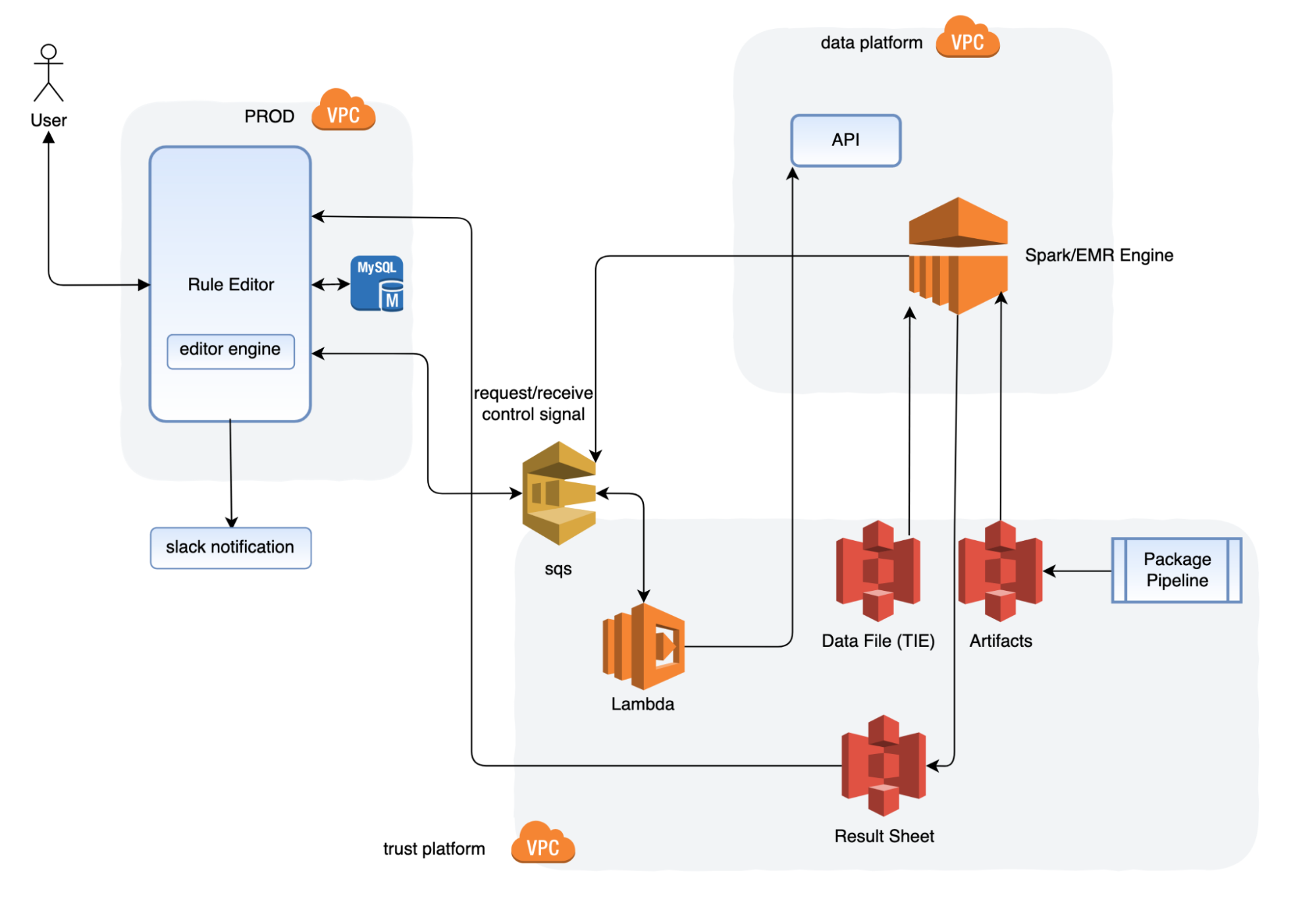
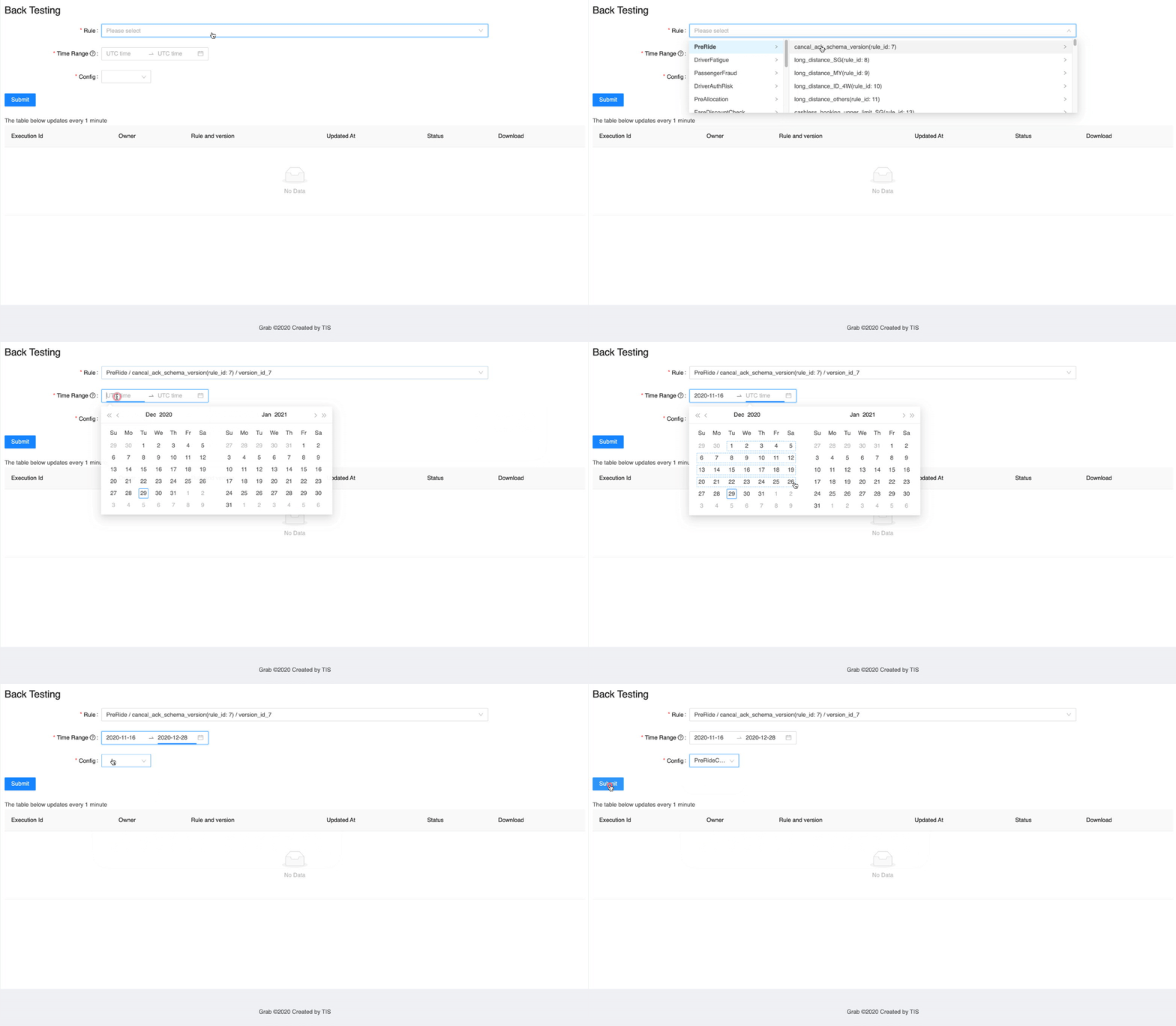
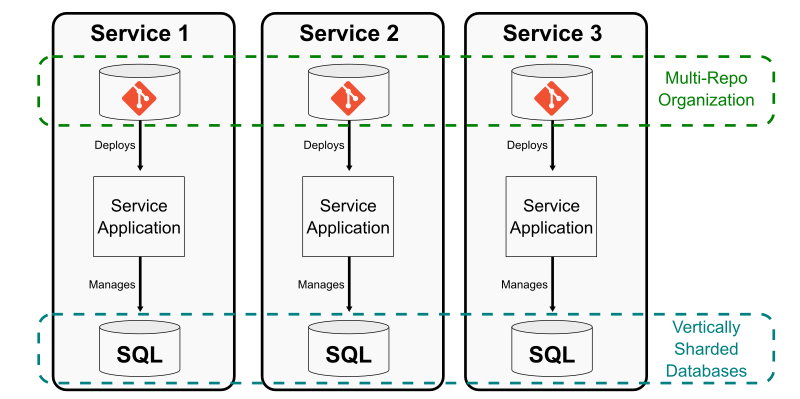
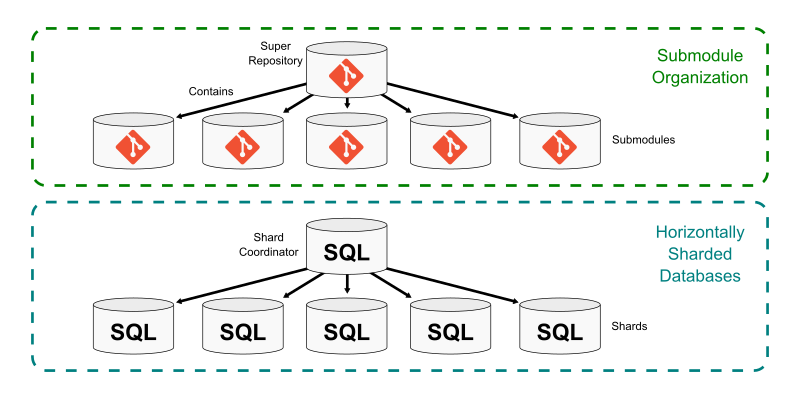
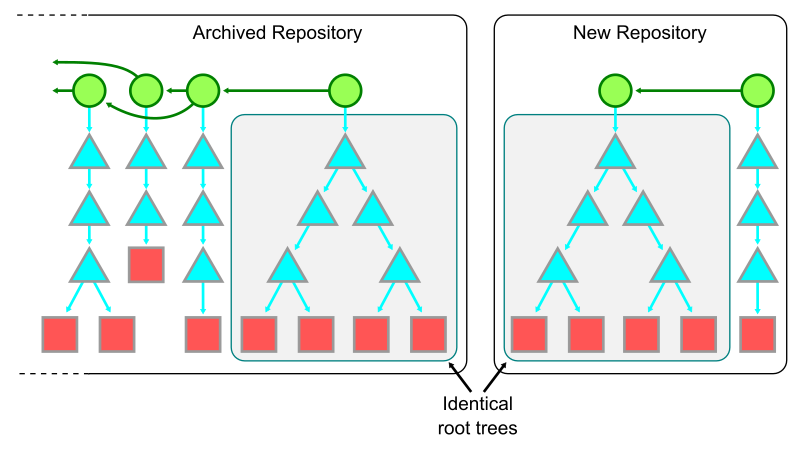
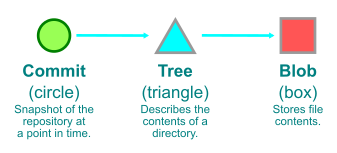
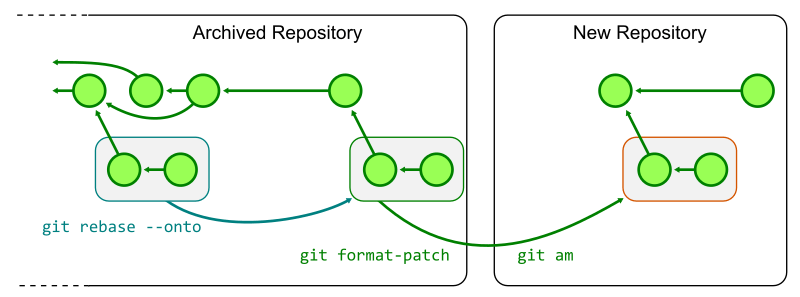
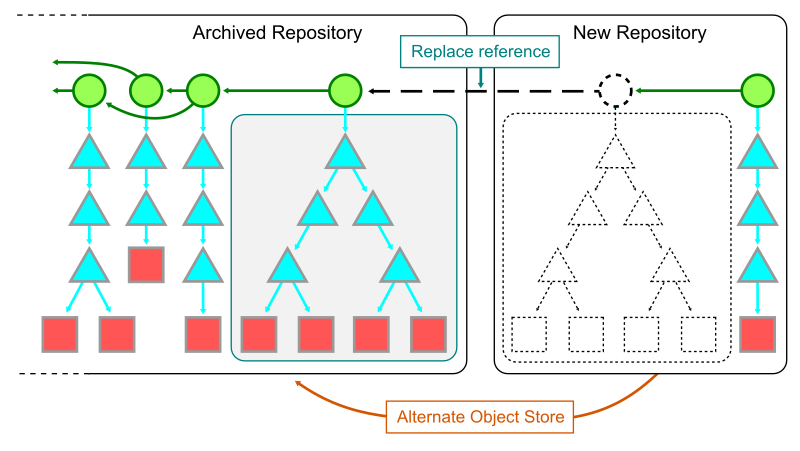
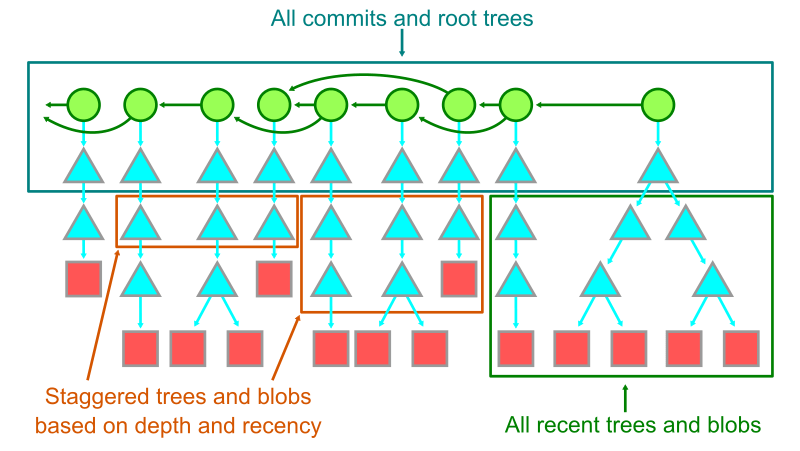


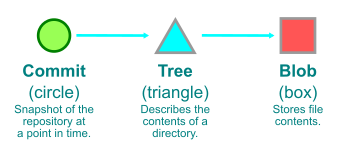
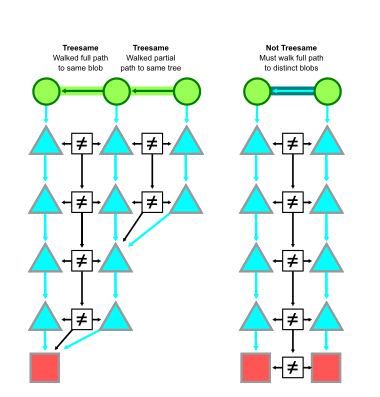


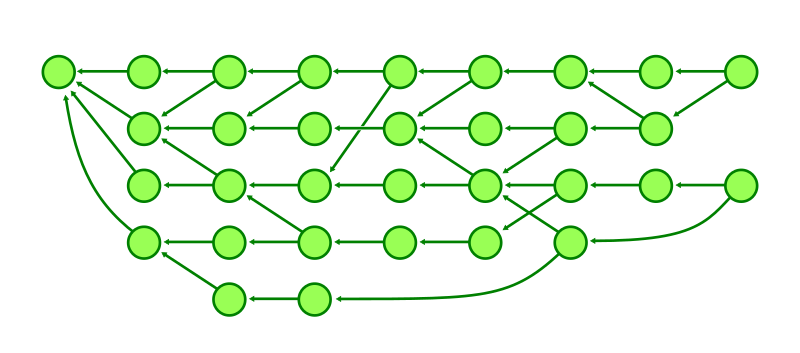
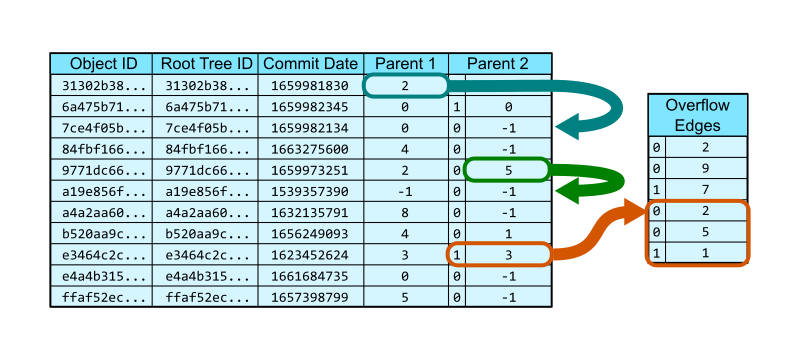
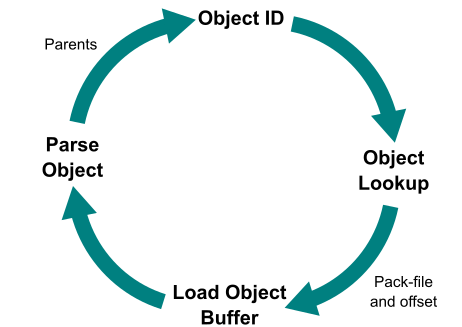
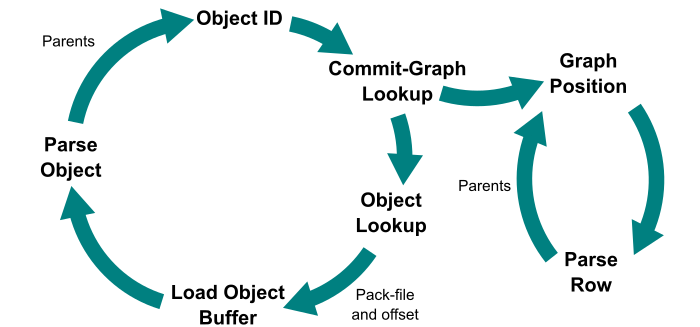
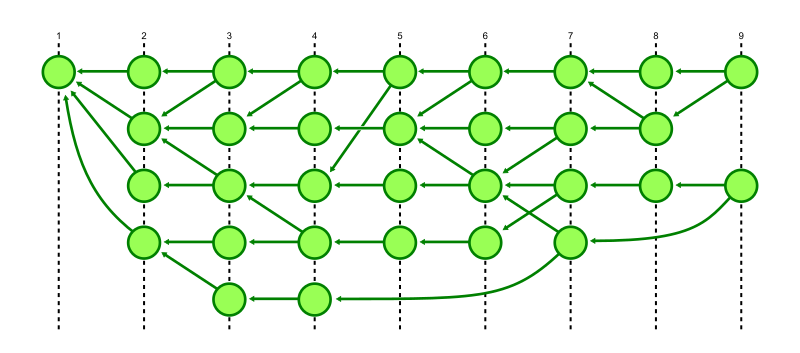
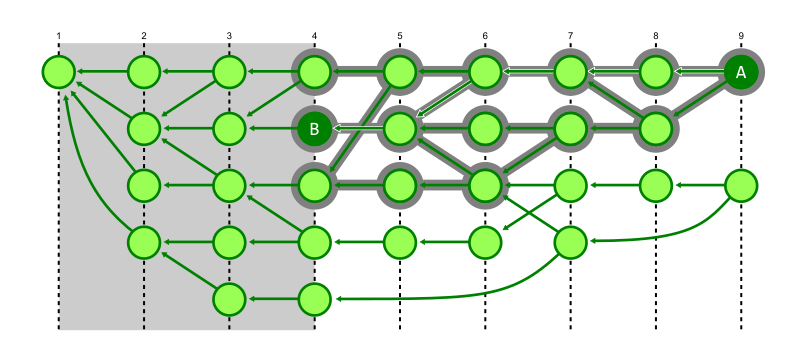
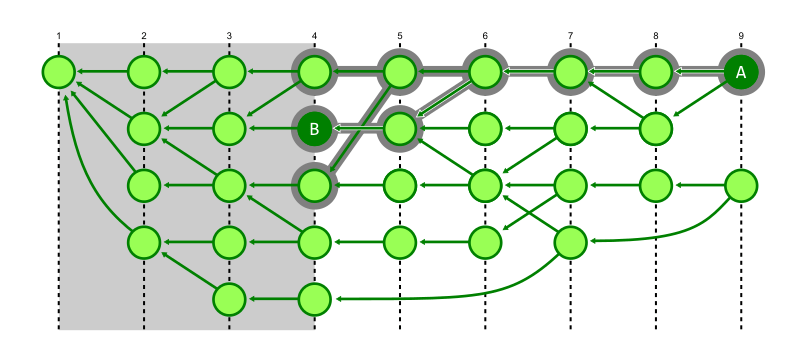
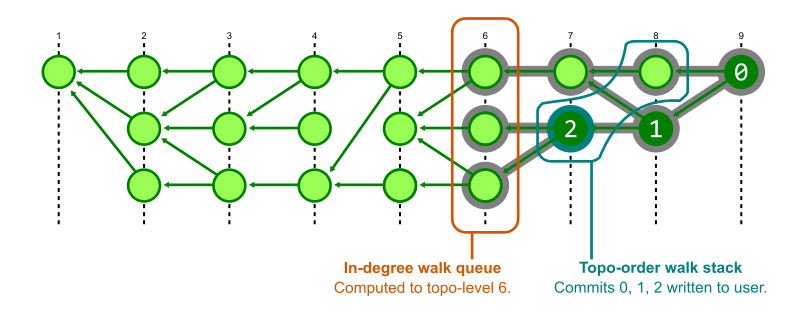
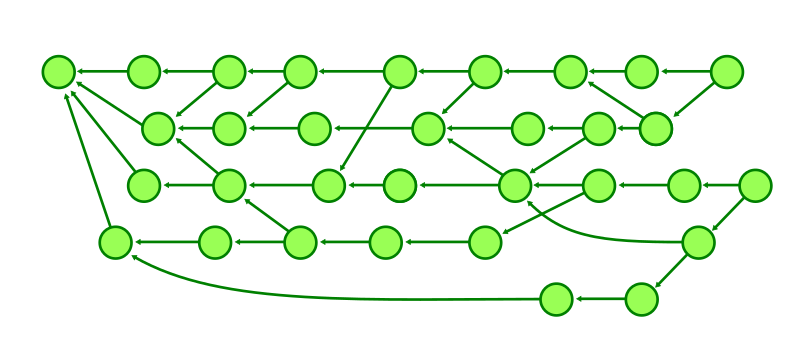

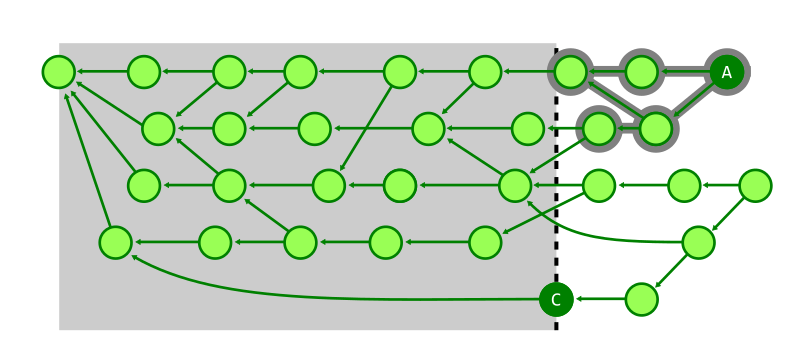
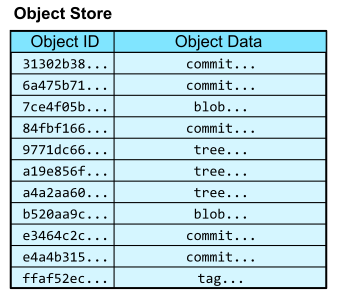
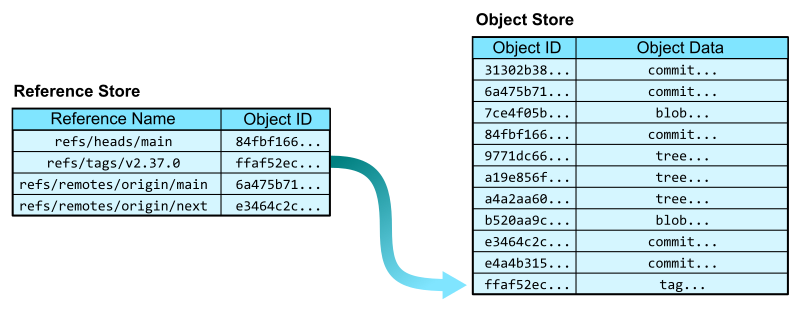

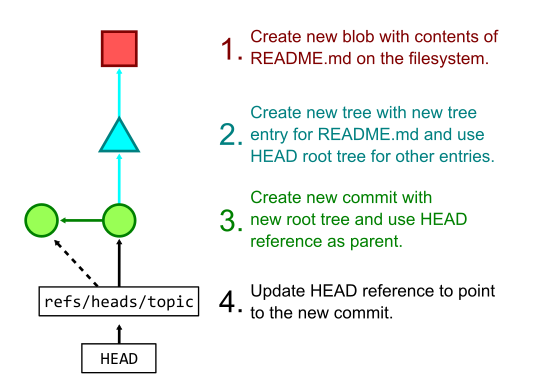
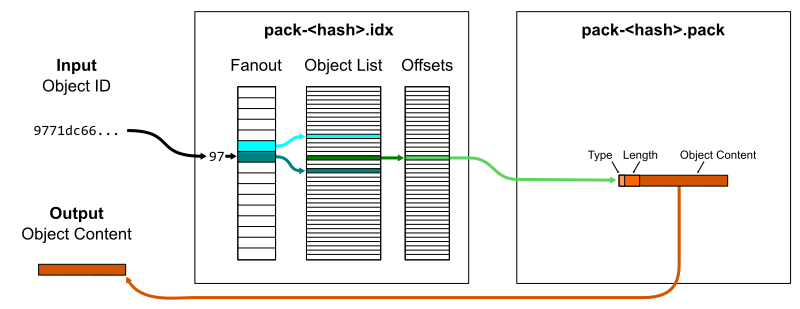
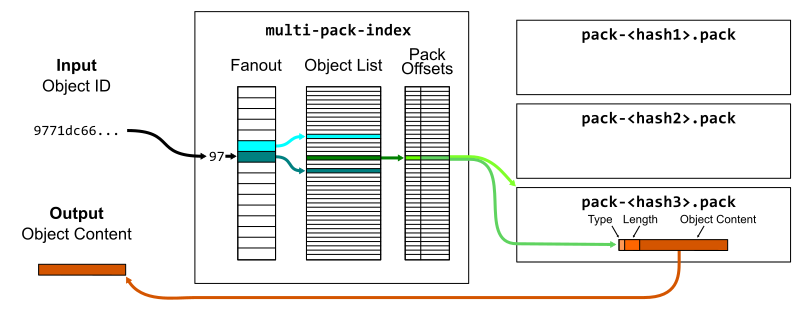
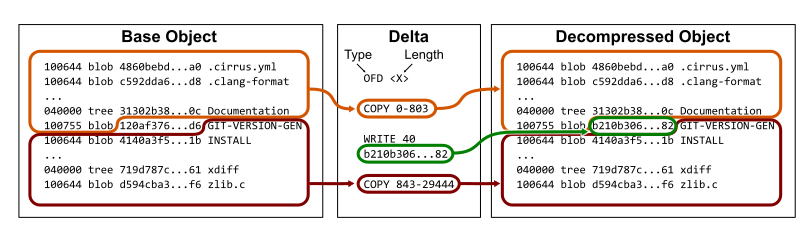

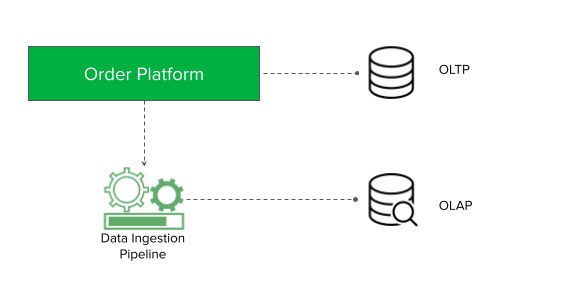
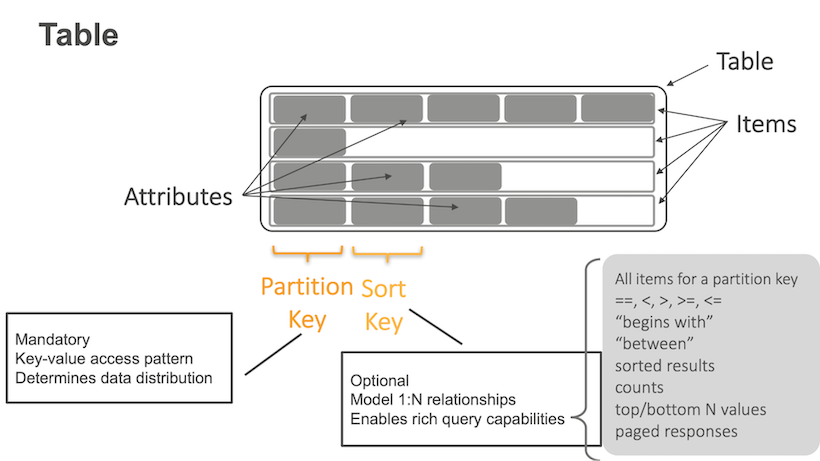
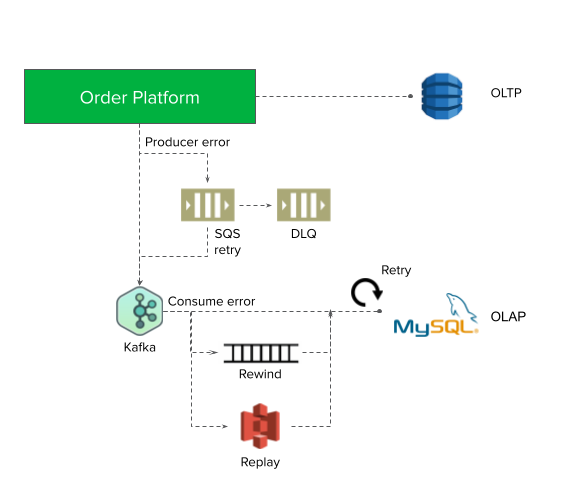
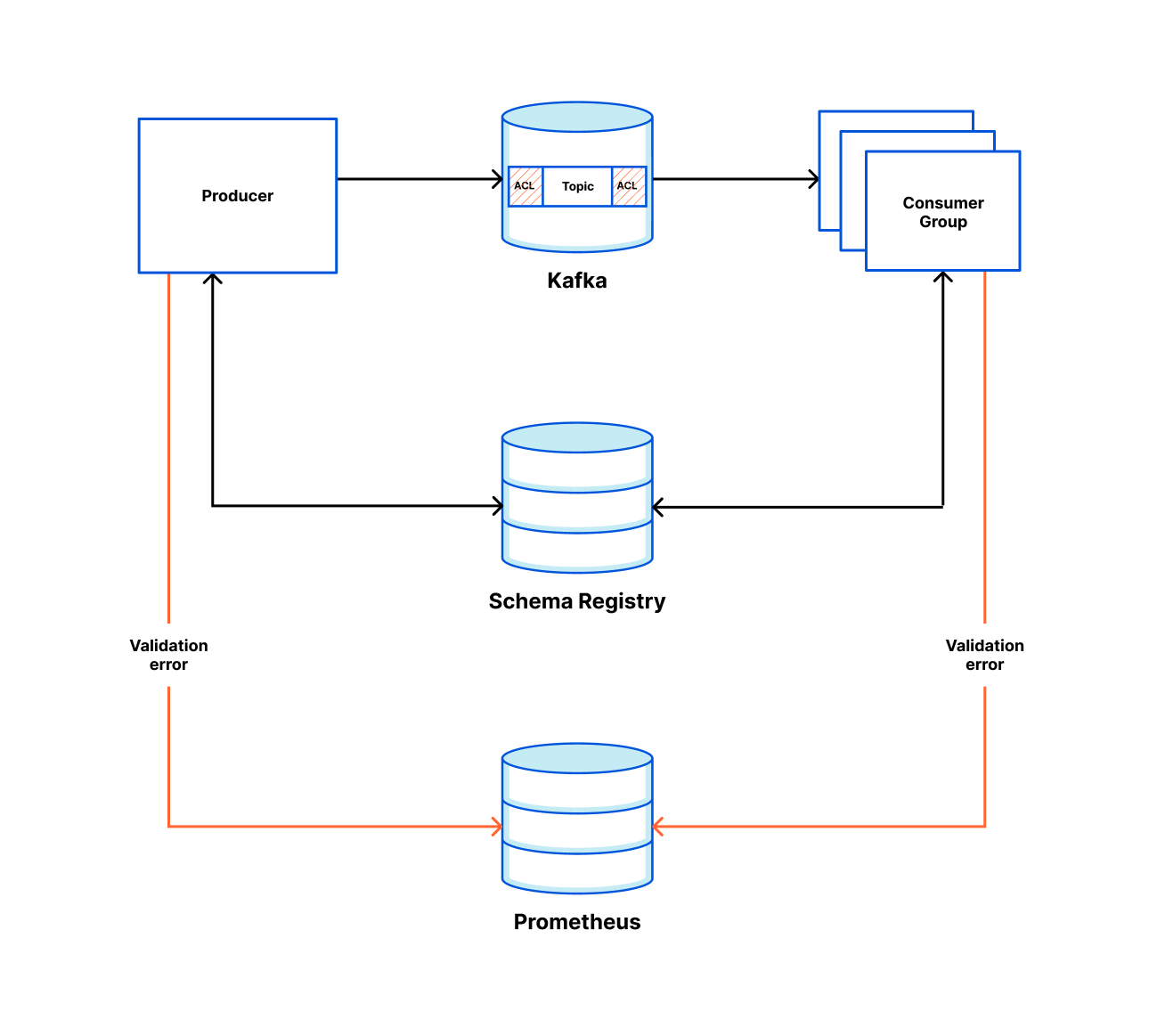

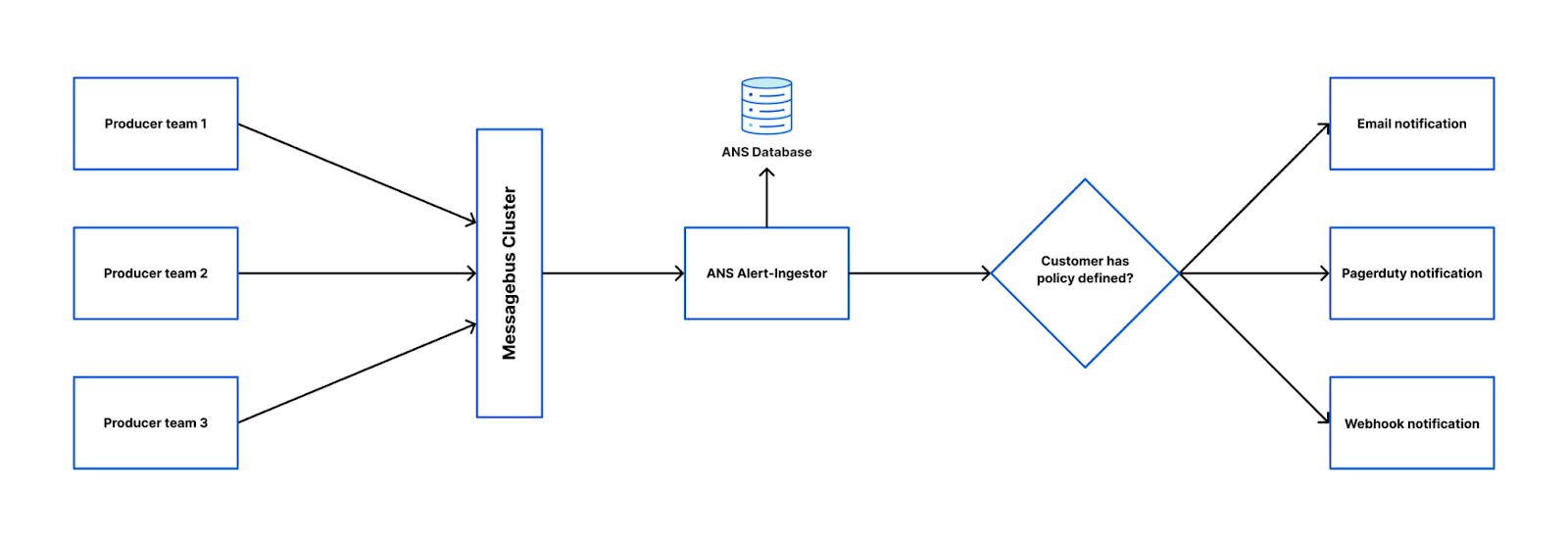

 Structure the narrative
 Resize and stabilize the commits
 Explain the context