Tag Archives: news

User roles for the enterprise

Post Syndicated from Arturs Lontons original https://blog.zabbix.com/user-roles-for-the-enterprise/12887/

In this post, we’ll talk about granular user roles introduced in Zabbix 5.2 and some scenarios where user roles should be used and where they give a great benefit to these specific environments.

Contents

I. Permissions granularity (0:40)
II. User Roles in 5.2 (5:16)
III. Example use cases (16:16)
IV. Questions & Answers (h2)

Permissions granularity

Permissions granularity

Let’s consider two roles: the NOC Team role and the Network Administrator role. These are quite different roles requiring different permission levels. Let’s not also forget that the people working in these roles usually have different skill sets, therefore the user experience is quite important for both of these roles: NOC Team probably wants to see only the most important, the most vital data, while the Network Administrators usually require permissions to view data in more detail and have access to more detailed and granular information overviews of what’s going on in your environment.

For our example, let’s first define the requirements for these roles.

NOC Team role:

  • They will definitely require access to dashboards and maps.
  • We will want to restrict unnecessary UI elements for them just to improve the UX. In this case – less is more. Removing the unused UI elements will make the day-to-day workflow easier for the NOC team members who aren’t as proficient with Zabbix as our Monitoring team members.
  • For security reasons we need to restrict API access because NOC team members will either use API very rarely or not at all. With roles we can restrict the API access either partially or completely.
  • The ability to modify the existing  configuration will be restricted, as the NOC team will not be responsible for changing  the Zabbix configuration.
  • The ability to close problems manually will be restricted, since the network admin team will be responsible for that.

Network Administrator role:

  • Similar to the NOC team, the Network Administrators also require access to dashboards and maps. what’s going on in your environment, the health of the environment.
  • They need to have access to configuration, since members of this team are responsible for making configuration changes.
  • Most likely, instead of disabling the API access for our network administrator role, we would want to restrict API access in some way. They might still need access to get or create methods, while access to everything else should be restricted.
  • For each of our roles we will be implementing a UI cleanup by restricting UI elements – we will hide the functionality that we have opted out of using.

Roles and multi-tenancy

Granular permissions are one of the key factors in multi-tenant environments. We could use permissions to segregate our environment per tenant, but in 5.2 that’s not the end of it:

  • Imagine multiple tenants where each has different monitoring requirements. Some want to use the services function for SLA calculation, others want to use inventory, or need the maps and the dashboards.
  • Restricting access to elements and actions per tenant is important. So, for example, some tenants wish to be able to close problems manually, others need to have restrictions on map or dashboard creations for a specific user group..
  • Permissions are still used to enable isolation between tenants on host group level

User Roles in 5.2

With Zabbix 5.2 these use cases, which require additional permission granularity, are now fully supported.

So, let’s take a look at how the User Role feature looks in a real environment.

User role

User roles in Zabbix 5.2 are something completely new. Each user will have a role assigned to them on top of their User Type:

User permissions

We end up having our User types being  linked to User roles, and User roles linked to Users. This means that User types are linked to Users indirectly through the User roles.

User types

The User, Admin, and Super admin types are still in use. The role will be linked to one of these 3 user types.

User roles

Note that User type restrictions still apply.

  • Super admin has access to every section: Administration, Configuration, Reports, Inventory, and Monitoring.
  • Admin has access to Configuration, Reports, Inventory, and Monitoring.
  • User has access to Reports, Inventory, and Monitoring.

Frontend sections restricted by User type

Default User roles

Once we upgrade to 5.2 or install a fresh 5.2 instance, we will have a set of default user roles. The 4 pre-configured user roles are available under Administration > User roles:

  • Super admin,
  • Admin,
  • User, and
  • Guest.

Super admin role

  • The default Super admin role is static. It is set up by default once you upgrade or install a fresh instance. Users cannot modify this role.

All of the other default roles can be modified. In the Zabbix environment, we must have at least a single user with this Super admin role that has access to all of Zabbix functionality. This is similar to the root user in the Linux OS.

Newly created roles of either  Super admin, Admin, or User types can be modified. For example, we can create another Super admin role, change the permissions. For instance, we can have a Super admin that doesn’t have access to Administration > General, but has access to everything else.

User role section

Once we open the User roles section, we will see a list of features and functions that we can restrict per user role.

When we create a new role or open a pre-created role they will have the maximum allowed permissions depending on the User type that is used for the role.

Each of the default roles contains the maximum allowed permissions per user type

UI element restriction

We can restrict access to UI elements for each role. If we wish to create a NOC role we can restrict them to have access only to Dashboards and maps. When we open the User up and go to Permissions we will see the available sections highlighted in green.

NOC user role that has access only to Dashboards and maps

Once we open up the Dashboards or the Monitoring section, we will  see only the UI sections in our navigation menu that have been permitted for this specific user.

Global view: NOC user role that has access only to Dashboards and maps

Host group permissions

Note, that User Group access to Host Groups still has to be properly assigned. For instance, when we open the Dashboard, we still have to check if this user belongs to a user group, which has access to a specific host group. Then we will either display or hide the corresponding data.

User Group access to Host Group

Access to API

API access can also be restricted for each role. Depending on the Access to API “Enabled” checkbox the corresponding user of this specific role will be permitted or denied to access the API.

Used when creating API specific user roles

In addition to that, we can allow or restrict the execution of specific API methods. For this we can use an Allow or Deny list. For instance, we could create a user that has access only to get methods: they can read the data, but they cannot modify the data.

Restricting API method

Let’s use host.create method as an example. If I don’t have permission to do so, I will see an error message ‘no permissions to call’ and then the name of the call — host.create in this case.

Access to actions

Each role can have a specific list of actions that it can perform with respect to the role User type.

In this context, ‘Actions’ mean what this user can do within the UI: Do we wish for the user to be able to close problems, acknowledge them, create or edit maps.

Defining access to actions

NOTE. For the role of type ‘User’, the ‘Create and edit maintenance’ will be grayed out because the User type by default doesn’t have access to the Maintenance section. You cannot enable it for the role of User type, but you can enable or disable it for the Admin type role.

Restricting Actions example

Let’s restrict the role for acknowledging and closing problems. Once we define the restriction the acknowledgment and closing of problems will be grayed out in the frontend.

If we enable it (the checkboxes are editable), we can acknowledge and close problems.

Restricted role

Unrestricted role

Default access

We can also modify the Default access section. We can define that a role has default access to new actions, modules, and UI elements. For instance, if we are importing a new frontend module or upgrading our version 5.2 to version 6.0 in the future –  if any new UI elements, modules or action types appear, do we want for this specific role to have access to it by default once it is created or should this role by default have restricted access to all of these new elements that we are creating?

This allows to give access to any new UI elements for our Super Admin users while disabling the for any other User roles.

Default access for new elements of different types can be enabled or disabled for user roles

If Default access is enabled, whenever a new element is added, the user belonging to this role will automatically have access to it.

Role assignment post-upgrade

How are these roles going to be assigned after migration to 5.2? I have my users of a specific User type, but what’s going to happen with roles? Will I have to assign them manually?

When you upgrade to 5.2 from, for example, 5.0, the users will have the pre-created default roles for Admin, User, and Super admin assigned for them based on their types.

Pre-created roles after migration

This allows us to keep things as they were before 5.2 or go ahead with creating new User roles.

Example use cases

The following example use cases will give you an idea of how you can implement this in your environment.

Read-only role

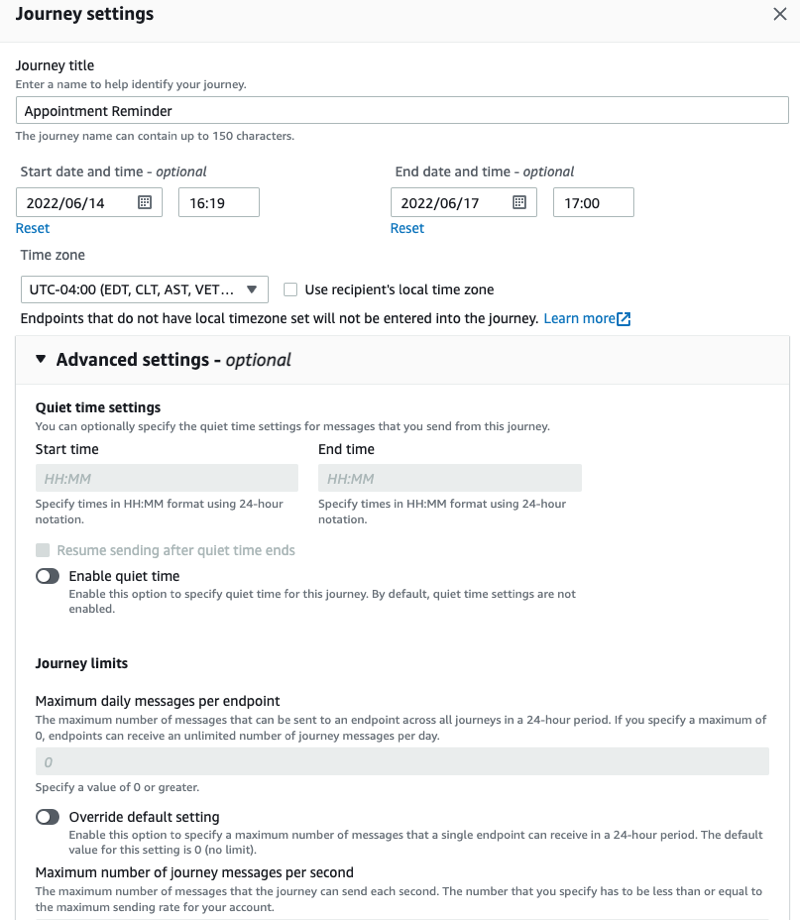
ANOC Team User role, with no ability to create or modify any elements:

  • read-only access to dashboards,
  • no access to problems,
  • no access to API, and
  • no permissions to execute frontend scripts.

When we are defining this new role, we will mark the corresponding checkboxes in the Monitoring section. The User type for this role is going to be ‘User’ because they don’t need to have access to Administration or Configuration.

User type and sections the role has access to

We will also restrict access to actions, the API, and decide on the new UI element and module permission logic. Default access to new actions and modules will be restricted. Read up on Zabbix release notes to see if any new UI elements have been added in future releases!

Read-only role

When we log in with this user and go to Dashboards, we will see that this user has no option to create or edit a dashboard because we have restricted such an action. The access is still granted based on the Dashboard permissions — depending on whether it is a public or a private dashboard. When they open it up, the data that they will see will depend on the User group to Host group relationship.

When this user opens up the frontend, he will see that access to the unnecessary UI elements is restricted (the restricted UI elements are hidden). Even though he has access to the Problem widget on the dashboard, they are unable to acknowledge or close the problem as we have restricted those actions.

Restricted UI elements hidden and ‘Acknowledge’ button unclickable for this Role

Restrict access to Administration section

Another very interesting use case — restricting access to Administration sections. Administration sections are available only for our Super admins, but, in this case, we want to have a separate role of type Super admin that has some restrictions.

Our Super admin type role that has no access to User сonfiguration and General Zabbix settings will need to be able to:

  • create and manage proxies,
  • define media types and frontend scripts, and
  • access the queue to check the health of our Zabbix instance.

But they won’t be able to create new User groups, Users, and so on.

So, we are opening our Administration > User roles section, creating a new role of type Super admin, and restricting all of the user-related sections, and also restricting access to Administration > General.

User type – Super admin. General and User sections are restricted for this role

When we log in, we can see that there is no access to Administration > General section because we have restricted the ability to change housekeeper settings,  trigger severities, and other settings that are available in Administration > General.

But the Monitoring Super admin user still has the ability to create new Proxies, Media Types, Scripts and has access to the Queue section. This is a nice way to create different types of Super admins which was not possible before 5.2.

Access to Administration section elements

Roles for multi-tenant environment

Zabbix Dashboards and maps are used by multiple tenants to provide monitoring data.

In our example, we will imagine a customer portal that different tenants can access. They log in to Zabbix and based on their roles and permissions can access different elements. One of our Tenant requires a NOC role :

  • read-only access to dashboards,
  • read-only access to maps,
  • no access to API,
  • no access to configuration,
  • isolation per tenant so we won’t be able to see the host status of other tenants.

We will create a new role in Administration > User roles — new role of type User. We will restrict access only to the UI elements that need to be visible for the users belonging to this role.

User type role with very limited access to UI

Since we need to have isolation, we will also be using tag-based permissions to isolate our Hosts per tenant. We’ll go to Permissions section, add read-only or write permissions on a User group to a specific Host group. Then we will also define the tag-based permissions so that these users have access only to problems that are tagged with a specific tag.

Tag-based permissions to isolate our Hosts per tenant

Don’t forget to actually tag those problems and define these tags either on the trigger level or on the host level.

Tagging on the host level

Once we have implemented this, if we open up the UI, we go to Monitoring > Dashboards. We can see that:

  • The UI is restricted only to the required monitoring sections.
  • Tag-based permission ensure that we are seeing problems related to our specific tenant.

Isolation and role restriction have been implemented, and we can successfully have our multi-tenant environment.

Roles for multi-tenant environments

What’s next?

How would you proceed with upgrading to Zabbix 5.2 and implementing this? At the design stage, you need to understand that User roles can help you with a couple of things and you need to estimate and assign value to these things if you want to implement them in your environment.

  1. User roles can improve auditing. Since you have restricted roles per each user it’s easier to audit who did what in your environment.
  2. Restricting API access. We can not only enable or disable API access, but we can also restrict our users to specific methods. From the security and auditing perspective, this adds a lot of flexibility.
  3. Restricting configuration. We can restrict users to specific actions or limit their access to specific Configuration sections as in the example with the custom Super admin role. This allows us to have multiple tiers of admins in our environment
  4. Removing unwanted UI elements. By restricting access to only the necessary UI elements we can give Zabbix a much cleaner look and improve the UX of your users.

Thank you! I hope I gave you some insight into how roles can be used and how they will be implemented in Zabbix 5.2. I hope you aren’t too afraid to play around with this new set of features and implement them in your environment.

Questions & Answers

Question. Can we have a limited read-only user that will have access to all the hosts that are already in Zabbix and will be added in the future?

Answer. Yes, we can have access to all of the existing Host groups. But when you add a new Host Group, you will have to go to your Permissions section and assign User Group to Host Group permissions for the newly added group.

Question. So that means that now we can have a fully customizable multi-tenant environment?

Answer. Definitely. Fully customizable based both on our User group to Host group permissions and roles to make the actions and different UI sections available as per the requirements of our tenants.

Question. I want to create a user with only API access. Is that possible in 5.0 or 5.2?

Answer. It’s been possible for a while now.  You can just disable the frontend access and leave the user with the respective permissions on specific Host groups. But with 5.2 you can make the API limitations more granular. So, you can say that this API-only user has access only to specific API methods

Question. Can we make a user who can see but cannot edit the configuration?

Answer. Partially. For read-only users, read-only access still works for the Monitoring section. But if we go to Configuration, if we want to see anything in the Configuration section, we need write access.You can use Monitoring > Hosts section, where you can see partial configuration. Configuration section unfortunately still is not available for read-only access.


Rapid7 Acquires Leading Kubernetes Security Provider, Alcide

Post Syndicated from Brian Johnson original https://blog.rapid7.com/2021/02/01/rapid7-acquires-leading-kubernetes-security-provider-alcide/

Rapid7 Acquires Leading Kubernetes Security Provider, Alcide

Organizations around the globe continue to embrace the flexibility, speed, and agility of the cloud. Those that have adopted it are able to accelerate innovation and deliver real value to their customers faster than ever before. However, while the cloud can bring a tremendous amount of benefits to a company, it is not without its risks. Organizations need comprehensive visibility into their cloud and container environments to help mitigate risk, potential threats, and misconfigurations.

At Rapid7, we strive to help our customers establish and implement strategies that enable them to rapidly adopt and secure cloud environments. Looking only at cloud infrastructure or containers in a silo provides limited ability to understand the impact of a possible vulnerability or breach.

To help our customers gain a more comprehensive view of their cloud environments, I am happy to announce that we have acquired Alcide, a leader in Kubernetes security based in Tel Aviv, Israel. Alcide provides seamless Kubernetes security fully integrated into the DevOps lifecycle and processes so that business applications can be rapidly deployed while also protecting cloud environments from malicious attacks.

Alcide’s industry-leading cloud workload protection platform (CWPP) provides broad, real-time visibility and governance, container runtime and network monitoring, as well as the ability to detect, audit, and investigate known and unknown security threats. By bringing together Alcide’s CWPP capabilities with our existing posture management (CSPM) and infrastructure entitlements (CIEM) capabilities, we will be able to provide our customers with a cloud-native security platform that enables them to manage risk and compliance across their entire cloud environment.

This is an exciting time in cloud security, as we’re witnessing a shift in perception. Cloud security teams are no longer viewed as a cost center or operational roadblock and have earned their seat at the table as a critical investment essential to driving business forward. With Alcide, we’re excited to further increase that competitive advantage for our customers.

We look forward to joining forces with Alcide’s talented team as we work together to provide our customers comprehensive, unified visibility across their entire cloud infrastructure and cloud-native applications.

Welcome to the herd, Alcide!

State-Sponsored Threat Actors Target Security Researchers

Post Syndicated from boB Rudis original https://blog.rapid7.com/2021/01/26/state-sponsored-threat-actors-target-security-researchers/

State-Sponsored Threat Actors Target Security Researchers

This blog was co-authored by Caitlin Condon, VRM Security Research Manager, and Bob Rudis, Senior Director and Chief Security Data Scientist.

On Monday, Jan. 25, 2021, Google’s Threat Analysis Group (TAG) published a blog on a widespread social engineering campaign that targeted security researchers working on vulnerability research and development. The campaign, which Google attributed to North Korean (DPRK) state-sponsored actors, has been active for several months and sought to compromise researchers using several methods.

Rapid7 is aware that many security researchers were targeted in this campaign, and information is still developing. While we currently have no evidence that we were compromised, we are continuing to investigate logs and examine our systems for any of the IOCs listed in Google’s analysis. We will update this post with further information as it becomes available.

Organizations should take note that this was a highly sophisticated attack that was important enough to those who orchestrated it for them to burn an as-yet unknown exploit path on. This event is the latest in a chain of attacks—e.g., those targeting SonicWall, VMware, Mimecast, Malwarebytes, Microsoft, Crowdstrike, and SolarWinds—that demonstrates a significant increase in threat activity targeting cybersecurity firms with legitimately sophisticated campaigns. Scenarios like these should become standard components of tabletop exercises and active defense plans.

North Korean-attributed social engineering campaign

Google discovered that the DPRK threat actors had built credibility by establishing a vulnerability research blog and several Twitter profiles to interact with potential targets. They published videos of their alleged exploits, including a YouTube video of a fake proof-of-concept (PoC) exploit for CVE-2021-1647—a high-profile Windows Defender zero-day vulnerability that garnered attention from both security researchers and the media. The DPRK actors also published “guest” research (likely plagiarized from other researchers) on their blog to further build their reputation.

The malicious actors then used two methods to social engineer targets into accepting malware or visiting a malicious website. According to Google:

  • After establishing initial communications, the actors would ask the targeted researcher if they wanted to collaborate on vulnerability research together, and then provide the researcher with a Visual Studio Project. Within the Visual Studio Project would be source code for exploiting the vulnerability, as well as an additional pre-compiled library (DLL) that would be executed through Visual Studio Build Events. The DLL is custom malware that would immediately begin communicating with actor-controlled command and control (C2) domains.

State-Sponsored Threat Actors Target Security Researchers
Visual Studio Build Events command executed when building the provided VS Project files. Image provided by Google.

  • In addition to targeting users via social engineering, Google also observed several cases where researchers have been compromised after visiting the actors’ blog. In each of these cases, the researchers followed a link on Twitter to a write-up hosted on blog[.]br0vvnn[.]io, and shortly thereafter, a malicious service was installed on the researcher’s system and an in-memory backdoor would begin beaconing to an actor-owned command and control server. At the time of these visits, the victim systems were running fully patched and up-to-date Windows 10 and Chrome browser versions. As of Jan. 26, 2021, Google was unable to confirm the mechanism of compromise.

The blog the DPRK threat actors used to execute this zero-day drive-by attack was posted on Reddit as long as three months ago. The actors also used a range of social media and communications platforms to interact with targets—including Telegram, Keybase, Twitter, LinkedIn, and Discord. As of Jan. 26, 2021, many of these profiles have been suspended or deactivated.

Rapid7 customers

Google’s threat intelligence includes information on IOCs, command-and-control domains, actor-controlled social media accounts, and compromised domains used as part of the campaign. Rapid7’s MDR team is deploying IOCs and behavior-based detections. These detections will also be available to InsightIDR customers later today. We will update this blog post with further information as it becomes available.

Defender guidance

TAG noted in their blog post that they have so far only seen actors targeting Windows systems. As of the evening of Jan. 25, 2021, researchers across many companies confirmed on Twitter that they had interacted with the DPRK actors and/or visited the malicious blog. Organizations that believe their researchers or other employees may have been targeted should conduct internal investigations to determine whether indicators of compromise are present on their networks.

At a minimum, responders should:

  • Ensure members of all security teams are aware of this campaign and encourage individuals to report if they believe they were targeted by these actors.
  • Search web traffic, firewall, and DNS logs for evidence of contacts to the domains and URLs provided by Google in their post.
  • According to Rapid7 Labs’ forward DNS archive, the br0vvnn[.]io apex domain has had two discovered fully qualified domain names (FQDNs)—api[.]br0vvnn[.]io and blog[.]br0vvnn[.]io—over the past four months with IP addresses 192[.]169[.]6[.]31 and 192[.]52[.]167[.]169, respectively. Contacts to those IPs should also be investigated in historical access records.
  • Check for evidence of the provided hashes on all systems, starting with those operated and accessed by members of security teams.

Moving forward, organizations and individuals should heed Google’s advice that “if you are concerned that you are being targeted, we recommend that you compartmentalize your research activities using separate physical or virtual machines for general web browsing, interacting with others in the research community, accepting files from third parties and your own security research.”

NEVER MISS A BLOG

Get the latest stories, expertise, and news about security today.

Update on SolarWinds Supply-Chain Attack: SUNSPOT and New Malware Family Associations

Post Syndicated from boB Rudis original https://blog.rapid7.com/2021/01/12/update-on-solarwinds-supply-chain-attack-sunspot-and-new-malware-family-associations/

Update on SolarWinds Supply-Chain Attack: SUNSPOT and New Malware Family Associations

This update is a continuation of our previous coverage of the SolarWinds supply-chain attack that was discovered by FireEye in December 2020. As of Jan. 11, 2021, new research has been published that expands the security community’s understanding of the breadth and depth of the SolarWinds attack.

Two recent developments warrant your attention:

The SUNSPOT build implant

On Monday, Jan. 11, 2021, CrowdStrike’s intelligence team published technical analysis on SUNSPOT, a newly identified type of malware that appears to have been used as part of the SolarWinds supply chain attack. CrowdStrike describes SUNSPOT as “a malicious tool that was deployed into the build environment to inject [the SUNBURST] backdoor into the SolarWinds Orion platform.”

While SUNSPOT infection is part of the attack chain that allows for SUNBURST backdoor compromise, SUNSPOT has distinct host indicators of attack (including executables and related files), artifacts, and TTPs (tactics, techniques, and procedures).

CrowdStrike provides a thorough breakdown of how SUNSPOT operates, including numerous indicators of compromise. Here are the critical highlights:

SUNSPOT’s on-disk executable is named taskhostsvc.exe and has an initial, likely build date of Feb. 20, 2020. It maintains persistence through a scheduled task that executes on boot and has the SeDebugPrivilege grant, which is what enables it to read the memory of other processes.

It uses this privilege to watch for MsBuild.exe (a Visual Studio development component) execution and modifies the target source code before the compiler has a chance to read it. SUNSPOT then looks for a specific Orion software source code component and replaces it with one that will inject SUNBURST during the build process. SUNSPOT also has validation checks to ensure no build errors are triggered during the build process, which helps it escape developer and other detection.

The last half of the CrowdStrike analysis has details on tactics, techniques, and procedures, along with host indicators of attack, ATT&CK framework mappings, and YARA rules specific to SUNSPOT. Relevant indicators have been incorporated into Rapid7’s SIEM, InsightIDR, and Managed Detection and Response instances and workflows.

SolarWinds has updated their blog with a reference to this new information on SUNSPOT. Because SUNSPOT, SUNBURST, and related tooling have not been definitively mapped to a known adversary, CrowdStrike has christened the actors responsible for these intrusions “StellarParticle.”

SUNBURST’s Kazuar lineage

Separately, Kaspersky Labs also published technical analysis on Monday, Jan. 11, 2020 that builds a case for a connection between the SUNBURST backdoor and another backdoor called Kazuar. Kazuar, which Palo Alto Networks’ Unit42 team first described in May of 2017 as a “multiplatform espionage backdoor with API access,” is a .NET backdoor that Kaspersky says appears to share several “unusual features” with SUNBURST. (Palo Alto linked Kazuar to the Turla APT group back in 2017, which Kaspersky says their own observations support, too.)

Shared features Kaspersky has identified so far include the use of FNV-1a hashing throughout Kazua and SUNBURST code, a similar algorithm used to generate unique victim identifiers, and customized (thought not exactly the same) implementations of a sleeping algorithm that delays between connections to a C2 server and makes network activity less obvious. Kaspersky has a full, extremely detailed list of similar and different features across both backdoors in their post.

Kaspersky does not definitively state that the two backdoors are the work of the same actor. Instead, they offer five possible explanations for the similarities they’ve identified between Kazuar and SUNBURST. The potential explanations below have been taken directly from their post:

  1. Sunburst was developed by the same group as Kazuar.
  2. The Sunburst developers adopted some ideas or code from Kazuar, without having a direct connection (they used Kazuar as an inspiration point).
  3. Both groups, DarkHalo/UNC2452 and the group using Kazuar, obtained their malware from the same source.
  4. Some of the Kazuar developers moved to another team, taking knowledge and tools with them.
  5. The Sunburst developers introduced these subtle links as a form of false flag, in order to shift blame to another group.

As Kaspersky notes, the knowledge of a potential lineage connection to Kazaur changes little for defenders, but is worth keeping an eye on, as a confirmed connection may help those in more highly targeted sectors use previous Kazuar detection and prevention methods to enhance their response to the SolarWinds compromise.

NEVER MISS A BLOG

Get the latest stories, expertise, and news about security today.

Thank you 2020: Results, Achievements, and Plans

Post Syndicated from Jekaterina Petruhina original https://blog.zabbix.com/thank-you-2020-results-achievements-and-plans/13184/

2020 was not an easy year, but it challenged and taught us a lot. Let’s sum up the past year’s results together and make some plans for the next one.

Going online

Despite the worldwide lockdown and the entire team’s inability to work from the office, Zabbix continued to evolve and get better. The Zabbix 5.0 release was the first release to be done remotely – without the usual cake and “family” celebration on release day in our cozy office kitchen. Version 5.2 also followed remotely, with the already familiar online celebration in Zoom.

Unexpectedly we had to change the vector of planned activities. In January 2020, we expected to hold ten conferences in different countries of the world. But in reality, due to the pandemic and the restrictions it caused, we were only able to have a few: Zabbix Conference Benelux 2020, Zabbix Conference China 2020, and Zabbix Conference Japan 2020.

In 2020, we were going to have the biggest Zabbix Summit ever – the 10th-anniversary event. But plans changed, and instead, we held our first online Zabbix Summit. Given the unusual format of a traditional Zabbix Summit – it turned out very successful and proved the online version also could be sustainable.  We are grateful to all the speakers and guests who supported us and joined the event.

We can say that 2020 was all about online events. We start a good tradition to hold Zabbix meetups online and received positive feedback from the community. Thanks to our partners’ support, online meetups have been held not only in English and Russian but also in Czech, Italian, French, Portuguese, Spanish, German, and Polish. We will continue this tradition for sure, providing our users worldwide to learn Zabbix, share their experience, and meet co-thinkers. Remember that we always record the meetups for you to have access to presentations when it is required. Recordings are available on our website’s event section under each event.

Conquering the world

One of the most important events of 2020 for Zabbix was the opening of the office in Brazil. The software and professional services are now even more accessible to Latin American users thanks to language localization and the branch office’s closeness. We are happy to be part of one of Zabbix’s most active communities worldwide and being able to cooperate on a much greater level. We have expanded our Latin American branch with new Zabbix professionals, partners, and initiatives during last year.

We are also proud of making Zabbix more reachable for different language users – with our Latin American office, we opened Zabbix Spanish and Portuguese web page and thanks to our active partners – also German site. Now we are working on more languages to make our open source solution even more open.

As for the overall results, we can share with you some statistics

Our integration team has been very active over the past year and has released many useful templates. In total, their efforts resulted in 42 new templates and 20 new Webhook integrations.

Zabbix partnership network has also grown. Zabbix Partnership program creates a worldwide network of trustful and highly skilled companies ready to provide immediate technical assistance and become an accessible intermediary between you and the Zabbix team. This network has now grown by 40+ partners worldwide, resulting in around 200 partners for now.

In the past year, we rethought the professional training program and expanded it with extra training – one-day courses for in-depth study of one specific topic. These courses differ from the rest of the program by having no requirements. You can get extra knowledge about monitoring with Zabbix without Zabbix certification. Four additional training courses are available now, but we are working on the next topics to provide you.
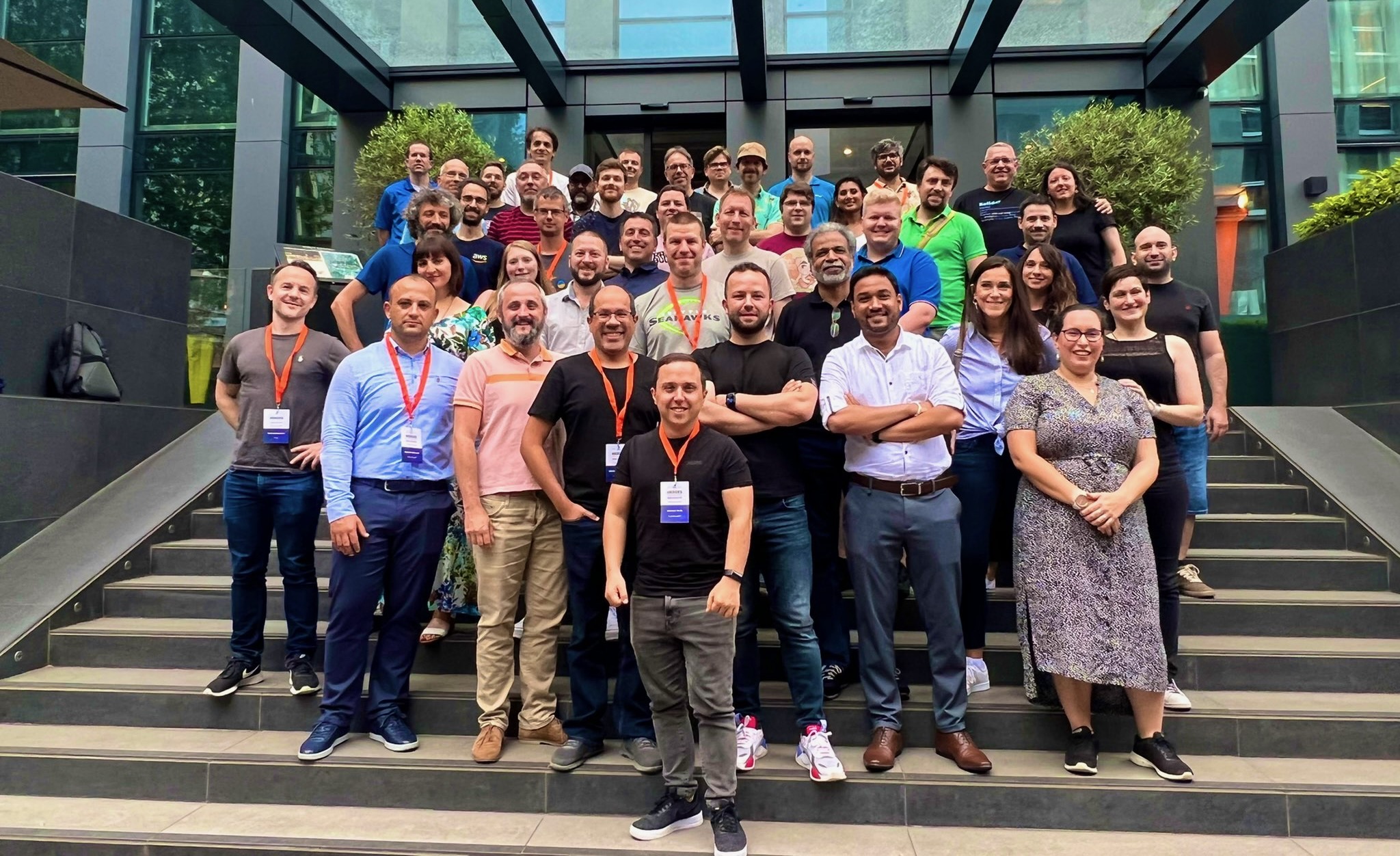
Note that we have already published many training sessions for this year, so now is an excellent time to choose and book the courses and timing that suit you best. Don’t forget to use the filter – you can quickly sort courses by language, level, and location (online or on-site).

Speaking of statistics for last year, thanks to the Zabbix team and partners’ efforts, there were 203 training sessions in total. Altogether, 1,214 official Zabbix certificates were awarded to the training attendees who successfully mastered the material and passed the exam.

But education doesn’t end with training. Webinars are an excellent opportunity to learn different aspects of Zabbix for free. Note that we have also added the ability to watch recorded sessions at your convenience. And we also want to remind you not to forget to use the filter to navigate between sessions. We cover many topics in many different languages, and we want to make sure you don’t miss out on learning the material. Last year we hosted 245 webinar sessions (including 55 sessions held by Zabbix partners worldwide), and we hope it was beneficial for our community.

A sneak peek to 2021

So what can we expect from Zabbix in the new year of 2021? Lots of things! We are not going to stop and continue to work hard. The Zabbix software development roadmap is available on our website. Feel free to explore the features we are working on right now! We will continue to hold meetups, covering complex technical issues. As for the Zabbix Summit 2021, we are also planning to have it online in October 2021. The first experience was a success, so why not strengthen the achieved result. And as for other news, keep an eye on our updates here on the blog, social media, and newsletter. We have an exciting year ahead of us, so let’s make the most of it!


New – AWS Transfer Family support for Amazon Elastic File System

Post Syndicated from Channy Yun original https://aws.amazon.com/blogs/aws/new-aws-transfer-family-support-for-amazon-elastic-file-system/

AWS Transfer Family provides fully managed Secure File Transfer Protocol (SFTP), File Transfer Protocol (FTP) over TLS, and FTP support for Amazon Simple Storage Service (S3), enabling you to seamlessly migrate your file transfer workflows to AWS.

Today I am happy to announce AWS Transfer Family now also supports file transfers to Amazon Elastic File System (EFS) file systems as well as Amazon S3. This feature enables you to easily and securely provide your business partners access to files stored in Amazon EFS file systems. With this launch, you now have the option to store the transferred files in a fully managed file system and reduce your operational burden, while preserving your existing workflows that use SFTP, FTPS, or FTP protocols.

Amazon EFS file systems are accessible within your Amazon Virtual Private Cloud (VPC) and VPC connected environments. With this launch, you can securely enable third parties such as your vendors, partners, or customers to access your files over the supported protocols at scale globally, without needing to manage any infrastructure. When you select Amazon EFS as the data store for your AWS Transfer Family server, the transferred files are readily available to your business-critical applications running on Amazon Elastic Compute Cloud (EC2), as well as to containerized and serverless applications run using AWS services such as Amazon Elastic Container Service (ECS), Amazon Elastic Kubernetes Service (EKS), AWS Fargate, and AWS Lambda.

Using Amazon EFS – Getting Started
To get started in your existing Amazon EFS file system, make sure the POSIX identities you assign for your SFTP/FTPS/FTP users are owners of the files and directories you want to provide access to. You will provide access to that Amazon EFS file system through a resource-based policy. Your role also needs to establish a trust relationship. This trust relationship allows AWS Transfer Family to assume the AWS Identity and Access Management (IAM) role to access your bucket so that it can service your users’ file transfer requests.

You will also need to make sure you have created a mount target for your file system. In the example below, the home directory is owned by userid 1234 and groupid 5678.

$ mkdir home/myname
$ chown 1234:5678 home/myname

When you create a server in the AWS Transfer Family console, select Amazon EFS as your storage service in the Step 4 section Choose a domain.

When the server is enabled and in an online state, you can add users to your server. On the Servers page, select the check box of the server that you want to add a user to and choose Add user.

In the User configuration section, you can specify the username, uid (e.g. 1234), gid (e.g 5678), IAM role, and Amazon EFS file system as user’s home directory. You can optionally specify a directory within the file system which will be the user’s landing directory. You use a service-managed identity type – SSH keys. If you want to use password type, you can use a custom option with AWS Secrets Manager.

Amazon EFS uses POSIX IDs which consist of an operating system user id, group id, and secondary group id to control access to a file system. When setting up your user, you can specify the username, user’s POSIX configuration, and an IAM role to access the EFS file system. To learn more about configuring ownership of sub-directories in EFS, visit the documentation.

Once the users have been configured, you can transfer files using the AWS Transfer Family service by specifying the transfer operation in a client. When your user authenticates successfully using their file transfer client, it will be placed directly within the specified home directory, or root of the specified EFS file system.

$ sftp [email protected]

sftp> cd /fs-23456789/home/myname
sftp> ls -l
-rw-r--r-- 1 3486 1234 5678 Jan 04 14:59 my-file.txt
sftp> put my-newfile.txt
sftp> ls -l
-rw-r--r-- 1 3486 1234 5678 Jan 04 14:59 my-file.txt
-rw-r--r-- 1 1002 1234 5678 Jan 04 15:22 my-newfile.txt

Most of SFTP/FTPS/FTP commands are supported in the new EFS file system. You can refer to a list of available commands for FTP and FTPS clients in the documentation.

Command Amazon S3 Amazon EFS
cd Supported Supported
ls/dir Supported Supported
pwd Supported Supported
put Supported Supported
get Supported Supported including resolving symlinks
rename Supported (only file) Supported (file or folder)
chown Not supported Supported (root only)
chmod Not supported Supported (root only)
chgrp Not supported Supported (root or owner only)
ln -s Not supported Not supported
mkdir Supported Supported
rm Supported Supported
rmdir Supported (non-empty folders only) Supported
chmtime Not Supported Supported

You can use Amazon CloudWatch to track your users’ activity for file creation, update, delete, read operations, and metrics for data uploaded and downloaded using your server. To learn more on how to enable CloudWatch logging, visit the documentation.

Available Now
AWS Transfer Family support for Amazon EFS file systems is available in all AWS Regions where AWS Transfer Family is available. There are no additional AWS Transfer Family charges for using Amazon EFS as the storage backend. With Amazon EFS storage, you pay only for what you use. There is no need to provision storage in advance and there are no minimum commitments or up-front fees.

To learn more, take a look at the FAQs and the documentation. Please send feedback to the AWS forum for AWS Transfer Family or through your usual AWS support contacts.

Learn all the details about AWS Transfer Family to access Amazon EFS file systems and get started today.

Channy;

Amazon Location – Add Maps and Location Awareness to Your Applications

Post Syndicated from Jeff Barr original https://aws.amazon.com/blogs/aws/amazon-location-add-maps-and-location-awareness-to-your-applications/

We want to make it easier and more cost-effective for you to add maps, location awareness, and other location-based features to your web and mobile applications. Until now, doing this has been somewhat complex and expensive, and also tied you to the business and programming models of a single provider.

Introducing Amazon Location Service
Today we are making Amazon Location available in preview form and you can start using it today. Priced at a fraction of common alternatives, Amazon Location Service gives you access to maps and location-based services from multiple providers on an economical, pay-as-you-go basis.

You can use Amazon Location Service to build applications that know where they are and respond accordingly. You can display maps, validate addresses, perform geocoding (turn an address into a location), track the movement of packages and devices, and much more. You can easily set up geofences and receive notifications when tracked items enter or leave a geofenced area. You can even overlay your own data on the map while retaining full control.

You can access Amazon Location Service from the AWS Management Console, AWS Command Line Interface (CLI), or via a set of APIs. You can also use existing map libraries such as Mapbox GL and Tangram.

All About Amazon Location
Let’s take a look at the types of resources that Amazon Location Service makes available to you, and then talk about how you can use them in your applications.

MapsAmazon Location Service lets you create maps that make use of data from our partners. You can choose between maps and map styles provided by Esri and by HERE Technologies, with the potential for more maps & more styles from these and other partners in the future. After you create a map, you can retrieve a tile (at one of up to 16 zoom levels) using the GetMapTile function. You won’t do this directly, but will use Mapbox GL, Tangram, or another library instead.

Place Indexes – You can choose between indexes provided by Esri and HERE. The indexes support the SearchPlaceIndexForPosition function which returns places, such as residential addresses or points of interest (often known as POI) that are closest to the position that you supply, while also performing reverse geocoding to turn the position (a pair of coordinates) into a legible address. Indexes also support the SearchPlaceIndexForText function, which searches for addresses, businesses, and points of interest using free-form text such as an address, a name, a city, or a region.

Trackers –Trackers receive location updates from one or more devices via the BatchUpdateDevicePosition function, and can be queried for the current position (GetDevicePosition) or location history (GetDevicePositionHistory) of a device. Trackers can also be linked to Geofence Collections to implement monitoring of devices as they move in and out of geofences.

Geofence Collections – Each collection contains a list of geofences that define geographic boundaries. Here’s a geofence (created with geojson.io) that outlines a park near me:

Amazon Location in Action
I can use the AWS Management Console to get started with Amazon Location and then move on to the AWS Command Line Interface (CLI) or the APIs if necessary. I open the Amazon Location Service Console, and I can either click Try it! to create a set of starter resources, or I can open up the navigation on the left and create them one-by-one. I’ll go for one-by-one, and click Maps:

Then I click Create map to proceed:

I enter a Name and a Description:

Then I choose the desired map and click Create map:

The map is created and ready to be added to my application right away:

Now I am ready to embed the map in my application, and I have several options including the Amplify JavaScript SDK, the Amplify Android SDK, the Amplify iOS SDK, Tangram, and Mapbox GL (read the Developer Guide to learn more about each option).

Next, I want to track the position of devices so that I can be notified when they enter or exit a given region. I use a GeoJSON editing tool such as geojson.io to create a geofence that is built from polygons, and save (download) the resulting file:

I click Create geofence collection in the left-side navigation, and in Step 1, I add my GeoJSON file, enter a Name and Description, and click Next:

Now I enter a Name and a Description for my tracker, and click Next. It will be linked to the geofence collection that I just created:

The next step is to arrange for the tracker to send events to Amazon EventBridge so that I can monitor them in CloudWatch Logs. I leave the settings as-is, and click Next to proceed:

I review all of my choices, and click Finalize to move ahead:

The resources are created, set up, and ready to go:

I can then write code or use the CLI to update the positions of my devices:

$ aws location batch-update-device-position \
   --tracker-name MyTracker1 \
   --updates "DeviceId=Jeff1,Position=-122.33805,47.62748,SampleTime=2020-11-05T02:59:07+0000"

After I do this a time or two, I can retrieve the position history for the device:

$ aws location get-device-position-history \
  -tracker-name MyTracker1 --device-id Jeff1
------------------------------------------------
|           GetDevicePositionHistory           |
+----------------------------------------------+
||               DevicePositions              ||
|+---------------+----------------------------+|
||  DeviceId     |  Jeff1                     ||
||  ReceivedTime |  2020-11-05T02:59:17.246Z  ||
||  SampleTime   |  2020-11-05T02:59:07Z      ||
|+---------------+----------------------------+|
|||                 Position                 |||
||+------------------------------------------+||
|||  -122.33805                              |||
|||  47.62748                                |||
||+------------------------------------------+||
||               DevicePositions              ||
|+---------------+----------------------------+|
||  DeviceId     |  Jeff1                     ||
||  ReceivedTime |  2020-11-05T03:02:08.002Z  ||
||  SampleTime   |  2020-11-05T03:01:29Z      ||
|+---------------+----------------------------+|
|||                 Position                 |||
||+------------------------------------------+||
|||  -122.43805                              |||
|||  47.52748                                |||
||+------------------------------------------+||

I can write Amazon EventBridge rules that watch for the events, and use them to perform any desired processing. Events are published when a device enters or leaves a geofenced area, and look like this:

{
  "version": "0",
  "id": "7cb6afa8-cbf0-e1d9-e585-fd5169025ee0",
  "detail-type": "Location Geofence Event",
  "source": "aws.geo",
  "account": "123456789012",
  "time": "2020-11-05T02:59:17.246Z",
  "region": "us-east-1",
  "resources": [
    "arn:aws:geo:us-east-1:123456789012:geofence-collection/MyGeoFences1",
    "arn:aws:geo:us-east-1:123456789012:tracker/MyTracker1"
  ],
  "detail": {
        "EventType": "ENTER",
        "GeofenceId": "LakeUnionPark",
        "DeviceId": "Jeff1",
        "SampleTime": "2020-11-05T02:59:07Z",
        "Position": [-122.33805, 47.52748]
  }
}

Finally, I can create and use place indexes so that I can work with geographical objects. I’ll use the CLI for a change of pace. I create the index:

$ aws location create-place-index \
  --index-name MyIndex1 --data-source Here

Then I query it to find the addresses and points of interest near the location:

$ aws location search-place-index-for-position --index-name MyIndex1 \
  --position "[-122.33805,47.62748]" --output json \
  |  jq .Results[].Place.Label
"Terry Ave N, Seattle, WA 98109, United States"
"900 Westlake Ave N, Seattle, WA 98109-3523, United States"
"851 Terry Ave N, Seattle, WA 98109-4348, United States"
"860 Terry Ave N, Seattle, WA 98109-4330, United States"
"Seattle Fireboat Duwamish, 860 Terry Ave N, Seattle, WA 98109-4330, United States"
"824 Terry Ave N, Seattle, WA 98109-4330, United States"
"9th Ave N, Seattle, WA 98109, United States"
...

I can also do a text-based search:

$ aws location search-place-index-for-text --index-name MyIndex1 \
  --text Coffee --bias-position "[-122.33805,47.62748]" \
  --output json | jq .Results[].Place.Label
"Mohai Cafe, 860 Terry Ave N, Seattle, WA 98109, United States"
"Starbucks, 1200 Westlake Ave N, Seattle, WA 98109, United States"
"Metropolitan Deli and Cafe, 903 Dexter Ave N, Seattle, WA 98109, United States"
"Top Pot Doughnuts, 590 Terry Ave N, Seattle, WA 98109, United States"
"Caffe Umbria, 1201 Westlake Ave N, Seattle, WA 98109, United States"
"Starbucks, 515 Westlake Ave N, Seattle, WA 98109, United States"
"Cafe 815 Mercer, 815 9th Ave N, Seattle, WA 98109, United States"
"Victrola Coffee Roasters, 500 Boren Ave N, Seattle, WA 98109, United States"
"Specialty's, 520 Terry Ave N, Seattle, WA 98109, United States"
...

Both of the searches have other options; read the Geocoding, Reverse Geocoding, and Search to learn more.

Things to Know
Amazon Location is launching today as a preview, and you can get started with it right away. During the preview we plan to add an API for routing, and will also do our best to respond to customer feedback and feature requests as they arrive.

Pricing is based on usage, with an initial evaluation period that lasts for three months and lets you make numerous calls to the Amazon Location APIs at no charge. After the evaluation period you pay the prices listed on the Amazon Location Pricing page.

Amazon Location is available in the US East (N. Virginia), US East (Ohio), US West (Oregon), Europe (Ireland), and Asia Pacific (Tokyo) Regions.

Jeff;


New –  FreeRTOS Long Term Support to Provide Years of Feature Stability

Post Syndicated from Channy Yun original https://aws.amazon.com/blogs/aws/new-freertos-long-term-support-to-provide-years-of-feature-stability/

Today, I’m particularly happy to announce FreeRTOS Long Term Support (LTS). FreeRTOS is an open source, real-time operating system for microcontrollers that makes small, low-power edge devices easy to program, deploy, secure, connect, and manage. LTS releases offer a more stable foundation than standard releases as manufacturers deploy and later update devices in the field. As we have planned, LTS is now included in the FreeRTOS kernel and a set of FreeRTOS libraries needed for embedded and IoT applications, and for securely connecting microcontroller-based (MCU) devices to the cloud.

Embedded developers at original equipment manufacturers (OEMs) and MCU vendors using FreeRTOS to build long-lived applications on IoT devices now get the predictability and feature stability of an LTS release without compromising access to critical security updates. The FreeRTOS 202012.00 LTS release applies to the FreeRTOS kernel, connectivity libraries (FreeRTOS+TCP, coreMQTT, coreHTTP), security library (PKCS #11 implementation), and AWS library (AWS IoT Device Shadow).

We will provide security updates and critical bug fixes for all these libraries until December 31, 2022.

Benefits of FreeRTOS LTS
Embedded developers at OEMs who want to use FreeRTOS libraries for their long-lived applications want to benefit from security updates and bug fixes in the latest FreeRTOS mainline releases. Mainline releases can introduce both new features and critical fixes, which may increase time and effort for users to include only fixes.

An LTS release provides years of feature stability of included libraries. With an LTS release, any update will not change public APIs, file structure, or build processes that could require changes to your application. Security updates and critical bug fixes will be backported at least until Dec 31, 2022. LTS releases contain updates that only address critical issues including security vulnerabilities. Therefore, the integration of LTS releases is less disruptive to customers’ development and integration efforts as they approach and move into production. For MCU vendors, this means reduced effort in integrating a stable code base and faster time to market with vendors’ latest libraries.

Available Now
The FreeRTOS 202012.00 LTS release is available now to download. To learn more, visit FreeRTOS LTS and the documentation. Please send us feedback on the Github repository and the forum of FreeRTOS.

Channy

Announcing AWS IoT Greengrass 2.0 – With an Open Source Edge Runtime and New Developer Capabilities

Post Syndicated from Channy Yun original https://aws.amazon.com/blogs/aws/announcing-aws-iot-greengrass-2-0-with-an-open-source-edge-runtime-and-new-developer-capabilities/

I am happy to announce AWS IoT Greengrass 2.0, a new version of AWS IoT Greengrass that makes it easy for device builders to build, deploy, and manage intelligent device software. AWS IoT Greengrass 2.0 provides an open source edge runtime, a rich set of pre-built software components, tools for local software development, and new features for managing software on large fleets of devices.


AWS IoT Greengrass 2.0 edge runtime is now open source under an Apache 2.0 license, and available on Github. Access to the source code allows you to more easily integrate your applications, troubleshoot problems, and build more reliable and performant applications that use AWS IoT Greengrass.

You can add or remove pre-built software components based on your IoT use case and your device’s CPU and memory resources. For example, you can choose to include pre-built AWS IoT Greengrass components such as stream manager only when you need to process data streams with your application, or machine learning components only when you want to perform machine learning inference locally on your devices.

The AWS IoT Greengrass IoT Greengrass 2.0 includes a new command-line interface (CLI) that allows you to locally develop and debug applications on your device. In addition, there is a new local debug console that helps you visually debug applications on your device. With these new capabilities, you can rapidly develop and debug code on a test device before using the cloud to deploy to your production devices.

AWS IoT Greengrass 2.0 is also integrated with AWS IoT thing groups, enabling you to easily organize your devices in groups and manage application deployments across your devices with features to control rollout rates, timeouts, and rollbacks.

AWS IoT Greengrass 2.0 – Getting Started
Device builders can use AWS IoT Greengrass 2.0 by going to the AWS IoT Greengrass console where you can find a download and install command that you run on your device. Once the installer is downloaded to the device, you can use it to install Greengrass software with all essential features, register the device as an AWS IoT Thing, and create a simple “hello world” software component in less than 10 minutes.

To get started in the AWS IoT Greengrass console, you first register a test device by clicking Set up core device. You assign the name and group of your core device. To deploy to only the core device, select No group. In the next step, install the AWS IoT Greengrass Core software in your device.

When the installer completes, you can find your device in the list of AWS IoT Greengrass Core devices on the Core devices page.

AWS IoT Greengrass components enable you to develop and deploy software to your AWS IoT Greengrass Core devices. You can write your application functionality and bundle it as a private component for deployment. AWS IoT Greengrass also provides public components, which provide pre-built software for common use cases that you can deploy to your devices as you develop your device software. When you finish developing the software for your component, you can register it with AWS IoT Greengrass. Then, you can deploy and run the component on your AWS IoT Greengrass Core devices.


To create a component, click the Create component button on the Components page. You can use a recipe or import an AWS Lambda function. The component recipe is a YAML or JSON file that defines the component’s details, dependencies, compatibility, and lifecycle. To learn about the specifications, visit the recipe reference guide.

Here is an example of a YAML recipe.

When you finish developing your component, you can add it to a deployment configuration to deploy to one or more core devices. To create a new deployment or configure the components to deploy to core devices, click the Create button on the Deployments page. You can deploy to a core device or a thing group as a target, and select the components to deploy. The deployment includes the dependencies for each component that you select.


You can edit the version and parameters of selected components and advanced settings such as the rollout configuration, which defines the rate at which the configuration deploys to the target devices; timeout configuration, which defines the duration that each device has to apply the deployment; or cancel configuration, which defines when to automatically stop the deployment.

Moving to AWS IoT Greengrass 2.0
Existing devices running AWS IoT Greengrass 1.x will continue to run without any changes. If you want to take advantage of new AWS IoT Greengrass 2.0 features, you will need to move your existing AWS IoT Greengrass 1.x devices and workloads to AWS IoT Greengrass 2.0. To learn how to do this, visit the migration guide.

After you move your 1.x applications over, you can start adding components to your applications using new version 2 features, while leaving your version 1 code as-is until you decide to update them.

AWS IoT Greengrass 2.0 Partners
At launch, industry-leading partners NVIDIA and NXP have qualified a number of their devices for AWS IoT Greengrass 2.0:

See all partner device listings in the AWS Partner Device Catalog. To learn about getting your device qualified, visit the AWS Device Qualification Program.

Available Now
AWS IoT Greengrass 2.0 is available today. Please see the AWS Region table for all the regions where AWS IoT Greengrass is available. For more information, see the developer guide.

Starting today, to help you evaluate, test, and develop with this new release of AWS IoT Greengrass, the first 1,000 devices in your account will not incur any AWS IoT Greengrass charges until December 31, 2021. For pricing information, check out the AWS IoT Greengrass pricing page.

Give it a try, and please send us feedback through your usual AWS Support contacts or the AWS forum for AWS IoT Greengrass.

Learn all the details about AWS IoT Greengrass 2.0 and get started with the new version today.

Channy

New – AWS IoT Core for LoRaWAN to Connect, Manage, and Secure LoRaWAN Devices at Scale

Post Syndicated from Channy Yun original https://aws.amazon.com/blogs/aws/new-aws-iot-core-for-lorawan-to-connect-manage-and-secure-lorawan-devices-at-scale/

Today, I am happy to announce AWS IoT Core for LoRaWAN, a new fully-managed feature that allows AWS IoT Core customers to connect and manage wireless devices that use low-power long-range wide area network (LoRaWAN) connectivity with the AWS Cloud.

Using AWS IoT Core for LoRaWAN, customers can now set up a private LoRaWAN network by connecting their own LoRaWAN devices and gateways to the AWS Cloud – without developing or operating a LoRaWAN Network Server (LNS) by themselves. The LNS is required to manage LoRaWAN devices and gateways’ connection to the cloud; gateways serve as a bridge and carry device data to and from the LNS, usually over Wi-Fi or Ethernet.

This allows customers to eliminate the undifferentiated work and operational burden of managing an LNS, and enables them to easily and quickly connect and secure LoRaWAN device fleets at scale.

Combined with the long range and deep in-building coverage provided by LoRa technology, AWS IoT Core now enables customers to accelerate IoT application development using AWS services and acting on the data generated easily from connected LoRaWAN devices.

Customers – mostly enterprises – need to develop IoT applications using devices that transmit data over long range (1-3 miles of urban coverage or up to 10 miles for line-of-sight) or through the walls and floors of buildings, for example for real-time asset tracking at airports, remote temperature monitoring in buildings, or predictive maintenance of industrial equipment. Such applications also require devices to be optimized for low-power consumption, so that batteries can last several years without replacement, thus making the implementation cost-effective. Given the extended coverage of LoRaWAN connectivity, it is attractive to enterprises for these use cases, but setting up LoRaWAN connectivity in a privately managed site requires customers to operate an LNS.

With AWS IoT Core for LoRaWAN, you can connect LoRaWAN devices and gateways to the cloud with a few simple steps in the AWS IoT Management Console, thus speeding up the network setup time, and connect off-the-shelf LoRaWAN devices, without any requirement to modify embedded software, for a plug and play experience.

AWS IoT Core for LoRaWAN – Getting Started
Getting started with a LoRaWAN network setup is easy. You can find AWS IoT Core for LoRaWAN qualified gateways and developer kits from the AWS Partner Device Catalog. AWS qualified gateways and developer kits are pre-tested and come with a step by step guide from the manufacturer on how to connect it with AWS IoT Core for LoRaWAN.

With AWS IoT Core console, you can register the gateways by providing a gateway’s unique identifier (provided by the gateway vendor) and selecting LoRa frequency band. For registering devices, you can input device credentials (identifiers and security keys provided by the device vendor) on the console.

Each device has a Device Profile that specifies the device capabilities and boot parameters the LNS requires to set up LoRaWAN radio access service. Using the console, you can select a pre-populated Device Profile or create a new one.

A destination automatically routes messages from LoRaWAN devices to AWS IoT Rules Engine. Once a destination is created, you can use it to map multiple LoRaWAN devices to the same IoT rule. You can write rules using simple SQL queries, to transform and act on the device data, like converting data from proprietary binary to JSON format, raising alerts, or routing it to other AWS services like Amazon Simple Storage Service (S3). From the console, you can also query metrics for connected devices and gateways to troubleshoot connectivity issues.

Available Now
AWS IoT Core for LoRaWAN is available today in US East (N. Virginia) and Europe (Ireland) Regions. With pay-as-you-go pricing and no monthly commitments, you can connect and scale LoRaWAN device fleets reliably, and build applications with AWS services quickly and efficiently. For more information, see the pricing page.

To get started, buy an AWS qualified LoRaWAN developer kit and and launch Getting Started experience in the AWS Management Console. To learn more, visit the developer guide. Give this a try, and please send us feedback either through your usual AWS Support contacts or the AWS forum for AWS IoT.

Learn all the details about AWS IoT Core for LoRaWAN and get started with the new feature today.

Channy

Join the Preview – Amazon Managed Service for Prometheus (AMP)

Post Syndicated from Jeff Barr original https://aws.amazon.com/blogs/aws/join-the-preview-amazon-managed-service-for-prometheus-amp/

Observability is an essential aspect of running cloud infrastructure at scale. You need to know that your resources are healthy and performing as expected, and that your system is delivering the desired level of performance to your customers.

A lot of challenges arise when monitoring container-based applications. First, because container resources are transient and there are lots of metrics to watch, the monitoring data has strikingly high cardinality. In plain language this means that there are lots of unique values, which can make it harder to define a space-efficient storage model and to create queries that return meaningful results. Second, because a well-architected container-based system is composed using a large number of moving parts, ingesting, processing, and storing the monitoring data can become an infrastructure challenge of its own.

Prometheus is a leading open-source monitoring solution with an active developer and user community. It has a multi-dimensional data model that is a great fit for time series data collected from containers.

Introducing Amazon Managed Service for Prometheus (AMP)
Today we are launching a preview of Amazon Managed Service for Prometheus (AMP). This fully-managed service is 100% compatible with Prometheus. It supports the same metrics, the same PromQL queries, and can also make use of the 150+ Prometheus exporters. AMP runs across multiple Availability Zones for high availability, and is powered by CNCF Cortex for horizontal scalability. AMP will easily scale to ingest, store, and query millions of time series metrics.

The preview includes support for Amazon Elastic Kubernetes Service (EKS) and Amazon Elastic Container Service (ECS). It can also be used to monitor your self-managed Kubernetes clusters that are running in the cloud or on-premises.

Getting Started with Amazon Managed Service for Prometheus (AMP)
After joining the preview, I open the AMP Console, enter a name for my AMP workspace, and click Create to get started (API and CLI support is also available):

My workspace is active within a minute or so. The console provides me with the endpoints that I can use to write data to my workspace, and to issue queries:

It also provides guidance on how to configure an existing Prometheus server to send metrics to the AMP workspace:

I can also use AWS Distro for OpenTelemetry to scrape Prometheus metrics and send them to my AMP workspace.

Once I have stored some metrics in my workspace, I can run PromQL queries and I can use Grafana to create dashboards and other visualizations. Here’s a sample Grafana dashboard:

Join the Preview
As noted earlier, we’re launching Amazon Managed Service for Prometheus (AMP) in preview form and you are welcome to try it out today.

We’ll have more info (and a more detailed blog post) at launch time.

Jeff;

New – AWS Systems Manager Consolidates Application Management

Post Syndicated from Steve Roberts original https://aws.amazon.com/blogs/aws/new-aws-systems-manager-consolidates-application-management/

A desire for consolidated, and simplified operational oversight isn’t limited to just cloud infrastructure. Increasingly, customers ask us for a “single pane of glass” approach for also monitoring and managing their application portfolios.

These customers tell us that detection and investigation of application issues takes additional time and effort, due to the typical use of multiple consoles, tools, and sources of information such as resource usage metrics, logs, and more, to enable their DevOps engineers to obtain context about the application issue under investigation. Here, an “application” means not just the application code but also the logical group of resources that act as a unit to host the application, along with ownership boundaries for operators, and environments such as development, staging, and production.

Today, I’m pleased to announce a new feature of AWS Systems Manager, called Application Manager. Application Manager aggregates operational information from multiple AWS services and Systems Manager capabilities into a single console, making it easier to view operational data for your applications.

To make it even more convenient, the service can automatically discover your applications. Today, auto-discovery is available for applications running in AWS CloudFormation stacks and Amazon Elastic Kubernetes Service (EKS) clusters, or launched using AWS Launch Wizard. Applications can also be discovered from Resource Groups.

A particular benefit of automated discovery is that application components and resources are automatically kept up-to-date on an ongoing basis, but you can also always revise applications as needed by adding or deleting components manually.

With applications discovered and consolidated into a single console, you can more easily diagnose operational issues and resolve them with minimal time and effort. Automated runbooks targeting an application component or resource can be run to help remediate operational issues. For any given application, you can select a resource and explore relevant details without needing to leave the console.

For example, the application can surface Amazon CloudWatch logs, operational metrics, AWS CloudTrail logs, and configuration changes, removing the need to engage with multiple tools or consoles. This means your on-call engineers can understand issues more quickly and reduce the time needed to resolve them.

Exploring an Application with Application Manager
I can access Application Manager from the Systems Manager home page. Once open, I get an overview of my discovered applications and can see immediately that there are some alarms, without needing to switch context to the Amazon CloudWatch console, and some operations items (“OpsItems”) that I might need to pay attention to. I can also switch to the Applications tab to view the collections of applications, or I can click the buttons in the Applications panel for the collection I’m interested in.

Screenshot of the <span title="">Application Manager</span> overview page

In the screenshot below, I’ve navigated to a sample application and again, have indicators showing that alarms have raised. The various tabs enable me to drill into more detail to view resources used by the application, config resource and rules compliance, monitoring alarms, logs, and automation runbooks associated with the application.

Screenshot of application components and overview

Clicking on the Alarm indicator takes me into the Monitoring tab, and it shows that the ConsumedWriteCapacityUnits alarm has been raised. I can change the timescale to zero in on when the event occurred, or I can use the View recent alarms dashboard link to jump into the Amazon CloudWatch Alarms console to view more detail.

Screenshot of alarms on the <span title="">Application Manager</span> Monitoring tab

The Logs tab shows me a consolidated list of log groups for the application, and clicking a log group name takes me directly to the CloudWatch Logs where I can inspect the log streams, and take advantage of Log Insights to dive deeper by querying the log data.

OpsItems shows me operational issues associated with the resources of my application, and enables me to indicate the current status of the issue (open, in progress, resolved). Below, I am marking investigation of a stopped EC2 instance as in progress.

Screenshot of <span title="">Application Manager</span> OpsItems tab

Finally, Runbooks shows me automation documents associated with the application and their execution status. Below, it’s showing that I ran the AWS-RestartEC2Instance automation document to restart the EC2 instance that was stopped, and I would now resolve the issue logged in the OpsItems tab.

Screenshot of <span title="">Application Manager</span>'s Runbooks tab

Consolidating this information into a single console gives engineers a single starting location to monitor and investigate issues arising with their applications, and automatic discovery of applications and resources makes getting started simple. AWS Systems Manager Application Manager is available today, at no extra charge, in all public AWS Regions where Systems Manager is available.

Learn more about Application Manager and get started at AWS Systems Manager.

— Steve

New – AWS Systems Manager Fleet Manager

Post Syndicated from Steve Roberts original https://aws.amazon.com/blogs/aws/new-aws-systems-manager-fleet-manager/

Organizations, and their systems administrators, routinely face challenges in managing increasingly diverse portfolios of IT infrastructure across cloud and on-premises environments. Different tools, consoles, services, operating systems, procedures, and vendors all contribute to complicate relatively common, and related, management tasks. As workloads are modernized to adopt Linux and open-source software, those same systems administrators, who may be more familiar with GUI-based management tools from a Windows background, have to continually adapt and quickly learn new tools, approaches, and skill sets.

AWS Systems Manager is an operational hub enabling you to manage resources on AWS and on-premises. Available today, Fleet Manager is a new console based experience in Systems Manager that enables systems administrators to view and administer their fleets of managed instances from a single location, in an operating-system-agnostic manner, without needing to resort to remote connections with SSH or RDP. As described in the documentation, managed instances includes those running Windows, Linux, and macOS operating systems, in both the AWS Cloud and on-premises. Fleet Manager gives you an aggregated view of your compute instances regardless of where they exist.

All that’s needed, whether for cloud or on-premises servers, is the Systems Manager agent installed on each server to be managed, some AWS Identity and Access Management (IAM) permissions, and AWS Key Management Service (KMS) enabled for Systems Manager‘s Session Manager. This makes it an easy and cost-effective approach for remote management of servers running in multiple environments without needing to pay the licensing cost of expensive management tools you may be using today. As noted earlier, it also works with instances running macOS. With the agent software and permissions set up, Fleet Manager enables you to explore and manage your servers from a single console environment. For example, you can navigate file systems, work with the registry on Windows servers, manage users, and troubleshoot logs (including viewing Windows event logs) and monitor common performance counters without needing the Amazon CloudWatch agent to be installed.

Exploring an Instance With Fleet Manager
To get started exploring my instances using Fleet Manager, I first head to the Systems Manager console. There, I select the new Fleet Manager entry on the navigation toolbar. I can also select the Managed Instances option – Fleet Manager replaces Managed Instances going forward, but the original navigation toolbar entry will be kept for backwards compatibility for a short while. But, before we go on to explore my instances, I need to take you on a brief detour.

When you select Fleet Manager, as with some other views in Systems Manager, a check is performed to verify that a role, named AmazonSSMRoleForInstancesQuickSetup, exists in your account. If you’ve used other components of Systems Manager in the past, it’s quite possible that it does. The role is used to permit Systems Manager to access your instances on your behalf and if the role exists, then you’re directed to the requested view. If however the role doesn’t exist, you’ll first be taken to the Quick Setup view. This in itself will trigger creation of the role, but you might want to explore the capabilities of Quick Setup, which you can also access any time from the navigation toolbar.

Quick Setup is a feature of Systems Manager that you can use to set up specific configuration items, such as the Systems Manager and CloudWatch agents on your instances (and keep them up-to-date), and also IAM roles permitting access to your resources for Systems Manager components. For this post, all the instances I’m going to use already have the required agent set up, including the role permissions, so I’m not going to discuss this view further but I encourage you to check it out. I also want to remind you that to take full advantage of Fleet Manager‘s capabilities you first need to have KMS encryption enabled for your instances and secondly, the role attached to your Amazon Elastic Compute Cloud (EC2) instances must have the kms:Decrypt role permission included, referencing the key you selected when you enabled KMS encryption. You can enable encryption, and select the KMS key, using the Preferences section of the Session Manager console, and of course you can set up the role permission in the IAM console.

That’s it for the diversion; if you have the role already, as I do, you’ll now be at the Managed instances list view. If you’re at Quick Setup instead, simply click the Fleet Manager navigation button once more.

The Managed instances view shows me all of my instances, in the cloud or on-premises, that I can access. Selecting an instance, in this case an EC2 Windows instance launched using AWS Elastic Beanstalk, and clicking Instance actions presents me with a menu of options. The options (less those specific to Windows) are available for my Amazon Linux instance too, and for instances running macOS I can use the View file system option.

Screenshot of <span title="">Fleet Manager</span>'s Managed instances view

The File system view displays a read-only view onto the file system of the selected instance. This can be particularly useful for viewing text-based log files, for example, where I can preview up to 10,000 lines of a log file and even tail it to view changes as the log updates. I used this to open and tail an IIS web server log on my Windows Server instance. Having selected the instance, I next select View file system from the Instance actions dropdown (or I can click the Instance ID to open a view onto that instance and select File system from the menu displayed on the instance view).

Having opened the file system view for my instance, I navigate to the folder on the instance containing the IIS web server logs.

Screenshot of <span title="">Fleet Manager</span>'s File system view

Selecting a log file, I then click Actions and select Tail file. This opens a view onto the log file contents, which updates automatically as new content is written.

Screenshot of tailing a log file in <span title="">Fleet Manager</span>

As I mentioned, the File system view is also accessible for macOS-based instances. For example, here is a screenshot of viewing the Applications folder on an EC2 macOS instance.

Screenshot of macOS file system view in <span title="">Fleet Manager</span>

Next, let’s examine the Performance counters view, which is available for both Windows and Linux instances. This view displays CPU, memory, network traffic, and disk I/O and will be familiar to Windows users from Task Manager. The metrics shown reflect the guest OS metrics, whereas EC2 instance metrics you may be used to relate to the hypervisor. On this particular instance I’ve deployed an ASP.NET Core 5 application, which generates a varying length collection of Fibonacci numbers on page refresh. Below is a snapshot of the counters, after I’ve put the instance under a small amount of load. The view updates automatically every 5 seconds.

Screenshot of <span title="">Fleet Manager</span>'s Performance Counters view

There are more views available than I have space for in this post. Using the Windows Registry view, I can view and edit the registry on the selected Windows instance. Windows event logs gives me access to the Application and Service logs, and common Windows logs such as System, Setup, Security, etc. With Users and groups I can manage users or groups, including assignment of users to groups (again for both Windows and Linux instances). For all views, Fleet Manager enables me to use a single and convenient console.

Getting Started
AWS Systems Manager Fleet Manager is available today for use with managed instances running Windows, Linux, and macOS. Information on pricing, for this and other Systems Manager features, can be found at this page.

Learn more, and get started with Fleet Manager today, at AWS Systems Manager.

— Steve

Introducing AWS Systems Manager Change Manager

Post Syndicated from Sébastien Stormacq original https://aws.amazon.com/blogs/aws/introducing-systems-manager-change-manager/

Because you are constantly listening to the feedback from your customer, you are iterating, innovating, and improving your applications and infrastructures. You continually modify your IT systems in the cloud. And let’s face it, changing something in a working system risks breaking things or introducing side effects that are sometimes unpredictable; it doesn’t matter how many tests you do. On the other hand, not making changes is stasis, followed by irrelevance, followed by death.

This is why organizations of all sizes and types have embraced a culture of controlling changes. Some organizations adopt change management processes such as the ones defined in ITIL v4. Some have adopted DevOps’ Continuous Deployment, or other methods. In any case, to support your change management processes, it is important to have tools.

Today, we are launching AWS Systems Manager Change Manager, a new change management capability for AWS Systems Manager. It simplifies the way ops engineers track, approve, and implement operational changes to their application configurations and infrastructures.

Using Change Manager has two primary advantages. First, it can improve the safety of changes made to application configurations and infrastructures, reducing the risk of service disruptions. It makes operational changes safer by tracking that only approved changes are being implemented. Secondly, it is tightly integrated with other AWS services, such as AWS Organizations and AWS Single Sign-On, or the integration with the Systems Manager change calendar and Amazon CloudWatch alarms.

Change Manager provides accountability with a consistent way to report and audit changes made across your organization, their intent, and who approved and implemented them.

Change Manager works across AWS Regions and multiple AWS accounts. It works closely with Organizations and AWS SSO to manage changes from a central point and to deploy them in a controlled way across your global infrastructure.

Terminology
You can use AWS Systems Manager Change Manager on a single AWS account, but most of the time, you will use it in a multi-account configuration.

The way you manage changes across multiple AWS accounts depends on how these accounts are linked together. Change Manager uses the relationships between your accounts defined in AWS Organizations. When using Change Manager, there are three types of accounts:

  • The management account – also known as the “main account” or “root account.” The management account is the root account in an AWS Organizations hierarchy. It is the management account by virtue of this fact.
  • The delegated administrator account – A delegated administrator account is an account that has been granted permission to manage other accounts in Organizations. In the Change Manager context, this is the account from which change requests will be initiated. You will typically log in to this account to manage templates and change requests. Using a delegated administrators account allows you to limit connections made to the root account. It also allows you to enforce a least privileges policy by using a specific subset of permissions required by the changes.
  • The member accounts – Member accounts are accounts that are not the management account or a delegated administrator account, but are still included in Organizations. In my mental model for Change Manager, these would be the accounts that hold the resources where changes are deployed. A delegated administrator account would initiate a change request that would impact resources in a member account. System administrators are discouraged from logging directly into these accounts.

Let’s see how you can use AWS Systems Manager Change Manager by taking a short walk-through demo.

One-Time Configuration
In this scenario, I show you how to use Change Manager with multiple AWS accounts linked together with Organizations. If you are not interested in the one-time configuration, jump to the Create a Change Request section below.

There are four one-time configuration actions to take before using Change Manager: one action in the root account and three in the delegated administrator account. In the root account, I use Quick Setup to define my delegated administrator account and initially configure permissions on the accounts. In the delegated administrator account, you define your source of user identities, you define what users have permissions to approve change templates, and you define a change request template.

First, I ensure I have an Organization in place and my AWS accounts are organized in Organizational Units (OU). For the purpose of this simple example, I have three accounts: the root account, the delegated administrator account in the management OU and a member account in the managed OU. When ready, I use Quick Setup on the root account to configure my accounts. There are multiple paths leading to Quick Setup; for this demo, I use the blue banner on top of the Quick Setup console, and I click Setup Change Manager.

Change Manager Quick Setup


On the Quick Setup page, I enter the ID of the delegated administrator account if I haven’t defined it already. Then I choose the permissions boundaries I grant to the delegated administrator account to perform changes on my behalf. This is the maximum permissions Change Manager receives to make changes. I will further restrict this permission set when I create change requests in a few minutes. In this example, I grant Change Manager permissions to call any ec2 API. This effectively authorizes Change Manager to only run changes related to EC2 instances.

Change Manager Quick Setup

Lower on the screen, I choose the set of accounts that are targets for my changes. I choose between Entire organization or Custom to select one or multiple OUs.

Change Manager Quick Setup 2

After a while, Quick Setup finishes configuring my AWS accounts permission and I can move to the second part of the one-time setup.

Change Manager Quick Setup 3

Second, I switch to my delegated administrator account. Change Manager asks me how I manage users in my organization: with AWS Identity and Access Management (IAM) or AWS Single Sign-On? This defines where Change Manager pulls user identities when I choose approvers. This is a one-time configuration option. This can be changed at any time in the Change Manager Settings page.

Change Manager Settings

Third, on the same page, I define an Amazon Simple Notification Service (SNS) topic to receive notifications about template reviews. This channel is notified any time a template is created or modified, to let template approvers review and approve templates. I also define the IAM (or SSO) user with permission to approve change templates (more about these in one minute).

Change Manager Template Reviewers

Optionally, you can use the existing AWS Systems Manager Change Calendar to define the periods where changes are not authorized, such as marketing events or holiday sales.

Finally, I define a change template. Every change request is created from a template. Templates define common parameters for all change requests based on them, such as the change request approvers, the actions to perform, or the SNS topic to send notifications of progress. You can enforce the review and approval of templates before they can be used. It makes sense to create multiple templates to handle different type of changes. For example, you can create one template for standard changes, and one for emergency changes that overrides the change calendar. Or you can create different templates for different types of automation run books (documents).

To help you to get started, we created a template for you: the “Hello World” template. You can use it as a starting point to create a change request and test out your approval flow.

At any time, I can create my own template. Let’s imagine my system administrator team is frequently restarting EC2 instances. I create a template allowing them to create change requests to restart one or multiple instances. Using the delegated administrator account, I navigate to the Change Manager management console and click Create template.

Change Manager Create Template

In a nutshell, a template defines the list of authorized actions, where to send notifications and who can approve the change request. Actions are an AWS Systems Manager runbook. Emergency change templates allow change requests to bypass the change calendar I wrote about earlier. Under Runbook Options, I choose one or multiple runbooks allowed to run. For this example, I choose the AWS EC2RestartInstance runbook.

I use the console to create the template, but templates are defined internally as YAML. I can edit the YAML using the Editor tab, or when I am using the AWS Command Line Interface (CLI) or API. This means I can version control them just like the rest of my infrastructure (as code).Change Manager Create Template part 1

Just below, I document my template using text formatted as markdown format. I use this section to document the defining characteristics of the template and provide any necessary instructions, such as back-out procedures, to the requestor.

Change Manager Template Documentation

I scroll down that page and click Add Approver to define approvers. Approvers can be individual users or groups. The list of approvers are defined either at the template level or in the change request itself. I also choose to create an SNS topic to inform approvers when any requests are created that require their approval.

In the Monitoring section I select the alarm that, when active, stops any change based on this template, and initiate a rollback.

In the Notifications section, I select or create another SNS topic so I’m notified when status changes for this template occur.

Change Manager Create Template part 2

Once I am done, I save the template and submit it for review.

Change Manager Submit Template for Review

Templates have to be reviewed and approved before they can be used. To approve the template, I connect the console as the template_approver user I defined earlier. As template_approver user, I see pending approvals on the Overview tab. Or, I navigate to the Templates tab, select the template I want to review. When I am done reviewing it, I click Approve.

Change Manager Approve Template

Voila, now we’re ready to create change requests based on this template. Remember that all the preceding steps are one-time configurations and can be amended at any time. When existing templates are modified, the changes go through a review and approval process again.

Create a Change Request
To create a change request on any account linked to the Organization, I open a AWS Systems Manager Change Manager console from the delegated administrator account and click Create request.

Change Manager Create Request

I choose the template I want to use and click Next.

Change Manager Select Template I enter a name for this change request. The change is initiated immediately after all approvals are granted, or I specify an optional scheduled time. When the template allows me, I choose the approver for this change. In this example, the approver is defined by the template and cannot be changed. I click Next.

Change Manager Create CR part 1

On the next screen, there are multiple important configuration options, relating to the actual execution of the change:

  • Target location – lets me define on which target AWS accounts and AWS Region I want to run this change.
  • Deployment target – lets me define which resources are the target of this change. One EC2 instance? Or multiple ones identified by their tags, their resources groups, a list of instance IDs, or all EC2 instances.
  • Runbook parameters – lets me define the parameters I want to pass to my runbook, if any.
  • Execution role – lets me define the set of permissions I grant the System Manager to deploy with this change. The permission set must have service changemanagement.ssm.amazonaws.com as principal for the trust policy. Selecting a role allows me to grant the Change Manager runtime a different permission set than the one I have.

Here is an example allowing Change Manager to stop an EC2 instance (you can scope it down to a specific AWS account, specific Region, or specific instances):

{
    "Version": "2012-10-17",
    "Statement": [
        {
            "Effect": "Allow",
            "Action": [
                "ec2:StartInstances",
                "ec2:StopInstances"
            ],
            "Resource": "*",
        },
        {
            "Effect": "Allow",
            "Action": "ec2:DescribeInstances",
            "Resource": "*"
        }
    ]
}

And the associated trust policy:

{
  "Version": "2012-10-17",
  "Statement": [
    {
      "Effect": "Allow",
      "Principal": {
        "Service": "changemanagement.ssm.aws.internal"
      },
      "Action": "sts:AssumeRole"
    }
  ]
}

When I am ready, I click Next. On the last page, I review my data entry and click Submit for approval.

At this stage, the approver receives a notification, based on the SNS topic configured in the template. To continue this demo, I sign out of the console and sign in again as the cr_approver user, which I created, with permission to view and approve change requests.

As the cr_approver user, I navigate to the console, review the change request, and click Approve.

Change Manager Review Change Request

The change request status switches to scheduled, and eventually turns green to Success. At any time, I can click the change request to get the status, and to collect errors, if any.

Change Manager Dashboard with Succeeded Request

I click on the change request to see the details. In particular, the Timeline tab shows the history of this CR.

Change Management CR Timeline

Availability and Pricing
AWS Systems Manager Change Manager is available today in all commercial AWS Regions, except mainland China. The pricing is based on two dimensions: the number of change requests you submit and the total number of API calls made. The number of change requests you submit will be the main cost factor. We will charge $0.29 per change request. Check the pricing page for more details.

You can evaluate Change Manager for free for 30 days, starting on your first change request.

As usual, let us know what you think and let’s get started today

— seb

AWS CloudShell – Command-Line Access to AWS Resources

Post Syndicated from Jeff Barr original https://aws.amazon.com/blogs/aws/aws-cloudshell-command-line-access-to-aws-resources/

No matter how much automation you have built, no matter how great you are at practicing Infrastructure as Code (IAC), and no matter how successfully you have transitioned from pets to cattle, you sometimes need to interact with your AWS resources at the command line. You might need to check or adjust a configuration file, make a quick fix to a production environment, or even experiment with some new AWS services or features.

Some of our customers feel most at home when working from within a web browser and have yet to set up or customize their own command-line interface (CLI). They tell is that they don’t want to deal with client applications, public keys, AWS credentials, tooling, and so forth. While none of these steps are difficult or overly time-consuming, they do add complexity and friction and we always like to help you to avoid both.

Introducing AWS CloudShell
Today we are launching AWS CloudShell, with the goal of making the process of getting to an AWS-enabled shell prompt simple and secure, with as little friction as possible. Every shell environment that you run with CloudShell has the AWS Command Line Interface (CLI) (v2) installed and configured so you can run aws commands fresh out of the box. The environments also include the Python and Node runtimes, with many more to come in the future.

To get started, I simply click the CloudShell icon in the AWS Management Console:

My shell sets itself up in a matter of seconds and I can issue my first aws command immediately:

The shell environment is based on Amazon Linux 2. I can store up to 1 GB of files per region in my home directory and they’ll be available each time I open a shell in the region. This includes shell configuration files such as .bashrc and shell history files.

I can access the shell via SSO or as any IAM principal that can login to the AWS Management Console, including federated roles. In order to access CloudShell, the AWSCloudShellFullAccess policy must be in effect. The shell runs as a normal (non-privileged) user, but I can sudo and install packages if necessary.

Here are a couple of features that you should know about:

Themes & Font Sizes – You can switch between light and dark color themes, and choose any one of five font sizes:

Tabs and Sessions – You can have multiple sessions open within the same region, and you can control the tabbing behavior, with options to split horizontally and vertically:

You can also download files from the shell environment to your desktop, and upload them from your desktop to the shell.

Things to Know
Here are a couple of important things to keep in mind when you are evaluating CloudShell:

Timeouts & Persistence – Each CloudShell session will timeout after 20 minutes or so of inactivity, and can be reestablished by refreshing the window:

RegionsCloudShell is available today in the US East (N. Virginia), US East (Ohio), US West (Oregon), Europe (Ireland), and Asia Pacific (Tokyo) Regions, with the remaining regions on the near-term roadmap.

Persistent Storage – Files stored within $HOME persist between invocations of CloudShell with a limit of 1 GB per region; all other storage is ephemeral. This means that any software that is installed outside of $HOME will not persist, and that no matter what you change (or break), you can always begin anew with a fresh CloudShell environment.

Network Access – Sessions can make outbound connections to the Internet, but do not allow any type of inbound connections. Sessions cannot currently connect to resources inside of private VPC subnets, but that’s also on the near-term roadmap.

Runtimes – In addition to the Python and Node runtimes, Bash, PowerShell, jq, git, the ECS CLI, the SAM CLI, npm, and pip already installed and ready to use.

Pricing – You can use up to 10 concurrent shells in each region at no charge. You only pay for other AWS resources you use with CloudShell to create and run your applications.

Try it Out
AWS CloudShell is available now and you can start using it today. Launch one and give it a try, and let us know what you think!

Jeff;

re:Invent 2020 Liveblog: Werner Vogels Keynote

Post Syndicated from AWS News Blog Team original https://aws.amazon.com/blogs/aws/reinvent-2020-liveblog-werner-vogels-keynote/

Join us Tuesday, Dec. 15 for Dr. Werner Vogels’ Keynote as he shares how Amazon is solving today’s hardest technology problems. Jeff Barr, Martin Beeby, Steve Roberts and Channy Yun will liveblog the event, sharing all the highlights, insights and major announcements from this final keynote of re:Invent 2020.

See you here Tuesday, 7:30-10:00 AM (PST)!


re:Invent 2020 Liveblog: Infrastructure Keynote

Post Syndicated from AWS News Blog Team original https://aws.amazon.com/blogs/aws/reinvent-2020-liveblog-infrastructure-keynote/

Join us Thursday, Dec. 10 from 7:30-9:30 AM (PST) as we liveblog the AWS re:Invent Infrastructure Keynote with Peter DeSantis, senior vice president of AWS Global Infrastructure and Customer Support.

AWS Chief Evangelist Jeff Barr and Developer Advocates Martin Beeby and Steve Roberts will follow all the action with updates and insights as the event unfolds.

See you soon!


New – Amazon EMR on Amazon Elastic Kubernetes Service (EKS)

Post Syndicated from Channy Yun original https://aws.amazon.com/blogs/aws/new-amazon-emr-on-amazon-elastic-kubernetes-service-eks/

Tens of thousands of customers use Amazon EMR to run big data analytics applications on frameworks such as Apache Spark, Hive, HBase, Flink, Hudi, and Presto at scale. EMR automates the provisioning and scaling of these frameworks and optimizes performance with a wide range of EC2 instance types to meet price and performance requirements. Customer are now consolidating compute pools across organizations using Kubernetes. Some customers who manage Apache Spark on Amazon Elastic Kubernetes Service (EKS) themselves want to use EMR to eliminate the heavy lifting of installing and managing their frameworks and integrations with AWS services. In addition, they want to take advantage of the faster runtimes and development and debugging tools that EMR provides.

Today, we are announcing the general availability of Amazon EMR on Amazon EKS, a new deployment option in EMR that allows customers to automate the provisioning and management of open-source big data frameworks on EKS. With EMR on EKS, customers can now run Spark applications alongside other types of applications on the same EKS cluster to improve resource utilization and simplify infrastructure management.

Customers can deploy EMR applications on the same EKS cluster as other types of applications, which allows them to share resources and standardize on a single solution for operating and managing all their applications. Customers get all the same EMR capabilities on EKS that they use on EC2 today, such as access to the latest frameworks, performance optimized runtimes, EMR Notebooks for application development, and Spark user interface for debugging.

Amazon EMR automatically packages the application into a container with the big data framework and provides pre-built connectors for integrating with other AWS services. EMR then deploys the application on the EKS cluster and manages logging and monitoring. With EMR on EKS, you can get 3x faster performance using the performance-optimized Spark runtime included with EMR compared to standard Apache Spark on EKS.

Amazon EMR on EKS – Getting Started
If you already have a EKS cluster where you run Spark jobs, you simply register your existing EKS cluster with EMR using the AWS Management Console, AWS Command Line Interface (CLI) or APIs to deploy your Spark appication.

For exampe, here is a simple CLI command to register your EKS cluster.

$ aws emr create-virtual-cluster \
          --name <virtual_cluster_name> \
          --container-provider '{
             "id": "<eks_cluster_name>",
             "type": "EKS",
             "info": {
                 "eksInfo": {
                     "namespace": "<namespace_name>"
                 }
             } 
         }'

In the EMR Management console, you can see it in the list of virtual clusters.

When Amazon EKS clusters are registered, EMR workloads are deployed to Kubernates nodes and pods to manage application execution and auto-scaling, and sets up managed endpoints so that you can connect notebooks and SQL clients. EMR builds and deploys a performance-optimized runtime for the open source frameworks used in analytics applications.

You can simply start your Spark jobs.

$ aws emr start-job-run \
          --name <job_name> \
          --virtual-cluster-id <cluster_id> \
          --execution-role-arn <IAM_role_arn> \
          --virtual-cluster-id <cluster_id> \
          --release-label <<emr_release_label> \
          --job-driver '{
            "sparkSubmitJobDriver": {
              "entryPoint": <entry_point_location>,
              "entryPointArguments": ["<arguments_list>"],
              "sparkSubmitParameters": <spark_parameters>
            }
       }'

To monitor and debug jobs, you can use inspect logs uploaded to your Amazon CloudWatch and Amazon Simple Storage Service (S3) location configured as part of monitoringConfiguration. You can also use the one-click experience from the console to launch the Spark History Server.

Integration with Amazon EMR Studio

Now you can submit analytics applications using AWS SDKs and AWS CLI, Amazon EMR Studio notebooks, and workflow orchestration services like Apache Airflow. We have developed a new Airflow Operator for Amazon EMR on EKS. You can use this connector with self-managed Airflow or by adding it to the Plugin Location with Amazon Managed Workflows for Apache Airflow.

You can also use newly previewed Amazon EMR Studio to perform data analysis and data engineering tasks in a web-based integrated development environment (IDE). Amazon EMR Studio lets you submit notebook code to EMR clusters deployed on EKS using the Studio interface. After seting up one or more managed endpoints to which Studio users can attach a Workspace, EMR Studio can communicate with your virtual cluster.

For EMR Studio preview, there is no additional cost when you create managed endpoints for virtual clusters. To learn more, visit the guide document.

Now Available
Amazon EMR on Amazon EKS is available in US East (N. Virginia), US West (Oregon), and Europe (Ireland) Regions. You can run EMR workloads in AWS Fargate for EKS removing the need to provision and manage infrastructure for pods as a serverless option.

To learn more, visit the documentation. Please send feedback to the AWS forum for Amazon EMR or through your usual AWS support contacts.

Learn all the details about Amazon EMR on Amazon EKS and get started today.

Channy;

PennyLane on Braket + Progress Toward Fault-Tolerant Quantum Computing + Tensor Network Simulator

Post Syndicated from Jeff Barr original https://aws.amazon.com/blogs/aws/pennylane-on-braket-progress-toward-fault-tolerant-quantum-computing-tensor-network-simulator/

I first wrote about Amazon Braket last year and invited you to Get Started with Quantum Computing! Since that launch we have continued to push forward, and have added several important & powerful new features to Amazon Braket:

August 2020 – General Availability of Amazon Braket with access to quantum computing hardware from D-Wave, IonQ, and Rigetti.

September 2020 – Access to D-Wave’s Advantage Quantum Processing Unit (QPU), which includes more than 5,000 qubits and 15-way connectivity.

November 2020 – Support for resource tagging, AWS PrivateLink, and manual qubit allocation. The first two features make it easy for you to connect your existing AWS applications to the new ones that you build with Amazon Braket, and should help you to envision what a production-class cloud-based quantum computing application will look like in the future. The last feature is particularly interesting to researchers; from what I understand, certain qubits within a given piece of quantum computing hardware can have individual physical and connectivity properties that might make them perform somewhat better when used as part of a quantum circuit. You can read about Allocating Qubits on QPU Devices to learn more (this is somewhat similar to the way that a compiler allocates CPU registers to frequently used variables).

In my initial blog post I also announced the formation of the AWS Center for Quantum Computing adjacent to Caltech.

As I write this, we are in the Noisy Intermediate Scale Quantum (NISQ) era. This description captures the state of the art in quantum computers: each gate in a quantum computing circuit introduces a certain amount of accuracy-destroying noise, and the cumulative effect of this noise imposes some practical limits on the scale of the problems.

Update Time
We are working to address this challenge, as are many others in the quantum computing field. Today I would like to give you an update on what we are doing at the practical and the theoretical level.

Similar to the way that CPUs and GPUs work hand-in-hand to address large scale classical computing problems, the emerging field of hybrid quantum algorithms joins CPUs and QPUs to speed up specific calculations within a classical algorithm. This allows for shorter quantum executions that are less susceptible to the cumulative effects of noise and that run well on today’s devices.

Variational quantum algorithms are an important type of hybrid quantum algorithm. The classical code (in the CPU) iteratively adjusts the parameters of a parameterized quantum circuit, in a manner reminiscent of the way that a neural network is built by repeatedly processing batches of training data and adjusting the parameters based on the results of an objective function. The output of the objective function provides the classical code with guidance that helps to steer the process of tuning the parameters in the desired direction. Mathematically (I’m way past the edge of my comfort zone here), this is called differentiable quantum computing.

So, with this rather lengthy introduction, what are we doing?

First, we are making the PennyLane library available so that you can build hybrid quantum-classical algorithms and run them on Amazon Braket. This library lets you “follow the gradient” and write code to address problems in computational chemistry (by way of the included Q-Chem library), machine learning, and optimization. My AWS colleagues have been working with the PennyLane team to create an integrated experience when PennyLane is used together with Amazon Braket.

PennyLane is pre-installed in Braket notebooks and you can also install the Braket-PennyLane plugin in your IDE. Once you do this, you can train quantum circuits as you would train neural networks, while also making use of familiar machine learning libraries such as PyTorch and TensorFlow. When you use PennyLane on the managed simulators that are included in Amazon Braket, you can train your circuits up to 10 times faster by using parallel circuit execution.

Second, the AWS Center for Quantum Computing is working to address the noise issue in two different ways: we are investigating ways to make the gates themselves more accurate, while also working on the development of more efficient ways to encode information redundantly across multiple qubits. Our new paper, Building a Fault-Tolerant Quantum Computer Using Concatenated Cat Codes speaks to both of these efforts. While not light reading, the 100+ page paper proposes the construction of a 2-D grid of micron-scale electro-acoustic qubits that are coupled via superconducting circuits:

Interestingly, this proposed qubit design was used to model a Toffoli gate, and then tested via simulations that ran for 170 hours on c5.18xlarge instances. In a very real sense, the classical computers are being used to design and then simulate their future quantum companions.

The proposed hybrid electro-acoustic qubits are far smaller than what is available today, and also offer a > 10x reduction in overhead (measured in the number of physical qubits required per error-corrected qubit and the associated control lines). In addition to working on the experimental development of this architecture based around hybrid electro-acoustic qubits, the AWS CQC team will also continue to explore other promising alternatives for fault-tolerant quantum computing to bring new, more powerful computing resources to the world.

And Third, we are expanding the choice of managed simulators that are available on Amazon Braket. In addition to the state vector simulator (which can simulate up to 34 qubits), you can use the new tensor network simulator that can simulate up to 50 qubits for certain circuits. This simulator builds a graph representation of the quantum circuit and uses the graph to find an optimized way to process it.

Help Wanted
If you are ready to help us to push the state of the art in quantum computing, take a look at our open positions. We are looking for Quantum Research Scientists, Software Developers, Hardware Developers, and Solutions Architects.

Time to Learn
It is still Day One (as we often say at Amazon) when it comes to quantum computing and now is the time to learn more and to get some experience with. Be sure to check out the Braket Tutorials repository and let me know what you think.

Jeff;

PS – If you are ready to start exploring ways that you can put quantum computing to work in your organization, be sure to take a look at the Amazon Quantum Solutions Lab.

New for Amazon CodeGuru – Python Support, Security Detectors, and Memory Profiling

Post Syndicated from Danilo Poccia original https://aws.amazon.com/blogs/aws/new-for-amazon-codeguru-python-support-security-detectors-and-memory-profiling/

Amazon CodeGuru is a developer tool that helps you improve your code quality and has two main components:

  • CodeGuru Reviewer uses program analysis and machine learning to detect potential defects that are difficult to find in your code and offers suggestions for improvement.
  • CodeGuru Profiler collects runtime performance data from your live applications, and provides visualizations and recommendations to help you fine-tune your application performance.

Today, I am happy to announce three new features:

  • Python Support for CodeGuru Reviewer and Profiler (Preview) – You can now use CodeGuru to improve applications written in Python. Before this release, CodeGuru Reviewer could analyze Java code, and CodeGuru Profiler supported applications running on a Java virtual machine (JVM).
  • Security Detectors for CodeGuru Reviewer – A new set of detectors for CodeGuru Reviewer to identify security vulnerabilities and check for security best practices in your Java code.
  • Memory Profiling for CodeGuru Profiler – A new visualization of memory retention per object type over time. This makes it easier to find memory leaks and optimize how your application is using memory.

Let’s see these functionalities in more detail.

Python Support for CodeGuru Reviewer and Profiler (Preview)
Python Support for CodeGuru Reviewer is available in Preview and offers recommendations on how to improve the Python code of your applications in multiple categories such as concurrency, data structures and control flow, scientific/math operations, error handling, using the standard library, and of course AWS best practices.

You can now also use CodeGuru Profiler to collect runtime performance data from your Python applications and get visualizations to help you identify how code is running on the CPU and where time is consumed. In this way, you can detect the most expensive lines of code of your application. Focusing your tuning activities on those parts helps you reduce infrastructure cost and improve application performance.

Let’s see the CodeGuru Reviewer in action with some Python code. When I joined AWS eight years ago, one of the first projects I created was a Filesystem in Userspace (FUSE) interface to Amazon Simple Storage Service (S3) called yas3fs (Yet Another S3-backed File System). It was inspired by the more popular s3fs-fuse project but rewritten from scratch to implement a distributed cache synchronized by Amazon Simple Notification Service (SNS) notifications (now, thanks to the many contributors, it’s using S3 event notifications). It was also a good excuse for me to learn more about Python programming and S3. It’s a personal project that at the time made available as open source. Today, if you need a shared file system, you can use Amazon Elastic File System (EFS).

In the CodeGuru console, I associate the yas3fs repository. You can associate repositories from GitHub, including GitHub Enterprise Cloud and GitHub Enterprise Server, Bitbucket, or AWS CodeCommit.

After that, I can get a code review from CodeGuru in two ways:

  • Automatically, when I create a pull request. This is a great way to use it as you and your team are working on a code base.
  • Manually, creating a repository analysis to get a code review for all the code in one branch. This is useful to start using GodeGuru with an existing code base.

Since I just associated the whole repository, I go for a full analysis and write down the branch name to review (apologies, I was still using master at the time, now I use main for new projects).

After a few minutes, the code review is completed, and there are 14 recommendations. Not bad, but I can definitely improve the code. Here’s a few of the recommendations I get. I was using exceptions and global variables too much at the time.

Security Detectors for CodeGuru Reviewer
The new CodeGuru Reviewer Security Detector uses automated reasoning to analyze all code paths and find potential security issues deep in your Java code, even ones that span multiple methods and files and that may involve multiple sequences of operations. To build this detector, we used learning and best practices from Amazon’s 20+ years of experience.

The Security Detector is also identifying security vulnerabilities in the top 10 Open Web Application Security Project (OWASP) categories, such as weak hash encryption.

If the security detector discovers an issue, it offers a suggested remediation along with an explanation. In this way, it’s much easier to follow security best practices for AWS APIs, such as those for AWS Key Management Service (KMS) and Amazon Elastic Compute Cloud (EC2), and for common Java cryptography and TLS/SSL libraries.

With help from the security detector, security engineers can focus on architectural and application-specific security best-practices, and code reviewers can focus their attention on other improvements.

Memory Profiling for CodeGuru Profiler
For applications running on a JVM, CodeGuru Profiler can now show the Heap Summary, a consolidated view of memory retention during a time frame, tracking both overall sizes and number of objects per object type (such as String, int, char[], and custom types). These metrics are presented in a timeline graph, so that you can easily spot trends and peaks of memory utilization per object type.

Here are a couple of scenarios where this can help:

Memory Leaks – A constantly growing memory utilization curve for one or more object types may indicate a leak (intended here as unnecessary retention of memory objects by the application), possibly leading to out-of-memory errors and application crashes.

Memory Optimizations – Having a breakdown of memory utilization per object type is a step beyond traditional memory utilization monitoring, based solely on JVM-level metrics like total heap usage. By knowing that an unexpectedly high amount of memory has been associated with a specific object type, you can focus your analysis and optimization efforts on the parts of your application that are responsible for allocating and referencing objects of that type.

For example, here is a graph showing how memory is used by a Java application over an interval of time. Apart from the total capacity available and the used space, I can see how memory is being used by some specific object types, such as byte[], java.lang.UUID, and the entries of a java.util.LinkedHashMap. The continuous growth over time of the memory retained by these object types is suspicious. There is probably a memory leak I have to investigate.

In the table just below, I have a longer list of object types allocating memory on the heap. The first three are selected and for that reason are shown in the graph above. Here, I can inspect other object types and select them to see their memory usage over time. It looks like the three I already selected are the ones with more risk of being affected by a memory leak.

Available Now
These new features are available today in all regions where Amazon CodeGuru is offered. For more information, please see the AWS Regional Services table.

There are no pricing changes for Python support, security detectors, and memory profiling. You pay for what you use without upfront fees or commitments.

Learn more about Amazon CodeGuru and start using these new features today to improve the code quality of your applications.  

Danilo