Abstract: Embodied Artificial Intelligence (AI) promises to handle edge cases in robotic vehicle systems where data is scarce by using common-sense reasoning grounded in perception and action to generalize beyond training distributions and adapt to novel real-world situations. These capabilities, however, also create new security risks. In this paper, we introduce CHAI (Command Hijacking against embodied AI), a new class of prompt-based attacks that exploit the multimodal language interpretation abilities of Large Visual-Language Models (LVLMs). CHAI embeds deceptive natural language instructions, such as misleading signs, in visual input, systematically searches the token space, builds a dictionary of prompts, and guides an attacker model to generate Visual Attack Prompts. We evaluate CHAI on four LVLM agents; drone emergency landing, autonomous driving, and aerial object tracking, and on a real robotic vehicle. Our experiments show that CHAI consistently outperforms state-of-the-art attacks. By exploiting the semantic and multimodal reasoning strengths of next-generation embodied AI systems, CHAI underscores the urgent need for defenses that extend beyond traditional adversarial robustness.
In 2023, the science fiction literary magazine Clarkesworld stopped accepting new submissions because so many were generated by artificial intelligence. Near as the editors could tell, many submitters pasted the magazine’s detailed story guidelines into an AI and sent in the results. And they weren’t alone. Other fiction magazines have also reported a high number of AI-generated submissions.
This is only one example of a ubiquitous trend. A legacy system relied on the difficulty of writing and cognition to limit volume. Generative AI overwhelms the system because the humans on the receiving end can’t keep up.
Like Clarkesworld’s initial response, some of these institutions shut down their submissions processes. Others have met the offensive of AI inputs with some defensive response, often involving a counteracting use of AI. Academic peer reviewers increasingly use AI to evaluate papers that may have been generated by AI. Social media platforms turn to AI moderators. Court systems use AI to triage and process litigation volumes supercharged by AI. Employers turn to AI tools to review candidate applications. Educators use AI not just to grade papers and administer exams, but as a feedback tool for students.
These are all arms races: rapid, adversarial iteration to apply a common technology to opposing purposes. Many of these arms races have clearly deleterious effects. Society suffers if the courts are clogged with frivolous, AI-manufactured cases. There is also harm if the established measures of academic performance – publications and citations – accrue to those researchers most willing to fraudulently submit AI-written letters and papers rather than to those whose ideas have the most impact. The fear is that, in the end, fraudulent behavior enabled by AI will undermine systems and institutions that society relies on.
Upsides of AI
Yet some of these AI arms races have surprising hidden upsides, and the hope is that at least some institutions will be able to change in ways that make them stronger.
Science seems likely to become stronger thanks to AI, yet it faces a problem when the AI makes mistakes. Consider the example of nonsensical, AI-generated phrasing filtering into scientific papers.
A scientist using an AI to assist in writing an academic paper can be a good thing, if used carefully and with disclosure. AI is increasingly a primary tool in scientific research: for reviewing literature, programming and for coding and analyzing data. And for many, it has become a crucial support for expression and scientific communication. Pre-AI, better-funded researchers could hire humans to help them write their academic papers. For many authors whose primary language is not English, hiring this kind of assistance has been an expensive necessity. AI provides it to everyone.
In fiction, fraudulently submitted AI-generated works cause harm, both to the human authors now subject to increased competition and to those readers who may feel defrauded after unknowingly reading the work of a machine. But some outlets may welcome AI-assisted submissions with appropriate disclosure and under particular guidelines, and leverage AI to evaluate them against criteria like originality, fit and quality.
Others may refuse AI-generated work, but this will come at a cost. It’s unlikely that any human editor or technology can sustain an ability to differentiate human from machine writing. Instead, outlets that wish to exclusively publish humans will need to limit submissions to a set of authors they trust to not use AI. If these policies are transparent, readers can pick the format they prefer and read happily from either or both types of outlets.
We also don’t see any problem if a job seeker uses AI to polish their resumes or write better cover letters: The wealthy and privileged have long had access to human assistance for those things. But it crosses the line when AIs are used to lie about identity and experience, or to cheat on job interviews.
Similarly, a democracy requires that its citizens be able to express their opinions to their representatives, or to each other through a medium like the newspaper. The rich and powerful have long been able to hire writers to turn their ideas into persuasive prose, and AIs providing that assistance to more people is a good thing, in our view. Here, AI mistakes and bias can be harmful. Citizens may be using AI for more than just a time-saving shortcut; it may be augmenting their knowledge and capabilities, generating statements about historical, legal or policy factors they can’t reasonably be expected to independently check.
Fraud booster
What we don’t want is for lobbyists to use AIs in astroturf campaigns, writing multiple letters and passing them off as individual opinions. This, too, is an older problem that AIs are making worse.
What differentiates the positive from the negative here is not any inherent aspect of the technology, it’s the power dynamic. The same technology that reduces the effort required for a citizen to share their lived experience with their legislator also enables corporate interests to misrepresent the public at scale. The former is a power-equalizing application of AI that enhances participatory democracy; the latter is a power-concentrating application that threatens it.
In general, we believe writing and cognitive assistance, long available to the rich and powerful, should be available to everyone. The problem comes when AIs make fraud easier. Any response needs to balance embracing that newfound democratization of access with preventing fraud.
There’s no way to turn this technology off. Highly capable AIs are widely available and can run on a laptop. Ethical guidelines and clear professional boundaries can help – for those acting in good faith. But there won’t ever be a way to totally stop academic writers, job seekers or citizens from using these tools, either as legitimate assistance or to commit fraud. This means more comments, more letters, more applications, more submissions.
The problem is that whoever is on the receiving end of this AI-fueled deluge can’t deal with the increased volume. What can help is developing assistive AI tools that benefit institutions and society, while also limiting fraud. And that may mean embracing the use of AI assistance in these adversarial systems, even though the defensive AI will never achieve supremacy.
Balancing harms with benefits
The science fiction community has been wrestling with AI since 2023. Clarkesworld eventually reopened submissions, claiming that it has an adequate way of separating human- and AI-written stories. No one knows how long, or how well, that will continue to work.
The arms race continues. There is no simple way to tell whether the potential benefits of AI will outweigh the harms, now or in the future. But as a society, we can influence the balance of harms it wreaks and opportunities it presents as we muddle our way through the changing technological landscape.
Opus 4.6 is notably better at finding high-severity vulnerabilities than previous models and a sign of how quickly things are moving. Security teams have been automating vulnerability discovery for years, investing heavily in fuzzing infrastructure and custom harnesses to find bugs at scale. But what stood out in early testing is how quickly Opus 4.6 found vulnerabilities out of the box without task-specific tooling, custom scaffolding, or specialized prompting. Even more interesting is how it found them. Fuzzers work by throwing massive amounts of random inputs at code to see what breaks. Opus 4.6 reads and reasons about code the way a human researcher would—looking at past fixes to find similar bugs that weren’t addressed, spotting patterns that tend to cause problems, or understanding a piece of logic well enough to know exactly what input would break it. When we pointed Opus 4.6 at some of the most well-tested codebases (projects that have had fuzzers running against them for years, accumulating millions of hours of CPU time), Opus 4.6 found high-severity vulnerabilities, some that had gone undetected for decades.
The details of how Claude Opus 4.6 found these zero-days is the interesting part—read the whole blog post.
Once. Someone named “Vincenzo lozzo” wrote to Epstein in email, in 2016: “I wouldn’t pay too much attention to this, Schneier has a long tradition of dramatizing and misunderstanding things.” The topic of the email is DDoS attacks, and it is unclear what I am dramatizing and misunderstanding.
Rabbi Schneier is also mentioned, also incidentally, also once. As far as either of us know, we are not related.
404Media is reporting that the FBI could not access a reporter’s iPhone because it had Lockdown Mode enabled:
The court record shows what devices and data the FBI was able to ultimately access, and which devices it could not, after raiding the home of the reporter, Hannah Natanson, in January as part of an investigation into leaks of classified information. It also provides rare insight into the apparent effectiveness of Lockdown Mode, or at least how effective it might be before the FBI may try other techniques to access the device.
“Because the iPhone was in Lockdown mode, CART could not extract that device,” the court record reads, referring to the FBI’s Computer Analysis Response Team, a unit focused on performing forensic analyses of seized devices. The document is written by the government, and is opposing the return of Natanson’s devices.
The FBI raided Natanson’s home as part of its investigation into government contractor Aurelio Perez-Lugones, who is charged with, among other things, retention of national defense information. The government believes Perez-Lugones was a source of Natanson’s, and provided her with various pieces of classified information. While executing a search warrant for his mobile phone, investigators reviewed Signal messages between Pere-Lugones and the reporter, the Department of Justice previously said.
Hackers associated with the Chinese government used a Trojaned version of Notepad++ to deliver malware to selected users.
Notepad++ said that officials with the unnamed provider hosting the update infrastructure consulted with incident responders and found that it remained compromised until September 2. Even then, the attackers maintained credentials to the internal services until December 2, a capability that allowed them to continue redirecting selected update traffic to malicious servers. The threat actor “specifically targeted Notepad++ domain with the goal of exploiting insufficient update verification controls that existed in older versions of Notepad++.” Event logs indicate that the hackers tried to re-exploit one of the weaknesses after it was fixed but that the attempt failed.
Microsoft gives the FBI the ability to decrypt BitLocker in response to court orders: about twenty times per year.
It’s possible for users to store those keys on a device they own, but Microsoft also recommends BitLocker users store their keys on its servers for convenience. While that means someone can access their data if they forget their password, or if repeated failed attempts to login lock the device, it also makes them vulnerable to law enforcement subpoenas and warrants.
There’s a new report about two AI coding assistants, used by 1.5 million developers, that are surreptitiously sending a copy of everything they ingest to China.
Scientists have filmed a never-before-seen species of deep-sea squid burying itself upside down in the seafloor—a behavior never documented in cephalopods. They captured the bizarre scene while studying the depths of the Clarion-Clipperton Zone (CCZ), an abyssal plain in the Pacific Ocean targeted for deep-sea mining.
The team described the encounter in a study published Nov. 25 in the journal Ecology, writing that the animal appears to be an undescribed species of whiplash squid. At a depth of roughly 13,450 feet (4,100 meters), the squid had buried almost its entire body in sediment and was hanging upside down, with its siphon and two long tentacles held rigid above the seafloor.
“The fact that this is a squid and it’s covering itself in mud—it’s novel for squid and the fact that it is upside down,” lead author Alejandra Mejía-Saenz, a deep-sea ecologist at the Scottish Association for Marine Science, told Live Science. “We had never seen anything like that in any cephalopods…. It was very novel and very puzzling.”
As usual, you can also use this squid post to talk about the security stories in the news that I haven’t covered.
You can use AWS Directory Service for Microsoft Active Directory as your primary Active Directory Forest for hosting your users’ identities. Your IT teams can continue using existing skills and applications while your organization benefits from the enhanced security, reliability, and scalability of AWS managed services. You can also run AWS Managed Microsoft AD as a resource forest. In this configuration, AWS Managed Microsoft AD serves supported AWS services while users’ identities remain under exclusive control of your organization on a self-managed Active Directory. As your organization grows and scales, so will your AWS Managed Microsoft AD deployments.
In this post, you’ll learn how to use Amazon CloudWatch dashboards to monitor key performance metrics of your AWS Managed Microsoft AD deployment to track and analyze a directory’s performance over time. You can then use that information to determine when and how best to scale directory services for optimal performance.
Scaling your Active Directory
When you deploy AWS Managed Microsoft AD, the service initially creates two domain controller instances in two separate subnets of the same virtual private cloud (VPC). This architecture economically provides resiliency and high availability with a minimal set of resources. This initial configuration enables every feature that AWS Managed Microsoft AD offers. As your organization grows, its workflows will become larger and more complex, requiring that you scale your directories accordingly. AWS Managed Microsoft AD simplifies and makes the scaling process secure with minimal administrative effort. When it’s time to scale a directory, AWS Managed Microsoft AD offers two options: scale-up or scale-out.
Understanding scale-up and scale-out
Scale-up—also called upgrading your AWS Managed Microsoft AD—means changing the edition of an AWS Managed Microsoft AD from Standard to Enterprise. Enterprise Edition delivers larger domain controller instances, with higher compute capacity and larger storage for Active Directory objects. When a directory scales up, it retains the same number of domain controller instances that it previously had with larger quotas. Instances are replaced one at a time to minimize disruptions to production workflows.
A few features offered by the service are a better fit for the size and compute power of Enterprise Edition AWS Managed Microsoft AD and so are only available in Enterprise Edition. Consider scaling-up your directory if you encounter any of the following scenarios:
You plan to replicate your directory across multiple AWS Regions. Multi-Region replication is only available in Enterprise Edition.
The number of Active Directory objects in the directory will exceed the recommended threshold of 30,000 objects for Standard Edition. Enterprise Edition can accommodate up to 500,000 directory objects.
You plan to share your directory with more than 25 other AWS accounts. The default directory sharing quota is 25 accounts for Standard Edition and 500 for Enterprise Edition.
Important: Scaling up a directory from Standard to Enterprise is a one-way operation that cannot be reverted and operates at a higher hourly price.
Scale-out means deploying additional domain controllers for your AWS Managed Microsoft AD. You can scale out both Standard or Enterprise directories and can scale out different Regions independently. You don’t need to scale every Region to the same number of domain controller instances. When scale-out takes place, additional domain controller instances with the same compute resources and storage capacity as existing ones are launched in the same subnets.
Because some operations cannot be reverted, it’s important to understand the impact of each scaling operation. It’s preferable to scale out the number of domain controllers first, because you can revert that change if necessary. Consider scaling up first only if you need a feature that’s only available in Enterprise Edition.
Making an informed decision using CloudWatch
Since December 2021, AWS Managed Microsoft AD helps optimize scaling decisions with directory metrics in Amazon CloudWatch. Amazon CloudWatch metrics are a time-ordered set of data-points about performance indicators of a system that you can use to monitor and analyze performance over time. Metrics are stored as a time-series set and each data point has an associated timestamp. By using CloudWatch, you can create alarms based on metrics and visualize and analyze metrics to derive new insights.
To understand the performance of a directory over time, define the key performance metrics based on your workload when you create the directory. Record the initial values of those metrics to create a performance baseline. Periodically revisit and compare data points for the same metrics to understand trends and use of resources over time. Based on the information provided by the performance baseline and periodic follow-ups, you can decide when to scale your directory and what scaling method to use. This process is depicted in Figure 1.
Figure 1: Decision-making process for scaling an Active Directory implementation
Depending on the characteristics of your workload, you might face different resource constraints in your directory system. From an infrastructure perspective, the more commonly demanded resources are:
Network Interface: Current Bandwidth
Processor: % Processor Time
LogicalDisk: % Free Space
From an Active Directory perspective, consider metrics such as:
NTDS: LDAP Searches/sec
NTDS: ATQ Estimated Queue Delay
The following table is an example decision matrix based on which resource is constrained.
Constrained resource
Recommended action
% Processor Time
Scale out
I/O Database Reads Average Latency
Scale out
Committed Bytes in Use
Scale out
% Free Space
Scale up
For example, you can create a CloudWatch alarm that will trigger when Processor: % Processor Time is over 80% for more than 5 minutes. If this alarm triggers often, it could be a signal that domain controller instances are struggling to service the regular volume of user authentication requests. In such a scenario, you might consider scaling-out an additional domain controller to guarantee the service’s SLA. Conversely, if the LogicalDisk: % Free Space drops below 10% and trends downwards, you might consider scaling-up to Enterprise Edition, because it provides a larger capacity for directory objects.
To facilitate tracking and analyzing performance of AWS Managed Microsoft AD over time, you can use Amazon CloudWatch to create a custom dashboard including relevant metrics.
Prerequisites
Before you get started, make sure that you have the following prerequisites in place:
In the navigation pane, choose Dashboards, and then choose Create dashboard.
In the Create new dashboard dialog box, enter a name for the dashboard and then choose Create dashboard.
When the Add widget window appears:
Under Data sources types, select CloudWatch.
Under Data type, select Metrics.
Under Widget type, select Line.
Choose Next.
In the Add metric graph window, choose DirectoryService and then select Processor as the Metric category and % Processor Time under Metric name. Select each instance of the metric, represented as theDomain Controller IP, for one Directory ID.
Choose Create widget.
Note: if there are multiple directories in the same Region, all instances (domain controllers IPs) will be available for selection. To help ensure effective monitoring and alarms, create a separate dashboard for each directory.
Choose the plus sign (+) at the top of the window to add more widgets. Repeat steps 1–6 to add additional widgets for other relevant metrics. In this example the metric categories and names added are:
The following are recommended thresholds to monitor when determining the need to scale an AWS Managed Microsoft AD. These are general recommendations based on standard use cases. You might have to adjust these thresholds to make the best scaling decisions for your organization.
Processor: % Processor Time: Monitor CPU utilization to understand computational demands on your domain controllers. Set CloudWatch alarms at 80% for a period of 5 minutes. Sustained high values indicate potential sizing issues that might require scaling out your directory.
LogicalDisk: % Free Space: Maintain at least 25% free space on volumes containing Active Directory data for optimal performance. Set CloudWatch alarms to trigger when free space drops below 20%. Low disk space can severely impact directory operations and require implementing cleanup procedures or scaling up the directory.
Network Interface: Current Bandwidth: Average network utilization should be kept below 50% of available bandwidth during peak operations for optimal directory responsiveness. Set CloudWatch alarms at 70% utilization to allow room for spikes in activity. Consistently high values suggest network constraints that might require scaling out your directory.
Memory: Committed Bytes in Use: Monitor memory commitment levels to help ensure that your domain controllers have sufficient memory resources for Active Directory operations. This metric tracks the amount of virtual memory that has been committed, indicating the total memory load on your domain controllers. Set CloudWatch alarms at 80% of the commit limit. Sustained high values can lead to excessive paging, significantly degrading directory performance and potentially causing authentication delays.
Database: I/O Database Reads Average Latency: Maintain average read latencies below 25 milliseconds. Set CloudWatch alarms at a threshold of 50 milliseconds. If read latencies are consistently elevated, consider scaling-out your directory.
DNS: Recursive Queries/sec: Given the tight integration of Active Directory with DNS, monitor this metric for stability and predictable patterns. Use CloudWatch anomaly detection rather than fixed thresholds to identify unexpected behaviors that could indicate DNS configuration issues or potential security concerns.
Post-scaling considerations
Different resources across your architecture might contain references to the IP addresses of the AWS Managed Microsoft AD. After a scale-out operation that deploys additional domain controller instances on a directory, update existing references to maintain full functionality of workloads. References for the directory’s IP addresses can be found (but might not be limited to) the following services:
To maintain the full functionality of your workloads after a directory scaling operation, update the following:
Firewall rules that allow traffic to and from the IP addresses of domain controller instances
Route53 Resolver endpoint rules and DNS conditional forwarders that forward queries to the directory instances
CloudWatch dashboards that display metric data about the directory to include dimensions for the new IP addresses
Clean up resources
In this post, you created components that generate costs. Clean up these resources when no longer required to avoid additional charges.
Remove added domain controller’s IP addresses from firewall rules, resolver endpoint rules and DNS conditional forwarders.
Delete the custom CloudWatch dashboards you don’t plan to keep.
Scale back existing directories to the previous number of domain controller instances.
Conclusion
In this post, you learned how to monitor directory performance metrics using Amazon CloudWatch. By combining performance baselines, monitoring, and planning, you can make informed decisions about when and how to scale a directory safely and efficiently. By scaling directories in a timely manner, you can optimize efficiency and reduce the risk of outages by having a right-sized directory service to support your organization’s workloads.
Scale out your directory when your Active Directory-aware workflows have grown over time and the solution requires additional domain controller instances to maintain the service SLA. Scale up your directory when you require a feature that’s only available in Enterprise Edition AWS Managed Microsoft AD, such as multi-Region replication or additional storage to accommodate Active Directory objects. By using the flexible scaling capabilities and independent Regional expansion, you can optimize costs while maintaining appropriate service levels.
To learn more about AWS Managed Microsoft AD optimization and monitoring with Amazon CloudWatch, see:
In a recent evaluation of AI models’ cyber capabilities, current Claude models can now succeed at multistage attacks on networks with dozens of hosts using only standard, open-source tools, instead of the custom tools needed by previous generations. This illustrates how barriers to the use of AI in relatively autonomous cyber workflows are rapidly coming down, and highlights the importance of security fundamentals like promptly patching known vulnerabilities.
[…]
A notable development during the testing of Claude Sonnet 4.5 is that the model can now succeed on a minority of the networks without the custom cyber toolkit needed by previous generations. In particular, Sonnet 4.5 can now exfiltrate all of the (simulated) personal information in a high-fidelity simulation of the Equifax data breach—one of the costliest cyber attacks in historyusing only a Bash shell on a widely-available Kali Linux host (standard, open-source tools for penetration testing; not a custom toolkit). Sonnet 4.5 accomplishes this by instantly recognizing a publicized CVE and writing code to exploit it without needing to look it up or iterate on it. Recalling that the original Equifax breach happened by exploiting a publicized CVE that had not yet been patched, the prospect of highly competent and fast AI agents leveraging this approach underscores the pressing need for security best practices like prompt updates and patches.
AI models are getting better at this faster than I expected. This will be a major power shift in cybersecurity.
Root cause analysis during incidents is one of the most time-consuming and stressful parts of operating cloud applications. Engineers must quickly correlate telemetry data across multiple services, review deployment history, and understand complex application dependencies—all while under pressure to restore service. AWS DevOps Agent changes this paradigm by bringing autonomous investigation capabilities to your operations team, reducing mean time to resolution (MTTR) from hours to minutes.
However, the effectiveness of AWS DevOps Agent depends heavily on how you configure your Agent Spaces which control resource access boundaries. An Agent Space that’s too narrow misses critical context during investigations. One that’s too broad introduces performance overhead and complexity. This post provides best practices for setting up Agent Spaces that balance investigation capability with operational efficiency, drawing from our experience onboarding early customers and using DevOps agent across our own teams.
By the end of this post, you’ll understand how to structure Agent Spaces for optimal investigation accuracy, determine the right scope of resource access, and use Infrastructure as Code (IaC) to streamline deployment. Let’s start by understanding the foundational concept that makes all of this possible: the Agent Space itself.
What is an Agent Space and Why Does It Matter?
An Agent Space is a logical container that defines what AWS DevOps Agent can access and investigate. Think of it as the agent’s operational boundary—it determines which cloud accounts the agent can query, which third-party integrations are available, and who can interact with investigations.
Agent Spaces are critical because AWS DevOps Agent needs sufficient context to perform accurate root cause analysis.
When an incident occurs, the agent:
Learns your resources and their relationships across accounts
Correlates telemetry data from logs, metrics, and traces
Reviews recent changes including deployments and configuration updates
Generates and tests hypotheses by querying additional data sources
Figure 1: Agent Space Topology
If the Agent Space doesn’t include access to a critical account or integration, the agent might miss the root cause entirely. Conversely, an overly broad Agent Space introduces performance challenges as the agent considers more resource permutations during investigations.
Understanding these trade-offs between scope and performance is essential. The question becomes: how do you determine the right boundaries for your specific organization and operational model?”
Part 1: Design your Agent Space architecture
We recommend thinking about Agent Space boundaries the same way you think about on-call responsibilities: grant access to accounts relevant to the application, but separate production from non-production environments.
This approach provides several benefits:
Familiar mental model – Operations teams already understand on-call boundaries
Appropriate investigation scope – Mirrors how human engineers would investigate incidents
Two-way door decision – You can expand or narrow Agent Space scope as needs evolve
Performance balance – Provides sufficient context without overwhelming the agent
Determine Your Agent Space Boundaries
Start by mapping your application architecture to Agent Space boundaries and consider the following questions:
What defines a logical application?
Does your team own multiple independent applications? If so, create separate Agent Spaces.
Is it a monolith spanning multiple accounts? Then one Agent Space with cross-account access makes sense.
How do you organize on-call rotations?
Separate teams for production versus non-production suggests separate Agent Spaces.
One team handling all environments might work with one Agent Space per application.
What are your investigation patterns?
Do production incidents require querying dependent services in other accounts? Include those accounts.
Are environments completely isolated? Keep Agent Spaces separate.
Figure 2: Agent Space boundaries mirror on-call team responsibilities
Common Agent Space Patterns and Decision Points
Beyond the basic single-application pattern, organizations encounter more complex scenarios that require careful consideration. Here are critical patterns to address that we’ve seen customers successfully adopt:
Pattern 1: Investigations Spanning Multiple Teams. Large organizations with multiple teams (example: 3 teams managing 100+ production accounts) encounter situations where an issue originates in Team A’s infrastructure but the root cause lies in Team B’s services. The question becomes: how do you enable collaboration across Agent Spaces?
Recommended approach: Create application-specific Agent Spaces that include read-only access to shared resource accounts e.g. dependencies. Establish clear on-call escalation procedures and add them as runbooks when investigations identify cross-team root causes for efficient communication (e.g. via chat in Slack). Configure the shared service team’s resources with tags identifying which applications use them (example: app-id: ecommerce-frontend). Following a consistent tagging strategy provides investigation context for shared resources while maintaining clear resource ownership.
Pattern 2: Shared Services and Network Operations Center (NOC) Teams. Some organizations have centralized teams that provide and support shared infrastructure services (databases, networking, monitoring, security) used by multiple applications across the organization. These NOC or central operations teams need visibility into their services without requiring access to every application’s Agent Space.
Recommended approach: Create a dedicated Agent Space for the shared service team and configure an Agent Space scoped to the shared service team’s infrastructure and operational responsibilities:
Include AWS accounts containing shared databases, network infrastructure, centralized logging, and monitoring systems
Add relevant CloudFormation stacks for shared platform services
Configure IAM roles that provide read-only access to the specific resources the team supports
Include runbooks and operational procedures specific to the shared services
This follows the same principle as application-specific Agent Spaces: one Agent Space per on-call team, even when that Agent Space’s scope spans multiple applications. While shared services teams manage specific infrastructure domains, SRE teams often face an even larger challenge: operational responsibility for hundreds or thousands of applications at enterprise scale.
Pattern 3: Central Operations Teams Managing Many Applications. Central operations teams responsible for operational tooling across hundreds or thousands of applications can efficiently manage Agent Spaces at scale using Infrastructure as Code.
Recommended approach: Use the AWS CDK or Terraform samples available as starting points. These samples enable teams to:
Define a standardized Agent Space template with your organization’s required IAM roles, integrations, resource boundaries and governance tags
Deploy Agent Spaces programmatically as part of application onboarding workflows
Enforce compliance through AWS Config rules or service control policies
Track all Agent Spaces through consolidated billing and tagging (application-id, team, cost-center, environment)
Central operations teams manage the templates and governance policies, while application teams operate within those guardrails. This approach scales to thousands of applications with consistent configuration and automated deployment. AWS DevOps agent allows limiting agent access in an AWS account and controlling access for users to the operator console for teams to manage Agent Space access at scale.
Figure 3: Enterprise scale pattern using Infrastructure as Code
Now that you understand how to design Agent Space boundaries aligned with your team structure and scale requirements, let’s walk through the practical implementation steps to bring these architectural patterns to life.
Part 2: Implement your Agent Space architecture
This section walks you through the practical steps of creating your first Agent Space—from verifying prerequisites and configuring IAM roles across accounts to integrating observability tools, setting up access controls, and testing your configuration to ensure investigations have the context they need.
Step 1: Agent Space Prerequisites
Before setting up your first Agent Space, ensure you have:
AWS accounts – At least one AWS account where your application resources run
IAM permissions – Sufficient access to create IAM roles and policies across accounts. AWS DevOps Agent requires two distinct sets of IAM permissions:
Agent Space role permissions – The IAM role that AWS DevOps Agent assumes to query your AWS resources, access CloudWatch Logs, and discover topology. This role requires the AIOpsAssistantPolicy managed policy plus additional permissions for AWS Support and expanded capabilities. See the CLI onboarding guide for the complete role configuration.
Operator app role permissions – The IAM role that controls what human operators can do in the AWS DevOps Agent web application, such as starting investigations, viewing results, and creating AWS Support cases. This role is separate from the agent’s investigation permissions.
Service Control Policies (SCPs) – Verify that your organization’s SCPs allow AWS DevOps Agent API actions. Common issue: Teams complete Agent Space setup but investigations fail because SCPs block aidevops:* actions or bedrock:InvokeModel actions. Review your AWS Organization’s SCPs and add exceptions for DevOps Agent if needed. Note that DevOps Agent and Amazon Bedrock inference are not impacted by policies that restrict customer content to specific AWS regions—Bedrock may use US regions other than US East (N. Virginia) for stateless inference.
Observability tools – At minimum, Amazon CloudWatch (automatically available via IAM roles) and Amazon CloudTrail. For comprehensive investigations, integrate Application Performance Monitoring tools like Datadog, Dynatrace, New Relic, Grafana, or Splunk. See Connecting telemetry sources for supported integrations.
Understanding third-party integration configuration – Some third-party tools require a two-step configuration process:
Account-level registration – Tools that use OAuth (like GitHub, Dynatrace) must first be registered at the AWS account level through the DevOps Agent console. This establishes OAuth credentials that are shared across all Agent Spaces in your account.
Agent Space-level association – After registration, each Agent Space individually specifies which resources from that tool to use. For example, after registering GitHub once, Agent Space “EcommerceProd” can associate only production repositories while Agent Space “EcommerceNonProd” associates development repositories.Other tools like Datadog, New Relic, and Splunk can be directly associated with an Agent Space using API keys or tokens without separate account-level registration. CloudWatch requires no additional configuration beyond IAM roles.
Source control – GitHub or GitLab repository access for code context and deployment correlation (optional but highly recommended)
IaC tooling – AWS CDK (TypeScript/Python), Terraform, AWS CLI, or AWS Management Console for Agent Space deployment
With prerequisites verified, you’re ready to create your Agent Space and establish the IAM trust relationships that enable investigations.
Step 2: Create an Agent Space
AWS DevOps Agent requires IAM roles in each AWS account within the Agent Space boundary. The agent assumes these roles to query CloudWatch Logs, describe resources, and build application topology.
The AWS DevOps Agent is designed to retrieve operational data from multiple AWS Regions across all AWS accounts that you grant access to within the configured Agent Space, enabling comprehensive visibility into distributed infrastructure and applications regardless of their geographic deployment, while supporting multiple accounts through a configuration process that involves creating IAM roles with appropriate trust policies and permissions in secondary accounts
Option A: Use the AWS Console wizard Navigate to the AWS DevOps Agent console and choose Create Agent Space and follow the guided setup to create IAM roles in each target account.
Figure 4: Creating an Agent Space in the Console
The setup wizard helps in configuring cross-account trust relationships.
Figure 5: Multiple account configuration for your Agent Space
Option B: Use Infrastructure as Code (Recommended) We provide sample CDK and Terraform templates that automate Agent Space creation and IAM role deployment across multiple accounts.
For detailed instructions on setting up IAM roles and permissions across accounts, see the CLI Onboarding Guide.
Once your Agent Space exists and has access to AWS accounts, the next critical step is connecting the observability and development tools that provide investigation context beyond AWS native services.
Step 3: Configure Integrations
AWS DevOps Agent investigates incidents by correlating data from multiple sources. The more context available, the more accurate the root cause analysis.
Recommended integrations by priority:
Amazon CloudWatch – Provides logs, metrics, and traces from AWS services. The agent queries CloudWatch Logs Insights automatically during investigations. No additional configuration is needed if IAM roles are properly configured.
Application Performance Monitoring tools – Datadog, Dynatrace, New Relic, and Splunk provide distributed tracing, custom metrics, and application-level context. Configure via Agent Space integrations in the AWS Console.
Code repositories – GitHub or GitLab integration enables the agent to review recent deployments and code changes. Requires OAuth or personal access token.
CI/CD pipelines – GitHub Actions or GitLab workflows help the agent correlate incidents with deployment timing. Configured alongside code repository integration.
Communication Channels – Slack and ServiceNow integration enables DevOps Agent to post real-time investigation updates to team channels and automatically update incident tickets with findings, root cause analysis, and recommended mitigation steps throughout the investigation lifecycle.
Advanced Integrations
Beyond built-in integrations, AWS DevOps Agent supports webhook triggered investigations and custom MCP (Model Context Protocol) servers so you can bring-your-own observability tools.
Webhook configuration for investigation triggers Webhooks allow external systems (Grafana, Prometheus, PagerDuty, custom monitoring tools) to automatically trigger DevOps Agent investigations when incidents occur. Each Agent Space receives a unique webhook URL that accepts JSON payloads describing the incident.
Common configuration pitfalls:
Webhook authentication: Webhooks use HMAC signatures for security. Store the webhook secret in AWS Secrets Manager and rotate it according to your security policies.
Payload format: Ensure your monitoring tool sends incident context including timestamps, affected resources, and symptom descriptions. Richer context enables more accurate investigations.
Bring-your-own MCP servers If you use observability tools beyond the built-in integrations (Grafana, Prometheus, custom telemetry systems), you can connect them via MCP servers. MCP servers expose your tool’s data through a standardized protocol that DevOps Agent queries during investigations.
Key requirements for MCP servers:
Publicly accessible HTTPS endpoint: MCP servers must be reachable from the public internet. VPC-hosted servers are not currently supported.
Read-only tools only: For security, only expose MCP tools that perform read operations. Write operations introduce prompt injection risks.
Tool allowlisting: Register MCP servers at the account level, then selectively enable specific tools per Agent Space. Don’t grant access to all tools—choose only those relevant to investigations.
Common MCP setup errors:
Authentication misconfiguration: MCP servers support OAuth 2.0 or API key authentication. Verify your OAuth client credentials are correct and that token exchange URLs are accessible from AWS infrastructure.
Tool name length: MCP tool names have a maximum length of 64 characters. Longer names will fail registration.
Endpoint URL format: Use the full HTTPS URL including path. Example: https://mcp.example.com/v1/mcp not just mcp.example.com.
For comprehensive MCP server setup including authentication configuration, see Connecting MCP Servers.
Testing your integrations After configuring webhooks or MCP servers, trigger a test investigation to verify connectivity:
For webhooks: Send a test payload from your monitoring tool and verify the investigation starts in the DevOps Agent web app
For MCP servers: Start an investigation manually and check the agent journal to confirm it successfully called your MCP tools
Review any errors in AWS CloudTrail logs which capture all DevOps Agent API calls including integration attempts
With your data sources connected, you now need to ensure the right people have appropriate access to investigations while maintaining security boundaries.
Step 4: Configure Access Controls
Agent Spaces support fine-grained access controls to ensure only authorized team members can interact with investigations.
Access control considerations:
Who should view investigations? Typically on-call engineers, SREs, and DevOps engineers. Consider including security teams for security-related incidents.
Who should create AWS Support cases? Typically on-call leads and senior engineers. Restrict this permission to prevent excessive case creation.
Who should modify Agent Space configuration? Typically central operations or infrastructure teams. Separate this from day-to-day investigation access.
IAM-based access control:
AWS DevOps Agent uses IAM policies to control access to Agent Spaces. Attach policies to IAM users, groups, or roles:
AWS DevOps Agent operates within your AWS environment with privileged access to operational data across multiple accounts. While general security foundations apply, Agent Space configuration introduces specific considerations. For comprehensive security guidance, see the AWS DevOps Agent Security documentation.
Access controls are in place—now it’s time to validate that your Agent Space configuration provides the investigation coverage you need.
Step 5: Test and Iterate
Agent Space configuration is a two-way door decision. Start with a focused scope and expand based on investigation results.
Testing your Agent Space:
Trigger a test investigation using the AWS DevOps Agent web app.
Start an investigation and provide symptoms such as “High latency on /api/checkout endpoint”.
Observe which resources the agent queries.
Review investigation completeness. Did the agent identify the root cause?
Were any accounts or services missing from the investigation?
Did the agent have sufficient telemetry data?
Adjust Agent Space boundaries based on results.
Add accounts if investigations lack context.
Add integrations if telemetry gaps exist.
Narrow scope if performance degrades.
Conclusion
AWS DevOps Agent transforms incident response from a manual, time-consuming process into an autonomous, data-driven investigation. However, the agent’s effectiveness depends on proper Agent Space configuration. By following the on-call based approach—granting access to accounts relevant to your application while separating production from non-production environments—you provide sufficient context for accurate root cause analysis without introducing unnecessary complexity.
Key takeaways:
Think on-call boundaries – Agent Space scope should mirror how your team investigates incidents
Use Infrastructure as Code – CDK and Terraform templates ensure consistent, repeatable deployments
Integrate observability tools – More data sources equals more accurate investigations
Iterate based on results – Expand or narrow Agent Space scope as investigation patterns emerge
We’re committed to making AWS DevOps Agent easier to adopt and more accurate in solving customer problems. Your Agent Space setup is the foundation for achieving fast, reliable incident resolution. Have questions or feedback? Leave a comment below.
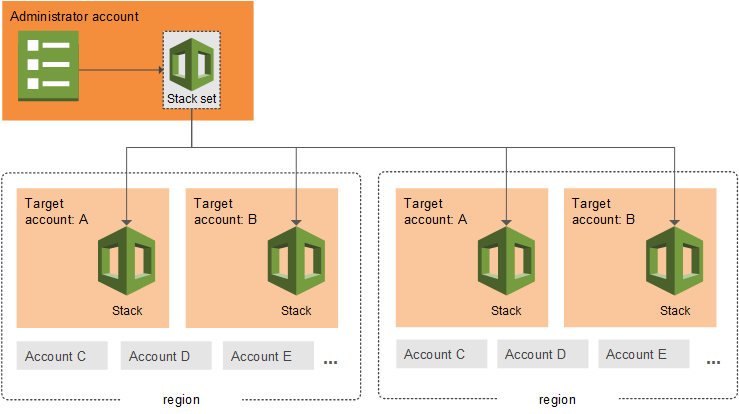
AWS CloudFormation enables you to model and provision your cloud application infrastructure as code-base templates. Whether you prefer writing templates directly in JSON or YAML, or using programming languages like Python, Java, and TypeScript with the AWS Cloud Development Kit (CDK), CloudFormation and CDK provide the flexibility you need. For organizations adopting multi-account strategies, CloudFormation StackSets offers a powerful capability to deploy resources across multiple regions and accounts in parallel.
In 2025, we delivered a comprehensive set of major enhancements focused on three core areas: reducing dev-test cycle through early validation, improving deployment safety with improved configuration drift management, and integrating IaC context to AI-powered development tools.
These launches address common pain points in infrastructure development workflows, from catching deployment errors before resource provisioning to managing configuration drift systematically. The features span the entire development lifecycle, from template authoring in your IDE to multi-account deployments at scale.
This blog provides an overview of the key capabilities we launched in 2025 and how they improve your infrastructure development workflow.
Accelerating Development Cycles
Early Validation & Enhanced Troubleshooting: Pre-Deployment Error Detection
CloudFormation now validates your templates during change set (preview of infrastructure changes before deployment) creation, catching common deployment errors before resource provisioning begins. The validation checks for invalid property syntax, resource name conflicts with existing resources in your account, and S3 bucket emptiness constraints on delete operations.
Figure 1: Pre-deployment validations view
When validation fails, the change set status shows ‘FAILED’ with detailed information about each issue, including the property path where problems occur. This early feedback helps you fix issues faster rather than waiting for deployment failures.
Figure 2: Validation of Invalid ENUM value for nested property
Improved Deployment troubleshooting
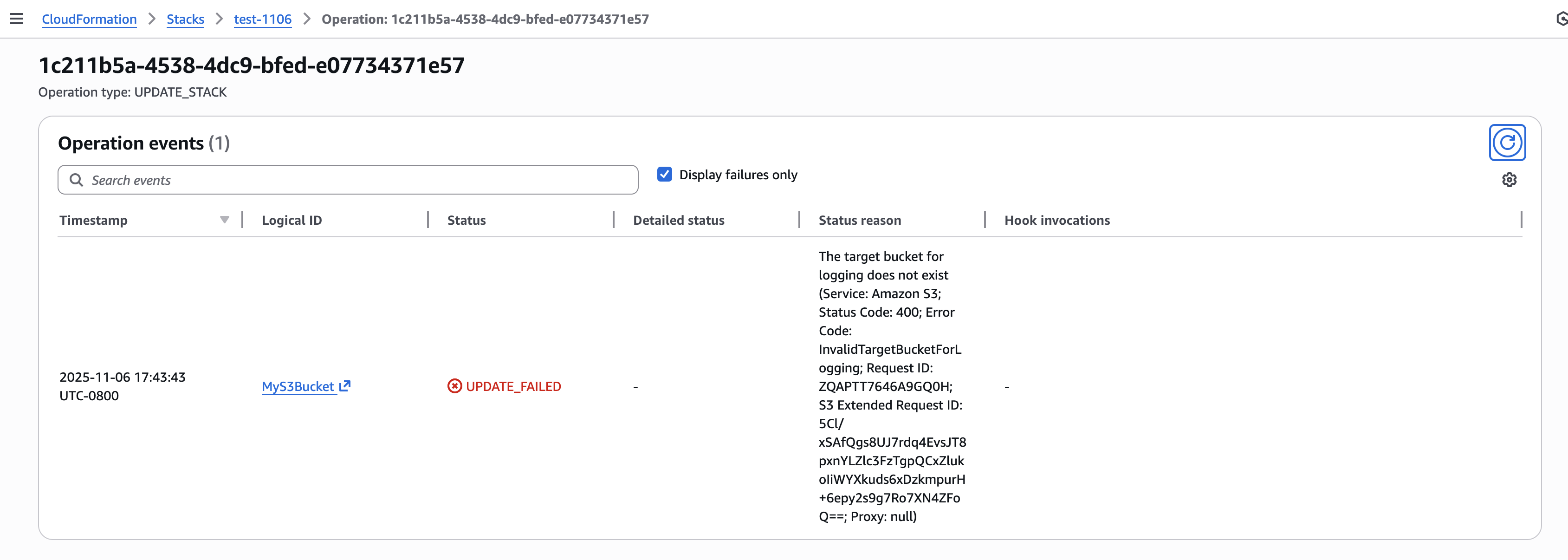
For runtime errors that occur during deployment, every stack operation now receives a unique operation ID. You can filter stack events by operation ID to quickly identify root causes, reducing troubleshooting time from minutes to seconds. The new describe-events API provides grouped access to events. You can query events for a specific operation, filter to FAILED status events, and extract the root cause without parsing through the entire stack event history.
CloudFormation IDE Experience: Language Server Protocol Integration
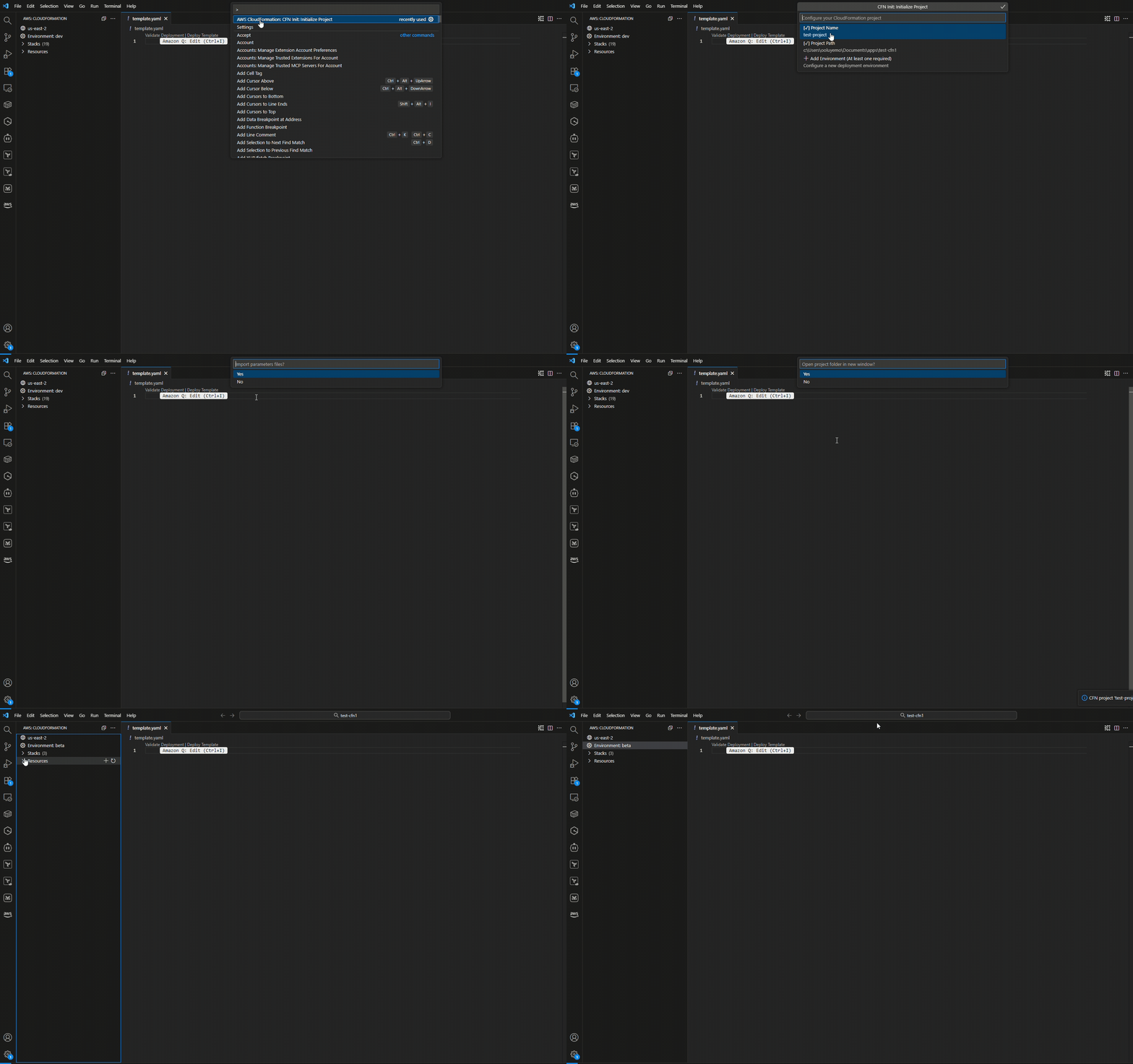
We launched the AWS CloudFormation Language Server, bringing end-to-end infrastructure development directly into your IDE. Available through the AWS Toolkit for Visual Studio Code, Kiro, and other compatible IDEs, this capability transforms how you author CloudFormation templates.
Figure 1: Initializing a CloudFormation project with environment configuration
The Language Server provides context-aware auto-completion that understands CloudFormation semantics. When you define resources, it suggests only required properties automatically, while optional properties appear on hover. Built-in validation catches issues before deployment integrating early validation capabilities, flagging invalid resource properties, missing IAM permissions, and security policy violations using CloudFormation Guard.
Figure 2: Hover information displaying optional properties and their documentation
The drift-aware deployment view highlights differences between your template and deployed infrastructure, helping you spot configuration changes made outside CloudFormation. The Language Server also provides semantic navigation features, go-to-definition for logical IDs, find-all-references for resource dependencies, and hover documentation that pulls from the CloudFormation resource specification. These features work across intrinsic functions like !Ref, !GetAtt, and !Sub, understanding the CloudFormation template structure. By integrating validation and real-time feedback directly into your authoring experience, the Language Server keeps you in flow state, reducing context switching between your IDE, AWS Console, and documentation.
Figure 3: Type-aware completions for intrinsic functions like !GetAtt & !Ref
Stack Refactoring: Adapt your infrastructure to your organization evolution
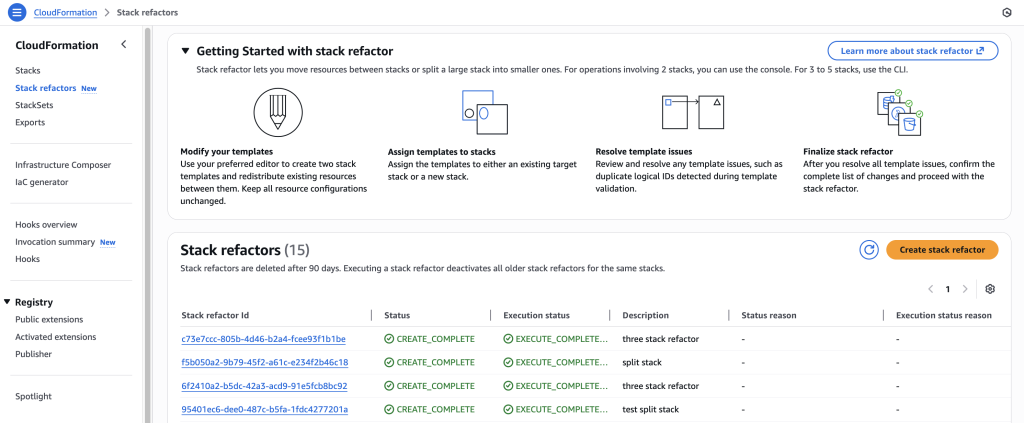
Stack Refactoring enables you to reorganize your CloudFormation and CDK infrastructure without disrupting deployed resources. You can move resources between stacks, rename logical IDs, and decompose monolithic stacks into focused components while maintaining resource stability and operational state.
Whether you’re modernizing legacy stacks, aligning infrastructure with evolving architectural patterns, or improving long-term maintainability, Stack Refactoring adapts your CloudFormation and CDK organization to changing requirements. The console and CDK experience, launched this year, extends the earlier CLI capability, making refactoring accessible through your preferred interface.
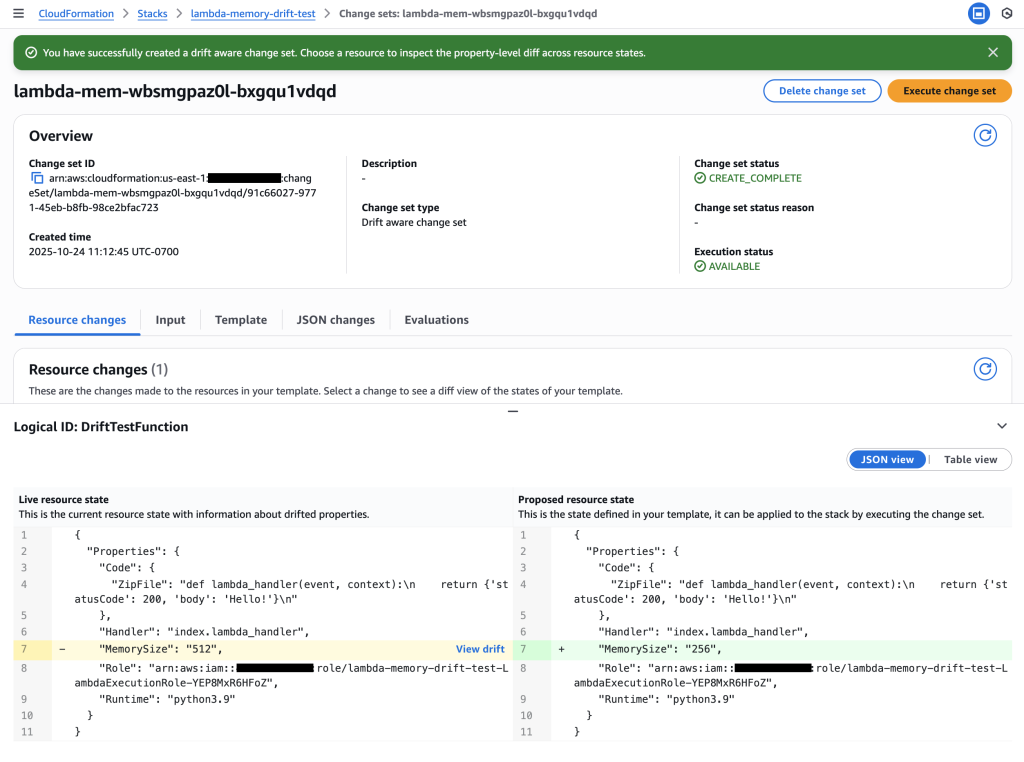
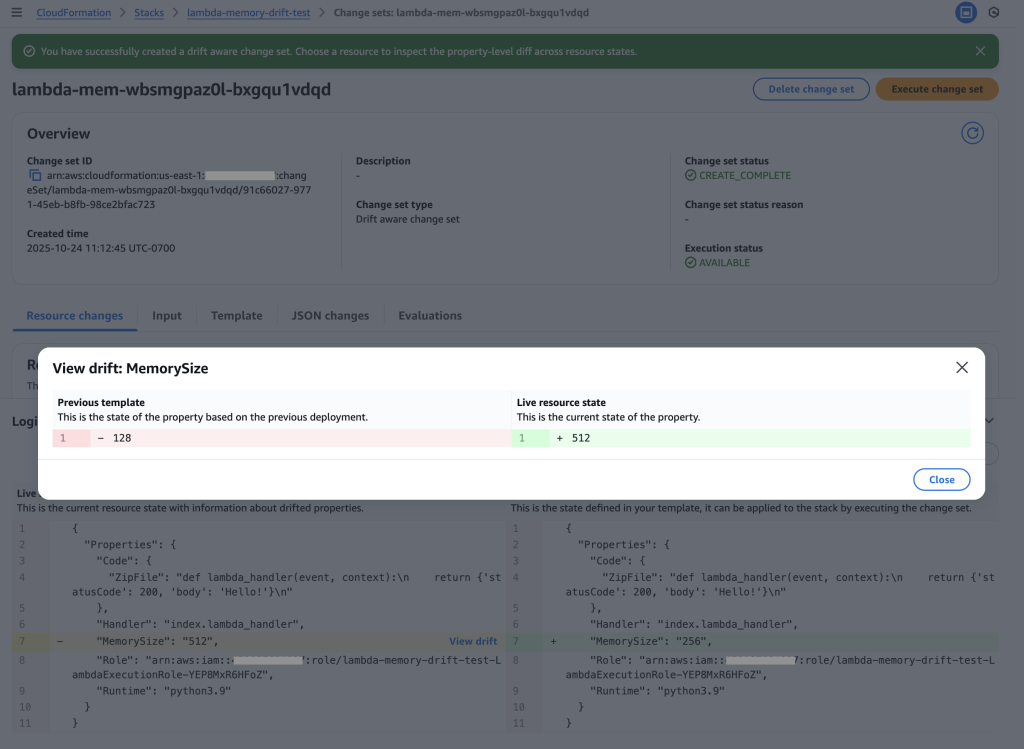
Configuration drift occurs when infrastructure managed by CloudFormation is modified through the AWS Console, SDK, or CLI. Drift-aware change sets address this challenge by providing a three-way comparison between your new template, last-deployed template, and actual infrastructure state.
Figure 4: Examine the drift-aware change set to see the dangerous memory reduction that would occur
This capability helps you prevent unexpected overwrites of drift. If your change set preview shows unintended changes, you can update your template values and recreate the change set before deployment. During execution, CloudFormation matches resource properties with template values and recreates resources deleted outside of CloudFormation.
Drift-aware change sets enable you to systematically revert drift and keep infrastructure in sync with templates, strengthening reproducibility for testing and disaster recovery while maintaining your security posture.
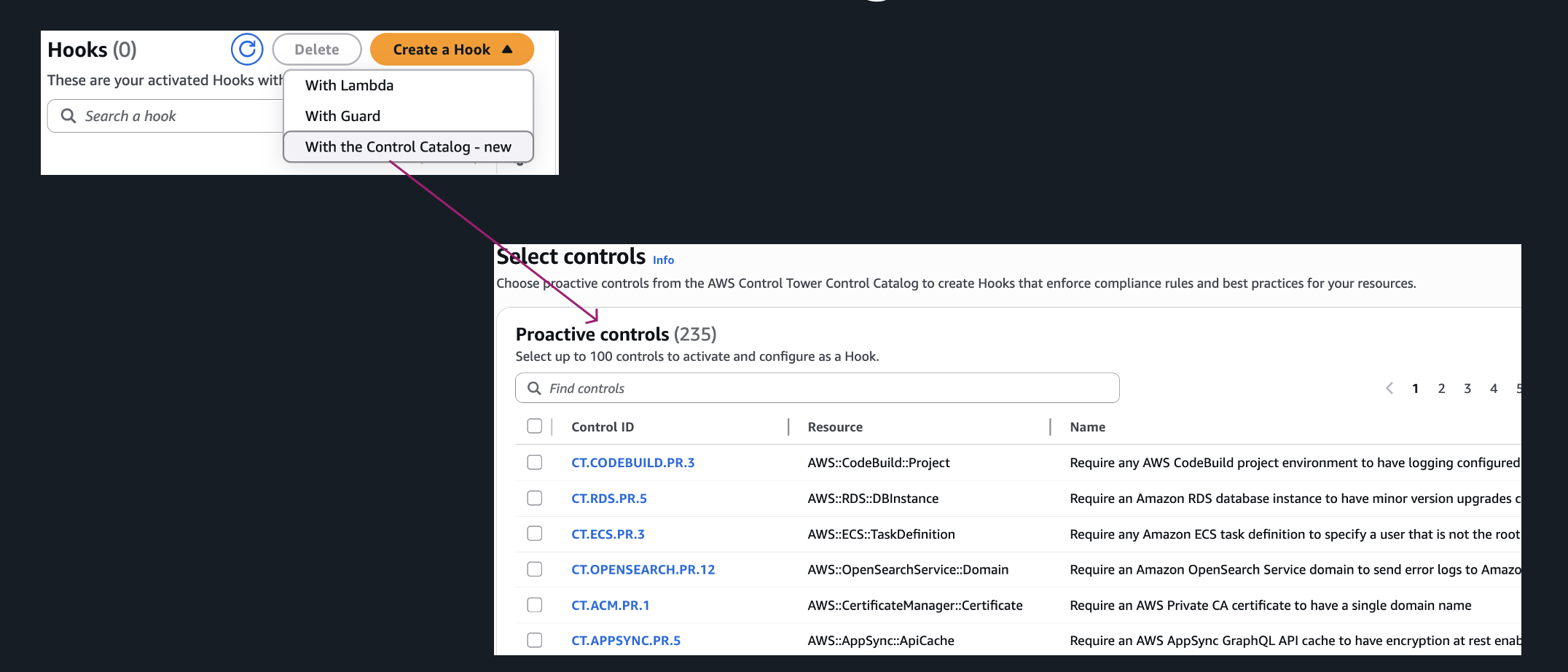
AWS CloudFormation Hooks now supports managed proactive controls, enabling customers to validate resource configurations against AWS best practices without writing custom Hooks logic. Customers can select controls from the AWS Control Tower Controls Catalog and apply them during CloudFormation operations. When using CloudFormation, customers can configure these controls to run in warn mode, allowing teams to test controls without blocking deployments and giving them the flexibility to evaluate control behavior before enforcing policies in production. This significantly reduces setup time, eliminates manual errors, and ensures comprehensive governance coverage across your infrastructure.
AWS also introduced a new Hooks Invocation Summary page in the CloudFormation console. This centralized view provides a complete historical record of Hooks activity, showing which controls were invoked, their execution details, and outcomes such as pass, warn, or fail. This simplifies compliance reporting issues faster.
With this launch, customers can now leverage AWS-managed controls as part of their provisioning workflows, eliminating the overhead of writing and maintaining custom logic. These controls are curated by AWS and aligned with industry best practices, helping teams enforce consistent policies across all environments. The new summary page delivers essential visibility into Hook invocation history, enabling faster issue resolution and streamlined compliance reporting.
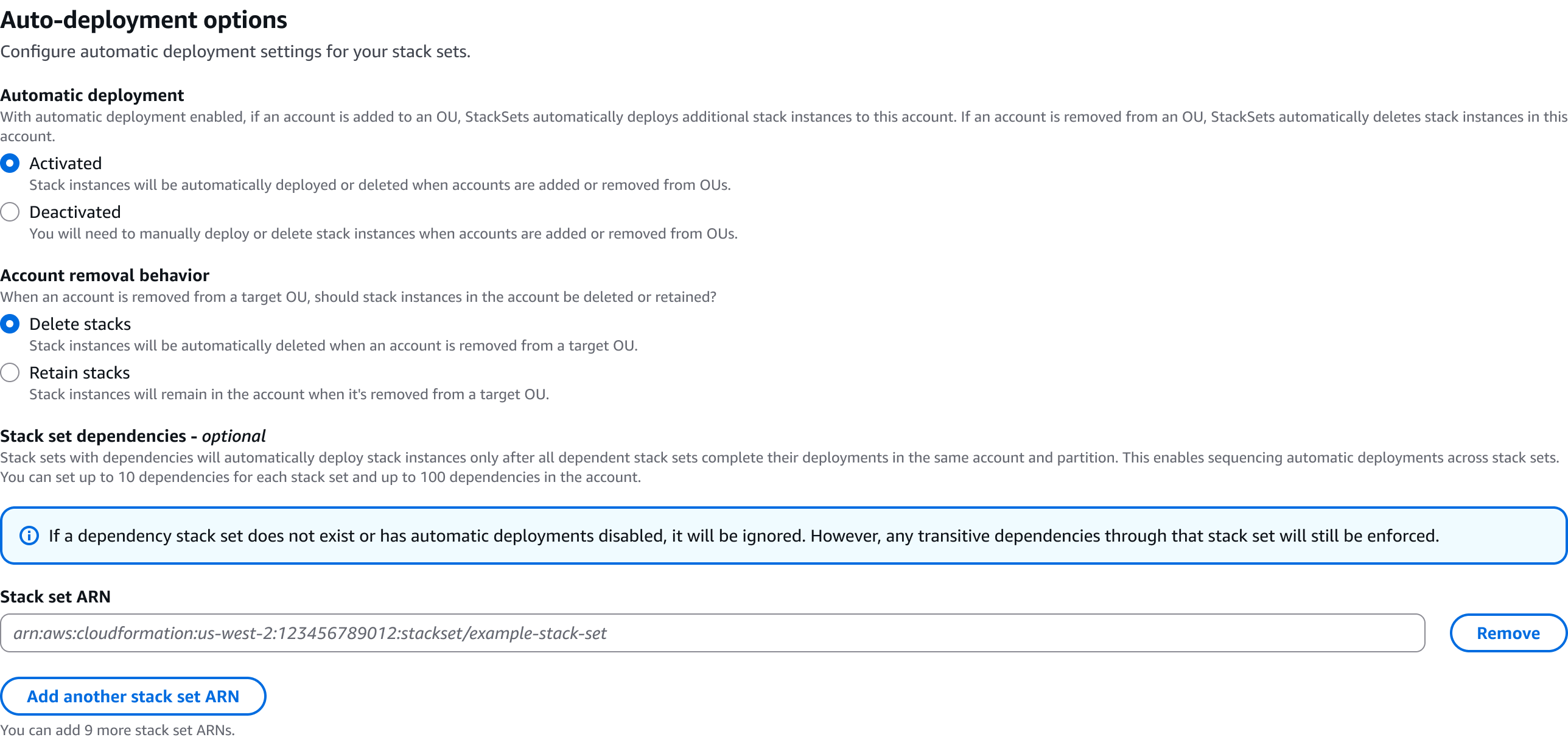
CloudFormation StackSets now supports deployment ordering for auto-deployment mode, enabling you to define the sequence in which stack instances automatically deploy across accounts and regions. This capability coordinates complex multi-stack deployments where foundational infrastructure must be provisioned before dependent application components.
When creating or updating a StackSet, you can specify up to 10 dependencies per stack instance using the DependsOn parameter in the AutoDeployment configuration. StackSets automatically orchestrates deployments based on your defined relationships. For example, you can ensure networking and security stack instances complete deployment before application stack instances begin, preventing deployment failures due to missing dependencies.
StackSets includes built-in cycle detection to prevent circular dependencies and provides error messages to help resolve configuration issues. This feature is available at no additional cost in all AWS Regions where CloudFormation StackSets is available.
We introduced the AWS Infrastructure-as-Code (IaC) MCP Server, bridging AI assistants with your AWS infrastructure development workflow. Built on the Model Context Protocol (MCP), this server enables AI assistants like Kiro CLI, Claude, or Cursor to help you search CloudFormation and CDK documentation, validate templates, troubleshoot deployments, and follow best practices, all while maintaining the security of local execution.
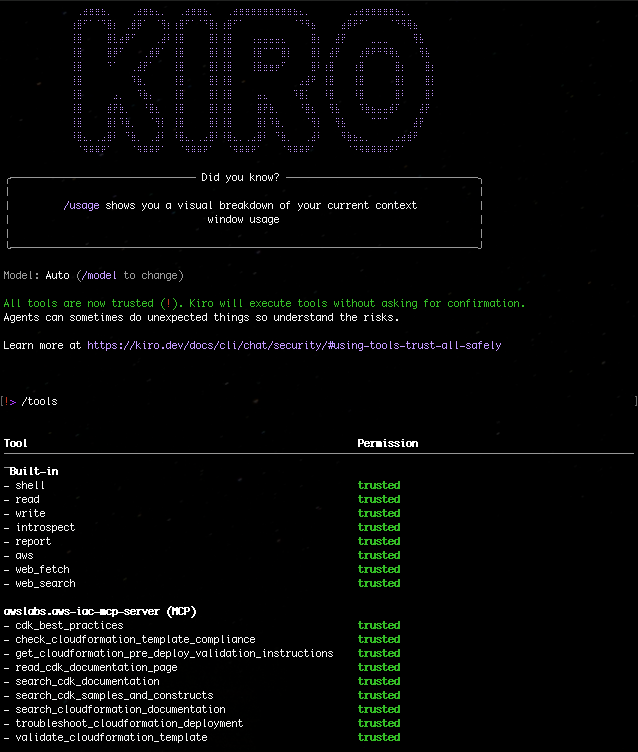
Figure 1: Kiro-CLI with AWS IaC MCP server
The IaC MCP Server provides nine specialized tools organized into two categories. Remote documentation search tools connect to AWS knowledge bases to retrieve up-to-date information about CloudFormation resources, CDK APIs, and implementation guidance. Local validation and troubleshooting tools run entirely on your machine, performing syntax validation with cfn-lint, security checks with CloudFormation Guard, and deployment failure analysis with integrated CloudTrail events.
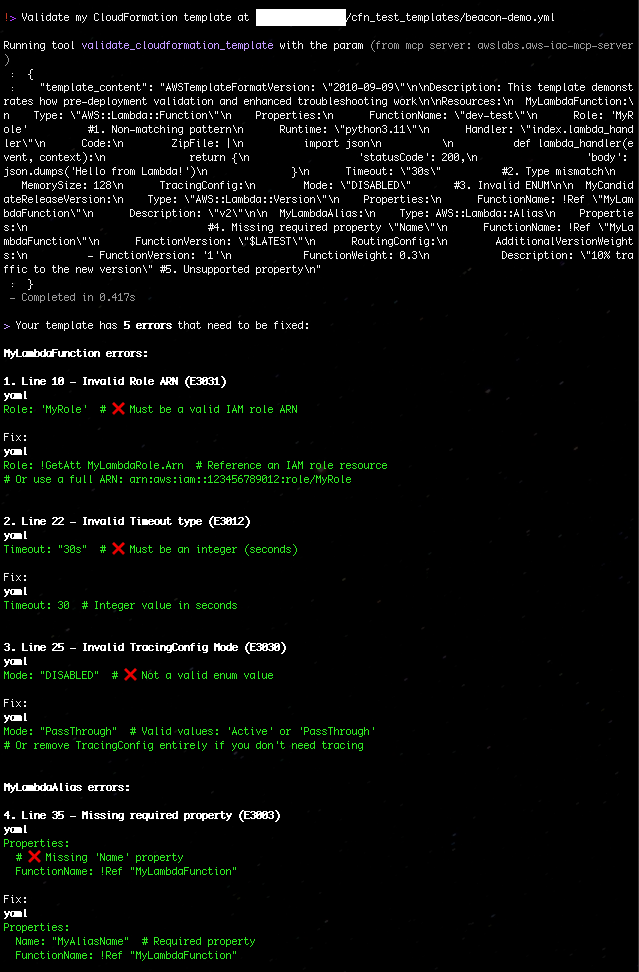
Figure 4: Validate my CloudFormation template with AWS IaC MCP Server
Key Use Cases
Intelligent Documentation Assistant
Instead of manually searching through documentation, ask your AI assistant natural language questions:
“How do I create an S3 bucket with encryption enabled in CDK?”
The server searches CDK best practice and samples, returning relevant code examples and explanations.
2. Proactive Template Validation
Before deploying infrastructure changes:
User: “Validate my CloudFormation template and check for security issues”
AI Agent: [Uses validate_cloudformation_template and check_cloudformation_template_compliance]
“Found 2 issues: Missing encryption on EBS volumes,
and S3 bucket lacks public access block configuration”
3. Rapid Deployment Troubleshooting
When a stack deployment fails:
User: “My stack ‘stack_03’ in us-east-1 failed to deploy. What happened?”
AI Agent: [Uses troubleshoot_stack_deployment with CloudTrail integration]
“The deployment failed due to insufficient IAM permissions.
CloudTrail shows AccessDenied for ec2:CreateVpc.
You need to add VPC permissions to your deployment role.”
4. Learning and Exploration
New to AWS CDK? The server helps you discover constructs and patterns:
User: “Show me how to build a serverless API”
AI Agent: [Searches CDK constructs and samples]
“Here are three approaches using API Gateway + Lambda…”
As we begin 2026, our focus remains on making infrastructure deployment faster, safer, and more manageable. The launches in 2025 reflect our commitment to solving real customer challenges and improving the CloudFormation developer experience. From intelligent IDE integrations to AI-powered assistance, these capabilities help you build infrastructure with greater confidence and efficiency.
We encourage you to try these features and share your feedback. For detailed information about any of these launches, visit our documentation or check out the AWS DevOps Blog.
The US Supreme Court is considering the constitutionality of geofence warrants.
The case centers on the trial of Okello Chatrie, a Virginia man who pleaded guilty to a 2019 robbery outside of Richmond and was sentenced to almost 12 years in prison for stealing $195,000 at gunpoint.
Police probing the crime found security camera footage showing a man on a cell phone near the credit union that was robbed and asked Google to produce anonymized location data near the robbery site so they could determine who committed the crime. They did so, providing police with subscriber data for three people, one of whom was Chatrie. Police then searched Chatrie’s home and allegedly surfaced a gun, almost $100,000 in cash and incriminating notes.
Chatrie’s appeal challenges the constitutionality of geofence warrants, arguing that they violate individuals’ Fourth Amendment rights protecting against unreasonable searches.
Hey! It’s my first post for 2026, and I’m writing to you while watching our driveway getting dug out. I hope wherever you are you are safe and warm and your data is still flowing!
This week brings exciting news for customers running GPU-intensive workloads, with the launch of our newest graphics and AI inference instances powered by NVIDIA’s latest Blackwell architecture. Along with several service enhancements and regional expansions, this week’s updates continue to expand the capabilities available to AWS customers.
Last week’s launches
Amazon EC2 G7e instances are now generally available — The new G7e instances accelerated by NVIDIA RTX PRO 6000 Blackwell Server Edition GPUs deliver up to 2.3 times better inference performance compared to G6e instances. With two times the GPU memory and support for up to 8 GPUs providing 768 GB of total GPU memory, these instances enable running medium-sized models of up to 70B parameters with FP8 precision on a single GPU. G7e instances are ideal for generative AI inference, spatial computing, and scientific computing workloads. Available now in US East (N. Virginia) and US East (Ohio).
Additional updates
I thought these projects, blog posts, and news items were also interesting:
Amazon Corretto January 2026 Quarterly Updates — AWS released quarterly security and critical updates for Amazon Corretto Long-Term Supported (LTS) versions of OpenJDK. Corretto 25.0.2, 21.0.10, 17.0.18, 11.0.30, and 8u482 are now available, ensuring Java developers have access to the latest security patches and performance improvements.
Amazon ECR now supports cross-repository layer sharing — Amazon Elastic Container Registry now enables you to share common image layers across repositories through blob mounting. This feature helps you achieve faster image pushes by reusing existing layers and reduce storage costs by storing common layers once and referencing them across repositories.
Amazon CloudWatch Database Insights expands to four additional regions — CloudWatch Database Insights on-demand analysis is now available in Asia Pacific (New Zealand), Asia Pacific (Taipei), Asia Pacific (Thailand), and Mexico (Central). This feature uses machine learning to help identify performance bottlenecks and provides specific remediation advice.
Amazon Connect adds conditional logic and real-time updates to Step-by-Step Guides — Amazon Connect Step-by-Step Guides now enables managers to build dynamic guided experiences that adapt based on user interactions. Managers can configure conditional user interfaces with dropdown menus that show or hide fields, change default values, or adjust required fields based on prior inputs. The feature also supports automatic data refresh from Connect resources, ensuring agents always work with current information.
Upcoming AWS events
Keep a look out and be sure to sign up for these upcoming events:
Best of AWS re:Invent (January 28-29, Virtual) — Join us for this free virtual event bringing you the most impactful announcements and top sessions from AWS re:Invent. AWS VP and Chief Evangelist Jeff Barr will share highlights during the opening session. Sessions run January 28 at 9:00 AM PT for AMER, and January 29 at 9:00 AM SGT for APJ and 9:00 AM CET for EMEA. Register to access curated technical learning, strategic insights from AWS leaders, and live Q&A with AWS experts.
AWS Community Day Ahmedabad (February 28, 2026, Ahmedabad, India) — The 11th edition of this community-driven AWS conference brings together cloud professionals, developers, architects, and students for expert-led technical sessions, real-world use cases, tech expo booths with live demos, and networking opportunities. This free event includes breakfast, lunch, and exclusive swag.
Join the AWS Builder Center to learn, build, and connect with builders in the AWS community. Browse for upcoming in-person and virtual developer-focused events in your area.
That’s all for this week. Check back next Monday for another Weekly Roundup!
The Irish government is planning to bolster its police’s ability to intercept communications, including encrypted messages, and provide a legal basis for spyware use.
To provide the best experiences, we use technologies like cookies to store and/or access device information. Consenting to these technologies will allow us to process data such as browsing behavior or unique IDs on this site. Not consenting or withdrawing consent, may adversely affect certain features and functions.
Functional
Always active
The technical storage or access is strictly necessary for the legitimate purpose of enabling the use of a specific service explicitly requested by the subscriber or user, or for the sole purpose of carrying out the transmission of a communication over an electronic communications network.
Preferences
The technical storage or access is necessary for the legitimate purpose of storing preferences that are not requested by the subscriber or user.
Statistics
The technical storage or access that is used exclusively for statistical purposes.The technical storage or access that is used exclusively for anonymous statistical purposes. Without a subpoena, voluntary compliance on the part of your Internet Service Provider, or additional records from a third party, information stored or retrieved for this purpose alone cannot usually be used to identify you.
Marketing
The technical storage or access is required to create user profiles to send advertising, or to track the user on a website or across several websites for similar marketing purposes.
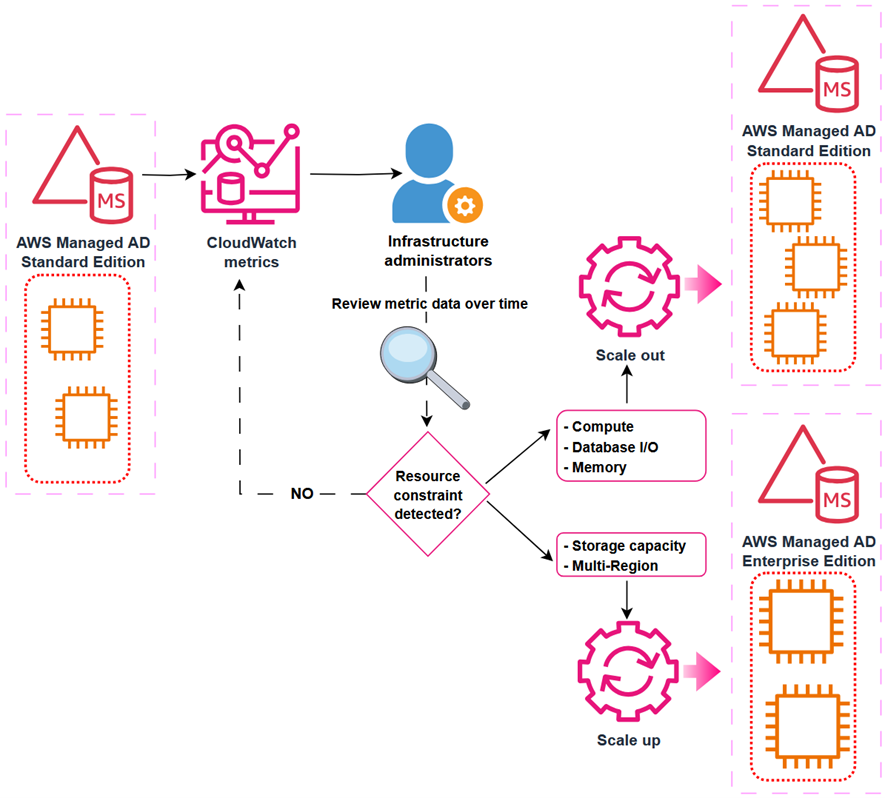
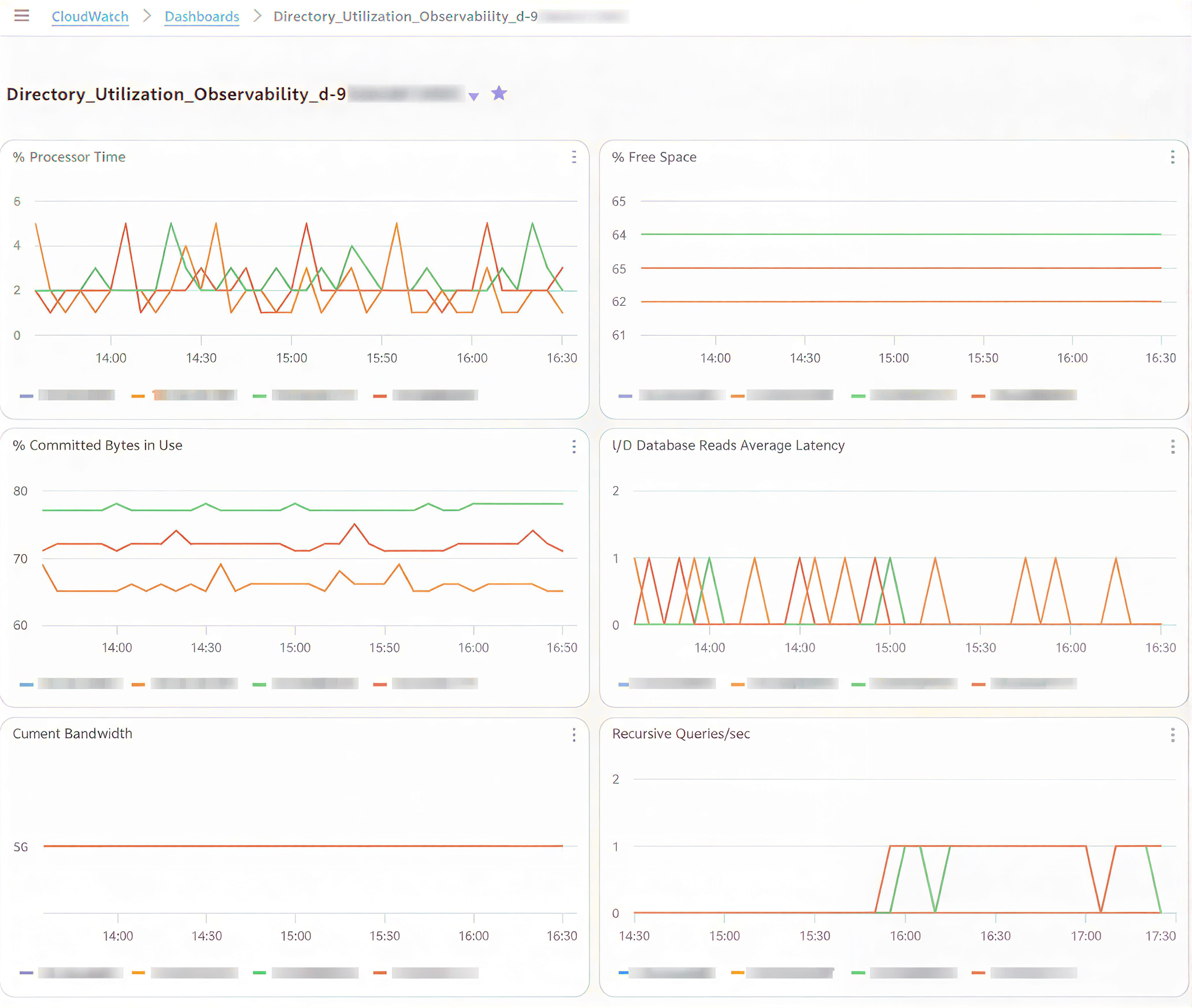
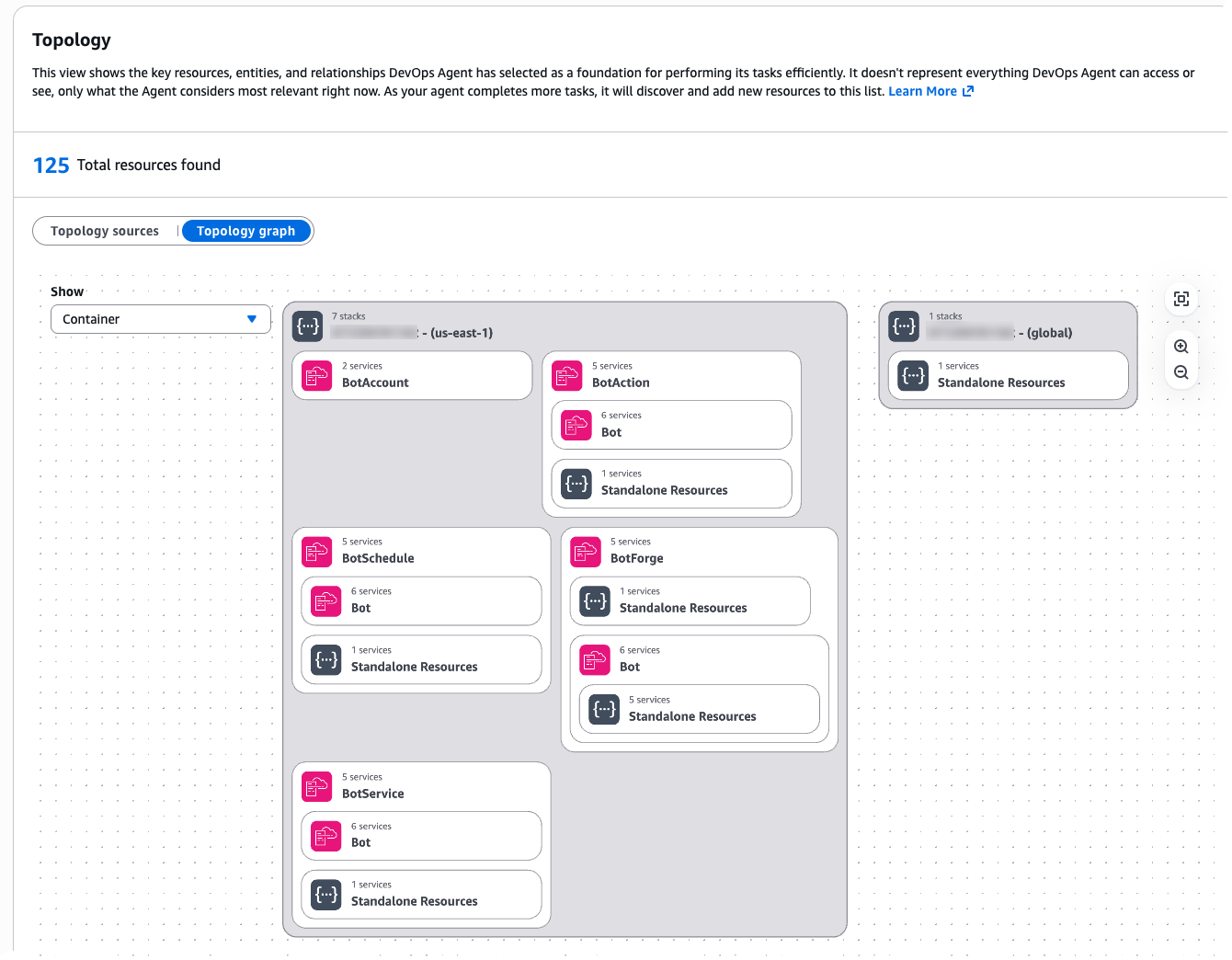
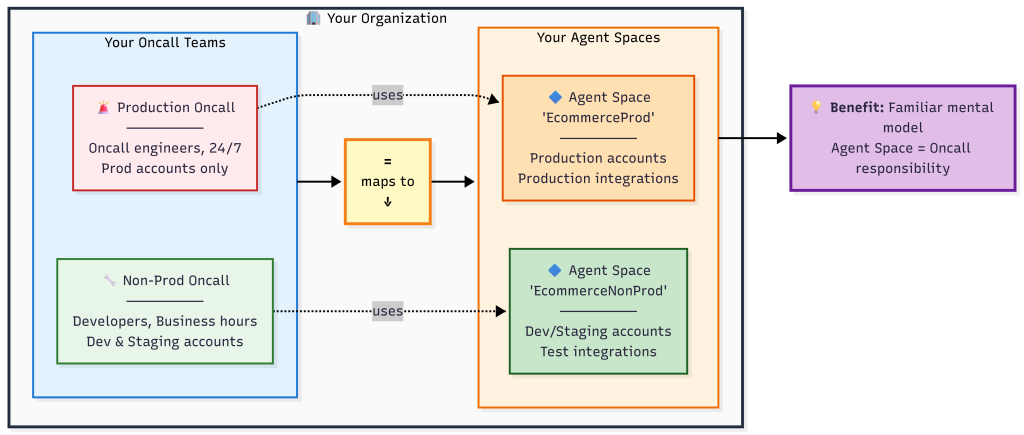
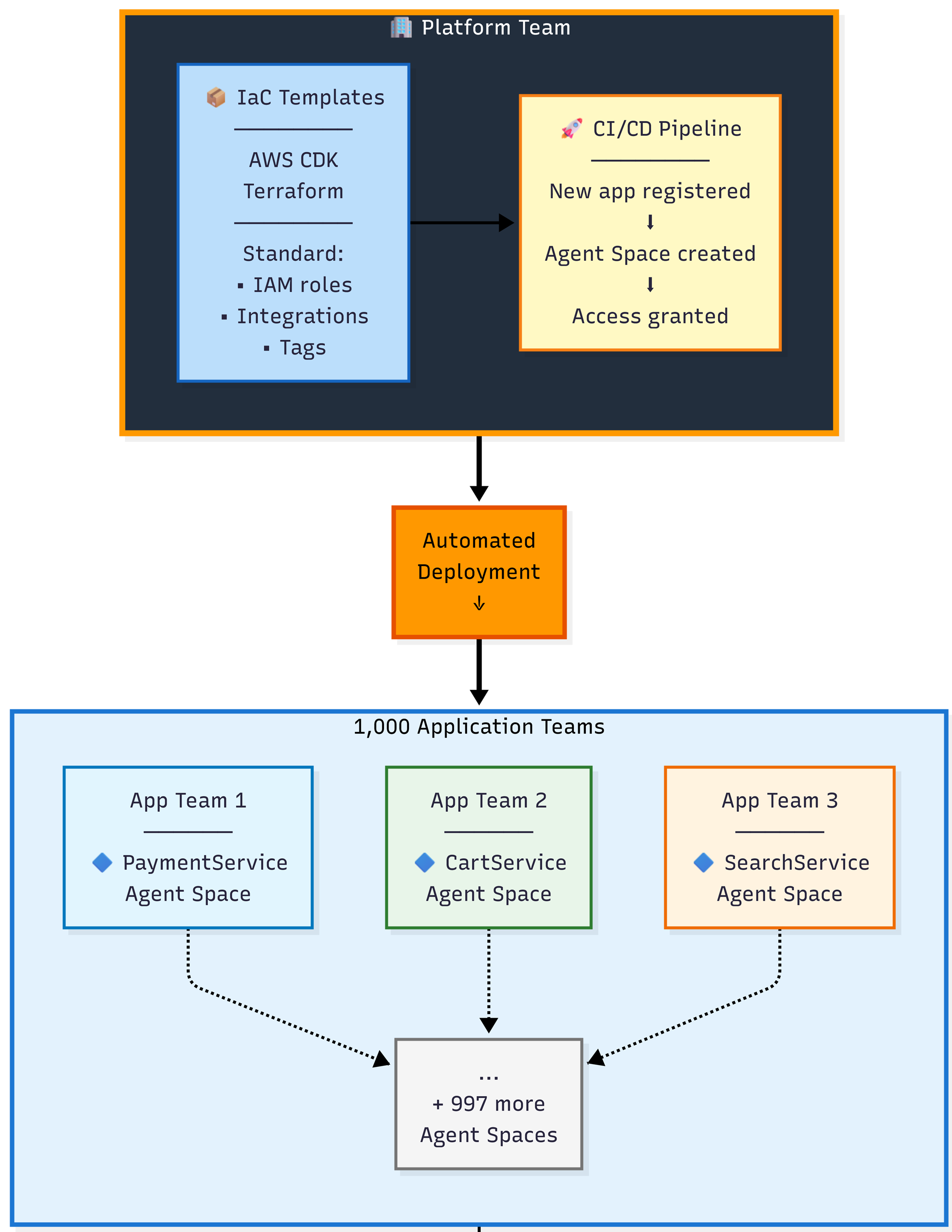
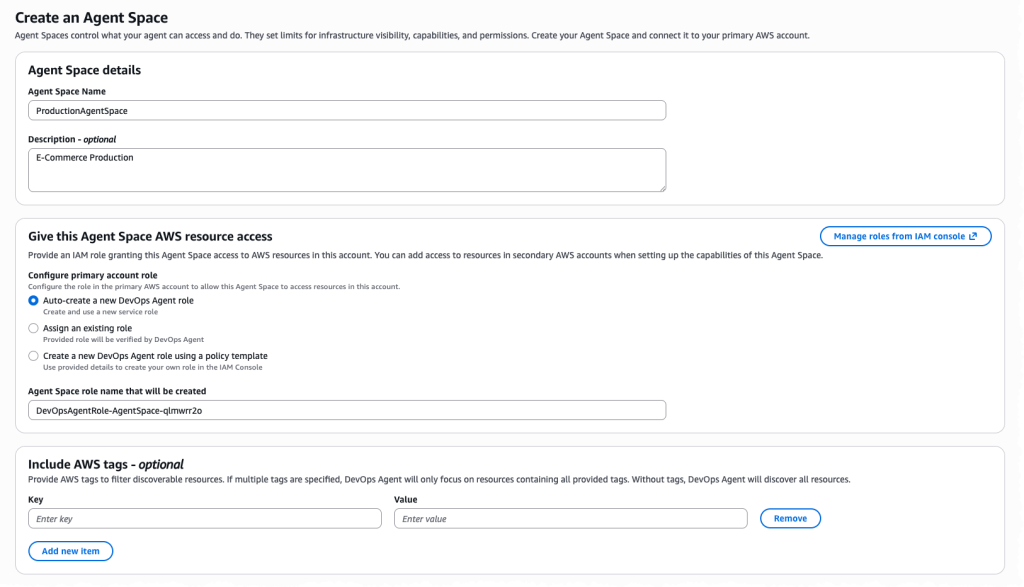
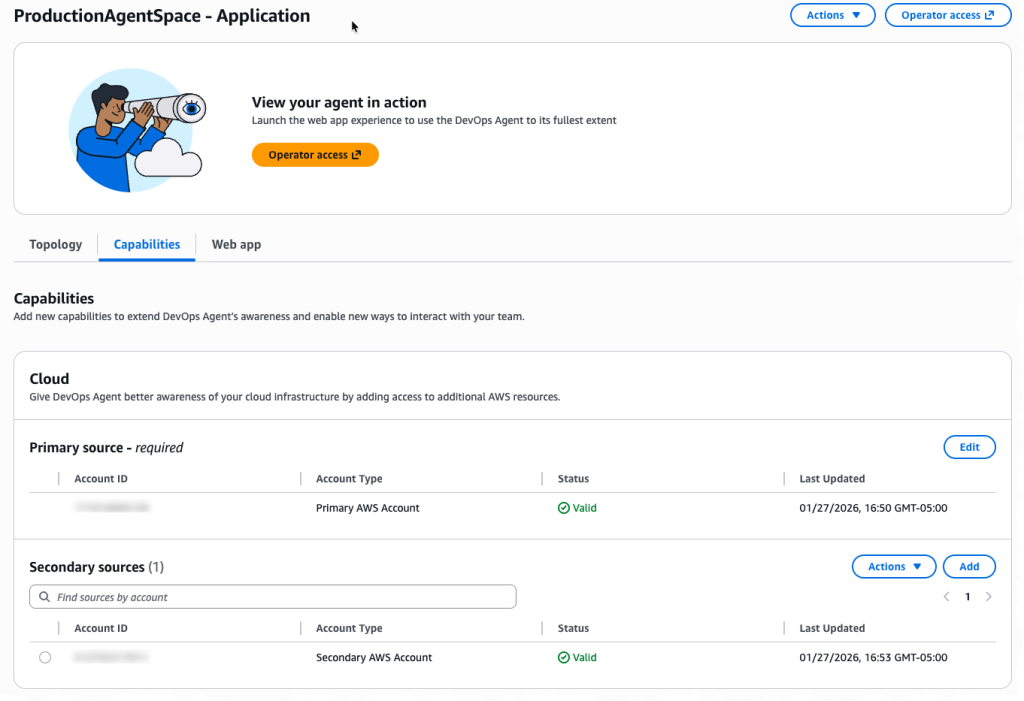
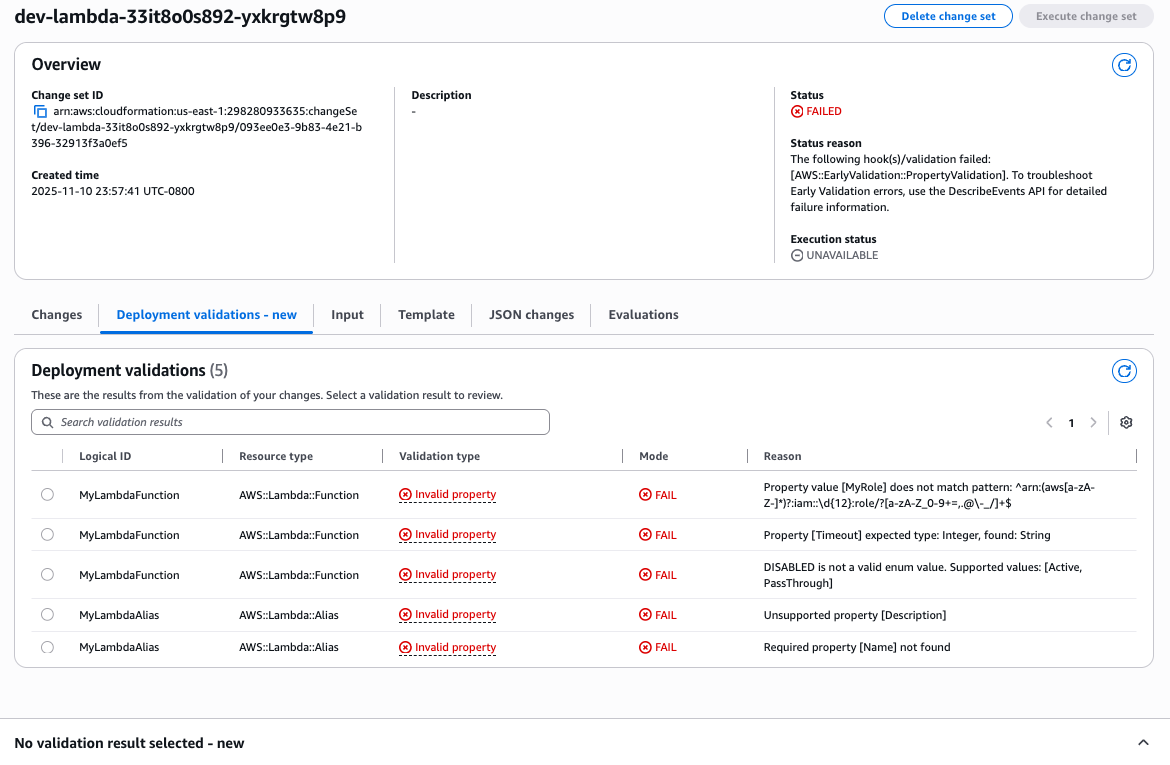
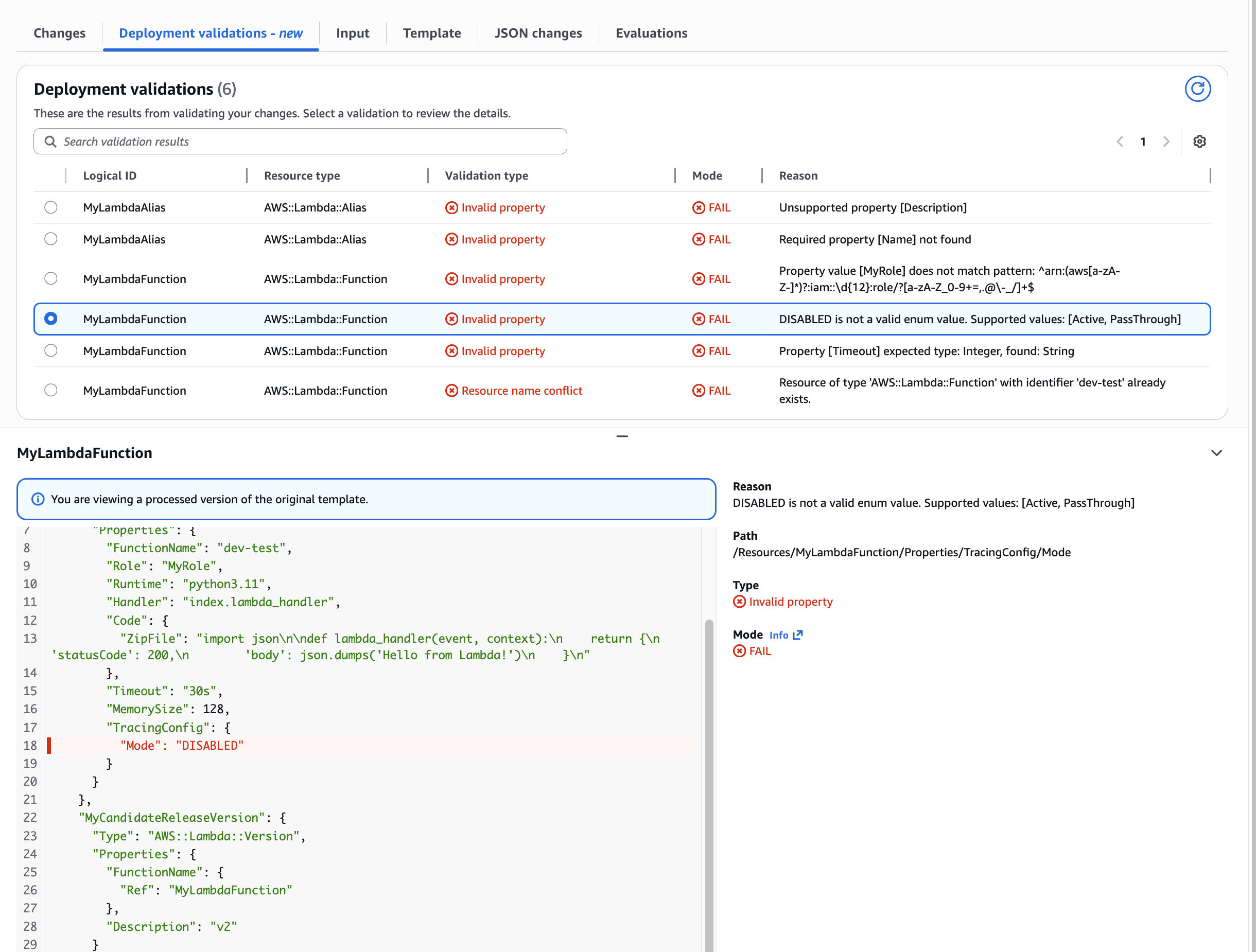
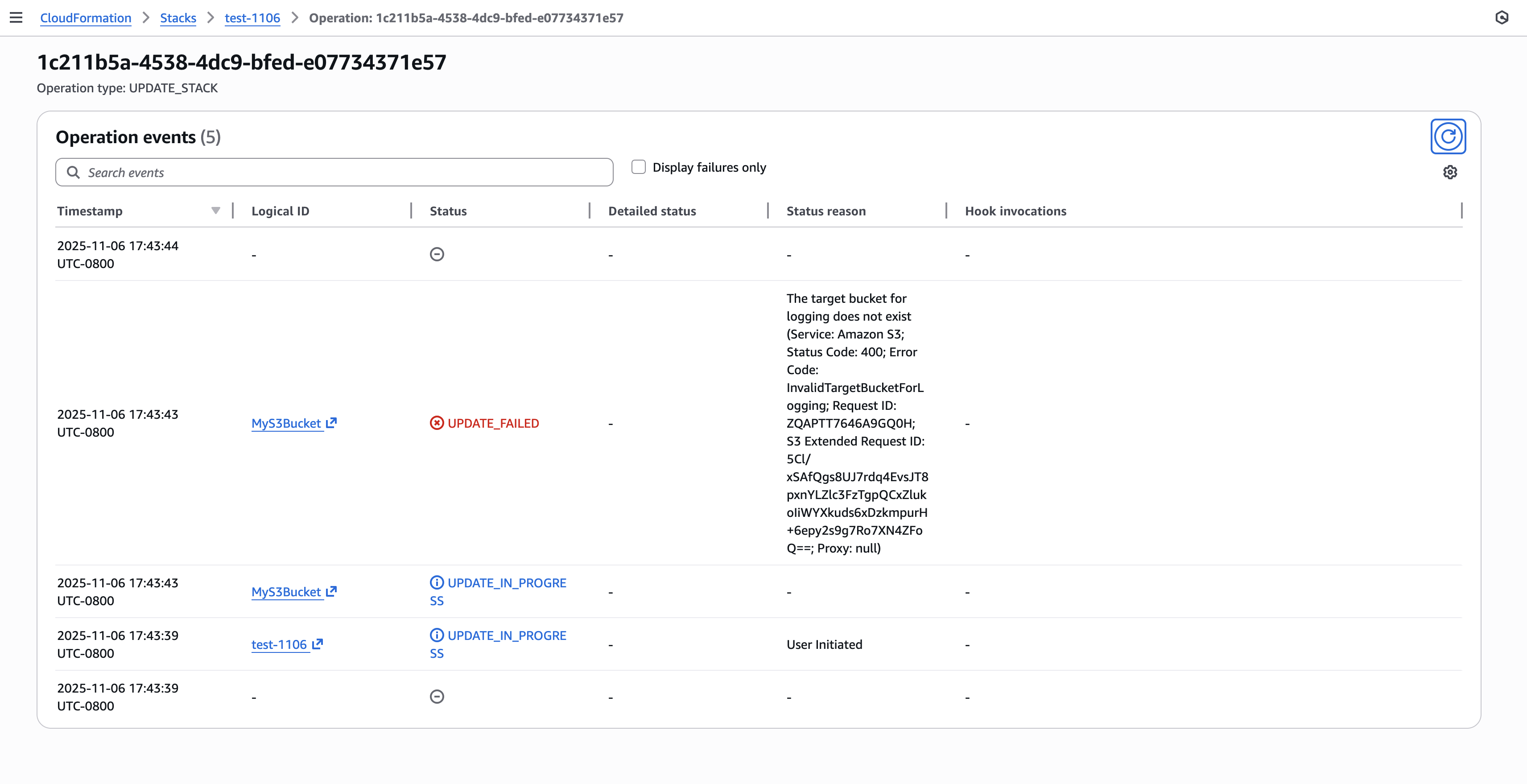 Figure 3: New CloudFormation stack operation page