On the Cyber Safety Review Board

Post Syndicated from Bruce Schneier original https://www.schneier.com/blog/archives/2024/08/a-better-investigatory-board-for-cyber-incidents.html

When an airplane crashes, impartial investigatory bodies leap into action, empowered by law to unearth what happened and why. But there is no such empowered and impartial body to investigate CrowdStrike’s faulty update that recently unfolded, ensnarling banks, airlines, and emergency services to the tune of billions of dollars. We need one. To be sure, there is the White House’s Cyber Safety Review Board. On March 20, the CSRB released a report into last summer’s intrusion by a Chinese hacking group into Microsoft’s cloud environment, where it compromised the U.S. Department of Commerce, State Department, congressional offices, and several associated companies. But the board’s report—well-researched and containing some good and actionable recommendations—shows how it suffers from its lack of subpoena power and its political unwillingness to generalize from specific incidents to the broader industry.

Some background: The CSRB was established in 2021, by executive order, to provide an independent analysis and assessment of significant cyberattacks against the United States. The goal was to pierce the corporate confidentiality that often surrounds such attacks and to provide the entire security community with lessons and recommendations. The more we all know about what happened, the better we can all do next time. It’s the same thinking that led to the formation of the National Transportation Safety Board, but for cyberattacks and not plane crashes.

But the board immediately failed to live up to its mission. It was founded in response to the Russian cyberattack on the U.S. known as SolarWinds. Although it was specifically tasked with investigating that incident, it did not—for reasons that remain unclear.

So far, the board has published three reports. They offered only simplistic recommendations. In the first investigation, on Log4J, the CSRB exhorted companies to patch their systems faster and more often. In the second, on Lapsus$, the CSRB told organizations not to use SMS-based two-factor authentication (it’s vulnerable to SIM-swapping attacks). These two recommendations are basic cybersecurity hygiene, and not something we need an investigation to tell us.

The most recent report—on China’s penetration of Microsoft—is much better. This time, the CSRB gave us an extensive analysis of Microsoft’s security failures and placed blame for the attack’s success squarely on their shoulders. Its recommendations were also more specific and extensive, addressing Microsoft’s board and leaders specifically and the industry more generally. The report describes how Microsoft stopped rotating cryptographic keys in early 2021, reducing the security of the systems affected in the hack. The report suggests that if the company had set up an automated or manual key rotation system, or a way to alert teams about the age of their keys, it could have prevented the attack on its systems. The report also looked at how Microsoft’s competitors—think Google, Oracle, and Amazon Web Services—handle this issue, offering insights on how similar companies avoid mistakes.

Yet there are still problems, with the report itself and with the environment in which it was produced.

First, the public report cites a large number of anonymous sources. While the report lays blame for the breach on Microsoft’s lax security culture, it is actually quite deferential to Microsoft; it makes special mention of the company’s cooperation. If the board needed to make trades to get information that would only be provided if people were given anonymity, this should be laid out more explicitly for the sake of transparency. More importantly, the board seems to have conflict-of-interest issues arising from the fact that the investigators are corporate executives and heads of government agencies who have full-time jobs.

Second: Unlike the NTSB, the CSRB lacks subpoena power. This is, at least in part, out of fear that the conflicted tech executives and government employees would use the power in an anticompetitive fashion. As a result, the board must rely on wheedling and cooperation for its fact-finding. While the DHS press release said, “Microsoft fully cooperated with the Board’s review,” the next company may not be nearly as cooperative, and we do not know what was not shared with the CSRB.

One of us, Tarah, recently testified on this topic before the U.S. Senate’s Homeland Security and Governmental Affairs Committee, and the senators asking questions seemed genuinely interested in how to fix the CSRB’s extreme slowness and lack of transparency in the two reports they’d issued so far.

It’s a hard task. The CSRB’s charter comes from Executive Order 14208, which is why—unlike the NTSB—it doesn’t have subpoena power. Congress needs to codify the CSRB in law and give it the subpoena power it so desperately needs.

Additionally, the CSRB’s reports don’t provide useful guidance going forward. For example, is the Microsoft report provides no mapping of the company’s security problems to any government standards that could have prevented them. In this case, the problem is that there are no standards overseen by NIST—the organization in charge of cybersecurity standards—for key rotation. It would have been better for the report to have said that explicitly. The cybersecurity industry needs NIST standards to give us a compliance floor below which any organization is explicitly failing to provide due care. The report condemns Microsoft for not rotating an internal encryption key for seven years, when its standard internally was four years. However, for the last several years, automated key rotation more on the order of once a month or even more frequently has become the expected industry guideline.

A guideline, however, is not a standard or regulation. It’s just a strongly worded suggestion. In this specific case, the report doesn’t offer guidance on how often keys should be rotated. In essence, the CSRB report said that Microsoft should feel very bad about the fact that they did not rotate their keys more often—but did not explain the logic, give an actual baseline of how often keys should be rotated, or provide any statistical or survey data to support why that timeline is appropriate. Automated certificate rotation such as that provided by public free service Let’s Encrypt has revolutionized encrypted-by-default communications, and expectations in the cybersecurity industry have risen to match. Unfortunately, the report only discusses Microsoft proprietary keys by brand name, instead of having a larger discussion of why public key infrastructure exists or what the best practices should be.

More generally, because the CSRB reports so far have failed to generalize their findings with transparent and thorough research that provides real standards and expectations for the cybersecurity industry, we—policymakers, industry leaders, the U.S. public—find ourselves filling in the gaps. Individual experts are having to provide anecdotal and individualized interpretations of what their investigations might imply for companies simply trying to learn what their actual due care responsibilities are.

It’s as if no one is sure whether boiling your drinking water or nailing a horseshoe up over the door is statistically more likely to decrease the incidence of cholera. Sure, a lot of us think that boiling your water is probably best, but no one is saying that with real science. No one is saying how long you have to boil your water for, or if any water sources more likely to carry illness. And until there are real numbers and general standards, our educated opinions are on an equal footing with horseshoes and hope.

It should not be the job of cybersecurity experts, even us, to generate lessons from CSRB reports based on our own opinions. This is why we continue to ask the CSRB to provide generalizable standards which either are based on or call for NIST standardization. We want proscriptive and descriptive reports of incidents: see, for example, the UK GAO report for the WannaCry ransomware, which remains a gold standard of government cybersecurity incident investigation reports.

We need and deserve more than one-off anecdotes about how one company didn’t do security well and should do it better in future.  Let’s start treating cybersecurity like the equivalent of public safety and get some real lessons learned.

This essay was written with Tarah Wheeler, and was published on Defense One.
Investigation of a Cross-regional Network Performance Issue

Post Syndicated from Netflix Technology Blog original https://netflixtechblog.com/investigation-of-a-cross-regional-network-performance-issue-422d6218fdf1

Hechao Li, Roger Cruz

Cloud Networking Topology

Netflix operates a highly efficient cloud computing infrastructure that supports a wide array of applications essential for our SVOD (Subscription Video on Demand), live streaming and gaming services. Utilizing Amazon AWS, our infrastructure is hosted across multiple geographic regions worldwide. This global distribution allows our applications to deliver content more effectively by serving traffic closer to our customers. Like any distributed system, our applications occasionally require data synchronization between regions to maintain seamless service delivery.

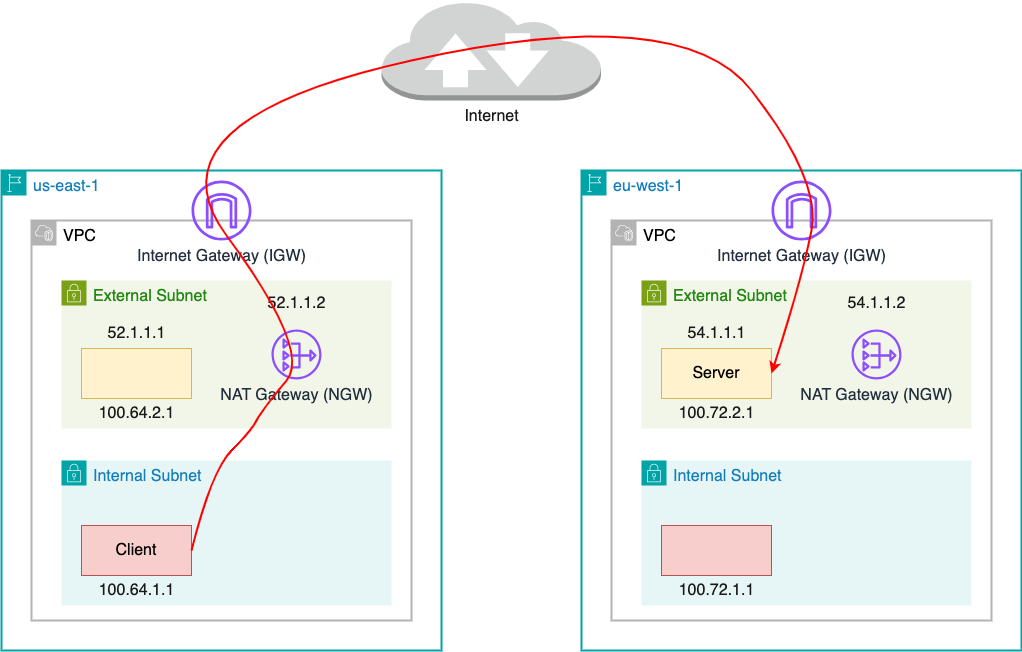
The following diagram shows a simplified cloud network topology for cross-region traffic.

The Problem At First Glance

Our Cloud Network Engineering on-call team received a request to address a network issue affecting an application with cross-region traffic. Initially, it appeared that the application was experiencing timeouts, likely due to suboptimal network performance. As we all know, the longer the network path, the more devices the packets traverse, increasing the likelihood of issues. For this incident, the client application is located in an internal subnet in the US region while the server application is located in an external subnet in a European region. Therefore, it is natural to blame the network since packets need to travel long distances through the internet.

As network engineers, our initial reaction when the network is blamed is typically, “No, it can’t be the network,” and our task is to prove it. Given that there were no recent changes to the network infrastructure and no reported AWS issues impacting other applications, the on-call engineer suspected a noisy neighbor issue and sought assistance from the Host Network Engineering team.

Blame the Neighbors

In this context, a noisy neighbor issue occurs when a container shares a host with other network-intensive containers. These noisy neighbors consume excessive network resources, causing other containers on the same host to suffer from degraded network performance. Despite each container having bandwidth limitations, oversubscription can still lead to such issues.

Upon investigating other containers on the same host — most of which were part of the same application — we quickly eliminated the possibility of noisy neighbors. The network throughput for both the problematic container and all others was significantly below the set bandwidth limits. We attempted to resolve the issue by removing these bandwidth limits, allowing the application to utilize as much bandwidth as necessary. However, the problem persisted.

Blame the Network

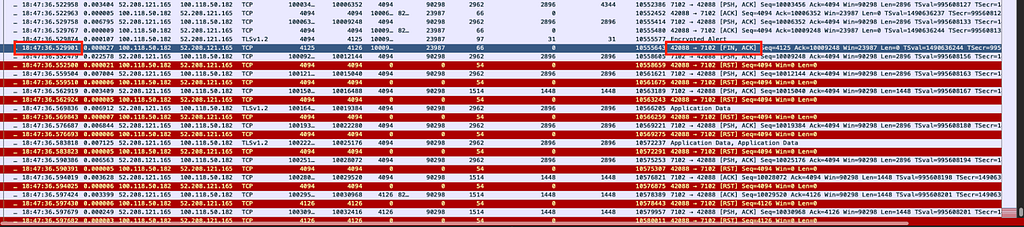
We observed some TCP packets in the network marked with the RST flag, a flag indicating that a connection should be immediately terminated. Although the frequency of these packets was not alarmingly high, the presence of any RST packets still raised suspicion on the network. To determine whether this was indeed a network-induced issue, we conducted a tcpdump on the client. In the packet capture file, we spotted one TCP stream that was closed after exactly 30 seconds.

SYN at 18:47:06

After the 3-way handshake (SYN,SYN-ACK,ACK), the traffic started flowing normally. Nothing strange until FIN at 18:47:36 (30 seconds later)

The packet capture results clearly indicated that it was the client application that initiated the connection termination by sending a FIN packet. Following this, the server continued to send data; however, since the client had already decided to close the connection, it responded with RST packets to all subsequent data from the server.

To ensure that the client wasn’t closing the connection due to packet loss, we also conducted a packet capture on the server side to verify that all packets sent by the server were received. This task was complicated by the fact that the packets passed through a NAT gateway (NGW), which meant that on the server side, the client’s IP and port appeared as those of the NGW, differing from those seen on the client side. Consequently, to accurately match TCP streams, we needed to identify the TCP stream on the client side, locate the raw TCP sequence number, and then use this number as a filter on the server side to find the corresponding TCP stream.

With packet capture results from both the client and server sides, we confirmed that all packets sent by the server were correctly received before the client sent a FIN.

Now, from the network point of view, the story is clear. The client initiated the connection requesting data from the server. The server kept sending data to the client with no problem. However, at a certain point, despite the server still having data to send, the client chose to terminate the reception of data. This led us to suspect that the issue might be related to the client application itself.

Blame the Application

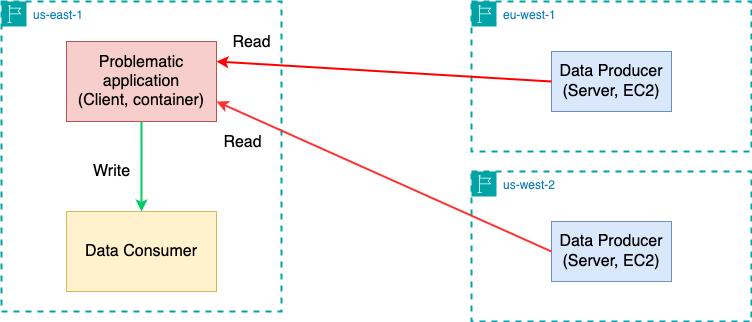
In order to fully understand the problem, we now need to understand how the application works. As shown in the diagram below, the application runs in the us-east-1 region. It reads data from cross-region servers and writes the data to consumers within the same region. The client runs as containers, whereas the servers are EC2 instances.

Notably, the cross-region read was problematic while the write path was smooth. Most importantly, there is a 30-second application-level timeout for reading the data. The application (client) errors out if it fails to read an initial batch of data from the servers within 30 seconds. When we increased this timeout to 60 seconds, everything worked as expected. This explains why the client initiated a FIN — because it lost patience waiting for the server to transfer data.

Could it be that the server was updated to send data more slowly? Could it be that the client application was updated to receive data more slowly? Could it be that the data volume became too large to be completely sent out within 30 seconds? Sadly, we received negative answers for all 3 questions from the application owner. The server had been operating without changes for over a year, there were no significant updates in the latest rollout of the client, and the data volume had remained consistent.

Blame the Kernel

If both the network and the application weren’t changed recently, then what changed? In fact, we discovered that the issue coincided with a recent Linux kernel upgrade from version 6.5.13 to 6.6.10. To test this hypothesis, we rolled back the kernel upgrade and it did restore normal operation to the application.

Honestly speaking, at that time I didn’t believe it was a kernel bug because I assumed the TCP implementation in the kernel should be solid and stable (Spoiler alert: How wrong was I!). But we were also out of ideas from other angles.

There were about 14k commits between the good and bad kernel versions. Engineers on the team methodically and diligently bisected between the two versions. When the bisecting was narrowed to a couple of commits, a change with “tcp” in its commit message caught our attention. The final bisecting confirmed that this commit was our culprit.

Interestingly, while reviewing the email history related to this commit, we found that another user had reported a Python test failure following the same kernel upgrade. Although their solution was not directly applicable to our situation, it suggested that a simpler test might also reproduce our problem. Using strace, we observed that the application configured the following socket options when communicating with the server:

[pid 1699] setsockopt(917, SOL_IPV6, IPV6_V6ONLY, [0], 4) = 0
[pid 1699] setsockopt(917, SOL_SOCKET, SO_KEEPALIVE, [1], 4) = 0
[pid 1699] setsockopt(917, SOL_SOCKET, SO_SNDBUF, [131072], 4) = 0
[pid 1699] setsockopt(917, SOL_SOCKET, SO_RCVBUF, [65536], 4) = 0
[pid 1699] setsockopt(917, SOL_TCP, TCP_NODELAY, [1], 4) = 0

We then developed a minimal client-server C application that transfers a file from the server to the client, with the client configuring the same set of socket options. During testing, we used a 10M file, which represents the volume of data typically transferred within 30 seconds before the client issues a FIN. On the old kernel, this cross-region transfer completed in 22 seconds, whereas on the new kernel, it took 39 seconds to finish.

The Root Cause

With the help of the minimal reproduction setup, we were ultimately able to pinpoint the root cause of the problem. In order to understand the root cause, it’s essential to have a grasp of the TCP receive window.

TCP Receive Window

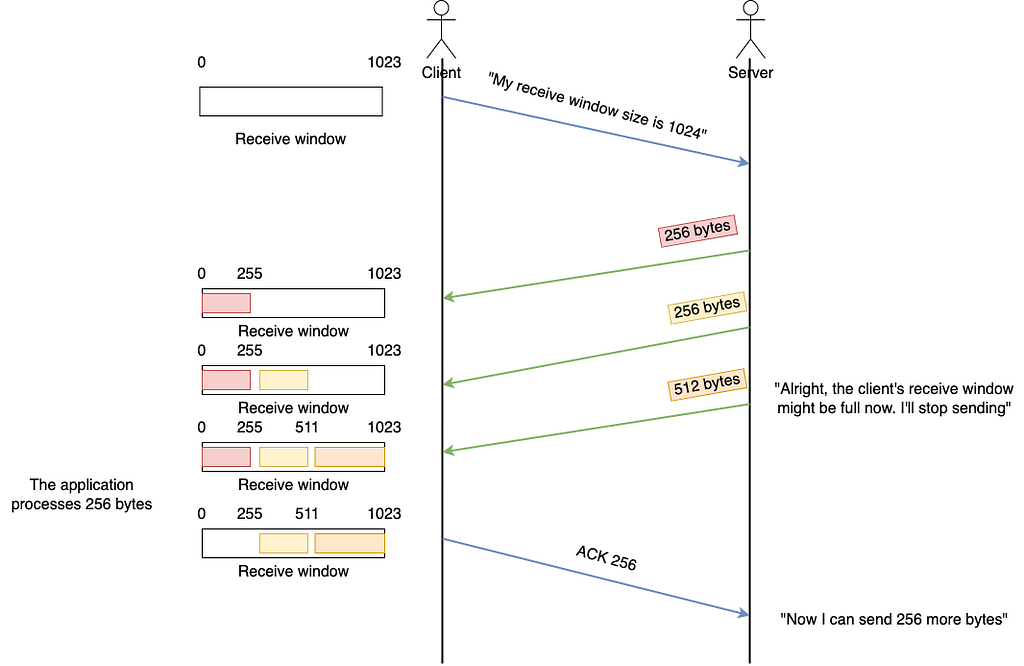
Simply put, the TCP receive window is how the receiver tells the sender “This is how many bytes you can send me without me ACKing any of them”. Assuming the sender is the server and the receiver is the client, then we have:

The Window Size

Now that we know the TCP receive window size could affect the throughput, the question is, how is the window size calculated? As an application writer, you can’t decide the window size, however, you can decide how much memory you want to use for buffering received data. This is configured using SO_RCVBUF socket option we saw in the strace result above. However, note that the value of this option means how much application data can be queued in the receive buffer. In man 7 socket, there is

SO_RCVBUF

Sets or gets the maximum socket receive buffer in bytes.
The kernel doubles this value (to allow space for
bookkeeping overhead) when it is set using setsockopt(2),
and this doubled value is returned by getsockopt(2). The
default value is set by the
/proc/sys/net/core/rmem_default file, and the maximum
allowed value is set by the /proc/sys/net/core/rmem_max
file. The minimum (doubled) value for this option is 256.

This means, when the user gives a value X, then the kernel stores 2X in the variable sk->sk_rcvbuf. In other words, the kernel assumes that the bookkeeping overhead is as much as the actual data (i.e. 50% of the sk_rcvbuf).

sysctl_tcp_adv_win_scale

However, the assumption above may not be true because the actual overhead really depends on a lot of factors such as Maximum Transmission Unit (MTU). Therefore, the kernel provided this sysctl_tcp_adv_win_scale which you can use to tell the kernel what the actual overhead is. (I believe 99% of people also don’t know how to set this parameter correctly and I’m definitely one of them. You’re the kernel, if you don’t know the overhead, how can you expect me to know?).

According to the sysctl doc,

tcp_adv_win_scale — INTEGER

Obsolete since linux-6.6 Count buffering overhead as bytes/2^tcp_adv_win_scale (if tcp_adv_win_scale > 0) or bytes-bytes/2^(-tcp_adv_win_scale), if it is <= 0.

Possible values are [-31, 31], inclusive.

Default: 1

For 99% of people, we’re just using the default value 1, which in turn means the overhead is calculated by rcvbuf/2^tcp_adv_win_scale = 1/2 * rcvbuf. This matches the assumption when setting the SO_RCVBUF value.

Let’s recap. Assume you set SO_RCVBUF to 65536, which is the value set by the application as shown in the setsockopt syscall. Then we have:

  • SO_RCVBUF = 65536
  • rcvbuf = 2 * 65536 = 131072
  • overhead = rcvbuf / 2 = 131072 / 2 = 65536
  • receive window size = rcvbuf — overhead = 131072–65536 = 65536

(Note, this calculation is simplified. The real calculation is more complex.)

In short, the receive window size before the kernel upgrade was 65536. With this window size, the application was able to transfer 10M data within 30 seconds.

The Change

This commit obsoleted sysctl_tcp_adv_win_scale and introduced a scaling_ratio that can more accurately calculate the overhead or window size, which is the right thing to do. With the change, the window size is now rcvbuf * scaling_ratio.

So how is scaling_ratio calculated? It is calculated using skb->len/skb->truesize where skb->len is the length of the tcp data length in an skb and truesize is the total size of the skb. This is surely a more accurate ratio based on real data rather than a hardcoded 50%. Now, here is the next question: during the TCP handshake before any data is transferred, how do we decide the initial scaling_ratio? The answer is, a magic and conservative ratio was chosen with the value being roughly 0.25.

Now we have:

  • SO_RCVBUF = 65536
  • rcvbuf = 2 * 65536 = 131072
  • receive window size = rcvbuf * 0.25 = 131072 * 0.25 = 32768

In short, the receive window size halved after the kernel upgrade. Hence the throughput was cut in half, causing the data transfer time to double.

Naturally, you may ask, I understand that the initial window size is small, but why doesn’t the window grow when we have a more accurate ratio of the payload later (i.e. skb->len/skb->truesize)? With some debugging, we eventually found out that the scaling_ratio does get updated to a more accurate skb->len/skb->truesize, which in our case is around 0.66. However, another variable, window_clamp, is not updated accordingly. window_clamp is the maximum receive window allowed to be advertised, which is also initialized to 0.25 * rcvbuf using the initial scaling_ratio. As a result, the receive window size is capped at this value and can’t grow bigger.

The Fix

In theory, the fix is to update window_clamp along with scaling_ratio. However, in order to have a simple fix that doesn’t introduce other unexpected behaviors, our final fix was to increase the initial scaling_ratio from 25% to 50%. This will make the receive window size backward compatible with the original default sysctl_tcp_adv_win_scale.

Meanwhile, notice that the problem is not only caused by the changed kernel behavior but also by the fact that the application sets SO_RCVBUF and has a 30-second application-level timeout. In fact, the application is Kafka Connect and both settings are the default configurations (receive.buffer.bytes=64k and request.timeout.ms=30s). We also created a kafka ticket to change receive.buffer.bytes to -1 to allow Linux to auto tune the receive window.

Conclusion

This was a very interesting debugging exercise that covered many layers of Netflix’s stack and infrastructure. While it technically wasn’t the “network” to blame, this time it turned out the culprit was the software components that make up the network (i.e. the TCP implementation in the kernel).

If tackling such technical challenges excites you, consider joining our Cloud Infrastructure Engineering teams. Explore opportunities by visiting Netflix Jobs and searching for Cloud Engineering positions.

Acknowledgments

Special thanks to our stunning colleagues Alok Tiagi, Artem Tkachuk, Ethan Adams, Jorge Rodriguez, Nick Mahilani, Tycho Andersen and Vinay Rayini for investigating and mitigating this issue. We would also like to thank Linux kernel network expert Eric Dumazet for reviewing and applying the patch.


Investigation of a Cross-regional Network Performance Issue was originally published in Netflix TechBlog on Medium, where people are continuing the conversation by highlighting and responding to this story.

Introducing data products in Amazon DataZone: Simplify discovery and subscription with business use case based grouping

Post Syndicated from Jason Hines original https://aws.amazon.com/blogs/big-data/introducing-data-products-in-amazon-datazone-simplify-discovery-and-subscription-with-business-use-case-based-grouping/

We are excited to announce a new feature in Amazon DataZone that allows data producers to group data assets into well-defined, self-contained packages (data products) tailored for specific business use cases. For example, a marketing analysis data product can bundle various data assets such as marketing campaign data, pipeline data, and customer data. This simplifies the process for data consumers to find datasets, understand their context through shared metadata, and access comprehensive datasets for specific use cases through a single workflow. With the grouping capabilities of data products, data producers can manage and control access to the underlying data assets with just a few steps.

Customers often face challenges in locating and accessing the fragmented data they need, expending time and resources in the process. With Amazon DataZone, they can use data products to enhance data cataloging and subscription processes, aligning these more closely with business objectives while eliminating redundancy in handling individual assets.

In this post, we highlight the key benefits of data products, outline their essential features and workflows, and demonstrate how customers can use these features for easier publishing, discovery, and subscription.

Key benefits of data products

Customers use Amazon DataZone to create data meshes and adopt a culture that emphasizes data as a product. Amazon DataZone facilitates the publication of data assets from diverse sources that are enriched with their business context. It is crucial to organize assets into cohesive units with relational context to maximize the potential of data as a product and drive business use cases.

Amazon DataZone now offers the capability to group data assets with shared metadata into cohesive, business use case based data products, enhancing both the publishing and subscription processes. Data products provide three core benefits that help customers address their business challenges:

  • Simplified discovery – Data consumers can quickly identify interconnected data assets by searching for and finding them as a single unit. This reduces the time and effort required to find all relevant information and lowers the risk of missing important data.
  • Unified access model – Data products simplify access to data with a single request by implementing a unified access model. This eliminates the need for multiple permissions, speeding up the initiation of data analysis.
  • Reduced administrative overhead – By cataloging assets as data product units, data producers reduce administrative overhead by enabling metadata and access control management at the product level rather than individually. This makes access governance and data utilization more efficient, ensuring alignment with business goals and easy accessibility for its intended use. Data governance teams can monitor consumption rates for these data products, providing valuable insights into data literacy maturity.

For example, one of our customers, Natera, uses Amazon DataZone to create tailored datasets for their specific needs. Mirko Buholzer, VP of software engineering at Natera, says

“At Natera, our mission to revolutionize precision medicine depends on managing and leveraging our vast clinical and genomic data. With the Amazon DataZone data products feature, we can create tailored datasets for specific uses like reproductive health, oncology, or organ transplantation. This streamlines data discovery and access for our researchers and data scientists, enabling quick analysis of relevant data. Additionally, it will help physicians and patients gain deeper insights in combination with our clinical tests, ultimately improving patient outcomes.”

With data products, Amazon DataZone now supports business use case based grouping, enhancing data publishing, discovery, and subscription. This feature enables the following capabilities, as shown in the following image:

  • Data product creation and publishing – Producers can create data products by selecting assets from their project’s inventory, setting up shared metadata, and publishing these products to make them discoverable to consumers.
  • Data discovery and subscription – Consumers can search for and subscribe to data product units. Subscription requests are sent within a single workflow to producers for approval. Subscription approval processes, such as approve, reject, and revoke, ensure that access is managed securely. Once approved, access grants for the individual assets within the data product are automatically managed by the system.
  • Data product lifecycle management – Producers have control over the lifecycle of data products, including the ability to edit them and remove them from the catalog. When a producer edits product metadata or adds or removes assets from a data product, they republish it as a new version, and subscriptions are updated without any reapproval.

Solution overview

To demonstrate these capabilities and workflows, consider a use case where a product marketing team wants to drive a campaign on product adoption. To be successful, they need access to sales data, customer data, and review data of similar products. The sales data engineer, acting as the data producer, owns this data and understands the common requests from customers to access these different data assets for sales-related analysis. The data producer’s objective is to group these assets so consumers, such as the product marketing team, can find them together and seamlessly subscribe to perform analysis.

The following high-level implementation steps show how to achieve this use case with data products in Amazon DataZone and are detailed in the following sections.

  1. Data publisher creates and publishes data product
    1. Create data product – The data publisher (the project contributor for the producing project) provides a name and description and adds assets to the data product.
    2. Curate data product – The data publisher adds a readme, glossaries, and metadata forms to the data product.
    3. Publish data product – The data publisher publishes the data product to make it discoverable to consumers.
  2. Data consumer discovers and subscribes to data product
    1. Search data product – The data consumer (the project member of the consuming project) looks for the desired data product in the catalog.
    2. Request subscription – The data consumer submits a request to access the data product.
    3. Data owner approves subscription request – The data owner reviews and approves the subscription request.
    4. Review access approval and grant – The system manages access grants for the underlying assets.
    5. Query subscribed data – The data consumer receives approval and can now access and query the data assets within the subscribed data product.
  3. Data owner maintains lifecycle of data product
    1. Revise data product – The data owner (the project owner for the producing project) updates the data product as needed.
    2. Unpublish data product – The data owner removes the data product from the catalog if necessary.
    3. Delete data product – The data owner permanently deletes the data product if it is no longer needed.
    4. Revoke subscription – The data owner manages subscriptions and revokes access if required.

Prerequisites

To follow along with this post, ensure the publisher of the product sales data asset has ingested individual data assets into Amazon DataZone. In our use case, a data engineer in sales owns the following AWS Glue tables: customers, order_items, orders, products, reviews, and shipments. The data engineer has added a data source to bring these six data assets into the sales producer project inventory, ingesting the metadata in Amazon DataZone. For instructions on ingesting metadata for AWS Glue tables, refer to Create and run an Amazon DataZone data source for the AWS Glue Data Catalog. For Amazon Redshift, see Create and run an Amazon DataZone data source for Amazon Redshift.

On the producer side, a sales product project has been created with a data lake environment. A data source was created to ingest the technical metadata from the AWS Glue salesdb database, which contains the six AWS Glue tables mentioned previously. On the consumer side, a marketing consumer project with a data lake environment has been established.

Data publisher creates and publishes data product

Sign in to Amazon DataZone data portal as a data publisher in the sales producer project. You can now create a data product to group inventory assets relevant to the sales analysis use case. Use the following steps to create and publish a data product, as shown in the following screenshot.

  1. Select DATA in the top ribbon of the Sales Product Project
  2. Select Inventory data in the navigation pane
  3. Choose DATA PRODUCTS to create a data product

Create data product

Follow these steps to create a data product:

  1. Choose Create new data product. Under Details, in the name field, enter “Sales Data Product.” In the description, enter “A data product containing the following 6 assets: Product, Shipments, Order Items, Orders, Customers, and Reviews,” as shown in the following screenshot.
  2. Select Choose assets to add the data assets. Select CHOOSE on the right side next to each of the six data products. Be sure to go to the second page to select the sixth asset. After all are selected, choose the blue CHOOSE button at the bottom of the page, as shown in the following screenshot. Then choose Create to create the data product.

Curate data product

You can curate the sales data product by adding a readme, glossary term, and metadata forms to provide business context to the data product, as shown in the following screenshot.

  1. Choose Add terms under GLOSSARY TERMS. Select a glossary term that you have added to your glossary, for example, Sales. Refer to Create, edit, or delete a business glossary for how to create a business glossary.
  2. Choose Add metadata form to add a form such as a business owner. Refer to Create, edit, or delete metadata forms for how to create a metadata form. In this example, we added Ownership as a metadata form.

Publish data product

Follow these steps to publish a data product.

  1. Once all the necessary business metadata has been added, choose Publish to publish the data product to the business catalog, as shown in the following screenshot.
  2. In the pop-up, choose Publish data product.

The six data assets in the data product will also be published but will only be discoverable through the data product unless published individually. Consumers cannot subscribe to the individual data assets unless they are published and made discoverable in the catalog separately.

Data consumer discovers and subscribes to data product

Now, as the marketing user, inside of the marketing project, you can find and subscribe to the sales data product.

Search data product

Sign in to the Amazon DataZone data portal as a marketing user in the marketing consumer project. In the search bar, enter “sales” or any other metadata that you added to the sales data product.

Once you find the appropriate data product, select it. You can view the metadata added and see which data assets are included in the data product by selecting the DATA ASSETS tab, as shown in the following screenshot.

Request subscription

Choose Subscribe to bring up the Subscribe to Sales Data Product modal. Make sure the project is your consumer project, for example, Marketing Consumer Project. In Reason for request, enter “Running a marketing campaign for the latest sales play.” Choose SUBSCRIBE.

The request will be routed to the sales producer project for approval.

Data owner approves subscription request

Sign in to Amazon DataZone as the project owner for the sales producer project to approve the request. You will see an alert in the task notification bar. Choose the notification icon on the top right to see the notifications, then choose Subscription Request Created, as shown in the following screenshot.

You can also view incoming subscription requests by choosing DATA in the blue ribbon at the top. Then choose Incoming requests in the navigation pane, REQUESTED under Incoming requests, and then View request, as shown in the following screenshot.

On the Subscription request pop-up, you will see who requested access to the Sales Data Product, from which project, the requested date and time, and their reason for requesting it. You can enter a Decision comment and then choose APPROVE.

Review access approval and grant

The marketing consumer is now approved to access the six assets included in the sales data product. Sign in to Amazon DataZone as a marketing user in the marketing consumer project. A new event will appear, showing that the SUBSCRIPTION REQUEST APPROVED has been completed.

You can view this in two different ways. Choose the notification icon on the top right and then EVENTS under Notifications, as shown in the first following screenshot. Alternatively, select DATA in the blue ribbon bar, then Subscribed data, and then Data products, as shown in the second following screenshot.

Choose the Sales Data Product and then Data assets. Amazon DataZone will automatically add the six data assets to the AWS Glue tables that the marketing consumer can use. Wait until you see that all six assets have been added to one environment, as shown in the following screenshot, before proceeding.

Query subscribed data

Once you complete the previous step, return to the main page of the marketing consumer project by choosing Marketing Consumer Project in the top left pull-down project selector, then choose OVERVIEW. The data can now be consumed through the Amazon Athena deep link on the right side. Choose Query data to open Athena, as shown in the following screenshot. In the Open Amazon Athena window, choose Open Amazon Athena.

A new window will open where the marketing consumer has been federated into the role that Amazon DataZone uses for granting permissions to the marketing consumer project data lake environment. The workgroup defaults to the appropriate workgroup that Amazon DataZone manages. Make sure that the Database under Data is the sub_db for the marketing consumer data lake environment. There will be six tables listed that correspond to the original six data assets added to the sales data product. Run your query. In this case, we used a query that looked for the top five best-selling products, as shown in the following code snippet and screenshot.

SELECT p.product_name, SUM(oi.quantity) AS total_quantity FROM order_items oi JOIN products p ON oi.product_id = p.product_idGROUP BY p.product_nameORDER BY total_quantity DESC 
LIMIT 5;

Data owner maintains lifecycle of data product

Follow these steps to maintain the lifecycle of the data product.

Revise data product

The data owner updates the data product, which includes editing metadata and adding or removing assets as needed. For detailed instructions, refer to Republish data products.

The sales data engineer has been tasked with removing one of the assets, the reviews table, from the sales data product.

  1. Open the SALES PRODUCER PROJECT by selecting it from the top project selector.
  2. Select DATA in the top ribbon.
  3. Select Published data in the navigation pane.
  4. Choose DATA PRODUCTS on the right side.
  5. Choose Sales Data Product.

The following screenshot shows these steps.

Once in the data product, the data engineer can add and remove metadata or assets. In To change any of the assets in the data product, follow these steps, as shown in the following screenshot.

  1. Select ASSETS in Sales Data Product.
  2. Select any of the assets. For this example, we remove the Reviews
  3. Select the three dots on the right side.
  4. Select Remove asset.
  5. A pop-up will appear confirming that you want to remove the asset. Choose Remove. The Reviews asset will now have a status of Removing asset: This asset is still available to subscribers.
  6. Republish the data product to remove access to this asset from all subscribers. Choose REPUBLISH and REPUBLISH DATA PRODUCT in the pop-up.
  7. To confirm the asset has been removed, sign in to the marketing project as the consumer. Open the Amazon Athena deep link on the OVERVIEW After selecting the sub_db associated with the marketing consumer data lake environment, only five tables are visible because the Reviews table was removed from the data product, as shown in the following screenshot.

The consumer doesn’t have to take any action after a data product has been republished. If the data engineer had changed any of the business metadata, such as by adding a metadata form, updating the readme, or adding glossary terms and republishing, the consumer would see those changes reflected when viewing the data product under the subscribed data.

Unpublish data product

The data owner removes the data product from the catalog, making it no longer discoverable to the organization. You can choose to retain existing subscription access for the underlying assets. For detailed instructions, refer to refer to Unpublish data product.

Delete data product

The data owner permanently deletes the data product if it is no longer needed. Before deletion, you need to revoke all subscriptions. This action will not delete the underlying data assets. For detailed instructions, refer to Delete Data Product.

Revoke subscription

The data owner manages subscriptions and may revoke a subscription after it has been approved. For detailed instructions, refer to Revoke subscription.

Cleanup

To ensure no additional charges are incurred after testing, be sure to delete the Amazon DataZone domain. Refer to Delete domains for the process.

Conclusion

Data products are crucial for improving decision-making accuracy and speed in modern businesses. Beyond making raw data available, they offer strategic packaging, curation, and discoverability. Data products help customers address the difficulty of locating and accessing fragmented data, which reduces the time and resources needed to perform this important task.

Amazon DataZone already facilitates data cataloging from various sources. Building on this capability, this new feature streamlines data utilization by bundling data into purpose-built data products aligned with business goals. As a result, customers can unlock the full potential of their data.

The feature is supported in all the AWS commercial Regions where Amazon DataZone is currently available. To get started, check out the Working with data products.


About the authors

Jason Hines is a Senior Solutions Architect, at AWS, specializing in serving global customers in the Healthcare and Life Sciences industries. With over 25 years of experience, he has worked with numerous Fortune 100 companies across multiple verticals, bringing a wealth of knowledge and expertise to his role. Outside of work, Jason has a passion for an active lifestyle. He enjoys various outdoor activities such as hiking, scuba diving, and exploring nature. Maintaining a healthy work-life balance is essential to him.

Ramesh H Singh is a Senior Product Manager Technical (External Services) at AWS in Seattle, Washington, currently with the Amazon DataZone team. He is passionate about building high-performance ML/AI and analytics products that enable enterprise customers to achieve their critical goals using cutting-edge technology. Connect with him on LinkedIn.

Leonardo Gomez is a Principal Analytics Specialist Solutions Architect at AWS. He has over a decade of experience in data management, helping customers around the globe address their business and technical needs. Connect with him on LinkedIn.

[$] Handling filesystem interruptibility

Post Syndicated from jake original https://lwn.net/Articles/983714/

David Howells wanted to discuss changing the way filesystem code handles
the ability to interrupt or kill operations, in order to fix some
longstanding problems with network
(and other) filesystems, in a session at
the 2024 Linux
Storage, Filesystem, Memory Management, and BPF Summit
. As noted in
his session
proposal
, some filesystems may be expecting to not be interruptible,
but are calling code can take locks and mutexes that are interruptible (or
killable), which are effectively
changing the state of the task incorrectly.
He would like to find a solution for that problem.

How AI Platforms Are Being Used to Scout Future Athletes at the Olympics

Post Syndicated from Patrick Kennedy original https://www.servethehome.com/how-ai-platforms-are-being-used-to-scout-future-athletes-at-the-olympics-intel/

We checked out the Intel AI Platform Experience at the Olympic Games to see how AI is helping scout global athletic talent

The post How AI Platforms Are Being Used to Scout Future Athletes at the Olympics appeared first on ServeTheHome.

Set up cross-account AWS Glue Data Catalog access using AWS Lake Formation and AWS IAM Identity Center with Amazon Redshift and Amazon QuickSight

Post Syndicated from Poulomi Dasgupta original https://aws.amazon.com/blogs/big-data/set-up-cross-account-aws-glue-data-catalog-access-using-aws-lake-formation-and-aws-iam-identity-center-with-amazon-redshift-and-amazon-quicksight/

Most organizations manage their workforce identity centrally in external identity providers (IdPs) and are comprised of multiple business units that produce their own datasets and manage the lifecycle spread across multiple AWS accounts. These business units have varying landscapes, where a data lake is managed by Amazon Simple Storage Service (Amazon S3) and analytics workloads are run on Amazon Redshift, a fast, scalable, and fully managed cloud data warehouse that allows you to process and run your complex SQL analytics workloads on structured and semi-structured data.

Business units that create data products like to share them with others, without copying the data, to promote analysis to derive insights. Also, they want tighter control on user access and the ability to audit access to their data products. To address this, enterprises usually catalog the datasets in the AWS Glue Data Catalog for data discovery and use AWS Lake Formation for fine-grained access control to adhere to the compliance and operating security model for their business units. Given the diverse range of services, fine-grained data sharing, and personas involved, these enterprises often want a streamlined experience for enterprise user identities when accessing their data using AWS Analytics services.

AWS IAM Identity Center enables centralized management of workforce user access to AWS accounts and applications using a local identity store or by connecting corporate directories using IdPs. Amazon Redshift and AWS Lake Formation are integrated with the new trusted identity propagation capability in IAM Identity Center, allowing you to use third-party IdPs such as Microsoft Entra ID (Azure AD), Okta, Ping, and OneLogin.

With trusted identity propagation, Lake Formation enables data administrators to directly provide fine-grained access to corporate users and groups, and simplifies the traceability of end-to-end data access across supported AWS services. Because access is managed based on a user’s corporate identity, end-users don’t need to use database local user credentials or assume an AWS Identity and Access Management (IAM) role to access data. Furthermore, this enables effective user permissions based on collective group membership and supports group hierarchy.

In this post, we cover how to enable trusted identity propagation with AWS IAM Identity Center, Amazon Redshift, and AWS Lake Formation residing on separate AWS accounts and set up cross-account sharing of an S3 data lake for enterprise identities using AWS Lake Formation to enable analytics using Amazon Redshift. Then we use Amazon QuickSight to build insights using Redshift tables as our data source.

Solution overview

This post covers a use case where an organization centrally manages corporate users within their IdP and where the users belong to multiple business units. Their goal is to enable centralized user authentication through IAM Identity Center in the management account, while keeping the business unit that analyzes data using a Redshift cluster and the business unit that produces data cataloged using the Data Catalog in separate member accounts. This allows them to maintain a single authentication mechanism through IAM Identity Center within an organization while retaining access control, resource, and cost separation through the use of separate AWS accounts per business units and enabling cross-account data sharing using Lake Formation.

For this solution, AWS Organizations is enabled in the central management account and IAM Identity Center is configured for managing workforce identities. The organization has two member accounts: one account that manages the S3 data lake using the Data Catalog, and another account that runs analytical workloads on Amazon Redshift and QuickSight, with all the services enabled with trusted identity propagation. Amazon Redshift will access cross-account AWS Glue resources using IAM Identity Center users and groups set up in the central management account using QuickSight in member account 1. In member account 2, permissions on the AWS Glue resources are managed using Lake Formation and are shared with member account 1 using Lake Formation data sharing.

The following diagram illustrates the solution architecture.

The solution consists of the following:

  • In the centralized management account, we create a permission set and create account assignments for Redshift_Member_Account. We integrate users and groups from the IdP with IAM Identity Center.
  • Member account 1 (Redshift_Member_Account) is where the Redshift cluster and application exist.
  • Member account 2 (Glue_Member_Account) is where metadata is cataloged in the Data Catalog and Lake Formation is enabled with IAM Identity Center integration.
  • We assign permissions to two IAM Identity Center groups to access the Data Catalog resources:
    • awssso-sales – We apply column-level filtering for this group so that users belonging to this group will be able to select two columns and read all rows.
    • awssso-finance – We apply row-level filtering using data filters for this group so that users belonging to this group will be able to select all columns and see rows after row-level filtering is applied.
  • We apply different permissions for three IAM Identity Center users:
    • User Ethan, part of awssso-sales – Ethan will be able to select two columns and read all rows.
    • User Frank, part of awssso-finance – Frank will be able to select all columns and see rows after row-level filtering is applied.
    • User Brian, part of awssso-sales and awssso-finance – Brian inherits permissions defined for both groups.
  • We set up QuickSight in the same account where Amazon Redshift exists, enabling authentication using IAM Identity Center.

Prerequisites

You should have the following prerequisites alreday set up:

Member account 2 configuration

Sign in to the Lake Formation console as the data lake administrator. To learn more about setting up permissions for a data lake administrator, see Create a data lake administrator.

In this section, we walk through the steps to set up Lake Formation, enable Lake Formation permissions, and grant database and table permissions to IAM Identity Center groups.

Set up Lake Formation

Complete the steps in this section to set up Lake Formation.

Create AWS Glue resources

You can use an existing AWS Glue database that has a few tables. For this post, we use a database called customerdb and a table called reviews whose data is stored in the S3 bucket lf-datalake-<account-id>-<region>.

Register the S3 bucket location

Complete the following steps to register the S3 bucket location:

  • On the Lake Formation console, in the navigation pane, under Administration, choose Data lake locations.
  • Choose Register location.
  • For Amazon S3 location, enter the S3 bucket location that contains table data.
  • For IAM role, provide a user-defined IAM role. For instructions to create a user-defined IAM role, refer to Requirements for roles used to register locations.
  • For Permission mode, select Lake Formation.
  • Choose Register location.

Set cross-account version

Complete the following steps to set your cross-account version:

  • Sign in to the Lake Formation console as the data lake admin.
  • In the navigation pane, under Administration, choose Data Catalog settings.
  • Under Cross-account version settings, keep the latest version (Version 4) as the current cross-account version.
  • Choose Save.

Add permissions required for cross-account access

If the AWS Glue Data Catalog resource policy is already enabled in the account, then you can either remove the policy or add the following permissions to the policy that are required for cross-account grants. The provided policy enables AWS Resource Access Manager (AWS RAM) to share a resource policy while cross-account grants are made using Lake Formation. For more information, refer to Prerequisites. Please skip to the following step if your policy is blank under Catalog Settings.

  • Sign in to the AWS Glue console as an IAM admin.
  • In the navigation pane, under Data Catalog, choose Catalog settings.
  • Under Permissions, add the following policy, and provide the account ID where your AWS Glue resources exist:
{ "Version": "2012-10-17",
"Statement": [
{
"Effect": "Allow",
"Principal": {
"Service": "ram.amazonaws.com"
},
"Action": "glue:ShareResource",
"Resource": [
"arn:aws:glue:us-east-1:<account-id>:table/*/*",
"arn:aws:glue:us-east-1:<account-id>:database/*",
"arn:aws:glue:us-east-1:<account-id>:catalog"
]
}
]
}
  • Choose Save.

For more information, see Granting cross-account access.

Enable IAM Identity Center integration for Lake Formation

To integrate IAM Identity Center with your Lake Formation organization instance of IAM Identity Center, refer to Connecting Lake Formation with IAM Identity Center.

To enable cross-account sharing for IAM Identity Center users and groups, add the target recipient accounts to your Lake Formation IAM Identity Center integration under the AWS account and organization IDs.

  • Sign in to the Lake Formation console as a data lake admin.
  • In the navigation pane, under Administration, choose IAM Identity Center integration.
  • Under AWS account and organization IDs, choose Add.
  • Enter your target accounts.
  • Choose Add.

Enable Lake Formation permissions for databases

For Data Catalog databases that contain tables that you might share, you can stop new tables from having the default grant of Super to IAMAllowedPrincipals. Complete the following steps:

  • Sign in to the Lake Formation console as a data lake admin.
  • In the navigation pane, under Data Catalog, choose Databases.
  • Select the database customerdb.
  • Choose Actions, then choose Edit.
  • Under Default permissions for newly created tables, deselect Use only IAM access control for new tables in this database.
  • Choose Save.

For Data Catalog databases, remove IAMAllowedPrincipals.

  • Under Data Catalog in the navigation pane, choose Databases.
  • Select the database customerdb.
  • Choose Actions, then choose View.
  • Select IAMAllowedPrincipals and choose Revoke.

Repeat the same steps for tables under the customerdb database.

Grant database permissions to IAM Identity Center groups

Complete the following steps to grant database permissions to your IAM Identity Center groups:

  • On the Lake Formation console, under Data Catalog, choose Databases.
  • Select the database customerdb.
  • Choose Actions, then choose Grant.
  • Select IAM Identity Center.
  • Choose Add and select Get Started.
  • Search for and select your IAM Identity Center group names and choose Assign.

  • Select Named Data Catalog resources.
  • Under Databases, choose customerdb.
  • Under Database permissions, select Describe for Database permissions.
  • Choose Grant.

Grant table permissions to IAM Identity Center groups

In the following section, we will grant different permissions to our two IAM Identity Center groups.

Column filter

We first add permissions to the group awssso-sales. This group will have access to the customerdb database and be able to select only two columns and read all rows.

  • On the Lake Formation console, under Data Catalog in the navigation pane, choose Databases.
  • Select the database customerdb.
  • Choose Actions, then choose Grant.
  • Select IAM Identity Center.
  • Choose Add and select Get Started.
  • Search for and select awssso-sales and choose Assign.

  • Select Named Data Catalog resources.
  • Under Databases, choose customerdb.
  • Under Tables, choose reviews.
  • Under Table permissions, select Select for Table permissions.
  • Select Column-based access.
  • Select Include columns and choose product_title and star_rating.
  • Choose Grant.

Row filter

Next, we grant permissions to awssso-finance. This group will have access to customerdb and be able to select all columns and apply filters on rows.

We need to first create a data filter by performing the following steps:

  • On the Lake Formation console, choose Data filters under Data Catalog.
  • Choose Create data filter.
  • For Data filter name, provide a name.
  • For Target database, choose customerdb.
  • For Target table, choose reviews.
  • For Column-level access, select Access to all columns.
  • For Row-level access, choose Filter rows and apply your filter. In this example, we are filtering reviews with star_rating as 5.
  • Choose Create data filter.

  • Under Data Catalog in the navigation pane, choose Databases.
  • Select the database customerdb.
  • Choose Actions, then choose Grant.
  • Select IAM Identity Center.
  • Choose Add and select Get Started.
  • Search for and select awssso-finance and choose Assign.
  • Select Named Data Catalog resources.
  • Under Databases, choose customerdb.
  • Under Tables, choose reviews.
  • Under Data Filters, choose the High_Rating
  • Under Data Filter permissions, select Select.
  • Choose Grant.

Member account 1 configuration

In this section, we walk through the steps to add Amazon Redshift Spectrum table access in member account 1, where the Redshift cluster and application exist.

Accept Invite from RAM

You should have received a Resource Access Manager (RAM) invite from member account 2 when you added member account 1 under IAM Identity Center integration in Lake Formation at the member account 1.

  • Navigate to Resource Access Manager(RAM) from admin console.
  • Under Shared with me, click on resource shares.
  • Select the resource name and click on Accept resource share.

Please make sure that you have followed this entire blog to establish the Redshift Integration with IAM Identity Center before following the next steps.

Set up Redshift Spectrum table access for the IAM Identity Center group

Complete the following steps to set up Redshift Spectrum table access:

  1. Sign in to the Amazon Redshift console using the admin role.
  2. Navigate to Query Editor v2.
  3. Choose the options menu (three dots) next to the cluster and choose Create connection.
  4. Connect as the admin user and run the following commands to make the shared resource link data in the S3 data lake available to the sales group (use the account ID where the Data Catalog exists):
create external schema if not exists <schema_name> from DATA CATALOG database '<glue_catalog_name>' catalog_id '<accountid>';
grant usage on schema <schema_name> to role "<role_name>";

For example:

create external schema if not exists cross_account_glue_schema from DATA CATALOG database 'customerdb' catalog_id '932880906720';
grant usage on schema cross_account_glue_schema to role "awsidc:awssso-sales";
grant usage on schema cross_account_glue_schema to role "awsidc:awssso-finance";

Validate Redshift Spectrum access as an IAM Identity Center user

Complete the following steps to validate access:

  • On the Amazon Redshift console, navigate to Query Editor v2.
  • Choose the options menu (three dots) next to the cluster and choose Create connection.
  • Select IAM Identity Center.
  • Enter your Okta user name and password in the browser pop-up.

  • When you’re connected as a federated user, run the following SQL commands to query the cross_account_glue_schema data lake table.
select * from "dev"."cross_account_glue_schema"."reviews";

The following screenshot shows that user Ethan, who is part of the awssso-sales group, has access to two columns and all rows from the Data Catalog.

The following screenshot shows that user Frank, who is part of the awssso-finance group, has access to all columns for records that have star_rating as 5.

The following screenshot shows that user Brian, who is part of awssso-sales and awssso-finance, has access to all columns for records that have star_rating as 5 and access to only two columns (other columns are returned NULL) for records with star_rating other than 5.

Subscribe to QuickSight with IAM Identity Center

In this post, we set up QuickSight in the same account where the Redshift cluster exists. You can use the same or a different member account for QuickSight setup. To subscribe to QuickSight, complete the following steps:

  • Sign in to your AWS account and open the QuickSight console.
  • Choose Sign up for QuickSight.

  • Enter a notification email address for the QuickSight account owner or group. This email address will receive service and usage notifications.
  • Select the identity option that you want to subscribe with. For this post, we select Use AWS IAM Identity Center.
  • Enter a QuickSight account name.
  • Choose Configure.

  • Next, assign groups in IAM Identity Center to roles in QuickSight (admin, author, and reader.) This step enables your users to access the QuickSight application. In this post, we choose awssso-sales and awssso-finance for Admin group.
  • Specify an IAM role to control QuickSight access to your AWS resources. In this post, we select Use QuickSight managed role (default).
  • For this post, we deselect Add Paginated Reports.
  • Review the choices that you made, then choose Finish.

Enable trusted identity propagation in QuickSight

Trusted identity propagation authenticates the end-user in Amazon Redshift when they access QuickSight assets that use a trusted identity propagation enabled data source. When an author creates a data source with trusted identity propagation, the identity of the data source consumers in QuickSight is propagated and logged in AWS CloudTrail. This allows database administrators to centrally manage data security in Amazon Redshift and automatically apply data security rules to data consumers in QuickSight.

To configure QuickSight to connect to Amazon Redshift data sources with trusted identity propagation, configure Amazon Redshift OAuth scopes to your QuickSight account:

aws quicksight update-identity-propagation-config --aws-account-id "AWSACCOUNTID" --service "REDSHIFT" --authorized-targets "IAM Identity Center managed application ARN"

For example:

aws quicksight update-identity-propagation-config --aws-account-id "1234123123" --service "REDSHIFT" --authorized-targets "arn:aws:sso::XXXXXXXXXXXX:application/ssoins-XXXXXXXXXXXX/apl-XXXXXXXXXXXX"

After you have added the scope, the following command lists all OAuth scopes that are currently on a QuickSight account:

aws quicksight list-identity-propagation-configs --aws-account-id "AWSACCOUNTID"

The following code is the example with output:

aws quicksight list-identity-propagation-configs --aws-account-id "1234123123"
{
"Status": 200,
"Services": [
{
"Service": "REDSHIFT",
"AuthorizedTargets": [
"arn:aws:sso::1004123000:application/ssoins-1234f1234bb1f123/apl-12a1234e2e391234"
]
}
],
"RequestId": "116ec1b0-1533-4ed2-b5a6-d7577e073b35"
}

For more information, refer to Authorizing connections from Amazon QuickSight to Amazon Redshift clusters.

For QuickSight to connect to a Redshift instance, you must add an appropriate IP address range in the Redshift security group for the specific AWS Region. For more information, see AWS Regions, websites, IP address ranges, and endpoints.

Test your IAM Identity Center and Amazon Redshift integration with QuickSight

Now you’re ready to connect to Amazon Redshift using QuickSight.

  • In the management account, open the IAM Identity Center console and copy the AWS access portal URL from the dashboard.
  • Sign out from the management account and enter the AWS access portal URL in a new browser window.
  • In the pop-up window, enter your IdP credentials.
  • On the Applications tab, select the QuickSight app.
  • After you federate to QuickSight, choose Datasets.
  • Select New Dataset and then choose Redshift (Auto Discovered).
  • Enter your data source details. Make sure to select Single sign-on for Authentication method.
  • Choose Create data source.

Congratulations! You’re signed in using IAM Identity Center integration with Amazon Redshift and are ready to explore and analyze your data using QuickSight.

The following screenshot from QuickSight shows that user Ethan, who is part of the awssso-sales group, has access to two columns and all rows from the Data Catalog.

The following screenshot from QuickSight shows that user Frank, who is part of the awssso-finance group, has access to all columns for records that have star_rating as 5.

The following screenshot from QuickSight shows that user Brian, who is part of awssso-sales and awssso-finance, has access to all columns for records that have star_rating as 5 and access to only two columns (other columns are returned NULL) for records with star_rating other than 5.

Clean up

Complete the following steps to clean up your resources:

  • Delete the data from the S3 bucket.
  • Delete the Data Catalog objects that you created as part of this post.
  • Delete the Lake Formation resources and QuickSight account.
  • If you created new Redshift cluster for testing this solution, delete the cluster.

Conclusion

In this post, we established cross-account access to enable centralized user authentication through IAM Identity Center in the management account, while keeping the Amazon Redshift and AWS Glue resources isolated by business unit in separate member accounts. We used Query Editor V2 for querying the data from Amazon Redshift. Then we showed how to build user-facing dashboards by integrating with QuickSight. Refer to Integrate Tableau and Okta with Amazon Redshift using AWS IAM Identity Center to learn about integrating Tableau and Okta with Amazon Redshift using IAM Identity Center.

Learn more about IAM Identity Center with Amazon Redshift, QuickSight, and Lake Formation. Leave your questions and feedback in the comments section.


About the Authors

Srividya Parthasarathy is a Senior Big Data Architect on the AWS Lake Formation team. She enjoys building data mesh solutions and sharing them with the community.

Maneesh Sharma is a Senior Database Engineer at AWS with more than a decade of experience designing and implementing large-scale data warehouse and analytics solutions. He collaborates with various Amazon Redshift Partners and customers to drive better integration.

Poulomi Dasgupta is a Senior Analytics Solutions Architect with AWS. She is passionate about helping customers build cloud-based analytics solutions to solve their business problems. Outside of work, she likes travelling and spending time with her family.

AWS Weekly Roundup: Amazon Q Business, AWS CloudFormation, Amazon WorkSpaces update, and more (Aug 5, 2024)

Post Syndicated from Matheus Guimaraes original https://aws.amazon.com/blogs/aws/aws-weekly-roundup-amazon-q-business-aws-cloudformation-amazon-workspaces-update-and-more-aug-5-2024/

Summer is reaching its peak for some of us around the globe, and many are heading out to their favorite holiday destinations to enjoy some time off. I just came back from holidays myself and I couldn’t help thinking about the key role that artificial intelligence (AI) plays in our modern world to help us scale the operation of simple things like traveling. Passport and identity verifications were quick, and thanks to the new airport security system rolling out across the world, so were my bag checks. I watched my backpack with a smile as it rolled along the security check belt with my computer, tablet, and portable game consoles all nicely tucked inside without any fuss.

If it wasn’t for AI, we wouldn’t be able to scale operations to keep up with population growth or the enormous volumes of data we generate on a daily basis. The advent of generative AI took this even further by unlocking the ability to put all this data to use in all kinds of creative ways, driving a new wave of exciting innovations that continues to elevate modern products and services.

This new landscape can be challenging for companies that are learning how generative AI can help them grow or succeed, such as startups. This is why I’m so excited about the AWS GenAI Lofts taking place in the next months around the world.

The AWS GenAI Lofts are collaborative spaces available in different cities around the world for a number of weeks. Startups, developers, investors, and industry experts can meet here while having access to AWS AI experts, and attend talks, workshops, fireside chats, and Q&As with industry leaders. All lofts are free and are carefully curated to offer something for everyone to help you accelerate your journey with AI. There are lofts scheduled in Bengaluru (July 29-Aug 9), San Francisco (Aug 14-Sept 27), Sao Paulo (Sept 2-Nov 20), London (Sept 30-Oct 25), Paris (Oct 8-Nov 25), and Seoul (Nov, pending exact dates). I highly encourage you to have a look at the agendas of a loft near you and drop in to learn more about GenAI and connect with others.

Last week’s launches
Here are some launches that got my attention last week.

Amazon Q Business cross-Region IdC — Amazon Q Business is a generative AI-powered assistant that deeply understands your business by providing connectors that you can easily set up to unify data from various sources such as Amazon S3, Microsoft 365, and more. You can then generate content, answer questions, and even automate tasks that are relevant and specific to your business. Q Business integrates with AWS IAM Identity Center to ensure that data can only be accessed by those who are authorized to do so. Previously, the IAM Identity Center instance had to be located in the same Region as the Q Business application. Now, you can connect to one in a different Region.

Git sync status changes publish to Amazon EventBridgeAWS CloudFormation Git sync is a very handy feature that can help streamline your DevOps operations by allowing you to automatically update your AWS CloudFormation stacks whenever you commit changes to the template or deployment file in source control. As of last week, any sync status change is published in near real-time as an event to EventBridge. This enables you to take your GitOps workflow further and stay on top of your Git repositories or resource sync status changes.

Some AWS Pinpoint’s capabilities are now under AWS End User Messaging — AWS Pinpoint’s SMS, MMS, push, and text to voice capabilities have been shuffled and now are offered through their own service called AWS End User Messaging. There is no impact to existing applications and no changes to APIs, the AWS Command Line Interface (AWS CLI), or IAM policies, however, the new name is now reflected on the AWS Management Console, AWS Billing console dashboard, documentation, and other places.

Amazon WorkSpaces updates — Microsoft Visual Studio Professional and Microsoft Visual Studio Enterprise 2022 are now added to the list of available license included applications on Workspaces Personal. Additionally, Amazon WorkSpaces Thin Client has received Carbon Trust verification. As verified by the Carbon Trust, the total lifecycle carbon emission is 77kg CO2e and 50% of the product is made from recycled materials.

GenAI for the Public Sector — There has been two significant launches that may interest those in the public sector looking into getting started with generative AI. Amazon Bedrock is now a FedRAMP High authorized service in the AWS GovCloud (US-West) Region. Additionally, both Llama 3 8B and Lllama 3 70B are now also available in that Region making this a perfect opportunity to start experimenting with Bedrock and Llama 3 if you have workloads in the AWS GovCloud (US-West) Region.

Customers in Germany can now sign up for AWS using their bank account — That means no debit or credit card is needed to create AWS accounts if you have a billing address in Germany. This can help simplify payment of AWS invoices for some businesses, as well as make it easier for others to get started on AWS.

Learning Materials

These are my recommended learning materials for this week.

AWS Skill Builder — This is more of a broad recommendation, but I’m still surprised that so many people never heard of AWS Skill Builder or have not tried it yet. There is so much learning you can do for free including a lot of hands-on courses. In July alone, AWS Skill Builder has launched 25 new digital training products including AWS SimulLearn and AWS Cloud Quest: Generative AI which are game-based learning experiences. Speaking of that, did you know that if you need to renew your Cloud Practitioner certification you can do it simply by playing the AWS Cloud Quest: Recertify Cloud Practioner game?

Get started with agentic code interpreter — Earlier last month we released a new capability on Agents for Amazon Bedrock which allows agents to dynamically generate and execute code within a secure sandboxed environment. As usual, my colleague Mike Chambers has created a great video and blog post on community.aws showing how you can start using it today.

That’s it for this week. Check back next Monday for another Weekly Roundup!

SaaS authentication: Identity management with Amazon Cognito user pools

Post Syndicated from Shubhankar Sumar original https://aws.amazon.com/blogs/security/saas-authentication-identity-management-with-amazon-cognito-user-pools/

Amazon Cognito is a customer identity and access management (CIAM) service that can scale to millions of users. Although the Cognito documentation details which multi-tenancy models are available, determining when to use each model can sometimes be challenging. In this blog post, we’ll provide guidance on when to use each model and review their pros and cons to help inform your decision.

Cognito overview

Amazon Cognito handles user identity management and access control for web and mobile apps. With Cognito user pools, you can add sign-up, sign-in, and access control to your apps. A Cognito user pool is a user directory within a specific AWS Region where users can authenticate and register for applications. In addition, a Cognito user pool is an OpenID Connect (OIDC) identity provider (IdP). App users can either sign in directly through a user pool or federate through a third-party IdP. Cognito issues a user pool token after successful authentication, which can be used to securely access backend APIs and resources.

Cognito issues three types of tokens:

  • ID token – Contains user identity claims like name, email, and phone number. This token type authenticates users and enables authorization decisions in apps and API gateways.
  • Access token – Includes user claims, groups, and authorized scopes. This token type grants access to API operations based on the authenticated user and application permissions. It also enables fine-grained, user-based access control within the application or service.
  • Refresh token – Retrieves new ID and access tokens when these are expired. Access and ID tokens are short-lived, while the refresh token is long-lived. By default, refresh tokens expire 30 days after the user signs in, but this can be configured to a value between 60 minutes and 10 years.

You can find more information on using tokens and their contents in the Cognito documentation.

Multi-tenancy approaches

Software as a service (SaaS) architectures often use silo, pool, or bridge deployment models, which also apply to CIAM services like Cognito. The silo model isolates tenants in dedicated resources. The pool model shares resources between tenants. The bridge model connects siloed and pooled components. This post compares the Cognito silo and pool models for SaaS identity management.

It’s also possible to combine the silo and pool models by having multiple tiers of resources. For example, you could have a siloed tier for sensitive tenant data along with a pooled tier for shared functionality. This is similar to the silo model but with added routing complexity to connect the tiers. When you have multiple pools or silos, this is a similar approach to the pure silo model but with more components to manage.

More detail on these models are included in the AWS SaaS Lens.

We’ve detailed five possible patterns in the following sections and explored the scenarios where each of the patterns can be used, along with the advantages and disadvantages for each. The rest of the post delves deeper into the details of these different patterns, enabling you to make an informed decision that best aligns with your unique requirements and constraints.

Pattern 1: Representing SaaS identity with custom attributes

To implement multi-tenancy in a SaaS application, tenant context needs to be associated with user identity. This allows implementation of the multi-tenant policies and strategies that comprise our SaaS application. Cognito has user pool attributes, which are pieces of information to represent identity. There are standard attributes, such as name and email, that describe the user identity. Cognito also supports custom attributes that can be used to hold information about the user’s relationship to a tenant, such as tenantId.

By using custom attributes for multi-tenancy in Amazon Cognito, the tenant context for each user can be stored in their user profile.

To enable multi-tenancy, you can add a custom attribute like tenantId to the user profile. When a new user signs up, this tenantId attribute can be set to a value indicating which tenant the user belongs to. For example, users with tenantId “1234” belong to Tenant A, while users with tenantId “5678” belong to Tenant B.

The tenantId attribute value gets returned in the ID token after a successful user authentication. (This value can also be added to the access token through customization by using a pre-token generation Lambda trigger.) The application can then inspect this claim to determine which tenant the user belongs to. The tenantId attribute is typically managed at the SaaS platform level and is read-only to users and the application layer. (Note: SaaS providers need to configure the tenantId attribute to be read-only.)

In addition to storing a tenant ID, you can use custom attributes to model additional tenant context. For instance, attributes like tenantName, tenantTier, or tenantRegion could be defined and set appropriately for each user to provide relevant informational context for the application. However, make sure not to use custom attributes as a database—they are meant to represent identity, not store application data. Custom attributes should only contain information that is relevant for authorization decisions and JSON web token (JWT) compactness and should be relatively static because their values are stored in the Cognito directory. Updating frequently changing data requires modifying the directory, which can be cumbersome.

The custom attributes themselves need to be defined at the time of creating the Amazon Cognito user pool, and there is a maximum of 50 custom attributes that you can create. Once the pool is created, these custom attribute fields will be present on every user profile in that user pool. However, they won’t have values populated yet. The actual tenant attribute values get populated only when a new user is created in the user pool. This can be done in two ways:

  1. During user sign-up, a post confirmation AWS Lambda trigger can be used to set the appropriate tenant attribute values based on the user’s input.
  2. An admin user can provision a new user through the AdminCreateUser API operation and specify the tenant attribute values at that time.

After user creation, the custom tenant attribute values can still be updated by an administrator through the AdminUpdateUserAttributes API operation or by a user with the UpdateUserAttributes API operation, if needed. But the key point is that the custom attributes themselves must be predefined at user pool creation, while the values get set later during user creation and provisioning flows. Figure 1 shows how custom attributes are associated with an ID token and used subsequently in downstream applications.

Figure 1: Associating tenant context with custom attributes

Figure 1: Associating tenant context with custom attributes

As shown in Figure 1:

  • The custom tenant attribute values from the user profile are included in the Cognito ID token that is generated after a successful user authentication. These values can be used for access control for other AWS services, such as Amazon API Gateway.
  • You can configure Amazon API Gateway with a Lambda authorizer function that validates the ID token signature (the aws-jwt-verify library can be used for this purpose) and inspects the tenant ID claim in each request.
  • Based on the tenant ID value extracted from the ID token, the Lambda authorizer can determine which backend resources and services each authenticated user is authorized to access.

You can use this method to provide fine-grained access control, as described in this blog post, by using tenant claims as context in addition to the user claims embedded within the token. This pattern of embedding information about the user’s identity, along with details on their associated tenant, in a single token is what AWS refers to as SaaS identity.

The multi-tenancy approaches of using siloed user pools, shared pools, or custom attributes rely on embedding tenant context within the user identity. This is accomplished by having Cognito include claims with tenant information in the JWTs issued after authentication.

The JWT encodes user identity information like the username, email address, and so on. By adding custom claims that contain tenant identifiers or metadata, the tenant context gets tightly coupled to the user identity. The embedded tenant context in the JWT allows applications to implement access control and authorization based on the associated tenant for each user.

This combination of user identity information and tenant context in the issued JWT represents the SaaS identity—a unified identity spanning both user and tenant dimensions. The application uses this SaaS identity for implementing multi-tenant logic and policies.

Pattern 2: Shared user pool (pool model)

A single, shared Amazon Cognito user pool simplifies identity management for multi-tenant SaaS applications. With one consolidated pool, changes and configurations apply across tenants in one place, which can reduce overhead.

For example, you can define password complexity rules and other settings once at the user pool level, and then these settings are shared across tenants. Adding new tenants is streamlined by using the settings in the existing shared pool, without duplicating setup per tenant. This avoids deploying isolated pools when onboarding new tenants.

Additionally, the tokens issued from the shared pool are signed by the same issuer. There is no tenant-specific issuer in the tokens when using a shared pool. For SaaS apps with common identity needs, a shared multi-tenant pool minimizes friction for rapid onboarding despite that loss of per-tenant customization.

Advantages of the pool model:

  • This model uses a single shared user pool for tenants. This simplifies onboarding by setting user attributes rather than configuring multiple user pools.
  • Tenants authenticate using the same application client and user pool, which keeps the SaaS client configuration simple.

Disadvantages of the pool model:

  • Sharing one pool means that settings like password policies and MFA apply uniformly, without customization per tenant.
  • Some resource quotas are managed at a user pool level (for example, the number of application clients or customer attributes), so you need to consider quotas carefully when adopting this model.

Pattern 3: Group-based multi-tenancy (pool model)

Amazon Cognito user pools give an administrator the capability to add groups and associate users with groups. Doing so introduces specific attributes (cognito:groups and cognito:roles) that are managed and maintained by Cognito and available within the ID tokens. (Access tokens only have the cognito:groups attribute.) These groups can be used to enable multi-tenancy by creating a separate group for each tenant. Users can be assigned to the appropriate tenant group based on the value of a custom tenantId attribute. The application can then implement authorization logic to limit access to resources and data based on the user’s tenant group membership that is encoded in the tokens. This provides isolation and access control across tenants, making use of the native group constructs in Cognito rather than relying entirely on custom attributes.

The group information contained in the tokens can then be used by downstream services to make authorization decisions. Groups are often combined with custom attributes for more granular access control. For example, in the SaaS Factory Serverless SaaS – Reference Solution developed by the AWS SaaS Factory team, roles are specified by using Cognito groups, but tenant identity relies on a custom tenantId attribute. The tenant ID attribute provides isolation between tenants, while the groups define individual user roles and access privileges that apply within a tenant.

Figure 2 shows how groups are associated with the user and then the Lambda authorizer can determine which backend resources and services each authenticated user is authorized to access.

Figure 2: Group-based multi-tenancy

Figure 2: Group-based multi-tenancy

In this model, groups can provide role-based controls, while custom attributes like tenant ID provide the contextual information needed to enforce tenant isolation. The authorization decisions are then made by evaluating a user’s group memberships and attribute values in order to provide fine-grained access tailored to each tenant and user. So groups directly enable role-based checks, while custom attributes provide broader context for conditional access across tenants. Together they can provide the data that is needed to implement granular authorization in a multi-tenant application.

Advantages of group-based multi-tenancy:

  • This model uses a single shared user pool for tenants, so that onboarding requires setting user attributes rather than configuring multiple pools.
  • Tenants authenticate through the same application client and pool, keeping SaaS client configuration straightforward.

Disadvantages of group-based multi-tenancy:

  • Sharing one pool means that settings like password policies and MFA apply uniformly without per-tenant customization.
  • There is a limit of 10,000 groups per user pool.

Pattern 4: Dedicated user pool per tenant (silo model)

Another common approach for multi-tenant identity with Cognito is to provision a separate user pool for each tenant. A Cognito user pool is a user directory, so using distinct pools provides maximum isolation. However, this approach requires that you implement tenant routing logic in the application to determine which user pool a user should authenticate against, based on their tenant.

Tenant routing

With separate user pools per tenant (or application clients, as we’ll discuss later), the application needs logic to route each user to the appropriate pool (or client) for authentication. There are a few options that you can use for this approach:

  • Use a subdomain in the URL that maps to the tenant—for example, tenant1.myapp.com routes to Tenant 1’s user pool. This requires mapping subdomains to tenant pools.
  • Rely on unique email domains per tenant—for example, @tenant1.com goes to Tenant 1’s pool. This requires mapping email domains to pools.
  • Have the user select their tenant from a dropdown list. This requires the tenant choices to be configured.
  • Prompt the user to enter a tenant ID code that maps to pools. This requires mapping codes to pools.

No matter the approach you chose, the key requirements are the following:

  • A data point to identify the tenant (such as subdomain, email, selection, or code).
  • A mapping dataset that takes tenant identifying information from the user and looks up the corresponding user pool to route to for authentication.
  • Routing logic to redirect to the appropriate user pool.

For example, the AWS SaaS Factory Serverless Reference Architecture uses the approach shown in Figure 3.

Figure 3: Dedicated user pool per tenant

Figure 3: Dedicated user pool per tenant

The workflow is as follows:

  1. The user enters their tenant name during sign-in.
  2. The tenant name retrieves tenant-specific information like the user pool ID, application client ID, and API URLs.
  3. Tenant-specific information is passed to the SaaS app to initialize authentication to the correct user pool and app client, and this is used to initialize an authorization code flow.
  4. The app redirects to the Cognito hosted UI for authentication.
  5. User credentials are validated, and Cognito issues an OAuth code.
  6. The OAuth code is exchanged for a JWT token from Cognito.
  7. The JWT token is used to authenticate the user to access microservices.

Advantages of the one pool per tenant model:

  • Users exist in a single directory with no cross-tenant visibility. Tokens are issued and signed with keys that are unique to that pool.
  • Each pool can have customized security policies, like password rules or MFA requirements per tenant.
  • Pools can be hosted in different AWS Regions to meet data residency needs.

Potential disadvantages of the one pool per tenant model:

  • There are limits on the number of pools per account. (The default is 1,000 pools, and the maximum is 10,000.)
  • Additional automation is required to create multiple pools, especially with customized configurations.
  • Applications must implement tenant routing to direct authentication requests to the correct user pool.
  • Troubleshooting can be more difficult, because configuration of each pool is managed separately and tenant routing functionality is added.

In summary, separate user pools maximize tenant isolation but require more complex provisioning and routing. You might also need to consider limits on the pool count for large multi-tenant deployments.

Pattern 5: Application client per tenant (bridge model)

You can achieve some extra tenant isolation by using separate application clients per tenant in a single user pool, in addition to using groups and custom attributes. Cognito configurations from the application client, such as OAuth scopes, hosted UI customization, and security policies can be specific to each tenant. The application client also enables external IdP federation per tenant. However, user pool–level settings, such as password policy, remain shared.

Figure 4 shows how a single user pool can be configured with multiple application clients. Each of those application clients is assigned to a tenant. However, this approach requires that you implement tenant routing logic in the application to determine which application client a tenant should be mapped to (similar to the approach we discussed for the shared user pool). Once the user is authenticated, you can configure Amazon API Gateway with a Lambda authorizer function that validates the ID token signature. Subsequently, the Lambda authorizer can determine which backend resources and services each authenticated user is authorized to access.

Figure 4: Application client based multi-tenancy

Figure 4: Application client based multi-tenancy

For tenants that want to use their own IdP through SAML or OpenID Connect federation, you can create a dedicated application client that will redirect users to authenticate with the tenant’s federated IdP. This has some key benefits:

  • If a single external IdP is enabled on the application client, the hosted UI automatically redirects users without presenting Cognito sign-in screens. This provides a familiar sign-in experience for tenants and is frictionless if users have existing sessions with the tenant IdP.
  • Management of user activities like joining and leaving, passwords, and other tasks are entirely handled by the tenant in their own IdP. The SaaS provider doesn’t need to get involved in these processes.

Importantly, even with federation, Cognito still issues tokens after successful external authentication. So the SaaS provider gets consistent tokens from Cognito to validate during authorization, regardless of the IdP.

Attribute mapping

When federating with an external IdP, Amazon Cognito can dynamically map attributes to populate the tokens it issues. This allows attributes like groups, email addresses, and roles created in the IdP to be passed to Cognito during authentication and added to the tokens.

The mapping occurs upon every sign-in, overwriting the existing mapped attributes to stay in sync with the latest IdP values. Therefore, changes made in the external IdP related to mapped attributes are reflected in Cognito after signing in. If a mapped attribute is required in the Cognito user pool, like email for sign-in, it must have an equivalent in the IdP to map. The target attributes in Cognito must be configured as mutable, since immutable attributes cannot be overwritten after creation, even through mapping.

Important: For SaaS identity, tenant attributes should be defined in Cognito rather than mapped from an external IdP. This helps to prevent tenants from tampering with values and maintains isolation. However, user attributes like groups and roles can be mapped from the tenant’s IdP to manage permissions. This allows tenants to configure application roles by using their own IdP groups.

Advantages of the bridge model:

  • This model enables tenant-specific configuration like OAuth scopes, UI, and IdPs.
  • Tenant users access familiar workflows through external IdPs, and when using external IdPs, tenant user management is handled externally.
  • No custom claim mappings are needed, but can be used optionally.
  • Cognito still issues tokens for authorization.

Disadvantages of the bridge model:

  • Requires routing users to the correct app client per tenant.
  • There is a limit on the number of app clients per user pool.
  • Some user pool settings remain shared, such as password policy.
  • There is no dynamic group claim modification.

Conclusion

In this blog post, we explored various ways Amazon Cognito user pools can enable multi-tenant identity for SaaS solutions. A single shared user pool simplifies management but limits the option to customize user pool–level policies, while separate pools maximize isolation and configurability at the cost of complexity. If you use multiple application clients, you can balance tailored options like external IdPs and OAuth scopes with centralized policies in the user pool. Custom claim mappings provide flexibility but require additional logic.

These two approaches can also be combined. For example, you can have dedicated user pools for select high-tier tenants while others share a multi-tenant pool. The optimal choice depends on the specific tenant needs and on the customization that is required.

In this blog post, we have mainly focused on a static approach. You can also use a pre-token generation Lambda trigger to modify tokens by adding, changing, or removing claims dynamically. The trigger can also override the group membership in both the identity and access tokens. Other claim changes only apply to the ID token. A common use case for this trigger is injecting tenant attributes into the token dynamically.

Evaluate the pros and cons of each approach against the requirements of the SaaS architecture and tenants. Often a hybrid model works best. Cognito constructs like user pools, IdPs, and triggers provide various levers that you can use to fine-tune authentication and authorization across tenants.

For further reading on these topics, see the Common Amazon Cognito scenarios topic in the Cognito Developer Guide and the related blog post How to Use Cognito Pre-Token Generation trigger to Customize Claims in ID Tokens.

If you have feedback about this post, submit comments in the Comments section below. If you have questions about this post, start a new thread on Amazon Cognito re:Post

Shubhankar Sumar

Shubhankar Sumar
Shubhankar is a Senior Solutions Architect at AWS, working with enterprise software and SaaS customers across the UK to help architect secure, scalable, efficient and cost-effective systems. He is an experienced software engineer having built many SaaS solutions. Shubhankar specializes in building multi-tenant platform on the cloud. He is also working closely with customers to bring in GenAI capabilities in their SaaS application.

Owen Hawkins

Owen Hawkins
With over 20 years of information security experience, Owen brings deep expertise to his role as a Principal Solutions Architect at AWS. He works closely with ISV customers, drawing on his extensive background in digital banking security. Owen specializes in SaaS and multi-tenant architecture. He is passionate about enabling companies to securely embrace the cloud. Solving complex challenges excites Owen, who thrives on finding innovative ways to protect and run applications on AWS.

[$] The complexity of BUSL transformation

Post Syndicated from jzb original https://lwn.net/Articles/984249/

The Business
Source License
(BUSL) is a source-available license that “converts”
to an open-source license after a period of time. In theory, this
means that a few years after a version of a product is released under
the BUSL, it becomes open source and is fair game for Linux
distributions to package along with regular open-source projects. In
practice, the license throws a few curveballs that require special
consideration and caution, as the Fedora Project recently discussed.

Introducing the Rapid7 Command Platform

Post Syndicated from Corey Thomas original https://blog.rapid7.com/2024/08/05/introducing-the-rapid7-command-platform/

Integrated Security Operations for the Next-Generation Attack Surface

Introducing the Rapid7 Command Platform

As cybercrime and attack surfaces have sprawled, Rapid7 has been able to grow with our customers because we are relentlessly focused on relevance. The way we see it, relevance doesn’t mean aligning to market definitions of categories, but rather deeply understanding how critical decisions need to be made and building solutions that provide the right context when and where customers need it.

From our foundations in vulnerability management 24 years ago, we have developed a comprehensive portfolio of security technologies trusted by over 11,000 customers around the globe. We are also home to a team of experts and researchers and the proud curators of one of the most renowned open source security communities – all of which informs our products and services, so customers can have our expertise at their fingertips.

While other vendors launched SIEMs focused on log aggregation and building mounds of data for customers to parse through, we launched our detections-centric next-gen SIEM focused on keeping SOCs ahead of adversaries. As other MDRs became alert-factories pushing the hard work back on the shoulders of their customers, we focused on building high signal-to-noise full environment coverage and end-to-end partnership. And when other exposure management providers stopped at the endpoint, we pushed integrated coverage to the cloud and beyond.

Today, I’m excited to share the next chapter in our mission to give customers command of their attack surface: the introduction of the Rapid7 Command Platform, our unified threat exposure and detection & response platform.

A Relevant View of Your Attack Surface You Can Trust

You cannot deliver what is relevant for customers without listening to customers. Across our industry, we have focused on building purpose-fit products to solve specific customer needs. As a result, even industry-leading products have become high cost, disparate sources of data which must be manually cobbled together for a low-confidence picture of the attack surface.

How can you secure and manage what you cannot see?

Our team has heard this over and over again and we made the commitment to build a better way. With this launch of the Rapid7 Command Platform, we can now deliver a more comprehensive view of your attack surface, with transparency that you can trust.

Anchored by Surface Command, our new unified asset inventory and attack surface management product, customers can get a more complete, vendor agnostic view of their internal and external attack surface—at a disruptive, all-in value.

We begin with a rapidly growing library of over 100 connectors, which collects and unifies data across your security ecosystem. Our AI-charged correlation engine deduplicates and reconciles telemetry across sources to create a cohesive visualization of your environment. While you get an out-of-the-box view, data transparency and detailed metadata drill downs means you can feel confident that you have both a more complete picture and the context you need to accelerate critical security decisions across teams. From the driver’s seat of your attack surface, you can zero-in on controls and policy gaps, discover shadow IT, and gather relevant context that accelerates prioritization and remediation activities. With the total visibility Surface Command provides, you gain total control of your attack surface.

Unified Threat Exposure, Detection, and Response

Reinforced by data silos, security program fundamentals – exposure management and detection & response – have operated in isolation for too long. The Command Platform’s ability to maximize and integrate your security data from endpoint to cloud will finally bring these functions into a single, integrated program that yields better productivity, efficiency, and efficacy for security teams.

Our second new solution on the Command Platform – Exposure Command – brings together the comprehensive visibility of Surface Command with leading vulnerability management and cloud-native application protection to deliver a true end-to-end attack defense. With Exposure Command, InfoSec teams can defend and monitor their risk landscape through the lens of an adversary.

On top of Surface Command’s total visibility, we add the context and clarity of what is actually being exploited in the wild, the items that we know attackers will have in their sights. Understanding what is truly urgent and important transforms endless to-do lists into actionable hit lists. This transparency also gives security leaders the confidence to socialize and articulate potential business impact if these items are not actioned. Married with policy and vulnerability coverage across hybrid environments, unified reporting, and remediation, Exposure Command is your hub for next-generation risk management.

The Command Platform will drive faster and more efficient Detection & Response, with reduced noise and greater conviction around the right actions to take to extinguish threats. We have already made progress towards this vision today with our Threat Complete product, which delivers the enriched context of exposure management alongside leading next-gen SIEM to stay ahead of attackers. The ability to pinpoint and correlate the events, activity, and alerts that actually matter and then know how to respond is the difference of getting breached or not. Whether you’re leveraging our cloud-first technology or partnering with our MDR SOC as an extension of your team, Rapid7 Detection & Response customers can be confident that they have the ecosystem coverage and context they need to be able to respond like an expert every time.

Confidently Take On the Next Era of Security with Rapid7

I’m so grateful to our customers and partners who have been the North Star in guiding us on this mission, and I am proud of the progress that this launch signifies. We are extremely excited to get the Command Platform, Surface Command, and Exposure Command into more hands and continue to improve how we deliver the most relevant security solutions for customers.

Rapid7 is on a path to deliver 100% attack surface visibility and monitoring that customers can afford and rely on, and we have many milestones that are still in front of us. I look forward to sharing more game-changing updates soon.

For those interested in learning more, we’d love to hear from you and share a demo of our new Exposure Command product – sign up here.

How AWS tracks the cloud’s biggest security threats and helps shut them down

Post Syndicated from CJ Moses original https://aws.amazon.com/blogs/security/how-aws-tracks-the-clouds-biggest-security-threats-and-helps-shut-them-down/

Threat intelligence that can fend off security threats before they happen requires not just smarts, but the speed and worldwide scale that only AWS can offer.

Organizations around the world trust Amazon Web Services (AWS) with their most sensitive data. One of the ways we help secure data on AWS is with an industry-leading threat intelligence program where we identify and stop many kinds of malicious online activities that could harm or disrupt our customers or our infrastructure. Producing accurate, timely, actionable, and scalable threat intelligence is a responsibility we take very seriously, and is something we invest significant resources in.

Customers increasingly ask us where our threat intelligence comes from, what types of threats we see, how we act on what we observe, and what they need to do to protect themselves. Questions like these indicate that Chief Information Security Officers (CISOs)—whose roles have evolved from being primarily technical to now being a strategic, business-oriented function—understand that effective threat intelligence is critical to their organizations’ success and resilience. This blog post is the first of a series that begins to answer these questions and provides examples of how AWS threat intelligence protects our customers, partners, and other organizations.

High-fidelity threat intelligence that can only be achieved at the global scale of AWS

Every day across AWS infrastructure, we detect and thwart cyberattacks. With the largest public network footprint of any cloud provider, AWS has unparalleled insight into certain activities on the internet, in real time. For threat intelligence to have meaningful impact on security, large amounts of raw data from across the internet must be gathered and quickly analyzed. In addition, false positives must be purged. For example, threat intelligence findings could erroneously indicate an insider threat when an employee is logged accessing sensitive data after working hours, when in reality, that employee may have been tasked with a last-minute project and had to work overnight. Producing threat intelligence is very time consuming and requires substantial human and digital resources. Artificial intelligence (AI) and machine learning can help analysts sift through and analyze vast amounts of data. However, without the ability to collect and analyze relevant information across the entire internet, threat intelligence is not very useful. Even for organizations that are able to gather actionable threat intelligence on their own, without the reach of global-scale cloud infrastructure, it’s difficult or impossible for time-sensitive information to be collectively shared with others at a meaningful scale.

The AWS infrastructure radically transforms threat intelligence because we can significantly boost threat intelligence accuracy—what we refer to as high fidelity—because of the sheer number of intelligence signals (notifications generated by our security tools) we can observe. And we constantly improve our ability to observe and react to threat actors’ evolving tactics, techniques, and procedures (TTPs) as we discover and monitor potentially harmful activities through MadPot, our sophisticated globally-distributed network of honeypot threat sensors with automated response capabilities.

With our global network and internal tools such as MadPot, we receive and analyze thousands of different kinds of event signals in real time. For example, MadPot observes more than 100 million potential threats every day around the world, with approximately 500,000 of those observed activities classified as malicious. This means high-fidelity findings (pieces of relevant information) produce valuable threat intelligence that can be acted on quickly to protect customers around the world from harmful and malicious online activities. Our high-fidelity intelligence also generates real-time findings that are ingested into our intelligent threat detection security service Amazon GuardDuty, which automatically detects threats for millions of AWS accounts.

AWS’s Mithra ranks domain trustworthiness to help protect customers from threats

Let’s dive deeper. Identification of malicious domains (physical IP addresses on the internet) is crucial to effective threat intelligence. GuardDuty generates various kinds of findings (potential security issues such as anomalous behaviors) when AWS customers interact with domains, with each domain being assigned a reputation score derived from a variety of metrics that rank trustworthiness. Why this ranking? Because maintaining a high-quality list of malicious domain names is crucial to monitoring cybercriminal behavior so that we can protect customers. How do we accomplish the huge task of ranking? First, imagine a graph so large (perhaps one of the largest in existence) that it’s impossible for a human to view and comprehend the entirety of its contents, let alone derive usable insights.

Meet Mithra. Named after a mythological rising sun, Mithra is a massive internal neural network graph model, developed by AWS, that uses algorithms for threat intelligence. With its 3.5 billion nodes and 48 billion edges, Mithra’s reputation scoring system is tailored to identify malicious domains that customers come in contact with, so the domains can be ranked accordingly. We observe a significant number of DNS requests per day—up to 200 trillion in a single AWS Region alone—and Mithra detects an average of 182,000 new malicious domains daily. By assigning a reputation score that ranks every domain name queried within AWS on a daily basis, Mithra’s algorithms help AWS rely less on third parties for detecting emerging threats, and instead generate better knowledge, produced more quickly than would be possible if we used a third party.

Mithra is not only able to detect malicious domains with remarkable accuracy and fewer false positives, but this super graph is also capable of predicting malicious domains days, weeks, and sometimes even months before they show up on threat intel feeds from third parties. This world-class capability means that we can see and act on millions of security events and potential threats every day.

By scoring domain names, Mithra can be used in the following ways:

  • A high-confidence list of previously unknown malicious domain names can be used in security services like GuardDuty to help protect our customers. GuardDuty also allows customers to block malicious domains and get alerts for potential threats.
  • Services that use third-party threat feeds can use Mithra’s scores to significantly reduce false positives.
  • AWS security analysts can use scores for additional context as part of security investigations.

Sharing our high-fidelity threat intelligence with customers so they can protect themselves

Not only is our threat intelligence used to seamlessly enrich security services that AWS and our customers rely on, we also proactively reach out to share critical information with customers and other organizations that we believe may be targeted or potentially compromised by malicious actors. Sharing our threat intelligence enables recipients to assess information we provide, take steps to reduce their risk, and help prevent disruptions to their business.

For example, using our threat intelligence, we notify organizations around the world if we identify that their systems are potentially compromised by threat actors or appear to be running misconfigured systems vulnerable to exploits or abuse, such as open databases. Cybercriminals are constantly scanning the internet for exposed databases and other vulnerabilities, and the longer a database remains exposed, the higher the risk that malicious actors will discover and exploit it. In certain circumstances when we receive signals that suggest a third-party (non-customer) organization may be compromised by a threat actor, we also notify them because doing so can help head off further exploitation, which promotes a safer internet at large.

Often, when we alert customers and others to these kinds of issues, it’s the first time they become aware that they are potentially compromised. After we notify organizations, they can investigate and determine the steps they need to take to protect themselves and help prevent incidents that could cause disruptions to their organization or allow further exploitation. Our notifications often also include recommendations for actions organizations can take, such as to review security logs for specific domains and block them, implement mitigations, change configurations, conduct a forensic investigation, install the latest patches, or move infrastructure behind a network firewall. These proactive actions help organizations to get ahead of potential threats, rather than just reacting after an incident occurs.

Sometimes, the customers and other organizations we notify contribute information that in turn helps us assist others. After an investigation, if an affected organization provides us with related indicators of compromise (IOCs), this information can be used to improve our understanding of how a compromise occurred. This understanding can lead to critical insights we may be able to share with others, who can use it to take action to improve their security posture—a virtuous cycle that helps promote collaboration aimed at improving security. For example, information we receive may help us learn how a social engineering attack or particular phishing campaign was used to compromise an organization’s security to install malware on a victim’s system. Or, we may receive information about a zero-day vulnerability that was used to perpetrate an intrusion, or learn how a remote code execution (RCE) attack was used to run malicious code and other malware to steal an organization’s data. We can then use and share this intelligence to protect customers and other third parties. This type of collaboration and coordinated response is more effective when organizations work together and share resources, intelligence, and expertise.

Three examples of AWS high-fidelity threat intelligence in action

Example 1: We became aware of suspicious activity when our MadPot sensors indicated unusual network traffic known as backscatter (potentially unwanted or unintended network traffic that is often associated with a cyberattack) that contained known IOCs associated with a specific threat attempting to move across our infrastructure. The network traffic appeared to be originating from the IP space of a large multinational food service industry organization and flowing to Eastern Europe, suggesting potential malicious data exfiltration. Our threat intelligence team promptly contacted the security team at the affected organization, which wasn’t an AWS customer. They were already aware of the issue but believed they had successfully addressed and removed the threat from their IT environment. However, our sensors indicated that the threat was continuing and not resolved, showing that a persistent threat was ongoing. We requested an immediate escalation, and during a late-night phone call, the AWS CISO shared real-time security logs with the CISO of the impacted organization to show that large amounts of data were still being suspiciously exfiltrated and that urgent action was necessary. The CISO of the affected company agreed and engaged their Incident Response (IR) team, which we worked with to successfully stop the threat.

Example 2: Earlier this year, Volexity published research detailing two zero-day vulnerabilities in the Ivanti Connect Secure VPN, resulting in the publication of CVE-2023-46805 (an authentication-bypass vulnerability) and CVE-2024-21887 (a command-injection vulnerability found in multiple web components). The U.S. Cybersecurity and Infrastructure Security Agency (CISA) issued a cybersecurity advisory on February 29, 2024 on this issue. Earlier this year, Amazon security teams enhanced our MadPot sensors to detect attempts by malicious actors to exploit these vulnerabilities. Using information obtained by the MadPot sensors, Amazon identified multiple active exploitation campaigns targeting vulnerable Ivanti Connect Secure VPNs. We also published related intelligence in the GuardDuty common vulnerabilities and exposures (CVE) feed, enabling our customers who use this service to detect and stop this activity if it is present in their environment. (For more on CVSS metrics, see the National Institute of Standards and Technology (NIST) Vulnerability Metrics.)

Example 3: Around the time Russia began its invasion of Ukraine in 2022, Amazon proactively identified infrastructure that Russian threat groups were creating to use for phishing campaigns against Ukrainian government services. Our intelligence findings were integrated into GuardDuty to automatically protect AWS customers while also providing the information to the Ukrainian government for their own protection. After the invasion, Amazon identified IOCs and TTPs of Russian cyber threat actors that appeared to target certain technology supply chains that could adversely affect Western businesses opposed to Russia’s actions. We worked with the targeted AWS customers to thwart potentially harmful activities and help prevent supply chain disruption from taking place.

AWS operates the most trusted cloud infrastructure on the planet, which gives us a unique view of the security landscape and the threats our customers face every day. We are encouraged by how our efforts to share our threat intelligence have helped customers and other organizations be more secure, and we are committed to finding even more ways to help. Upcoming posts in this series will include other threat intelligence topics such as mean time to defend, our internal tool Sonaris, and more.

 
If you have feedback about this post, submit comments in the Comments section below. If you have questions about this post, contact AWS Support.

Max Peterson

CJ Moses
CJ Moses is the Chief Information Security Officer at Amazon. In his role, CJ leads security engineering and operations across Amazon. His mission is to enable Amazon businesses by making the benefits of security the path of least resistance. CJ joined Amazon in December 2007, holding various roles including Consumer CISO, and most recently AWS CISO, before becoming CISO of Amazon in September of 2023.

Prior to joining Amazon, CJ led the technical analysis of computer and network intrusion efforts at the Federal Bureau of Investigation’s Cyber Division. CJ also served as a Special Agent with the Air Force Office of Special Investigations (AFOSI). CJ led several computer intrusion investigations seen as foundational to the security industry today.

CJ holds degrees in Computer Science and Criminal Justice, and is an active SRO GT America GT2 race car driver.

Rapid7 Introduces Exposure Command to Eliminate the Security Visibility Gap

Post Syndicated from Rapid7 original https://blog.rapid7.com/2024/08/05/rapid7-introduces-exposure-command-to-eliminate-the-security-visibility-gap/

Exposure Command provides 360-degree visibility and enables security teams to pinpoint and extinguish your most critical risks.

Rapid7 Introduces Exposure Command to Eliminate the Security Visibility Gap

Security and IT teams are experiencing a significant (changed from “seismic” for clarity) shift in operations as they become more distributed. Development and procurement processes have decentralized, and sensitive data now extends far beyond the network edge. This expansion, coupled with growth and innovation outpacing security investments, has led to a significant “security visibility gap.”

Rapid7 Introduces Exposure Command to Eliminate the Security Visibility Gap

Disparate tools widen this gap, creating data silos and inconsistencies, leading to manual efforts and swivel-charing to manually correlate conflicting findings and dashboards. This situation has been exacerbated by broader industry trends. Gartner estimates that through 2026, ‘unpatchable’ attack surfaces will grow from less than 10% to more than half of the enterprise’s total exposure, reducing the effectiveness of traditional vulnerability management programs.

Security teams need to manage and interpret a broad range of different exposure types – cloud misconfigurations, user entitlements, unmanaged machines, vulnerabilities, etc. with conflicting and duplicate data from various different security and IT management tools with varying levels of data fidelity.

The only way to truly solve this problem is to implement a solution that treats third-party data as a first-class citizen, bringing together telemetry from all of your security tools to build a complete picture of your environment, and thereby your attack surface. To that end, Rapid7 announced the launch of two exciting new product offerings designed to unify your attack surface and deliver effective hybrid risk management: Surface Command and Exposure Command.

Unlock complete attack surface visibility to eliminate blind spots and uncover control gaps with Surface Command

Surface Command closes the visibility gap by breaking down data silos, combining internal and external monitoring to build a 360-degree view of your entire environment, combining market leading Cyber Asset Attack Surface Management (CAASM) and External Attack Surface Management (EASM) capabilities into one unified offering.

External scans provide an adversary’s perspective on the attack surface, detecting and validating exposures. Surface Command combines these external scans with a detailed inventory of your internal assets, continuously ingested and updated from a wide range of security and IT tools and automatically correlates the assets to create detailed inventory of your ‘true’ attack surface, highlighting security control gaps.

Rapid7 Introduces Exposure Command to Eliminate the Security Visibility Gap

This process delivers a comprehensive view of your environment that teams across the organization can trust and align on as a ‘single source of truth’ without the risk of blind spots, unprotected assets, and ungoverned access. Understanding how all your interconnected assets are configured enables you to quickly identify and prioritize  high-risk vulnerabilities, shadow IT, and compliance issues. With this more comprehensive visibility serving as the foundation of our Command Platform, security teams have a view of their attack surface they can trust and action across their wider organization.

Rapid7 Introduces Exposure Command to Eliminate the Security Visibility Gap

Automatically prioritize exposures across your hybrid environment with Exposure Command

Exposure Command extends the power of Surface Command even further, combining the same unified attack surface visibility with high-fidelity environment detail and risk context to help teams to zero-in on the exposures and vulnerabilities that attackers have in their sights with the threat-aware risk context needed to prioritize more efficiently and effectively.

With Exposure Command, every asset in your environment is enriched with relevant context from all of Rapid7’s exposure management capabilities, including our industry-leading VM, CNAPP and AppSec solutions, which provides teams an understanding of which assets are most critical to the business and those that suffer from toxic combinations that leave the organization vulnerable to a security incident.

This situational awareness allows teams to more effectively prioritize response efforts by honing in on the vulnerabilities that are either being actively exploited in the wild and/or those that present the most risk should a compromise occur.

Rapid7 Introduces Exposure Command to Eliminate the Security Visibility Gap

Prioritization is critical, especially when you consider the massive volume of risk signals produced by modern cloud-native environments on a daily basis. It’s simply not feasible to expect to address everything, so making sure that teams are spending the time they do have on the actions that will have the greatest impact on reducing their overall risk posture and eliminating critical exposures is key.

When it comes to prioritization, there are three primary vectors that we need to consider: Opportunity, Likelihood and Impact of exploitation.

  • Opportunity – The first step in prioritizing exposures is to understand whether a threat actor could exploit the issue in the first place by analyzing the downstream security controls and mechanisms in place – or not in place for that matter. This includes considering whether or not a resource is publicly accessible, if there are additional mitigating controls like web application or network firewalls, if an at-risk asset has an endpoint protection solution installed, etc.
  • Likelihood – It’s important to understand how likely it is that an attacker would exploit a given exposure. This can be accomplished in a number of ways, including focusing on CVEs on CISA’s Known Exploited Vulnerabilities (KEV) list, but also involves looking at real-world activity via threat intelligence feeds – like those that feed into Rapid7’s Active Risk score –  to get a sense for whether a vulnerability is being exploited elsewhere.
  • Impact – Taking into account the business criticality of the asset, data or system, what would be the relevant impact should a given risk signal be exploited by a threat actor. This is often accomplished by assigning tags that flag whether or not a given resource is associated with a business critical application or is housing sensitive customer data.

To this end, a new feature coming to the Command Platform with Exposure Command, Remediation Hub, automatically surfaces the top areas teams need to focus on and elevates the mitigation activities that would have the largest impact in reducing the overall risk score of your environment along with any relevant contextual information to assist in validation and remediation efforts.

Rapid7 Introduces Exposure Command to Eliminate the Security Visibility Gap

After 24+ years in exposure management, we are excited to partner with customers through the next era of the attack surface and hybrid risk with our new Exposure Command product. This is just the beginning. Stay tuned here for more updates as we continue to grow our Command Platform.

Learn more about Surface Command and Exposure Command

Attending Black Hat? Come see us at booth #2436 to get a one on one tour! If you can’t make it to the event you can also find additional information on the docs page, or give us a bit of information and we’ll have a member of the team reach out directly.