Running AWS Lambda functions on AWS Outposts using AWS IoT Greengrass

Post Syndicated from Sheila Busser original https://aws.amazon.com/blogs/compute/running-aws-lambda-functions-on-aws-outposts-using-aws-iot-greengrass/

This blog post is written by Adam Imeson, Sr. Hybrid Edge Specialist Solution Architect.

Today, AWS customers can deploy serverless applications in AWS Regions using a variety of AWS services. Customers can also use AWS Outposts to deploy fully managed AWS infrastructure at virtually any datacenter, colocation space, or on-premises facility.

AWS Outposts extends the cloud by bringing AWS services to customers’ premises to support their hybrid and edge workloads. This post will describe how to deploy Lambda functions on an Outpost using AWS IoT Greengrass.

Consider a customer who has built an application that runs in an AWS Region and depends on AWS Lambda. This customer has a business need to enter a new geographic market, but the nearest AWS Region is not close enough to meet application latency or data residency requirements. AWS Outposts can help this customer extend AWS infrastructure and services to their desired geographic region. This blog post will explain how a customer can move their Lambda-dependent application to an Outpost.

Overview

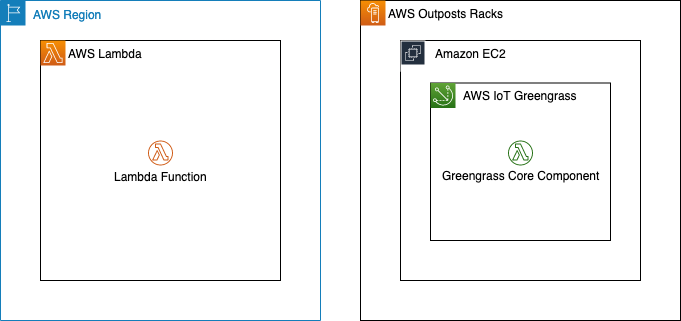
In this walkthrough you will create a Lambda function that can run on AWS IoT Greengrass and deploy it on an Outpost. This architecture results in an AWS-native Lambda function running on the Outpost.

Architecture overview - Lambda functions on AWS Outposts

Deploying Lambda functions on Outposts rack

Prerequisites: Building a VPC

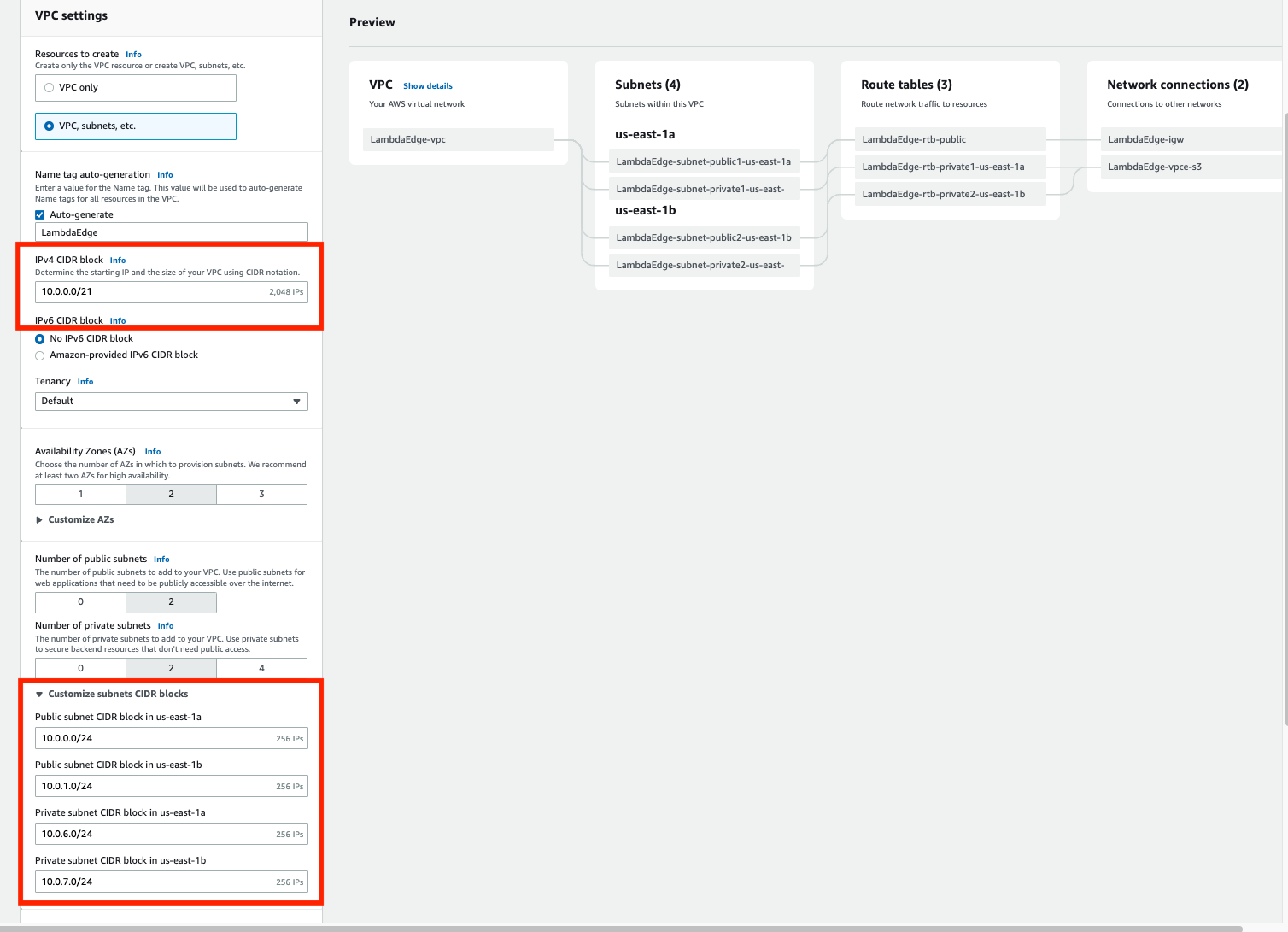
To get started, build a VPC in the same Region as your Outpost. You can do this with the create VPC option in the AWS console. The workflow allows you to set up a VPC with public and private subnets, an internet gateway, and NAT gateways as necessary. Do not consume all of the available IP space in the VPC with your subnets in this step, because you will still need to create Outposts subnets after this.

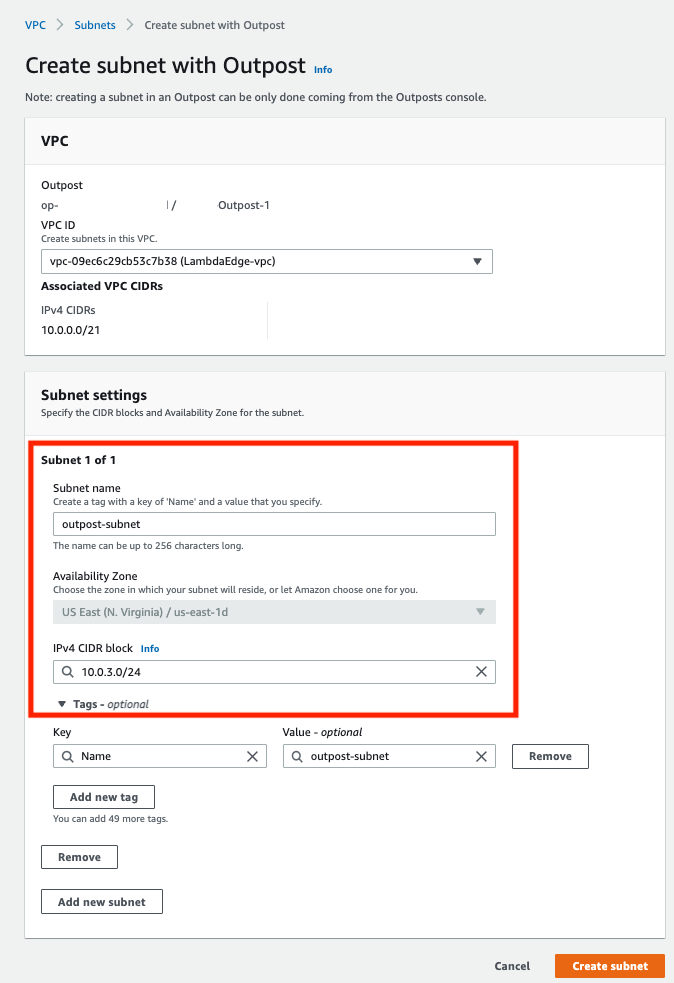
Now, build a subnet on your Outpost. You can do this by selecting your Outpost in the Outposts console and choosing Create Subnet in the drop-down Actions menu in the top right.

Confirm subnet details

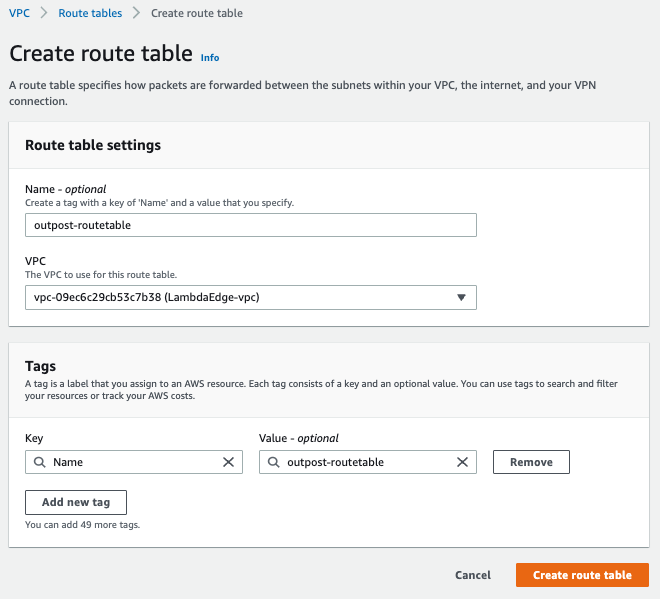
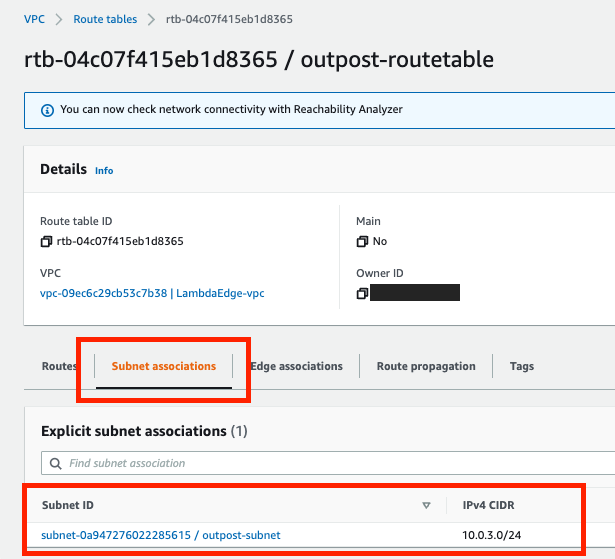
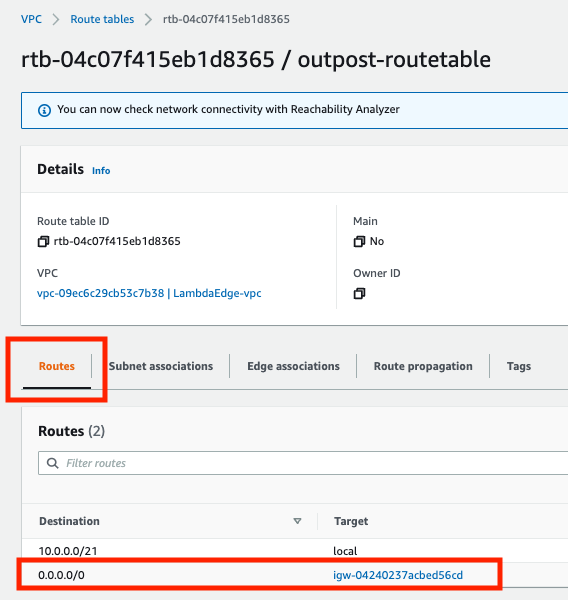
Choose the VPC you just created and select a CIDR range for your new subnet that doesn’t overlap with the other subnets that are already in the VPC. Once you’ve created the subnet, you need to create a new subnet route table and associate it with your new subnet. Go into the subnet route tables section of the VPC console and create a new route table. Associate the route table with your new subnet. Add a 0.0.0.0/0 route pointing at your VPC’s internet gateway. This sets the subnet up as a public subnet, which for the purposes of this post will make it easier to access the instance you are about to build for Greengrass Core. Depending on your requirements, it may make more sense to set up a private subnet on your Outpost instead. You can also add a route pointing at your Outpost’s local gateway here. Although you won’t be using the local gateway during this walkthrough, adding a route to the local gateway makes it possible to trigger your Outpost-hosted Lambda function with on-premises traffic.

Create a new route table

Associate the route table with the new subnet

Add a 0.0.0.0/0 route pointing at your VPC’s internet gateway

Setup: Launching an instance to run Greengrass Core

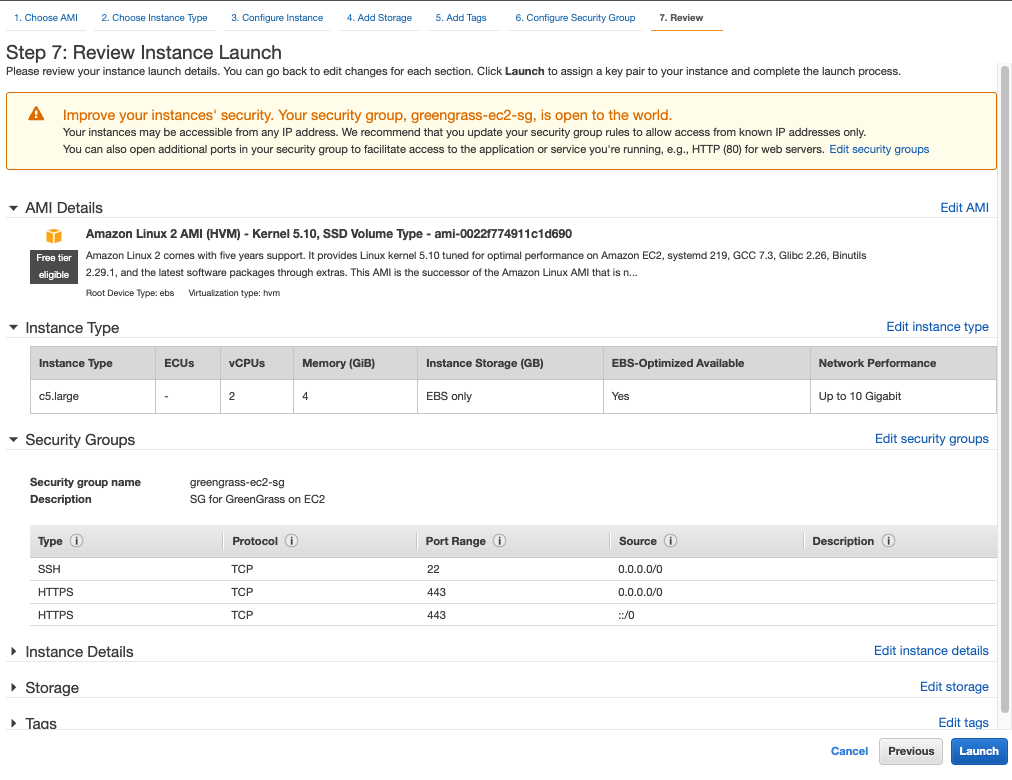
Create a new EC2 instance in your Outpost subnet. As long as your Outpost has capacity for your desired instance type, this operation will proceed the same way as any other EC2 instance launch. You can check your Outpost’s capacity in the Outposts console or in Amazon CloudWatch:

I used a c5.large instance running Amazon Linux 2 with 20 GiB of Amazon EBS storage for this walkthough. You can pick a different instance size or a different operating system in accordance with your application’s needs and the AWS IoT Greengrass documentation. For the purposes of this tutorial, we assign a public IP address to the EC2 instance on creation.

Step 1: Installing the AWS IoT Greengrass Core software

Once your EC2 instance is up and running, you will need to install the AWS IoT Greengrass Core software on the instance. Follow the AWS IoT Greengrass documentation to do this. You will need to do the following:

  1. Ensure that your EC2 instance has appropriate AWS permissions to make AWS API calls. You can do this by attaching an instance profile to the instance, or by providing AWS credentials directly to the instance as environment variables, as in the Greengrass documentation.
  2. Log in to your instance.
  3. Install OpenJDK 11. For Amazon Linux 2, you can use sudo amazon-linux-extras install java-openjdk11 to do this.
  4. Create the default system user and group that runs components on the device, with
    sudo useradd —system —create-home ggc_user
    sudo groupadd —system ggc_group
  5. Edit the /etc/sudoers file with sudo visudosuch that the entry for the root user looks like root ALL=(ALL:ALL) ALL
  6. Enable cgroups and enable and mount the memory and devices cgroups. In Amazon Linux 2, you can do this with the grubby utility as follows:
    sudo grubby --args="cgroup_enable=memory cgroup_memory=1 systemd.unified_cgroup_hierarchy=0" --update-kernel /boot/vmlinuz-$(uname -r)
  7. Type sudo reboot to reboot your instance with the cgroup boot parameters enabled.
  8. Log back in to your instance once it has rebooted.
  9. Use this command to download the AWS IoT Greengrass Core software to the instance:
    curl -s https://d2s8p88vqu9w66.cloudfront.net/releases/greengrass-nucleus-latest.zip > greengrass-nucleus-latest.zip
  10. Unzip the AWS IoT Greengrass Core software:
    unzip greengrass-nucleus-latest.zip -d GreengrassInstaller && rm greengrass-nucleus-latest.zip
  11. Run the following command to launch the installer. Replace each argument with appropriate values for your particular deployment, particularly the aws-region and thing-name arguments.
    sudo -E java -Droot="/greengrass/v2" -Dlog.store=FILE \
    -jar ./GreengrassInstaller/lib/Greengrass.jar \
    --aws-region region \
    --thing-name MyGreengrassCore \
    --thing-group-name MyGreengrassCoreGroup \
    --thing-policy-name GreengrassV2IoTThingPolicy \
    --tes-role-name GreengrassV2TokenExchangeRole \
    --tes-role-alias-name GreengrassCoreTokenExchangeRoleAlias \
    --component-default-user ggc_user:ggc_group \
    --provision true \
    --setup-system-service true \
    --deploy-dev-tools true
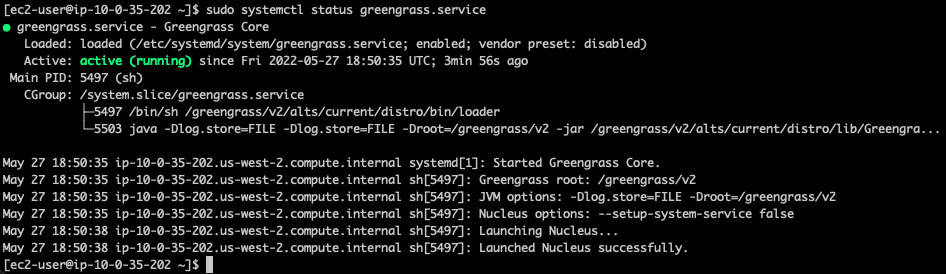
  12. You have now installed the AWS IoT Greengrass Core software on your EC2 instance. If you type sudo systemctl status greengrass.service then you should see output similar to this:

Step 2: Building and deploying a Lambda function

Now build a Lambda function and deploy it to the new Greengrass Core instance. You can find example local Lambda functions in the aws-greengrass-lambda-functions GitHub repository. This example will use the Hello World Python 3 function from that repo.

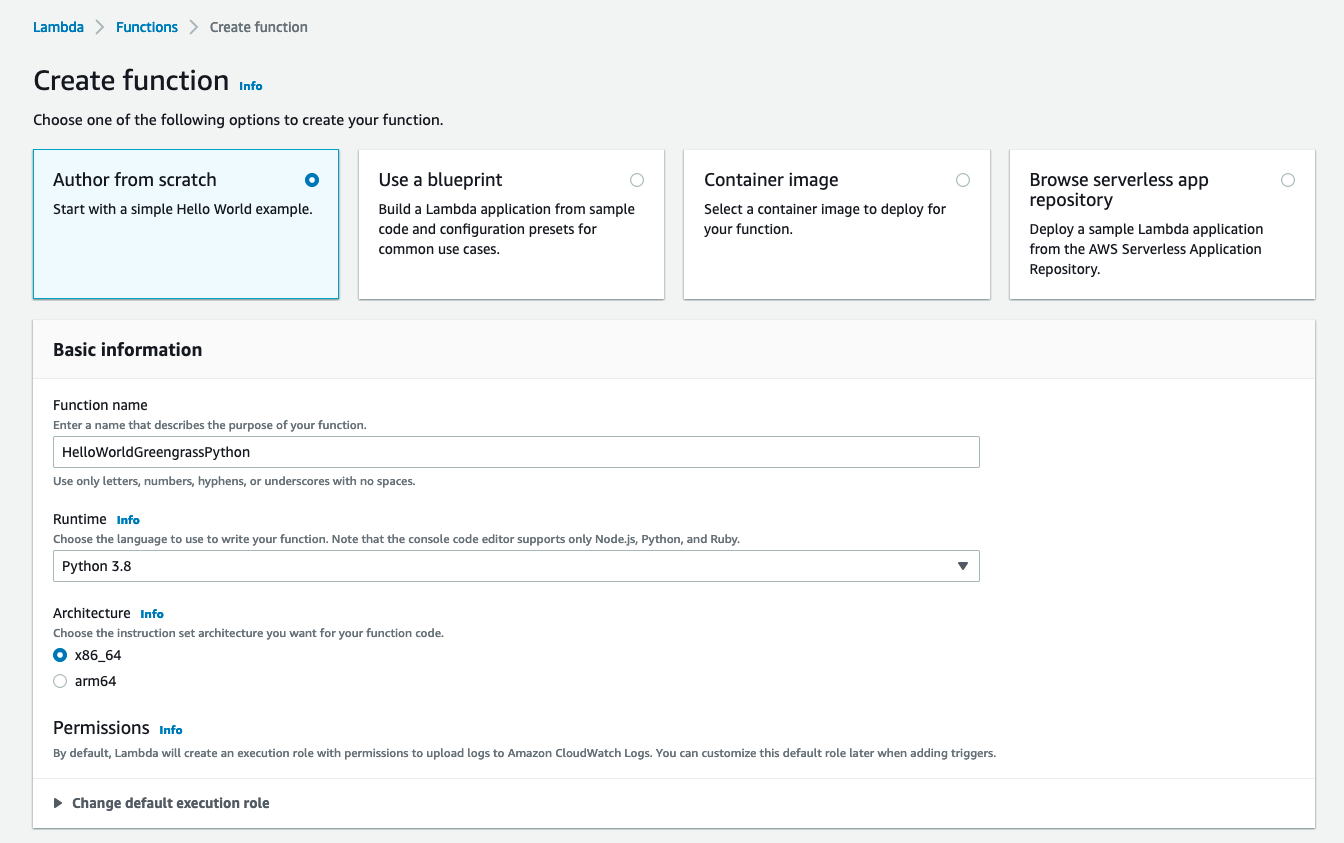
  1. Create the Lambda function. Go to the Lambda console, choose Create function, and select the Python 3.8 runtime:

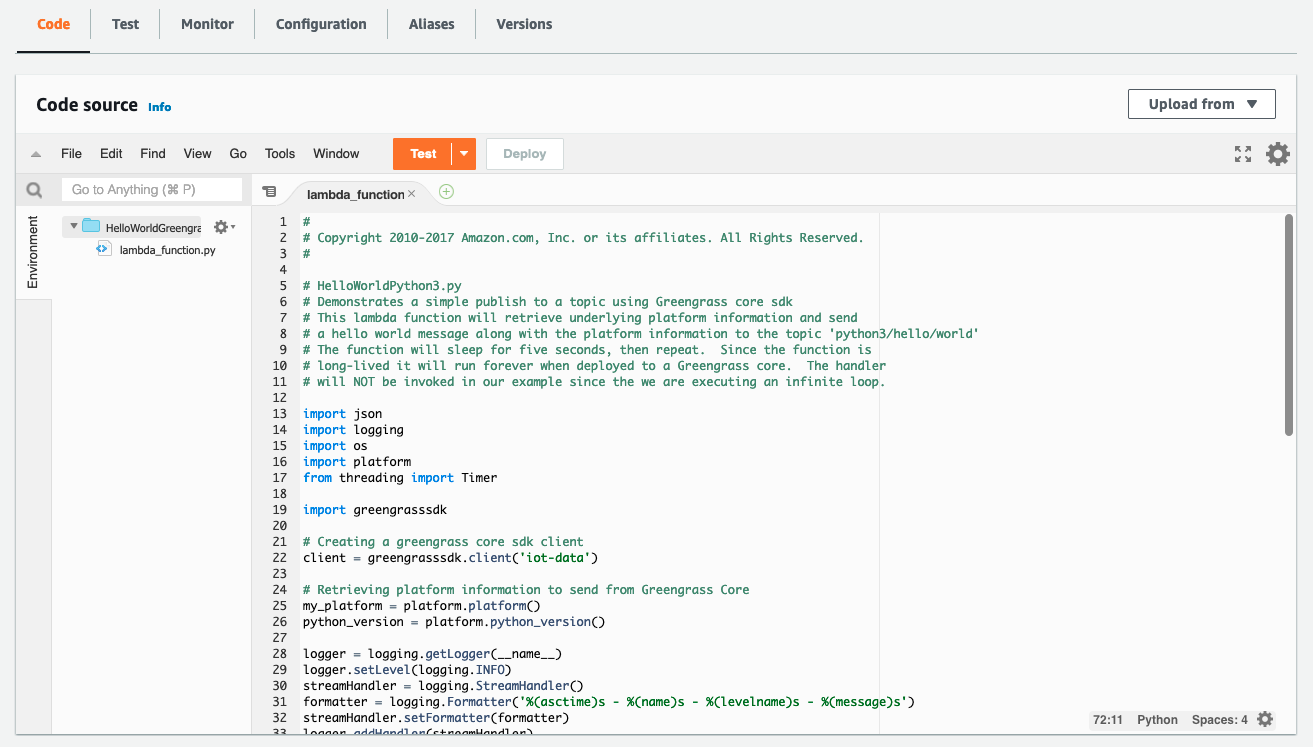
  1. Choose Create function at the bottom of the page. Once your new function has been created, copy the code from the Hello World Python 3 example into your function:

  1. Choose Deploy to deploy your new function’s code.
  2. In the top right, choose Actions and select Publish new version. For this particular function, you would need to create a deployment package with the AWS IoT Greengrass SDK for the function to work on the device. I’ve omitted this step for brevity as it is not a main focus of this post. Please reference the Lambda documentation on deployment packages and the Python-specific deployment package docs if you want to pursue this option.

  1. Go to the AWS IoT Greengrass console and choose Components in the left-side pop-in menu.
  2. On the Components page, choose Create component, and then Import Lambda function. If you prefer to do this programmatically, see the relevant AWS IoT Greengrass documentation or AWS CloudFormation documentation.
  3. Choose your new Lambda function from the drop-down.

Create component

  1. Scroll to the bottom and choose Create component.
  2. Go to the Core devices menu in the left-side nav bar and select your Greengrass Core device. This is the Greengrass Core EC2 instance you set up earlier. Make a note of the core device’s name.

  1. Use the left-side nav bar to go to the Deployments menu. Choose Create to create a new deployment, which will place your Lambda function on your Outpost-hosted core device.
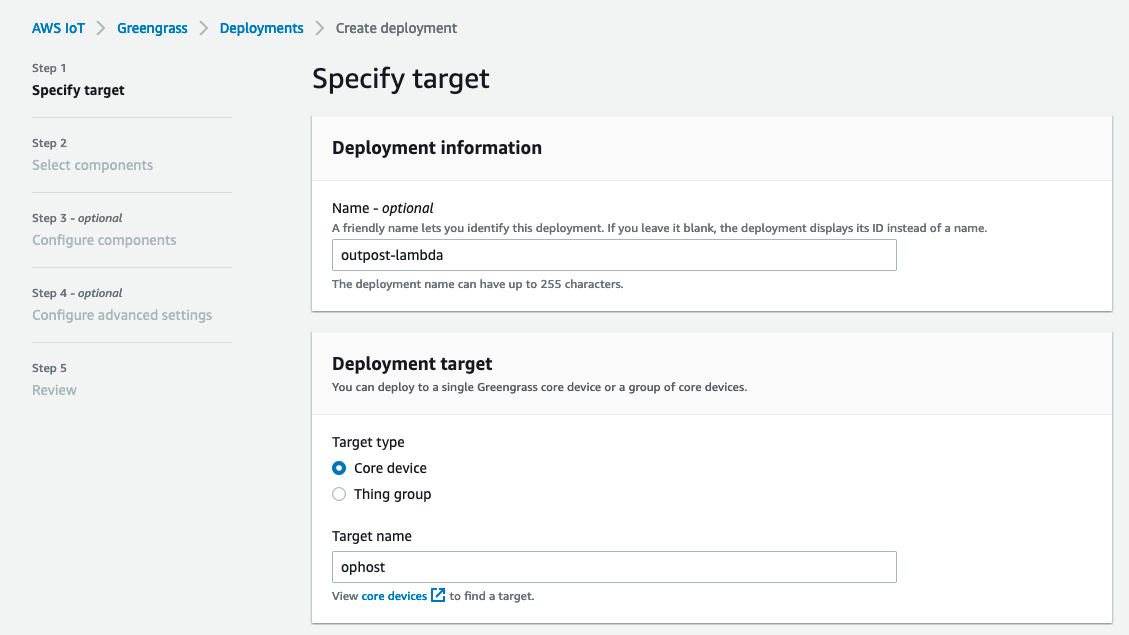
  2. Give the deployment a name and select Core device, providing the name of your core device. Choose Next.

  1. Select your Lambda function and choose Next.

  1. Choose Next again, on both the Configure components and Configure advanced settings On the last page, choose Deploy.

You should see a green message at the top of the screen indicating that your configuration is now being deployed.

Clean up

  1. Delete the Lambda function you created.
  2. Terminate the Greengrass Core EC2 instance.
  3. Delete the VPC.

Conclusion

Many customers use AWS Outposts to expand applications into new geographies. Some customers want to run Lambda-based applications on Outposts. This blog post shows how to use AWS IoT Greengrass to build Lambda functions which run locally on Outposts.

To learn more about Outposts, please contact your AWS representative and visit the Outposts homepage and documentation.

Active Exploitation of Confluence CVE-2022-26134

Post Syndicated from Rapid7 original https://blog.rapid7.com/2022/06/02/active-exploitation-of-confluence-cve-2022-26134/

Active Exploitation of Confluence CVE-2022-26134

On June 2, 2022, Atlassian published a security advisory for CVE-2022-26134, a critical unauthenticated remote code execution vulnerability in Confluence Server and Confluence Data Center. The vulnerability is unpatched as of June 2 and is being exploited in the wild.

Affected versions include Confluence Server version 7.18.0. According to Atlassian’s advisory, subsequent testing indicates that versions of Confluence Server and Data Center >= 7.4.0 are potentially vulnerable. There may also be other vulnerable versions not yet tested.

Security firm Volexity has in-depth analysis of attacks they have observed targeting CVE-2022-26134, including indicators of compromise and hunting rules.

Mitigation guidance

In the absence of a patch, organizations should restrict or disable Confluence Server and Confluence Data Center instances on an emergency basis. They should also consider implementing IP address safelisting rules to restrict access to Confluence.

For those unable to apply safelist IP rules to their Confluence server installations, consider adding WAF protection. Based on the details published so far, which admittedly are sparse, we recommend adding Java Deserialization rules that defend against RCE injection vulnerabilities, such as CVE-2021-26084. You can find an example here.

Rapid7 customers

We are investigating options for a vulnerability check to allow InsightVM and Nexpose customers to assess their exposure to CVE-2022-26134. We will update this blog as new information becomes available.

NEVER MISS A BLOG

Get the latest stories, expertise, and news about security today.

Remotely Controlling Touchscreens

Post Syndicated from Bruce Schneier original https://www.schneier.com/blog/archives/2022/06/remotely-controlling-touchscreens.html

Researchers have demonstrated controlling touchscreens at a distance, at least in a laboratory setting:

The core idea is to take advantage of the electromagnetic signals to execute basic touch events such as taps and swipes into targeted locations of the touchscreen with the goal of taking over remote control and manipulating the underlying device.

The attack, which works from a distance of up to 40mm, hinges on the fact that capacitive touchscreens are sensitive to EMI, leveraging it to inject electromagnetic signals into transparent electrodes that are built into the touchscreen so as to register them as touch events.

The experimental setup involves an electrostatic gun to generate a strong pulse signal that’s then sent to an antenna to transmit an electromagnetic field to the phone’s touchscreen, thereby causing the electrodes ­ which act as antennas themselves ­ to pick up the EMI.

Paper: “GhostTouch: Targeted Attacks on Touchscreens without Physical Touch“:

Abstract: Capacitive touchscreens have become the primary human-machine interface for personal devices such as smartphones and tablets. In this paper, we present GhostTouch, the first active contactless attack against capacitive touchscreens. GhostTouch uses electromagnetic interference (EMI) to inject fake touch points into a touchscreen without the need to physically touch it. By tuning the parameters of the electromagnetic signal and adjusting the antenna, we can inject two types of basic touch events, taps and swipes, into targeted locations of the touchscreen and control them to manipulate the underlying device. We successfully launch the GhostTouch attacks on nine smartphone models. We can inject targeted taps continuously with a standard deviation of as low as 14.6 x 19.2 pixels from the target area, a delay of less than 0.5s and a distance of up to 40mm. We show the real-world impact of the GhostTouch attacks in a few proof-of-concept scenarios, including answering an eavesdropping phone call, pressing the button, swiping up to unlock, and entering a password. Finally, we discuss potential hardware and software countermeasures to mitigate the attack.

AWS CSA Consensus Assessment Initiative Questionnaire version 4 now available

Post Syndicated from Sonali Vaidya original https://aws.amazon.com/blogs/security/aws-csa-consensus-assessment-initiative-questionnaire-version-4-now-available/

Amazon Web Services (AWS) has published an updated version of the AWS Cloud Security Alliance (CSA) Consensus Assessment Initiative Questionnaire (CAIQ). The questionnaire has been completed using the current CSA CAIQ standard, v4.0.2 (06.07.2021 update), and is now available for download.

The CSA is a not-for-profit organization dedicated to “defining and raising awareness of best practices to help ensure a secure cloud computing environment.” For more information, see the Cloud Security Alliance website. A wide range of industry security practitioners, corporations, and associations participate in CSA.

What is CSA CAIQ and how can you use it?

The CSA Consensus Assessments Initiative Questionnaire provides a set of questions that CSA anticipates a cloud consumer or a cloud auditor would ask of a cloud provider. The AWS CSA CAIQ provides the AWS control implementation descriptions for a series of cloud-specific security questions based on the Cloud Controls Matrix (CCM). The AWS CSA CAIQ also reflects the AWS customer responsibilities according to the shared responsibility model, which can help customers comply with the CSA CCM.

At AWS, we’re committed to helping you achieve and maintain the highest standards of security and compliance. We value your feedback and questions. You can contact the AWS HITRUST team at AWS Compliance Contact Us. If you have feedback about this post, submit comments in the Comments section below.

 
If you have feedback about this post, submit comments in the Comments section below. If you have questions about this post, contact AWS Support.

Want more AWS Security news? Follow us on Twitter.

Author

Sonali Vaidya

Sonali leads multiple AWS global compliance programs, including HITRUST, ISO 27001, ISO 27017, ISO 27018, ISO 27701, ISO 9001, and CSA STAR. Sonali has over 20 years of experience in information security and privacy management and holds multiple certifications such as CISSP, C-GDPR|P, CCSK, CEH, CISA, PCIP, ISO 27001, and ISO 22301 Lead Auditor.

Mozilla releases a machine-translation plugin

Post Syndicated from original https://lwn.net/Articles/896934/

Mozilla has announced
the release of a translation plugin for Firefox as part of the Project Bergamot initiative.

The ultimate goal of this consortium was to build a set of neural
machine translation tools that would enable Mozilla to develop a
website translation add-on that operates locally, i.e. the engines,
language models and in-page translation algorithms would need to
reside and be executed entirely in the user’s computer, so none of
the data would be sent to the cloud, making it entirely private.

Introducing the newest AWS Heroes – June 2022

Post Syndicated from Ross Barich original https://aws.amazon.com/blogs/aws/introducing-the-newest-aws-heroes-june-2022/

AWS Heroes are some of the worlds most active and vocal leaders in AWS communities, recognized for their unwavering focus on sharing insights and technical knowledge with others. Heroes have a variety of contributions to community learning: they host events, meetups, and workshops, author blogs, contribute to open source projects, speak at conferences, and more. You can view some of their prominent content in the AWS Heroes Content Library.

Today we are thrilled to introduce to the world the latest cohort of AWS Heroes:

Adam Bien – Munich, Germany

DevTools Hero Adam Bien is an independent Architect, Consultant, Developer, Trainer, conference speaker, and podcaster. Adam started with Java since JDK 1.0 and still enjoys writing serverless Java, often in Amazon Corretto. He also codes live on YouTube. Adam uses CDK in greenfield serverless Java applications, as well as to help his clients migrate their on-premise Java applications to the AWS cloud. He likes to apply Java’s pragmatic patterns and best practices to serverless runtimes, especially AWS Lambda and AWS Fargate. High productivity, reduction of complexity, and cost effectiveness are his main focuses.

Adam Elmore – Nixa, USA

DevTools Hero Adam Elmore is an independent cloud consultant who helps startups build products on AWS. He’s also the host of AWS FM, a podcast with guests from around the AWS community, and the creator of the AWS Community on Twitter. Adam is passionate about open source and has made a handful of contributions to the AWS CDK over the years. In 2020 he created Ness, an open source CLI tool for deploying web sites and apps to AWS. Previously, Adam co-founded StatMuse—a Disney backed startup building technology that answers sports questions—and served as CTO for five years.

Brooke Jamieson – Brisbane, Australia

Machine Learning Hero Brooke Jamieson is the Head of Enablement – AI/ML and Data at Blackbook.ai, and is an international conference speaker. Brooke specializes in researching & developing technically robust solutions that help “non-data people” harness the power of Artificial Intelligence and Machine Learning for their industry. Outside of their ‘day job’, Brooke is a dedicated member of the AWS Community and is a regular speaker at local user groups, global events, and guest lectures at multiple Australian Universities. They also make entry-level cloud career and technical content on TikTok, to reach broad audiences and diverse groups wanting to transition to careers in AI/ML and Cloud. Brooke is an Advisory Board member of Women in Digital, and strives to promote STEM pathways to young people in regional Australia & members of the LGBTIQA+ community.

Chao Cai – Beijing, China

Community Hero Chao Cai has 15 years of world-class experience in software development, including more than 10 years as a software architect. He is currently the VP and Chief Architect at Mobvista Inc. Chao is passionate about sharing his knowledge and experience to the community. His WeChat public account has more than 4,000 followers and over 34,000 engineers have taken his online courses. Chao is a respected leader in the China tech community. He is invited as the speaker to the global tech conferences, such as, QCon and ArchSummit each year. As an active advocate for AWS, Chao is also a regular speaker at AWS tech events.

Cyril Bandolo – Douala, Cameroon

Machine Learning Hero Cyril Bandolo is a data scientist working as a Senior Manager Data Analytics at Yoomee Mobile. Cyril has a natural talent and passion for teaching and transferring knowledge in his machine learning blog, where he focuses on building and deploying end-to-end machine learning projects on AWS. On his YouTube channel, he recently launched a weekly live hands-on series called “Sagemaker Saturdays” during which, every weekend he walks the viewers through end-to-end machine learning projects with Sagemaker Studio Lab and Sagemaker Studio. Cyril is always trying to encounter and apply new machine learning solutions to make lives better and help move the bottom line.

Kristi Perreault – Denver, USA

Serverless Hero Kristi Perreault is a Principal Software Engineer at Liberty Mutual Insurance, where her focus is serverless first development, and enterprise enablement. She holds an M.S. in Electrical & Computer Engineering specializing in cloud computing & IoT, and is very passionate about promoting women in technology. She organizes the Serverless Denver user group as part of ServerlessDays, co-organizes CDK Day, and writes extensively about serverless and diversity on her dev.to and Medium blog sites. You’ll find her speaking about embracing and scaling serverless first initiatives on dozens of podcasts, webinars, conferences, and meetups both virtually and on stage.

Sanchit Jain – Mumbai, India

Community Hero Sanchit Jain is the AWS Analytics Practice Lead and a certified expert specializing in AWS Cloud at Quantiphi Inc. He is also the AWS User Group Mumbai Lead and actively contributes to the AWS community by delivering sessions at AWS User Groups, AWS Community Days, and various educational institutes. He also shares his knowledge by publishing blogs about AWS services, architectures, and best practices. Recently, Sanchit hosted an AWS Solution Architect Certification Bootcamp, which spanned over two months, with 7500+ viewers. He also delivered a session recently at AWS Summit India 2022 on Building a data lake with AWS Lake Formation.

Shigeru Oda – Saitama, Japan

Community Hero Shigeru Oda is an expert system engineer at NSD CO., LTD. Since 2020 he has run 25 events with the JAWS-UG Beginners Chapter (about 4200 registered members). In September 2020 he promoted the 24-hour online event JAWS SONIC 2020 & MIDNIGHT JAWS 2020, which was attended by about 1500 people. In March 2021, he promoted JAWS DAYS 2021 as a steering member, which was attended by about 4,000 people. And in November 2021, he promoted JAWS PANKRATION 2021, a second 24-hour online event, providing 900 AWS users in Japan, as well as around the world with an opportunity to learn beyond the language barrier of English and Japanese through simultaneous interpretation. He received the AWS Samurai 2021 Award for these activities.

Yasunori Kirimoto – Sapporo, Japan

DevTools Hero Yasunori Kirimoto is currently the Co-Founder and CTO of MIERUNE Inc. and owner of dayjournal. He specializes in the field of GIS (Geographic Information System) and FOSS4G (Free Open Source Software for GeoSpatial). Yasunori’s work includes contributions to the Amazon Location Service samples on GitHub and open source projects such as AWS Amplify and AWS CDK. He has also published numerous blog posts on AWS CloudFormation and other AWS architectures. When he’s not acting as a bridge between AWS and the location-based information field, he engages with the open-source community and enjoys participating in venture projects to gain a broader understanding of technology.


If you’d like to learn more about the new Heroes, or connect with a Hero near you, please visit the AWS Heroes website or browse the AWS Heroes Content Library.

Ross

Automate your validated dataset deployment using Amazon QuickSight and AWS CloudFormation

Post Syndicated from Jeremy Winters original https://aws.amazon.com/blogs/big-data/automate-your-validated-dataset-deployment-using-amazon-quicksight-and-aws-cloudformation/

A lot of the power behind business intelligence (BI) and data visualization tools such as Amazon QuickSight comes from the ability to work interactively with data through a GUI. Report authors create dashboards using GUI-based tools, then in just a few clicks can share the dashboards with business users and decision-makers. This workflow empowers authors to create and manage the QuickSight resources and dashboards they’re responsible for providing.

Developer productivity is a great benefit of UI-based development, but enterprise customers often need to consider additional factors in their BI implementation:

  • Promoting objects through environments (development, testing, production, and so on)
  • Scaling for hundreds of authors and thousands of users
  • Implementing data security, such as row-level and column-level rules to filter the data elements visible to specific users
  • Regulatory requirements, processes, and compliance controls.

Approaches such as source control-backed CI/CD pipelines allow you to address compliance requirements and security gates with automation. For example, a hypothetical build pipeline for a Java Springboot application may enable developers to build and deploy freely to a dev environment, but the code must pass tests and vulnerability scans before being considered for promotion to upper environments. A human approval step then takes place before the code is released into production. Processes such as this provide quality, consistency, auditability, and accountability for the code being released.

The QuickSight API provides functionality for automation pipelines. Pipeline developers can use the API to migrate QuickSight resources from one environment to another. The API calls that facilitate handling QuickSight datasets enables inspection of the JSON representation of the dataset definition.

This post presents an example of how a QuickSight administrator can automate data resource management and security validation through use of the QuickSight API and AWS CloudFormation.

Solution overview

The model implements security rules that rely on naming conventions for tables and columns as an integral part of the security model. Instead of relying on naming conventions, you may want to use a lookup table or similar approach to store the relationships between data tables and security tables.

We guide you through the following steps:

  1. Create relational database tables to be secured.
  2. Create a QuickSight dataset in your dev account.
  3. Generate a CloudFormation template using a Python script that allows you to enforce row-level and column-level security in each environment. You can customize this script to the needs of your organization.
  4. Use the generated CloudFormation template to deploy through dev, test, and prod using your change management process.

You can use AWS CloudFormation to manage several types of QuickSight resources, but dataset resources are a critical junction for security, so they are our focus in this post.

To implement data security rules in a large organization, controls must be in place to agree upon and implement the rules from a process perspective. This post dives deep into using code to validate security aspects of your QuickSight deployment, but data security requires more than code. The approaches put forward are intended as a part of a larger change management process, much of which is based around human review and approval.

In addition to having a change management process in place, we suggest managing your AWS resources using a CI/CD pipeline. The nature of change management and CI/CD processes can vary greatly, and are outside the scope of this post.

Prerequisites

This post assumes a basic command of the following:

We don’t go into the broader picture of integrating into a full CI/CD process, so an understanding of CI/CD is helpful, but not required.

Security rules for your organization

Before we can write a script to confirm security rules have been applied correctly, we need to know what the security rules actually are. This means we need to determine the following:

  • What – What is the data we are trying to secure? Which fields in the database are sensitive? Which field values will be used to filter access?
  • Who – Who are the users and groups that should be provided access to the data and fields we have identified?

In concrete terms, we need to match identities (users and groups) to actual data values (used in row-level security) and sensitive fields (for column-level security). Identities such as users and groups typically correlate to entities in external systems such as Active Directory, but you can use native QuickSight users and groups.

For this post, we define the following rules that indicate the relationship between database objects (tables and fields) and how they should be secured. Keep in mind that these example rules may not apply to every organization. Security should be developed to match your requirements and processes.

  • Any field name with _sensitive appended to it is identified as containing sensitive data. For example, a column named salary_usd_sensitive should be restricted. For our scenario, we say that the user should be a member of the QuickSight restricted group in order to access sensitive fields. No other groups are allowed access to these fields.
  • For a given table, a companion table with _rls appended to the name contains the row-level security rules used to secure the table. In this model, the row-level security rules for the employees table are found in the employees_rls table.
  • Row-level security rules must be sourced 100% from the underlying data store. This means that you can’t upload rules via the QuickSight console, or use custom SQL in QuickSight to create the rules. Rules can be provided as views (if supported by the underlying data store) as long as the view definition is managed using a change management process.
  • The dataset name should match the name of the underlying database table.

These rules rely on a well-structured change management process for the database. If users and developers have access to change database objects in production, the rules won’t carry much weight. For examples of automated schema management using open-source CI/CD tooling, refer to Deploy, track, and roll back RDS database code changes using open source tools Liquibase and Jenkins and How to Integrate Amazon RDS Schema Changes into CI/CD Pipelines with GitLab and Liquibase.

From the QuickSight perspective, our database becomes the source of the “what” and “who” we discussed earlier. QuickSight doesn’t own the security rules, it merely implements the rules as defined in the database.

Security rule management with database objects

For this post, we source data from a Postgres database using a read-only user created for QuickSight.

First, we create our schema and a data table with a few rows inserted:

create schema if not exists ledger;

--the table we are securing
drop table if exists ledger.transactions;
create table if not exists ledger.transactions (
    txn_id integer,
    txn_type varchar(100),
    txn_desc varchar(100),
    txn_amt float,
    department varchar(100),
    discount_sensitive float
);

insert into ledger.transactions (
    txn_id,
    txn_type,
    txn_desc,
    txn_amt,
    department,
    discount_sensitive
) 
values
(1, 'expense', 'commission', -1000.00, 'field sales', 0.0),
(2, 'revenue', 'widgets',  15000.00, 'field sales', 1000.00),
(3, 'revenue', 'interest', 1000.00, 'corporate', 0.0),
(4, 'expense', 'taxes', -1234.00, 'corporate', 0.0),
(5, 'revenue', 'doodads', 1000.00, 'field sales', 100.0)
;

Note the field discount_sensitive. In our security model, any field name with _sensitive appended to it is identified as containing sensitive data. This information is used later when we implement column-level security. In our example, we have the luxury of using naming conventions to tag the sensitive fields, but that isn’t always possible. Other options could involve the use of SQL comments, or creating a table that provides a lookup for sensitive fields. Which method you choose depends upon your data and requirements, and should be supported by a change management process.

Row-level security table

The following SQL creates a table containing the row-level security rules for the ledger.transactions table, then inserts rules that match the example discussed earlier:

drop table if exists ledger.transactions_rls;
create table ledger.transactions_rls (
    groupname varchar(100),
    department varchar(1000)
);


insert into ledger.transactions_rls (groupname, department) 
values
('restricted', null), --null indicates all values
('anybody', 'field sales');

For more information about how to restrict access to a dataset using row-level security, refer to Using row-level security (RLS) with user-based rules to restrict access to a dataset

These rules match the specified QuickSight user groups to values in the department field of the transactions table.

Our last step in Postgres is to create a user that has read-only access to our tables. All end-user or SPICE refresh queries from QuickSight are run using this user. See the following code:

drop role if exists qs_user;
create role qs_user login password 'GETABETTERPASSSWORD';
grant connect on database quicksight TO qs_user;
grant usage on schema ledger to qs_user;
grant select on ledger.transactions to qs_user;
grant select on ledger.transactions_rls to qs_user;

Create user groups

Our security model provides permissions based on group membership. Although QuickSight allows for these groups to be sourced from external systems such as Active Directory, our example uses native QuickSight groups.

We create our groups using the following AWS Command Line Interface (AWS CLI) commands. Take note of the restricted group we’re creating; this is the group we use to grant access to sensitive data columns.

aws quicksight create-group \
--aws-account-id YOUR_AWS_ACCOUNT_ID_HERE \
--namespace default \
--group-name restricted

aws quicksight create-group \
--aws-account-id YOUR_AWS_ACCOUNT_ID_HERE \
--namespace default \
--group-name anybody

You can also add a user to your group with the following code:

aws quicksight create-group-membership \
--aws-account-id YOUR_AWS_ACCOUNT_ID_HERE \
--namespace default \
--group-name anybody \
--member-name [email protected]

The Python script

Now that we have set up our database and groups, we switch focus to the Python script used for the following actions:

  • Extracting the definition of a manually created dataset using the QuickSight API
  • Ensuring that the dataset definition meets security standards
  • Restructuring the dataset definition into the format of a CloudFormation template
  • Writing the CloudFormation template to a JSON file

In the header of the script, you can see the following variables, which you should set to values in your own AWS environment:

# Parameters for the source data set
region_name = 'AWS_REGION_NAME'
aws_account_id = "AWS_ACCOUNT_ID"
source_data_set_id = "ID_FOR_THE_SOURCE_DATA_SET"

# Parameters are used when creating the cloudformation template
target_data_set_name = "DATA_SET_DISPLAY_NAME"
target_data_set_id = "NEW_DATA_SET_ID"
template_file_name = "dataset.json"

QuickSight datasets have a name and an ID. The name is displayed in the QuickSight UI, and the ID is used to reference the dataset behind the scenes. The ID must be unique for a given account and Region, which is why QuickSight uses UUIDs by default, but you can use any unique string.

Create the datasets

You can use the QuickSight GUI or Public API to create a dataset for the transactions_rls and transactions tables. For instructions, refer to Creating a dataset from a database. Connect to the database, create the datasets, then apply transactions_rls as the row-level security for the transactions dataset. You can use the following list-data-sets AWS CLI call to verify that your tables were created successfully:

$ aws quicksight list-data-sets --aws-account-id YOURACCOUNT            
{
    "DataSetSummaries": [
       {
            "Arn": "arn:aws:quicksight:us-west-2:YOURACCOUNT:dataset/<ID>",
            "DataSetId": "<ID>",
            "Name": "transactions",
            "CreatedTime": "2021-09-15T15:41:56.716000-07:00",
            "LastUpdatedTime": "2021-09-15T16:38:03.658000-07:00",
            "ImportMode": "SPICE",
            "RowLevelPermissionDataSet": {
                "Namespace": "default",
                "Arn": "arn:aws:quicksight:us-west-2: YOURACCOUNT:dataset/<RLS_ID>",
                "PermissionPolicy": "GRANT_ACCESS",
                "FormatVersion": "VERSION_1",
                "Status": "ENABLED"
            },
            "RowLevelPermissionTagConfigurationApplied": false,
            "ColumnLevelPermissionRulesApplied": true
        },
        {
            "Arn": "arn:aws:quicksight:us-west-2: YOURACCOUNT:dataset/<RLS_ID>",
            "DataSetId": "<RLS_ID>",
            "Name": "transactions_rls",
            "CreatedTime": "2021-09-15T15:42:37.313000-07:00",
            "LastUpdatedTime": "2021-09-15T15:42:37.520000-07:00",
            "ImportMode": "SPICE",
            "RowLevelPermissionTagConfigurationApplied": false,
            "ColumnLevelPermissionRulesApplied": false
        }
    ]
}

Script overview

Our script is based around the describe_data_set method of the Boto3 QuickSight client. This method returns a Python dictionary containing all the attributes associated with a dataset resource. Our script analyzes these dictionaries, then coerces them into the structure required for dataset creation using AWS CloudFormation. The structure of the describe_data_set method and the AWS::QuickSight::DataSet CloudFormation resource are very similar, but not quite identical.

The following are the top-level fields in the response for the Boto3 QuickSight client describe_data_set method:

{
    'DataSet': {
        'Arn': 'string',
        'DataSetId': 'string',
        'Name': 'string',
        'CreatedTime': datetime(2015, 1, 1),
        'LastUpdatedTime': datetime(2015, 1, 1),
        'PhysicalTableMap': {},
        'LogicalTableMap': {...},
        'OutputColumns': [...],
        'ImportMode': 'SPICE'|'DIRECT_QUERY',
        'ConsumedSpiceCapacityInBytes': 123,
        'ColumnGroups': [...],
        'FieldFolders': {...},
        'RowLevelPermissionDataSet': {...},
        'ColumnLevelPermissionRules': [...]
    },
    'RequestId': 'string',
    'Status': 123
}

Our script converts the response from the API to the structure required for creating a dataset using AWS CloudFormation.

The following are the top-level fields in the AWS::QuickSight::DataSet CloudFormation resource:

{
  "Type" : "AWS::QuickSight::DataSet",
  "Properties" : {
      "AwsAccountId" : String,
      "ColumnGroups" : [ ColumnGroup, ... ],
      "ColumnLevelPermissionRules" : [ ColumnLevelPermissionRule, ... ],
      "DataSetId" : String,
      "FieldFolders" : {Key : Value, ...},
      "ImportMode" : String,
      "IngestionWaitPolicy" : IngestionWaitPolicy,
      "LogicalTableMap" : {Key : Value, ...},
      "Name" : String,
      "Permissions" : [ ResourcePermission, ... ],
      "PhysicalTableMap" : {Key : Value, ...},
      "RowLevelPermissionDataSet" : RowLevelPermissionDataSet,
      "Tags" : [ Tag, ... ]
    }
}

The key differences between both JSON structures are as follows:

  • describe_data_set contains Arn, CreatedTime, and LastUpdatedTime, which are useful fields but only relevant to an existing resource
  • AWS CloudFormation requires AwsAccountId when creating the resource
  • AWS CloudFormation accepts tags for the dataset, but describe_data_set doesn’t provide them
  • The AWS CloudFormation Permissions property allows for assigning AWS Identity and Access Management (IAM) permissions at the time of creation

Our script is able to selectively choose the top-level properties we want from the describe_data_set response, then add the fields that AWS CloudFormation requires for resource creation.

Validate security

Before the script creates the CloudFormation template, it performs validations to ensure that our dataset conforms to the defined security rules.

The following is the snippet from our script that performs validation for row-level security:

if 'RowLevelPermissionDataSet' in describe_response['DataSet']:
    if describe_response['DataSet']['RowLevelPermissionDataSet'] is None:
        raise Exception("row level permissions must be applied!")
    else:
        # now we look up the rls data set so that we can confirm that it conforms to our rules
        rls_dataset_id = describe_response['DataSet']['RowLevelPermissionDataSet']['Arn'].split('/')[-1]
        rls_response = client.describe_data_set(
            AwsAccountId = aws_account_id,
            DataSetId = rls_dataset_id
        )
        
        rls_table_map = rls_response['DataSet']['PhysicalTableMap']

        # rls table must not be custom SQL
        if 'CustomSql' in rls_table_map[list(rls_table_map.keys())[0]]:
            raise Exception("RLS data set can not contain custom SQL!")

        # confirm that the database table name is what we expect it to be 
        if rls_response['DataSet']['Name'] != describe_response['DataSet']['Name'] + '_rls':
            raise Exception("RLS data set name must match pattern tablename_rls!")

The steps in the code are as follows:

  1. Ensure that any row-level security is applied (this is the bare minimum).
  2. Look up the dataset that contains the row-level security rules using another Boto3 call.
  3. Confirm that the row-level security dataset is not custom SQL.
  4. Confirm that the name of the table is as expected, with _rls appended to the name of the table being secured.

The use of custom SQL for sourcing row-level security rules isn’t secure in our case, because a QuickSight developer could use SQL to alter the underlying rules. Because of this, our model requires that a physical table from the dataset is used as the row-level security rule source. Of course, it’s possible to use a view in the database to provide the rules. A view is okay because the definition (in our scenario) is governed by a change management process, as opposed to the custom SQL, which the QuickSight developer can create.

The rules being implemented for your specific organization will be different. You may need to connect to a database directly from your Python script in order to validate the dataset was created in a secure manner. Regardless of your actual rules, the describe_data_set API method provides you the details you need to begin validation of the dataset.

Column-level security

Our model for column-level security indicates that any database field name that ends in _sensitive should only be accessible to members of a QuickSight group named restricted. Instead of validating that the dataset has the column-level security rules applied correctly, we simply enforce the rules directly in two steps:

  1. Identify the sensitive fields.
  2. Create a dictionary and add it to our dataset with the key ColumnLevelPermissionRules.

To identify the sensitive fields, we create a list and iterate through the input columns of the physical table:

sensitive_fields = []
input_columns = physical_table_map[list(physical_table_map.keys())[0]]["RelationalTable"]["InputColumns"]
for input_column in input_columns:
    field_name = input_column['Name']
    if field_name[-10:len(field_name)] == '_sensitive':
        sensitive_fields.append(field_name)

The result is a list of sensitive fields. We can then take this list and integrate it into the dataset through the use of a dictionary:

if len(sensitive_fields) > 0:
    data_set["ColumnLevelPermissionRules"] = [
        {
            "Principals": [
                {"Ref": "RestrictedUserGroupArn"}
            ],
            "ColumnNames": sensitive_fields
        }
    ]

Instead of specifying a specific principal, we reference the CloudFormation template parameter RestrictedUserGroupArn. The ARN for the restricted group is likely to vary, especially if you’re deploying to another AWS account. Using a template parameter allows us to specify the ARN at the time of dataset creation in the new environment.

Access to the dataset QuickSight resources

The Permissions structure is added to the definition for each dataset:

"Permissions": [
    {
        "Principal": {
            "Ref": "QuickSightAdminPrincipal"
        },
        "Actions": [
            "quicksight:DescribeDataSet",
            "quicksight:DescribeDataSetPermissions",
            "quicksight:PassDataSet",
            "quicksight:DescribeIngestion",
            "quicksight:ListIngestions",
            "quicksight:UpdateDataSet",
            "quicksight:DeleteDataSet",
            "quicksight:CreateIngestion",
            "quicksight:CancelIngestion",
            "quicksight:UpdateDataSetPermissions"
        ]
    }
]

A value for the QuickSightAdminPrincipal CloudFormation template parameter is provided at the time of stack creation. The preceding structure provides the principal access to manage the QuickSight dataset resource itself. Note that this is not the same as data access (though an admin user could manually remove the row-level security rules). Row-level and column-level security rules indicate whether a given user has access to specific data, whereas these permissions allow for actions on the definition of the dataset, such as the following:

  • Updating or deleting the dataset
  • Changing the security permissions
  • Initiating and monitoring SPICE refreshes

End-users don’t require this access in order to use a dashboard created from the dataset.

Run the script

Our script requires you to specify the dataset ID, which is not the same as the dataset name. To determine the ID, use the AWS CLI list-data-sets command.

To set the script parameters, you can edit the following lines to match your environment:

# parameters for the source data set
region_name = 'us-west-2'
aws_account_id = "<YOUR_ACCOUNT_ID>"
source_data_set_id = "<SOURCE_DATA_SET_ID>"

# parameters for the target data set
target_data_set_name = "DATA_SET_PRESENTATION_NAME"
target_data_set_id = "NEW_DATA_SET_ID"

The following snippet runs the Python script:

$ quicksight_security % python3 data_set_to_cf.py                                                       
row level security validated!
the following sensitive fields were found: ['discount_sensitive']
cloudformation template written to dataset.json
cli-input-json file written to params.json

CloudFormation template

Now that the security rules have been validated, our script can generate the CloudFormation template. The describe_response_to_cf_data_set method accepts a describe_data_set response as input (along with a few other parameters) and returns a dictionary that reflects the structure of an AWS::QuickSight::DataSet CloudFormation resource. Our code uses this method once for the primary dataset, and again for the _rls rules. This method handles selecting values from the response, prunes some unnecessary items (such as empty tag lists), and replaces a few values with CloudFormation references. These references allow us to provide parameter values to the template, such as QuickSight principals and the data source ARN.

You can view the template using the cat command:

$ quicksight_security % cat dataset.json 
{
    "AWSTemplateFormatVersion": "2010-09-09",
    "Description": "Creates a QuickSight Data Set",
    "Parameters": {
        "DataSourceArn": {
            "Type": "String",
            "Description": "ARN for Postgres data source resource"
        },
        "QuickSightOwnerPrincipal": {
            "Type": "String",
            "Description": "ARN for a QuickSight principal who will be granted API access to the datasets"
        },
        "RestrictedUserGroupArn": {
            "Type": "String",
            "Description": "ARN for a QuickSight principal who will be granted access to sensitive fields"
        }
    },
    "Resources": {
        "NewDataSet": {
            "Type": "AWS::QuickSight::DataSet",
            "Properties": {
                "DataSetId": "NEW_DATA_SET_ID",
                "Name": "DATA_SET_PRESENTATION_NAME",
                "AwsAccountId": {
                    "Ref": "AWS::AccountId"
                },
                "Permissions": [
                    {
                        "Principal": {
                            "Ref": "QuickSightAdminPrincipal"
                        },
                        "Actions": [
                            "quicksight:DescribeDataSet",
                            "quicksight:DescribeDataSetPermissions",
                            "quicksight:PassDataSet",
                            "quicksight:DescribeIngestion",
                            "quicksight:ListIngestions",
                            "quicksight:UpdateDataSet",
                            "quicksight:DeleteDataSet",
                            "quicksight:CreateIngestion",
                            "quicksight:CancelIngestion",
                            "quicksight:UpdateDataSetPermissions"
                        ]
                    }
                ],
                "FieldFolders": {},
                "ImportMode": "DIRECT_QUERY",
                "LogicalTableMap": {
                    "e2305db4-2c79-4ac4-aff5-224b8c809767": {
                        "Alias": "transactions",
                        "DataTransforms": [
                            {
                                "ProjectOperation": {
                                    "ProjectedColumns": [
                                        "txn_id",
                                        "txn_type",
                                        "txn_desc",
                                        "txn_amt",
                                        "department",
                                        "discount_sensitive"
                                    ]
                                }
                            }
                        ],
                        "Source": {
                            "PhysicalTableId": "someguid-2c79-4ac4-aff5-224b8c809767"
                        }
                    }
                },
                "PhysicalTableMap": {
                    "e2305db4-2c79-4ac4-aff5-224b8c809767": {
                        "RelationalTable": {
                            "DataSourceArn": {
                                "Ref": "DataSourceArn"
                            },
                            "Schema": "ledger",
                            "Name": "transactions",
                            "InputColumns": [
                                {
                                    "Name": "txn_id",
                                    "Type": "INTEGER"
                                },
                                {
                                    "Name": "txn_type",
                                    "Type": "STRING"
                                },
                                {
                                    "Name": "txn_desc",
                                    "Type": "STRING"
                                },
                                {
                                    "Name": "txn_amt",
                                    "Type": "DECIMAL"
                                },
                                {
                                    "Name": "department",
                                    "Type": "STRING"
                                },
                                {
                                    "Name": "discount_sensitive",
                                    "Type": "DECIMAL"
                                }
                            ]
                        }
                    }
                },
                "RowLevelPermissionDataSet": {
                    "Namespace": "default",
                    "Arn": {
                        "Fn::GetAtt": [
                            "NewDataSetRLS",
                            "Arn"
                        ]
                    },
                    "PermissionPolicy": "GRANT_ACCESS",
                    "FormatVersion": "VERSION_1"
                },
                "ColumnLevelPermissionRules": [
                    {
                        "Principals": [
                            {
                                "Ref": "RestrictedUserGroupArn"
                            }
                        ],
                        "ColumnNames": [
                            "discount_sensitive"
                        ]
                    }
                ]
            }
        },
        "NewDataSetRLS": {
            "Type": "AWS::QuickSight::DataSet",
            "Properties": {
                "DataSetId": "NEW_DATA_SET_ID_rls",
                "Name": "DATA_SET_PRESENTATION_NAME_rls",
                "AwsAccountId": {
                    "Ref": "AWS::AccountId"
                },
                "Permissions": [
                    {
                        "Principal": {
                            "Ref": "QuickSightAdminPrincipal"
                        },
                        "Actions": [
                            "quicksight:DescribeDataSet",
                            "quicksight:DescribeDataSetPermissions",
                            "quicksight:PassDataSet",
                            "quicksight:DescribeIngestion",
                            "quicksight:ListIngestions",
                            "quicksight:UpdateDataSet",
                            "quicksight:DeleteDataSet",
                            "quicksight:CreateIngestion",
                            "quicksight:CancelIngestion",
                            "quicksight:UpdateDataSetPermissions"
                        ]
                    }
                ],
                "FieldFolders": {},
                "ImportMode": "SPICE",
                "LogicalTableMap": {
                    "someguid-51d7-43c4-9f8c-c60a286b0507": {
                        "Alias": "transactions_rls",
                        "DataTransforms": [
                            {
                                "ProjectOperation": {
                                    "ProjectedColumns": [
                                        "groupname",
                                        "department"
                                    ]
                                }
                            }
                        ],
                        "Source": {
                            "PhysicalTableId": "someguid-51d7-43c4-9f8c-c60a286b0507"
                        }
                    }
                },
                "PhysicalTableMap": {
                    "someguid-51d7-43c4-9f8c-c60a286b0507": {
                        "RelationalTable": {
                            "DataSourceArn": {
                                "Ref": "DataSourceArn"
                            },
                            "Schema": "ledger",
                            "Name": "transactions_rls",
                            "InputColumns": [
                                {
                                    "Name": "groupname",
                                    "Type": "STRING"
                                },
                                {
                                    "Name": "department",
                                    "Type": "STRING"
                                }
                            ]
                        }
                    }
                }
            }
        }
    }
}

You can deploy this template directly into AWS via the CloudFormation console. You are required to provide the following parameters:

  • DataSourceArn – A QuickSight dataset is a reference to a table or other database object. In order for this object to be accessed, we need to specify a QuickSight data source resource that facilitates the connection.
  • QuickSightAdminPrincipal – The IAM principal allowing access to the data source resource via AWS API calls. You can exclude the IAM permissions from this script and template if your existing security policies automatically provide access to the appropriate users and groups.
  • RestrictedUserGroupArn – The ARN of the QuickSight group that is granted access to the sensitive columns.

You can also deploy the template using the AWS CLI. Although it’s possible to pass in all the parameters directly via the command line, you may find it a bit clunky when entering long values. To simplify this, our script generates a params.json file structured to capture all the parameters required by the template:

{
    "Parameters": [
        {
            "ParameterKey": "DataSourceArn",
            "ParameterValue": "YOUR_DATA_SOURCE_ARN_HERE"
        },
        {
            "ParameterKey": "QuickSightAdminPrincipal",
            "ParameterValue": "YOUR_ADMIN_GROUP_PRINCIPAL_HERE"
        },
        {
            "ParameterKey": "RestrictedUserGroupArn",
            "ParameterValue": "YOUR_RESTRICTED_USER_GROUP_ARN_HERE"
        }
    ]
}

Use the following command to build the stack, with params.json as input:

aws cloudformation create-stack \
--stack-name SecuredDataSet \
--template-body file://dataset.json \
--cli-input-json file://params.json

You can use the AWS CloudFormation console to monitor the stack progress. When the creation is complete, you should see your new dataset in QuickSight!

Conclusion

Though the functionality is relatively new, I consider the API and AWS CloudFormation capabilities to be one of QuickSight’s biggest strengths. Automated validation and enforcement of security rules allows for scale and better security. Being able to manage dataset definitions using AWS CloudFormation provides repeatability, and all of this sets you up for automation. The API and AWS CloudFormation provide tooling to customize QuickSight to suit your workflow, bringing BI into your organization’s cloud management strategy.

If you are looking for related information about dashboard management and migration in QuickSight, refer to Migrate Amazon QuickSight across AWS accounts.


About the Author

Jeremy Winters is an Architect in the AWS Data Lab, where he helps customers design and build data applications to meet their business needs. Prior to AWS, Jeremy built cloud and data applications for consulting customers across a variety of industries.
Trigger an AWS Glue DataBrew job based on an event generated from another DataBrew job

Post Syndicated from Nipun Chagari original https://aws.amazon.com/blogs/big-data/trigger-an-aws-glue-databrew-job-based-on-an-event-generated-from-another-databrew-job/

Organizations today have continuous incoming data, and analyzing this data in a timely fashion is becoming a common requirement for data analytics and machine learning (ML) use cases. As part of this, you need clean data in order to gain insights that can enable enterprises to get the most out of their data for business growth and profitability. You can now use AWS Glue DataBrew, a visual data preparation tool that makes it easy to transform and prepare datasets for analytics and ML workloads.

As we build these data analytics pipelines, we can decouple the jobs by building event-driven analytics and ML workflow pipelines. In this post, we walk through how to trigger a DataBrew job automatically on an event generated from another DataBrew job using Amazon EventBridge and AWS Step Functions.

Overview of solution

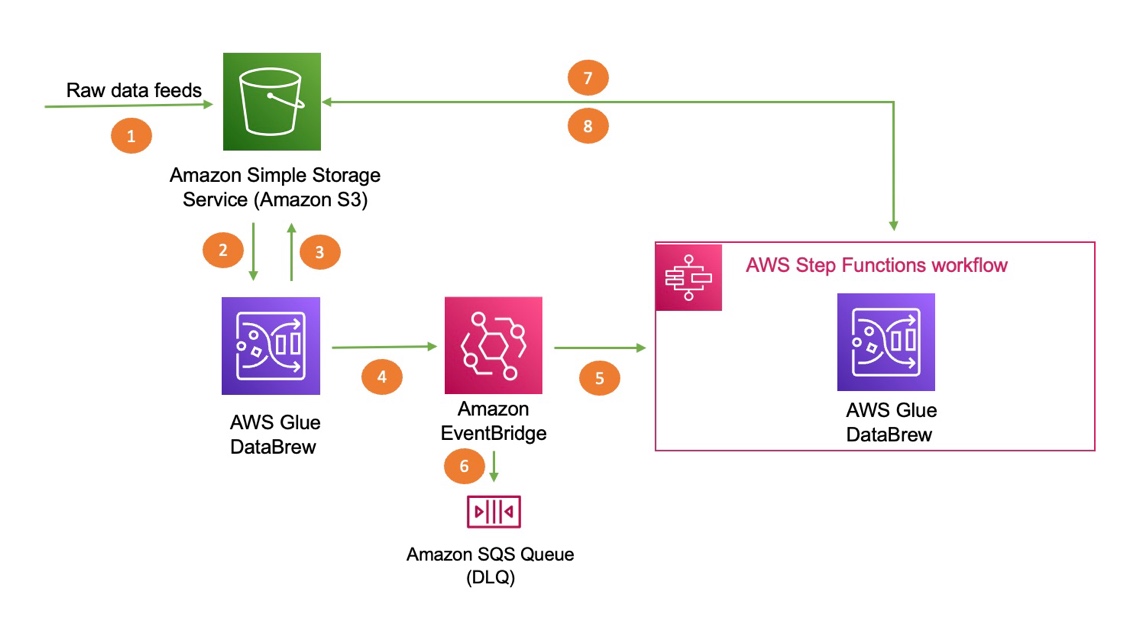
The following diagram illustrates the architecture of the solution. We use AWS CloudFormation to deploy an EventBridge rule, an Amazon Simple Queue Service (Amazon SQS) queue, and Step Functions resources to trigger the second DataBrew job.

The steps in this solution are as follows:

  1. Import your dataset to Amazon Simple Storage Service (Amazon S3).
  2. DataBrew queries the data from Amazon S3 by creating a recipe and performing transformations.
  3. The first DataBrew recipe job writes the output to an S3 bucket.
  4. When the first recipe job is complete, it triggers an EventBridge event.
  5. A Step Functions state machine is invoked based on the event, which in turn invokes the second DataBrew recipe job for further processing.
  6. The event is delivered to the dead-letter queue if the rule in EventBridge can’t invoke the state machine successfully.
  7. DataBrew queries data from an S3 bucket by creating a recipe and performing transformations.
  8. The second DataBrew recipe job writes the output to the same S3 bucket.

Prerequisites

To use this solution, you need the following prerequisites:

Load the dataset into Amazon S3

For this post, we use the Credit Card customers sample dataset from Kaggle. This data consists of 10,000 customers, including their age, salary, marital status, credit card limit, credit card category, and more. Download the sample dataset and follow the instructions. We recommend creating all your resources in the same account and Region.

Create a DataBrew project

To create a DataBrew project, complete the following steps:

  1. On the DataBrew console, choose Projects and choose Create project.
  2. For Project name, enter marketing-campaign-project-1.
  3. For Select a dataset, select New dataset.
  4. Under Data lake/data store, choose Amazon S3.
  5. For Enter your source from S3, enter the S3 path of the sample dataset.
  6. Select the dataset CSV file.
  7. Under Permissions, for Role name, choose an existing IAM role created during the prerequisites or create a new role.
  8. For New IAM role suffix, enter a suffix.
  9. Choose Create project.

After the project is opened, a DataBrew interactive session is created. DataBrew retrieves sample data based on your sampling configuration selection.

Create the DataBrew jobs

Now we can create the recipe jobs.

  1. On the DataBrew console, in the navigation pane, choose Projects.
  2. On the Projects page, select the project marketing-campaign-project-1.
  3. Choose Open project and choose Add step.
  4. In this step, we choose Delete to drop the unnecessary columns from our dataset that aren’t required for this exercise.

You can choose from over 250 built-in functions to merge, pivot, and transpose the data without writing code.

  1. Select the columns to delete and choose Apply.
  2. Choose Create job.
  3. For Job name, enter marketing-campaign-job1.
  4. Under Job output settings¸ for File type, choose your final storage format (for this post, we choose CSV).
  5. For S3 location, enter your final S3 output bucket path.
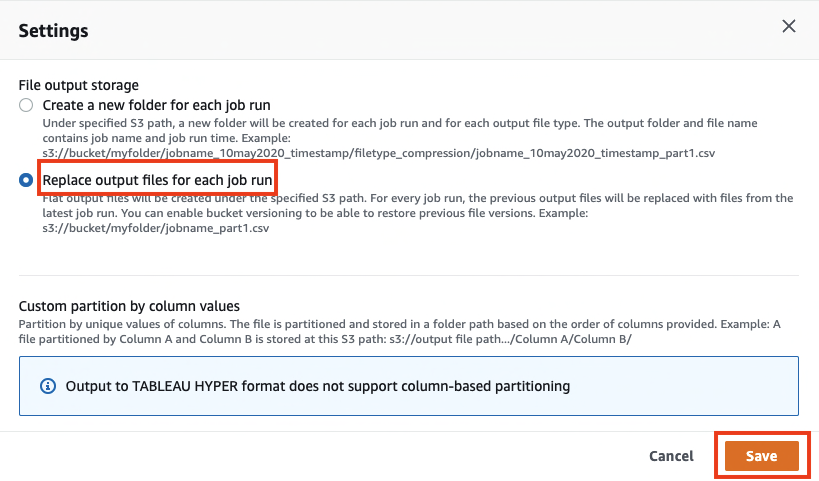
  6. Under Settings, for File output storage, select Replace output files for each job run.
  7. Choose Save.
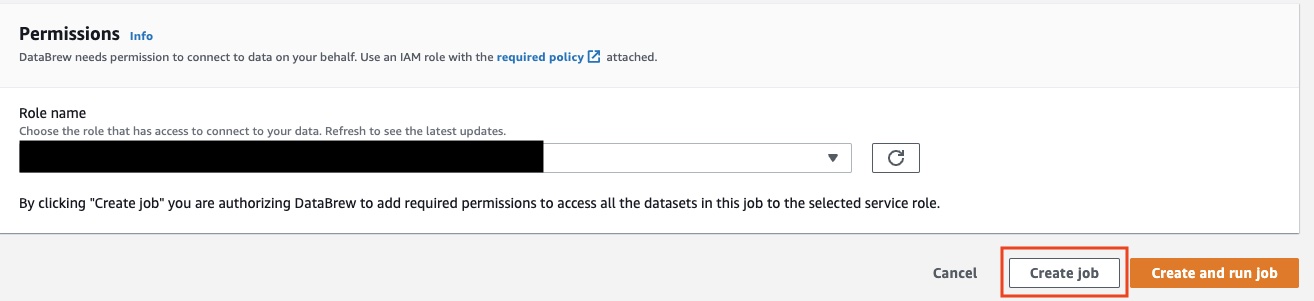
  8. Under Permissions, for Role name¸ choose an existing role created during the prerequisites or create a new role.
  9. Choose Create job.

Now we repeat the same steps to create another DataBrew project and DataBrew job.

  1. For this post, I named the second project marketing-campaign-project2 and named the job marketing-campaign-job2.
  2. When you create the new project, this time use the job1 output file location as the new dataset.
  3. For this job, we deselect Unknown and Uneducated in the Education_Level column.

Deploy your resources using CloudFormation

For a quick start of this solution, we deploy the resources with a CloudFormation stack. The stack creates the EventBridge rule, SQS queue, and Step Functions state machine in your account to trigger the second DataBrew job when the first job runs successfully.

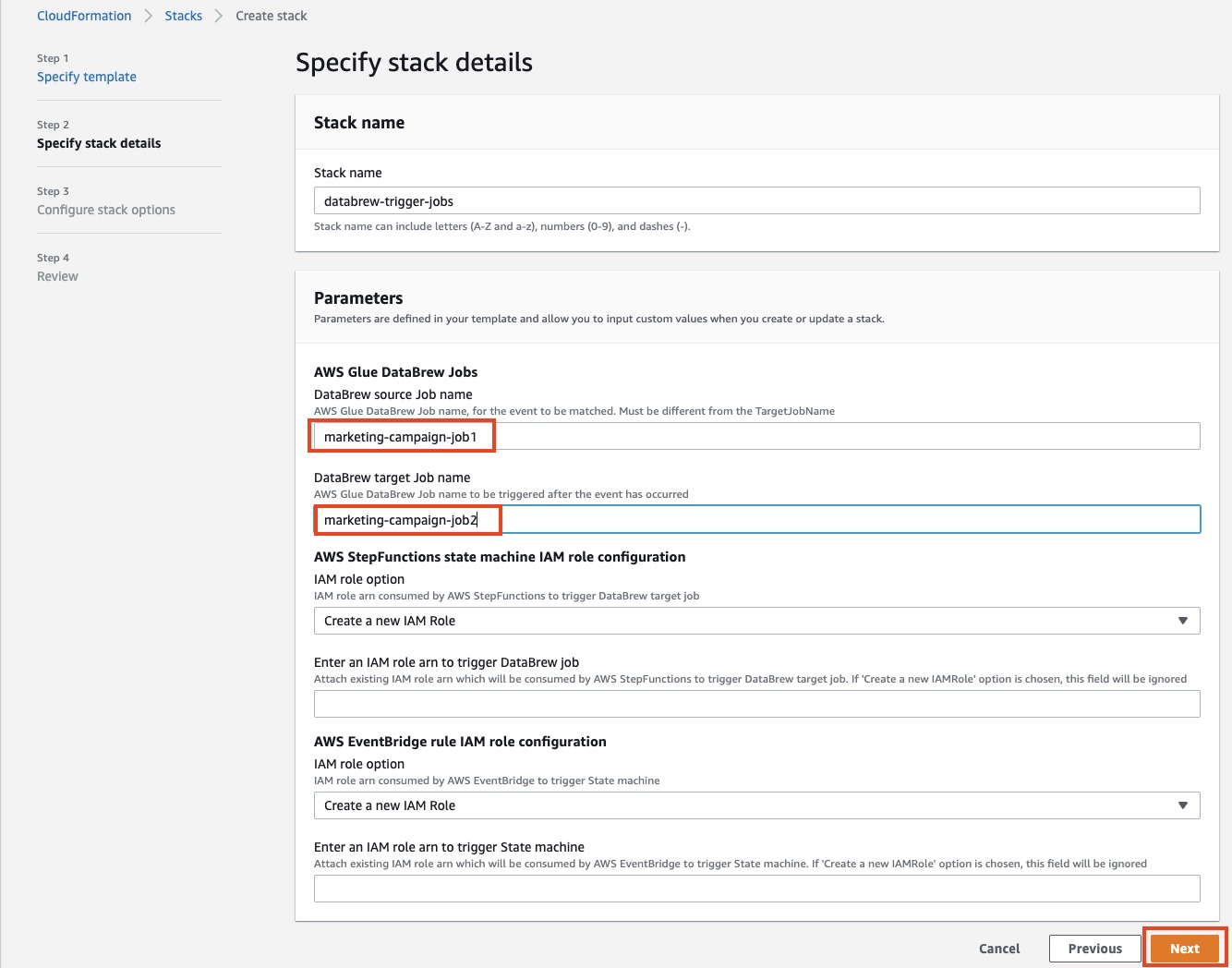
  1. Choose Launch Stack:
  2. For DataBrew source job name, enter marketing-campaign-job1.
  3. For DataBrew target job name, enter marketing-campaign-job2.
  4. For both IAM role configurations, make the following choice:
    1. If you choose Create a new Role, the stack automatically creates a role for you.
    2. If you choose Attach an existing IAM role, you must populate the IAM role ARN manually in the following field or else the stack creation fails.
  5. Choose Next.
  6. Select the two acknowledgement check boxes.
  7. Choose Create stack.

Test the solution

To test the solution, complete the following steps:

  1. On the DataBrew console, choose Jobs.
  2. Select the job marketing-campaign-job1 and choose Run job.

This action automatically triggers the second job, marketing-campaign-job2, via EventBridge and Step Functions.

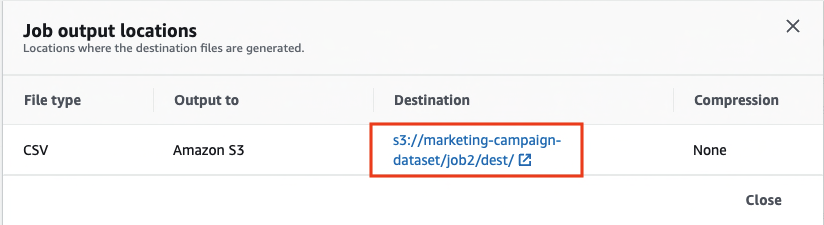
  1. When both jobs are complete, open the output link for marketing-campaign-job2.

You’re redirected to the Amazon S3 console to access the output file.

In this solution, we created a workflow that required minimal code. The first job triggers the second job, and both jobs deliver the transformed data files to Amazon S3.

Clean up

To avoid incurring future charges, delete all the resources created during this walkthrough:

  • IAM roles
  • DataBrew projects and their associated recipe jobs
  • S3 bucket
  • CloudFormation stack

Conclusion

In this post, we walked through how to use DataBrew along with EventBridge and Step Functions to run a DataBrew job that automatically triggers another DataBrew job. We encourage you to use this pattern for event-driven pipelines where you can build sequence jobs to run multiple jobs in conjunction with other jobs.


About the Authors

Nipun Chagari is a Senior Solutions Architect at AWS, where he helps customers build highly available, scalable, and resilient applications on the AWS Cloud. He is passionate about helping customers adopt serverless technology to meet their business objectives.

Prarthana Angadi is a Software Development Engineer II at AWS, where she has been expanding what is possible with code in order to make life more efficient for AWS customers.

Extending PowerShell on AWS Lambda with other services

Post Syndicated from Julian Wood original https://aws.amazon.com/blogs/compute/extending-powershell-on-aws-lambda-with-other-services/

This post expands on the functionality introduced with the PowerShell custom runtime for AWS Lambda. The previous blog explains how the custom runtime approach makes it easier to run Lambda functions written in PowerShell.

You can add additional functionality to your PowerShell serverless applications by importing PowerShell modules, which are shareable packages of code. Build your own modules or import from the wide variety of existing vendor modules to manage your infrastructure and applications.

You can also take advantage of the event-driven nature of Lambda, which allows you to run Lambda functions in response to events. Events can include an object being uploaded to Amazon S3, a message placed on an Amazon SQS queue, a scheduled task using Amazon EventBridge, or an HTTP request from Amazon API Gateway. Lambda functions support event triggers from over 200 AWS services and software as a service (SaaS) applications.

Adding PowerShell modules

You can add PowerShell modules from a number of locations. These can include modules from the AWS Tools for PowerShell, from the PowerShell Gallery, or your own custom modules. Lambda functions access these PowerShell modules within specific folders within the Lambda runtime environment.

You can include PowerShell modules via Lambda layers, within your function code package, or container image. When using .zip archive functions, you can use layers to package and share modules to use with your functions. Layers reduce the size of uploaded deployment archives and can make it faster to deploy your code. You can attach up to five layers to your function, one of which must be the PowerShell custom runtime layer. You can include multiple modules per layer.

The custom runtime configures PowerShell’s PSModulePath environment variable, which contains the list of folder locations to search to find modules. The runtime searches the folders in the following order:

1. User supplied modules as part of function package

You can include PowerShell modules inside the published Lambda function package in a /modules subfolder.

2. User supplied modules as part of Lambda layers

You can publish Lambda layers that include PowerShell modules in a /modules subfolder. This allows you to share modules across functions and accounts. Lambda extracts layers to /opt within the Lambda runtime environment so the modules are located in /opt/modules. This is the preferred solution to use modules with multiple functions.

3. Default/user supplied modules supplied with PowerShell

You can also include additional default modules and add them within a /modules folder within the PowerShell custom runtime layer.

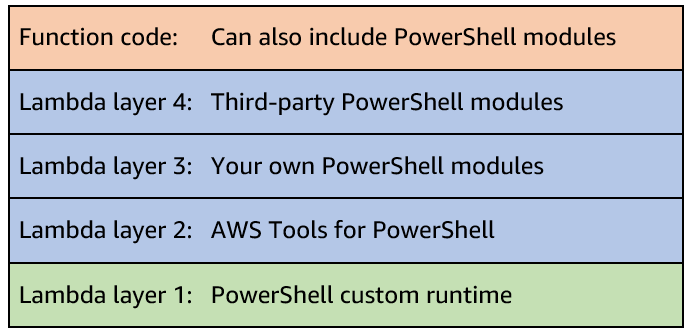
For example, the following function includes four Lambda layers. One layer includes the custom runtime. Three additional layers include further PowerShell modules; the AWS Tools for PowerShell, your own custom modules, and third-party modules. You can also include additional modules with your function code.

Lambda layers

Lambda layers

Within your PowerShell code, you can load modules during the function initialization (init) phase. This initializes the modules before the handler function runs, which speeds up subsequent warm-start invocations.

Adding modules from the AWS Tools for PowerShell

This post shows how to use the AWS Tools for PowerShell to manage your AWS services and resources. The tools are packaged as a set of PowerShell modules that are built on the functionality exposed by the AWS SDK for .NET. You can follow similar packaging steps to add other modules to your functions.

The AWS Tools for PowerShell are available as three distinct packages:

The AWS.Tools package is the preferred modularized version, which allows you to load only the modules for the services you want to use. This reduces package size and function memory usage. The AWS.Tools cmdlets support auto-importing modules without having to call Import-Module first. However, specifically importing the modules during the function init phase is more efficient and can reduce subsequent invoke duration. The AWS.Tools.Common module is required and provides cmdlets for configuration and authentication that are not service specific.

The accompanying GitHub repository contains the code for the custom runtime, along with a number of example applications. There are also module build instructions for adding a number of common PowerShell modules as Lambda layers, including AWS.Tools.

Building an event-driven PowerShell function

The repository contains an example of an event-driven demo application that you can build using serverless services.

A clothing printing company must manage its t-shirt size and color inventory. The printers store t-shirt orders for each day in a CSV file. The inventory service is one service that must receive the CSV file. It parses the file and, for each order, records the details to manage stock deliveries.

The stores upload the files to S3. This automatically invokes a PowerShell Lambda function, which is configured to respond to the S3 ObjectCreated event. The Lambda function receives the S3 object location as part of the $LambdaInput event object. It uses the AWS Tools for PowerShell to download the file from S3. It parses the contents and, for each line in the CSV file, sends the individual order details as an event to an EventBridge event bus.

In this example, there is a single rule to log the event to Amazon CloudWatch Logs to show the received event. However, you could route each order, depending on the order details, to different targets. For example, you can send different color combinations to SQS queues, which the dyeing service can use to order dyes. You could send particular size combinations to another Lambda function that manages cloth orders.

Example event-driven application

Example event-driven application

The previous blog post shows how to use the AWS Serverless Application Model (AWS SAM) to build a Lambda layer, which includes only the AWS.Tools.Common module to run Get-AWSRegion. To build a PowerShell application to process objects from S3 and send events to EventBridge, you can extend this functionality by also including the AWS.Tools.S3 and AWS.Tools.EventBridge modules in a Lambda layer.

Lambda layers, including S3 and EventBridge

Lambda layers, including S3 and EventBridge

Building the AWS Tools for PowerShell layer

You could choose to add these modules and rebuild the existing layer. However, the example in this post creates a new Lambda layer to show how you can have different layers for different module combinations of AWS.Tools. The example also adds the Lambda layer Amazon Resource Name (ARN) to AWS Systems Manager Parameter Store to track deployed layers. This allows you to reference them more easily in infrastructure as code tools.

The repository includes build scripts for both Windows and non-Windows developers. Windows does not natively support Makefiles. When using Windows, you can use either Windows Subsystem for Linux (WSL)Docker Desktop, or native PowerShell.

When using Linux, macOS, WSL, or Docker, the Makefile builds the Lambda layers. After downloading the modules, it also extracts the additional AWS.Tools.S3 and AWS.Tools.EventBridge modules.

# Download AWSToolsLayer module binaries
curl -L -o $(ARTIFACTS_DIR)/AWS.Tools.zip https://sdk-for-net.amazonwebservices.com/ps/v4/latest/AWS.Tools.zip
mkdir -p $(ARTIFACTS_DIR)/modules

# Extract select AWS.Tools modules (AWS.Tools.Common required)
unzip $(ARTIFACTS_DIR)/AWS.Tools.zip 'AWS.Tools.Common/**/*' -d $(ARTIFACTS_DIR)/modules/
unzip $(ARTIFACTS_DIR)/AWS.Tools.zip 'AWS.Tools.S3/**/*' -d $(ARTIFACTS_DIR)/modules/
unzip $(ARTIFACTS_DIR)/AWS.Tools.zip 'AWS.Tools.EventBridge/**/*' -d $(ARTIFACTS_DIR)/modules/

When using native PowerShell on Windows to build the layer, the build-AWSToolsLayer.ps1 script performs the same file copy functionality as the Makefile. You can use this option for Windows without WSL or Docker.

### Extract entire AWS.Tools modules to stage area but only move over select modules
…
Move-Item "$PSScriptRoot\stage\AWS.Tools.Common" "$PSScriptRoot\modules\" -Force
Move-Item "$PSScriptRoot\stage\AWS.Tools.S3" "$PSScriptRoot\modules\" -Force
Move-Item "$PSScriptRoot\stage\AWS.Tools.EventBridge" "$PSScriptRoot\modules\" -Force

The Lambda function code imports the required modules in the function init phase.

Import-Module "AWS.Tools.Common"
Import-Module "AWS.Tools.S3"
Import-Module "AWS.Tools.EventBridge"

For other combinations of AWS.Tools, amend the example build-AWSToolsLayer.ps1 scripts to add the modules you require. You can use a similar download and copy process, or PowerShell’s Save-Module to build layers for modules from other locations.

Building and deploying the event-driven serverless application

Follow the instructions in the GitHub repository to build and deploy the application.

The demo application uses AWS SAM to deploy the following resources:

  1. PowerShell custom runtime.
  2. Additional Lambda layer containing the AWS.Tools.Common, AWS.Tools.S3, and AWS.Tools.EventBridge modules from AWS Tools for PowerShell. The layer ARN is stored in Parameter Store.
  3. S3 bucket to store CSV files.
  4. Lambda function triggered by S3 upload.
  5. Custom EventBridge event bus and rule to send events to CloudWatch Logs.

Testing the event-driven application

Use the AWS CLI or AWS Tools for PowerShell to copy the sample CSV file to S3. Replace BUCKET_NAME with your S3 SourceBucket Name from the AWS SAM outputs.

AWS CLI

aws s3 cp .\test.csv s3://BUCKET_NAME

AWS Tools for PowerShell

Write-S3Object -BucketName BUCKET_NAME -File .\test.csv

The S3 file copy action generates an S3 notification event. This invokes the PowerShell Lambda function, passing the S3 file location details as part of the function $LambdaInput event object.

The function downloads the S3 CSV file, parses the contents, and sends the individual lines to EventBridge, which logs the events to CloudWatch Logs.

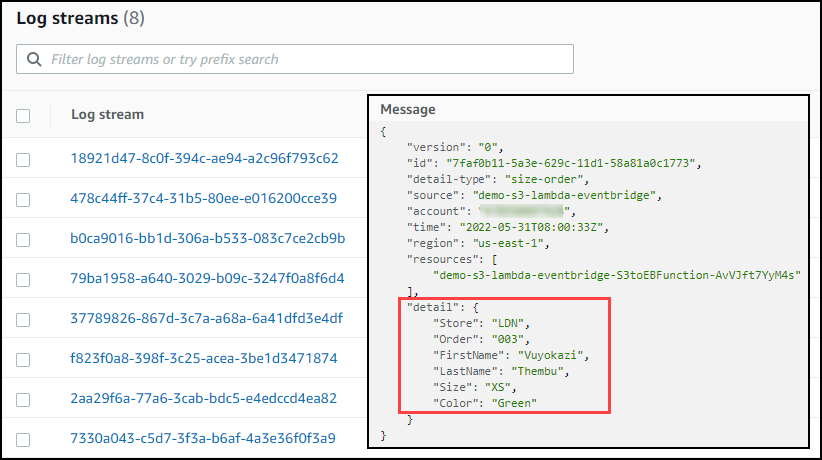
Navigate to the CloudWatch Logs group /aws/events/demo-s3-lambda-eventbridge.

You can see the individual orders logged from the CSV file.

EventBridge logs showing CSV lines

EventBridge logs showing CSV lines

Conclusion

You can extend PowerShell Lambda applications to provide additional functionality.

This post shows how to import your own or vendor PowerShell modules and explains how to build Lambda layers for the AWS Tools for PowerShell.

You can also take advantage of the event-driven nature of Lambda to run Lambda functions in response to events. The demo application shows how a clothing printing company builds a PowerShell serverless application to manage its t-shirt size and color inventory.

See the accompanying GitHub repository, which contains the code for the custom runtime, along with additional installation options and additional examples.

Start running PowerShell on Lambda today.

For more serverless learning resources, visit Serverless Land.

Optimize Your Media Production Workflow With iconik, LucidLink, and Backblaze B2

Post Syndicated from Pat Patterson original https://www.backblaze.com/blog/optimize-your-media-production-workflow-with-iconik-lucidlink-and-backblaze-b2/

In late April, thousands of professionals from all corners of the media, entertainment, and technology ecosystem assembled in Las Vegas for the National Association of Broadcasters trade show, better known as the NAB Show. We were delighted to sponsor NAB after its two year hiatus due to COVID-19. Our staff came in blazing hot and ready to hit the tradeshow floor.

One of the stars of the 2022 event was Backblaze partner LucidLink, named a Cloud Computing and Storage category winner in the NAB Show Product of the Year Awards. In this blog post, I’ll explain how to combine LucidLink’s Filespaces product with Backblaze B2 Cloud Storage and media asset management from iconik, another Backblaze partner, to optimize your media production workflow. But first, some context…

How iconik, LucidLink, and Backblaze B2 Fit in a Media Storage Architecture

The media and entertainment industry has always been a natural fit for Backblaze. Some of our first Backblaze Computer Backup customers were creative professionals looking to protect their work, and the launch of Backblaze B2 opened up new options for archiving, backing up, and distributing media assets.

As the media and entertainment industry moved to 4K Ultra HD for digital video recording over the past few years, file sizes ballooned. An hour of high quality 4K video shot at 60 frames per second can require up to one terabyte of storage. Backblaze B2 matches well with today’s media and entertainment storage demands, as customers such as Fortune Media, Complex Networks, and Alton Brown of “Good Eats” fame have discovered.

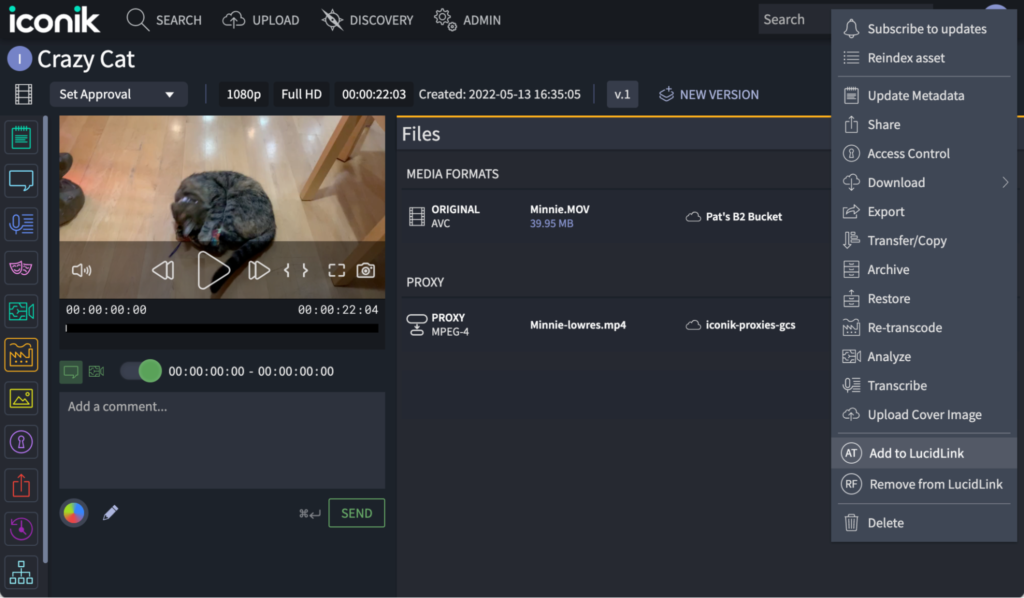
Alongside Backblaze B2, an ecosystem of tools has emerged to help professionals manage their media assets, including iconik and LucidLink. iconik’s cloud-native media management and collaboration solution gathers and organizes media securely from a wide range of locations, including Backblaze B2. iconik can scan and index content from a Backblaze B2 bucket, creating an asset for each file. An iconik asset can combine a lower resolution proxy with a link to the original full-resolution file in Backblaze B2. For a large part of the process, the production team can work quickly and easily with these proxy files, previewing and selecting clips and editing them into a sequence.

Complementing iconik and B2 Cloud Storage, LucidLink provides a high-performance, cloud-native, network-attached storage (NAS) solution that allows professionals to collaborate on files stored in the cloud almost as if the files were on their local machine. With LucidLink, a production team can work with multi-terabyte 4K resolution video files, making final edits and rendering the finished product at full resolution.

It’s important to understand that the video editing process is non-destructive. The original video files are immutable—they are never altered during the production process. As the production team “edits” a sequence, they are actually creating a series of transformations that are applied to the original videos as the final product is rendered.

You can think of B2 Cloud Storage and LucidLink as tiers in a media storage architecture. Backblaze B2 excels at cost-effective, durable storage of full-resolution video assets through their entire lifetime from acquisition to archive, while LucidLink shines during the later stages of the production process, from when the team transitions to working with the original full-resolution files to the final rendering of the sequence for release.

iconik brings B2 Cloud Storage and LucidLink together; not only can an iconik asset include a proxy and links to copies of the original video in both B2 Cloud Storage and LucidLink, iconik Storage Gateway can copy the original file from Backblaze B2 to LucidLink when full-resolution work commences, and later delete the LucidLink copy at the end of the production process, leaving the original archived in Backblaze B2. All that’s missing is a little orchestration.

The Backblaze B2 Storage Plugin for iconik

The Backblaze B2 Storage Plugin for iconik allows creative professionals to copy files from B2 Cloud Storage to LucidLink, and later delete them from LucidLink, in a couple of mouse clicks. The plugin adds a pair of custom actions to iconik: “Add to LucidLink” and “Remove from LucidLink,” applicable to one or many assets or collections, accessible from the Search page and the Asset/Collection page. You can see them on the lower right of this screenshot:

The user experience could hardly be simpler, but there is a lot going on under the covers.

There are several components involved:

  • The plugin, deployed as a serverless function. The initial version of the plugin is written in Python for deployment on Google Cloud Functions, but it could easily be adapted for other serverless cloud platforms.
  • A LucidLink Filespace.
  • A machine with both the LucidLink client and iconik Storage Gateway installed. The iconik Storage Gateway accesses the LucidLink Filespace as if it were local file storage.
  • iconik, accessed both by the user via its web interface and by the plugin via the iconik API. iconik is configured with two iconik “storages”, one for Backblaze B2 and one for the iconik Storage Gateway instance.

When the user selects the “Add to LucidLink” custom action, iconik sends an HTTP request, containing the list of selected entities, to the plugin. The plugin calls the iconik API with a request to copy those entities from Backblaze B2 to the iconik Storage Gateway. The gateway writes the files to the LucidLink Filespace, exactly as if it were writing to the local disk, and the LucidLink client sends the files to LucidLink. Now the full-resolution files are available for the production team to access in the Filespace, while the originals remain in B2 Cloud Storage.

Later, when the user selects the “Remove from LucidLink” custom action, iconik sends another HTTP request containing the list of selected entities to the plugin. This time, the plugin has more work to do. Collections can contain other collections as well as assets, so the plugin must access each collection in turn, calling the iconik API for each file in the collection to request that it be deleted from the iconik Storage Gateway. The gateway simply deletes each file from the Filespace, and the LucidLink client relays those operations to LucidLink. Now the files are no longer stored in the Filespace, but the originals remain in B2 Cloud Storage, safely archived for future use.

This short video shows the plugin in action, and walks through the flow in a little more detail:

Deploying the Backblaze B2 Storage Plugin for iconik

The plugin is available open-source under the MIT license at https://github.com/backblaze-b2-samples/b2-iconik-plugin. Full deployment instructions are included in the plugin’s README file.

Don’t have a Backblaze B2 account? You can get started here, and the first 10GB are on us. We can also set up larger scale trials involving terabytes of storage—enter your details and we’ll get back to you right away.

Customize the Plugin to Your Requirements

You can use the plugin as is, or modify it to your requirements. For example, the plugin is written to be deployed on Google Cloud Functions, but you could adapt it to another serverless cloud platform. Please report any issues with the plugin via the issues tab in the GitHub repository, and feel free to submit contributions via pull requests.

The post Optimize Your Media Production Workflow With iconik, LucidLink, and Backblaze B2 appeared first on Backblaze Blog | Cloud Storage & Cloud Backup.

AWS Security Profile: CJ Moses, CISO of AWS

Post Syndicated from Maddie Bacon original https://aws.amazon.com/blogs/security/aws_security_profile_cj_moses_ciso_of_aws/

AWS Security Profile: CJ Moses, CISO of AWS

In the AWS Security Profile series, I interview the people who work in Amazon Web Services (AWS) Security and help keep our customers safe and secure. This interview is with CJ Moses—previously the AWS Deputy Chief Information Security Officer (CISO), he began his role as CISO of AWS in February of 2022.

How did you get started in security? What about it piqued your interest?

I was serving in the United States Air Force (USAF), attached to the 552nd Airborne Warning and Control (AWACS) Wing, when my father became ill. The USAF reassigned me to McGuire Air Force Base (AFB) in New Jersey so that I’d be closer to him in New York. Because I was an unplanned resource, they added me to the squadron responsible for base communications. I ended up being the Base CompuSec (Computer Security) Manager, who was essentially the person who had to figure out what a firewall was and how to install it. That role required me to have a lot of interaction with the Air Force Office of Special Investigations (AFOSI), which led to me being recruited as a Computer Crime Investigator (CCI). Normally, when I’m asked what kind of plan I followed to get where I am today, I like to say, one modeled after Forrest Gump.

How has your time in the Air Force influenced your approach to cybersecurity?

It provided a strong foundation that I’ve built on with each and every experience since. My years as a CCI had me chasing hackers around the world on what was the “Wild West” of the internet. I’ve been kicked out of countries, asked (told) never to come back to others, but in the end the thing that stuck is that there is always a human on the other side of the connection. Keyboards don’t type for themselves, and therefore understanding your opponent and their intent will inform the measures you must put in place to deal with them. In the early days, we were investigating Advanced Persistent Threats (APTs) long before anyone had created that acronym, or given the actors names or fancy number designators. I like to use that experience to humanize the threats we face.

You were recently promoted to CISO of AWS. What are you most excited about in your new role?

I’m most excited by the team we have at AWS, not only the security team I’m inheriting, but also across AWS. As a CISO, it’s a dream to have an organization that truly believes security is the top priority, which is what we have at AWS. This company has a strong culture of ownership, which allows the security team to partner with the service owners to enable their business, rather than being the office of, “no, you can’t do that.” I prefer my team to answer questions with “Yes, but” or “Yes, and,” and then talk about how they can do what they need in a more secure manner.

What’s the most challenging part of being CISO?

There’s a right balance I’m working to find between how much time I’m able to spend focusing on the details and doing security, and communicating with customers about what we do. I lean on our Office of the CISO (OCISO) team to make sure we keep up a high level of customer engagement. I strive to keep the right balance between involvement in details, leading our security efforts, and engaging with our customers.

What’s your short- and long-term vision for AWS Security?

In the short term, my vision is to continue on the strong path that Steve Schmidt, former CISO of AWS and current chief security officer of Amazon, provided. In the longer term, I intend to further mechanize, automate, and scale our abilities, while increasing visibility and access for our customers.

If you could give one piece of advice to all AWS customers at scale, what would it be?

My advice to customers is to take advantage of the robust security services and resources we offer. We have a lot of content that is available for little to no cost, and an informed customer is less likely to encounter challenging security situations. Enabling Amazon GuardDuty on a customer’s account can be done with only a few clicks, and the threat detection monitoring it offers will provide organization-wide visibility and alerting.

What’s been the most dramatic change you’ve seen in the industry?

The most dramatic change I’ve seen is the elevated visibility of risk to the C-suite. These challenges used to be delegated lower in the organization to someone, maybe the CISO, who reported to the chief information officer. In companies that have evolved, you’ll find that the CISO reports to the CEO, with regular visibility to the board of directors. This prioritization of information security ensures the right level of ownership throughout the company.

Tell me about your work with military veterans. What drives your passion for this cause?

I’ve aligned with an organization, Operation Motorsport, that uses motorsports to engage with ill, injured, and wounded service members and disabled veterans. We present them with educational and industry opportunities to aid in their recovery and rehabilitation. Over the past few years we’ve sponsored a number of service members across our race teams, and I’ve personally seen the physical, and even more importantly, mental improvements for the beneficiaries who have become part of our race teams. Having started my military career during Operation Desert Shield/Storm (the buildup to and the first Gulf War), I can connect with these vets and help them to find a path and a new team to be part of.

If you had to pick any other industry, what would you want to do?

Professional motorsports. There is an incredible and not often visible alignment between the two industries. The use of data analytics (metrics focus), the culture, leadership principles, and overall drive to succeed are in complete alignment, and I’ve applied lessons learned between the two interchangeably.

What are you most proud of in your career?

I am very fortunate to come from rather humble beginnings and I’m appreciative of all the opportunities provided for me. Through those opportunities, I’ve had the chance to serve my country and, since joining AWS, to serve many customers across disparate industries and geographies. The ability to help people is something I’m passionate about, and I’m lucky enough to align my personal abilities with roles that I can use to leave the world a better place than I found it.

 
If you have feedback about this post, submit comments in the Comments section below. If you have questions about this post, contact AWS Support.

Want more AWS Security news? Follow us on Twitter.

Author

Maddie Bacon

Maddie (she/her) is a technical writer for AWS Security with a passion for creating meaningful content. She previously worked as a security reporter and editor at TechTarget and has a BA in Mathematics. In her spare time, she enjoys reading, traveling, and all things Harry Potter.

CJ Moses

CJ Moses

CJ Moses is the Chief Information Security Officer (CISO) at AWS. In his role, CJ leads product design and security engineering for AWS. His mission is to deliver the economic and security benefits of cloud computing to business and government customers. Prior to joining Amazon in 2007, CJ led the technical analysis of computer and network intrusion efforts at the U.S. Federal Bureau of Investigation Cyber Division. CJ also served as a Special Agent with the U.S. Air Force Office of Special Investigations (AFOSI). CJ led several computer intrusion investigations seen as foundational to the information security industry today.

[$] Per-file OOM badness

Post Syndicated from original https://lwn.net/Articles/896738/

The kernel tries hard to keep memory available for its present and future
needs. Should that effort fail, though, the tool of last resort is the
dreaded out-of-memory (OOM) killer, which is tasked with killing processes
on the system to free their memory and alleviate the problem. The results
of invoking the OOM killer are never going to be good, but they can be
distinctly worse if the wrong processes are chosen for an untimely end. As
one might expect, the effort to properly choose the right processes is an
ongoing effort. Most recently, Christian
König has proposed a
new mechanism
to address a blind spot in the OOM killer’s
deliberations.

Mazzoli: How fast are Linux pipes anyway?

Post Syndicated from original https://lwn.net/Articles/896872/

Francesco Mazzoli delves
deeply into the kernel’s implementation of pipes
(and more) in an
attempt to maximize the throughput of data.

The post was inspired by reading a highly optimized FizzBuzz
program, which pushes output to a pipe at a rate of ~35GiB/s on my
laptop. Our first goal will be to match that speed, explaining
every step as we go along. We’ll also add an additional
performance-improving measure, which is not needed in FizzBuzz
since the bottleneck is actually computing the output, not IO, at
least on my machine.

Security updates for Thursday

Post Syndicated from original https://lwn.net/Articles/896896/

Security updates have been issued by Debian (firefox-esr), Fedora (thunderbird and vim), Red Hat (firefox, postgresql:10, postgresql:12, and postgresql:13), Scientific Linux (firefox and rsyslog), SUSE (hdf5, hdf5, suse-hpc, postgresql14, rubygem-yajl-ruby, and udisks2), and Ubuntu (imagemagick and influxdb).

The Average SIEM Deployment Takes 6 Months. Don’t Be Average.

Post Syndicated from Margaret Wei original https://blog.rapid7.com/2022/06/02/the-average-siem-deployment-takes-6-months-dont-be-average/

The Average SIEM Deployment Takes 6 Months. Don’t Be Average.

If you’re part of the huge growth in demand for cloud-based SIEM (Security Information and Event Management), claim your copy of the new Gartner® Report: “How to Deploy a SIEM Solution Successfully.”

Depending on what SIEM you choose, and how you approach the process, getting to operational and effective can take days, or months, or a lot longer.

Here are the Gartner report’s key findings:

  1. “Ineffective security information and event management (SIEM) deployments occur when requirements and use cases are not aligned with the organization’s risks and risk tolerance.”
  2. “Clients deploying SIEM solutions continue to take an unstructured approach when deciding which event and data sources to onboard, with the goal of getting every source in from the beginning. This leads to long and complex implementations, cost overruns, and higher probabilities of stalled or failed implementations.”
  3. “SIEM buyers struggle to choose between on-premises, cloud, or hybrid deployments due to the complexities created by the various environments that need to be monitored, e.g., on-premises, SaaS, cloud infrastructure and platform services (CIPS), remote workers.”

SIEM centralizes and visualizes your security data to help you identify anomalies in your environment. But nearly all SIEMs require you to do a ton of customizing and configuration. Nearly all disappoint with their detections. And nearly all will exhaust you with false-positive alerts… every hour of every day… until analysts start ignoring alerts, which will surely doom you someday.

Now, here’s what we think

Rapid7 began building InsightIDR nearly a decade ago. While the threat landscape keeps changing, our mission never has: to empower you to find and extinguish evil earlier, faster, easier.

InsightIDR has never been a traditional SIEM. You should consider it if:

Fast deployment is a priority to you. InsightIDR leads the SIEM market in deployment times. With SaaS delivery and a native cloud foundation, customers can be deployed and operational in days and weeks – not months and years.

Time-to-value and tangible ROI matter to your leadership team. InsightIDR combines the best of next-gen SIEM with native extended detection and response (XDR). Get highly correlated UEBA, EDR, NDR, and Cloud detections alongside your critical security logs and policy monitoring, compliance dashboards, and reporting in a single pane of glass.

Your team is tired of false positives. InsightIDR’s expertly vetted detection library provides holistic threat coverage across your entire attack surface. An emphasis on high-fidelity, low-noise detections ensures that all alerts are relevant and ready for action.

You’re ready to accelerate your security posture. InsightIDR empowers teams to up-level their security and achieve sophisticated outcomes – without the complexity of traditional SIEMs. Embedded security orchestration and automation (SOAR) capabilities give you enviable security operations center (SOC) automation and enable even new analysts to respond like experts.

Don’t forget your copy of the new Gartner® Report: “How to Deploy a SIEM Solution Successfully.”

GARTNER is a registered trademark and service mark of Gartner, Inc. and/or its affiliates in the U.S. and internationally and is used herein with permission. All rights reserved.

Gartner, How to Deploy a SIEM Solution Successfully, Andrew Davies, Mitchell Schneider, Toby Bussa, Kelly Kavanagh, 7 July 2021

Additional reading:

NEVER MISS A BLOG

Get the latest stories, expertise, and news about security today.

Optimizing your AWS Lambda costs – Part 2

Post Syndicated from James Beswick original https://aws.amazon.com/blogs/compute/optimizing-your-aws-lambda-costs-part-2/

This post is written by Chris Williams, Solutions Architect and Thomas Moore, Solutions Architect, Serverless.

Part 1 of this blog series looks at optimizing AWS Lambda costs through right-sizing a function’s memory, and code tuning. We also explore how using Graviton2, Provisioned Concurrency and Compute Savings Plans can offer a reduction in per-millisecond billing.

Part 2 continues to explore cost optimization techniques for Lambda with a focus on architectural improvements and cost-effective logging.

Event filtering

A common serverless architecture pattern is Lambda reading events from a queue or a stream, such as Amazon SQS or Amazon Kinesis Data Streams. This uses an event source mapping, which defines how the Lambda service handles incoming messages or records from the event source.

Event filtering

Sometimes you don’t want to process every message in the queue or stream because the data is not relevant. For example, if IoT vehicle data is sent to a Kinesis Stream and you only want to process events where tire_pressure is < 32, then the Lambda code may look like this:

def lambda_handler(event, context):
   if(event[“tire_pressure”] >=32):
      return

# business logic goes here

This is inefficient as you are paying for Lambda invocations and execution time when there is no business value beyond filtering.

Lambda now supports the ability to filter messages before invocation, simplifying your code and reducing costs. You only pay for Lambda when the event matches the filter criteria and triggers an invocation.

Filtering is supported for Kinesis Streams, Amazon DynamoDB Streams and SQS by specifying filter criteria when setting up the event source mapping. For example, using the following AWS CLI command:

aws lambda create-event-source-mapping \
--function-name fleet-tire-pressure-evaluator \
--batch-size 100 \
--starting-position LATEST \
--event-source-arn arn:aws:kinesis:us-east-1:123456789012:stream/fleet-telemetry \
--filter-criteria '{"Filters": [{"Pattern": "{\"tire_pressure\": [{\"numeric\": [\"<\", 32]}]}"}]}'

After applying the filter, Lambda is only invoked when tire_pressure is less than 32 in messages received from the Kinesis Stream. In this example, it may indicate a problem with the vehicle and require attention.

For more information on how to create filters, refer to examples of event pattern rules in EventBridge, as Lambda filters messages in the same way. Event filtering is explored in greater detail in the Lambda event filtering launch blog.

Avoid idle wait time

Lambda function duration is one dimension used for calculating billing. When function code makes a blocking call, you are billed for the time that it waits to receive a response.

This idle wait time can grow when Lambda functions are chained together, or a function is acting as an orchestrator for other functions. For customers who have workflows such as batch operations or order delivery systems, this adds management overhead. Additionally, it may not be possible to complete all workflow logic and error handling within the maximum Lambda timeout of 15 minutes.

Instead of handling this logic in function code, re-architect your solution to use AWS Step Functions as an orchestrator of the workflow. When using a standard workflow, you are billed for each state transition within the workflow rather than the total duration of the workflow. In addition, you can move support for retries, wait conditions, error workflows and callbacks into the state condition allowing your Lambda functions to focus on business logic.

The following example shows an example Step Functions state machine, where a single Lambda function is split into multiple states. During the wait period, there is no charge. You are only billed on state transition.

State machine

Direct integrations

If a Lambda function is not performing custom logic when it integrates with other AWS services, it may be unnecessary and could be replaced by a lower-cost direct integration.

For example, you may be using API Gateway together with a Lambda function to read from a DynamoDB table:

With Lambda

This could be replaced using a direct integration, removing the Lambda function:

Without Lambda

API Gateway supports transformations to return the output response in a format the client expects. This avoids having to use a Lambda function to do the transformation. You can find more detailed instructions on creating an API Gateway with an AWS service integration in the documentation.

You can also benefit from direct integration when using Step Functions. Today, Step Functions supports over 200 AWS services and 9,000 API actions. This gives greater flexibility for direct service integration and in many cases removes the need for a proxy Lambda function. This can simplify Step Function workflows and may reduce compute costs.

Reduce logging output

Lambda automatically stores logs that the function code generates through Amazon CloudWatch Logs. This may be useful for understanding what is happening within your application in near real-time. CloudWatch Logs includes a charge for the total data ingested throughout the month. Therefore, reducing output to include only necessary information can help reduce costs.

When you deploy workloads into production, review the logging level of your application. For example, in a pre-production environment, debug logs can be beneficial in providing additional information to tune the function. Within your production workloads, you may disable debug level logs and use a logging library (such as the Lambda Powertools Python Logger). You can define a minimum logging level to output by using an environment variable, which allows configuration outside of the function code.

Structuring your log format enforces a standard set of information through a defined schema, instead of allowing variable formats or large volumes of text. Defining structures such as error codes and adding accompanying metrics leads to a reduction in the volume of text that repeats throughout your logs. This also improves the ability to filter logs for specific error types and reduces the risk of a mistyped character in a log message.

Use Cost-Effective Storage for Logs

Once CloudWatch Logs ingests data, by default it is persisted forever with a per-GB monthly storage fee. As log data ages, it typically becomes less valuable in the immediate time frame, and is instead reviewed historically on an ad-hoc basis. However, the storage pricing within CloudWatch Logs remains the same.

To avoid this, set retention policies on your CloudWatch Logs log groups to delete old log data automatically. This retention policy applies to both your existing and future log data.

Some applications logs may need to persist for months or years for compliance or regulatory requirements. Instead of keeping the logs in CloudWatch Logs, export them to Amazon S3. By doing this, you can take advantage of lower-cost storage object classes while factoring in any expected usage patterns for how or when data is accessed.

Conclusion

Cost optimization is an important part of creating well-architected solutions and this is no different when using serverless. This blog series explores some best practice techniques to help reduce your Lambda bill.

If you are already running AWS Lambda applications in production today, some techniques are easier to implement than others. For example, you can purchase Savings Plans with zero code or architecture changes, whereas avoiding idle wait time will require new services and code changes. Evaluate which technique is right for your workload in a development environment before applying changes to production.

If you are still in the design and development stages, use this blog series as a reference to incorporate these cost optimization techniques at an early stage. This ensures that your solutions are optimized from day one.

To get hands-on implementing some of the techniques discussed, take the Serverless Optimization Workshop.

For more serverless learning resources, visit Serverless Land.

Optimizing your AWS Lambda costs – Part 1

Post Syndicated from James Beswick original https://aws.amazon.com/blogs/compute/optimizing-your-aws-lambda-costs-part-1/

This post is written by Chris Williams, Solutions Architect and Thomas Moore, Solutions Architect, Serverless.

When you develop and architect solutions, cost-optimization should always be part of the process. This is no different for serverless applications that have been developed using AWS Lambda.

Your workloads may vary in terms of complexity, usage patterns, and technology. However, the following advice is applicable to all customers when deciding how to prioritize cost optimization with the tradeoffs of developing the application:

  • Efficient code makes better use of resources.
  • Consider the downstream services in architectural decisions.
  • Optimization should be a continuous cycle of improvement.
  • Prioritize changes that make the greatest improvements first.

The Optimizing your AWS Lambda costs blog series reviews operational and architectural guidance. It can be applied to existing Lambda functions and those that you develop in the future.

Introduction to Lambda pricing

Lambda pricing is calculated as a combination of:

  • Total number of requests
  • Total duration of invocations
  • Configured memory allocated

When you optimize Lambda functions, each of these components impacts the total monthly cost. This pricing applies after you exceed the AWS Free Tier that is offered for Lambda.

Right-Sizing

Right-sizing is a good starting point in the process of cost optimization. This exercise helps to identify the lowest cost for applications without affecting performance or requiring code changes.

For Lambda, this is accomplished by configuring the memory for a function, ranging anywhere from 128 MB up to 10,240 MB (10 GB). By adjusting the memory configuration, you also adjust the amount of vCPU that is available to the function during invocation. Tuning these settings provides memory- or CPU-bound applications with access to additional resources during the execution, which may lead to an overall reduced duration of invocation.

Identifying the optimal configuration for your Lambda functions may be manually intensive, especially if changes are made frequently. The AWS Lambda Power Tuning tool provides a solution powered by AWS Step Functions that can help identify the appropriate configuration. It analyzes a set of memory configurations against an example payload.

In the following example, as the memory increases for this Lambda function, the total invocation time improves. This leads to a reduction in the cost for the total execution without affecting the original performance of the function. For this function, the optimal memory configuration for the function is 512 MB, as this is where the resource utilization is most efficient for the total cost of each invocation. This varies per function, and using the tool on your Lambda functions can identify if they benefit from right-sizing.

Power Tuning results

This exercise should be completed regularly, especially if code is released frequently. Once you have identified the appropriate memory setting for your Lambda functions, you should add right-sizing to your processes. The AWS Lambda Power Tuning tool generates programmatic output that can be used by your CI/CD workflows during the release of new code, allowing the automation of memory configuration.

Performance efficiency

A key component to Lambda pricing is the total duration of the invocation. The longer the function takes to run, the more it costs and the higher the latency in your application. For this reason, it is important to ensure the code you write is as efficient as possible and follows the Lambda best practices.

At a high level, to optimize code :

  • Minimize deployment package size to its runtime necessities. This reduces the amount of time it takes for the package to be downloaded and unpacked.
  • Minimize the complexity of dependencies. Simpler frameworks often load faster.
  • Take advantage of execution reuse. Initialize SDK clients and database connections outside the function handler, and cache static assets locally in the /tmp directory. Subsequent invocations can reuse open connections and resources in memory and in /tmp.
  • Follow general coding performance best practices for your chosen language and runtime.

To help visualize the components of your application and identify performance bottlenecks, use AWS X-Ray with Lambda. You can enable X-Ray active tracing on new and existing functions by editing the function configuration. For example, with the AWS CLI:

aws lambda update-function-configuration --function-name my-function \
--tracing-config Mode=Active

The AWS X-Ray SDK can be used to trace all AWS SDK calls inside Lambda functions. This helps to identify any bottlenecks in the application performance. The X-Ray SDK for Python can be used to capture data for other libraries such as requests, sqlite3, and httplib, as shown in the following example:

Segments timeline

Amazon CodeGuru Profiler is another tool that can help with code optimization. It uses machines learning algorithms to help find the most expensive lines of code and suggests ways to improve efficiency. It can be enabled on existing Lambda functions by enabling code profiling in the function configuration.

The CodeGuru console shows the results as a series of visualizations and recommendations.

Code Guru recommendations

Use these tools together with the documented best practices to evaluate your code’s performance when developing your serverless applications. Efficient code often means faster applications and reduced costs.

AWS Graviton2

In September 2021, Lambda functions powered by Arm-based AWS Graviton2 processors became generally available. Graviton2 functions are designed to deliver up to 19% better performance at 20% lower cost than x86. In addition to the lower billing cost when using Arm, you could also see a reduction in the function duration due to the CPU performance improvement, reducing costs even further.

You can configure both new and existing functions to target the AWS Graviton2 processor. Functions are invoked in the same way and integrations with services, applications and tools are not affected by the architecture change. Many functions only need the configuration change to take advantage of the price/performance of Graviton2. Others may require repackaging to use Arm-specific dependencies.

It’s always recommended to test your workloads before making the change. To see how much your code benefits from using Graviton2, use the Lambda Power Tuning tool to compare against x86. The tool allows you to compare two results on the same chart:

AWS Lambda Power Tuning Results

Provisioned concurrency

Where customers are looking to reduce their Lambda function cold starts or avoid burst throttling, provisioned concurrency provides execution environments that are ready to be invoked. It can also reduce total Lambda cost when there is a consistent volume of traffic. This is because the provisioned concurrency pricing model offers a lower total price when it is fully used.

Similar to the standard Lambda function pricing, there are price components for total requests, total duration, and memory configuration. In addition, there is the cost of each provisioned concurrency environment (based on its memory configuration). When this execution environment is fully utilized, the combined cost of the invocation and the execution environment can offer up to 16% savings on duration cost when compared to the regular on-demand pricing.

If you cannot maximize usage in an execution environment, provisioned concurrency can still offer a lower total price per invocation. In the following example, once it’s consumed for more than 60% of the available time, it becomes cheaper than using the on-demand pricing model. The savings increase in line with capacity usage.

PC vs on-demand comparison

To identify the invocation baseline of a Lambda function, look at the average concurrent execution metrics per hour over the previous 24 hours. This helps you to find a consistent baseline throughout the day where you are consistently using multiple execution environments.

For Lambda functions where peak invocation levels are only expected during particular windows of time, take advantage of a scheduled scaling action. Where traffic patterns are not easy to determine, you can implement Application Auto Scaling to adjust based on the current level of utilization.

Compute savings plans

AWS Savings Plans is a flexible pricing model offering lower prices compared to on-demand pricing, in exchange for a specific usage commitment (measured in $/hour) for a one- or three-year period.

Compute Savings Plans include Amazon EC2, AWS Fargate and Lambda. Lambda usage for duration and provisioned concurrency are charged at a discounted Savings Plans rate of up to 17% for a 1- or 3-year term.

You can implement Savings Plans without any function code or configuration changes. They can be a simpler way to save money for Lambda-based workloads. Before deciding to use a savings plan, analyze previous patterns to understand any variations in your month to month usage.

Conclusion

This blog post explains how Lambda pricing works and how right-sizing applications and tuning them for performance efficiency offers a more cost-efficient utilization model. The results can also reduce latency, creating a better experience for your end users.

The post explores how architectural changes such as moving to Graviton2 and configuring provisioned concurrency can provide cost reductions for the same operations. Finally, you can use Compute Savings Plans to add an additional cost reduction once you establish a baseline of usage per month.

Part 2 introduces further optimization opportunities for reducing Lambda invocations, moving to an asynchronous model, and reducing logging costs.

For more serverless learning resources, visit Serverless Land.

Как дървената мафия си остава непокътната БСП ударно назначава в горите съпартийци и кадри на ДПС и ГЕРБ

Post Syndicated from Николай Марченко original https://bivol.bg/%D0%B1%D1%81%D0%BF-%D1%83%D0%B4%D0%B0%D1%80%D0%BD%D0%BE-%D0%BD%D0%B0%D0%B7%D0%BD%D0%B0%D1%87%D0%B0%D0%B2%D0%B0-%D0%B2-%D0%B3%D0%BE%D1%80%D0%B8%D1%82%D0%B5-%D1%81%D1%8A%D0%BF%D0%B0%D1%80%D1%82%D0%B8.html

четвъртък 2 юни 2022


Българска социалистическа партия (БСП), от чиято квота е и министърът на земеделието, храните и горите Иван Иванов, ударно си назначава областните, общинските и др. кадри на местно ниво в държавните…

The collective thoughts of the interwebz