[$] Python identifiers, PEP 8, and consistency

Post Syndicated from original https://lwn.net/Articles/877115/rss

While there are few rules on the names of variables, classes, functions,
and so on (i.e. identifiers) in the Python language, there are some
guidelines on how those things should be named. But, of course, those
guidelines were not always followed in
the standard library, especially in the early years of the project. A
suggestion to add aliases to the standard library for
identifiers that do not follow the guidelines seems highly unlikely to go
anywhere, but it led to an interesting
discussion on the python-ideas mailing list.

Field Notes: Building a Data Service for Autonomous Driving Systems Development using Amazon EKS

Post Syndicated from Ajay Vohra original https://aws.amazon.com/blogs/architecture/field-notes-building-a-data-service-for-autonomous-driving-systems-development-using-amazon-eks/

Many aspects of autonomous driving (AD) system development are based on data that capture real-life driving scenarios. Therefore, research and development professionals working on AD systems need to handle an ever-changing array of interesting datasets composed from the real-life driving data.  In this blog post, we address a key problem in AD system development, which is how to dynamically compose interesting datasets from real-life driving data and serve them at scale in near real-time.

The first challenge in composing large interesting datasets is high latency. If you have to wait for the entire dataset to be composed before you can start consuming the dataset, you may have to wait for several minutes, or even hours. This latency slows down AD system research and development. The second challenge is creating a data service that can cost-efficiently serve the dynamically composed datasets at scale. In this blog post, we propose solutions to both these challenges.

For the challenge of high latency, we propose dynamically composing the data sets as chunked data streams, and serving them using a Amazon FSx for Lustre high-performance file-system. Chunked data streams immediately solve the latency issue, because you do not need to compose the entire stream before it can be consumed. For the challenge of cost-efficiently serving the datasets at scale, we propose using Amazon EKS with auto-scaling features.

Overview of the Data Service Architecture

The data service described in this post dynamically composes and serves data streams of selected sensor modalities for a specified drive scene selected from the A2D2 driving dataset. The data stream is dynamically composed from the extracted A2D2 drive scene data stored in Amazon S3 object data store, and the accompanying meta-data stored in an Amazon Redshift data warehouse. While the data service described in this post uses the Robot Operating System (ROS), the data service can be easily adapted for use with other robotic systems.

The data service runs in Kubernetes Pods in an Amazon EKS cluster configured to use a Horizontal Pod Autoscaler and EKS Cluster Autoscaler. An Amazon Managed Service For Apache Kafka (MSK) cluster provides the communication channel between the data service, and the data clients. The data service implements a request-response paradigm over Apache Kafka topics. However, the response data is not sent back over the Kafka topics. Instead, the data service stages the response data in Amazon S3, Amazon FSx for Lustre, or Amazon EFS, as specified in the data client request, and only the location of the staged response data is sent back to the data client over the Kafka topics. The data client directly reads the response data from its staged location.

The data client running in a ROS enabled Amazon EC2 instance plays back the received data stream into ROS topics, whereby it can be nominally consumed by any ROS node subscribing to the ROS topics. The solution architecture diagram for the data service is shown in Figure 1.

Figure 1. Data service solution architecture with default configuration

Figure 1 – Data service solution architecture with default configuration

Data Client Request

Imagine the data client wants to request drive scene data in ROS bag file format from A2D2 autonomous driving dataset for vehicle id a2d2, drive scene id 20190401145936, starting at timestamp 1554121593909500 (microseconds) , and stopping at timestamp 1554122334971448 (microseconds). The data client wants the response to include data only from the camera/front_left sensor encoded in sensor_msgs/Image ROS data type, and the lidar/front_left  sensor encoded in sensor_msgs/PointCloud2 ROS data type. The data client wants the response data to be streamed back chunked in series of rosbag files, each file spanning 1000000 microseconds of the drive scene. The data client wants the chunked response rosbag files to be staged on a shared Amazon FSx for Lustre file system.

Finally, the data client wants the camera/front_left sensor data to be played back on /a2d2/camera/front_left ROS topic, and the lidar/front_left  sensor data to be played back on /a2d2/lidar/front_left ROS topic.

The data client can encode such a data request using the following JSON object, and send it to the Kafka bootstrap servers  b-1.msk-cluster-1:9092,b-2.msk-cluster-1:9092 on the Apache Kafka topic named a2d2.

{
 "servers": "b-1.msk-cluster-1:9092,b-2.msk-cluster-1:9092",
 "requests": [{
    "kafka_topic": "a2d2", 
    "vehicle_id": "a2d2",
    "scene_id": "20190401145936",
    "sensor_id": ["lidar/front_left", "camera/front_left"],
    "start_ts": 1554121593909500, 
    "stop_ts": 1554122334971448,
    "ros_topic": {"lidar/front_left": "/a2d2/lidar/front_left", 
    "camera/front_left": "/a2d2/camera/front_left"},
    "data_type": {"lidar/front_left": "sensor_msgs/PointCloud2",
    "camera/front_left": "sensor_msgs/Image"},
    "step": 1000000,
    "accept": "fsx/multipart/rosbag",
    "preview": false
 }]
}

At any given time, one or more EKS pods in the data service are listening for messages on the Kafka topic a2d2. The EKS pod that picks the request message responds to the request by composing the requested data as a series of rosbag files, and staging them on FSx for Lustre, as requested in the  "accept": "fsx/multipart/rosbag" field.

Each rosbag in the response is dynamically composed from the drive scene data stored in Amazon S3, using the meta-data stored in Amazon Redshift. Each rosbag contains drive scene data for a single time step. In the preceding example, the time step is specified as "step": 1000000 (microseconds).

Visualizing the Data Service Response

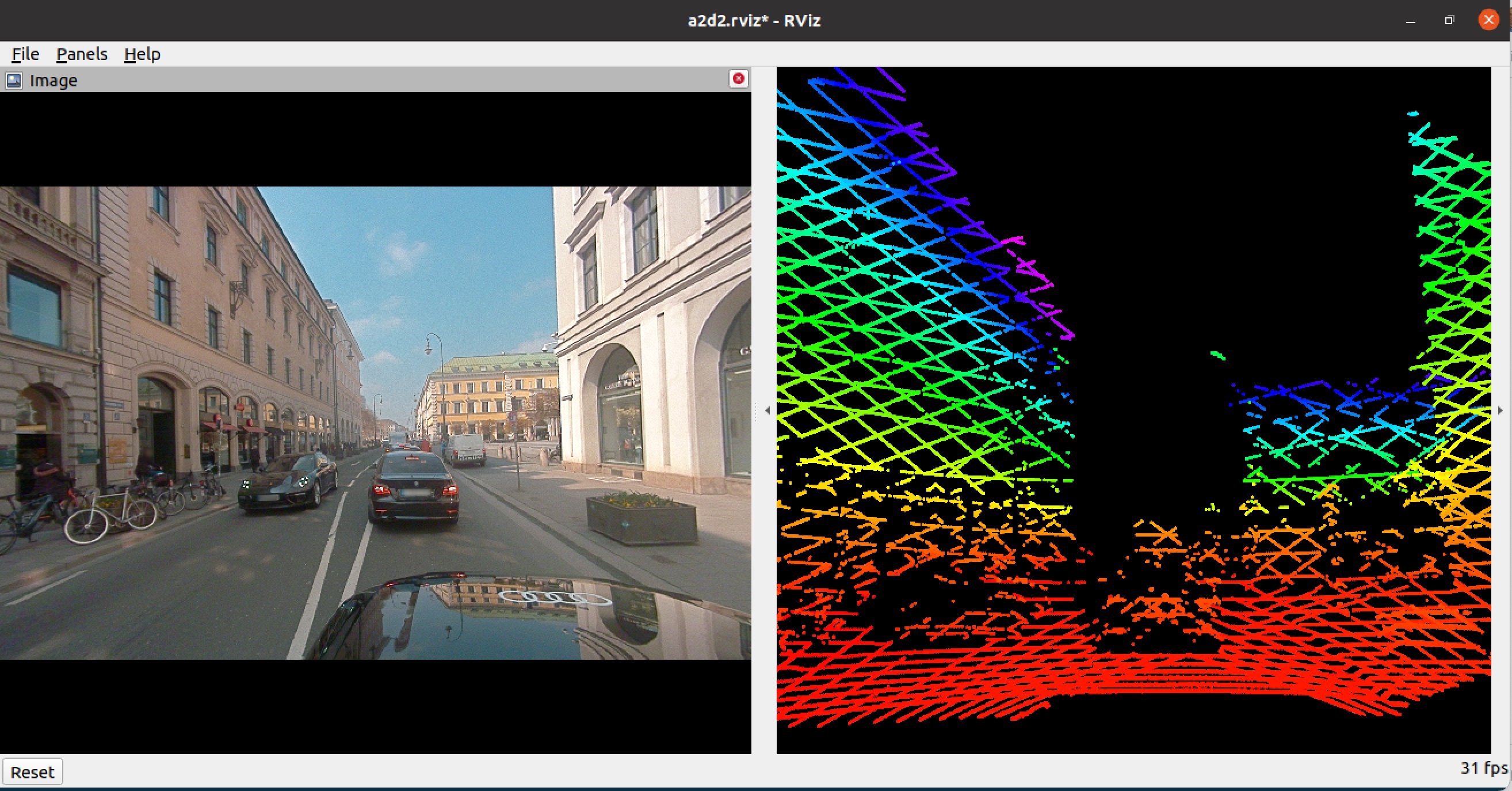
If a human is interested in visualizing the data response, one can use any ROS visualization tool. One such tool is rviz. This tool can be run on the ROS desktop. In the following screenshot, we show the visualization of the response using rviz tool for the example data request shown previously.

Figure 2. Visualization of response using rviz tool

Figure 2 – Visualization of response using rviz tool

Dynamically Transforming the Coordinate Frames

The data service supports dynamically transforming the composed data from one coordinate frame to another frame. A typical use case is to transform the data from a sensor specific coordinate frame to AV (ego) coordinate frame. Such transformation request can be included in the data client request.

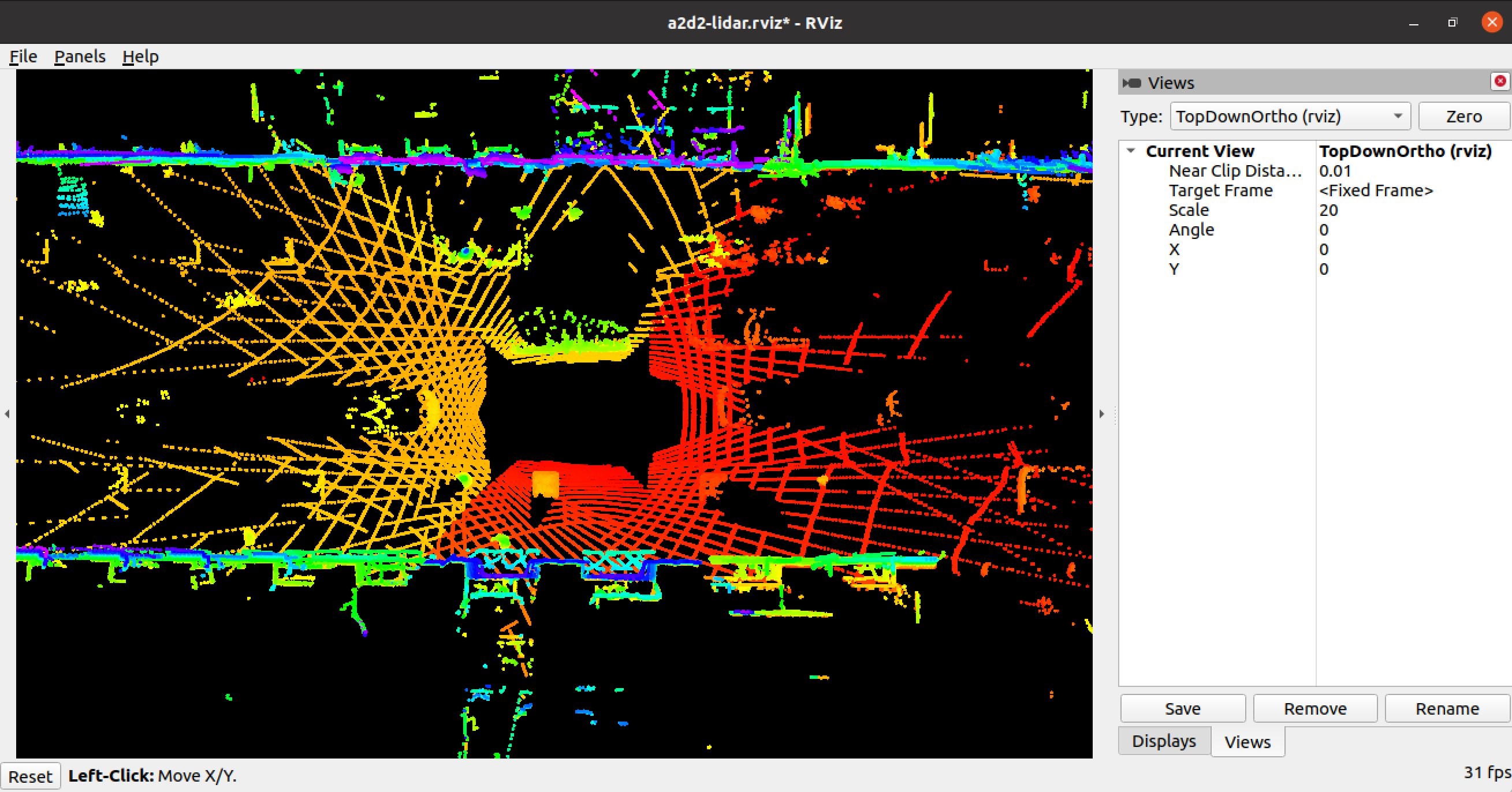
For example, imagine the data client wants to compose a data stream from all the LiDAR sensors, and transform the point cloud  data into the vehicle’s coordinate frame. The example configuration c-config-lidar.json allows you to do that. Following is a visualization of the LiDAR point cloud data transformed to the vehicle coordinate frame and visualized in the rviz tool  from a top-down perspective.

Figure 3. Top-down rviz visualization of point-cloud data transformed to ego vehicle view

Figure 3 –  Top-down rviz visualization of point-cloud data transformed to ego vehicle view

Walkthrough

In this walkthrough, we use the A2D2 autonomous driving dataset. The complete code for this walk-through and reference documentation is available in the associated Github repository. So before we get into the walk-through, clone the  Github repository on your laptop using the Git clone command. Next, ensure these prerequisites are satisfied.

The approximate cost of the walk-through of this tutorial with default configuration is US $2,000. The actual cost may vary considerably based on actual configuration, and the duration used for the walk-through.

Configure the data service

To configure the data service, we need to create a new AWS CloudFormation stack in the AWS console using the cfn/mozart.yml template from the cloned repository on your laptop.

This template creates AWS Identity and Access Management (IAM) resources, so when you create the CloudFormation Stack using the console, in the review step, you must check I acknowledge that AWS CloudFormation might create IAM resources. The stack input parameters you must specify are the following:

Parameter Name table

For all other stack input parameters, default values are recommended during the first walkthrough. Review the complete list of all the template input parameters in the Github repository reference.

  • Once the stack status in CloudFormation console is CREATE_COMPLETE, find the ROS desktop instance launched in your stack in the Amazon EC2 console, and connect to the instance using SSH as user ubuntu, using your SSH key pair. The ROS desktop instance is named as <name-of-stack>-desktop.
  • When you connect to the ROS desktop using SSH, and you see the message "Cloud init in progress. Machine will REBOOT after cloud init is complete!!", disconnect and try later after about 20 minutes. The desktop installs the NICE DCV server on first-time startup, and reboots after the install is complete.
  • If the message NICE DCV server is enabled!appears, run the command sudo passwd ubuntu to set a new strong password for user ubuntu. Now you are ready to connect to the desktop using the NICE DCV client.
  • Download and install the NICE DCV client on your laptop.
  • Use the NICE DCV Client to login to the desktop as user ubuntu
  • When you first login to the desktop using the NICE DCV client, you may be asked if you would like to upgrade the OS version. Do not upgrade the OS version.

Now you are ready to proceed with the following steps. For all the commands in this blog, we assume the working directory to be ~/amazon-eks-autonomous-driving-data-service on the ROS desktop.

If you used an IAM role to create the stack above, you must manually configure the credentials associated with the IAM role in the ~/.aws/credentials file with the following fields:

aws_access_key_id=

aws_secret_access_key=

aws_session_token=

If you used an IAM user to create the stack, you do not have to manually configure the credentials. In the working directory, run the command:

    ./scripts/configure-eks-auth.sh

When successfully running this command, the following confirmation appears AWS Credentials Removed.

Configure the EKS cluster environment

In this step, we configure the EKS cluster environment by running the command:

    ./scripts/setup-dev.sh

This step also builds and pushes the data service container image into Amazon ECR.

Prepare the A2D2 data

Before we can run the A2D2 data service, we need to extract the raw A2D2 data into your S3 bucket, extract the metadata from the raw data, and upload the metadata into the Redshift cluster. We execute these three steps using an AWS Step Functions state machine. To create and run the AWS Step Functions state machine, run the following command in the working directory:

    ./scripts/a2d2-etl-steps.sh

Note the executionArn of the state machine execution in the output of the previous command. To check the status of the execution, use following command, replacing executionArn below with your value:

The state machine execution time depends on many variable factors, and may take anywhere from 4 – 24 hours, or possibly longer. All the AWS Batch jobs started as part of the state machine automatically reattempt in case of failure.

Run the data service

The data service is deployed using a Helm Chart, and runs as a kubernetes deployment in EKS. To start the data service, execute the following command in the working directory:

    kubectl get pods -n a2d2

Run the data service client

To visualize the response data requested by the A2D2 data client, we will use the rviz tool on the ROS desktop. Open a terminal on the desktop, and run rviz.

In the rviz tool, use File>Open Config to select /home/ubuntu/amazon-eks-autonomous-driving-data-service/a2d2/config/a2d2.rviz as the rviz config. You should notice that the rviz tool is now configured with two areas, one for visualizing image data, and the other for visualizing point cloud data.

To run the data client, open a new terminal on the desktop, and execute the following command in the root directory of the cloned Github repository on the ROS desktop:

python ./a2d2/src/data_client.py --config ./a2d2/config/c-config-ex1.json 1>/tmp/a.out 2>&1 & 

After a brief delay, you should be able to preview the response data in the rviz tool. You can set "preview": false in the data client config file, ./a2d2/config/c-config-ex1.json, and rerun the preceding command to view the complete response. For maximum performance, pre-load S3 data to FSx for Lustre.

Hard reset of the data service

This step is for reference purposes. If at any time you need to do a hard reset of the data service, you can do so by executing:

    helm delete a2d2-data-service

This will delete all data service EKS pods immediately. All in-flight service responses will be aborted. Because the connection between the data client and data service is asynchronous, the data clients may wait indefinitely, and you may need to cleanup the data client processes manually on the ROS desktop using operating system tools. Note, each data client instance spawns multiple Python processes. You may also want to cleanup /fsx/rosbag directory.

Clean Up

When you no longer need the data service,  delete the AWS CloudFormation stack from the AWS CloudFormation console. Deleting the stack will shut down the desktop instance, and delete the EFS and FSx for Lustre file-systems created in the stack. The Amazon S3 bucket is not deleted.

Conclusion

In this post, we demonstrated how to build a data service that can dynamically compose near real-time chunked data streams at scale using EKS, Redshift, MSK, and FSx for Lustre. By using a data service, you increase agility, flexibility and cost-efficiency in AD system research and development.

Related reading: Field Notes: Deploy and Visualize ROS Bag Data on AWS using rviz and Webviz for Autonomous Driving

Field Notes provides hands-on technical guidance from AWS Solutions Architects, consultants, and technical account managers, based on their experiences in the field solving real-world business problems for customers.

Integrate Etleap with Amazon Redshift Streaming Ingestion (preview) to make data available in seconds

Post Syndicated from Caius Brindescu original https://aws.amazon.com/blogs/big-data/integrate-etleap-with-amazon-redshift-streaming-ingestion-preview-to-make-data-available-in-seconds/

Amazon Redshift is a fully managed cloud data warehouse that makes it simple and cost-effective to analyze all your data using SQL and your extract, transform, and load (ETL), business intelligence (BI), and reporting tools. Tens of thousands of customers use Amazon Redshift to process exabytes of data per day and power analytics workloads.

Etleap is an AWS Advanced Technology Partner with the AWS Data & Analytics Competency and Amazon Redshift Service Ready designation. Etleap ETL removes the headaches experienced building data pipelines. A cloud-native platform that seamlessly integrates with AWS infrastructure, Etleap ETL consolidates data without the need for coding. Automated issue detection pinpoints problems so data teams can stay focused on business initiatives, not data pipelines.

In this post, we show how Etleap customers are integrating with the new streaming ingestion feature in Amazon Redshift (currently in limited preview) to load data directly from Amazon Kinesis Data Streams. This reduces load times from minutes to seconds and helps you gain faster data insights.

Amazon Redshift streaming ingestion with Kinesis Data Streams

Traditionally, you had to use Amazon Kinesis Data Firehose to land your stream into Amazon Simple Storage Service (Amazon S3) files and then employ a COPY command to move the data into Amazon Redshift. This method incurs latencies in the order of minutes.

Now, the native streaming ingestion feature in Amazon Redshift lets you ingest data directly from Kinesis Data Streams. The new feature enables you to ingest hundreds of megabytes of data per second and query it at exceptionally low latency—in many cases only 10 seconds after entering the data stream.

Configure Amazon Redshift streaming ingestion with SQL queries

Amazon Redshift streaming ingestion uses SQL to connect with one or more Kinesis data streams simultaneously. In this section, we walk through the steps to configure streaming ingestion.

Create an external schema

We begin by creating an external schema referencing Kinesis using syntax adapted from Redshift’s support for Federated Queries:

CREATE EXTERNAL SCHEMA MySchema
FROM Kinesis
IAM_ROLE { default | 'iam-role-arn' };

This external schema command creates an object inside Amazon Redshift that acts as a proxy to Kinesis Data Streams. Specifically, to the collection of data streams that are accessible via the AWS Identity and Access Management (IAM) role. You can use either the default Amazon Redshift cluster IAM role or a specified IAM role that has been attached to the cluster previously.

Create a materialized view

You can use Amazon Redshift materialized views to materialize a point-in-time view of a Kinesis data stream, as accumulated up to the time it is queried. The following command creates a materialized view over a stream from the previously defined schema:

CREATE MATERIALIZED VIEW MyView AS
SELECT *
FROM MySchema.MyStream;

Note the use of the dot syntax to pick out the particular stream desired. The attributes of the stream include a timestamp field, partition key, sequence number, and a VARBYTE data payload.

Although the previous materialized view definition simply performs a SELECT *, more sophisticated processing is possible, for instance, applying filtering conditions or shredding JSON data into columns. To demonstrate, consider the following Kinesis data stream with JSON payloads:

{
 “player” : “alice 127”,
 “region” : “us-west-1”,
 “action” : “entered shop”,
}

To demonstrate this, write a materialized view that shreds the JSON into columns, focusing only on the entered shop action:

CREATE MATERIALIZED VIEW ShopEntrances AS
SELECT ApproximateArrivalTimestamp, SequenceNumber,
   json_extract_path_text(from_varbyte(Data, 'utf-8'), 'player') as Player,
   json_extract_path_text(from_varbyte(Data, 'utf-8'), 'region') as Region
FROM MySchema.Actions
WHERE json_extract_path_text(from_varbyte(Data, 'utf-8'), 'action') = 'entered shop';

On the Amazon Redshift leader node, the view definition is parsed and analyzed. On success, it is added to the system catalogs. No further communication with Kinesis Data Streams occurs until the initial refresh.

Refresh the materialized view

The following command pulls data from Kinesis Data Streams into Amazon Redshift:

REFRESH MATERIALIZED VIEW MyView;

You can initiate it manually (via the SQL preceding command) or automatically via a scheduled query. In either case, it uses the IAM role associated with the stream. Each refresh is incremental and massively parallel, storing its progress in each Kinesis shard in the system catalogs so as to be ready for the next round of refresh.

With this process, you can now query near-real-time data from your Kinesis data stream through Amazon Redshift.

Use Amazon Redshift streaming ingestion with Etleap

Etleap pulls data from databases, applications, file stores, and event streams, and transforms it before loading it into an AWS data repository. Data ingestion pipelines typically process batches every 5–60 minutes, so when you query your data in Amazon Redshift, it’s at least 5 minutes out of date. For many use cases, such as ad hoc queries and BI reporting, this latency time is acceptable.

But what about when your team demands more up-to-date data? An example is operational dashboards, where you need to track KPIs in near-real time. Amazon Redshift load times are bottlenecked by COPY commands that move data from Amazon S3 into Amazon Redshift, as mentioned earlier.

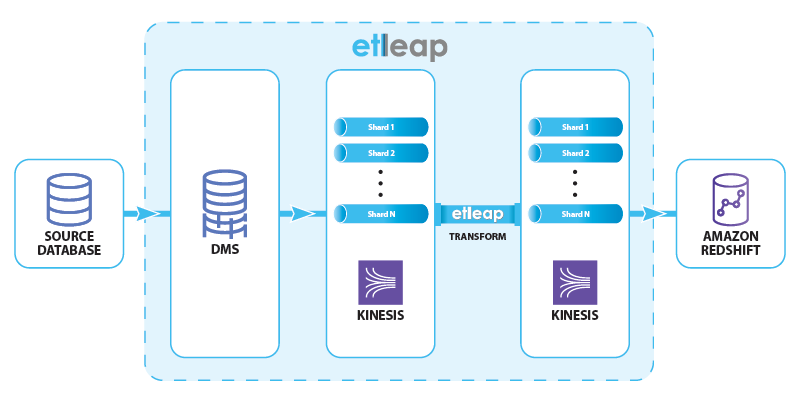
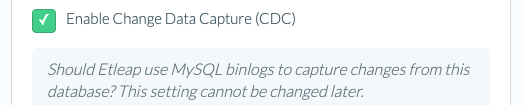
This is where streaming ingestion comes in: by staging the data in Kinesis Data Streams rather than Amazon S3, Etleap can reduce data latency in Amazon Redshift to less than 10 seconds. To preview this feature, we ingest data from SQL databases such as MySQL and Postgres that support change data capture (CDC). The data flow is shown in the following diagram.

Etleap manages the end-to-end data flow through AWS Database Migration Service (AWS DMS) and Kinesis Data Streams, and creates and schedules Amazon Redshift queries, providing up-to-date data.

AWS DMS consumes the replication logs from the source, and produces insert, update, and delete events. These events are written to a Kinesis data stream that has multiple shards in order to handle the event load. Etleap transforms these events according to user-specified rules, and writes them to another data stream. Finally, a sequence of Amazon Redshift commands load data from the stream into a destination table. This procedure takes less than 10 seconds in real-world scenarios.

Configure Amazon Redshift streaming ingestion with Etleap

Previously, we explored how data in Kinesis Data Streams can be accessed in Amazon Redshift using SQL queries. In this section, we see how Etleap uses the streaming ingestion feature to mirror a table from MySQL into Amazon Redshift, and the end-to-end latency we can achieve.

Etleap customers that are part of the Streaming Ingestion Preview Program can ingest data into Amazon Redshift directly from an Etleap-managed Kinesis data stream. All pipelines from a CDC-enabled source automatically use this feature.

The destination table in Amazon Redshift is Type 1, a mirror of the table in the source database.

For example, say you want to mirror a MySQL table in Amazon Redshift. The table represents the online shopping carts that users have open. In this case, low latency is critical so that the platform marketing strategists can instantly identify abandoned carts and high demand items.

The cart table has the following structure:

CREATE TABLE cart (
id int PRIMARY KEY AUTO_INCREMENT, 
user_id INT,
current_price DECIMAL(6,2),
no_items INT,
checked_out TINY_INT(1),
update_date TIMESTAMP
);

Changes from the source table are captured using AWS DMS and then sent to Etleap via a Kinesis data stream. Etleap transforms these records and writes them to another data stream using the following structure:

{
            "id": 8322,
            "user_id": 443,
            "current_price": 22.98,
            "no_items": 3,
            "checked_out": 0,
            "update_date": "2021-11-05 23:11",
            "op": "U"
}

The structure encodes the row that was modified or inserted, as well as the operation type (represented by the op column), which can have three values: I (insert), U (update) or D (delete).

This information is then materialized in Amazon Redshift from the data stream:

CREATE EXTERNAL SCHEMA etleap_stream
FROM KINESIS
IAM_ROLE '<redacted>';

CREATE MATERIALIZED VIEW cart_staging
DISTSTYLE KEY
	DISTKEY(id)
	SORTKEY(etleap_sequence_no)
AS SELECT
	CAST(PartitionKey as bigint) AS etleap_sequence_no,
	CAST(JSON_EXTRACT_PATH_TEXT(from_varbyte(Data, 'utf-8'), 'id') as bigint) AS id,
	JSON_PARSE(FROM_VARBYTE(Data, 'utf-8')) AS Data
FROM etleap_stream."cart";

In the materialized view, we expose the following columns:

  • PartitionKey represents an Etleap sequence number, to ensure that updates are processed in the correct order.
  • We shred the primary keys of the table (id in the preceding example) from the payload, using them as a distribution key to improve the update performance.
  • The Data column is parsed out into a SUPER type from the JSON object in the stream. This is shredded into the corresponding columns in the cart table when the data is inserted.

With this staging materialized view, Etleap then updates the destination table (cart) that has the following schema:

CREATE TABLE cart ( 
id BIGINT PRIMARY KEY,
user_id BIGINT,
current_price DECIMAL(6,2),
no_items INT,
checked_out BOOLEAN,
update_date VARCHAR(64)
)
DISTSTYLE key
distkey(id);

To update the table, Etleap runs the following queries, selecting only the changed rows from the staging materialized view, and applies them to the cart table:

BEGIN;

REFRESH MATERIALIZED VIEW cart_staging;

UPDATE _etleap_si SET end_sequence_no = (
	SELECT COALESCE(MIN(etleap_sequence_no), (SELECT MAX(etleap_sequence_no) FROM cart_staging)) FROM 
	(
		SELECT 
			etleap_sequence_no, 
			LEAD(etleap_sequence_no, 1) OVER (ORDER BY etleap_sequence_no) - etleap_sequence_no AS diff
		FROM cart_staging 
		WHERE etleap_sequence_no > (SELECT start_sequence_no FROM _etleap_si WHERE table_name = 'cart')
	)
	WHERE diff > 1
) WHERE table_name = 'cart';


DELETE FROM cart
WHERE id IN (
	SELECT id
	FROM cart_staging
	WHERE etleap_sequence_no > (SELECT start_sequence_no FROM _etleap_si WHERE table_name = 'cart') 
	AND etleap_sequence_no <= (SELECT end_sequence_no FROM _etleap_si WHERE table_name = 'cart')
);

INSERT INTO cart
SELECT 
	DISTINCT(id),
	CAST(Data."timestamp" as timestamp),
	CAST(Data.payload as varchar(256)),
	CAST(Data.etleap_sequence_no as bigint) from
  	(SELECT id, 
  	JSON_PARSE(LAST_VALUE(JSON_SERIALIZE(Data)) OVER (PARTITION BY id ORDER BY etleap_sequence_no ASC ROWS BETWEEN UNBOUNDED PRECEDING AND UNBOUNDED FOLLOWING)) AS Data
   	FROM cart_staging
	WHERE etleap_sequence_no > (SELECT start_sequence_no FROM _etleap_si WHERE table_name = 'cart') 
	AND etleap_sequence_no <= (SELECT end_sequence_no FROM _etleap_si WHERE table_name = 'cart'
AND Data.op != 'D')
);


UPDATE _etleap_si SET start_sequence_no = end_sequence_no WHERE table_name = 'cart';

COMMIT;

We run the following sequence of queries:

  1. Refresh the cart_staging materialized view to get new records from the cart stream.
  2. Delete all records from the cart table that were updated or deleted since the last time we ran the update sequence.
  3. Insert all the updated and newly inserted records from the cart_staging materialized view into the cart table.
  4. Update the _etleap_si bookkeeping table with the current position. Etleap uses this table to optimize the query in the staging materialized view.

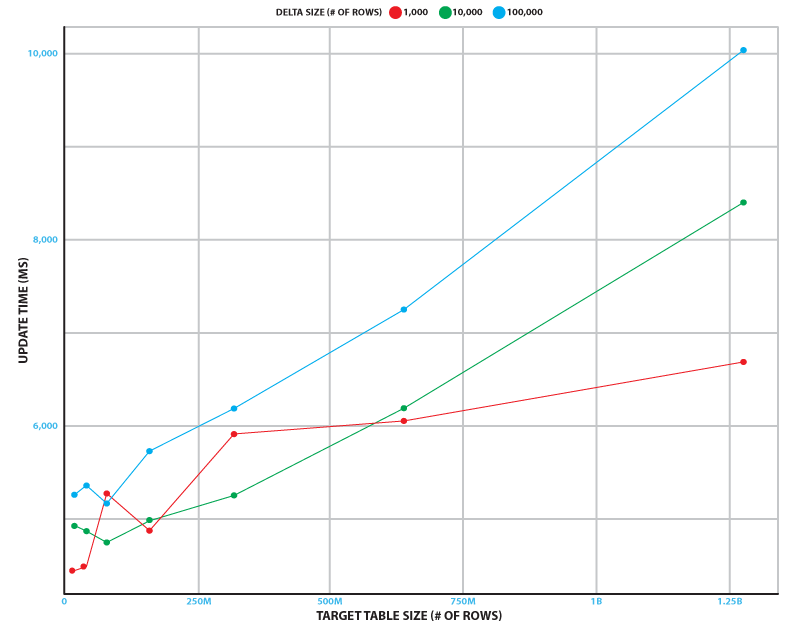
This update sequence runs continuously to minimize end-to-end latency. To measure performance, we simulated the change stream from a database table that has up to 100,000 inserts, updates, and deletes. We tested target table sizes of up to 1.28 billion rows. Testing was done on a 2-node ra3.xlplus Amazon Redshift cluster and a Kinesis data stream with 32 shards.

The following figure shows how long the update sequence takes on average over 5 runs in different scenarios. Even in the busiest scenario (100,000 changes to a 1.28 billion row table), the sequence takes just over 10 seconds to run. In our experiment, the refresh time was independent of the delta size, and took 3.7 seconds with a standard deviation of 0.4 seconds.

This shows that the update process can keep up with source database tables that have 1 billion rows and 10,000 inserts, updates, and deletes per second.

Summary

In this post, you learned about the native streaming ingestion feature in Amazon Redshift and how it achieves latency in seconds, while ingesting data from Kinesis Data Streams into Amazon Redshift. You also learned about the architecture of Amazon Redshift with the streaming ingestion feature enabled, how to configure it using SQL commands, and use the capability in Etleap.

To learn more about Etleap, take a look at the Etleap ETL on AWS Quick Start, or visit their listing on AWS Marketplace.


About the Authors

Caius Brindescu is an engineer at Etleap with over 3 years of experience in developing ETL software. In addition to development work, he helps customers make the most out of Etleap and Amazon Redshift. He holds a PhD from Oregon State University and one AWS certification (Big Data – Specialty).

Todd J. Green is a Principal Engineer with AWS Redshift. Before joining Amazon, TJ worked at innovative database startups including LogicBlox and RelationalAI, and was an Assistant Professor of Computer Science at UC Davis. He received his PhD in Computer Science from UPenn. In his career as a researcher, TJ won a number of awards, including the 2017 ACM PODS Test-of-Time Award.

Maneesh Sharma is a Senior Database Engineer with Amazon Redshift. He works and collaborates with various Amazon Redshift Partners to drive better integration. In his spare time, he likes running, playing ping pong, and exploring new travel destinations.

Jobin George is a Big Data Solutions Architect with more than a decade of experience designing and implementing large-scale big data and analytics solutions. He provides technical guidance, design advice, and thought leadership to some of the key AWS customers and big data partners.

Ongoing Exploitation of Windows Installer CVE-2021-41379

Post Syndicated from Glenn Thorpe original https://blog.rapid7.com/2021/11/30/ongoing-exploitation-of-windows-installer-cve-2021-41379/

Ongoing Exploitation of Windows Installer CVE-2021-41379

On November 9, 2021, as part of Patch Tuesday, Microsoft released an update to address CVE-2021-41379, a “Windows Installer Elevation of Privilege Vulnerability” that had a modest CVSS score (5.5), without much fanfare. The original CVE allows an attacker to delete files on a system using elevated privileges.

Fast-forward to November 22, 2021, when after investigating the patch, the researcher that discovered the vulnerability, Abdelhamid Naceri, found that it did not fully remediate the issue and published proof-of-concept (PoC) code on GitHub proving exploitation of the vulnerability is still possible on patched versions of Windows allowing for SYSTEM-level privileges. The working PoC “overwrites Microsoft Edge elevation service ‘DACL’ and copies itself to the service location, then executes it to gain elevated privileges.”

With a zero-day exploit available, attackers have been chipping away at ways to utilize the vulnerability, especially in malware.

As of November 30, 2021, there is not an official patch from Microsoft to fully and effectively remediate this vulnerability. Community researchers and security practitioners have noted that other Microsoft zero-day vulnerabilities this year, such as CVE-2021-36934 (“HiveNightmare”/”SeriousSAM”), were not fixed until typical Patch Tuesday release cycles even if public exploit code had already made an appearance. We expect that this vulnerability will follow that same pattern and that we won’t see a new patch (and/or a new CVE, if Microsoft does indeed classify this as a patch bypass) until December 2021’s Patch Tuesday.

Affected versions

According to the researcher, all supported versions of Windows, including Windows 11 and Server 2022, are vulnerable to the exploit.

Guidance

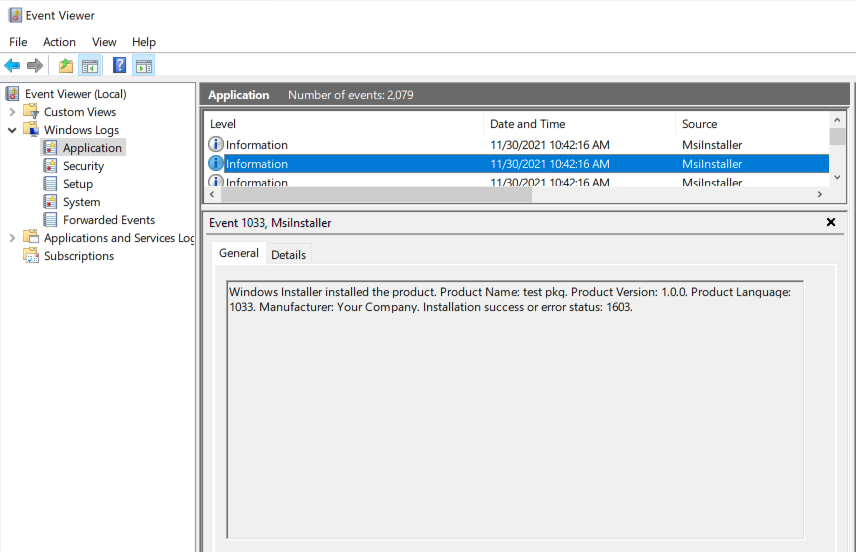
With no official patch at this time, we recommend that organizations prepare to patch this as soon as the official fix is released. Meanwhile, Rapid7 researchers have confirmed that a number of antimalware programs have added detection of this exploit, so as usual, keep those programs up to date. Lastly, organizations can detect previous exploitation of this PoC by monitoring for EventID 1033 and “test pkg” (keeping in mind that the “test pkg” will only find this exact PoC and may be modified by more enterprising attackers).

Ongoing Exploitation of Windows Installer CVE-2021-41379

Rapid7 customers

For Rapid7 InsightVM customers, we will be releasing vulnerability checks if and when Microsoft publishes patch information for the new vulnerability.

In the meantime, InsightVM customers can use Query Builder to find Windows assets by creating the following query: os.family contains windows. Rapid7 Nexpose customers can create a Dynamic Asset Group based on a filtered asset search for OS contains windows.

NEVER MISS A BLOG

Get the latest stories, expertise, and news about security today.

AWS Nitro SSD – High Performance Storage for your I/O-Intensive Applications

Post Syndicated from Jeff Barr original https://aws.amazon.com/blogs/aws/aws-nitro-ssd-high-performance-storage-for-your-i-o-intensive-applications/

We love to solve difficult problems for our customers! As you have seen through the years, innovation at AWS takes many forms, and encompasses both hardware and software.

One of my favorite examples of customer-driven innovation is AWS Nitro System, which I first wrote about back in mid-2018. In that post I told you how Nitro System would allow us to innovate more quickly than ever, with the goal of creating instances that would run even more types of workloads. I also shared the basic building blocks, as they existed at that time, including Nitro Cards to accelerate and offload network and storage I/O, the Nitro Security Chip to monitor and protect hardware resources, and the Nitro Hypervisor to manage memory and CPU allocation with very low overhead.

Today I would like to tell you about one more building block!

AWS Nitro SSD
For decades, traditional hard drives (sometimes jokingly referred to as spinning rust) were the primary block storage devices. Today, while spinning rust still has its place, most high-performance storage is based on more modern Solid State Drives (SSD). Open up an SSD and you will find lots of flash memory and a firmware-driven processor that manages access to the memory and supports higher-level functions such as block mapping, encryption, caching, wear leveling, and so forth.

The scale of the AWS Cloud and the range of customer use cases that it supports gives us some valuable insights into the ways that today’s applications, database engines, and operating systems make use of block storage. As a result, after delivering several generations of EC2 instances we saw an opportunity to do better. Our goal was to allow I/O-intensive workloads (relational databases, NoSQL databases, data warehouses, search engines, and analytics engines to name a few) to run faster and with more predictable performance.

Today I would like to tell you about the AWS Nitro SSD. The first generation of these devices were used to power io2 Block Express EBS volumes, and allow us to give you EBS volumes with lots of IOPS, plenty of throughput, and a maximum volume size of 64 TiB. The Im4gn and Is4gen instances that I wrote about earlier today make use of the second generation of AWS Nitro SSDs, as will many future EC2 instances, including the I4i instances that we preannounced today.

The AWS Nitro SSDs are designed to be installed and to operate at cloud scale. While this sounds like a simple exercise in manufacturing and installing more devices, the reality is a lot more complex and a lot more interesting. As I noted earlier, the firmware inside of each device is responsible for implementing many lower-level functions. As our customers push the devices to their limits, they expect us to be able to diagnose and resolve any performance inconsistencies they observe. Building our own devices allows us to design in operational telemetry and diagnostics, along with mechanisms that enable us to install firmware updates at cloud scale & at cloud speed. Taking this even further, we developed our own code to manage the instance-level storage in order to further improve the reliability and debug-ability, and to deliver consistent performance.

On the performance side, our deep understanding of cloud workloads led us to engineer the devices so that they can deliver maximum performance under a sustained, continuous load. SSDs are built from fast, dense flash memory. Due to the characteristics of this semiconductor memory, each cell can only be written, erased, and then rewritten a limited number of times. In order to make the devices last as long as possible, the firmware is responsible for a process known as wear leveling. I don’t understand the details, but I assume that this includes some sort of mapping from logical block numbers to physical cells in a way that evens out the number of cycles over time. There’s some housekeeping (a form of garbage collection) involved in this process, and garden-variety SSDs can slow down (creating latency spikes) at unpredictable times when dealing with a barrage of writes. We also took advantage of our database expertise and built a very sophisticated, power-fail-safe journal-based database into the SSD firmware.

The second generation of AWS Nitro SSDs were designed to avoid latency spikes and deliver great I/O performance on real-world workloads. Our benchmarks show instances that use the AWS Nitro SSDs, such as the new Im4gn and Is4gen, deliver 75% lower latency variability than I3 instances, giving you more consistent performance.

Putting all of this together, there’s a very tight, rapidly rotating flywheel in action here because the team that builds the Nitro SSDs is part of the AWS storage team, and also has operational responsibilities. Like all teams at AWS, they watch the metrics day-in and day-out, and can efficiently deploy new firmware using a CI/CD model.

Join the Team
As is always the case, there’s always more innovation ahead, and we have some awesome positions on the teams that design the AWS Nitro SSDs. For example:

Jeff;

New Storage-Optimized Amazon EC2 Instances (Im4gn and Is4gen) Powered by AWS Graviton2 Processors

Post Syndicated from Jeff Barr original https://aws.amazon.com/blogs/aws/new-storage-optimized-amazon-ec2-instances-im4gn-and-is4gen-powered-by-aws-graviton2-processors/

EC2 storage-optimized instances are designed to deliver high disk I/O performance, and plenty of storage. Our customers use them to host high-performance real-time databases, distributed file systems, data warehouses, key-value stores, and more. Over the years we have released multiple generations of storage-optimized instances including the HS1 (2012) , D2 (2015), I2 (2013) , I3 (2017), I3en (2019), and D3/D3en (2020).

As I look back on all of these launches, it is interesting to see how we continue to provide an ever-increasing set of options that make each successive generation an even better fit for the diverse (and also ever-increasing) needs of our customers. HS1 instances were available in just one size, D2 and I2 in four, I3 in six, and I3en in eight. These instances give our customers the freedom to choose the size that best meets their current needs while also giving them room to scale up or down if those needs happen to change.

Im4gn and Is4gen
Today I am happy to introduce the two newest families of storage-optimized instances, Im4gn and Is4gen, powered by Graviton2 processors. Both instances offer up to 30 TB of NVMe storage using AWS Nitro SSD devices that are custom-built by AWS. As part of our drive to innovate on behalf of our customers, we turned our attention to storage and designed devices that were optimized to support high-speed access to large amounts of data. The AWS Nitro SSDs reduce I/O latency by up to 60% and also reduce latency variability by up to 75% when compared to the third generation of storage-optimized instances. As a result you get faster and more predictable performance for your I/O-intensive EC2 workloads.

Im4gn instances are a great fit for applications that require large amounts of dense SSD storage and high compute performance, but are not especially memory intensive such as social games, session storage, chatbots, and search engines. Here are the specs:

Instance Name vCPUs
Memory Local NVMe Storage
(AWS Nitro SSD)
Read Throughput
(128 KB Blocks)
EBS-Optimized Bandwidth Network Bandwidth
im4gn.large 2 8 GiB 937 GB 250 MB/s Up to 9.5 Gbps Up to 25 Gbps
im4gn.xlarge 4 16 GiB 1.875 TB 500 MB/s Up to 9.5 Gbps Up to 25 Gbps
im4gn.2xlarge 8 32 GiB 3.75 TB 1 GB/s Up to 9.5 Gbps Up to 25 Gbps
im4gn.4xlarge 16 64 GiB 7.5 TB 2 GB/s 9.5 Gbps 25 Gbps
im4gn.8xlarge 32 128 GiB 15 TB
(2 x 7.5 TB)
4 GB/s 19 Gbps 50 Gbps
im4gn.16xlarge 64 256 GiB 30 TB
(4 x 7.5 TB)
8 GB/s 38 Gbps 100 Gbps

Im4gn instances provide up to 40% better price performance and up to 44% lower cost per TB of storage compared to I3 instances. The new instances are available in the AWS US West (Oregon), US East (Ohio), US East (N. Virginia), and Europe (Ireland) Regions as On-Demand, Spot, Savings Plan, and Reserved instances.

Is4gen instances are a great fit for applications that do large amounts of random I/O to large amounts of SSD storage. This includes shared file systems, stream processing, social media monitoring, and streaming platforms, all of which can use the increased storage density to retain more data locally. Here are the specs:

Instance Name vCPUs
Memory Local NVMe Storage
(AWS Nitro SSD)
Read Throughput
(128 KB Blocks)
EBS-Optimized Bandwidth Network Bandwidth
is4gen.medium 1 6 GiB 937 GB 250 MB/s Up to 9.5 Gbps Up to 25 Gbps
is4gen.large 2 12 GiB 1.875 TB 500 MB/s Up to 9.5 Gbps Up to 25 Gbps
is4gen.xlarge 4 24 GiB 3.75 TB 1 GB/s Up to 9.5 Gbps Up to 25 Gbps
is4gen.2xlarge 8 48 GiB 7.5 TB 2 GB /s Up to 9.5 Gbps Up to 25 Gbps
is4gen.4xlarge 16 96 GiB 15 TB
(2 x 7.5 TB)
4 GB/s 9.5 Gbps 25 Gbps
is4gen.8xlarge 32 192 GiB 30 TB
(4 x 7.5 TB)
8 GB/s 19 Gbps 50 Gbps

Is4gen instances provide 15% lower cost per TB of storage and up to 48% better compute performance compared to I3en instances. The new instances are available in the AWS US West (Oregon), US East (Ohio), US East (N. Virginia), and Europe (Ireland) Regions as On-Demand, Spot, Savings Plan, and Reserved instances.

Available Now
As I never get tired of saying, these new instances are available now and you can start using them today. You can use Amazon Linux 2, Ubuntu 18.04.05 (and newer), Red Hat Enterprise Linux 8.0, and SUSE Enterprise Server 15 (and newer) AMIs, along with the container-optimized ECS and EKS AMIs. Learn more about the Im4gn and Is4gen instances.

Jeff;

PS – As of this launch twelve EC2 instance types are now powered by Graviton2 processors! To learn more, visit the Graviton2 page.

Machine Learning-Powered Amazon Connect, Now With Call Summarization

Post Syndicated from Sébastien Stormacq original https://aws.amazon.com/blogs/aws/machine-learning-powered-amazon-connect-now-with-call-summarization/

At AWS our mission is to make machine learning (ML) accessible to data scientists, developers, and business users. To help businesses easily leverage the power of ML, we create purpose-built solutions that embed ML and deep learning technologies directly into a business process to address real customer needs, rather than leaving companies to sort it out on their own.

One place where we have seen ML have an impact is within the contact center—the place you receive and respond to customer inquiries and issues. Because of the growing role of customer experience (CX) and the increase in contact less commerce via phone or email, contact centers are essentials to maintaining the human connections that businesses depend on. However, analog or outdated methods make it difficult to address every customer need in an effective way that delivers timely resolutions, delivers great experiences, and fosters customer loyalty.

Embedding AWS ML technologies into a cloud contact center solution helps decrease the friction of calls, chats, and other engagements. It also makes it possible to automate outdated processes.

Amazon Connect is an easy-to-use, cloud-based, ML-powered contact center service that helps companies of any size deliver superior customer service at a lower cost.

Let me take three examples with Voice ID, Wisdom, and Contact Lens.

Amazon Connect Voice ID
ML capabilities might help streamline customer experience for authentication. Instead of asking customers to repeat their email address and their mother’s maiden name several times, ML-powered voice identification can establish a digital voice print associated with each customer’s unique voice. Then, it can recognize it at the beginning of each subsequent call. Voice identification provides a confidence score that may be used to automate authentication workflows.

Amazon Connect Wisdom
ML might also help search the vast documentation and knowledge base to find the most relevant answers to the questions raised by the customer. ML helps resolve customer issues faster and better.

Contact Lens for Amazon Connect
ML technologies also shine at analyzing the tone and content of a conversation, capturing customer sentiment in the moment, and learning from it. ML can help transcribe calls, track customer sentiment, detect common issues and customer trends, or even pinpoint discrepancies.

At just about the same time last year, I announced the addition of real-time capabilities for Contact Lens. This lets supervisors identify when to assist an agent on live calls so that they can provide guidance via chat or have the agent transfer the call. Last September, we added support for eight new languages, ending up with a total of 21 languages for post-call analytics and 12 languages for both post-call and real-time analytics.

Contact Lens Adds Call Summarization
But we didn’t stop there. Today, I am pleased to announce the addition of a new capability that helps you improve customer experience and agent and supervisor productivity by automatically summarizing the important aspects of each customer call.

You told us that keeping notes of customer conversations is time consuming, especially, for agents that must take notes during the call and import them manually in your CRM tool afterward. In the end, this is more time for us, the customers, waiting in queue for an agent to become available. Likewise, using automatically generated call transcripts doesn’t save time for supervisors. It is time consuming for supervisors to read these full call transcripts to understand what happened during customer conversations.

How it Works
Starting today, Contact Lens has added a summary of the key moments in a conversation. It is enabled by default, and there is no additional configuration step. You may toggle the Show transcript summary button to show or hide the summary when you don’t need it.

Contac Lens - Show Transcript Summary - Toggle button

Once a call is analyzed, the summary is available on the contact detail page.

Contact Lens identifies and summarizes the sections corresponding to Issue (e.g., lost package), Outcome (e.g., customer refund), and Action item (e.g., send a follow-up mail confirming the refund was processed). A manager can quickly see where there’s an action to send a customer a follow-up email and take action to ensure it happens.

Contact Lens Call Summary Example

The call summary is also available in JSON format. Contact Lens uploads these in the S3 bucket of your choice. Having access to the JSON file lets you import the summaries programmatically in your CRM or other tools.

... redacted for brevity ...

"IssuesDetected": [
{
   "CharacterOffsets": {
      "BeginOffsetChar": 31,
      "EndOffsetChar": 73
   },
   "Text": "I would like to cancel my subscription"
}
]
...
"ActionItemsDetected": [
 {
   "CharacterOffsets": {
      "BeginOffsetChar": 32,
      "EndOffsetChar": 116
   },
   "Text": "I will send you an email with details"
 }
 ]

Availability and Pricing
Call summarization by Contact Lens is available in all AWS Regions where Contact Lens is available today. We support post-call analytics in the US West (Oregon), US East (N. Virginia), Canada (Central), Europe (London), Europe (Frankfurt), Asia Pacific (Singapore), Asia Pacific (Seoul), Asia Pacific (Tokyo), and Asia Pacific (Sydney) regions. We support real-time analytics in the US West (Oregon), US East (N. Virginia), Canada (Central), Europe (London), Europe (Frankfurt), Asia Pacific (Seoul), Asia Pacific (Tokyo), and Asia Pacific (Sydney) regions.

Call summary comes at no additional cost on top of the usual charges for Contact Lens. This is why we choose to enable it by default. Contact Lens is charged $0.015 per minute of voice conversation analyzed. Most of our Contact Lens customers analyze millions of conversation minutes per month. The price is $0.0125 per minute when you analyze more than 5 millions minutes per month.

If you do not have Contact Lens enabled on your call center, go ahead and start using it today.

— seb

New for AWS Control Tower – Region Deny and Guardrails to Help You Meet Data Residency Requirements

Post Syndicated from Danilo Poccia original https://aws.amazon.com/blogs/aws/new-for-aws-control-tower-region-deny-and-guardrails-to-help-you-meet-data-residency-requirements/

Many customers, such as those in highly regulated industries and the public sector, want to have control over where their data is stored and processed. AWS already offers many tools and features to comply with local laws and regulations, but we want to provide a simplified way to translate data residency requirements into controls that can be applied to single- and multi-account environments.

Starting today, you can use AWS Control Tower to deploy data residency preventive and detective controls, referred to as guardrails. These guardrails will prevent provisioning resources in unwanted AWS Regions by restricting access to AWS APIs through service control policies (SCPs) built and managed by AWS Control Tower. In this way, content cannot be created or transferred outside of your selected Regions at the infrastructure level. In this context, content can be software (including machine images), data, text, audio, video, or images hosted on AWS for processing or storage. For example, AWS customers in Germany can deny access to AWS services in Regions outside of Frankfurt with the exception of global services such as AWS Identity and Access Management (IAM) and AWS Organizations.

AWS Control Tower also offers guardrails to further control data residency in underlying AWS service options, for example, blocking Amazon Simple Storage Service (Amazon S3) cross-region replication or blocking the creation of internet gateways.

The AWS account used for managing AWS Control Tower is not restricted by the new Region deny settings. That account can be used for remediation if you have data in an unwanted Region before enabling Region deny.

Detective guardrails are implemented via AWS Config rules and can further detect unexpected configuration changes that should not be allowed.

You still retain a shared responsibility model for data residency at the application level, but these controls can help you restrict what infrastructure and application teams can do on AWS.

Using Data Residency Guardrails in AWS Control Tower
To use the new data residency guardrails, you need to have created a landing zone using AWS Control Tower. See Plan your AWS Control Tower landing zone for more information.

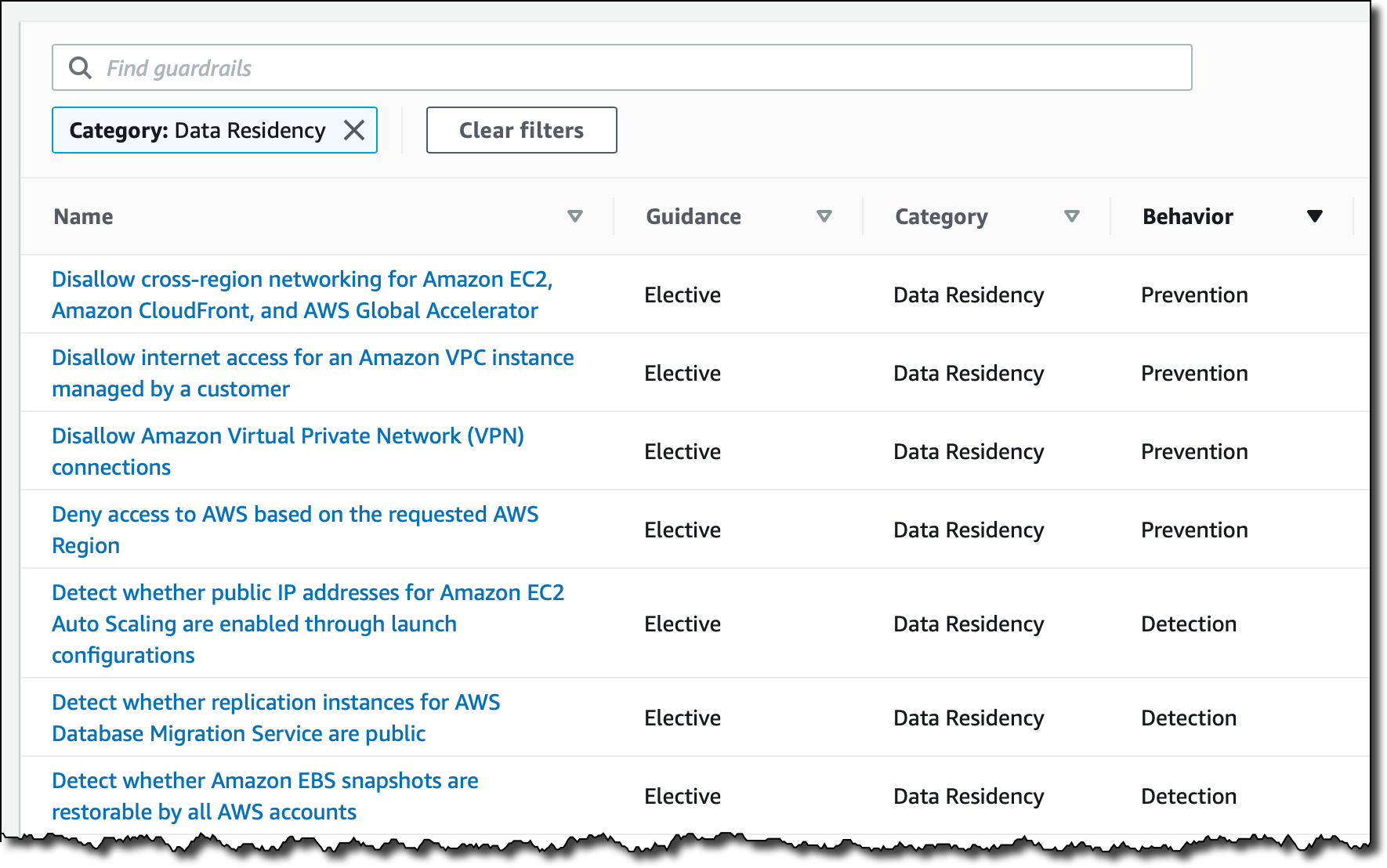
To see all the new controls that are available, I select Guardrails on the left pane of the AWS Control Tower console and then find those in the Data Residency category. I sort results by Behavior. Guardrails that have a Prevention behavior are implemented as SCPs. Those that have a Detection behavior are implemented as AWS Config rules.

Console screenshot.

The most interesting guardrail is probably the one denying access to AWS based on the requested AWS Region. I choose it from the list and find that it is different from the other guardrails because it affects all Organizational Units (OUs) and cannot be activated here but must be activated in the landing zone settings.

Console screenshot.

Below the Overview, in the Guardrail components, there is a link to the full SCP for this guardrail, and I can see the list of the AWS APIs that, when this setting is enabled, are still going to be allowed towards non-governed Regions. Depending on your requirements, some of those services, such as Amazon CloudFront or AWS Global Accelerator, can be further limited by a custom SCP.

In the Landing zone settings, the Region deny guardrail is currently not enabled. I choose Modify settings and then enable the Region deny settings.

Console screenshot.

Below the Region deny settings, there is the list of AWS Regions governed by the landing zone. Those will be the regions allowed when I enable Region deny.

Console screenshot.

In my case, I have four governed Regions, two in the US and two in Europe:

  • US East (N. Virginia), which is also the home Region for the landing zone
  • US West (Oregon)
  • Europe (Ireland)
  • Europe (Frankfurt)

I choose Update landing zone at the bottom. The update of the landing zone takes a few minutes to complete. Now, the vast majority of the AWS APIs are blocked if they are not directed to one of those governed Regions. Let’s do a few tests.

Testing Region Deny in a Sandbox Account
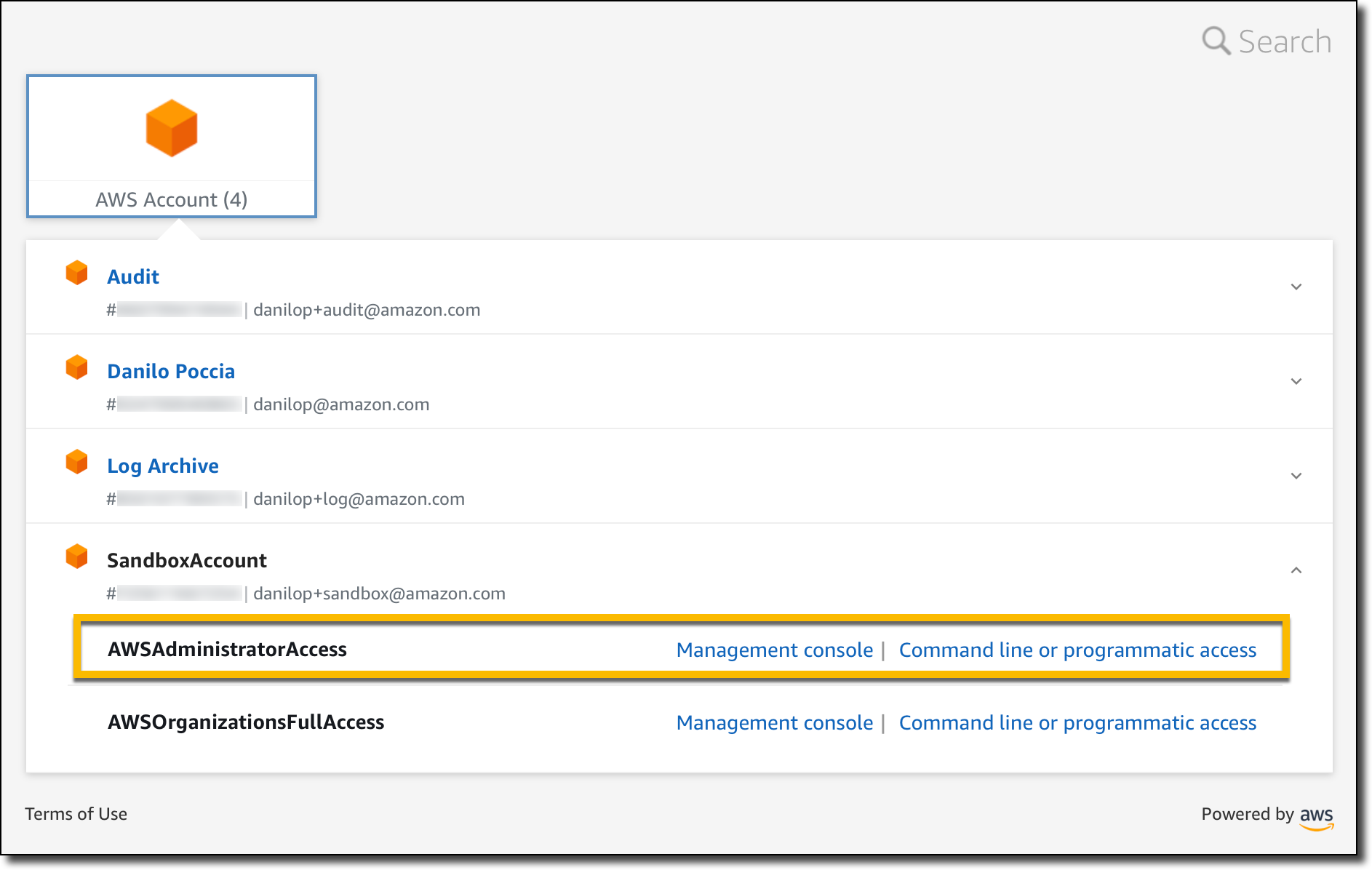
Using AWS Single Sign-On, I copy the AWS credentials to use the sandbox account with AWSAdministratorAccess permissions. In a terminal, I paste the commands setting the environment variables to use those credentials.

Console screenshot.

Now, I try to start a new Amazon Elastic Compute Cloud (Amazon EC2) instance in US East (Ohio), one of the non-governed Regions. In a landing zone, the default VPC is replaced by a VPC managed by AWS Control Tower. To start the instance, I need to specify a VPC subnet. Let’s find a subnet ID that I can use.

aws ec2 describe-subnets --query 'Subnets[0].SubnetId' --region us-east-2

An error occurred (UnauthorizedOperation) when calling the DescribeSubnets operation:
You are not authorized to perform this operation.

As expected, I am not authorized to perform this operation in US East (Ohio). Let’s try to start an EC2 instance without passing the subnet ID.

aws ec2 run-instances --image-id ami-0dd0ccab7e2801812 --region us-east-2 \
    --instance-type t3.small                                     

An error occurred (UnauthorizedOperation) when calling the RunInstances operation:
You are not authorized to perform this operation.
Encoded authorization failure message: <ENCODED MESSAGE>

Again, I am not authorized. More information is included in the encoded authorization failure message that I can decode as described in this article:

aws sts decode-authorization-message --encoded-message <ENCODED MESSAGE>

The decoded message (that I have omitted for brevity) tells me that there was an explicit deny to my request and includes the full SCP that caused the deny. This information is really useful for debugging these kind of errors.

Now, let’s try in US East (N. Virginia), one of the four governed regions.

aws ec2 describe-subnets --query 'Subnets[0].SubnetId' --region us-east-1
"subnet-0f3580c0c5e56c210"

This time, the command returns the subnet ID of the first subnet returned by the request. Let’s start an instance in US East (N. Virginia) using this subnet.

aws ec2 run-instances --image-id  ami-04ad2567c9e3d7893 --region us-east-1 \
    --instance-type t3.small --subnet-id subnet-0f3580c0c5e56c210

As expected, it works, and I can see the EC2 instance running in the console.

Console screenshot.

Similarly, APIs for other AWS services are limited by the Region deny settings. For example, I can’t create an S3 bucket in a non-governed Region.

Console screenshot.

When I try to create the bucket, I get an access denied error.

Console screenshot.

As expected, the creation of an S3 bucket works in a governed Region.

Even if someone gives this account access to a bucket in a non-governed Region, I would not be able to copy any data into that bucket.

Other preventive guardrails can enforce data residency, for example:

  • Disallow cross-region networking for Amazon EC2, Amazon CloudFront, and AWS Global Accelerator
  • Disallow internet access for an Amazon VPC instance managed by a customer
  • Disallow Amazon Virtual Private Network (VPN) connections

Now, let’s see how detective guardrails work.

Testing Detective Guardrails in a Sandbox Account
I enable the following guardrails for all accounts in the sandbox OU:

  • Detect whether Amazon EBS snapshots are restorable by all AWS accounts
  • Detect whether public routes exist in the route table for an internet gateway

Now, I want to see what happens if I go against these guardrails. In the EC2 console, I create an EBS snapshot for the volume of the EC2 instance I started before. Then, I modify permissions to share it with all AWS accounts.

Console screenshot.

Then, in the VPC console, I create an internet gateway, attach it to the AWS Control Tower managed VPC, and update the route table of one of the private subnets to use the internet gateway.

Console screenshot.

After a few minutes, the noncompliant resources in the sandbox account are found by the detective guardrails.

Console screenshot.

I look at the information provided by the guardrails and update my configuration to fix the issues. In a multi-account setup I’d contact the account owner and ask for remediation.

Availability and Pricing
You can use data-residency guardrails to control resources in any AWS Region. To create a landing zone, you should start from one of the Regions where AWS Control Tower is offered. For more information, see the AWS Regional Services List. There is no additional cost for this feature. You pay the costs of other services used, such as AWS Config.

This feature provides you with a framework of controls and guidance for setting up a multi-account environment that addresses data residency requirements. Depending on your use case, you may use any subset of the new data residency guardrails.

Set up guardrails based on your data residency requirements with AWS Control Tower.

Danilo

New – AWS Outposts Servers in Two Form Factors

Post Syndicated from Jeff Barr original https://aws.amazon.com/blogs/aws/new-aws-outposts-servers-in-two-form-factors/

AWS Outposts gives you on-premises compute and storage that is monitored and managed by AWS, and controlled by the same, familiar AWS APIs. You may already know about the AWS Outposts rack, which occupies a full 42U rack.

Last year I told you that we were working on new sizes of Outposts suitable for locations such as branch offices, factories, retail stores, health clinics, hospitals, and cell sites that are space-constrained and need access to low-latency compute capacity. Today we are launching three AWS Outposts servers, all powered by AWS Nitro System and with your choice of x86 or Arm/Graviton2 processors. Here’s an overview:

Name/Rack Size/Catalog ID
EC2 Instance Capacity
Processor / Architecture
vCPUs Memory
Local NVMe
SSD Storage
Outposts 1U
(STBKRBE)
c6gd.16xlarge Graviton2 / Arm 64 128 GiB 3.8 TB
( 2x 1.9 TB)
Outposts 2U
(LMXAD41)
c6id.16xlarge Intel Ice Lake / x86 64 128 GiB 3.8 TB
(2 x 1.9 TB)
Outposts 2U
(KOSKFSF)
c6id.32xlarge Intel Ice Lake / x86 128 256 GiB 7.6 TB
(4 x 1.9 GB)

You can create VPC subnets on each Outpost, and you can launch Amazon Elastic Compute Cloud (Amazon EC2) instances from EBS-backed AMIs in the parent region. The c6gd.16xlarge model supports six instance sizes, as follows:

Instance Name vCPUs Memory Local Storage
c6gd.large 2 4 GiB 118 GB
c6gd.xlarge 4 8 GiB 237 GB
c6gd.2xlarge 8 16 GiB 474 GB
c6gd.4xlarge 16 32 GiB 950 GB
c6gd.8xlarge 32 64 GiB 1.9 TB
c6gd.16xlarge 64 128 GiB 3.8 TB

The c6id.16xlarge model supports all but the largest of the following instance sizes, and the c6id.32xlarge supports all of them:

Instance Name vCPUs Memory Local Storage
c6id.large 2 4 GiB 118 GB
c6id.xlarge 4 8 GiB 237 GB
c6id.2xlarge 8 16 GiB 474 GB
c6id.4xlarge 16 32 GiB 950 GB
c6id.8xlarge 32 64 GiB 1.9 TB
c6id.16xlarge 64 128 GiB 3.8 TB
c6id.32xlarge 128 256 GiB 7.6 TB

Within each of your Outposts servers, you can launch any desired mix of instance sizes as long as you remain within the overall processing and storage available. You can create Amazon Elastic Container Service (Amazon ECS) clusters (Amazon Elastic Kubernetes Service (EKS) is coming soon) , and the code you run on-premises can make use of the entire lineup of services in the AWS Cloud.

Each Outposts server connects to the cloud via the public Internet or across a private AWS Direct Connect line. Additionally, each Outpost server supports a Local Network Interface (LNI) that provides a Level 2 presence on your local network for AWS service endpoints.

Outposts servers incorporate many powerful Nitro features including high speed networking and enhanced security. The security model is locked-down and prevents administrative access, preventing tampering or human error. Additionally, data at rest is protected by a NIST-compliant physical security key.

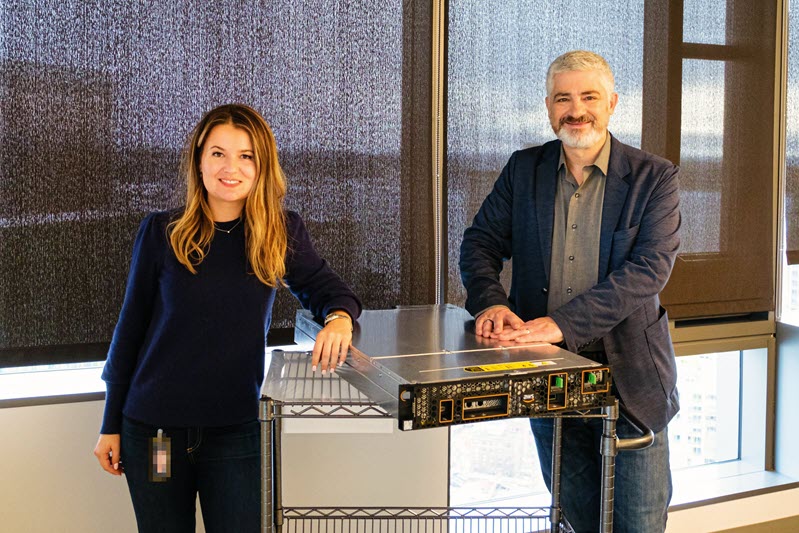
While I was writing this post, I stopped in to say hello to the design and development team, and met with my colleague Bianca Nagy to learn more about the Outposts server:

Ordering Outposts Servers
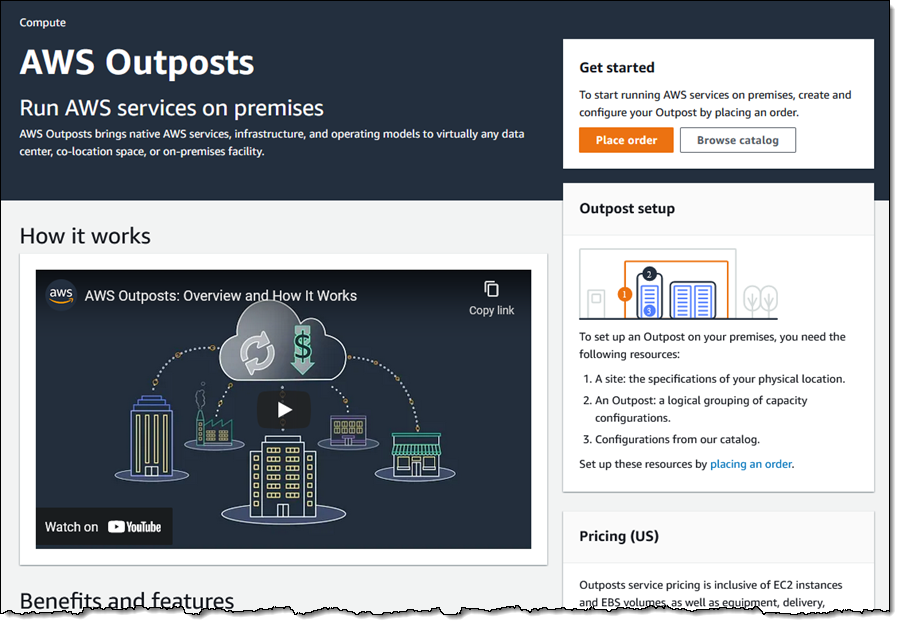
Let’s walk through the process of ordering an Outposts server from the AWS Management Console. I visit the AWS Outposts Console, make sure that I am in the desired AWS Region, and click Place order to get started:

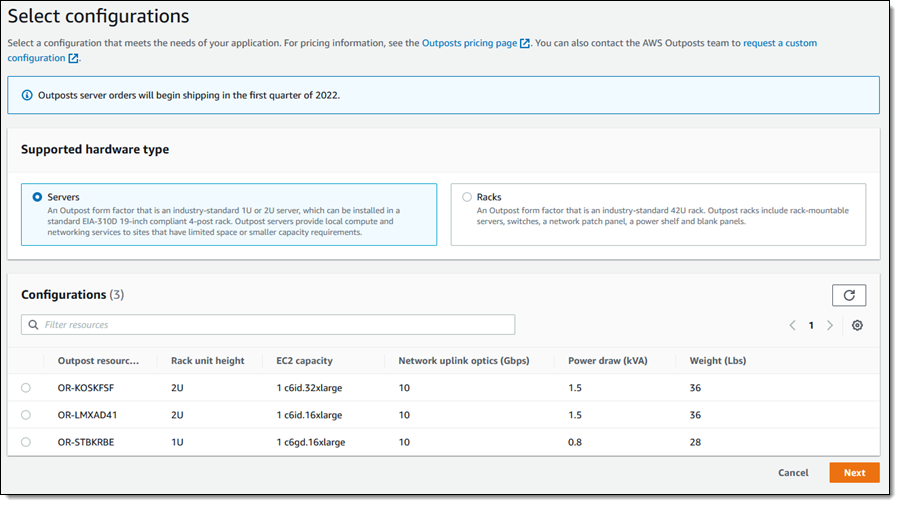
I click Servers, and then choose the desired configuration. I pick the c6gd.16xlarge, and click Next to proceed:

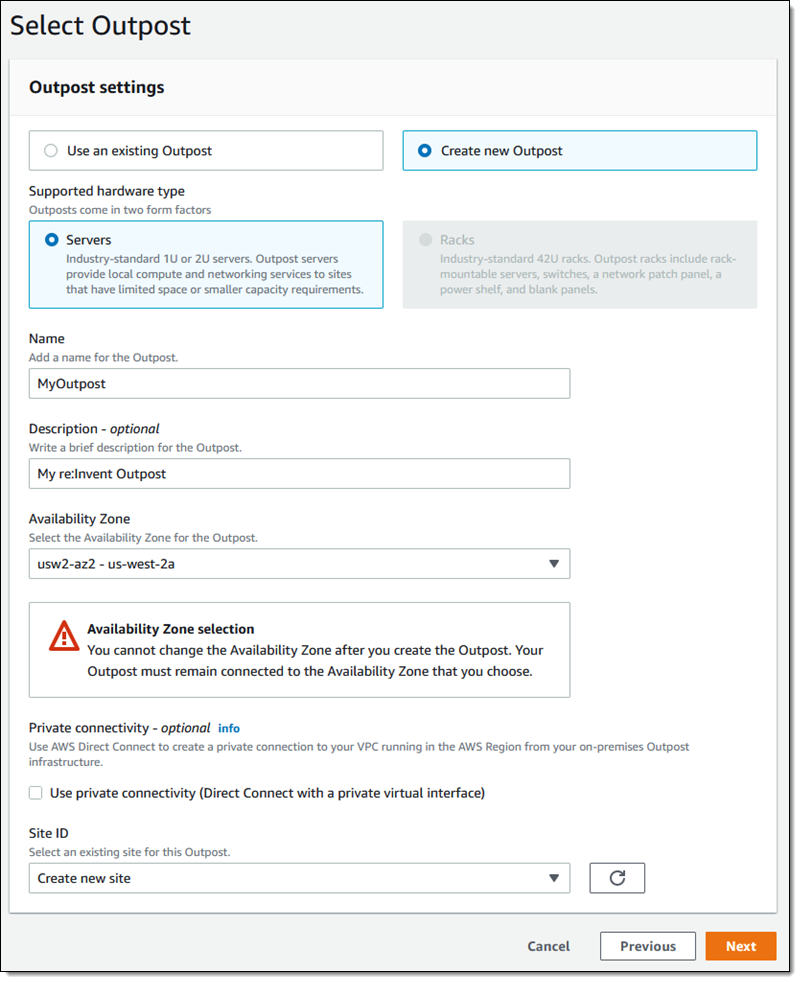
Then I create a new Outpost:

And a new Site:

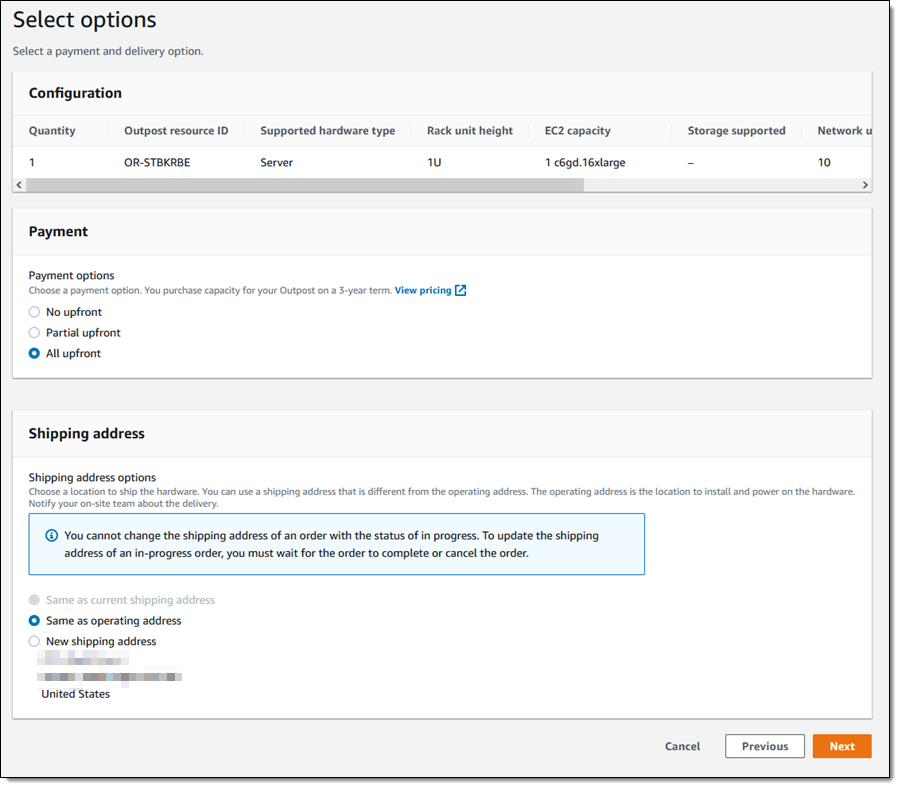
Then I review my payment options and select my shipping address:

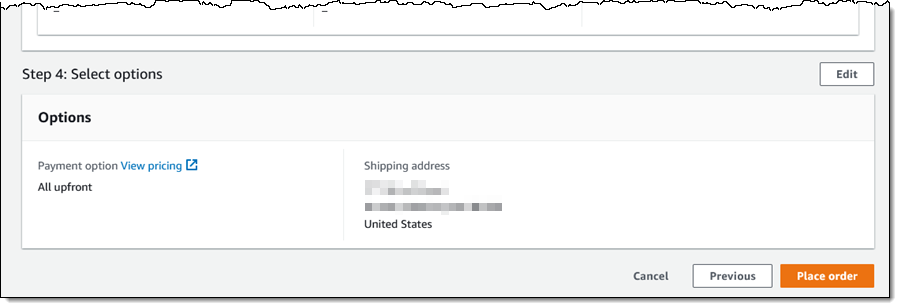
On the next page I review all of my options, click Place order, and await delivery:

In general, we expect to be able to deliver Outposts servers in two to six weeks, starting in the first quarter of 2022. After you receive yours, you or a member of your IT team can mount it in a 19″ rack or position it on a flat surface, cable it to power and networking, and power the device on. You then use a set of temporary AWS credentials to confirm the identity of the device, and to verify that the device is able to use DHCP to obtain an IP address. Once the device has established connectivity to the designated AWS parent region, we will finalize the provisioning of EC2 instance capacity and make it available to you.

After that, you are ready to launch instances and to deploy your on-premises applications.

We will monitor hardware performance and will contact you if your device is in need of maintenance. We will ship a replacement device for arrival within 2 business days. You can migrate your workloads to a redundant device, and use tracking information & notifications to track delivery status. When the replacement arrives, you install it and then destroy the physical security key in the old one before shipping it back to AWS.

Outposts API Update
We are also enhancing the Outposts API as part of this launch. Here are some of the new functions:

ListCatalogItem – Get a list of items in the Outposts catalog, with optional filtering by EC2 family or supported storage options.

GetCatalogItem – Get full information about a single item in the Outposts catalog.

GetSiteAddress – Get the physical address of a site where an Outposts rack or server is installed.

You can use the information returned by GetCatalogItem to place an order that contains the desired quantity of one or more catalog items.

Things to Know
Here are a couple of important things to know about Outposts servers:

Availability – Outposts servers are available for order to most locations where Outposts racks are available (currently 23 regions and 49 countries), with more to follow in 2022.

Ordering at Scale – I showed you the console-based ordering process above, and also gave you a glimpse at the Outposts API. If you need hundreds or thousands of devices, get in touch and we will give you a template that you can fill in and then upload.

re:Invent 2021 Outposts Server Selfie Challenge
If you attend AWS re:Invent, be sure to visit the AWS Hybrid kiosk in the AWS Booth (#1719) to see the new Outposts Servers up close and personal. While you are there, take a fun & creative selfie, tag it with #AWSOutposts & #AWSPromotion, and share it on Twitter. I will post my three favorites at the end of the show!

Jeff;

Announcing Amazon SageMaker Canvas – a Visual, No Code Machine Learning Capability for Business Analysts

Post Syndicated from Alex Casalboni original https://aws.amazon.com/blogs/aws/announcing-amazon-sagemaker-canvas-a-visual-no-code-machine-learning-capability-for-business-analysts/

As an organization facing business problems and dealing with data on a daily basis, the ability to build systems that can predict business outcomes becomes very important. This ability lets you solve problems and move faster by automating slow processes and embedding intelligence in your IT systems.

But how do you make sure that all teams and individual decision makers in the organization are empowered to create these machine learning (ML) systems at scale, and without depending on other data science and data engineering teams? As a business user or data analyst, you’d like to build and use prediction systems based on the data that you analyze and process every day, without having to learn about hundreds of algorithms, training parameters, evaluation metrics, and deployment best practices.

Today, I’m excited to announce the general availability of Amazon SageMaker Canvas, a new visual, no code capability that allows business analysts to build ML models and generate accurate predictions without writing code or requiring ML expertise. Its intuitive user interface lets you browse and access disparate data sources in the cloud or on-premises, combine datasets with the click of a button, train accurate models, and then generate new predictions once new data is available.

SageMaker Canvas leverages the same technology as Amazon SageMaker to automatically clean and combine your data, create hundreds of models under the hood, select the best performing one, and generate new individual or batch predictions. It supports multiple problem types such as binary classification, multi-class classification, numerical regression, and time series forecasting. These problem types let you address business-critical use cases, such as fraud detection, churn reduction, and inventory optimization, without writing a single line of code.

SageMaker Canvas in Action
Imagine that I’m an e-commerce manager who needs to predict whether or not a product will be shipped on time. The datasets at my disposal consist of a product catalog and the historical shipping dataset, both in CSV format.

First, I enter the SageMaker Canvas application where all of my models and datasets are created and inspected.

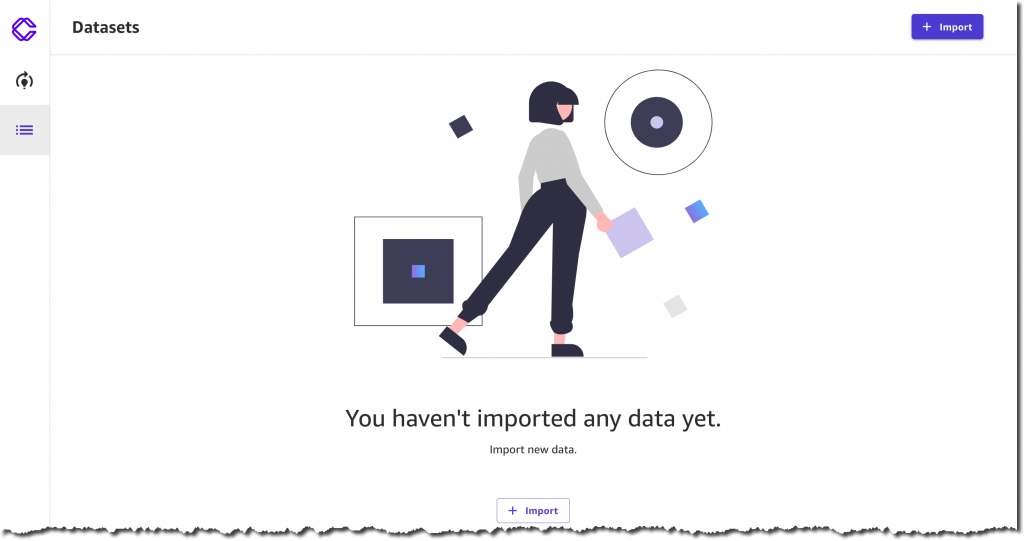
I select Import, and upload two CSV files: ProductData.csv and ShippingData.csv. I have 120 products and 10,000 shipping records.

I could also fetch data from Amazon Simple Storage Service (Amazon S3) or connect to other cloud or on-premises data sources, such as Amazon Redshift or Snowflake. For this use case, I prefer to upload 1.6 MB of data directly from my computer.

Before confirming the import, I have a chance to preview the two datasets, their columns, and their respective values. For example, each product has a ComputerBrand, ScreenSize, and PackageWeight. In addition to useful columns such as ShippingOrigin, OrderDate, and ShippingPriority, each record in the shipping dataset also contains OnTimeDelivery, which is either On Time or Late. This column will be used by SageMaker Canvas to generate a prediction model based on historical data.

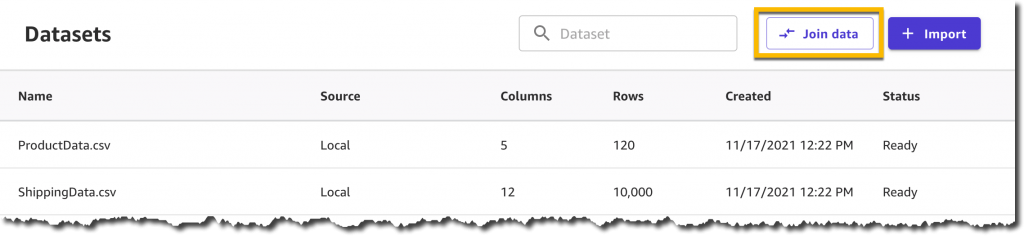
After a few seconds of processing, the datasets are ready, and I decide to join them to create a single dataset containing both product and shipping information. This is an optional step that often lets you increase the precision of a prediction model.

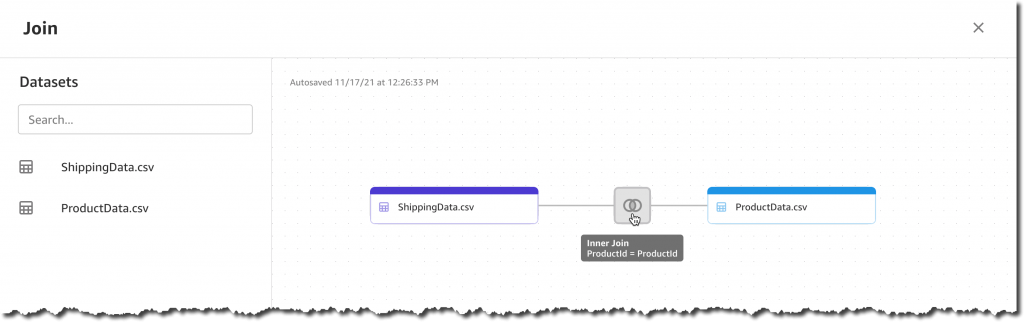
Now I can simply drag and drop the two datasets: SageMaker Canvas will automatically identify the shared ProductId column and apply an Inner Join transformation.

The join preview lets me visualize the resulting columns, identify missing or invalid values, and optionally deselect unwanted columns.

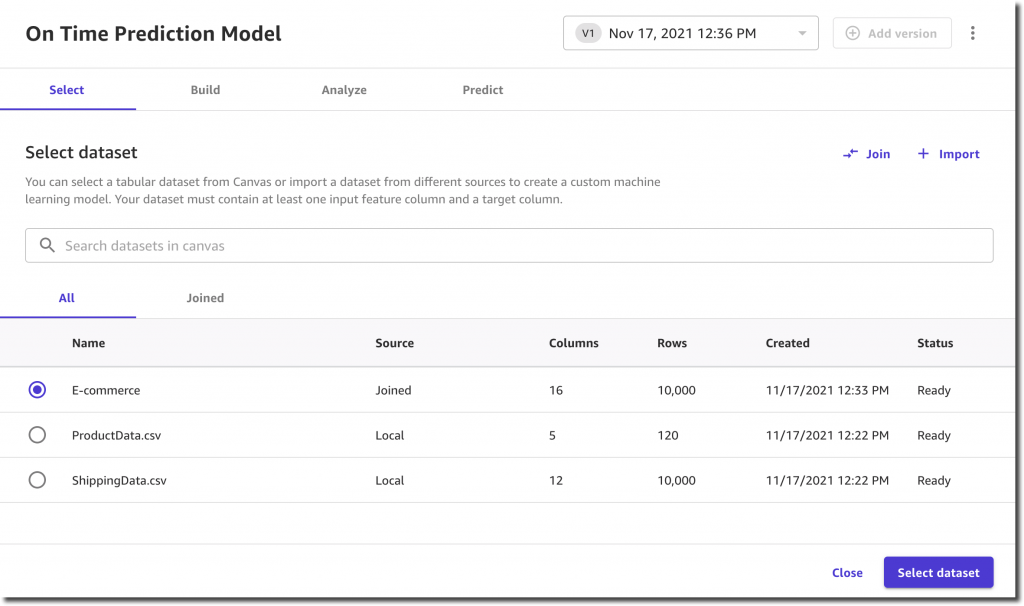
I select Save joined data and provide a new name for this joined dataset, which now includes 16 columns and 10,000 records.

Next, I want to create a model and start by selecting New model in the Models section on the left menu. I call it On Time Prediction Model.

The first step is selecting a dataset.

I select a target column that my model will predict: OnTimeDelivery.

SageMaker Canvas shows me the value distribution and already recommends the most appropriate model type: two categories classification.

Before proceeding with the model training, I have the option to generate an analysis report. This analysis gives me two very important pieces of information: the estimated accuracy and the impact of each column.

The estimated accuracy of 99.9% gives me confidence, but then I notice that the highest impact is provided by the ActualShippingDays column. Unfortunately, this column is not available in advance and I can’t use it for my predictions. So I deselect it and run the analysis again.

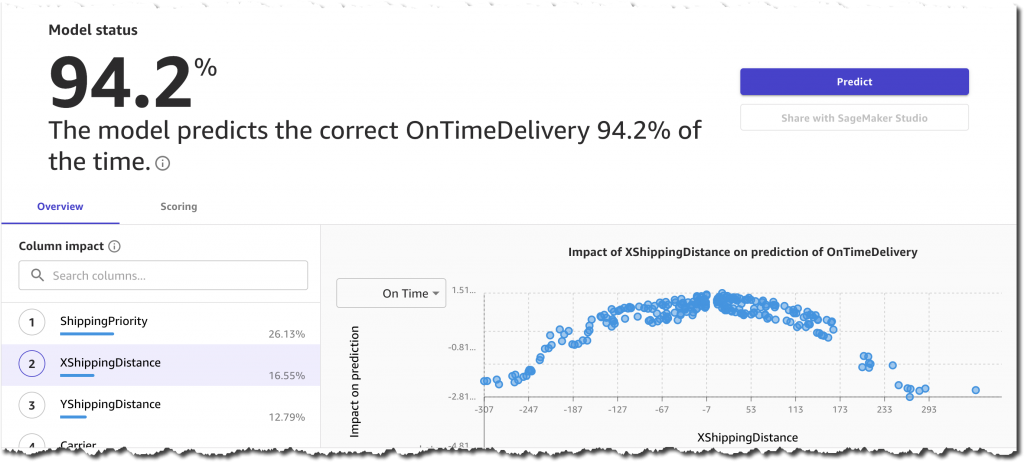
The new estimated accuracy is 94.2%, which is still pretty high. The most impactful columns are ShippingPriority, YShippingDistance, XShippingDistance, and Carrier. This is great because all of this information is available in advance and can be used for a prediction. On the other hand, product-related columns, such PackageWeight and ScreenSize, have very small impacts on the prediction. This means that in the future I could simplify the overall process by feeding only shipping information into the training and prediction phases.

I’m happy with the analysis insights. Therefore, I decide to proceed and build a prediction model by selecting the Standard build option.

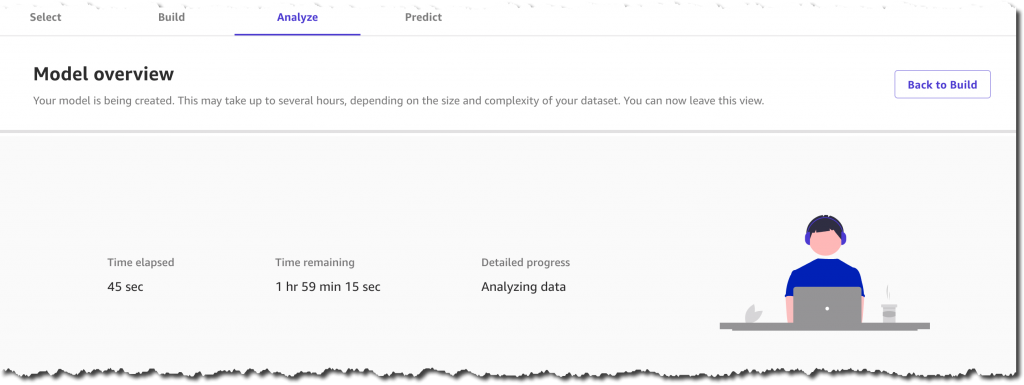
Now I can go for a walk, attend a few productive meetings, or simply spend some time with family. SageMaker Canvas is doing all of the work for me, training hundreds of models behind the scenes. It will select the best performing one, so that I can start generating accurate predictions in a couple of hours. Of course, the training duration will vary depending on the dataset size and problem type.

After about an hour and a half, the model is ready and the console lets me analyze its accuracy and the column impacts visually. I’m also happy to see that the model predicts the correct value 95.8% of the time, which is even higher than the estimated accuracy.

Optionally, I could also inspect advanced metrics such as Precision, Recall, F1 Score, and so on. These metrics help me understand how the model is performing and what kind of false positives and false negatives I can expect from this model.

From here, I could share the model into Amazon SageMaker Studio or continue using the Canvas UI to generate new predictions.

I decide to continue with the intuitive UI and select Predict. Now I can work with individual records or with a dataset for batch predictions.

When selecting Single prediction, SageMaker Canvas simplifies my life and lets me start from an existing record. I modify the column values and get immediate feedback on the prediction and the corresponding feature importance.

This quick feedback loop and intuitive UI allows me to use the ML model without having to write custom code. In case I decide to integrate the model into an automated production system, the Amazon SageMaker Studio integration lets me share the model easily with other data scientists in my team.

Generally Available Today
SageMaker Canvas is generally available in US East (Ohio), US East (N. Virginia), US West (Oregon), Europe (Frankfurt), and Europe (Ireland). You can start using it with your local datasets, as well as data already stored on Amazon S3, Amazon Redshift, or Snowflake. With just a few clicks, you’ll prepare and join your datasets, analyze estimated accuracy, verify which columns are impactful, train the best performing model, and generate new individual or batch predictions. We’re excited to hear your feedback and help you solve even more business problems with ML.

Alex

Thanksgiving’s biggest online shopping day was Cyber Monday, but other days were close behind

Post Syndicated from João Tomé original https://blog.cloudflare.com/thanksgivings-biggest-online-shopping-day-was-cyber-monday-but-other-days-were-close-behind/

Thanksgiving’s biggest online shopping day was Cyber Monday, but other days were close behind

Thanksgiving’s biggest online shopping day was Cyber Monday, but other days were close behind

November comes, the temperatures start to get colder for most of the planet’s population (87% live in the Northern Hemisphere) and many are also starting to prepare for the festive season. That also brings significant changes in Internet traffic, most notably the online shopping kind of traffic.

So, what were the November days that e-commerce websites had the most traffic in the US and what about worldwide? Is humanity using more mobile Internet at this time? And what are the most popular days online — is Black Friday the winner?

We’ll dig into those questions using Cloudflare Radar. E-commerce is expanding and at an all-time high, especially after the pandemic accelerated the digital transformation process (e-commerce had a 32.4% increase in sales in the US in 2020 and is expected to grow this year).

Cyber Monday, a ‘last minute’ winner

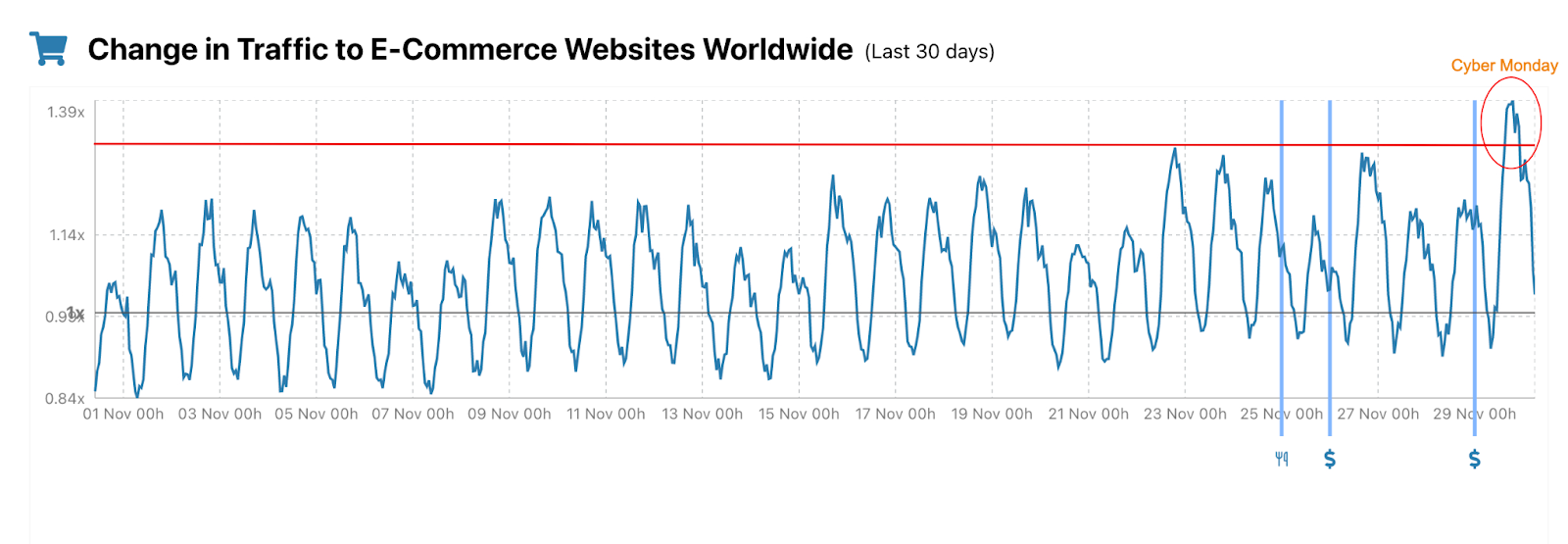
Let’s start with e-commerce — we added a chart to Radar that shows trends for e-commerce by country. The worldwide trend is pretty evident: Cyber Monday, the day for supposedly last-minute discounts, was the clear winner.

#1. Cyber Monday, November 29.

#2. Monday, November 23.

#3. Black Friday, November 26 — November 24 is pretty close to Black Friday. All in all a very good week in terms of e-commerce traffic.

Thanksgiving’s biggest online shopping day was Cyber Monday, but other days were close behind

US: November e-commerce traffic ‘rain’

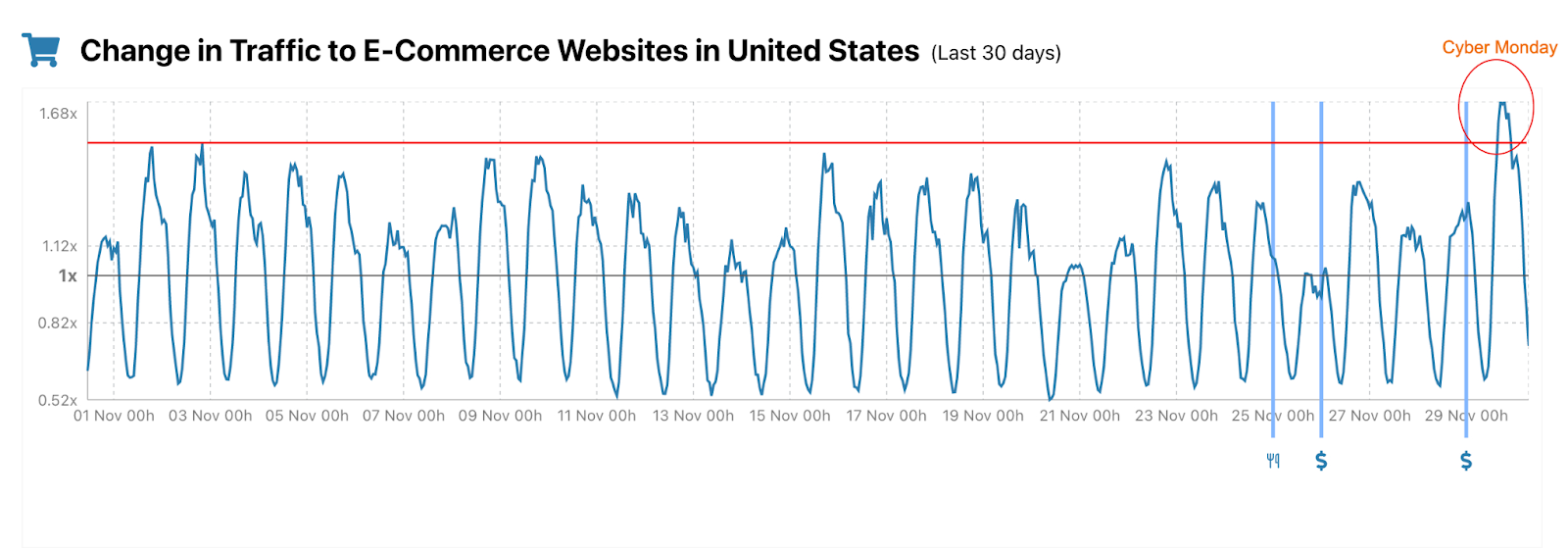
When we focus on the United States, the country that instituted Black Friday (the day after US Thanksgiving has since become a “retail bonanza” in other countries), the trend is a little different when we look to the full month of November.

#1. Cyber Monday, November 29.

#2. Monday, November 2.

#3. Sunday, November 1.

Thanksgiving’s biggest online shopping day was Cyber Monday, but other days were close behind

The Black Friday week definitely had a big impact on e-commerce traffic, but besides the clear winner, Cyber Monday, the podium was actually completed with the first two days in November. Those days have a big traffic peak, but the Black Friday week has more sustained traffic over five days.

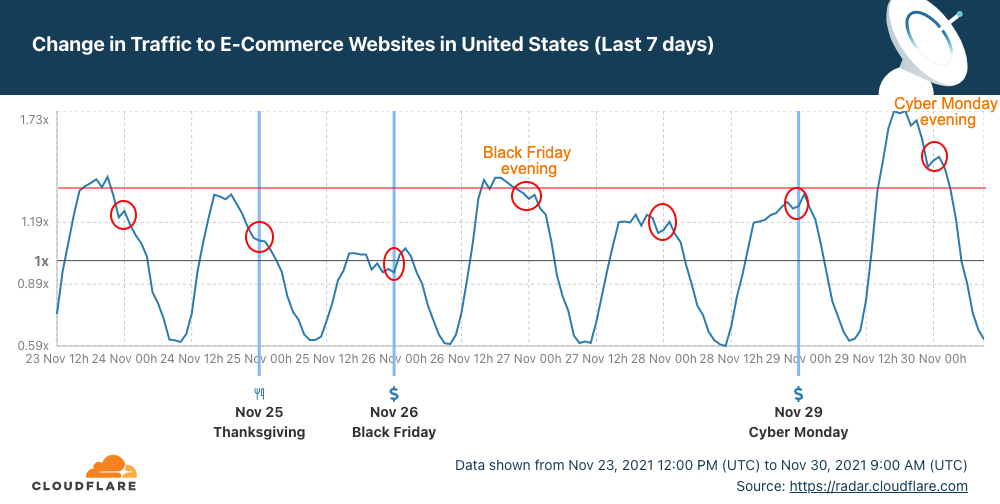
When we look just at last week, Black Friday isn’t actually the most popular day, it’s Monday, November 22 — that isn’t surprising given that shoppers also “returned to stores” on Black Friday 2021 and didn’t do everything online.

Despite this, Black Friday 2021 had definitely more sustained traffic throughout the day. The line in the next chart stays up on November 26 (Black Friday) for several hours after 12:00 UTC, early morning in the US, more than in the previous days.

Thanksgiving’s biggest online shopping day was Cyber Monday, but other days were close behind

For example, when we look at the 00:00 UTC mark in those red circles (19:00 US East Coast time; 16:00 US West Coast time), Black Friday evening was the most popular evening of the week — even more than November 22. In the past few days, only Cyber Monday had (a lot) more traffic than Black Friday.

And we can also notice the “pause” in online shopping for Thanksgiving Day (we wrote a blog post about that).

2021: How about the UK, France, Germany or India?

With our new Radar tool for e-commerce websites, everyone can see the trends for their country looking back to the previous seven or 30 days. We can give some interesting examples by looking at some countries.

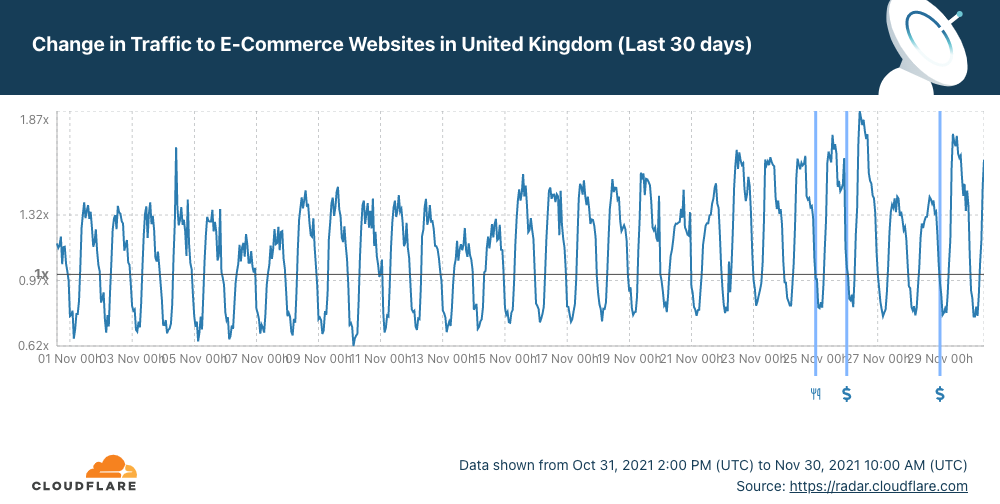
In the UK, for example, the most popular day was Black Friday, followed by Cyber Monday.

Thanksgiving’s biggest online shopping day was Cyber Monday, but other days were close behind

In Germany, Black Friday 2021, followed by Cyber Monday, were the most popular days although there’s a bigger traffic peak on November 2.

In the neighbourhood, ‘down’ in France, the most popular days for e-commerce were Thursday, November 18, and Tuesday, November 23. Those days were even bigger than Black Friday or Cyber Monday — there’s also a clear sustained increase in traffic in the Black Friday week.

Now let’s ‘travel’ to India, the fastest growing online retail market in the world, which also had the Black Friday week as the best week of the month for online shopping. Cyber Monday was the most popular day, followed by Wednesday, November 24, and also Black Friday.

One exception seems to be Japan. The start of the Black Friday week and the end of the previous week were the better periods for online shopping traffic — November 18, 23 and 20 were much better days than Black Friday or Cyber Monday.

Thanksgiving’s biggest online shopping day was Cyber Monday, but other days were close behind

The mobile traffic percentage rose by the end of November

Recently blogged about where mobile traffic is the most and least popular in the world and also how in September when most students go back to school (and people go back to work) mobile usage goes down. So mobile trends shift with human habits.

So how about November? If we look at the worldwide trend, it’s pretty clear that after Sunday, November 22, the mobile traffic percentage went up — Internet traffic from mobile devices represented 55% of the total in the past week.

We can also see in the next chart that Black Friday, November 26, saw an increase of more than 4% in the mobile traffic percentage, compared to the same period of the previous month. So, people were using their mobile devices a lot more to go online — 4% more.

Thanksgiving’s biggest online shopping day was Cyber Monday, but other days were close behind

Now let’s go to the US, where Thanksgiving (as we explained before) had a big influence on Internet traffic. That trend is even more pronounced, specifically on Thanksgiving day, November 25 (mobile traffic percentage grew more than 6%), but also on Black Friday, November 26. At the weekend mobile traffic went back down.

Thanksgiving’s biggest online shopping day was Cyber Monday, but other days were close behind

And remember: you can keep an eye on Cloudflare Radar to monitor how we see Internet traffic globally and in every country.

Amazon Kinesis Data Streams On-Demand – Stream Data at Scale Without Managing Capacity

Post Syndicated from Marcia Villalba original https://aws.amazon.com/blogs/aws/amazon-kinesis-data-streams-on-demand-stream-data-at-scale-without-managing-capacity/

Today we are launching Amazon Kinesis Data Streams On-demand, a new capacity mode. This capacity mode eliminates capacity provisioning and management for streaming workloads.

Kinesis Data Streams is a fully-managed, serverless service for real-time processing of streamed data at a massive scale. Kinesis Data Streams can take any amount of data, from any number of sources, and scale up and down as needed. Creating a new data stream is easy, since we announced Kinesis Data Streams in November 2013. To get started, you only need to specify the number of shards with which you must provision your stream.

Shards are the way to define capacity in Kinesis Data Streams. Each shard can ingest 1 MB/s and 1,000 records/second and egress up to 2 MB/s. You can add or remove shards of the stream using Kinesis Data Streams APIs to adjust the stream capacity according to the throughout needs of their workloads. This lets you make sure that producer and consumer applications don’t experience any throttling.

As customers adopt data streaming broadly, workloads with data traffic that can increase by millions of events in a few minutes are becoming more common. For these volatile traffic patterns, customers carefully plan capacity, monitor throughput, and in some cases develop processes that automatically change the Kinesis Data Streams stream capacity.

Kinesis Data Streams On-Demand Mode
That is why today we are announcing Kinesis Data Streams On-demand. This new capacity mode eliminates the need for provisioning and managing the capacity for streaming data. Using Kinesis Data Streams On-demand automatically scales the capacity in response to varying data traffic. Customers are charged per gigabyte of data written, read, and stored in the stream, in a pay-per-throughput fashion.

Data streams in the on-demand mode have the same high durability, high availability, low latency, security, and deep AWS integrations that Kinesis Data Streams already provides. Moreover, there are no new APIs to write or read data. All existing Kinesis Data Streams integrations work in the on-demand mode.

Kinesis Data Streams uses the partition key to distribute data across shards. That is why when using Kinesis Data Streams On-demand, you still must specify a partition key for each record to write data into a data stream, as you do today in Kinesis Data Streams using the provisioned mode. In Kinesis Data Streams On-demand, the data stream automatically adapts to handle uneven data distribution patterns. But you must be careful that no partition key exceeds a shard’s limits. If this happens, then you will receive write throttles, and then you can retry these requests.

When a new data stream is created using Kinesis Data Streams On-demand, it gets created with the default capacity of 4 MB/s and 4,000 records per second for writes. Kinesis Data Streams On-demand can automatically scale up to 200 MB/s and 200,000 records per second for writes.

Kinesis Data Streams On-demand accommodates up to double its previous peak write throughput observed in the last 30 days. As your data stream’s write throughput hits a new peak, Kinesis Data Streams automatically scales the stream’s capacity.

For example, if your data stream has a write throughput that varies between 10 MB/s and 40 MB/s, Kinesis Data Streams will make sure that you can easily burst to double the peak—80 MB/s. And, if later on that same data stream reaches a new peak of 50 MB/s, then Kinesis Data Streams will make sure that there is enough capacity to ingest 100 MB/s. However, write throttling can occur if your traffic grows more than double the previous peak in less than 15 minutes.

When to Use Kinesis Data Streams On-demand
On-demand mode is great for customers that have an unknown or variable workload, or who simply don’t want to deal with capacity management. On-demand mode works best for workloads that have even partition key distribution. For example, you run a mobile game that has variable traffic through the week or day, as customers play mostly on nights or weekends. Or, you run a streaming platform that hosts live shows, and you see a sudden increase in demand depending on the guests you have.

In addition, you can switch between on-demand and provision mode twice a day. For example, you run an e-commerce site with predictable traffic. But, starting next month, there will be many marketing campaigns launched globally. You don’t know the impact that those will have on the site traffic. Switch your Kinesis Data Streams to on-demand mode, and now you can enjoy the automated capacity planning and management for your data streams.

Get Started with Kinesis Data Streams On-demand
Create a new data stream with Kinesis Data Streams On-demand from the AWS console, AWS SDKs, AWS Command Line Interface (CLI), and AWS CloudFormation.

To create one from the console, visit the Kinesis console and Create data stream. When selecting the capacity mode, select On-demand.

Creating a data stream

At the end of the page, all of the settings for the new data stream are presented. These settings can be changed after the data stream has been created.

Data stream settings

Let’s See This in Action!
For this demo, I want to show you how the new Kinesis Data Streams capability works. This situation is best described if you at look at the following Amazon CloudWatch graphs. The green line represents the bytes ingested successfully into the stream, and the red line shows the percentage of traffic that is throttled.

First, we will start with a stream provisioned with five shards. For the first three minutes, we are sending a load of 4 MB/s. You can see that the stream can handle the load.

At the time stamp 21:19, we increase the load to 12 MB/s. Now the stream cannot handle the load, and the throttles start (the red line starts climbing up to 60 percent of request being throttled).

Increase the load on a provisioned stream

At the time stamp 21:23, we change the stream capacity from provisioned to on-demand. You can do that on-the-fly without affecting the stream. See that it takes a very short time for the stream to handle the load when converting from one capacity mode to the other.

In a few minutes (time stamp 21:24) the throttles start to drop as the stream starts scaling up. The stream capacity doubles to 10 shards first (time stamp 21:26), and the stream keeps scaling up until each shard has a load of less than 0.5 MB/s. In this way, if the stream suddenly receives double the amount of load, then it has the capacity ready to handle it.

Change to on-demand mode

At the time stamp 21:26, the load in the stream is increased to 18 MB/s. You can see the green line climbing to 350,000 records – there are no throttles, and the stream ends this demo with 40 open shards. This means that if suddenly the stream receives a load of 40 MB/s, then it could handle it with no problem.

Increase the load

Available Now!
The Amazon Kinesis Data Streams On-demand is available globally in all commercial Regions.

You can learn more about the capacity modes in the Amazon Kinesis Data Streams Developer Guide.

Marcia

Introducing Amazon Redshift Serverless – Run Analytics At Any Scale Without Having to Manage Data Warehouse Infrastructure

Post Syndicated from Danilo Poccia original https://aws.amazon.com/blogs/aws/introducing-amazon-redshift-serverless-run-analytics-at-any-scale-without-having-to-manage-infrastructure/

We’re seeing the use of data analytics expanding among new audiences within organizations, for example with users like developers and line of business analysts who don’t have the expertise or the time to manage a traditional data warehouse. Also, some customers have variable workloads with unpredictable spikes, and it can be very difficult for them to constantly manage capacity.

With Amazon Redshift, you use SQL to analyze structured and semi-structured data across data warehouses, operational databases, and data lakes. Today, I am happy to introduce the public preview of Amazon Redshift Serverless, a new capability that makes it super easy to run analytics in the cloud with high performance at any scale. Just load your data and start querying. There is no need to set up and manage clusters. You pay for the duration in seconds when your data warehouse is in use, for example, while you are querying or loading data. There is no charge when your data warehouse is idle.

Amazon Redshift Serverless automatically provisions the right compute resources for you to get started. As your demand evolves with more concurrent users and new workloads, your data warehouse scales seamlessly and automatically to adapt to the changes. You can optionally specify the base data warehouse size to have additional control on cost and application-specific SLAs.

With the new serverless option, you can continue to query data in other AWS data stores, such as Amazon Simple Storage Service (Amazon S3) data lakes and Amazon Aurora and Amazon Relational Database Service (RDS) databases.

Amazon Redshift Serverless is ideal when it is difficult to predict compute needs such as variable workloads, periodic workloads with idle time, and steady-state workloads with spikes. This approach is also a good fit for ad-hoc analytics needs that need to get started quickly and for test and development environments.

Let’s see how this works in practice.

Using Amazon Redshift Serverless
I go to the Amazon Redshift console and choose the new serverless option. The first time, I set up the serverless endpoint and configure networking and security.

I confirm the default settings that use all subnets in my default Amazon Virtual Private Cloud (VPC) and its default security group. Data is always encrypted, and I use the default AWS-owned key. Optionally, I can customize all settings. I can associate now or later the AWS Identity and Access Management (IAM) roles to give permissions to access other AWS resources, for example, to be able to load data from an S3 bucket. The configuration of the serverless endpoint will be shared by all my serverless data warehouses in the same AWS account and Region.

Console screenshot.

To query data, I use Amazon Redshift Query Editor V2, a new free web-based tool that we made available a few months back. The query editor provides quick access to a few sample datasets to make it easy to learn Amazon Redshift’s SQL capabilities: TPC-H, TPC-DS, and tickit, a dataset containing information on ticket sales for events.

For a quick test, I use the tickit sample dataset so I don’t need to load any data. I prepare a query to get the list of tickets sold per date, sorted to see the dates with more sales first:

SELECT caldate, sum(qtysold) as sumsold
FROM   tickit.sales, tickit.date
WHERE  sales.dateid = date.dateid 
GROUP BY caldate
ORDER BY sumsold DESC;

By using the web-based query editor, I don’t need to configure a SQL client or set up the network permissions to reach the serverless endpoint. Instead, I just write my SQL query and run it.

Console screenshot.

I am a visual person. I enable the Chart option on the right of the result table and select a bar chart.

Console screenshot.

Satisfied with the clarity of the chart, I export it as an image file. In this way, I can quickly share it or include it in a report.

Bar chart

Amazon Redshift Serverless supports all rich SQL functionality of Amazon Redshift such as semi-structured data support. I can use any JDBC/ODBC-compliant tool or the Amazon Redshift Data API to query my data. To migrate data, I can take a snapshot of an Amazon Redshift provisioned cluster and restore it as serverless. Then, I just need to update my SQL applications to use the new serverless endpoint.

Availability and Pricing
Amazon Redshift Serverless is available in public preview in the following AWS Regions: US East (N. Virginia), US West (N. California, Oregon), Europe (Frankfurt, Ireland), Asia Pacific (Tokyo).

With Amazon Redshift Serverless, you pay separately for the compute and storage you use. Compute capacity is measured in Redshift Processing Units (RPUs), and you pay for the workloads in RPU-hours with per-second billing. For storage, you pay for data stored in Amazon Redshift-managed storage and storage used for snapshots, similar to what you’d pay with a provisioned cluster using RA3 instances.

To control your costs, you can specify usage limits and define actions that Amazon Redshift automatically takes if those limits are reached. You can specify usage limits in RPU-hours and associated with a daily, weekly, or monthly duration. Setting higher usage limits can improve the overall throughput of the system, especially for workloads that need to handle high concurrency while maintaining consistently high performance.

Compute resources automatically shutdown behind the scenes when there is no activity and resume when you are loading data, or there are queries coming in. When accessing your S3 data lake via the new serverless endpoint, you do not pay for Amazon Redshift Spectrum separately. You have a unified serverless experience and pay for data lake queries also in RPU-seconds. For more information, see the Amazon Redshift pricing page.

The serverless end point is configured at the AWS account level. If you have multiple teams or projects and want to manage costs separately, you can use separate AWS accounts. You can share data between your provisioned clusters and serverless endpoint and between serverless endpoints across accounts.

To help you get practice, we provide you upfront with $500 in AWS credits to try the Amazon Redshift Serverless public preview. You get the credits when you first create a database with Amazon Redshift Serverless. These credits are used to cover your costs for compute, storage, and snapshot usage of Amazon Redshift Serverless only.

Start using Amazon Redshift Serverless today to run and scale analytics without having to provision and manage data warehouse clusters.

Danilo

Announcing Amazon EMR Serverless (Preview): Run big data applications without managing servers

Post Syndicated from Damon Cortesi original https://aws.amazon.com/blogs/big-data/announcing-amazon-emr-serverless-preview-run-big-data-applications-without-managing-servers/

Today we’re happy to announce Amazon EMR Serverless, a new option in Amazon EMR that makes it easy and cost-effective for data engineers and analysts to run petabyte-scale data analytics in the cloud. With EMR Serverless, you can run applications built using open-source frameworks such as Apache Spark, Hive, and Presto, without having to configure, manage, optimize, or secure clusters. EMR Serverless automatically provisions and scales the compute and memory resources required by your applications, and you only pay for the resources that your applications use.

In this post, we discuss the benefits of EMR Serverless, walk you through the core concepts of EMR Serverless and how you can use it, and show you a quick demo.

Overview of EMR Serverless

Tens of thousands of customers use Amazon EMR, a managed service for running open-source analytics frameworks such as Apache Spark, Hive, and Presto, for large-scale data analytics applications. With Amazon EMR, you can provision clusters of any size in minutes. Amazon EMR automatically installs and configures the frameworks you choose, and provides a performance-optimized runtime that is compatible with and over twice as fast as standard open-source.

Amazon EMR customers have full control over cluster configuration. The ability to customize clusters allows you to optimize for cost and performance based on workload requirements. For example, you can use Amazon Elastic Compute Cloud (Amazon EC2) memory optimized instances to run SQL workloads with low latency, or use the EC2 Graviton2-based instances to improve performance. You can also use EC2 Spot Instances, which are integrated in Amazon EMR so that you can take advantage of unused EC2 capacity in the AWS Cloud to obtain instances at up to a 90% discount compared to On-Demand prices. If you run your applications on Kubernetes, you can use Amazon EMR on Amazon EKS to run your Amazon EMR analytics applications on Amazon Elastic Kubernetes Service (Amazon EKS) clusters.

However, tuning clusters for optimal cost and performance requires engineers to have deep knowledge of the underlying analytics frameworks. Furthermore, the specific compute and memory resources needed to optimally run applications depend on various factors, such as the schedule and complexity of data processing jobs and the volume of data being processed. When these characteristics change over time, you need to reevaluate and reconfigure clusters. In addition, administrators have to secure and monitor the clusters to ensure that they’re compliant with corporate security policies, and adjust security settings each time the cluster is reconfigured. Many customers don’t need this level of customization and control, and want a simpler way to process data using open-source frameworks on the Amazon EMR performance-optimized runtime.

With this in mind, we built EMR Serverless. With EMR Serverless, you can get all the benefits of running Amazon EMR, but with a serverless environment. We had the following goals in mind when we built EMR Serverless:

  • Provide a simpler experience – EMR Serverless is simple to use because you don’t have to configure, optimize, operate, or secure clusters. You don’t have to worry about instance types or cluster sizes, or about applying OS patches. You simply specify the framework and version that you want to use for your application, and submit your data processing jobs. You still get all the benefits that you expect out of Amazon EMR—open-source compatibility, open-source version currency, and performance-optimized runtime—but without the need to manage clusters.
  • No need to guess cluster sizes – EMR Serverless eliminates the need to right-size clusters for varying jobs and data sizes. With EMR Serverless, you create an application using an open-source framework version, and submit jobs to the application. EMR Serverless automatically adds and removes workers at different stages of processing your job. As a result, you don’t have to reconfigure when data volumes change, and you only pay for what your jobs require. You can control costs by specifying the minimum and maximum number of concurrent workers, and the VCPU and memory per worker.
  • Retain Amazon EMR’s performance-optimized runtime and open-source currency – EMR Serverless includes the Amazon EMR performance-optimized runtime for Apache Spark, Hive, and Presto. The Amazon EMR runtime is API-compatible and over twice as fast as standard open-source, so your jobs run faster and incur less compute costs.
  • Seamless integration with EMR Studio – EMR Serverless includes EMR Studio, which provides fully managed serverless Jupyter Notebooks and familiar open-source tools such as Spark UI and Tez UI to help you develop, visualize, and debug your applications.
  • Automatic and fine-grained scaling – EMR Serverless automatically scales up workers at each stage of processing your job and scales them down when they’re not required. You’re charged for aggregate vCPU, memory, and storage resources used from the time a worker starts running until it stops, rounded up to the nearest second with a 1-minute minimum. For example, your job may require 10 workers for the first 10 minutes of processing the job, and 50 workers for the next 5 minutes. With fine-grained automatic scaling, you only incur cost for 10 workers for 10 minutes and 50 workers for 5 minutes. As a result, you don’t have to pay for underutilized resources.
  • Resilience to Availability Zone failures – EMR Serverless is a Regional service. When you submit jobs to an EMR Serverless application, it can run in any Availability Zone in the Region. A job is run in a single Availability Zone to avoid performance implications of network traffic across Availability Zones. In case an Availability Zone is impaired, a job submitted to your EMR Serverless application is automatically run in a different (healthy) Availability Zone. When using resources in a private VPC, EMR Serverless recommends you specify the private VPC configuration for multiple Availability Zones so that EMR Serverless can automatically select a healthy Availability Zone.
  • Enable shared applications – When you submit jobs to an EMR Serverless application, you can specify the AWS Identity and Access Management (IAM) role that must be used by the job to access AWS resources such as Amazon Simple Storage Service (Amazon S3) objects. As a result, different IAM principals can run jobs on a single EMR Serverless application, and each job can only access the AWS resources that the IAM principal is allowed to access. This enables you to set up scenarios where a single application with a pre-initialized pool of workers is made available to multiple tenants wherein each tenant can submit jobs using a different IAM role but use the common pool of pre-initialized workers to immediately process requests.
  • Enable interactive applications – Interactive applications that allow data scientists and analysts to run interactive SQL queries for data exploration require a fast response time to user requests. For such interactive applications, EMR Serverless allows you to pre-initialize a pool of workers. You can start your EMR Serverless application and pre-initialize the pool of workers as soon as a user starts the application, and stop the application to stop workers when no interactive users are active. If processing user requests requires more workers than what have been pre-initialized, EMR Serverless automatically adds more workers up to the maximum concurrent limits that you specify. Therefore, by controlling the number of workers to pre-initialize and the maximum concurrent workers, you can optimize user experience and cost for your interactive applications.
  • Make it easy to switch from one deployment model to another – The same Amazon EMR releases are provided for applications using EMR clusters, Amazon EMR on EKS, and EMR Serverless. When you build an application using an Amazon EMR release (for example a Spark job using Amazon EMR release 6.4), you can choose to run it on an EMR cluster, Amazon EMR on EKS, or EMR Serverless without having to rewrite the application. This allows you to build applications for a given framework version, and retain the flexibility to change the deployment model based on future operational needs.

Core concepts

In this section, we discuss the core concepts in EMR Serverless: applications, jobs, workers, and pre-initialized workers.

Application

With EMR Serverless, you can create one or more applications that use open-source analytics frameworks. To create an application, you specify the open-source framework that you want to use (for example, Apache Spark or Apache Hive), the Amazon EMR release for the open-source framework version (for example, Amazon EMR release 6.4, which corresponds to Apache Spark 3.1.2), and a name for your application. After you create an application, you can submit data processing jobs or interactive requests to your application.

The following are a few examples where you may want to create multiple applications:

  • To use different open-source frameworks (for example, Hive or Spark)
  • To use different versions of open-source frameworks for different use cases (for example, use a newer version of Spark for a new application without having to upgrade older applications)
  • To perform A/B testing when upgrading from one version to another (for example, migrating from Spark 2.4 to Spark 3.1)
  • To maintain separate logical environments for test and production scenarios
  • To provide separate logical environments for different teams with independent cost controls and usage tracking
  • To logically separate different line-of-business applications (for example, finance vs. marketing)

Job

A job is a request submitted to an EMR Serverless application that is asynchronously run and tracked through completion. You can run multiple jobs concurrently in an application.

Workers

An EMR Serverless application internally uses workers to run your jobs. By default, each application uses workers with 4 VCPU, 30 memory, and 20 GB of local storage per worker. You have the ability to customize this configuration.

Pre-initialized workers

EMR Serverless provides an optional feature to pre-initialize workers when your application starts up, so that the workers are ready to process requests immediately when a job is submitted to the application. Pre-initialized workers allow you to maintain a warm pool of workers for the application so that it can provide a sub-second response to start processing requests.

Common usage patterns applied to EMR Serverless

Now let’s examine some common usage scenarios and how EMR Serverless provides you a simple solution.

Pattern #1: Data pipelines

Data pipelines are the backbone of your analytics workloads. A common pattern with data pipelines is to start a cluster, run a job, and stop the cluster when the job is complete. Because data is separated from compute, the inputs and outputs for each job are persisted separately from the cluster (for example, in Amazon S3). These steps are frequently automated using workflow orchestration applications such as Apache Airflow. You can also use AWS services such as AWS Step Functions and AWS Managed Workflows for Apache Airflow (Amazon MWAA) to create such workflows.

Although automating these steps isn’t complex, data engineers have to spend time determining the appropriate EC2 instance and cluster size. They have to determine the Availability Zone where the cluster is run, and handle failover. They have to test their applications when adopting OS updates. When data sizes change over time, they have to resize clusters, or use features like Amazon EMR managed scaling that automatically resize clusters. EMR Serverless provides a simpler solution by eliminating the need for you to handle these scenarios. You simply choose the open-source framework and version for your application, and submit jobs. You don’t have to worry about instance selection, cluster sizes, cluster startup, cluster resize, stopping nodes, Availability Zone failover, or OS updates.

Pattern #2: Shared clusters

Another common pattern is for teams to use a shared long-running cluster to run multiple jobs. In this case, engineers implement queues in Apache YARN for different workloads on a common cluster, and set up rules to automatically scale the cluster up or down based on overall workload. With Amazon EMR on EC2 clusters, you can use Amazon EMR managed scaling, a feature that automatically scales clusters up or down depending on the workload. With EMR Serverless, workers are assigned to each job when required, so your jobs get the resources they need. Moreover, because you only pay for the workers that your jobs require, you don’t incur cost for over-provisioned resources. Finally, because each job can specify the IAM role that should be used to access AWS resources when running the job, you don’t have to set up complex configurations to manage queues and permissions.

Pattern #3: Interactive workloads

A third pattern of use is when teams keep a cluster of instances available to support interactive analysis. In this case, the cluster is set up and initialized with applications that wait for interactive user requests. Applications are pre-initialized so that they can immediately start processing user requests and provide an interactive user experience. EMR Serverless enables this scenario without requiring you to manage clusters. You can specify the number of workers that you want to pre-initialize when you start an EMR Serverless application. Subsequently, when users submit requests, the pre-initialized workers can be used to immediately process user requests. If processing the user requests requires more workers than what you have chosen to pre-initialize, EMR Serverless automatically adds more workers (up to the maximum concurrent limit that you specify). When the requests are processed, EMR Serverless automatically reverts back to maintaining the pre-initialized workers that you specified. You can control when the pre-initialized workers start by controlling when to start and stop your EMR Serverless application. For example, you can start your application when users begin interactive analysis and turn it off when there are no user requests and the application remains idle.

Demo

Conclusion

In this post, we discussed the core concepts and common usage patterns of EMR Serverless, and showed you a quick demo. EMR Serverless is in Preview, in which you can run workloads using Spark 3.1.2 and Hive 2.0 using the API, AWS Command Line Interface (AWS CLI), and SDK. Sign up for now, and for more information, see EMR Serverless documentation.


About the Authors

Damon Cortesi is a Principal Developer Advocate with Amazon Web Services.

Mehul Y. Shah is the GM for Amazon EMR.

Abhishek Sinha is a Principal Product Manager at Amazon Web Services.

Active Exploitation of Apache HTTP Server CVE-2021-40438

Post Syndicated from Caitlin Condon original https://blog.rapid7.com/2021/11/30/active-exploitation-of-apache-http-server-cve-2021-40438/

Active Exploitation of Apache HTTP Server CVE-2021-40438

On September 16, 2021, Apache released version 2.4.49 of HTTP Server, which included a fix for CVE-2021-40438, a critical server-side request forgery (SSRF) vulnerability affecting Apache HTTP Server 2.4.48 and earlier versions. The vulnerability resides in mod_proxy and allows remote, unauthenticated attackers to force vulnerable HTTP servers to forward requests to arbitrary servers — giving them the ability to obtain or tamper with resources that would potentially otherwise be unavailable to them.

Since other vendors bundle HTTP Server in their products, we expect to see a continued trickle of downstream advisories as third-party software producers update their dependencies. Cisco, for example, has more than 20 products they are investigating as potentially affected by CVE-2021-40438, including a number of network infrastructure solutions and security boundary devices. To be exploitable, CVE-2021-40438 requires that mod_proxy be enabled. It carries a CVSSv3 score of 9.0.

Several sources have confirmed that they have seen exploit attempts of CVE-2021-40438 in the wild. As of November 30, 2021, there is no evidence yet of widespread attacks, but given httpd’s prevalence and typical exposure levels (and the fact that it’s commonly bundled across a wide ecosystem of products), it’s likely exploitation will continue — and potentially increase. Rapid7 and the community have analysis of this vulnerability in AttackerKB.

Affected versions

According to Apache’s advisory, all Apache HTTP Server versions up to 2.4.48 are vulnerable if mod_proxy is in use. CVE-2021-40438 is patched in Apache HTTP Server 2.4.49 and later.

Rapid7 Labs has observed over 4 million potentially vulnerable instances of Apache httpd 2.x:

Active Exploitation of Apache HTTP Server CVE-2021-40438

Mitigation guidance

Apache HTTP Server versions 2.4.49 and 2.4.50 included other severe vulnerabilities that are known to be exploited in the wild, so Apache httpd customers should upgrade to the latest version (2.4.51 at time of writing) instead of upgrading incrementally.

We advise paying close attention particularly to firewall or other security boundary product advisories and prioritizing updates for those solutions. NVD’s entry for CVE-2021-40438 includes several downstream vendor advisories.

Rapid7 customers

InsightVM and Nexpose customers can assess their exposure to CVE-2021-40438 with both authenticated and unauthenticated vulnerability checks.

NEVER MISS A BLOG

Get the latest stories, expertise, and news about security today.

AWS Lake Formation – General Availability of Cell-Level Security and Governed Tables with Automatic Compaction

Post Syndicated from Danilo Poccia original https://aws.amazon.com/blogs/aws/aws-lake-formation-general-availability-of-cell-level-security-and-governed-tables-with-automatic-compaction/

A data lake can help you break down data silos and combine different types of analytics into a centralized repository. You can store all of your structured and unstructured data in this repository. However, setting up and managing data lakes involve a lot of manual, complicated, and time-consuming tasks. AWS Lake Formation makes it easy to set up a secure data lake in days instead of weeks or months.

Today, I am excited to share the general availability of some new features that simplify even further loading data, optimizing storage, and managing access to a data lake:

  • Governed Tables – A new type of Amazon Simple Storage Service (Amazon S3) tables that makes it simple and reliable to ingest and manage data at any scale. Governed tables support ACID transactions that let multiple users concurrently and reliably insert and delete data across multiple governed tables. ACID transactions also let you run queries that return consistent and up-to-date data. In case of errors in your extract, transform, and load (ETL) processes, or during an update, changes are not committed and will not be visible.
  • Storage Optimization with Automatic Compaction for governed tables – When this option is enabled, Lake Formation automatically compacts small S3 objects in your governed tables into larger objects to optimize access via analytics engines, such as Amazon Athena and Amazon Redshift Spectrum. By using automatic compaction, you don’t have to implement custom ETL jobs that read, merge, and compress data into new files, and then replace the original files.
  • Granular Access Control with Row and Cell-Level Security – You can control access to specific rows and columns in query results and within AWS Glue ETL jobs based on the identity of who is performing the action. In this way, you don’t have to create (and keep updated) subsets of your data for different roles and legislations. This works for both governed and traditional S3 tables.

Using Governed Tables, ACID Transactions, and Automatic Compaction
In the Lake Formation console, I can enable governed data access and management at table creation. Automatic compaction is enabled by default, and it can be disabled using the AWS Command Line Interface (CLI) or AWS SDKs.

Console screenshot.

Governed tables have a manifest that tracks the S3 objects that are part of the table’s data. I can use the UpdateTableObjects API to keep the manifest updated when adding new objects to the table, and I can call it using the AWS CLI and SDKs. This API is implicitly used by the AWS Glue ETL library.

Moreover, I have access to new Lake Formation APIs to start, commit, or cancel a transaction. I can use these APIs to wrap data loading, data transformation, and output consistent and up-to-date data.

Using Row and Cell-Level Security
There are many use cases where, for a table, you want to restrict access to specific columns, rows, or a combination that depends on the role of the user accessing the data. For example, a company with offices in the US, Germany, and France can create a filter for analysts based in the European Union (EU) to limit access to EU-based customers.

Console screenshot.

The filter can enforce that some columns, such as date of birth (dob) and phone, are not accessible to those analysts. Moreover, access to individual rows can be filtered by using filter expressions. You can configure row filter expressions with a SQL-compatible syntax based on the open-source PartiQL language. In this case, only rows with country equal to Germany or France (country='DE' OR country='FR') are visible.

Console screenshot.

Availability and Pricing
These new features are available today in the following AWS Regions: US East (N. Virginia), US West (Oregon), Europe (Ireland), US East (Ohio), and Asia Pacific (Tokyo).

When querying governed tables, or tables secured with row and cell-level security, you pay by the amount of data scanned (with a 10MB minimum). When using governed tables, transaction metadata is charged by the number of S3 objects tracked, and you pay for the number of transaction requests. Automatic compaction is charged based on the data processed. For more information, see the AWS Lake Formation pricing page.

While implementing these features, we introduced a new Lake Formation Storage API that is integrated with tools such as AWS Glue, Amazon Athena, Amazon Redshift Spectrum, and Amazon QuickSight. You can use this storage API directly in your applications to query tables with a SQL-like syntax (joins are not supported) and get the benefits of governed tables and cell-level security.

See the detailed blog series published during the preview to learn more:

Effective data lakes using AWS Lake Formation

Take advantage of these new features to simplify the creation and management of your data lake.

Danilo

5 DevOps tips to speed up your developer workflow

Post Syndicated from Damian Brady original https://github.blog/2021-11-30-5-devops-tips-to-speed-up-your-developer-workflow/

TL;DR: From learning YAML to scripting with Bash, here are a few simple tips for developers who want to speed up their workflows.

From CI/CD to containerization management and server provisioning, DevOps gets a lot of buzz in tech today. You could even say that it’s a buzz … word.

As a developer, you might be part of a DevOps team, but you’re focused on building great software, not necessarily provisioning servers and managing containers.

Even still, a lot of what developers, DevOps engineers, and IT teams handle in today’s software development life cycle is focused on tools, testing, automations, and server orchestration. And, that’s even more true if you’re a team of one or engaging in a big open source project.

Here are five DevOps tips for any developer looking to work smarter and faster.

Tip #1: A little YAML can make frontend work easier

Initially released in 2001, YAML has become one of the defacto languages for a lot of declarative automation—and it’s commonly used in DevOps and development work for an array of frontend configurations, automations, and more.

YAML, which stands for Yet Another Markup Language, is a superset of JSON and is notable for being a human readable language. That means it focuses less on characters, like brackets, braces, and quotes ({}, [], “).

Here’s why this matters: Learning YAML (or even stepping up your YAML skills) makes it easier to store configurations for your own applications, like your settings in an easy-to-write and easy-to-read language.

For this reason, you’re likely to come across YAML files anywhere from enterprise development workflows to open source projects—and yes, you’ll see plenty of YAML files on GitHub (it powers a product we’re pretty fond of: GitHub Actions, but more on this later).

Whether you can apply YAML directly to your day-to-day dev workflows or leverage different tools that use YAML, there are some pretty big benefits to getting started with this language—or stepping up your YAML skills.

Looking to learn more about YAML? Try the Learn YAML in Y Minutes guide.

Tip #2: A few DevOps tools to keep you moving fast

Let’s clear up one thing first: “DevOps tools” is an umbrella term that covers everything from cloud platforms, server orchestration tools, code management, version control, and dozens of other things.

So when we talk about “DevOps tools,” we’re really talking about technologies that make it easier to write, test, host, and release software, as well as reduce any worries around unexpected failures.

Here are three “DevOps tools” that can speed up your workflows and let you focus on building great software.

Git

You’re on the GitHub Blog, so we’re pretty sure you’re familiar with Git as a version control system and distributed source code management tool. It’s a mainstay of developers and a popular DevOps tool.

Here’s why: Git makes version control easy and gives teams a straightforward way to collaborate, experiment with different branches, and merge new features into the main software branch.

Learn how Git works >

Cloud-hosted integrated development environments (IDE)

I know, I know, saying cloud-hosted integrated development environments, or cloud IDEs, out loud is a bit of a mouthful (thank you, marketing). But these platforms are something you should start exploring immediately, if you haven’t already.

Here’s why: Cloud IDEs are fully hosted developer environments that let you write, run, and debug code—and they make spinning up new, preconfigured environments fast. Do you need proof? We launched our own cloud IDE called Codespaces earlier this year and started using it internally to build GitHub. It used to take us up to 45 minutes to spin up new developer environments—now it takes 10 seconds :mindblown:.

Cloud IDEs give you a super simple way to quickly spin up new, pre-configured development environments (and disposable development environments). Also, since they’re hosted in the cloud, you don’t need to worry about how powerful the computer you’re coding on is (friendly shout out here goes to the intrepid folks who have started coding on tablets).

Picture this: Your laptop fries itself (which has happened to me once or twice). You might have versions of npm, tools for connecting to your cloud provider, and any number of other configurations that you just lost. If you use a cloud IDE, you can spin up an environment in the cloud with all of your configurations, and that’s a magical thing to see.

Learn how cloud IDEs work >

Containers

If you don’t want to use a cloud IDE, dev containers are something you can use locally or in the cloud. Containers have exploded in popularity over the past decade for their utility in microservices architectures, CI/CD, and cloud-native application development, among other things. By nature, containers are lightweight and efficient making it easy to build, test, stage, and deploy software.

Learning the basics of containerization can be really handy—especially when it comes to testing your code in a lightweight environment that imitates your production environment. If you need to upgrade a library or try using an application on the next version of Node, you can do that really easily with containers before you hit production.

This can be especially useful for ”shifting left,” which is an important DevOps strategy. Catching issues or problems before you ever hit production can save a lot of headaches. If you can find those issues while you’re writing the code, that’s even better. Any problems will eventually mean more work, so the earlier you can catch them the better. After all, catching a problem before you get to the compiling stage can save you a headache or two.

Learn how containers work >

Tip #3: Automated testing and continuous integration (CI) to stay one step ahead

In any conversation around DevOps, you’ll probably hear about automated testing and continuous integration (CI). Yet while automated testing is typically part of a good CI development practice, it’s not strictly a requirement (but it should be … or at least part of your continuous delivery phase).

Most teams have some basic unit testing as part of their CI process, but stop short of testing for security vulnerabilities, automated UI testing, integration testing, etc.

Even still, these are two things that can help you step up your workflows by: (A) making sure your code works with the main branch; and (B) catching things like security vulnerabilities and other problems, so you can lessen your DevOps team’s workload.

Here’s how:

Using GitHub Actions to run automated tests

From ordering pizza to triggering an alarm, there’s a lot you can do with GitHub Actions. It all comes down to workflow automations.When it comes to setting up automated tests with GitHub Actions, you can either build your own action or leverage pre-built actions in the GitHub Marketplace.

[Learn how to build your own GitHub Actions workflow automations.]> Pro tip: Using Actions workflows that run on pull requests is a great way to check for security vulnerabilities, problems in your code, or anything else before you merge to the main branch. Doing this means you’re one step ahead and helps keep your main branch clean.

[Want to learn more about GitHub Actions? Check out our guide.]You can also configure your workflows to deploy to ephemeral testing environments. This means you can run your tests and deploy your changes to an environment where you can test your application. You can even configure your workflow to automatically tear these testing environments down after you’re finished.

All this means you’re testing things as much as possible before it’s time to go to production.

Using GitHub Actions to create CI pipelines

CI, or continuous integration, is the process of automatically integrating code from multiple people for a given project. A good CI practice means you can work faster, make sure your code compiles correctly, merge code changes more efficiently, and be sure your code plays nice with everyone else’s work.

The most powerful CI workflows are the ones that test all of the things you care about every single time you push your code to the server.

If you’re working on GitHub, GitHub Actions can do this for you, too. There are plenty of pre-built CI workflows in the GitHub Marketplace (and you can always build your own), but there are a few things to keep in mind when you start incorporating CI into your development flow. These include:

  • Run the necessary tests: Think about what build, integration, and testing automations you ideally need. You’ll want to consider things that may have gone wrong with releases in the past, and see if you can add a test for that in your CI.
  • Balance the time it takes to test your code with how fast you’re pushing new code: Let’s say you have teams pushing new code every five minutes (hypothetically), but the tests you’re running take 10 minutes to execute … that’s not great. It’s always best to balance what you’re checking and when with how long it takes, which might mean trimming your ideal list of tests down to a more realistic number, at least for your CI builds.

Get a tutorial on creating a CI pipeline with GitHub Actions >

Tip #4: Server orchestration tips for flexibility and speed

If you’re building a cloud-native application (or really even just using a few different servers, VMs, containers, or hosting services), you’re probably dealing with a few environments. Being able to make sure your application and infrastructure play well together means you can rely a little less on an operations team trying to get your software to run on existing infrastructure at the last minute.

That’s where server orchestration comes in. Server orchestration—or infrastructure orchestration—is often the job of IT and DevOps teams and includes configuring, managing, provisioning, and coordinating systems, applications, and core infrastructure needed to run software.

Pro tip: There’s a suite of tools that allow you to define and update the infrastructure you need to use.

A big advantage of infrastructure automation is improved scalability—and defined environments means it’s easier to tear down and rebuild an environment when something goes wrong (instead of starting from scratch, but we’ve all been there).

There’s another big advantage: If you want to test something, you don’t have to worry about asking the operations team to go and set up a server for you. You can instead do that as part of a workflow. You don’t have to worry about manually provisioning hardware or system requirements.

How to get started: Don’t try to replace everything in your environment with automated infrastructure automation. Instead, look for a part that might be easy to automate and start there—then the next piece and the next piece after that.

And definitely never start in production. Instead, begin with your testing environment. Once that works, move to your staging environment (and if that works, you can trust it’s good for production).

Tip #5: Repeatable tasks? Try scripting them with Bash or PowerShell

Picture this: You have a bunch of repeatable tasks that you’re executing on a local basis, and you’re spending way too much time working through them every week. There’s a better—and more efficient—way to handle this. How? Scripting with either Bash or PowerShell.

Bash has deep roots in the Unix world, and it’s a mainstay of IT and DevOps teams, and more than a few developers too. PowerShell is comparatively newer. Designed by Microsoft and launched in 2006, PowerShell replaced the command shell and earlier scripting languages for task automation and configuration management in Windows environments.

Today, both Bash and PowerShell are cross-platform (though most people with a Windows background will use PowerShell, and most people familiar with Linux or macOS will use Bash out of habit).

Pro tip: Bash and PowerShell have different ways of working. Where PowerShell works with objects, Bash passes information around as strings. Even still, whatever you choose is largely up to personal preference.

One of the more useful things I’ve done with Bash and PowerShell, for example, is building a script that pulls down the latest version of the code, creates a new branch, switches to that branch, pushes a draft pull request up to GitHub, and then opens VSCode (sub in your editor of choice here) in that branch.

It’s a series of small steps to make your life much easier. It’s something you might do once or twice a week, and if you can script that—it gives you more time to focus on what matters: writing great code.

The bottom line

There’s a big difference between an IT pro, a DevOps engineer, and a developer. But in today’s world of software development, a lot of core DevOps practices are becoming everyone’s job. Plus, any developer that can learn a few DevOps tricks can have an easier time working independently (and more efficiently at that), and continue to focus on what matters most: building great software. That’s something we can all get behind.

Additional resources
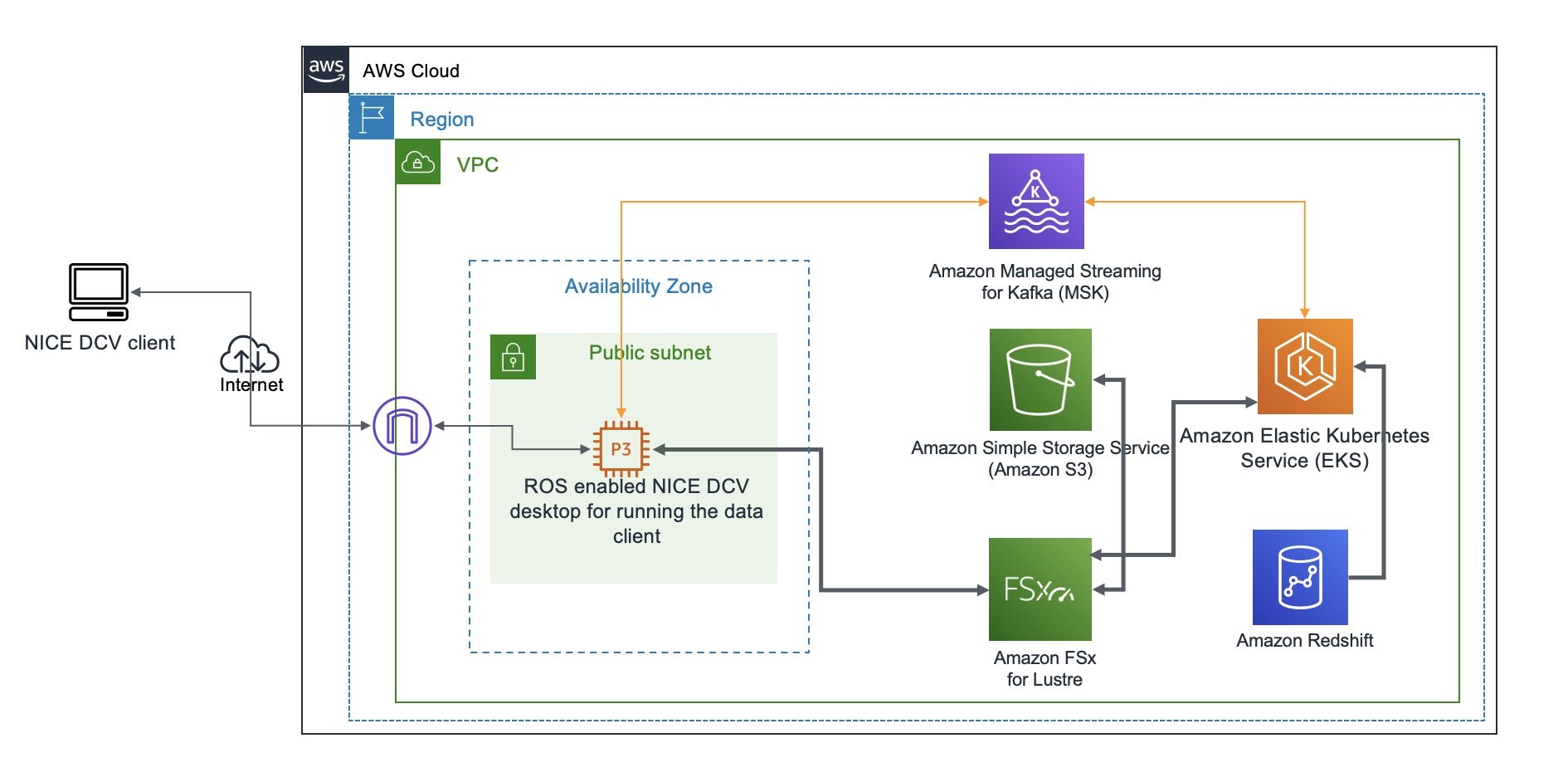
Join the Preview – Amazon EC2 C7g Instances Powered by New AWS Graviton3 Processors

Post Syndicated from Jeff Barr original https://aws.amazon.com/blogs/aws/join-the-preview-amazon-ec2-c7g-instances-powered-by-new-aws-graviton3-processors/

We announced the first generation AWS-designed Graviton processor in late 2018, and followed it up with the second generation Graviton2 a year later. Today, AWS customers make use of twelve different Graviton2-powered instances including the new X2gd instances that are designed for memory-intensive workloads. All Graviton processors include dedicated cores & caches for each vCPU, along with additional security features courtesy of AWS Nitro System; the Graviton2 processors add support for always-on memory encryption.
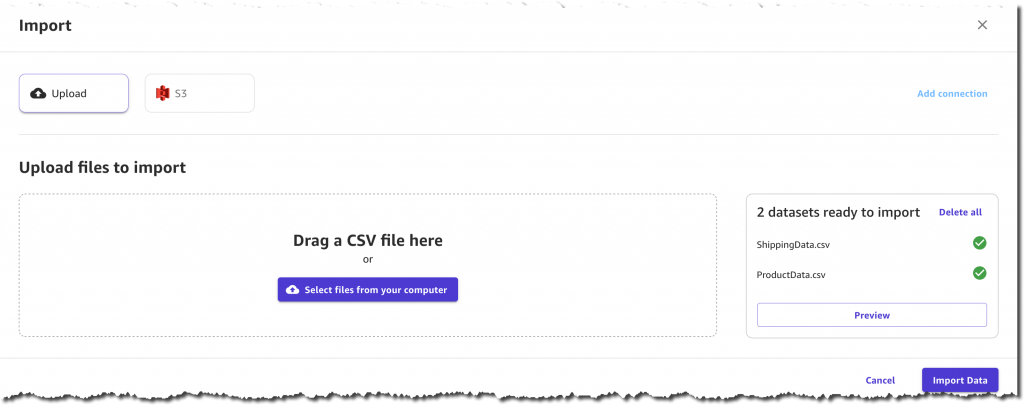
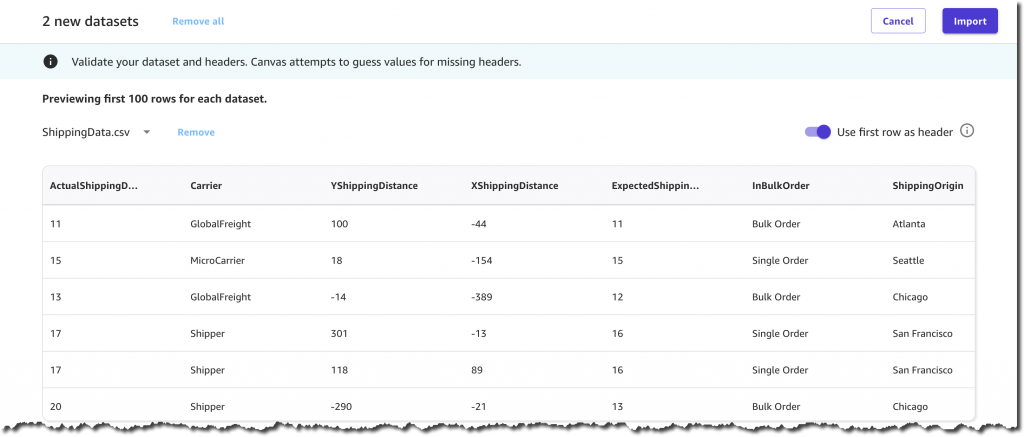
C7g in the Works
I am thrilled to tell you about our upcoming C7g instances. Powered by new Graviton3 processors, these instances are going to be a great match for your compute-intensive workloads: HPC, batch processing, electronic design automation (EDA), media encoding, scientific modeling, ad serving, distributed analytics, and CPU-based machine learning inferencing.

While we are still optimizing these instances, it is clear that the Graviton3 is going to deliver amazing performance. In comparison to the Graviton2, the Graviton3 will deliver up to 25% more compute performance and up to twice as much floating point & cryptographic performance. On the machine learning side, Graviton3 includes support for bfloat16 data and will be able to deliver up to 3x better performance.

Graviton3 processors also include a new pointer authentication feature that is designed to improve security. Before return addresses are pushed on to the stack, they are first signed with a secret key and additional context information, including the current value of the stack pointer. When the signed addresses are popped off the stack, they are validated before being used. An exception is raised if the address is not valid, thereby blocking attacks that work by overwriting the stack contents with the address of harmful code. We are working with operating system and compiler developers to add additional support for this feature, so please get in touch if this is of interest to you.

C7g instances will be available in multiple sizes (including bare metal), and are the first in the cloud industry to be equipped with DDR5 memory. In addition to drawing less power, this memory delivers 50% higher bandwidth than the DDR4 memory used in the current generation of EC2 instances.

On the network side, C7g instances will offer up to 30 Gbps of network bandwidth and Elastic Fabric Adapter (EFA) support.

Join the Preview
We are now running a preview of the C7g instances so that you can be among the first to experience all of this power. Sign up now, take an instance for a spin, and let me know what you think!

Jeff;

The collective thoughts of the interwebz