The Linux random-number generator (RNG) seems to attract an outsized amount
of attention (and work) for what is, or seemingly should be, a fairly small
component of the kernel. In part that is because random numbers, and
their quality, are extremely important to a number of security
protections, from unpredictable IP-packet sequence numbers to cryptographic
keys. A recent post of
version 43 of the Linux Random Number
Generator (LRNG) by Stephan Müller is not likely to go any further than its
predecessors, but the discussion around it may lead to support for a
feature that some distributions need.
Does everyone in your family turn to you to help them fix some tech issue or another? Your uncle ever come to your house in the middle of the day to help him set up his iCloud account on his new iPhone? If the Wi-Fi goes down in the house, are you the first person your family calls before they call their internet provider? If you answered yes to any of these questions, congratulations! You are the family IT department.
Being the family IT admin is a job that you never formally applied for. It just happened over time as you continued to fix all the tech issues that accumulated around the house. If you’re looking for ways to best help your family manage their data and backups, this post will share some tips and advice so you can avoid those panicked requests from your parents or grandparents when they can’t find that favorite family photo or have trouble getting online.
Getting Started as the Head of the Family IT Department
Although it might feel like you’re always on-call to help your family with tech issues, there are a few ways you can set up your family with simple tech solutions even your grandfather will be able to figure out.
How to Back Up Your Digital Life
To start, check out our series of guides to help you protect content across many different platforms—including social media, sync services, and more. This list is always a work in progress—please comment below if you’d like to see another platform covered.
As the family IT admin, I’ve been asked to fix many issues, like devices that won’t start up or work properly, slow or interrupted internet connections, and even data loss. There are a few best practices you can follow to help encourage your family members to handle these problems independently, or even set up automated solutions. These best practices include:
Using the 3-2-1 backup strategy.
Keeping systems updated.
Troubleshooting network connectivity issues.
Setting up automated backups and a Group to centralize your family’s data backups.
The 3-2-1 Backup Method
While I have fixed a lot of issues, there are some issues that I have not been able to resolve, like retrieving a file on a damaged computer without a backup. Data loss can happen at any moment, from accidentally spilling something on your computer to system upgrades or even just accidental deletion. It’s always best to practice backup etiquette with the 3-2-1 method. Using this method, you will have the document saved in three different places—two copies of your data on-site but on different devices, for example, on your computer and an external hard drive, and one copy off-site, for example, in the cloud. In case you lose one, you have two as backup. There is no such thing as a perfect backup system, but the 3-2-1 approach is a great start for the majority of people and businesses, so it’s definitely good enough for your great aunt.
Keeping Systems Up-to-date
As the family IT admin, one of the most common issues you’ll probably face is a malfunctioning device, or a device that needs to be updated. A straightforward way to get started is by resetting the system—yes, just turn it off and turn it back on again. But the best way to ensure your devices are working properly is to ensure that all system updates have been properly installed. By making sure that all of your family’s devices are running on the most recent versions of their software, you can avoid running into problems with apps not working or other issues.
For many devices, running a software update or checking for a new software version is a pretty straightforward process. Apple has made it easy for iOS users—you can set software updates to automatically run in the background while you charge your phone at night. For a PC, you select the Start button, then select Settings > Update & security > Windows Update. Select Advanced Options, and then under “Choose how updates are installed,” select Automatic. You can even think about walking your family members through a check for updates so they can handle any issues on their own in the future.
Nowadays, we all use many devices to store and access our data every day. We’ve created a few guides to help you make sure the data on your phone, computer, and hard drive is backed up or secured for whenever you plan to upgrade.
When you’re dealing with a network issue, it can be frustrating because they often feel like they happen at the most inconvenient times. You can be on a call for work and bam! Lost connection. You want to play your PS5 games with friends after a long day at work? Think again, your internet was disconnected. Well, let me walk you through some of my thought process when I want to fix the internet connection.
Check if other devices that are connected to your Wi-Fi are having the same issues.
If not, then you will need to go to your network settings for that device. You can disconnect and reconnect to the Wi-Fi there.
If you are using an Ethernet cable, make sure that it’s properly connected.
Most internet providers have a service where you can check if the servers are down in your area. Double check that your home was not hit with an internet outage.
Go directly to the router and hit the reset button. Sometimes restarting helps solve the problem.
Setting Up Automated Data Backups
Typically, our data is scattered across many platforms and many devices. Take that, and multiply it by each member of your family—that’s a lot of data that needs to be backed up and secured. I can’t just sit and back up my family’s files and photos on a daily or weekly basis. Personally, I needed something I could install onto my family’s computers and forget about it, all while still knowing that it would back up their data without me constantly monitoring it. And remember, syncing your data is not the same as backing it up.
Backup tools are great for keeping your family’s data protected and ensuring your work as the family IT admin is made easier. Look for a simple app that can automate data backups and make them accessible from anywhere via the web or mobile apps.
(Shameless plug) Backblaze Computer Backup does just that. I set it up in minutes on all of my family’s computers, and now it just runs in the background of all of our devices.
How to Set Up Groups to Manage Your Family’s Backups
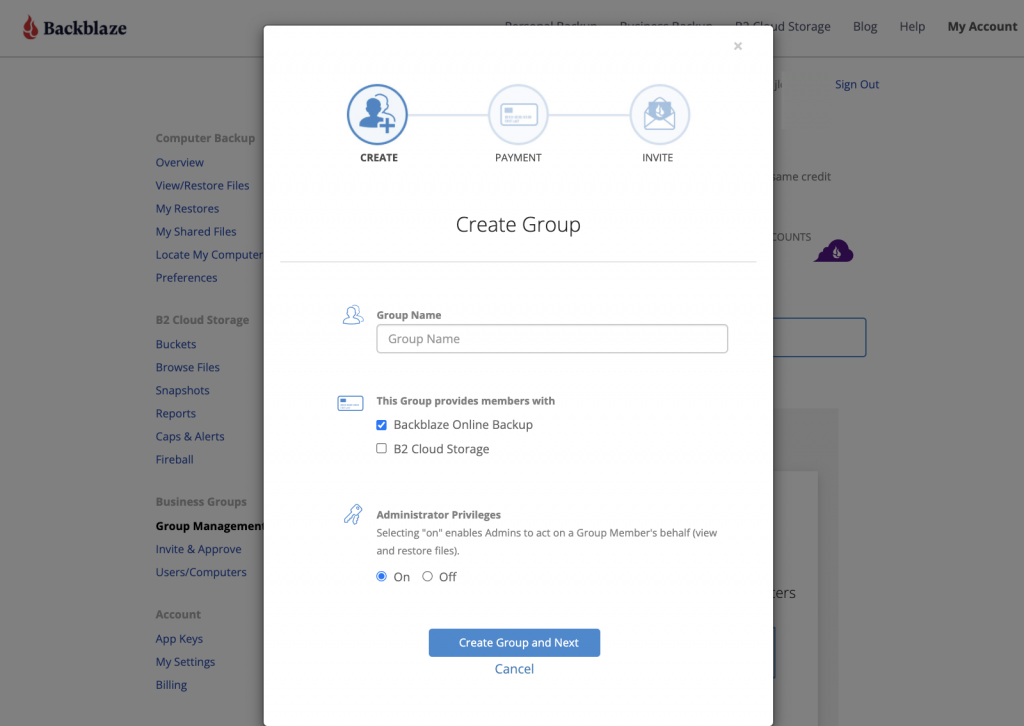
One feature that’s particularly helpful with using backup tools for protecting your family’s device data is centralizing your backups into a group. Groups are the best way to manage your family’s backups in one place. With Computer Backup, it’s easy to create a Group and add members to your Group.
First, go to your Backblaze account. If you don’t have Groups enabled, simply go to your Settings tab and check the box to enable Groups.
Now you can start your first Group. Name it whatever you want—I’m a very simple person so I call mine “Family,” but be as creative as you want.
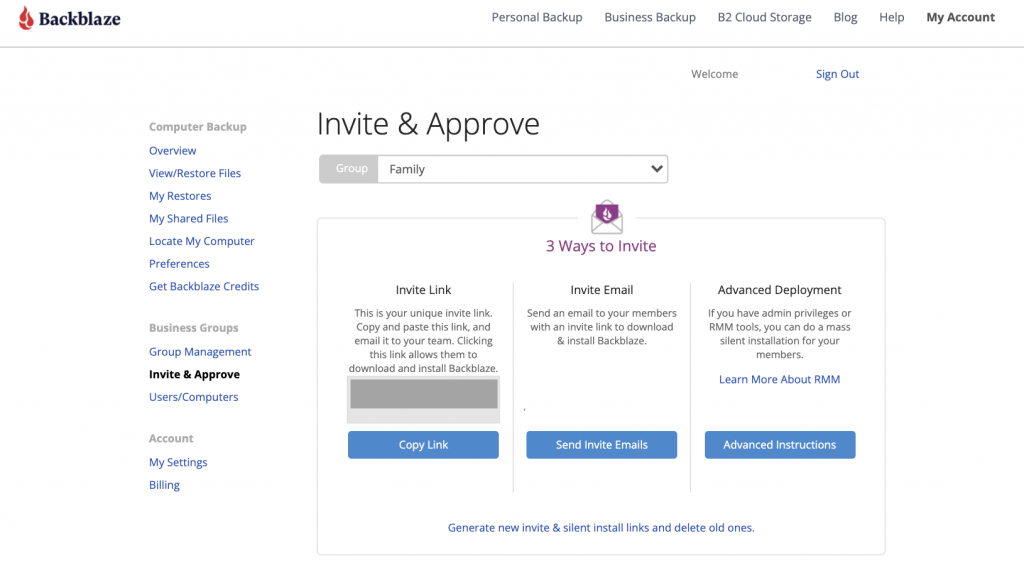
After creating your Group, you can start inviting your family members. You can choose to share a direct link to the group or email them an invitation. Once they get the link, your family members can create an account and install the client on their own computer to start backing up their data.
How to Back Up Your Family’s Data
Once your family has the Backblaze client installed on their computer, you are set! The scheduling is automatically set to back up continuously, so you don’t have to worry if your family’s computers are getting backed up. You can sleep in peace now!
You’re not alone in being the family IT admin—even though it might not be an official job, we all take the responsibilities seriously because we care about our families. What are some of the technical problems that you have had to solve as the family IT admin? Let us know in the comments.
Firefox 95.0 is now
available. With this version the RLBox
sandboxing technology is enabled on all platforms, as is the Site
Isolation security architecture, which protects against side-channel
attacks.
2021 has been a banner year in terms of the frequency and diversity of cybersecurity breaking news events, with ransomware being the clear headline-winner. While the DarkSide group (now, in theory, retired) may have captured the spotlight early in the year due to the Colonial Pipeline attack, REvil — the ransomware-as-a-service group that helped enable the devastating Kaseya mass ransomware attack in July — made recent headlines as they were summarily shuttered by the FBI in conjunction with Cyber Command, the Secret Service, and like-minded countries.
This was a well-executed response by government agencies with the proper tools and authority to accomplish a commendable mission. While private-sector entities may have participated in this effort, they will have done so through direct government engagement and under the same oversight.
More recently, the LockBit and Marketo ransomware groups suffered distributed denial of service (DDoS) attacks, as our colleagues at IntSights reported, in retaliation for their campaigns: one targeting a large US firm, and another impacting a US government entity.
The former of these two DDoS attacks falls into a category known colloquially as “hack back.” Our own Jen Ellis did a deep dive on hacking back earlier this year and defined the practice as “non-government organizations taking intrusive action against a cyber attacker on technical assets or systems not owned or leased by the person taking action or their client.”
The thorny path of hacking back
Hack back, as used by non-government entities, is problematic for many reasons, including:
Group attribution is hard, and most organizational cybersecurity teams are ill-equipped to conduct sufficiently thorough research to gain a high enough level of accuracy to ensure they know who the source really is/was.
Infrastructure used to conduct attacks is often compromised assets of legitimate organizations, and taking direct action against them can cause real harm to other innocent victims.
It is very likely illegal in most jurisdictions.
As our IntSights colleagues noted, the LockBit and Marketo DDoS hack-back attacks did take the groups offline for weeks and temporarily halted ransomware campaigns associated with their infrastructure. But the groups are both back online, and they — along with other groups — appear to be going after less problematic targets, a (hopefully) unexpected, unintended, but very real consequence of these types of cyber vigilante actions.
Choosing a more productive path
While the temptation may be strong to inflict righteous wrath upon those who have infiltrated and victimized your organization, there are ways to channel your reactions into active defense strategies that can help you regain a sense of control, waste attackers’ time (a precious resource for them), contribute to the greater good, and help change the economics of attacks enough to effect real change. Here are 3 possible alternative routes to consider.
1. Improve infrastructure visibility
You can only effect change in environments that have been instrumented for measurement. While this is true for cybersecurity defense in general, it is paramount if you want to take the step into contributing to the community efforts to reduce the levels and impacts of cybercrime (more on that later).
You have to know what assets are in play, where they are, the state they are in, and the activity happening on and between them. If you aren’t outfitted for that now, thankfully it’s the holiday season, and you still have time to get your shopping list to Santa (a.k.a. your CISO/CFO). If you’re strapped for cash, open-source tools and communities such as MISP provide a great foundation to build upon.
2. Invest in information sharing and analysis
There are times when it feels like we may be helpless in the face of so many adversaries and the daily onslaught of attacks. However, we protectors have communities and resources available that can help us all become safer and more resilient. If your organization isn’t part of at least one information sharing and analysis organization (ISAO), that is your first step into both regaining a sense of control and giving you and your cybersecurity teams active, positive steps you can take on a daily basis to secure our entire ecosystem. An added incentive to join one or more these groups is that many of them gain real-time cross-vendor insights via the Cyber Threat Alliance, a nonprofit that is truly leveling up protectors across the globe.
These groups share tools, techniques, and intelligence that enable you to level up your organization’s defenses and can help guide you through the adoption of cutting-edge, science-driven frameworks such as MITRE’s ATT&CK and D3FEND.
3. Consider the benefits of deception technology
“Oh! What a tangled web we weave when first we practice to deceive!”
Sir Walter Scott may not have had us protectors in mind when he penned that line, but it is a vital component of modern organizational cyber defenses. Deception technology can provide rich intelligence on attacker behavior (which you can share with the aforementioned ISAOs!), keep attackers in a playground safe from your real assets, and — perhaps most importantly — waste their time.
Being a victim of a cyberattack of any magnitude is something we all hope to help our organizations avoid. Even if you’re a single-person “team” overseeing cybersecurity for your entire organization, you don’t have to go it alone, and you definitely do not have to give in to the thought of hacking back to “get even” with your adversaries.
As we’ve noted, there are many organizations who are there to help you channel your energies into building solid defenses and intelligence gathering practices to help you and the rest of us be safer and more resilient. Let’s leave the hacking back to the professionals we’ve tasked with legal enforcement and focus on protecting what’s in our purview.
NEVER MISS A BLOG
Get the latest stories, expertise, and news about security today.
We’re excited to announce that customers will soon be able to store their Cloudflare logs on Cloudflare R2 storage. Storing your logs on Cloudflare will give CIOs and Security Teams an opportunity to consolidate their infrastructure; creating simplicity, savings and additional security.
Cloudflare protects your applications from malicious traffic, speeds up connections, and keeps bad actors out of your network. The logs we produce from our products help customers answer questions like:
Why are requests being blocked by the Firewall rules I’ve set up?
Why are my users seeing disconnects from my applications that use Spectrum?
Why am I seeing a spike in Cloudflare Gateway requests to a specific application?
Storage on R2 adds to our existing suite of logging products. Storing logs on R2 fills in gaps that our customers have been asking for: a cost-effective solution to store logs for any of our products for any period of time.
Goodbye to old school logging
Let’s rewind to the early 2000s. Most organizations were running their own self-managed infrastructure: network devices, firewalls, servers and all the associated software. Each company has to manage logs coming from hundreds of sources in the IT stack. With dedicated storage needed for retaining an endless volume of logs, specialized teams are required to build an ETL pipeline and make the data actionable.
Fast-forward to the 2010s. Organizations are transitioning to using managed services for their IT functions. As a result of this shift, the way that customers collect logs for all their services have changed too. With managed services, much of the logging load is shifted off of the customer.
The challenge now: collecting logs from a combination of managed services, each of which has its own quirks. Logs can be sent at varying latencies, in different formats and some are too detailed while others not detailed enough. To gain a single pane view of their IT infrastructure, companies need to build or buy a SIEM solution.
Cloudflare replaces these sets of managed services. When a customer onboards to Cloudflare, we make it super easy to gain visibility to their traffic that hits our network. We’ve built analytics for many of our products, such as CDN, Firewall, Magic Transit and Spectrum to both view high level trends and dig into patterns by slicing and dicing data.
Analytics are a great way to see data at an aggregate level, but we know that raw logs are important to our customers as well, so we’ve built out a set of logging products.
Logging today
During Speed Week we announced Instant Logs to show customers traffic as it hits their domain. Instant Logs is perfect for live debugging and triaging use cases. Monitor your traffic, make a config change and instantly view its impacts. In cases where you need to retroactively inspect your logs, we have Logpush.
We’ve built an impressive logging pipeline to get data from the 250+ cities that house our data centers to our customers in under a minute using Logpush. If your organization has existing practices for getting data across your stack into one place, we support Logpush to a variety of cloud storage or SIEM destinations. We also have partnerships in place with major SIEM platforms to surface Cloudflare data in ways that are meaningful to our customers.
Last but not least is Logpull. Using Logpull, customers can access HTTP request logs using our REST API. Our customers like Logpull because it’s easy to configure, they don’t have to worry about storing logs on a third party, and you can pull data ad hoc for up to seven days.
Why Cloudflare storage?
The top four requests we’ve heard from customers when it comes to logs are:
I have tight budgets and need low cost log storage.
They should be low effort to set up and maintain.
I should be able to store logs for as long as I need to.
I want to access my logs on Cloudflare for any product.
For many of our customers, Cloudflare is one of the most important data sources, and it also generates more data than other applications on their IT stack. R2 is significantly cheaper than other cloud providers, so our customers don’t need to compromise by sampling or leaving out logs from products all together in order to cut down on costs.
Just like the simplicity of Logpull, log storage on R2 will be quick and easy. With a one click setup, we’ll store your logs, and you don’t have to worry about any configuration details. Retention is totally in our customer’s control to match the security and compliance needs of their business. With R2, you can also store your logs for any products we have logging for today (and we’re always adding more as our product line expands).
Log storage; we’re just getting started
With log storage on Cloudflare, we’re creating the building blocks to allow customers to perform log analysis and forensics capabilities directly on Cloudflare. Whether conducting an investigation, responding to a support request or addressing an incident, using analytics for a birds eye view and inspecting logs to determine the root cause is a powerful combination.
If you’re interested in getting notified when you can store your logs on Cloudflare, sign up through this form.
We’re always looking for talented engineers to take on the challenges of working with data at an incredible scale. If you’re interested apply here.
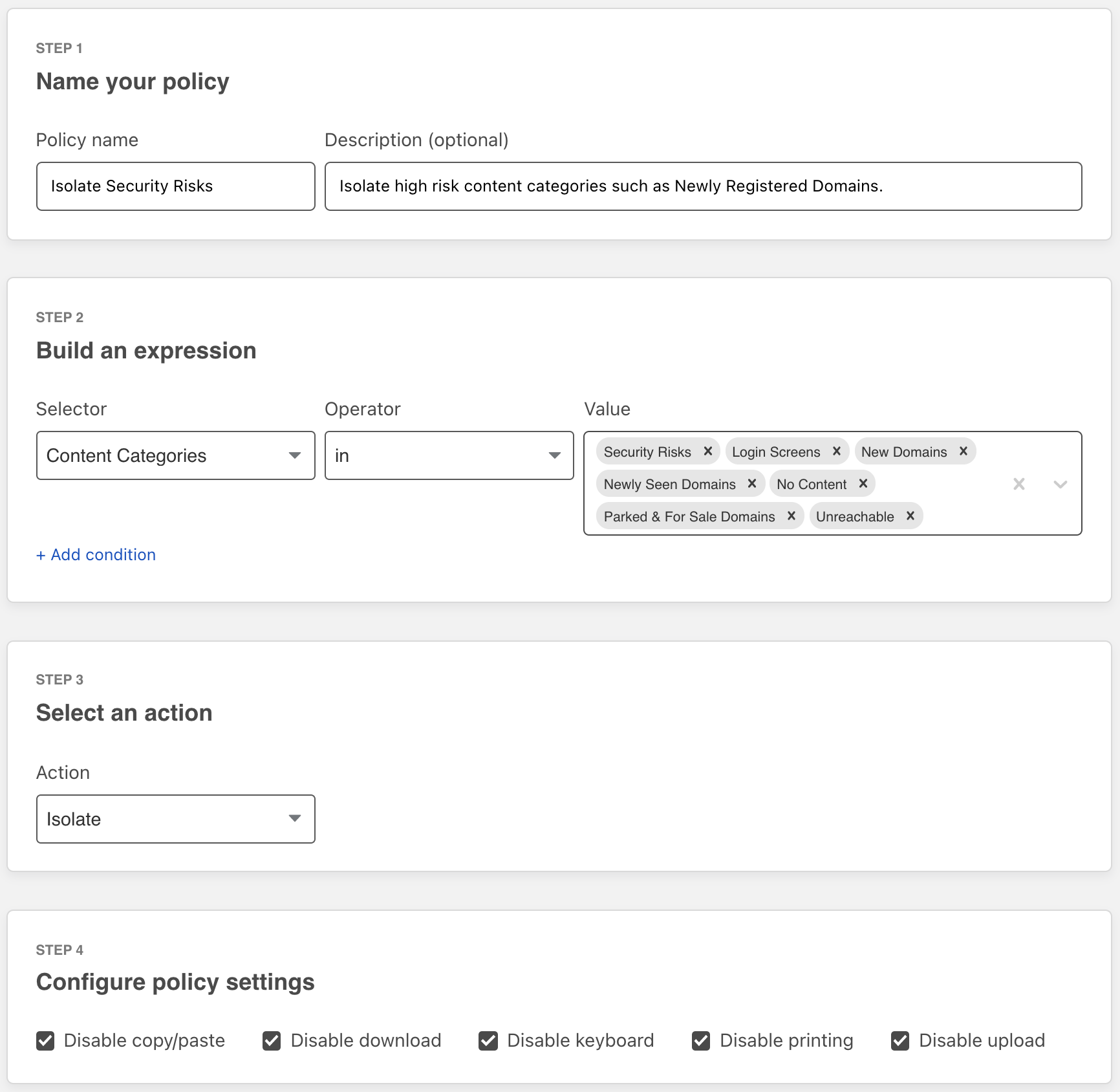
Your team can now use Cloudflare’s Browser Isolation service to protect against phishing attacks and credential theft inside the web browser. Users can browse more of the Internet without taking on the risk. Administrators can define Zero Trust policies to prohibit keyboard input and transmitting files during high risk browsing activity.
Earlier this year, Cloudflare Browser Isolation introduced data protection controls that take advantage of the remote browser’s ability to manage all input and outputs between a user and any website. We’re excited to extend that functionality to apply more controls such as prohibiting keyboard input and file uploads to avert phishing attacks and credential theft on high risk and unknown websites.
Challenges defending against unknown threats
Administrators protecting their teams from threats on the open Internet typically implement a Secure Web Gateway (SWG) to filter Internet traffic based on threat intelligence feeds. This is effective at mitigating known threats. In reality, not all websites fit neatly into malicious or non-malicious categories.
For example, a parked domain with typo differences to an established web property could be legitimately registered for an unrelated product or become weaponized as a phishing attack. False-positives are tolerated by risk-averse administrators but come at the cost of employee productivity. Finding the balance between these needs is a fine art, and when applied too aggressively it leads to user frustration and the increased support burden of micromanaging exceptions for blocked traffic.
Legacy secure web gateways are blunt instruments that provide security teams limited options to protect their teams from threats on the Internet. Simply allowing or blocking websites is not enough, and modern security teams need more sophisticated tools to fully protect their teams without compromising on productivity.
Intelligent filtering with Cloudflare Gateway
Cloudflare Gateway provides a secure web gateway to customers wherever their users work. Administrators can build rules that include blocking security risks, scanning for viruses, or restricting browsing based on SSO group identity among other options. User traffic leaves their device and arrives at a Cloudflare data center close to them, providing security and logging without slowing them down.
Unlike the blunt instruments of the past, Cloudflare Gateway applies security policies based on the unique magnitude of data Cloudflare’s network processes. For example, Cloudflare sees just over one trillion DNS queries every day. We use that data to build a comprehensive model of what “good” DNS queries look like — and which DNS queries are anomalous and could represent DNS tunneling for data exfiltration, for example. We use our network to build more intelligent filtering and reduce false positives. You can review that research as well with Cloudflare Radar.
However, we know some customers want to allow users to navigate to destinations in a sort of “neutral” zone. Domains that are newly registered, or newly seen by DNS resolvers, can be the home of a great new service for your team or a surprise attack to steal credentials. Cloudflare works to categorize these as soon as possible, but in those initial minutes users have to request exceptions if your team blocks these categories outright.
Safely browsing the unknown
Cloudflare Browser Isolation shifts the risk of executing untrusted or malicious website code from the user’s endpoint to a remote browser hosted in a low-latency data center. Rather than aggressively blocking unknown websites, and potentially impacting employee productivity, Cloudflare Browser Isolation provides administrators control over how users can interact with risky websites.
Cloudflare’s network intelligence tracks higher risk Internet properties such as Typosquatting and New Domains. Websites in these categories could be benign websites, or phishing attacks waiting to be weaponized. Risk-averse administrators can protect their teams without introducing false-positives by isolating these websites and serving the website in a read-only mode by disabling file uploads, downloads and keyboard input.
Users are able to safely browse the unknown website without risk of leaking credentials, transmitting files and falling victim to a phishing attack. Should the user have a legitimate reason to interact with an unknown website they are advised to contact their administrator to obtain elevated permissions while browsing the website.
Cloudflare Browser Isolation is integrated natively into Cloudflare’s Secure Web Gateway and Zero Trust Network Access services, and unlike legacy remote browser isolation solutions does not require IT teams to piece together multiple disparate solutions or force users to change their preferred web browser.
The Zero Trust threat and data protection that Browser Isolation provides make it a natural extension for any company trusting a secure web gateway to protect their business. We’re currently including it with our Cloudflare for Teams Enterprise Plan at no additional charge.1Get started at our Zero Trust web page.
Data localisation has gotten a lot of attention in recent years because a number of countries see it as a way of controlling or protecting their citizens’ data. Countries such as Australia, China, India, Brazil, and South Korea have or are currently considering regulations that assert legal sovereignty over their citizens’ personal data in some fashion — health care data must be stored locally; public institutions may only contract with local service providers, etc.
In the EU, the recent “Schrems II” decision resulted in additional requirements for companies that transfer personal data outside the EU. And a number of highly regulated industries require that specific types of personal data stay within the EU’s borders.
Cloudflare is committed to helping our customers keep personal data in the EU. Last year, we introduced the Data Localisation Suite, which gives customers control over where their data is inspected and stored.
Today, we’re excited to introduce the Customer Metadata Boundary, which expands the Data Localisation Suite to ensure that a customer’s end user traffic metadata stays in the EU.
Metadata: a primer
“Metadata” can be a scary term, but it’s a simple concept — it just means “data about data.” In other words, it’s a description of activity that happened on our network. Every service on the Internet collects metadata in some form, and it’s vital to user safety and network availability.
At Cloudflare, we collect metadata about the usage of our products for several purposes:
Serving analytics via our dashboards and APIs
Sharing logs with customers
Stopping security threats such as bot or DDoS attacks
Improving the performance of our network
Maintaining the reliability and resiliency of our network
What does that collection look like in practice at Cloudflare? Our network consists of dozens of services: our Firewall, Cache, DNS Resolver, DDoS protection systems, Workers runtime, and more. Each service emits structured log messages, which contain fields like timestamps, URLs, usage of Cloudflare features, and the identifier of the customer’s account and zone.
These messages do not contain the contents of customer traffic, and so they do not contain things like usernames, passwords, personal information, and other private details of customers’ end users. However, these logs may contain end-user IP addresses, which is considered personal data in the EU.
Data Localisation in the EU
The EU’s General Data Protection Regulation, or GDPR, is one of the world’s most comprehensive (and well known) data privacy laws. The GDPR does not, however, insist that personal data must stay in Europe. Instead, it provides a number of legal mechanisms to ensure that GDPR-level protections are available for EU personal data if it is transferred outside the EU to a third country like the United States. Data transfers from the EU to the US were, until recently, permitted under an agreement called the EU-U.S. Privacy Shield Framework.
Shortly after the GDPR went into effect, a privacy activist named Max Schrems filed suit against Facebook for their data collection practices. In July 2020, the Court of Justice of the EU issued the “Schrems II” ruling — which, among other things, invalidated the Privacy Shield framework. However, the court upheld other valid transfer mechanisms that ensure EU personal data won’t be accessed by U.S. government authorities in a way that violates the GDPR.
Since the Schrems II decision, many customers have asked us how we’re protecting EU citizens’ data. Fortunately, Cloudflare has had data protection safeguards in place since well before the Schrems II case, such as our industry-leading commitments on government data requests. In response to Schrems II in particular, we updated our customer Data Processing Addendum (DPA). We incorporated the latest Standard Contractual Clauses, which are legal agreements approved by the EU Commission that enable data transfer. We also added additional safeguards as outlined in the EDPB’s June 2021 Recommendations on Supplementary Measures. Finally, Cloudflare’s services are certified under the ISO 27701 standard, which maps to the GDPR’s requirements.
In light of these measures, we believe that our EU customers can use Cloudflare’s services in a manner consistent with GDPR and the Schrems II decision. Still, we recognize that many of our customers want their EU personal data to stay in the EU. For example, some of our customers in industries like healthcare, law, and finance may have additional requirements. For that reason, we have developed an optional suite of services to address those requirements. We call this our Data Localisation Suite.
How the Data Localisation Suite helps today
Data Localisation is challenging for customers because of the volume and variety of data they handle. When it comes to their Cloudflare traffic, we’ve found that customers are primarily concerned about three areas:
How do I ensure my encryption keys stay in the EU?
How can I ensure that services like caching and WAF only run in the EU?
How can ensure that metadata is never transferred outside the EU?
To address the first concern, Cloudflare has long offered Keyless SSL and Geo Key Manager, which ensure that private SSL/TLS key material never leaves the EU. Keyless SSL ensures that Cloudflare never has possession of the private key material at all; Geo Key Manager uses Keyless SSL under the hood to ensure the keys never leave the specified region.
Last year we addressed the second concern with Regional Services, which ensures that Cloudflare will only be able to decrypt and inspect the content of HTTP traffic inside the EU. In other words, SSL connections will only be terminated in Europe, and all of our layer 7 security and performance services will only run in our EU data centers.
Today, we’re enabling customers to address the third and final concern, and keep metadata local as well.
How the Metadata Boundary Works
The Customer Metadata Boundary ensures, simply, that end user traffic metadata that can identify a customer stays in the EU. This includes all the logs and analytics that a customer sees.
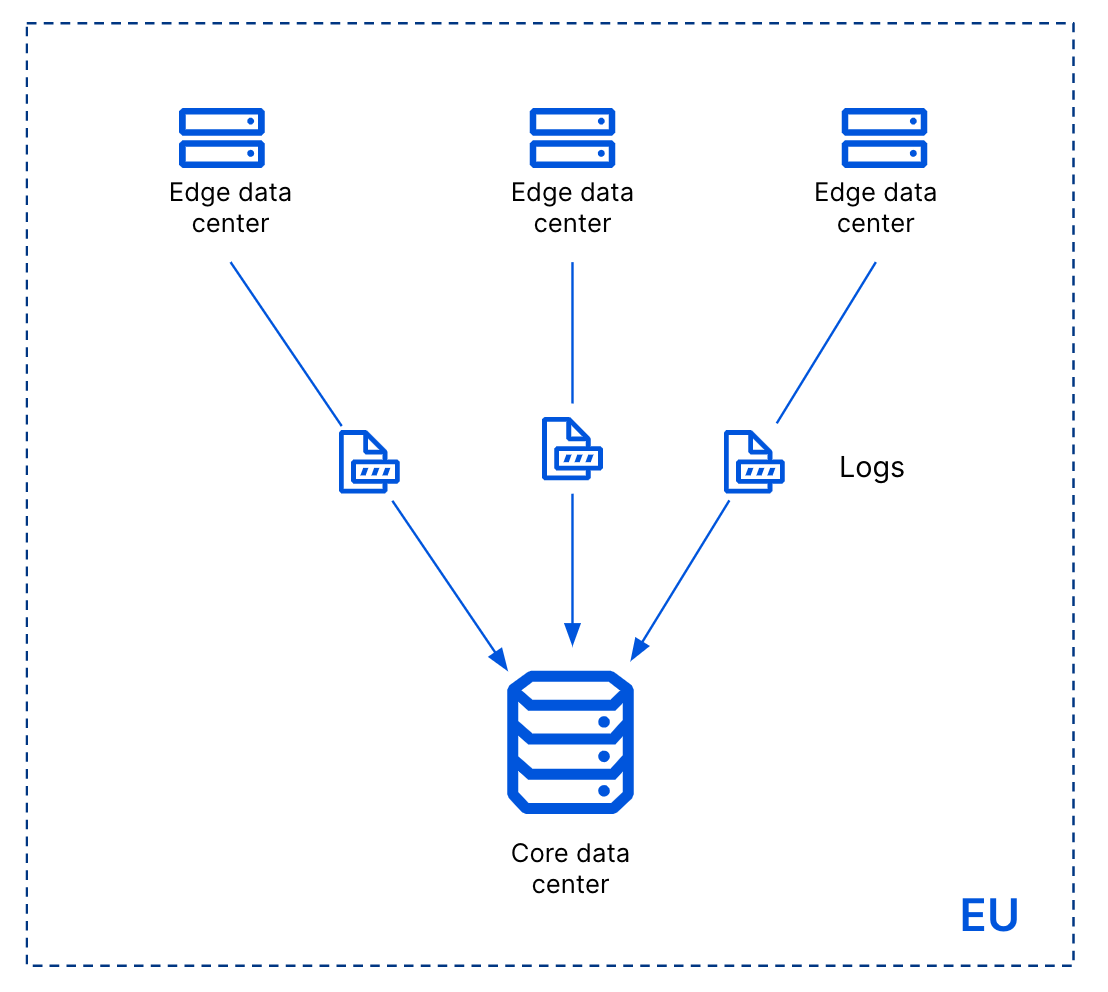
How are we able to do this? All the metadata that can identify a customer flows through a single service at our edge, before being forwarded to one of our core data centers.
When the Metadata Boundary is enabled for a customer, our edge ensures that any log message that identifies that customer (that is, contains that customer’s Account ID) is not sent outside the EU. It will only be sent to our core data center in the EU, and not our core data center in the US.
What’s next
Today our Data Localisation Suite is focused on helping our customers in the EU localise data for their inbound HTTP traffic. This includes our Cache, Firewall, DDoS protection, and Bot Management products.
We’ve heard from customers that they want data localisation for more products and more regions. This means making all of our Data Localisation Products, including Geo Key Manager and Regional Services, work globally. We’re also working on expanding the Metadata Boundary to include our Zero Trust products like Cloudflare for Teams. Stay tuned!
Since 2017, someone is running about a thousand — 10% of the total — Tor servers in an attempt to deanonymize the network:
Grouping these servers under the KAX17 umbrella, Nusenu says this threat actor has constantly added servers with no contact details to the Tor network in industrial quantities, operating servers in the realm of hundreds at any given point.
The actor’s servers are typically located in data centers spread all over the world and are typically configured as entry and middle points primarily, although KAX17 also operates a small number of exit points.
Nusenu said this is strange as most threat actors operating malicious Tor relays tend to focus on running exit points, which allows them to modify the user’s traffic. For example, a threat actor that Nusenu has been tracking as BTCMITM20 ran thousands of malicious Tor exit nodes in order to replace Bitcoin wallet addresses inside web traffic and hijack user payments.
KAX17’s focus on Tor entry and middle relays led Nusenu to believe that the group, which he described as “non-amateur level and persistent,” is trying to collect information on users connecting to the Tor network and attempting to map their routes inside it.
In research published this week and shared with The Record, Nusenu said that at one point, there was a 16% chance that a Tor user would connect to the Tor network through one of KAX17’s servers, a 35% chance they would pass through one of its middle relays, and up to 5% chance to exit through one.
In Hello World issue 12, our free magazine for computing educators, George Boukeas, DevOps Engineer for the Astro Pi Challenge here at the Foundation, introduces big moments in the history of artificial intelligence (AI) to share with your learners:
The story of artificial intelligence (AI) is a story about humans trying to understand what makes them human. Some of the episodes in this story are fascinating. These could help your learners catch a glimpse of what this field is about and, with luck, compel them to investigate further.
The imitation game
In 1950, Alan Turing published a philosophical essay titled Computing Machinery and Intelligence, which started with the words: “I propose to consider the question: Can machines think?” Yet Turing did not attempt to define what it means to think. Instead, he suggested a game as a proxy for answering the question: the imitation game. In modern terms, you can imagine a human interrogator chatting online with another human and a machine. If the interrogator does not successfully determine which of the other two is the human and which is the machine, then the question has been answered: this is a machine that can think.
The Alan Turing Memorial in Manchester
This imitation game is now a fiercely debated benchmark of artificial intelligence called the Turing test. Notice the shift in focus that Turing suggests: thinking is to be identified in terms of external behaviour, not in terms of any internal processes. Humans are still the yardstick for intelligence, but there is no requirement that a machine should think the way humans do, as long as it behaves in a way that suggests some sort of thinking to humans.
In his essay, Turing also discusses learning machines. Instead of building highly complex programs that would prescribe every aspect of a machine’s behaviour, we could build simpler programs that would prescribe mechanisms for learning, and then train the machine to learn the desired behaviour. Turing’s text provides an excellent metaphor that could be used in class to describe the essence of machine learning: “Instead of trying to produce a programme to simulate the adult mind, why not rather try to produce one which simulates the child’s? If this were then subjected to an appropriate course of education one would obtain the adult brain. We have thus divided our problem into two parts: the child-programme and the education process.”
Chess was among the games that early AI researchers like Alan Turing developed algorithms for.
It is remarkable how Turing even describes approaches that have since been evolved into established machine learning methods: evolution (genetic algorithms), punishments and rewards (reinforcement learning), randomness (Monte Carlo tree search). He even forecasts the main issue with some forms of machine learning: opacity. “An important feature of a learning machine is that its teacher will often be very largely ignorant of quite what is going on inside, although he may still be able to some extent to predict his pupil’s behaviour.”
The evolution of a definition
The term ‘artificial intelligence’ was coined in 1956, at an event called the Dartmouth workshop. It was a gathering of the field’s founders, researchers who would later have a huge impact, including John McCarthy, Claude Shannon, Marvin Minsky, Herbert Simon, Allen Newell, Arthur Samuel, Ray Solomonoff, and W.S. McCulloch.
Go has vastly more possible moves than chess, and was thought to remain out of the reach of AI for longer than it did.
The simple and ambitious definition for artificial intelligence, included in the proposal for the workshop, is illuminating: ‘making a machine behave in ways that would be called intelligent if a human were so behaving’. These pioneers were making the assumption that ‘every aspect of learning or any other feature of intelligence can in principle be so precisely described that a machine can be made to simulate it’. This assumption turned out to be patently false and led to unrealistic expectations and forecasts. Fifty years later, McCarthy himself stated that ‘it was harder than we thought’.
Modern definitions of intelligence are of distinctly different flavour than the original one: ‘Intelligence is the quality that enables an entity to function appropriately and with foresight in its environment’ (Nilsson). Some even speak of rationality, rather than intelligence: ‘doing the right thing, given what it knows’ (Russell and Norvig).
The amount of training data AI developers have access to has skyrocketed in the past decade.
Read the whole of this brief history of AI in Hello World #12
Early advances researchers made from the 1950s onwards while developing games algorithms, e.g. for chess.
The 1997 moment when Deep Blue, a purpose-built IBM computer, beating chess world champion Garry Kasparov using a search approach.
The 2011 moment when Watson, another IBM computer system, beating two human Jeopardy! champions using multiple techniques to answer questions posed in natural language.
The principles behind artificial neural networks, which have been around for decades and are now underlying many AI/machine learning breakthroughs because of the growth in computing power and availability of vast datasets for training.
The 2017 moment when AlphaGo, an artificial neural network–based computer program by Alphabet’s DeepMind, beating Ke Jie, the world’s top-ranked Go player at the time.
Machine learning systems need vast amounts of training data, the collection and storage of which has only become technically possible in the last decade.
More on machine learning and AI education in Hello World #12
In your free PDF of Hello World issue 12, you’ll also find:
An interview with University of Cambridge statistician David Spiegelhalter, whose work shaped some of the foundations of AI, and who shares his thoughts on data science in schools and the limits of AI
An introduction to Popbots, an innovative project by MIT to open AI to the youngest learners
An article by Ken Kahn, researcher in the Department of Education at the University of Oxford, on using the block-based Snap! language to introduce your learners to natural language processing
Unplugged and online machine learning activities for learners age 7 to 16 in the regular ‘Lesson plans’ section
Find more resources for AI and data science education
In Hello World issue 16, the focus is on all things data science and data literacy for your learners. As always, you can download a free copy of the issue. And on our Hello World podcast, we chat with practicing computing educators about how they bring AI, AI ethics, machine learning, and data science to the young people they teach.
If you want a practical introduction to the basics of machine learning and how to use it, take our free online course.
There are still many open questions about what good AI and data science education looks like for young people. To learn more, you can watch our panel discussion about the topic, and join our monthly seminar series to hear insights from computing education researchers around the world.
We are also collating a growing list of educational resources about these topics based on our research seminars, seminar participants’ recommendations, and our own work. Find the resource list here.
In this post, we will walk through using Amazon Pinpoint and Amazon Quicksight to create customizable messaging campaign reports. Amazon Pinpoint is a flexible and scalable outbound and inbound marketing communications service that allows customers to connect with users over channels like email, SMS, push, or voice. Amazon QuickSight is a scalable, serverless, embeddable, machine learning-powered business intelligence (BI) service built for the cloud. This solution allows event and user data from Amazon Pinpoint to flow into Amazon Quicksight. Once in Quicksight, customers can build their own reports that shows campaign performance on a more granular level.
Engagement Event Dashboard
Customers want to view the results of their messaging campaigns in ever increasing levels of granularity and ensure their users see value from the email, SMS or push notifications they receive. Customers also want to analyze how different user segments respond to different messages, and how to optimize subsequent user communication. Previously, customers could only view this data in Amazon Pinpoint analytics, which offers robust reporting on: events, funnels, and campaigns. However, does not allow analysis across these different parameters and the building of custom reports. For example, show campaign revenue across different user segments, or show what events were generated after a user viewed a campaign in a funnel analysis. Customers would need to extract this data themselves and do the analysis in excel.
Customers should be prepared to purchase Amazon Quicksight because it has its own set of costs which is not covered within Amazon Pinpoint cost.
Solution Overview
This Solution uses the Athena tables created by Digital user engagement events database solution. The AWS CloudFormation template given in this post automatically sets up the different architecture components, to capture detailed notifications about Amazon Pinpoint engagement events and log those in Amazon Athena in the form of Athena views. You still need to manually configure Amazon Quicksight dashboards to link to these newly generated Athena views. Please follow the steps below in order for further information.
Use case(s)
Event dashboard solutions have following use cases: –
Deep dive into engagement insights. (eg: SMS events, Email events, Campaign events, Journey events)
The ability to view engagement events at the individual user level.
Data/process mining turn raw event data into useful marking insights.
User engagement benchmarking and end user event funneling.
Compute campaign conversions (post campaign user analysis to show campaign effectiveness)
Build funnels that shows user progression.
Getting started with solution deployment
Prerequisite tasks to be completed before deploying the logging solution
Step 1 – Create AWS account, Pinpoint Project, Implement Event-Database-Solution. As part of this step customers need to implement DUE Event database solution as the current solution (DUE event dashboard) is an extension of DUE event database solution. The basic assumption here is that the customer has already configured Amazon Pinpoint project or Amazon SES within the required AWS region before implementing this step.
The steps required to implement an event dashboard solution are as follows.
a/Follow the steps mentioned in Event database solution to implement the complete stack. Prior installing the complete stack copy and save the name Athena events database name as shown in the diagram. For my case it is due_eventdb. Database name is required as an input parameter for the current Event Dashboard solution.
b/Once the solution is deployed, navigate to the output page of the cloud formation stack, and copy, and save the following information, which will be required as input parameters in step 2 of the current Event Dashboard solution.
Step 2 – Deploy Cloud formation template for Event dashboard solution This step generates a number of new Amazon Athena views that will serve as a data source for Amazon Quicksight. Continue with the following actions.
Navigate to Cloud formation page in AWS console, click up right on “Create stack” and select the option “With new resources (standard)”
Leave the “Prerequisite – Prepare template” to “Template is ready” and for the “Specify template” option, select “Upload a template file”. On the same page, click on “Choose file”, browse to find the file “Event-dashboard.yaml” file and select it. Once the file is uploaded, click “Next” and deploy the stack.
Enter following information under the section “Specify stack details”:
EventAthenaDatabaseName – As mentioned in Step 1-a.
S3DataLogBucket- As mentioned in Step 1-b
This solution will create additional 5 Athena views which are
All_email_events
All_SMS_events
All_custom_events (Custom events can be Mobile app/WebApp/Push Events)
All_campaign_events
All_journey_events
Step 3 – Create Amazon Quicksight engagement Dashboard This step walks you through the process of creating an Amazon Quicksight dashboard for Amazon Pinpoint engagement events using the Athena views you created in step-2
To Setup Amazon Quicksight for the 1st time please follow this link (this process is not needed if you have already setup Amazon Quicksight). Please make sure you are an Amazon Quicksight Administrator.
Go/search Amazon Quicksight on AWS console.
Create New Analysis and then select “New dataset”
Select Athena as data source
As a next step, you need to select what all analysis you need for respective events. This solution provides option to create 5 different set of analysis as mentioned in Step 2. They are a/All email events, b/All SMS Events, c/All Custom Events (Mobile/Web App, web push etc), d/ All Campaign events, e/All Journey events. Dashboard can be created from Quicksight analysis and same can be shared among the organization stake holders. Following are the steps to create analysis and dashboards for different type of events.
Email Events –
For all email events, name the analysis “All-emails-events” (this can be any kind of customer preferred nomenclature), select Athena workgroup as primary, and then create a data source.
Once you create the data source Quicksight lists all the views and tables available under the specified database (in our case it is:- due_eventdb). Select the email_all_events view as data source.
Select the event data location for analysis. There are mainly two options available which are a/ Import to Spice quicker analysis b/ Directly query your data. Please select the preferred options and then click on “visualize the data”.
Import to Spice quicker analysis – SPICE is the Amazon QuickSight Super-fast, Parallel, In-memory Calculation Engine. It’s engineered to rapidly perform advanced calculations and serve data. In Enterprise edition, data stored in SPICE is encrypted at rest. (1 GB of storage is available for free for extra storage customer need to pay extra, please refer cost section in this document )
Directly query your data – This process enables Quicksight to query directly to the Athena or source database (In the current case it is Athena) and Quicksight will not store any data.
Now that you have selected a data source, you will be taken to a blank quick sight canvas (Blank analysis page) as shown in the following Image, please drag and drop what visualization type you need to visualize onto the auto-graph pane. Please note that Amazon QuickSight is a Busines intelligence platform, so customers are free to choose the desired visualization types to observe the individual engagement events.
As part of this blog, we have displayed how to create some simple analysis graphs to visualize the engagement events.
As an initial step please Select tabular Visualization as shown in the Image.
Select all the event dimensions that you want to put it as part of the Table in X axis. Amazon Quicksight table can be extended to show as many as tables columns, this completely depends upon the business requirement how much data marketers want to visualize.
Further filtering on the table can be done using Quicksight filters, you can apply the filter on specific granular values to enable further filtering. For Eg – If you want to apply filtering on the destination email Id then 1/Select the filter from left hand menu 2/Add destination field as the filtering criterion 3/ Tick on the destination field you are trying to filter or search for the Destination email ID that 4/ All the result in the table gets further filtered as per the filter criterion
As a next step please add another visual from top left corner “Add -> Add Visual”, then select the Donut Chart from Visual types pane. Donut charts are always used for displaying aggregation.
Then select the “event_type” as the Group to visualize the aggregated events, this helps marketers/business users to figure out how many email events occurred and what are the aggregated success ratio, click ratio, complain ratio or bounce ratio etc for the emails/Campaign that’s sent to end users.
To create a Quicksight dashboards from the Quicksight analysis click Share menu option at the top right corner then select publish dashboard”. Provide required dashboard name while publishing the dashboard”. Same dashboard can be shared with multiple audiences in the Organization.
Following is the final version of the dashboard. As mentioned above Quicksight dashboards can be shared with other stakeholders and also complete dashboard can be exported as excel sheet.
SMS Events-
As shown above SMS events can be analyzed using Quicksight and dash boards can be created out of the analysis. Please repeat all of the sub-steps listed in step 6. Following is a sample SMS dashboard.
Custom Events-
After you integrate your application (app) with Amazon Pinpoint, Amazon Pinpoint can stream event data about user activity, different type custom events, and message deliveries for the app. Eg :- Session.start, Product_page_view, _session.stop etc. Do repeat all of the sub-steps listed in step 6 create a custom event dashboards.
Campaign events
As shown before campaign also can be included in the same dashboard or you can create new dashboard only for campaign events.
Cost for Event dashboard solution You are responsible for the cost of the AWS services used while running this solution. As of the date of publication, the cost for running this solution with default settings in the US West (Oregon) Region is approximately $65 a month. The cost estimate includes the cost of AWS Lambda, Amazon Athena, Amazon Quicksight. The estimate assumes querying 1TB of data in a month, and two authors managing Amazon Quicksight every month, four Amazon Quicksight readers witnessing the events dashboard unlimited times in a month, and a Quicksight spice capacity is 50 GB per month. Prices are subject to change. For full details, see the pricing webpage for each AWS service you will be using in this solution.
Clean up
When you’re done with this exercise, complete the following steps to delete your resources and stop incurring costs:
On the CloudFormation console, select your stack and choose Delete. This cleans up all the resources created by the stack,
Delete the Amazon Quicksight Dashboards and data sets that you have created.
Conclusion
In this blog post, I have demonstrated how marketers, business users, and business analysts can utilize Amazon Quicksight dashboards to evaluate and exploit user engagement data from Amazon SES and Pinpoint event streams. Customers can also utilize this solution to understand how Amazon Pinpoint campaigns lead to business conversions, in addition to analyzing multi-channel communication metrics at the individual user level.
Next steps
The personas for this blog are both the tech team and the marketing analyst team, as it involves a code deployment to create very simple Athena views, as well as the steps to create an Amazon Quicksight dashboard to analyse Amazon SES and Amazon Pinpoint engagement events at the individual user level. Customers may then create their own Amazon Quicksight dashboards to illustrate the conversion ratio and propensity trends in real time by integrating campaign events with app-level events such as purchase conversions, order placement, and so on.
Extending the solution
You can download the AWS Cloudformation templates, code for this solution from our public GitHub repository and modify it to fit your needs.
About the Author
Satyasovan Tripathy works at Amazon Web Services as a Senior Specialist Solution Architect. He is based in Bengaluru, India, and specialises on the AWS Digital User Engagement product portfolio. He likes reading and travelling outside of work.
For those who would like to catch up on what the Linux Foundation has been
doing, the 2021
annual report is available as an 87-page PDF file.
In 2021, The Linux Foundation continued to see organizations
embrace open collaboration and open source principles, accelerating
new innovations, approaches, and best practices. As a community, we
made significant progress in the areas of cloud-native computing,
5G networking, software supply chain security, 3D gaming, and a
host of new industry and social initiatives.
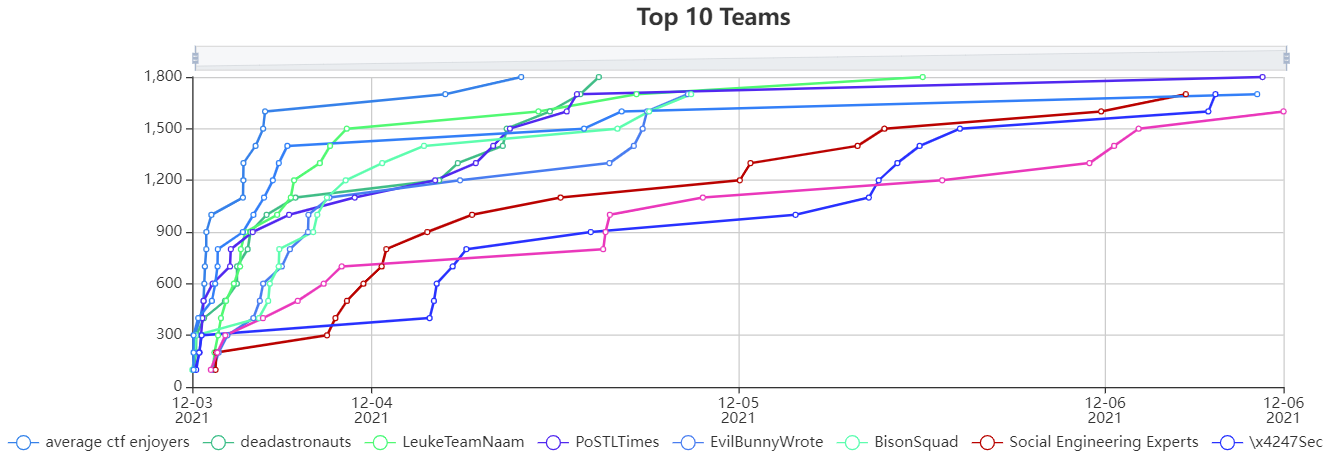
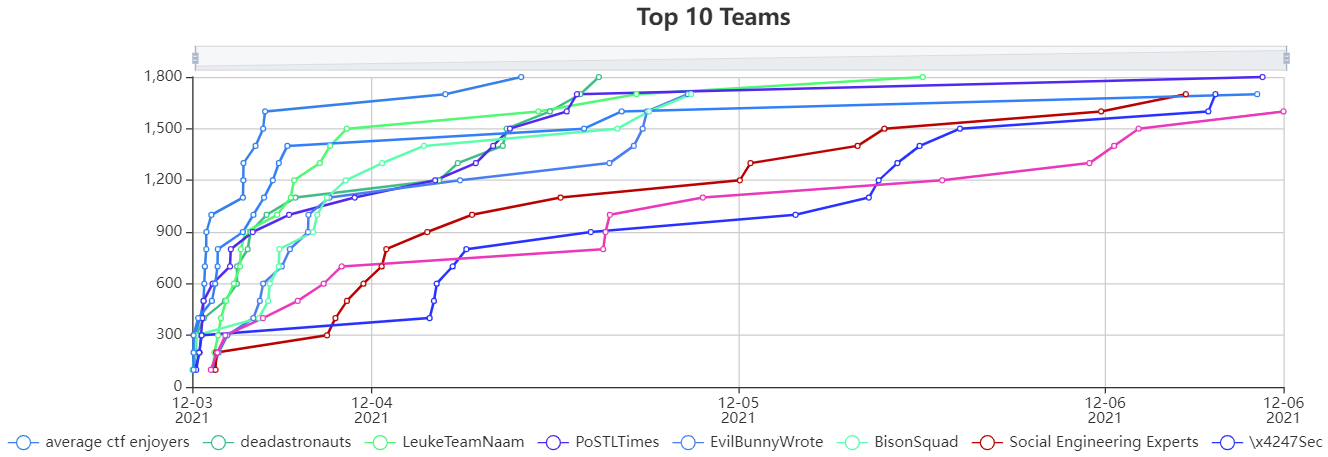
Thanks to everyone that participated in this year’s Metasploit community CTF! Like last year, this CTF ran over the past 4 days and invited community members to solve a series of challenges. This year saw 1,501 users registered across 727 teams. If you participated in the CTF, we have a feedback survey up here:
We’ll be contacting the captains of the winning teams this week to arrange prize delivery. We want to thank CTFd again for providing the scoreboard software. We also want to thank our partners at TryHackMe for sponsoring prizes for the top 3 teams. Finally, we want to give a huge thank you to everyone that participated in this year’s CTF!
CTF Statistics
This year there were 18 total challenges for a maximum possible score of 1800
Four teams solved and captured all possible flags
The 4-of-hearts challenge had the most solves with 260, while the 7-of-hearts had the fewest at 6 (2.3% of registered teams)
A total of 265 teams made it onto the scoreboard
There were 1,264 correct challenge submissions and 1,524 incorrect challenge submissions
Challenge
Solves
4 of Hearts
260
9 of Diamonds
201
2 of Spades
163
10 of Clubs
92
5 of Diamonds
70
4 of Diamonds
68
Jack of Hearts
61
9 of Spades
59
Ace of Hearts
56
2 of Clubs
48
8 of Clubs
43
3 of Hearts
29
Black Joker
29
5 of Clubs
27
4 of Clubs
18
Ace of Diamonds
18
3 of Clubs
16
7 of Hearts
6
As always, we’re excited to see the different approaches the hacker community took to solve our challenges as detailed in their writeups. There’s a #write-up-links channel dedicated for this in the public Slack workspace that we encourage users to check out.
Cloud and container technologies are being increasingly embraced by organizations around the globe because of the efficiency, superior visibility, and control they provide to DevOps and IT teams.
While DevOps teams see the benefits of cloud and container solutions, these tools create a learning curve for their security colleagues. Because of this, security teams often want to slow down adoption while they figure out a strategy for maintaining security and compliance in these new fast-moving environments.
Container and Kubernetes (K8s) environments are already fairly complex as it is, and layering multiple additional security tools into the mix makes it even more challenging from a management perspective. Organizations need to find a way to enable their DevOps teams to move quickly and take advantage of the benefits of containers and K8s, while staying within the parameters the security team needs to maintain compliance with organizational policy.
This challenge goes beyond technology. These teams need to find a solution that allows them to work together well, doesn’t over-complicate their working relationship, and lets both sides get what they want with minimal overhead.
A holistic approach to Kubernetes security
As an open-source container orchestration system for automating deployment, scaling, and management of containerized applications, Kubernetes is extremely powerful. However, organizations must carefully balance their eagerness to embrace the dynamic, self-service nature of Kubernetes with the real-life need to manage and mitigate security and compliance risk.
Rapid7’s recent introduction of InsightCloudSec intelligently unifies both CSPM and CWPP functionalities, thus enabling a holistic approach for protecting valuable assets in the cloud — one that includes Kubernetes and workload security.
In retrospect, 2020 was a tipping point for the Kubernetes community, with a massive increase in adoption across the globe. Many companies, seeking an efficient, cost-effective way to make this huge shift to the cloud, turned to Kubernetes. But this in turn created a growing need to remove Kubernetes security blind spots. For this reason, we’ve introduced Kubernetes Guardrails.
With Kubernetes Security Guardrails, organizations are equipped with a multi-cluster vulnerability scanner that covers rich Kubernetes security best practices and compliance policies, such as CIS Benchmarks. As part of Rapid7’s InsightCloudSec solution, this new capability introduces a platform-based and easy-to-maintain solution for Kubernetes security that is deployed in minutes and is fully streamlined in the Kubernetes pipeline.
Securing Kubernetes with InsightCloudSec
Kubernetes Security Guardrails is the most comprehensive solution for all relevant Kubernetes security requirements, designed from a DevOps perspective with in-depth visibility for security teams.
InsightCloudSec is designed to be an agentless state machine, seamlessly applied to any computing environment — public cloud or private software-defined infrastructure.
InsightCloudSec continually interacts with the APIs to gather information about the state of the hosts and the Kubernetes clusters of interest. These hosts can be GCP, AWS, Azure, or a private data center that can expose infrastructure information via an API.
Integrated within minutes, the Kubernetes Guardrails functionality simplifies the security assessment for the entire Kubernetes environment and the CI/CD pipeline, while also creating baseline profiles for each cluster, and highlighting and scoring security risks, misconfigurations, and hygiene drifts.
Both DevOps and Security teams enjoy the continuous and dynamic analysis of their Kubernetes deployments, all while seamlessly complying with regulatory requirements for Kubernetes.
With Kubernetes Guardrails, Dev teams are able to create a snapshot of cluster risks, delivered with a detailed list of misconfigurations, while detecting real-time hygiene and conformance drifts for deployments running on any cloud environment. Some of the most common use cases include:
Kubernetes vulnerability scanning
Hunting misplaced secrets and excessive secret access
Workload hardening (from pod security to network policies)
Istio security and configuration best practices
Ingress controllers security
Kubernetes API server access privileges
Kubernetes operators best practices
RBAC controls and misconfigurations
Ready to drive cloud security forward?
Rapid7 is proud to introduce a Kubernetes security solution that encapsulates all-in-one capabilities and unmatched coverage for all things Kubernetes.
With a security-first approach and strict compliance adherence, Kubernetes Guardrails enable a better understanding and control over distributed projects, and help organizations maintain smooth business operations.
Reference counts are a commonly used mechanism for tracking the life cycle
of objects in a computing system. As long as every user of an object
correctly maintains its references by incrementing and decrementing the
reference count, that object will persist for as long as it
is needed
and will be properly destroyed once the last user is done. The “correctly”
in that sentence is important, though; things do not work
as well in the presence of reference-counting errors. Networking
developer Eric Dumazet is working on a
reference-count tracking system that could prove useful for finding
these errors in the networking subsystem and, someday, throughout the kernel.
The collective thoughts of the interwebz
Manage Consent
To provide the best experiences, we use technologies like cookies to store and/or access device information. Consenting to these technologies will allow us to process data such as browsing behavior or unique IDs on this site. Not consenting or withdrawing consent, may adversely affect certain features and functions.
Functional
Always active
The technical storage or access is strictly necessary for the legitimate purpose of enabling the use of a specific service explicitly requested by the subscriber or user, or for the sole purpose of carrying out the transmission of a communication over an electronic communications network.
Preferences
The technical storage or access is necessary for the legitimate purpose of storing preferences that are not requested by the subscriber or user.
Statistics
The technical storage or access that is used exclusively for statistical purposes.The technical storage or access that is used exclusively for anonymous statistical purposes. Without a subpoena, voluntary compliance on the part of your Internet Service Provider, or additional records from a third party, information stored or retrieved for this purpose alone cannot usually be used to identify you.
Marketing
The technical storage or access is required to create user profiles to send advertising, or to track the user on a website or across several websites for similar marketing purposes.















 Once you create the data source Quicksight lists all the views and tables available under the specified database (in our case it is:- due_eventdb). Select the email_all_events view as data source.
 Select the event data location for analysis. There are mainly two options available which are a/ Import to Spice quicker analysis b/ Directly query your data. Please select the preferred options and then click on “visualize the data”.
 Now that you have selected a data source, you will be taken to a blank quick sight canvas (Blank analysis page) as shown in the following Image, please drag and drop what
 As part of this blog, we have displayed how to create some simple analysis graphs to visualize the engagement events.
 Select all the event dimensions that you want to put it as part of the Table in X axis. Amazon Quicksight table can be extended to show as many as tables columns, this completely depends upon the business requirement how much data marketers want to visualize.

 To create a Quicksight dashboards from the Quicksight analysis click Share menu option at the top right corner then select publish dashboard”. Provide required dashboard name while publishing the dashboard”. Same dashboard can be shared with multiple audiences in the Organization.
 Following is the final version of the dashboard. As mentioned above Quicksight dashboards can be shared with other stakeholders and also complete dashboard can be exported as excel sheet.