Amazon Web Services (AWS) is pleased to announce the release of new Security Reference Architecture (SRA) code examples for securing generative AI workloads. The examples include two comprehensive capabilities focusing on secure model inference and RAG implementations, covering a wide range of security controls and best practices for AWS generative AI services.
These new code examples are available in the AWS SRA Examples Repository and include ready-to-deploy CloudFormation templates for implementing detective security controls such as network segmentation, identity management, encryption, prompt injection detection, and logging and monitoring. The solutions align with the AWS SRA Design Guidance page and demonstrate our commitment to helping customers secure their generative AI implementations.
AWS strives to continuously provide security solutions that help customers meet their security architecture needs. Customers can reach out to the team by submitting an issue in the code repository.
If you have feedback about this post, submit comments in the Comments section below.
Note: This post was first published April 21, 2016. The updated version aligns with the latest version of AWS WAF (AWS WAF v2) and includes screenshots that reflect the changes in the AWS console experience.
AWS WAF Classic has been deprecated and will be end-of-life (EOL) in September 2025. This update describes how to use the latest version of AWS WAF (WAFv2) to help prevent hotlinking. Updates have been made to the screenshots to reflect the changes in the AWS Management Console for AWS WAF.
Hotlinking—also known as inline linking—is a form of content leeching where an unauthorized third-party website embeds links to resources originally referenced in a primary site’s HTML. The third-party website doesn’t incur the cost of hosting the content, which means that your website can be charged for the content other sites use. It also results in slow loading times, lost revenue, and potential legal issues.
Now, you can use AWS WAF to help prevent hotlinking. AWS WAF is a web application firewall that’s closely integrated with Amazon CloudFront—a content delivery network (CDN)—and can help protect your web applications from common web exploits that could affect application availability, compromise security, and consume excessive resources. In this blog post, I show you how to help prevent hotlinking by using header inspection in AWS WAF, while still taking advantage of the improved user experience from a CDN such as CloudFront.
Solution overview
You can address hotlinking in various ways. For instance, you can validate the Referer header (sent by a browser to indicate to the server which page the visitor was referred from) at your web server (for example, by using the Apache module mod_rewrite), and either issue a redirect back to your site’s main page or return a 403 Forbidden error to the visitor’s browser.
If you’re using a CDN such as CloudFront to speed up your site’s delivery of content, validating the Referer header at the web server becomes less practical. The CDN stores a copy of your content in the edge of its network of servers, so even if your web server validates the original request’s headers (in this case, the referer), additional requests for that content must be validated by the CDN itself, because they are unlikely to reach the origin web server.
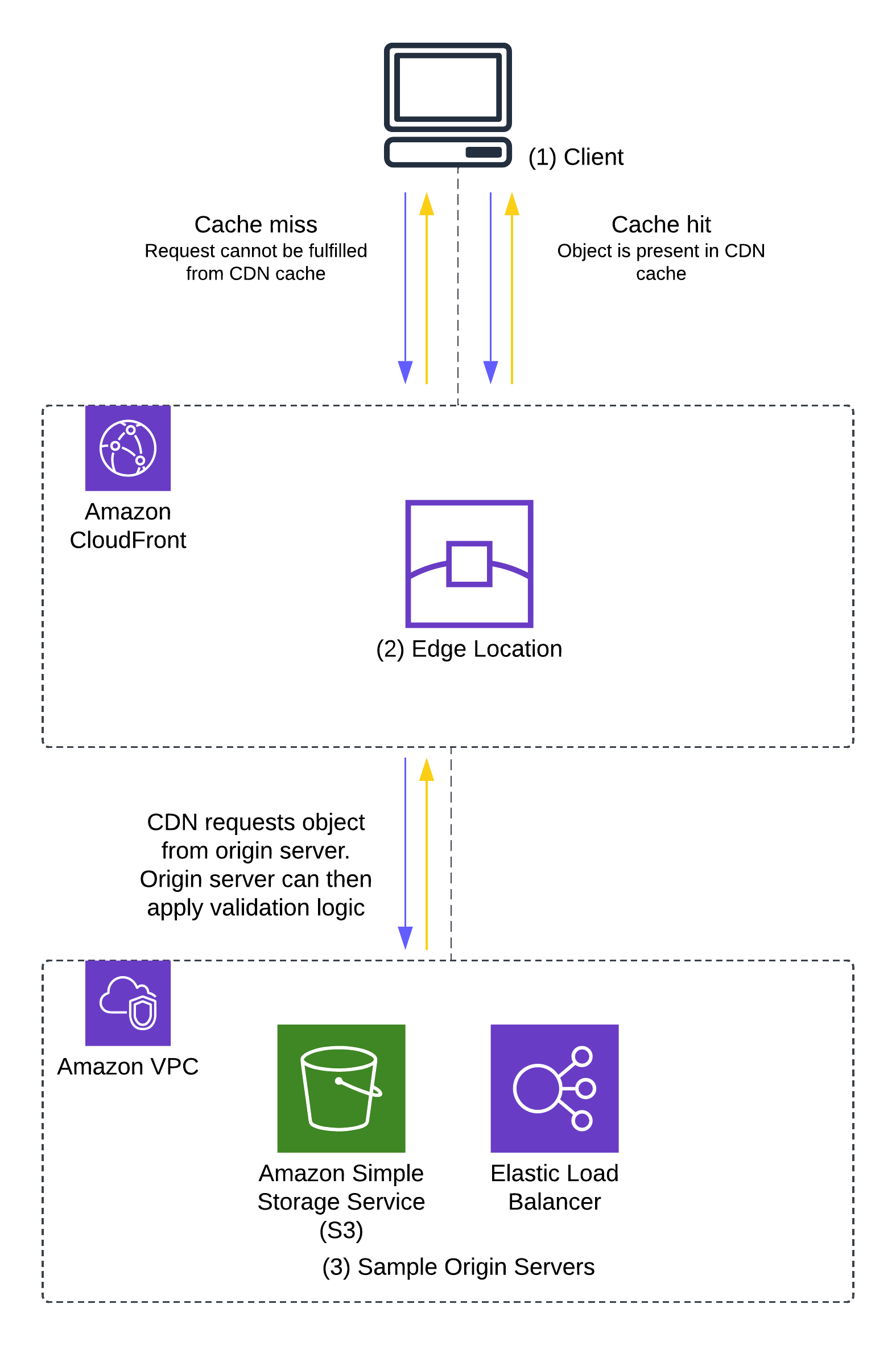
Figure 1 illustrates this process.
Figure 1: Request – response flow showing instances of a cache-miss and a cache-hit
The process shown in Figure 1 is as follows:
A request is received from a user client (1) at a CloudFront edge location (2).
The edge location attempts to return a cached copy of the file requested. This request, if fulfilled from the cache, is considered a cache hit.
In the case of a cache miss—when the content is either not in the edge or is not valid (for example, if the content is out of date)—the request is forwarded to the origin (3) (such as an Amazon Simple Storage Service (Amazon S3) bucket) for a new copy of the object.
In the case of a cache hit, the origin cannot apply validation logic to the user’s request, because the edge server doesn’t need to contact the origin to fulfil the user’s request.
In the next section, I show you how to inspect the client-request headers using AWS WAF to allow or block requests at the CDN.
Solution implementation—two approaches
This post includes two ways to set up AWS WAF to help prevent hotlinking:
Using a separate subdomain: Static files (such as images or styling components) to be protected are moved to a separate subdomain such as static.example.com so that you only need to validate the Referer header.
Using the same domain: Static files are located under a directory on the same domain. This solution includes how to extend this example to check for an empty Referer header.
The choice of approach will depend on how your site is structured and the level of protection you want to implement. The first approach enables you to set up a Referer header check to make sure that requests for the images only come from an allowlisted sub-domain, while the second approach has an additional check for an empty Referer header. The second approach extends the first approach and allows for some flexibility for users to share direct links to the image while still preventing unaffiliated third-party sites from embedding the image links on their websites.
Terms
The following list includes key terms used in this post:
AWS WAF configurations consist of a web access control list (web ACL), associated with a given CloudFront distribution.
Each web ACL is a collection of one or more rules, and each rule can have one or more match conditions.
Match conditions are made up of one or more filters, which inspect components of the request (such as its headers or URI) to match for certain conditions.
Case-sensitivity: HTTP header names are case-insensitive. Referer and referer point to the same HTTP header. HTTP header values, however, are case-sensitive.
Prerequisites
You must have a CloudFront distribution set up before configuring an AWS WAF web ACL. For information about how to set up a CloudFront distribution with an S3 bucket as an origin, see Configure distributions.
Approach 1: A separate subdomain
In this example, you create an AWS WAF rule set that contains a single rule with a single match condition, which in turn has a single filter. The match condition checks the Referer header and verifies that it contains a given value. If the request matches the condition specified in the rule, the traffic is allowed. Otherwise, the AWS WAF rule blocks the traffic.
For this example, because all the static files are on a separate subdomain (static.example.com) accessed only from the site example.com, you will block hotlinking for any file that don’t have a referer that ends with example.com.
Use the following steps to set this up using the AWS WAF console.
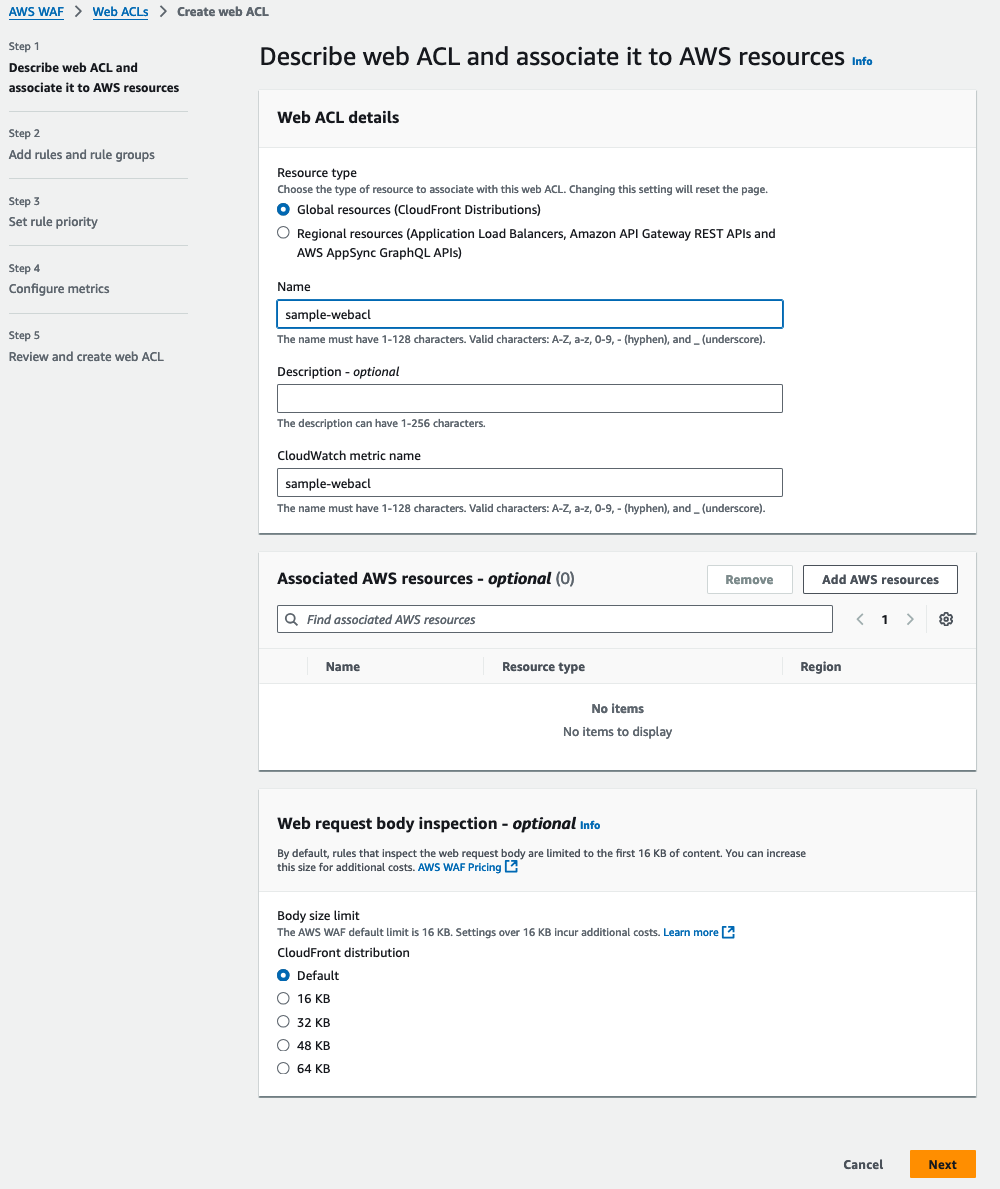
If you have not created a web ACL before, Choose Create web ACL on the AWS WAF console landing page.
Because you want to associate the web ACL with a CloudFront distribution, select Amazon CloudFront distributions as the Resource type.
Enter a Name for the web ACL that you’re creating. For this example, I used the name sample-webacl. The page will automatically populate an associated Amazon CloudWatch metric name. CloudWatch is a monitoring service that allows you to gather and report on metrics of various services. This CloudWatch metric can be used later to report on how your newly created AWS WAF configuration is being used.
After you have supplied the name of the web ACL, you can select the available AWS resources to be protected by this web ACL. In this example, you will fill that in later, so leave this field blank for now.
By default, AWS WAF can inspect up to 16 KB of the web request body with additional values of 32, 48, and 64 KB for an additional cost. Leave the web request Body sizelimit at the default value of 16 KB.
Choose Next.
Figure 2: Describing the web ACL and associating it to resources
Step 2: Create a string match condition on Referer header
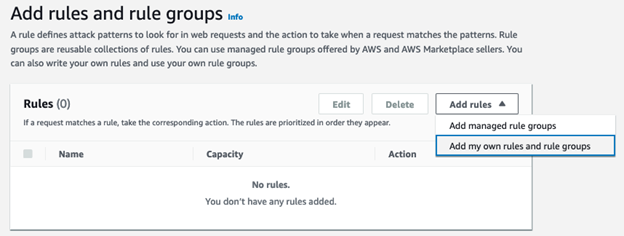
AWS WAF ACLs can use AWS managed rule groups, rule groups from AWS Marketplace providers, or you can write your own rules and rule groups. For this example, you will create your own rules and rule groups.
In the AWS WAF console, choose Add rules, and select Add my own rules and rule groups to create the string match condition.
Figure 3: Add rules and rule groups
This will bring you to the Rule visual editor page. The default Rule type will be set to Rule builder which you can leave unchanged. In the Rule builder section, select Regular rule.
Figure 4: Rule type and Rule builder
The next step is to construct a string match condition to match on the Referer header. Under Name, enter a name for the rule, such as Referer-check. Make sure that If a request is set to doesn’t match the statement (NOT). The string match condition is a negative match which means that if the Referer header field value does not match the value specified in the rule, the request will be blocked. This makes sure that requests for static.example.com which only originate from example.com are allowed. In the Statement section, use the following settings:
Inspect: Select Single header.
Header field name: Enter referer as the value.
Match type: Select Exactly matches string.
String to match: Enter example.com as the value.
Text transformation: Select Lowercase. This isn’t required for most modern browsers, but is a good practice because HTTP header field values are case sensitive.
Figure 5: Rule name and statement
In the Action section, select Block as the Action. Choose Add Rule.
Figure 6: Rule Action
In the preceding rule statement, you’re configuring AWS WAF to inspect a header with the name Referer and checking if the value of the header matches the static string example.com. If the value of the Referer header is not example.com, then the request is blocked.
The next page is Add rules and rule groups. It shows the following attributes of the web ACL:
AWS WAF rules that have been added to the web ACL.
Because you’re only adding one rule to this web ACL, choose Next.
Figure 7: Rules and rule groups, WCUs, and default web ACL action
On the next page, you will set the rule priority. Because you added only one rule, you will not need to adjust the rule priority. If there is more than one rule, you can select a particular rule and use the Move up or Move down options to organize the rule order. Choose Next.
Figure 8: Set rule priority
The Configure metrics page details can be left at the default values. Choose Next to proceed to the final step.
Figure 9: Configure metrics
The final step is to review the web ACL details. If you need to change one of the settings of the web ACL, you can choose Edit step for the corresponding step. Choose Create web ACL to finalize creating the AWS WAF web ACL.
Figure 10: Review and create web ACL
Step 3: Associate the new rule with the relevant CloudFront distribution
You can now associate AWS resources with the web ACL that you created in the previous steps. In this case, the AWS resource is a CloudFront distribution.
In the AWS WAF console, choose Web ACLs in the navigation pane. Select the web ACL named sample-webacl that you created previously.
Figure 11: Select a Web ACL to configure
Choose Add AWS resources.
Figure 12: Add AWS resources
Eligible AWS resources will be displayed in the pop-up page. Select the CloudFront distribution from the Resources list. Choose Add to associate the ACL sample-webacl with the CloudFront distribution.
Figure 13: Select CloudFront distribution to associate with sample-webacl
The next page is the Web ACLs page, which will show the CloudFront distribution selected in the previous step in the Associated AWS resources section.
Figure 14: Web ACLs and Associated AWS resources
Test the referer check rule
You’re ready to test the web ACL that you created by issuing a cURL command from the command line and confirming that the referer check is matched correctly. When you request files without the allowlisted Referer header, the requests are blocked at the CDN. However, valid requests still are allowed through.
When a third party embeds your content (request blocked at the CDN)
Note: With Approach 1, you must make the request with an allowlisted Referer header. In this example, all paths are filtered.
Approach 2: All content under the same domain, with filtering by path
In the second approach, you allow a blank Referer header and filter by a given URL path. To do this, you will create an AWS WAF web ACL that contains multiple rules with additional match conditions, which in turn are comprised of multiple filters. As with the first approach, the match condition looks at the Referer header; however, you will validate the header in two ways. First, you validate whether the request contains the expected header, and if it does not, you apply the second validation, which checks to see whether it has a URL style Referer header. This enables you to access the assets directly in a browser when the assets aren’t embedded elsewhere in a website but still provides protection against hotlinking.
Accessing an image directly in the browser can be useful in situations where users might want to share the link to the image directly, thus helping to prevent a negative user experience when sharing the image link with other users. This approach makes it an improvement over the first approach where requests for the images must originate from the sub-domain.
You will also validate the path used in the request (in this example /wp-content), which allows AWS WAF to protect individual folders under a single domain name.
Step 1: Decide what to protect
As in the first approach, rather than filter on everything under a domain, you will filter based on the path. In this case, /wp-content. This allows you to protect your uploaded content that sits under /wp-content, but without having to put the content into a separate subdomain.
Step 2: Create and name a new web ACL
You can use the web ACL that you created for Approach 1, or you can repeat Step 1 of Approach 1 to create a new web ACL.
Step 3: Create string match conditions on the referer
For Approach 2, the assumption is that everything exists under a single domain, so instead of using the catch-all example.com, use the more secure https://example.com/ and mark the header as Starting withhttps://example.com.
Because you’re explicitly filtering on one header, you must watch out for two things:
Switching between www.example.com and example.com in your application.
Switching between https:// and http:// in your application.
If either of these switches occurs, you will see a 403 Forbidden error returned instead of your embedded files. In this example, all content is delivered directly through https://example.com/.
For this example, you will construct two rules, each of which will contain multiple string match conditions. AWS WAF allows for conditional match conditions within a rule so you can create nested logic statements. For example, a rule evaluation is true if all the statements within a rule statement are evaluated to true.
First rule: Validate a Referer header:
For this rule, you will set the following match conditions and AWS WAF actions:
Rule name: Validate-Referer-header
If Referer header value starts with https://example.com
AND
If URI path starts with /wp-content
THEN
ALLOW request
Open the AWS Management Console for AWS WAF and navigate to WAF & Shield.
Choose Web ACLs in the navigation pane and select Global (CloudFront) as the AWS Region.
Figure 15: Web ACLs and AWS Regions
The page will refresh to show the Web ACL sample-webacl that you created in the preceding Step 2. Select sample-webacl.
Figure 16: Web ACLs list
Select the Rules tab.
Figure 17: Web ACL rules
Choose Add rules and select Add my own rules and rule groups. If you’re reusing the web ACL created in Approach 1, delete the Referer-check rule before adding new rules.
Figure 18: Add rules and rule groups
For Rule type, select Rule builder.
Figure 19: Rule type
In the Rule section, use the following settings:
Name: Enter Validate-referer-header as the value.
Type: Select Regular rule.
If a request: Select matches all the statements (AND).
Figure 20: Rule name and match condition
In the Statement 1 section, use the following settings:
Inspect: Select Single header.
Header field name: Enter referer as the value.
Match type: Select Starts with string.
String to match: Enter https://example.com as the value.
Text transformation: Select Lowercase.
Figure 21: First string match condition
Create the second string match condition (Statement 2). For the URL itself, you want to protect content under /wp-content, so you will create a string match to validate that case using the same steps as for the first string match condition, with two changes:
For Inspect, select URI path.
For String to match, enter /wp-content as the value.
Figure 22: Second string match condition
Change the Action to Allow and choose Add Rule at the bottom of the page.
Figure 23: Set the Action to Allow
In the Set rule priority page, choose Save.
Figure 24: Save the rule
Second rule: Validate without a Referer header
For the second rule, you will set the following match conditions and rule actions:
Rule name: Validate- with-no-Referer-header
If Referer header contains ://
AND
If URI path starts with /wp-content
THEN
BLOCK request
The second rule is similar to the first rule, but it matches when the Referer header value includes ://. You use this match condition to check whether the Referer header has been set at all. If it has, you block the request.
In the Web ACL page, choose Add rules and select Add my own rules and rule groups to be taken to the Rule type page.
Figure 25: Create the second rule
For Rule type and Rule builder, use the following settings:
Rule type: Select Rule builder.
Name: Enter Validate-with-no_Referer-header as the value.
Type: Select Regular rule.
If a request: Select matches all the statements (AND).
Figure 26: Set the rule type and matching
For Statement 1, use the following settings:
Inspect: Select Single header.
Header field name: Enter Referer as the value.
Match type: Select Contains string.
String to match: Enter ://
Figure 27: Configure Statement 1
For Statement 2, use the following settings:
Inspect: Select URI path.
Match type: Select Starts with string.
String to match: Enter /wp-content as the value.
Figure 28: Configure Statement 2
For Action, keep the default setting of Block and choose Add Rule.
Figure 29: Add rule
The resulting Set rule priority page will list the rules in the sample-webacl web ACL and will look like the following figure. It shows the name of the rule, the rule priority, the web capacity units (WCUs) and the AWS WAF response. Choose Save.
Figure 30: Rule priority and web ACL units used the web ACL.
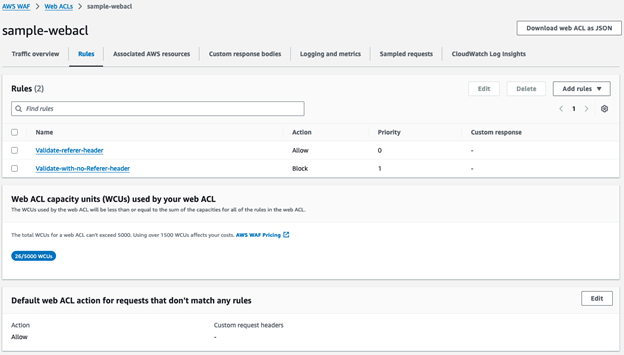
The Rules tab will now show both of the rules that you added with their corresponding AWS WAF actions in addition to the default action of Allow for requests that don’t match one of the rules.
Figure 31: Rules tab of sample-webacl web ACL
Step 4: Associate the new rules with the relevant CloudFront distribution
Select the Associated AWS Resources tab and choose Add AWS resources.
Figure 32: Add AWS resources
Select the relevant CloudFront distribution and choose Add.
Figure 33: Select the CloudFront distribution
The web ACLs page will show the CloudFront distribution in the Associated AWS resources tab.
Figure 34: Associated AWS resources
Test the rules
Similar to Approach 1, you have filtering at the CDN, but this time the filtering is based on the path and direct linking is allowed (without a Referer header).
You can use cURL to verify that the new AWS WAF web ACL correctly protects your content. Use the –H argument to send a different Referer header to the CloudFront distribution, which allows you to test as if you are embedding the website content in an unauthorized page.
AWS WAF is a web application firewall that lets you monitor and control the HTTP(S) requests that are forwarded to your protected web application resources. In this post, you saw how to use the AWS WAF custom rule builder feature to prevent content hotlinking to protect your website’s content hosted in an Amazon S3 bucket.
The two approaches demonstrated in this post provide you with ways to implement a robust referer check solution that helps prevent unauthorized third-party websites from linking back to static assets on your website, thus helping to prevent increased bandwidth costs, bad user experience, and degraded performance because of resource leeching. Following the concept of least privilege, you can further restrict the AWS WAF rules to apply only to certain image file extensions (such as .jpg or .png).
While referer checking helps prevent unaffiliated sites from backlinking to your site’s images and benefitting by using your site’s bandwidth, more sophisticated exploits can carefully craft a request to bypass the referer check. Other web request mechanisms, such as web browser plugins, server-to-server requests that forge referer header values, or privacy-based web browsers may also cause inconsistencies in accurately evaluating the referer header value. Be aware of such inconsistencies and consider using additional private content mechanisms such as signed URLs and token authentication.
You can use AWS WAF to build on top of the referer check to implement more advanced content protection solutions such as rate-limiting, bot mitigation, and DDOS mitigations to further secure your website against a wide range of exploits.
If you have feedback about this post, submit comments in the Comments section below. If you have questions about this solution or its implementation, start a new thread on the AWS WAF forum.
Alex Smith was the original author of this post in 2016.
“We’re currently running tests in select regions to age-gate access to certain spaces or user settings,” a spokesperson for Discord said in a statement. “The information shared to power the age verification method is only used for the one-time age verification process and is not stored by Discord or our vendor. For Face Scan, the solution our vendor uses operates on-device, which means there is no collection of any biometric information when you scan your face. For ID verification, the scan of your ID is deleted upon verification.”
I look forward to all the videos of people hacking this system using various disguises.
Version
25.04 (“Plucky Puffin”) of the Ubuntu Linux distribution has been
released. This release includes Linux 6.14, GNOME 48, APT 3.0, and introduces a Arm64
desktop ISO to install Ubuntu Desktop on Arm64 systems. This is an
interim release, with support through January 2026. See the release
notes for a detailed list of new features and changes.
AI is rewriting the rules of technology, for better or worse. Arguably one of the most “for better and worse” areas? Ransomware. It’s a full blown billion dollar business, and AI is supercharging both the offense and defense.
Not only are we seeing AI give bad actors more sophisticated tools and campaigns to target business and consumers alike, we’re also seeing mitigation techniques and technologies deployed by good actors gain equally compelling AI-powered improvements.
In other words, welcome to the future—where your data is the hostage and the bots are negotiating. Let’s dig in.
Some stage-setting: How much is ransomware costing us?
Despite ransomware payments exceeding an eye-watering $1 billion in 2023—and despite some high profile attacks in 2024, one of which extracted $75 million from a single victim—ransomware attacks actually fell overall in 2024. High profile law enforcement activity, like those against LockBit and BlackCat contributed to a huge drop in the second half of 2024.
Don’t get too excited though: According to cryptocurrency tracing firm Chainanalysis, that still meant $814 million in 2024. And, the true cost of ransomware includes more than just payments extracted under threat.
The economic ripple effects of a ransomware attack can include losing C-level talent, having to lay off employees, and ongoing downtime or business closure. Industry-wide, cyber insurance is a growing industry, and 2024 saw a staggering 31% of claims come from third-party risk.
Perhaps most concerningly, ransomware attackers are increasingly using exfiltration as a tactic to double and triple extortion, even using exfiltration data to launch targeted distributed denial-of-service (DDoS) attacks. According to a Check Point’s 2025 Cyber Security Report, some new actors have emerged as exclusively “data-selling platforms,” hosting dedicated data leak sites (DLS) and negotiation platforms.
The good news
Machine learning (ML) tools have underpinned modern cyber security techniques for years now—with excellent results.
Sophisticated monitoring tools give us far more granular insights and alerts.
AI-driven behavioral analysis is making it easier to detect anomalies and preempt attacks before they escalate.
What does this mean for defending against ransomware attacks?
Enterprises now have access to security platforms that analyze network behavior in real time, flagging unusual access patterns or lateral movement before a full ransomware payload can deploy. These platforms rely on machine learning models trained on massive datasets of known attack vectors, which allows them to flag and quarantine suspicious activity with impressive accuracy.
The interesting thing is that common knowledge says that “the AI revolution” has been happening recently, and quickly. But, when it comes to cybersecurity defense, many tools have been using ML algorithms for at least two decades. Palo Alto Networks (WildFire), for example, has been using ML since 2003.
The line between “processing massive datasets and acting up on that info based on programmed parameters” and machine learning is subtle, but important. While the former follows set parameters, machine learning identifies patterns in data—sometimes with human guidance—to decide from multiple possible actions.
It’s like teaching an assistant a series of tasks they can eventually do on their own. When you think about the progression from basic automation to ML, AI, and deep learning, the shift from rule-based actions to autonomous, chained decisions starts to make a lot of sense.
Zero trust architecture, enhanced by AI, is also gaining momentum. Instead of relying on perimeter-based defenses, AI-enhanced systems enforce granular access controls and continuously verify user and device trust levels. In practice, what this means is that systems no longer assume that you are you on the other end—not without evidence. Combine this with real-time threat intelligence sharing and automated incident response, and enterprises can shorten the window between detection and mitigation drastically.
The bad news
Deep fakes are more convincing.
The ability to generate code means there are more attacks, and those attacks are more sophisticated and responsive.
Cyber criminals of all skill levels have access to more technical tools, including some that are specialized in malware.
Enterprises are adjusting to a new way of working, which can create vulnerabilities.
Generative AI, phishing, and deep fakes
The low-hanging fruit in this discussion is that it’s easy to use generative AI to create more convincing phishing attacks. In the past, bad grammar or non-localized language choices have been an easy way to quickly identify a phishing attack.
Assisted by generative AI, deep fakes of both the voice and video flavor are getting increasingly difficult to spot—so, while you know your CEO isn’t likely to text you to get a bunch of gift cards or send them company funds via Bitcoin or PayPal, you might believe a video of your CFO or a call from your CEO asking you to transfer funds to accounts that turn out to not be legitimate.
How is generated code being used by ransomware bad actors?
Just as generative AI models have made everyone a poet, they’re also widely used to generate code. Tools like GitHub Copilot have seen wide adoption amongst enterprises looking to generate and test code. Gartner reports that by 2027, 70% of professional developers will use AI-powered coding tools, up from less than 10% in 2023.
Given how AI code generation has made code generation easier on enterprises, it’s no surprise that the ransomware industry is following the same adoption trends. By January 2023, this had gone from a hypothetical to a reality, with ransomware bad actors of low levels of technical skill able to leverage LLMs to create malware scripts.
By July 2023, cybercriminals were already discussing WormGPT, a malicious chatbot trained on ChatGPT which removed standard guardrails against creating illegal or inappropriate content. And, cybersecurity protection firms had executed a proof of concept to demonstrate that AI could generate truly polymorphic code on the fly—a technique used to make it much easier to evade detection by antivirus programs. By July 2024, one study showed that ChatGPT 4 was able to exploit 87% of one-day vulnerabilities.
Couple that with the fact that ransomware bad actors have opposite success metrics vs. enterprises. Cyber criminals rely on enacting as many attacks as possible, and it only takes one of those attacks succeeding to see a significant upside. Enterprises, on the other hand, only need one failure to see a huge negative impact on their businesses.
What things can you implement to be ransomware ready?
Some of these recommendations are things that users can do on every platform they interact with, such as:
Creating good, strong, unique passwords, and preferably using a password manager: A good password manager reduces password reuse and helps ensure best practices are followed enterprise-wide.
Enabling multifactor authentication (MFA): Multi-factor authentication remains one of the strongest lines of defense, especially when paired with device verification and biometric options.
On the enterprise side of the house, frameworks like cyber resilience help teams protect data they’ve been entrusted with. And, AI-powered cyber security tools can be a powerful tool in any business’s toolbox. That can look like a number of different things, including:
Investing in AI-powered endpoint detection and response (EDR). These tools continuously monitor and analyze endpoint activities, flagging unusual behavior and isolating threats automatically.
Training teams on recognizing deep fakes and AI-enhanced phishing attempts. Security awareness training is evolving fast. Focused, frequent, and AI-aware sessions are critical for employees across departments.
Leveraging deception technology. Deploying decoy systems, fake credentials, and honeypots can help trap attackers early and gather valuable intel on their tactics.
Running tabletop simulations. Practicing breach scenarios—especially those involving AI-enabled threats—prepares teams to act decisively when seconds matter.
Cyber resilience isn’t static, and neither are the tools and tactics. One of the most important areas an enterprise can invest in is ongoing security and research. Enterprise leaders need to prioritize proactive measures. That means ongoing AI model audits, being nimble in response to new and changing best practices, and investing in cross-functional teams that bring together infosec, legal, and operational leadership.
The future of AI and ransomware
Let’s level with each other—separately, the AI and ransomware spaces are both changing quickly. When you combine AI and ransomware and try to define how they’re affecting each other, you’re on pretty slippery ground.
What we’re trying to do here is identify patterns that affect our everyday lives—but we’re also taking a peek at what folks are studying in the research realm, because quantum is just around the corner, and, frankly, too impactful to ignore.
So, tell us if we need an update, or if you have another opinion! The comments section is open and we’re happy to chat.
Version
14.5 of the Tor
Browser has been released. Notable features in this release
include the addition of Connection Assist for the Android version of
the Tor Browser, and language support for Belarusian, Bulgarian, and
Portuguese for all versions of the browser.
Should Tor Browser fail to establish a direct connection to the Tor
network, Connection Assist will offer to find and try bridges for
you. But before this feature could be made available on Android, we
had to embark on a multi-year effort to refactor our tor integration
across each platform first. This project has now reached an important
milestone, and we’re proud to announce the release of Connection
Assist for Android today.
The kernel’s memory controller works within the control-group mechanism to
enforce memory-usage limits on groups of processes. This component has
often had performance problems, so there is continual interest in
optimizing it. Shakeel Butt led a session during the memory-management
track of the 2025 Linux Storage, Filesystem, Memory-Management, and BPF
Summit to look at the current state of the memory controller and what can
be done to reduce its overhead.
Security updates have been issued by Debian (chromium and libapache2-mod-auth-openidc), Oracle (expat, freetype, glibc, grub2, gvisor-tap-vsock, and kernel), Red Hat (grub2 and webkit2gtk3), and SUSE (apache2-mod_auth_openidc, cosign, gitoxide, govulncheck-vulndb, GraphicsMagick, haproxy, hauler, mozjs52, oci-cli, pam, perl-Data-Entropy, poppler, python-lxml-doc, python311-aiohttp, rekor, rubygem-rexml, and webkit2gtk3).
Announcing General Availability of GitLab Duo with Amazon Q
Today, we’re excited to announce the general availability of GitLab Duo with Amazon Q. This new offering is an integrated product, bringing together GitLab’s DevSecOps platform with Amazon Q’s generative AI capabilities. Gitlab Duo with Amazon Q embeds Amazon Q agent capabilities directly in GitLab’s DevSecOps platform to accelerate complex, multi-step tasks across the entire software development lifecycle.
In today’s fast-paced software development environment, developers are constantly looking for ways to improve productivity while maintaining best practices for code quality, security, and deployment. The integration of GitLab Duo with Amazon Q addresses these needs by combining GitLab’s comprehensive DevSecOps platform with Amazon Q’s intelligent coding assistance.
This integration enables developers to leverage AI throughout their entire workflow—from idea conception to deployment—all within the familiar GitLab environment they already use. For new and existing Amazon Q Developer users, this integration also leverages the same Q Developer agents available in the IDE, providing a consistent experience across different interfaces.
Key Benefits and Features
The GitLab Duo with Amazon Q integration delivers significant value to development teams by creating a more efficient, secure, and collaborative workflow.
This integration eliminates the need to switch between different tools and environments, as developers can access powerful AI assistance directly within GitLab. GitLab helps automate building, testing, packaging, and deployment of secure code, streamlining the entire development lifecycle. What makes this particularly powerful is how the AI agents utilize the context throughout a GitLab project to keep the SLDC “loop” going. So whether you are troubleshooting a failed pipeline, investigating a vulnerability, or writing a new feature, Amazon Q agents can leverage the appropriate context to assist you with the task at hand.
Security and compliance are foundational elements of this integration. End-to-end security controls are built directly into the platform. The Amazon Q agents come with appropriate guardrails to help customers meet compliance without affecting development velocity, all while leveraging AWS’s cloud infrastructure to scale your AI-enhanced development workflows with confidence. You can ask Amazon Q agents to help remediate a finding in the project’s vulnerability reports or help troubleshoot a failed pipeline.
Throughout your development workflow, you’ll find collaborative AI agents ready to assist with various tasks. Whether you need to upgrade Java code from version 8 or 11 to 17, get AI-powered code review suggestions, automatically generate comprehensive test cases, or transform ideas into complete merge requests—Amazon Q is there to help at every step. These intelligent agents work alongside your team, enhancing productivity.
Use Cases and Examples
To demonstrate how GitLab and Amazon Q complement each other to accelerate development productivity and help organizations with application security, I’ll be using a Java application enjoyed by puzzle enthusiasts.
Idea to Merge Request
Whether you are looking to scale your developer teams or streamline the processes between feature requests and production, GitLab Duo with Amazon Q is now integrated into GitLab’s platform, so you can begin development simply by assigning a GitLab issue to Amazon Q Developer agents.
I start by creating a task in my GitLab project. I want to create a new feature to support multiple languages in the Q words game.
From here I assign the task directly to the Amazon Q agent by using GitLab’s quick action/q dev in the issue’s comment section.
The agent will automatically open up a merge request for me to review with suggested code changes. Here you can see changes the agent made across 11 files, accounting for front-end, API, and styling changes. In the past I would have opened my IDE, cloned the project, and coded these changes myself. Using GitLab Duo with Amazon Q, I just review and test the new code before I am ready to deploy.
Code Reviews
Code reviews play a critical function during the development life-cycle. They act as a quality gate to help maintain high quality security and coding standards. While important, code reviews add latency to software delivery, especially when reviewers are not available or when changes are complex.
The Amazon Q agent for Code Reviews in GitLab helps teams move faster through their code review. Using the quick action /q review in a merge request comment field sends the merge request to Amazon Q, where it will identify security and quality risks associated with code changes in the merge request.
I start by opening an open merge request. In this example, another developer had the task to add authentication to the Q words application.
I then invoke the agent with the /q review quick action.
The review is returned as inline code suggestions to the merge request. Here you can see an example of a finding from the review agent. Comments include a description of the findings as well as guidance and links to help improve the code.
I next use the Gitlab Duo with Amazon Q chat agent in the web interface to ask for a summary of the change and ask it to highlight any critical issues. GitLab Duo chat allows me to ask questions about the current resource in the URL. In this example it is the merge request, but it could also be a GitLab issue I want to explain or a summary of a code file in a repository.
Test Generation
Next, I ask GitLab Duo with Amazon Q to generate tests using the /q test quick action. Adding this action to the comment field will generate recommended tests when the MR lacks sufficient tests.
The summary I receive from GitLab Duo with Amazon Q helps me understand the scope of the changes and focuses my attention to the more important aspects of the change. Along with the tests that Q Developer agents recommended, I am able to approve the merge request in less time.
Java Transformation
Upgrading Java applications from older versions to Java 17 can be time-consuming and error-prone. With GitLab Duo and Amazon Q, I can leverage the transform agent to help me automate the migration from the current Java 8 code to Java 17 along with upgrading the project’s dependencies. I start by creating a new issue in my GitLab project that indicates the Java upgrade.
To begin the upgrade, I use the GitLab Q quick action /q transform to begin the upgrade process. The Amazon Q transformation agent asks me to update the gitlab-ci.yaml file to continue the process.
I can follow the agent’s progress by watching for updates in the Issue’s details. GitLab Duo with Amazon Q will also add a transformation plan to the issue so I can understand what types of changes will be involved to complete the upgrade.
When the transform is complete, a new merge request is opened for me to review. As you can see, my pom.xml file was updated to compile on Java 17 as well as additional changes to ensure the project compiles. It also includes a report detailing next steps to consider before merging and deploying the updated Java code.
Conclusion
In this post, I demonstrated how GitLab Duo with Amazon Q can help scale and improve application development. Using GitLab Duo with Amazon Q, I was able to quickly add additional features, review code changes, and upgrade my application to Java 17 all within GitLab’s collaborative interface. I now have a secure and modern java app that I can use to practice my Español.
The general availability of GitLab Duo with Amazon Q marks a significant milestone in AI-assisted software development. By combining GitLab’s comprehensive DevSecOps platform with Amazon Q ‘s generative AI capabilities, this integration empowers development teams to work more efficiently while maintaining high standards of security and compliance.
Organizations can now leverage this powerful integration to accelerate their software development lifecycle, reduce manual effort, and ship more secure code faster. The seamless developer experience, enterprise-grade security, and collaborative AI agents throughout the workflow make this integration a valuable addition to any development team’s toolkit. We’re excited to see how customers leverage this integration to transform their development processes and achieve new levels of productivity and innovation.
Да пишеш за хашиша в Близкия изток и Северна Африка е като да си арабист и да преоткриеш Корана, Сунната, или арабската граматика на Сибауейхи от VIII век. Като да откриеш топлата вода, или както казват англоезичните колеги, „да изобретиш наново колелото“. На пръв поглед изглежда, че полето отдавна е пренаситено и изчерпано. Всичко е казано и направено, по-умни от теб са се трудили на него и като че ли няма какво да се добави. „Каквото е било, то е и сега, и каквото ще бъде, то е вече било“, стоически би заключил библейският Еклисиаст.
Но както често се случва, първоначалното отчаяние е неуместно. При повторно заравяне в оригиналните извори винаги изскача храна за размисъл, която се превръща в настоящата текстуална баберка, ако трябва да употребим тази хубава стара българска дума. И без претенция за изчерпателност тук брашненият чувал е щедър при отупване, а вдигналият се прах не е непременно бял.
Понякога го наричат на арабски киф, със същата дума, от която идва и нашенското „кеф“.
Хашишът представлява прахообразната кристална субстанция от връхчетата на канабиса. Оттам и на немски глаголът kiffen си означава това, което на нашенски градски жаргон е „козене“, тоест пушене на марихуана и производните ѝ.
А пък на арабски хашиш, на първо място, си значи просто „трева“ –
както растението, така и специфичния му продукт. Това предизвикваше сухо подхилване сред нас, арабистите, в годините на бюрократичната ни кариера като преводачи и чиновници по чуждестранни дипломатически институции. Защото „косачка за трева“ от офертите, които получавахме и превеждахме, си е просто „машина за подрязване на хашиша“, тоест на тревата. Човек неволно си представя нещо като посолствените сюжети във филма „Мисия Лондон“. Затова и българското хашиш с арабската дума си падат малко „фалшиви приятели“. Нещо като „митинг“ в българския и английския. Ето ви пример. През 2013 г. приятели от САЩ по време на работна среща (meeting) ме питат къде излизам и защо бързам. Аз им казвам, че отивам на друг meeting, в случая – да протестирам на митинг пред Народното събрание.
Та така и тук. За нас хашиш означава нещо точно определено – пластелинообразната субстанция, концентрат от активното вещество на марихуаната, който се консумира чрез пушене или дъвчене. Само че на арабски си значи трева от всякакъв вид, също така трева за пушене, и накрая, в специфичното си значение – определен вид наркотично вещество, производно на канабиса. Ала преди да поемем по лъкатушещия път на старите хашишени разкази, да се обърнем към сухите цифри.
Арабският свят, Близкият изток и Северна Африка имат дълга история с канабиса, която се отразява и на настоящите статистики. Световният доклад за наркотичните вещества на ООН от 2024 г. отделя специално място на канабиса. Страните, в които се култивира за износ или за местна употреба, са разделени по континенти и подредени по значимост. В Северна Америка най-важните държави са САЩ, Мексико и Канада. В Африка на първо място е поставено Мароко, следвано от Нигерия, Египет, Намибия, Гана, Есватини и Замбия. В границите на азиатския континент висока позиция заемат Афганистан и Ливан. В Централна Азия виждаме Киргизстан, Казахстан, Узбекистан, Азербайджан. Като се придвижваме още пò на изток, минаваме през Индия, Непал, Филипините, Индонезия.
Естествено, няма как да очакваме официални данни за производството на канабис. Все пак голяма част от него става на тъмно. Затова и се следи през косвени метрики, като „унищожени площи с канабис“, „брой унищожени фабрики“, „конфискувани растения“ или „произход на конфискуван канабис“. Измежду арабските държави на произход, изпращане или транзит на канабис в Африка и Азия първенството се държи от Мароко, Египет и Ливан. В периода 2018–2022 г., за който има данни в доклада, страната на първо място по произход на заловени количества смола от канабис е Мароко. Ливан заема пето място. А световната консумация стабилно нараства – от 146,3 млн. потребители през 2002 г. стигаме до 228,15 през 2022 г., като най-много от тях са в Северна Америка.
Мароко и Ливан изпъкват като основни арабски дестинации на индустрията с канабис, била тя и предимно нелегална.
И това се разпознава от властите в двете държави. В Мароко индустрията, съсредоточена предимно в планините Риф, по някои данни осигурява около 70% от хашиша в Европа. А на пазара (сук) може да си купиш свободно дълги и тънки дървени тръбички. Не са музикален инструмент – към тях вървят малки глинени панички, чрез които да си сглобите луличка. С нея може да консумирате предлаганото от криминално изглеждащи улични продавачи, които вървят след теб и някак сугестивно и тайнствено нашепват: „Хашиш! Хашиш, хашиш!“ Като част от държавните усилия да се изведе индустрията на светло, през 2021 г. мароканското правителство легализира определени употреби на канабис.
В Ливан в исторически план производството нараства след забраните за производство в Египет през XIX век. Но опити за легализиране се предприемат едва сега. През 2019 г. консултантската компания „Маккинзи“ публикува официален доклад под надслов „Ливан – икономическа визия“. В четивото от около 1274 страници
канабисът заема ключово място като бъдеща посока за развитие на ливанската икономика.
През 2020 г. държавата също легализира канабиса, а според прогнозата, дадена в доклада, до 2025 г. се очаква изграждане на контролирани райони за легално култивиране на канабис на площ от около 1000 хектара. Предстои да видим дали външните препоръки ще се реализират, но явно Близкият изток и Северна Африка имат богат опит със земеделската култура, който дори се опитват да официализират.
Как обаче се възприема проблематичната субстанция в културен и исторически план?
За жалост, Коранът не споменава нищо за канабиса, хашиша и производните субстанции. Казвам за жалост, защото първата, почти инстинктивна реакция на всеки арабист при търсене на източници на законова, религиозна и културна норма е да посегне към мюсюлманското Писание. В него се споменава виното(хамр) предимно в негативна светлина (2:219, 5:90–91), освен ако не е в Рая, разбира се (47:15, 56:18). Говори се и за свинското месо (2:173, 5:3, 6:145, 16:115), хазарта, „играта на късмет“ (2:219, 5:90).
Но за канабис?! Нито дума.
Следващото нещо, което човек може да направи, е да провери преданията на Пророка (Сунна) или поне признатите за „достоверни“ (сихах, ед.ч. сахих) десетина хиляди разказа за живота на Пророка. За мое разочарование там положението е сходно.
Възможно е по времето на Пророка (ние, арабистите, го наричаме Мухаммад, а не Мохамед, защото е по-близко до арабския оригинал) в горещата, безводна Арабия и някъде по маршрута Мека–Медина–Дамаск и обратно, по който знаем, че Пророкът е пътувал, канабисът да не е бил известна култура – по редица чисто географски и земеделски съображения. Дори и да е била, може би досегът с нея е бил незначителен. Не като с виното, разбира се, за чието свойство да предизвиква махмурлук дори се споменава в Свещеното Писание на исляма. Там рабите на Аллах отпиват от „стакани от извор кристален, приятен за пиещите, от него нито боли глава, нито се опияняват“ (37:45–47), явно противно на преживяването с напитката в тукашния свят. А това, че става въпрос не за вода, а за вино, макар и от особен, отвъден характер, последвалата традиция недвусмислено потвърждава. Защо е важно виното? Ще видите по-късно.
Ситуацията обаче постепенно се променя с напредването на мюсюлманските завоевания, с установяването първо на халифата на Умаядите със столица Дамаск и сетне, през VIII век – на халифата на Абасидите с метрополия Багдад. Канабисът е известен от хилядолетия в района на Близкия изток и Средна Азия. Познат е в Месопотамия, Шумер и Акад, а литературата разказва, че към края на VIII век пр.Хр. започва да се употребява думата куннабу или кунубу. Откъдето идвало също арабското каниб и персийското канаб. Познат е в Древен Египет, влиза в употреба за ритуални цели в Индия, споменава се още от Херодот през V век пр.Хр. като субстанция, употребявана от скитите с цел пречистване на телата им.
А веднъж постигнали териториална експанзия на халифата, арабите и мюсюлманите има откъде да придобият липсващия им опит и познание за конопа. Това неизменно става първо през медицински трактати. Още в тях, както отбелязва видният ориенталист Франц Розентал, автор на може би най-подробната монография по въпроса („Билката. Хашишът срещу средновековното мюсюлманско общество“), старите наименования на наркотичните производни на канабиса са различни и понякога объркващи. Хашиш като че ли е най-очевидното и познато нам. Наричат го още бандж, което в епохата преди исляма се използва за обозначаването на коноп. При мюсюлманите обаче бандж започва да означава и растението, известно при нас като „черна попадийка“ (Hyoscyamus).
Може би най-ранното арабско споменаване на канабиса откриваме в „Книга за отровните вещества“ (Китаб ас-сумум) на легендарния лекар и фармацевт Джабир ибн Хаян от края на VIII век. Там той доста неясно разглежда различните видове бандж и внася допълнително объркване чрез позоваването на термина афйун – днес употребяван като „опиум“. Този „опиум“ според него е сокът на черния бандж. От друга страна, „опиумът“ оставал свързан с мака, но без да става ясно какво точно е бандж. В анонимен „Трактат за възбранеността на бандж“ пък авторът му казва, че „бандж е общо понятие, докато хашиш е по-специфично“.
Чисто ботаническите му имена, свързани с различните негови деривати, са допълнени от жаргонните му наименования. В един доста по-късен етап Ал-Бадри от XV век вече е успял да събере няколко десетки, които разделя по два признака. На първо място са имената на хашиша в различните географски локации. На второ имаме нещо по-интересно – как различните професии и социални прослойки са го наричали. Жителите на Персия му казвали бандж. Тези на Йемен – „зеленото“. В Антиохия му викали „котешка глава“, в Хама, Сирия – „препеченото“, а в Египет – зих. На Запад му казвали „щерка на канабиса“, а тези от Хомс, пак в Сирия, употребявали по негов адрес прозвището „онова, що развеселява“. В крайбрежните равнини (Сауахил) бил известен като „изумрудена мина“ и пр.
А как наричали хашиша различните групи в обществото?
Отшелниците му викали „познатото, известното“, също „известното на бедните“ (което пък е прозвище на мистиците). Търговците му казвали „пристигането“ или „покой за ума“. Шейховете на суфите го наричали „посещението на зеления Хидр“ (проверете кой е Хидр в Коран 18:65–82!) или „онова, което се свързва със сърцето“. За водоносците бил „светилникът“, за готвачите – „нахутът“, за певиците – „клонките на щастието“. А за философите? „Хапка мисъл“, разбира се. За онези, които измиват труповете за погребение, хашишът бил „Светият Йерусалим“ (в исляма се нарича Ал-Кудс), за гробокопачите – „сладкишчето“. За хомосексуалните (маханиса) – „малка восъчна свещичка“, и накрая, за самия Сатана – „ловджийката“ (мутасайида).
Вътрешната традиция, породена от откриването на свойствата на канабиса, върви ръка за ръка със сблъсъка с Античността, която отдавна вече разпознава чудната „билка“. По време на Абасидския халифат арабите лека-полека откриват гръцките автори. Ключова роля играе спонсорираният от халифа Ал-Мамун „Дом на мъдростта“. Халифът, освен че е известен със слабостта си към момчетата, се превръща в истински меценат (много анахронистично употребено тук), под чието покровителство започват да се превеждат достигнали до двора гръкоезични автори. И там някъде се появява първата арабска версия на „За медицинските вещества“ (De materia medica) на Педаний Диоскурид в превод на Истафан ибн Басил (тоест Стефанос Базилос) и неговия ментор, известния Хунайн ибн Исхак от IX век.
Ботаническият и зоологически справочник за медицинската употреба на всякакви субстанции става изключително популярен в мюсюлманското Средновековие и битува под най-различни заглавия. Може да го откриете като „Относно субстанциите в медицината“ (Фи хаюлат ат-тибб), но понякога му казват направо „Книга за тревите“ (Китаб ал-хаша’иш). Ще ми се да настъпя тенденциозно преводаческия педал до дупка и да кажа, че си звучи направо като „Книга за видовете хашиш“ (множественото число на арабското хашиш е хаша’иш), но това би било доста манипулативен преводачески експеримент.
Изключително забавно е човек да открива различни арабски преписи от съчинението на Диоскурид. А такива са запазени изключително много в огромен период. В някои от тях е трудно да разпознаеш, че става въпрос за различни растения, например в този, съхраняван днес в библиотеката в Лайден. Особено ако като мен не блестите с особени ботанически познания. Та, боже мой, или както би казал един мюсюлманин, „кълна се в брадата на Пророка!“ (уа-лихйати н-наби), всички ми изглеждат просто рисунки на стъбла с листа! Други преписи са доста отчетливи. Освен част, посветена на растенията, съчинението съдържа и част за животните и техните медицински свойства.
Впрочем канабисът в един от късните преписи от XIX век изглежда така.
Арабски препис от XIX век на De materia medica от Диоскурид
И тук текстът много ясно се чете.
Има два вида канабис (киннаб), твърди се в арабския превод на Диоскурид. Единият е „градински“. На арабски е бустани, откъдето идва и нашето „бостан“. Ама това не значи, че се отглежда в нивата с пъпеши и дини (по-скоро днес в царевицата), а в специално предвидени за целта места. Листата на този вид канабис приличат на ясеновите, мирише лошо, има дълги стъбла, кръгли семена. И ако се прекали с него, разваля семенната течност, но ако се изцеди сок, докато е пресен, помага за болки в ушите. И за други болки ще да помага, душевни, бих добавил аз… Вторият вид канабис е „див“ (барри), който е по-дребен, расте на около лакът височина, прилича на „градинския“, но цветът му е червеникав. И от двата вида коноп се правят въжета.
Много скоро обаче мюсюлманите откриват и други свойства на иначе лечебното растение.
Тези свойства предполагат употреби, които по нашите земи описваме като „една малка ракия за цяр“. И така, за около три столетия положението с консумацията на хашиш в „Дома на исляма“ (Дар ал-ислам) става неудържимо. И то толкова, че се появява в литературни произведения, пишат се стихове за него, започва да привлича вниманието на богословите и мистиците. През цялото това време се консумира по най-различни начини.
Ибн ал-Байтар, прочут фармацевт от XIII век, автор на „Справочник за лекарствата“, ни оставя доста материал за размисъл. „Аз самият съм виждал суфи (мюсюлмански мистици) да „готвят“ листата, после внимателно да ги мачкат с ръце, докато направят „паста“. Тази „паста“ на арабски идва от същия корен, от който идват и думата „маджун“ (ма‘джун) в българския език и думата „тесто“ на арабски (‘аджин). А после светите хора, разказва ни легендарният учен, ги закръгляли на „таблетки“, нещо като малки дискчета. Други пък леко изсушавали листата, намачквали ги, смесвали ли ги със захар и сусам и така ги дъвчели дълго време.
Историкът Ал-Макризи от XIV век ни е оставил и други предписания – онзи, който яде семената или листата на конопа, трябва да ги консумира с бадеми, шамфъстък, захар, мед или заедно със семена от мак. Според други листата се варят, оставят се за срок от шест седмици, докато започват да се разлагат, смилат се и се правят на топчета. Сирийците от своя страна оставяли листата сухи и после ги „изпичали“ в затворен меден чайник на огън за около три часа. Накрая, за да омесят топчета, разбърквали масата с мед или сироп от фурми. И да, няма как да не направи впечатление, че консумацията на канабис чрез пушене, един по-модерен метод, в подобни стари извори не се споменава. Пуши се в по-късни периоди, особено след като тютюнът навлиза сред мюсюлманите.
Старата практика за консумация на хашиша е предимно чрез ядене.
Като „гарнитура“ му се притурят плодове и сладкиши, а привилегията за консумация заедно с алкохол, предимно вино, остава ограничена в кръговете на богатите. Защото съчетава „мързела от хашиша с енергичността на виното“, по думите на привърженик на тази вдъхновяваща комбинация.
Постепенно яденето на хашиш се превръща в навик. От Мароко до Персия, от османските султани до индийските императори. Яде се навсякъде – в уединение, в компания, по време на нарочни събирания, на пазара, в банята, вкъщи. Потребителите на хашиш могат да бъдат намерени на определени места в градовете, например Ард ат-Таббала и Баб ал-Лук в Кайро, или пък на моста в града, известен като Кантарат ал-Хашшашин („Сводът на хашишджиите“), именно защото там се събират пристрастените към дрогата. Често пъти владетелите се опитвали да ограничат търговията и разпространението чрез обичайните мерки – изкореняване и изгаряне на посевите. А за баналната връзка на хашиша със зловещите убийци (асасини), водени от Стареца на планината Хасан Сабах, дори не си струва да говорим. Който се интересува, може да намери отличната монография на Бърнард Луис по въпроса, която е достъпна и в превод на български език.
(Следва продължение.)
В рубриката „Ориент кафе“ Атанас Шиников поднася любопитни теми, свързани не толкова с горещата политика, колкото с историята и културата на Близкия изток. А той, древен и днешен, е по-близко до нас и съвремието ни, отколкото си представяме.
Шехан Карунатилака е първият писател от Шри Ланка, носител на наградата „Букър“ за 2022 г. за „Седемте луни на Мали Алмейда“ – бурна история с черен хумор за фотограф, убит в разгара на гражданската война в страната, който има седем дни да си уреди сметките със света на живите от бюрократичния задгробен свят. Книгата е едновременно трилър, сатира, философска притча и политически роман. С Шехан Карунатилака разговаряхме в Zoom броени дни преди срещата му с читатели в България, която ще се състои на 25 април от 18:30 часа в Националния археологически музей в София и е част от програмата на „Литературни срещи“.
Каква роля играе собствената Ви идентичност на човек от Шри Ланка в оформянето на сюрреализма в света на главния герой Мали Алмейда?
Аз съм от Коломбо, от англоезичната столица. Прекарал съм и известно време в чужбина. Израснал съм в Нова Зеландия, работил съм в Лондон и Сингапур. Така че винаги съм се чувствал защитен от страданията, през които е преминала страната ми. Едва по-късно, четейки за тях, открих истинските ужаси. Семейството на съпругата ми е пряко засегнато. Може би това е бил моят начин да се справя с вината, че съм имал късмет, че съм бил защитен. Ако се бях родил в планинската област, на север, или в зоната на войната, кой знае?
Естествено, обичам и добри истории за духове и убийства. Не се чувствах способен да пиша нехудожествена литература или да пиша с вторични преживявания. Използвам сюрреалистичния похват с този мъртвец, за да дам думата на жертвите, да ги има техните показания, с които не разполагаме. Имаме показанията на извършителите, а повечето от тях никога не са и заловени, но нямаме гледната точка на жертвите. И мисля, че именно това ме доведе до този избор. Да се даде думата на мъртвите след войната, защото книгата е написана именно след трийсетгодишната гражданска война, която приключи през 2009 г.
Смятате ли хумора за средство на съпротива, за форма на изтласкване, или и за двете?
Определено е и двете. Също така според мен той е и механизъм за справяне. Знам от Ангел Игов, с когото бяхме заедно в писателска резиденция в Айова, че българите също имат мрачно чувство за хумор, особено когато обсъждате политиката, историята и лудостта, през която преминаваме в момента. В Шри Ланка преминахме през катастрофа и абсурд и изглеждаше, че няма да има изход и край. И тогава войната свърши и дойде прекратяването на огъня. Но след това избухна марксистко въстание, което завърши доста жестоко. Затова пиша за края на 80-те години, времето на моето детство, на моите тийнейджърски години, защото тогавашните конфликти вече свършиха. Чувствам се в безопасност по отношение на тях.
Но ако погледнете последните десет години, Шри Ланка премина през терористична атака със стотици жертви точно преди ковид, за да стигне до икономически срив. Сега изведнъж имаме народно правителство. Хората, които биват убивани в романа, сега са на власт. Когато преди три години бяхме с Ангел в Айова, писах в Twitter, както се наричаше тогава, че Шри Ланка е в колапс. Но това, което забелязах през всички тези периоди, е, че шегите никога не спираха. Шегите, меметата – дори на улицата, докато се протестира. Представете си футболен мач, в който вашият отбор губи с четири на нула, но вие скандирате смешки.
А сега, благодарение на интернет, хората разполагат – или поне разполагаха – със силата да влияят на разказа и историята. Държавата може да се опита да наложи своя разказ и именно това се случва тези дни, но не и изцяло. Мисля, че в писането си се стремя към герои, които са изправени пред мрачни ситуации, но винаги имат мъдър и абсурден начин да гледат на тях. Да гледаш в бездната е доста депресиращо, но можеш и да се смееш, докато плачеш. Това е мощен инструмент, защото смятам, че правителствата и диктаторите не знаят как да контролират вицовете и сатирата. Дори по време на най-диктаторския период в Шри Ланка, когато личните свободи бяха потъпкани, а журналисти биваха отвличани, все още имаше сатира, все още имаше комедия.
Може ли сатирата все още да нарани властта в свят, в който властта се е научила да създава – почти съзнателно – комедия и мемета?
Точно сега е трудно да различиш истинско заглавие от фалшиво и от шега, защото има много абсурд. Вярно е, че доскоро можеше да се разчита повече на създателите на мемета и на сатириците. Например по време на първия мандат на Тръмп. Това е инструмент, който може да се използва. Но мисля, че не им е работа на комиците да информират. И ние не можем да се осланяме на тях, за да ни измъкнат от тези проблеми. Журналистите трябва да си вършат работата. Сега се намираме в периода след сатирата, след истината и понякога е трудно, защото няма такова нещо като безпристрастна журналистика, а ние не се доверяваме, освен ако източникът не потвърждава нашите собствени пристрастия. Все пак смятам, че когато се пише за мрачното минало, каквото Шри Ланка има в изобилие, е полезно да имаш подръка поне лека усмивка.
Как изобразяването на задгробния живот отразява възгледите Ви за паметта и историята в следвоенните общества?
Предупреждавам, че не съм виждал отблизо задгробния живот. Израснах, гледайки филми на ужасите и четейки Стивън Кинг и Клайв Баркър. Насочих се и към религиозните текстове, към Данте, Тибетската книга на мъртвите, Бхагавад Гита, християнските текстове. Има различни виждания за задгробния живот. И също така има убедителни аргументи, че най-вероятно няма такъв. Свещта угасва – и толкова. Има я и гледната точка на Мали Алмейда, военния фотограф, който е атеист. Той е убеден, че всичко е случайно хвърляне на зарове. Тази не много фина метафора се дължи на факта, че е комарджия. Всичко е пресметнат риск. И не може да има Бог, защото как би могло да има Бог, ако всички тези ужасни неща се случват на невинни хора, докато на чудовищата им се разминава? Може да бъде разбран този светоглед. Да поставиш такъв човек в задгробния живот е особена работа.
Във всяко общество, в което съм живял, съществуват истории за духове. Там, където е имало насилие и травми, тези истории са повече. В опустошените от цунами села се разказват истории за гласове в океана, за села, в които са били отвличани хора, за фигури в гората. Взех цялата тази митология и си представих, че призраците са хора, които са умрели при несправедливост. Тогава Шри Ланка трябва да е пълна с призраци. Оттам започна всичко. А идеята за седемте луни е от Южна Азия, където вярваме, че духът витае седем дни, преди да отиде към следващото място.
С кои книги смятате, че разговаря вашият роман?
С тези преди мен. С Майкъл Ондатджи, с Ромеш Гунесекера. Мисля, че преди Ондатджи доста писатели от Шри Ланка пробваха да звучат много английски или много американски, опитвайки се да докажат, че ние, кафявите хора, можем да пишем на английски толкова добре, колкото Греъм Грийн или Хемингуей. Това бяха талантливи писатели, но изглеждаше малко фалшиво. И затова мисля, че когато те, Карл Мюлер, Салман Рушди, Арундати Рой и всички останали, започнаха да пишат със собствения си южноазиатски глас, това беше много важно. Гласът е това, което завладява.
Мисля, че преди в Шри Ланка се пишеше изключително за западната публика. Сега може би пишем за самите себе си. И така можем да стигнем и до България, в която също е имало диктатура, експериментиране с марксизъм и тоталитаризъм. Лечението е да се пишат истории, които хора като мен и вас биха прочели. И не е задължително те да са съобразени с това, което Западът смята, че са добрите и лошите, защото, мисля, че в книгата ясно го казвам: за мен няма добри.
Дали хомосексуалността на Мали Алмейда е акт на политическо предизвикателство в една страна, която все още е в преговори за моралните си правила?
Хората казват: защо го направихте гей? Не съм го направил гей. Той такъв си беше.
Има няколко реални човека, които са били убити в края на 80-те години и чиито отвличания и убийства не са били разкрити. Този, който привлече вниманието ми, беше Ричард де Зойса. Има филм за него, който току-що излезе – касов хит в Шри Ланка, въпреки че е малко противоречив. Но Ричард де Зойса не е бил точно като Мали. Той е бил актьор, драматург, поет. Но отново говорещ английски, от средната класа на Коломбо. И той е убит и случаят не е разкрит.
Докато Мали придобиваше плът по страниците, единственият общ елемент, който остана, беше, че Ричард де Зойса е бил скрит гей. И не знам дали става дума за политическо предизвикателство, защото днес целият свят се е развил и дори в Шри Ланка имаме прайдове и това не е такова табу. Но някои читатели питат, най-вече редакторът ми, защо има толкова много секс в книгата. Трябва ли да е толкова безпричинен. И моят отговор е, че в този жесток свят, в който се случват всички тези ужаси, такива моменти на удоволствие са спасение. Може би това е по-скоро духовно, отколкото политическо предизвикателство.
Какви призраци преследват собственото Ви писане? Политически, лични или литературни са те?
Предполагам, че има гласове в главата ми. И сега, след като спечелих голяма награда, има повече гласове от преди. „Струва ли си да се прави това? Ще се интересува ли някой? Ще го прочете ли някой? Не трябва ли да направиш нещо по-добро? Ще харесат ли книгата ти толкова, колкото предишната? Дали това ще е провал?“ Има ги всички тези гласове, но трябва да ги заглушиш.
Мисля, че по отношение на литературните герои се опирам силно на Кърт Вонегът. Той е златният стандарт, когато пишеш такъв тип мрачни, но дълбоко забавни и сърдечни неща. „Така е то“, както се казва в „Кланица 5“. Тази реплика е подходяща за почти всяка ситуация, но е измамно проста. Често си я повтарям наум. Понякога героите от книгата седят там, на този диван зад мен. Те не са наясно, че ги виждаме и ни разказват историята на ухото. Не е ясно и дали това са призраците, които са ни нужни. Но трябва всеки ден писателят да сяда и да ги призовава.
Оптимист ли сте за възможността за справедливост – божествена или човешка – в настоящия глобален ред?
Как бих могъл да отговоря на този въпрос? Историите ми са доста мрачни, но имат щастлив край или поне опити за щастлив край. В тях има надежда. Но също така съм живял в Шри Ланка в продължение на петдесет години и за това време видях, че много престъпления остават ненаказани. Божествено правосъдие? Защо не? Нека да повярваме, че кармата действа. Може би отнема триста години. Що се отнася до човешката справедливост, надявам се, че нещата са се подобрили и могат да се подобрят, но не съм видял много доказателства до този момент.
An increasing number of frameworks describe the possible contents of a K–12 artificial intelligence (AI) curriculum and suggest possible learning activities (for example, see the UNESCO competency framework for students, 2024). In our March seminar, Lukas Höper and Carsten Schulte from the Department of Computing Education at Paderborn University in Germany shared with us a unit of work they’ve developed that could inform such a curriculum. At its core, the unit enhances young people’s awareness of how their personal data is used in the data-driven technologies that form part of their everyday lives.
Lukas HöperCarsten Schulte
Lukas Höper and Carsten Schulte are part of a larger team who are investigating how to teach school students about data science and Big Data.
Carsten explained that Germany’s informatics (computing) curriculum includes a competency area known as Informatics, People and Society (IPS), which explores the interrelationships between technology, individuals, and society, and how computation influences and is influenced by social, ethical, and cultural factors. However, research has suggested that teachers face several problems in delivering this topic, including:
Lack of subject knowledge
Lack of teaching material
Lack of integration with other topics in informatics lessons
A perception that IPS is the responsibility of other subjects
Some of the findings of that 2007 research were mirrored in a more recent local study in 2025, which found that although there have been some gains in subject knowledge in the interval period, the problems of a lack of teaching material and integration with other computer science (CS) topics persist, with IPS increasingly perceived as the responsibility of the informatics subject area alone. Despite this, within the informatics curriculum, IPS is often the first topic to be dropped when educators face time constraints — and concerns with what and how to assess the topic remain.
In this context, and as part of a larger, longitudinal project to promote data science teaching in schools called ProDaBi, Carsten and Lukas have been developing, implementing, and evaluating concepts and materials on the topics of data science and AI. Lukas explained the importance of students developing data awareness in the context of the digital systems they use in their everyday lives, such as search engines, streaming services, social media apps, digital assistants, and chatbots, and emphasised the difference between being a user of these systems and a data-aware user. Using the example of image recognition and ‘I am not a robot’ Captcha services, Lukas explained how young people need to develop a data-aware perspective of the secondary purposes of the data collected by these (and other) systems, as well as the more obvious, primary purposes.
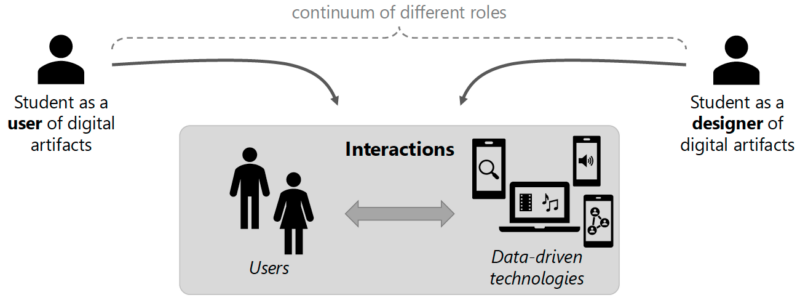
Lukas went on to illustrate the human interaction system model, which presents a continuum of possible different roles, from the student as the user of digital artefacts to the student as the designer of digital artefacts.
Figure 1. Different roles in interactions with data-driven technologies
To become data-aware users of digital artefacts, students need to be able to understand and reflect on those digital artefacts. Only then can they proceed to become responsible designers of digital artefacts. However, when surveyed, some students were only moderately interested in engaging with the inner workings of the digital technologies they use in their everyday lives. Many students prefer to use the systems and are less interested in how they process data.
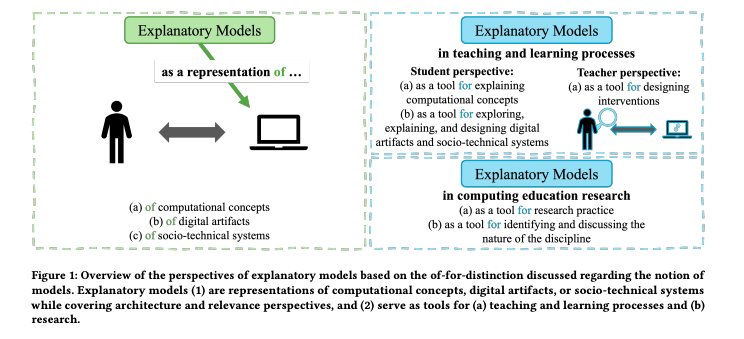
The explanatory model approach in computing education
Lukas explained how students often become more interested in data-driven technologies when learning about them with explanatory models. Such models can foster data awareness, giving students a different perspective of data-driven technologies and helping them become more empowered users of them.
To illustrate, Lukas gave the example of an explanatory model about the role of data in digital systems. Such a model can be used to introduce the idea that data is explicitly and implicitly collected in the interaction between the user and the technology, and used for primary and secondary purposes.
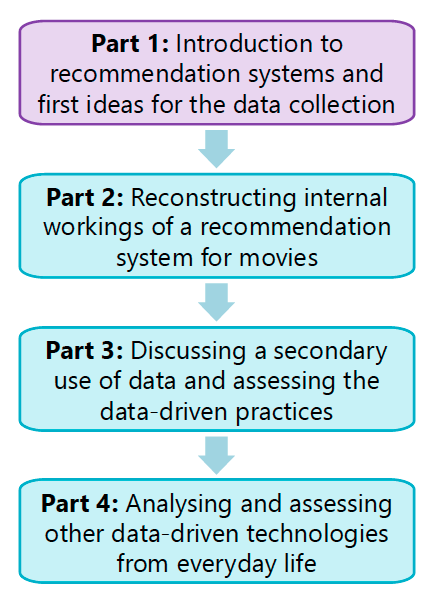
Figure 2. The four parts of the explanatory model
Lukas then introduced two teaching units that were developed for use with middle school children to evaluate the success of the explanatory model approach in computing education. The first unit explores location data collected by mobile phone networks and the second features recommendation systems used by movie streaming services such as Netflix and Amazon Prime.
Taking the second unit as their focus, Lukas and Carsten outlined the four parts of the explanatory model approach:
Part 1
The teaching unit begins by introducing recommendation systems and asking students to think about what a streaming service is, how a personalised start page is constructed, and how personal recommendations might be generated. Students then complete an unplugged activity to simulate the process of making movie recommendations for a peer:
Task 1: Students write down movie recommendations for another student.
Task 2: They then ask each other questions (they collect data).
Task 3: They write down revised movie recommendations.
Task 4: They share and evaluate their recommendations.
Task 5: Together they reflect on which collected data was helpful in this exercise and what kind of data a recommendation system might collect. This reflection introduces the concepts of explicit and implicit data collection.
Part 2
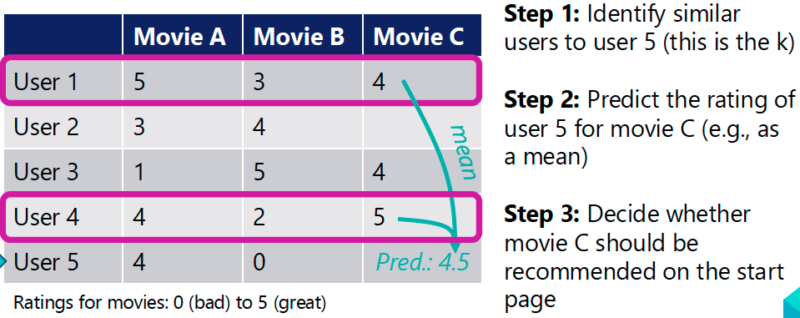
In part 2, students are given a prepared Jupyter Notebook, which allows them to explore a simulation of a recommendation system. Students rate movies and receive personal recommendations. They reconstruct a data model about users, using the idea of collaborative filtering with the k-nearest neighbours algorithm (see Figure 3).
Figure 3. Data model of movie ratings
Part 3
In part 3, the concepts of primary and secondary purposes for data collection are introduced. Students discuss examples of secondary purposes such as personalised paywalls for movies that can be purchased, and subscriptions based on the predictions of future behaviour. The discussion includes various topics about individual and societal issues (e.g. filter bubbles, behaviour engineering, information asymmetry, and responsible development of data-driven technologies).
Part 4
Finally, students use the explanatory model as an ‘analytical lens’. They choose other examples from their everyday lives of technologies that implement recommendation systems and analyse these examples, assessing the data practices involved. Students present their results in class and discuss their role in these situations and possible actions they can take to become more empowered, data-aware users.
Uses of explanatory models
Using the explanatory model is one approach to make the Informatics, People and Society strand of the German informatics curriculum more engaging for students, and addresses some of the problems teachers identify with delivering this competency area.
In presenting the idea of the explanatory model, Carsten and Lukas emphasised that the model in use delivers content as well as functioning as a tool to design teaching content. In the example above, we see how the explanatory model introduces the concepts of:
Explicit and implicit data collection
Primary and secondary purposes of that data
Data models
The explanatory model framework can also be used as a focus for academic research in computing education. For example, further research is needed to evaluate if explanatory models are appropriate or ‘correct’ models and to determine the extent to which they are useful in computing education.
In summary, an explanatory model provides a specific perspective on and explanation of particular computing concepts and digital artefacts. In the example given here, the model focuses on the role of data in a recommender system. Explanatory models are representations of concepts, artefacts, and socio-technical systems, but can also serve as tools to support teaching and learning processes and research in computing education.
Figure 4. Overview of the perspectives of explanatory models. Click to enlarge.
The teaching units referred to above are published on www.prodabi.de (in German and English).
See the background paper to the seminar, called ‘Learning an explanatory model of data-driven technologies can lead to empowered behaviour: A mixed-methods study in K-12 Computing education’.
In our current seminar series, we’re exploring teaching about AI and data science. Join us at our next seminar on Tuesday 13 May at 17:00–18:30 BST to hear Henriikka Vartiainen and Matti Tedre (University of Eastern Finland) discuss how to empower students by teaching them how to develop AI and machine learning (ML) apps without code in the classroom.
To sign up and take part in our research seminars, click below:
One of the great advantages of Zabbix is its extensible and modular architecture. This allows the platform to be enhanced with third-party modules, significantly expanding its functionalities without compromising the stability of the core system. The ECharts-Zabbix module is an excellent example of this flexibility in action.
Table of Contents
What is the ECharts-Zabbix module?
ECharts-Zabbix is a module that adds customizable widgets to Zabbix, using the ECharts library to create interactive and dynamic visualizations of your monitoring data. This module complements Zabbix’s standard visual capabilities, enabling richer and more informative graphical representation of complex monitoring environments.
What are the key features available with ECharts in Zabbix?
By integrating ECharts and Zabbix, you gain access to:
Multiple chart types (line, bar, pie, gauge, scatter, heatmap, and more)
Complete customization of colors, styles, legends, and tooltips
Fluid animations for a better user experience
Compatibility with Zabbix light and dark themes
Direct integration with data without the need for external tools
Responsive visualizations that adapt to different screen sizes
Helper functions for data formatting and dynamic color generation
Installation and configuration
Installing modules in Zabbix is easy thanks to the platform’s flexibility:
Extract the files to the modules folder of your Zabbix server
In the Zabbix frontend, go to Administration > General > Modules
Find the ECharts-Zabbix module in the list and click “Enable”
The widget will be available for use in Zabbix dashboards and screens
Practical use cases
Server performance monitoring with Gauge charts
Gauge charts are ideal for visualizing metrics such as CPU, memory, and disk usage. The flexibility of Zabbix combined with ECharts allows you to create impressive visual panels that clearly show the current state of these metrics:
Zabbix has a growing ecosystem of modules and integrations, developed by both the community and specialized companies like Monzphere, which contributes the ECharts-Zabbix module. This development dynamic demonstrates how Zabbix has evolved to become a truly extensible platform.
To learn more about the ECharts-Zabbix module and other solutions for Zabbix, you can visit our official GitHub repository or Monzphere’s website.
Conclusion
Zabbix’s modular architecture is one of its greatest differentiators, allowing the platform to grow and adapt to the specific needs of each monitoring environment. The ECharts-Zabbix module is an excellent example of how this flexibility can be leveraged to transform the data visualization experience in Zabbix.
For modern monitoring environments where clear and effective data visualization is essential, the combination of Zabbix with specialized modules represents a complete and adaptable solution. Try expanding your Zabbix with the ECharts module and discover how it can transform your monitoring dashboards!
To provide the best experiences, we use technologies like cookies to store and/or access device information. Consenting to these technologies will allow us to process data such as browsing behavior or unique IDs on this site. Not consenting or withdrawing consent, may adversely affect certain features and functions.
Functional
Always active
The technical storage or access is strictly necessary for the legitimate purpose of enabling the use of a specific service explicitly requested by the subscriber or user, or for the sole purpose of carrying out the transmission of a communication over an electronic communications network.
Preferences
The technical storage or access is necessary for the legitimate purpose of storing preferences that are not requested by the subscriber or user.
Statistics
The technical storage or access that is used exclusively for statistical purposes.The technical storage or access that is used exclusively for anonymous statistical purposes. Without a subpoena, voluntary compliance on the part of your Internet Service Provider, or additional records from a third party, information stored or retrieved for this purpose alone cannot usually be used to identify you.
Marketing
The technical storage or access is required to create user profiles to send advertising, or to track the user on a website or across several websites for similar marketing purposes.