Ubuntu 25.10 released

Post Syndicated from jzb original https://lwn.net/Articles/1041405/

Ubuntu
25.10
, “Questing Quokka”, has been released. This release includes
Linux 6.17, GNOME 49, GCC 15, Python 3.13.7,
Rust 1.85, and more. This release also features Rust-based
implementations of sudo and coreutils; LWN covered the switch to the
Rust-based tools in March. The 25.10 version of Ubuntu flavors
Edubuntu, Kubuntu, Lubuntu, Ubuntu Budgie, Ubuntu Cinnamon, Ubuntu
Kylin, Ubuntu MATE, Ubuntu Studio, and Xubuntu have also
been released
.

Serverless ICYMI Q3 2025

Post Syndicated from Julian Wood original https://aws.amazon.com/blogs/compute/serverless-icymi-q3-2025/

Welcome to the 30th edition of the AWS Serverless ICYMI (in case you missed it) quarterly recap. At the end of a quarter, we share the most recent product launches, feature enhancements, blog posts, videos, live streams, and other interesting things that you might have missed!

In case you missed our last ICYMI, check out previous ICYMI posts.

Figure 1: Serverless calendar Q3 2025

Figure 1: Serverless calendar Q3 2025

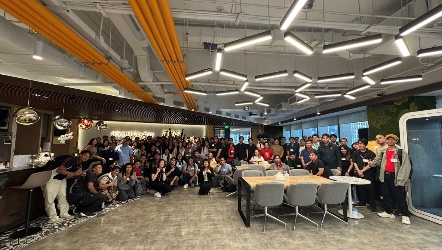
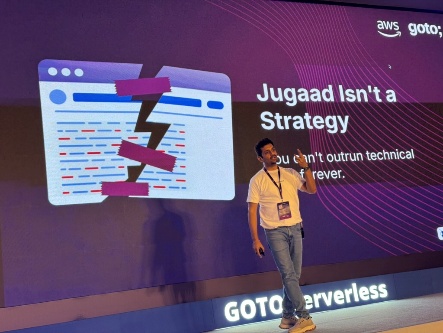
GOTO Serverless Bengaluru

The Asia Serverless and GenAI Tour comprised 24 events across five countries. Cities included New Delhi, Bengaluru, Singapore, Manila, Bangkok, Perth, Melbourne, and Sydney. The GOTO Serverless conference in Bengaluru, India, formed the centerpiece with additional Developer Days, executive roundtables, user groups, cloud clubs, and specialized workshops. Thank you to all the developers who joined us on this incredible journey across Asia!

AWS Lambda

AWS Lambda now offers console to IDE integration and remote debugging capabilities that streamline the developer workflow from browser to Visual Studio Code and its clones. These enhancements reduce context switching and help developers debug Lambda functions directly in their preferred IDE environment.

The console to IDE feature provides an Open in Visual Studio Code button, enabling developers to move quickly from viewing their function in the browser to editing it in their IDE. AWS automatically handles setup, including the AWS Toolkit installation. Developers can also install dependencies and make code changes, which can automatically sync back to the cloud console. Watch the video to see how it works:

Remote debugging allows you to reduce debugging time from hours to minutes while simplifying local environment setups. You can set breakpoints and debug Lambda functions running in the actual cloud environment with complete access to Amazon VPC resources and AWS Identity and Access Management (AWS IAM) execution roles. The debugging connection uses AWS IoT Secure Tunneling Service, and AWS automatically cleans up debugging configuration after completion. Watch the video to see how it works:

Lambda now integrates with LocalStack directly in the AWS Toolkit for Visual Studio Code. This simplifies local testing of serverless applications involving multiple AWS services. You can now deploy serverless applications to LocalStack using the same commands, debug Lambda functions with one-click setup, and test end-to-end event-driven workflows locally before deploying to the cloud.

Lambda response streaming now supports a maximum response payload size of 200 MB, 10 times higher than before. Response streaming helps build applications that progressively stream response payloads back to clients, improving performance for latency-sensitive workloads by reducing time to first byte (TTFB) performance.

AWS Lambda Hackathon

The AWS Lambda Hackathon, challenged developers to build serverless applications solving real-world business problems using Lambda. With 3,732 participants and 331 project submissions, the competition showcased innovative serverless solutions across diverse domains.

Figure 2: AWS Lambda Hackathon

Figure 2: AWS Lambda Hackathon

We announced winners on July 22, 2025, with $15,000 in total prizes awarded:

  • First Place ($6,000): ForestShield: AWS Deforestation Detection by Younes Laaroussi is a serverless forest monitoring system that tracks deforestation in real-time.
  • Second Place ($4,000): Smart Meeting Assistant by Eduard-David Jitareanu lets you upload audio recordings to create and manage Jira tasks automatically.
  • Third Place ($3,000): Drone SoundAware by Ian Brumby allows drone operators to plan, assess, and optimize flight routes while reducing noise impact on communities.
  • Honorable Mentions ($500):
    • OutScan by Sheldon Aristide is an AI-powered, serverless genomic radar analyzing viral mutations in real-time to detect pandemic threats.
    • Buzz CSV by Damien Pace transforms Excel files into actionable insights through natural language queries.
    • Smart Clip AI by Alexander Bolaño turns long videos into short, high-impact clips.
    • VA Rating Assistant by Chris Lassiter helps you upload medical documents and uses AI to identify potential VA disability claims and ratings, helping veterans access benefits faster and more accurately.

Amazon ECS

Amazon ECS now offers Managed Instances, a new compute option that combines EC2 flexibility with fully managed infrastructure. The functionality automatically handles instance provisioning, scaling, and maintenance while allowing you to use the full range of EC2 capabilities. Key features include:

  • Automated security patching every 14 days with configurable maintenance windows
  • Intelligent task placement and resource optimization across instances
  • Support for custom instance attributes including GPU, CPU architecture, and network performance requirements
  • Built on Bottlerocket OS with automated security updates
  • Deep integration with EC2 pricing options
  • Default cost-optimized instance selection with option for custom specifications

Watch the video to learn more.

Amazon ECS now enables built-in blue/green deployments. This reduces the need for custom deployment tooling while making containerized application releases safer and more reliable. The new capability provisions the new application version (green) alongside the existing version (blue), allowing validation before routing production traffic. ECS also introduced deployment lifecycle hooks powered by Lambda functions that integrate custom validation steps multiple stages of deployment. Watch the video to learn more.

Amazon S3

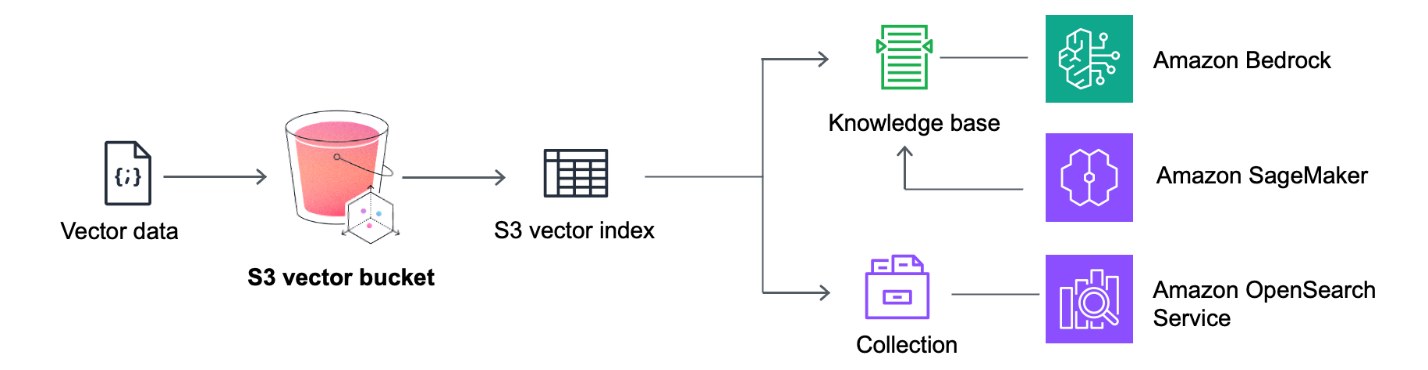
Amazon S3 Vectors is now available in preview. This is a cloud object store with native support for storing vector datasets and with sub-second query performance for AI applications. Vector buckets is a new bucket type with dedicated APIs for storing, accessing, and querying vector data without infrastructure provisioning.

Figure 3: Amazon S3 Vectors

Figure 3: Amazon S3 Vectors

Amazon S3 Metadata now supports metadata for all your S3 objects. This allows you to analyze and query metadata for your entire S3 storage footprint. S3 Metadata live inventory tables gives you a fully managed Apache Iceberg table, including existing objects. This provides a fully managed snapshot of all objects and metadata, refreshed within 1 hour of changes. S3 Metadata journal tables offer a near-real-time view of object-level changes.

S3 also now supports a preview in the AWS Console for S3 Tables, making it easier to understand data structure and content without writing SQL. S3 Batch Operations now supports bulk target selection for managing buckets through the console. S3 also now supports conditional deletes in S3 general purpose buckets, allowing safer deletion operations.

Amazon EventBridge

Amazon EventBridge now provides enhanced logging capabilities with detailed information about successes, failures, and status codes. This new observability feature provides visibility into the complete event journey, showing when events are published, matched against rules, delivered to subscribers, or encounter failures. You can send logs to Amazon CloudWatch Logs, S3, or Amazon Data Firehose.

Generative AI with serverless

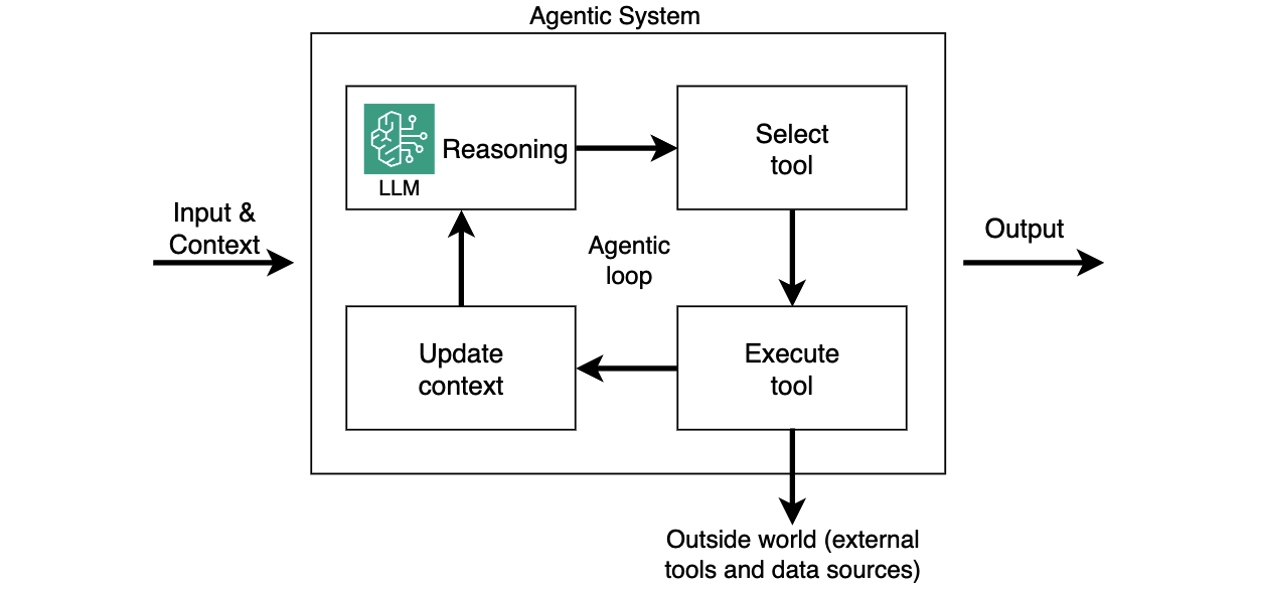
Discover how to effectively build AI agents on AWS Serverless shows how to use Amazon Bedrock AgentCore, Lambda, and ECS to build production-ready agentic AI systems. The blog explains how to use the Strands Agents SDK, which is a framework for building AI agents. The post includes storing session state, implementing authentication using Amazon Cognito and Amazon API Gateway, integrating tools through MCP, and establishing observability using OpenTelemetry.

Figure 4: Agentic loop

Figure 4: Agentic loop

A series on serverless generative AI architectural patterns (part1, part2) explores non-real-time generative AI scenarios. These include buffered asynchronous request-response using Amazon SQS queues, multimodal parallel fan-out using EventBridge or Amazon SNS, and non-interactive batch processing using AWS Step Functions or AWS Glue.

Kiro: Spec-driven AI development

AWS introduced Kiro, an agentic AI-powered IDE now available in preview. It is built on the open-source Code OSS platform (the same foundation as VS Code) so you can use your existing extensions. Kiro brings a spec-driven approach to software development that bridges the gap between rapid prototyping and production-ready code. Kiro emphasizes structured development. It breaks down developer prompts into comprehensive requirements, system design documents, and task lists before writing any code. You can download Kiro for macOS, Windows, and Linux from the Kiro website.

Amazon Bedrock AgentCore

Amazon Bedrock AgentCore is now available in preview, offering a set of services that help developers quickly and securely deploy AI agents at scale. AgentCore supports frameworks including CrewAI, LangGraph, LlamaIndex, and Strands Agents, and works with any model in or outside Amazon Bedrock.

AgentCore includes seven modular services:

  • AgentCore Runtime provides sandboxed low-latency serverless environments with up to 8-hour runtime support
  • AgentCore Memory manages both short-term and long-term memory with built-in policies
  • AgentCore Observability offers step-by-step visualization with OpenTelemetry support
  • AgentCore Identity provides a secure token vault for OAuth 2.0 and API keys.
  • AgentCore Gateway transforms APIs and Lambda functions into agent-ready tools with a unified MCP interface
  • AgentCore Browser enables managed web automation
  • AgentCore Code Interpreter provides safe code execution environments.

Amazon Bedrock

Amazon Bedrock continues to expand its foundation model selection with new models now generally available. Qwen models bring four fully managed open-weight models which excel at sophisticated coding tasks, multi-tool agentic workflows, and adaptive reasoning through hybrid thinking modes. DeepSeek-V3.1 delivers performance improvements on certain benchmarks while maintaining cost efficiency through its mixture-of-experts architecture.

Amazon SNS

Amazon SNS now supports three additional message filtering operators: wildcard matching, anything-but wildcard matching, and anything-but prefix matching. SNS also now supports message group IDs in standard topics, enabling fair queue functionality for subscribed SQS standard queues.

Serverless Compute Blog Posts

July

August

September

Serverless Office Hours weekly livestream

July

August

September

Videos

The Serverless landing page has more information. The Lambda resources page contains case studies, webinars, whitepapers, customer stories, reference architectures, and even more Getting Started tutorials.

You can also follow the Developer Advocacy team members who work on Serverless to see the latest news, follow conversations, and interact with the team.

And finally, visit ServerlessLand for all your serverless needs.

Security updates for Thursday

Post Syndicated from jake original https://lwn.net/Articles/1041404/

Security updates have been issued by AlmaLinux (gnutls, kernel, kernel-rt, and open-vm-tools), Debian (chromium, python-django, and redis), Fedora (chromium, insight, mirrorlist-server, oci-seccomp-bpf-hook, rust-maxminddb, rust-prometheus, rust-prometheus_exporter, rust-protobuf, rust-protobuf-codegen, rust-protobuf-parse, rust-protobuf-support, turbo-attack, and yarnpkg), Oracle (iputils, kernel, open-vm-tools, redis, and valkey), Red Hat (perl-File-Find-Rule and perl-File-Find-Rule-Perl), SUSE (expat, ImageMagick, matrix-synapse, python-xmltodict, redis, redis7, and valkey), and Ubuntu (fort-validator and imagemagick).

Introducing REACT: Why We Built an Elite Incident Response Team

Post Syndicated from Chris O’Rourke original https://blog.cloudflare.com/introducing-react-why-we-built-an-elite-incident-response-team/

Cloudforce One’s mission is to help defend the Internet. In Q2’25 alone, Cloudflare stopped an average of 190 billion cyber threats every single day. But real-world customer experiences showed us that stopping attacks at the edge isn’t always enough. We saw ransomware disrupt financial operations, data breaches cripple real estate firms, and misconfigurations cause major data losses.

In each case, the real damage occurred inside networks.

These internal breaches uncovered another problem: customers had to hand off incidents to separate internal teams for investigation and remediation. Those handoffs created delays and fractured the response. The result was a gap that attackers could exploit. Critical context collected at the edge didn’t reach the teams managing cleanup, and valuable time was lost. Closing this gap has become essential, and we recognized the need to take responsibility for providing customers with a more unified defense.

Today, Cloudforce One is launching a new suite of incident response and security services to help organizations prepare for and respond to breaches.

These services are delivered by Cloudforce One REACT (Respond, Evaluate, Assess, Consult Team), a group of seasoned responders and security veterans who investigate threats, hunt adversaries, and work closely with executive leadership to guide response and decision-making.

Customers already trust Cloudforce One to provide industry-leading threat intelligence, proactively identifying and neutralizing the most sophisticated threats. REACT extends that partnership, bringing our expertise directly to customer environments to stop threats wherever they occur. In this post, we’ll introduce REACT, explain how it works, detail the top threats our team has observed, and show you how to engage our experts directly for support.

Our goal is simple: to provide an end-to-end security partnership. We want to eliminate the painful gap between defense and recovery. Now, customers can get everything from proactive preparation to decisive incident response and full recovery—all from the partner you already trust to protect your infrastructure.

It’s time to move beyond fragmented responses and into one unified, powerful defense.

How REACT works

REACT services consist of two main components: Security advisory services to prepare for incidents and incident response for emergency situations.


A breakdown of the Cloudforce One incident readiness and response service offerings.

Advisory services are designed to assess and improve an organization’s security posture and readiness. These include proactive threat hunting, backed by Cloudflare’s real-time global threat intelligence, to find existing compromises, tabletop exercises to test response plans against simulated attacks, and both incident readiness and maturity assessments to identify and address systemic weaknesses.

The Incident Response component is initiated during an active security crisis. The team specializes in handling a range of complex threats, including APT and nation-state activity, ransomware, insider threats, and business email compromise. The response is also informed by Cloudflare’s threat intelligence and, as a network-native service, allows responders to deploy mitigation measures directly at the Cloudflare edge for faster containment.

For organizations requiring guaranteed availability, incident response retainers are offered. These retainers provide priority response, the development of tailored playbooks, and ongoing advisory support.

Cloudflare’s REACT services are vendor-agnostic in their scope. We are making REACT available to both existing Cloudflare customers and non-customers, regardless of their current technology stack, and regardless of whether their environment is on-premise, public cloud, or hybrid.

What makes Cloudflare’s approach different?

Our new service provides significant advantages over traditional incident response, where engagement and data sharing occur over separate, out-of-band channels. The integration of the service into the platform enables a more efficient and effective response to threats.

The core differentiators of this approach are:

  • Unmatched threat visibility. With roughly 20% of the web sitting behind Cloudflare’s network, Cloudforce One has unique visibility into emerging attacks as they unfold globally. This lets REACT accelerate their investigations and quickly correlate incident details with emerging attack vectors and known adversary tactics.

  • Network-native mitigation. The service is designed for network-native response. This allows the team, with customer authorization, to deploy mitigations directly at the Cloudflare edge, such as a WAF rule or Secure Web Gateway policy. This capability reduces the time between threat identification and containment. All response actions are tracked within the dashboard for full visibility.

  • Service delivery by proven experts. Cloudforce One is composed of seasoned threat researchers, consultants, and incident responders. The team has a documented history of managing complex security incidents, including nation-state activity and sophisticated financial fraud.

  • Vendor-agnostic scope. While managed through the Cloudflare dashboard, the scope of the response is vendor-agnostic. The team is equipped to conduct investigations and coordinate remediation across diverse customer environments, including on-premise, public cloud, and hybrid infrastructures.

Key Threats Seen During Engagements So Far

Analysis of security engagements by the REACT team over the last six months reveals three prevalent and high-impact trends. The data indicates that automated defenses, while critical, must be supplemented by specialized incident response capabilities to effectively counter these specific threats.

High-impact insider threats 

The REACT team has seen a significant number of incidents driven by insiders who use trusted access to bypass typical security controls. These threats are difficult to detect as they often combine technical actions with non-technical motivations. Recent scenarios observed are:

  • Disgruntled or current employees using their specialized, trusted access to execute targeted, destructive attacks.

  • Financially motivated insiders who are compensated by external actors to exfiltrate data or compromise internal systems.

  • State sponsored operatives gain trusted, privileged access via fraudulent remote work roles to exfiltrate data, conduct espionage, and steal funds for illicit regime financing.

Ransomware

The REACT team has observed that ransomware continues to be a primary driver of high-severity incidents, posing an existential threat to nearly every sector. Common themes observed include:

  • Disruption of core operations in the financial sector via hostage-taking of critical systems. 

  • Paralysis of business functions and compromise of client data in the real estate industry, leading to significant downtime and regulatory scrutiny.

  • Broad impact across all industry verticals. 

Stopping these attacks demands not only robust defenses but also a well-rehearsed recovery plan that cuts time-to-restoration to hours, not weeks.

Application security and supply chain breaches

The REACT team has also seen a significant increase in incidents originating at the application layer. These threats typically manifest in two primary areas: vulnerabilities within an organization’s own custom-developed  (‘vibe coded’) applications, and security failures originating from their third-party supply chain:

  • Vibe coding: The practice of providing natural language prompts to AI models to generate code can produce critical vulnerabilities which can be exploited by threat actors using techniques like remote code execution (RCE), memory corruption, and SQL injection.

  • SaaS supply chain risk: A compromise at a critical third-party vendor that exposes sensitive data, such as when attackers used a stolen Salesloft OAuth token to exfiltrate customer support cases from their clients’ Salesforce instances.

Integrated directly into your Cloudflare dashboard

Starting today, Cloudflare Enterprise customers will find a new “Incident Response Services” tab in the Threat intelligence navigation page in the Cloudflare dashboard. This dashboard integration ensures that critical security information and the ability to engage our incident response team are always at your fingertips, streamlining the process of getting expert help when it matters most.


Screenshot of the Cloudforce One Incident Response Services page in the Cloudflare dashboard

Retainer customers will benefit from a dedicated Under Attack page, which allows customers to contact Cloudforce One team during an active incident. In the event of an active incident, a simple “Request Help” button in our “Under Attack” page will immediately page our on-call incident responders to get you the help you need without delay.


Screenshot on the Under Attack button in the Cloudflare dashboard


Screenshot of the Emergency Incident Response page in the Cloudflare dashboard

For proactive needs, you can also easily submit requests for security advisory services through the Cloudflare dashboard: 


Confirmation of the successful service request submission

How to engage with Cloudforce One 

To learn more about REACT, existing Enterprise customers can explore the dedicated Incident Response section in the Cloudflare dashboard. For new inquiries regarding proactive partnerships and retainers, please contact Cloudflare sales.

If you are facing an active security crisis and need the REACT team on the ground, please contact us immediately.

Братовчедски сделки в Европарламента

Post Syndicated from Анахит Хачикян original https://www.toest.bg/bratovchedski-sdelki-v-evroparlamenta/

Братовчедски сделки в Европарламента

Какво правиш, когато знаеш, че братовчед ти е крадец? Гризе ли те съвестта да го разобличиш, или се опитваш да го прикриеш за доброто на семейството? Ами ако и ти си участвал в кражбите на братовчеда? Приблизително така се държат българските евродепутати в Брюксел по отношение на политическата ситуация в България. Изборът между даването на международна гласност на проблемите в страната и придържането към максимата What happens here, stays here (каквото се случва тук, си остава тук) по отношение на националната политика, е

труден и деликатен не само за българските евродепутати, а и за всички държави членки на ЕС.

Първият вариант се основава на очакването някой отвън да се намеси и да скръцне със зъби, макар и с риск да има наказания и ощетяващи България последствия. Вторият почива на поддържането на вътрешнополитическото статукво. Решаващ фактор е дали една партия е в правителството, или в опозиция и какво ще спечели на вътрешната сцена, ако причини буря в европейски води, но също и дали съответната политическа група в Европейския парламент (ЕП) има изгода да подкрепи и впише такива действия в общата си стратегия, или не ѝ е до това в момента.

Писмото на „Обнови Европа“ до Европейската комисия (ЕК) да спре част от плащанията за България предоставя възможност за наблюдаване на такава ситуация в лабораторни условия. На 23 септември Валери Хайер, председателка на групата на либералите в ЕП, отправи искане до европейските комисари Валдис Домбровскис (икономика), Рафаеле Фито (кохезия и реформи) и Пьотър Серафин (бюджет и борба с измамите) да замразят второто плащане за България по Плана за възстановяване и устойчивост. Сред мотивите, изложени от Хайер, са следните:

  • използването на Антикорупционната комисия за политически цели, например задържането на кмета на Варна Благомир Коцев;
  • възпрепятстването на разследвания на Европейската прокуратура;
  • контролирането на службите за сигурност и съдебните органи от частни мрежи, свързани с Делян Пеевски;
  • многобройните законодателни инициативи, които улесняват всички тези злоупотреби.

Кой стои зад искането на Хайер?

В „Обнови Европа“ членуват трима български евродепутати: Никола Минчев и Христо Петров от „Продължаваме промяната“ (ПП) и Илхан Кючук от Алианса за права и свободи (АПС). Двамата български представители от ПП бяха мобилизирали европейските си партньори още през лятото, дни след ареста на Коцев, с демонстрация в Брюксел, както и с писмо на председателката на Европейската либерална партия Свеня Хан с искане за спешна среща с еврокомисаря по правосъдие и върховенство на закона Майкъл Макграт.

Освен това либералите вече две поредни парламентарни сесии настояват безуспешно за внасяне на темата за върховенството на закона в България за обсъждане в пленарната зала, но не получават подкрепа от останалите големи политически групи.

Темата се замита под килима,

тъй като има други важни битки в момента, а и ситуацията в България по същество не е нова. Само през последните пет години е имало една специална резолюция, посветена изцяло на правовата държава и основните права в България през 2020 г., и два подробни доклада – от мисии на Комисията по бюджетен контрол през 2022 г. и на Комисията по граждански свободи, правосъдие и вътрешни работи през 2023 г. Всичко това – без да броим ежегодните мониторингови доклади на Европейската комисия.

Констатациите се повтарят. Всяко поредно правителство получава сходни критики, свързани с върховенството на закона и съдебната реформа. И дори когато необходимите законодателни инициативи са предприети, заключението е, че прилагането им или е половинчато и няма осъдени, или е избирателно и някои са (неоснователно) преследвани, а други остават доживотно недосегаеми.

Можеше ли писмото на Хайер да получи по-голяма подкрепа?

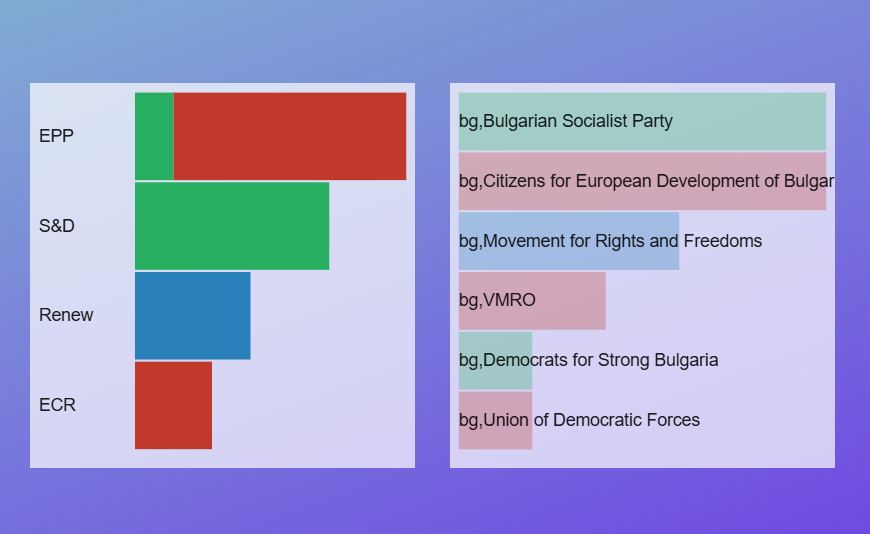
Българските евродепутати от ГЕРБ–СДС, БСП и ИТН представляват трите правителствени партии, които нямат интерес да подкрепят европейските критики срещу България. Същото поведение се наблюдаваше и по време на гласуването на резолюцията за правовата държава в България през 2020 г. Тогавашните правителствени партии ГЕРБ–СДС и ВМРО гласуваха против резолюцията, докато опозиционните БСП и ДСБ я подкрепиха, а ДПС се въздържа.

Ако проследим поведението на политическите групи в ЕП, към които тези български партии са принадлежали по време на онзи вот, ще получим усещане за дежавю: ЕНП и групата „Европейски консерватори и реформисти“, в която членуват ГЕРБ и ВМРО, бяха против, Групата на левицата подкрепи резолюцията, а „Обнови Европа“, където е ДПС, се въздържа.

Така европейските политически групи в ЕП затвърждават статуквото на национално ниво.

От една страна, защото държат на националните си партии и са солидарни с тях, от друга – ако са на власт в съответната страна, не искат да я изпускат, защото така са по-силни в европейски план – както в ЕП, така и в Европейския съвет и Съвета на ЕС, където се вземат големите решения. Това беше една от причините ЕНП дълго време да толерира Виктор Орбан и партията му „Фидес“ въпреки антиевропейските му позиции. Докато накрая чашата преля и членството на евродепутатите от „Фидес“ първо беше замразено през 2019 г., а после Орбан сам напусна ЕНП, за да избегне изключването си.

Паралелно с писмото на Хайер, Радан Кънев от „Демократична България“, член на ЕНП, предупреди своята група – най-силната в Европарламента – че ситуацията в България подкопава не само политическата система в страната, но и авторитета на ЕНП и Урсула фон дер Лайен заради липсата на реакция. Той сравни положението в България с това в Унгария и Грузия по степен на зависимост от проруски влияния и олигархични мрежи. Сънародниците му от ГЕРБ обаче, които членуват в същата група (Андрей Ковачев, Ева Майдел, Андрей Новаков, Емил Радев), както и от СДС (Илия Лазаров) явно не споделят същите позиции. В крайна сметка ЕНП запази мълчание и за ареста на варненския кмет, и за цялостната картина в България.

Да бъдеш опозиционна партия обаче, не означава, че винаги ще си солидарен с критиките към твоето правителство в ЕП.

Изследване на Рамона Коман от 2022 г. показва, че по отношение на правовата държава политическите групи в крайната десница се въздържат от изказвания или открито се дистанцират от темата. Това се корени в суверенистките им виждания за ненамеса на Брюксел в политиката на държавите членки.

Тримата евродепутати от „Възраждане“ – Петър Волгин, Рада Лайкова и Станислав Стоянов, които членуват в „Европа на суверенните нации“ – са пример за точно такова поведение. Всъщност Стоянов и Лайкова, подкрепени от други членове на своята група, внесоха предложение за резолюция за политическите репресии и основните права в България през март 2025 г. Но тя не беше в подкрепа на необходимостта от съдебни реформи, а срещу… въвеждането на еврото.

За разлика от ЕП, ЕК има повече инструменти за действие, а и носи пряка отговорност как се харчат парите на европейските данъкоплатци.

И наистина замрази част от второто плащане на България по Плана за възстановяване и устойчивост заради нереформираната Антикорупционна комисия. Екипът на Урсула фон дер Лайен се разграничи от писмото на Хайер и арестуването на Коцев и посочи неизпълнените ангажименти от българска страна като основание за замразеното плащане. Но този коментар прилича на спора за кокошката и яйцето. Не е ли задържането на кмета на Варна най-красноречивата илюстрация на проблема с въпросната Антикорупционна комисия и поредното доказателство, че докато основите гният отвътре, нито едно пребоядисване няма да спаси от рухване целия дом?


Изразеното мнение е лично и не представлява позицията на Европейския парламент.

Бели пълномощни за черни дни

Post Syndicated from Светла Енчева original https://www.toest.bg/beli-pulnomoshtni-za-cherni-dni/

Бели пълномощни за черни дни

Преди трийсетина години застрахователна агентка разяснявала на моя роднина ползите от застраховката „Живот“. „Ако настъпи застрахователното събитие…“, започнала агентката. Роднината ми я прекъснала насред изречението с въпроса кое е „застрахователното събитие“. „Ами ако умрете“, бил отговорът. Възмутена, роднината ми станала и си тръгнала: „Ще ми казва тя на мене, че ще умра!“

Ако и вие като тази ми роднина не искате да ви се напомня, че сте смъртни и може да ви сполети тежко увреждане на здравето, тук е мястото да престанете да четете. Защото ще става дума за смърт, тежки болести и прочее неприятни сценарии.

Ако обаче за вас е важно да знаете как да се погрижите за най-близките си хора, в случай че се споминете или излезете от строя, и как да направите така, че волята ви да бъде изпълнена, тази статия е за вас.

„Да, човекът е смъртен, но това не е най-страшното. Лошото е, че той понякога е внезапно смъртен, това е неприятното!“, казва героят от „Майстора и Маргарита“ на Михаил Булгаков. Може да се поспори дали внезапната смърт е по-неприятно нещо от продължаващите с години палиативни грижи, особено на фона на данните, че ¼ от хората вероятно ще развият деменция. Възможни са и други неочаквани сценарии.

Ето два примера как всичко може да се обърка

Мой познат почина. Той беше изразил волята си как да се постъпи с тленните му останки, но не я беше оформил с необходимите юридически атрибути. Човекът, който имаше право да реши дали да се съобрази с последната му воля, беше майка му. А тя не приемаше факта, че синът ѝ е гей. Дори след смъртта му. Затова не само не изпълни желанието му какво да се направи с тялото, ами не допусна партньора и приятелите му, които го обичаха такъв, какъвто е, да се простят с него.

В подобно положение може да се окаже човек не само ако е мъртъв гей, а и ако е хетеросексуален и жив. И то не само в България. Мой скъп приятел от друга европейска страна тъкмо се беше събрал отново с дългогодишната си приятелка и ми пишеше колко е щастлив… а след няколко месеца научих, че лежи в болница в много тежко състояние, след мозъчна операция. Право на достъп до него има само майка му, която отказва всякаква информация на партньорката и на приятелите му. Така че не мога да ви кажа дали този човек, на чийто блестящ ум съм се възхищавала близо 20 години, днес изобщо знае кой е.

Въпроси, на които да си отговорим

Идеята на тази статия не е да ви плаша, а да дам идеи как човек може да защити себе си и близките си, ако различни ситуации станат реалност. Като начало можем да се опитаме да си отговорим на следните въпроси:

В случай на смърт:

  • Какво искам да стане с тленните ми останки?
  • Кой и как искам да ме наследи?

В случай на неспособност да се грижа за себе си:

  • Кой да има право да получава медицинска информация за мен?
  • На кого имам доверие да решава дали лечението ми да се продължи, или прекрати, дали да ме оперират, интубират и пр.?
  • Кой да има достъп до парите ми?
  • Кой да може да се разпорежда с договора ми с телекомуникационната компания, с битовите ми сметки, да подава декларации от мое име и т.н.?

В България много хора не се женят: някои – защото са в хомосексуални връзки и нямат право, но повечето просто не вярват в институцията на брака. Родителите на близо две трети (61,9%) от родените през 2024 г. деца не са женени. Ако единият партньор почине, а семейното жилище е на негово име, другият може да бъде изгонен от законните наследници на половинката си.

Ако живеете в брак, ситуацията е една идея по-лека – в общия случай поне няма да имате грижа за наследството си. Съпругът или съпругата ви има правото да получава информация за вас в болницата и да взема решения в критични ситуации. Ако не сте в брак, решенията се вземат от най-близките ви роднини. И в двата случая обаче никой не получава автоматичен достъп до финансите ви, договорите ви за телефон, ток, вода и прочее, ако сте на легло и не сте в състояние да се разпореждате с тях.

Съществуват различни начини да подсигурите себе си и близките си

Човек може да остави например имуществото си на най-близките си хора (в случаите, когато няма автоматично да ви наследят – било изобщо, било както вие искате) по два начина – със завещание и дарение (във втория случай е желателно да си запазите т.нар. вещно право на ползване). При дарение обаче получателят плаща данък, а при завещание плаща само ако не ви е близък роднина. За разлика от дарението обаче, завещанието по-лесно може да се оспори – още повече че някои ваши роднини имат запазени части от наследството ви. Затова е добре човек да се погрижи завещанието му да е юридически изпипано, за да се сведат до минимум рисковете някой да го оспори.

Всички останали въпроси, зададени по-горе, може да се уредят с пълномощни. Може да предоставите достъп до парите си и с банкова карта, но той ще важи само докато изтече срокът на валидност на картата.

Тук не засягам сериозната тема за родителските права. Ако те са неуредени (например единият родител не фигурира в акта за раждане на детето, нито го е осиновил), проблемът може да се реши само по съдебен път. Съдът обаче може и да откаже да ги присъди. А ако родителите са еднополова двойка, понастоящем в България няма начин този, който не е биологичен родител и не е осиновител, да получи права върху детето, каквото и участие да е вземал в отглеждането му. Не е разрешено и двама души от един пол да осиновят дете.

Доверие, доверие, доверие

Когато даваме пълномощно на някого да се разпорежда с парите ни или да взема съдбовни решения за живота и смъртта ни, желателно е да го познаваме достатъчно добре. Винаги има доза риск – случва се някой, на когото сме вярвали безусловно, да не оправдае доверието ни. А и връзки се разпадат, бракове се разтрогват.

Съществува вариант да оттеглим пълномощното си, но той не е безпроблемен. На първо място, упълномощеното лице трябва да разбере за оттеглянето. Ако междувременно обаче то е прехвърлило апартамента ни на свое име и е избягало с парите ни, ще е трудна задача да го намерим, за да го уведомим. Изобщо, лесно е да се ожените и може да е много трудно да се разведете. Така е и с пълномощните.

Възможно е и да направите пълномощно, което е за определен срок и/или само за конкретни неща – например някой да има право да получава информация за вас в болницата, но да няма достъп до банковите ви сметки. Или да може да сключи една имотна сделка от ваше име, но не и да придобие семейния ви дом. На теория може да предоставите пълномощно и при определени условия – примерно, тежка болест. Но после упълномощените ще трябва да доказват здравословното ви състояние, а това е трудна задача, понякога невъзможна – особено ако става въпрос за деменция.

Колко генерално е генералното пълномощно?

Да допуснем, че в живота ви има човек, на когото основателно имате пълно доверие, че няма да злоупотреби, а ще се погрижи за вас и ще се съобрази с волята ви, ако например се разболеете тежко, не можете да плащате сметки и т.н. Може би и вие като мен сте чували словосъчетанието „генерално пълномощно“ и ще решите, че е добра идея да снабдите въпросния човек с него.

Да си призная, до неотдавна си представях въпросното генерално пълномощно като нещо съвсем просто и кратко: Аз, долуподписаната еди-коя си, упълномощавам лицето еди-кое си да ме представлява навсякъде и във всичко. Заверявам при нотариус – и готово.

Да, ама не. В пълномощното всичко трябва да бъде описано възможно най-подробно. Затова е добре човек да изреди всички места, където би имало нужда от пълномощно, и да уточни какво точно може да прави упълномощеното лице във всяка една ситуация. Например в болница – да получава информация, да взема решения за продължаване, прекратяване или вида на лечението ви, да има достъп до медицинската ви документация и т.н.

Добра идея е да се консултирате с юрист

Опитът на позната дългогодишна адвокатка например я е научил, че много институции и фирми държат да видят собственото си име в пълномощното. Затова е желателно в него да изредите конкретни телекомуникационни компании, водоснабдителни, топло- и електроразпределителни дружества, общински администрации и изобщо каквото се сетите (с риска, че все може да забравите нещо). Ако междувременно някоя компания смени името си, може само да се надявате, че служителите ѝ няма да се заядат.

Юридическата помощ е важна и за оформянето на структурата на завещанието, както и за използването на определени ключови фрази, за които неспециалист трудно ще се сети сам. Добре е например в прав текст да кажете, че лекарската тайна не важи пред упълномощеното лице. Ако пък искате да ви кремират след смъртта ви, желателно е да подчертаете, че давате изричното си съгласие за това.

Ако пълномощното е безсрочно, то важи и ако си смените личната карта и/или адреса, вписани в него. Не е изключено обаче някой да се заяде, че данните не отговарят.

Банките са отделен случай – повечето изискват специални пълномощни

За да избегна непрекъснатото повтаряне на упълномощител и упълномощено лице, ви представям двама души с полово неспецифични имена – Тони упълномощава Краси. Ако Тони състави генералното пълномощно по всички правила, спомене в него банката си и го завери нотариално, по всяка вероятност банката няма автоматично да го признае. Различните банки си имат свои критерии за пълномощното, но при всички случаи е желателно да разполагат с него предварително, а не то да им се представи чак когато има нужда от това.

По-долу обобщавам личния опит на няколко души с три различни банки. Тъй като става дума за конкретни случаи, информацията за правилата на тези финансови институции може и да не е изчерпателна.

Пощенска банка изисква Тони и Краси да се явят заедно в неин клон. Тя има свои вътрешни пълномощни, които се вкарват в системата ѝ и не са нотариално заверени. Възможно е Тони да представи и нотариално пълномощно. В такъв случай плаща такса от 5 лв. за достъп до базата данни на нотариусите, а Краси трябва да носи пълномощното със себе си, ако се наложи да го използва.

Тони и Краси трябва да отидат заедно и в Обединена българска банка, която също има свои вътрешни пълномощни. Те съдържат дълъг списък, в който Тони трябва да отбележи за какво упълномощава Краси и за какво – не. Ако Тони обаче иска да даде на Краси достъп до депозитите или инвестиционните си фондове, пълномощното трябва да се завери нотариално.

Първа инвестиционна банка разполага с различни модели пълномощни, от които Тони да избере подходящото, да го попълни и да го завери нотариално. И Краси може да занесе пълномощното в банката, но ще трябва да плати такса, а ако го направи Тони, е безплатно. Не се изисква и двамата да отидат заедно в клона, но ако Краси не е клиент на банката, ще трябва да представи копие от личната си карта.

Ако Тони разполага с банков сейф обаче, пълномощното за достъп на Краси до него може да се издава по съвсем различен ред от обичайните пълномощни на съответната банка.

Защо банките си имат собствени правила и не може просто да им представите нотариално заверено генерално пълномощно, колкото и подробно да е то – не знам. И не ми се вижда редно да сте заявили волята си по юридически коректен начин, а определени частни фирми да решат, че това не е достатъчно. Но все пак банките са подобрили практиките си в сравнение с 2019 г. – поне тези, за които имам информация, не изискват ново пълномощно всяка година. А служителите им казват, че преиздаване не се налага, ако си смените личната карта.

С едно наум за бъдещето

„Ние безгрижно тичаме право към пропастта, изпречили нещо пред себе си, за да не я виждаме“, пише Блез Паскал в своите „Мисли“. Каква по-точна метафора на живота? Ако човек непрекъснато мисли, че е смъртен и какви неприятни неща очакват него и скъпите му хора, всекидневието ще се превърне в кошмар. Отказът да си дадем сметка за тези перспективи обаче може да доведе до куп проблеми.

Все пак има начини екзистенциалният ужас от смъртта, болестите и злополуките да бъде поне в известна степен опитомен. Един от тях е да се опитаме да направим каквото зависи от нас, за да се погрижим за себе си и близките си, докато е време. С ясното съзнание, че не можем всичко да предвидим. Не знаем дори дали слънцето ще изгрее утре. Но междувременно можем поуспокоени да продължим да се радваме на живота.

Young creators build a bright future at Coolest Projects India 2025

Post Syndicated from Vasu Srivastava original https://www.raspberrypi.org/blog/young-creators-build-a-bright-future-at-coolest-projects-india-2025/

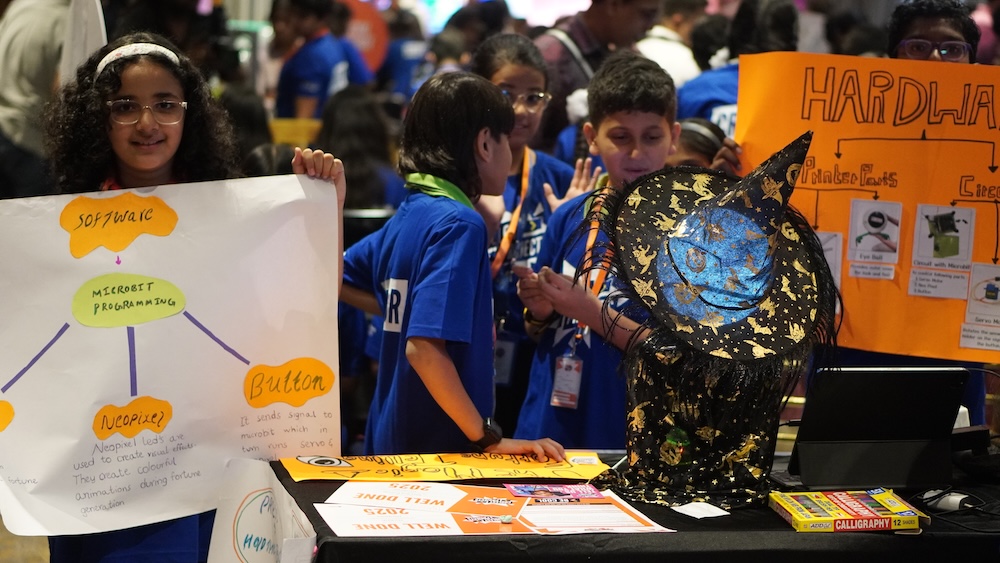
Coolest Projects India is officially a wrap, and we are absolutely thrilled with the results! The event, held on 20 September 2025 in Hyderabad, Telangana, was a fantastic showcase of the incredible talent and passion of young creators. With over 250 participants, young creators showcased 118 projects, demonstrating the thriving digital making community across India.

The projects on display were truly inspirational, tackling important topics such as environmental sustainability and the responsible use of AI. From hardware to Scratch to AI, creators showcased an incredible variety of projects that brought their ideas to life, from simple creations to complex inventions.

Here are just a few of the standout projects from the day.

Young creators at Coolest Projects India.
Avyukt, 9 years old | The EchoCharm Spellbox, Hardware category

A truly magical project was The EchoCharm Spellbox, an interactive creation that used a Raspberry Pi computer and a speaker to bring the famous Harry Potter artifact to life. This project was a perfect blend of creativity and coding, showcasing how technology can be used for fun and entertainment.

Young creators at Coolest Projects India.
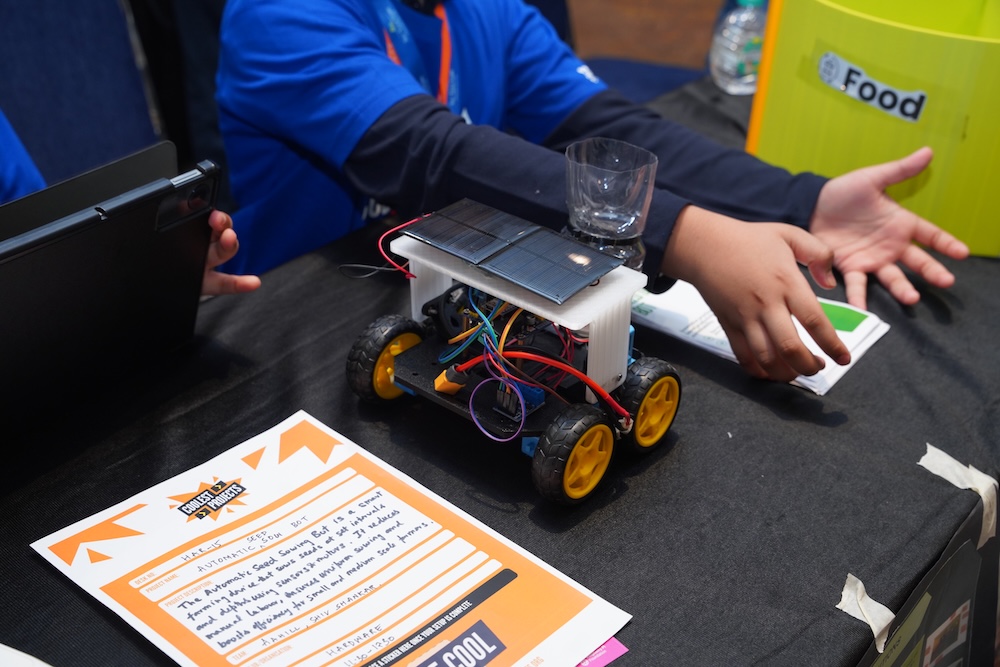
Aahil, 11 | Automatic Seed Sowbot, Hardware category

We were also blown away by the Automatic Seed Sowbot, a practical invention that used a tiny camera and AI to quickly and accurately sort seeds. This clever hardware project tackles a real-world problem and has fantastic applications in agriculture and farming.

Young creators at Coolest Projects India.
Pranamya, Medha, Manvi, Aradhna — these 13-year-old-girls all come from Karnataka state | Unspoken Truths, Mobile apps category

Another brilliant project that we saw was Unspoken Truths, a fun mobile app for interesting conversations to reveal hidden truths and secrets about yourself and your friends. If you’re ever looking to break the ice or deepen your connections, Unspoken Truth provides an entertaining way to start a conversation.

A community of creators

From first-time coders to seasoned programmers, every young person showcasing their work had the chance to celebrate their ideas and feel part of a vibrant community. The event created a unique atmosphere where participants were able to proudly share their projects with family, friends, and the wider coding community. They all received certificates to celebrate their fantastic achievements.

This year’s showcase brought together creators from different parts of the country, highlighting the incredible passion for digital making in India. It was a powerful reminder that when you put technology into the hands of young people with curiosity, there is no limit to what they can create.

A massive thank you to our organisers, volunteers, and the dedicated mentors who made the event possible. And most importantly, thank you to the young creators of India for sharing their ingenuity and creativity with us! We can’t wait to see what you’ll build next.

Thank you to our sponsors, Qube Research and Technologies, for sponsoring the hardware category.

Want to get involved?

Coolest Projects will be back online and with more in-person events in India and around the world in 2026. Sign up to the newsletter to be the first to hear about dates, deadlines, and exciting updates.

The post Young creators build a bright future at Coolest Projects India 2025 appeared first on Raspberry Pi Foundation.

[$] LWN.net Weekly Edition for October 9, 2025

Post Syndicated from corbet original https://lwn.net/Articles/1040456/

Inside this week’s LWN.net Weekly Edition:

  • Front: Kernel Rust features; systemd v258, part 2; Cauldron kernel hackers; BPF for GNU tools; 6.18 merge window, part 1; Lifetime-end pointer zapping; Robot Operating System.
  • Briefs: OpenSSH 10.1; Firefox profiles; Python 3.14; U-Boot v2025.10; FSF presidency; Quotes; …
  • Announcements: Newsletters, conferences, security updates, patches, and more.

How to configure and verify ACM certificates with trust stores

Post Syndicated from Chris Morris original https://aws.amazon.com/blogs/security/how-to-configure-and-verify-acm-certificates-with-trust-stores/

In this post, we show how to configure customer trust stores to work with public certificates issued through AWS Certificate Manager (ACM). Organizations can encounter challenges when configuring trust stores for ACM certificates and incorrect trust store configuration can lead to SSL/TLS errors and application downtime. While most modern web browsers and operating systems trust ACM certificates by default, understanding how this trust is established and verifying proper configuration is important for IT professionals and developers. We also describe the relationship between public certificates issued through ACM and Amazon Trust Services. Whether you’re developing applications that connect to endpoints using ACM certificates or managing systems with customer trust stores that need to trust ACM certificates, this guide will provide you with insight regarding ACM certificate trust.

Background

ACM is a managed service that you can use to provision, manage, and deploy public and private SSL/TLS certificates. When you visit a website over HTTPS that has an ACM certificate, most modern web browsers will show a Connection is secure message in the address bar. This indicates that the web browser trusted the certificate. ACM certificates are trusted by popular browsers such as Chrome, Firefox, and Safari because they are issued by Amazon Trust Services, a public certificate authority (CA) managed by Amazon, whose root CA certificates are included by default in most web browsers’ and operating systems’ trust stores.

What is a trust store?

Web browsers, devices, and applications trust a collection of certificates known as CA certificates. These collections of CA certificates are called trust stores. Most often, the CA certificates in a trust store are root CA certificates. Root CA certificates are CA certificates that act as the foundation of trust. It’s best practice that root CAs issue intermediate CA certificates, which then issue end-entity certificates to minimize interaction with the root CA. When navigating to a website protected with HTTPS using a web browser, the website will present the end-entity certificate and the certificate chain. The certificate chain is a series of certificates, each issued by the next, leading back to a root CA certificate. The web browser will then check the end-entity certificate. It will make sure it’s derived from a root certificate that is in its trust store. It is important to note that trust store configurations can vary depending on the web browser, device or application.

Amazon Trust Services

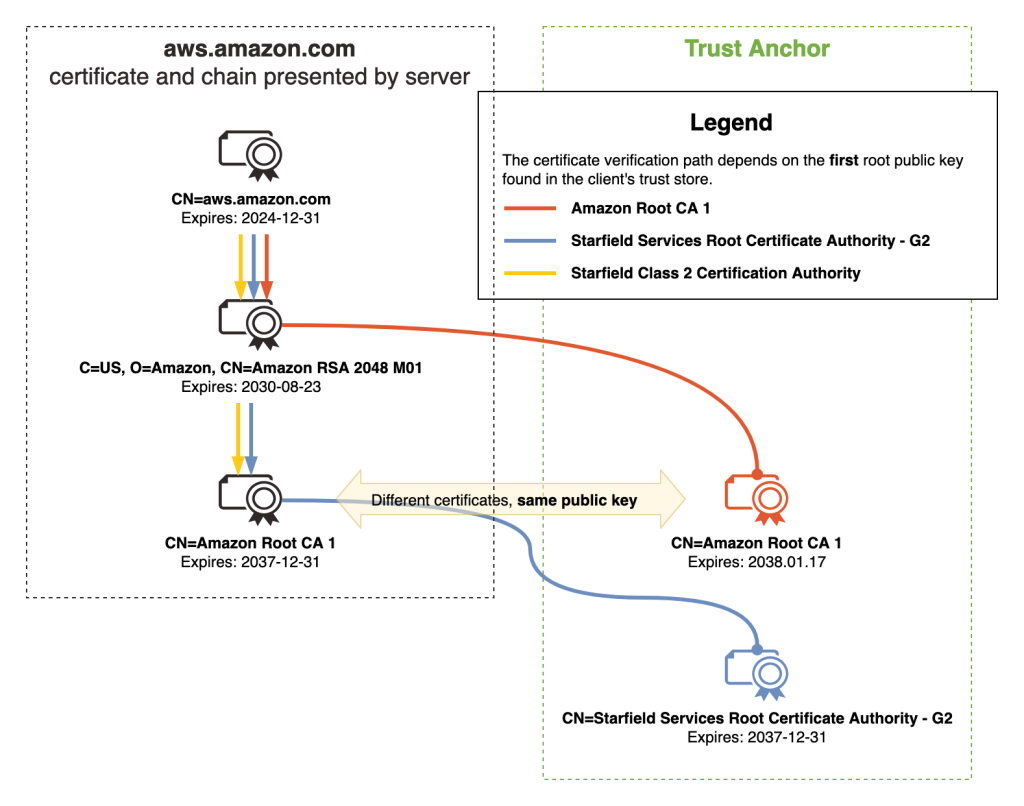
Amazon Trust Services is a publicly trusted CA that is managed by Amazon. Amazon Trust Services root CA certificates are included in the trust stores of most web browsers and operating systems. As shown in Figure 1, when you request a public ACM certificate through DNS, Email, or HTTP validation, it will be issued by one of the multiple intermediate CAs that Amazon manages. These intermediate CAs are issued by one of the five Amazon Trust Services root CAs. Therefore, by trusting the Amazon Trust Services root CAs, you will be trusting ACM certificates. It’s important to note that ACM uses a dynamic intermediate CA model. This means you cannot predict which specific intermediate CA will issue an ACM certificate. The issuing intermediate CA is selected dynamically from a group of intermediate CAs at the time of certificate issuance. This means that the intermediate CA that issues ACM certificates is non-deterministic. In summary, we recommend customer trust stores include the five Amazon Trust Services root CA certificates. This includes Amazon Root CA 1, Amazon Root CA 2, Amazon Root CA 3, Amazon Root CA 4 and Starfield Services Root Certificate Authority – G2.

Figure 1 – ACM certificate chain

Figure 1 – ACM certificate chain

Best practices

To help establish reliable HTTPS connections to endpoints using ACM certificates, we recommend that your trust stores include the five Amazon root CAs.

Distinguished name of Amazon root CA SHA-256 hash of subject public key information URL to root CA certificate in DER or PEM format
CN=Amazon Root CA
1,O=Amazon,C=US
fbe3018031f9586bcbf41727e417b7d1c45c2f47f93be372a17b96b50757d5a2 DER, PEM
CN=Amazon Root CA
2,O=Amazon,C=US
7f4296fc5b6a4e3b35d3c369623e364ab1af381d8fa7121533c9d6c633ea2461 DER, PEM
CN=Amazon Root CA
3,O=Amazon,C=US
36abc32656acfc645c61b71613c4bf21c787f5cabbee48348d58597803d7abc9 DER, PEM
CN=Amazon Root CA
4,O=Amazon,C=US
f7ecded5c66047d28ed6466b543c40e0743abe81d109254dcf845d4c2c7853c5 DER, PEM
CN=Starfield Services Root Certificate Authority – G2,O=Starfield Technologies\, Inc.,L=Scottsdale,ST=Arizona,C=US 2b071c59a0a0ae76b0eadb2bad23bad4580b69c3601b630c2eaf0613afa83f92 DER, PEM

Adding the five Amazon root CAs provide maximum compatibility for trusting ACM certificates. If you must use certificate pinning in your application, we recommend that you pin to the public key of the mentioned root CAs.

While addressing the best practices, it is important to review how trust stores should not be configured.

Don’t limit your trust stores to only the intermediate CA certificates that issue ACM certificates. Examples of such intermediate CAs include Amazon RSA 2048 M01, Amazon RSA 2048 M02, Amazon RSA 2048 M03. Adding only these intermediate CA certificates to your trust store will introduce risk to your application. This is because of the dynamic intermediate CA (ICA) model. When an ACM certificate is issued or when it’s renewed, it will be from one of the many intermediate CAs. Furthermore, they are non-deterministic. If an ACM certificate was first issued by Amazon RSA 2048 M01, there is no guarantee that it will renew from that same intermediate CA.

In summary, here are the best practices for trusting ACM certificates.

How do I verify that the Amazon root CAs are in my trust store?

As mentioned in the previous section, most modern web browsers and operating systems already include the five Amazon root CAs in their respective trust stores by default. It’s still recommended to verify that the Amazon root CAs are installed correctly. It’s important to note that many applications have different trust store locations. For example, an application might use the Windows trust store location—Trusted Root Certification Authorities—as its trust store or it might use a PEM trust store in a custom directory. This is why we recommend that you review your application’s trust store documentation.

To verify, check your system’s trust store for existing Amazon root CA certificates. If they are not present, you can proceed with adding the five Amazon root CA certificates.

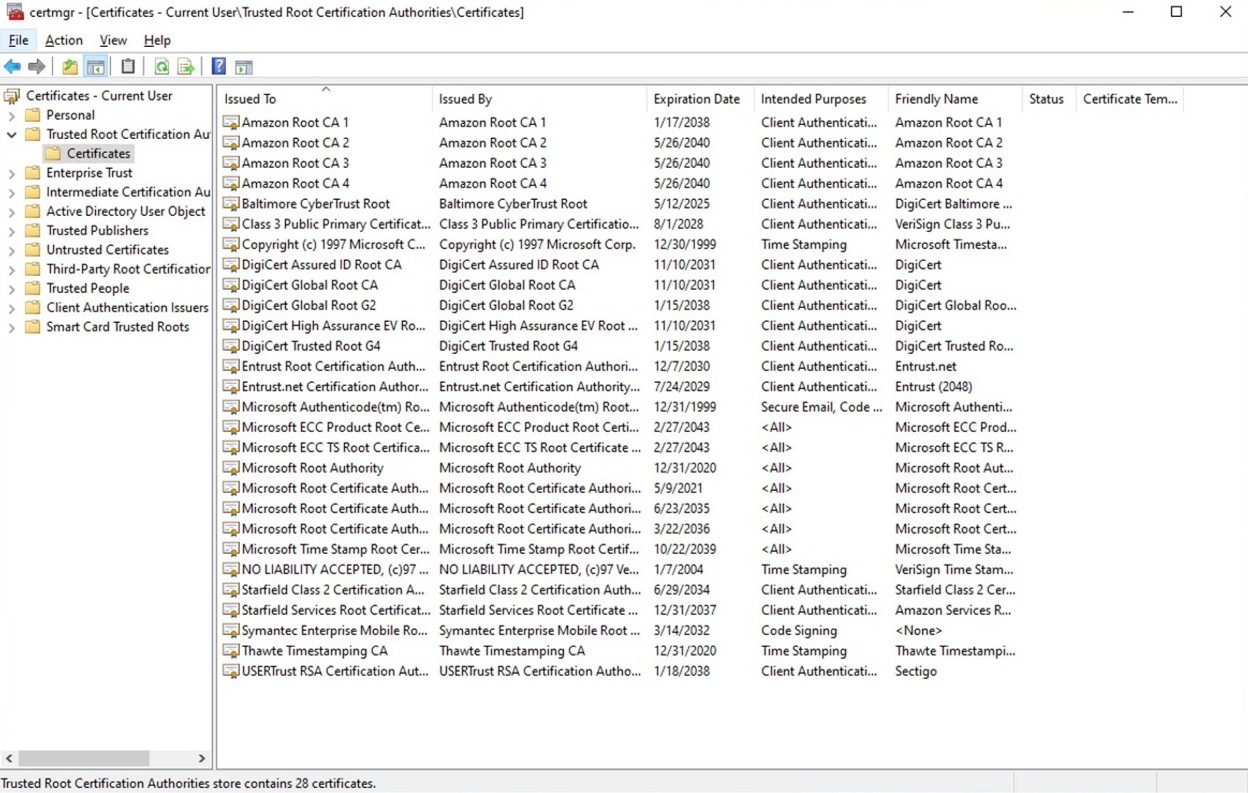
Windows: Check for the Amazon root CAs in Windows operating systems (GUI)

  1. Press Windows + R, enter certmgr.msc , then press Enter.
  2. Go to Trusted Root Certification Authorities and choose Certificates.
Figure 2: Windows certificate store: Trusted Root Certification Authorities

Figure 2: Windows certificate store: Trusted Root Certification Authorities

Check for the Amazon root CAs in Windows operating systems (CLI)

You can use Powershell to check for the Amazon root CAs. Use the certutil command.

  • Open Windows Powershell and use the following certutil commands. These will search for the five Amazon root CAs.
> certutil -store AuthRoot | findstr /i "Amazon" 
Issuer: CN=Amazon Root CA 4, O=Amazon, C=US 
Subject: CN=Amazon Root CA 4, O=Amazon, C=US 
Issuer: CN=Amazon Root CA 1, O=Amazon, C=US 
Subject: CN=Amazon Root CA 1, O=Amazon, C=US 
Issuer: CN=Amazon Root CA 2, O=Amazon, C=US 
Subject: CN=Amazon Root CA 2, O=Amazon, C=US 
Issuer: CN=Amazon Root CA 3, O=Amazon, C=US 
Subject: CN=Amazon Root CA 3, O=Amazon, C=US

> certutil -store AuthRoot | findstr /i "Starfield Services Root Certificate Authority - G2" 
Issuer: CN=Starfield Services Root Certificate Authority - G2, O=Starfield Technologies, Inc., L=Scottsdale, S=Arizona, C=US
Subject: CN=Starfield Services Root Certificate Authority - G2, O=Starfield Technologies, Inc., L=Scottsdale, S=Arizona, C=US

Add Amazon root CAs to the default trust store using the UI

Download each Amazon Trust Services root CA. You can select the DER or PEM versions.

  1. Open Certmgr: Press Windows + R, enter certmgr.msc, and press Enter.
  2. Add to the trusted root:
    1. Choose Trusted Root Certification Authorities.
    2. Right-click Certificates.
    3. Select All Tasks and choose Import.
    4. Follow the Certificate Import Wizard:
      1. Choose Next.
      2. Browse to the root CA certificate file location. You might need to select All Files(*.*) to view the root CA certificate files.
      3. Select Place all certificates in the following store.
      4. Verify Trusted Root Certification Authorities is selected and choose Next.
      5. Choose Finish.

Add Amazon root CAs to the default trust store using the CLI

  1. Download each Amazon Trust Services root CA. You can select the DER or PEM versions.
  2. In Powershell, add a CA certificate to AuthRoot using certutil.
    > certutil -addstore AuthRoot AmazonRootCA1.cer
  3. In Powershell, verify that the certificate has been added.
    > certutil -store AuthRoot | findstr /i "Amazon"

Amazon Linux 2023: Check for the Amazon root CAs in default trust store

The following is the default location for the system trust store in Amazon Linux 2023:

/etc/pki/tls/certs/ca-bundle.crt

1. Using OpenSSL, search for Amazon root CA certificates in the ca-bundle.crt bundle:

openssl crl2pkcs7 -nocrl -certfile /etc/pki/tls/certs/ca-bundle.crt | openssl pkcs7 -print_certs -noout | grep -i "Amazon\|Starfield Services" 

subject=C=US, O=Amazon, CN=Amazon Root CA 1 
issuer=C=US, O=Amazon, CN=Amazon Root CA 1 
subject=C=US, O=Amazon, CN=Amazon Root CA 2 
issuer=C=US, O=Amazon, CN=Amazon Root CA 2 
subject=C=US, O=Amazon, CN=Amazon Root CA 3 
issuer=C=US, O=Amazon, CN=Amazon Root CA 3 
subject=C=US, O=Amazon, CN=Amazon Root CA 4 
issuer=C=US, O=Amazon, CN=Amazon Root CA 4 
subject=C=US, ST=Arizona, L=Scottsdale, O=Starfield Technologies, Inc., CN=Starfield Services Root Certificate Authority - G2 
issuer=C=US, ST=Arizona, L=Scottsdale, O=Starfield Technologies, Inc., CN=Starfield Services Root Certificate Authority - G2

To add the Amazon root CAs to the default trust store

1. Navigate to the following directory for adding CA certificates
$ cd /etc/pki/ca-trust/source/anchors/

2. Using cURL, download each Amazon Trust Services root CA in the preceding folder. Do this for each of the Amazon root CAs replacing the name of the PEM file as needed.

$ sudo curl -O
https://www.amazontrust.com/repository/AmazonRootCA1.pem

3. Add the root CAs by updating the system trust store.
$ sudo update-ca-trust extract

4. Verify that the bundle has been updated with OpenSSL.
$ openssl crl2pkcs7 -nocrl -certfile /etc/pki/tls/certs/ca-bundle.crt | openssl pkcs7 -print_certs -noout | grep -i "Amazon\|Starfield Services"

Java: Check for the Amazon root CAs in a Java trust store (Java Keystore)

Many custom Java applications use Java Keystore (JKS) as a trust store. You can use the keytool CLI tool to verify if the Amazon root CAs exist in your JKS trust store.

keytool -list -keystore custom_truststore.jks -storepass mypassword

Keystore type: PKCS12
Keystore provider: SUN

Your keystore contains 5 entries

amazonrootca1, Jun 27, 2025, trustedCertEntry, Certificate fingerprint (SHA-256): 8E:CD:E6:88:4F:3D:87:B1:12:5B:A3:1A:C3:FC:B1:3D:70:16:DE:7F:57:CC:90:4F:E1:CB:97:C6:AE:98:19:6E 
amazonrootca2, Jun 27, 2025, trustedCertEntry, Certificate fingerprint (SHA-256): 1B:A5:B2:AA:8C:65:40:1A:82:96:01:18:F8:0B:EC:4F:62:30:4D:83:CE:C4:71:3A:19:C3:9C:01:1E:A4:6D:B4 
amazonrootca3, Jun 27, 2025, trustedCertEntry, Certificate fingerprint (SHA-256): 18:CE:6C:FE:7B:F1:4E:60:B2:E3:47:B8:DF:E8:68:CB:31:D0:2E:BB:3A:DA:27:15:69:F5:03:43:B4:6D:B3:A4 
amazonrootca4, Jun 27, 2025, trustedCertEntry, Certificate fingerprint (SHA-256): E3:5D:28:41:9E:D0:20:25:CF:A6:90:38:CD:62:39:62:45:8D:A5:C6:95:FB:DE:A3:C2:2B:0B:FB:25:89:70:92 
starfieldg2, Jun 27, 2025, trustedCertEntry, Certificate fingerprint (SHA-256): 56:8D:69:05:A2:C8:87:08:A4:B3:02:51:90:ED:CF:ED:B1:97:4A:60:6A:13:C6:E5:29:0F:CB:2A:E6:3E:DA:B5

The output should show the Amazon root CAs listed as “trustedCertEntry” with those exact certificate fingerprints.

To add the Amazon root CAs to a Java trust store (Java Keytool)

1. Download each Amazon Trust Services root CA in PEM or DER format. Use the PowerShell command Invoke-WebRequest if you’re using Windows, or use cURL if you’re using a Linux-based operating system or MacOS.

> Invoke-WebRequest -Uri "https://www.amazontrust.com/repository/AmazonRootCA1.pem" -OutFile "AmazonRootCA1.pem"

$ curl -O https://www.amazontrust.com/repository/AmazonRootCA1.pem

2. Import the Amazon root CAs to the trust store—custom_truststore.jks. Replace changeit with your JKS password. Do this command for each of the Amazon root CAs, replacing the name of the root CA as needed.

$ keytool -importcert -alias "AmazonRootCA1" -file "AmazonRootCA1.pem" -keystore custom_truststore.jks -storepass changeit -trustcacerts -noprompt

Test your trust store configuration

After you have set up your trust store with the five Amazon root CA certificates, you can perform tests to confirm that the installed root CAs are correctly providing trust. Remember that your custom application might be sourcing its trust from a store other than the stores mentioned in this article. For custom applications, we recommend checking your testing documentation.

PEM

For operating systems or applications that use PEM certificate bundles, such as Amazon Linux 2023, you can use OpenSSL or cURL to test. For additional test URLs, see the Amazon Trust Services website. Replace CAbundle.pem with your certificate bundle.

$ openssl s_client -connect valid.rootca1.demo.amazontrust.com:443 -CAfile CAbundle.pem

$ curl -iv --cacert CAbundle.pem https://valid.rootca1.demo.amazontrust.com

Windows

Because Windows doesn’t use PEM certificate bundles, but a trust store in certmgr called Trusted Root Certification Authorities, you can use PowerShell to test.

1. Copy the following PowerShell script and save it in a file named ssl-connect.ps1.


param (
[string]$url = "https://valid.rootca1.demo.amazontrust.com"
)

$sslStream = $null
$tcpClient = $null

try {
$uri = [System.Uri]$url
$hostname = $uri.Host
$port = if ($uri.Port -eq -1) { 443 } else { $uri.Port }

# Connect to the server
$tcpClient = New-Object System.Net.Sockets.TcpClient
$tcpClient.Connect($hostname, $port)

# Define the certificate validation callback
$callback = {
param($sender, $certificate, $chain, $sslPolicyErrors)

Write-Host "Server Certificate:`nSubject : $($certificate.Subject)`nIssuer : $($certificate.Issuer)`n"

Write-Host "Certificate Chain:"
foreach ($c in $chain.ChainElements) {
Write-Host ("Subject : {0}`nIssuer : {1}`nThumbprint : {2}`n" -f
$c.Certificate.Subject,
$c.Certificate.Issuer,
$c.Certificate.Thumbprint)
}


if ($sslPolicyErrors -eq 'None') {
Write-Host "Certificate is valid and trusted."
} else {
Write-Host "Certificate error(s): $sslPolicyErrors"
}

return $true
}

# Create the SSL stream using the callback
$sslStream = New-Object System.Net.Security.SslStream($tcpClient.GetStream(), $false, $callback)

# Initiate TLS handshake
$sslStream.AuthenticateAsClient($hostname)
}
catch {
Write-Host "ERROR: $($_.Exception.Message)"
}
finally {
if ($sslStream) { $sslStream.Dispose() }
if ($tcpClient) { $tcpClient.Close() }
}

2. Run the PowerShell script with the following command:

  • > .\ssl-connect.ps1

You can test with the other test URLs by passing them in -url:

  • > .\ssl-connect.ps1 -url https://s3.amazonaws.com

3. After running the command, you should see the subject and issuer of the end-entity certificate and the full trust chain, including the intermediate CA and root CA. If the command returns Certificate is valid and trusted, the certificate is trusted. If it returns an error with Certificate error, the error should tell you what went wrong.

Java

To test your Java applications that use JKS as a trust store, you can make HTTPS connections to endpoints that use Amazon Trust Services certificates.

1. Copy the Java code and name the file SSLTester.java.

  • In the code, you can replace the urls variable with additional URLs to test HTTPS. See the Amazon Trust Services website for additional test URLs.
  • Update your_keystore.jks and your password with your JKS file path and password.
import javax.net.ssl.SSLContext; 
import javax.net.ssl.TrustManagerFactory; 
import java.io.FileInputStream; 
import java.net.URL; 
import java.security.KeyStore;
import java.security.cert.Certificate; 
import java.security.cert.X509Certificate; 

public class SSLTester {
     public static void main(String[] args) {
         // Enable revocation checking
         System.setProperty("com.sun.net.ssl.checkRevocation", "true");
         System.setProperty("com.sun.security.enableCRLDP", "true");   
         System.setProperty("com.sun.security.enableAIAcaIssuer", "true");
         // Define your HTTPS URLs here
         String[] urls = {
              "https://valid.rootca1.demo.amazontrust.com/",  // Use an Amazon Trust Services Valid test URL (Example: https://valid.rootca1.demo.amazontrust.com/)
              "https://revoked.rootca1.demo.amazontrust.com/", // Use an Amazon Trust Services Revoked test URL (Example: https://revoked.rootca1.demo.amazontrust.com/)
              "https://expired.rootca1.demo.amazontrust.com/", // Use an Amazon Trust Services Expired test URL (Example: https://expired.rootca1.demo.amazontrust.com/)
              "https://ec2.amazonaws.com" // AWS Service Endpoint
		  };
          String keystorePath = "your_keystore.jks"; // Define your .jks file
          String keystorePassword = "your password"; // Pass your keystore password

          try {
             // Load the JKS
             KeyStore trustStore = KeyStore.getInstance("JKS");
             FileInputStream fis = new FileInputStream(keystorePath);
             trustStore.load(fis, keystorePassword.toCharArray());
             fis.close();

             // Initialize TrustManagerFactory with JKS
             TrustManagerFactory tmf = 
TrustManagerFactory.getInstance(TrustManagerFactory.getDefaultAlgorithm());
             tmf.init(trustStore);
            // Initialize SSLContext
            SSLContext sslContext =
SSLContext.getInstance("TLS");
             sslContext.init(null, tmf.getTrustManagers(), null);

             // Test SSL connections to URLs
             for (String urlStr : urls) {
                 System.out.println("Testing URL: " + urlStr);
                 try {
                     URL url = new URL(urlStr);
                     javax.net.ssl.HttpsURLConnection conn = (javax.net.ssl.HttpsURLConnection) url.openConnection();                    conn.setSSLSocketFactory(sslContext.getSocketFactory());
                     conn.connect();

                     // Get server certificate
                     Certificate[] certs = 
conn.getServerCertificates();
                     for (Certificate cert : certs) {
                         if (cert instanceof X509Certificate) {
                             X509Certificate x509Cert = (X509Certificate) cert;
                             System.out.println("Certificate: " + x509Cert.getSubjectDN());
                         }
                     }
                     System.out.println("Connection successful for " + urlStr);
                     conn.disconnect();
                 } catch (Exception e) {
                     System.err.println("Failed for " + urlStr + ": " + e.getMessage());
                 }
             }
         } catch (Exception e) {
             e.printStackTrace();
         }
     }
 }

2. After you save the file, compile it and run.

javac SSLTester.java
java SSLTester.java

3. Check the output after it’s finished running.

  • For Valid URLs, you should see Connection successful:
  • Connection successful for https://valid.rootca1.demo.amazontrust.com/

  • For Revoked URLs, you should see Certificate has been revoked:
  • failed: java.security.cert.CertPathValidatorException: Certificate has been revoked, reason: UNSPECIFIED

  • For Expired URLs, you should see Validity check failed:

Failed for https://expired.rootca1.demo.amazontrust.com/: PKIX path validation failed: java.security.cert.CertPathValidatorException: validity check failed

Conclusion

When your web browser, device, or application performs HTTPS connections, it validates the certificate presented by the server using its trust store. A trust store is a collection of trusted CA certificates, primarily consisting of root CA certificates. When trusting endpoints using public certificates issued through ACM, best practice recommends installing the five Amazon Trust Services root CA certificates into your trust store. Be aware that trusting only the Amazon Trust Services intermediate CA certificates, such as Amazon RSA 2048 M01 and Amazon RSA 2048 M02, increases your application’s risk for outages. This is because of the non-deterministic nature of the dynamic intermediate CA (ICA) model. It’s worth noting that trust store configurations can vary across different applications. Furthermore, applications can also source their trust store from different locations. For example, you can have a Java application hosted on a Windows-based operating system that sources its trust store from a Java Keystore (JKS) file rather than the default Windows trust store location Trusted Root Certification Authorities. This means that you should thoroughly test your application after installing the Amazon Trust Services root CA certificates in your trust store. This will help to sustain reliable HTTPS connections to endpoints using ACM certificates.


If you have feedback about this post, submit comments in the Comments section below. If you have questions about this post, contact AWS Support.

Chris Morris

Chris Morris

Chris is a Sr. Cloud Support Engineer at AWS. He specializes in a variety of security topics, including cryptography and data protection. He focuses on helping AWS customers use AWS security services to strengthen their security posture in the cloud. Public key infrastructure and key management are some of his favorite security topics.

Feng Chen

Feng Chen

Feng is an AWS Cloud Support Engineer based in Melbourne, Australia. He specializes in AWS security services, with deep expertise in ACM, IAM, and AWS Identity Center. He is passionate about helping customers protect their cloud infrastructure. He is also an AWS Golden Jacket owner with all AWS certifications.

Nikhil Kalra

Nikhil Kalra

Nikhil is an AWS Cloud Support Engineer based in Hyderabad, India. He is a subject matter expert in AWS Certificate Manager with expertise in core security services such as Amazon Cognito and IAM. Holding the prestigious AWS Certified Security Specialty certification, he is committed to helping customers implement robust security solutions and protect their cloud infrastructure.

New general-purpose Amazon EC2 M8a instances are now available

Post Syndicated from Betty Zheng (郑予彬) original https://aws.amazon.com/blogs/aws/new-general-purpose-amazon-ec2-m8a-instances-are-now-available/

Today, we’re announcing the availability of Amazon Elastic Compute Cloud (Amazon EC2) M8a instances, the latest addition to the general-purpose M instance family. These instances are powered by the 5th Generation AMD EPYC (codename Turin) processors with a maximum frequency of 4.5GHz. Customers can expect up to 30% higher performance and up to 19% better price performance compared to M7a instances. They also provide higher memory bandwidth, improved networking and storage throughput, and flexible configuration options for a broad set of general-purpose workloads.

Improvements in M8a
M8a instances deliver up to 30% better performance per vCPU compared to M7a instances, making them ideal for applications that require benefit from high performance and high throughput such as financial applications, gaming, rendering, application servers, simulation modeling, midsize data stores, application development environments, and caching fleets.

They provide 45% more memory bandwidth compared to M7a instances, accelerating in-memory databases, distributed caches, and real-time analytics.

For workloads with high I/O requirements, M8a instances provide up to 75 Gbps of networking bandwidth and 60 Gbps of Amazon Elastic Block Store (Amazon EBS) bandwidth, a 50% improvement over the previous generation. These enhancements support modern applications that rely on rapid data transfer and low-latency network communication.

Each vCPU on an M8a instance corresponds to a physical CPU core, meaning there is no simultaneous multithreading (SMT). In application benchmarks, M8a instances delivered up to 60% faster performance for GroovyJVM and up to 39% faster performance for Cassandra compared to M7a instances.

M8a instances support instance bandwidth configuration (IBC), which provides flexibility to allocate resources between networking and EBS bandwidth. This gives customers the flexibility to scale network or EBS bandwidth by up to 25% and improve database performance, query processing, and logging speeds.

M8a is available in ten virtualized sizes and two bare metal options (metal-24xl and metal-48xl), providing deployment choices that scale from small applications to large enterprise workloads. All of these improvements are built on the AWS Nitro System, which delivers low virtualization overhead, consistent performance, and advanced security across all instance sizes. These instances are built using the latest sixth generation AWS Nitro Cards, which offload and accelerate I/O for functions, increasing overall system performance.

M8a instances feature sizes of up to 192 vCPU with 768GiB RAM. Here are the detailed specs:

M8a vCPUs Memory (GiB) Network bandwidth (Gbps) EBS bandwidth (Gbps)
medium 1 4 Up to 12.5 Up to 10
large 2 8 Up to 12.5 Up to 10
xlarge 4 16 Up to 12.5 Up to 10
2xlarge 8 32 Up to 15 Up to 10
4xlarge 16 64 Up to 15 Up to 10
8xlarge 32 128 15 10
12xlarge 48 192 22.5 15
16xlarge 64 256 30 20
24xlarge 96 384 40 30
48xlarge 192 768 75 60
metal-24xl 96 384 40 30
metal-48xl 192 768 75 60

For a complete list of instance sizes and specifications, refer to the Amazon EC2 M8a instances page.

When to use M8a instances
M8a is a strong fit for general-purpose applications that need a balance of compute, memory, and networking. M8a instances are ideal for web and application hosting, microservices architectures, and databases where predictable performance and efficient scaling are important.

These instances are SAP certified and also well suited for enterprise workloads such as financial applications and enterprise resource planning (ERP) systems. They’re equally effective for in-memory caching and customer relationship management (CRM), in addition to development and test environments that require cost efficiency and flexibility. With this versatility, M8a supports a wide spectrum of workloads while helping customers improve price performance.

Now available
Amazon EC2 M8a instances are available today in US East (Ohio) US West (Oregon) and Europe (Spain) AWS Regions. M8a instances can be purchased as On-Demand, Savings Plans, and Spot Instances. M8a instances are also available on Dedicated Hosts. To learn more, visit the Amazon EC2 Pricing page.

To learn more, visit the Amazon EC2 M8a instances page and send feedback to AWS re:Post for EC2 or through your usual AWS support contacts.

Betty

StackSets Deployment Strategies: Balancing Speed, Safety, and Scale to Optimize Deployments for Different Organizational Needs

Post Syndicated from Amar Meriche original https://aws.amazon.com/blogs/devops/stacksets-deployment-strategies-balancing-speed-safety-and-scale-to-optimize-deployments-for-different-organizational-needs/

AWS CloudFormation StackSets enables organizations to deploy infrastructure consistently across multiple AWS accounts and regions. However, success depends on choosing the right deployment strategy that balances three critical factors: deployment speed, operational safety, and organizational scale. This guide explores proven StackSets deployment strategies specifically designed for multi-account infrastructure management.

Understanding StackSets Deployment Fundamentals

What are StackSets Actually Used For?

Unlike single-account AWS CloudFormation templates, StackSets are specifically designed for multi-account infrastructure governance. Common use cases include Security baselines (deploying IAM policies, security groups, and access controls across all accounts), Compliance controls (rolling out AWS Config rules, AWS CloudTrail configurations, and audit requirements), Organizational standards (establishing consistent VPC configurations, tagging policies, and naming conventions), Shared services (deploying monitoring solutions, logging infrastructure, and backup policies) or Cost management (implementing budget controls, cost allocation tags, and resource optimization policies)

The Multi-Account Challenge

Managing infrastructure across dozens or hundreds of AWS accounts presents unique challenges:

Single Account (CFN Template)     Multi-Account (StackSets)
      App A                           Org Unit A (50 accounts)
        |                                     |
   [Deploy Once]               [Deploy consistently across all]
        |                                     |
    Success/Fail                Complex success/failure matrix

Multi account and multi region Cloudformation deployment complexity

The Speed-Safety-Scale Triangle

Every StackSets deployment strategy involves trade-offs: Speed (how quickly changes propagate across your organization), Safety (risk mitigation and failure containment) and Scale (ability to manage hundreds of accounts efficiently)

Prerequisites

Before implementing any of the deployment strategies described in this guide, ensure you have:

  1. AWS CLI Installation
    1. Install the latest version of AWS CLI by following the AWS CLI installation guide
    2. Verify installation with: aws –version
  2. AWS Profile Configuration
    1. Configure your AWS credentials using: aws configure
    2. For details on configuration, see AWS CLI configuration basics
    3. Ensure your profile has appropriate permissions for CloudFormation StackSets operations as described in AWS StackSets prerequisites
  3. Proper Account Access The commands in this guide must be executed from either:
    1. The management account of your AWS Organization
    2. OR a delegated administrator account for CloudFormation

For information on setting up a delegated administrator, see Register a delegated administrator

Note: StackSets deployments using service-managed permissions cannot be performed from standalone accounts.

Verify you’re using the correct account with:

bash
# For management account
aws organizations describe-organization
# For delegated admin
aws cloudformation list-stack-sets —call-as DELEGATED_ADMIN

AWS CLI to check the usage of an Organization and not a Standalone account

Core Deployment Strategies

As explained in the StackSet documentation:

  • “For a more conservative deployment, set Maximum Concurrent Accounts to 1, and Failure Tolerance to 0. Set your lowest-impact region to be first in the Region Order Start with one region.”
  • “For a faster deployment, increase the values of Maximum Concurrent Accounts and Failure Tolerance as needed. ”

Based on the above, we are proposing below several deployment strategies, depending on the speed, safety and scale you want to achieve.

1. Sequential Deployment: Maximum Safety

Use Case : Critical security updates, compliance requirements, first-time organizational rollouts

Below are listed some possible use cases:

  • Security baseline updates: New IAM policies affecting root access
  • Compliance rollouts: SOX, HIPAA, or PCI-DSS control implementations
  • Critical infrastructure changes: VPC security group modifications
  • Organizational policy changes: New AWS Config rules for audit compliance

Implementation Example:

For this example, we will download the following template ConfigRuleCloudtrailEnabled.yml from the Cloudformation sample library in the AWS documentation to configure an AWS Config rule to determine if AWS CloudTrail is enabled and follow the next steps:

Step 1: Create the StackSet

With the AWS CLI:

# Create Stackset for security baseline
# StackSet operation managed from us-east-1
aws cloudformation create-stack-set \
  --stack-set-name security-baseline \
  --template-body file://ConfigRuleCloudtrailEnabled.yml \
  --capabilities CAPABILITY_NAMED_IAM \
  --permission-model SERVICE_MANAGED \
  --auto-deployment Enabled=true,RetainStacksOnAccountRemoval=false \
  --region us-east-1

AWS CLI to create a security-baseline Stackset

The expected response should be similar to the following :

{"StacksetId": "security-baseline: ...."}

Step 2: Create Stack Instances

Before you launch the below command, you need to adjust the values of the following parameters:

  • OrganizationalUnitIds: you must change the value “ou-test” in the below command line to the name of the target OU you want to deploy to. I recommend creating a new test OU in the console or via the CLI for the purpose of this test.
  • regions: if needed, change the “us-east-1 eu-west-1” value, here you need to list all the regions you want to deploy to. AWS Config must be active in the accounts/regions that you choose, otherwise you’ll get an error when deploying the Stack.

# Deploy security baseline to production accounts
# StackSet operation managed from us-east-1
# Deployed to regions us-east-1 and eu-west-1
# SEQUENTIAL = One region at a time, sequentially
# MaxConcurrentPercentage = Deploy to 5% of accounts at once
# FailureTolerancePercentage = Stop on first failure
aws cloudformation create-stack-instances \
  --stack-set-name security-baseline \
  --deployment-targets OrganizationalUnitIds=ou-test\
  --regions us-east-1 eu-west-1 \
  --region us-east-1 \
  --operation-preferences RegionConcurrencyType=SEQUENTIAL,MaxConcurrentPercentage=5,FailureTolerancePercentage=0

AWS CLI to create security-baseline Stack Instances sequentially for maximum safety

The CLI output should look like the following:

{"OperationId": ....}

Or create the StackSet and add the Stacks with the AWS Console:

In the CloudFormation Console, click “Create StackSet”

AWS CloudFormation Console: create a security-baseline Stackset

AWS CloudFormation Console: create a security-baseline Stackset

Upload your template from S3 or from your computer and click Next:

AWS CloudFormation Console: specify a template

AWS CloudFormation Console: specify a template

Specify the StackSet name and parameters and click Next:

AWS CloudFormation Console: specify the StackSet name and parameters

AWS CloudFormation Console: specify the StackSet name and parameters

Configure StackSet options and click Next:

AWS CloudFormation Console: configure the StackSet options

AWS CloudFormation Console: configure the StackSet options

Set deployment options and click Next:

AWS CloudFormation Console: set deployment options

AWS CloudFormation Console: set deployment options

AWS CloudFormation Console: set deployment options

AWS CloudFormation Console: set more deployment options

Then Review and Submit.

Not to overweight this blog, we’ll provide only this example of CLI output and Console screenshot, but the “Parallel Deployment” and “Balanced Approach” will be similar to this example. You just need to update the parameters for the different StackSet Operations options.

A real-world example would be a financial services company deploying new MFA requirements across 200 production accounts. They could use sequential deployment with 5 concurrency to ensure each batch was validated before proceeding.

2. Parallel Deployment: Maximum Speed

The Parallel Deployment is best for non-critical updates, development environments, routine maintenance

Here are some possible use cases:

  • Development account standardization: Rolling out new development tools
  • Monitoring infrastructure: Deploying Amazon CloudWatch dashboards and alarms
  • Cost optimization: Implementing automated resource cleanup policies
  • Non-production updates: Updating development and staging environments

Implementation Example:

For this example, we will copy paste the .yml template from this Re:Post article about monitoring IAM events in a file called “monitoring-baseline.yml”, and use it in the following command lines.

Step 1: Create the StackSet

# Create Stackset for monitoring baseline
# StackSet operation managed from us-east-1
aws cloudformation create-stack-set \
--stack-set-name monitoring-baseline \
--template-body file://monitoring-baseline.yml \
--capabilities CAPABILITY_NAMED_IAM \
--permission-model SERVICE_MANAGED \
--auto-deployment Enabled=true,RetainStacksOnAccountRemoval=false \
--region us-east-1

AWS CLI to create a monitoring-baseline Stackset

Step 2: Create Stack Instances

Just like in the previous example, before you launch the below command, you need to adjust the values of the OrganizationalUnitIds and regions parameters.

# Deploy monitoring baseline to dev and sandbox accounts
# StackSet operation managed from us-east-1
# Deployed to regions us-east-1 and eu-west-1
# PARALLEL = Deployment in parallel
# MaxConcurrentPercentage = Deploy to 80% of accounts at once
# FailureTolerancePercentage = Tolerate failures in 20% of accounts
aws cloudformation create-stack-instances \
--stack-set-name monitoring-baseline \
--deployment-targets OrganizationalUnitIds=ou-development,ou-sandbox \
--regions us-east-1 eu-west-1 \
--region us-east-1 \
--operation-preferences RegionConcurrencyType=PARALLEL,MaxConcurrentPercentage=80,FailureTolerancePercentage=20

AWS CLI to create monitoring-baseline Stack Instances in parallel with high value for max concurrent percentage for maximum speed

3. Progressive Deployment: Balanced Approach or Multi Phase Approach (Recommended)

For most production scenarios with moderate risk tolerance, it is recommended to use a Balanced Approach, or Multi-Phase Implementation.

Balanced Approach

For this example, to make it easier, you can create a copy of “monitoring-baseline.yml” created previously, and name it “balanced-template.yml”.

cp monitoring-baseline.yml balanced-template.yml

bash command to copy the monitoring-baseline.yml file to balanced-template.yml

Then you can use it in the following command lines.

Step 1: Create the StackSet

# Create Stackset for a balanced creation
# StackSet operation managed from us-east-1
aws cloudformation create-stack-set \
--stack-set-name balanced-deployment \
--template-body file://balanced-template.yml \
--capabilities CAPABILITY_NAMED_IAM \
--permission-model SERVICE_MANAGED \
--auto-deployment Enabled=true,RetainStacksOnAccountRemoval=false \
--region us-east-1

AWS CLI to create a balanced-deployment Stackset

Step 2: Create Stack Instances

You need to adjust the values of the OrganizationalUnitIds and regions parameters.

# Deploy monitoring baseline to production accounts
# StackSet operation managed from us-east-1
# Deployed to regions us-east-1, eu-west-1 and ap-southeast-1
# PARALLEL = Deployment in parallel
# MaxConcurrentPercentage = Deploy to 25% of accounts at once
# FailureTolerancePercentage = Tolerate failures in 8% of accounts
aws cloudformation create-stack-instances \
--stack-set-name balanced-deployment \
--deployment-targets OrganizationalUnitIds=ou-development,ou-sandbox \
--regions us-east-1 eu-west-1 ap-southeast-1 \
--region us-east-1 \
--operation-preferences RegionConcurrencyType=PARALLEL,MaxConcurrentPercentage=25,FailureTolerancePercentage=8

AWS CLI to create balanced-deployment Stack Instances in parallel with low max concurrent percentage for a balanced deployment

Multi-Phase Implementation:

Step 1: Create the StackSet

# Create Stackset for a balanced creation
# StackSet operation managed from us-east-1
aws cloudformation create-stack-set \
--stack-set-name balanced-deployment \
--template-body file://balanced-template.yml \
--capabilities CAPABILITY_NAMED_IAM \
--permission-model SERVICE_MANAGED \
--auto-deployment Enabled=true,RetainStacksOnAccountRemoval=false \
--region us-east-1

AWS CLI to create a balanced-deployment Stackset

Phase 1: Pilot Accounts (10% of target)

Phase 1: Create Pilot Stack Instances

You need to adjust the values of the OrganizationalUnitIds and regions parameters.

# Deploy monitoring baseline to production accounts
# StackSet operation managed from us-east-1
# Deployed to regions us-east-1
# SEQUENTIAL = Deployment in sequence
# MaxConcurrentPercentage = 100% Deploy full speed for small pilot
# FailureTolerancePercentage = Zero tolerance in pilot
aws cloudformation create-stack-instances \
--stack-set-name balanced-deployment \
--deployment-targets Accounts=pilot-account-1,pilot-account-2 \
--regions us-east-1 \
--region us-east-1 \
--operation-preferences RegionConcurrencyType=SEQUENTIAL,MaxConcurrentPercentage=100,FailureTolerancePercentage=0

AWS CLI to create balanced-deployment Stack Instances sequentially for maximum safety in Pilot accounts

Wait for Pilot validation before proceeding to Phase 2

Phase 2: Early Adopter OUs (30% of target)

Phase 2: Create Early Adopter Stack Instances

You need to adjust the values of the OrganizationalUnitIds and regions parameters.

# Deploy monitoring baseline to production accounts
# StackSet operation managed from us-east-1
# Deployed to regions us-east-1, eu-west-1
# PARALLEL = Deployment in parallel
# MaxConcurrentPercentage = Deploy to 25% of accounts at once
# FailureTolerancePercentage = Tolerate failures in 5% of accounts
aws cloudformation create-stack-instances \
--stack-set-name balanced-deployment \
--deployment-targets OrganizationalUnitIds=ou-early-adopter \
--regions us-east-1 \
--region us-east-1 eu-west-1 \
--operation-preferences RegionConcurrencyType=PARALLEL,MaxConcurrentPercentage=25,FailureTolerancePercentage=5

AWS CLI to create balanced-deployment Stack Instances in parallel with low max concurrent percentage for a balanced deployment in Early Adopter OU

Wait for Early Adopter validation before proceeding to Phase 3

Phase 3: Full Deployment (Remaining 60%)

Phase 3: Full Deployment

You need to adjust the values of the OrganizationalUnitIds and regions parameters.

# Deploy monitoring baseline to production accounts
# StackSet operation managed from us-east-1
# Deployed to regions us-east-1, eu-west-1 and ap-southeast-1
# PARALLEL = Deployment in parallel
# MaxConcurrentPercentage = Deploy to 40% of accounts at once for higher speed after validation
# FailureTolerancePercentage = Tolerate failures in 10% of accounts for moderate tolerance
aws cloudformation create-stack-instances \
--stack-set-name balanced-deployment \
--deployment-targets OrganizationalUnitIds=ou-standard-prod,ou-legacy-prod \
--regions us-east-1 \
--region us-east-1 eu-west-1 ap-southeast-1 \
--operation-preferences RegionConcurrencyType=PARALLEL,MaxConcurrentPercentage=25,FailureTolerancePercentage=5

AWS CLI to create balanced-deployment Stack Instances in parallel with low max concurrent percentage for a balanced deployment in the remaining OUs

Using Step Functions for Orchestration

AWS Step Functions provides a serverless workflow service that can orchestrate StackSets deployments with advanced control flow, error handling, and state management capabilities. This approach enhances your multi-account deployments with features not available through standard StackSets operations alone.

Some of the Key Benefits include:

  • Advanced Deployment Orchestration: Coordinate multi-phase rollouts with validation gates
  • Human Approval Workflows: Implement manual approval steps for critical changes
  • Enhanced Error Handling: Define sophisticated retry policies and fallback mechanisms
  • Visual Monitoring: Track deployment progress through the Step Functions visual console

Real-World Use Case: Compliance Control Rollout

In regulated industries, AWS Step Functions enables a phased approach that combines automation with necessary governance. For instance, you can:

  1. Deploy compliance controls to test accounts
  2. Run automated validation and generate compliance reports
  3. Obtain manual approval from compliance team
  4. Deploy to production accounts with comprehensive monitoring

This approach ensures consistent governance while maintaining the complete audit trail required for regulatory compliance.

Monitoring and Optimization

AWS CloudFormation StackSets do not have extensive built-in Amazon CloudWatch metrics specifically designed for monitoring StackSet operations and health. This is actually why the monitoring implementation in our blog post is valuable.

Here’s what AWS does and doesn’t provide out of the box:

What AWS provides natively:

  • Basic AWS API call metrics via AWS CloudTrail (which show that operations happened but don’t track success rates or performance)
  • General service quotas and throttling metrics for CloudFormation as a whole
  • CloudFormation provides some metrics for individual stacks, but not consolidated StackSet-specific metrics

What requires custom implementation (as in our blog post):

  • Success rate metrics for StackSet operations across accounts
  • Deployment completion time tracking
  • Configuration drift detection and monitoring
  • Account-specific failure analysis
  • Comprehensive dashboards that show StackSet health across your organization

The code in our blog post demonstrates how to implement the success rate custom metrics by:

  1. Gathering data from the CloudFormation API about StackSet operations
  2. Calculating the success rate metrics for StackSet deployments
  3. Creating custom Amazon CloudWatch metrics in a custom namespace (like “StackSetMonitoring”)
  4. Setting up alerts for issues

This explains why organizations need to implement custom monitoring solutions like the one shown in our blog post rather than relying solely on built-in metrics.

Automated Monitoring Implementation: example of a custom metric to monitor the StackSet operations success rate

The following AWS Cloudformation template provides real-time monitoring and alerting for AWS CloudFormation StackSet operations through automated infrastructure deployment. This solution creates a complete monitoring system using a AWS Lambda function, Amazon EventBridge rules, Amazon SNS notifications, and Amazon CloudWatch dashboards to track StackSet success and failure rates. The core Lambda function named StackSetMonitor continuously monitors all active StackSets in your account, calculating success rates and publishing custom metrics to Amazon CloudWatch under the StackSetMonitoring namespace.

Below you’ll find a few example of possible custom metrics that could be implemented based on this AWS Cloudformation template:

  • Count of all operations (CREATE, UPDATE, DELETE) per StackSet over time periods
  • Number of stack instances with configuration drift (requires additional API calls)
  • Average time taken for StackSet operations to complete
  • Rate of StackSet operations to identify peak usage times
  • Number of individual stack instances that failed during operations
  • Number of retried operations (indicates infrastructure issues)

Here’s the StackSetMonitor.yml CloudFormation Template:

# StackSetMonitor.yml 
# CFN template for monitoring AWS CloudFormation StackSet operations with real-time alerts, metrics, and dashboards.

AWSTemplateFormatVersion: '2010-09-09'
Description: 'CloudFormation template for StackSet operation monitoring using CloudWatch and SNS'

Parameters:
  StackSetName:
    Type: String
    Description: 'Name of the StackSet to monitor'
    Default: 'security-baseline'
    MinLength: 1
    MaxLength: 128
    AllowedPattern: '[a-zA-Z][-a-zA-Z0-9]*'
    ConstraintDescription: 'Must be a valid StackSet name (1-128 characters, alphanumeric and hyphens, must start with a letter)'
  
  VpcId:
    Type: String
    Description: 'VPC ID where the Lambda function will be deployed (leave empty to create new VPC)'
    Default: ''
  
  SubnetIds:
    Type: CommaDelimitedList
    Description: 'List of subnet IDs for the Lambda function (leave empty to create new subnets)'
    Default: ''
    
  SecurityGroupIds:
    Type: CommaDelimitedList
    Description: 'List of security group IDs for the Lambda function (leave empty to create new security group)'
    Default: ''

Conditions:
  CreateVPC: !Equals [!Ref VpcId, '']
  CreateVPCAndSubnets: !And [!Equals [!Ref VpcId, ''], !Equals [!Join [',', !Ref SubnetIds], '']]
  HasCustomSecurityGroups: !Not [!Equals [!Join [',', !Ref SecurityGroupIds], '']]
  
Resources:
  # KMS Key for CloudWatch Logs encryption
  LogsKMSKey:
    Type: AWS::KMS::Key
    DeletionPolicy: Delete
    UpdateReplacePolicy: Delete
    Properties:
      Description: 'KMS Key for StackSet Monitor CloudWatch Logs and Lambda environment variable encryption'
      EnableKeyRotation: true
      KeyPolicy:
        Version: '2012-10-17'
        Statement:
          - Sid: Enable IAM User Permissions
            Effect: Allow
            Principal:
              AWS: !Sub 'arn:${AWS::Partition}:iam::${AWS::AccountId}:root'
            Action: 'kms:*'
            Resource: '*'
          - Sid: Allow CloudWatch Logs
            Effect: Allow
            Principal:
              Service: !Sub 'logs.${AWS::Region}.amazonaws.com'
            Action:
              - 'kms:Encrypt'
              - 'kms:Decrypt'
              - 'kms:ReEncrypt*'
              - 'kms:GenerateDataKey*'
              - 'kms:DescribeKey'
            Resource: '*'
            Condition:
              ArnEquals:
                'kms:EncryptionContext:aws:logs:arn': 
                  - !Sub 'arn:${AWS::Partition}:logs:${AWS::Region}:${AWS::AccountId}:log-group:/aws/lambda/StackSetMonitor'
                  - !Sub 'arn:${AWS::Partition}:logs:${AWS::Region}:${AWS::AccountId}:log-group:/aws/cloudformation/stacksets'
          - Sid: Allow Lambda Service
            Effect: Allow
            Principal:
              Service: lambda.amazonaws.com
            Action:
              - 'kms:Encrypt'
              - 'kms:Decrypt'
              - 'kms:ReEncrypt*'
              - 'kms:GenerateDataKey*'
              - 'kms:DescribeKey'
            Resource: '*'

  LogsKMSKeyAlias:
    Type: AWS::KMS::Alias
    Properties:
      AliasName: alias/stackset-monitor-logs
      TargetKeyId: !Ref LogsKMSKey

  # VPC Resources (created when no existing VPC is provided)
  StackSetMonitorVPC:
    Type: AWS::EC2::VPC
    Condition: CreateVPC
    Properties:
      CidrBlock: 10.0.0.0/16
      EnableDnsHostnames: true
      EnableDnsSupport: true
      Tags:
        - Key: Name
          Value: StackSetMonitor-VPC
        - Key: Purpose
          Value: VPC for StackSet Monitor Lambda function


  PrivateSubnet1:
    Type: AWS::EC2::Subnet
    Condition: CreateVPC
    Properties:
      VpcId: !Ref StackSetMonitorVPC
      CidrBlock: 10.0.1.0/24
      AvailabilityZone: !Select [0, !GetAZs '']
      Tags:
        - Key: Name
          Value: StackSetMonitor-Private-Subnet-1
        - Key: Purpose
          Value: Private subnet for StackSet Monitor Lambda

  PrivateSubnet2:
    Type: AWS::EC2::Subnet
    Condition: CreateVPC
    Properties:
      VpcId: !Ref StackSetMonitorVPC
      CidrBlock: 10.0.2.0/24
      AvailabilityZone: !Select [1, !GetAZs '']
      Tags:
        - Key: Name
          Value: StackSetMonitor-Private-Subnet-2
        - Key: Purpose
          Value: Private subnet for StackSet Monitor Lambda

  PrivateRouteTable1:
    Type: AWS::EC2::RouteTable
    Condition: CreateVPC
    Properties:
      VpcId: !Ref StackSetMonitorVPC
      Tags:
        - Key: Name
          Value: StackSetMonitor-Private-RT-1

  PrivateRouteTable2:
    Type: AWS::EC2::RouteTable
    Condition: CreateVPC
    Properties:
      VpcId: !Ref StackSetMonitorVPC
      Tags:
        - Key: Name
          Value: StackSetMonitor-Private-RT-2

  PrivateSubnet1RouteTableAssociation:
    Type: AWS::EC2::SubnetRouteTableAssociation
    Condition: CreateVPC
    Properties:
      RouteTableId: !Ref PrivateRouteTable1
      SubnetId: !Ref PrivateSubnet1

  PrivateSubnet2RouteTableAssociation:
    Type: AWS::EC2::SubnetRouteTableAssociation
    Condition: CreateVPC
    Properties:
      RouteTableId: !Ref PrivateRouteTable2
      SubnetId: !Ref PrivateSubnet2

  # VPC Endpoints for AWS Services (no internet access needed)
  CloudFormationVPCEndpoint:
    Type: AWS::EC2::VPCEndpoint
    Condition: CreateVPC
    Properties:
      VpcId: !Ref StackSetMonitorVPC
      ServiceName: !Sub com.amazonaws.${AWS::Region}.cloudformation
      VpcEndpointType: Interface
      SubnetIds:
        - !Ref PrivateSubnet1
        - !Ref PrivateSubnet2
      SecurityGroupIds:
        - !Ref VPCEndpointSecurityGroup
      PrivateDnsEnabled: true
      PolicyDocument:
        Version: '2012-10-17'
        Statement:
          - Effect: Allow
            Principal: '*'
            Action:
              - cloudformation:ListStackSets
              - cloudformation:ListStackSetOperations
              - cloudformation:ListStackInstances
              - cloudformation:DescribeStackInstance
              - cloudformation:DescribeStacks
              - cloudformation:GetTemplate
            Resource: '*'

  CloudWatchVPCEndpoint:
    Type: AWS::EC2::VPCEndpoint
    Condition: CreateVPC
    Properties:
      VpcId: !Ref StackSetMonitorVPC
      ServiceName: !Sub com.amazonaws.${AWS::Region}.monitoring
      VpcEndpointType: Interface
      SubnetIds:
        - !Ref PrivateSubnet1
        - !Ref PrivateSubnet2
      SecurityGroupIds:
        - !Ref VPCEndpointSecurityGroup
      PrivateDnsEnabled: true
      PolicyDocument:
        Version: '2012-10-17'
        Statement:
          - Effect: Allow
            Principal: '*'
            Action:
              - cloudwatch:PutMetricData
            Resource: '*'

  SNSVPCEndpoint:
    Type: AWS::EC2::VPCEndpoint
    Condition: CreateVPC
    Properties:
      VpcId: !Ref StackSetMonitorVPC
      ServiceName: !Sub com.amazonaws.${AWS::Region}.sns
      VpcEndpointType: Interface
      SubnetIds:
        - !Ref PrivateSubnet1
        - !Ref PrivateSubnet2
      SecurityGroupIds:
        - !Ref VPCEndpointSecurityGroup
      PrivateDnsEnabled: true
      PolicyDocument:
        Version: '2012-10-17'
        Statement:
          - Effect: Allow
            Principal: '*'
            Action:
              - sns:Publish
            Resource: '*'

  EventsVPCEndpoint:
    Type: AWS::EC2::VPCEndpoint
    Condition: CreateVPC
    Properties:
      VpcId: !Ref StackSetMonitorVPC
      ServiceName: !Sub com.amazonaws.${AWS::Region}.events
      VpcEndpointType: Interface
      SubnetIds:
        - !Ref PrivateSubnet1
        - !Ref PrivateSubnet2
      SecurityGroupIds:
        - !Ref VPCEndpointSecurityGroup
      PrivateDnsEnabled: true
      PolicyDocument:
        Version: '2012-10-17'
        Statement:
          - Effect: Allow
            Principal: '*'
            Action:
              - events:PutEvents
            Resource: '*'

  LogsVPCEndpoint:
    Type: AWS::EC2::VPCEndpoint
    Condition: CreateVPC
    Properties:
      VpcId: !Ref StackSetMonitorVPC
      ServiceName: !Sub com.amazonaws.${AWS::Region}.logs
      VpcEndpointType: Interface
      SubnetIds:
        - !Ref PrivateSubnet1
        - !Ref PrivateSubnet2
      SecurityGroupIds:
        - !Ref VPCEndpointSecurityGroup
      PrivateDnsEnabled: true
      PolicyDocument:
        Version: '2012-10-17'
        Statement:
          - Effect: Allow
            Principal: '*'
            Action:
              - logs:CreateLogGroup
              - logs:CreateLogStream
              - logs:PutLogEvents
            Resource: '*'

  SQSVPCEndpoint:
    Type: AWS::EC2::VPCEndpoint
    Condition: CreateVPC
    Properties:
      VpcId: !Ref StackSetMonitorVPC
      ServiceName: !Sub com.amazonaws.${AWS::Region}.sqs
      VpcEndpointType: Interface
      SubnetIds:
        - !Ref PrivateSubnet1
        - !Ref PrivateSubnet2
      SecurityGroupIds:
        - !Ref VPCEndpointSecurityGroup
      PrivateDnsEnabled: true
      PolicyDocument:
        Version: '2012-10-17'
        Statement:
          - Effect: Allow
            Principal: '*'
            Action:
              - sqs:SendMessage
            Resource: '*'

  STSVPCEndpoint:
    Type: AWS::EC2::VPCEndpoint
    Condition: CreateVPC
    Properties:
      VpcId: !Ref StackSetMonitorVPC
      ServiceName: !Sub com.amazonaws.${AWS::Region}.sts
      VpcEndpointType: Interface
      SubnetIds:
        - !Ref PrivateSubnet1
        - !Ref PrivateSubnet2
      SecurityGroupIds:
        - !Ref VPCEndpointSecurityGroup
      PrivateDnsEnabled: true
      PolicyDocument:
        Version: '2012-10-17'
        Statement:
          - Effect: Allow
            Principal: '*'
            Action:
              - sts:AssumeRole
              - sts:GetCallerIdentity
              - sts:AssumeRoleWithWebIdentity
            Resource: '*'

  # Security Group for Lambda function
  LambdaSecurityGroup:
    Type: AWS::EC2::SecurityGroup
    Properties:
      GroupDescription: Security group for StackSet Monitor Lambda function
      VpcId: !If
        - CreateVPC
        - !Ref StackSetMonitorVPC
        - !Ref VpcId
      SecurityGroupEgress:
        - IpProtocol: tcp
          FromPort: 443
          ToPort: 443
          CidrIp: 10.0.0.0/16
          Description: HTTPS to VPC Endpoints
        - IpProtocol: tcp
          FromPort: 53
          ToPort: 53
          CidrIp: 10.0.0.0/16
          Description: DNS TCP to VPC for name resolution
        - IpProtocol: udp
          FromPort: 53
          ToPort: 53
          CidrIp: 10.0.0.0/16
          Description: DNS UDP to VPC for name resolution
      Tags:
        - Key: Name
          Value: StackSetMonitor-Lambda-SG
        - Key: Purpose
          Value: Security group for StackSet Monitor Lambda

  VPCEndpointSecurityGroup:
    Type: AWS::EC2::SecurityGroup
    Condition: CreateVPC
    Properties:
      GroupDescription: Security group for VPC Endpoints
      VpcId: !Ref StackSetMonitorVPC
      SecurityGroupIngress:
        - IpProtocol: tcp
          FromPort: 443
          ToPort: 443
          SourceSecurityGroupId: !Ref LambdaSecurityGroup
          Description: HTTPS from Lambda security group
        - IpProtocol: tcp
          FromPort: 53
          ToPort: 53
          SourceSecurityGroupId: !Ref LambdaSecurityGroup
          Description: DNS TCP from Lambda security group
        - IpProtocol: udp
          FromPort: 53
          ToPort: 53
          SourceSecurityGroupId: !Ref LambdaSecurityGroup
          Description: DNS UDP from Lambda security group
      SecurityGroupEgress:
        - IpProtocol: tcp
          FromPort: 443
          ToPort: 443
          CidrIp: 10.0.0.0/16
          Description: HTTPS outbound within VPC
        - IpProtocol: tcp
          FromPort: 53
          ToPort: 53
          CidrIp: 10.0.0.0/16
          Description: DNS TCP outbound within VPC
        - IpProtocol: udp
          FromPort: 53
          ToPort: 53
          CidrIp: 10.0.0.0/16
          Description: DNS UDP outbound within VPC
      Tags:
        - Key: Name
          Value: StackSetMonitor-VPCEndpoint-SG
        - Key: Purpose
          Value: Security group for VPC Endpoints

  # Dead Letter Queue for Lambda function
  StackSetMonitorDLQ:
    Type: AWS::SQS::Queue
    DeletionPolicy: Delete
    UpdateReplacePolicy: Delete
    Properties:
      QueueName: StackSetMonitor-DLQ
      MessageRetentionPeriod: 1209600  # 14 days
      KmsMasterKeyId: alias/aws/sqs
      Tags:
        - Key: Purpose
          Value: Dead Letter Queue for StackSet Monitor Lambda

  StackSetAlertsTopic:
    Type: AWS::SNS::Topic
    Properties: 
      TopicName: StackSetAlerts
      DisplayName: StackSet Monitoring Alerts
      KmsMasterKeyId: alias/aws/sns
  
  StackSetLogGroup:
    Type: AWS::Logs::LogGroup
    DeletionPolicy: Delete
    UpdateReplacePolicy: Delete
    Properties: 
      LogGroupName: /aws/cloudformation/stacksets
      RetentionInDays: 30
      KmsKeyId: !GetAtt LogsKMSKey.Arn

  LambdaLogGroup:
    Type: AWS::Logs::LogGroup
    DeletionPolicy: Delete
    UpdateReplacePolicy: Delete
    Properties:
      LogGroupName: /aws/lambda/StackSetMonitor
      RetentionInDays: 30
      KmsKeyId: !GetAtt LogsKMSKey.Arn
  
  StackSetMonitoringDashboard:
    Type: AWS::CloudWatch::Dashboard
    Properties:
      DashboardName: StackSetMonitoring
      DashboardBody: !Sub |
        {
          "widgets": [
            {
              "type": "metric",
              "width": 24,
              "height": 8,
              "properties": {
                "metrics": [
                  [ "StackSetMonitoring", "SuccessRate", "StackSetName", "${StackSetName}" ]
                ],
                "region": "${AWS::Region}",
                "title": "StackSet Operations",
                "period": 300,
                "stat": "Average"
              }
            },
            {
              "type": "log",
              "width": 24,
              "height": 6,
              "properties": {
                "query": "SOURCE '/aws/lambda/StackSetMonitor' | fields @timestamp, @message\n| sort @timestamp desc\n| limit 20",
                "region": "${AWS::Region}",
                "title": "Latest StackSet Monitor Logs",
                "view": "table"
              }
            }
          ]
        }
  
  # Consolidated rule to catch ALL StackSet events for comprehensive monitoring
  AllStackSetOperationsRule:
    Type: AWS::Events::Rule
    Properties:
      Name: AllStackSetOperationsRule
      Description: "Rule for monitoring all CloudFormation StackSet operations with failure notifications"
      EventPattern: {source: ["aws.cloudformation"], detail-type: ["CloudFormation StackSet Operation Status Change"]}
      State: ENABLED
      Targets:
        - Id: ProcessAllEvents
          Arn: !GetAtt StackSetMonitorLambda.Arn
        - Id: NotifyFailure
          Arn: !Ref StackSetAlertsTopic
          InputTransformer:
            InputPathsMap:
              "stackSetId": "$.detail.stack-set-id"
              "operationId": "$.detail.operation-id"
              "status": "$.detail.status"
              "time": "$.time"
            InputTemplate: '"StackSet Event: ID: <stackSetId>, Op: <operationId>, Status: <status>, Time: <time>"'

  StackSetMonitorLambda:
    Type: AWS::Lambda::Function
    DependsOn: LambdaLogGroup
    Properties:
      FunctionName: StackSetMonitor
      Handler: index.lambda_handler
      Role: !GetAtt StackSetMonitorRole.Arn
      Runtime: python3.12
      Timeout: 300
      MemorySize: 512
      ReservedConcurrentExecutions: 1
      DeadLetterConfig:
        TargetArn: !GetAtt StackSetMonitorDLQ.Arn
      VpcConfig:
        SecurityGroupIds: !If
          - HasCustomSecurityGroups
          - !Ref SecurityGroupIds
          - - !Ref LambdaSecurityGroup
        SubnetIds: !If
          - CreateVPCAndSubnets
          - - !Ref PrivateSubnet1
            - !Ref PrivateSubnet2
          - !Ref SubnetIds
      KmsKeyArn: !GetAtt LogsKMSKey.Arn
      Code:
        ZipFile: |
          import boto3
          import json
          import os
          import logging
          import time
          import datetime
          from typing import Dict, Any, Optional
          
          # Custom JSON encoder to handle datetime objects
          class DateTimeEncoder(json.JSONEncoder):
              def default(self, obj):
                  if isinstance(obj, datetime.datetime):
                      return obj.isoformat()
                  return super().default(obj)
          
          # Set up logging with more details
          logger = logging.getLogger()
          logger.setLevel(logging.INFO)
          
          # Log initialization to verify Lambda is loading correctly
          print("StackSetMonitor Lambda initializing...")
          
          def validate_event(event: Dict[str, Any]) -> bool:
              """Validate the incoming event structure"""
              if not isinstance(event, dict):
                  logger.error("Event must be a dictionary")
                  return False
              
              # If it's an EventBridge event, validate required fields
              if 'detail' in event:
                  detail = event.get('detail', {})
                  if not isinstance(detail, dict):
                      logger.error("Event detail must be a dictionary")
                      return False
                  
                  # Validate StackSet event structure
                  if 'stack-set-id' in detail:
                      stack_set_id = detail.get('stack-set-id')
                      if not isinstance(stack_set_id, str) or not stack_set_id.strip():
                          logger.error("stack-set-id must be a non-empty string")
                          return False
                      
                      # Validate operation-id if present
                      operation_id = detail.get('operation-id')
                      if operation_id is not None and not isinstance(operation_id, str):
                          logger.error("operation-id must be a string if provided")
                          return False
                      
                      # Validate status if present
                      status = detail.get('status')
                      if status is not None and not isinstance(status, str):
                          logger.error("status must be a string if provided")
                          return False
              
              return True
          
          def validate_context(context: Any) -> bool:
              """Validate the Lambda context object"""
              if context is None:
                  logger.error("Context cannot be None")
                  return False
              
              # Check for required context attributes
              required_attrs = ['function_name', 'function_version', 'invoked_function_arn', 'memory_limit_in_mb']
              for attr in required_attrs:
                  if not hasattr(context, attr):
                      logger.error(f"Context missing required attribute: {attr}")
                      return False
              
              return True
          
          def sanitize_string(value: str, max_length: int = 255) -> str:
              """Sanitize and truncate string inputs"""
              if not isinstance(value, str):
                  return str(value)[:max_length]
              return value.strip()[:max_length]
          
          def lambda_handler(event: Dict[str, Any], context: Any) -> Dict[str, Any]:
              """Main Lambda handler function for StackSet monitoring with input validation"""
              
              # Input validation
              if not validate_event(event):
                  return {
                      "statusCode": 400,
                      "body": json.dumps({
                          "status": "error",
                          "message": "Invalid event structure"
                      }, cls=DateTimeEncoder)
                  }
              
              if not validate_context(context):
                  return {
                      "statusCode": 400,
                      "body": json.dumps({
                          "status": "error",
                          "message": "Invalid context object"
                      }, cls=DateTimeEncoder)
                  }
              
              # Log the validated event for debugging
              logger.info(f"Event received: {json.dumps(event, cls=DateTimeEncoder)}")
              logger.info(f"Function: {context.function_name}, Version: {context.function_version}")
              
              try:
                  cf = boto3.client('cloudformation')
                  cw = boto3.client('cloudwatch')
                  
                  # Log that we're starting processing
                  logger.info(f"Starting StackSet monitoring at {time.time()}")
                  
                  # Check if this is an event from EventBridge
                  if 'detail' in event and 'stack-set-id' in event.get('detail', {}):
                      detail = event['detail']
                      stack_set_id = sanitize_string(detail['stack-set-id'])
                      operation_id = sanitize_string(detail.get('operation-id', 'N/A'))
                      status = sanitize_string(detail.get('status', 'N/A'))
                      
                      # Validate stack_set_id format
                      if not stack_set_id or len(stack_set_id) > 128:
                          logger.error(f"Invalid stack_set_id: {stack_set_id}")
                          return {
                              "statusCode": 400,
                              "body": json.dumps({
                                  "status": "error",
                                  "message": "Invalid stack_set_id format"
                              }, cls=DateTimeEncoder)
                          }
                      
                      # Log the StackSet operation with additional context
                      logger.info(f"Processing StackSet event - ID: {stack_set_id}, Op: {operation_id}, Status: {status}")
                      
                      # Extract stack set name from the ID
                      stack_set_name = stack_set_id.split('/')[-1] if '/' in stack_set_id else stack_set_id
                      stack_set_name = sanitize_string(stack_set_name, 128)
                      logger.info(f"Extracted StackSet name: {stack_set_name}")
                  
                  # Always gather metrics regardless of event type
                  # Get all active StackSets
                  stack_sets_response = cf.list_stack_sets(Status='ACTIVE')
                  stack_sets = stack_sets_response.get('Summaries', [])
                  
                  if not isinstance(stack_sets, list):
                      logger.error("Invalid response from list_stack_sets")
                      return {
                          "statusCode": 500,
                          "body": json.dumps({
                              "status": "error",
                              "message": "Invalid CloudFormation API response"
                          }, cls=DateTimeEncoder)
                      }
                  
                  logger.info(f"Found {len(stack_sets)} active StackSets")
                  
                  for stack_set in stack_sets:
                      if not isinstance(stack_set, dict) or 'StackSetName' not in stack_set:
                          logger.warning(f"Skipping invalid stack_set entry: {stack_set}")
                          continue
                      
                      stack_set_name = sanitize_string(stack_set['StackSetName'], 128)
                      logger.info(f"Processing StackSet: {stack_set_name}")
                      
                      try:
                          operations = cf.list_stack_set_operations(StackSetName=stack_set_name, MaxResults=5)
                          
                          # Validate operations response
                          if not isinstance(operations, dict):
                              logger.error(f"Invalid operations response for {stack_set_name}")
                              continue
                          
                          # Calculate success rate
                          successes = 0
                          operations_list = operations.get('Summaries', [])
                          
                          if not isinstance(operations_list, list):
                              logger.error(f"Invalid operations list for {stack_set_name}")
                              continue
                          
                          total_ops = len(operations_list)
                          logger.info(f"Found {total_ops} recent operations for {stack_set_name}")
                          
                          for op in operations_list:
                              if isinstance(op, dict) and op.get('Status') == 'SUCCEEDED':
                                  successes += 1
                          
                          success_rate = (successes / total_ops * 100) if total_ops > 0 else 100
                          
                          # Validate success_rate is within expected bounds
                          if not (0 <= success_rate <= 100):
                              logger.error(f"Invalid success_rate calculated: {success_rate}")
                              continue
                          
                          # Publish metrics to CloudWatch
                          cw.put_metric_data(
                              Namespace='StackSetMonitoring',
                              MetricData=[
                                  {'MetricName': 'SuccessRate', 'Value': success_rate, 
                                   'Dimensions': [{'Name': 'StackSetName', 'Value': stack_set_name}]}
                              ]
                          )
                          
                          logger.info(f"Published metrics for {stack_set_name}: Success Rate = {success_rate}%")
                      except Exception as e:
                          logger.error(f"Error processing StackSet {stack_set_name}: {str(e)}")
                  
                  return {
                      "statusCode": 200,
                      "body": json.dumps({
                          "status": "completed",
                          "message": f"Processed {len(stack_sets)} StackSets"
                      }, cls=DateTimeEncoder)
                  }
                  
              except Exception as e:
                  logger.error(f"Error in Lambda function: {str(e)}")
                  # Return a proper response even on error
                  return {
                      "statusCode": 500,
                      "body": json.dumps({
                          "status": "error",
                          "message": str(e)
                      }, cls=DateTimeEncoder)
                  }
  
  # Managed IAM Policies
  CloudFormationAccessPolicy:
    Type: AWS::IAM::ManagedPolicy
    Properties:
      Description: 'Policy for CloudFormation and CloudWatch access for StackSet Monitor'
      PolicyDocument:
        Version: '2012-10-17'
        Statement:
          - Effect: Allow
            Action:
              - cloudformation:ListStackSets
              - cloudformation:ListStackSetOperations
              - cloudformation:ListStackInstances
              - cloudformation:DescribeStackInstance
            Resource: 
              - !Sub "arn:${AWS::Partition}:cloudformation:${AWS::Region}:${AWS::AccountId}:stackset/*"
              - !Sub "arn:${AWS::Partition}:cloudformation:${AWS::Region}:${AWS::AccountId}:stackset-target/*"
          - Effect: Allow
            Action:
              - cloudwatch:PutMetricData
            Resource: "*"
            Condition:
              StringEquals:
                "cloudwatch:namespace": "StackSetMonitoring"
          - Effect: Allow
            Action:
              - sns:Publish
            Resource: !Ref StackSetAlertsTopic

  EventsAccessPolicy:
    Type: AWS::IAM::ManagedPolicy
    Properties:
      Description: 'Policy for EventBridge access for StackSet Monitor'
      PolicyDocument:
        Version: '2012-10-17'
        Statement:
          - Effect: Allow
            Action:
              - events:PutEvents
            Resource: !Sub "arn:${AWS::Partition}:events:${AWS::Region}:${AWS::AccountId}:event-bus/default"

  LogsAccessPolicy:
    Type: AWS::IAM::ManagedPolicy
    Properties:
      Description: 'Policy for CloudWatch Logs access for StackSet Monitor'
      PolicyDocument:
        Version: '2012-10-17'
        Statement:
          - Effect: Allow
            Action:
              - logs:CreateLogGroup
              - logs:CreateLogStream
              - logs:PutLogEvents
            Resource: 
              - !Sub "arn:${AWS::Partition}:logs:${AWS::Region}:${AWS::AccountId}:log-group:/aws/lambda/StackSetMonitor"
              - !Sub "arn:${AWS::Partition}:logs:${AWS::Region}:${AWS::AccountId}:log-group:/aws/lambda/StackSetMonitor:*"
              - !Sub "arn:${AWS::Partition}:logs:${AWS::Region}:${AWS::AccountId}:log-group:/aws/cloudformation/stacksets"
              - !Sub "arn:${AWS::Partition}:logs:${AWS::Region}:${AWS::AccountId}:log-group:/aws/cloudformation/stacksets:*"

  DLQAccessPolicy:
    Type: AWS::IAM::ManagedPolicy
    Properties:
      Description: 'Policy for Dead Letter Queue access for StackSet Monitor'
      PolicyDocument:
        Version: '2012-10-17'
        Statement:
          - Effect: Allow
            Action:
              - sqs:SendMessage
            Resource: !GetAtt StackSetMonitorDLQ.Arn

  StackSetMonitorRole:
    Type: AWS::IAM::Role
    Properties:
      AssumeRolePolicyDocument:
        Version: '2012-10-17'
        Statement:
          - Effect: Allow
            Principal:
              Service: lambda.amazonaws.com
            Action: sts:AssumeRole
      ManagedPolicyArns:
        - arn:aws:iam::aws:policy/service-role/AWSLambdaVPCAccessExecutionRole
        - !Ref CloudFormationAccessPolicy
        - !Ref EventsAccessPolicy
        - !Ref LogsAccessPolicy
        - !Ref DLQAccessPolicy

  # Permissions for event rules to invoke Lambda
  AllOperationsRuleLambdaPermission:
    Type: AWS::Lambda::Permission
    Properties:
      FunctionName: !Ref StackSetMonitorLambda
      Action: lambda:InvokeFunction
      Principal: events.amazonaws.com
      SourceArn: !GetAtt AllStackSetOperationsRule.Arn
  
  # Using a one minute schedule for testing, but you can change this value
  StackSetMonitorSchedule:
    Type: AWS::Events::Rule
    Properties:
      Name: RegularStackSetMonitoring
      Description: "Triggers Lambda function every 1 minute to check StackSet operations"
      ScheduleExpression: "rate(1 minute)"
      State: ENABLED
      Targets:
        - Id: RunMonitor
          Arn: !GetAtt StackSetMonitorLambda.Arn
  
  ScheduleLambdaInvokePermission:
    Type: AWS::Lambda::Permission
    Properties:
      FunctionName: !Ref StackSetMonitorLambda
      Action: lambda:InvokeFunction
      Principal: events.amazonaws.com
      SourceArn: !GetAtt StackSetMonitorSchedule.Arn
  
  StackSetSuccessRateAlarm:
    Type: AWS::CloudWatch::Alarm
    Properties:
      AlarmDescription: "Alarm when StackSet operation success rate is low"
      MetricName: SuccessRate
      Namespace: "StackSetMonitoring"
      Statistic: Average
      Period: 300
      EvaluationPeriods: 3
      DatapointsToAlarm: 2
      Threshold: 80
      ComparisonOperator: LessThanThreshold
      AlarmActions: [!Ref StackSetAlertsTopic]
      Dimensions: [{Name: StackSetName, Value: !Ref StackSetName}]

Outputs:
  SNSTopicArn: 
    Description: The ARN of the SNS topic for alerts
    Value: !Ref StackSetAlertsTopic
  DashboardURL: 
    Description: URL to the CloudWatch Dashboard
    Value: !Sub https://console.aws.amazon.com/cloudwatch/home?region=${AWS::Region}#dashboards:name=StackSetMonitoring
  LambdaLogGroupName:
    Description: Name of the CloudWatch Log Group for Lambda logs
    Value: !Ref LambdaLogGroup
  DeadLetterQueueArn:
    Description: ARN of the Dead Letter Queue for Lambda function failures
    Value: !GetAtt StackSetMonitorDLQ.Arn
  DeadLetterQueueURL:
    Description: URL of the Dead Letter Queue for monitoring failed Lambda executions
    Value: !Ref StackSetMonitorDLQ
  TestLambdaCommand:
    Description: Command to manually test the Lambda function
    Value: !Sub "aws lambda invoke --function-name ${StackSetMonitorLambda} --payload '{}' response.json && cat response.json"
  LambdaFunctionArn:
    Description: ARN of the Lambda function configured with VPC
    Value: !GetAtt StackSetMonitorLambda.Arn
  LambdaSecurityGroupId:
    Description: Security Group ID created for the Lambda function
    Value: !Ref LambdaSecurityGroup
  VpcConfiguration:
    Description: VPC configuration summary for the Lambda function
    Value: !Sub 
      - "VPC: ${VpcId}, Subnets: ${SubnetList}, Security Groups: ${LambdaSecurityGroup}"
      - SubnetList: !Join [',', !Ref SubnetIds]

You need to run the following CLI command to deploy the CloudFormation stacks. You can change the ParameterValue of StackSetName“your-stackset-name” by the name of the StackSet you want to monitor. The default value is “security-baseline”. Your CLI profile should use region=“us-east-1“.

aws cloudformation create-stack --stack-name stackset-monitor --template-body file://StackSetMonitor.yml --parameters ParameterKey=StackSetName,ParameterValue="security-baseline" --capabilities CAPABILITY_IAM

AWS CLI to deploy the StackSetMonitor.yml CloudFormation template

The CLI output should look like the following:

{"StackId": "arn:aws:cloudformation:...."}

Here’s the expected output for the CloudFormation template:

StackSetMonitor Console output

StackSetMonitor Console output

And an example of Amazon CloudWatch Dashboard and Alarm screen:

Amazon CloudWatch Dashboard screenshot for StackSetMonitor stack to track StackSet operations success rate

Amazon CloudWatch Dashboard screenshot for StackSetMonitor stack to track StackSet operations success rate

Amazon CloudWatch Alarm screenshot for StackSetMonitor stack to track StackSet operations success rate

Amazon CloudWatch Alarm screenshot for StackSetMonitor stack to track StackSet operations success rate

SNS subscription setup involves retrieving the topic ARN from stack outputs and configuring notifications for email or SMS endpoints (below example CLI for email subscription):

aws sns subscribe --topic-arn $SNS_TOPIC_ARN --protocol email --notification-endpoint [email protected]

AWS CLI to subscribe to the topic providing the user email

Cost:

The estimated monthly expenses ranges between 5 and 15 USD depending on StackSet activity levels, with approximately 2,880 Lambda executions per day (each minute) under the default monitoring schedule.

The solution supports customization of monitoring frequency by modifying the ScheduleExpression from the default one-minute interval. The cost will decrease if the monitoring is less frequent.

Cleanup:

For cleanup, you can run the following command lines:

  • To cleanup the Stack Instances and StackSets created in the Core Deployment Strategies section:

aws cloudformation delete-stack-instances --stack-set-name security-baseline --deployment-targets OrganizationalUnitIds=ou-xxx --regions us-east-1 eu-west-1 --region us-east-1 --no-retain-stack

AWS CLI to delete the Stack Instances

You need to change the parameter OrganizationalUnitIds value with the name of the OU, the parameter regions with the list of regions where you want to delete your stack instances, and the value of the stack-set-name parameter (security-baseline, monitoring-baseline, balanced-deployment…).

Then you can delete the StackSet:

aws cloudformation delete-stack-set --stack-set-name security-baseline

AWS CLI to delete the StackSet

You can change the value of the stack-set-name parameter.

  • To cleanup the stackset-monitor stack

aws cloudformation delete-stack --stack-name stackset-monitor

AWS CLI to delete the stackset-monitor Stack

You can also remove any IAM roles/policies that you specifically created for this blog that you might not need anymore

Conclusion

Throughout this guide, we’ve explored the nuanced approaches to AWS CloudFormation StackSets deployments across large-scale environments. The key takeaways include:

  • Balance is Critical: Every deployment strategy requires careful consideration of the trade-offs between speed, safety, and scale based on your organizational needs.
  • Progressive Adoption Works: For most organizations, a progressive deployment approach with validation gates provides the optimal balance of safety and efficiency.
  • Organizational Context Matters: Enterprise, startup, and regulated industry patterns demonstrate that deployment strategies should be tailored to your specific business requirements and risk tolerance.
  • Monitoring is Essential: As organizations scale to hundreds of accounts, comprehensive monitoring becomes critical for maintaining visibility and ensuring compliance.

These different approaches will help you adopt the right strategy for your AWS CloudFormation Stacksets deployments in your AWS Organization.

You can now test these different approaches on your sandbox environment, before adapting them for your specific needs, in order to balance Speed, Safety and Scale to optimize your deployments.
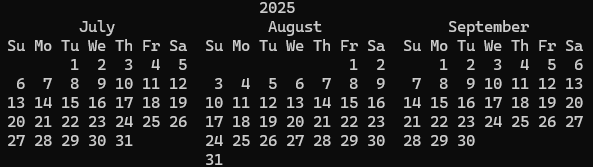
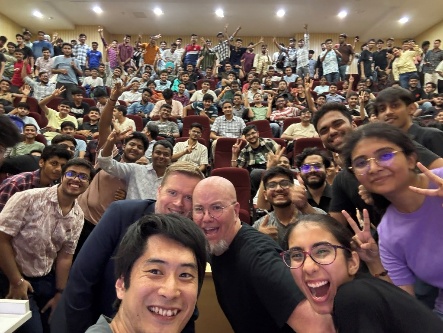
Amar Meriche

Amar is a Sr Cloud Operations Architect at AWS in Paris. He helps his customers improve their operational posture through advocacy and guidance, and is an active member of the DevOps and IaC community at AWS. He’s passionate about helping customers use the various IaC tools available at AWS following best practices. When he’s not working with customers, Amar can be found on the mountain trails with his family or playing basketball with his team.

Idriss Laouali Abdou

Idriss is a Sr. Product Manager Technical for AWS Infrastructure-as-Code based in Seattle. He focuses on improving developer productivity through StackSets and CloudFormation Infrastructure provisioning experiences. Outside of work, you can find him creating educational content for thousands of students, cooking, or dancing.

Better profile management coming to Firefox

Post Syndicated from jzb original https://lwn.net/Articles/1041266/

Firefox has long had support for multiple profiles
to store personal information such as bookmarks, passwords, and user
preferences. However, Firefox did not make profiles particularly
discoverable or easy to manage. That is about to change; Mozilla has
announced
that it is launching a profile-management feature that will make it
easier to create and switch between profiles. According to the support
page
for the feature, it will be rolled out to users gradually
beginning on October 14.

[$] Upcoming Rust language features for kernel development

Post Syndicated from daroc original https://lwn.net/Articles/1039073/

The

Rust for Linux
project has been good for Rust, Tyler Mandry, one of the
co-leads of Rust’s language-design team, said. He
gave a talk at

Kangrejos 2025
covering upcoming Rust language features and thanking
the Rust for Linux developers for helping drive them forward. Afterward, Benno Lossin and Xiangfei Ding
went into more detail about their work on the three most important language
features for kernel development: field projections, in-place initialization, and arbitrary self types.

Flok License Plate Surveillance

Post Syndicated from Bruce Schneier original https://www.schneier.com/blog/archives/2025/10/flok-license-plate-surveillance.html

The company Flok is surveilling us as we drive:

A retired veteran named Lee Schmidt wanted to know how often Norfolk, Virginia’s 176 Flock Safety automated license-plate-reader cameras were tracking him. The answer, according to a U.S. District Court lawsuit filed in September, was more than four times a day, or 526 times from mid-February to early July. No, there’s no warrant out for Schmidt’s arrest, nor is there a warrant for Schmidt’s co-plaintiff, Crystal Arrington, whom the system tagged 849 times in roughly the same period.

You might think this sounds like it violates the Fourth Amendment, which protects American citizens from unreasonable searches and seizures without probable cause. Well, so does the American Civil Liberties Union. Norfolk, Virginia Judge Jamilah LeCruise also agrees, and in 2024 she ruled that plate-reader data obtained without a search warrant couldn’t be used against a defendant in a robbery case.

The collective thoughts of the interwebz