Ubuntu developer discussion moving to Matrix

Post Syndicated from jzb original https://lwn.net/Articles/1006622/

Ubuntu will be moving its “official realtime communications
channels
” from IRC to Matrix, beginning March 1, 2025, following
a discussion
on the ubuntu-devel mailing list.

“Official” communication, such as making realtime requests of privileged
Ubuntu developer teams, could be expected to be actioned if requested on
Matrix only. Similarly, you can consider your social responsibility to
other developers in relation to your work in Ubuntu development to be
fulfilled if you are present on that platform. And Canonical will
follow in its requirement for its employed Ubuntu developers to be
present on that agreed platform during their working hours.

Security updates for Wednesday

Post Syndicated from jzb original https://lwn.net/Articles/1006677/

Security updates have been issued by AlmaLinux (bzip2, gimp:2.8, keepalived, mariadb:10.11, mariadb:10.5, python-jinja2, and redis), Debian (iperf3, libtar, and pdns-recursor), Fedora (abseil-cpp, dotnet8.0, dotnet9.0, golang, libsoup3, and vaultwarden), Oracle (gimp:2.8, iperf3, keepalived, kernel, redis:7, and unbound), Red Hat (libsoup), SUSE (amazon-ssm-agent, go1.22, go1.23, iperf, java-21-openjdk, nginx, openvpn, and python311-asteval), and Ubuntu (kernel, libmicrodns, linux, linux-aws, linux-aws-hwe, linux-gcp, linux-gcp-4.15, linux-hwe,
linux-kvm, linux-oracle, linux, linux-azure, linux-gcp, linux-gcp-5.15, linux-gke, linux-gkeop,
linux-hwe-5.15, linux-ibm, linux-ibm-5.15, linux-intel-iotg,
linux-intel-iotg-5.15, linux-kvm, linux-lowlatency,
linux-lowlatency-hwe-5.15, linux-nvidia, linux-oracle, linux-oracle-5.15,
linux-raspi, linux, linux-azure, linux-gcp, linux-gcp-6.8, linux-gke, linux-gkeop,
linux-hwe-6.8, linux-ibm, linux-lowlatency, linux-nvidia,
linux-nvidia-6.8, linux-nvidia-lowlatency, linux-oracle, linux-oracle-6.8,
linux-raspi, linux, linux-azure, linux-gcp, linux-oem-6.11, linux-raspi, linux-realtime, linux, linux-bluefield, linux-gcp, linux-gcp-5.4, linux-ibm,
linux-ibm-5.4, linux-kvm, linux-oracle, linux-oracle-5.4, linux-raspi, linux-oem-6.8, rsync, and tcpreplay).

Мегакомплексът “Сънсет Ризорт” умишлено се руши Кметът на Поморие и Областен на ГЕРБ в епицентъра на международен скандал

Post Syndicated from Стоян Тончев original https://bivol.bg/mayor_pomorie-scandal.html

сряда 29 януари 2025


Международната петгодишна сага с вече призрачния, пустеещ и с рушащ се сграден фонд 5-звезден ваканционен мегакомплекс  “Сънсет Ризорт”, с обща разгърнатa площ от 115 000 м2 на входа на третия…

Материалът <span style='color:#ff0000;font-size:12px;'>Мегакомплексът "Сънсет Ризорт" умишлено се руши</span> <BR> <H1 class='post-title single-post-title entry-title'>Кметът на Поморие и Областен на ГЕРБ в епицентъра на международен скандал</H1> е публикуван за пръв път на Bivol!.

ExxonMobil Lobbyist Caught Hacking Climate Activists

Post Syndicated from Bruce Schneier original https://www.schneier.com/blog/archives/2025/01/exxonmobil-lobbyist-caught-hacking-climate-activists.html

The Department of Justice is investigating a lobbying firm representing ExxonMobil for hacking the phones of climate activists:

The hacking was allegedly commissioned by a Washington, D.C., lobbying firm, according to a lawyer representing the U.S. government. The firm, in turn, was allegedly working on behalf of one of the world’s largest oil and gas companies, based in Texas, that wanted to discredit groups and individuals involved in climate litigation, according to the lawyer for the U.S. government. In court documents, the Justice Department does not name either company.

As part of its probe, the U.S. is trying to extradite an Israeli private investigator named Amit Forlit from the United Kingdom for allegedly orchestrating the hacking campaign. A lawyer for Forlit claimed in a court filing that the hacking operation her client is accused of leading “is alleged to have been commissioned by DCI Group, a lobbying firm representing ExxonMobil, one of the world’s largest fossil fuel companies.”

Отборите на разделението

Post Syndicated from original https://www.toest.bg/otborite-na-razdelenieto/

Отборите на разделението

Едно от най-неприятните неща за по-пълничките ученици по време на часовете по физическо е разпределянето на отбори за футболните мачове в двора. Защото винаги ги избират последни, а след това им се пада задачата да са вратари или ако имат късмет – защитници, като в този момент учителите по физическо възпитание правят остроумни коментари, че тимът е похабил по този начин „най-силния си играч“. Някак доброволен, но не и безобиден е начинът, по който ние сами се позиционираме в даден отбор по време на вечните спорове в социалните мрежи, в които лека-полека се разделяме на две стройни редици, подозрително и плашещо напомнящи армии, изправили се една срещу друга.

И знам, сега мнозина ще въздъхнат: „Още един текст срещу социалните мрежи“, като тази критика ще бъде сравнена с позициите, изказвани в миналото по адрес на телевизията, радиото, звука в киното, самото кино и т.н. В този ред на мисли се сещам за лекцията на професор Стивън Коткин, състояла се в София през миналата година, който отбеляза, че повечето от тези критики са били валидни – радиото докарва на хората Рузвелт, който започва да разширява властта на държавата; телевизията ги дарява с Кенеди, който според Коткин е бил с по-семпъл ум, но и с по-приятна външност от Никсън; а социалните мрежи – с Тръмп, като посоката по стълбището е право надолу. 

Това НЕ е още един текст срещу социалните мрежи

И все пак аз не отричам техния чар. Първоначалната идея да установиш контакт със съученици и колеги, чието приятелство навремето не си си направил труда да запазиш, ми се вижда малко противоречива. Но е факт, че социалните мрежи помагат много да намериш хора със сходни интереси и понякога дори да завържеш познанства в живия живот. Макар според мен форумите от началото на века да вършеха по-добра работа от Facebook.

Истината е, че при достатъчно старание (да се чете минимум един ден работа и цъкане по настройките) може и да профилираш какво да излиза във фийда ти, така че да виждаш предимно приятни неща. В моя фийд например се появяват главно рисунки по „Цар Лъв“ и снимки от филмите за Хари Потър, само от време на време накъсвани от реклами за домашно кисело мляко и различни видове луканки (последното издава, че ако някога отново реша да играя във футболен мач, ме чака вратата).

Факт е обаче, че повечето хора са на диета, която е по-вредна дори от прекаляването със захарта и консервантите – лошите новини, които предизвикват негативни емоции и по този начин те карат да коментираш, да се караш и всъщност да бъдеш engaged – ангажиран със съдържанието на социалната мрежа и така склонен да стоиш повече в нея.

Както се казва, щом е безплатно, ти си продуктът

Разбира се, идеята, че гневният потребител е по-активен, не е измислена от създателите на Facebook или X. Още в края на миналия век в Америка се появяват радиопредавания, които пристрастно отразяват само едната гледна точка в политическия дебат и разчитат да ядосат слушателите си, за да продължат да ги слушат. Тази тактика е усъвършенствана от Fox News и Newsmax, а оттам плъзва и по целия свят, включително и у нас.

Социалните мрежи обаче правят следваща стъпка, давайки възможност всеки да бъде медия, да участва в разговора и да създава съдържание, което другите да консумират, а после на свой ред да стават минимедии, като го коментират. В самата същина на социалните мрежи е да създават условия, в които потребителят се превръща в продукт, така че да кара другите на свой ред да потребяват.

Това всъщност е гениално, а свидетелство са огромните богатства, натрупани от хора като Марк Зукърбърг. От финансова гледна точка гениално изобретение са и цигарите, макар ефектът им върху здравето ни да не е положителен. Нещо подобно се наблюдава и при социалните мрежи, които са създадени да предизвикват пристрастяване. Нещо повече – при тях са налице всички предпоставки за развитие на дефицит на вниманието и се наблюдава подозрителна корелация между все по-масовото им навлизане в живота на хората и бума на различни психични заболявания и състояния като депресия, повишена тревожност, смущения на съня. От това пък печели фармацевтичната индустрия, бълваща все по-големи количества антидепресанти. Звучи точно като конспирация, за която бихте прочели в някоя група във Facebook за „скритата истина“, но всъщност е просто бизнес.

Ние срещу другите

Освен негативните ефекти върху здравето на хората обаче, социалните мрежи оказват неблагоприятно влияние и върху обществата по няколко начина.

Първият е увеличаването на тежестта на най-крайните гласове в публичния дискурс. Това звучи доста наукообразно и тежко, но може да се преведе така: средностатистическият човек, който е на работа поне осем часа и се прибира каталясал, няма чак такова време, в което да пише в интернет; той по-скоро влиза за малко в социалната мрежа, която ползва, колкото да се ядоса от някоя информация – например, че махат „Аз съм българче“ от училищната програма – и да му се вдигне кръвното.

За сметка на това отдадените на каузата си потребители са склонни да генерират умопомрачителни количества съдържание – най-често предизвикващо силна емоционална реакция. Чрез изследване на политическите племена на САЩ екип учени, оглавяван от д-р Стивън Хоукинс, доказва, че крайните левичари, които свързваме с прекомерната политическа коректност, са около 8% от населението, а ултрадесните, носещи заплаха от нов фашизъм – само 6%, но за сметка на това точно тези две групи доминират в разговора в социалните мрежи в САЩ и създават впечатлението, че населението се е разделило на две огромни мразещи се групи.

Всъщност повечето хора спадат към сполучливо нареченото от авторите „изтощено мнозинство“, което отчаяно иска да има разговор, а не безкрайно противопоставяне между представителите на политическите партии.

С много условности можем да предположим, че нещо подобно се наблюдава и в България, където анекдотичният ми опит показва, че най-активни онлайн са радикалните привърженици на либералната коалиция ПП–ДБ и на крайната десница („Възраждане“ и „Величие“, макар двете да се мразят помежду си) и в същото време общата избирателна активност продължава да изглежда отчайващо.

Ехо стаи

Вторият начин, по който социалните мрежи оказват негативно влияние върху обществото, е през т.нар. ехо стаи, или балони, макар те да не действат, както си ги представят повечето хора. Съществува схващане, че се затваряме онлайн сред единомишленици, взаимно се надъхваме колко сме прави, и се срещаме с различни мнения само когато трябва електорално да претеглим сили. В действителност обаче се случва нещо доста по-лошо.

Хората наистина си намират групи, в които да се тупат по гърба, но също толкова често умишлено търсят срещуположната страна, не за да чуят аргументите ѝ, а за да се нахвърлят върху нея. Това е добре дошло за създателите на социалните мрежи, за които се генерира съдържание, ангажиращо потребителите да стоят онлайн, и измежду споровете за войните в Украйна и Близкия изток да попаднат на вече споменатите реклами за луканки, така че заедно със заседналия живот, свързван с компютрите и смартфоните, да създадем нации от потенциални вратари. 

За мен е изключително опасна появата на това, което наричам VIP потребители – те имат голям брой последователи и развиват поведение, сходно с това на лидер на култ.

Феноменът се наблюдаваше в началото на века във форумите на популярни художествени произведения („Хари Потър“ е поредицата, за която имам преки впечатления, но съществуват и други, най-често на сериали като „Свръхестествено“, „Доктор Кой“ и „Шерлок Холмс“). Сред техните фендъми се появяваха така наречените Big Name Fans – фенове, които на свой ред имат фенове заради генерираното съдържание. Някои от тях по-късно направиха успешна кариера, като писателката Касандра Клеър, започнала с любителски произведения и по-късно написала серия от бестселъри.

Други обаче бяха извънредно опасни и дори създаваха секти, като печално известния Анди Блейк, твърдящ, че се свързва с духове от света на „Властелинът на пръстените“ и училището „Хогуортс“. Споменавам тези хора, защото те задават модел, който според мен днес се наблюдава в много по-широк мащаб. Но ако тогава засегнати бяха предимно впечатлителни тийнейджъри, то VIP потребителите днес оказват ефект върху много широки групи от населението, потребяващи социални мрежи като Facebook, включително в България.

Става дума за харизматични хора, привличащи много последователи, които следят всяка тяхна дума и се влияят от мнението им. Поради това VIP потребителите могат да бъдат определени като създатели на обществено мнение, или opinion makers. По мои наблюдения сред повлияните се срещат хора с висок финансов статус и добро образование, което е характерно и за култовете по принцип. VIP потребителите им създават усещане за общност, която обаче е заплашена от външния свят, изобилстващ от враждебни конспирации, а напускането ѝ се възприема като предателство, отново както при сектите. Това обяснява защо понякога хора, както се казва, от сой, стават симпатизанти на крайнодесни партии, но същото е видно и сред либералната субкултура онлайн, съществуваща в състояние на „обсадена крепост“ и високо недоверие към останалите, които не са част от нея. 

Допълнителен проблем е, че не съм напълно убеден дали VIP потребителят осъзнава, че това, което прави, е поведение на култов лидер. Подобно на останалите, той също е в плен на алгоритмите на социалните мрежи, срещащи го със съмишленици, но и показващи съдържание, предизвикало негативните му емоции. Така той може да е известен човек, искрено харесал някоя кауза, към която са го насочили алгоритмите, и разполагащ с повече свободно време, за да създаде мрежа от последователи, които неусетно се превръщат в затворена общност.

Съзнавам, че това, което ще напиша, е доста дръзко, но според мен Илон Мъск до известна степен е жертва на мрежата, която купи, радикализирайки се от съдържанието, генерирано от потребителите ѝ. Още по-емблематичен пример е Доналд Тръмп, който демонстрира поведение на човек, силно пристрастен към социалните мрежи – често реагира силно емоционално, спи малко и публикува съобщения посред нощ.

Сортирането

Последният аспект на балоните, на който искам да обърна внимание, е според мен и най-опасният от тях. Става дума за т.нар. сортиране – процес, при който през онлайн противопоставянията хората се разделят на два отбора, спорещи по различни теми непрекъснато. Само̀ по себе си това е нормално, само че ситуацията от миналото е следната: хората имат различни позиции по даден проблем, но близки по друг. Така например двама избиратели може да имат срещуположно мнение по въпроса за еднополовите бракове, но и двамата да подкрепят правото на аборт (тази ситуация звучи адекватно за България), да се различават по позициите си относно данъчните ставки, но да са на едно и също мнение за участието в евроатлантическите структури. По този начин техните представители в парламента имат основа, върху която могат да стъпят и да разговарят помежду си, а по-късно да потърсят компромиси и по спорните въпроси.

При сортирането обаче едни и същи хора застават винаги от двете страни на дебата. Така например Петър подкрепя еднополовите бракове, правото на аборт, прогресивния данък и членството на България в НАТО и ЕС, а Тодор е за традиционното семейство, против абортите, за плоския данък и за присъединяване на България към Евразийския съюз и БРИКС. При събирането на достатъчно голям брой Пешовци и Тошовци процесът става много опасен, тъй като, от една страна, създава две групи хора, настръхнали едни срещу други и нямащи нищо общо помежду си, а от друга – изолира останалите.

Както споменах по-горе, най-отдадените са активните в интернет, останалите изтощено наблюдават спора, от време на време удряни като с нажежен ръжен от мнение, което ги скандализира. По всяка вероятност тези хора имат най-различни позиции по най-различни въпроси, но политическите играчи отразяват мненията само на най-активните. Така изтощените се чувстват непредставени от нито една страна, което може да доведе до примирение и апатия (каквито се наблюдават у нас), а в екстремни случаи – да завърши с насилие. Такъв е случаят с убиеца Луиджи Маджоне, чиито нерви явно не са издържали заради недобрата здравна политика на САЩ и са го подтикнали да застреля шефа на най-голямата застрахователна компания в страната Брайън Томпсън. Преглед на това, което е споделял в социалните мрежи, издава миш-маш от леви и десни политически говорители, обединени криво-ляво от антисистемно говорене.

Противопоставянето в България

Нека обаче се върнем на местна почва и да видим дали тезата за сортирането се оправдава. Страната минава през голямо противопоставяне през 90-те години, когато за властта спорят СДС и БСП, но по-късно с идването на НДСВ и ГЕРБ се получава размиване на границите, което смекчава поляризацията, замитайки спорните въпроси под килима и за сметка на съмнения в корупция, които от време на време водят до голямо обществено напрежение.

От 2020 г. насам обаче тези проблеми започват да изскачат отново. Стартът беше даден от полемиките за ваксините по време на пандемията от коронавирус, макар че още преди това публиката беше тествана с други спорове, като този за Истанбулската конвенция. От началото на войната в Украйна оформените вече агитки се разделиха драстично по отношение на конфликта, което прерасна в спорове за геополитическата ориентация на страната, продължаващи до ден днешен.

Макар и от съдбоносно значение за бъдещето на Украйна, в нашето общество обаче все още не се е получило докрай сортирането на две големи срещуположни групи, противопоставящи се за всичко. Според мен причината за това са споровете за корупцията – това, че някои от партиите на статуквото отпреди протестите, започнали след инициативата на „Демократична България“ в Росенец, се заявиха за Украйна, а други за Русия, се повтори и сред партиите, свързани с протеста, и така НЕ се получи ефектът политическите сили да се разделят по един и същи начин по всички въпроси. Последното понякога е объркващо, като ПП–ДБ са особено уязвими в дебата с кои е по-лошо да се коалират – „корумпетата“ от ГЕРБ–СДС или „рашистите“ от „Възраждане“, но за страната може би е шанс да избегне ситуация или-или, която да завърши катастрофално.

Знам, че мнозина търсят решително противопоставяне между космополити и националисти. Опитът със случаи като Брекзит ме кара да смятам, че това е катастрофална идея и е по-добре либерално мислещите хора да не търсят такова противопоставяне – така както Квинт Фабий Максим е избягвал директен сблъсък с Ханибал във войните на Картаген срещу Рим (авторът на тези редове е от НГДЕК, та ще му простите античната аналогия – б.а.).

В този ред на мисли, новосформираното правителство, от което отпадат либералите от ПП–ДБ и русофилите от „Възраждане“, може да е някакъв шанс да се намали интензитетът на споровете за геополитика у нас, колкото и горчиво разочаровани да са противниците на считаното за корупционно наследство от управленията между 2009 и 2020 г.

Ако се върнем към социалните мрежи обаче, ще видим, че обществата навсякъде по света са изправени пред много сериозен проблем, който идва твърде бързо, за да бъде решен еволюционно. Мозъците ни НЕ са предназначени да обемат толкова големи количества информация. Това означава, че ние инстинктивно започваме да филтрираме онова, което пасва на нашите убеждения, и се затваряме в групи, където да се чувстваме уютно. Същото обаче се прави и от различните от нас, а срещата между новосформираните отбори започва да предизвиква все повече искри.

Засега никой не е намерил работещо решение. Фактчекърите например бяха провидени (къде с основание, къде без) за пристрастни към едната гледна точка и захвърлени като нещо ненужно. Някаква регулация обаче е по-скоро неизбежна. Но при изработването ѝ е необходимо да се намери холистичен подход, включващ не само рационалисти, но също психолози, социолози и дори духовни водачи. Така налагането ѝ няма да се чувства като репресия от едната страна върху другата. С втората победа на Тръмп се видя, че това предизвиква ефект, обратен на търсения.

Updated whitepaper available: Aligning to the NIST Cybersecurity Framework in the AWS Cloud

Post Syndicated from Luca Iannario original https://aws.amazon.com/blogs/security/updated-whitepaper-available-aligning-to-the-nist-cybersecurity-framework-in-the-aws-cloud/

Today, we released an updated version of the Aligning to the NIST Cybersecurity Framework (CSF) in the AWS Cloud whitepaper to reflect the significant changes introduced in the National Institute of Standards and Technology (NIST) Cybersecurity Framework (CSF) 2.0, published in February 2024. This comprehensive update helps you understand how AWS services align with the enhanced framework and how you can use AWS capabilities to improve your cybersecurity posture.

The NIST CSF 2.0 provides guidance to industry, government agencies, and other organizations to manage cybersecurity risks. The updated version introduces important changes, including the following:

  • A new “Govern” Core Function, emphasizing procedural and organizational activities that have an impact on the management of cybersecurity risk within organizations.
  • An expanded scope, beyond critical infrastructure, to help organizations of many sizes and sectors.
  • Enhanced guidance for privacy risk management and supply chain security.
  • Updated Categories and Subcategories that better reflect current cybersecurity challenges.

In accordance with the AWS Shared Responsibility Model, the whitepaper provides a detailed mapping of AWS services to the six CSF Core Functions: Govern (New), Identify, Protect, Detect, Respond, and Recover. Organizations can use this whitepaper to understand how AWS services align with NIST CSF 2.0 requirements, implement AWS solutions to help achieve their security objectives, use AWS capabilities for automated security operations, and build resilient architectures that support their cybersecurity strategies.

Security and compliance remain our top priorities at AWS. This updated whitepaper demonstrates our commitment to helping customers align with the latest security frameworks while protecting their data and resources in the AWS Cloud. The whitepaper also includes practical guidance for implementing AWS services and features that support the CSF outcomes, whether you’re just starting your cloud journey or looking to enhance your existing security posture.

To learn more about implementing NIST CSF 2.0 in your organization by using AWS services, contact your AWS account team or download the whitepaper.

 
If you have feedback about this post, submit comments in the Comments section below. If you have questions about this post, contact AWS Support.
 

Luca Iannario
Luca Iannario

Luca is a Solutions Architect Manager at AWS within the UK Public Sector team. He works with customers of all sizes across government, education, healthcare, and NPO verticals, helping them deploy AWS services securely at scale and facilitating their cloud adoption journey. In his spare time, Luca enjoys traveling and watching movies.
Giuseppe Russo
Giuseppe Russo

Giuseppe is Security Assurance Manager for Italy & SEE. Giuseppe has a degree in Computer Science with a specialization in Cryptography, Security and Information Theory. Giuseppe is an experienced cybersecurity professional with many years of experience in the industry. His primary activity is to work closely with regulators, and key stakeholders, in order to foster the adoption of a secure cloud and in preparing cloud environments that meet security requirements related to strategic topics such as privacy and the protection of critical infrastructures.
Carmela Gambardella
Carmela Gambardella

Carmela is an AWS Solutions Architect since 2018. Before AWS, she held various roles in large IT companies, such as software engineer, security consultant, and solutions architect. She uses her experience in security, compliance, and cloud operations to help public sector organizations in their cloud journeys. In her spare time, she is a passionate reader and enjoys hiking, travelling, and doing yoga.
Francesco Grande
Francesco Grande

Francesco is an AWS Solutions Architect based in Italy, where he helps customers and Partners design secure, sustainable, and reliable cloud architectures. Coming from a security background, he focuses on areas such as threat detection, incident response, and infrastructure protection. In his free time, he enjoys watching anime and esports and spending quality time with friends.

Testing and evaluating GuardDuty detections

Post Syndicated from Marshall Jones original https://aws.amazon.com/blogs/security/testing-and-evaluating-guardduty-detections/

Amazon GuardDuty is a threat detection service that continuously monitors, analyzes, and processes Amazon Web Services (AWS) data sources and logs in your AWS environment. GuardDuty uses threat intelligence feeds, such as lists of malicious IP addresses and domains, file hashes, and machine learning (ML) models to identify suspicious and potentially malicious activity in your AWS environment. When GuardDuty identifies a potential security issue, it creates a GuardDuty finding that gives you information about what the potential security issue is, the resources involved, and contextualized information that’s key to remediating the issue. GuardDuty helps you monitor for the latest threats by continually expanding threat detection to emerging and common threats.

Whether you’re new to GuardDuty or are a long-time user, it’s recommended that you understand the different GuardDuty finding types and finding details and practice responding to them as suggested in the security pillar of AWS Well-Architected.

In this blog post, I dive deep into an open source tool for testing GuardDuty findings and then walk through three examples of how you can use this tool to test and improve your response to GuardDuty findings.

Overview

If you want to learn more about GuardDuty, you can read about the finding types in this AWS documentation. However, customers often want realistic findings in their environment to understand what a finding looks like and to practice responding hands on. While you can use GuardDuty to create sample findings in your environment, these findings are approximations populated with placeholder values and look different from real findings. Additionally, you cannot practice remediation with these findings because they’re not tied to actual resources in your account. This can be helpful if you only want to see what details are in a finding, but if you want to practice a real-world scenario, these sample findings might not be adequate.

To address this use case and provide customers with a secure and reliable way to test the threat detection capabilities of GuardDuty, the GuardDuty service team launched an open source project called GuardDuty Tester. The GuardDuty Tester creates infrastructure in your environment to simulate different security issues so that you can test GuardDuty findings that mirror actual security issues that you might encounter, such as crypto mining or a reverse shell being created on an Amazon Elastic Compute Cloud (Amazon EC2) instance. The GuardDuty Tester was originally released in 2018 as an AWS CloudFormation template and was focused more on testing investigation workflows than on a wide range of finding types. AWS has since released an updated version that uses the AWS Cloud Development Kit (AWS CDK) to make the infrastructure code easier to read and expanded the test coverage to over 100 unique finding types and resource combinations.

The ability to create findings across different resource types such as Amazon EC2, Amazon Simple Storage Service (Amazon S3), and Amazon Elastic Kubernetes Service (Amazon EKS) is a valuable resource for your security team, allowing them to simulate various types of threats with isolated infrastructure so that you don’t need to compromise your deployed workloads to improve response actions and techniques. Remember that the GuardDuty Tester doesn’t cover every possible scenario, but is instead focused on threat intelligence and rules-based findings. Anomaly-based findings, which require learning about how you operate your environment, aren’t included in the GuardDuty Tester.

Getting started with the GuardDuty Tester

The GuardDuty Tester is deployed by using the AWS CDK to create the required infrastructure and scripts to generate the GuardDuty findings. For safety, AWS recommends that you deploy the GuardDuty Tester in a nonproduction environment in an account that’s used specifically for this purpose. This way, your security team can differentiate between test GuardDuty findings and findings for other workloads that they’re monitoring.

In this post, I won’t walk through configuring the GuardDuty Tester because this is already documented in the GuardDuty documentation. Instead, I will go over what you need to know about the GuardDuty Tester and some of the benefits.

Figure 1 shows the GuardDuty Tester architecture, which includes the resources necessary to create GuardDuty findings for various protection plans such as Amazon S3 buckets, Amazon EC2 instances, and an Amazon EKS cluster. The tester also deploys a dedicated GuardDuty Tester instance where you will run the scripts needed to create the GuardDuty findings.

Figure 1: GuardDuty Tester architecture

Figure 1: GuardDuty Tester architecture

The GuardDuty Tester provides key features including:

  • A wide range of threat scenario simulations: Resources that the GuardDuty Tester can create findings for include Amazon S3, AWS Identity and Access Management (IAM), Amazon Elastic Container Service (Amazon ECS) for both Amazon EC2 and AWS Fargate hosted workloads, Amazon EKS, and AWS Lambda and covers over 105 threat scenarios. This includes GuardDuty runtime monitoring as well as other GuardDuty protection plans.
  • Access through AWS Systems Manager: The GuardDuty Tester provides secure access by using Systems Manager to minimize open ports to the internet and allowing access only through Systems Manager.
  • Modular scripts: With an expanded library of tests available, the GuardDuty Tester accepts user parameters to set the scope of the tests to run, which gives you greater flexibility for different testing scenarios.

Setting up the GuardDuty Tester environment is straightforward and requires only a few commands. As outlined in the documentation and the README file in the repository, there are a number of prerequisites to set up the stack. These prerequisites include Python 3+, git, the AWS Command Line Interface (AWS CLI), AWS Systems Manager Session Manager plugin, npm, Docker, and a subscription to Kali Linux image for Amazon EC2. You will have to subscribe to the Kali Linux instance in AWS Marketplace, but will be charged for the instance only while the GuardDuty Tester is deployed. After these prerequisites are met, you can clone the repository, install the packages, and deploy the GuardDuty Tester to your AWS account.

Deploying the GuardDuty Tester can take 20–30 minutes, but if you’re following along with this post, I assume that you have deployed the GuardDuty Tester into your environment and have started your Systems Manager session as stated on Part A of Step 3 – Run tester scripts in the GuardDuty documentation. Now, I will dive into the first testing example.

Manual investigation

The first test use case is about getting familiar with what GuardDuty findings look like and the details that a finding gives you. This might be one of your first steps after turning on GuardDuty, or this might be an activity that you perform to help new team members understand GuardDuty findings.

To start a manual investigation:

  1. Run the following command in your Systems Manager session to view the GuardDuty Tester options.
    Python3 guardduty_tester.py --help
  2. Run the following command in your Systems Manager session to create the first test finding.
    Python3 guardduty_tester.py - -ec2 - -runtime only - -tactics impact
  3. Before creating the findings, the GuardDuty Tester prompts you to confirm that it’s allowed to change GuardDuty settings in the environment. For example, if you’ve chosen to create findings related to the GuardDuty runtime monitoring feature but don’t have this feature enabled, the GuardDuty Tester will enable it for the tests and then disable it after testing is complete.

    Note: This will start the 30-day trial of the enabled features in this account, in this AWS Region, even if the feature is disabled after testing is complete. More information about GuardDuty pricing and free trials can be found on the GuardDuty pricing page.

  4. After choosing y which indicates “yes”, the GuardDuty Tester reports the number of domain reputation findings it’s expecting. Figure 2 shows an example of the expected findings. You can learn more about domain reputation findings in the GuardDuty finding documentation.

    Figure 2: Generated GuardDuty findings in the console

    Figure 2: Generated GuardDuty findings in the console

  5. After the GuardDuty Tester is finished, wait a few minutes and then go to the AWS Management Console for GuardDuty to see the findings. In this example, there are four new GuardDuty findings as expected from step 4 and shown in Figure 3. With the findings generated, you can start your manual investigation.

    Figure 3: GuardDuty finding details

    Figure 3: GuardDuty finding details

In the preceding figure, you can see some of the finding details presented—such as the action type and the process information—that can help you quickly identify what trigger started the suspicious communication. From here, I encourage you to use this finding to practice your runbooks for investigation and response. For example, you might start with validating and triaging the finding before moving into evidence collection and remediation. If you don’t have incident response runbooks already built, you can use this finding as an example to get started. There are multiple open source examples such as AWS incident response playbooks and AWS customer response playbook. A runbook will help your team evaluate the information provided in the GuardDuty finding and understand what else they need to know about your specific environment to properly respond to the finding. For example, in the finding, you will have resource and actor information but not things such as who is the account owner or point of contact for security for that account.

Creating alerts

The next use case highlights how to create alerts based on GuardDuty findings. When setting up alerting automation with tools such as Amazon Simple Notification Service (Amazon SNS) and Slack, you should create a finding using the GuardDuty Tester to test that you’ve configured your alert correctly. See Creating custom responses to GuardDuty findings for information about creating alerts with either of these tools. Figure 4 shows a sample EventBridge rule that will send GuardDuty findings to SNS.

Figure 4: EventBridge rule to send GuardDuty findings to SNS

Figure 4: EventBridge rule to send GuardDuty findings to SNS

For this post, I assume that you’ve already configured an Amazon EventBridge rule and Amazon SNS alert.

To test alerts:

  1. Run the following command in your Systems Manager session to create a privileged container finding.
    Python3 guardduty_tester.py - -finding ‘PrivilegedEscalation:Kubernetes/PrivilegedContainer’
  2. Shortly after creating this finding, you should see an SNS alert based on the finding type.

Figure 5: SNS notification from a GuardDuty finding

Figure 5: SNS notification from a GuardDuty finding

If you’ve configured the alert correctly, you will see an email similar to Figure 5. The email demonstrates that SNS notifications were successfully configured and tested using the GuardDuty Tester. If this is a new finding, you will receive this SNS notification shortly after the GuardDuty Tester generates the finding, but if this is an updated finding, then the timing will be based on the notification frequency configured in the account.

There are many ways that customers consume GuardDuty findings in their environments. Whether you’re using Amazon SNS or another mechanism such as a chat application, ticketing system, or a security information and event management (SIEM) solution, you can use this example of an EventBridge rule and the GuardDuty Tester to test out your notification pipeline.

Automated response

For the third use case, I show you how to create an automated action based on a GuardDuty finding. In this example, I create a finding based on an EC2 instance connecting to a Bitcoin mining domain, then based on this finding, I use Lambda to tag the instance to assist with identification during that investigation steps that follow. Although this is a simple example, it shows you what you can do by combining EventBridge rules and Lambda functions. If you want to create an automated response for GuardDuty runtime monitoring findings that requires making a host-level modification, you can use EventBridge rules with AWS Systems Manager Run Command to run commands locally on a host to remediate a security issue.

Start by creating a Lambda function that will take a GuardDuty event delivered by EventBridge, pull out the instance ID information, and then use that as a parameter in the create_tags API call. See the following example code.

import json
import boto3
import logging

logger = logging.getLogger()
logger.setLevel(logging.INFO)

def lambda_handler(event, context):
    try:
        # Extract the necessary information from the GuardDuty finding
        instance_id = event['detail']['resource']['instanceDetails']['instanceId']
        account_id = event['detail']['accountId']
        region = event['detail']['region']

        # Create an EC2 client
        ec2 = boto3.client('ec2', region_name=region)

        # Add the "infected" and "cryptomining" tag value pair to the instance
        ec2.create_tags(
            Resources=[instance_id],
            Tags=[
                {
                    'Key': 'infected',
                    'Value': 'cryptomining'
                }
            ]
        )

        logger.info(f"Tagged instance {instance_id} with 'infected=cryptomining' in account {account_id} and region {region}")
        return {
            'statusCode': 200,
            'body': 'Instance tagged successfully'
        }
    except Exception as e:
        logger.error(f"Error tagging instance {instance_id}: {str(e)}")
        return {
            'statusCode': 500,
            'body': f"Error tagging instance: {str(e)}"
        }

Next, I create an EventBridge rule specific to the Bitcoin mining finding that I want to test, shown in Figure 6. The target is the Lambda function that I just created.

Figure 6: EventBridge rule for crypto mining GuardDuty finding

Figure 6: EventBridge rule for crypto mining GuardDuty finding

Now that the EventBridge rule is in place with the Lambda function as the target, I can use the GuardDuty Tester to trigger a Bitcoin mining finding and test my solution with the following command.

Python3 guardduty_tester.py - - finding ‘CryptoCurrency:EC2/BitcoinTool.B!DNS’

After the finding is generated, I go to my EC2 instance, where there’s a new instance tag with a key of infected and a value of cryptomining, shown in Figure 7.

Figure 7: Updated tags after automated response

Figure 7: Updated tags after automated response

Although this is a general example, you can use the same approach across various actions that you might take in response to a GuardDuty finding and then test them using the GuardDuty Tester. Examples include using Lambda to add logic in AWS WAF, a network access control list (network ACL), or AWS Network Firewall to block suspicious traffic, or use Systems Manager Run Command to end a malicious process that’s running on a host.

Conclusion

The updated GuardDuty Tester represents a significant advancement in helping organizations validate and gain confidence in GuardDuty threat detection. The GuardDuty Tester now provides more comprehensive coverage of GuardDuty runtime monitoring and protection plans across various AWS services.

By using the GuardDuty Tester and following the use cases in this post, you can proactively assess your threat detection readiness, identify potential gaps, and implement necessary measures to help you fortify your AWS environments against evolving cyber threats.

 
If you have feedback about this post, submit comments in the Comments section below. If you have questions about this post, contact AWS Support.
 

Marshall Jones
Marshall Jones

Marshall is a Worldwide Security Specialist Solutions Architect at AWS. His background is in AWS consulting and security architecture and focused on a variety of security domains including edge, threat detection, and compliance. Today, he’s focused on helping enterprise AWS customers adopt and operationalize AWS security services to increase security effectiveness and reduce risk.

[$] FOSDEM keynote causes concerns

Post Syndicated from jzb original https://lwn.net/Articles/1006351/

This year’s edition of the Free and Open
Source Software Developers’ European Meeting
(FOSDEM) begins on
February 1 in Brussels. The event is widely regarded as one of
the most important open-source conferences. One of the reasons that
FOSDEM is held in high esteem by the community is its non-commercial
nature. It does accept sponsors, but
sponsorships come with few perks and no “pay-for-play” speaking
slots. Thus, the scheduling of a keynote by Jack
Dorsey⁠—⁠primarily known for his role in co-founding Twitter, and
currently CEO and chairman of FOSDEM sponsor Block, Inc.⁠—⁠raised eyebrows and led to plans for a protest. The
keynote has since been removed from the schedule, but there are still
a number of lingering questions.

Considerations for making a tree view component accessible

Post Syndicated from Eric Bailey original https://github.blog/engineering/user-experience/considerations-for-making-a-tree-view-component-accessible/


Tree views are a core part of the GitHub experience. You’ve encountered one if you’ve ever navigated through a repository’s file structure or reviewed a pull request.

Browsing files on Primer's design repository. A tree view showing the repositories directory structure occupies a quarter of the screen. The other three quarters are taken up by the content of the content subdirectory. The tree view shows expanded and collapsed directories, as well as files nested at multiple levels of depth.

On GitHub, a tree view is the list of folders and the files they contain. It is analogous to the directory structure your operating system uses as a way of organizing things.

Tree views are notoriously difficult to implement in an accessible way. This post is a deep dive into some of the major considerations that went into how we made GitHub’s tree view component accessible. We hope that it can be used as a reference and help others.

Start with Windows

It’s important to have components with complex interaction requirements map to something people are already familiar with using. This allows for responsiveness to the keypresses they will try to navigate and take action on our tree view instances.

We elected to adopt Windows File Explorer’s tree view implementation, given the prominence of Windows’ usage for desktop screen reader users.

A Windows 11 File Explorer window showing a tree view and a list of subdirectories that one of its folders contains. The tree view demonstrates how the C drive contains multiple nested folders to organize its content.

Navigating and taking actions on items in Windows’ tree view using NVDA and JAWS helped us get a better understanding of how things worked, including factors such as focus management, keyboard shortcuts, and expected assistive technology announcements.

Then maybe reference the APG

The ARIA Authoring Practices Guide (APG) is a bit of an odd artifact. It looks official but is no longer recognized by the W3C as a formal document.

This is to say that the APG can serve as a helpful high-level resource for things to consider for your overall approach, but its suggestions for code necessitate deeper scrutiny.

Build from a solid, semantic foundation

At its core, a tree view is a list of lists. Because of this, we used ul and li elements for parent and child nodes:

<ul>
  <li>
    <ul>
      <li>.github/</li>
      <li>source/</li>
      <li>test/</li>
    </ul>
  </li>
  <li>.gitignore</li>
  <li>README.md</li>
</ul>

There are a few reasons for doing this, but the main considerations are:

  • Better assurance that a meaningful accessibility tree is generated,
  • Lessening the work we need for future maintenance, and consequential re-verification that our updates continue to work properly, and
  • Better guaranteed interoperability between different browsers, apps, and other technologies.

NOTE: GitHub currently does not virtualize its file trees. We would need to revisit this architectural decision if this ever changes.

Better broad assistive technology support

The more complicated an interactive pattern is, the greater the risk that there are bugs or gaps with assistive technology support.

Given the size of the audience GitHub serves, it’s important that we consider more than just majority share assistive technology considerations.

We found that utilizing semantic HTML elements also performed better for some less-common assistive technologies. This was especially relevant with some lower-power devices, like an entry-level Android smartphone from 2021.

Better Forced Color Mode support

Semantic HTML elements also map to native operating system UI patterns, meaning that Forced Color Mode’s heuristics will recognize them without any additional effort. This is helpful for people who rely on the mode to see screen content.

The heuristic mapping behavior does not occur if we used semantically neutral div or span elements, and would have to be manually recreated and maintained.

Use a composite widget

A composite widget allows a component that contains multiple interactive elements to only require one tab stop unless someone chooses to interact with it further.

Consider a file tree for a repository that contains 500+ files in 20+ directories. Without a composite widget treatment, someone may have to press Tab far too many times to bypass the file tree component and get what they need.

Think about wrapping it in a landmark

Like using a composite widget, landmark regions help some people quickly and efficiently navigate through larger overall sections of the page. Because of this, we wrapped the entire file tree in a nav landmark element.

This does not mean every tree view component should be a landmark, however! We made this decision for the file tree because it is frequently interacted with as a way to navigate through a repository’s content.

Go with a roving tabindex approach

A roving tabindex is a technique that uses tabindex="-1" applied to each element in a series, and then updates the tabindex value to use 0 instead in response to user keyboard input. This allows someone to traverse the series of elements, as focus “roves” to follow their keypresses.

<li tabindex="-1">File 1</li>
<li tabindex="-1">File 2</li>
<li tabindex="0">File 3</li>
<li tabindex="-1">File 4</li>

The roving tabindex approach performed better than utilizing aria-activedescendant, which had issues with VoiceOver on macOS and iOS.

Enhance with ARIA

We use a considered set of ARIA declarations to build off our semantic foundation.

Note that while we intentionally started with semantic HTML, there are certain ARIA declarations that are needed. The use of ARIA here is necessary and intentional, as it expands the capabilities of HTML to describe something that HTML alone cannot describe—a tree view construct.

Our overall approach follows what the APG suggests, in that we use the following:

  • role="tree" is placed on the parent ul element, to communicate that it is a tree view construct.
  • role="treeitem" is placed on the child li elements, to communicate that they are tree view nodes.
  • role="group" is declared on child ul elements, to communicate that they contain branch and leaf nodes.
  • aria-expanded is declared on directories, with a value of true to communicate that the branch node is in an opened state and a value of false to communicate that it is in a collapsed state instead.
  • aria-selected is used to indicate if branch or leaf nodes have been chosen by user navigation, and can therefore have user actions applied to them.

We also made the following additions:

  • aria-hidden="true" is applied to SVG icons (folders, files, etc.) to ensure its content is not announced.
  • aria-current="true" is placed on the selected node to better support when a node is deep linked to via URL.

NOTE: We use “branch node” and “leaf node” as broad terms that can apply to all tree view components we use on GitHub. For the file tree, branch nodes would correspond to directories and subdirectories, and leaf nodes would correspond to files.

Support expected navigation techniques

The following behaviors are what people will try when operating a tree view construct, so we support them:

Keyboard keypresses

  • Tab: Places focus on the entire tree view component, then moves focus to the next focusable item on the view.
  • Enter:
    • If a branch node is selected: Displays the directory’s contents.
    • If a leaf node is selected: Displays the leaf node’s contents.
  • Down: Moves selection to the next node that can be selected without opening or closing a node.
  • Up: Moves selection to the previous node that can be selected without opening or closing a node.
  • Right:
    • If a branch node is selected and in a collapsed state: Expands the selected collapsed branch node and does not move selection.
    • If a branch node is selected and in an expanded state: Moves selection to the directory’s first child node.
  • Left:
    • If a branch node is selected and in an expanded state: Collapses the selected collapsed directory node and does not move selection.
    • If a branch node is selected and in a collapsed state: Moves selection to the node’s parent directory.
    • If a leaf node is selected: Moves selection to the leaf node’s parent directory.
  • End: Moves selection to the last node that can be selected.
  • Home: Moves selection to the first node that can be selected.

We also support typeahead selection, as we are modeling Windows File Explorer’s tree view behaviors. Here, we move selection to the node closest to the currently selected node whose name matches what the user types.

Middle clicking

Nodes on tree view constructs are tree items, not links. Because of this, tree view nodes do not support the behaviors you get with using an anchor element, such as opening its URL in a new tab or window.

We use JavaScript to listen for middle clicks and Control+Enter keypresses to replicate this behavior.

Consider states

Loading

Tree views on GitHub can take time to retrieve their content, and we may not always know how much content a branch node contains.

A directory called, 'src' that is selected and in an expanded that. It contains a single leaf node that contains a loading spinner with a label of 'Loading…".

Live region announcements are tricky to get right, but integral to creating an equivalent experience. We use the following announcements:

  • If there is a known amount of nodes that load, we enumerate the incoming content with an announcement that reads, “Loading {x} items.”
  • If there is an unknown number of nodes that load, we instead use a more generic announcement of, “Loading…”
  • If there are no nodes that load we use an announcement message that reads, “{branch node name} is empty.”

Additionally, we manage focus for loading content:

  • If focus is placed on a placeholder loading node when the content loads in: Move focus from the placeholder node to the first child node in the branch node.
  • If focus is on a placeholder loading node but the branch node does not contain content: Move focus back to the branch node. Additionally, we remove the branch node’s aria-expanded declaration.

Errors

Circumstances can conspire to interfere with a tree view component’s intended behavior. Examples of this could be a branch node failing to retrieve content or a partial system outage.

In these scenarios, the tree view component will use a straightforward dialog component to communicate the error.

Fix interoperability issues

As previously touched on, complicated interaction patterns run the risk of compatibility issues. Because of this, it’s essential to test your efforts with actual assistive technology to ensure it actually works.

We made the following adjustments to provide better assistive technology support:

Use aria-level

Screen readers can report on the depth of a nested list item. For example, a li element placed inside of a ul element nested three levels deep can announce itself as such.

We found that we needed to explicitly declare the level on each li element to recreate this behavior for a tree view. For our example, we’d also need to set aria-level="3" on the li element.

This fix addressed multiple forms of assistive technology we tested with.

Explicitly set the node’s accessible name on the li element

A node’s accessible name is typically set by the text string placed inside the li element:

<li>README.md</li>

However, we found that VoiceOver on macOS and iOS did not support this. This may be because of the relative complexity of each node’s inner DOM structure.

We used aria-labelledby to get around this problem, with a value that pointed to the id set on the text portion of each node:

<li aria-labelledby="readme-md">
  <div>
   <!-- Icon -->
  </div>
  <div id="readme-md">
    README.md
  </div>
</li>

This guarantees that:

  • the node’s accessible name is announced when focus is placed on the li element,
  • and that the announcement matches what is shown visually.

Where we’d like to go from here

There’s a couple areas we’re prototyping and iterating on to better serve our users:

Browsers apply a lot of behaviors to anchor elements, such as the ability to copy the URL.

We’d like to replace the JavaScript that listens for middle clicks with a more robust native solution, only without sacrificing interoperability and assistive technology support.

Supporting multiple actions per node

Tree views constructs were designed assuming a user will only ever navigate to a node and activate it.

GitHub has use cases that require actions other than activating the node, and we’re exploring how to accomplish that. This is exciting, as it represents an opportunity to evolve the tree view construct on the web.

Always learning

An accessible tree view is a complicated component to make, and it requires a lot of effort and testing to get right. However, this work helps to ensure that everyone can use a core part of GitHub, regardless of device, circumstance, or ability.

We hope that highlighting the considerations that went into our work can help you on your accessibility journey.

Share your experience: We’d love to hear from you if you’ve run into issues using our tree view component with assistive technology. This feedback is invaluable to helping us continue to make GitHub more accessible.

The post Considerations for making a tree view component accessible appeared first on The GitHub Blog.

AWS Firewall Manager retrofitting: Harmonizing central security with application team flexibility

Post Syndicated from Ian Olson original https://aws.amazon.com/blogs/security/aws-firewall-manager-retrofitting-harmonizing-central-security-with-application-team-flexibility/

AWS Firewall Manager is a powerful tool that organizations can use to define common AWS WAF rules with centralized security policies. These policies specify which accounts and resources are in scope. Firewall Manager creates a web access control list (web ACL) that adheres to the organization’s policy requirements and associates it with the in-scope resources. Figure 1 shows a Firewall Manager security policy and web ACL created in each in-scope account.

Figure 1: A Firewall Manager security policy and Firewall Manager created web ACLs in each in-scope account

Figure 1: A Firewall Manager security policy and Firewall Manager created web ACLs in each in-scope account

In this post, we’ll talk about the benefits of retrofitting and how you can use this feature to allow Firewall Manager to manage existing web ACLs. When retrofitting is enabled, a Firewall Manager security policy doesn’t replace existing web ACLs. Instead, Firewall Manager adds the top and bottom rule sections to existing web ACLs associated with in-scope resources. For application teams, Firewall Manger no longer restricts how they configure and deploy AWS WAF. Teams can use either the AWS Management Console or infrastructure as code (IaC) tools to customize rules in web ACLs, even if those web ACLs are managed by Firewall Manager.

Firewall Manager before retrofitting

Firewall Manager offers significant benefits, but the existing approach results in several challenges:

  1. Compatibility with infrastructure as code (IaC): Firewall Manager creates and associates AWS WAF web ACLs with in-scope resources. IaC tools expect to create and manage resources (in other words, own their lifecycle). Application teams cannot use IaC to manage the WAF rules and other web ACL configuration components that are created by Firewall Manager; there are custom solutions that inject locally defined rules into Firewall Manager-created web ACLs, but these are complex and have risks such as drift. For AWS WAF customers and application teams, this introduces an operational challenge.
  2. Existing WAF migration: Customers who are already using AWS WAF must migrate existing rules to Firewall Manager-managed web ACLs.
  3. Application-specific rule complexity: Forcing all in-scope resources in the same account and AWS Region to use the same web ACL makes application-specific or exception-based rules more complex. In addition, changes to one application’s rules could impact others that share the same web ACL.
  4. Increased costs: When many applications share a single web ACL, application-specific rules are part of a single web ACL, which can increase total WAF capacity units (WCU) usage, sometimes resulting in higher AWS WAF request costs.

Firewall Manager with retrofitting addresses challenges

To address these challenges, Firewall Manager now offers the ability to retrofit existing web ACLs. Let’s get specific about when and how Firewall Manager retrofitting works:

  • Firewall Manager will only retrofit a web ACL when all associated resources (for example, Application Load Balancers, API Gateways, and Amazon CloudFront distributions) are in scope. If a not-in-scope resource is also associated, Firewall Manager will not retrofit or update future security policy changes to a retrofitted web ACL. In that scenario, associated in-scope resources and the web ACL are marked noncompliant with security policies.
  • Retrofitting only modifies customer-created web ACLs. Retrofitting will not act on web ACLs retrofitted by another security policy or managed by Firewall Manager. If either scenario occurs, the web ACL and associated resources are marked noncompliant with security policies.
  • Retrofitting adds the following on top of an existing web ACL that is associated with one or more in-scope resources:
    • Retrofitting adds first rule groups and last rule groups defined in a security policy to the web ACL. Existing rules within the web ACL are not changed. The order of rule evaluation changes is the following:
      1. Security policy–defined first rule group rules
      2. Security policy–defined last rule group rules
    • Retrofitting adds a WAF logging configuration if one is defined by the security policy. If the web ACL already has a logging configuration, Firewall Manager does not replace the existing logging configuration and marks the web ACL noncompliant.
    • Retrofitting does not verify or configure other attributes that are defined by the security policy. This includes the following properties: default action, custom request headers, web ACL Captcha or challenge configurations, and token domain list. These properties are used only when Firewall Manager creates a web ACL.
  • If an in-scope resource that supports AWS WAF does not have a web ACL, Firewall Manager creates and associates a Firewall Manager-managed web ACL with that resource.

Figure 2 shows the rules and logging configuration before and after a Firewall Manager security policy retrofits a web ACL that is associated with in-scope resources.

Figure 2: Using retrofitting to update an existing web ACL

Figure 2: Using retrofitting to update an existing web ACL

This new retrofitting capability solves the previous challenges in the following ways:

  1. IaC compatible: Application teams can provision and manage AWS WAF with IAC tools. Firewall Manager retrofits existing web ACLs by adding rules defined in the security policy to web ACLs created by IaC tools. Application teams can manage AWS WAF exactly the same as when Firewall Manager was not in use.
  2. Existing WAF integration: Customers with existing AWS WAF deployments can adopt Firewall Manager without the need to migrate existing WAF rules.
  3. Application-specific rules: Multiple resources in the same account can use separate web ACLs, which simplifies application-specific rules.
  4. Help prevent additional costs: Application-specific rules are applied only to the relevant web ACLs. This helps prevent increased AWS WAF request costs from shared web ACLs that have a high WCU usage.

By enhancing Firewall Manager to retrofit existing web ACLs, customers can use the power of centralized WAF management without restricting how AWS WAF is deployed and configured by application teams in member accounts.

Firewall Manager security policy for AWS WAF – Enabling retrofitting

Figure 3 shows an example of a Firewall Manager security policy.

Figure 3: An example Firewall Manager security policy that uses the new Retrofit existing webACLs feature

Figure 3: An example Firewall Manager security policy that uses the new Retrofit existing webACLs feature

This security policy defines WAF rules in the first rule group section. It applies to all Application Load Balancers (ALBs) across your organization in AWS Organizations in the Region where this security policy is created. The policy action is set to automatically remediate. Under Web ACL management, there is a new section, Managed web ACL source, with two options, Default and Retrofit existing webACLs. Default is the existing behavior: Firewall Manager creates and associates a Firewall Manager managed web ACL. Retrofit existing webACLs applies the WAF rules and logging configuration (if any) defined by a security policy to existing web ACLs when they are associated with an in-scope resource. This policy specifies Retrofit existing webACLs. If an in-scope resource does not have a web ACL, Firewall Manager still creates and associates a web ACL by default.

Retrofitting in action

Let’s walk through what happens when you set Managed web ACL source to Retrofit existing webACLs. Figure 4 shows two ALBs that are in-scope of our security policy, LoadBalancer1 and LoadBalancer2.

Figure 4: Two existing ALBs, one with an existing web ACL and the other without

Figure 4: Two existing ALBs, one with an existing web ACL and the other without

LoadBalancer1 has the following characteristics:

  • LoadBalancer1 does NOT have a web ACL associated.
  • After the Firewall Manager security policy applies, LoadBalancer1 is associated with a Firewall Manager created web ACL, as shown in Figure 5.

    Figure 5: LoadBalancer1 is now associated with a Firewall Manager managed and created web ACL

    Figure 5: LoadBalancer1 is now associated with a Firewall Manager managed and created web ACL

  • The Firewall Manager-created web ACL contains the WAF rules defined in the security policy.

LoadBalancer2 has the following characteristics:

  • LoadBalancer2 has an existing customer created web ACL associated with it, as shown in Figure 6.

    Figure 6: LoadBalancer2 is associated with a customer-created web ACL

    Figure 6: LoadBalancer2 is associated with a customer-created web ACL

  • This web ACL was created by the application team with an application-specific rule. The web ACL could have been created with the AWS Management Console, AWS CloudFormation, or other IaC tools like Terraform.
  • After the Firewall Manager security policy takes effect, LoadBalancer2 remains associated with the existing customer-created web ACL MyCustomWebACL.
  • Retrofitting adds WAF rules in the first rule group according to the security policy, as shown in Figure 7. Existing WAF rules are not changed, and rules and other aspects of the web ACL are not changed and can continue to be managed exactly as you would without Firewall Manager present.

    Figure 7: Firewall Manager has retrofitted a customer-created web ACL and added the security policy–defined first rule groups rules

    Figure 7: Firewall Manager has retrofitted a customer-created web ACL and added the security policy–defined first rule groups rules

Figure 8 shows that both ALBs are now compliant with our security policy. LoadBalancer1 has a web ACL created by Firewall Manager; future ALBs that don’t have a web ACL associated would also become associated to this web ACL. LoadBalancer2 is associated with a web ACL the application team previously created. The application-defined WAF rules are not changed and the WAF rules defined by the security policy are added to this web ACL.

Figure 8: Multiple ALBs in scope for the same security policy

Figure 8: Multiple ALBs in scope for the same security policy

Associate a web ACL with Firewall Manager already in place

Let’s continue from our previous scenario. The application team for LoadBalancer1 now configures application-specific rules for their ALB by using the following process.

  1. The application team creates a web ACL and defines their own WAF rules. They might do this with the console, AWS CloudFormation, or other IaC tools like Terraform.
  2. The application team associates LoadBalancer1 with the custom web ACL.

    Figure 9: From the web ACL, only LoadBalancer1 is associated with the app team’s web ACL

    Figure 9: From the web ACL, only LoadBalancer1 is associated with the app team’s web ACL

  3. After a moment, Firewall Manager detects the change to an in-scope resource (LoadBalancer1). Firewall Manager retrofits the application team’s web ACL AppTeamNewWebACL, making it align with the security policy.

    Figure 10: Firewall Manager has retrofitted the app team–created web ACL and added the security policy–defined first rule group rules

    Figure 10: Firewall Manager has retrofitted the app team–created web ACL and added the security policy–defined first rule group rules

The diagram in Figure 11 shows the workflow that happens when the application team creates their own web ACL and associates it with LoadBalancer1. Firewall Manager detects the association change and retrofits the application team’s web ACL again, bringing LoadBalancer1 into alignment with security policies.

Figure 11: Firewall Manager retrofitting a web ACL in response to being associated with an existing in-scope resource

Figure 11: Firewall Manager retrofitting a web ACL in response to being associated with an existing in-scope resource

Out-of-scope resources associated with a retrofitted web ACL

Let’s make a change to our security policy. In Figure 12, the policy scope has been updated to only apply to resources when they have the resource tag Tier: Production. Application teams add this tag to LoadBalancer1 and LoadBalancer2.

Figure 12: The Firewall Manager security policy scope has been updated to include a resource tag

Figure 12: The Firewall Manager security policy scope has been updated to include a resource tag

Later, an application team creates LoadBalancer3 and associates it with AppTeamNewWebACL (Figure 13).

Figure 13: A new ALB associated with a custom WAF web ACL

Figure 13: A new ALB associated with a custom WAF web ACL

The application team does not tag LoadBalancer3, making it out of scope with the security policy, as shown in Figure 14.

Figure 14: A new ALB that is out of scope with a security policy

Figure 14: A new ALB that is out of scope with a security policy

This web ACL is currently retrofitted by our security policy and associated with LoadBalancer2 (in-scope), as shown in Figure 15.

Figure 15: A retrofitted web ACL associated with in-scope and out-of-scope ALBs

Figure 15: A retrofitted web ACL associated with in-scope and out-of-scope ALBs

Firewall Manager detects that an out-of-scope resource is associated with a retrofitted web ACL. As shown in Figure 16, Firewall Manager marks the web ACL AppTeamNewWebACL noncompliant. It also marks LoadBalancer2 noncompliant.

Figure 16: Shows retrofit-specific reasons a resource or web ACL will be marked noncompliant. In this case, a not-in-scope resource is associated with a web ACL where another associated resource is in-scope.

Figure 16: Shows retrofit-specific reasons a resource or web ACL will be marked noncompliant. In this case, a not-in-scope resource is associated with a web ACL where another associated resource is in-scope.

As long as the web ACL is noncompliant, Firewall Manager will not retrofit a non-retrofitted web ACL, and future security policy changes will not be applied to that web ACL. Existing retrofitted WAF rules for that web ACL are not modified or removed. When the web ACL later becomes compliant, it will again retrofit the latest state of the security policy. Figure 17 shows how Firewall Manager keeps the existing retrofitting but does not apply updates. Using our example, one of three things would need to happen for the web ACL to become compliant:

  1. LoadBalancer3 can be made in-scope with the current security policy. The application team can then add the resource tag Tier: Production to this ALB.
  2. The resource tag can be removed from the policy scope.
  3. LoadBalancer3 can be disassociated with the web ACL.

Note: We recommend that you promptly address not-in-scope resources associated with web ACLs that are shared by in-scope resources. For example, if the preceding scenario was not addressed and LoadBalancer3 was deleted three months later, Firewall Manager would at that point retrofit the web ACL (3 months later). This is not necessarily a problem, but could trigger unexpected changes to a web ACL’s rules.

Figure 17: Firewall Manager retains existing but not future changes as long as a not-in-scope resource is associated with this web ACL

Figure 17: Firewall Manager retains existing but not future changes as long as a not-in-scope resource is associated with this web ACL

In summary: Firewall Manager initially retrofits and will apply future updates to existing web ACLs while all associated resources are in-scope. When an out-of-scope resource is associated, an initial retrofit is delayed and security policy retrofit updates are paused until the out-of-scope resource is addressed.

Figure 18 demonstrates how Firewall Manager will not perform an initial retrofit of a web ACL associated with both in-scope and not-in-scope resources.

Figure 18: Firewall Manger will only perform an initial retrofit when only in-scope resources are associated with a web ACL

Figure 18: Firewall Manger will only perform an initial retrofit when only in-scope resources are associated with a web ACL

Conclusion

Firewall Manager verifies that in-scope resources adhere to relevant security policies or are marked noncompliant. You can enable retrofitting for Firewall Manager for AWS WAF to seamlessly enforce these security policies without changing how your application teams manage the configuration of their WAF rules.

Note: Retrofitting is only available for AWS Firewall Manager security policies for AWS WAF; it is not available for AWS WAF Classic.

If you have feedback about this post, submit comments in the Comments section below. If you have questions about this post, start a new thread on the AWS Firewall Manager re:Post or contact AWS Support.
 

Ian Olson
Ian Olson

Ian is a Senior Security Specialist Solutions Architect at AWS. He helps customers automate security services to safeguard against threats like DDoS and web exploitations. Through intelligent automation, he delivers security solutions tailored to organizations of any scale. When he’s not working, Ian enjoys spending quality time with his two young children.
Bryan Van Hook
Bryan Van Hook

Bryan is a Senior Security Solutions Architect at AWS. He has over 25 years of experience in software engineering, cloud operations, and internet security. He spends most of his time helping customers gain the most value from native AWS security services. Outside of his day job, Bryan can be found playing tabletop games and acoustic guitar.

How MuleSoft achieved cloud excellence through an event-driven Amazon Redshift lakehouse architecture

Post Syndicated from Sean Zou original https://aws.amazon.com/blogs/big-data/how-mulesoft-achieved-cloud-excellence-through-an-event-driven-amazon-redshift-lakehouse-architecture/

This post is cowritten with Sean Zou, Terry Quan and Audrey Yuan from MuleSoft.

In our previous thought leadership blog post Why a Cloud Operating Model we defined a COE Framework and showed why MuleSoft implemented it and the benefits they received from it. In this post, we’ll dive into the technical implementation describing how MuleSoft used Amazon EventBridge, Amazon Redshift, Amazon Redshift Spectrum, Amazon S3, & AWS Glue to implement it.

Solution overview

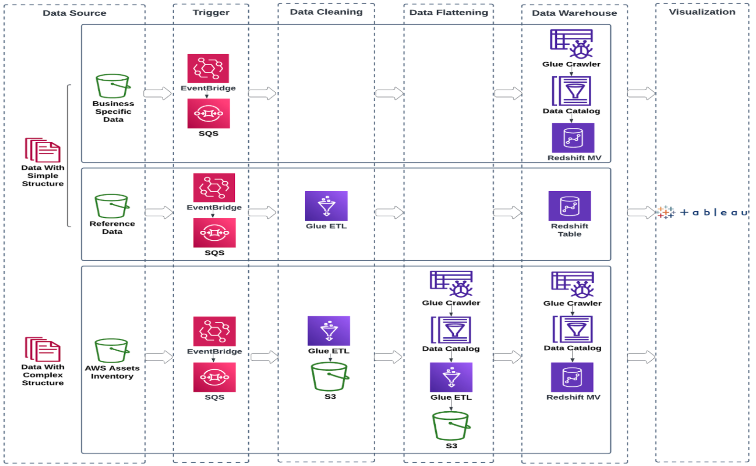
MuleSoft’s solution was to build a lakehouse built on top of AWS services, illustrated in the following diagram, supporting a portal. To provide near real-time analytics we used an event-driven strategy that which would trigger AWS Glue jobs an refresh materialized views.  We also implemented a layered approach that included collection, preparation, and enrichment making it straightforward to identify areas that affect data accuracy.

For MuleSoft’s lakehouse end-to-end solution, the following phases are key:

  • Preparation phase
  • Enrichment phase
  • Action phase

In the following sections, we discuss these phases in more detail.

Preparation phase

Using the COE Framework, we engaged with the stakeholders in the preparation phase to determine the business goals and identify the data sources to ingest. Examples of data sources were cloud assets inventory, AWS Cost and Usage Reports, and AWS Trusted Advisor data. The ingested data is processed in the lakehouse to implement the Well-Architected pillars, utilization, security, and compliance status checks and measures.

How you configure the CUR data and the Trusted Advisor data to land into S3?

The configuration process involves multiple components for both CUR and Trusted Advisor data storage. For CUR setup, customers need to configure an S3 bucket where the CUR report will be delivered, either by selecting an existing bucket or creating a new one. The S3 bucket requires a policy to be applied and customers must specify an S3 path prefix which creates a subfolder for CUR file delivery .

Trusted Advisor data is configured to use Kinesis Firehose to deliver customer summary data to the Support Data lake S3 bucket .The data ingestion process uses firehose buffer parameters (1MB buffer size and 60-second buffer time) to manage data flow to the S3 bucket .

The Trusted Advisor data is stored in JSON and GZIP format, following a specific folder structure with hourly partitions using the “YYYY-MM-DD-HH” format .

The S3 partition structure for Trusted Advisor customer summary data includes separate paths for success and error data, and the data is encrypted using a KMS key specific to Trusted Advisor data .

MuleSoft used AWS managed services and data ingestion tools to pull from multiple data sources and that can support customizations. Cloudquery is used tool to gather cloud infrastructure information, which can connect many infrastructure data sources out of the box and land it into an Amazon S3 bucket. The MuleSoft Anypoint Platform provides an integration layer to integrate infrastructure tools, accommodating many data sources like on-premise, SaaS, and commercial off-the-shelf (COTS) software. Cloud Custodian  was used for its capability of managing cloud resources and auto-remediation with customizations.

Enrichment phase

The enrichment phase includes ingesting raw data aligning with our business goals into the lakehouse through our pipelines, and consolidating the data to create a single pane of glass.

The pipelines adopt the event-driven architecture consisting of EventBridge, Amazon Simple Queue Service (Amazon SQS), and Amazon S3 Event Notifications to provide near real-time data for analysis. When new data arrives in the source bucket, new object creation is captured by the EventBridge rule, which invokes the AWS Glue workflow, consisting of an AWS Glue crawler and AWS Glue extract, transform, and load (ETL) jobs. We also configured S3 Event Notifications to send messages to the SQS queue to make sure the pipeline will only process the new data.

The AWS Glue ETL job cleanses and standardizes the data, so that it’s ready to be analyzed using Amazon Redshift. To tackle data with complex structures, additional processing is performed to flatten the nested data formats into a relational model. The flattening step also extracts the tags of AWS assets out of the nested JSON objects and pivots them into individual columns, enabling tagging enforcement controls and ownership attribution.  The ownership attribution of the infrastructure data provides accountability and holds teams responsible for the costs, utilization, security, compliance, and remediation of their cloud assets.  One important tag is asset ownership which is from the tags extracted from the flattening step, this data can be attributed to the corresponding owners by SQL scripts.

When the workflow is complete, the raw data from different sources and with various structures is now  centralized in the data warehouse.  From there, disjointed data with different purposes is ready to be consolidated and translated into actionable intelligence in the Well-Architected Pillars by coding out the business logic.

 Solutions for the enrichment phase

In the enrichment phase, we faced a number of storage, efficiency, and scalability challenges given the sheer volume of data. We used three techniques (file partitioning, Redshift Spectrum, and materialized views) to address these issues and scale without compromising performance.

File partitioning

MuleSoft’s infrastructure data is stored in folder structure: year, month, day, hour, account, and Region in an S3 bucket, so AWS Glue crawlers are able to automatically identify and add partitions to the tables in the AWS Glue Data Catalog. Partitioning helps improve query performance significantly because it optimizes parallel processing for queries. The amount of data scanned by each query is restricted based on the partition keys, helping reduce overall data transfers, processing time, and computation costs. Although partitioning is an optimization technique that helps improve query efficiency, it’s important to keep in mind two key points while using this technique:

  • The Data Catalog has a maximum cap of 10 million partitions per table
  • Query performance gets compromised as partitions grow rapidly

Therefore, balancing the number of partitions in the Data Catalog tables and query efficiency is essential. We decided on a data retention policy of 3 months and configured a lifecycle rule to expire any data older than that.

Our event-driven architecture–AWS Eventbridge event is invoked when objects are put into or removed from an S3 bucket, event messages are published to the SQS queue using S3 Event Notifications, which invokes an AWS Glue crawler to either add new partitions or removes old partitions from the Data Catalog based on the messages handling the partition cleanup.

Amazon Redshift and concurrency scaling

MuleSoft uses Amazon Redshift to query the data in S3 because it provides large scale compute and minimized data redundancy. MuleSoft also used Amazon Redshift concurrency scaling to run concurrent queries with consistently fast query performance. Amazon Redshift automatically added query processing power in seconds to process a high number of concurrent queries without any delays.

Materialized views

Another technique we used is Amazon Redshift materialized views. Materialized views store preset query results that future similar queries can use, so many computation steps can be skipped. Therefore, relevant data can be accessed efficiently, which leads to query optimization. Additionally, materialized views can be automatically and incrementally refreshed. Therefore, we can achieve a single pane of glass in our cloud infrastructure with the most up-to-date projections, trends, and actionable insights to our organization with improved query performance.

Amazon Redshift Materialized Views (MVs) are used extensively for reporting in MuleSoft’s Cloud Central portal, but if users needed to drill down into a granular view they could reference external tables.

Mulesoft is currently manually refreshing the materialized views through the event-driven architecture, but is evaluating a switch to automatic refresh.

Action phase

Using materialized views in Amazon Redshift, we developed a self-serve Cloud Central portal in Tableau to provide a display portal for each team, engineer, and manager offering guidance and recommendations to help them operate in a way that aligns with the organization’s requirements, standards, and budget. Managers are empowered with monitoring and decision-making information for their teams. Engineers are able to identify and tag assets with missing mandatory tagging information, as well as remediate non-compliant resources. A key feature of the portal is personalization, meaning that the portal is enabled to populate visualizations and analysis based on the relevant data associated with a manager’s or engineer’s login information.

Cloud Central also helps engineering teams improve their cloud maturity in the six Well-Architecture pillars: operational excellence, security, reliability, performance efficiency, cost optimization, and sustainability. The team proved out the “art of possible” by poc’ing Amazon Q to assist with 100 and 200 Well-Architected pillar inquiries and how to’s. The following screenshot illustrates the MuleSoft implementation of the portal, Cloud Central. Other companies will design portals that are more bespoke to their own use cases and requirements.

Conclusion

The technical and business impact of MuleSoft’s COE Framework enables an optimization strategy and a cloud usage show back approach which helps MuleSoft continue to grow with a scalable and sustainable cloud infrastructure. The framework also drives continual maturity and benefits in cloud infrastructure centered around the six Well-Architecture pillars shown in the following figure.

The framework helps organizations with expanded public cloud infrastructure achieve their business goals guided by the Well-Architected benefits powered by an event-driven architecture.

The event-driven Amazon Redshift lakehouse architecture solution offers near real-time actionable insights on decision-making, control, and accountability. The event-driven architecutre can be distilled into modules which can be added or deleted depending on your technical/business goals.

The team is exploring new ways to lower the total cost of ownership. They are evaluating Amazon Redshift Serverless for transient database workloads as well as exploring Amazon DataZone to aggregate and correlate data sources into a data catalog to share among teams, applications, and lines of businesses in a democratized way. We can increase visibility, productivity, and scalability with a well-thought-out lakehouse solution.

We invite organizations and enterprises to take a holistic approach to understand their cloud resources, infrastructure, and applications. You can enable and educate your teams through a single pane of glass, while running on a data modernization lakehouse applying Well-Architected concepts, best practices, and cloud-centric principles. This solution can ultimately enable near real-time streaming, leveling up a COE Framework well into the future.


About the Authors

Sean Zou is a Cloud Operations leader with MuleSoft at Salesforce. Sean has been involved in many aspects of MuleSoft’s Cloud Operations, and helped drive MuleSoft’s cloud infrastructure to scale more than tenfold in 7 years. He built the Oversight Engineering function at MuleSoft from scratch.

Terry Quan focuses on FinOps issues. He works on MuleSoft Engineering on cloud computing budgets and forecasting, cost reduction efforts, costs-to-serve, and coordinates with Salesforce Finance. Terry is a FinOps Practitioner and Professional Certified.

Audrey Yuan is a Software Engineer with MuleSoft at Salesforce. Audrey works on data lakehouse solutions to help drive cloud maturity across the six pillars of the Well-Architected Framework.

Rueben Jimenez is a Senior Solutions Architect at AWS, designing and implementing complex data analytics, AI/ML, and cloud infrastructure solutions.

Avijit Goswami is a Principal Solutions Architect at AWS specialized in data and analytics. He supports AWS strategic customers in building high-performing, secure, and scalable data lake solutions on AWS using AWS managed services and open source solutions. Outside of his work, Avijit likes to travel, hike, watch sports, and listen to music.

How Nielsen uses serverless concepts on Amazon EKS for big data processing with Spark workloads

Post Syndicated from Shani Adadi Kazaz original https://aws.amazon.com/blogs/architecture/how-nielsen-uses-serverless-concepts-on-amazon-eks-for-big-data-processing-with-spark-workloads/

Nielsen Marketing Cloud, a leading ad tech company, processes in one of their pipelines 25 TB of data and 30 billion events daily. As their data volumes grew, so did the challenges of scaling their Apache Spark workloads efficiently.

Nielsen’s team faced a scenario in which, as they scaled up their cluster by adding more instances, the performance per instance degraded. The degradation resulted in a decrease in the amount of work done per hour by each instance, and drove costs per GB of data processed up.

Furthermore, they encountered occasional data skew issues. Data skew, where data is unevenly distributed across partitions, created processing bottlenecks and further reduced cluster efficiency. In extreme cases, these combined factors led to cluster failures.

In this post, we follow Nielsen’s journey to build a robust and scalable architecture while enjoying linear scaling. We start by examining the initial challenges Nielsen faced and the root causes behind these issues. Then, we explore Nielsen’s solution: running Spark on Amazon Elastic Kubernetes Service (Amazon EKS) while adopting serverless concepts.

Evolving from a Spark cluster to Spark pods on Amazon EKS

Nielsen’s Marketing Cloud architecture began as a typical Spark cluster on Amazon EMR, receiving a constant stream of files of varying sizes to process. As both data volume and cluster size grew, the team noticed a degradation in performance per instance, as illustrated in the following graphs. Beyond the slower processing and the higher costs, Nielsen occasionally suffered production issues caused by data skew.

GB/Instance/Hour Compared to Cluster SizeCost to Process 1 GB of Data

The team realized the problem was the growing number of remote shuffles between instances as the cluster grew. Remote shuffle, a process in Spark where data is redistributed across partitions, involves significant data transfer over the network and can become a major bottleneck. Due to the streaming nature of the data in their scenario, Nielsen realized they could instead process data in smaller batches. This meant they didn’t have to lean on the distributed processing capabilities of Spark by using large Spark clusters, and opt for small ones instead.

To address the performance degradation, the team decided to change its growth strategy: instead of scaling up their single Spark cluster, they scaled out using multiple local mode Spark clusters (a single node cluster) running on Amazon EKS. When compared to Spark cluster mode, local mode provides better performance for small analytics workloads. Each local mode is running a limited, smaller amount of data, requiring no remote shuffle and no interaction with other Spark instances.

Moreover, the pods running on Amazon EKS can scale up and down based on the amount of pending work, meaning Nielsen could stop resources when they are not needed.

The new solution scales linearly, is 55% cheaper, and handles data faster, even under large burst conditions.

Why shuffle matters

Remote shuffle is triggered when data needs to be exchanged between Spark instances. Some transformations, like join or repartition, necessitate a shuffle of data. Remote shuffle is an order of magnitude slower than in-memory computations because it requires moving data over the network. It could slow down processing significantly, sometimes adding 100–200% to the total processing time.

The problem Nielsen ran into was that as cluster size grew, the amount of data shuffled grew proportionally to the cluster size. The following graph shows why this happens. It calculates the amount of data exchanged for a randomly distributed dataset as cluster size grows.

The following graph illustrates that the correlation is to the size of the cluster and not to the size of the data.

% of Data Shuffled vs Cluster Size

Addressing shuffle

The team hypothesized that minimizing shuffle could lead to substantial performance improvements. Nielsen’s engineers decided to implement ideas from serverless patterns by drastically reducing the size of each cluster to a minimum while at the same time adding more of these smaller clusters to compensate for the lower capacity of each one. This approach promised to eliminate remote shuffle entirely for each data work item, as illustrated in the preceding graph.

Although this strategy promised performance gains, it also introduced a constraint: a limit on the amount of data per work item.

Designing the new system based on serverless patterns

Nielsen’s team developed a new architecture that uses two core concepts:

  • A queue of work items to pull from
  • A group of local mode Spark modules pulling work items from the queue

They had the following design goals:

  • Keep the Spark modules busy at all times
  • Stop modules when not needed
  • Make sure all work items are processed successfully

The following diagram illustrates the workflow.

Work items Queue

Final design

The final design includes the following components:

  • File metadata storage – An Amazon Relational Database Service (Amazon RDS) cluster runs the PostgreSQL engine to store and manage statistics about each file entering the system.
  • Work manager – An AWS Lambda function is used to periodically pull waiting files from the database, prepare work items comprised of one or multiple files, and publish the work items to an Amazon Simple Queue Service (Amazon SQS) message queue.
  • Work queue – An SQS message queue is used for work items waiting to be pulled for processing.
  • Processing units – Local mode Spark instances run as pods on an EKS cluster. They pull work items from the SQS queue. As long as there are waiting work items in the queue, the pods are constantly busy.
  • Metrics adaptor – An adaptor (Kubernetes-cloudwatch-adapter) provides Amazon CloudWatch metrics to the Kubernetes Horizontal Pod Autoscaler.
  • Kubernetes Horizontal Pod Autoscaler – Horizontal Pod Autoscaler (HPA) uses a scaling rule to scale pods up or down based on the metrics from CloudWatch. It scales according to the number of messages (work items) visible in the queue, which are proportional to the work waiting to be processed. In Nielsen’s system, HPA scales the pods by targetValue = {SQS length/2}. .
  • Work completion queue – A second SQS message queue is used for reporting completion of work items. The completions get pulled by another Lambda function and get updated in the PostgreSQL database.

The following diagram illustrates the architecture of the final system.

Full architecture

⁠Analyzing the results

The following graphs demonstrate the EKS pods scaling based on the amount of work items. The active pods pick up new work items as soon as they finish their previous ones.

Analyzing - Messages and Spark Pods

The following graph shows a large burst of data coming in. The system reacts quickly and scales up to process the added work. It quickly scales down when work is complete.

Analyzing - Messages, Spark Pods and EC2 Instances

Analyzing the performance achieved per instance, the new system demonstrated a significant improvement. Performance per instance increased by approximately 130% while growing linearly and maintaining close to constant costs per GB processed.

The comparison of performance between the new system and the old system can be seen in the following graph.

Throughput - MB/Hour

The new system’s costs are 55% lower for the same amount of data processed.

The following graphs compare the costs before and after the implementation.

Cost Comparison

Conclusion

Nielsen’s journey from a traditional architecture to a serverless-inspired architecture on Amazon EKS exemplifies the power of rethinking established patterns in big data processing.

By addressing the core challenges of data shuffle and scaling, Nielsen not only achieved performance gains and cost reductions, but also demonstrated the potential for linear scaling in large-scale data operations.

If you have big data processing jobs that that can be broken down into many independent small parts, consider using similar ideas over Amazon EKS to achieve linear scaling and large cost savings.

This post was copyedited for grammar, spelling, capitalization, punctuation, terminology, and legal issues. Other important issues are noted in comments, and you should consider revising the content accordingly before publication.


About the Authors

12 Best Practices for Disaster Recovery

Post Syndicated from Kari Rivas original https://www.backblaze.com/blog/12-best-practices-for-disaster-recovery/

A decorative image showing a cloud, a server, and an office building.

If there’s one thing I’ve learned from working with enterprise customers on their cyber resilience postures, it’s this: Downtime caused by disasters can be costly, and every organization should have a disaster recovery (DR) plan in place. 

Today, I’m outlining 12 best practices to consider when developing and reviewing your organization’s DR plan to minimize downtime, risk, and unexpected costs in the face of unexpected events.

These key considerations will help your IT team when developing and reviewing a disaster recovery plan. 

1. Leave no disaster unidentified

The first step in building a strong DR plan is to identify all potential threats, not just major disasters. Consider “minor” threats like human error or hardware failures that could disrupt security and operations. 

2. Plan for the worst (and beyond)

While it’s important to plan for likely threats like ransomware attacks, don’t neglect worst-case scenarios. Develop a plan that can handle a catastrophic event like a natural disaster wiping out your primary site or a widespread communication outage.

3. Ransomware: Your uninvited guest

Ransomware attacks are a major threat. Dedicate a significant portion of your DR plan to addressing ransomware scenarios, including recovery procedures and strategies to minimize the impact of such attacks.

4. Beyond the walls: Cloud catastrophe

Extend your DR plan beyond on-premises threats to include potential disruptions associated with cloud services, such as outages or security breaches. It may seem counterintuitive that we, a cloud provider, are the ones to call this out, but we’re big proponents of the tenet that the one truth about technology is that it will fail. Multi-cloud and hybrid disaster recovery options help reduce the risk of those rare, but highly impactful outages. Cloud provider service level agreements (SLAs) define availability targets (e.g., 99.9% uptime) which can increase your overall data and application availability above on-premises capabilities. 

5. Infrastructure independence

Always anticipate potential infrastructure unavailability during a disaster. Plan alternative methods for accessing critical data and systems, including leveraging hot cloud infrastructure as a service (IaaS) solutions as a backup.

6. Think beyond data recovery

A robust DR plan goes beyond just recovering data. It should outline procedures for rebuilding your entire IT environment, including applications, configurations, security, and user accounts. There’s a big gap between restoring data and actual recovery.

7. Plan variations

Develop different versions of your DR plan based on the severity of the incident and the types of incidents your business is most likely to face. This allows for a more targeted response, depending on the specific nature of  the disruption. 

8. Runbooks: Your DR roadmap

Consider creating predefined “runbooks” that outline specific steps for various disaster scenarios. These detailed documents provide clear instructions  for IT staff during a crisis.

9. Recovery is a sprint, but DR planning is a marathon

Modern DR strategies prioritize planning for recovery from the beginning. Verify the usability of your backups and recovered data to ensure their effectiveness during a crisis. Test your restoration procedures regularly to avoid the pitfall of unusable backups during a disaster.

10. Securing resources in advance

Don’t wait for disaster to strike before securing necessary resources. Budgetary approvals, software licenses, and hardware procurement should all be addressed in advance to avoid delays during a crisis. 

11. Cyber insurance considerations

If your business has cyber insurance, familiarize yourself with the DR planning requirements outlined in the policy. Understanding the insurance company’s expectations can help you tailor your DR strategy accordingly. 

12. Backups are essential, but they’re not the whole plan

As cybercriminals become more sophisticated, they often target backups as well. Backups—once a low-priority just-in-case item—are now mission critical. Backups are a critical foundation for your DR plan, but they are not the entire plan.

A closing note on recovery

Finally, make sure to regularly test and update your DR plan to ensure it remains effective and up to date. By leveraging affordable, secure, cloud-based backup and archive as part of your overall disaster recovery strategy, you can better protect your critical data. The result will minimize downtime, risk, and costs in the face of unexpected events.

The post 12 Best Practices for Disaster Recovery appeared first on Backblaze Blog | Cloud Storage & Cloud Backup

The collective thoughts of the interwebz