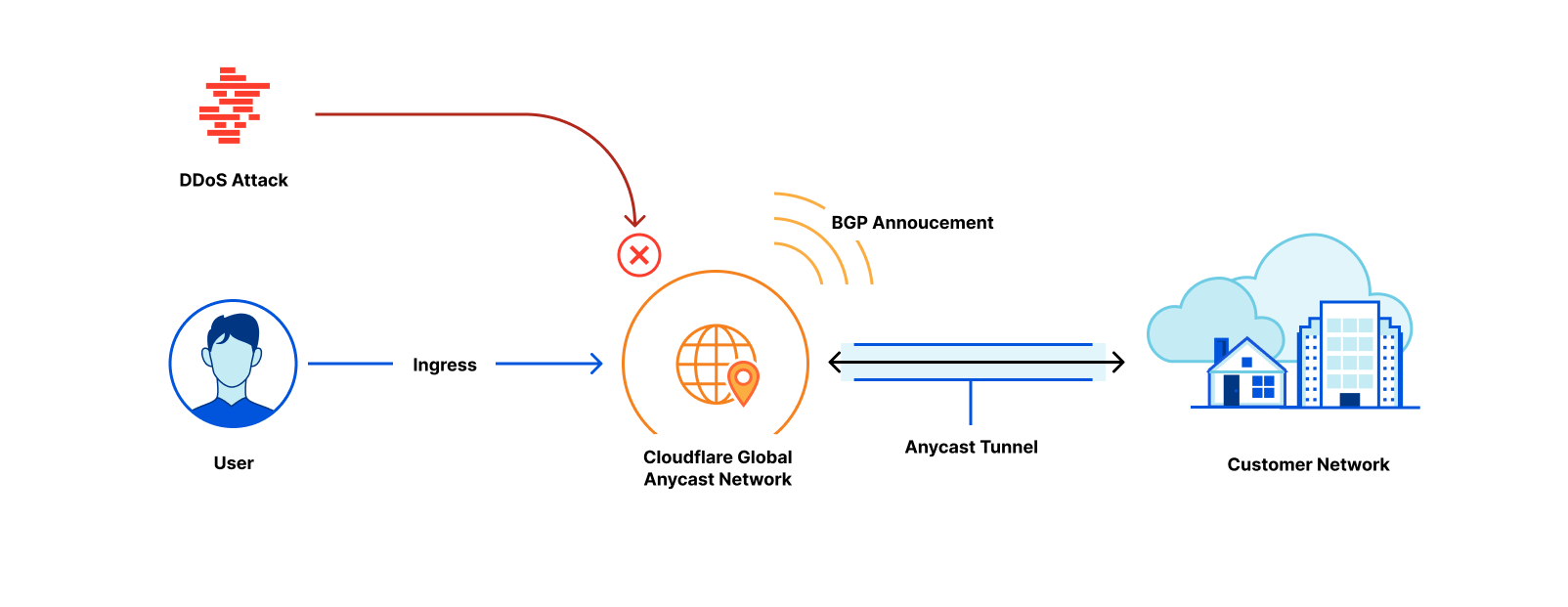
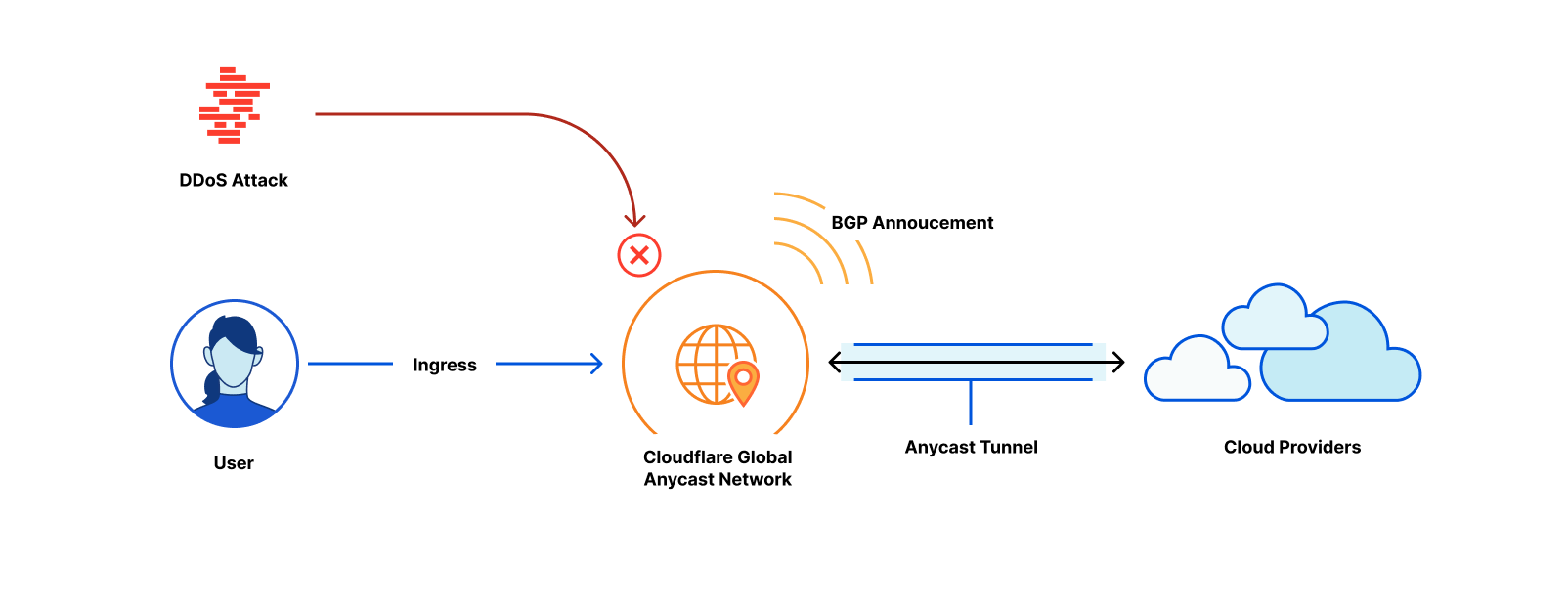
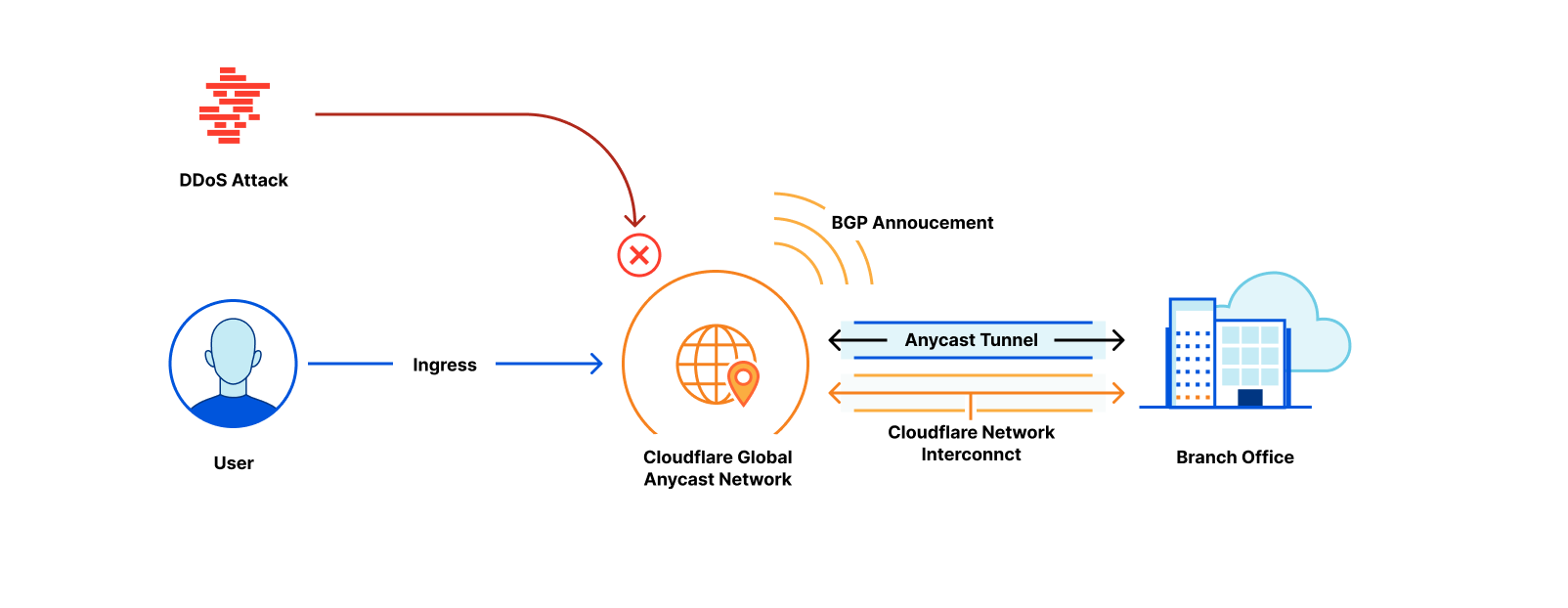
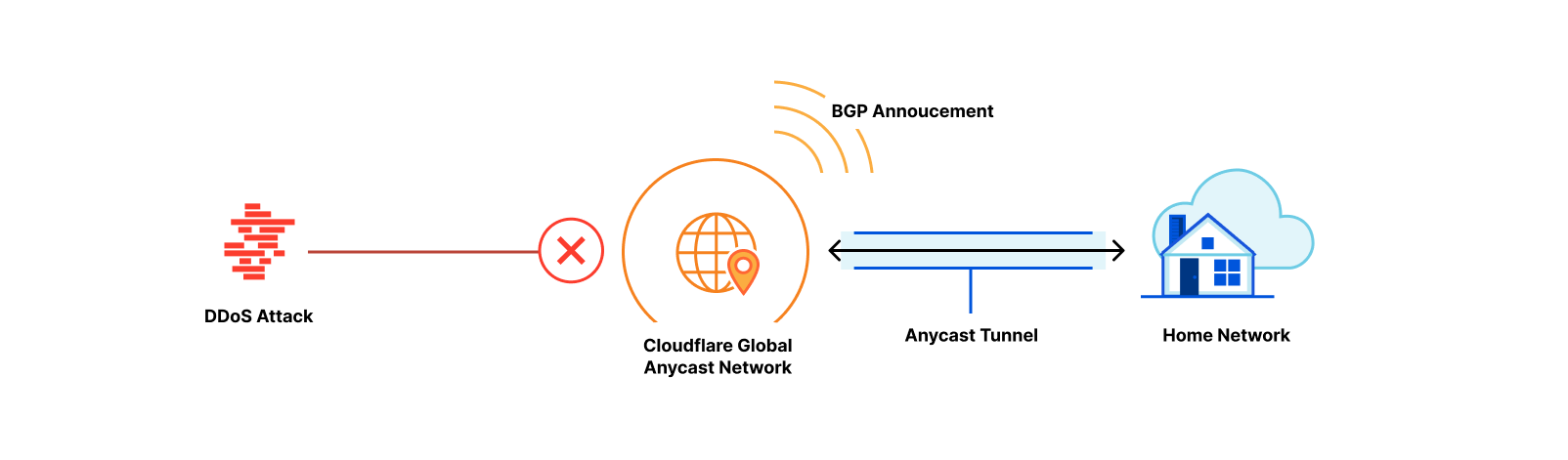
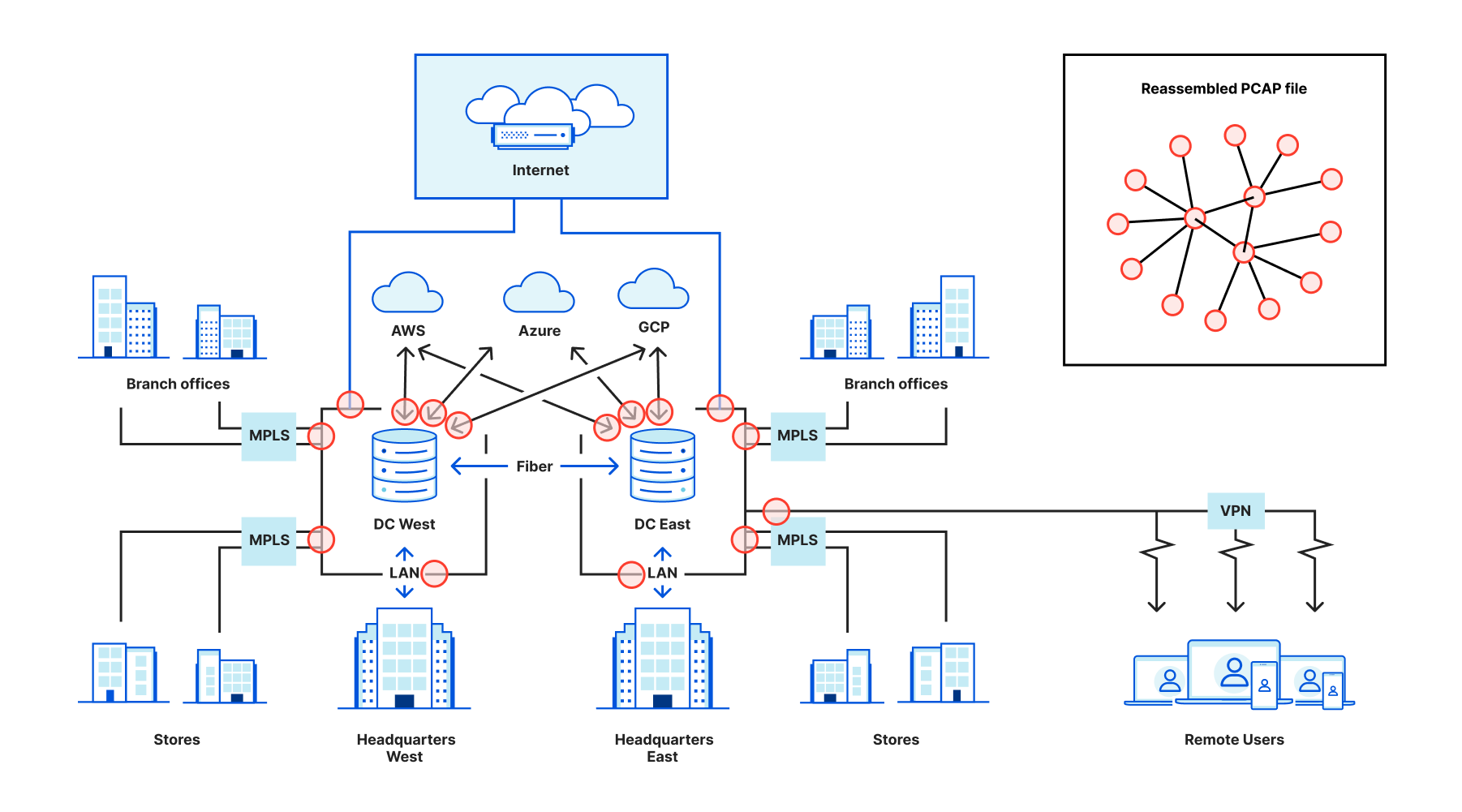
An AS, or Autonomous System, is a group of routable IP prefixes belonging to a single entity, and is one of the key building blocks of the Internet. Internet providers, public clouds, governments, and other organizations have one or more ASes that they use to connect their users or systems to the rest of the Internet by advertising how to reach them.
Per AS traffic statistics and trends help when we need insight into unusual events, like Internet outages, infrastructure anomalies, targeted attacks, or any other changes from service providers.
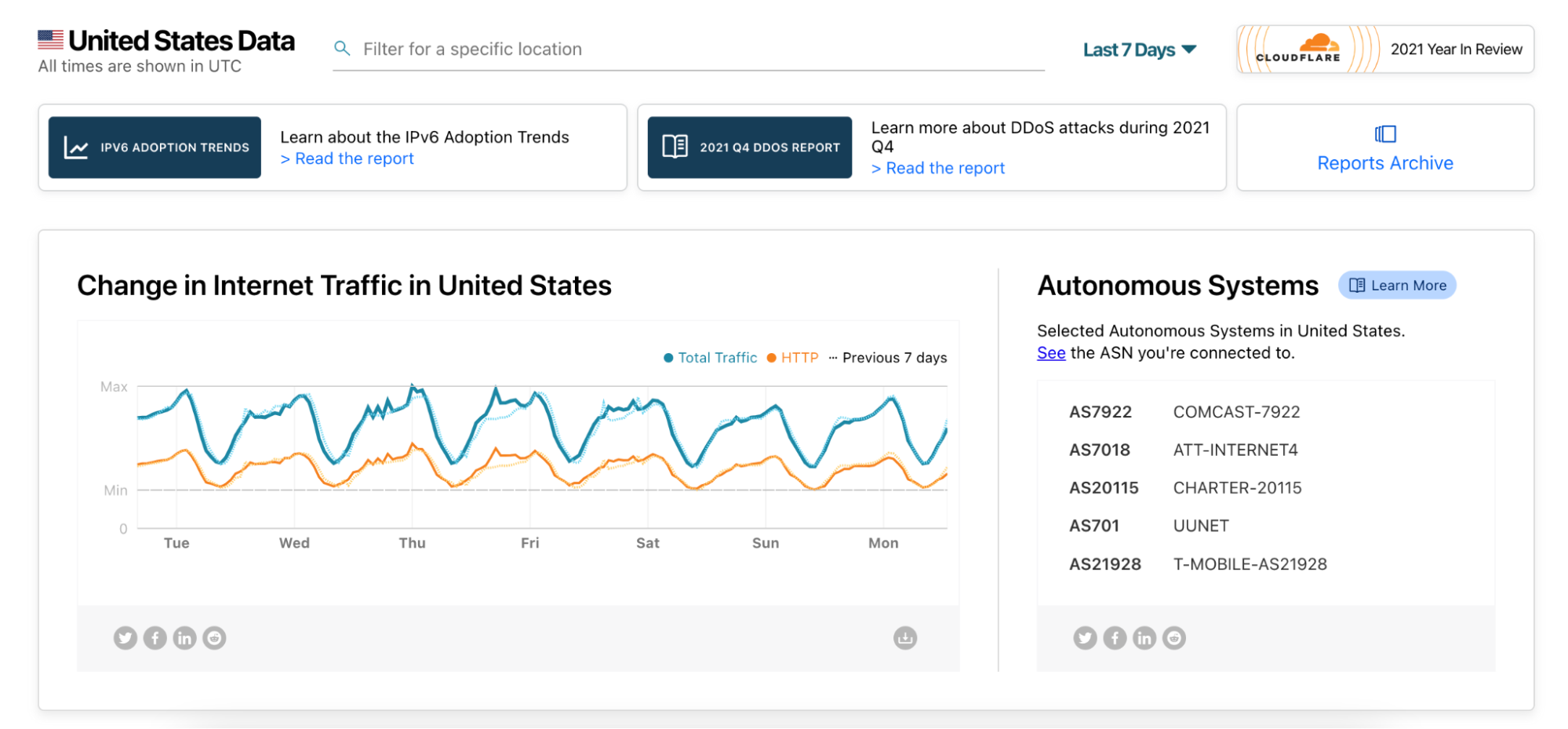
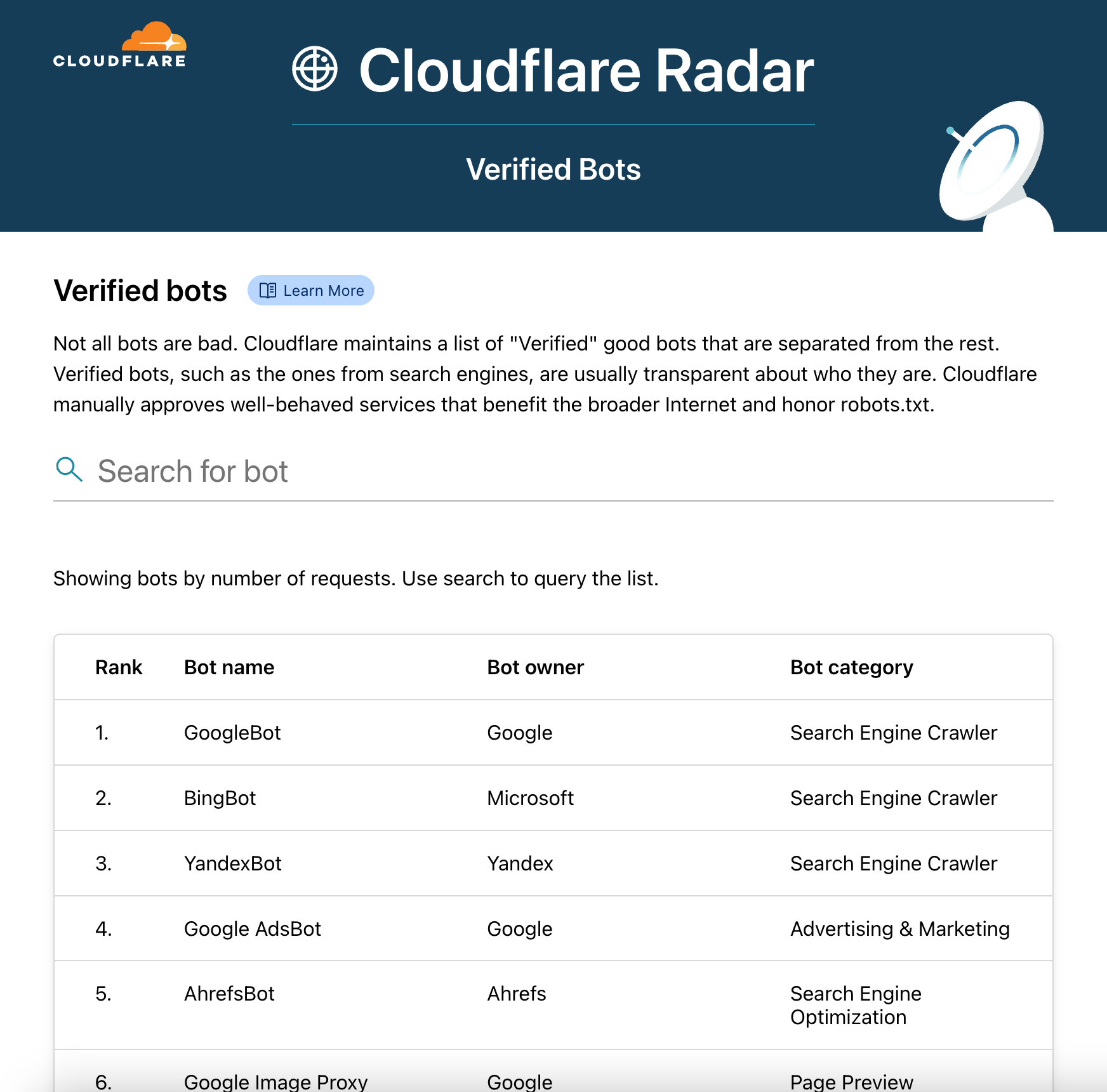
Today, we are opening more of our data and launching the Cloudflare Radar pages for Autonomous Systems. When navigating to a country or region page on Cloudflare Radar you will see a list of five selected ASes for that country or region. But you shouldn’t feel limited to those, as you can deep dive into any AS by plugging its ASN (Autonomous System Number) into the Radar URL (https://radar.cloudflare.com/asn/<number>). We have excluded some statistical trends from ASes with small amounts of traffic as that data would be difficult to interpret.
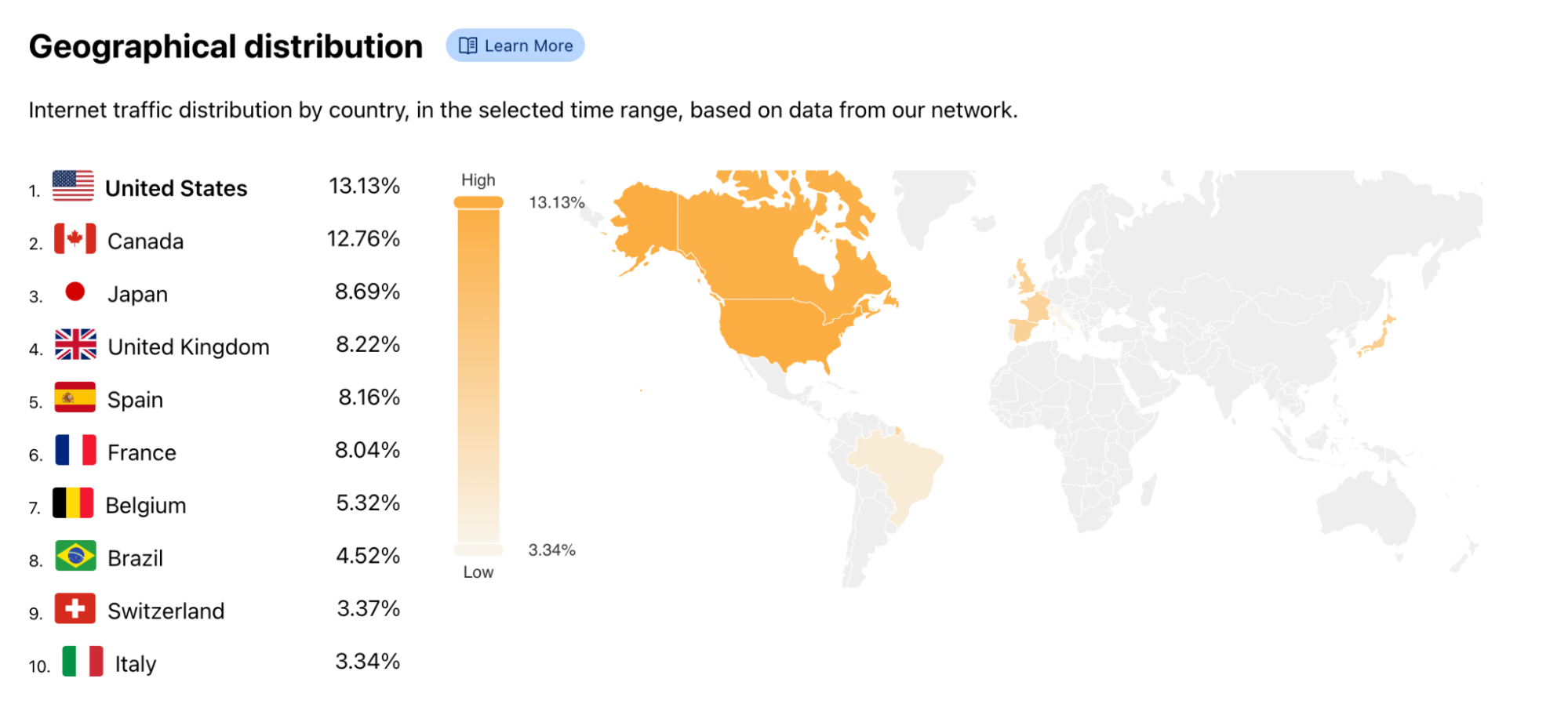
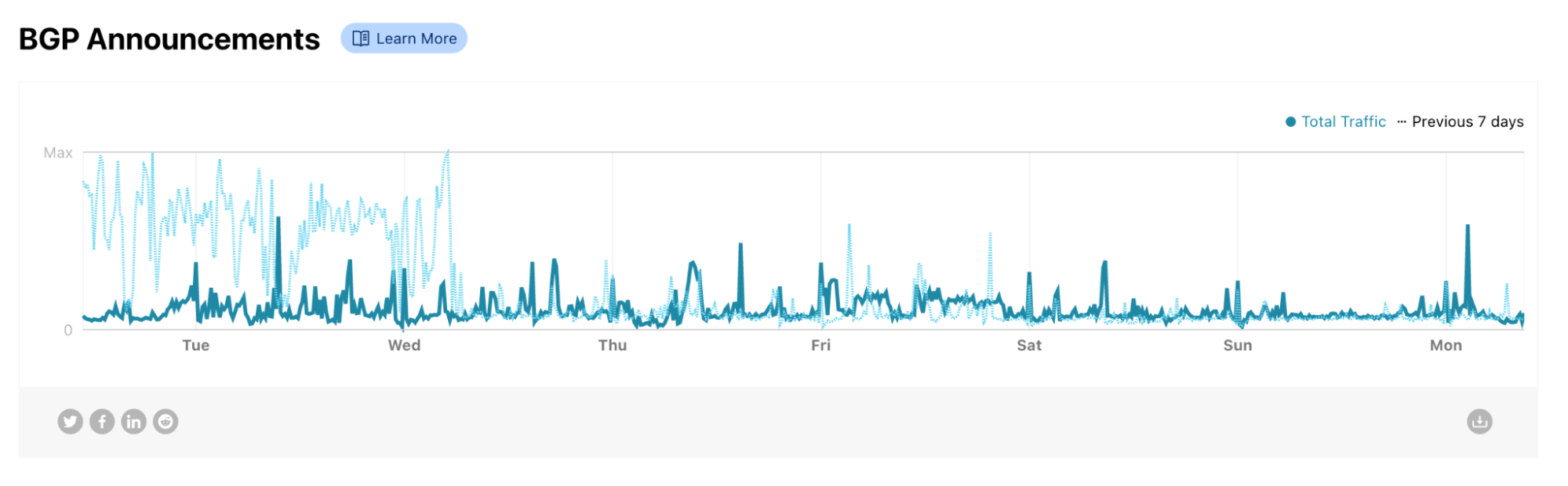
The AS page is similar to the country page on Cloudflare Radar. You can find traffic levels, protocol use, and security details such as application and network-level DDoS attack information. Additionally, we show a geographical distribution map of the traffic and the volume of BGP announcements we see for the list of prefixes associated with the specific AS.
A sudden increase in BGP announcements often suggests disruptive changes to the Internet in the region or institution associated with the AS. Spikes in BGP announcements were visible when the submarine cable was cut in Tonga in 2022, on the Facebook outage in October 2021, and when governments limited the Internet access in their countries (as seen in Sudan and Syria in 2021).
At Cloudflare, we are committed to keep increasing transparency on the inner workings of the Internet, so that we can all do our part in keeping the Internet more open and secure for everyone. Keep an eye on Cloudflare Radar for more insights like these.
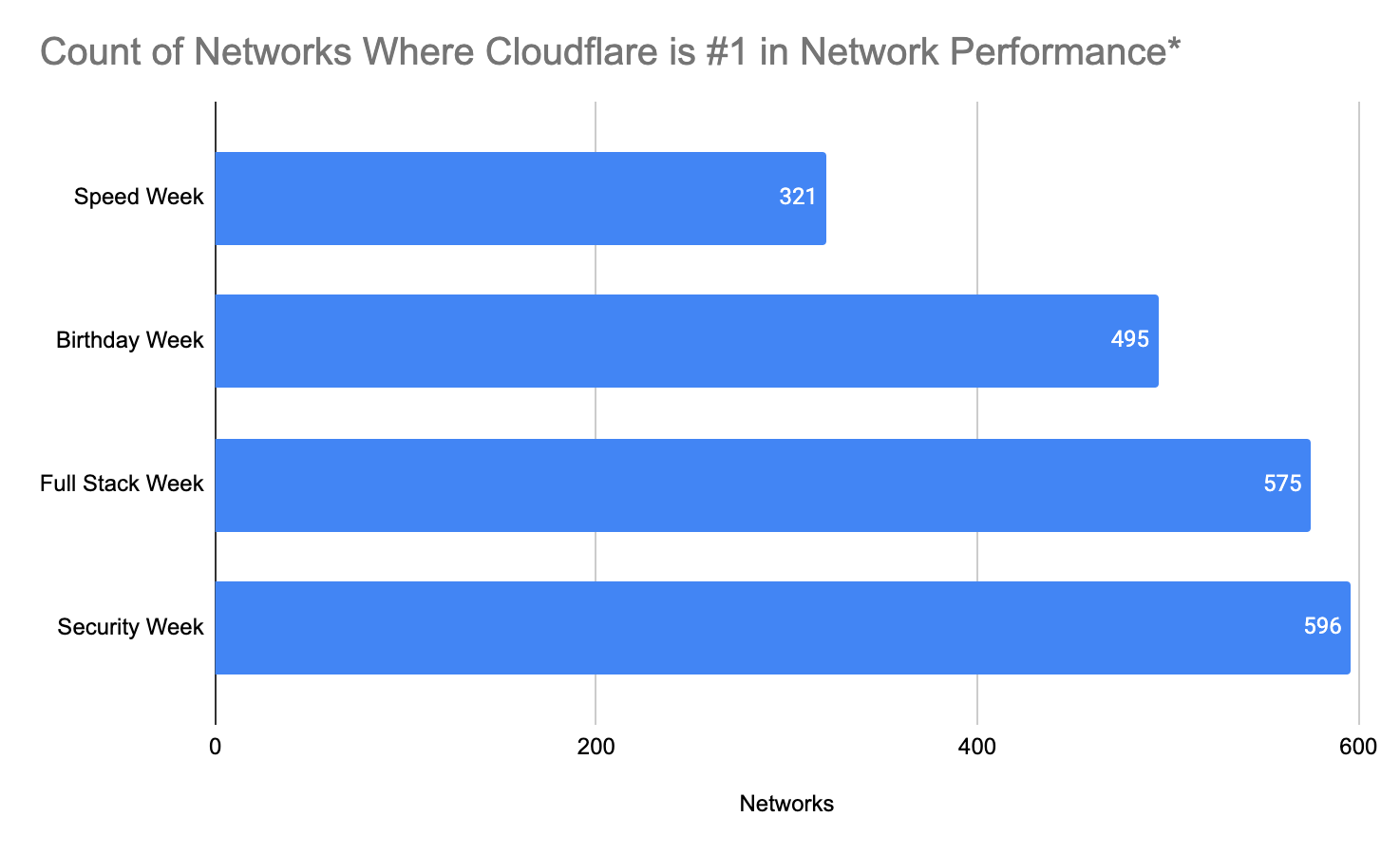
Almost a year ago, we shared extensive benchmarking results of last mile networks all around the world. The results showed that on a range of tests (TCP connection time, time to first byte, time to last byte), and on different measures (p95, mean), Cloudflare was the fastest provider in 49% of networks around the world. Since then, we’ve worked to continuously improve performance towards the ultimate goal of being the fastest everywhere. We set a goal to grow the number of networks where we’re the fastest by 10% every Innovation Week. We met that goal last year, and we’re carrying the work over to 2022.
Today, we’re proud to report we are the fastest provider in 71% of the top 1,000 most reported networks around the world. Of course, we’re not done yet, but we wanted to share the latest results and explain how we did it.
Measuring what matters
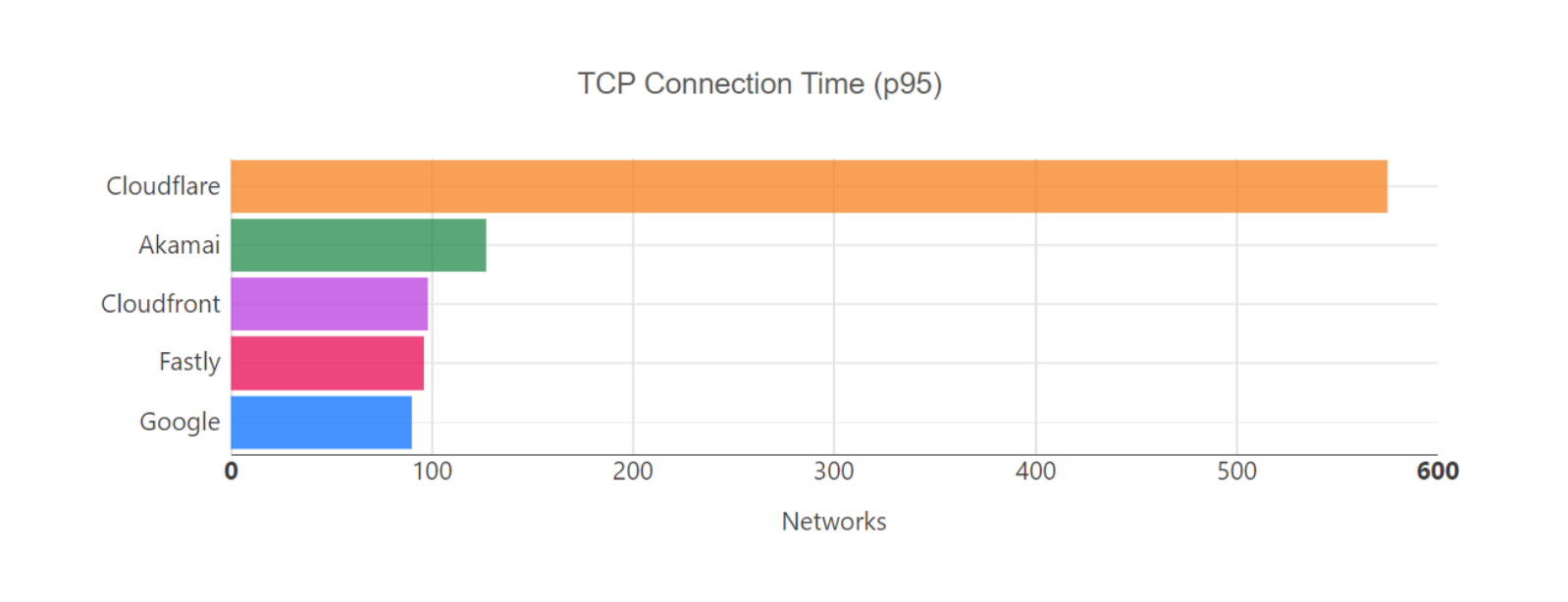
To quantify network performance, we have to get enough data from around the world, across all manner of different networks, comparing ourselves with other providers. We used Real User Measurements (RUM) to fetch a 100kb file from several different providers. Users around the world report the performance of different providers. The more users who report the data, the higher fidelity the signal is. The goal is to provide an accurate picture of where different providers are faster, and more importantly, where Cloudflare can improve. You can read more about the methodology in the original Speed Week blog post here.
In the process of quantifying network performance, it became clear where we were not the fastest everywhere. After Full Stack Week, we found 596 country/network pairs where we were more than 100ms behind the leading provider (where a country/network pair is defined as the performance of a network within a particular country).
We are constantly going through the process of figuring out why we were slow — and then improving. The challenges we faced were unique to each network and highlighted a variety of different issues that are prevalent on the Internet. We’re going to deep dive into a couple of networks, and show how we diagnosed and then improved performance.
But before we do, here are the results of our efforts since Full Stack Week.
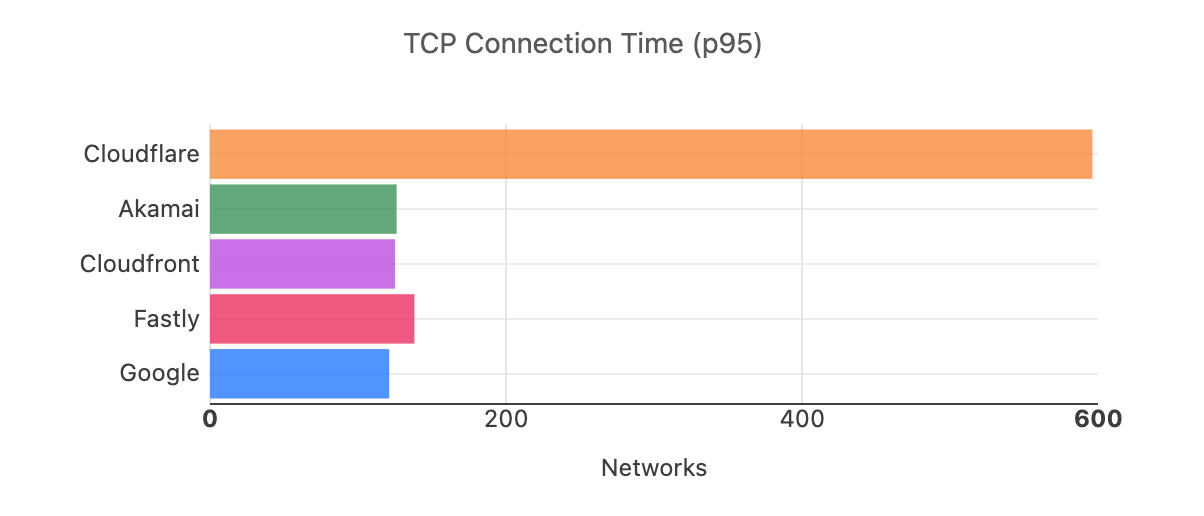
*Performance is defined by p95 TCP connection time across top 1,000 networks in the world by number of IPv4 addresses advertised
*Performance is defined by p95 TCP connection time across top 1,000 networks in the world by number of IPv4 addresses advertised
Curing congestion in Canada
In the spirit of Security Week, we want to highlight how a Magic Transit (Cloudflare’s network layer DDoS security) customer’s network problems provided line of sight into their internal congestion issues, and how our network was able to mitigate the problem in the short term.
One Magic Transit customer saw congestion in Canada due to insufficient peering with the Internet at key interconnection points. Congestion for customers means bad performance for users: for games, it can lead to lag and jittery gameplay, for video streaming, it can lead to buffering and poor resolution, and for video/VoIP applications, it can lead to calls dropping, garbled video/voice, and sections of calls missing entirely. Fixing congestion in this case means improving the way this customer connects to the rest of the Internet to make the user experience better for both the customer and users.
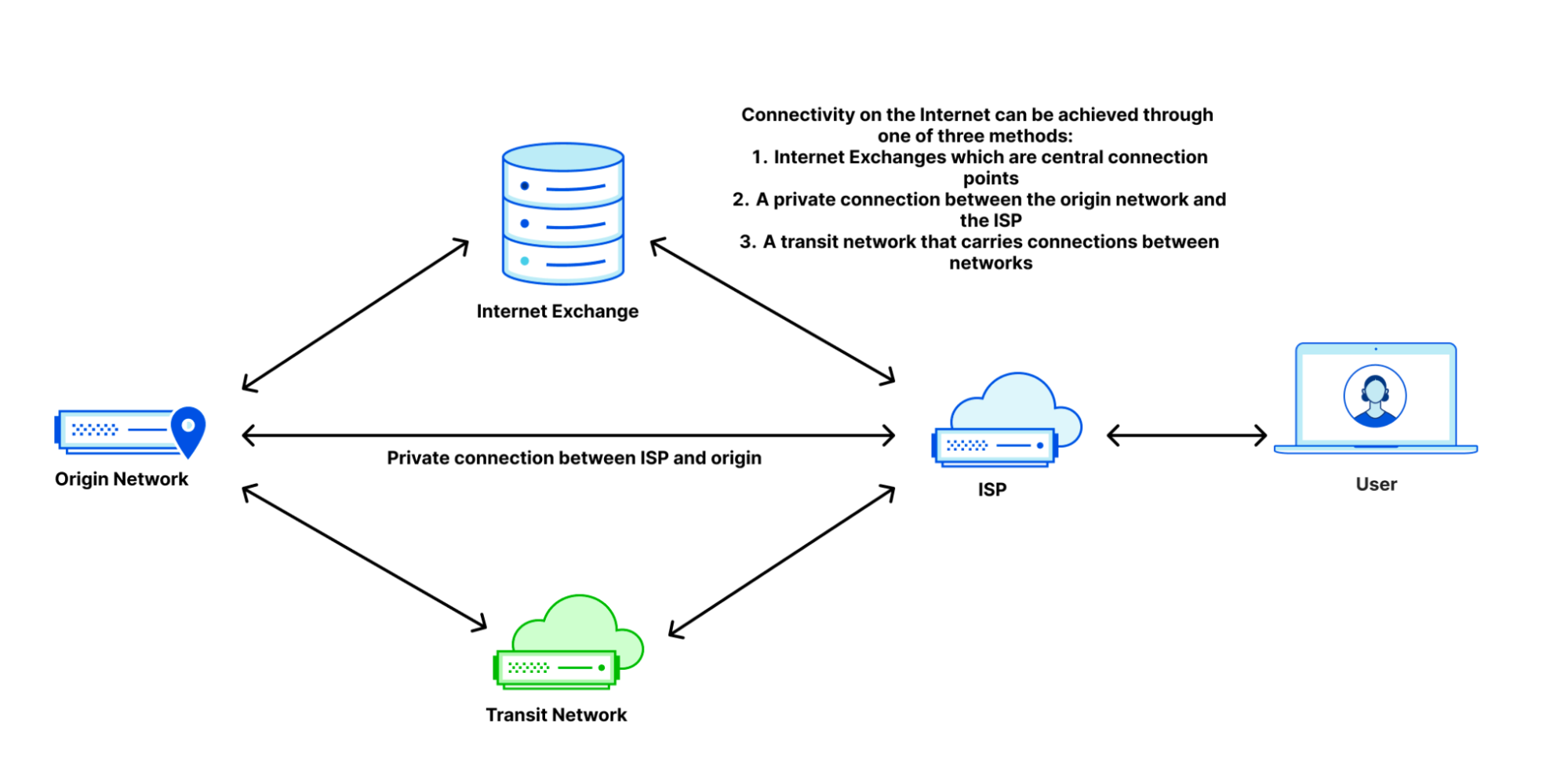
When customers connect to the Internet, they can do so in several ways: through an ISP that connects to other networks, through an Internet Exchange which houses many different providers interconnecting at a singular point, or point-to-point connections with other providers.
In the case of this customer, they had direct connections to other providers and to Internet exchanges. They ran out of bandwidth with their point-to-point connections, meaning that they had too much traffic for the size of the links they had bought, which meant that the excess traffic had to go over Internet Exchanges that were out of the way, creating suboptimal network paths which increased latency.
We were able to use our network to help solve this problem. In the short term, we spread the traffic away from the congestion points. This removed hairpins to immediately improve the user experience. This restored service for this customer and all of their users.
Then, we went into action by accelerating previously planned upgrades of all of our Internet Exchange (IX) ports across Canada to ensure that we had enough capacity to handle them, even though the congestion wasn’t happening on our network. Finally, we reached out to the customer’s provider and quickly set up direct peering with them in Canada to provide direct interconnection close to the customer, so that we could provide them with a much better Internet experience. These actions made us the fastest provider on networks in Canada as well.
Keeping traffic in Australia
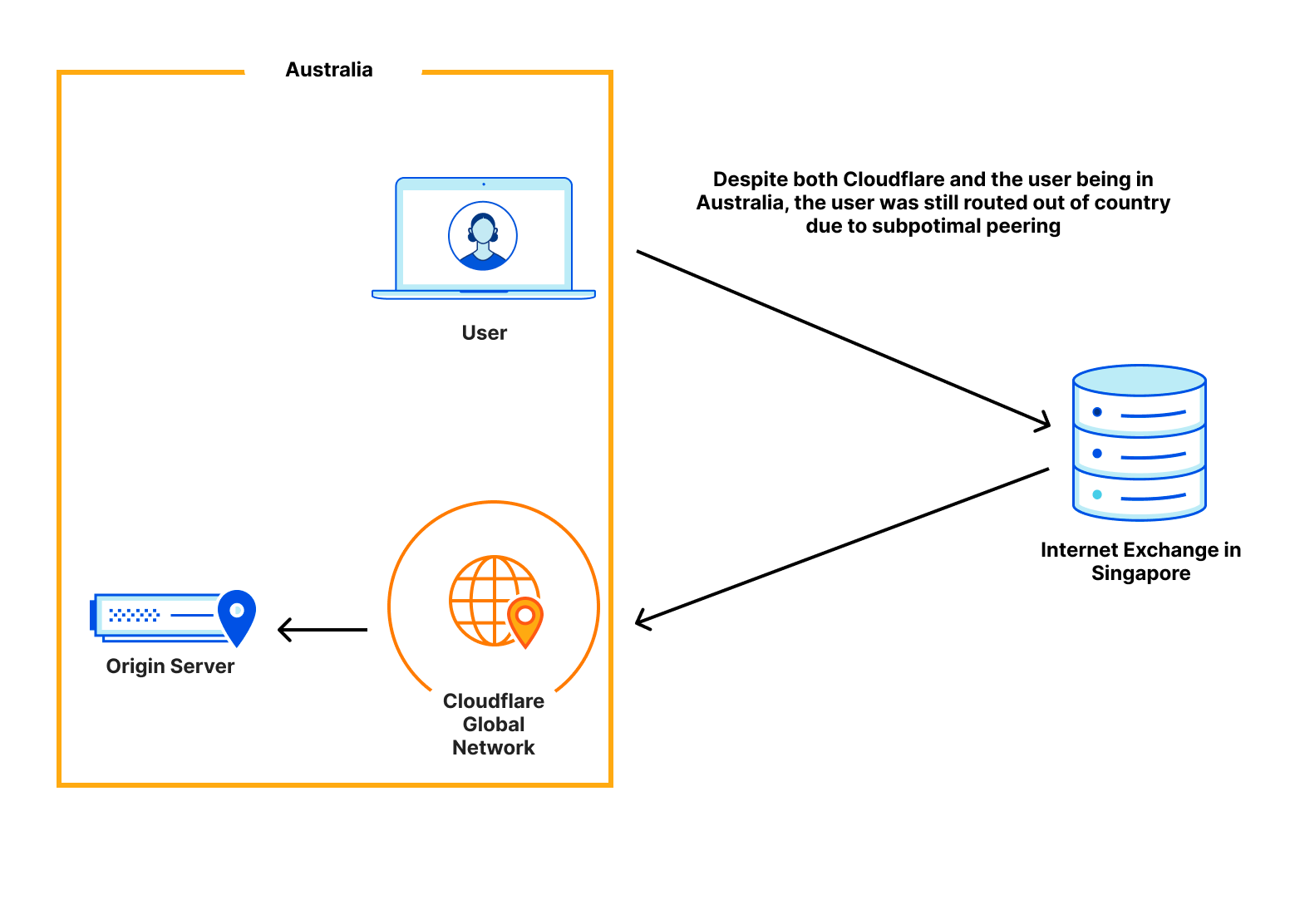
Next, we turn to a network that had poor performance in Australia. Users for that network were going all the way out of the country before going to Cloudflare. This created what is called a network hairpin. A network hairpin is caused by suboptimal connectivity in certain locations, which can cause users to traverse a network path that takes longer than it should. This hairpin effect made Cloudflare one of the slower providers for this network in Australia.
To fix this, Cloudflare set up peering with this network in Sydney, and this allowed traffic from this network to go to Cloudflare within the country the network was based in. This reduced our connection time from 65ms to 45ms, catapulting us to be the #1 provider for this network in the region.
Update on Full Stack Week
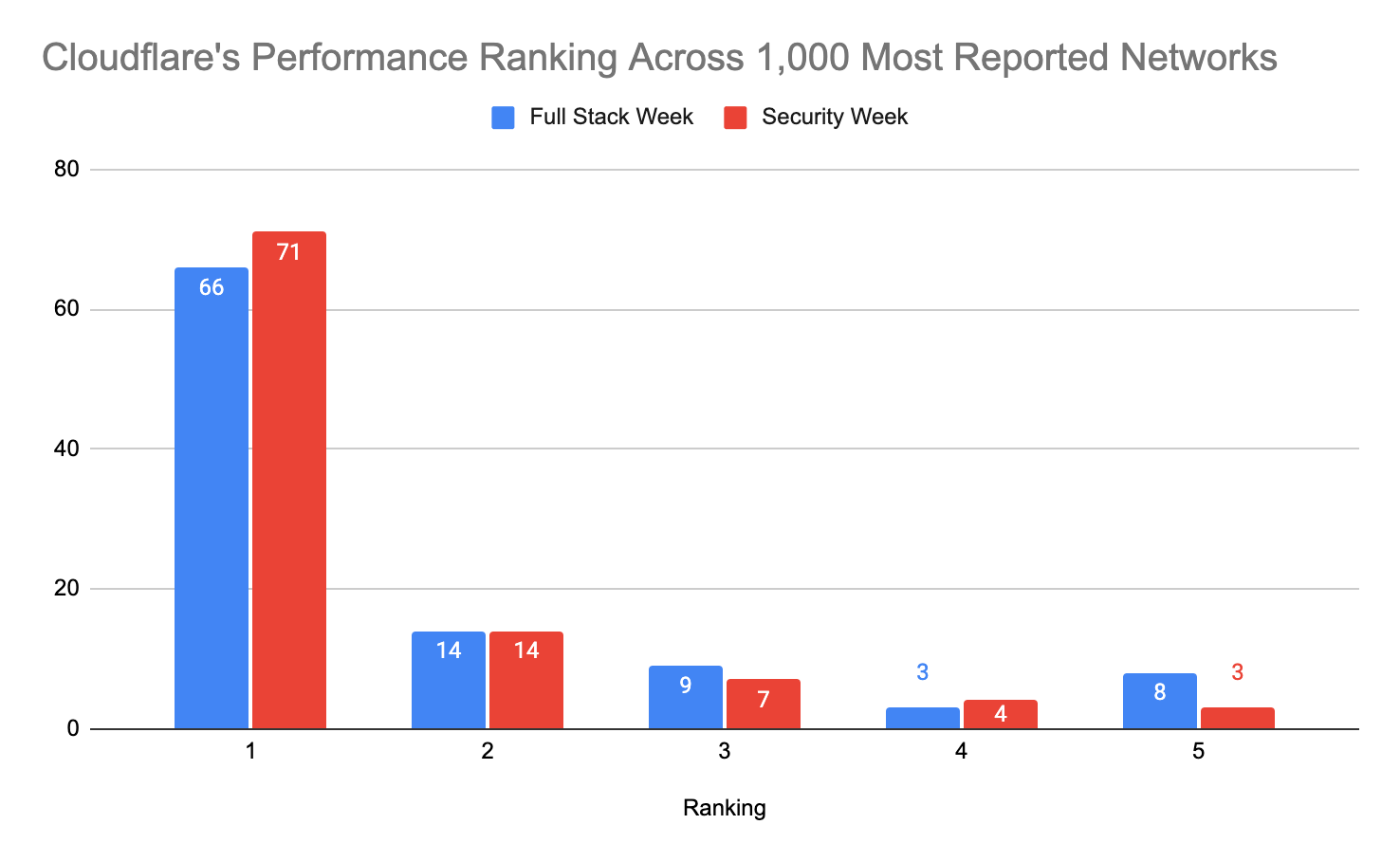
All of this work and more has helped us optimize our network even further. At Full Stack Week, we announced that we were faster in more of the most reported networks than our competitors. Out of the top 1,000 networks in the world (by number of IPv4 addresses advertised), here’s a breakdown of how many providers are number 1 in p95 TCP Connection Time, which represents the time it takes for a user to connect to the provider. This data is from Full Stack Week (November 2021):
As of Security Week, we improved our position to be faster in 19 new networks:
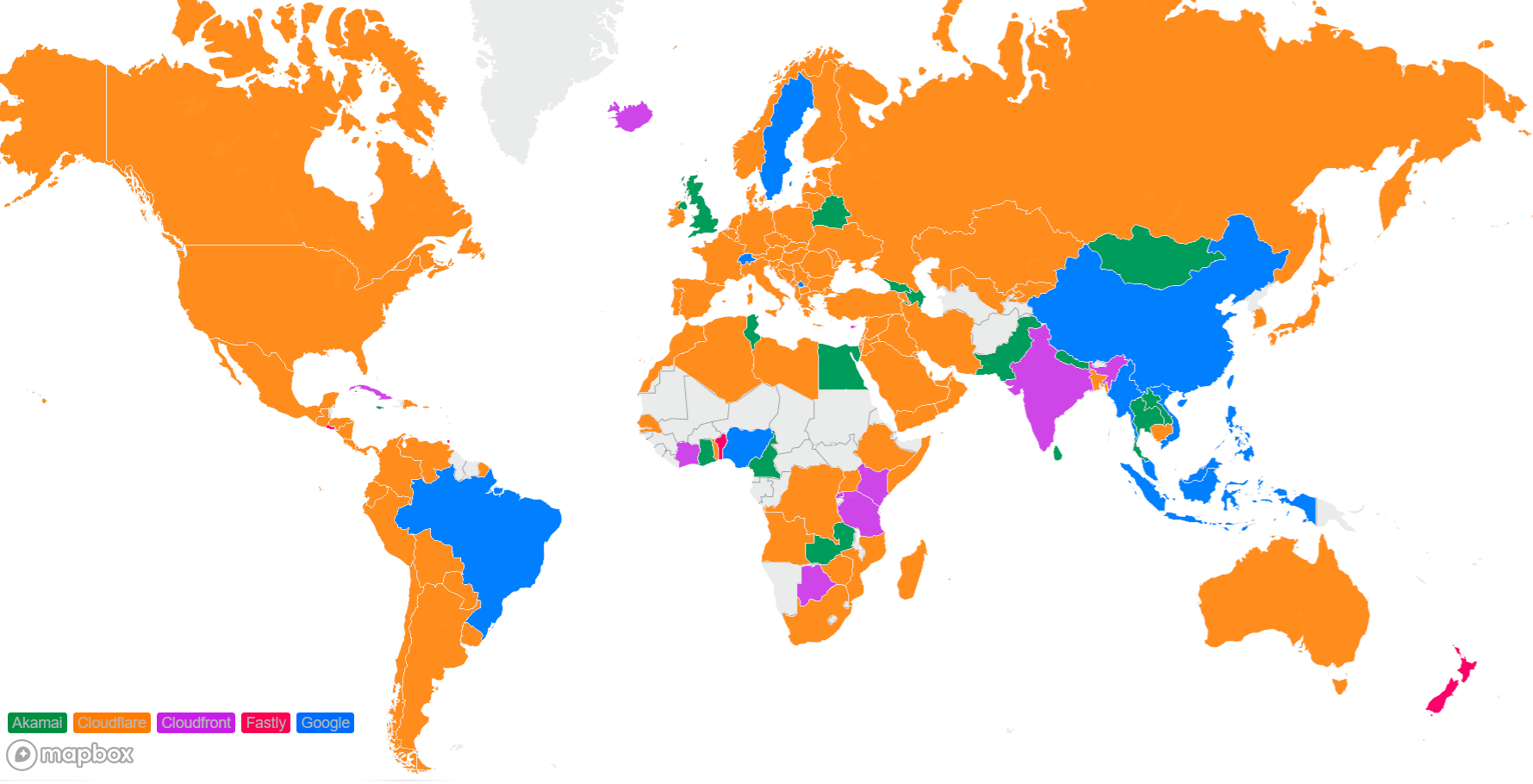
Cloudflare is also committed to being the fastest provider in every country. This is a world map using the data that was to show the countries with the fastest network provider during Full Stack Week (November 2021):
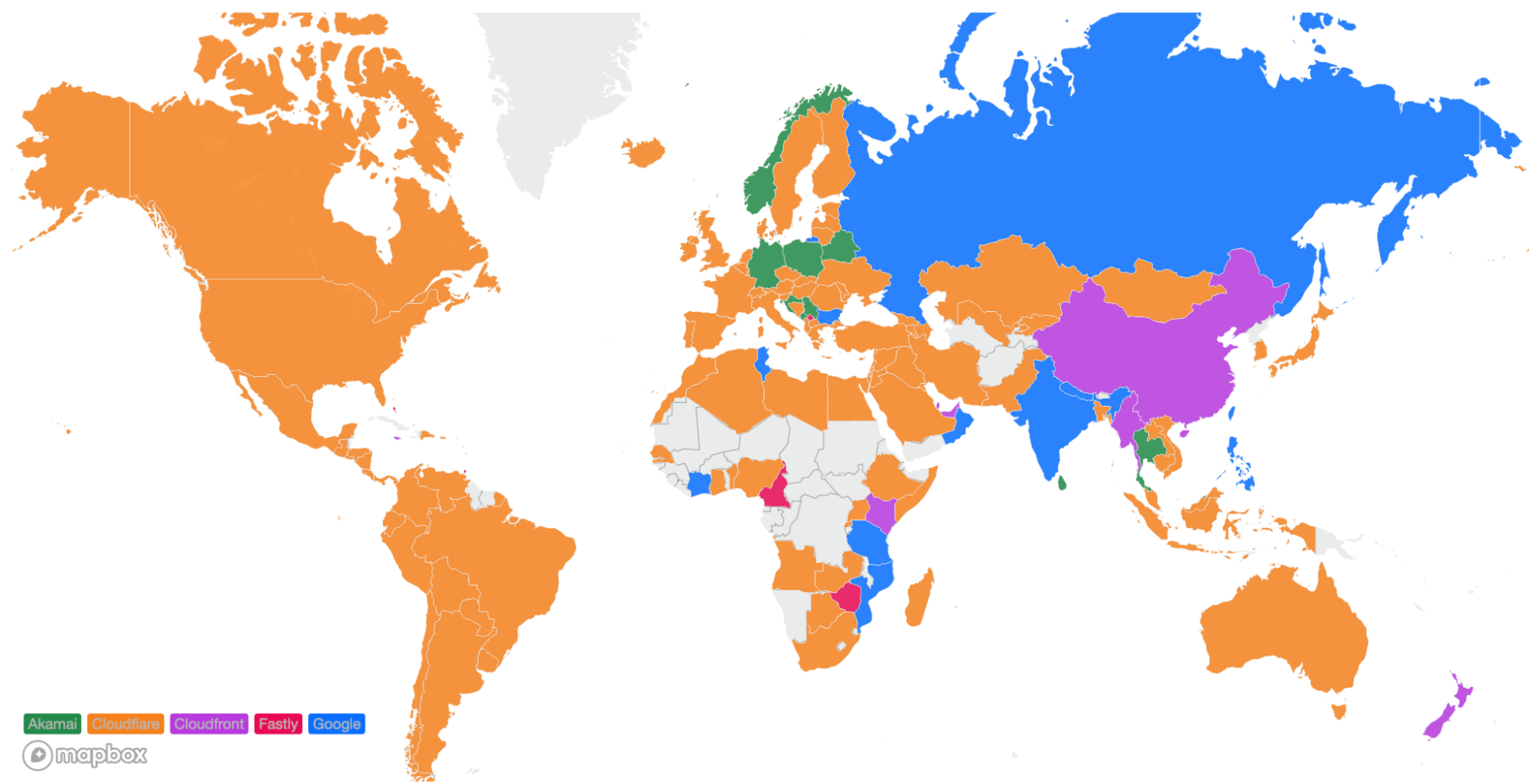
Here’s how the map of the world looks during Security Week (March 2022):
We moved to number 1 in all of South America, more countries in Africa, the UK, Sweden, Iceland, and also more countries in the Asia Pacific region.
A fast network means fast security products
Cloudflare’s commitment to building the fastest network allows us to deliver unparalleled performance for all applications, including our security applications. There’s an adage in the industry that you have to sacrifice performance for security, but Cloudflare believes that you should be able to have your security and performance without having to sacrifice either. We’ve unveiled a ton of awesome new products and features for Security Week and all of them are built on top of our lightning-fast network. That means that all of these products will continue to get faster as we relentlessly pursue our goal of being the fastest network everywhere.
Developers, bloggers, business owners, and large corporations all rely on Cloudflare to keep their applications secure, available, and performant.
To meet these goals, over the last twelve years we have built a smart network capable of protecting many millions of Internet properties. As of March 2022, W3Techs reports that:
“Cloudflare is used by 80.6% of all the websites whose reverse proxy service we know. This is 19.7% of all websites”
Netcraft, another provider who crawls the web and monitors adoption puts this figure at more than 20M active sites in their latest Web Server Survey (February 2022):
“Cloudflare continues to make strong gains amongst the million busiest websites, where it saw the only notable increases, with an additional 3,200 sites helping to bring its market share up to 19.4%”
The breadth and diversity of the sites we protect, and the billions of browsers and devices that interact with them, gives us unique insight into the ever-changing application security trends on the Internet. In this post, we share some of those insights we’ve gathered from the 32 million HTTP requests/second that pass through our network.
Definitions
Before we examine the data, it is useful to define the terminology we use. Throughout this post, we will refer to the following terms:
Mitigated Traffic: any eyeball HTTP* request that had a “terminating” action applied to by the Cloudflare platform. These include actions such as BLOCK, CHALLENGE (such as captchas or JavaScript based challenges). This does not include requests that had the following actions applied: LOG, SKIP, ALLOW.
Bot Traffic/Automated Traffic: any HTTP request identified by Cloudflare’s Bot Management system as being generated by a bot. This includes requests scored between 1 and 29.
API Traffic: any HTTP request with a response content type of XML, JSON, gRPC, or similar. Where the response content type is not available, such as for mitigated requests, the equivalent Accept content type (specified by the user agent) is used instead. In this latter case API traffic won’t be fully accounted for, but for insight purposes it still provides a good representation.
Unless otherwise stated, the time frame evaluated in this post is the three-month period from December 1, 2021, to March 1, 2022.
Finally, please note that the data is calculated based only on traffic observed across the Cloudflare network and does not necessarily represent overall HTTP traffic patterns across the Internet.
*When referring to HTTP traffic we mean both HTTP and HTTPS.
Global Traffic Insights
The first thing we can look at is traffic mitigated across all HTTP requests proxied by the Cloudflare network. This will give us a good baseline view before drilling into specific traffic types, such as bot and API traffic.
8% of all Cloudflare HTTP traffic is mitigated
Cloudflare proxies ~32 million HTTP requests per second on average, with more than ~44 million HTTP requests per second at peak. Overall, ~2.5 million requests per second are mitigated by our global network and never reach our caches or the origin servers, ensuring our customers’ bandwidth and compute power is only used for clean traffic.
Site owners using Cloudflare gain access to tools to mitigate unwanted or malicious traffic and allow access to their applications only when a request is deemed clean. This can be done both using fully managed features, such as our DDoS mitigation, WAF managed ruleset or schema validation, as well as custom rules that allow users to define their own filters for blocking traffic.
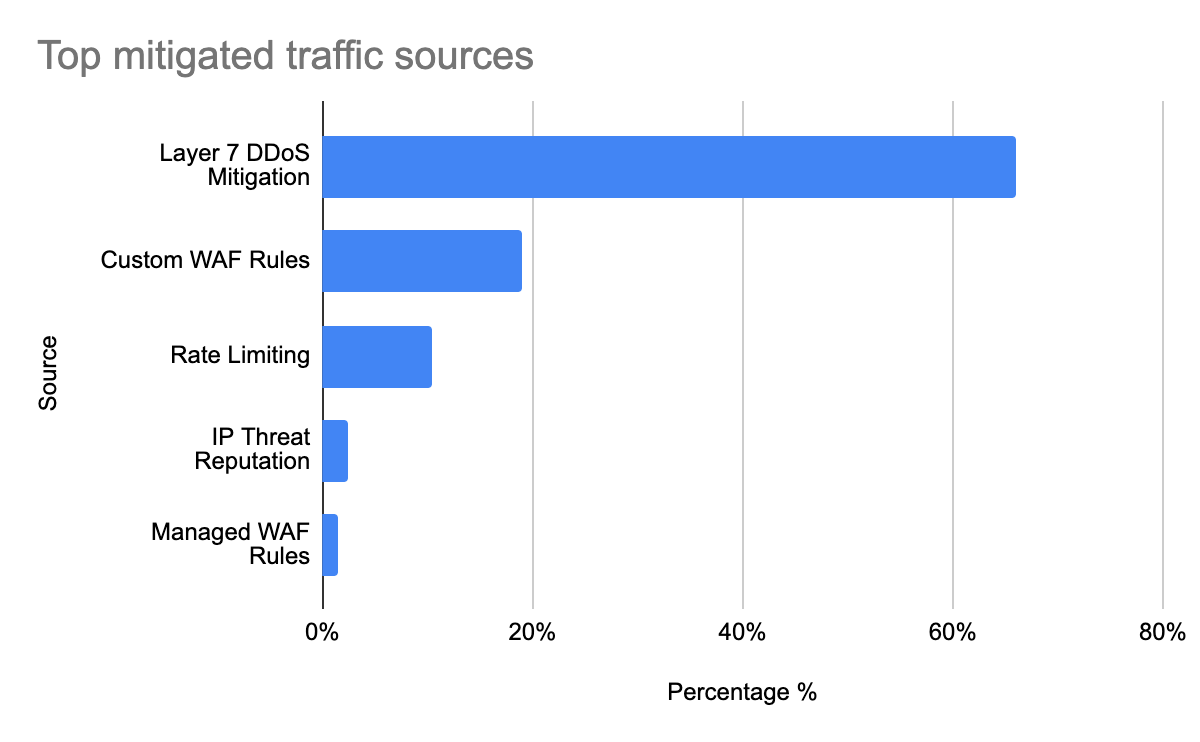
If we look at the top five Cloudflare features (sources) that mitigated traffic, we get a clear picture of how much each Cloudflare feature is contributing towards helping keep customer sites and applications online and secure:
Tabular format for reference:
Source
Percentage %
Layer 7 DDoS mitigation
66.0%
Custom WAF Rules
19.0%
Rate Limiting
10.5%
IP Threat Reputation
2.5%
Managed WAF Rules
1.5%
Looking at each mitigation source individually:
Layer 7 DDoS mitigation, perhaps unsurprisingly,is the largest contributor to mitigated HTTP requests by total count (66% overall). Cloudflare’s layer 7 DDoS rules are fully managed and don’t require user configuration: they automatically detect a vast array of HTTP DDoS attacks including those generated by the Meris botnet, Mirai botnet, known attack tools, and others. Volumetric DDoS attacks, by definition, create a lot of malicious traffic!
Custom WAF Rules contribute to more than 19% of mitigated HTTP traffic. These are user-configured rules defined using Cloudflare’s wirefilter syntax. We explore common rule patterns further down in this post.
Our Rate Limiting feature allows customers to define custom thresholds based on application preferences. It is often used as an additional layer of protection for applications against traffic patterns that are too low to be detected as a DDoS attack. Over the time frame analyzed, rate limiting contributed to 10.5% of mitigated HTTP requests.
IP Threat Reputation is exposed in the Cloudflare dashboard as Security Level. Based on behavior we observe across the network, Cloudflare automatically assigns a threat score to each IP address. When the threat score is above the specified threshold, we challenge the traffic. This accounts for 2.5% of all mitigated HTTP requests.
Our Managed WAF Rules are rules that are handcrafted by our internal security analyst team aimed at matching only against valid malicious payloads. They contribute to about 1.5% of all mitigated requests.
HTTP anomalies are the most common attack vector
If we drill into Managed WAF Rules, we get a clear picture of what type of attack vectors malicious users are attempting against the Internet properties we protect.
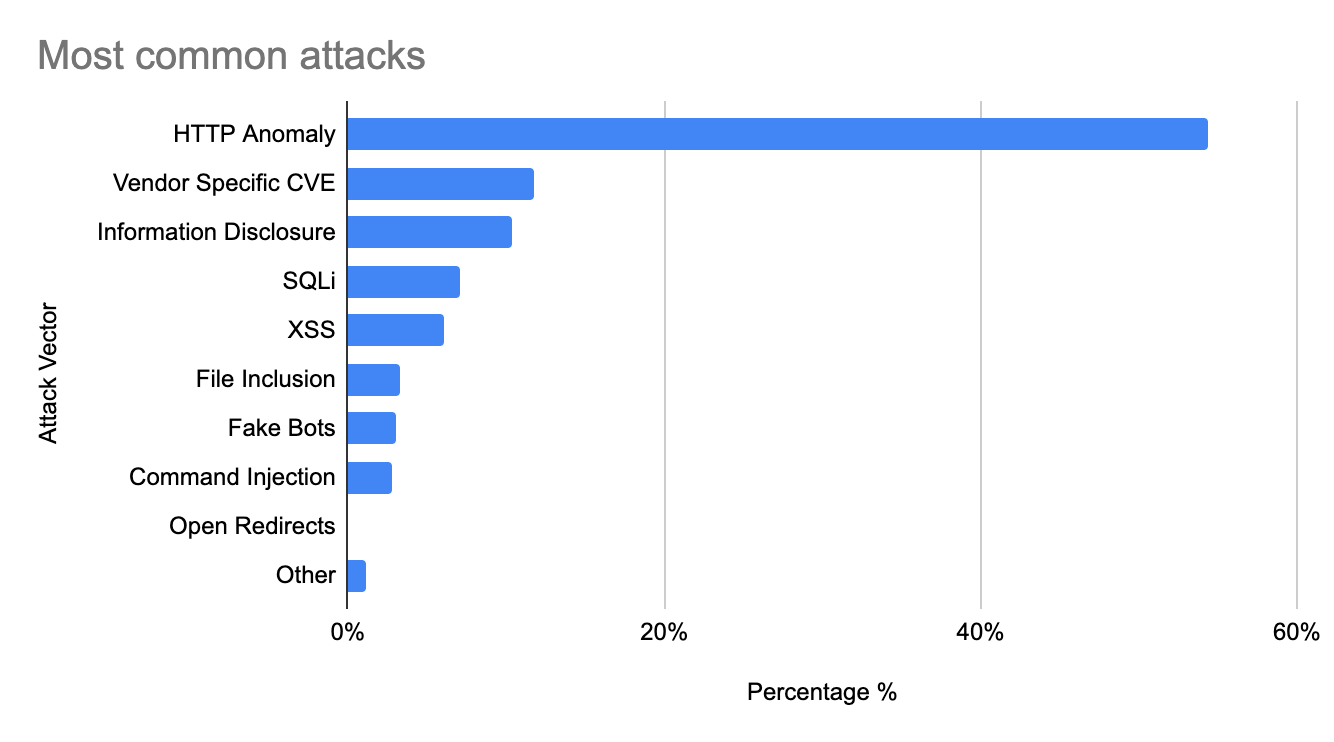
The vast majority (over 54%) of HTTP requests blocked by our Managed WAF Rules contain HTTP anomalies, such as malformed method names, null byte characters in headers, non-standard ports or content length of zero with a POST request.
Common attack types in this category are shown below. These have been grouped when relevant:
Rule Type
Description
Missing User Agent
These rules will block any request without a User-Agent header. All browsers and legitimate crawlers present this header when connecting to a site. Not having a user agent is a common signal of a malicious request.
Not GET, POST or HEAD Method
Most applications only allow standard GET or POST requests (normally used for viewing pages or submitting forms). HEAD requests are also often sent from browsers for security purposes. Customers using our Managed Rules can easily block any other method – which normally results in blocking a large number of vulnerability scanners.
Missing Referer
When users navigate applications, browsers use the Referer header to indicate where they are coming from. Some applications expect this header to always be present.
Non-standard port
Customers can configure Cloudflare Managed Rules to block HTTP requests trying to access non-standard ports (such as 80 and 443). This is activity normally seen by vulnerability scanners.
Invalid UTF-8 encoding
It is common for attackers to attempt to break an application server by sending “special” characters that are not valid in UTF-8 encoding.
More commonly known and referenced attack vectors such as XSS and SQLi only contribute to about 13% of total mitigated requests. More interestingly, attacks aimed at information disclosure are third most popular (10%) and software-specific CVE-based attacks account for about 12% of mitigated requests (more than SQLi alone) highlighting both the importance of needing to patch software quickly, and the likelihood of CVE proof-of-concepts (PoCs) being used to compromise applications, such as with the recent Log4J vulnerability. The top 10 attack vectors by percentage of mitigated requests are shown below:
Tabular format for reference:
Source
Percentage %
HTTP Anomaly
54.5%
Vendor Specific CVE
11.8%
Information Disclosure
10.4%
SQLi
7.0%
XSS
6.1%
File Inclusion
3.3%
Fake Bots
3.0%
Command Injection
2.7%
Open Redirects
0.1%
Other
1.5%
Businesses still rely on IP address-based access lists to protect their assets
In the prior section, we noted that 19% of mitigated requests come from Custom WAF Rules. These are rules that Cloudflare customers have implemented using the wirefilter syntax. At time of writing, Cloudflare customers had a total of ~6.5 million Custom WAF rules deployed.
It is interesting to look at what rule fields customers are using to identify malicious traffic, as this helps us focus our efforts on what other fully automated mitigations could be implemented to improve the Cloudflare platform.
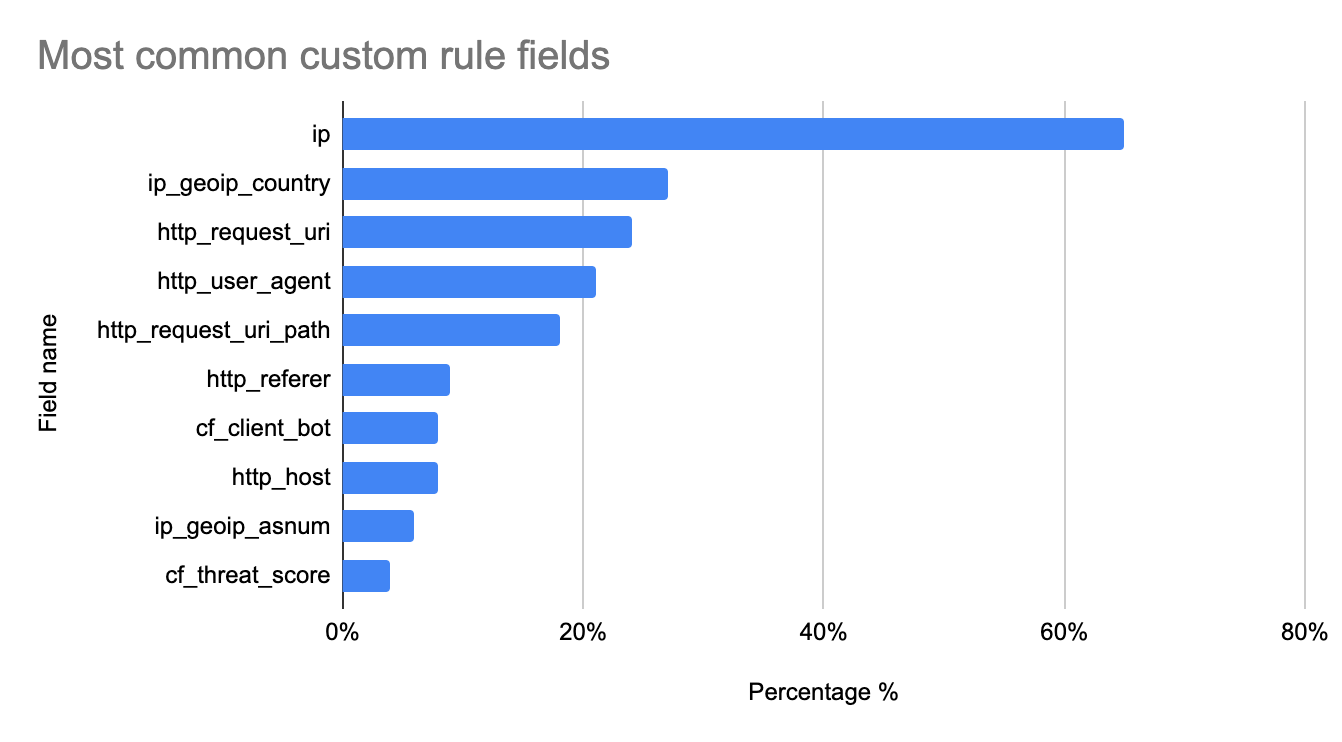
The most common field, found in approximately 64% of all custom rules, remains the source IP address or fields easily derived from the IP address, such as the client country location. Note that IP addresses are becoming less useful signals for security policies, but they are often the quickest and simplest type of filter to implement during an attack. Customers are also starting to adopt better approaches such as those offered in our Zero Trust portfolio to further reduce reliance on IP address-based fields.
The top 10 fields are shown below:
Tabular format for reference:
Field name
Used in % of rules
ip
64.9%
ip_geoip_country
27.3%
http_request_uri
24.1%
http_user_agent
21.8%
http_request_uri_path
17.8%
http_referer
8.6%
cf_client_bot
8.3%
http_host
7.8%
ip_geoip_asnum
5.8%
cf_threat_score
4.4%
Beyond IP addresses, standard HTTP request fields (URI, User-Agent, Path, Referer) tend to be the most popular. Note, also, that across the entire rule corpus, the average rule combines at least three independent fields.
Bot Traffic Insights
Cloudflare has long offered a Bot Management solution to allow customers to gain insights into the automated traffic that might be accessing their application. Using Bot Management classification data, we can perform a deep dive into the world of bots.
38% of HTTP traffic is automated
Over the time period analyzed, bot traffic accounted for about 38% of all HTTP requests. This traffic includes bot traffic from hundreds of Verified Bots tracked by Cloudflare, as well as any request that received a bot score below 30, indicating a high likelihood that it is automated.
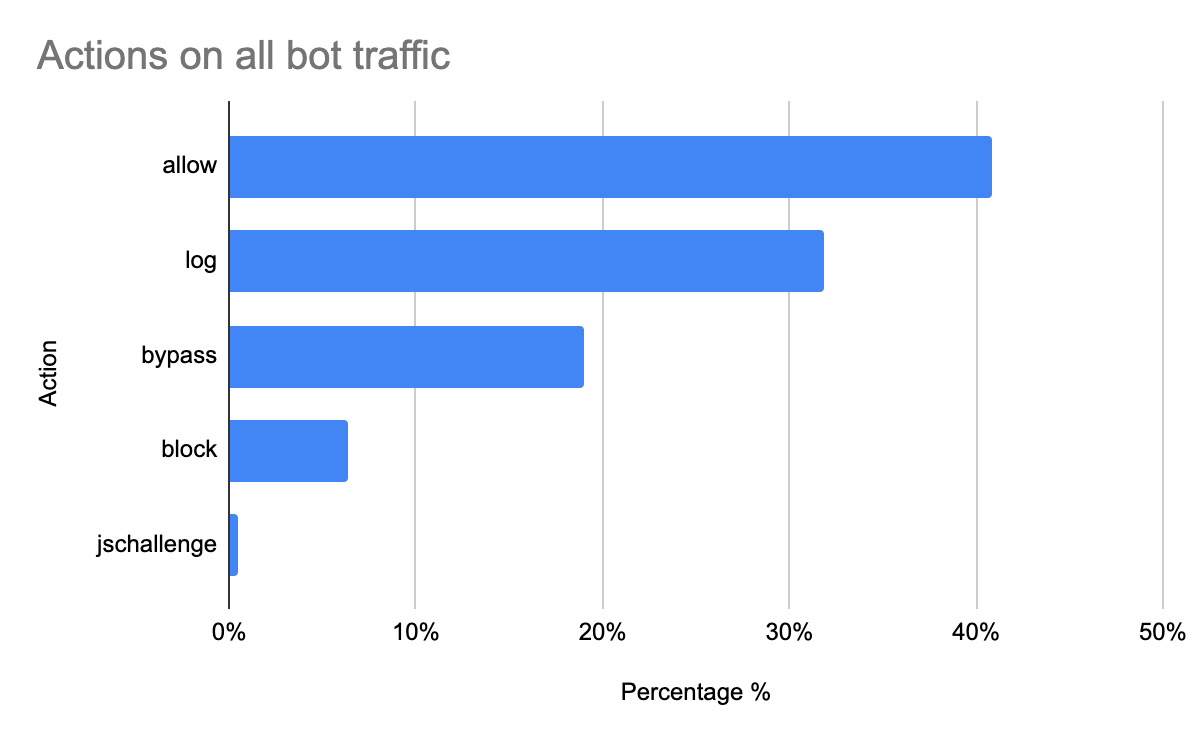
Overall, when bot traffic matches a security configuration, customers allow 41% of bot traffic to pass to their origins, blocking only 6.4% of automated requests. Remember that this includes traffic coming from Verified Bots like GoogleBot, which ultimately benefits site owners and end users. It’s a reminder that automation in and of itself is not necessarily detrimental to a site. This is why we segment Verified Bot traffic, and why we give customers a granular bot score, rather than a binary “bot or not bot” indicator. Website operators want the flexibility to be precise with their response to different types of bot traffic, and we can see that they do in fact use this flexibility. Note that our self-serve customers can also decide how to handle bot traffic using our Super Bot Fight Mode feature.
Tabular data for reference:
Action on all bot traffic
Percentage %
allow
40.9%
log
31.9%
bypass
19.0%
block
6.4%
jschallenge
0.5%
More than a third of non-verified bot HTTP traffic is mitigated
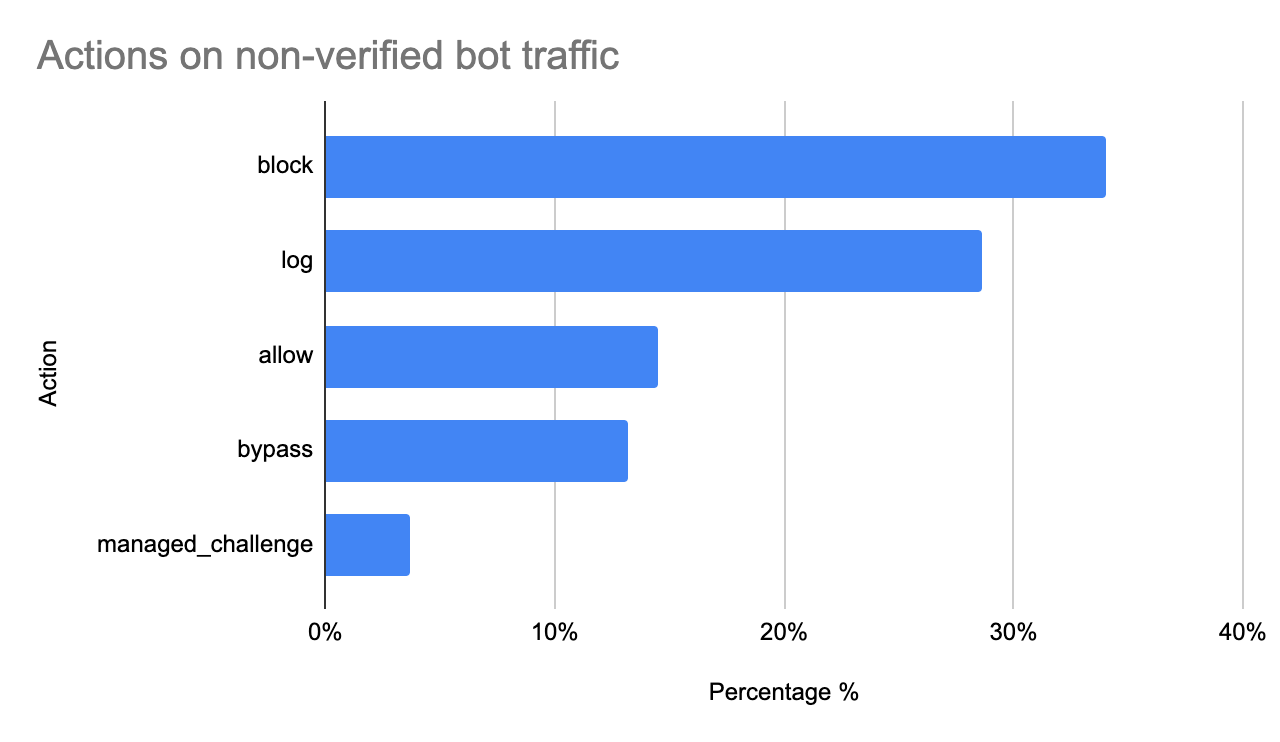
31% of all bot traffic observed by Cloudflare is not verified, and comes from thousands of custom-built automated tools like scanners, crawlers, and bots built by hackers. As noted above, automation does not necessarily mean these bots are performing malicious actions. If we look at customer responses to identified bot traffic, we find that 38.5% of HTTP requests from non-verified bots are mitigated. This is obviously a much more defensive configuration compared to overall bot traffic actions shown above:
Tabular data for reference:
Action on non-verified bot traffic
Percentage %
block
34.0%
log
28.6%
allow
14.5%
bypass
13.2%
managed_challenge
3.7%
You’ll notice that almost 30% of customers log traffic rather than take immediate action. We find that many enterprise customers choose to not immediately block bot traffic, so they don’t give a feedback signal to attackers. Rather, they prefer to tag and monitor this traffic, and either drop at a later time or redirect to alternate content. As targeted attack vectors have evolved, responses to those attacks have had to evolve and become more sophisticated as well. Additionally, nearly 3% of non-verified bot traffic is automatically mitigated by our DDoS protection (connection_close). These requests tend to be part of botnets used to attack customer applications.
API Traffic Insights
Many applications built on the Internet today are not meant to be consumed by humans. Rather, they are intended for computer-to-computer communication. The common way to expose an application for this purpose is to build an Application Programming Interface (API) that can be accessed using HTTP.
Due to the underlying format of the data in transit, API traffic tends to be a lot more structured than standard web applications, causing all sorts of problems from a security standpoint. First, the structured data often causes Web Application Firewalls (WAFs) to generate a large number of false positives. Secondly, due to the nature of APIs, they often go unnoticed, and many companies end up exposing old and unmaintained APIs without knowing, often referred to as “shadow APIs”.
Below, we look at some differences in API trends compared to the global traffic insights shown above.
10% of API traffic is mitigated at the edge
A good portion of bot traffic is accessing API endpoints, and as discussed previously, API traffic is the fastest growing traffic type on the Cloudflare network, currently accounting for 55% of total requests.
API endpoints globally receive more malicious requests compared to standard web applications (10% vs 8%) potentially indicating that attackers are focusing more on APIs for their attack surface as opposed to standard web apps.
Our DDoS mitigation is still the top source of mitigated events for API endpoints, accounting for just over 63% of the total mitigated requests. More interestingly, Custom WAF rules account for 35% compared to 19% when looking at global traffic. Customers have, to date, been heavily using WAF Custom Rules to lock down and validate traffic to API endpoints, although we expect our API Gateway schema validation feature to soon surpass Custom WAF Rules in terms of mitigated traffic.
SQLi is the most common attack vector on API endpoints
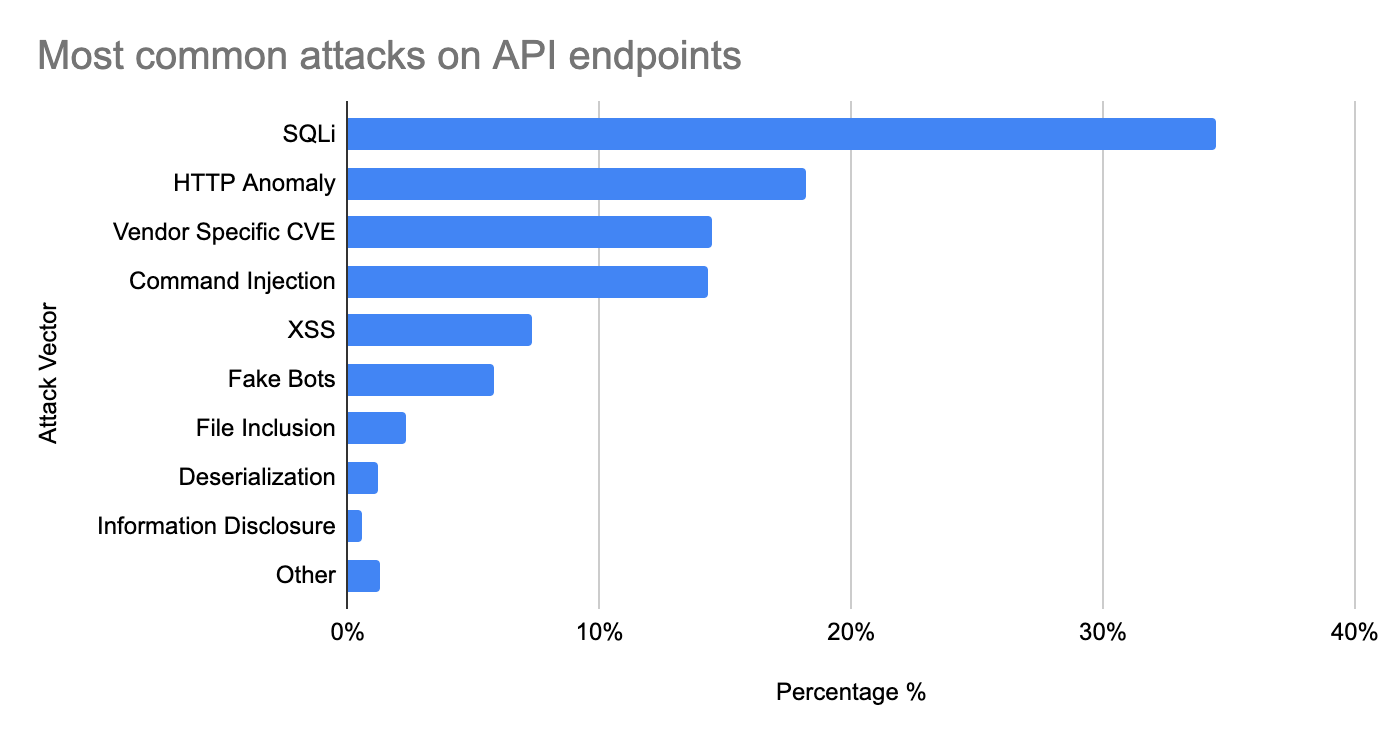
If we look at our WAF Managed Rules mitigations on API traffic only, we see notable differences compared to global trends. These differences include much more equal distribution across different types of attacks, but more noticeably, SQL injection attacks in the top spot.
Command Injection attacks are also much more prominent (14.3%), and vectors such as Deserialization make an appearance, contributing to more than 1% of the total mitigated requests.
Tabular data for reference:
Source
Percentage %
SQLi
34.5%
HTTP Anomaly
18.2%
Vendor Specific CVE
14.5%
Command Injection
14.3%
XSS
7.3%
Fake Bots
5.8%
File Inclusion
2.3%
Deserialization
1.2%
Information Disclosure
0.6%
Other
1.3%
Looking ahead
In this post we shared some initial insights around Internet application security trends based on traffic to Cloudflare’s network. Of course, we have only just scratched the surface. Moving forward, we plan to publish quarterly reports with dynamic filters directly on Cloudflare Radar and provide much deeper insights and investigations.
When a new security threat arises — a publicly exploited vulnerability (like log4j) or the shift from corporate-controlled environments to remote work or a potential threat actor — it is the Security team’s job to respond to protect Cloudflare’s network, customers, and employees. And as security threats evolve, so should our defense system. Cloudflare is committed to bolstering our security posture with best-in-class solutions — which is why we often turn to our own products as any other Cloudflare customer would.
We’ve written about using Cloudflare Access to replace our VPN, Purpose Justification to create granular access controls, and Magic + Gateway to prevent lateral movement from in-house. We experience the same security needs, wants, and concerns as security teams at enterprises worldwide, so we rely on the same solutions as the Fortune 500 companies that trust Cloudflare for improved security, performance, and speed. Using our own products is embedded in our team’s culture.
Security Challenges, Cloudflare Solutions
We’ve built the muscle to think Cloudflare-first when we encounter a security threat. In fact, many security problems we encounter have a Cloudflare solution.
Problem: Remote work creates a security blind spot of remote devices and networks.
Solution: Deploying Cloudflare Gateway and WARP to shield users and devices from threats, no matter their device or network connection.
Our Detection & Response team has regained visibility into security threats by connecting corporate devices to Gateway through our Cloudflare WARP application. These Zero Trust products shield users and devices from security threats like malware, phishing, shadow IT and more, as well as enable our Security team to instantly block threats and prevent sensitive data from leaving our organization — with no performance impact for our employees, no matter their location.
Problem: Larger company footprint (in size and location) increases the complexity of internal tooling.
Solution: Deploying Cloudflare Access and Purpose Justification to give network administrators granular and contextual application access controls.
Our Identity and Access Management team uses Access to create policies that minimize data access, ensuring that our employees only have access to what they need. Flexibility and instantaneous application of policies allow for ease of scalability as our internal tooling and teams evolve. With Purpose Justification Capture, employees must also justify their use case for visiting domains with particularly sensitive data — which not only solves an internal need for Cloudflare, but helps our customers meet data policy requirements (like GDPR).
Problem: Engineering and Product teams move at a rapid pace. Conducting a manual review of every pull request is not scalable.
Solution: A tool built on top of Workers that enables scanning of PRs for security bugs.
Our Product Security Engineering team uses Cloudflare’s development platform Workers to seamlessly deploy a code review assist framework to flag secrets, vulnerability dependencies, and binary security flags. The flexibility of Workers enables the Security team to evolve the tool depending on security concerns and scale it to the hundreds of PRs the company generates per week.
These are just some of the ways the Security team has used Cloudflare’s products to block malicious domains, streamline access management, provide visibility into threats, and harden our overall security posture. To give a sense of how we think about these challenges technically, we will dive into the implementation of a use of Cloudflare to secure Cloudflare.
Phish-proof websites using Cloudflare Access
Two-factor authentication is one of the most important security controls that can be implemented. Not all second factors provide the same level of security though. Time-based One-time password (TOTP) apps like Google Authenticator are a strong second factor, but are vulnerable to phishing via man-in-the-middle attacks. A successful phishing attack on an employee with privileged access is a terrifying thought, and it is a risk we wanted to completely eliminate.
FIDO2 was developed to provide simple UX and complete protection against phishing attacks. We decided to fully embrace FIDO2 supported security keys in all contexts, but FIDO2 support is not yet ubiquitous and there are many challenging compatibility issues. Cloudflare Access allowed us to enforce that FIDO2 was the only second factor that can be used when reaching systems protected by Cloudflare Access.
In order to manage our Cloudflare Access policies we check each one into source control as terraform code. Group based access control is enforced for our applications.
resource "cloudflare_access_policy" "prod_cloudflare_users" {
  application_id = cloudflare_access_application.prod_sandbox_access_application.id
  zone_id        = cloudflare_zone.prod_sandbox.id
  name           = "Allow "
  decision       = "allow"

  include {
    email_domain = ["cloudflare.com"]
    okta {
      # Require membership in Sandbox group
      name                 = ["ACL-ACCESS-sandbox"]
      identity_provider_id = cloudflare_access_identity_provider.okta_prod.id
    }
  }

  # Require a security key
  require {
    auth_method = "swk"
  }
}
The require section enforces that Cloudflare employees are using their FIDO2 supported security keys to access all of our internal and external applications that are protected by Access. More deeply described in RFC8176, auth_method is enforcing specific values are returned during the login flow from our OIDC provider within the amr field. The enforced swk is “Proof of possession of a software-secured key” which corresponds to logins using a security key.
The ability to enforce the use of security keys when accessing internal sites caused a massive improvement in our security posture. Prior to implementing this change, for many of our internal services we allowed both soft tokens like TOTP with Google Authenticator, along with WebAuthn because of a small number of systems that still didn’t support FIDO2. You’ll see that our use of soft tokens dropped to near zero after enforcing this change.
A Continued Practice
Not only does the Security team deploy Cloudflare’s products, but we test them first too. We work directly with Product to “dog food” our own products first. It’s our mission to help build a better Internet — and that means testing our products and collecting valuable feedback from our internal teams before every launch. As the number one consumer of Cloudflare’s products, the Security team is not only helping keep the company safer, but also contributing to build better products for our customers.
To learn more about examples and technical implementation of our use of Cloudflare products at Cloudflare, please check out this recent Cloudflare TV segment on Securing Cloudflare with Cloudflare.
And for more information on the products mentioned in this document, reach out to our Sales team to find out how we can help you secure your business, teams, and users.
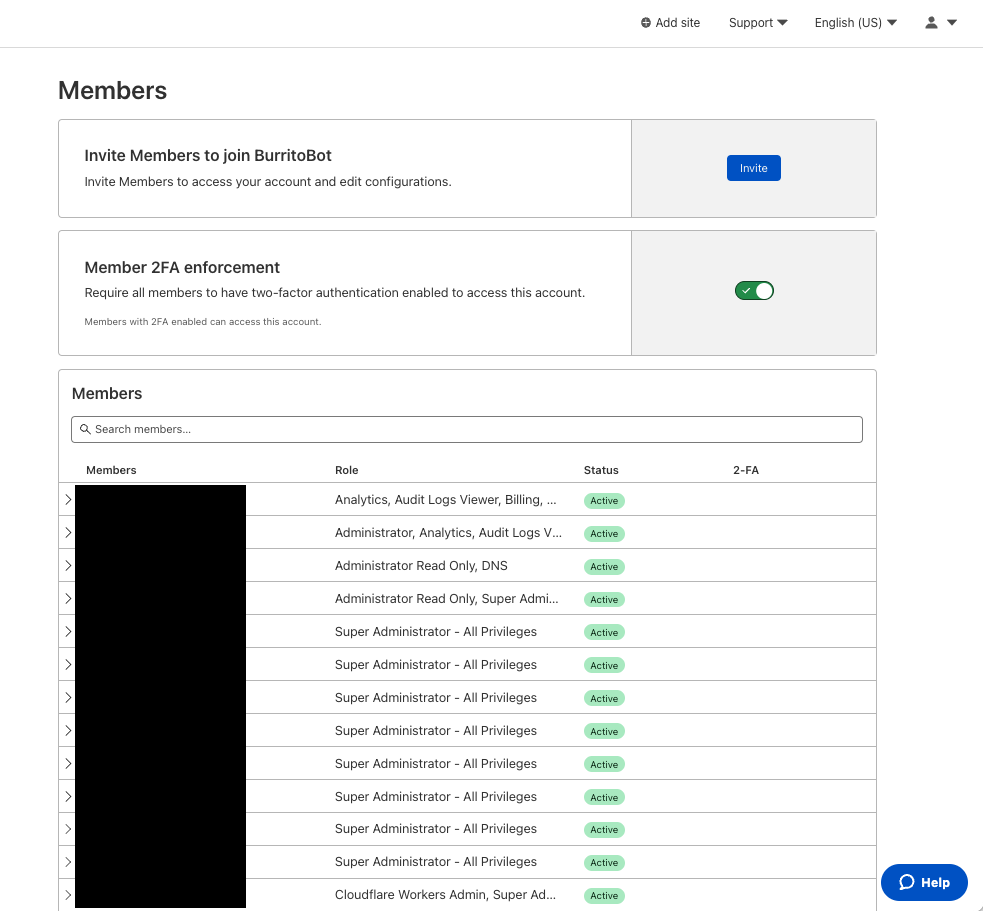
Today, Cloudflare is making it easier for enterprise account owners to manage their team’s access to Cloudflare by allowing user access to be scoped to sets of domains. Ensuring users have exactly the access they need and no more is critical, and Domain Scoped Roles provide a significant step forward. Additionally, with the introduction of Domain Groups, account owners can grant users access to domains by group instead of individually. Domains can be added or removed from these groups to automatically update the access of those who have access to the group. This reduces toil in managing user access.
One of the most common uses we have seen for Domain Scoped Roles is to limit access to production domains to a small set of team members, while still allowing development and pre-production domains to be open to the rest of the team. That way, someone can’t make changes to a production domain unless they are given access.
How to use Domain Scoped Roles
If you are an enterprise customer please talk with your CSM to get you and your team enrolled. Note that you must have Super Administrator privileges to be able to modify account memberships.
Once the beta has been enabled for you, here is how to start using it:
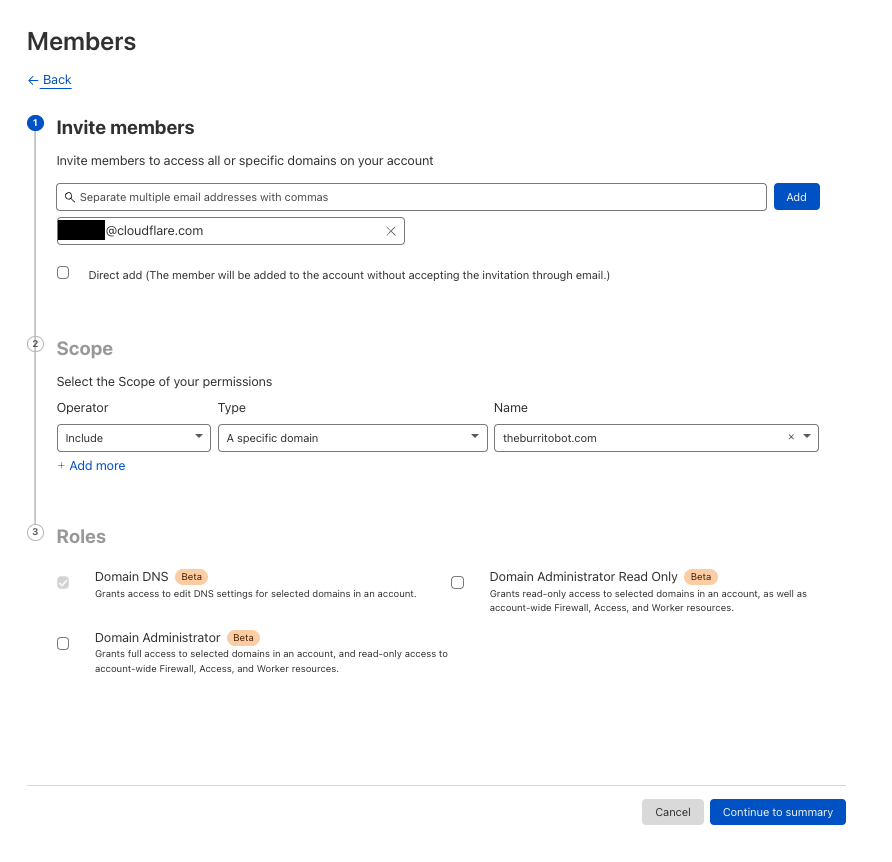
From here, you can either invite a new member with a Domain Scoped Role or modify an existing user’s permissions. In this case, we will invite a new user.
When inviting new members there are three things to provide:
Which users to invite.
The scope of which resource they will have access to:
Selecting “All Domains” will allow you to select legacy roles.
The role(s) which will decide what permissions are granted.
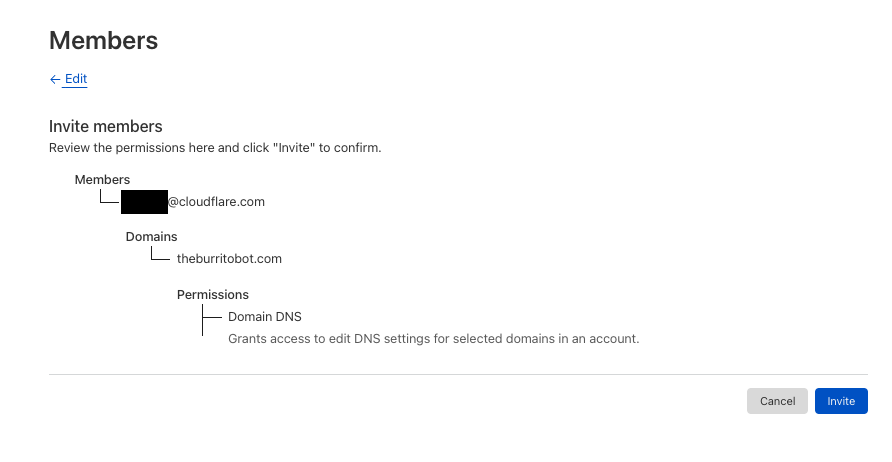
Before sending the invite, you will be able to confirm the users, scope, and roles.
Domain Groups
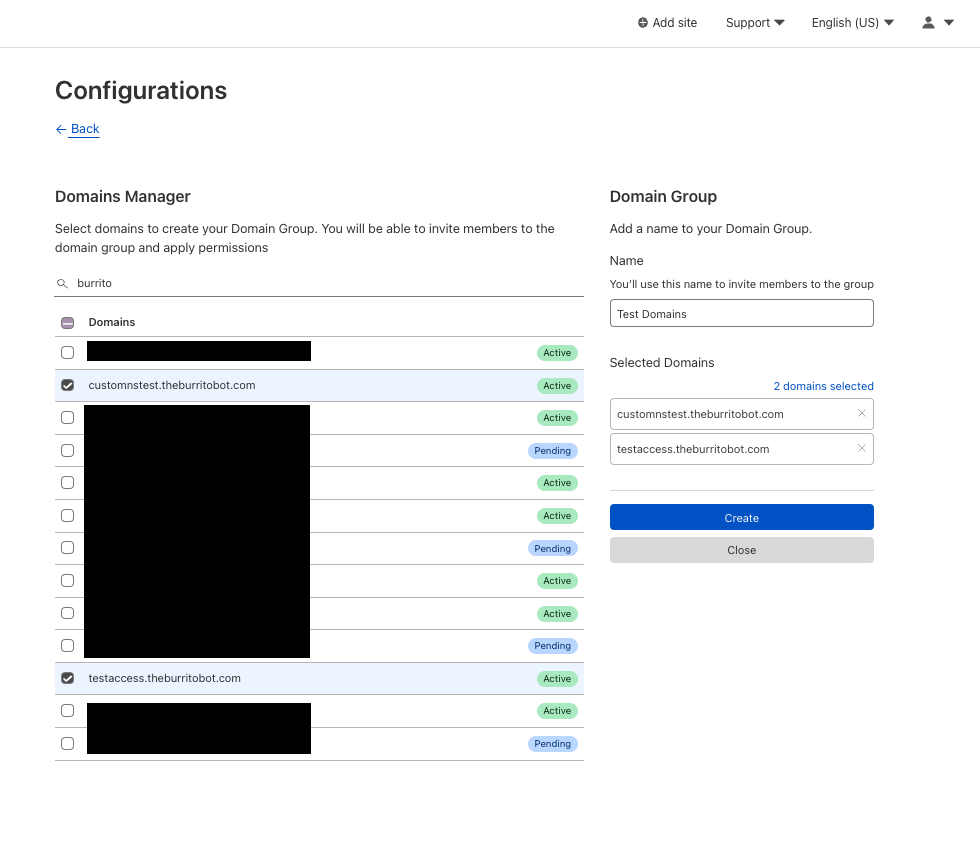
In addition to manually creating inclusion or exclusion lists per user, account owners can also create Domain Groups to allow granting one or more users to a group of domains. Domain Groups can be created from the member invite flow or directly from Account Configurations -> Lists. When creating a domain group, the user selects the domains to include and, from that point on, the group can be used when inviting a user to the account.
Domain Group Creation Screen
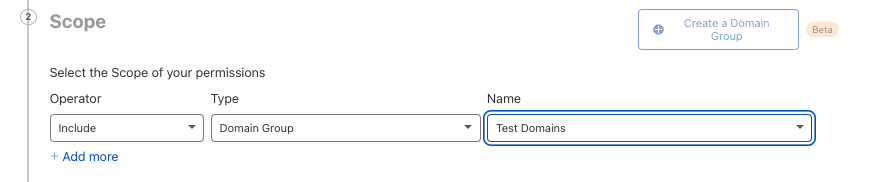
Domain Group selection during member invite
Introducing Bach
Domain Scoped Roles is possible because of a new permission system called Bach. Bach provides a policy based system for defining authorization to Cloudflare’s control plane. Authorization defines what someone can do in a system. Bach has been powering API Tokens, but going forward all authorization will use Bach. This gives customers the ability to define more granular permissions and resource scoping. Resources can be any object a user interacts with whether that be accounts, zones, worker environments, or DNS records to name a few.. Whereas before Cloudflare’s RBAC system relied on assigning a set of roles in which each role defined broad permissions that applied to an entire account, Bach’s policies allow for deeper permission grants that can be scoped to sets of resources.
Let’s take a look at the legacy system and how it compares to what Bach supports. Typically, user’s permissions are defined by the ‘roles’ that they are assigned to. These included: ‘Super Administrator’, ‘Administrator’, ‘Cloudflare for Teams’, and ‘Cloudflare Workers Admin’ to name a few. In the legacy system, each of these maps to an explicit set of simple permissions like ‘workers:read’, ‘workers:edit’ or ‘zones:edit’. When requests get made either via the Cloudflare API or the Cloudflare dashboard, Cloudflare’s API Gateway would check to see if, for the endpoint requested, an actor had the correct permissions to perform the action. In order to change a zone setting, the actor would need to have the ‘zone:edit’ permission – which could be granted from one of many roles. Below is what a user with only ‘DNS’ permissions is granted in the legacy system:
Legacy DNS User Role Permissions
Permission
Edit
Read
dns_records
✔
✔
legal
✔
account
✔
subscription
✔
zone
✔
zone_settings
✔
While straightforward, this had many drawbacks. First, this meant the inability to define limits on the resources the permissions applied to, whether that be a set of resources or attributes of resources. Second, permissions for a given ‘resource’ were simply read or edit, where edit included creating and deleting. These don’t fully capture the needs that may exist – for example, limiting deletions while allowing edits.
With Bach we have an expanded capability to define granular permissions for authorization. An example policy defining the aforementioned ‘DNS’ member’s access would look like this:
You can see a greater granularity in the permissions that are defined. In both cases, the user can perform the same actions, but the granularity means we are more explicit about what can be done. Here for DNS records (under com.cloudflare.api.account.zone.dns-record) there are explicit create, read, update, delete and list permissions. In the resource group section, we can see that the scope section defines an account. Any objects like domains in that account will match to the “*” value under ‘objects’. This means that these permissions apply throughout the entire account. Now, let’s modify this user’s permissions to be scoped to a single domain and see how the policy changes.
Bach DNS User Role with Domain Scoping Policy
(slightly modified for readability)
# Zone Scoped DNS role - scoped to 1 zone
policies:
- id: 80b25dd735b040708155c85d0ed8a508
  permission_groups:
  - id: 132c52e7e6654b999c183cfcbafd37d7
    name: Zone DNS
    meta:
      description: Grants access to edit DNS settings for zones in an account.
      editable: 'false'
      label: zone_dns_admin
      scopes: com.cloudflare.api.account.zone
    permissions:
    - key: com.cloudflare.api.account.zone.secondary-dns.*
    - key: com.cloudflare.api.account.zone.dnssec.*
    - key: com.cloudflare.api.account.zone.dns-record.*
    - key: com.cloudflare.api.account.zone.analytics.dns-report.*
    - key: com.cloudflare.api.account.zone.analytics.dns-bytime.*
    - key: com.cloudflare.api.account.zone.setting.read
    - key: com.cloudflare.api.account.zone.setting.list
    - key: com.cloudflare.api.account.zone.rate-plan.read
    - key: com.cloudflare.api.account.zone.subscription.read
    - key: com.cloudflare.api.account.zone.read
    - key: com.cloudflare.api.account.subscription.read
    - key: com.cloudflare.api.account.subscription.list
    - key: com.cloudflare.api.account.read
  resource_groups:
  - scope:
      key: com.cloudflare.api.account.a67e14daa5f8dceeb91fe5449ba496eb
      objects:
      - key: com.cloudflare.api.account.zone.b1fbb152bbde3bd28919a7f4bdca841f
  access: allow
Once we scope the user’s permissions to only include one explicit zone, we see two main differences. First, there is a large reduction in permissions. This is because we do not grant the user access to read or list many account level resources that the legacy account scoped roles grant. The only account level permissions granted are account.read, subscriptions.read, and subscriptions.list. These permissions are necessary for a user to be able to use the dashboard. When viewing the account in the dashboard the only account level product that will be shown is domains. Other products like Cloudflare Workers, Zero Trust, etc will be hidden.
Second, in the resource groups scope section, we see an explicit mention of a zone (line X: com.cloudflare.api.account.zone.b1fbb152bbde3bd28919a7f4bdca841f). This means that the zone permissions outlined in the policy only apply to that specific zone. Any attempt to access other features of that zone or to modify DNS for any other zones will be rejected by Cloudflare.
What’s next
If you are an enterprise customer and interested in getting started with Domain Scoped Roles, please contact your CSM to get enabled for the Early Access period. This announcement represents a significant milestone in our migration to Bach, an authorization system built for Coudflare’s scale. This will allow us to expand these same capabilities to more products in the future and to create an authorization system that puts customers more in control of their team’s access across all of Cloudflare’s services. Stay tuned as we are just getting started!
Whether you’re a software engineer deploying a new feature, network engineer updating routes, or a security engineer configuring a new firewall rule: You need visibility to know if your system is behaving as intended — and if it’s not, to know how to fix it.
Cloudflare is committed to helping our customers get visibility into the services they have protected behind Cloudflare. Being a single pane of glass for all network activity has always been one of Cloudflare’s goals. Today, we’re outlining the future vision for Cloudflare observability.
What is observability?
Observability means gaining visibility into the internal state of a system. It’s used to give users the tools to figure out what’s happening, where it’s happening, and why.
At Cloudflare, we believe that observability has three core components: monitoring, analytics, and forensics. Monitoring measures the health of a system – it tells you when something is going wrong. Analytics give you the tools to visualize data to identify patterns and insights. Forensics helps you answer very specific questions about an event.
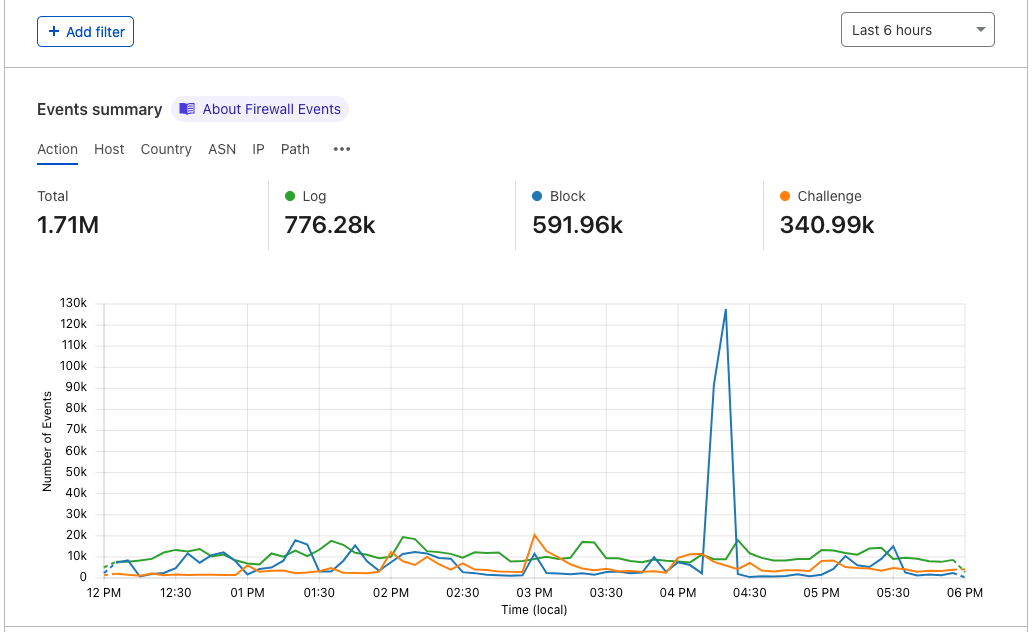
Observability becomes particularly important in the context of security to validate that any mitigating actions performed by our security products, such as Firewall or Bot Management, are not false positives. Was that request correctly classified as malicious? And if it wasn’t, which detection system classified it as such?
Cloudflare, additionally, has products to improve performance of applications and corporate networks and allow developers to write lightning fast code that runs on our global network. We want to be able to provide our customers with insights into every request, packet, and fetch that goes through Cloudflare’s network.
Monitoring and Notifying
Analytics are fantastic for summarizing data, but how do you know when to look at them? No one wants to sit on the dashboard clicking refresh over and over again just in case something looks off. That’s where notifications come in.
When we talk about something “looking off” on an analytics page, what we really mean is that there’s a significant change in your traffic or network which is reflected by spikes or drops in our analytics. Availability and performance directly affect end users, and our goal is to monitor and notify our customers as soon as we see things going wrong.
Today, we have many different types of notifications from Origin Error Rates, Security Events, and Advanced Security Events to Usage Based Billing and Health Checks. We’re continuously adding more notification types to have them correspond with our awesome analytics. As our analytics get more customizable, our notifications will as well.
There’s tons of different algorithms that can be used to detect spikes, including using burn rates and z-scores. We’re continuing to iterate on the algorithms that we use for detections to offer more variations, make them smarter, and make sure that our notifications are both accurate and not too noisy.
Analytics
So, you’ve received an alert from Cloudflare. What comes next?
Analytics can be used to get a birds eye view of traffic or focus on specific types of events by adding filters and time ranges. After you receive an alert, we want to show you exactly what’s been triggered through graphs, high level metrics, and top Ns on the Cloudflare dashboard.
Whether you’re a developer, security analyst, or network engineer, the Cloudflare dashboard should be the spot for you to see everything you need. We want to make the dashboard more customizable to serve the diverse use cases of our customers. Analyze data by specifying a timeframe and filter through dropdowns on the dashboard, or build your own metrics and graphs that work alongside the raw logs to give you a clear picture of what’s happening.
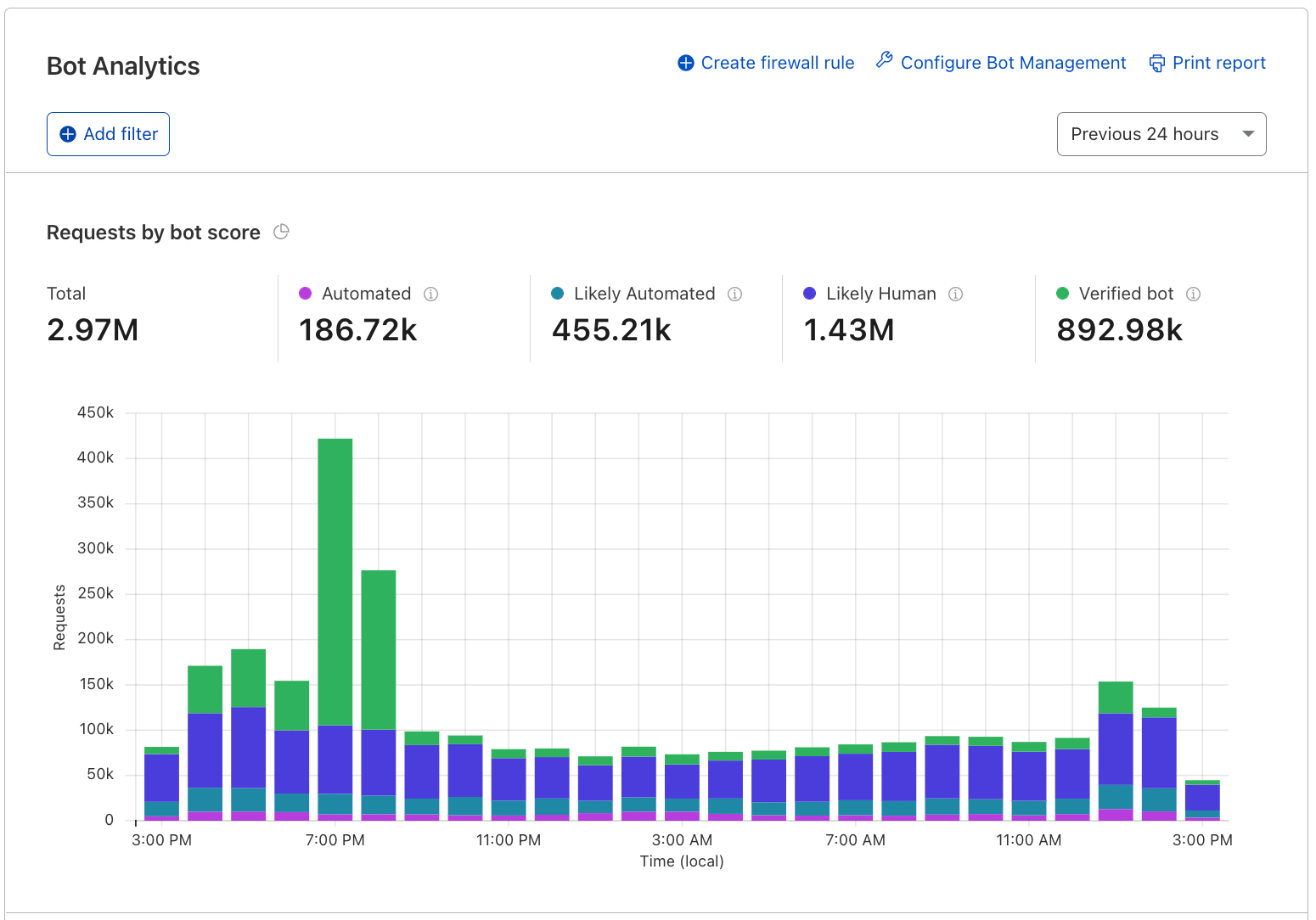
Focusing on security, we believe analytics are the best tool to build confidence before deploying security policies. Moving forward, we plan to layer all of our security related detection signals on top of HTTP analytics so you can use the dashboard to answer questions such as: if I were to block all requests that the WAF identifies as an XSS attack, what would I block?
Customers using our enterprise Bot Management may already be familiar with this experience, and as we improve it and build upon it further, all of our other security products will follow.
Analytics are a powerful tool to see high level patterns and identify anomalies that indicate that something unusual is happening. We’re working on new dashboards, customizations, and features that widen the use cases for our customers. Stay tuned!
Logs
Logs are used when you want to examine specific details about an event. They consist of a timestamp and fields that describe the event and are used to get visibility on a granular level when you need a play-by-play.
In each of our datasets, an event measures something different. For example, in HTTP request logs, an event is when an end user requests content from or sends content to a server. For Firewall logs, an event occurs when the Firewall takes an action on an HTTP request. There can be multiple Firewall events for each HTTP request.
Today, our customers access logs using Logpull, Logpush, or Instant Logs. Logpull and Logpush are great for customers that want to send their logs to third parties (like our Analytics Partners) to store, analyze, and correlate with other data sources. With Instant Logs, our customers can monitor and troubleshoot their traffic in real-time straight from the dashboard or CLI. We’re planning on building out more capabilities to dig into logs on Cloudflare. We’re hard at work on building log storage on R2 – but what’s next?
We’ve heard from customers that the activity log on the Firewall analytics dashboard is incredibly useful. We want to continue to bring the power of logs to the dashboard by adding the same functionality across our products. For customers that will store their logs on Cloudflare R2, this means that we can minimize the use of sampled data.
If you’re looking for something very specific, querying logs is also important, which is where forensics comes in. The goal is to let you investigate from high level analytics all the way down to individual logs lines that make them up. Given a unique identifier, such as the ray ID, you should be able to look up a single request, and then correlate it with all other related activity. Find out the client IP of that ray ID and from there, use cases are plentiful: what other requests from this IP are malicious? What paths did the client follow?
Tracing
Logs are really useful, but they don’t capture the context around a request. Traces show the end-to-end life cycle of a request from when a user requests a resource to each of the systems that are involved in its delivery. They’re another way of applying forensics to help you find something very specific.
These are used to differentiate each part of the application to identify where errors or bottlenecks are occurring. Let’s say that you have a Worker that performs a fetch event to your origin and a third party API. Analytics can show you average execution times and error rates for your Worker, but it doesn’t give you visibility into each of these operations.
Using wrangler dev and console.log statements are really helpful ways to test and debug your code. They bring some of the visibility that’s needed, but it can be tedious to instrument your code like this.
As a developer, you should have the tools to understand what’s going on in your applications so you can deliver the best experience to your end users. We can help you answer questions like: Where is my Worker execution failing? Which operation is causing a spike in latency in my application?
Putting it all together
Notifications, analytics, logs, and tracing each have their distinct use cases, but together, these are powerful tools to provide analysts and developers visibility. Looking forward, we’re excited to bring more and more of these capabilities on the Cloudflare dashboard.
We would love to hear from you as we build these features out. If you’re interested in sharing use cases and helping shape our roadmap, contact your account team!
Cloudflare has been hooked on securing customers globally since its inception. Our services protect customer traffic and data as well as our own, and we are continuously improving and expanding those services to respond to the changing threat landscape of the Internet. Proving that commitment is a multi-faceted venture, the Security Team focuses on people, proof, and transparency to ensure every touchpoint with our products and company feels dependable.
People
The breadth of knowledge of the Security Team is wide and bleeding edge. Working as a security team at a security company means being highly technical, diverse, willing to test any and all products on ourselves, and sharing our knowledge with our local and global communities through industry groups and presenting at conferences worldwide. Connecting with our customers and counterparts through meetups and conferences lets us share problems, learn about upcoming industry trends, and share feedback to make improvements to the customer experience. In addition to running a formally documented, risk-based security program for Cloudflare, team members drive continuous improvement efforts across our Product and Infrastructure teams by reviewing and advising on changes, identifying and treating vulnerabilities, controlling authorization and access to systems and data, encrypting data in transit and at rest, and by detecting and responding to threats and incidents.
Proof
Security claims are all well and good, but how can a customer be sure we are doing what we say we do? We do it by undergoing several audits a year, proving that our security practices meet industry standards. To date, Cloudflare has regularly assessed and maintained compliance with PCI DSS (as a merchant and a service provider), SOC 2 Type II, ISO 27001 and ISO 27701 standards. No matter where our customers are in the world, they will likely need to rely on at least one of these standards to protect their customers’ information. We honor the responsibility of being the backbone of that trust.
As Cloudflare’s customer base continues to grow into more regulated industries with complex and rigorous requirements, we’ve decided to assess our global network against three additional standards this year:
FedRAMP, the US Federal Risk and Authorization Management Program, which evaluates our systems and practices against the standard for protection of US agency data in cloud computing environments. Cloudflare is listed on the FedRAMP Marketplace as “In Process” for an agency authorization at a Moderate impact level. We’re in the final steps of concluding our security assessment report from our auditors and on target to receive an authorization to operate in 2022.
ISO 27018, which examines our practices to protect personally identifiable information (PII) as a cloud provider. This extension to the ISO 27001 standard ensures that our information security management system (ISMS) manages the risks associated with processing PII. We’ve completed the third-party assessment, and we’re waiting for our certification in the upcoming month.
C5, Cloud Computing Compliance Criteria Catalog, introduced by the Federal Office for Information Security (The BSI) in Germany, is a validation against a defined baseline security level for cloud computing. Cloudflare is currently in the process of being assessed against the catalog by third-party auditors. Learn about our journey here.
Transparency
Our commitment to security for our customers and business means we have to be super transparent. When a security incident is being contained, we have in our response plan to not only bring in our legal, compliance and communications teams to determine notification strategy, but we also start outlining a detailed overview of how we are responding, even if we are still in the process of remediating.
We know firsthand how frustrating it can be when your critical vendors stay silent during a security incident and provide nothing more than a one sentence legal response which fails to reveal how they were impacted by the security vulnerability or incident. Here at Cloudflare, it is in our DNA to be transparent. You can see it with the blogs (Verkada Incident, Log4j) we write and how quickly we show our customers how we’ve responded and what we’re doing to fix the issue.
One of the most frequent questions we get from our customers regarding incidents is if our third-parties were impacted. Supply chain vulnerabilities, like Solarwinds and Log4j, have driven us to create efficiencies, such as automated inquiries, to all of our critical vendors at once. During the Containment phase of our security incident response process, our third-party risk team is quickly able to identify the impacted vendors and prioritize our production and security vendors. Our tooling allows us to trigger inquiries to third parties immediately, and our team is integrated into the incident response process to ensure effective communication. Any information that we receive from our vendors, we share with our Security Compliance forums to ensure that other companies who are also inquiring with their vendors don’t have to duplicate their work.
Value
These recurring audits and assessments are not simple website badges. Our Security team doesn’t produce evidence only to pass audits; our process includes identifying risks, forming controls and processes to address those risks, continuous operation of those processes, evaluation of the effectiveness of (in the form of internal and external audits and tests) those processes, and making improvements to the ISMS based on those evaluations. Some things on our process that set us apart include the following:
Many companies do not contact vendors or have this process baked into their incident response procedures. For log4j, our Vendor Security Team was on calls with the response team and providing regular updates on vendor responses as soon as the incident was identified.
Many companies do not proactively communicate to customers like we do. We communicate even when we are not legally required to do so because we feel it’s the right thing to do regardless of the requirement.
The tools in this space also are not usually flexible enough to send custom questionnaires quickly out to vendors. We have automation in place to get these out in bulk right away and tailor questions to the vulnerabilities at hand.
The final step is communicating the resulting picture of our security posture to our customers. Our security certifications and assessment results are available to our customers via download from their Cloudflare Dashboards, or by request to their account team. For the latest information about our certifications and reports, please visit our Trust Hub.
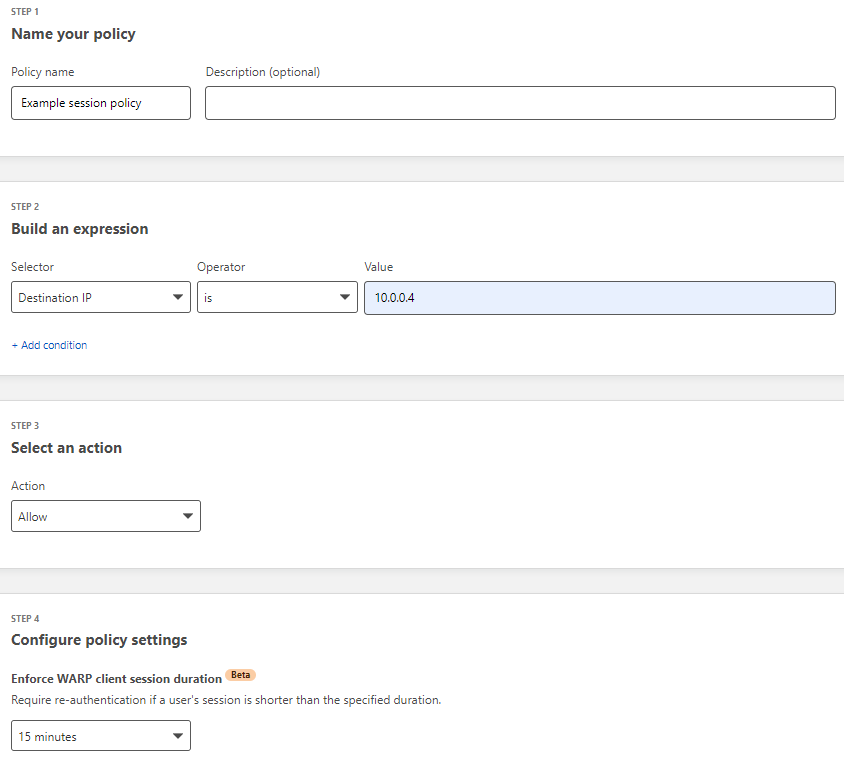
Starting today, you can build Zero Trust rules that require periodic authentication to control network access. We’ve made this feature available for years for web-based applications, but we’re excited to bring this level of granular enforcement to TCP connections and UDP flows.
We’re excited to announce that Zero Trust client-based sessions are now generally available. During CIO Week in 2021, we announced the beta program for this feature. We incorporated feedback from early users into the generally available version. In this post, I will revisit why Zero Trust client-based sessions are important, how the feature works and what we learned during the beta.
Securing traffic with Sessions
We built Zero Trust client-based sessions to enhance the security of Cloudflare’s Zero Trust Network Access (ZTNA). The Zero Trust client is software that runs on a user machine and forwards all traffic from the machine to Cloudflare before it is sent over the Internet. This includes traffic bound for internal IPs and hostnames that typically house sensitive business applications. These sensitive applications were traditionally accessed using a VPN. Unlike VPNs, Cloudflare’s ZTNA allows administrators to set granular policies about who can access a specific resource. The only piece missing was that once a user enrolled their machine with the Zero Trust client, they had a forever persistent session. This makes lost/stolen laptops, shared workstations and personal devices more of a risk than they should be. We built Zero Trust client-based sessions to solve this.
Zero Trust client-based sessions require a user to reauthenticate with their identity provider before accessing specific resources. The authentication pop-up is triggered only when a user attempts to access a protected resource. This prevents unnecessary pop-ups to users where a session may never be necessary. Administrators can specify how often they would like their users to reauthenticate, depending on the resource. This is possible because the user’s last successful authentication is saved and evaluated against any ZTNA policy with a session configured.
What we learned during the beta period
During the beta period of Zero Trust client-based sessions, we worked closely with our customers and Cloudflare’s own security team to identify areas for immediate improvement. We identified two major areas of improvements before releasing to General Availability: pop-ups, which can be intrusive, and browser-based authentication, which is not always possible. We identified new strategies for properly serving an authentication pop up to a user without being overly intrusive. In the future, users will have control over when they receive notifications to authenticate. The other area for improvement was that on certain machines and operating systems, browser-based authentication is not always possible. We are planning to add an option to authenticate directly from the Zero Trust client itself.
What’s next
This is only the beginning for Zero Trust client-based authentication. In the future, we plan to add options for step-up multifactor authentication and automated enrollment options via certificates and Service Tokens. Getting started is easy! Follow this guide for setting up Zero Trust client-based sessions in your Cloudflare Zero Trust dashboard.
SSH (Secure Shell Protocol) is an important protocol for managing remote machines. It provides a way for infrastructure teams to remotely and securely manage their fleet of machines. SSH was a step-up in security from other protocols like telnet. It ensures encrypted traffic and enforces per user controls over access to a particular machine. However, it can still introduce a significant security risk. SSH, especially root access, is destructive in the wrong hands (think rm -r *) and can be difficult to track. Logging and securing user actions via SSH typically requires custom development or restrictive software deployments. We’re excited to announce SSH command logging as part of Cloudflare Zero Trust.
Securing SSH access
Security teams put significant effort into securing SSH across their organization because of the negative impact it can have in the wrong hands. Traditional SSH security consists of strong authentication, like certificate based authentication, and tight controls on who has “root” access. Additionally, VPNs and IP allow lists are used to further protect a machine from being publicly accessible to the Internet. The security challenges that remain are visibility and potential for lateral movement.
SSH commands to a remote machine are end-to-end encrypted, which means that it is impossible to see what is being run by a particular user on a specific machine. Typically, logs can only be captured on the machine itself in log files, and a malicious user can delete log files as easily as any other command they’re running to cover their tracks. Solutions exist to send these logs to an external logging service, but this requires installing additional software on every machine that can be accessed using SSH. ProxyJump, a common way to deploy a JumpHost model, further compounds this problem because a user can easily traverse a local network of machines once they gain access to a machine in the network.
Introducing SSH command logging
We built SSH command logging into Cloudflare Zero Trust to provide SSH visibility at a network layer instead of relying on software on individual machines. Our first customer for this capability is the Cloudflare security team. SSH command logging provides a full replay of all commands run during an SSH session, including across multiple jump-hosts or bastions. This allows for a clear picture of what happened in the event of an accident, suspected breach, or attack.
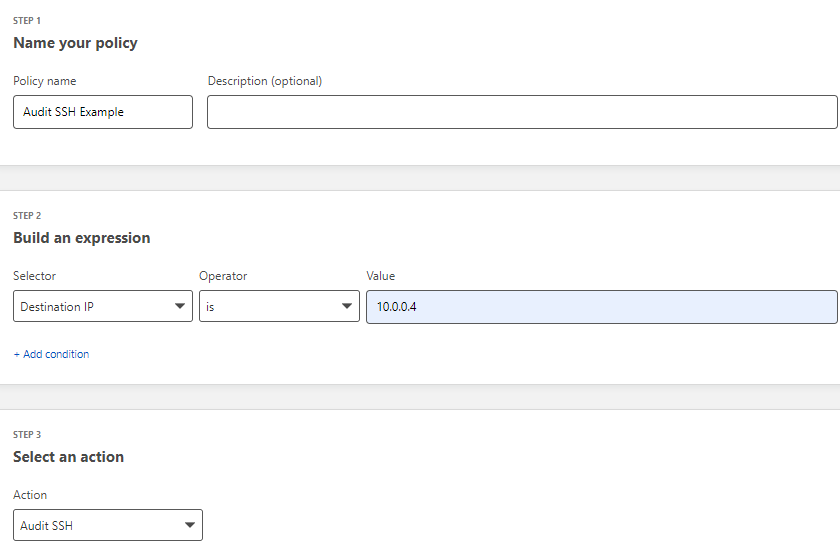
SSH command logging was built as an extension of Cloudflare’s Secure Web Gateway. The Secure Web Gateway already performs secure TLS inspection of all traffic from a user device. Now, it also supports SSH inspection by bootstrapping a proxy server upon new connections. Administrators are able to configure network policies to allow SSH access and audit the specific commands run.
This then exposes that machine for SSH access and proxies all SSH commands via Cloudflare’s global edge network. All commands are automatically captured without complex logging software installed on the machine and across all hosts. TTY traffic can also be recorded for a later full session replay.
As an added measure of security, all logs captured by Cloudflare are immediately encrypted via a public key provided by each customer, to ensure that only authorized security users can inspect SSH commands. Furthermore, we are launching this feature with an opt-in FIPS 140-2 mode to support FedRAMP compliant users.
All user authentication is performed via Cloudflare Short-Lived Certificates. Once the client certificate is loaded onto a user machine, their SSH setup is complete and secure. This eliminates the need for tedious and tricky SSH key-pair management. This means no more key management on end user devices, all the need is the Cloudflare root CA, and they can access any machine they are entitled to, including using ProxyJump.
What’s next
This is only the beginning for SSH security in Cloudflare Zero Trust. In the future, we will integrate with popular SIEM tools and provide alerting for specific commands and risky behavior.
SSH command logging is in closed beta, and we will be opening this feature up to users in the coming weeks. Stay tuned for more updates when we announce general availability!
Cloudflare One enables customers to build their corporate networks on a faster, more secure Internet by connecting any source or destination and configuring routing, security, and performance policies from a single control plane. Today, we’re excited to announce another piece of the puzzle to help organizations on their journey from traditional network architecture to Zero Trust: the ability to route traffic from user devices with our lightweight roaming agent (WARP) installed to any network connected with our Magic IP-layer tunnels (Anycast GRE, IPsec, or CNI). From there, users can upgrade to Zero Trust over time, providing an easy path from traditional castle and moat to next-generation architecture.
The future of corporate networks
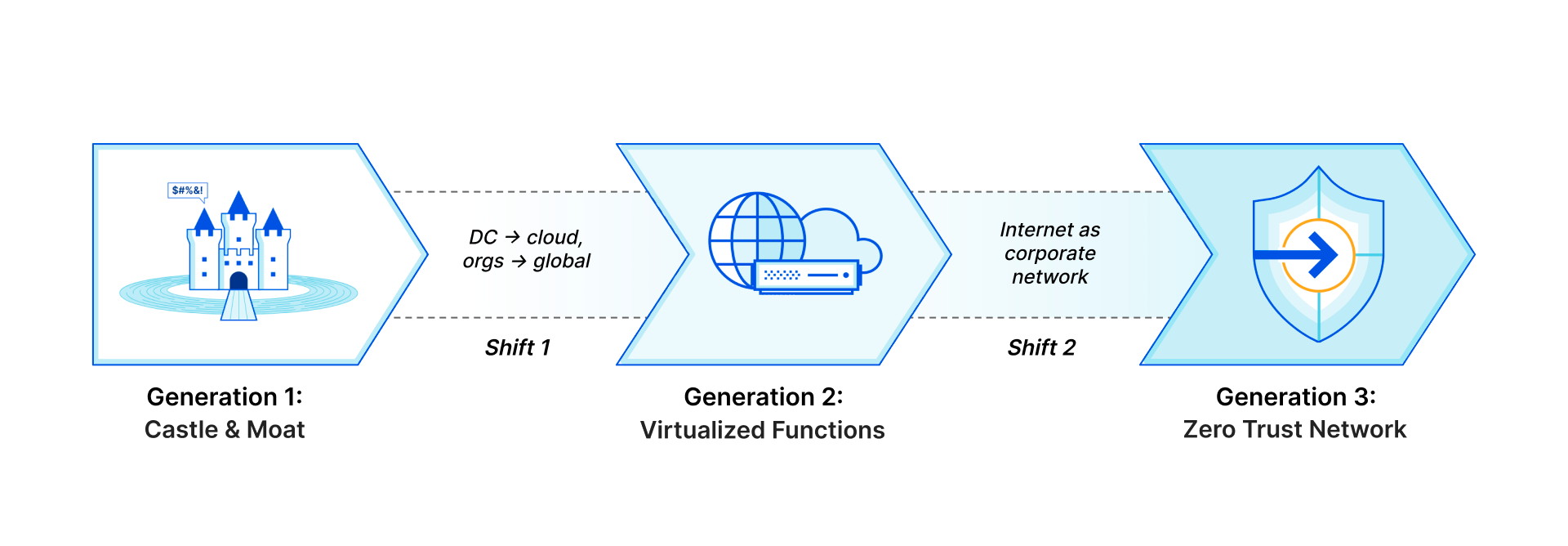
Customers we talk to describe three distinct phases of architecture for their corporate networks that mirror the shifts we’ve seen with storage and compute, just with a 10 to 20 year delay. Traditional networks (“Generation 1”) existed within the walls of a datacenter or headquarters, with business applications hosted on company-owned servers and access granted via private LAN or WAN through perimeter security appliances. As applications shifted to the cloud and users left the office, companies have adopted “Generation 2” technologies like SD-WAN and virtualized appliances to handle increasingly fragmented and Internet-dependent traffic. What they’re left with now is a frustrating patchwork of old and new technologies, gaps in visibility and security, and headaches for overworked IT and networking teams.
We think there’s a better future to look forward to:the architecture Gartner describes as SASE, where security and network functions shift from physical or virtual appliances to true cloud-native services delivered just milliseconds away from users and applications regardless of where they are in the world. This new paradigm will mean vastly more secure, more performant, and more reliable networks, creating better experiences for users and reducing total cost of ownership. IT will shift from being viewed as a cost center and bottleneck for business changes to a driver of innovation and efficiency.
Generation 1: Castle and Moat; Generation 2: Virtualized Functions; Generation 3: Zero Trust Network
But transformative change can’t happen overnight. For many organizations, especially those transitioning from legacy architecture, it’ll take months or years to fully embrace Generation 3. The good news: Cloudflare is here to help, providing a bridge from your current network architecture to Zero Trust, no matter where you are on your journey.
How do we get there?
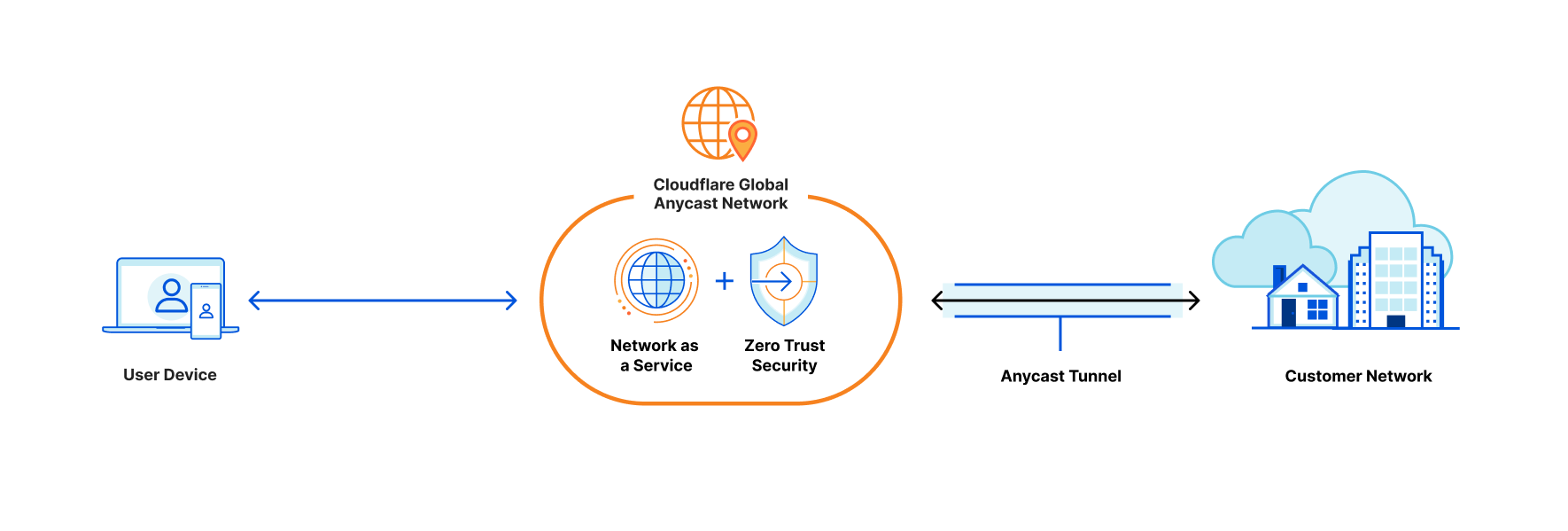
Cloudflare One, our combined Zero Trust network-as-a-service platform, allows customers to connect to our global network from any traffic source or destination with a variety of “on-ramps” depending on your needs. To connect individual devices, users can install the WARP client, which acts as a forward proxy to tunnel traffic to the closest Cloudflare location regardless of where users are in the world. Cloudflare Tunnel allows you to establish a secure, outbound-only connection between your origin servers and Cloudflare by installing a lightweight daemon.
Last year, we announced the ability to route private traffic from WARP-enrolled devices to applications connected with Cloudflare Tunnel, enabling private network access for any TCP or UDP applications. This is the best practice architecture we recommend for Zero Trust network access, but we’ve also heard from customers with legacy architecture that you want options to enable a more gradual transition.
For network-level (OSI Layer 3) connectivity, we offer standards-based GRE or IPsec options, with a Cloudflare twist: these tunnels are Anycast, meaning one tunnel from your network connects automatically to Cloudflare’s entire network in 250+ cities, providing redundancy and simplifying network management. Customers also have the option to leverage Cloudflare Network Interconnect, which enables direct connectivity to the Cloudflare network through a physical or virtual connection in over 1,600 locations worldwide. These Layer 1 through 3 on-ramps allow you to connect your public and private networks to Cloudflare with familiar technologies that automatically make all of your IP traffic faster and more resilient.
Now, traffic from WARP-enrolled devices can route automatically to any network connected with an IP-layer on-ramp. This additional “plumbing” for Cloudflare One increases the flexibility that users have to connect existing network infrastructure, allowing organizations to transition from traditional VPN architecture to Zero Trust with application-level connectivity over time.
How does it work?
Users can install the WARP client on any device to proxy traffic to the closest Cloudflare location. From there, if the device is enrolled in a Cloudflare account with Zero Trust and private routing enabled, its traffic will get delivered to the account’s dedicated, isolated network “namespace,” a logical copy of the Linux networking stack specific to a single customer. This namespace, which exists on every server in every Cloudflare data center, holds all the routing and tunnel configuration for a customer’s connected network.
Once traffic lands in a customer namespace, it’s routed to the destination network over the configured GRE, IPsec, or CNI tunnels. Customers can configure route prioritization to load balance traffic over multiple tunnels and automatically fail over to the healthiest possible traffic path from each Cloudflare location.
On the return path, traffic from customer networks to Cloudflare is also routed via Anycast to the closest Cloudflare location—but this location is different from that of the WARP session, so this return traffic is forwarded to the server where the WARP session is active. In order to do this, we leverage a new internal service called Hermes that allows data to be shared across all servers in our network. Just as our Quicksilver service propagates key-value data from our core infrastructure throughout our network, Hermes allows servers to write data that can be read by other servers. When a WARP session is established, its location is written to Hermes. And when return traffic is received, the WARP session’s location is read from Hermes, and the traffic is tunneled appropriately.
What’s next?
This on-ramp method is available today for all Cloudflare One customers. Contact your account team to get set up! We’re excited to add more functionality to make it even easier for customers to transition to Zero Trust, including layering additional security policies on top of connected network traffic and providing service discovery to help organizations prioritize applications to migrate to Zero Trust connectivity.
Last month we introduced Cloudflare’s new API–driven Cloud Access Security Broker (CASB) via the acquisition of Vectrix. As a quick recap, Cloudflare’s CASB helps IT and security teams detect security issues in and across their SaaS applications. We look at both data and users in SaaS apps to alert teams to issues ranging from unauthorized user access and file exposure to misconfigurations and shadow IT.
I’m excited to share two updates since we announced the introduction of CASB functionality to Cloudflare Zero Trust. First, we’ve heard from Cloudflare customers who cannot wait to deploy the CASB and want to use it in more depth. Today, we’re outlining what we’re building next, based on that feedback, to give you a preview of what you can expect. Second, we’re opening the sign-up for our beta, and I’m going to walk through what will be available to new users as they are invited from the waitlist.
What’s next in Cloudflare CASB?
The vision for Cloudflare’s API–driven CASB is to provide IT and security owners an easy-to-use, one-stop shop to protect the security of their data and users across their fleet of SaaS tools. Our goal is to make sure any IT or security admin can go from creating a Zero Trust account for the first time to protecting what matters most in minutes.
Beyond that immediate level of visibility, we know the problems discovered by IT and security administrators still require time to find, understand, and resolve. We’re introducing three new features to the core CASB platform in the coming months to address each of those challenges.
New integrations (with more yet to come)
First, what are integrations? Integrations are what we call the method to grant permissions and connect SaaS applications (via API) to CASB for security scanning and management. Generally speaking, integrations are done following an OAuth 2.0 flow, however this varies between third-party SaaS apps. Aligning to our goal, we’ll always make sure that integration set up flows are as simple as possible and can be done in minutes.
As with most security strategies, protecting your most critical assets first becomes the priority. Integrations with Google Workspace and GitHub will be available in beta (request access here). We’ll soon follow with integrations to Zoom, Slack, and Okta before adding services like Microsoft 365 and Salesforce later this year. Working closely with customers will drive which applications we integrate with next.
SaaS asset management
On top of integrations, managing the various assets, or “digital nouns” like users, data, folders, repos, meetings, calendars, files, settings, recordings, etc. across services is tricky to say the least. Spreadsheets are hard to manage for tracking who has access to what or what files have been shared with whom.
This isn’t efficient and is ripe for human error. CASB SaaS asset management allows IT and security teams to view all of their data settings and user activity around said data from a single dashboard. Quickly being able to answer questions like; “did we disable the account for a user across these six services?” becomes a quick task instead of logging into each service and addressing individually.
Remediation guides + automated workflows
Detect, prevent, and fix. With detailed SaaS remediation guides, IT administrators can assign and tackle issues with the right team. By arming teams with what they need to know in context, it makes preventing issues from happening again seamless. In situations where action should be taken straight away, automated SaaS workflows provide the ability to solve SaaS security issues in one click. Need to remove sharing permissions from that file in OneDrive? A remediation button allows for action from anywhere, anytime.
Cloudflare Gateway + CASB
Combining products across the Zero Trust platform means solving complex problems through one seamless experience. Starting with the power of Gateway and CASB, customers will be able to take immediate action to wrangle in Shadow IT. In just a few clicks, a detected unauthorized SaaS application from the Gateway shadow IT report can go from being the wild west to a sanctioned and secure one with a CASB integration. This is just one example to highlight the many solutions we’re excited about that can be solved with the Zero Trust platform.
Launching the Cloudflare CASB beta and what you can expect
In the CASB beta you can deploy popular integrations like Google Workspace on day one. You’ll also get direct access to our Product team to help shape what comes next. We’re excited to work closely with a number of early customers to align on which integrations and features matter most to them.
Getting started today with the Cloudflare CASB beta
Right now we’re working on making the out-of-band CASB product a seamless part of the Zero Trust platform. We’ll be sending out the first wave of beta invitations early next month – you can request access here.
We have some big ideas of what the CASB product can and will do. While this post highlights some exciting things to come, you can get started right now with Cloudflare’s Zero Trust platform by signing up here.
When we launched Bot Management three years ago, we started with the first version of our ML detection model. We used common bot user agents to train our model to identify bad bots. This model, ML1, was able to detect whether a request is a bot or a human request purely by using the request’s attributes. After this, we introduced a set of heuristics that we could use to quickly and confidently filter out the lowest hanging fruit of unwanted traffic. We have multiple heuristic types and hundreds of specific rules based on certain attributes of the request, many of which are very hard to spoof. But machine learning is a very important part of our bot management toolset.
We started with a static model because we were starting from scratch, and we were able to experiment quickly with aggregated HTTP analytics metadata. After we launched the model, we quickly gathered feedback from early bot management customers to identify where we performed well but also how we could improve. We saw attackers getting smart, and so we generated a new set of model features. Our heuristics were able to accurately identify various types of bad bots giving us much better quality labeled data. Over time, our model evolved to adapt to changing bot behavior across multiple dimensions of the request, even if it had not been trained on that type of data before. Since then, we’ve launched five additional models that are trained on metadata generated by understanding traffic patterns across our network.
While our models were evolving over time, the patterns of traffic flowing through Cloudflare changed as well. Cloudflare started in a desktop first world, but mobile traffic has grown to make up more than 54% of traffic on our network. As mobile has become a significant share of traffic we see, we needed to adapt our strategy in order to be able to get better at detecting bots spoofing mobile applications. While desktop traffic shares many similarities regardless of the origin it’s connecting to, each mobile app is crafted with a specific use in mind, and built on a different set of APIs, with a different defined schema. We realized we needed to build a model that would prove to be more effective for websites that have mobile application traffic.
How we build and deploy our models
Before we dive into how we updated our models to incorporate an increasing volume of mobile traffic, we should first discuss how we build and train our models overall.
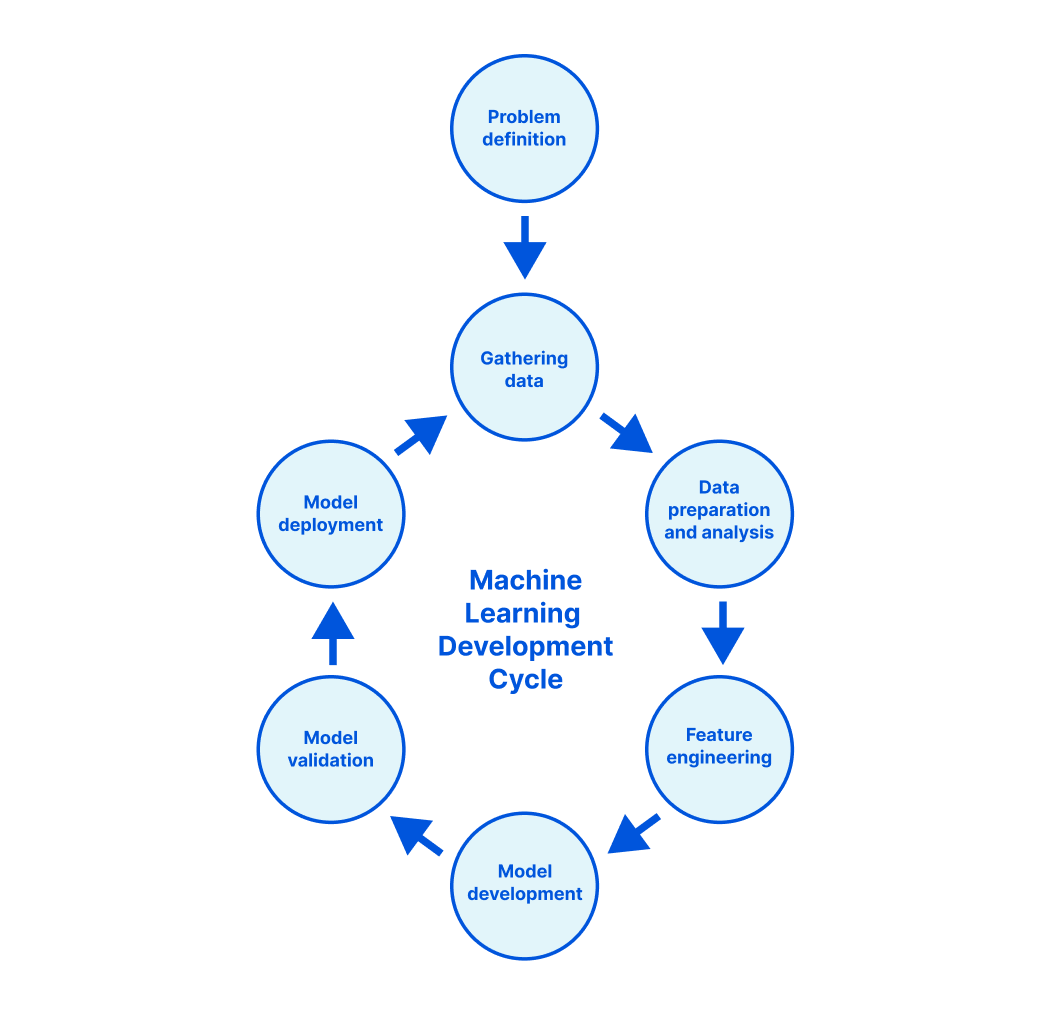
Data gathering and preparation
An ML model is only as good as the quality of data you train it with. We’ve been able to leverage the amount and variety of traffic on our network to create our training datasets.
We identify samples that we know are clearly bots – samples we are able to detect with heuristics or samples that are from verified bots, e.g., legitimate search engine crawlers, adbots.
We also can identify samples that are clearly not-bots. These are requests that are scored high when they solve a challenge or are authenticated.
Data analysis and feature selection
From this dataset, we can identify the best features to use, using the ANOVA (Analysis of Variance) f-value. We want to make sure different operating systems, browsers, device types, categories of bots, and fingerprints are well represented in our dataset. We perform statistical analysis of the features to understand their distribution within our datasets as well as how they would potentially influence predictions.
Model building and evaluation
Once we have our data, we can begin training a model. We’ve built an internal pipeline backed by Airflow that makes this process smooth. To train our model, we chose the Catboost library. Based on our problem definition, we train a binary classification model.
We split out training data into a training set and a test set. To choose the best hyperparameters for the model, we use the Catboost library’s grid search and random search algorithm.
We then train the model with the chosen hyperparameters.
Over time, we’ve developed granular datasets for testing out our model to ensure we accurately detect different types of bots, but we also want to make sure we have a very low false positive rate. Before we deploy our model to any customer traffic, we perform offline monitoring. We run predictions for different browsers, operating systems and devices. We then compare the predictions of the currently trained model to the production model on validation datasets. This is done with the help of validation reports created by our ML pipeline that includes summary statistics such as accuracy, feature importance for each dataset. Based on the results, we either iterate or we decide to proceed to deployment.
If we need to iterate, we like to understand better where we can make improvements. For this, we use the SHAP Explainer. The SHAP Explainer is an excellent tool to interpret your model’s prediction. Our pipeline produces SHAP graphs for our predictions, and we dig into these deeper to understand the false positives or false negatives. This helps us to understand how and where we can improve our training data or features to get better predictions. We decide if an experiment should be deployed to customer traffic when it shows improvements in a majority of our test datasets over a previous model version.
Model deployment
While offline analysis of the model is a good indicator of the model’s performance, it’s best to validate the results in real time on a wider variety of traffic. For this, we deploy every new model first in shadow mode. Shadow mode allows us to log scores for traffic in real time without actually affecting bot management customer traffic. This allows us to perform online monitoring i.e. evaluating the model’s performance in real time for traffic. We break this down by different types of bots, devices, browsers, operating systems and customers using a set of Grafana dashboards and validate model accuracy improvement.
We then begin testing in active mode. We have the ability to roll out a model to different customer plans and sample the model for a percentage of requests or visitors. First we roll out to customers on the free plan, such as customers who enable I’m Under Attack Mode. Once we validate the model for free customers, we roll out to Super Bot Fight Mode customers gradually. We then allow customers who would like to beta test the model onboard and use it. Once our beta customers are happy, the new model is officially released as stable. Existing customers can choose to upgrade to this model, all new customers will get the latest version by default.
How we improved mobile app performance
With our latest model, we set out to use the above training process to specifically improve performance on mobile app traffic. To train our models, we need labeled data: a set of HTTP requests that we’ve manually annotated as either “bot” or “human” traffic. We gather this labeled data from a variety of sources as we spoke about above, but one area where we’ve historically struggled is finding good datasets for “human” traffic from mobile applications. Our best sample of “good” traffic was when the client was able to solve a browser challenge or CAPTCHA. Unfortunately, this also limited the variety of good traffic we could have in our dataset since a lot of “good” traffic cannot solve CAPTCHA – like a subset of mobile app traffic. Most CAPTCHA solutions rely on web technologies like HTML + JavaScript and are meant to be executed and rendered via a web browser. Native mobile apps, on the other hand, may not be capable of rendering CAPTCHAs properly, so most native mobile app traffic will never make it into these datasets.
This means that “human” traffic from native mobile applications was typically under-represented in our training data compared to how common it is across the Internet. In turn, this led to our models performing worse on native mobile app traffic compared to browser traffic. In order to rectify this situation, we set out to find better datasets.
We leveraged a variety of techniques to identify subsets of requests that we could confidently label as legitimate native mobile app traffic. We dug through open source code for mobile operating systems as well as popular libraries and frameworks to identify how legitimate mobile app traffic should behave. We also worked with some of our customers to identify domain-specific traffic patterns that could distinguish legitimate mobile app traffic from other types of traffic.
After much testing, feedback, and iteration, we came up with multiple new datasets that we incorporated into our model training process to greatly improve the performance on mobile app traffic.
Improvements in mobile performance
With added data from validated mobile app traffic, our newest model can identify valid user requests originating from mobile app traffic by understanding the unique patterns and signals that we see for this type of traffic. This month, we released our latest machine learning model, trained using our newly identified valid mobile request dataset, to a select group of beta customers. The results have been positive.
In one case, a food delivery company saw false positive rates for Android traffic drop to 0.0%. That may sound impossible, but it’s the result of training on trusted data.
In another case, a major Web3 platform saw similar improvement. Previous models had shown false positives, varying between 28.7% and 40.7% for edge case mobile application traffic. Our newest model has brought this down to nearly 0.0%.
These are just two examples of results we’ve seen broadly, which has led to an increase in adoption of ML among customers protecting mobile apps. If you have a mobile app you haven’t yet protected with Bot Management, head to the Cloudflare dashboard today and see what the new model shows for your own traffic. We provide free bot analytics to all customers, so you can see what bots are doing on your mobile apps today, and turn on Bot Management if you see something you’d like to block. If your mobile app is driven by APIs, as most are, you might also want to take a look at our new API Gateway.
Magic Transit protects customers’ entire networks—any port/protocol—from DDoS attacks and provides built-in performance and reliability. Today, we’re excited to extend the capabilities of Magic Transit to customers with any size network, from home networks to offices to large cloud properties, by offering Cloudflare-maintained and Magic Transit-protected IP space as a service.
What is Magic Transit?
Magic Transit extends the power of Cloudflare’s global network to customers, absorbing all traffic destined for your network at the location closest to its source. Once traffic lands at the closest Cloudflare location, it flows through a stack of security protections including industry-leading DDoS mitigation and cloud firewall. Detailed Network Analytics, alerts, and reporting give you deep visibility into all your traffic and attack patterns. Clean traffic is forwarded to your network using Anycast GRE or IPsec tunnels or Cloudflare Network Interconnect. Magic Transit includes load balancing and automatic failover across tunnels to steer traffic across the healthiest path possible, from everywhere in the world.
Magic Transit architecture: Internet BGP advertisement attracts traffic to Cloudflare’s network, where attack mitigation and security policies are applied before clean traffic is forwarded back to customer networks with an Anycast GRE tunnel or Cloudflare Network Interconnect.
The “Magic” is in our Anycast architecture: every server across our network runs every Cloudflare service, so traffic can be processed wherever it lands. This means the entire capacity of our network—121+Tbps as of this post—is available to block even the largest attacks. It also drives huge benefits for performance versus traditional “scrubbing center” solutions that route traffic to specialized locations for processing, and makes onboarding much easier for network engineers: one tunnel to Cloudflare automatically connects customer infrastructure to our entire network in over 250 cities worldwide.
What’s new?
Historically, Magic Transit has required customers to bring their own IP addresses—a minimum of a class C IP block, or /24—in order to use this service. This is because a /24 is the minimum prefix length that can be advertised via BGP on the public Internet, which is how we attract traffic for customer networks.
But not all customers have this much IP space; we’ve talked to many of you who want IP layer protection for a smaller network than we’re able to advertise to the Internet on your behalf. Today, we’re extending the availability of Magic Transit to customers with smaller networks by offering Magic Transit-protected, Cloudflare-managed IP space. Starting now, you can direct your network traffic to dedicated static IPs and receive all the benefits of Magic Transit including industry leading DDoS protection, visibility, performance, and resiliency.
Let’s talk through some new ways you can leverage Magic Transit to protect and accelerate any network.
Consistent cross-cloud security
Organizations adopting a hybrid or poly-cloud strategy have struggled to maintain consistent security controls across different environments. Where they used to manage a single firewall appliance in a datacenter, security teams now have a myriad of controls across different providers—physical, virtual, and cloud-based—all with different capabilities and control mechanisms.
Cloudflare is the single control plane across your hybrid cloud deployment, allowing you to manage security policies from one place, get uniform protection across your entire environment, and get deep visibility into your traffic and attack patterns.
Protecting branches of any size
As DDoS attack frequency and variety continues to grow, attackers are getting more creative with angles to target organizations. Over the past few years, we have seen a consistent rise in attacks targeted at corporate infrastructure including internal applications. As the percentage of a corporate network dependent on the Internet continues to grow, organizations need consistent protection across their entire network.
Now, you can get any network location covered—branch offices, stores, remote sites, event venues, and more—with Magic Transit-protected IP space. Organizations can also replace legacy hardware firewalls at those locations with our built-in cloud firewall, which filters bidirectional traffic and propagates changes globally within seconds.
Keeping streams alive without worrying about leaked IPs
Generally, DDoS attacks target a specific application or network in order to impact the availability of an Internet-facing resource. But you don’t have to be hosting anything in order to get attacked, as many gamers and streamers have unfortunately discovered. The public IP associated with a home network can easily be leaked, giving attackers the ability to directly target and take down a live stream.
As a streamer, you can now route traffic from your home network through a Magic Transit-protected IP. This means no more worrying about leaking your IP: attackers targeting you will have traffic blocked at the closest Cloudflare location to them, far away from your home network. And no need to worry about impact to your game: thanks to Cloudflare’s globally distributed and interconnected network, you can get protected without sacrificing performance.
Get started today
This solution is available today; learn more or contact your account team to get started.
Today, we’re excited to announce that Clientless Web Isolation is generally available. A new on-ramp for Browser Isolation that natively integrates Zero Trust Network Access (ZTNA) with the zero-day, phishing and data-loss protection benefits of remote browsing for users on any device browsing any website, internal app or SaaS application. All without needing to install any software or configure any certificates on the endpoint device.
Cloudflare’s clientless web isolation simplifies connections to remote browsers through a hyperlink (e.g.: https://<your-auth-domain>.cloudflareaccess.com/browser). We explored use cases in detail in our beta announcement post, but here’s a quick refresher on the use cases that clientless isolated browsing enables:
Share secure browsing across the entire team on any device
Simply navigating to Clientless Web Isolation will land your user such as an analyst, or researcher in a remote browser, ready to securely conduct their research or investigation without exposing their public IP or device to potentially malicious code on the target website.
Deep link into isolated browsing
Suspicious hyperlinks and PDF documents from sensitive applications can be opened in a remote browser by rewriting the link with the clientless endpoint. For example:
This is powerful when integrated into a security incident monitoring tool, help desk or any tool where users are clicking unknown or untrusted hyperlinks.
Integrate Browser Isolation with a third-party secure web gateway
Browser Isolation can be integrated with a legacy secure web gateway through the use of a redirecting custom block page. Integrating Browser Isolation with your existing secure web gateway enables safe browsing without the support burden of micromanaging block lists.
Securely access sensitive data on BYOD devices endpoints
In an ideal world, users would always access sensitive data from corporate devices. Unfortunately it’s not possible or feasible: contractors, by definition, rely on non-corporate devices. Employees may not be able to take their device home, it is unavailable due to a disaster or travel to high risk areas without their managed machine.
Historically IT departments have worked around this by adopting legacy Virtual Desktop Infrastructure (VDI). This made sense a decade ago when most business applications were desktop applications. Today this architecture makes little sense when most business applications live in the browser. VDI is a tremendously expensive method to deliver BYOD support and still requires complex network administration to connect with DNS filtering and Secure Web Gateways.
All traffic from Browser Isolation to the Internet or an Access protected application is secured and inspected by the Secure Web Gateway out of the box. It only takes a few clicks to require Gateway device posture checks for users connecting over Clientless Web Isolation.
Get started
Clientless web isolation is available as a capability for all Cloudflare Zero Trust subscribers who have added Browser Isolation to their plan. If you are interested in learning more about use cases see the beta announcement post and our developer documentation.
Packet captures are a critical tool used by network and security engineers every day. As more network functions migrate from legacy on-prem hardware to cloud-native services, teams risk losing the visibility they used to get by capturing 100% of traffic funneled through a single device in a datacenter rack. We know having easy access to packet captures across all your network traffic is important for troubleshooting problems and deeply understanding traffic patterns, so today, we’re excited to announce the general availability of on-demand packet captures from Cloudflare’s global network.
What are packet captures and how are they used?
A packet capture is a file that contains all packets that were seen by a particular network box, usually a firewall or router, during a specific time frame. Packet captures are a powerful and commonly used tool for debugging network issues or getting better visibility into attack traffic to tighten security (e.g. by adding firewall rules to block a specific attack pattern).
A network engineer might use a pcap file in combination with other tools, like mtr, to troubleshoot problems with reachability to their network. For example, if an end user reports intermittent connectivity to a specific application, an engineer can set up a packet capture filtered to the user’s source IP address to record all packets received from their device. They can then analyze that packet capture and compare it to other sources of information (e.g. pcaps from the end user’s side of the network path, traffic logs and analytics) to understand the magnitude and isolate the source of the problem.
Security engineers can also use packet captures to gain a better understanding of potentially malicious traffic. Let’s say an engineer notices an unexpected spike in traffic that they suspect could be an attempted attack. They can grab a packet capture to record the traffic as it’s hitting their network and analyze it to determine whether the packets are valid. If they’re not, for example, if the packet payload is randomly generated gibberish, the security engineer can create a firewall rule to block traffic that looks like this from entering their network.
Example of a packet capture from a recent DDoS attack targeted at Cloudflare infrastructure. The contents of this pcap can be used to create a “signature” to block the attack.
Fragmenting traffic creates gaps in visibility
Traditionally, users capture packets by logging into their router or firewall and starting a process like tcpdump. They’d set up a filter to only match on certain packets and grab the file. But as networks have become more fragmented and users are moving security functions out to the edge, it’s become increasingly challenging to collect packet captures for relevant traffic. Instead of just one device that all traffic flows through (think of a drawbridge in the “castle and moat” analogy) engineers may have to capture packets across many different physical and virtual devices spread across locations. Many of these packets may not allow taking pcaps at all, and then users have to try to stitch them back together to create a full picture of their network traffic. This is a nearly impossible task today and only getting harder as networks become more fractured and complex.
On-demand packet captures from the Cloudflare global network
With Cloudflare, you can regain this visibility. With Magic Transit and Magic WAN, customers route all their public and private IP traffic through Cloudflare’s network to make it more secure, faster, and more reliable, but also to increase visibility. You can think of Cloudflare like a giant, globally distributed version of the drawbridge in our old analogy: because we act as a single cloud-based router and firewall across all your traffic, we can capture packets across your entire network and deliver them back to you in one place.
How does it work?
Customers can request a packet capture using our Packet Captures API. To get the packets you’re looking for you can provide a filter with the IP address, ports, and protocol of the packets you want.
Example of a request for packet capture using our API.
We leverage nftables to apply the filter to the customer’s incoming packets and log them using nflog:
table inet pcaps_1 {
    chain pcap_1 {
        ip protocol 6 ip saddr 1.2.3.4 log group 1 comment “packet capture”
    }
}
Example nftables configuration used to filter log customer packets
nflog creates a netfilter socket through which logs of a packet are sent from the Linux kernel to user space. In user space, we use tcpdump to read packets off the netfilter socket and generate a packet capture file:
tcpdump -i nflog:1 -w pcap_1.pcap
Example tcpdump command to create a packet capture file.
Usually tcpdump is used by listening to incoming packets on a network interface, but in our case we configure it to read packet logs from an nflog group. tcpdump will convert the packet logs into a packet capture file.
Once we have a packet capture file, we need to deliver it to customers. Because packet capture files can be large and contain sensitive information (e.g. packet payloads), we send them to customers directly from our machines to a cloud storage service of their choice. This means we never store sensitive data, and it’s easy for customers to manage and store these large files.
Get started today
On-demand packet captures are now generally available for customers who have purchased the Advanced features of Magic Firewall. The packet capture API allows customers to capture the first 160 bytes of packets, sampled at a default rate of 1/100. More functionality including full packet captures and on-demand packet capture control in the Cloudflare Dashboard is coming in the following weeks. Contact your account team to stay updated on the latest!
Today we are excited to announce that Cloudflare and Aruba are working together to develop a solution that will enable Aruba customers to connect EdgeConnect SD-WAN’s with Cloudflare’s global network to further secure their corporate traffic with Cloudflare One. Whether organizations need to secure Internet-bound traffic from branch offices using Cloudflare’s Secure Web Gateway & Magic Firewall, or enforce firewall policies for east/west traffic between offices via Magic Firewall, we have them covered. This gives customers peace of mind that they have consistent global security from Cloudflare while retaining granular control of their inter-branch and Internet-bound traffic policies from their Aruba EdgeConnect appliances.
SD-WAN solution
A software-defined WAN (SD-WAN) is an evolution of a WAN (wide area network) that simplifies the underlying architecture. Unlike traditional WAN architecture models where expensive leased, and MPLS links are used, SD-WAN can efficiently use a combination of private lines and the public Internet. It brings together the best of both worlds to provide an integrated solution to network administrators in managing and scaling their network and resources with ease.
Aruba’s EdgeConnect SD-WAN solution
We are proud to announce our first enhanced SD-WAN integration. Aruba’s EdgeConnect solution is an industry leader for WAN edge infrastructure. Aruba’s solution offers both physical and virtual appliances to create logical network overlays across the wide area network, enabling network administrators to create multiple distinct traffic profiles that govern how enterprise application traffic is forwarded between office branches and the Internet. In the Aruba EdgeConnect solution, the Aruba Orchestrator is used to configure and manage the entire SD-WAN including EdgeConnect appliances located in branch offices.
EdgeConnect UI showing overlays directing traffic to Cloudflare or to local breakout.
Cloudflare One on-ramps
Cloudflare One unifies cloud-native security and access services to meet today’s demanding and evolving architecture needs. Our Zero Trust and Magic network services products securely connect remote users, branch offices, and data centers to the application and Internet resources they need with smart routing and traffic acceleration — all with a single control plane to apply network and Zero Trust security policies to application access and Internet browsing.
So what’s new? We previously announced many ways to on-ramp customer traffic to Cloudflare One. Our goal with this integration is simple: help our mutual & prospective customers leverage their existing SD-WAN investments, allowing them to connect their devices to Cloudflare for additional organizational security and control across all of their business entities. This gives our customers both the security and control they require without employing a rip and replace solution.
An integrated solution
At a high level, tunnels are established (Anycast GRE or IPSec) between the EdgeConnect appliances in each branch office or public cloud and Cloudflare’s edge. This means the appliances are now connected to the nearest Cloudflare data center anywhere on earth. The Network Administrator then uses Aruba Orchestrator’s Business Intent Overlays to create intuitive policies which automatically identify and steer application traffic to Cloudflare. For example, a customer can choose to match and send certain Internet-bound traffic over the established tunnels to Cloudflare, while ensuring other traffic types can be sent out through other EdgeConnect interfaces. This could be directly to other EdgeConnect devices in other offices, other service providers, or broken out locally to the Internet depending on the overlays that match the other traffic profiles. A typical use case is business applications go through established tunnels while video streaming may go directly to the Internet.
Complete integration details can be found in our guide. In the future we expect to tighten this integration so EdgeConnect devices only need authorization credentials and can automatically configure themselves using the Magic WAN management API.
Customer benefits
Simplicity:The primary benefit of our partnership is the ability and simplicity of connecting to Cloudflare’s global edge using SD-WAN appliances that customers already own and are familiar with. They may already have a comprehensive SD-WAN deployment, sending traffic to and from a variety of destinations, services, and clouds. Cloudflare and the benefits of Magic WAN and Cloudflare’s Zero Trust offering can now be easily incorporated into this type of network topology.
Security and Control: For traffic sent to Cloudflare, Gateway and Access policies make security more robust, targeted, and seamless. Cloudflare’s dashboard represents a single pane of glass that offers policy management, logging and analytics, providing a wide range of security granularity while remaining easy to use. Gateway policy types include DNS, Network, and HTTP(s). Remote browser isolation is also available to help protect end user devices from Internet threats such as malware and crucially, Zero-Day vulnerabilities. Access Applications continue to allow customers to create conditional zero-trust policies for applications regardless of whether they are hosted publicly, internally or are SaaS based. Magic WAN and Magic Firewall can further provide advanced cloud-based network firewalling capabilities for Internet-bound or inter-branch traffic.
Speed and Performance
Stitching together corporate networks with complicated and expensive leased lines or MPLS is now a headache of the past. With our new SD-WAN integration, it’s never been easier to simultaneously connect branch offices to one another and to the cloud. With a simple GRE or IPSec tunnel between EdgeConnect appliances and Cloudflare, each branch location now leverages Cloudflare’s highly performant and secure global anycast network as its WAN backbone – a connection that spans 250+ cities in 100+ countries operating within 95% of the Internet-connected population globally.
Conclusion
Our joint solution expands existing Aruba EdgeConnect SD-WAN capabilities by plugging into our cloud-native, zero-trust WAN architecture on the world’s largest and fastest global edge network to keep organizations secure.
If your organization currently leverages EdgeConnect SD-WAN appliances (or any SD-WAN appliance) and wants to take the next step into your network transformation, we would love to speak with you. Reach out to us at https://www.cloudflare.com/partners/technology-partners/aruba/.
“Aruba, a Hewlett Packard Enterprise company, is pleased to collaborate with Cloudflare to develop solutions that will enable our customers to easily deploy the Aruba EdgeConnect SD-WAN platform, as the enterprise connectivity onramp to the Cloudflare Magic WAN and Magic Firewall. This new solution builds on the Aruba EdgeConnect platform’s best-in-class integration with leading cloud connectivity and security services, and will enable customers to utilize Cloudfare’s Global Edge Network to protect and accelerate cloud workloads.” – Fraser Street, Head of WAN technical alliances for Aruba
Today, we are very excited to announce multiple new integrations with CrowdStrike. These integrations combine the power of Cloudflare’s expansive network and Zero Trust suite, with CrowdStrike’s Endpoint Detection and Response (EDR) and incident remediation offerings.
At Cloudflare, we believe in making our solutions easily integrate with the existing technology stack of our customers. Through our partnerships and integrations, we make it easier for our customers to use Cloudflare solutions jointly with that of partners, to further strengthen their security posture and unlock more value. Our partnership with CrowdStrike is an apt example of such efforts.
Together, Cloudflare and CrowdStrike are working to simplify the adoption of Zero Trust for IT and security teams. With this expanded partnership, joint customers can identify, investigate, and remediate threats faster through multiple integrations:
First, by integrating Cloudflare’s Zero Trust services with CrowdStrike Falcon Zero Trust Assessment (ZTA), which provides continuous real-time device posture assessments, our customers can verify users’ device posture before granting them access to internal or external applications.
Second, we joined the CrowdXDR Alliance in December 2021 and are partnering with CrowdStrike to share security telemetry and other insights to make it easier for customers to identify and mitigate threats. Cloudflare’s global network spans more than 250 cities in over 100 countries, blocking an average of 76 billion cyber threats each day. This provides customers with unparalleled insights, helping security teams better protect their organization. By joining the CrowdXDR Alliance, we will be able to use security signals from Cloudflare’s global network with CrowdStrike’s leading endpoint protection to help mutual customers stop cyber attacks anywhere in their network.
Third, CrowdStrike is one of Cloudflare’s incident response partners, providing rapid and effective support. CrowdStrike’s incident response team deals with active under attack situations day in, day out — helping customers mitigate the attack and get their web property and network back online. Our partnership with CrowdStrike enables rapid remediation of under attack scenarios to safeguard organizations from adversaries.
“The speed in which a company is able to identify, investigate and remediate a threat heavily determines how it will fare in the end. Our partnership with Cloudflare provides companies the ability to take action rapidly and contain exposure at the time of an attack, enabling them to get back on their feet and return to business as usual as quickly as possible.” – Thomas Etheridge, Senior Vice President, CrowdStrike Services
CrowdStrike’s endpoint security meets Cloudflare’s Zero Trust Services
Before we get deep into how the integration works, let’s first recap Cloudflare’s Zero Trust Services.
Cloudflare Access and Gateway
Cloudflare Access determines if a user should be allowed access to an application or not. It uses our global network to check every request or connection for identity, device posture, location, multifactor method, and many more attributes to do so. Access also logs every request and connection — providing administrators with high-visibility. The upshot of all of this: it enables customers to deprecate their legacy VPNs.
Cloudflare Gateway protects users as they connect to the rest of the Internet. Instead of back hauling traffic to a centralized location, users connect to a nearby Cloudflare data center where we apply one or more layers of security, filtering, and logging, before accelerating their traffic to its final destination.
Zero Trust Integration with CrowdStrike
Cloudflare’s customers can now build Access and Gateway policies based on the presence of a CrowdStrike agent at the endpoint. In conjunction with our Zero Trust client, we are able to leverage the enhanced telemetry that CrowdStrike provides surrounding a user’s device.
CrowdStrike’s Zero Trust Assessment (ZTA) delivers continuous real-time security posture assessments across all endpoints in an organization regardless of the location, network or user. The ZTA scores enable enforcement of conditional policies based on device health and compliance checks to mitigate risks. These policies are evaluated each time a connection request is made, making the conditional access adaptive to the evolving condition of the device.
With this integration, organizations can build on top of their existing Cloudflare Access and Gateway policies ensuring that a minimum ZTA score or version has been met before a user is granted access. Because these policies work across our entire Zero Trust platform, organizations can use these to build powerful rules invoking Browser Isolation, tenant control, antivirus or any part of their Cloudflare deployment.
“The CrowdStrike Falcon platform secures customers through verified access controls, helping customers reduce their attack surface and simplify, empower and accelerate their Zero Trust journey. By expanding our partnership with Cloudflare, we are making it easier for joint customers to strengthen their Zero Trust security posture across all endpoints and their entire corporate network.” – Michael Sentonas, Chief Technology Officer, CrowdStrike
How the integration works
Customers using our Zero Trust suite can add CrowdStrike as a device posture provider in the Cloudflare Zero Trust dashboard under Settings → Devices → Device Posture Providers. The details required from the CrowdStrike dashboard include: ClientID, Client Secret, REST API URL, and Customer ID.
After creating the CrowdStrike Posture Provider, customers can create specific device posture checks requiring users’ devices to meet a certain threshold of ZTA scores.
These rules can now be used to create conditional Access and Gateway policies to allow or deny access to applications, networks, or sites. Administrators can choose to block or isolate users or user groups with malicious or insecure devices.
What comes next?
In the coming months, we will be further strengthening our integrations with CrowdStrike by allowing customers to correlate their Cloudflare logs with Falcon telemetry, for timely detection and mitigation of sophisticated threats. If you’re using Cloudflare Zero Trust products today and are interested in using this integration with CrowdStrike, please visit our documentation to learn about how you can enable it. If you want to learn more or have additional questions, please fill out the form or get in touch with your Cloudflare CSM or AE, and we’ll be happy to help you.
Over the past decade, the Internet has experienced a tectonic shift. It used to be composed of static websites: with text, images, and the occasional embedded movie. But the Internet has grown enormously. We now rely on API-driven applications to help with almost every aspect of life. Rather than just download files, we are able to engage with apps by exchanging rich data. We track workouts and send the results to the cloud. We use smart locks and all kinds of IoT devices. And we interact with our friends online.
This is all wonderful, but it comes with an explosion of complexity on the back end. Why? Developers need to manage APIs in order to support this functionality. They need to monitor and authenticate every single request. And because these tasks are so difficult, they’re usually outsourced to an API gateway provider.
Unfortunately, today’s gateways leave a lot to be desired. First: they’re not cheap. Then there’s the performance impact. And finally, there’s a data and privacy risk, since more than 50% of traffic reaches APIs (and is presumably sent through a third party gateway). What a mess.
Today we’re announcing the Cloudflare API Gateway. We’re going to completely replace your existing gateway at a fraction of the cost. And our solution uses the technology behind Workers, Bot Management, Access, and Transform Rules to provide the most advanced API toolset on the market.
What is API Gateway?
In short, it’s a package of features that will do everything for your APIs. We break it down into three categories:
Security These are the products we have already blogged about. Tools like Discovery, Schema Validation, Abuse Detection, and more. We’ve spent a lot of time applying our security expertise to the world of APIs.
Management & Monitoring These are the foundational tools that keep your APIs in order. Some examples: analytics, routing, and authentication. We are already able to do these things with existing products like Cloudflare Access, and more features are on the way.
Everything Else These are the small (but crucial) items that keep everything running. Cloudflare already offers SSL/TLS termination, load balancing, and proxy services that can run by default.
Today’s blog post describes each feature in detail. We’re excited to announce that all the security features are now generally available, so let’s start by discussing those.
Discovery
Our customers are eager to protect their APIs. Unfortunately, they don’t always have these endpoints documented—or worse, they think everything is documented, but have unknowingly lost or modified endpoints. These hidden endpoints are sometimes called shadow APIs. We need to begin our journey with an exhaustive (and accurate) picture of API surface area.
That’s where Discovery comes in. Head to the Cloudflare dashboard, select the Security tab, then choose “API Shield.” Activate the feature and tell us how you want to identify your API traffic. Most users provide a header (available today), but we can also use the request body or cookie (available soon).
We provide an exhaustive list of your API endpoints. Cloudflare lists each method, path, and additional metadata to help you understand your surface area. We even collapse endpoints that include variables (e.g., /account/217) to become generally applicable (e.g., /account/{var1}).
Discovery is a powerful countermeasure to entropy. Our customers often expect to find 30 endpoints, but are surprised to learn they have over 100 active endpoints.
Schema Validation
Perhaps you already have a schema for your API endpoints. A schema is like a template: it provides the paths, methods, and additional data you expect API requests to include. Many developers follow the OpenAPI standard to generate (and maintain) a schema.
To harden your security, we can validate incoming traffic against this schema. This is a great way to stop basic attacks. Cloudflare will turn away nonconforming requests, discarding nonsense traffic that ignored the dress code. Simply upload your schema to the dashboard, select the actions you want to take, and deploy:
Schema Validation has already vetted traffic for some of the world’s largest crypto sites, delivery services, and payment platforms. It’s available now, and we’ll add body validation soon.
Abuse Detection
A robust security approach will use Schema Validation and Discovery in tandem, ensuring traffic matches the expected format. But what about abusive traffic that makes it through?
As Cloudflare discovers new API endpoints, we actually suggest rate limits for each one. That’s the role of Abuse Detection, and it opens the door to a more sophisticated kind of security.
Consider an API endpoint that returns weather updates. Specifically, the endpoint will return “yes” if it is likely to snow in the next hour, and “no” otherwise. Our algorithm might detect that the average user requests this data once every 10 minutes. A small group of scrapers, however, makes 37 requests per 10 minutes. Cloudflare automatically recommends a threshold in between, weighted to provide normal users with some breathing room. This would prevent abusive scraping services from fetching the weather too often.
We provide the option to create a rule using our new Advanced Rate Limiting engine. You can use cookies, headers, and more to tune thresholds. We’ve been using Abuse Detection to protect api.cloudflare.com for months now.
Our favorite part of this feature: it relies on the machine learning approach we use for Bot Management. Just another way our products can feed into (and benefit from) each other.
Abuse Detection is available now. If you’re interested in Sequential Abuse Detection, which we use to flag anomalous request flows, check out our previous blog post. The sequential piece is in early access, and we’re continuing to tune it before an official launch.
mTLS
Mutual TLS takes security to a new level. You can use certificates to validate incoming traffic as it reaches your APIs—which is especially useful for mobile and IoT devices. Moreover, this is an excellent positive security model that can (and should) be adopted for most device ecosystems.
As an example, let’s return to our weather API. Perhaps this service includes a second endpoint that receives the current temperature from a thermometer. But there’s a problem: anyone can make fake requests, providing inaccurate readings to the endpoint. To prevent this, use mTLS to install a client certificate on the legitimate thermometer, then let Cloudflare validate that certificate. Any other requests will be turned away. Problem solved!
We already offer a set of free certificates to every Cloudflare customer. That will continue. But starting today, API Gateway customers get unlimited certificates by default.
Authentication
Many modern APIs require authentication. In fact, authentication unlocks all sorts of capabilities—it allows sessions (with login), personal data exchange, and infrastructure efficiency. And of course, Cloudflare protects authenticated traffic as it passes through our network.
But with API Gateway, Cloudflare plays a more active role in authenticating traffic, helping to issue and validate the following:
API keys
JSON web tokens (JWT)
OAuth 2.0 tokens
Using access control lists, we help you manage different user groups with varying permissions. And this matters—because your current provider is introducing tons of latency and unnecessary data exchange. If a request has to go somewhere outside the Cloudflare ecosystem, it’s traveling farther than it needs to:
Cloudflare can authenticate on our global network and handle requests in a fraction of the time. This kind of technology is difficult to implement, but we felt it was too important to ignore. How did we build it so quickly? Cloudflare Access. We took our experience working with identity providers and, once again, ported it over to the world of APIs. Our gateway includes unlimited authentication and token exchange. These features will be available soon.
Routing & Management
Let’s talk briefly about microservices. Modern applications are behemoths, so developers break them up into smaller chunks called “microservices.”
Consider an application that helps you book a hotel room. It might use a microservice to fetch available dates, another to fetch prices, and still another to fetch room types. Perhaps a different team manages each microservice, but they all need to be available from a single public entry point:
That single entry point—traditionally managed by an API gateway—is responsible for routing each request to the right microservice. Many of our customers have been paying standalone services to do this for years. That’s no longer necessary. We’ve built on our Transform Rules product to dynamically re-write and re-route at our edge. It’s easy to configure, fast to deploy, and natively built into API Gateway. Cloudflare can now be your API’s single point of entry.
That’s just the tip of the iceberg. API Gateway can actually replace your microservices through an integration with our Workers product. How? Consider writing a Worker that performs some action; perhaps return hotel prices, which are stored with Durable Objects on our network. With API Gateway, requests arrive at our network, are routed to the correct microservice with Transform Rules, and then are fully served with Workers (still on our network!). These Workers may contact your origin for additional information, where necessary.
Workers are faster, cheaper, and simpler than microservice alternatives. This integration will be available soon.
API Analytics
Customers tell us that seeing API traffic is sometimes more important than even acting on it. In fact, this trend isn’t specific to APIs. We published another blog today that explores how one customer uses our bot intelligence to passively log information about threats.
With API Analytics, we’ve drawn on our other products to show useful data in real time. You can view popular endpoints, filter by ML-driven insights, see histograms of abuse thresholds, and capture trends.
API Analytics will be available soon. When this happens, you’ll also be able to export custom reports and share insights within your organization.
Logging, Quota Management, and More
All of our established features, like caching, load balancing, and log integrations work natively with API Gateway. These shouldn’t be overlooked as primitive gateway features; they’re essential. And because Cloudflare performs all of these functions in the same place, you get the latency benefits without having to do a thing.
We are also expanding our Enterprise Logs functionality to perform real-time logging. If you choose to authenticate on Cloudflare’s network, you can view detailed logs of each user who has accessed an API. Similarly, we keep track of each request’s lifespan as it is received, validated, routed, and responded to. Everything is logged.
Finally, we are building Quota Management, a feature that counts API requests over a longer period of time (like a month) and allows you to manage thresholds for your users. We’ve also launched Advanced Rate Limiting to help with more sophisticated cases (including body inspection for GraphQL).
Conclusion
Our API security features—Discovery, Schema Validation, Abuse Detection, and mTLS—are available now! We call these features API Shield because they form the shield that protects the remaining gateway functions. Enterprise customers can ask their account teams for access today.
Many of the other portions of API Gateway are now in early access. According to Gartner®, “by 2025, less than 50% of enterprise APIs will be managed, as explosive growth in APIs surpasses the capabilities of API management tools.” Our goal is to offer an affordable gateway that will fight this trend. If you have a specific feature you want to test, let your account team know, so we can onboard you as soon as possible.
Source: Gartner, “Predicts 2022: APIs Demand Improved Security and Management”, Shameen Pillai, Jeremy D’Hoinne, John Santoro, Mark O’Neill, Sham Gill, 6 December 2021. GARTNER is a registered trademark and service mark of Gartner, Inc. and/or its affiliates in the U.S. and internationally and is used herein with permission. All rights reserved.
This is a guest post by Ryan Marlow, CTO, and Michael Taggart, Co-founder of Envoy Media Group.
My name is Ryan Marlow, and I’m the CTO of Envoy Media Group. I’m excited to share a story with you about Envoy, Cloudflare, and how we use Bot Management to monitor automated traffic.
Background
Envoy Media Group is a digital marketing and lead generation company. The aim of our work is simple: we use marketing to connect customers with financial services. For people who are experiencing a particular financial challenge, Envoy provides informative videos, money management tools, and other resources. Along the way, we bring customers through an online experience, so we can better understand their needs and educate them on their options. With that information, we check our database of highly vetted partners to see which programs may be useful, and then match them up with the best company to serve them.
As you can imagine, it’s important for us to responsibly match engaged customers to the right financial services. Envoy develops its own brands that guide customers throughout the process. We spend our own advertising dollars, work purely on a performance basis, and choose partners we know will do right by customers. Envoy serves as a trusted guide to help customers get their financial lives back on track.
A bit of technical detail
We often say that Envoy offers a “sophisticated online experience.” This is not your average lead generation engine. We’ve built our own multichannel marketing platform called Revstr, which handles content management, marketing automation, and business intelligence. Envoy has an in-house technology team that develops and maintains Revstr’s multi-million line PHP application, cloud computing services, and infrastructure. With Revstr’s systems, we are able to A/B test any combination of designs with any set of business rules. As a result, Envoy shows the right experience to the right customer every time, and even adapts to the responses of each individual.
Revstr tracks each aspect of the customer’s progress through our pages and forms. It also integrates with advertising platforms, client companies’ CRM systems, and third-party marketing tools. Revstr creates a 360° view of our performance and the customer’s experience. All this information goes into our proprietary data warehouse and is served to the business team. This warehouse also provides data — already cleaned, normalized, and labeled — to our machine learning pipeline. Where needed, we can perform quick and easy testing, training, and deployment of ML models. Both our business team and our marketing automation rely heavily on guidance from these reports and models. And that’s where Cloudflare comes into the picture…
Why we care about automated traffic
One of our key challenges is evaluating the quality of our traffic. Bad actors are always advancing and proliferating. Importantly: any fake traffic to our sites has a direct impact on our business, including wasted resources in advertising, UX optimization, and customer service.
In our world of digital marketing, especially in the industries we compete in, each click is costly and must be treated like a precious commodity. The saying goes that “he or she who is able to spend the most for a click wins.” We spend our own money on those clicks and are only paid when we deliver real leads who consistently convert to enrollments for our clients.
Any money spent on illegitimate clicks will hurt our bottom line — and bots tend to be the lead culprits. Bots hurt our standing in auctions and reduce our ability to buy. The media buyers on our business team are always watching statistics on the cost, quantity, engagement, and conversion rates of our ad traffic. They look for anomalies that might represent fraudulent clicks to ensure we trim out any wasted spend.
Cloudflare offers Bot Management, which spots the exact traffic we need to look out for.
How we use Cloudflare’s Bot Score to filter out bad traffic
We solved our problem by using Cloudflare. For each request that reaches Envoy, Cloudflare calculates a “bot score” that ranges from 1 (automated) to 99 (human). It’s generated using a number of sophisticated methods, including machine learning. Because Cloudflare sees traffic from millions of requests every second, they have an enormous training set to work with. The bot scores are incredibly accurate. By leveraging the bot score to evaluate the legitimacy of an ad click and switching experiences accordingly, we can make the most of every click we pay for.
Because of the high cost of a click, we cannot afford to completely block that click even if Cloudflare indicates it might be a bot. Instead, we ingest the bot score as a custom header and use it as an input to our rules engine. For example, we can put much longer, more qualifying forms in front of traffic that looks suspicious, and render more streamlined forms to higher scoring visitors. In an extreme case, we can even require suspect visitors to contact us by phone instead of completing an online form. This allows us to convert leads which may have a more dubious origin but still prove to be legitimate, while maintaining a pleasant experience for the best leads.
We also pull the bot score into our data warehouse and provide it to our marketing team. Over the long term, if they see that any ad campaign or traffic source has a low average bot score, we can reduce or eliminate spend on that traffic source, seek refunds from providers, and refocus our efforts on more profitable segments.
Using the Bot Score to predict conversion rate
Envoy also leverages the bot score by integrating it into our ML models. For most lead generation companies, it would be sufficient to track lead volume and profit margins. For Envoy, it’s part of our DNA to go beyond making a sale and really assess the lifetime value of those leads for our clients. So we turn to machine learning. We use ML to predict the lifetime value of new visitors based on known data about past leads, and then pass that signal on to our advertising vendors. By skewing the conversion value higher for leads with a better predicted lifetime value, we can influence those pay-per click (PPC) platforms’ own smart bidding algorithms to search for the best qualified leads.
One of the models we use in this process does a prediction of backend conversion rate — how likely a given lead is to become an enrollment for the client company. When we added the bot score and behavioral metrics to this model, we saw a significant increase in its accuracy. When we can better predict conversion rate, we get better leads. This accuracy boost is a force multiplier for our whole platform; it makes an impact not only in media management but also in form design, lead delivery integrations, and email automation.
Why is Bot Score so valuable for Envoy Media?
At Envoy, we take pride in being analytical and data driven. Here are some of the insights we found by combining Cloudflare’s Bot Score with our own internal data:
1. When we added bot score along with behavioral metrics to our conversion rate prediction ML model, its precision increased by 15%. Getting even a 1% improvement in such a carefully tuned model is difficult; a 15% improvement is a huge win.
2. Bot score is included in 76 different reports used by our media buying and UX optimization teams, and in 9 different ML models. It is now a standard component of all new UX reports.
3. Because bot score is so accurate and because bot score is now broadly available within our organization, it is driving organizational performance in ways that we didn’t expect. For example, here is a testimonial from our UX Optimization Team:
I use bot score in PPC search reports. Before I had access to the bot score our PPC reports were muddied with automated traffic – one day conversion rates are 11%, the next day they are at 5%. That is no way to run a business! I spent a lot of time investigating to understand and justify these differences – and many times there just wasn’t a satisfactory answer, and we had to throw the analysis out. Today I have access to bot score data, and it prevents data dilution and gives me a much higher degree of confidence in my analysis.
Thank You and More to Come!
Thanks to the Cloudflare team for giving us the opportunity to share our story. We’re constantly innovating and hope that we can share more of our developments with you in the future.
When someone mentions bots on the Internet, what’s your first reaction?
It’s probably negative. Most of us conjure up memories of CAPTCHAs, stolen passwords, or some other pain caused by bad bots.
But the truth is, there are plenty of well-behaved bots on the Internet. These include Google’s search crawler and Stripe’s payment bot. At Cloudflare, we manually “verify” good bots, so they don’t get blocked. Our customers can choose to allowlist any bot that is verified. Unfortunately, new bots are popping up faster than we can verify them. So today we’re announcing a solution: Friendly Bots.
Let’s begin with some background.
How does a bot get verified?
We often find good bots via our public form. Anyone can submit a bot, but we prefer that bot operators complete the form to provide us with the information we need. We ask for some standard bits of information: your bot’s name, its public documentation, and its user agent (or regex). Then, we ask for information that will help us validate your bot. There are four common methods:
IP list Send us a list of IP addresses used by your bot. This doesn’t have to be a static list — you can give us a dynamic page that changes — just provide us with the URL, and we’ll fetch updates every day. These IPs must be publicly documented and exclusive to your bot. If you provide a shared IP address (like one used by a proxy service), our systems will detect risk and refuse to cooperate. We want to avoid accidentally allowing other traffic.
rDNS This one is fun. You’ve heard of DNS: the phone book of the Internet, which helps map domain names to IP addresses. rDNS works in the reverse, allowing us to take an IP address and deduce the domain name associated with it.
In other words: give us a hostname suffix, and in many cases we’ll be able to validate your bot’s identity!
User agent + ASN validation In some cases, we can verify bots that consistently come from the same network (known as an “ASN”) with the same user agent. Note that we can’t always do this — traffic becomes easier to spoof — but we’re often confident enough to use this as a validation method.
Machine learning This is the most flashy method. Cloudflare sees 32+ million requests every second, and we’ve been able to feed those requests into a model that can accurately profile good bots. If the previous validation methods don’t work for you, there’s a good chance we can use ML to spot your bot. But we need enough traffic (thousands of requests) to detect a usable pattern.
We usually approve Verified Bot requests within a few weeks, after taking some time to quality test and ensure everything is safe. But as mentioned before, we often have to reserve this process for trusted partners and larger bots, even though plenty of our users still need their bots allowlisted.
What if my bot isn’t a huge global service?
We keep our ears open (and our eyes on Twitter), so we know that folks want their own “personal” version of Verified Bots.
For example: let’s say you built your own monitoring service that crawls a few of your personal websites. It doesn’t make sense for us to verify this bot, because it doesn’t meet any of our criteria:
It’s your bot (and to you, it might be good!), but our other users might feel differently. Imagine if someone else’s bot could waltz into your infrastructure at any time!
Here’s another case. Perhaps Cloudflare has labeled a particular proxy as automated, possibly because a mix of humans and bots use the proxy to access the Internet. You may want to allow this traffic on your site without affecting other Cloudflare customers.
Lastly, if you work at a startup, your company may run automated services that haven’t reached the scale we require. But you still need a way to allowlist these services.
Announcing Friendly Bots
The bots described above, especially common services, are not bad. They deserve to sit in a state between bad and verified. They’re friendly.
And we’ve come up with a really cool way to help you manage them.
Our new feature, Friendly Bots, allows you to instantly auto-validate any traffic with the help of IP lists, rDNS, and more.
Here’s how it works: in the Cloudflare dashboard, tell us about your bot. You can point us toward a public IP list, give us a hostname suffix, or even select other methods like machine learning. Cloudflare’s anycast network allows us to run all of these mechanisms at each one of our data centers. This means you’ll have performant, secure, and scalable bot verification.
Build a collection of Friendly Bots and share them between your sites, creating custom policies that allow, rate limit, or log this type of traffic. You may just want to keep tabs on a particular bot; that’s fine. The response options are flexible and directly integrate with our Workers platform.
In the past, we’ve struggled to verify bots that did not crawl the web at a large scale. Why? Our system relies on a cache of verified traffic, ensuring that certain IPs or other data have widely shown good behavior on the Internet. This means that bots were sometimes difficult to verify if they did not make thousands of requests to Cloudflare. With Friendly Bots, we’ve eliminated that requirement, introducing a new, dynamic cache that optimizes for fun-sized projects.
The downstream benefits
Friendly Bots will streamline your dashboard experience. But there are a few hidden, downstream benefits we want to highlight:
Easier verification Admittedly, it’s challenging to keep up with all the good bots on the Internet. In order to verify a bot, we’ve relied on manual submissions that may come weeks, or even months after a good bot is created. Friendly Bots will change all of that. If we notice many of our customers allowlisting a particular bot — say, a certain IP address or hostname suffix, our systems will automatically queue that bot for verification. We can intelligently use your Friendly Bots to help the rest of Cloudflare’s customers.
Instant feedback In the past, users have been confused by the verification process. Do I need to provide documentation for my IPs? What about my user agent: can it change over time? If any piece of the validation data was broken, it could take us weeks to identify and fix.
That’s no longer the case. With Friendly Bots, we perform validation almost instantly. So if something isn’t right — perhaps your rDNS validation uses the wrong hostname — you’ll know immediately because the bot won’t be allowlisted. No more waiting to hear from our support team.
Better sourcing Previously, we required bot operators (e.g., Google) to submit verification data themselves. If there was a bot you wanted to verify, but did not own, you were out of luck.
Friendly Bots eliminates this dependency on bot operators. Anyone who can find identifying information can register a bot on their site.
No arbitration If a scraper shows up to your site, is that a good thing? To some, yes, because it’s exposure. To others, no, because that scraper may take data. This is a question we’ve carefully considered with every Verified Bots submission to date.
Now: it’s your choice to make. Friendly Bots puts the control in your hands, allowing you to categorize bots at a domain level. We’ll continue to verify bots at a global level (when behavior is objectively good).
Cloudflare Radar
Here’s a fun bonus: in addition to today’s Friendly Bots announcement, we’re also making some changes to Cloudflare Radar.
Beginning immediately, you can see a list of many Verified Bots in Radar. This is exciting; we’ve never published a detailed list like this before.
All data is updated in real time. As we verify new bots, they will appear here in the Radar module.
We’re also beginning to add specific Verified Bots to our Logs product. You’ll see them as Bot Tags, so a request might include the string “pinterest” if it came from Pinterest’s bot.
What’s next?
Our team is excited to launch Friendly Bots soon. We anticipate the impact will radiate throughout Bot Management, reducing false positives, improving crawl-ability, and generally stabilizing sites.
If you have Bot Management and want to give this new feature a try, please tell your account team (and we’ll be sure to include you in the early access period). You can also continue to tell us about bots that should be verified.
The collective thoughts of the interwebz
Manage Consent
To provide the best experiences, we use technologies like cookies to store and/or access device information. Consenting to these technologies will allow us to process data such as browsing behavior or unique IDs on this site. Not consenting or withdrawing consent, may adversely affect certain features and functions.
Functional
Always active
The technical storage or access is strictly necessary for the legitimate purpose of enabling the use of a specific service explicitly requested by the subscriber or user, or for the sole purpose of carrying out the transmission of a communication over an electronic communications network.
Preferences
The technical storage or access is necessary for the legitimate purpose of storing preferences that are not requested by the subscriber or user.
Statistics
The technical storage or access that is used exclusively for statistical purposes.The technical storage or access that is used exclusively for anonymous statistical purposes. Without a subpoena, voluntary compliance on the part of your Internet Service Provider, or additional records from a third party, information stored or retrieved for this purpose alone cannot usually be used to identify you.
Marketing
The technical storage or access is required to create user profiles to send advertising, or to track the user on a website or across several websites for similar marketing purposes.