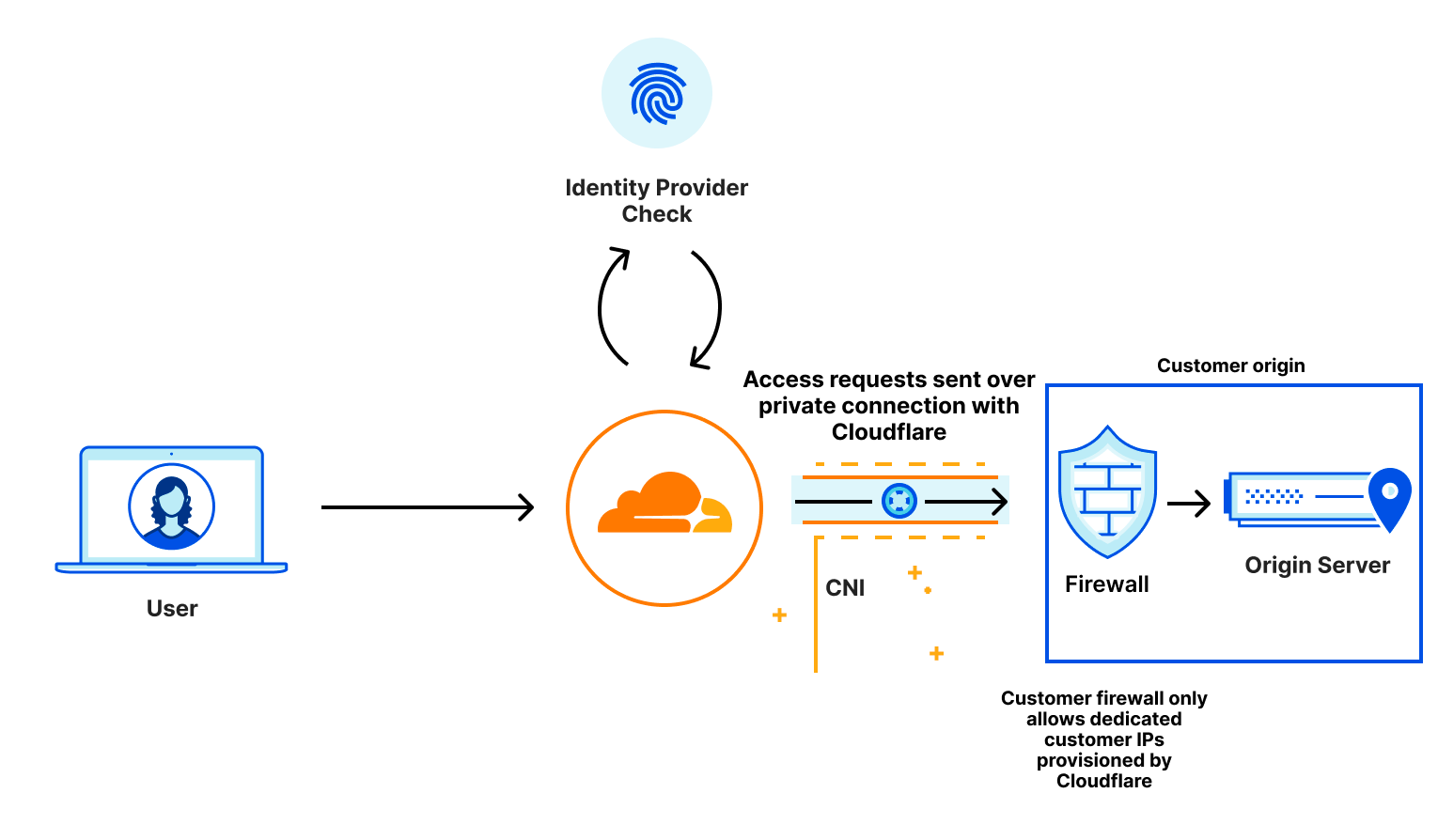
In this blog post, we wanted to highlight some ways that Cloudflare and IBM Cloud work together to help drive product innovation and deliver services that address the needs of our mutual customers. On our blog, we often discuss exciting new product developments and how we are solving real-world problems in our effort to make the internet better and many of our customers and partners play an important role.
IBM Cloud and Cloudflare have been working together since 2018 to integrate Cloudflare application security and performance products natively into IBM Cloud. IBM Cloud Internet Services (CIS) has customers across a wide range of industry verticals and geographic regions but they also have several specialist groups building unique service offerings.
The IBM Cloud team specializes in serving clients in highly regulated industries, aiming to ensure their resiliency, performance, security and compliance needs are met. One group that we’ve been working with recently is IBM Cloud for Financial Services. This group extends the capabilities of IBM Cloud to help serve the complex security and compliance needs of banks, financial institutions and fintech companies.
Bot Management
As malicious bot attacks get more sophisticated and manual mitigations become more onerous, a dynamic and adaptive solution is required for enterprises running Internet facing workloads. With Cloudflare Bot Management on IBM Cloud Internet Services, we aim to help IBM clients protect their Internet properties from targeted application abuse such as account takeover attacks, inventory hoarding, carding abuse and more. Bot Management will be available in the second quarter of 2023.
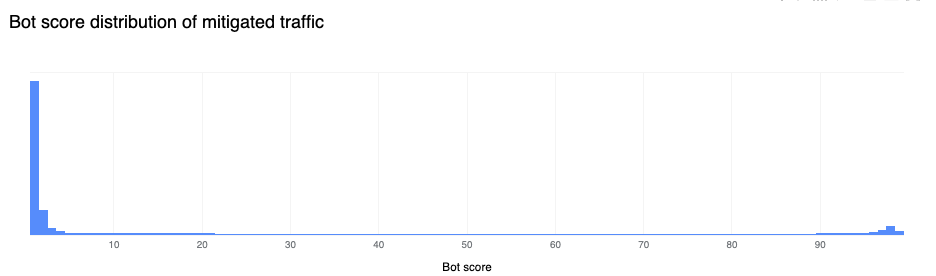
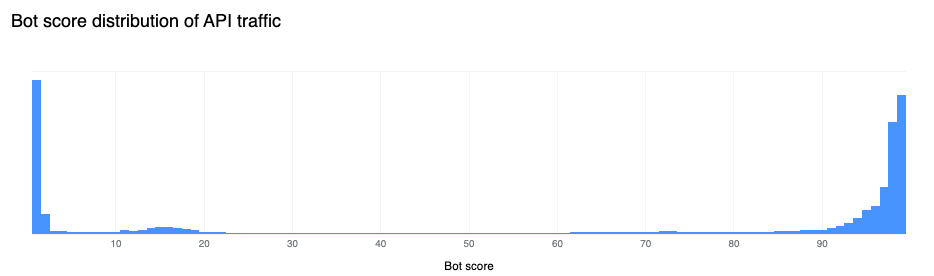
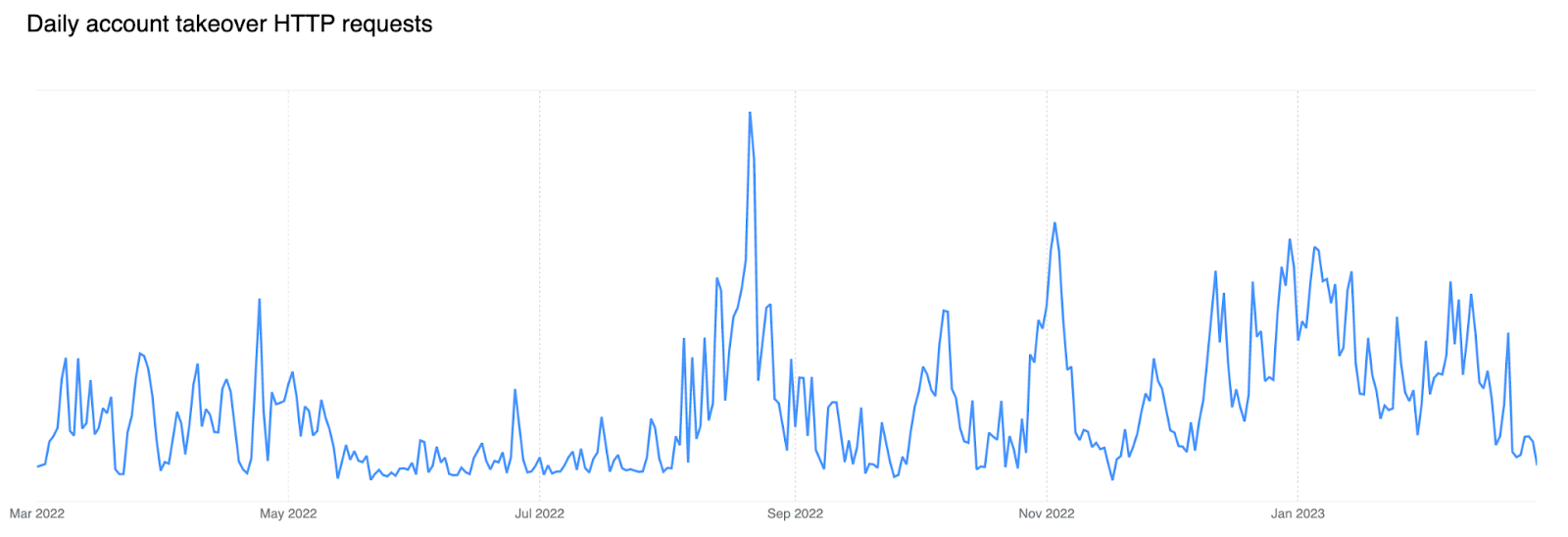
Threat actors specifically target financial services entities with Account Takeover Attacks, and this is where Cloudflare can help. As much as 71% of login requests we see come from bots (Source: Cloudflare Data) Cloudflare’s Bot Management is powered by a global machine learning model that analyses an average of 45 million HTTP requests a second to track botnets across our network. Cloudflare’s Bot Management solution has the potential to benefit all IBM CIS customers.
Supporting banks, financial institutions, and fintechs
IBM Cloud has been a leader when it comes to providing solutions for the financial services industry and has developed several key management solutions that are designed so clients only need to store their private keys in custom built devices.
The IBM CIS team wants to incorporate the right mix of security and performance, which necessitates the use of cloud-based DDoS, WAF, and Bot Management. Specifically, they wanted to incorporate the powerful security tools that were offered through IBM’s Enterprise-level Cloud Internet Services offerings. When using a cloud solution, it is necessary to proxy traffic which can create a potential challenge when it comes to managing private keys. While Cloudflare adopts strict controls to protect these keys, organizations in highly regulated industries may have security policies and compliance requirements that prevent them from sharing these private keys.
Cloudflare built Keyless SSL to allow customers to have total control over exactly where private keys are stored. With Keyless SSL and IBM’s key storage solutions, we aim to help enterprises benefit from the robust application protections available through Cloudflare’s WAF, including Cloudflare Bot Management, while still retaining control of their private keys.
“We aim to ensure our clients meet their resiliency, performance, security and compliance needs. The introduction of Keyless SSL and Bot Management security capabilities can further our collaborative accomplishments with Cloudflare and help enterprises, including those in regulated industries, to leverage cloud-native security and adaptive threat mitigation tools.” — Zane Adam, Vice President, IBM Cloud.
“Through our collaboration with IBM Cloud Internet Services, we get to draw on the knowledge and experience of IBM teams, such as the IBM Cloud for Financial Services team, and combine it with our incredible ability to innovate, resulting in exciting new product and service offerings.” — David McClure, Global Alliance Manager, Strategic Partnerships
At Cloudflare, helping to build a better Internet is not just a catchy saying. We are committed to the long-term process of standards development. We love the work of pushing the fundamental technology of the Internet forward in ways that are accessible to everyone. Today we are adding even more substance to that commitment. One of our core beliefs is that privacy is a human right. We believe that to achieve that right the most advanced cryptography needs to be available to everyone, free of charge, forever. Today, we are announcing that our implementations of post-quantum cryptography will meet that standard: available to everyone, and included free of charge, forever.
We have a proud history of taking paid encryption products and launching it to the Internet at scale for Free. Even at the cost of short and long-term revenue because it’s the right thing to do. In 2014, we made SSL free for every Cloudflare customer with Universal SSL. As we make our implementations of post-quantum cryptography free forever today, we do it in the spirit of that first major announcement:
“Having cutting-edge encryption may not seem important to a small blog, but it is critical to advancing the encrypted-by-default future of the Internet. Every byte, however seemingly mundane, that flows encrypted across the Internet makes it more difficult for those who wish to intercept, throttle, or censor the web. In other words, ensuring your personal blog is available over HTTPS makes it more likely that a human rights organization or social media service or independent journalist will be accessible around the world. Together we can do great things.”
We hope that others will follow us in making their implementations of PQC free as well so that we can create a secure and private Internet without a “quantum” up-charge.
The Internet has matured since the 1990’s and the launch of SSL. What was once an experimental frontier has turned into the underlying fabric of modern society. It runs in our most critical infrastructure like power systems, hospitals, airports, and banks. We trust it with our most precious memories. We trust it with our secrets. That’s why the Internet needs to be private by default. It needs to be secure by default. It’s why we’re committed to ensuring that anyone and everyone can achieve post quantum security for free as well as start deploying it at scale today.
Our work on post-quantum crypto is driven by the thesis that quantum computers that can break conventional cryptography create a similar problem to the Year 2000 bug. We know there is going to be a problem in the future that could have catastrophic consequences for users, businesses, and even nation states. The difference this time is we don’t know the date and time that this break in the paradigm of how computers operate will occur. We need to prepare today to be ready for this threat.
To that end we have been preparing for this transition since 2018. At that time we were concerned about the implementation problems other large protocol transitions, like the move to TLS 1.3, had caused our customers and wanted to get ahead of it. Cloudflare Research over the last few years has become a leader and champion of the idea that PQC security wasn’t an afterthought for tomorrow but a real problem that needed to be solved today. We have collaborated with industry partners like Google and Mozilla, contributed to development through participation in the IETF, and even launched an open source experimental cryptography suite to help move the needle. We have tried hard to work with everyone that wanted to be a part of the process and show our work along the way.
As we have worked with our partners in both industry and academia to help prepare us and the Internet for a post-quantum future, we have become dismayed by an emerging trend. There are a growing number of vendors out there that want to cash in on the legitimate fear that nervous executives, privacy advocates, and government leaders have about quantum computing breaking traditional encryption. These vendors offer vague solutions based on unproven technologies like “Quantum Key Distribution” or “Post Quantum Security” libraries that package non-standard algorithms that haven’t been through public review with exorbitant price tags like RSA did in the 1990s. They often love to throw around phrases like “AI” and “Post Quantum” without really showing their work on how any of their systems actually function. Security and privacy are table stakes in the modern Internet, and no one should be charged just to get the baseline protection needed in our contemporary world.
Launch your PQC transition today
Testing and adopting post-quantum cryptography in modern networks doesn’t have to be hard! In fact, Cloudflare customers can test PQC in their systems today, as we describe later in this post.
After testing out how Cloudflare can help you implement PQC in your networks, it’s time to start to prepare yourself for the transition to PQC in all of your systems. This first step of inventorying and identifying is critical to a smooth rollout. We know first hand since we have undertaken an extensive evaluation of all of our systems to earn our FedRAMP Authorization certifications, and we are doing a similar evaluation again to transition all of our internal systems to PQC.
How we are setting ourselves up for the future of quantum computing
Here’s a sneak preview of the path that we are developing right now to fully secure Cloudflare itself against the cryptographic threat of quantum computers. We can break that path down into three parts: internal systems, zero trust, and open source contributions.
The first part of our path to full PQC adoption at Cloudflare is around all of our connections. The connection between yourself and Cloudflare is just one part of the larger path of the connection. Inside our internal systems we are implementing two significant upgrades in 2023 to ensure that they are PQC secure as well.
The first is that we use BoringSSL for a substantial amount of connections. We currently use our fork and we are excited that upstream support for Kyber is underway. Any additional internal connections that use a different cryptographic system are being upgraded as well. The second major upgrade we are making is to shift the remaining internal connections that use TLS 1.2 to TLS 1.3. This combination of Kyber and TLS 1.3 will make our internal connections faster and more secure, even though we use a hybrid of classical and post-quantum secure cryptography. It’s a speed and security win-win. And we proved this power house combination would provide that speed and security over three and half years ago thanks to the groundbreaking work of Cloudflare Research and Google.
The next part of that path is all about using PQC and zero trust as allies together. As we think about the security posture of tomorrow being based around post-quantum cryptography, we have to look at the other critical security paradigm being implemented today: zero trust. Today, the zero trust vendor landscape is littered with products that fail to support common protocols like IPv6 and TLS 1.2, let alone the next generation of protocols like TLS 1.3 and QUIC that enable PQC. So many middleboxes struggle under the load of today’s modern protocols. They artificially downgrade connections and break end user security all in the name of inspecting traffic because they don’t have a better solution. Organizations big and small struggled to support customers that wanted the highest possible performance and security, while also keeping their businesses safe, because of the resistance of these vendors to adapt to modern standards. We do not want to repeat the mistakes of the past. We are planning and evaluating the needed upgrades to all of our zero trust products to support PQC out of the box. We believe that zero trust and post-quantum cryptography are not at odds with one another, but rather together are the future standard of security.
Finally, it’s not enough for us to do this for ourselves and for our customers. The Internet is only as strong as its weakest links in the connection chains that network us all together. Every connection on the Internet needs the strongest possible encryption so that businesses can be secure, and everyday users can be ensured of their privacy. We believe that this core technology should be vendor agnostic and open to everyone. To help make that happen our final part of the path is all about contributing to open source projects. We have already been focused on releases to CIRCL. CIRCL (Cloudflare Interoperable, Reusable Cryptographic Library) is a collection of cryptographic primitives written in Go. The goal of this library is to be used as a tool for experimental deployment of cryptographic algorithms targeting post quantum.
Later on this year we will be publishing as open source a set of easy to adopt, vendor-neutral roadmaps to help you upgrade your own systems to be secure against the future today. We want the security and privacy created by post quantum crypto to be accessible and free for everyone. We will also keep writing extensively about our post quantum journey. To learn more about how you can turn on PQC today, and how we have been building post-quantum cryptography at Cloudflare, please check out these resources:
This is a familiar story in the world of bot attacks. Cloudflare Bot Management helps customers identify the automated tools behind online fraud, but it’s important to note that not all fraud is committed by bots. If the target is valuable enough, bad actors will contract out the exploitation of online applications to real people. Security teams need to look at more than just bots to better secure online applications and tackle modern, online fraud.
Today, we’re excited to announce Cloudflare Fraud Detection. Fraud Detection will give you precise, easy to use tools that can be deployed in seconds to any website on the Cloudflare network to help detect and categorize fraud. For every type of fraud we detect on your website, you will be able to choose the behavior that makes the most sense to you. While some customers will want to block fraudulent traffic at our edge, other customers may want to pass this information in headers to build integrations with their own app, or use our Cloudflare Workers platform to direct high risk users to load an alternate online experience with fewer capabilities.
The online fraud experience today
When we talk to organizations impacted by sophisticated, online fraud, the first thing we hear from frustrated security teams is that they know what they could do to stop fraud in a vacuum: they’ve proposed requiring email verification on signup, enforcing two-factor authentication for all logins, or blocking online purchases from anonymizing VPNs or countries they repeatedly see a disproportionately high number of charge-backs from. While all of these measures would undoubtedly reduce fraud, they would also make the user experience worse. The fear for every company is that a bad UX will mean slower adoption and less revenue, and that’s too steep a price to pay for most run-of-the-mill online fraud.
For those who’ve chosen to preserve that frictionless user experience and bear the cost of fraud, we see two big impacts: higher infrastructure costs and less efficient employees. Bad actors that abuse account creation endpoints or service availability endpoints often do so with floods of highly distributed HTTP requests, quickly moving through residential proxies to pass under IP based rate limiting rules. Without a way to identify fraudulent traffic with certainty, companies are forced to scale up their infrastructure to be able to serve new peaks in request traffic, even when they know the majority of this traffic is illegitimate. Engineering and Trust and Safety Teams suddenly have a whole new set of responsibilities: regularly banning IP addresses that will probably never be used again, routinely purging fraudulent data from over capacity databases, and even sometimes becoming de-facto fraud investigators. As a result, the organization incurs greater costs without any greater value to their customers.
Reduce modern fraud without hurting UX
Organizations have told us loud and clear that an effective fraud management solution needs to reliably stop bad actors before they can create fraudulent accounts, use stolen credit cards, or steal customer data all the while ensuring a frictionless user experience for real users. We are building novel and highly accurate detections, solving for the four common fraud types we hear the most demand for from businesses around the world:
Fake Account Creation: Bad actors signing up for many different accounts to gain access to promotional rewards, or more resources than a single user should have access to.
Account Takeover: Gaining unauthorized access to legitimate accounts, by means such as using stolen username and password combinations from other websites, guessing weak passwords, or abusing account recovery mechanisms.
Card Testing and Fraudulent Transactions: Testing the validity of stolen credit card details or using those same details to purchase goods or services.
Expediting: Obtaining limited availability goods or services by circumventing the normal user flow to complete orders more quickly than should be possible.
In order to trust your fraud management solution, organizations have to understand the decisions or predictions behind the detection of fraud. This is referred to as explainability. For example, it’s not enough to know a signup attempt was flagged as fraud. You need to know, for example, if a signup is fraudulent, exactly what field supplied by the user led us to think this was an issue, why it was an issue, and if it was part of a larger pattern. We will pass along this level of detail when we detect fraud so you can ensure we are only keeping the bad actors out.
Every business that deals with modern, online fraud has a different idea of what risks are acceptable, and a different preference for dealing with fraud once it’s been identified. To give customers maximum flexibility, we’re building Cloudflare’s fraud detection signals to be used individually, or combined with other Cloudflare security products in whichever way best fits each customer’s risk profile and use case, all while using the familiar Cloudflare Firewall Rules interface. Templated rules and suggestions will be available to provide guidance and help customers become familiar with the new features, but each customer will have the option of fully customizing how they want to protect each internet application. Customers can either block, rate-limit, or challenge requests at the edge, or send those signals upstream in request headers, to trigger custom in-application behavior.
Cloudflare provides application performance and security services to millions of sites, and we see 45 million HTTP requests per second on average. The massive diversity and volume of this traffic puts us in a unique position to analyze and defeat online fraud. Cloudflare Bot Management is already built to run our Machine Learning model that detects automated traffic on every request we see. To better tackle more challenging use cases like online fraud, we made our lightning fast Machine Learning even more performant. The typical Machine Learning model now executes in under 0.2 milliseconds, giving us the architecture we need to run multiple specific Machine Learning models in parallel without slowing down content delivery.
Stopping fake account creation and adding to Cloudflare’s defense in depth
The first problem our customers asked us to tackle is detecting fake account creation. Cloudflare is perfectly positioned to solve this because we see more account creation pages than anyone else. Using sampled fake account attack data from our customers, we started looking at signup submission data, and how threat intelligence curated by our Cloudforce One team might be helpful. We found that the data used in our Cloudflare One products was already able to identify 72% of fake accounts based on the signup details supplied by the bad actor, such as the email address or the domain they’re using in the attack. We are continuing to add more sources of threat intelligence data specific to fake accounts to get this number close to 100%. On top of these threat intelligence based rules, we are also training new machine learning models on this data as well, that will spot trends like popular fraud domains based on intelligence from the millions of domains we see across the Cloudflare network.
Making fraud inefficient by expediting detection
The second problem customers asked us to prioritize is expediting. As a reminder, expediting means visiting a succession of web pages faster than would be possible for a normal user, and sometimes skipping ahead in the order of web pages in order to efficiently exploit a resource.
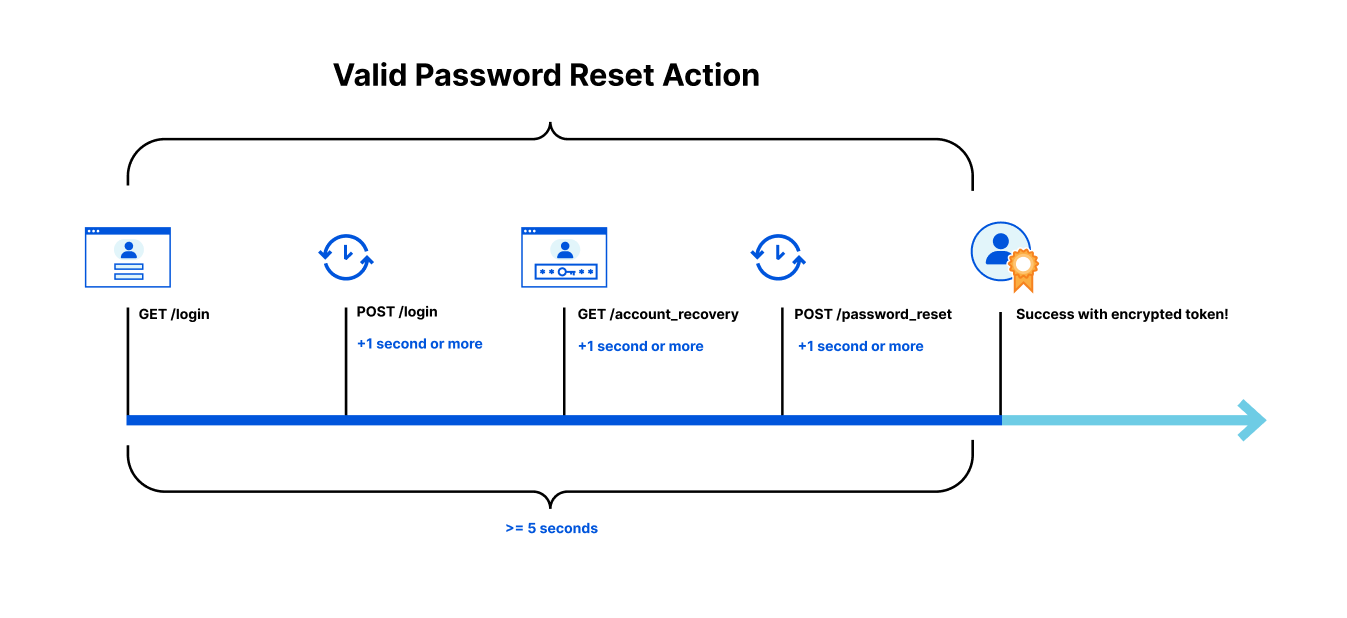
For instance, let’s say that you have an Account Recovery page that is being spammed by a sophisticated group of bad actors, looking for vulnerable users they can steal reset tokens for. In this case, the fraudsters have access to a large number of valid email addresses and they’re testing which of these addresses may be used at your website. To prevent your account recovery process from being abused, we need to ensure that no single person can move through the account recovery process faster, or in a different order than a real person would.
In order to complete a valid password reset action on your site, you may know that a user should have made:
A GET request to render your login page
A POST request to the login page (at least one second after receiving the login page HTML)
A GET request to render the Account Recovery page (at least one second after receiving the POST response)
A POST request to the password reset page (at least one second after receiving the Account Recovery page HTML)
Taken a total time of less than 5 seconds to complete the process
To solve this, we will rely on encrypted data stored by the user in a token to help us determine if the user has visited all the necessary pages needed in a reasonable amount of time to be performing sensitive actions on your site. If your account recovery process is being abused, the encrypted token we supply acts as a VIP pass, allowing only authorized users to successfully complete the password recovery process. Without a pass indicating the user has gone through the normal recovery flow in the correct order and time, they are denied entry to complete a password recovery. By forcing the bad actor to behave the same as a legitimate user, we make their task of checking which of their compromised email addresses might be registered at your site an impossibly slow process, forcing them to move on to other targets.
These are just two of the first techniques we use to identify and block fraud. We are also building Account Takeover and Carding Abuse detections that we will be talking about in the future on this blog. As online fraud continues to evolve, we will continue to build new and unique detections, leveraging Cloudflare’s unique position to help keep the internet safe.
Where do I sign up?
Cloudflare’s mission is to help build a better Internet, and that includes dealing with the evolution of modern online fraud. If you’re spending hours cleaning up after fraud, or are tired of paying to serve web traffic to bad actors, you can join in the Cloudflare Fraud Detection Early Access in the second half of 2023 by submitting your contact information here. Early Access customers can opt in to providing training data sets right away, making our models more effective for their use cases. You’ll also get test access to our newest models, and future fraud protection features as soon as they roll out.
Cloudflare now automatically discovers all API endpoints and learns API schemas for all of our API Gateway customers. Customers can use these new features to enforce a positive security model on their API endpoints even if they have little-to-no information about their existing APIs today.
The first step in securing your APIs is knowing your API hostnames and endpoints. We often hear that customers are forced to start their API cataloging and management efforts with something along the lines of “we email around a spreadsheet and ask developers to list all their endpoints”.
Can you imagine the problems with this approach? Maybe you have seen them first hand. The “email and ask” approach creates a point-in-time inventory that is likely to change with the next code release. It relies on tribal knowledge that may disappear with people leaving the organization. Last but not least, it is susceptible to human error.
Even if you had an accurate API inventory collected by group effort, validating that API was being used as intended by enforcing an API schema would require even more collective knowledge to build that schema. Now, API Gateway’s new API Discovery and Schema Learning features combine to automatically protect APIs across the Cloudflare global network and remove the need for manual API discovery and schema building.
API Gateway discovers and protects APIs
API Gateway discovers APIs through a feature called API Discovery. Previously, API Discovery used customer-specific session identifiers (HTTP headers or cookies) to identify API endpoints and display their analytics to our customers.
Doing discovery in this way worked, but it presented three drawbacks:
Customers had to know which header or cookie they used in order to delineate sessions. While session identifiers are common, finding the proper token to use can take time.
Needing a session identifier for API Discovery precluded us from monitoring and reporting on completely unauthenticated APIs. Customers today still want visibility into session-less traffic to ensure all API endpoints are documented and that abuse is at a minimum.
Once the session identifier was input into the dashboard, customers had to wait up to 24 hours for the Discovery process to complete. Nobody likes to wait.
While this approach had drawbacks, we knew we could quickly deliver value to customers by starting with a session-based product. As we gained customers and passed more traffic through the system, we knew our new labeled data would be extremely useful to further build out our product. If we could train a machine learning model with our existing API metadata and the new labeled data, we would no longer need a session identifier to pinpoint which endpoints were for APIs. So we decided to build this new approach.
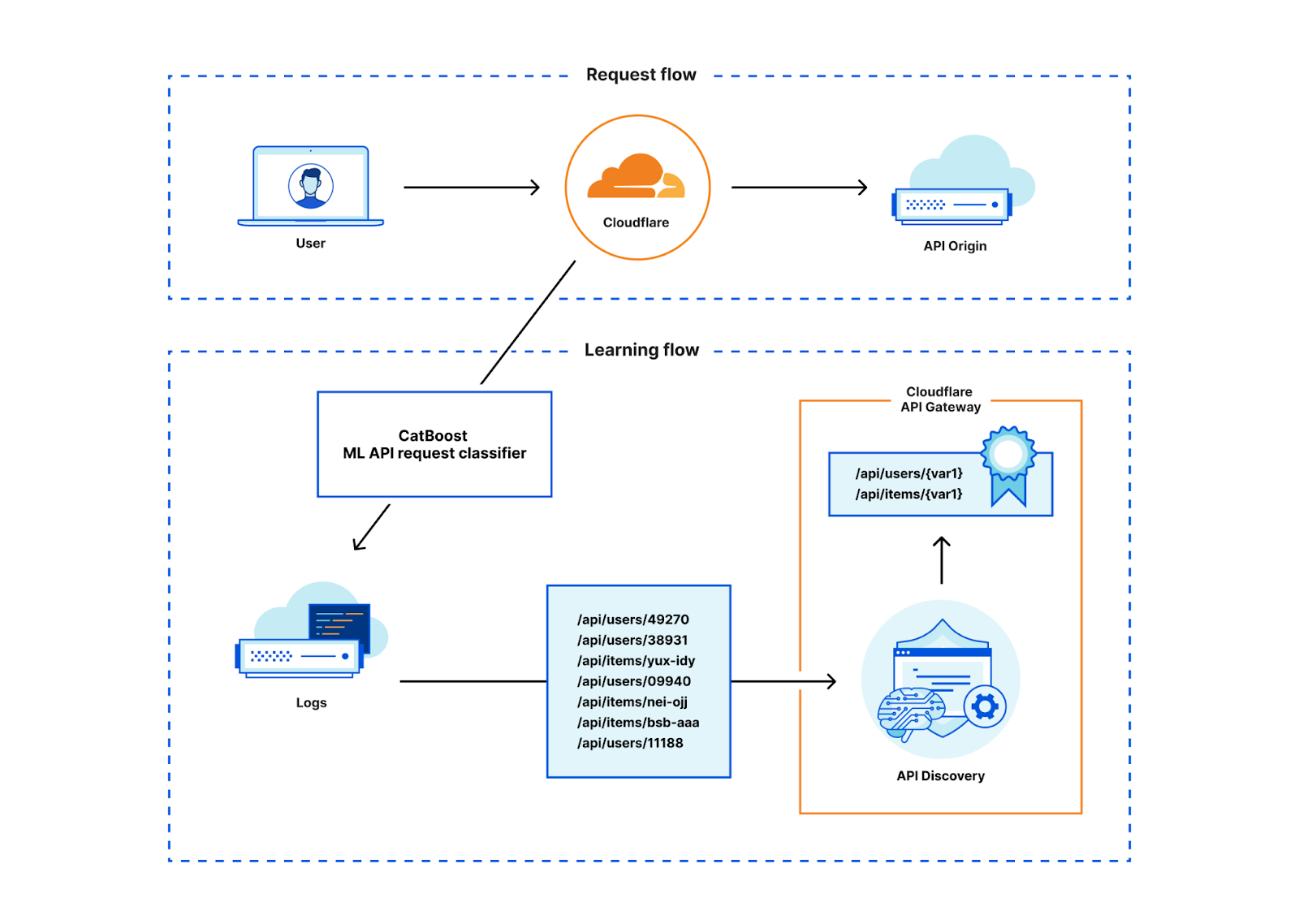
We took what we learned from the session identifier-based data and built a machine learning model to uncover all API traffic to a domain, regardless of session identifier. With our new Machine Learning-based API Discovery, Cloudflare continually discovers all API traffic routed through our network without any prerequisite customer input. With this release, API Gateway customers will be able to get started with API Discovery faster than ever, and they’ll uncover unauthenticated APIs that they could not discover before.
Session identifiers are still important to API Gateway, as they form the basis of our volumetric abuse prevention rate limits as well as our Sequence Analytics. See more about how the new approach performs in the “How it works” section below.
API Protection starting from nothing
Now that you’ve found new APIs using API Discovery, how do you protect them? To defend against attacks, API developers must know exactly how they expect their APIs to be used. Luckily, developers can programmatically generate an API schema file which codifies acceptable input to an API and upload that into API Gateway’s Schema Validation.
However, we already talked about how many customers can’t find their APIs as fast as their developers build them. When they do find APIs, it’s very difficult to accurately build a unique OpenAPI schema for each of potentially hundreds of API endpoints, given that security teams seldom see more than the HTTP request method and path in their logs.
When we looked at API Gateway’s usage patterns, we saw that customers would discover APIs but almost never enforce a schema. When we ask them ‘why not?’ the answer was simple: “Even when I know an API exists, it takes so much time to track down who owns each API so that they can provide a schema. I have trouble prioritizing those tasks higher than other must-do security items.” The lack of time and expertise was the biggest gap in our customers enabling protections.
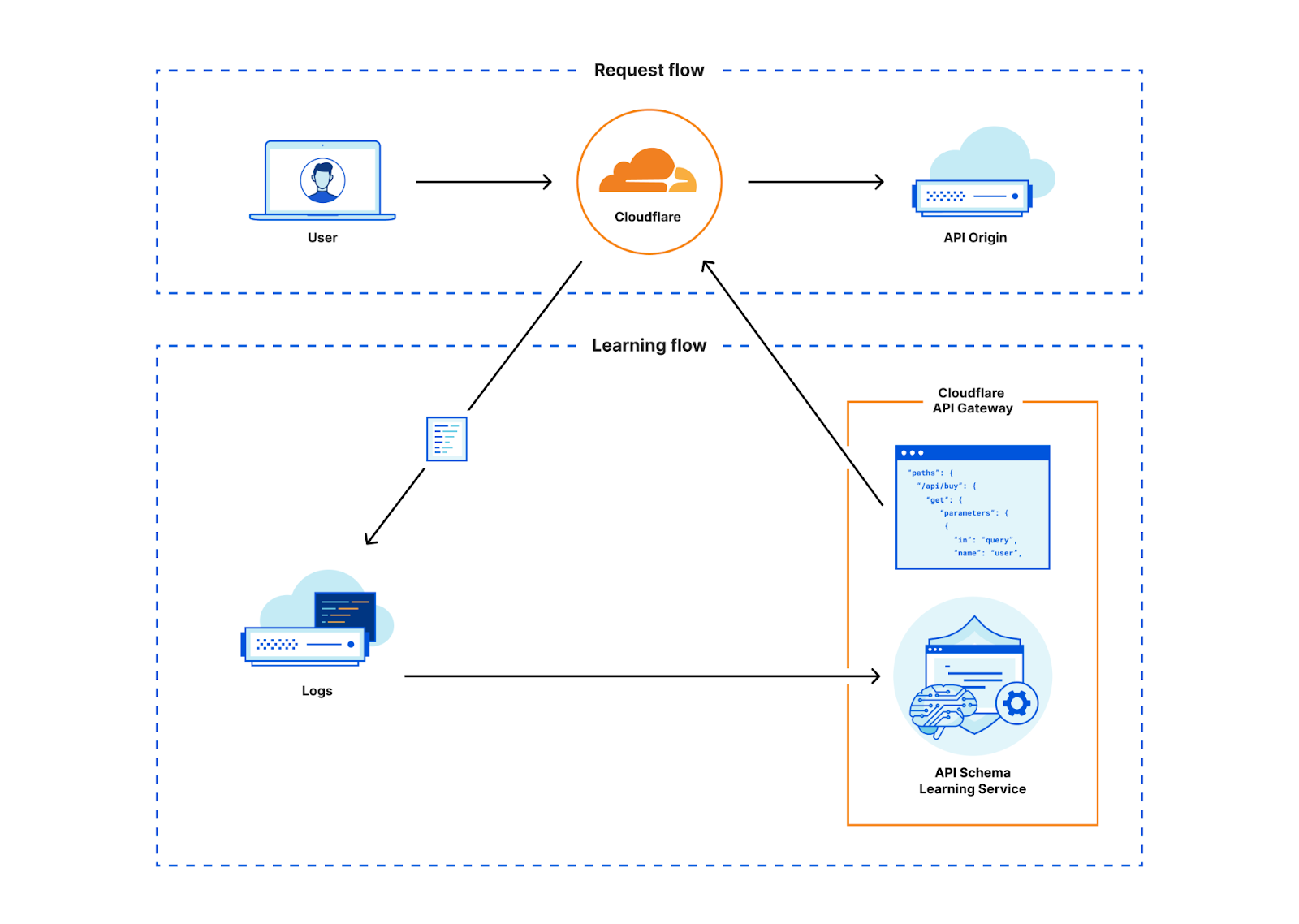
So we decided to close that gap. We found that the same learning process we used to discover API endpoints could then be applied to endpoints once they were discovered in order to automatically learn a schema. Using this method we can now generate an OpenAPI formatted schema for every single endpoint we discover, in real time. We call this new feature Schema Learning. Customers can then upload that Cloudflare-generated schema into Schema Validation to enforce a positive security model.
How it works
Machine learning-based API discovery
With RESTful APIs, requests are made up of different HTTP methods and paths. Take for example the Cloudflare API. You’ll notice a common trend with the paths that might make requests to this API stand out amongst requests to this blog: API requests all start with /client/v4 and continue with the service name, a unique identifier, and sometimes service feature names and further identifiers.
How could we easily identify API requests? At first glance, these requests seem easy to programmatically discover with a heuristic like “path starts with /client”, but the core of our new Discovery contains a machine-learned model that powers a classifier that scores HTTP transactions. If API paths are so structured, why does one need machine-learning for this and can’t one just use some simple heuristic?
The answer boils down to the question: what actually constitutes an API request and how does it differ from a non-API request? Let’s look at two examples.
Like the Cloudflare API, many of our customers’ APIs follow patterns such as prefixing the path of their API request with an “api” identifier and a version, for example: /api/v2/user/7f577081-7003-451e-9abe-eb2e8a0f103d.
So just looking for “api” or a version in the path is already a pretty good heuristic that tells us this is very likely part of an API, but it is unfortunately not always as easy.
Let’s consider two further examples, /users/7f577081-7003-451e-9abe-eb2e8a0f103d.jpg and /users/7f577081-7003-451e-9abe-eb2e8a0f103d, both just differ in a .jpg extension. The first path could just be a static resource like the thumbnail of a user. The second path does not give us a lot of clues just from the path alone.
Manually crafting such heuristics quickly becomes difficult. While humans are great at finding patterns, building heuristics is challenging considering the scale of the data that Cloudflare sees each day. As such, we use machine learning to automatically derive these heuristics such that we know that they are reproducible and adhere to a certain accuracy.
Input to the training are features of HTTP request/response samples such as the content-type or file extension that we collected through the session identifiers-based Discovery mentioned earlier. Unfortunately, not everything that we have in this data is clearly an API. Additionally, we also need samples that represent non-API traffic. As such, we started out with the session-identifier Discovery data, manually cleaned it up and derived further samples of non-API traffic. We took great care in trying to not overfit the model to the data. That is, we want that the model generalizes beyond the training data.
To train the model, we’ve used the CatBoost library for which we already have a good chunk of expertise as it also powers our Bot Management ML-models. In a simplification, one can regard the resulting model as a flow chart that tells us which conditions we should check after another, for example: if the path contains “api” then also check if there is no file extension and so forth. At the end of this flowchart is a score that tells us the likelihood that a HTTP transaction belongs to an API.
Given the trained model, we can thus input features of HTTP request/responses that run through the Cloudflare network and calculate the likelihood that this HTTP transaction belongs to an API or not. Feature extraction and model scoring is done in Rust and takes only a couple of microseconds on our global network. Since Discovery sources data from our powerful data pipeline, it is not actually necessary to score each transaction. We can reduce the load on our servers by only scoring those transactions that we know will end up in our data pipeline to begin with thus saving CPU time and allowing the feature to be cost effective.
With the classification results in our data pipeline, we can use the same API Discovery mechanism that we’ve been using for the session identifier-based discovery. This existing system works great and allows us to reuse code efficiently. It also aided us when comparing our results with the session identifier-based Discovery, as the systems are directly comparable.
For API Discovery results to be useful, Discovery’s first task is to simplify the unique paths we see into variables. We’ve talked about this before. It is not trivial to deduce the various different identifier schemes that we see across the global network, especially when sites use custom identifiers beyond a straightforward GUID or integer format. API Discovery aptly normalizes paths containing variables with the help of a few different variable classifiers and supervised learning.
Only after normalizing paths are the Discovery results ready for our users to use in a straightforward fashion.
The results: hundreds of found endpoints per customer
So, how does ML Discovery compare to the session identifier-based Discovery which relies on headers or cookies to tag API traffic?
Our expectation is that it detects a very similar set of endpoints. However, in our data we knew there would be two gaps. First, we sometimes see that customers are not able to cleanly dissect only API traffic using session identifiers. When this happens, Discovery surfaces non-API traffic. Second, since we required session identifiers in the first version of API Discovery, endpoints that are not part of a session (e.g. login endpoints or unauthenticated endpoints) were conceptually not discoverable.
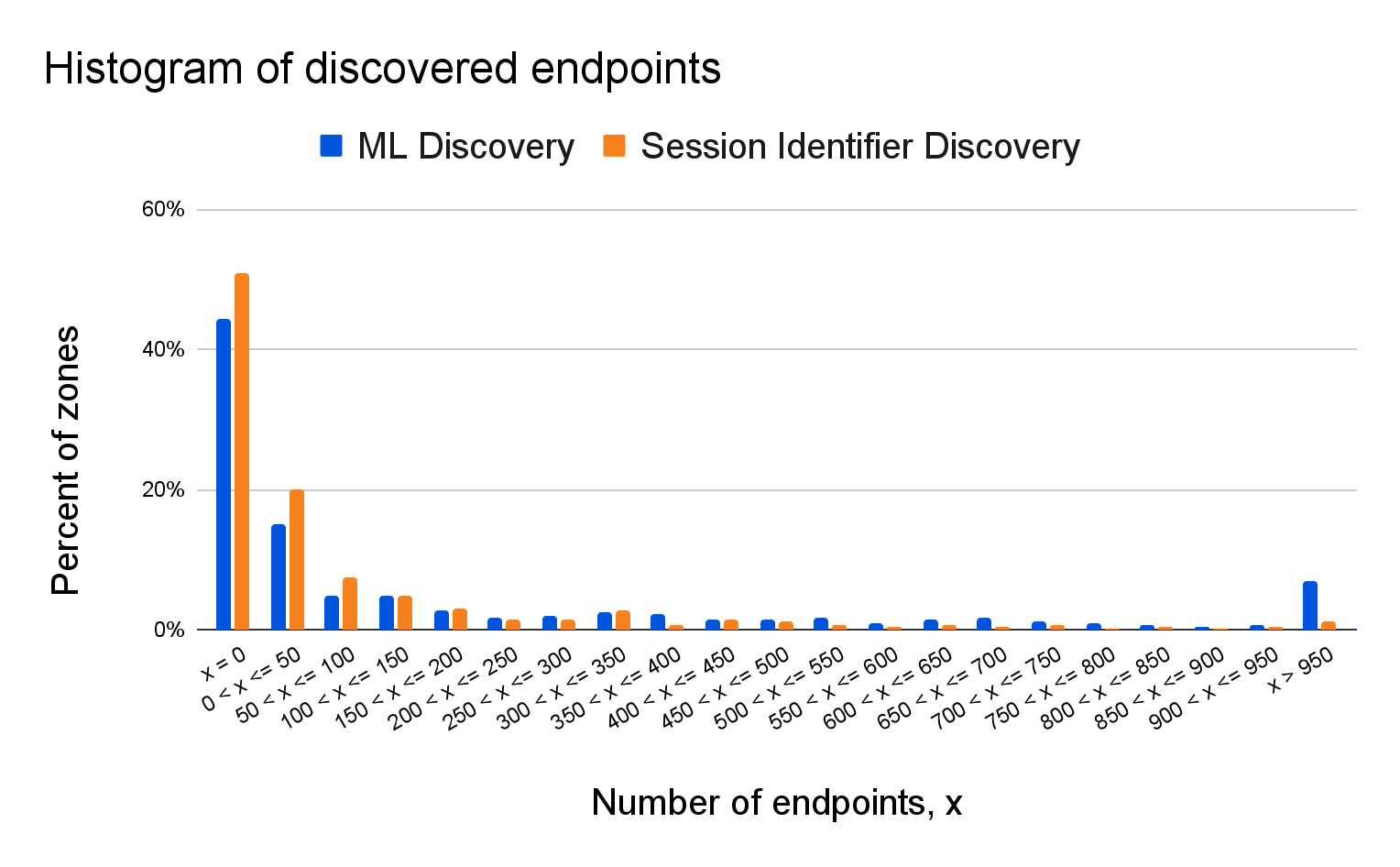
The following graph shows a histogram of the number of endpoints detected on customer domains for both discovery variants.
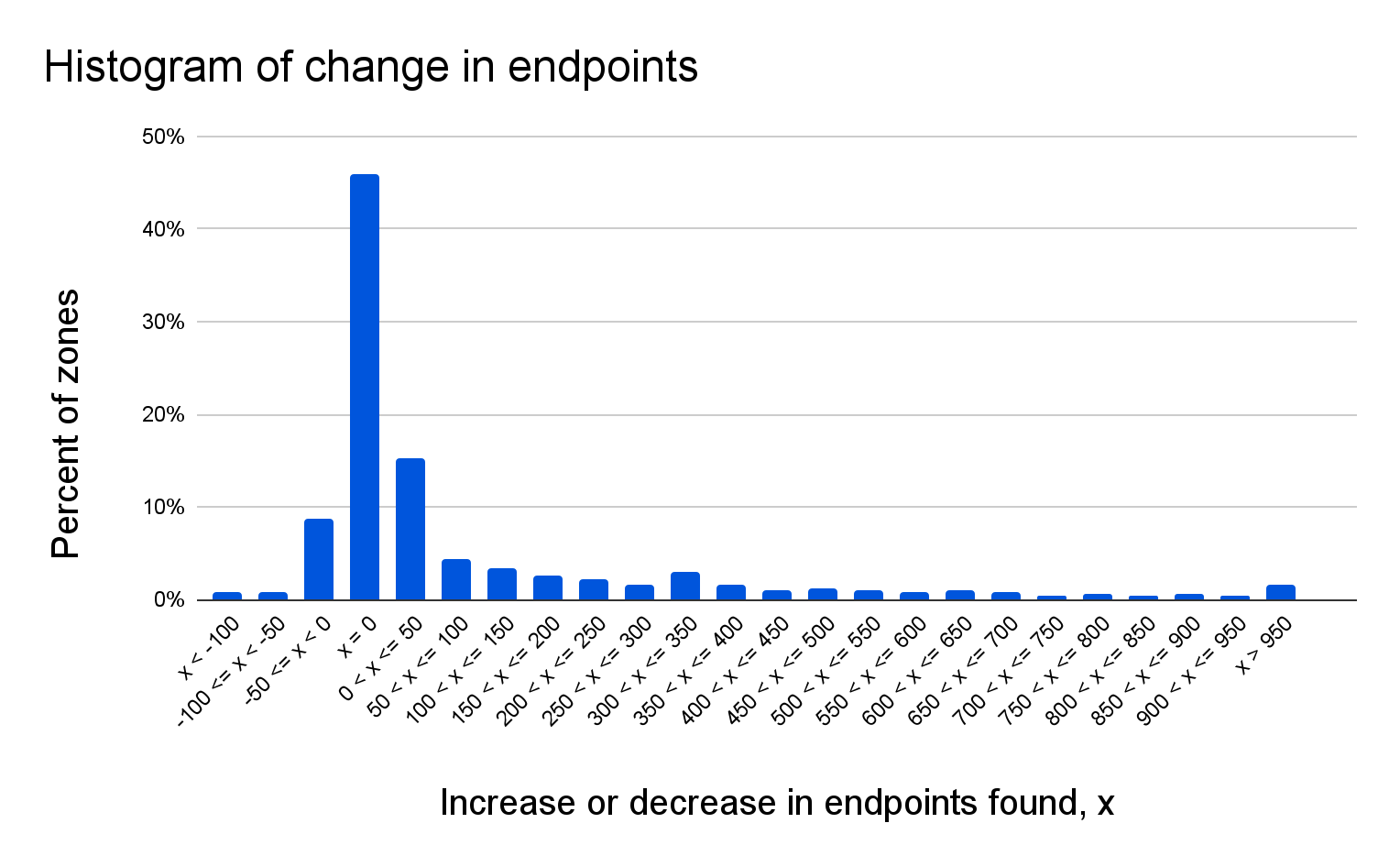
From a bird’s eye perspective, the results look very similar, which is a good indicator that ML Discovery performs as it is supposed to. There are some differences already visible in this plot, which is also expected since we’ll also discover endpoints that are conceptually not discoverable with just a session identifier. In fact, if we take a closer look at a domain-by-domain comparison we see that there is no change for roughly ~46% of the domains. The next graph compares the difference (by percent of endpoints) between session-based and ML-based discovery:
For ~15% of the domains, we see an increase in endpoints between 1 and 50, and for ~9%, we see a similar reduction. For ~28% of the domains, we find more than 50 additional endpoints.
These results highlight that ML Discovery is able to surface additional endpoints that have previously been flying under the radar, and thus expands the set tools API Gateway offers to help bring order to your API landscape.
On-the-fly API protection through API schema learning
With API Discovery taken care of, how can a practitioner protect the newly discovered endpoints? We already looked at the API request metadata, so now let’s look at the API request body. The compilation of all expected formats for all API endpoints of an API is known as an API schema. API Gateway’s Schema Validation is a great way to protect against OWASP Top 10 API attacks, ensuring the body, path, and query string of a request contains the expected information for that API endpoint in an expected format. But what if you don’t know the expected format?
Even if the schema of a specific API is not known to a customer, the clients using this API will have been programmed to mostly send requests that conform to this unknown schema (or they would not be able to successfully query the endpoint). Schema Learning makes use of this fact and will look at successful requests to this API to reconstruct the input schema automatically for the customer. As an example, an API might expect the user-ID parameter in a request to have the form id12345-a. Even if this expectation is not explicitly stated, clients that want to have a successful interaction with the API will send user-IDs in this format.
Schema Learning first identifies all recent successful requests to an API-endpoint, and then parses the different input parameters for each request according to their position and type. After parsing all requests, Schema Learning looks at the different input values for each position and identifies which characteristics they have in common. After verifying that all observed requests share these commonalities, Schema Learning creates an input schema that restricts input to comply with these commonalities and that can directly be used for Schema Validation.
To allow for more accurate input schemas, Schema Learning identifies when a parameter can receive different types of input. Let’s say you wanted to write an OpenAPIv3 schema file and manually observe in a small sample of requests that a query parameter is a unix timestamp. You write an API schema that forces that query parameter to be an integer greater than the start of last year’s unix epoch. If your API also allowed that parameter in ISO 8601 format, your new rule would create false positives when the differently formatted (yet valid) parameter hit the API. Schema Learning automatically does all this heavy lifting for you and catches what manual inspection can’t.
To prevent false positives, Schema Learning performs a statistical test on the distribution of these values and only writes the schema when the distribution is bounded with high confidence.
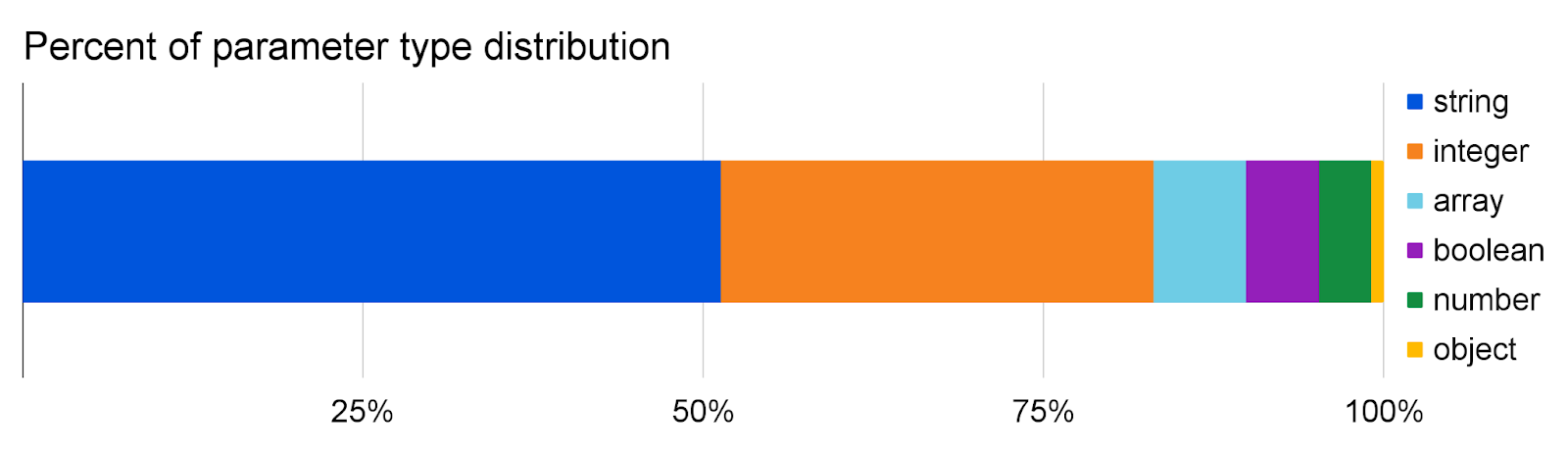
So how well does it work? Below are some statistics about the parameter types and values we see:
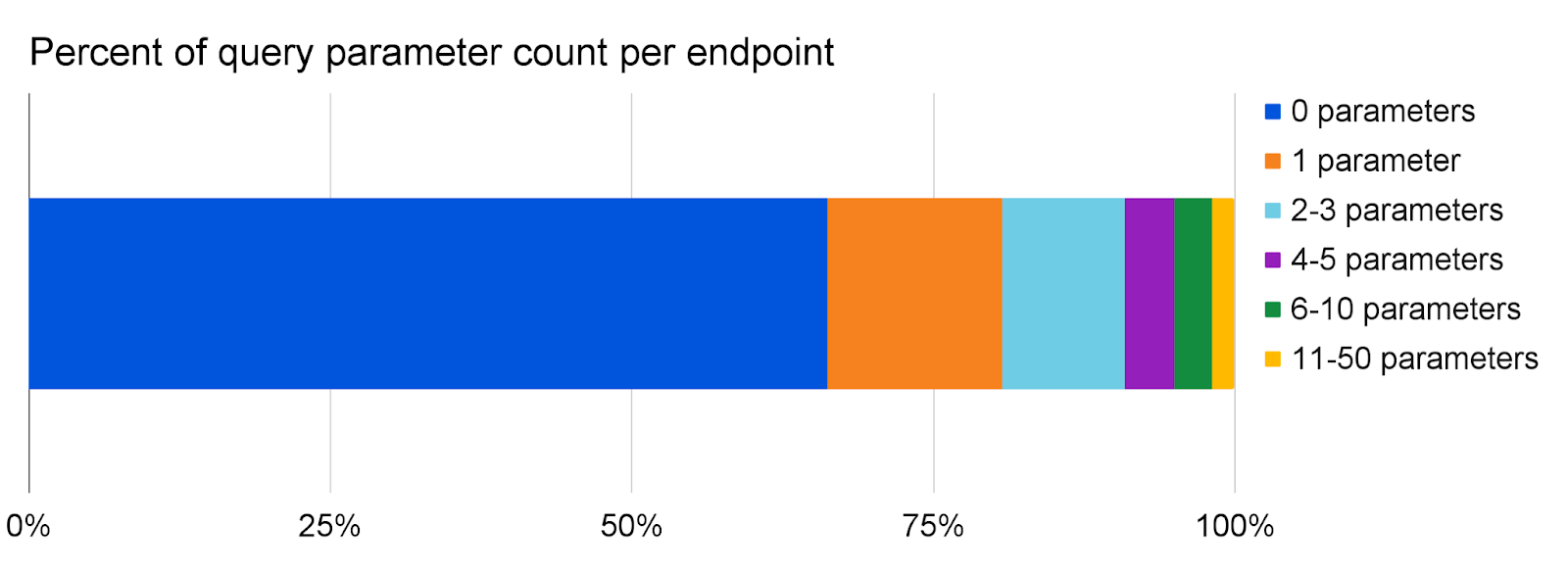
Parameter learning classifies slightly more than half of all parameters as strings, followed by integers which make up almost a third. The remaining 17% are made up of arrays, booleans, and number (float) parameters, while object parameters are seen more rarely in the path and query.
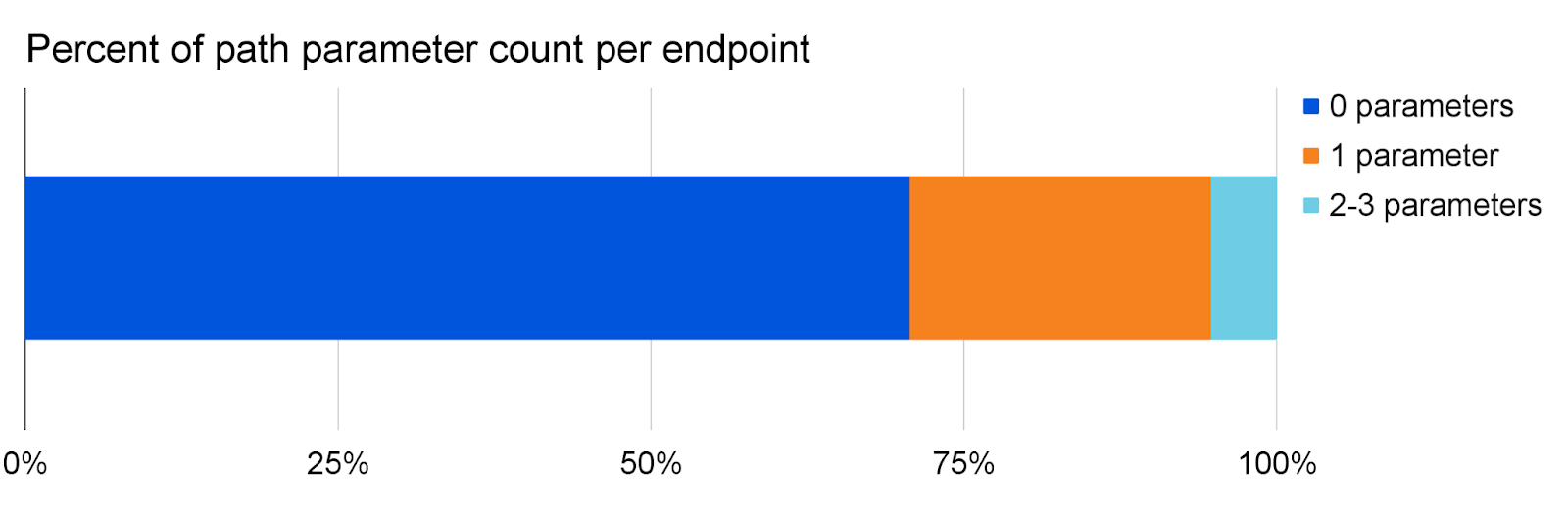
The number of parameters in the path is usually very low, with 94% of all endpoints seeing at most one parameter in their path.
For the query, we do see a lot more parameters, sometimes reaching 50 different parameters for one endpoint!
Parameter learning is able to estimate numeric constraints with 99.9% confidence for the majority of parameters observed. These constraints can either be a maximum/minimum on the value, length, or size of the parameter, or a limited set of unique values that a parameter has to take.
Protect your APIs in minutes
Starting today, all API Gateway customers can now discover and protect APIs in just a few clicks, even if you’re starting with no previous information. In the Cloudflare dash, click into API Gateway and on to the Discovery tab to observe your discovered endpoints. These endpoints will be immediately available with no action required from you. Then, add relevant endpoints from Discovery into Endpoint Management. Schema Learning runs automatically for all endpoints added to Endpoint Management. After 24 hours, export your learned schema and upload it into Schema Validation.
Pro, Biz, and Enterprise customers that haven’t purchased API Gateway can get started by enabling the API Gateway trial inside the Cloudflare Dashboard or contacting their account manager.
What’s next
We plan to enhance Schema Learning by supporting more learned parameters in more formats, like POST body parameters with both JSON and URL-encoded formats as well as header and cookie schemas. In the future, Schema Learning will also notify customers when it detects changes in the identified API schema and present a refreshed schema.
We’d like to hear your feedback on these new features. Please direct your feedback to your account team so that we can prioritize the right areas of improvement. We look forward to hearing from you!
Today, we’re announcing Cloudflare Sequence Analytics for APIs. Using Sequence Analytics, Customers subscribed to API Gateway can view the most important sequences of API requests to their endpoints. This new feature helps customers to apply protection to the most important endpoints first.
What is a sequence? It is simply a time-ordered list of HTTP API requests made by a specific visitor as they browse a website, use a mobile app, or interact with a B2B partner via API. For example, a portion of a sequence made during a bank funds transfer could look like:
Order
Method
Path
Description
1
GET
/api/v1/users/{user_id}/accounts
user_id is the active user
2
GET
/api/v1/accounts/{account_id}/balance
account_id is one of the user’s accounts
3
GET
/api/v1/accounts/{account_id}/balance
account_id is a different account belonging to the user
4
POST
/api/v1/transferFunds
Containing a request body detailing an account to transfer funds from, an account to transfer funds to, and an amount of money to transfer
Why is it important to pay attention to sequences for API security? If the above API received requests for POST /api/v1/transferFunds without any of the prior requests, it would seem suspicious. Think about it: how would the API client know what the relevant account IDs are without listing them for the user? How would the API client know how much money is available to transfer? While this example may be obvious, the sheer number of API requests to any given production API can make it hard for human analysts to spot suspicious usage.
In security, one approach to defending against an untold number of threats that are impossible to screen by a team of humans is to create a positive security model. Instead of trying to block everything that could potentially be a threat, you allow all known good or benign traffic and block everything else by default.
Customers could already create positive security models with API Gateway in two main areas: volumetric abuse protection and schema validation. Sequences will form the third pillar of a positive security model for API traffic. API Gateway will be able to enforce the precedence of endpoints in any given API sequence. By establishing precedence within an API sequence, API Gateway will log or block any traffic that doesn’t match expectations, reducing abusive traffic.
Detecting abuse by sequence
When attackers attempt to exfiltrate data in an abusive way, they rarely follow the patterns of expected API traffic. Attacks often use special software to ‘fuzz’ the API, sending several requests with different request parameters hoping to find unexpected responses from the API indicating opportunities to exfiltrate data. Attackers can also manually send requests to APIs that attempt to trick the API in performing unauthorized actions, like granting an attacker elevated privileges or access to data through a Broken Object Level Authentication attack. Protecting APIs with rate limits is a common best practice; however, in both of the above examples attackers may deliberately execute request sequences slowly, in an attempt to thwart volumetric abuse detection.
Think of the sequence of requests above again, but this time imagine an attacker copying the legitimate funds transfer request and modifying the request payload in an attempt to trick the system:
Order
Method
Path
Description
1
GET
/api/v1/users/{user_id}/accounts
user_id is the active user
2
GET
/api/v1/accounts/{account_id}/balance
account_id is one of the user’s accounts
3
GET
/api/v1/accounts/{account_id}/balance
account_id is a different account belonging to the user
4
POST
/api/v1/transferFunds
Containing a request body detailing an account to transfer funds from, an account to transfer funds to, and an amount of money to transfer
… attacker copies the request to a debugging tool like Postman …
5
POST
/api/v1/transferFunds
Attacker has modified the POST body to try and trick the API
6
POST
/api/v1/transferFunds
A further modified POST body to try and trick the API
7
POST
/api/v1/transferFunds
Another, further modified POST body to try and trick the API
If the customer knew beforehand that the funds transfer endpoint was critical to protect and only occurred once during a sequence, they could write a rule to ensure that it was never called twice in a row and a GET /balance always preceded a POST /transferFunds. But without prior knowledge of which endpoint sequences are critical to protect, how would the customer know which rules to define? A low rate limit is too risky, since an API user might legitimately have a few funds transfer requests to perform in a short amount of time. In the present reality there are few tools to prevent this type of abuse, and most customers are left with reactive efforts to clean up abuse with their application teams and fraud departments after it’s happened.
Ultimately, we believe that providing our customers with the ability to define positive security models on API request sequences requires a three-pronged approach:
Sequence Analytics: Determining which sequences of API requests occurred and when, as well as summarizing the data into readily understandable form.
Sequence Abuse Detection: Identifying which sequences of API requests are likely of benign or malicious origin.
Sequence Mitigation: Identifying relevant rules on sequences of API requests for deciding which traffic to allow or block.
Challenges of sequence creation
Sequence Analytics presents some difficult technical challenges, because sessions may be long-lived and may consist of many requests. As a result, it is not sufficient to define sequences by session identifier alone. Instead, it was necessary for us to develop a solution capable of automatically identifying multiple sequences which occur within a given session. Additionally, since important sequences are not necessarily characterized by volume alone and the set of possible sequences is large, it was necessary to develop a solution capable of identifying important sequences, as opposed to simply surfacing frequent sequences.
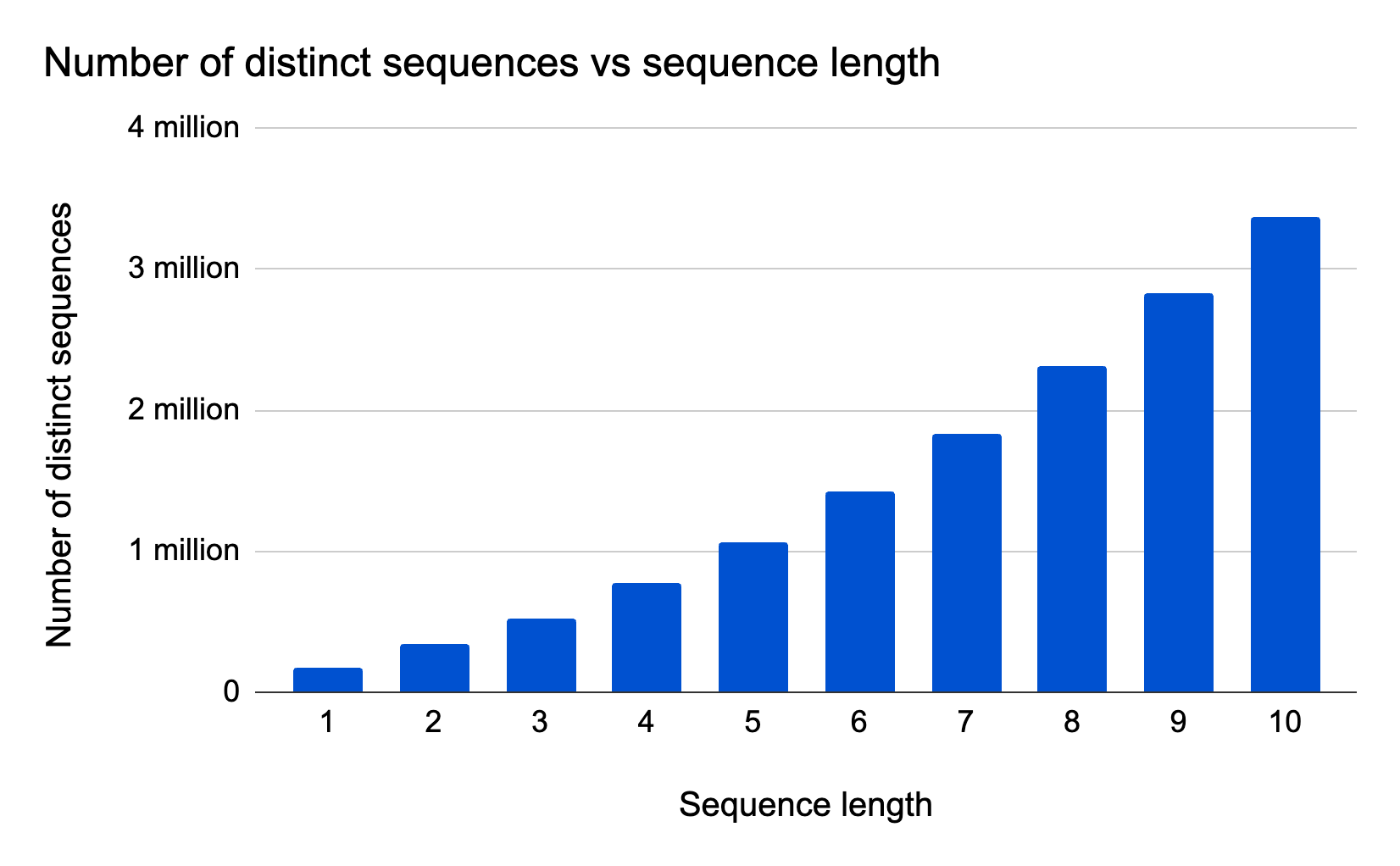
To help illustrate these challenges for the example of api.cloudflare.com, we can group API requests by session and plot the number of distinct sequences versus sequence length:
The plot is based on a one hour snapshot comprising approximately 88,000 sessions and 300 million API requests, with 302 distinct API endpoints. We process the data by applying a fixed-length sliding window to each session, then we count the total number of different fixed-length sequences (‘n-grams’) that we observe as a result of applying the sliding window. The plot displays results for a window size (‘n-gram length’) varying between 1 and 10 requests. Based on the plot, we observe a large number of possible sequences which grows with sequence length: As we increase the sliding window size, we see an increasingly large amount of different sequences in the sample. The smooth trend can be explained by the fact that we apply a sliding window (sessions may themselves contain many sequences) in combination with many long sessions relative to the sequence length.
Given the large number of possible sequences, trying to find abusive sequences is a ‘needles in a haystack’ situation.
Introducing Sequence Analytics
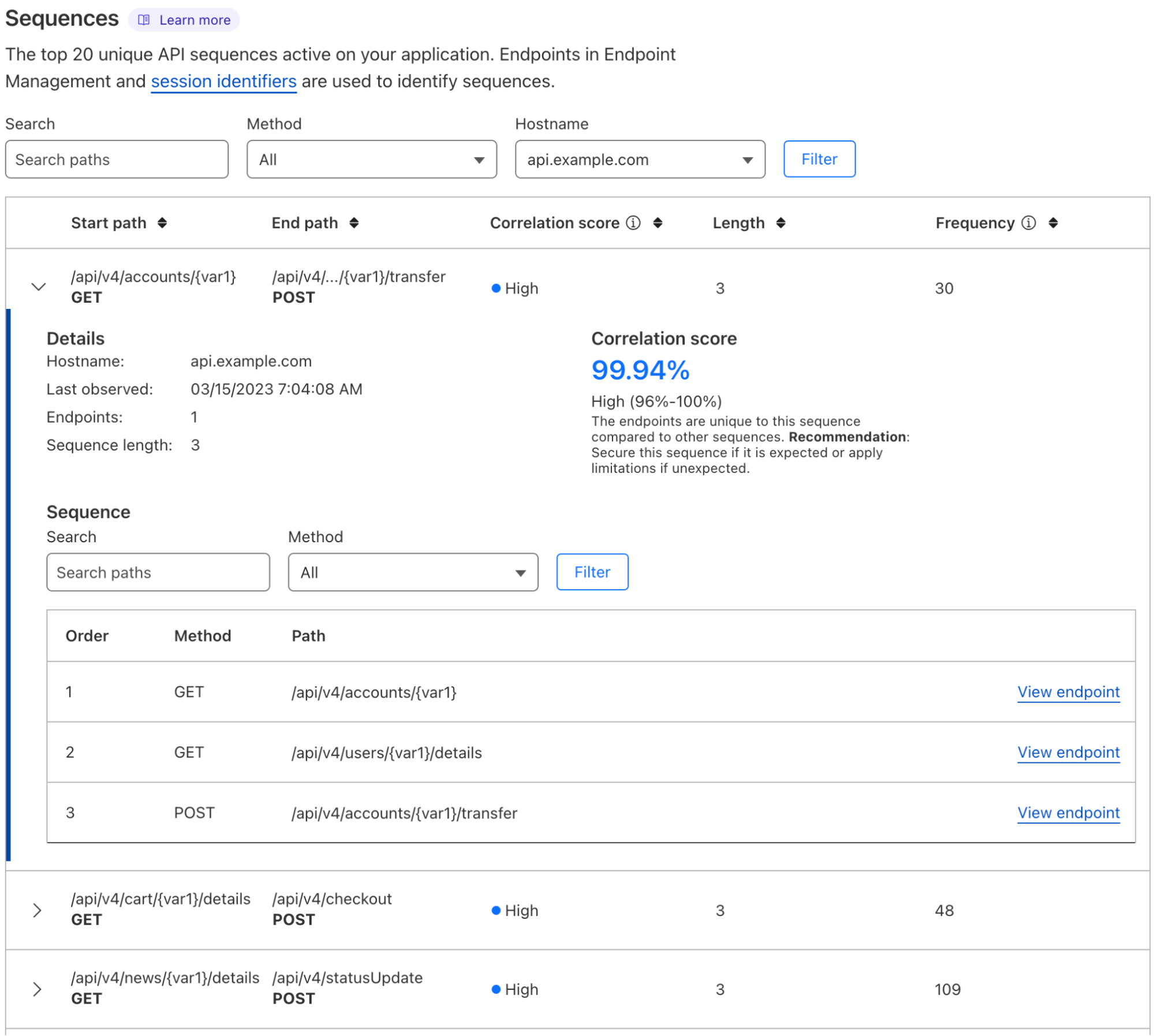
Here is a screenshot from the API Gateway dashboard highlighting Sequence Analytics:
Let’s break down the new functionality seen in the screenshot.
API Gateway intelligently determines sequences of requests made by your API consumers using the methods described earlier in this article. API Gateway scores sequences by a metric we call Correlation Score. Sequence Analytics displays the top 20 sequences by highest correlation score, and we refer to these as your most important sequences. High-importance sequences contain API requests which are likely to occur together in order.
You should inspect each of your sequences to understand their correlation scores. High correlation score sequences may consist of rarely used endpoints (potentially anomalous user behavior) as well as commonly used endpoints (likely benign user behavior). Since the endpoints found in these sequences commonly occur together, they represent true usage patterns of your API. You should apply all possible API Gateway protections to these endpoints (rate limiting suggestions, Schema Validation, JWT Validation, and mTLS) and check their specific endpoint order with your development team.
We know customers want to explicitly set allowable behavior on their APIs beyond the active protections offered by API Gateway today. Coming soon, we’re releasing sequence precedence rules and enabling the ability to block requests based on those rules. The new sequence precedence rules will allow customers to specify the exact order of allowable API requests, bringing yet another way of establishing a positive security model to protect your API against unknown threats.
How to get started
All API Gateway customers now have access to Sequence Analytics. Navigate to a zone in the Cloudflare dashboard, then click the Security tab > API Gateway tab > Sequences tab. You’ll see the most important sequences that your API consumers request.
Pro, Biz, and Enterprise customers that haven’t purchased API Gateway can get started by enabling the API Gateway trial inside the Cloudflare Dashboard or contacting their account manager.
What’s next
Sequence-based detection is a powerful and unique capability that unlocks many new opportunities to identify and stop attacks. As we fine-tune the methods of identifying these sequences and shipping them to our global network, we will release custom sequence matching and real-time mitigation features at a future date. We will also ensure you have the actionable intelligence to take back to your team on who the API users were that attempted to request sequences that don’t match your policy.
Cloudflare secures outbound Internet traffic for thousands of organizations every day, protecting users, devices, and data from threats like ransomware and phishing. One way we do this is by intelligently classifying what Internet destinations are risky using the domain name system (DNS). DNS is essential to Internet navigation because it enables users to look up addresses using human-friendly names, like cloudflare.com. For websites, this means translating a domain name into the IP address of the server that can deliver the content for that site.
However, attackers can exploit the DNS system itself, and often use techniques to evade detection and control using domain names that look like random strings. In this blog, we will discuss two techniques threat actors use – DNS tunneling and domain generation algorithms – and explain how Cloudflare uses machine learning to detect them.
Domain Generation Algorithm (DGA)
Most websites don’t change their domain name very often. This is the point after all, having a stable human-friendly name to be able to connect to a resource on the Internet. However, as a side-effect stable domain names become a point of control, allowing network administrators to use restrictions on domain names to enforce policies, for example blocking access to malicious websites. Cloudflare Gateway – our secure web gateway service for threat defense – makes this easy to do by allowing administrators to block risky and suspicious domains based on integrated threat intelligence.
But what if instead of using a stable domain name, an attacker targeting your users generated random domain names to communicate with, making it more difficult to know in advance what domains to block? This is the idea of Domain Generation Algorithm domains (MITRE ATT&CK technique T1568.002).
After initial installation, malware reaches out to a command-and-control server to receive further instructions, this is called “command and control” (MITRE ATT&CK tactic TA0011). The attacker may send instructions to perform such actions as gathering and transmitting information about the infected device, downloading additional stages of malware, stealing credentials and private data and sending it to the server, or operating as a bot within a network to perform denial-of-service attacks. Using a domain generation algorithm to frequently generate random domain names to communicate with for command and control gives malware a way to bypass blocks on fixed domains or IP addresses. Each day the malware generates a random set of domain names. To rendezvous with the malware, the attacker registers one of these domain names and awaits communication from the infected device.
Speed in identifying these domains is important to disrupting an attack. Because the domains rotate each day, by the time the malicious disposition of a domain propagates through the cybersecurity community, the malware may have rotated to a new domain name. However, the random nature of these domain names (they are literally a random string of letters!) also gives us an opportunity to detect them using machine learning.
The machine learning model
To identify DGA domains, we trained a model that extends a pre-trained transformers-based neural network. Transformers-based neural networks are the state-of-the-art technique in natural language processing, and underlie large language models and services like ChatGPT. They are trained by using adjacent words and context around a word or character to “learn” what is likely to come next.
Domain names largely contain words and abbreviations that are meaningful in human language. Looking at the top domains on Cloudflare Radar, we see that they are largely composed of words and common abbreviations, “face” and “book” for example, or “cloud” and “flare”. This makes the knowledge of human language encoded in transformer models a powerful tool for detecting random domain names.
For DGA models, we curated ground truth data that consisted of domain names observed from Cloudflare’s 1.1.1.1 DNS resolver for the negative class, and we used domain names from known domain generation algorithms for the positive class (all uses of DNS resolver data is completed in accordance with our privacy commitments).
Our final training set contained over 250,000 domain names, and was weighted to include more negative (not DGA domains) than positive cases. We trained three different versions of the model with different architectures: LSTM (Long Short-Term Memory Neural Network), LightGBM (binary classification), and a transformer-based model. We selected the transformer based model based on it having the highest accuracy and F1 score (the F1 score is a measure of model fit that penalizes having very different precision and recall, on an imbalanced data set the highest accuracy model might be the one that predicts everything either true or false, not what we want!), with an accuracy of over 99% on the test data.
To compute the score for a new domain never seen before by the model, the domain name is tokenized (i.e. broken up into individual components, in this case characters), and the sequence of characters are passed to the model. The transformers Python package from Hugging Face makes it easy to use these types of models for a variety of applications. The library supports summarization, question answering, translation, text generation, classification, and more. In this case we use sequence classification, together with a model that was customized for this task. The output of the model is a score indicating the chance that the domain was generated by a domain generation algorithm. If the score is over our threshold, we label the domain and a domain generation algorithm domain.
Deployment
The expansive view of domain names Cloudflare has from our 1.1.1.1 resolver means we can quickly observe DGA domains after they become active. We process all DNS query names that successfully resolve using this model, so a single successful resolution of the domain name anywhere in Cloudflare’s public resolver network can be detected.
From the queries observed on 1.1.1.1, we filter down first to new and newly seen domain names. We then apply our DGA classifier to the new and newly seen domain names, allowing us to detect activated command and control domains as soon as they are observed anywhere in the world by the 1.1.1.1 resolver.
DNS Tunneling detection
In issuing commands or extracting data from an installed piece of malware, attackers seek to avoid detection. One way to send data and bypass traditional detection methods is to encode data within another protocol. When the attacker controls the authoritative name server for a domain, information can be encoded as DNS queries and responses. Instead of making a DNS query for a simple domain name, such as www.cloudflare.com, and getting a response like 104.16.124.96, attackers can send and receive long DNS queries and responses that contain encoded data.
Here is an example query made by an application performing DNS tunneling (query shortened and partially redacted):
The response data to a query like the one above can vary in length based on the response record type the server uses and the recursive DNS resolvers in the path. Generally, it is at most 255 characters per response record and looks like a random string of characters.
TXT
jdqjtv64k2w4iudbe6b7t2abgubis
This ability to take an arbitrary set of bytes and send it to the server as a DNS query and receive a response in the answer data creates a bi-directional communication channel that can be used to transmit any data. The malware running on the infected host encodes the data it wants to transmit as a DNS query name and the infected host sends the DNS query to its resolver.
Since this query is not a true hostname, but actually encodes some data the malware wishes to transmit, the query is very likely to be unique, and is passed on to the authoritative DNS server for that domain.
The authoritative DNS server decodes the query back into the original data, and if necessary can transmit it elsewhere on the Internet. Responses go back the other direction, the response data is encoded as a query response (for example a TXT record) and sent back to the malware running on the infected host.
One challenge with identifying this type of traffic, however, is that there are also many benign applications that use the DNS system to encode or transmit data as well. An example of a query that was classified as not DNS tunneling:
As humans, we can see that the leading portion of this DNS query is a UUID. Queries like this are often used by security and monitoring applications and network appliances to check in. The leading portion of the query might be the unique id of the device or installation that is performing the check-in.
During the research and training phase our researchers identified a wide variety of different applications that use a large number of random looking DNS queries. Some examples of this include subdomains of content delivery networks, video streaming, advertising and tracking, security appliances, as well as DNS tunneling. Our researchers investigated and labeled many of these domains, and while doing so, identified features that can be used to distinguish between benign applications and true DNS tunneling.
The model
For this application, we trained a two-stage model. The first stage makes quick yes/no decisions about whether the domain might be a DNS tunneling domain. The second stage of the model makes finer-grained distinctions between legitimate domains that have large numbers of subdomains, such as security appliances or AV false-positive control, and malicious DNS tunneling.
The first stage is a gradient boosted decision tree that gives us an initial classification based on minimal information. A decision tree model is like playing 20 questions – each layer of the decision tree asks a yes or no question, which gets you closer to the final answer. Decision tree models are good at both predicting binary yes/no results as well as incorporating binary or nominal attributes into a prediction, and are fast and lightweight to execute, making them a good fit for this application. Gradient boosting is a reliable technique for training models that is particularly good at combining several attributes with weak predictive power into a strong predictor. It can be used to train multiple types of models including decision trees as well as numeric predictions.
If the first stage classifies the domain as “yes, potential DNS tunneling”, it is checked against the second stage, which incorporates data observed from Cloudflare’s 1.1.1.1 DNS resolver. This second model is a neural network model and refines the categorization of the first, in order to distinguish legitimate applications.
In this model, the neural network takes 28 features as input and classifies the domain into one of 17 applications, such as DNS tunneling, IT appliance beacons, or email delivery and spam related. Figure 2 shows a diagram generated from the popular Python software package Keras showing the layers of this neural network. We see the 28 input features at the top layer and at the bottom layer, the 17 output values indicating the prediction value for each type of application. This neural network is very small, having about 2,000 individual weights that can be set during the training process. In the next section we will see an example of a model that is based on a state-of-the-art pretrained model from a model family that has tens to hundreds of millions of predefined weights.
Fig. 2, The keras.utils.plot_model() function draws a diagram of the neural network layers.
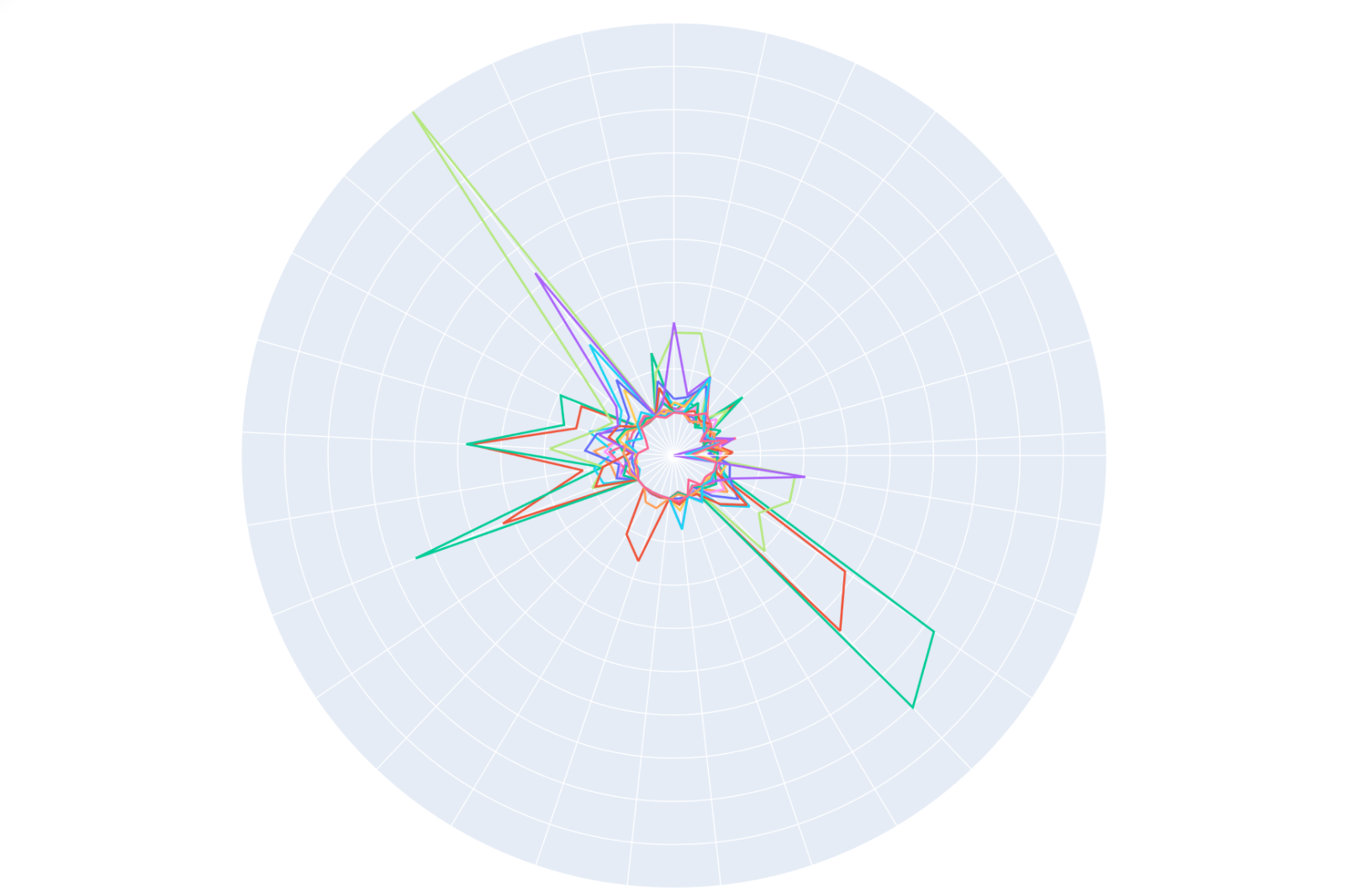
Figure 3 shows a plot of the feature values of the applications we are trying to distinguish in polar coordinates. Each color is the feature values of all the domains the model classified as a single type of application over a sample period. The position around the circle (theta) is the feature, and the distance from the center (rho) is the value of that feature. We can see how many of the applications have similar feature values.
When we observe a new domain and compute its feature values, our model uses those feature values to give us a prediction about which application the new domain resembles. As mentioned, the neural network has 28 inputs each of which is the value for a single feature and 17 outputs. The 17 output values represent the prediction that the domain is each of those 17 different types of applications, with malicious DNS tunneling being one of the 17 outputs. The job of the model is to convert the sometimes small differences between the feature values into a prediction. If the value of the malicious DNS tunneling output of the neural network is higher than the other outputs, the domain is labeled as a security threat.
Fig. 3, Domains containing high-entropy DNS subdomains, visualized as feature plots. Each section around the circumference of the plot represents a different feature of the observed DNS queries. The distance from the center represents the value of that feature. Each color line is a distinct application, and machine learning helps us distinguish between these and classify them.
Deployment
For the DNS tunneling model, our system consumes the logs from our secure web gateway service. The first stage model is applied to all DNS queries. Domains that are flagged as possible DNS tunneling are then sent to the second stage where the prediction is refined using additional features.
Looking forward: combining machine learning with human expertise
In September 2022, Cloudflare announced the general availability of our threat operations and research team, Cloudforce One, which allows our in-house experts to share insights directly with customers. Layering this human element on top of the ML models that we have already developed helps Cloudflare deliver additional protection threat protection for our customers, as we plan to explain in the next article in this blog series.
Until then, click here to create a free account, with no time limit for up to 50 users, and point just your DNS traffic, or all traffic (layers 4 to 7), to Cloudflare to protect your team, devices, and data with machine learning-driven threat defense.
One of the first steps in an information security investigation is to gather as much context as possible. But compiling that information can become a sprawling task.
Cloudflare is excited to announce early access to a new, free tool — the Radar URL Scanner. Provide us a URL, and our scanner will compile a report containing a myriad of technical details: a phishing scan, SSL certificate data, HTTP request and response data, page performance data, DNS records, whether cookies are set to secure and HttpOnly, what technologies and libraries the page uses, and more.
Let’s walk through a report on John Graham-Cumming’s blog as an example. Conveniently, all reports generated will be publicly accessible.
The first page is the summary tab, and you’ll see we’ve broken all the available data into the following categories: Security, Cookies, Network, Technology, DOM, and Performance. It’s a lot of content so we will jump through some highlights.
In the Summary tab itself, you’ll notice the submitted URL was https://blog.jgc.org. If we had received a URL short link, the scanner would have followed the redirects and generated a report for the final URL.
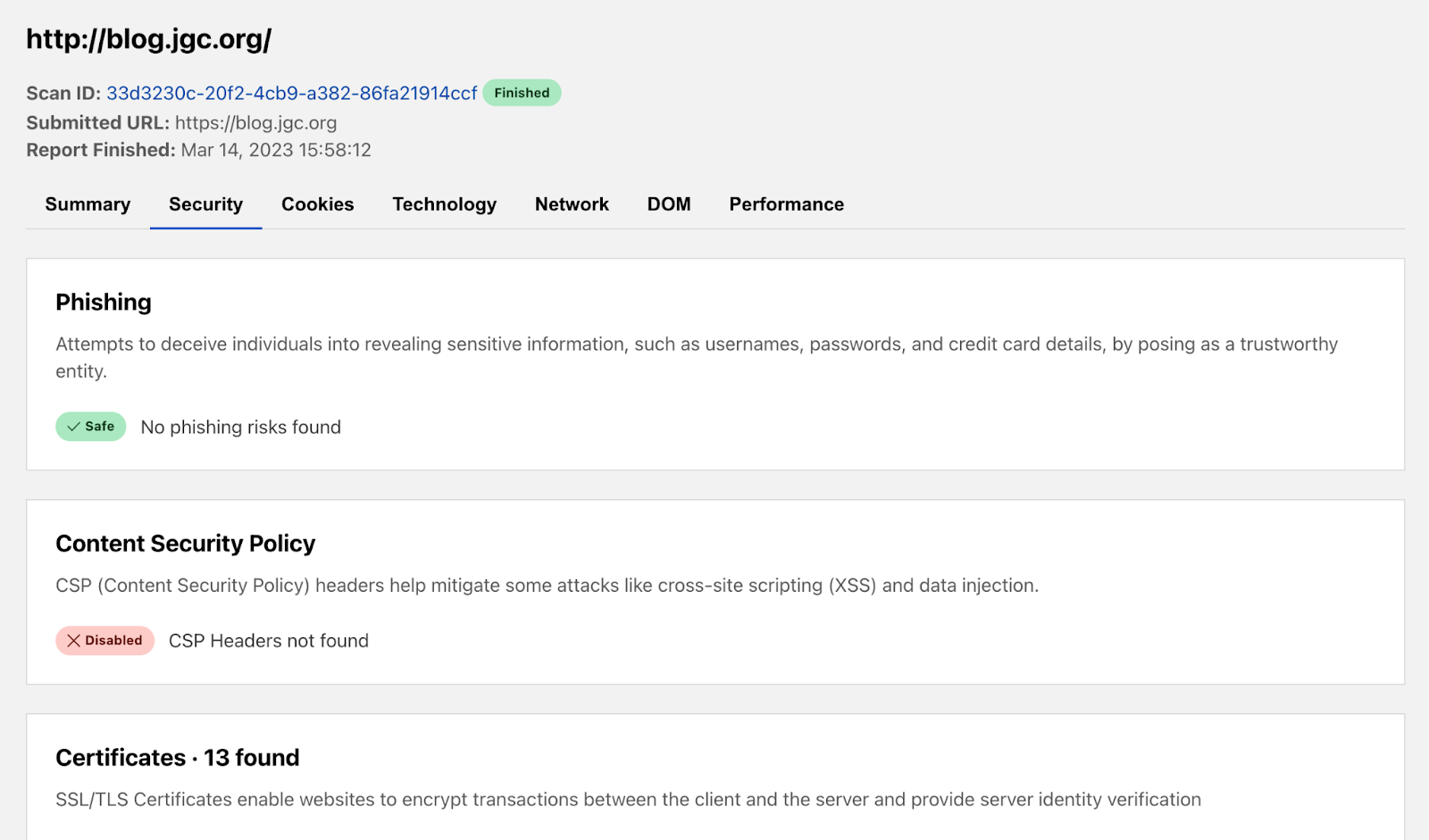
The Security tab presents information to help determine whether a page is safe to visit with a phishing and certificates section. In our blog example, the report confirms the link we provided is not a phishing link, but there could easily be phishing scams trying to harvest personal information. We’re excited to enable wider access to our security infrastructure with this free tool.
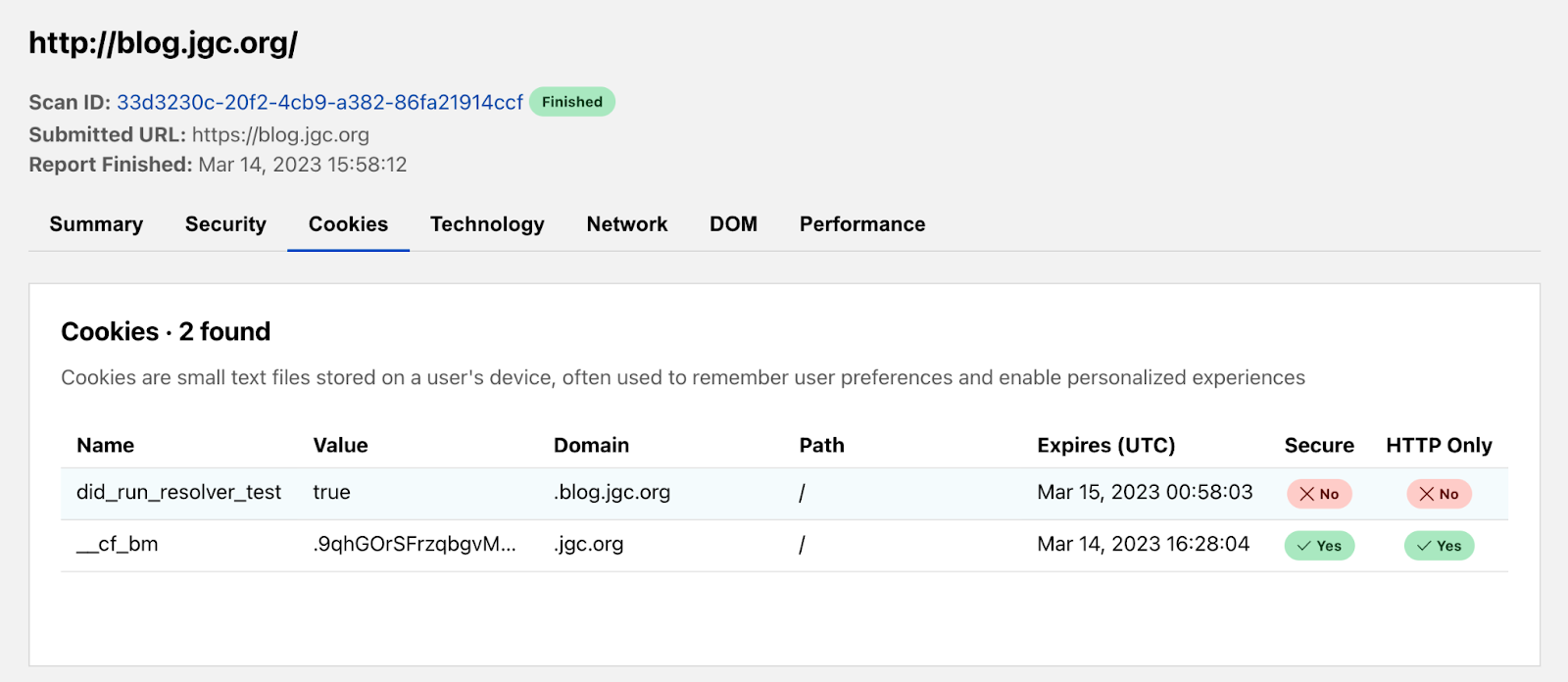
The Cookies tab can indicate how privacy friendly a website is to its users. We show all the cookies set and their attribute values to do this. In this report, the blog loaded 2 cookies. There’s the Secure flag. You’ll want that set to true as often as possible because this means the cookie may only be transmitted over HTTPS, preventing it from being observed by unauthorized parties. Additionally, cookies set to HttpOnly will be inaccessible to the JavaScript API, potentially mitigating XSS attacks from third-party scripts.
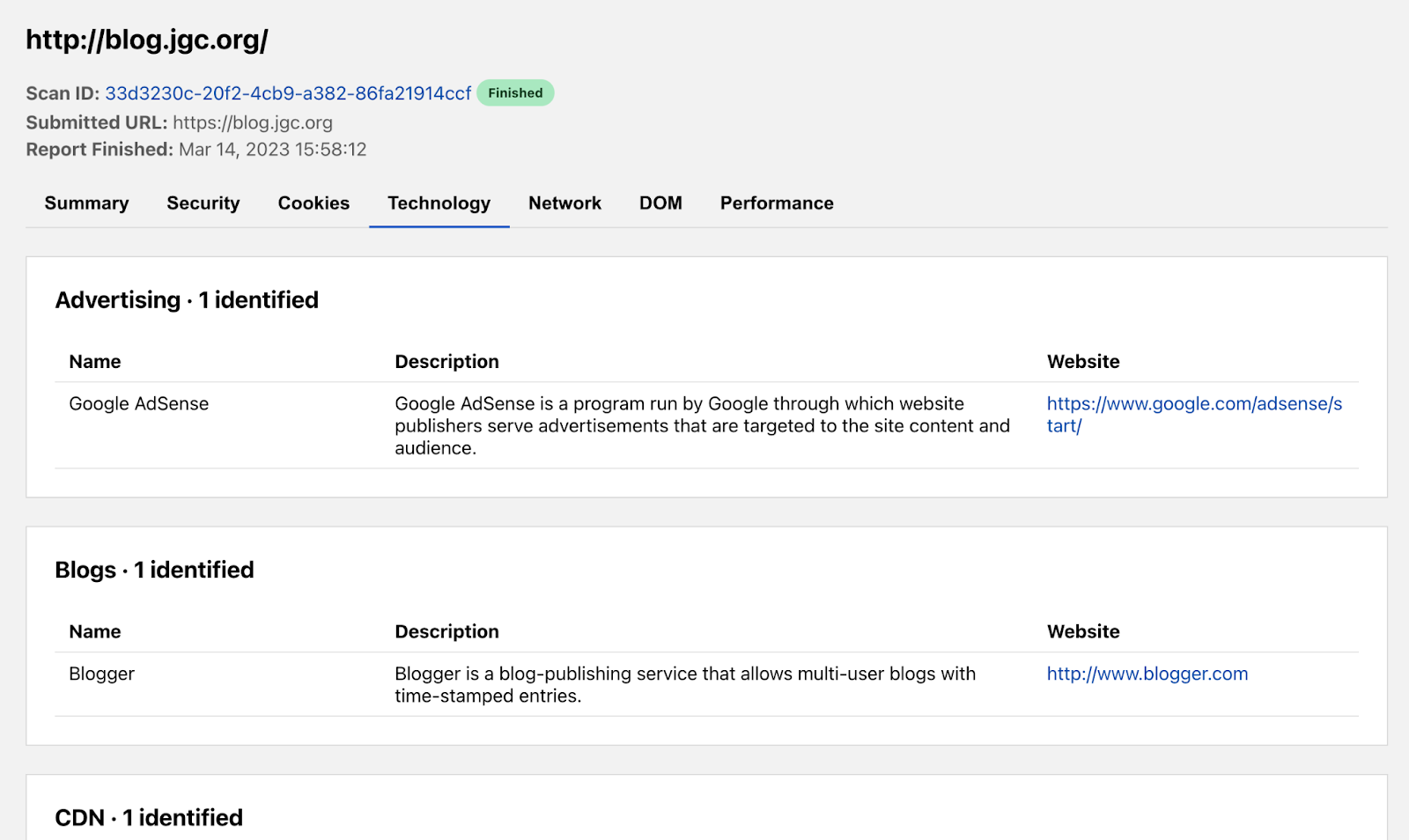
The Technology tab enumerates the technologies, frameworks, libraries, etc that are used to power the page being scanned. Understanding the technology stack of a page can be very useful for when there are outages in a particular service, when exploits in popular libraries are discovered, or simply to understand what tools are most popular in the industry. John’s blog appears to use 7 different technologies including Google AdSense, Blogger, and Cloudflare.
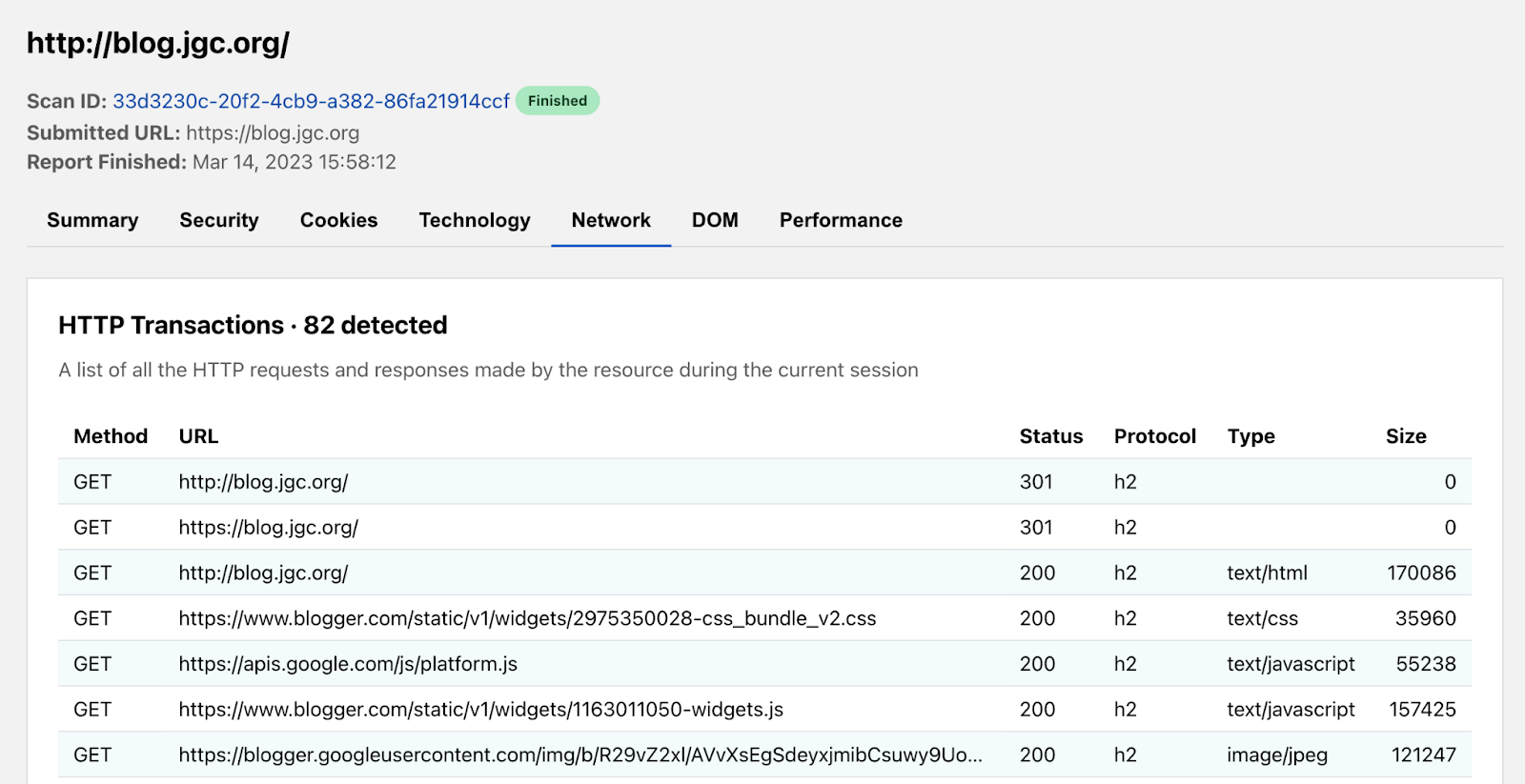
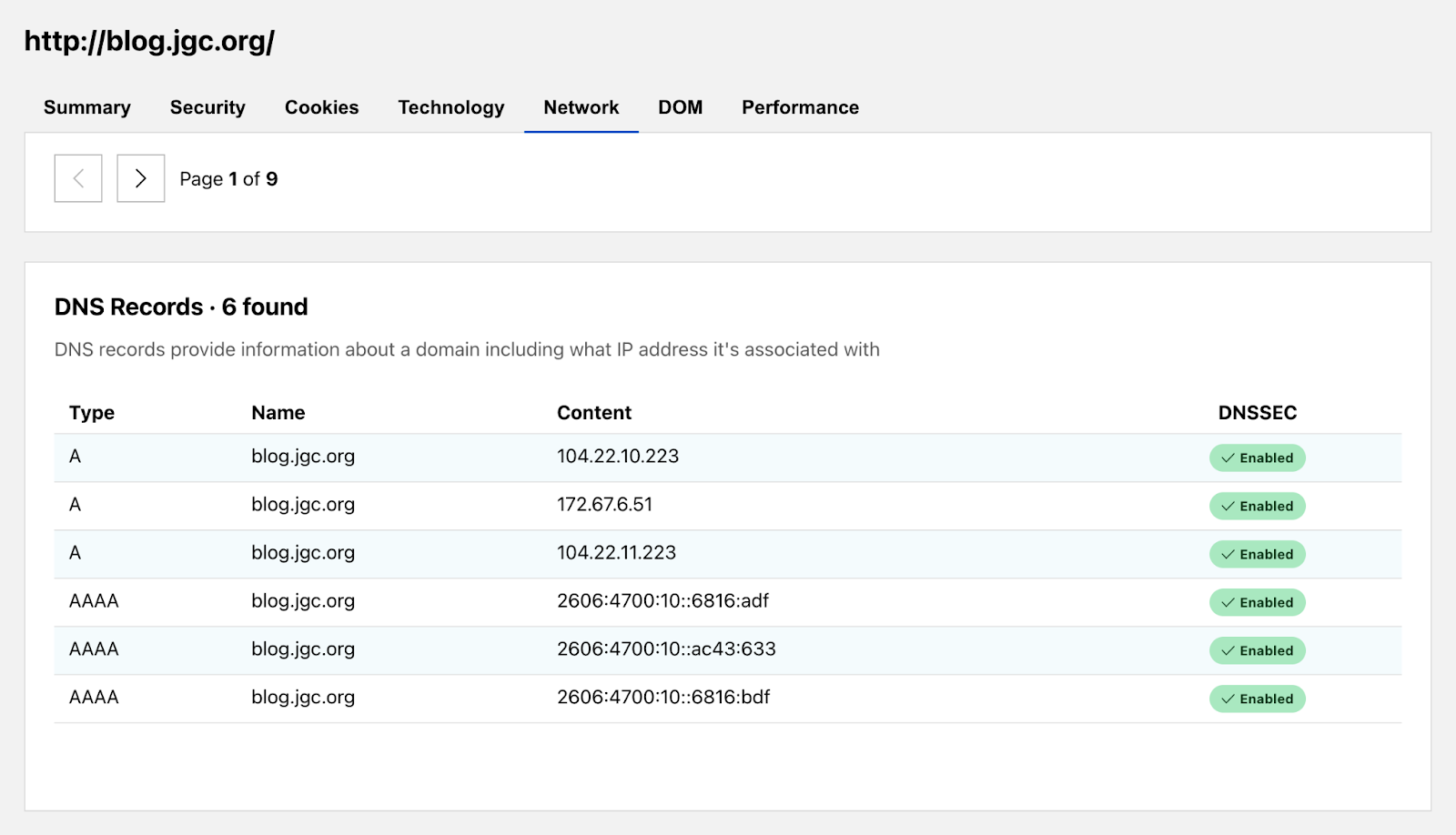
The Network tab shows all the HTTP transactions that occur on the page as well as the hostname’s associated DNS records. HTTP transactions are the requests and responses the page makes to load all its content. This tells engineers where the website is going to load its content. Our report of John’s blog shows a total of 82 requests.
The tab also contains DNS records which are a great way to understand more about the fundamentals of the page. And of course, we at Cloudflare are big advocates for enabling DNSSEC.
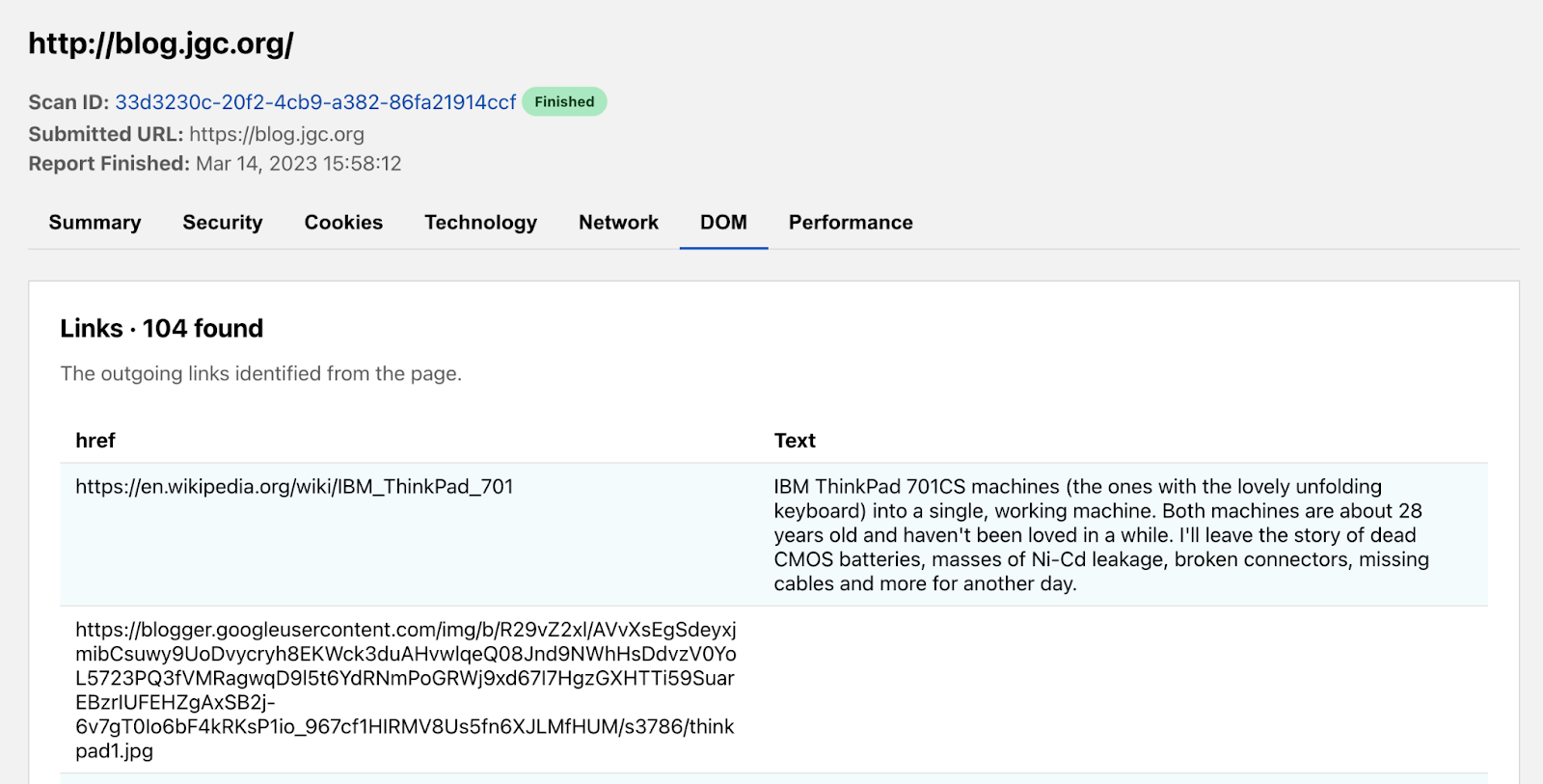
The DOM (Document Object Model) tab conveniently collates common information you may be looking for from within the page. We grouped together lists of all hyperlinks and global JavaScript variables. Additionally, we provide the raw HTML of the page for you to further analyze. Our report shows the blog’s landing page has 104 hyperlinks going off to other websites.
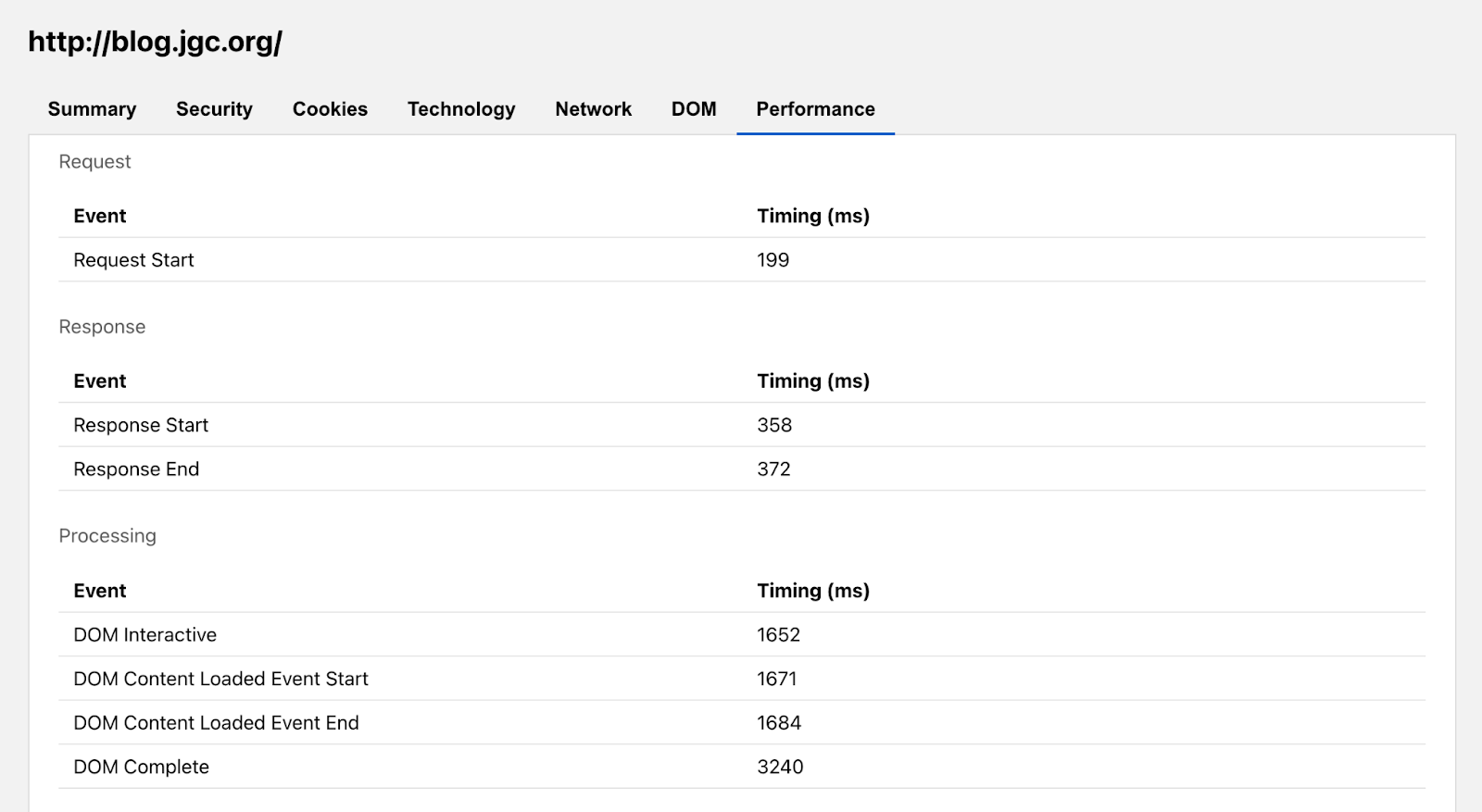
The Performance tab presents a breakdown of the time it takes for the website to load. It’s not enough for a page to be secure for users. It must also be usable, and load speeds are a big factor in the overall experience. That’s why we’ve also included Performance Navigation Timing metrics alongside our more security and privacy oriented tabs.
Under the hood, one of the great things about this tool is that the underlying scanning technology uses Cloudflare’s homegrown Workers Browser Rendering API to run all our headless scans. You can follow that link to join the waitlist and try it out for yourself.
In the future, we envision adding features to our scanner to complement the ones from this launch: API endpoints so you don’t need to rely on a GUI, private scans for more sensitive or recurring reports, and also security recommendations with integrations with the Cloudflare Security Center. And since this is a Radar product, not only can users expect the data generated to further enhance our security threat modeling, they can also look forward to us providing back insights and visualizations from the aggregate trends we observe.
The Radar URL Scanner tool’s journey to helping make the Internet more transparent and secure has only just begun, but we’re excited for you all to try it out here. If you have any questions or would like to discuss enterprise level features on your wishlist, feel free to reach out via Twitter at @CloudflareRadar or email us at [email protected].
In December 2022 we announced the general availability of the WAF Attack Score. The initial release was for our Enterprise customers, but we always had the belief that this product should be enabled for more users. Today we’re announcing “WAF Attack Score Lite” and “Security Analytics” for our Business plan customers.
Looking back on “What is WAF Attack Score and Security Analytics?”
Vulnerabilities on the Internet appear almost on a daily basis. The CVE (common vulnerabilities and exposures) program has a list with over 197,000 records to track disclosed vulnerabilities.
That makes it really hard for web application owners to harden and update their system regularly, especially when we talk about critical libraries and the exploitation damage that can happen in case of information leak. That’s why web application owners tend to use WAFs (Web Application Firewalls) to protect their online presence.
Most WAFs use signature-based detections, which are rules created based on specific attacks that we know about. The signature-based method is very fast, has a low rate of false positives (these are the requests that are categorized as attack when they are actually legitimate), and is very efficient with most of the attack categories we know. However, they sometimes have a blind spot when a new attack happens, often called zero-day attacks. As soon as a new vulnerability is found, our security analysts take fast action to stop it in a matter of hours and update the WAF Managed Rules, yet we want to protect our customers during this time as well.
This is the main reason Cloudflare created a complementary feature to the WAF managed rules: a smart machine learning layer to help detect unknown attacks, and protect customers even during the time gap until rules are updated.
Early detection + Powerful mitigation = Safer Internet
The performance of any machine learning drastically depends on the data it was trained on. Our machine learning uses a supervised model that was trained over hundreds of millions of requests generated by WAF Managed Rules, data varies between clean and malicious, some were blended with fuzzy techniques to enable catching similar patterns as covered in our blog “Improving the accuracy of our machine learning WAF”. At the moment, there are three types of attacks our machine learning model is optimized to find: SQL Injection (SQLi), Cross Site Scripting (XSS), and a wide range of Remote Code Execution (RCE) attacks such as shell injection, PHP injection, Apache Struts type compromises, Apache log4j, and similar attacks that result in RCE.
And the reason why we started with them is based on Cloudflare’s Application Security Report. These categories represent more than 24% of the mitigated layer 7 attacks over the last year in our WAF, therefore more prone to exploitations.
In the full Enterprise WAF Attack Score version we offer more granularity on the attack categories and we provide scores for each class where they can be configured freely per domain.
WAF Attack Score Lite Features for Business Plan
WAF Attack Score Lite and the Security Analytics view offer three main functions:
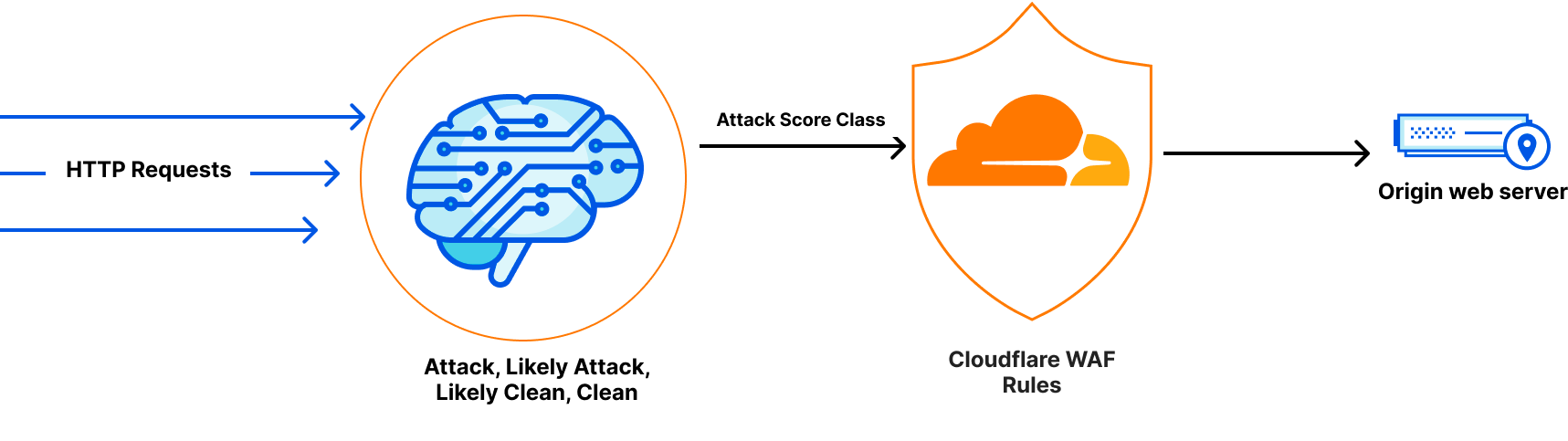
1- Attack detection: This happens through inspecting every incoming HTTP request, bucketing or classifying the requests into 4 types: Attacks, Likely Attacks, Likely Clean and Clean. At the moment there are three types of attacks our machine learning model is optimized to find: SQL Injection (SQLi), Cross Site Scripting (XSS), and a wide range of Remote Code Execution (RCE) attacks.
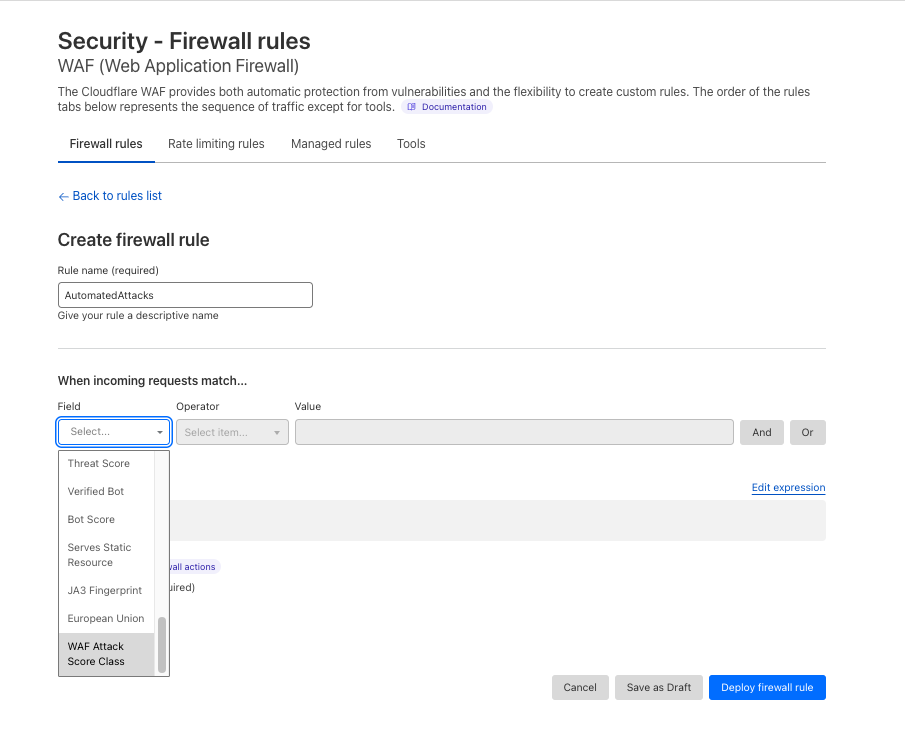
2- Attack mitigation: The ability to create WAF Custom Rules or WAF Rate Limiting Rules to mitigate requests. We’re exposing a new field cf.waf.score.classthat has preset values: attack, likely_attack, likely_clean and clean. customers can use this field in rules expressions and apply needed actions.
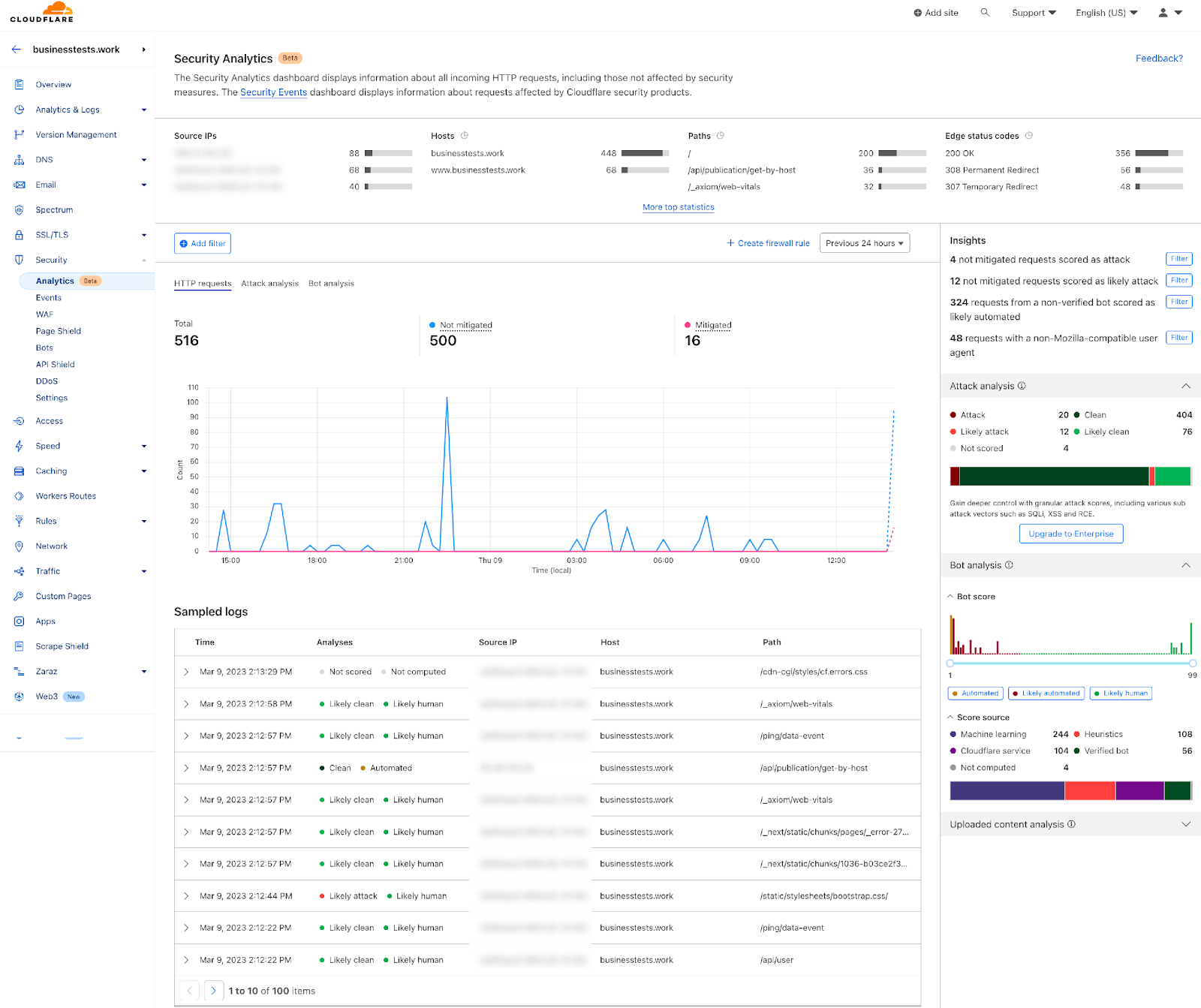
3- Visibility over your entire traffic: Security Analytics is a new dashboard currently in beta. It provides a comprehensive view across all your HTTP traffic, which displays all requests whether they match rules or not. Security Analytics is a great tool for investigating false negatives and hardening your security configurations. Security Events is still available in (Security > Events) and Security Analytics is available in a separate tab (Security > Analytics).
Deployment and configuration
In order to enable WAF Attack Score Lite and Security Analytics, you don’t need to take any action. The HTTP machine learning inspection rollout will start today, and Security Analytics will appear automatically to all Business plan customers by the time the rollout is completed in the upcoming weeks.
It’s worth mentioning that having the detection on and viewing the attack analysis in Security Analytics does not mean you’re blocking traffic. It only offers insights and provides the freedom to create rules and mitigate the desired requests. Creating a rule to block or challenge bad traffic is needed to take effect.
A common use case
Consider an attacker executing an attack using automated web requests to manipulate or disrupt web applications. One of the best ways to identify this type of traffic and mitigate these requests is by combining bot score with WAF Attack Score.
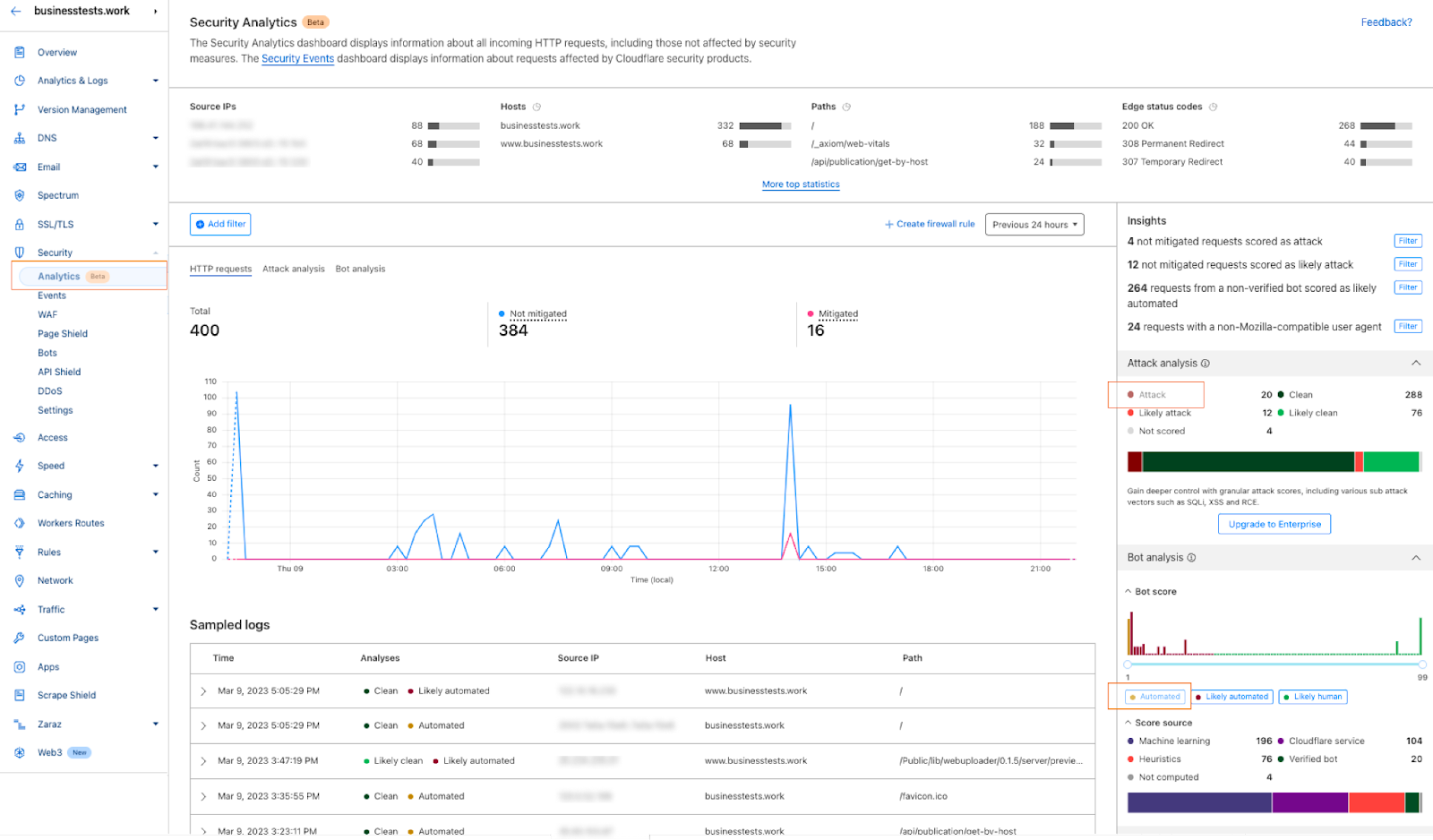
1- Go to the Security Analytics dashboard under Security > Analytics. On the right-hand side the Attack Analysis indicates the attack class. In this case, I can select “Attack” to apply a single filter, or use the quick filters under Insights to propagate multiple filters at once. In addition to the attack class, I can also select the Bot “Automated” filter.
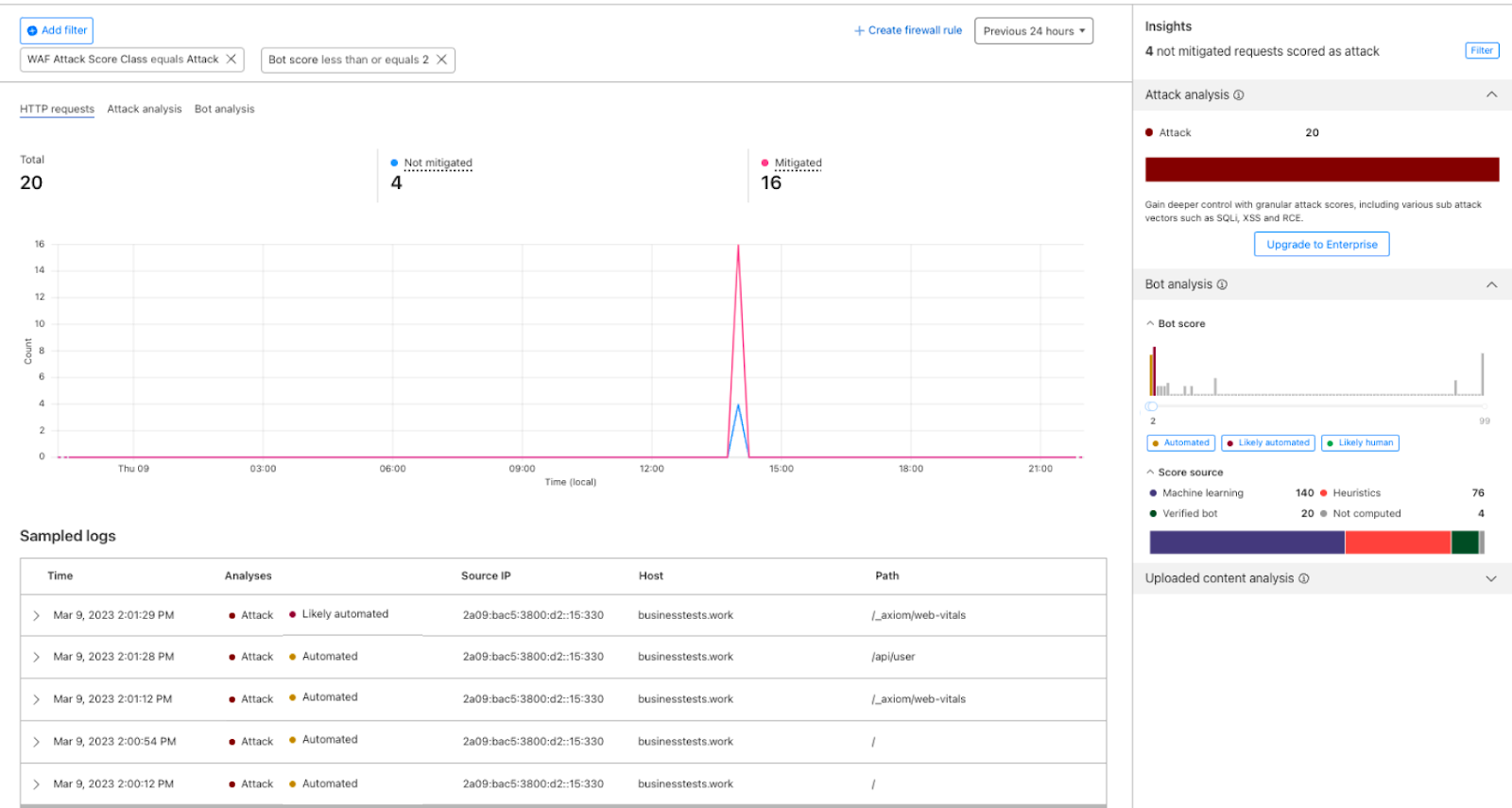
2- After filtering, Security Analytics provides the capability of scrolling down to see the logs and validate the results:
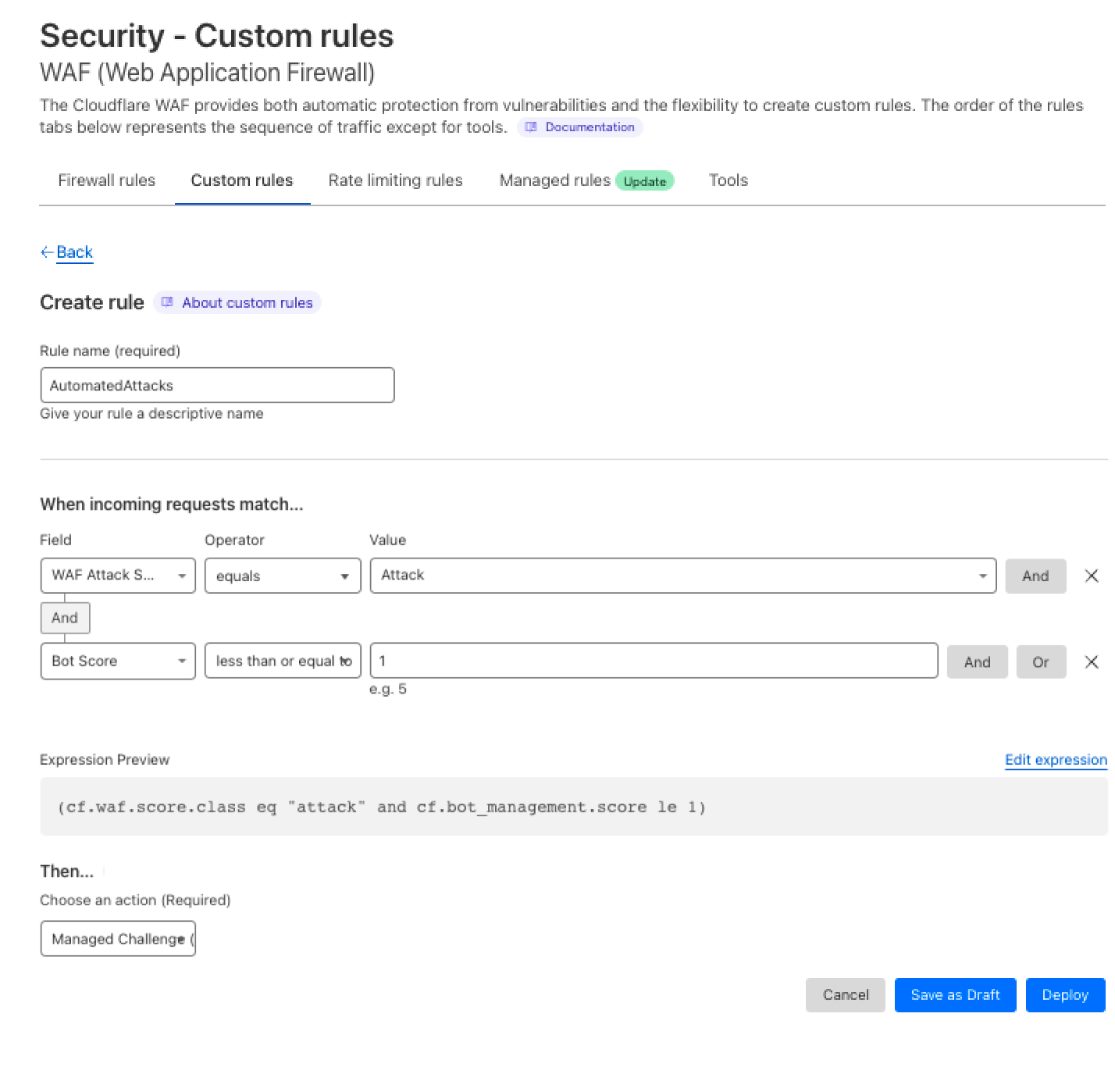
3- Once the selected requests are confirmed, I can select the Create WAF Custom Rules option which will direct me to the Security Events with the pre-assigned filters to deploy a rule. In this case, I want to challenge the requests matched by the rule:
And voila! You have a new rule that challenges traffic matching any automated attack variation.
Next steps
We have been working hard to provide maximum security and visibility for all our customers. This is only one step on this road! We will keep adding more product-focused analytics, and providing additional security against unknown attacks. Try it out, create a rule, and don’t hesitate to contact our sales team if you need the full version of WAF Attack Score.
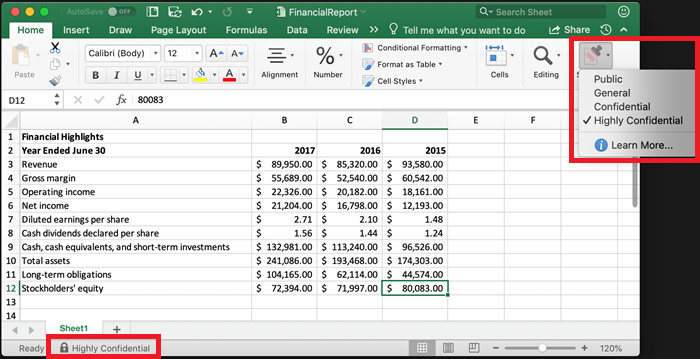
The crown jewels for an organization are often data, and the first step in protection should be locating where the most critical information lives. Yet, maintaining a thorough inventory of sensitive data is harder than it seems and generally a massive lift for security teams. To help overcome data security troubles, Microsoft offers their customers data classification and protection tools. One popular option are the sensitivity labels available with Microsoft Purview Information Protection. However, customers need the ability to track sensitive data movement even as it migrates beyond the visibility of Microsoft.
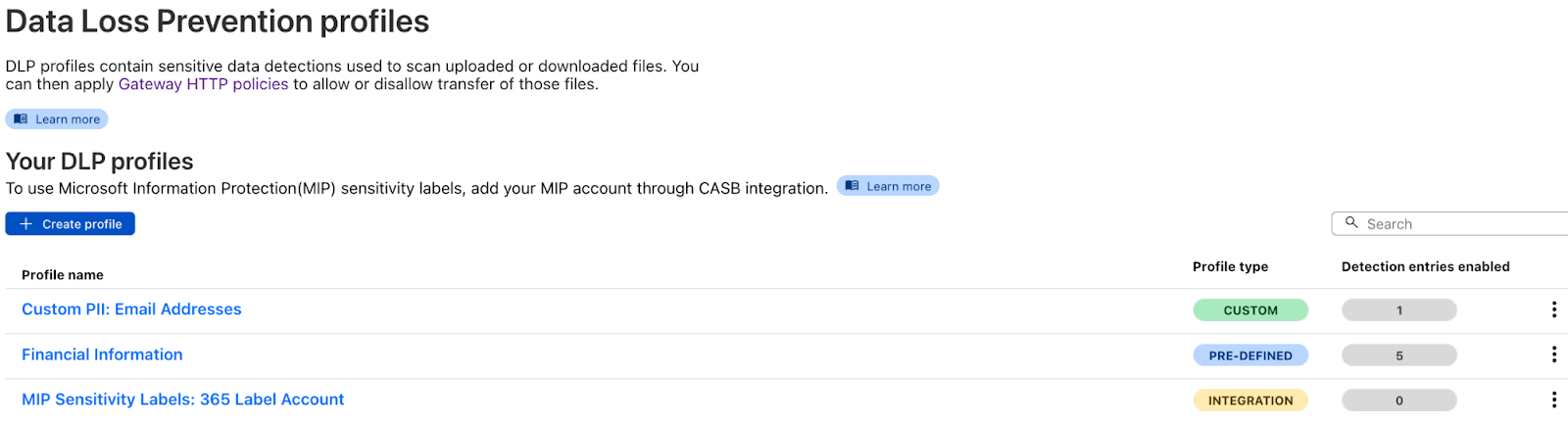
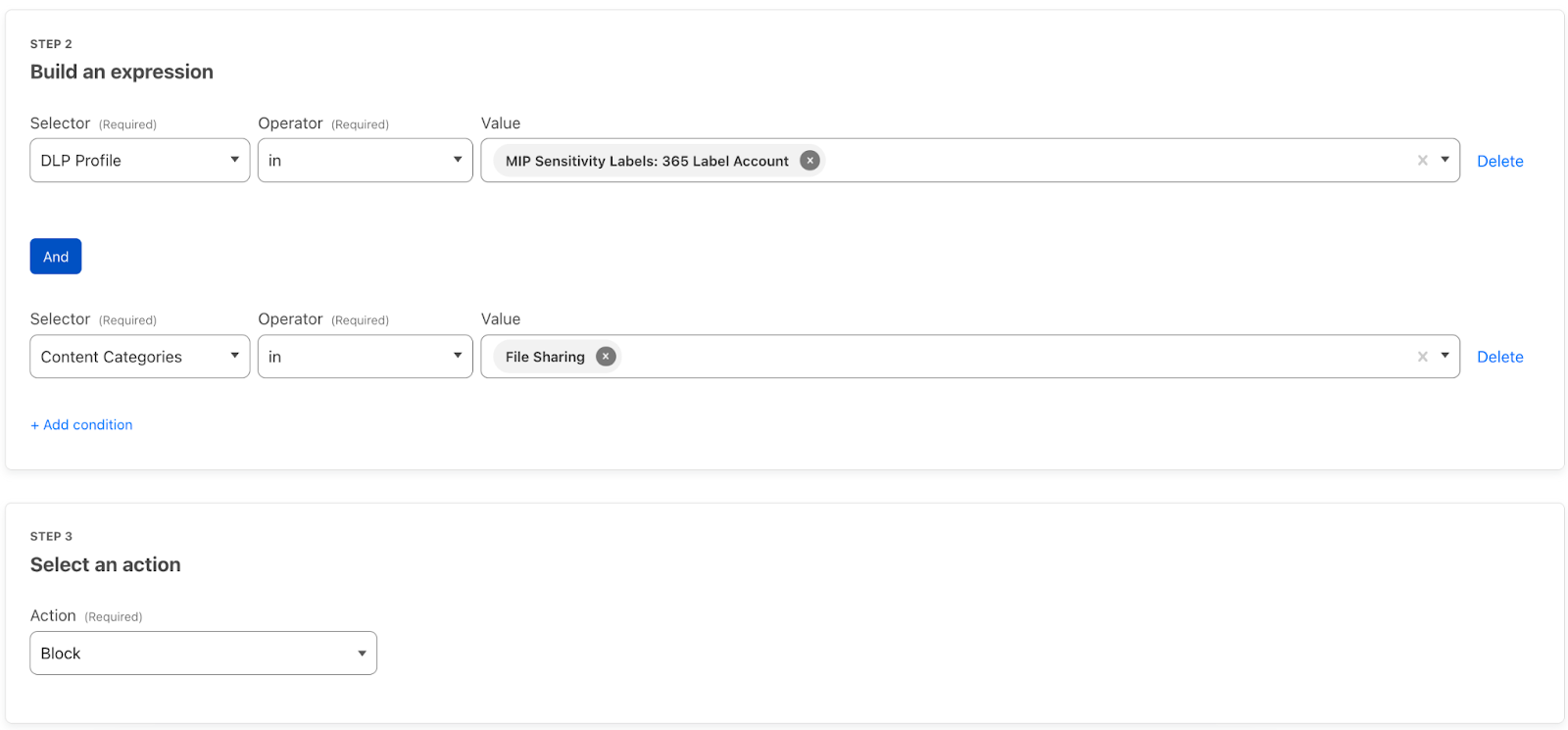
Today, we are excited to announce that Cloudflare One now offers Data Loss Prevention (DLP) detections for Microsoft Purview Information Protection labels. Simply integrate with your Microsoft account, retrieve your labels, and build rules to guide the movement of your labeled data. This extends the power of Microsoft’s labels to any of your corporate traffic in just a few clicks.
Data Classification with Microsoft Labels
Every organization has a wealth of data to manage, from publicly accessible data, like documentation, to internal data, like the launch date of a new product. Then, of course, there is the data requiring the highest levels of protection, such as customer PII. Organizations are responsible for confining data to the proper destinations while still supporting accessibility and productivity, which is no small feat.
Microsoft Purview Information Protection offers sensitivity labels to let you classify your organization’s data. With these labels, Microsoft provides the ability to protect sensitive data, while still enabling productivity and collaboration. Sensitivity labels can be used in a number of Microsoft applications, which includes the ability to apply the labels to Microsoft Office documents. The labels correspond to the sensitivity of the data within the file, such as Public, Confidential, or Highly Confidential.
The labels are embedded in a document’s metadata and are preserved even when it leaves the Microsoft environment, such as a download from OneDrive.
Sync Cloudflare One and Microsoft Information Protection
Cloudflare One, our SASE platform that delivers network-as-a-service (NaaS) with Zero Trust security natively built-in, connects users to enterprise resources, and offers a wide variety of opportunities to secure corporate traffic, including the inspection of data moving across the Microsoft productivity suite. We’ve designed Cloudflare One to act as a single pane of glass for your organization. This means that after you’ve deployed any of our Zero Trust services, whether that be Zero Trust Network Access or Secure Web Gateway, you are clicks, not months, away from deploying Data Loss Prevention, Cloud Access Security Broker, Email Security, and Browser Isolation to enhance your Microsoft security and overall data protection.
Specifically, Cloudflare’s API-driven Cloud Access Security Broker (CASB) can scan SaaS applications like Microsoft 365 for misconfigurations, unauthorized user activity, shadow IT, and other data security issues that can occur after a user has successfully logged in.
With this new integration, CASB can now also retrieve Information Protection labels from your Microsoft account. If you have labels configured, upon integration, CASB will automatically populate the labels into a Data Loss Prevention profile.
DLP profiles are the building blocks for applying DLP scanning. They are where you identify the sensitive data you want to protect, such as Microsoft labeled data, credit card numbers, or custom keywords. Your labels are stored as entries within the Microsoft Purview Information Protection Sensitivity Labels profile using the name of your CASB integration. You can also add the labels to custom DLP profiles, of fering more detection flexibility.
Build DLP Rules
You can now extend the power of Microsoft’s labels to protect your data as it moves to other platforms. By building DLP rules, you determine how labeled data can move around and out of your corporate network. Perhaps you don’t want to allow Highly Confidential labels to be downloaded from your OneDrive account, or you don’t want any data more sensitive than Confidential to be uploaded to file sharing sites that you don’t use. All of this can be implemented using DLP and Cloudflare Gateway.
Simply navigate to your Gateway Firewall Policies and start implementing building rules using your DLP profiles:
How to Get Started
To get access to DLP, reach out for a consultation, or contact your account manager.
One year ago we published our first Application Security Report. For Security Week 2023, we are providing updated insights and trends around mitigated traffic, bot and API traffic, and account takeover attacks.
Cloudflare has grown significantly over the last year. In February 2023, Netcraft noted that Cloudflare had become the most commonly used web server vendor within the top million sites at the start of 2023, and continues to grow, reaching a 21.71% market share, up from 19.4% in February 2022.
This continued growth now equates to Cloudflare handling over 45 million HTTP requests/second on average (up from 32 million last year), with more than 61 million HTTP requests/second at peak. DNS queries handled by the network are also growing and stand at approximately 24.6 million queries/second. All of this traffic flow gives us an unprecedented view into Internet trends.
Before we dive in, we need to define our terms.
Definitions
Throughout this report, we will refer to the following terms:
Mitigated traffic: any eyeball HTTP* request that had a “terminating” action applied to it by the Cloudflare platform. These include the following actions: BLOCK, CHALLENGE, JS_CHALLENGE and MANAGED_CHALLENGE. This does not include requests that had the following actions applied: LOG, SKIP, ALLOW. In contrast to last year, we now exclude requests that had CONNECTION_CLOSE and FORCE_CONNECTION_CLOSE actions applied by our DDoS mitigation system, as these technically only slow down connection initiation. They also accounted for a relatively small percentage of requests. Additionally, we improved our calculation regarding the CHALLENGE type actions to ensure that only unsolved challenges are counted as mitigated. A detailed description of actions can be found in our developer documentation.
Bot traffic/automated traffic: any HTTP* request identified by Cloudflare’s Bot Management system as being generated by a bot. This includes requests with a bot score between 1 and 29 inclusive. This has not changed from last year’s report.
API traffic: any HTTP* request with a response content type of XML or JSON. Where the response content type is not available, such as for mitigated requests, the equivalent Accept content type (specified by the user agent) is used instead. In this latter case, API traffic won’t be fully accounted for, but it still provides a good representation for the purposes of gaining insights.
Unless otherwise stated, the time frame evaluated in this post is the 12 month period from March 2022 through February 2023 inclusive.
Finally, please note that the data is calculated based only on traffic observed across the Cloudflare network and does not necessarily represent overall HTTP traffic patterns across the Internet.
*When referring to HTTP traffic we mean both HTTP and HTTPS.
Global traffic insights
6% of daily HTTP requests are mitigated on average
In looking at all HTTP requests proxied by the Cloudflare network, we find that the share of requests that are mitigated has dropped to 6%, down two percentage points compared to last year. Looking at 2023 to date, we see that mitigated request share has fallen even further, to between 4-5%. Large spikes visible in the chart below, such as those seen in June and October, often correlate with large DDoS attacks mitigated by Cloudflare. It is interesting to note that although the percentage of mitigated traffic has decreased over time, the total mitigated request volume has been relatively stable as shown in the second chart below, indicating an increase in overall clean traffic globally rather than an absolute decrease in malicious traffic.
81% of mitigated HTTP requests were outright BLOCKed, with mitigations for the remaining set split across the various CHALLENGE type actions.
DDoS mitigation accounts for more than 50% of all mitigated traffic
Cloudflare provides various security features that customers can configure to keep their applications safe. Unsurprisingly, DDoS mitigation is still the largest contributor to mitigated layer 7 (application layer) HTTP requests. Just last month (February 2023), we reported the largest known mitigated DDoS attack by HTTP requests/second volume (This particular attack is not visible in the graphs above because they are aggregated at a daily level, and the attack only lasted for ~5 minutes).
Compared to last year, however, mitigation by the Cloudflare WAF has grown significantly, and now accounts for nearly 41% of mitigated requests. This can be partially attributed to advances in our WAF technology that enables it to detect and block a larger range of attacks.
Tabular format for reference:
Source
Percentage %
DDoS Mitigation
52%
WAF
41%
IP reputation
4%
Access Rules
2%
Other
1%
Please note that in the table above, in contrast to last year, we are now grouping our products to match our marketing materials and the groupings used in the 2022 Radar Year in Review. This mostly affects our WAF product that comprises the combination of WAF Custom Rules, WAF Rate Limiting Rules, and WAF Managed Rules. In last year’s report, these three features accounted for an aggregate 31% of mitigations.
To understand the growth in WAF mitigated requests over time, we can look one level deeper where it becomes clear that Cloudflare customers are increasingly relying on WAF Custom Rules (historically referred to as Firewall Rules) to mitigate malicious traffic or implement business logic blocks. Observe how the orange line (firewallrules) in the chart below shows a gradual increase over time while the blue line (l7ddos) clearly trends lower.
HTTP Anomaly is the most frequent layer 7 attack vector mitigated by the WAF
Contributing 30% of WAF Managed Rules mitigated traffic overall in March 2023, HTTP Anomaly’s share has decreased by nearly 25 percentage points as compared to the same time last year. Examples of HTTP anomalies include malformed method names, null byte characters in headers, non-standard ports or content length of zero with a POST request. This can be attributed to botnets matching HTTP anomaly signatures slowly changing their traffic patterns.
Removing the HTTP anomaly line from the graph, we can see that in early 2023, the attack vector distribution looks a lot more balanced.
Tabular format for reference (top 10 categories):
Source
Percentage % (last 12 months)
HTTP Anomaly
30%
Directory Traversal
16%
SQLi
14%
File Inclusion
12%
Software Specific
10%
XSS
9%
Broken Authentication
3%
Command Injection
3%
Common Attack
1%
CVE
1%
Of particular note is the orange line spike seen towards the end of February 2023 (CVE category). The spike relates to a sudden increase of two of our WAF Managed Rules:
These two rules are also tagged against CVE-2018-14774, indicating that even relatively old and known vulnerabilities are still often targeted in an effort to exploit potentially unpatched software.
Bot traffic insights
Cloudflare’s Bot Management solution has seen significant investment over the last twelve months. New features such as configurable heuristics, hardened JavaScript detections, automatic machine learning model updates, and Turnstile, Cloudflare’s free CAPTCHA replacement, make our classification of human vs. bot traffic improve daily.
Our confidence in the classification output is very high. If we plot the bot scores across the traffic from the last week of February 2023, we find a very clear distribution, with most requests either being classified as definitely bot (less than 30) or definitely human (greater than 80) with most requests actually scoring less than 2 or greater than 95.
30% of HTTP traffic is automated
Over the last week of February 2023, 30% of Cloudflare HTTP traffic was classified as automated, equivalent to about 13 million HTTP requests/second on the Cloudflare network. This is 8 percentage points less than at the same time last year.
Looking at bot traffic only, we find that only 8% is generated by verified bots, comprising 2% of total traffic. Cloudflare maintains a list of known good (verified) bots to allow customers to easily distinguish between well-behaved bot providers like Google and Facebook and potentially lesser known or unwanted bots. There are currently 171 bots in the list.
16% of non-verified bot HTTP traffic is mitigated
Non-verified bot traffic often includes vulnerability scanners that are constantly looking for exploits on the web, and as a result, nearly one-sixth of this traffic is mitigated because some customers prefer to restrict the insights such tools can potentially gain.
Although verified bots like googlebot and bingbot are generally seen as beneficial and most customers want to allow them, we also see a small percentage (1.5%) of verified bot traffic being mitigated. This is because some site administrators don’t want portions of their site to be crawled, and customers often rely on WAF Custom Rules to enforce this business logic.
The most common action used by customers is to BLOCK these requests (13%), although we do have some customers configuring CHALLENGE actions (3%) to ensure any human false positives can still complete the request if necessary.
On a similar note, it is also interesting that nearly 80% of all mitigated traffic is classified as a bot, as illustrated in the figure below. Some may note that 20% of mitigated traffic being classified as human is still extremely high, but most mitigations of human traffic are generated by WAF Custom Rules, and are frequently due to customers implementing country-level or other related legal blocks on their applications. This is common, for example, in the context of US-based companies blocking access to European users for GDPR compliance reasons.
API traffic insights
55% of dynamic (non cacheable) traffic is API related
Just like our Bot Management solution, we are also investing heavily in tools to protect API endpoints. This is because a lot of HTTP traffic is API related. In fact, if you count only HTTP requests that reach the origin and are not cacheable, up to 55% of traffic is API related, as per the definition stated earlier. This is the same methodology used in last year’s report, and the 55% figure remains unchanged year-over-year.
If we look at cached HTTP requests only (those with a cache status of HIT, UPDATING, REVALIDATED and EXPIRED) we find that, maybe surprisingly, nearly 7% is API related. Modern API endpoint implementations and proxy systems, including our own API Gateway/caching feature set, in fact, allow for very flexible cache logic allowing both caching on custom keys as well as quick cache revalidation (as often as every second) allowing developers to reduce load on back end endpoints.
Including cacheable assets and other requests in the total count, such as redirects, the number goes down, but is still 25% of traffic. In the graph below we provide both perspectives on API traffic:
Yellow line: % of API traffic against all HTTP requests. This will include redirects, cached assets and all other HTTP requests in the total count;
Blue line: % of API traffic against dynamic traffic returning HTTP 200 OK response code only;
65% of global API traffic is generated by browsers
A growing number of web applications nowadays are built “API first”. This means that the initial HTML page load only provides the skeleton layout, and most dynamic components and data are loaded via separate API calls (for example, via AJAX). This is the case for Cloudflare’s own dashboard. This growing implementation paradigm is visible when analyzing the bot scores for API traffic. We can see in the figure below that a large amount of API traffic is generated by user-driven browsers classified as “human” by our system, with nearly two-thirds of it clustered at the high end of the “human” range.
Calculating mitigated API traffic is challenging, as we don’t forward the request to origin servers, and therefore cannot rely on the response content type. Applying the same calculation that was used last year, a little more than 2% of API traffic is mitigated, down from 10.2% last year.
HTTP Anomaly surpasses SQLi as most common attack vector on API endpoints
Compared to last year, HTTP anomalies now surpass SQLi as the most popular attack vector attempted against API endpoints (note the blue line being higher at the start of the graph just when last year’s report was published). Attack vectors on API traffic are not consistent throughout the year and show more variation as compared to global HTTP traffic. For example, note the spike in file inclusion attack attempts in early 2023.
Exploring account takeover attacks
Since March 2021, Cloudflare has provided a leaked credential check feature as part of its WAF. This allows customers to be notified (via an HTTP request header) whenever an authentication request is detected with a username/password pair that is known to be leaked. This tends to be an extremely effective signal at detecting botnets performing account takeover brute force attacks.
Customers also use this signal, on valid username/password pair login attempts, to issue two factor authentication, password reset, or in some cases, increased logging in the event the user is not the legitimate owner of the credentials.
Brute force account takeover attacks are increasing
If we look at the trend of matched requests over the past 12 months, an increase is noticeable starting in the latter half of 2022, indicating growing fraudulent activity against login endpoints. During large brute force attacks we have observed matches against HTTP requests with leaked credentials at a rate higher than 12k per minute.
Our leaked credential check feature has rules matching authentication requests for the following systems:
Drupal
Ghost
Joomla
Magento
Plone
WordPress
Microsoft Exchange
Generic rules matching common authentication endpoint formats
This allows us to compare activity from malicious actors, normally in the form of botnets, attempting to “break into” potentially compromised accounts.
Microsoft Exchange is attacked more than WordPress
Mostly due to its popularity, you might expect WordPress to be the application most at risk and/or observing most brute force account takeover traffic. However, looking at rule matches from the supported systems listed above, we find that after our generic signatures, the Microsoft Exchange signature is the most frequent match.
Most applications experiencing brute force attacks tend to be high value assets, and Exchange accounts being the most likely targeted according to our data reflects this trend.
If we look at leaked credential match traffic by source country, the United States leads by a fair margin. Potentially notable is the absence of China in top contenders given network size. The only exception is Ukraine leading during the first half of 2022 towards the start of the war — the yellow line seen in the figure below.
Looking forward
Given the amount of web traffic carried by Cloudflare, we observe a broad spectrum of attacks. From HTTP anomalies, SQL injection attacks, and cross-site scripting (XSS) to account takeover attempts and malicious bots, the threat landscape is constantly changing. As such, it is critical that any business operating online is investing in visibility, detection, and mitigation technologies so that they can ensure their applications, and more importantly, their end user’s data, remains safe.
We hope that you found the findings in this report interesting, and at the very least, gave you an appreciation on the state of application security on the Internet. There are a lot of bad actors online, and there is no indication that Internet security is getting easier.
We are already planning an update to this report including additional data and insights across our product portfolio. Keep an eye on Cloudflare Radar for more frequent application security reports and insights.
As part of Security Week, two new integrations are coming to Cloudflare CASB, one for Atlassian Confluence and the other for Atlassian Jira.
We’re excited to launch support for these two new SaaS applications (in addition to those we already support) given the reliance that we’ve seen organizations from around the world place in them for streamlined, end-to-end project management.
Let’s dive into what Cloudflare Zero Trust customers can expect from these new integrations.
CASB: Security for your SaaS apps
First, a quick recap. CASB, or Cloud Access Security Broker, is one of Cloudflare’s newer offerings, released last September to provide security operators – CISOs and security engineers – clear visibility and administrative control over the security of their SaaS apps.
Whether it’s Google Workspace, Microsoft 365, Slack, Salesforce, Box, GitHub, or Atlassian (whew!), CASB can easily connect and scan these apps for critical security issues, and provide users an exhaustive list of identified problems, organized for triage.
Scan Confluence with Cloudflare CASB
Over time, Atlassian Confluence has become the go-to collaboration platform for teams to create, organize, and share content, such as documents, notes, and meeting minutes. However, from a security perspective, Confluence’s flexibility and wide compatibility with third-party applications can pose a security risk if not properly configured and monitored.
With this new integration, IT and security teams can begin scanning for Atlassian- and Confluence-specific security issues that may be leaving sensitive corporate data at risk. Customers of CASB using Confluence Cloud can expect to identify issues like publicly shared content, unauthorized access, and other vulnerabilities that could be exploited by bad actors.
By providing this additional layer of SaaS security, Cloudflare CASB can help organizations better protect their sensitive data while still leveraging the collaborative power of Confluence.
Scan Jira with Cloudflare CASB
A mainstay project management tool used to track tasks, issues, and progress on projects, Atlassian Jira has become an essential part of the software development process for teams of all sizes. At the same time, this also means that Jira has become a rich target for those looking to exploit and gain access to sensitive data.
With Cloudflare CASB, security teams can now easily identify security issues that could leave employees and sensitive business data vulnerable to compromise. Compatible with Jira Cloud accounts, Identified issues can range from flagging user and third-party app access issues, such as account misuse and users not following best practices, to identification of files that could be potentially overshared and worth deeper investigation.
By providing security admins with a single view to see security issues across their entire SaaS footprint, now including Jira and Confluence, Cloudflare CASB makes it easier for security teams to stay up-to-date with potential security risks.
Getting started
With the addition of Jira and Confluence to the growing list of CASB integrations, we’re making our products as widely compatible as possible so that organizations can continue placing their trust and confidence in us to help keep them secure.
Today, Cloudflare CASB supports integrations with Google Workspace, Microsoft 365, Slack, Salesforce, Box, GitHub, Jira, and Confluence, with a growing list of other critical applications on their way, so if there’s one in particular you’d like to see soon, let us know!
For those not already using Cloudflare Zero Trust, don’t hesitate to get started today – see the platform yourself with 50 free seats by signing up here, then get in touch with our team here to learn more about how Cloudflare CASB can help your organization lock down its SaaS apps.
In today’s digital landscape, traditional perimeter based security models are no longer enough to protect sensitive data and applications. As cyber threats become increasingly sophisticated, it’s essential to adopt a security approach that assumes that all access is unauthorized, rather than relying on network perimeter-based security.
Zero Trust is a security model that requires all users and devices to be authenticated and authorized before being granted access to applications and data. This approach offers a comprehensive security solution that is particularly effective in today’s distributed and cloud-based environments. In this context, Cloudflare Access and Ping Identity offer a powerful solution for organizations looking to implement Zero Trust security controls to protect their applications and data.
Enforcing strong authentication and access controls
Web applications provide businesses with enhanced scalability, flexibility, and cost savings, but they can also create vulnerabilities that malicious actors can exploit. Ping Identity and Cloudflare Access can be used together to secure applications by enforcing strong authentication and access controls.
One of the key features of Ping Identity is its ability to provide single sign-on (SSO) capabilities, allowing users to log in once and be granted access to all applications they are authorized to use. This feature streamlines the authentication process, reducing the risk of password fatigue and making it easier for organizations to manage access to multiple applications.
Cloudflare Access, on the other hand, provides Zero Trust access to applications, ensuring that only authorized users can access sensitive information. With Cloudflare Access, policies can be easily created and managed in one place, making it easier to ensure clear and consistent policy enforcement across all applications. Policies can include specific types of MFA, device posture and even custom logic.
Securing custom applications with Access and Ping
Legacy applications pose a significant security risk to organizations as they may contain vulnerabilities that are no longer patched or updated. However, businesses can use Cloudflare and Ping Identity to help secure legacy applications and reduce the risk of cyberattacks.
Legacy applications may not support modern authentication methods, such as SAML or OIDC, which makes security controls like MFA easier to enforce, making them vulnerable to unauthorized access. By integrating Ping Identity with Cloudflare Access, businesses can enforce MFA and SSO for users accessing legacy applications. This can help ensure that only authorized users have access to sensitive data and reduce the risk of credential theft and account takeover.
For example, many organizations have legacy applications that lack modern security features like MFA or SSO. This is because direct code modifications were previously required to implement modern security features. Code modifications of legacy applications can be risky, difficult or even impossible in some situations. By integrating these applications with Ping Identity and Cloudflare Access, organizations can enforce stronger security controls, making it harder for unauthorized users to gain access to sensitive information. All while not requiring underlying changes to the application itself.
Full integration support for PingOne and PingFederate customers
We are excited to announce that Cloudflare is now offering full integration support for PingOne customers. This means that Ping Identity customers can now easily integrate their identity management solutions with Cloudflare Access to provide a comprehensive security solution for their applications.
User and group synchronization via SCIM
In addition to this announcement, we are also excited to share our plans to add user and group synchronization via SCIM in the near future. This will allow organizations to easily synchronize user and group data between Ping Identity and Cloudflare Access, streamlining access management and improving the overall user experience.
“A cloud-native Zero Trust security model has become an absolute necessity as enterprises continue to adopt a cloud-first strategy. Cloudflare and Ping Identity have robust product integrations in place to help security and IT leaders prevent attacks proactively and increase alignment with zero trust best practices.” – Loren Russon, SVP of Product & Technology, Ping Identity
A powerful solution for Zero Trust security controls
We believe that these integrations will provide a powerful solution for organizations looking to implement Zero Trust security controls to protect their applications and data. By combining Ping Identity’s identity management capabilities with Cloudflare Access’s Zero Trust access controls and MFA capabilities, organizations can ensure that only authorized users are granted access to sensitive information. This approach provides a comprehensive security solution that is particularly effective in today’s distributed and cloud-based environments.
We look forward to continuing to improve our integration capabilities with Ping Identity and other identity management solutions, to provide organizations with the best possible security solution for their applications and data.
Today, Cloudflare is excited to launch the Descaler Program, a frictionless path to migrate existing Zscaler customers to Cloudflare One. With this announcement, Cloudflare is making it even easier for enterprise customers to make the switch to a faster, simpler, and more agile foundation for security and network transformation.
Zscaler customers are increasingly telling us that they’re unhappy with the way in which they have to manage multiple solutions to achieve their goals and with the commercial terms they are being offered. Cloudflare One offers a larger network, a ‘single stack’ solution with no service chaining that enables innovation at an incredible rate, meaning lots of new product and feature releases.
At its core, the Descaler Program helps derisk change. It’s designed to be simple and straightforward, with technical resources to ensure a smooth transition and strategic consultation to ensure the migration achieves your organization’s goals. Customers can expect to be up and running on Cloudflare One in a matter of weeks without disruption to their business operations.
What makes up the Descaler Program?
Knowledgeable people. Clear process. Like-magic technology. Getting the people, process, and technology right is critical for any successful change. That’s why we’ve brought together the best of each to help customers experience a frictionless migration to Cloudflare One.
Cloudflare One is our Secure Access Service Edge (SASE) platform that combines network connectivity services with Zero Trust security services on one of the fastest, most resilient and most composable global networks. The platform dynamically connects users to enterprise resources, with identity-based security controls delivered close to users, wherever they are.
Eligibility
Enterprise organizations who use competitive security products from Zscaler, such as ZIA or ZPA, and have 1,000 employees or more are eligible to participate. The Descaler Program builds in resources and touch points with Cloudflare experts on two related paths – one focused on technical success, the other focused on business success.
Technology success
Administrators rejoice. The Descaler Program includes the tools, process and partners you need for a frictionless technical migration.
1. Architecture workshops. Our experts and yours will take a fresh look at where you are and where you need to go over the next two to three years to enable digital transformation. This interactive session with Cloudflare experts will help us focus together on the most meaningful migration paths for your organization and dive into the supporting technologies available to make the transition to Cloudflare even easier.
Outcomes from this mutual investment of time will include a custom migration plan, access to the Descaler toolkit, and dedicated resources from Cloudflare to facilitate a seamless cutover while sharpening focus on your short, medium, and long term business goals facilitated through networking and security technology. You will leave with a better understanding of your migration path to an Internet-native SASE platform, but more importantly, how you can make Zero Trust and SASE concepts tangible for your business.
2. Technical migration tools. In addition to providing people and processes focused on supporting your migration, Cloudflare can help you leverage a suite of technical tools and scripts that in just a few clicks, automatically export settings and configurations of already deployed Zscaler products to be migrated into Cloudflare One. This toolkit is positioned to save countless hours of unnecessary point-and-click time wasted.
The magic of this flow is in its simplicity. Following extract, transform, and load (ETL) best practices, using supported and documented API calls to your current account, the Descaler toolkit will export your current configuration and settings from ZIA or ZPA, transform them to be Cloudflare One-compatible before migrating into a new Cloudflare One account.
Take a ZPA application for example, the Descaler toolkit will look at existing settings around Application name, Domain/SNI, IPs, Ports allowed, Protocols allowed, User groups, and more before exporting, transforming, and importing into a new Cloudflare One account. In situations where time is of the essence, quick time to value migration paths can be taken. For example, if faced with an urgent ZIA migration then it’s simply a matter of switching over DNS to get a baseline of protection, turning off Zscaler and then managing the process to deploy WARP and a full Secure Web Gateway in short order.
Getting started with the toolkit You’ll first be asked to create a new API key in your ZIA or ZPA account. From there the Cloudflare team will share the toolkit to be run locally by one of your system administrators alongside members of the Cloudflare team to support in case there are any questions. Cloudflare won’t ever need or ask for your API key, just the outputs. Cloudflare will then use the output to transform and load the configurations into a newly provisioned Cloudflare One account.
The Descaler toolkit only performs read and list API requests to your Zscaler account. In scenarios where systems or services you wish to migrate do not map 1:1, the Cloudflare team and our Authorized Partners will be standing by to assist in making the migration process as smooth as possible.
3. Trusted partner engagements. The Cloudflare Partner Network includes service and implementation partners who deliver security, reliability and performance solutions with a broad range of value-added services. Our Technology Partners offer customers complementary solutions within the cloud stack for hands-on keyboard assistance when desired. Back in January we announced the Authorized Partner Service Delivery Track for Cloudflare One and are excited to connect customers to authorized partners that meet Cloudflare’s high standards for professional services delivery.
As the Descaler Program continues to grow additional capabilities such as full technical training with customer certification courses along with support for in-house professional services and authorized partner professional services delivery are being explored to make the transition process even easier. This is only the beginning of the technical resources being made available to customers looking to make the switch to Cloudflare.
Business components
For CxOs, it couldn’t be more clear when it comes to showing tangible business value and cost savings that impact your businesses bottom line.
Return On Investment (ROI) calculation. We value showing, not just telling you about the value from Cloudflare One. We want to make sure customers migrating anything recognize the quantifiable business impacts that can potentially be realized by moving to the Cloudflare One platform.
Escape hatch for your current contract. Don’t let your existing contract be a stopper to your long term security modernization. Cloudflare is committed to making the migration process as cost-effective as possible – which means tools and flexible financial options for customers to reach escape velocity from Zscaler and land safely with Cloudflare. You won’t regret this interaction come renewal time.
Zero Trust roadmap assessment. Going from zero to Zero Trust means looking ahead to what’s next with a concrete understanding of where you are today. For business leaders, that means using resources like our vendor-agnostic Zero Trust Roadmap to map out future initiatives today with help from architects, engineers and other business leaders.
If your Internet pipes are all clogged up then use The Descaler Program to get a faster flow:
Why migrating from Zscaler to Cloudflare One just makes sense
More and more organizations are choosing Cloudflare over Zscaler to modernize security, and when they do, they typically cite our strengths across a few key evaluation criteria:
User experience: IT and security administrators have found our services easier to deploy and simpler to manage. End users benefit from faster performance across security services. Whereas Zscaler’s fragmented clouds and piecemeal services add management complexity over time, Cloudflare offers a single, unified control plane that keeps your organization progressing quickly towards its security goals.
Connectivity: Customers value the reliability and scalability of our larger global network footprint to secure any traffic. Plus, unlike Zscaler, Cloudflare’s network is designed to run every service in every location to ensure consistent protections for users around the world.
Agility for the future: Customers recognize that progressing towards Zero Trust and SASE require long-term partnerships. For that journey, they trust in Cloudflare’s track record of rapid innovation and value our flexible architecture to adopt new security standards and technologies and stay ahead of the curve.
These are just a few reasons why organizations choose Cloudflare – and if you’re looking for even more reasons and customer stories, we encourage you to check out this recent blog post.
If you’re looking to motivate your colleagues to take advantage of the Descaler Program, we encourage you to explore more direct comparisons with this infographic or our website.
How to get started
Joining the Descaler Program is as easy as signing up using the link below. From there, the Cloudflare team will reach out to you for further enrollment details. By providing details about your current Zscaler deployments, ongoing challenges and your future Zero Trust or SASE goals we’ll be able to hit the ground running.
With the Descaler Program we’re excited to offer a clear path for customers to make the switch to Cloudflare One. To get started, sign up here.
Realizing the goals of Zero Trust is a journey: moving from a world of static networking and hardware concepts to organization-based access and continuous validation is not a one-step process. This challenge is never more real than when dealing with IP addresses. For years, companies on the Internet have built hardened systems based on the idea that only users with certain IP addresses can access certain resources. This implies that IP addresses are tied with identity, which is a kluge and can actually open websites up to attack in some cases. For large companies with many origins and applications that need to be protected in a Zero Trust model, it’s important to be able to support their transition to Zero Trust using mTLS, Access, or Tunnel. To make the transition some organizations may need dedicated IP addresses.
Today we’re introducing Cloudflare Aegis: dedicated IPs that we use to send you traffic. This allows you to lock down your services and applications at an IP level and build a protected environment that is application aware, protocol aware, and even IP-aware. Aegis is available today through Early Access for Enterprise customers, and you can talk to your account team if you want to learn more about it.
We’re going to talk about what Aegis is, give an example of how customers are using it today to secure their networks and services, and talk about how it can integrate with existing products and services to help protect you on your Zero Trust journey. But before we get into what Aegis is, let’s talk about why we built it.
Protecting your services at scale
Cloudflare protects your networks and services from attackers and improves your application performance, but protecting your origin on its own is still an important challenge that must be tackled. To help, Cloudflare built mTLS support and enforcement in conjunction with API Shield, Cloudflare Access, and Cloudflare Tunnel to help enforce a zero trust approach to security: the only entities who can access your origins are ones with the proper certificates, which are configured in Cloudflare and revalidated on a regular basis. Bad traffic is explicitly blocked because the networks and services are set up to only receive encrypted, authenticated traffic.
While mTLS and Access are great for protecting networks and applications regardless of what IP addresses are being used, it isn’t always feasible to deploy at large scale in a short amount of time, especially if you haven’t already configured it for every application or service you build. For some customers who have hundreds, maybe even thousands of applications or services protected behind Cloudflare, adding mTLS or Access for every single origin is a significant task. Some customers might have an additional problem: they can’t keep track of every service so they don’t know where to put mTLS configurations. Enforcing good security behavior can take years in this case, and may have a long tail of unprotected origins that can leave customers vulnerable to potential attacks through spoofing Cloudflare IPs and gaining access to customer networks and user data.
How does Cloudflare Aegis protect you?
What our customers want to be able to do is lock down their entire network by getting dedicated egress IPs from Cloudflare: a small list of IP addresses that Cloudflare uses to send traffic which are reserved only for them which they can configure in their L3 firewalls and block everything else. By ensuring that only a single customer’s traffic will use those dedicated IP addresses, customers have essentially bought blanket protection for their network and give them an additional layer of security for their networks and applications once mTLS is set up. To outline how Cloudflare Aegis might help protect a customer, let’s consider Blank Bank, a fictional customer.
Blank Bank has about 900 applications and services scattered across different instances using a mix of on-premise equipment and cloud services. Blank Bank relies on Cloudflare for L7 services like CDN, DDoS, WAF, and Bot Management, but does not implement mTLS to any of their origins today. During a recent security audit, Blank Bank was told that all new feature development would stop until they were able to secure all of their applications and services to prevent outside traffic from reaching any of the services behind Cloudflare. The audit found that existing services did not implement sufficient security measure at the application, and allowlisting Cloudflare IPs was not enough to secure the services because potential attackers could use Workers to access Blank Bank services outside the prescribed APIs and data flows. Blank Bank was told to apply security precautions as soon as possible. But adding mTLS to each of their 900 applications and services could take years as each service must be configured individually, and they want to keep improving their service now.
Cloudflare Aegis helps solve this problem by scoping the number of IPs we use to talk to Blank Bank from millions down to one: the private egress IP we allocated for them and only them. This IP address ensures that the only traffic that should be reaching Blank Bank servers comes from an IP meant for only Blank Bank traffic: no other Cloudflare customer attempting to reach Blank Bank will have this IP address. Furthermore, this IP is not publicly listed making it harder for an attacker to figure out what IP Cloudflare is using to speak to Blank Bank. With this, Blank Bank can restrict their network Access Control Lists (ACLs) to only allow traffic coming from this IP into their network. Here’s how their network firewall looks before Aegis:
After getting an Aegis IP, they can completely lock down their firewalls to only allow traffic from the Aegis IP that is reserved for them:
Simply by making a change of egress IP, we’ve been able to better protect Blank Bank’s entire network, ensuring they can keep developing new features and improving their already stellar customer experience, while keeping their endpoints safe until they are able to deploy mTLS to every single origin they need to.
Every sword needs a shield
Cloudflare Aegis pairs really well with any of our products to provide heightened application security and protection while allowing you to get things done. Let’s talk about how it can work with some of our products to improve security posture, such as Cloudflare Access, Cloudflare Network Interconnect, and Cloudflare Workers.
Cloudflare Access + CNI
Cloudflare Aegis works really well with Access and CNI to provide a completely secure application access framework that doesn’t even use the public Internet. Access provides the authorization security and caching to ensure that your policies are always being enforced from beyond the application’s server. Aegis ensures that all requests for your application come through a dedicated IP that we assign you. And finally, Cloudflare Network Interconnect provides the private path from Cloudflare over to your application, where you can apply L3 firewall policies to completely protect your network and applications.
This set up of protecting the path to your services sounds a lot like another product we offer: Cloudflare Tunnel. Cloudflare Tunnel encrypts and protects traffic from Cloudflare to an origin network by installing a daemon on the server-side machines. In terms of goals of protecting the origin network by creating private network concepts, Tunnel and this set up are very much comparable. However, some customers might not necessarily want to expose the public endpoints that Tunnel requires. This setup can protect your origin servers without needing to expose anything to the public Internet. This setup is also easier to configure from an application point of view: you don’t need to configure JWT or install Tunnel on your origin: you can configure a firewall policy instead. This makes setting up Access across an organization very easy.
Workers
Aegis and Workers (and the rest of our developer platform) pair incredibly well together. Whenever our developer platform needs to access your services, when paired with Aegis, they’ll use dedicated IPs. This allows your network to be extra protected and ensure that only the Workers you assign will access your endpoints.
Shields up
Many people view the Internet like the wild west, where anything can happen. Attackers can DDoS origins, and they can spoof IP addresses and pretend to be someone else. But with Cloudflare Aegis, you get an extra shield to protect your origin network so that attackers can’t get in. The IPs that you receive traffic from are reserved only for you and no one else, ensuring that the only users that access your network are the ones that you want to access it, and come through those IP addresses.
If you’re interested in better locking down your networks and applications with Cloudflare Aegis, reach out to your account team today to get started and give yourself a shield you can use to defend yourself.
In today’s digital world, security is a top priority for businesses. Whether you’re a Fortune 500 company or a startup just taking off, it’s essential to implement security measures in order to protect sensitive information. Security starts inside an organization; it starts with having Zero Trust principles that protect access to resources.
Mutual TLS (mTLS) is useful in a Zero Trust world to secure a wide range of network services and applications: APIs, web applications, microservices, databases and IoT devices. Cloudflare has products that enforce mTLS: API Shield uses it to secure API endpoints and Cloudflare Access uses it to secure applications. Now, with mTLS support for Workers you can use Workers to authenticate to services secured by mTLS directly. mTLS for Workers is now generally available for all Workers customers!
A recap on how TLS works
Before diving into mTLS, let’s first understand what TLS (Transport Layer Security) is. Any website that uses HTTPS, like the one you’re reading this blog on, uses TLS encryption. TLS is used to create private communications on the Internet – it gives users assurance that the website you’re connecting to is legitimate and any information passed to it is encrypted.
TLS is enforced through a TLS handshake where the client and server exchange messages in order to create a secure connection. The handshake consists of several steps outlined below:
The client and server exchange cryptographic keys, the client authenticates the server’s identity and the client and server generate a secret key that’s used to create an encrypted connection.
For most connections over the public Internet TLS is sufficient. If you have a website, for example a landing page, storefront or documentation, you want any user to be able to navigate to it – validating the identity of the client isn’t necessary. But, if you have services that run on a corporate network or private/sensitive applications you may want access to be locked down to only authorized clients.
Enter mTLS
With mTLS, both the client and server present a digital certificate during the TLS handshake to mutually verify each other’s credentials and prove identities. mTLS adds additional steps to the TLS handshake in order to authenticate the client as well as the server.
In comparison to TLS, with mTLS the server also sends a ‘Certificate Request’ message that contains a list of parties that it trusts and it tells the client to respond with its certificate. The mTLS authentication process is outlined below:
mTLS is typically used when a managed list of clients (eg. users, devices) need access to a server. It uses cryptographically signed certificates for authentication, which are harder to spoof than passwords or tokens. Some common use cases include: communications between APIs or microservices, database connections from authorized hosts, and machine-to-machine IoT connections.
Introducing mTLS on Workers
With mTLS support on Workers, your Workers can now communicate with resources that enforce an mTLS connection. mTLS through Workers can be configured in just a few easy steps:
1. Upload a client certificate and private key obtained from your service that enforces mTLS using wrangler
To get per-request granularity, you can configure multiple mTLS certificates if you’re connecting to multiple hosts within the same Worker. There’s a limit of 1,000 certificates that can be uploaded per account. Contact your account team or reach out through the Cloudflare Developer Discord if you need more certificates.
Try it yourself
It’s that easy! For more information and to try it yourself, refer to our developer documentation – client authentication with mTLS.
We love to see what you’re developing on Workers. Join our Discord community and show us what you’re building!
As you wake up in the morning feeling sleepy and preoccupied, you receive an urgent email from a seemingly familiar source, and without much thought, you click on a link that you shouldn’t have. Sometimes it’s that simple, and this more than 30-year-old phishing method means chaos breaks loose – whether it’s your personal bank account or social media, where an attacker also begins to trick your family and friends; or at your company, with what could mean systems and data being compromised, services being disrupted, and all other subsequent consequences. Following up on our “Top 50 Most Impersonated Brands in phishing attacks” post, here are some tips to catch these scams before you fall for them.
We’re all human, and responding to or interacting with a malicious email remains the primary way to breach organizations. According to CISA, 90% of cyber attacks begin with a phishing email, and losses from a similar type of phishing attack, known as business email compromise (BEC), are a $43 billion problem facing organizations. One thing is for sure, phishing attacks are getting more sophisticated every day thanks to emerging tools like AI chatbots and the expanded usage of various communication apps (Teams, Google Chat, Slack, LinkedIn, etc.).
What is phishing? Where it starts (the hacker’s foot in the door)
Seems simple, but it is always good to remind everyone in simple terms. Email phishing is a deceptive technique where the attacker uses various types of bait, such as a convincing email or link, to trick victims into providing sensitive information or downloading malware. If the bait works — the attacker only needs it to work once — and the victim clicks on that link, the attacker now has a foot in the door to carry out further attacks with potentially devastating consequences. Anyone can be fooled by a general “phish” — but these attacks can also be focused on a single target, with specific information about the victim, called spear phishing.
Some alerts to bear in mind include the UK’s National Cyber Security Centre (NCSC), that phishing attacks are targeting individuals and organizations in a range of sectors. The White House National Cybersecurity Strategy (Cloudflare is ready for that) also highlights those risks. Germany, Japan or Australia are working on a similar approach.
Without further ado, here are some tips to protect yourself from phishing attacks.
Tips for Staying Safe Online: How to Avoid Being Reeled in By Phishing Scams
Don’t click strategy. If you get an email from your bank or government agencies like the IRS, instead of clicking on a link in the email, go directly to the website itself.
Look out for misspellings or strange characters in the sender’s email address. Phishing attempts often rely on look-alike domains or ‘from’ emails to encourage clicks. Common tactics are extra or switched letters (microsogft[.]com), omissions (microsft[.]com) or characters that look alike (the letter o and 0, or micr0soft[.]com).
Here’s a classic brand impersonation phish, using Chase as the trusted lure:
The link in the text body appears to be a Chase domain, but when clicked, it actually opens a SendGrid URL (a known email delivery platform). It then redirects the user to a phishing site impersonating Chase.
Think before clicking links to “unlock account” or “update payment details.” Technology services were one of the top industries to be used in phishing campaigns, due to the personal information that can be found in our email, online storage, and social media accounts. Hover over a link and confirm it’s a URL you’re familiar with before clicking.
Be wary of financial-related messages. Financial institutions are the most likely industry to be phished, so pause and assess any messages asking to accept or make a payment.
Look out for messages that create a sense of urgency. Emails or text messages that warn of a final chance to pick up a package, or last chance to confirm an account, are likely fake. The rise in online shopping during the pandemic has made retail and logistics/shipping companies a hot target for these types of phishing attempts.
Both financial and package delivery scams typically use the SMS phishing attack, or smishing, and are related to the attacker’s use of SMS messages to lure the victims. Cloudflare was the target of this type of phishing a few months ago (it was stopped). Next, we show you an example of a text message from that thwarted attack:
If things sound too good to be true, they probably are. Beware of “limited time offers” for free gifts, exclusive services, or great deals on trips to Hawaii or the Maldives. Phishing emails target our senses of satisfaction, pleasure, and excitement to compel us to make split second decisions without thinking things through. These types of tactics are lures for a user to click on a link or provide sensitive information. Pause, even if it’s for a few seconds, and quickly look up the offer online to see if others have received similar offers.
Very important message from a very important… Phishing emails sometimes mimic high-ranking individuals, urging urgent action such as money transfers or credential sharing. Scrutinize emails with such requests, and verify their authenticity. Contact your manager if the sender is a CEO. For unfamiliar politicians, assess the request’s feasibility before responding.
The message body is full of errors (but beware of AI tools). Poor grammar, spelling, and sentence structure may indicate that an email is not from a reputable source. That said, recent AI text tools have made it easier for hackers or bad actors to create convincing and error-free copies.
Romance scam emails. These are emails where scammers adopt a fake online identity to gain a victim’s affection and trust. They may also send an email that appears to have been sent in error, prompting the recipient to respond and initiating a conversation with the fraudster. This tactic is used to lure victims.
Use a password manager. Password managers will verify if the domain name matches what you expect, and will warn you if you try to fill in your password on the wrong domain name.
If you want to apply even greater scrutiny to a potential phishing email, you can check out our learning center to understand what happens when an email does not pass standard authentication methods like SPF, DKIM, or DMARC.
A few more Cloudflare related trends, besides the Top 50 Most Impersonated Brands, comes from Cloudflare Area 1. In 2022, our services focused on email protection identified and kept 2.3 billion unwanted messages out of customer inboxes. On average, we blocked 6.3 million messages per day. That’s almost 44,000 every 10 minutes, which is the time it takes to read a blog post like this one.
Typically, the type of email threats most used (looking at our Area 1 January 2023 data) are: identity deception, malicious links, brand impersonation, malicious attachments, scam, extortion, account compromise. And there’s also voice phishing.
Voice phishing, also known as vishing, is another common threat and is related to the practice of tricking people into sharing sensitive information through telephone calls. Victims are led to believe they are talking to a trusted entity, such as the tax authority, their employer, or an airline they use. Here, you can learn more about protecting yourself or your company from voice phishing.
Another type of attack is the watering hole attack, where hackers identify websites frequented by users within a targeted organization and then compromise those websites to distribute malware. Those are often times associated with supply chain exploitation.
Next, we show a phishing email example that was received from a real vendor that got an email account hacked in what is called vendor invoice fraud:
Last but not least in our list of examples, there’s also Calendar phishing, where a fraudster could potentially use a cloud email account to inject fake invites into target employee calendars. Those are detected and avoided with products in our Cloudflare Zero Trust product.
Email Link Isolation approach: a safety net for phishing attacks
As we wrote recently for CIO Week, there’s also a possible safety net, even if the best trained user mistakes a good link from a bad link. Leveraging the Cloudflare Browser Isolation service, Email Link Isolation turns Cloudflare’s cloud email security into the most comprehensive solution when it comes to protecting against phishing attacks that go beyond just email. It rewrites and isolates links that could be exploited, keeps users vigilant by alerting them of the uncertainty around the website they’re about to visit, and protects against malware and vulnerabilities. Also, in true Cloudflare fashion, it’s a one-click deployment. Check the related blog post to learn more.
That said, not all malicious links come from emails. If you’re concerned about malicious links that may come through Instant Messaging or other communication tools (Slack, iMessage, Facebook, Instagram, WhatsApp, etc), Zero Trust and Remote Browser Isolation are an effective way to go.
Conclusion: better safe than sorry
As we saw, email is one of the most ubiquitous and also most exploited tools that businesses use every single day. Baiting users into clicking malicious links within an email has been a particularly long-standing tactic for the vast majority of bad actors, from the most sophisticated criminal organizations to the least experienced attackers. So, remember, when online:
If you want to learn more about email security, you can visit our Learning Center or reach out for a complimentary phishing risk assessment for your organization.
Someone in your organization may have just submitted an administrator username and password for an internal system to the wrong website. And just like that, an attacker is now able to exfiltrate sensitive data.
How did it all happen? A well crafted email.
Detecting, blocking, and mitigating the risks of phishing attacks is arguably one of the hardest challenges any security team is constantly facing.
Starting today, we are opening beta access to our new brand and anti-phishing tools directly from our Security Center dashboard, allowing you to catch and mitigate phishing campaigns targeting your organization even before they happen.
The challenge of phishing attacks
Perhaps the most publicized threat vector over the past several months has been phishing attacks. These attacks are highly sophisticated, difficult to detect, becoming more frequent, and can have devastating consequences for businesses that fall victim to them.
One of the biggest challenges in preventing phishing attacks is the sheer volume and the difficulty of distinguishing legitimate emails and websites from fraudulent ones. Even when users are vigilant, it can be hard to spot the subtle differences that attackers use to make their phishing emails and websites look convincing.
At that time, we identified phishing domains with our secure registrar product—but there was a delay in receiving the list of newly registered domains for monitoring purposes. Today, by streaming newly observed domains resolved by our 1.1.1.1 resolver (and other resolvers), we are able to detect phishing domains almost immediately. This gives us the upper hand and allows us to block phishing attempts before they happen.
We want to start giving our customers access to the same tools we use internally, to help you fight the ongoing challenge.
New Brand and Phishing Protection tools in Cloudflare’s Security Center
We’re expanding the phishing protections available to Cloudflare One customers by automatically identifying—and blocking—so-called “confusable” domains. Common misspellings (clodflare.com) and concatenation of services (cloudflare-okta.com) are often registered by attackers to trick unsuspecting victims into submitting private information such as passwords, and these new tools provide an additional layer of protection against such attempts.
The new Brand and Phishing Protection tools can be found under the Cloudflare Security Center, and provide even more controls (e.g. custom strings to monitor, searchable list of historical domains, etc.) to our customers. Cloudflare One plans can have access, with the level of control, visibility, and automation based on their plan type.
New domain brand matching and alerting
At the heart of our new brand protection feature is our ability to detect hostnames created specifically for phishing legitimate brands. We start by monitoring the first use of a domain or subdomain by sifting through trillions of daily DNS queries made to 1.1.1.1, Cloudflare’s public DNS resolver, in order to compile a list of hostnames in the wild for the first time.
Using this list, we perform ”fuzzy” matching, a technique used to match two strings that are similar in meaning or spelling, against our users’ saved patterns in real-time. We compare the strings and calculate a similarity score based on various factors (ie: phonetics, distance, substring matching). These saved patterns, which can be strings with edit distances, enable our system to generate alerts whenever we detect a match with any of the domains in the list.
While our users currently have to create and save these queries, we will introduce an automated matching system in the future. This system will simplify the process of detecting matches for our users, though custom strings will still be available for security teams tracking more complex patterns.
Historical searches
In addition to real-time monitoring, we offer historical searches (saved queries) and alerts for newly observed domains within the last 30 days. When a new pattern is created, we will display search results from the last 30 days to show any potential matches. This allows security teams to quickly assess the potential threat level of a new domain and take necessary actions.
Furthermore, this search mechanism can also be used for ad hoc domain hunting, providing additional flexibility for security teams who may need to investigate specific domains or patterns.
Observations in the wild: most phished brands
While building out these new Brand Protection tools, we wanted to test our capabilities against a broad set of commonly phished brands. To do so, we examined the frequency that domains containing phishing URLs were resolved against our 1.1.1.1 resolver. All domains that are used for shared services (like hosting sites Google, Amazon, GoDaddy) that could not be verified as a phishing attempt were removed from the data set.
The top 50 brands we found, along with one of the most commonly used domains for phishing those brands can be found in the table below.
[1] Phishing sites are typically served on a specific URL and not on the root, e.g., hxxp://example.com/login.html rather than hxxp://example.com/. Full URLs are not provided here.
Combining threat intelligence capabilities with Zero Trust enforcement
The new features become a lot more effective for customers using our Zero Trust product suite. You can in fact easily block any confusable domains found as soon as they are detected by creating Cloudflare Gateway or DNS policy rules. This immediately stops your users from resolving or browsing to potentially malicious sites thwarting attacks before they happen.
Future enhancements
The new features are just the start of our broader brand infringement and anti-phishing security portfolio.
Matching against SSL/TLS certificates
In addition to matching against domains, we plan to also match against new SSL/TLS certificates logged to Nimbus, our Certificate Transparency log. By analyzing CT logs, we can identify potentially fraudulent certificates that may be used in phishing attacks. This is helpful as certificates are typically created shortly after domain registration in an attempt to give the phishing site more legitimacy by supporting HTTPS.
Automatic population of managed lists
While today customers can script updates to custom lists referenced in a Zero Trust blocking rule, as mentioned above, we plan to automatically add domains to dynamically updating lists. Additionally, we will automatically add matching domains to lists that can be used in Zero Trust rules, e.g. blocking from Gateway.
Changes in domain ownership and other metadata
Lastly, we plan to provide the ability to monitor domains for changes in ownership or other metadata, such as registrant, name servers, or resolved IP addresses. This would enable customers to track changes in key information related to their domains and take appropriate action if necessary.
Getting started
If you’re an Enterprise customer, sign up for Beta access for Brand protection now to gain access to private scanning for your domains, save queries and set up alerts on matched domains.
Web development teams are tasked with delivering feature-rich applications at lightning speeds. To help them, there are thousands of pre-built JavaScript libraries that they can integrate with little effort.
Not always, however, are these libraries backed with hardened security measures to ensure the code they provide is not tampered with by malicious actors. This ultimately leads to an increased risk of an application being compromised.
Starting today, tackling the risk of external JavaScript libraries just got easier. We are adding a new feature to our client side security solution: Page Shield policies. Using policies you can now ensure only allowed and vetted libraries are executed by your application by simply reviewing a checklist.
Client side libraries
There are more than 4,373 libraries available on cdnjs, a popular JavaScript repository, at the time of writing. These libraries provide access to pre-built functionality to build web applications. The screenshot below shows the most popular on the platform such as React, Vue.js and Bootstrap. Bootstrap alone, according to W3Techs, is used on more than 20% of all websites.
In addition to library repositories like cdnjs, there are thousands of plugins provided directly by SaaS platforms including from names such as Google, Meta, Microsoft, and more.
According to our Page Shield data, any large enterprise application is loading AND connecting to tens if not hundreds of different destinations for analytics, payments, real user monitoring, conversion tracking, customer relationship management, and many other features that internal teams “must have”.
Script hosts (JavaScript loaded from…)
Connection hosts (Data sent to…)
Google
Google
Facebook
Facebook
Cloudflare
Microsoft
Salesforce
Hotjar
Prospect One
OneTrust
Open JS Foundation
Pinterest
Microsoft
TikTok
Hotjar
PayPal
hCaptcha
Snapchat
Fly.io
NewRelic
Ultimately, it is hard for most organizations to not rely on external JavaScript libraries.
Yet another vector for attackers
Although there are good reasons to embed external JavaScript in an application, the proliferation of client side libraries, especially from SaaS providers, has increased scrutiny from malicious actors seeking new ways to exploit web applications. A single compromised SaaS provider that offers a client side library can provide direct access to thousands of applications drastically increasing return on “hacker” investment.
Client side security issues are not new. Attacks such as “web skimming”, also referred to as “Magecart-style” when in the context of payment pages, have been around for a long time. Yet, core application security products often focus on protecting the underlying web application rather than the end user data resulting in a large attack surface that most security teams simply have no visibility on. This gap in visibility, caused by “supply chains”, led us to build Page Shield, Cloudflare’s native client-side security solution.
Although the risk of supply chain attacks is becoming widely known, they are still very much an active threat. New research is being published monthly from vendors in this space highlighting ongoing attack campaigns. The Payment Card Industry Security Standards Council has also introduced new requirements in PCI DSS 4.0* that enforce companies to have systems and processes in place to tackle client side security threats.
Page Shield itself has already been effective at warning customers of ongoing attacks on their applications, such as the screenshot below highlighting an active malicious outbound connection from a Magecart-style attack on a customer e-commerce application.
* PCI DSS 4.0 requirements 6.4.3 and 11.6.1 are just two examples focusing on client side security.
Reducing the attack surface
Page Shield aims to detect and alert whenever malicious activity is found within the client environment. That’s still a core focus as we improve detection capabilities further.
We are now also looking at expanding capabilities to also reduce the opportunity for an attacker to compromise an application in the first place. In other words, prevent attacks happening by reducing the attack surface available.
Today we are announcing our first major feature in this space: Page Shield policies. Here’s what it looks like:
Positive blocking policies
By leveraging our position in the network stack as a reverse proxy, and by using Page Shield policies, you can now enforce client browsers to load and execute JavaScript libraries only from your pre-approved list of allowed sources implementing a positive security model.
This ensures that an attacker that is able to inject a script in a page, won’t be successful in compromising users, as browsers will refuse to load it. At the same time, vetted tools will run without issues.
Policies will also soon allow you to specify data destinations (connection endpoints) also enforcing not only where JavaScript files are being loaded from, but also where the browser can send data to drastically reduce the risk of “Magecart-style” attacks.
CSPs as the core mechanism
Page Shield policies are currently implemented with Content Security Policies (CSPs), a feature natively supported by all major browsers.
CSPs are specially formatted HTTP response headers that are added to HTML page loads. These headers may contain one or more directives that instruct the browser how to and what to execute in the context of the given page.
From today Page Shield policies support the script-src directive. This directive lets application owners specify “where” JavaScript files are allowed to be loaded from. Support for the connect-src directive is also being finalized which behaves similarly to script-src, but specifies where the browser is allowed to send data “to”.
Let’s take a look at a one example and assume we were opening the following web page www.example.com/index.html and the browser received a CSP header as below:
The header instructs the browser to allow scripts (defined by the use of the script-src directive) to be loaded from the same hostname as the page itself (defined by self) as well as from any subdomain (*.example.com). It is additionally allowing any script under cdnjs and only a specific script for Google Analytics and no other scripts under the Google owned domain.
This ensures that any attacker injected script from different hosts would not be executed, drastically reducing the attack surface available.
If rather than Content-Security-Policy we had received a Content-Security-Policy-Report-Only header, the policy would not be enforced, but browsers would only send violation reports letting you know what is outside of policy.
This is useful when testing and when investigating new scripts that have been added to your application.
Additional statements are also available and supported by Page Shield within the script-src directive to block inline JavaScript (unsafe-inline) or normally unsafe function calls (unsafe-eval). These directives help prevent other attack types such as cross site scripting attacks (XSS).
Making policy management easy
CSPs, the underlying system used by Page Shield policies, are great but hard to manage. The larger the application, the more complex CSPs become while also causing a bottleneck for application development teams. This leads to CSPs becoming ineffective as security teams broaden the list of allowed hosts to the point that their purpose becomes debatable.
Making policy management easy, and ensuring they are effective, was a core goal of our design process. This led us to build a suggestions feature.
When deploying a policy, the first step is deciding “where” will the policy be applied to. Typical examples may include only your checkout flow or admin pages. This is done using wirefilter syntax, the same syntax that powers Cloudflare’s WAF.
Once the filter is specified, using the data already collected by Page Shield, the interface will provide a list of suggested directive values, making it very easy to build the simplest and most effective policy for your application. No need to worry about syntax, the policy preview will be shown before committing.
Finally, policies can be deployed both in “report only/log” and “enforce/allow”, letting you control and test as required.
We are currently finishing work on our alerting backend to warn you whenever we notice a spike in violation reports. This lets you easily return to the policy builder and update it with any newly seen script that may have been added by your development team.
Positive blocking policies are not enough
It is important not to forget that CSPs provide no security or malicious activity detection within the list of allowed endpoints. They are meant to reduce the likelihood of an attack happening by reducing the attack surface available. For this reason, Page Shield’s automated malicious activity detection will continue to function in the background regardless of any policy being deployed.
Secure your end user data today
All Cloudflare paid customers have access to a subset of Page Shield features today. Turning on Page Shield is as simple as clicking a button. Head over to Security > Page Shield and give it a go!
If you are an enterprise customer and are interested in Page Shield policies, reach out to your account team to get access to the full feature set.
We are thrilled to introduce an innovative new approach to secure hosted applications via Cloudflare Access without the need for any installed software or custom code on your application server. But before we dive into how this is possible, let’s review why Access previously required installed software or custom code on your application server.
Protecting an application with Access
Traditionally, companies used a Virtual Private Network (VPN) to access a hosted application, where all they had to do was configure an IP allowlist rule for the VPN. However, this is a major security threat because anyone on the VPN can access the application, including unauthorized users or attackers.
We built Cloudflare Access to replace VPNs and provide the option to enforce Zero Trust policies in hosted applications. Access allows you to verify a user’s identity before they even reach the application. By acting as a proxy in front of your application’s hostname (e.g. app.example.com), Cloudflare enables strong verification techniques such as identity, device posture, hardkey MFA, and more. All without having to directly add SSO or Authentication logic directly into your applications.
However, since Access enforces at a hostname level, there is still a potential for bypass – the origin server IP address. This means that if someone knows your origin server IP address, they can bypass Access and directly interact with the target application. Seems scary, right? Luckily, there are proven solutions to prevent an origin IP attack.
Cloudflare Tunnel creates a secure, outbound-only tunnel from your origin server to Cloudflare, with no origin IP address. This means that the only inbound traffic to your origin is coming from Cloudflare. However, it does require a daemon to be installed in your origin server’s network.
JWT Validation
JWT validation, on the other hand, prevents requests coming from unauthenticated sources by issuing a JWT when a user successfully authenticates. Application software can then be modified to check any inbound HTTP request for the Access JWT. The Access JWT uses signature-based verification to ensure that it cannot be easily spoofed by malicious users. However, modifying the logic of legacy hosted applications can be cumbersome or even impossible, making JWT validation a limited option for some.
Protecting an application without installed or custom software
And now, the exciting news – our new approach to protect Access applications from bypass without any installed software or code modifications! We achieve this using Cloud Network Interconnect (CNI) and a new Cloudflare product called Aegis.
In this blog, we’ll explore the benefits of using Access, CNI, and Aegis together to protect and optimize your applications. This offers a better way to securely connect your on-premise or cloud infrastructure to the Cloudflare network, as well as manage access to your applications and resources. All without having to install additional software.
Cloudflare Access
Cloudflare Access is a cloud-based identity and access management solution that allows users to secure access to their applications and resources. With Access, users can easily set up single sign-on (SSO) and multi-factor authentication (MFA) to protect against unauthorized access.
Many companies use Access today to protect their applications. However, since Access is based on an application’s hostname, there is still a possibility that security controls are bypassed by going straight to an application’s IP address. The solution to this is using Cloudflare Tunnels and JWT validation, to ensure that any request to the application server is legitimate and coming directly from Cloudflare.
Both Cloudflare Tunnels and JWT validation require additional software (e.g. cloudflared) or code customization in the application itself. This takes time and requires ongoing monitoring and maintenance.
Cloudflare Network Interconnect
Cloudflare Network Interconnect (CNI) enables users to securely connect their on-premises or cloud infrastructure to the Cloudflare network. Until recently, direct network connections were a cumbersome and manual process. Cloud CNI allows users to manage their own direct connections of their infrastructure and Cloudflare.
Cloudflare peers with over 11,500 networks directly and is located in over 285 cities which means there are many opportunities for direct connections with a company’s own private network. This can massively reduce latency of requests between an application server and Cloudflare, leading to a better application user experience.
Aegis
Cloudflare Aegis allows a customer to define a reliable IP address for traffic from Cloudflare to their own infrastructure. With Aegis it is assured that the assigned IP address is coming only from Cloudflare and for traffic associated with a specific account. This means that a company can configure their origin applications to verify all inbound requests are coming from the known IP. You can read more about Aegis here.
Access + CNI and Aegis
With CNI and Aegis, the only configuration required is an allowlist rule based on the inbound IP address. Cloudflare takes care of the rest and ensures that all requests are verified by Access (and other security products like DDoS and Web Application Firewall). All without requiring software or application code modification!
This is a different approach from traditional IP allowlists for VPNs because you can still enforce Zero Trust policies on the inbound request. Plus, Cloudflare has logic in place to ensure that the Aegis IP address can only be used by Cloudflare services.
Hosting your own infrastructure and applications can be a powerful way to have complete control and customization over your online presence. However, one of the challenges of hosting your own infrastructure is providing secure access to your applications and resources.
Traditionally, users have relied on virtual private networks (VPNs) or private circuits to provide secure access to their applications. While these solutions can be effective, they can also be complex to set up and maintain, and may not offer the same level of security and performance as newer solutions.
How it works
An application can be secured behind Access if its hostname is configured in Cloudflare. That hostname can be pointed to either a Cloudflare Tunnel, Load Balancer or direct IP Address. An application can then be configured to enforce specific security policies like identity provider group, hard key MFA, device posture and more.
However, the network path that the application takes can be different and Cloudflare Network Interconnect allows for a completely private path from Cloudflare to your application. For example, Cloudflare Tunnel implicitly assumes that the network path between Cloudflare and your application is using the public Internet. Cloudflare Tunnel encrypts your traffic over the public Internet and ensures that your connection to Cloudflare is secure. But the public Internet is still a concern for a lot of people, who don’t want to harden their service to the public Internet at all.
What if you implicitly knew that your connection was secure because nobody else was using it? That’s what Cloudflare Network Interconnect allows you to guarantee: private, performant connectivity back to Cloudflare.
By configuring Access and CNI together, you get protected application access over a private link. Cloudflare Aegis provides a dedicated IP that allows you to apply network-level firewall policies to ensure that your solution is completely airgapped: no one can access your application but Cloudflare-protected Access calls that come from their own dedicated IP address.
Even if somebody could access your application over the CNI, they would get blocked by your firewall because they didn’t go through Access. This provides security at Layer 7 and Layer 3: at the application and the network.
Getting started
Access, Cloud CNI and Aegis are generally available to all Enterprise customers. If you would like to learn more about protecting and accelerating your private applications, please reach out to your account team for more information and how to enable your account.
Last month I had the chance to attend a dinner with 56 CISOs and CSOs across a range of banking, gaming, ecommerce, and retail companies. We rotated between tables of eight people and talked about the biggest challenges those in the group were facing, and what they were most worried about around the corner. We talk to customers every day at Cloudflare, but this was a unique opportunity to listen to customers (and non-customers) talk to each other. It was a fascinating evening and a few things stood out.
The common thread that dominated the discussions was “how do I convince my business and product teams to do the things I want them to”. Surprisingly little time was spent on specific technical challenges. No one brought up a concern about recent advanced mage cart skimmers, or about protecting their new GraphQL APIs, or how to secure two different cloud vendors at once, or about the size of DDoS attacks consistently getting larger. Over and over again the conversation came back to struggles with getting humans to do the secure thing, or to not do the insecure thing.
This instantly brought to mind a major phishing attack that Cloudflare was able to thwart last August. The attack was extremely sophisticated, using targeted text messages and an extremely professional impersonation of our Okta login page. Cloudflare did have individual employees fall for the phishing messages, because we are made up of a team of humans who are human. But we were able to thwart the attack through our own use of Cloudflare One products, and physical security keys issued to every employee that are required to access all our applications. The attacker was able to obtain compromised username and password credentials, but they could not get past the hard key requirement to log in. In 2023 phishing attacks are only getting more frequent.
Today’s security challenges are often a case of having the right tools deployed to prevent people from making mistakes. Last year when we kicked off Security Week, we talked about making a shift from protecting websites, to protecting applications. Today, the shift is from protecting applications, to protecting employees, and making sure they are protected everywhere. Just a few weeks ago, the White House released a new national cybersecurity strategy directing all agencies to “implement multi-factor authentication, gain visibility into their entire attack surface, manage authorization and access, and adopt cloud security tools”. Over the next six days you’ll read more than 30 announcements that will make it as easy as possible to do just that.
Welcome to Security Week 2023.
“The more tools you use the less secure you are”
This was a direct quote from the CISO of a large online gaming platform. Adding more vendors might seem like you are adding layers of security, but you do also open up avenues for risk. First, every third party you add by definition adds another potential vulnerability. The recent LastPass breach is a perfect example. Attackers gained access to a cloud storage service, which gave them information they used in a secondary attack to phish an employee. Second, more tools means more complexity. More systems to log into, more dashboards to check. If information is spread across multiple systems you are more likely to miss important changes. Third, the more tools you use, the less likely it is that anyone is able to master them all. If you need the person who knows the application security tool, and the person who knows the SIEM, and the person who knows the access tool to coordinate on every potential vulnerability, things will get lost in translation. Complexity is the enemy of security. Fourth, adding more tools can add a false sense of security. Simply adding a new tool can give the impression you’ve added defense in depth. But that tool only adds protection if it works, if it’s configured properly, and if people actually use it.
This week, you will hear about all of the initiatives we’ve been working on to help you solve this problem. We will announce multiple integrations that make it easier for you to deploy and manage Zero Trust anywhere, across multiple platforms, but all within the Cloudflare dashboard. We’re also extending our proven detection capabilities into new areas that will help you solve problems you couldn’t solve before, and thus allow you to get rid of additional vendors. And we’ll announce a brand new migration tool that makes it dead simple to move from those other vendors to Cloudflare.
Leverage machine learning to let humans focus on critical thinking
We all hear machine learning thrown around as a buzzword too often, but it boils down to this: computers are really good at finding patterns. When we train them on what a good pattern looks like, they can spot them really well, and spot the outliers. Humans are great at finding patterns too. But it takes us a long time, and any time we spend finding patterns distracts us from the thing that even the best AI or ML model still can’t do: critical thinking. By using machine learning to find these good and bad patterns, you can optimize the time of your most valuable people. Rather than searching for exceptions, they can focus on only those exceptions, and use their wisdom to make the hard decisions about what to do next.
Cloudflare has used machine learning to catch DDoS attacks, malicious bots, and malicious web traffic. We were able to do this differently from others because we built a unique network where we run all of our code at every single data center, on every single machine. Since we have a massive global network that is close to end users, we can run machine learning close to those users, unlike competitors who have to use centralized data centers. The result is a machine learning pipeline that runs inference in a few microseconds. That unique speed is an advantage for our customers, one we now use to run inference more than 40 million times every second.
This week, we have an entire day focused on how we are using that machine learning pipeline to build new models that will allow you to find new patterns, like fraud and API endpoints.
Our intelligence is your intelligence
In June we announced Cloudforce One, the first step in our threat operations team dedicated to turning the intelligence we gather from handling nearly 20% of Internet traffic into actionable insights. Since that launch, we’ve heard customers ask us to do more with those insights and give them easy buttons and products to take the appropriate action on their behalf. This week you’ll read multiple announcements on new ways that you can view and take action on unique Cloudflare threat intelligence. We’ll also be announcing multiple new reporting views, like being able to view more data at an account level so you can have one single lens into security trends across your entire organization.
Make it harder for humans to make mistakes
Each product, development, or business team wants to use their own tools, and wants to move as quickly as possible. For good reason! Any security that comes after the fact, and creates additional work for those teams, will be difficult to get internal buy on for. Which can lead to situations like the recent T-mobile hack where an API that was not intended to be public was exposed, discovered, and exploited. You need to meet teams where they are by making the tools they already use more secure, and preventing them from making mistakes, rather than giving them additional tasks.
In addition to making it easier to deploy our Application Security and Zero Trust products to a wider scope, you’ll also read about how we are adding new features that prevent humans from making the mistakes they always do. You’ll hear about how you can make it impossible to click on a phishing link by automatically blocking the domains that host them, prevent data from leaving regions it should never leave, give your users security alerts directly in the tools they already use, and automatically detect shadow APIs without making your developers change their development process. All of this without having to convince internal teams to make any changes to their behavior.
If you’re reading this and any part of your job involves securing an organization, I think that by the end of the week we’ll have made your job easier. With the new tools and integrations we release, you’ll be able to protect more of your infrastructure from a wider range of threats, but reduce the number of third parties you rely on. More importantly, you’ll be able to reduce the number of mistakes that the incredible humans you work with can make. I hope that helps you rest a bit easier!
The collective thoughts of the interwebz
Manage Consent
To provide the best experiences, we use technologies like cookies to store and/or access device information. Consenting to these technologies will allow us to process data such as browsing behavior or unique IDs on this site. Not consenting or withdrawing consent, may adversely affect certain features and functions.
Functional
Always active
The technical storage or access is strictly necessary for the legitimate purpose of enabling the use of a specific service explicitly requested by the subscriber or user, or for the sole purpose of carrying out the transmission of a communication over an electronic communications network.
Preferences
The technical storage or access is necessary for the legitimate purpose of storing preferences that are not requested by the subscriber or user.
Statistics
The technical storage or access that is used exclusively for statistical purposes.The technical storage or access that is used exclusively for anonymous statistical purposes. Without a subpoena, voluntary compliance on the part of your Internet Service Provider, or additional records from a third party, information stored or retrieved for this purpose alone cannot usually be used to identify you.
Marketing
The technical storage or access is required to create user profiles to send advertising, or to track the user on a website or across several websites for similar marketing purposes.