Седмицата (27 май – 1 юни)

Post Syndicated from Боряна Телбис original https://www.toest.bg/sedmitsata-27-may-1-yuni/

Седмицата (27 май – 1 юни)

„Тоест“ си търси маркетинг специалист. Може и да сте разбрали за това търсене, защото още в началото на седмицата пуснахме специална обява, в която подробно е обяснено какъв ни се иска да бъде този човек и какво предлагаме насреща. Имаме нужда от него, за да развиваме заедно аудиторията на медията, да достигаме до повече читатели, а оттам и до повече дарители с желанието да предоставяме по-богато и по-разнообразно съдържание. Ако сме събудили вашето любопитство, моля, не го приспивайте, а кандидатствайте – или препратете обявата на приятел.

Като сме на маркетингови теми, може да споменем, че тази седмица при нас имаше още една. Тя по същество е политическа, но тръгва от маркетингов казус – билбордовете, част от предизборната кампания на ПП–ДБ. Покрай скандала с това може ли, или не може една партия да се рекламира през лидерите на конкуренцията, Емилия Милчева разсъждава и върху въпроса какъв искаме да е следващият премиер

Седмиците преди избори обикновено, освен с билбордове и плакати на политици, са пълни и с акции, борещи купуването и продаването на гласове. Текстът на Светла Енчева е посветен на поредната операция „Респект“, която българското МВР провежда. „Поредната“, защото много се респектира в тази държава още от времето на Румен Петков като шеф на Вътрешното министерство. В „Операция „Дежавю“, или как МВР се бори с купуването на гласове“ Светла Енчева коментира МВР, което, както обикновено, обръща повече внимание на случващото се в ромските махали, защото „нагоре вече е опасно“.

Място в тазседмичния ни брой намери и първата част от пътеписа на Емине Садкъ за Тайланд. Емине поема по свой път в описанието на тази колкото далечна, толкова и попкултурно опозната вече страна и трябва да ви кажем, че ни стана вкусно, сочно, лютиво, жежко и шумно. Така добре го е разказала в „Тайланд под кожата“, че чакаме настървено втората част.

На хубаво ни замириса и от материала на Йовко Ламбрев, посветен на третата кафе вълна. Каква е тази трета вълна, къде сме били, когато са минали другите две, какво означава „добро кафе“ (и по душа добро!), къде да го намерим и как да си го приготвим. Тотално маниашки текст, заради който може и да погледнете леко снизходително домашната кафе машина, но не забравяйте, че и тя кафе (все някакво) прави, и просто вижте дали няма да е добра идея да я захранвате с по-добра суровина.

Тази седмица рубриката ни „На второ четене“ пораства с още една книга, за която по опияняващо увлекателен начин разказва Стефан Иванов. „Красноречието на сардината“ от Бил Франсоа е сборник с есета за красотата и многообразието на морския свят. 

Позволявам си да цитирам финала на текста на Стефан:

Под водата глупости и лъжи не се говорят, пропагандата е кът и почти никой не упражнява самоцелна агресия срещу когото и да било. Полезни и красиви уроци. Все още ненаучени.

Вадя този цитат пред скоби най-вече заради ненаучените уроци. Струва ми се, че един от тях е този за баланса – в живеене, в говоренето, в отношението ни един към друг. Дали този урок някога е бил научен и днес отказваме да го преговаряме, или пък изобщо отричаме необходимостта от такъв урок в учебната програма по живот, е без значение. Важен е резултатът, а той е следният: отсъства баланс в обществения дебат по която и да е тема. И това ясно личи дори в начина, по който възприемаме медиите и медийното съдържание. 

Конкретен пример за това може да се даде с тазседмичната статия на Искрен Иванов за политическата фигура на Бенямин Нетаняху – точно както и самият Нетаняху, тази публикация предизвика редица противоречиви реакции. Заради текста някои читатели заклеймиха редакцията на „Тоест“ като ционистка пасмина, на чиято съвест трябва да лежи погубеният без време живот на между 15 000 и 35 000 палестински деца (в различните обвинения към нас се посочват различни числа). 

Уважаеми читатели на „Тоест“, медиите не са ехостаи, в които да чуваме само собствения си глас в потвърждение на собствените ни мнения, познания, каузи и въжделения. Медиите трябва да могат да предоставят свобода на авторите си да изразяват своята лична позиция, без обаче да изопачават фактите. През годините в „Тоест“ многократно са съжителствали една до друга противоречащи си позиции, но написани достатъчно аргументирано и експертно от своите автори. 

Нито една от тези статии не е отворено писмо, не е петиция, под която се подписва всеки член от екипа на медията. Ние имаме различни мнения по различни въпроси. Но сме винаги на една вълна, що се отнася до разбирането ни какво е полезна медия. Тя не е дясна или лява, не е „първа“, не е „ексклузивна“, не повтаря непременно това, което искаме да чуем, за да сме спокойни, че е „правилна“. Медията е територия за обществен дебат – рационален, спокоен и аргументиран. Социалните медии – с насилническите си коментари – не са.

Излишно е да казвам, че редакцията ни е отворена за нови автори, изразяващи своите позиции аргументирано и експертно. Вие, нашите верни критично мислещи читатели, може винаги да ни препоръчвате такива автори, за да обогатим съдържанието си. Призоваваме ви да го направите и сега.

А ако трябва да се върна на конкретната полемична статия, искам само да добавя, че тя следва да бъде четена като материал за политико-цивилизационната концепция на Държавата Израел, за разделението в израелското общество, за настроенията в САЩ спрямо израелската държава – всичко това, пречупено през призмата на настоящото сеизмично управление на Нетаняху. Тя не е нито за израело-палестинския конфликт, нито за хуманитарната криза в Газа, нито за „Хамас“, нито е в прослава на Нетаняху, още по-малко пък отразява личните мнения на хората от екипа на „Тоест“. 

Marvell Extending PCIe Gen6 Reach from 3.5 Inches to Meters

Post Syndicated from Patrick Kennedy original https://www.servethehome.com/marvell-extending-pcie-gen6-reach-from-3-5-inches-to-meters/

Marvell’s vision for its PCIe Gen6 retimers is extending reach from 3.5 inches to around 30 meters with its new Alaska P product line

The post Marvell Extending PCIe Gen6 Reach from 3.5 Inches to Meters appeared first on ServeTheHome.

Opt Green: KDE Eco’s New Sustainable Software Project

Post Syndicated from jzb original https://lwn.net/Articles/976176/

KDE Eco, a KDE project focused
on reducing software’s environmental impact, has announced its Opt
Green
campaign to reduce e-waste:

Over the next two years, the “Opt Green” initiative will bring what
KDE Eco has been doing for sustainable software directly to end
users. A particular target group for the project is those whose
consumer behavior is driven by principles related to the environment,
and not just price or convenience: the “eco-consumers”.

Through online and offline campaigns as well as installation
workshops, we will demonstrate the power of Free Software to drive
down resource and energy consumption, and keep devices in use for the
lifespan of the hardware, not the software.

Our motto: The most environmentally-friendly device is the
one you already own.

See the KDE Eco Get
Involved
page for more information on how to participate.

New! Insight Agent Support for ARM-based Windows in InsightVM

Post Syndicated from Justin Prince original https://blog.rapid7.com/2024/05/31/new-insight-agent-support-for-arm-based-windows-in-insightvm/

New! Insight Agent Support for ARM-based Windows in InsightVM

We are pleased to introduce Insight Agent support of ARM-based Windows 11 devices for both vulnerability and policy assessment within InsightVM. Customers with Windows 11 devices powered by ARM processors can now take advantage of the great performance and lower power requirements of these chips without sacrificing the agent-based visibility of their remote assets. This release coincides with enhanced vulnerability content for Windows 11 in InsightVM, providing customers with high-quality, accurate coverage. The full list of operating systems supported by the Insight Agent can be found in our documentation.

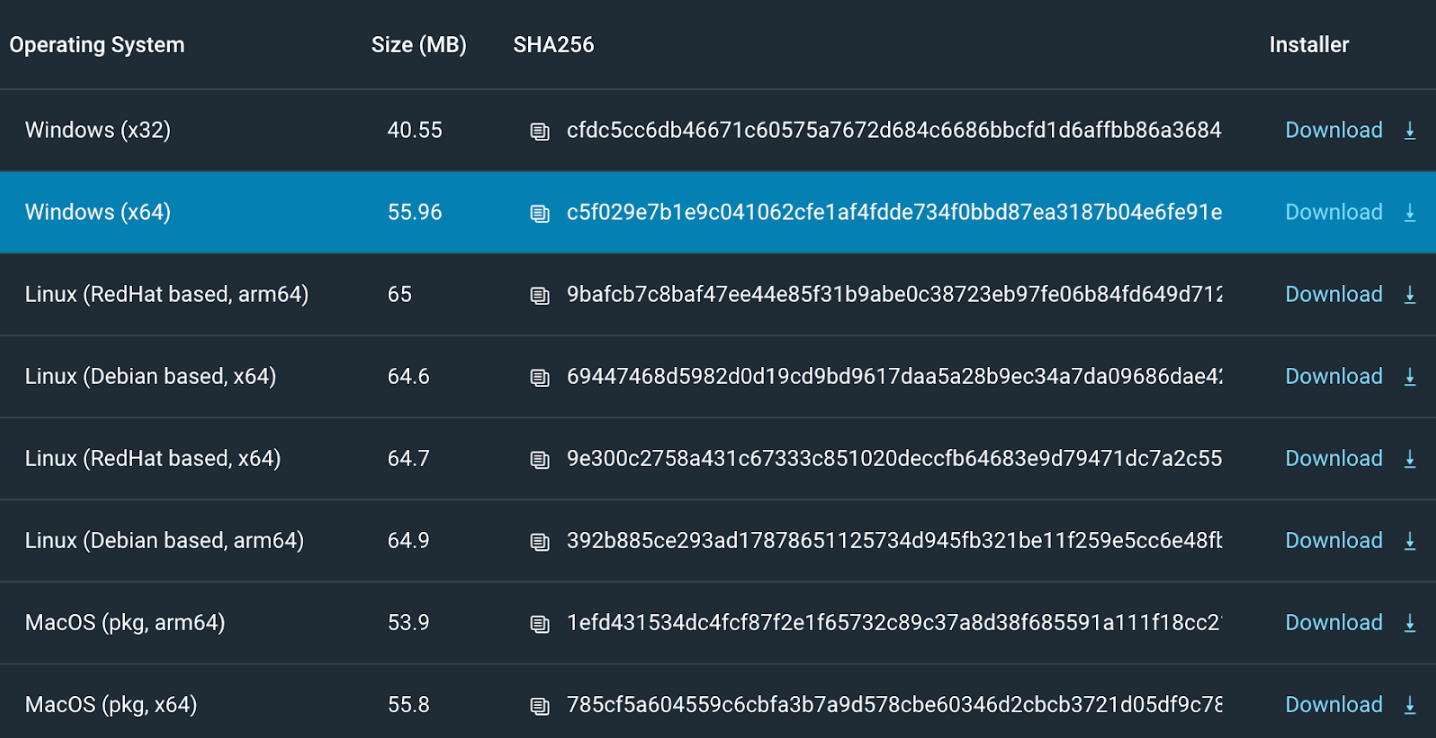
The latest generation of ARM64 chips promises excellent CPU performance and multi-day battery life on a single charge, making them more attractive than ever for enterprise and consumer devices, including laptops. As hardware and software vendors continue to bolster support for Windows on ARM, Rapid7 customers using or considering adoption of these devices can deploy the Insight Agent to Windows 11 devices immediately. The existing Windows (x64) installer – downloaded as ‘agentInstaller-x86_64.msi’ – can be used for installation, and the Insight Agent will automatically run in emulation mode. No other action is required, but do note that only InsightVM functionality is supported at this time.

You can find more information on how to download and install the Insight Agent in our Help Documentation and on the Agents page within the Insight Platform:

New! Insight Agent Support for ARM-based Windows in InsightVM

Customers can use the Agent Test Set feature to roll out newer versions of the Insight Agent on a select set of machines before deploying it widely.

Metasploit Weekly Wrap-Up 05/31/2024

Post Syndicated from Brendan Watters original https://blog.rapid7.com/2024/05/31/metasploit-weekly-wrap-up-05-31-2024/

Quis dīrumpet ipsos dīrumpēs

Metasploit Weekly Wrap-Up 05/31/2024

In this release, we feature a double-double: two exploits each targeting two pieces of software. The first pair is from h00die targeting the Jasmine Ransomeware Web Server. The first uses CVE-2024-30851 to retrieve the login for the ransomware server, and the second is a directory traversal vulnerability allowing arbitrary file read. The second pair from Dave Yesland of Rhino Security targets Progress Flowmon with CVE-2024-2389 and it pairs well like wine with the additional and accompanying Privilege Escalation module.

New module content (4)

Jasmin Ransomware Web Server Unauthenticated Directory Traversal

Authors: chebuya and h00die
Type: Auxiliary
Pull request: #19103 contributed by h00die
Path: gather/jasmin_ransomware_dir_traversal
AttackerKB reference: CVE-2024-30851

Description: This adds an unauthenticated directory traversal and a SQLi exploit against the Jasmin ransomware web panel.

Jasmin Ransomware Web Server Unauthenticated SQL Injection

Authors: chebuya and h00die
Type: Auxiliary
Pull request: #19103 contributed by h00die
Path: gather/jasmin_ransomware_sqli

Description: This adds an unauthenticated directory traversal and a SQLi exploit against the Jasmin ransomware web panel.

Flowmon Unauthenticated Command Injection

Author: Dave Yesland with Rhino Security Labs
Type: Exploit
Pull request: #19150 contributed by DaveYesland
Path: linux/http/progress_flowmon_unauth_cmd_injection
AttackerKB reference: CVE-2024-2389

Description: Unauthenticated Command Injection Module for Progress Flowmon CVE-2024-2389.

Progress Flowmon Local sudo privilege escalation

Author: Dave Yesland with Rhino Security Labs
Type: Exploit
Pull request: #19151 contributed by DaveYesland
Path: linux/local/progress_flowmon_sudo_privesc_2024

Description: Privilege escalation module for Progress Flowmon unpatched feature.

Enhancements and features (3)

Bugs fixed (0)

None

Documentation

You can find the latest Metasploit documentation on our docsite at docs.metasploit.com.

Get it

As always, you can update to the latest Metasploit Framework with msfupdate
and you can get more details on the changes since the last blog post from
GitHub:

If you are a git user, you can clone the Metasploit Framework repo (master branch) for the latest.
To install fresh without using git, you can use the open-source-only Nightly Installers or the
commercial edition Metasploit Pro

[$] One more pidfdfs surprise

Post Syndicated from corbet original https://lwn.net/Articles/976125/

The “pidfdfs” virtual filesystem was added to the 6.9 kernel release as a
way to export better information about running processes to user space. It
replaced a previous implementation in a way that was, on its surface, fully
compatible while adding a number of new capabilities. This transition,
which was intended to be entirely invisible to existing applications,
already ran into trouble in March, when a
misunderstanding with SELinux caused systems with pidfdfs to fail to boot
properly. That problem was quickly fixed, but it turns out that there was
one more surprise in store, showing just how hard ABI compatibility can be
at times.

Simplify custom contact center insights with Amazon Connect analytics data lake

Post Syndicated from Donnie Prakoso original https://aws.amazon.com/blogs/aws/simplify-custom-contact-center-insights-with-amazon-connect-analytics-data-lake/

Analytics are vital to the success of a contact center. Having insights into each touchpoint of the customer experience allows you to accurately measure performance and adapt to shifting business demands. While you can find common metrics in the Amazon Connect console, sometimes you need to have more details and custom requirements for reporting based on the unique needs of your business. 

Starting today, the Amazon Connect analytics data lake is generally available. As announced last year as preview, this new capability helps you to eliminate the need to build and maintain complex data pipelines. Amazon Connect data lake is zero-ETL capable, so no extract, transform, or load (ETL) is needed.

Here’s a quick look at the Amazon Connect analytics data lake:

Improving your customer experience with Amazon Connect
Amazon Connect analytics data lake helps you to unify disparate data sources, including customer contact records and agent activity, into a single location. By having your data in a centralized location, you now have access to analyze contact center performance and gain insights while reducing the costs associated with implementing complex data pipelines.

With Amazon Connect analytics data lake, you can access and analyze contact center data, such as contact trace records and Amazon Connect Contact Lens data. This provides you the flexibility to prepare and analyze data with Amazon Athena and use the business intelligence (BI) tools of your choice, such as, Amazon QuickSight and Tableau

Get started with the Amazon Connect analytics data lake
To get started with the Amazon Connect analytics data lake, you’ll first need to have an Amazon Connect instance setup. You can follow the steps in the Create an Amazon Connect instance page to create a new Amazon Connect instance. Because I’ve already created my Amazon Connect instance, I will go straight to showing you how you can get started with Amazon Connect analytics data lake.

First, I navigate to the Amazon Connect console and select my instance.

Then, on the next page, I can set up my analytics data lake by navigating to Analytics tools and selecting Add data share.

This brings up a pop-up dialog, and I first need to define the target AWS account ID. With this option, I can set up a centralized account to receive all data from Amazon Connect instances running in multiple accounts. Then, under Data types, I can select the types I need to share with the target AWS account. To learn more about the data types that you can share in the Amazon Connect analytics data lake, please visit Associate tables for Analytics data lake.

Once it’s done, I can see the list of all the target AWS account IDs with which I have shared all the data types.

Besides using the AWS Management Console, I can also use the AWS Command Line Interface (AWS CLI) to associate my tables with the analytics data lake. The following is a sample command:

$> aws connect batch-associate-analytics-data-set --cli-input-json file:///input_batch_association.json

Where input_batch_association.json is a JSON file that contains association details. Here’s a sample:

{
	"InstanceId": YOUR_INSTANCE_ID,
	"DataSetIds": [
		"<DATA_SET_ID>"
		],
	"TargetAccountId": YOUR_ACCOUNT_ID
} 

Next, I need to approve (or reject) the request in the AWS Resource Access Manager (RAM) console in the target account. RAM is a service to help you securely share resources across AWS accounts. I navigate to AWS RAM and select Resource shares in the Shared with me section.

Then, I select the resource and select Accept resource share

At this stage, I can access shared resources from Amazon Connect. Now, I can start creating linked tables from shared tables in AWS Lake Formation. In the Lake Formation console, I navigate to the Tables page and select Create table.

I need to create a Resource link to a shared table. Then, I fill in the details and select the available Database and the Shared table’s region.

Then, when I select Shared table, it will list all the available shared tables that I can access.

Once I select the shared table, it will automatically populate Shared table’s database and Shared table’s owner ID. Once I’m happy with the configuration, I select Create.

To run some queries for the data, I go to the Amazon Athena console.The following is an example of a query that I ran:

With this configuration, I have access to certain Amazon Connect data types. I can even visualize the data by integrating with Amazon QuickSight. The following screenshot show some visuals in the Amazon QuickSight dashboard with data from Amazon Connect.

Customer voice
During the preview period, we heard lots of feedback from our customers about Amazon Connect analytics data lake. Here’s what our customer say:

Joulica is an analytics platform supporting insights for software like Amazon Connect and Salesforce. Tony McCormack, founder and CEO of Joulica, said, “Our core business is providing real-time and historical contact center analytics to Amazon Connect customers of all sizes. In the past, we frequently had to set up complex data pipelines, and so we are excited about using Amazon Connect analytics data lake to simplify the process of delivering actionable intelligence to our shared customers.”

Things you need to know

  • Pricing — Amazon Connect analytics data lake is available for you to use up to 2 years of data without any additional charges in Amazon Connect. You only need to pay for any services you use to interact with the data.
  • Availability — Amazon Connect analytics data lake is generally available in the following AWS Regions: US East (N. Virginia), US West (Oregon), Africa (Cape Town), Asia Pacific (Mumbai, Seoul, Singapore, Sydney, Tokyo), Canada (Central), and Europe (Frankfurt, London)
  • Learn more — For more information, please visit Analytics data lake documentation page.

Happy building,
Donnie

Implement a full stack serverless search application using AWS Amplify, Amazon Cognito, Amazon API Gateway, AWS Lambda, and Amazon OpenSearch Serverless

Post Syndicated from Anand Komandooru original https://aws.amazon.com/blogs/big-data/implement-a-full-stack-serverless-search-application-using-aws-amplify-amazon-cognito-amazon-api-gateway-aws-lambda-and-amazon-opensearch-serverless/

Designing a full stack search application requires addressing numerous challenges to provide a smooth and effective user experience. This encompasses tasks such as integrating diverse data from various sources with distinct formats and structures, optimizing the user experience for performance and security, providing multilingual support, and optimizing for cost, operations, and reliability.

Amazon OpenSearch Serverless is a powerful and scalable search and analytics engine that can significantly contribute to the development of search applications. It allows you to store, search, and analyze large volumes of data in real time, offering scalability, real-time capabilities, security, and integration with other AWS services. With OpenSearch Serverless, you can search and analyze a large volume of data without having to worry about the underlying infrastructure and data management. An OpenSearch Serverless collection is a group of OpenSearch indexes that work together to support a specific workload or use case. Collections have the same kind of high-capacity, distributed, and highly available storage volume that’s used by provisioned Amazon OpenSearch Service domains, but they remove complexity because they don’t require manual configuration and tuning. Each collection that you create is protected with encryption of data at rest, a security feature that helps prevent unauthorized access to your data. OpenSearch Serverless also supports OpenSearch Dashboards, which provides an intuitive interface for analyzing data.

OpenSearch Serverless supports three primary use cases:

  • Time series – The log analytics workloads that focus on analyzing large volumes of semi-structured, machine-generated data in real time for operational, security, user behavior, and business insights
  • Search – Full-text search that powers applications in your internal networks (content management systems, legal documents) and internet-facing applications, such as ecommerce website search and content search
  • Vector search – Semantic search on vector embeddings that simplifies vector data management and powers machine learning (ML) augmented search experiences and generative artificial intelligence (AI) applications, such as chatbots, personal assistants, and fraud detection

In this post, we walk you through a reference implementation of a full-stack cloud-centered serverless text search application designed to run using OpenSearch Serverless.

Solution overview

The following services are used in the solution:

  • AWS Amplify is a set of purpose-built tools and features that enables frontend web and mobile developers to quickly and effortlessly build full-stack applications on AWS. These tools have the flexibility to use the breadth of AWS services as your use cases evolve. This solution uses the Amplify CLI to build the serverless movie search web application. The Amplify backend is used to create resources such as the Amazon Cognito user pool, API Gateway, Lambda function, and Amazon S3 storage.
  • Amazon API Gateway is a fully managed service that makes it straightforward for developers to create, publish, maintain, monitor, and secure APIs at any scale. We use API Gateway as a “front door” for the movie search application for searching movies.
  • AWS CloudFront accelerates the delivery of web content such as static and dynamic web pages, video streams, and APIs to users across the globe by caching content at edge locations closer to the end-users. This solution uses CloudFront with Amazon S3 to deliver the search application user interface to the end users.
  • Amazon Cognito makes it straightforward for adding authentication, user management, and data synchronization without having to write backend code or manage any infrastructure. We use Amazon Cognito for creating a user pool so the end-user can log in to the movie search application through Amazon Cognito.
  • AWS Lambda is a serverless, event-driven compute service that lets you run code for virtually any type of application or backend service without provisioning or managing servers. Our solution uses a Lambda function to query OpenSearch Serverless. API Gateway forwards all requests to the Lambda function to serve up the requests.
  • Amazon OpenSearch Serverless is a serverless option for OpenSearch Service. In this post, you use common methods for searching documents in OpenSearch Service that improve the search experience, such as request body searches using domain-specific language (DSL) for queries. The query DSL lets you specify the full range of OpenSearch search options, including pagination and sorting the search results. Pagination and sorting are implemented on the server side using DSL as part of this implementation.
  • Amazon Simple Storage Service (Amazon S3) is an object storage service that offers industry-leading scalability, data availability, security, and performance. The solution uses Amazon S3 as storage for storing movie trailers.
  • AWS WAF helps protects web applications from attacks by allowing you to configure rules that allow, block, or monitor (count) web requests based on conditions that you define. We use AWS WAF to allow access to the movie search app from only IP addresses on an allow list.

The following diagram illustrates the solution architecture.

The workflow includes the following steps:

  1. The end-user accesses the CloudFront and Amazon S3 hosted movie search web application from their browser or mobile device.
  2. The user signs in with their credentials.
  3. A request is made to an Amazon Cognito user pool for a login authentication token, and a token is received for a successful sign-in request.
  4. The search application calls the search API method with the token in the authorization header to API Gateway. API Gateway is protected by AWS WAF to enforce rate limiting and implement allow and deny lists.
  5. API Gateway passes the token for validation to the Amazon Cognito user pool. Amazon Cognito validates the token and sends a response to API Gateway.
  6. API Gateway invokes the Lambda function to process the request.
  7. The Lambda function queries OpenSearch Serverless and returns the metadata for the search.
  8. Based on metadata, content is returned from Amazon S3 to the user.

In the following sections, we walk you through the steps to deploy the solution, ingest data, and test the solution.

Prerequisites

Before you get started, make sure you complete the following prerequisites:

  1. Install Nodejs latest LTS version.
  2. Install and configure the AWS Command Line Interface (AWS CLI).
  3. Install awscurl for data ingestion.
  4. Install and configure the Amplify CLI. At the end of configuration, you should successfully set up the new user using the amplify-dev user’s AccessKeyId and SecretAccessKey in your local machine’s AWS profile.
  5. Amplify users need additional permissions in order to deploy AWS resources. Complete the following steps to create a new inline AWS Identity and Access Management (IAM) policy and attach it to the user:
    • On the IAM console, choose Users in the navigation pane.
    • Choose the user amplify-dev.
    • On the Permissions tab, choose the Add permissions dropdown menu, then choose Inline policy.
    • In the policy editor, choose JSON.

You should see the default IAM statement in JSON format.

This environment name needs to be used when performing amplify init when bringing up the backend. The actions in the IAM statement are largely open (*) but restricted or limited by the target resources; this is done to satisfy the maximum inline policy length (2,048 characters).

    • Enter the updated JSON into the policy editor, then choose Next.
    • For Policy name, enter a name (for this post, AddionalPermissions-Amplify).
    • Choose Create policy.

You should now see the new inline policy attached to the user.

Deploy the solution

Complete the following steps to deploy the solution:

  1. Clone the repository to a new folder on your desktop using the following command:
    git clone https://github.com/aws-samples/amazon-opensearchserverless-searchapp.git

  2. Deploy the movie search backend.
  3. Deploy the movie search frontend.

Ingest data

To ingest the sample movie data into the newly created OpenSearch Serverless collection, complete the following steps:

  • On the OpenSearch Service console, choose Ingestion: Pipelines in the navigation pane.
  • Choose the pipeline movie-ingestion and locate the ingestion URL.

  • Replace the ingestion endpoint and Region in the following snippet and run the awscurl command to save data into the collection:
awscurl --service osis --region <region> \
-X POST \
-H "Content-Type: application/json" \
-d "@project_assets/movies-data.json" \
https://<ingest_url>/movie-ingestion/data 

You should see a 200 OK response.

  • On the Amazon S3 console, open the trailer S3 bucket (created as part of the backend deployment.
  • Upload some movie trailers.

Storage

Make sure the file name matches the ID field in sample movie data (for example, tt1981115.mp4, tt0800369.mp4, and tt0172495.mp4). Uploading a trailer with ID tt0172495.mp4 is used as the default trailer for all movies, without having to upload one for each movie.

Test the solution

Access the application using the CloudFront distribution domain name. You can find this by opening the CloudFront console, choosing the distribution, and copying the distribution domain name into your browser.

Sign up for application access by entering your user name, password, and email address. The password should be at least eight characters in length, and should include at least one uppercase character and symbol.

Sign Up

After you’re logged in, you’re redirected to the Movie Finder home page.

Home Page

You can search using a movie name, actor, or director, as shown in the following example. The application returns results using OpenSearch DSL.

Search Results

If there’s a large number of search results, you can navigate through them using the pagination option at the bottom of the page. For more information about how the application uses pagination, see Paginating search results.

Pagination

You can choose movie tiles to get more details and watch the trailer if you took the optional step of uploading a movie trailer.

Movie Details

You can sort the search results using the Sort by feature. The application uses the sort functionality within OpenSearch.

Sort

There are many more DSL search patterns that allow for intricate searches. See Query DSL for complete details.

Monitoring OpenSearch Serverless

Monitoring is an important part of maintaining the reliability, availability, and performance of OpenSearch Serverless and your other AWS services. AWS provides Amazon CloudWatch and AWS CloudTrail to monitor OpenSearch Serverless, report when something is wrong, and take automatic actions when appropriate. For more information, see Monitoring Amazon OpenSearch Serverless.

Clean up

To avoid unnecessary charges, clean up the solution implementation by running the following command at the project root folder you created using the git clone command during deployment:

amplify delete

You can also clean up the solution by deleting the AWS CloudFormation stack you deployed as part of the setup. For instructions, see Deleting a stack on the AWS CloudFormation console.

Conclusion

In this post, we implemented a full-stack serverless search application using OpenSearch Serverless. This solution seamlessly integrates with various AWS services, such as Lambda for serverless computing, API Gateway for constructing RESTful APIs, IAM for robust security, Amazon Cognito for streamlined user management, and AWS WAF for safeguarding the web application against threats. By adopting a serverless architecture, this search application offers numerous advantages, including simplified deployment processes and effortless scalability, with the benefits of a managed infrastructure.

With OpenSearch Serverless, you get the same interactive millisecond response times as OpenSearch Service with the simplicity of a serverless environment. You pay only for what you use by automatically scaling resources to provide the right amount of capacity for your application without impacting performance and scale as needed. You can use OpenSearch Serverless and this reference implementation to build your own full-stack text search application.


About the Authors

Anand Komandooru is a Principal Cloud Architect at AWS. He joined AWS Professional Services organization in 2021 and helps customers build cloud-native applications on AWS cloud. He has over 20 years of experience building software and his favorite Amazon leadership principle is “Leaders are right a lot“.

Rama Krishna Ramaseshu is a Senior Application Architect at AWS. He joined AWS Professional Services in 2022 and with close to two decades of experience in application development and software architecture, he empowers customers to build well architected solutions within the AWS cloud. His favorite Amazon leadership principle is “Learn and Be Curious”.

Sachin Vighe is a Senior DevOps Architect at AWS. He joined AWS Professional Services in 2020, and specializes in designing and architecting solutions within the AWS cloud to guide customers through their DevOps and Cloud transformation journey. His favorite leadership principle is “Customer Obsession”.

Molly Wu is an Associate Cloud Developer at AWS. She joined AWS Professional Services in 2023 and specializes in assisting customers in building frontend technologies in AWS cloud. Her favorite leadership principle is “Bias for Action”.

Andrew Yankowsky is a Security Consultant at AWS. He joined AWS Professional Services in 2023, and helps customers build cloud security capabilities and follow security best practices on AWS. His favorite leadership principle is “Earn Trust”.

AWS named a Leader in IDC MarketScape: Worldwide Analytic Stream Processing Software 2024 Vendor Assessment

Post Syndicated from Anna Montalat original https://aws.amazon.com/blogs/big-data/aws-named-a-leader-in-idc-marketscape-worldwide-analytic-stream-processing-software-2024-vendor-assessment/

We’re thrilled to announce that AWS has been named a Leader in the IDC MarketScape: Worldwide Analytic Stream Processing Software 2024 Vendor Assessment (doc #US51053123, March 2024).

We believe this recognition validates the power and performance of Apache Flink for real-time data processing, and how AWS is leading the way to help customers build and run fully managed Apache Flink applications. You can read the full report from IDC.

Unleashing real-time insights for your organization

Apache Flink’s robust architecture enables real-time data processing at scale, making it a favored choice among organizations for its efficiency and speed. With its advanced features for event time processing and state management, Apache Flink empowers users to build complex stream processing applications, making it indispensable for modern data-driven organizations. Managed Service for Apache Flink takes the complexity out of Apache Flink deployment and management, letting you focus on building game-changing applications. With Managed Service for Apache Flink, you can transform and analyze streaming data in real time using Apache Flink and integrate applications with other AWS services. There are no servers and clusters to manage, and there is no compute and storage infrastructure to set up. You pay only for the resources you use.

But what does this mean for your organizations and IT teams? The following are some use cases and benefits:

  • Faster insights, quicker action – Analyze data streams as they arrive, allowing you to react promptly to changing conditions and make informed decisions based on the latest information, achieving agility and competitiveness in dynamic markets.
  • Real-time fraud detection – Identify suspicious activity the moment it occurs, enabling proactive measures to protect your customers and revenue from potential financial losses, bolstering trust and security in your business operations.
  • Personalized customer interactions – Gain insights from user behavior in real time, enabling personalized experiences and the ability to proactively address potential issues before they impact customer satisfaction, fostering loyalty and enhancing brand reputation.
  • Data-driven optimization – Utilize real-time insights from sensor data and machine logs to streamline processes, identify inefficiencies, and optimize resource allocation, driving operational excellence and cost savings while maintaining peak performance.
  • Advanced AI – Continuously feed real-time data to your machine learning (ML) and generative artificial intelligence (AI) models, allowing them to adapt and personalize outputs for more relevant and impactful results.

Beyond the buzzword: Apache Flink in action

Apache Flink’s versatility extends beyond single use cases. The following are just a few examples of how our customers are taking advantage of its capabilities:

  • The National Hockey League is the second oldest of the four major professional team sports leagues in North America. Predicting events such as face-off winning probabilities during a live game is a complex task that requires processing a significant amount of quality historical data and data streams in real time. The NHL constructed the Face-off Probability model using Apache Flink. Managed Service for Apache Flink provides the underlying infrastructure for the Apache Flink applications, removing the need to self-manage an Apache Flink cluster and reducing maintenance complexity and costs.
  • Arity is a technology company focused on making transportation smarter, safer, and more useful. They transform massive amounts of data into actionable insights to help partners better predict risk and make smarter decisions in real time. Arity uses the managed ability of Managed Service for Apache Flink to transform and analyze streaming data in near real time using Apache Flink. On Managed Service for Apache Flink, Arity generates driving behavior insights based on collated driving data.
  • SOCAR is the leading Korean mobility company with strong competitiveness in car sharing. SOCAR solves mobility-related social problems, such as parking difficulties and traffic congestion, and changes the car ownership-oriented mobility habits in Korea.

Join the leaders in stream processing

By choosing Managed Service for Apache Flink, you’re joining a growing community of organizations who are unlocking the power of real-time data analysis. Get started today and see how Apache Flink can transform your data strategy, including powering the next generation of generative AI applications.

Ready to learn more?

Contact us today and discover how Apache Flink can empower your business.


About the author

Anna Montalat is the Product Marketing lead for AWS analytics and streaming data services, including Amazon Managed Streaming for Apache Kafka (MSK), Kinesis Data Streams, Kinesis Video Streams, Amazon Data Firehose, and Amazon Managed Service for Apache Flink, among others. She is passionate about bringing new and emerging technologies to market, working closely with service teams and enterprise customers. Outside of work, Anna skis through winter time and sails through summer.

CFP: the 2024 Kernel Maintainers Summit

Post Syndicated from corbet original https://lwn.net/Articles/976319/

The 2024 Kernel Maintainers Summit will happen on September 17 in
Vienna, Austria; it is an invitation-only event for a small group to
discuss important kernel-development problems. The call for
proposals
for this gathering has now been posted. One of the best ways
to be invited to the event is to propose a topic that needs discussion in
that forum. The deadline for proposals is June 18.

Using Single Sign On (SSO) to manage project teams for Amazon CodeCatalyst

Post Syndicated from Divya Konaka Satyapal original https://aws.amazon.com/blogs/devops/using-single-sign-on-sso-to-manage-project-teams-for-amazon-codecatalyst/

Amazon CodeCatalyst is a modern software development service that empowers teams to deliver software on AWS easily and quickly. Amazon CodeCatalyst provides one place where you can plan, code, and build, test, and deploy your container applications with continuous integration/continuous delivery (CI/CD) tools.

CodeCatalyst recently announced the teams feature, which simplifies management of space and project access. Enterprises can now use this feature to organize CodeCatalyst space members into teams using single sign-on (SSO) with IAM Identity Center. You can also assign SSO groups to a team, to centralize your CodeCatalyst user management.
CodeCatalyst space admins can create teams made up any members of the space and assign them to unique roles per project, such as read-only or contributor.

Introduction:

In this post, we will demonstrate how enterprises can enable access to CodeCatalyst with their workforce identities configured in AWS IAM Identity Center, and also easily manage which team members have access to CodeCatalyst spaces and projects. With AWS IAM Identity Center, you can connect a self-managed directory in Active Directory (AD) or a directory in AWS Managed Microsoft AD by using AWS Directory Service. You can also connect other external identity providers (IdPs) like Okta or OneLogin to authenticate identities from the IdPs through the Security Assertion Markup Language (SAML) 2.0 standard. This enables your users to sign in to the AWS access portal with their corporate credentials.

Pre-requisites:

To get started with CodeCatalyst, you need the following prerequisites. Please review them and ensure you have completed all steps before proceeding:

1. Set up an CodeCatalyst space. To join a space, you will need to either:

  1. Create an Amazon CodeCatalyst space that supports identity federation. If you are creating the space, you will need to specify an AWS account ID for billing and provisioning of resources. If you have not created an AWS account, follow the AWS documentation to create one

    Figure 1: CodeCatalyst Space Settings

    Figure 1: CodeCatalyst Space Settings

  2. Use an IAM Identity Center instance that is part of your AWS Organization or AWS account to associate with CodeCatalyst space.
  3. Accept an invitation to sign in with SSO to an existing space.

2. Create an AWS Identity and Access Management (IAM) role. Amazon CodeCatalyst will need an IAM role to have permissions to deploy the infrastructure to your AWS account. Follow the documentation for steps how to create an IAM role via the Amazon CodeCatalyst console.

3. Once the above steps are completed, you can go ahead and create projects in the space using the available blueprints or custom blueprints.

Walkthrough:

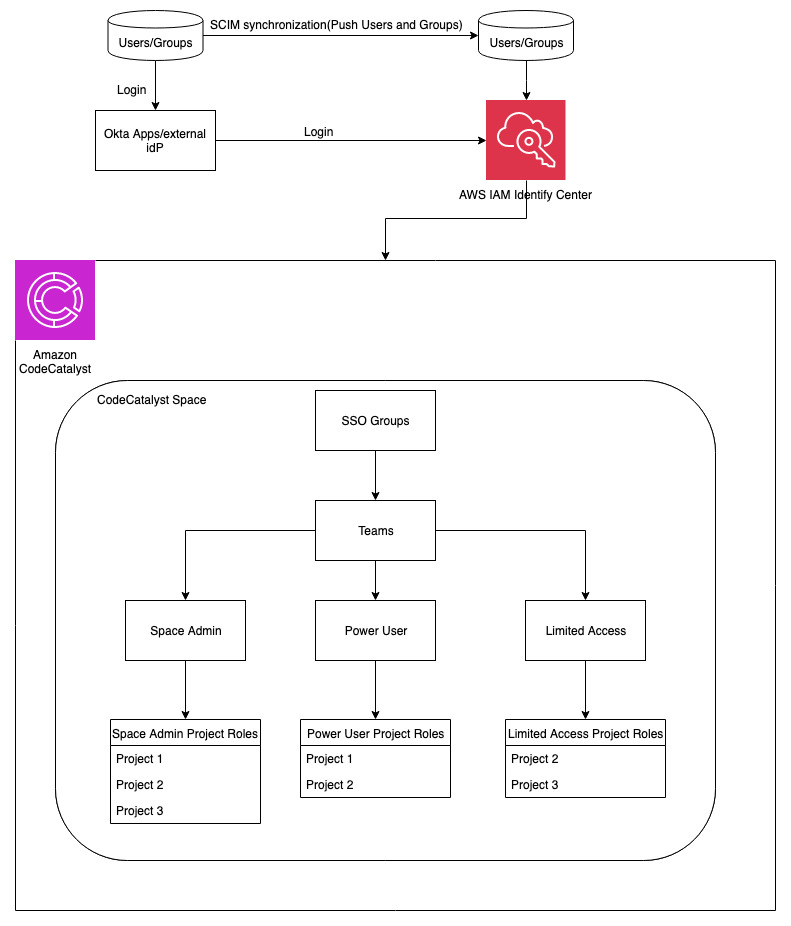
The emphasis of this post, will be on how to manage IAM identity center (SSO) groups with CodeCatalyst teams. At the end of the post, our workflow will look like the one below:

Figure 2: Architectural Diagram

Figure 2: Architectural Diagram

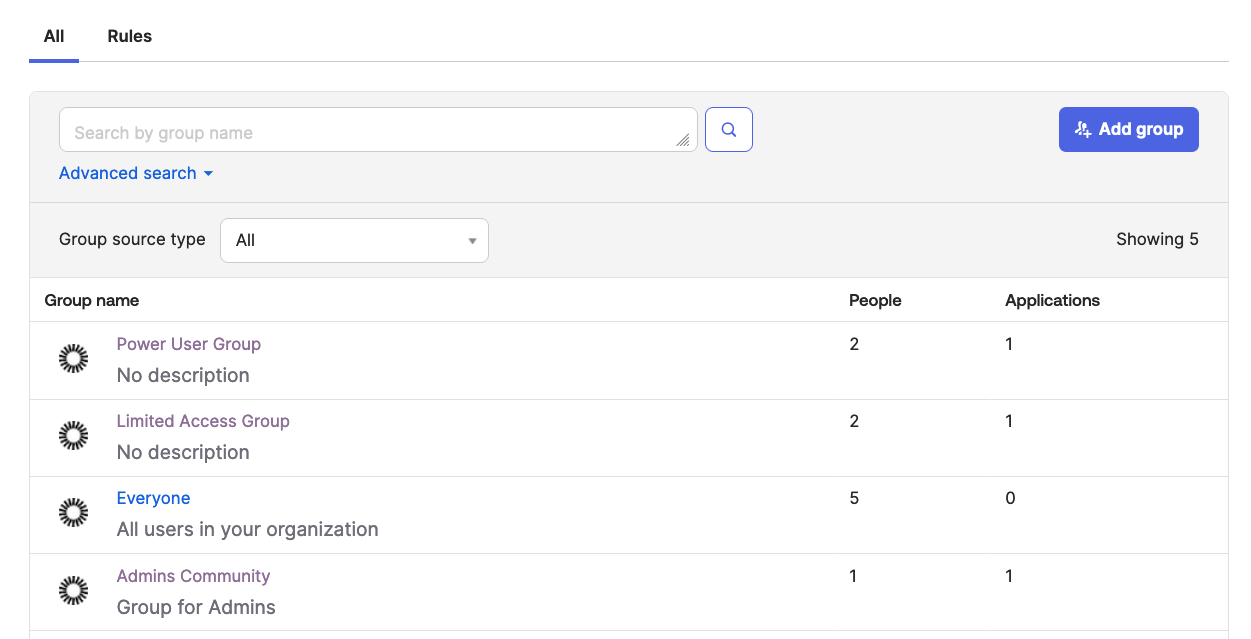
For the purpose of this walkthrough, I have used an external identity provider Okta to federate with AWS IAM Identity Center to manage access to CodeCatalyst.

Figure 3: Okta Groups from Admin Console

Figure 3: Okta Groups from Admin Console

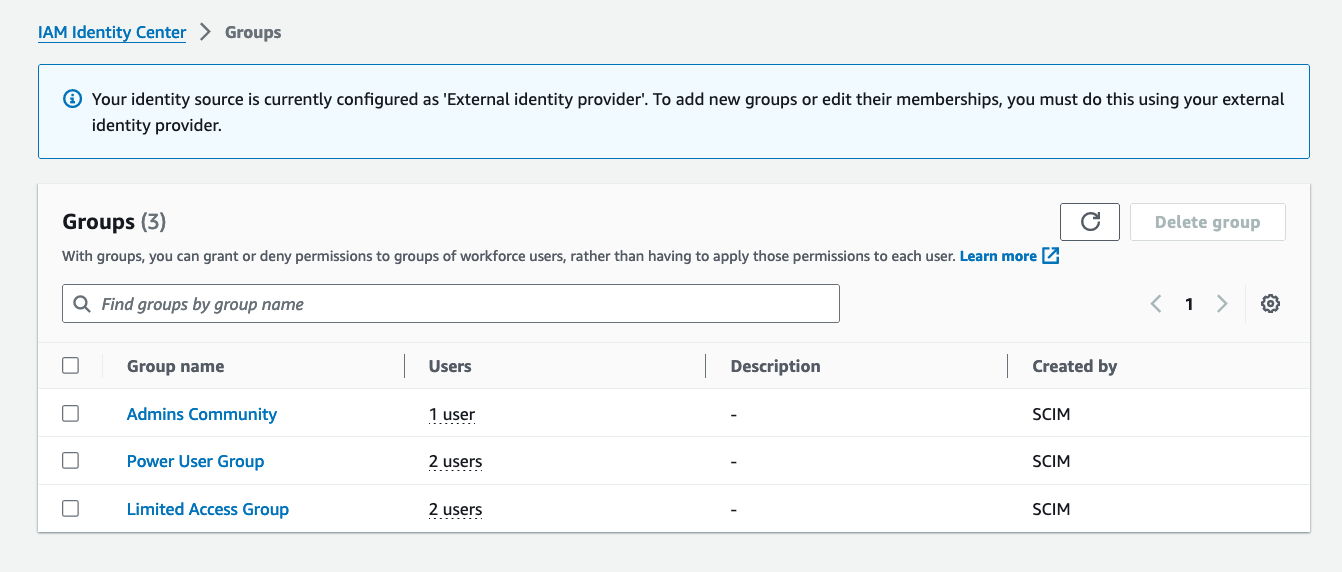
You can also see the same Groups are synced with the IAM Identity Center instance from the figure below. Please note Groups and member management must be done only via external identity providers.

Figure 4: IAM Identity Center Groups created via SCIM synch

Figure 4: IAM Identity Center Groups created via SCIM synch

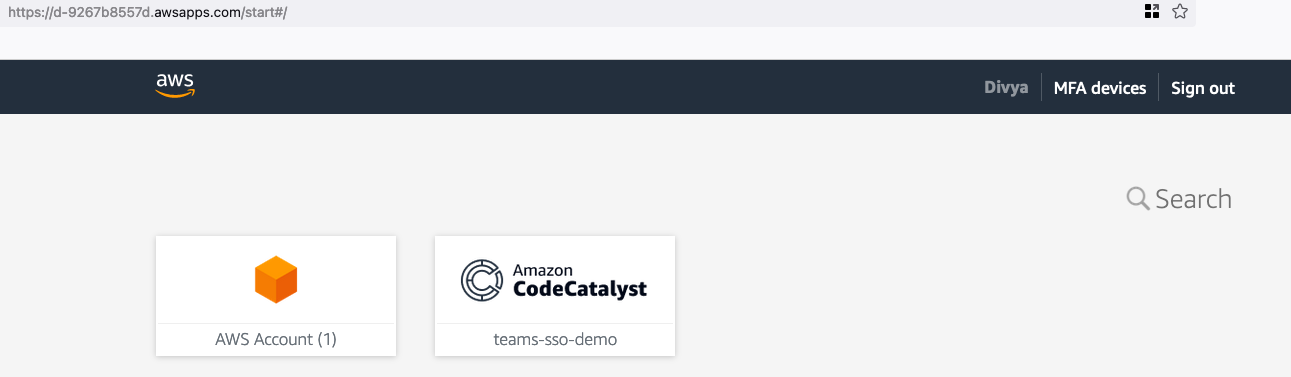
Now, if you go to your Okta apps and click on ‘AWS IAM Identity Center’, the AWS account ID and CodeCatalyst space that you created as part of prerequisites should be automatically configured for you via single sign-on. Developers and Administrators of the space can easily login using this integration.

Figure 5: CodeCatalyst Space via SSO

Figure 5: CodeCatalyst Space via SSO

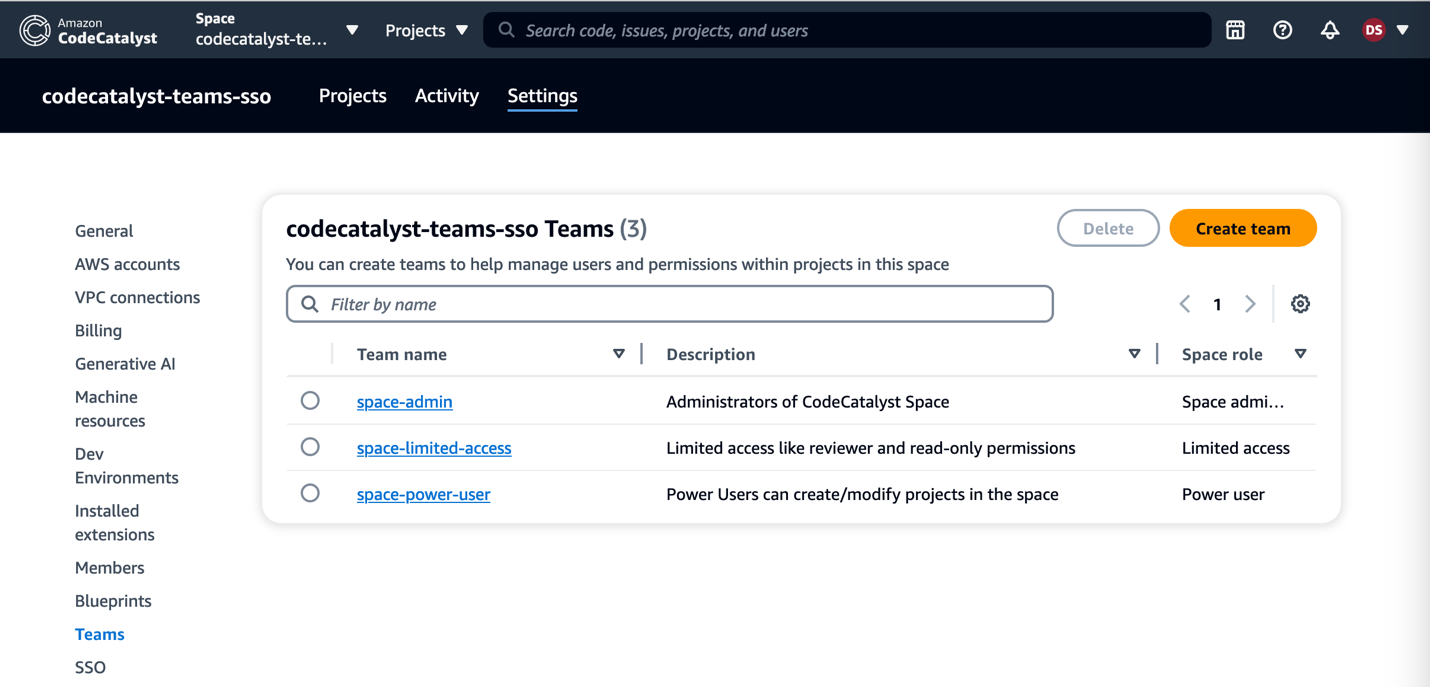
Once you are in the CodeCatalyst space, you can organize CodeCatalyst space members into teams, and configure the default roles for them. You can choose one of the three roles from the list of space roles available in CodeCatalyst that you want to assign to the team. The role will be inherited by all members of the team:

  • Space administrator – The Space administrator role is the most powerful role in Amazon CodeCatalyst. Only assign the Space administrator role to users who need to administer every aspect of a space, because this role has all permissions in CodeCatalyst. For details, see Space administrator role.
  • Power user – The Power user role is the second-most powerful role in Amazon CodeCatalyst spaces, but it has no access to projects in a space. It is designed for users who need to be able to create projects in a space and help manage the users and resources for the space. For details, see Power user role.
  • Limited access – It is the role automatically assigned to users when they accept an invitation to a project in a space. It provides the limited permissions they need to work within the space that contains that project. For details, see Limited access role.

Since you have the space integrated with SSO groups set up in IAM Identity Center, you can use that option to create teams and manage members using SSO groups.

Figure 6: Managing Teams in CodeCatalyst Space

Figure 6: Managing Teams in CodeCatalyst Space

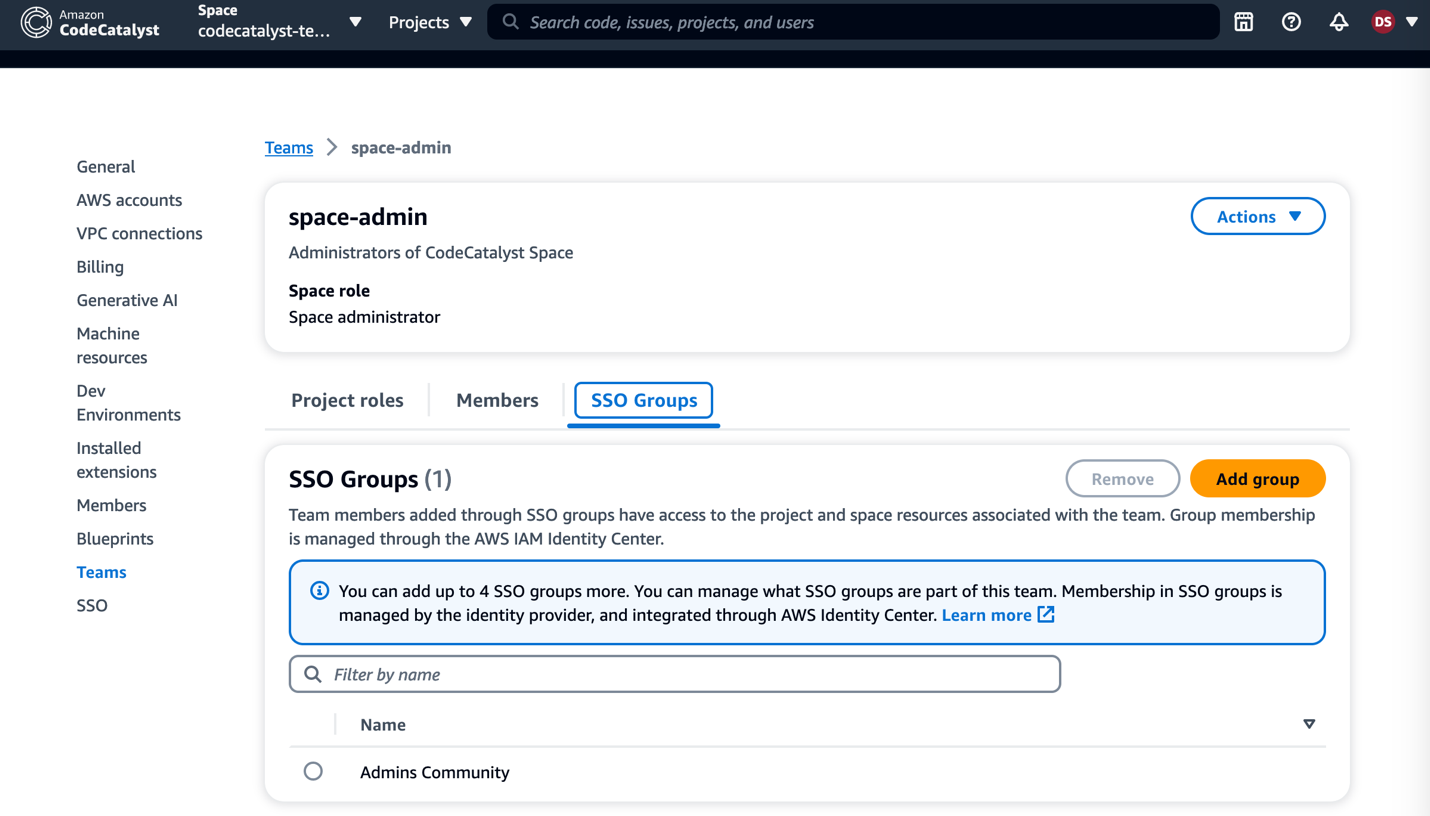
In this example here, if I go into the ‘space-admin’ team, I can view the SSO group associated with it through IAM Identity Center.

Figure 7: SSO Group association with Teams

Figure 7: SSO Group association with Teams

You can now use these teams from the CodeCatalyst space to help manage users and permissions for the projects in that space. There are four project roles available in CodeCatalyst:

  • Project administrator — The Project administrator role is the most powerful role in an Amazon CodeCatalyst project. Only assign this role to users who need to administer every aspect of a project, including editing project settings, managing project permissions, and deleting projects. For details, see Project administrator role.
  • Contributor — The Contributor role is intended for the majority of members in an Amazon CodeCatalyst project. Assign this role to users who need to be able to work with code, workflows, issues, and actions in a project. For details, see Contributor role.
  • Reviewer — The Reviewer role is intended for users who need to be able to interact with resources in a project, such as pull requests and issues, but not create and merge code, create workflows, or start or stop workflow runs in an Amazon CodeCatalyst project. For details, see Reviewer role.
  • Read only — The Read only role is intended for users who need to view the resources and status of resources but not interact with them or contribute directly to the project. Users with this role cannot create resources in CodeCatalyst, but they can view them and copy them, such as cloning repositories and downloading attachments to issues to a local computer. For details, see Read only role.

For the purpose of this demonstration, I have created projects from the default blueprints (I chose the modern three-tier web application blueprint) and assigned Teams to it with specific roles. You can also create a project using a default blueprint in CodeCatalyst space if you don’t already have an existing project.

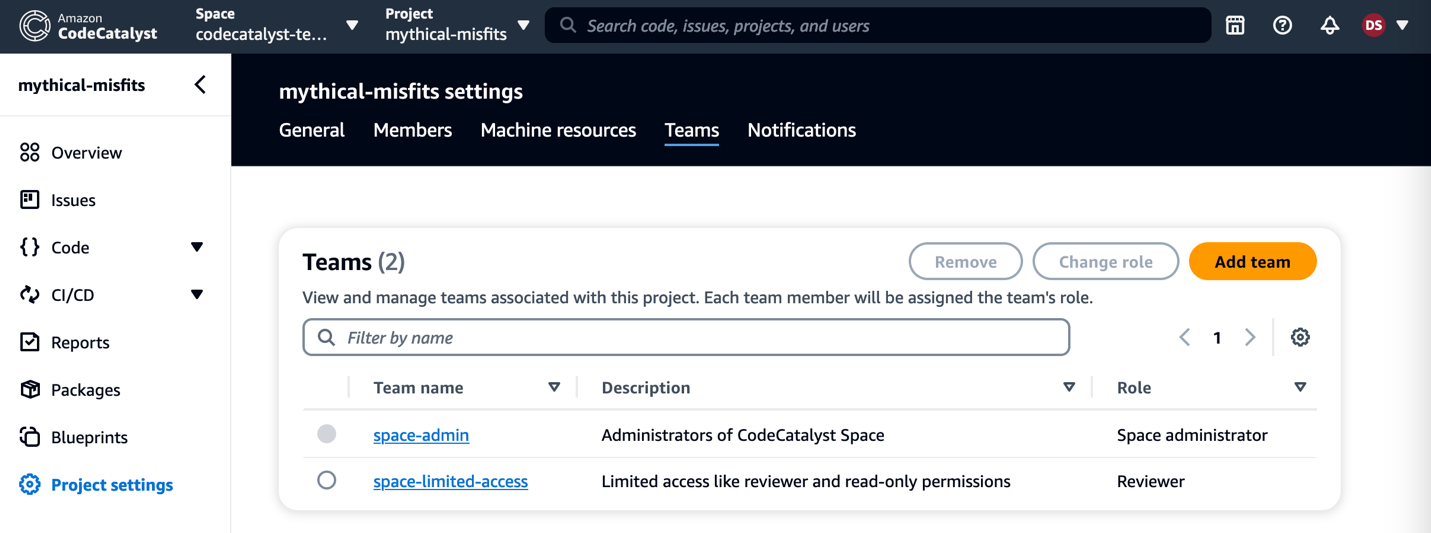
Figure 8: Teams in Project Settings

Figure 8: Teams in Project Settings

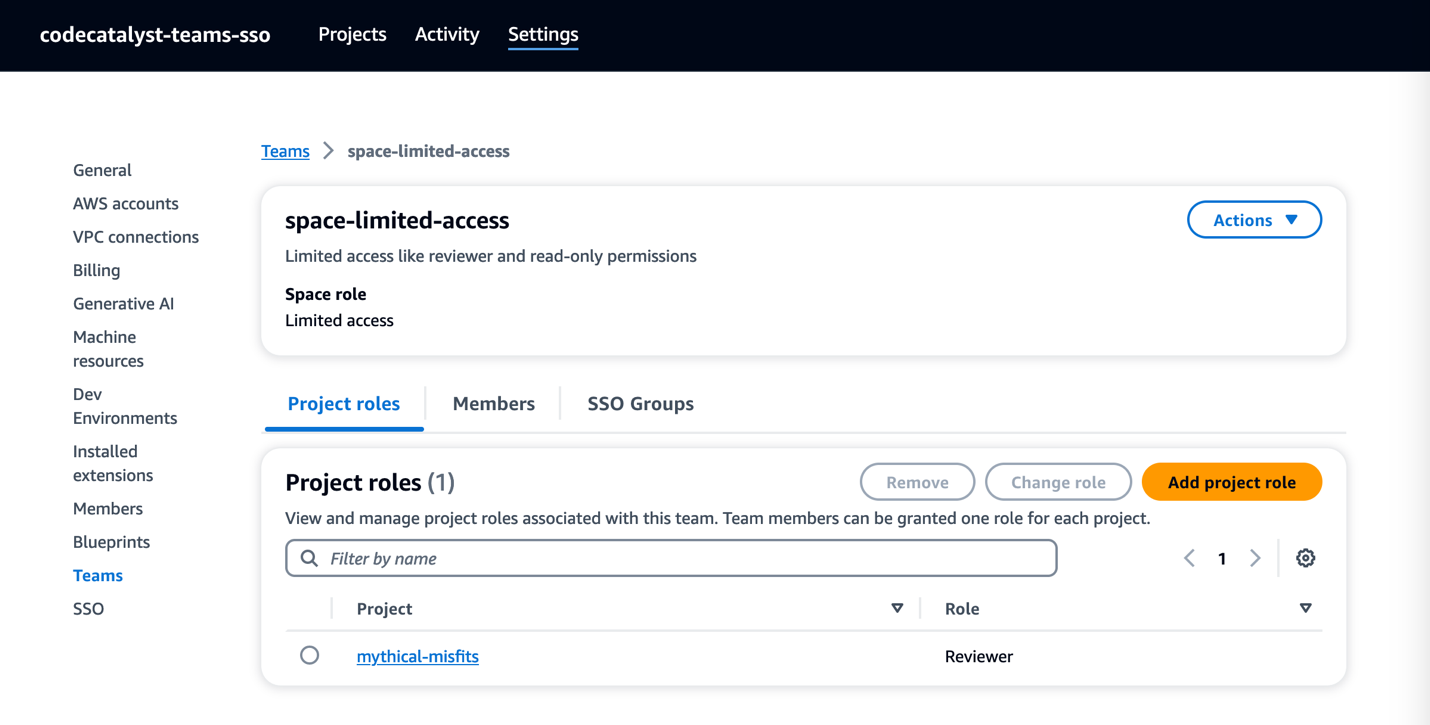
You can also view the roles assigned to each of the teams in the CodeCatalyst Space settings.

Figure 9: Project roles in Space settings

Figure 9: Project roles in Space settings

Clean up your Environment:

If you have been following along with this workflow, you should delete the resources you deployed so you do not continue to incur charges. First, delete the two stacks that CDK deployed using the AWS CloudFormation console in the AWS account you associated when you launched the blueprint. If you had launched the Modern three-tier web application just like I did, these stacks will have names like mysfitsXXXXXWebStack and mysfitsXXXXXAppStack. Second, delete the project from CodeCatalyst by navigating to Project settings and choosing Delete project.

Conclusion:

In this post, you learned how to add Teams to a CodeCatalyst space and projects using SSO Groups. I used Okta for my external identity provider to connect with IAM Identity Center, but you can use your Organizations idP or any other IDP that supports SAML. You also learned how easy it is to maintain SSO group members in the CodeCatalyst space by assigning the necessary roles and restricting access when not necessary.

About the Authors:

Divya Konaka Satyapal

Divya Konaka Satyapal is a Sr. Technical Account Manager for WWPS Edtech/EDU customers. Her expertise lies in DevOps and Serverless architectures. She works with customers heavily on cost optimization and overall operational excellence to accelerate their cloud journey. Outside of work, she enjoys traveling and playing tennis.

25 Years of Krita

Post Syndicated from corbet original https://lwn.net/Articles/976211/

The developers of the Krita painting
application are celebrating
25 years of development
with a detailed history of the project.

A quarter century. That’s how long we’ve been working on
Krita. Well, what would become Krita. It started out as KImageShop,
but that name was nuked by a now long-dead German lawyer. Then it
was renamed to Krayon, and that name was also nuked. Then it was
renamed to Krita, and that name stuck.

Security updates for Friday

Post Syndicated from daroc original https://lwn.net/Articles/976209/

Security updates have been issued by Debian (gst-plugins-base1.0), Fedora (cacti, cacti-spine, roundcubemail, and wireshark), Oracle (.NET 7.0, .NET 8.0, bind and dhcp, gdk-pixbuf2, git-lfs, glibc, grafana, krb5, pcp, python-dns, python3, sssd, tigervnc, xorg-x11-server, and xorg-x11-server-Xwayland), Red Hat (edk2, less, nghttp2, and ruby:3.0), SUSE (gstreamer-plugins-base, Java, kernel, and python-requests), and Ubuntu (ffmpeg, node-browserify-sign, postgresql-14, postgresql-15, postgresql-16, and python-pymysql).

Implementing network traffic inspection on AWS Outposts rack

Post Syndicated from Macey Neff original https://aws.amazon.com/blogs/compute/implementing-network-traffic-inspection-on-aws-outposts-rack/

This blog post is written by Brian Daugherty, Principal Solutions Architect. Enrico Liguori, Solution Architect, Networking. Sedji Gaouaou, Senior Solution Architect, Hybrid Cloud.

Network traffic inspection on AWS Outposts rack is a crucial aspect of making sure of security and compliance within your on-premises environment. With network traffic inspection, you can gain visibility into the data flowing in and out of your Outposts rack environment, enabling you to detect and mitigate potential threats proactively.

By deploying AWS partner solutions on Outposts rack, you can take advantage of their expertise and specialized capabilities to gain insights into network traffic patterns, identify and mitigate threats, and help ensure compliance with industry-specific regulations and standards. This includes advanced network traffic inspection capabilities, such as deep packet inspection, intrusion detection and prevention, application-level firewalling, and advanced threat detection.

This post presents an example architecture of deploying a firewall appliance on an Outposts rack to perform on-premises to Virtual Private Cloud (VPC) and VPC-to-VPC inline traffic inspection.

Architecture

The example traffic inspection architecture illustrated in the following diagram is built using a common Outposts rack deployment pattern.

In this example, an Outpost rack is deployed on premises to support:

  • Manufacturing/operational technologies (OT) applications that need low latency between OT servers and devices
  • Information technology (IT) applications that are subject to strict data residency and data protection policies

Separate VPCs, that can be owned by different AWS accounts, and subnets are created for the IT and OT departments’ instances (see 1 and 2 in the diagram).

Organizational security policies require that traffic flowing to and from the Outpost and the site, and between VPCs on the Outpost, be inspected, controlled, and logged using a centralized firewall.

In an AWS Region it is possible to implement a centralized traffic inspection architecture using routing services such as AWS Transit Gateways (TGW) or Gateway Load Balancers (GWLB) to route traffic to a central firewall, but these services are not available on Outposts.

On Outposts, some use the Local Gateway (LGW) to implement a distributed traffic inspection architecture with firewalls deployed in each VPC, but this can be operationally complex and cost prohibitive.

In this post, you will learn how to use a recently introduced feature – Multi-VPC Elastic Network Interface (ENI) Attachments – to create a centralized traffic inspection architecture on Outposts. Using Multi-VPC Attached ENIs you can attach ENIs created in subnets that are owned and managed by other VPCs (even VPCs in different accounts) to an Amazon Elastic Compute Cloud (EC2) instance.

Specifically, you can create ENIs in the IT and OT subnets that can be shared with a centralized firewall (see 3 and 4).

Because it’s a best practice to minimize the attack surface of a centralized firewall through isolation, the example includes a VPC and subnet created solely for the firewall instance (see 5).

To protect traffic flowing to and from the IT, OT, and firewall VPCs and on-site networks, another ‘Exposed’ VPC, subnet (see 6), and ENI (see 7) are created. These are the only resources associated with the Outposts Local Gateway (LGW) and ‘exposed’ to on-site networks.

In the example, traffic is routed from the IT and OT VPCs using a default route that points to the ENI used by the firewall (see 8 and 9). The firewall can route traffic back to the IT and OT VPCs, as allowed by policy, through its directly connected interfaces.

The firewall uses a route for the on-site network (192.168.30.0/24) – or a default route – pointing to the gateway associated with the exposed ENI (eni11, 172.16.2.1 – see 10).

To complete the routing between the IT, OT, and firewall VPCs and the on-site networks, static routes are added to the LGW route table pointing to the firewall’s exposed ENI as the next hop (see 11).

Once these static routes are inserted, the Outposts Ingress Routing feature will trigger the routes to be advertised toward the on-site layer-3 switch using BGP.

Likewise, the on-site layer-3 switch will advertise a route (see 12) for 192.168.30.0/24 (or a default route) over BGP to the LGW, completing end-to-end routing between on-site networks and the IT and OT VPCs through the centralized firewall.

The following diagram shows an example of packet flow between an on-site OT device and the OT server, inspected by the firewall:

Implementation on AWS Outposts rack

The following implementation details are essential for our example traffic inspection on the Outposts rack architecture.

Prerequisites

The following prerequisites are required:

  • Deployment of an Outpost on premises;
  • Creation of four VPCs – Exposed, firewall, IT, and OT;
  • Creation of private subnets in each of the four VPCs where ENIs and instances can be created;
  • Creation of ENIs in each of the four private subnets for attachment to the firewall instance (keep track of the ENI IDs);
  • If needed, sharing the subnets and ENIs with the firewall account, using AWS Resource Access Manager (AWS RAM);
  • Association of the Exposed VPC to the LGW.

Firewall selection and sizing

Although in this post a basic Linux instance is deployed and configured as the firewall, in the Network Security section of the AWS Marketplace, you can find several sophisticated, powerful, and manageable AWS Partner solutions that perform deep packet inspection.

Most network security marketplace offerings provide guidance on capabilities and expected performance and pricing for specific appliance instance sizes.

Firewall instance selection

Currently, an Outpost rack can be configured with EC2 instances in the M5, C5, R5, and G4dn families. As a user, you can select the size and number of instances available on an Outpost to match your requirements.

When selecting an EC2 instance for use as a centralized firewall it is important to consider the following:

  • Performance recommendations for instance types and sizes made by the firewall appliance partner;
  • The number of VPCs that are inspected by the firewall appliance;
  • The availability of instances on the Outpost.

For example, after evaluating the partner recommendations you may determine that an instance size of c5.large, r5.large, or larger provide the required performance.

Next, you can use the following AWS Command Line Interface (AWS CLI) command to identify the EC2 instances configured on an Outpost:

Outposts get-outpost-instance-types \
--outpost-id op-abcdefgh123456789

The output of this command lists the instance types and sizes configured on your Outpost:

InstanceTypes:
- InstanceType: c5.xlarge
- InstanceType: c5.4xlarge
- InstanceType: r5.2xlarge
- InstanceType: r5.4xlarge

With knowledge of the instance types and sizes installed on your Outpost, you can now determine if any of these are available. The following AWS CLI command – one for each of the preceding instance types – lists the number of each instance type and size available for use. For example:

aws cloudwatch get-metric-statistics \
--namespace AWS/Outposts \
--metric-name AvailableInstanceType_Count \
--statistics Average --period 3600 \
--start-time $(date -u -Iminutes -d '-1hour') \
--end-time $(date -u -Iminutes) \
--dimensions \
Name=OutpostId,Value=op-abcdefgh123456789 \
Name=InstanceType,Value=c5.xlarge

This command returns:

Datapoints:
- Average: 2.0
  Timestamp: '2024-04-10T10:39:00+00:00'
  Unit: Count
Label: AvailableInstanceType_Count

The output indicates that there are (on average) two c5.xlarge instances available on this Outpost in the specified time period (1 hour). The same steps for the other instance type suggest that there are also two c5.4xlarge, two r5.2xlarge, and no r5.4xlarge available.

Next, consider the number of VPCs to be connected to the firewall and determine if the instances available support the required number of ENIs.

The firewall requires an ENI in its own VPC, in the Exposed VPC, and one for each additional VPC. In this post, because there is a VPC for IT and for OT, you need an EC2 instance that supports four interfaces in total:

To determine the number of supported interfaces for each available instance type and size, let’s use the AWS CLI:

aws ec2 describe-instance-types \
--instance-types c5.xlarge c5.4xlarge r5.2xlarge \
--query 'InstanceTypes[].[InstanceType,NetworkInfo.NetworkCards]'

This returns:

- - r5.2xlarge
  - - BaselineBandwidthInGbps: 2.5
      MaximumNetworkInterfaces: 4
      NetworkCardIndex: 0
      NetworkPerformance: Up to 10 Gigabit
      PeakBandwidthInGbps: 10.0
- - c5.xlarge
  - - BaselineBandwidthInGbps: 1.25
      MaximumNetworkInterfaces: 4
      NetworkCardIndex: 0
      NetworkPerformance: Up to 10 Gigabit
      PeakBandwidthInGbps: 10.0
- - c5.4xlarge
  - - BaselineBandwidthInGbps: 5.0
      MaximumNetworkInterfaces: 8
      NetworkCardIndex: 0
      NetworkPerformance: Up to 10 Gigabit
      PeakBandwidthInGbps: 10.0

The output suggests that the three available EC2 instances (r5.2xlarge, c5.xlarge and c5.4xlarge) can support four network interfaces. The output also suggests that the c5.4xlarge instance, for example, supports up to 8 network interfaces and a maximum bandwidth of 10Gb/s. This helps you plan for the potential growth in network requirements.

Attaching remote ENIs to the firewall instance

With the firewall instance deployed in the firewall VPC, the next step is to attach the remote ENIs created previously in the Exposed, OT, and IT subnets. Using the firewall instance ID and the Network Interface IDs for each of the remote ENIs, you can create the Multi-VPC Attached ENIs to connect the firewall to the other VPCs.  Each attached interface needs a unique device-index greater than ‘0’ which is the primary instance interface.

For example, to connect the Exposed VPC ENI:

aws ec2 attach-network-interface --device-index 1 \
--instance-id i-0e47e6eb9873d1234 \
--network-interface-id eni-012a3b4cd5efghijk \
--region us-west-2

Attach the OT and IT ENIs while incrementing the device-index and using the respective unique ENI IDs:

aws ec2 attach-network-interface --device-index 2 \
--instance-id i-0e47e6eb9873d1234 \
--network-interface-id eni-0bbe1543fb0bdabff \
--region us-west-2
aws ec2 attach-network-interface --device-index 3 \
--instance-id i-0e47e6eb9873d1234 \
--network-interface-id eni-0bbe1a123b0bdabde \
--region us-west-2

After attaching each remote ENI, the firewall instance now has an interface and IP address in each VPC used in this example architecture:

ubuntu@firewall:~$ ip address

ens5: <BROADCAST,MULTICAST,UP,LOWER_UP> mtu 9001 qdisc mq state UP group default qlen 1000
    inet 10.240.4.10/24 metric 100 brd 10.240.4.255 scope global dynamic ens5

ens6: <BROADCAST,MULTICAST,UP,LOWER_UP> mtu 9001 qdisc mq state UP group default qlen 1000
    inet 10.242.0.50/24 metric 100 brd 10.242.0.255 scope global dynamic ens6

ens7: <BROADCAST,MULTICAST,UP,LOWER_UP> mtu 9001 qdisc mq state UP group default qlen 1000
    inet 10.244.76.51/16 metric 100 brd 10.244.255.255 scope global dynamic ens7

ens11: <BROADCAST,MULTICAST,UP,LOWER_UP> mtu 9001 qdisc mq state UP group default qlen 1000
    inet 172.16.2.7/24 metric 100 brd 172.16.2.255 scope global dynamic ens11

Updating the VPC/subnet route tables

You can now add the routes needed to allow traffic to be inspected to flow through the firewall.

For example, the OT subnet (10.242.0.0/24) uses a route table with the ID rtb- abcdefgh123456789. To send the traffic through the firewall, you need to add a default route with the target being the ENI (eni-07957a9f294fdbf5d) that is now attached to the firewall:

aws ec2 create-route --route-table-id rtb-abcdefgh123456789 \
--destination-cidr-block 0.0.0.0/0 \
--network-interface-id eni-07957a9f294fdbf5d

You can follow the same process is used to add a default route to the IT VPC/subnet.

With routing established from the IT and OT VPCs to the firewall, you need to make sure that the firewall uses the Exposed VPC to route traffic toward the on-premises network 192.168.30.0/24. This is done by adding a route within the firewall OS using the VPC gateway as a next hop.

The ENI attached to the firewall from the Exposed VPC is in subnet 172.16.2.0/28, and the gateway used by this subnet is, by Amazon Virtual Private Cloud (VPC) convention, the first address in the subnet – 172.16.2.1. This is used when updating the firewall OS route table:

sudo ip route add 192.168.30.0/24 via 172.16.2.1

You can now confirm that the firewall OS has routes to each attached subnet and to the on-premises subnet:

ubuntu@firewall:~$ ip route
default via 10.240.4.1 dev ens5 proto dhcp src 10.240.4.10 metric 100
10.240.0.2 via 10.240.4.1 dev ens5 proto dhcp src 10.240.4.10 metric 100
10.240.4.0/24 dev ens5 proto kernel scope link src 10.240.4.10 metric 100
10.240.4.1 dev ens5 proto dhcp scope link src 10.240.4.10 metric 100
10.242.0.0/24 dev ens6 proto kernel scope link src 10.242.0.50 metric 100
10.242.0.2 dev ens6 proto dhcp scope link src 10.242.0.50 metric 100
10.244.0.0/16 dev ens7 proto kernel scope link src 10.244.76.51 metric 100
10.244.0.2 dev ens7 proto dhcp scope link src 10.244.76.51 metric 100
172.16.2.0/24 dev ens11 proto kernel scope link src 172.16.2.7 metric 100
172.16.2.2 dev ens11 proto dhcp scope link src 172.16.2.7 metric 100
192.168.30.0/24 via 172.16.2.1 dev ens11

The final step in establishing end-to-end routing is to make sure that the LGW route table contains static routes for the firewall, IT, and OT VPCs. These routes target the ENIs used by the firewall in the Exposed VPC.

After gathering the LGW Route Table ID and the firewall’s Exposed ENI ID used by the firewall, you can now add routes toward the firewall VPC:

aws ec2 create-local-gateway-route \
    --local-gateway-route-table-id lgw-rtb-abcdefgh123456789 \
    --network-interface-id eni-0a2e4f68f323022c3 \
    --destination-cidr-block 10.240.0.0/16

Repeat this command for the OT and IT VPC CIDRs – 10.242.0.0/16 and 10.244.0.0/16, respectively.

You can query the LGW route table to make sure that each of the static routes was inserted:

aws ec2 search-local-gateway-routes \
    --local-gateway-route-table-id lgw-rtb-abcdefgh123456789 \
    --filters "Name=type,Values=static"

This returns:

Routes:

- DestinationCidrBlock: 10.240.0.0/16
  LocalGatewayRouteTableId: lgw-rtb-abcdefgh123456789
  NetworkInterfaceId: eni-0a2e4f68f323022c3
  State: active
  Type: static

- DestinationCidrBlock: 10.242.0.0/16
  LocalGatewayRouteTableId: lgw-rtb-abcdefgh123456789
  NetworkInterfaceId: eni-0a2e4f68f323022c3
  State: active
  Type: static

- DestinationCidrBlock: 10.244.0.0/16
  LocalGatewayRouteTableId: lgw-rtb-abcdefgh123456789
  NetworkInterfaceId: eni-0a2e4f68f323022c3
  State: active
  Type: static

With the addition of these static routes the LGW begins to advertise reachability to the firewall, OT, and IT Classless Inter-Domain Routing (CIDR) blocks over the BGP neighborship. The CIDR for the Exposed VPC is already advertised because it is associated directly to the LGW.

The firewall now has full visibility of the traffic and can apply the monitoring, inspection, and security profiles defined by your organization.

Other considerations

  • It is important to follow the best practices specified by the Firewall Appliance Partner to fully secure the appliance. In the example architecture, access to the firewall console is restricted to AWS Session Manager.
  • The commands used previously to create/update the Outpost/LGW route tables need an account with full privileges to administer the Outpost.

Fault tolerance

As a crucial component of the infrastructure, the firewall instance needs a mechanism for automatic recovery from failures. One effective approach is to deploy the firewall instances within an Auto Scaling group, which can automatically replace unhealthy instances with new, healthy ones. In addition, using host or rack level spread placement group makes sure that your instances are deployed on distinct underlying hardware. This enables high availability and minimizes downtime. Furthermore, this approach based on Auto Scaling can be implemented regardless of the specific third-party product used.

To ensure a seamless transition when Auto Scaling replaces an unhealthy firewall instance, it is essential that the multi-VPC ENIs responsible for receiving and forwarding traffic are automatically attached to the new instance. When re-using the same multi-VPC ENIs, make sure that no changes are required in the subnets and LGW route tables.

To re-attach the same multi-VPC ENIs to the new instance, you can do this using Auto Scaling lifecycle hooks, with which you can pause the instance replacement process and perform custom actions.

After re-attaching the multi-VPC ENIs to the instance, the last step is to restore the configuration of the firewall from a backup.

Conclusion

In this post, you have learned how to implement on-premises to VPC and VPC-to-VPC inline traffic inspection on Outposts rack with a centralized firewall deployment. This architecture requires a VPC for the firewall instance itself, an Exposed VPC connecting to your on-premises network, and one or more VPCs for your workloads running on the Outpost. You can either use a basic Linux instance as a router, or choose from the advanced AWS Partner solutions in the Network Security section of the AWS Marketplace and follow the respective guidance on firewall instance selection. With multi-VPC ENI attachments, you can create network traffic routing between VPCs and forward traffic to the centralized firewall for inspection. In addition, you can use Auto Scaling groups, spread placement groups, and Auto Scaling lifecycle hooks to enable high availability and fault tolerance for your firewall instance.

If you want to learn more about network security on AWS, visit: Network Security on AWS.

Extending local traffic management load balancing to Layer 4 with Spectrum

Post Syndicated from Chris Ward original https://blog.cloudflare.com/extending-local-traffic-management-load-balancing-to-layer-4-with-spectrum


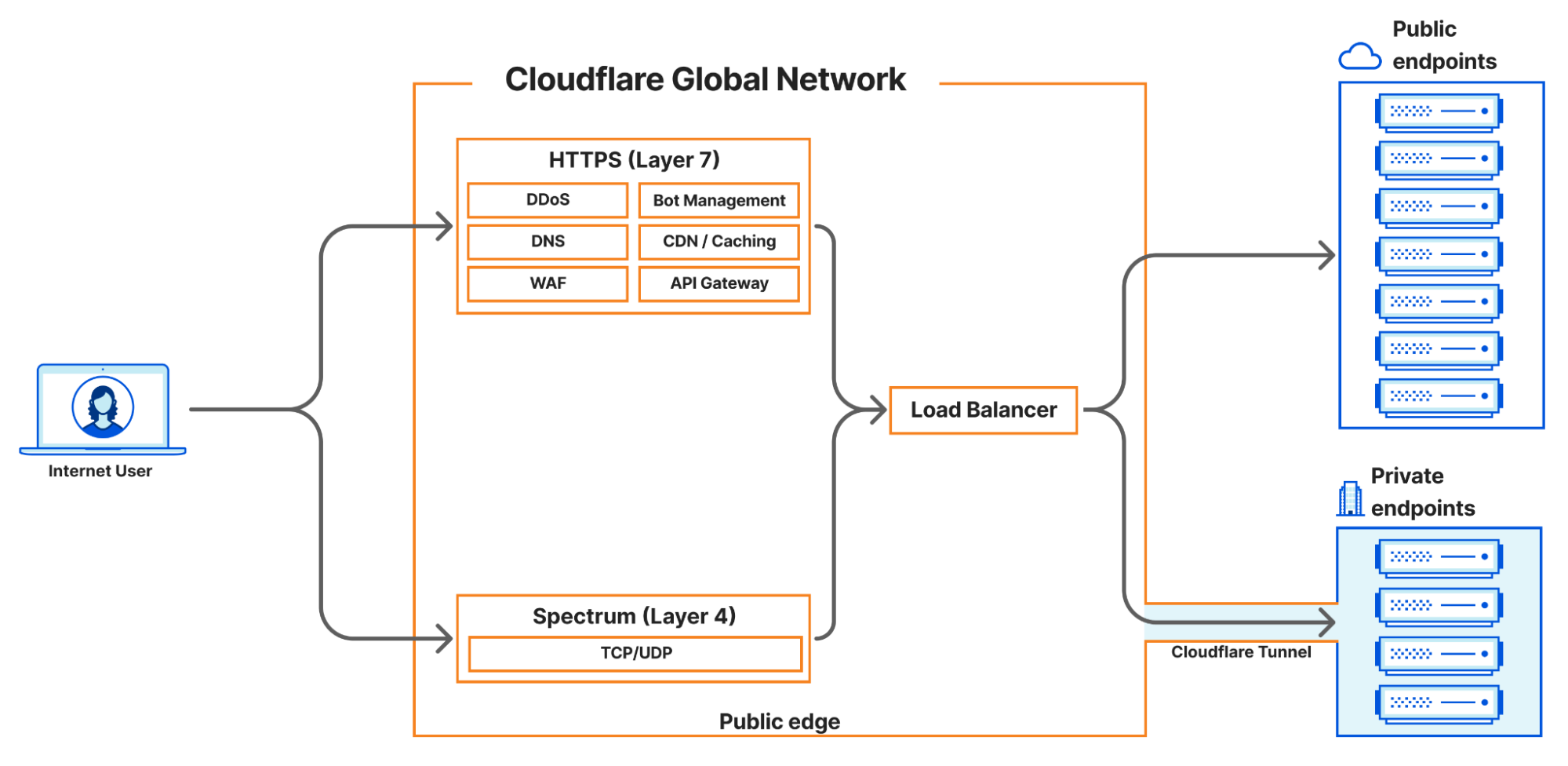
In 2023, Cloudflare introduced a new load balancing solution, supporting Local Traffic Management (LTM). This gives organizations a way to balance HTTP(S) traffic between private or internal servers within a region-specific data center. Today, we are thrilled to be able to extend those same LTM capabilities to non-HTTP(S) traffic. This new feature is enabled by the integration of Cloudflare Spectrum, Cloudflare Tunnels, and Cloudflare load balancers and is available to enterprise customers. Our customers can now use Cloudflare load balancers for all TCP and UDP traffic destined for private IP addresses, eliminating the need for expensive on-premise load balancers.

A quick primer

In this blog post, we will be referring to load balancers at either layer 4 or layer 7. This is, of course, referring to layers of the OSI model but more specifically, the ingress path that is being used to reach the load balancer. Layer 7, also known as the Application Layer, is where the HTTP(S) protocol exists. Cloudflare is well known for our layer 7 capabilities, which are built around speeding up and protecting websites which run over HTTP(S). When we refer to layer 7 load balancers, we are referring to HTTP(S)-based services. Our layer 7 stack allows Cloudflare to apply services like CDN, WAF, Bot Management, DDoS protection, and more to a customer’s website or application to improve performance, availability, and security.

Layer 4 load balancers operate at a lower level of the OSI model, called the Transport Layer, which means they can be used to support a much broader set of services and protocols. At Cloudflare, our public layer 4 load balancers are enabled by a Cloudflare product called Spectrum. Spectrum works as a layer 4 reverse proxy. This places Cloudflare in front of any DDoS attacks that may be launched against Spectrum-proxied services, and by using Spectrum in front of your application, your private origin IP address is concealed, which also prevents bad actors from discovering and attacking your origin’s IP address directly.

Services that use TCP or UDP for transport can leverage Spectrum with a Cloudflare load balancer. Layer 4 load balancing allows us to support other application layer protocols such as SSH, FTP, NTP, and SMTP since they operate over TCP and UDP. Given the breadth of services and protocols this represents, the treatment provided is more generalized. Cloudflare Spectrum supports features such as TLS/SSL offloading, DDoS protection, Argo Smart Routing, and session persistence with our layer 4 load balancers.

Cloudflare’s current load balancing capabilities

Before we dig into the new features we are announcing, it’s important to understand what Cloudflare load balancing supports today and the challenges our customers face with regard to their load balancing needs.

There are three main load balancing traffic flows that Cloudflare supports today:

  1. Internet-facing load balancers connecting to publicly accessible origins operating at layer 7, which supports HTTP(S)
  2. Internet-facing load balancers connecting to publicly accessible origins operating at layer 4 (Spectrum), which supports all TCP-based and UDP-based services such as SSH, FTP, NTP, SMTP, etc.
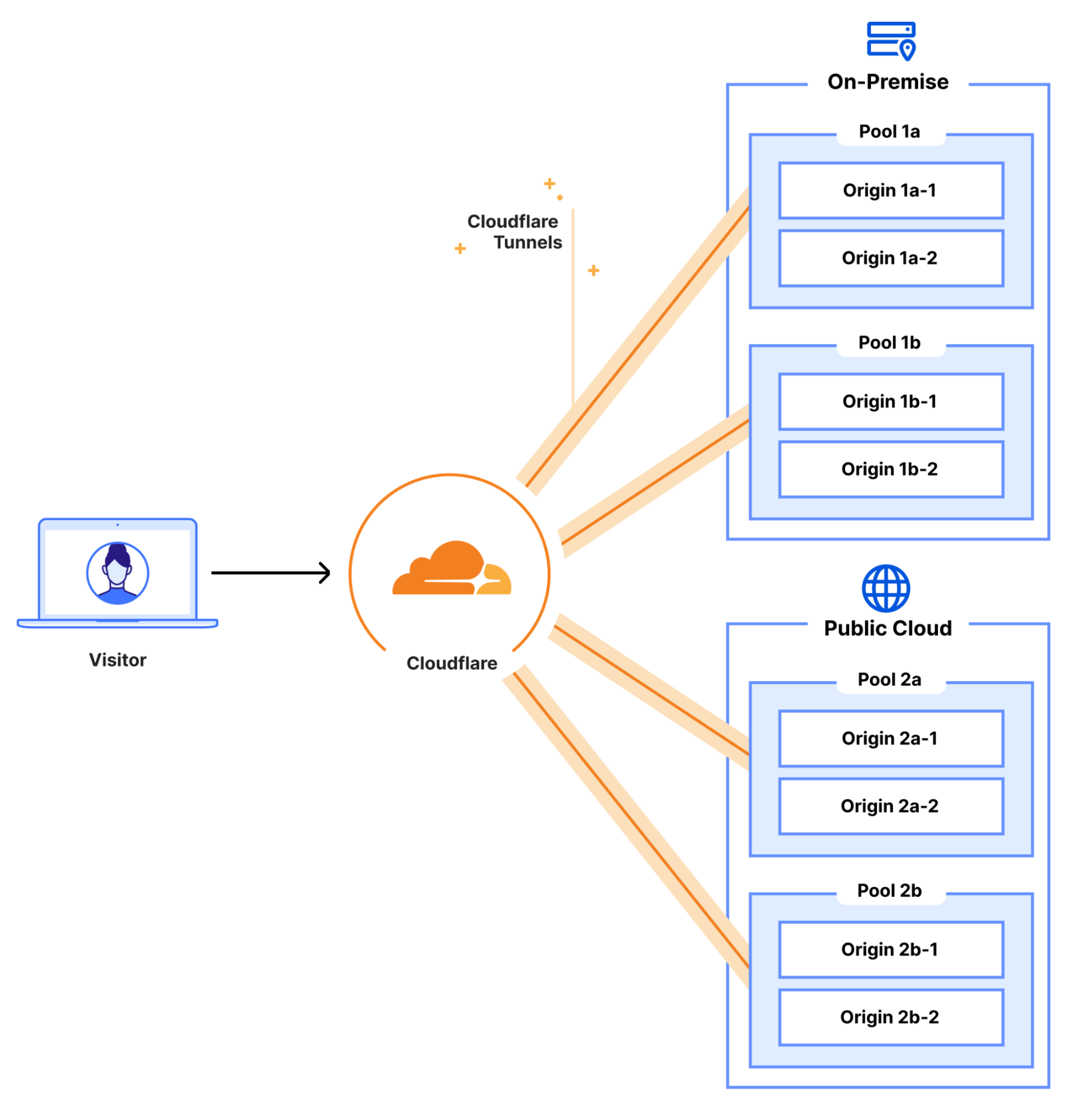
  3. Publicly accessible load balancers connecting to private origins operating at layer 7 HTTP(S) over Cloudflare Tunnels

One of the biggest advantages Cloudflare’s load balancing solutions offer our customers is that there is no hardware to purchase or maintain. Hardware-based load balancers are expensive to purchase, license, operate, and upgrade. “Need more bandwidth? Just buy and install this additional module.” “Need more features? Just buy and install this new license.” “Oh, your hardware load balancer is End-of-Life? Just purchase an entire new kit which we will EOL in a few years!” The upgrade or refresh cycle on a fully integrated LTM load balancer setup can take years and, by the time you finish the planning, implementation, and cutover, it might actually be time to start planning the next refresh.

Cloudflare eliminates all these concerns and lets you focus on innovation and growth. Your load balancers exist in every Cloudflare data center across the globe, in over 300 cities, with virtually unlimited scale and capacity. You never need to worry about bandwidth constraints, deployment locations, extra hardware modules, downtime, upgrades, or maintenance windows ever again. With Cloudflare’s global Anycast network, every customer connects to a nearby Cloudflare data center and load balancer, where relevant policies, rules, and steering are applied.

Load balancing more than websites with Cloudflare Spectrum

Today, we are excited to announce that Cloudflare Spectrum can now support load balancing traffic to private networks. The addition of private IP origin support for Cloudflare load balancers is very powerful and that’s why we are extending that support to load balancing with Cloudflare Spectrum as well. This means that any set of private or internal applications that use TCP or UDP can now be locally load balanced via Cloudflare. These services will also benefit from Spectrum’s layer 3/4 DDoS protection and can leverage other features like session persistence without compromising security. So while the ingress to these load balancers is public, the origins to which they distribute traffic can all be private, inaccessible from the public Internet.

Ordinarily, load balancing to private networks would require expensive on-premise hardware or costly direct physical connections to cloud providers. But, by using Spectrum as the ingress path for TCP and UDP load balancing, customers can keep their origins completely protected and unreachable from the Internet and allow access exclusively through their Cloudflare load balancer – no expensive hardware required. Customers no longer need to manage complex ACLs or security settings to make sure only certain source IP addresses are connecting to the origins. These private origins can be hosted in private data centers, a public cloud, a private cloud, or on-premise.

How we enabled Spectrum to support private networks

All of our changes to create this feature center around integrations with Apollo, the unifying service created by the Cloudflare Zero Trust team. You can read their previous blog post on the Oxy framework for more details on how Zero Trust handles and routes traffic. Apollo accepts incoming traffic from supported on-ramps, applies Zero Trust logic as configured by the customer, and then routes the traffic to egress via supported off-ramps. For example, Apollo enables clients connected securely using Cloudflare’s WARP client to communicate over Cloudflare Tunnels with private origins in a customer’s data center. Now, Apollo is being extended to do more.

When a user creates a load balanced Spectrum app, they choose a hostname and port, and select a Cloudflare load balancer as their origin. This allocates a hostname which will resolve to an IP address where Spectrum will listen for incoming traffic on the customer-configured port. Spectrum makes a call to Cloudflare’s internal load balancing service, Director, which responds with the appropriate endpoint, to which Spectrum will proxy the connection. Previously, load balanced Spectrum apps only supported publicly addressable origins. Now, if the response from Director indicates that the traffic is destined for a private origin, Spectrum passes the private origin’s IP address and virtual network ID to Apollo, which then proxies the traffic to the customer’s private origin.

In short, new integrations between our Spectrum service and Apollo and between Apollo and Director have allowed us to expand our load balancing offerings not only to layer 4, but also enable us to leverage virtual networks to keep load balanced traffic private and off the public Internet. This also sets the stage for integrating load balancing with other traffic on-ramps and off-ramps, such as WARP, in the future. It also opens the door to a number of exciting possibilities like load balancing authenticated device traffic to private networks or even load balancing internal traffic that is never exposed to the public Internet.

Looking to the future

We are excited to be releasing this new load balancing feature which enables Cloudflare Spectrum to reach private IP endpoints. Cloudflare load balancers now support steering any TCP or UDP-based protocols over Cloudflare Tunnels to private IP endpoints, which are otherwise not accessible via the public Internet. You can learn more about how to configure this feature on our load balancing documentation pages.

We are just getting started with our local traffic management load balancing support. There is so much more to come including support for load balancing internal traffic, enhanced layer 4 session affinity, new steering methods, additional traffic ingress methods, and more!