Teaching about AI in schools: Take part in our Research and Educator Community Symposium

Post Syndicated from Jane Waite original https://www.raspberrypi.org/blog/teaching-about-ai-in-schools-research-and-educator-community-symposium/

Worldwide, the use of generative AI systems and related technologies is transforming our lives. From marketing and social media to education and industry, these technologies are being used everywhere, even if it isn’t obvious. Yet, despite the growing availability and use of generative AI tools, governments are still working out how and when to regulate such technologies to ensure they don’t cause unforeseen negative consequences.

How, then, do we equip our young people to deal with the opportunities and challenges that they are faced with from generative AI applications and associated systems? Teaching them about AI technologies seems an important first step. But what should we teach, when, and how?

A teacher aids children in the classroom

Researching AI curriculum design

The researchers at the Raspberry Pi Foundation have been looking at research that will help inform curriculum design and resource development to teach about AI in school. As part of this work, a number of research themes have been established, which we would like to explore with educators at a face-to-face symposium. 

These research themes include the SEAME model, a simple way to analyse learning experiences about AI technology, as well as anthropomorphisation and how this might influence the formation of mental models about AI products. These research themes have become the cornerstone of the Experience AI resources we’ve co-developed with Google DeepMind. We will be using these materials to exemplify how the research themes can be used in practice as we review the recently published UNESCO AI competencies.

A group of educators at a workshop.

Most importantly, we will also review how we can help teachers and learners move from a rule-based view of problem solving to a data-driven view, from computational thinking 1.0 to computational thinking 2.0.

A call for teacher input on the AI curriculum

Over ten years ago, teachers in England experienced a large-scale change in what they needed to teach in computing lessons when programming was more formally added to the curriculum. As we enter a similar period of change — this time to introduce teaching about AI technologies — we want to hear from teachers as we collectively start to rethink our subject and curricula. 

We think it is imperative that educators’ voices are heard as we reimagine computer science and add data-driven technologies into an already densely packed learning context. 

Educators at a workshop.

Join our Research and Educator Community Symposium

On Saturday, 1 February 2025, we are running a Research and Educator Community Symposium in collaboration with the Raspberry Pi Computing Education Research Centre

In this symposium, we will bring together UK educators and researchers to review research themes, competency frameworks, and early international AI curricula and to reflect on how to advance approaches to teaching about AI. This will be a practical day of collaboration to produce suggested key concepts and pedagogical approaches and highlight research needs. 

Educators and researchers at an event.

This symposium focuses on teaching about AI technologies, so we will not be looking at which AI tools might be used in general teaching and learning or how they may change teacher productivity. 

It is vitally important for young people to learn how to use AI technologies in their daily lives so they can become discerning consumers of AI applications. But how should we teach them? Please help us start to consider the best approach by signing up for our Research and Educator Community Symposium by 9 December 2024.

Information at a glance

When:  Saturday, 1 February 2025 (10am to 5pm) 

Where: Raspberry Pi Foundation Offices, Cambridge

Who: If you have started teaching about AI, are creating related resources, are providing professional development about AI technologies, or if you are planning to do so, please apply to attend our symposium. Travel funding is available for teachers in England.

Please note we expect to be oversubscribed, so book early and tell us about why you are interested in taking part. We will notify all applicants of the outcome of their application by 11 December.

The post Teaching about AI in schools: Take part in our Research and Educator Community Symposium appeared first on Raspberry Pi Foundation.

Open Source AI Definition Erodes the Meaning of “Open Source”

Post Syndicated from Bradley M. Kuhn original http://ebb.org/bkuhn/blog/2024/10/31/open-source-ai-osaid-osi.html

[ This is
a crosspost
from my professional blog at Software Freedom Conservancy
(SFC)
. I encourage you
to use
that copy of the post as the canonical linkage for this essay — I
crossposted here merely for posterity and to reach a wider
audience. ]

This week, the Open Source Initiative (OSI) made their new Open
Source Artificial Intelligence Definition (OSAID) official with its 1.0 release
. With this
announcement, we have reached the moment that software freedom advocates have
feared for decades: the definition of “open source” —
with which OSI was entrusted — now differs in significant
ways from the views of most software freedom advocates.

There has been substantial acrimony during the drafting process of OSAID, and this blog post does not summarize all the
community complaints about the OSAID and its drafting
process. Other
bloggers

and the
press
have covered those. The
TLDR here,
IMO is simply stated: the OSAID fails to
require reproducibility by the
public of the scientific process of building these systems, because the OSAID fails to place sufficient
requirements on the licensing and public disclosure of training sets for so-called “Open Source” systems. The
OSI refused to add this requirement because of a fundamental flaw in their process; they decided that “there
was no point in publishing a definition that no existing AI system could
currently meet”. This fundamental compromise undermined the community process, and amplified the role of stakeholders who would financially benefit from OSI’s retroactive declaration that their systems are “open source”. The OSI should have refrained from publishing a definition yet, and instead
labeled this document as ”recommendations” for now.

As the publication date of the OSAID approached, I could not help but
remember a fascinating statement that Donald E. Knuth, one of the founders
of the field of computer
science, once
said
: [M]y role is to be on the bottom of things. … I try to
digest … knowledge into a form that is accessible to people who don’t
have time for such study
. If we wish to engage in the
highly philosophical (and easily politically corruptible) task
of defining what terms like “software freedom” and
“open source” mean, we must learn to be on the “bottom of
things”. OSI made an unforced error in this regard. While they could
have humbly announced this as “recommendations” or “guidelines”,
they instead formalized it as a “definition” — with equivalent authority to their
OSD.

Yet, OSI itself only turned its attention to AI only recently, when they
announced their “deep dive” — for which Microsoft’s GitHub was OSI’s “Thought Leader”.
OSI has responded too rapidly to this industry ballyhoo. Their celerity of response made OSI
an easy target for regulatory capture.

By comparison, the original OSD was first published in February 1999.
That was at least twelve years after the widespread industry adoption of
various FOSS programs (such as the GNU C Compiler and BSD). The concept was explored and discussed publicly (under the moniker “Free Software”)
for decades before it was officially “defined”.
The OSI announced itself as the “marketing department for Free Software” and
based the OSD in large part on the independently
developed Debian Free Software Guidelines (DFSG). The OSD was thus the
culmination of decades of thought and consideration, and primarily developed
by a third-party (Debian) — which provided a balance on OSI’s authority.
(Interestingly, some folks from Debian are attempting to check OSI’s authority again due to the premature publication of the OSAID.)

OSI claims that they must move quickly so that they can
counter the software companies from coopting
the term “open source” for their own aims. But
OSI failed to pursue trademark protection for “open source” in the early days, so the OSI can’t stop Mark Zuckerberg and his
cronies in any event from using the “open source”
moniker for his Facebook and Instagram products — let alone his
new Llama product.
Furthermore, OSI’s insistence
that the definition was urgently needed and that the definition
be engineered as a retrofit to apply to an existing, available system has yielded troublesome results.
Simply put, OSI has a tiny sample set to examine, in 2024,
of what LLM-backed generative AI systems look like. To make a final decision
about the software freedom and rights implications of such a nascent field led to
an automatic bias to accept the actions of first movers as legitimate.
By making this definition official too soon, OSI has endorsed demonstrably bad LLM-backed generative AI systems
as “open source” by definition!

OSI also disenfranchised the users and content creators in this process.
FOSS activists should
be engaging with
the larger discussions with
impacted communities of content creators about what “open
source” means to them, and how they feel about incorporation of
their data in the training sets into these third-party systems. The line between data and code is so easily crossed with
these systems that we cannot rely on old, rote conclusions that the
“data is separate and can be proprietary (or even unavailable), and yet the system remains ‘open
source’”. That adage fails us when analyzing this technology,
and we must take careful steps — free from the for-profit corporate
interest of AI fervor — as we decide how our well-established
philosophies apply to these changes.

FOSS activists err when we unilaterally dictate and define what is
ethical, moral, open and Free in areas outside of software. Software rights
theorists can (and should) make meaningful contributions in these
other areas, but not without substantial collaboration with those creative
individuals who produce the source material. Where were the painters, the
novelists, the actors, the playwrights, the musicians, and the poets in the
OSAID drafting process? The OSD was (of course) easier because our
community is mostly programmers and developers (or folks adjacent
to those fields); software creators knew best how to consider philosophical implications of pure software products.
The OSI, and the folks in its leadership, definitely
know software well, but I wouldn’t name any of them (or myself) as great
thinkers in these many areas outside software that are noticeably impacted by the promulgation of
LLMs that are trained on those creative works. The Open Source community remains
consistently in danger of excessive insularity, and the OSAID is an
unfortunate example of how insular we can be.

Meanwhile, I have spent literally months of time over the last 30 years trying to make sure the
coalition of software freedom & rights activists remained in basic
congruence (at least publicly) with those (like OSI) who are oriented towards a more
for-profit and corporate open source approach. Until today, I was always able to say:
“I believe that anything the OSI calls ‘open source’
gives you all the rights and freedoms that you deserve”. I now cannot
say that again unless/until the OSI revokes the OSAID. Unfortunately, that
Rubicon may have now been permanently crossed! OSI
has purposely made it politically unviable for them to
revoke the OSAID. Instead, they plan only incremental updates to the OSAID. Once
entities begin to rely on this definition as written, OSI will find it nearly impossible to
later declare systems that were “open source” under 1.0 as no longer so (under later versions). So, we are likely stuck
with OSAID’s key problems forever. OSI undermines its position as a philosophical leader in Open Source as long as OSAID 1.0 stands as a formal defintion.

I truly don’t know for sure (yet) if the only way to respect user rights in an LLM-backed
generative AI system is to only use training sets that are publicly
available and licensed under Free Software licenses. I do believe
that’s the ideal and preferred form for modification of those systems
. Nevertheless,
a generally useful technical system that is built by collapsing data (in essence, via highly lossy compression) into a table of floating point numbers
is philosophically much more complicated than binary software and its Corresponding Source. So, having
studied the issue myself, I believe the Socratic Epiphany currently applies. Perhaps there is an acceptable
spot for compromise
regarding the issues of training set licensing, availability and similar reproducibility issues.
My instincts, after 25
years as a software rights philosopher, lead me to believe that it will
take at least a decade for our best minds to find a reasonable answer on where the bright line is of
acceptable behavior with regard to these AI systems. While OSI claims their OSAID is humble, I beg
to differ. The humble act now is to admit that it was just too soon to publish a “definition” and
rebrand these the OSAID 1.0 as “current recommendations”. That might not grab as many
headlines or raise as much money as the OSAID did, but it’s the moral and ethical way out of this bad situation.

Finally, rather than merely be a pundit on this matter, I am instead today putting myself forward
to try to be part of the solution. I plan to run for the OSI Board of Directors at the next elections on a single-issue
platform: I will work arduously for my entire term to see the OSAID repealed, and republished
not as a definition, but merely recommendations, and to also issue a statement
that OSI published the definition sooner than was appropriate. I’ll write further about the matter as the
next OSI Board election approaches. I also call on other software rights activists to run with me on a similar platform; the OSI has myriad seats that are elected by different constituents, so there is opportunity to run as a ticket on this issue. (Please contact me privately if you’d like to be involved with this ticket at the next OSI Board election. Note, though, that election results
are not actually binding, as OSI’s by-laws allow the current Board to reject results of the elections
.)

Open Source AI Definition Erodes the Meaning of “Open Source”

Post Syndicated from Bradley M. Kuhn original http://ebb.org/bkuhn/blog/2024/10/31/open-source-ai-osaid-osi.html

[ This is
a crosspost
from my professional blog at Software Freedom Conservancy
(SFC)
. I encourage you
to use
that copy of the post as the canonical linkage for this essay — I
crossposted here merely for posterity and to reach a wider
audience. ]

This week, the Open Source Initiative (OSI) made their new Open
Source Artificial Intelligence Definition (OSAID) official with its 1.0 release
. With this
announcement, we have reached the moment that software freedom advocates have
feared for decades: the definition of “open source” —
with which OSI was entrusted — now differs in significant
ways from the views of most software freedom advocates.

There has been substantial acrimony during the drafting process of OSAID, and this blog post does not summarize all the
community complaints about the OSAID and its drafting
process. Other
bloggers

and the
press
have covered those. The
TLDR here,
IMO is simply stated: the OSAID fails to
require reproducibility by the
public of the scientific process of building these systems, because the OSAID fails to place sufficient
requirements on the licensing and public disclosure of training sets for so-called “Open Source” systems. The
OSI refused to add this requirement because of a fundamental flaw in their process; they decided that “there
was no point in publishing a definition that no existing AI system could
currently meet”. This fundamental compromise undermined the community process, and amplified the role of stakeholders who would financially benefit from OSI’s retroactive declaration that their systems are “open source”. The OSI should have refrained from publishing a definition yet, and instead
labeled this document as ”recommendations” for now.

As the publication date of the OSAID approached, I could not help but
remember a fascinating statement that Donald E. Knuth, one of the founders
of the field of computer
science, once
said
: [M]y role is to be on the bottom of things. … I try to
digest … knowledge into a form that is accessible to people who don’t
have time for such study
. If we wish to engage in the
highly philosophical (and easily politically corruptible) task
of defining what terms like “software freedom” and
“open source” mean, we must learn to be on the “bottom of
things”. OSI made an unforced error in this regard. While they could
have humbly announced this as “recommendations” or “guidelines”,
they instead formalized it as a “definition” — with equivalent authority to their
OSD.

Yet, OSI itself only turned its attention to AI only recently, when they
announced their “deep dive” — for which Microsoft’s GitHub was OSI’s “Thought Leader”.
OSI has responded too rapidly to this industry ballyhoo. Their celerity of response made OSI
an easy target for regulatory capture.

By comparison, the original OSD was first published in February 1999.
That was at least twelve years after the widespread industry adoption of
various FOSS programs (such as the GNU C Compiler and BSD). The concept was explored and discussed publicly (under the moniker “Free Software”)
for decades before it was officially “defined”.
The OSI announced itself as the “marketing department for Free Software” and
based the OSD in large part on the independently
developed Debian Free Software Guidelines (DFSG). The OSD was thus the
culmination of decades of thought and consideration, and primarily developed
by a third-party (Debian) — which provided a balance on OSI’s authority.
(Interestingly, some folks from Debian are attempting to check OSI’s authority again due to the premature publication of the OSAID.)

OSI claims that they must move quickly so that they can
counter the software companies from coopting
the term “open source” for their own aims. But
OSI failed to pursue trademark protection for “open source” in the early days, so the OSI can’t stop Mark Zuckerberg and his
cronies in any event from using the “open source”
moniker for his Facebook and Instagram products — let alone his
new Llama product.
Furthermore, OSI’s insistence
that the definition was urgently needed and that the definition
be engineered as a retrofit to apply to an existing, available system has yielded troublesome results.
Simply put, OSI has a tiny sample set to examine, in 2024,
of what LLM-backed generative AI systems look like. To make a final decision
about the software freedom and rights implications of such a nascent field led to
an automatic bias to accept the actions of first movers as legitimate.
By making this definition official too soon, OSI has endorsed demonstrably bad LLM-backed generative AI systems
as “open source” by definition!

OSI also disenfranchised the users and content creators in this process.
FOSS activists should
be engaging with
the larger discussions with
impacted communities of content creators about what “open
source” means to them, and how they feel about incorporation of
their data in the training sets into these third-party systems. The line between data and code is so easily crossed with
these systems that we cannot rely on old, rote conclusions that the
“data is separate and can be proprietary (or even unavailable), and yet the system remains ‘open
source’”. That adage fails us when analyzing this technology,
and we must take careful steps — free from the for-profit corporate
interest of AI fervor — as we decide how our well-established
philosophies apply to these changes.

FOSS activists err when we unilaterally dictate and define what is
ethical, moral, open and Free in areas outside of software. Software rights
theorists can (and should) make meaningful contributions in these
other areas, but not without substantial collaboration with those creative
individuals who produce the source material. Where were the painters, the
novelists, the actors, the playwrights, the musicians, and the poets in the
OSAID drafting process? The OSD was (of course) easier because our
community is mostly programmers and developers (or folks adjacent
to those fields); software creators knew best how to consider philosophical implications of pure software products.
The OSI, and the folks in its leadership, definitely
know software well, but I wouldn’t name any of them (or myself) as great
thinkers in these many areas outside software that are noticeably impacted by the promulgation of
LLMs that are trained on those creative works. The Open Source community remains
consistently in danger of excessive insularity, and the OSAID is an
unfortunate example of how insular we can be.

Meanwhile, I have spent literally months of time over the last 30 years trying to make sure the
coalition of software freedom & rights activists remained in basic
congruence (at least publicly) with those (like OSI) who are oriented towards a more
for-profit and corporate open source approach. Until today, I was always able to say:
“I believe that anything the OSI calls ‘open source’
gives you all the rights and freedoms that you deserve”. I now cannot
say that again unless/until the OSI revokes the OSAID. Unfortunately, that
Rubicon may have now been permanently crossed! OSI
has purposely made it politically unviable for them to
revoke the OSAID. Instead, they plan only incremental updates to the OSAID. Once
entities begin to rely on this definition as written, OSI will find it nearly impossible to
later declare systems that were “open source” under 1.0 as no longer so (under later versions). So, we are likely stuck
with OSAID’s key problems forever. OSI undermines its position as a philosophical leader in Open Source as long as OSAID 1.0 stands as a formal defintion.

I truly don’t know for sure (yet) if the only way to respect user rights in an LLM-backed
generative AI system is to only use training sets that are publicly
available and licensed under Free Software licenses. I do believe
that’s the ideal and preferred form for modification of those systems
. Nevertheless,
a generally useful technical system that is built by collapsing data (in essence, via highly lossy compression) into a table of floating point numbers
is philosophically much more complicated than binary software and its Corresponding Source. So, having
studied the issue myself, I believe the Socratic Epiphany currently applies. Perhaps there is an acceptable
spot for compromise
regarding the issues of training set licensing, availability and similar reproducibility issues.
My instincts, after 25
years as a software rights philosopher, lead me to believe that it will
take at least a decade for our best minds to find a reasonable answer on where the bright line is of
acceptable behavior with regard to these AI systems. While OSI claims their OSAID is humble, I beg
to differ. The humble act now is to admit that it was just too soon to publish a “definition” and
rebrand these the OSAID 1.0 as “current recommendations”. That might not grab as many
headlines or raise as much money as the OSAID did, but it’s the moral and ethical way out of this bad situation.

Finally, rather than merely be a pundit on this matter, I am instead today putting myself forward
to try to be part of the solution. I plan to run for the OSI Board of Directors at the next elections on a single-issue
platform: I will work arduously for my entire term to see the OSAID repealed, and republished
not as a definition, but merely recommendations, and to also issue a statement
that OSI published the definition sooner than was appropriate. I’ll write further about the matter as the
next OSI Board election approaches. I also call on other software rights activists to run with me on a similar platform; the OSI has myriad seats that are elected by different constituents, so there is opportunity to run as a ticket on this issue. (Please contact me privately if you’d like to be involved with this ticket at the next OSI Board election. Note, though, that election results
are not actually binding, as OSI’s by-laws allow the current Board to reject results of the elections
.)

Open Source AI Definition Erodes the Meaning of “Open Source”

Post Syndicated from Bradley M. Kuhn original http://ebb.org/bkuhn/blog/2024/10/31/open-source-ai-osaid-osi.html

[ This is
a crosspost
from my professional blog at Software Freedom Conservancy
(SFC)
. I encourage you
to use
that copy of the post as the canonical linkage for this essay — I
crossposted here merely for posterity and to reach a wider
audience. ]

This week, the Open Source Initiative (OSI) made their new Open
Source Artificial Intelligence Definition (OSAID) official with its 1.0 release
. With this
announcement, we have reached the moment that software freedom advocates have
feared for decades: the definition of “open source” —
with which OSI was entrusted — now differs in significant
ways from the views of most software freedom advocates.

There has been substantial acrimony during the drafting process of OSAID, and this blog post does not summarize all the
community complaints about the OSAID and its drafting
process. Other
bloggers

and the
press
have covered those. The
TLDR here,
IMO is simply stated: the OSAID fails to
require reproducibility by the
public of the scientific process of building these systems, because the OSAID fails to place sufficient
requirements on the licensing and public disclosure of training sets for so-called “Open Source” systems. The
OSI refused to add this requirement because of a fundamental flaw in their process; they decided that “there
was no point in publishing a definition that no existing AI system could
currently meet”. This fundamental compromise undermined the community process, and amplified the role of stakeholders who would financially benefit from OSI’s retroactive declaration that their systems are “open source”. The OSI should have refrained from publishing a definition yet, and instead
labeled this document as ”recommendations” for now.

As the publication date of the OSAID approached, I could not help but
remember a fascinating statement that Donald E. Knuth, one of the founders
of the field of computer
science, once
said
: [M]y role is to be on the bottom of things. … I try to
digest … knowledge into a form that is accessible to people who don’t
have time for such study
. If we wish to engage in the
highly philosophical (and easily politically corruptible) task
of defining what terms like “software freedom” and
“open source” mean, we must learn to be on the “bottom of
things”. OSI made an unforced error in this regard. While they could
have humbly announced this as “recommendations” or “guidelines”,
they instead formalized it as a “definition” — with equivalent authority to their
OSD.

Yet, OSI itself only turned its attention to AI only recently, when they
announced their “deep dive” — for which Microsoft’s GitHub was OSI’s “Thought Leader”.
OSI has responded too rapidly to this industry ballyhoo. Their celerity of response made OSI
an easy target for regulatory capture.

By comparison, the original OSD was first published in February 1999.
That was at least twelve years after the widespread industry adoption of
various FOSS programs (such as the GNU C Compiler and BSD). The concept was explored and discussed publicly (under the moniker “Free Software”)
for decades before it was officially “defined”.
The OSI announced itself as the “marketing department for Free Software” and
based the OSD in large part on the independently
developed Debian Free Software Guidelines (DFSG). The OSD was thus the
culmination of decades of thought and consideration, and primarily developed
by a third-party (Debian) — which provided a balance on OSI’s authority.
(Interestingly, some folks from Debian are attempting to check OSI’s authority again due to the premature publication of the OSAID.)

OSI claims that they must move quickly so that they can
counter the software companies from coopting
the term “open source” for their own aims. But
OSI failed to pursue trademark protection for “open source” in the early days, so the OSI can’t stop Mark Zuckerberg and his
cronies in any event from using the “open source”
moniker for his Facebook and Instagram products — let alone his
new Llama product.
Furthermore, OSI’s insistence
that the definition was urgently needed and that the definition
be engineered as a retrofit to apply to an existing, available system has yielded troublesome results.
Simply put, OSI has a tiny sample set to examine, in 2024,
of what LLM-backed generative AI systems look like. To make a final decision
about the software freedom and rights implications of such a nascent field led to
an automatic bias to accept the actions of first movers as legitimate.
By making this definition official too soon, OSI has endorsed demonstrably bad LLM-backed generative AI systems
as “open source” by definition!

OSI also disenfranchised the users and content creators in this process.
FOSS activists should
be engaging with
the larger discussions with
impacted communities of content creators about what “open
source” means to them, and how they feel about incorporation of
their data in the training sets into these third-party systems. The line between data and code is so easily crossed with
these systems that we cannot rely on old, rote conclusions that the
“data is separate and can be proprietary (or even unavailable), and yet the system remains ‘open
source’”. That adage fails us when analyzing this technology,
and we must take careful steps — free from the for-profit corporate
interest of AI fervor — as we decide how our well-established
philosophies apply to these changes.

FOSS activists err when we unilaterally dictate and define what is
ethical, moral, open and Free in areas outside of software. Software rights
theorists can (and should) make meaningful contributions in these
other areas, but not without substantial collaboration with those creative
individuals who produce the source material. Where were the painters, the
novelists, the actors, the playwrights, the musicians, and the poets in the
OSAID drafting process? The OSD was (of course) easier because our
community is mostly programmers and developers (or folks adjacent
to those fields); software creators knew best how to consider philosophical implications of pure software products.
The OSI, and the folks in its leadership, definitely
know software well, but I wouldn’t name any of them (or myself) as great
thinkers in these many areas outside software that are noticeably impacted by the promulgation of
LLMs that are trained on those creative works. The Open Source community remains
consistently in danger of excessive insularity, and the OSAID is an
unfortunate example of how insular we can be.

Meanwhile, I have spent literally months of time over the last 30 years trying to make sure the
coalition of software freedom & rights activists remained in basic
congruence (at least publicly) with those (like OSI) who are oriented towards a more
for-profit and corporate open source approach. Until today, I was always able to say:
“I believe that anything the OSI calls ‘open source’
gives you all the rights and freedoms that you deserve”. I now cannot
say that again unless/until the OSI revokes the OSAID. Unfortunately, that
Rubicon may have now been permanently crossed! OSI
has purposely made it politically unviable for them to
revoke the OSAID. Instead, they plan only incremental updates to the OSAID. Once
entities begin to rely on this definition as written, OSI will find it nearly impossible to
later declare systems that were “open source” under 1.0 as no longer so (under later versions). So, we are likely stuck
with OSAID’s key problems forever. OSI undermines its position as a philosophical leader in Open Source as long as OSAID 1.0 stands as a formal defintion.

I truly don’t know for sure (yet) if the only way to respect user rights in an LLM-backed
generative AI system is to only use training sets that are publicly
available and licensed under Free Software licenses. I do believe
that’s the ideal and preferred form for modification of those systems
. Nevertheless,
a generally useful technical system that is built by collapsing data (in essence, via highly lossy compression) into a table of floating point numbers
is philosophically much more complicated than binary software and its Corresponding Source. So, having
studied the issue myself, I believe the Socratic Epiphany currently applies. Perhaps there is an acceptable
spot for compromise
regarding the issues of training set licensing, availability and similar reproducibility issues.
My instincts, after 25
years as a software rights philosopher, lead me to believe that it will
take at least a decade for our best minds to find a reasonable answer on where the bright line is of
acceptable behavior with regard to these AI systems. While OSI claims their OSAID is humble, I beg
to differ. The humble act now is to admit that it was just too soon to publish a “definition” and
rebrand these the OSAID 1.0 as “current recommendations”. That might not grab as many
headlines or raise as much money as the OSAID did, but it’s the moral and ethical way out of this bad situation.

Finally, rather than merely be a pundit on this matter, I am instead today putting myself forward
to try to be part of the solution. I plan to run for the OSI Board of Directors at the next elections on a single-issue
platform: I will work arduously for my entire term to see the OSAID repealed, and republished
not as a definition, but merely recommendations, and to also issue a statement
that OSI published the definition sooner than was appropriate. I’ll write further about the matter as the
next OSI Board election approaches. I also call on other software rights activists to run with me on a similar platform; the OSI has myriad seats that are elected by different constituents, so there is opportunity to run as a ticket on this issue. (Please contact me privately if you’d like to be involved with this ticket at the next OSI Board election. Note, though, that election results
are not actually binding, as OSI’s by-laws allow the current Board to reject results of the elections
.)

HPE Cray XD670 NVIDIA HGX with CoolIT Liquid Cooling Shown

Post Syndicated from Eric Smith original https://www.servethehome.com/hpe-cray-xd670-nvidia-hgx-coolit-liquid-cooling-gigabyte-intel-ocp-shown/

We take a look at the HPE Cray XD670, a NVIDIA HGX H100 and H200 system with CoolIT liquid-cooling and discuss how it compares

The post HPE Cray XD670 NVIDIA HGX with CoolIT Liquid Cooling Shown appeared first on ServeTheHome.

Streamline AI-driven analytics with governance: Integrating Tableau with Amazon DataZone

Post Syndicated from Ramesh H Singh original https://aws.amazon.com/blogs/big-data/streamline-ai-driven-analytics-with-governance-integrating-tableau-with-amazon-datazone/

Amazon DataZone is a data management service that makes it faster and easier for customers to catalog, discover, share, and govern data stored across AWS, on premises, and from third-party sources. Amazon DataZone recently announced the expansion of data analysis and visualization options for your project-subscribed data within Amazon DataZone using the Amazon Athena JDBC driver.

Collaborating closely with our partners, we have tested and validated Amazon DataZone authentication via the Athena JDBC connection, providing an intuitive and secure connection experience for users. With this integration, you can now seamlessly query your governed data lake assets in Amazon DataZone using popular business intelligence (BI) and analytics tools, including partner solutions like Tableau.

Ali Tore, Senior Vice President of Advanced Analytics at Salesforce, highlighting the value of this integration, says

“We’re excited to partner with Amazon to bring Tableau’s powerful data exploration and AI-driven analytics capabilities to customers managing data across organizational boundaries with Amazon DataZone. This integration enables our customers to seamlessly explore data with AI in Tableau, build visualizations, and uncover insights hidden in their governed data, all while leveraging Amazon DataZone to catalog, discover, share, and govern data across AWS, on premises, and from third-party sources—enhancing both governance and decision-making.”

With this launch, Amazon DataZone strengthens its commitment to empowering enterprise customers with secure, governed access to data across the tools and platforms they rely on. For example, Guardant Health uses Amazon DataZone to democratize data access across its organization, enabling diverse teams to efficiently access, query, and analyze data tailored to their specific needs.

Rajesh Kucharlapati, Senior Director of Data, CRM, and Analytics at Guardant Health, says

“By harmonizing data across multiple business domains, we foster a culture of data sharing. Using Amazon DataZone lets us avoid building and maintaining an in-house platform, allowing our developers to focus on tailored solutions. Leveraging AWS’s managed service was crucial for us to access business insights faster, apply standardized data definitions, and tap into generative AI potential. We also needed an easy connection process for widely-used analytics tools like Tableau, DBeaver, and Domino, directly within Amazon DataZone projects. This new JDBC connectivity feature enables our governed data to flow seamlessly into these tools, supporting productivity across our teams.”

Use case

Amazon DataZone addresses your data sharing challenges and optimizes data availability. Here’s how:

  • Data product creation – As a data producer, you can create and catalog data products while enforcing governance, making your data findable, accessible, interoperable, and reusable (FAIR).
  • Streamlined access – As a data consumer, you can easily locate and subscribe to data from multiple sources within a single project. You can analyze this data using a variety of tools, including built-in AWS options such as Amazon Athena, Amazon Redshift, and Amazon SageMaker.
  • Integration with partner tools – The addition of support for partner analytics tools offers you greater flexibility and efficiency in your workflows. You can now use your tool of choice, including Tableau, to quickly derive business insights from your data while using standardized definitions and decentralized ownership. Refer to the detailed blog post on how you can use this to connect through various other tools.

Prerequisites

To get started, complete these steps:

  1. Download and install the latest Athena JDBC driver for Tableau.
  2. Copy the JDBC connection string from the Amazon DataZone portal into the JDBC connection configuration to establish a connection from Tableau. This will direct you to authenticate using single sign-on with your corporate credentials.

When you’re connected, you can query, visualize, and share data—governed by Amazon DataZone—within Tableau.

The following diagram shows the high-level architecture of the Tableau integration.

Solution walkthrough: Configure Tableau to access project-subscribed data assets

To configure Tableau to access project-subscribed data assets, follow these detailed steps:

  1. Download the latest Athena driver. If Tableau has the Athena driver preinstalled, it could be the older (v2) version. To confirm compatibility with Amazon DataZone, you’ll need the latest (v3) driver that includes the necessary authentication features. To download the latest JDBC driver version x, visit Athena JDBC 3.x driver.
  2. Install the driver. Copy the JDBC driver file to the appropriate folder for your operating system:
    • For macOS: ~/Library/Tableau/Drivers
    • For Windows: C:\Program Files\Tableau\Drivers
  3. On the Amazon DataZone console, select your project, as shown in the following screenshot of DataZone Console.
  4. To capture the JDBC connection parameters, follow these steps:
    1. On the project page, review the connection options under ANALYTICS TOOLS. Choose Connect with JDBC.
    2. In the JDBC parameters dialog box, select Using IDC auth and copy the JDBC URL. Optionally, you can use Using IAM auth to connect with your Amazon DataZone project as an AWS Identity and Access Management (IAM) role (from a server), provided that you are added as a project member within that project. The following screenshot shows the dialog box.
  5. To configure the Tableau desktop for connection, follow these steps:
    1. On the To a Server connection menu, select Other Databases (JDBC).
    2. Paste the copied JDBC URL into the URL field, leaving the other fields (Dialect, Username, Password) unchanged.
  6. To sign in with single sign-on, choose Sign in, as shown in the following screenshot. You’ll be redirected to authenticate with AWS IAM Identity Center. Use the credentials for your AWS single sign-on account.
  7. After you’re signed in, you’ll be prompted to authorize the DataZoneAuthPlugin. Choose Allow access to authorize access to Amazon DataZone from Tableau, as shown in the following screenshot.
  8. After the connection is established, a success message will appear, as shown in the following screenshot.

You can now view your project’s subscribed data directly within Tableau and build dashboards.

Conclusion

Amazon DataZone continues to expand its offerings, providing you with more flexibility in how you access, analyze, and visualize your subscribed data. With support for the Athena JDBC driver, you can now use a wide range of popular BI and analytics tools including Tableau, making governed data within Amazon DataZone more accessible than ever before.

In this post, you learned how the recent enhancements in Amazon DataZone facilitate a seamless connection with Tableau. By integrating Tableau with the comprehensive data governance capabilities of Amazon DataZone, we’re empowering data consumers to quickly and seamlessly explore and analyze their governed data. This integration helps organizations break down silos, foster collaboration, and make informed decisions, all while maintaining the security and control needed in today’s complex, distributed data landscape.

The feature is supported in all AWS commercial Regions where Amazon DataZone is currently available. Check out the video below and the detailed blog post to learn how to connect Amazon DataZone to external analytics tools via JDBC. Get started with our technical documentation.

Related blog posts


About the Authors

Ramesh H Singh is a Senior Product Manager Technical (External Services) at AWS in Seattle, Washington, currently with the Amazon DataZone team. He is passionate about building high-performance ML/AI and analytics products that enable enterprise customers to achieve their critical goals using cutting-edge technology. Connect with him on LinkedIn.

Adiascar Cisneros is a Tableau Senior Product Manager based in Atlanta, GA. He focuses on the integration of the Tableau Platform with AWS services to amplify the value users get from our products and accelerate their journey to valuable, actionable insights. His background includes analytics, infrastructure, network security, and migrations. Follow him on LinkedIn.

Joel Farvault is Principal Specialist SA Analytics for AWS with 25 years’ experience working on enterprise architecture, data governance and analytics, mainly in the financial services industry. Joel has led data transformation projects on fraud analytics, claims automation, and Master Data Management. He leverages his experience to advise customers on their data strategy and technology foundations.

Yogesh Dhimate is a Sr. Partner Solutions Architect at AWS, leading technology partnership with Tableau. Prior to joining AWS, Yogesh worked with leading companies including Salesforce driving their industry solution initiatives. With over 20 years of experience in product management and solutions architecture Yogesh brings unique perspective in cloud computing and artificial intelligence.

Ariana Rahgozar is a Sr. Senior Solutions Architect at AWS, leading customers design and implement technical solutions as part of their cloud journey.

Expanding data analysis and visualization options: Amazon DataZone now integrates with Tableau, Power BI, and more

Post Syndicated from Ramesh H Singh original https://aws.amazon.com/blogs/big-data/expanding-data-analysis-and-visualization-options-amazon-datazone-now-integrates-with-tableau-power-bi-and-more/

Amazon DataZone  now launched authentication supports through the  Amazon Athena JDBC driver, allowing data users to seamlessly query their subscribed data lake assets via popular business intelligence (BI) and analytics tools like Tableau, Power BI, Excel, SQL Workbench, DBeaver, and more. This integration empowers data users to access and analyze governed data within Amazon DataZone using familiar tools, boosting both productivity and flexibility.

Customers use Amazon DataZone to streamline data access and governance by enabling data users to locate and subscribe to data from multiple sources within a single project. Amazon DataZone natively integrates with Amazon-specific options like Amazon Athena, Amazon Redshift, and Amazon SageMaker, allowing users to analyze their project governed data. With this launch of JDBC connectivity, Amazon DataZone expands its support for data users, including analysts and scientists, allowing them to work in their preferred environments—whether it’s SQL Workbench, Domino, or Amazon-native solutions—while ensuring secure, governed access within Amazon DataZone.

Collaborating closely with our partners, we have tested and validated Amazon DataZone authentication via the Athena JDBC connection, providing an intuitive and secure connection experience for users. With this integration, you can now seamlessly query your governed data lake assets in Amazon DataZone using popular business intelligence (BI) and analytics tools, including partner solutions like Tableau.

Ali Tore, Senior Vice President of Advanced Analytics at Salesforce, highlighting the value of this integration, says

“We’re excited to partner with Amazon to bring Tableau’s powerful data exploration and AI-driven analytics capabilities to customers managing data across organizational boundaries with Amazon DataZone. This integration enables our customers to seamlessly explore data with AI in Tableau, build visualizations, and uncover insights hidden in their governed data, all while leveraging Amazon DataZone to catalog, discover, share, and govern data across AWS, on premises, and from third-party sources—enhancing both governance and decision-making.”

With this launch, Amazon DataZone strengthens its commitment to empowering enterprise customers with secure, governed access to data across the tools and platforms they rely on. For example, Guardant Health uses Amazon DataZone to democratize data access across its organization, enabling diverse teams to efficiently access, query, and analyze data tailored to their specific needs.

Rajesh Kucharlapati, Senior Director of Data, CRM, and Analytics at Guardant Health, says

“By harmonizing data across multiple business domains, we foster a culture of data sharing. Using Amazon DataZone lets us avoid building and maintaining an in-house platform, allowing our developers to focus on tailored solutions. Leveraging AWS’s managed service was crucial for us to access business insights faster, apply standardized data definitions, and tap into generative AI potential. We also needed an easy connection process for widely-used analytics tools like Tableau, DBeaver, and Domino, directly within Amazon DataZone projects. This new JDBC connectivity feature enables our governed data to flow seamlessly into these tools, supporting productivity across our teams.”

Getting started

To get started, download and install the latest Athena JDBC driver for your tool of choice. After installation, copy the JDBC connection string from the Amazon DataZone portal into the JDBC connection configuration to establish a connection from your tool. This will direct you to authenticate using single sign-on (SSO) with your corporate credentials. After connecting, you can query, visualize, and share data—governed by Amazon DataZone—within the tools you already know and trust.

In this post, we’ll guide you through connecting various analytics tools to Amazon DataZone using the Athena JDBC driver, enabling seamless access to your subscribed data within your Amazon DataZone projects.

Solution overview

To demonstrate these capabilities, consider a use case where your marketing team wants to drive a campaign that’s focused on product adoption. To achieve this, you need access to sales orders, shipment details, and customer data owned by the retail team. The retail team, acting as the data producer, publishes the necessary data assets to Amazon DataZone, allowing you, as a consumer, to discover and subscribe to these assets.

After the subscription is approved, the data assets become available within your marketing team’s project environment in Amazon DataZone. You can then use your preferred tool (for example, DBeaver, as shown in the following diagram) to perform data exploration.

Prerequisites

To follow along with this post, you need to have the following prerequisites in place:

  1. AWS account – You must have an active AWS account. If you don’t have one, see How do I create and activate a new AWS account?.
  2. Amazon DataZone resources – You need a domain for Amazon DataZone, an Amazon DataZone project, and a new Amazon DataZone project environment (DefaultDataLake environment with a DataLakeProfile).
  3. Publish data assets – As the data producer from the retail team, you must ingest individual data assets into Amazon DataZone. For this use case, create a data source and import the technical metadata of four data assets—customers, order_items, orders, products, reviews, and shipments—from AWS Glue Data Catalog. Ensure the data assets are enriched with business descriptions and published to the catalog.
  4. Subscribe data assets – As a data analyst from the marketing team, you must discover and subscribe to the data assets. The data producer from the retail team will review and approve your subscription. Upon successful fulfillment, the data assets will be added to your data lake environment. For detailed subscription instructions, see the Amazon DataZone User Guide.

The following figure shows the subscribed assets added to the data lake environment in your marketing project.

In the following sections, we will walk you through the steps to configure DBeaver to consume the subscribed assets from Amazon DataZone.

Configuring DBeaver to access subscribed data assets

In this section, you configure DBeaver to access the subscribed assets from the Marketing project

To configure DBeaver:

  1. Connect with JDBC: In the Amazon DataZone portal, navigate to the Marketing project, select the Environments tab and select Connect with JDBC.
    1. Select Marketing from the list in the top navigation are.
    2. Choose Environments
    3. Select Connect with JDBC.

  1. A new screen will display the JDBC connection parameters. Make sure to capture these details for configuring the database connection in DBeaver, including the JDBC URL, Domain ID, Environment ID, Region, and IDC Issuer URL.
  2. Download and install the latest Athena driver:
    • If DBeaver has the Athena driver pre-installed, it might be the older (v2) version. To ensure compatibility with Amazon DataZone, you need the latest driver (v3), which includes the necessary authentication features.
    • Download the latest JDBC driver—version 3.x.
    • To install the latest driver:
      • Go to Database and then to Driver Manager in DBeaver.
      • Select the Athena driver and choose Edit.
      • Choose Download to fetch the latest driver version.
      • If prompted, select the appropriate version and confirm the download.
  1. In the DBeaver SQL client, create a new database connection and select the Athena driver.
  2. In the Driver Properties section, enter the parameters that you captured from Amazon DataZone:
    • CredentialsProvider: The credentials provider to authenticate requests to AWS
    • DataZoneDomainId: The ID of your Amazon DataZone domain
    • DataZoneDomainRegion: The AWS Region where your domain is hosted.
    • DataZoneEnvironmentId: The ID of your DefaultDataLake environment.
    • IdentityCenterIssuerUrl: The issuer URL used by AWS IAM Identity Center for token issuance.
    • OutputLocation: Amazon S3 path for storing query results.
    • Region: The Region where the environment is created.
    • Workgroup: Amazon Athena workgroup of the environment.

  1. Choose Test connection.
  2. You will be redirected to the IAM Identity Center sign-in portal. Sign in with your credentials. If you’re already signed in through single sign-on (SSO), this step will be skipped.
  3. After you sign in, you will be prompted to authorize the DataZoneAuthPlugin. Choose Allow access to authorize access to Amazon DataZone from DBeaver.
  4. After the connection is established, a success message will appear as shown in the screenshot
  5. You can now view and query all subscribed assets directly within DBeaver.

These steps might also apply to other analytics tools and clients that support JDBC connections. If you’re using a different tool, you might need to adapt these instructions accordingly to ensure proper configuration and access to Amazon DataZone data assets.

Integration with other applications

You can use similar steps for other BI and analytics tools that support standard database connections.

Connect to Tableau Desktop

Use the Athena JDBC driver to connect Tableau to Amazon DataZone and visualize your subscribed data.

To connect to Tableau Desktop:

  1. Make sure that you’re using the latest Athena JDBC 3.x driver.
  2. Copy the JDBC driver file and place it in the appropriate folders for your operating system
    • For Mac OS: ~/Library/Tableau/Drivers
    • For Windows: C:\Program Files\Tableau\Drivers 
  3. Open Tableau Desktop. From the To a Server connection menu, select Other Databases (JDBC) to connect to Amazon DataZone.
  4. Paste the JDBC connection string you copied from the DataZone portal into the URL Leave other fields such as Dialect, Username, and Password blank and choose Sign in.
  5. This will redirect you to authenticate with IAM Identity Center. Enter the credentials of the Identity Center user that you used to sign in to the DataZone portal. Authorize the DataZoneAuthPlugin to access Amazon DataZone from Tableau. Once the connection is established with the success message, you now view your project’s subscribed data directly within Tableau and build dashboards.

See the Amazon DataZone and Tableau blog post for step-by-step instructions.

Connect to Microsoft Power BI

Now, let’s look at connecting Amazon DataZone with Microsoft Power BI on Windows.

While Amazon Athena provides a native ODBC driver for connecting to ODBC-compatible tools like Microsoft Power BI, it currently doesn’t support Amazon DataZone authentication. Therefore, in this post, we will use an ODBC-JDBC bridge to connect Amazon DataZone with Microsoft Power BI using the Athena JDBC driver, which supports DataZone authentication.

In this post, we’re using the ZappySys driver as the ODBC-JDBC bridge. This is a third-party solution that requires a separate licensing fee, which isn’t included in the AWS solution. You can choose to use any other solution for ODBC-JDBC bridge.

To connect to Power BI:

  1. Make sure that you have administrator privileges to run the ODBC Data Source Administrator.
  2. From the Windows Start menu, run the ODBC Data Source Administrator (the 64-bit version) using run as Administrator.
  3. Create a New Data Source with the ZappySys JDBC Bridge Driver. You will be prompted to enter your connection details.
  4. Paste the JDBC URL you copied from the DataZone portal in the Connection String, along with the driver class and JDBC driver file. Make sure that you’re using the latest Athena JDBC 3.x driver.
  5. Choose Test Connection. A new dialog window will pop up after the connection is successful.
  6. After configuring the data source, launch Power BI. Create a blank report or use an existing report to integrate the new visuals. Choose Get Data and select the name of the data source you created. This will open a new browser window to authenticate your credentials. Allow access to authorize the DataZone plugin. After authorization is complete, you can build your reports in Microsoft Power BI with the subscribed data assets.

Connect to SQL Workbench

Discover how SQL Workbench can connect to Amazon DataZone for users who prefer a SQL interface to query data lake tables and views subscribed through projects in Amazon DataZone.

To connect to SQL Workbench

  1. Make sure that you’re using the latest Athena JDBC 3.x driver.
  2. Open SQL Workbench/J and choose Manage Drivers.
  3. Select the option to add a new driver. Enter a name for it, such as DatazoneAthenaJDBC, and import the driver you downloaded in the previous steps.
  4. Create a new connection and enter a name it, such as datazone-profile. In the Driver option, select the driver you configured.
  5. For the URL, enter the string jdbc:athena://region=us-east-1; (In the example, the Virginia Region is being used). Choose Extended Properties.
  6. Under Extended Properties, add the following parameters that you copied from the DataZone portal and choose OK. You can also include these parameters in the JDBC (URL) connection string.

    1. The parameters to add are:
      • Workgroup
      • DataZoneEndpointOverride
      • OutputLocation
      • DataZoneDomainId
      • IdentityCenterIssuerURL
      • CredentialsProvider
      • DatazoneEnvironmentId
      • DataZoneDomainRegain

  1. You will be prompted to sign in and authenticate. Allow access and authorization to Amazon DataZone.
  2. After successful connection, in SQL Workbench/J, under Database Explorer, select the desired database. For example, select the database that has access to the subscribed data asset orders. Select the data asset and execute the query.

Cleanup

To ensure no additional charges are incurred after testing, be sure to delete the Amazon DataZone domain. See Delete Amazon DataZone domains for instructions.

Conclusion

Amazon DataZone continues to expand its offerings, providing you with more flexibility to access, analyze, and visualize your subscribed data. With support for the Athena JDBC driver, you can now use a wide range of popular BI and analytics tools, making data accessed through Amazon DataZone more accessible than ever before. Whether you’re using Tableau, Power BI, or other familiar tools, the integration with Amazon DataZone ensures that your data remains secure and accessible to authorized users.

The feature is supported in all AWS commercial Regions where Amazon DataZone is currently available. Watch the video below to learn how to connect Amazon DataZone to external analytics tools via JDBC. Get started with our technical documentation.


About the Authors

Ramesh H Singh is a Senior Product Manager Technical (External Services) at AWS in Seattle, Washington, currently with the Amazon DataZone team. He is passionate about building high-performance ML/AI and analytics products that enable enterprise customers to achieve their critical goals using cutting-edge technology. Connect with him on LinkedIn.

Eric Fleishman is a software engineer at AWS in Seattle. He loves diving into cloud technology and solving complex problems to build impactful solutions. Outside of work, he is all about staying active—whether its snowboarding down the slopes or working out. He enjoys pushing his limits and embracing new challenges.

Theo Tolv is a Senior Analytics Architect based in Stockholm, Sweden. He’s worked with small and big data for most of his career, and has built applications running on AWS since 2008. In his spare time he likes to tinker with electronics and read space opera.

Joel Farvault is Principal Specialist SA Analytics for AWS with 25 years’ experience working on enterprise architecture, data governance and analytics, mainly in the financial services industry. Joel has led data transformation projects on fraud analytics, claims automation, and Master Data Management. He leverages his experience to advise customers on their data strategy and technology foundations.

Lakshmi Nair is a Senior Analytics Specialist Solutions Architect at AWS. She specializes in designing advanced analytics systems across industries. She focuses on crafting cloud-based data platforms, enabling real-time streaming, big data processing, and robust data governance.

Fabricio Hamada is a Senior Data Strategy Solutions Architect at AWS.

Lionel Pulickal is Sr. Solutions Architect at AWS

Investigating a SharePoint Compromise: IR Tales from the Field

Post Syndicated from Rapid7 original https://blog.rapid7.com/2024/10/30/investigating-a-sharepoint-compromise-ir-tales-from-the-field/

Executive summary

Investigating a SharePoint Compromise: IR Tales from the Field

Rapid7’s Incident Response team recently investigated a Microsoft Exchange service account with domain administrator privileges. Our investigation uncovered an attacker who accessed a server without authorization and moved laterally across the network, compromising the entire domain. The attacker remained undetected for two weeks. Rapid7 determined the initial access vector to be the exploitation of a vulnerability, CVE 2024-38094, within the on-premise SharePoint server.

Exploitation for initial access has been a common theme in 2024, often requiring security tooling and efficient response procedures to avoid major impact. The attacker’s tactics, techniques, and procedures (TTPs) are showcased in this blog, along with some twists and turns we encountered when handling the investigation.

Observed attacker behavior

Rapid7 began exploring suspicious activity that involved process executions tied to a Microsoft Exchange service account. This involved the service account installing the Horoung Antivirus (AV) software, which was not an authorized software in the environment. For context, Horoung Antivirus is a popular AV software in China that can be installed from Microsoft Store. Most notably, the installation of Horoung caused a conflict with active security products on the system. This resulted in a crash of these services. Stopping the system’s current security solutions allowed the attacker freedom to pursue follow-on objectives thus relating this malicious activity to Impairing Defenses (T1562).

Zooming out from the specific event to look at the surrounding activity paints a clear picture of the attacker’s intended goal. Shortly before installing Horoung AV, the attacker used Python to install Impacket from GitHub and then attempted to execute it. Impacket is a collection of open-source Python scripts to interact with network protocols, typically utilized to facilitate lateral movement and other post-exploitation objectives. The system’s security tooling blocked the Impacket execution, which led to the download via browser and installation of this AV product to circumvent defenses.

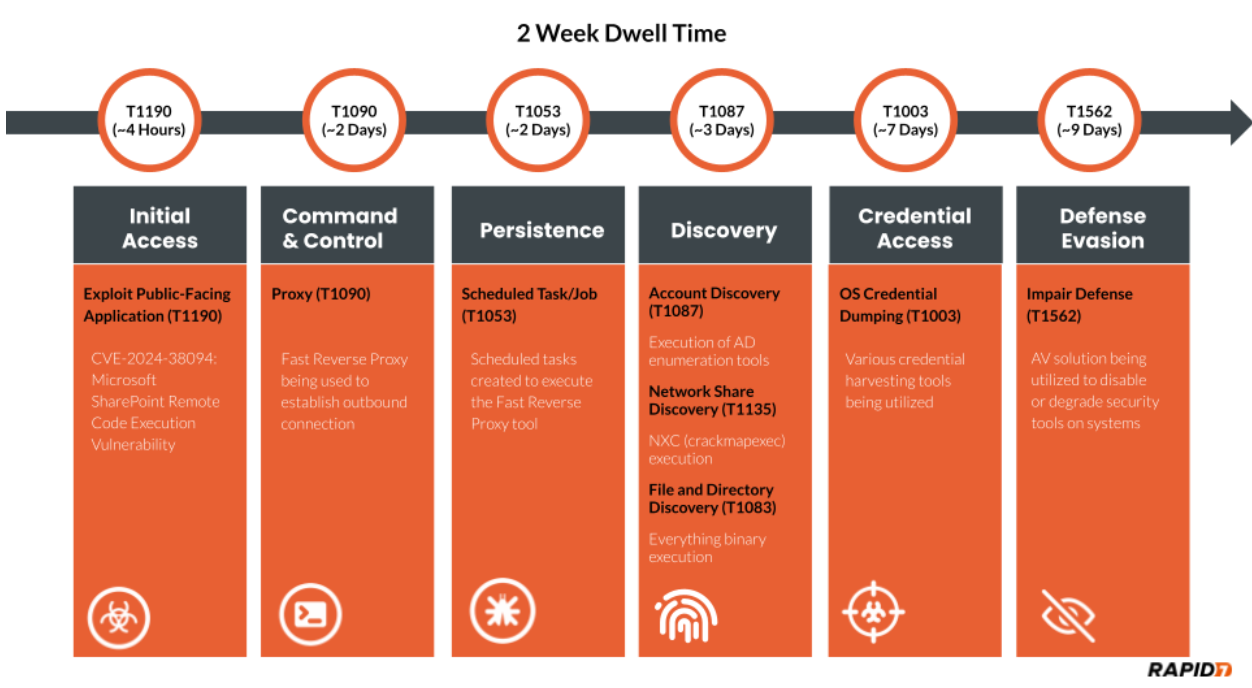
As with many incident response investigations, identified clues are not always chronological, thus requiring a timeline to be constructed to understand the narrative. We must attempt to discover how the attacker compromised the system or accessed the environment in the first place. In this specific investigation, the attacker had a dwell time of two weeks. The attacker’s actions are detailed chronologically in the figure below.

Investigating a SharePoint Compromise: IR Tales from the Field
Figure 1: MITRE Timeline

A great resource for identifying lateral movement involves analysis of authentication event logs from the domain controllers, specifically event ID 4624. Evidence indicated that malicious activity for this compromised Exchange service account involved more than just this single system. The source of unauthorized activity went back a week prior on a domain controller.

Analysis of the domain controller revealed that the attacker used this Exchange service account to authenticate via Remote Desktop Protocol (RDP). The attacker went on to disable Windows Defender Threat Detection (WDTD) on the system and added an exclusion for a malicious binary called msvrp.exe using the GUI. The malicious binary was placed in the C:\ProgramData\VMware\ folder but was not related to VMware. This binary is a tool called Fast Reverse Proxy (FRP), which allows external access to the system through a NAT-configured firewall. The FRP tool requires an .ini file to provide the necessary network configuration to establish an outbound connection. The .ini file’s external IP address has been provided in the Indicators of Compromise (IoCs) table in this blog post. Persistence was established for the FRP via scheduled tasks on the domain controller. Review of the C:\ProgramData\VMware\ folder used by the attacker revealed additional malicious binaries such as ADExplorer64.exe, NTDSUtil.exe, and nxc.exe. These tools were utilized to map the Active Directory environment, gather credentials, and scan systems.

Further analysis of authentication events from the domain controller indicated this malicious activity was sourced from a public-facing SharePoint server. Evidence indicated that the attacker executed Mimikatz, and there were signs of log tampering on the SharePoint server. It also indicated that a majority of system logging was disabled, and several key event log sources were absent during the investigation timeframe. Mimikatz has the ability to clear event logs and disable system logging. These malicious executions were tied to the local administrator account on the system. This would provide the necessary privileges for log tampering on the SharePoint server. However, some logs were spared, such as RDP log evidence. This indicated all authentication for the local administrator account was sourced from the local system to the local system during the in-scope time frame. The authentication information indicated that the potential initial access vector (IAV) would be tied to this SharePoint server. In light of this evidence, Rapid7 dug deeper into potential exploitation of the SharePoint services for an answer.

Rapid7 reviewed available SharePoint inetpub logs and identified the following GET and POST requests indicative of CVE-2024-38094 being exploited from the external IP address 18.195.61[.]200.

POST /_vti_bin/client.svc/web/GetFolderByServerRelativeUrl('/BusinessDataMetadataC atalog/')/Files/add(url='/BusinessDataMetadataCatalog/BDCMetadata.bdcm 
			
POST /_vti_bin/DelveApi.ashx/config/ghostfile93.aspx 

This vulnerability allows for remote code execution (RCE) on systems running Microsoft SharePoint from an external source. The proof-of-concept (PoC) code identified here was observed in available SharePoint log evidence. A great resource that explains the PoC code on Github can be found here. Utilizing this vulnerability, the attacker dropped a webshell on the system. The webshell was called ghostfile93.aspx, which generated numerous HTTP POST requests from the same external IP address tied to the exploit string within log evidence. After several hours of using the webshell, the attacker authenticated into the system using the local administrator account.

Initial access occurred two weeks prior to the start of the investigation. The attacker performed other notable TTPs during the dwell time. These TTPs involved utilizing several binaries to include everything.exe, kerbrute_windows_amd64.exe, 66.exe, Certify.exe, and attempts to destroy third-party backups. The binary everything.exe can index the NTFS file system for efficient searching across files, such as recently used files and network shares. Some of the most notable binaries include 66.exe, a renamed version of Mimikatz, and Certify.exe, which creates an ADFS certificate to utilize for elevated actions within the Active Directory environment. The remaining binary kerbrute_windows_amd64.exe has extensive capability for brute-forcing Active Directory Kerberos tickets. The attacker failed to compromise the third-party backup solution but attempted multiple methods, including access via the browser using compromised credentials and connecting over SSH.

As discussed previously, the installation of external AV products to disable security tooling was an interesting TTP identified during this investigation. Shortly after being blocked for attempted Impacket execution, Rapid7 identified the attacker leveraging an installation batch script called hrsword install.bat. The contents of this script indicate that the Huorong AntiVirus (AV) security solution was being installed. This script involved a service creation called sysdiag to execute the driver file sysdiag_win10.sys, which creates a VBS script execution parameter to execute HRSword.exe. Rapid7 observed this installation causing errors for security products on the system, potentially leading to a scenario in which the service or application would crash. These install files and all IOCs identified during this investigation have been provided in the IOC table contained within this blog.

Rapid7 customers

InsightVM and Nexpose customers can assess their exposure to the Microsoft SharePoint CVE-2024-38094 with authenticated vulnerability checks added in the July 09, 2024 content release.

Rapid7 used Velociraptor during this investigation to allow for remote triage and collection of forensic artifacts on the endpoint. A Velociraptor artifact has been created to hunt for strings related to the public PoC and log evidence identified during the investigation. The artifact can be found within the Rapid7 Labs VQL Repo here

InsightIDR and Managed Detection and Response customers have existing detection coverage through Rapid7’s expansive library of detection rules. Rapid7 recommends installing the Insight Agent on all applicable hosts to ensure visibility into suspicious processes and proper detection coverage. Below is a non-exhaustive list of detections that are deployed and will alert on behavior related to exploitation of this vulnerability.
Suspicious Commands Launched by Webserver
IIS Launching Discovery Commands
IIS Spawns PowerShell
Attacker Tool – Impacket
Attacker Tool – MimiKatz
Attacker Technique – Hash Dumping With NTDSUtil
Attacker Technique – Clearing Event Logs
Defense Evasion – Disabling Multiple Security or Backup Products

Rapid7 also recommends ensuring that SharePoint is patched to the latest version.

MITRE ATT&CK techniques

Tactic Technique Details
Initial Access Exploit Public-Facing Application (T1190) CVE-2024-38094: Microsoft SharePoint Remote Code Execution Vulnerability
Defense Evasion Impair Defense (T1562) AV solution being utilized to disable or degrade security tools on systems.
Discovery Account Discovery (T1087) Usage of AD enumeration tools
Command and Control Proxy (T1090) Fast Reverse Proxy being used to establish outbound connection
Discovery File and Directory Discovery (T1083) Everything.exe being observed on in-scope systems.
Discovery Network Share Discovery (T1135) nxc.exe being observed on in-scope systems.
Credential Access OS Credential Dumping (T1003) Various credential harvesting tools observed on in-scope systems
Persistence Scheduled Task/Job (T1053) Scheduled tasks observed on in-scope systems to execute the FRP tool.

Indicators of Compromise

Attribute Value Description
Filename and Path c:\users\Redacted\documents\everything-1.4.1.1024.x86\everything.exe Binary to locate files
SHA256 d3a6ed07bd3b52c62411132d060560f9c0c88ce183851f16b632a99b4d4e7581 Hash for everything.exe
Filename and Path c:\programdata\vmware\66.exe Renamed mimikatz.exe
SHA256 61c0810a23580cf492a6ba4f7654566108331e7a4134c968c2d6a05261b2d8a1 Hash for mimikatz.exe
Filename and Path c:\programdata\vmware\certify.exe Creates an ADFS certificate to utilize for elevated actions within the Active Directory environment.
SHA256 95cc0b082fcfc366a7de8030a6325c099d8012533a3234edbdf555df082413c7 Hash for certify.exe
Filename and Path c:\programdata\vmware\kerbrute_windows_amd64.exe Used to perform Kerberos pre-auth brute forcing.
SHA256 d18aa84b7bf0efde9c6b5db2a38ab1ec9484c59c5284c0bd080f5197bf9388b0 Hash for kerbrute_windows_amd64.exe
Filename and Path c:\programdata\vmware\msvrp.exe Fast Reverse Proxy tool for allowing external access to the system through a NAT configured firewall.
SHA256 f618b09c0908119399d14f80fc868b002b987006f7c76adbcec1ac11b9208940 Hash for msvrp.exe
Filename and Path c:\programdata\vmware\nxc.exe Newer version of the CrackMapExec Network Pentesting tool.
SHA256 95cc0b082fcfc366a7de8030a6325c099d8012533a3234edbdf555df082413c7 Hash for nxc.exe
Filename and Path c:\programdata\vmware\adexplorer64.exe Active Directory Enumeration Tool
SHA256 e451287843b3927c6046eaabd3e22b929bc1f445eec23a73b1398b115d02e4fb Hash for adexplorer64.exe
Filename and Path c:\users\Redacted\documents\h\hrsword install.bat Component of Huorong AV
SHA256 1beec8cecd28fdf9f7e0fc5fb9226b360934086ded84f69e3d542d1362e3fdf3 Hash for hrsword install.bat
Filename and Path c:\users\Redacted\documents\h\hrsword.exe Component of Huorong AV
SHA256 6ce228240458563d73c1c3cbbd04ef15cb7c5badacc78ce331848f5431b406cc Hash for hrsword.exe
Filename and Path c:\Windows\System32\drivers\sysdiag_win10.sys System driver component of Huorong AV
SHA256 acb5de5a69c06b7501f86c0522d10fefa9c34776c7535e937e946c6abfc9bbc6 Hash for sysdiag_win10.sys
Log-Based IOC POST /_vti_bin/client.svc/web/GetFolderByServerRelativeUrl(‘/BusinessDataMetadataC atalog/’)/Files/add(url=’/BusinessDataMetadataCatalog/BDCMetadata.bdcm POC code identified in SharePoint logs.
Log-Based IOC POST /_vti_bin/DelveApi.ashx/config/ghostfile93.aspx Webshell identified within SharePoint logs.
IP Address 54.255.89[.]118 IP address from .ini file for Fast Reverse Proxy tool
IP Address 18.195.61[.]200 Source IP address from exploitation and webshell communications

Modernize your legacy databases with AWS data lakes, Part 3: Build a data lake processing layer

Post Syndicated from Anoop Kumar K M original https://aws.amazon.com/blogs/big-data/modernize-your-legacy-databases-with-aws-data-lakes-part-3-build-a-data-lake-processing-layer/

This is the final part of a three-part series where we show how to build a data lake on AWS using a modern data architecture. This post shows how to process data with Amazon Redshift Spectrum and create the gold (consumption) layer. To review the first two parts of the series where we load data from SQL Server into Amazon Simple Storage Service (Amazon S3) using AWS Database Migration Service (AWS DMS) and load the data into the silver layer of the data lake, see the following:

Solution overview

Choosing the right tools and technology stack to build the data lake in order to build a scalable solution and have shorter time to market is critical. In this post, we go over the process of building a data lake, providing rationale behind the different decisions, and share best practices when building such a data solution.

The following diagram illustrates the different layers of the data lake.

The data lake is designed to serve a multitude of use cases. In the silver layer of the data lake, the data is stored as it is loaded from sources, preserving the table and schema structure. In the gold layer, we create data marts by combining, aggregating, and enriching data as required by our use cases. The gold layer is the consumption layer for the data lake. In this post, we describe how you can use Redshift Spectrum as an API to query data.

To create data marts, we use Amazon Redshift Query Editor. It provides a web-based analyst workbench to create, explore, and share SQL queries. In our use case, we use Redshift Query Editor to create data marts using SQL code. We also use Redshift Spectrum, which allows you to efficiently query and retrieve structured and semi-structured data from files stored on Amazon S3 without having to load the data into the Redshift tables. The Apache Iceberg tables, which we created and cataloged in Part 2, can be queried using Redshift Spectrum. For the latest information on Redshift Spectrum integration with Iceberg, see Using Apache Iceberg tables with Amazon Redshift.

We also show how to use RedshiftDataAPIService to run SQL commands to query the data mart using a Boto3 Python SDK. You can use the Redshift Data API to create the resulting datasets on Amazon S3, and then use the datasets in use cases such as business intelligence dashboards and machine learning (ML).

In this post, we walk through the following steps:

  1. Set up a Redshift cluster.
  2. Set up a data mart.
  3. Query the data mart.

Prerequisites

To follow the solution, you need to set up certain access rights and resources:

  • An AWS Identity and Access Management (IAM) role for the Redshift cluster with access to an external data catalog in AWS Glue and data files in Amazon S3 (these are the data files populated by the silver layer in Part 2). The role also needs Redshift cluster permissions. This policy must include permissions to do the following:
    • Run SQL commands to copy, unload, and query data with Amazon Redshift.
    • Grant permissions to run SELECT statements for related services, such as Amazon S3, Amazon CloudWatch logs, Amazon SageMaker, and AWS Glue.
    • Manage AWS Lake Formation permissions (in case the AWS Glue Data Catalog is managed by Lake Formation).
  • An IAM execution role for AWS Lambda with permissions to access Amazon Redshift and AWS

For more information about setting up IAM roles for Redshift Spectrum, see Getting started with Amazon Redshift Spectrum.

Set up a Redshift cluster

Redshift Spectrum is a feature of Amazon Redshift that queries data stored in Amazon S3 directly, without having to load it into Amazon Redshift. In our use case, we use Redshift Spectrum to query Iceberg data stored as Parquet files on Amazon S3. To use Redshift Spectrum, we first need a Redshift cluster to run the Redshift Spectrum compute jobs. Complete the following steps to provision a Redshift cluster:

  1. On the Amazon Redshift console, choose Clusters in the navigation pane.
  2. Choose Create cluster.
  3. For Cluster identifier, enter a name for your cluster.
  4. For Choose the size of the cluster, select I’ll choose.
  5. For Node type, choose xlplus.
  6. For Number of nodes, enter 1.

can

  1. For Admin password, select Manage admin credentials in AWS Secrets Manager if you want to use Secrets Manager, otherwise you can generate and store the credentials manually.

  1. For the IAM role, choose the IAM role created in the prerequisites.
  2. Choose Create cluster.

We chose the cluster Availability Zone, number of nodes, compute type, and size for this post to minimize costs. If you’re working on larger datasets, we recommend reviewing the different instance types offered by Amazon Redshift to select the one that is appropriate for your workloads.

Set up a data mart

A data mart is a collection of data organized around a specific business area or use case, providing focused and quickly accessible data for analysis or consumption by applications or users. Unlike a data warehouse, which serves the entire organization, a data mart is tailored to the specific needs of a particular department, allowing for more efficient and targeted data analysis. In our use case, we use data marts to create aggregated data from the silver layer and store it in the gold layer for consumption. For our use case, we use the schema HumanResources in the AdventureWorks sample database we loaded in Part 1 (FIX LINK). This database contains a factory’s employee shift information for different departments. We use this database to create a summary of the shift rate changes for different departments, years, and shifts to see which years had the most rate changes.

We recommend using the auto mount feature in Redshift Spectrum. This feature removes the need to create an external schema in Amazon Redshift to query tables cataloged in the Data Catalog.

Complete the following steps to create a data mart:

  1. On the Amazon Redshift console, choose Query editor v2 in the navigation pane.
  2. Choose the cluster you created and choose AWS Secrets Manager or Database username and password depending on how you chose to store the credentials.
  3. After you’re connected, open a new query editor.

You will be able to see the AdventureWorks database under awsdatacatalog. You can now start querying the Iceberg database in the query editor.

query-editor

If you encounter permission issues, choose the options menu (three dots) next to the cluster, choose Edit connection, and connect using Secrets Manager or your database user name and password. Then grant privileges for the IAM user or role with the following command, and reconnect with your IAM identity:

GRANT USAGE ON DATABASE awsdatacatalog to "IAMR:MyRole"

For more information, see Querying the AWS Glue Data Catalog.

Next, you create a local schema to store the definition and data for the view.

  1. On the Create menu, choose Schema.
  2. Provide a name and set the type as local.
  3. For the data mart, create a dataset that combines different tables in the silver layer to generate a report of the total shift rate changes by department, year, and shift. The following SQL code will return the required dataset:
SELECT dep.name AS "Department Name",
extract(year from emp_pay_hist.ratechangedate) AS "Rate Change Year",
shift.name AS "Shift",
COUNT(emp_pay_hist.rate) AS "Rate Changes"
FROM "dev"."{redshift_schema_name}"."department" dep
INNER JOIN "dev"."{redshift_schema_name}"."employeedepartmenthistory" emp_hist
ON dep.departmentid = emp_hist.departmentid
INNER JOIN "dev"."{redshift_schema_name}"."employeepayhistory" emp_pay_hist
ON emp_pay_hist.businessentityid = emp_hist.businessentityid
INNER JOIN "dev"."{redshift_schema_name}"."employee" emp
ON emp_hist.businessentityid = emp.businessentityid
INNER JOIN "dev"."{redshift_schema_name}"."shift" shift
ON emp_hist.shiftid = shift.shiftid
WHERE emp.currentflag = 'true'
GROUP BY dep.name, extract(year from emp_pay_hist.ratechangedate), shift.name;
  1. Create an internal schema where you want Amazon Redshift to store the view definition:

CREATE SCHEMA IF NOT EXISTS {internal_schema_name};

  1. Create a view in Amazon Redshift that you can query to get the dataset:
CREATE OR REPLACE VIEW {internal_schema_name}.rate_changes_by_department_year AS
SELECT dep.name AS "Department Name",
extract(year from emp_pay_hist.ratechangedate) AS "Rate Change Year",
shift.name AS "Shift",
COUNT(emp_pay_hist.rate) AS "Rate Changes"
FROM "dev"."{redshift_schema_name}"."department" dep
INNER JOIN "dev"."{redshift_schema_name}"."employeedepartmenthistory" emp_hist
ON dep.departmentid = emp_hist.departmentid
INNER JOIN "dev"."{redshift_schema_name}"."employeepayhistory" emp_pay_hist
ON emp_pay_hist.businessentityid = emp_hist.businessentityid
INNER JOIN "dev"."{redshift_schema_name}"."employee" emp
ON emp_hist.businessentityid = emp.businessentityid
INNER JOIN "dev"."{redshift_schema_name}"."shift" shift
ON emp_hist.shiftid = shift.shiftid
WHERE emp.currentflag = 'true'
GROUP BY dep.name, extract(year from emp_pay_hist.ratechangedate), shift.name
WITH NO SCHEMA BINDING;

If the SQL takes a long time to run or produces a large result set, consider using Redshift Unlike regular views, which are computed in the moment, the results from materialized views can be pre-computed and stored on Amazon S3. When the data is requested, Amazon Redshift can point to an Amazon S3 location where the results are stored. Materialized views can be refreshed on demand and on a schedule.

Query the data mart

Lastly, we query the data mart using a Lambda function to show how the data can be retrieved using an API. The Lambda function requires an IAM role to access Secrets Manager where the Redshift user credentials are stored. We use the Redshift Data API to retrieve the dataset we created in the previous step. First, we call the execute_statement() command to run the view. Next , we check the status of the run by calling the describe_statement() call. Finally , when the statement has successfully run, we use the get_statement_result() call to get the result set. The Lambda function shown in the following code implements this logic and returns the result set from querying the view rate_changes_by_department_year:

import json
import boto3
import time

def lambda_handler(event, context):
	client = boto3.client('redshift-data')

	# Use the Redshift execute statement api to query the data mart
	response = client.execute_statement(
	ClusterIdentifier='{redshift cluster name}',
	Database='dev',
	SecretArn='{redshift cluster secrets manager secret arn}',
	Sql='select * from {internal_schema_name}.rate_changes_by_department_year',
	StatementName='query data mart'
	)

	statement_id = response["Id"]
	query_status = True
	resultSet = []

	# Check the status of the sql statement, once the statement has finished executing we can retrive the resultset
	while query_status:
	if client.describe_statement(Id=statement_id)["Status"] == "FINISHED":

	print("SQL statement has finished successfully and we can get the resultset")

	response = client.get_statement_result(
	Id=statement_id
	)
	columns = response["ColumnMetadata"]
	results = response["Records"]
	while "NextToken" in response:
	response = client.get_servers(NextToken=response["NextToken"])
	results.extend(response["Records"])

	resultSet.append(str(columns[0].get("label")) + "," + str(columns[1].get("label")) + "," + str(columns[2].get("label")) + "," + str(columns[3].get("label")))

	for result in results:
	resultSet.append(str(result[0].get("stringValue")) + "," + str(result[1].get("longValue")) + "," + str(result[2].get("stringValue")) + "," + str(result[3].get("longValue")))

	query_status = False

	# In case the statement runs into errors we abort the resultset retrival
	if client.describe_statement(Id=statement_id)["Status"] == "ABORTED" or client.describe_statement(Id=statement_id)["Status"] == "FAILED":
	query_status = False
	print("SQL statement has failed or aborted")

	# To avoid spamming the API with requests on the status of the statement, we introduce a 2 second wait between calls
	else:
	print("Query Status ::" + client.describe_statement(Id=statement_id)["Status"])
	time.sleep(2)

	return {
	'statusCode': 200,
	'body': resultSet
	}

The Redshift Data API allows you to access data from many different types of traditional, cloud-based, containerized, web service-based, and event-driven applications. The API is available in many programming languages and environments supported by the AWS SDK, such as Python, Go, Java, Node.js, PHP, Ruby, and C++. For larger datasets that don’t fit into memory, such as ML training datasets, you can use the Redshift UNLOAD command to move the results of the query to an Amazon S3 location.

Clean up

In this post, you created an IAM role, Redshift cluster, and Lambda function. To clean up your resources, complete the following steps:

  1. Delete the IAM role:
    1. On the IAM console, choose Roles in the navigation pane.
    2. Select the role and choose Delete.
  2. Delete the Redshift cluster:
    1. On the Amazon Redshift console, choose Clusters in the navigation pane.
    2. Select the cluster you created and on the Actions menu, choose Delete.
  3. Delete the Lambda function:
    1. On the Lambda console, choose Functions in the navigation pane.
    2. Select the function you created and on the Actions menu, choose Delete.

Conclusion

In this post, we showed how you can use Redshift Spectrum to create data marts on top of the data in your data lake. Redshift Spectrum can query Iceberg data stored in Amazon S3 and cataloged in AWS Glue. You can create views in Amazon Redshift that compute the results from the underlying data on demand, or pre-compute results and store them (using materialized views). Lastly, the Redshift Data API is a great tool for running SQL queries on the data lake from a wide variety of sources.

For more insights into the Redshift Data API and how to use it, refer to Using the Amazon Redshift Data API to interact with Amazon Redshift clusters. To continue to learn more about building a modern data architecture, refer to Analytics on AWS.


About the Authors

Shaheer Mansoor is a Senior Machine Learning Engineer at AWS, where he specializes in developing cutting-edge machine learning platforms. His expertise lies in creating scalable infrastructure to support advanced AI solutions. His focus areas are MLOps, feature stores, data lakes, model hosting, and generative AI.

Anoop Kumar K M is a Data Architect at AWS with focus in the data and analytics area. He helps customers in building scalable data platforms and in their enterprise data strategy. His areas of interest are data platforms, data analytics, security, file systems and operating systems. Anoop loves to travel and enjoys reading books in the crime fiction and financial domains.

Sreenivas Nettem is a Lead Database Consultant at AWS Professional Services. He has experience working with Microsoft technologies with a specialization in SQL Server. He works closely with customers to help migrate and modernize their databases to AWS.

Modernize your legacy databases with AWS data lakes, Part 2: Build a data lake using AWS DMS data on Apache Iceberg

Post Syndicated from Shaheer Mansoor original https://aws.amazon.com/blogs/big-data/modernize-your-legacy-databases-with-aws-data-lakes-part-2-build-a-data-lake-using-aws-dms-data-on-apache-iceberg/

This is part two of a three-part series where we show how to build a data lake on AWS using a modern data architecture. This post shows how to load data from a legacy database (SQL Server) into a transactional data lake (Apache Iceberg) using AWS Glue. We show how to build data pipelines using AWS Glue jobs, optimize them for both cost and performance, and implement schema evolution to automate manual tasks. To review the first part of the series, where we load SQL Server data into Amazon Simple Storage Service (Amazon S3) using AWS Database Migration Service (AWS DMS), see Modernize your legacy databases with AWS data lakes, Part 1: Migrate SQL Server using AWS DMS.

Solution overview

In this post, we go over the process of building a data lake, providing the rationale behind the different decisions, and share best practices when building such a solution.

The following diagram illustrates the different layers of the data lake.

Overall Architecture

To load data into the data lake, AWS Step Functions can define a workflow, Amazon Simple Queue Service (Amazon SQS) can track the order of incoming files, and AWS Glue jobs and the Data Catalog can be used create the data lake silver layer. AWS DMS produces files and writes these files to the bronze bucket (as we explained in Part 1).

We can turn on Amazon S3 notifications and push the new arriving file names to an SQS first-in-first-out (FIFO) queue. A Step Functions state machine can consume messages from this queue to process the files in the order they arrive.

For processing the files, we need to create two types of AWS Glue jobs:

  • Full load – This job loads the entire table data dump into an Iceberg table. Data types from the source are mapped to an Iceberg data type. After the data is loaded, the job updates the Data Catalog with the table schemas.
  • CDC – This job loads the change data capture (CDC) files into the respective Iceberg tables. The AWS Glue job implements the schema evolution feature of Iceberg to handle schema changes such as addition or deletion of columns.

As in Part 1, the AWS DMS jobs will place the full load and CDC data from the source database (SQL Server) in the raw S3 bucket. Now we process this data using AWS Glue and save it to the silver bucket in Iceberg format. AWS Glue has a plugin for Iceberg; for details, see Using the Iceberg framework in AWS Glue.

Along with moving data from the bronze to the silver bucket, we also create and update the Data Catalog for further processing the data for the gold bucket.

The following diagram illustrates how the full load and CDC jobs are defined inside the Step Functions workflow.

Step Functions for loading data into the lake

In this post, we discuss the AWS Glue jobs for defining the workflow. We recommend using AWS Step Functions Workflow Studio, and setting up Amazon S3 event notifications and an SNS FIFO queue to receive the filename as messages.

Prerequisites

To follow the solution, you need the following prerequisites set up as well as certain access rights and AWS Identity and Access Management (IAM) privileges:

  • An IAM role to run Glue jobs
  • IAM privileges to create AWS DMS resources (this role was created in Part 1 of this series; you can use the same role here)
  • The AWS DMS job from Part 1 working and producing files for the source database on Amazon S3.

Create an AWS Glue connection for the source database

We need to create a connection between AWS Glue and the source SQL Server database so the AWS Glue job can query the source for the latest schema while loading the data files. To create the connection, follow these steps:

  1. On the AWS Glue console, choose Connections in the navigation pane.
  2. Choose Create custom connector.
  3. Give the connection a name and choose JDBC as the connection type.
  4. In the JDBC URL section, enter the following string and replace the name of your source database endpoint and database that was set up in Part 1: jdbc:sqlserver://{Your RDS End Point Name}:1433/{Your Database Name}.
  5. Select Require SSL connection, then choose Create connector.

Clue Connections

Create and configure the full load AWS Glue job

Complete the following steps to create the full load job:

  1. On the AWS Glue console, choose ETL jobs in the navigation pane.
  2. Choose Script editor and select Spark.
  3. Choose Start fresh and select Create script.
  4. Enter a name for the full load job and choose the IAM role (mentioned in the prerequisites) for running the job.
  5. Finish creating the job.
  6. On the Job details tab, expand Advanced properties.
  7. In the Connections section, add the connection you created.
  8. Under Job parameters, pass the following arguments to the job:
    1. target_s3_bucket – The silver S3 bucket name.
    2. source_s3_bucket – The raw S3 bucket name.
    3. secret_id – The ID of the AWS Secrets Manager secret for the source database credentials.
    4. dbname – The source database name.
    5. datalake-formats – This sets the data format to iceberg.

Glue Job Parameters

The full load AWS Glue job starts after the AWS DMS task reaches 100%. The job loops over the files located in the raw S3 bucket and processes them one at time. For each file, the job infers the table name from the file name and gets the source table schema, including column names and primary keys.

If the table has one or more primary keys, the job creates an equivalent Iceberg table. If the job has no primary key, the file is not processed. In our use case, all the tables have primary keys, so we enforce this check. Depending on your data, you might need to handle this scenario differently.

You can use the following code to process the full load files. To start the job, choose Run.

import sys, boto3, json
import boto3
import json
from awsglue.utils import getResolvedOptions
from pyspark.context import SparkContext
from awsglue.context import GlueContext
from awsglue.job import Job
from pyspark.sql import SparkSession

#Get the arguments passed to the script
args = getResolvedOptions(sys.argv, ['JOB_NAME',
                           'target_s3_bucket',
                           'secret_id',
                           'source_s3_bucket'])
dbname = "AdventureWorks"
schema = "HumanResources"

#Initialize parameters
target_s3_bucket = args['target_s3_bucket']
source_s3_bucket = args['source_s3_bucket']
secret_id = args['secret_id']
unprocessed_tables = []
drop_column_list = ['db', 'table_name', 'schema_name', 'Op', 'last_update_time']  # DMS added columns

#Helper Function: Get Credentials from Secrets Manager
def get_db_credentials(secret_id):
    secretsmanager = boto3.client('secretsmanager')
    response = secretsmanager.get_secret_value(SecretId=secret_id)
    secrets = json.loads(response['SecretString'])
    return secrets['host'], int(secrets['port']), secrets['username'], secrets['password']

#Helper Function: Load Iceberg table with Primary key(s)
def load_table(full_load_data_df, dbname, table_name):

    try:
        full_load_data_df = full_load_data_df.drop(*drop_column_list)
        full_load_data_df.createOrReplaceTempView('full_data')

        query = """
        CREATE TABLE IF NOT EXISTS glue_catalog.{0}.{1}
        USING iceberg
        LOCATION "s3://{2}/{0}/{1}"
        AS SELECT * FROM full_data
        """.format(dbname, table_name, target_s3_bucket)
        spark.sql(query)
        
        #Update Table property to accept Schema Changes
        spark.sql("""ALTER TABLE glue_catalog.{0}.{1} SET TBLPROPERTIES (
                      'write.spark.accept-any-schema'='true'
                    )""".format(dbname, table_name))
        
    except Exception as ex:
        print(ex)
        failed_table = {"table_name": table_name, "Reason": ex}
        unprocessed_tables.append(failed_table)
        
def get_table_key(host, port, username, password, dbname):
    
    jdbc_url = "jdbc:sqlserver://{0}:{1};databaseName={2}".format(host, port, dbname)
    
    connectionProperties = {
      "user" : username,
      "password" : password
    }
    
    spark.read.jdbc(url=jdbc_url, table='INFORMATION_SCHEMA.TABLE_CONSTRAINTS', properties=connectionProperties).createOrReplaceTempView("TABLE_CONSTRAINTS")
    spark.read.jdbc(url=jdbc_url, table='INFORMATION_SCHEMA.CONSTRAINT_COLUMN_USAGE', properties=connectionProperties).createOrReplaceTempView("CONSTRAINT_COLUMN_USAGE")
    df_table_pkeys = spark.sql("select c.TABLE_NAME, C.COLUMN_NAME as primary_key FROM TABLE_CONSTRAINTS T JOIN CONSTRAINT_COLUMN_USAGE C ON C.CONSTRAINT_NAME=T.CONSTRAINT_NAME WHERE T.CONSTRAINT_TYPE='PRIMARY KEY'")
    return df_table_pkeys


#Setup Spark configuration for reading and writing Iceberg tables
spark = (
    SparkSession.builder
    .config("spark.sql.extensions", "org.apache.iceberg.spark.extensions.IcebergSparkSessionExtensions")
    .config("spark.sql.catalog.glue_catalog", "org.apache.iceberg.spark.SparkCatalog")
    .config("spark.sql.catalog.glue_catalog.warehouse", "s3://{0}".format(dbname))
    .config("spark.sql.catalog.glue_catalog.catalog-impl", "org.apache.iceberg.aws.glue.GlueCatalog")
    .config("spark.sql.catalog.glue_catalog.io-impl", "org.apache.iceberg.aws.s3.S3FileIO")
    .getOrCreate()
)


#Initialize MSSQL credentials
host, port, username, password = get_db_credentials(secret_id)

#Initialize primary keys for all tables
df_table_pkeys = get_table_key(host, port, username, password, dbname)

#Read Full load csv files from s3
s3 = boto3.client('s3')
full_load_tables = s3.list_objects_v2(Bucket=source_s3_bucket, Prefix="raw/{0}/{1}".format(args['dbname'], args['schema']))

#Loop over files
for item in full_load_tables['Contents']:
    pkey_list = []
    table_name = item["Key"].split("/")[3].lower()
    print("Table name {0}".format(table_name))
    current_table_df = df_table_pkeys.where(df_table_pkeys.TABLE_NAME == table_name)

    # Only Process tables with at least 1 Primary key
    if not current_table_df.isEmpty():
        for i in current_table_df.collect():
            pkey_list.append(i["primary_key"])
    else:
        failed_table = {"table_name": table_name, "Reason": "No primary key"}
        unprocessed_tables.append(failed_table)
        # ToDo Handle these cases

    full_data_path = "s3://{0}/{1}".format(source_s3_bucket, item['Key'])
    full_load_data_df = (spark
                        .read
                        .option("header", True)
                        .option("inferSchema", True)
                        .option("recursiveFileLookup", "true")
                        .csv(full_data_path)
                        )

    primary_key = ",".join(pkey_list)

    if table_name not in unprocessed_tables:
        load_table(full_load_data_df, dbname, table_name)

When the job is complete, it creates the database and tables in the Data Catalog, as shown in the following screenshot.

Data lake silver layer data

Create and configure the CDC AWS Glue job

The CDC AWS Glue job is created similar to the full load job. As with the full load AWS Glue job, you need to use the source database connection and pass the job parameters with one additional parameter, cdc_file, which contains the location of the CDC file to be processed. Because a CDC file can contain data for multiple tables, the job loops over the tables in a file and loads the table metadata from the source table ( RDS column names).

If the CDC operation is DELETE, the job deletes the records from the Iceberg table. If the CDC operation is INSERT or UPDATE, the job merges the data into the Iceberg table.

You can use the following code to process the CDC files. To start the job, choose Run

import sys
import boto3
import json
from awsglue.utils import getResolvedOptions
from pyspark.context import SparkContext
from awsglue.context import GlueContext
from awsglue.job import Job
from pyspark.sql import SparkSession

# Get the arguments passed to the script
args = getResolvedOptions(sys.argv, ['JOB_NAME',
                           'target_s3_bucket',
                           'secret_id',
                           'source_s3_bucket',
                           'cdc_file'])
dbname = "AdventureWorks"
schema = "HumanResources"
target_s3_bucket = args['target_s3_bucket']
source_s3_bucket = args['source_s3_bucket']
secret_id = args['secret_id']
cdc_file = args['cdc_file']
unprocessed_tables = []
drop_column_list = ['db', 'table_name', 'schema_name', 'Op', 'last_update_time']  # DMS added columns
source_s3_cdc_file_key = "raw/AdventureWorks/cdc/" + cdc_file


# Helper Function: Get Credentials from Secrets Manager
def get_db_credentials(secret_id):
    secretsmanager = boto3.client('secretsmanager')
    response = secretsmanager.get_secret_value(SecretId=secret_id)
    secrets = json.loads(response['SecretString'])
    return secrets['host'], int(secrets['port']), secrets['username'], secrets['password']

# Helper Function: Column names from RDS
def get_table_colums(table, host, port, username, password, dbname):

    jdbc_url = "jdbc:sqlserver://{0}:{1};databaseName={2}".format(host, port, dbname)
    
    connectionProperties = {
      "user" : username,
      "password" : password
    }
    
    spark.read.jdbc(url=jdbc_url, table='INFORMATION_SCHEMA.COLUMNS', properties= connectionProperties).createOrReplaceTempView("TABLE_COLUMNS")
    columns = list((row.COLUMN_NAME) for (index, row) in spark.sql("select TABLE_NAME, TABLE_CATALOG, COLUMN_NAME from TABLE_COLUMNS where TABLE_NAME = '{0}' and TABLE_CATALOG = '{1}'".format(table, dbname)).select("COLUMN_NAME").toPandas().iterrows())
    return columns

# Helper Function: Get Colum names and datatypes from RDS
def get_table_colum_datatypes(table, host, port, username, password, dbname):

    jdbc_url = "jdbc:sqlserver://{0}:{1};databaseName={2}".format(host, port, dbname)
    
    connectionProperties = {
      "user" : username,
      "password" : password
    }
    
    spark.read.jdbc(url=jdbc_url, table='INFORMATION_SCHEMA.COLUMNS', properties= connectionProperties).createOrReplaceTempView("TABLE_COLUMNS")
    return spark.sql("select TABLE_NAME, COLUMN_NAME, DATA_TYPE from TABLE_COLUMNS WHERE TABLE_NAME ='{0}'".format(table))

# Helper Function: Setup the primary key condition
def get_iceberg_table_condition(database, tablename):
    
    jdbc_url = "jdbc:sqlserver://{0}:{1};databaseName={2}".format(host, port, database)
    
    connectionProperties = {
      "user" : username,
      "password" : password
    }
    
    spark.read.jdbc(url=jdbc_url, table='INFORMATION_SCHEMA.TABLE_CONSTRAINTS', properties=connectionProperties).createOrReplaceTempView("TABLE_CONSTRAINTS")
    spark.read.jdbc(url=jdbc_url, table='INFORMATION_SCHEMA.CONSTRAINT_COLUMN_USAGE', properties=connectionProperties).createOrReplaceTempView("CONSTRAINT_COLUMN_USAGE")
    
    condition = ''
    
    for key in spark.sql("select C.COLUMN_NAME FROM TABLE_CONSTRAINTS T JOIN CONSTRAINT_COLUMN_USAGE C ON C.CONSTRAINT_NAME=T.CONSTRAINT_NAME WHERE T.CONSTRAINT_TYPE='PRIMARY KEY' AND c.TABLE_NAME = '{0}'".format(table)).collect():
        condition += "target.{0} = source.{0} and".format(key.COLUMN_NAME)
    return condition[:-4]

    
# Read incoming data from Amazon S3
def read_cdc_S3(source_s3_bucket, source_s3_cdc_file_key):
    
    inputDf = (spark
                    .read
                    .option("header", False)
                    .option("inferSchema", True)
                    .option("recursiveFileLookup", "true")
                    .csv("s3://" + source_s3_bucket + "/" + source_s3_cdc_file_key)
                    )
    return inputDf

# Setup Spark configuration for reading and writing Iceberg tables
spark = (
    SparkSession.builder
    .config("spark.sql.extensions", "org.apache.iceberg.spark.extensions.IcebergSparkSessionExtensions")
    .config("spark.sql.catalog.glue_catalog", "org.apache.iceberg.spark.SparkCatalog")
    .config("spark.sql.catalog.glue_catalog.warehouse", "s3://{0}".format(target_s3_bucket))
    .config("spark.sql.catalog.glue_catalog.catalog-impl", "org.apache.iceberg.aws.glue.GlueCatalog")
    .config("spark.sql.catalog.glue_catalog.io-impl", "org.apache.iceberg.aws.s3.S3FileIO")
    .getOrCreate()
)

#Initialize MSSQL credentials
host, port, username, password = get_db_credentials(secret_id)

#Read the cdc file 
cdc_df = read_cdc_S3(source_s3_bucket, source_s3_cdc_file_key)

tables = cdc_df.toPandas()._c1.unique().tolist()

#Loop over tables in the cdc file
for table in tables:
    #Create dataframes for delets and for inserts and updates
    table_df_deletes = cdc_df.where((cdc_df._c1 == table) & (cdc_df._c0 == "D")).drop(cdc_df.columns[0], cdc_df.columns[1], cdc_df.columns[2], cdc_df.columns[3])
    table_df_upserts = cdc_df.where((cdc_df._c1 == table) & ((cdc_df._c0 == "I") | (cdc_df._c0 == "U"))).drop(cdc_df.columns[0], cdc_df.columns[1], cdc_df.columns[2], cdc_df.columns[3])
    
    #Update column names for the dataframes
    columns = get_table_colums(table, host, port, username, password, dbname) 
    selectExpr = [] 

    for column in columns: 
        selectExpr.append(cdc_df.where((cdc_df._c1 == table)).drop(cdc_df.columns[0], cdc_df.columns[1], cdc_df.columns[2], cdc_df.columns[3]).columns[columns.index(column)] + " as " + column)

    table_df_deletes = table_df_deletes.selectExpr(selectExpr) 
    table_df_upserts = table_df_upserts.selectExpr(selectExpr)
    
    #Process Deletes
    if table_df_deletes.count() > 0:
        
        print("Delete Triggered")
        table_df_deletes.createOrReplaceTempView('deleted_rows')
        
        sql_string = """MERGE INTO glue_catalog.{0}.{1} target
                        USING (SELECT * FROM deleted_rows) source
                        ON {2}
                        WHEN MATCHED 
                        THEN DELETE""".format(database, table.lower(), get_iceberg_table_condition(database, table.lower()))
        spark.sql(sql_string)
    
    if table_df_upserts.count() > 0:
        print("Upsert triggered")

        #Upsert Records when there are Schema Changes
        if len(table_df_upserts.columns) != len(columns):

            #Handle column deletes
            if len(table_df_upserts.columns) < len(columns):

                drop_columns = list(set(columns) - set(table_df_upserts.columns))

                for drop_column in drop_columns:
                    sql_string = """
                                    ALTER TABLE glue_catalog.{0}.{1}
                                    DROP COLUMN {2}""".format(dbname.lower(), table.lower(), drop_column)
                    spark.sql(sql_string)

            #Handle column additions
            elif len(table_df_upserts.columns) > len(columns):

                column_datatype_df = get_table_colum_datatypes(table, host, port, username, password, dbname)
                add_columns = list(set(table_df_upserts.columns) - set(columns))

                for add_column in add_columns:

                    #Set Iceberg data type
                    data_type = list((row.DATA_TYPE) for (index, row) in column_datatype_df.filter("COLUMN_NAME='{0}'".format(add_column)).select("DATA_TYPE").toPandas().iterrows())[0]

                    # Convert MSSQL Datatypes to Iceberg supported datatypes
                    if data_type.lower() in ["varchar", "char"]:
                        data_type = "string"

                    if data_type.lower() in ["bigint"]:
                        data_type = "long"

                    if data_type.lower() in ["array"]:
                        data_type = "list"

                    sql_string = """
                                    ALTER TABLE glue_catalog.{0}.{1}
                                    ADD COLUMN {2} {3}""".format(dbname.lower(), table.lower(), add_column, data_type)
                    spark.sql(sql_string)
                    
            #Create statement to update columns
            update_table_column_list = ""
            insert_column_list = ""
            columns = get_table_colums(table, host, port, username, password, dbname)             

            for column in columns:

                update_table_column_list+="""target.{0}=source.{0},""".format(column)
                insert_column_list+="""source.{0},""".format(column)

            table_df_upserts.createOrReplaceTempView('updated_rows')

            sql_string = """MERGE INTO glue_catalog.{0}.{1} target
                            USING (SELECT * FROM updated_rows) source
                            ON {2}
                            WHEN MATCHED 
                            THEN UPDATE SET {3} 
                            WHEN NOT MATCHED THEN INSERT ({4}) VALUES ({5})""".format(dbname.lower(), 
                                                                                      table.lower(), 
                                                                                      get_iceberg_table_condition(dbname.lower(), table.lower()), 
                                                                                      update_table_column_list.rstrip(","), 
                                                                                      ",".join(columns), 
                                                                                      insert_column_list.rstrip(","))

            spark.sql(sql_string)

    
print("CDC job complete")

The Iceberg MERGE INTO syntax can handle cases where a new column is added. For more details on this feature, see the Iceberg MERGE INTO syntax documentation. If the CDC job needs to process many tables in the CDC file, the job can be multi-threaded to process the file in parallel.


Configure EventBridge notifications, SQS queue, and Step Functions state machine

You can use EventBridge notifications to send notifications to EventBridge when certain events occur on S3 buckets, such as when new objects are created and deleted. For this post, we’re interested in the events when new CDC files from AWS DMS arrive in the bronze S3 bucket. You can create event notifications for new objects and insert the file names into an SQS queue. A Lambda function within Step Functions would consume from the queue, extract the file name, start a CDC Glue job, and pass the file name as a parameter to the job.

AWS DMS CDC files contain database insert, update, and delete statements. We need to process these in order, so we use an SQS FIFO queue, which preserves the order of messages in which they arrive. You can also configure Amazon SQS to set a time to live (TTL); this parameter defines how long a message stays in the queue before it expires.

Another important parameter to consider when configuring an SQS queue is the message visibility timeout value. While a message is being processed, it disappears from the queue to make sure that the message isn’t consumed by multiple consumers (AWS Glue jobs in our case). If the message is consumed successfully, it should be deleted from the queue before the visibility timeout. However, if the visibility timeout expires and the message isn’t deleted, the message reappears in the queue. In our solution, this timeout must be greater than the time it takes for the CDC job to process a file.

Lastly, we recommend using Step Functions to define a workflow for handling the full load and CDC files. Step Functions has built-in integrations to other AWS services like Amazon SQS, AWS Glue, and Lambda, which makes it a good candidate for this use case.

The Step Functions state machine starts with checking the status of the AWS DMS task. The AWS DMS tasks can be queried to check the status of the full load, and we check the value of the parameter FullLoadProgressPercent. When this value gets to 100%, we can start processing the full load files. After the AWS Glue job processes the full load files, we start polling the SQS queue to check the size of the queue. If the queue size is greater than 0, this means new CDC files have arrived and we can start the AWS Glue CDC job to process these files. The AWS Glue jobs processes the CDC files and deletes the messages from the queue. When the queue size reaches 0, the AWS Glue job exits and we loop in the Step Functions workflow to check the SQS queue size.

Because the Step Functions state machine is supposed to run indefinitely, it’s good to keep in mind that there will be service limits you need to adhere to. Namely, the maximum runtime, which is 1 year, and maximum run history size, i.e., state transitions or events for a state machine which is 25,000. We recommend adding an additional step at the end to check if either of these conditions are being met to stop the current state machine run and start a new one.

The following diagram illustrates how you can use Step Functions state machine history size to monitor and start a new Step Functions state machine run.

Step Functions Workflow

Configure the pipeline

The pipeline needs to be configured to address cost, performance, and resilience goals. You might want a pipeline that can load fresh data into the data lake and make it available quickly, and you might also want to optimize costs by loading large chunks of data into the data lake. At the same time, you should make the pipeline resilient and be able to recover in case of failures. In this section, we cover the different parameters and recommended settings to achieve these goals.

Step Functions is designed to process incoming AWS DMS CDC files by running AWS Glue jobs. AWS Glue jobs can take a couple of minutes to boot up, and when they’re running, it’s efficient to process large chunks of data. You can configure AWS DMS to write CSV files to Amazon S3 by configuring the following AWS DMS task parameters:

  • CdcMaxBatchInterval – Defines the maximum time limit AWS DMS will wait before writing a batch to Amazon S3
  • CdcMinFileSize – Defines the minimum file size AWS DMS will write to Amazon S3

Whichever condition is met first will invoke the write operation. If you want to prioritize data freshness, you should have a short CdcMaxBatchInterval value (10 seconds) and a small CdcMinFileSize value (1–5 MB). This will result in many small CSV files being written to Amazon S3 and will invoke a lot of AWS Glue jobs to process the data, making the extract, transform, and load (ETL) process faster. If you want to optimize costs, you should have a moderate CdcMaxBatchInterval (minutes) and a large CdcMinFileSize value (100–500 MB). In this scenario, we start a few AWS Glue jobs that will process large chunks of data, making the ETL flow more efficient. In a real-world use case, the required values for these parameters might fall somewhere that’s a good compromise between throughput and cost. You can configure these parameters when creating a target endpoint using the AWS DMS console, or by using the create-endpoint command in the AWS Command Line Interface (AWS CLI).

For the full list of parameters, see Using Amazon S3 as a target for AWS Database Migration Service.

Choosing the right AWS Glue worker types for the full load and CDC jobs is also crucial for performance and cost optimization. The AWS Glue (Spark) workers range from G1X to G8X, which have an increasing number of data processing units (DPUs). Full load files are usually much larger in size compared to CDC files, and therefore it’s more cost- and performance-effective to select a larger worker. For CDC files, it would be more cost-effective to select a smaller worker because files sizes are smaller.

You should design the Step Functions state machine in such a way that if anything fails, the pipeline can be redeployed after repair and resume processing from where it left off. One important parameter here is TTL for the messages in the SQS queue. This parameter defines how long a message stays in the queue before expiring. In case of failures, we want this parameter to be long enough for us to deploy a fix. Amazon SQS has a maximum of 14 days for a message’s TTL. We recommend setting this to a large enough value to minimize messages being expired in case of pipeline failures.

Clean up

Complete the following steps to clean up the resources you created in this post:

  1. Delete the AWS Glue jobs:
    1. On the AWS Glue console, choose ETL jobs in the navigation pane.
    2. Select the full load and CDC jobs and on the Actions menu, choose Delete.
    3. Choose Delete to confirm.
  2. Delete the Iceberg tables:
    1. On the AWS Glue console, under Data Catalog in the navigation pane, choose Databases.
    2. Choose the database in which the Iceberg tables reside.
    3. Select the tables to delete, choose Delete, and confirm the deletion.
  3. Delete the S3 bucket:
    1. On the Amazon S3 console, choose Buckets in the navigation pane.
    2. Choose the silver bucket and empty the files in the bucket.
    3. Delete the bucket.

Conclusion

In this post, we showed how to use AWS Glue jobs to load AWS DMS files into a transactional data lake framework such as Iceberg. In our setup, AWS Glue provided highly scalable and simple-to-maintain ETL jobs. Furthermore, we share a proposed solution using Step Functions to create an ETL pipeline workflow, with Amazon S3 notifications and an SQS queue to capture newly arriving files. We shared how to design this system to be resilient towards failures and to automate one of the most time-consuming tasks in maintaining a data lake: schema evolution.

In Part 3, we will share how to process the data lake to create data marts.


About the Authors

Shaheer Mansoor is a Senior Machine Learning Engineer at AWS, where he specializes in developing cutting-edge machine learning platforms. His expertise lies in creating scalable infrastructure to support advanced AI solutions. His focus areas are MLOps, feature stores, data lakes, model hosting, and generative AI.

Anoop Kumar K M is a Data Architect at AWS with focus in the data and analytics area. He helps customers in building scalable data platforms and in their enterprise data strategy. His areas of interest are data platforms, data analytics, security, file systems and operating systems. Anoop loves to travel and enjoys reading books in the crime fiction and financial domains.

Sreenivas Nettem is a Lead Database Consultant at AWS Professional Services. He has experience working with Microsoft technologies with a specialization in SQL Server. He works closely with customers to help migrate and modernize their databases to AWS.


Simplify and enhance Amazon S3 static website hosting with AWS Amplify Hosting

Post Syndicated from Donnie Prakoso original https://aws.amazon.com/blogs/aws/simplify-and-enhance-amazon-s3-static-website-hosting-with-aws-amplify/

We are announcing an integration between AWS Amplify Hosting and Amazon Simple Storage Service (Amazon S3). Now, you can deploy static websites with content stored in your S3 buckets and serve over a content delivery network (CDN) with just a few clicks.

AWS Amplify Hosting is a fully managed service for hosting static sites that handles various aspects of deploying a website. It gives you benefits such as custom domain configuration with SSL, redirects, custom headers, and deployment on a globally available CDN powered by Amazon CloudFront.

When deploying a static website, Amplify remembers the connection between your S3 bucket and deployed website, so you can easily update your website with a single click when you make changes to website content in your S3 bucket. Using AWS Amplify Hosting is the recommended approach for static website hosting because it offers more streamlined and faster deployment without extensive setup.

Here’s how the integration works starting from the Amazon S3 console:

Deploying a static website using the Amazon S3 console
Let’s use this new integration to host a personal website directly from my S3 bucket.

To get started, I navigate to my bucket in the Amazon S3 console . Here’s the list of all the content in that S3 bucket:

To use the new integration with AWS Amplify Hosting, I navigate to the Properties section, then I scroll down until I find Static website hosting and select Create Amplify app.

Then, it redirects me to the Amplify page and populates the details from my S3 bucket. Here, I configure my App name and the Branch name. Then, I select Save and deploy.

Within seconds, AWS Amplify has deployed my static website, and I can visit the site by selecting Visit deployed URL. If I make any subsequent changes in my S3 bucket for my static website, I need to redeploy my application in the Amplify console by selecting the Deploy updates button.

I can also use the AWS Command Line Interface (AWS CLI) for programmatic deployment. To do that, I need to get the values for required parameters, such as APP_ID and BRANCH_NAME from my AWS Amplify dashboard. Here’s the command I use for deployment:

aws amplify start-deployment --appId APP_ID --branchName BRANCH_NAME --sourceUrlType=BUCKET_PREFIX --sourceUrl s3://S3_BUCKET/S3_PREFIX

After Amplify Hosting generates a URL for my website, I can optionally configure a custom domain for my static website. To do that, I navigate to my apps in AWS Amplify and select Custom domains in the navigation pane. Then, I select Add domain to start configuring a custom domain for my static website. Learn more about setting up custom domains in the Amplify Hosting User Guide.

In the following screenshot, I have my static website configured with my custom domain. Amplify also issues an SSL/TLS certificate for my domain so that all traffic is secured through HTTPS.

Now, I have my static site ready, and I can check it out at https://donnie.id.

Things you need to know
More available features – AWS Amplify Hosting has more features you can use for your static websites. Visit the AWS Amplify product page to learn more.

Deployment options – You can get started deploying a static website from Amazon S3 using the Amplify Hosting console, AWS CLI, or AWS SDKs.

Pricing – For pricing information, visit Amazon S3 pricing page and AWS Amplify pricing page.

Availability – Amplify Hosting integration with Amazon S3 is now available in AWS Regions where Amplify Hosting is available

Start building your static website with this new integration. To learn more about Amazon S3 static website hosting with AWS Amplify, visit the AWS Amplify Hosting User Guide

Happy building,

Donnie

A new release of Raspberry Pi OS

Post Syndicated from jzb original https://lwn.net/Articles/996332/

The Raspberry Pi project has announced
a new version of Raspberry Pi OS. It includes a number of
significant changes, the most notable of which is that the Raspberry
Pi Desktop now uses Wayland by default for all Pi models using the
labwc compositor:

For most of this year, we have been working on porting labwc to the
Raspberry Pi Desktop. This has very much been a collaborative process
with the developers of both labwc and wlroots: both have helped us
immensely with their support as we contribute features and
optimisations needed for our desktop.

This release also features Linux 6.6.51, improved touchscreen support, a new
screen configuration tool called raindrop, and more. See the
release
notes
for a full list of changes.

[$] An update on Apple M1/M2 GPU drivers

Post Syndicated from jake original https://lwn.net/Articles/995383/

The kernel graphics driver for the Apple M1 and M2 GPUs is, rather
famously, written in Rust, but it has achieved conformance with
various graphics standards, which is also noteworthy. At the X.Org Developers Conference
(XDC) 2024
, Alyssa Rosenzweig gave an update on the status of the
driver, along with some news about the kinds of games it can support (YouTube video, slides).
There has been lots of progress since her talk at XDC last year (YouTube video),
with, of course, still more to come.