Post Syndicated from Home Assistant original https://www.youtube.com/watch?v=LzaGqk_dbeI
Firefox 157.0 released
Post Syndicated from corbet original https://lwn.net/Articles/1097495/
Version
157.0 of the Firefox browser has been released. It features
“Firefox’s biggest visual refresh in years
“, the ability to use
hardware AV1 decoding with WebRTC calls, and a number of fixes.
[$] Native support for Rust on the GPU
Post Syndicated from daroc original https://lwn.net/Articles/1095731/
Christian Legnitto is the maintainer of
rust-gpu and
Rust CUDA, two
libraries that make it possible to program a computer’s graphics processing unit
(GPU) from Rust. He isn’t satisfied with the current state of GPU support in
Rust, however. In a talk at
RustConf 2026, he explained his vision for how the
GPU could become an ordinary compiler target for normal Rust code, without the
need for any special libraries or new ecosystem support. That vision is not yet
fully implemented, but he does have a prototype that he is preparing to release.
Сърбия – първият китайски плацдарм в Европа
Post Syndicated from Александър Малинов original https://www.toest.bg/surbiya-purviyat-kitayski-platsdarm-v-evropa/

Геополитическите сътресения след началото на руската агресия срещу Украйна са многобройни. От практическото разделяне на НАТО – основния западен съюз между Америка и Европа, по темата за нуждата от оръжейна помощ за Киев до енергийната криза, обхванала Централна Азия след украинската кампания срещу руските рафинерии. Балканите също са основно място, където отражението на войната се забелязва като геополитически промени.
Една от страните, в които това е най-видно, е Сърбия. Заради отслабването на НАТО, породено от отдръпването на САЩ, и заради невъзможността на Русия да поддържа нивото на влияние в Белград отпреди 2022 г. в Сърбия се отвори вакуум за външно въздействие, който вече се запълва от Китай. Пекин рязко увеличи влиянието си над балканската страна през последните четири години. То мина отвъд инвестициите и големите инфраструктурни проекти и стигна до въоръжаването на сръбската армия с част от най-модерните технологии, с които разполага Китай.
#PočeloJe: „Има нещо гнило в Сърбия“
В началото на февруари 2019 година Сърбия отбелязва 10-та седмица на протести срещу управляващата коалиция и политиката на президента Вучич.
Макар Александър Вучич да продължава да декларира военен неутралитет и да поддържа стремежа към членство в Европейския съюз, разрастващото се партньорство в сферата на отбраната с Пекин подсилва очертанията на сложната геополитическа обстановка и изпраща тревожни сигнали към съседите на Сърбия. Тази динамика представлява пореден риск за стабилността и сигурността на целия Балкански полуостров и е пример за продължаващото засилване на влиянието на външни сили върху Югоизточна Европа.
Китайско оръжие на европейска земя
Основната причина за отдалечаването на Сърбия от Москва е натискът от страна на Запада – и по-специално на ЕС и САЩ. Налице са директните западни санкции срещу руската икономика и натискът за дипломатическо изолиране на Путин. Но Белград също така от години е съветван от Брюксел и Вашингтон да съгласува външната си политика с тяхната и да осъди руското нахлуване в Украйна. В резултат на това Сърбия се присъедини към резолюцията на ООН, осъждаща нападенията на Москва, и гласува „за“ изключването на Русия от Съвета на ООН по правата на човека. Сърбия също така отказа да признае подкрепяните от Русия фиктивни референдуми за анексиране, проведени през септември 2022 г. в окупираните от Русия украински територии. Сръбските власти осъждат всякакви опити за сепаратизъм, за да останат последователни в позицията си относно статуса на Косово.
На фона на ограничения капацитет на Русия да поддържа предишното си военно и икономическо присъствие в Сърбия Белград задълбочи военните си връзки с Пекин. Близо 60% от вноса на оръжия в Сърбия за периода 2020–2024 г. е бил от китайски произход, показват данни на Стокхолмския международен институт за изследване на мира (SIPRI), цитирани от Радио „Свободна Европа“. В рамките на това военно сближаване Белград реализира мащабни доставки на съвременни китайски оръжейни системи, превръщайки се в първия им оператор на европейска земя. Сред придобитите технологии се открояват далекобойните зенитно-ракетни комплекси FK-3, разузнавателно-ударните бойни дронове CH-92A и CH-95, както и свръхзвуковите балистични ракети въздух–земя CM-400AKG, които се интегрират към изтребителите МиГ-29.
Една година след трагедията в Нови Сад. Какво става в Сърбия?
На 1 ноември се навършва една година от трагедията в Нови Сад, която провокира някои от най-големите протести в Сърбия, а и в региона ни. Италианката Джорджа Спадони, която обича и познава Балканите, ни разказва в няколко поредни материала как изглеждат Белград и цялата страна година по-късно.
Сърбия и Китай вече имат и директен опит във взаимната интеграция не само на части от армиите си, но и на полицейските си сили. През 2019 г. за първи път китайски и сръбски полицаи патрулираха заедно в Белград, а през същата година специални части на двете страни проведоха съвместни антитерористични учения близо до сръбската столица. През 2025 г. части от въоръжените сили на двете държави имаха учение в китайската провинция Хъбей, а през септември 2026 г. сръбски полицаи участваха в общи патрули с китайската полиция в провинция Хайнан.
Засиленото китайско военно присъствие на Балканите и мащабното въоръжаване на Белград с китайски военни системи предизвикаха остро безпокойство сред съседни на Сърбия държави. През 2022 г. от страна на Косово официално бяха отправени предупреждения, че бързата сръбска милитаризация и придобиването на напреднали отбранителни и ракетни технологии от Китай застрашават регионалния мир и стабилност. Подобни тревоги бяха изразени и от Хърватия, чийто президент Миланович критикува купуването на нови нападателни оръжия, призовавайки по този начин западните съюзници в ЕС и НАТО да следят внимателно геополитическите рискове от нарастващото военно влияние на Китай на Балканите.
Какво става в Сърбия? Езикът на протестите – музика и архитектура
Джорджа Спадони е на обиколка из Белград с нова група туристи, на които разказва за музиката и архитектурата на града, а през този разказ – и на нас за случващото се в Сърбия. Това е втора част от поредицата, посветена на годишнината от трагедията в Нови Сад и на протестите за промяна.
„Желязното приятелство“ има цена
Сътрудничеството между Пекин и Белград в сферата на сигурността се базира на големият възход в политическите и икономическите отношения между двете държави в последното десетилетие, а Сърбия често определя връзката като стратегическо „желязно приятелство“. През последните години Пекин се утвърди като най-важния външен партньор за Сърбия на Вучич, осигурявайки не само мащабни финансови инвестиции, но и безрезервна дипломатическа подкрепа по чувствителни теми като Косово – Китай не признава независимостта на Косово и не поддържа дипломатически отношения с Прищина. Китайският интерес да подкрепи Сърбия в усилията ѝ да оспори независимостта на Косово следва политиката на Пекин за „единен Китай“ и поставя паралели по отношение на спора за статуса на Тайван.
Този модел на сътрудничество се материализира чрез знакови китайски проекти в сръбската тежка промишленост и инфраструктура – като приватизацията на стоманодобивния завод в Смедерево и на медодобивния комбинат в град Бор (на 40 км от българската граница), както и изграждането на ключови транспортни артерии и магистрали. Макар тези инвестиции да стимулират икономическия растеж и да носят краткосрочни ползи за Белград, анализаторите сочат и сериозните рискове, свързани с корупция, нарастващ финансов дълг към Пекин и нарушаване на екологичните стандарти.
Централната роля на Сърбия в плановете на Китай за засилено влияние в Европа представлява сполучливо съчетание между стремежа на Белград да се възползва от географското си положение и от многовекторната си външна политика, от една страна, и настъплението на Пекин към европейската периферия като част от стратегия за по-широка глобална експанзия, от друга. Историческите предпоставки за това съществуват още от времето на югославската политика на необвързаност от времето на Тито, когато страната балансираше между Изтока и Запада като лидер на Движението на необвързаните страни, и се задълбочиха след бомбардировките на НАТО през 1999 г.
Какво става в Сърбия? Непредвидимото бъдеще
Последният текст от поредицата на Джорджа Спадони за Сърбия ни завърта през историята на страната от 90-те до днес, за да ни покаже, че сякаш нищо не се е променило, и да ни напомни да погледнем и в своята градина, все още обрасла с политически плевели от миналото, с корени дълбоко под земята.
Геополитическата безизходица в периода след разпадането на Югославия и последвалите войни създадоха благоприятни условия за задълбочаване на сръбските отношения с неевропейски глобални играчи с цел да се използват достъпът до пазари, политическата подкрепа и ресурсите на Русия, Китай или Турция. Макар и първоначално с тактически характер, този подход се утвърди като водеща концепция във външната политика на Александър Вучич. Десетилетията на колебание относно разширяването на ЕС даде допълнителен аргумент на Белград да превърне застоя в процеса на европеизация в лост за влияние.
Скорошната оставка на Александър Вучич от президентския пост едва ли означава край на тази политика. Той напуска седем месеца преди края на мандата си, за да се включи в предсрочните парламентарни избори на 25 октомври и да се бори за премиерския пост – позиция, от която би могъл да продължи същото балансиране между ЕС, Китай и Русия.
Най-новата вълна на китайско ангажиране в Сърбия е от началото на второто десетилетие на XXI век, като ключов момент е изграждането на Пупиновия мост в Белград през 2014 г. Това събитие бележи мащабно рестартиране на двустранните отношения и проправя пътя за нови проекти и инвестиции в няколко посоки. Оттогава инфраструктурните инициативи обхванаха строителството и модернизацията на железопътни линии, както и експресното (в сравнение с България) изграждане на нови участъци от автомагистралната мрежа. Макар модернизацията на железопътната връзка Белград–Будапеща да е обект на правни проверки и политически дебати в западните политически среди, Пекин се надява да я превърне в убедителен пример за успешно сътрудничество.
Наред с милитаризацията, стратегическото настъпление на Пекин на Балканите намира своето изражение и в мащабното внедряване на високотехнологични системи за видеонаблюдение и лицево разпознаване. Разследване на „Свободна Европа“ разкрива как китайски гиганти като Huawei, Hikvision и Dahua завладяват общественото пространство на Балканите чрез проекти, обвързани с „Безопасен град“ – китайския модел за управление на градската среда чрез събиране и обединяване на огромни количества данни.
В Белград са инсталирани над 1000 камери на Huawei с възможности за лицево разпознаване, а китайски системи за видеонаблюдение навлизат и в десетки по-малки сръбски общини. Разследване на Радио „Свободна Европа“ установява оборудване с възможности за лицево разпознаване в поне 10 от 42 проверени общини и градове, което поражда опасения сред гражданското общество и правозащитните организации относно личните свободи и потенциала за политически контрол.
Накъде след „Мюнхен 2026“? Отворените въпроси пред Европа и България
Мюнхенската конференция по сигурността затвърди усещането (де да беше само такова), че старият трансатлантически баланс се разпада. Вече всички сме на една вълна по този въпрос. Но докато Европа търси автономия, България рискува да остане между линиите на разделението. От Александър Малинов.
Подобни тенденции предизвикват тревога и в държавите членки на Европейския съюз, включително в България, където китайска техника навлиза в обществено значими сектори, като градския транспорт и публичната инфраструктура на София. Въпреки че тези мрежи често се оправдават с аргументи за сигурност и контрол на трафика, експертите по киберсигурност предупреждават за сериозни софтуерни уязвимости и рискове от нерегламентиран достъп до данни. В контекста на строгите ограничения в САЩ и в редица западни държави срещу тези китайски производители, разрастващата се мрежа от камери с китайски произход в Югоизточна Европа се превръща в ефективен инструмент за геополитическо и технологично влияние.
От тази страна на границата
За властите в София засилването на военното влияние на Китай в съседна страна би следвало да е въпрос от първостепенна важност, но досега липсват каквито и да е официални коментари или косвени реакции относно действията на Белград. Правителството на Румен Радев всъщност увеличава рисковете, свързани с националната сигурност и регионалната стабилност. Резкият завой във външната ни политика превърна България в страна, която, изглежда, следва насоки от Москва дори когато това е в противовес на собствения ѝ национален интерес.
Последният пример за тази предателска политика е отказът на правителството да участва в новата инициатива на НАТО за защита от дронове. Програмата предвижда през следващите пет години да бъдат инвестирани над 40 млрд. долара в способности за противодействие на дронове и обучение на пет пъти повече оператори на дронове до края на 2027 г. Повишаването на капацитета за бързо откриване, идентифициране и неутрализиране на безпилотни летателни апарати вече е от първостепенна важност за отбранителните способности на всяка страна. На този фон отказът на България да се включи в инициативата оставя страната извън новия общ проект на НАТО именно в момент, когато съседна Сърбия ускорява превъоръжаването си, включително с китайски технологии.
Китайското присъствие в Сърбия показва колко лесно едно геополитическо „приятелство“ може да прерасне в зависимост, застрашаваща целия регион. А за нас като държава остава въпросът дали виждаме какво става непосредствено отвъд западната ни граница, или поне малко по-далече от носа ни.
Implementing customer managed keys for AWS Lambda durable functions with Terraform
Post Syndicated from Rajdeep Banerjee original https://aws.amazon.com/blogs/compute/implementing-customer-managed-keys-for-aws-lambda-durable-functions-with-terraform/
If you run regulated workloads, you must control how persisted data is encrypted and who can access it. You need to manage encryption key rotation schedules, restrict decryption to authorized principals, and produce audit evidence that proves encryption controls are operating as designed.
AWS Lambda durable functions build resilient, multi-step workflows that survive failures through automatic checkpointing. The checkpoint mechanism persists execution state, including step results, payloads, and callback responses, to durable storage. For payment processing workloads, this persisted data is sensitive. AWS Lambda durable functions support customer managed keys from AWS Key Management Service (AWS KMS). A customer managed key gives you three controls: you set the key rotation schedule, you restrict decryption access through the key policy, and you generate per-function audit trails in AWS CloudTrail. A durable execution uses the same encryption key it started with for its entire lifetime. Changing or removing the key affects only executions that start after the change.
Updating the customer managed key policy to remove decrypt permissions, or disabling the key, stops the Lambda service from accessing previously checkpointed state. Customer managed key deletion is a permanent action, and all durable executions encrypted with that key become unrecoverable because the Lambda service has no mechanism to restore the data. Before scheduling key deletion, use the AWS KMS waiting period (7 to 30 days) and monitor AWS CloudTrail for Decrypt calls to confirm that the key is no longer in active use.
In this post, you learn to configure a customer managed key to encrypt durable execution data in an event-driven payment processing workflow. You create a symmetric encryption key in AWS KMS and define a key policy that grants the Lambda service, the function’s execution role, the function author, and durable execution operators only the AWS KMS actions each principal requires. You then configure the function to use the key for durable execution encryption and verify encryption operations through AWS CloudTrail logs. By the end, you have a deployable reference architecture you can adapt for regulated workloads running on Lambda durable functions.
To learn more about how AWS Lambda encrypts durable execution data, see Encrypting AWS Lambda durable execution data in the AWS Lambda Developer Guide.
Solution overview
The sample application implements an event-driven payment processing pipeline using Amazon DynamoDB, Amazon EventBridge, Amazon EventBridge Pipes, AWS Lambda, and Amazon SQS. The pipeline receives authorized payment transactions, validates and enriches them. A Lambda durable function applies business rules to the enriched transactions. The approved transactions are sent to a downstream settlement system for posting.
The following section covers the key architectural steps.
Architecture steps
- The upstream authorization system writes authorized payment records to a DynamoDB table.
- DynamoDB Streams captures each new record as an ordered change event.
- Amazon EventBridge Pipes polls the record from the DynamoDB stream. The pipe triggers a Lambda function as part of enrichment step for duplicate checking.
- The deduplication Lambda uses a DynamoDB table with conditional writes to identify duplicate inbound transactions based on transaction properties and time window.
- When the deduplication is successful, the pipe publishes an event to the Amazon EventBridge custom event bus.
- An Amazon EventBridge rule invokes a Lambda function for matching events. The function adds business context such as account type, bank routing details, and merchant category codes. The function publishes a new enriched event to the custom event bus.
- Another Amazon EventBridge rule matches the enriched events to a Lambda durable function. The durable function applies business rules to the incoming event. When the event passes all business rules, the function publishes a new event to the event bus.
- An Amazon EventBridge rule routes the approved event to an Amazon SQS queue preserving ordering for settlement and buffering against downstream throughput limits.
- The Posting Lambda function reads from the Amazon SQS and invokes the downstream posting subsystem to post the transaction. Finally, the function publishes a completion event to the event bus completing the transaction lifecycle.
With customer managed keys configured on DynamoDB, Amazon EventBridge, SQS, and the AWS Lambda durable function, every piece of persisted data in this pipeline is encrypted with keys you own and control. The walkthrough that follows shows you how to deploy this configuration with Terraform.
Figure 1 shows the reference architecture for this solution.
Reference architecture
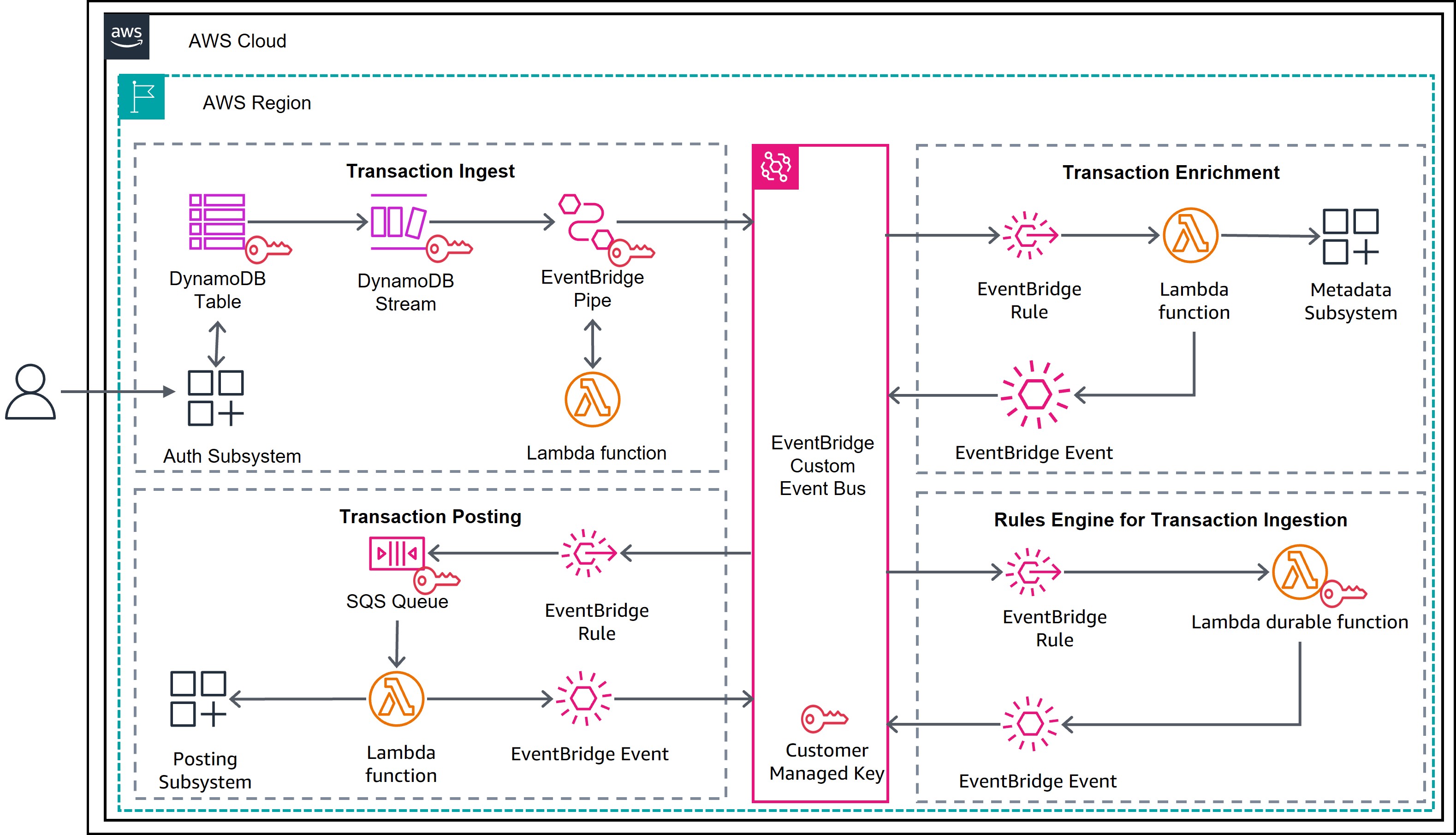
Figure 1: Payment processing using Lambda durable functions
Prerequisites
To deploy this solution, you need the following prerequisites:
- AWS account and CLI: An active AWS account with the AWS CLI installed and configured with appropriate credentials.
- Terraform: Terraform installed (version 1.0 or later) for infrastructure provisioning.
- Python environment: Python 3.11 or later, with pytest for running unit tests. The
aws-durable-execution-sdk-pythonpackage requires Python 3.11 or later. - AWS Identity and Access Management (IAM) permissions: The IAM permissions to create the resources. Follow the sample repository for the sample policy.
- Basic understanding and familiarity with AWS Serverless services.
Solution walkthrough
The following is a step-by-step guide to deploy and test the payment processing solution.
Step 1: Clone the repository
Step 2: Run unit tests
Validate the payment processing logic locally before deploying:
This runs unit tests that cover transaction validation, business rule checks (foreign transaction detection, currency conversion, merchant type), event schema validation, and misconfiguration handling. The tests use the AWS Durable Execution Testing SDK to run the handler locally without deploying AWS resources.
Figure 2 shows an example of test results running locally.
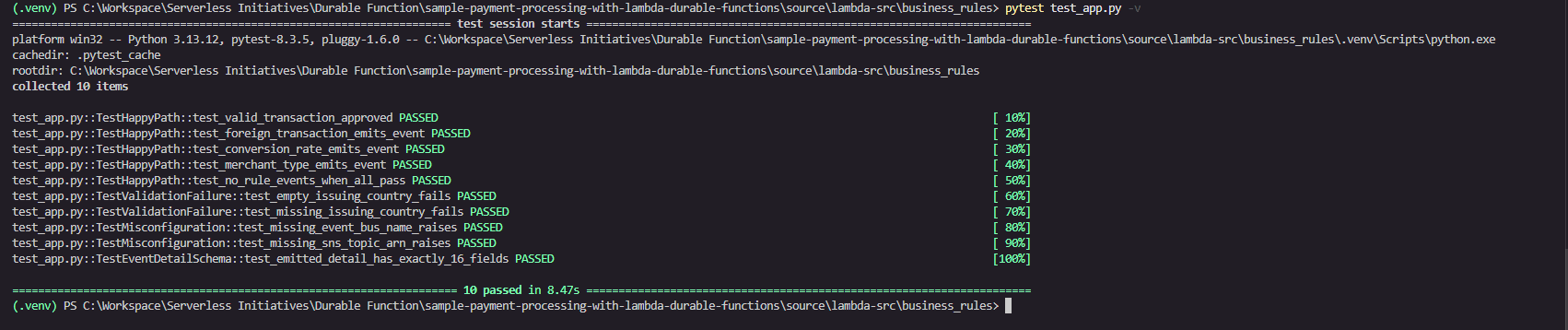
Figure 2: Test run results of the business rules
Step 3: Inspect the Lambda durable functions construct
Open the payments-business-rules Lambda function in source/lambda-src/business_rules/business-rules-app.py for a sample Lambda durable function. Refer to Figure 3 for the code walkthrough.
Key features used
@durable_executiondecorator: Transforms a standard Lambda handler into a durable function handler. The durable execution SDK manages checkpointing automatically. No infrastructure changes are required.context.step("validate-transaction"): Validates that the transaction has a non-emptyissuingCountryCode. The durable execution checkpoints the result (TrueorFalse) to durable storage. The durable execution restores checkpoint results instead of re-executing steps during the replay phase. This phase occurs whenever the function is re-invoked after an interruption such as a wait period completing, a failure, or a suspension. This checkpointed result is part of the durable execution data encrypted by your customer managed key.context.step("publish-posting-failure"): Publishes the full Amazon EventBridge envelope to Amazon SNS when validation fails. This step only runs on the failure path. The runtime checkpoints the Amazon SNS publish response to durable storage.context.parallel("run-business-rules"): Runs three independent rule checks concurrently: foreign transaction detection, currency conversion, and merchant type validation. Each branch checkpoints independently. If one branch fails, the others are not replayed on resume. Each branch result is persisted to durable storage and encrypted by the customer managed key.ctx.step("trigger-foreign-transaction-rule")(inside parallel): ComparesbillingAmountagainsttransactionAmount. If they differ, it emits aForeignTransactionFoundevent to Amazon EventBridge. This step is checkpointed independently within the parallel group.ctx.step("trigger-conversion-rate-rule")(inside parallel): Checks whetherconversionRateequals1. If so, it emits aCurrencyConversionTransactionFoundevent to Amazon EventBridge. This step is checkpointed independently within the parallel group.ctx.step("trigger-merchant-rule")(inside parallel): Checks whethermerchantTypeequalsAAFF. If so, it emits aWarningMerchantTypeTransactionFoundevent to Amazon EventBridge. This step is checkpointed independently within the parallel group.context.step("post-transaction-processed"): Emits the finalTransactionPostingApprovedevent to Amazon EventBridge. This step is only reached when validation passes and all business rules complete. The runtime checkpoints the Amazon EventBridge response. On replay, if this step already succeeded, the event is not re-published, which guarantees exactly-once approval semantics.context.logger: Provides replay-aware logging throughout the handler. During replay of previously completed steps, log statements are suppressed to prevent duplicate log entries in Amazon CloudWatch.
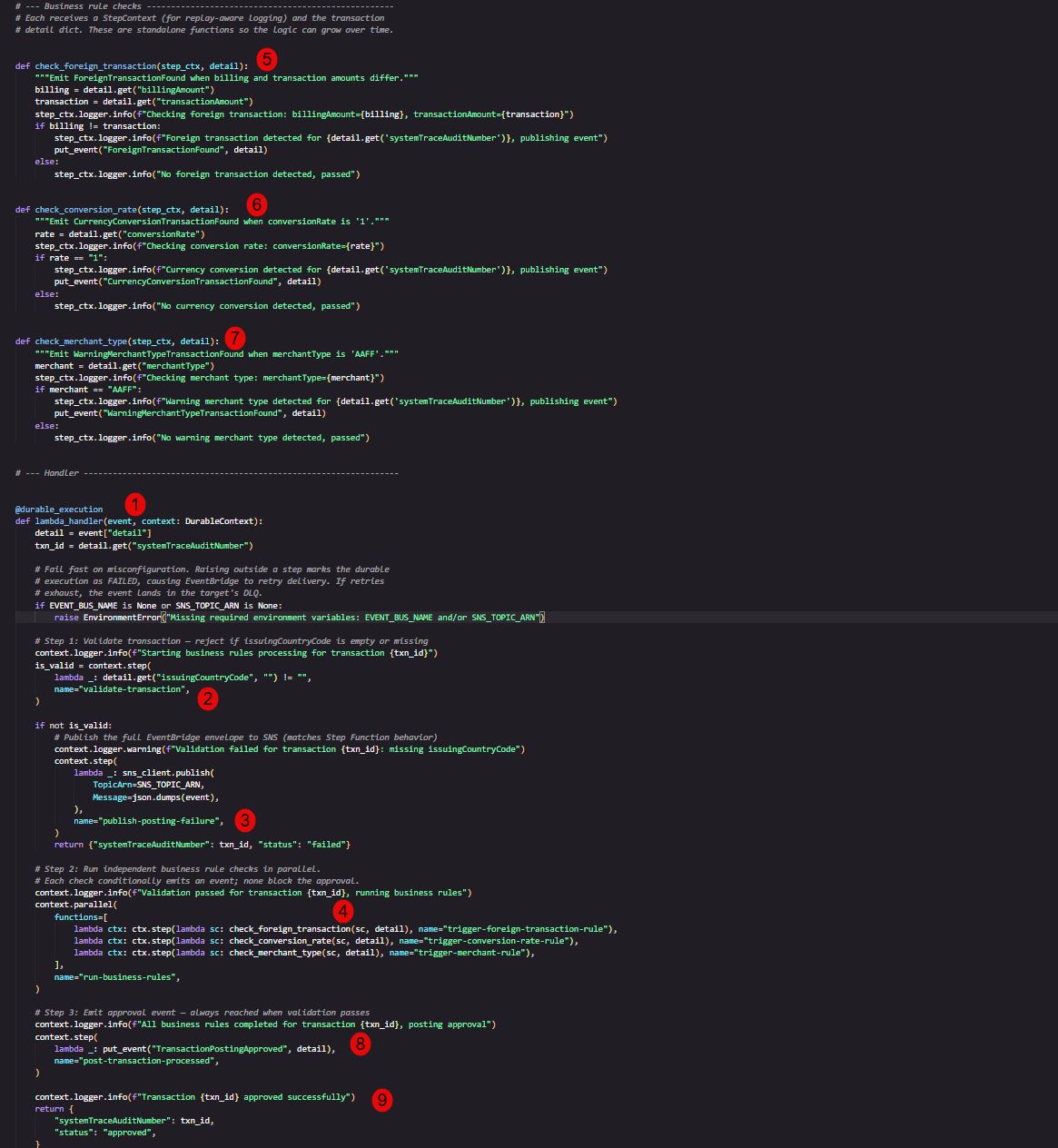
Figure 3: Sample Lambda durable functions code
Step 4: Deploy infrastructure with Terraform
Terraform currently doesn’t support attaching a customer managed key directly to the durable function. You create the symmetric key in Terraform and then associate the key with the durable function on the AWS Management Console. Refer to source/durable_kms.tf for the key configuration.
Initialize and deploy the AWS resources that make up the solution:
Review the plan output, then apply:
Note: Replace us-east-2 with your preferred AWS Region.
On successful completion, Terraform outputs the AWS KMS key alias, key ARN, and DynamoDB Streams ARN used by the event-driven pipeline:
Step 5: Verify Lambda durable functions configuration
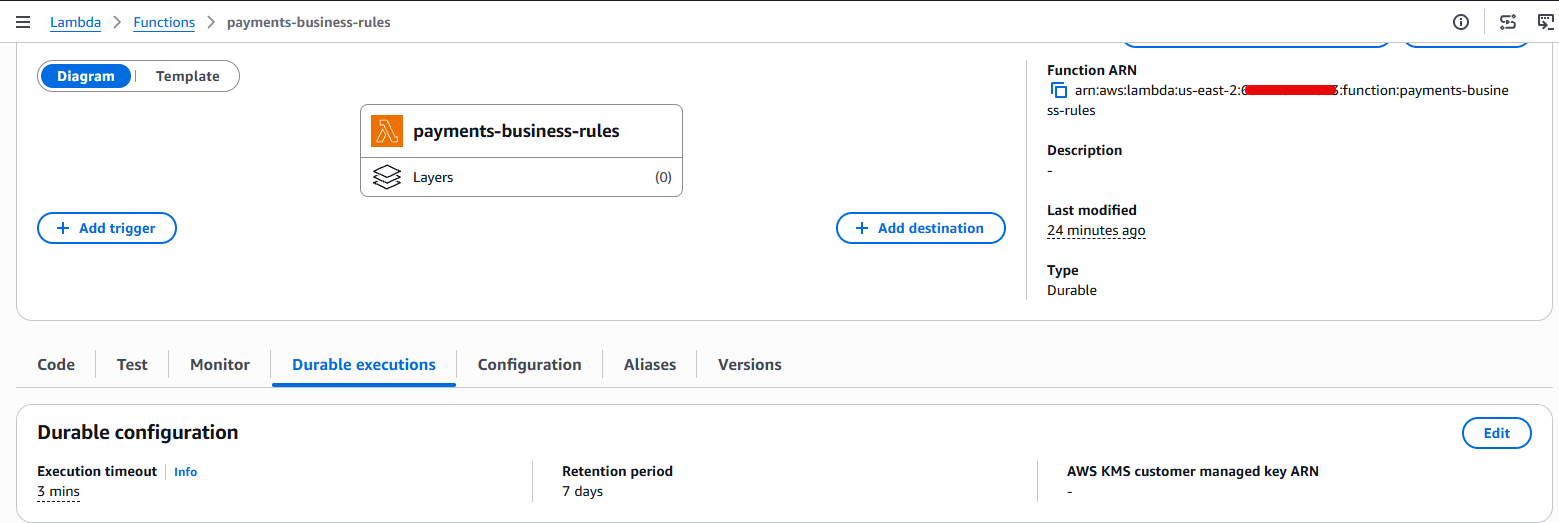
In the AWS Lambda console, navigate to the payments-business-rules function. Confirm that the function Type displays Durable, which indicates that the checkpoint-and-replay mechanism is active. Figure 4 shows the expected function configuration.
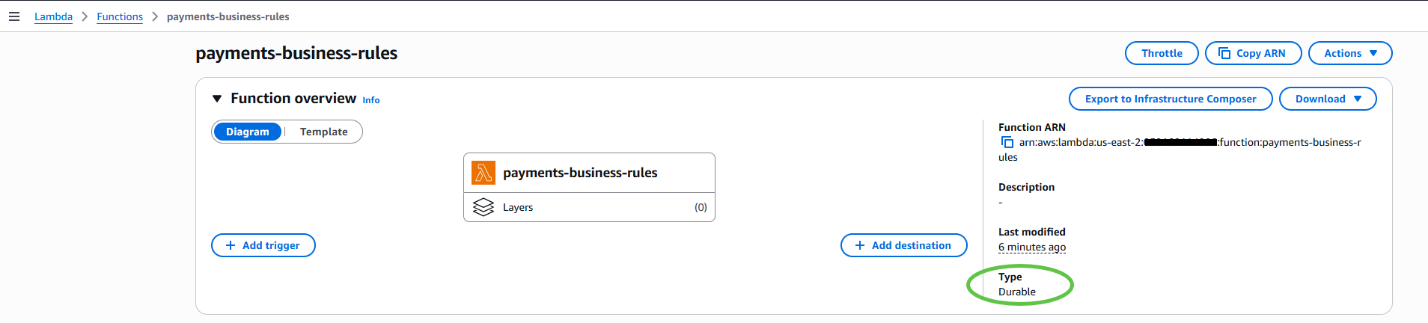
Figure 4: The Lambda durable function in the AWS Lambda console
Step 6: Add the AWS KMS key to the Lambda durable function
- The durable function is not encrypted with a customer managed key. Figure 5 shows the function’s encryption configuration as empty.

Figure 5: The Lambda durable function missing a customer managed key in the AWS Lambda console
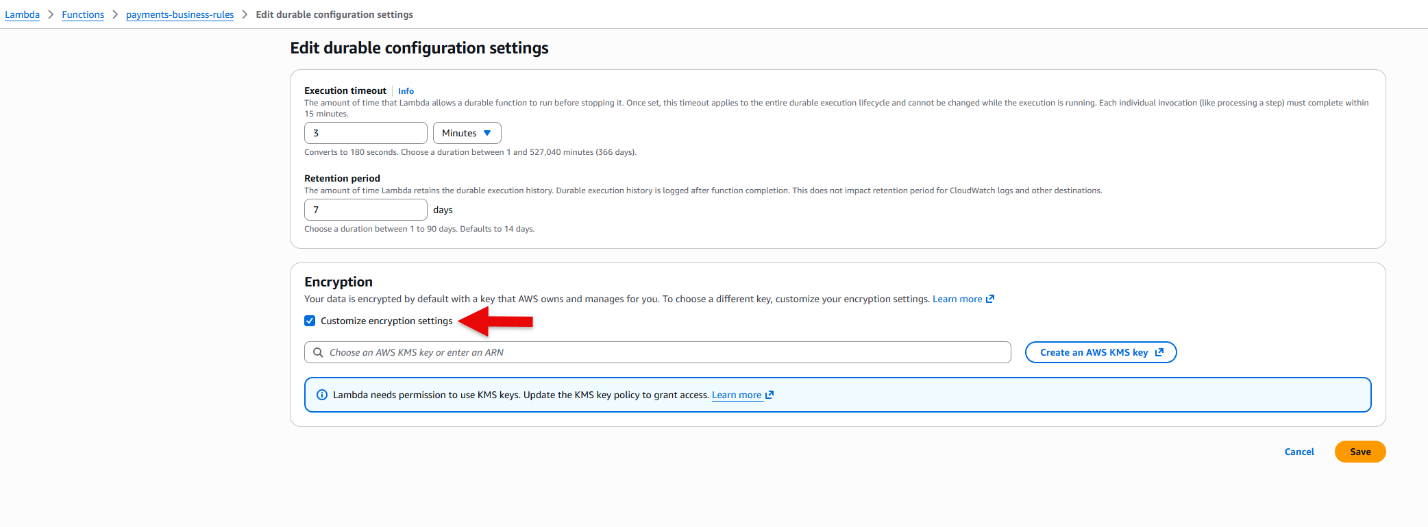
- Choose Edit, then turn on Customize encryption settings as shown in Figure 6.
Figure 6: The Lambda durable function check encryption in the AWS Lambda console
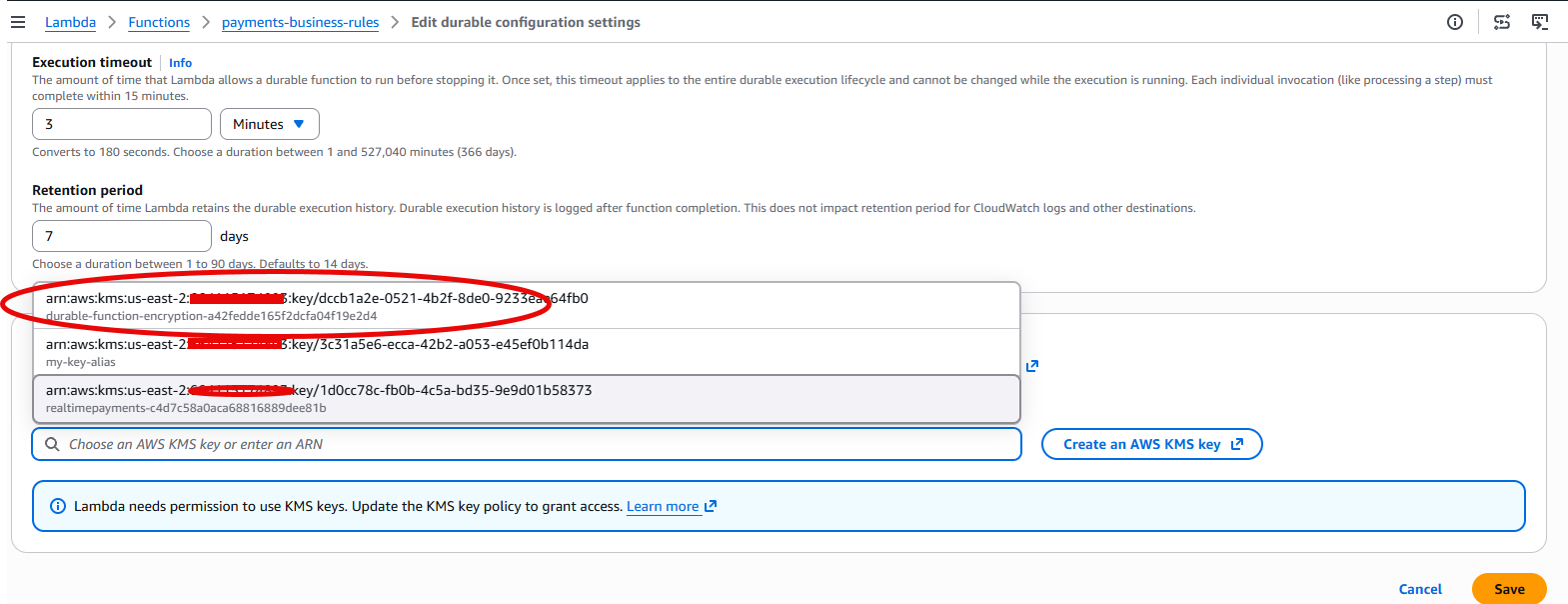
- Select the AWS KMS key ARN created for the durable function. The key ARN is available in the Terraform output from Step 4. Figure 7 shows the key selection.
Figure 7: Select the AWS KMS key ARN for the durable function in the AWS Lambda console
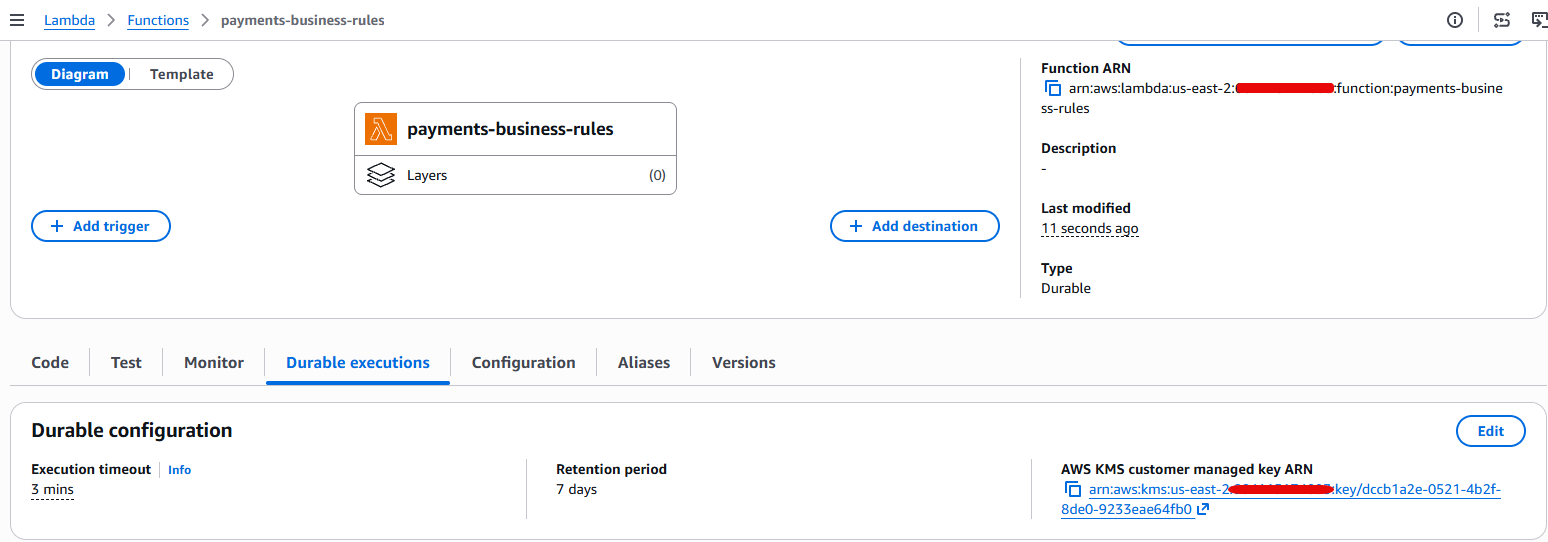
- Choose Save and confirm that the durable function is now encrypted with a customer managed key, as shown in Figure 8.
Figure 8: AWS Lambda durable function with the customer managed key in the AWS Lambda console
Step 7: Execute a test payment
Invoke the payments-visa-mock Lambda function to simulate an end-to-end authorization flow. The mock function reads sample Visa authorization messages from a CSV file and writes them to DynamoDB, which triggers the event-driven pipeline. Figure 9 shows a sample test invocation.
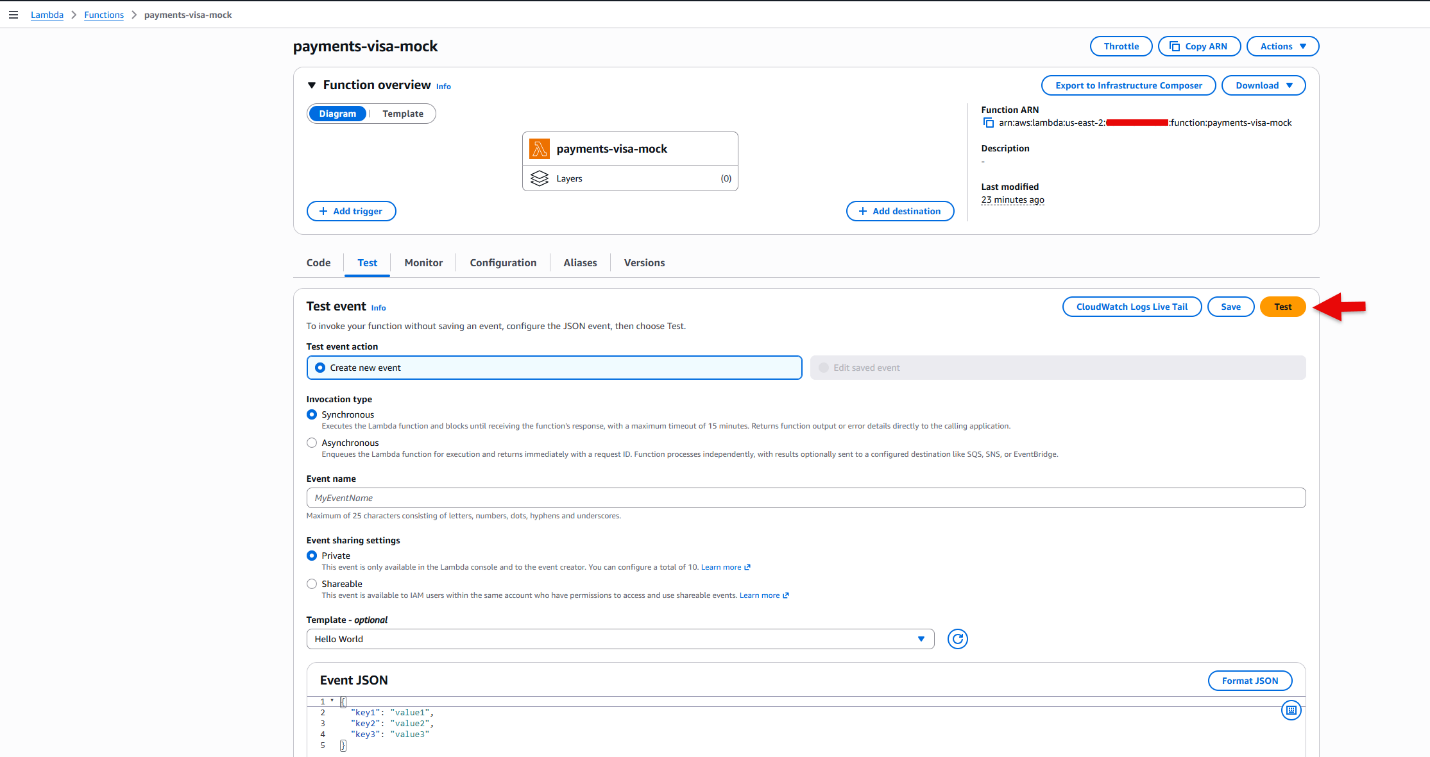
Figure 9: Invoke the payments-visa-mock function to trigger workflow
Figure 10 shows a sample response after invocation.
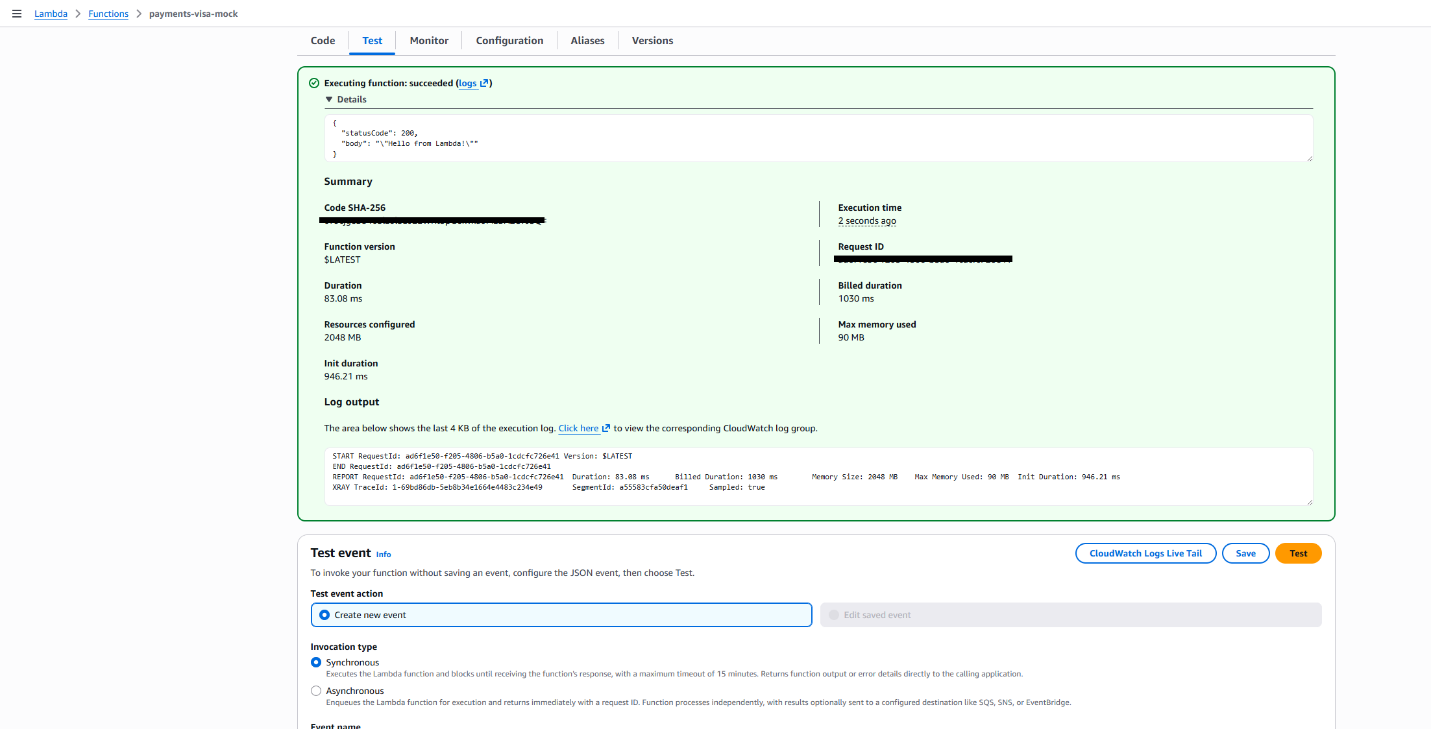
Figure 10: Test results from the payments-visa-mock function to trigger workflow
The mock Lambda invocation creates records that follow the process described in the preceding architecture steps.
Step 8: Verify results
Open Amazon CloudWatch Logs and inspect the log group /aws/lambda/payments-business_rules. This log group belongs to the Lambda durable function for this use case. Figure 11 shows the CloudWatch log group on the console.
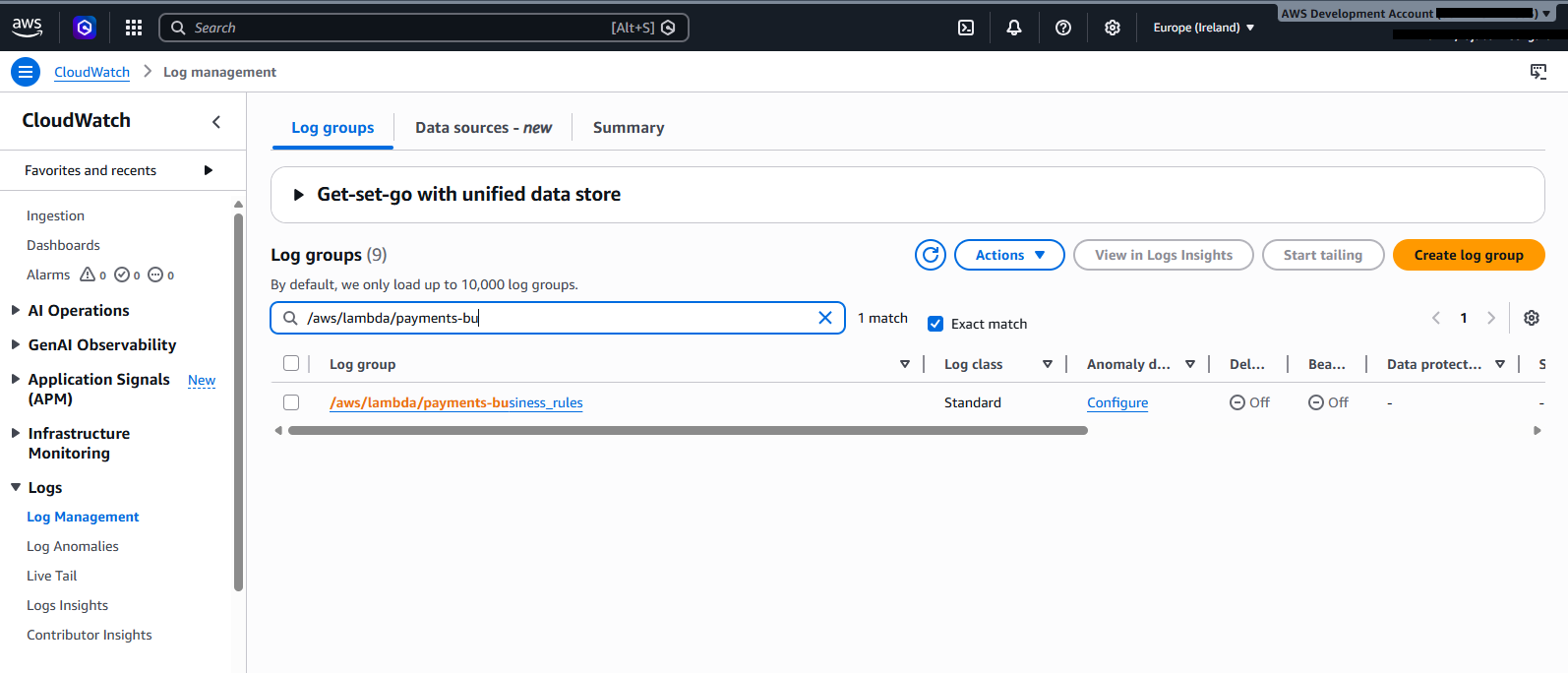
Figure 11: Search in CloudWatch
You see the complete business rules lifecycle for each transaction, as shown in Figure 12. The highlighted sections show all the business rules performed by the durable function. Each step is checkpointed by the runtime and encrypted by the customer managed key.
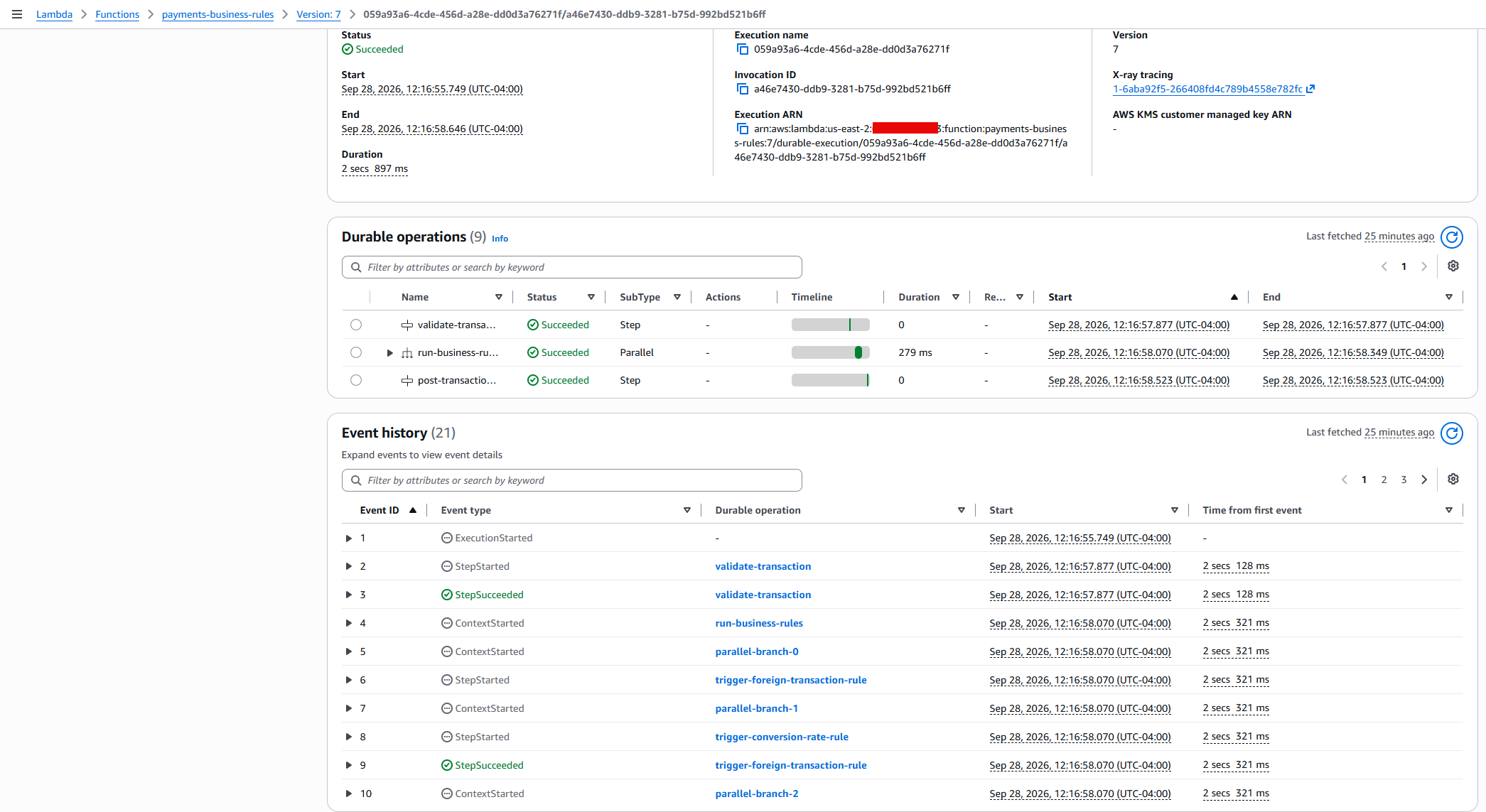
Figure 12: Search Results in lambda durable functions console
You can also check the other log groups to trace the full pipeline:
/aws/lambda/payments-enrich: Transaction enrichment logs./aws/lambda/payments-posting: Settlement posting logs.
Step 9: Verify the customer managed key configuration
You can verify the key configuration by using the AWS CLI:
Expected response:
You can search in AWS CloudTrail to track the AWS KMS calls. When you configure or update the customer managed key on a durable function, Lambda validates the key policy with dry-run GenerateDataKey and Decrypt calls. These appear in CloudTrail with a DryRunOperationException error code, which confirms that the key policy permissions are correct and does not indicate an actual error. For more details, see Encrypting AWS Lambda durable execution data.
Clean up
To avoid ongoing charges, destroy all deployed resources using the following command:
Expected output:
Conclusion
In this post, you configured a customer managed key to encrypt durable execution data in a Lambda durable function. With a customer managed key, you control the key rotation schedule, restrict decryption access through the key policy, and generate per-function audit trails in AWS CloudTrail. You can revoke access to durable execution data at any time by updating the key policy, giving you full control over who can read execution state. In-flight executions stop at the next checkpoint call and new executions must be started after restoring access. For details, see When the customer managed key is unavailable.
For payment processors and financial institutions, encrypting durable execution data with a customer managed key satisfies compliance obligations for data-at-rest encryption, key governance, and access auditability across multi-step transaction workflows.
To get started, clone the sample repository and follow the preceding walkthrough. To learn more about Lambda durable functions, see the AWS Lambda Developer Guide.
Related resources
- AWS Lambda durable functions encryption documentation
- AWS Lambda durable functions Developer Guide
- Amazon EventBridge Documentation
- AWS Step Functions Comparison Guide
- Amazon DynamoDB Streams Documentation
- AWS Guidance for Payment Systems using Event-Driven Architecture
- AWS Serverless Workshops – Search for Lambda and serverless services workshops.
Where We Expect AMD EPYC 9006 CPUs in the era of Agentic AI
Post Syndicated from Patrick Kennedy original https://www.servethehome.com/where-we-expect-amd-epyc-9006-cpus-in-the-era-of-agentic-ai/
We go into the AMD EPYC 9006 series and how the line-up aligns to the demand seens in the era of agentic AI
The post Where We Expect AMD EPYC 9006 CPUs in the era of Agentic AI appeared first on ServeTheHome.
Building an LLM-powered DAG failure analysis plugin for Amazon MWAA
Post Syndicated from Sushant Samantaray original https://aws.amazon.com/blogs/big-data/building-an-llm-powered-dag-failure-analysis-plugin-for-amazon-mwaa/
Apache Airflow has become the orchestration backbone for data pipelines across industries. But as those pipelines grow to hundreds of directed acyclic graphs (DAGs) spanning services like AWS Glue, Amazon EMR, Amazon Athena, and Amazon Redshift, debugging a single task failure turns into a significant operational challenge. When a task fails, data engineers sift through logs, cross-reference DAG configurations, and analyze error messages to find the root cause, delaying pipeline service level agreements (SLAs) and impacting team productivity.
In this post, we show you how to build a custom Apache Airflow plugin that integrates with Amazon Bedrock to automatically analyze DAG task failures and provide actionable diagnostic insights. The plugin deploys to Amazon Managed Workflows for Apache Airflow (Amazon MWAA) and provides AI-powered root cause analysis on demand.
The complete source code for this solution is available in the sample-aws-mwaa-llm-powered-plugin GitHub repository. Clone the repository and follow along as we explain the design decisions throughout this post.
Solution overview
Apache Airflow is a widely adopted open source platform for programmatically authoring, scheduling, and monitoring complex data pipelines. Teams use Airflow to orchestrate extract, transform, and load (ETL) processes, machine learning workflows, and data lake management across industries.
Amazon MWAA is a managed service that makes it straightforward to run Apache Airflow on AWS without the operational burden of managing the underlying infrastructure. With Amazon MWAA, you can focus on authoring workflows and business logic while AWS handles provisioning, patching, scaling, and securing your Airflow environments.
The solution uses the following AWS services:
- Amazon Managed Workflows for Apache Airflow (Amazon MWAA) – Hosts the Airflow environment and plugin.
- Amazon Bedrock – Provides foundation model (FM) inference (Anthropic Claude) for failure analysis.
- Amazon Simple Storage Service (Amazon S3) – Stores plugin artifacts, DAG files, and operator scripts.
The plugin adds an analysis view directly into your Airflow UI. At a high level, when a task fails and you trigger an analysis, the plugin automatically does the following:
- Retrieves the failed task instance metadata from the Airflow metadata database.
- Collects comprehensive context including task logs, DAG source code, and operator-specific scripts.
- Sends the enriched context to Amazon Bedrock for analysis.
- Returns a structured diagnostic report with root cause identification, step-by-step resolution, and prevention recommendations.
How it works
The preceding four steps happen behind a single Analyze Task action. The following diagram and pipeline show the high-level architecture and how the plugin carries them out.
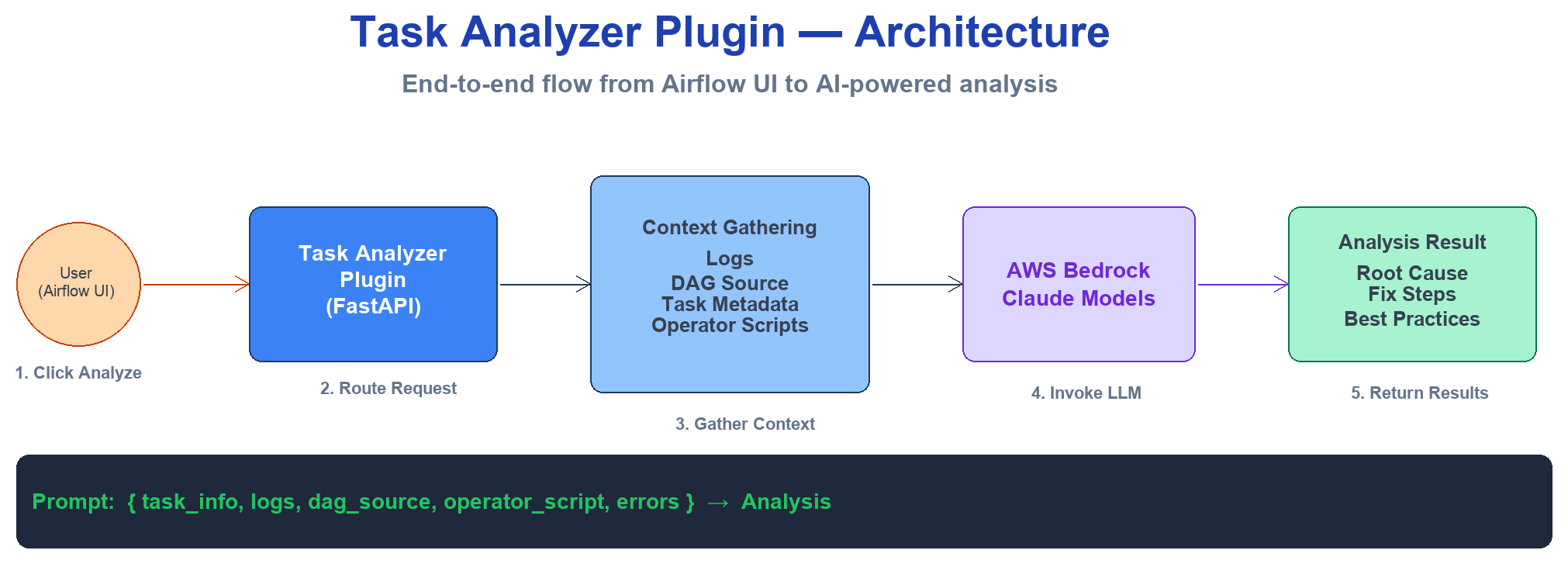
Figure 1: High-level architecture of the LLM-powered task analyzer plugin on Amazon MWAA
The plugin follows a multi-step analysis pipeline:
- User triggers analysis – From the Airflow UI, you select a failed task and choose Analyze Task.
- Context collection – The plugin retrieves task metadata, execution logs, and DAG source code from the Airflow metadata database and Amazon S3.
- Operator-aware enrichment – Based on the operator type, the plugin fetches the actual code or query that failed (for example, a PySpark script from AWS Glue or a SQL query from Amazon Athena).
- Foundation model analysis – The enriched context is sent to Amazon Bedrock, which returns a structured diagnostic report.
- Results presentation – The analysis displays in the Airflow UI with actionable recommendations.
All AWS API calls (Amazon Bedrock, Amazon S3, and AWS Glue) are authenticated through the aws_default Airflow connection. By default on Amazon MWAA, this connection has no static credentials, so boto3 falls back to the environment’s execution role. This means there are no keys to manage or rotate. If you need to call Amazon Bedrock or fetch scripts using a different identity, you can supply those credentials in the aws_default connection. This can be a dedicated IAM role or a cross-account principal, used instead of the execution role.
Operator-aware context collection
A key differentiator of this solution is its ability to understand different Airflow operator types and automatically fetch the associated code or queries. Unlike generic log analyzers, the plugin retrieves the actual code that failed, not just the error message.
The following table summarizes what the plugin fetches for each operator type:
| Operator type | What the plugin fetches | Source |
| GlueJobOperator | PySpark or Python script | Amazon S3 (from the AWS Glue job definition) |
| EmrAddStepsOperator | Spark or Python script | Amazon S3 (from step arguments) |
| EmrServerlessStartJobOperator | Spark script | Amazon S3 (from job driver) |
| AthenaOperator | SQL query | Inline (from operator parameters) |
| RedshiftDataOperator | SQL query | Inline (from operator parameters) |
| BashOperator | Bash command | Inline (from operator parameters) |
| PythonOperator | Python function | DAG source code |
This approach means the foundation model can analyze the actual logic that failed, correlating error messages with specific lines in your code for precise root cause identification.
Prerequisites
Before you begin, make sure that you have the following:
- An Amazon MWAA environment running Apache Airflow 3.x (this walkthrough uses Airflow 3.2). The plugin registers its UI through the FastAPI-based plugin interface (
fastapi_apps) introduced in Airflow 3.x. For setup instructions, see Get started with Amazon MWAA. - Access to Amazon Bedrock with the Anthropic Claude model family enabled in your AWS Region. This walkthrough uses Anthropic Claude, but you can adapt the plugin to work with Amazon Nova or other foundation models by modifying the prompt payload format in
prompts.py. See Model access. - An AWS Identity and Access Management (IAM) execution role for Amazon MWAA with
bedrock:InvokeModelands3:GetObjectpermissions. - An Amazon S3 bucket backing your Amazon MWAA environment with bucket versioning enabled. See Create an Amazon S3 bucket for Amazon MWAA.
- Python 3.10 or later installed locally.
- The AWS Command Line Interface (AWS CLI) configured with appropriate permissions.
Note: In most Regions, you invoke Claude through an inference profile ID (for example, us.anthropic.claude-sonnet-4-5-20250929-v1:0) rather than a bare on-demand model ID. Run aws bedrock list-inference-profiles to confirm a model is ACTIVE before configuring it.
Plugin design
In this section, we explain the plugin design and its key components. The next section walks through deploying it to your Amazon MWAA environment.
Plugin structure
The plugin follows the standard Apache Airflow plugin architecture. The repository is organized as follows:
The repository also includes example DAGs that simulate various failure scenarios across different operator types.
Plugin registration
In Apache Airflow 3.x, the web component of a plugin is registered as a FastAPI application through the fastapi_apps attribute. In task_analyzer_plugin.py, the TaskAnalyzerPlugin class registers the FastAPI app under /task-analyzer and adds a view to the task instance page:
Airflow automatically discovers any AirflowPlugin subclass in the plugins folder. No registration call or configuration change is needed. On Amazon MWAA, the file is delivered inside plugins.zip and extracted to /usr/local/airflow/plugins/.
Analysis engine
The analysis engine is the POST /api/analyze-task endpoint in task_analyzer_plugin.py. When you trigger an analysis, the endpoint performs the following steps:
- Retrieves AWS credentials from the
aws_defaultAirflow connection. To override, edit theaws_defaultconnection in the Airflow UI (Admin > Connections). - Assembles a context dictionary from the request (task metadata, logs, DAG source).
- Enriches the context with an operator-specific script through
fetch_and_add_operator_script. - Builds the prompt using the template in prompts.py.
- Invokes Amazon Bedrock and returns the structured analysis.
Operator script fetching
The process_operator_script function in script_utils.py routes script retrieval based on operator type:
- External scripts (AWS Glue, Amazon EMR) – The plugin calls the AWS Glue API to look up the job definition, then reads the PySpark script from Amazon S3. Amazon EMR handlers follow the same pattern, extracting the script path from the step configuration or job driver.
- Inline scripts (Amazon Athena, Amazon Redshift, BashOperator, PythonOperator, DBTOperator) – The plugin reads the query or command directly from the task’s rendered template fields with no external API call.
The plugin implements smart fetching: for external scripts, it only makes the Amazon S3 API call when the error message contains code-relevant patterns (such as SyntaxError, TypeError, or data type mismatch). Infrastructure errors like timeouts skip the script fetch entirely, minimizing unnecessary API calls.
Prompt engineering
The prompt template in prompts.py provides the foundation model with:
- Task metadata (DAG ID, task ID, run ID, state).
- Error message and execution logs.
- DAG source code.
- Operator-specific script (when available).
The model produces a structured diagnostic report with root cause identification, step-by-step resolution, and prevention recommendations. Model IDs are configurable through Airflow Variables, so you can switch between Claude Sonnet and Claude Opus without redeploying the plugin.
Security measures
Before sending content to Amazon Bedrock, the plugin applies the following safeguards:
- Credential redaction – The
sanitize_scriptfunction removes sensitive patterns (passwords, tokens, access keys) from scripts and logs. - Content truncation – The
truncate_scriptfunction caps content size to stay within model context windows. - Path traversal prevention – The
read_allowlisted_filefunction resolves canonical paths and verifies they reside within allowed base directories before reading any file.
For the full implementation, see script_utils.py.
Optional: PII detection and redaction. The built-in sanitize_script function targets credential patterns. If your logs or scripts might contain personally identifiable information (PII), consider adding a detection pass with Amazon Comprehend before invoking Amazon Bedrock. The DetectPiiEntities API returns the entity types (such as names, email addresses, or account numbers) and their character offsets. You can use these offsets to mask or obfuscate the spans before the context leaves your environment. This adds one API call and cost per analysis, so add it where your compliance requirements call for it. For guidance, see Detecting PII entities.
Deploy the plugin
Follow these steps to deploy the plugin to your Amazon MWAA environment.
Step 1: Clone the repository
Step 2: Package and upload to Amazon S3
Create the plugins.zip archive from the plugins/ directory and upload it to your Amazon MWAA S3 bucket:
Note the VersionId returned. You need it in the next step.
Note: This plugin requires only fastapi and Boto3, both pre-installed on Amazon MWAA for Airflow 3.x. You don’t need a requirements.txt file. Skipping the requirements file avoids package resolution conflicts that are a common cause of failed Amazon MWAA environment updates.
Step 3: Update the Amazon MWAA environment
Update your environment to use the new plugin archive:
The environment restarts automatically. This process typically takes 10–30 minutes. Monitor the status with:
Step 4: Configure the Amazon Bedrock connection
On Amazon MWAA, the aws_default connection exists by default and resolves to your environment’s execution role. In most cases, no action is needed.
To override the Region, edit the aws_default connection in the Airflow UI (Admin > Connections) and set the Extra field to:
Leave login and password empty so the execution role is used.
Step 5: Verify the deployment
After the environment finishes updating, navigate to Admin > Plugins in the Airflow UI. Verify that task_analyzer_plugin appears in the list. The Analyze Task entry is now available from any task instance view.
Test the solution
The repository includes example DAGs that simulate failure scenarios across different operator types. To validate the deployment:
- Copy the dags/ directory contents to your Amazon MWAA S3 bucket’s DAGs folder:
- Wait for Amazon MWAA to sync the DAGs (typically 1–2 minutes).
- In the Airflow UI, trigger one of the test DAGs (for example,
test_aws_sql_operators) and let the intentional failure occur. - Navigate to the failed task instance.
- Choose Analyze Task in the task instance view.
- Review the generated analysis, which includes:
- Root cause identification with file and line references.
- Step-by-step resolution with code examples.
- Prevention recommendations and monitoring suggestions.
The analysis typically completes within 5–10 seconds.
Cost considerations
The primary cost driver for this solution is Amazon Bedrock inference, which is billed by the number of input and output tokens each analysis consumes. Input tokens come from the task logs, DAG source, and operator script sent to the model. Output tokens come from the diagnostic report the model returns. Larger logs and scripts increase input tokens, and the model you select affects the per-token rate. For current per-model rates, see Amazon Bedrock pricing.
To help control cost, the plugin includes a caching mechanism that stores results keyed by a hash of the error context. Repeated analyses of the same failure pattern return cached results without invoking Amazon Bedrock again.
Best practices
When you deploy this solution in production, consider the following:
- IAM least privilege – Grant only
bedrock:InvokeModelfor your chosen model IDs and scopes3:GetObjectto specific bucket paths where your operator scripts reside. For guidance, see Amazon MWAA execution role. - Data sanitization – The plugin redacts credentials and truncates content before sending data to Amazon Bedrock. Store configuration values in AWS Secrets Manager rather than hardcoding them in DAG source files.
- Access control – The plugin’s endpoints are protected by Airflow’s built-in authentication. For DAG-level access management at scale, see Automated tag-based DAG permission management in Amazon MWAA.
- Operational resilience – Add retry logic and circuit breaker patterns around the Amazon Bedrock API call. Use Amazon CloudWatch to monitor plugin performance and set alarms on failure rates.
Extending the solution
You can extend this solution in the following ways:
- Proactive notifications – Integrate with Amazon Simple Notification Service (Amazon SNS) or Slack to deliver analyses automatically when failures occur.
- Knowledge base integration – Build a knowledge base of past analyses using Amazon Bedrock Knowledge Bases for Retrieval Augmented Generation (RAG) powered recommendations that learn from your organization’s historical failures.
- Additional operator support – Add handlers for custom operators specific to your organization, such as proprietary data connectors or internal platform integrations.
- Automated remediation – For well-understood failure patterns, trigger automated fixes such as restarting tasks with adjusted resource configurations.
Clean up
To remove the plugin from your environment:
- Delete the plugin archive from Amazon S3:
- Update your Amazon MWAA environment to remove the plugin reference, then wait for the environment to restart.
- Optionally, remove the Amazon Bedrock permissions from your execution role if they are no longer needed.
Conclusion
In this post, we showed you how to deploy an LLM-powered DAG failure analysis plugin for Amazon MWAA using Amazon Bedrock. The operator-aware context collection differentiates this approach from generic log analyzers. By fetching the actual code from AWS Glue, Amazon EMR, and other services, the foundation model provides precise, actionable recommendations with specific line references.
To get started, clone the sample-aws-mwaa-llm-powered-plugin repository, deploy it to a development Amazon MWAA environment, and test with the included example DAGs. As your team builds confidence in the analysis quality, roll it out to production environments where it serves as the first line of investigation for any pipeline failure.
About the authors
Simplify AMI discovery with Amazon EC2 and SSM Parameter Store
Post Syndicated from Ashwani Tyagi original https://aws.amazon.com/blogs/compute/simplify-ami-discovery-with-amazon-ec2-and-ssm-parameter-store/
If you manage Amazon Elastic Compute Cloud (Amazon EC2) infrastructure at scale, you have likely encountered the following situation. You release an infrastructure change with the correct Region, the correct instance type, and a launch template that has operated reliably for months. The deployment nevertheless comes up on an Amazon Machine Image (AMI) that is several patch cycles out of date, because the AMI ID hardcoded in the template had become stale weeks earlier. The condition goes unnoticed until a security scan flags the instance, at which point you must reconcile AMI IDs across Regions rather than close out the week.
That scenario is rarely a one-time event. It is one example of a broader pattern that quietly taxes teams running Amazon EC2 at scale: stale AMI IDs, manual parameter lookups, inconsistent Region mappings, and pipelines that silently fail to update. The following section examines four variations of this pattern in detail.
The common thread across all of these is the same. Locating the correct image is not the hard part. The difficulty lies in wiring that image into your infrastructure as code (IaC) in a manner that remains current. You identify the appropriate AMI on the console, then search AWS Systems Manager (SSM) Parameter Store paths to obtain the dynamic reference that maps to it. The workflow spans two tools and two mental models, with a gap in between where errors accumulate. Because the authoritative link between an AMI and its SSM parameter lived outside the API, teams had to reconstruct it by hand, and hands make mistakes.
A recent enhancement to the Amazon EC2 DescribeImages API closes that gap. When you call DescribeImages on a public AMI, the response now contains a PublicSsmParameterName field: the SSM parameter that resolves to the latest AMI in that lineage. A single API call replaces manual correlation.
In this post, we examine the operational friction that makes AMI management harder than it should be and show how this enhancement addresses it. We walk through practical examples using the AWS Command Line Interface (AWS CLI), AWS CloudFormation, Terraform, and Amazon EC2 Auto Scaling launch templates. We conclude with best practices for golden AMI pipelines, including operational considerations to review before adopting the feature in production.
Prerequisites
To follow the examples in this post, you will need the following:
- An AWS account.
- The AWS CLI v2 installed and configured with appropriate permissions (ec2:DescribeImages, ssm:GetParameters).
- Basic familiarity with AMIs, SSM Parameter Store, and at least one IaC tool (CloudFormation or Terraform).
Understanding the operational challenges
Before addressing the solution, it is worth examining the problem in detail, because the problem seldom manifests as a single, dramatic failure. It is instead a gradual accumulation of minor frictions that, in aggregate, impose a measurable cost on teams responsible for compute.
AMI IDs are Region-specific, version-specific, and change frequently. The workflow of finding an AMI, locating its SSM parameter, and referencing it in templates spans multiple tools, and the boundaries between steps are where errors accumulate.
Challenge 1: Silent image aging
Scenario: An engineer copies an AMI ID into a Terraform module as an interim measure. Several months later, that identifier is embedded across four environments. New instances launch on an image that predates numerous patches. There is no error and no alert, only drift that remains invisible until an audit or a review brings it to light.
Impact: Hardcoded AMI IDs do not fail conspicuously. They fail quietly, by launching a prior image at a later date. The distance between “this was correct when written” and “this remains correct” widens continuously, and no owner is assigned to monitor it.
Challenge 2: The multi-region maintenance burden
Scenario: An application operates across three Regions. The same logical image (for example, the latest Amazon Linux 2023) carries a different AMI ID in each Region. Templates therefore accrue region-to-AMI mapping blocks, lookup logic, or both. Each additional Region introduces another entry to maintain, and each AMI refresh requires updating all of them.
Impact: The team ends up maintaining a translation table that AWS already maintains on its behalf. The mapping logic becomes load-bearing infrastructure in its own right, and a single stale entry in one Region produces inconsistent fleets that are difficult to diagnose.
Challenge 3: Barriers to onboarding
Scenario: A new engineer joins the team and poses a reasonable question: which SSM parameter corresponds to a given AMI? The answer resides in an internal knowledge-base page that was accurate eighteen months earlier. The engineer copies a path that appears correct, deploys, and inadvertently references the wrong lineage.
Impact: When the relationship between an AMI and its parameter is not discoverable from the API, it must be documented manually. Manually maintained mappings degrade over time. Each new team member re-learns the same institutional knowledge, and each instance of degradation introduces an opportunity to reference an incorrect value.
Challenge 4: Uncertainty about update success
Scenario: A golden AMI pipeline completes a build and updates a parameter. The command returns a success response, and the team assumes the new image is in effect. However, for certain parameter data types, a success response does not always indicate that the value was accepted. This specific behavior is examined in the best-practices section, as it is particularly relevant to golden AMI pipelines.
Impact: Confidence without confirmation carries substantial risk. A pipeline that presumes success can propagate a stale image across a fleet before the discrepancy is identified.
Considered individually, none of these situations constitutes a crisis. Considered collectively, they explain why “launch the latest image” is never, in fact, a single step. The common root cause is consistent across all four: the authoritative link between an AMI and its SSM parameter existed outside the API, requiring teams to reconstruct it manually, a process inherently prone to error.
What’s new: DescribeImages returns the associated SSM parameter
The new feature addresses precisely this boundary.
As of July 16, 2026, the Amazon EC2 DescribeImages API response includes a new field, PublicSsmParameterName, for public AMIs that have an associated SSM parameter. This capability is available at no additional cost in supported AWS Regions, including AWS GovCloud (US) Regions and the China Regions.
In place of the previous three-step correlation exercise, the workflow reduces to a single call:
| Before | After |
| Find AMI → manually search SSM paths → confirm the correct match | Find AMI → PublicSsmParameterName returns the SSM path immediately |
| Two separate API calls or console workflows | A single DescribeImages call provides the complete mapping |
| Prone to mapping an incorrect parameter to an AMI | Authoritative mapping obtained directly from the API |
The change introduces neither a new service nor a new pricing dimension. It relocates information that previously lived in knowledge bases into the API response.
In addition, you can now use the public-ssm-parameter-name filter in DescribeImages to identify all AMIs associated with a specific SSM parameter, making the relationship queryable in either direction.
How it works: API response walkthrough
Call DescribeImages on a public AMI with an associated SSM parameter. The response includes PublicSsmParameterName:
The PublicSsmParameterName value (in this case, aws/service/ami-amazon-linux-latest/al2023-ami-kernel-default-arm64) identifies the SSM parameter associated with this AMI lineage.
Tip: The field is returned under the aws/service/ namespace without a leading slash. When using this value in SSM API calls, resolve:ssm: references, or CloudFormation dynamic references, prepend a forward slash. For example, use
/aws/service/ami-amazon-linux-latest/al2023-ami-kernel-default-arm64. The SSM parameter is intended to resolve to the latest AMI in the lineage, which can help you keep infrastructure current.Note: Not every public AMI has an associated parameter. The field is present only for lineages for which AWS publishes parameters. The field is also populated only for public AMIs. If you query one of your own private AMIs and observe an empty field, this is expected behavior rather than a defect.
Practical examples
The following four examples show how to use the new PublicSsmParameterName field across common IaC tools.
Example 1: Discover the SSM parameter for an AMI using the AWS CLI
Suppose you have identified an AMI on the console and wish to determine its SSM parameter path for use in your templates:
Output:
You can also perform the inverse operation and determine which AMI a given SSM parameter currently references:
Tip: Public SSM parameters are available for both Linux (/aws/service/ami-amazon-linux-latest) and Windows (/aws/service/ami-windows-latest) AMIs. You can list all available parameters under these paths using aws ssm get-parameters-by-path –path .
Alternatively, you can use the new filter to identify AMIs by their SSM parameter name:
Note: The public-ssm-parameter-name filter returns all AMIs that have ever been associated with the specified parameter, including previous versions. Use sorting or additional filters (such as –query with CreationDate) to identify the most recent AMI.
Example 2: CloudFormation with dynamic SSM references
Once the SSM parameter path is known from DescribeImages, you can use CloudFormation dynamic references to resolve to the latest AMI at deployment time:
Alternatively, you can use the AWS::SSM::Parameter::Value parameter type to permit users to override the SSM path at stack creation time:
CloudFormation resolves the AMI ID at deployment time, so the template never contains a hardcoded AMI ID, and any stack update adopts the latest AMI automatically. Two considerations warrant attention before relying on this approach. First, running instances are not affected. A stack update is required to roll out a newer AMI. Second, CloudFormation does not support drift detection on dynamic references, so if the underlying SSM parameter value changes between deployments, CloudFormation will not report it as drift. For ssm dynamic references in which a version has not been pinned, AWS recommends performing a stack update whenever the parameter changes, so that the stack retrieves the current value.
Example 3: Terraform with SSM parameter data source
Use the aws_ssm_parameter data source to resolve the SSM path to the latest AMI ID:
Important: In Terraform, ami is a replacement-forcing argument on aws_instance. When the SSM parameter changes, Terraform proposes to destroy and recreate the instance. For stateful workloads, add lifecycle { ignore_changes = [ami] } or use launch templates with Auto Scaling (Example 4) instead.
Example 4: Auto Scaling launch templates with SSM parameters
For Auto Scaling groups, you can reference the SSM parameter directly in the launch template using the resolve:ssm: prefix:
When EC2 Auto Scaling launches a new instance, it resolves the SSM parameter at launch time to obtain the current AMI ID. You can verify the AMI ID to which a launch template resolves:
The response shows the resolved ImageId:
The parameter is stored in the launch template. When the Auto Scaling group scales out or replaces an instance, it uses the launch template to resolve the SSM parameter and determine the AMI to launch. This is the most direct of the four patterns: the parameter serves as the single source of truth, and the Auto Scaling group’s normal instance lifecycle effects the rollout.
Before-and-after workflow comparison
The following table summarizes how this feature improves common workflows, and relates each entry to the challenges described earlier.
| Workflow | Before | After |
| Discover the SSM path for a known AMI | Search SSM parameter namespaces manually. Test multiple paths. Confirm a correct match | A single DescribeImages call returns PublicSsmParameterName |
| Validate that an SSM parameter maps to the expected AMI | Call GetParameter, then call DescribeImages on the returned ID to verify | Use the public-ssm-parameter-name filter to view all associated AMIs directly |
| Set up IaC templates | Find AMI → search for SSM path → copy path to template → verify correctness over time | Find AMI → read PublicSsmParameterName from the response → use directly in the template |
| Onboard new team members | Document AMI-to-parameter mappings in knowledge bases, which become stale | New members self-discover using standard API calls |
| Audit AMI usage across teams | Cross-reference AMI IDs with SSM parameters in separate calls | A single API call provides the complete picture |
Best practices: Using SSM parameters for golden AMI pipelines
The following recommendations describe how to derive the greatest benefit from this feature, with operational considerations identified where they are material.
1. Discontinue hardcoding AMI IDs
With PublicSsmParameterName removing the discovery barrier, switch all templates to SSM parameter references. Use {{resolve:ssm:}} in CloudFormation, the aws_ssm_parameter data source in Terraform (note the replacement behavior in Example 3), or the resolve:ssm: prefix in launch templates.
2. Create custom SSM parameters for your golden AMIs
For internally built golden AMIs, create your own SSM parameters using the aws:ec2:image data type:
When the pipeline produces a new golden AMI, update the parameter:
Stacks, launch templates, or Terraform configurations that reference this parameter can adopt the new AMI on their next deployment, with no template edits required in most cases.
Operational consideration: Because PutParameter validates aws:ec2:image values asynchronously, an HTTP 200 does not confirm the value was accepted. Subscribe to Parameter Store change events in Amazon EventBridge and confirm the operation succeeded before considering the rollout complete.
3. Use parameter versions and labels for controlled rollouts
SSM Parameter Store supports versioning and labels, which provide control over rollouts:
Production launch templates reference the labeled version:
With this approach, you can update the parameter with a new AMI without immediately affecting production. Promotion to production is accomplished by moving the prod label, a deliberate, auditable action rather than an automatic side effect.
4. Combine with Amazon EC2 Image Builder for end-to-end automation
Use Amazon EC2 Image Builder to automate AMI creation, then configure the distribution settings to update your SSM parameter automatically when a new AMI is built. Combined with the new discovery feature, this establishes a closed loop:
- Image Builder creates a new AMI on a schedule.
- Distribution settings update the SSM parameter to point to the new AMI.
- Auto Scaling and IaC resolve the parameter to the latest AMI at launch time.
- With DescribeImages, any authorized party can determine which SSM parameter an AMI maps to.
5. Scope IAM permissions appropriately
Two permission requirements apply.
To launch instances by using SSM-referenced AMIs, the launching principal requires ssm:GetParameters on the relevant parameter paths:
Scope the Resource element to the paths actually in use. If you reference Windows parameters (/aws/service/ami-windows-latest/) or your own golden AMI paths (/my-org/golden-ami/), include those ARNs as well. Otherwise, launches will fail with an AccessDenied error.
To create a custom aws:ec2:image parameter, the pipeline principal also requires ssm:PutParameter and ec2:DescribeImages:
For broader guidance on keeping infrastructure current and automating operational processes, see the Operational Excellence Pillar of the AWS Well-Architected Framework.
Clean up
The examples in this post use read-only API calls (DescribeImages, GetParameter) and do not create billable resources. If you created a launch template while following Example 4, you can delete it as follows:
Conclusion
The difficulty of AMI management was never attributable to any single failure. It arose from the steady accumulation of stale identifiers, region-mapping tables, stale documentation, and pipelines that presumed success, all of which are minor frictions that together produced significant operational effort and risk. The common thread was that the authoritative link between an AMI and its SSM parameter existed outside the API, requiring teams to reconstruct it manually.
The new PublicSsmParameterName field in the Amazon EC2 DescribeImages API relocates that link into the response, where it appropriately belongs. With a single API call, you can determine the SSM parameter for any public AMI. You can then reference it directly in CloudFormation templates, Terraform configurations, or Auto Scaling launch templates for automatic AMI updates.
To begin, call DescribeImages on any public AMI and examine the PublicSsmParameterName field. For further detail, see Reference the latest AMIs using Systems Manager public parameters in the Amazon EC2 User Guide.
For additional learning resources on AMI management and IaC on AWS, explore Amazon EC2, AWS Systems Manager Parameter Store, and Amazon EC2 Image Builder.
Announcing Spark Connect on Amazon EMR on EKS: Interactive PySpark development, anywhere
Post Syndicated from Amit Maindola original https://aws.amazon.com/blogs/big-data/announcing-spark-connect-on-amazon-emr-on-eks/
Today, we’re announcing support for Spark Connect on Amazon EMR on EKS, starting from EMR release 7.14 (Apache Spark 3.5.8) and emr-spark-8.1 (Apache Spark 4.1.1). You can now build, test, and debug Spark applications from your preferred tools, such as VS Code, PyCharm, Jupyter notebooks, Amazon SageMaker Unified Studio. At the same time, your full-scale Spark operations run on Amazon Elastic Kubernetes Service (Amazon EKS).
Deploying Spark applications from a local development environment to a remote Amazon EKS cluster often means dealing with environment differences, dependency conflicts, and performance gaps at scale. Spark Connect removes this friction. It separates your application client from the Spark server, so you develop and debug locally while Spark Connect routes your operations to a scalable Spark cluster running on Amazon EKS.
This client-server architecture supports a range of use cases, including interactive development from notebooks and IDEs, embedded Spark in web services, and continuous integration and continuous delivery (CI/CD) data-quality tests. All of these run on your existing EKS infrastructure. Each Spark Connect session uses its own AWS Identity and Access Management (IAM) execution role, custom tags, and cost tracking. For more information, see the Amazon EMR on EKS documentation.
Here are two demonstrations of using Spark Connect in Amazon SageMaker Unified Studio Notebooks and in a VS Code local IDE:
Amazon SageMaker Unified Studio Notebooks demo:
Local IDE demo:
For a runnable end-to-end example in an IDE, try the Spark Connect sample notebook in the aws-emr-utilities repository. It includes a client wrapper solution, built by AWS architects, for simplified connectivity:
How Spark Connect works on Amazon EMR on EKS
Spark Connect uses a client-server architecture that separates application code from the Spark engine:
- Client – A lightweight PySpark library running in your environment (such as an IDE or notebook). It doesn’t need Spark installed, direct access to data, or resources sized for the workload.
- Connection (EMR managed endpoint) – The client sends Spark operations over a secure gRPC/TLS channel to the Spark Connect server.
- Server – Runs Spark pods in your Amazon EMR on EKS namespace, starting from a minimum of two executors (adjustable) with autoscaling. The server performs Spark operations using the EKS compute resources and accesses data stores, such as an Amazon Simple Storage Service (Amazon S3) bucket, through job execution roles.
- Results – The server streams query results back to the client through gRPC as Apache Arrow-encoded row batches.
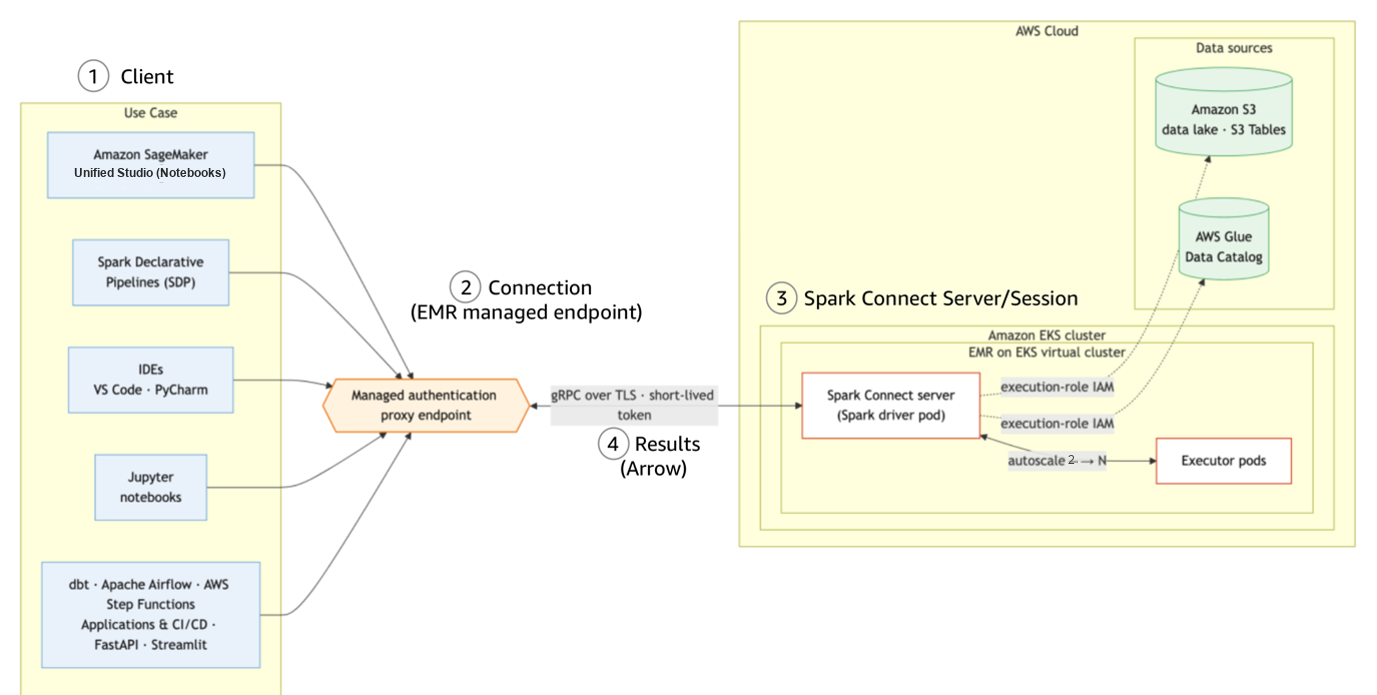
Figure 1: Spark Connect’s client-server architecture
On endpoint creation, Amazon EMR on EKS launches the Spark Connect server as pods on EKS and returns an Elastic Load Balancing (ELB)-backed endpoint and a short-lived token. You don’t need to provision any server or networking manually. Because the Spark Connect server runs on the EKS cluster you already operate, it inherits the node types, container images, and Spark configurations. What you see while developing Spark applications on the client side is what runs in the EKS environment at scale.
To provide a secure, simplified experience, Amazon EMR on EKS provisions two additional components on first use of Spark Connect on the EKS cluster:

Figure 2: Shared Envoy router and Secret Agent service on the EKS cluster
- Managed authentication-proxy router – a shared Envoy router with three replicas by default (adjustable), fronted by a Network Load Balancer (NLB). It routes client traffic to the correct server pods, terminates TLS, and validates the session token. One router serves Spark Connect endpoints on the EKS cluster.
- Secret Agent service – a lightweight, long-running pod that manages the short-lived credentials for session authentication. One service per EMR security configuration.
These components are long-running and shared across endpoints. Amazon EMR on EKS creates them automatically with the first endpoint on the cluster. Because the router is cluster-scoped and Secret Agent is namespace-scoped, deleting a managed endpoint doesn’t remove them. They keep running so that new endpoints can start within a minute. The router’s replica count is tunable. Scale down for non-production environments to reduce cost or scale up for higher throughput.
To fully remove these components:
- Terminate all active managed endpoints and their virtual cluster that reference the Secret Agent’s security configuration, then delete the security configuration.
- Once the last session-enabled virtual cluster is deleted, the authentication-proxy router and its underly resources, including the NLB and VPC endpoint, are removed automatically.
- Alternatively, delete the EKS cluster to remove all in-cluster components at once.
Why use Spark Connect on Amazon EMR on EKS
With Amazon EMR on EKS, teams can run Spark alongside other applications on shared Kubernetes clusters with existing infrastructure, operational tooling, and system expertise. Spark Connect extends that value to interactive, embedded, and self-service Spark workloads. Your client stays lightweight while Spark code runs in governed, scalable server pods on EKS.
Interactive development on shared Kubernetes clusters
Data engineers and scientists iterate on Spark code cell-by-cell in notebooks or local IDEs. The Spark engine runs remotely on EKS, so validation runs on the same engine as your batch workloads. After validation on the Spark Connect client, the same Spark code deploys as a batch StartJobRun with no changes.
Spark Connect sessions run as pods on your existing cluster. They reuse your EKS RBAC, network policies, node autoscaling, and observability stack (Prometheus, Grafana, Amazon CloudWatch Container Insights). There are no separate compute and monitoring layers to operate.
Embedded Spark in applications and services
The Spark Connect client is a compact PySpark library. Teams can embed Spark operations directly into Python applications such as web services, dashboards, automation scripts, or backend APIs. The heavy processing runs on EKS while the application stays lightweight.
Teams can also expose Spark Connect as a self-service capability on their internal application. Business users submit Spark SQL scripts from a web UI. The compute runs on Spark Connect server on EKS, so the team manages capacity, security, and upgrades centrally.
Multi-tenant data exploration with governance
Each Spark Connect session uses the data user’s IAM permissions that you configure, limiting their access to authorized AWS services, data lake tables, and S3 paths. Every session carries tags with user, project, endpoint and virtual cluster IDs, feeding directly into billing and compliance reports. Meanwhile, data producers maintain guardrails on source data without blocking self-service exploration.
To manage resource consumption across teams, Amazon EMR on EKS virtual clusters provide namespace-level isolation. Each tenant binds their Spark Connect endpoints to a virtual cluster (a namespace) with independent IAM roles. Using resource quotas and limit ranges on EKS, you can protect each virtual cluster by controlling the compute resources that Spark Connect sessions can consume. Importantly, activating EKS split-cost allocation tags helps with chargeback reporting in a multi-tenant environment.
Reusable container images and scalable deployment
Teams often maintain custom container images with proprietary libraries, including internal feature stores, compliance toolkits, UDFs, or machine learning (ML) frameworks. With Spark Connect on Amazon EMR on EKS, teams reuse those same images as the Spark runtime for interactive sessions. No separate dependency lists needed. The same image works for both batch jobs and Spark Connect sessions.
Beyond the image itself, you can control Spark pod scheduling in Amazon EMR on EKS through pod templates and managed endpoint APIs, scaling across your environment. For example, you can:
- Pin server pods to specific node types through pod templates. For example, Spot for cost savings.
- Apply Spark Dynamic Resource allocation (DRA) to right-size each interactive session.
- Use GPU node pools for accelerated Spark RAPIDS or ML.
Multi-cluster, multi-Region, and hybrid architectures
Enterprises running EKS clusters across multiple AWS accounts, AWS Regions, or hybrid environments with on-premises Kubernetes can use Spark Connect to query data wherever it’s processed. The lightweight client only needs to reach the Spark Connect endpoint, not the underlying S3 buckets or AWS Glue data catalogs. This means no VPC peering or direct network paths to every data store.
The client-server split is the core architectural advantage of Spark Connect on Amazon EMR on EKS. A developer on a laptop behind a VPN, a CI/CD deployment pipeline in a centralized service account, or an Airflow DAG orchestrating across Regions can all connect to a remote Spark server on EKS. This works regardless of where the client itself runs. This decoupling simplifies cross-Region or cross-account analytics without duplicating data or requiring direct access to each data store.
Getting started
To create a Spark Connect endpoint on Amazon EMR on EKS, complete the following steps:
- Create EMR namespaces on EKS.
- Create an EMR security configuration.
- Create a virtual cluster with the security configuration.
- Create a Spark Connect managed endpoint.
- Obtain a session token.
- Connect from your application.
Prerequisites
To proceed with this post, make sure you have the following:
- An active AWS account with permissions to create Amazon EMR on EKS resources.
- An Amazon EKS cluster
- An AWS Load Balancer Controller installed on your EKS cluster.
- AWS Command Line Interface (AWS CLI) 2.x >=2.35.23, boto3 >=1.43.48.
- pyspark[connect]==3.5.8 in Python 3.8+ environment (client library for EMR 7.14).
- Or pyspark[connect]==4.1.1 in Python 3.10+ environment (client library for emr-spark-8.1).
- A job execution IAM role.
Step 1: Create EMR namespaces
Step 2: Create a security configuration
Step 3: Create a virtual cluster with the security configuration
Step 4: Create a Spark Connect managed endpoint
Start an interactive session on your virtual cluster. Provide a job execution role that grants the session access to your data sources.

Figure 3: Managed endpoint creation output with the endpoint ID and URL
You can optionally pass some custom configuration overrides and tags:
Step 5: Obtain a session token
Request a session token after the managed endpoint is active:
Security note: Communication between your environment and the Spark Connect server is encrypted using TLS. The authentication token is time-limited (15 minutes by default). For long-running sessions, refresh the token periodically by calling get-managed-endpoint-session-credentials again. Consider using AWS Secrets Manager to store and retrieve tokens programmatically.
Step 6: Connect from your application
Use the returned endpoint URL and token to connect from a PySpark-compatible environment. The following Python code shows how to establish a Spark Connect session:
After you’re connected, you can:
- Debug interactively – Set breakpoints, inspect DataFrames, and step through Spark code in your IDE or notebook while the operations run remotely on EKS.
- Combine local and remote processing – Pull query results back to the client as a pandas or PyArrow DataFrame for local analysis, visualization, or ML (scikit-learn, notebook widgets), then push further Spark operations back to the server in the same session. Heavy processing stays on Amazon EMR on EKS. Only the results you request cross the wire.
- Reconnect without losing state – A managed endpoint runs independently of single clients for a configurable idle timeout (default: 60 minutes). Your Spark session, cached data, and temporary views are preserved on the server between connections. When a session token expires (default: 15 minutes, configurable up to 12 hours), request a new token and reconnect to the same endpoint to resume where you left off.
- Reuse across workload types – The same client connection pattern works everywhere Python runs: notebooks, IDEs, batch scripts, Airflow operators, or web services. One endpoint, one connection pattern, many workload types.
Validation
After you create the endpoint, verify that the Spark Connect server is running and reachable through Amazon EMR on EKS API and standard Kubernetes tooling:

Figure 4: Endpoint status and the running driver and executor pods

Figure 5: Live Spark UI for the Spark Connect session
Spark Connect endpoints run as pods on your EKS cluster. The existing Kubernetes observability stack, such as CloudWatch Container Insights, Prometheus, and Grafana, captures Spark Connect endpoint metrics alongside other cluster workloads.
Clean up resources
Terminate your session when you’re done to avoid ongoing costs:
Availability and pricing
Spark Connect on Amazon EMR on EKS is available with EMR release 7.14 (Apache Spark 3.5) and emr-spark-8.1 (Apache Spark 4.1), in all AWS Regions where Amazon EMR on EKS is available, except the AWS GovCloud (US) Regions and the China Regions. The Amazon SageMaker Unified Studio experience is available in supported Regions.
There is no additional charge for Spark Connect managed endpoints beyond the standard Amazon EMR on EKS pricing. You pay for underlying Amazon EKS resources such as EC2 and ELB. For timed-out or terminated managed endpoints, EMR automatically removes their Spark pods from the EKS cluster.
Recommendations for cost efficiency:
- Use Karpenter (or Cluster Autoscaler) to right-size cluster capacity to session workload demand. This provisions nodes when endpoints need them and removes them when idle, which keeps cost aligned to actual usage.
- Schedule interactive session pods on On-Demand instances for persistent compute.
- Use AWS Graviton processors for better performance on Spark workloads.
- Activate Amazon EMR on EKS Cost Allocation tags to track per-team and per-project spending at granular level.
- Keep a single, shared Envoy router and NLB serving all Spark Connect endpoints (the default) on the cluster. Right-size the router replica count (three by default) for your availability requirements.
Considerations and limitations
Before you build on Spark Connect for Amazon EMR on EKS, review the Considerations and limitations in the Amazon EMR on EKS documentation.
Conclusion
In this post, we showed how, with Spark Connect on Amazon EMR on EKS, you can build, test, and debug Spark applications from the tools you already use: IDEs, notebooks, Amazon SageMaker Unified Studio or Airflow. Your workloads run at scale on your existing Kubernetes clusters, with no application code changes.
For teams already running Amazon EMR on EKS, Spark Connect extends your virtual clusters to interactive and embedded workloads. The same virtual cluster that runs your batch StartJobRun jobs now also serves Spark Connect sessions. Each session runs as pods on your EKS cluster, inheriting your node groups, container images, and Spark configurations. Each session also carries its own IAM execution role and cost tags. This extends the security, multi-tenancy, and observability of your Amazon EMR on EKS investment to a broader set of users and use cases.
To get started, visit the Spark Connect on Amazon EMR on EKS documentation, try the Amazon SageMaker Unified Studio Getting Started guide, and review the Amazon EMR on EKS release notes for EMR 7.14.
About the authors
Aurora PostgreSQL zero-ETL integration with Amazon SageMaker
Post Syndicated from Apurwa Pawar original https://aws.amazon.com/blogs/big-data/aurora-postgresql-zero-etl-integration-with-amazon-sagemaker/
When you need quick insights from your Amazon Aurora PostgreSQL operational data, traditional analytics approaches force you to build complex extract, transform, and load (ETL) pipelines. These pipelines introduce latency, operational overhead, and data silos, which slow down decision making and increase cost. AWS introduced the support for Amazon Aurora PostgreSQL zero-ETL integration with Amazon SageMaker, providing near real-time data availability for analytics workloads.
The zero-ETL integration automatically replicates the data from your Amazon Aurora PostgreSQL database into a target AWS Glue managed catalog, where it’s available as Apache Iceberg tables. You can then analyze this data through Amazon SageMaker alongside data from other sources using your preferred analytics and machine learning (ML) tools. The data is compatible with Apache Iceberg open standards, so you can use SQL, Apache Spark, business intelligence, and artificial intelligence and machine learning (AI/ML) tools.
In this post, you explore the benefits of this integration, the architectural concepts, and the underlying change data capture (CDC) mechanics. You also go through the setup process and learn how to query your Aurora PostgreSQL data in Amazon SageMaker AI.
Zero-ETL in the lakehouse architecture
The lakehouse architecture of Amazon SageMaker AI brings together data across Amazon Simple Storage Service (Amazon S3) data lakes and Amazon Redshift data warehouses. Because it’s built on open standards, you can build analytics and AI/ML applications on a single copy of data, without moving it between systems.
Amazon SageMaker AI uses AWS Glue Data Catalog and AWS Lake Formation to provide integrated access controls across S3 data lakes and Amazon Redshift data warehouses from a single governance plane.
Understanding change data capture mechanics
At its core, Aurora PostgreSQL zero-ETL integration is powered by CDC. CDC continuously monitors the database transaction log and streams every insert, update, and delete to a downstream target in near real time.
Aurora PostgreSQL uses enhanced logical replication as its CDC engine. Standard PostgreSQL logical replication publishes row-level changes from the write-ahead log (WAL). The enhanced logical replication in Aurora offers added capabilities that make it well-suited for zero-ETL integrations, including automatic DDL propagation and continuous streaming of transactional changes.
Solution overview
With Amazon Aurora PostgreSQL zero-ETL integration with Amazon SageMaker AI, you can:
- Remove ETL complexity – Automatically replicate data without building custom ETL pipelines.
- Near real-time analytics – Access operational data in Amazon SageMaker AI within seconds of changes in Aurora PostgreSQL.
- Unify data analysis – Combine Aurora PostgreSQL data with data from other sources in a single lakehouse architecture.
- Reduce costs – Minimize operational overhead and infrastructure costs associated with maintaining ETL pipelines.
- Accelerate insights – Query data using familiar SQL tools and integrate with ML workflows in Amazon SageMaker AI.
The following diagram illustrates the architecture of this solution:
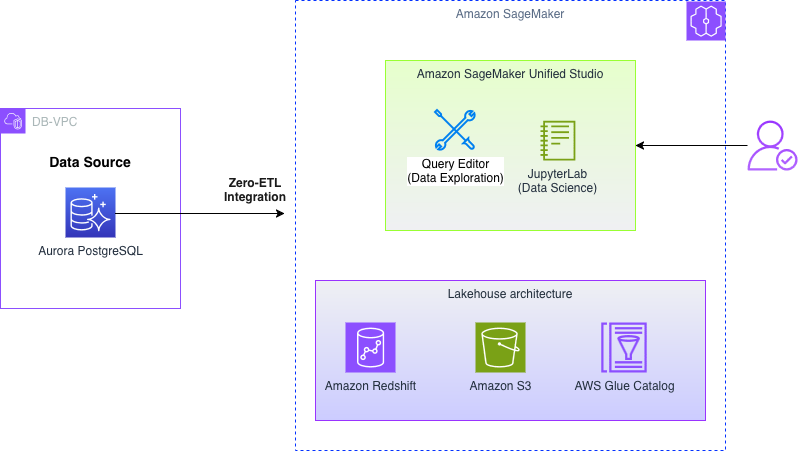
Figure 1: Architecture of the Aurora PostgreSQL zero-ETL integration with Amazon SageMaker
The workflow includes the following steps:
- Your application writes data to an Amazon Aurora PostgreSQL database cluster.
- The zero-ETL integration automatically captures changes from the Aurora PostgreSQL database.
- Data is replicated to the target AWS Glue managed catalog in near real time.
- You can query and analyze the data using Amazon Athena, Amazon Redshift, or other analytics tools integrated with Amazon SageMaker AI.
- Data scientists can build and train ML models using Amazon SageMaker AI with direct access to the Apache Iceberg tables in the target AWS Glue managed catalog.
Prerequisites
Before setting up the zero-ETL integration, verify that you have the following:
- An Amazon Virtual Private Cloud (Amazon VPC) setup with the proper networking configurations for database connectivity.
- An Amazon Elastic Compute Cloud (Amazon EC2) security group set up and an allowed DB instance port connection to the source and target DB instances.
- AWS Command Line Interface (AWS CLI v2) installed and configured with the appropriate AWS Identity and Access Management (IAM) credentials and permissions to interact with Amazon Aurora and SageMaker AI.
- Sufficient AWS service quotas for Aurora PostgreSQL resources.
Configure the source PostgreSQL database for zero-ETL integration
When you have all the prerequisites in place, you can configure the source PostgreSQL database for zero-ETL integration.
Create a custom Aurora PostgreSQL cluster parameter group
Your Aurora PostgreSQL database needs to have parameters configured for real-time replication. In this section, you will create the DB cluster parameter group and configure parameters. For more information, see Getting started with Aurora zero-ETL integrations.
Use the following AWS CLI command to create an Aurora PostgreSQL cluster parameter group:
Now set the parameters by modifying the parameter group:
The parameter group is now fully configured and ready to be applied to your Aurora PostgreSQL cluster.
Select or create a source Aurora PostgreSQL cluster
If you already have an Aurora PostgreSQL cluster, you can use it, or you can create a new Aurora PostgreSQL cluster.
Note: Your source DB cluster must be running a supported version of Aurora PostgreSQL. For a list of supported versions, see Regions and database engines supported for Aurora zero-ETL integrations.
While creating an Aurora PostgreSQL cluster, use the parameter group (aurora-pgsql-zetl-cluster-pg) you created earlier:
Note: Throughout this post, make sure to replace the with your own information.
If you’re creating a new Aurora PostgreSQL cluster, wait for your DB instance(s) to be in an “Available” status. You can verify DB instance status by using the describe-db-instances API call:
Reboot the cluster to apply parameter changes
A cluster reboot is needed before zero-ETL integration can function correctly:
Wait until the cluster and the primary instance are back in Available status. For more information, see reboot-db-instance.
Create a target AWS Glue managed catalog
With your source PostgreSQL database configured for enhanced logical replication, the next step is setting up your target Amazon SageMaker AI. Zero-ETL integration uses AWS Glue Data Catalog backed by Amazon Redshift managed storage as its target. To have this functionality, you need to create a managed catalog, configure IAM permissions for Amazon SageMaker AI to access and query the managed catalog, and set up authorization for incoming integration requests from your source database.
Create an AWS Glue managed catalog
You must create a new catalog (if it doesn’t exist already) managed by AWS Glue to store table metadata and serve as the landing zone for your replicated datasets. Zero-ETL integration streams the data into Amazon Redshift managed storage, and AWS Glue keeps track of table definitions so that tools such as SageMaker AI, Athena, and Amazon Redshift Spectrum can query the data.
Create an IAM role for AWS Glue and Amazon Redshift to access the AWS Glue managed catalog
Now, use the following command to create an IAM role so that AWS Glue and Amazon Redshift can interact with the catalog. This role serves two key functions: It allows AWS Glue and Amazon Redshift to perform catalog operations, and it authorizes incoming integration requests from your source database.
Next, attach a policy to this IAM role that provides the minimum required permissions for AWS Glue and Amazon Redshift. This policy should also include the necessary permissions for encryption key actions to help maintain secure data handling throughout the integration process:
Set up AWS Lake Formation access
Before using the managed catalog for zero-ETL integration, you must configure data lake administrators in AWS Lake Formation who have administrative or read-only permissions on the managed resources. Additionally, you need to grant ReadOnlyAdmin permissions to the Amazon Redshift service-linked role, AWSServiceRoleForRedshift, in your account. If this role doesn’t exist in your account or you need to verify its permissions, see Using service-linked roles for Amazon Redshift.
Create the AWS Glue managed catalog backed by Amazon Redshift managed storage
Because you have configured IAM permissions and Lake Formation settings, you can now create the AWS Glue managed catalog.
Register the catalog as a zero-ETL integration target
To prepare your target AWS Glue managed catalog for zero-ETL integration, use the create-integration-resource-property command with these required parameters:
- The –resource-arn parameter specifies the Amazon Resource Name (ARN) of your AWS Glue managed catalog that will serve as the integration target.
- The –target-processing-properties parameter requires the ARN of an IAM role that has describe permissions on the target AWS Glue managed catalog.
You can use the GlueDataCatalogDataTransferRole created in the earlier step because it already includes the minimal describe permissions needed for this integration. Alternatively, you can create a new IAM role specifically for this purpose and attach the necessary minimal permissions to meet your company’s security requirements.
Example output:
Configure authorization for inbound integration requests
The last step in creating a target managed catalog is to define a resource-based access policy that authorizes zero-ETL integration to push data into your catalog. This policy grants AWS Glue the necessary permissions to create and authorize incoming integration requests from your source database. Apply this resource policy by using the AWS Glue put-resource-policy API call to complete the catalog configuration for your zero-ETL integration:
Your AWS Glue managed catalog is now ready to receive data from the zero-ETL integration.
Load data in the source Aurora PostgreSQL database
Now that your Aurora PostgreSQL database is configured and ready, you must populate it with sample data that serves as the historical baseline for your zero-ETL integration. This first dataset provides the foundation for testing and demonstrating the integration capabilities. After you set up the zero-ETL integration, subsequent database changes stream automatically in near real time to your target AWS Glue managed catalog.
Connect to the source Aurora PostgreSQL cluster
Use the following commands to create a connection to your source Aurora PostgreSQL cluster:
Create a database and table
Create a table named products to store product information:
Insert historical data
Use the following code to insert a row:
This table serves as a representative dataset to demonstrate the data capture and streaming capabilities of the zero-ETL integration. After your zero-ETL integration is active, all database changes, including inserts, updates, and deletes, are automatically captured and streamed to your AWS Glue managed catalog. This creates a data pipeline from your Aurora PostgreSQL database to your Amazon SageMaker for real-time analytics on your operational data.
Create a zero-ETL integration
Because your Aurora PostgreSQL database is now populated with historical data, you can set up the zero-ETL integration that continuously streams database changes to your AWS Glue managed catalog backed by Amazon Redshift managed storage.
Create the integration
Create the integration between your source PostgreSQL database and target AWS Glue catalog by using the aws rds create-integration AWS CLI command. You can customize the integration by specifying added configurations, such as data filters, to control which data gets replicated to your target environment:
When you run the command, the zero-ETL integration begins provisioning and enters a ‘creating’ state. The AWS CLI response provides key details about the integration configuration.
Example CLI output:
When the integration status changes to “active”, your zero-ETL integration pipeline is fully operational.
Monitor the integration
Before generating new live data, verify that the integration has reached an “active” state by running the describe-integrations AWS CLI command. This monitoring step is important to confirm that changes from your source Aurora cluster are successfully streaming to the AWS Glue managed catalog without errors:
Verify the zero-ETL integration
Now that your historical data is loaded and the zero-ETL integration is “active”, you must confirm that the data has been successfully replicated.
Grant Lake Formation permissions
Before you can query the AWS Glue managed catalog by using the Amazon Redshift Data API, you must make sure the IAM user or role has the right permissions to create and manage tables within the catalog. Use the Lake Formation grant-permissions API to provide these necessary permissions so that Amazon Redshift can access your AWS Glue managed catalog for the zero-ETL integration. For more information, see Creating an Amazon Redshift managed catalog in the AWS Glue Data Catalog.
These permissions allow for query execution and metadata inspection on the managed catalog.
Query historical data by using the Amazon Redshift Data API
With the necessary permissions in place, you can now verify your historical data by querying the AWS Glue managed catalog through the Amazon Redshift execute-statement Data API. Begin this verification process by running a SELECT statement against the catalog:
The following command returns a unique query ID that you can use to monitor the execution status and retrieve results from your query:
Monitor your query’s progress by using the describe-statement API with the query ID. Continue checking until the status shows that your query has completed successfully:
To complete the verification process and view your historical data now available in Amazon SageMaker AI, retrieve the query results by using the get-statement-result API call:
With your zero-ETL integration now active, you can demonstrate real-time data streaming by adding new data to your source Aurora PostgreSQL instance. Run the following INSERT query to add a new row, which shows how changes are automatically replicated in near real time:
You can verify that the recent changes from your source database have been replicated to the target environment within seconds. Use the same Amazon Redshift Data API workflow you used earlier to confirm the real-time replication:
Use the describe-statement API call to monitor the query execution and confirm that the status shows ‘FINISHED’ before proceeding to retrieve the results:
Finally, retrieve the query results by using the get-statement-result API call:
This verification process confirms that your zero-ETL integration from Aurora PostgreSQL to Amazon SageMaker AI is working and continuously replicating both historical and real-time data. Although zero-ETL integration significantly simplifies data replication, it’s important to understand certain limitations on supported data types, schema change handling, and data filtering capabilities. For more details about these considerations and best practices, see Aurora zero-ETL integrations and Amazon RDS zero-ETL integrations.
Clean up
This section guides you through the cleanup process to remove the resources and components you created during this walkthrough. When you delete a zero-ETL integration, Amazon Aurora removes it from the source Aurora DB cluster. Your transactional data isn’t removed from Amazon Aurora or the analytics destination, but Aurora doesn’t send new data to Amazon SageMaker AI.
Delete the zero-ETL integration: Begin the cleanup process by removing the integration between your source Amazon Relational Database Service (Amazon RDS) database and the AWS Glue managed catalog. Run the following command to delete the integration:
Delete the AWS Glue managed catalog: After you successfully delete the integration, delete the AWS Glue managed catalog that served as your zero-ETL target destination. Use the following command to remove the catalog:
This permanently removes all associated table metadata and Amazon Redshift managed storage references.
Delete the Aurora DB cluster: If you created the source Aurora DB cluster for this demonstration and you no longer need it, you can complete the cleanup by deleting the entire DB cluster. By skipping the final snapshot option, you avoid retaining any test data and confirm complete resource removal:
Conclusion
In this post, you learned how to configure zero-ETL integration between Aurora PostgreSQL and your Amazon SageMaker AI using AWS CLI. This integration automatically replicates your PostgreSQL data to a lakehouse in near real time, removing the need for custom ETL pipelines.
As you move forward, consider expanding this zero-ETL approach to more supported data sources, such as Amazon RDS for MySQL and Amazon DynamoDB. This creates a centralized data access strategy across your company. You can also explore advanced analytics scenarios by combining zero-ETL integrations with Amazon Redshift capabilities. These include large-scale SQL analytics, Amazon Redshift ML for in-database ML, and federated queries that span multiple data lakes and warehouses. These integrations provide the foundation for building a near real-time data platform that scales with your business needs.
To get started, see the AWS zero-ETL documentation for setup guidance, supported configurations, troubleshooting integrations, and architectural best practices.
Related posts and references:
- Amazon Aurora
- AWS Management Console
- Amazon Aurora tutorials and sample code
- Amazon Aurora zero-ETL integrations
About the authors
Building a Slack-powered AI development agent with Kiro CLI and headless authentication
Post Syndicated from Vishal Karlupia original https://aws.amazon.com/blogs/devops/building-a-slack-powered-ai-development-agent-with-kiro-cli-and-headless-authentication/
Every code review discussion, incident response thread, and standup happens in Slack. But when an engineer needs to analyze a service or debug a failing test, they leave Slack, open a terminal, navigate to the repository, run commands, and paste the output back. That round trip takes 30 seconds for someone who knows exactly where to look and 5 minutes for someone less familiar with the codebase. Across a team of 10 engineers doing this 15 times a day, that adds up to over 12 hours of lost engineering time per week.
This post walks through building a ChatOps integration that runs Kiro CLI from a Slack slash command. An engineer types /kiro analyze auth-service for memory leaks, and the results appear directly in the channel—no context switch required. The solution uses AWS Lambda, Amazon API Gateway, and AWS Secrets Manager, and it depends on Kiro CLI’s headless authentication to run without an interactive session.
In this post, you will learn how to:
- Configure a Slack App with a slash command that triggers an AWS Lambda function
- Authenticate Kiro CLI in a headless environment using API key-based authentication
- Build and deploy a container image with Kiro CLI to Amazon Elastic Container Registry (Amazon ECR)
- Deploy the full solution with AWS Serverless Application Model (AWS SAM)
Why headless authentication matters
A Slack slash command triggers a webhook. The webhook invokes a Lambda function. The Lambda function runs Kiro CLI. At no point in this chain is there a browser, a terminal, or a human session.
Without headless authentication, this architecture does not work. Kiro CLI would require an interactive login, and a Lambda function has no display and no way to complete an OAuth flow.
With an API key, Kiro CLI authenticates silently:
export KIRO_API_KEY=ksk_xxxxxxxxxxxxxxxxxxxxxxxxxxxxxxxx
kiro-cli chat --no-interactive "analyze auth-service for memory leaks"
The API key is stored in AWS Secrets Manager, fetched at runtime, and injected into the Lambda environment. The engineer in Slack never sees or manages the key.
Important: API key-based authentication is available for Kiro Pro, Pro+, and Power subscribers. If your subscription is managed by an administrator, your Kiro admin must enable API key authentication first. For details, see API key governance.
Architecture overview
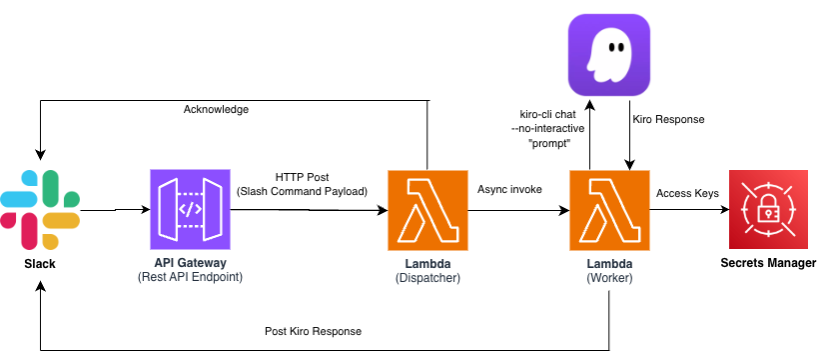
The solution consists of two Lambda functions, an API Gateway endpoint, and AWS Secrets Manager. The request and response follow two separate paths:
- Request path: Slack → API Gateway → Dispatcher Lambda → acknowledge back to Slack (under 3 seconds), then async invoke → Worker Lambda
- Response path: Worker Lambda → Slack response_url (direct HTTPS POST, bypasses API Gateway)
Why two Lambda functions?
Slack requires a response within 3 seconds of a slash command. Kiro CLI analysis takes 10–60 seconds depending on the repository size and prompt complexity. The Dispatcher acknowledges the command immediately and invokes the Worker asynchronously. The Worker runs Kiro CLI and posts results back to Slack through the response_url provided in the original payload. This is a standard pattern for Slack integrations that perform long-running work.
A note on response_url limits: the webhook Slack provides in the slash command payload expires 30 minutes after the command is issued and accepts a maximum of 5 responses. The 10-minute Worker timeout and single response in this solution stay well inside both limits. If you raise the Lambda timeout beyond 30 minutes or add incremental progress updates, these POSTs begin to fail silently – switch to chat.postMessage with a bot token at that point.
Prerequisites
- Before you begin, you need the following:
- An AWS account with permissions to create Lambda functions, API Gateway, Amazon ECR repositories, Secrets Manager secrets, and IAM roles
- An infrastructure-as-code tool for deploying serverless resources (this post uses AWS SAM CLI, but you can adapt the templates to AWS CDK, AWS CloudFormation, Terraform, or your preferred tool)
- Finch or Docker installed for building container images
- A Slack workspace where you have permission to create a Slack App
- A Kiro Pro, Pro+, or Power subscription with API key authentication enabled
Step 1: Gather credentials
You need three credentials before deploying. Collect all of them first, then store them in Secrets Manager in Step 2.
Kiro API key
This authenticates Kiro CLI in headless mode.
- Sign in to
app.kiro.dev - Navigate to API Keys
- Create a new key named
kiro-chatops - Copy the key (starts with
ksk_) – it is shown only once

Slack Signing Secret – This allows the Dispatcher to verify that incoming requests originate from Slack.
- Go to api.slack.com/apps and click Create New App → From scratch
- Name it Kiro Agent and select your workspace
- On the Basic Information page, scroll to App Credentials
- Copy the Signing Secret (32-character hex string)
Slack Bot Token – Optional
The Worker posts results using the response_url from the original slash command payload, which is a pre-authenticated webhook that does not require a bot token. Collect a bot token with the chat:write scope only if you extend the solution to post messages independently of a slash command response.
- In your Slack App settings, go to OAuth & Permissions
- Add the Bot Token Scope: chat:write
- Choose Install to Workspace and authorize
- Copy the Bot User OAuth Token (starts with
xoxb-)
While you are in the Slack App settings, also configure the slash command:
- Go to Slash Commands → Create New Command
- Set Command to
/kiro - Set Request URL to
https://placeholder(update after deployment in Step 6) - Set Short Description to
Run Kiro-CLI development tasks - Set Usage Hint to
[analyze|review|debug|explain] <description>
Step 2: Store secrets in AWS Secrets Manager
Store each credential as a separate secret. The Lambda functions retrieve these at runtime using IAM-scoped access.
If your target repository is private, also store a GitHub Personal Access Token with repo scope. The Worker uses this token to clone the repository inside the Lambda execution environment.
Verify the secrets were created:
Step 3: Build the Dispatcher Lambda
The Dispatcher has three responsibilities: verify that the request came from Slack, acknowledge the slash command within 3 seconds, and invoke the Worker asynchronously.
Request verification – Slack signs every request with HMAC-SHA256 using your app’s signing secret. The Dispatcher must validate this signature before processing payloads. The verification logic constructs a base string from the request timestamp and body, computes the HMAC, and compares it to the signature in the request header:
Reject any request with a timestamp older than 5 minutes to prevent replay attacks. Normalize request headers to lowercase before reading them—API Gateway may preserve the original casing from the client.
Async handoff
After verifying the request, parse the slash command payload to extract text, user_name, and response_url. Then invoke the Worker Lambda with InvocationType="Event" (fire-and-forget) and immediately return an acknowledgment to Slack:
If the user sends /kiro with no arguments, return an ephemeral usage message with examples. The Dispatcher uses the standard Python 3.12 Lambda runtime and requires no container image.
Step 4: Build the Worker Lambda container image
The Worker runs Kiro CLI against a cloned repository and posts results to Slack. Because Kiro CLI depends on git, system libraries (NSS, X11, ALSA), and a binary that exceeds Lambda’s 250 MB layer limit, package the Worker as a container image.
Dockerfile structure
Start from the AWS Lambda Python 3.12 base image. Install git and the shared libraries that Kiro CLI requires, then install Kiro CLI itself:
Two details matter here. First, copy the Kiro CLI binary to /usr/local/bin/ rather than leaving it in /root/.local/bin/—Lambda runs as a non-root user that cannot access /root/. Second, build with --platform linux/amd64 regardless of your local architecture, because Lambda defaults to x86_64.
Worker logic – The handler performs four steps:
- Fetch the Kiro API key (and optionally a Git token) from Secrets Manager
- Clone the repository to
/tmp/repo using git clone --depth 1 - Run kiro-cli chat
--no-interactive "<prompt>"withKIRO_API_KEYandHOME=/tmpset in the environment - Post the output to Slack via the
response_url
Setting HOME=/tmp is required because Kiro CLI writes a session database, and Lambda’s filesystem is read-only except for /tmp. Strip ANSI escape codes from the output before posting—Kiro CLI emits terminal colors that render as garbage in Slack.
The subprocess timeout should be shorter than the Lambda timeout to allow time for error handling and the Slack POST. Set the subprocess timeout explicitly to 540 seconds in the Worker code, rather than relying on the Lambda timeout alone. A 9-minute subprocess limit with a 10-minute Lambda timeout provides a 1-minute buffer.
Truncate output to 3,800 characters before posting. Slack’s message limit is 4,000 characters per block, and the surrounding formatting consumes part of that space.
Build and push to Amazon ECR
Clean up /tmp/repo at the end of every invocation. Lambda may reuse a warm execution environment, so anything left in /tmp persists into the next invocation. Removing the clone in a finally block helps prevent one user’s repository from leaking into a later request and keeps the 512 MB ephemeral storage from filling up across warm invocations.
Step 5: Deploy with AWS SAM
The SAM template defines both Lambda functions, the API Gateway endpoint, and the IAM policies. The Dispatcher uses a standard Python runtime. The Worker references the container image you pushed to Amazon ECR.
Key resource configuration:
| Resource | Runtime | Timeout | Memory | Package type |
| Dispatcher | Python 3.12 | 10 s | 256 MB | Zip |
| Worker | Container | 600 s (10 min) | 1024 MB | Image |
Both functions use AWSSecretsManagerGetSecretValuePolicy scoped to the kiro-chatops/* secret prefix. The Dispatcher also gets LambdaInvokePolicy for the Worker function. Neither function has broader AWS permissions.
The SAM template accepts the ECR image URI as a parameter:
Deploy:
SAM prompts you to confirm IAM role creation and acknowledge that the Dispatcher has no authentication (request verification happens in code via the Slack signing secret). After deployment completes, note the ApiEndpoint output value.
Step 6: Connect Slack to the endpoint
- Go to
api.slack.com/appsand select your Kiro Agent app - Navigate to Slash Commands and edit
/kiro - Replace the Request URL with the ApiEndpoint value from the SAM deployment output
- Choose Save
Step 7: Test the integration
Test directly from Slack by typing in any channel where the app is installed:

/kiro analyze auth-service for memory leaks
Expected behavior:
- Slack immediately displays: “@yourname requested: analyze auth-service for memory leaks – Kiro is working on it…”
- After 15–60 seconds, the analysis results appear in the channel
You can also invoke the Worker Lambda directly for testing without Slack:
Sending /kiro with no arguments returns a usage help message.
Complete sample code can be found at aws-samples github repository – https://github.com/aws-samples/sample-kiro-chatops-slack-integration
Practical slash command patterns
Once deployed, the value comes from the commands your team uses daily. These patterns map to real engineering workflows:
| Category | Example command |
| Code analysis | /kiro analyze the payment module for error handling gaps |
| Code review | /kiro review the last 3 commits on main for breaking changes |
| Debugging | /kiro debug why the integration tests are failing |
| Knowledge | /kiro explain how the authentication middleware works |
| Sprint support | /kiro summarize all changes merged to main this week |
The value compounds when results are visible to the entire channel. A junior engineer who might hesitate to open a CLI tool can type /kiro explain and get the same analysis and the rest of the team learns from it.
Extending the pattern
Multi-repository support – The basic implementation targets a single preconfigured repository. To support multiple repositories, parse a URL from the slash command text and clone it at runtime. This adds 5-15 seconds of latency and requires a Git token in Secrets Manager for private repositories.
Threaded responses – Post the acknowledgment as a channel message and the full results as a thread reply. This keeps the channel readable while preserving context for long analyses.
Approval workflows – For commands that modify code (for example, “create a PR that fixes this issue”), add a confirmation step. The Worker posts proposed changes with interactive buttons; the action executes only after explicit approval.
Audit logging – Log every invocation to Amazon DynamoDB: who ran it, what they asked, how long it took. This gives engineering leadership visibility into how the team uses AI-assisted development.
Constraints and trade-offs
Constraints:
- Execution time – Lambda has a maximum 15-minute timeout. Complex analyses that exceed this will time out. The Worker is set to a 10-minute timeout with a 9-minute subprocess limit.
- Ephemeral storage – The /tmp volume defaults to 512 MB. A shallow clone (–depth 1) strips Git history, but the working tree alone can exceed this for large monorepos or repositories with binary assets. You can increase ephemeral storage up to 10 GB by setting EphemeralStorage in the SAM template, or scope the clone to a subdirectory with –sparse-checkout for oversized repositories.
- Slack message size – Each Block Kit text block is limited to 3,000 characters. Long outputs are truncated, with full results available in Amazon CloudWatch Logs.
- Package size – Kiro CLI with its dependencies exceeds Lambda’s 250 MB layer limit. A container image (up to 10 GB) is required.
Trade-offs:
- Lambda vs. Amazon ECS on AWS Fargate – Lambda is simpler and cheaper at the low-volume, bursty usage typical of a single team. Model your own break-even point with the AWS Pricing Calculator, since it shifts with average analysis duration and memory size. For high-volume teams, Fargate with a persistent container avoids cold starts. Start with Lambda and migrate if usage grows.
- Public channel vs. ephemeral – Results are posted as in_channel (visible to everyone). For sensitive analyses, change response_type to ephemeral. Consider making this configurable per command.
- Cost – Lambda compute is approximately $0.01-$0.05 per 10-minute execution at 1024 MB. The primary cost factor is Kiro CLI usage based on your subscription tier.
Security considerations
- Request verification — The Dispatcher validates every request using HMAC-SHA256 with the Slack signing secret. Requests with timestamps older than 5 minutes are rejected.
- Secrets management — Credentials are never hardcoded or stored in environment variables. They are fetched at runtime from Secrets Manager with IAM-scoped access.
- Least-privilege IAM — The Dispatcher can only invoke the Worker and read secrets. The Worker can only read secrets. Neither has broader AWS permissions.
- Audit trail — CloudWatch Logs capture every invocation including the command text, user, and Kiro CLI output. Enable AWS CloudTrail for API Gateway to track all incoming requests.
Cleaning up
To avoid ongoing charges, remove all resources when you are done testing:
To remove the Slack App, go to api.slack.com/apps, select Kiro Agent, and click Delete App.
Conclusion
This post demonstrated integrating Kiro CLI into Slack workflows using headless authentication, serverless functions, and secure credential management. The Dispatcher acknowledges instantly, the Worker runs Kiro CLI headless, and results appear in the channel where the team already communicates.
The architecture is deliberately simple – a slash command, an async handoff, and a container that runs a CLI tool. You can extend it with multi-repo support, threaded responses, or approval workflows as your team’s usage patterns emerge.
Start with a single slash command in one channel. The commands your team uses most will tell you where the friction was hiding.
About the authors
Olajuwon Ajanaku | Eastside Golf | Talks at Google
Post Syndicated from Talks at Google original https://www.youtube.com/watch?v=PC85VEyoxVE
Accelerating development workflows with Kiro CLI as a Pre-Commit and Git Hook Agent
Post Syndicated from Vishal Karlupia original https://aws.amazon.com/blogs/devops/accelerating-development-workflows-with-kiro-cli-as-a-pre-commit-and-git-hook-agent/
Code review feedback is most valuable when it arrives early. A security vulnerability caught in a pull request saves hours. The same vulnerability caught in production costs days. But what if you could catch it before the code even leaves the developer’s machine – at the time of git commit?
Git hooks run automatically at specific points in the Git workflow: before a commit, before a push, after a merge. They execute locally, on the developer’s machine, with no CI/CD pipeline involved. The problem is that Git hooks run non-interactively. There is no browser or a terminal session waiting for input. Traditional Kiro CLI requires browser-based login, which makes it unusable in a hook.
Headless authentication changes this. With KIRO_API_KEY set as an environment variable, Kiro CLI runs in any non-interactive context, including Git hooks. This post shows how to wire Kiro CLI into your local Git workflow, so every commit and every push gets AI-powered analysis before it reaches your repository.
Why headless authentication matters here
Git hooks are scripts that Git executes automatically. They have no UI and are unable to open a browser or prompt for credentials. Running silently in the background, they either succeed with exit 0 or blocking the operation with exit non-zero.
# Added to your shell profile (~/.bashrc, ~/.zshrc)
export KIRO_API_KEY=your_api_key_here
The API key is inherited by child processes including Git hooks. If the key isn’t set, the hook skips the execution and fails gracefully rather than blocking commits.
Note on data privacy: These hooks send your staged code diffs to the Kiro API for analysis. Review your organization’s policies on sending source code to APIs before adopting this workflow. For sensitive repositories, consult your security team.
What this enables
- Pre-commit hook: Scans your staged files for security issues, code smells and style violations. Problems get caught before the commit exists.
- Commit-msg hook: Enforces your team’s commit message format (Conventional commits, Jira refs etc). Malformed messages get rejected instantly instead of cluttering the log.
- Pre-push hook: Runs a full review across all commits you’re about to push. This is your last gate before CI picks it up – cheaper to fix it here than to wait for a pipeline failure.
- Post-merge hook: After pulling changes, it analyzes incoming changes and flags anything that might conflict with your local work.
Prerequisites
- Kiro CLI installed:
curl -fsSL https://kiro.dev/install.sh | bash - Kiro API key : Generated from app.kiro.dev (Account → Settings → API Keys) and exported in your shell profile
Note – Access to Kiro API depends on your organizations policies. Check your team’s configuration Or refer to API Key governance docs for details.
- Git repository: Any repository where you want local analysis
Verify your setup:
Expected output should confirm you are authenticated. If you see an error, verify your API key is valid and your network allows outbound connections to the Kiro API.
Try it yourself: scratch repo setup
To test the hooks without affecting an existing project, create a throwaway repository:
All hook examples below work in this scratch repo. For the pre-push hook, you will also need a remote – either create a throwaway repository on GitHub/GitLab or add a bare local remote:
Hook 1: Pre-commit – Catch issues before they become commits
The pre-commit hook runs after you type git commit but before Git creates the commit object. If the hook exits with a non-zero code, the commit is aborted.
Create .git/hooks/pre-commit:
 KIRO_API_KEY not set. Skipping Kiro pre-commit analysis."
exit 0
fi
# Get list of staged files (only added, modified, or renamed)
STAGED_FILES=$(git diff --cached --name-only --diff-filter=AMR)
if [ -z "$STAGED_FILES" ]; then
echo "No staged files to analyze."
exit 0
fi
# Get the actual diff content for context
DIFF_CONTENT=$(git diff --cached)
echo "???? Kiro CLI: Analyzing $(echo "$STAGED_FILES" | wc -l | tr -d ' ') staged file(s)..."
# Run Kiro CLI analysis on staged changes (timeout after 30s to avoid hanging offline)
RESULT=$(timeout 30 kiro-cli chat --no-interactive "You are a pre-commit code reviewer. Analyze ONLY the following staged changes for critical issues that should block this commit.
STAGED FILES:$STAGED_FILES
DIFF:$DIFF_CONTENT
Check for:
1. SECURITY: Hardcoded secrets, API keys, passwords, tokens in the diff
2. SECURITY: SQL injection, XSS, or command injection vulnerabilities
3. BUGS: Obvious logic errors, null pointer risks, off-by-one errors
4. PERFORMANCE: Accidentally committed debug code, console.log statements, sleep calls
Rules:
- Only flag issues that are clearly problems. Do not flag style preferences.
- If you find a SECURITY issue, output a line starting with BLOCK: followed by the reason.
- If you find a BUG or PERFORMANCE issue, output a line starting with WARN: followed by the reason.
- If everything looks clean, output a single line: PASS
Be concise. This runs on every commit - speed matters." 2>&1) || {
EXIT_CODE=$?
if [ $EXIT_CODE -eq 124 ]; then
echo "
KIRO_API_KEY not set. Skipping Kiro pre-commit analysis."
exit 0
fi
# Get list of staged files (only added, modified, or renamed)
STAGED_FILES=$(git diff --cached --name-only --diff-filter=AMR)
if [ -z "$STAGED_FILES" ]; then
echo "No staged files to analyze."
exit 0
fi
# Get the actual diff content for context
DIFF_CONTENT=$(git diff --cached)
echo "???? Kiro CLI: Analyzing $(echo "$STAGED_FILES" | wc -l | tr -d ' ') staged file(s)..."
# Run Kiro CLI analysis on staged changes (timeout after 30s to avoid hanging offline)
RESULT=$(timeout 30 kiro-cli chat --no-interactive "You are a pre-commit code reviewer. Analyze ONLY the following staged changes for critical issues that should block this commit.
STAGED FILES:$STAGED_FILES
DIFF:$DIFF_CONTENT
Check for:
1. SECURITY: Hardcoded secrets, API keys, passwords, tokens in the diff
2. SECURITY: SQL injection, XSS, or command injection vulnerabilities
3. BUGS: Obvious logic errors, null pointer risks, off-by-one errors
4. PERFORMANCE: Accidentally committed debug code, console.log statements, sleep calls
Rules:
- Only flag issues that are clearly problems. Do not flag style preferences.
- If you find a SECURITY issue, output a line starting with BLOCK: followed by the reason.
- If you find a BUG or PERFORMANCE issue, output a line starting with WARN: followed by the reason.
- If everything looks clean, output a single line: PASS
Be concise. This runs on every commit - speed matters." 2>&1) || {
EXIT_CODE=$?
if [ $EXIT_CODE -eq 124 ]; then
echo " Commit blocked by Kiro CLI. Fix the issues above and try again."
echo " To bypass this hook: git commit --no-verify"
exit 1
fi
# Warn but allow commit for non-blocking issues
if echo "$RESULT" | grep -q "WARN:"; then
echo ""
echo "
Commit blocked by Kiro CLI. Fix the issues above and try again."
echo " To bypass this hook: git commit --no-verify"
exit 1
fi
# Warn but allow commit for non-blocking issues
if echo "$RESULT" | grep -q "WARN:"; then
echo ""
echo " Kiro CLI pre-commit check passed."
exit 0
Kiro CLI pre-commit check passed."
exit 0
Make it executable:
chmod +x .git/hooks/pre-commit
Test it:
Test 1 – Stages a file with hard-coded AWS secret key. Kiro CLI detects the credential and blocks the commit with BLOCK:, preventing the secret from entering git history.
Test 2 – Stages a simple, clean Python function. Kiro CLI finds no issues and outputs PASS, allowing commit to proceed normally.
Test 3 – Uses git’s –no-verify flag to skip all hooks entirely. Demonstrates the escape hatch when developers need to commit without waiting for analysis (e.g, emergency fixes).
Trade-offs:
Speed vs. depth: The prompt is deliberately focused on critical issues only. A comprehensive review would take 15-30 seconds per commit – too slow for developer flow. This hook targets 3-8 seconds
False positives: Blocking commits on false positives destroys developer trust. The prompt is conservative – only BLOCK for clear security issues, WARN for everything else
Bypass escape hatch: git commit –no-verify skips all hooks. This is intentional – developers must never feel trapped. Document when bypassing is acceptable (e.g., emergency hotfixes)
Hook 2: Commit-msg – Enforce commit message conventions
The commit-msg hook runs after the developer writes their commit message. It receives the path to the temporary file containing the message.
Create .git/hooks/commit-msg:
Make it executable:
chmod +x .git/hooks/commit-msg
Test it:
Test 1 – Commits with a non-conventional message (“Updated Stuff”). Kiro CLI detects it lacks required description format and blocks the commit.
Test 2 – Commits with a properly formatted message. Kiro validates it against conventional commit rules and allows the commit.
Test 3 – Commits with a scoped conventional message (“fix(api): resolve null pointer in user handler”). Kiro confirms the “type(scope): description” format is valid and allows the commit.
Hook 3: Pre-push – Comprehensive review before code leaves your machine
The pre-push hook runs after git push is called but before data is transferred to the remote. This is the last checkpoint before your code enters the shared repository.
Note: To test this hook, you need a remote configured. See the “Try it yourself” section above for setup options.
Create .git/hooks/pre-push:
Frozen package management for air-gapped RHEL-family AMIs
Post Syndicated from Anand Krishna Varanasi original https://aws.amazon.com/blogs/compute/frozen-package-management-for-air-gapped-rhel-family-amis/
If you run a regulated, air-gapped compute fleet on RHEL-family instances, you have probably felt three requirements pulling against each other. Your organization must configure the network to remove internet access from the instances. Your team must review and approve new packages or version upgrades before you adopt them. Your team removes public repository definitions, restricts network paths, and configures instances to use only the internal repository your team has approved. Teams in chip design, finance, healthcare, defense, and the public sector often face this combination while still needing operating system updates.
This post describes a two-account pattern that separates the connected package-ingestion path from the air-gapped fleet. You create an authorized initial baseline and approve later changes to form a versioned package snapshot in Amazon Simple Storage Service (Amazon S3). EC2 Image Builder uses the frozen snapshot to build Amazon Machine Images (AMIs). Your team configures AWS Systems Manager Patch Manager to patch the instances your organization runs from the same internal package source.
The accompanying reference implementation demonstrates the pattern for RPM-based RHEL-family systems (AlmaLinux for example). It is a reference, not a substitute for distribution of licensing, vulnerability analysis, testing, or an organization’s change-management process.
The challenge: Getting packages into an air-gapped approval-gated fleet
Common delivery models each assume something an air-gapped fleet might not provide:
- Red Hat Update Infrastructure (RHUI) expects each instance to reach the service. A fleet with no internet egress needs a different content path.
- Red Hat Satellite supports disconnected content management, but it is a separate product and operational footprint. Teams that need a custom package-level approval workflow must integrate that workflow with their content-management process.
- The Red Hat CDN requires a connected, entitled content-management path. Centralizing that path changes the network architecture, not the customer’s Red Hat subscription obligations.
The objective is not to replace these products universally. It is to show a serverless AWS pattern for teams that need an authorized repository baseline, explicit approval for later package changes, and a fleet with no public package source.
How the pattern works
The pattern combines three controls:
- A frozen package repository on Amazon S3: The pattern stores a deployment-authorized baseline and subsequent approved package changes in versioned, per-OS repository prefixes. The repository manifest records the package inventory for each state.
- EC2 Image Builder Orchestration builds AMIs from that repository: The build helps remove upstream repository definitions and configures the internal frozen mirror to be used for all package operations.
- The launched fleet has no internet egress: The
dnfoperations are configured to resolve the internal mirror. Patch Manager uses the same repository source, so image builds and in-place patching draw from one frozen snapshot.
Choosing the upstream source
Choose one package lineage end to end. The parent AMI, repository content, and trusted signing keys must belong to that same lineage.
The reference implementation defaults to AlmaLinux vault content plus EPEL and an AlmaLinux parent AMI. The AlmaLinux OS Foundation states that AlmaLinux aims for binary and application binary interface (ABI) compatibility with RHEL. This is an AlmaLinux compatibility goal, not a Red Hat certification, and it does not make repository mixing a supported practice.
For genuine RHEL systems, use a Red Hat parent AMI, entitled Red Hat repositories, and Red Hat signing keys. A connected content-management host can retrieve content for the isolated environment. This centralizes the network path but does not reduce or change the customer’s Red Hat subscription obligations. Confirm those obligations against the applicable Red Hat agreement.
Do not pair AlmaLinux repositories with genuine RHEL hosts, or Red Hat repositories with AlmaLinux hosts. Mixed-vendor package lineages can create support, stability, and maintainability problems even when the RPMs appear mechanically compatible.
Architecture and workflow
The account boundary provides a primary security boundary for this architecture. The following diagram shows the connected Distribution account, the read-only Workload account, and an example cross-Region layout.
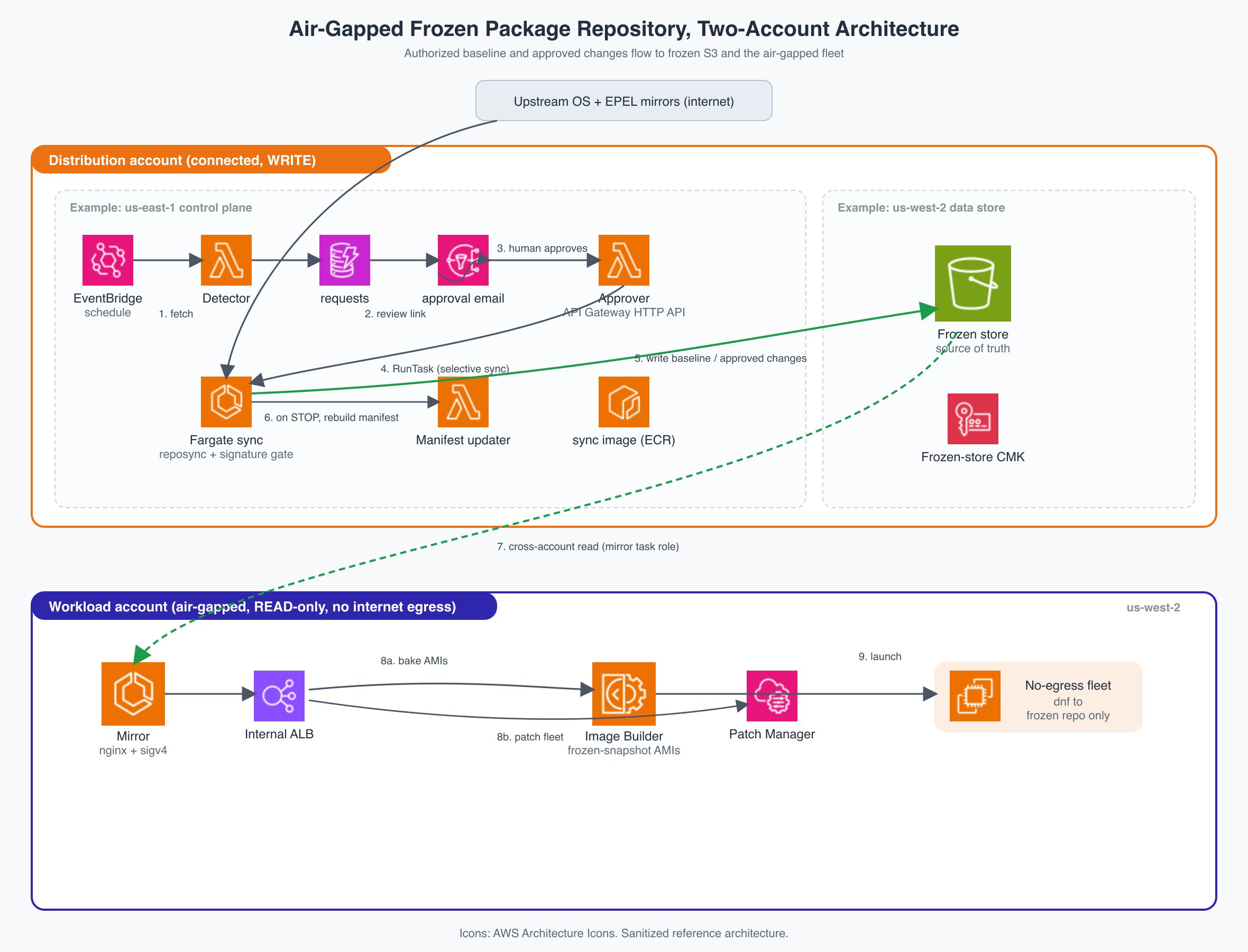
Figure 1: Two-account, cross-Region architecture separating the connected Distribution account from the air-gapped Workload account
The Distribution account owns the writable control plane and the only internet path. It runs Amazon EventBridge, three AWS Lambda functions, Amazon DynamoDB, Amazon Simple Notification Service (Amazon SNS), and the AWS Fargate sync task. It also owns the frozen S3 repository and its AWS Key Management Service (AWS KMS) key.
The Workload account is air-gapped and read-only with respect to the repository. It runs the internal HTTPS mirror, EC2 Image Builder, Patch Manager, and the compute fleet. Its mirror task role can read and decrypt frozen content but cannot write it.
The sample repository places the Distribution control plane in US East (N. Virginia), the frozen store in US West (Oregon), and the Workload resources in US West (Oregon) to demonstrate API-only cross-account and cross-Region operation. This Region split is not required. In most deployments, place the Distribution control plane and frozen store in the same Region unless data residency, disaster recovery, or an existing regional footprint justifies the additional latency, transfer cost, and KMS policy complexity.
The two accounts do not need Amazon Virtual Private Cloud (VPC) peering or a transit gateway. Cross-account access uses S3, KMS, and IAM policies. The VPC address ranges can overlap because no VPC-to-VPC route is required.
Package baseline and scheduled upgrade workflow
Before the scheduled workflow begins, your organization must authorize and run a full sync to establish the initial repository baseline. This bootstrap does not provide package-by-package approval. If your organization requires individual approval for every initial RPM, your team should generate and review the baseline manifest before promotion instead of relying solely on deployment authorization.
After the baseline, the detector runs on a customer-defined schedule. The reference implementation defaults to monthly. The following diagram shows the bootstrap distinction and the selective approval flow.
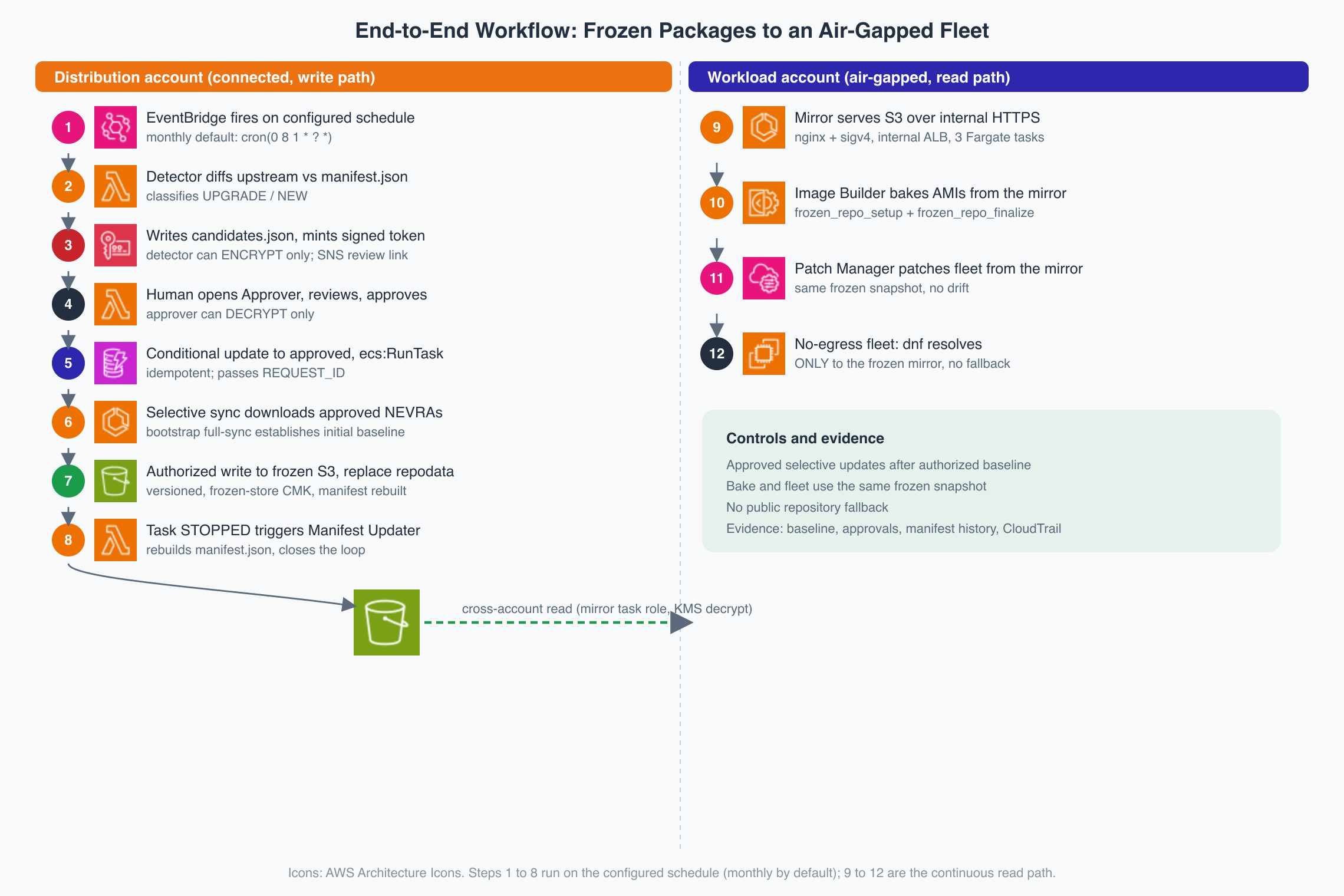
Figure 2: Package baseline bootstrap and the scheduled selective approval workflow
- Detect. Amazon EventBridge invokes the detector Lambda function on the configured schedule. The detector compares upstream repository metadata with
manifest.json, which records the current frozen inventory. It classifies a newer version as an upgrade and an absent package as new. - Request approval. The detector writes candidates to S3, creates a KMS-protected review token carrying the request ID and expiry, and is designed to send a review link through SNS. The detector can use
kms:Encryptbut notkms:Decrypt. - Review. A human opens the review page through an Amazon API Gateway HTTP API, reviews the proposed package versions, and chooses which changes to approve. The approver can use
kms:Decryptbut notkms:Encrypt. - Record and start. A conditional DynamoDB update changes a request from
pendingtoapprovedonly once. The approver then starts the Fargate sync task and passes the request ID. - Selective sync. The task reads the approved package list, downloads those package versions, is designed to perform verification checks, and regenerates repository metadata.
- Update the manifest. When the task stops, Amazon EventBridge invokes the manifest-updater Lambda function. It archives the outgoing manifest and records the resulting repository inventory.
The approval decision controls adoption. It does not prove that package code is safe. Advisory review, vulnerability scanning, testing, and staged rollout remain in separate controls.
Evidence from the approval workflow
The token ties a review action to a specific request and expiry. Separating kms:Encrypt from kms:Decrypt prevents either Lambda function from performing both token roles. The conditional DynamoDB write makes the approval transition single-use.
DynamoDB records request state, AWS CloudTrail records control-plane API activity, and manifest history records repository inventory changes. These service records can feed the organization’s existing audit and evidence-management workflow. Object-level S3 access auditing requires CloudTrail S3 data events. KMS activity alone is not a substitute for those events.
The frozen package repository on Amazon S3
The following diagram shows the per-OS, per-component prefix layout, and manifest objects.
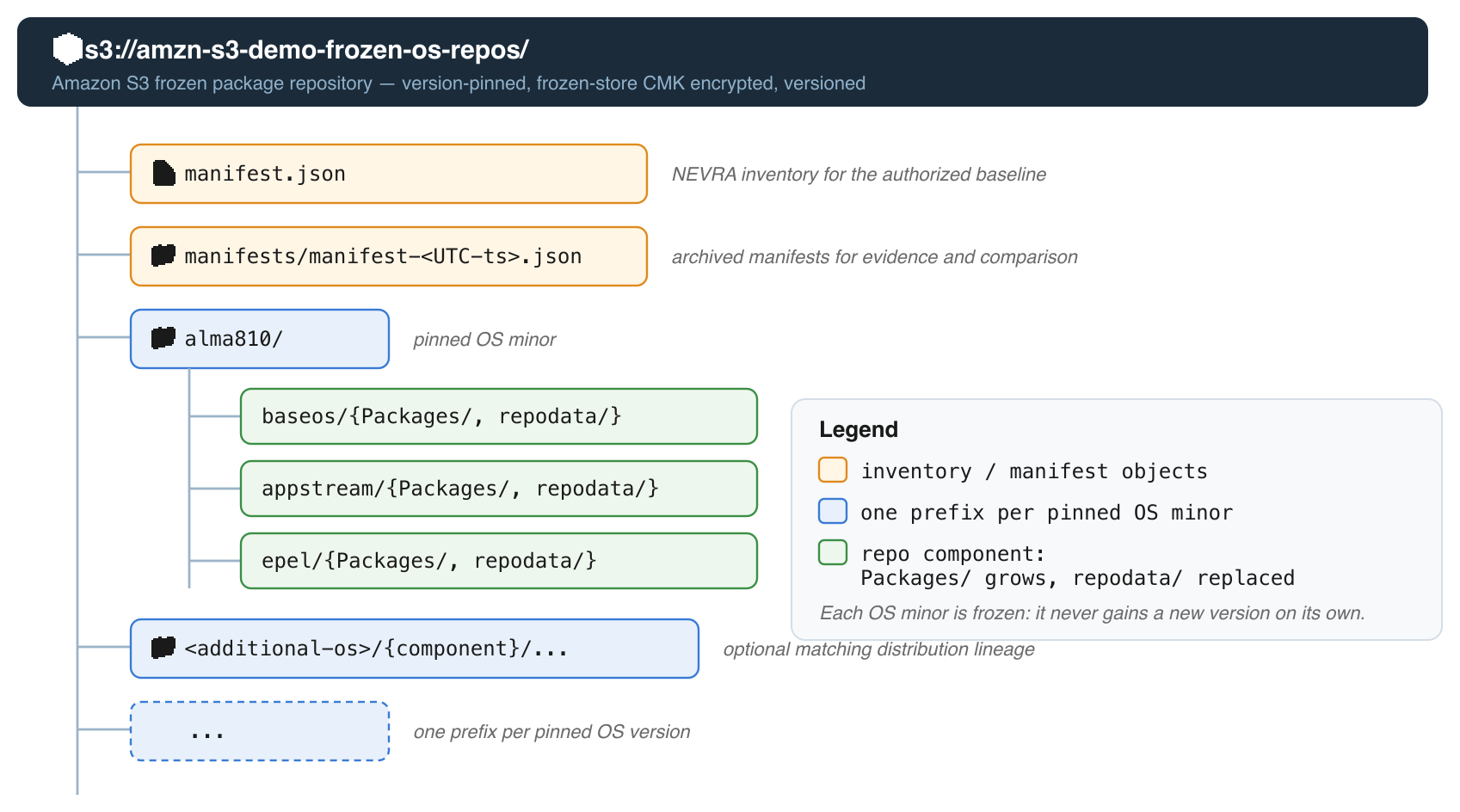
Figure 3: Per-OS, per-component prefix layout of the frozen repository on Amazon S3
Each pinned operating system version receives its own prefix. Repository components such as BaseOS, AppStream, and EPEL contain Packages/ and repodata/ trees. manifest.json records the active inventory, and archived manifests preserve historical evidence and comparison points.
Your organization configures the bucket with versioning and SSE-KMS. Public RPM content does not require a customer-managed KMS key for confidentiality, so your organization could instead configure SSE-S3 for encryption at rest. However, SSE-S3 would remove the separate cross-account authorization control provided by the customer-managed KMS key policy. The customer managed key is used here for explicit cross-account key-policy control and revocation, and the manifests reveal the fleet’s exact software inventory. S3 Bucket Keys reduce KMS request volume. If object-level access evidence is required, enable CloudTrail S3 data events.
A rollback must restore a coherent repository state, including metadata and any required object versions. Restoring only manifest.json does not roll back repository contents.
Building, patching, and running the fleet
At AMI build time, an Image Builder component installs the configured repository keys, moves existing repository definitions aside, and writes one frozen repository definition per component. It locks the package manager to the frozen repository directory, fetches metadata through the internal mirror, and fails the build if the mirror validation step fails. An optional curated package list demonstrates that the AMI can install real packages through the frozen path.
Patch Manager uses the same mirror for the running fleet. A host created from an older AMI and a newly built host are therefore patched toward the same frozen snapshot. Instances run without an Amazon VPC NAT gateway, public IP, or an Amazon VPC internet gateway route in the Workload VPC, and their repository configuration contains no public fallback.
The intended verification model is defense in depth: the sync task helps verify a vendor’s signature before content enters the trusted repository, and the system verifies it again at installation through dnf. The ingestion gate helps reject digest-only results and can be configured to help confirm that only valid package signatures from a trusted lineage key are accepted.
The package mirror
Nginx fronts aws-sigv4-proxy, which signs cross-account S3 GET requests using the mirror task role. To a client, the service appears as a standard HTTPS package repository behind an internal Application Load Balancer and private DNS name.
Use the latest version of aws-sigv4-proxy (current latest is v1.12). This version 1.12 contains the fix for signing S3 paths (or the OS package names) with special characters such as +. Earlier versions can return SignatureDoesNotMatch. The reference implementation pins the reviewed v1.12 release commit immutably. Keep it current through dependency-update reviews.
Security boundaries and limits
The design provides the following controls:
- No automatic public-repository adoption: A new upstream version enters the selective path only after an explicit, recorded decision by the user.
- Repository ingestion and installation checks: You configure strict sync-time signature validation to help validate content before it enters the trusted store.
dnfverifies again during installation. - No package-channel egress: Workload instances are configured to prevent access to public package sources.
- A read-only workload boundary: A Workload-account principal cannot modify the frozen repository.
Human approval is not a malware detection. A reviewer cannot reliably identify a backdoor in a legitimately signed package merely by seeing its name, version, or changelog. Use vulnerability intelligence, scanning, pre-production tests, and staged deployment as additional controls.
The approval state, manifests, and CloudTrail records can help support evidence for control frameworks such as SOC 2 change management, ISO 27001 patch-management controls, and FDA 21 CFR Part 11 electronic records. Applicability depends on the organization’s environment, audit scope, and assessor. Confirm it with the compliance team under the AWS shared responsibility model.
Cost and operations
Cost depends on the amount of repository content and the chosen networking and availability design. Components can include S3 storage and requests, KMS requests, Lambda invocations, DynamoDB, SNS, Fargate tasks, the internal load balancer, Distribution-account internet egress, Amazon VPC endpoints, and AMI snapshots. A three-task always-on mirror costs more than an S3 bucket alone. Estimate the target topology with current AWS pricing rather than applying a fixed monthly figure from the sample.
Run detection and review at an interval defined by patch policy and risk tolerance. The supplied default is monthly, but the Terraform input is configurable. If a package change must be reversed, restore a tested, coherent repository version and rebuild or patch affected hosts as appropriate.
Prerequisites
To set up the reference implementation, work through these in order:
- Two AWS accounts: a connected Distribution account and an air-gapped Workload account.
- Deployment tools: Terraform 1.5 or later, Terragrunt, Finch or Docker, and Python with
pip. - AWS Command Line Interface (AWS CLI): one named profile per account.
- Distribution networking: private subnets with internet egress that works without public IPs, security-group egress on port 443, and DNS resolution for public names.
- Workload networking: VPC interface endpoints for
ssm,ssmmessages,ec2messages,logs,kms, andimagebuilder, plus an S3 gateway endpoint. - Internal mirror identity: an AWS Certificate Manager (ACM) certificate and a private hosted zone. If the parent AMI does not trust the issuing CA, configure the CA file so the build installs the trust anchor.
- Package lineage: a parent AMI, repositories, and signing keys from the same distribution lineage. A RHEL subscription is required when retrieving genuine entitled Red Hat content.
- Optional deployment roles: otherwise, the stack uses each profile’s credentials.
The deployment creates state backend and Amazon Elastic Container Registry (ECR) repositories. Do not create those ECR repositories separately before applying their own Terraform units.
Reference implementation
The companion repository provides Terraform modules, Lambda handlers, two container images, a Terragrunt two-account layout, and Makefile targets for deployment and verification. The shipped alma810 example defaults to the AlmaLinux lineage (RHEL family).
Choose one distribution lineage before deployment:
- AlmaLinux Parent Image default: use an AlmaLinux parent AMI, AlmaLinux vault repositories, EPEL, and the included AlmaLinux and EPEL signing keys. No Red Hat subscription is required.
- Genuine RHEL Parent Image: use a Red Hat parent AMI, an entitled Red Hat content source, and Red Hat signing keys. The customer supplies the Red Hat subscription and content-access integration.
Note: The reference implementation only provides AlmaLinux lineage setup, not genuine RHEL. If you choose to use a genuine RHEL parent image lineage, only the reference implementation code needs to be updated to fetch the Red Hat credentials or subscription access, and the rest of the workflow remains the same.
Please follow the repository README for detailed setup instructions:
- Fill in
environments/config.hcland both account files with the two accounts, networking, mirror certificate, package lineage, and parent AMI. - Create the Terraform state backend with
make bootstrap DIST_PROFILE=<dist> WORK_PROFILE=<work>. - Review both account plans with
make plan DIST_PROFILE=<dist> WORK_PROFILE=<work>. - Deploy in dependency order with
make all BASELINE_APPROVED=true DIST_PROFILE=<dist> WORK_PROFILE=<work>. The baseline sync can take several hours.
Validate the internal package management workflow
Validation begins by running the AlmaLinux EC2 Image Builder pipeline. A successful build produces private, encrypted AMIs in the configured AWS Regions. To validate the configuration, launch a test instance from the generated AMI in a no-egress Workload subnet and verify that the instance is connected to the internal frozen repository for all package management workflow.

Figure 4: Instance showing only the internal frozen repositories enabled, with no public repository configured
The output confirms that only the internal frozen AlmaLinux repositories are enabled: frozen-baseos, frozen-appstream, and frozen-epel. The dnf makecache command successfully downloads metadata for all three repositories through the private mirror. No public repository is configured or used.
Now try installing, upgrading, or installing a new package to test that package operations are served by the internal frozen repository.
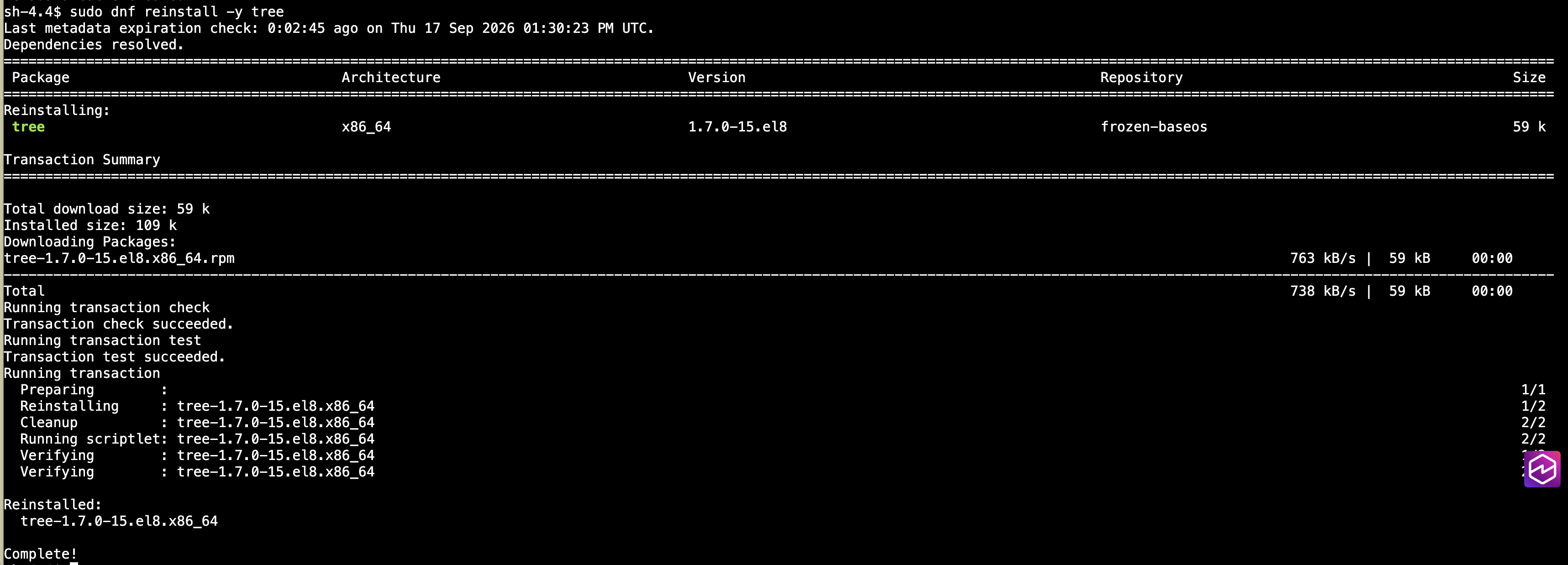
Figure 5: Package install and upgrade served by the internal frozen repository
Recommended practices
- Fail closed on approval data. If the approved package list cannot be retrieved, stop the sync task and avoid substituting a full sync.
- Govern the initial baseline. Record who authorized the bootstrap full sync, or require explicit review of its manifest before promotion.
- Require vendor signatures at ingestion. Do not treat a valid package digest as equivalent to a trusted signature.
- Keep package lineages consistent. Parent AMI, repository content, and signing keys must come from the same distribution lineage.
- Use a customer-defined review cadence. Monthly is only the sample default.
- Use immutable dependency references with active updates. Require
aws-sigv4-proxyv1.12 or later, pin the reviewed artifact by digest or full SHA, and automate update proposals. - Test rollback as a repository operation. Restore metadata and objects together, then validate the mirror before using the restored state.
Clean up
The walkthrough deploys billable resources in both accounts. Please follow the repository README for detailed setup cleanup instructions.
Conclusion
This pattern separates connected package ingestion from an air-gapped fleet, provides an authorized package baseline and an explicit decision point for later package changes or upgrades, and keeps image builds and running hosts on one frozen repository snapshot. To learn more, visit the EC2 Image Builder service page, the EC2 Image Builder documentation, the Patch Manager documentation, and the Amazon S3 user guide. The reference implementation is available in aws-samples.
[$] The kernel from a PostgreSQL point of view
Post Syndicated from corbet original https://lwn.net/Articles/1096827/
Andres Freund has a few claims to fame, but
chief among them is his many years of work to improve the performance of
the PostgreSQL relational database
management system. That work requires working with — or around — many
Linux kernel features and behaviors. He put in an appearance at the 2026
edition of Kernel Recipes
to talk about his experience working with the kernel project, how the
kernel could better support applications like PostgreSQL, and some
interesting developments in the PostgreSQL world.
Security updates for Tuesday
Post Syndicated from jake original https://lwn.net/Articles/1097466/
Security updates have been issued by AlmaLinux (cockpit-image-builder, expat, ipa, kernel, kernel-rt, resteasy, ruby, ruby4.0, ruby:3.3, and ruby:4.0), Debian (dovecot, flatpak, glance, kernel, libdbi-perl, lxml, rsync, swift, and wordpress), Fedora (chromium, freeipa, freerdp, grub2, NetworkManager-iodine, NetworkManager-l2tp, perl-Catalyst-Plugin-Static-Simple, perl-Dancer2, perl-HTML-FormFu, python-quart-trio, python-streamlink, python-urllib3, and vlc), Mageia (libxml2, p11-kit, pam, and php), Slackware (groff and pcre2), SUSE (389-ds, amazon-ssm-agent, erlang27, exiv2, glib2, gnome-shell, hplip, ImageMagick, kernel, libheif, libsodium, libtpms, nodejs16, perl-DBI, python-soupsieve, redis, redis7, swtpm, and wireshark), and Ubuntu (curl, libevent, linux-aws, linux-aws-6.8, linux-aws-5.15, linux-azure-5.15, linux-azure-fde-5.15, linux-intel-iotg-5.15, linux-aws-hwe, linux-azure, linux-azure-4.15, linux-gcp, linux-gcp-7.0, linux-oem-7.0, linux-nvidia, linux-nvidia-6.8, linux-nvidia-lowlatency, and linux-oracle-7.0).
Brazil Elections 2026 #lastweektonight
Post Syndicated from LastWeekTonight original https://www.youtube.com/shorts/FtPe5x7OgEI
Build adaptive AI interfaces with the AG-UI protocol, agent swarms, and Nova Act on AWS
Post Syndicated from Anand Bilgaiyan original https://aws.amazon.com/blogs/architecture/build-adaptive-ai-interfaces-with-the-ag-ui-protocol-agent-swarms-and-nova-act-on-aws/
Your generative AI applications produce different results each time they run. One medical scan shows a single fracture, and another reveals twenty ambiguous regions that require expert review. Static interfaces can’t adapt to this variability.
In this post, we show you how to build interfaces that automatically adapt to your AI’s variable outputs. This approach reduces interface development time and removes the need for custom integration code by using the AG-UI protocol, the Strands Agents Software Development Kit (SDK), and Amazon Nova Act. You learn to build adaptive interfaces using the agent-to-UI (AG-UI) protocol for dynamic UI generation, the Strands Agents SDK Swarm pattern for multi-agent collaboration, and Amazon Nova Act for legacy system integration. After reading this post, you understand when to use adaptive interfaces and how to deploy them in your applications.
The problem with static interfaces
You design screens with fixed layouts, predetermined controls, and static data binding. This works well when your application’s output space is known and consistent. An ecommerce checkout page needs the same fields for every transaction. A dashboard displays the same metrics regardless of the data. Static interfaces excel at these predictable scenarios.
AI-driven applications introduce new requirements. Consider two scenarios when you review bone X-rays. In the first scenario, one image shows a single obvious fracture requiring minimal interface controls. In the second scenario, another image reveals three subtle regions where multiple AI agents must debate findings, track confidence progression, and reach consensus before presenting results. A static interface optimized for the first scenario lacks the controls needed for the second. An interface built for the second scenario presents unnecessary complexity in the first scenario with empty panels and unused controls.
This problem appears in multiple domains. Fraud detection systems encounter variable evidence chains. Legal document review surfaces unpredictable numbers of relevant clauses. Security event response reveals different threat patterns requiring different analysis tools. Domains where AI discovers things dynamically rather than classifying into predetermined categories face this architectural challenge.
The core challenge is that AI agents discover and reason about the world dynamically, while traditional interface design assumes static, predetermined outputs.
Business impact
This mismatch costs development teams significant time and creates poor user experiences. You spend weeks building interface variations to handle different scenarios, then maintain multiple code paths as your AI models evolve. Your users face either overwhelming complexity when AI finds simple results, or insufficient controls when AI discovers complex patterns requiring deeper analysis. The development cost compounds as you add new AI capabilities. Each new agent or model requires rethinking your entire interface architecture.
Solution overview
Three AWS technologies address this challenge, so you can build interfaces that adapt to what AI agents discover.
The AG-UI protocol offers standardized streaming for agent-to-user interface (UI) communication. Before AG-UI, connecting agents to interfaces required custom code for each framework. You built custom WebSocket formats, polling mechanisms, and bespoke integration code every time you switched agent frameworks or added new capabilities. AG-UI removes this work by providing a standard format of typed events that stream over Server-Sent Events (SSE). Agent frameworks emit AG-UI events, and frontends consume them, creating a universal contract so you can swap frameworks without rewriting integration code.
The Strands Agents SDK offers the Swarm pattern for peer-to-peer multi-agent collaboration. In swarm patterns, your agents operate as peers that share hypotheses and iteratively refine findings until reaching consensus. This debate process, visible to you in real time, builds trust and catches errors that single-agent systems miss. For medical imaging, the swarm pattern mirrors how radiologists consult specialists, with multiple expert perspectives converging on accurate diagnoses.
Amazon Nova Act offers browser-based automation using natural language commands, so your AI agents can interact with legacy systems through their web interfaces. Your agent navigates login screens, searches for related records, fills form fields, and captures confirmation numbers, while streaming actions back to the primary interface so you can observe the process.
These three technologies work together naturally: AG-UI adapts your interface to swarm findings, the swarm produces explainable multi-agent analysis, and Nova Act bridges the gap with legacy systems that lack API access.
Prerequisites
Before starting, verify you have:
Required AWS Resources:
- AWS account with Amazon Bedrock access in a supported region (us-east-1, us-west-2, or eu-west-1)
- Your Identity and Access Management (IAM) user or role needs these specific permissions:
bedrock:InvokeModel– For calling foundation models.bedrock:CreateAgentandbedrock:CreateAgentActionGroup– For agent deployment.lambda:CreateFunctionandlambda:InvokeFunction– For serverless compute.s3:PutObjectands3:GetObject– For file storage.dynamodb:PutItemanddynamodb:GetItem– For state management.secretsmanager:GetSecretValue– For credential retrieval.logs:CreateLogGroupandlogs:PutLogEvents– For Amazon CloudWatch logging.
Development Environment:
- Python 3.9+ with pip installed.
- Node.js 16+ and React 18+ installed.
- AWS Command Line Interface (CLI) configured with your credentials.
Technical Skills:
- Intermediate Python programming experience.
- Familiarity with event-driven architectures (your interface listens for messages from agents and updates in real time, similar to how chat applications work).
- Basic understanding of Representational State Transfer (REST) APIs and Server-Sent Events (SSE).
Data protection and HIPAA compliance
This solution processes Protected Health Information (PHI) including medical images, patient MRN, and clinical findings. Apply the following safeguards before deploying to any environment handling real patient data.
Encryption at rest — Configure SSE-KMS with a customer managed key on all Amazon S3 buckets storing medical images. Enable encryption with a customer managed AWS KMS key on all DynamoDB tables storing session state, conversation history, and analysis findings.
Encryption in transit — Enforce TLS 1.2+ on all connections. Attach a bucket policy denying all S3 actions when aws:SecureTransport is false. Do not override DynamoDB SDK endpoints to HTTP. Do not set ignore_https_errors=True on Nova Act workflows. If the legacy system uses self-signed certificates, add its CA to your runtime trust store.
S3 Block Public Access — Enable Block Public Access at the account level and on every bucket in this solution. Medical images must never be exposed through public bucket policies or ACLs.
HIPAA-eligible services and BAA — All AWS services in this architecture (Amazon Bedrock, Amazon S3, DynamoDB, Lambda, API Gateway, CloudFront, Cognito, Secrets Manager, CloudWatch) are HIPAA-eligible. Before processing PHI, execute a Business Associate Agreement (BAA) with AWS covering these services.
PHI minimization — Never write MRN, patient name, or clinical findings to plaintext logs. Enable CloudWatch Logs data protection policies to detect and mask PHI patterns automatically. Suppress Nova Act trajectory logging during steps that display patient data. Verify Cognito JWT on the SSE endpoint before emitting any PHI-bearing event.
Important: Code samples in this post are for educational purposes. Review all configurations against your organization’s HIPAA Security Rule implementation before production deployment.
Architecture
You implement an orchestrator pattern where your frontend interacts with a single entry point that internally coordinates specialized sub-agents. The solution follows this pattern: your React app sends requests to Amazon API Gateway, which triggers AWS Lambda functions that coordinate AI agents through Amazon Bedrock, then streams results back over Server-Sent Events. We use Amazon Bedrock AgentCore, a platform to build, connect, and optimize agents at scale with any framework or model.
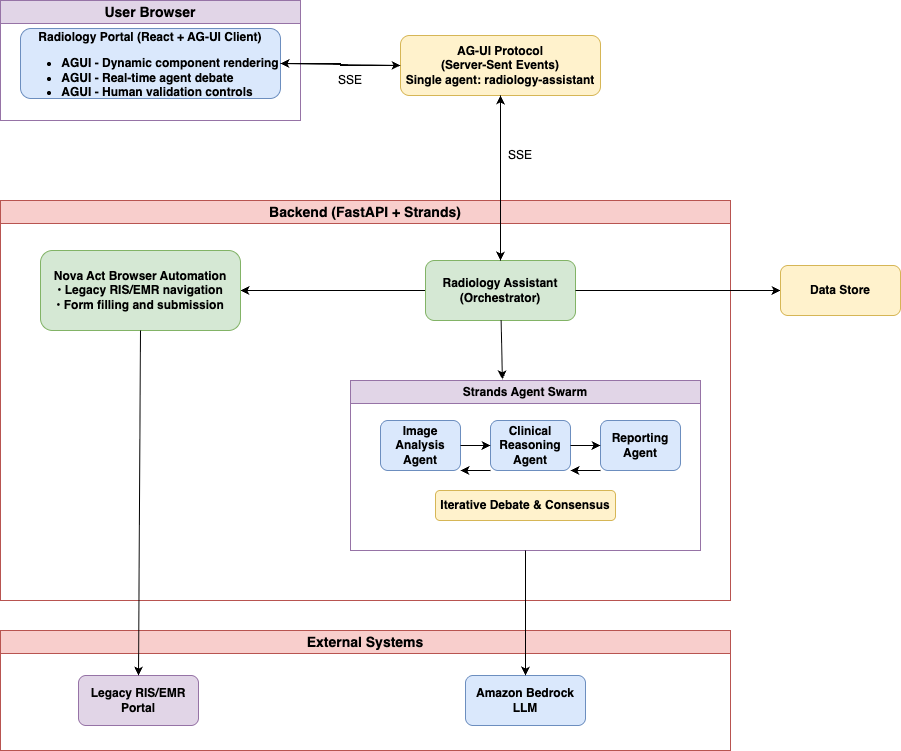
Figure 1: Logical view of the adaptive interface, showing the AG-UI client, the backend orchestrator, the Strands agent swarm, and integrations with legacy systems and Amazon Bedrock
Figure 2: End-to-end AWS architecture showing the 16 components that deliver authentication, content delivery, agent orchestration, foundation model inference, and legacy system automation
Architecture components
The architecture consists of 16 integrated components working together:
① User authentication You authenticate through Amazon Cognito, which provides secure identity management and generates JWT tokens for accessing the radiology portal application.
② Content delivery Amazon CloudFront serves the React application and static assets from Amazon S3, providing global low-latency access and caching for optimal performance.
③ API Gateway Amazon API Gateway handles both REST API requests and Server-Sent Events (SSE) connections, providing the entry point for client-server communication.
④ Authorization of user API request with token validation
⑤ Backend processing AWS Lambda functions act as the AG-UI handler, managing authentication, invoking agents through Amazon Bedrock AgentCore Gateway, and formatting responses as SSE streams.
⑥ Image storage Amazon S3 stores medical images with SSE-KMS encryption using a customer managed key. S3 Block Public Access is enabled at the bucket level. Lambda generates short-lived, tightly scoped pre-signed URLs for secure direct uploads, pinned to the PUT method, scoped to a per-user key prefix, restricted to the application/dicom content type, and set to expire in 300 seconds. A bucket policy enforces maximum upload size through the s3:content-length-range condition and denies requests where aws:SecureTransport is false.
⑦ Session management Amazon DynamoDB maintains session state, conversation history, analysis findings, and agent registry data for stateful multi-turn interactions.
⑧ AgentCore Gateway Amazon Bedrock AgentCore Gateway serves as the orchestration layer, routing agent requests, managing sessions, coordinating multi-agent workflows, and load balancing across runtime instances.
⑨ AG-UI handler A specialized component within AgentCore that manages AG-UI protocol events, formatting agent responses as standardized events for dynamic UI rendering.
⑩ AgentCore runtime AgentCore Runtime provides the execution environment for agent instances, running the Strands Agent Swarm with isolated runtime instances for each agent type.
⑪ Agent swarm execution The Strands Agent Swarm consists of three specialized agents (Image Analysis, Clinical Reasoning, Reporting) that collaborate through iterative debate rounds to reach consensus.
⑫ Foundation model inference Amazon Bedrock provides access to the Claude Sonnet foundation model for reasoning, interpretation, and natural language generation across agents using a large language model (LLM).
⑬ Knowledge base retrieval Amazon OpenSearch Serverless stores medical knowledge base with vector embeddings, providing semantic search for relevant medical literature and clinical guidelines.
⑭ Legacy system automation Amazon Nova Act performs browser-based automation to submit validated findings to a legacy hospital’s Radiology Information System (RIS) and Electronic Medical Record (EMR) systems, with each action streamed back to your UI.
⑮ Credential management AWS Secrets Manager securely stores and rotates credentials for legacy system access, providing Nova Act with authentication details at runtime.
⑯ Observability and monitoring Amazon CloudWatch captures logs and metrics, with data protection policies enabled to detect and mask PHI. AWS Distro for OpenTelemetry (ADOT) provides distributed tracing with AWS X-Ray-compatible trace export. AWS Security Token Service (AWS STS) manages temporary security credentials.
Key architectural decisions
Your frontend sees one agent (radiology-assistant), not three, through the orchestrator pattern. This simplifies integration and encapsulates workflow complexity. The orchestrator internally coordinates the swarm based on analysis stage.
Rather than generating arbitrary HTML, agents select from themed, accessible components (ROICard, DebatePanel, ConfidenceMeter). This balances flexibility with design consistency and security through the predefined component library approach.
SSE provides real-time updates as agents work through the streaming protocol. You see agent contributions character by character, creating transparency into the reasoning process.
Your frontend exposes state (current findings, validation decisions) to agents through bidirectional state synchronization. Agents update state through actions. This synchronization supports human-in-the-loop workflows where agents pause for validation before proceeding.
Solution walkthrough
The following steps walk through the solution, from authentication and swarm configuration to the AG-UI endpoint, legacy system integration, and deployment.
Step 0: Configure authentication
Add JWT validation to your API endpoint to enforce authentication before processing requests containing PHI.
Full Amazon Cognito user pool setup (pool creation, hosted UI, and token exchange) is covered in the Amazon Cognito Developer Guide. This post focuses on the agent architecture layer.
Step 1: Install the Strands Agents SDK
Install required packages by running the following command:
This command installs the required packages for building your multi-agent swarm, including the Strands framework, AG-UI integration, and web server components.
Step 2: Configure your swarm agents
Create specialized agents for your swarm by adding the following code to your project:
Note: The agents use a foundation model accessed through Amazon Bedrock. The example defaults to Claude Sonnet 4, but you should select a currently active model from the Amazon Bedrock model lifecycle page for your AWS Region. Read the model ID from an environment variable so you can update it without code changes as newer models become available. Amazon Bedrock retires models on a published lifecycle schedule, so hardcoding a model ID risks failure when that model reaches end of life. Check the Amazon Bedrock model lifecycle page and supported Regions, and use an environment variable or AWS Systems Manager Parameter Store to manage the model ID externally.
This code creates three specialized agents (Image Analysis, Clinical Reasoning, Reporting) that work together as peers in a swarm pattern, sharing hypotheses and refining findings through iterative debate until reaching consensus.
Step 3: Implement consensus mechanism
Configure your swarm to continue debate rounds until agents reach consensus or exhaust maximum iterations:
Your swarm reaches consensus when proposed findings achieve confidence scores above your configured threshold (80% for this example). Confidence progresses as agents validate or debate each other.
In the first example of subtle fracture detection, Round 1 shows the Image Agent proposing a Region of Interest (ROI) with confidence above 80%. Round 2 shows the Clinical Agent validating with anatomical context, maintaining confidence above the threshold. Round 3 shows agents agreeing on clinical significance, reaching consensus when the three agents reach confidence scores above the configured threshold.
In the second example of false positive challenge, Round 1 shows the Image Agent proposing an ROI with confidence above the threshold. Round 2 shows the Clinical Agent challenging it as an artifact, with confidence dropping below 80%. Round 3 shows the Image Agent acknowledging the challenge, with confidence dropping further. Round 4 shows agents continuing debate without consensus. Round 5 shows maximum rounds reached, with the finding marked as disputed.
This iterative refinement, visible to you in real time, provides explainability that black-box AI systems can’t match.
Step 4: Set up the AG-UI protocol endpoint
Create a streaming endpoint by adding the following code:
This code creates a streaming endpoint that emits standardized AG-UI events, so your frontend receives real-time updates as agents work without requiring custom integration code for each agent framework.
The AG-UI protocol defines event types that cover agent-to-UI communication needs. Instead of custom formats, agents emit structured events over SSE, and frontends subscribe to this stream and react to each event type. TEXT_MESSAGE_CONTENT streams agent reasoning or responses token by token for real-time visibility into agent thinking. STATE_DELTA provides incremental state updates for bidirectional synchronization between agent and interface. TOOL_CALL_START and TOOL_CALL_END show tool execution when agents invoke external functions or APIs. With UI_COMPONENT_SPEC, agents control which UI components appear and how they’re configured through interface element specifications.
Configure your frontend to subscribe to this stream and handle each event type:
Step 5: Implement real-time agent debate visualization
Create interface components that make multi-agent collaboration visible to you by implementing the following visualization features:
A key benefit of the swarm pattern combined with AG-UI is making multi-agent collaboration visible. Rather than presenting you with final results from a black-box system, the interface shows agents debating findings in real time.
Your interface includes specialized components for visualizing agent collaboration. The agent contribution display shows each agent’s reasoning streaming character by character with a typing effect, indicating which agent is currently “thinking.” Color-coding distinguishes agents (blue for Image Analysis, purple for Clinical Reasoning, cyan for Reporting). The confidence timeline uses a line graph to show how confidence evolves across rounds. Increasing confidence (72% → 78% → 85%) indicates agents converging on consensus. Decreasing confidence (68% → 52% → 45%) shows successful challenge of a false positive. Evidence cards display each region of interest with a status badge (Challenged, Consensus, Disputed) based on the debate outcome, an AI-generated summary of key reasoning points, and an expandable section showing complete agent contributions for radiologists who want detailed analysis.
This visibility serves multiple purposes. For explainability, you see why agents reached conclusions, not only what they concluded. For error detection, visible debate helps you spot flawed reasoning. For confidence calibration, watching agents debate each other helps you assess reliability. For educational value, radiologists learn from agent reasoning, improving their own analysis.
Step 6: Integrate Amazon Nova Act for legacy systems
Implement browser automation to submit findings to legacy systems by adding the following code:
Security note: Nova Act captures prompts and screenshots as trajectory data. Never interpolate credentials or PHI into act() commands. Use type_text with sensitive=True to prevent credential capture in logs and trajectories. In production, suppress trajectory capture entirely for authentication steps, or route trajectory storage to a KMS-encrypted, access-controlled bucket subject to your BAA
Many enterprise systems, particularly in healthcare, lack modern APIs. Hospital RIS and EMR systems often run on decades-old technology stacks that can’t be modified without significant effort. Amazon Nova Act offers a pragmatic solution: browser-based automation using natural language commands.
This code implements browser automation that interacts with legacy systems through their existing web interfaces, retrieving credentials securely from AWS Secrets Manager and streaming each action back to your interface for transparency.
Each Nova Act command streams back to the radiology portal, so you can observe the submission process. Your interface displays a live action log showing authentication, navigation, form filling, and confirmation capture. This transparency helps you understand what the automation is doing and intervene if issues arise.
Browser automation requires careful credential management. The implementation stores credentials in AWS Secrets Manager, retrieves them at runtime, and never exposes them to the frontend. Audit logging captures Nova Act actions for compliance and troubleshooting. For production deployment, additional controls include IP allowlisting, session timeout enforcement, and multi-factor authentication where supported by legacy systems.
Step 7: Deploy to AWS
Configure DynamoDB tables with customer-managed KMS encryption:
Deploy your solution using Amazon Bedrock AgentCore, which offers managed runtime for agents with built-in identity, memory, and observability. AgentCore supports long-running tasks (up to 8 hours), asynchronous tool execution, and native CloudWatch integration, making it ideal for production deployments requiring minimal operational overhead.
Pattern selection guidance
Choosing the right architecture pattern depends on problem characteristics and requirements.
When to use dynamic agent-generated UIs
| Characteristic | Dynamic UI (AG-UI) | Static UI (Traditional) |
| Output Variability | High – unpredictable number/structure of results | Low – consistent data structure |
| Multi-Agent Value | Visible collaboration builds trust | Single agent or no collaboration to show |
| Interface Complexity | Varies per case | Consistent across cases |
| Explainability Needs | Important – users must understand reasoning | Less important – results speak for themselves |
| Development Effort | Higher – protocol integration, component library | Lower – standard REST API |
Swarm compared to other multi-agent patterns
Use swarm when multiple perspectives improve accuracy (peer review, consensus building), debate process offers value (explainability, error detection), no clear hierarchy exists (agents are peers, not supervisor/worker), and iterative refinement is beneficial (findings improve through rounds).
Use agents as tools when clear task decomposition exists (supervisor delegates to specialists), subtasks are independent (parallel execution possible), hierarchy is natural (manager coordinating experts), and no need for peer debate exists (each agent’s output stands alone).
Use sequential workflow when strict ordering is required (step B needs step A’s output), checkpoints are needed (validate before proceeding), process is well-defined (known stages, dependencies), and no benefit from parallel exploration exists (linear pipeline).
Use cases beyond medical imaging
This architectural pattern applies to domains with high output variability and multi-agent value. For fraud detection, you encounter variable evidence chains (1-20 suspicious transactions), multiple analyst perspectives (financial, behavioral, network analysis), and legacy banking systems requiring browser automation. For legal document review, you face unpredictable numbers of relevant clauses, expert opinions from different legal domains (contract law, regulatory compliance, risk assessment), and integration with legacy case management systems. For security event response, you deal with variable threat indicators, team collaboration (network analysis, malware analysis, threat intelligence), and legacy Security Information and Event Management (SIEM) systems without modern APIs.
Anti-patterns
Avoid this approach when you have simple classification (predetermined categories with fixed confidence scores), deterministic calculations (no uncertainty or debate needed), low-latency requirements (multi-round debate adds latency), cost-sensitive scenarios with predictable outputs (swarm pattern increases token usage), or minimal explainability needs (users trust results without seeing reasoning).
Clean up
To avoid incurring future charges, delete the resources you created while following this walkthrough. Delete them in the following order. The sequence removes the frontend and compute layers first, then the data stores, and finally the encryption keys and IAM roles, so no deletion fails because another resource still depends on it. Because this solution can process PHI, this teardown also removes any stored medical images, patient identifiers, and findings.
- Amazon CloudFront — Disable the distribution, let it propagate, then delete it. This stops traffic and releases the S3 app bucket.
- Amazon API Gateway — Delete the REST API and SSE endpoint.
- Amazon Bedrock AgentCore — Delete the Gateway, then the Runtime instances (and their identity, memory, and session resources). This stops all agent activity against the downstream services.
- AWS Lambda — Delete the AG-UI handler and any other functions.
- Amazon Bedrock model access — Confirm nothing is still invoking the models. Revoke access to Claude Sonnet or Amazon Nova Act if enabled only for this walkthrough.
- Amazon OpenSearch Serverless — Delete the knowledge base collection and its access, network, and encryption policies. OCUs bill hourly.
- Amazon DynamoDB — Delete the radiology-sessions table and any other tables you created.
- Amazon S3 — Empty (including all object versions) and delete the medical-image and app-hosting buckets.
- AWS Secrets Manager — Delete the legacy RIS/EMR credential secrets. A 7 to 30 day recovery window applies unless you force deletion.
- Amazon Cognito — Delete the user pool and app client.
- AWS KMS — Only now, schedule deletion of the customer managed keys used for Amazon S3 and DynamoDB. Deleting them earlier can make encrypted data unrecoverable.
- AWS IAM — Delete the roles and policies created for Lambda and AgentCore.
- Amazon CloudWatch — Delete the log groups, dashboards, and alarms (kept until last for troubleshooting).
Finally, review the AWS Billing and Cost Management console to confirm no unexpected charges remain.
Conclusion
In this post, we showed you how to build adaptive AI interfaces using three AWS technologies. You learned to use the AG-UI protocol for dynamic UI generation, apply Strands swarm patterns for multi-agent collaboration, and integrate Amazon Nova Act for legacy systems. Through a complete radiology assistant implementation, you saw how these technologies work together to handle variable AI outputs while maintaining explainability and practical enterprise integration.
The AG-UI protocol creates interfaces that adapt to what your agents discover, not what you anticipated. Use it when output variability is high and you can’t predetermine interface requirements. The Strands swarm pattern creates explainability through visible multi-agent debate. Use when multiple perspectives improve accuracy and you benefit from seeing reasoning processes. Amazon Nova Act bridges the gap with legacy systems lacking APIs. Use when browser automation is the only viable integration path and action transparency matters.
These technologies work together naturally because they address different aspects of the same problem: building AI systems that are flexible, explainable, and practical for real-world enterprise environments.
Next steps
- Explore the AG-UI protocol on GitHub.
- Read the Strands Agents SDK documentation.
- Learn more about Amazon Bedrock AgentCore.
Read related AWS blogs:
- Multi-Agent Collaboration Patterns with Strands Agents and Amazon Nova.
- Strands Agents SDK: A Technical Deep Dive into Agent Architectures and Observability.
- Build a Drug Discovery Research Assistant using Strands Agents and Amazon Bedrock.
About the authors
Using AI to chart a course for our post-quantum migration
Post Syndicated from Sharon Goldberg original https://blog.cloudflare.com/ai-driven-cryptography-discovery/
As laboratories around the world race to build out a cryptographically relevant quantum computer, we at Cloudflare are racing towards a 2029 target deadline for full post-quantum readiness. While we’ve already transitioned many of our products to post-quantum encryption, we still have work to do to support post-quantum authentication and achieve full post-quantum readiness across our platform.
We’re taking a maximalist stance (“PQ everything!”), because as an infrastructure provider to the world, we want to give our customers the peace of mind that using Cloudflare ensures that their traffic is future-proofed against quantum adversaries.
But how does one accomplish such a massive migration at an organization of our size and scale? After all, cryptography is the base layer for almost all of the world’s digital systems, including the software services and the networking protocols that power our platform.
To drive our PQ migration, we have three key goals.
First, we want to help our product and engineering teams understand how cryptography is being used and how they should be upgrading it. This should cover both the upgrades to post-quantum encryption and to post-quantum authentication. Many of our products have already been upgraded to post-quantum encryption over TLS 1.3, but we still want to cover the long tail of TLS connections, as well as upgrade any other uses of public-key encryption. Meanwhile, it’s still early days for our deployment of post-quantum authentication.
Next, we want to provide progress metrics for the migration. These might include per-repository and per-product counts of the use of classical and post-quantum cryptography.
Finally, we want to surface prerequisites early. If our products or platform rely on protocols that don’t yet have a PQ migration plan (because PQ variants of the system have not yet been considered, because PQ standards do not exist or lack consensus, or because software libraries or other key ecosystem components do not yet have PQ support), then we need to know now. That way we can work with the relevant stakeholders, standards bodies and ecosystems to help drive their PQ migration plans, so that we can meet our own 2029 PQ migration timeline.
This post is the story of how we’re going about this. We explain how we turned to AI to help us solve some of our problems and how we’re developing an internal tool called CryptoLabe to help us. CryptoLabe is named after the mariner’s astrolabe, a navigation instrument refined by Portuguese navigators. Just as an astrolabe helped sailors determine where they were and chart a course, CryptoLabe helps us discover cryptography in our code, understand how it is used, and chart a path to post-quantum migration.
CryptoLabe is highly specialized to our internal systems (our repositories, our ticketing systems, and internal documentation processes) and still evolving as we continue its development, so we aren’t making it available to customers. Nevertheless, we are sharing our learnings so that other organizations can build upon our efforts as they work through their own PQ migration journey.
The scale of the problem
The software that powers most Cloudflare products lives inside our single centralized source control management platform. This means we can find most uses of cryptography across our platform by just looking through our codebase.
While the centralization of our codebase is a marked advantage for us, we still need to contend with three challenges that come with the scale of this problem. First, our code is spread across many repositories. Second, cryptography rarely announces itself plainly in the code. Instead, it hides in
- shared libraries that a repository imports but may or may not actually call
- upstream and protocol defaults, like a TLS 1.3 listener that is configured to negotiate a classical key exchange such as X25519 rather than post-quantum X25519MLKEM768
- configuration files that select algorithms far away from the code that uses them, like a TLS responder whose key exchange protocols are pinned in a YAML file stored in a different repository
- code paths that are dead, test-only, or on a path to being deprecated
Third, cryptography discovery is about more than just pattern matching. Grepping for certain algorithm names (e.g. “RSA” or “X25519”) overcounts, because it finds cryptography in unused code. Grepping also undercounts, because it misses defaults and indirect uses in dependencies and configuration. Most importantly, it can't tell you how the cryptography is used. A classical ECDSA signature could be part of a JWT, IPsec, TLS, or SSH, and each has a completely different migration path. Many uses also depend on the other side of the connection: a TLS server may support both post-quantum key exchange and classical key exchange; the one it chooses to use would depend on the client.
Turning to AI
It turns out that AI is pretty good at doing more than just grepping. A model can search a codebase, follow evidence across files, and return structured analysis. It can also enrich findings by pulling information from other sources, like our internal documentation and ticketing systems. In fact, AI can even explain how cryptography is being used and how it should be updated. We’ve been putting that idea to the test as we develop CryptoLabe.
As we said before, our first two goals are to (1) discover and understand the use of cryptography in our codebase, and also (2) to get metrics on the state of our PQ migration. Towards these goals, our current implementation of CryptoLabe performs scans in two stages, as shown in the figure below.
The first “discovery” stage starts by mapping the repository. It then searches for cryptography through source, configuration, manifests, lockfiles, scripts, tests, and documentation. Among other things, the scan looks for the use of cryptography like key agreement, signatures, asymmetric encryption, PKI, tokens, credentials, hardware security module integrations, and more. This discovery stage produces a set of "raw observations."
Each raw observation feeds a run of the second stage. This “analysis” stage first re-checks the observation against the source code. It then investigates how the cryptographic operation is used at runtime, what role the repository plays, and which internal or external parties it depends on. When necessary, it can inspect related code in other repositories to complete the analysis. Finally, it takes a pass over its own conclusions, searching for missing or conflicting evidence such as configuration overrides, test-only code, or incorrect assumptions about runtime behavior.
Next, the model assigns a classification to the finding. If there is not enough evidence to assign a classification, the model assigns More evidence needed, External dependency, or Unknown rather than guessing.
This is the current list of classifications used by CryptoLabe, containing catch-all classifiers which will likely be refined as we proceed through our migration. (As an example, we could refine our classifiers by splitting the “encryption” classifier into key agreement and HPKE; you get the idea.)
|
Classification |
Examples |
|
Classical encryption |
This is a catch-all category that finds cases of elliptic-curve Diffie-Hellman key exchange (ECDHE) (e.g., X25519, P-256, P-384), RSA key agreement or other uses of public-key encryption (e.g., HPKE). These are broken by a quantum computer running Shor's algorithm, which puts them at risk of harvest-now-decrypt-later attacks. |
|
Classical signature |
This is a catch-all category that finds use of an RSA signature or elliptic-curve (ECDSA) signature in anything, for example a certificate, a TLS handshake, another protocol handshake. These signatures are broken by Shor's algorithm. |
|
Classical token |
We found a lot of RS256 or ES256 JWT tokens, so we created a special classification for them. These are JWTs that use classical RSA and ECDSA signatures; RFC 9964 defines a post-quantum replacement using ML-DSA. |
|
PQ-ready hybrid key exchange |
Finds hybrid post-quantum key exchange in TLS 1.3, i.e. X25519MLKEM768. This is the most prevalent use of PQ encryption in our codebase. |
|
PQ-ready |
Finds other uses of post-quantum cryptography that are not X25519MLKEM768 in TLS 1.3, like ML-DSA. |
Finally, it generates a report that serves two audiences: (1) product managers who need to understand what the migration means for their product, and (2) engineers that need enough detail to execute the migration.
Here’s a (cropped) view of one of our reports:
While we’ve been iteratively reviewing findings against the source code and with relevant engineers, we do not yet have a ground-truth dataset for reproducibly comparing different versions of the prompts we’ve tried for CryptoLabe.
Built on Cloudflare’s Developer Platform
We built CryptoLabe on Cloudflare's Developer Platform. Here’s the architecture:
CryptoLabe runs across two Cloudflare Workers. There’s a scanner Worker that runs the scans. And there’s an inventory Worker that serves the dashboard, exposes the API, and stores everything in a D1 database. The two communicate through Service Bindings. A scan starts when someone requests it from the dashboard, and the inventory Worker passes the request to the scanner.
Orchestrating a scan
We need a way to keep a scan alive and on track from start to finish, without building our own job orchestration system. We did this with Agents SDK. Each repository gets its own persistent coordinator built on a Durable Object (DO). A bounded queue in front of the coordinators limits how many scans run at once. When a scan's turn comes, the coordinator tracks its progress and handles cancellation, retries, and recovery.
The coordinator doesn't do the analysis itself. It hands the work to Cloudflare Workflows, so that they can persist progress and automatically retry failed steps. The coordinator moves each repository through four stages:
- discovery Workflow (the first scanning stage that produces raw observations)
- deep analysis Workflow (the second stage, run on each raw observation)
- merge Workflow (that builds a list of findings for a given repository, including combining repeated or similar finds)
- publish workflow (that hands results back to the inventory Worker)
The first two workflows need the model to have access to the repository's code. We want this access to be isolated, so we don’t risk damaging the codebase. That’s why CryptoLabe downloads the repository once, at an exact commit, at the start of each scan, and then stores that snapshot in R2. Each Workflow then restores the snapshot into a fresh, short-lived Cloudflare Sandbox, an isolated container. The model then works with the Sandbox through a small set of read-only tools on an immutable snapshot of the code, even if the codebase changes while the scan is still running.
Calling the model at scale
If we want to scan through all of our (many!) repositories, we have to worry about both cost and capacity.
For cost, the model loop sends its requests through AI Gateway to cost-effective open-weight models hosted on Workers AI. Putting the model behind AI Gateway also makes it easy to switch models as better or cheaper ones become available.
Capacity became a problem once we scanned many repositories at once. Bursts of model requests began triggering HTTP 429 (rate limit) responses from AI Gateway, and scans retrying independently only made the bursts worse. We solved this with a single, global Durable Object that paces every model request across all scans, including retries. When any scan hits a rate limit, the cooldown is shared and all scans back off together, so concurrent scans share the available capacity instead of competing for it.
Prerequisites and hard cases
Let’s now get into our third goal: surfacing prerequisites and hard cases early.
A lot of ink has been spilled about ecosystem readiness for the PQ migration, and we are now going to spill some more. As everyone knows, a PQ migration cannot happen in a vacuum. For migration to succeed, post-quantum cryptography must be supported in relevant software libraries (e.g. BoringSSL) and across parties that participate in the ecosystem (e.g. clients, browsers, origins, cloud proxies, certificate authorities, etc.). Standards are also an important indicator of ecosystem support, although a standard that is still in “draft” state does not necessarily mean deployment cannot proceed. As an example, we deployed X25519MLKEM768 in TLS 1.3 back in 2022 when it was still a “draft” at the Internet Engineering Task Force (IETF) while it was only finalized as RFC 10024 in 2026.
Either way, our point is that in order to upgrade a system to PQ cryptography, we need to understand its dependencies and level of ecosystem support.
That’s why CryptoLabe uses the concept of “prerequisites” to highlight findings that cannot be immediately remediated by an individual product team working alone.
A prerequisite can be something as straightforward as “we are currently blocked on migrating to post-quantum JWTs.” We say this is straightforward because there is already a standard (RFC 9964) for post-quantum JWTs. Nevertheless, if our software libraries don’t yet support validating post-quantum JWTs, or if we’re using a token issuer that does not yet issue post-quantum JWTs, we can’t go company-wide and ask each of our product teams to start PQ-ing their JWTs. This migration is blocked until we solve its core prerequisites. CryptoLabe lets us group together findings that (likely) have the same prerequisite, which also helps us decide how to prioritize resolving these prerequisites.
For example, the snapshot below shows the six findings from CryptoLabe that have post-quantum SAML as a prerequisite. (SAML is a protocol for single sign-on (SSO).)
On the other hand, there may be uses of cryptography that lack even a basic level of ecosystem support. We’ve been calling these “hard cases.” To find them, we wrote a separate prompt that ignores “vanilla” uses of cryptography (e.g. ordinary TLS between internal systems) and instead looks for custom cryptographic protocols, keys, or signatures used in size-constrained fields, cryptography built into hardware, specialized cryptographic constructions (like blind signatures), protocols without a PQ standard, and dependencies on external parties that do not yet support PQ cryptography.
This prompt is shorter and simpler than those used for CryptoLabe, since its only job is to find hard cases. In our qualitative review, we found that it got better results when it ran in one fell swoop against all our repositories, while also taking in context from our internal ticketing and documentation system.
Here’s an example of a “hard case” we found: a certificate carried in an HTTP header. Post-quantum certificates and signatures are larger than their classical counterparts, so if the header (or an intermediary, or the application processing the header) assumes a certificate has a certain size, changing the signature algorithm may break the system. Our next step is to determine whether this code will remain in use in the long term. If it will, we need to measure the relevant size limits and decide how to accommodate the larger certificate.
An important lesson here is that no single scan finds everything. Our repository-by-repository scans were effective at discovering common uses of cryptography. Meanwhile, this targeted scan worked better for “hard cases” because it ignored well-understood cryptography and had more context about each product and its dependencies.
The bottom line is that different approaches find different things, and every finding still needs to be checked by the engineers who understand how the system actually works.
Sharing our prompts
We’ve been messing around with the best way to write prompts for CryptoLabe for the last several months. We don’t yet have a ground-truth dataset for comparing one prompt’s performance against another, and we are not convinced we have 100% coverage of all uses of cryptography in our codebase. Instead, we have iterated by running scans, reviewing findings with the engineers that maintain the repositories, investigating misses that came up during these reviews and revising the prompts. Nevertheless, we decided to publish selected prompts, so other teams can learn from and adapt our approach. These prompts are starting points, not a standalone version of CryptoLabe, and the quality of their results will depend on the model, tools, context, and engineering review available.
Thinking through your own PQ migration
At Cloudflare, we’re taking a maximalist approach to our PQ migration because of our goal of acting as a provider of post-quantum cryptography for customers and the Internet at large. But most organizations do not need to start by finding every use of cryptography in every repository in every one of their products. In fact, most organizations should not be doing this, because at this time it's a waste of precious resources.
Before scanning a single repository, you can protect traffic in bulk wherever possible. If your websites run through Cloudflare, we protect your data in transit with post-quantum encryption already today; check this out with our new PQ visibility features. Our SASE platform, Cloudflare One, provides post-quantum encryption for private network traffic. Post-quantum encryption is provided at no additional cost and without requiring you to upgrade every origin server or private application on your enterprise network. This gives you a compensating control while you work through discovering and understanding the use of cryptography inside your own systems.
An exhaustive cryptographic inventory is not a prerequisite for action. Instead, organizations should first identify the systems whose compromise would matter most, discover their use of cryptography, and then PQ that cryptography in priority order. Here is one way to begin:
- Choose a repository for one important system. Start with something that handles sensitive or long-lived data, authenticates users or software, or is exposed to the public Internet.
- Run cryptography discovery against that repository. We hope our description of CryptoLabe will be helpful to this effort!
- Validate the results. Ask the team who owns the system to validate the results of cryptography discovery and confirm that the cryptography finding is needed long term and needs to be upgraded to PQ. It’s important to remember that it might not need to be immediately upgraded to PQ if there is another compensating control in place.
- Prioritize action. Figure out what upgrades you can make now and what upgrades are blocked. Record shared prerequisites that need help from a library, vendor, standards group, or another part of your organization. Prioritize your findings and make a plan for addressing the highest-impact systems and prerequisites first.
That gives you the beginning of a PQ transition plan, without requiring a complete map of every cryptographic operation in your organization. CryptoLabe is still ever-evolving, but its scans and results have been illuminating to us as we plan our migration. We hope these shared learnings will be useful as you continue to work through your own PQ migration.
Acknowledgements: Many people across Cloudflare provided feedback on and contributed to CryptoLabe, including Davide Marquês, Peter Wu, Phil Schmieder, JP Aumasson, Andrew Galloni, Christopher Patton, Luke Valenta, Mari Galicer, Vânia Gonçalves, and the Client, Tunnel and Gateway teams who reviewed reports produced by the tool.
Building a certificate authority for the whole Internet
Post Syndicated from Steve Goldsmith original https://blog.cloudflare.com/cloudflare-certificate-authority/
Twelve years ago, during Birthday Week 2014, we turned on Universal SSL and nearly doubled the number of encrypted sites on the web overnight, giving free TLS to every site behind Cloudflare, including the ones that never paid us a cent. Encryption stopped being an expensive, time-intensive undertaking and instead became the default.
For Birthday Week this year, we are taking the next step on that path. For more than a decade we have been one of the largest consumers of publicly trusted certificates on the Internet, and have never issued a single one ourselves. That is changing. Cloudflare is announcing our intent to become a public certificate authority (CA).
Today we are announcing the first concrete milestones in that effort: We have applied for inclusion in the Chrome, Apple, Microsoft, and Mozilla root programs, and we have signed a definitive agreement to acquire an established, broadly trusted root from GlobalSign, so that we can offer certificates with the widest possible device reach the day we begin issuing. We’re also announcing our plans to be one of the first CAs to serve post-quantum certificates, targeting Chrome’s recently announced Quantum-resistant Root Program.
We are not issuing certificates yet, and it will be a little while before we do. What we are doing is committing to the work in public, sharing the milestones as they land, and telling you exactly what we are building while working with the root programs and other members of the WebPKI community to achieve this.
Two paths to trust
A brand-new root is not widely useful for years. Even after a root program accepts it, that root has to propagate out into the world's operating systems, browsers, and devices, and it never reaches the large set of devices that have stopped receiving updates, or never received them in the first place. That long tail of older clients is where a great deal of the world’s Internet traffic originates, and where a correspondingly large set of avoidable breakage lives. We believe that all clients deserve the highest level of security possible, regardless of their manufacturer, operating system, or time since last update.
Acquiring an existing root with a high degree of trust store coverage across a diverse set of clients solves that on day one. The existing GlobalSign root has been trusted across browsers, operating systems, and devices since 2012, and it reaches older clients that a fresh root never will. The new root that we will be submitting for inclusion in root key programs is built for where the ecosystem is heading, including the programs that are starting to cap how old a trusted root may be. The established root gives us reach across the devices of the past. The new roots give us standing under the policies of the future. We want both to ensure certificates issued by our CA provide the widest set of customer compatibility possible.
A new source of free certificates
The free-of-charge, automated certificate model now carries most of the encrypted web, and much of it runs through one remarkable operator. Let's Encrypt issues on the order of ten million certificates a day, serves more than 500 million sites, and passed four billion active certificates in 2025. It is one of the best things to happen to the Internet in twenty years, and we say that as one of its largest users.
That success comes with some systemic risk: if the dominant free certificate authority had a bad week, much of the web would have no comparable free, automated alternative ready to take the load. At the certificate pack level, we have spent years building exactly this kind of redundancy for our own customers. Every Cloudflare Universal SSL certificate already ships with a backup certificate, wrapped with a separate key and issued from a different authority, ready to deploy automatically if the primary is ever revoked or compromised. A public CA is that same idea, but at the scale of the whole Internet.
To make it easy to adopt, we will be Automated Certificate Management Environment (ACME)-first, an open standard protocol that is widely accepted. Automated issuance and renewal through ACME will be the way you get a certificate from us, which means anyone already pointed at any existing free CA can move to us by changing a directory URL, with no new tooling and nothing to re-architect.
Certificate growth projections are huge
Cloudflare sits in front of more than 20 percent of global Internet request traffic and terminates TLS for millions of domains, relying on millions of certificates per year to do so. We provision those certificates through multiple CAs, with primary and backup paths so customer services stay up through CA outages and revocation events.
That has taught us not just how the WebPKI ecosystem works, but also that it occasionally fails, from the consuming side, the hard way. We have dealt with rate limits, validation edge cases, revocation latency, chain building, and root distribution lag. We have lived through the CA churn of recent years and felt it through our customers. We know what reliable issuance has to look like from the outside, because our customers' uptime has depended on us being resilient and responsive when an issuer has a bad day.
And as certificate maximum validity period decreases over the next few years, agentic activity increases, and PQ certs go mainstream, we expect the raw number of certificates we rely on annually on to continue to grow, quickly — and we are not alone. We want to not just solve this problem for ourselves, but be part of providing this utility to the Internet, and ensure that the certificate supply chain for our customers has even more providers.
Designing for resilience: transparency and fail small
In taking on this new responsibility of being our own CA, we're committed to making the most reliable and resilient CA possible. We intend to build a certificate authority whose reliability depends not just on avoiding mistakes, but as with the rest of Cloudflare’s products, to “fail small” and limit the impact of any one issue.
That means instituting processes to design and test recovery before any incident occurs. As an example, we will make renewal automation a condition of issuance. We will only issue to clients that support ACME Renewal Information (ARI), standardized in RFC 9773. Subscribers must maintain automation that polls our renewal endpoint, acts on the renewal windows we publish, and identifies the certificate it is replacing.
We're also learning from what we've observed over the past 16 years. We have seen certificate authorities caught between timely revocation and keeping subscribers’ sites online because too many subscribers could not replace their certificates quickly enough. When certificates need to be retired, whether for a compliance issue or a security incident, we can bring forward renewal windows for the affected certificates, spread replacements across the available time, and track replacement issuance.
This is just one of the many ways we intend to build. We will be transparent with our issuance stack and operations, publish reproducible builds of the software that signs certificates, attest the hardware security modules that hold our keys, and run a public dashboard for issuance health and incidents. Audits are point-in-time and tell you a CA passed, not how it runs on an ordinary Tuesday. We want root programs, researchers, and ordinary site owners to watch how a modern CA actually operates between audits.
A certificate authority for the post-quantum Internet
We also intend to lead on where certificates are going, not just where they are. We plan to be one of the first CAs to issue production Merkle Tree Certificates (MTCs), with the first certificates issued in the first quarter of 2027.
MTCs are a new and far more compact way to deliver publicly trusted certificates, designed for a post-quantum world where traditional certificate chains grow large enough to strain TLS handshakes. We have been championing the standards-based proposal for MTCs at the IETF, and earlier this year, Chrome named MTCs as the preferred path for post-quantum authentication. Issuing them in production allows us to protect Cloudflare customers as well as the wider Internet against the post-quantum threat, with real volume behind a transition the whole web has to make. We’ve shared much more about MTCs and what this new Web Public Key Infrastructure (PKI) will look like in a blog post on the topic.
We do not expect that transition to be sudden. Much of the Internet will continue to rely on classic certificates and existing WebPKI for many more years. But across that window we expect MTCs to take a steadily growing share of issuance, and that is why we are building one service that does both. By carrying classic certificates and Merkle Tree Certificates under one CA, with one lifecycle and one set of guarantees, customers can adopt at the pace that suits them and help the web make the crossing without a hard cutover. Customers should not have to pick a side of a multi-decade migration, run two systems, or rebuild when the balance shifts.
As always, Cloudflare will be Customer Zero
In addition to providing certificate packs via Universal SSL for our customers, Cloudflare consumes certificates from many different CAs to run our systems and internal operations. Just like our other products, we will be Customer Zero for the new CA and its certificates (both WebPKI and MTC), ensuring that all aspects of the new systems and processes meet our high internal standards, and that our CA’s infrastructure is exercised at Cloudflare scale.
What happens next
We are working through the application and approval process with each of the core web root key programs. These processes happen in the open, and we’ll share more updates as they proceed, through to the first Merkle Tree Certificates in early 2027. If you want to follow this work or be one of the first to use a Cloudflare CA certificate in the future, you can register for updates.
As we build out this new capability, we will continue to work closely with the network of partner public CAs we have relied on for many years — 16 in fact! — as we all work together to ensure a trusted and open Internet.
When we launched Universal SSL, the argument was simple: every byte that flows encrypted across the Internet makes it harder to intercept, throttle, or censor, and the open web is something we all build together. A public, redundant, transparent certificate authority is that same argument carried one layer down, to the trust that makes the encrypted web possible in the first place. We have been working toward this for a long time, and we are glad to finally be on the road.
Happy Birthday Week!