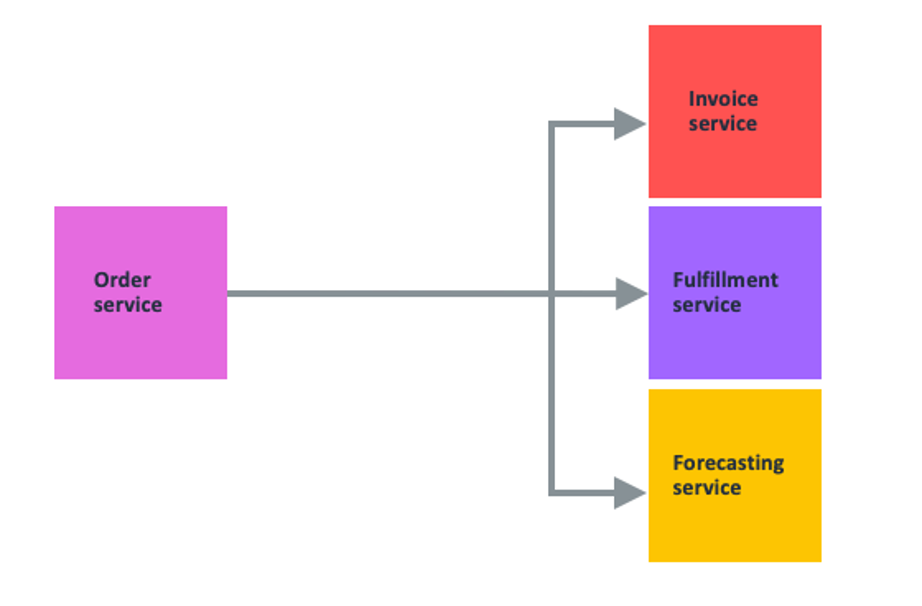
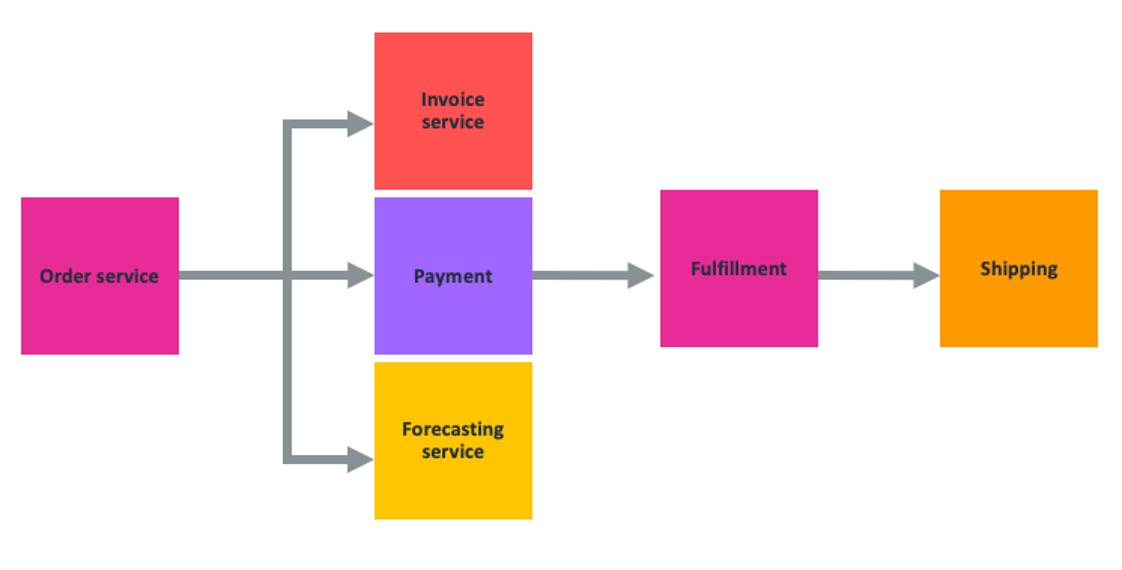
Service Bindings are generally available, with efficient pricing

Post Syndicated from Kabir Sikand original https://blog.cloudflare.com/service-bindings-ga/

Service Bindings are generally available, with efficient pricing

Service Bindings are generally available, with efficient pricing

Today, we’re happy to unveil a new way to communicate between your Workers. In the spirit of baking more and more flexibility into our Developer Platform, our team has been hard at work building a new API to facilitate Worker to Worker communication: Service Bindings. Service Bindings allow your Workers to send requests to other Workers Services, from your code, without those requests going over the Internet. It opens up a world of composability that was previously closed off by a difficult interface, and makes it a lot easier for you to build complex applications on our developer platform.

Service Bindings allow teams to segment application logic across multiple Workers. By segmenting your logic, your teams can now build with more confidence by only deploying narrowly scoped changes to your applications, instead of recommitting the whole application every time. Service Bindings give developers both composability and confidence. We’ve seen some excellent uses so far, and today we’ll go through one of the more common examples. Alongside this functionality, we’ll show you how Cloudflare’s cost efficiency will save you money.

Example: An API Gateway

Service Bindings allow you to easily expand the number of services running on a single request. Developers can now create a pipeline of Workers that call one another and create a complex series of compute blocks. The ability to separate and compose application logic together has opened Cloudflare Workers up to even more uses.

With Service Bindings, one of our customers has moved multiple services off of their legacy infrastructure by creating a gateway Worker that serves as the entry point of a request. This gateway Worker handles decision-making about request routing and quickly shifts requests to appropriate services – be it on their legacy application servers or their newly created Workers. This project enabled several new teams to onboard as a result, each managing their Worker independently. Large teams need a development ecosystem that allows for granular deployments, minimizing the scope of impact when a bad push to production occurs.

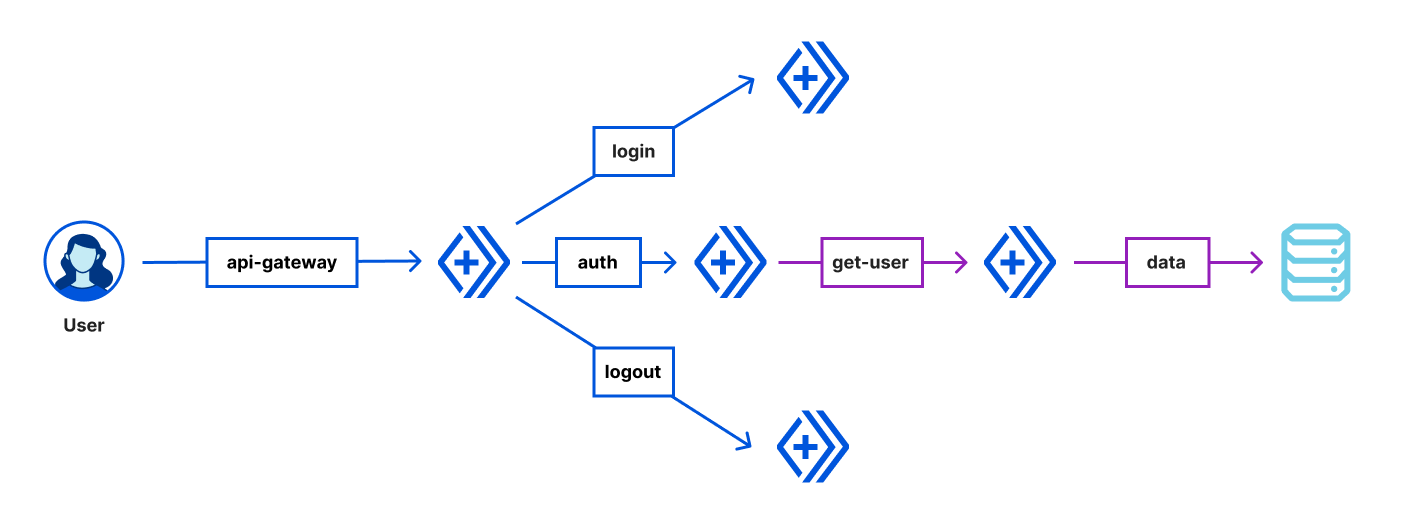
Let’s walk through a simple example of an API gateway Worker that handles routing and user authentication. We’ll build an application that takes in a user request and checks for authorization. If the user isn’t authorized, we block the request. If the user has valid credentials, we’ll fetch the user data. The application will also implement login and logout to change the user authentication state.

Service Bindings are generally available, with efficient pricing

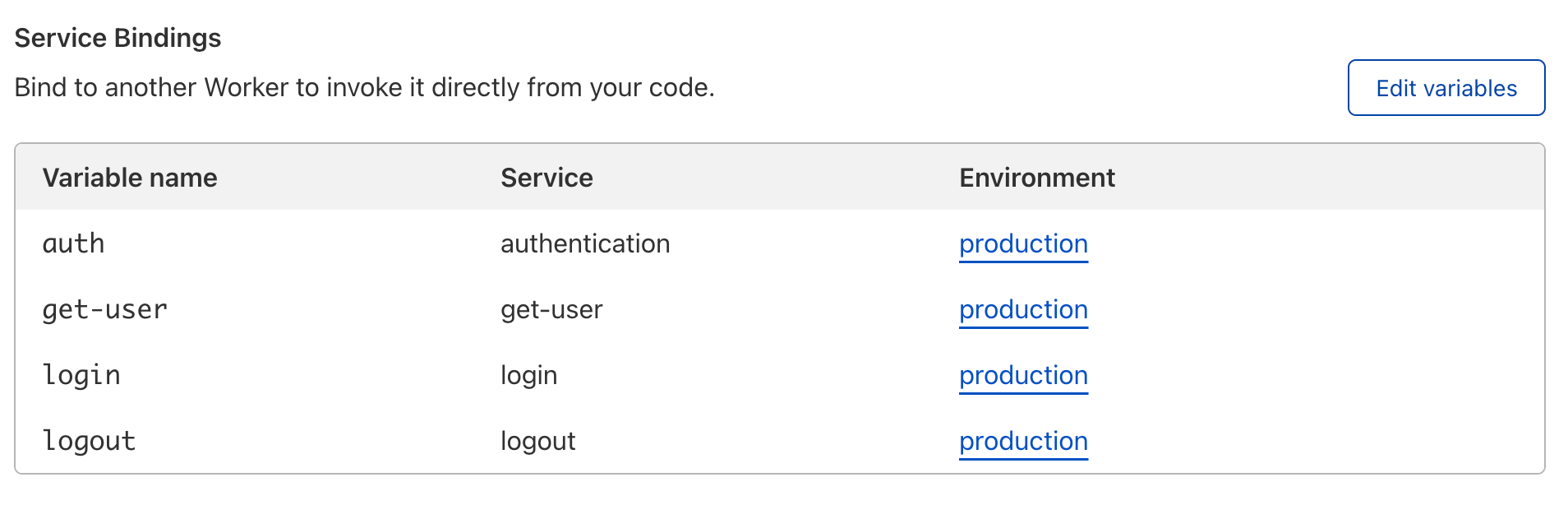
Here, the api-gateway Worker calls login and logout Workers for authentication to privileged endpoints like /getuser. The api-gateway Worker also checks each request for authorization via the auth Worker and allows valid requests to call the get-user Worker. The get-user Worker then makes an outbound network request to gather the required user information, and passes that data back to the client via our api-gateway Worker. The api-gateway Worker is therefore bound to four other Worker Services: auth, get-user, login, and logout.

Service Bindings are generally available, with efficient pricing

Let’s take a look at the code for the api-gateway Worker. We’ll see the routes /login, /logout, and /getuser are implemented on this API. For the /getuser route, the api-gateway Worker requires authorization via the auth Worker. Requests to any other endpoints will return a 404 HTTP status code.

export default {
 async fetch(request, environment) {
   const url = new URL(request.url);
   switch (url.pathname) {
     case '/login':
       return await environment.login.fetch(request);

     case '/logout':
       return await environment.logout.fetch(request);

     case '/getuser': {
       // Check that the "Authorization" header is sent when authenticated.
       const authCheck = await environment.auth.fetch(request.clone());
       if (authCheck.status != 200) { return authCheck }
       // If the auth check passes, send the request to the /admin endpoint
       return await environment.getuser.fetch(request);
     }
   }
   return new Response('Not Found.', { status: 404 });
 }
}

The code really is that simple. The separation of concerns allows your teams to work independently of each other, relying on each service to do what it is supposed to do in production. It allows you to separate your code by use case, developing, testing, and debugging more effectively.

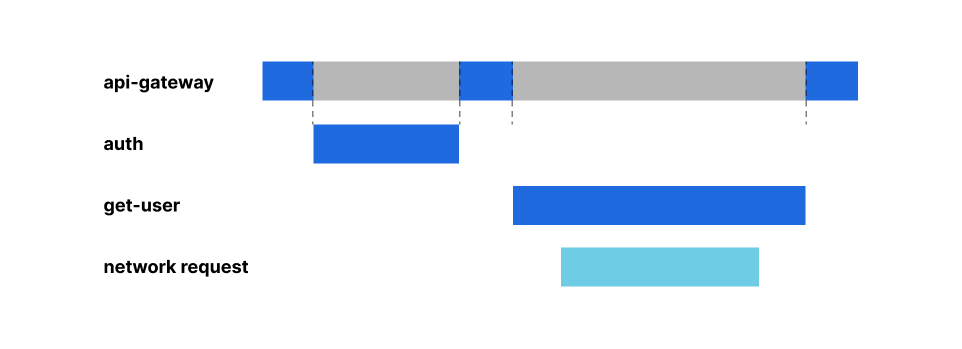
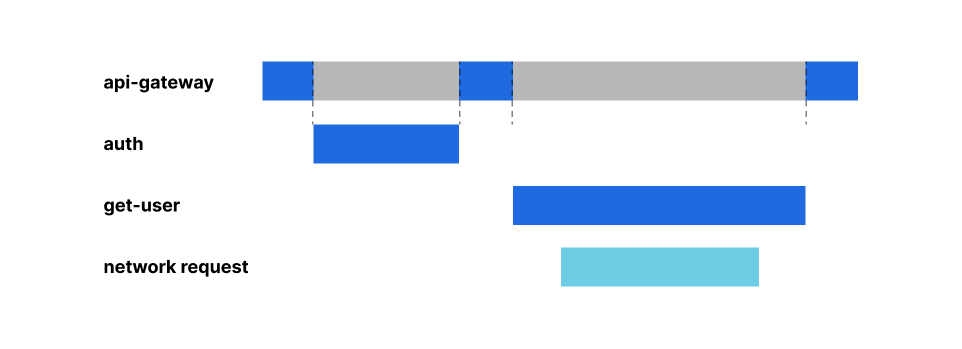
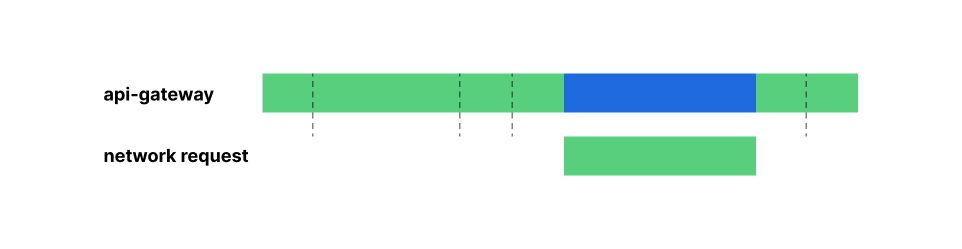
But your next question might be, what am I charged for? Before we get into price, let’s first talk about where the compute execution is happening using our example above. A request to /getuser may look something like this, when looking across the request’s lifecycle:

Service Bindings are generally available, with efficient pricing

The get-user Worker makes a network call to gather user information while the auth Worker executes entirely within the Workers runtime. Now that we understand what a single execution looks like, let’s talk about cost efficiency.

Cost efficiency that saves you money

Service Bindings are available for you to use starting today. They cost the same as any normal Worker; each invocation is charged as if it’s a request from the Internet – with one major and important difference. We’re removing the concept of “idle resources” across Workers. You will be charged a single billable duration across all Workers triggered by a single incoming request. This is possible because Cloudflare can share compute resources used by each request across your Workers and pass the resulting cost savings on to our customers.

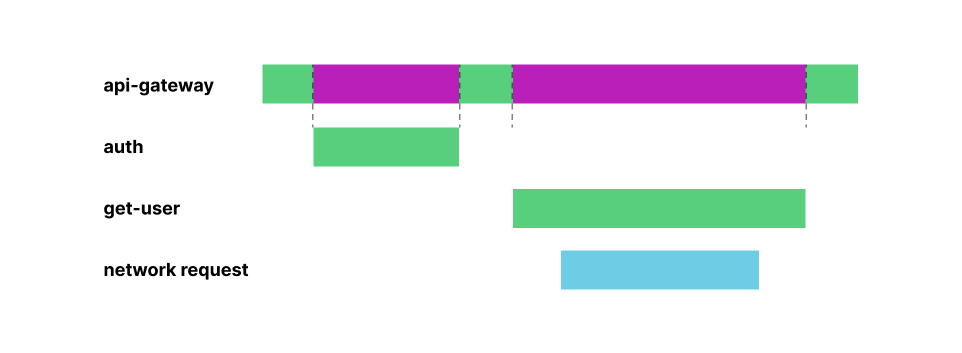
Revisiting our example above, the api-gateway Worker may be waiting on other dependencies to perform some work, while it sits idle. When we say idle, we mean the time the api-gateway Worker is awaiting a response from the auth and get-user Workers – represented by the gray bars in the request lifetime graphic.

Service Bindings are generally available, with efficient pricing

When using Service Bindings, you no longer have to pay for those “idle resources”. With the Workers model, customers can execute work on a single shared compute thread across multiple individual Services, for each and every request. Cloudflare will charge for the amount of time that thread is allocated to your Workers and the time your Workers are awaiting external dependencies. Cloudflare won’t double charge for any overlap.

Service Bindings are generally available, with efficient pricing

This is in stark contrast to classic serverless compute models (like Amazon Web Services’ Lambda), where resources are allocated on a per-instance basis, and as such cost is passed to the customer even when those resources are not actively being used. That extra charge is represented by the magenta portions of the request lifetime graphic below.

Service Bindings are generally available, with efficient pricing

Cloudflare is able to squash duration down to a single charge, since Cloudflare can share the compute resources between your services. We pass those cost savings on to our customers, so you can pay only for the work you need done, when you need it done, every time.

Getting Started

Excited to try our Service Bindings? Head over to the Settings => Variables tab of your Worker, and click ‘Edit Variables’ under Service Bindings. You can then reference those bindings within your code and call fetch() on any one of them.

We can’t wait to see what you build. Check us out on Discord to join the conversation.

Workers visibility: announcing Logpush for Worker’s Trace Events

Post Syndicated from Tanushree Sharma original https://blog.cloudflare.com/logpush-for-workers/

Workers visibility: announcing Logpush for Worker’s Trace Events

Workers visibility: announcing Logpush for Worker’s Trace Events

Writing an application is like building a rocket. Countless hours in development and thousands of moving parts all come down to one moment – launch day. Picture the countdown: T minus 10 seconds. The entire team is making sure that things are running smoothly by monitoring dashboards that measure the health of every part of the system.

It’s every developer’s dream to get the level of visibility that NASA has in their mission control room, but for their own code. For flight directors and engineering directors alike, it’s important to have visibility into the systems that are built throughout development and after release. Today, we’re excited to announce Logpush for Worker’s Trace Events, making it easier than ever to gain visibility into applications built on Workers.

Workers Visibility Today

Today, we have lots of tools that are used to find out what’s happening in a Worker.

These tools are awesome for debugging, generalizing trends and monitoring Workers on third parties. They emphasize ease of use and make it effortless to get visibility quickly from your Workers.

As Workers have evolved, we’re now seeing more adoption from larger enterprises and platform companies who are using Workers as a foundation for their customers to develop on top of. When building complex and dynamic applications, customers, especially those building on Workers in the SaaS world need access to raw logs.

Bringing Trace Events to Logpush

Coming soon — we’re adding Workers execution logs to Logpush! Cloudflare Enterprise customers get access to Logpush for any of our available products, including CDN, WAF, Spectrum and many more. We’re excited to add Workers to this list.

Logpush for Worker’s Trace Events will include unstructured console.log() messages, exceptions, and metadata about requests/responses. Here is a sample Trace Event for a fetch request:

{"accountID":123456,"scriptName":"cloudflare-workers-script","outcome":"ok","duration":0.5,"CPUTime":4,"eventType":"fetch","event":{"request":{"url":"https://workersdevtest.com","method":"GET","headers":{"accept":"*/*","accept-encoding":"gzip","connection":"Keep-Alive"},"cf":{"clientTcpRtt":40,"tlsVersion":"TLSv1.2","httpProtocol":"HTTP/2","edgeRequestKeepAliveStatus":1,"country":"CA","asn":16591}},"subrequests":{"request":{"url":"https://example.com","method":"GET","headers":{"x-custom-header":"my-header-value"}},"logs":[{"message":["foo"],"level":"log","timestamp":1587491479166}],"exceptions":[]}}}

With this new dataset, our Enterprise customers will be able to send Workers logs to their preferred cloud storage destination such as GCS or R2 or to analysis platforms like Splunk or New Relic. Logpush handles batching and can scale no matter how much traffic your Worker gets.

This brings new ways to get transparency into Workers! You can pinpoint when a fetch request fails, find out which call is adding the most lag in your application, and track down specific log lines to debug the end user experience. Also, combine Workers logs with HTTP request logs to get a better picture of the full request lifecycle.

It also opens up doors for SaaS companies building on Workers. SaaS companies can get visibility into how their customer’s applications are performing and expose logs to their customer’s developers to make debugging and troubleshooting much easier.

Mission Control in the making

wrangler tail, Workers Analytics Engine (coming later this week!) and Logpush for Worker’s Trace Events are an elite trio to give visibility into every aspect of a Worker.

When you’re deep in the mix of development, wrangler tail is by your side to help you crush bugs and eliminate errors.  With Workers Analytics Engine, you can instrument business logic and query aggregates within seconds to populate dashboards for monitoring. Logpush for Trace Events is there for when you need to debug very specific cases and get an exact record of what happened.

Customers big and small are using Cloudlfare Workers for their next launch, and we’re building tools to make that happen successfully. We’re bringing Logpsush for Trace Events to our Enterprise customers very soon. Stay tuned for updates.

A new era for Cloudflare Pages builds

Post Syndicated from Nevi Shah original https://blog.cloudflare.com/cloudflare-pages-build-improvements/

A new era for Cloudflare Pages builds

A new era for Cloudflare Pages builds

Music is flowing through your headphones. Your hands are flying across the keyboard. You’re stringing together a masterpiece of code. The momentum is building up as you put on the finishing touches of your project. And at last, it’s ready for the world to see. Heart pounding with excitement and the feeling of victory, you push changes to the main branch…. only to end up waiting for the build to execute each step and spit out the build logs.

Starting afresh

Since the launch of Cloudflare Pages, there is no doubt that the build experience has been its biggest source of criticism. From the amount of waiting to inflexibility of CI workflow, Pages had a lot of opportunity for growth and improvement. With Pages, our North Star has always been designing a developer platform that fits right into your workflow and oozes simplicity. User pain points have been and always will be our priority, which is why today we are thrilled to share a list of exciting updates to our build times, logs and settings!

Over the last three quarters, we implemented a new build infrastructure that speeds up Pages builds, so you can iterate quickly and efficiently. In February, we soft released the Pages Fast Builds Beta, allowing you to opt in to this new infrastructure on a per-project basis. This not only allowed us to test our implementation, but also gave our community the opportunity to try it out and give us direct feedback in Discord. Today we are excited to announce the new build infrastructure is now generally available and automatically enabled for all existing and new projects!

Faster build times

As a developer, your time is extremely valuable, and we realize Pages builds were slow. It was obvious that creating an infrastructure that built projects faster and smarter was one of our top requirements.

Looking at a Pages build, there are four main steps: (1) initializing the build environment, (2) cloning your git repository, (3) building the application, and (4) deploying to Cloudflare’s global network. Each of these steps is a crucial part of the build process, and upon investigating areas suitable for optimization, we directed our efforts to cutting down on build initialization time.

In our old infrastructure, every time a build job was submitted, we created a new virtual machine to run that build, costing our users precious dev time. In our new infrastructure, we start jobs on machines that are ready and waiting to be used, taking a major chunk of time away from the build initialization step. This step previously ran for 2+ minutes, but with our new infrastructure update, projects are expected to see a build initialization time cut down to 2-3 SECONDS.

This means less time waiting and more time iterating on your code.

Fast and secure

In our old build infrastructure, because we spun up a new virtual machine (VM) for every build, it would take several minutes to boot up and initialize with the Pages build image needed to execute the build. Alternatively, one could reuse a collection of VMs, assigning a new build to the next available VM, but containers share a kernel with the host operating system, making them far less isolated, posing a huge security risk. This could allow a malicious actor to perform a “container escape” to break out of their sandbox. We wanted the best of both worlds: the speed of a container with the isolation of a virtual machine.

Enter gVisor, a container sandboxing technology that drastically limits the attack surface of a host. In the new infrastructure, each container running with gVisor is given its own independent application “kernel,” instead of directly sharing the kernel with its host. Then, to address the speed, we keep a cluster of virtual machines warm and ready to execute builds so that when a new Pages deployment is triggered, it takes just a few seconds for a new gVisor container to start up and begin executing meaningful work in a secure sandbox with near native performance.

Stream your build logs

After we solidified a fast and secure build, we wanted to enhance the user facing build experience. Because a build may not be successful every time, providing you with the tools you need to debug and access that information as fast as possible is crucial. While we have a long list of future improvements for a better logging experience, today we are starting by enabling you to stream your build logs.

Prior to today, with the aforementioned build steps required to complete a Pages build, you were required to wait until the build completed in order to view the resulting build logs. Easily addressable issues like incorrectly inputting the build command or specifying an environment variable would have required waiting for the entire build to finish before understanding the problem.

Today, we’re giving you the power to understand your build issues as soon as they happen. Spend less time waiting for your logs and start debugging the events of your builds within a second or less after they happen!

Control Branch Builds

Finally, the build experience does not just include the events during execution but everything leading up to the trigger of a build. For our final trick, we’re enabling our users to have full control of the precise branches they’d like to include and exclude for automatic deployments.

Before today, Pages submitted builds for every commit in both production and preview environments, which led to queued builds and even more waiting if you exceeded your concurrent build limit. We wanted to provide even more flexibility to control your CI workflow. Now you can configure your build settings to specify branches to build, as well as skip ad hoc commits.

Specify branches to build

While “unlimited staging” is one of Pages’ greatest advantages, depending on your setup, sometimes automatic deployments to the preview environment can cause extra noise.

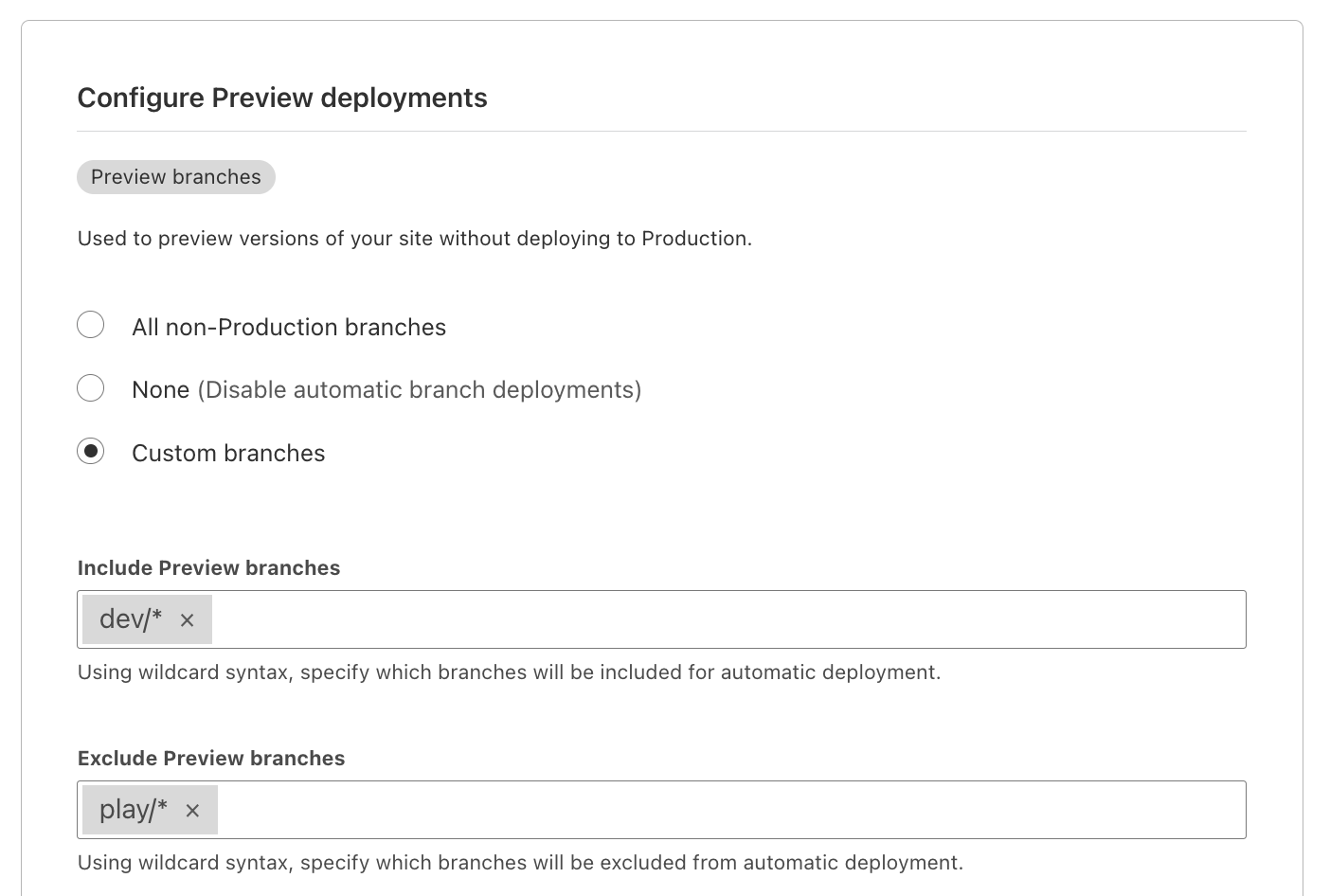
In the Pages build configuration setting, you can specify automatic deployments to be turned off for the production environment, the preview environment, or specific preview branches. In a more extreme case, you can even pause all deployments so that any commit sent to your git source will not trigger a new Pages build.

Additionally, in your project’s settings, you can now configure the specific Preview branches you would like to include and exclude for automatic deployments. To make this configuration an even more powerful tool, you can use wildcard syntax to set rules for existing branches as well as any newly created preview branches.

A new era for Cloudflare Pages builds

Read more in our Pages docs on how to get started with configuring automatic deployments with Wildcard Syntax.

Using CI Skip

Sometimes commits need to be skipped on an ad hoc basis. A small update to copy or a set of changes within a small timespan don’t always require an entire site rebuild. That’s why we also implemented a CI Skip command for your commit message, signaling to Pages that the update should be skipped by our builder.

With both CI Skip and configured build rules, you can keep track of your site changes in Pages’ deployment history.

A new era for Cloudflare Pages builds

Where we’re going

We’re extremely excited to bring these updates to you today, but of course, this is only the beginning of improving our build experience. Over the next few quarters, we will be bringing more to the build experience to create a seamless developer journey from site inception to launch.

Incremental builds and caching

From beta testing, we noticed that our new infrastructure can be less impactful on larger projects that use heavier frameworks such as Gatsby. We believe that every user on our developer platform, regardless of their use case, has the right to fast builds. Up next, we will be implementing incremental builds to help Pages identify only the deltas between commits and rebuild only files that were directly updated. We will also be implementing other caching strategies such as caching external dependencies to save time on subsequent builds.

Build image updates

Because we’ve been using the same build image we launched Pages with back in 2021, we are going to make some major updates. Languages release new versions all the time, and we want to make sure we update and maintain the latest versions. An updated build image will mean faster builds, more security and of course supporting all the latest versions of languages and tools we provide. With new build image versions being released, we will allow users to opt in to the updated builds in order to maintain compatibility with all existing projects.

Productive error messaging

Lastly, while streaming build logs helps you to identify those easily addressable issues, the infamous “Internal error occurred” is sometimes a little more cryptic to decipher depending on the failure. While we recently published a “Debugging Cloudflare Pages” guide, in the future we’d like to provide the error feedback in a more productive manner, so you can easily identify the issue.

Have feedback?

As always, your feedback defines our roadmap. With all the updates we’ve made to our build experience, it’s important we hear from you! You can get in touch with our team directly through Discord. Navigate to our Pages specific section and check out our various channels specific to different parts of the product!

Join us at Cloudflare Connect!

Interested in learning more about building with Cloudflare Pages? If you’re based in the New York City area, join us on Thursday, May 12th for a series of workshops on how to build a full stack application on Pages! Follow along with a fully hands-on lab, featuring Pages in conjunction with other products like Workers, Images and Cloudflare Gateway, and hear directly from our product managers. Register now!

Introducing Direct Uploads for Cloudflare Pages

Post Syndicated from Nevi Shah original https://blog.cloudflare.com/cloudflare-pages-direct-uploads/

Introducing Direct Uploads for Cloudflare Pages

Introducing Direct Uploads for Cloudflare Pages

With Pages, we are constantly looking for ways to improve the developer experience. One of the areas we are keen to focus on is removing any barriers to entry for our users regardless of their use case or existing set up. Pages is an all-in-one solution with an automated Continuous Integration (CI) pipeline to help you build and deploy your site with one commit to your projects’ repositories hosted on GitHub or GitLab.

However, we realize that this excluded repositories that used a source control provider that Pages didn’t yet support and required varying build complexities. Even though Pages continues to build first-class integrations – for example, we added GitLab support in November 2021 – there are numerous providers to choose from, some of which use `git` alternatives like SVN or Mercurial for their version control systems. It’s also common for larger companies to self-host their project repositories, guarded by a mix of custom authentication and/or proxy protocols.

Pages needed a solution that worked regardless of the repository’s source location and accommodate build project’s complexity. Today, we’re thrilled to announce that Pages now supports direct uploads to give you more power to build and iterate how you want and with the tools you want.

What are direct uploads?

Direct uploads enable you to push your build artifacts directly to Pages, side-stepping the automatic, done-for-you CI pipeline that Pages provides for GitHub and GitLab repositories. This means that connecting a Pages project to a git repository is optional. In fact, using git or any version control system is optional!

Today, you can bring your assets directly to Pages by dragging and dropping them into our dashboard or pushing them through Wrangler CLI. You also have the power to use your own CI tool whether that’s something like GitHub Actions or CircleCI to handle your build. Taking your output directory you can bring these files directly to Pages to create a new project and all subsequent deployments after that. Every deployment will be distributed right to the Cloudflare network within seconds.

How does it work?

After using your preferred CI tooling outside of Pages, there are two ways to bring your pre-built assets and create a project with the direct uploads feature:

  1. Use the Wrangler CLI
  2. Drag and drop them into the Pages interface

Wrangler CLI

With an estimated 43k weekly Wrangler downloads, you too can use it to iterate quickly on your Pages projects right through the command line. With Wrangler (now with brand-new updates!), you can both create your project and new deployments with a single command.

After Wrangler is installed and authenticated with your Cloudflare account, you can execute the following command to get your site up and running:

npx wrangler pages publish <directory>

Integration with Wrangler provides not only a great way to publish changes in a fast and consecutive manner, but also enables a seamless workflow between CI tooling for building right to Pages for deployment. Check out our tutorials on using CircleCI and GitHub Actions with Pages!

Drag and drop

However, we realize that sometimes you just want to get your site deployed instantaneously without any additional set up or installations. In fact, getting started with Pages shouldn’t have to require extensive configuration. The drag and drop feature allows you to take your pre-built assets and virtually drag them onto the Pages UI. With either a zip file or a single folder of assets, you can watch your project deploy in just a few short seconds straight to the 270+ cities in our network.

What can you build?

With this ease of deploying projects, the possibilities of what you can build are still endless. You can enjoy the fruits of Pages in a project created with direct uploads including but not limited to unique preview URLs, integration with Workers, Access and Web Analytics, and custom redirects/headers.

In thinking about your developer setup, direct uploads provide the flexibility to build the way you want such as:

  • Designing and building your own CI workflow
  • Utilizing the CI tooling of your choice
  • Accommodating complex monorepo structures
  • Implementing custom CI logic for your builds.

Migrating from Workers Sites

We’ll have to admit, the idea of publishing assets directly to our network came from a sister product to Pages called Workers Sites and the resemblance is striking! However, Pages affords many feature enhancements to the developer experience that show as a pain point on Workers Sites.

With Pages direct uploads, you can enjoy the freedom and flexibility of customizing your workflow that Workers Sites provides while including an interface to track and share changes and manage production/preview environments. Check out our tutorial on how to migrate over from Workers Sites.

This release immediately unlocks a broad range of use cases, allowing the most basic of projects to the most advanced to start deploying their websites to Pages today. Refer to our developer documentation for more technical details. As always, head over to the Cloudflare Developers Discord server and let us know what you think in the #direct-uploads-beta channel.

Join us at Cloudflare Connect!

Calling all New York City developers! If you’re interested in learning more about Cloudflare Pages, join us for a series of workshops on how to build a full stack application on Thursday, May 12th. Follow along with demonstrations of using Pages alongside other products like Workers, Images and Cloudflare Gateway, and hear directly from our product managers. Register now!

A storytelling approach for engaging girls in the Computing classroom: Pilot study results

Post Syndicated from Katharine Childs original https://www.raspberrypi.org/blog/gender-balance-in-computing-storytelling-approach-engaging-girls/

We’ve been running the Gender Balance in Computing programme of research since 2019, as part of the National Centre for Computing Education (NCCE) and with various partners. It’s a £2.4 million research programme funded by the Department for Education in England that aims to identify ways to encourage more girls and young women to engage with Computing and choose to study it further. The programme is made up of four separate areas of research, in which we are running a number of interventions.

Teenage students and a teacher do coding during a computer science lesson.

The first independent evaluation report from the Behavioural Insights Team (BIT) on our series of interventions has now been published. It relates to an intervention within the research area ‘Teaching Approach’, evaluating our pilot study of teaching computing to Key Stage 1 children using a storytelling approach. The evaluators from BIT found that this pilot study produced evidence of promise for the storytelling approach. They recommend conducting a full-size trial to test how effective this approach is for engaging female pupils with Computing.

Teaching computing through storytelling

Like many Computing curricula around the world, the English National Curriculum emphasises the importance of teaching Computing through a range of content so that pupils can express themselves and develop their ideas using digital tools. Our ‘Teaching Approach’ project builds on research grounded in sociocultural learning theories that suggest teaching approaches that encourage collaboration and use a variety of contexts can make Computing a more inclusive subject for all learners. Within this project, we are running three different interventions, each with learners of different ages.

In a computing classroom, a girl looks at a computer screen.

Evidence indicates that gender stereotypes around Computing develop early (1). Therefore we designed a trial — the first of its kind in England — to explore a storytelling approach for teaching Computing with younger children (6- to 7-year-olds). A small body of research suggests that using storytelling as a learning context for Computing can be engaging for both boys and girls. Research results indicate that:

  • Teaching computing through storytelling and story-writing is effective for motivating 11- to 14-year-old girls to learn programming (2)
  • Children who write computer programs to tell stories see Computing as a subject that is equally as easy or difficult for both boys and girls (3)
  • In a non-formal learning space, primary-aged girls are more likely to choose a storybook beginner electronics activity rather than open-ended beginner electronics free play (4)

The pilot study and the evaluation methods

As combining evidence from research with older students and in non-formal education is experimental, we designed this storytelling trial as a small pilot study. Our aim was to generate early evidence as to how feasible a teaching approach that uses storytelling might be in the primary Computing classroom.

We recruited 53 schools to take part in the pilot study, which ran from April to July 2021. Many schools were still facing challenges due to the ongoing coronavirus pandemic, and we are very grateful to the teachers and learners who have taken part for their contribution to this important research.

In a computing classroom, a girl looks at a computer screen.

To conduct the study, we created a free online training course, and a scheme of work, for schools to teach Computing concepts to 6- and 7-year olds using a storytelling approach. Over a sequence of the 12 lessons in the scheme of work, pupils used the ScratchJr programming environment to animate their own digital stories and learn about Computing concepts, such as sequence and repetition, linked to elements of stories, such as structure, rhyme, and speech. 

To enable the independent evaluation of the effectiveness of the storytelling approach by BIT, schools were allocated either to an intervention group, which used the training course and the storytelling scheme of work, or to a control group, which taught Computing in their usual way and was not made aware that the approach being trialled involved storytelling. For their evaluation, BIT gathered data from both groups to compare them:

  • They conducted surveys measuring learners’ attitudes toward computing and their intentions to study it in the future
  • They carried out observations of lessons, interviews with teachers, and discussions with learners
  • They ran a survey to gather feedback about the trial from teachers

The gathered data was assessed against five categories: evidence of promise, fidelity, acceptability, feasibility, and readiness for trial.

Main findings of the evaluation team

After analysing the data collected from observations, interviews, learner discussions, pupil surveys, and teacher surveys, the key finding of the independent evaluators was that the storytelling teaching approach had evidence of promise, and that it is worthwhile scaling up our intervention for a larger trial with more schools.

The evaluators’ teacher interviews confirmed the early development of gender stereotypes in the classroom. This highlights the importance of introducing Computing to young learners in a way that engages both boys and girls. 

“I’ve really noticed how there’s already differences in views of what’s a boy, what’s a girl, the boys are getting in front of me, like, ‘I want a boy car, I don’t want a girl car’. Then we’ve got the other side where we’ve got fairy tales and princesses and, ‘Oh, I’m a bunny. Do you want to play with me?’”

Teacher (evaluation report, p. 22)

Teachers told the evaluators that pupils enjoyed personalising their stories in ScratchJr, and that they themselves felt positive about the use of storytelling to teach computing. 

“I think [the storytelling aspect] gives them something real to work through, so it’s not… abstract… I think through the storytelling, they’re able to make it as funny or whatever they want, and it’s also their own interest. [Female student], she dotes on animals, so she’s always having giraffes and all of that, so it’s something that they can make their own connections too… Yes, I did really like the storytelling.”

Teacher (evaluation report, p. 26)

Teacher feedback provided some evidence that the storytelling lessons had equally increased both male and female pupils’ interest, confidence, and skills.

Young learners at computers in a classroom.

The independent evaluation team advised caution when interpreting the quantitative data from the pupil surveys, due to the small sample size in this pilot study and the high attrition rates caused by coronavirus-related disruptions. We ourselves would like to add that the study raises questions about the reliability of quantitative survey data collected from very young children using Likert scales, BIT’s chosen survey format for this evaluation. Although the evaluators have made some positive steps in creating a new survey suitable for young children, this research instrument may need further testing; the survey results would need to be interpreted in this light, and more research in this area would be recommended.

You can read the full evaluation report on the NCCE website.

Future directions

This intervention was based on one of the teaching approaches for which there was only early evidence of effectiveness, so it is a good outcome to have a larger trial recommended based on our pilot study. It’s often said that research ends up recommending more research, but in this case our small pilot project really does give robust evidence that we should trial the storytelling approach with more schools.

In a computing classroom, a girl looks at a computer screen.

The independent evaluators collected feedback from both teachers and pupils that confirms the storytelling intervention we designed is feasible in the classroom. The feedback also indicates where we can make small adjustments that will refine and develop the training and scheme of work for a larger-scale study (evaluation report, p. 35), and we will consider this feedback carefully. While some teachers suggested that the training be shortened, less experienced teachers highlighted the need to ensure the training introduces teachers to all of the content covered in the lessons. This feedback helps us to better understand how Computing is taught in primary schools, and how this is influenced by the wide variety of experience and subject knowledge that teachers have. Interestingly, in the control group, some of the teachers reported that they also introduced coding to their learners by having them create stories. We would like to conduct further research into how schools introduce young learners to programming, and we’ll be continuing to reflect on how best to offer flexible content for teacher training related to our research studies.

We’re now looking at how to continue to investigate the effectiveness of the storytelling approach through a larger trial, alongside other projects in which we’re exploring female engagement in computing education through our recently established Raspberry Pi Computing Education Research Centre.

More evaluations are on the way for our other studies in the Gender Balance in Computing programme, including:

  • Two other trials of teaching approaches
  • Interventions in non-formal education contexts
  • Trials of approaches to building a sense of belonging in Computing
  • Research into the impact of timetabling and options evenings

If you would like to stay up-to-date with the research programme, you can sign up to the Gender Balance in Computing newsletter. We will also post our reflections on the projects on this blog when the evaluations are completed.


1 Mulvey, K. L. and Irvin, M. J. (2018). Judgments and reasoning about exclusion from counter-stereotypic STEM career choices in early childhood. Early Child. Res. Q. 44, 220–230. https://doi.org/10.1016/j.ecresq.2018.03.016

2 Kelleher, C., Pausch, R. and Kiesler, S. (2007). Storytelling alice motivates middle school girls to learn computer programming. In CHI ’07: Proceedings of the SIGCHI Conference on Human Factors in Computing Systems, 1455–1464. Association for Computing Machinery, New York, NY, USA. https://doi.org/10.1145/1240624.1240844

3 Zaidi, R., Freihofer, I. and Childress Townsend, G. (2017). Using Scratch and Female Role Models while Storytelling Improves Fifth-Grade Students’ Attitudes toward Computing. In SIGCSE ’17: Proceedings of the 2017 ACM SIGCSE Technical Symposium on Computer Science Education, 791–792. Association for Computing Machinery, New York, NY, USA. https://doi.org/10.1145/3017680.3022451

4 McLean, M., & Harlow, D. (2017). Designing inclusive STEM activities: A comparison of playful interactive experiences across gender. In IDC ’17: Proceedings of the 2017 Conference on Interaction Design and Children, 567–574. Association for Computing Machinery, New York, NY, USA. https://doi.org/10.1145/3078072.3084326

The post A storytelling approach for engaging girls in the Computing classroom: Pilot study results appeared first on Raspberry Pi.

Фоторепортаж на “Биволъ” Хиляди с протестна блокада пред посолството на агресора на 9 май

Post Syndicated from Николай Марченко original https://bivol.bg/%D1%85%D0%B8%D0%BB%D1%8F%D0%B4%D0%B8-%D1%81-%D0%BF%D1%80%D0%BE%D1%82%D0%B5%D1%81%D1%82%D0%BD%D0%B0-%D0%B1%D0%BB%D0%BE%D0%BA%D0%B0%D0%B4%D0%B0-%D0%BF%D1%80%D0%B5%D0%B4-%D0%BF%D0%BE%D1%81%D0%BE%D0%BB.html

вторник 10 май 2022


Хиляди българи, украинци и руснаци са излязли на протестното митинг – шествие “ДНЕС! Не на руския фашизъм!” в понеделник, 9 май. Протестиращите се разходиха по необичайно дългия пешеходен маршрут от…

Poettering: Fitting Everything Together

Post Syndicated from original https://lwn.net/Articles/894396/

Lennart Poettering designs
his ideal desktop operating system
in great detail:

First and foremost, I think the focus must be on an image-based
design rather than a package-based one. For robustness and security
it is essential to operate with reproducible, immutable images that
describe the OS or large parts of it in full, rather than operating
always with fine-grained RPM/dpkg style packages. That’s not to say
that packages are not relevant (I actually think they matter a
lot!), but I think they should be less of a tool for deploying code
but more one of building the objects to deploy.

McQueen: Evolving a GNOME strategy for 2022 and beyond

Post Syndicated from original https://lwn.net/Articles/894395/

Robert McQueen describes
some initiatives
being taken by the GNOME Foundation to attract more
users and developers to the platform.

There are many different threats to free access to computing and
information in today’s world. The GNOME desktop and apps need to
give users convenient and reliable access to technology which works
similarly to the tools they already use everyday, but keeps them
and their data safe from surveillance, censorship, filtering or
just being completely cut off from the Internet. We believe that we
can seek both philanthropic and grant funding for this work. It
will make GNOME a more appealing and comprehensive offering for the
many people who want to protect their privacy.

Come join us at Cloudflare Connect New York this Thursday!

Post Syndicated from Jen Taylor original https://blog.cloudflare.com/cloudflare-connect-nyc-2022/

Come join us at Cloudflare Connect New York this Thursday!

Come join us at Cloudflare Connect New York this Thursday!

We take a break from Platform Week to share big news – we’re going to New York this week for our Cloudflare Connect customer event.

We’re packing our bags, getting on planes and heading to New York to do our first live customer event since 2019 and we could not be more excited.  It is time with you – the people building, delivering and securing the apps and networks we know and trust – that are the inspiration for the innovation we deliver.  We can’t wait to spend time with you.

Our co-founder and CEO Matthew Prince will kick off the day with his view from the top.  We’ll then be breaking out into focused conversations to dig in on our latest product news and roadmaps.

Excited about what we’re talking about for Platform Week?  Come chat with the Workers team in person and hear more about the roadmap.

Intrigued by the latest DDoS stats we posted and want to learn more?  Meet with the team analyzing the attacks and learn about where we go from here.

Not sure where to start your Zero Trust journey?  We’ll talk you through what we’re seeing and introduce you to other customers who are in the process of rolling out Zero Trust solutions for their teams so you can learn from each other.

Don’t miss it!  Register now – use the code BetterInternet to join us in-person for free.  Not in New York?  No worries – we’re coming to London, Sydney and San Francisco later this year.

[$] Dealing with negative dentries

Post Syndicated from original https://lwn.net/Articles/894098/

The problem of negative dentries accumulating in the dentry cache in an
unbounded manner, as we looked at back in
April, came up at the
2022 Linux Storage,
Filesystem, Memory-management and BPF Summit
(LSFMM).
Negative dentries reflect failed file-name lookups, which are then cached,
saving an expensive operation if the file name in question is looked up
again. There is no mechanism to proactively prune back those cache
entries, however, so the cache keeps growing until memory pressure finally
causes the system to forcibly evict some of them, which can make the system
unresponsive for a long time or even cause a soft lockup.

Build a big data Lambda architecture for batch and real-time analytics using Amazon Redshift

Post Syndicated from Jagadish Kumar original https://aws.amazon.com/blogs/big-data/build-a-big-data-lambda-architecture-for-batch-and-real-time-analytics-using-amazon-redshift/

With real-time information about customers, products, and applications in hand, organizations can take action as events happen in their business application. For example, you can prevent financial fraud, deliver personalized offers, and identify and prevent failures before they occur in near real time. Although batch analytics provides abilities to analyze trends and process data at scale that allow processing data in time intervals (such as daily sales aggregations by individual store), real-time analytics is optimized for low-latency analytics, ensuring that data is available for querying in seconds. Both paradigms of data processing operate in silos, which results in data redundancy and operational overhead to maintain them. A big data Lambda architecture is a reference architecture pattern that allows for the seamless coexistence of the batch and near-real-time paradigms for large-scale data for analytics.

Amazon Redshift allows you to easily analyze all data types across your data warehouse, operational database, and data lake using standard SQL. In this post, we collect, process, and analyze data streams in real time. With data sharing, you can share live data across Amazon Redshift clusters for read purposes with relative security and ease out of the box. In this post, we discuss how we can harness the data sharing ability of Amazon Redshift to set up a big data Lambda architecture to allow both batch and near-real-time analytics.

Solution overview

Example Corp. is a leading electric automotive company that revolutionized the automotive industry. Example Corp. operationalizes the connected vehicle data and improves the effectiveness of various connected vehicle and fleet use cases, including predictive maintenance, in-vehicle service monetization, usage-based insurance. and delivering exceptional driver experiences. In this post, we explore the real-time and trend analytics using the connected vehicle data to illustrate the following use cases:

  • Usage-based insurance – Usage-based insurance (UBI) relies on analysis of near-real-time data from the driver’s vehicle to access the risk profile of the driver. In addition, it also relies on the historical analysis (batch) of metrics (such as the number of miles driven in a year). The better the driver, the lower the premium.
  • Fleet performance trends – The performance of a fleet (such as a taxi fleet) relies on the analysis of historical trends of data across the fleet (batch) as well as the ability to drill down to a single vehicle within the fleet for near-real-time analysis of metrics like fuel consumption or driver distraction.

Architecture overview

In this section, we discuss the overall architectural setup for the Lambda architecture solution.

The following diagram shows the implementation architecture and the different computational layers:

  • Data ingestion from AWS IoT Core
  • Batch layer
  • Speed layer
  • Serving layer

Data ingestion

Vehicle telemetry data is ingested into the cloud through AWS IoT Core and routed to Amazon Kinesis Data Streams. The Kinesis Data Streams layer acts as a separation layer for the speed layer and batch layer, where the incoming telemetry is consumed by the speed layer’s Amazon Redshift cluster and Amazon Kinesis Data Firehose, respectively.

Batch layer

Amazon Kinesis Data Firehose is a fully managed service that can batch, compress, transform, and encrypt your data streams before loading them into your Amazon Simple Storage Service (Amazon S3) data lake. Kinesis Data Firehose also allows you to specify a custom expression for the Amazon S3 prefix where data records are delivered. This provides the ability to filter the partitioned data and control the amount of data scanned by each query, thereby improving performance and reducing cost.

The batch layer persists data in Amazon S3 and is accessed directly by an Amazon Redshift Serverless endpoint (serving layer). With Amazon Redshift Serverless, you can efficiently query and retrieve structured and semistructured data from files in Amazon S3 without having to load the data into Amazon Redshift tables.

The batch layer can also optionally precompute results as batch views from the immutable Amazon S3 data lake and persist them as either native tables or materialized views for very high-performant use cases. You can create these precomputed batch views using AWS Glue, Amazon Redshift stored procedures, Amazon Redshift materialized views, or other options.

The batch views can be calculated as:

batch view = function (all data)

In this solution, we build a batch layer for Example Corp. for two types of queries:

  • rapid_acceleration_by_year – The number of rapid accelerations by each driver aggregated per year
  • total_miles_driven_by_year – The total number of miles driven by the fleet aggregated per year

For demonstration purposes, we use Amazon Redshift stored procedures to create the batch views as Amazon Redshift native tables from external tables using Amazon Redshift Spectrum.

Speed layer

The speed layer processes data streams in real time and aims to minimize latency by providing real-time views into the most recent data.

Amazon Redshift Streaming Ingestion uses SQL to connect with one or more Kinesis data streams simultaneously. The native streaming ingestion feature in Amazon Redshift lets you ingest data directly from Kinesis Data Streams and enables you to ingest hundreds of megabytes of data per second and query it at exceptionally low latency—in many cases only 10 seconds after entering the data stream.

The speed cluster uses materialized views to materialize a point-in-time view of a Kinesis data stream, as accumulated up to the time it is queried. The real-time views are computed using this layer, which provide a near-real-time view of the incoming telemetry stream.

The speed views can be calculated as a function of recent data unaccounted for in the batch views:

speed view = function (recent data)

We calculate the speed views for these batch views as follows:

  • rapid_acceleration_realtime – The number of rapid accelerations by each driver for recent data not accounted for in the batch view rapid_acceleration_by_month
  • miles_driven_realtime – The number of miles driven by each driver for recent data not in miles_driven_by_month

Serving layer

The serving layer comprises an Amazon Redshift Serverless endpoint and any consumption services such as Amazon QuickSight or Amazon SageMaker.

Amazon Redshift Serverless (preview) is a serverless option of Amazon Redshift that makes it easy to run and scale analytics in seconds without the need to set up and manage data warehouse infrastructure. With Amazon Redshift Serverless, any user—including data analysts, developers, business professionals, and data scientists—can get insights from data by simply loading and querying data in the data warehouse.

Amazon Redshift data sharing enables instant, granular, and fast data access across Amazon Redshift clusters without the need to maintain redundant copies of data.

The speed cluster provides outbound data shares of the real-time materialized views to the Amazon Redshift Serverless endpoint (serving cluster).

The serving cluster joins data from the batch layer and speed layer to get near-real-time and historical data for a particular function with minimal latency. The consumption layer (such as Amazon API Gateway or QuickSight) is only aware of the serving cluster, and all the batch and stream processing is abstracted from the consumption layer.

We can view the queries to the speed layer from data consumption layer as follows:

query = function (batch views, speed views)

Deploy the CloudFormation template

We have provided an AWS CloudFormation template to demonstrate the solution. You can download and use this template to easily deploy the required AWS resources. This template has been tested in the us-east-1 Region.

The template requires you to provide the following parameters:

  • DatabaseName – The name of the first database to be created for speed cluster
  • NumberOfNodes – The number of compute nodes in the cluster.
  • NodeType – The type of node to be provisioned
  • MasterUserName – The user name that is associated with the master user account for the cluster that is being created
  • MasterUserPassword – The password that is associated with the master user account
  • InboundTraffic – The CIDR range to allow inbound traffic to the cluster
  • PortNumber – The port number on which the cluster accepts incoming connections
  • SQLForData – The source query to extract from AWS IOT Core topic

Prerequisites

When setting up this solution and using your own application data to push to Kinesis Data Streams, you can skip setting up the IoT Device Simulator and start creating your Amazon Redshift Serverless endpoint. This post uses the simulator to create related database objects and assumes use of the simulator in the solution walkthrough.

Set up the IoT Device Simulator

We use the IoT Device simulator to generate and simulate vehicle IoT data. The solution allows you to create and simulate hundreds of connected devices, without having to configure and manage physical devices or develop time-consuming scripts.

Use the following CloudFormation template to create the IoT Device Simulator in your account for trying out this solution.

Configure devices and simulations

To configure your devices and simulations, complete the following steps:

  1. Use the login information you received in the email you provided to log in to the IoT Device Simulator.
  2. Choose Device Types and Add Device Type.
  3. Choose Automotive Demo.
  4. For Device type name, enter testVehicles.
  5. For Topic, enter the topic where the sensor data is sent to AWS IoT Core.
  6. Save your settings.
  7. Choose Simulations and Add simulation.
  8. For Simulation name, enter testSimulation.
  9. For Simulation type¸ choose Automotive Demo.
  10. For Select a device type¸ choose the device type you created (testVehicles).
  11. For Number of devices, enter 15.

You can choose up to 100 devices per simulation. You can configure a higher number of devices to simulate large data.

  1. For Data transmission interval, enter 1.
  2. For Data transmission duration, enter 300.

This configuration runs the simulation for 5 minutes.

  1. Choose Save.

Now you’re ready to simulate vehicle telemetry data to AWS IoT Core.

Create an Amazon Redshift Serverless endpoint

The solution uses an Amazon Redshift Serverless endpoint as the serving layer cluster. You can set up Amazon Redshift Serverless in your account.

Set up Amazon Redshift Query Editor V2

To query data, you can use Amazon Redshift Query Editor V2. For more information, refer to Introducing Amazon Redshift Query Editor V2, a Free Web-based Query Authoring Tool for Data Analysts.

Get namespaces for the provisioned speed layer cluster and Amazon Redshift Serverless

Connect to speed-cluster-iot (the speed layer cluster) through Query Editor V2 and run the following SQL:

select current_namespace; -- (Save as <producer_namespace>)

Similarly, connect to the Amazon Redshift Serverless endpoint and get the namespace:

select current_namespace; -- (Save as <consumer_namespace>)

You can also get this information via the Amazon Redshift console.

Now that we have all the prerequisites set up, let’s go through the solution walkthrough.

Implement the solution

The workflow includes the following steps:

  1. Start the IoT simulation created in the previous section.

The vehicle IoT is simulated and ingested through IoT Device Simulator for the configured number of vehicles. The raw telemetry payload is sent to AWS IoT Core, which routes the data to Kinesis Data Streams.

At the batch layer, data is directly put from Kinesis Data Streams to Kinesis Data Firehose, which converts the data to parquet and delivers to Amazon with the prefix s3://<Bucketname>/vehicle_telematics_raw/year=<>/month=<>/day=<>/.

  1. When the simulation is complete, run the pre-created AWS Glue crawler vehicle_iot_crawler on the AWS Glue console.

The serving layer Amazon Redshift Serverless endpoint can directly access data from the Amazon S3 data lake through Redshift Spectrum external tables. In this demo, we compute batch views through Redshift Spectrum and store them as Amazon Redshift tables using Amazon Redshift stored procedures.

  1. Connect to the Amazon Redshift Serverless endpoint through Query Editor V2 and create the stored procedures using the following SQL script.
  2. Run the two stored procedures to create the batch views:
call rapid_acceleration_by_year_sp();
call total_miles_driven_by_year_sp();

The two stored procedures create batch views as Amazon Redshift native tables:

    • batchlayer_rapid_acceleration_by_year
    • batchlayer_total_miles_by_year

You can also schedule these stored procedures as batch jobs. For more information, refer to Scheduling SQL queries on your Amazon Redshift data warehouse.

At the speed layer, the incoming data stream is read and materialized by the speed layer Amazon Redshift cluster in the materialized view vehicleiotstream_mv.

  1. Connect to the provisioned speed-cluster-iot and run the following SQL script to create the required objects.

Two real-time views are created from this materialized view:

    • batchlayer_rapid_acceleration_by_year
    • batchlayer_total_miles_by_year
  1. Refresh the materialized view vehicleiotstream_mv at the required interval, which triggers Amazon Redshift to read from the stream and load data into the materialized view.
    REFRESH MATERIALIZED VIEW vehicleiotstream_mv;

Refreshes are currently manual, but can be automated using the query scheduler.

The real-time views are shared as an outbound data share by the speed cluster to the serving cluster.

  1. Connect to speed-cluster-iot and create an outbound data share (producer) with the following SQL:
    -- Create Datashare from Primary (Producer) to Serverless (Consumer)
    CREATE DATASHARE speedlayer_datashare SET PUBLICACCESSIBLE TRUE;
    ALTER DATASHARE speedlayer_datashare ADD SCHEMA public;
    ALTER DATASHARE speedlayer_datashare ADD ALL TABLES IN SCHEMA public;
    GRANT USAGE ON DATASHARE speedlayer_datashare TO NAMESPACE '<consumer_namespace>'; -- (replace with consumer namespace created in prerequisites 5)

  2. Connect to speed-cluster-iot and create an inbound data share (consumer) with the following SQL:
    CREATE DATABASE vehicleiot_shareddb FROM DATASHARE speedlayer_datashare OF NAMESPACE '< producer_namespace >'; -- (replace with producer namespace created in prerequisites 5)

Now that the real-time views are available for the Amazon Redshift Serverless endpoint, we can run queries to get real-time metrics or historical trends with up-to-date data by accessing the batch and speed layers and joining them using the following queries.

For example, to calculate total rapid acceleration by year with up-to-the-minute data, you can run the following query:

-- Rapid Acceleration By Year

select SUM(rapid_acceleration) rapid_acceleration, vin, year from 
(
select rapid_acceleration, vin,year
  from public.batchlayer_rapid_acceleration_by_year batch
union all
select rapid_acceleration, vin,year
from speedlayer_shareddb.public.speedlayer_rapid_acceleration_by_year speed)
group by VIN, year;

Similarly, to calculate total miles driven by year with up-to-the-minute data, run the following query:

-- Total Miles Driven By Year

select SUM(total_miles) total_miles_driven , year from 
(
select total_miles, year
  from public.batchlayer_total_miles_by_year batch
union all
select total_miles, year
from speedlayer_shareddb.public.speedlayer_total_miles_by_year speed)
group by year;

For only access to real-time data to power daily dashboards, you can run queries against real-time views shared to your Amazon Redshift Serverless cluster.

For example, to calculate the average speed per trip of your fleet, you can run the following SQL:

select CAST(measuretime as DATE) "date",
vin,
trip_id,
avg(vehicleSpeed)
from speedlayer_shareddb.public.vehicleiotstream_mv 
group by vin, date, trip_id;

Because this demo uses the same data as a quick start, there are duplicates in this demonstration. In actual implementations, the serving cluster manages the data redundancy and duplication by creating views with date predicates that consume non-overlapping data from batch and real-time views and provide overall metrics to the consumption layer.

You can consume the data with QuickSight for dashboards, with API Gateway for API-based access, or via the Amazon Redshift Data API or SageMaker for AI and machine learning (ML) workloads. This is not included as part of the provided CloudFormation template.

Best practices

In this section, we discuss some best practices and lessons learned when using this solution.

Provisioned vs. serverless

The speed layer is a continuous ingestion layer reading data from the IoT streams often running 24/7 workloads. There is less idle time and variability in the workloads and it is advantageous to have a provisioned cluster supporting persistent workloads that can scale elastically.

The serving layer can be provisioned (in case of 24/7 workloads) or Amazon Redshift Serverless in case of sporadic or ad hoc workloads. In this post, we assumed sporadic workloads, so serverless is the best fit. In addition, the serving layer can house multiple Amazon Redshift clusters, each consuming their data share and serving downstream applications.

RA3 instances for data sharing

Amazon Redshift RA3 instances enable data sharing to allow you to securely and easily share live data across Amazon Redshift clusters for reads. You can combine the data that is ingested in near-real time with the historical data using the data share to provide personalized driving characteristics to determine the insurance recommendation.

You can also grant fine-grained access control to the underlying data in the producer to the consumer cluster as needed. Amazon Redshift offers comprehensive auditing capabilities using system tables and AWS CloudTrail to allow you to monitor the data sharing permissions and usage across all the consumers and revoke access instantly when necessary. The permissions are granted by the superusers from both the producer and the consumer clusters to define who gets access to what objects, similar to the grant commands used in the earlier section. You can use the following commands to audit the usage and activities for the data share.

Track all changes to the data share and the shared database imported from the data share with the following code:

Select username, share_name, recordtime, action, 
         share_object_type, share_object_name 
  from svl_datashare_change_log
   order by recordtime desc;

Track data share access activity (usage), which is relevant only on the producer, with the following code:

Select * from svl_datashare_usage;

Pause and Resume

You can pause the producer cluster when batch processing is complete to save costs. The pause and resume actions on Amazon Redshift allow you to easily pause and resume clusters that may not be in operation at all times. It allows you to create a regularly-scheduled time to initiate the pause and resume actions at specific times or you can manually initiate a pause and later a resume. Flexible on-demand pricing and per-second billing gives you greater control of costs of your Redshift compute clusters while maintaining your data in a way that is simple to manage.

Materialized views for fast access to data

Materialized views allow pre-composed results from complex queries on large tables for faster access. The producer cluster exposes data as materialized views to simplify access for the consumer cluster. This also allows flexibility at the producer cluster to update the underlying table structure to address new business use cases, without affecting consumer-dependent queries and enabling a loose coupling.

Conclusion

In this post, we demonstrated how to process and analyze large-scale data from streaming and batch sources using Amazon Redshift as the core of the platform guided by the Lambda architecture principles.

You started by collecting real-time data from connected vehicles, and storing the streaming data in an Amazon S3 data lake through Kinesis Data Firehose. The solution simultaneously processes the data for near-real-time analysis through Amazon Redshift streaming ingestion.

Through the data sharing feature, you were able to share live, up-to-date data to an Amazon Redshift Serverless endpoint (serving cluster), which merges the data from the speed layer (near-real time) and batch layer (batch analysis) to provide low-latency access to data from near-real-time analysis to historical trends.

Click here to get started with this solution today and let us know how you implemented this solution in your organization through the comments section.


About the Authors

Jagadish Kumar is a Sr Analytics Specialist Solutions Architect at AWS. He is deeply passionate about Data Architecture and helps customers build analytics solutions at scale on AWS. He is an avid college football fan and enjoys reading, watching sports and riding motorcycle.

Thiyagarajan Arumugam is a Big Data Solutions Architect at Amazon Web Services and designs customer architectures to process data at scale. Prior to AWS, he built data warehouse solutions at Amazon.com. In his free time, he enjoys all outdoor sports and practices the Indian classical drum mridangam.

Eesha Kumar is an Analytics Solutions Architect with AWS. He works with customers to realize business value of data by helping them building solutions leveraging AWS platform and tools.
Debugging AWS Step Functions executions with the new console experience

Post Syndicated from Benjamin Smith original https://aws.amazon.com/blogs/compute/debugging-aws-step-functions-executions-with-the-new-console-experience/

Today, AWS Step Functions introduces a new opt-in console experience that makes it easier to analyze, debug, and optimize Standard Workflows.

Builders create Step Functions workflows to orchestrate multiple services into business-critical applications with minimal code. Customers wanted better ways to debug workflow executions and analyze the payload as it passes through each state.

This blog post explains the new capabilities of the enhanced Step Functions executions page. It shows how to debug workflows quickly, sort and filter on state events, and view the input and output path processing for each state.

Overview

The new Executions Details page allows you to inspect executions using three different view types: Graph view, Table view, and Event view. It has multi-level navigation enhancements for analyzing the map state feature, the ability to search execution history based on unique attributes and improved events, and table navigation with filtering, sorting, and pagination. For a full list of all the feature enhancements, see the Step Functions documentation.

Getting started

To get started, go to the Step Functions state machines page in the AWS Management Console:

  1. Choose any standard workflow from the list.
  2. From the workflows executions list page, choose an execution to analyze.
  3. Choose the New executions page button:

An enhanced execution summary section at the top of the page contains some new information:

  1. You can copy the execution ARN to the clipboard by choosing the copy icon.
  2. This section now shows the number of state transitions for the execution. This is helpful in optimizing the cost of your workflows. With Step Functions, you pay for the number of state transitions used per month for each state transition over the AWS Free Tier.
  3. You can view the total execution duration.

The following execution summary is a new section that displays execution errors. This helps to find the root cause of any workflow faults or failures:

Choosing the between execution views

The following examples show how to use the new execution views to inspect a workflow execution. This example focuses on the Order Processing Workflow that powers Serverlesspresso. Serverlesspresso is an interactive serverless application showcased at AWS re:Invent and AWS Summits. It allows attendees to order coffee from their smartphones. Each order starts a workflow execution.

Graph view

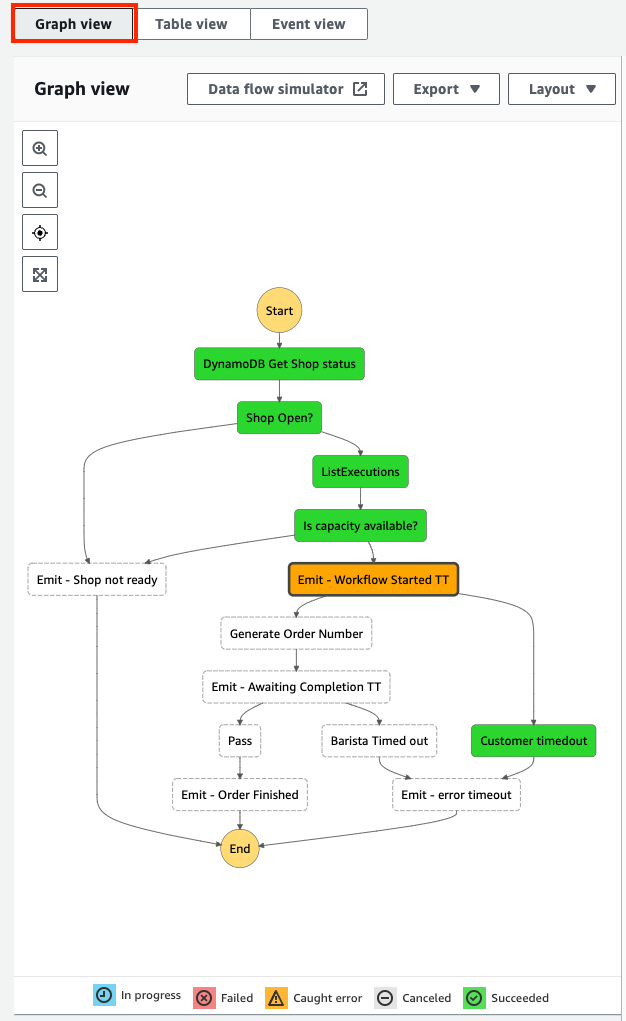
The graph view provides a visual representation of the workflow execution path. It shows which states succeeded, failed, or are currently in progress, and any errors caught. The legend at the bottom of the graph helps to decode each color.

To access the Graph view, choose the Graph view from the view navigation, as shown in the following screenshot. There is a new option to render the graph vertically or horizontally, which you can choose from the Layout option.


The graph view shows that the workflow caught an error at the Emit–Workflow Started TT state. I choose this state from the graph to view more details about it.

The Events tab

Each state in a workflow execution moves through a sequence of events, from TaskStateEntered to TaskStateExited. The Events tab, shown in the following image, displays all the events for the selected state, with their corresponding timestamp.

You can drill down into an event to see its output. In this case, the TaskTimedOut event happens to the selected state with the error message “States.Timeout”. This corresponds with the Caught error shown in the Graph view.

The Input & Output tab

Amazon States Language (ASL) enables you to filter and manipulate data at various stages of a workflow state’s execution using paths. A path is a string beginning with $ that lets you identify and filter subsets of JSON text. Learning how to apply these filters helps to build efficient workflows with minimal state transitions.

Select the Input & Output tab, and then toggle the Advanced view option to display the payload after each path process is applied.

This is useful for checking what each JSON path evaluates to. For example, the following images show how I configure the state Parameters, along with the Task input. This is what the parameters evaluate to after Step Functions applies the JSON path processing:

State Details and Definition tabs

The new execution page lets you view a state’s definition and execution details in isolation from the other states. The task details section contains additional information such as the Duration, Heartbeat, Started After and Timeout values.

Table view

The Table view provides a tabular representation of each state. Use this view to access information quickly about a state’s duration, resources, or status. A new timeline column shows the relative duration that each state took to complete. You can configure which columns are displayed.

To search and filter the table based on unique attributes such as state name or error type, start typing into the search input. Use the predictive autocomplete to define the search criteria. You can also choose a relative or absolute time range to filter by.

Event view

Step Functions stores all changes to state as a sequence of events to give you more visibility into the execution. The event view allows you to find and investigate a particular state event quickly by using the search and sort options:

  1. Choose the Timestamp column header to list events in reverse order of occurrence.
  2. Choose the arrow in the left-most column to reveal more details about each event
  3. Use the search input to search by keyword, state name, event type, or attribute.
  4. The date button lets you filter events by date or time.

Map State

The map state (“Type”: “Map”) allows you to run a set of steps for each element of an input array. The Step Functions execution page now helps you investigate and debug workflows using the Map state with the following enhancements:

  1. A hierarchical table view of steps for each iteration.
  2. An integrations overview, showing the execution summary at a glance.
  3. A paginated list of every event across all iterations.

The following Serverlesspresso workflow processes orders in batches. The map state iterates over each order, sanitizes each item, and checks it is currently in stock. If the item is not in stock, the map state throws a failure. If it is in stock, the order is recorded to a database, and a new event is emitted onto the serverless event bus.

The workflow runs for a new batch of orders and produces the following executions results page:

Using the Graph view:

  1. You can step through each iteration using the Map iteration viewer
  2. See the summary status in the iterations overview section

The Table view shows a hierarchical list of each iteration and I can drill down into the execution that failed to investigate further.

Use the Event view to search for failed executions to quickly filter the results:

Conclusion

Today, Step Functions is launching a new opt-in console experience to help builders analyse, debug, and optimize Step Functions Standard Workflows. These enhancements include three different ways to view your workflow executions, better visibility into workflows that use the Map state, fast access to workflow faults and failures, and new tools to search and sort workflow executions. This blog post shows how to use the new views to debug workflows, sort and filter on state events, and view the input and output path processing for each state.

The new console executions experience is generally available in AWS Regions where Step Functions is available.

For more information on building applications with Step Functions, visit serverlessland.com.

Active Exploitation of F5 BIG-IP iControl REST CVE-2022-1388

Post Syndicated from Ron Bowes original https://blog.rapid7.com/2022/05/09/active-exploitation-of-f5-big-ip-icontrol-rest-cve-2022-1388/

Active Exploitation of F5 BIG-IP iControl REST CVE-2022-1388

On May 4, 2022, F5 released an advisory listing several vulnerabilities, including CVE-2022-1388, a critical authentication bypass that leads to remote code execution in iControl REST with a CVSSv3 base score of 9.8.

The vulnerability affects several different versions of BIG-IP prior to 17.0.0, including:

  • F5 BIG-IP 16.1.0 – 16.1.2 (patched in 16.1.2.2)
  • F5 BIG-IP 15.1.0 – 15.1.5 (patched in 15.1.5.1)
  • F5 BIG-IP 14.1.0 – 14.1.4 (patched in 14.1.4.6)
  • F5 BIG-IP 13.1.0 – 13.1.4 (patched in 13.1.5)
  • F5 BIG-IP 12.1.0 – 12.1.6 (no patch available, will not fix)
  • F5 BIG-IP 11.6.1 – 11.6.5 (no patch available, will not fix)

On Monday, May 9, 2022, Horizon3 released a full proof of concept, which we successfully executed to get a root shell. Other groups have developed exploits as well.

Over the past few days, BinaryEdge has detected an increase in scanning and exploitation for F5 BIG-IP. Others on Twitter have also observed exploitation attempts. Due to the ease of exploiting this vulnerability, the public exploit code, and the fact that it provides root access, exploitation attempts are likely to increase.

Widespread exploitation is somewhat mitigated by the small number of internet-facing F5 BIG-IP devices, however; our best guess is that there are only about 2,500 targets on the internet.

Mitigation guidance

F5 customers should patch their BIG-IP devices as quickly as possible using F5’s upgrade instructions. Additionally, the management port for F5 BIG-IP devices (and any similar appliance) should be tightly controlled at the network level — only authorized users should be able to reach the management interface at all.

F5 also provides a workaround as part of their advisory. If patching and network segmentation are not possible, the workaround should prevent exploitation. We always advise patching rather than relying solely on workarounds.

Exploit attempts appear in at least two different log files:

  • /var/log/audit
  • /var/log/restjavad-audit.0.log

Because this vulnerability is a root compromise, successful exploitation may be very difficult to recover from. At a minimum, affected BIG-IP devices should be rebuilt from scratch, and certificates and passwords should be rotated.

Rapid7 customers

InsightVM and Nexpose customers can assess their exposure to CVE-2022-1388 with an authenticated vulnerability check in the May 5, 2022 content release. This release also includes authenticated vulnerability checks for additional CVEs in F5’s May 2022 security advisory.

NEVER MISS A BLOG

Get the latest stories, expertise, and news about security today.

Additional reading:

Benefits of migrating to event-driven architecture

Post Syndicated from Talia Nassi original https://aws.amazon.com/blogs/compute/benefits-of-migrating-to-event-driven-architecture/

Two common options when building applications are request-response and event-driven architecture. In request-response architecture, an application’s components communicate via API calls. The client sends a request and expects a response before performing the next task. In event-driven architecture, the client generates an event and can immediately move on to its next task. Different parts of the application then respond to the event as needed.

events

In this post, you learn about reasons to consider moving from request-response architecture to an event-driven architecture.

Challenges with request-response architecture

When starting to a build a new application, many developers default to a request-response architecture. A request-response architecture may tightly integrate components and those components communicate via synchronous calls. While a request-response approach is often easier to get started with, it can become challenging as your application grows in complexity.

In this post, I review an example request-response ecommerce application and demonstrate the challenges of tightly coupled integrations. Then I show you how building the same application with an event-driven architecture can give you increased scalability, fault tolerance, and developer velocity.

Close coordination between microservices

In a typical ecommerce application that uses a synchronous API, the client makes a request to place an order and the order service sends the request downstream to an invoice service. If successful, the order service responds with a success message or confirmation number.

In this initial stage, this is a straightforward connection between the two services. The challenge comes when you add more services that integrate with the order service.

picture

If you add a fulfillment service and a forecasting service, the order service has more responsibilities and more complexity. The order service must know how to call each service’s API, from the API call structure to the API’s retry semantics. If there are any backwards incompatible changes to the APIs, the order service team must update them. The system forwards heavy traffic spikes to the order service’s dependency, which may not have the same scaling capabilities. Also, dependent services may transmit errors back up the stack to the client.

Error handling and retries

Now, you add new downstream services for fulfillment and shipping orders to the ecommerce application.

architecture

In the happy path, everything works as expected: The order service triggers invoicing, payment systems, and updates forecasting. Once payment clears, this triggers the fulfillment and packing of the order, and then informs the shipping service to request tracking information.

However, if the fulfillment center cannot find the product because they are out of stock, then fulfillment might have to alert the invoice service, then reverse the payment or issue a refund. If fulfillment fails, then the system that triggers shipping might fail as well. Forecasting must also be updated to reflect the change. This remediation workflow is all just to address one of the many potential “unhappy paths” that can occur in this API-driven ecommerce application.

Close coordination between development teams

In a synchronously integrated application, teams must coordinate any new services that are added to the application. This can slow down each development team’s ability to release new features. Imagine your team works on the payment service but you weren’t told that another team added a new rewards service. What now happens when the fulfillment service errors?

Fulfillment may orchestrate all the other services. Your payments team gets a message and you undo the payment, but you may not know who handles retries and error logic. If the rewards service changes vendors and has a new API, and does not tell your team, you may not be aware of the new service.

Ultimately, it can be hard to coordinate these orchestrations and workflows as systems become more complex and management adds more services. This is one reason that it can be beneficial to migrate to event-driven architecture.

Benefits of event-driven architecture

Event-driven architecture can help solve the problems of the close coordination of microservices, error handling and retries, and coordination between development teams.

Close coordination between microservices

In event-driven architecture, the publisher emits an event, which is acknowledged by the event bus. The event bus routes events to subscribers, which process events with self-contained business logic. There is no direct communication between publishers and subscribers.

Decoupled applications enable teams to act more independently, which can increase their velocity. For example, with an API-based integration, if your team wants to know about a change that happened in another team’s microservice, you might have to ask that team to make an API call to your service. Consequently, you may have to account for authentication, coordination with the other team over the structure of the API call. This causes back and forth between teams, which slows down development time. With an event-driven application, you can subscribe to events sent from your microservice and the event bus (for example, Amazon EventBridge) takes care of routing the event and handling authentication.

Error handling and retries

Another reason to migrate to event-driven architecture is to handle unpredictable traffic. Ecommerce websites like Amazon.com have variable amounts of traffic depending on the day. Once you place an order, several things happen.

First, Amazon checks your credit card to make sure that funds are available. Then, Amazon has to pack the merchandise and load onto trucks. That all happens in an Amazon fulfillment center. There is no synchronous API call for the Amazon backend to package and ship products. After the system confirms your payment, the front end puts together some information describing the event and puts your account number, credit card info, and what you bought in a packaged event and put it into the cloud and onto a queue. Later, another piece of software removes the event from the queue and starts the packaging and shipping.

The key point about this process is that these processes can all run at different rates. Normally, the rate at which customers place orders and the rate at which the warehouses can get the boxes packed are roughly equivalent. However, on busy days like Prime Day, customers place orders much more quickly than the warehouses can operate.

Ecommerce applications, like Amazon.com, must be able to scale up to handle unpredictable traffic. When a customer places an order, an event bus like Amazon EventBridge receives the event and all of the downstream microservices are able to select the order event for processing. Because each of the microservices can fail independently, there are no single points of failure.

Loose coordination between development teams

Event-driven architectures promote development team independence due to loose coupling between publishers and subscribers. Applications can subscribe to events with routing requirements and business logic that are separate from the publisher and other subscribers. This allows publishers and subscribers to change independently of each other, providing more flexibility to the overall architecture.

Decoupled applications also allow you to build new features faster. Adding new features or extending existing ones can be simpler with event-driven architectures because you either add new events, or modify existing ones. This process removes complexity in your application.

Conclusion

In this post, you learn about the challenges of developing applications with request-response architecture. In request-response architecture, the client must send a request and wait for a response before moving on to its next task. As applications grow in complexity, this tightly coupled architecture can cause issues. Event-driven architectures can increase scalability, fault tolerance, and developer velocity by decoupling components of your application.

For more serverless content, go to serverlessland.com.

AWS Week in Review – May 9, 2022

Post Syndicated from Danilo Poccia original https://aws.amazon.com/blogs/aws/aws-week-in-review-may-9-2022/

This post is part of our Week in Review series. Check back each week for a quick roundup of interesting news and announcements from AWS!

Another week starts, and here’s a collection of the most significant AWS news from the previous seven days. This week is also the one-year anniversary of CloudFront Functions. It’s exciting to see what customers have built during this first year.

Last Week’s Launches
Here are some launches that caught my attention last week:

Amazon RDS supports PostgreSQL 14 with three levels of cascaded read replicas – That’s 5 replicas per instance, supporting a maximum of 155 read replicas per source instance with up to 30X more read capacity. You can now build a more robust disaster recovery architecture with the capability to create Single-AZ or Multi-AZ cascaded read replica DB instances in same or cross Region.

Amazon RDS on AWS Outposts storage auto scalingAWS Outposts extends AWS infrastructure, services, APIs, and tools to virtually any datacenter. With Amazon RDS on AWS Outposts, you can deploy managed DB instances in your on-premises environments. Now, you can turn on storage auto scaling when you create or modify DB instances by selecting a checkbox and specifying the maximum database storage size.

Amazon CodeGuru Reviewer suppression of files and folders in code reviews – With CodeGuru Reviewer, you can use automated reasoning and machine learning to detect potential code defects that are difficult to find and get suggestions for improvements. Now, you can prevent CodeGuru Reviewer from generating unwanted findings on certain files like test files, autogenerated files, or files that have not been recently updated.

Amazon EKS console now supports all standard Kubernetes resources to simplify cluster management – To make it easy to visualize and troubleshoot your applications, you can now use the console to see all standard Kubernetes API resource types (such as service resources, configuration and storage resources, authorization resources, policy resources, and more) running on your Amazon EKS cluster. More info in the blog post Introducing Kubernetes Resource View in Amazon EKS console.

AWS AppConfig feature flag Lambda Extension support for Arm/Graviton2 processors – Using AWS AppConfig, you can create feature flags or other dynamic configuration and safely deploy updates. The AWS AppConfig Lambda Extension allows you to access this feature flag and dynamic configuration data in your Lambda functions. You can now use the AWS AppConfig Lambda Extension from Lambda functions using the Arm/Graviton2 architecture.

AWS Serverless Application Model (SAM) CLI now supports enabling AWS X-Ray tracing – With the AWS SAM CLI you can initialize, build, package, test on local and cloud, and deploy serverless applications. With AWS X-Ray, you have an end-to-end view of requests as they travel through your application, making them easier to monitor and troubleshoot. Now, you can enable tracing by simply adding a flag to the sam init command.

Amazon Kinesis Video Streams image extraction – With Amazon Kinesis Video Streams you can capture, process, and store media streams. Now, you can also request images via API calls or configure automatic image generation based on metadata tags in ingested video. For example, you can use this to generate thumbnails for playback applications or to have more data for your machine learning pipelines.

AWS GameKit supports Android, iOS, and MacOS games developed with Unreal Engine – With AWS GameKit, you can build AWS-powered game features directly from the Unreal Editor with just a few clicks. Now, the AWS GameKit plugin for Unreal Engine supports building games for the Win64, MacOS, Android, and iOS platforms.

For a full list of AWS announcements, be sure to keep an eye on the What’s New at AWS page.

Other AWS News
Some other updates you might have missed:

🎂 One-year anniversary of CloudFront Functions – I can’t believe it’s been one year since we launched CloudFront Functions. Now, we have tens of thousands of developers actively using CloudFront Functions, with trillions of invocations per month. You can use CloudFront Functions for HTTP header manipulation, URL rewrites and redirects, cache key manipulations/normalization, access authorization, and more. See some examples in this repo. Let’s see what customers built with CloudFront Functions:

  • CloudFront Functions enables Formula 1 to authenticate users with more than 500K requests per second. The solution is using CloudFront Functions to evaluate if users have access to view the race livestream by validating a token in the request.
  • Cloudinary is a media management company that helps its customers deliver content such as videos and images to users worldwide. For them, Lambda@Edge remains an excellent solution for applications that require heavy compute operations, but lightweight operations that require high scalability can now be run using CloudFront Functions. With CloudFront Functions, Cloudinary and its customers are seeing significantly increased performance. For example, one of Cloudinary’s customers began using CloudFront Functions, and in about two weeks it was seeing 20–30 percent better response times. The customer also estimates that they will see 75 percent cost savings.
  • Based in Japan, DigitalCube is a web hosting provider for WordPress websites. Previously, DigitalCube spent several hours completing each of its update deployments. Now, they can deploy updates across thousands of distributions quickly. Using CloudFront Functions, they’ve reduced update deployment times from 4 hours to 2 minutes. In addition, faster updates and less maintenance work result in better quality throughout DigitalCube’s offerings. It’s now easier for them to test on AWS because they can run tests that affect thousands of distributions without having to scale internally or introduce downtime.
  • Amazon.com is using CloudFront Functions to change the way it delivers static assets to customers globally. CloudFront Functions allows them to experiment with hyper-personalization at scale and optimal latency performance. They have been working closely with the CloudFront team during product development, and they like how it is easy to create, test, and deploy custom code and implement business logic at the edge.

AWS open-source news and updates – A newsletter curated by my colleague Ricardo to bring you the latest open-source projects, posts, events, and more. Read the latest edition here.

Reduce log-storage costs by automating retention settings in Amazon CloudWatch – By default, CloudWatch Logs stores your log data indefinitely. This blog post shows how you can reduce log-storage costs by establishing a log-retention policy and applying it across all of your log groups.

Observability for AWS App Runner VPC networking – With X-Ray support in App runner, you can quickly deploy web applications and APIs at any scale and take advantage of adding tracing without having to manage sidecars or agents. Here’s an example of how you can instrument your applications with the AWS Distro for OpenTelemetry (ADOT).

Upcoming AWS Events
It’s AWS Summits season and here are some virtual and in-person events that might be close to you:

You can now register for re:MARS to get fresh ideas on topics such as machine learning, automation, robotics, and space. The conference will be in person in Las Vegas, June 21–24.

That’s all from me for this week. Come back next Monday for another Week in Review!

Danilo

Apple Mail Now Blocks Email Trackers

Post Syndicated from Bruce Schneier original https://www.schneier.com/blog/archives/2022/05/apple-mail-now-blocks-email-trackers.html

Apple Mail now blocks email trackers by default.

Most email newsletters you get include an invisible “image,” typically a single white pixel, with a unique file name. The server keeps track of every time this “image” is opened and by which IP address. This quirk of internet history means that marketers can track exactly when you open an email and your IP address, which can be used to roughly work out your location.

So, how does Apple Mail stop this? By caching. Apple Mail downloads all images for all emails before you open them. Practically speaking, that means every message downloaded to Apple Mail is marked “read,” regardless of whether you open it. Apples also routes the download through two different proxies, meaning your precise location also can’t be tracked.

Crypto-Gram uses Mailchimp, which has these tracking pixels turned on by default. I turn them off. Normally, Mailchimp requires them to be left on for the first few mailings, presumably to prevent abuse. The company waived that requirement for me.

[Infographic] Cloud Misconfigurations: Don’t Become a Breach Statistic

Post Syndicated from Rapid7 original https://blog.rapid7.com/2022/05/09/infographic-cloud-misconfigurations-dont-become-a-breach-statistic/

[Infographic] Cloud Misconfigurations: Don't Become a Breach Statistic

No one wants their company to be named in the latest headline-grabbing data breach. Luckily, there are steps you can take to keep your organization from becoming another security incident statistic — chief among them, avoiding misconfigurations in the cloud.

Our 2022 Cloud Misconfigurations Report found some key commonalities across publicly reported data exposure incidents last year. Check out some of the highlights here, in our latest infographic.

[Infographic] Cloud Misconfigurations: Don't Become a Breach Statistic

Want to learn more about the cloud misconfigurations and breaches that happened last year? Check out the full 2022 Cloud Misconfigurations Report.

Additional reading:

NEVER MISS A BLOG

Get the latest stories, expertise, and news about security today.

The collective thoughts of the interwebz