Handling WebAuthn over remote SSH connections

Post Syndicated from original https://mjg59.dreamwidth.org/61232.html

Being able to SSH into remote machines and do work there is great. Using hardware security tokens for 2FA is also great. But trying to use them both at the same time doesn’t work super well, because if you hit a WebAuthn request on the remote machine it doesn’t matter how much you mash your token – it’s not going to work.

But could it?

The SSH agent protocol abstracts key management out of SSH itself and into a separate process. When you run “ssh-add .ssh/id_rsa”, that key is being loaded into the SSH agent. When SSH wants to use that key to authenticate to a remote system, it asks the SSH agent to perform the cryptographic signatures on its behalf. SSH also supports forwarding the SSH agent protocol over SSH itself, so if you SSH into a remote system then remote clients can also access your keys – this allows you to bounce through one remote system into another without having to copy your keys to those remote systems.

More recently, SSH gained the ability to store SSH keys on hardware tokens such as Yubikeys. If configured appropriately, this means that even if you forward your agent to a remote site, that site can’t do anything with your keys unless you physically touch the token. But out of the box, this is only useful for SSH keys – you can’t do anything else with this support.

Well, that’s what I thought, at least. And then I looked at the code and realised that SSH is communicating with the security tokens using the same library that a browser would, except it ensures that any signature request starts with the string “ssh:” (which a genuine WebAuthn request never will). This constraint can actually be disabled by passing -O no-restrict-websafe to ssh-agent, except that was broken until this weekend. But let’s assume there’s a glorious future where that patch gets backported everywhere, and see what we can do with it.

First we need to load the key into the security token. For this I ended up hacking up the Go SSH agent support. Annoyingly it doesn’t seem to be possible to make calls to the agent without going via one of the exported methods here, so I don’t think this logic can be implemented without modifying the agent module itself. But this is basically as simple as adding another key message type that looks something like:

type ecdsaSkKeyMsg struct {
       Type        string `sshtype:"17|25"`
       Curve       string
       PubKeyBytes []byte
       RpId        string
       Flags       uint8
       KeyHandle   []byte
       Reserved    []byte
       Comments    string
       Constraints []byte `ssh:"rest"`
}

Where Type is ssh.KeyAlgoSKECDSA256, Curve is “nistp256”, RpId is the identity of the relying party (eg, “webauthn.io”), Flags is 0x1 if you want the user to have to touch the key, KeyHandle is the hardware token’s representation of the key (basically an opaque blob that’s sufficient for the token to regenerate the keypair – this is generally stored by the remote site and handed back to you when it wants you to authenticate). The other fields can be ignored, other than PubKeyBytes, which is supposed to be the public half of the keypair.

This causes an obvious problem. We have an opaque blob that represents a keypair. We don’t have the public key. And OpenSSH verifies that PubKeyByes is a legitimate ecdsa public key before it’ll load the key. Fortunately it only verifies that it’s a legitimate ecdsa public key, and does nothing to verify that it’s related to the private key in any way. So, just generate a new ECDSA key (ecdsa.GenerateKey(elliptic.P256(), rand.Reader)) and marshal it ( elliptic.Marshal(ecKey.Curve, ecKey.X, ecKey.Y)) and we’re good. Pass that struct to ssh.Marshal() and then make an agent call.

Now you can use the standard agent interfaces to trigger a signature event. You want to pass the raw challenge (not the hash of the challenge!) – the SSH code will do the hashing itself. If you’re using agent forwarding this will be forwarded from the remote system to your local one, and your security token should start blinking – touch it and you’ll get back an ssh.Signature blob. ssh.Unmarshal() the Blob member to a struct like

type ecSig struct {
        R *big.Int
        S *big.Int
}

and then ssh.Unmarshal the Rest member to

type authData struct {
        Flags    uint8
        SigCount uint32
}

The signature needs to be converted back to a DER-encoded ASN.1 structure (eg,

var b cryptobyte.Builder
b.AddASN1(asn1.SEQUENCE, func(b *cryptobyte.Builder) {
        b.AddASN1BigInt(ecSig.R)
        b.AddASN1BigInt(ecSig.S)
})
signatureDER, _ := b.Bytes()

, and then you need to construct the Authenticator Data structure. For this, take the RpId used earlier and generate the sha256. Append the one byte Flags variable, and then convert SigCount to big endian and append those 4 bytes. You should now have a 37 byte structure. This needs to be CBOR encoded (I used github.com/fxamacker/cbor and just called cbor.Marshal(data, cbor.EncOptions{})).

Now base64 encode the sha256 of the challenge data, the DER-encoded signature and the CBOR-encoded authenticator data and you’ve got everything you need to provide to the remote site to satisfy the challenge.

There are alternative approaches – you can use USB/IP to forward the hardware token directly to the remote system. But that means you can’t use it locally, so it’s less than ideal. Or you could implement a proxy that communicates with the key locally and have that tunneled through to the remote host, but at that point you’re just reinventing ssh-agent.

And you should bear in mind that the default behaviour of blocking this sort of request is for a good reason! If someone is able to compromise a remote system that you’re SSHed into, they can potentially trick you into hitting the key to sign a request they’ve made on behalf of an arbitrary site. Obviously they could do the same without any of this if they’ve compromised your local system, but there is some additional risk to this. It would be nice to have sensible MAC policies that default-denied access to the SSH agent socket and only allowed trustworthy binaries to do so, or maybe have some sort of reasonable flatpak-style portal to gate access. For my threat model I think it’s a worthwhile security tradeoff, but you should evaluate that carefully yourself.

Anyway. Now to figure out whether there’s a reasonable way to get browsers to work with this.

comment count unavailable comments
AWS Week in Review – September 19, 2022

Post Syndicated from Jeff Barr original https://aws.amazon.com/blogs/aws/aws-week-in-review-september-19-2022/

Things are heating up in Seattle, with preparation for AWS re:Invent 2022 well underway. Later this month the entire News Blog team will participate in our now-legendary “speed storming” event. Over the course of three or four days, each of the AWS service teams with a launch in the works for re:Invent will give us an overview and share their PRFAQ (Press Release + FAQ) with us. After the meetings conclude, we’ll divvy up the launches and get to work on our blog posts!

Last Week’s Launches
Here are some of the launches that caught my eye last week:

Amazon Lex Visual Conversation Builder – This new tool makes bot design easier than ever. You get a complete view of the conversation in one place, and you can manage complex conversations that have dynamic paths. To learn more and see the builder in action, read Announcing Visual Conversation Builder for Amazon Lex on the AWS Machine Learning Blog.

AWS Config Conformance Pack Price Reduction – We have reduced the price for evaluation of AWS Config Conformance Packs by up to 58%. These packs contain AWS Config rules and remediation actions that can be deployed as a single entity in account and a region, or across an entire organization. The price reduction took effect September 14, 2022; it lowers the cost per evaluation and decreases the number of evaluations needed to reach each pricing tier.

CDK (Cloud Development Kit) Tree View – The AWS CloudFormation console now includes a Constructs tree view that automatically organizes the resources that were synthesized by AWS CDK constructs. The top level of the tree view includes the named constructs and the second level includes all of the resources generated by the named construct. Read the What’s New to learn more!

AWS Incident Detection and Response – AWS Enterprise Support customers now have access to proactive monitoring and incident management for selected workloads running on AWS. As part of the onboarding process, AWS experts review workloads for reliability and operational excellence, and work with the customer to identify critical metrics and associated alarms. Incident Management Engineers then monitor the workloads, detect critical incidents, and initiate a call bridge to accelerate recovery. Read the AWS Incident Detection and Response page and the What’s New to learn more.

ECS Cluster Scale-In Speed – Auto-Scaled ECS clusters can now scale-in (reduce capacity) faster than ever before. Previously, each scale-in would reduce the capacity within an Auto Scaling Group (ASG) by 5% at a time. Now, capacity can be reduced by up to 50%. This change makes scaling more responsive to workload changes while still maintaining availability for spiky traffic patterns. Read Faster Scaling-In for Amazon ECS Cluster Auto Scaling and the What’s New to learn more.

AWS Outposts Rack Networking – AWS Outposts racks now support local gateway ingress routing to redirect incoming traffic to an Elastic Network Interface (ENI) attached to an EC2 instance before traffic reaches workloads running on the Outpost; read Deploying Local Gateway Ingress Routing on AWS Outposts to learn more. Outposts racks now also support direct VPC routing to simplify the process of communicating with your on-premises network; read the What’s New to learn more.

Amazon SWF Console Experience Updated – The new console experience for Amazon Simple Workflow Service (SWF) gives you better visibility of your SWF domains along with additional information about your workflow executions and events. You can efficiently manage high-volume workloads and quickly find the detailed information that helps you to operate at peak efficiency. Read the What’s New to learn more.

Dynamic Intermediate Certificate Authorities – According to a post on the AWS Security Blog, public certificates issued through AWS Certificate Manager (ACM) will soon (October 11, 2022) be issued from one of several intermediate certificate authorities managed by Amazon. This change will be transparent to most customers and applications, except those that make use of certificate pinning. In some cases, older browsers will need to be updated in order to properly trust the Amazon Trust Services CAs.

X in Y – We launched existing AWS services and instance types in additional regions:

Other AWS News
AWS Open Source – Check out Installment #127 of the AWS Open Source News and Updates Newsletter to learn about new tools for AWS CloudFormation, AWS Lambda, Terraform / EKS, AWS Step Functions, AWS Identity and Access Management (IAM), and more.

New Case Study – Read this new case study to learn how the Deep Data Research Computing Center at Stanford University is creating tools designed to bridge the gap between biology and computer science in order to help researchers in precision medicine deliver tangible medical solutions.

Application Management – The AWS DevOps Blog showed you how to Implement Long-Running Deployments with AWS CloudFormation Custom Resources Using AWS Step Functions.

Architecture – The AWS Architecture Blog showed you how to Maintain Visibility Over the Use of Cloud Architecture Patterns.

Big Data – The AWS Big Data Blog showed you how to Optimize Amazon EMR Costs for Legacy and Spark Workloads.

Migration – In a two-part series on the AWS Compute Blog, Marcia showed you how to Lift and Shift a Web Application to AWS Serverless (Part 1, Part 2).

Mobile – The AWS Mobile Blog showed you how to Build Your Own Application for Route Optimization and Tracking using AWS Amplify and Amazon Location Service.

Security – The AWS Security Blog listed 10 Reasons to Import a Certificate into AWS Certificate Manager and 154 AWS Services that have achieved HITRUST Certificiation.

Training and Certification – The AWS Training and Certification Blog talked about The Value of Data and Pursuing the AWS Certified Data Analytics – Specialty Certification.

Containers – The AWS Containers Blog encouraged you to Achieve Consistent Application-Level Tagging for Cost Tracking in AWS.

Upcoming AWS Events
Check your calendar and sign up for an AWS event in your locale:

AWS Summits – Come together to connect, collaborate, and learn about AWS. Registration is open for the following in-person AWS Summits: Mexico City (September 21–22), Bogotá (October 4), and Singapore (October 6).

AWS Community Days – AWS Community Day events are community-led conferences to share and learn with one another. In September, the AWS community in the US will run events in Arlington, Virginia (September 30). In Europe, Community Day events will be held in October. Join us in Amersfoort, Netherlands (October 3), Warsaw, Poland (October 14), and Dresden, Germany (October 19).

AWS Fest – This third-party event will feature AWS influencers, community heroes, industry leaders, and AWS customers, all sharing AWS optimization secrets (September 29th), register here.

Stay Informed
I hope that you have enjoyed this look back at some of what took place in AWS-land last week! To better keep up with all of this news, please check out the following resources:

— Jeff;

Sign Amazon SNS messages with SHA256 hashing for HTTP subscriptions

Post Syndicated from Daniel Caminhas original https://aws.amazon.com/blogs/security/sign-amazon-sns-messages-with-sha256-hashing-for-http-subscriptions/

Amazon Simple Notification Service (Amazon SNS) now supports message signatures based on Secure Hash Algorithm 256 (SHA256) hashing. Amazon SNS signs the messages that are delivered from your Amazon SNS topic so that subscribed HTTP endpoints can verify the authenticity of the messages. In this blog post, we will show you how to enable message signatures based on SHA256 for your Amazon SNS topics.

About message signing verification

To verify the authenticity of a message sent to your HTTP endpoint by Amazon SNS, you can verify the message signature. There are two cases where we recommend verifying the authenticity of the message. The first is when Amazon SNS sends a message to an HTTP endpoint that you subscribed to a topic. The second is when Amazon SNS sends a confirmation message to your HTTP endpoint after the Subscribe or the Unsubscribe API actions. For more information, see Verifying the signatures of Amazon SNS messages in the Amazon SNS Developer Guide.

Amazon SNS now supports two message signature versions:

  • Signature version 1 – Amazon SNS creates the signature based on the SHA1 hash of the message.
  • Signature version 2 – Amazon SNS creates the signature based on the SHA256 hash of the message.

Amazon SNS adds the SignatureVersion property to the JSON payload of messages delivered to HTTP endpoints, as shown in the following code snippet. For more information on the JSON payload format, see Parsing message formats in the Amazon SNS Developer Guide.

{
  "Type" : "Notification",
  "MessageId" : "22b80b92-fdea-4c2c-8f9d-bdfb0c7bf324",
  "TopicArn" : "arn:aws:sns:us-west-2:123456789012:MyTopic",
  "Subject" : "My First Message",
  "Message" : "Hello world!",
  "Timestamp" : "2022-08-02T00:54:06.655Z",
  "SignatureVersion" : "2",
  "Signature" : "EXAMPLEw6JRN...",
  "SigningCertURL" : "https://sns.us-west-2.amazonaws.com/SimpleNotificationService-f3ecfb7224c7233fe7bb5f59f96de52f.pem",
  "UnsubscribeURL" : "https://sns.us-west-2.amazonaws.com/?Action=Unsubscribe&SubscriptionArn=arn:aws:sns:us-west-2:123456789012:MyTopic:c9135db0-26c4-47ec-8998-413945fb5a96"
}

What to consider before you enable message signatures based on SHA256 for your Amazon SNS topic

As an Amazon SNS topic owner, before you enable SHA256 support for your topic, we recommend communicating with the owners of the HTTP endpoints that are subscribed to your topic. They might need to update their message signature verification logic to accommodate the new signature version. If the endpoint owners are using the AWS SDK feature for verifying the Amazon SNS message signatures, they need to make sure that they are using one of the following versions of the AWS SDK: Java 1.12.285, JavaScript 0.3.5, Ruby 1.54.0, PHP 1.8.0 or .NET 3.7.3.96.

How to enable message signatures based on SHA256 for your Amazon SNS topic

By default, Amazon SNS topics use SHA1 for hashing the message signature. You can enable SHA256 support for your topic by setting the topic attribute SignatureVersion to 2 using the AWS Software Development Kit (AWS SDK), or AWS Command Line Interface (AWS CLI).

The following code example shows how to set the topic attribute SignatureVersion by using the AWS CLI.

aws sns set-topic-attributes \
    --topic-arn arn:aws:sns:us-west-2:123456789012:MyTopic \
    --attribute-name SignatureVersion \
    --attribute-value 2

The following code example shows how to set the SignatureVersion attribute by using the AWS SDK for Java.

public static void enableSHA256Support(SnsClient snsClient, String topicArn) {

        try {

            SetTopicAttributesRequest request = SetTopicAttributesRequest.builder()
                .attributeName("SignatureVersion")
                .attributeValue("2")
                .topicArn(topicArn)
                .build();

            SetTopicAttributesResponse result = snsClient.setTopicAttributes(request);
            System.out.println("\n\nStatus was " + result.sdkHttpResponse().statusCode() + "\n\nTopic " + request.topicArn()
                + " updated " + request.attributeName() + " to " + request.attributeValue());

        } catch (SnsException e) {
            System.err.println(e.awsErrorDetails().errorMessage());
        }
    }

Conclusion

Amazon SNS topic owners can now enable message signatures based on SHA256 hashing. In this post, you learned how to choose the hashing algorithm, either SHA256 or SHA1, for your SNS topic. For more information, see Verifying the signatures of Amazon SNS messages in the Amazon SNS Developer Guide, and SetTopicAttributes in the Amazon SNS API Reference.

For more serverless learning resources, visit Serverless Land.

If you have feedback about this post, submit comments in the Comments section below. If you have questions about this post, contact AWS Support.
Want more AWS Security how-to content, news, and feature announcements? Follow us on Twitter.

Author

Daniel Caminhas

Daniel is a software development engineer for Amazon SNS.

Author

Ahmed Abouzeid

Ahmed is a software development manager for Amazon SNS.

[$] The 2022 Linux Kernel Maintainers Summit

Post Syndicated from original https://lwn.net/Articles/908320/

After a two-year hiatus, the 2022 Linux Kernel Maintainers Summit returned
to an in-person format in Dublin, Ireland on September 15. Around 30
kernel developers discussed a number of process-related issues relating to
the kernel community. LWN had the privilege of being there and is able,
once again, to report from the event. This years sessions included
discussions of regression handling, the imminent merging of Rust support,
BPF, the kernel development process, and more.

Maintain visibility over the use of cloud architecture patterns

Post Syndicated from Rostislav Markov original https://aws.amazon.com/blogs/architecture/maintain-visibility-over-the-use-of-cloud-architecture-patterns/

Cloud platform and enterprise architecture teams use architecture patterns to provide guidance for different use cases. Cloud architecture patterns are typically aggregates of multiple Amazon Web Services (AWS) resources, such as Elastic Load Balancing with Amazon Elastic Compute Cloud, or Amazon Relational Database Service with Amazon ElastiCache. In a large organization, cloud platform teams often have limited governance over cloud deployments, and, therefore, lack control or visibility over the actual cloud pattern adoption in their organization.

While having decentralized responsibility for cloud deployments is essential to scale, a lack of visibility or controls leads to inefficiencies, such as proliferation of infrastructure templates, misconfigurations, and insufficient feedback loops to inform cloud platform roadmap.

To address this, we present an integrated approach that allows cloud platform engineers to share and track use of cloud architecture patterns with:

  1. AWS Service Catalog to publish an IT service catalog of codified cloud architecture patterns that are pre-approved for use in the organization.
  2. Amazon QuickSight to track and visualize actual use of service catalog products across the organization.

This solution enables cloud platform teams to maintain visibility into the adoption of cloud architecture patterns in their organization and build a release management process around them.

Publish architectural patterns in your IT service catalog

We use AWS Service Catalog to create portfolios of pre-approved cloud architecture patterns and expose them as self-service to end users. This is accomplished in a shared services AWS account where cloud platform engineers manage the lifecycle of portfolios and publish new products (Figure 1). Cloud platform engineers can publish new versions of products within a portfolio and deprecate older versions, without affecting already-launched resources in end-user AWS accounts. We recommend using organizational sharing to share portfolios with multiple AWS accounts.

Application engineers launch products by referencing the AWS Service Catalog API. Access can be via infrastructure code, like AWS CloudFormation and TerraForm, or an IT service management tool, such as ServiceNow. We recommend using a multi-account setup for application deployments, with an application deployment account hosting the deployment toolchain: in our case, using AWS developer tools.

Although not explicitly depicted, the toolchain can be launched as an AWS Service Catalog product and include pre-populated infrastructure code to bootstrap initial product deployments, as described in the blog post Accelerate deployments on AWS with effective governance.

Launching cloud architecture patterns as AWS Service Catalog products

Figure 1. Launching cloud architecture patterns as AWS Service Catalog products

Track the adoption of cloud architecture patterns

Track the usage of AWS Service Catalog products by analyzing the corresponding AWS CloudTrail logs. The latter can be forwarded to an Amazon EventBridge rule with a filter on the following events: CreateProduct, UpdateProduct, DeleteProduct, ProvisionProduct and TerminateProvisionedProduct.

The logs are generated no matter how you interact with the AWS Service Catalog API, such as through ServiceNow or TerraForm. Once in EventBridge, Amazon Kinesis Data Firehose delivers the events to Amazon Simple Storage Service (Amazon S3) from where QuickSight can access them. Figure 2 depicts the end-to-end flow.

Tracking adoption of AWS Service Catalog products with Amazon QuickSight

Figure 2. Tracking adoption of AWS Service Catalog products with Amazon QuickSight

Depending on your AWS landing zone setup, CloudTrail logs from all relevant AWS accounts and regions need to be forwarded to a central S3 bucket in your shared services account or, otherwise, centralized logging account. Figure 3 provides an overview of this cross-account log aggregation.

Aggregating AWS Service Catalog product logs across AWS accounts

Figure 3. Aggregating AWS Service Catalog product logs across AWS accounts

If your landing zone allows, consider giving permissions to EventBridge in all accounts to write to a central event bus in your shared services AWS account. This avoids having to set up Kinesis Data Firehose delivery streams in all participating AWS accounts and further simplifies the solution (Figure 4).

Aggregating AWS Service Catalog product logs across AWS accounts to a central event bus

Figure 4. Aggregating AWS Service Catalog product logs across AWS accounts to a central event bus

If you are already using an organization trail, you can use Amazon Athena or AWS Lambda to discover the relevant logs in your QuickSight dashboard, without the need to integrate with EventBridge and Kinesis Data Firehose.

Reporting on product adoption can be customized in QuickSight. The S3 bucket storing AWS Service Catalog logs can be defined in QuickSight as datasets, for which you can create an analysis and publish as a dashboard.

In the past, we have reported on the top ten products used in the organization (if relevant, also filtered by product version or time period) and the top accounts in terms of product usage. The following figure offers an example dashboard visualizing product usage by product type and number of times they were provisioned. Note: the counts of provisioned and terminated products differ slightly, as logging was activated after the first products were created and provisioned for demonstration purposes.

Example Amazon QuickSight dashboard tracking AWS Service Catalog product adoption

Figure 5. Example Amazon QuickSight dashboard tracking AWS Service Catalog product adoption

Conclusion

In this blog, we described an integrated approach to track adoption of cloud architecture patterns using AWS Service Catalog and QuickSight. The solution has a number of benefits, including:

  • Building an IT service catalog based on pre-approved architectural patterns
  • Maintaining visibility into the actual use of patterns, including which patterns and versions were deployed in the organizational units’ AWS accounts
  • Compliance with organizational standards, as architectural patterns are codified in the catalog

In our experience, the model may compromise on agility if you enforce a high level of standardization and only allow the use of a few patterns. However, there is the potential for proliferation of products, with many templates differing slightly without a central governance over the catalog. Ideally, cloud platform engineers assume responsibility for the roadmap of service catalog products, with formal intake mechanisms and feedback loops to account for builders’ localization requests.

Introducing Advanced DDoS Alerts

Post Syndicated from Omer Yoachimik original https://blog.cloudflare.com/advanced-ddos-alerts/

Introducing Advanced DDoS Alerts

Introducing Advanced DDoS Alerts

We’re pleased to introduce Advanced DDoS Alerts. Advanced DDoS Alerts are customizable and provide users the flexibility they need when managing many Internet properties. Users can easily define which alerts they want to receive — for which DDoS attack sizes, protocols and for which Internet properties.

This release includes two types of Advanced DDoS Alerts:

  1. Advanced HTTP DDoS Attack Alerts – Available to WAF/CDN customers on the Enterprise plan, who have also subscribed to the Advanced DDoS Protection service.
  2. Advanced L3/4 DDoS Attack Alerts – Available to Magic Transit and Spectrum BYOIP customers on the Enterprise plan.

Standard DDoS Alerts are available to customers on all plans, including the Free plan. Advanced DDoS Alerts are part of Cloudflare’s Advanced DDoS service.

Why alerts?

Distributed Denial of Service attacks are cyber attacks that aim to take down your Internet properties and make them unavailable for your users. As early as 2017, Cloudflare pioneered the Unmetered DDoS Protection to provide all customers with DDoS protection, without limits, to ensure that their Internet properties remain available. We’re able to provide this level of commitment to our customers thanks to our automated DDoS protection systems. But if the systems operate automatically, why even be alerted?

Well, to put it plainly, when our DDoS protection systems kick in, they insert ephemeral rules inline to mitigate the attack. Many of our customers operate business critical applications and services. When our systems make a decision to insert a rule, customers might want to be able to verify that all the malicious traffic is mitigated, and that legitimate user traffic is not. Our DDoS alerts begin firing as soon as our systems make a mitigation decision. Therefore, by informing our customers about a decision to insert a rule in real time, they can observe and verify that their Internet properties are both protected and available.

Managing many Internet properties

The standard DDoS Alerts alert you on DDoS attacks that target any and all of your Cloudflare-protected Internet properties. However, some of our customers may manage large numbers of Internet properties ranging from hundreds to hundreds of thousands. The standard DDoS Alerts would notify users every time one of those properties would come under attack — which could become very noisy.

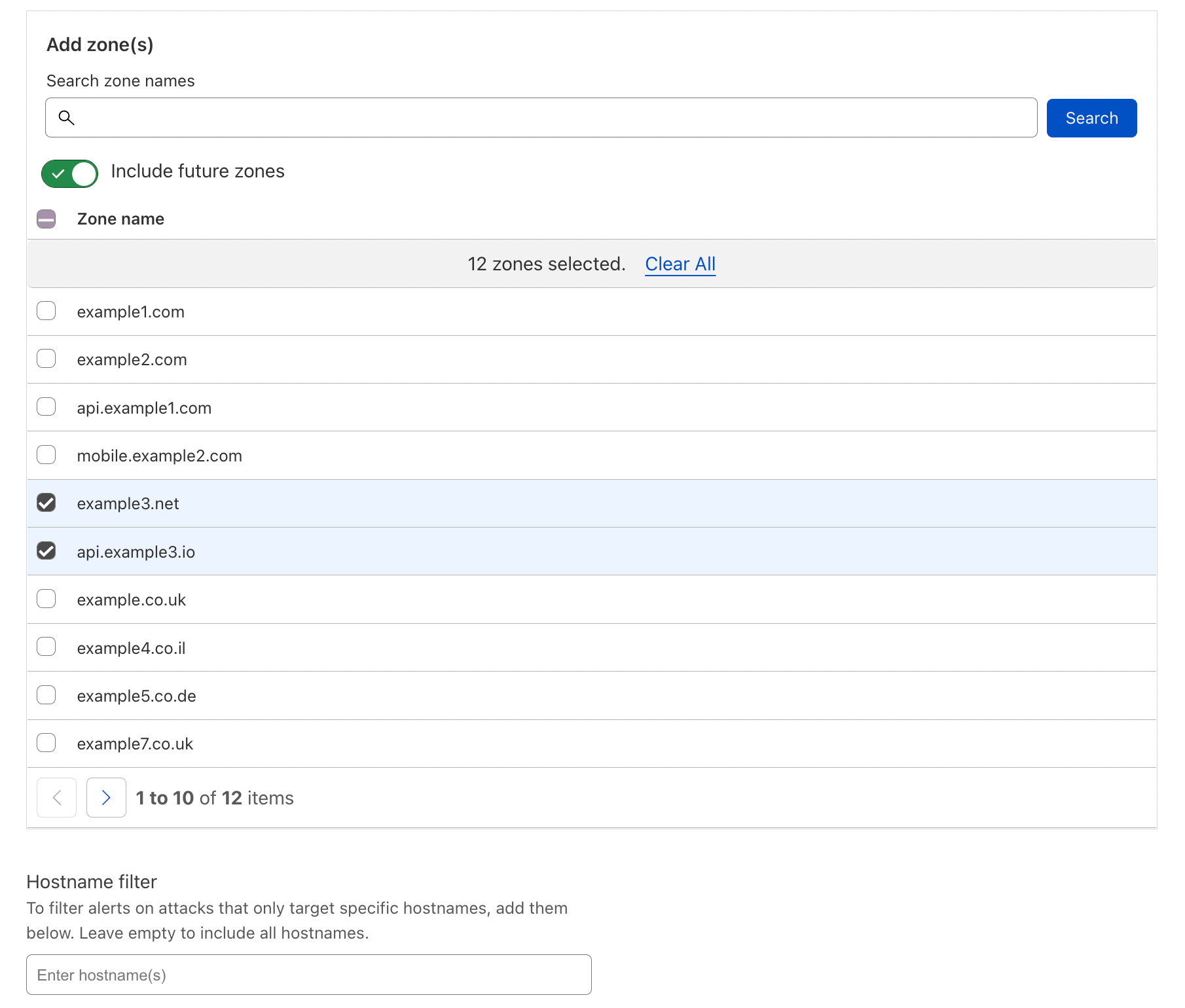
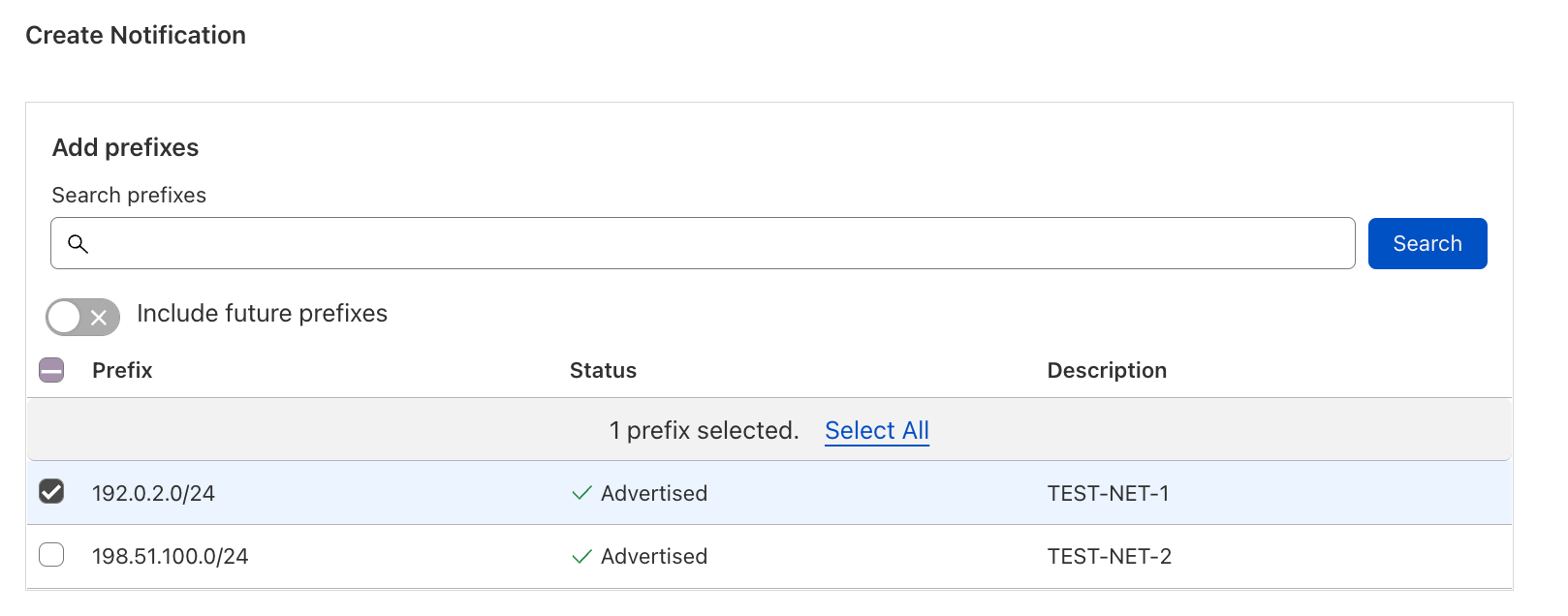
The Advanced DDoS Alerts address this concern by allowing users to select the specific Internet properties that they want to be notified about; zones and hostnames for WAF/CDN customers, and IP prefixes for Magic Transit and Spectrum BYOIP customers.

Introducing Advanced DDoS Alerts
Creating an Advanced HTTP DDoS Attack Alert: selecting zones and hostnames
Introducing Advanced DDoS Alerts
Creating an Advanced L3/4 DDoS Attack Alert: selecting prefixes

One (attack) size doesn’t fit all

The standard DDoS Alerts alert you on DDoS attacks of any size. Well, almost any size. We implemented minimal alert thresholds to avoid spamming our customers’ email inboxes. Those limits are very small and not customer-configurable. As we’ve seen in the recent DDoS trends report, most of the attacks are very small — another reason why the standard DDoS Alert could become noisy for customers that only care about very large attacks. On the opposite end of the spectrum, choosing not to alert may become too quiet for customers that do want to be notified about smaller attacks.

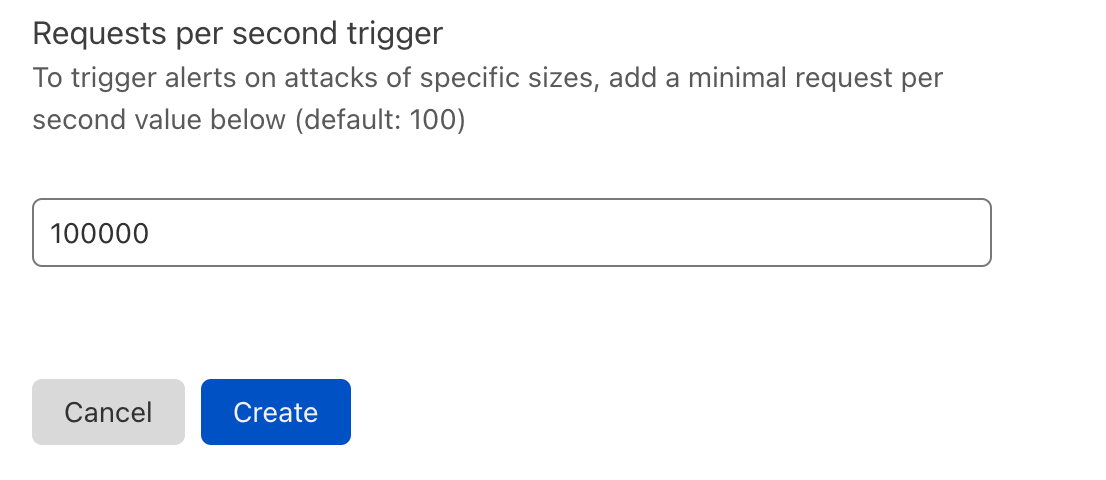
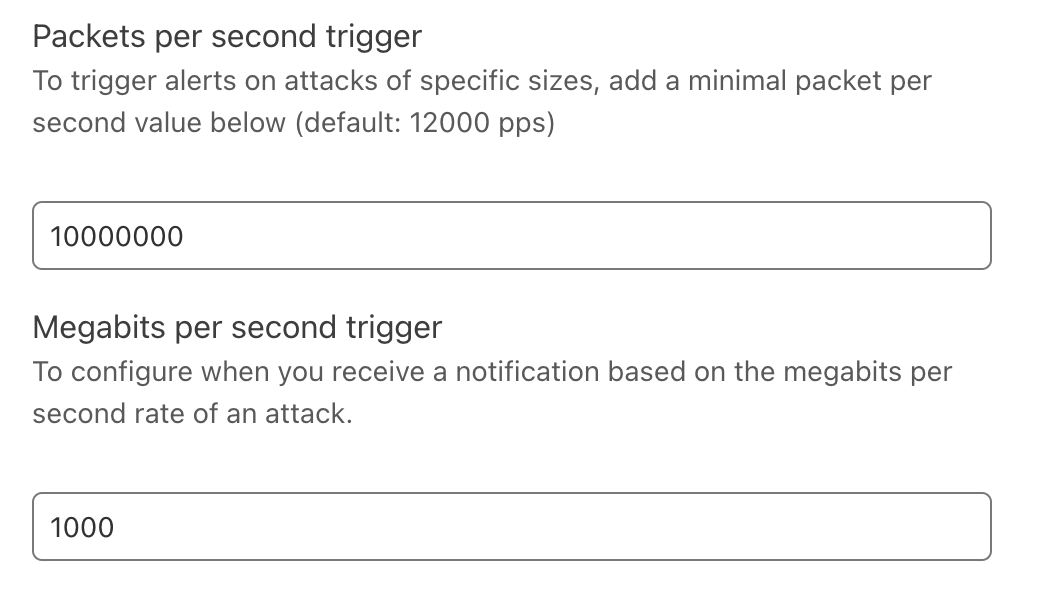
The Advanced DDoS Alerts let customers choose their own alert threshold. WAF/CDN customers can define the minimum request-per-second rate of an HTTP DDoS attack alert. Magic Transit and Spectrum BYOIP customers can define the packet-per-second and Megabit-per-second rates of a L3/4 DDoS attack alert.

Introducing Advanced DDoS Alerts
Creating an Advanced HTTP DDoS Attack Alert: defining request rate
Introducing Advanced DDoS Alerts
Creating an Advanced L3/4 DDoS Attack Alert: defining packet/bit rate

Not all protocols are created equal

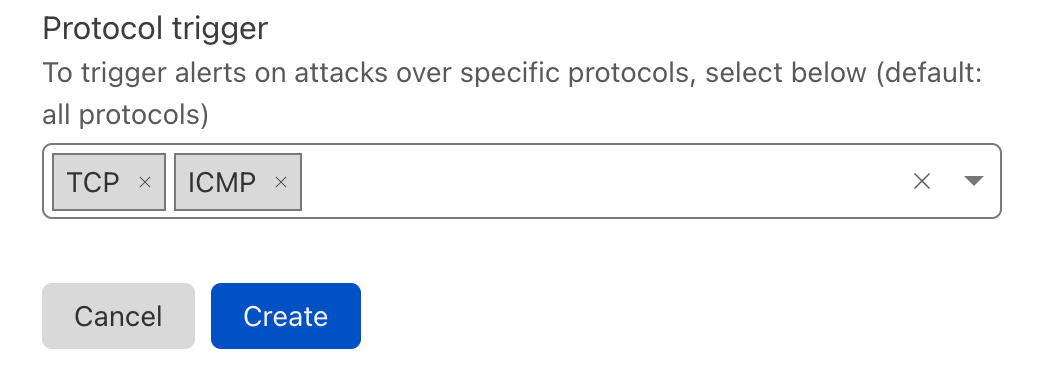
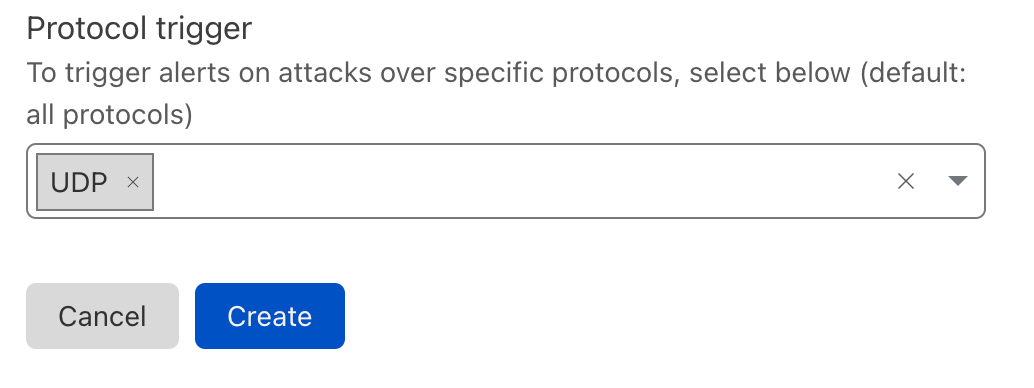
As part of the Advanced L3/4 DDoS Alerts, we also let our users define the protocols to be alerted on. If a Magic Transit customer manages mostly UDP applications, they may not care if TCP-based DDoS attacks target it. Similarly, if a Spectrum BYOIP customer only cares about HTTP/TCP traffic, other-protocol-based attacks could be of no concern to them.

Introducing Advanced DDoS Alerts
Creating an Advanced L3/4 DDoS Attack Alert: selecting the protocols

Creating an Advanced DDoS Alert

We’ll show here how to create an Advanced HTTP DDoS Alert, but the process to create a L3/4 alert is similar. You can view a more detailed guide on our developers website.

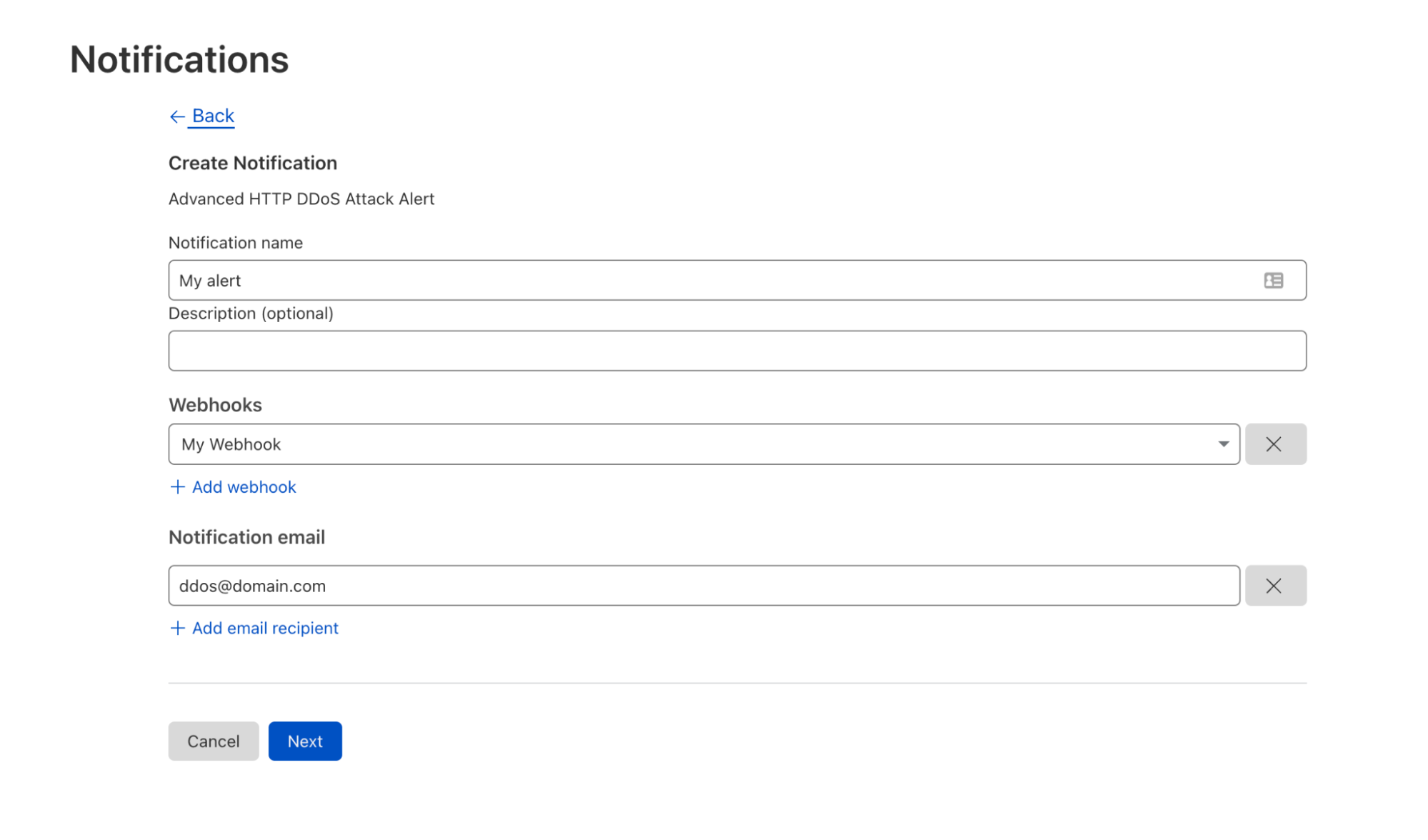
First, click here or log in to your Cloudflare account, navigate to Notifications and click Add. Then select the Advanced HTTP DDoS Attack Alert or Advanced L3/4 DDoS Attack Alert (based on your eligibility). Give your alert a name, an optional description, add your preferred delivery method (e.g., Webhook) and click Next.

Introducing Advanced DDoS Alerts
Step 1: Creating an Advanced HTTP DDoS Attack Alert

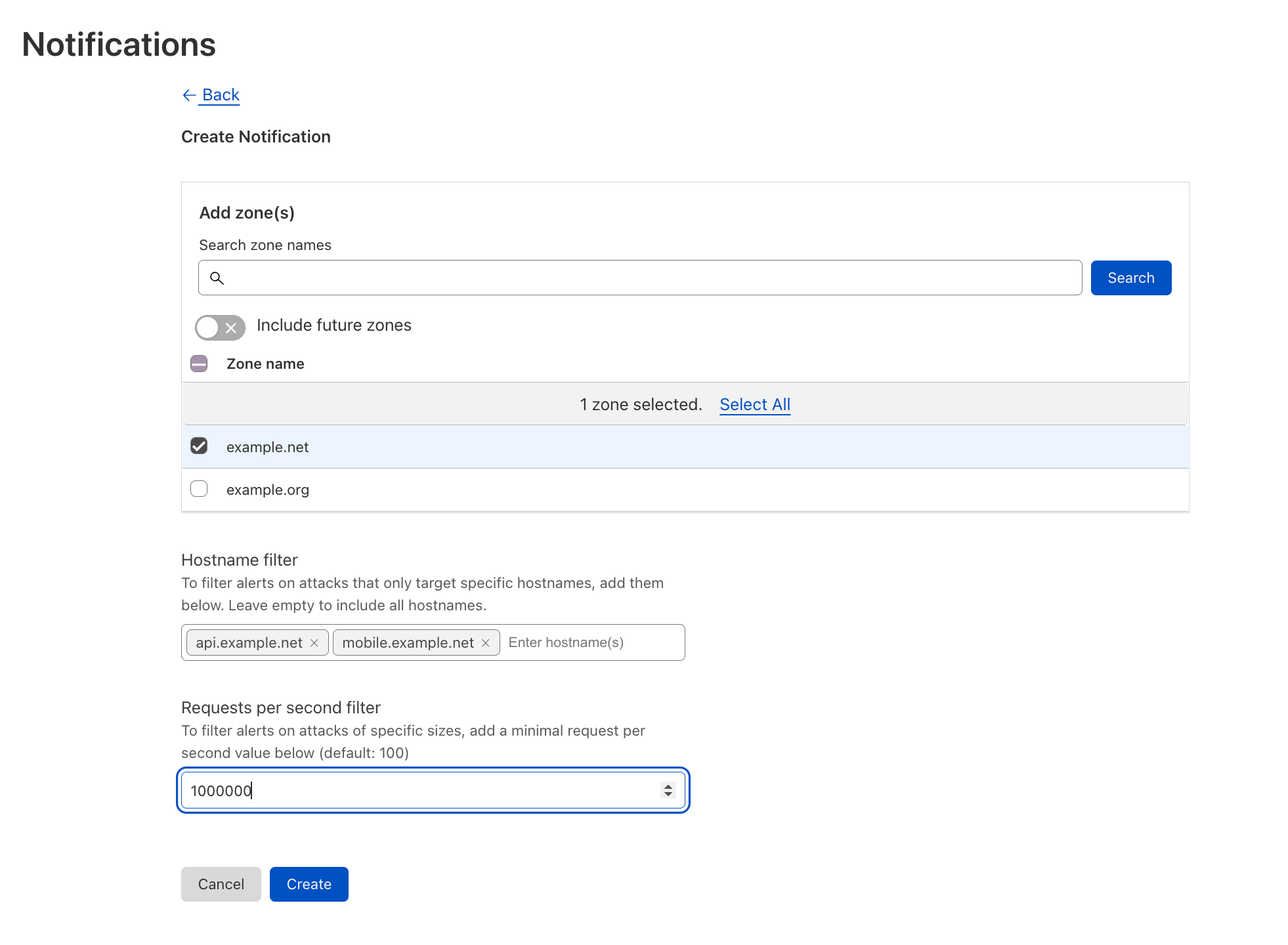
Second, select the domains you’d like to be alerted on. You can also narrow it down to specific hostnames. Define the minimum request-per-second rate to be alerted on, click Save, and voilà.

Introducing Advanced DDoS Alerts
Step 2: Defining the Advanced HTTP DDoS Attack Alert conditions

Actionable alerts for making better decisions

Cloudflare Advanced DDoS Alerts aim to provide our customers with configurable controls to make better decisions for their own environments. Customers can now be alerted on attacks based on which domain/prefix is being attacked, the size of the attack, and the protocol of the attack. We recognize that the power to configure and control DDoS attack alerts should ultimately be left up to our customers, and we are excited to announce the availability of this functionality.

Want to learn more about Advanced DDoS Alerts? Visit our developer site.

Interested in upgrading to get Advanced DDoS Alerts? Contact your account team.

New to Cloudflare? Speak to a Cloudflare expert.

Introducing Cloudflare Adaptive DDoS Protection – our new traffic profiling system for mitigating DDoS attacks

Post Syndicated from Omer Yoachimik original https://blog.cloudflare.com/adaptive-ddos-protection/

Introducing Cloudflare Adaptive DDoS Protection - our new traffic profiling system for mitigating DDoS attacks

Introducing Cloudflare Adaptive DDoS Protection - our new traffic profiling system for mitigating DDoS attacks

Every Internet property is unique, with its own traffic behaviors and patterns. For example, a website may only expect user traffic from certain geographies, and a network might only expect to see a limited set of protocols.

Understanding that the traffic patterns of each Internet property are unique is what led us to develop the Adaptive DDoS Protection system. Adaptive DDoS Protection joins our existing suite of automated DDoS defenses and takes it to the next level. The new system learns your unique traffic patterns and adapts to protect against sophisticated DDoS attacks.

Adaptive DDoS Protection is now generally available to Enterprise customers:

  • HTTP Adaptive DDoS Protection – available to WAF/CDN customers on the Enterprise plan, who have also subscribed to the Advanced DDoS Protection service.
  • L3/4 Adaptive DDoS Protection – available to Magic Transit and Spectrum customers on an Enterprise plan.

Adaptive DDoS Protection learns your traffic patterns

The Adaptive DDoS Protection system creates a traffic profile by looking at a customer’s maximal rates of traffic every day, for the past seven days. The profiles are recalculated every day using the past seven-day history. We then store the maximal traffic rates seen for every predefined dimension value. Every profile uses one dimension and these dimensions include the source country of the request, the country where the Cloudflare data center that received the IP packet is located, user agent, IP protocol, destination ports and more.

So, for example, for the profile that uses the source country as a dimension, the system will log the maximal traffic rates seen per country. e.g. 2,000 requests per second (rps) for Germany, 3,000 rps for France, 10,000 rps for Brazil, and so on. This example is for HTTP traffic, but Adaptive DDoS protection also profiles L3/4 traffic for our Magic Transit and Spectrum Enterprise customers.

Another note on the maximal rates is that we use the 95th percentile rates. This means that we take a look at the maximal rates and discard the top 5% of the highest rates. The purpose of this is to eliminate outliers from the calculations.

Calculating traffic profiles is done asynchronously — meaning that it does not induce any latency to our customers’ traffic. The system  then distributes a compact profile representation across our network that can be consumed by our DDoS protection systems to be used to detect and mitigate DDoS attacks in a much more cost-efficient manner.

In addition to the traffic profiles, the Adaptive DDoS Protection also leverages Cloudflare’s Machine Learning generated Bot Scores as an additional signal to differentiate between user and automated traffic. The purpose of using these scores is to differentiate between legitimate spikes in user traffic that deviates from the traffic profile, and a spike of automated and potentially malicious traffic.

Out of the box and easy to use

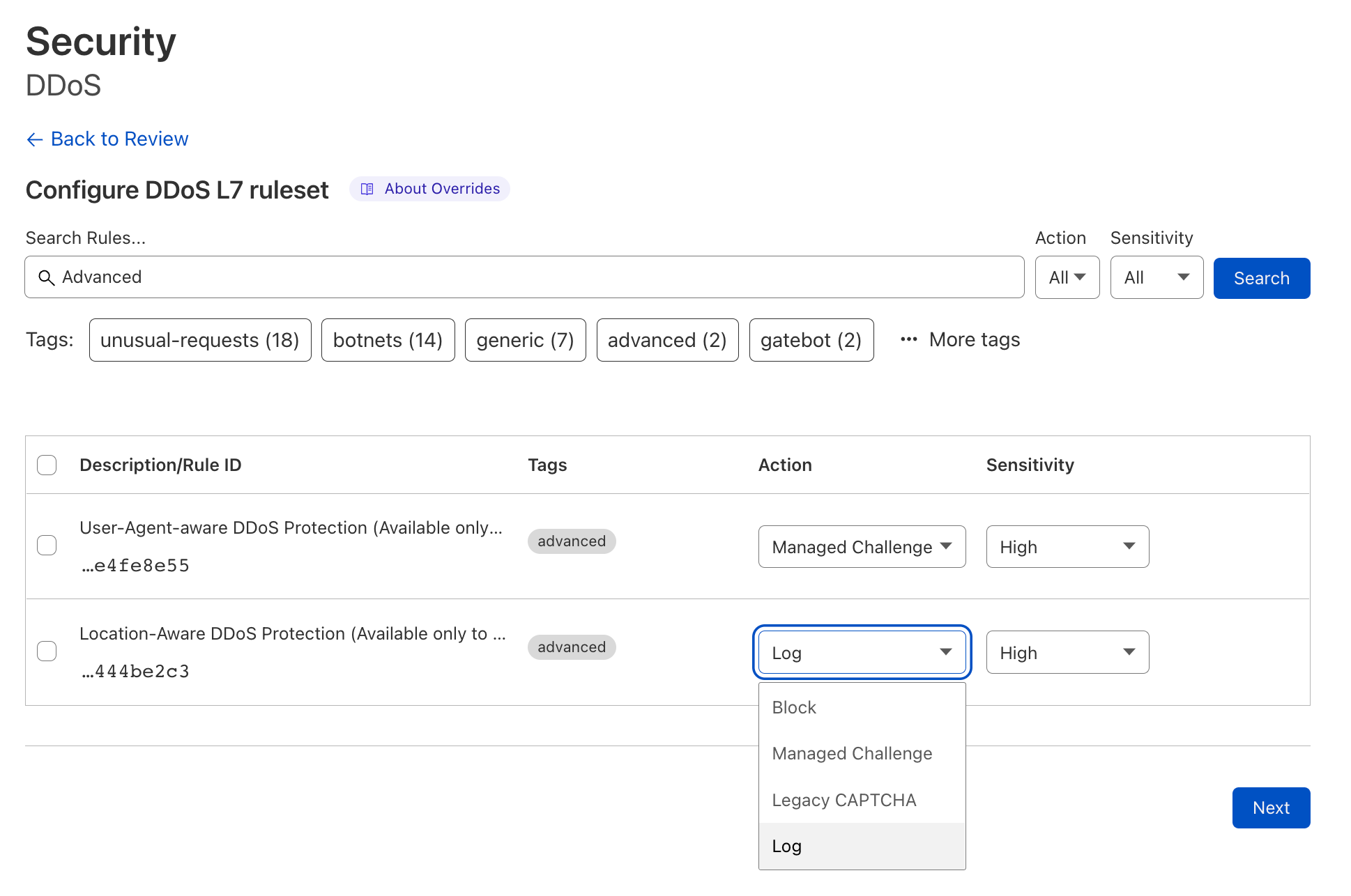
Adaptive DDoS Protection just works out of the box. It automatically creates the profiles, and then customers can tweak and tune the settings as they need via DDoS Managed Rules. Customers can change the sensitivity level, leverage expression fields to create overrides (e.g. exclude this type of traffic), and change the mitigation action to tailor the behavior of the system to their specific needs and traffic patterns.

Introducing Cloudflare Adaptive DDoS Protection - our new traffic profiling system for mitigating DDoS attacks

Adaptive DDoS Protection complements the existing DDoS protection systems which leverages dynamic fingerprinting to detect and mitigate DDoS attacks. The two work in tandem to protect our customers from DDoS attacks. When Cloudflare customers onboard a new Internet property to Cloudflare, the dynamic fingerprinting protects them automatically and out of the box — without requiring any user action. Once the Adaptive DDoS Protection learns their legitimate traffic patterns and creates a profile, users can turn it on to provide an extra layer of protection.

Rules included as part of the Adaptive DDoS Protection

As part of this release, we’re pleased to announce the following capabilities as part of Cloudflare’s Adaptive DDoS Protection:

Profiling Dimension Availability
WAF/CDN customers on the Enterprise plan with Advanced DDoS Magic Transit & Spectrum Enterprise customers
Origin errors ✅ ❌
Client IP Country & region ✅ Coming soon
User Agent (globally, not per customer*) ✅ ❌
IP Protocol ❌ ✅
Combination of IP Protocol and Destination Port ❌ Coming soon

*The User-Agent-aware feature analyzes, learns and profiles all the top user agents that we see across the Cloudflare network. This feature helps us identify DDoS attacks that leverage legacy or wrongly configured user agents.

Excluding UA-aware DDoS Protection, Adaptive DDoS Protection rules are deployed in Log mode. Customers can observe the traffic that’s flagged, tweak the sensitivity if needed, and then deploy the rules in mitigation mode. You can follow the steps outlined in this guide to do so.

Making the impact of DDoS attacks a thing of the past

Our mission at Cloudflare is to help build a better Internet. The DDoS Protection team’s vision is derived from this mission: our goal is to make the impact of DDoS attacks a thing of the past. Cloudflare’s Adaptive DDoS Protection takes us one step closer to achieving that vision: making Cloudflare’s DDoS protection even more intelligent, sophisticated, and tailored to our customer’s unique traffic patterns and individual needs.

Want to learn more about Cloudflare’s Adaptive DDoS Protection? Visit our developer site.

Interested in upgrading to get access to Adaptive DDoS Protection? Contact your account team.

New to Cloudflare? Speak to a Cloudflare expert.

Security updates for Monday

Post Syndicated from original https://lwn.net/Articles/908627/

Security updates have been issued by Debian (connman and e17), Fedora (curl, open-vm-tools, pcs, and python-lxml), Mageia (curl, dpkg, freecad, gimp, libtar, libtiff, mediawiki, ostree, python-lxml, schroot, SDL12, sdl2, wireshark, and zlib), Oracle (kernel and php:7.4), Red Hat (php:7.4), Slackware (vim), SUSE (chromium, kernel, libarchive, libtirpc, mupdf, python-rsa, ruby2.5, and virtualbox), and Ubuntu (linux-intel-iotg).

Improved Access Control: Domain Scoped Roles are now generally available

Post Syndicated from Garrett Galow original https://blog.cloudflare.com/domain-scoped-roles-ga/

Improved Access Control: Domain Scoped Roles are now generally available

Improved Access Control: Domain Scoped Roles are now generally available

Starting today, it is possible to scope your users’ access to specific domains with Domain Scoped Roles becoming generally available!

We are making it easier for account owners to manage their team’s access to Cloudflare by allowing user access to be scoped to individual domains. Ensuring users have the least amount of access they need and no more is critical, and Domain Scoped Roles is a major step in this direction. Additionally, with the use of Domain Groups, account owners can grant users access to a group of domains instead of individually. Domains can be added or removed from these groups to automatically update the access of those who have been granted access to the group. This reduces toil in managing user access.

One of the most common uses we have seen for Domain Scoped Roles is to limit access to production domains to a small set of team members, while still allowing development and pre-production domains to be open to the rest of the team. That way, someone can’t make changes to a production domain unless they are given access.

We are doing a rollout of this functionality across all Enterprise Cloudflare accounts, and you will receive an email when this functionality is enabled for your account.

Any existing access on accounts today will remain the same, with the ability to further scope down access where it makes sense. All of our account-wide roles are still available to assign to users.

How to use Domain Scoped Roles

Once you have Domain Scoped Roles, here is how to start using it:

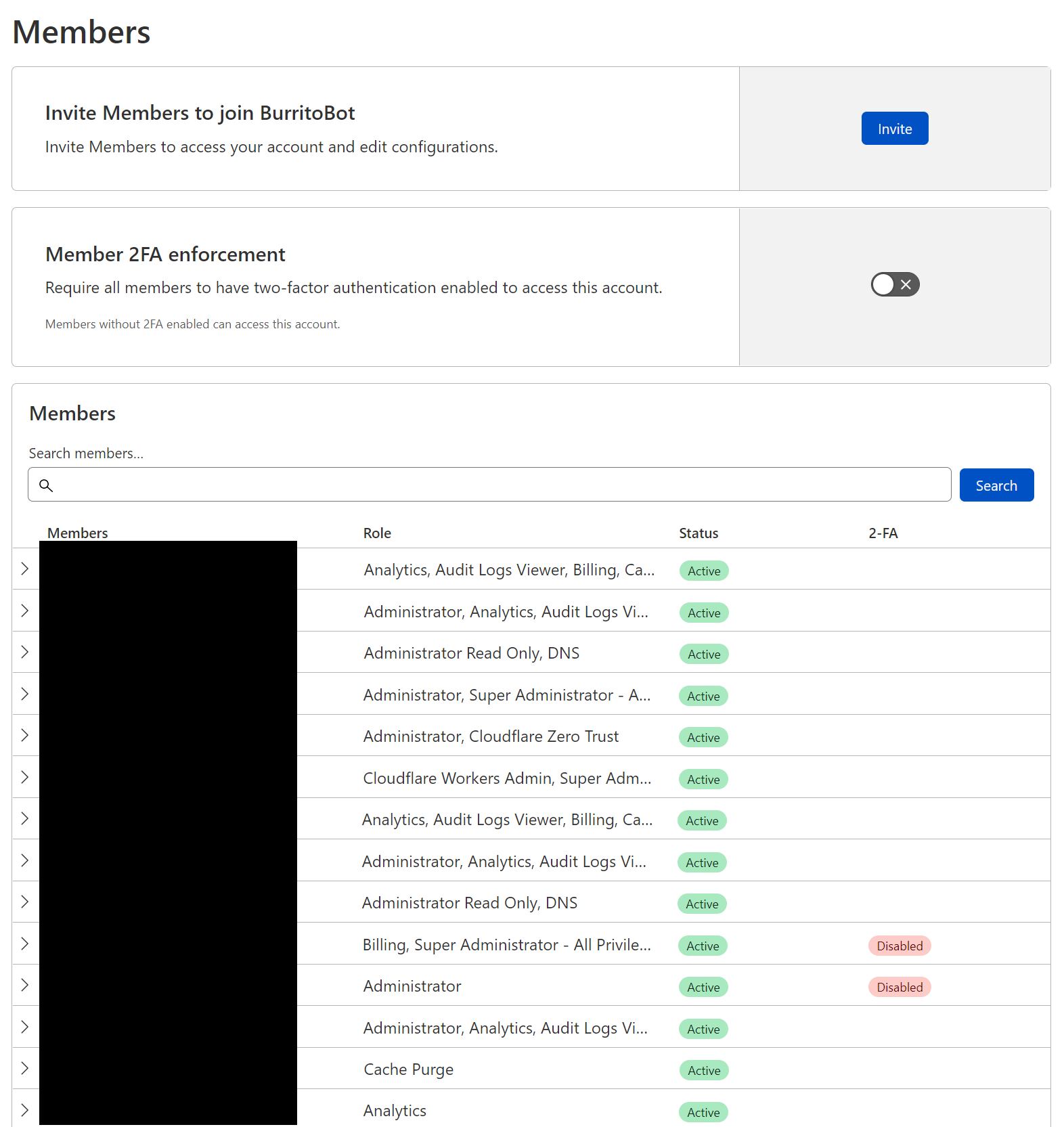
Log in to dash.cloudflare.com, select your account, and navigate to the members page.

From this page, you can manage your members’ permissions. In this case, we will invite a new user, however you can also modify an existing user’s permissions.

Improved Access Control: Domain Scoped Roles are now generally available

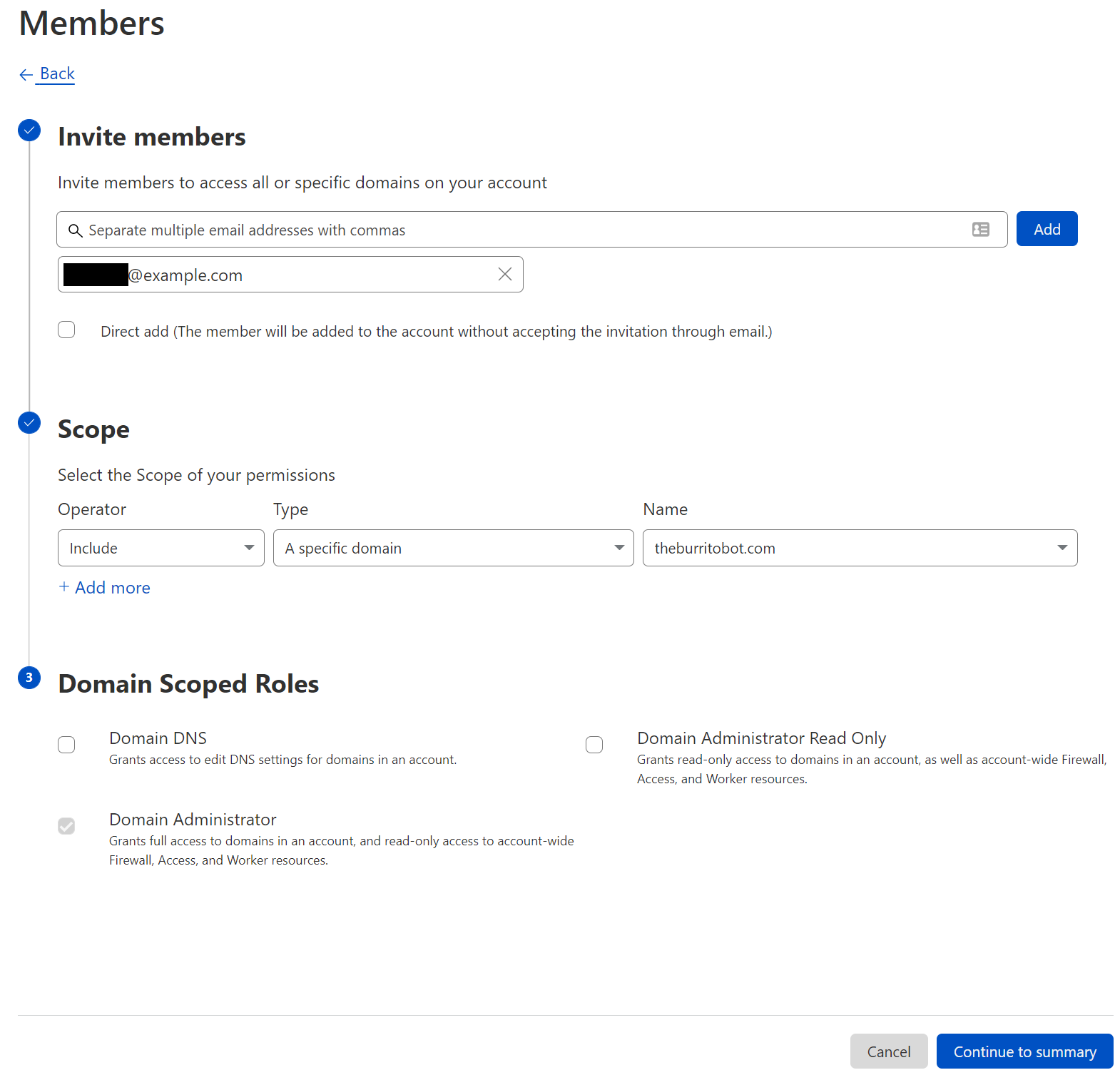
After clicking “Invite”, you will determine which users to invite, multiple users can be invited at the same time. After selecting users, we provide appropriate scope. Within the scope selection list, three options are available: all domains, a specific domain, and a domain group. Selecting all domains continues to grant account wide access, and all of our legacy roles are available at this level of scoping. A specific domain or domain groups provide access to our new domain scoped roles. Finally, with a user and a scope selected, a role (or multiple roles) can be selected to grant appropriate permissions.

Improved Access Control: Domain Scoped Roles are now generally available

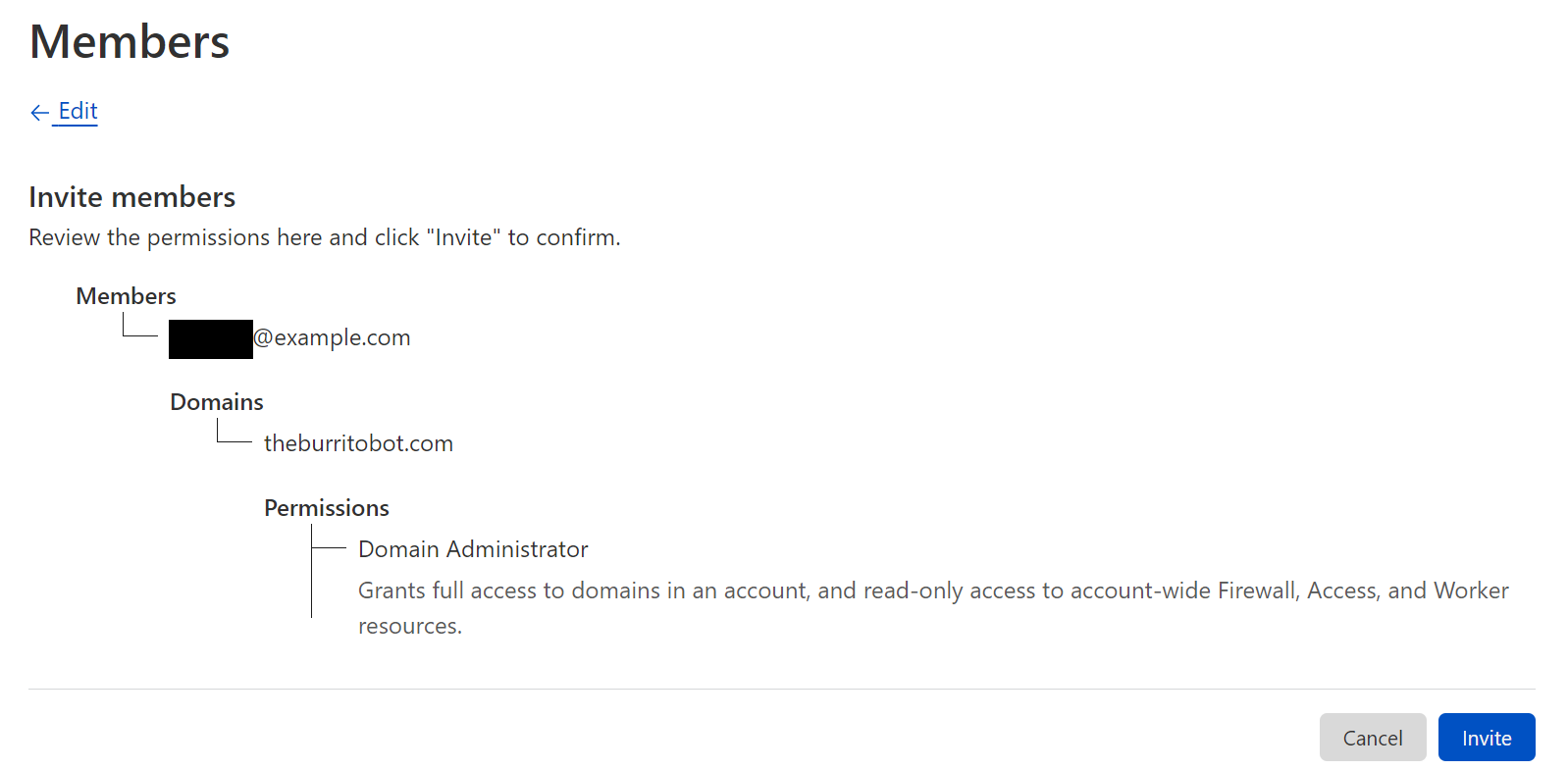
Before sending the invite, you will be able to confirm the users, scope, and roles.

Improved Access Control: Domain Scoped Roles are now generally available

Domain Groups

In addition to manually creating inclusion or exclusion lists per user, account owners can also create Domain Groups to allow granting one or more users to a group of domains. Domain Groups can be created from the member invite flow or directly from Account Configurations → Lists. When creating a domain group, the user selects the domains to include and, from that point on, the group can be used when inviting a user to the account.

What’s next

We are doing a rollout of this functionality across all Enterprise Cloudflare accounts, and you will receive an email when this functionality is enabled for your account.

Any existing access on accounts today will remain the same, with the ability to further scope access where you decide. All of our account-wide roles are still available to assign to users.

If you are an enterprise customer and interested in getting Domain Scoped Roles sooner, please contact your CSM to get enabled! Otherwise, you will receive an email when your account has this feature enabled.

This announcement represents a step forward in our migration to a new authorization system built for Cloudflare’s scale. This will allow us to expand these capabilities to more products in the future and to create an authorization system that puts customers more in control of their team’s access across all of Cloudflare’s services.

Cloudforce One is now generally available: empower your security team with threat data, tooling, and access to industry experts

Post Syndicated from Patrick R. Donahue original https://blog.cloudflare.com/cloudforce-one-is-now-ga/

Cloudforce One is now generally available: empower your security team with threat data, tooling, and access to industry experts

Cloudforce One is now generally available: empower your security team with threat data, tooling, and access to industry experts

Cloudflare’s threat operations and research team, Cloudforce One, is now open for business and has begun conducting threat briefings. Access to the team is available via an add-on subscription, and includes threat data and briefings, security tools, and the ability to make requests for information (RFIs) to the team.

Fill out this form or contact your account team to learn more.

Subscriptions come in two packages, and are priced based on number of employees: “Premier” includes our full history of threat data, bundled RFIs, and an API quota designed to support integrations with SIEMs. “Core” level includes reduced history and quotas. Both packages include access to all available security tools, including a threat investigation portal and sinkholes-as-a-service.

If you’re an enterprise customer interested in understanding the type of threat briefings that Cloudforce One customers receive, you can register here for “YackingYeti: How a Russian threat group targets Ukraine—and the world”, scheduled for October 12. The briefing will include Q&A with Blake Darché, head of Cloudforce One, and an opportunity to learn more about the team and offering.

Requests for Information (RFIs) and Briefings

The Cloudforce One team is composed of analysts assigned to five subteams: Malware Analysis, Threat Analysis, Active Mitigation and Countermeasures, Intelligence Analysis, and Intelligence Sharing. Collectively, they have tracked many of the most sophisticated cyber criminals on the Internet while at the National Security Agency (NSA), USCYBERCOM, and Area 1 Security, and have worked closely with similar organizations and governments to disrupt these threat actors. They’ve also been prolific in publishing “finished intel” reports on security topics of significant geopolitical importance, such as targeted attacks against governments, technology companies, the energy sector, and law firms, and have regularly briefed top organizations around the world on their efforts.

Cloudforce One is now generally available: empower your security team with threat data, tooling, and access to industry experts

Included with a Cloudforce One subscription is the ability to make “requests for information” (RFIs) to these experts. RFIs can be on any security topic of interest, and will be analyzed and responded to in a timely manner. For example, the Cloudforce One Malware Analysis team can accept uploads of possible malware and provide a technical analysis of the submitted resource. Each plan level comes with a fixed number of RFIs, and additional requests can be added.

In addition to customer-specific requests, Cloudforce One conducts regular briefings on a variety of threats and threat actors—those targeting specific industries as well as more general topics of interest.

Threat Data

The best way to understand threats facing networks and applications connected to the Internet is to operate and protect critical, large scale Internet infrastructure. And to defend attacks against millions of customers, large and small. Since our early days, Cloudflare has set out to build one of the world’s largest global networks to do just that. Every day we answer trillions of DNS queries, track the issuance of millions SSL/TLS certificates in our CT log, inspect millions of emails for threats, route multiple petabytes of traffic to our customers’ networks, and proxy trillions of HTTP requests destined for our customers’ applications. Each one of these queries and packets provides a unique data point that can be analyzed at scale and anonymized into actionable threat data—now available to our Cloudforce One customers.

Data sets now available in the dashboard and via API for subscribers include IP, ASN, and domain intelligence, passive DNS resolutions; threat actor cards with indicators of compromise (IoC), open port, and new Managed IP Lists are planned for release later this year.

Security Tools

Security analysts and threat hunting teams are being forced to do more with less in today’s operating environment, but that doesn’t reduce their need for reliable tools that can quickly identify and eliminate risks.

Bundled with Cloudforce One are several security tools that can be deployed as services to expedite threat hunting and remediation:

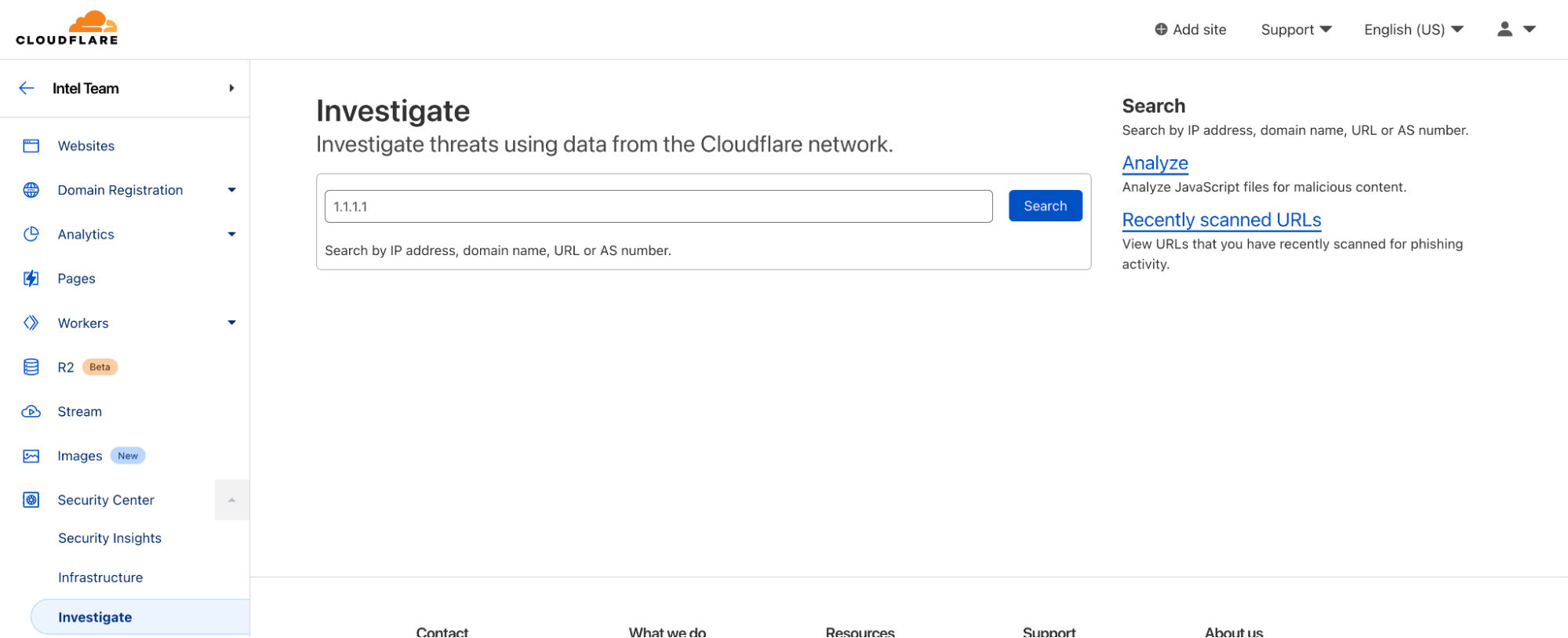
Threat Investigation Portal

  • Located within Security Center, the Investigate tab is your portal for querying current and historical threat data on IPs, ASNs, URLs (new!), and domains.
  • URLs can now be scanned for phishing contents, with heuristic and machine learning-scored results presented on demand.
Cloudforce One is now generally available: empower your security team with threat data, tooling, and access to industry experts

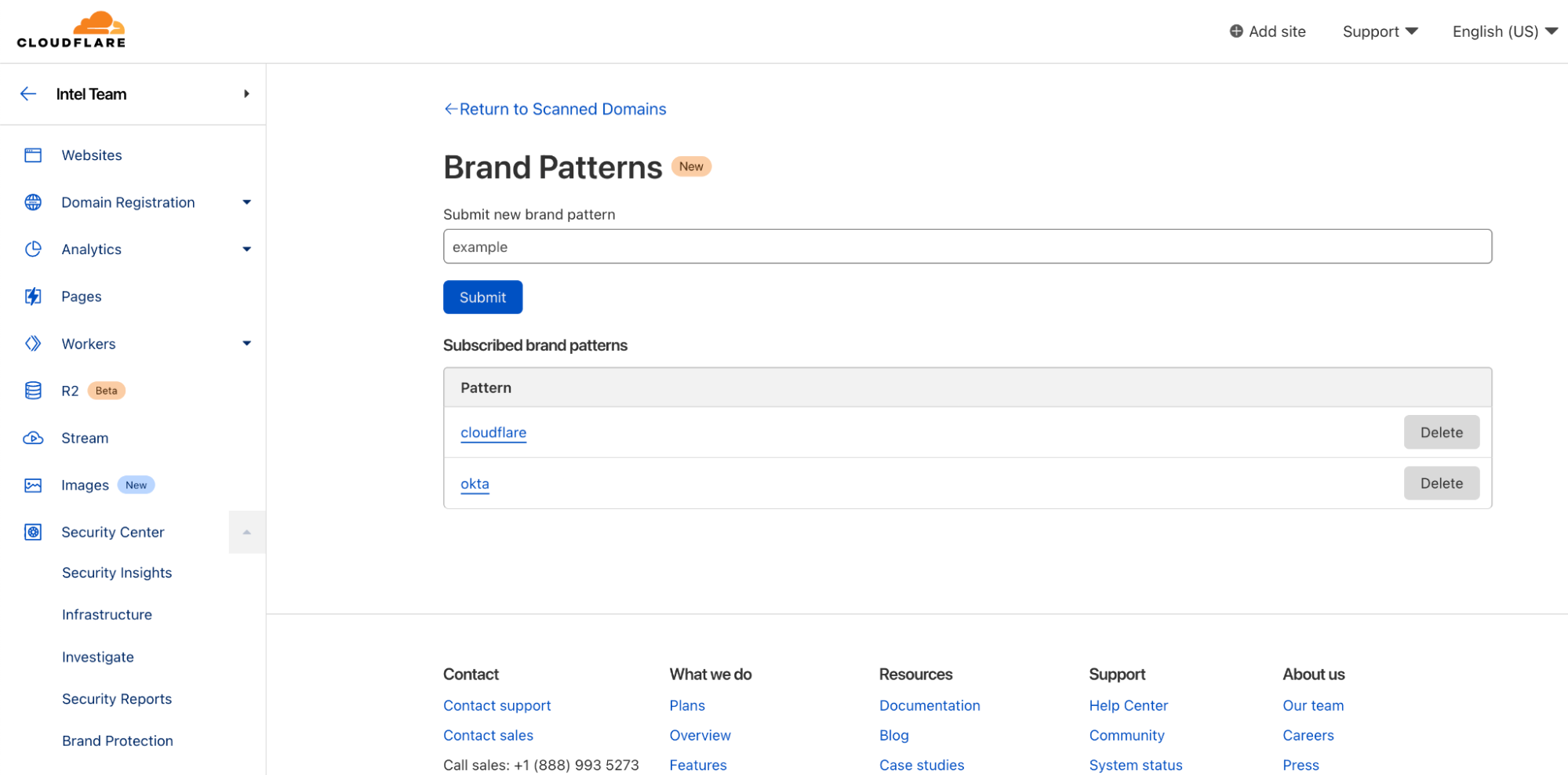
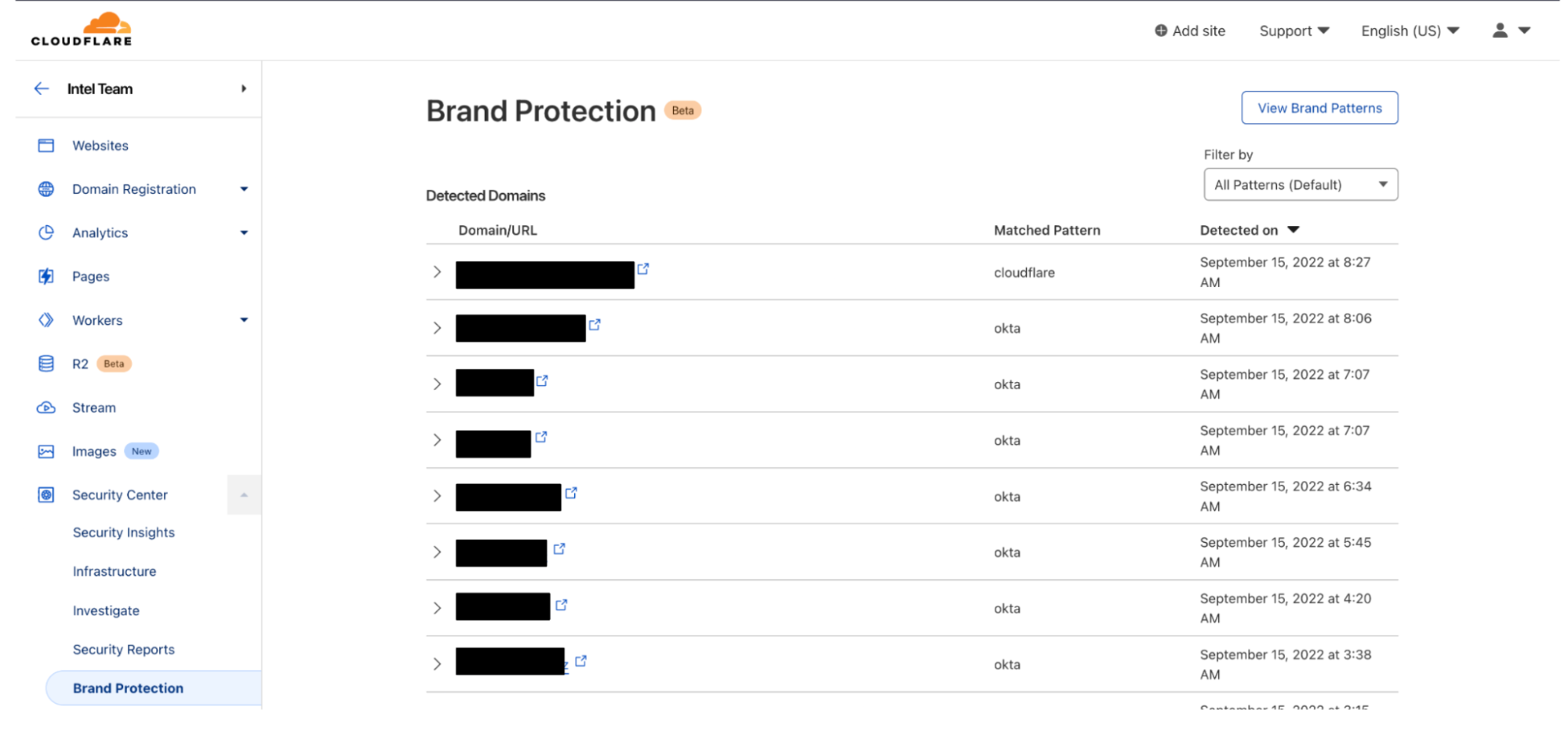
Brand Protection (new!)

  • Also located within the Security Center, the Brand Protection tab can be used to register keywords or assets (e.g., corporate logos, etc.) that customers wish to be notified of when they appear on the Internet.
Cloudforce One is now generally available: empower your security team with threat data, tooling, and access to industry experts

Sinkholes (new!)

  • Sinkholes can be created on-demand, as a service, to monitor hosts infected with malware and prevent them from communicating with command-and-control (C2) servers.
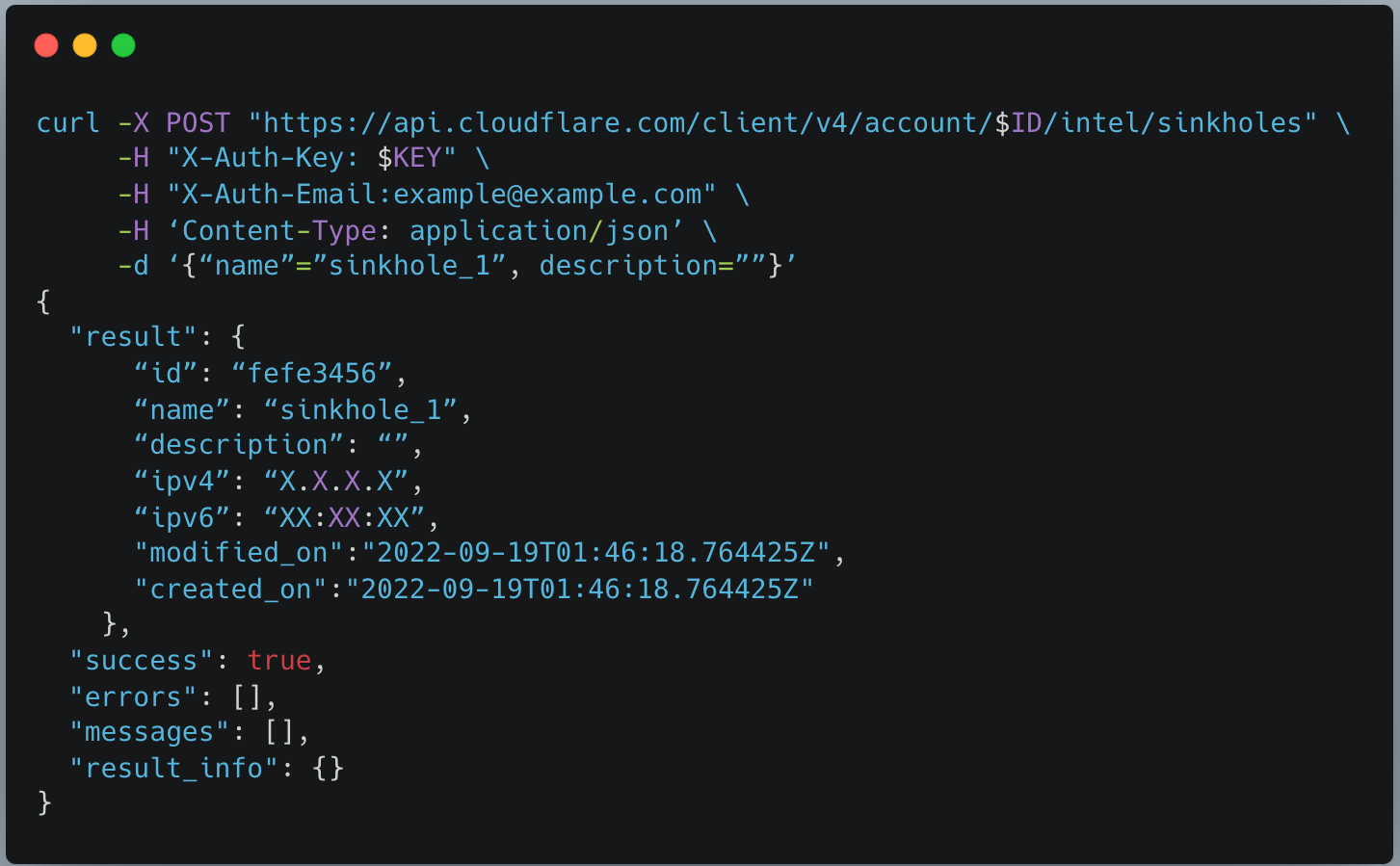
  • After creating a sinkhole via API, an IP will be returned which can be used with DNS products like Cloudflare Gateway to route web requests to safe sinkholes (and away from C2 servers). Sinkholes can be used to intercept SMTP traffic.
  • Premier customers can also bring their own IP address space to use for sinkholes, to accommodate egress firewall filtering or other use cases. In the future we plan to extend our sinkhole capability to the network layer, which will allow it to be deployed alongside offerings such as Magic Transit and Magic WAN.
Cloudforce One is now generally available: empower your security team with threat data, tooling, and access to industry experts

Getting Started with Cloudforce One

Cloudforce One is open for business and ready to answer your security inquiries. Speak to your account manager or fill out this form to learn more. We hope to see you on the upcoming webinar!

Large-Scale Collection of Cell Phone Data at US Borders

Post Syndicated from Bruce Schneier original https://www.schneier.com/blog/archives/2022/09/large-scale-collection-of-cell-phone-data-at-us-borders.html

The Washington Post is reporting that the US Customs and Border Protection agency is seizing and copying cell phone, tablet, and computer data from “as many as” 10,000 phones per year, including an unspecified number of American citizens. This is done without a warrant, because “…courts have long granted an exception to border authorities, allowing them to search people’s devices without a warrant or suspicion of a crime.”

CBP’s inspection of people’s phones, laptops, tablets and other electronic devices as they enter the country has long been a controversial practice that the agency has defended as a low-impact way to pursue possible security threats and determine an individual’s “intentions upon entry” into the U.S. But the revelation that thousands of agents have access to a searchable database without public oversight is a new development in what privacy advocates and some lawmakers warn could be an infringement of Americans’ Fourth Amendment rights against unreasonable searches and seizures.

[…]

CBP conducted roughly 37,000 searches of travelers’ devices in the 12 months ending in October 2021, according to agency data, and more than 179 million people traveled that year through U.S. ports of entry.

More articles. Slashdot thread.

Bring Your Own Disaster

Post Syndicated from original https://mjg59.dreamwidth.org/61089.html

After my last post, someone suggested that having employers be able to restrict keys to machines they control is a bad thing. So here’s why I think Bring Your Own Device (BYOD) scenarios are bad not only for employers, but also for users.

There’s obvious mutual appeal to having developers use their own hardware rather than rely on employer-provided hardware. The user gets to use hardware they’re familiar with, and which matches their ergonomic desires. The employer gets to save on the money required to buy new hardware for the employee. From this perspective, there’s a clear win-win outcome.

But once you start thinking about security, it gets more complicated. If I, as an employer, want to ensure that any systems that can access my resources meet a certain security baseline (eg, I don’t want my developers using unpatched Windows ME), I need some of my own software installed on there. And that software doesn’t magically go away when the user is doing their own thing. If a user lends their machine to their partner, is the partner fully informed about what level of access I have? Are they going to feel that their privacy has been violated if they find out afterwards?

But it’s not just about monitoring. If an employee’s machine is compromised and the compromise is detected, what happens next? If the employer owns the system then it’s easy – you pick up the device for forensic analysis and give the employee a new machine to use while that’s going on. If the employee owns the system, they’re probably not going to be super enthusiastic about handing over a machine that also contains a bunch of their personal data. In much of the world the law is probably on their side, and even if it isn’t then telling the employee that they have a choice between handing over their laptop or getting fired probably isn’t going to end well.

But obviously this is all predicated on the idea that an employer needs visibility into what’s happening on systems that have access to their systems, or which are used to develop code that they’ll be deploying. And I think it’s fair to say that not everyone needs that! But if you hold any sort of personal data (including passwords) for any external users, I really do think you need to protect against compromised employee machines, and that does mean having some degree of insight into what’s happening on those machines. If you don’t want to deal with the complicated consequences of allowing employees to use their own hardware, it’s rational to ensure that only employer-owned hardware can be used.

But what about the employers that don’t currently need that? If there’s no plausible future where you’ll host user data, or where you’ll sell products to others who’ll host user data, then sure! But if that might happen in future (even if it doesn’t right now), what’s your transition plan? How are you going to deal with employees who are happily using their personal systems right now? At what point are you going to buy new laptops for everyone? BYOD might work for you now, but will it always?

And if your employer insists on employees using their own hardware, those employees should ask what happens in the event of a security breach. Whose responsibility is it to ensure that hardware is kept up to date? Is there an expectation that security can insist on the hardware being handed over for investigation? What information about the employee’s use of their own hardware is going to be logged, who has access to those logs, and how long are those logs going to be kept for? If those questions can’t be answered in a reasonable way, it’s a huge red flag. You shouldn’t have to give up your privacy and (potentially) your hardware for a job.

Using technical mechanisms to ensure that employees only use employer-provided hardware is understandably icky, but it’s something that allows employers to impose appropriate security policies without violating employee privacy.

comment count unavailable comments
An X11 Apologist Tries Wayland (artemis.sh)

Post Syndicated from original https://lwn.net/Articles/908561/

The artemis.sh blog has a
detailed review
of the state of Wayland compared to X.org.

It feels fantastic. It even made my software cursor
not feel so softwarey, which I’ve never experienced with a software
cursor before. I have a pretty bad GPU, but on a higher end card
you’d get a huge benefit to this in games. If your card can render
the game many times faster than your monitor refresh rate, you can
unlock your FPS in the game, tune your max_render_time to the
absolute minimum, and get EXTREMELY low latency while still having
absolutely no screen tearing whatsoever.

And like, this is the first time I’ve ever seen the vsync setting
in a game actually sync the game up with the vblank interval in a
way that matters. It works for games in wine. It’s amazing. I have
never experienced gaming on Linux that looked this smooth in my
life.

Kernel prepatch 6.0-rc6

Post Syndicated from original https://lwn.net/Articles/908560/

The 6.0-rc6 kernel prepatch is out for
testing.

So this is an artificially small -rc release, because this past
week we had the Maintainers’ Summit in Dublin (along with OSS EU
and LPC 2022), so we’ve had a lot of maintainers traveling.

Or – putting my ridiculously optimistic hat on – maybe things are
just so nice and stable that there just weren’t all that many
fixes?

Welcome to GA Week

Post Syndicated from John Graham-Cumming original https://blog.cloudflare.com/welcome-to-ga-week/

Welcome to GA Week

Welcome to GA Week

Cloudflare ships a lot of products. Some of those products are shipped as beta, sometimes open, sometimes closed, and our huge customer base gives those betas an incredible workout. Making products work at scale, and in the heterogeneous environment of the real Internet is a challenge. We’re lucky to have so many enthusiastic customers ready to try out our betas.

And when those products exit beta they’re GA or Generally Available. This week you’ll be hearing a lot about products becoming GA.

But it’s not just about making products work and be available, it’s about making the best-of-breed. We ship early and iterate rapidly. We’ve done this over the years for WAF, DDoS mitigation, bot management, API protection, CDN and our developer platform. Today analyst firms such as Gartner, Forrester and IDC recognize us as leaders in all those areas.

That’s one reason we’re trusted by the likes of Broadcom, NCR, DHL Parcel, Panasonic, Canva, Shopify, L’Oréal, DoorDash, Garmin and more.

Over the years we’ve heard criticism that we’re the new kid on the block. The latest iteration of that is Zero Trust vendors seeing us as novices. It sounds all too familiar. It’s what the DDoS, WAF, bot management, DNS, API protection, and serverless vendors used to say before we blew past them.

We innovate fast because we built a structure and culture that allows it. Cloudflare operates three main innovation teams (Product/Engineering, Emerging Technology and Incubation, and Technology/Research) that work on projects with differing time horizons. We encourage innovation from outside those teams as well.

In a week’s time it’ll be Cloudflare’s 12th birthday and, as every year, we’ll have a Birthday Week when we’ll announce radically new and different products that are likely to cause a great deal of surprise. The teams above have been working hard on things that will change how people think about Cloudflare.

But before we get there, you’re going to hear about products that are out of beta and generally available. Most of these things have been announced before, here on this blog. But they were in beta.

Now they’re ready for everyone.

In fact, we had so many products becoming generally available that we decided to create a new Innovation Week: Cloudflare GA Week. We’ll still keep making products Generally Available throughout the year, but this year, at least, we have a bonanza week of products that are ready.

Even during the beta these products have been in use by real customers, and you’ll be hearing from them this week as well. It’s always inspiring to see how our products are used. It’s one thing to build a product, it’s fascinating to work with customers on how they’ll use it and what it enables them to do.

We aren’t going to be satisfied until every one of the products we talk about is best of breed and a leader in its own category. Together they form Cloudflare’s platform, a platform which is unmatched by anyone in the industry.

The collective thoughts of the interwebz