Post Syndicated from LastWeekTonight original https://www.youtube.com/shorts/I9yskcTgalA
A new pile of stable kernels
Home Assistant: See Your Smart Home Connections! #shorts
Post Syndicated from BeardedTinker original https://www.youtube.com/shorts/7AaJr0vdtJI
Anaconda WebUI: progress update and roadmap
Post Syndicated from jzb original https://lwn.net/Articles/1037349/
Fedora’s Community Blog has a short
update on the progress of Fedora’s new installer with a web-based
interface. The new installer was introduced for the Workstation
edition in Fedora Linux 42, it is now approved to be
included in all Fedora spins and the KDE edition for
Fedora 43. Final deprecation of the GTK-based installer is set
for Fedora 45. LWN covered the installer
changes in April.
[$] Introducing Space Grade Linux
Post Syndicated from jake original https://lwn.net/Articles/1036168/
A new project, targeting Linux for the proverbial final frontier—outer
space—was the subject of a talk (YouTube video) at
the Embedded Linux Conference, which was held as part of Open
Source Summit Europe in Amsterdam in late August. Ramón Roche
introduced Space Grade
Linux (SGL), which is currently incubating as a special interest group
(SIG) of the Embedding Linux in Safety
Applications (ELISA) project. The idea is to create a distribution
with a base layer that can be used for off-planet missions of various
sorts, along with other layers that can be used to customize it for
different space-based use cases.
Security updates for Tuesday
Post Syndicated from corbet original https://lwn.net/Articles/1037308/
Security updates have been issued by AlmaLinux (kernel and kernel-rt), Debian (openafs and qemu), Fedora (buildah, containers-common, podman, python-flask, and snapshot), Mageia (postgresql, python-django, and udisks2), Oracle (kernel and libxml2), Red Hat (apache-commons-beanutils, firefox, httpd, httpd:2.4, kernel, kernel-rt, mod_http2, qt5-qt3d, and thunderbird), Slackware (libxml2), SUSE (firebird, go1.25-openssl, ImageMagick, microcode_ctl, netty, netty-tcnative, and ovmf), and Ubuntu (libetpan and postgresql-14, postgresql-16, postgresql-17).
THG Podcast: Counterfactuals: Hamilton’s Duels
Post Syndicated from The History Guy: History Deserves to Be Remembered original https://www.youtube.com/watch?v=7dD02t5Hrss
New Cryptanalysis of the Fiat-Shamir Protocol
Post Syndicated from Bruce Schneier original https://www.schneier.com/blog/archives/2025/09/new-cryptanalysis-of-the-fiat-shamir-protocol.html
A couple of months ago, a new paper demonstrated some new attacks against the Fiat-Shamir transformation. Quanta published a good article that explains the results.
This is a pretty exciting paper from a theoretical perspective, but I don’t see it leading to any practical real-world cryptanalysis. The fact that there are some weird circumstances that result in Fiat-Shamir insecurities isn’t new—many dozens of papers have been published about it since 1986. What this new result does is extend this known problem to slightly less weird (but still highly contrived) situations. But it’s a completely different matter to extend these sorts of attacks to “natural” situations.
What this result does, though, is make it impossible to provide general proofs of security for Fiat-Shamir. It is the most interesting result in this research area, and demonstrates that we are still far away from fully understanding what is the exact security guarantee provided by the Fiat-Shamir transform.
Exploring the Human Side of Software with Dylan Beatty
Post Syndicated from Michael Kammer original https://blog.zabbix.com/exploring-the-human-side-of-software-with-dylan-beatty/31320/

There are plenty of good reasons to attend Zabbix Summit 2025, but one of the most important is the fact that this year’s Summit will feature Dylan Beattie as a special guest speaker. A Software Development Consultant and Founder of Ursatile, Dylan is an international keynote speaker, and a long-time contributor to the open-source community. He’s also a Microsoft MVP and has created Rockstar, an esoteric programming language that started as an inside joke and ended up being featured in Classic Rock magazine.
At the Summit, Dylan will give a talk titled “Open Source, Open Minds. The Cost of Free Software.” We asked him about his beginnings in the tech industry, what drove the creation of Rockstar, and why communication is the key to successful software development.
Can you tell us a bit about your journey into software development? How did you get started, and was there any particular moment when you realized that you were on the right path?
Like a lot of folks in tech, I got started on the 8-bit home computers of the 1980s – mine was an Amstrad 6128, which came with a couple of fairly mediocre games, but it also had a BASIC and a LOGO interpreter, and I pretty quickly found out that writing little programs and trying to create my own games was way more fun than playing the games which were included with it. I graduated from that to a 286 PC with MS—DOS 5, Windows 3.1 – but I really wasn’t thinking about it as a career.
The turning point was when I was sixteen years old, and I was supposed to be going to university to study mathematics. Dad brought home a new 486 PC a couple of weeks before my final exams, I spent my study leave messing around on the computer instead of studying, and when I didn’t get the grades I needed for my university course I figured maybe that was a sign I should be studying computer science instead. I went to Southampton and got a bachelor’s degree in computer science, learned C, C++, Lisp, SQL, and HTML. I graduated right as the dot-com bubble was bursting but still managed to get a job building data-driven web applications, and I’ve never really looked back.
You talk a lot about the human side of software. Why do you think communication is such a critical skill in development?
One of the perennial challenges facing the craft of programming is that it can be a profoundly solitary activity. One person working on their own can create an app or a game, put it online, and share their creation with literally millions of people – no meetings, no emails, just one person cranking out code. But then you try to translate those coding skills into domains like banking, healthcare, aviation, domains where software quality can have a real, material effect on people’s lives, and you realize that the code is actually the easy part.
The ability to talk to people, figure out what they need, help them understand your own ideas; to create consensus and avoid misunderstanding? It’s way more important than being able to crank out code. The most expensive problems I’ve had to deal with in my career haven’t been bugs in the code, they’ve been misunderstandings about what the team is doing and why it matters.
How did you end up creating a programming language (Rockstar) that can do double-duty as rock lyrics?
Good question! So, there’s always been this trope of the “rockstar programmer” – these mythical, high-powered, hyper-productive developers who can crank out millions of lines of fast, flawless code – and about a decade ago there was a massive spike in recruiters putting out adverts for “rockstar programmers.” When somebody suggested on Twitter that somebody should create a programming language called Rockstar to really confuse recruiters, that gave me an idea.
Initially it was just a piece of comedy writing – a parody of a programming language specification. I wanted to see if it was possible to extract enough clichés from rock music to create a formal grammar for a Turing-complete programming language that read exactly like song lyrics. It turns out that the answer is yes! I published the parody spec on GitHub, it got shared on Reddit and Hacker News, and the whole thing snowballed from there. Eventually I had no choice but to actually build a Rockstar interpreter, which turned out to be way more difficult than I thought, but also a lot of fun. The latest version is online here – it’s built in C#, compiles to native binaries for WIndows, Linux, and macOS, plus there’s a web assembly version on the website so curious folks can run Rockstar right in their browser without having to download anything!
Before taking on a speaking slot at this year’s Summit, how familiar were you with Zabbix? What has your experience of using it been like?
I’ve got to be honest – I’m not sure I’d ever heard of Zabbix before I was invited to speak at Zabbix Summit 2025, but that’s not unusual. I get invited to a lot of events that are focused around a particular technology or platform, and it’s a constant reminder of just how vast our industry is that somebody will organize a conference around a product I’ve never even heard of and attract literally hundreds of smart, curious people who want to share their own experiences and learn from each other. One thing about Zabbix which was particularly interesting to me when I started researching it was the licensing model. I think it’s a relatively unusual example of a commercially sustainable product or software that’s published under the Affero GPL license, so I’m really looking forward to chatting with other attendees about that and how that’s influenced their decision to use it.
You’re famous for your detailed and theatrical presentations – what makes a technical talk memorable to you?
A great talk is one that really connects with an audience, and the best way I’ve found to do that is to look for the little things that we all do every day that we’ve all learned just accept at face value, even when we have no idea why they work that way. Why is a capital “A” ASCII code 65 but a lowercase “a” is code 97? Why is validating email addresses difficult? Why is vertically aligning something in CSS such a big deal? There’s a good chance that a lot of folks in the audience have asked themselves that same question at some point, so the curiosity is already there. Tapping into that curiosity gets their attention, and then you can tell them the good stuff: the history, the stories, the personalities, the decisions.
There’s a lot of stuff in tech which feels kinda stupid, but none of it was designed to be stupid (well, except Rockstar!) Once you understand the context and the history, everything makes a lot more sense – and then at some point, maybe months later, you’ll hit a weird text encoding bug, or a problem with a system that won’t accept certain kinds of email addresses, and you’ll remember the talk. I get email from folks sometimes talking about how something from one of my presentations has helped them fix a weird bug years after they saw the presentation. That’s a great feeling.
Can you drop any hints about your presentation at this year’s Summit? What should audience members expect?
Sure! We’re going to talk about MIT, laser printers, software, Commander Keen, Doom, Quake, Netscape, the origins of the term “open source”, Linksys routers, WordPress, how the xz-utils backdoor nearly ended up compromising about half the computers on the internet – and a really cute story about a squirrel. It’s going to be awesome. I can’t wait!
The post Exploring the Human Side of Software with Dylan Beatty appeared first on Zabbix Blog.
Creating The Most Beautiful BOKEH – Sigma 135mm f1.4 ART
Post Syndicated from Matt Granger original https://www.youtube.com/watch?v=rsXvnCA56i4
Ladies and Gentlemen We have a YouTube Channel 1 MILLION Subscriber Edition
Post Syndicated from Patrick Kennedy original https://www.servethehome.com/ladies-and-gentlemen-we-have-a-youtube-channel-1-million-subscriber-edition/
Ladies and gentlemen, we now have a 1 MILLION subscriber YouTube channel, a number I never thought we would see
The post Ladies and Gentlemen We have a YouTube Channel 1 MILLION Subscriber Edition appeared first on ServeTheHome.
Смърт, глад и унижения – спомени от концлагерите в комунистическа България
Post Syndicated from original https://www.toest.bg/smurt-glad-i-unizheniya-spomeni-ot-kontslagerite-v-komunisticheska-bulgaria/

„Смъртта не е страшна. Смъртта настъпва при различни обстоятелства. Когато мигновено настъпи, това не е страшно. Мисълта за смъртта е страшна“, казва оцелелият политзатворник Жеко Стоянов пред „Тоест“. През далечната 1961 година той е осъден на смърт по чл. 5 от Закона за забраняване и разтурване на опозицията, във връзка с чл. 70 от тогавашния Наказателен кодекс. По онова време е на 22 години.
Впоследствие смъртната му присъда е заменена с 20 години лишаване от свобода, от които той излежава три години и един месец в старозагорския затвор, преди да бъде освободен с пълна и безусловна държавна амнистия през септември 1964 г.
На 9 септември 1944 г. Българската комунистическа партия взема властта с държавен преврат, заличава опозицията и започва да използва различни методи за заглушаване на критиците си. Изселване, вкарване в затвора, следене – това са само част от мерките, целящи да държат населението изплашено и подчинено. Остава нерешен въпросът какво да се прави с онези, които не одобряват комунизма, но и не са извършили престъпление. Бързо му се намира отговор: концлагери.
Какво представлява лагерът „Белене“
Между 1949 г. и 1987 г. с прекъсвания на остров Персин (Белене) функционира най-големият концлагер за политически неудобни хора в България, наричан от властта „трудово-възпитателно общежитие“. В него без съд и присъда са въдворени и принудени да извършват тежък физически труд над 20 000 български граждани.


„Белене“ в наши дни. Снимки: Теодора Станимирова
Причините за изпращането им в лагера са различни: разпространяване на „вражеска агитация и пропаганда“, слушане на западна музика, разказване на вицове против властта, опити да напуснат страната, отказ да влязат в ТКЗС [трудово-кооперативно земеделско стопанство; в ТКЗС-та е трябвало да се обединяват някогашните частни земеделци – б.р.] или – по време на т.нар. Възродителен процес – да си сменят имената. Сред лагеристите има царски офицери и герои от войните, свещеници, монахини, лекари, учители, юристи, кметове, аполитични селяни, както и
хора, които просто не са плакали достатъчно след смъртта на Георги Димитров.
Обвиненията често са скалъпени. Тодор Анастасов прекарва девет месеца в лагера заради опит за бягство и създаване на организация, „което беше малко измислено от следствието“, разказва той в платформата belene.camp и уточнява:
Закараха ме там, на кой етаж беше – четвърти или пети, където в една стая имаше следовател, униформен, който ме разпитваше. Оказа се, че той знае доста неща предварително […], и ме разпитваше, като […] аз казвам, той пише нещо. След това се оказа, че той доста изопачава това, което аз казвам.
След престоя в ареста лагеристите са откарвани на острова. Пътят от гарата до лагера е 18 км, които лагеристите изминават пеша за около 20 часа.
След като ни стовариха на острова […], един милиционер на кон ни подкара към обектите […]. И той – на кон, ний – пеша, в кал и сняг. Като тези кални участъци бяха много лепкави. Аз с моите обувки от времето на задържането, които бяха някакви леки обувки, и първо едната ми остана в калта, после другата ми остана в калта. Не мога да спирам да ги взимам, защото този с коня ни гони. И после единият чорап, после – другият чорап, и така. Може би десетина километра съм вървял бос в това време през кал, сняг, локви и т.н.,
описва пътя си към лагера Тодор Анастасов. Някои не искали роднините им да идват на свиждане, защото преходът до другия край на острова е твърде тежък.
„Да, човек звучи гордо“
Надписът на арката „Да, човек звучи гордо“ (перифраза на цитат от пиесата „На дъното“ на руския писател Максим Горки) преди входа на лагера всъщност е доста циничен на фона на случващото се там. В края на 18-те километра преход лагеристите виждат „един плац, обграден с телени мрежи, в който се намират […] най-първобитни бараки от плет, от върбови клонки, с кал измазани и покриви от такива снопи, от слама или тръстика […], широки, да кажем, десетина метра, може би петнайсет, и дълги шейсет-седемдесет метра“, спомня си Тодор Анастасов. Извън огражденията се намират по-солидни постройки, в които живеят надзирателите.


Надписите от двете страни на арката на „Белене“. Снимки: Теодора Станимирова
Често близките на въдворените в лагера не са знаели къде са те. Жеко Стоянов разказва, че един ден баща му изчезнал и едва четири години по-късно получили от него писмо – да му изпратят колет в „Белене“.
Обикновено роднините изпращат храна, която лагерниците разделят помежду си. „В колета се съдържаше два килограма непременно свинска мас и един килограм захар. Това помагаше на тези хора да оцелеят“, спомня си той.
За недостига на храна свидетелства и Тодор Анастасов – колетите винаги се разделят със съседа по легло. При тежка физическа работа въдворените получават 1080 г хляб за двама души, който те делят „до последната трошичка“. При по-леко натоварване хлябът е 800 г.
Работата в лагера „Белене“ се състои основно в поддържане на дигата около острова. Според различни разкази на оцелели лагерниците трябвало всеки ден да копаят с лопати по около три кубически метра изкоп на човек – сизифовски труд, защото реката запълвала изкопите вечерта и всичко започвало отначало. Тодор Анастасов разказва, че едно такова наводнение се случило при пристигането му: „Аз имах късмет, защото пристигнах и на пò другия ден след това Дунавът заля целия остров и остана само височината […], където бяха бараките, в които спяхме […], и по този начин зимата мина в гладуване [и без копаене – б.р.].“
„Ако врага не се предаде, се унищожава“
Този надпис [оригиналният му правопис е запазен – б.р.] е от другата страна на арката на „Белене“ и е далеч по-представителен за случващото се не само там, а и в държавата в периода 1944–1989 г. Определението „враг на народа“ засяга цялото семейство. Жеко Стоянов си спомня, че на тържеството за завършване на прогимназията, когато децата ставали комсомолци, тогавашният кмет се изправил пред всички и казал: „Жеко Стоянов да напусне, защото баща му е предател и изменник, диверсант, агент на турското разузнаване.“.. След гимназията е изпратен в трудова повинност – най-непривилегированата част на армията, т.нар. строителни войски, и по този повод казва:
Комунистите използваха трудова повинност, за да се разправят с враговете си. Такива „врагове“ като нас – [на] 16, 18, 19 години.


Жеко Стоянов на среща с участници в лятното училище „Защо ни е да помним“ в Белене. Снимки: Теодора Станимирова
След като се уволнява от казармата, се опитва да завърши учителския институт в Бургас, но тогава е арестуван, а след амнистията не успява да завърши висшето си образование. Разселван е няколко пъти със семейството си, докато не се установява в Мадан, където изкарва 20 години в рудниците. Определя ги като най-хубавите години в живота си. „Ако сега ми зададете въпроса […], аз ще се отрека и ще кажа, че никога не съм работил в мините. Тоест физически бях там, изпълнявах всички задължения, но живеех в моя свят“, добавя той.
Лагерът „Слънчев бряг“
През 1959 г. „Белене“, поне на хартия, е закрит, по-късно постройките са опожарени, но концлагер продължава да съществува в Ловеч под името „Слънчев бряг“. Според една от градските легенди за лагера той се казвал така, защото в смъртните актове на много от загубилите живота си в него пишело, че са починали от „слънчев удар“.
Кольо Вутев е прекарал в този лагер 42 дни, обвинен в „хулиганство“ заради сбиване. Пред belene.camp той споделя: „Знам само едно и се уверих много бързо след това, че там, като влезеш една крачка в района на лагера, не знаеш коя секунда вече ще прекъснеш жизнения път – без съд, без присъда.“
„Слънчев бряг“ е каменна кариера и работата е „камъни, камъни, камъни. Товарене на тарги, товарене във вагонетки […]. И там, на една каменоломна, трошат на по-малко, като на чакъл. […] До три, до пет вагона, някой път осем вагона. […] Това беше ежедневната работа. Нашата работа беше да пренасяме камъни, да пълним вагонетките, да пробутваме“, разказва Вутев. За тази работа въдворените получават
едно парче 260–270 грама хляб, чер като пода и най-малко държан два дена, три, да стане като на сухар.
По спомени на актрисата Надя Дункин, описани в сборника „Българският ГУЛАГ. Свидетели“, тя още първия ден припаднала по време на работа „от изтощение и слънчев удар“ и била хвърлена в храстите – „ако издържа, да продължа да работя. Ако не – умирам“. За щастие, в края на работния ден покрай нея минал лекар от мъжката група и я свестил.
Женската работа не била само селскостопанска –
Дункин разказва, че са товарили камъни „по 30, 40, 50 килограма – по-тежки от нас. Или товарехме колички с пръст. Работехме на звена по петима души. Когато не можем да изпълним нормата – по 20 бича на всяка от нас“.
Живеела с още 200 жени, „голяма част интелектуалки“, също въдворени без съд и присъда. „Помещението, където спяхме, беше конюшня, всяка от нас разполагаше с 40–50 см място. […] Завивки нямаше. Спяхме върху сламеници и една тухла за възглавница“, споделя тя.
В лагера убийствата са ежедневие. По спомени на Кольо Вутев, се убиват толкова лагерници, колкото са новите въдворени:
Само в събота и неделя не убиваха. А иначе, особено в понеделник или вторник и сряда, зависи колко нови ще дойдат да постъпят. […] Това значи, че толкова същия ден вечерта са качени на таргите за хвърляне на торището, на другия ден ги товари газката и ги кара на Белене [гробището на лагера „Белене“ било на остров Предела – б.а.]. Само за времето, което аз съм бил, са повече от 500 човека. Не съм ги броил, но не по-малко.
Наследството на комунизма
След освобождаването им преминалите през лагера не говорят за преживяното там. Те са длъжни да подпишат декларация за неразгласяване на информация. Същото важи и за надзирателите.
„Много хора излязоха стресирани и уплашени […]. И тази уплаха явно им е останала за цял живот, защото един-два случая имах да видя познати от времето на лагера след промените 90-та година и усетих, че те продължават да се страхуват“, разказва Тодор Анастасов.
Той определя комунизма като период на
мракобесие и човеконенавист, което всъщност промени манталитета на много хора, и днешните ни беди се коренят именно в този период […], който дехуманизира хората.
Най-голямото престъпление на комунистите е посегателството върху същността на човека, смята Жеко Стоянов. След промените през 1989 г. той успява да завърши висшето си образование и дори е народен представител в 38-мото Народно събрание. Надява се младите хора да научат какво е било едно време, за да осъзнаят и действителните поражения, които тези 45 години оставят в обществото. През целия период на тоталитаризма обаче Стоянов има вяра, че нещата ще се променят.
„Най важните неща, които движат хората, независимо [от] материалната същност на нашето ежедневие, е вярата. Вярата, която почива на някакви размишления, някакви опити на другите. Ние много вярвахме и това е любовта. […] Привързаността към нещо – всичко може да постигнете на тоя свят, всичко можете да постигнете!“, категоричен е той.
(Следва продължение на темата.)
Разказът на Жеко Стоянов е от интервю на авторката с него, както и от среща с участниците в тазгодишното издание на лятното училище „Защо ни е да помним“ в Белене. С Жеко Стоянов също може да се разговаря в платформата belene.camp, откъдето са взети откъсите от разговорите с Тодор Анастасов и Кольо Вутев. Анастасов умира на 91 години през 2023 г., а Вутев – на 82-годишна възраст в края на 2022 г.
„Белене“ и архитектурният жест като език на паметта
Post Syndicated from Стелиян Ботев original https://www.toest.bg/belene-i-arhitekturniyat-zhest-kato-ezik-na-pametta/

Има места, които разказват истории с тишина. Ако не ги изслушаме, гласът им ще се изгуби в мълчанието. Концлагерът „Белене“ е едно от тях.
В България не говорим много за колективната си памет, особено когато тя е свързана с тежки и противоречиви теми. Такъв е въпросът за репресиите по времето на тоталитаризма.
Образованието все още отбягва директния разговор за националната ни травма,
свързана с репресивния апарат на социалистическа България. С обновената през 2023 г. учебна програма по история за X клас тоталитарният период вече присъства по-осезаемо, като се включва и темата за лагерите. В рамките на две теми се засягат промените в политическото развитие на България след Втората световна война, включително преходът от „народна демокрация“ към съветизация. Тематизират се политическият терор, репресиите и нарушаването на граждански, политически и човешки права и свободи. Отделен въпрос е дали това съдържание ще се преподава качествено и безпристрастно, дали разговорът за насилието и терора ще надхвърля фактологията и ще се работи за изграждане на емоционална интелигентност и осъзнатост, които са важно условие да се предотврати превръщането на историята в настояще.
На картата на България град Белене е не просто точка с географски координати, а едно от последните места, които пазят травматичния спомен на над 15 000 души, преминали през трудово-възпитателното общежитие (ТВО) със същото име. Земята тук е напоена не само с вода от Дунав, а и с недоизказани истории. И мълчанието ни днес е съучастие в това забвение. Десетилетия наред лагерът е едновременно известен и неизричан. Знаели са за него, но малцина са можели да разкажат. Днес имаме нещо, което тогава е липсвало, а именно свободата да говорим. Въпросът вече е не дали да го направим, а как – защото носим отговорност пред историята на лагерниците, пред хората, които са дехуманизирани и унизени в името на идеология, обещаваща „по-добро бъдеще“.
Историята на лагера „Белене“
Лагерът се намира в област Плевен, на територията на остров Персин (Белене) в река Дунав, северно от града. Беленският край има дълга история – от Античността до наши дни. Още в римско време е изграден каналът, който и до днес отделя града от острова. Но доминиращият исторически наратив за района е свързан със социалистическия период и репресивната политика на режима. На 20 декември 1944 г. е приета Наредбата-закон за трудововъзпитателните общежития за политически опасните лица. На 27 април 1949 г. със секретно постановление е открито Трудово-възпитателно общежитие (ТВО) „Белене“, известно още като Обект 2. Достъпът до него е през понтонен мост и по бетонния път през сърцевината на острова до най-източната му част.

„Белене“ става най-големият, най-секретният и най-дълго функциониращият лагер за изолиране, измъчване и убиване на политически противници на режима. Той е най-секретният, тъй като е разположен в най-отдалечената зона на острова, обграден от река и тресавища. И най-дълго просъществувалият – функционира до 1987 г. На съседния остров Щуреца през 50-те години е създаден и женски трудов лагер, където са изпратени между 300 и 400 жени. Там те работят в свинеферма с над 1000 свине. В края на 50-те години, западно от мъжкия лагер, за кратко функционира младежки трудов лагер, през който преминават между 1600 и 2300 млади хора.
В „Белене“ са изпращани политици, интелектуалци, духовници и творци отпреди времето на социализма. Сред тях са министър-председателят Константин Муравиев, социалдемократът Петър Дертлиев, писателят Стефан Бочев, както и анархистката Цветана Джерманова, която доскоро беше жива и свидетелстваше от първо лице за борбата си за оцеляване. Най-младият въдворен е бил едва на 13 години, а последните лагеристи са около 550 български турци, задържани по време на т.нар. Възродителен процес. На съседния остров Предела са заравяни телата на лагеристи както от „Белене“, така и от лагера „Слънчев бряг“ в Ловеч.
Какво можем да видим днес от лагера „Белене“?
Остров Персин е наситен с контрасти: днес там се намира действащ затвор, територията е в гранична зона, има пропускателен режим. Също така островът, части от град Белене и околностите му попадат в Природен парк „Персина“, в който се срещат над 1100 животински вида, включително повече от 200 вида птици, и 475 вида висши растения.


Природата на остров Персин. Снимки: Стелиян Ботев
Застрояването на Персин е в определени зони. Това са Обект 1 (около тази зона се намира днешният затвор „Белене“), Обект 2 (ТВО „Белене“) и Обект 3 (кравефермата). По повод Обект 1 изследователят Борислав Скочев уточнява в отговор на въпрос на „Тоест“, че лагерът е бил разположен в източната част на днешния затвор, който е изграден малко по-късно – през 1956–1957 г., на запад от лагера. Според сайта на Главна дирекция „Изпълнение на наказанията“ сградният фонд е завършен в периода 1957–1958 г.
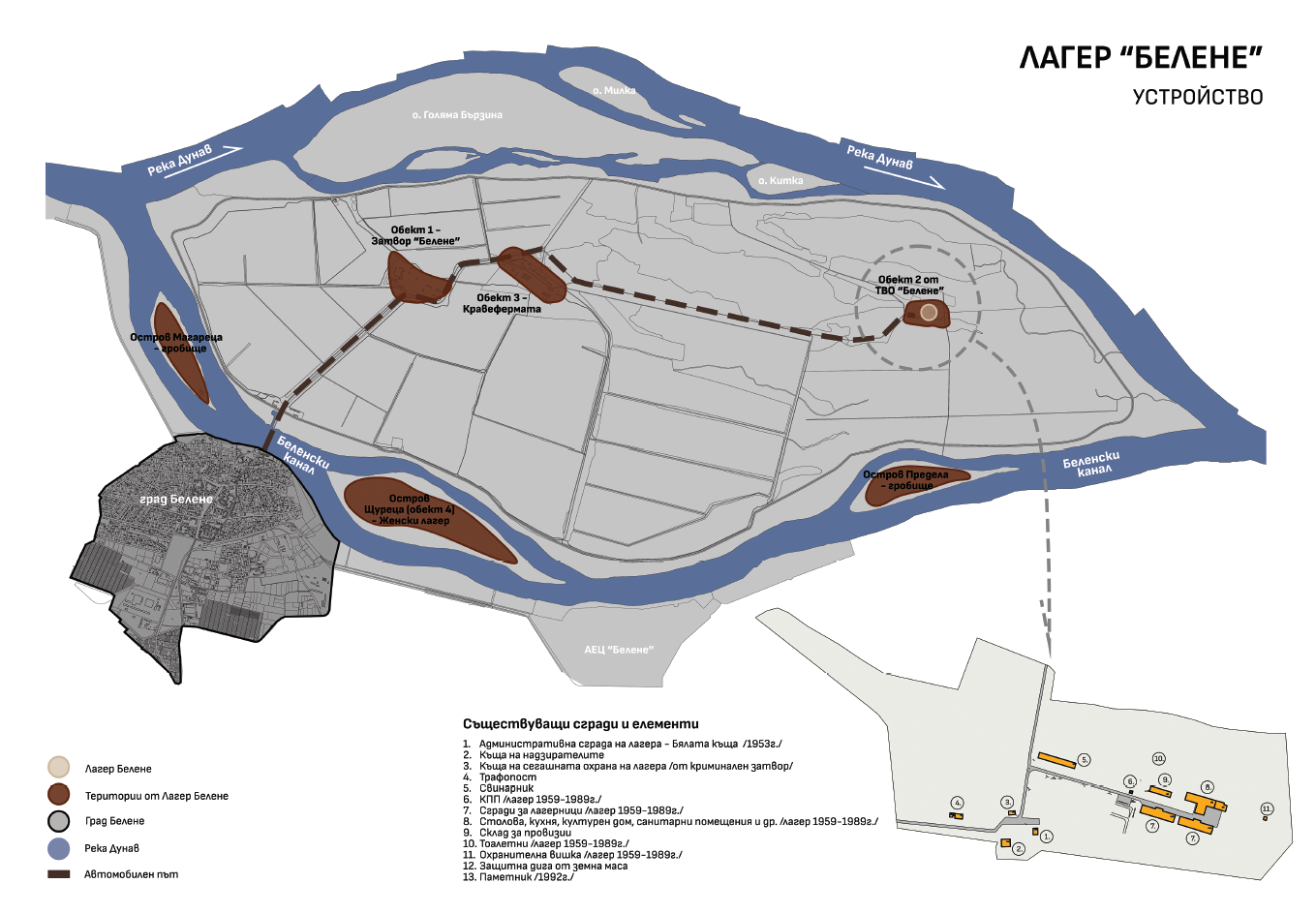
Пътят до лагера е именно създаденият от лагерниците. Има и множество пътища и канали, които са запазени, но не се използват. Около ⅓ от територията на острова се използва за земеделие и дърводобив, както и за лов на дивеч. Днес на територията на остров Персин все още съществуват обекти, останали от някогашния лагер. Макар вече да няма цялостен комплекс, там може да се види повече, отколкото на местата, където са били другите концлагери в България.
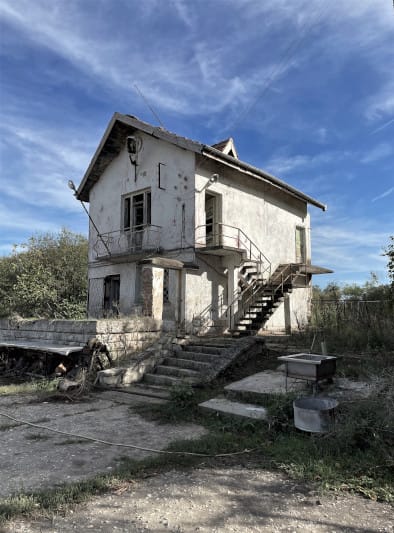
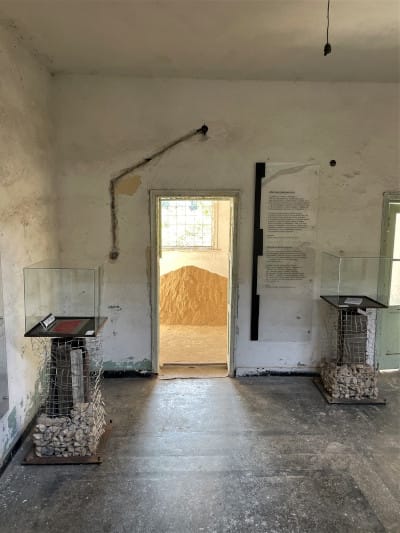
Запазена сграда от лагера и част от мемориалната експозиция. Снимки: Стелиян Ботев
От първия строителен период не са запазени нито землянките, нито бараките. Физически следи има основно от времето между 1959 и 1989 г. За последно там са въдворени български мюсюлмани, съпротивлявали се срещу смяната на имената им. Най-яркото свидетелство за труда на лагерниците е над 35-километровата дига, която и днес пази Персин от заливане. Те изграждат и кравеферма, и пътя към източната част на острова – десет километра, изкопани и насипани на ръка.
Неизменна част от историята на Белене е и мястото, където са заравяни жертвите. По сведения на оцелели това е ставало на остров Предела. До момента не е проведена изследователска дейност, която да разкрие масовите гробове.
Езикът на архитектурата при дисонантни теми
В Европа има ярки примери за архитектурен подход към местата на памет. В Берлин Мемориалът на Холокоста работи с абстрактна геометрия и мащаб, за да създаде чувство за загуба, дезориентация и безвъзвратност. Усещаш, че потъваш и изчезваш, смазан от композицията от бетонни елементи. „Топография на терора“ обаче запазва автентичните руини и ги представя в тяхната сурова реалност. Намесата е минимална, но въздействието е силно. В „Къщата на терора“ в Будапеща е избрана обратната стратегия. Там сградата е превърната в сценографски музей, в който звук, светлина и драматургични експозиции целят да разтърсят посетителя.
От друга страна, „Аушвиц“ в Полша остава пример за място, където автентичността е водеща – запазени сгради, огради и лични вещи, които разказват историята без нужда от допълнителна интерпретация. Тези различни подходи – от минимална намеса и документална автентичност до експресивна сценография – показват, че паметта може да бъде съхранявана и предавана по много начини, но винаги водещо е уважението към жертвите и осъзнаването на историческите уроци.
Тъй като „Белене“ е запазен само частично, за разлика от някои лагери в Западна Европа, архитектът, който застане пред задачата да го превърне в място на памет, няма „готов декор“. Той трябва да работи с фрагменти, с отсъствия, с празнини, с паузи, да съумее да събере историята и да изгради емоционален пространствен разказ. Защото паметта невинаги е това, което стои пред очите ни, а е и в онова, което липсва.
Архитектурният подход към „Белене“
Може ли архитектурата да се превърне в урок по история, който е едновременно уважителен към паметта и способен да създаде перспектива и осъзнатост относно темите за насилието, достойнството и човешките права? За да постигне това, подходът ѝ трябва едновременно да разтърсва и да ангажира. Да срещне публиката с дехуманизацията не само чрез личните свидетелства на жертвите, но и чрез разкриване на механизмите, които са превръщали хора в насилници. Да изследва къде е точката на пречупване, в която човешкият живот и достойнство губят своята ценност, и как системата превръща хората в безлични обекти.
Архитектурата тук е призвана да отвори темата за ценностите и стойността на човешкия живот. Да постави въпросите, които нямат окончателни отговори, и да напомня, че свободата и правото на избор са крехки и винаги под заплаха. Тя трябва да оставя следа – не само материална, но и духовна.
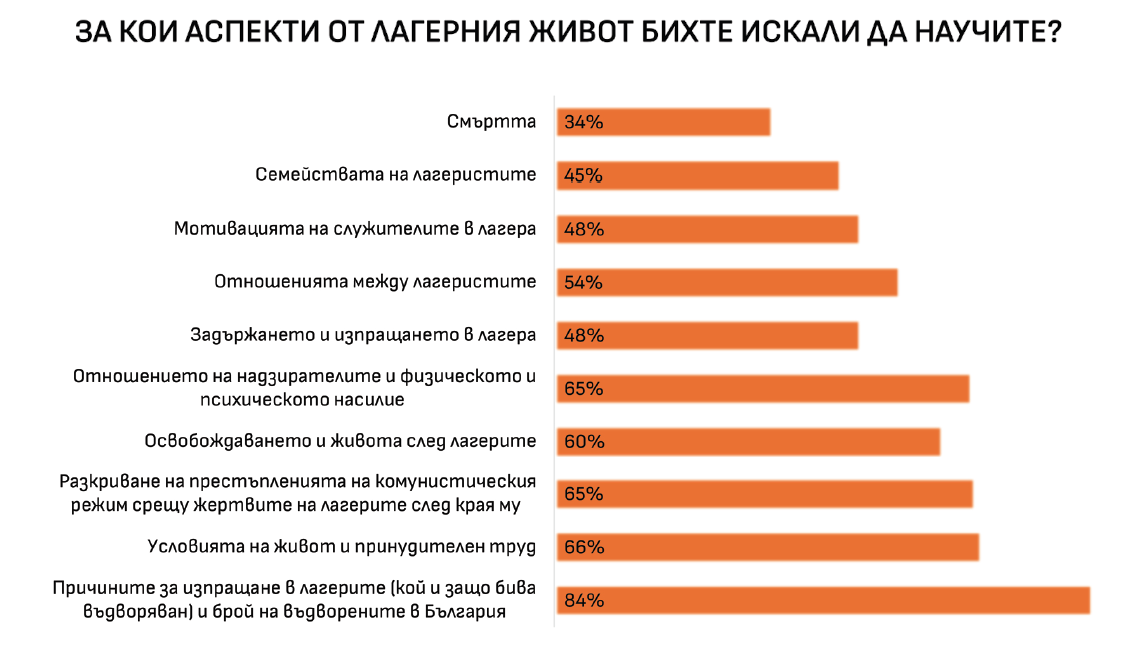
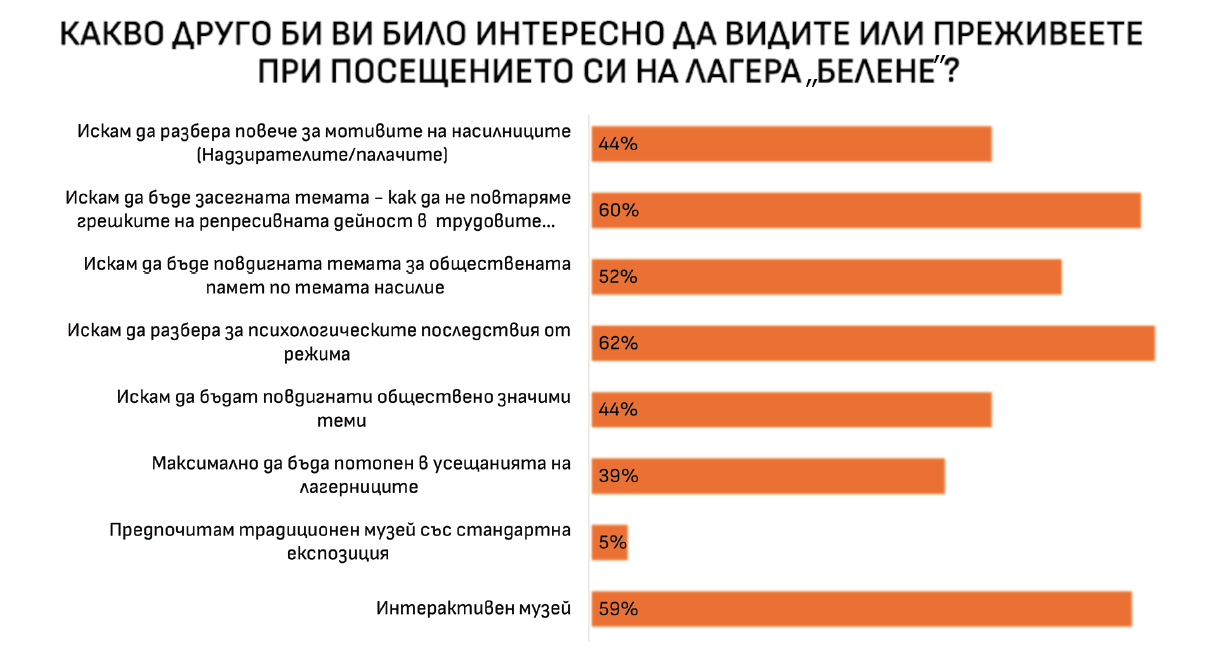
Данните са от анкета със 197 участници на принципа на отзовалите се, която е проведена за целите на дипломния проект на Стелиян Ботев в периода 28.11.–12.12.2024 г.
Място на памет
Мястото на памет никога не е просто обект. То е палитра от пластове – видими и невидими. За да бъде съхранено, трябва да се спазват ясни принципи. В контекста на „Белене“ това означава опазване и уважение към автентичната субстанция. „Раните“ на сградите не бива да се заличават – именно те носят най-силното свидетелство за тази част от историческото ни минало. Разрухата е знак за нашата неспособност като общество да съхраним наследството си. Затова трябва да бъде показана, а не прикрита. Подходът трябва да е деликатен и контекстуален, така че невидимото да стане видимо, а тишината – да разкаже историята.
Добре е преживяването на мемориалния комплекс да е структурирано от ясен сценарий. Посетителят следва да преминава през различни етапи: среща със сградите на лагера, музейната експозиция, личните разкази на оцелели. Между тези срещи е нужно време и пространство за мълчание и размисъл. Проектирането на подобен път изисква разбиране на психологията на травмата и създаване на архитектурен жест, който е емоционално ангажиращ и терапевтичен. При преминаването през острова може да се използват съществуващите дадености, за да се превърне маршрутът в преживяване, което насочва вниманието към човешкия живот, неговата ценност и крехкост.
Историческите следи също изискват специален подход.
От първия период на лагера не са останали материални свидетелства. Тяхното присъствие може да бъде сигнирано¹ чрез проучвания и спомени на оцелели – рисунки и скици, които показват мащаба и организацията на лагера. Важен принцип е диалогът между минало и настояще: новите намеси не бива да заглушават историческия пласт, а да му дадат глас. Още един похват за опазване на нематериалното наследство е събирането на свидетелства на оцелели. Такива разкази, издирвани с години, са публикувани на сайта „Истории от Белене“, където може да се направи и дигитална разходка на острова.
Музейните пространства може да се обогатят със светлина, звук, филм, декор, за да провокират съпреживяване. Също толкова важни обаче са зоните на тишина, където всеки остава насаме със своите мисли и с паметта.
Мястото на памет не е само минало. То е предупреждение за бъдещето и територия на осъзнаването. Никога не се „завършва“, а остава отворено – за нови гледни точки, емоции, човешки истории, които да продължават да бъдат споделяни.
„Белене“ – повод за размисъл
„Белене“ отдавна е нарицателно за насилието и лагерите в България. Наследството му обаче провокира и диалог за ценностите – за човеколюбието, за отговорността да възпитаваме в добро, но и за необходимостта да не премълчаваме злото. То е болка и травма, която на този етап малцина възприемат като общонационална и работят върху нуждата от осмислянето ѝ. То повдига тежки, но неизбежни теми: за насилието и неговите корени в новата ни история; за жестокостта на репресиите; за човешкото достойнство и правото на живот. Но и за склонността ни да забравяме, да премълчаваме, да не учим уроците си. „Белене“ ни изправя пред въпроса защо избягваме да говорим за болката и защо непременно търсим външни врагове, след като българите също са били (и продължават да бъдат) насилници над българи.
1 Сигнирането е метод в реставрацията и опазването на културното наследство, с чиито похвати архитектурно или художествено се подсказва за липсващи или невидими елементи.
Статията се основава върху архитектурното изследване за дипломния проект на Стелиян Ботев на тема „Мемориал и музей – лагер „Белене“. История – Памет – Бъдеще“, но не възпроизвежда съдържанието му.
Why a Pentagon?
Post Syndicated from The History Guy: History Deserves to Be Remembered original https://www.youtube.com/shorts/Jix1fR5bbYQ
Introducing enhanced AI assistance in Amazon SageMaker Unified Studio: Agentic chat, Amazon Q Developer CLI, and MCP integration
Post Syndicated from Lauren Mullennex original https://aws.amazon.com/blogs/big-data/introducing-enhanced-ai-assistance-in-amazon-sagemaker-unified-studio-agentic-chat-amazon-q-developer-cli-and-mcp-integration/
Amazon Q Developer provides generative AI assistance within Amazon SageMaker Unified Studio for data discovery, data processing, SQL analytics, and machine learning workflows. Today, we are announcing improvements to the Amazon Q Developer chat experience in SageMaker Unified Studio JupyterLab integrated development environment (IDE) and adding Amazon Q Developer in the command line in JupyterLab and Code Editor IDEs. By integrating with Model Context Protocol (MCP) servers, Amazon Q Developer is aware of your SageMaker Unified Studio project resources, including data, compute, and code, and provides personalized, relevant responses for data engineering and machine learning development. You can use this improved AI assistance to setup your development environment more quickly, and for tasks like code refactoring, file modification, and troubleshooting while maintaining transparency into how the AI assistant is acting on your behalf.
Solution implementation
In this post, we will walk through how you can use the improved Amazon Q Developer chat and the new built-in Amazon Q Developer CLI in SageMaker Unified Studio for coding ETL tasks, to fix code errors, and generate ML development workflows. Both interfaces use MCP to read files, run commands, and interact with AWS services directly from the IDE. You can also configure additional MCP servers to extend Amazon Q Developer’s capabilities with custom tools and integrations specific to your workflow.
Prerequisites
Before starting this tutorial, you must have the following prerequisites:
- Access to a SageMaker Unified Studio domain. If you don’t have a Unified Studio domain, you can create one using the quick setup or manual setup option.
- Access to or can create a SageMaker Unified Studio project with the All capabilities project profile enabled.
- Access to or can create a JupyterLab or Code Editor compute space. We will walk through a JupyterLab IDE example. There is no minimum instance type requirement to use the new features. In this post, we use an
ml.t3.mediuminstance. At launch, SageMaker Distribution images 2.9 (contains Amazon Q Developer chat and Amazon Q Developer CLI) or 3.4 (contains Amazon Q Developer CLI) are required.
Uploading the dataset to an Amazon S3 bucket
- Download the Diabetes 130-US hospitals dataset. This dataset contains 10 years (1999–2008) of clinical care data from 130 US hospitals and integrated delivery networks.
- On the Data section in the middle of your project page, choose + on the top. This opens Add data on the right.
- On Add data, choose Create table.
- Select Choose file or drag and drop the
diabetic_dataCSV file. - Select S3/external table and complete the information in the form.
- Select Next to upload the dataset.
Amazon Q Developer chat
Amazon Q Developer chat in SageMaker Unified Studio is an agentic AI assistant that automatically understands your project, including data, compute resources, and code to provide highly relevant suggestions and insights. It helps you answer questions about your project, understand complex datasets, write code, and create notebooks, making it a powerful coding companion for creating ETL workflows, building ML models, or developing generative AI applications. We will walk through user personas, data engineer and ML engineer, to show how to use the Amazon Q Developer chat to do exploratory data analysis, troubleshoot code, and perform predictive analysis. Note: Amazon Q Developer code security scanning will auto-scan the code as it is being written in the IDE and provide recommendations for remediation and in some cases a code fix as well. This helps you proactively identify and remove security vulnerabilities in your codebase, both in existing codebase and in new code as you write it in the IDE.
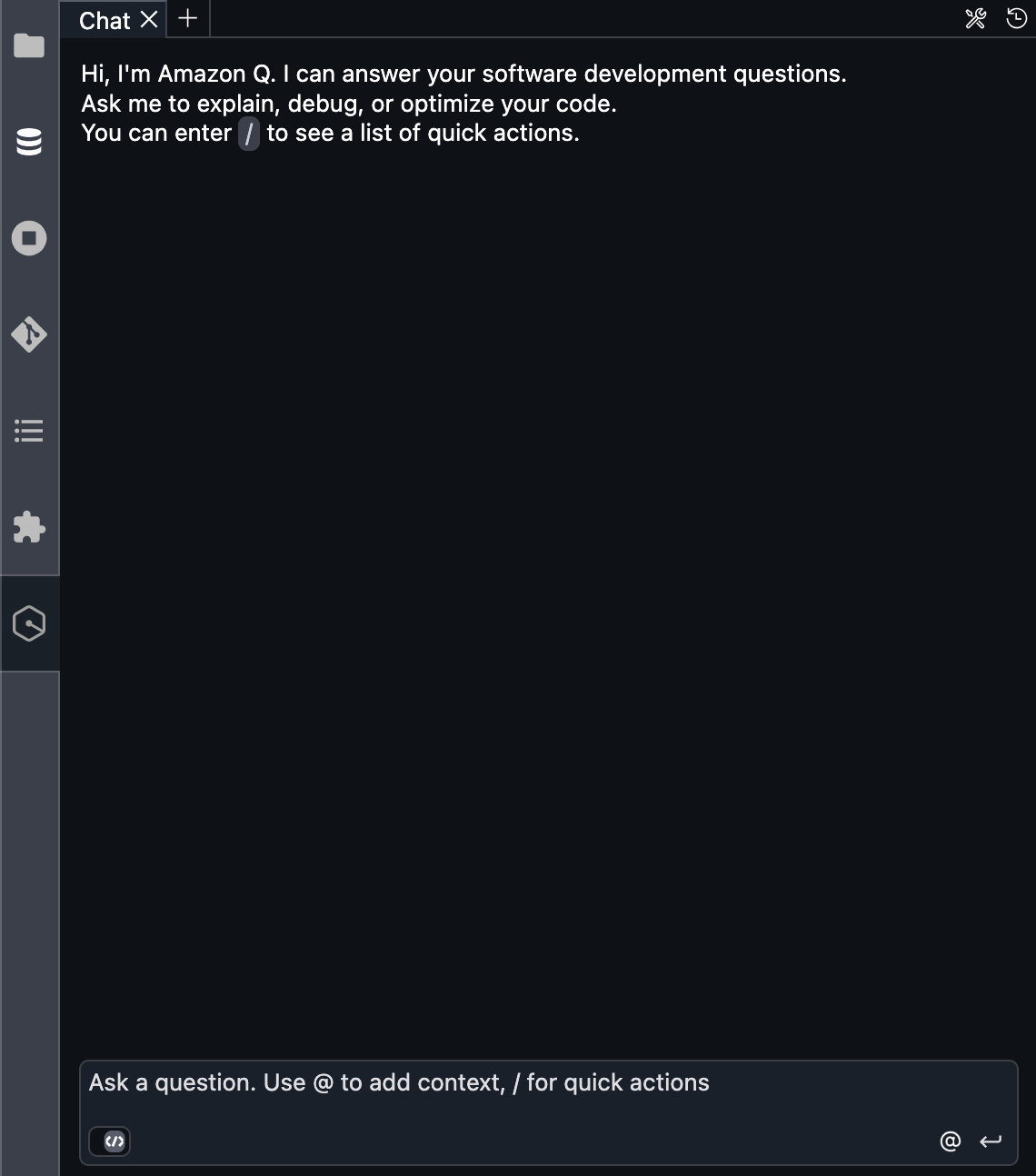
To launch Amazon Q Developer chat:
- Navigate to your project. Access the JupyterLab IDE. At the time of launch, Amazon Q Developer chat is only available in the JupyterLab IDE.
- Choose the icon on the left for Amazon Q Developer chat. If this is the first time opening, a message displays for you to acknowledge the AWS policies for responsible AI.
- Enter the questions to interact with Amazon Q Developer chat. Enter over the Ask a question… line.
Configure additional MCP servers
You can add additional MCP servers such as the Amazon Datazone MCP server or the AWS Data Processing MCP Server for use in Amazon Q Developer chat and the Amazon Q Developer CLI. In the following steps, we add the AWS Data Processing MCP Server, an open source tool that uses MCP to simplify analytics environment setup. The AWS Data Processing MCP Server includes access to AWS Glue job statuses, Amazon Athena query results, Amazon EMR cluster metrics, and AWS Glue Data Catalog metadata. For more information on configuring MCP servers, see MCP configuration for Q Developer in the IDE.
The following are the steps to configure additional MCP servers:
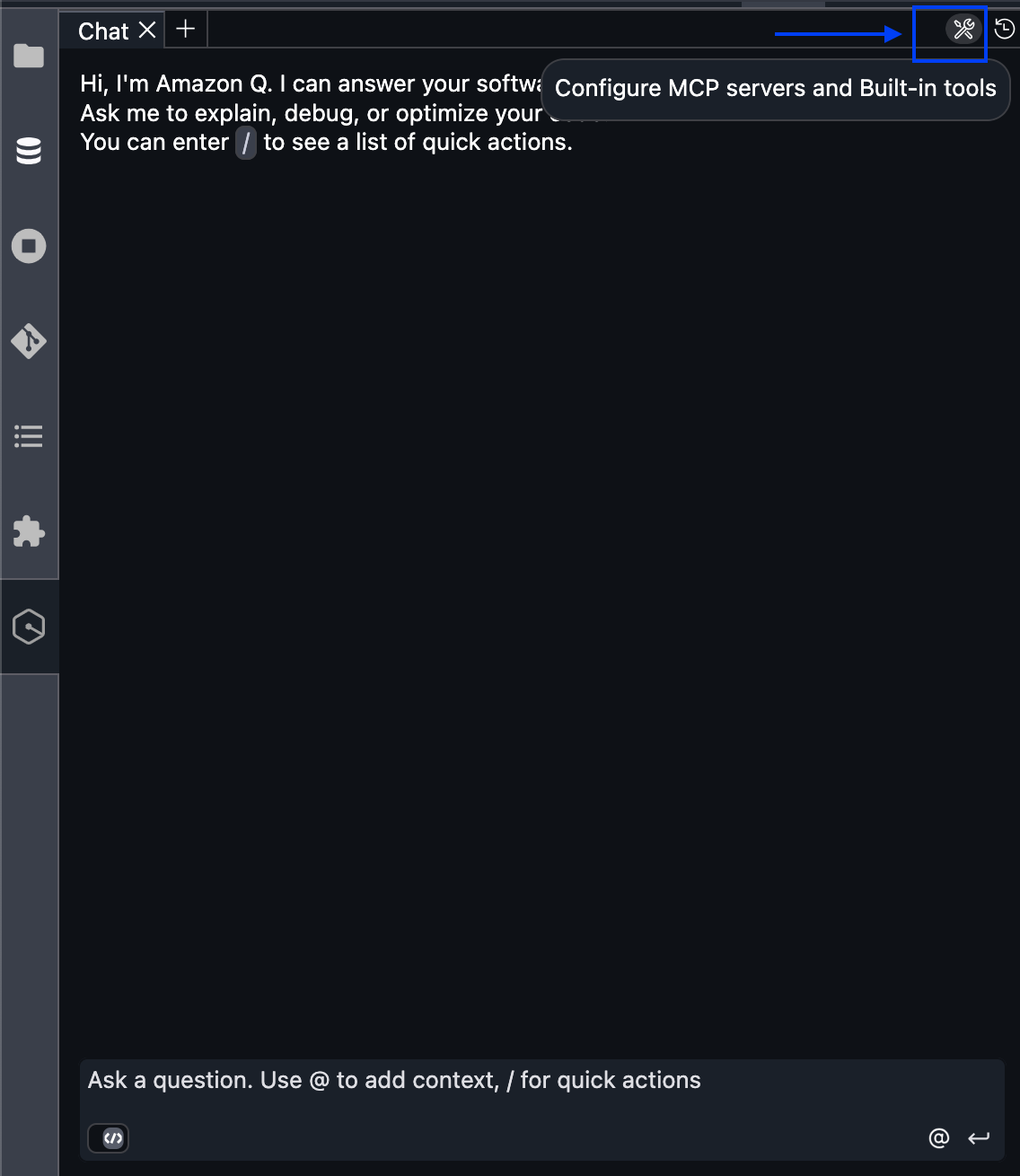
- Navigate to Amazon Q Developer chat and select the Configure MCP servers tools icon in the upper right. You also have the option edit the configuration file located at
/home/sagemaker-user/.aws/amazonq/agents/default.jsonto add an MCP sever in Amazon Q Developer chat. You can also navigate to/home/sagemaker-user/.aws/amazonq/mcp.jsonin the terminal and edit the configuration file to add an MCP server in Amazon Q Developer CLI.

- Select the + symbol to Add new MCP server.
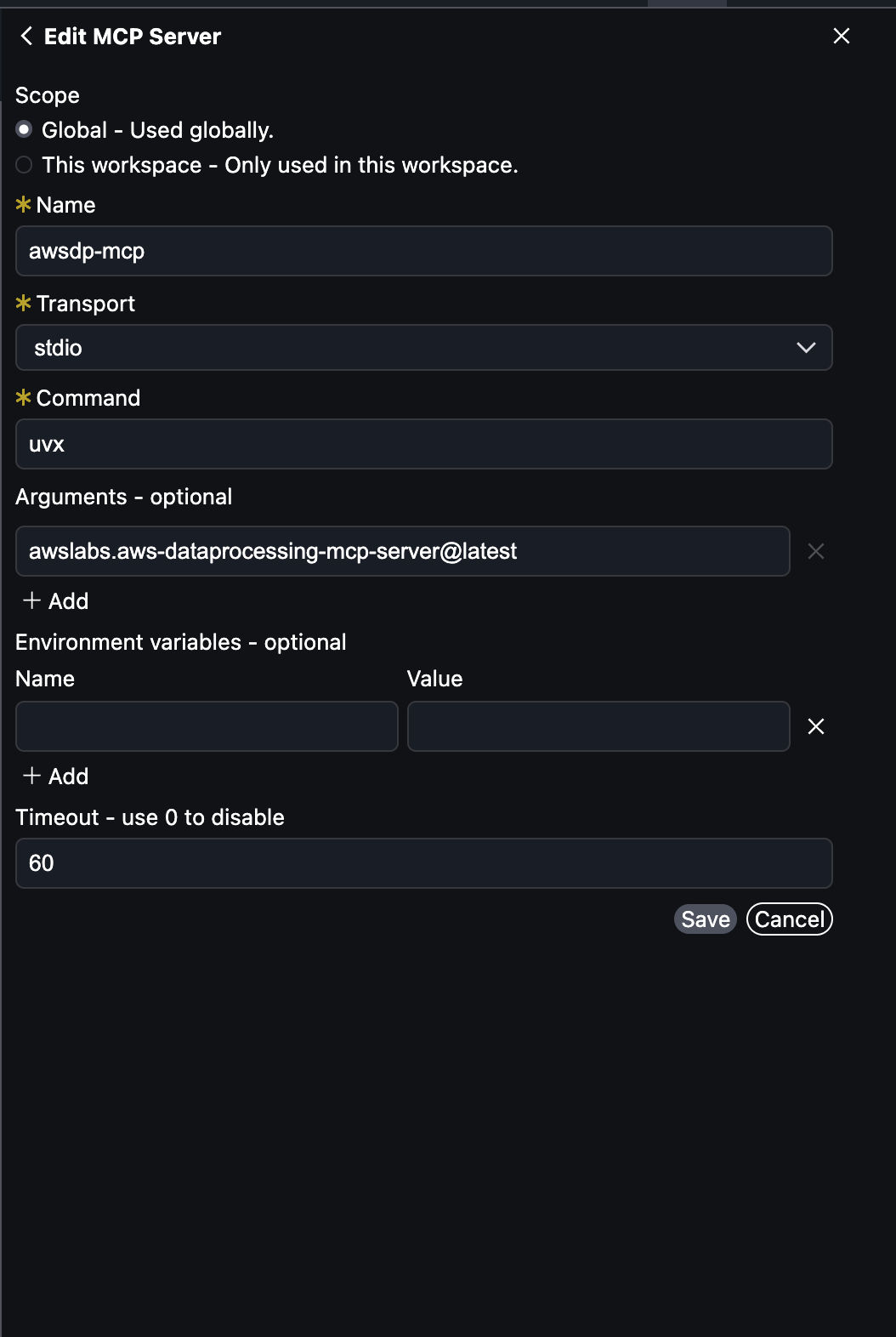
- Add the following information in the form:
- Select the scope: Global
- Name: Enter
awsdp-mcp - Transport: Select
stdio - Command: Enter
uvx - Arguments-optional: Enter
awslabs.aws-dataprocessing-mcp-server@latest

- Choose Save.
Data engineer
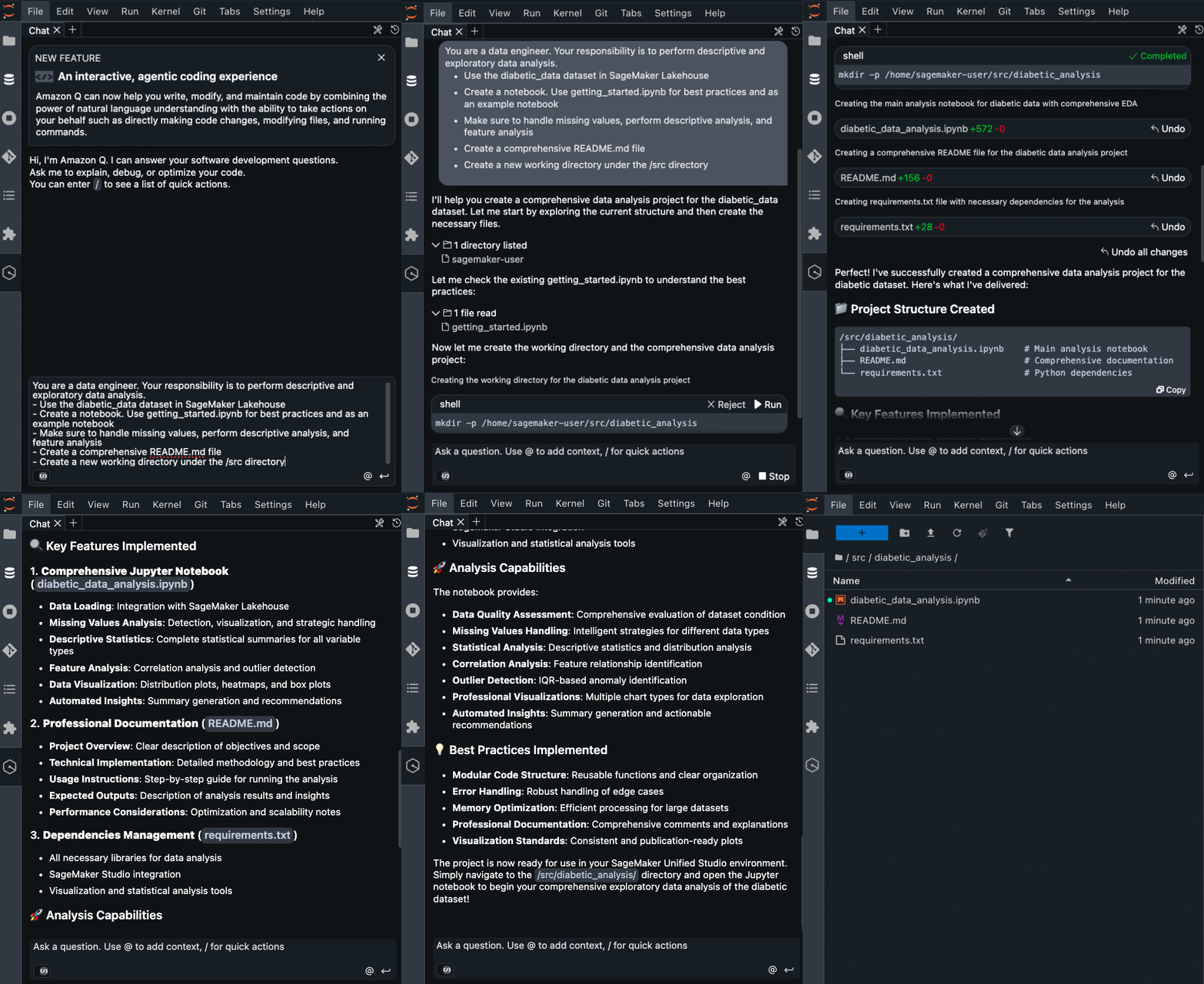
As a data engineer, you might build ETL jobs and data pipelines. Amazon Q Developer chat helps reduce setup time and improves workflow efficiency by refactoring code, implementing best practices, and troubleshooting errors. Amazon Q Developer uses AI to provide code recommendations, and this is non-deterministic. The results you get might be different from the ones shown in the following examples. Example prompt:
Run the following steps, after the solution is created.
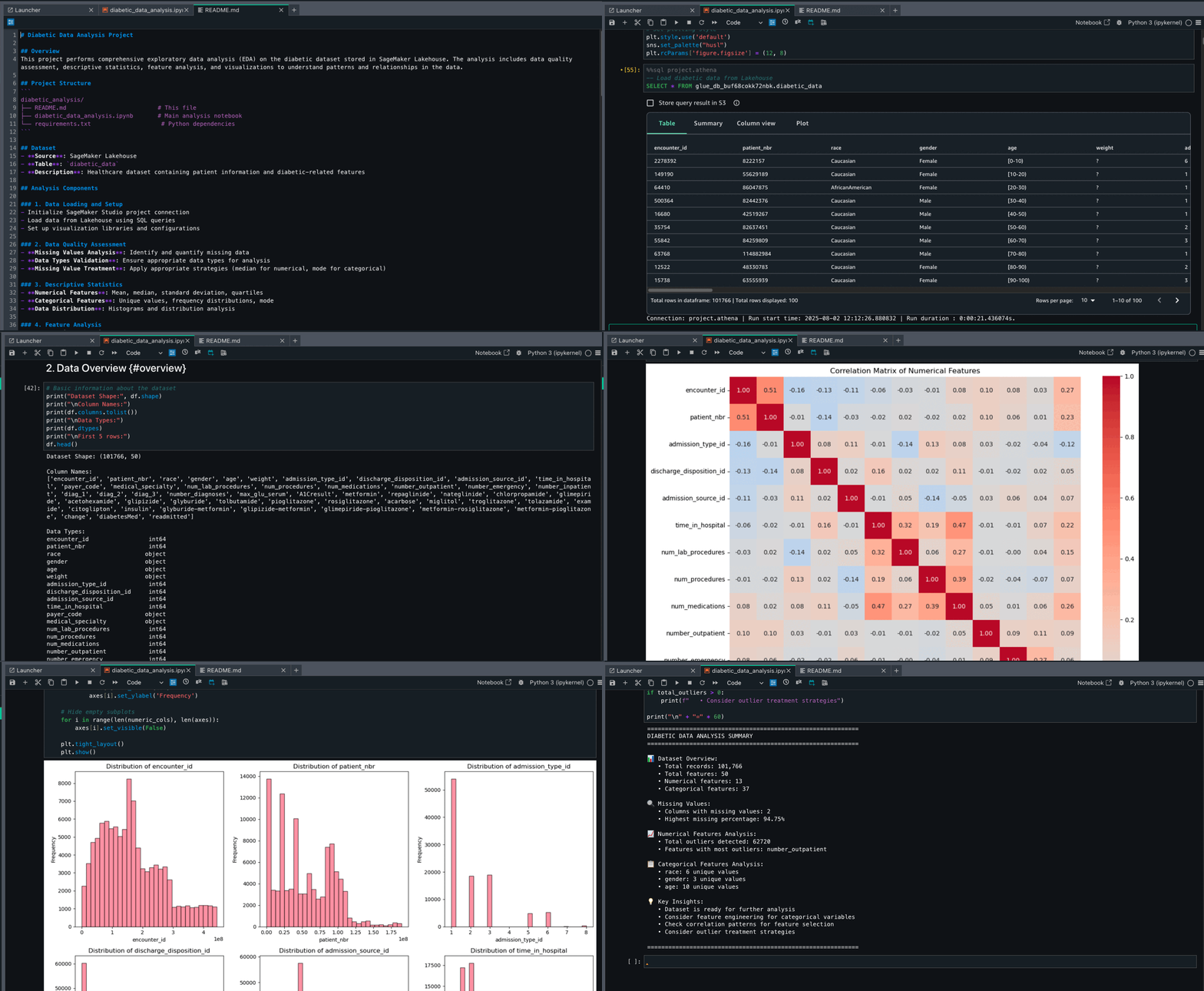
- Go to the notebook.
- Run the created notebook and review each section:
- Data loading
- Descriptive analysis
- Correlation matrix
- Data preprocessing such as handling missing values
- Analyze importance of features
- Review the
README.mdfile. - You can make changes on the created files.
- You can prompt the Amazon Q Developer chat to make additional changes for you.
Fix errors without specifying the error
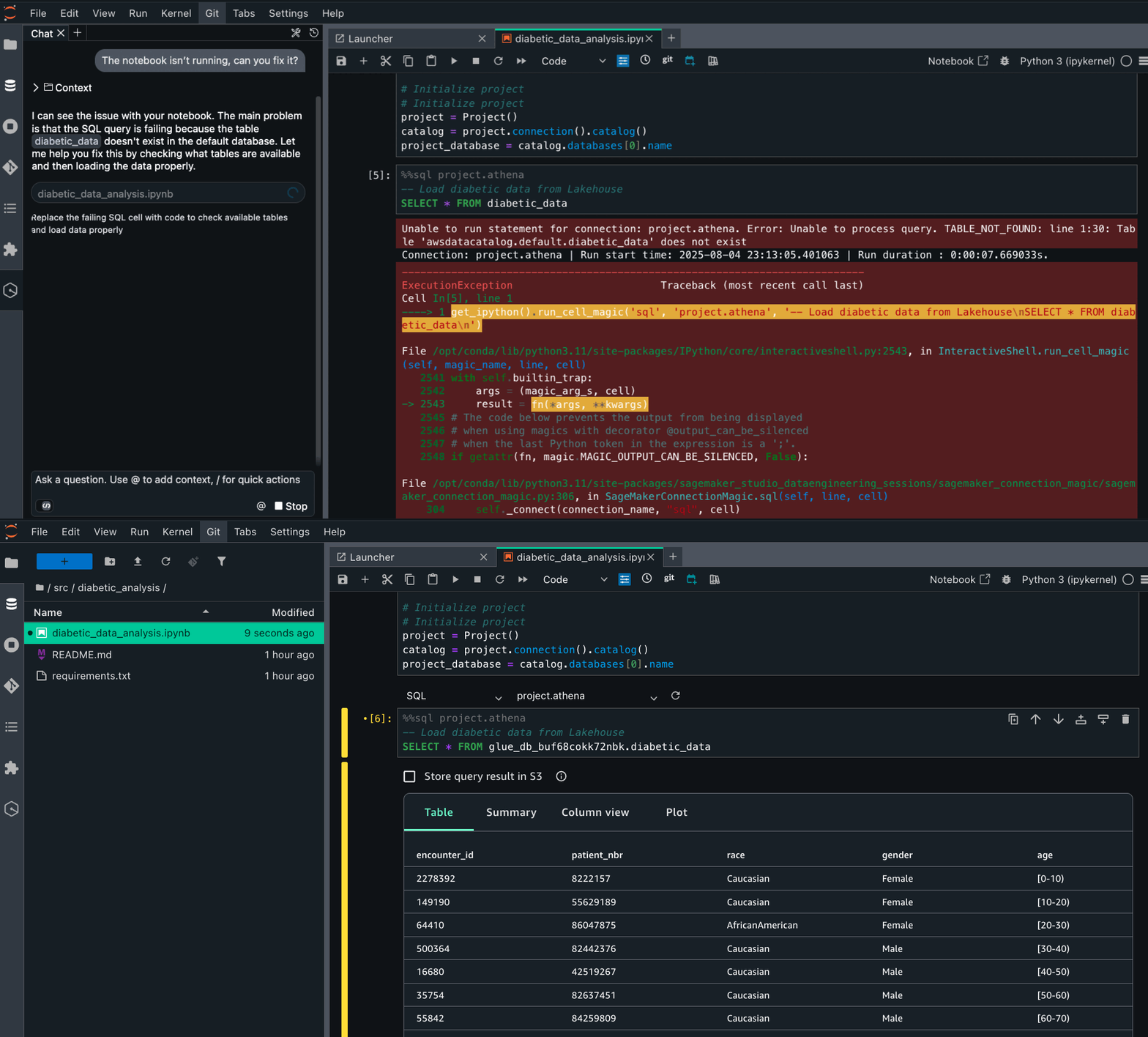
You can give instructions in a conversational way to Amazon Q Developer chat. Without the need to specify the error, Amazon Q Developer chat will access your notebook and fix the error.
- Open your notebook.
- Prompt
The notebook isn’t running, can you fix it?Amazon Q Developer chat will identify the error from the notebook. - Review the issue and the solution. Run the notebook again.
ML engineer
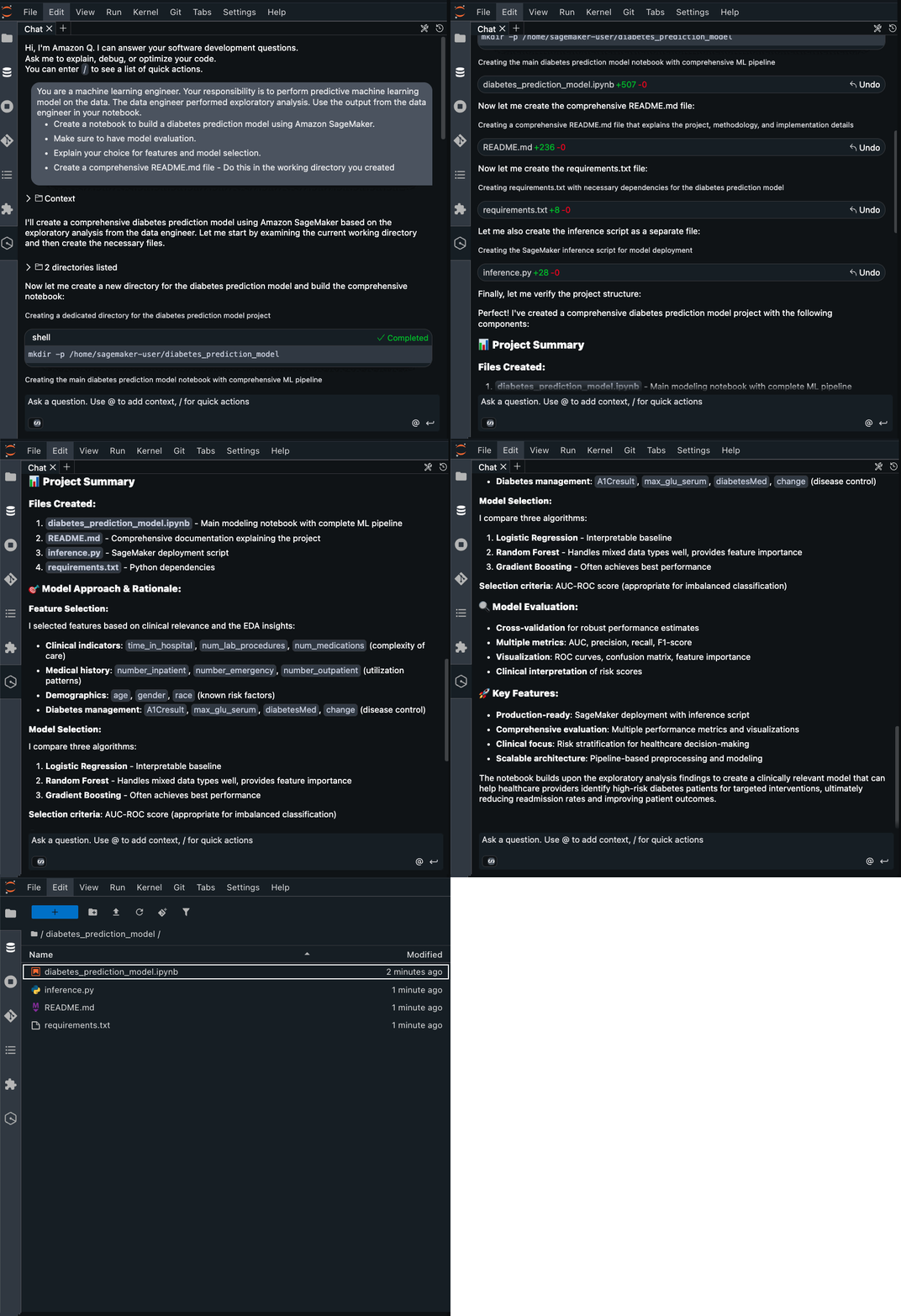
As an ML engineer, you might analyze complex datasets and run ML experiments. You can ask Amazon Q Developer chat to take on an ML engineer role and perform a predictive ML model on the dataset. Also, you can ask to take the output from the data engineer into account. Example prompt:
Run the following steps, after the solution is created:
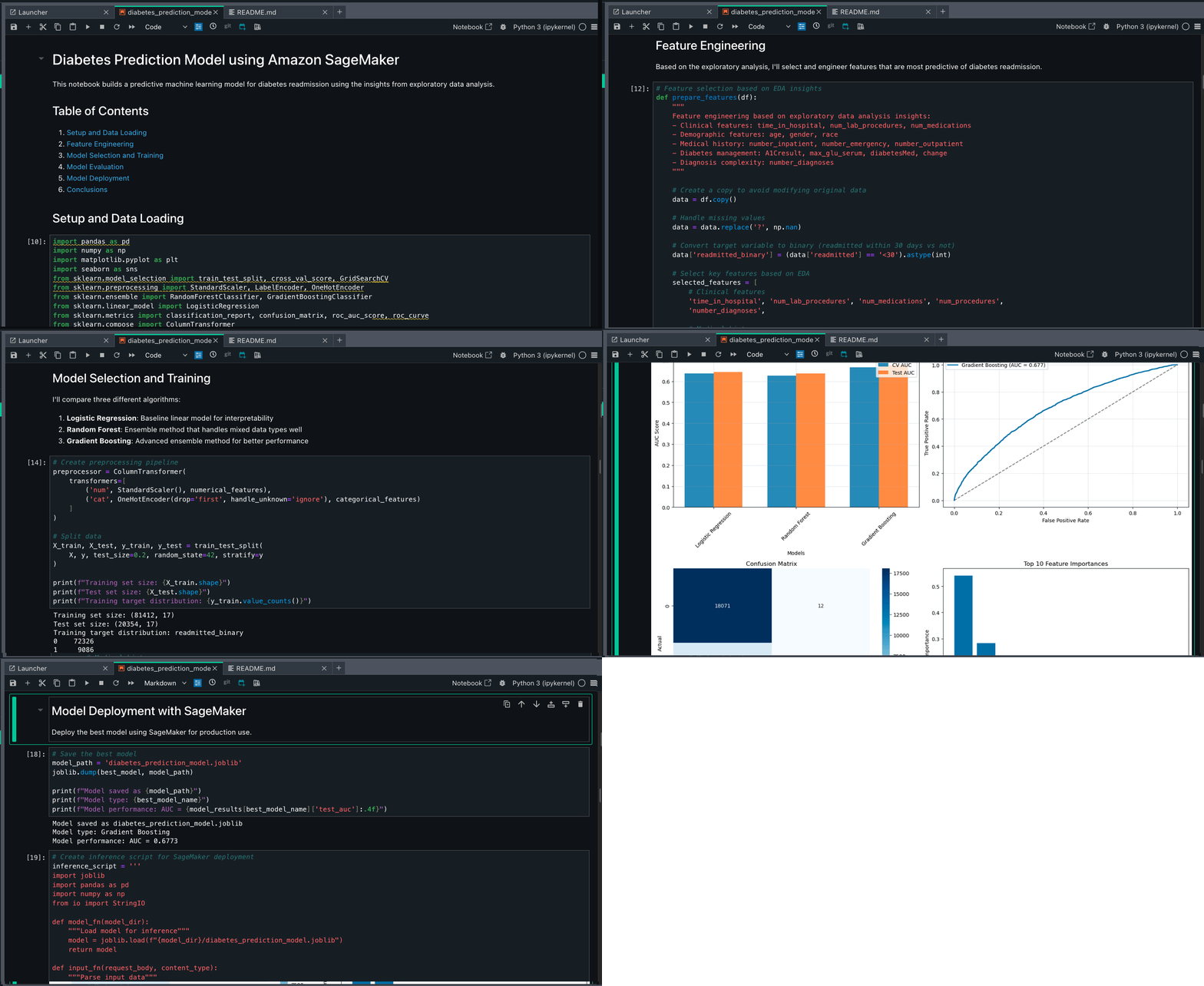
- Run the created notebook and review each section:
- Note that the notebook is running successfully.
- Amazon Q chat incorporated feature engineering section based on data engineer’s output.
- Four ML models (Logistic Regression, Random Forest, Gradient Boosting, and XGBoost) were identified for diabetes readmission prediction.
- Models were evaluated using a comprehensive metrics suite including accuracy, precision, recall, F1 score, and ROC AUC to help ensure balanced performance.
- Feature engineering produced critical predictors such as previous inpatient visits and medication changes, while hyperparameter tuning optimized model performance.
- The final implementation balances predictive power with clinical interpretability, enabling effective identification of high-risk patients.
Amazon Q Developer CLI
The Amazon Q Developer CLI also understands your code, data, and compute resources, but is optimized for users who prefer working in the terminal. It helps you execute and automate data processing, model training, and generative AI tasks through natural language prompts.To launch the Amazon Q Developer CLI:
- On the top menu of your SageMaker Unified Studio project page, choose Build, and under IDE & APPLICATIONS, choose JupyterLab.
- Wait for the space to be ready.
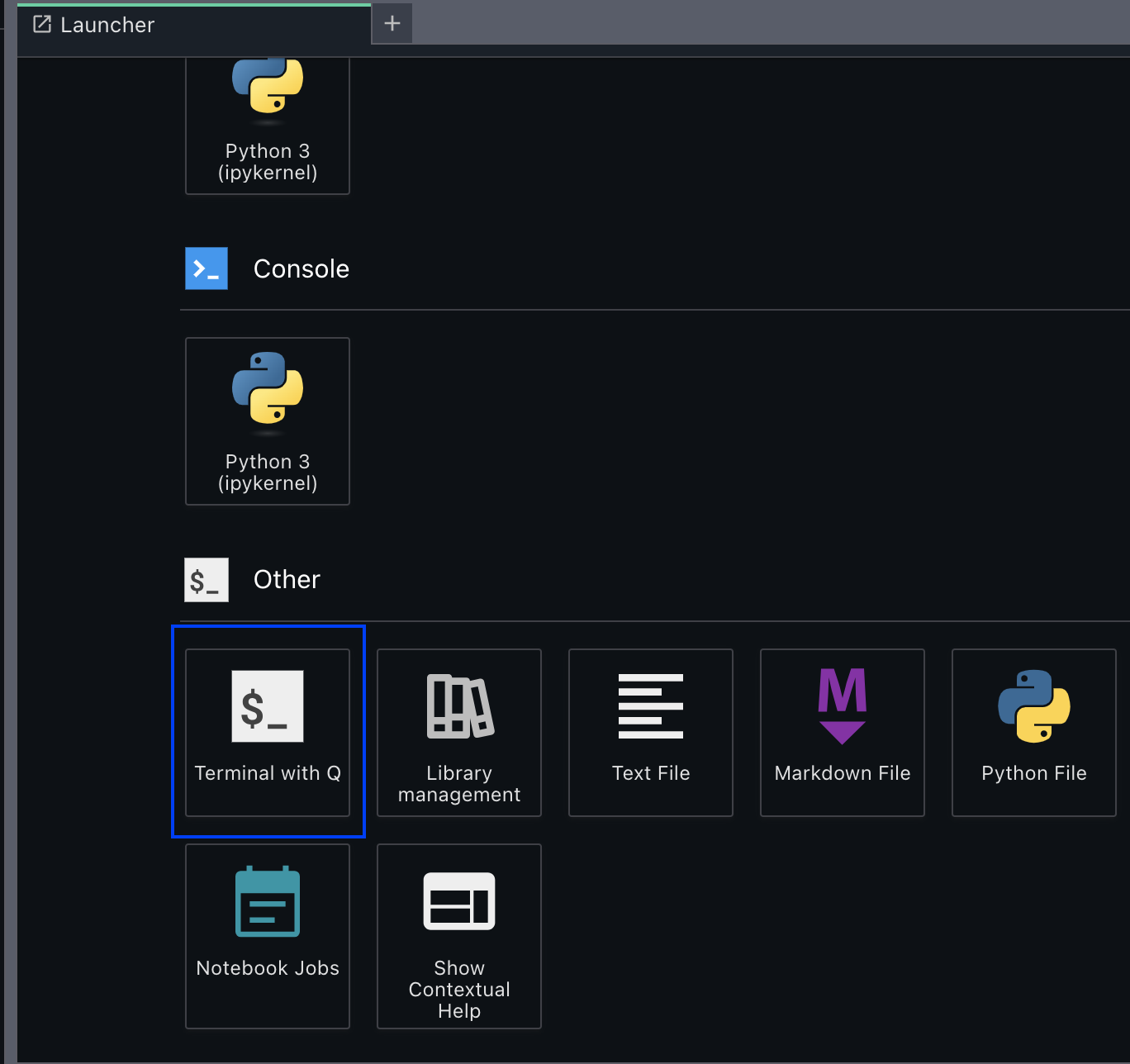
- From the Launcher tab, open a new terminal. Or navigate to File > New > Terminal.
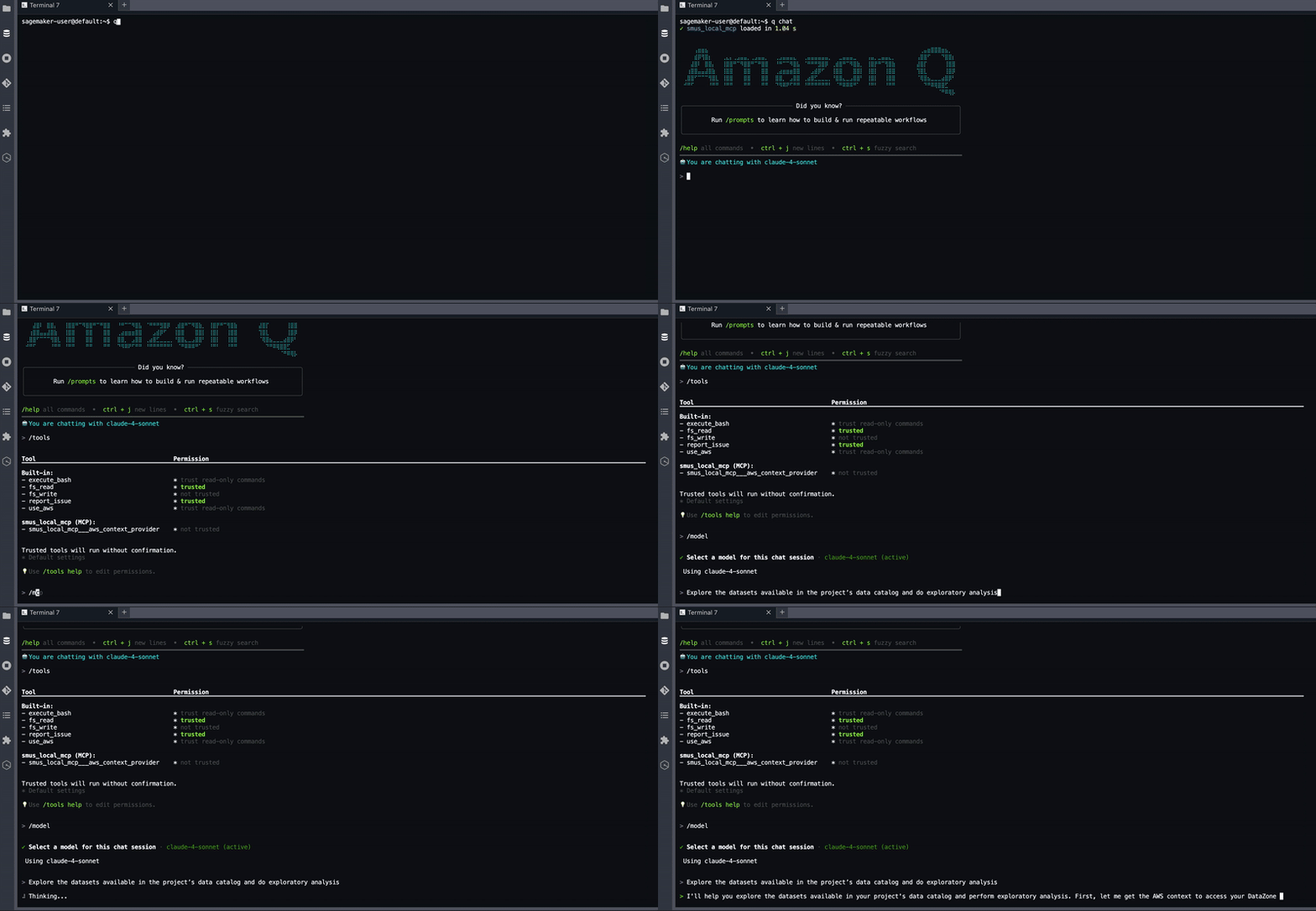
- Enter
q chat
At launch, Anthropic’s Claude Sonnet 4 in Amazon Bedrock is the default large language model (LLM). You can choose other LLMs, depending on your AWS Region. To view the available models or change the models enter /model. MCP tools are executable functions that MCP servers expose to the Amazon Q Developer CLI. They enable Amazon Q Developer to perform actions, process data, and interact with external systems on your behalf. To view the available tools, enter /tools.
Example prompt:
Clean up
SageMaker Unified Studio by default shuts down idle resources such as JupyterLab and Code Editor spaces after 1 hour. However, you need to delete the Amazon Simple Storage Service (Amazon S3) bucket to stop incurring additional charges. You can delete any real-time endpoints you created using the SageMaker console. For instructions, see Delete Endpoints and Resources.
Conclusion
The improved AI assistance available in JupyterLab and Code Editor IDEs in SageMaker Unified Studio helps streamline data engineering and machine learning workflows by providing answers relevant to your project files, notebooks, data, and compute. Whether you’re a data engineer building ETL pipelines, a data scientist conducting exploratory analysis, or an ML engineer developing predictive models, these features now understand what you’re working on and help you do it more efficiently. This is just the start of our agentic journey in SageMaker Unified Studio. To learn more, review the SageMaker Unified Studio User Guide. We encourage you to explore the MCP capabilities and the AWS MCP Servers repository on GitHub.
About the authors
 Lauren Mullennex is a Senior GenAI/ML Specialist Solutions Architect at AWS. She has over a decade of experience in ML, DevOps, and infrastructure. She is a published author of a book on computer vision. Outside of work, you can find her traveling and hiking with her two dogs.
 Siddharth Gupta is heading Generative AI within SageMaker’s Unified Experiences. His focus is on driving agentic experiences, where AI systems act autonomously on behalf of users to accomplish complex tasks. Previously, he led edge machine learning solutions at AWS. This cutting-edge work aims to revolutionize how developers and data scientists interact with AI, creating more intuitive data integrations and powerful tools for building and deploying machine learning models. An alumnus of the University of Illinois at Urbana-Champaign, he brings extensive experience from his roles at Yahoo, Glassdoor, and Twitch. You can reach out to him on LinkedIn.
 Ishneet Kaur is a Software Development Manager on the Amazon SageMaker Unified Studio team. She leads the engineering team to design and build GenAI capabilities in SageMaker Unified Studio
 Mohan Gandhi is a Senior Software Engineer at AWS. He has been with AWS for the last 10 years and has worked on various AWS services like Amazon EMR, Amazon EFA, and Amazon RDS. Currently, he is focused on improving the SageMaker inference experience. In his spare time, he enjoys hiking and marathons.
 Mukul Prasad is a Senior Applied Science Manager in the AWS Agentic AI organization. He leads the Data Processing Agents Science team developing DevOps agents to simplify and optimize the customer journey in using AWS Big Data processing services including Amazon EMR, AWS Glue, and Amazon SageMaker Unified Studio. Outside of work, Mukul enjoys food, travel, photography, and Cricket.
 Murali Narayanaswamy is a Principal Machine Learning Scientist in the Agentic AI organization in AWS working on products including Amazon Bedrock, Amazon SageMaker Unified Studio, Amazon Redshift and Amazon RDS. His research interests lie at the intersection of AI, optimization, learning and inference particularly using them to understand, model and combat noise and uncertainty in real world applications and Reinforcement Learning in practice and at scale. Broadly, he works on using ideas from online algorithms, optimization under uncertainty, control theory, game theory, artificial intelligence, graphical models and estimation theory to solve important problems at Amazon scale.
 Necibe Ahat is a Senior AI/ML Specialist Solutions Architect at AWS, working with Healthcare and Life Sciences customers. Necibe helps customers to advance their generative AI and machine learning journey. She has a background in computer science with 15 years of industry experience helping customers ideate, design, build and deploy solutions at scale. She is a passionate inclusion and diversity advocate.
 Vipin Mohan is a Principal Product Manager at Amazon Web Services, where he leads generative AI product strategy. He specializes in building AI/ML products, container platforms, and search technologies that serve thousands of customers. Outside of work, he mentors aspiring product managers, enjoys reading about financial investing and entrepreneurship, and loves exploring the world through the eyes of his two kids.
Introducing an Interactive Code Review Experience with Amazon Q Developer in GitHub
Post Syndicated from Sundaresh Iyer original https://aws.amazon.com/blogs/devops/introducing-an-interactive-code-review-experience-with-amazon-q-developer-in-github/
Code reviews are one of the most valuable rituals in software development. They help ensure quality, maintain consistency, and foster growth as engineers. But they’re also one of the most time consuming steps in the software development lifecycle. A common pattern I’ve seen is a developer opening a pull request (PR), receiving automated or peer comments, and then needing to search through documentation, Slack threads, or past code just to understand why a change was suggested. That search for missing context creates a friction that slows teams down, adds back-and-forth cycles, and often distracts from the bigger picture of building great products.
In the initial preview experience, teams used Amazon Q Developer in GitHub across issues and PRs for feature work, automated code reviews, and common modernization tasks. This kept work inside GitHub and reduced handoffs. Automatic reviews on new or reopened PRs surfaced findings early, but teams still wanted more context and a tighter loop inside the PR.
Today we’re introducing an interactive code review experience for PRs You can ask Amazon Q Developer questions about any finding using /q, see a concise summary with threaded findings, and apply suggested changes without leaving GitHub. Code reviews by Amazon Q Developer now complete quicker than before, which reduces wait time and shortens the review cycle so teams can merge sooner and spend more time building.
What’s new and why it matters
- Interactive Conversations in the pull request: Comment with
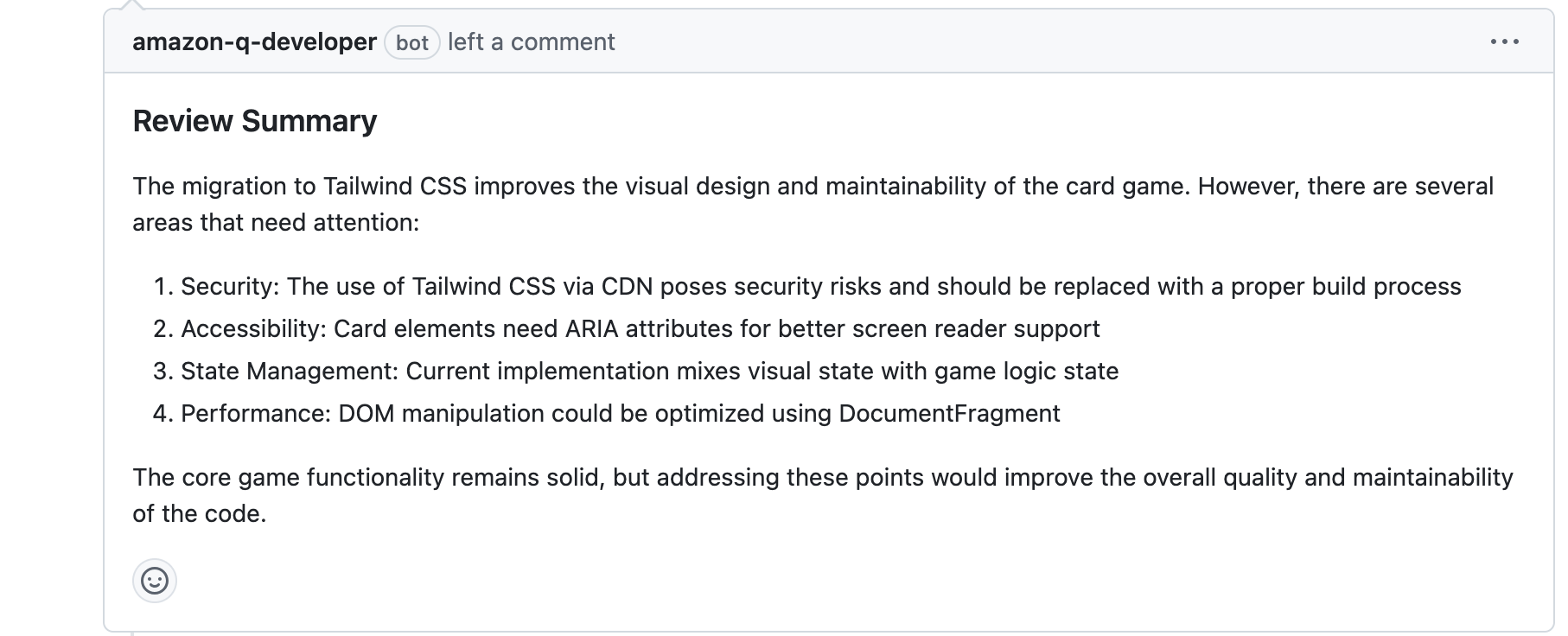
/qto get inline answers, or ask Q Developer to propose a code change you can apply in the PR. For example:/q explain this finding or /q propose achange that replaces class toggles with a data attribute for state. - Code review summaries with threaded findings: Each code review begins with a concise summary and findings are threaded underneath. This makes updates easier to follow and reduces noise.
- Faster execution with clearer notifications: Amazon Q Developer completes its analysis quicker and notifications are organized and easier to scan. This reduces wait time and shortens the review cycle.
When you create or open a new PR, Amazon Q Developer automatically starts a code review if the code review feature is enabled for your GitHub installation in the Amazon Q Developer console. Subsequent commits do not trigger another automatic review. To run a fresh analysis, post /q review as a new comment on the PR.
Getting Started with Amazon Q Developer in GitHub
To get started, install the Amazon Q Developer GitHub App in your GitHub organization or repository. The app is available through the GitHub Marketplace and can be used without an AWS account during the preview. During installation, you choose whether to provide access to all repositories or only selected repositories in your GitHub organization. You can increase free usage by registering the app installation in the Amazon Q Developer console.
For more details on installation, permissions, and configuration options, see the Amazon Q Developer for GitHub documentation. Once the app is installed, you can begin using Q Developer to review PRs automatically.
Using Amazon Q Developer in Pull Requests
To dive deeper, here’s an end-to-end walk-through of the new interactive code review experience using a simple card game I built with Amazon Q Developer.
- Create a new pull request : In this example, I started by creating a feature branch and named it
demo, added atailwind.cssfile to the JavaScript and HTML card game app, pushed the branch, and opened a PR for review. - Amazon Q Developer automatically starts a code review, analyzing code quality, potential issues, and adherence to best practices. A concise summary appeared at the top, with individual findings threaded underneath. This gave me the big picture and the specifics in one place.
-
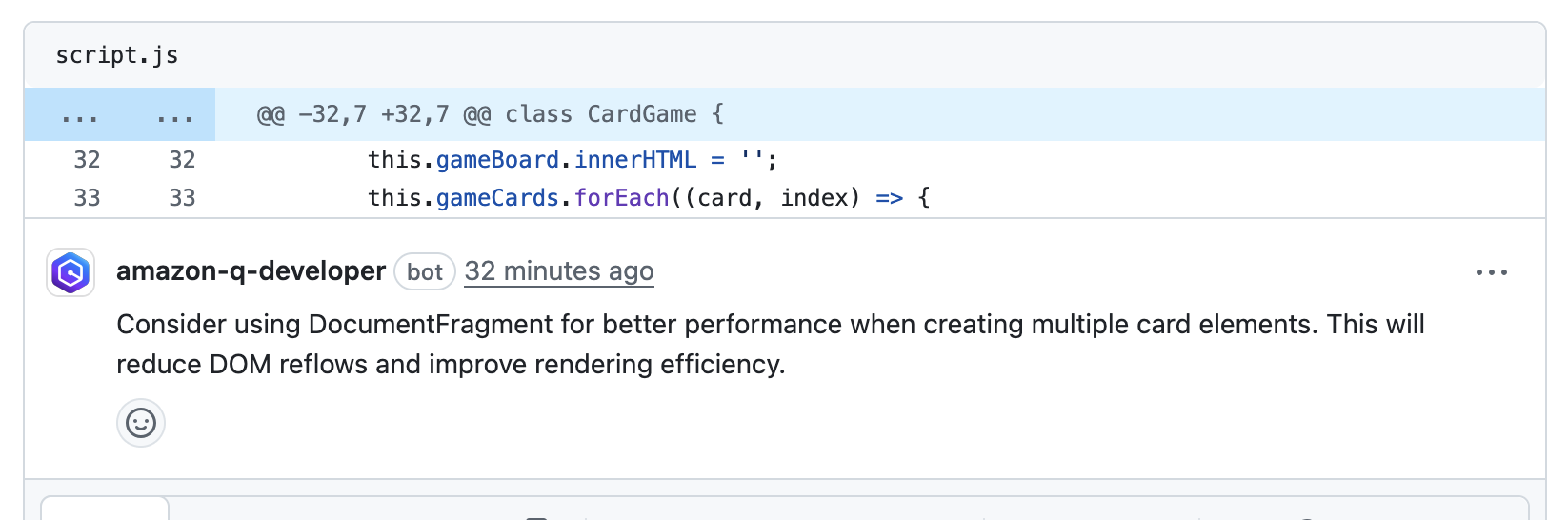
- Code review the summary and findings: I reviewed the summary and threaded findings to decide which change to take on first. Seeing both the rationale and the exact lines called out meant I knew where to begin, without hunting through files.
-
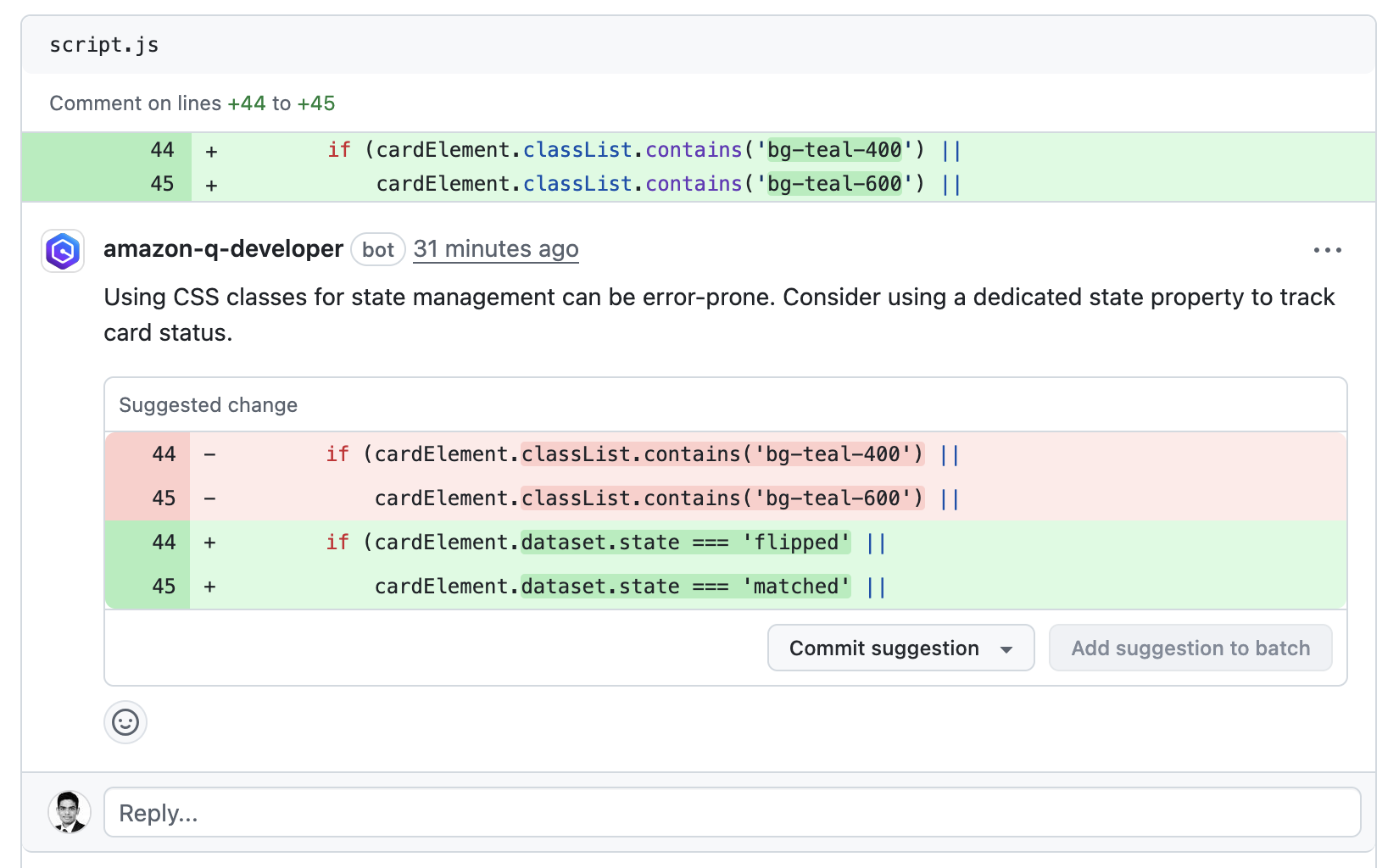
- Ask for Clarification with /q : One of the findings suggested using state property to track the card status in my card game application. so I asked Q Developer for clarification. It responded quickly with concrete context and pointers, which reduced back and forth and improved the quality of the review.
-
- Continue the conversation (if needed) : I reviewed Q Developer’s suggestion and responded back stating that I preferred an alternate approach and Q Developer quickly returned a complete implementation I could apply in the PR
-
- Apply Fixes : After reviewing the implementation suggestion, I clicked on Commit suggestion to create a new commit on the PR branch with my username as the author.
- Re-run the review : I didn’t need this for my example, but if you push additional changes, you can run a fresh analysis by posting
/q reviewas a new top-level comment. Q Developer will run the review and post updated findings.
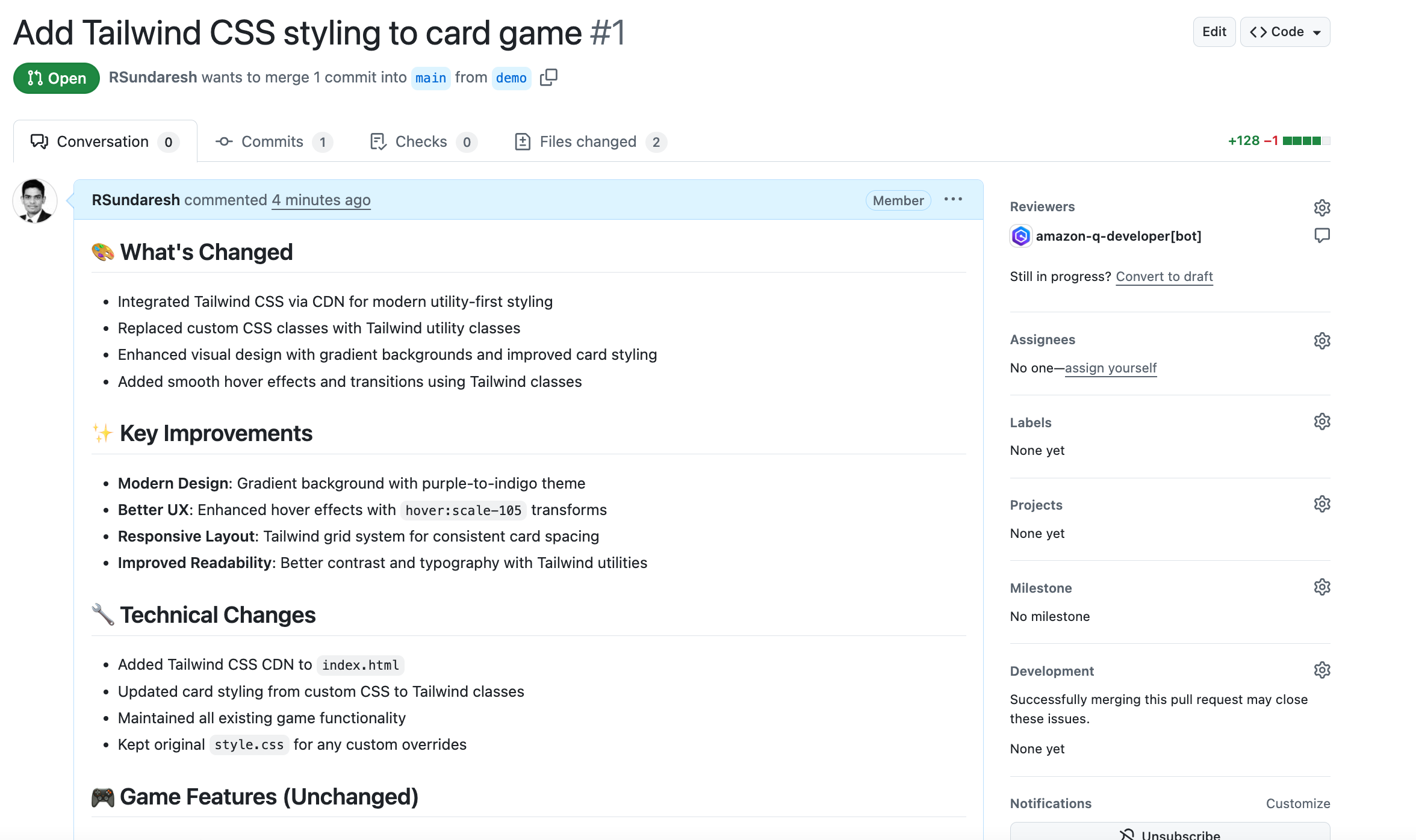
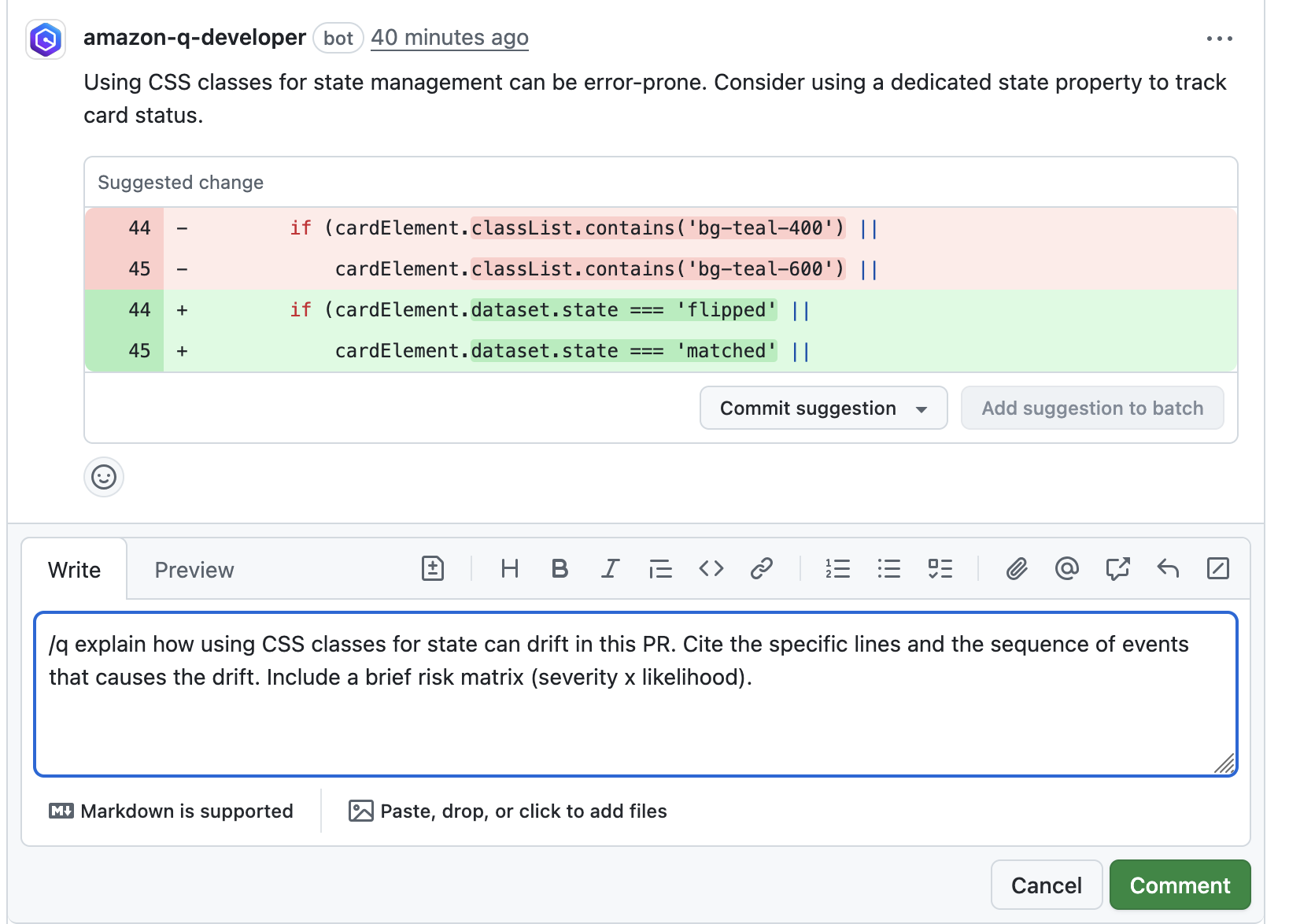
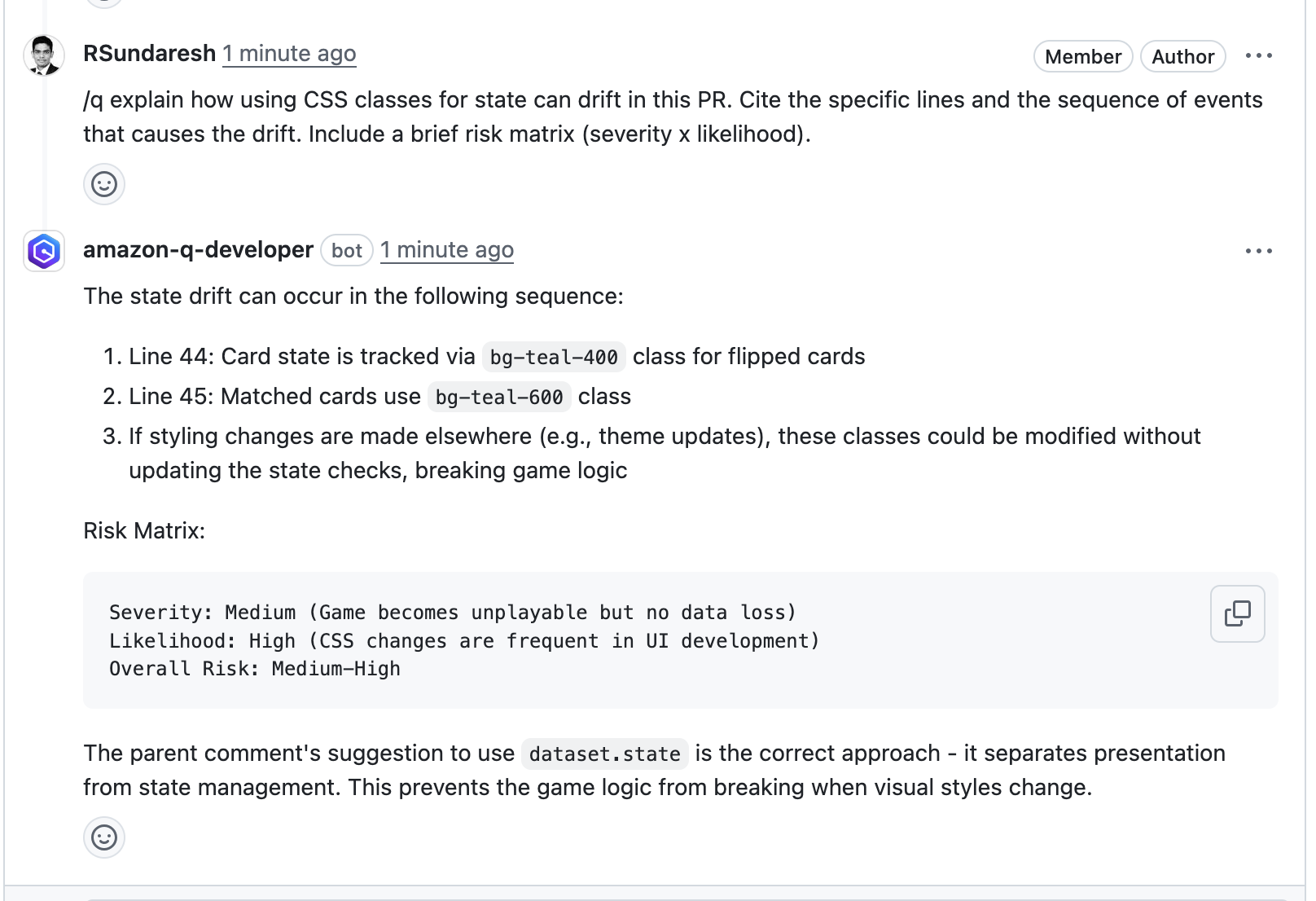
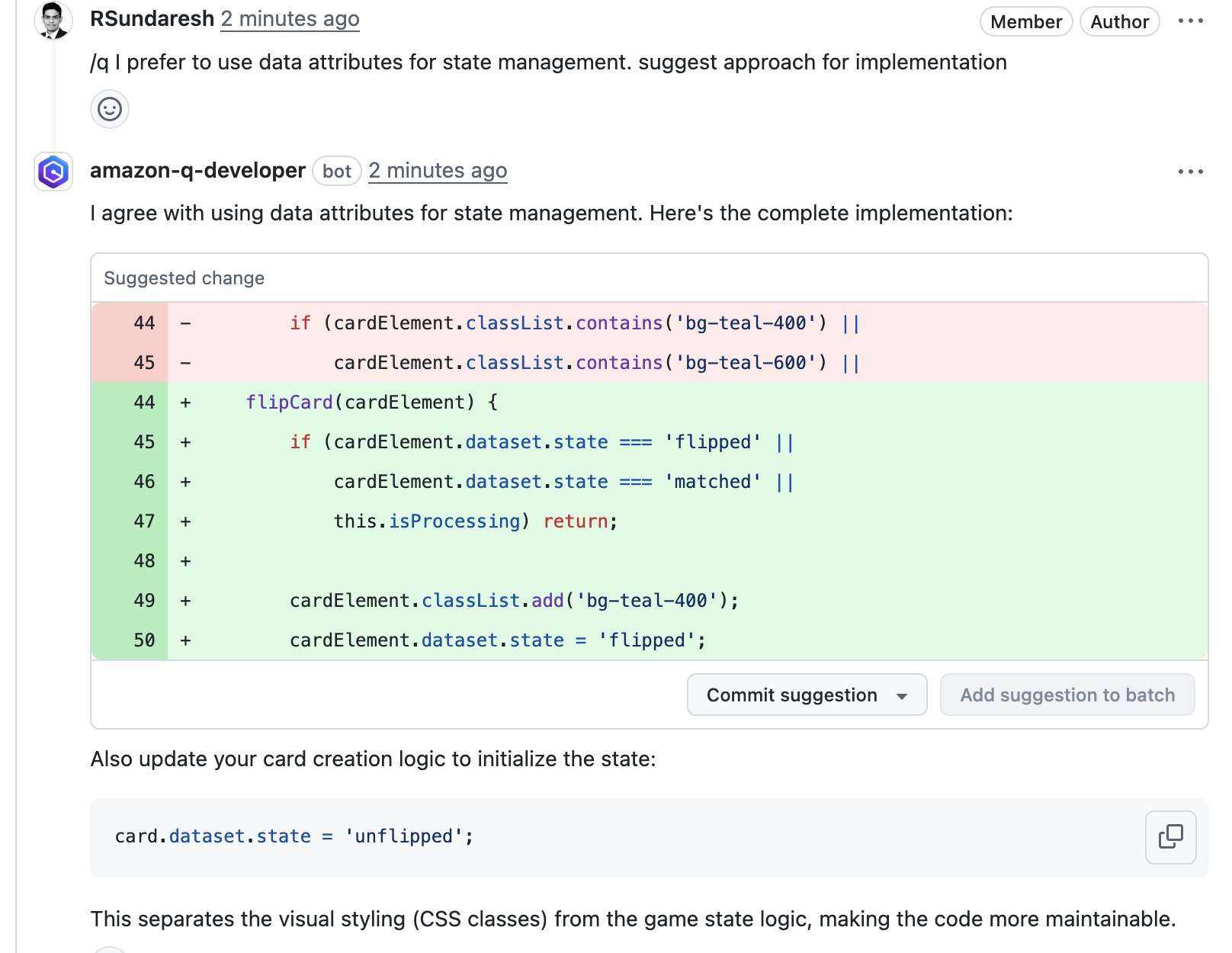
With the code review complete and checks passing, I merged. The new interactive code review experience reduced wait time and review cycles and made the “why” behind each finding and suggested change clear.
Conclusion
Amazon Q Developer for GitHub is available today in preview. Whether you are an individual developer or part of a large engineering team, this update helps you ship cleaner code with fewer cycles and makes code reviews something to look forward to rather than avoid.
Try it out on your next PR. Type /q, ask a question, and see how smarter conversational reviews transform your workflow.
Introducing restricted classification terms for governed classification in Amazon SageMaker Catalog
Post Syndicated from Ramesh H Singh original https://aws.amazon.com/blogs/big-data/introducing-restricted-classification-terms-for-governed-classification-in-amazon-sagemaker-catalog/
Security and compliance concerns are key considerations when customers across industries rely on Amazon SageMaker Catalog. Customers use SageMaker Catalog to organize, discover, and govern data and machine learning (ML) assets. A common request from domain administrators is the ability to enforce governance controls on certain metadata terms that carry compliance or policy significance. Examples include terms used to classify assets with sensitive data (such as PHI in healthcare or PCI in financial services) or terms used to trigger automatic access grants based on regulatory or organizational policies.
AWS announced restricted classification terms in SageMaker Catalog. This new capability allows domain administrators to define governance-controlled terms and enforce which teams and users are authorized to apply them. Restricted classification terms are designed to allow organizations to set standards for consistent classification of sensitive data, help prevent misuse of regulatory tags, and enable downstream workflows such as automatic access grants across the enterprise.
Restricted classification (glossary) terms
Customers have told us that the flexibility of applying glossary terms in SageMaker Catalog has been valuable for collaboration and scale. At the same time, many enterprises—especially in regulated industries—wanted an additional layer of control for certain classifications. For example, terms like PHI (Protected Health Information) in healthcare or PCI (payment card industry) in financial services should only be applied by authorized personnel, because they carry compliance and policy significance. Customers also asked for a way to enforce these governance policies without adding operational overhead. As catalogs grow to thousands of assets, forms, and columns, validating tens of thousands of terms can create performance and compliance challenges. A solution was needed to combine the openness of cataloging with governance precision for sensitive use cases.With this launch, SageMaker Catalog introduces a restricted classification terms section on each asset:
- Business glossary terms (existing): Open tagging, no restrictions.
- Restricted glossary terms (new): Only authorized users or groups can apply terms. Unauthorized users can view and filter assets based on these terms but not assign them.
Customer spotlight
As a large-scale organization with diverse data needs, the Business Data Technologies (BDT) team at Amazon manages thousands of assets across business units. Making sure these assets are consistently classified and governed is critical to maintaining compliance and enabling secure data sharing at scale. With restricted classification terms in SageMaker Catalog, the BDT team can now enforce which groups are authorized to apply terms, such as policy-driven classifications for merchants or payment data, while keeping discovery seamless for users.
“Restricted classification terms are instrumental in helping us scale data onboarding and governance across Amazon. By enforcing who can apply policy-related terms in the Amazon SageMaker Catalog, we’re able to accelerate consolidation of data assets across business units without compromising compliance. This facilitates consistent classification, prevents misuse, and allows us to automate downstream access grants—enabling our builders to innovate quickly while maintaining the highest standards of governance.”
– Gerry Moses, Senior Principal Technologist, Business Data Technologies, Amazon
Key benefits
With the introduction of restricted classification terms, customers gain stronger governance controls without losing the flexibility of open cataloging. This capability is designed to provide customers with the following key benefits:
- Governance enforcement – Sensitive terms such as PHI or PCI can only be applied by approved users or groups, supporting compliance with organizational and regulatory policies.
- Consistency at scale – Helps prevent misclassification across thousands of assets, maintaining a single source of truth for governed terms across domains and projects.
- Automatic access workflows – Restricted terms can trigger downstream policies, such as auto-granting access to regulated projects or routing assets to compliance-approved environments.
Sample use case
A pharmaceutical company uses SageMaker Catalog to manage clinical trial data. They define a glossary called Regulated Data Categories with restricted terms like PHI and Genomic Data. Only compliance-approved data stewards are authorized to apply these terms to assets. When applied, the term PHI can automatically trigger policies that restrict access only to approved research groups or environments with HIPAA compliance enabled. This makes sure clinical datasets containing PHI to be consistently tagged and subject to the right access policies, while still discoverable for approved researchers.
A retail bank manages transaction and credit data in its domain catalog. They create a glossary called Data Sensitivity Levels with restricted terms like PCI and Credit Bureau Data. When an authorized risk officer classifies an asset with PCI, SageMaker Catalog can automatically grant access only to members of the bank’s Payments Compliance project. Other users, such as analysts in marketing, can see the classification exists but cannot apply or override it. This approach helps prevent accidental misuse of sensitive financial terms while automating secure access grants aligned with regulatory requirements.
Solution overview
In this section, we will walk through how to create and apply restricted classification terms.
Prerequisites
To follow this post, you should have an Amazon SageMaker Unified Studio domain set up with a domain owner or domain unit owner privileges. You should also have existing projects or permissions to create new projects and business glossaries. For instructions to create them, see the Getting started guide. In this post, we created a project named Clinical Study Trials.
Create a restricted business glossary
In this step, a compliance officer creates a new glossary called Regulated Data Categories and marks it as restricted. Usage grants are given to the Clinical Data Stewardship project.
- Log in to your Amazon SageMaker Unified Studio (off-console) portal. Select the project, navigate to Business Glossaries tab and choose Create Glossary.

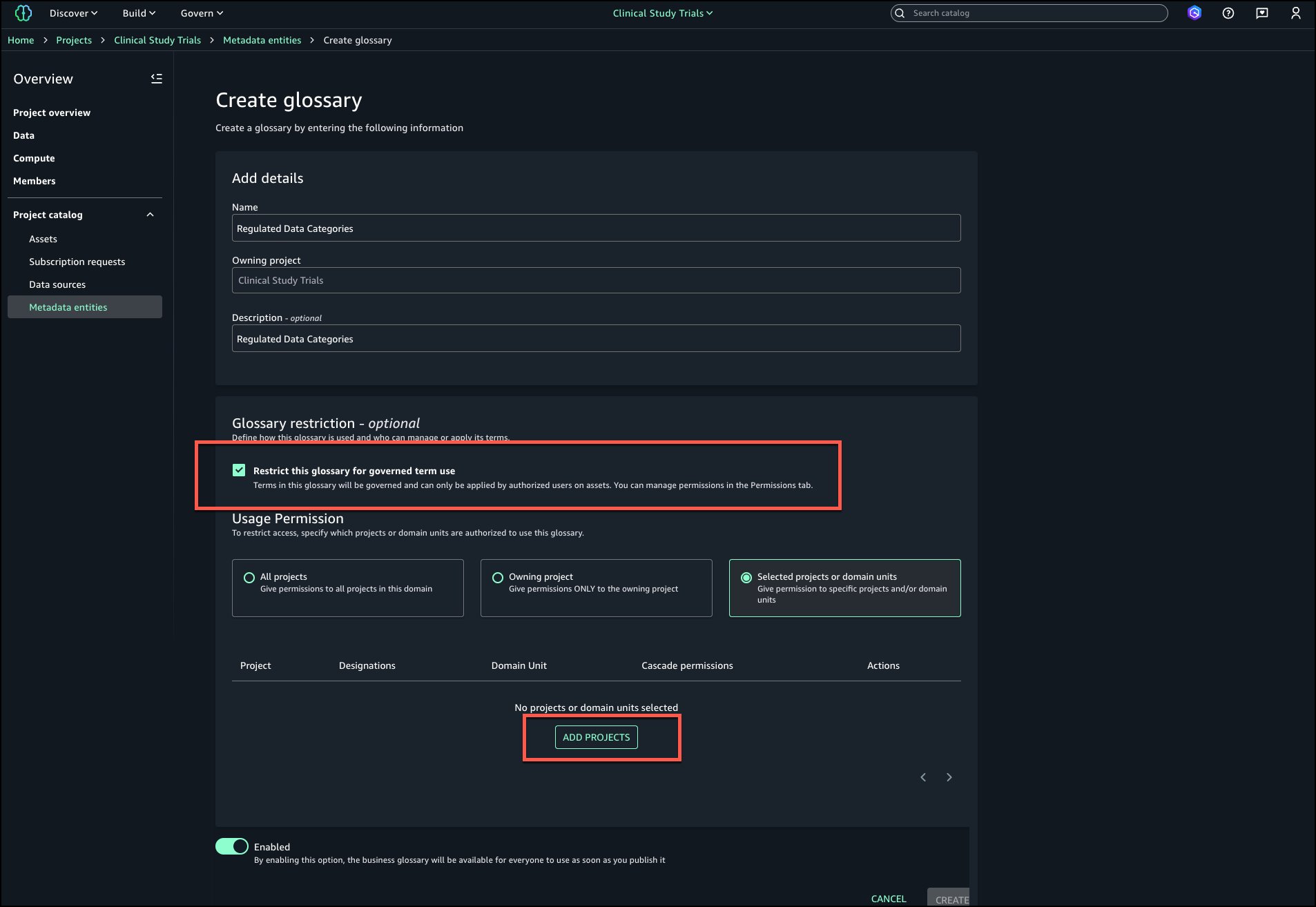
- Enter a name and description for the glossary. Select Restrict this glossary for governed term use and choose Add projects.
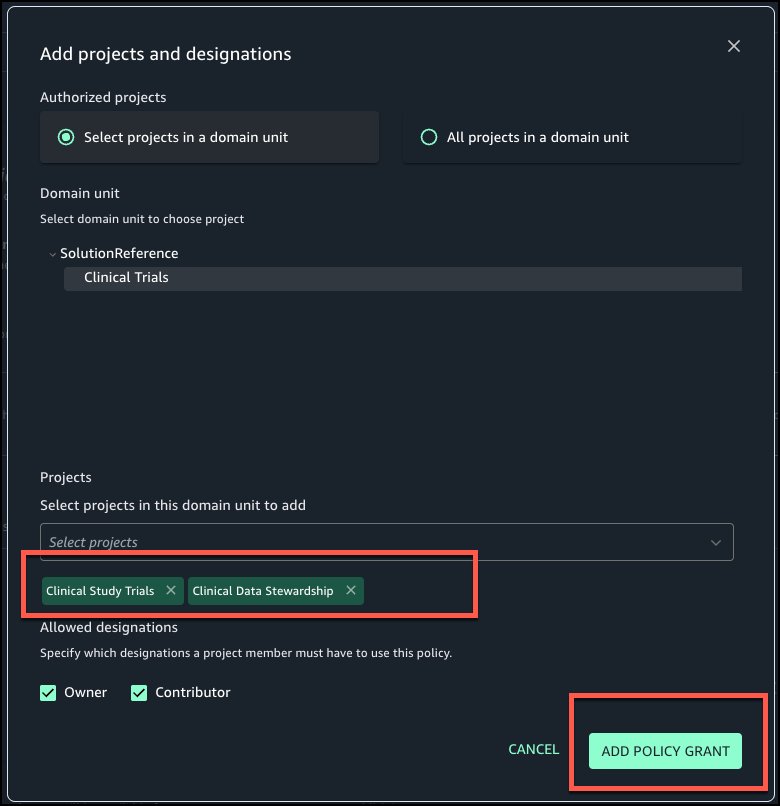
- Select the projects that should have permissions to tag governed terms to assets. Choose Add policy grant.
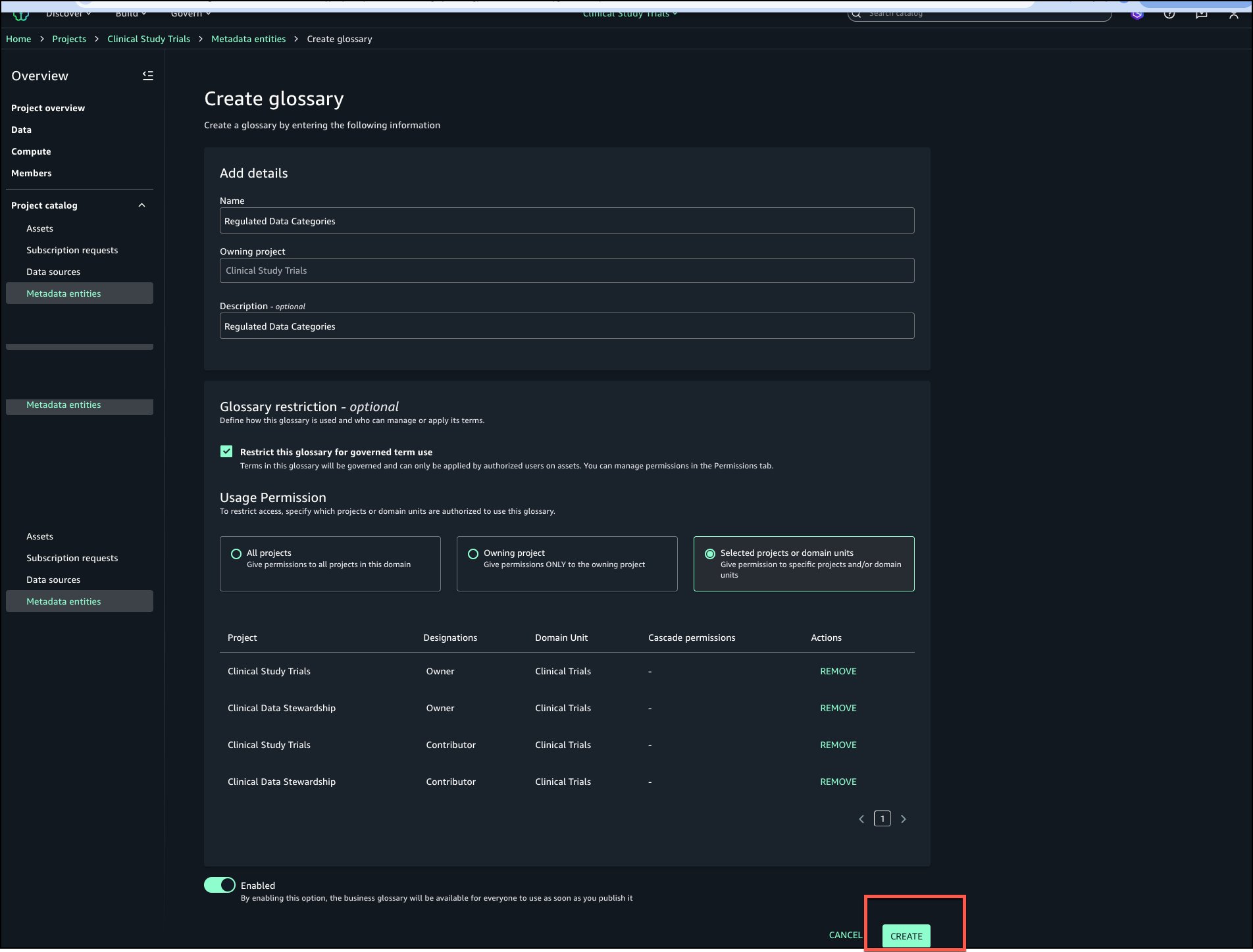
- Choose Create to create the restricted business glossary.
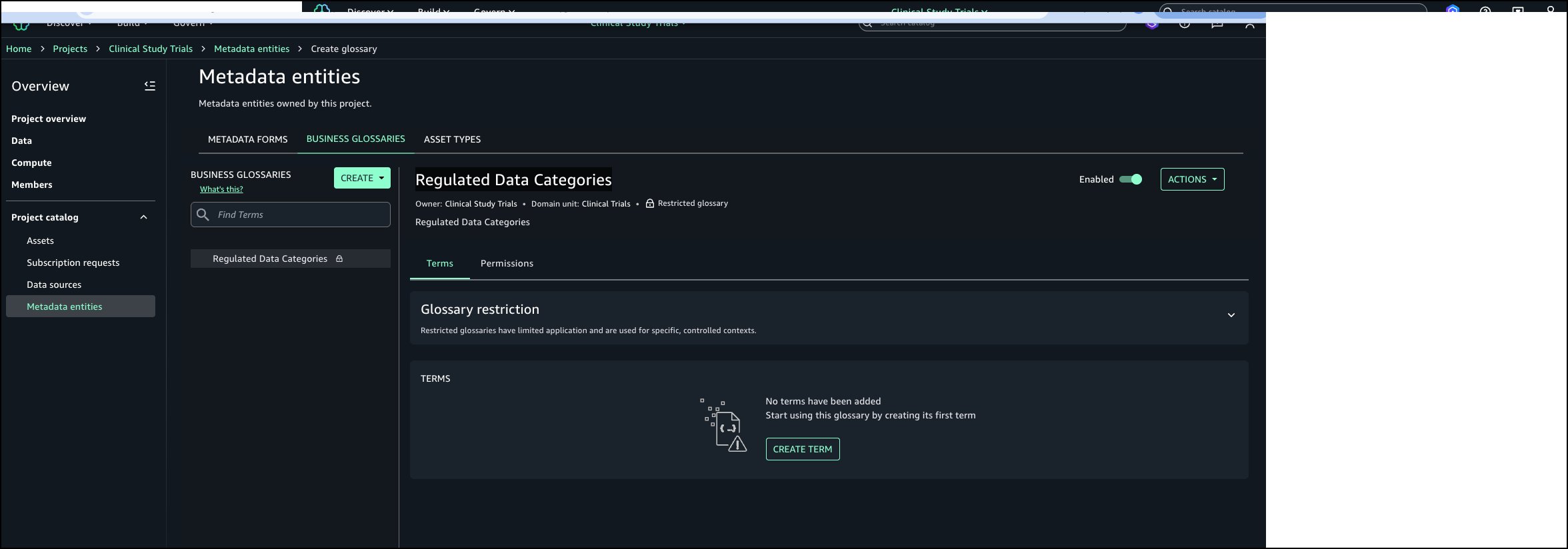
- The Regulated Data Categories business glossary is created and ready to populate.
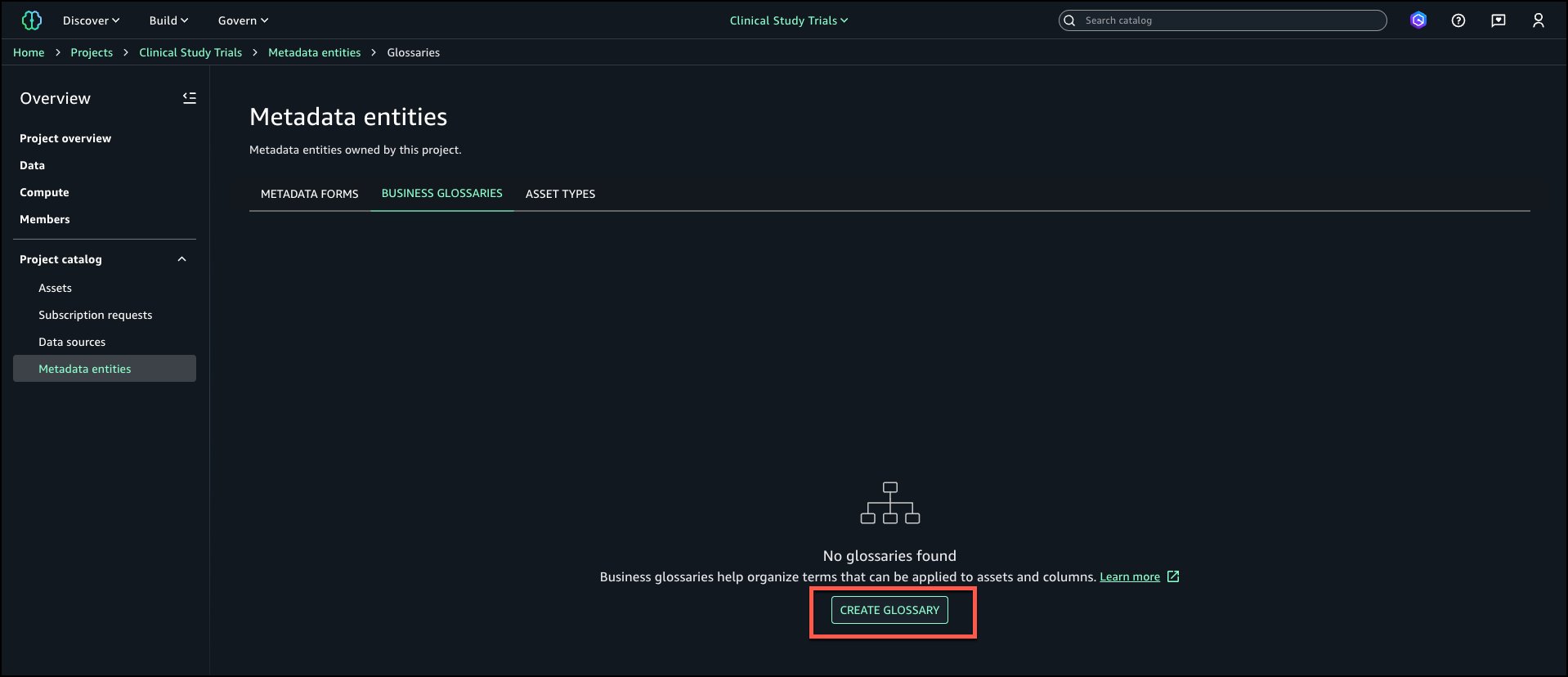
Add restricted business glossary terms
In this step you will add two terms: PHI and Genomic Data to the glossary.
- Choose Create term.
- Enter a Name and Description. Turn on Enabled and choose Create term.
- Follow the same steps to add the second term and both terms should be available in the glossary.
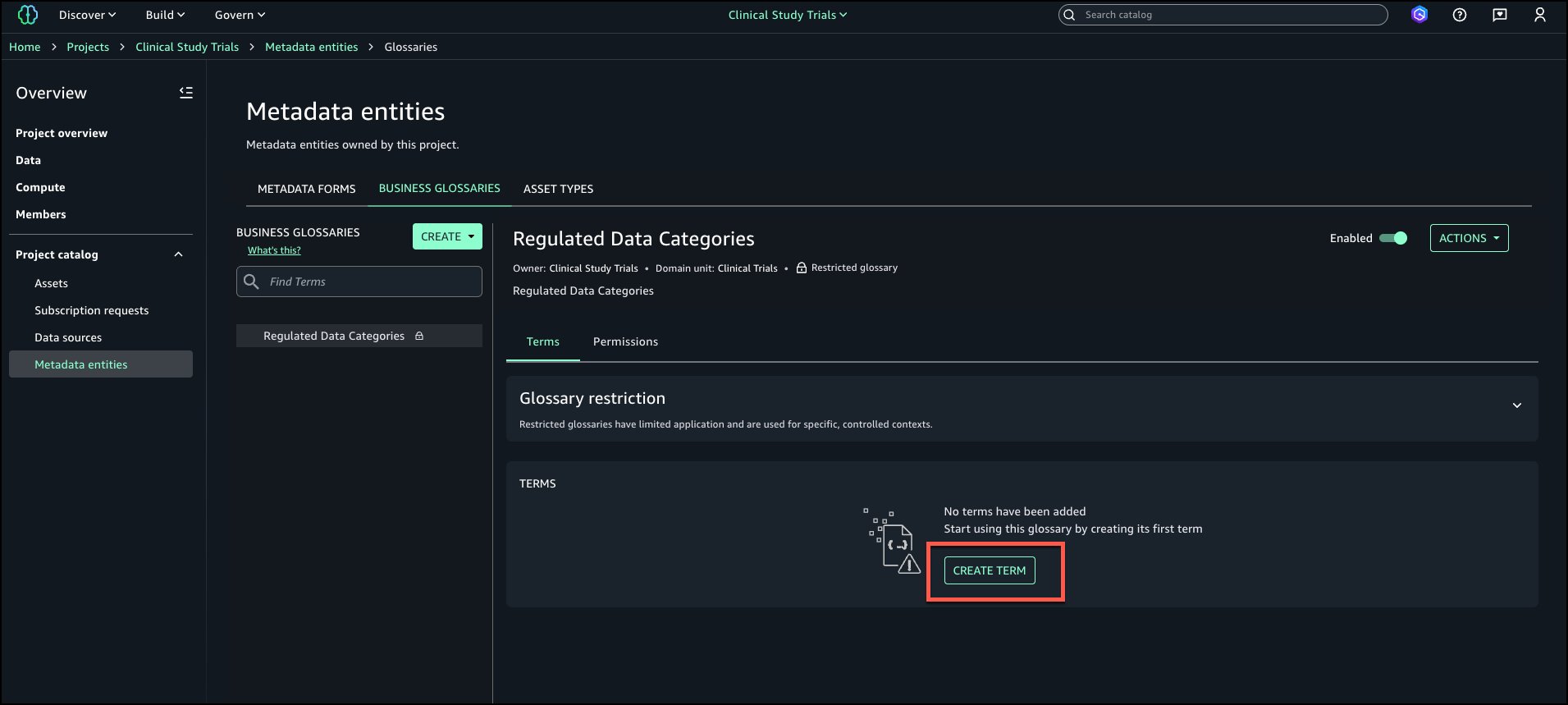
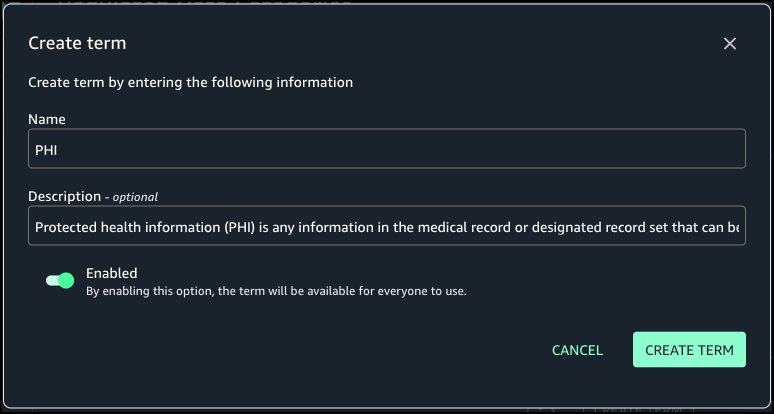
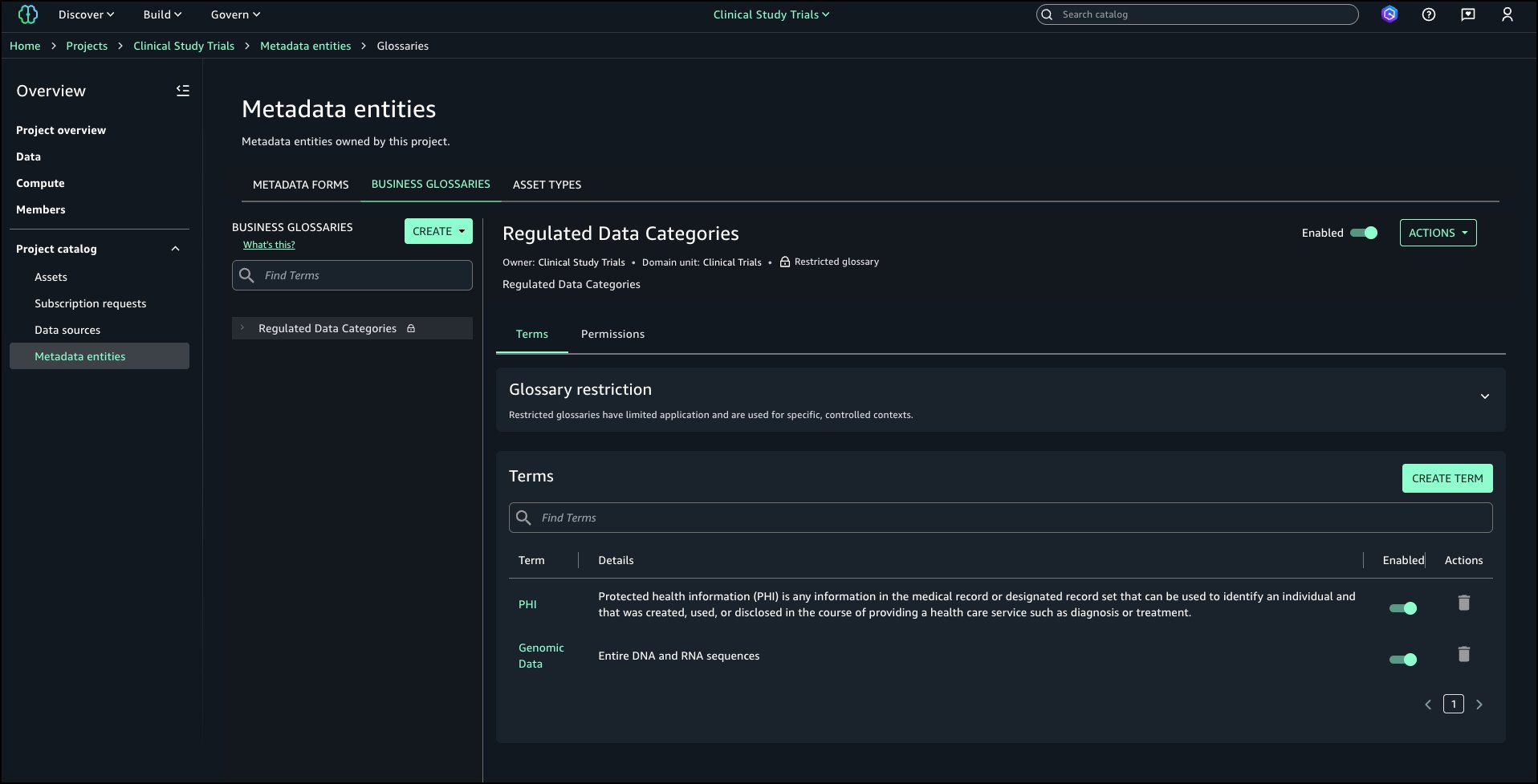
Apply restricted glossary terms to classify assets
In this step, a data steward will publish a new asset and apply the restricted terms.
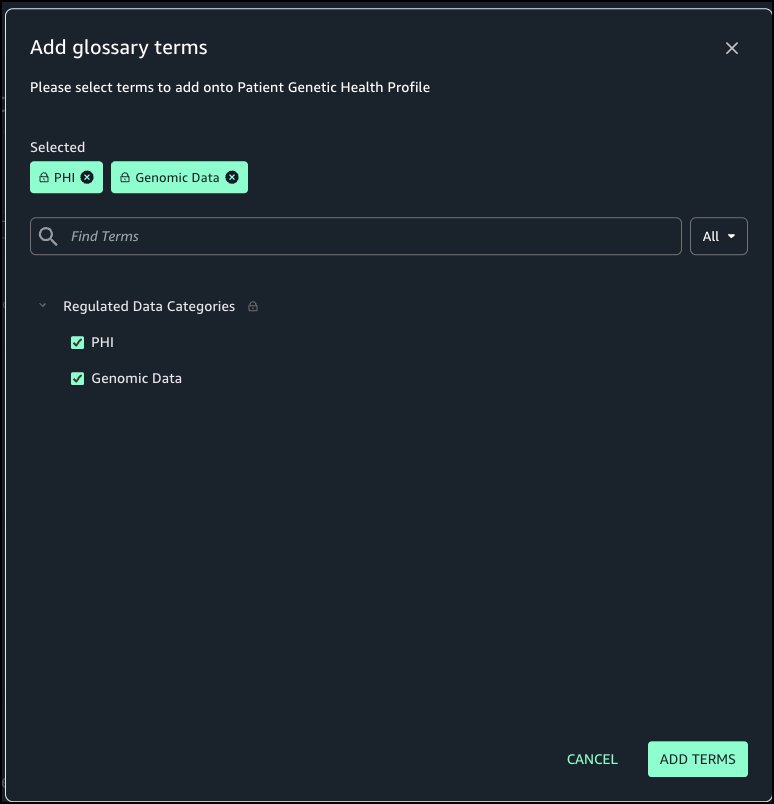
- Go to the Data Steward project and navigate to the asset where Restricted Terms should be tagged and choose Add terms.
- From Regulated Data Categories select PHI and Genomic Data and choose Add terms.
- Restricted terms are attached to the asset.
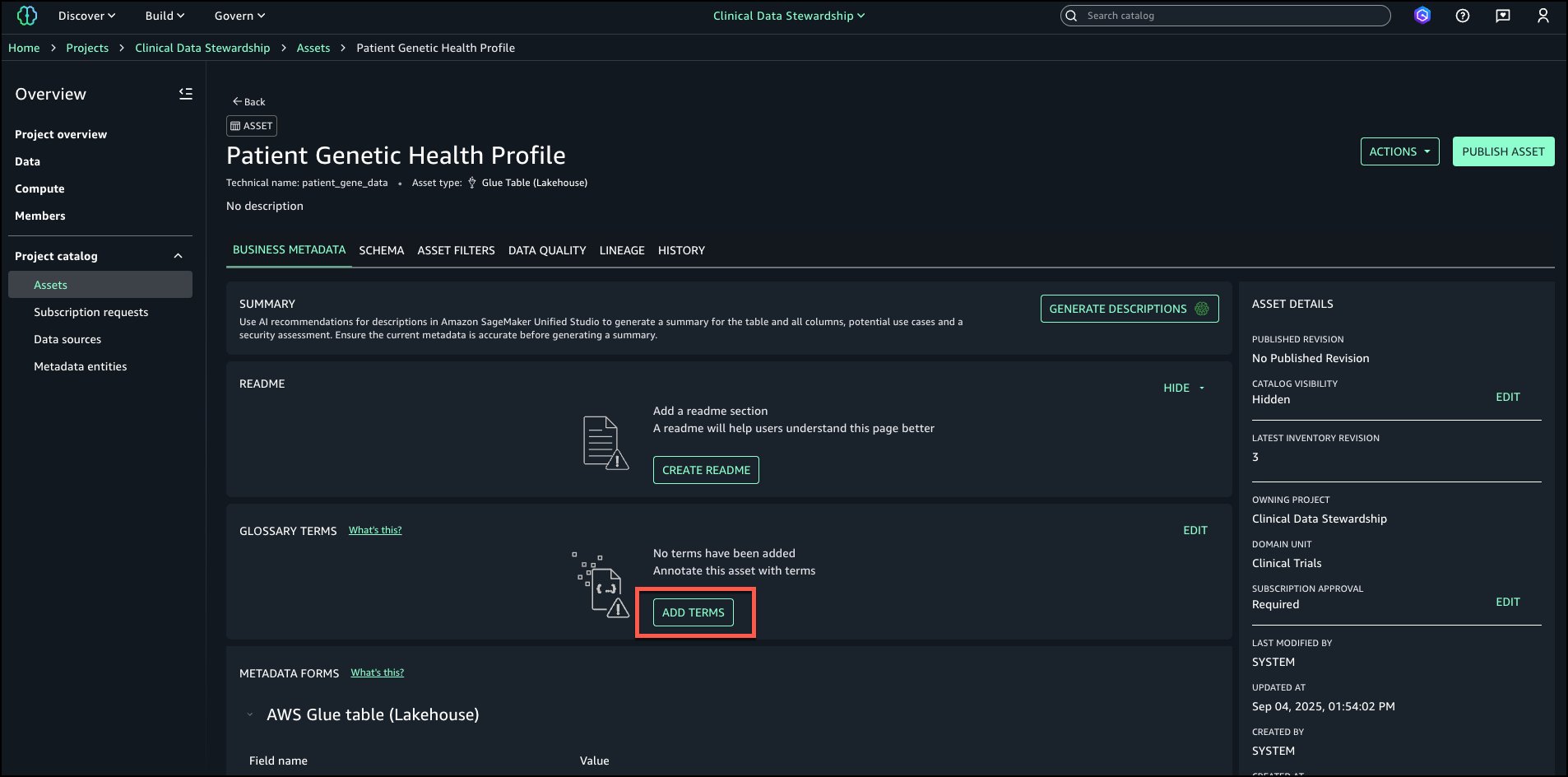
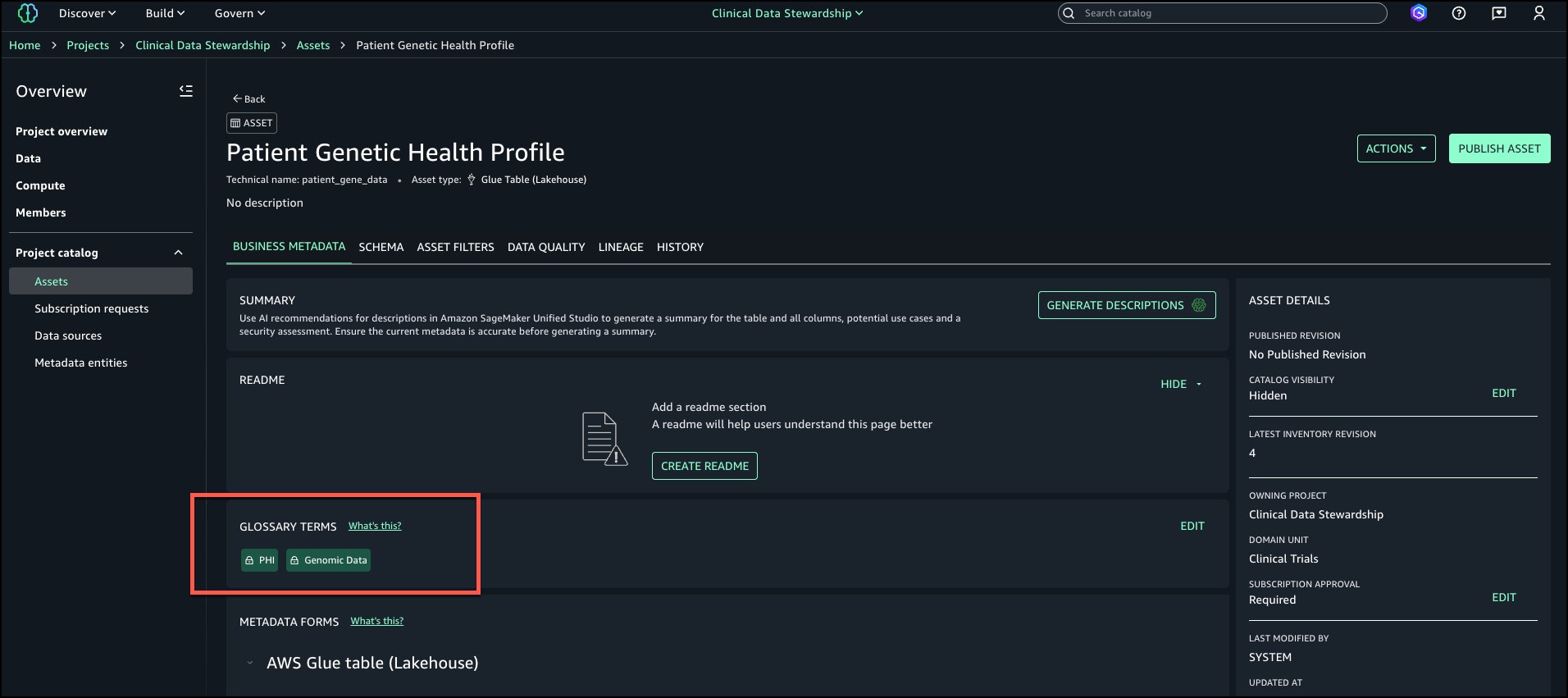
If a project that doesn’t have grants to use restricted term tries to attach restricted terms, you would receive the error Unable to apply restricted terms.

Search and discovery
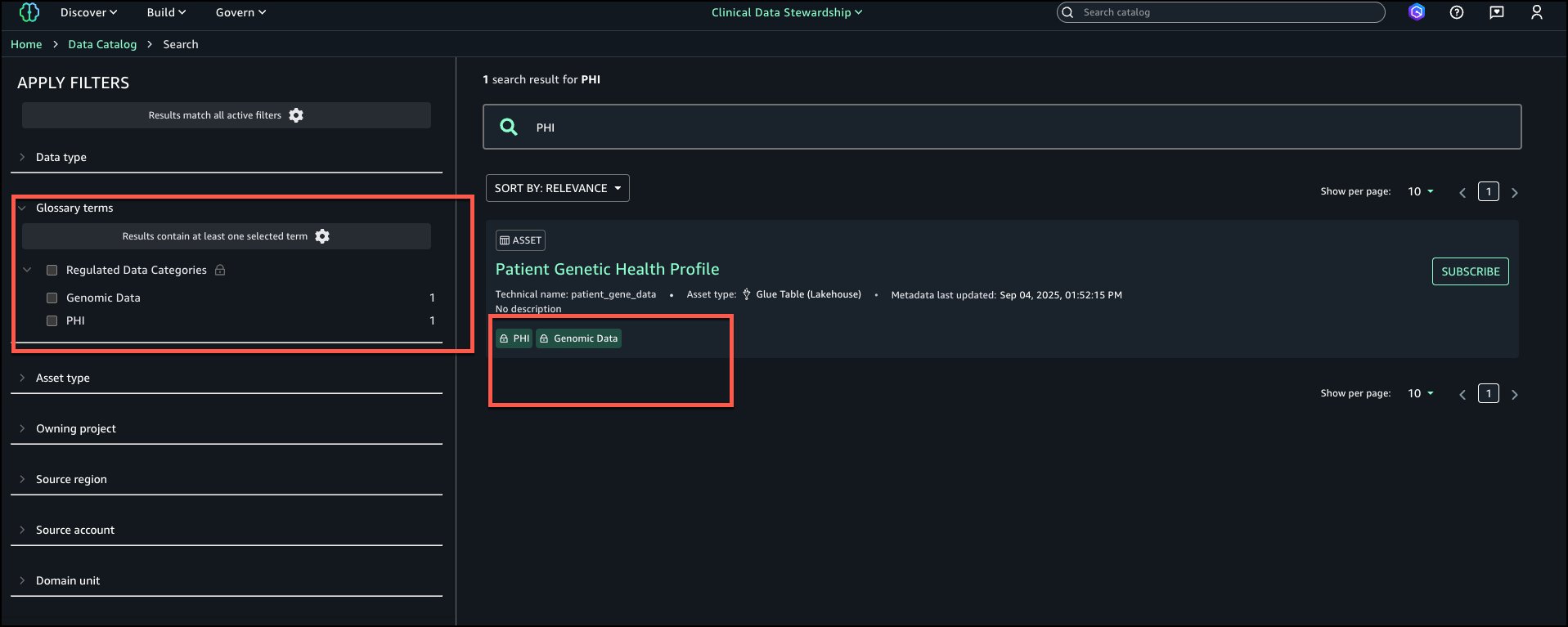
Data consumers can search for assets and filter by restricted terms filters on the left filters tab (for example, PHI or PCI) to discover governed assets.
Cleanup
If you decide that you no longer need any of the assets first unpublish assets, deleted terms, delete business glossary, delete assets and delete the new projects.
Conclusion
As customers expand their use of SageMaker Catalog, the need for governance becomes clear. From our work with customers in healthcare, life sciences, and financial services, we learned that organizations value the flexibility of open cataloging but need precise controls for terms that carry compliance or policy weight.
Restricted classification terms are designed to bring the best of both worlds: Flexibility for builders to continue tagging and discovering assets, and governance precision to help ensure that sensitive classifications are applied consistently. This capability lays the foundation for future enhancements such as column-level governance and deeper integration with enterprise data governance services. By balancing openness with control, SageMaker Catalog continues to help customers organize, govern, and scale their data and ML assets with confidence.
To learn more and get started, visit the Amazon SageMaker Catalog documentation.
About the authors
SiFive 2nd Gen Intelligence Family Launched
Post Syndicated from John Lee original https://www.servethehome.com/sifive-2nd-gen-intelligence-family-launched/
The SiFive 2nd Generation Intelligence family brings performance updates and new cores spanning from embedded control to big AI chips
The post SiFive 2nd Gen Intelligence Family Launched appeared first on ServeTheHome.
Florida Vaccine Mandates #lastweektonight
Post Syndicated from LastWeekTonight original https://www.youtube.com/shorts/osh1v6FqUhc
Signed Copies of Rewiring Democracy
Post Syndicated from Bruce Schneier original https://www.schneier.com/blog/archives/2025/09/signed-copies-of-rewiring-democracy.html
When I announced my latest book last week, I forgot to mention that you can pre-order a signed copy here. I will ship the books the week of 10/20, when it is published.