As we explained in our recent blog post, AI Reasoning Models: OpenAI o3-mini, o1-mini, and DeepSeek R1, Chinese startup DeepSeek caused a stir when it released its R1 reasoning model in January of this year. Interestingly, DeepSeek R1 has an OpenAI-compatible API, so applications written for OpenAI should work with DeepSeek R1 with just a configuration change. Since I had a suitable sample app all ready to go, I decided to put their claim to the test.
Why, and why not, use DeepSeek?
A major difference between DeepSeek and OpenAI is cost. At the time of writing, DeepSeek charges $0.55 per million input tokens and $2.19 per million output tokens for its R1 model. That’s about 3.6% of OpenAI’s $15.00 per million input tokens and $60.00 per million output tokens for its flagship o1 reasoning model, and about half of o3-mini’s $1.10 per million input tokens and $4.40 per million output tokens.
Set against this is the fact that, in using the DeepSeek platform’s API, you are sending your data to a startup located in China that has been accused by OpenAI of “inappropriately” basing its work on the output of OpenAI’s models. It’s up to you, and your organizations’ data governance policy, whether the trade-off is worthwhile.
Another consideration is the ability to run DeepSeek’s models locally, on your own infrastructure, or, more likely, your chosen provider’s infrastructure, rather than sending requests to the DeepSeek platform. Spinning up my own DeepSeek instance was out of scope for this blog post, but I’ll likely return to it in a future blog post.
Swapping OpenAI for DeepSeek
Last month, I explained how you can build an AI agent with Backblaze B2, LangChain, and Drive Stats, walking you through a simple chatbot that can answer questions based on our Drive Stats data set—11 years of metrics gathered from the Backblaze B2 Cloud Storage platform’s fleet of hard drives. In that example, the chatbot accepted a natural language question, used OpenAI’s GPT‑4o mini large language model (LLM) to generate a SQL query that might help provide an answer, executed the query against the Drive Stats data set via the Trino SQL engine, and then used OpenAI again to interpret the result set and either repeat the query-interpret cycle, or generate a natural language answer.
I copied the Jupyter notebook from that example and used it as the basis for investigating the feasibility of swapping out OpenAI for DeepSeek. The DeepSeek version of the notebook contains the full source code of my experiments; I’ll include relevant extracts here, edited for clarity.
Since I used the LangChain AI framework, which provides a layer above a range of AI models, the only place that OpenAI surfaced in my code was in creating an instance of LangChain’s ChatOpenAI wrapper:
# OPENAI_API_KEY must be defined in the .env file
load_dotenv()
llm = ChatOpenAI(model="gpt-4o-mini")
The ChatOpenAI class contains all the code required to communicate with OpenAI via its API.
Provide your DeepSeek API key in the same OPENAI_API_KEY environment variable.
Set the API base URL to https://api.deepseek.com.
Provide a DeepSeek model name in place of the OpenAI one.
If this reminds you of the steps for using Backblaze B2’s S3-compatible API, you’re not alone. The OpenAI API has become a de facto standard for integrating with LLMs in much the same way as Amazon’s S3 API allows an ecosystem of apps and tools to interoperate with object storage systems from a variety of vendors.
Looking at the DeepSeek documentation, you can use one of two models, deepseek-reasoner (aka DeepSeek R1) or deepseek-chat. Let’s see what the much-talked-about DeepSeek R1 came up with.
Using DeepSeek R1 in the AI agent
To make it easy to use both the OpenAI and DeepSeek notebooks, I created a second entry in the .env file for the DeepSeek API key, and copied it to the OpenAI environment variable in the notebook code:
# The .env file needs at least DEEPSEEK_API_KEY, and may also contain # OPENAI_API_KEY. Move the DeepSeek API key to the OpenAI environment # variable load_dotenv()
As I set about repeating the steps from the Jupyter notebook that supported my previous blog post, I was disappointed to see DeepSeek fall at the very first hurdle: generating a SQL query for a simple natural language question. Here is the code:
question = {"question": "How many drives are there?"}

write_query(question)
Looking back at the original notebook, OpenAI’s response was valid SQL, although it didn’t have enough information to construct the correct query:
{'query': 'SELECT COUNT(*) AS drive_count FROM drivestats'}
DeepSeek, on the other hand, responded with a Python stack trace and this error:
openai.UnprocessableEntityError: Failed to deserialize the JSON body into the target type: response_format: response_format.type `json_schema` is unavailable now at line 1 column 13827
What went wrong? Searching for the error turns up a comment from a LangChain engineer explaining that we should use BaseChatOpenAI rather than ChatOpenAI since it “[…] accommodates many APIs that are similar to OpenAI. It uses tool calling for structured output by default.”
So, we can redefine llm accordingly, and try generating a query again:
BadRequestError: Error code: 400 - {'error': {'message': 'The last message of deepseek-reasoner must be a user message, or an assistant message with prefix mode on (refer to https://api-docs.deepseek.com/guides/chat_prefix_completion).', 'type': 'invalid_request_error', 'param': None, 'code': 'invalid_request_error'}}
Looking back at the AI agent code, we can see that we used an off-the-shelf prompt from the LangChain Prompt Hub that provides the model with a single, system, message:
================================ System Message ================================

Given an input question, create a syntactically correct {dialect} query to run to help find the answer. Unless the user specifies in his question a specific number of examples they wish to obtain, always limit your query to at most {top_k} results. You can order the results by a relevant column to return the most interesting examples in the database.

Never query for all the columns from a specific table, only ask for a few relevant columns given the question.

Pay attention to use only the column names that you can see in the schema description. Be careful to not query for columns that do not exist. Also, pay attention to which column is in which table.

Only use the following tables:
{table_info}

Question: {input}
Does this mean that DeepSeek is not, in fact, API-compatible with OpenAI? I would argue that it does not. DeepSeek implements the same API request/response syntax as OpenAI, but it is a different platform. Some variation in semantics is to be expected. We see similar variations between Backblaze B2 and Amazon S3; for example, the S3 PutObjectAcl operation sets the access control list (ACL) for an object in a bucket. Amazon S3’s access management model allows you to manipulate an object’s ACL independently of its bucket—for example, you can put a private object in a public bucket, and vice versa.
This flexibility comes with a cost: It becomes difficult to reason about the visibility of data. In fact, AWS now recommends “that you keep ACLs disabled, except in unusual circumstances where you need to control access for each object individually.”
Backblaze B2’s model is much simpler: You control access at the bucket level, and all objects have the same ACL as their bucket. Backblaze B2 implements the PutObjectAcl operation, but, if you try to set an object’s ACL to any other value than its bucket’s ACL, the service responds with an error.
Returning to the AI agent code, we can replace the single-system-message prompt with one that combines a system message with a user message:
import textwrap
from langchain_core.prompts import ChatPromptTemplate

query_prompt_template = ChatPromptTemplate([
    ("system", textwrap.dedent("""Given an input question, create a
    syntactically correct {dialect} query to run to help find the answer.
    Unless the user specifies in his question a specific number of examples
    they wish to obtain, always limit your query to at most {top_k} results.
    You can order the results by a relevant column to return the most
    interesting examples in the database.

    Never query for all the columns from a specific table, only ask for a the
    few relevant columns given the question.

    Pay attention to use only the column names that you can see in the schema
    description. Be careful to not query for columns that do not exist. Also,
    pay attention to which column is in which table.

    Only use the following tables:
    {table_info}""")),
    ("human", "Question: {input}"),
])
Trying the write_query() call for a third time, this is the response:
BadRequestError: Error code: 400 - {'error': {'message': 'deepseek-reasoner does not support Function Calling', 'type': 'invalid_request_error', 'param': None, 'code': 'invalid_request_error'}}
Function calling is a powerful capability that enables Large Language Models (LLMs) to interact with your code and external systems in a structured way. Instead of just generating text responses, LLMs can understand when to call specific functions and provide the necessary parameters to execute real-world actions.
Unfortunately, that is exactly our use case. It’s becoming clear that DeepSeek R1 is not the correct tool for implementing an AI agent—we’ve been trying to use a chisel as a screwdriver!
DeepSeek-V3: A better fit
As its name suggests, the deepseek-chat model is more appropriate for this application. The DeepSeek documentation tells us that it is based on DeepSeek-V3, released in December 2024. DeepSeek-V3 is priced at $0.27 per million input tokens and $1.10 per million output tokens; this is actually more expensive than the GPT-4o mini model I used for the OpenAI agent example ($0.15 per million input tokens, $0.600 per million output tokens), but how does it compare? Let’s take a look.
First, we need to edit the LLM creation code again to set the model name:
Now we can run write_query() again. It’s immediately clear that it’s a better fit than its “big brother:”
{'query': 'SELECT COUNT(*) AS total_drives FROM drivestats LIMIT 10'}
As with the OpenAI agent, this query is well-formed SQL, but it’s not answering the question we set—it’s giving us the total number of rows in the dataset, rather than the number of drives. Also, it’s a little odd to have a LIMIT clause in a SELECT COUNT(*) query, but it’s legal SQL, and the agent is following its instructions very literally: always limit your query to at most {top_k} results, where we set top_k to 10.
question = {"question": "Each drive has its own serial number. How many drives are there?"}

query = write_query(question)

{'query': 'SELECT COUNT(DISTINCT serial_number) AS total_drives FROM drivestats'}
So far, so good!
I’ll skip some intermediate steps here—they are all in the Jupyter notebook if you want to review them, or run them for yourself—and look at how a simple LangChain graph, built on the DeepSeek LLM, answered the question: “Each drive has its own serial number. How many drives did each data center have on 9/1/2024?”
The OpenAI version generated an invalid query, comparing the date column with the string ’2024-09-01’ without using the required DATE type identifier, but DeepSeek generates a correct SQL query and provides a useful natural language response:
/SELECT datacenter, COUNT(DISTINCT serial_number) AS drive_count FROM drivestats WHERE date = DATE ‘2024-09-01’ GROUP BY datacenter ORDER BY drive_count DESC LIMIT 10
On September 1, 2024, the data centers had the following number of drives:
phx1: 89,477 drives
sac0: 78,444 drives
sac2: 60,775 drives
(empty datacenter): 24,080 drives
iad1: 22,800 drives
ams5: 16,139 drives
These are the top data centers with the highest drive counts on that date.
DeepSeek scores a point!
Moving on to the ReAct AI Agent, which allows the LLM to perform multiple SQL queries in generating an answer to a question, DeepSeek performs similarly to OpenAI. Given the question, “Each drive has its own serial number. What is the annualized failure rate of the ST4000DM000 drive model?”, the DeepSeek agent provides the overall failure rate rather than the annualized failure rate (AFR).
When we provide explicit instructions for calculating AFR in its prompt, the DeepSeek agent provides the correct result, identical, in fact, to the OpenAI agent’s response:
The annual failure rate (AFR) for the ST4000DM000 drive model is approximately 2.63%.
However, when given the question, “What was the annual failure rate of the ST8000NM000A drive model in Q3 2024?”, the DeepSeek agent gives us:
[(1.6100573445081607,)]
While OpenAI responds:
The annual failure rate (AFR) of the ST8000NM000A drive model in Q3 2024 is approximately 1.61%.
Wrapping up the investigation, the final question from the OpenAI notebook is more complex:
Considering only drive models which had at least 100 drives in service at the end of the quarter and which accumulated 10,000 or more drive days during the quarter, which drive had the most failures in Q3 2024, and what was its failure rate?
Impressively, the OpenAI agent constructed a well-formed SQL query and provided the correct response:
The drive model with the most failures in Q3 2024 is the TOSHIBA MG08ACA16TA, which had 181 failures. Its failure rate during this period was approximately 1.84%.
BadRequestError: Error code: 400 - {'error': {'message': "An assistant message with 'tool_calls' must be followed by tool messages responding to each 'tool_call_id'. (insufficient tool messages following tool_calls message)", 'type': 'invalid_request_error', 'param': None, 'code': 'invalid_request_error'}}
During task with name 'agent' and id '0aa26ba6-a3ee-ced1-de4d-b60ed7fbca99'
The phrase “insufficient tool messages” suggested that the DeepSeek LLM might need to be reconfigured to allow more tokens. According to the documentation on models and pricing, the deepseek-chat model supports a maximum of 8K output tokens, but defaults to 4K if max_tokens is not specified.
Recreating the DeepSeek wrapper object and agent accordingly, I gave it the last question again:
response = agent_executor.invoke( {"messages": [{"role": "user", "content": "Considering only drive models which had at least 100 drives in service at the end of the quarter and which accumulated 10,000 or more drive days during the quarter, which drive had the most failures in Q3 2024, and what was its failure rate?"}]} )
# Show the SQL query sent to the database print(response['messages'][-3].tool_calls[0]['args']['query'])
# Show the final response message display_markdown(response['messages'][-1].content, raw=True)
This time, DeepSeek was able to generate a similar SQL query to OpenAI:
WITH drive_counts AS (
    SELECT model, COUNT(DISTINCT serial_number) AS drive_count
    FROM drivestats
    WHERE date >= DATE '2024-07-01' AND date <= DATE '2024-09-30'
    GROUP BY model
    HAVING COUNT(DISTINCT serial_number) >= 100
), drive_days AS (
    SELECT model, COUNT(*) AS total_drive_days
    FROM drivestats
    WHERE date >= DATE '2024-07-01' AND date <= DATE '2024-09-30'
    GROUP BY model
    HAVING COUNT(*) >= 10000
), failures AS (
    SELECT model, COUNT(*) AS failure_count
    FROM drivestats
    WHERE date >= DATE '2024-07-01' AND date <= DATE '2024-09-30' AND failure = 1
    GROUP BY model
)
SELECT d.model,
       f.failure_count,
       100 * (CAST(f.failure_count AS DOUBLE) / (CAST(d.total_drive_days AS DOUBLE) / 365)) AS annual_failure_rate
FROM drive_days d
JOIN failures f ON d.model = f.model
JOIN drive_counts dc ON d.model = dc.model
ORDER BY f.failure_count DESC
LIMIT 1
With a correct response:
To answer the question:
The drive model with the most failures in Q3 2024 is TOSHIBA MG08ACA16TA, which had 181 failures. The annualized failure rate (AFR) for this model during that quarter was 1.84%.
Success! But, unfortunately, this isn’t the whole story.
DeepSeek Reliability
I originally set out to write this blog post at the end of January, but the DeepSeek platform website had gone offline by January 30, so I couldn’t even start until I was able to sign up for an API key on February 5.
Given my shiny new API key, and DeepSeek’s claims of OpenAI API compatibility, I naïvely expected to be able to work through my earlier OpenAI notebook and write up the results in a couple of days. The reality was more like two weeks.
In this blog post I’ve detailed some of the error messages I encountered along the way, but I saw many more that pointed to the DeepSeek API simply being overwhelmed with traffic. For example, for over a day, when the status page reported no issues, most API requests to DeepSeek terminated after a minute with the error message:
json.decoder.JSONDecodeError: Expecting value: line 1 column 1 (char 0)
A time-consuming investigation revealed that this was caused by the DeepSeek API returning the 200 status code and headers as if the request was successful, then hanging for a minute before terminating the connection without returning any actual data. The calling code saw the 200 as success and tried to decode the non-existent API response body, resulting in the error.
I saw several more instances of intermittent errors that all seemed to point in the same direction: DeepSeek needs to add capacity to its API platform. Notably, the platform seemed faster and more stable on a Saturday morning, U.S. Pacific time, the early hours of Sunday morning in China.
Final thoughts
At present, I would have to classify the DeepSeek-V3 API as “promising, but somewhat flaky.” An agent invocation that succeeds one minute could fail the next with any of a range of error messages. That’s a shame, since when it does work, for instance, in creating the SQL query for the final question above, it tends to work very well.
One final caveat: This is a dynamic field; frameworks and services are literally being updated on a daily basis. For example, since yesterday, as I write this, four of the notebook’s module dependencies have been updated. I encourage you to experiment for yourself as your mileage will almost certainly vary, hopefully in a positive direction.
In October 2024, we announced the general availability of Copilot secret scanning, leveraging AI to detect generic passwords in users’ codebases. This post describes how Copilot secret scanning works under the hood, the challenges we ran into when developing it, and the framework we use for testing and iteration.
What is Copilot secret scanning?
Copilot secret scanning is a feature of GitHub Secret Protection, which protects millions of repositories on GitHub by detecting hundreds of pattern types through our partner program. The precision of these detections is paramount for security teams and developers when dealing with security alerts. Historically, our detection approach has relied on regular expressions, which is an effective method for identifying secrets with strict, provider-minted formats. However, this method struggles with the nuanced and varied structures of generic passwords, often generating excessive noise for security teams and developers.
We now detect generic passwords with GitHub Copilot, using AI to analyze context—such as the usage and location of a potential secret—to limit noise and deliver relevant alerts that are critical to the health and security of your repositories.
Getting to the point where we were confident in our password precision was a journey over many test cases, prompt iterations, and model changes. Let’s dive in to explore what we learned along the way and find out where we’re going.
The private preview highlighted a problem early on: unconventional file types and structures
At the core of Copilot secret scanning lies a request to a large language model (LLM), expressed through an LLM prompt consisting of:
General information about the type of vulnerability, in this case passwords.
The source code location and contents of the file where we believe the vulnerability may exist.
A strict JSON format specification for the model output, to allow for automated processing.
Our first iteration of the prompt used the few-shot prompting technique, which provides the LLM with example inputs and outputs to demonstrate how to perform the task. We wanted a resource-effective model to run the detections at scale and landed on GPT-3.5-Turbo. In parallel, we developed a basic offline evaluation framework, including manually curated test cases with both positive and negative findings, to help us validate that our approach was sound before deploying it to customers.
We deployed this first iteration to our private preview participants and immediately noticed a problem. While it worked reasonably well at identifying credentials in our offline evaluation, it would fail spectacularly in some customer repositories. The model had difficulty interpreting file types and structures not typically seen in the conventional coding languages and patterns that LLMs train on.
This experience revealed the complexity of the problem and the limiting nature of LLMs. We had to reevaluate our approach.
The road to public preview: Improving offline evaluation and prompting
In response to these initial results, we enhanced the offline evaluation framework in a few key ways. First, we added reports from private preview participants to increase the diversity of our test cases. Next, we enhanced the framework so that we could visually identify and analyze deviations resulting from model or prompt changes. This allowed us to better see the impact of customizing different steps in our prompting strategy. Finally, we leveraged the GitHub Code Security team’s evaluation processes to create a data collection pipeline, and used GPT-4 to create our own test cases based on learnings from existing secret scanning alerts in open source repositories.
This improved offline evaluation and gave us the breadth needed to measure both precision and recall. Precision is the ability to find secrets more accurately, with concerns to the false positive rate, while recall is the ability to find secrets more reliably, with concerns to the false negative rate.
From here, we ran a series of experiments to evaluate detection quality:
What if we tried a different model?
What if we ran the prompt multiple times and somehow combined the responses?
What if we ran two different prompts on two different models in sequence?
How do we better handle the nondeterministic nature of LLM responses?
More specifically, we started experimenting with a few different mechanisms to improve our detection with the LLM.
We tried voting (asking the model the same question many times), which allowed for more deterministic responses but had no material impact on our precision.
We also tried using a larger model (GPT-4) trained on a larger set of parameters as a confirming scanner, to validate the accuracy of candidates found by GPT-3.5-Turbo. This helped improve precision without reducing our recall, but was also more resource intensive.
We also tried a few different prompting strategies, such as Fill-in-the-Middle, Zero-Shot, and Chain-of-Thought. We ended up collaborating with our colleagues at Microsoft and used their MetaReflection technique, a novel offline reinforcement learning technique that allows experiential learnings from past trials to come up with a hybrid Chain of Thought (CoT) and few-shot prompt that improves precision with a small penalty in recall.
We ultimately ended up using a combination of all these techniques and moved Copilot secret scanning into public preview, opening it widely to all GitHub Secret Protection customers. This brings us to our next hurdle: scale.
Scaling out capacity for a public preview
Secret scanning not only scans incoming Git pushes, but also your entire Git history on all branches. With each new customer, the necessary resources increase linearly. Rather than simply expanding LLM capacity, we focused on striking the most effective balance between value and cost to ensure optimal performance and efficiency. Before tackling how we managed the resources, we tried to find ways to reduce resource usage itself by:
Identifying and excluding a class of changes from scanning (such as media files or language files that contain “test,” “mock,” or “spec” in the filepath), because we expected they would never contain credentials or they would be incomprehensible to the model.
Experimenting with newer models, such as GPT-4-Turbo and GPT-4o-mini, that were expected to be less resource intensive without compromising on performance and latency.
Experimenting with different context windows to find one that reduced resources without significantly increasing latency for the LLM to respond to our queries.
Making improvements to how we tokenize the content we want to scan, including retaining some memory of previous tokenizations while processing new parts of a file.
While some of these efforts proved fruitful, such as limiting the content we scanned, other efforts were less effective. For example, breaking down content into smaller pieces didn’t have much of an impact, while using a more powerful model did.
Ultimately, the most impactful change came from creating a workload-aware request management system that allowed us to maximize and equitably share LLM capacity against the variety of different workloads we run during scans.
In building the system, we noticed a fundamental problem that needed addressing in our capacity management: assigning specific rate limits to individual workloads (such as scanning incoming Git commits or scanning the full history) was suboptimal. As each workload was tied to specific traffic patterns—Git commits, for example, tend to correlate with working hours, while full history scanning correlates with discrete events like a security manager or administrator enabling the feature on a new organization—it was easy to land in a situation where an individual workload could run into rate limits within its operational context, leaving additional resources available elsewhere unused.
We drew significant inspiration from existing solutions in this space, such as Doorman, GitHub’s own Freno, and various other weighted, fair-priority, queue-related algorithms. We came up with an algorithm that allows us to set a range of limits for each workload, preventing the workload from completely overwhelming the LLM, while allowing it to tap into resources from other workloads going unused at the moment. This strategy was so effective at maximizing utilization that we ended up using it within Copilot Autofix and security campaigns as well.
Mirror testing our way to general availability
Achieving confidence in detection quality was crucial for moving Copilot secret scanning to general availability. We implemented a mirror testing framework that ran our prompt and filtering changes against a subset of repositories that participated in our public preview. Rescanning these repositories with our latest improvements allowed us to assess the change in real alert volumes and false positive resolutions, without impacting users.
We found a huge drop in detections and false positives with very few missing real passwords. In some cases, we saw a 94% reduction in false positives across organizations! This before-and-after comparison indicated that all the different changes we made during private and public preview led to increased precision without sacrificing recall, and that we were ready to provide a reliable and efficient detection mechanism to all GitHub Secret Protection customers.
Lessons for the future
Copilot secret scanning is now detecting passwords on nearly 35% of all GitHub Secret Protection repositories. We’re continuing to monitor performance and apply lessons learned as we leverage the tooling we created along the way:
A focus on precision: Security and development teams need accurate and actionable alerts without the noise—this is always our primary goal.
Including diverse test cases: We continue to incorporate examples based on learnings from customer feedback into our test bed as we refine our detection capabilities.
Effective resource management: We always need to balance scalability with performance.
Collaborative innovation: Partnering with other GitHub and Microsoft teams helps us push the boundaries of what Copilot can achieve.
These learnings are also shared across Copilot Autofix, which continues to expand coverage for code scanning alerts and helps development teams remediate code scanning alerts quickly.
Since our general availability launch, enablement for Copilot secret scanning has been included in security configurations, allowing you to control which repositories are detecting secrets across your organizations or enterprise. We’re dedicated to continuous improvement through ongoing monitoring, mirror testing, and approach refinement based on customer feedback and detection trends. Copilot secret scanning serves as a critical component for robust application security and will evolve to meet the dynamic needs of our users.
Copilot secret scanning is a feature of GitHub Secret Protection, which offers enterprise-ready solutions for preventing accidental secret exposure in your repositories. GitHub Secret Protection is available to purchase starting April 1, 2025.
On Tuesday, March 4, 2025, Broadcom published a critical security advisory (VMSA-2025-0004) on 3 new zero-day vulnerabilities affecting multiple VMware products, including ESXi, Workstation, and Fusion. The most severe of the vulnerabilities is CVE-2025-22224, a critical vulnerability in ESXi and Workstation. Notably, these are not remotely exploitable vulnerabilities — they require an attacker to have existing privileged access on a VM that is running on an affected VMware hypervisor.
CVE-2025-22224 (CVSS 9.3): A Time-of-Check Time-of-Use (TOCTOU) vulnerability in VMware ESXi and Workstation that can lead to an out-of-bounds write condition. An attacker with local administrative privileges on a virtual machine could exploit this issue to execute code as the virtual machine’s VMX process running on the host.
CVE-2025-22225 (CVSS 8.2): An arbitrary write vulnerability in VMware ESXi that allows an attacker with privileges within the VMX process to trigger an arbitrary kernel write leading to an escape of the sandbox.
CVE-2025-22226 (CVSS 7.1): An information disclosure vulnerability in VMware ESXi, Workstation, and Fusion that arises from an out-of-bounds read in the Host Guest File System (HGFS). An attacker with administrative privileges to a virtual machine could exploit this issue to leak memory from the VMX process.
Broadcom has published an FAQ with additional information for VMware customers.
All 3 vulnerabilities were reported to Broadcom by Microsoft Threat Intelligence Center. Broadcom’s advisory indicates for all 3 CVEs that Broadcom “has information to suggest that exploitation has occurred in the wild.” Shortly after Broadcom published their advisory, the U.S. Cybersecurity and Infrastructure Security Agency (CISA) added all 3 CVEs to the Known Exploited Vulnerabilities (KEV) list.
Based on the information in the advisory, it appears that the 3 vulnerabilities can be chained together: “This is a situation where an attacker who has already compromised a virtual machine’s guest OS and gained privileged access (administrator or root) could move into the hypervisor itself.”
There is no known publicexploit code for any of the CVEs at time of publication. Nevertheless, given that ESXi hypervisors are popular targets for both financially motivated and state-sponsored adversaries, Rapid7 recommends applying vendor-supplied fixes on an expedited basis.
Affected products
The following products are vulnerable to CVE-2025-2224, CVE-2025-22225, and CVE-2025-2226:
Broadcom VMware ESXi 7.0 and 8.0
Broadcom VMware Cloud Foundation 4.5.x and 5.x
Broadcom VMware Telco Cloud Platform 5.x, 4.x, 3.x, and 2.x
Broadcom VMware Telco Cloud Infrastructure 3.x and 2.x
The following products are vulnerable to CVE-2025-22224 and CVE-2025-22226:
Broadcom VMware Workstation 17.x
The following product is vulnerable to CVE-2025-22226:
Broadcom VMware Fusion 13.x
For the most complete information on affected and fixed versions, see Broadcom’s advisory and FAQ.
Rapid7 customers
InsightVM and Nexpose customers will be able to assess their exposure to CVE-2025-22224, CVE-2025-22225, and CVE-2025-22226 on Broadcom VMware ESXi hypervisors, Fusion, and Workstation products with vulnerability checks expected to be available in today’s (Tuesday, March 4) content release.
Version
136.0 of the Firefox browser has been released. Changes include a new
vertical tab layout, an automatic attempt to upgrade HTTP connections to
HTTPS, support for AMD GPUs on Linux, an Arm64 port for Linux, and more.
Ще започна директно. Този филм е толкова сбъркан, че не заслужава дори статия, камо ли награди, но тъй като вече събра немалко (включително „Сребърен лъв“ във Венеция и няколко „Златен глобус“) и беше един от основните фаворити за „Оскар“ за най-добър филм, ето няколко причини да го подминете.
Разбира се, наясно съм, че практически всички архитекти вече са го гледали. В крайна сметка толкова рядко се появяват игрални филми за архитектура с главни герои архитекти. Аз лично го гледах през ноември, на една от двете му прожекции на „Киномания“. Салонът беше пълен с колеги, които после мълком си излязоха объркани. Надявах се филмът да остане там, из фестивалните епизодични прожекции, а не да шества из българските молове, при това не само в София. Но вижте какво правят агресивният пиар и няколко незаслужени награди.
Та ето само малко от всичко, което не е наред в този филм, а то показва и какво не е наред по принцип в разбирането на хората (и на Холивуд) що е то архитектура и какво правят архитектите.
Историята е банална
Унгарски архитект модернист (Ейдриън Броуди), завършил „Баухаус“ и оцелял от Холокоста, емигрира в САЩ след края на Втората световна война, за да се сблъска с американската мечта. Сред перипетии, унижения, работа по строежи и лични драми той се опитва да завърши сградата на живота си в провинциална Пенсилвания – нещо като амбициозно читалище с театър, училище и параклис в едно, в памет на майката на местния милионер Лий ван Бюрен (Гай Пиърс).
Такъв архитект реално не е съществувал, но историята е комбинация от много до болка познати. Обзалагам се, че сценарият е писан с изкуствен интелект, който е захранен с ключовите думи „архитектура“, „драма“, „нещо яко и популярно“ и е насипал
куп клишета, за да получим един карикатурен образ на всичко най-славно в професията.
Първо имаме „Баухаус“, защото е известна трагичната съдба на най-влиятелната немска архитектурно-дизайнерска школа, създала модерното дизайн лице на ХХ в. и затворена от Хитлер през 1933 г. Нашият трагичен герой Ласло Тот е завършил „Баухаус“, разбира се, и става най-известният унгарски архитект модернист преди войната – очевидно на крехка възраст. Той е евреин – както немалко от завършилите и преподавалите в „Баухаус“. Макар че той емигрира не от нацистка Германия (като – познахте – архитектите от „Баухаус“), а от вече социалистическа Унгария през 1947 г., след като е оцелял в концентрационен лагер.
Исторически факт е, че идването на власт на Хитлер в Германия и окончателното затваряне на училището принуждават голяма част от либерално настроените и неудобни за нацистите преподаватели и студенти в „Баухаус“ да напуснат страната. Така идеите на немската школа и европейския модернизъм стигат до много държави, включително САЩ.
В Америка обаче нашият герой е беден, неразбран и неприет.
Тук вече линията „Баухаус“ се поизчерпва. Защото, факт – всички емигранти от „Баухаус“ в Щатите са радушно приети и оформят американската архитектурна култура за десетилетия. Те преподават в престижни университети, проектират важни сгради и създават масовия глобален модернизъм – или т.нар. интернационален стил. Нашият герой обаче се оказва неприет модернист в следвоенна Филаделфия, където модернизъм се строи още от 30-те години на ХХ в. и където архитектурните студиа с удоволствие биха взели най-талантливия унгарски модернист емигрант. Уви. Сценарият тук завива в друга, неочаквано драматична посока. Ласло не проектира сгради. Той прави мебели, работи по строежи, после като чертожник, но си остава беден и неприет. Докато не среща своя богат меценат.
После имаме Аза. Големият архитект визионер и индивидуалист, който мачка всичко по пътя си, убеден в собствената си правота. Тук безсъмнено „Бруталистът“ смело заема от един друг ужасен филм с главен герой архитект – „Изворът“ (1949), по едноименния роман на Айн Ранд. Хауърд Роурк отново е неразбран архитект модернист, който отхвърля смело поръчки за небостъргачи, изнасилва жени и взривява жилищни комплекси. Но поне е изигран от Гари Купър.
И накрая имамеВенецианското биенале – най-влиятелното събитие в архитектурния свят, в който архитектите имат свое специално биенале от 1980 г. до днес, на всеки две години. Именно там и именно през 1980 г. нашият фикционален архитектурен модернист Ласло Тот получава първото си публично признание със специална изложба в негова чест. Само че (да се върнем към фактите) Първото архитектурно биенале с куратор Паоло Портогези е на тема La presenza del passato („Присъствието на миналото“) и до голяма степен теоретизира и легитимира архитектурния постмодернизъм на 80-те – онзи игрив колажен дух на епохата. На подобно събитие място за изложба на стар модернист с поведение на герой, тръгнал на важна мисия, не би могло да има.
Сега за брутализма.
Във филма брутализъм няма
Дори плакатът му е копие на плаката на Йоост Шмит за първата официална публична изложба на „Баухаус“ през 1923 г. Отново напомням за всички, които не са архитектурни историци: „Баухаус“ не е брутализъм. (Защо сценаристът и режисьор Брейди Корбет и неговата сътрудничка Мона Фастволд очевидно не са се консултирали с архитектурни историци, е отделен въпрос.)
Плакатите на „Бруталистът“ и Йоост Шмит
Никой във филма не говори за брутализма директно, разбира се (освен в заглавието). Нашият герой работи във време, когато брутализъм все още няма, а влиянието на Марсилската единица на Льо Корбюзие не е достигнало до Щатите. Брутализмът започва първо в Европа и Великобритания като реакция именно срещу интернационалния модернизъм на „Баухаус“ и се разпространява масово през 60-те и 70-те години в цял свят.
Добре, ще кажете, Ласло просто е изпреварил времето си, той е гений. Има брутална съдба и работи с любимия материал на бруталистите – видимия бетон.
Ала ето тук се сблъскваме с поредното архитектурно недоразумение в този филм.
Да, брутализмът е опит за формулиране на една нова модерност, но последователите му издигат в кумир етиката, моралната проблематика, с която трябва да бъде наситена архитектурата. Въстават срещу самоцелната естетика. Привърженици са на „честните материали“, които оформят образа на сградата с реалните си, неестетизирани допълнително характеристики. Но последното нещо, от което се интересува Ласло Тот, са социалните проблеми. Той е творец с главно Т.
Обаче брутализмът е секси. И е сред най-устойчивите архитектурни клишета. Всеки аматьор с претенции да се интересува от архитектура ги познава, притежава по някоя от чудесните тежки книги с бетонни сгради, излезли през последните години, и знае, че това е любимото течение, което всички „обикновени хора“ обичат да мразят, а всички архитекти обожават. Е, и помощникът – изкуствен интелект, на нашия Брейди Корбет очевидно знае същото.
Но продължавам.
Продуктовият дизайн на филма е трагичен
Как е възможно при толкова много секси бетонни сгради в цял свят да извикаш продуктовия дизайнер на филма American Hustle да ти направи макет на магнум опуса на Ласло Тот и да снимаш тази най-велика сграда на нашия герой сред най-неубедителната строителна площадка, която съм виждала? Тази сграда освен това няма нищо общо с великите бетонни чудовища на епохата, а е микс между монументализма на Луис Кан и крематориум и най-вероятно е проектирана с програмата за изкуствен интелект Midjourney.
Вместо да снимаш реална архитектура в реална среда. Ама попитайте всички автори на рекламни автомобилни клипове, фотографи на модни сесии и режисьори на филми за Джеймс Бонд какъв перфектен фон е истинският бетон на истинските сгради на брутализма. Какви са тези неубедителни колонади като от шпаклован гипсокартон? Какви са тези абсурдни колони като в подземните цистерни на Истанбул?
От филм за архитектура очаквах по-добра кинематография и със сигурност – декори. Да, признавам, кадрите с пристигането в Ню Йорк бяха впечатляващи (и отново повлияни от диагоналите на „Баухаус“, руските конструктивисти и техните филми и плакати). Като цяло, в първата част на този съсипващо дълъг филм действително имаше атмосфера и емоция. Може би защото още не беше дошла архитектурата.
Но какво се случва с героите след това? Ами те остават недоразвити и неубедителни.
Казах ли, че филмът е 3 часа и 35 минути (с антракта)?
Как е възможно за толкова време ние така и да не разберем какво движи главния герой архитект – отвъд кахърния му вид и насилена наркозависимост. Този човек нито веднъж не заговори за архитектура, защо и как прави нещата. Той говори за бетона, да, колко красота има в неговата суровост, но така и не разбрахме защо иска да прави обществен център като концлагер и църква като крематориум, освен защото е с травма (за която също не говори, както и останалите герои от филма мълчат за своите си травми).
Има обаче нещо добро в този филм. И то се случва в Италия.
Кариерите в Карара са впечатляващ декор на най-важното послание на филма. Че всеки творец е всъщност слуга и придворен шут на онзи, който поръчва и плаща за неговото изкуство. Който може да му поръча библиотека, после да го изгони, после да го върне, за да проектира сградата на живота си, и да го подслони като средновековен феодал на масата си, за да го забавлява с артистични разговори на вечеря. И накрая може да прави каквото си иска с него – включително да го изнасили в мраморните кариери на Карара.
Това е най-силната метафора на позицията, в която съвременните архитекти често сами се поставят, и най-силното послание на този филм, което е добре да помнят – независимо дали правят сгради за диктатори, или градски политики за технологични милионери.
Version 6.10 of the Incus container-management system has been released.
New features include better Let’s Encrypt support, API-wide filtering,
IOMMU support in virtual machines, and more. See this
announcement for details.
Security updates have been issued by AlmaLinux (kernel), Mageia (x11-server), Red Hat (emacs and webkit2gtk3), SUSE (ffmpeg-7, govulncheck-vulndb, kernel, and skopeo), and Ubuntu (cmark-gfm, erlang, krb5, linux-gcp-6.8, linux-raspi, linux-kvm, lucene-solr, postgresql-12, postgresql-14, postgresql-16, raptor2, spip, tomcat7, and wpa).
Swami Nathan has a track record of building new teams from scratch for global companies. Through his experiences, he’s identified what it takes to build not just any team – but a high performing team that drives innovation and growth for business while propelling career trajectories for those who take the ride. His experience in breaking down silos in tech, driving optimization, and increasing developer & business agility make him the perfect fit to lead the Rapid7 team in Pune, India.
“In today’s world, innovation in areas like Artificial Intelligence and Machine Learning are fundamentally changing the technology landscape at a rapid pace. We need to think about ways to become more nimble in our products, our engineering, and in our ability to listen to our customers so we can stay ahead of the curve. At Rapid7, we want to be on the forefront of this evolution, so we can continue to deliver value to our customers and build a more secure digital future.”
Building excellence through collaboration
Rapid7’s culture of collaboration, continuous improvement, and customer centricity provides the ideal environment for building exceptional teams. This environment creates unprecedented opportunities for those seeking to advance their careers and make meaningful contributions through their work.
“When you join a company, you are automatically part of a team. Becoming a high performing team requires a lot of work on the ground, and it’s a transformational journey every colleague must participate in. Along the way, there is a unique opportunity for every person to uplevel their skills and their profile. The experiences and unique challenges you are going to have, with a company that has the right culture and support systems in place, in an industry where there is an incredible amount of innovation, create an opportunity that not many people have access to, in their careers.”
Characteristics of high-performing teams
Swami shares a few key characteristics that stand out among high performing teams.
They challenge limitations
Some teams have an imaginary boundary when it comes to what they can or cannot do. On a high performing team, there is no boundary to what is possible. Instead, they will question limitations and ask, ‘why not?’
They demand excellence.
As the team begins to grow, they will not accept a B or C level player to join their team. Instead of wanting to be the smartest person in the room, high performing team members actively seek out colleagues they can learn from and who will contribute to the high level of performance.
“There are a few natural side effects when these things happen. First, you improve talent density across your entire company. Green employees are ramping quickly and learning from experts. Seasoned employees are simultaneously coaching those around them, while continuing to uplevel themselves. Second, you drive engagement and collaboration. High performing teams are inspired by the people they work with. They get up in the morning and are motivated for the day ahead because they genuinely look forward to coming to the office and collaborating in person.”
Essential qualities for success at Rapid7
As Rapid7 builds our team, there are key qualities they look for in candidates. For engineers and developers specifically, Swami shares the characteristics he looks for.
Product ownership
Building a product requires a variety of teams who are experts at different phases of the process. Instead of caring solely about their own domain, it’s important for engineers to have a sense of shared ownership over what they are delivering to customers. Great developers may not know everything about QA and testing, but they care enough about what they deliver to understand their role in building a quality product.
Do they have a growth mindset?
The ability to learn and take feedback is essential, especially for those who are early in their career and have not yet developed their technical skills. Being brave enough to ask questions and challenge the status quo will lay a foundation upon which they can build their technical skills.
Impact Through Influence and Action
Having the ability to influence is oftentimes associated with hierarchy or title. Swami challenges this belief and shares that if you have a point of view, are well researched, and can speak intelligently to your stakeholders, these are the factors that determine impact, regardless of your title. A bias for action means that you are looking to take the next step. You are proactive in moving things forward, breaking audacious goals into smaller milestones and action items. If someone can possess these two abilities, Swami knows they are someone who is capable of driving incredible impact in their team, and across the business.
What drew him to Rapid7
Swami joins as the first official full time employee of Rapid7 in India. So what was it that inspired him to take this new role? He credits the experience he has with company executives, and a shared system of beliefs and values with his decision to take the helm in Pune.
“As I was talking with the CEO, and our executive teams, the topics we spoke about did not feel like a traditional interview. Instead, we talked about who we each were as people, and what Rapid7 stands for as a company. As those conversations continued, I was pulled into the culture very naturally. Having a new office in India be strategically tied to the mission and purpose of the business, and how it will help drive such a positive impact for our customers was something that was really inspiring for me.”
Beyond the executive team, Swami shares a common thread that speaks to the company culture and values in action. “My experiences with the executive team and with other leaders across different business areas are all very consistent in terms of how they envision the future of our business. People willingly share information and historical context on their area of expertise, which gives me valuable insights into what we are working to achieve, and what we need as we build our team. It’s not easy to build this kind of consistency in a global organization, so that has continued to impress me throughout my journey here.”
Why join Rapid7 in India?
“What we are looking to do at Rapid7 India is impressive. We are planning for rapid growth this year (which by the way, is less than 10 months!). We don’t want to just build an office in Pune to grow our company headcount – we’re focused on growing high quality talent in a way that enables us to have a positive impact on customers, and deliver to critical business needs. This is a transformational journey that you won’t have anywhere else. We’re thrilled to offer the chance to be one of the first team members in India, contributing to a high performing team, experiencing tremendous personal growth, and delivering critical products and services to our customers.”
This is a sad story of someone who downloaded a Trojaned AI tool that resulted in hackers taking over his computer and, ultimately, costing him his job.
A well-designed monitoring dashboard is the key to helping users process, interact with, and analyze data. Done right, it allows key decision-makers to track metrics and gain insights in an organized, easy-to-read format, while giving technical teams complete visibility into IT performance at a single glance. Done wrong, it creates information overload, with too much of everything – too many graphs, colors, widgets, and other sources of information, making it at best deceptive and at worst completely useless.
Obviously, there’s no dashboard big enough to display every possible metric for every possible stakeholder, which is why the key to making a well-organized, informative dashboard that doesn’t confuse the viewer is knowing which metrics to track. By sticking to the absolute “must haves,” you’ll make sure that users can find mission-critical information first. But how should you choose which metrics to track? We’ve put our hard-won dashboard expertise to work and identified four key metric groups that no dashboard should be considered complete without.
Global metrics
System uptime and availability. Availability is one of the most important metrics you can use to determine your network’s performance, because it’s a metric that everyone can see the effects of immediately. For a business, it’s critical when it comes to making sure that the services provided to users are consistently available.
Overall resource utilization (CPU, memory, disk storage, etc.). Think of tracking resource utilization like keeping tabs on your phone’s battery life. You need to track CPU, memory, disk storage, and network usage to keep everything running smoothly. Keeping an eye on those metrics will help you fix small issues before they turn into gigantic problems.
Top critical issues or alerts. Speaking of problems, they can and will happen – and when they do, you’ll naturally want to know about them as soon as possible. An alert can be as simple as a notification of a system update, or it can draw attention to an unusual spike in errors. It could also call attention to a major emergency that demands immediate attention. Either way, no effective dashboard is complete without them.
SLA compliance status. If you’re running a business, monitoring SLA compliance status lets you see service availability and performance, which in turn guarantee customer satisfaction. It allows for quick detection of issues, making proactive management and resolution possible before customers feel any impact.
Infrastructure metrics
Server performance (CPU, RAM, disk I/O). Tracking the response time, central processing unit (CPU) utilization, memory consumption, and network bandwidth of a server helps guarantee a functional user experience. It involves keeping an eye on CPU and RAM utilization, disk I/O (input and output operations involving a physical disk), plus a variety of other sub-metrics.
Application health. Monitoring application health involves collecting, analyzing, and interpreting data about an application’s performance, availability, and behavior. It’s mission-critical because it can help you detect and troubleshoot problems, optimize resource utilization, and provide the application’s users with the quality experience they expect.
Storage usage and trends. Keeping track of storage usage on your dashboard gives you a real-time view of storage metrics as well as predictive analytics (useful for capacity planning) and proactive issue detection, across on-premise and cloud storage environments. Like so many other monitored metrics, its purpose is to maintain optimal storage performance while preventing potential issues before they impact any business operations.
Database performance metrics. Basically, database monitoring is how you measure what you want to improve. It’s what you do before you start performance tuning. Keeping track of your database on your dashboard makes this possible by collecting performance metrics, so that you’re always aware of whether your database can fully support your applications and respond quickly to queries.
Network metrics
Bandwidth utilization and traffic patterns. Bandwidth refers to the maximum data transmission rate on a network at a particular time. Having this metric on your dashboard will let you easily track the amount of bandwidth your network is using and make you immediately aware if you run over the bandwidth threshold.
Latency and packet loss. Latency, or network delay, is a network performance metric that measures the amount of time it takes to transfer data from one destination to another. Consistent delays or unusual spikes in delay time usually mean that you have a major network performance issue. Tracking latency and packet loss on your dashboard will let you know if data transfers are taking too long, while also helping you make sure that any lost data packets get to their destinations.
Interface status and error rates. A network interface can be either networking hardware or a software interface. Monitoring them on your dashboard lets you see each and every network device, and tracking their performance is important when it comes time to identify the root causes of poor performance and network bottlenecks.
Firewall and VPN tunnel status. Monitoring the status of Firewalls and VPN tunnels is important because (among other things) it keeps you aware of whether your VPN tunnel interface is up and available for passing traffic, and whether the destination IP address being monitored is reachable. At the same time, you’ll also have access to real-time information about how your firewall is working, which will keep you aware of any security holes or incorrect settings before they become major problems.
Security metrics
Unauthorized access attempts. Unauthorized access is a big risk to businesses, jeopardizing sensitive data and disrupting operations. You can track attempts by unauthorized users to gain access to any website, server, device, or app by monitoring user activity on your dashboard. This data can also be labeled and sorted so that you can easily interpret it at a glance.
Endpoint security status (AV, patching). Endpoints are basically any devices that connect to networks, including laptops, mobile phones, and IoT devices. The more of them you have, the greater your chances of data loss and cyber threat entry. Monitoring the critical junctures of endpoints on your dashboard will help you identify and prevent threats while making sure that you have quick response measures in place to protect your data and systems.
Compliance and audit logs. Compliance and audit logs are there to make sure errors are noticed and fixed, keep you compliant with regulatory requirements, improve business security, and detect fraud. Monitor them on your dashboard, and you’ll have real-time visibility into your compliance posture as well as immediate alerts when a potential violation is detected.
Active security alerts or anomalies. Continuously keeping an eye on your systems and network lets you detect threats (anything from malware to abnormal activities and unauthorized access) before they escalate and cause real damage. In turn, this helps you maintain user trust, avoid downtime, and comply with data security regulations.
These metrics should give any dashboard a solid foundation that can be easily customized to meet specific business or operational goals.
The Zabbix Advantage
One of Zabbix’s most important features has always been our easily customizable dashboards, which allow users to see and analyze even the most complex monitoring data at a single glance. When it’s time to keep tabs on the essential metrics we identified above, Zabbix dashboards allow anyone (or any infrastructure team) to efficiently monitor network performance, manage resource usage, and guarantee device/application availability.
Zabbix’s graphing and visualization features make it easy to see historical trends and make comparisons. You can choose whatever visualization format is best for a particular set of data, including line graphs, bar charts, pie charts, gauges, and more. Not only that, Zabbix dashboard widgets can communicate with each other, serve as data sources for other widgets, and dynamically update the information they display based on the data source.
To learn more about the flexibility of Zabbix dashboards and see how they can help you track just about any metric imaginable, contact us.
Many applications need to interact with content available through different modalities. Some of these applications process complex documents, such as insurance claims and medical bills. Mobile apps need to analyze user-generated media. Organizations need to build a semantic index on top of their digital assets that include documents, images, audio, and video files. However, getting insights from unstructured multimodal content is not easy to set up: you have to implement processing pipelines for the different data formats and go through multiple steps to get the information you need. That usually means having multiple models in production for which you have to handle cost optimizations (through fine-tuning and prompt engineering), safeguards (for example, against hallucinations), integrations with the target applications (including data formats), and model updates.
To make this process easier, we introduced in preview during AWS re:InventAmazon Bedrock Data Automation, a capability of Amazon Bedrock that streamlines the generation of valuable insights from unstructured, multimodal content such as documents, images, audio, and videos. With Bedrock Data Automation, you can reduce the development time and effort to build intelligent document processing, media analysis, and other multimodal data-centric automation solutions.
Today, Bedrock Data Automation is now generally available with support for cross-region inference endpoints to be available in more AWS Regions and seamlessly use compute across different locations. Based on your feedback during the preview, we also improved accuracy and added support for logo recognition for images and videos.
Let’s have a look at how this works in practice.
Using Amazon Bedrock Data Automation with cross-region inference endpoints The blog post published for the Bedrock Data Automation preview shows how to use the visual demo in the Amazon Bedrock console to extract information from documents and videos. I recommend you go through the console demo experience to understand how this capability works and what you can do to customize it. For this post, I focus more on how Bedrock Data Automation works in your applications, starting with a few steps in the console and following with code samples.
The Data Automation section of the Amazon Bedrock console now asks for confirmation to enable cross-region support the first time you access it. For example:
From an API perspective, the InvokeDataAutomationAsync operation now requires an additional parameter (dataAutomationProfileArn) to specify the data automation profile to use. The value for this parameter depends on the Region and your AWS account ID:
Also, the dataAutomationArn parameter has been renamed to dataAutomationProjectArn to better reflect that it contains the project Amazon Resource Name (ARN). When invoking Bedrock Data Automation, you now need to specify a project or a blueprint to use. If you pass in blueprints, you will get custom output. To continue to get standard default output, configure the parameter DataAutomationProjectArn to use arn:aws:bedrock:<REGION>:aws:data-automation-project/public-default.
As the name suggests, the InvokeDataAutomationAsync operation is asynchronous. You pass the input and output configuration and, when the result is ready, it’s written on an Amazon Simple Storage Service (Amazon S3) bucket as specified in the output configuration. You can receive an Amazon EventBridge notification from Bedrock Data Automation using the notificationConfiguration parameter.
With Bedrock Data Automation, you can configure outputs in two ways:
Standard output delivers predefined insights relevant to a data type, such as document semantics, video chapter summaries, and audio transcripts. With standard outputs, you can set up your desired insights in just a few steps.
Custom output lets you specify extraction needs using blueprints for more tailored insights.
To see the new capabilities in action, I create a project and customize the standard output settings. For documents, I choose plain text instead of markdown. Note that you can automate these configuration steps using the Bedrock Data Automation API.
For videos, I want a full audio transcript and a summary of the entire video. I also ask for a summary of each chapter.
To configure a blueprint, I choose Custom output setup in the Data automation section of the Amazon Bedrock console navigation pane. There, I search for the US-Driver-License sample blueprint. You can browse other sample blueprints for more examples and ideas.
Sample blueprints can’t be edited, so I use the Actions menu to duplicate the blueprint and add it to my project. There, I can fine-tune the data to be extracted by modifying the blueprint and adding custom fields that can use generative AI to extract or compute data in the format I need.
I upload the image of a US driver’s license on an S3 bucket. Then, I use this sample Python script that uses Bedrock Data Automation through the AWS SDK for Python (Boto3) to extract text information from the image:
import json
import sys
import time

import boto3

DEBUG = False

AWS_REGION = '<REGION>'
BUCKET_NAME = '<BUCKET>'
INPUT_PATH = 'BDA/Input'
OUTPUT_PATH = 'BDA/Output'

PROJECT_ID = '<PROJECT_ID>'
BLUEPRINT_NAME = 'US-Driver-License-demo'

# Fields to display
BLUEPRINT_FIELDS = [
    'NAME_DETAILS/FIRST_NAME',
    'NAME_DETAILS/MIDDLE_NAME',
    'NAME_DETAILS/LAST_NAME',
    'DATE_OF_BIRTH',
    'DATE_OF_ISSUE',
    'EXPIRATION_DATE'
]

# AWS SDK for Python (Boto3) clients
bda = boto3.client('bedrock-data-automation-runtime', region_name=AWS_REGION)
s3 = boto3.client('s3', region_name=AWS_REGION)
sts = boto3.client('sts')


def log(data):
    if DEBUG:
        if type(data) is dict:
            text = json.dumps(data, indent=4)
        else:
            text = str(data)
        print(text)

def get_aws_account_id() -> str:
    return sts.get_caller_identity().get('Account')


def get_json_object_from_s3_uri(s3_uri) -> dict:
    s3_uri_split = s3_uri.split('/')
    bucket = s3_uri_split[2]
    key = '/'.join(s3_uri_split[3:])
    object_content = s3.get_object(Bucket=bucket, Key=key)['Body'].read()
    return json.loads(object_content)


def invoke_data_automation(input_s3_uri, output_s3_uri, data_automation_arn, aws_account_id) -> dict:
    params = {
        'inputConfiguration': {
            's3Uri': input_s3_uri
        },
        'outputConfiguration': {
            's3Uri': output_s3_uri
        },
        'dataAutomationConfiguration': {
            'dataAutomationProjectArn': data_automation_arn
        },
        'dataAutomationProfileArn': f"arn:aws:bedrock:{AWS_REGION}:{aws_account_id}:data-automation-profile/us.data-automation-v1"
    }

    response = bda.invoke_data_automation_async(**params)
    log(response)

    return response

def wait_for_data_automation_to_complete(invocation_arn, loop_time_in_seconds=1) -> dict:
    while True:
        response = bda.get_data_automation_status(
            invocationArn=invocation_arn
        )
        status = response['status']
        if status not in ['Created', 'InProgress']:
            print(f" {status}")
            return response
        print(".", end='', flush=True)
        time.sleep(loop_time_in_seconds)


def print_document_results(standard_output_result):
    print(f"Number of pages: {standard_output_result['metadata']['number_of_pages']}")
    for page in standard_output_result['pages']:
        print(f"- Page {page['page_index']}")
        if 'text' in page['representation']:
            print(f"{page['representation']['text']}")
        if 'markdown' in page['representation']:
            print(f"{page['representation']['markdown']}")


def print_video_results(standard_output_result):
    print(f"Duration: {standard_output_result['metadata']['duration_millis']} ms")
    print(f"Summary: {standard_output_result['video']['summary']}")
    statistics = standard_output_result['statistics']
    print("Statistics:")
    print(f"- Speaket count: {statistics['speaker_count']}")
    print(f"- Chapter count: {statistics['chapter_count']}")
    print(f"- Shot count: {statistics['shot_count']}")
    for chapter in standard_output_result['chapters']:
        print(f"Chapter {chapter['chapter_index']} {chapter['start_timecode_smpte']}-{chapter['end_timecode_smpte']} ({chapter['duration_millis']} ms)")
        if 'summary' in chapter:
            print(f"- Chapter summary: {chapter['summary']}")


def print_custom_results(custom_output_result):
    matched_blueprint_name = custom_output_result['matched_blueprint']['name']
    log(custom_output_result)
    print('\n- Custom output')
    print(f"Matched blueprint: {matched_blueprint_name}  Confidence: {custom_output_result['matched_blueprint']['confidence']}")
    print(f"Document class: {custom_output_result['document_class']['type']}")
    if matched_blueprint_name == BLUEPRINT_NAME:
        print('\n- Fields')
        for field_with_group in BLUEPRINT_FIELDS:
            print_field(field_with_group, custom_output_result)


def print_results(job_metadata_s3_uri) -> None:
    job_metadata = get_json_object_from_s3_uri(job_metadata_s3_uri)
    log(job_metadata)

    for segment in job_metadata['output_metadata']:
        asset_id = segment['asset_id']
        print(f'\nAsset ID: {asset_id}')

        for segment_metadata in segment['segment_metadata']:
            # Standard output
            standard_output_path = segment_metadata['standard_output_path']
            standard_output_result = get_json_object_from_s3_uri(standard_output_path)
            log(standard_output_result)
            print('\n- Standard output')
            semantic_modality = standard_output_result['metadata']['semantic_modality']
            print(f"Semantic modality: {semantic_modality}")
            match semantic_modality:
                case 'DOCUMENT':
                    print_document_results(standard_output_result)
                case 'VIDEO':
                    print_video_results(standard_output_result)
            # Custom output
            if 'custom_output_status' in segment_metadata and segment_metadata['custom_output_status'] == 'MATCH':
                custom_output_path = segment_metadata['custom_output_path']
                custom_output_result = get_json_object_from_s3_uri(custom_output_path)
                print_custom_results(custom_output_result)


def print_field(field_with_group, custom_output_result) -> None:
    inference_result = custom_output_result['inference_result']
    explainability_info = custom_output_result['explainability_info'][0]
    if '/' in field_with_group:
        # For fields part of a group
        (group, field) = field_with_group.split('/')
        inference_result = inference_result[group]
        explainability_info = explainability_info[group]
    else:
        field = field_with_group
    value = inference_result[field]
    confidence = explainability_info[field]['confidence']
    print(f'{field}: {value or '<EMPTY>'}  Confidence: {confidence}')


def main() -> None:
    if len(sys.argv) < 2:
        print("Please provide a filename as command line argument")
        sys.exit(1)

    file_name = sys.argv[1]

    aws_account_id = get_aws_account_id()
    input_s3_uri = f"s3://{BUCKET_NAME}/{INPUT_PATH}/{file_name}" # File
    output_s3_uri = f"s3://{BUCKET_NAME}/{OUTPUT_PATH}" # Folder
    data_automation_arn = f"arn:aws:bedrock:{AWS_REGION}:{aws_account_id}:data-automation-project/{PROJECT_ID}"

    print(f"Invoking Bedrock Data Automation for '{file_name}'", end='', flush=True)

    data_automation_response = invoke_data_automation(input_s3_uri, output_s3_uri, data_automation_arn, aws_account_id)
    data_automation_status = wait_for_data_automation_to_complete(data_automation_response['invocationArn'])

    if data_automation_status['status'] == 'Success':
        job_metadata_s3_uri = data_automation_status['outputConfiguration']['s3Uri']
        print_results(job_metadata_s3_uri)


if __name__ == "__main__":
    main()
The initial configuration in the script includes the name of the S3 bucket to use in input and output, the location of the input file in the bucket, the output path for the results, the project ID to use to get custom output from Bedrock Data Automation, and the blueprint fields to show in output.
I run the script passing the name of the input file. In output, I see the information extracted by Bedrock Data Automation. The US-Driver-License is a match and the name and dates in the driver’s license are printed in output.
python bda-ga.py bda-drivers-license.jpeg

Invoking Bedrock Data Automation for 'bda-drivers-license.jpeg'................ Success

Asset ID: 0

- Standard output
Semantic modality: DOCUMENT
Number of pages: 1
- Page 0
NEW JERSEY

Motor Vehicle
 Commission

AUTO DRIVER LICENSE

Could DL M6454 64774 51685                      CLASS D
        DOB 01-01-1968
ISS 03-19-2019          EXP     01-01-2023
        MONTOYA RENEE MARIA 321 GOTHAM AVENUE TRENTON, NJ 08666 OF
        END NONE
        RESTR NONE
        SEX F HGT 5'-08" EYES HZL               ORGAN DONOR
        CM ST201907800000019 CHG                11.00

[SIGNATURE]


- Custom output
Matched blueprint: US-Driver-License-copy  Confidence: 1
Document class: US-drivers-licenses

- Fields
FIRST_NAME: RENEE  Confidence: 0.859375
MIDDLE_NAME: MARIA  Confidence: 0.83203125
LAST_NAME: MONTOYA  Confidence: 0.875
DATE_OF_BIRTH: 1968-01-01  Confidence: 0.890625
DATE_OF_ISSUE: 2019-03-19  Confidence: 0.79296875
EXPIRATION_DATE: 2023-01-01  Confidence: 0.93359375
As expected, I see in output the information I selected from the blueprint associated with the Bedrock Data Automation project.
Similarly, I run the same script on a video file from my colleague Mike Chambers. To keep the output small, I don’t print the full audio transcript or the text displayed in the video.
python bda.py mike-video.mp4
Invoking Bedrock Data Automation for 'mike-video.mp4'.......................................................................................................................................................................................................................................................................... Success

Asset ID: 0

- Standard output
Semantic modality: VIDEO
Duration: 810476 ms
Summary: In this comprehensive demonstration, a technical expert explores the capabilities and limitations of Large Language Models (LLMs) while showcasing a practical application using AWS services. He begins by addressing a common misconception about LLMs, explaining that while they possess general world knowledge from their training data, they lack current, real-time information unless connected to external data sources.

To illustrate this concept, he demonstrates an "Outfit Planner" application that provides clothing recommendations based on location and weather conditions. Using Brisbane, Australia as an example, the application combines LLM capabilities with real-time weather data to suggest appropriate attire like lightweight linen shirts, shorts, and hats for the tropical climate.

The demonstration then shifts to the Amazon Bedrock platform, which enables users to build and scale generative AI applications using foundation models. The speaker showcases the "OutfitAssistantAgent," explaining how it accesses real-time weather data to make informed clothing recommendations. Through the platform's "Show Trace" feature, he reveals the agent's decision-making process and how it retrieves and processes location and weather information.

The technical implementation details are explored as the speaker configures the OutfitAssistant using Amazon Bedrock. The agent's workflow is designed to be fully serverless and managed within the Amazon Bedrock service.

Further diving into the technical aspects, the presentation covers the AWS Lambda console integration, showing how to create action group functions that connect to external services like the OpenWeatherMap API. The speaker emphasizes that LLMs become truly useful when connected to tools providing relevant data sources, whether databases, text files, or external APIs.

The presentation concludes with the speaker encouraging viewers to explore more AWS developer content and engage with the channel through likes and subscriptions, reinforcing the practical value of combining LLMs with external data sources for creating powerful, context-aware applications.
Statistics:
- Speaket count: 1
- Chapter count: 6
- Shot count: 48
Chapter 0 00:00:00:00-00:01:32:01 (92025 ms)
- Chapter summary: A man with a beard and glasses, wearing a gray hooded sweatshirt with various logos and text, is sitting at a desk in front of a colorful background. He discusses the frequent release of new large language models (LLMs) and how people often test these models by asking questions like "Who won the World Series?" The man explains that LLMs are trained on general data from the internet, so they may have information about past events but not current ones. He then poses the question of what he wants from an LLM, stating that he desires general world knowledge, such as understanding basic concepts like "up is up" and "down is down," but does not need specific factual knowledge. The man suggests that he can attach other systems to the LLM to access current factual data relevant to his needs. He emphasizes the importance of having general world knowledge and the ability to use tools and be linked into agentic workflows, which he refers to as "agentic workflows." The man encourages the audience to add this term to their spell checkers, as it will likely become commonly used.
Chapter 1 00:01:32:01-00:03:38:18 (126560 ms)
- Chapter summary: The video showcases a man with a beard and glasses demonstrating an "Outfit Planner" application on his laptop. The application allows users to input their location, such as Brisbane, Australia, and receive recommendations for appropriate outfits based on the weather conditions. The man explains that the application generates these recommendations using large language models, which can sometimes provide inaccurate or hallucinated information since they lack direct access to real-world data sources.

The man walks through the process of using the Outfit Planner, entering Brisbane as the location and receiving weather details like temperature, humidity, and cloud cover. He then shows how the application suggests outfit options, including a lightweight linen shirt, shorts, sandals, and a hat, along with an image of a woman wearing a similar outfit in a tropical setting.

Throughout the demonstration, the man points out the limitations of current language models in providing accurate and up-to-date information without external data connections. He also highlights the need to edit prompts and adjust settings within the application to refine the output and improve the accuracy of the generated recommendations.
Chapter 2 00:03:38:18-00:07:19:06 (220620 ms)
- Chapter summary: The video demonstrates the Amazon Bedrock platform, which allows users to build and scale generative AI applications using foundation models (FMs). [speaker_0] introduces the platform's overview, highlighting its key features like managing FMs from AWS, integrating with custom models, and providing access to leading AI startups. The video showcases the Amazon Bedrock console interface, where [speaker_0] navigates to the "Agents" section and selects the "OutfitAssistantAgent" agent. [speaker_0] tests the OutfitAssistantAgent by asking it for outfit recommendations in Brisbane, Australia. The agent provides a suggestion of wearing a light jacket or sweater due to cool, misty weather conditions. To verify the accuracy of the recommendation, [speaker_0] clicks on the "Show Trace" button, which reveals the agent's workflow and the steps it took to retrieve the current location details and weather information for Brisbane. The video explains that the agent uses an orchestration and knowledge base system to determine the appropriate response based on the user's query and the retrieved data. It highlights the agent's ability to access real-time information like location and weather data, which is crucial for generating accurate and relevant responses.
Chapter 3 00:07:19:06-00:11:26:13 (247214 ms)
- Chapter summary: The video demonstrates the process of configuring an AI assistant agent called "OutfitAssistant" using Amazon Bedrock. [speaker_0] introduces the agent's purpose, which is to provide outfit recommendations based on the current time and weather conditions. The configuration interface allows selecting a language model from Anthropic, in this case the Claud 3 Haiku model, and defining natural language instructions for the agent's behavior. [speaker_0] explains that action groups are groups of tools or actions that will interact with the outside world. The OutfitAssistant agent uses Lambda functions as its tools, making it fully serverless and managed within the Amazon Bedrock service. [speaker_0] defines two action groups: "get coordinates" to retrieve latitude and longitude coordinates from a place name, and "get current time" to determine the current time based on the location. The "get current weather" action requires calling the "get coordinates" action first to obtain the location coordinates, then using those coordinates to retrieve the current weather information. This demonstrates the agent's workflow and how it utilizes the defined actions to generate outfit recommendations. Throughout the video, [speaker_0] provides details on the agent's configuration, including its name, description, model selection, instructions, and action groups. The interface displays various options and settings related to these aspects, allowing [speaker_0] to customize the agent's behavior and functionality.
Chapter 4 00:11:26:13-00:13:00:17 (94160 ms)
- Chapter summary: The video showcases a presentation by [speaker_0] on the AWS Lambda console and its integration with machine learning models for building powerful agents. [speaker_0] demonstrates how to create an action group function using AWS Lambda, which can be used to generate text responses based on input parameters like location, time, and weather data. The Lambda function code is shown, utilizing external services like OpenWeatherMap API for fetching weather information. [speaker_0] explains that for a large language model to be useful, it needs to connect to tools providing relevant data sources, such as databases, text files, or external APIs. The presentation covers the process of defining actions, setting up Lambda functions, and leveraging various tools within the AWS environment to build intelligent agents capable of generating context-aware responses.
Chapter 5 00:13:00:17-00:13:28:10 (27761 ms)
- Chapter summary: A man with a beard and glasses, wearing a gray hoodie with various logos and text, is sitting at a desk in front of a colorful background. He is using a laptop computer that has stickers and logos on it, including the AWS logo. The man appears to be presenting or speaking about AWS (Amazon Web Services) and its services, such as Lambda functions and large language models. He mentions that if a Lambda function can do something, then it can be used to augment a large language model. The man concludes by expressing hope that the viewer found the video useful and insightful, and encourages them to check out other videos on the AWS developers channel. He also asks viewers to like the video, subscribe to the channel, and watch other videos.
Things to know Amazon Bedrock Data Automation is now available via cross-region inference in the following two AWS Regions: US East (N. Virginia) and US West (Oregon). When using Bedrock Data Automation from those Regions, data can be processed using cross-region inference in any of these four Regions: US East (Ohio, N. Virginia) and US West (N. California, Oregon). All these Regions are in the US so that data is processed within the same geography. We’re working to add support for more Regions in Europe and Asia later in 2025.
There’s no change in pricing compared to the preview and when using cross-region inference. For more information, visit Amazon Bedrock pricing.
Bedrock Data Automation now also includes a number of security, governance and manageability related capabilities such as AWS Key Management Service (AWS KMS)customer managed keys support for granular encryption control, AWS PrivateLink to connect directly to the Bedrock Data Automation APIs in your virtual private cloud (VPC) instead of connecting over the internet, and tagging of Bedrock Data Automation resources and jobs to track costs and enforce tag-based access policies in AWS Identity and Access Management (IAM).
I used Python in this blog post but Bedrock Data Automation is available with any AWS SDKs. For example, you can use Java, .NET, or Rust for a backend document processing application; JavaScript for a web app that processes images, videos, or audio files; and Swift for a native mobile app that processes content provided by end users. It’s never been so easy to get insights from multimodal data.
Here are a few reading suggestions to learn more (including code samples):
Last week’s launches Here are some launches that got my attention during the previous week.
Four ways to grant cross-account access in AWS — For some situations, you might want to enable centralized operations across multiple AWS accounts or share resources across teams, or projects within your teams. In these cases, you may be concerned about security, availability, or the manageability of granting this cross-account access. We’ve announced four ways to grant cross-account access in AWS and detail each of the methods and its unique trade-offs.
Amazon ECS adds support for additional IAM condition keys — We’ve launched eight new service-specific condition keys for Identity and Access Management (IAM). These new condition keys let you create IAM policies as well as srvice control policies (SCPs) to better enforce your organizational policies in containerized environments. You can use IAM condition keys to author policies that enforce access control based on API request context.
AWS Chatbot is now named Amazon Q Developer — AWS Chatbot has been renamed to Amazon Q Developer, representing an enhancement to developer productivity through generative AI-powered capabilities. Furthermore, this update is an enhancement of our chat-based DevOps capabilities. By combining the proven functionality of AWS Chatbot with the generative AI capabilities of Amazon Q, we’re providing developers with more intuitive, efficient tools for cloud resource management.
Anthropic’s Claude 3.7 Sonnet hybrid reasoning model is now available in Amazon Bedrock — We’re expanding the foundation models (FM) offerings of Amazon Bedrock and we’ve announced the availability of Anthropic’s Claude 3.7 Sonnet FM in Amazon Bedrock. Claude 3.7 Sonnet is Anthropic’s most intelligent model to date. It stands out as their first hybrid reasoning model capable of producing quick responses or extended thinking, meaning it can work through difficult problems using careful, step-by-step reasoning.
Other AWS news JAWS-UG (Japan AWS User Group) is the largest AWS user group in the world, and holds JAWS Days every year with over a thousand participants from Japan, Korea, Taiwan, and Hong Kong. The March 1st event started with a keynote speech on next-generation development by Jeff Barr (VP of AWS Evangelism), and included over 100 technical and community experience sessions, lightning talks, and workshops such as Game Days, Builders Card Challenges, and networking parties. If you want to experience the most active AWS community event in the world, I recommend attending next year.
My colleague Dennis Traub has published helpful step-by-step guides on how to use reasoning capabilities with Anthropic’s Claude 3.7 Sonnet in your C#/.NET, Java, JavaScript, or Python applications. Find these posts and much more generative AI-related content in the Gen AI Space on community.aws.
Upcoming AWS events Check your calendars and sign up for these upcoming AWS events:
AWS Innovate: Generative AI + Data – Join a free online conference focusing on generative AI and data innovations. Available in multiple geographic regions: APJC and EMEA (March 6), North America (March 13), Greater China Region (March 14), and Latin America (April 8).
AWS Summits – Join free online and in-person events that bring the cloud computing community together to connect, collaborate, and learn about AWS. Register in your nearest city: Paris (April 9), Amsterdam (April 16), London (April 30), and Poland (May 5).
AWS re:Inforce – AWS re:Inforce (June 16–18) in Philadelphia, PA, is our annual learning event devoted to all things AWS Cloud security. Registration opens in March, so be ready to join more than 5,000 security builders and leaders.
AWS DevDays are free, technical events where developers can learn about some of the hottest topics in cloud computing. DevDays offer hands-on workshops, technical sessions, live demos, and networking with AWS technical experts and your peers. Register to access AWS DevDays sessions on demand.
Create your AWS Builder ID and reserve your alias. Builder ID is a universal login credential that gives you access—beyond the AWS Management Console—to AWS tools and resources, including over 600 free training courses, community features, and developer tools such as Amazon Q Developer.
In 2023, we blogged about OpenSearch Service vector database capabilities. Since then, OpenSearch and Amazon OpenSearch Service have developed to bring better performance, lower cost, and enhanced tradeoffs. We’ve improved the OpenSearch Service hybrid lexical and semantic search methods using both dense vectors and sparse vectors. We’ve simplified connecting with and managing large language models (LLMs) hosted in other environments. We’ve brought native chunking and streamlined searching for chunked documents.
Where 2023 saw the explosion of LLMs for generative AI and LLM-generated vector embeddings for semantic search, 2024 was a year of consolidation and reification. Applications relying on Retrieval Augmented Generation (RAG) started to move from proof of concept (POC) to production, with all of the attendant concerns on hallucinations, inappropriate content, and cost. Builders of search applications began to move their semantic search workloads to production, seeking improved relevance to drive their businesses.
As we enter 2025, OpenSearch Service support for OpenSearch 2.17 brings these improvements to the service. In this post, we walk through 2024’s innovations with an eye to how you can adopt new features to lower your cost, reduce your latency, and improve the accuracy of your search results and generated text.
Using OpenSearch Service as a vector database
Amazon OpenSearch Service as a vector database provides you with the core capabilities to store vector embeddings from LLMs and use vector and lexical information to retrieve documents based on their lexical similarity, as well as their proximity in vector space. OpenSearch Service continues to support three vector engines: Facebook AI Similarity Search (FAISS), Non-Metric Space Library (NMSLIB), and Lucene. The service supports exact nearest-neighbor matching and approximate nearest-neighbor matching (ANN). For ANN, the service provides both Hierarchical Navigable Small World (HNSW), and Inverted File (IVF) for storage and retrieval. The service further supports a wealth of distance metrics, including Cartesian distance, cosine similarity, Manhattan distance, and more.
The move to hybrid search
The job of a search engine is to take as input a searcher’s intent, captured as words, locations, numeric ranges, dates, (and, with multimodal search, rich media such as images, videos, and audio) and return a set of results from its collection of indexed documents that meet the searcher’s need. For some queries, such as “plumbing fittings for CPVC pipes,” the words in a product’s description and the words that a searcher uses are sufficient to bring the right results, using the standard Term Frequency-Inverse Document Frequency (TF/IDF) similarity metric. These queries are characterized by a high level of specificity in the searcher’s intent, which matches well to the words they use and the product’s name and description. When the searcher’s intent is more abstract, such as “a cozy place to curl up by the fire,” the words are less likely to provide a good match.
To best serve their users across the range of queries, builders have largely started to take a hybrid search approach, using both lexical and semantic retrieval with combined ranking. OpenSearch provides a hybrid search that can blend lexical queries, k-Nearest Neighbor (k-NN) queries, and neural queries using OpenSearch’s neural search plugin. Builders can implement three levels of hybrid search—lexical filtering along with vectors, combining lexical and vector scores, and out-of-the-box score normalization and blending.
Sparse vector search is a different way of combining lexical and semantic information. Sparse vectors reduce corpus terms to around 32,000 terms, the same as or closely aligned with the source. Sparse vectors use weights that are mostly zero or near-zero to provide a weighted set of tokens that capture the meaning of the terms. Queries are translated to the reduced token set, with generalization provided by sparse models. In 2024, OpenSearch introduced two-phase processing for sparse vectors that improves latency for query processing.
Focus on accuracy
One of builders’ primary concerns in moving their workloads to production has been balancing retrieval accuracy (derivatively, generated text accuracy) with the cost and latency of the solution. Over the course of 2024, OpenSearch and OpenSearch Service brought capabilities for trading off between cost, latency, and accuracy. One area of innovation for the service was to bring out various methods for reducing the amount of RAM consumed by vector embeddings through k-NN vector quantization methods. Beyond these new methods, OpenSearch has long supported product quantization for the FAISS engine. Product quantization uses training to build centroids for vector clusters on reduced-dimension sub-vectors and queries by matching these centroids. We’ve blogged about the latency and cost benefits of product quantization.
You use a chunking strategy to divide up long documents into smaller, retrievable pieces. The insight for doing that is that large pieces of text have many pools of meaning, captured in sentences, paragraphs, tables, and figures. You choose chunks that are units of meaning, within pools of related words. In 2024, OpenSearch made this process with a straightforward k-NN query, alleviating the need for custom processing logic. You can now represent long documents as multiple vectors in a nested field. When you run k-NN queries, each nested field is treated as a single vector (an encoded long document). Previously, you had to implement custom processing logic in your application to support the querying of documents represented as vector chunks. With this feature, you can run k-NN queries, making it seamless for you to create vector search applications.
Similarity search is designed around finding the k nearest vectors, representing the top-k most similar documents. In 2024, OpenSearch updated its k-NN query interface to include filtering k-NN results based on distance and vector score, alongside existing top-k support. This is ideal for use cases in which your goal is to retrieve all the results that are highly or sufficiently similar (for example, >= 0.95), minimizing the possibility of missing highly relevant results because they don’t meet a top-k threshold.
Reducing cost for production workloads
In 2024, OpenSearch introduced and extended scalar and binary quantization that reduce the number of bits used to store each vector. OpenSearch already supported product quantization for vectors. When using these scalar and byte quantization methods, OpenSearch reduces the number of bits used to store vectors in the k-NN index from 32-bit floating numbers down to as little as 1 bit per dimension. For scalar quantization, OpenSearch supports half precision (also called fp16), and quarter precision with 8-bit integers for two times and four times the compression, respectively.
For binary quantization, OpenSearch supports 1-bit, 2-bit, and 4-bit compression for 32, 16, and 8 times compression respectively. These quantization methods are lossy, reducing accuracy. In our testing, we’ve seen minimal impact on accuracy—as little as 2% on some standardized data sets—with up to 32 times reduction in RAM consumed.
In-memory handling of dense vectors drives cost in proportion to the number of vectors, the vector dimensions, and the parameters you set for indexing. In 2024, OpenSearch extended vector handling to include disk-based vector search. With disk-based search, OpenSearch keeps a reduced bit-count vector in memory for generating match candidates, retrieving full-precision vectors for the final scoring and ranking. The default compression of 32 times means a reduction in RAM needs by 32 times with an attendant reduction in the cost of the solution.
In 2024, OpenSearch introduced support for JDK21, which users can use to run OpenSearch clusters on the latest Java version. OpenSearch further enhanced performance by adding support for Single Instruction, Multiple Data (SIMD) instruction sets for exact search queries. Previous versions have supported SIMD for ANN search queries. The integration of SIMD for exact search requires no additional configuration steps, making it a seamless performance improvement. You can expect a significant reduction in query latencies and a more efficient and responsive search experience, with approximately 1.5 times faster performance than non-SIMD implementations.
Increasing innovation velocity
In November 2023, OpenSearch 2.9 was released on Amazon OpenSearch Service. The release included high-level vector database interfaces such as neural search, hybrid search, and AI connectors. For instance, users can use neural search to run semantic queries with text input instead of vectors. Using AI connectors to services such as Amazon SageMaker, Amazon Bedrock, and OpenAI, neural search encodes text into vectors using the customers’ preferred models and rewrites text-based queries into k-NN queries transparently. Effectively, neural search alleviated the need for customers to develop and manage custom middleware to perform this functionality, which is required by applications that use the k-NN APIs.
With the following 2.11 and 2.13 releases, OpenSearch added high-level interfaces for multimodal and conversational search, respectively. With multimodal search, customers can run semantic queries using a combination of text and image inputs to find images. As illustrated in this OpenSearch blog post, multimodal enables new search paradigms. An ecommerce customer, for instance, could use a photo of a shirt and describe alterations such as “with desert colors” to shop for clothes fashioned to their tastes. Facilitated by a connector to Amazon Bedrock Titan Multimodal Embeddings G1, vector generation and query rewrites are handled by OpenSearch.
Conversational search enabled yet another search paradigm, which users can use to discover information through chat. Conversational searches run RAG pipelines, which use connectors to generative LLMs such as Anthropic’s Claude 3.5 Sonnet in Amazon Bedrock, OpenAI ChatGPT, or DeepSeek R1 to generate conversational responses. A conversational memory module provides LLMs with persistent memory by retaining conversation history.
With OpenSearch 2.17, support for search AI use cases was expanded through AI-native pipelines. With ML inference processors (search request, response, ingestion), customers can enrich data flows on OpenSearch with any machine learning (ML) model or AI service. Previously, enrichments were limited to a few model types such as text embedding models to support neural search. Without limitations on model type support, the full breadth of search AI use cases can be powered by OpenSearch search and ingest pipeline APIs.
Conclusion
OpenSearch continues to explore and enhance its features to build scalable, cost-effective, and low-latency semantic search and vector database solutions. The OpenSearch Service neural plugin, connector framework, and high-level APIs reduce complexity for builders, making the OpenSearch Service vector database more approachable and powerful. 2024’s improvements span text-based exact searches, semantic search, and hybrid search. These performance enhancements, feature innovations, and integrations provide a robust foundation for creating AI-driven solutions that provide better performance and more accurate results. Try out these new features with the latest version of OpenSearch.
About the Author
Jon Handler is Director of Solutions Architecture for Search Services at Amazon Web Services, based in Palo Alto, CA. Jon works closely with OpenSearch and Amazon OpenSearch Service, providing help and guidance to a broad range of customers who have generative AI, search, and log analytics workloads for OpenSearch. Prior to joining AWS, Jon’s career as a software developer included four years of coding a large-scale, eCommerce search engine. Jon holds a Bachelor of the Arts from the University of Pennsylvania, and a Master of Science and a Ph. D. in Computer Science and Artificial Intelligence from Northwestern University.
To provide the best experiences, we use technologies like cookies to store and/or access device information. Consenting to these technologies will allow us to process data such as browsing behavior or unique IDs on this site. Not consenting or withdrawing consent, may adversely affect certain features and functions.
Functional
Always active
The technical storage or access is strictly necessary for the legitimate purpose of enabling the use of a specific service explicitly requested by the subscriber or user, or for the sole purpose of carrying out the transmission of a communication over an electronic communications network.
Preferences
The technical storage or access is necessary for the legitimate purpose of storing preferences that are not requested by the subscriber or user.
Statistics
The technical storage or access that is used exclusively for statistical purposes.The technical storage or access that is used exclusively for anonymous statistical purposes. Without a subpoena, voluntary compliance on the part of your Internet Service Provider, or additional records from a third party, information stored or retrieved for this purpose alone cannot usually be used to identify you.
Marketing
The technical storage or access is required to create user profiles to send advertising, or to track the user on a website or across several websites for similar marketing purposes.

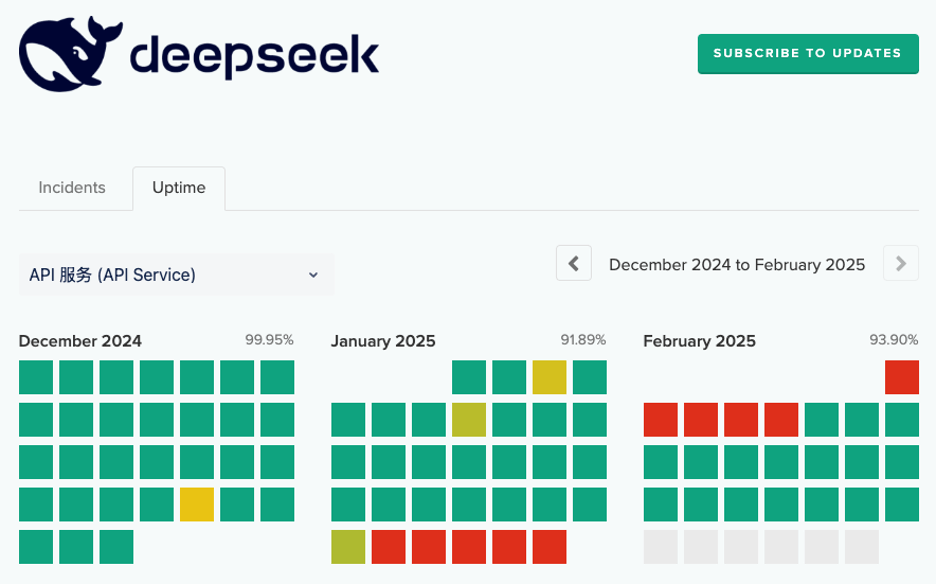
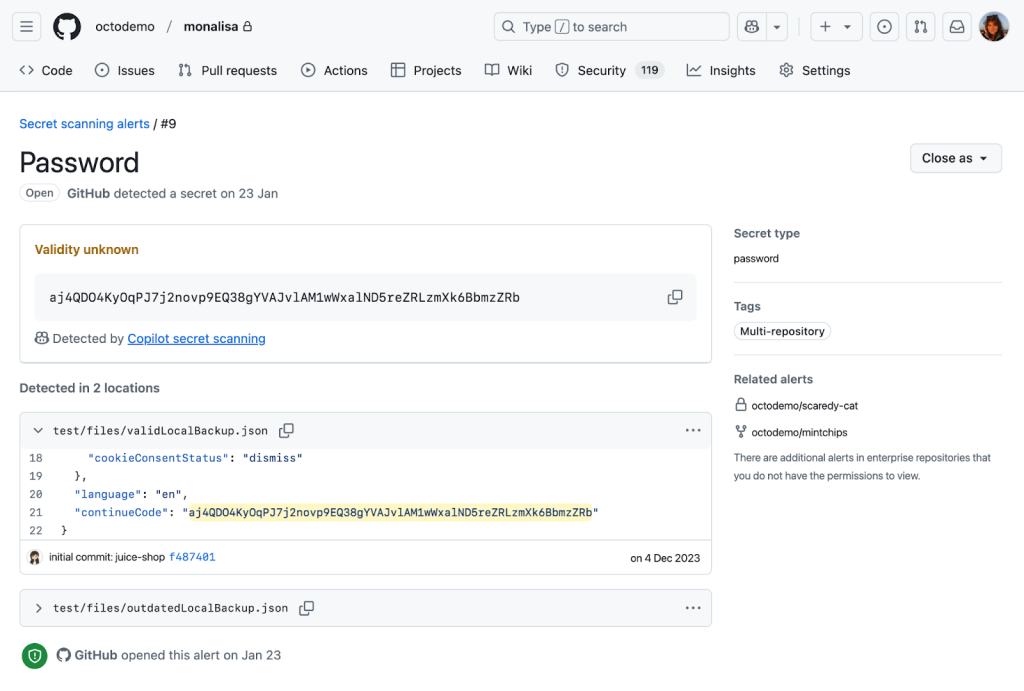
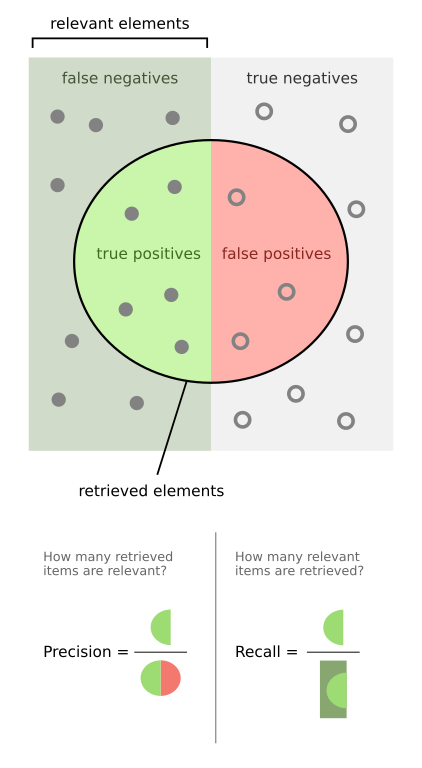







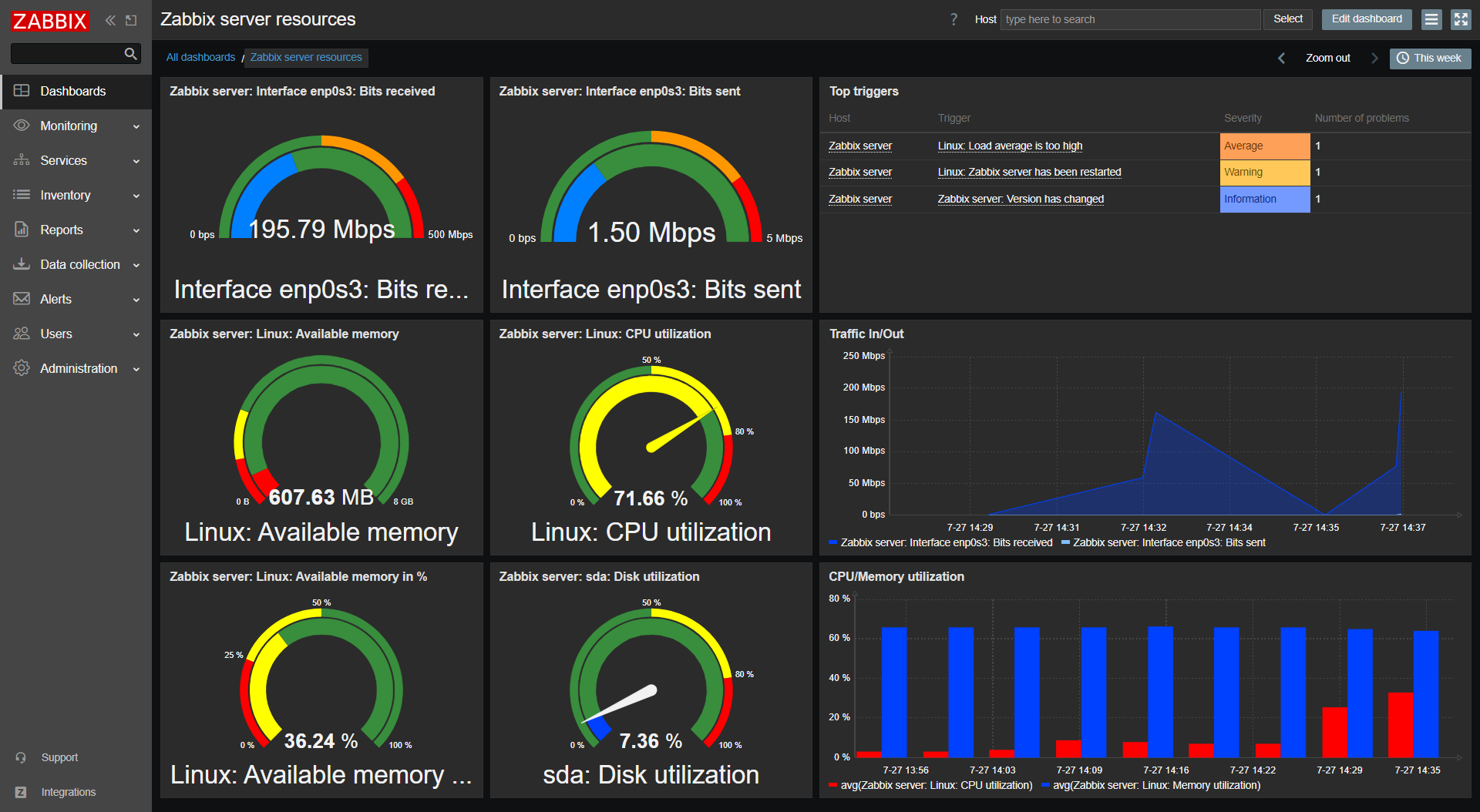



 Jon Handler is Director of Solutions Architecture for Search Services at Amazon Web Services, based in Palo Alto, CA. Jon works closely with OpenSearch and Amazon OpenSearch Service, providing help and guidance to a broad range of customers who have generative AI, search, and log analytics workloads for OpenSearch. Prior to joining AWS, Jon’s career as a software developer included four years of coding a large-scale, eCommerce search engine. Jon holds a Bachelor of the Arts from the University of Pennsylvania, and a Master of Science and a Ph. D. in Computer Science and Artificial Intelligence from Northwestern University.