Strategies for achieving least privilege at scale – Part 2

Post Syndicated from Joshua Du Lac original https://aws.amazon.com/blogs/security/strategies-for-achieving-least-privilege-at-scale-part-2/

In this post, we continue with our recommendations for achieving least privilege at scale with AWS Identity and Access Management (IAM). In Part 1 of this two-part series, we described the first five of nine strategies for implementing least privilege in IAM at scale. We also looked at a few mental models that can assist you to scale your approach. In this post, Part 2, we’ll continue to look at the remaining four strategies and related mental models for scaling least privilege across your organization.

6. Empower developers to author application policies

If you’re the only developer working in your cloud environment, then you naturally write your own IAM policies. However, a common trend we’ve seen within organizations that are scaling up their cloud usage is that a centralized security, identity, or cloud team administrator will step in to help developers write customized IAM policies on behalf of the development teams. This may be due to variety of reasons, including unfamiliarity with the policy language or a fear of creating potential security risk by granting excess privileges. Centralized creation of IAM policies might work well for a while, but as the team or business grows, this practice often becomes a bottleneck, as indicated in Figure 1.

Figure 1: Bottleneck in a centralized policy authoring process

Figure 1: Bottleneck in a centralized policy authoring process

This mental model is known as the theory of constraints. With this model in mind, you should be keen to search for constraints, or bottlenecks, faced by your team or organization, identify the root cause, and solve for the constraint. That might sound obvious, but when you’re moving at a fast pace, the constraint might not appear until agility is already impaired. As your organization grows, a process that worked years ago might no longer be effective today.

A software developer generally understands the intent of the applications they build, and to some extent the permissions required. At the same time, the centralized cloud, identity, or security teams tend to feel they are the experts at safely authoring policies, but lack a deep knowledge of the application’s code. The goal here is to enable developers to write the policies in order to mitigate bottlenecks.

The question is, how do you equip developers with the right tools and skills to confidently and safely create the required policies for their applications? A simple way to start is by investing in training. AWS offers a variety of formal training options and ramp-up guides that can help your team gain a deeper understanding of AWS services, including IAM. However, even self-hosting a small hackathon or workshop session in your organization can drive improved outcomes. Consider the following four workshops as simple options for self-hosting a learning series with your teams.

As a next step, you can help your teams along the way by setting up processes that foster collaboration and improve quality. For example, peer reviews are highly recommended, and we’ll cover this later. Additionally, administrators can use AWS native tools such as permissions boundaries and IAM Access Analyzer policy generation to help your developers begin to author their own policies more safely.

Let’s look at permissions boundaries first. An IAM permissions boundary should generally be used to delegate the responsibility of policy creation to your development team. You can set up the developer’s IAM role so that they can create new roles only if the new role has a specific permissions boundary attached to it, and that permissions boundary allows you (as an administrator) to set the maximum permissions that can be granted by the developer. This restriction is implemented by a condition on the developer’s identity-based policy, requiring that specific actions—such as iam:CreateRole or iam:CreatePolicy—are allowed only if a specified permissions boundary is attached.

In this way, when a developer creates an IAM role or policy to grant an application some set of required permissions, they are required to add the specified permissions boundary that will “bound” the maximum permissions available to that application. So even if the policy that the developer creates—such as for their AWS Lambda function—is not sufficiently fine-grained, the permissions boundary helps the organization’s cloud administrators make sure that the Lambda function’s policy is not greater than a maximum set of predefined permissions. So with permissions boundaries, your development team can be allowed to create new roles and policies (with constraints) without administrators creating a manual bottleneck.

Another tool developers can use is IAM Access Analyzer policy generation. IAM Access Analyzer reviews your CloudTrail logs and autogenerates an IAM policy based on your access activity over a specified time range. This greatly simplifies the process of writing granular IAM policies that allow end users access to AWS services.

A classic use case for IAM Access Analyzer policy generation is to generate an IAM policy within the test environment. This provides a good starting point to help identify the needed permissions and refine your policy for the production environment. For example, IAM Access Analyzer can’t identify the production resources used, so it adds resource placeholders for you to modify and add the specific Amazon Resource Names (ARNs) your application team needs. However, not every policy needs to be customized, and the next strategy will focus on reusing some policies.

7. Maintain well-written policies

Strategies seven and eight focus on processes. The first process we’ll focus on is to maintain well-written policies. To begin, not every policy needs to be a work of art. There is some wisdom in reusing well-written policies across your accounts, because that can be an effective way to scale permissions management. There are three steps to approach this task:

  1. Identify your use cases
  2. Create policy templates
  3. Maintain repositories of policy templates

For example, if you were new to AWS and using a new account, we would recommend that you use AWS managed policies as a reference to get started. However, the permissions in these policies might not fit how you intend to use the cloud as time progresses. Eventually, you would want to identify the repetitive or common use cases in your own accounts and create common policies or templates for those situations.

When creating templates, you must understand who or what the template is for. One thing to note here is that the developer’s needs tend to be different from the application’s needs. When a developer is working with resources in your accounts, they often need to create or delete resources—for example, creating and deleting Amazon Simple Storage Service (Amazon S3) buckets for the application to use.

Conversely, a software application generally needs to read or write data—in this example, to read and write objects to the S3 bucket that was created by the developer. Notice that the developer’s permissions needs (to create the bucket) are different than the application’s needs (reading objects in the bucket). Because these are different access patterns, you’ll need to create different policy templates tailored to the different use cases and entities.

Figure 2 highlights this issue further. Out of the set of all possible AWS services and API actions, there are a set of permissions that are relevant for your developers (or more likely, their DevOps build and delivery tools) and there’s a set of permissions that are relevant for the software applications that they are building. Those two sets may have some overlap, but they are not identical.

Figure 2: Visualizing intersecting sets of permissions by use case

Figure 2: Visualizing intersecting sets of permissions by use case

When discussing policy reuse, you’re likely already thinking about common policies in your accounts, such as default federation permissions for team members or automation that runs routine security audits across multiple accounts in your organization. Many of these policies could be considered default policies that are common across your accounts and generally do not vary. Likewise, permissions boundary policies (which we discussed earlier) can have commonality across accounts with low amounts of variation. There’s value in reusing both of these sets of policies. However, reusing policies too broadly could cause challenges if variation is needed—to make a change to a “reusable policy,” you would have to modify every instance of that policy, even if it’s only needed by one application.

You might find that you have relatively common resource policies that multiple teams need (such as an S3 bucket policy), but with slight variations. This is where you might find it useful to create a repeatable template that abides by your organization’s security policies, and make it available for your teams to copy. We call it a template here, because the teams might need to change a few elements, such as the Principals that they authorize to access the resource. The policies for the applications (such as the policy a developer creates to attach to an Amazon Elastic Compute Cloud (Amazon EC2) instance role) are generally more bespoke or customized and might not be appropriate in a template.

Figure 3 illustrates that some policies have low amounts of variation while others are more bespoke.

Figure 3: Identifying bespoke versus common policy types

Figure 3: Identifying bespoke versus common policy types

Regardless of whether you choose to reuse a policy or turn it into a template, an important step is to store these reusable policies and templates securely in a repository (in this case, AWS CodeCommit). Many customers use infrastructure-as-code modules to make it simple for development teams to input their customizations and generate IAM policies that fit their security policies in a programmatic way. Some customers document these policies and templates directly in the repository while others use internal wikis accompanied with other relevant information. You’ll need to decide which process works best for your organization. Whatever mechanism you choose, make it accessible and searchable by your teams.

8. Peer review and validate policies

We mentioned in Part 1 that least privilege is a journey and having a feedback loop is a critical part. You can implement feedback through human review, or you can automate the review and validate the findings. This is equally as important for the core default policies as it is for the customized, bespoke policies.

Let’s start with some automated tools you can use. One great tool that we recommend is using AWS IAM Access Analyzer policy validation and custom policy checks. Policy validation helps you while you’re authoring your policy to set secure and functional policies. The feature is available through APIs and the AWS Management Console. IAM Access Analyzer validates your policy against IAM policy grammar and AWS best practices. You can view policy validation check findings that include security warnings, errors, general warnings, and suggestions for your policy.

Let’s review some of the finding categories.

Finding type Description
Security Includes warnings if your policy allows access that AWS considers a security risk because the access is overly permissive.
Errors Includes errors if your policy includes lines that prevent the policy from functioning.
Warning Includes warnings if your policy doesn’t conform to best practices, but the issues are not security risks.
Suggestions Includes suggestions if AWS recommends improvements that don’t impact the permissions of the policy.

Custom policy checks are a new IAM Access Analyzer capability that helps security teams accurately and proactively identify critical permissions in their policies. You can use this to check against a reference policy (that is, determine if an updated policy grants new access compared to an existing version of the policy) or check against a list of IAM actions (that is, verify that specific IAM actions are not allowed by your policy). Custom policy checks use automated reasoning, a form of static analysis, to provide a higher level of security assurance in the cloud.

One technique that can help you with both peer reviews and automation is the use of infrastructure-as-code. By this, we mean you can write and deploy your IAM policies as AWS CloudFormation templates (CFTs) or AWS Cloud Development Kit (AWS CDK) applications. You can use a software version control system with your templates so that you know exactly what changes were made, and then test and deploy your default policies across multiple accounts, such as by using AWS CloudFormation StackSets.

In Figure 4, you’ll see a typical development workflow. This is a simplified version of a CI/CD pipeline with three stages: a commit stage, a validation stage, and a deploy stage. In the diagram, the developer’s code (including IAM policies) is checked across multiple steps.

Figure 4: A pipeline with a policy validation step

Figure 4: A pipeline with a policy validation step

In the commit stage, if your developers are authoring policies, you can quickly incorporate peer reviews at the time they commit to the source code, and this creates some accountability within a team to author least privilege policies. Additionally, you can use automation by introducing IAM Access Analyzer policy validation in a validation stage, so that the work can only proceed if there are no security findings detected. To learn more about how to deploy this architecture in your accounts, see this blog post. For a Terraform version of this process, we encourage you to check out this GitHub repository.

9. Remove excess privileges over time

Our final strategy focuses on existing permissions and how to remove excess privileges over time. You can determine which privileges are excessive by analyzing the data on which permissions are granted and determining what’s used and what’s not used. Even if you’re developing new policies, you might later discover that some permissions that you enabled were unused, and you can remove that access later. This means that you don’t have to be 100% perfect when you create a policy today, but can rather improve your policies over time. To help with this, we’ll quickly review three recommendations:

  1. Restrict unused permissions by using service control policies (SCPs)
  2. Remove unused identities
  3. Remove unused services and actions from policies

First, as discussed in Part 1 of this series, SCPs are a broad guardrail type of control that can deny permissions across your AWS Organizations organization, a set of your AWS accounts, or a single account. You can start by identifying services that are not used by your teams, despite being allowed by these SCPs. You might also want to identify services that your organization doesn’t intend to use. In those cases, you might consider restricting that access, so that you retain access only to the services that are actually required in your accounts. If you’re interested in doing this, we’d recommend that you review the Refining permissions in AWS using last accessed information topic in the IAM documentation to get started.

Second, you can focus your attention more narrowly to identify unused IAM roles, unused access keys for IAM users, and unused passwords for IAM users either at an account-specific level or the organization-wide level. To do this, you can use IAM Access Analyzer’s Unused Access Analyzer capability.

Third, the same Unused Access Analyzer capability also enables you to go a step further to identify permissions that are granted but not actually used, with the goal of removing unused permissions. IAM Access Analyzer creates findings for the unused permissions. If the granted access is required and intentional, then you can archive the finding and create an archive rule to automatically archive similar findings. However, if the granted access is not required, you can modify or remove the policy that grants the unintended access. The following screenshot shows an example of the dashboard for IAM Access Analyzer’s unused access findings.

Figure 5: Screenshot of IAM Access Analyzer dashboard

Figure 5: Screenshot of IAM Access Analyzer dashboard

When we talk to customers, we often hear that the principle of least privilege is great in principle, but they would rather focus on having just enough privilege. One mental model that’s relevant here is the 80/20 rule (also known as the Pareto principle), which states that 80% of your outcome comes from 20% of your input (or effort). The flip side is that the remaining 20% of outcome will require 80% of the effort—which means that there are diminishing returns for additional effort. Figure 6 shows how the Pareto principle relates to the concept of least privilege, on a scale from maximum privilege to perfect least privilege.

Figure 6: Applying the Pareto principle (80/20 rule) to the concept of least privilege

Figure 6: Applying the Pareto principle (80/20 rule) to the concept of least privilege

The application of the 80/20 rule to permissions management—such as refining existing permissions—is to identify what your acceptable risk threshold is and to recognize that as you perform additional effort to eliminate that risk, you might produce only diminishing returns. However, in pursuit of least privilege, you’ll still want to work toward that remaining 20%, while being pragmatic about the remainder of the effort.

Remember that least privilege is a journey. Two ways to be pragmatic along this journey are to use feedback loops as you refine your permissions, and to prioritize. For example, focus on what is sensitive to your accounts and your team. Restrict access to production identities first before moving to environments with less risk, such as development or testing. Prioritize reviewing permissions for roles or resources that enable external, cross-account access before moving to the roles that are used in less sensitive areas. Then move on to the next priority for your organization.

Conclusion

Thank you for taking the time to read this two-part series. In these two blog posts, we described nine strategies for implementing least privilege in IAM at scale. Across these nine strategies, we introduced some mental models, tools, and capabilities that can assist you to scale your approach. Let’s consider some of the key takeaways that you can use in your journey of setting, verifying, and refining permissions.

Cloud administrators and developers will set permissions, and can use identity-based policies or resource-based policies to grant access. Administrators can also use multiple accounts as boundaries, and set additional guardrails by using service control policies, permissions boundaries, block public access, VPC endpoint policies, and data perimeters. When cloud administrators or developers create new policies, they can use IAM Access Analyzer’s policy generation capability to generate new policies to grant permissions.

Cloud administrators and developers will then verify permissions. For this task, they can use both IAM Access Analyzer’s policy validation and peer review to determine if the permissions that were set have issues or security risks. These tools can be leveraged in a CI/CD pipeline too, before the permissions are set. IAM Access Analyzer’s custom policy checks can be used to detect nonconformant updates to policies.

To both verify existing permissions and refine permissions over time, cloud administrators and developers can use IAM Access Analyzer’s external access analyzers to identify resources that were shared with external entities. They can also use either IAM Access Advisor’s last accessed information or IAM Access Analyzer’s unused access analyzer to find unused access. In short, if you’re looking for a next step to streamline your journey toward least privilege, be sure to check out IAM Access Analyzer.

 
If you have feedback about this post, submit comments in the Comments section below. If you have questions about this post, contact AWS Support.

Author photo

Josh Du Lac
Josh leads Security & Networking Solutions Architecture at AWS. He and his team advise hundreds of startup, enterprise, and global organizations how to accelerate their journey to the cloud while improving their security along the way. Josh holds a Masters in Cybersecurity and an MBA. Outside of work, Josh enjoys searching for the best tacos in Texas and practicing his handstands.

Emeka Enekwizu

Emeka Enekwizu
Emeka is a Senior Solutions Architect at AWS. He is dedicated to assisting customers through every phase of their cloud adoption and enjoys unpacking security concepts into practical nuggets. Emeka holds CISSP and CCSP certifications and loves playing soccer in his spare time.

Strategies for achieving least privilege at scale – Part 1

Post Syndicated from Joshua Du Lac original https://aws.amazon.com/blogs/security/strategies-for-achieving-least-privilege-at-scale-part-1/

Least privilege is an important security topic for Amazon Web Services (AWS) customers. In previous blog posts, we’ve provided tactical advice on how to write least privilege policies, which we would encourage you to review. You might feel comfortable writing a few least privilege policies for yourself, but to scale this up to thousands of developers or hundreds of AWS accounts requires strategy to minimize the total effort needed across an organization.

At re:Inforce 2022, we recommended nine strategies for achieving least privilege at scale. Although the strategies we recommend remain the same, this blog series serves as an update, with a deeper discussion of some of the strategies. In this series, we focus only on AWS Identity and Access Management (IAM), not application or infrastructure identities. We’ll review least privilege in AWS, then dive into each of the nine strategies, and finally review some key takeaways. This blog post, Part 1, covers the first five strategies, while Part 2 of the series covers the remaining four.

Overview of least privilege

The principle of least privilege refers to the concept that you should grant users and systems the narrowest set of privileges needed to complete required tasks. This is the ideal, but it’s not so simple when change is constant—your staff or users change, systems change, and new technologies become available. AWS is continually adding new services or features, and individuals on your team might want to adopt them. If the policies assigned to those users were perfectly least privilege, then you would need to update permissions constantly as the users ask for more or different access. For many, applying the narrowest set of permissions could be too restrictive. The irony is that perfect least privilege can cause maximum effort.

We want to find a more pragmatic approach. To start, you should first recognize that there is some tension between two competing goals—between things you don’t want and things you do want, as indicated in Figure 1. For example, you don’t want expensive resources created, but you do want freedom for your builders to choose their own resources.

Figure 1: Tension between two competing goals

Figure 1: Tension between two competing goals

There’s a natural tension between competing goals when you’re thinking about least privilege, and you have a number of controls that you can adjust to securely enable agility. I’ve spoken with hundreds of customers about this topic, and many focus primarily on writing near-perfect permission policies assigned to their builders or machines, attempting to brute force their way to least privilege.

However, that approach isn’t very effective. So where should you start? To answer this, we’re going to break this question down into three components: strategies, tools, and mental models. The first two may be clear to you, but you might be wondering, “What is a mental model”? Mental models help us conceptualize something complex as something relatively simpler, though naturally this leaves some information out of the simpler model.

Teams

Teams generally differ based on the size of the organization. We recognize that each customer is unique, and that customer needs vary across enterprises, government agencies, startups, and so on. If you feel the following example descriptions don’t apply to you today, or that your organization is too small for this many teams to co-exist, then keep in mind that the scenarios might be more applicable in the future as your organization continues to grow. Before we can consider least privilege, let’s consider some common scenarios.

Customers who operate in the cloud tend to have teams that fall into one of two categories: decentralized and centralized. Decentralized teams might be developers or groups of developers, operators, or contractors working in your cloud environment. Centralized teams often consist of administrators. Examples include a cloud environment team, an infrastructure team, the security team, the network team, or the identity team.

Scenarios

To achieve least privilege in an organization effectively, teams must collaborate. Let’s consider three common scenarios:

  1. Creating default roles and policies (for teams and monitoring)
  2. Creating roles and policies for applications
  3. Verifying and refining existing permissions

The first scenario focuses on the baseline set of roles and permissions that are necessary to start using AWS. Centralized teams (such as a cloud environmentteam or identity and access management team) commonly create these initial default roles and policies that you deploy by using your account factory, IAM Identity Center, or through AWS Control Tower. These default permissions typically enable federation for builders or enable some automation, such as tools for monitoring or deployments.

The second scenario is to create roles and policies for applications. After foundational access and permissions are established, the next step is for your builders to use the cloud to build. Decentralized teams (software developers, operators, or contractors) use the roles and policies from the first scenario to then create systems, software, or applications that need their own permissions to perform useful functions. These teams often need to create new roles and policies for their software to interact with databases, Amazon Simple Storage Service (Amazon S3), Amazon Simple Queue Service (Amazon SQS) queues, and other resources.

Lastly, the third scenario is to verify and refine existing permissions, a task that both sets of teams should be responsible for.

Journeys

At AWS, we often say that least privilege is a journey, because change is a constant. Your builders may change, systems may change, you may swap which services you use, and the services you use may add new features that your teams want to adopt, in order to enable faster or more efficient ways of working. Therefore, what you consider least privilege today may be considered insufficient by your users tomorrow.

This journey is made up of a lifecycle of setting, verifying, and refining permissions. Cloud administrators and developers will set permissions, they will then verify permissions, and then they refine those permissions over time, and the cycle repeats as illustrated in Figure 2. This produces feedback loops of continuous improvement, which add up to the journey to least privilege.

Figure 2: Least privilege is a journey

Figure 2: Least privilege is a journey

Strategies for implementing least privilege

The following sections will dive into nine strategies for implementing least privilege at scale:

Part 1 (this post):

  1. (Plan) Begin with coarse-grained controls
  2. (Plan) Use accounts as strong boundaries around resources
  3. (Plan) Prioritize short-term credentials
  4. (Policy) Enforce broad security invariants
  5. (Policy) Identify the right tool for the job

Part 2:

  1. (Policy) Empower developers to author application policies
  2. (Process) Maintain well-written policies
  3. (Process) Peer-review and validate policies
  4. (Process) Remove excess privileges over time

To provide some logical structure, the strategies can be grouped into three categories—plan, policy, and process. Plan is where you consider your goals and the outcomes that you want to achieve and then design your cloud environment to simplify those outcomes. Policy focuses on the fact that you will need to implement some of those goals in either the IAM policy language or as code (such as infrastructure-as-code). The Process category will look at an iterative approach to continuous improvement. Let’s begin.

1. Begin with coarse-grained controls

Most systems have relationships, and these relationships can be visualized. For example, AWS accounts relationships can be visualized as a hierarchy, with an organization’s management account and groups of AWS accounts within that hierarchy, and principals and policies within those accounts, as shown in Figure 3.

Figure 3: Icicle diagram representing an account hierarchy

Figure 3: Icicle diagram representing an account hierarchy

When discussing least privilege, it’s tempting to put excessive focus on the policies at the bottom of the hierarchy, but you should reverse that thinking if you want to implement least privilege at scale. Instead, this strategy focuses on coarse-grained controls, which refer to a top-level, broader set of controls. Examples of these broad controls include multi-account strategy, service control policies, blocking public access, and data perimeters.

Before you implement coarse-grained controls, you must consider which controls will achieve the outcomes you desire. After the relevant coarse-grained controls are in place, you can tailor the permissions down the hierarchy by using more fine-grained controls along the way. The next strategy reviews the first coarse-grained control we recommend.

2. Use accounts as strong boundaries around resources

Although you can start with a single AWS account, we encourage customers to adopt a multi-account strategy. As customers continue to use the cloud, they often need explicit security boundaries, the ability to control limits, and billing separation. The isolation designed into an AWS account can help you meet these needs.

Customers can group individual accounts into different assortments (organizational units) by using AWS Organizations. Some customers might choose to align this grouping by environment (for example: Dev, Pre-Production, Test, Production) or by business units, cost center, or some other option. You can choose how you want to construct your organization, and AWS has provided prescriptive guidance to assist customers when they adopt a multi-account strategy.

Similarly, you can use this approach for grouping security controls. As you layer in preventative or detective controls, you can choose which groups of accounts to apply them to. When you think of how to group these accounts, consider where you want to apply your security controls that could affect permissions.

AWS accounts give you strong boundaries between accounts (and the entities that exist in those accounts). As shown in Figure 4, by default these principals and resources cannot cross their account boundary (represented by the red dotted line on the left).

Figure 4: Account hierarchy and account boundaries

Figure 4: Account hierarchy and account boundaries

In order for these accounts to communicate with each other, you need to explicitly enable access by adding narrow permissions. For use cases such as cross-account resource sharing, or cross-VPC networking, or cross-account role assumptions, you would need to explicitly enable the required access by creating the necessary permissions. Then you could review those permissions by using IAM Access Analyzer.

One type of analyzer within IAM Access Analyzer, external access, helps you identify resources (such as S3 buckets, IAM roles, SQS queues, and more) in your organization or accounts that are shared with an external entity. This helps you identify if there’s potential for unintended access that could be a security risk to your organization. Although you could use IAM Access Analyzer (external access) with a single account, we recommend using it at the organization level. You can configure an access analyzer for your entire organization by setting the organization as the zone of trust, to identify access allowed from outside your organization.

To get started, you create the analyzer and it begins analyzing permissions. The analysis may produce findings, which you can review for intended and unintended access. You can archive the intended access findings, but you’ll want to act quickly on the unintended access to mitigate security risks.

In summary, you should use accounts as strong boundaries around resources, and use IAM Access Analyzer to help validate your assumptions and find unintended access permissions in an automated way across the account boundaries.

3. Prioritize short-term credentials

When it comes to access control, shorter is better. Compared to long-term access keys or passwords that could be stored in plaintext or mistakenly shared, a short-term credential is requested dynamically by using strong identities. Because the credentials are being requested dynamically, they are temporary and automatically expire. Therefore, you don’t have to explicitly revoke or rotate the credentials, nor embed them within your application.

In the context of IAM, when we’re discussing short-term credentials, we’re effectively talking about IAM roles. We can split the applicable use cases of short-term credentials into two categories—short-term credentials for builders and short-term credentials for applications.

Builders (human users) typically interact with the AWS Cloud in one of two ways; either through the AWS Management Console or programmatically through the AWS CLI. For console access, you can use direct federation from your identity provider to individual AWS accounts or something more centralized through IAM Identity Center. For programmatic builder access, you can get short-term credentials into your AWS account through IAM Identity Center using the AWS CLI.

Applications created by builders need their own permissions, too. Typically, when we consider short-term credentials for applications, we’re thinking of capabilities such as IAM roles for Amazon Elastic Compute Cloud (Amazon EC2), IAM roles for Amazon Elastic Container Service (Amazon ECS) tasks, or AWS Lambda execution roles. You can also use IAM Roles Anywhere to obtain temporary security credentials for workloads and applications that run outside of AWS. Use cases that require cross-account access can also use IAM roles for granting short-term credentials.

However, organizations might still have long-term secrets, like database credentials, that need to be stored somewhere. You can store these secrets with AWS Secrets Manager, which will encrypt the secret by using an AWS KMS encryption key. Further, you can configure automatic rotation of that secret to help reduce the risk of those long-term secrets.

4. Enforce broad security invariants

Security invariants are essentially conditions that should always be true. For example, let’s assume an organization has identified some core security conditions that they want enforced:

  1. Block access for the AWS account root user
  2. Disable access to unused AWS Regions
  3. Prevent the disabling of AWS logging and monitoring services (AWS CloudTrail or Amazon CloudWatch)

You can enable these conditions by using service control policies (SCPs) at the organization level for groups of accounts using an organizational unit (OU), or for individual member accounts.

Notice these words—block, disable, and prevent. If you’re considering these actions in the context of all users or all principals except for the administrators, that’s where you’ll begin to implement broad security invariants, generally by using service control policies. However, a common challenge for customers is identifying what conditions to apply and the scope. This depends on what services you use, the size of your organization, the number of teams you have, and how your organization uses the AWS Cloud.

Some actions have inherently greater risk, while others may have nominal risk or are more easily reversible. One mental model that has helped customers to consider these issues is an XY graph, as illustrated in the example in Figure 5.

Figure 5: Using an XY graph for analyzing potential risk versus frequency of use

Figure 5: Using an XY graph for analyzing potential risk versus frequency of use

The X-axis in this graph represents the potential risk associated with using a service functionality within a particular account or environment, while the Y-axis represents the frequency of use of that service functionality. In this representative example, the top-left part of the graph covers actions that occur frequently and are relatively safe—for example, read-only actions.

The functionality in the bottom-right section is where you want to focus your time. Consider this for yourself—if you were to create a similar graph for your environment—what are the actions you would consider to be high-risk, with an expected low or rare usage within your environment? For example, if you enable CloudTrail for logging, you want to make sure that someone doesn’t invoke the CloudTrail StopLogging API operation or delete the CloudTrail logs. Another high-risk, low-usage example could include restricting AWS Direct Connect or network configuration changes to only your network administrators.

Over time, you can use the mental model of the XY graph to decide when to use preventative guardrails for actions that should never happen, versus conditional or alternative guardrails for situational use cases. You could also move from preventative to detective security controls, while accounting for factors such as the user persona and the environment type (production, development, or testing). Finally, you could consider doing this exercise broadly at the service level before thinking of it in a more fine-grained way, feature-by-feature.

However, not all controls need to be custom to your organization. To get started quickly, here are some examples of documented SCPs as well as AWS Control Tower guardrail references. You can adopt those or tailor them to fit your environment as needed.

5. Identify the right tools for the job

You can think of IAM as a toolbox that offers many tools that provide different types of value. We can group these tools into two broad categories: guardrails and grants.

Guardrails are the set of tools that help you restrict or deny access to your accounts. At a high level, they help you figure out the boundary for the set of permissions that you want to retain. SCPs are a great example of guardrails, because they enable you to restrict the scope of actions that principals in your account or your organization can take. Permissions boundaries are another great example, because they enable you to safely delegate the creation of new principals (roles or users) and permissions by setting maximum permissions on the new identity.

Although guardrails help you restrict access, they don’t inherently grant any permissions. To grant permissions, you use either an identity-based policy or resource-based policy. Identity policies are attached to principals (roles or users), while resource-based policies are applied to specific resources, such as an S3 bucket.

A common question is how to decide when to use an identity policy versus a resource policy to grant permissions. IAM, in a nutshell, seeks to answer the question: who can access what? Can you spot the nuance in the following policy examples?

Policies attached to principals

{
      "Effect": "Allow",
      "Action": "x",
      "Resource": "y",
      "Condition": "z"
    }

Policies attached to resources

{
      "Effect": "Allow",
      "Principal": "w",
      "Action": "x",
      "Resource": "y",
      "Condition": "z"
    }

You likely noticed the difference here is that with identity-based (principal) policies, the principal is implicit (that is, the principal of the policy is the entity to which the policy is applied), while in a resource-based policy, the principal must be explicit (that is, the principal has to be specified in the policy). A resource-based policy can enable cross-account access to resources (or even make a resource effectively public), but the identity-based policies likewise need to allow the access to that cross-account resource. Identity-based policies with sufficient permissions can then access resources that are “shared.” In essence, both the principal and the resource need to be granted sufficient permissions.

When thinking about grants, you can address the “who” angle by focusing on the identity-based policies, or the “what” angle by focusing on resource-based policies. For additional reading on this topic, see this blog post. For information about how guardrails and grants are evaluated, review the policy evaluation logic documentation.

Lastly, if you’d like a detailed walkthrough on choosing the right tool for the job, we encourage you to read the IAM policy types: How and when to use them blog post.

Conclusion

This blog post walked through the first five (of nine) strategies for achieving least privilege at scale. For the remaining four strategies, see Part 2 of this series.

 
If you have feedback about this post, submit comments in the Comments section below. If you have questions about this post, contact AWS Support.

Author photo

Josh Du Lac
Josh leads Security & Networking Solutions Architecture at AWS. He and his team advise hundreds of startup, enterprise, and global organizations how to accelerate their journey to the cloud while improving their security along the way. Josh holds a Masters in Cybersecurity and an MBA. Outside of work, Josh enjoys searching for the best tacos in Texas and practicing his handstands.

Emeka Enekwizu

Emeka Enekwizu
Emeka is a Senior Solutions Architect at AWS. He is dedicated to assisting customers through every phase of their cloud adoption and enjoys unpacking security concepts into practical nuggets. Emeka holds CISSP and CCSP certifications and loves playing soccer in his spare time.

Run Apache XTable on Amazon MWAA to translate open table formats

Post Syndicated from Matthias Rudolph original https://aws.amazon.com/blogs/big-data/run-apache-xtable-on-amazon-mwaa-to-translate-open-table-formats/

Open table formats (OTFs) like Apache Iceberg are being increasingly adopted, for example, to improve transactional consistency of a data lake or to consolidate batch and streaming data pipelines on a single file format and reduce complexity. In practice, architects need to integrate the chosen format with the various layers of a modern data platform. However, the level of support for the different OTFs varies across common analytical services.

Commercial vendors and the open source community have recognized this situation and are working on interoperability between table formats. One approach is to make a single physical dataset readable in different formats by translating its metadata and avoiding reprocessing of actual data files. Apache XTable is an open source solution that follows this approach and provides abstractions and tools for the translation of open table format metadata.

In this post, we show you how to get started with Apache XTable on AWS and how you can use it in a batch pipeline orchestrated with Amazon Managed Workflows for Apache Airflow (Amazon MWAA). To understand how XTable and similar solutions work, we start with a high-level background on metadata management in an OTF and then dive deeper into XTable and its usage.

Open table formats

Open table formats overcome the gaps of traditional storage formats of data lakes such as Apache Hive tables. They provide abstractions and capabilities known from relational databases like transactional consistency and the ability to create, update, or delete single records. In addition, they help manage schema evolution.

In order to understand how the XTable metadata translation approach works, you must first understand how the metadata of an OTF is represented on the storage layer.

An OTF comprises a data layer and a metadata layer, which are both represented as files on storage. The data layer contains the data files. The metadata layer contains metadata files that keep track of the data files and the transactionally consistent sequence of changes to these. The following figure illustrates this configuration.

Inspecting the files of an Iceberg table on storage, we identify the metadata layer through the folder metadata. Adjacent to it are the data files—in this example, as snappy-compressed Parquet:

<table base folder>
├── metadata # contains metadata files
│ ├── 00000-6c64b16d-affa-4f0e-8635-a996ec13a7fa.metadata.json
│ ├── 23ba9e94-7819-4661-b698-f512f5b51054-m0.avro
│ └── snap-5514083086862319381-1-23ba9e94-7819-4661-b698-f512f5b51054.avro
└── part-00011-587322f1-1007-4500-a5cf-8022f6e7fa3c-c000.snappy.parquet # data files

Comparable to Iceberg, in Delta Lake, the metadata layer is represented through the folder _delta_log:

<table base folder>
├── _delta_log # contains metadata files
│ └── 00000000000000000000.json
└── part-00011-587322f1-1007-4500-a5cf-8022f6e7fa3c-c000.snappy.parquet # data files

Although the metadata layer varies in structure and capabilities between OTFs, it’s eventually just files on storage. Typically, it resides in the table’s base folder adjacent to the data files.

Now, the question emerges: what if metadata files of multiple different formats are stored in parallel for the same table?

Current approaches to interoperability do exactly that, as we will see in the next section.

Apache XTable

XTable is currently provided as a standalone Java binary. It translates the metadata layer between Apache Hudi, Apache Iceberg, or Delta Lake without rewriting data files and integrates with Iceberg-compatible catalogs like the AWS Glue Data Catalog.

In practice, XTable reads the latest snapshot of an input table and creates additional metadata for configurable target formats. It adds this additional metadata to the table on the storage layer—in addition to existing metadata.

Through this, you can choose either format, source or target, read the respective metadata, and get the same consistent view on the table’s data.

The following diagram illustrates the metadata translation process.

Let’s assume you have an existing Delta Lake table that you want to make readable as an Iceberg table. To run XTable, you invoke its Java binary and provide a dataset config file that specifies source and target format, as well as source table paths:

java -jar utilities-0.1.0-SNAPSHOT-bundled.jar \
	--datasetConfig datasetConfig.yaml

A minimal datasetConfig.yaml looks as follows, assuming the table is stored on Amazon Simple Storage Service (Amazon S3):

---
sourceFormat: DELTA
targetFormats:
  - ICEBERG
datasets:
  - tableBasePath: s3://<URI to base folder of table>
    tableName: <table name>
...

As shown in the following listing, XTable adds the Iceberg-specific metadata folder to the table’s base path in addition to the existing _delta_log folder. Now, clients can read the table in either Delta Lake or Iceberg format.

<table base folder>
├── _delta_log # Previously existing Delta Lake metadata
│   └── ...
├── metadata   # Added by XTable: Apache Iceberg metadata
│   └── ...
└── part-00011-587322f1-1007-4500-a5cf-8022f6e7fa3c-c000.snappy.parquet # data files

To register the Iceberg table in Data Catalog, pass a further config file to XTable that is responsible for Iceberg catalogs:

java -jar utilities-0.1.0-SNAPSHOT-bundled.jar \
	--datasetConfig datasetConfig.yaml \
	-- icebergCatalogConfig glueDataCatalog.yaml

The minimal contents of glueDataCatalog.yaml are as follows. It configures XTable to use the Data Catalog-specific IcebergCatalog implementation provided by the iceberg-aws module, which is part of the Apache Iceberg core project:

---
catalogImpl: org.apache.iceberg.aws.glue.GlueCatalog
catalogName: glue
catalogOptions:
  warehouse: s3://<URI to base folder of Iceberg tables>
  catalog-impl: org.apache.iceberg.aws.glue.GlueCatalog
  io-impl: org.apache.iceberg.aws.s3.S3FileIO
... 

Run Apache XTable as an Airflow Operator

You can use XTable in batch data pipelines that write tables on the data lake and make sure these are readable in different file formats. For instance, operating in the Delta Lake ecosystem, a data pipeline might create Delta tables, which need to be accessible as Iceberg tables as well.

One tool to orchestrate data pipelines on AWS is Amazon MWAA, which is a managed service for Apache Airflow. In the following sections, we explore how XTable can run within a custom Airflow Operator on Amazon MWAA. We elaborate on the initial design of such an Operator and demonstrate its deployment on Amazon MWAA.

Why a custom Operator? Although XTable could also be invoked from a BashOperator directly, we choose to wrap this step in a custom operator to allow for configuration through a native Airflow programming language (Python) and operator parameters only. For a background on how to write custom operators, see Creating a custom operator.

The following diagram illustrates the dependency between the operator and XTable’s binary.

Input parameters of the Operator

XTable’s primary inputs are YAML-based configuration files:

  • Dataset config – Contains source format, target formats, and source tables
  • Iceberg catalog config (optional) – Contains the reference to an external Iceberg catalog into which to register the table in the target format

We choose to reflect the data structures of the YAML files in the Operator’s input parameters, as listed in the following table.

Parameter Type Values
dataset_config dict Contents of dataset config as dict literal
iceberg_catalog_config dict Contents of Iceberg catalog config as dict literal

As the Operator runs, the YAML files are generated from the input parameters.

Refer to XTable’s GitHub repository for a full reference of all possible dict keys.

Example parameterisation

The following example shows the configuration to translate a table from Delta Lake to both Iceberg and Hudi. The attribute dataset_config reflects the structure of the dataset config file through a Python dict literal:

from mwaa_plugin.plugin import XtableOperator
operator = XtableOperator(
    task_id="xtableTask",
    dataset_config={
        "sourceFormat": "DELTA",
        "targetFormats": ["ICEBERG", "HUDI"],
        "datasets": [
            {
                "tableBasePath": "s3://datalake/sales",
                "tableName": "sales",
                "namespace": "table",
            }
        ],
    }
)

Sample code: The full source code of the sample XtableOperator and all other code used in this post is provided through this GitHub repository.

Solution overview

To deploy the custom operator to Amazon MWAA, we upload it together with DAGs into the configured DAG folder.

Besides the operator itself, we also need to upload XTable’s executable JAR. As of writing this post, the JAR needs to be compiled by the user from source code. To simplify this, we provide a container-based build script.

Prerequisites

We assume you have at least an environment consisting of Amazon MWAA itself, an S3 bucket, and an AWS Identity and Access Management (IAM) role for Amazon MWAA that has read access to the bucket and optionally write access to the AWS Glue Data Catalog.

In addition, you need one of the following container runtimes to run the provided build script for XTable:

  • Finch
  • Docker

Build and deploy the XTableOperator

To compile XTable, you can use the provided build script and complete the following steps:

  1. Clone the sample code from GitHub:
    git clone https://github.com/aws-samples/apache-xtable-on-aws-samples.git
    cd apache-xtable-on-aws-samples

  2. Run the build script:
    ./build-airflow-operator.sh

  3. Because the Airflow operator uses the library JPype to invoke XTable’s JAR, add a dependency in the Amazon MWAA requirement.txt file:
    JPype1==1.5.0

    For a background on installing additional Python libraries on Amazon MWAA, see Installing Python dependencies.
    Because XTable is Java-based, a Java 11 runtime environment (JRE) is required on Amazon MWAA. You can use the Amazon MWAA startup script to install a JRE.

  4. Add the following lines to an existing startup script or create a new one as provided in the sample code base of this post:
    if [[ "${MWAA_AIRFLOW_COMPONENT}" != "webserver" ]]
    then
        sudo yum install -y java-11-amazon-corretto-headless
    fi

    For more information about this mechanism, see Using a startup script with Amazon MWAA.

  5. Upload xtable_operator/, requirements.txt, startup.sh and .airflowignore to the S3 bucket and respective paths from which Amazon MWAA will read files.
    Make sure the IAM role for Amazon MWAA has appropriate read permissions.
    With regard to the Customer Operator, make sure to upload the local folder xtable_operator/ and .airflowignore into the configured DAG folder.

  6. Update the configuration of your Amazon MWAA environment as follows and start the update process:
    1. Add or update the S3 URI to the requirements.txt file through the Requirements file configuration option.
    2. Add or update the S3 URI to the startup.sh script through Startup script configuration option.
  7. Optionally, you can use the AWS Glue Data Catalog as an Iceberg catalog. In case you create Iceberg metadata and want to register it in the AWS Glue Data Catalog, the Amazon MWAA role needs permissions to create or modify tables in AWS Glue. The following listing shows a minimal policy for this. It constrains permissions to a defined database in AWS Glue:
    {
        "Version": "2012-10-17",
        "Statement": [
            {
                "Effect": "Allow",
                "Action": [
                    "glue:GetDatabase",
                    "glue:CreateTable",
                    "glue:GetTables",
                    "glue:UpdateTable",
                    "glue:GetDatabases",
                    "glue:GetTable"
                ],
                "Resource": [
                    "arn:aws:glue:<AWS Region>:<AWS Account ID>:catalog",
                    "arn:aws:glue:<AWS Region>:<AWS Account ID>:database/<Database name>",
                    "arn:aws:glue:<AWS Region>:<AWS Account ID>:table/<Database name>/*"
                ]
            }
        ]
    }

Using the XTableOperator in practice: Delta Lake to Apache Iceberg

Let’s look into a practical example that uses the XTableOperator. We continue the scenario of a data pipeline in the Delta Lake ecosystem and assume it is implemented as a DAG on Amazon MWAA. The following figure shows our example batch pipeline.

The pipeline uses an Apache Spark job that is run by AWS Glue to write a Delta table into an S3 bucket. Additionally, the table is made accessible as an Iceberg table without data duplication. Finally, we want to load the Iceberg table into Amazon Redshift, which is a fully managed, petabyte-scale data warehouse service in the cloud.

As shown in the following screenshot of the graph visualization of the example DAG, we run the XTableOperator after creating the Delta table through a Spark job. Then we use the RedshiftDataOperator to refresh a materialized view, which is used in downstream transformations as a source table. Materialized views are a common construct to precompute complex queries on large tables. In this example, we use them to simplify data loading into Amazon Redshift because of the incremental update capabilities in combination with Iceberg.

The input parameters of the XTableOperator are as follows:

operator = XtableOperator(
    task_id="xtableTask",
    dataset_config={
        "sourceFormat": "DELTA",
        "targetFormats": ["ICEBERG"],
        "datasets": [
            {
                "tableBasePath": "s3://<datalake>/<sales>",
                "tableName": "sales",
                "namespace": "table",
            }
        ],
    },
    iceberg_catalog_config={
        "catalogImpl": "org.apache.iceberg.aws.glue.GlueCatalog",
        "catalogName": "glue",
        "catalogOptions": {
            "warehouse": "s3://datalake/sales",
            "catalog-impl": "org.apache.iceberg.aws.glue.GlueCatalog",
            "io-impl": "org.apache.iceberg.aws.s3.S3FileIO"
    }
)

The XTableOperator creates Apache Iceberg metadata on Amazon S3 and registers a table accordingly in the Data Catalog. The following screenshot shows the created Iceberg table. AWS Glue stores a pointer to Iceberg’s most recent metadata file. As updates are applied to the table and new metadata files are created, XTable updates the pointer after each job.

Amazon Redshift is able to discover the Iceberg table through the Data Catalog and read it using Amazon Redshift Spectrum.

Summary

In this post, we showed how Apache XTable translates the metadata layer of open table formats without data duplication. This provides advantages from both a cost and data integrity perspective—especially in large-scale environment—and allows for a migration of an existing historical estate of datasets. We also discussed how a you can implement a custom Airflow Operator that embeds Apache XTable into data pipelines on Amazon MWAA.

For further reading, visit What’s new with Amazon MWAA and Apache XTable’s website. For more examples of other customer operators, refer to the following GitHub repository.


About the Authors

Matthias Rudolph is an Associate Solutions Architect, digitalizing the German manufacturing industry.

Stephen Said is a Senior Solutions Architect and works with Retail/CPG customers. His areas of interest are data platforms and cloud-native software engineering.

How to Back Up Your QNAP NAS to the Cloud

Post Syndicated from Vinodh Subramanian original https://www.backblaze.com/blog/qnap-nas-backup-to-cloud/

A decorative image with the title sync with QNAP.

Your QNAP network attached storage (NAS) device helps your business centralize storage capacity, support collaboration, and access files 24/7 from anywhere. If you were relying on individual hard drives or another ad hoc storage solution before, it definitely helps you uplevel your data management practices.

One of the great features of a QNAP NAS device is Hybrid Backup Sync (HBS), its onboard backup utility that allows you to easily store a copy of your data to your NAS and other destinations. You can set regular, automated backups to protect against data loss due to hardware failures or accidental deletion. But, keeping a copy of your data on your NAS alone doesn’t constitute a true backup strategy. For that, you need to follow the 3-2-1 backup rule with at least one copy stored off-site.

This post explains how to set up a 3-2-1 backup strategy with your QNAP NAS. We’ll share the benefits of storing your backups in the cloud, discuss different options for backing up your QNAP NAS, and provide some practical examples of what you can do by combining cloud storage and your NAS.

Download Our Complete NAS Guide

QNAP NAS and a 3-2-1 backup strategy

Following the 3-2-1 strategy means having three copies of your data, two of which are stored locally but on different media (aka devices), and one stored off-site. 

Your QNAP NAS is your first step towards completing the 3-2-1 strategy. By using it to store data locally, you have two copies on-site. Backing up your QNAP NAS to the cloud completes the 3-2-1 strategy by serving as your off-site storage. 

A diagram showing the 3-2-1 backup strategy, which has three copies of data, on two different types of media, with one stored in an off-site location.

You could maintain an off-site copy on another physical device like another NAS, an external drive, or a file server, but keep in mind, backing up to an external destination other than the cloud will require you to physically separate the backup copy—that is, send your drive via mail or drive it elsewhere in order to ensure geographic separation. Backing up your QNAP NAS to the cloud means you achieve a 3-2-1 strategy without going out of your way to physically separate the copies, and it allows you to easily store data in different regions for greater data resilience and disaster recovery.

The additional benefits of backing your QNAP NAS to the cloud

Backing up your QNAP NAS to the cloud gives you a number of additional benefits, including:

  • Disaster recovery: Without an off-site backup, your on-site data, including data on your individual workstations and your NAS, is susceptible to data loss. Natural disasters could wipe out your machines, your NAS, and any other backups you might store locally. Cloud backups safeguard your data from physical disasters that could destroy both your NAS and local copies.
  • Ransomware protection: While QNAP has on-board utilities that allow you to revert to a previous backup, your NAS is still connected to your network and susceptible to ransomware. Cloud backups, especially those configured with Object Lock, provide a layer of security against ransomware attacks that can encrypt or delete data stored on your network-connected NAS. 
  • Protection against hardware failure: Because your NAS is likely set up in a RAID configuration, one drive failure might not affect your data. But, while one drive is down, your data is at a higher risk. If another drive were to fail, you could lose data. Keeping an off-site backup in cloud storage helps you avoid this fate.
  • Accessibility: With your data in the cloud, your backups are accessible from anywhere. If you’re away from your desk or office and you need to retrieve a file, you can simply log in to your cloud account and copy that file down.
  • Security: Cloud vendors typically protect customer data by encrypting it as it travels to its final destination and/or when it is at rest on the vendors’ storage servers. Encryption protocols differ between cloud vendors, so make sure to understand them as you’re evaluating cloud providers, especially if you have specific security requirements.
  • Automation: Your QNAP NAS comes with a built-in backup utility so you can set your cloud backup schedule in advance and avoid human error (like forgetting to back up) in the future.
  • Scalability: As your data grows, your cloud backups grow with it. With cloud storage, there’s no need to invest in or maintain additional hardware to ensure your data is properly backed up.

How to protect your business data with QNAP

QNAP offers a number of different tools and functionality to help you back up business devices and systems to your NAS, including:

  1. Qsync: Qsync is an on-board backup utility on QNAP devices that allows you to sync computer files to your QNAP NAS. This allows you to back up workstations to your NAS, creating a second, local copy of that data. QNAP NAS also supports Time Machine for Macs. 
  2. NetBack PC Agent: A utility specifically for backing up Windows PCs and servers.
  3. Hyper Data Protector: Use Hyper Data Protector to back up multiple VMware and Hyper-V virtual machines (VMs).
  4. File server backup: QNAP devices support multiple protocols, including rsync, FTP, and CIFS for backing up different file servers.
  5. Boxafe: Use Boxafe to back up Google workspace and Microsoft 365 business account data to your NAS.
  6. Snapshot feature: Takes point-in-time copies of data for protection and recovery.
  7. MARS: Use QNAP’s MARS service to back up Google Photos and WordPress databases and files to your NAS. 

How to back up your QNAP to the cloud

Once you’ve created a copy of your business data to your QNAP NAS, you can then use QNAP Hybrid Backup Sync to back it up to the cloud. Hybrid Backup Sync supports multi-version backups and allows you to customize retention settings for version management. QNAP’s QuDedup feature deduplicates data, helping you manage your storage footprint. The utility also allows you to manage Time Machine backups for Mac devices.

A product photo of a QNAP NAS.

What can you do with cloud storage and QNAP Hybrid Backup Sync?

The QNAP Hybrid Backup Sync app provides you with a lot of options. You can synchronize in the cloud as little or as much as you want. Here are some practical examples of what you can do with Hybrid Backup Sync and cloud storage working together.

1. Sync the entire contents of your QNAP to the cloud

The QNAP NAS has excellent fault tolerance—it can continue operating even when individual drive units fail—but nothing in life is foolproof. It pays to be prepared in the event of a catastrophe. Now that you know about the 3-2-1 backup strategy, you know how important it is to make sure that you have a copy of your files in the cloud.

2. Sync your most important media files

Using your QNAP to store marketing assets like video and photos? You’ve invested untold amounts of time, money, and effort into producing those media files, so make sure they’re safely and securely synced to the cloud with Hybrid Backup Sync.

3. Back up Time Machine and other local backups

Apple’s Time Machine software provides Mac users with reliable local backup, and many Backblaze customers rely on it to provide that crucial first step in making sure their data is secure. QNAP enables the NAS to act as a network-based Time Machine backup. Those Time Machine files can be synced to the cloud, so you can make sure to have Time Machine files to restore from in the event of a critical failure.

If you use Windows or Linux, you can configure the QNAP NAS as the destination for your Windows or Linux local data backup. That, in turn, can be synced to the cloud from the NAS.

Ready to give it a try?

Hybrid Backup Sync allows you to choose from any number of cloud storage providers as a backup destination, and Backblaze B2 Cloud Storage is one of them. Check out our videos on how to use Hybrid Backup Sync to back up or sync your data to B2 in under 15 minutes.

If you haven’t given cloud storage a try yet, you can get started now and make sure your NAS is synced or backed up securely to the cloud.

The post How to Back Up Your QNAP NAS to the Cloud appeared first on Backblaze Blog | Cloud Storage & Cloud Backup

Reverse-Engineering Ticketmaster’s Barcode System

Post Syndicated from Bruce Schneier original https://www.schneier.com/blog/archives/2024/07/reverse-engineering-ticketmasters-barcode-system.html

Interesting:

By reverse-engineering how Ticketmaster and AXS actually make their electronic tickets, scalpers have essentially figured out how to regenerate specific, genuine tickets that they have legally purchased from scratch onto infrastructure that they control. In doing so, they are removing the anti-scalping restrictions put on the tickets by Ticketmaster and AXS.

EDITED TO ADD (7/14): More information.

[$] Offload-friendly network encryption in the kernel

Post Syndicated from daroc original https://lwn.net/Articles/980430/

The

PSP security protocol
(PSP) is a way to transparently encrypt packets by
efficiently offloading encryption and decryption to the network
interface cards (NICs) that Google uses for connections inside its data centers. The
protocol is similar to

IPsec
, in that it allows for wrapping arbitrary traffic
in a layer of encryption. The difference is that PSP is encapsulated in UDP, and
designed from the beginning to reduce the amount of state that NICs
have to track in order to send and receive encrypted traffic, allowing for more
simultaneous connections. Jakub Kicinski

wants to add support
for the protocol to the Linux kernel.

Another OpenSSH remote code execution vulnerability

Post Syndicated from corbet original https://lwn.net/Articles/981287/

Alexander “Solar Designer” Peslyak has disclosed another OpenSSH
vulnerability
that can be exploited for remote code execution, but only
on distributions that have applied a patch to add auditing support.
Specifically, RHEL 9 and derivatives are affected, as are
Fedora 36 and 37 (but not later releases).

The main difference from CVE-2024-6387 is that the race condition
and RCE potential are triggered in the privsep child process, which
runs with reduced privileges compared to the parent server process.
So immediate impact is lower. However, there may be differences in
exploitability of these vulnerabilities in a particular scenario,
which could make either one of these a more attractive choice for
an attacker, and if only one of these is fixed or mitigated then
the other becomes more relevant.

Security updates for Tuesday

Post Syndicated from corbet original https://lwn.net/Articles/981285/

Security updates have been issued by AlmaLinux (virt:rhel and virt-devel:rhel), Fedora (ghostscript, golang, httpd, libnbd, netatalk, rust-sequoia-chameleon-gnupg, rust-sequoia-gpg-agent, rust-sequoia-keystore, rust-sequoia-openpgp, and rust-sequoia-sq), Mageia (apache), Red Hat (booth, buildah, edk2, fence-agents, git, gvisor-tap-vsock, kernel, kernel-rt, less, libreswan, linux-firmware, openssh, pki-core, podman, postgresql-jdbc, python3, tpm2-tss, virt:rhel, and virt:rhel and virt-devel:rhel modules), SUSE (krb5, poppler, and python-docker), and Ubuntu (apache2, cinder, glance, nova, and Tomcat).

DDoS threat report for 2024 Q2

Post Syndicated from Omer Yoachimik original https://blog.cloudflare.com/ddos-threat-report-for-2024-q2


Welcome to the 18th edition of the Cloudflare DDoS Threat Report. Released quarterly, these reports provide an in-depth analysis of the DDoS threat landscape as observed across the Cloudflare network. This edition focuses on the second quarter of 2024.

With a 280 terabit per second network located across over 230 cities worldwide, serving 19% of all websites, Cloudflare holds a unique vantage point that enables us to provide valuable insights and trends to the broader Internet community.

Key insights for 2024 Q2

  • Cloudflare recorded a 20% year-over-year increase in DDoS attacks.
  • 1 out of every 25 survey respondents said that DDoS attacks against them were carried out by state-level or state-sponsored threat actors.
  • Threat actor capabilities reached an all-time high as our automated defenses generated 10 times more fingerprints to counter and mitigate the ultrasophisticated DDoS attacks.

Quick recap – what is a DDoS attack?

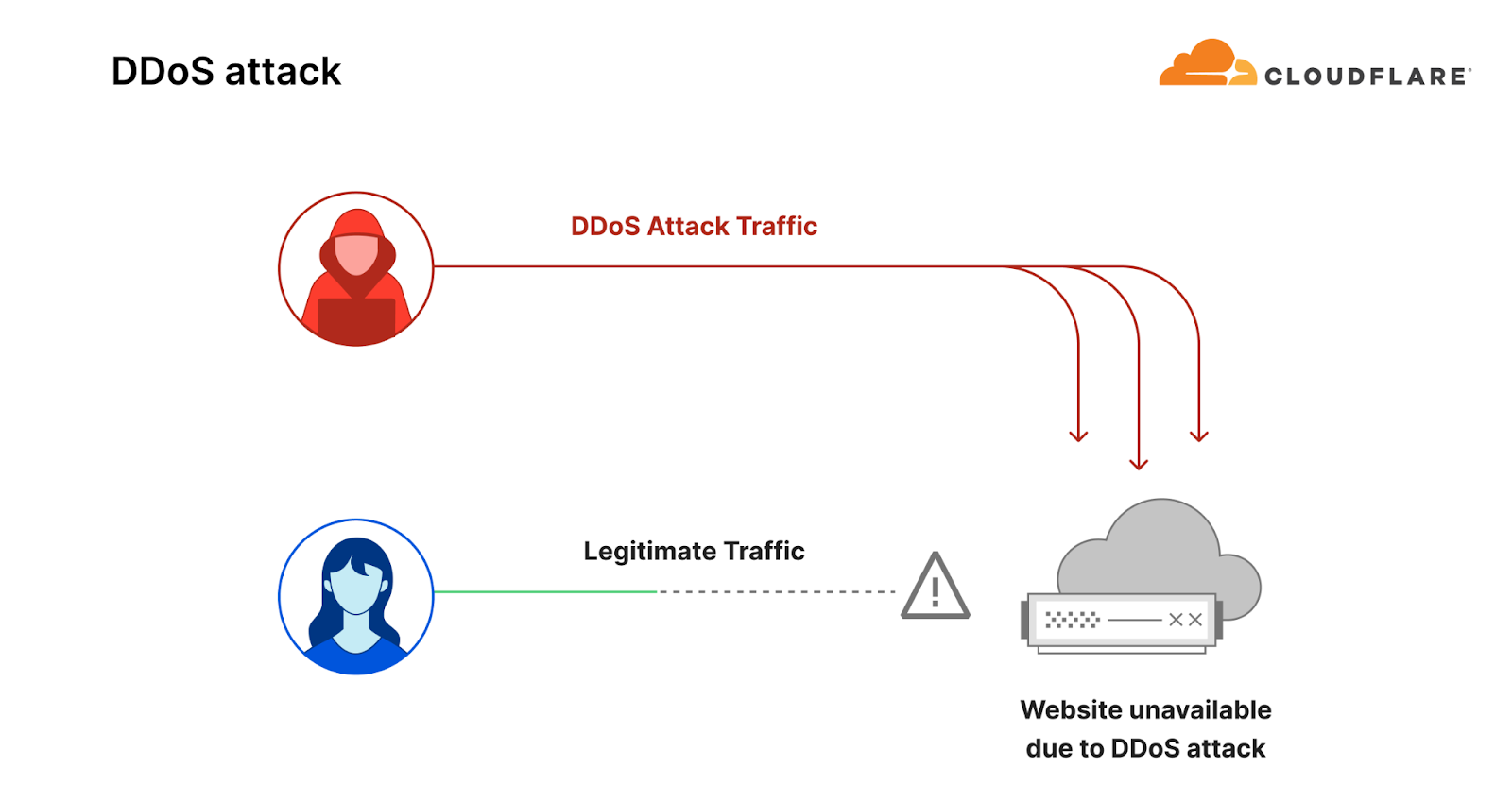
Before diving in deeper, let’s recap what a DDoS attack is. Short for Distributed Denial of Service, a DDoS attack is a type of cyber attack designed to take down or disrupt Internet services, such as websites or mobile apps, making them unavailable to users. This is typically achieved by overwhelming the victim’s server with more traffic than it can handle — usually from multiple sources across the Internet, rendering it unable to handle legitimate user traffic.

Diagram of a DDoS attack

To learn more about DDoS attacks and other types of cyber threats, visit our Learning Center, access previous DDoS threat reports on the Cloudflare blog or visit our interactive hub, Cloudflare Radar. There’s also a free API for those interested in investigating these and other Internet trends.

To learn about our report preparation, refer to our Methodologies.

Threat actor sophistication fuels the continued increase in DDoS attacks

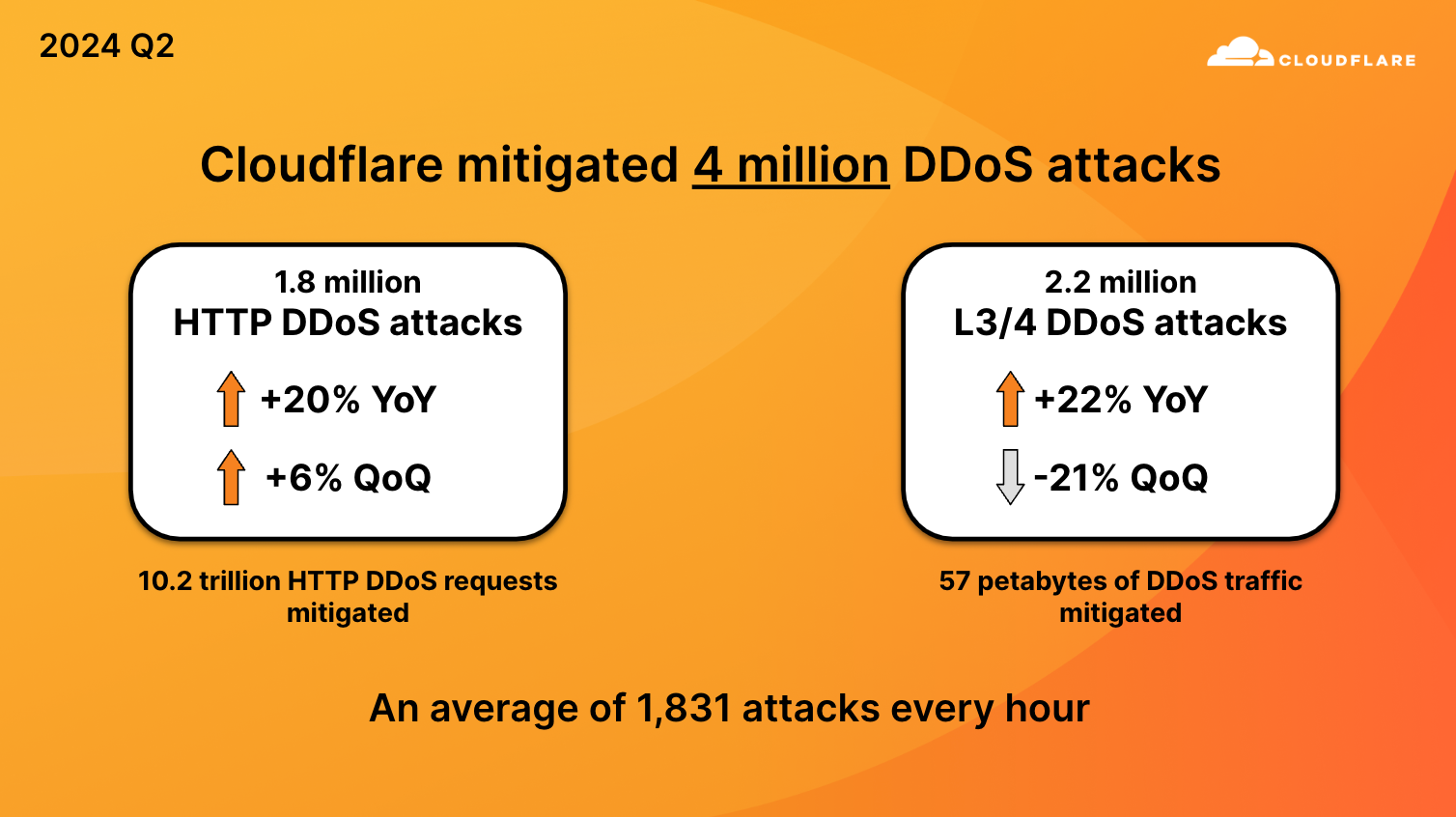
In the first half of 2024, we mitigated 8.5 million DDoS attacks: 4.5 million in Q1 and 4 million in Q2. Overall, the number of DDoS attacks in Q2 decreased by 11% quarter-over-quarter, but increased 20% year-over-year.

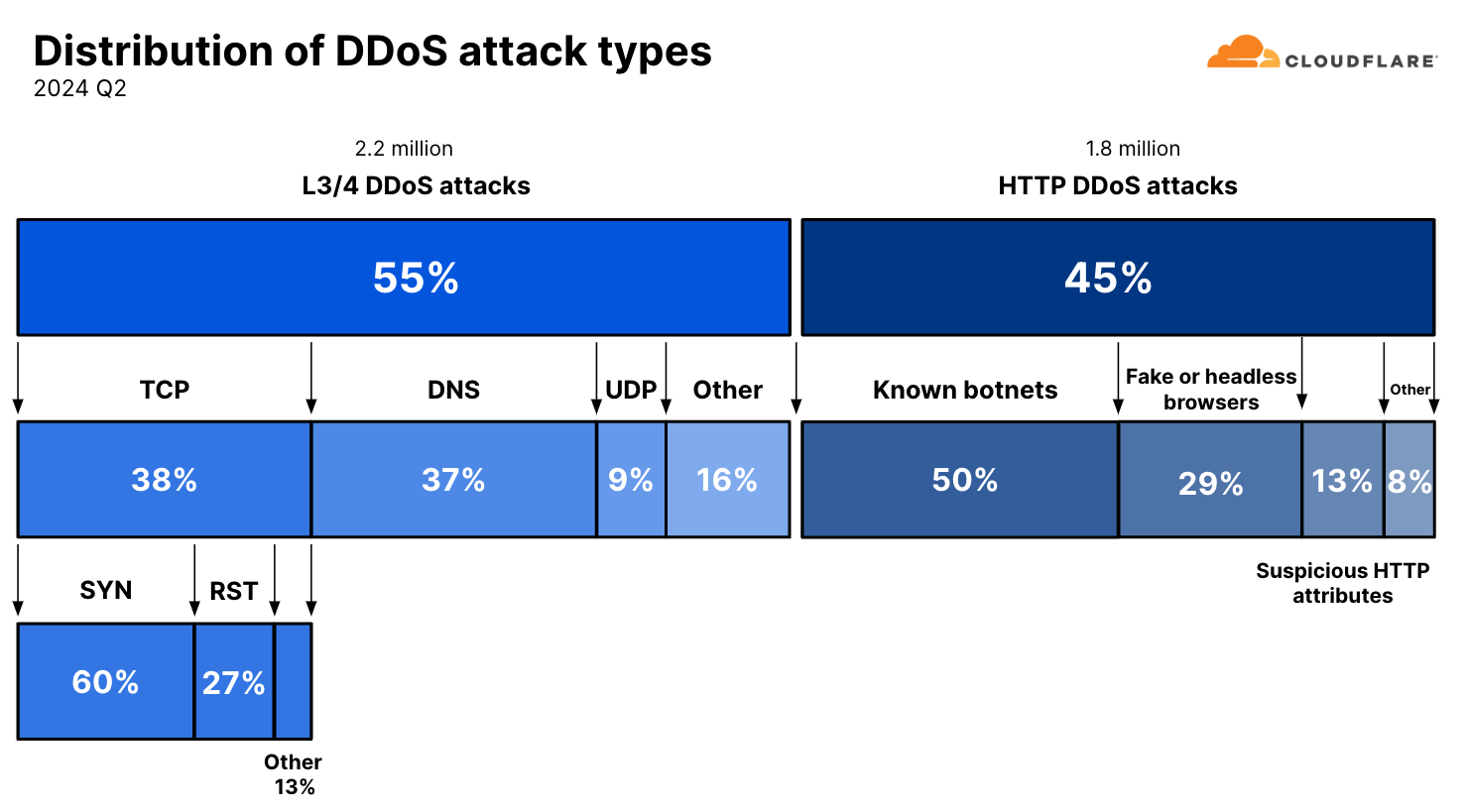
Distribution of DDoS attacks by types and vectors

For context, in the entire year of 2023, we mitigated 14 million DDoS attacks, and halfway through 2024, we have already mitigated 60% of last year’s figure.

Cloudflare successfully mitigated 10.2 trillion HTTP DDoS requests and 57 petabytes of network-layer DDoS attack traffic, preventing it from reaching our customers’ origin servers.

DDoS attacks stats for 2024 Q2

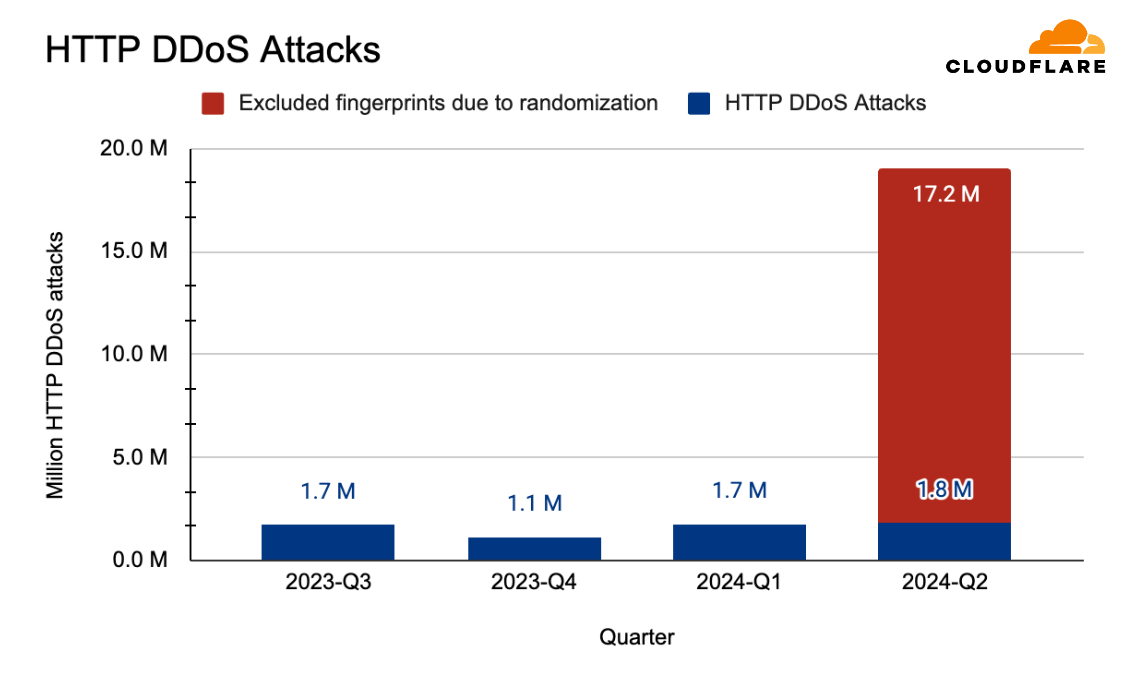
When we break it down further, those 4 million DDoS attacks were composed of 2.2 million network-layer DDoS attacks and 1.8 million HTTP DDoS attacks. This number of 1.8 million HTTP DDoS attacks has been normalized to compensate for the explosion in sophisticated and randomized HTTP DDoS attacks. Our automated mitigation systems generate real-time fingerprints for DDoS attacks, and due to the randomized nature of these sophisticated attacks, we observed many fingerprints being generated for single attacks. The actual number of fingerprints that was generated was closer to 19 million – over ten times larger than the normalized figure of 1.8 million. The millions of fingerprints that were generated to deal with the randomization stemmed from a few single rules. These rules did their job to stop attacks, but they inflated the numbers, so we excluded them from the calculation.

HTTP DDoS attacks by quarter, with the excluded fingerprints

This ten-fold difference underscores the dramatic change in the threat landscape. The tools and capabilities that allowed threat actors to carry out such randomized and sophisticated attacks were previously associated with capabilities reserved for state-level actors or state-sponsored actors. But, coinciding with the rise of generative AI and autopilot systems that can help actors write better code faster, these capabilities have made their way to the common cyber criminal.

Ransom DDoS attacks

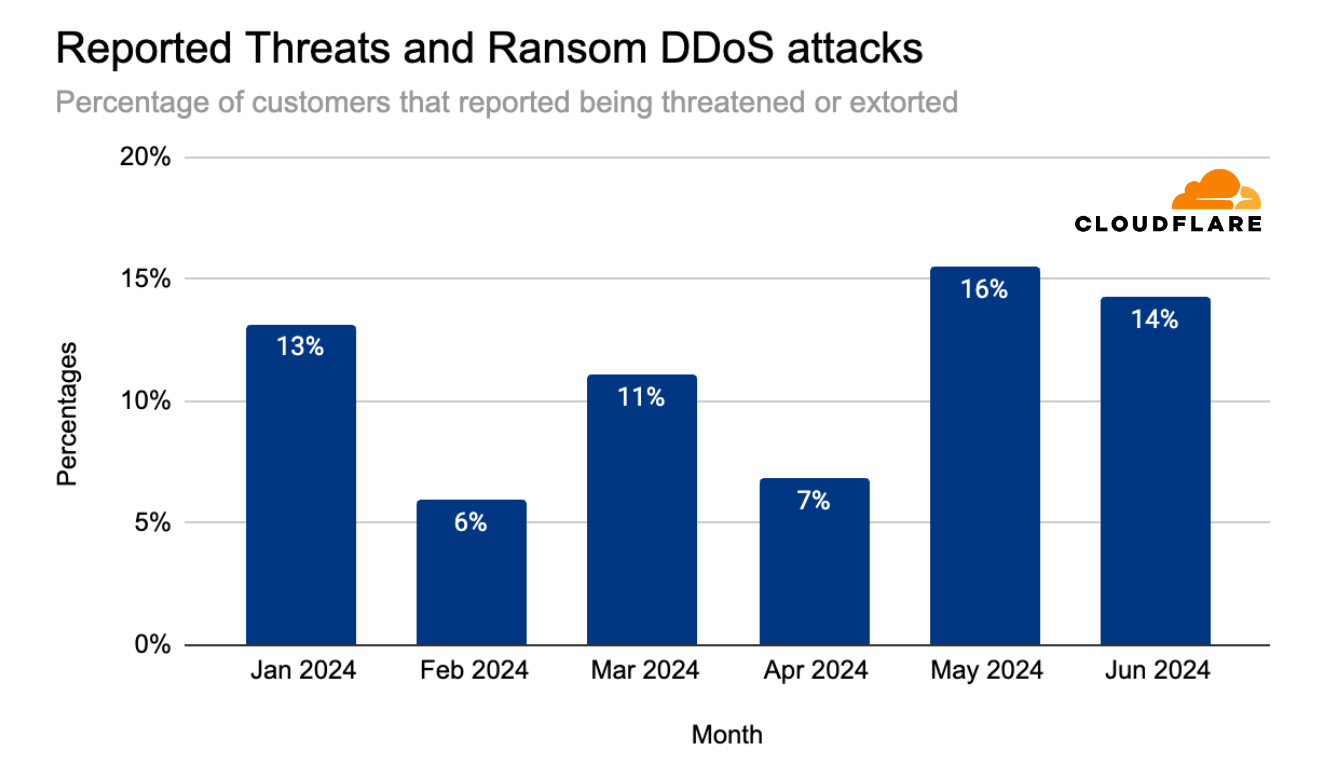
In May 2024, the percentage of attacked Cloudflare customers that reported being threatened by a DDoS attack threat actor, or subjected to a Ransom DDoS attack reached 16% – the highest it’s been in the past 12 months. The quarter started relatively low, at 7% of customers reporting a threat or a ransom attack. That quickly jumped to 16% in May and slightly dipped in June to 14%.

Percentage of customers reporting DDoS threats or ransom extortion (by month)

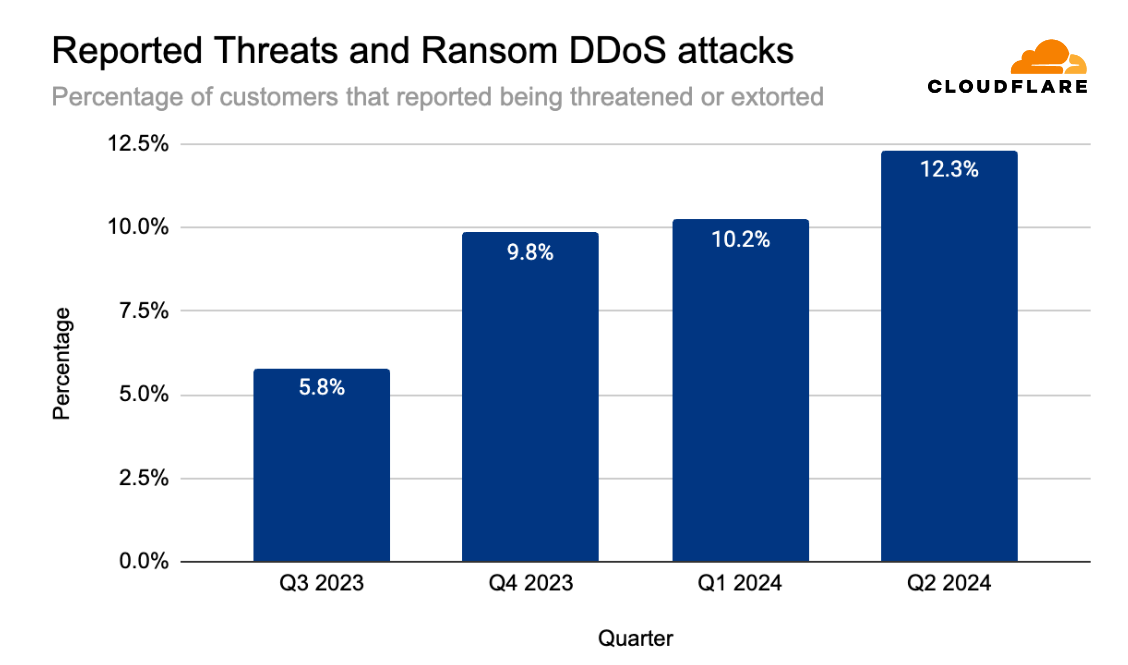
Overall, ransom DDoS attacks have been increasing quarter over quarter throughout the past year. In Q2 2024, the percentage of customers that reported being threatened or extorted was 12.3%, slightly higher than the previous quarter (10.2%) but similar to the percentage of the year before (also 12.0%).

Percentage of customers reporting DDoS threats or ransom extortion (by quarter)

Threat actors

75% of respondents reported that they did not know who attacked them or why. These respondents are Cloudflare customers that were targeted by HTTP DDoS attacks.

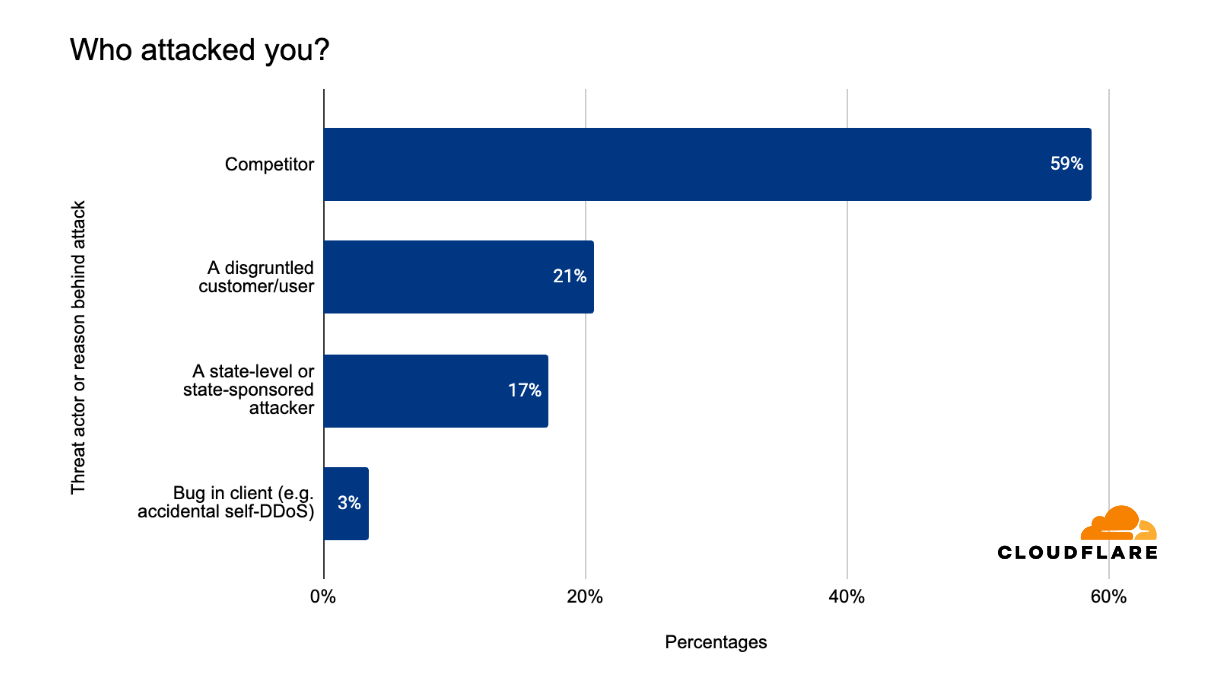
Of the respondents that claim they did know, 59% said it was a competitor who attacked them. Another 21% said the DDoS attack was carried out by a disgruntled customer or user, and another 17% said that the attacks were carried out by state-level or state-sponsored threat actors. The remaining 3% reported it being a self-inflicted DDoS attack.

Percentage of threat actor type reported by Cloudflare customers, excluding unknown attackers and outliers

Top attacked countries and regions

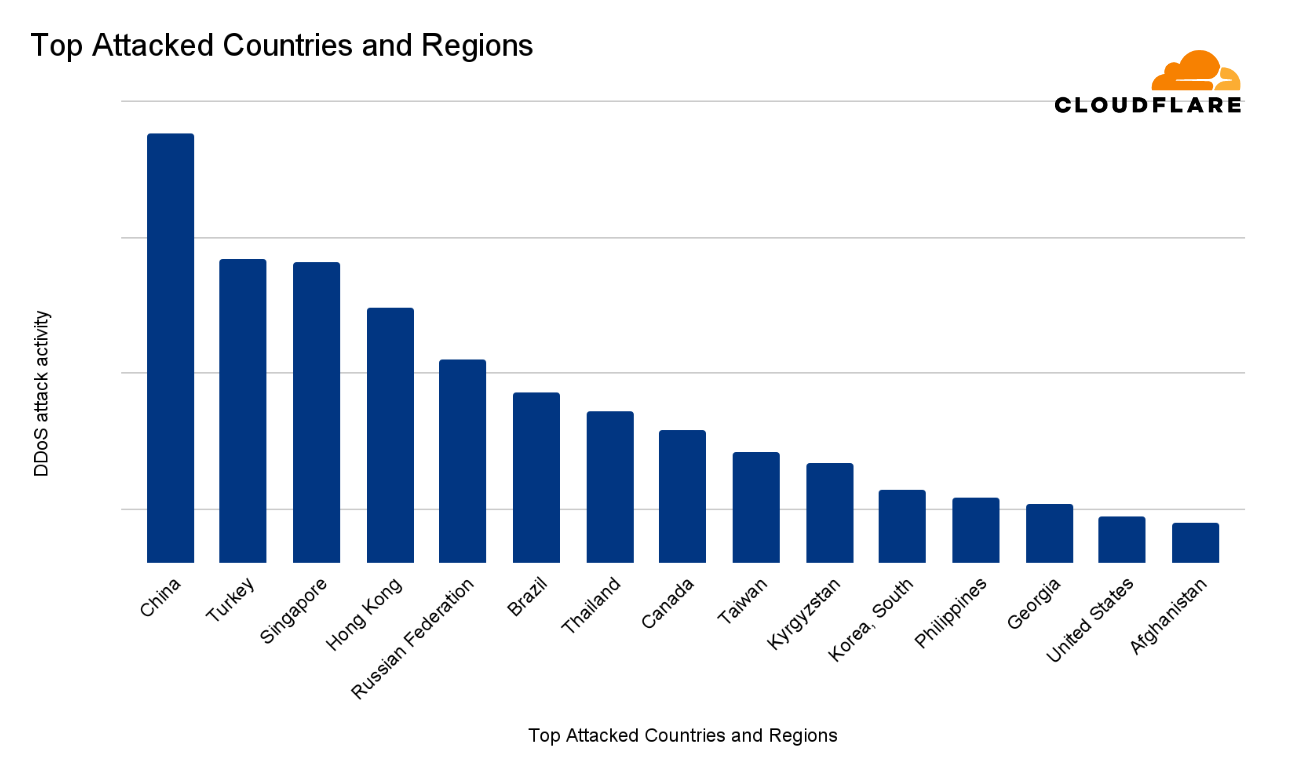
In the second quarter of 2024, China was ranked the most attacked country in the world. This ranking takes into consideration HTTP DDoS attacks, network-layer DDoS attacks, the total volume and the percentage of DDoS attack traffic out of the total traffic, and the graphs show this overall DDoS attack activity per country or region. A longer bar in the chart means more attack activity.

After China, Turkey came in second place, followed by Singapore, Hong Kong, Russia, Brazil, and Thailand. The remaining countries and regions comprising the top 15 most attacked countries are provided in the chart below.

15 most attacked countries and regions in 2024 Q2

Most attacked industries

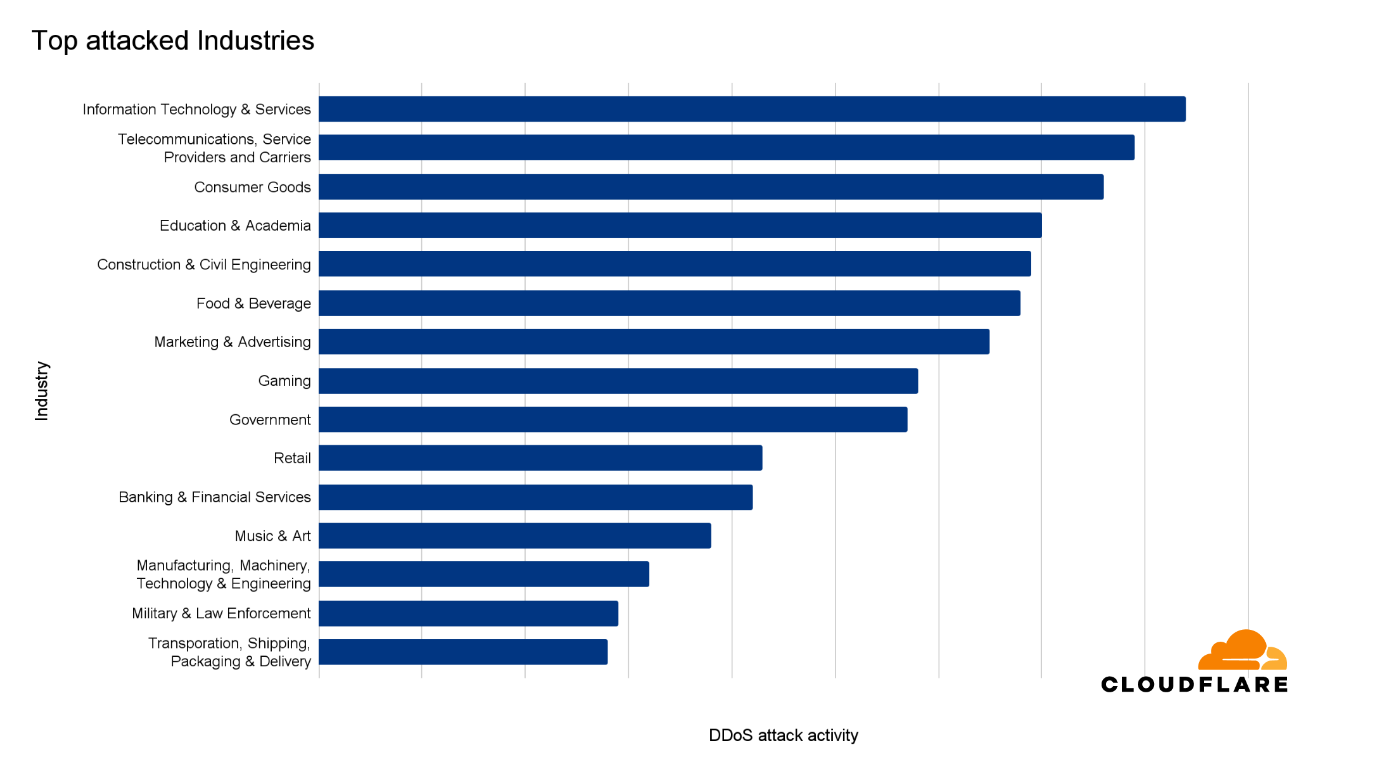
The Information Technology & Services was ranked as the most targeted industry in the second quarter of 2024. The ranking methodologies that we’ve used here follow the same principles as previously described to distill the total volume and relative attack traffic for both HTTP and network-layer DDoS attacks into one single DDoS attack activity ranking.

The Telecommunications, Services Providers and Carrier sector came in second. Consumer Goods came in third place.

15 most attacked industries in 2024 Q2

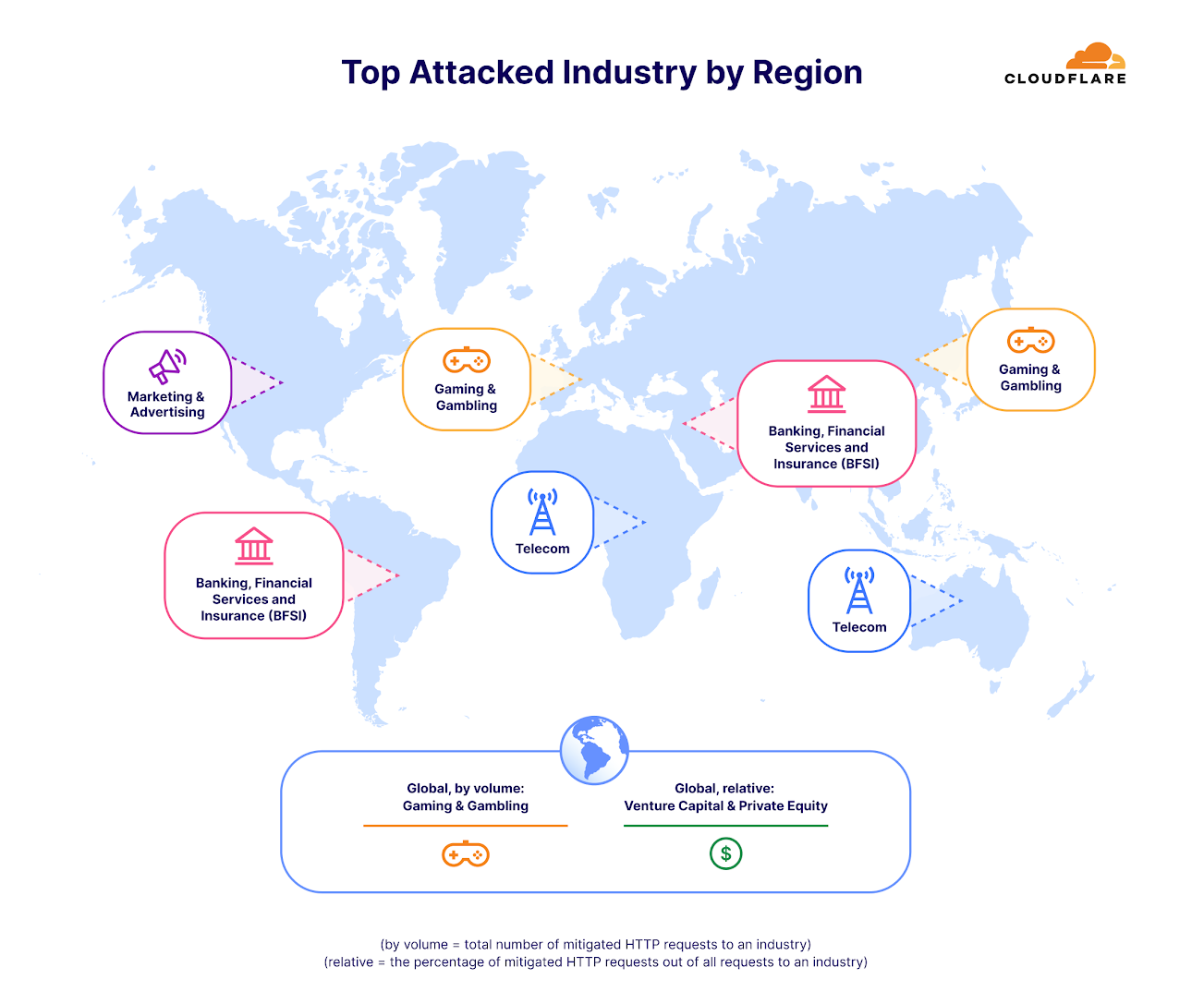
When analyzing only the HTTP DDoS attacks, we see a different picture. Gaming and Gambling saw the most attacks in terms of HTTP DDoS attack request volume. The per-region breakdown is provided below.

Top attacked industries by region (HTTP DDoS attacks)

Largest sources of DDoS attacks

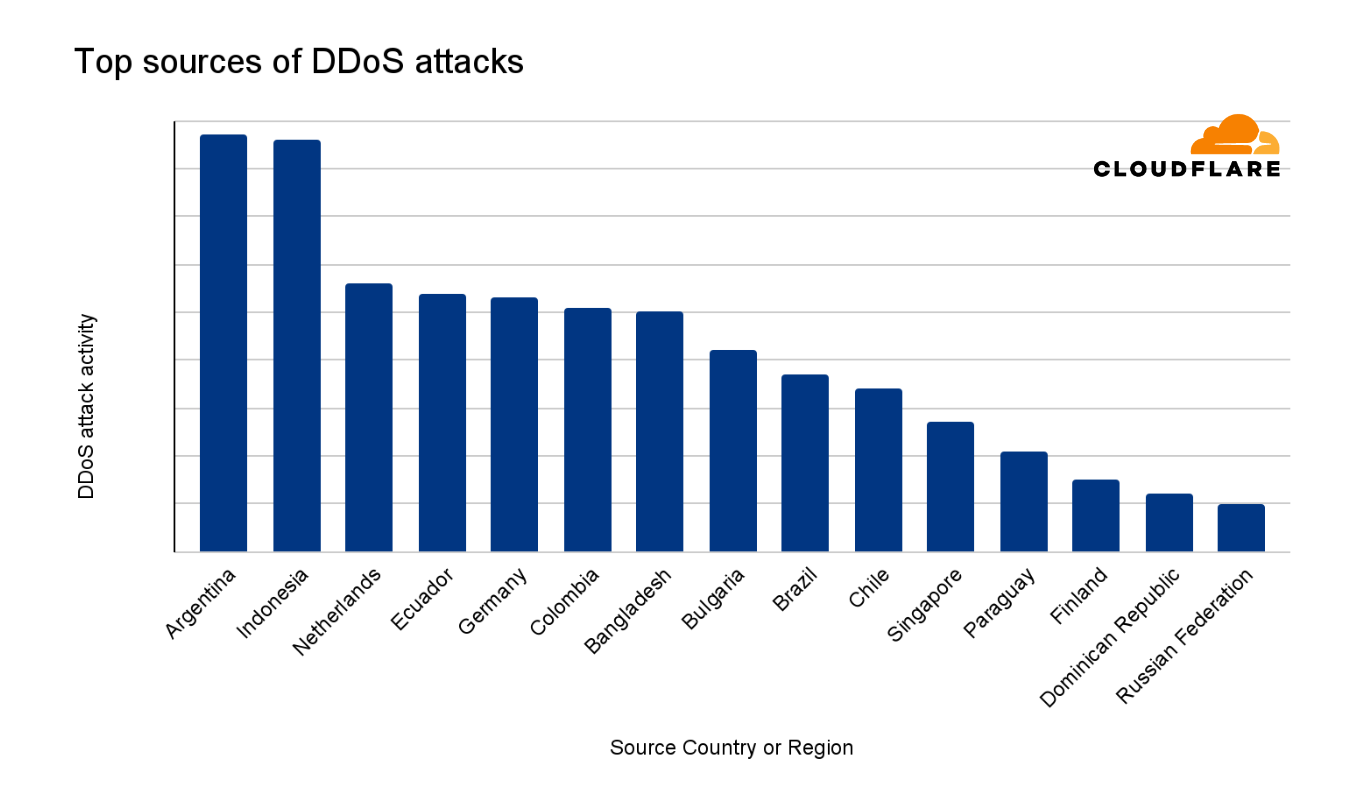
Libya was ranked as the largest source of DDoS attacks in the second quarter of 2024. The ranking methodologies that we’ve used here follow the same principles as previously described to distill the total volume and relative attack traffic for both HTTP and network-layer DDoS attacks into one single DDoS attack activity ranking.

Indonesia followed closely in second place, followed by the Netherlands in third.

15 largest sources of DDoS attacks in 2024 Q2

DDoS attack characteristics

Network-layer DDoS attack vectors

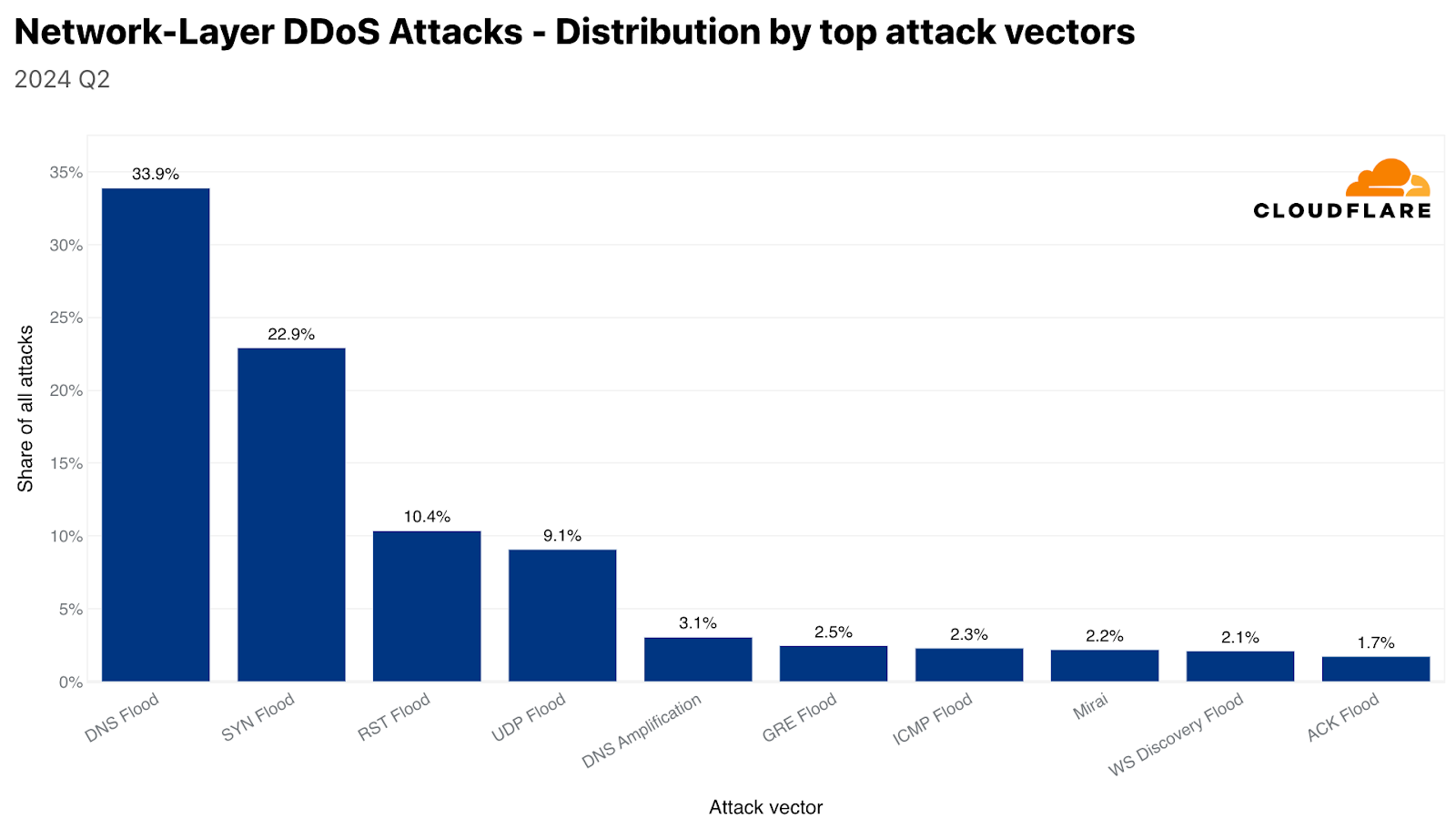
Despite a 49% decrease quarter-over-quarter, DNS-based DDoS attacks remain the most common attack vector, with a combined share of 37% for DNS floods and DNS amplification attacks. SYN floods came in second place with a share of 23%, followed by RST floods accounting for a little over 10%. SYN floods and RST floods are both types of TCP-based DDoS attacks. Collectively, all types of TCP-based DDoS attacks accounted for 38% of all network-layer DDoS attacks.

Top attack vectors (network-layer)

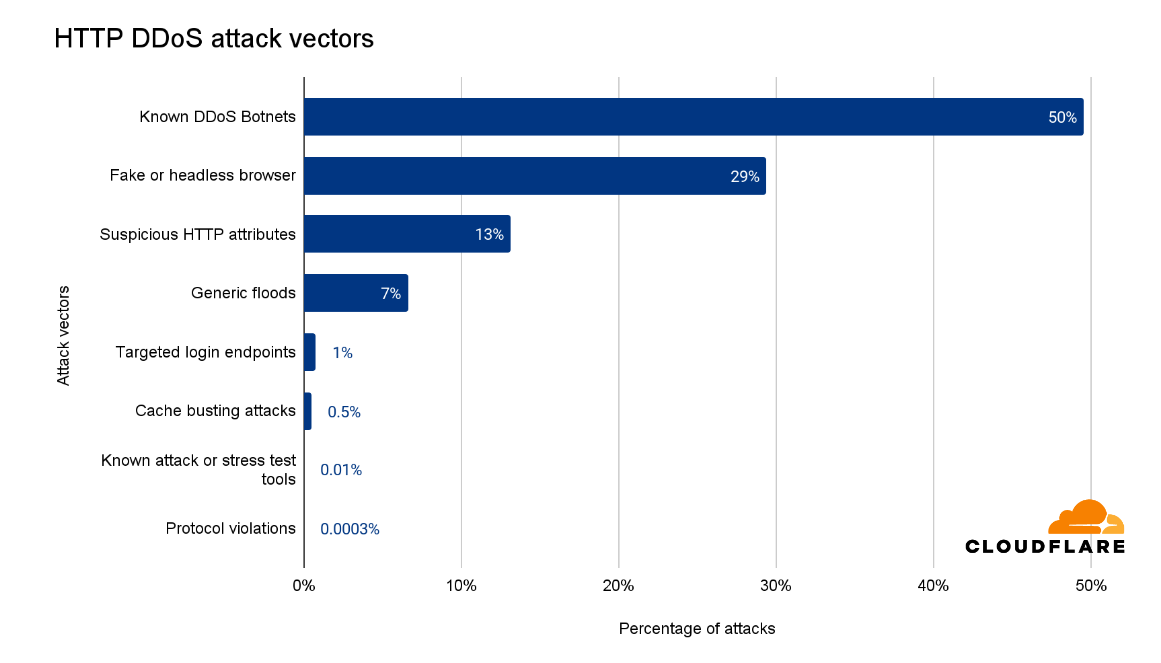
HTTP DDoS attack vectors

One of the advantages of operating a large network is that we see a lot of traffic and attacks. This helps us improve our detection and mitigation systems to protect our customers. In the last quarter, half of all HTTP DDoS attacks were mitigated using proprietary heuristics that targeted botnets known to Cloudflare. These heuristics guide our systems on how to generate a real-time fingerprint to match against the attacks.

Another 29% were HTTP DDoS attacks that used fake user agents, impersonated browsers, or were from headless browsers. An additional 13% had suspicious HTTP attributes which triggered our automated system, and 7% were marked as generic floods. One thing to note is that these attack vectors, or attack groups, are not necessarily exclusive. For example, known botnets also impersonate browsers and have suspicious HTTP attributes, but this breakdown is our initial attempt to categorize the HTTP DDoS attacks.

Top attack vectors (HTTP)

HTTP versions used in DDoS attacks

In Q2, around half of all web traffic used HTTP/2, 29% used HTTP/1.1, an additional fifth used HTTP/3, nearly 0.62% used HTTP/1.0, and 0.01% for HTTP/1.2.

Distribution of web traffic by HTTP version

HTTP DDoS attacks follow a similar pattern in terms of version adoption, albeit a larger bias towards HTTP/2. 76% of HTTP DDoS attack traffic was over the HTTP/2 version and nearly 22% over HTTP/1.1. HTTP/3, on the other hand, saw a much smaller usage. Only 0.86% of HTTP DDoS attack traffic were over HTTP/3 — as opposed to its much broader adoption of 20% by all web traffic.

Distribution of HTTP DDoS attack traffic by HTTP version

DDoS attack duration

The vast majority of DDoS attacks are short. Over 57% of HTTP DDoS attacks and 88% of network-layer DDoS attacks end within 10 minutes or less. This emphasizes the need for automated, in-line detection and mitigation systems. Ten minutes are hardly enough time for a human to respond to an alert, analyze the traffic, and apply manual mitigations.

On the other side of the graphs, we can see that approximately a quarter of HTTP DDoS attacks last over an hour, and almost a fifth last more than a day. On the network layer, longer attacks are significantly less common. Only 1% of network-layer DDoS attacks last more than 3 hours.

HTTP DDoS attacks: distribution by duration
Network-layer DDoS attacks: distribution by duration

DDoS attack size

Most DDoS attacks are relatively small. Over 95% of network-layer DDoS attacks stay below 500 megabits per second, and 86% stay below 50,000 packets per second.

Distribution of network-layer DDoS attacks by bit rate
Distribution of network-layer DDoS attacks by packet rate

Similarly, 81% of HTTP DDoS attacks stay below 50,000 requests per second. Although these rates are small on Cloudflare’s scale, they can still be devastating for unprotected websites unaccustomed to such traffic levels.

Distribution of HTTP DDoS attacks by request rate

Despite the majority of attacks being small, the number of larger volumetric attacks has increased. One out of every 100 network-layer DDoS attacks exceed 1 million packets per second (pps), and two out of every 100 exceed 500 gigabits per second. On layer 7, four out of every 1,000 HTTP DDoS attacks exceed 1 million requests per second.

Key takeaways

The majority of DDoS attacks are small and quick. However, even these attacks can disrupt online services that do not follow best practices for DDoS defense.

Furthermore, threat actor sophistication is increasing, perhaps due to the availability of Generative AI and developer copilot tools, resulting in attack code that delivers DDoS attacks that are harder to defend against. Even prior to the rise in attack sophistication, many organizations struggled to defend against these threats on their own. But they don’t need to. Cloudflare is here to help. We invest significant resources – so you don’t have to – to ensure our automated defenses, along with the entire portfolio of Cloudflare security products, to protect against existing and emerging threats.

Top four ways to improve your Security Hub security score

Post Syndicated from Priyank Ghedia original https://aws.amazon.com/blogs/security/top-four-ways-to-improve-your-security-hub-security-score/

AWS Security Hub is a cloud security posture management (CSPM) service that performs security best practice checks across your Amazon Web Services (AWS) accounts and AWS Regions, aggregates alerts, and enables automated remediation. Security Hub is designed to simplify and streamline the management of security-related data from various AWS services and third-party tools. It provides a holistic view of your organization’s security state that you can use to prioritize and respond to security alerts efficiently.

Security Hub assigns a security score to your environment, which is calculated based on passed and failed controls. A control is a safeguard or countermeasure prescribed for an information system or an organization that’s designed to protect the confidentiality, integrity, and availability of the system and to meet a set of defined security requirements. You can use the security score as a mechanism to baseline the accounts. The score is displayed as a percentage rounded up or down to the nearest whole number.

In this blog post, we review the top four mechanisms that you can use to improve your security score, review the five controls in Security Hub that most often fail, and provide recommendations on how to remediate them. This can help you reduce the number of failed controls, thus improving your security score for the accounts.

What is the security score?

Security scores represent the proportion of passed controls to enabled controls. The score is displayed as a percentage rounded to the nearest whole number. It’s a measure of how well your AWS accounts are aligned with security best practices and compliance standards. The security score is dynamic and changes based on the evolving state of your AWS environment. As you address and remediate findings associated with controls, your security score can improve. Similarly, changes in your environment or the introduction of new Security Hub findings will affect the score.

Each check is a point-in-time evaluation of a rule against a single resource that results in a compliance status of PASSED, FAILED, WARNING, or NOT_AVAILBLE. A control is considered passed when the compliance status of all underlying checks for resources are PASSED or if the FAILED checks have a workflow status of SUPPRESSED. You can view the security score through the Security Hub console summary page—as shown in figure 1—to quickly gain insights into your security posture. The dashboard provides visual representations and details of specific findings contributing to the score. For more information about how scores are calculated, see determining security scores.

Figure. 1 Security Hub dashboard

Figure. 1 Security Hub dashboard

How to improve the security score?

You can improve your security score in four ways:

  • Remediating failed controls: After the resources responsible for failed checks in a control are configured with compliant settings and the check is repeated, Security Hub marks the compliance status of the checks as PASSED and the workflow status as RESOLVED. This increases the number of passed controls, thus improving the score.
  • Suppressing findings associated with failed controls: When calculating the control status, Security Hub ignores findings in the ARCHIVED state as well as findings with a workflow status of SUPPRESSED, which will affect security scores. So if you suppress all failed findings for a control, the control status becomes passed.

    If you determine that a Security Hub finding for a resource is an accepted risk, you can manually set the workflow status of the finding to SUPPRESSED from the Security Hub console or using the BatchUpdateFindings API. Suppression doesn’t stop new findings from being generated, but you can set up an automation rule to suppress all future new and updated findings that meet the filtering criteria.

  • Disabling controls that aren’t relevant: Security Hub provides flexibility by allowing administrators to customize and configure security controls. This includes the ability to disable specific controls or adjust settings to help align with organizational security policies. When a control is disabled, security checks are no longer performed and no additional findings are generated. Existing findings are set to ARCHIVED and the control is excluded from the security score calculations.

    Use Security Hub central configuration with the Security Hub delegated administrator (DA) account to centrally manage Security Hub controls and standards and to view your Security Hub configuration throughout your organization from a single place. You can also deploy these settings to organizational units (OUs).

    Use central configuration in Security Hub to tailor the security controls to help align with your organization’s specific requirements. You can fine-tune your security controls, focus on relevant issues, and improve the accuracy and relevance of your security score. Introducing new central configuration capabilities in AWS Security Hub provides an overview and the benefits of central configuration.

    Suppression should be used when you want to tune control findings from specific resources whereas controls should be disabled only when the control is no longer relevant for your AWS environment.

  • Customize parameter values to fine tune controls: Some Security Hub controls use parameters that affect how the control is evaluated. Typically, these controls are evaluated against the default parameter values that Security Hub defines. However, for a subset of these controls, you can customize the parameter values. When you customize a parameter value for a control, Security Hub starts evaluating the control against the value that you specify. If the resource underlying the control satisfies the custom value, Security Hub generates a PASSED finding.

We will use these mechanisms to address the most commonly failed controls in the following sections.

Identifying the most commonly failed controls in Security Hub

You can use the AWS Management Console to identify the most commonly failed controls across your accounts in AWS Organizations:

  1. Sign in to the delegated administrator account and open the Security Hub console.
  2. On the navigation pain, choose Controls.

Here, you will see the status of your controls sorted by the severity of the failed controls. You will also see the associated number of failed checks with the failed controls in the Failed checks column on this page. A check is performed for each resource. If a column says 85 out of 124 for a control, it means 85 resources out of 124 failed the check for that control. You can sort this column in descending order to identify failed controls that have the most resources as shown in Figure 2.

Figure 2: Security Hub control status page

Figure 2: Security Hub control status page

Addressing the most commonly failed controls

In this section we address remediation strategies for the most used Security Hub controls that have Critical and High severity and have a high failure rate amongst AWS customers. We review five such controls and provide recommended best practices, default settings for the resource type at deployment, guardrails, and compensating controls where applicable.

AutoScaling.3: Auto Scaling group launch configuration

An Auto Scaling group in AWS is a service that automatically adjusts the number of Amazon Elastic Compute Cloud (Amazon EC2) instances in a fleet based on user-defined policies, making sure that the desired number of instances are available to handle varying levels of application demand. A launch configuration is a blueprint that defines the configuration of the EC2 instances to be launched by the Auto Scaling group. The AutoScaling.3 control checks whether Instance Metadata Service Version 2 (IMDSv2) is enabled on the instances launched by EC2 Auto Scaling groups using launch configurations. The control fails if the Instance Metadata Service (IMDS) version isn’t included in the launch configuration, or if both Instance Metadata Service Version 1 (IMDSv1) and IMDSv2 are included. AutoScaling.3 aligns with best practice SEC06-BP02 Reduce attack surface of the well architected framework.

The IMDS is a service on Amazon EC2 that provides metadata about EC2 instances, such as instance ID, public IP address, AWS Identity and Access Management (IAM) role information, and user data such as scripts during launch. IMDS also provides credentials for the IAM role attached to the EC2 instance, which can be used by threat actors for privilege escalation. The existing instance metadata service (IMDSv1) is fully secure, and AWS will continue to support it. If your organization strategy involves using IMDSv1, then consider disabling AutoScaling.3 and EC2.8 Security Hub controls. EC2.8 is a similar control, but checks the IMDS configuration for each EC2 instance instead of the launch configuration.

IMDSv2 adds protection for four types of vulnerabilities that could be used to access the IMDS, including misconfigured or open website application firewalls, misconfigured or open reverse proxies, unpatched service-side request forgery (SSRF) vulnerabilities, and misconfigured or open layer 3 firewalls and network address translation. It does so by requiring the use of a session token using a PUT request when requesting instance metadata and using a Time to Live (TTL) default of 1 so the token cannot travel outside the EC2 instance. For more information on protections added by IMDSv2, see Add defense in depth against open firewalls, reverse proxies, and SSRF vulnerabilities with enhancements to the EC2 Instance Metadata Service.

The Autoscaling.3 control creates a failed check finding for every Amazon EC2 launch configuration that is out of compliance. An Auto Scaling group is associated with one launch configuration at a time. You cannot modify a launch configuration after you create it. To change the launch configuration for an Auto Scaling group, use an existing launch configuration as the basis for a new launch configuration with IMDSv2 enabled and then delete the old launch configuration. After you delete the launch configuration that’s out of compliance, Security Hub will automatically update the finding state to ARCHIVED. It’s recommended to use Amazon EC2 launch templates, which is a successor to launch configurations because you cannot create launch configurations with new EC2 instances released after December 31, 2022. See Migrate your Auto Scaling groups to launch templates for more information.

Amazon has taken a series of steps to make IMDSv2 the default. For example, Amazon Linux 2023 uses IMDSv2 by default for launches. You can also set the default instance metadata version at the account level to IMDSv2 for each Region. When an instance is launched, the instance metadata version is automatically set to the account level value. If you’re using the account-level setting to require the use of IMDSv2 outside of launch configuration, then consider using the central Security Hub configuration to disable AutoScaling.3 for these accounts. See the Sample Security Hub central configuration policy section for an example policy.

EC2.18: Security group configuration

AWS security groups act as virtual stateful firewalls for your EC2 instances to control inbound and outbound traffic and should follow the principle of least privileged access. In the Well-Architected Framework security pillar recommendation SEC05-BP01 Create network layers, it’s best practice to not use overly permissive or unrestricted (0.0.0.0/0) security groups because it exposes resources to misuse and abuse. By default, the EC2.18 control checks whether a security group permits unrestricted incoming TCP traffic on ports except for the allowlisted ports 80 and 443. It also checks if unrestricted UDP traffic is allowed on a port. For example, the check will fail if your security group has an inbound rule with unrestricted traffic to port 22. This control allows custom control parameters that can be used to edit the list of authorized ports for which unrestricted traffic is allowed. If you don’t expect any security groups in your organization to have unrestricted access on any port, then you can edit the control parameters and remove all ports from being allowlisted. You can use a central configuration policy as shown in Sample Security Hub central configuration policy to update the parameter across multiple accounts and Regions. Alternately, you can also add authorized ports to the list of ports you want to allowlist for the check to pass.

EC2.18 checks the rules in the security groups in accounts, whether the security groups are in use or not. You can use AWS Firewall Manager to identify and delete unused security groups in your organization using usage audit security group policies. Deleting unused security groups that have failed the checks will change the finding state of associated findings to ARCHIVED and exclude them from security score calculation. Deleting unused resources also aligns with SUS02-BP03 of the sustainability pillar of the Well-Architected Framework. You can create a Firewall Manager usage audit security group policy through the firewall manager using the following steps:

To configure Firewall Manager:

  1. Sign in to the Firewall Manager administrator account and open the Firewall Manager console.
  2. In the navigation pane, select Security policies.
  3. Choose Create policy.
  4. On Choose policy type and Region:
    1. For Region, select the AWS Region the policy is meant for.
    2. For Policy type, select Security group.
    3. For Security group policy type, select Auditing and cleanup of unused and redundant security groups.
    4. Choose Next.
  5. On Describe policy:
    1. Enter a Policy name and description.
    2. For Policy rules, select Security groups within this policy scope must be used by at least one resource.
    3. You can optionally specify how many minutes a security group can exist unused before it’s considered noncompliant, up to 525,600 minutes (365 days). You can use this setting to allow yourself time to associate new security groups with resources.
    4. For Policy action, we recommend starting by selecting Identify resources that don’t comply with the policy rules, but don’t auto remediate. This allows you to assess the effects of your new policy before you apply it. When you’re satisfied that the changes are what you want, edit the policy and change the policy action by selecting Auto remediate any noncompliant resources.
    5. Choose Next.
  6. On Define policy scope:
    1. For AWS accounts this policy applies to, select one of the three options as appropriate.
    2. For Resource type, select Security Group.
    3. For Resources, you can narrow the scope of the policy using tagging, by either including or excluding resources with the tags that you specify. You can use inclusion or exclusion, but not both.
    4. Choose Next.
  7. Review the policy settings to be sure they’re what you want, and then choose Create policy.

Firewall manager is a Regional service so these policies must be created in each Region you have services in.

You can also set up guardrails for security groups using Firewall Manager policies to remediate new or updated security groups that allow unrestricted access. You can create a Firewall Manager content audit security group policy through the Firewall Manager console:

To create a Firewall Manager security group policy:

  1. Sign in to the Firewall Manager administrator account.
  2. Open the Firewall Manager console.
  3. In the navigation pane, select Security policies.
  4. Choose Create policy.
  5. On Choose policy type and Region:
    1. For Region, select a Region.
    2. For Policy type, select Security group.
    3. For Security group policy type, select Auditing and enforcement of security group rules.
    4. Choose Next.
  6. On Describe policy:
    1. Enter a Policy name and description.
    2. For Policy rule options, select configure managed audit policy rules.
    3. Configure the following options under Policy rules.
      1. For the Security group rules to audit, select Inbound rules from the drop down.
      2. Select Audit overly permissive security group rules.
      3. Select Rule allows all traffic.
    4. For Policy action, we recommend starting by selecting Identify resources that don’t comply with the policy rules, but don’t auto remediate. This allows you to assess the effects of your new policy before you apply it. When you’re satisfied that the changes are what you want, edit the policy and change the policy action by selecting Auto remediate any noncompliant resources.
    5. Choose Next.
  7. On Define policy scope:
    1. For AWS accounts this policy applies to, select one of the three options as appropriate.
    2. For Resource type, select Security Group.
    3. For Resources, you can narrow the scope of the policy using tagging, by either including or excluding resources with the tags that you specify. You can use inclusion or exclusion, but not both.
    4. Choose Next.
  8. Review the policy settings to be sure they’re what you want, and then choose Create policy.

For use cases such as a bastion host where you might have unrestricted inbound access to port 22 (SSH), EC2.18 will fail. A bastion host is a server whose purpose is to provide access to a private network from an external network, such as the internet. In this scenario, you might want to suppress findings associated with the bastion host security groups instead of disabling the control. You can create a Security Hub automation rule in the Security Hub delegated administrator account based on a tag or resource ID to set the workflow status of future findings to SUPPRESSED. Note that an automation rule applies only in the Region in which it’s created. To apply a rule in multiple Regions, the delegated administrator must create the rule in each Region.

To create an automation rule:

  1. Sign in to the delegated administrator account and open the Security Hub console.
  2. In the navigation pane, select Automations, and then choose Create rule.
  3. Enter a Rule Name and Rule Description.
  4. For Rule Type, select Create custom rule.
  5. In the Rule section, provide a unique rule name and a description for your rule.
  6. For Criteria, use the Key, Operator, and Value drop down menus to select your rule criteria. Use the following fields in the criteria section:
    1. Add key ProductName with operator Equals and enter the value Security Hub.
    2. Add key WorkFlowStatus with operator Equals and enter the value NEW.
    3. Add key ComplianceSecurityControlId with operator Equals and enter the value EC2.18.
    4. Add key ResourceId with operator Equals and enter the Amazon Resource Name (ARN) of the bastion host security group as the value.
  7. For Automated action:
    1. Choose the drop down under Workflow Status and select SUPPRESSED.
    2. Under Note, enter text such as EC2.18 exception.
  8. For Rule status, select Enabled.
  9. Choose Create rule.

This automation rule will set the workflow status of all future updated and new findings to SUPPRESSED.

IAM.6: Hardware MFA configuration for the root user

When you first create an AWS account, you begin with a single identity that has complete access to the AWS services and resources in the account. This identity is called the AWS account root user and is accessed by signing in with the email address and password that you used to create the account.

The root user has administrator level access to your AWS accounts, which requires that you apply several layers of security controls to protect this account. In this section, we walk you through:

  • When to apply which best practice to secure the root user, including the root user of the Organizations management account.
  • What to do when the root account isn’t required on your Organizations member accounts and what to do when the root user is required.

We recommend using a layered approach and applying multiple best practices to secure your root account across these scenarios.

AWS root user best practices include recommendations from SEC02-BP01, which recommends multi-factor authentication (MFA) for the root user be enabled. IAM.6 checks whether your AWS account is enabled to use a hardware MFA device to sign in with root user credentials. The control fails if MFA isn’t enabled or if any virtual MFA devices are permitted for signing in with root user credentials. A finding is generated for every account that doesn’t meet compliance. To remediate, see General steps for enabling MFA devices, which describes how to set up and use MFA with a root account. Remember that the root account should be used only when absolutely necessary and is only required for a subset of tasks. As a best practice, for other tasks we recommend signing in to your AWS accounts using federation, which provides temporary access keys by assuming an IAM role instead of using long-lived static credentials.

The Organizations management account deploys universal security guardrails, and you can configure additional services that will affect the member accounts in the organization. So, you should restrict who can sign in and administer the root user in your management account and is why you should apply hardware MFA as an added layer of security.

Note: Beginning on May 16, 2024, AWS requires multi-factor authentication (MFA) for the root user of your Organizations management account when accessing the console.

Many customers manage hundreds of AWS accounts across their organization and managing hardware MFA devices for each root account can be a challenge. While it’s a best practice to use MFA, an alternative approach might be necessary. This includes mapping out and identifying the most critical AWS accounts. This analysis should be done carefully—consider if this is a production environment, what type of data is present, and the overall criticality of the workloads running in that account.

This subset of your most critical AWS accounts should be configured with MFA. For other accounts, consider that in most cases the root account isn’t required and you can disable the use of the root account across the Organizations member accounts using Organizations service control policies (SCP). The following is an example:

{
  "Version": "2012-10-17",
  "Statement": [
    {
      "Action": "*",
      "Resource": "*",
      "Effect": "Deny",
      "Condition": {
        "StringLike": {
          "aws:PrincipalArn": [
            "arn:aws:iam::*:root"
          ]
        }
      }
    }
  ]
}

If you’re using AWS Control Tower, use the disallow actions as a root user guardrail. If you’re using an SCP for organizations or the AWS Control Tower guardrail to restrict root use in member accounts, consider disabling the IAM.6 control in those member accounts. However, do not disable IAM.6 in the management account. See the Sample Security Hub central configuration policy section for an example policy.

If root account use is required within a member account, confirmed as a valid root-user-task, then perform the following steps:

  1. Complete the root user account recovery steps.
  2. Temporarily move that member account into a different OU that doesn’t include the root restriction SCP policy, limited to the timeframe required to make the necessary changes.
  3. Sign in using the recovered root user password and make the necessary changes.
  4. After the task is complete, move the account back into its original Organizations OU with the root restricted SCP in place.

When you take this approach, we recommend configuring Amazon CloudWatch to alert on root sign-in activity within AWS CloudTrail. Consider the Monitor IAM root user activity solution in the aws-samples GitHub to get started. Alternately, if Amazon GuardDuty is enabled, it will generate the Policy:IAMUser/RootCredentialUsage finding when the root user is used for a task.

Another consideration and best practice is to make sure that all AWS accounts have updated contact information, including the email attached to the root user. This is important for several reasons. For example, you must have access to the email associated with the root user to reset the root user’s password. See how to update the email address associated with the root user. AWS uses account contact information to notify and communicate with the AWS account administrators on several important topics including security, operations, and billing related information. Consider using an email distribution list to make sure these email addresses are mapped to a common internal mailbox restricted to your cloud or security team. See how to update your AWS primary and secondary account contact details.

EC2.2: Default security groups configuration

Each Amazon Virtual Private Cloud (Amazon VPC) comes with a default security group. We recommend that you create security groups for EC2 instances or groups of instances instead of using the default security group. If you don’t specify a security group when you launch an instance, the service associates the instance with the default security group for the VPC. In addition, the default security group cannot be deleted because it’s the default security group assigned to an EC2 instance if another security group is not created or assigned.

The default security group allows outbound and inbound traffic from network interfaces (and their associated instances) that are assigned to the same security group. EC2.2 checks whether the default security group of a VPC allows inbound or outbound traffic, and the control fails if the security group allows inbound or outbound traffic. This control doesn’t check if the default security group is in use. A finding is generated for each default VPC security group that’s out of compliance. The default security group doesn’t adhere to least privilege and therefore the following steps are recommended. If no EC2 instance is attached to the default security group, delete the inbound and outbound rules of the default security group. However, if you’re not certain that the default security group is in use, use the following AWS Command Line Interface (AWS CLI) command across each account and Region. If the command returns a list of EC2 instance IDs, then the default security group is in use by these instances. If it returns an empty list, then the default security group isn’t used in that account. Use the ‐‐region option to change Regions.

aws ec2 describe-instances --filters "Name=instance.group-name,Values=default"--query 'Reservations[].Instances[].InstanceId' --region us-east-1

For these instances, replace the default security group with a new security group using similar rules and work with the owners of those EC2 instances to determine a least privilege security group and ruleset that could be applied. After the instances are moved to the replacement security group, you can remove the inbound and outbound rules of the default security group. You can use an AWS Config rule in each account and Region to remove the inbound and outbound rules of the default security group.

To create a rule with auto remediation:

  1. If you haven’t already, set up a service role access for automation. After the role is created, copy the ARN of the service role to use in later steps.
  2. Open the AWS Config console.
  3. In the navigation pane, select Rules.
  4. On the Rules page, choose Add rule.
  5. On the Specify rule type page, enter vpc-default-security-group-closed in the search field.

    Note: This will check if the default security group of the VPC doesn’t allow inbound or outbound traffic.

  6. On the Configure rule page:
    1. Enter a name and description.
    2. Add tags as needed.
    3. Choose Next.
  7. Review and then choose Save.
  8. Search for the rule by its name on the rules list page and select the rule.
  9. From the Actions dropdown list, choose Manage remediation.
  10. Choose Auto remediation to automatically remediate noncompliant resources
  11. In the Remediation action dropdown, select AWSConfigRemediation-RemoveVPCDefaultSecurityGroupRules document.
  12. Adjust Rate Limits as needed.
  13. Under the Resource ID Parameter dropdown, select GroupId.
  14. Under Parameter, enter the ARN of the automation service role you copied in step 1.
  15. Choose Save.

It’s important to verify that changes and configurations are clearly communicated to all users of an environment. We recommend that you take the opportunity to update your company’s central cloud security requirements and governance guidance and notify users in advance of the pending change.

ECS.5: ECS container access configuration

An Amazon Elastic Container Service (Amazon ECS) task definition is a blueprint for running Docker containers within an ECS cluster. It defines various parameters required for launching containers, such as Docker image, CPU and memory requirements, networking configuration, container dependencies, environment variables, and data volumes. An ECS task definition is to containers is what a launch configuration is to EC2 instances. ECS.5 is a control related to ECS and ensures that the ECS task definition has read-only access to mounted root filesystem enabled. This control is important and great for defense in depth because it helps prevent containers from making changes to the container’s root file system, prevents privilege escalation if a container is compromised, and can improve security and stability. This control fails if the readonlyRootFilesystem parameter doesn’t exist or is set to false in the ECS task definition JSON.

If you’re using the console to create the task definition, then you must select the read-only box against the root file system parameter in the console as show in Figure 3. If you are using JSON for task definition, then the parameter readonlyRootFilesystem must be set to true and supplied with the container definition or updated in order for this check to pass. This control creates a failed check finding for every ECS task definition that is out of compliance.

Figure 3: Using the ECS console to set readonlyRootFilesystem to true

Figure 3: Using the ECS console to set readonlyRootFilesystem to true

Follow the steps in the remediation section of the control user guide to fix the resources identified by the control. Consider using infrastructure as code (IaC) tools such as AWS CloudFormation to define your task definitions as code, with the read-only root filesystem set to true to help prevent accidental misconfigurations. If you use continuous integration and delivery (CI/CD) to create your container task definitions, then consider adding a check that looks for the existence of the readonlyRootFilesystem parameter in the task definition and that its set to true.

If this is expected behavior for certain task definitions, you can use Security Hub automation rules to suppress the findings by matching on the ComplianceSecurityControlID and ResourceId filters in the criteria section.

To create the automation rule:

  1. Sign in to the delegated administrator account and open the Security Hub console.
  2. In the navigation pane, select Automations.
  3. Choose Create rule. For Rule Type, select Create custom rule.
  4. Enter a Rule Name and Rule Description.
  5. In the Rule section, enter a unique rule name and a description for your rule.
  6. For Criteria, use the Key, Operator, and Value drop down menus to specify your rule criteria. Use the following fields in the criteria section:
    1. Add key ProductName with operator Equals and enter the value Security Hub.
    2. Add key WorkFlowStatus with operator Equals and enter the value NEW.
    3. Add key ComplianceSecurityControlId with operator Equals and enter the value ECS.5.
    4. Add key ResourceId with operator Equals and enter the ARN of the ECS task definition as the value.
  7. For Automated action,
    1. Choose the dropdown under Workflow Status and select SUPPRESSED.
    2. Under note, enter a description such as ECS.5 exception.
  8. For Rule status, select Enabled
  9. Choose Create rule.

Sample Security Hub central configuration policy

In this section, we cover a sample policy for the controls reviewed in this post using central configuration. To use central configuration, you must integrate Security Hub with Organizations and designate a home Region. The home Region is also your Security Hub aggregation Region, which receives findings, insights, and other data from linked Regions. If you use the Security Hub console, these prerequisites are included in the opt-in workflow for central configuration. Remember that an account or OU can only be associated with one configuration policy at a given time as to not have conflicting configurations. The policy should also provide complete specifications of settings applied to that account. Review the policy considerations document to understand how central configuration policies work. Follow the steps in the Start using central configuration to get started.

If you want to disable controls and update parameters as described in this post, then you must create two policies in the Security Hub delegated administrator account home Region. One policy applies to the management account and another policy applies to the member accounts.

First, create a policy to disable IAM.6, Autoscaling.3, and update the ports for the EC2.18 control to identify security groups with unrestricted access on the ports. Apply this policy to all member accounts. Use the Exclude organization units or accounts section to enter the account ID of the AWS management account.

To create a policy to disable IAM.6, Autoscaling.3 and update the ports:

  1. Open the Security Hub console in the Security Hub delegated administrator account home Region.
  2. In the navigation pane, select Configuration and then the Policies tab. Then, choose Create policy. If you already have an existing policy that applies to all member accounts, then select the policy and choose Edit.
    1. For Controls, select Disable specific controls.
    2. For Controls to disable, select IAM.6 and AutoScaling.3.
    3. Select Customize controls parameters.
    4. From the Select a Control dropdown, select EC2.18.
      1. Edit the cell under List of authorized TCP ports, and add ports that are allow listed for unrestricted access. If no ports should be allow listed for unrestricted access then delete the text in the cell.
    5. For Accounts, select All accounts.
    6. Choose Exclude organizational units or accounts and enter the account ID of the management account.
    7. For Policy details, enter a policy name and description.
    8. Choose Next.
  3. On the Review and apply page, review your configuration policy details. Choose Create policy and apply.

Create another policy in the Security Hub delegated administrator account home Region to disable Autoscaling.3 and update the ports for the EC2.18 control to fail the check for security groups with unrestricted access on any port. Apply this policy to the management account. Use the Specific accounts option for the Accounts section and then the Enter organization unit or accounts tab to enter the account ID of the management account.

To disable Autoscaling.3 and update the ports:

  1. Open the AWS Security Hub console in the Security Hub delegated administrator account home Region.
  2. In the navigation pane, select Configuration and the Policies tab.
  3. Choose Create policy. If you already have an existing policy that applies to the management account only, then select the policy and choose Edit.
    1. For Controls, choose Disable specific controls.
    2. For Controls to disable, select AutoScaling.3.
    3. Select Customize controls parameters.
    4. From the Select a Control dropdown, select EC2.18.
      1. Edit the cell under List of authorized TCP ports and add ports that are allow listed for unrestricted access. If no ports should be allow listed for unrestricted access then delete the text in the cell.
    5. For Accounts, select Specific accounts.
    6. Select the Enter Organization units or accounts tab and enter the Account ID of the management account.
    7. For Policy details, enter a policy name and description.
    8. Choose Next.
  4. On the Review and apply page, review your configuration policy details. Choose Create policy and apply.

Conclusion

In this post, we reviewed the importance of the Security Hub security score and the four methods that you can use to improve your score. The methods include remediation of non-complaint resources, managing controls using Security Hub central configuration, suppressing findings using Security Hub automation rules, and using custom parameters to customize controls. You saw ways to address the five most commonly failed controls across Security Hub customers, including remediation strategies and guardrails for each of these controls.

 
If you have feedback about this post, submit comments in the Comments section below. If you have questions about this post, contact AWS Support.

Priyank Ghedia

Priyank Ghedia
Priyank is a Senior Solutions Architect focused on threat detection and incident response. Priyank helps customers meet their security visibility and response objectives by building architectures using AWS security services and tools. Before AWS, he spent eight years advising customers on global networking and security operations.

Author

Megan O’Neil
Megan is a Principal Security Solutions Architect for AWS. Megan and her team enable AWS customers to implement sophisticated, scalable, and secure solutions that solve their business challenges.

Boston Business Journal Names Rapid7 as a Best Place to Work in Boston

Post Syndicated from Rapid7 original https://blog.rapid7.com/2024/07/09/rapid7-recognized-as-a-best-place-to-work-in-boston-by-the-boston-business-journal/

Boston Business Journal Names Rapid7 as a Best Place to Work in Boston

On June 13th, 2024, Rapid7 was recognized by The Boston Business Journal as a Best Place to Work in Boston. This marks the 13th consecutive year Rapid7 has made the list, this time coming in at #8 in the extra large company category. Best Places to Work rankings are based on anonymous employee surveys where workers rank how they feel about their employer. Questions range from employee engagement and impactful work, to career growth opportunities and having the support of their managers and leaders.

Christina Luconi, Chief People Officer at Rapid7, credits the recognition to the company’s ability to attract, develop, and support exceptionally talented team members across all areas of the business.

“When you are able to get a group of talented people aligned to a shared vision and mission, and you invest in resources to support them in learning and growing their careers, you’re able to create the foundation for both a successful business, and an incredible workplace that people are really proud of,” she said.

Boston is home to Rapid7’s global headquarters, which sits at 120 Causeway Street adjacent to TD Garden and North Station. The location was chosen due to a variety of factors, including easy access to public transportation for employees. The company operates on a hybrid model with employees spending 3 days a week in the office and 2 days working remotely. Inside, employees have access to a variety of working spaces and zones. Designated quiet areas and private meeting rooms equipped with Zoom technology and whiteboards support more focused or heads-down work, while community spaces like their Barista Bar, speakeasy, and living room seating areas foster collaboration and cross-functional interactions.

Rapid7’s Boston site is occupied by all business functions, including engineering, sales, people strategy, marketing, and finance.

To learn more about working at Rapid7, click here.

Stable kernel update 6.6.38

Post Syndicated from corbet original https://lwn.net/Articles/981256/

The 6.6.38 stable kernel update has been
released, without the benefit of the usual review process. It reverts some
BPF changes with patches that do not appear in the mainline (in this form,
at least). “All powerpc and arm64 users of the 6.6 kernel series must
upgrade. Everyone else probably should as well to be safe.
“

RADIUS/UDP vulnerable to improved MD5 collision attack

Post Syndicated from Sharon Goldberg original https://blog.cloudflare.com/radius-udp-vulnerable-md5-attack

The MD5 cryptographic hash function was first broken in 2004, when researchers demonstrated the first MD5 collision, namely two different messages X1 and X2 where MD5(X1) = MD5 (X2). Over the years, attacks on MD5 have only continued to improve, getting faster and more effective against real protocols. But despite continuous advancements in cryptography, MD5 has lurked in network protocols for years, and is still playing a critical role in some protocols even today.

One such protocol is RADIUS (Remote Authentication Dial-In User Service). RADIUS was first designed in 1991 – during the era of dial-up Internet – but it remains an important authentication protocol used for remote access to routers, switches, and other networking gear by users and administrators. In addition to being used in networking environments, RADIUS is sometimes also used in industrial control systems.  RADIUS traffic is still commonly transported over UDP in the clear, protected only by outdated cryptographic constructions based on MD5.

In this post, we present an improved attack against MD5 and use it to exploit all authentication modes of RADIUS/UDP apart from those that use EAP (Extensible Authentication Protocol). The attack allows a Monster-in-the-Middle (MitM) with access to RADIUS traffic to gain unauthorized administrative access to devices using RADIUS for authentication, without needing to brute force or steal passwords or shared secrets. This post discusses the attack and provides an overview of mitigations that network operators can use to improve the security of their RADIUS deployments.

RADIUS/UDP in Password Authentication Protocol (PAP) mode. Our attack also applies to RADIUS/UDP CHAP and RADIUS/UDP MS-CHAP authentication modes as well.

In a typical RADIUS use case, an end user gets administrative access to a router, switch, or other networked device by entering a username and password with administrator privileges at a login prompt. The target device runs a RADIUS client which queries a remote RADIUS server to determine whether the username and password are valid for login. This communication between the RADIUS client and RADIUS server is very sensitive: if an attacker can violate the integrity of this communication, it can control who can gain administrative access to the device, even if the connection between user and device is secure. An attacker that gains administrative access to a router or switch can redirect traffic, drop or add routes, and generally control the flow of network traffic. This makes RADIUS an important protocol for the security of modern networks.

Our understanding of cryptography and protocol design was fairly unrefined when RADIUS was first introduced in the 1990s. Despite this, the protocol hasn’t changed much, likely because updating RADIUS deployments can be tricky due to its use in legacy devices (e.g. routers) that are harder to upgrade.

RADIUS traffic is commonly sent over internal networks, and in our research we did not broadly measure how organizations configure it internally.  Anecdotal evidence suggests that RADIUS/UDP remains popular. (See our paper for some case studies of large organizations using RADIUS/UDP). While it is possible to send RADIUS over TLS (sometimes also called RADSEC), the Internet Engineering Task Force (IETF) still considers the specification for RADIUS/TLS to be “experimental”, and is currently still in the process of specifying RADIUS over TLS or DLTS as “standards track”.

RADIUS/TLS, also sometimes known as RADSEC

Prior to our work, there was no publicly-known attack exploiting MD5 to violate the integrity of the RADIUS/UDP traffic. However, attacks continue to get faster, cheaper, become more widely available, and become more practical against real protocols. Protocols that we thought might be “secure enough”, in spite of their reliance on outdated cryptography, tend to crack as attacks continue to improve over time.

In our attack, a MitM gains unauthorized access to a networked device by violating the integrity of communications between the device’s RADIUS client and its RADIUS server. In other words, our MitM attacker has access to RADIUS traffic and uses it to pivot into unauthorized access to the devices hosting the RADIUS clients that generated this RADIUS traffic. From there, the attacker can gain administrative access to the networking device and thus control the Internet traffic that flows through the network.

Overview of the Blast-RADIUS attack on RADIUS/UDP in PAP mode

This Blast-RADIUS attack was devised in collaboration with researchers at the University of California San Diego (UCSD), CWI Amsterdam, Microsoft, and BastionZero. In response, CERT has assigned CVE-2024-3596 and VU#456537 and worked with RADIUS vendors and developers to coordinate disclosure.

RADIUS/UDP and its ad hoc use of MD5

RADIUS/UDP has many modes, and our attacks work on all authentication modes except for those using EAP (Extensible Authentication Protocol).  To simplify exposition, we start by focusing on the RADIUS/UDP PAP (Password Authentication Protocol) authentication mode.

With RADIUS/UDP PAP authentication, the RADIUS client sends a username and password in an Access-Request packet to the RADIUS server over UDP.  The server drops the packet if its source IP address does not match a known client, but otherwise the Access-Request is entirely unauthenticated. This makes it vulnerable to modifications by a MitM.

The RADIUS server responds with either an Access-Reject, Access-Accept (or possibly also an Access-Challenge) packet sent to the RADIUS client over UDP.  These response packets are “authenticated” with an ad hoc “message authentication code (MAC)” to prevent modifications by an MitM. This “MAC” is based on MD5 and is called the Response Authenticator.

This ad hoc construction in the Response Authenticator attribute has been part of the RADIUS protocol since 1994. It was not changed in 1997, when HMAC was standardized in order to construct a provably-secure cryptographic MAC using a cryptographic hash function. It was not changed in 2004, when the first collisions in MD5 were found. And it is still part of the protocol today.

In this post, we’ll describe our improved attack on MD5 as it is used in the RADIUS Response Authenticator.

The RADIUS Response Authenticator

The Response Authenticator “authenticates” RADIUS responses via an ad hoc MD5 construction that involves concatenating several fields in the RADIUS request and response packets, appending a Secret shared between RADIUS client and RADIUS server, and then hashing the result with MD5. Specifically, the Response Authenticator is computed as

MD5( Code || ID || Len || Request Authenticator || Attributes || Secret )

where the Code, ID, Length, and Attributes are copied directly from the response packet, and Request Authenticator is a 16-byte random nonce and included in the corresponding request packet.

But the RADIUS Response Authenticator is not a good message authentication code (MAC). Here’s why:

  • First, let’s simplify the construction in the Response Authenticator as: the “MAC” on message X1 is computed as MD5 (X1 || Secret) where X1 is a message and Secret is the secret key for the “MAC”.
  • Next, we note that MD5 is vulnerable to length extension attacks. Namely, given MD5(X) for an unknown X, along with the length of X, then anyone who knows Y can compute MD5(X || Y).
    Length extension attacks are possible because of how MD5 processes inputs in consecutive blocks, and are the primary reason why HMAC was standardized in 1997.
  • This block-wise processing is also an issue for the Response Authenticator of RADIUS. If someone finds an MD5 collision, namely two different messages X1 and X2 such that MD5(X1) = MD5(x2), then it follows that MD5 (X1 || Secret) = MD5 (X2 || Secret).

This breaks the security of the “MAC”. Here’s how: consider an attacker that finds two messages X1 and X2 that are an MD5 collision. The attacker then learns the “MAC” on X1, which is
MD5 (X1 || Secret). Now the attacker can forge the “MAC” on X2 without ever needing to know the Secret, simply by reusing the “MAC” on X1. This attack violates the security definition of a message authentication code.

  • This attack is especially concerning since finding MD5 collisions has been possible since 2004.
    The first attacks on MD5 in 2004 produced so-called “identical prefix collisions” of the form
    MD5 (P || G1 || S) = MD5 (P || G2 || S), where P is a meaningful message, S is a meaningful message, and G1 and G2 are meaningless gibberish. This attack has since been made very fast and can now run on a regular consumer laptop in seconds. While this attack is a devastating blow for any cryptographic hash function, it’s still pretty difficult to use gibberish messages (with identical prefixes) to create practical attacks on real protocols like RADIUS.
    In 2007, a more powerful attack was presented, the “chosen-prefix collision attack”. This attack is slower and more costly, but allows the prefixes in the collision to be different, making it valuable for practical attacks on real protocols. In other words, the collision is of the form
    MD5 (P1 || G1 || S) = MD5 (P2 || G2 || S), where P1 and P2 are different freely-chosen meaningful messages, G1 and G2 are meaningless gibberish and S is a meaningful message. We will use an improved version of this attack to break the security of the RADIUS/UDP Response Authenticator.
    Roughly speaking, in our attack, P1 will correspond to a RADIUS Access-Reject, and P2 will correspond to a RADIUS Access-Accept, thus allowing us to break the security of the protocol by letting an unauthorized user log into a networking device running a RADIUS client.

Before we move on, note that in 2000, RFC2869 added support for HMAC-MD5 to RADIUS/UDP, using a new attribute called Message-Authenticator. HMAC thwarts attacks that use hash function collisions to break the security of a MAC, and HMAC is a secure MAC as long as the underlying hash function is a pseudorandom function. As of this writing, we have not seen a public attack demonstrating that HMAC-MD5 is not a good MAC.

Nevertheless, the RADIUS specifications state that Message-Authenticator is optional for all modes of RADIUS/UDP apart from those that use EAP (Extensible Authentication Protocol). Our attack is for non-EAP authentication modes of RADIUS/UDP using default setups that do not use Message-Authenticator. We further discuss Message-Authenticator and EAP later in this post.

Blast-RADIUS attack

Given that the ad hoc MD5 construction in the Response Authenticator is usually the only thing protecting the integrity of the RADIUS/UDP message, can we exploit it to break the security of the RADIUS/UDP protocol? Yes, we can.

But it wasn’t that easy. We needed to optimize and improve existing chosen-prefix collision attacks on MD5 to (a) make them fast enough to work on packets in flight, (b) respect the limitations imposed by the RADIUS protocol and (c) the RADIUS/UDP packet format.

Here is how we did it. The attacker uses a MitM between a RADIUS client (e.g. a router) and RADIUS server to change an Access-Reject packet into an Access-Accept packet by exploiting weaknesses in MD5, thus gaining unauthorized access (to the router). The detailed flow of the attack is in the diagram below.

Details of the Blast-RADIUS attack

Let’s walk through each step of the attack.

1. First, the attacker tries to log in to the device running to the RADIUS client using a bogus username and password.

2. The RADIUS client sends an Access-Request packet that is intercepted by the MitM.

3. Next, the MitM then executes an MD5 chosen-prefix collision attack as follows:

Prefix P1 corresponds to attributes hashed with MD5 to produce the Response Authenticator of an Access-Reject packet. Prefix P2 corresponds to the attributes for an Access-Accept packet. The MitM can predict P1 and P2 simply by looking at the Access-Request packet that it intercepted.

Next, the attacker then runs the MD5 chosen-prefix collision attack to find the two gibberish blocks, G1 (the RejectGib shown in the figure above) and G2 (the AcceptGib) to obtain an MD5 collision between P1 || RejectGib and P2 || AcceptGib.

Now we need to get the collision gibberish into the RADIUS packets somehow.

4. To do this, we are going to use an optional RADIUS/UDP attribute called the Proxy-State.  The Proxy-State is an ideal place to stuff this gibberish because a RADIUS server must echo back any information it receives in a Proxy-State attribute from the RADIUS client. Even better for our attacker, the Proxy-State must also be hashed by MD5 in the corresponding response’s Response Authenticator.

Our MitM takes the gibberish RejectGib and adds it into the Access-Request packet that the MitM intercepted as multiple Proxy-State attributes.  For this to work, we had to ensure that our collision gibberish (RejectGib and AcceptGib) is properly formatted as multiple Proxy-State attributes. This is one novel cryptographic aspect of our attack that you read more about here.

Next, we are going to exploit the fact that the RADIUS server will echo back the gibberish in its response.

5. The RADIUS server receives the modified Access-Request and responds with an Access-Reject packet. This Access-Reject packet includes (a) the Proxy-State attributes containing the RejectGib and (b) a Response Authenticator computed as MD5 (P1 || RejectGib || Secret).

Note that we have successfully changed the input to the Response Authenticator to be one of the MD5 collisions found by the MitM!

6. Finally, the MitM intercepts the Access-Reject packet, and extracts the Response-Authenticator from the intercepted packet, and uses it to forge an Access-Accept packet using our MD5 collision.

The forged packet is (a) formatted as an Access-Accept packet that (b) has the AcceptGib in Proxy-State and (c) copies the Response Authenticator from the Access-Reject packet that the MitM intercepted from the server.

We have now used our MD5 collision to replace an Access-Reject with an Access-Accept.

7. The forged Access-Accept packet arrives at the RADIUS client, which accepts it because

the input to the Response Authenticator is P2 || AcceptGib

the Response-Authenticator is MD5 (P1 || RejectGib || Secret)

P1 || RejectGib is an MD5 collision with P2 || AcceptGib, which implies that

MD5 (P1 || RejectGib || Secret) = MD5 (P2 || AcceptGib || Secret)In other words, the Response-Authenticator on the forged Access-Accept packet is valid.

The attacker has successfully logged into the device.

But, the attack has to be fast.

For all of this to work, our MD5 collision attack had to be fast! If finding the collision takes too long, the client could time out while waiting for a response packet and the attack would fail.

Importantly, the attack cannot be precomputed. One of the inputs to the Response Authenticator is the Request Authenticator attribute, a 16-byte random nonce included in the request packet. Because the Request Authenticator is freshly chosen for every request, the MitM cannot predict the Request Authenticator without intercepting the request packet in flight.

Existing collision attacks on MD5 were too slow for realistic client timeouts; when we started our work, reported attacks took hours (or even up to a day) to find MD5 chosen-prefix collisions. So, we had to devise a new, faster attack on MD5.

To do this, our team improved existing chosen-prefix collision attacks on MD5 and optimized them for speed and space (in addition to figuring out how to make our collision gibberish fit into RADIUS Proxy-State attributes). We demonstrated an improved attack that can run in minutes on an aging cluster of about 2000 CPU cores ranging from 7 to 10 years old, plus four newer low-end GPUs at UCSD. Less than two months after we started this project, we could execute the attack in under five minutes, and validate (in a lab setting) that it works on popular commercial RADIUS implementations.

While many RADIUS devices (like the ones we tested in the lab) tolerate timeouts of five minutes, the default timeouts on most devices are closer to 30 or 60 seconds. Nevertheless, at this point, we had proved our attack. The attack is highly parallelizable. A sophisticated adversary would have easy access to better computing resources than we did, or could further optimize the attack using low-cost cloud compute resources, GPUs or hardware. In other words, a motivated attacker could use better computing resources to get our attack working against RADIUS devices with timeouts shorter than 5 minutes.

It was late January 2024. We had an attack that allows an attacker with MitM access to RADIUS/UDP traffic in PAP mode to gain unauthorized access to devices that use RADIUS to decide who should have administrative access to the device. We stopped our work, wrote up a paper, and got in touch with CERT to coordinate disclosure. In response, CERT has assigned CVE-2024-3596 and VU#456537 to this vulnerability, which affects all authentication modes of RADIUS/UDP apart from those that use EAP.

What’s next?

It’s never easy to update network protocols, especially protocols like RADIUS that have been widely used since the 1990s and enjoy multi-vendor support. Nevertheless, we hope this research will provide an opportunity for network operators to review the security of their RADIUS deployments, and to take advantage of patches released by many RADIUS vendors in response to our work.

Transitioning to RADIUS over TLS: Following our work, many more vendors now offer RADIUS over TLS (sometimes known as RADSEC), which wraps the entire RADIUS packet payload into a TLS stream sent from RADIUS client to RADIUS server. This is the best mitigation against our attack and any new MD5 attacks that might emerge.

Before implementing this mitigation, network operators should verify that they can upgrade both their RADIUS clients and their RADIUS servers to support RADIUS over TLS. There is a risk that legacy clients that cannot be upgraded or patched would still need to speak RADIUS/UDP.

Patches for RADIUS/UDP. There is also a new short-term mitigation for RADIUS/UDP.  In this post, we only cover mitigations for client-server deployments; see this new whitepaper by Alan DeKok for mitigations for more complex “multihop” RADIUS deployment that involve more parties than just a client and a server.

Earlier, we mentioned that the RADIUS specifications have a Message-Authenticator attribute that uses HMAC-MD5 and is optional for RADIUS/UDP modes that do not use EAP. The new mitigation involves making the Message-Authenticator a requirement for both request and response packets for all modes of RADIUS/UDP. The mitigation works because Message-Authenticator uses HMAC-MD5, which is not susceptible to our MD5 chosen-prefix collision attack.

Specifically:

  1. The recipient of any RADIUS/UDP packet must always require the packet to contain a Message-Authenticator, and must validate the HMAC-MD5 in the Message-Authenticator.
  2. RADIUS servers should send the Message-Authenticator as the first attribute in every Access-Accept or Access-Reject response sent by the RADIUS server.

There are a few things to watch out for when applying this patch in practice. Because RADIUS is a client-server protocol, we need to consider (a) the efficacy of the patch if it is not uniformly applied to all RADIUS clients and servers and (b) the risk of the patch breaking client-server compatibility.

Let’s first look at (a) efficacy. Patching only the client does not stop our attacks. Why? Because the mitigation requires the sender to include a Message-Authenticator in the packet, AND the recipient to require a Message-Authenticator to be present in the packet and to validate it. (In other words, both client and server have to change their behaviors.)   If the recipient does not require the Message-Authenticator to be present in the packet, the MitM could do a downgrade attack where it strips the Message-Authenticator from the packet and our attack would still work.  Meanwhile, there is some evidence (see this whitepaper by Alan DeKok) that patching only the server might be more effective, due to mitigation #2, sending the Message-Authenticator as the first attribute in the response packet.

Now let’s consider (b) the risk of breaking client-server compatibility.

Deploying the patch on clients is unlikely to break compatibility, because the RADIUS specifications have long required that RADIUS servers MUST be able to process any Message-Authenticator attribute sent by a RADIUS client. That said, we cannot rule out the existence of RADIUS servers that do not comply with this long-standing aspect of the specification, so we suggest testing against the RADIUS servers before patching clients.

On the other side, patching the server without breaking compatibility with legacy clients could be trickier. Commercial RADIUS servers are mostly built on one of a tiny number of implementations (like FreeRADIUS), and actively-maintained implementations should be up-to-date on mitigations. However, there is a wider set of RADIUS client implementations, some of which are legacy and difficult to patch. If an unpatched legacy client does not know how to send a Message Authenticator attribute, then the server cannot require it from that client without breaking backwards compatibility.

The bottom line is that for all of this to work, it is important to patch servers AND patch clients.

You can find more discussion on RADIUS/UDP mitigations in a new whitepaper by Alan DeKok, which also contains guidance on how to apply these mitigations to more complex “multihop” RADIUS deployments.

Isolating RADIUS traffic. It has long been a best practice to avoid sending RADIUS/UDP or RADIUS/TCP traffic in the clear over the public Internet. On internal networks, a best practice is to isolate RADIUS traffic in a restricted-access management VLAN or to tunnel it over TLS or IPsec. This is helpful because it makes RADIUS traffic more difficult for attackers to access, so that it’s harder to execute our attack. That said, an attacker may still be able to execute our attack to accomplish a privilege escalation if a network misconfiguration or compromise allows a MitM to access RADIUS traffic. Thus, the other mitigations we mention above are valuable even if RADIUS traffic is isolated.

Non-mitigations. While it is possible to use TCP as transport for RADIUS, RADIUS/TCP is experimental, and offers no benefit over RADIUS/UDP or RADIUS/TLS. (Confusingly, RADIUS/TCP is sometimes also called RADSEC; but in this post we only use RADSEC to describe RADIUS/TLS.) We discuss other non-mitigations in our paper.

A side note about EAP-TLS

When we were checking inside Cloudflare for internal exposure to the Blast-RADIUS attack, we found EAP-TLS used in certain office routers in our internal Wi-Fi networks. We ultimately concluded that these routers were not vulnerable to the attack. Nevertheless, we share our experience here to provide more exposition about the use of EAP (Extensible Authentication Protocol) and its implications for security. RADIUS uses EAP in several different modes which can be very complicated and are not the focus of this post. Still, we provide a limited sketch of EAP-TLS to show how it is different from RADIUS/TLS.

First, it is important to note that even though EAP-TLS and RADIUS/TLS have similar names, the two protocols are very different.  RADIUS/TLS encapsulates RADIUS traffic in TLS (as described above).  But EAP-TLS does not; in fact, EAP-TLS sends RADIUS traffic over UDP!

EAP-TLS only uses the TLS handshake to authenticate the user; the TLS handshake is executed between the user and the RADIUS server.  However, TLS is not used to encrypt or authenticate the RADIUS packets; the RADIUS client and RADIUS still communicate in the clear over UDP.

  1. The user initiates EAP authentication with the RADIUS client.
  2. The RADIUS client sends a RADIUS/UDP Access Request to the RADIUS server over UDP.
  3. The user and the Authentication Server engage in a TLS handshake. This TLS handshake may or may not be encapsulated inside RADIUS/UDP packets.
  4. The parties may communicate further.
  5. The RADIUS server sends the RADIUS client a RADIUS/UDP Access-Accept (or Access-Reject) packet over UDP.
  6. The RADIUS client indicates to the user that the EAP login was successful (or not).

As shown in the figure, with EAP-TLS the Access-Request and Access-Accept/Access-Reject are RADIUS/UDP messages. Therefore, there is a question as to whether a Blast-RADIUS attack can be executed against these RADIUS/UDP messages.

We have not demonstrated any attack against an implementation of EAP-TLS in RADIUS.

However, we cannot rule out the possibility that some EAP-TLS implementations could be vulnerable to a variant of our attack. This is due to ambiguities in the RADIUS specifications. At a high level, the issue is that:

  1. The RADIUS specifications require that any RADIUS/UDP packet with EAP attributes includes the HMAC-MD5 Message-Authenticator attribute, which would stop our attack.
  2. However, what happens if a MitM attacker strips the EAP attributes from the RADIUS/UDP response packet?  If the MitM could get away with stripping out the EAP attribute, it could also get away with stripping out the Message-Authenticator (which is optional for non-EAP modes of RADIUS/UDP), and a variant of the Blast-RADIUS attack might work. The ambiguity follows because the specifications are unclear on what the RADIUS client should do if it sent a request with an EAP attribute but got back a response without an EAP attribute and without a Message-Authenticator. See more details and specific quotes from the specifications in our paper.

Therefore, we emphasize that the recommended mitigation is RADIUS/TLS (also called RADSEC), which is different from EAP-TLS.

As a final note, we mentioned that the Cloudflare’s office routers that were using EAP-TLS were not vulnerable to the Blast-RADIUS attack. This is because these routers were set to run with local authentication, where both the RADIUS client and the RADIUS server are confined inside the router (thus preventing a MitM from gaining access to the traffic sent between RADIUS client and RADIUS server, preventing our attack). Nevertheless, we should note that this vendor’s routers have many settings, some of which involve using an external RADIUS server. Fortunately, this vendor is one of many that have recently released support for RADIUS/TLS (also called RADSEC).

Work in the IETF

The IETF is an important venue for standardizing network protocols like RADIUS. The IETF’s radext working group is currently considering an initiative to deprecate RADIUS/UDP and create a “standards track” specification of RADIUS over TLS or DTLS, that should help accelerate the deployment of RADIUS/TLS in the field. We hope that our work will accelerate the community’s ongoing efforts to secure RADIUS and reduce its reliance on MD5.

Esfahbod: State of Text Rendering 2024

Post Syndicated from jake original https://lwn.net/Articles/981178/

On his blog, Behdad Esfahbod has published a lengthy and detailed look at the state of open-source text rendering. It looks at the libraries available, application support, future directions, and gives a summary analysis of the ecosystem.
In broad strokes, OpenType added support for color fonts, variable fonts, and the Universal Shaping Engine. The Free & Open Source stack supports all of these advances at the lower level, but application UI support has been slower to arrive. The Open Source text stack also gained enormous market-share when Android and Google Chrome fully embraced it.

Looking forward, there is a Rust migration of the text stack underway, which will unify font compilation and consumption under a safe programming language. Incremental Font Transfer will enable streaming fonts to web browsers. And my proposed Wasm-fonts will enable more expressive fonts.

The Samsung BM1743 is a 61.44TB Today with a 122.88TB Drive Possible

Post Syndicated from Eric Smith original https://www.servethehome.com/the-samsung-bm1743-is-a-61-44tb-today-with-a-122-88tb-drive-possible/

The Samsung BM1743 is a 61.44TB NVMe SSD today, with a future 122.88TB drive apparently on the way joining the industry trend of large SSDs

The post The Samsung BM1743 is a 61.44TB Today with a 122.88TB Drive Possible appeared first on ServeTheHome.

The collective thoughts of the interwebz