Amazon GuardDuty EC2 Runtime Monitoring is now generally available

Post Syndicated from Channy Yun original https://aws.amazon.com/blogs/aws/amazon-guardduty-ec2-runtime-monitoring-is-now-generally-available/

Amazon GuardDuty is a machine learning (ML)-based security monitoring and intelligent threat detection service that analyzes and processes various AWS data sources, continuously monitors your AWS accounts and workloads for malicious activity, and delivers detailed security findings for visibility and remediation.

I love the feature of GuardDuty Runtime Monitoring that analyzes operating system (OS)-level, network, and file events to detect potential runtime threats for specific AWS workloads in your environment. I first introduced the general availability of this feature for Amazon Elastic Kubernetes Service (Amazon EKS) resources in March 2023. Seb wrote about the expansion of the Runtime Monitoring feature to provide threat detection for Amazon Elastic Container Service (Amazon ECS) and AWS Fargate as well as the preview for Amazon Elastic Compute Cloud (Amazon EC2) workloads in Nov 2023.

Today, we are announcing the general availability of Amazon GuardDuty EC2 Runtime Monitoring to expand threat detection coverage for EC2 instances at runtime and complement the anomaly detection that GuardDuty already provides by continuously monitoring VPC Flow Logs, DNS query logs, and AWS CloudTrail management events. You now have visibility into on-host, OS-level activities and container-level context into detected threats.

With GuardDuty EC2 Runtime Monitoring, you can identify and respond to potential threats that might target the compute resources within your EC2 workloads. Threats to EC2 workloads often involve remote code execution that leads to the download and execution of malware. This could include instances or self-managed containers in your AWS environment that are connecting to IP addresses associated with cryptocurrency-related activity or to malware command-and-control related IP addresses.

GuardDuty Runtime Monitoring provides visibility into suspicious commands that involve malicious file downloads and execution across each step, which can help you discover threats during initial compromise and before they become business-impacting events. You can also centrally enable runtime threat detection coverage for accounts and workloads across the organization using AWS Organizations to simplify your security coverage.

Configure EC2 Runtime Monitoring in GuardDuty
With a few clicks, you can enable GuardDuty EC2 Runtime Monitoring in the GuardDuty console. For your first use, you need to enable Runtime Monitoring.

Any customers that are new to the EC2 Runtime Monitoring feature can try it for free for 30 days and gain access to all features and detection findings. The GuardDuty console shows how many days are left in the free trial.

Now, you can set up the GuardDuty security agent for the individual EC2 instances for which you want to monitor the runtime behavior. You can choose to deploy the GuardDuty security agent either automatically or manually. At GA, you can enable Automated agent configuration, which is a preferred option for most customers as it allows GuardDuty to manage the security agent on their behalf.

The agent will be deployed on EC2 instances with AWS Systems Manager and uses an Amazon Virtual Private Cloud (Amazon VPC) endpoint to receive the runtime events associated with your resource. If you want to manage the GuardDuty security agent manually, visit Managing the security agent Amazon EC2 instance manually in the AWS documentation. In multiple-account environments, delegated GuardDuty administrator accounts manage their member accounts using AWS Organizations. For more information, visit Managing multiple accounts in the AWS documentation.

When you enable EC2 Runtime Monitoring, you can find the covered EC2 instances list, account ID, and coverage status, and whether the agent is able to receive runtime events from the corresponding resource in the EC2 instance runtime coverage tab.

Even when the coverage status is Unhealthy, meaning it is not currently able to receive runtime findings, you still have defense in depth for your EC2 instance. GuardDuty continues to provide threat detection to the EC2 instance by monitoring CloudTrail, VPC flow, and DNS logs associated with it.

Check out GuardDuty EC2 Runtime security findings
When GuardDuty detects a potential threat and generates security findings, you can view the details of the healthy information.

Choose Findings in the left pane if you want to find security findings specific to Amazon EC2 resources. You can use the filter bar to filter the findings table by specific criteria, such as a Resource type of Instance. The severity and details of the findings differ based on the resource role, which indicates whether the EC2 resource was the target of suspicious activity or the actor performing the activity.

With today’s launch, we support over 30 runtime security findings for EC2 instances, such as detecting abused domains, backdoors, cryptocurrency-related activity, and unauthorized communications. For the full list, visit Runtime Monitoring finding types in the AWS documentation.

Resolve your EC2 security findings
Choose each EC2 security finding to know more details. You can find all the information associated with the finding and examine the resource in question to determine if it is behaving in an expected manner.

If the activity is authorized, you can use suppression rules or trusted IP lists to prevent false positive notifications for that resource. If the activity is unexpected, the security best practice is to assume the instance has been compromised and take the actions detailed in Remediating a potentially compromised Amazon EC2 instance in the AWS documentation.

You can integrate GuardDuty EC2 Runtime Monitoring with other AWS security services, such as AWS Security Hub or Amazon Detective. Or you can use Amazon EventBridge, allowing you to use integrations with security event management or workflow systems, such as Splunk, Jira, and ServiceNow, or trigger automated and semi-automated responses such as isolating a workload for investigation.

When you choose Investigate with Detective, you can find Detective-created visualizations for AWS resources to quickly and easily investigate security issues. To learn more, visit Integration with Amazon Detective in the AWS documentation.

Things to know
GuardDuty EC2 Runtime Monitoring support is now available for EC2 instances running Amazon Linux 2 or Amazon Linux 2023. You have the option to configure maximum CPU and memory limits for the agent. To learn more and for future updates, visit Prerequisites for Amazon EC2 instance support in the AWS documentation.

To estimate the daily average usage costs for GuardDuty, choose Usage in the left pane. During the 30-day free trial period, you can estimate what your costs will be after the trial period. At the end of the trial period, we charge you per vCPU hours tracked monthly for the monitoring agents. To learn more, visit the Amazon GuardDuty pricing page.

Enabling EC2 Runtime Monitoring also allows for a cost-saving opportunity on your GuardDuty cost. When the feature is enabled, you won’t be charged for GuardDuty foundational protection VPC Flow Logs sourced from the EC2 instances running the security agent. This is due to similar, but more contextual, network data available from the security agent. Additionally, GuardDuty would still process VPC Flow Logs and generate relevant findings so you will continue to get network-level security coverage even if the agent experiences downtime.

Now available
Amazon GuardDuty EC2 Runtime Monitoring is now available in all AWS Regions where GuardDuty is available, excluding AWS GovCloud (US) Regions and AWS China Regions. For a full list of Regions where EC2 Runtime Monitoring is available, visit Region-specific feature availability.

Give GuardDuty EC2 Runtime Monitoring a try in the GuardDuty console. For more information, visit the Amazon GuardDuty User Guide and send feedback to AWS re:Post for Amazon GuardDuty or through your usual AWS support contacts.

— Channy
Metasploit Weekly Wrap-Up 03/29/2024

Post Syndicated from Brendan Watters original https://blog.rapid7.com/2024/03/29/metasploit-weekly-wrap-up-03-29-2024/

PHP code execution and Overshare[point]

Metasploit Weekly Wrap-Up 03/29/2024

Here in the Northern Hemisphere, Spring is in the air: flowers, bees, pollen… a new Metasploit 6.4 release, and now, fresh on the heels of this new release is a bountiful crop of exploits, features, and bug-fixes. Leading the pack is a pair of 2024 PHP code execution vulnerabilities in Artica Proxy and the Bricks Builder WordPress theme, and not to be outshone is a pair of Sharepoint vulnerabilities chained to give unauthenticated code execution as administrator.

New module content (3)

Artica Proxy Unauthenticated PHP Deserialization Vulnerability

Authors: Jaggar Henry of KoreLogic Inc. and h00die-gr3y [email protected]
Type: Exploit
Pull request: #18967 contributed by h00die-gr3y
Path: linux/http/artica_proxy_unauth_rce_cve_2024_2054
AttackerKB reference: CVE-2024-2054

Description: The PR adds a module targeting CVE-2024-2054, a command injection vulnerability in Artica Proxy appliance version 4.50 and 4.40. The exploit allows remote unauthenticated attackers to run arbitrary commands as the www-data user.

Unauthenticated RCE in Bricks Builder Theme

Authors: Calvin Alkan and Valentin Lobstein
Type: Exploit
Pull request: #18891 contributed by Chocapikk
Path: multi/http/wp_bricks_builder_rce
AttackerKB reference: CVE-2024-25600

Description: This PR adds an exploit module that targets a known vulnerability, CVE-2024-25600, in the WordPress Bricks Builder Theme, versions prior to 1.9.6.

Sharepoint Dynamic Proxy Generator Unauth RCE

Authors: Jang and jheysel-r7
Type: Exploit
Pull request: #18721 contributed by jheysel-r7
Path: windows/http/sharepoint_dynamic_proxy_generator_auth_bypass_rce
AttackerKB reference: CVE-2023-24955

Description: This PR adds a module that allows unauthenticated remote code execution as Administrator on Sharepoint 2019 hosts. It performs this by exploiting two vulnerabilities in Sharepoint 2019. First, it uses CVE-2023-29357, an auth bypass patched in June of 2023 to impersonate the Administrator user, then it uses CVE-2023-24955, an RCE patched in May of 2023 to execute commands as Administrator.

Enhancements and features (4)

  • #18925 from sjanusz-r7 – Updates RPC API to include Auxiliary and Exploit modules in session.compatible_modules response.
  • #18982 from ekalinichev-r7 – Adds RPC methods session.interactive_read and session.interactive_write that support interaction with SQL, SMB, and Meterpreter sessions via RPC API.
  • #19016 from zgoldman-r7 – Updates the MSSQL modules to support the GUID column type. This also improves error logging.
  • #19017 from zgoldman-r7 – Improves the auxiliary/admin/mssql/mssql_exec and auxiliary/admin/mssql/mssql_sql modules to have improved error logging.

Bugs fixed (6)

  • #18985 from cgranleese-r7 – Fixes store_valid_credential conditional logic for unix/webapp/wp_admin_shell_upload module.
  • #18992 from adfoster-r7 – Fixes a crash within the postgres version module.
  • #19006 from cgranleese-r7 – This fixes an issue where WMAP plugin module loading was causing failures.
  • #19009 from sjanusz-r7 – Updates modules/exploits/osx/local/persistence to no longer be marked as a compatible module for Windows targets.
  • #19012 from zeroSteiner – This fixes an issue that was reported where msfconsole will fail to start if the user’s /etc/hosts file contained a host name ending in a . or containing _ characters.
  • #19015 from zeroSteiner – Previously, we fixed an issue where Metasploit would crash while parsing the hosts file if it ended in unexpected values like . or _. This fixes the same kind of issue in DNS names that enter the hostnames data through a different path by removing any trailing . so they can be used for DNS resolution.

Documentation added (1)

  • #18961 from zgoldman-r7 – This adds documentation for the new SQL and SMB session types.

You can always find more documentation on our docsite at docs.metasploit.com.

Get it

As always, you can update to the latest Metasploit Framework with msfupdate
and you can get more details on the changes since the last blog post from
GitHub:

If you are a git user, you can clone the Metasploit Framework repo (master branch) for the latest.
To install fresh without using git, you can use the open-source-only Nightly Installers or the
commercial edition Metasploit Pro

A backdoor in xz

Post Syndicated from corbet original https://lwn.net/Articles/967180/

Andres Freund has posted a
detailed investigation
into a backdoor that was shipped with versions
5.6.0 and 5.6.1 of the xz compression utility. It appears that the
malicious code may be aimed at allowing SSH authentication to be bypassed.

I have not yet analyzed precisely what is being checked for in the
injected code, to allow unauthorized access. Since this is running
in a pre-authentication context, it seems likely to allow some form
of access or other form of remote code execution.

The affected versions are not yet widely shipped, but checking systems for
the bad version would be a good idea.

Nexthink scales to trillions of events per day with Amazon MSK

Post Syndicated from Moe Haidar original https://aws.amazon.com/blogs/big-data/nexthink-scales-to-trillions-of-events-per-day-with-amazon-msk/

Real-time data streaming and event processing present scalability and management challenges. AWS offers a broad selection of managed real-time data streaming services to effortlessly run these workloads at any scale.

In this post, Nexthink shares how Amazon Managed Streaming for Apache Kafka (Amazon MSK) empowered them to achieve massive scale in event processing. Experiencing business hyper-growth, Nexthink migrated to AWS to overcome the scaling limitations of on-premises solutions. With Amazon MSK, Nexthink now seamlessly processes trillions of events per day, reaching over 5 GB per second of aggregated throughput.

In the following sections, Nexthink introduces their product and the need for scalability. They then highlight the challenges of their legacy on-premises application and present their transition to a cloud-centered software as a service (SaaS) architecture powered by Amazon MSK. Finally, Nexthink details the benefits achieved by adopting Amazon MSK.

Nexthink’s need to scale

Nexthink is the leader in digital employee experience (DeX). The company is shaping the future of work by providing IT leaders and C-levels with insights into employees’ daily technology experiences at the device and application level. This allows IT to evolve from reactive problem-solving to proactive optimization.

The Nexthink Infinity platform combines analytics, monitoring, automation, and more to manage the employee digital experience. By collecting device and application events, processing them in real time, and storing them, our platform analyzes data to solve problems and boost experiences for over 15 million employees across five continents.

In just 3 years, Nexthink’s business grew tenfold, and with the introduction of more real-time data our application had to scale from processing 200 MB per second to 5 GB per second and trillions of events daily. To enable this growth, we modernized our application from an on-premises single-tenant monolith to a cloud-based scalable SaaS solution powered by Amazon MSK.

The next sections detail our modernization journey, including the challenges we faced and the benefits we realized with our new cloud-centered, AWS-based architecture.

The on-premises solution and its challenges

Let’s first explore our previous on-premises solution, Nexthink V6, before examining how Amazon MSK addressed its challenges. The following diagram illustrates its architecture.

Nexthink v6

V6 was made up of two monolithic, single-tenant Java and C++ applications that were tightly coupled. The portal was a backend-for-frontend Java application, and the core engine was an in-house C++ in-memory database application that was also handling device connections, data ingestion, aggregation, and querying. By bundling all these functions together, the engine became difficult to manage and improve.

V6 also lacked scalability. Initially supporting 10,000 devices, some new tenants had over 300,000 devices. We reacted by deploying multiple V6 engines per tenant, increasing complexity and cost, hampering user experience, and delaying time to market. This also led to longer proof of concept and onboarding cycles, which hurt the business.

Furthermore, the absence of a streaming platform like Kafka created dependencies between teams through tight HTTP/gRPC coupling. Additionally, teams couldn’t access real-time events before ingestion into the database, limiting feature development. We also lacked a data buffer, risking potential data loss during outages. Such constraints impeded innovation and increased risks.

In summary, although the V6 system served its initial purpose, reinventing it with cloud-centered technologies became imperative to enhance scalability, reliability, and foster innovation by our engineering and product teams.

Transitioning to a cloud-centered architecture with Amazon MSK

To achieve our modernization goals, after thorough research and iterations, we implemented an event-driven microservices design on Amazon Elastic Kubernetes Service (Amazon EKS), using Kafka on Amazon MSK for distributed event storage and streaming.

Our transition from the v6 on-prem solution to the cloud-centered platform was phased over four iterations:

  • Phase 1 – We lifted and shifted from on premises to virtual machines in the cloud, reducing operational complexities and accelerating proof of concept cycles while transparently migrating customers.
  • Phase 2 – We extended the cloud architecture by implementing new product features with microservices and self-managed Kafka on Kubernetes. However, operating Kafka clusters ourselves proved overly difficult, leading us to Phase 3.
  • Phase 3 – We switched from self-managed Kafka to Amazon MSK, improving stability and reducing operational costs. We realized that managing Kafka wasn’t our core competency or differentiator, and the overhead was high. Amazon MSK enabled us to focus on our core application, freeing us from the burden of undifferentiated Kafka management.
  • Phase 4 – Finally, we eliminated all legacy components, completing the transition to a fully cloud-centered SaaS platform. This multi-year journey of learning and transformation took 3 years.

Today, after our successful transition, we use Amazon MSK for two key functions:

  • Real-time data ingestion and processing of trillions of daily events from over 15 million devices worldwide, as illustrated in the following figure.

Nexthink Architecture Ingestion

  • Enabling an event-driven system that decouples data producers and consumers, as depicted in the following figure.

Nexthink Architecture Event Driven

To further enhance our scalability and resilience, we adopted a cell-based architecture using the wide availability of Amazon MSK across AWS Regions. We currently operate over 10 cells, each representing an independent regional deployment of our SaaS solution. This cell-based approach minimizes the area of impact in case of issues, addresses data residency requirements, and enables horizontal scaling across AWS Regions, as illustrated in the following figure.

Nexthink Architecture Cells

Benefits of Amazon MSK

Amazon MSK has been critical in enabling our event-driven design. In this section, we outline the main benefits we gained from its adoption.

Improved data resilience

In our new architecture, data from devices is pushed directly to Kafka topics in Amazon MSK, which provides high availability and resilience. This makes sure that events can be safely received and stored at any time. Our services consuming this data inherit the same resilience from Amazon MSK. If our backend ingestion services face disruptions, no event is lost, because Kafka retains all published messages. When our services resume, they seamlessly continue processing from where they left off, thanks to Kafka’s producer semantics, which allow processing messages exactly-once, at-least-once, or at-most-once based on application needs.

Amazon MSK enables us to tailor the data retention duration to our specific requirements, ranging from seconds to unlimited duration. This flexibility grants uninterrupted data availability to our application, which wasn’t possible with our previous architecture. Furthermore, to safeguard data integrity in the event of processing errors or corruption, Kafka enabled us to implement a data replay mechanism, ensuring data consistency and reliability.

Organizational scaling

By adopting an event-driven architecture with Amazon MSK, we decomposed our monolithic application into loosely coupled, stateless microservices communicating asynchronously via Kafka topics. This approach enabled our engineering organization to scale rapidly from just 4–5 teams in 2019 to over 40 teams and approximately 350 engineers today.

The loose coupling between event publishers and subscribers empowered teams to focus on distinct domains, such as data ingestion, identification services, and data lakes. Teams could develop solutions independently within their domains, communicating through Kafka topics without tight coupling. This architecture accelerated feature development by minimizing the risk of new features impacting existing ones. Teams could efficiently consume events published by others, offering new capabilities more rapidly while reducing cross-team dependencies.

The following figure illustrates the seamless workflow of adding new domains to our system.

Adding domains

Furthermore, the event-driven design allowed teams to build stateless services that could seamlessly auto scale based on MSK metrics like messages per second. This event-driven scalability eliminated the need for extensive capacity planning and manual scaling efforts, freeing up development time.

By using an event-driven microservices architecture on Amazon MSK, we achieved organizational agility, enhanced scalability, and accelerated innovation while minimizing operational overhead.

Seamless infrastructure scaling

Nexthink’s business grew tenfold in 3 years, and many new capabilities were added to the product, leading to a substantial increase in traffic from 200 MB per second to 5 GB per second. This exponential data growth was enabled by the robust scalability of Amazon MSK. Achieving such scale with an on-premises solution would have been challenging and expensive, if not infeasible.

Attempting to self-manage Kafka imposed unnecessary operational overhead without providing business value. Running it with just 5% of today’s traffic was already complex and required two engineers. At today’s volumes, we estimated needing 6–10 dedicated staff, increasing costs and diverting resources away from core priorities.

Real-time capabilities

By channeling all our data through Amazon MSK, we enabled real-time processing of events. This unlocked capabilities like real-time alerts, event-driven triggers, and webhooks that were previously unattainable. As such, Amazon MSK was instrumental in facilitating our event-driven architecture and powering impactful innovations.

Secure data access

Transitioning to our new architecture, we met our security and data integrity goals. With Kafka ACLs, we enforced strict access controls, allowing consumers and producers to only interact with authorized topics. We based these granular data access controls on criteria like data type, domain, and team.

To securely scale decentralized management of topics, we introduced proprietary Kubernetes Custom Resource Definitions (CRDs). These CRDs enabled teams to independently manage their own topics, settings, and ACLs without compromising security.

Amazon MSK encryption made sure that the data remained encrypted at rest and in transit. We also introduced a Bring Your Own Key (BYOK) option, allowing application-level encryption with customer keys for all single-tenant and multi-tenant topics.

Enhanced observability

Amazon MSK gave us great visibility into our data flows. The out-of-the-box Amazon CloudWatch metrics let us see the amount and types of data flowing through each topic and cluster. This helped us quantify the usage of our product features by tracking data volumes at the topic level. The Amazon MSK operational metrics enabled effortless monitoring and right-sizing of clusters and brokers. Overall, the rich observability of Amazon MSK facilitated data-driven decisions about architecture and product features.

Conclusion

Nexthink’s journey from an on-premises monolith to a cloud SaaS was streamlined by using Amazon MSK, a fully managed Kafka service. Amazon MSK allowed us to scale seamlessly while benefiting from enterprise-grade reliability and security. By offloading Kafka management to AWS, we could stay focused on our core business and innovate faster.

Going forward, we plan to further improve performance, costs, and scalability by adopting Amazon MSK capabilities such as tiered storage and AWS Graviton-based EC2 instance types.

We are also working closely with the Amazon MSK team to prepare for upcoming service features. Rapidly adopting new capabilities will help us remain at the forefront of innovation while continuing to grow our business.

To learn more about how Nexthink uses AWS to serve its global customer base, explore the Nexthink on AWS case study. Additionally, discover other customer success stories with Amazon MSK by visiting the Amazon MSK blog category.


About the Authors

Moe HaidarMoe Haidar is a principal engineer and special projects lead @ CTO office of Nexthink. He has been involved with AWS since 2018 and is a key contributor to the cloud transformation of the Nexthink platform to AWS. His focus is on product and technology incubation and architecture, but he also loves doing hands-on activities to keep his knowledge of technologies sharp and up to date. He still contributes heavily to the code base and loves to tackle complex problems.
Simone PomataSimone Pomata is Senior Solutions Architect at AWS. He has worked enthusiastically in the tech industry for more than 10 years. At AWS, he helps customers succeed in building new technologies every day.
Magdalena GargasMagdalena Gargas is a Solutions Architect passionate about technology and solving customer challenges. At AWS, she works mostly with software companies, helping them innovate in the cloud. She participates in industry events, sharing insights and contributing to the advancement of the containerization field.

Enhance monitoring and debugging for AWS Glue jobs using new job observability metrics, Part 3: Visualization and trend analysis using Amazon QuickSight

Post Syndicated from Noritaka Sekiyama original https://aws.amazon.com/blogs/big-data/enhance-monitoring-and-debugging-for-aws-glue-jobs-using-new-job-observability-metrics-part-3-visualization-and-trend-analysis-using-amazon-quicksight/

In Part 2 of this series, we discussed how to enable AWS Glue job observability metrics and integrate them with Grafana for real-time monitoring. Grafana provides powerful customizable dashboards to view pipeline health. However, to analyze trends over time, aggregate from different dimensions, and share insights across the organization, a purpose-built business intelligence (BI) tool like Amazon QuickSight may be more effective for your business. QuickSight makes it straightforward for business users to visualize data in interactive dashboards and reports.

In this post, we explore how to connect QuickSight to Amazon CloudWatch metrics and build graphs to uncover trends in AWS Glue job observability metrics. Analyzing historical patterns allows you to optimize performance, identify issues proactively, and improve planning. We walk through ingesting CloudWatch metrics into QuickSight using a CloudWatch metric stream and QuickSight SPICE. With this integration, you can use line charts, bar charts, and other graph types to uncover daily, weekly, and monthly patterns. QuickSight lets you perform aggregate calculations on metrics for deeper analysis. You can slice data by different dimensions like job name, see anomalies, and share reports securely across your organization. With these insights, teams have the visibility to make data integration pipelines more efficient.

Solution overview

The following architecture diagram illustrates the workflow to implement the solution.

The workflow includes the following steps:

  1. AWS Glue jobs emit observability metrics to CloudWatch metrics.
  2. CloudWatch streams metric data through a metric stream into Amazon Data Firehose.
  3. Data Firehose uses an AWS Lambda function to transform data and ingest the transformed records into an Amazon Simple Storage Service (Amazon S3) bucket.
  4. An AWS Glue crawler scans data on the S3 bucket and populates table metadata on the AWS Glue Data Catalog.
  5. QuickSight periodically runs Amazon Athena queries to load query results to SPICE and then visualize the latest metric data.

All of the resources are defined in a sample AWS Cloud Development Kit (AWS CDK) template. You can deploy the end-to-end solution to visualize and analyze trends of the observability metrics.

Sample AWS CDK template

This post provides a sample AWS CDK template for a dashboard using AWS Glue observability metrics.

Typically, you have multiple accounts to manage and run resources for your data pipeline.

In this template, we assume the following accounts:

  • Monitoring account – This hosts the central S3 bucket, central Data Catalog, and QuickSight-related resources
  • Source account – This hosts individual data pipeline resources on AWS Glue and the resources to send metrics to the monitoring account

The template works even when the monitoring account and source account are the same.

This sample template consists of four stacks:

  • Amazon S3 stack – This provisions the S3 bucket
  • Data Catalog stack – This provisions the AWS Glue database, table, and crawler
  • QuickSight stack – This provisions the QuickSight data source, dataset, and analysis
  • Metrics sender stack – This provisions the CloudWatch metric stream, Firehose delivery stream, and Lambda function for transformation

Prerequisites

You should have the following prerequisites:

  • Python 3.9 or later
  • AWS accounts for the monitoring account and source account
  • An AWS named profile for the monitoring account and source account
  • The AWS CDK Toolkit 2.87.0 or later

Initialize the CDK project

To initialize the project, complete the following steps:

  1. Clone the cdk template to your workplace:
    $ git clone [email protected]:aws-samples/aws-glue-cdk-baseline.git 
    
    $ cd aws-glue-cdk-baseline.git

  2. Create a Python virtual environment specific to the project on the client machine:
    $ python3 -m venv .venv

We use a virtual environment in order to isolate the Python environment for this project and not install software globally.

  1. Activate the virtual environment according to your OS:
    • On MacOS and Linux, use the following code:
      $ source .venv/bin/activate

    • On a Windows platform, use the following code:
      % .venv\Scripts\activate.bat

After this step, the subsequent steps run within the bounds of the virtual environment on the client machine and interact with the AWS account as needed.

  1. Install the required dependencies described in requirements.txt to the virtual environment:
    $ pip install -r requirements.txt

  2. Edit the configuration file default-config.yaml based on your environments (replace each account ID with your own.
    create_s3_stack: false
    create_metrics_sender_stack: false
    create_catalog_stack: false
    create_quicksight_stack: true
    
    s3_bucket_name: glue-observability-demo-dashboard
    
    firehose_log_group_name: /aws/kinesisfirehose/observability-demo-metric-stream
    firehose_lambda_buffer_size_mb: 2
    firehose_lambda_buffer_interval_seconds: 60
    firehose_s3_buffer_size_mb: 128
    firehose_s3_buffer_interval_seconds: 300
    
    glue_database_name: observability_demo_db
    glue_table_name: metric_data
    glue_crawler_name: observability_demo_crawler
    glue_crawler_cron_schedule: "cron(42 * * * ? *)"
    
    athena_workgroup_name: primary

Bootstrap your AWS environments

Run the following commands to bootstrap your AWS environments:

  1. In the monitoring account, provide your monitoring account number, AWS Region, and monitoring profile:
    $ cdk bootstrap aws://<MONITORING-ACCOUNT-NUMBER>/<REGION> --profile <MONITORING-PROFILE> \
    --cloudformation-execution-policies arn:aws:iam::aws:policy/AdministratorAccess

  2. In the source account, provide your source account number, Region, and source profile:x
    $ cdk bootstrap aws://<SOURCE-ACCOUNT-NUMBER>/<REGION> --profile <SOURCE-PROFILE> \
    --cloudformation-execution-policies arn:aws:iam::aws:policy/AdministratorAccess

When you use only one account for all environments, you can just run thecdk bootstrapcommand one time.

Deploy your AWS resources

Run the following commands to deploy your AWS resources:

  1. Run the following command using the monitoring account to deploy resources defined in the AWS CDK template:
    $ cdk deploy '*' --profile <MONITORING-PROFILE>

  2. Run the following command using the source account to deploy resources defined in the AWS CDK template:
    $ cdk deploy MetricSenderStack --profile <SOURCE-PROFILE>

Configure QuickSight permissions

Initially, the new QuickSight resources including the dataset and analysis created by the AWS CDK template are not visible for you because there are no QuickSight permissions configured yet.

To make the dataset and analysis visible for you, complete the following steps:

  1. On the QuickSight console, navigate to the user menu and choose Manage QuickSight.
  2. In the navigation pane, choose Manage assets.
  3. Under Browse assets, choose Analysis.
  4. Search for GlueObservabilityAnalysis, and select it.
  5. Choose SHARE.
  6. For User or Group, select your user, then choose SHARE (1).
  7. Wait for the share to be complete, then choose DONE.
  8. On the Manage assets page, choose Datasets.
  9. Search for observability_demo.metrics_data, and select it.
  10. Choose SHARE.
  11. For User or Group, select your user, then choose SHARE (1).
  12. Wait for the share to be complete, then choose DONE.

Explore the default QuickSight analysis

Now your QuickSight analysis and dataset are visible to you. You can return to the QuickSight console and choose GlueObservabilityAnalysis under Analysis. The following screenshot shows your dashboard.

The sample analysis has two tabs: Monitoring and Insights. By default, the Monitoring tab has the following charts:

  • [Reliability] Job Run Errors Breakdown
  • [Reliability] Job Run Errors (Total)
  • [Performance] Skewness Job
  • [Performance] Skewness Job per Job

  • [Resource Utilization] Worker Utilization
  • [Resource Utilization] Worker Utilization per Job
  • [Throughput] BytesRead, RecordsRead, FilesRead, PartitionRead (Avg)
  • [Throughput] BytesWritten, RecordsWritten, FilesWritten (Avg)

  • [Resource Utilization Disk Available GB (Min)
  • [Resource Utilization Max Disk Used % (Max)

  • [Driver OOM] OOM Error Count
  • [Driver OOM] Max Heap Memory Used % (Max)
  • [Executor OOM] OOM Error Count
  • [Executor OOM] Max Heap Memory Used % (Max)

By default, the Insights tab has following insights:

  • Bottom Ranked Worker Utilization
  • Top Ranked Skewness Job

  • Forecast Worker Utilization
  • Top Mover readBytes

You can add any new graph charts or insights using the observability metrics based on your requirements.

Publish the QuickSight dashboard

When the analysis is ready, complete the following steps to publish the dashboard:

  1. Choose PUBLISH.
  2. Select Publish new dashboard as, and enter GlueObservabilityDashboard.
  3. Choose Publish dashboard.

Then you can view and share the dashboard.

Visualize and analyze with AWS Glue job observability metrics

Let’s use the dashboard to make AWS Glue usage more performant.

Looking at the Skewness Job per Job visualization, there was spike on November 1, 2023. The skewness metrics of the job multistage-demo showed 9.53, which is significantly higher than others.

Let’s drill down into details. You can choose Controls, and change filter conditions based on date time, Region, AWS account ID, AWS Glue job name, job run ID, and the source and sink of the data stores. For now, let’s filter with the job name multistage-demo.

The filtered Worker Utilization per Job visualization shows 0.5, and its minimum value was 0.16. It seems like that there is a room for improvement in resource utilization. This observation guides you to enable auto scaling for this job to increase the worker utilization.

Clean up

Run the following commands to clean up your AWS resources:

  1. Run the following command using the monitoring account to clean up resources:
    $ cdk destroy '*' --profile <MONITORING-PROFILE>

    Run the following command using the source account to clean up resources:

    $ cdk destroy MetricSenderStack --profile <SOURCE-PROFILE>

Considerations

QuickSight integration is designed for analysis and better flexibility. You can aggregate metrics based on any fields. When dealing with many jobs at once, QuickSight insights help you identify problematic jobs.

QuickSight integration is achieved with more resources in your environments. The monitoring account needs an AWS Glue database, table, crawler, and S3 bucket, and the ability to run Athena queries to visualize metrics in QuickSight. Each source account needs to have one metric stream and one Firehose delivery stream. This can incur additional costs.

All the required resources are templatized in AWS CDK.

Conclusion

In this post, we explored how to visualize and analyze AWS Glue job observability metrics on QuickSight using CloudWatch metric streams and SPICE. By connecting the new observability metrics to interactive QuickSight dashboards, you can uncover daily, weekly, and monthly patterns to optimize AWS Glue job usage. The rich visualization capabilities of QuickSight allow you to analyze trends in metrics like worker utilization, error categories, throughput, and more. Aggregating metrics and slicing data by different dimensions such as job name can provide deeper insights.

The sample dashboard showed metrics over time, top errors, and comparative job analytics. These visualizations and reports can be securely shared with teams across the organization. With data-driven insights on the AWS Glue observability metrics, you can have deeper insights on performance bottlenecks, common errors, and more.


About the Authors

Noritaka Sekiyama is a Principal Big Data Architect on the AWS Glue team. He is responsible for building software artifacts to help customers. In his spare time, he enjoys cycling with his new road bike.

Chuhan LiuChuhan Liu is a Software Development Engineer on the AWS Glue team. He is passionate about building scalable distributed systems for big data processing, analytics, and management. In his spare time, he enjoys playing tennis.

XiaoRun Yu is a Software Development Engineer on the AWS Glue team. He is working on building new features for AWS Glue to help customers. Outside of work, Xiaorun enjoys exploring new places in the Bay Area.

Sean Ma is a Principal Product Manager on the AWS Glue team. He has a track record of more than 18 years innovating and delivering enterprise products that unlock the power of data for users. Outside of work, Sean enjoys scuba diving and college football.

Mohit Saxena is a Senior Software Development Manager on the AWS Glue team. His team focuses on building distributed systems to enable customers with interactive and simple to use interfaces to efficiently manage and transform petabytes of data seamlessly across data lakes on Amazon S3, databases and data-warehouses on cloud.

[$] Radicle: peer-to-peer collaboration with Git

Post Syndicated from corbet original https://lwn.net/Articles/966869/

Radicle is a new, peer-to-peer,
MIT/Apache-licensed collaboration platform written in Rust and built on top
of Git. It adds support for issues and pull requests (which Radicle calls
“patches”) on top of core Git, which are stored in the Git repository
itself. Unlike GitHub, GitLab, and similar forges, Radicle is distributed;
it doesn’t rely on having everyone use the same server. Instead, Radicle
instances form a network that synchronizes changes between nodes.

Security updates for Friday

Post Syndicated from daroc original https://lwn.net/Articles/967134/

Security updates have been issued by Debian (chromium), Fedora (apache-commons-configuration, chromium, csmock, ofono, onnx, php-tcpdf, and podman-tui), Mageia (curl), Oracle (libreoffice), Slackware (coreutils, seamonkey, and util), SUSE (minidlna, PackageKit, and podman), and Ubuntu (linux-azure-6.5 and linux-intel-iotg, linux-intel-iotg-5.15).

Minimizing on-call burnout through alerts observability

Post Syndicated from Monika Singh original https://blog.cloudflare.com/alerts-observability


Many people have probably come across the ‘this is fine’ meme or the original comic. This is what a typical day for a lot of on-call personnel looks like. On-calls get a lot of alerts, and dealing with too many alerts can result in alert fatigue – a feeling of exhaustion caused by responding to alerts that lack priority or clear actions. Ensuring the alerts are actionable and accurate, not false positives, is crucial because repeated false alarms can desensitize on-call personnel. To this end, within Cloudflare, numerous teams conduct periodic alert analysis, with each team developing its own dashboards for reporting. As members of the Observability team, we’ve encountered situations where teams reported inaccuracies in alerts or instances where alerts failed to trigger, as well as provided assistance in dealing with noisy/flapping alerts.

Observability aims to enhance insight into the technology stack by gathering and analyzing a broader spectrum of data. In this blog post, we delve into alert observability, discussing its importance and Cloudflare’s approach to achieving it. We’ll also explore how we overcome shortcomings in alert reporting within our architecture to simplify troubleshooting using open-source tools and best practices. Join us to understand how we use alerts effectively and use simple tools and practices to enhance our alerts observability, resilience, and on-call personnel health.

Being on-call can disrupt sleep patterns, impact social life, and hinder leisure activities, potentially leading to burnout. While burnout can be caused by several factors, one contributing factor can be excessively noisy alerts or receiving alerts that are neither important nor actionable. Analyzing alerts can help mitigate the risk of such burnout by reducing unnecessary interruptions and improving the overall efficiency of the on-call process. It involves periodic review and feedback to the system for improving alert quality. Unfortunately, only some companies or teams do alert analysis, even though it is essential information that every on-call or manager should have access to.

Alert analysis is useful for on-call personnel, enabling them to easily see which alerts have fired during their shift to help draft handover notes and not miss anything important. In addition, managers can generate reports from these stats to see the improvements over time, as well as helping assess on-call vulnerability to burnout. Alert analysis also helps with writing incident reports, to see if alerts were fired, or to determine when an incident started.

Let’s first understand the alerting stack and how we used open-source tools to gain greater visibility into it, which allowed us to analyze and optimize its effectiveness.

Prometheus architecture at Cloudflare

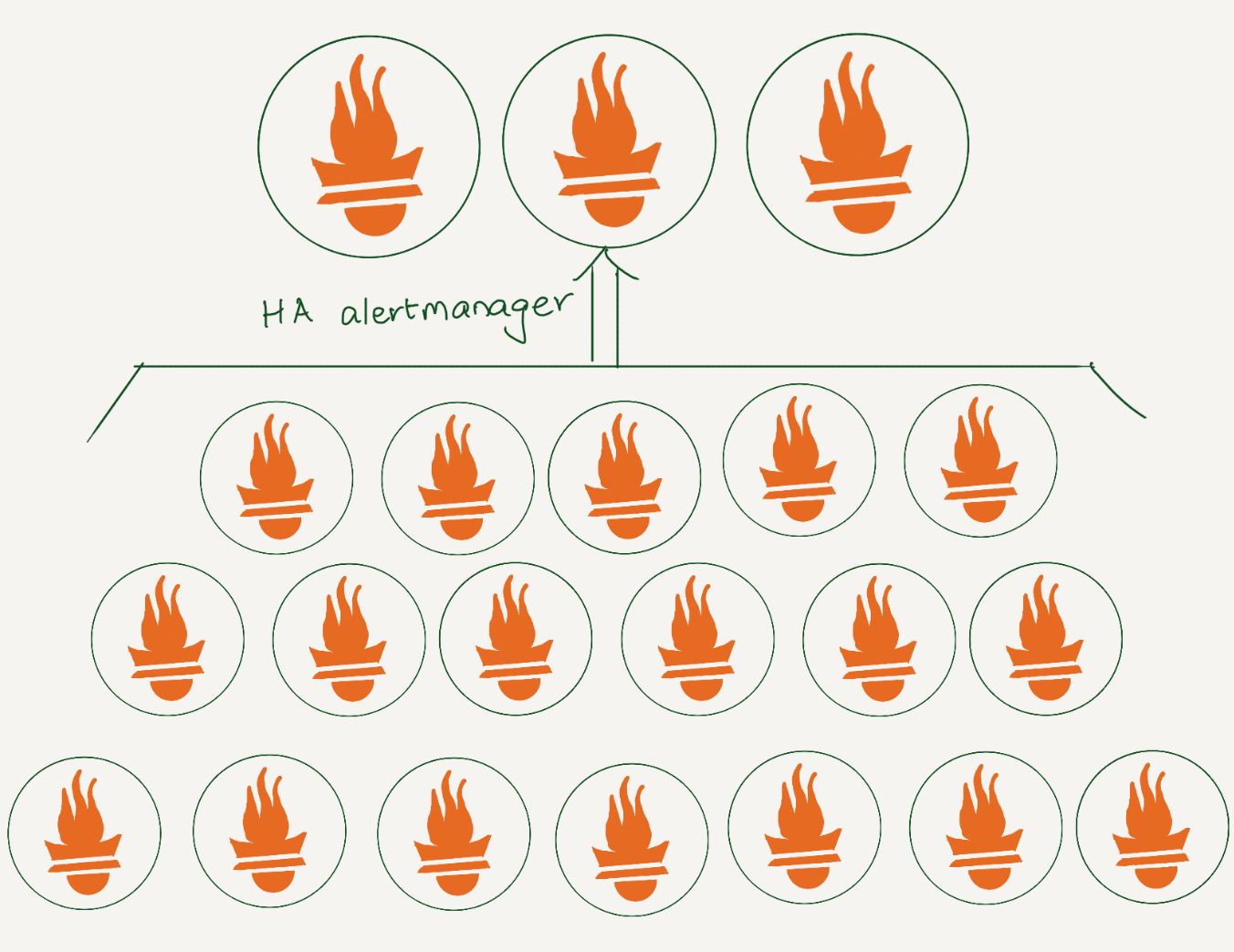
At Cloudflare, we rely heavily on Prometheus for monitoring. We have data centers in more than 310 cities, and each has several Prometheis. In total, we have over 1100 Prometheus servers. All alerts are sent to a central Alertmanager, where we have various integrations to route them. Additionally, using an alertmanager webhook, we store all alerts in a datastore for analysis.

Lifecycle of an alert

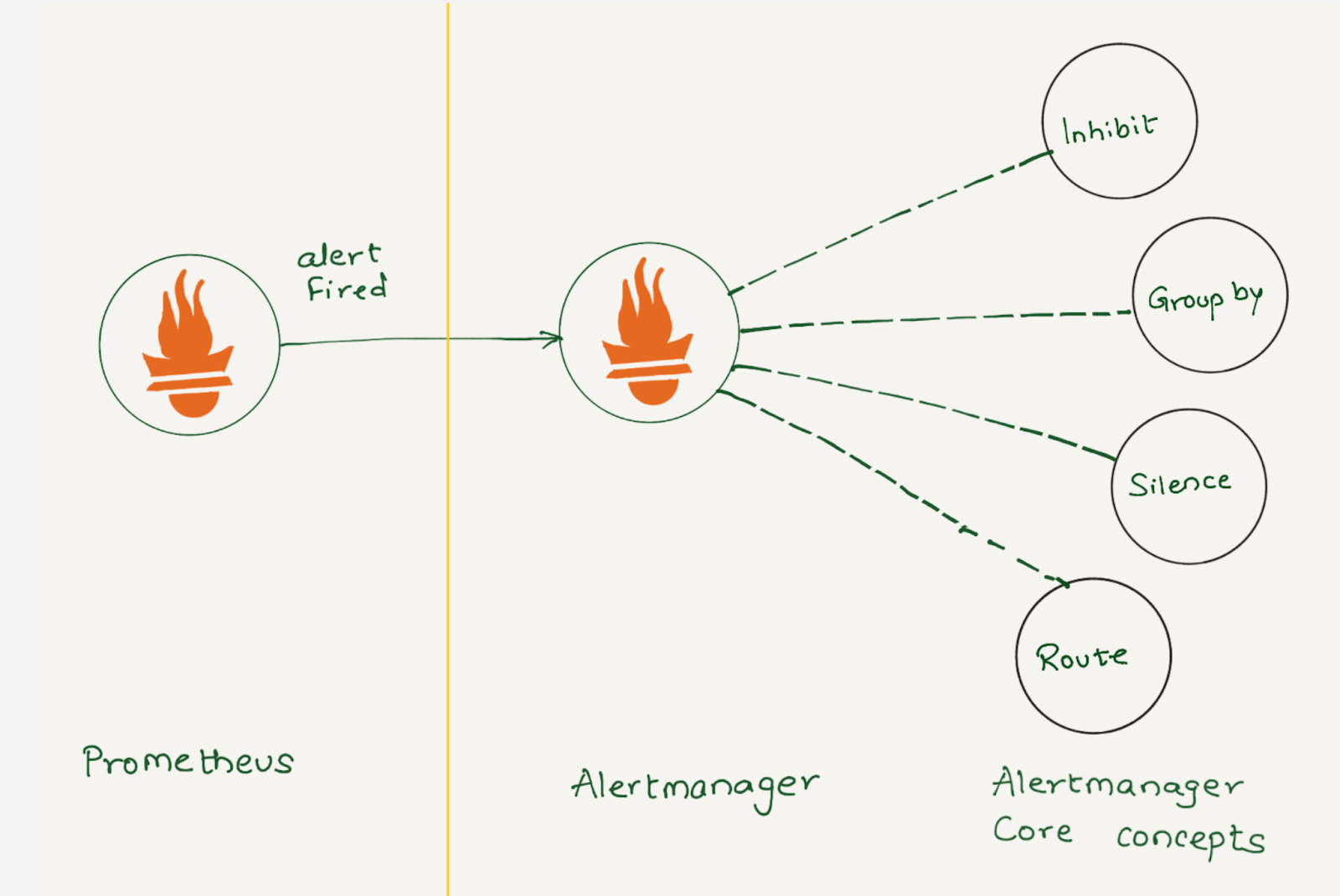
Prometheus collects metrics from configured targets at given intervals, evaluates rule expressions, displays the results, and can trigger alerts when the alerting conditions are met. Once an alert goes into firing state, it will be sent to the alertmanager.

Depending on the configuration, once Alertmanager receives an alert, it can inhibit, group, silence, or route the alerts to the correct receiver integration, such as chat, PagerDuty, or ticketing system. When configured properly, Alertmanager can mitigate a lot of alert noise. Unfortunately, that is not the case all the time, as not all alerts are optimally configured.

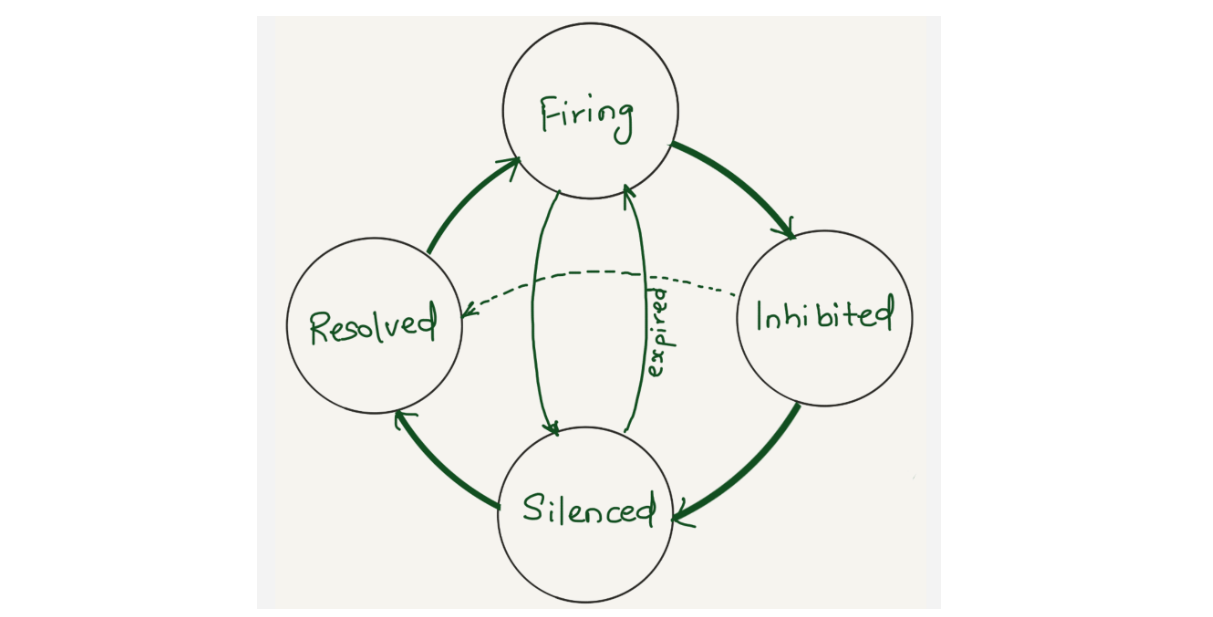
In Alertmanager, alerts initially enter the firing state, where they may be inhibited or silenced. They return to the firing state when the silence expires or the inhibiting alert resolves, and eventually transition to the resolved state.

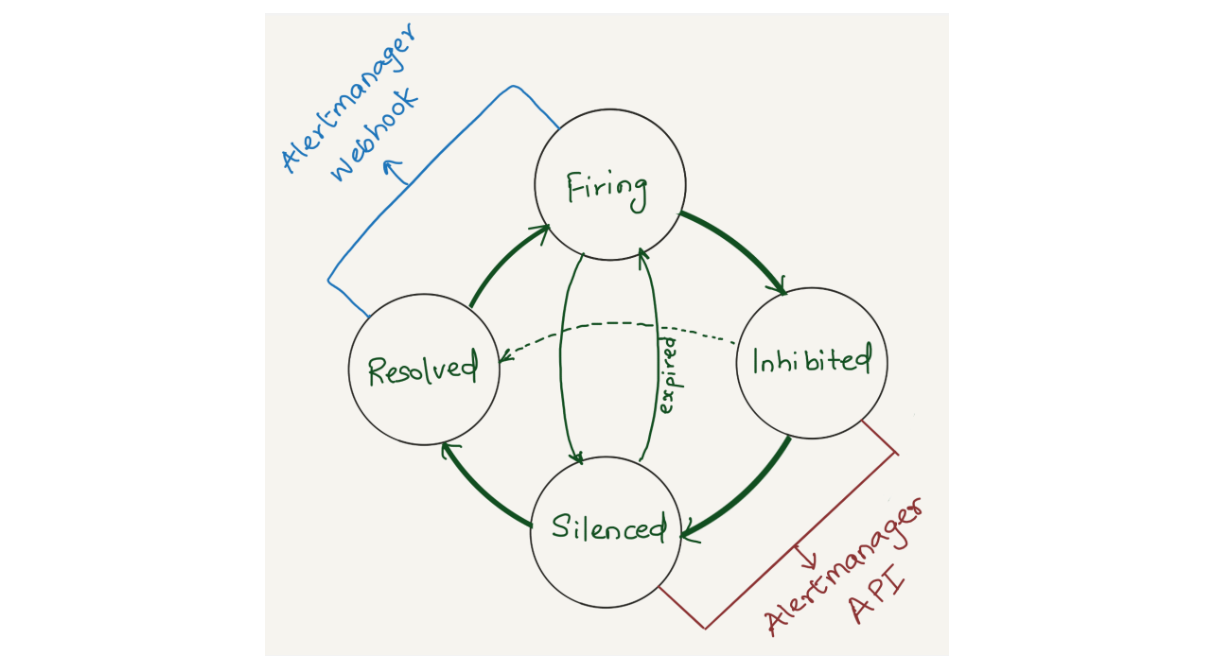
Alertmanager sends notifications for firing and resolved alert events via webhook integration. We were using alertmanager2es, which receives webhook alert notifications from Alertmanager and inserts them into an Elasticsearch index for searching and analysis. Alertmanager2es has been a reliable tool for us over the years, offering ways to monitor alerting volume, noisy alerts and do some kind of alert reporting. However, it had its limitations. The absence of silenced and inhibited alert states made troubleshooting issues challenging. We often found ourselves guessing why an alert didn’t trigger – was it silenced by another alert or perhaps inhibited by one? Without concrete data, we lacked the means to confirm what was truly happening.

Since the Alertmanager doesn’t provide notifications for silenced or inhibited alert events via webhook integration, the alert reporting we were doing was somewhat lacking or incomplete. However, the Alertmanager API provides querying capabilities and by querying the /api/alerts alertmanager endpoint, we can get the silenced and inhibited alert states. Having all four states in a datastore will enhance our ability to improve alert reporting and troubleshoot Alertmanager issues.

Interfaces for providing information about alert states

Solution

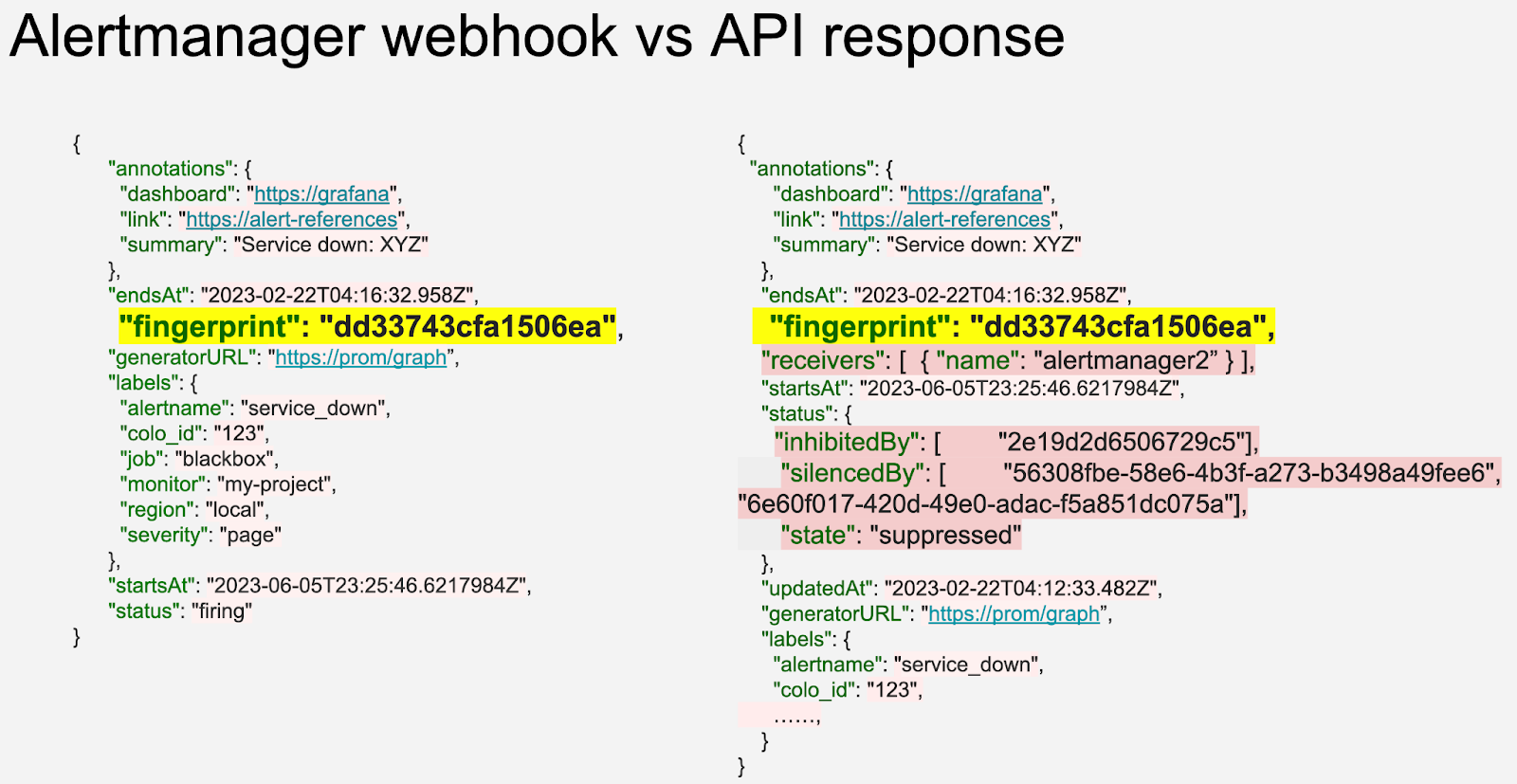
We opted to aggregate all states of the alerts (firing, silenced, inhibited, and resolved) into a datastore. Given that we’re gathering data from two distinct sources (the webhook and API) each in varying formats and potentially representing different events, we correlate alerts from both sources using the fingerprint field. The fingerprint is a unique hash of the alert’s label set which enables us to match alerts across responses from the Alertmanager webhook and API.

Alertmanager webhook and API response of same alert event

The Alertmanager API offers additional fields compared to the webhook (highlighted in pastel red on the right), such as silencedBy and inhibitedBy IDs, which aid in identifying silenced and inhibited alerts. We store both webhook and API responses in the datastore as separate rows. While querying, we match the alerts using the fingerprint field.

We decided to use a vector.dev instance to transform the data as necessary, and store it in a data store. Vector.dev (acquired by Datadog) is an open-source, high-performance, observability data pipeline that supports a vast range of sources to read data from and supports a lot of sinks for writing data to, as well as a variety of data transformation operations.

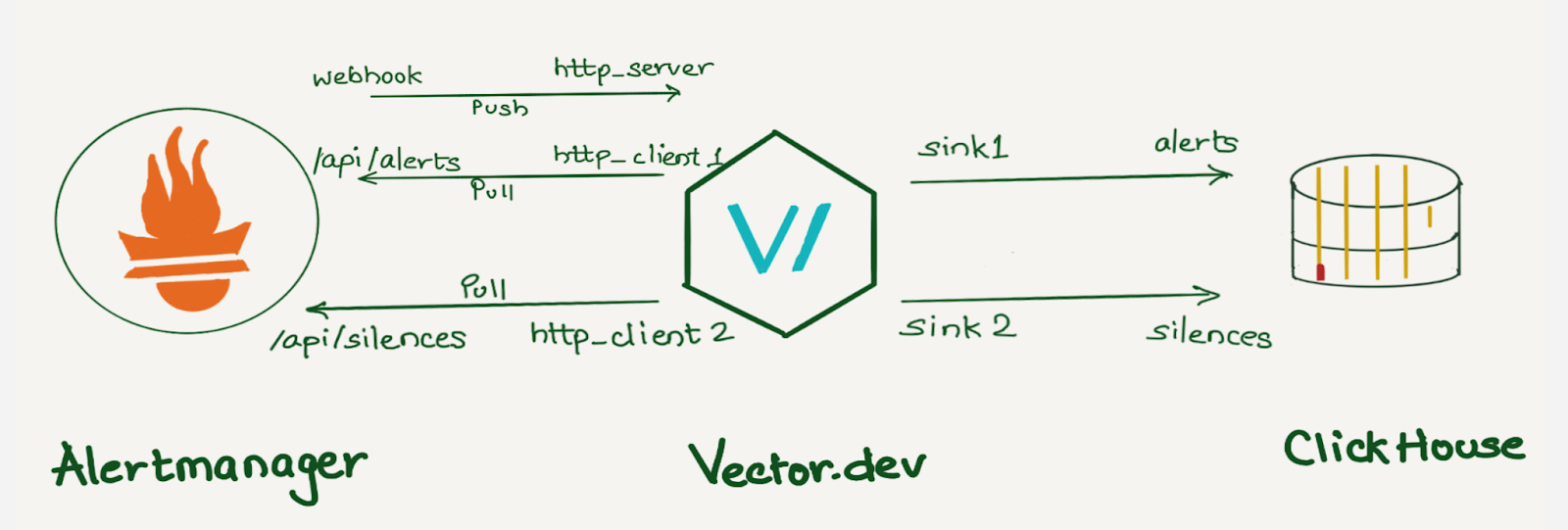
Here, we use one http_server vector instance to receive Alertmanager webhook notifications, two http_client sources to query alerts and silence API endpoints, and two sinks for writing all of the state logs in ClickHouse into alerts and silences tables

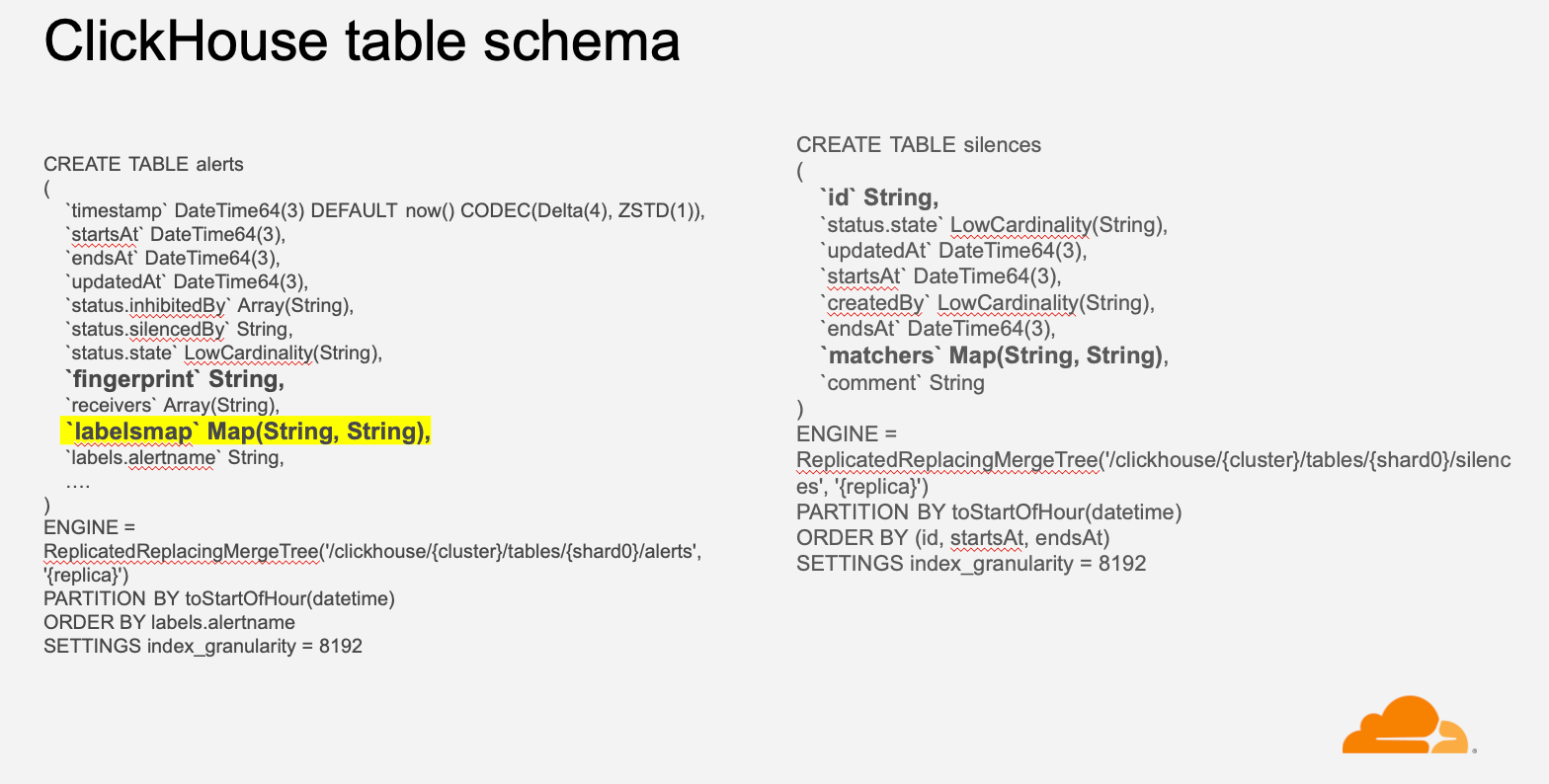
Although we use ClickHouse to store this data, any other database can be used here. ClickHouse was chosen as a data store because it provides various data manipulation options. It allows aggregating data during insertion using Materialized Views, reduces duplicates with the replacingMergeTree table engine, and supports JOIN statements.

If we were to create individual columns for all the alert labels, the number of columns would grow exponentially with the addition of new alerts and unique labels. Instead, we decided to create individual columns for a few common labels like alert priority, instance, dashboard, alert-ref, alertname, etc., which helps us analyze the data in general and keep all other labels in a column of type Map(String, String). This was done because we wanted to keep all the labels in the datastore with minimal resource usage and allow users to query specific labels or filter alerts based on particular labels. For example, we can select all Prometheus alerts using  labelsmap[‘service’’] = ‘Prometheus’.

Dashboards

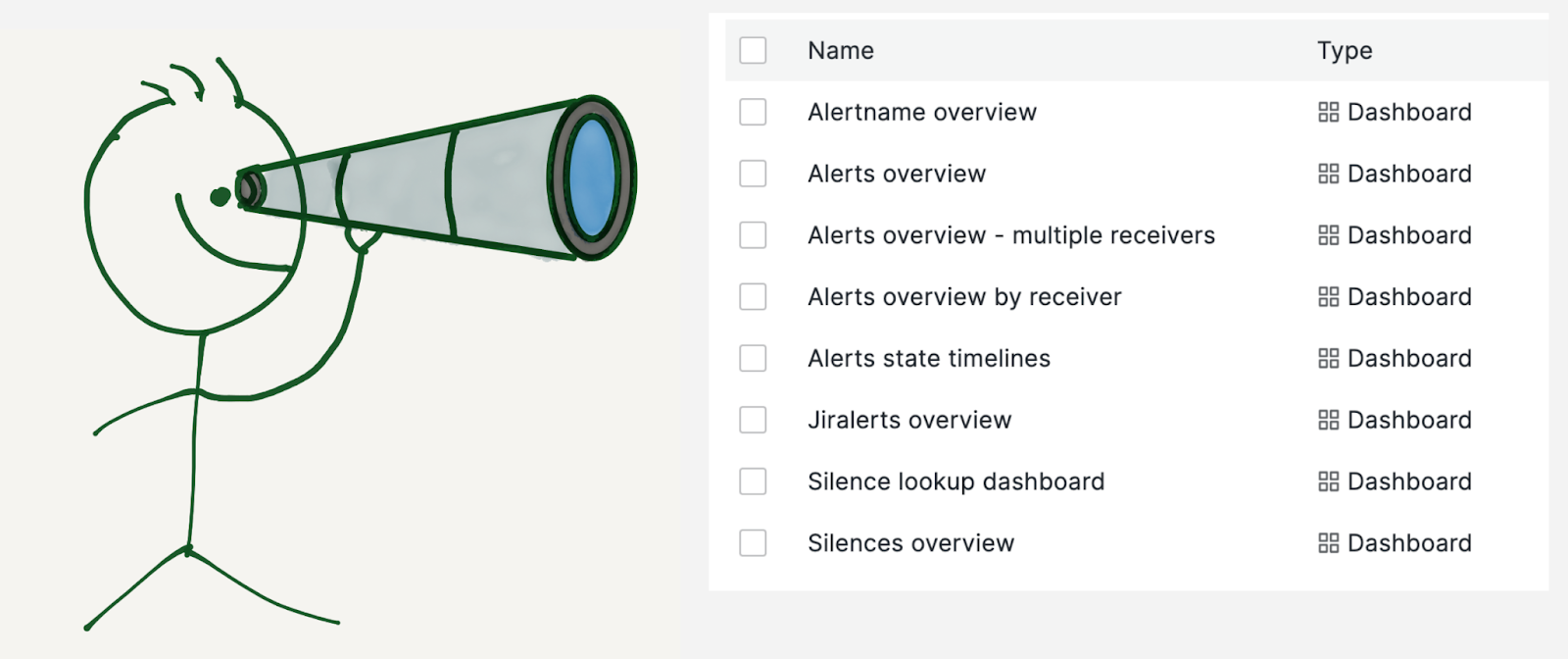
We built multiple dashboards on top of this data:

  • Alerts overview: To get insights into all the alerts the Alertmanager receives.
  • Alertname overview: To drill down on a specific alert.
  • Alerts overview by receiver: This is similar to alerts overview but specific to a team or receiver.
  • Alerts state timeline: This dashboard shows a snapshot of alert volume at a glance.
  • Jiralerts overview: To get insights into the alerts the ticket system receives.
  • Silences overview: To get insights into the Alertmanager silences.

Alerts overview

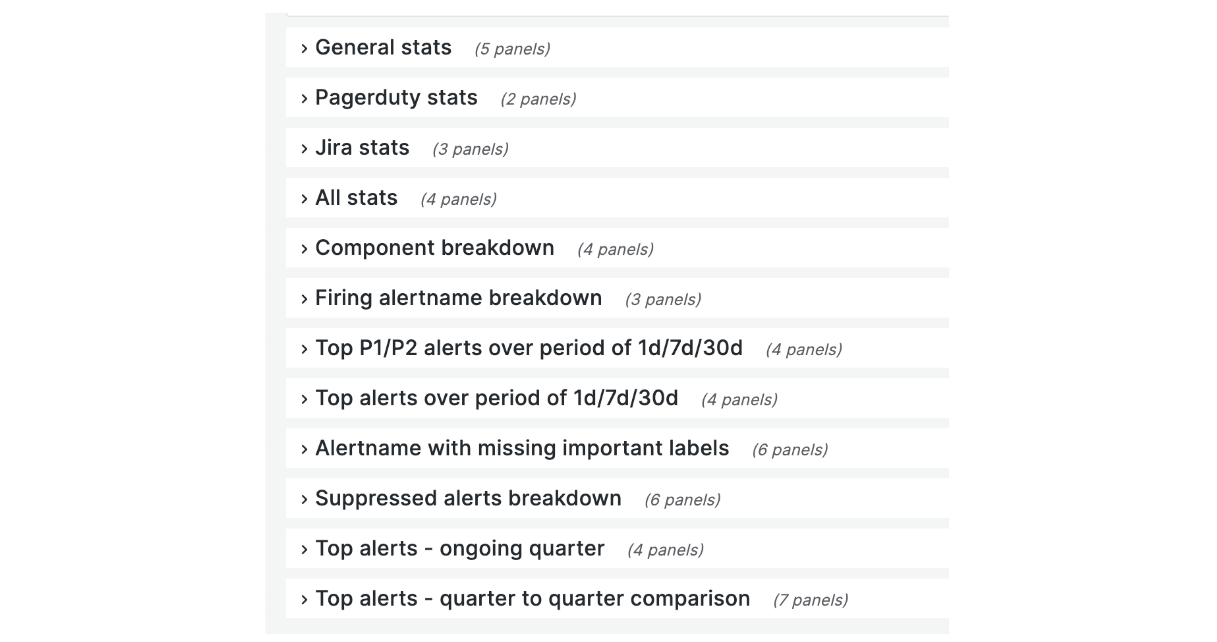
The image is a screenshot of the collapsed alerts overview dashboard by receiver. This dashboard comprises general stats, components, services, and alertname breakdown. The dashboard also highlights the number of P1 / P2 alerts in the last one day / seven days / thirty days, top alerts for the current quarter, and quarter-to-quarter comparison.

Component breakdown

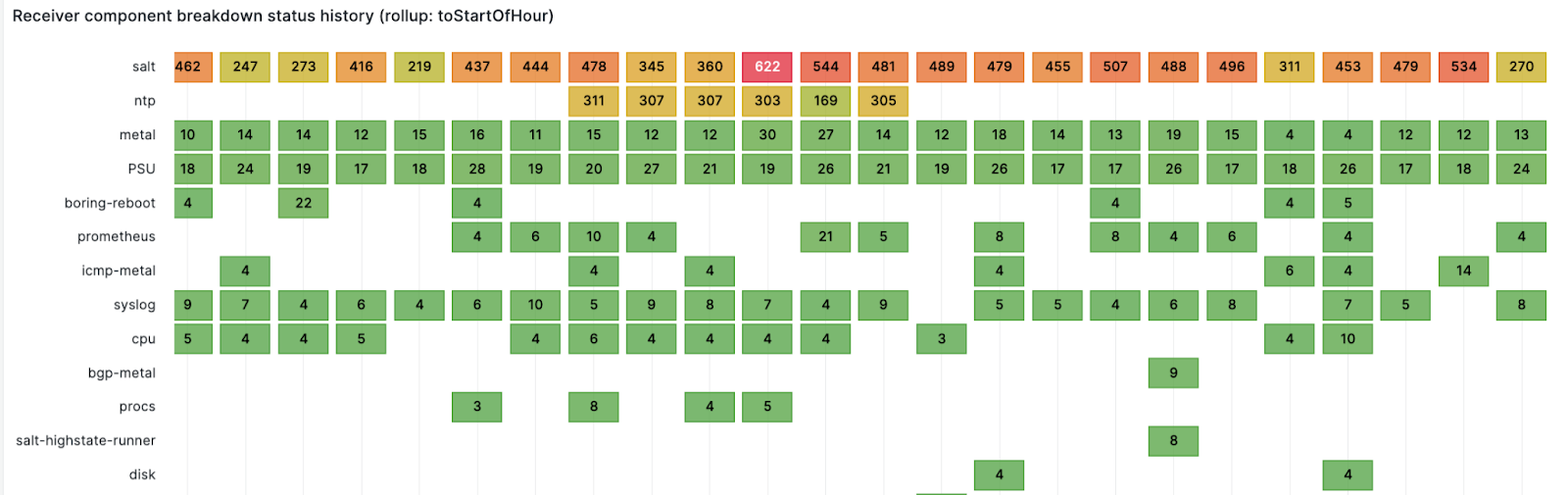
We route alerts to teams and a team can have multiple services or components. This panel shows firing alerts component counts over time for a receiver. For example, the alerts are sent to the observability team, which owns multiple components like logging, metrics, traces, and errors. This panel gives an alerting component count over time, and provides a good idea about which component is noisy and at what time at a glance.

Timeline of alerts

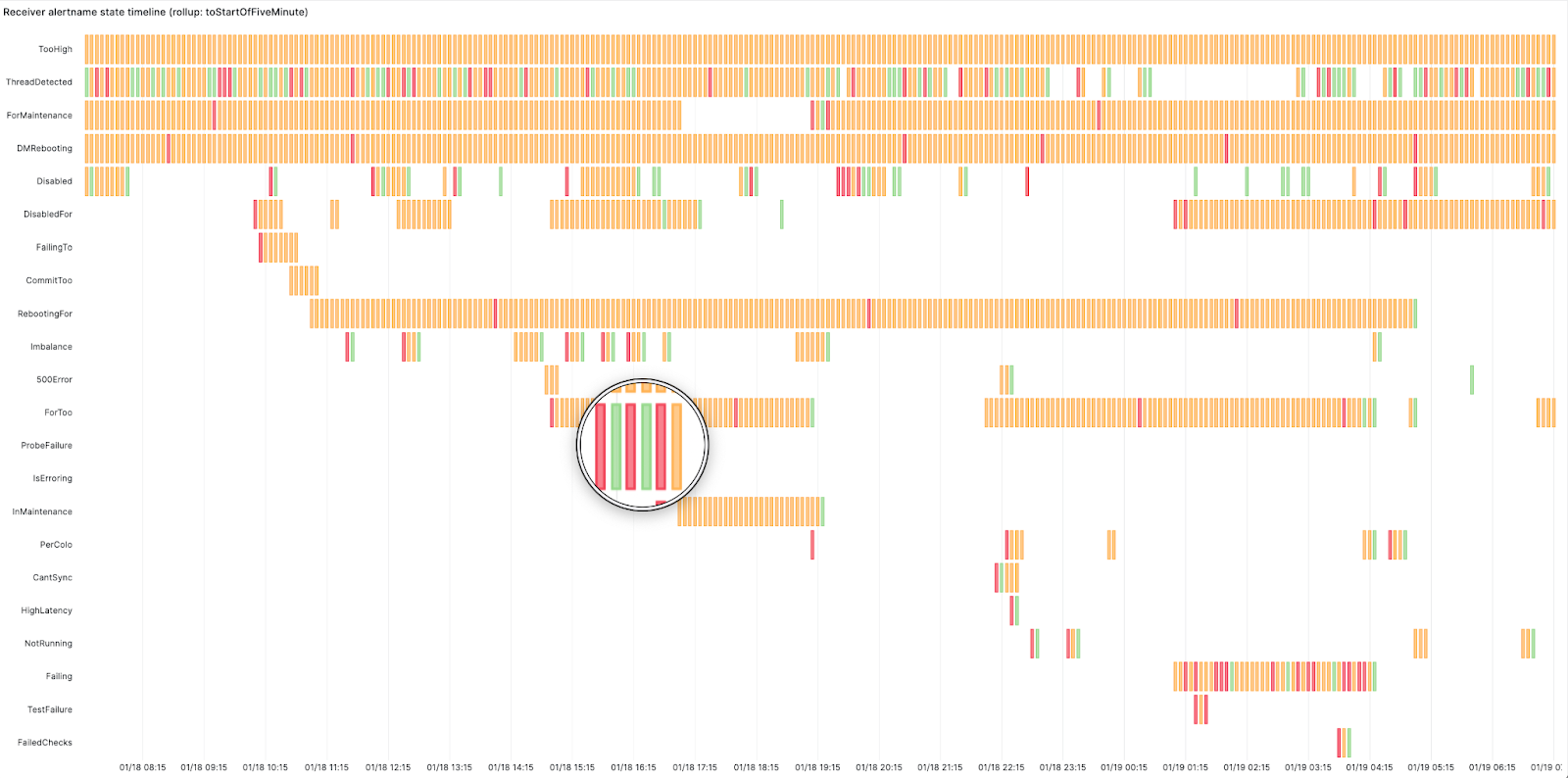
We created this swimlane view using Grafana’s state timeline panel for the receivers. The panel shows how busy the on-call was and at what point. Red here means the alert started firing, orange represents the alert is active and green means it has resolved. It displays the start time, active duration, and resolution of an alert. This highlighted alert is changing state too frequently from firing to resolved – this looks like a flapping alert. Flapping occurs when an alert changes state too frequently. This can happen when alerts are not configured properly and need tweaking, such as adjusting the alert threshold or increasing the for duration period in the alerting rule. The for duration field in the alerting rules adds time tolerance before an alert starts firing. In other words, the alert won’t fire unless the condition is met for ‘X’ minutes.

Findings

There were a few interesting findings within our analysis. We found a few alerts that were firing and did not have a notify label set, which means the alerts were firing but were not being sent or routed to any team, creating unnecessary load on the Alertmanager. We also found a few components generating a lot of alerts, and when we dug in, we found that they were for a cluster that was decommissioned where the alerts were not removed. These dashboards gave us excellent visibility and cleanup opportunities.

Alertmanager inhibitions

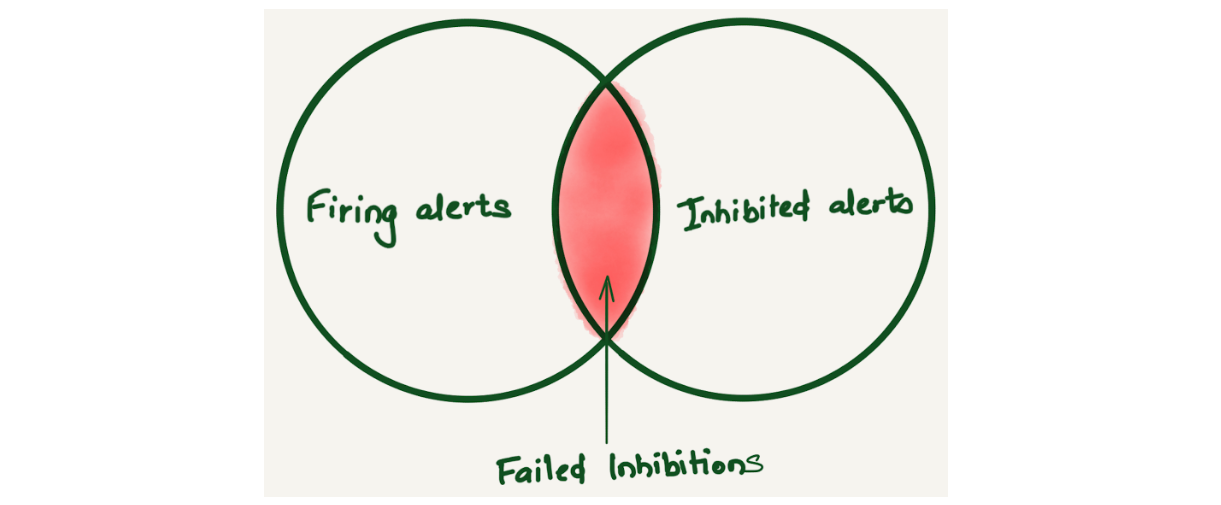
Alertmanager inhibition allows suppressing a set of alerts or notifications based on the presence of another set of alerts. We found that Alertmanager inhibitions were not working sometimes. Since there was no way to know about this, we only learned about it when a user reported getting alerted for inhibited alerts. Imagine a Venn diagram of firing and inhibited alerts to understand failed inhibitions. Ideally, there should be no overlap because the inhibited alerts shouldn’t be firing. But if there is an overlap, that means inhibited alerts are firing, and this overlap is considered a failed inhibition alert.

Failed inhibition venn diagram

After storing alert notifications in ClickHouse, we were able to come up with a query to find the fingerprint of the `alertnames` where the inhibitions were failing using the following query:

SELECT $rollup(timestamp) as t, count() as count
FROM
(
    SELECT
        fingerprint, timestamp
    FROM alerts
    WHERE
        $timeFilter
        AND status.state = 'firing'
    GROUP BY
        fingerprint, timestamp
) AS firing
ANY INNER JOIN
(
    SELECT
        fingerprint, timestamp
    FROM alerts
    WHERE
        $timeFilter
        AND status.state = 'suppressed' AND notEmpty(status.inhibitedBy)
    GROUP BY
        fingerprint, timestamp
) AS suppressed USING (fingerprint)
GROUP BY t

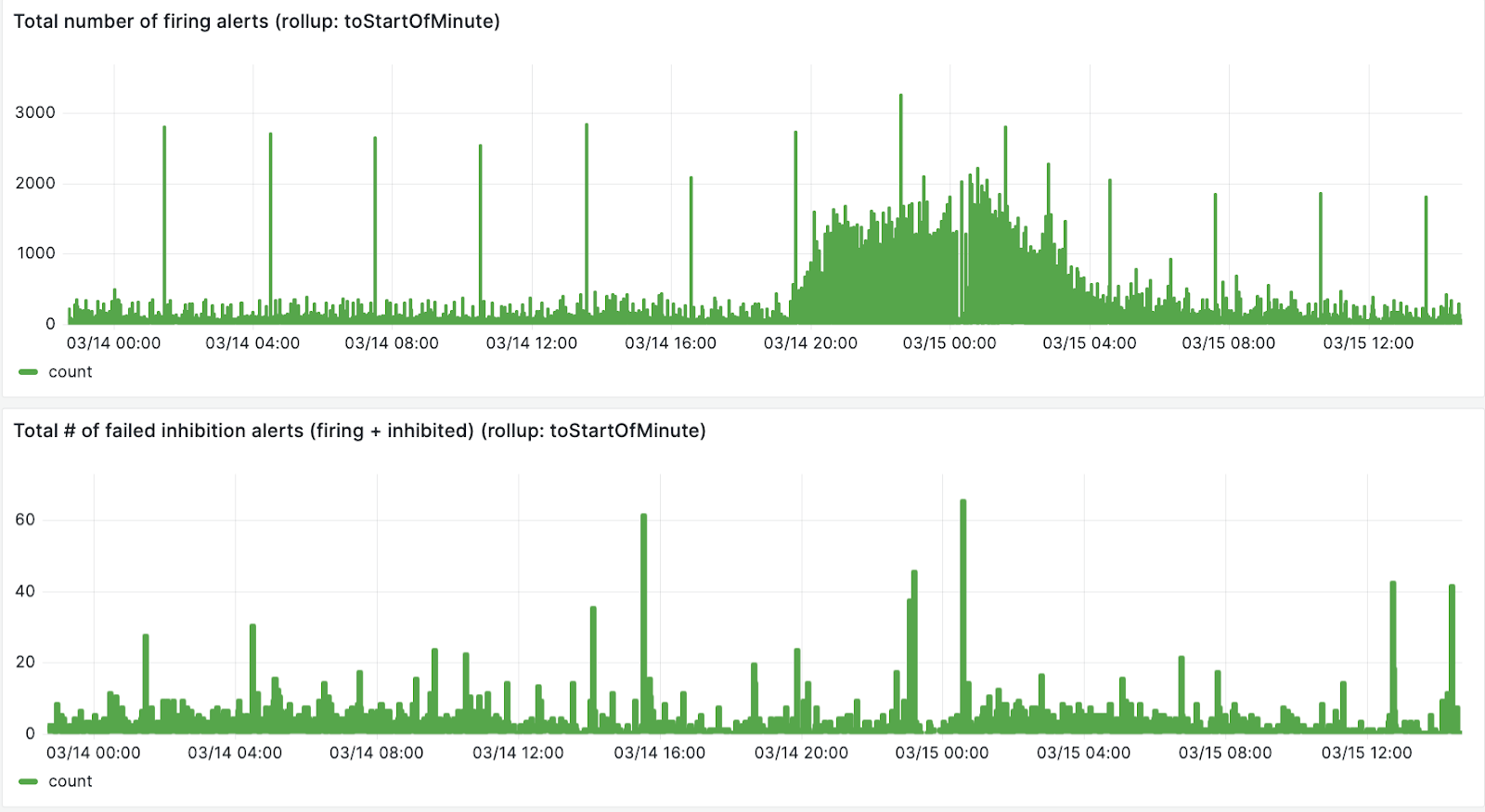
The first panel in the image below is the total number of firing alerts, the second panel is the number of failed inhibitions.

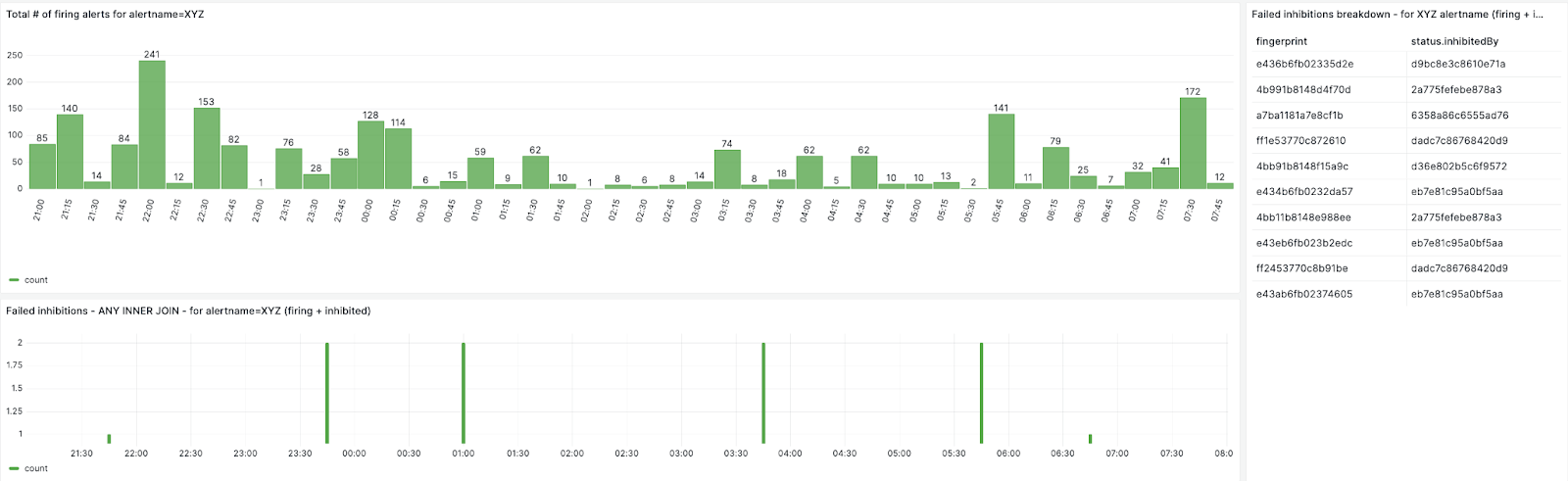
We can also create breakdown for each failed inhibited alert

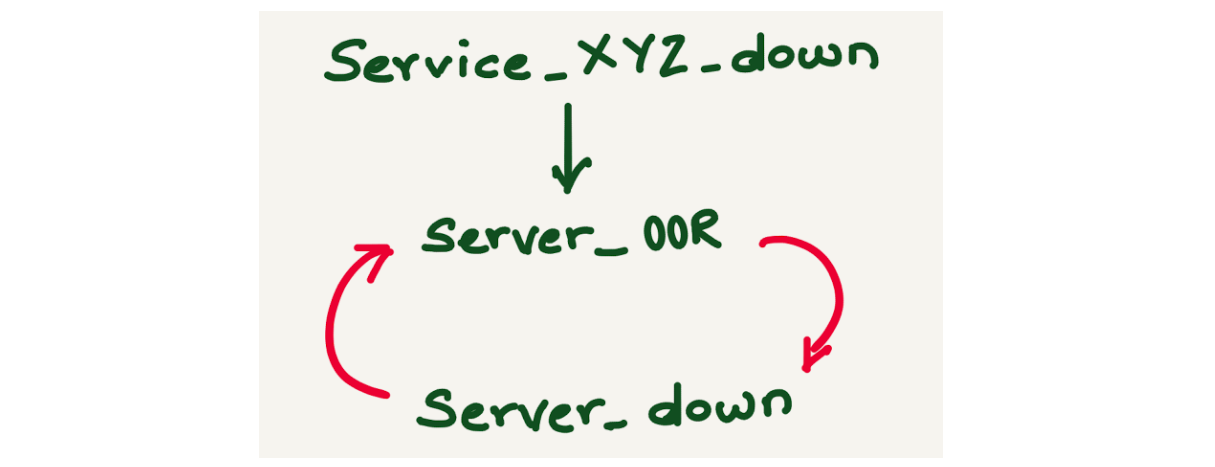
By looking up the fingerprint from the database, we could map the alert inhibitions and found that the failed inhibited alerts have an inhibition loop. For example, alert Service_XYZ_down is inhibited by alert server_OOR, alert server_OOR is inhibited by alert server_down, and server_down is inhibited by alert server_OOR.

Failed inhibitions can be avoided if alert inhibitions are configured carefully.

Silences

Alertmanager provides a mechanism to silence an alert while it is being worked on or during maintenance. Silence can mute the alerts for a given time and it can be configured based on matchers, which can be an exact match, a regex, an alert name, or any other label. The silence matcher doesn’t necessarily translate to the alertname. By doing alert analysis, we could map the alerts and the silence ID by doing a JOIN query on the alerts and silences tables. We also discovered a lot of stale silences, where silence was created for a long duration and is not relevant anymore.

DIY Alert analysis

The directory contains a basic demo for implementing alerts observability. Running `docker-compose up` spawns several containers, including Prometheus, Alertmanager, Vector, ClickHouse, and Grafana. The vector.dev container queries the Alertmanager alerts API and writes the data into ClickHouse after transforming it. The Grafana dashboard showcases a demo of Alerts and Silences overview.

Make sure you have docker installed and run docker compose up to get started.

Visit http://localhost:3000/dashboards to explore the prebuilt demo dashboards.

Conclusion

As part of the observability team, we manage the Alertmanager, which is a multi-tenant system. It’s crucial for us to have visibility to detect and address system misuse, ensuring proper alerting. The use of alert analysis tools has significantly enhanced the experience for on-call personnel and our team, offering swift access to the alert system. Alerts observability has facilitated the troubleshooting of events such as why an alert did not fire, why an inhibited alert fired, or which alert silenced / inhibited another alert, providing valuable insights for improving alert management.

Moreover, alerts overview dashboards facilitate rapid review and adjustment, streamlining operations. Teams use these dashboards in the weekly alert reviews to provide tangible evidence of how an on-call shift went, identify which alerts fire most frequently, becoming candidates for cleanup or aggregation thus curbing system misuse and bolstering overall alert management. Additionally, we can pinpoint services that may require particular attention. Alerts observability has also empowered some teams to make informed decisions about on-call configurations, such as transitioning to longer but less frequent shifts or integrating on-call and unplanned work shifts.

In conclusion, alert observability plays a crucial role in averting burnout by minimizing interruptions and enhancing on-call duties’ efficiency. Offering alerts observability as a service benefits all teams by obviating the need for individual dashboard development and fostering a proactive monitoring culture.
If you found this blog post interesting and want to work on observability, please check out our job openings – we’re hiring for Alerting and Logging!

Schaller: Fedora Workstation 40 – what are we working on

Post Syndicated from corbet original https://lwn.net/Articles/967107/

Christian Schaller writes
about the desktop-oriented work
aimed at the upcoming Fedora 40
release.

Another major feature landing in Fedora Workstation 40 that Jonas
Ådahl and Ray Strode has spent a lot of effort on is finalizing the
remote desktop support for GNOME on Wayland. So there has been
support for remote connections for already logged in sessions
already, but with these updates you can do the login remotely too
and thus the session do not need to be started already on the
remote machine. This work will also enable 3rd party solutions to
do remote logins on Wayland systems, so while I am not at liberty
to mention names, be on the lookout for more 3rd party Wayland
remoting software becoming available this year.

Български политически животни

Post Syndicated from Емилия Милчева original https://www.toest.bg/bulgarski-politicheski-zhivotni/

Български политически животни

На Аристотел принадлежи определението, че „човекът е политическо животно по природа“, тъй като може да достигне своя най-висок потенциал, като се занимава с нещата, касаещи полиса – тоест с политика. Колко висок е потенциалът на българските политически животни, повели обществото към шести парламентарни избори за последните три години?

Тестът за шестата поправка на Конституцията три месеца след гласуването ѝ дава шанс на президента Румен Радев да покаже онова лице, което нацията обича да вижда – национално отговорно и загрижено, макар и в рамките на стеснените му правомощия при назначаване на служебен кабинет. Такъв отново стана належащ, след като и третата политическа сила, на която държавният глава връчи мандат – „Има такъв народ“, най-малката партия в 49-тото НС, върна празна папка. 

Механиката на политическия процес

Медиите забълбукаха от въпроси има ли конституционна криза, кой може да е министър-председател измежду записаните в Конституцията десетина души и кого би избрал Румен Радев. Председателя на Народното събрание Росен Желязков (ГЕРБ), който следва Бойко Борисов още от Столичната община? Гуверньора на БНБ Димитър Радев, издигнат още през 2015-та начело на централната банка от ГЕРБ? Или един от тримата подуправители – Андрей Гюров (ПП), Петър Чобанов (ДПС), Радослав Миленков, избран през 2019 г. от сглобката ГЕРБ–ДПС?

А може би председателя на Сметната палата Димитър Главчев (ГЕРБ), който беше депутат още от голямата победа на партията през лятото на 2009-та? Или някой от двамата му заместници – Горица Кожарева, издигната от „Патриотичния фронт“ за този пост през 2015 г., и Тошко Тодоров, също от ГЕРБ? Кожарева дори беше временен шеф на институцията с гласовете на ГЕРБ, БСП, ДПС и „Български възход“, след като през 2023 г. бързо бе отстранен Цветан Цветков от Реформаторския блок.

Като възможен кандидат отпадна омбудсманът Диана Ковачева, бивша правосъдна министърка в кабинет на ГЕРБ, отскоро съдийка в Европейския съд по правата на човека. А нейната заместничка Елена Чернева-Маркова подаде оставка тази седмица със следния мотив:

Заемането на политическа длъжност, каквато несъмнено е тази на министър-председател, е несъвместимо с упражняваните от мен функции като заместник-омбудсман.

Самоотстраниха се и централните банкери и Радев обясни защо:

Има етичен кодекс и правила на Европейската централна банка, които забраняват на управители и подуправители да заемат политически постове. Има колизия с националното законодателство, което е очевидно, но това, за което малко се говори, е, че има колизия с европейското законодателство. Управителят на централната банка и неговата роля са изрично дефинирани в договора за функционирането на Европейския съюз, протоколите към него, Устава на ЕЦБ, Устава на Европейската система на централни банки. Те са много експлицитни в това отношение, че не могат да се съвместяват тези длъжности. Етичният кодекс изрично посочва, че управителят трябва да избягва каквото и да е участие в политическия процес.

Изглежда, че бащите на промените в Конституцията не са били наясно с тези правила, вписвайки управителя на БНБ и подуправителите в селекцията за премиери. Така че кръгът изглежда широк само на пръв поглед, защото накъдето и да се обърне Румен Радев, взорът му попада на ГЕРБ. На когото и от този кръг да се спре, няма да избегне критиките за връзка с Борисов. Вследствие на продължилата повече от десетилетие доминация във властта на Бойко Борисов регулаторите и контролните органи са окупирани от кадри на ГЕРБ, а тук-там се мяркат и свързани с ДПС. 

Изгледи за конституционна криза няма, каквито опити за внушения има, въпреки че след промяната на Конституцията не са променени и съответстващите закони, не е подготвен и Закон за служебното правителство. Срокът е бил през юни и е практически невъзможно да се реализира в близките дни. 

Никой не е очаквал, че колегите от ГЕРБ ще свалят правителство и ще ни хвърлят на избори два месеца след приемането на промените в Конституцията,

каза съпредседателят на „Демократична България“ Христо Иванов по bTV. 

Проблемът е, че изброените в Конституцията лица не могат да откажат, но законите на институциите, в които работят, не им позволяват да заемат други длъжности, защото влизат в хипотеза на несъвместимост. По всяка вероятност изход ще бъде намерен – с вариант за неплатен отпуск, след което следва завръщане на предишната позиция. 

Същността

Въпреки несъгласията си с конституционните промени, които атакува и в Конституционния съд, президентът обяви, че ще обсъди предварително с партиите намеренията си и кандидата за премиер. С така проявената добронамереност и разум сигурно очаква да му върнат жеста с предварително съгласуване на кандидатите за министри, за да няма скандал при подписване на указа за назначаването на правителството.

Тези служебни министри ще управляват заедно с 49-тия парламент, който ще работи до полагането на клетва от новите избраници, което означава до юни. Експериментът с още близо 3 месеца действащо Народно събрание може да бъде използван от политиците за полезна за обществото политическа работа. Например да приемат тези закони, чието негласуване бави отпускането на втория транш от 653 млн. евро по Плана за възстановяване и устойчивост, а предстоят и трети, и четвърти за общо над 1,2 млрд. евро. 

Такива закони са приетият на първо четене миналата есен Закон за личния фалит, по който обаче не е работено впоследствие; пътната карта за енергетиката; законът за защита на лицата, подаващи сигнали или публично оповестяващи информация за нарушения. От ПП–ДБ смятат да внесат в парламента подготвения от Министерството на правосъдието проект на Закон за съдебната власт. Но дали ще получи коридор за обсъждане законът, трасиращ пътя към избори на Висш прокурорски съвет, Висш съдебен съвет, Инспекторат на съдебната власт и главен прокурор, предстои да се разбере.

Също така все още не е известно дали управлявалото доскоро мнозинство ПП–ДБ и ГЕРБ–СДС ще се заеме с избора поне на тези 85 членове на регулатори и контролни органи, за които е необходимо обикновено мнозинство. Идеята не е чужда на някои политици от ГЕРБ и ПП–ДБ. Със сигурност ще се наложи парламентът да избере омбудсман и негов заместник, при това без да губи време, тъй като през април Ковачева ще смени досегашния български съдия в ЕСПЧ Йонко Грозев. Продължават да са във висящо положение и управителят и подуправителят на НЗОК, които бяха първоначално избрани от парламента, а след скандал внесоха оставките си през декември 2023 г. Така Станимир Михайлов и Момчил Мавров тушираха възникналия тогава конфликт в сглобката, „помолила“ ги да подадат оставки. 

Тези и други назначения обаче трябва да намерят разрешение независимо от публично изразеното нежелание от съпредседателя на ПП Кирил Петков да се назначават хора преди избори, „когато е мътна водата“. Предложението за това беше отправено от лидера на ГЕРБ Бойко Борисов, който смята, че е по-добре двете формации да работят заедно, вместо да се противопоставят. Мандатите на мнозина в тези държавни органи са изтекли от години, а неизвестността как ще са разпределени силите в 50-тия парламент след изборите през юни прави атрактивна офертата на лидера на ГЕРБ. Освен че налива основи за бъдеща коалиция. Със сглобките вече е приключено.

По буквите: Ларкин

Post Syndicated from Зорница Христова original https://www.toest.bg/po-bukvite-larkin/

„Високи прозорци“ от Филип Ларкин

По буквите: Ларкин

превод от английски Кристин Димитрова и Георги Пашов, София: Издателство за поезия ДА, 2024

За какво служат дните,

започва едно стихотворение на Филип Ларкин. В дните живеем, идва незабавният отговор. Почти детскоградински отговор, но пък и въпросът сякаш е такъв. И вижте как продължава – те идват, събуждат ни отново и отново. Идват, за да се радваме в тях.
И тук втори въпрос:

Къде да живеем освен в дните?

Какво ще рече това? Дали не е като в „Часовете“ при Майкъл Кънингам – времето на часовниците срещу вътрешното усещане за време и случване? Протяжността на времето срещу фрустрацията от неговата празнота, по-скоро от неговата запълненост с тривиални, ежедневни неща?

Да се върнем страница назад.

О, няма съмнение, че Арнолд не е егоист като мене. Той се ожени, за да не си отиде завинаги тя, и ето я тука деня и нощя.

Следва описание на брачния живот, което очевидно ужасява протагониста; ужасява го тъкмо с това, че бракът пълни с несвобода не дни, а години, задръства го, пълни го… с нищо. В какъв смисъл „с нищо“?

По буквите: Ларкин

Друго стихотворение. Героят е на гара, на която вижда влак за своя роден град, за Ковънтри. Събеседникът му го пита нещо за града на детството – и героят се сепва и казва: не, какво детство, просто там съм роден. И когато разказва неукрасените си и неовкусени спомени, добавя накрая, че не е виновно градчето, не е виновен Ковънтри, защото

Нищото, като нещото, се случва навсякъде.

Но защо „нищо“? Какво трябва да се случи в Ковънтри, в София, където и да било, за да бъде „нищото“ нещо? Какво трябва да има във „фотоалбума на една млада дама“, какво точно трябва да купят парите в „Пари“, за да не навяват тъга?

Както пише преводачката Кристин Димитрова в своя послеслов, Ларкин има двойствено отношение към Дилън Томас и поетите от неговото поколение. Ранното възхищение преминава в силно разграничение; като предшественик се припознава единствено Харди. Неволно си представям бясната динамика в поезията на Томас, онази сила, дето през зелен фитил извлича цветето и понякога завихря дори езика до помътняване, до непрозрачност, за да може да го накара да каже, че „и смъртта ще остане без царство“.

На този фон Филип Ларкин иронично отбелязва, че „емпириката казва друго“. Не само за смъртта, а за цялата жизнена сила, която като че ли тупти у Дилън Томас, цялата неизчерпаемост на жизнената енергия, която всъщност можем да проследим и малко по-назад, да я наречем байроническа, романтическа, сюблимна.

Ето това липсва в Ковънтри. Това липсва в дните.

Наречете го както щете – високи прозорци?

Това е старата „сюблимност“ на романтиците. И всичко – цялото живеене, всички тези дни – изяжда нейното място, нейната възможност за случване. Затова „високите прозорци“ идват в края на стихотворението, което започва с двамата млади, които се чукат и тя ползва диафрагма – възможно най-несакралното на пръв поглед начало, но това, което ще възпре разливането на мига в живеене, в непрестанно възпроизвеждаща се причинно-следствена връзка.

И този парадокс присъства навсякъде в поезията на Ларкин – тя е на пръв поглед ужасно неромантична, дори подигравателна към всички клишета на романтиците – детето, любовта, природата – насмешлива и изпитателна, готова да припява като някакъв съвременен Тил Уленшпигел they fuck you up, your mom and dad… – и в същото време болезнено романтична в копнежа си да стопира всичко в очакване на сюблимното, което е… какво?

Онова от живота, което би било равно по сила на смъртта.

Смъртта е сюблимен, надчовешки факт и протагонистът на Ларкин копнее за нещо в живота, което да ѝ е равно по ръст;

нещо, което да не е мираж, нито неумело самозалъгване, нито лъжа. Онова, което има предвид и Далчев в прочутото „не ме оставяй да загина, преди да съм живял“. Той копнее за това почти толкова силно, колкото всеки романтик; и толкова ясно описва неговото несъществуване, че то затрептява пред нас „в позлата и с изопнат такелаж“.

И това прави уж мизантропската му, насмешлива поезия дълбоко вълнуваща.

П.П. Ларкин е доста труден за превод по много причини. Радвам се, че е попаднал точно в ръцете на Георги Пашов и Кристин Димитрова. Препоръчвам горещо и нейния послеслов – там ще намерите всичко, което аз пропуснах.


В емблематичната си колонка, започната още през 2008 г. във в-к „Култура“, Марин Бодаков ни представяше нови литературни заглавия и питаше с какво точно тези книги ни променят. Вярваме, че е важно тази рубрика да продължи. От човек до човек, с нова книга в ръка.

В ада без изход и ние бяхме…

Post Syndicated from Тоест original https://www.toest.bg/v-ada-bez-izhod-i-nie-byahme/

В ада без изход и ние бяхме...

в ада без изход и ние бяхме и ние бяхме някога.
и сега сме и ще бъдем и утре, вдругиден
и во веки веков водите на същата река ще ни къпят.
колко месеца бяха единствено ден и нощ,
колко ли месеца не го търсих навсякъде?
минувачо, внимавай: пространството там
рязко кривва наляво, главата на влечугото
се къса от тялото, гипсът на шията се счупи и нацепи. онази глава
сега се носи сама над суша и вода,
сама е сега, сама на
кораба на себастиан.
а ти бъди внимателен: ако се подхлъзнеш там,
никаква карта няма да ти помогне,
напразно ще се мъчиш да откриеш изхода-входа-изхода,
напразно ще се насилваш да разкъсаш савана на пространството,
в което си се приплъзнал. отвъд няма да намериш нищо друго
освен следата от стъпките ти от тази страна.
безкраен и безизходен е адът.
и никоя география досега не успя да го приближи.
и никакъв полъх не го предвещава.
нито пък го следва опашка на комета.
като облак над въздуха се носи той
над суша и вода, никакъв полъх не го предвещава.
нито пък го следва опашка на комета.

(1994)
Йоан Ес. Поп
Превод от румънски Лора Ненковска


Йоан Ес. Поп (р. 1958) е един от живите класици на съвременната румънска поезия. Дебютира през 1994 г. със стихосбирката „Адът без изход“. Книгата му е истинско събитие на фона на оглушителната тишина, царяща в румънския литературен живот в първото десетилетие след промените. Йоан Ес. Поп работи в Музея на литературата в Букурещ и е автор на 13 стихосбирки и поетични антологии.

Лора Ненковска е преподавателка по средновековна и съвременна румънска литература и румънски език в СУ „Св. Климент Охридски“. Тя много обича да следи какво се случва в съвременната румънска (и не само) литература и е превела повече от 25 книги с проза, драматургия и поезия.


Според Екатерина Йосифова „четящият стихотворение сутрин… добре понася другите часове“ от деня. Убедени, че поезията държи умовете ни будни, а сърцата – отворени, в края на всеки месец ви предлагаме по едно стихотворение. Защото и в най-смутни времена доброто стихотворение е добра новина.

[$] The race to replace Redis

Post Syndicated from jzb original https://lwn.net/Articles/966631/

On March 21, Redis Ltd. announced that the Redis “in-memory data store” project would now be
released under non-free, source-available licenses, starting with Redis 7.4. The
news is unwelcome, but not entirely unexpected. What is unusual with this situation is
the number of Redis alternatives to choose from; there are at least
four options to choose as a replacement for those who wish to stay
with free software, including a pre-existing fork called KeyDB and the Linux Foundation’s newly-announced Valkey project. The question now is which one(s)
Linux distributions, users, and providers will choose to take its place.

The collective thoughts of the interwebz