How to monitor and query IAM resources at scale – Part 2

Post Syndicated from Michael Chan original https://aws.amazon.com/blogs/security/how-to-monitor-and-query-iam-resources-at-scale-part-2/

In this post, we continue with our recommendations for using AWS Identity and Access Management (IAM) APIs. In part 1 of this two-part series, we described how you could create IAM resources and use them soon after for authorization decisions. We also described options for monitoring and responding to IAM resource changes for entire accounts. Now, in part 2 of this post, we’ll cover the API throttling behavior of IAM and AWS Security Token Service (AWS STS) and how you can effectively plan your usage of these APIs. We’ll also cover the features of IAM that enable you to right-size the permissions granted to principals in your organization and assess external access to your resources.

Increase your usage of IAM APIs

If you’re a developer or a security engineer, you might find yourself writing more and more automation that interacts with IAM APIs. Other engineers, teams, or applications might also call the IAM APIs within the same account or cross-account. Over time, anyone calling the APIs in your account incrementally increases the number of requests per second. If so, IAM might send a “Rate exceeded” error that indicates you have exceeded a certain threshold of API calls per second. This is called API throttling.

Understand IAM API throttling

API throttling occurs when you exceed the call rate limits for an API. AWS uses API throttling to limit requests to a service. Like many AWS services, IAM limits API requests to maintain the performance of the service, and to ensure fair usage across customers. IAM and AWS STS independently implement a token bucket algorithm for throttling, in which a bucket of virtual tokens is refilled every second. Each token represents a non-throttled API call that you can make. The number of tokens that a bucket holds and the refill rate depends on the API. For each IAM API, a number of token buckets might apply.

We refer to this simply as rate-limiting criteria. Essentially, there are several rate-limiting criteria that are considered when evaluating whether a customer is generating more traffic than the service allows. The following are some examples of these criteria:

  • The account where the API is called
  • The account for read or write APIs (depending on whether the API is a read or write operation)
  • The account from which AssumeRole was called prior to the API call (for example, third-party cross-account calls)
  • The account from which AssumeRole was called prior to the API call for read APIs
  • The API and organization where the API is called

Understand STS API throttling

Although IAM has criteria pertaining to the account from which AssumeRole was called, IAM has its own API rate limits that are distinct from AWS STS. Therefore, the preceding criteria are IAM-specific and are separate from the throttling that can occur if you call STS APIs. IAM is also a global service, and the limits are not Region-aware. In contrast, while STS has a single global endpoint, every Region has its own STS endpoint with its own limits.

The STS rate-limiting criteria pertain to each account and endpoint for API calls. For example, if you call the AssumeRole API against the sts.ap-northeast-1.amazonaws.com endpoint, STS will evaluate the rate-limiting criteria associated with that account and the ap-northeast-1 endpoint. Other STS API requests that you perform under the same account and endpoint will also count towards these criteria. However, if you make a request from the same account to a different regional endpoint or the global endpoint, that request will count against different criteria.

Note: AWS recommends that you use the STS regional endpoints instead of the STS global endpoint. Regional endpoints have several benefits, including redundancy and reduced latency. To learn more about other benefits, see Managing AWS STS in an AWS Region.

How multiple criteria affect throttling

The preceding examples show the different ways that IAM and STS can independently limit requests. Limits might be applied at the account level and across read or write APIs. More than one rate-limiting criterion is typically associated with an API call, with each request counted against each rate-limiting criterion independently. This means that if the requests-per-second exceeds the applicable criteria, then API throttling occurs and returns a rate-limiting error.

How to address IAM and STS API throttling

In this section, we’ll walk you through some strategies to reduce IAM and STS API throttling.

Query for top callers

With AWS CloudTrail Lake, your organization can aggregate, store, and query events recorded by CloudTrail for auditing, security investigation, and operational troubleshooting. To monitor API throttling, you can run a simple query that identifies the top callers of IAM and STS.

For example, you can make a SQL-based query in the CloudTrail console to identify the top callers of IAM, as shown in Figure 1. This query includes the API count, API event name, and more that are made to IAM (shown under eventSource). In this example, the top result is a call to GetServiceLastAccessedDetails, which occurred 163 times. The result includes the account ID and principal ID that made those requests.
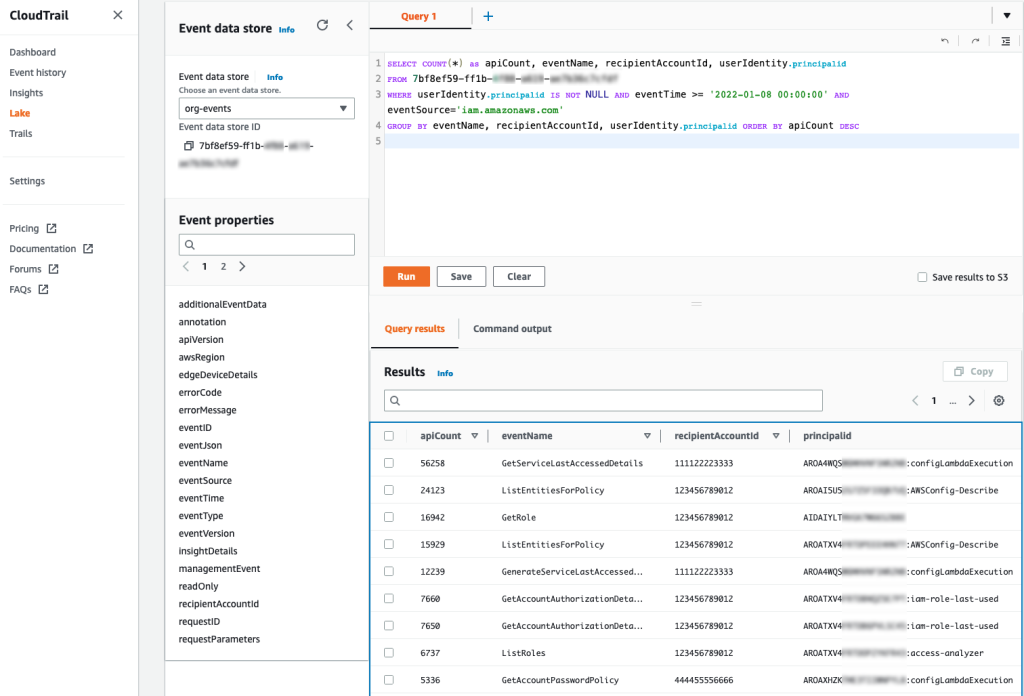
Figure 1: Example AWS CloudTrail Lake query

Figure 1: Example AWS CloudTrail Lake query

You can enable AWS CloudTrail Lake for all accounts in your organization. For more information, see Announcing AWS CloudTrail Lake – a managed audit and security Lake. For sample queries, including top IAM actions by principal, see cloud-trail-lake-query-samples in our aws-samples GitHub repository.

Know when you exceed API call rate limits

To reduce call throttling, you need to know when you exceed a rate limit. You can identify when you are being throttled by catching the RateLimitExceeded exception in your API calls. Or, you can send your application logs to Amazon CloudWatch Logs and then configure a metric filter to record each time that throttling occurs, for later analysis or notification. Ideally, you should do this across your applications, and log this information centrally so that you can investigate whether calls from a specific account (such as your central monitoring account) are affecting API availability across your other accounts by exceeding a rate-limiting criterion in those accounts.

Call your APIs with a less aggressive retry strategy

In the AWS SDKs, you can use the existing retry library and provide a custom base for the initial sleep done between API calls. For example, you can set a custom configuration for the backoff or edit the defaults directly. The default SDK_DEFAULT_THROTTLED_BASE_DELAY is 500 milliseconds (ms) in the relevant Java SDK file, but if you’re experiencing throttling consistently, we recommend a minimum 1000 ms for the throttled base delay. You can change this value or implement a custom configuration through the PredefinedBackoffStrategies.SDKDefaultBackoffStrategy() class, which is referenced in the same file. As another example, in the Javascript SDK, you can edit the base retry of the retryDelayOptions configuration in the AWS.Config class, as described in the documentation.

The difference between making these changes and using the SDK defaults is that the custom base provides a less aggressive retry. You shouldn’t retry multiple requests that are throttled during the same one-second window. If the API has other applicable rate-limiting criteria, you can potentially exceed those limits as well, preventing other calls in your account from performing requests. Lastly, be careful that you don’t implement your own retry or backoff logic on top of the SDK retry or backoff logic because this could make throttling worse — instead, you should override the SDK defaults.

Reduce the number of requests by using max items

For some APIs, you can increase the number of items returned by a single API call. Consider the example of the GetServiceLastAccessedDetails API. This API returns a lot of data, but the results are truncated by default to 100 items, ordered alphabetically by the service namespace. If the number of items returned is greater than 100, then the results are paginated, and you need to make multiple requests to retrieve the paginated results individually. But if you increase the value of the MaxItems parameter, you can decrease the number of requests that you need to make to obtain paginated results.

AWS has hundreds of services, so you should set the value of the MaxItems parameter no higher than your application can handle (the response size could be large). At the time of our testing, the results were no longer truncated when this value was 300. For this particular API, IAM might return fewer results, even when more results are available. This means that your code still needs to check whether the results are paginated and make an additional request if paginated results are available.

Consistent use of the MaxItems parameter across AWS APIs can help reduce your total number of API requests. The MaxItems parameter is also available through the GetOrganizationsAccessReport operation, which defaults to 100 items but offers a maximum of 1000 items, with the same caveat that fewer results might be returned, so check for paginated results.

Smooth your high burst traffic

In the table from part 1 of this post, we stated that you should evaluate IAM resources every 24 hours. However, if you use a simple script to perform this check, you could initiate a throttling event. Consider the following fictional example:

As a member of ExampleCorp’s Security team, you are working on a task to evaluate the company’s IAM resources through some custom evaluation scripts. The scripts run in a central security account. ExampleCorp has 1000 accounts. You write automation that assumes a role in every account to run the GetAccountAuthorizationDetails API call. Everything works fine during development on a few accounts, but you later build a dashboard to graph the data. To get the results faster for the dashboard, you update your code to run concurrently every hour. But after this change, you notice that many requests result in the throttling error “Rate exceeded.” Other security teams see “Rate exceeded” errors in their application logs, too.

Can you guess what happened? When you tried to make the requests faster, you used concurrency to make the requests run in parallel. By initiating this large number of requests simultaneously, you exceeded the rate-limiting criteria for the security account from which the sts:AssumeRole action was called prior to the GetAccountAuthorizationDetails API call.

To address scenarios like this, we recommend that you set your own client-side limitations when you need to make a large number of API requests. You can spread these calls out so that they happen sequentially and avoid large spikes. For example, if you run checks every 24 hours, make sure that the calls don’t happen at exactly midnight. Figure 2 shows two different ways to distribute API volume over time:
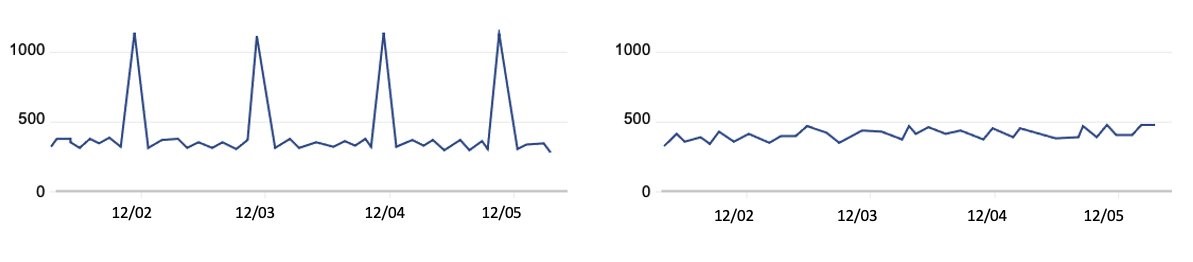
Figure 2: Call volume that periodically spikes compared to evenly-distributed call volume

Figure 2: Call volume that periodically spikes compared to evenly-distributed call volume

The graph on the left represents a large, recurring API call volume, with calls occurring at roughly the same time each day—such as 1000 requests at midnight every 24 hours. However, if you intend to make these 1000 requests consistently every 24 hours, you can spread them out over the 24-hour period. This means that you could make about 41 requests every hour, so that 41 accounts are queried at 00:00 UTC, another 41 the next hour, and so on. By using this strategy, you can make these requests blend into your other traffic, as shown in the graph on the right, rather than create large spikes. In summary, your automation scheduler should avoid large spikes and distribute API requests evenly over the 24-hour period. Using queues such as those provided by Amazon Simple Queue Service (Amazon SQS) can also help, and when errors are identified, you can put them in a dead letter queue to try again later.

Some IAM APIs have rate-limiting criteria for API requests made from the account from which the AssumeRole was called prior to the call. We recommend that you serially iterate over the accounts in your organization to avoid throttling. To continue with our example, you should iterate the 41 accounts one-by-one each hour, rather than running 41 calls at once, to reduce spikes in your request rates.

Recommendations specific to STS

You can adjust how you use AWS STS to reduce your number of API calls. When you write code that calls the AssumeRole API, you can reuse the returned credentials for future requests because the credentials might still be valid. Imagine that you have an event-driven application running in a central account that assumes a role in a target account and does an API call for each event that occurs in that account. You should consider reusing the credentials returned by the AssumeRole call for each subsequent call in the target account, especially if calls in the central accounts are being throttled. You can do this for AssumeRole calls because there is no service-side limit to the number of credentials that you can create and use. Whether it’s one credential or many, you need to use and store these carefully. You can also adjust the role session duration, which determines how long the role’s credentials are valid. This value can be up to 12 hours, depending on the maximum session duration configured on the role. If you reuse short-term credentials or adjust the session duration, make sure that you evaluate these changes from a security perspective as you optimize your use of STS to reduce API call volume.

Use case #3: Pare down permissions for least-privileged access

Let’s assume that you want to evaluate your organization’s IAM resources with some custom evaluation scripts. AWS has native functionality that can reduce your need for a custom solution. Let’s take a look at some of these that can help you accomplish these goals.

Identify unintended external sharing

To identify whether resources in your accounts, such as IAM roles and S3 buckets, have been shared with external entities, you can use IAM Access Analyzer instead of writing your own checks. With IAM Access Analyzer, you can identify whether resources are accessible outside your account or even your entire organization. Not only can you identify these resources on-demand, but IAM Access Analyzer proactively re-analyzes resources when their policies change, and reports new findings. This can help you feel confident that you will be notified of new external sharing of supported resources, so that you can act quickly to investigate. For more details, see the IAM Access Analyzer user guide.

Right-size permissions

You can also use IAM Access Analyzer to help right-size the permissions policies for key roles in your accounts. IAM Access Analyzer has a policy generation feature that allows you to generate a policy by analyzing your CloudTrail logs to identify actions used from over 140 services. You can compare this generated policy with the existing policy to see if permissions are unused, and if so, remove them.

You can perform policy generation through the API or the IAM console. For example, you can use the console to navigate to the role that you want to analyze, and then choose Generate policy to start analyzing the actions used over a specified period. Actions that are missing from the generated policy are permissions that can be potentially removed from the existing policy, after you confirm your changes with those who administer the IAM role. To learn more about generating policies based on CloudTrail activity, see IAM Access Analyzer makes it easier to implement least privilege permissions by generating IAM policies based on access activity.

Conclusion

In this two-part series, you learned more about how to use IAM so that you can test and query IAM more efficiently. In this post, you learned about the rate-limiting criteria for IAM and STS, to help you address API throttling when increasing your usage of these services. You also learned how IAM Access Analyzer helps you identify unintended resource sharing while also generating policies that serve as a baseline for principals in your account. In part 1, you learned how to quickly create IAM resources and use them when refining permissions. You also learned how to get information about IAM resources and respond to IAM changes through the various services integrated with IAM. Lastly, when calling IAM directly, you learned about bulk APIs, which help you efficiently retrieve the state of your principals and policies. We hope these posts give you valuable insights about IAM to help you better monitor, review, and secure access to your AWS cloud environment!

If you have feedback about this post, submit comments in the Comments section below. If you have questions about this post, start a new thread on the Security, Identity, & Compliance re:Post or contact AWS Support.

Want more AWS Security news? Follow us on Twitter.

Michael Chan

Michael Chan

Michael is a Senior Solutions Architect for AWS Identity who has advised financial services and global customers of AWS. He enjoys understanding customer problems with identity and access management and helping them solve their security issues at scale.

Author photo

Joshua Du Lac

Josh is a Senior Manager of Security Solutions Architects at AWS. Based out of Texas, he has advised dozens of enterprise, global, and financial services customers to accelerate their journey to the cloud while improving their security along the way. Outside of work, Josh enjoys searching for the best tacos in Texas and practicing his handstands.

How to monitor and query IAM resources at scale – Part 1

Post Syndicated from Michael Chan original https://aws.amazon.com/blogs/security/how-to-monitor-and-query-iam-resources-at-scale-part-1/

In this two-part blog post, we’ll provide recommendations for using AWS Identity and Access Management (IAM) APIs, and we’ll share useful details on how IAM works so that you can use it more effectively. For example, you might be creating new IAM resources such as roles and policies through automation and notice a delay for resource propagations. Or you might be building a custom cloud security monitoring solution that uses IAM APIs to evaluate the security and compliance of your AWS accounts, and you want to know how to do that without exceeding limits. Although these are just a few example use cases, the insights described in this post are intended to help you avoid anti-patterns when building scalable cloud services that use IAM APIs.

In this post, we describe how to create IAM resources and use them soon after for authorization decisions. We also describe options for monitoring and responding to IAM resource changes for entire accounts. In part 2, we’ll cover the API throttling behavior of IAM and AWS Security Token Service (AWS STS) and how you can effectively plan your usage of these APIs. Let’s dive in!

Use case 1: Create IAM resources and attempt to use them immediately

If you’re a cloud developer, you create and use IAM resources when you develop applications on AWS. For your application to interact with AWS services, you need to grant IAM permissions to your application. Your application—whether it runs on AWS Lambda, Amazon Elastic Compute Cloud (Amazon EC2), or another service—will need an associated IAM role and policy that provide the necessary permissions.

Imagine that you want to create least privilege policies for your application. You begin by deploying new or updated IAM resources, such as roles and policies, along with your application updates, and you automate this process to speed up testing and development.

During development, you begin removing unnecessary policy permissions, with your automation testing the updated permissions. However, you notice that some of your updates do not immediately take effect. The following sections address why this occurs and provide insights to help you architect for other scenarios.

Understand the IAM control plane and data plane

Let’s first learn more about the control plane and data plane in IAM. The control plane involves operations to create, read, update, and delete IAM resources, and it’s how you get the current state of IAM. When you invoke IAM APIs, you interact with the control plane. This includes any API that falls under the iam:* namespace. The data plane, in contrast, consists of the authorization system that is used at scale to grant access to the broader set of AWS services and resources. This includes the AWS STS APIs, which have their own sts:* namespace.

When you call the IAM control plane APIs to create, update, or delete resources, you can expect a read-after-write consistent response. This means that you can retrieve (read) the resource and its latest updates immediately after it’s written. In contrast, the IAM data plane, where authorizations occur, is eventually consistent. This means that there will be a delay for IAM resource changes, such as updates to roles and policies, to propagate and reflect in the authorizations that follow. The delay can be several seconds or longer. Because of this, you need to allow for propagation time when you test changes to IAM resources. To learn more about the control plane and data plane of IAM, see Resilience in AWS Identity and Access Management.

Note: Because calls to AWS APIs rely on IAM to check permissions, the availability and scalability of the data plane are paramount. In 2011, the “can the caller do this?” function handled a couple of thousand requests per second. Today, as new services continue to launch and the number of AWS customers increases, AWS Identity handles over half a billion API calls per second worldwide, and the number is growing. Eventually consistent design enables the IAM data plane to maintain the high availability and low latency needed to evaluate permissions on AWS.

This is why when architecting your application, we recommend that you don’t depend on control plane actions such as resource updates for critical parts of your application’s workflow. Instead, you should architect to take advantage of the data plane, which includes STS and the authorization system of IAM. In the next section, we describe how you can do this.

Test permissions with STS scope-down policies

IAM role sessions have a feature called a session policy, which takes effect immediately when a role is assumed. This is an optional policy that you can provide to scope down the role’s existing identity policies, with the permissions being the intersection of the role’s identity-based policies and the session policy. By using session policies, you get specific, scoped-down credentials from a single pre-existing role without having to create new roles or identity policies for each particular session’s use case. You can use session policies for your application or when you test which least privilege policies are best for your application.

Let’s walk through an example of when to use session policies for permissions testing. Imagine that you need permissions that require very specific, fine-grained conditions to attain your ideal least privilege policy. You might iterate on the policy several times, making updates and testing the changes over and over again. If you update a policy attached to a role, you need to wait for these changes to propagate to the IAM data plane. But if you instead specify a scope-down policy when assuming the pre-existing role prior to testing, you can immediately test and observe the effects of your permissions changes. Immediate testing is possible because your role and its original policy have already propagated to the data plane, enabling you to iterate over various scoped-down session policies that operate against the IAM data plane.

Use STS session policies to assume a role with the AWS CLI

There are two ways to provide a session policy during the AssumeRole process: you can provide an inline policy document or the Amazon Resource Names (ARNs) of managed session policies. The following example shows how to do this through the AWS Command Line Interface (AWS CLI), by passing in a policy document along with the AssumeRole call. If you use this example policy, make sure to replace <123456789012> and <DOC-EXAMPLE-BUCKET> with your own information.

$ aws sts assume-role \
 --role-arn arn:aws:iam::<123456789012>:role/s3-full-access
 --role-session-name getobject-only-exco
 --policy '{ "Version": "2012-10-17", "Statement": [ { "Action": [ "s3:GetObject" ], "Effect": "Allow", "Resource": "arn:aws:s3::: <DOC-EXAMPLE-BUCKET>/*" } ] }'

In this example, we provide a previously created role ARN named s3-full-access, which provides full access to Amazon Simple Storage Service (Amazon S3). We can further restrict the role’s permissions by supplying a policy with the optional --policy option. The inline policy document only allows the GetObject request against the S3 bucket named <DOC-EXAMPLE-BUCKET>. The effective permissions for the returned session are the intersection of the role’s identity-based policies and our provided session policy. Therefore, the role session’s permissions are limited to only performing the GetObject request against the <DOC-EXAMPLE-BUCKET>.

Note: The combined size of the passed inline policy document and all passed managed policy ARN characters cannot exceed 2,048 characters. You can reduce the size of the JSON policy document by removing unnecessary whitespace and shortening or removing tags associated with your session.

To learn more about session permissions, see Create fine-grained session permissions using IAM managed policies. In part two of this post, we will describe how you can use role sessions when you need to provide credentials at a high rate.

Use case 2: Monitor and respond to IAM resources for entire accounts

You might need to periodically audit the state of your IAM resources, such as roles and policies, including whether these IAM resources have changed, in a single account or across your entire organization. For example, you might want to check whether roles have overly broad access to actions and resources. Or you might want to monitor IAM resource creation and updates to respond to security-relevant permission changes. In this section, you will learn how to choose the right tool for auditing and monitoring IAM resources across accounts. You will learn about the AWS services that support this use case, the benefits of polling compared to event-based architectures, and powerful APIs that aggregate common information.

Respond to configuration changes with an event-driven approach

Sometimes you might need to perform actions relatively quickly based on IAM changes. For example, you might need to check if a trust policy for a newly created or updated role allows cross-account access. In cases like this, you can use AWS Config rules, AWS CloudTrail, or Amazon EventBridge to detect state changes and perform actions based on these state changes. You can use AWS Config rules to evaluate whether a resource complies with the conditions that you specify. If it doesn’t comply, you can provide a workflow to remediate the non-compliance. With CloudTrail, you can monitor your account’s API calls, and log API calls for your accounts with AWS Organizations integration. EventBridge works closely with CloudTrail and helps you create rules that match incoming events and send them to targets, such as Lambda, where your code can perform analysis or automated remediation. You can even filter out events from your accounts and send them to a central account’s event bus for processing. For an example of how to use EventBridge with IAM Access Analyzer to remediate cross-account access in a role’s trust policy, see Automate resolution for IAM Access Analyzer cross-account access findings on IAM roles. Which feature you choose depends on whether you need to monitor one account or all accounts in your organization, as well as which solution you are more comfortable building with.

One caveat to an event-driven approach is that if many events occur over a short period and your application responds to each event with an IAM API call of its own, you could eventually be throttled by IAM. To address this, you can queue up your responding API calls, distribute them over a longer period, or aggregate them to reduce API call volume. For example, if some of your calls are write APIs (such as UpdateAssumeRolePolicy or CreatePolicyVersion) or read APIs (such as GetRole or GetRolePolicy), you can call them serially with a delay between calls. If you need the latest status on a large number of principals and policies, you can call IAM bulk APIs such as GetAccountAuthorizationDetails, which will return data to you for principals and policies and their relationships in your organization. This approach helps you avoid throttling and querying the IAM control plane with unnecessary and redundant API calls. You will learn more about throttling and how to address it in part two of this post.

Retrieve point-in-time resource information with AWS Config

AWS Config helps you assess, audit, and evaluate the configuration of your AWS resources. It also offers multi-account, multi-Region data aggregation and is integrated with AWS Organizations. With AWS Config, you can create rules that detect and respond to changes. AWS Config also keeps an inventory of AWS resource configurations that you can query through its API, so that you don’t need to make direct API calls to each resource’s service. AWS Config also offers the ability to return the status of resources from multiple accounts and AWS Regions. As shown in Figure 1, you can use the AWS Config console to run a simple SQL-like statement for details on the IAM roles in your entire organization.

Figure 1: Run a query on IAM roles in AWS Config

Figure 1: Run a query on IAM roles in AWS Config

The preceding results also show associated resources, such as the inline and attached policies for the IAM roles. Alternatively, you can obtain these results from the SDK or CLI. The following query that uses the CLI is equivalent to the preceding query that uses the console. If you use this query, make sure to replace DOC-EXAMPLE-CONFIG-AGGREGATOR> with your AWS Config aggregator.

aws configservice select-aggregate-resource-config
--configuration-aggregator-name <DOC-EXAMPLE-CONFIG-AGGREGATOR>
--expression "SELECT accountId, resourceId, resourceName, resourceType, tags, configuration.attachedManagedPolicies, configuration.rolePolicyList WHERE resourceType = 'AWS::IAM::Role'"

Here is the response (note that we’ve adjusted the formatting to make it more readable):

{
  "accountId": "123456789012",
  "resourceId": "AROAI3X5HCEQIIEXAMPLE",
  "configuration": { 
    "attachedManagedPolicies": [
      {     
        "policyArn": "arn:aws:iam::aws:policy/service-role/AWSLambdaBasicExecutionRole",
        "policyName": "AWSLambdaBasicExecutionRole"
      },    
      {     
        "policyArn": "arn:aws:iam::123456789012:policy/mchan-test-cloudtrail-post-to-SNS",
        "policyName": "mchan-test-cloudtrail-post-to-SNS"
      }     
      ],    
    "rolePolicyList": []
  },
  "resourceName": "lambda-cloudtrail-notifications",
  "tags": [],
  "resourceType": "AWS::IAM::Role"
}

The preceding command returns the details of roles in your organization’s accounts, including the full policy document for the associated inline policy. It also returns the customer-managed policy names and their ARNs, for which you can view the policy documents and versions by using the BatchGetResourceConfig API. Note that AWS Config doesn’t provide the AWS-managed policy documents. However, these are common across accounts, and we will show you how to query that data later in this section.

To query the status of roles in your organization, you need to have AWS Config enabled in each account. You also need an aggregator to monitor your accounts with your organization’s management account or a delegated administrator account. For more details on how to set up AWS Config, see the AWS Config developer guide. After you set up AWS Config, you can periodically call the AWS Config APIs to get a snapshot of the current or prior state of your resources. Furthermore, you can periodically pull the snapshot records and evaluate this information in other tools outside of AWS Config. So before you directly use the IAM APIs to get IAM information, consider using AWS Config—this is what it’s for!

Retrieve IAM resource information directly from IAM

As previously noted, AWS Config can give you a bulk view of your AWS and IAM resources. Additionally, CloudTrail and EventBridge can detect AWS and IAM resource changes and help you act on them. If you need data from IAM beyond what these services offer, you can query the IAM APIs directly to get the latest information on your resources.

A few key APIs can help you audit IAM resources more efficiently, especially in bulk. The first is GetAccountAuthorizationDetails, which enables you to retrieve the principals in your account, their associated inline policy documents (if any), attached managed policies, and their relationships to each other. This API reduces the need to individually call ListRolePolicies and ListAttachedRolePolicies for each role in an account. GetAccountAuthorizationDetails also returns the role trust policy document for roles in the results. Finally, GetAccountAuthorizationDetails allows you to filter the result set. For example, if you don’t need information relating to groups or AWS managed policies, you can exclude these from the API response. You can do this by using the filter parameter to only include the details that you need at the time.

Another useful API is GenerateServiceLastAccessedDetails. This API gives you details about when an IAM resource (user, group, role, or policy) was last used in an attempt to access AWS services. You can use this API to identify roles that are unused and remove them if you don’t need them. IAM Access Analyzer, which you will learn about later in this post, also uses the same information.

The following table summarizes the key APIs that you can use, rather than building your own code that loops for this information individually.

Type of information API How to use the API Frequency of use
User list and user detail GetAccountAuthorizationDetails Pass User to the filter parameter When needed, per account
User’s inline policy User’s inline policy GetAccountAuthorizationDetails Pass User to the filter parameter When needed, per account
User’s attached managed policies GetAccountAuthorizationDetails Pass User to the filter parameter When needed, per account
Role list and role detail GetAccountAuthorizationDetails Pass Role to the filter parameter When needed, per account
Role trust policy GetAccountAuthorizationDetails Pass Role to the filter parameter When needed, per account
Role’s inline policy GetAccountAuthorizationDetails Pass Role to the filter parameter When needed, per account
Role’s attached managed policies GetAccountAuthorizationDetails Pass Role to the filter parameter When needed, per account
Role last used GetAccountAuthorizationDetails Pass Role to the filter parameter When needed, per account
Group list and group detail GetAccountAuthorizationDetails Pass Group to the filter parameter When needed, per account
Group’s inline policy GetAccountAuthorizationDetails Pass Group to the filter parameter When needed, per account
Group’s attached managed policies GetAccountAuthorizationDetails Pass Group to the filter parameter When needed, per account
AWS customer managed policies GetAccountAuthorizationDetails Pass LocalManagedPolicy to the filter parameter When needed, per account
AWS managed policies GetAccountAuthorizationDetails Pass LocalManagedPolicy to the filter parameter 24 hours recommended, globally (once for all accounts within an AWS partition)
Policy versions GetAccountAuthorizationDetails Pass either LocalManagedPolicy or WSManagedPolicy to the filter parameter 24 hours recommended, per account
Services access attempts by an IAM resource GetServiceLastAccessedDetails Submit a job through the GenerateServiceLastAccessedDetails API, which returns a JobId; then retrieve the results after the job completes. Spread total number of requests evenly across 24 hours
Actions access attempts by an IAM resource GetServiceLastAccessedDetails Submit a job through the GenerateServiceLastAccessedDetails API which returns a JobId; then retrieve the results after the job completes. Pass ACTION_LEVEL as the required Granularity parameter. Spread total number of requests evenly across 24 hours

Note: In the table, we suggest that you perform some of these API requests once every 24 hours as a starting point. You might prefer to perform your own analysis at a longer time interval, such as every 48 hours, but we don’t recommend requesting it more often than every 24 hours because these resources (and therefore the details in the responses) don’t change often. These APIs are suitable for periodic, point-in-time collection of information. If you need faster detection of information from GetAccountAuthorizationDetails, consider whether AWS Config rules or EventBridge will fit your needs. For GetServiceLastAccessedDetails, recent activity usually appears within four hours, so more frequent requests are unlikely to provide much value.

Use of these APIs can help you avoid writing code that loops through results to make individual read API calls for each principal, policy, and policy version in an account, which could result in tens of thousands of API requests and call throttling. Instead of iterating over each resource, you should use solutions that return bulk data, such as GetAccountAuthorizationDetails, AWS Config, or an AWS Partner Network solution. However, if you’re experiencing throttling, you will learn some practical considerations on how to handle that later in this post.

Inspect IAM resources across multiple accounts and organizations

Your use case might require that you inspect IAM resources across multiple accounts in your organization. Or perhaps you are an independent software vendor and need to build a software-as-a-service tool to evaluate IAM resources across many organizations. The following considerations can help you address use cases like these.

AWS Organizations integration

Previously, you learned of the benefits of the “service last accessed data” that the GenerateServiceLastAccessedDetails and GetServiceLastAccessedDetails APIs provide. But what if you want to pull this data for multiple accounts in your organization? IAM has bulk APIs that support querying this data across your entire organization, so you don’t need to assume a role in each account to generate the request. To generate a report for entities (organization root, organizational unit, or account) or policies in your organization, use the GenerateOrganizationsAccessReport operation, which returns a JobId that is passed as a parameter to the GetOrganizationsAccessReport operation to check if the report has been generated. When the job status is marked complete, you can retrieve the report.

AWS managed policies

Many customers use AWS managed policies because they align to common job functions. AWS creates and administers these policies, which have their own ARNs, such as arn:aws:iam::aws:policy/AWSCodeCommitPowerUser. AWS managed policies are available for every account, and they are the same for every account. AWS updates them when new services and API operations are introduced. Updated policies are recorded and visible as a new version, so you only need to query for the current AWS managed policies once per evaluation cycle, rather than once per account. Therefore, if you’re evaluating hundreds or thousands of accounts, you shouldn’t include the AWS managed policies and their policy versions in your query. Doing so would result in thousands of redundant API requests and could cause throttling. Instead, you can query the AWS managed policies once and then reuse the results across your analysis and evaluation by caching the results for a period of time (for example, every 24 hours) in your application before requesting them again to check for updates. Because AWS managed policies are available through the GetAccountAuthorizationDetails API, you don’t need to query for the AWS managed policies or their versions as a separate action.

Multi-account limits

The preceding table lists the frequency of API requests as “per account” in many places. If you’re calling IAM APIs by assuming a role in other accounts from a central account, some IAM APIs have rate-limiting criteria that apply to API requests performed from the assuming account (the central account). To query data from multiple accounts, we recommend that you serially iterate over the accounts one-by-one to avoid throttling. You’ll learn more about this strategy, as well as throttling, in part 2 of this blog post.

Conclusion

In this post, you learned about different aspects of IAM and best practices to test and query IAM efficiently. With STS session policies, you can test different policies to help achieve least privilege access. With AWS Config, EventBridge, CloudTrail, and CloudTrail Lake, you can audit your IAM resources and respond to changes while reducing the number of IAM API calls that you make. If you need to call IAM directly, you can use IAM bulk APIs for more efficient retrieval of your resource state. You can learn more about IAM and best practices in part 2 of blog post: How to monitor and query IAM resources at scale – Part 2.

If you have feedback about this post, submit comments in the Comments section below. If you have questions about this post, start a new thread on the Security, Identity, & Compliance re:Post or contact AWS Support.

Want more AWS Security news? Follow us on Twitter.

Michael Chan

Michael Chan

Michael is a Senior Solutions Architect for AWS Identity who has advised financial services and global customers of AWS. He enjoys understanding customer problems with identity and access management and helping them solve their security issues at scale.

Author photo

Joshua Du Lac

Josh is a Senior Manager of Security Solutions Architects at AWS. Based out of Texas, he has advised dozens of enterprise, global, and financial services customers to accelerate their journey to the cloud while improving their security along the way. Outside of work, Josh enjoys searching for the best tacos in Texas and practicing his handstands.

A hybrid approach in healthcare data warehousing with Amazon Redshift

Post Syndicated from Bindhu Chinnadurai original https://aws.amazon.com/blogs/big-data/a-hybrid-approach-in-healthcare-data-warehousing-with-amazon-redshift/

Data warehouses play a vital role in healthcare decision-making and serve as a repository of historical data. A healthcare data warehouse can be a single source of truth for clinical quality control systems. Data warehouses are mostly built using the dimensional model approach, which has consistently met business needs.

Loading complex multi-point datasets into a dimensional model, identifying issues, and validating data integrity of the aggregated and merged data points are the biggest challenges that clinical quality management systems face. Additionally, scalability of the dimensional model is complex and poses a high risk of data integrity issues.

The data vault approach solves most of the problems associated with dimensional models, but it brings other challenges in clinical quality control applications and regulatory reports. Because data is closer to the source and stored in raw format, it has to be transformed before it can be used for reporting and other application purposes. This is one of the biggest hurdles with the data vault approach.

In this post, we discuss some of the main challenges enterprise data warehouses face when working with dimensional models and data vaults. We dive deep into a hybrid approach that aims to circumvent the issues posed by these two and also provide recommendations to take advantage of this approach for healthcare data warehouses using Amazon Redshift.

What is a dimensional data model?

Dimensional modeling is a strategy for storing data in a data warehouse using dimensions and facts. It optimizes the database for faster data retrieval. Dimensional models have a distinct structure and organize data to provide reports that increase performance.

In a dimensional model, a transaction record is divided either into facts (often numerical), additive transactional data, or dimensions (referential information that gives context to the facts). This categorization of data into facts and dimensions, as well as the entity-relationship framework of the dimensional model, presents complex business processes in a way that is easy for analysts to understand.

A dimensional model in data warehousing is designed for reading, summarizing, and analyzing numerical information such as patient vital stats, lab reading values, counts, and so on. Regardless of the division or use case it is related to, dimensional data models can be used to store data obtained from tracking various processes like patient encounters, provider practice metrics, aftercare surveys, and more.

The majority of healthcare clinical quality data warehouses are built on top of dimensional modeling techniques. The benefit of using dimensional data modeling is that, when data is stored in a data warehouse, it’s easier to persist and extract it.

Although it’s a competent data structure technique, there are challenges in scalability, source tracking, and troubleshooting with the dimensional modeling approach. Tracking and validating the source of aggregated and compute data points is important in clinical quality regulatory reporting systems. Any mistake in regulatory reports may result in a large penalty from regulatory and compliance agencies. These challenges exist because the data points are labeled using meaningless numeric surrogate keys, and any minor error can impair prediction accuracy, and consequently affect the quality of judgments. The ways to countervail these challenges are by refactoring and bridging the dimensions. But that adds data noise over time and reduces accuracy.

Let’s look at an example of a typical dimensional data warehouse architecture in healthcare, as shown in the following logical model.

The following diagram illustrates a sample dimensional model entity-relationship diagram.

This data model contains dimensions and fact tables. You can use the following query to retrieve basic provider and patient relationship data from the dimensional model:

SELECT * FROM Fac_PatientEncounter FP

JOIN Dim_PatientEncounter DP ON FP.EncounterKey = DP.EncounterKey

JOIN Dim_Provider PR ON PR.ProviderKey = FP.ProviderKey

Challenges of dimensional modeling

Dimensional modeling requires data preprocessing before generating a star schema, which involves a large amount of data processing. Any change to the dimension definition results in a lengthy and time-consuming reprocessing of the dimension data, which often results in data redundancy.

Another issue is that, when relying merely on dimensional modeling, analysts can’t assure the consistency and accuracy of data sources. Especially in healthcare, where lineage, compliance, history, and traceability are of prime importance because of the regulations in place.

A data vault seeks to provide an enterprise data warehouse while solving the shortcomings of dimensional modeling approaches. It is a data modeling methodology designed for large-scale data warehouse platforms.

What is a data vault?

The data vault approach is a method and architectural framework for providing a business with data analytics services to support business intelligence, data warehousing, analytics, and data science needs. The data vault is built around business keys (hubs) defined by the company; the keys obtained from the sources are not the same.

Amazon Redshift RA3 instances and Amazon Redshift Serverless are perfect choices for a data vault. And when combined with Amazon Redshift Spectrum, a data vault can deliver more value.

There are three layers to the data vault:

  • Staging
  • Data vault
  • Business vault

Staging involves the creation of a replica of the original data, which is primarily used to aid the process of transporting data from various sources to the data warehouse. There are no restrictions on this layer, and it is typically not persistent. It is 1:1 with the source systems, generally in the same format as that of the sources.

The data vault is based on business keys (hubs), which are defined by the business. All in-scope data is loaded, and auditability is maintained. At the heart of all data warehousing is integration, and this layer contains integrated data from multiple sources built around the enterprise-wide business keys. Although data lakes resemble data vaults, a data vault provides more features of a data warehouse. However, it combines the functionalities of both.

The business vault stores the outcome of business rules, including deduplication, conforming results, and even computations. When results are calculated for two or more data marts, this helps eliminate redundant computation and associated inconsistencies.

Because business vaults still don’t satisfy reporting needs, enterprises create a data mart after the business vault to satisfy dashboarding needs.

Data marts are ephemeral views that can be implemented directly on top of the business and raw vaults. This makes it easy to adapt over time and eliminates the danger of inconsistent results. If views don’t give the required level of performance, the results can be stored in a table. This is the presentation layer and is designed to be requirements-driven and scope-specific subsets of the warehouse data. Although dimensional modeling is commonly used to deliver this layer, marts can also be flat files, .xml files, or in other forms.

The following diagram shows the typical data vault model used in clinical quality repositories.

When the dimensional model as shown earlier is converted into a data vault using the same structure, it can be represented as follows.

Advantages of a data vault

Although any data warehouse should be built within the context of an overarching company strategy, data vaults permit incremental delivery. You can start small and gradually add more sources over time, just like Kimball’s dimensional design technique.

With a data vault, you don’t have to redesign the structure when adding new sources, unlike dimensional modeling. Business rules can be easily changed because raw and business-generated data is kept independent of each other in a data vault.

A data vault isolates technical data reorganization from business rules, thereby facilitating the separation of these potentially tricky processes. Similarly, data cleaning can be maintained separately from data import.

A data vault accommodates changes over time. Unlike a pure dimensional design, a data vault separates raw and business-generated data and accepts changes from both sources.

Data vaults make it easy to maintain data lineage because it includes metadata identifying the source systems. In contrast to dimensional design, where data is cleansed before loading, data vault updates are always gradual, and results are never lost, providing an automatic audit trail.

When raw data is stored in a data vault, historical attributes that weren’t initially available can be added to the presentation area. Data marts can be implemented as views by adding a new column to an existing view.

In data vault 2.0, hash keys eliminate data load dependencies, which allows near-real-time data loading, as well as concurrent data loads of terabytes to petabytes. The process of mastering both entity-relationship modeling and dimensional design takes time and practice, but the process of automating a data vault is easier.

Challenges of a data vault

A data vault is not a one-size-fits-all solution for data warehouses, and it does have a few limitations.

To begin with, when directly feeding the data vault model into a report on one subject area, you need to combine multiple types of data. Due to the incapability of reporting technologies to perform such data processing, this integration can reduce report performance and increase the risk of errors. However, data vault models could improve report performance by incorporating dimensional models or adding additional reporting layers. And for data models that can be directly reported, a dimensional model can be developed.

Additionally, if the data is static or if it comes from a single source, it reduces the efficacy of data vaults. They often negate many benefits of data vaults, and require more business logic, which can be avoided.

The storage requirement for a data vault is also significantly higher. Three separate tables for the same subject area can effectively increase the number of tables by three, and when they are inserts only. If the data is basic, you can achieve the benefits listed here with a simpler dimensional model rather than deploying a data vault.

The following sample query retrieves provider and patient data from a data vault using the sample model we discussed in this section:

SELECT * FROM Lnk_PatientEncounter LP

JOIN Hub_Provider HP ON LP.ProviderKey = HP.ProviderKey

JOIN Dim_Sat_Provider DSP ON HP.ProviderKey = DSP.ProviderKey AND _Current=1

JOIN Hub_Patient Pt ON Pt.PatientEncounterKey = LP.PatientEncounterKey

JOIN Dim_Sat_PatientEncounter DPt ON DPt.PatientEncounterKey = Pt.PatientEncounterKey AND _Current=1

The query involves many joins, which increases the depth and time for the query run, as illustrated in the following chart.

This following table shows that the SQL depth and runtime is proportional, where depth is the number of joins. If the number of joins increase, then the runtime also increases and therefore the cost.

SQL Depth Runtime in Seconds Cost per Query in Seconds
14 80 40,000
12 60 30,000
5 30 15,000
3 25 12,500

The hybrid model addresses major issues raised by the data vault and dimensional model approaches that we’ve discussed in this post, while also allowing improvements in data collection, including IoT data streaming.

What is a hybrid model?

The hybrid model combines the data vault and a portion of the star schema to provide the advantages of both the data vault and dimensional model, and is mainly intended for logical enterprise data warehouses.

The hybrid approach is designed from the bottom up to be gradual and modular, and it can be used for big data, structured, and unstructured datasets. The primary data contains the business rules and enterprise-level data standards norms, as well as additional metadata needed to transform, validate, and enrich data for dimensional approaches. In this model, data processes from left to right provide data vault advantages, and data processes from right to left provide dimensional model advantages. Here, the data vault satellite tables serve as both satellite tables and dimensional tables.

After combining the dimensional and the data vault models, the hybrid model can be viewed as follows.

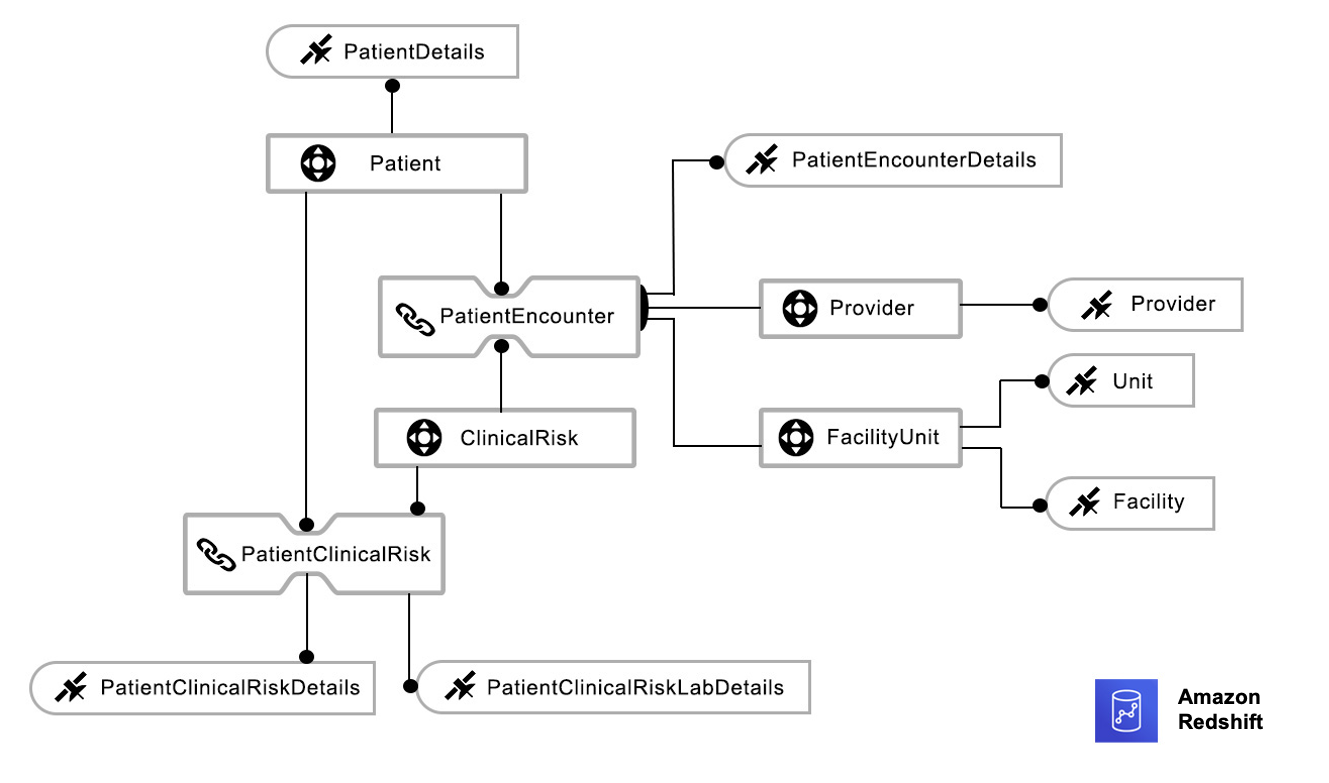
The following is an example entity-relation diagram of the hybrid model, which consists of a fact table from the dimensional model and all other entities from the data vault. The satellite entity from the data vault plays the dual role. When it’s connected to a data vault, it acts as a sat table, and when connected to a fact table, it acts as a dimension table. To serve this dual purpose, sat tables have two keys: a foreign key to connect with the data vault, and a primary key to connect with the fact table.

The following diagram illustrates the physical hybrid data model.

The following diagram illustrates a typical hybrid data warehouse architecture.

The following query retrieves provider and patient data from the hybrid model:

SELECT * FROM Fac_PatientEncounter FP

JOIN Dim_Sat_Provider DSP ON FP.DimProviderID =DSP.DimProviderID

JOIN Dim_Sat_PatientEncounter DPt ON DPt.DimPatientEncounterID = Pt.DimPatientEncounterID

The number of joins is reduced from five to three by using the hybrid model.

Advantages of using the hybrid model

With this model, structural information is segregated from descriptive information to promote flexibility and avoid re-engineering in the event of a change. It maintains data integrity, allowing organizations to avoid hefty fines when data integrity is compromised.

The hybrid paradigm enables non-data professionals to interact with raw data by allowing users to update or create metadata and data enrichment rules. The hybrid approach simplifies the process of gathering and evaluating datasets for business applications. It enables concurrent data loading and eliminates the need for a corporate vault.

The hybrid model also benefits from the fact that there is no dependency between objects in the data storage. With hybrid data warehousing, scalability is multiplied.

You can build the hybrid model on AWS and take advantage of the benefits of Amazon Redshift, which is a fully managed, scalable cloud data warehouse that accelerates your time to insights with fast, simple, and secure analytics at scale. Amazon Redshift continuously adds features that make it faster, more elastic, and easier to use:

  • Amazon Redshift data sharing enhances the hybrid model by eliminating the need for copying data across departments. It also simplifies the work of keeping the single source of truth, saving memory and limiting redundancy. It enables instant, granular, and fast data access across Amazon Redshift clusters without the need to copy or move it. Data sharing provides live access to data so that users always see the most up-to-date and consistent information as it’s updated in the data warehouse.
  • Redshift Spectrum enables you to query open format data directly in the Amazon Simple Storage Service (Amazon S3) data lake without having to load the data or duplicate your infrastructure, and it integrates well with the data lake.
  • With Amazon Redshift concurrency scaling, you can get consistently fast performance for thousands of concurrent queries and users. It instantly adds capacity to support additional users and removes it when the load subsides, with nothing to manage at your end.
  • To realize the benefits of using a hybrid model on AWS, you can get started today without needing to provision and manage data warehouse clusters using Redshift Serverless. All the related services that Amazon Redshift integrates with (such as Amazon Kinesis, AWS Lambda, Amazon QuickSight, Amazon SageMaker, Amazon EMR, AWS Lake Formation, and AWS Glue) are available to work with Redshift Serverless.

Conclusion

With the hybrid model, data can be transformed and loaded into a target data model efficiently and transparently. With this approach, data partners can research data networks more efficiently and promote comparative effectiveness. And with the several newly introduced features of Amazon Redshift, a lot of heavy lifting is done by AWS to handle your workload demands, and you only pay for what you use.

You can get started with the following steps:

  1. Create an Amazon Redshift RA3 instance for your primary clinical data repository and data marts.
  2. Build a data vault schema for the raw vault and create materialized views for the business vault.
  3. Enable Amazon Redshift data shares to share data between the producer cluster and consumer cluster.
  4. Load the structed and unstructured data into the producer cluster data vault for business use.

About the Authors

Bindhu Chinnadurai is a Senior Partner Solutions Architect in AWS based out of London, United Kingdom. She has spent 18+ years working in everything for large scale enterprise environments. Currently she engages with AWS partner to help customers migrate their workloads to AWS with focus on scalability, resiliency, performance and sustainability. Her expertise is DevSecOps.

 Sarathi Balakrishnan was the Global Partner Solutions Architect, specializing in Data, Analytics and AI/ML at AWS. He worked closely with AWS partner globally to build solutions and platforms on AWS to accelerate customers’ business outcomes with state-of-the-art cloud technologies and achieve more in their cloud explorations. He helped with solution architecture, technical guidance, and best practices to build cloud-native solutions. He joined AWS with over 20 years of large enterprise experience in agriculture, insurance, health care and life science, marketing and advertisement industries to develop and implement data and AI strategies.

Build a data storytelling application with Amazon Redshift Serverless and Toucan

Post Syndicated from Louis Hourcade original https://aws.amazon.com/blogs/big-data/build-a-data-storytelling-application-with-amazon-redshift-serverless-and-toucan/

This post was co-written with Django Bouchez, Solution Engineer at Toucan.

Business intelligence (BI) with dashboards, reports, and analytics remains one of the most popular use cases for data and analytics. It provides business analysts and managers with a visualization of the business’s past and current state, helping leaders make strategic decisions that dictate the future. However, customers continue to ask for better ways to tell stories with their data, and therefore increase the adoption rate of their BI tools.

Most BI tools on the market provide an exhaustive set of customization options to build data visualizations. It might appear as a good idea, but ultimately burdens business analysts that need to navigate through endless possibilities before building a report. Analysts are not graphic designers, and a poorly designed data visualization can hide the insight it’s intended to convey, or even mislead the viewer. To realize more value from your data, you should focus on building data visualizations that tell stories, and are easily understandable by your audience. This is where guided analytics helps. Instead of presenting unlimited options for customization, it intentionally limits choice by enforcing design best practices. The simplicity of a guided experience enables business analysts to spend more time generating actual insight rather than worrying about how to present them.

This post illustrates the concept of guided analytics and shows you how you can build a data storytelling application with Amazon Redshift Serverless and Toucan, an AWS Partner. Toucan natively integrates with Redshift Serverless, which enables you to deploy a scalable data stack in minutes without the need to manage any infrastructure component.

Amazon Redshift is a fully managed cloud data warehouse service that enables you to analyze large amounts of structured and semi-structured data. Amazon Redshift can scale from a few gigabytes to a petabyte-scale data warehouse, and AWS recently announced the global availability of Redshift Serverless, making it one of the best options for storing data and running ad hoc analytics in a scalable and cost-efficient way.

With Redshift Serverless, you can get insights on your data by running standalone SQL queries or by using data visualizations tools such as Amazon QuickSight, Toucan, or other third-party options without having to manage your data warehouse infrastructure.

Toucan is a cloud-based guided analytics platform built with one goal in mind: reduce the complexity of bringing data insights to business users. For this purpose, Toucan provides a no-code and comprehensive user experience at every stage of the data storytelling application, which includes data connection, building the visualization, and distribution on any device.

If you’re in a hurry and want to see what you can do with this integration, check out Shark attacks visualization with AWS & Toucan, where Redshift Serverless and Toucan help in understanding the evolution of shark attacks in the world.

Overview of solution

There are many BI tools in the market, each providing an ever-increasing set of capabilities and customization options to differentiate from the competition. Paradoxically, this doesn’t seem to increase the adoption rate of BI tools in enterprises. With more complex tools, data owners spend time building fancy visuals, and tend to add as much information as possible in their dashboards instead of providing a clear and simple message to business users.

In this post, we illustrate the concept of guided analytics by putting ourselves in the shoes of a data engineer that needs to communicate stories to business users with data visualizations. This fictional data engineer has to create dashboards to understand how shark attacks evolved in the last 120 years. After loading the shark attacks dataset in Redshift Serverless, we guide you in using Toucan to build stories that provide a better understanding of shark attacks through time. With Toucan, you can natively connect to datasets in Redshift Serverless, transform the data with a no-code interface, build storytelling visuals, and publish them for business users. The shark attacks visualization example illustrates what you can achieve by following instructions in this post.

Additionally, we have recorded a video tutorial that explains how to connect Toucan with Redshift Serverless and start building charts.

Solution architecture

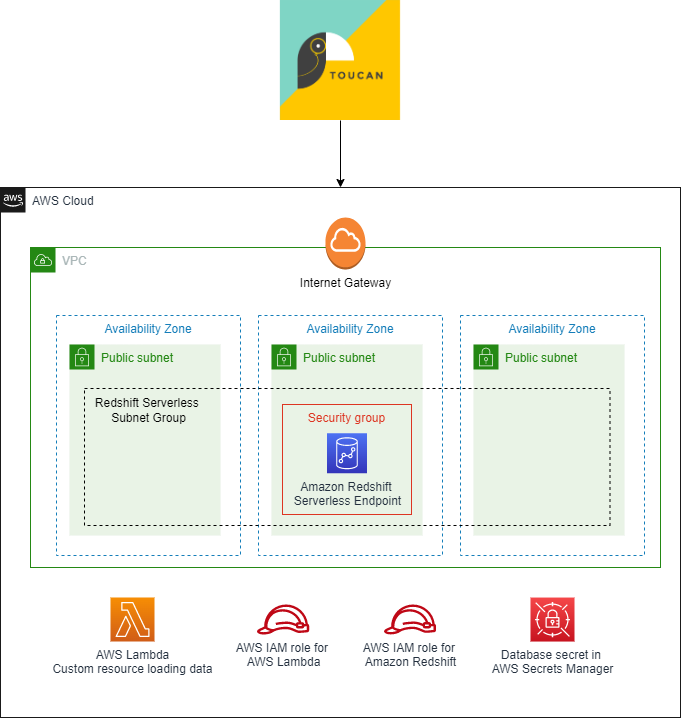
The following diagram depicts the architecture of our solution.

Architecture diagram

We use an AWS CloudFormation stack to deploy all the resources you need in your AWS account:

  • Networking components – This includes a VPC, three public subnets, an internet gateway, and a security group to host the Redshift Serverless endpoint. In this post, we use public subnets to facilitate data access from external sources such as Toucan instances. In this case, the data in Redshift Serverless is still protected by the security group that restricts incoming traffic, and by the database credentials. For a production workload, it is recommended to keep traffic in the Amazon network. For that, you can set the Redshift Serverless endpoints in private subnets, and deploy Toucan in your AWS account through the AWS Marketplace.
  • Redshift Serverless components – This includes a Redshift Serverless namespace and workgroup. The Redshift Serverless workspace is publicly accessible to facilitate the connection from Toucan instances. The database name and the administrator user name are defined as parameters when deploying the CloudFormation stack, and the administrator password is created in AWS Secrets Manager. In this post, we use database credentials to connect to Redshift Serverless, but Toucan also supports connection with AWS credentials and AWS Identity and Access Management (IAM) profiles.
  • Custom resources – The CloudFormation stack includes a custom resource, which is an AWS Lambda function that loads shark attacks data automatically in your Redshift Serverless database when the CloudFormation stack is created.
  • IAM roles and permissions – Finally, the CloudFormation stack includes all IAM roles associated with services previously mentioned to interact with other AWS resources in your account.

In the following sections, we provide all the instructions to connect Toucan with your data in Redshift Serverless, and guide you to build your data storytelling application.

Sample dataset

In this post, we use a custom dataset that lists all known shark attacks in the world, starting from 1900. You don’t have to import the data yourself; we use the Amazon Redshift COPY command to load the data when deploying the CloudFormation stack. The COPY command is one the fastest and most scalable methods to load data into Amazon Redshift. For more information, refer to Using a COPY command to load data.

The dataset contains 4,900 records with the following columns:

  • Date
  • Year
  • Decade
  • Century
  • Type
  • Zone_Type
  • Zone
  • Country
  • Activity
  • Sex
  • Age
  • Fatal
  • Time
  • Species
  • href (a PDF link with the description of the context)
  • Case_Number

Prerequisites

For this solution, you should have the following prerequisites:

  • An AWS account. If you don’t have one already, see the instructions in Sign Up for AWS.
  • An IAM user or role with permissions on AWS resources used in this solution.
  • A Toucan free trial to build the data storytelling application.

Set up the AWS resources

You can launch the CloudFormation stack in any Region where Redshift Serverless is available.

  1. Choose Launch Stack to start creating the required AWS resources for this post:

  1. Specify the database name in Redshift Serverless (default is dev).
  2. Specify the administrator user name (default is admin).

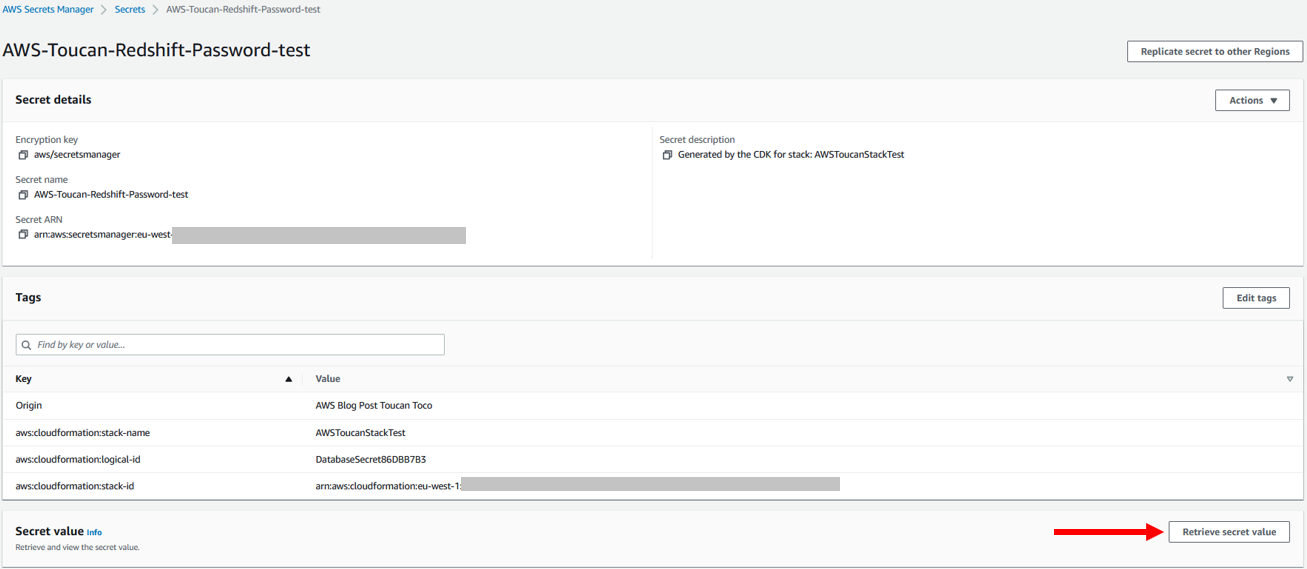
You don’t have to specify the database administrator password because it’s created in Secrets Manager by the CloudFormation stack. The secret’s name is AWS-Toucan-Redshift-Password. We use the secret value in subsequent steps.

Test the deployment

The CloudFormation stack takes a few minutes to deploy. When it’s complete, you can confirm the resources were created. To access your data, you need to get the Redshift Serverless database credentials.

  1. On the Outputs tab for the CloudFormation stack, note the name of the Secrets Manager secret.

BDB-2389temp

  1. On the Secrets Manager console, navigate to the Amazon Redshift database secret and choose Retrieve secret value to get the database administrator user name and password.

  1. To make sure your Redshift Serverless database is available and contains the shark attacks dataset, open the Redshift Serverless workgroup on the Amazon Redshift console and choose Query data to access the query editor.
  2. Also note the Redshift Serverless endpoint, which you need to connect with Toucan.

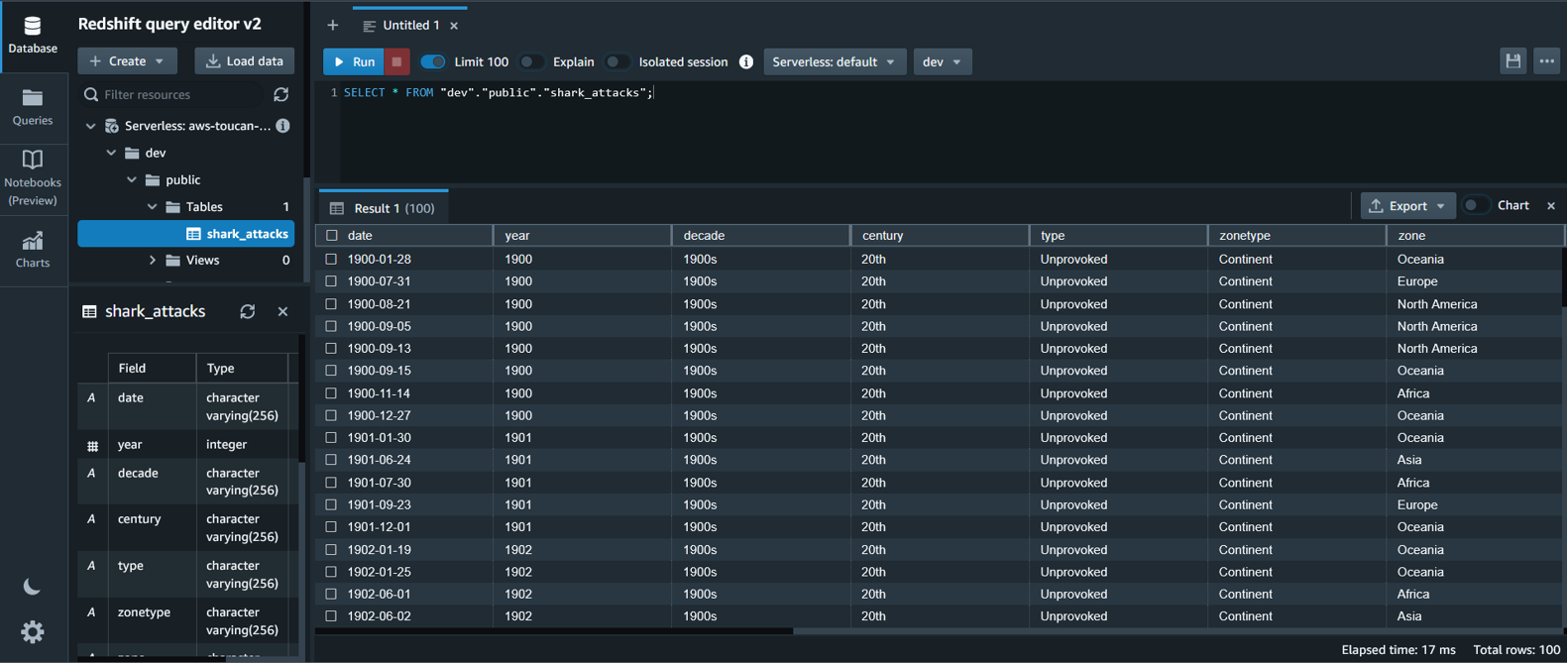
  1. In the Amazon Redshift query editor, run the following SQL query to view the shark attacks data:
SELECT * FROM "dev"."public"."shark_attacks";

Redshift Query Editor v2

Note that you need to change the name of the database in the SQL query if you change the default value when launching the CloudFormation stack.

You have configured Redshift Serverless in your AWS account and uploaded the shark attacks dataset. Now it’s time to use this data by building a storytelling application.

Launch your Toucan free trial

The first step is to access Toucan platform through the Toucan free trial.

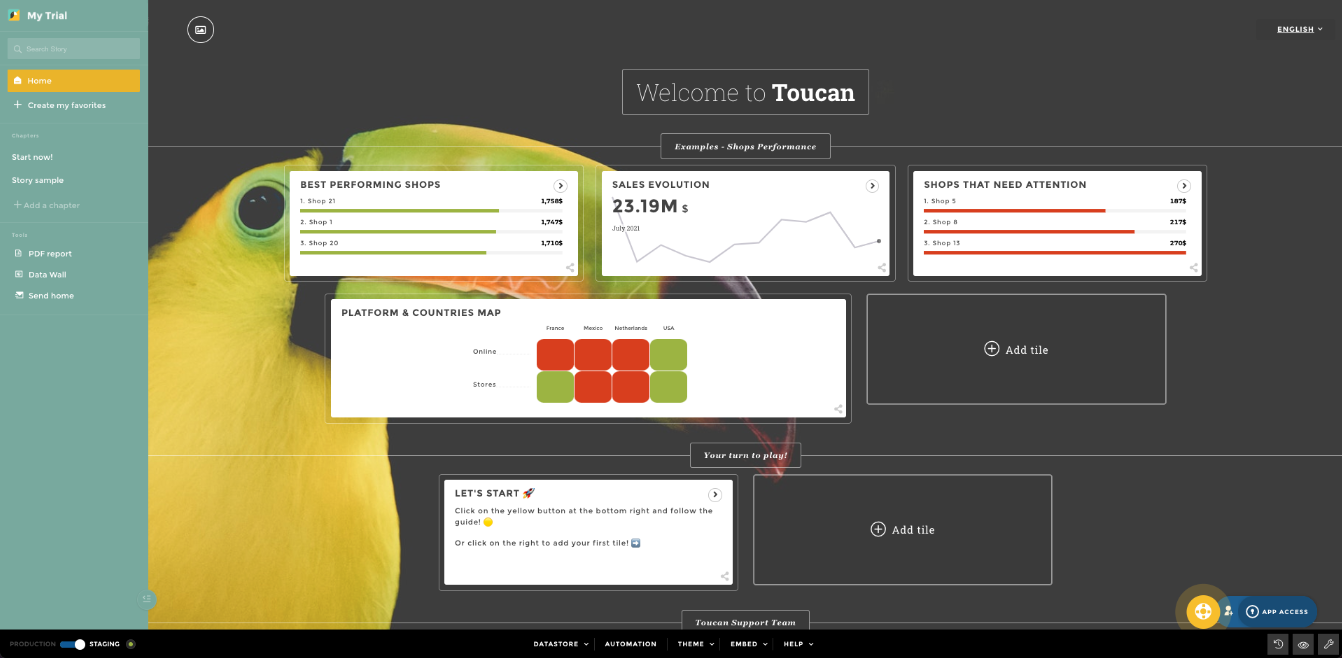
Fill the form and complete the signup steps. You then arrive in the Storytelling Studio, in Staging mode. Feel free to explore what has been already created.

Toucan Home page

Connect Redshift Serverless with Toucan

To connect Redshift Serverless and Toucan, complete the following steps:

  1. Choose Datastore at the bottom of the Toucan Storytelling Studio.
  2. Choose Connectors.

Toucan is natively integrated with Redshift Serverless with AnyConnect.

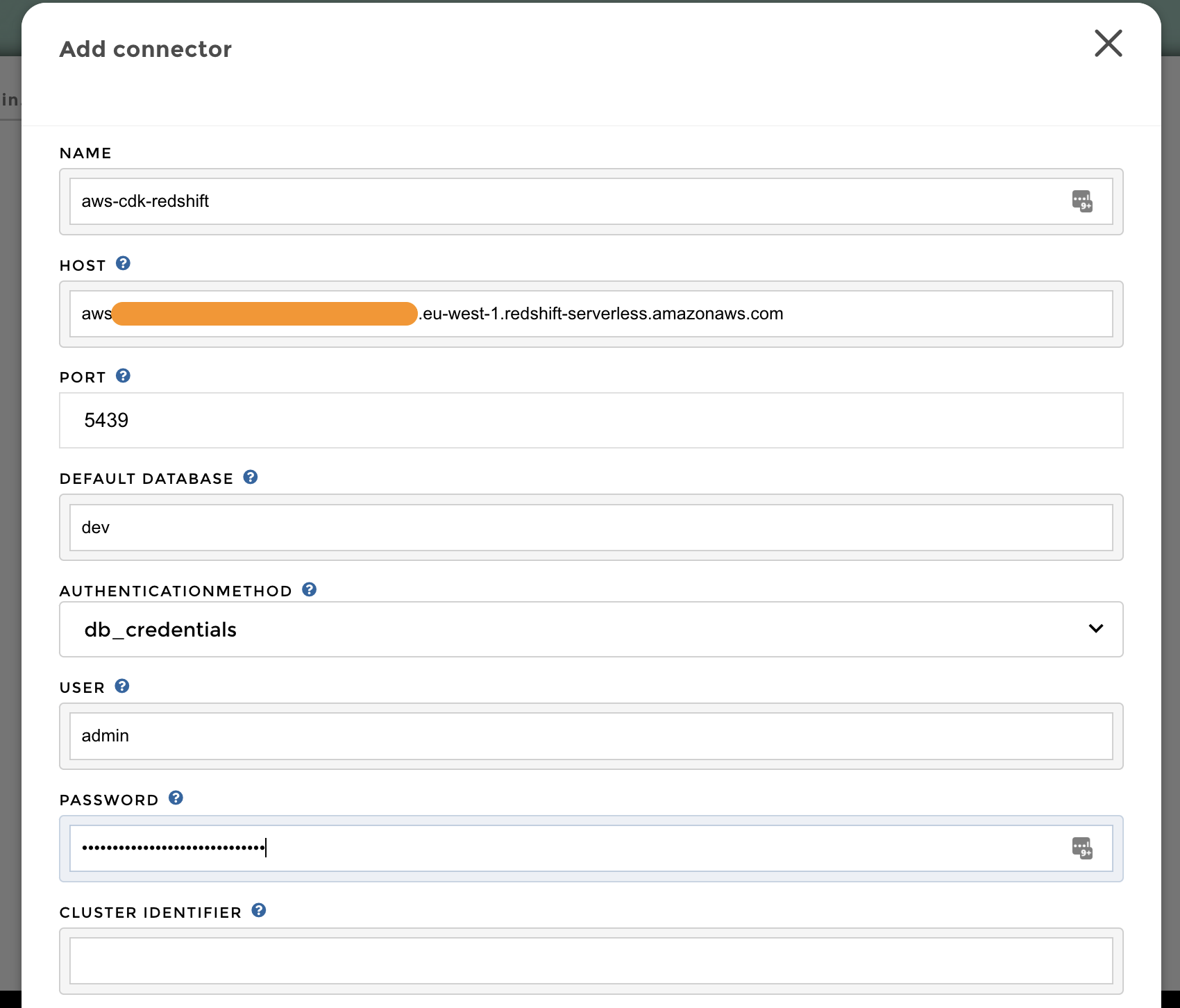
  1. Search for the Amazon Redshift connector, and complete the form with the following information:
    • Name – The name of the connector in Toucan.
    • Host – Your Redshift Serverless endpoint.
    • Port – The listening port of your Amazon Redshift database (5439).
    • Default Database – The name of the database to connect to (dev by default, unless edited in the CloudFormation stack parameters).
    • Authentication Method – The authentication mechanism to connect to Redshift Serverless. In this case, we use database credentials.
    • User – The user name to use for authentication with Redshift Serverless (admin by default, unless edited in the CloudFormation stack parameters).
    • Password – The password to use for authentication with Redshift Serverless (you should retrieve it from Secrets Manager; the secret’s name is AWS-Toucan-Redshift-Password).

Toucan connection

Create a live query

You are now connected to Redshift Serverless. Complete the following steps to create a query:

  1. On the home page, choose Add tile to create a new visualization.

Toucan new tile

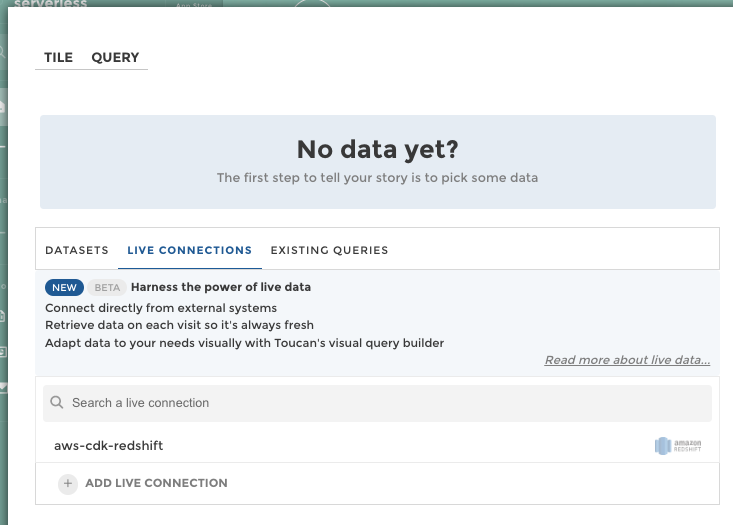
  1. Choose the Live Connections tab, then choose the Amazon Redshift connector you created in the previous step.

Toucan Live Connection

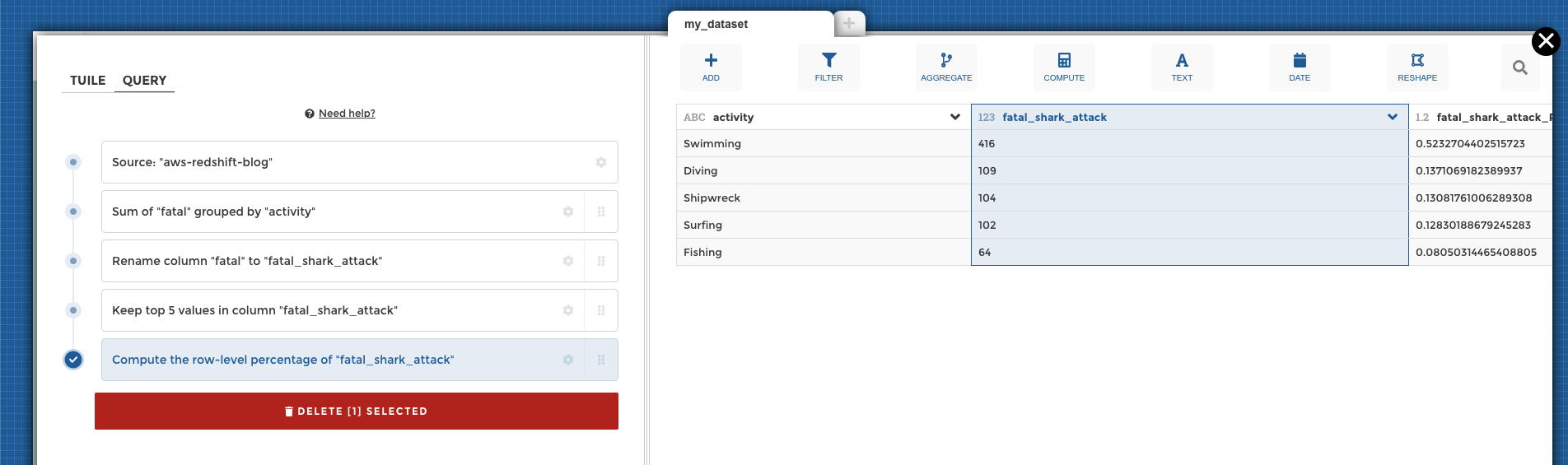
The Toucan trial guides you in building your first live query, in which you can transform your data without writing code using the Toucan YouPrep module.

For instance, as shown in the following screenshot, you can use this no-code interface to compute the sum of fatal shark attacks by activities, get the top five, and calculate the percentage of the total.

Toucan query data

Build your first chart

When your data is ready, choose the Tile tab and complete the form that helps you build charts.

For example, you can configure a leaderboard of the five most dangerous activities, and add a highlight for activities with more than 100 attacks.

Choose Save Changes to save your work and go back to the home page.

Toucan chart builder

Publish and share your work

Until this stage, you have been working in working in Staging mode. To make your work available to everyone, you need to publish it into Production.

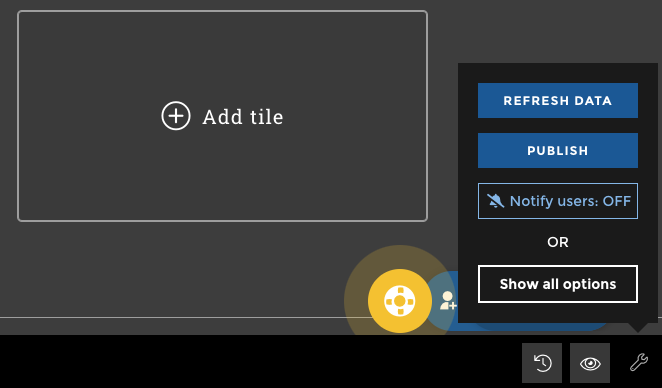
On the bottom right of the home page, choose the eye icon to preview your work by putting yourself in the shoes of your future end-users. You can then choose Publish to make your work available to all.

Toucan publish

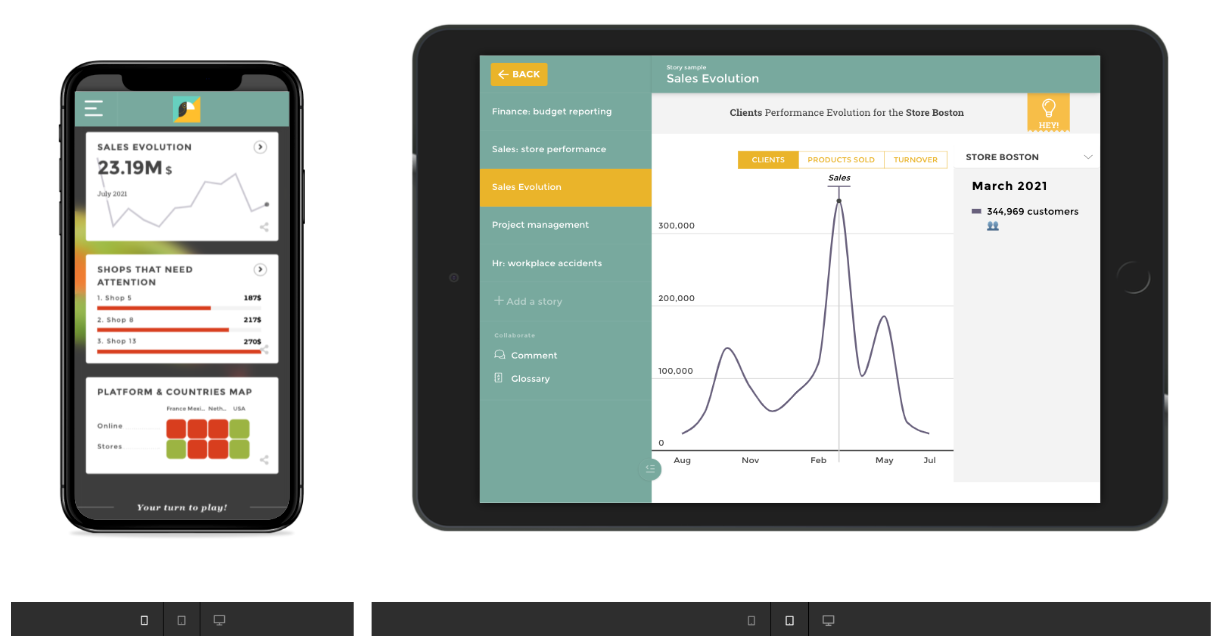
Toucan also offers multiple embedding options to make your charts easier for end-users to access, such as mobile and tablet.

Toucan multi devices

Following these steps, you connected to Redshift Serverless, transformed the data with the Toucan no-code interface, and built data visualizations for business end-users. The Toucan trial guides you in every stage of this process to help you get started.

Redshift Serverless and Toucan guided analytics provide an efficient approach to increase the adoption rate of BI tools by decreasing infrastructure work for data engineers, and by simplifying dashboard understanding for business end-users. This post only covered a small part of what Redshift Serverless and Toucan offer, so feel free to explore other functionalities in the Amazon Redshift Serverless documentation and Toucan documentation.

Clean up

Some of the resources deployed in this post through the CloudFormation template incur costs as long as they’re in use. Be sure to remove the resources and clean up your work when you’re finished in order to avoid unnecessary cost.

On the CloudFormation console, choose Delete stack to remove all resources.

Conclusion

This post showed you how to set up an end-to-end architecture for guided analytics with Redshift Serverless and Toucan.

This solution benefits from the scalability of Redshift Serverless, which enables you to store, transform, and expose data in a cost-efficient way, and without any infrastructure to manage. Redshift Serverless natively integrates with Toucan, a guided analytics tool designed to be used by everyone, on any device.

Guided analytics focuses on communicating stories through data reports. By setting intentional constraints on customization options, Toucan makes it easy for data owners to build meaningful dashboards with a clear and concise message for end-users. It works for both your internal and external customers, on an unlimited number of use cases.

Try it now with our CloudFormation template and a free Toucan trial!


About the Authors


Louis
Louis Hourcade
is a Data Scientist in the AWS Professional Services team. He works with AWS customer across various industries to accelerate their business outcomes with innovative technologies. In his spare time he enjoys running, climbing big rocks, and surfing (not so big) waves.


Benjamin
Benjamin Menuet
is a Data Architect with AWS Professional Services. He helps customers develop big data and analytics solutions to accelerate their business outcomes. Outside of work, Benjamin is a trail runner and has finished some mythic races like the UTMB.


Xavier
Xavier Naunay
is a Data Architect with AWS Professional Services. He is part of the AWS ProServe team, helping enterprise customers solve complex problems using AWS services. In his free time, he is either traveling or learning about technology and other cultures.


Django
Django Bouchez
is a Solution Engineer at Toucan. He works alongside the Sales team to provide support on technical and functional validation and proof, and is also helping R&D demo new features with Cloud Partners like AWS. Outside of work, Django is a homebrewer and practices scuba diving and sport climbing.

[$] Passwordless authentication with FIDO2—beyond just the web

Post Syndicated from original https://lwn.net/Articles/923656/

FIDO2 is a standard for
authenticating users without the need for passwords. While the technology has
been introduced mainly to protect accounts on web sites, it’s also useful
for other purposes, such as logging into Linux systems. The same technology
can even be used beyond authentication, for example to sign files or Git
commits. A couple of talks at FOSDEM
2023
in Brussels presented the possibilities for Linux users.

Top 2022 AWS data protection service and cryptography tool launches

Post Syndicated from Marta Taggart original https://aws.amazon.com/blogs/security/top-2022-aws-data-protection-service-and-cryptography-tool-launches/

Given the pace of Amazon Web Services (AWS) innovation, it can be challenging to stay up to date on the latest AWS service and feature launches. AWS provides services and tools to help you protect your data, accounts, and workloads from unauthorized access. AWS data protection services provide encryption capabilities, key management, and sensitive data discovery. Last year, we saw growth and evolution in AWS data protection services as we continue to give customers features and controls to help meet their needs. Protecting data in the AWS Cloud is a top priority because we know you trust us to help protect your most critical and sensitive asset: your data. This post will highlight some of the key AWS data protection launches in the last year that security professionals should be aware of.

AWS Key Management Service
Create and control keys to encrypt or digitally sign your data

In April, AWS Key Management Service (AWS KMS) launched hash-based message authentication code (HMAC) APIs. This feature introduced the ability to create AWS KMS keys that can be used to generate and verify HMACs. HMACs are a powerful cryptographic building block that incorporate symmetric key material within a hash function to create a unique keyed message authentication code. HMACs provide a fast way to tokenize or sign data such as web API requests, credit card numbers, bank routing information, or personally identifiable information (PII). This technology is used to verify the integrity and authenticity of data and communications. HMACs are often a higher performing alternative to asymmetric cryptographic methods like RSA or elliptic curve cryptography (ECC) and should be used when both message senders and recipients can use AWS KMS.

At AWS re:Invent in November, AWS KMS introduced the External Key Store (XKS), a new feature for customers who want to protect their data with encryption keys that are stored in an external key management system under their control. This capability brings new flexibility for customers to encrypt or decrypt data with cryptographic keys, independent authorization, and audit in an external key management system outside of AWS. XKS can help you address your compliance needs where encryption keys for regulated workloads must be outside AWS and solely under your control. To provide customers with a broad range of external key manager options, AWS KMS developed the XKS specification with feedback from leading key management and hardware security module (HSM) manufacturers as well as service providers that can help customers deploy and integrate XKS into their AWS projects.

AWS Nitro System
A combination of dedicated hardware and a lightweight hypervisor enabling faster innovation and enhanced security

In November, we published The Security Design of the AWS Nitro System whitepaper. The AWS Nitro System is a combination of purpose-built server designs, data processors, system management components, and specialized firmware that serves as the underlying virtualization technology that powers all Amazon Elastic Compute Cloud (Amazon EC2) instances launched since early 2018. This new whitepaper provides you with a detailed design document that covers the inner workings of the AWS Nitro System and how it is used to help secure your most critical workloads. The whitepaper discusses the security properties of the Nitro System, provides a deeper look into how it is designed to eliminate the possibility of AWS operator access to a customer’s EC2 instances, and describes its passive communications design and its change management process. Finally, the paper surveys important aspects of the overall system design of Amazon EC2 that provide mitigations against potential side-channel vulnerabilities that can exist in generic compute environments.

AWS Secrets Manager
Centrally manage the lifecycle of secrets

In February, AWS Secrets Manager added the ability to schedule secret rotations within specific time windows. Previously, Secrets Manager supported automated rotation of secrets within the last 24 hours of a specified rotation interval. This new feature added the ability to limit a given secret rotation to specific hours on specific days of a rotation interval. This helps you avoid having to choose between the convenience of managed rotations and the operational safety of application maintenance windows. In November, Secrets Manager also added the capability to rotate secrets as often as every four hours, while providing the same managed rotation experience.

In May, Secrets Manager started publishing secrets usage metrics to Amazon CloudWatch. With this feature, you have a streamlined way to view how many secrets you are using in Secrets Manager over time. You can also set alarms for an unexpected increase or decrease in number of secrets.

At the end of December, Secrets Manager added support for managed credential rotation for service-linked secrets. This feature helps eliminate the need for you to manage rotation Lambda functions and enables you to set up rotation without additional configuration. Amazon Relational Database Service (Amazon RDS) has integrated with this feature to streamline how you manage your master user password for your RDS database instances. Using this feature can improve your database’s security by preventing the RDS master user password from being visible during the database creation workflow. Amazon RDS fully manages the master user password’s lifecycle and stores it in Secrets Manager whenever your RDS database instances are created, modified, or restored. To learn more about how to use this feature, see Improve security of Amazon RDS master database credentials using AWS Secrets Manager.

AWS Private Certificate Authority
Create private certificates to identify resources and protect data

In September, AWS Private Certificate Authority (AWS Private CA) launched as a standalone service. AWS Private CA was previously a feature of AWS Certificate Manager (ACM). One goal of this launch was to help customers differentiate between ACM and AWS Private CA. ACM and AWS Private CA have distinct roles in the process of creating and managing the digital certificates used to identify resources and secure network communications over the internet, in the cloud, and on private networks. This launch coincided with the launch of an updated console for AWS Private CA, which includes accessibility improvements to enhance screen reader support and additional tab key navigation for people with motor impairment.

In October, AWS Private CA introduced a short-lived certificate mode, a lower-cost mode of AWS Private CA that is designed for issuing short-lived certificates. With this new mode, public key infrastructure (PKI) administrators, builders, and developers can save money when issuing certificates where a validity period of 7 days or fewer is desired. To learn more about how to use this feature, see How to use AWS Private Certificate Authority short-lived certificate mode.

Additionally, AWS Private CA supported the launches of certificate-based authentication with Amazon AppStream 2.0 and Amazon WorkSpaces to remove the logon prompt for the Active Directory domain password. AppStream 2.0 and WorkSpaces certificate-based authentication integrates with AWS Private CA to automatically issue short-lived certificates when users sign in to their sessions. When you configure your private CA as a third-party root CA in Active Directory or as a subordinate to your Active Directory Certificate Services enterprise CA, AppStream 2.0 or WorkSpaces with AWS Private CA can enable rapid deployment of end-user certificates to seamlessly authenticate users. To learn more about how to use this feature, see How to use AWS Private Certificate Authority short-lived certificate mode.

AWS Certificate Manager
Provision and manage SSL/TLS certificates with AWS services and connected resources

In early November, ACM launched the ability to request and use Elliptic Curve Digital Signature Algorithm (ECDSA) P-256 and P-384 TLS certificates to help secure your network traffic. You can use ACM to request ECDSA certificates and associate the certificates with AWS services like Application Load Balancer or Amazon CloudFront. Previously, you could only request certificates with an RSA 2048 key algorithm from ACM. Now, AWS customers who need to use TLS certificates with at least 120-bit security strength can use these ECDSA certificates to help meet their compliance needs. The ECDSA certificates have a higher security strength—128 bits for P-256 certificates and 192 bits for P-384 certificates—when compared to 112-bit RSA 2048 certificates that you can also issue from ACM. The smaller file footprint of ECDSA certificates makes them ideal for use cases with limited processing capacity, such as small Internet of Things (IoT) devices.

Amazon Macie
Discover and protect your sensitive data at scale

Amazon Macie introduced two major features at AWS re:Invent. The first is a new capability that allows for one-click, temporary retrieval of up to 10 samples of sensitive data found in Amazon Simple Storage Service (Amazon S3). With this new capability, you can more readily view and understand which contents of an S3 object were identified as sensitive, so you can review, validate, and quickly take action as needed without having to review every object that a Macie job returned. Sensitive data samples captured with this new capability are encrypted by using customer-managed AWS KMS keys and are temporarily viewable within the Amazon Macie console after retrieval.

Additionally, Amazon Macie introduced automated sensitive data discovery, a new feature that provides continual, cost-efficient, organization-wide visibility into where sensitive data resides across your Amazon S3 estate. With this capability, Macie automatically samples and analyzes objects across your S3 buckets, inspecting them for sensitive data such as personally identifiable information (PII) and financial data; builds an interactive data map of where your sensitive data in S3 resides across accounts; and provides a sensitivity score for each bucket. Macie uses multiple automated techniques, including resource clustering by attributes such as bucket name, file types, and prefixes, to minimize the data scanning needed to uncover sensitive data in your S3 buckets. This helps you continuously identify and remediate data security risks without manual configuration and lowers the cost to monitor for and respond to data security risks.

Support for new open source encryption libraries

In February, we announced the availability of s2n-quic, an open source Rust implementation of the QUIC protocol, in our AWS encryption open source libraries. QUIC is a transport layer network protocol used by many web services to provide lower latencies than classic TCP. AWS has long supported open source encryption libraries for network protocols; in 2015 we introduced s2n-tls as a library for implementing TLS over HTTP. The name s2n is short for signal to noise and is a nod to the act of encryption—disguising meaningful signals, like your critical data, as seemingly random noise. Similar to s2n-tls, s2n-quic is designed to be small and fast, with simplicity as a priority. It is written in Rust, so it has some of the benefits of that programming language, such as performance, threads, and memory safety.

Cryptographic computing for AWS Clean Rooms (preview)

At re:Invent, we also announced AWS Clean Rooms, currently in preview, which includes a cryptographic computing feature that allows you to run a subset of queries on encrypted data. Clean rooms help customers and their partners to match, analyze, and collaborate on their combined datasets—without sharing or revealing underlying data. If you have data handling policies that require encryption of sensitive data, you can pre-encrypt your data by using a common collaboration-specific encryption key so that data is encrypted even when queries are run. With cryptographic computing, data that is used in collaborative computations remains encrypted at rest, in transit, and in use (while being processed).

If you’re looking for more opportunities to learn about AWS security services, read our AWS re:Invent 2022 Security recap post or watch the Security, Identity, and Compliance playlist.

Looking ahead in 2023

With AWS, you control your data by using powerful AWS services and tools to determine where your data is stored, how it is secured, and who has access to it. In 2023, we will further the AWS Digital Sovereignty Pledge, our commitment to offering AWS customers the most advanced set of sovereignty controls and features available in the cloud.

You can join us at our security learning conference, AWS re:Inforce 2023, in Anaheim, CA, June 13–14, for the latest advancements in AWS security, compliance, identity, and privacy solutions.

Stay updated on launches by subscribing to the AWS What’s New RSS feed and reading the AWS Security Blog.

 
If you have feedback about this post, submit comments in the Comments section below. If you have questions about this post, contact AWS Support.

Want more AWS Security news? Follow us on Twitter.

Author

Marta Taggart

Marta is a Seattle-native and Senior Product Marketing Manager in AWS Security Product Marketing, where she focuses on data protection services. Outside of work you’ll find her trying to convince Jack, her rescue dog, not to chase squirrels and crows (with limited success).

New: AWS Telco Network Builder – Deploy and Manage Telco Networks

Post Syndicated from Jeff Barr original https://aws.amazon.com/blogs/aws/new-aws-telco-network-builder-deploy-and-manage-telco-networks/

Over the course of more than one hundred years, the telecom industry has become standardized and regulated, and has developed methods, technologies, and an entire vocabulary (chock full of interesting acronyms) along the way. As an industry, they need to honor this tremendous legacy while also taking advantage of new technology, all in the name of delivering the best possible voice and data services to their customers.

Today I would like to tell you about AWS Telco Network Builder (TNB). This new service is designed to help Communications Service Providers (CSPs) deploy and manage public and private telco networks on AWS. It uses existing standards, practices, and data formats, and makes it easier for CSPs to take advantage of the power, scale, and flexibility of AWS.

Today, CSPs often deploy their code to virtual machines. However, as they look to the future they are looking for additional flexibility and are increasingly making use of containers. AWS TNB is intended to be a part of this transition, and makes use of Kubernetes and Amazon Elastic Kubernetes Service (EKS) for packaging and deployment.

Concepts and Vocabulary
Before we dive in to the service, let’s take a look some concepts and vocabulary that are unique to this industry, and are relevant to AWS TNB:

European Telecommunications Standards Institute (ETSI) – A European organization that defines specifications suitable for global use. AWS TNB supports multiple ETSI specifications including ETSI SOL001 through ETSI SOL005, and ETSI SOL007.

Communications Service Provider (CSP) – An organization that offers telecommunications services.

Topology and Orchestration Specification for Cloud Applications (TOSCA) – A standardized grammar that is used to describe service templates for telecommunications applications.

Network Function (NF) – A software component that performs a specific core or value-added function within a telco network.

Virtual Network Function Descriptor (VNFD) – A specification of the metadata needed to onboard and manage a Network Function.

Cloud Service Archive (CSAR) – A ZIP file that contains a VNFD, references to container images that hold Network Functions, and any additional files needed to support and manage the Network Function.

Network Service Descriptor (NSD) – A specification of the compute, storage, networking, and location requirements for a set of Network Functions along with the information needed to assemble them to form a telco network.

Network Core – The heart of a network. It uses control plane and data plane operations to manage authentication, authorization, data, and policies.

Service Orchestrator (SO) – An external, high-level network management tool.

Radio Access Network (RAN) – The components (base stations, antennas, and so forth) that provide wireless coverage over a specific geographic area.

Using AWS Telco Network Builder (TNB)
I don’t happen to be a CSP, but I will do my best to walk you through the getting-started experience anyway! The primary steps are:

  1. Creating a function package for each Network Function by uploading a CSAR.
  2. Creating a network package for the network by uploading a Network Service Descriptor (NSD).
  3. Creating a network by selecting and instantiating an NSD.

To begin, I open the AWS TNB Console and click Get started:

Initially, I have no networks, no function packages, and no network packages:

My colleagues supplied me with sample CSARs and an NSD for use in this blog post (the network functions are from Free 5G Core):

Each CSAR is a fairly simple ZIP file with a VNFD and other items inside. For example, the VNFD for the Free 5G Core Session Management Function (smf) looks like this:

tosca_definitions_version: tnb_simple_yaml_1_0

topology_template:

  node_templates:

    Free5gcSMF:
      type: tosca.nodes.AWS.VNF
      properties:
        descriptor_id: "4b2abab6-c82a-479d-ab87-4ccd516bf141"
        descriptor_version: "1.0.0"
        descriptor_name: "Free5gc SMF 1.0.0"
        provider: "Free5gc"
      requirements:
        helm: HelmImage

    HelmImage:
      type: tosca.nodes.AWS.Artifacts.Helm
      properties:
        implementation: "./free5gc-smf"

The final section (HelmImage) of the VNFD points to the Kubernetes Helm Chart that defines the implementation.

I click Function packages in the console, then click Create function package. Then I upload the first CSAR and click Next:

I review the details and click Create function package (each VNFD can include a set of parameters that have default values which can be overwritten with values that are specific to a particular deployment):

I repeat this process for the nine remaining CSARs, and all ten function packages are ready to use:

Now I am ready to create a Network Package. The Network Service Descriptor is also fairly simple, and I will show you several excerpts. First, the NSD establishes a mapping from descriptor_id to namespace for each Network Function so that the functions can be referenced by name:

vnfds:
  - descriptor_id: "aa97cf70-59db-4b13-ae1e-0942081cc9ce"
    namespace: "amf"
  - descriptor_id: "86bd1730-427f-480a-a718-8ae9dcf3f531"
    namespace: "ausf"
...

Then it defines the input variables, including default values (this reminds me of a AWS CloudFormation template):

  inputs:
    vpc_cidr_block:
      type: String
      description: "CIDR Block for Free5GCVPC"
      default: "10.100.0.0/16"

    eni_subnet_01_cidr_block:
      type: String
      description: "CIDR Block for Free5GCENISubnet01"
      default: "10.100.50.0/24"
...

Next, it uses the variables to create a mapping to the desired AWS resources (a VPC and a subnet in this case):

   Free5GCVPC:
      type: tosca.nodes.AWS.Networking.VPC
      properties:
        cidr_block: { get_input: vpc_cidr_block }
        dns_support: true

    Free5GCENISubnet01:
      type: tosca.nodes.AWS.Networking.Subnet
      properties:
        type: "PUBLIC"
        availability_zone: { get_input: subnet_01_az }
        cidr_block: { get_input: eni_subnet_01_cidr_block }
      requirements:
        route_table: Free5GCRouteTable
        vpc: Free5GCVPC

Then it defines an AWS Internet Gateway within the VPC:

    Free5GCIGW:
      type: tosca.nodes.AWS.Networking.InternetGateway
      capabilities:
        routing:
          properties:
            dest_cidr: { get_input: igw_dest_cidr }
      requirements:
        route_table: Free5GCRouteTable
        vpc: Free5GCVPC

Finally, it specifies deployment of the Network Functions to an EKS cluster; the functions are deployed in the specified order:

    Free5GCHelmDeploy:
      type: tosca.nodes.AWS.Deployment.VNFDeployment
      requirements:
        cluster: Free5GCEKS
        deployment: Free5GCNRFHelmDeploy
        vnfs:
          - amf.Free5gcAMF
          - ausf.Free5gcAUSF
          - nssf.Free5gcNSSF
          - pcf.Free5gcPCF
          - smf.Free5gcSMF
          - udm.Free5gcUDM
          - udr.Free5gcUDR
          - upf.Free5gcUPF
          - webui.Free5gcWEBUI
      interfaces:
        Hook:
          pre_create: Free5gcSimpleHook

I click Create network package, select the NSD, and click Next to proceed. AWS TNB asks me to review the list of function packages and the NSD parameters. I do so, and click Create network package:

My network package is created and ready to use within seconds:

Now I am ready to create my network instance! I select the network package and choose Create network instance from the Actions menu:

I give my network a name and a description, then click Next:

I make sure that I have selected the desired network package, review the list of functions packages that will be deployed, and click Next:

Then I do one final review, and click Create network instance:

I select the new network instance and choose Instantiate from the Actions menu:

I review the parameters, and enter any desired overrides, then click Instantiate network:

AWS Telco Network Builder (TNB) begins to instantiate my network (behind the scenes, the service creates a AWS CloudFormation template, uses the template to create a stack, and executes other tasks including Helm charts and custom scripts). When the instantiation step is complete, my network is ready to go. Instantiating a network creates a deployment, and the same network (perhaps with some parameters overridden) can be deployed more than once. I can see all of the deployments at a glance:

I can return to the dashboard to see my networks, function packages, network packages, and recent deployments:

Inside an AWS TNB Deployment
Let’s take a quick look inside my deployment. Here’s what AWS TNB set up for me:

Network – An Amazon Virtual Private Cloud (Amazon VPC) with three subnets, a route table, a route, and an Internet Gateway.

Compute – An Amazon Elastic Kubernetes Service (EKS) cluster.

CI/CD – An AWS CodeBuild project that is triggered every time a node is added to the cluster.

Things to Know
Here are a couple of things to know about AWS Telco Network Builder (TNB):

Access – In addition to the console access that I showed you above, you can access AWS TNB from the AWS Command Line Interface (AWS CLI) and the AWS SDKs.

Deployment Options – We are launching with the ability to create a network that spans multiple Availability Zones in a single AWS Region. Over time we expect to add additional deployment options such as Local Zones and Outposts.

Pricing – Pricing is based on the number of Network Functions that are managed by AWS TNB and on calls to the AWS TNB APIs, but the first 45,000 API requests per month in each AWS Region are not charged. There are also additional charges for the AWS resources that are created as part of the deployment. To learn more, read the TNB Pricing page.

Getting Started
To learn more and to get started, visit the AWS Telco Network Builder (TNB) home page.

Jeff;

Using Porting Advisor for Graviton

Post Syndicated from Sheila Busser original https://aws.amazon.com/blogs/compute/using-porting-advisor-for-graviton/

This blog post is written by Ryan Doty Solutions Architect , AWS and Vishal Manan Sr. SSA, EC2 Graviton , AWS.

Introduction

AWS customers recognize that Graviton-based EC2 instances deliver price-performance benefits but many are concerned about the effort to port existing applications. Porting code from one architecture to another can result in a substantial investment in time and effort. AWS has worked continuously to improve the migration process for customers. We recently introduced the Porting Advisor for Graviton as a tool to further simplify the migration process. In this blog, we’ll walk you through how to use Porting Advisor for Graviton so that you can learn how to use it.

Porting Advisor for Graviton is an open-source, command-line tool that analyzes source code and generates a report highlighting missing or outdated libraries and code constructs that may require modification and provides a user with alternative recommendations. It helps customers and developers accelerate their transition to Graviton-based Amazon EC2 instances by reducing the iterative process of identifying and resolving source code and library dependencies. This blog post will provide you with a step-by-step implementation on how to use Porting Advisor for Graviton. At the end of the blog, you will be able to run Porting Advisor for Graviton on your source code tree, generating findings that will help simplify the effort required to port your application.

Porting Advisor for Graviton scans for potentially unsupported or non-portable arm64 code in source code trees. The tool only scans source code files for the programming languages C/C++, Fortran, Go 1.11+, Java 8+, Python 3+, and dependency files such as project/requirements.txt file(s). Most importantly the Porting Advisor doesn’t make any code modifications, API-level recommendations, or send data back to AWS.

You can utilize Porting Advisor for Graviton either as a Python script or compiled into a binary and run on x86-64 or arm64 systems. Therefore, it can be easily implemented as part of your build processes.

Expected Results

Porting Advisor for Graviton reports the following issues:

  1. Inline assembly with no corresponding arm64 inline assembly.
  2. Assembly source files with no corresponding arm64 assembly source files.
  3. Missing arm64 architecture detection in autoconf config.guess scripts.
  4. Linking against libraries that aren’t available on the arm64 architecture.
  5. Use  architecture specific intrinsics.
  6. Preprocessor errors that trigger when compiling on arm64.
  7. Usages of old Visual C++ runtime (Windows specific).

Compiler specific code guarded by compiler specific pre-defined macros is detected, but not reported by default. The following cross-compile specific issues are detected, but not reported by default:

  • Architecture detection that depends on the host rather than the target.
  • Use of build artifacts in the build process.

Skillsets needed for using the tool

Porting Advisor for Graviton is designed to be easy to use. Users though should be versed in the following skills in order to take advantage of the recommendations the tool provides:

  • An understanding of the build system – project requirements and dependencies, versioning, etc.
  • Basic scripting language skills around Python, PowerShell/Bash.
  • Understanding hardware (inline assembly for C/C++) or compiler specific (intrinsic for C/C++) constructs when applicable.
  • The ability to follow best practices in the AWS Graviton Technical Guide for code optimization.

How to use Porting Advisor for Graviton

Prerequisites

The tool requires a minimum version of Python 3.10 and Java (8+ to be installed). The installation of Java is also optional and only required if you want to scan JAR files for native method calls. You can run the tool on a Windows/Linux/MacOS machine, or in an EC2 instance. I will show case usage on Windows and Amazon Linux 2(AL2) running on an EC2 instance. It supports both arm64 and x86-64 processors.

You don’t need to be on an arm64-based processor to run the tool.

The tool doesn't need a lot of CPU Horsepower and even a system with few processors will do

You can run the tool as a Python script or an executable. The executable requires extra steps to build. However, it can be used on another machine without the need to install Python packages.

You must copy the complete “dist” folder for it to work, as there are libraries that are present in that folder along with the executable.

Porting Advisor for Graviton can be run as a binary or as a script. You must run the script to generate the binaries

./porting-advisor-linux-x86_64 ~/my/path/to/my/repo --output report.html 
./porting-advisor-linux-x86_64.exe ../test/CppCode/inline_assembly --output report.html

Running Porting Advisor for Graviton as an executable

The first step is to build the executable.

Building the executable

The first step is to set up the Python Environment. If you run into any errors building the binary, see the Troubleshooting section for more details.

Building the binary on Windows

Building Porting Advisor using Powershell

Building Porting Advisor binary

Building the binary on Linux/Mac

Using shell script to build on Linux or macOS

Porting Advisor binary saved in dist folder

Running the binary

Here you can see how you can run the tool on Linux as a binary for a C++ project.

Porting advisor binary run on a C++ codebase with 350 files

The “dist” folder will have the executable.

Running Porting Advisor for Graviton as a script

Enable the Python environment for the following:

Linux/Mac:

$. python3 -m venv .venv
$. source .venv/bin/activate

PowerShell:

PS> python -m venv .venv
PS> .\.venv\Scripts\Activate.ps1

The following shows how the tool would work on Windows when run as a script:

Running Porting Advisor on Windows as a powershell script

Running the Porting Advisor for Graviton on Linux as a Script

Setting up Python environment to run the Porting Advisor as a script

Running Porting Advisor on Linux as a script

Output of the Porting Advisor for Graviton

The Porting Advisor for Graviton requires the directory parameter to point to the folder where your source code lives. If there are multiple locations, then you can run the tool as part of the script.

If no output file is supplied only standard output will be produced. The following is the output of the tool in HTML format. The first line shows the total files scanned.

  1. If no issues are found, then you’ll see an output like the following:

Results of Porting Advisor run on C++ code with 2836 files with no issues found

  1. With x86-64 specific intrinsics, such as _bswap64, you’ll see it flagged. arm64 specific intrinsics won’t be flagged. Therefore, if your code has arm64 specific intrinsics, then the porting advisor will only flag x86-64 to arm64 and not vice versa. The primary goal of the tool is determining the arm64 readiness of your code.

Porting Advisor reporting inline assembly files in C++ code

  1. The scanner typically looks for source code files only, but it can also look for assembly files with *.s extensions. An example of a file with the C++ code with inline assembly code is as follows:

Porting Advisor reporting use of intrinsics in C++ code

  1. The tool has pointed out errors such as a preprocessor error and architecture-specific intrinsic usage errors.

Porting Advisor results run on C++ code pointing out missing preprocessor macros for arm64 and x86-64 specific intrinsics

Next steps

If you don’t see any issues reported by the tool, then you are in good shape for doing the port. If no issues are reported it does not guarantee that it will work as port. Porting Advisor for Graviton is a tool used best as a helper. Regardless of the issues reported by the tool, we still highly suggest testing the application thoroughly.

As a good practice, we recommend that you use the latest version of your libraries.

Based on the issue, you can consider further actions. For Compiler intrinsic errors, we recommend studying Intel and arm64 intrinsics.

Once you’ve migrated your code and are using Gravition, you can start to look at taking steps to optimize your performance. If you’re interested in doing that please look at our Getting Started Guide.

If you run into any issues, then see our CONTRIBUTING file.

FAQs

  1. How fast is the tool? The tool is able to scan 4048 files in 1.18 seconds.

On an arm64 Based Instance:

Porting Advisor scans 4048 files in 1.18 seconds

  1. False Positives?

This tool scans all files in a source tree, regardless of whether they are included by the build system or not. Therefore, it may misreport issues in files that appear in the source tree but are excluded by the build system. Currently, the tool supports the following languages/dependencies: C/C++, Fortran, Go 1.11+, Java 8+, and Python 3+.

For example: You may have legacy code using Python version 2.7 that is in the source tree but isn’t being used. The tool will scan the code base and point out issues in that particular codebase even though you may not be using that piece of code.  To mitigate, either  remove that folder from the source code or ignore the error pointed by the tool.

  1. I see mention of Ruby and .Net in the Open source tool, but they don’t work on my tool.

Ruby and .Net haven’t been implemented yet, but please consider contributing to it and open an issue requesting support. If you need support then see our CONTRIBUTING file.

Troubleshooting

Errors that you may encounter while building the tool binary:

PyInstaller needs a shared version of libraries.

  1. Python 3.10+ not having shared libraries for use by the PyInstaller tool.

Building Porting Advisor binaries

Pyinstaller failed at building binary and suggesting building Python configure script with --enable-shared on Linux or --enable-framework on macOS

The fix for this is to build your version of Python(3.10+) with the right flags:

./configure --enable-optimizations --enable-shared

If the two flags don’t work together, try doing the build with each flag enabled sequentially.

pyinstaller tool needs python configure script with --enable-shared and enable-optimizations flag

  1. Incorrect Python version (version less than 3.10).If you aren’t on the correct version of Python:

You will get errors similar to the ones here:

Python version on host is 3.7.15 which is less than the recommended version

If you want to run the tool in an EC2 instance on Amazon Linux 2(AL2), then you could try upgrading/installing Python 3.10 as pointed out here.

If you run into any issues, then see our CONTRIBUTING file.

Trying to run Porting Advisor as script will result in Syntax errors on Python version less than 3.10

Conclusion

Porting Advisor for Graviton helps customers quantify the amount of work that is required to port an application. It accelerates your ability to transition to Graviton-based Amazon EC2 instances by reducing the iterative process of identifying and resolving source code and library dependencies.

Resources

To learn how to migrate your workloads to Graviton-based instances, see the AWS Graviton Technical Guide GitHub Repository and AWS Graviton Transition Guide. To get started with Graviton-based Amazon EC2 instances, see the AWS Management Console, AWS Command Line Interface (AWS CLI), and AWS SDKs.

Some other resources include:

How SafeGraph built a reliable, efficient, and user-friendly Apache Spark platform with Amazon EMR on Amazon EKS

Post Syndicated from Nan Zhu original https://aws.amazon.com/blogs/big-data/how-safegraph-built-a-reliable-efficient-and-user-friendly-spark-platform-with-amazon-emr-on-amazon-eks/

This is a guest post by Nan Zhu, Engineering Manager/Software Engineer, SafeGraph, and Dave Thibault, Sr. Solutions Architect – AWS

SafeGraph is a geospatial data company that curates over 41 million global points of interest (POIs) with detailed attributes, such as brand affiliation, advanced category tagging, and open hours, as well as how people interact with those places. We use Apache Spark as our main data processing engine and have over 1,000 Spark applications running over massive amounts of data every day. These Spark applications implement our business logic ranging from data transformation, machine learning (ML) model inference, to operational tasks.

SafeGraph found itself with a less-than-optimal Spark environment with their incumbent Spark vendor. Their costs were climbing. Their jobs would suffer frequent retries from Spot Instance termination. Developers spent too much time troubleshooting and changing job configurations and not enough time shipping business value code. SafeGraph needed to control costs, improve developer iteration speed, and improve job reliability. Ultimately, SafeGraph chose Amazon EMR on Amazon EKS to meet their needs and realized 50% savings relative to their previous Spark managed service vendor.

If building Spark applications for our product is like cutting a tree, having a sharp saw becomes crucial. The Spark platform is the saw. The following figure highlights the engineering workflow when working with Spark, and the Spark platform should support and optimize each action in the workflow. The engineers usually start with writing and building the Spark application code, then submit the application to the computing infrastructure, and finally close the loop by debugging the Spark applications. Additionally, platform and infrastructure teams need to continually operate and optimize the three steps in the engineering workflow.

Figure 1 engineering workflow of Spark applications

There are various challenges involved in each action when building a Spark platform:

  • Reliable dependency management – A complicated Spark application usually brings many dependencies. To run a Spark application, we need to identify all dependencies, resolve any conflicts, pack dependent libraries reliably, and ship them to the Spark cluster. Dependency management is one of the biggest challenges for engineers, especially when they work with PySpark applications.
  • Reliable computing infrastructure – The reliability of the computing infrastructure hosting Spark applications is the foundation of the whole Spark platform. Unstable resource provisioning will not only cause negative impact over engineering efficiency, but it will also increase infrastructure costs due to reruns of the Spark applications.
  • Convenient debugging tools for Spark applications – The debugging tooling plays a key role for engineers to iterate fast on Spark applications. Performant access to the Spark History Server (SHS) is a must for developer iteration speed. Conversely, poor SHS performance slows developers and increases the cost of goods sold for software companies.
  • Manageable Spark infrastructure – A successful Spark platform engineering involves multiple aspects, such as Spark distribution version management, computing resource SKU management and optimization, and more. It largely depends on whether the Spark service vendors provide the right foundation for platform teams to use. The wrong abstraction over distribution version and computing resources, for example, could significantly reduce the ROI of platform engineering.

At SafeGraph, we experienced all of the aforementioned challenges. To resolve them, we explored the marketplace and found that building a new Spark platform on top of EMR on EKS was the solution to our roadblocks. In this post, we share our journey of building our latest Spark platform and how EMR on EKS serves as a robust and efficient foundation for it.

Reliable Python dependency management

One of the biggest challenges for our users to write and build Spark application code is the struggle of managing dependencies reliably, especially for PySpark applications. Most of our ML-related Spark applications are built with PySpark. With our previous Spark service vendor, the only supported way to manage Python dependencies was via a wheel file. Despite its popularity, wheel-based dependency management is fragile. The following figure shows two types of reliability issues faced with wheel-based dependency management:

  • Unpinned direct dependency – If the .whl file doesn’t pinpoint the version of a certain direct dependency, Pandas in this example, it will always pull the latest version from upstream, which may potentially contain a breaking change and take down our Spark applications.
  • Unpinned transitive dependency – The second type of reliability issue is more out of our control. Even though we pinned the direct dependency version when building the .whl file, the direct dependency itself could miss pinpointing the transitive dependencies’ versions (MLFlow in this example). The direct dependency in this case always pulls the latest versions of these transitive dependencies that potentially contain breaking changes and may take down our pipelines.

Figure 2 fragile wheel based dependency management

The other issue we encountered was the unnecessary installation of all Python packages referred by the wheel files for every Spark application initialization. With our previous setup, we needed to run the installation script to install wheel files for every Spark application upon starting even if there is no dependency change. This installation prolongs the Spark application start time from 3–4 minutes to at least 7–8 minutes. The slowdown is frustrating especially when our engineers are actively iterating over changes.

Moving to EMR on EKS enables us to use pex (Python EXecutable) to manage Python dependencies. A .pex file packs all dependencies (including direct and transitive) of a PySpark application in an executable Python environment in the spirit of virtual environments.

The following figure shows the file structure after converting the wheel file illustrated earlier to a .pex file. Compared to the wheel-based workflow, we don’t have transitive dependency pulling or auto-latest version fetching anymore. All versions of dependencies are fixed as x.y.z, a.b.c, and so on when building the .pex file. Given a .pex file, all dependencies are fixed so that we don’t suffer from the slowness or fragility issues in a wheel-based dependency management anymore. The cost of building a .pex file is a one-off cost, too.

Figure 3 PEX file structure

Reliable and efficient resource provisioning

Resource provisioning is the process for the Spark platform to get computing resources for Spark applications, and is the foundation for the whole Spark platform. When building a Spark platform in the cloud, using Spot Instances for cost optimization makes resource provisioning even more challenging. Spot Instances are spare compute capacity available to you at a savings of up to 90% off compared to On-Demand prices. However, when the demand for certain instance types grows suddenly, Spot Instance termination can happen to prioritize meeting those demands. Because of these terminations, we saw several challenges in our earlier version of Spark platform:

  • Unreliable Spark applications – When the Spot Instance termination happened, the runtime of Spark applications got prolonged significantly due to the retried compute stages.
  • Compromised developer experience – The unstable supply of Spot Instances caused frustration among engineers and slowed our development iterations because of the unpredictable performance and low success rate of Spark applications.
  • Expensive infrastructure bill – Our cloud infrastructure bill increased significantly due to the retry of jobs. We had to buy more expensive Amazon Elastic Compute Cloud (Amazon EC2) instances with higher capacity and run in multiple Availability Zones to mitigate issues but in turn paid for the high cost of cross-Availability Zone traffic.

Spark Service Providers (SSPs) like EMR on EKS or other third-party software products serve as the intermediate between users and Spot Instance pools, and play a key role to ensure the sufficient supply of Spot Instances. As shown in the following figure, users launch Spark jobs with job orchestrators, notebooks, or services via SSPs. The SSP implements their internal functionality to access the unused instances in the Spot Instance pool in cloud services like AWS. One of the best practices of using Spot Instances is to diversify instance types (for more information, see Cost Optimization using EC2 Spot Instances). Specifically, there are two key features for a SSP to achieve instance diversification:

  • The SSP should be able to access all types of instances in the Spot Instance pool in AWS
  • The SSP should provide functionality for users to use as many instance types as possible when launching Spark applications

Figure 4 SSP provides the access to the unused instances in Cloud Service Provider

Our last SSP doesn’t provide the expected solution to these two points. They only support a limited set of Spot Instance types and by default, allow only a single Spot Instance type to be selected when launching Spark jobs. As a result, each Spark application only runs with a small capacity of Spot Instances and is vulnerable to Spot Instance terminations.

EMR on EKS uses Amazon Elastic Kubernetes Service (Amazon EKS) for accessing Spot Instances in AWS. Amazon EKS supports all available EC2 instance types, bringing a much higher capacity pool to us. We use the features of Amazon EKS managed node groups and node selectors and taints to assign each Spark application to a node group that is made of multiple instance types. After moving to EMR on EKS, we observed the following benefits:

  • Spot Instance termination was less frequent and our Spark applications’ runtime became shorter and stayed stable.
  • Engineers were able to iterate faster as they saw improvement in the predictability of application behaviors.
  • The infrastructure costs dropped significantly because we no longer needed costly workarounds and, simultaneously, we had a sophisticated selection of instances in each node group of Amazon EKS. We were able to save approximately 50% of computing costs without the workarounds like running in multiple Availability Zones and simultaneously provide the expected level of reliability.

Smooth debugging experience

An infrastructure that supports engineers conveniently debugging the Spark application is critical to close the loop of our engineering workflow. Apache Spark uses event logs to record the activities of a Spark application, such as task start and finish. These events are formatted in JSON and are used by SHS to rerender the UI of Spark applications. Engineers can access SHS to debug task failure reasons or performance issues.

The major challenge for engineers in SafeGraph was the scalability issue in SHS. As shown in the left part of the following figure, our previous SSP forced all engineers to share the same SHS instance. As a result, SHS was under intense resource pressure due to many engineers accessing at the same time for debugging their applications, or if a Spark application had a large event log to be rendered. Prior to moving to EMR on EKS, we frequently experienced either slowness of SHS or SHS crashed completely.

As shown in the following figure, for every request to view Spark history UI, EMR on EKS starts an independent SHS instance container in an AWS-managed environment. The benefit of this architecture is two-fold:

  • Different users and Spark applications won’t compete for SHS resources anymore. Therefore, we never experience slowness or crashes of SHS.
  • All SHS containers are managed by AWS; users don’t need pay additional financial or operational costs to enjoy the scalable architecture.

Figure 5 SHS provisioning architecture in previous SSP and EMR on EKS

Manageable Spark platform

As shown in the engineering workflow, building a Spark platform is not a one-off effort, and platform teams need to manage the Spark platform and keep optimizing each step in the engineer development workflow. The role of the SSP should provide the right facilities to ease operational burden as much as possible. Although there are many types of operational tasks, we focus on two of them in this post: computing resource SKU management and Spark distro version management.

Computing resource SKU management refers to the design and process for a Spark platform to allow users to choose different sizes of computing instances. Such a design and process would largely rely on the relevant functionality implemented from SSPs.

The following figure shows the SKU management with our previous SSP.

Figure 6 (a) Previous SSP: Users have to explicitly specify instance type and availability zone

The following figure shows SKU management with EMR on EKS.

Figure 6 (b) EMR on EKS helps abstracting out instance types from users and make it easy to manage computing SKU

With our previous SSP, job configuration only allowed explicitly specifying a single Spot Instance type, and if that type ran out of Spot capacity, the job switched to On-Demand or fell into reliability issues. This left platform engineers with the choice of changing the settings across the fleet of Spark jobs or risking unwanted surprises for their budget and cost of goods sold.

EMR on EKS makes it much easier for the platform team to manage computing SKUs. In SafeGraph, we embedded a Spark service client between users and EMR on EKS. The Spark service client exposes only different tiers of resources to users (such as small, medium, and large). Each tier is mapped to a certain node group configured in Amazon EKS. This design brings the following benefits:

  • In the case of prices and capacity changes, it’s easy for us to update configurations in node groups and keep it abstracted from users. Users don’t change anything, or even feel it, and continue to enjoy the stable resource provisioning while we keep costs and operational overhead as low as possible.
  • When choosing the right resources for the Spark application, end-users don’t need to do any guess work because it’s easy to choose with simplified configuration.

Improved Spark distro release management is the other benefit we gain from EMR on EKS. Prior to using EMR on EKS, we suffered from the non-transparent release of Spark distro in our SSP. Every 1–2 months, there is a new patched version of Spark distro released to users. These versions are all exposed to users via their UI. This resulted in engineers choosing various versions of distro, some of which hadn’t been tested with our internal tools. It significantly increased the breaking rate of our pipelines, internal systems, and the support burden of platform teams. We expect that the risk from releases of Spark distros should be minimum and transparent to users with an EMR on EKS architecture.

EMR on EKS follows the best practices with a stable base Docker image containing a fixed version of Spark distro. For any change of Spark distro, we have to explicitly rebuild and roll out the Docker image. With EMR on EKS, we can keep a new version of Spark distro hidden from users before testing it with our internal toolings and systems and make a formal release.

Conclusion

In this post, we shared our journey building a Spark platform on top of EMR on EKS. EMR on EKS as the SSP serves as a strong foundation of our Spark platform. With EMR on EKS, we were able to resolve challenges ranging from dependency management, resource provisioning, and debugging experience, and also significantly reduce our computing cost by 50% due to higher availability of Spot Instance types and sizes.

We hope this post could share some insights to the community when choosing the right SSP for your business. Learn more about EMR on EKS, including benefits, features, and how to get started.


About the Authors

Nan Zhu is the engineering lead of the platform team in SafeGraph. He leads the team to build a broad range of infrastructure and internal toolings to improve the reliability, efficiency and productivity of the SafeGraph engineering process, e.g. internal Spark ecosystem, metrics store and CI/CD for large mono repos, etc. He is also involved in multiple open source projects like Apache Spark, Apache Iceberg, Gluten, etc.

Dave Thibault is a Sr. Solutions Architect serving AWS’s independent software vendor (ISV) customers. He’s passionate about building with serverless technologies, machine learning, and accelerating his AWS customers’ business success. Prior to joining AWS, Dave spent 17 years in life sciences companies doing IT and informatics for research, development, and clinical manufacturing groups. He also enjoys snowboarding, plein air oil painting, and spending time with his family.

Lenovo ThinkStation P360 Ultra Review the Ultra Small Workstation

Post Syndicated from Patrick Kennedy original https://www.servethehome.com/lenovo-thinkstation-p360-ultra-review-the-ultra-small-workstation/

In our Lenovo ThinkStation P360 Ultra review, we see how Lenovo built a wildly expandable small box with high-end Intel and NVIDIA processors

The post Lenovo ThinkStation P360 Ultra Review the Ultra Small Workstation appeared first on ServeTheHome.

Security updates for Tuesday

Post Syndicated from original https://lwn.net/Articles/923942/

Security updates have been issued by CentOS (libksba, thunderbird, and tigervnc and xorg-x11-server), Debian (clamav, nss, python-django, and sox), Fedora (kernel and thunderbird), Mageia (curl, firefox, nodejs-qs, qtbase5, thunderbird, upx, and webkit2), Red Hat (httpd:2.4, kernel, kernel-rt, kpatch-patch, pcs, php:8.0, python-setuptools, Red Hat build of Cryostat, Red Hat Virtualization Host 4.4.z SP 1, samba, systemd, tar, and thunderbird), Scientific Linux (firefox and thunderbird), and SUSE (clamav, firefox, jhead, mozilla-nss, prometheus-ha_cluster_exporter, tar, and ucode-intel).

The Chief Zero Trust Officer: a new role for a new era of cybersecurity

Post Syndicated from John Engates original https://blog.cloudflare.com/chief-zero-trust-officer/

The Chief Zero Trust Officer: a new role for a new era of cybersecurity

Setting the stage for Zero Trust

The Chief Zero Trust Officer: a new role for a new era of cybersecurity

Over the last few years the topic of cyber security has moved from the IT department to the board room. The current climate of geopolitical and economic uncertainty has made the threat of cyber attacks all the more pressing, with businesses of all sizes and across all industries feeling the impact. From the potential for a crippling ransomware attack to a data breach that could compromise sensitive consumer information, the risks are real and potentially catastrophic. Organizations are recognizing the need for better resilience and preparation regarding cybersecurity. It is not enough to simply react to attacks as they happen; companies must proactively prepare for the inevitable in their approach to cybersecurity.

The security approach that has gained the most traction in recent years is the concept of Zero Trust. The basic principle behind Zero Trust is simple: don’t trust anything; verify everything. The impetus for a modern Zero Trust architecture is that traditional perimeter-based (castle-and-moat) security models are no longer sufficient in today’s digitally distributed landscape. Organizations must adopt a holistic approach to security based on verifying the identity and trustworthiness of all users, devices, and systems that access their networks and data.

The Chief Zero Trust Officer: a new role for a new era of cybersecurity

Zero Trust has been on the radar of business leaders and board members for some time now. However, Zero Trust is no longer just a concept being discussed; it’s now a mandate. With remote or hybrid work now the norm and cyber-attacks continuing to escalate, businesses realize they must take a fundamentally different approach to security. But as with any significant shift in strategy, implementation can be challenging, and efforts can sometimes stall. Although many firms have begun implementing Zero Trust methods and technologies, only some have fully implemented them throughout the organization. For many large companies, this is the current status of their Zero Trust initiatives – stuck in the implementation phase.

A new leadership role emerges

But what if there was a missing piece in the cybersecurity puzzle that could change everything? Enter the role of “Chief Zero Trust Officer” (CZTO) – a new position that we believe will become increasingly common in large organizations over the next year.

The idea of companies potentially creating the role of Chief Zero Trust Officer evolved from conversations last year between Cloudflare’s Field CTO team members and US federal government agencies. A similar job function was first noted in the White House memorandum directing federal agencies to “move toward Zero Trust cybersecurity principles” and requiring agencies “designate and identify a Zero Trust strategy implementation lead for their organization” within 30 days. In government, a role like this is often called a “czar,” but the title “chief” is more appropriate within a business.

Large organizations need strong leaders to efficiently get things done. Businesses assign the ultimate leadership responsibility to people with titles that begin with the word chief, such as Chief Executive Officer (CEO) or Chief Financial Officer (CFO). These positions exist to provide direction, set strategy, make critical decisions, and manage day-to-day operations and they are often accountable to the board for overall performance and success.

Why a C-level for Zero Trust, and why now?

An old saying goes, “when everyone is responsible, no one is responsible.” As we consider the challenges in implementing Zero Trust within an enterprise, it appears that a lack of clear leadership and accountability is a significant issue. The question remains, who *exactly* is responsible for driving the adoption and execution of Zero Trust within the organization?

Large enterprises need a single person responsible for driving the Zero Trust journey. This leader should be empowered with a clear mandate and have a singular focus: getting the enterprise to Zero Trust. This is where the idea of the Chief Zero Trust Officer was born. “Chief Zero Trust Officer” may seem like just a title, but it holds a lot of weight. It commands attention and can overcome many obstacles to Zero Trust.

Barriers to adoption

Implementing Zero Trust can be hindered by various technological challenges. Understanding and implementing the complex architecture of some vendors can take time, demand extensive training, or require a professional services engagement to acquire the necessary expertise. Identifying and verifying users and devices in a Zero Trust environment can also be a challenge. It requires an accurate inventory of the organization’s user base, groups they’re a part of, and their applications and devices.

On the organizational side, coordination between different teams is crucial for effectively implementing Zero Trust. Breaking down the silos between IT, cybersecurity, and networking groups, establishing clear communication channels, and regular meetings between team members can help achieve a cohesive security strategy. General resistance to change can also be a significant obstacle. Leaders should use techniques such as leading by example, transparent communication, and involving employees in the change process to mitigate it. Proactively addressing concerns, providing support, and creating employee training opportunities can also help ease the transition.

Responsibility and accountability – no matter what you call it

But why does an organization need a CZTO? Is another C-level role essential? Why not assign someone already managing security within the CISO organization? Of course, these are all valid questions. Think about it this way – companies should assign the title based on the level of strategic importance to the company. So, whether it’s Chief Zero Trust Officer, Head of Zero Trust, VP of Zero Trust, or something else, the title must command attention and come with the power to break down silos and cut through bureaucracy.

New C-level titles aren’t without precedent. In recent years, we’ve seen the emergence of titles such as Chief Digital Transformation Officer, Chief eXperience Officer, Chief Customer Officer, and Chief Data Scientist. The Chief Zero Trust Officer title is likely not even a permanent role. What’s crucial is that the person holding the role has the authority and vision to drive the Zero Trust initiative forward, with the support of company leadership and the board of directors.

Getting to Zero Trust in 2023

Getting to Zero Trust security is now a mandate for many companies, as the traditional perimeter-based security model is no longer enough to protect against today’s sophisticated threats. To navigate the technical and organizational challenges that come with Zero Trust implementation, the leadership of a CZTO is crucial. The CZTO will lead the Zero Trust initiative, align teams and break down barriers to achieve a smooth rollout. The role of CZTO in the C-suite emphasizes the importance of Zero Trust in the company. It ensures that the Zero Trust initiative is given the necessary attention and resources to succeed. Organizations that appoint a CZTO now will be the ones that come out on top in the future.

Cloudflare One for Zero Trust

Cloudflare One is Cloudflare’s Zero Trust platform that is easy to deploy and integrates seamlessly with existing tools and vendors. It is built on the principle of Zero Trust and provides organizations with a comprehensive security solution that works globally. Cloudflare One is delivered on Cloudflare’s global network, which means that it works seamlessly across multiple geographies, countries, network providers, and devices. With Cloudflare’s massive global presence, traffic is secured, routed, and filtered over an optimized backbone that uses real-time Internet intelligence to protect against the latest threats and route traffic around bad Internet weather and outages. Additionally, Cloudflare One integrates with best-of-breed identity management and endpoint device security solutions, creating a complete solution that encompasses the entire corporate network of today and tomorrow. If you’d like to know more, let us know here, and we’ll reach out.

Do you prefer to avoid talking to someone just yet? Nearly every feature in Cloudflare One is available at no cost for up to 50 users. Many of our largest enterprise customers start by exploring our Zero Trust products themselves on our free plan, and we invite you to do so by following the link here.

Working with another Zero Trust vendor?

Cloudflare’s security experts have built a vendor-neutral roadmap to provide a Zero Trust architecture and an example implementation timeline. The Zero Trust Roadmap https://zerotrustroadmap.org/ is an excellent resource for organizations that want to learn more about the benefits and best practices of implementing Zero Trust. And if you feel stuck on your current Zero Trust journey, have your chief Zero Trust officer give us a call at Cloudflare!

New zoom freezing feature for Geohash plugin

Post Syndicated from Grab Tech original https://engineering.grab.com/geohash-plugin

Introduction

Geohash is an encoding system with a unique identifier for each region on the planet. Therefore, all geohash units can be associated with an individual set of digits and letters.

Geohash is a plugin built by Grab that is available in the Java OpenStreetMap Editor (JOSM) tool, which comes in handy for those who work on precise areas based on geohash units.

Background

Up until recently, users of the Geohash JOSM plugin were unable to stop the displaying of new geohashes with every zoom-in or zoom-out. This meant that every time they changed the zoom, new geohashes would be displayed, and this became bothersome for many users when it was unneeded. The previous behaviour of the plugin when zooming in and out is depicted in the following short video:


This led to the implementation of the zoom freeze feature, which helps users toggle between Enable zoom freeze and Disable zoom freeze, based on their needs.

Solution

As you can see in the following image, a new label was created with the purpose of freezing or unfreezing the display of new geohashes with each zoom change:


By default, this label says “Enable zoom freeze”, and when zoom freezing is enabled, the label changes to “Disable zoom freeze”.

In order to see how zoom freezing works, let’s consider the following example: a user wants to zoom inside the geohash with the code w886hu, without triggering the display of smaller geohashes inside of it. For this purpose, the user will enable the zoom freezing feature by clicking on the label, and then they will proceed with the zoom. The map will look like this:


It is apparent from the image that no new geohashes were created. Now, let’s say the user has finished what they wanted to do, and wants to go back to the “normal” geohash visualisation mode, which means disabling the zoom freeze option. After clicking on the label that now says ‘Disable zoom freeze’, new, smaller geohashes will be displayed, according to the current zoom level:


The functionality is illustrated in the following short video:


Another effect that enabling zoom freeze has is that it disables the ‘Display larger geohashes’ and ‘Display smaller geohashes’ options, since the geohashes are now fixed. The following images show how these options work before and after disabling zoom freeze:


To conclude, we believe that the release of this new feature will benefit users by making it more comfortable for them to zoom in and out of a map. By turning off the display of new geohashes when this is unwanted, map readability is improved, and this translates to a better user experience.

Impact/Limitations

In order to start using this new feature, users need to update the Geohash JOSM plugin.

What’s next?

Grab has come a long way in map-making, from using open source map-making software and developing its own suite of map-making tools to contributing to the open-source map community and building and launching GrabMaps. To find out more, read How KartaCam powers GrabMaps and KartaCam delivers comprehensive, cost-effective mapping data.

Join us

Grab is the leading superapp platform in Southeast Asia, providing everyday services that matter to consumers. More than just a ride-hailing and food delivery app, Grab offers a wide range of on-demand services in the region, including mobility, food, package and grocery delivery services, mobile payments, and financial services across 428 cities in eight countries.

Powered by technology and driven by heart, our mission is to drive Southeast Asia forward by creating economic empowerment for everyone. If this mission speaks to you, join our team today!

How to use AWS Private Certificate Authority short-lived certificate mode

Post Syndicated from Zachary Miller original https://aws.amazon.com/blogs/security/how-to-use-aws-private-certificate-authority-short-lived-certificate-mode/

AWS Private Certificate Authority (AWS Private CA) is a highly available, fully managed private certificate authority (CA) service that you can use to create CA hierarchies and issue private X.509 certificates. You can use these private certificates to establish endpoints for TLS encryption, cryptographically sign code, authenticate users, and more.

Based on customer feedback for prorated certificate pricing options, AWS Private CA now offers short-lived certificate mode, a lower cost mode of AWS Private CA that is designed to issue short-lived certificates. In this blog post, we will compare the original general-purpose and new short-lived CA modes and discuss use cases for each of them.

The general-purpose mode of AWS Private CA supports certificates of any validity period. The addition of short-lived CA mode is intended to facilitate use cases where you want certificates with a short validity period, defined as 7 days or less. Keep in mind this doesn’t mean that the root CA certificate must also be short lived. Although a typical root CA certificate is valid for 10 years, you can customize the certificate validity period for CAs in either mode when you install the CA certificate.

You select the CA mode when you create a certificate authority. The CA mode cannot be changed for an existing CA. Both modes (general-purpose and short-lived) have distinct pricing for the different use cases that they support.

The short-lived CA mode offers an accessible pricing model for customers who need to issue certificates with a short-term validity period. You can use these short-lived certificates for on-demand AWS workloads and align the validity of the certificate with the lifetime of the certificate holder. For example, if you’re using certificate-based authentication for a virtual workstation that is rebuilt each day, you can configure your certificates to expire after 24 hours.

In this blog post, we will compare the two CA modes, examine their pricing models, and discuss several potential use cases for short-lived certificates. We will also provide a walkthrough that shows you how to create a short-lived mode CA by using the AWS Command Line Interface (AWS CLI). To create a short-lived mode CA using the AWS Management Console, see Procedure for creating a CA (console).

Comparing general-purpose mode CAs to short-lived mode CAs

You might be wondering, “How is the short-lived CA mode different from the general-purpose CA mode? I can already create certificates with a short validity period by using AWS Private CA.” The key difference between these two CA modes is cost. Short-lived CA mode is priced to better serve use cases where you reissue private certificates frequently, such as for certificate-based authentication (CBA).

With CBA, users can authenticate once and then seamlessly access resources, including Amazon WorkSpaces and Amazon AppStream 2.0, without re-entering their credentials. This use case demonstrates the security value of short-lived certificates. A short validity period for the certificate reduces the impact of a compromised certificate because the certificate can only be used for authentication during a small window before it’s automatically invalidated. This method of authentication is useful for customers who are looking to adopt a Zero Trust security strategy.

Before the release of the short-lived CA mode, using AWS Private CA for CBA could be cost prohibitive for some customers. This is because CBA needs a new certificate for each user at regular intervals, which can require issuing a high volume of certificates. The best practice for CBA is to use short-lived CA mode, which can issue certificates at a lower cost that can be used to authenticate a user and then expire shortly afterward.

Let’s take a closer look at the pricing models for the two CA modes that are available when you use AWS Private CA.

Pricing model comparison

You can issue short-lived certificates from both the general-purpose and short-lived CA modes of AWS Private CA. However, the general-purpose mode CAs incur a monthly charge of $400 per CA. The cost of issuing certificates from a general-purpose mode CA is based on the number of certificates that you issue per month, per AWS Region.

The following table shows the pricing tiers for certificates issued by AWS Private CA by using a general-purpose mode CA.

Number of private certificates created each month (per Region) Price (per certificate)
1–1,000 $0.75 USD
1,001–10,000 $0.35 USD
10,001 and above $0.001 USD

The short-lived mode CA will only incur a monthly charge of $50 per CA. The cost of issuing certificates from a short-lived mode CA is the same regardless of the volume of certificates issued: $0.058 per certificate. This pricing structure is more cost effective than general-purpose mode if you need to frequently issue new, short-lived certificates for a use case like certificate-based authentication. Figure 1 compares costs between modes at different certificate volumes.

Figure 1: Cost comparison of AWS Private CA modes

Figure 1: Cost comparison of AWS Private CA modes

It’s important to note that if you already issue a high volume of certificates each month from AWS Private CA, the short-lived CA mode might not be more cost effective than the general-purpose mode. Consider a customer who has one CA and issues 80,000 certificates per month using the general-purpose CA mode: This will incur a total monthly cost of $4,370. A breakdown of the total cost per month in this scenario is as follows.

1 private CA x 400 USD per month = 400 USD per month for operation of AWS Private CA

Tiered price for 80,000 issued certificates:
1,000 issued certificates x 0.75 USD = 750 USD
9,000 issued certificates x 0.35 USD = 3,150 USD
70,000 issued certificates x 0.001 USD = 70 USD
Total tier cost: 750 USD + 3,150 USD + 70 USD = 3,970 USD per month for certificates issued
400 USD for instances + 3,970 USD for certificate issued = 4,370 USD
Total cost (monthly): 4,370 USD

Now imagine that same customer chose to use a short-lived mode CA to issue the same number of private certificates. Although the cost per month of the short-lived mode CA instance is lower, the price of issuing short-lived certificates would still be greater than the 70,000 certificates issued at a cost of $0.001 with the general-purpose mode CA. The total cost of issuing this many certificates from a single short-lived mode CA is $4,690. A breakdown of the total cost per month in this scenario is as follows.

1 private CA x 50 USD per month = 50 USD per month for operation of AWS Private CA (short-lived CA mode)

Price for 80,000 issued certificates (short-lived CA mode):
80,000 issued certificates x 0.058 USD = 4,640 USD
50 USD for instances + 4,640 USD for certificate issued = 4,690 USD
Total cost (monthly): 4,690 USD

At very high volumes of certificate issuance, the short-lived CA mode is not as cost effective as the general-purpose CA mode. It’s important to consider the volume of certificates that your organization will be issuing when you decide which CA mode to use. Figure 1 shows the cost difference at various volumes of certificate issuance. This difference will vary based on the number of certificates issued, as well as the number of CAs that your organization used.

You should also evaluate the various use cases that your organization has for using private certificates. For example, private certificates that are used to terminate TLS traffic typically have a validity of a year or more, meaning that the short-lived CA mode could not facilitate this use case. The short-lived CA mode can only issue certificates with a validity of 7 days or less.

However, you can create multiple private CAs and select the appropriate certificate authority mode for each CA based on your requirements. We recommend that you evaluate your use cases and estimate your certificate volume when you consider which CA mode to use.

In general, you should use the new short-lived CA mode for use cases where you require certificates with a short validity period (less than 7 days) and you are not planning to issue more than 75,000 certificates per month. You should use the general-purpose CA mode for scenarios where you need to issue certificates with a validity period of more than 7 days, or when you need short-lived certificates but will be issuing very high volumes of certificates each month (for example, over 75,000).

Use cases

The short-lived certificate feature was initially developed for certificate-based authentication with Amazon WorkSpaces and Amazon AppStream 2.0. For a step-by-step guide on how to configure certificate-based authentication for Amazon Workspaces, see How to configure certificate-based authentication for Amazon WorkSpaces. However, there are other ways to get value from the AWS Private CA short-lived CA mode, which we will describe in the following sections.

IAM Roles Anywhere

For customers who use AWS Identity and Access Management (IAM) Roles Anywhere, you might want to reduce the time period for which a certificate can be used to retrieve temporary credentials to assume an IAM role. If you frequently issue X.509 certificates to servers outside of AWS for use with IAM Roles Anywhere, and you want to use short-lived certificates, the pricing model for short-lived CA mode will be more cost effective in most cases (see Figure 1).

Short-lived credentials are useful for administrative personas that have broad permissions to AWS resources. For instance, you might use IAM Roles Anywhere to allow an entity outside AWS to assume an IAM role with the AdministratorAccess AWS managed policy attached. To help manage the risk of this access pattern, we want the certificate to expire relatively quickly, which reduces the time period during which a compromised certificate could potentially be used to authenticate to a highly privileged IAM role.

Furthermore, IAM Roles Anywhere requires that you manually upload a certificate revocation list (CRL), and does not support the CRL and Online Certificate Status Protocol (OCSP) mechanisms that are native to AWS Private CA. Using short-lived certificates is a way to reduce the impact of a potential credential compromise without needing to configure revocation for IAM Roles Anywhere. The need for certificate revocation is greatly reduced if the certificates are only valid for a single day and can’t be used to retrieve temporary credentials to assume an IAM role after the certificate expires.

Mutual TLS between workloads

Consider a highly sensitive workload running on Amazon Elastic Kubernetes Service (Amazon EKS). AWS Private CA supports an open-source plugin for cert-manager, a widely adopted solution for TLS certificate management in Kubernetes, that offers a more secure CA solution for Kubernetes containers. You can use cert-manager and AWS Private CA to issue certificates to identify cluster resources and encrypt data in transit with TLS.

If you use mutual TLS (mTLS) to protect network traffic between Kubernetes pods, you might want to align the validity period of the private certificates with the lifetime of the pods. For example, if you rebuild the worker nodes for your EKS cluster each day, you can issue certificates that expire after 24 hours and configure your application to request a new short-lived certificate before the current certificate expires.

This enables resource identification and mTLS between pods without requiring frequent revocation of certificates that were issued to resources that no longer exist. As stated previously, this method of issuing short-lived certificates is possible with the general-purpose CA mode—but using the new short-lived CA mode makes this use case more cost effective for customers who issue fewer than 75,000 certificates each month.

Create a short-lived mode CA by using the AWS CLI

In this section, we show you how to use the AWS CLI to create a new private certificate authority with the usage mode set to SHORT_LIVED_CERTIFICATE. If you don’t specify a usage mode, AWS Private CA creates a general-purpose mode CA by default. We won’t use a form of revocation, because the short-lived CA mode makes revocation less useful. The certificates expire quickly as part of normal operations. For more examples of how to create CAs with the AWS CLI, see Procedure for creating a CA (CLI). For instructions to create short-lived mode CAs with the AWS console, see Procedure for creating a CA (Console).

This walkthrough has the following prerequisites:

  1. A terminal with the .aws configuration directory set up with a valid default Region, endpoint, and credentials. For information about configuring your AWS CLI environment, see Configuration and credential file settings.
  2. An AWS Identity and Access Management (IAM) user or role that has permissions to create a certificate authority by using AWS Private CA.
  3. A certificate authority configuration file to supply when you create the CA. This file provides the subject details for the CA certificate, as well as the key and signing algorithm configuration.

    Note: We provide an example CA configuration file, but you will need to modify this example to meet your requirements.

To use the create-certificate-authority command with the AWS CLI

  1. We will use the following ca_config.txt file to create the certificate authority. You will need to modify this example to meet your requirements.
    {
       "KeyAlgorithm":"RSA_2048",
       "SigningAlgorithm":"SHA256WITHRSA",
       "Subject":{
          "Country":"US",
          "Organization":"Example Corp",
          "OrganizationalUnit":"Sales",
          "State":"WA",
          "Locality":"Seattle",
          "CommonName":"Example Root CA G1"
       }
    }

  2. Enter the following command to create a short-lived mode root CA by using the parameters supplied in the ca_config.txt file.

    Note: Make sure that ca_config.txt is located in your current directory, or specify the full path to the file.

    aws acm-pca create-certificate-authority \
    --certificate-authority-configuration file://ca_config.txt \
    --certificate-authority-type "ROOT" \
    --usage-mode SHORT_LIVED_CERTIFICATE \
    --tags Key=usageMode,Value=SHORT_LIVED_CERTIFICATE

  3. Use the describe-certificate-authority command to view the status of your new root CA. The status will show Pending_Certificate, until you install a self-signed root CA certificate. You will need to replace the certificate authority Amazon Resource Name (ARN) in the following command with your own CA ARN.

    sh-4.2$ aws acm-pca describe-certificate-authority --certificate-authority-arn arn:aws:acm-pca:region:account:certificate-authority/CA_ID

    The output of this command is as follows:

    {
        "CertificateAuthority": {
            "Arn": "arn:aws:acm-pca:region:account:certificate-authority/CA_ID",
            "OwnerAccount": "account",
            "CreatedAt": "2022-11-02T23:12:46.916000+00:00",
            "LastStateChangeAt": "2022-11-02T23:12:47.779000+00:00",
            "Type": "ROOT",
            "Status": "PENDING_CERTIFICATE",
            "CertificateAuthorityConfiguration": {
                "KeyAlgorithm": "RSA_2048",
                "SigningAlgorithm": "SHA256WITHRSA",
                "Subject": {
                    "Country": "US",
                    "Organization": "Example Corp",
                    "OrganizationalUnit": "Sales",
                    "State": "WA",
                    "CommonName": "Example Root CA G1",
                    "Locality": "Seattle"
                }
            },
            "RevocationConfiguration": {
                "CrlConfiguration": {
                    "Enabled": false
                },
                "OcspConfiguration": {
                    "Enabled": false
                }
            },
            "KeyStorageSecurityStandard": "FIPS_140_2_LEVEL_3_OR_HIGHER",
            "UsageMode": "SHORT_LIVED_CERTIFICATE"
        }
    }

  4. Generate a certificate signing request for your root CA certificate by running the following command. Make sure to replace the certificate authority ARN in the command with your own CA ARN.

    aws acm-pca get-certificate-authority-csr \
    --certificate-authority-arn arn:aws:acm-pca:region:account:certificate-authority/CA_ID \
    --output text > ca.csr

  5. Using the ca.csr file from the previous step as the argument for the --csr parameter, issue the root certificate with the following command. Make sure to replace the certificate authority ARN in the command with your own CA ARN.

    aws acm-pca issue-certificate \
    --certificate-authority-arn arn:aws:acm-pca:region:account:certificate-authority/CA_ID \
    --csr fileb://ca.csr \
    --signing-algorithm SHA256WITHRSA \
    --template-arn arn:aws:acm-pca:::template/RootCACertificate/V1 \
    --validity Value=10,Type=YEARS

  6. The response will include the CertificateArn for the issued root CA certificate. Next, use your CA ARN and the certificate ARN provided in the response to retrieve the certificate by using the get-certificate CLI command, as follows.

    aws acm-pca get-certificate \
    --certificate-authority-arn arn:aws:acm-pca:region:account:certificate-authority/CA_ID \
    --certificate-arn arn:aws:acm-pca:region:account:certificate-authority/CA_ID/certificate/CERTIFICATE_ID \
    --output text > cert.pem

  7. Notice that we created a new file, cert.pem, that contains the certificate we retrieved in the previous command. We will import this certificate to our short-lived mode root CA by running the following command. Make sure to replace the certificate authority ARN in the command with your own CA ARN.

    aws acm-pca import-certificate-authority-certificate \
    --certificate-authority-arn arn:aws:acm-pca:region:account:certificate-authority/CA_ID \
    --certificate fileb://cert.pem

  8. Check the status of your short-lived mode CA again by using the describe-certificate-authority command. Make sure to replace the certificate authority ARN in the following command with your own CA ARN.

    sh-4.2$ aws acm-pca describe-certificate-authority \
    > --certificate-authority-arn arn:aws:acm-pca:region:account:certificate-authority/CA_ID \
    > --output json

    The output of this command is as follows:

    {
        "CertificateAuthority": {
            "Arn": "arn:aws:acm-pca:region:account:certificate-authority/CA_ID",
            "OwnerAccount": "account",
            "CreatedAt": "2022-11-02T23:12:46.916000+00:00",
            "LastStateChangeAt": "2022-11-02T23:39:23.482000+00:00",
            "Type": "ROOT",
            "Serial": "serial",
            "Status": "ACTIVE",
            "NotBefore": "2022-11-02T22:34:50+00:00",
            "NotAfter": "2032-11-02T23:34:50+00:00",
            "CertificateAuthorityConfiguration": {
                "KeyAlgorithm": "RSA_2048",
                "SigningAlgorithm": "SHA256WITHRSA",
                "Subject": {
                    "Country": "US",
                    "Organization": "Example Corp",
                    "OrganizationalUnit": "Sales",
                    "State": "WA",
                    "CommonName": "Example Root CA G1",
                    "Locality": "Seattle"
                }
            },
            "RevocationConfiguration": {
                "CrlConfiguration": {
                    "Enabled": false
                },
                "OcspConfiguration": {
                    "Enabled": false
                }
            },
            "KeyStorageSecurityStandard": "FIPS_140_2_LEVEL_3_OR_HIGHER",
            "UsageMode": "SHORT_LIVED_CERTIFICATE"
        }
    }

  9. Great! As shown in the output from the preceding command, the new short-lived mode root CA has a status of ACTIVE, meaning it can now issue certificates. This certificate authority will be able to issue end-entity certificates that have a validity period of up to 7 days, as shown in the UsageMode: SHORT_LIVED_CERTIFICATE parameter.

Conclusion

In this post, we introduced the short-lived CA mode that is offered by AWS Private CA, explained how it differs from the general-purpose CA mode, and compared the pricing models for both CA modes. We also provided some recommendations for choosing the appropriate CA mode based on your certificate issuance volume and use cases. Finally, we showed you how to create a short-lived mode CA by using the AWS CLI.

Get started using AWS Private CA, and consult the AWS Private CA User Guide for more details on the short-lived CA mode.

If you have feedback about this post, submit comments in the Comments section below. If you have questions about this post, start a new thread on the AWS Certificate Manager re:Post or contact AWS Support.

Want more AWS Security news? Follow us on Twitter.

Zach Miller

Zach Miller

Zach is a Senior Security Specialist Solutions Architect at AWS. His background is in data protection and security architecture, focused on a variety of security domains, including cryptography, secrets management, and data classification. Today, he is focused on helping enterprise AWS customers adopt and operationalize AWS security services to increase security effectiveness and reduce risk.

Rushir Patel

Rushir Patel

Rushir is a Senior Security Specialist at AWS focused on data protection and cryptography services. His goal is to make complex topics simple for customers and help them adopt better security practices. Prior to AWS, he worked in security product management, engineering, and operations roles.

Trevor Freeman

Trevor Freeman

Trevor is an innovative and solutions-oriented Product Manager at Amazon Web Services, focusing on AWS Private CA. With over 20 years of experience in software and service development, he became an expert in Cloud Services, Security, Enterprise Software, and Databases. Being adept in product architecture and quality assurance, Trevor takes great pride in providing exceptional customer service.

The collective thoughts of the interwebz