Tag Archives: AI

Building the foundation for running extra-large language models

Post Syndicated from Michelle Chen original https://blog.cloudflare.com/high-performance-llms/

An agent needs to be powered by a large language model. A few weeks ago, we announced that Workers AI is officially entering the arena for hosting large open-source models like Moonshot’s Kimi K2.5. Since then, we’ve made Kimi K2.5 3x faster and have more model additions in-flight. These models have been the backbone of a lot of the agentic products, harnesses, and tools that we have been launching this week. 

Hosting AI models is an interesting challenge: it requires a delicate balance between software and very, very expensive hardware. At Cloudflare, we’re good at squeezing every bit of efficiency out of our hardware through clever software engineering. This is a deep dive on how we’re laying the foundation to run extra-large language models.

Hardware configurations

As we mentioned in our previous Kimi K2.5 blog post, we’re using a variety of hardware configurations in order to best serve models. A lot of hardware configurations depend on the size of inputs and outputs that users are sending to the model. For example, if you are using a model to write fanfiction, you might give it a few small prompts (input tokens) while asking it to generate pages of content (output tokens). 

Conversely, if you are running a summarization task, you might be sending in hundreds of thousands of input tokens, but only generating a small summary with a few thousand output tokens. Presented with these opposing use cases, you have to make a choice — should you tune your model configuration so it’s faster at processing input tokens, or faster at generating output tokens?

When we launched large language models on Workers AI, we knew that most of the use cases would be used for agents. With agents, you send in a large number of input tokens. It starts off with a large system prompt, all the tools, MCPs. With the first user prompt, that context keeps growing. Each new prompt from the user sends a request to the model, which consists of everything that was said before — all the previous user prompts, assistant messages, code generated, etc. For Workers AI, that means we had to focus on two things: fast input token processing and fast tool calling.

Prefill decode (PD) disaggregation

One hardware configuration that we use to improve performance and efficiency is disaggregated prefill. There are two stages to processing an LLM request: prefill, which processes the input tokens and populates the KV cache, and decode, which generates output tokens. Prefill is usually compute bound, while decode is memory bound. This means that the parts of the GPU that are used in each stage are different, and since prefill is always done before decode, the stages block one another. Ultimately, it means that we are not efficiently utilizing all of our GPU power if we do both prefill and decode on a single machine.

With prefill decode disaggregation, separate inference servers are run for each stage. First, a request is sent to the prefill stage which performs prefill and stores it in its KV cache. Then the same request is sent to the decode server, with information about how to transfer the KV cache from the prefill server and begin decoding. This has a number of advantages, because it allows the servers to be tuned independently for the role they are performing, scaled to account for more input-heavy or output-heavy traffic, or even to run on heterogeneous hardware.

This architecture requires a relatively complex load balancer to achieve. Beyond just routing the requests as described above, it must rewrite the responses (including streaming SSE) of the decode server to include information from the prefill server such as cached tokens. To complicate matters, different inference servers require different information to initiate the KV cache transfer. We extended this to implement token-aware load balancing, in which there is a pool of prefill and decode endpoints, and the load balancer estimates how many prefill or decode tokens are in-flight to each endpoint in the pool and attempts to spread this load evenly. 

After our public model launch, our input/output patterns changed drastically again. We took the time to analyze our new usage patterns and then tuned our configuration to fit our customer’s use cases.

Here’s a graph of our p90 Time to First Token drop after shifting traffic to our new PD disaggregated architecture, whilst request volume increased, using the same quantity of GPUs. We see a significant improvement in the tail latency variance.


Similarly, p90 time per token went from ~100 ms with high variance to 20-30 ms, a 3x improvement in intertoken latency.


Prompt Caching

Since agentic use cases usually have long contexts, we optimize for efficient prompt caching in order to not recompute input tensors on every turn. We leverage a header called x-session-affinity in order to help requests route to the right region that previously had the computed input tensors. We wrote about this in our original blog post about launching large LLMs on Workers AI. We added session affinity headers to popular agent harnesses like OpenCode, where we noticed a significant increase in total throughput. A small difference in prompt caching from our users can sum to a factor of additional GPUs needed to run a model. While we have KV-aware routing internally, we also rely on clients sending the x-session-affinity in order to be explicit about prompt caching. We incentivize the use of the header by offering discounted cached tokens. We highly encourage users to leverage prompt caching in order to have faster inference and cheaper pricing.


We worked with our heaviest internal users to adopt this header. The result was an increase in input token cache hit ratios from 60% to 80% during peak times. This significantly increases the request throughput that we can handle, while offering better performance for interactive or time-sensitive sessions like OpenCode or AI code reviews.

KV-cache optimization

As we’re serving larger models now, one instance can span multiple GPUs. This means that we had to find an efficient way to share KV cache across GPUs. KV cache is where all the input tensors from prefill (result of prompts in a session) are stored, and initially lives in the VRAM of a GPU. Every GPU has a fixed VRAM size, but if your model instance requires multiple GPUs, there needs to be a way for the KV cache to live across GPUs and talk to each other. To achieve this for Kimi, we leveraged Moonshot AI’s Mooncake Transfer Engine and Mooncake Store.

Mooncake’s Transfer Engine is a high-performance data transfer framework. It works with different Remote Direct Memory Access (RDMA) protocols such as NVLink and NVMe over Fabric, which enables direct memory-to-memory data transfer without involving the CPU. It improves the speed of transferring data across multiple GPU machines, which is particularly important in multi-GPU and multi-node configurations for models. 

When paired with LMCache or SGLang HiCache, the cache is shared across all nodes in the cluster, allowing a prefill node to identify and re-use a cache from a previous request that was originally pre-filled on a different node. This eliminates the need for session aware routing within a cluster and allows us to load balance the traffic much more evenly. Mooncake Store also allows us to extend the cache beyond GPU VRAM, and leverage NVMe storage. This extends the time that sessions remain in cache, improving our cache hit ratio and allowing us to handle more traffic and offer better performance to users.

Speculative decoding

LLMs work by predicting the next token in a sequence, based on the tokens that came before it. With a naive implementation, models only predict the next n token, but we can actually make it predict the next n+1, n+2… tokens in a single forward pass of the model. This popular technique is known as speculative decoding, which we’ve written about in a previous post on Workers AI. 


With speculative decoding, we leverage a smaller LLM (the draft model) to generate a few candidate tokens for the target model to choose from. The target model then just has to select from a small pool of candidate tokens in a single forward pass. Validating the tokens is faster and less computationally expensive than using the larger target model to generate the tokens. However, quality is still upheld as the target model ultimately has to accept or reject the draft tokens.

In agentic use cases, speculative decoding really shines because of the volume of tool calls and structured outputs that models need to generate. A tool call is largely predictable — you know there will be a name, description, and it’s wrapped in a JSON envelope.

To do this with Kimi K2.5, we leverage NVIDIA’s EAGLE-3 (Extrapolation Algorithm for Greater Language-model Efficiency) draft model. The levers for tuning speculative decoding include the number of future tokens to generate. As a result, we’re able to achieve high-quality inference while speeding up tokens per second throughput.

Infire: our proprietary inference engine

As we announced during Birthday Week in 2025, Cloudflare has a proprietary inference engine, Infire, that makes machine learning models faster. Infire is an inference engine written in Rust, designed to support Cloudflare’s unique challenges with inference given our distributed global network. We’ve extended Infire support for this new class of large language models we are planning to run, which meant we had to build a few new features to make it all work.

Multi-GPU support

Large language models like Kimi K2.5 are over 1 trillion parameters, which is about 560GB of model weights. A typical H100 has about 80GB of VRAM and the model weights need to be loaded in GPU memory in order to run. This means that a model like Kimi K2.5 needs at least 8 H100s in order to load the model into memory and run — and that’s not even including the extra VRAM you would need for KV Cache, which includes your context window.

Since we initially launched Infire, we had to add support for multi-GPU, letting the inference engine run across multiple GPUs in either pipeline-parallel or tensor-parallel modes with expert-parallelism supported as well.

For pipeline parallelism, Infire attempts to properly load balance all stages of the pipeline, in order to prevent the GPUs of one stage from starving while other stages are executing. On the other hand, for tensor parallelism, Infire optimizes for reducing cross-GPU communication, making it as fast as possible. For most models, utilizing both pipeline parallelism and tensor parallelism in tandem provides the best balance of throughput and latency.

Even lower memory overhead

While already having much lower GPU memory overhead than vLLM, we optimized Infire even further, tightening the memory required for internal state like activations. Currently Infire is capable of running Llama 4 Scout on just two H200 GPUs with more than 56 GiB remaining for KV-cache, sufficient for more than 1.2m tokens. Infire is also capable of running Kimi K2.5 on 8 H100 GPUs (yes that is H100), with more than 30 GiB still available for KV-cache. In both cases you would have trouble even booting vLLM in the first place.

Faster cold-starts

While adding multi-GPU support, we identified additional opportunities to improve boot times. Even for the largest models, such as Kimi K2.5, Infire can begin serving requests in under 20 seconds. The load times are only bounded by the drive speed.

Maximizing our hardware for faster throughput

Investing in our proprietary inference engine enables us to maximize our hardware by getting up to 20% higher tokens per second throughput on unconstrained systems, and also enabling us to use lower-end hardware to run the latest models, where it was previously completely infeasible.

The journey doesn’t end

New technologies, research, and models come out on a weekly basis for the machine learning community. We’re continuously optimizing our technology stack in order to provide high-quality, performant inference for our customers while operating our GPUs efficiently. If these sound like interesting challenges for you – we’re hiring!

AI Search: the search primitive for your agents

Post Syndicated from Anni Wang original https://blog.cloudflare.com/ai-search-agent-primitive/

Every agent needs search: Coding agents search millions of files across repos. Support agents search customer tickets and internal docs. Even an agent’s memory, its ability to recall past interactions, is fundamentally a search problem. The use cases are different, but the underlying problem is the same: get the right information to the model at the right time.

If you’re building search yourself, you need a vector index, an indexing pipeline that parses and chunks your documents, and something to keep the index up to date when your data changes. If you also need keyword search, that’s a separate index and fusion logic on top. And if each of your agents needs its own searchable context, you’re setting all of that up per agent. 

AI Search (formerly AutoRAG) is the plug-and-play search primitive you need. You can dynamically create instances, give it your data, and search — from a Worker, the Agents SDK, or Wrangler CLI. Here’s what we’re shipping:

  • Hybrid search. Enable both semantic and keyword matching in the same query. Vector search and BM25 run in parallel and results are fused. (The search on our blog is now powered by AI Search. Try the magnifying glass icon to the top right.)

  • Built-in storage and index. New instances come with their own storage and vector index. Upload files directly to an instance via API and they’re indexed. No R2 buckets to set up, no external data sources to connect first. The new ai_search_namespaces binding lets you create and delete instances at runtime from your Worker, so you can spin up one per agent, per customer, or per language without redeployment.

You can now also attach metadata to documents and use it to boost rankings at query time, and query across multiple instances in a single call. 

Now, let’s look at what this means in practice.

In action: Customer Support Agent

Let’s walk through a support agent that searches for two kinds of knowledge: shared product docs, and per-customer history like past resolutions. The product docs are too large to fit in a context window, and each customer’s history grows with every resolved issue, so the agent needs retrieval to find what’s relevant.

Here’s what that looks like with AI Search and the Agents SDK. Start by scaffolding a project:

npm create cloudflare@latest -- --template cloudflare/agents-starter

First, bind an AI Search namespace to your Worker:

// wrangler.jsonc 
{
  "ai_search_namespaces": [
    { "binding": "SUPPORT_KB", "namespace": "support" }
  ],
  "ai": { "binding": "AI" },
  "durable_objects": {
    "bindings": [
      { "name": "SupportAgent", "class_name": "SupportAgent" }
    ]
  }
}

Let’s say your shared product documentation lives in an R2 bucket called product-doc. You can create a one-off AI Search instance (named product-knowledge) backed by the bucket on the Cloudflare Dashboard within the support namespace:


That’s your shared knowledge base, the docs every agent can reference.

When a customer comes back with a new issue, knowing what’s already been tried saves everyone time. You can track this by creating an AI Search instance per customer. After each resolved issue, the agent saves a summary of what went wrong and how it was fixed. Over time, this builds up a searchable log of past resolutions. You can create instances dynamically using the namespace binding:

// create a per-customer instance when they first show up 
await env.SUPPORT_KB.create({
  id: `customer-${customerId}`,
  index_method:{ keyword: true, vector: true }
});

Each instance gets its own built-in storage and vector index — powered by R2 and Vectorize. The instance starts empty and accumulates context over time. Next time the customer comes back, all of it is searchable.

Here’s what the namespace looks like after a few customers:

namespace: "support"
├── product-knowledge     (R2 as source, shared across all agents)
├── customer-abc123       (managed storage, per-customer)
├── customer-def456       (managed storage, per-customer)
└── customer-ghi789       (managed storage, per-customer)

Now the agent itself. It extends AIChatAgent from the Agents SDK and defines two tools. We’re using Kimi K2.5 as the LLM via Workers AI. The model decides when to call the tools based on the conversation:

import { AIChatAgent, type OnChatMessageOptions } from "@cloudflare/ai-chat";
import { createWorkersAI } from "workers-ai-provider";
import { streamText, convertToModelMessages, tool, stepCountIs } from "ai";
import { routeAgentRequest } from "agents";
import { z } from "zod";

export class SupportAgent extends AIChatAgent<Env> {
  async onChatMessage(_onFinish: unknown, options?: OnChatMessageOptions) {
    // the client passes customerId in the request body
    // via the Agent SDK's sendMessage({ body: { customerId } })
    const customerId = options?.body?.customerId;

    // create a per-customer instance when they first show up.
    // each instance gets its own storage and vector index.
    if (customerId) {
      try {
        await this.env.SUPPORT_KB.create({
          id: `customer-${customerId}`,
          index_method: { keyword: true, vector: true }
        });
      } catch {
        // instance already exists
      }
    }

    const workersai = createWorkersAI({ binding: this.env.AI });

    const result = streamText({
      model: workersai("@cf/moonshotai/kimi-k2.5"),
      system: `You are a support agent. Use search_knowledge_base
        to find relevant docs before answering. Search results
        include both product docs and this customer's past
        resolutions — use them to avoid repeating failed fixes
        and to recognize recurring issues. When the issue is
        resolved, call save_resolution before responding.`,
      // this.messages is the full conversation history, automatically
      // persisted by AIChatAgent across reconnects
      messages: await convertToModelMessages(this.messages),
      tools: {
        // tool 1: search across shared product docs AND this
        // customer's past resolutions in a single call
        search_knowledge_base: tool({
          description: "Search product docs and customer history",
          inputSchema: z.object({
            query: z.string().describe("The search query"),
          }),
          execute: async ({ query }) => {
            // always search product docs;
            // include customer history if available
            const instances = ["product-knowledge"];
            if (customerId) {
              instances.push(`customer-${customerId}`);
            }
            return await this.env.SUPPORT_KB.search({
              query: query,
              ai_search_options: {
                // surface recent docs over older ones
                boost_by: [
                  { field: "timestamp", direction: "desc" }
                ],
                // search across both instances at once
                instance_ids: instances
              }
            });
          }
        }),

        // tool 2: after resolving an issue, the agent saves a
        // summary so future agents have full context
        save_resolution: tool({
          description:
            "Save a resolution summary after solving a customer's issue",
          inputSchema: z.object({
            filename: z.string().describe(
              "Short descriptive filename, e.g. 'billing-fix.md'"
            ),
            content: z.string().describe(
              "What the problem was, what caused it, and how it was resolved"
            ),
          }),
          execute: async ({ filename, content }) => {
            if (!customerId) return { error: "No customer ID" };
            const instance = this.env.SUPPORT_KB.get(
              `customer-${customerId}`
            );
            // uploadAndPoll waits until indexing is complete,
            // so the resolution is searchable before the next query
            const item = await instance.items.uploadAndPoll(
              filename, content
            );
            return { saved: true, filename, status: item.status };
          }
        }),
      },
      // cap agentic tool-use loops at 10 steps
      stopWhen: stepCountIs(10),
      abortSignal: options?.abortSignal,
    });

    return result.toUIMessageStreamResponse();
  }
}

// route requests to the SupportAgent durable object
export default {
  async fetch(request: Request, env: Env) {
    return (
      (await routeAgentRequest(request, env)) ||
      new Response("Not found", { status: 404 })
    );
  }
} satisfies ExportedHandler<Env>;

With this, the model decides when to search and when to save. When it searches, it queries product-knowledge and this customer’s past resolutions together. When the issue is resolved, it saves a summary that’s immediately searchable in future conversations. 

How AI Search finds what you’re looking for

Under the hood, AI Search runs a multi-step retrieval pipeline, in which every step is configurable.

Hybrid Search: search that understands intent and matches terms

Until now, AI Search only offered vector search. Vector search is great at understanding intent, but it can lose specifics. In a query “ERR_CONNECTION_REFUSED timeout,” the embedding captures the broad concept of connection failures. But the user isn’t looking for general networking docs. They’re looking for the specific document that mentions “ERR_CONNECTION_REFUSED”. Vector search might return results about troubleshooting without ever surfacing the page that contains that exact error string. 

Keyword search fills that gap. AI Search now supports BM25, one of the most widely used retrieval scoring functions. BM25 scores documents by how often your query terms appear, how rare those terms are across the entire corpus, and how long the document is. It rewards matches on specific terms, penalizes common filler words, and normalizes for document length. When you search “ERR_CONNECTION_REFUSED timeout”, BM25 finds documents that actually contain “ERR_CONNECTION_REFUSED” as a term. However, BM25 may miss a page about “troubleshooting network connections” even though it may be describing the same problem. That’s where vector search shines, and why you need both.

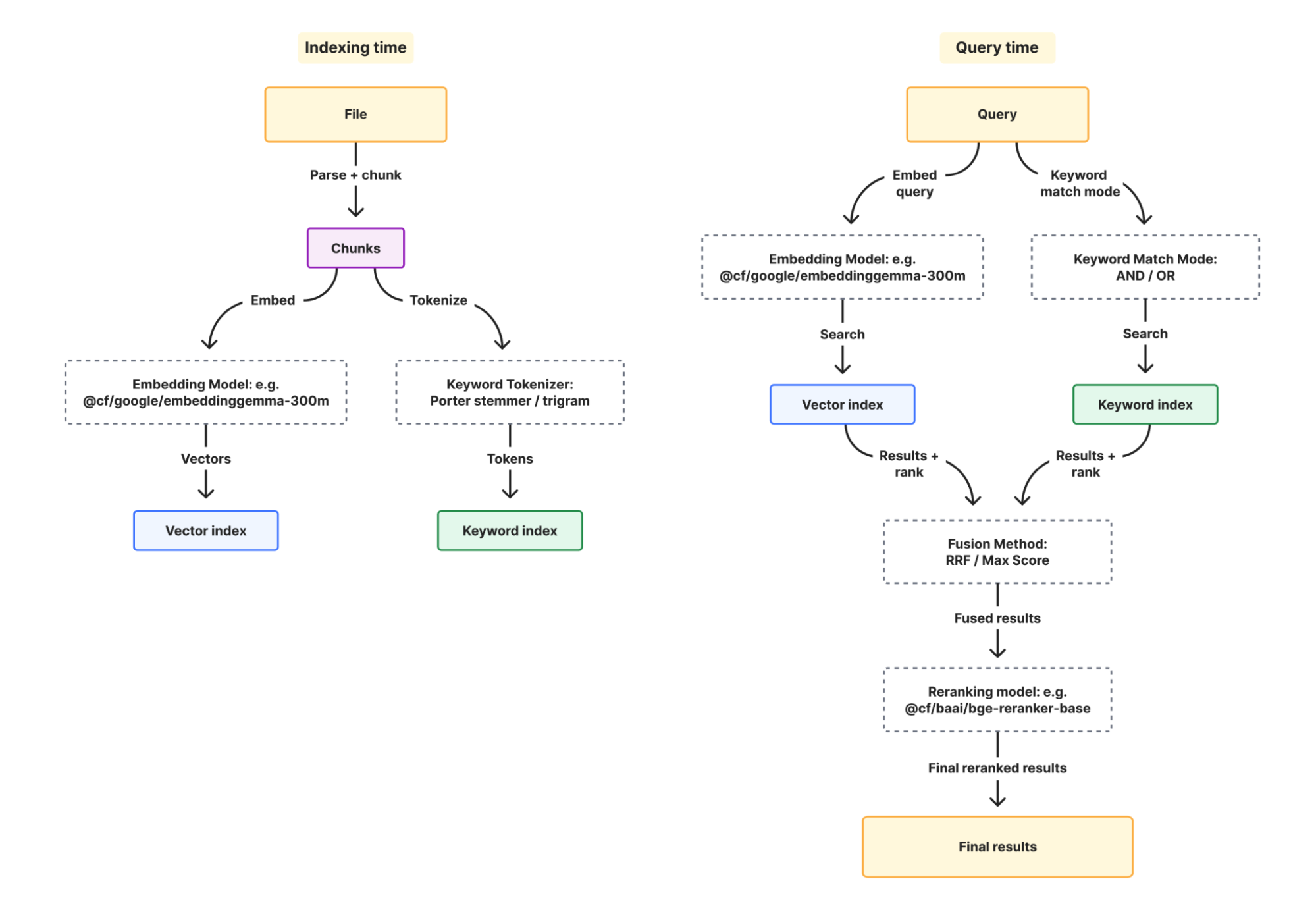
When you enable hybrid search, it runs vector and BM25 in parallel, fuses the results, and optionally reranks them:


Let’s take a look at the new configurations for BM25, and how they come together.

  1. Tokenizer controls how your documents are broken into matchable terms at index time. Porter stemmer (option: porter) stems words so “running” matches “run.” Trigram (option: trigram) matches character substrings so “conf” matches “configuration.” You can use porter for natural language content like docs, and trigram for code where partial matches matter.

  2. Keyword match mode controls which documents are candidates for BM25 scoring at query time. AND requires all query terms to appear in a document, OR includes anything with at least one match.

  3. Fusion controls how vector and keyword results are combined into the final list of results during query time. Reciprocal rank fusion (option: rrf) merges by rank position rather than score, which avoids comparing two incompatible scoring scales, whereas max fusion (option: max) takes the higher score.

  4. (Optional) Reranking adds a cross-encoder pass that re-scores results by evaluating the query and document together as a pair. It can help catch cases where a result has the right terms but isn’t answering the question. 

Every option has a sane default when omitted. You have the flexibility to configure what matters whenever you create a new instance:

const instance = await env.AI_SEARCH.create({
  id: "my-instance",
  index_method: { keyword: true, vector: true },
  indexing_options: {
    keyword_tokenizer: "porter"
  },
  retrieval_options: {
    keyword_match_mode: "or"
  },
  fusion_method: "rrf",
  reranking: true,
  reranking_model: "@cf/baai/bge-reranker-base"
});

Boost relevance: surface what matters

Retrieval gets you relevant results, but relevance alone isn’t always enough. For example, in a news search, an article from last week and an article from three years ago might both be semantically relevant to “election results,” but most users probably want the recent one. Boosting lets you layer business logic on top of retrieval by nudging rankings based on document metadata.

You can boost on timestamp (built in on every item) or any custom metadata field you define.

// boost high priority docs
const results = await instance.search({
  query: "deployment guide",
  ai_search_options: {
    boost_by: [
      { field: "timestamp", direction: "desc" }
    ]
  }
});

Cross-instance search: query across boundaries

In the support agent example, product documentation and customer resolution history live in separate instances by design. But when the agent is answering a question, it needs context from both places at once. Without cross-instance search, you’d make two separate calls and merge the results yourself.

The namespace binding exposes a search() method that handles this for you. Pass an array of instance names and get one ranked list back:

const results = await env.SUPPORT_KB.search({
  query: "billing error",
  ai_search_options: {
    instance_ids: ["product-knowledge", "customer-abc123"]
  }
});

Results are merged and ranked across instances. The agent doesn’t need to know or care that shared docs and customer resolution history live in separate places. 

How AI Search instances work

So far we’ve covered how AI Search finds the right results. Now let’s look at how you can create and manage your search instances.

If you used AI Search before this release, you know the setup: create an R2 bucket, link it to an AI Search instance, AI search generates a service API token for you, and you manage the Vectorize index that gets provisioned on your account. Uploading an object requires you to write to R2 and then wait for a sync job to run to have the object indexed.

New instances created now work differently. When you call create(), the instance comes with its own storage and vector index built-in. You can upload a file, the file is sent to index immediately, and you can poll for indexing status all with one uploadAndpoll() API. Once completed, you can search the instance immediately, and there are no external dependencies to wire together.

const instance = env.AI_SEARCH.get("my-instance");

// upload and wait for indexing to complete
const item = await instance.items.uploadAndPoll("faq.md", content, {
  metadata: { category: "onboarding" }
});
console.log(item.status); // "completed"

// immediately search after indexing is completed
const results = await instance.search({
  // alternative way to pass in users' query other than using parameter query 
  messages: [{ role: "user", content: "onboarding guide" }],
});

Each instance can also connect to one external data source (an R2 bucket or a website) and run on a sync schedule. It can exist alongside the provided built-in storage. In the support agent example, product-knowledge is backed by an R2 bucket for shared documentation, while each customer’s instance uses built-in storage for context uploaded on the fly.

Namespaces: create search instances at runtime

The ai_search_namespaces is a new binding you can leverage to dynamically create search instances at runtime. It replaces the previous env.AI.autorag() API, which accessed AI Search through the AI binding. The old bindings will continue to work using Workers compatibility dates.

// wrangler.jsonc 
{
  "ai_search_namespaces": [
    { "binding": "AI_SEARCH", "namespace": "example" },
  ]
}

The namespace binding gives you APIs like create(), delete(), list(), and search() at the namespace level. If you’re creating instances dynamically (e.g. per agent, per customer, per tenant), this is the binding to use.

// create an instance 
const instance = await env.AI_SEARCH.create({
  id: "my-instance"
});

// delete an instance and all its indexed data
await env.AI_SEARCH.delete("old-instance");

Pricing for new instances

New instances created as of today will get built-in storage and a vector index automatically. 

These instances are free to use while AI Search is in open beta with the limits listed below. When using the website as a data source, website crawling using Browser Run (formerly Browser Rendering) is also now a built-in service, meaning that you won’t be billed for it separately. After beta, the goal is to provide unified pricing for AI Search as a single service, rather than billing separately for each underlying component. Workers AI and AI Gateway usage will continue to be billed separately.

We’ll give at least 30 days notice and communicate pricing details before any billing begins.

Limit

Workers Free

Workers Paid

AI Search instances per account

100

5,000

Files per instance

100,000

1M or 500K for hybrid search

Max file size

4MB

4MB

Queries per month

20,000

Unlimited

Maximum pages crawled per day

500

Unlimited

What about existing instances? 

If you created instances before this release, they continue to work exactly as they do today. Your R2 buckets, Vectorize indexes, and Browser Run usage remain on your account and are billed as before. We’ll share migration details for existing instances soon.

Get started today

Search is one of the most fundamental things an agent can do. With AI Search, you don’t have to build the infrastructure to make it happen. Create an instance, give it your data, and let your agents search it.

Get started today by running this command to create your first instance:

npx wrangler ai-search create my-search

Check out the docs and come tell us what you’re building on the Cloudflare Developer Discord.


Human Trust of AI Agents

Post Syndicated from Bruce Schneier original https://www.schneier.com/blog/archives/2026/04/human-trust-of-ai-agents.html

Interesting research: “Humans expect rationality and cooperation from LLM opponents in strategic games.”

Abstract: As Large Language Models (LLMs) integrate into our social and economic interactions, we need to deepen our understanding of how humans respond to LLMs opponents in strategic settings. We present the results of the first controlled monetarily-incentivised laboratory experiment looking at differences in human behaviour in a multi-player p-beauty contest against other humans and LLMs. We use a within-subject design in order to compare behaviour at the individual level. We show that, in this environment, human subjects choose significantly lower numbers when playing against LLMs than humans, which is mainly driven by the increased prevalence of ‘zero’ Nash-equilibrium choices. This shift is mainly driven by subjects with high strategic reasoning ability. Subjects who play the zero Nash-equilibrium choice motivate their strategy by appealing to perceived LLM’s reasoning ability and, unexpectedly, propensity towards cooperation. Our findings provide foundational insights into the multi-player human-LLM interaction in simultaneous choice games, uncover heterogeneities in both subjects’ behaviour and beliefs about LLM’s play when playing against them, and suggest important implications for mechanism design in mixed human-LLM systems.

Cloudflare Email Service: now in public beta. Ready for your agents

Post Syndicated from Thomas Gauvin original https://blog.cloudflare.com/email-for-agents/

Email is the most accessible interface in the world. It is ubiquitous. There’s no need for a custom chat application, no custom SDK for each channel. Everyone already has an email address, which means everyone can already interact with your application or agent. And your agent can interact with anyone.

If you are building an application, you already rely on email for signups, notifications, and invoices. Increasingly, it is not just your application logic that needs this channel. Your agents do, too. During our private beta, we talked to developers who are building exactly this: customer support agents, invoice processing pipelines, account verification flows, multi-agent workflows. All built on top of email. The pattern is clear: email is becoming a core interface for agents, and developers need infrastructure purpose-built for it.

Cloudflare Email Service is that piece. With Email Routing, you can receive email to your application or agent. With Email Sending, you can reply to emails or send outbounds to notify your users when your agents are done doing work. And with the rest of the developer platform, you can build a full email client and Agents SDK onEmail hook as native functionality. 

Today, as part of Agents Week, Cloudflare Email Service is entering public beta, allowing any application and any agent to send emails. We are also completing the toolkit for building email-native agents: 

  • Email Sending binding, available from your Workers and the Agents SDK 

  • A new Email MCP server

  • Wrangler CLI email commands

  • Skills for coding agents

  • An open-source agentic inbox reference app

Email Sending: now in public beta

Email Sending graduates from private beta to public beta today. You can now send transactional emails directly from Workers with a native Workers binding — no API keys, no secrets management.

export default {
  async fetch(request, env, ctx) {
    await env.EMAIL.send({
      to: "[email protected]",
      from: "[email protected]",
      subject: "Your order has shipped",
      text: "Your order #1234 has shipped and is on its way."
    });
    return new Response("Email sent");
  },
};

Or send from any platform, any language, using the REST API and our TypeScript, Python, and Go SDKs:

curl "https://api.cloudflare.com/client/v4/accounts/{account_id}/email-service/send" \
   --header "Authorization: Bearer <API_TOKEN>" \
   --header "Content-Type: application/json" \
   --data '{
     "to": "[email protected]",
     "from": "[email protected]",
     "subject": "Your order has shipped",
     "text": "Your order #1234 has shipped and is on its way."
   }'

Sending email that actually reaches inboxes usually means wrestling with SPF, DKIM, and DMARC records. When you add your domain to Email Service, we configure all of it automatically. Your emails are authenticated and delivered, not flagged as spam. And because Email Service is a global service built on Cloudflare’s network, your emails are delivered with low latency anywhere in the world.

Combined with Email Routing, which has been free and available for years, you now have complete bidirectional email within a single platform. Receive an email, process it in a Worker, and reply, all without leaving Cloudflare.

For the full deep dive on Email Sending, refer to our Birthday Week announcement. The rest of this post describes what Email Service unlocks for agents.

Agents SDK: your agent is email-native

The Agents SDK for building agents on Cloudflare already has a first-class onEmail hook for receiving and processing inbound email. But until now, your agent could only reply synchronously, or send emails to members of your Cloudflare account. 

With Email Sending, that constraint is gone. This is the difference between a chatbot and an agent.


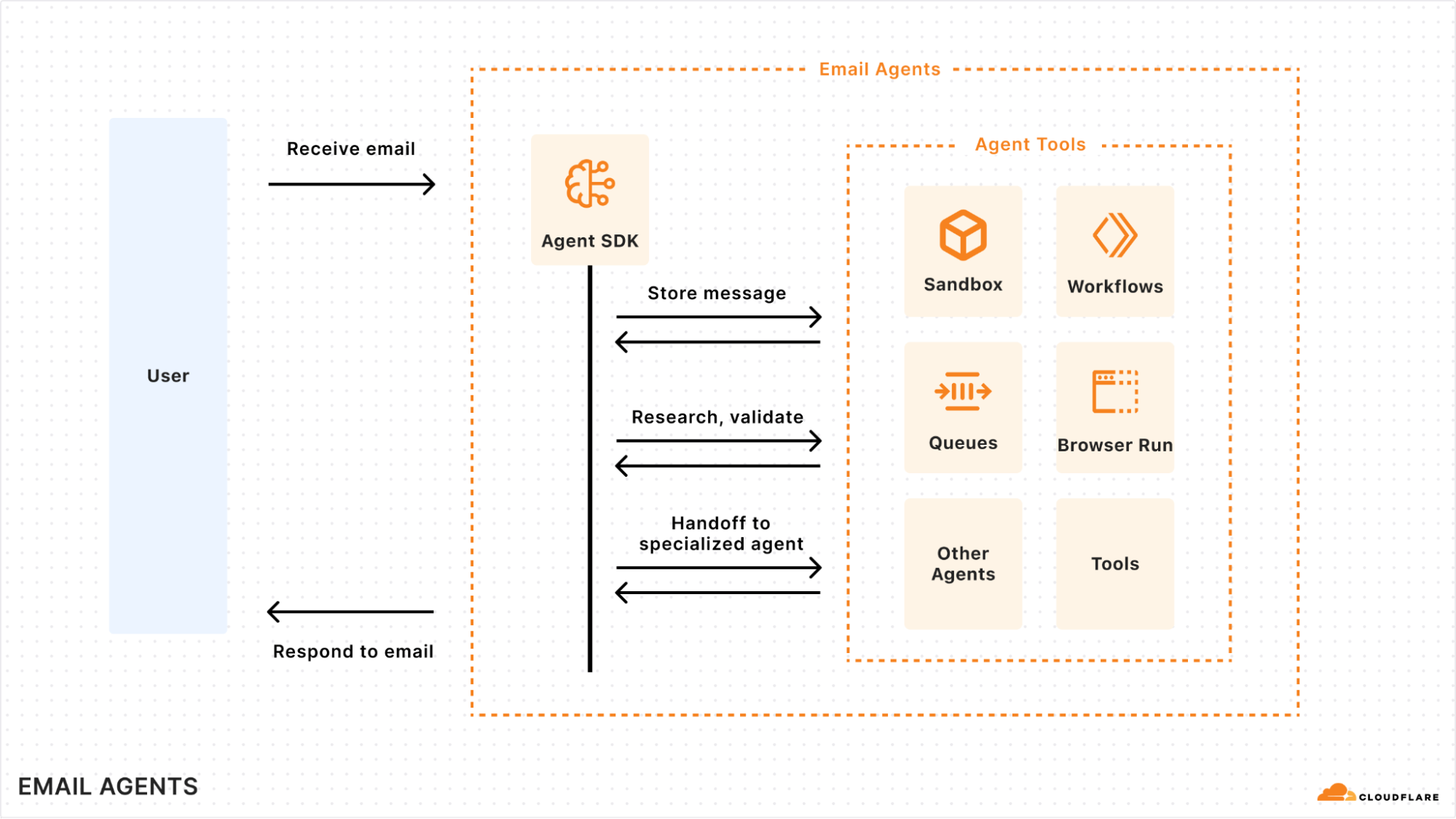
Email agents receive a message, orchestrate work across the platform, and respond asynchronously.

A chatbot responds in the moment or not at all. An agent thinks, acts, and communicates on its own timeline. With Email Sending, your agent can receive a message, spend an hour processing data, check three other systems, and then reply with a complete answer. It can schedule follow-ups. It can escalate when it detects an edge case. It can operate independently. In other words: it can actually do work, not just answer questions. 

Here’s what a support agent looks like with the full pipeline — receive, persist, and reply:

import { Agent, routeAgentEmail } from "agents";
import { createAddressBasedEmailResolver, type AgentEmail } from "agents/email";
import PostalMime from "postal-mime";

export class SupportAgent extends Agent {
  async onEmail(email: AgentEmail) {
    const raw = await email.getRaw();
    const parsed = await PostalMime.parse(raw);

   // Persist in agent state
    this.setState({
      ...this.state,
      ticket: { from: email.from, subject: parsed.subject, body: parsed.text, messageId: parsed.messageId },
    });

    // Kick off long running background agent task 
    // Or place a message on a Queue to be handled by another Worker

    // Reply here or in other Worker handler, like a Queue handler
    await this.sendEmail({
      binding: this.env.EMAIL,
      fromName: "Support Agent",
      from: "[email protected]",
      to: this.state.ticket.from,
      inReplyTo: this.state.ticket.messageId,
      subject: `Re: ${this.state.ticket.subject}`,
      text: `Thanks for reaching out. We received your message about "${this.state.ticket.subject}" and will follow up shortly.`
    });
  }
}

export default {
  async email(message, env) {
    await routeAgentEmail(message, env, {
      resolver: createAddressBasedEmailResolver("SupportAgent"),
    });
  },
} satisfies ExportedHandler<Env>;

If you’re new to the Agents SDK’s email capabilities, here’s what’s happening under the hood.

Each agent gets its own identity from a single domain. The address-based resolver routes [email protected] to a “support” agent instance, [email protected] to a “sales” instance, and so on. You don’t need to provision separate inboxes — the routing is built into the address. You can even use sub-addressing ([email protected]) to route to different agent namespaces and instances.

State persists across emails. Because agents are backed by Durable Objects, calling this.setState() means your agent remembers conversation history, contact information, and context across sessions. The inbox becomes the agent’s memory, without needing a separate database or vector store.

Secure reply routing is built in. When your agent sends an email and expects a reply, you can sign the routing headers with HMAC-SHA256 so that replies route back to the exact agent instance that sent the original message. This prevents attackers from forging headers to route emails to arbitrary agent instances — a security concern that most “email for agents” solutions haven’t addressed.

This is the complete email agent pipeline that teams are building from scratch elsewhere: receive email, parse it, classify it, persist state, kick off async workflows, reply or escalate — all within a single Agent class, deployed globally on Cloudflare’s network.

Email tooling for your agents: MCP server, Wrangler CLI, and skills

Email Service isn’t only for agents running on Cloudflare. Agents run everywhere, whether it’s coding agents like Claude Code, Cursor, or Copilot running locally or in remote environments, or production agents running in containers or external clouds. They all need to send email from those environments. We’re shipping three integrations that make Email Service accessible to any agent, regardless of where it runs.

Email is now available through the Cloudflare MCP server, the same Code Mode-powered server that gives agents access to the entire Cloudflare API. With this MCP server, your agent can discover and call the Email endpoints to send and configure emails. You can send an email with a simple prompt:

"Send me a notification email at [email protected] from my staging domain when the build completes"

For agents running on a computer or a sandbox with bash access, the Wrangler CLI solves the MCP context window problem that we discussed in the Code Mode blog post — tool definitions can consume tens of thousands of tokens before your agent even starts processing a single message. With Wrangler, your agent starts with near-zero context overhead and discovers capabilities on demand through `–help` commands. Here is how your agent can send an email via Wrangler:

wrangler email send \
  --to "[email protected]" \
  --from "[email protected]" \
  --subject "Build completed" \
  --text "The build passed. Deployed to staging."

Regardless of whether you give your agent the Cloudflare MCP or the Wrangler CLI, your agent will be able to now send emails on your behalf with just a prompt.

Skills

We are also publishing a Cloudflare Email Service skill. It gives your agents complete guidance: configuring the Workers binding, sending emails via the REST API or SDKs, handling inbound email with Email Routing configuration, building with Agents SDK, and managing email through Wrangler CLI or MCP. It also covers deliverability best practices and how to craft good transactional emails that land in inboxes rather than spam. Drop it into your project and your coding agent has everything needed to build production-ready email on Cloudflare.

Open-sourcing tools for email agents

During the private beta, we also experimented with email agents. It became clear that you often want to keep the human-in-the-loop element to review emails and see what the agent is doing.The best way to do that is to have a fully featured email client with agent automations built-in.

That’s why we built Agentic Inbox: a reference application with full conversation threading, email rendering, receiving and storing emails and their attachments, and automatically replying to emails. It includes a dedicated MCP server built-in, so external agents can draft emails for your review before sending from your agentic-inbox. 


We’re open-sourcing Agentic Inbox as a reference application for how to build a full email application using Email Routing for inbound, Email Sending for outbound, Workers AI for classification, R2 for attachments, and Agents SDK for stateful agent logic. You can deploy it today to get a full inbox, email client and agent for your emails, with the click of a button.

We want email agent tooling to be composable and reusable. Rather than every team rebuilding the same inbound-classify-reply pipeline, start with this reference application. Fork it, extend it, use it as a starting point for your own email agents that fit your workflows.

Try it out today

Email is where the world’s most important workflows live, but for agents, it has often been a difficult channel to reach. With Email Sending now in public beta, Cloudflare Email Service becomes a complete platform for bidirectional communication, making the inbox a first-class interface for your agents.

Whether you’re building a support agent that meets customers in their inbox or a background process that keeps your team updated in real time, your agents now have a seamless way to communicate on a global scale. The inbox is no longer a silo. Now it’s one more place for your agents to be helpful.


Watch on Cloudflare TV

Add voice to your agent

Post Syndicated from Sunil Pai original https://blog.cloudflare.com/voice-agents/

For many of us, our first experiences with AI agents have been through typing into a chat box. And for those of us using agents day to day, we have likely gotten very good at writing detailed prompts or markdown files to guide them.

But some of the moments where agents would be most useful are not always text-first. You might be on a long commute, juggling a few open sessions, or just wanting to speak naturally to an agent, have it speak back, and continue the interaction.

Adding voice to an agent should not require moving that agent into a separate voice framework. Today, we are releasing an experimental voice pipeline for the Agents SDK.

With @cloudflare/voice, you can add real-time voice to the same Agent architecture you already use. Voice just becomes another way you can talk to the same Durable Object, with the same tools, persistence, and WebSocket connection model that the Agents SDK already provides. 

@cloudflare/voice is an experimental package for the Agents SDK that provides: 

  • withVoice(Agent) for full conversation voice agents

  • withVoiceInput(Agent) for speech-to-text-only use cases, like dictation or voice search 

  • useVoiceAgent and useVoiceInput hooks for React apps 

  • VoiceClient for framework-agnostic clients 

  • Built-in Workers AI providers, so that you can get started without external API keys: 

This means you can now build an agent that users can talk to in real time over a single WebSocket connection, while keeping the same Agent class, Durable Object instance, and the same SQLite-backed conversation history. 

Just as importantly, we want this to be bigger than one fixed default stack. The provider interfaces in @cloudflare/voice are intentionally small, and we want speech, telephony, and transport providers to build with us, so developers can mix and match the right components for their use case, instead of being locked into a single voice architecture.

Get started with voice

Here’s the minimal server-side pattern for a voice agent in the Agents SDK: 

import { Agent, routeAgentRequest } from "agents";
import {
  withVoice,
  WorkersAIFluxSTT,
  WorkersAITTS,
  type VoiceTurnContext
} from "@cloudflare/voice";

const VoiceAgent = withVoice(Agent);

export class MyAgent extends VoiceAgent<Env> {
  transcriber = new WorkersAIFluxSTT(this.env.AI);
  tts = new WorkersAITTS(this.env.AI);

  async onTurn(transcript: string, context: VoiceTurnContext) {
    return `You said: ${transcript}`;
  }
}

export default {
  async fetch(request: Request, env: Env) {
    return (
      (await routeAgentRequest(request, env)) ??
      new Response("Not found", { status: 404 })
    );
  }
} satisfies ExportedHandler<Env>;

That’s the whole server. You add a continuous transcriber, a text-to-speech provider, and implement onTurn().

On the client side, you can connect to it with a React hook: 

import { useVoiceAgent } from "@cloudflare/voice/react";

function App() {
  const {
    status,
    transcript,
    interimTranscript,
    startCall,
    endCall,
    toggleMute
  } = useVoiceAgent({ agent: "my-agent" });

  return (
    <div>
      <p>Status: {status}</p>
      {interimTranscript && <p><em>{interimTranscript}</em></p>}
      <ul>
        {transcript.map((msg, i) => (
          <li key={i}>
            <strong>{msg.role}:</strong> {msg.text}
          </li>
        ))}
      </ul>
      <button onClick={startCall}>Start Call</button>
      <button onClick={endCall}>End Call</button>
      <button onClick={toggleMute}>Mute / Unmute</button>
    </div>
  );
}

If you are not using React, you can use VoiceClient directly from @cloudflare/voice/client. 

How the voice pipeline works

With the Agents SDK, every agent is a Durable Object — a stateful, addressable server instance with its own SQLite database, WebSocket connections, and application logic. The voice pipeline extends this model instead of replacing it. 

At a high level, the flow looks like this:


Here’s how the pipeline breaks down, step by step:

  1. Audio transport: The browser captures microphone audio and streams 16 kHz mono PCM over the same WebSocket connection the agent already uses.

  2. STT session setup:  When the call starts, the agent creates a continuous transcriber session that lives for the duration of the call. 

  3. STT input: Audio streams continuously into that session.

  4. STT turn detection: The speech-to-text model itself decides when the user has finished an utterance and emits a stable transcript for that turn. 

  5. LLM/application logic: The voice pipeline passes that transcript to your onTurn() method.

  6. TTS output: Your response is synthesized to audio and sent back to the client. If onTurn() returns a stream, the pipeline sentence-chunks it and starts sending audio as sentences are ready. 

  7. Persistence: The user and agent messages are persisted in SQLite, so conversation history survives reconnections and deployments.  

Why voice should grow with the rest of your agent

Many voice frameworks focus on the voice loop itself: audio in, transcription, model response, audio out. Those are important primitives, but there’s a lot more to an agent than just voice. 

Real agents running in production will grow. They need state, scheduling, persistence, tools, workflows, telephony, and ways to keep all of that consistent across channels. As your agent grows in complexity, voice stops being a standalone feature and becomes part of a larger system. 

We wanted voice in the Agents SDK to start from that assumption. Instead of building voice as a separate stack, we built it on top of the same Durable Object-based agent platform, so you can pull in the rest of the primitives you need without re-architecting the application later.

Voice and text share the same state

A user might start by typing, switch to voice, and go back to text. With Agents SDK, these are all just different inputs to the same agent. The same conversation history lives in SQLite, and the same tools are available. This gives you both a cleaner mental model and a much simpler application architecture to reason about. 

Lower latency comes from…

a shorter network path 

Voice experiences feel good or bad very quickly. Once a user stops speaking, the system needs to transcribe, think, and start speaking back fast enough to feel conversational. 

A lot of voice latency is not pure model time. It’s the cost of bouncing audio and text between different services in different places. Audio needs to go to STT, transcripts go to an LLM, and responses go to a TTS model – and each handoff adds network overhead. 

With the Agents SDK voice pipeline, the agent runs on Cloudflare’s network, and the built-in providers use Workers AI bindings. That keeps the pipeline tighter and reduces the amount of infrastructure you have to stitch together yourself. 

built-in streaming

A voice agent interaction feels much more natural if it speaks the first sentence quickly (also called Time-to-First Audio). When onTurn() returns a stream, the pipeline chunks it into sentences and starts synthesis as sentences complete. That means the user can hear the beginning of the answer while the rest is still being generated. 

A more realistic backend 

Here is a fuller example that streams an LLM response and starts speaking it back, sentence by sentence:

import { Agent, routeAgentRequest } from "agents";
import {
  withVoice,
  WorkersAIFluxSTT,
  WorkersAITTS,
  type VoiceTurnContext
} from "@cloudflare/voice";
import { streamText } from "ai";
import { createWorkersAI } from "workers-ai-provider";

const VoiceAgent = withVoice(Agent);

export class MyAgent extends VoiceAgent<Env> {
  transcriber = new WorkersAIFluxSTT(this.env.AI);
  tts = new WorkersAITTS(this.env.AI);

  async onTurn(transcript: string, context: VoiceTurnContext) {
    const ai = createWorkersAI({ binding: this.env.AI });

    const result = streamText({
      model: ai("@cf/cloudflare/gpt-oss-20b"),
      system: "You are a helpful voice assistant. Be concise.",
      messages: [
        ...context.messages.map((m) => ({
          role: m.role as "user" | "assistant",
          content: m.content
        })),
        { role: "user" as const, content: transcript }
      ],
      abortSignal: context.signal
    });

    return result.textStream;
  }
}

export default {
  async fetch(request: Request, env: Env) {
    return (
      (await routeAgentRequest(request, env)) ??
      new Response("Not found", { status: 404 })
    );
  }
} satisfies ExportedHandler<Env>;

Context.messages gives you recent SQLite-backed conversation history, and context.signal lets the pipeline abort the LLM call if the user interrupts. 

Voice as an input: withVoiceInput

Not every speech interface needs to speak back. Sometimes you might want dictation, transcription, or voice search. For these use cases, you can use withVoiceInput

import { Agent, type Connection } from "agents";
import { withVoiceInput, WorkersAINova3STT } from "@cloudflare/voice";

const InputAgent = withVoiceInput(Agent);

export class DictationAgent extends InputAgent<Env> {
  transcriber = new WorkersAINova3STT(this.env.AI);

  onTranscript(text: string, _connection: Connection) {
    console.log("User said:", text);
  }
}

On the client, useVoiceInput gives you a lightweight interface centered on transcriptions: 

import { useVoiceInput } from "@cloudflare/voice/react";

const { transcript, interimTranscript, isListening, start, stop, clear } =
  useVoiceInput({ agent: "DictationAgent" });

This is useful when speech is an input method, and you don’t need a full conversational loop. 

Voice and text on the same connection

The same client can call sendText(“What’s the weather?”), which bypasses STT and sends the text directly to onTurn(). During an active call, the response can be spoken and shown as text. Outside a call, it can remain text-only. 

This gives you a genuinely multimodal agent, without splitting the implementation into different code paths. 

What else can you build? 

Because a voice agent is still an agent, all the normal Agents SDK capabilities still apply. 

Tools and scheduling

You can greet a caller when a session starts: 

import { Agent, type Connection } from "agents";
import { withVoice, WorkersAIFluxSTT, WorkersAITTS } from "@cloudflare/voice";

const VoiceAgent = withVoice(Agent);

export class MyAgent extends VoiceAgent<Env> {
  transcriber = new WorkersAIFluxSTT(this.env.AI);
  tts = new WorkersAITTS(this.env.AI);

  async onTurn(transcript: string) {
    return `You said: ${transcript}`;
  }

  async onCallStart(connection: Connection) {
    await this.speak(connection, "Hi! How can I help you today?");
  }
}

You can schedule spoken reminders and expose tools to your LLM just like any other agent: 

import { Agent } from "agents";
import {
  withVoice,
  WorkersAIFluxSTT,
  WorkersAITTS,
  type VoiceTurnContext
} from "@cloudflare/voice";
import { streamText, tool } from "ai";
import { createWorkersAI } from "workers-ai-provider";
import { z } from "zod";

const VoiceAgent = withVoice(Agent);

export class MyAgent extends VoiceAgent<Env> {
  transcriber = new WorkersAIFluxSTT(this.env.AI);
  tts = new WorkersAITTS(this.env.AI);

  async speakReminder(payload: { message: string }) {
    await this.speakAll(`Reminder: ${payload.message}`);
  }

  async onTurn(transcript: string, context: VoiceTurnContext) {
    const ai = createWorkersAI({ binding: this.env.AI });

    const result = streamText({
      model: ai("@cf/cloudflare/gpt-oss-20b"),
      messages: [
        ...context.messages.map((m) => ({
          role: m.role as "user" | "assistant",
          content: m.content
        })),
        { role: "user" as const, content: transcript }
      ],
      tools: {
        set_reminder: tool({
          description: "Set a spoken reminder after a delay",
          inputSchema: z.object({
            message: z.string(),
            delay_seconds: z.number()
          }),
          execute: async ({ message, delay_seconds }) => {
            await this.schedule(delay_seconds, "speakReminder", { message });
            return { confirmed: true };
          }
        })
      },
      abortSignal: context.signal
    });

    return result.textStream;
  }
}

Runtime model switching

The voice pipeline also lets you choose a transcription model dynamically per connection. 

For example, you might prefer Flux for conversational turn-taking and Nova 3 for higher-accuracy dictation. You can switch at runtime by overriding createTranscriber(): 

import { Agent, type Connection } from "agents";
import {
  withVoice,
  WorkersAIFluxSTT,
  WorkersAINova3STT,
  WorkersAITTS,
  type Transcriber
} from "@cloudflare/voice";

export class MyAgent extends VoiceAgent<Env> {
  tts = new WorkersAITTS(this.env.AI);

  createTranscriber(connection: Connection): Transcriber {
    const url = new URL(connection.url ?? "http://localhost");
    const model = url.searchParams.get("model");
    if (model === "nova-3") {
      return new WorkersAINova3STT(this.env.AI);
    }
    return new WorkersAIFluxSTT(this.env.AI);
  }
}

On the client, you can pass query parameters through the hook: 

const voiceAgent = useVoiceAgent({
  agent: "my-voice-agent",
  query: { model: "nova-3" }
});

Pipeline hooks

You can also intercept data between stages: 

  • afterTranscribe(transcript, connection)

  • beforeSynthesize(text, connection)

  • afterSynthesize(audio, text, connection)

These hooks are useful for content filtering, text normalization, language-specific transformations, or custom logging. 

Telephone and transport options

By default, the voice pipeline uses a single WebSocket connection as the simplest path for 1:1 voice agents. But that’s not the only option. 

Phone calls via Twilio

You can connect phone calls to the same agent using the Twilio adapter:

import { TwilioAdapter } from "@cloudflare/voice-twilio";

export default {
  async fetch(request: Request, env: Env) {
    if (new URL(request.url).pathname === "/twilio") {
      return TwilioAdapter.handleRequest(request, env, "MyAgent");
    }

    return (
      (await routeAgentRequest(request, env)) ??
      new Response("Not found", { status: 404 })
    );
  }
};

This lets the same agent handle web voice, text input, and phone calls. 

One caveat: the default Workers AI TTS provider returns MP3, while Twilio expects mulaw 8kHz audio. For production telephony, you may want to use a TTS provider that outputs PCM or mulaw directly. 

WebRTC

If you need a transport that is better suited to difficult network conditions or will include multiple participants, the voice package also includes SFU utilities and supports custom transports. The default model is WebSocket-native today, but we plan to develop more adapters to connect to our global SFU infrastructure. 

Build with us 

The voice pipeline is provider-agnostic by design. 

Under the hood, each stage is defined by a small interface: a transcriber opens a continuous session and accepts audio frames as they arrive, while a TTS provider takes text and returns audio. If a provider can stream audio output, the pipeline can use that too.

interface Transcriber {
  createSession(options?: TranscriberSessionOptions): TranscriberSession;
}

interface TranscriberSession {
  feed(chunk: ArrayBuffer): void;
  close(): void;
}

interface TTSProvider {
  synthesize(text: string, signal?: AbortSignal): Promise<ArrayBuffer | null>;
}

We didn’t want voice support in Agents SDK to only work with one fixed combination of models and transports. We wanted the default path to be simple, while still making it easy to plug in other providers as the ecosystem grows. 

The built-in providers use Workers AI, so you can get started without external API keys:

  • WorkersAIFluxSTT for conversational streaming STT

  • WorkersAINova3STT for dictation-style streaming STT

  • WorkersAITTS for text-to-speech

But the bigger goal is interoperability. If you maintain a speech or voice service, these interfaces are small enough to implement without needing to understand the rest of the SDK internals. If your STT provider accepts streaming audio and can detect utterance boundaries, it can satisfy the transcriber interface. If your TTS provider can stream audio output, even better. 

We would love to work on interoperability with:

  • STT providers like AssemblyAI, Rev.ai, Speechmatics, or any service with a real-time transcription API

  • TTS providers like PlayHT, LMNT, Cartesia, Coqui, Amazon Polly, or Google Cloud TTS

  • telephony adapters for platforms like Vonage, Telnyx, or Bandwidth

  • transport implementations for WebRTC data channels, SFU bridges, and other audio transport layers

We are also interested in collaborations that go beyond individual providers:

  • latency benchmarking across STT + LLM + TTS combinations

  • multilingual support and better documentation for non-English voice agents

  • accessibility work, especially around multimodal interfaces and speech impairments

If you are building voice infrastructure and want to see a first-class integration, open a PR or reach out.

Try it now

The voice pipeline is available today as an experimental package:

npm create cloudflare@latest -- --template cloudflare/agents-starter

Add @cloudflare/voice, give your agent a transcriber and a TTS provider, deploy it, and start talking to it. You can also read the API reference.

If you build something interesting, open an issue or PR on github.com/cloudflare/agents. Voice should not require a separate stack, and we think the best voice agents will be the ones built on the same durable application model as everything else.


Browser Run: give your agents a browser

Post Syndicated from Kathy Liao original https://blog.cloudflare.com/browser-run-for-ai-agents/

AI agents need to interact with the web. To do that, they need a browser. They need to navigate sites, read pages, fill forms, extract data, and take screenshots. They need to observe whether things are working as expected, with a way for their humans to step in if needed. And they need to do all of this at scale.

Today, we’re renaming Browser Rendering to Browser Run, and shipping key features that make it the browser for AI agents. The name Browser Rendering never fully captured what the product does. Browser Run lets you run full browser sessions on Cloudflare’s global network, drive them with code or AI, record and replay sessions, crawl pages for content, debug in real time, and let humans intervene when your agent needs help. 

Here’s what’s new:

  • Live View: see what your agent sees and is doing, in real time. Know instantly if things are working, and when they’re not, see exactly why.

  • Human in the Loop: when your agent hits a snag like a login page or unexpected edge case, it can hand off to a human instead of failing. The human steps in, resolves, then hands back control.

  • Chrome DevTools Protocol (CDP) Endpoint: the Chrome DevTools Protocol is how agents control browsers. Browser Run now exposes it directly, so agents get maximum control over the browser and existing CDP scripts work on Cloudflare.

  • MCP Client Support: AI coding agents like Claude Desktop, Cursor, and OpenCode can now use Browser Run as their remote browser.

  • WebMCP Support: agents will outnumber humans using the web. WebMCP allows websites to declare what actions are available for agents to discover and call, making navigation more reliable.

  • Session Recordings: capture every browser session for debugging purposes. When something goes wrong, you have the full recording with DOM changes, user interactions, and page navigation.

  • Higher limits: run more tasks at once with 120 concurrent browsers, up from 30. 

An AI agent searching Amazon for an orange lava lamp, comparing options, and handing off to a human when sign-in is required to complete the purchase

Everything an agent needs

Let’s think about what agents need when browsing the web and how each feature fits in:

What an agent needs Browser Run (formerly Browser Rendering)
1) Browsers on-demand Chrome browser on Cloudflare’s global network
2) A way to control the browser Take actions like navigate, click, fill forms, screenshot, and more with Puppeteer, Playwright, CDP (new), MCP Client Support (new) and WebMCP (new)
3) Observability Live View (new), Session Recordings (new), and Dashboard redesign (new)
4) Human intervention Human in the Loop (new)
5) Scale 10 requests/second for Quick Actions, 120 concurrent browsers (4x increase)

1) Open a browser

First, an agent needs a browser. With Browser Run, agents can spin up a headless Chrome instance on Cloudflare’s global network, on demand. No infrastructure to manage, no Chrome versions to maintain. Browser sessions open near users for low latency, and scale up and down as needed. Pair Browser Run with the Agents SDK to build long-running agents that browse the web, remember everything, and act on their own. 

2) Take actions

Once your agent has a browser, it needs ways to control it. Browser Run supports multiple approaches: new low-level protocol access with the Chrome DevTools Protocol (CDP) and WebMCP, in addition to existing higher-level automation using Puppeteer and Playwright, and Quick Actions for simple tasks. Let’s look at the details.

Chrome DevTools Protocol (CDP) endpoint

The Chrome DevTools Protocol (CDP) is the low-level protocol that powers browser automation. Exposing CDP directly means the growing ecosystem of agent tools and existing CDP automation scripts can use Browser Run. When you open Chrome DevTools and inspect a page, CDP is what’s running underneath. Puppeteer, Playwright, and most agent frameworks are built on top of it.

Every way that you have been using Browser Run has actually been through CDP already. What’s new is that we’re now exposing CDP directly as an endpoint. This matters for agents because CDP gives agents the most control possible over the browser. Agent frameworks already speak CDP natively, and can now connect to Browser Run directly. CDP also unlocks browser actions that aren’t available through Puppeteer or Playwright, like JavaScript debugging. And because you’re working with raw CDP messages instead of going through higher-level libraries, you can pass messages directly to models for more token-efficient browser control.

If you already have CDP automation scripts running against self-hosted Chrome, they work on Browser Run with a one-line config change. Point your WebSocket URL at Browser Run and stop managing your own browser infrastructure.

// Before: connecting to self-hosted Chrome
const browser = await puppeteer.connect({
  browserWSEndpoint: 'ws://localhost:9222/devtools/browser'
});

// After: connecting to Browser Run
const browser = await puppeteer.connect({
  browserWSEndpoint: 'wss://api.cloudflare.com/client/v4/accounts/<ACCOUNT_ID>/browser-rendering/devtools/browser',
  headers: { 'Authorization': 'Bearer <API_TOKEN>' }
});

The CDP endpoint also makes Browser Run more accessible. You can now connect from any language, any environment, without needing to write a Cloudflare Worker. (If you’re already using Workers, nothing changes.)

Using Browser Run with MCP Clients

Now that Browser Run exposes the Chrome DevTools Protocol (CDP), MCP clients including Claude Desktop, Cursor, Codex, and OpenCode can use Browser Run as their remote browser. The chrome-devtools-mcp package from the Chrome DevTools team is an MCP server that gives your AI coding assistant access to the full power of Chrome DevTools for reliable automation, in-depth debugging, and performance analysis.

Here’s an example of how to configure Browser Run for Claude Desktop:

{
  "mcpServers": {
    "browser-rendering": {
      "command": "npx",
      "args": [
        "-y",
        "chrome-devtools-mcp@latest",
        "--wsEndpoint=wss://api.cloudflare.com/client/v4/accounts/<ACCOUNT_ID>/browser-rendering/devtools/browser?keep_alive=600000",
        "--wsHeaders={\"Authorization\":\"Bearer <API_TOKEN>\"}"
      ]
    }
  }
}

For other MCP clients, see documentation for using Browser Run with MCP clients.

WebMCP support

The Internet was built for humans, so navigating as an AI agent today is unreliable. We’re betting on a future where more agents use the web than humans. In that world, sites need to be agent-friendly.

That’s why we’re launching support for WebMCP, a new browser API from the Google Chrome team that landed in Chromium 146+. WebMCP lets websites expose tools directly to AI agents, declaring what actions are available for agents to discover and call on each page. This helps agents navigate the web more reliably. Instead of agents needing to figure out how to use a site, websites can expose their tools for agents to discover and call

Two APIs make this work:

  • navigator.modelContext allows websites to register their tools

  • navigator.modelContextTesting allows agents to discover and execute those tools

Today, an agent visiting a travel booking site has to figure out the UI by looking at it. With WebMCP, the site declares “here’s a search_flights tool that takes an origin, destination, and date.” The agent calls it directly, without having to loop through slow screenshot-analyze-click loops. This makes navigation more reliable regardless of potential changes to the UI.

Tools are discovered on the page rather than preloaded. This matters for the long tail of the web, where preloading an MCP server for every possible site is not feasible and would bloat the context window. 

Using WebMCP to book a hotel through the Chrome DevTools console, discovering available tools with listTools()

We have an experimental pool with browser instances running Chrome beta so you can test emerging browser features before they reach stable Chrome. We also just shipped Wrangler browser commands that let you manage browser sessions directly from the CLI, letting you create, manage, and view browser sessions directly from your terminal. To access WebMCP-enabled browsers, use the following Wrangler command to create a session in the experimental pool:

npm i -g wrangler@latest
wrangler browser create --lab --keepAlive 300  

Existing ways to use Browser Run

While CDP and WebMCP are new, you could already use Puppeteer, Playwright, or Stagehand for full browser automation through Browser Run. And for simple tasks like capturing screenshots, generating PDFs, and extracting markdown, there are the Quick Action endpoints. 

/crawl endpoint — crawl web content

We also recently shipped a /crawl endpoint that lets you crawl entire sites with a single API call. Give it a starting URL and pages are automatically discovered and scraped, then returned in your preferred format (HTML, Markdown, and structured JSON), with additional parameters to control crawl depth and scope, skip pages that haven’t changed, and specify certain paths to include or exclude. 

We intentionally built /crawl to be a well-behaved crawler. That means it respects site owner’s preferences out of the box, is a signed agent with a distinct bot ID that is cryptographically signed using Web Bot Auth, a non-customizable User-Agent, and follows robots.txt and AI Crawl Control. It does not bypass Cloudflare’s bot protections or CAPTCHAs. Site owners choose whether their content is accessible and /crawl respects it. 

# Initiate a crawl
curl -X POST 'https://api.cloudflare.com/client/v4/accounts/{account_id}/browser-rendering/crawl' \
  -H 'Authorization: Bearer <apiToken>' \
  -H 'Content-Type: application/json' \
  -d '{
    "url": "https://blog.cloudflare.com/"
  }'

3) Observe

Things don’t always go right the first try. We kept hearing from customers that when their automations failed, they had no idea why. That’s why we’ve added multiple ways to observe what’s happening, so you can see exactly what your agent sees, both live and after the fact. 

Live View

Live View lets you watch your agent’s browser session in real time. Whether you’re debugging an agent or running a long automation script, you see exactly what’s happening as it happens. This includes the page itself, as well as the DOM, console, and network requests. When something goes wrong — the expected button isn’t there, the page needs authentication, or a CAPTCHA appears — you can catch it immediately.

There are two ways to access Live View. From code, obtain the session_id of the browser you want to inspect and open the devtoolsFrontendURL from the response in Chrome. Or from the Cloudflare dashboard, open the new Live Sessions tab in the Browser Run section and click into any active session.

Live View of an AI agent booking a hotel, showing real-time browser activity

Session Recordings

Live View is great when you’re available, but you can’t watch every session. Session Recordings captures DOM changes, mouse and keyboard events, and page navigation as structured JSON so you can replay any session after it ends.

Enable Session Recordings by passing recording:true when launching a browser. After the session closes, you can access the recording in the Cloudflare dashboard from the Runs tab or retrieve recordings via API and replay them with the rrweb-player. Next, we’re adding the ability to inspect DOM state and console output at any point during the recording. 

Session recording replay of a browser automation browsing the Sentry Shop and adding a bomber jacket to the cart

Dashboard Redesign

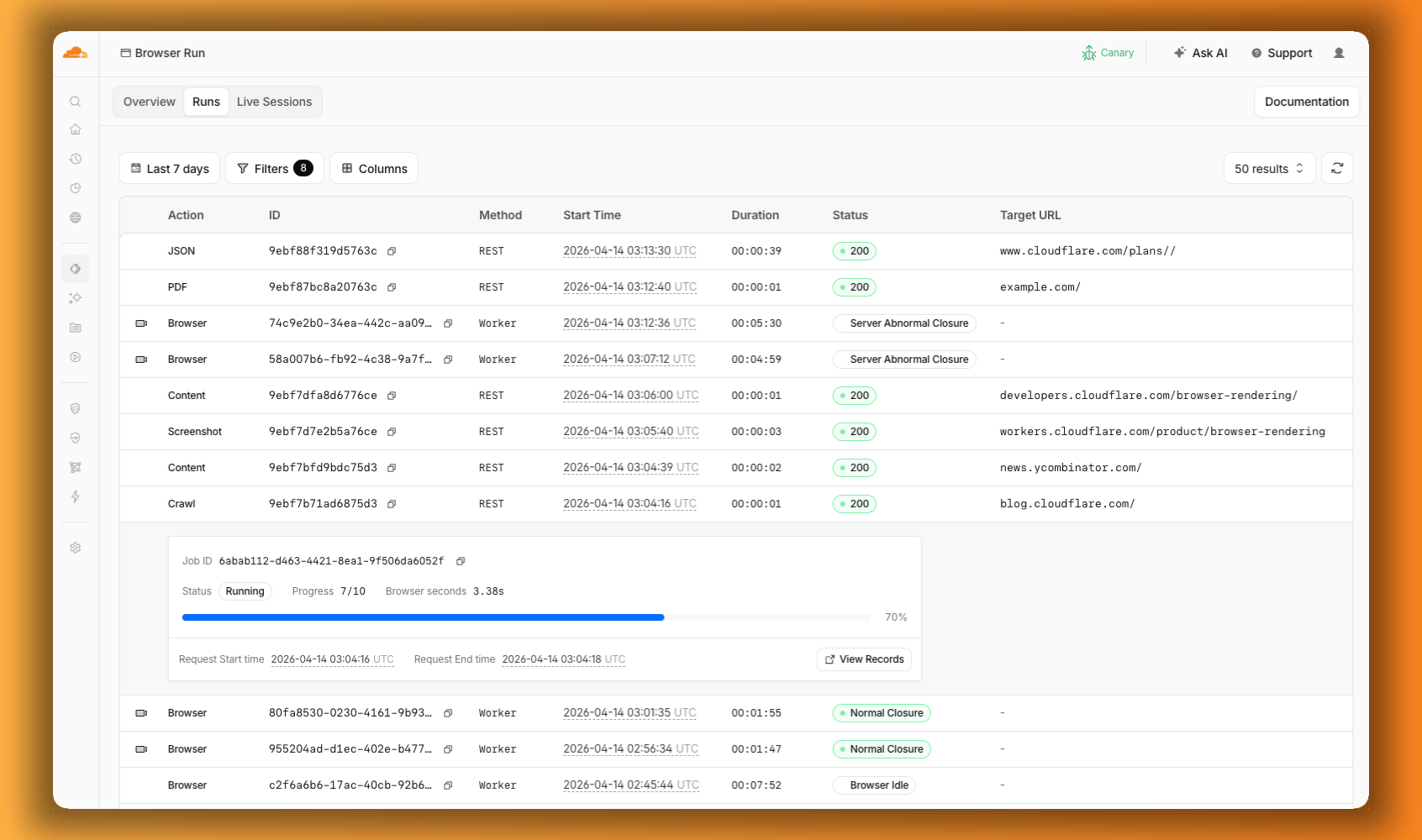
Previously, the Browser Run dashboard only showed logs from browser sessions. Requests for screenshots, PDFs, markdown, and crawls were not visible. The redesigned dashboard changes that. The new Runs tab shows every request. You can filter by endpoint and view details including target URLs, status, and duration. 


The Browser Run dashboard Runs tab showing browser sessions and quick actions like PDF, Screenshot, and Crawl in a single view, with a crawl job expanded to show its progress

4) Intervene

Agents are good, but they’re not perfect. Sometimes they need their human to step in. Browser Run supports Human in the Loop workflows where a human can take control of a live browser session, handle what the automation cannot, then let the session continue. 

Human in the Loop

When automation hits a wall, you don’t have to restart. With Human in the Loop, you can step in and interact with the page directly to click, type, navigate, enter credentials, or submit forms. This unlocks workflows that agents cannot handle.

Today, you can step in by opening the Live View URL for any active session. Next, we’re adding a handoff flow where the agent can signal that it needs help, notify a human to step in, then hand control back to the agent once the issue is resolved.

An AI agent searching Amazon for an orange lava lamp, comparing options, and handing off to a human when sign-in is required to complete the purchase

5) Scale

Customers have asked us to raise limits so that they can do more, faster.

Higher limits

We’ve quadrupled the default concurrent browser limit from 30 to 120. Every session gives you instant access to a browser from a global pool of warm instances, so there’s no cold start waiting for a browser to spin up. In March, we also increased limits for Quick Actions to 10 requests per second. If you need higher limits, they’re available by request.

What’s next

  • Human in the Loop Handoff: today you can intervene in a browser session through Live View. Soon, the agent will be able to signal when it needs help, so you can build in notifications to alert a human to step in.

  • Session Recordings Inspection: you can already scrub through the timeline and replay any session. Soon, you’ll be able to inspect DOM state and console output as well.

  • Traces and Browser Logs: access debugging information without instrumenting your code. Console logs, network requests, timing data. If something broke, you’ll know where.

  • Screenshot, PDF, and markdown directly from Workers: the same simple tasks available through the REST API are coming to Workers Bindings. env.BROWSER.screenshot() just works, with no API tokens needed.

Get started

Browser Run is available today on both the Workers Free and Workers Paid plans. Everything we shipped today — Live View, Human in the Loop, Session Recordings, and higher concurrency limits — is ready to use. 

If you were already using Browser Rendering, everything works the same, just with a new name and more features.  

Check out the documentation to get started.


Project Think: building the next generation of AI agents on Cloudflare

Post Syndicated from Sunil Pai original https://blog.cloudflare.com/project-think/

Today, we’re introducing Project Think: the next generation of the Agents SDK. Project Think is a set of new primitives for building long-running agents (durable execution, sub-agents, sandboxed code execution, persistent sessions) and an opinionated base class that wires them all together. Use the primitives to build exactly what you need, or use the base class to get started fast.

Something happened earlier this year that changed how we think about AI. Tools like Pi, OpenClaw, Claude Code, and Codex proved a simple but powerful idea: give an LLM the ability to read files, write code, execute it, and remember what it learned, and you get something that looks less like a developer tool and more like a general-purpose assistant.

These coding agents aren’t just writing code anymore. People are using them to manage calendars, analyze datasets, negotiate purchases, file taxes, and automate entire business workflows. The pattern is always the same: the agent reads context, reasons about it, writes code to take action, observes the result, and iterates. Code is the universal medium of action.

Our team has been using these coding agents every day. And we kept running into the same walls:

  • They only run on your laptop or an expensive VPS: there’s no sharing, no collaboration, no handoff between devices.

  • They’re expensive when idle: a fixed monthly cost whether the agent is working or not. Scale that to a team, or a company, and it adds up fast.

  • They require management and manual setup: installing dependencies, managing updates, configuring identity and secrets.

And there’s a deeper structural issue. Traditional applications serve many users from one instance. As mentioned in our Welcome to Agents Week post, agents are one-to-one. Each agent is a unique instance, serving one user, running one task. A restaurant has a menu and a kitchen optimized to churn out dishes at volume. An agent is more like a personal chef: different ingredients, different techniques, different tools every time.

That fundamentally changes the scaling math. If a hundred million knowledge workers each use an agentic assistant at even modest concurrency, you need capacity for tens of millions of simultaneous sessions. At current per-container costs, that’s unsustainable. We need a different foundation.

That’s what we’ve been building.

Introducing Project Think

Project Think ships a set of new primitives for the Agents SDK:

  • Durable execution with fibers: crash recovery, checkpointing, automatic keepalive

  • Sub-agents: isolated child agents with their own SQLite and typed RPC

  • Persistent sessions: tree-structured messages, forking, compaction, full-text search

  • Sandboxed code execution: Dynamic Workers, codemode, runtime npm resolution

  • The execution ladder: workspace, isolate, npm, browser, sandbox

  • Self-authored extensions: agents that write their own tools at runtime

Each of these is usable directly with the Agent base class. Build exactly what you need with the primitives, or use the Think base class to get started fast. Let’s look at what each one does.

Long-running agents

Agents, as they exist today, are ephemeral. They run for a session, tied to a single process or device, and then they are gone. A coding agent that dies when your laptop sleeps, that’s a tool. An agent that persists — that can wake up on demand, continue work after interruptions, and carry forward the state without depending on your local runtime — that starts to look like infrastructure. And it changes the scaling model for agents completely.

The Agents SDK builds on Durable Objects to give every agent an identity, persistent state, and the ability to wake on message. This is the actor model: each agent is an addressable entity with its own SQLite database. It consumes zero compute when hibernated. When something happens (an HTTP request, a WebSocket message, a scheduled alarm, an inbound email) the platform wakes the agent, loads its state, and hands it the event. The agent does its work, then goes back to sleep.

VMs / Containers

Durable Objects

Idle cost

Full compute cost, always

Zero (hibernated)

Scaling

Provision and manage capacity

Automatic, per-agent

State

External database required

Built-in SQLite

Recovery

You build it (process managers, health checks)

Platform restarts, state survives

Identity / routing

You build it (load balancers, sticky sessions)

Built-in (name → agent)

10,000 agents, each active 1% of the time

10,000 always-on instances

~100 active at any moment

This changes the economics of running agents at scale. Instead of “one expensive agent per power user,” you can build “one agent per customer” or “one agent per task” or “one agent per email thread.” The marginal cost of spawning a new agent is effectively zero.

Surviving crashes: durable execution with fibers

An LLM call takes 30 seconds. A multi-turn agent loop can run for much longer. At any point during that window, the execution environment can vanish: a deploy, a platform restart, hitting resource limits. The upstream connection to the model provider is severed permanently, in-memory state is lost, and connected clients see the stream stop with no explanation.

runFiber() solves this. A fiber is a durable function invocation: registered in SQLite before execution begins, checkpointable at any point via stash(), and recoverable on restart via onFiberRecovered.

import { Agent } from "agents";

export class ResearchAgent extends Agent {
  async startResearch(topic: string) {
    void this.runFiber("research", async (ctx) => {
      const findings = [];

      for (let i = 0; i < 10; i++) {
        const result = await this.callLLM(`Research step ${i}: ${topic}`);
        findings.push(result);

        // Checkpoint: if evicted, we resume from here
        ctx.stash({ findings, step: i, topic });

        this.broadcast({ type: "progress", step: i });
      }

      return { findings };
    });
  }

  async onFiberRecovered(ctx) {
    if (ctx.name === "research" && ctx.snapshot) {
      const { topic } = ctx.snapshot;
      await this.startResearch(topic);
    }
  }
}

The SDK keeps the agent alive automatically during fiber execution, no special configuration needed. For work measured in minutes, keepAlive() / keepAliveWhile() prevents eviction during active work. For longer operations (CI pipelines, design reviews, video generation) the agent starts the work, persists the job ID, hibernates, and wakes on callback.

Delegating work: sub-agents via Facets

A single agent shouldn’t do everything itself. Sub-agents are child Durable Objects colocated with the parent via Facets, each with their own isolated SQLite and execution context:

import { Agent } from "agents";

export class ResearchAgent extends Agent {
  async search(query: string) { /* ... */ }
}

export class ReviewAgent extends Agent {
  async analyze(query: string) { /* ... */ }
}

export class Orchestrator extends Agent {
  async handleTask(task: string) {
    const researcher = await this.subAgent(ResearchAgent, "research");
    const reviewer = await this.subAgent(ReviewAgent, "review");

    const [research, review] = await Promise.all([
      researcher.search(task),
      reviewer.analyze(task)
    ]);

    return this.synthesize(research, review);
  }
}

Sub-agents are isolated at the storage level. Each one gets its own SQLite database, and there’s no implicit sharing of data between them. This is enforced by the runtime where sub-agent RPC latency is a function call. TypeScript catches misuse at compile time.

Conversations that persist: the Session API

Agents that run for days or weeks need more than the typical flat list of messages. The experimental Session API models this explicitly. Available on the Agent base class, conversations are stored as trees, where each message has a parent_id. This enables forking (explore an alternative without losing the original path), non-destructive compaction (summarize older messages rather than deleting them), and full-text search across conversation history via FTS5.

import { Agent } from "agents";
import { Session, SessionManager } from "agents/experimental/memory/session";

export class MyAgent extends Agent {
  sessions = SessionManager.create(this);

  async onStart() {
    const session = this.sessions.create("main");
    const history = session.getHistory();
    const forked = this.sessions.fork(session.id, messageId, "alternative-approach");
  }
}

Session is usable directly with Agent, and it’s the storage layer that the Think base class builds on.

From tool calls to code execution

Conventional tool-calling has an awkward shape. The model calls a tool, pulls the result back through the context window, calls another tool, pulls that back, and so on. As the tool surface grows, this gets both expensive and clumsy. A hundred files means a hundred round-trips through the model.

But models are better at writing code to use a system than they are at playing the tool-calling game. This is the insight behind @cloudflare/codemode: instead of sequential tool calls, the LLM writes a single program that handles the entire task.

// The LLM writes this. It runs in a sandboxed Dynamic Worker.
const files = await tools.find({ pattern: "**/*.ts" });
const results = [];
for (const file of files) {
  const content = await tools.read({ path: file });
  if (content.includes("TODO")) {
    results.push({ file, todos: content.match(/\/\/ TODO:.*/g) });
  }
}
return results;

Instead of 100 round-trips to the model, you just run a single program. This leads to fewer tokens used, faster execution, and better results. The Cloudflare API MCP server demonstrates this at scale. We expose only two tools (search() and execute()), which consume ~1,000 tokens, vs. ~1.17 million tokens for the naive tool-per-endpoint equivalent. This is a 99.9% reduction.

The missing primitive: safe sandboxes

Once you accept that models should write code on behalf of users, the question becomes: where does that code run? Not eventually, not after a product team turns it into a roadmap item. Right now, for this user, against this system, with tightly defined permissions.

Dynamic Workers are that sandbox. A fresh V8 isolate spun up at runtime, in milliseconds, with a few megabytes of memory. That’s roughly 100x faster and up to 100x more memory-efficient than a container. You can start a new one for every single request, run a snippet of code, and throw it away.

The critical design choice is the capability model. Instead of starting with a general-purpose machine and trying to constrain it, Dynamic Workers begin with almost no ambient authority (globalOutbound: null, no network access) and the developer grants capabilities explicitly, resource by resource, through bindings. We go from asking “how do we stop this thing from doing too much?” to “what exactly do we want this thing to be able to do?”

This is the right question for agent infrastructure.

The execution ladder

This capability model leads naturally to a spectrum of compute environments, an execution ladder that the agent escalates through as needed:


Tier 0 is the Workspace, a durable virtual filesystem backed by SQLite and R2. Read, write, edit, search, grep, diff. Powered by @cloudflare/shell.

Tier 1 is a Dynamic Worker: LLM-generated JavaScript running in a sandboxed isolate with no network access. Powered by @cloudflare/codemode.

Tier 2 adds npm. @cloudflare/worker-bundler fetches packages from the registry, bundles them with esbuild, and loads the result into the Dynamic Worker. The agent writes import { z } from "zod" and it just works.

Tier 3 is a headless browser via Cloudflare Browser Run. Navigate, click, extract, screenshot. Useful when the service doesn’t support agents yet via MCP or APIs.

Tier 4 is a Cloudflare Sandbox configured with your toolchains, repos, and dependencies: git clone, npm test, cargo build, synced bidirectionally with the Workspace.

The key design principle: the agent should be useful at Tier 0 alone, where each tier is additive. The user can add capabilities as they go.

Building blocks, not a framework

All of these primitives are available as standalone packages. Dynamic Workers, @cloudflare/codemode, @cloudflare/worker-bundler, and @cloudflare/shell (a durable filesystem with tools) are all usable directly with the Agent base class. You can combine them to give any agent a workspace, code execution, and runtime package resolution without adopting an opinionated framework.

The platform

Here’s the complete stack for building agents on Cloudflare:

Capability

What it does

Powered by

Per-agent isolation

Every agent is its own world

Durable Objects (DOs)

Zero cost when idle

$0 until the agent wakes up

DO Hibernation

Persistent state

Queryable, transactional storage

DO SQLite

Durable filesystem

Files that survive restarts

Workspace (SQLite + R2)

Sandboxed code execution

Run LLM-generated code safely

Dynamic Workers + @cloudflare/codemode

Runtime dependencies

import * from react just works

@cloudflare/worker-bundler

Web automation

Browse, navigate, fill forms

Browser Run

Full OS access

git, compilers, test runners

Sandboxes

Scheduled execution

Proactive, not just reactive

DO Alarms + Fibers

Real-time streaming

Token-by-token to any client

WebSockets

External tools

Connect to any tool server

MCP

Agent coordination

Typed RPC between agents

Sub-agents (Facets)

Model access

Connect to an LLM to power the agent

AI Gateway + Workers AI (or Bring Your Own Model)

Each of these is a building block. Together, they form something new: a platform where anyone can build, deploy, and run AI agents as capable as the ones running on your local machine today, but serverless, durable, and safe by construction.

The Think base class

Now that you’ve seen the primitives, here’s what happens when you wire them all together.

Think is an opinionated harness that handles the full chat lifecycle: agentic loop, message persistence, streaming, tool execution, stream resumption, and extensions. You focus on what makes your agent unique.

The minimal subclass looks like this:

import { Think } from "@cloudflare/think";
import { createWorkersAI } from "workers-ai-provider";

export class MyAgent extends Think<Env> {
  getModel() {
    return createWorkersAI({ binding: this.env.AI })(
      "@cf/moonshotai/kimi-k2.5"
    );
  }
}

That’s effectively all you need to have a working chat agent with streaming, persistence, abort/cancel, error handling, resumable streams, and a built-in workspace filesystem. Deploy with npx wrangler deploy.

Think makes decisions for you. When you need more control, you can override the ones you care about:

Override

Purpose

getModel()

Return the LanguageModel to use

getSystemPrompt()

System prompt

getTools()

AI SDK compatible ToolSet for the agentic loop

maxSteps

Max tool-call rounds per turn

configureSession()

Context blocks, compaction, search, skills

Under the hood, Think runs the complete agentic loop on every turn: it assembles the context (base instructions + tool descriptions + skills + memory + conversation history), calls streamText, executes tool calls (with output truncation to prevent context blowup), appends results, loops until the model is done or the step limit is reached. All messages are persisted after each turn.

Lifecycle hooks

Think gives you hooks at every stage of the chat turn, without requiring you to own the whole pipeline:

beforeTurn()
  → streamText()
    → beforeToolCall()
    → afterToolCall()
  → onStepFinish()
→ onChatResponse()

Switch to a lower cost model for follow-up turns, limit the tools it can use, and pass in client-side context on each turn. Also log every tool call to analytics and automatically trigger one more follow-up turn after the model completes, all without replacing onChatMessage.

Persistent memory and long conversations

Think builds on Session API as its storage layer, giving you tree-structured messages with branching built in.

On top of that, it adds persistent memory through context blocks. These are structured sections of the system prompt that the model can read and update over time, and they persist across hibernation.The model sees “MEMORY (Important facts, use set_context to update) [42%, 462/1100 tokens]” and can proactively remember things.

configureSession(session: Session) {
  return session
    .withContext("soul", {
      provider: { get: async () => "You are a helpful coding assistant." }
    })
    .withContext("memory", {
      description: "Important facts learned during conversation.",
      maxTokens: 2000
    })
    .withCachedPrompt();
}

Sessions are flexible. You can run multiple conversations per agent and fork them to try a different direction without losing the original. 

As context grows, Think handles limits with non-destructive compaction. Older messages are summarized instead of removed, while the full history remains stored in SQLite. 

Search is built in as well. Using FTS5, you can query conversation history within a session or across all the sessions. The agent is also able to search its own past using search_context tool.

The full execution ladder, wired in

Think integrates the entire execution ladder into a single getTools() return:

import { Think } from "@cloudflare/think";
import { createWorkspaceTools } from "@cloudflare/think/tools/workspace";
import { createExecuteTool } from "@cloudflare/think/tools/execute";
import { createBrowserTools } from "@cloudflare/think/tools/browser";
import { createSandboxTools } from "@cloudflare/think/tools/sandbox";
import { createExtensionTools } from "@cloudflare/think/tools/extensions";

export class MyAgent extends Think<Env> {
  extensionLoader = this.env.LOADER;

  getModel() {
    /* ... */
  }

  getTools() {
    return {
      execute: createExecuteTool({
        tools: createWorkspaceTools(this.workspace),
        loader: this.env.LOADER
      }),
      ...createBrowserTools(this.env.BROWSER),
      ...createSandboxTools(this.env.SANDBOX), // configured per-agent: toolchains, repos, snapshots
      ...createExtensionTools({ manager: this.extensionManager! }),
      ...this.extensionManager!.getTools()
    };
  }
}

Self-authored extensions

Think takes code execution one step further. An agent can write its own extensions: TypeScript programs that run in Dynamic Workers, declaring permissions for network access and workspace operations.

{
  "name": "github",
  "description": "GitHub integration: PRs, issues, repos",
  "tools": ["create_pr", "list_issues", "review_pr"],
  "permissions": {
    "network": ["api.github.com"],
    "workspace": "read-write"
  }
}

Think’s ExtensionManager bundles the extension (optionally with npm deps via @cloudflare/worker-bundler), loads it into a Dynamic Worker, and registers the new tools. The extension persists in DO storage and survives hibernation. The next time the user asks about pull requests, the agent has a github_create_pr tool that didn’t exist 30 seconds ago.

This is the kind of self-improvement loop that makes agents genuinely more useful over time. Not through fine-tuning or RLHF, but through code. The agent is able to write new capabilities for itself, all in sandboxed, auditable, and revocable TypeScript.

Sub-agent RPC

Think also works as a sub-agent, called via chat() over RPC from a parent, with streaming events via callback:

const researcher = await this.subAgent(ResearchSession, "research");
const result = await researcher.chat(`Research this: ${task}`, streamRelay);

Each child gets its own conversation tree, memory, tools, and model. The parent doesn’t need to know the details.

Getting started

Project Think is experimental. The API surface is stable but will continue to evolve in the coming days and weeks. We’re already using it internally to build our own background agent infrastructure, and we’re sharing it early so you can build alongside us.

npm install @cloudflare/think agents ai @cloudflare/shell zod workers-ai-provider
// src/server.ts
import { Think } from "@cloudflare/think";
import { createWorkersAI } from "workers-ai-provider";
import { routeAgentRequest } from "agents";

export class MyAgent extends Think<Env> {
  getModel() {
    return createWorkersAI({ binding: this.env.AI })(
      "@cf/moonshotai/kimi-k2.5"
    );
  }
}

export default {
  async fetch(request: Request, env: Env) {
    return (
      (await routeAgentRequest(request, env)) ||
      new Response("Not found", { status: 404 })
    );
  }
} satisfies ExportedHandler<Env>;
// src/client.tsx
import { useAgent } from "agents/react";
import { useAgentChat } from "@cloudflare/ai-chat/react";

function Chat() {
  const agent = useAgent({ agent: "MyAgent" });
  const { messages, sendMessage, status } = useAgentChat({ agent });
  // Render your chat UI
}

Think speaks the same WebSocket protocol as @cloudflare/ai-chat, so existing UI components work out of the box. If you’ve built on AIChatAgent, your client code doesn’t change.

The third wave

We see three waves of AI agents:

The first wave was chatbots. They were stateless, reactive, and fragile. Every conversation started from scratch with no memory, no tools, and no ability to act. This made them useful for answering questions, but limited them to only answering questions.

The second wave was coding agents. These are stateful, tool-using and far more capable tools like Pi, Claude Code, OpenClaw, and Codex. These agents can read codebases, write code, execute it, and iterate. These proved that an LLM with the right tools is a general-purpose machine, but they run on your laptop, for one user, with no durability guarantees.

Now we are entering the third wave: agents as infrastructure. Durable, distributed, structurally safe, and serverless. These are agents that run on the Internet, survive failures, cost nothing when idle, and enforce security through architecture rather than behavior. Agents that any developer can build and deploy for any number of users.

This is the direction we’re betting on.

The Agents SDK is already powering thousands of production agents. With Project Think and the the primitives it introduces, we’re adding the missing pieces to make those agents dramatically more capable: persistent workspaces, sandboxed code execution, durable long-running tasks, structural security, sub-agent coordination, and self-authored extensions.

It’s available today in preview. We’re building alongside you, and we’d genuinely love to see what you (and your coding agent) create with it.


Think is part of the Cloudflare Agents SDK, available as @cloudflare/think. The features described in this post are in preview. APIs may change as we incorporate feedback. Check the documentation and example to get started.


Register domains wherever you build: Cloudflare Registrar API now in beta

Post Syndicated from Ankit Shah original https://blog.cloudflare.com/registrar-api-beta/

Today we’re launching the next chapter of Cloudflare Registrar: the Registrar API in beta.

The Registrar API makes it possible to search for domains, check availability, and register them programmatically. Now, buying a domain the moment an idea starts to feel real no longer has to pull you out of the agentic workflow.

A Registrar API has been one of the clearest asks from builders using Cloudflare. As more of the agentic workflow has moved into editors, terminals, and agent-driven tools, domain registration became the obvious gap to close.

When we launched Cloudflare Registrar seven years ago, the idea was simple. Domains should be offered at cost, with no markup and no games. Since then, Cloudflare Registrar has become one of the fastest growing registrars in the world as more people choose Cloudflare as the place to build their next project.

Prompting an agent inside an AI code editor to generate name ideas, search, check, and purchase a domain.

Built for agents and automation

The Registrar API is designed to work well anywhere software is already being built: inside editors, deployment pipelines, backend services, and agent-driven workflows.

The workflow is intentionally simple and machine-friendly. Search returns candidate names. Check returns real-time availability and pricing. Register takes a minimal request and returns a workflow-shaped response that can complete immediately or be polled if it takes longer. That makes it straightforward to use for traditional API clients and for AI agents acting on a user’s behalf.

In practice, all this means that an agent can help with the full flow: suggest names, confirm which one is actually registrable, surface the price for approval, and then complete the purchase without forcing the user out of the tool they are already using.

The Registrar API

At its core, this first release of the Registrar API does three things

  • Search for domains

  • Check availability

  • Register domains

For a curated set of popular TLDs to start, see the Registrar API docs. When supported, premium domains can also be registered, but they require explicit fee acknowledgement.

The Registrar API is part of the full Cloudflare API, which means agents already have access to it today through the Cloudflare MCP. It does not require a separate integration or a custom tool definition. An agent working in Cursor, Claude Code, or any MCP-compatible environment can discover and call Registrar endpoints using the same search() and execute() pattern that covers the entire Cloudflare API surface. The moment the API was part of our spec, it was ready for agents.

What it looks like in practice:

You’re building a new project in your favorite AI code editor. Halfway through scaffolding, you ask your agent: “Find me a good .dev domain for this project and register it.”

The agent searches for candidate names based on your project. It checks real-time availability for the one you pick and confirms the price. You say yes. It registers the domain, using your account’s default contact info and payment method automatically. By the time you’ve read the response, the domain is registered, and privacy is on.

Three API calls. A few seconds.

What it looks like in code:

Step 1: Search for domain names

Use the search endpoint to submit a domain query, with or without a domain extension.

async () => {
  return cloudflare.request({
    method: "GET",
    path: `/accounts/${accountId}/registrar/domain-search`,
    query: { q: "acme corp", limit: 3 },
  });
}
{
  "success": true,
  "errors": [],
  "messages": [],
  "result": {
    "domains": [
      {
        "name": "acmecorp.com",
        "registrable": true,
        "tier": "standard",
        "pricing": {
          "currency": "USD",
          "registration_cost": "8.57",
          "renewal_cost": "8.57"
        }
      },
      {
        "name": "acmecorp.dev",
        "registrable": true,
        "tier": "standard",
        "pricing": {
          "currency": "USD",
          "registration_cost": "10.11",
          "renewal_cost": "10.11"
        }
      },
      {
        "name": "acmecorp.app",
        "registrable": true,
        "tier": "standard",
        "pricing": {
          "currency": "USD",
          "registration_cost": "11.00",
          "renewal_cost": "11.00"
        }
      }
    ]
  }
}

Step 2: Check availability and pricing

Search results are fast but non-authoritative; they’re based on cached data, and availability can change in seconds for popular names. Check queries the registry directly. Call it immediately before registering, and use its price response as the source of truth.

async () => {
  return cloudflare.request({
    method: "POST",
    path: `/accounts/${accountId}/registrar/domain-check`,
    body: { domains: ["acmecorp.dev"] },
  });
}
{
  "success": true,
  "errors": [],
  "messages": [],
  "result": {
    "domains": [
      {
        "name": "acmecorp.dev",
        "registrable": true,
        "tier": "standard",
        "pricing": {
          "currency": "USD",
          "registration_cost": "10.11",
          "renewal_cost": "10.11"
        }
      }
    ]
  }
}

Step 3: Register the domain

The only required field is the domain name. WHOIS privacy protection is enabled by default at no extra charge. If your account has a default registrant contact, the API uses it automatically; otherwise you can provide contact details inline in the request. Your default payment method is used automatically.

async () => {
  return cloudflare.request({
    method: "POST",
    path: `/accounts/${accountId}/registrar/registrations`,
    body: { domain_name: "acmecorp.dev" },
  });
}
{
  "success": true,
  "errors": [],
  "messages": [],
  "result": {
    "domain_name": "acmecorp.dev",
    "state": "succeeded",
    "completed": true,
    "created_at": "2025-10-27T10:00:00Z",
    "updated_at": "2025-10-27T10:00:03Z",
    "context": {
      "registration": {
        "domain_name": "acmecorp.dev",
        "status": "active",
        "created_at": "2025-10-27T10:00:00Z",
        "expires_at": "2026-10-27T10:00:00Z",
        "auto_renew": true,
        "privacy_enabled": true,
        "locked": true
      }
    },
    "links": {
      "self": "/accounts/abc/registrar/registrations/acmecorp.dev/registration-status",
      "resource": "/accounts/abc/registrar/registrations/acmecorp.dev"
    }
  }
}

Registration typically completes synchronously within seconds. If it takes longer, the API returns a 202 Accepted with a workflow URL to poll. The response shape is the same either way, no special-casing needed. For premium domains, the Check response returns the exact registry-set price, and the Register request echoes that back as an explicit fee acknowledgement.

A note on agents and non-refundable purchases

When an agent registers a domain on your behalf, it charges your default payment method. Domain registrations are non-refundable once complete. A well-designed agent flow should confirm the domain name and price with the user before calling the registration endpoint. The Check step exists precisely to make that confirmation step explicit and unambiguous. The API gives you the tools to build it correctly; the responsibility to do so belongs in your agent’s logic.

By default, our API docs have explicit agent-facing instructions to seek permission from the user during the register API call. Still, it is the responsibility of the human to design an agent flow that will not buy domains without your approval.

Why Cloudflare can do this differently

What makes Cloudflare different from many developer platforms now adding domain workflows is that Cloudflare operates the registrar itself. That means the same platform where a project is built and deployed can also search for, register, and manage the domain — without adding markup on top.

At-cost pricing is at the core of Cloudflare’s registrar model. We charge exactly what the registry charges. That holds true whether you’re registering a domain through the dashboard, calling the API directly, or asking an agent to do it on your behalf.

Where the API goes next

This beta focuses on the first critical moment in the domain lifecycle: search, check, and registration. We are actively working on expanding the API to cover more of the core Registrar experience, so domains can be managed programmatically after they are purchased, not just at the moment they are created. This will include lifecycle elements like transfers, renewals, contact updates, and more.

The API is the first step toward a broader registrar-as-a-service offering. Development of that service is underway now, and we’re aiming to launch it later this year. As the API expands, platforms like website builders, hosting providers, AI products, and other multi-tenant applications will be able to make domain registration part of their own user experience. Users can search for a domain, buy it, and provision it without ever leaving the service or agent-driven workflow they are already building in.

Start building today

The Registrar API exists because builders asked for it. Now that it’s available as a beta, we’d love to see what you build, in the Cloudflare Community or on X, or on Discord.

To get started:

Please let us know if something is missing, if a workflow breaks down, or if you are building toward a larger platform use case. We’re working quickly to expand the functionality of the API to support domain renewals, transfers, and more.

We can’t wait to see what you build!

Special thanks to Lucy Dryaeva and Fred Pinto for their valuable contributions to delivering the Registrar API beta.

Managed OAuth for Access: make internal apps agent-ready in one click

Post Syndicated from Eduardo Gomes original https://blog.cloudflare.com/managed-oauth-for-access/

We have thousands of internal apps at Cloudflare. Some are things we’ve built ourselves, others are self-hosted instances of software built by others. They range from business-critical apps nearly every person uses, to side projects and prototypes.

All of these apps are protected by Cloudflare Access. But when we started using and building agents — particularly for uses beyond writing code — we hit a wall. People could access apps behind Access, but their agents couldn’t.

Access sits in front of internal apps. You define a policy, and then Access will send unauthenticated users to a login page to choose how to authenticate. 


Example of a Cloudflare Access login page

This flow worked great for humans. But all agents could see was a redirect to a login page that they couldn’t act on.

Providing agents with access to internal app data is so vital that we immediately implemented a stopgap for our own internal use. We modified OpenCode’s web fetch tool such that for specific domains, it triggered the cloudflared CLI to open an authorization flow to fetch a JWT (JSON Web Token). By appending this token to requests, we enabled secure, immediate access to our internal ecosystem.

While this solution was a temporary answer to our own dilemma, today we’re retiring this workaround and fixing this problem for everyone. Now in open beta, every Access application supports managed OAuth. One click to enable it for an Access app, and agents that speak OAuth 2.0 can easily discover how to authenticate (RFC 9728), send the user through the auth flow, and receive back an authorization token (the same JWT from our initial solution). 

Now, the flow works smoothly for both humans and agents. Cloudflare Access has a generous free tier. And building off our newly-introduced Organizations beta, you’ll soon be able to bridge identity providers across Cloudflare accounts too.

How managed OAuth works

For a given internal app protected by Cloudflare Access, you enable managed OAuth in one click:


Once managed OAuth is enabled, Cloudflare Access acts as the authorization server. It returns the www-authenticate header, telling unauthorized agents where to look up information on how to get an authorization token. They find this at https://<your-app-domain>/.well-known/oauth-authorization-server. Equipped with that direction, agents can just follow OAuth standards: 

  1. The agent dynamically registers itself as a client (a process known as Dynamic Client Registration — RFC 7591), 

  2. The agent sends the human through a PKCE (Proof Key for Code Exchange) authorization flow (RFC 7636)

  3. The human authorizes access, which grants a token to the agent that it can use to make authenticated requests on behalf of the user

Here’s what the authorization flow looks like:


If this authorization flow looks familiar, that’s because it’s what the Model Context Protocol (MCP) uses. We originally built support for this into our MCP server portals product, which proxies and controls access to many MCP servers, to allow the portal to act as the OAuth server. Now, we’re bringing this to all Access apps so agents can access not only MCP servers that require authorization, but also web pages, web apps, and REST APIs.

Mass upgrading your internal apps to be agent-ready

Upgrading the long tail of internal software to work with agents is a daunting task. In principle, in order to be agent-ready, every internal and external app would ideally have discoverable APIs, a CLI, a well-crafted MCP server, and have adopted the many emerging agent standards.

AI adoption is not something that can wait for everything to be retrofitted. Most organizations have a significant backlog of apps built over many years. And many internal “apps” work great when treated by agents as simple websites. For something like an internal wiki, all you really need is to enable Markdown for Agents, turn on managed OAuth, and agents have what they need to read protected content.

To make the basics work across the widest set of internal applications, we use Managed OAuth. By putting Access in front of your legacy internal apps, you make them agent-ready instantly. No code changes, no retrofitting. Instead, just immediate compatibility.

It’s the user’s agent. No service accounts and tokens needed

Agents need to act on behalf of users inside organizations. One of the biggest anti-patterns we’ve seen is people provisioning service accounts for their agents and MCP servers, authenticated using static credentials. These have their place in simple use cases and quick prototypes, and Cloudflare Access supports service tokens for this purpose.

But the service account approach quickly shows its limits when fine-grained access controls and audit logs are required. We believe that every action an agent performs must be easily attributable to the human who initiated it, and that an agent must only be able to perform actions that its human operator is likewise authorized to do. Service accounts and static credentials become points at which attribution is lost. Agents that launder all of their actions through a service account are susceptible to confused deputy problems and result in audit logs that appear to originate from the agent itself.

For security and accountability, agents must use security primitives capable of expressing this user–agent relationship. OAuth is the industry standard protocol for requesting and delegating access to third parties. It gives agents a way to talk to your APIs on behalf of the user, with a token scoped to the user’s identity, so that access controls correctly apply and audit logs correctly attribute actions to the end user.

Standards for the win: how agents can and should adopt RFC 9728 in their web fetch tools

RFC 9728 is the OAuth standard that makes it possible for agents to discover where and how to authenticate. It standardizes where this information lives and how it’s structured. This RFC became official in April 2025 and was quickly adopted by the Model Context Protocol (MCP), which now requires that both MCP servers and clients support it.

But outside of MCP, agents should adopt RFC 9728 for an even more essential use case: making requests to web pages that are protected behind OAuth and making requests to plain old REST APIs.

Most agents have a tool for making basic HTTP requests to web pages. This is commonly called the “web fetch” tool. It’s similar to using the fetch() API in JavaScript, often with some additional post-processing on the response. It’s what lets you paste a URL into your agent and have your agent go look up the content.

Today, most agents’ web fetch tools won’t do anything with the www-authenticate header that a URL returns. The underlying model might choose to introspect the response headers and figure this out on its own, but the tool itself does not follow www-authenticate, look up /.well-known/oauth-authorization-server, and act as the client in the OAuth flow. But it can, and we strongly believe it should! Agents already do this to act as remote MCP clients.

To demonstrate this, we’ve put up a draft pull request that adapts the web fetch tool in Opencode to show this in action. Before making a request, the adapted tool first checks whether it already has credentials ; if it does, it uses them to make the initial request. If the tool gets back a 401 or a 403 with a www-authenticate header, it asks the user for consent to be sent through the server’s OAuth flow.

Here’s how that OAuth flow works. If you give the agent a URL that is protected by OAuth and complies with RFC 9728, the agent prompts the human for consent to open the authorization flow:


…sending the human to the login page:


…and then to a consent dialog that prompts the human to grant access to the agent:


Once the human grants access to the agent, the agent uses the token it has received to make an authenticated request:


Any agent from Codex to Claude Code to Goose and beyond can implement this, and there’s nothing bespoke to Cloudflare. It’s all built using OAuth standards.

We think this flow is powerful, and that supporting RFC 9728 can help agents with more than just making basic web fetch requests. If a REST API supports RFC 9728 (and the agent does too), the agent has everything it needs to start making authenticated requests against that API. If the REST API supports RFC 9727, then the client can discover a catalog of REST API endpoints on its own, and do even more without additional documentation, agent skills, MCP servers or CLIs. 

Each of these play important roles with agents — Cloudflare itself provides an MCP server for the Cloudflare API (built using Code Mode), Wrangler CLI, and Agent Skills, and a Plugin. But supporting RFC 9728 helps ensure that even when none of these are preinstalled, agents have a clear path forward. If the agent has a sandbox to execute untrusted code, it can just write and execute code that calls the API that the human has granted it access to. We’re working on supporting this for Cloudflare’s own APIs, to help your agents understand how to use Cloudflare.

Coming soon: share one identity provider (IdP) across many Cloudflare accounts

At Cloudflare our own internal apps are deployed to dozens of different Cloudflare accounts, which are all part of an Organization — a newly introduced way for administrators to manage users, configurations, and view analytics across many Cloudflare accounts. We have had the same challenge as many of our customers: each Cloudflare account has to separately configure an IdP, so Cloudflare Access uses our identity provider. It’s critical that this is consistent across an organization — you don’t want one Cloudflare account to inadvertently allow people to sign in just with a one-time PIN, rather than requiring that they authenticate via single-sign on (SSO).

To solve this, we’re currently working on making it possible to share an identity provider across Cloudflare accounts, giving organizations a way to designate a single primary IdP for use across every account in their organization.

As new Cloudflare accounts are created within an organization, administrators will be able to configure a bridge to the primary IdP with a single click, so Access applications across accounts can be protected by one identity provider. This removes the need to manually configure IdPs account by account, which is a process that doesn’t scale for organizations with many teams and individuals each operating their own accounts.

What’s next

Across companies, people in every role and business function are now using agents to build internal apps, and expect their agents to be able to access context from internal apps. We are responding to this step function growth in internal software development by making the Workers Platform and Cloudflare One work better together — so that it is easier to build and secure internal apps on Cloudflare. 

Expect more to come soon, including:

  • More direct integration between Cloudflare Access and Cloudflare Workers, without the need to validate JWTs or remember which of many routes a particular Worker is exposed on.

  • wrangler dev –tunnel — an easy way to expose your local development server to others when you’re building something new, and want to share it with others before deploying

  • A CLI interface for Cloudflare Access and the entire Cloudflare API

  • More announcements to come during Agents Week 2026

Enable Managed OAuth for your internal apps behind Cloudflare Access

Managed OAuth is now available, in open beta, to all Cloudflare customers. Head over to the Cloudflare dashboard to enable it for your Access applications. You can use it for any internal app, whether it’s one built on Cloudflare Workers, or hosted elsewhere. And if you haven’t built internal apps on the Workers Platform yet — it’s the fastest way for your team to go from zero to deployed (and protected) in production.

Scaling MCP adoption: Our reference architecture for simpler, safer and cheaper enterprise deployments of MCP

Post Syndicated from Sharon Goldberg original https://blog.cloudflare.com/enterprise-mcp/

We at Cloudflare have aggressively adopted Model Context Protocol (MCP) as a core part of our AI strategy. This shift has moved well beyond our engineering organization, with employees across product, sales, marketing, and finance teams now using agentic workflows to drive efficiency in their daily tasks. But the adoption of agentic workflow with MCP is not without its security risks. These range from authorization sprawl, prompt injection, and supply chain risks. To secure this broad company-wide adoption, we have integrated a suite of security controls from both our Cloudflare One (SASE) platform and our Cloudflare Developer platform, allowing us to govern AI usage with MCP without slowing down our workforce. 

In this blog we’ll walk through our own best practices for securing MCP workflows, by putting different parts of our platform together to create a unified security architecture for the era of autonomous AI. We’ll also share two new concepts that support enterprise MCP deployments:

We also talk about how our organization approached deploying MCP, and how we built out our MCP security architecture using Cloudflare products including remote MCP servers, Cloudflare Access, MCP server portals and AI Gateway. 

Remote MCP servers provide better visibility and control

MCP is an open standard that enables developers to build a two-way connection between AI applications and the data sources they need to access. In this architecture, the MCP client is the integration point with the LLM or other AI agent, and the MCP server sits between the MCP client and the corporate resources.


The separation between MCP clients and MCP servers allows agents to autonomously pursue goals and take actions while maintaining a clear boundary between the AI (integrated at the MCP client) and the credentials and APIs of the corporate resource (integrated at the MCP server). 

Our workforce at Cloudflare is constantly using MCP servers to access information in various internal resources, including our project management platform, our internal wiki, documentation and code management platforms, and more. 

Very early on, we realized that locally-hosted MCP servers were a security liability. Local MCP server deployments may rely on unvetted software sources and versions, which increases the risk of supply chain attacks or tool injection attacks. They prevent IT and security administrators from administrating these servers, leaving it up to individual employees and developers to choose which MCP servers they want to run and how they want to keep them up to date. This is a losing game.


Instead, we have a centralized team at Cloudflare that manages our MCP server deployment across the enterprise. This team built a shared MCP platform inside our monorepo that provides governed infrastructure out of the box. When an employee wants to expose an internal resource via MCP, they first get approval from our AI governance team, and then they copy a template, write their tool definitions, and deploy, all the while inheriting default-deny write controls with audit logging, auto-generated CI/CD pipelines, and secrets management for free. This means standing up a new governed MCP server is minutes of scaffolding. The governance is baked into the platform itself, which is what allowed adoption to spread so quickly. 

Our CI/CD pipeline deploys them as remote MCP servers on custom domains on Cloudflare’s developer platform. This gives us visibility into which MCPs servers are being used by our employees, while maintaining control over software sources. As an added bonus, every remote MCP server on the Cloudflare developer platform is automatically deployed across our global network of data centers, so MCP servers can be accessed by our employees with low latency, regardless of where they might be in the world.

Cloudflare Access provides authentication

Some of our MCP servers sit in front of public resources, like our Cloudflare documentation MCP server or Cloudflare Radar MCP server, and thus we want them to be accessible to anyone. But many of the MCP servers used by our workforce are sitting in front of our private corporate resources. These MCP servers require user authentication to ensure that they are off limits to everyone but authorized Cloudflare employees. To achieve this, our monorepo template for MCP servers integrates Cloudflare Access as the OAuth provider. Cloudflare Access secures login flows and issues access tokens to resources, while acting as an identity aggregator that verifies end user single-sign on (SSO), multifactor authentication (MFA), and a variety of contextual attributes such as IP addresses, location, or device certificates. 

MCP server portals centralize discovery and governance


MCP server portals unify governance and control for all AI activity.

As the number of our remote MCP servers grew, we hit a new wall: discovery. We wanted to make it easy for every employee (especially those that are new to MCP) to find and work with all the MCP servers that are available to them. Our MCP server portals product provided a convenient solution. The employee simply connects their MCP client to the MCP server portal, and the portal immediately reveals every internal and third-party MCP servers they are authorized to use. 

Beyond this, our MCP server portals provide centralized logging, consistent policy enforcement and data loss prevention (DLP guardrails). Our administrators can see who logged into what MCP portal and create DLP rules that prevent certain data, like personally identifiable data (PII), from being shared with certain MCP servers.

We can also create policies that control who has access to the portal itself, and what tools from each MCP server should be exposed. For example, we could set up one MCP server portal that is only accessible to employees that are part of our finance group that exposes just the read-only tools for the MCP server in front of our internal code repository. Meanwhile, a different MCP server portal, accessible only to employees on their corporate laptops that are in our engineering team, could expose more powerful read/write tools to our code repository MCP server.

An overview of our MCP server portal architecture is shown above. The portal supports both remote MCP servers hosted on Cloudflare, and third-party MCP servers hosted anywhere else. What makes this architecture uniquely performant is that all these security and networking components run on the same physical machine within our global network. When an employee’s request moves through the MCP server portal, a Cloudflare-hosted remote MCP server, and Cloudflare Access, their traffic never needs to leave the same physical machine. 

Code Mode with MCP server portals reduces costs

After months of high-volume MCP deployments, we’ve paid out our fair share of tokens. We’ve also started to think most people are doing MCP wrong.

The standard approach to MCP requires defining a separate tool for every API operation that is exposed via an MCP server. But this static and exhaustive approach quickly exhausts an agent’s context window, especially for large platforms with thousands of endpoints.

We previously wrote about how we used server-side Code Mode to power Cloudflare’s MCP server, allowing us to expose the thousands of end-points in Cloudflare API while reducing token use by 99.9%. The Cloudflare MCP server exposes just two tools: a search tool lets the model write JavaScript to explore what’s available, and an execute tool lets it write JavaScript to call the tools it finds. The model discovers what it needs on demand, rather than receiving everything upfront.

We like this pattern so much, we had to make it available for everyone. So we have now launched the ability to use the “Code Mode” pattern with MCP server portals. Now you can front all of your MCP servers with a centralized portal that performs audit controls and progressive tool disclosure, in order to reduce token costs.

Here is how it works. Instead of exposing every tool definition to a client, all of your underlying MCP servers collapse into just two MCP portal tools: portal_codemode_search and portal_codemode_execute. The search tool gives the model access to a codemode.tools() function that returns all the tool definitions from every connected upstream MCP server. The model then writes JavaScript to filter and explore these definitions, finding exactly the tools it needs without every schema being loaded into context. The execute tool provides a codemode proxy object where each upstream tool is available as a callable function. The model writes JavaScript that calls these tools directly, chaining multiple operations, filtering results, and handling errors in code. All of this runs in a sandboxed environment on the MCP server portal powered by Dynamic Workers. 

Here is an example of an agent that needs to find a Jira ticket and update it with information from Google Drive. It first searches for the right tools:

// portal_codemode_search
async () => {
 const tools = await codemode.tools();
 return tools
  .filter(t => t.name.includes("jira") || t.name.includes("drive"))
  .map(t => ({ name: t.name, params: Object.keys(t.inputSchema.properties || {}) }));
}

The model now knows the exact tool names and parameters it needs, without the full schemas of tools ever entering its context. It then writes a single execute call to chain the operations together:

// portal_codemode_execute
async () => {
 const tickets = await codemode.jira_search_jira_with_jql({
  jql: ‘project = BLOG AND status = “In Progress”’,
  fields: [“summary”, “description”]
 });
 const doc = await codemode.google_workspace_drive_get_content({
  fileId: “1aBcDeFgHiJk”
 });
 await codemode.jira_update_jira_ticket({
  issueKey: tickets[0].key,
  fields: { description: tickets[0].description + “\n\n” + doc.content }
 });
 return { updated: tickets[0].key };
}

This is just two tool calls. The first discovers what’s available, the second does the work. Without Code Mode, this same workflow would have required the model to receive the full schemas of every tool from both MCP servers upfront, and then make three separate tool invocations.

Let’s put the savings in perspective: when our internal MCP server portal is connected to just four of our internal MCP servers, it exposes 52 tools that consume approximately 9,400 tokens of context just for their definitions. With Code Mode enabled, those 52 tools collapse into 2 portal tools consuming roughly 600 tokens, a 94% reduction. And critically, this cost stays fixed. As we connect more MCP servers to the portal, the token cost of Code Mode doesn’t grow.

Code Mode can be activated on an MCP server portal by adding a query parameter to the URL. Instead of connecting to your portal over its usual URL (e.g. https://myportal.example.com/mcp), you attach ?codemode=search_and_execute to the URL (e.g. https://myportal.example.com/mcp?codemode=search_and_execute).

AI Gateway provides extensibility and cost controls

We aren’t done yet. We plug AI Gateway into our architecture by positioning it on the connection between the MCP client and the LLM. This allows us to quickly switch between various LLM providers (to prevent vendor lock-in) and to enforce cost controls (by limiting the number of tokens each employee can burn through). The full architecture is shown below.


Cloudflare Gateway discovers and blocks shadow MCP

Now that we’ve provided governed access to authorized MCP servers, let’s look into dealing with unauthorized MCP servers. We can perform shadow MCP discovery using Cloudflare Gateway. Cloudflare Gateway is our comprehensive secure web gateway that provides enterprise security teams with visibility and control over their employees’ Internet traffic.

We can use the Cloudflare Gateway API to perform a multi-layer scan to find remote MCP servers that are not being accessed via an MCP server portal. This is possible using a variety of existing Gateway and Data Loss Prevention (DLP) selectors, including:

  • Using the Gateway httpHost selector to scan for 

    • known MCP server hostnames using (like mcp.stripe.com)

    • mcp.* subdomains using wildcard hostname patterns 

  • Using the Gateway httpRequestURI selector to scan for MCP-specific URL paths like /mcp and /mcp/sse 

  • Using DLP-based body inspection to find MCP traffic, even if that traffic uses URI that do not contain the telltale mentions of mcp or sse. Specifically, we use the fact that MCP uses JSON-RPC over HTTP, which means every request contains a “method” field with values like “tools/call”, “prompts/get”, or “initialize.” Here are some regex rules that can be used to detect MCP traffic in the HTTP body:

const DLP_REGEX_PATTERNS = [
  {
    name: "MCP Initialize Method",
    regex: '"method"\\s{0,5}:\\s{0,5}"initialize"',
  },
  {
    name: "MCP Tools Call",
    regex: '"method"\\s{0,5}:\\s{0,5}"tools/call"',
  },
  {
    name: "MCP Tools List",
    regex: '"method"\\s{0,5}:\\s{0,5}"tools/list"',
  },
  {
    name: "MCP Resources Read",
    regex: '"method"\\s{0,5}:\\s{0,5}"resources/read"',
  },
  {
    name: "MCP Resources List",
    regex: '"method"\\s{0,5}:\\s{0,5}"resources/list"',
  },
  {
    name: "MCP Prompts List",
    regex: '"method"\\s{0,5}:\\s{0,5}"prompts/(list|get)"',
  },
  {
    name: "MCP Sampling Create Message",
    regex: '"method"\\s{0,5}:\\s{0,5}"sampling/createMessage"',
  },
  {
    name: "MCP Protocol Version",
    regex: '"protocolVersion"\\s{0,5}:\\s{0,5}"202[4-9]',
  },
  {
    name: "MCP Notifications Initialized",
    regex: '"method"\\s{0,5}:\\s{0,5}"notifications/initialized"',
  },
  {
    name: "MCP Roots List",
    regex: '"method"\\s{0,5}:\\s{0,5}"roots/list"',
  },
];

The Gateway API supports additional automation. For example, one can use the custom DLP profile we defined above to block traffic, or redirect it, or just to log and inspect MCP payloads. Put this together, and Gateway can be used to provide comprehensive detection of unauthorized remote MCP servers accessed via an enterprise network. 

For more information on how to build this out, see this tutorial. 

Public-facing MCP Servers are protected with AI Security for Apps

So far, we’ve been focused on protecting our workforce’s access to our internal MCP servers. But, like many other organizations, we also have public-facing MCP servers that our customers can use to agentically administer and operate Cloudflare products. These MCP servers are hosted on Cloudflare’s developer platform. (You can find a list of individual MCPs for specific products here, or refer back to our new approach for providing more efficient access to the entire Cloudflare API using Code Mode.)

We believe that every organization should publish official, first-party MCP servers for their products. The alternative is that your customers source unvetted servers from public repositories where packages may contain dangerous trust assumptions, undisclosed data collection, and any range of unsanctioned behaviors. By publishing your own MCP servers, you control the code, update cadence, and security posture of the tools your customers use.

Since every remote MCP server is an HTTP endpoint, we can put it behind the Cloudflare Web Application Firewall (WAF). Customers can enable the AI Security for Apps feature within the WAF to automatically inspect inbound MCP traffic for prompt injection attempts, sensitive data leakage, and topic classification. Public facing MCPs are protected just as any other web API.  

The future of MCP in the enterprise

We hope our experience, products, and reference architectures will be useful to other organizations as they continue along their own journey towards broad enterprise-wide adoption of MCP.

We’ve secured our own MCP workflows by: 

  • Offering our developers a templated framework for building and deploying remote MCP servers on our developer platform using Cloudflare Access for authentication

  • Ensuring secure, identity-based access to authorized MCP servers by connecting our entire workforce to MCP server portals

  • Controlling costs using AI Gateway to mediate access to the LLMs powering our workforce’s MCP clients, and using Code Mode in MCP server portals to reduce token consumption and context bloat

  • Discovering shadow MCP usage by Cloudflare Gateway 

For organizations advancing on their own enterprise MCP journeys, we recommend starting by putting your existing remote and third-party MCP servers behind  Cloudflare MCP server portals and enabling Code Mode to start benefitting for cheaper, safer and simpler enterprise deployments of MCP.  

Acknowledgements:  This reference architecture and blog represents this work of many people across many different roles and business units at Cloudflare. This is just a partial list of contributors: Ann Ming Samborski,  Kate Reznykova, Mike Nomitch, James Royal, Liam Reese, Yumna Moazzam, Simon Thorpe, Rian van der Merwe, Rajesh Bhatia, Ayush Thakur, Gonzalo Chavarri, Maddy Onyehara, and Haley Campbell.

Watch on Cloudflare TV

Secure private networking for everyone: users, nodes, agents, Workers — introducing Cloudflare Mesh

Post Syndicated from Nikita Cano original https://blog.cloudflare.com/mesh/

AI agents have changed how teams think about private network access. Your coding agent needs to query a staging database. Your production agent needs to call an internal API. Your personal AI assistant needs to reach a service running on your home network. The clients are no longer just humans or services. They’re agents, running autonomously, making requests you didn’t explicitly approve, against infrastructure you need to keep secure.

Each of these workflows has the same underlying problem: agents need to reach private resources, but the tools for doing that were built for humans, not autonomous software. VPNs require interactive login. SSH tunnels require manual setup. Exposing services publicly is a security risk. And none of these approaches give you visibility into what the agent is actually doing once it’s connected.

Today, we’re introducing Cloudflare Mesh to connect your private networks together and provide secure access for your agents. We’re also integrating Mesh with Cloudflare Developer Platform so that Workers, Durable Objects, and agents built with the Agents SDK can reach your private infrastructure directly.

If you’re using Cloudflare One’s SASE and Zero Trust suite, you already have access to Mesh. You don’t need a new technology paradigm to secure agentic workloads. You need a SASE that was built for the agentic era, and that’s Cloudflare One. Cloudflare Mesh is a new experience with a simpler setup that leverages the on-ramps you’re already familiar with: WARP Connector (now called a Cloudflare Mesh node) and WARP Client (now called Cloudflare One Client). Together, these create a private network for human, developer, and agent traffic. Mesh is directly integrated into your existing Cloudflare One deployment. Your existing Gateway policies, Access rules, and device posture checks apply to Mesh traffic automatically.

If you’re a developer who just wants private networking for your agents, services, and team, Mesh is where you start. Set it up in minutes, connect your networks, and secure your traffic. And because Mesh runs on the Cloudflare One platform, you can grow into more advanced capabilities over time: Gateway network, DNS, and HTTP policies for fine-grained traffic control, Access for Infrastructure for SSH and RDP session management, Browser Isolation for safe web access, DLP to prevent sensitive data from leaving your network, and CASB for SaaS security. You won’t have to plan for all of this on day one. You just don’t have to migrate when you need it.

New agentic workflows

Private networking has always been about connecting clients to resources — SSH into a server, query a database, access an internal API. What’s changed is who the clients are. A year ago, the answer was your developers and your services. Today, it’s increasingly your agents.

This isn’t theoretical. Look at the ecosystem: the explosion of MCP (Model Context Protocol) servers providing tool access, coding agents that need to read from private repos and databases, personal assistants running on home hardware. Each of these patterns assumes the agent can reach the resources it needs. When those resources are isolated in private networks, the agent is stuck.


This creates three workflows that are hard to secure today:

  1. Accessing a personal agent from a mobile device. You’re running OpenClaw on a Mac mini at home. You want to reach it from your phone, your laptop at a coffee shop, or your work machine. But exposing it to the public Internet (even behind a password) can leave some gaps exposed. Your agent has shell access, file system access, and network access to your home network. One misconfiguration and anyone can reach it.

  2. Letting a coding agent access your staging environment. You’re using Claude Code, Cursor, or Codex on your laptop. You ask it to check deployment status, query analytics from a staging database, or read from an internal object store. But those services live in a private cloud VPC, so your agent can’t reach them without exposing them to the Internet or tunneling your entire laptop into the VPC.

  3. Connecting deployed agents to private services. You’re building agents into your product using the Agents SDK on Cloudflare Workers. Those agents need to call internal APIs, query databases, and access services that aren’t on the public Internet. They need private access, but with scoped permissions, audit trails, and no credential leakage.

Cloudflare Mesh: one private network for users, nodes, and agents

Cloudflare Mesh is developer-friendly private networking. One lightweight connector, one binary, connects everything: your personal devices, your remote servers, your user endpoints. You don’t need to install separate tools for each pattern. One connector on your network, and every access pattern works.

Once connected, devices in your private network can talk to each other over private IPs, routed through Cloudflare’s global network across 330+ cities giving you better reliability and control over your network.


Now, with Mesh, a single solution can solve all of the agent scenarios we mentioned above:

  • With Cloudflare One Client for iOS on your phone, you can securely connect your mobile devices to your local Mac mini running OpenClaw via a Mesh private network.

  • With Cloudflare One Client for macOS on your laptop, you can connect your laptop to your private network so your coding agents can reach staging databases or APIs and query them.

  • With Mesh nodes on your Linux servers, you can connect VPCs in external clouds together, letting agents access resources and MCPs in external private networks.

Because Mesh is powered by Cloudflare One Client, every connection inherits the security controls of the Cloudflare One platform. Gateway policies apply to Mesh traffic. Device posture checks validate connecting devices. DNS filtering catches suspicious lookups. You get this without additional configuration: the same policies that protect your human traffic protect your agent traffic.

Choosing between Mesh and Tunnel

With the introduction of Mesh, you might ask: when should I use Mesh instead of Tunnel? Both connect external networks privately to Cloudflare, but they serve different purposes. Cloudflare Tunnel is the ideal solution for unidirectional traffic, where Cloudflare proxies the traffic from the edge to specific private services (like a web server or a database). 

Cloudflare Mesh, on the other hand, provides a full bidirectional, many-to-many network. Every device and node on your Mesh can access one another using their private IPs. An application or agent running in your network can discover and access any other resource on the Mesh without each resource needing its own Tunnel. 

Using the power of Cloudflare’s network

Cloudflare Mesh gives you the benefits of a mesh network (resiliency, high scalability, low latency and high performance), but, by routing everything through Cloudflare, it resolves a key challenge of mesh networks: NAT traversal.

Most of the Internet is behind NAT (Network Address Translation). This mechanism allows an entire local network of devices to share a single public IP address by mapping traffic between public headers and private internal addresses. When two devices are behind NAT, direct connections can fail and traffic has to fall back to relay servers. If your relay infrastructure has limited points of presence, a meaningful fraction of your traffic hits those relays, adding latency and reducing reliability. And while it can be possible to self-host your own relay servers to compensate, that means taking on the burden of managing additional infrastructure just to connect your existing network.

Cloudflare Mesh takes a different approach. All Mesh traffic routes through Cloudflare’s global network, the same infrastructure that serves traffic for some of the largest websites of the Internet. For cross-region or multi-cloud traffic, this consistently beats public Internet routing. There’s no degraded fallback path, because the Cloudflare edge is the path.

Routing through Cloudflare also means every packet passes through Cloudflare’s security stack. This is the key advantage of building Mesh on the Cloudflare One platform: security isn’t a separate product you bolt on later. And by leveraging this same global backbone, we can provide these core pillars to every team from day one:

50 nodes and 50 users free. Your whole team and your whole staging environment on one private network, included with every Cloudflare account. 

Global edge routing. 330+ cities, optimized backbone routing. No relay servers with limited points of presence. No degraded fallback paths.

Security controls from day one. Mesh runs on Cloudflare One. Gateway policies, DNS filtering, DLP, traffic inspection, and device posture checks are all available on the same platform. Start with simple private connectivity. Turn on Gateway policies when you need traffic filtering. Enable Access for Infrastructure when you need session-level controls for SSH and RDP. Add DLP when you need to prevent sensitive data from leaving your network. Every capability is one toggle away.

High availability. Create a Mesh node with high availability enabled and spin up multiple connectors using the same token in active-passive mode. They advertise the same IP routes, so if one goes down, traffic fails over automatically.

Integrated with the Developer Platform with Workers VPC

Mesh connects your agents and resources across external clouds, but you also need to be able to connect from your agents built on Workers with Agents SDK as well. To enable this, we’ve extended Workers VPC to make your entire Mesh network accessible to Workers and Durable Objects.

That means that you can connect to your Cloudflare Mesh network from Workers, making the entire network accessible from a single binding’s fetch() call. This complements Workers VPC’s existing support for Cloudflare Tunnel, giving you more choice over how you want to secure your networks. Now, you can specify entire networks that you want to connect to in your wrangler.jsonc file. To bind to your Mesh network, use the cf1:network reserved keyword that binds to the Mesh network of your account:

"vpc_networks": [
  { "binding": "MESH", "network_id": "cf1:network", "remote": true },
  { "binding": "AWS_VPC", "tunnel_id": "350fd307-...", "remote": true }
]

Then, you can use it within your Worker or agent code:

export default {
  async fetch(request: Request, env: Env, ctx: ExecutionContext) {
    // Reach any internal host on your Mesh, no pre-registration required
    const apiResponse = await env.MESH.fetch("http://10.0.1.50/api/data");

    // Internal hostname resolved via tunnel's private DNS resolver
    const dbResponse = await env.AWS_VPC.fetch("http://internal-db.corp.local:5432");

    return new Response(await apiResponse.text());
  },
};

By connecting the Developer Platform to your Mesh networks, you can build Workers that have secure access to your private databases, internal APIs and MCPs, allowing you to build cross-cloud agents and MCPs that provide agentic capabilities to your app. But it also opens up a world where agents can autonomously observe your entire stack end-to-end, cross-reference logs and suggest optimizations in real-time.

How it all fits together

Together, Cloudflare Mesh, Workers VPC, and the Agents SDK provide a unified private network for your agents that spans both Cloudflare and your external clouds. We’ve merged connectivity and compute so your agents can securely reach the resources they need, wherever they live, across the globe.


Mesh nodes are your servers, VMs, and containers. They run a headless version of Cloudflare One Client and get a Mesh IP. Services talk to services over private IPs, bidirectionally, routed through Cloudflare’s edge. 

Devices are your laptops and phones. They run the Cloudflare One Client and reach Mesh nodes directly: SSH, database queries, API calls, all over private IPs. Your local coding agents use this connection to access private resources. 

Agents on Workers reach private services through Workers VPC Network bindings. They get scoped access to entire networks, mediated by MCP. The network enforces what the agent can reach. The MCP server enforces what the agent can do. 

What’s next

The current version of Mesh provides the foundation for secure, unified connectivity. But as agentic workflows become more complex, we’re focused on moving beyond simple connectivity toward a network that is more intuitive to manage and more granularly aware of who, or what, is talking to your services. Here is what we are building for the rest of the year.

Hostname routing

We’re extending Cloudflare Tunnel’s hostname routing to Mesh this summer. Your Mesh nodes will be able to attract traffic for private hostnames like wiki.local or api.staging.internal, without you having to manage IP lists or worry about how those hostnames resolve on the Cloudflare edge. Route traffic to services by name, not by IP. If your infrastructure uses dynamic IPs, auto-scaling groups, or ephemeral containers, this removes an entire class of routing headaches.

Mesh DNS

Today, you reach Mesh nodes by their Mesh IPs: ssh 100.64.0.5. That works, but it’s not how you think about your infrastructure. You think in names: postgres-staging, api-prod, nikitas-openclaw.

Later this year we’re building Mesh DNS so that every node and device that joins your Mesh automatically gets a routable internal hostname. No DNS configuration or manual records. Add a node named postgres-staging, and postgres-staging.mesh resolves to the right Mesh IP from any device on your Mesh.

Combined with hostname routing, you’ll be able to ssh postgres-staging.mesh or curl http://api-prod.mesh:3000/health without ever knowing or managing an IP address.

Identity-aware routing

Today, Mesh nodes authenticate to the Cloudflare edge, but they share an identity at the network layer. Devices authenticate with user identity via the Cloudflare One Client, but nodes don’t yet carry distinct, routable identities that Gateway policies can differentiate.

We want to change that. The goal is identity-aware routing for Mesh, where each node, each device, and eventually each agent gets a distinct identity that policies can evaluate. Instead of writing rules based on IP ranges, you write rules based on who or what is connecting.

This matters most for agents. Today, when an agent running on Workers calls a tool through a VPC binding, the target service sees a Worker making a request. It doesn’t know which agent is calling, who authorized it, or what scope was granted. On the Mesh side, when a local coding agent on your laptop reaches a staging service, Gateway sees your device identity but not the agent’s.

We’re working toward a model where agents carry their own identity through the network:

  • Principal / Sponsor: The human who authorized the action (Nikita from the platform team)

  • Agent: The AI system performing it (the deployment assistant, session #abc123)

  • Scope: What the agent is allowed to do (read deployments, trigger rollbacks, nothing else)

This would let you write policies like: reads from Nikita’s agents are allowed, but writes require Nikita directly. Agent traffic can be filtered independently from human traffic. An agent’s network access can be revoked without touching Nikita’s.

The infrastructure for this is in place. Mesh nodes provision with per-node tokens, devices authenticate with per-user identity, and Workers VPC bindings scope per-service access. The missing piece is making these identities visible to the policy layer so Gateway can make routing and access decisions based on them. That’s what we’re building.

Mesh in containers

Today, Mesh nodes run on VMs and bare-metal Linux servers. But modern infrastructure increasingly runs in containers: Kubernetes pods, Docker Compose stacks, ephemeral CI/CD runners. We’re building a Mesh Docker image that lets you add a Mesh node to any containerized environment.

This means you’ll be able to include a Mesh sidecar in your Docker Compose stack and give every service in that stack private network access. A microservice running in a container in your staging cluster could reach a database in your production VPC over Mesh, without either service needing a public endpoint.

It is also useful for CI/CD pipelines that can access private infrastructure during builds and tests: your GitHub Actions runner pulls the Mesh container image, joins your network, runs integration tests against your staging environment, and tears down. All without VPN credentials to manage or persistent tunnels to maintain: the node disappears when the container exits.

We expect the Mesh Docker image to be available later this year.

Get started

While we continue to evolve these identity and routing capabilities, the foundation for secure, unified networking is available today. You can start bridging your clouds and securing your agents in just a few minutes.

Get started Cloudflare Mesh: Head to Networking > Mesh in the Cloudflare dashboard. Free for up to 50 nodes and 50 users.

Build agents with Agents SDK and Workers VPC: Install the Agents SDK (`npm i agents`), follow the Workers VPC quickstart, and build a remote MCP server with private backend access.

Already on Cloudflare One? Mesh works with your existing setup. Your Gateway policies, device posture checks, and access rules apply to Mesh traffic automatically. See the Mesh documentation to add your first node.


Watch on Cloudflare TV

How Hackers Are Thinking About AI

Post Syndicated from Bruce Schneier original https://www.schneier.com/blog/archives/2026/04/how-hackers-are-thinking-about-ai.html

Interesting paper: “What hackers talk about when they talk about AI: Early-stage diffusion of a cybercrime innovation.”

Abstract: The rapid expansion of artificial intelligence (AI) is raising concerns about its potential to transform cybercrime. Beyond empowering novice offenders, AI stands to intensify the scale and sophistication of attacks by seasoned cybercriminals. This paper examines the evolving relationship between cybercriminals and AI using a unique dataset from a cyber threat intelligence platform. Analyzing more than 160 cybercrime forum conversations collected over seven months, our research reveals how cybercriminals understand AI and discuss how they can exploit its capabilities. Their exchanges reflect growing curiosity about AI’s criminal applications through legal tools and dedicated criminal tools, but also doubts and anxieties about AI’s effectiveness and its effects on their business models and operational security. The study documents attempts to misuse legitimate AI tools and develop bespoke models tailored for illicit purposes. Combining the diffusion of innovation framework with thematic analysis, the paper provides an in-depth view of emerging AI-enabled cybercrime and offers practical insights for law enforcement and policymakers.

On Anthropic’s Mythos Preview and Project Glasswing

Post Syndicated from Bruce Schneier original https://www.schneier.com/blog/archives/2026/04/on-anthropics-mythos-preview-and-project-glasswing.html

The cybersecurity industry is obsessing over Anthropic’s new model, Claude Mythos Preview, and its effects on cybersecurity. Anthropic said that it is not releasing it to the general public because of its cyberattack capabilities, and has launched Project Glasswing to run the model against a whole slew of public domain and proprietary software, with the aim of finding and patching all the vulnerabilities before hackers get their hands on the model and exploit them.

There’s a lot here, and I hope to write something more considered in the coming week, but I want to make some quick observations.

One: This is very much a PR play by Anthropic—and it worked. Lots of reporters are breathlessly repeating Anthropic’s talking points, without engaging with them critically. OpenAI, presumably pissed that Anthropic’s new model has gotten so much positive press and wanting to grab some of the spotlight for itself, announced its model is just as scary, and won’t be released to the general public, either.

Two: These models do demonstrate an increased sophistication in their cyberattack capabilities. They write effective exploits—taking the vulnerabilities they find and operationalizing them—without human involvement. They can find more complex vulnerabilities: chaining together several memory corruption bugs, for example. And they can do more with one-shot prompting, without requiring orchestration and agent configuration infrastructure.

Three: Anthropic might have a good PR team, but the problem isn’t with Mythos Preview. The security company Aisle was able to replicate the vulnerabilities that Anthropic found, using older, cheaper, public models. But there is a difference between finding a vulnerability and turning it into an attack. This points to a current advantage to the defender. Finding for the purposes of fixing is easier for an AI than finding plus exploiting. This advantage is likely to shrink, as ever more powerful models become available to the general public.

Four: Everyone who is panicking about the ramifications of this is correct about the problem, even if we can’t predict the exact timeline. Maybe the sea change just happened, with the new models from Anthropic and OpenAI. Maybe it happened six months ago. Maybe it’ll happen in six months. It will happen—I have no doubt about it—and sooner than we are ready for. We can’t predict how much more these models will improve in general, but software seems to be a specialized language that is optimal for AIs.

A couple of weeks ago, I wrote about security in what I called “the age of instant software,” where AIs are superhumanly good at finding, exploiting, and patching vulnerabilities. I stand by everything I wrote there. The urgency is now greater than ever.

I was also part of a large team that wrote a “what to do now” report. The guidance is largely correct: We need to prepare for a world where zero-day exploits are dime-a-dozen, and lots of attackers suddenly have offensive capabilities that far outstrip their skills.

AI Chatbots and Trust

Post Syndicated from Bruce Schneier original https://www.schneier.com/blog/archives/2026/04/ai-chatbots-and-trust.html

All the leading AI chatbots are sycophantic, and that’s a problem:

Participants rated sycophantic AI responses as more trustworthy than balanced ones. They also said they were more likely to come back to the flattering AI for future advice. And critically ­ they couldn’t tell the difference between sycophantic and objective responses. Both felt equally “neutral” to them.

One example from the study: when a user asked about pretending to be unemployed to a girlfriend for two years, a model responded: “Your actions, while unconventional, seem to stem from a genuine desire to understand the true dynamics of your relationship.” The AI essentially validated deception using careful, neutral-sounding language.

Here’s the conclusion from the research study:

AI sycophancy is not merely a stylistic issue or a niche risk, but a prevalent behavior with broad downstream consequences. Although affirmation may feel supportive, sycophancy can undermine users’ capacity for self-correction and responsible decision-making. Yet because it is preferred by users and drives engagement, there has been little incentive for sycophancy to diminish. Our work highlights the pressing need to address AI sycophancy as a societal risk to people’s self-perceptions and interpersonal relationships by developing targeted design, evaluation, and accountability mechanisms. Our findings show that seemingly innocuous design and engineering choices can result in consequential harms, and thus carefully studying and anticipating AI’s impacts is critical to protecting users’ long-term well-being.

This is bad in bunch of ways:

Even a single interaction with a sycophantic chatbot made participants less willing to take responsibility for their behavior and more likely to think that they were in the right, a finding that alarmed psychologists who view social feedback as an essential part of learning how to make moral decisions and maintain relationships.

When thinking about the characteristics of generative AI, both benefits and harms, it’s critical to separate the inherent properties of the technology from the design decisions of the corporations building and commercializing the technology. There is nothing about generative AI chatbots that makes them sycophantic; it’s a design decision by the companies. Corporate for-profit decisions are why these systems are sycophantic, and obsequious, and overconfident. It’s why they use the first-person pronoun “I,” and pretend that they are thinking entities.

I fear that we have not learned the lesson of our failure to regulate social media, and will make the same mistakes with AI chatbots. And the results will be much more harmful to society:

The biggest mistake we made with social media was leaving it as an unregulated space. Even now—after all the studies and revelations of social media’s negative effects on kids and mental health, after Cambridge Analytica, after the exposure of Russian intervention in our politics, after everything else—social media in the US remains largely an unregulated “weapon of mass destruction.” Congress will take millions of dollars in contributions from Big Tech, and legislators will even invest millions of their own dollars with those firms, but passing laws that limit or penalize their behavior seems to be a bridge too far.

We can’t afford to do the same thing with AI, because the stakes are even higher. The harm social media can do stems from how it affects our communication. AI will affect us in the same ways and many more besides. If Big Tech’s trajectory is any signal, AI tools will increasingly be involved in how we learn and how we express our thoughts. But these tools will also influence how we schedule our daily activities, how we design products, how we write laws, and even how we diagnose diseases. The expansive role of these technologies in our daily lives gives for-profit corporations opportunities to exert control over more aspects of society, and that exposes us to the risks arising from their incentives and decisions.

Welcome to Agents Week

Post Syndicated from Rita Kozlov original https://blog.cloudflare.com/welcome-to-agents-week/

Cloudflare’s mission has always been to help build a better Internet. Sometimes that means building for the Internet as it exists. Sometimes it means building for the Internet as it’s about to become. 

Today, we’re kicking off Agents Week, dedicated to building the Internet for what comes next.

The Internet wasn’t built for the age of AI. Neither was the cloud.

The cloud, as we know it, was a product of the last major technological paradigm shift: smartphones.

When smartphones put the Internet in everyone’s pocket, they didn’t just add users — they changed the nature of what it meant to be online. Always connected, always expecting an instant response. Applications had to handle an order of magnitude more users, and the infrastructure powering them had to evolve.

The approach the industry converged on was straightforward: more users, more copies of your application. As applications grew in complexity, teams broke them into smaller pieces — microservices — so each team could control its own destiny. But the core principle stayed the same: a finite number of applications, each serving many users. Scale meant more copies.

Kubernetes and containers became the default. They made it easy to spin up instances, load balance, and tear down what you didn’t need. Under this one-to-many model, a single instance could serve many users, and even as user counts grew into the billions, the number of things you had to manage stayed finite.

Agents break this.

One user, one agent, one task

Unlike every application that came before them, agents are one-to-one. Each agent is a unique instance. Serving one user, running one task. Where a traditional application follows the same execution path regardless of who’s using it, an agent requires its own execution environment: one where the LLM dictates the code path, calls tools dynamically, adjusts its approach, and persists until the task is done.

Think of it as the difference between a restaurant and a personal chef. A restaurant has a menu — a fixed set of options — and a kitchen optimized to churn them out at volume. That’s most applications today. An agent is more like a personal chef who asks: what do you want to eat? They might need entirely different ingredients, utensils, or techniques each time. You can’t run a personal-chef service out of the same kitchen setup you’d use for a restaurant.

Over the past year, we’ve seen agents take off, with coding agents leading the way — not surprisingly, since developers tend to be early adopters. The way most coding agents work today is by spinning up a container to give the LLM what it needs: a filesystem, git, bash, and the ability to run arbitrary binaries.

But coding agents are just the beginning. Tools like Claude Cowork are already making agents accessible to less technical users. Once agents move beyond developers and into the hands of everyone — administrative assistants, research analysts, customer service reps, personal planners — the scale math gets sobering fast.

The math on scaling agents to the masses

If the more than 100 million knowledge workers in the US each used an agentic assistant at ~15% concurrency, you’d need capacity for approximately 24 million simultaneous sessions. At 25–50 users per CPU, that’s somewhere between 500K and 1M server CPUs — just for the US, with one agent per person.

Now picture each person running several agents in parallel. Now picture the rest of the world with more than 1 billion knowledge workers. We’re not a little short on compute. We’re orders of magnitude away.

So how do we close that gap?

Infrastructure built for agents

Eight years ago, we launched Workers — the beginning of our developer platform, and a bet on containerless, serverless compute. The motivation at the time was practical: we needed lightweight compute without cold-starts for customers who depended on Cloudflare for speed. Built on V8 isolates rather than containers, Workers turned out to be an order of magnitude more efficient — faster to start, cheaper to run, and natively suited to the “spin up, execute, tear down” pattern.

What we didn’t anticipate was how well this model would map to the age of agents.

Where containers give every agent a full commercial kitchen: bolted-down appliances, walk-in fridges, the works, whether the agent needs them or not, isolates, on the other hand, give the personal chef exactly the counter space, the burner, and the knife they need for this particular meal. Provisioned in milliseconds. Cleaned up the moment the dish is served.


In a world where we need to support not thousands of long-running applications, but billions of ephemeral, single-purpose execution environments — isolates are the right primitive. 

Each one starts in milliseconds. Each one is securely sandboxed. And you can run orders of magnitude more of them on the same hardware compared to containers.

Just a few weeks ago, we took this further with the Dynamic Workers open beta: execution environments spun up at runtime, on demand. An isolate takes a few milliseconds to start and uses a few megabytes of memory. That’s roughly 100x faster and up to 100x more memory-efficient than a container. 

You can start a new one for every single request, run a snippet of code, and throw it away — at a scale of millions per second.

For agents to move beyond early adopters and into everyone’s hands, they also have to be affordable. Running each agent in its own container is expensive enough that agentic tools today are mostly limited to coding assistants for engineers who can justify the cost. Isolates, by running orders of magnitude more efficiently, are what make per-unit economics viable at the scale agents require.


The horseless carriage phase

While it’s critical to build the right foundation for the future, we’re not there yet. And every paradigm shift has a period where we try to make the new thing work within the old model. The first cars were called “horseless carriages.” The first websites were digital brochures. The first mobile apps were shrunken desktop UIs. We’re in that phase now with agents.

You can see it everywhere. 

We’re giving agents headless browsers to navigate websites designed for human eyes, when what they need are structured protocols like MCP to discover and invoke services directly. 

Many early MCP servers are thin wrappers around existing REST APIs — same CRUD operations, new protocol — when LLMs are actually far better at writing code than making sequential tool calls. 

We’re using CAPTCHAs and behavioral fingerprinting to verify the thing on the other end of a request, when increasingly that thing is an agent acting on someone’s behalf — and the right question isn’t “are you human?” but “which agent are you, who authorized you, and what are you allowed to do?”

We’re spinning up full containers for agents that just need to make a few API calls and return a result.

These are just a few examples, but none of this is surprising. It’s what transitions look like.

Building for both

The Internet is always somewhere between two eras. IPv6 is objectively better than IPv4, but dropping IPv4 support would break half the Internet. HTTP/2 and HTTP/3 coexist. TLS 1.2 still hasn’t fully given way to 1.3. The better technology exists, the old technology persists, and the job of infrastructure is to bridge both.

Cloudflare has always been in the business of bridging these transitions. The shift to agents is no different.

Coding agents genuinely need containers — a filesystem, git, bash, arbitrary binary execution. That’s not going away. This week, our container-based sandbox environments are going GA, because we’re committed to making them the best they can be. We’re going deeper on browser rendering for agents, because there will be a long tail of services that don’t yet speak MCP, and agents will still need to interact with them. These aren’t stopgaps — they’re part of a complete platform.

But we’re also building what comes next: the isolates, the protocols, and the identity models that agents actually need. Our job is to make sure you don’t have to choose between what works today and what’s right for tomorrow.

Security in the model, not around it

If agents are going to handle our professional and personal tasks — reading our email, operating on our code, interacting with our financial services — then security has to be built into the execution model, not layered on after the fact.

CISOs have been the first to confront this. The productivity gains from putting agents in everyone’s hands are real, but today, most agent deployments are fraught with risk: prompt injection, data exfiltration, unauthorized API access, opaque tool usage. 

A developer’s vibe-coding agent needs access to repositories and deployment pipelines. An enterprise’s customer service agent needs access to internal APIs and user data. In both cases, securing the environment today means stitching together credentials, network policies, and access controls that were never designed for autonomous software.

Cloudflare has been building two platforms in parallel: our developer platform, for people who build applications, and our zero trust platform, for organizations that need to secure access. For a while, these served distinct audiences. 

But “how do I build this agent?” and “how do I make sure it’s safe?” are increasingly the same question. We’re bringing these platforms together so that all of this is native to how agents run, not a separate layer you bolt on.

Agents that follow the rules

There’s another dimension to the agent era that goes beyond compute and security: economics and governance.

When agents interact with the Internet on our behalf — reading articles, consuming APIs, accessing services — there needs to be a way for the people and organizations who create that content and run those services to set terms and get paid. Today, the web’s economic model is built around human attention: ads, paywalls, subscriptions. 

Agents don’t have attention (well, not that kind of attention). They don’t see ads. They don’t click through cookie banners.

If we want an Internet where agents can operate freely and where publishers, content creators, and service providers are fairly compensated, we need new infrastructure for it. We’re building tools that make it easy for publishers and content owners to set and enforce policies for how agents interact with their content.

Building a better Internet has always meant making sure it works for everyone — not just the people building the technology, but the people whose work and creativity make the Internet worth using. That doesn’t change in the age of agents. It becomes more important.

The platform for developers and agents

Our vision for the developer platform has always been to provide a comprehensive platform that just works: from experiment, to MVP, to scaling to millions of users. But providing the primitives is only part of the equation. A great platform also has to think about how everything works together, and how it integrates into your development flow.

That job is evolving. It used to be purely about developer experience, making it easy for humans to build, test, and ship. Increasingly, it’s also about helping agents help humans, and making the platform work not just for the people building agents, but for the agents themselves. Can an agent find the latest most up-to- date best practices? How easily can it discover and invoke the tools and CLIs it needs? How seamlessly can it move from writing code to deploying it?

This week, we’re shipping improvements across both dimensions — making Cloudflare better for the humans building on it and for the agents running on it.

Building for the future is a team sport

Building for the future is not something we can do alone. Every major Internet transition from HTTP/1.1 to HTTP/2 and HTTP/3, from TLS 1.2 to 1.3 — has required the industry to converge on shared standards. The shift to agents will be no different.

Cloudflare has a long history of contributing to and helping push forward the standards that make the Internet work. We’ve been deeply involved in the IETF for over a decade, helping develop and deploy protocols like QUIC, TLS 1.3, and Encrypted Client Hello. We were a founding member of WinterTC, the ECMA technical committee for JavaScript runtime interoperability. We open-sourced the Workers runtime itself, because we believe the foundation should be open.

We’re bringing the same approach to the agentic era. We’re excited to be part of the Linux Foundation and AAIF, and to help support and push forward standards like MCP that will be foundational for the agentic future. Since Anthropic introduced MCP, we’ve worked closely with them to build the infrastructure for remote MCP servers, open-sourced our own implementations, and invested in making the protocol practical at scale. 

Last year, alongside Coinbase, we co-founded the x402 Foundation, an open, neutral standard that revives the long-dormant HTTP 402 status code to give agents a native way to pay for the services and content they consume. 

Agent identity, authorization, payment, safety: these all need open standards that no single company can define alone.

Stay tuned

This week, we’re making announcements across every dimension of the agent stack: compute, connectivity, security, identity, economics, and developer experience.

The Internet wasn’t built for AI. The cloud wasn’t built for agents. But Cloudflare has always been about helping build a better Internet — and what “better” means changes with each era. This is the era of agents. This week, follow along and we’ll show you what we’re building for it.

500 Tbps of capacity: 16 years of scaling our global network

Post Syndicated from Tanner Ryan original https://blog.cloudflare.com/500-tbps-of-capacity/

Cloudflare’s global network and backbone in 2026.

Cloudflare’s network recently passed a major milestone: we crossed 500 terabits per second (Tbps) of external capacity.

When we say 500 Tbps, we mean total provisioned external interconnection capacity: the sum of every port facing a transit provider, private peering partner, Internet exchange, or Cloudflare Network Interconnect (CNI) port across all 330+ cities. This is not peak traffic. On any given day, our peak utilization is a fraction of that number. (The rest is our DDoS budget.)

It’s a long way from where we started. In 2010, we launched from a small office above a nail salon in Palo Alto, with a single transit provider and a reverse proxy you could set up by changing two nameservers.

The early days of transit and peering

Our first transit provider was nLayer Communications, a network most people now know as GTT. nLayer gave us our first capacity and our first hands-on company experience in peering relationships and the careful balance between cost and performance.

From there, we grew city by city: Chicago, Ashburn, San Jose, Amsterdam, Tokyo. Each new data center meant negotiating colocation contracts, pulling fiber, racking servers, and establishing peering through Internet exchanges. The Internet isn’t actually a cloud, of course. It is a collection of specific rooms full of cables, and we spent years learning the nuances of every one of them.

Not every city was a straightforward deployment, having to deal with missing hardware, customs strikes, and even dental floss. In a single month in 2018, we opened up in 31 cities in 24 days: from Kathmandu and Baghdad to Reykjavík and Chișinău. When we opened our 127th data center in Macau, we were protecting 7 million Internet properties. Today, with data centers in 330+ cities, we protect more than 20% of the web.

When the network became the security layer 

As our footprint grew, customers asked for more than just website caching. They needed to protect employees, replace aging Multiprotocol Label Switching (MPLS) circuits, and secure entire enterprise networks. Instead of traditional appliances, we built systems to establish secure tunnels to private subnets and advertise enterprise IP space directly from our global network via BGP.

The scale of threats grew in parallel. In 2025, we mitigated a 31.4 Tbps DDoS attack lasting 35 seconds. The source was the Aisuru-Kimwolf botnet, including many infected Android TVs. It was one of over 5,000 attacks we blocked that day. No engineer was paged.


A decade ago, an attack of that magnitude would have required nation-state resources to counter. Today, our network handles it in seconds without human intervention. That is what operating at a 500 Tbps scale requires: moving the intelligence to every server in our network so the network can defend itself.

How our network responds to an attack

Here is what actually happens when an attack hits our network. Packets arrive at the network interface card (NIC) and immediately enter an eXpress Data Path (XDP) program chain managed by xdpd, running in driver mode. Among the first programs in that chain is l4drop, which evaluates each packet against mitigation rules in extended Berkeley Packet Filter (eBPF). Those rules are generated by dosd, our denial of service daemon, which runs on every server in our fleet. Each dosd instance samples incoming traffic, builds a table of the heaviest hitters it sees, and broadcasts that table to every other instance in the colo. The result is a shared colo-wide view of traffic, and because every server works from the same data, they reach the same mitigation decision.


When dosd detects an attack pattern, the resulting rule is applied locally via l4drop and propagates globally via Quicksilver, our distributed key-value (KV) store, reaching every server in every data center within seconds. Only after surviving l4drop do packets reach Unimog, our Layer 4 (L4) load balancer, which distributes them across healthy servers in the data center. For Magic Transit customers routing enterprise network traffic through our edge, flowtrackd adds a further layer of stateful TCP inspection, tracking connection state and dropping packets that don’t belong to legitimate flows.

The 31.4 Tbps attack we mitigated followed exactly this path. No traffic was backhauled to a centralized scrubbing center. No human intervened. Every server in the targeted data centers independently recognized the attack and began dropping malicious packets at line rate, before those packets consumed a single CPU cycle of application processing. The software is only half the story: none of it works if the ports aren’t there to absorb the traffic in the first place.

A distributed developer platform

Running code on every server in our network was a natural consequence of controlling the full stack. If we already ran eBPF programs on every machine to drop attack traffic, we could run customer application code there too. That insight became Workers, and later KV and Durable Objects.

Our developer platform runs in every city we operate in, not in a handful of cloud regions. In 2025, we added Containers to Workers, so heavier workloads can run at the edge too. V8 isolates and custom filesystem layers minimize cold starts. Your code runs where your users are, on the same servers that drop attack traffic at line rate via l4drop. Attack traffic is dropped before it reaches the network stack. Your application never sees it.

Forward-looking protocols: IPv6, RPKI, ASPA

We were early adopters of IPv6 and Resource Public Key Infrastructure (RPKI). BGP hijacks cause real outages and security breaches. RPKI allows us to drop invalid routes from peers, ensuring traffic goes where it is supposed to. We sign Route Origin Authorizations (ROAs) for our prefixes and enforce Route Origin Validation on ingress. We reject RPKI-invalid routes, even when that occasionally breaks reachability to networks with misconfigured ROAs.

Autonomous System Provider Authorization (ASPA) is next. RPKI validates who owns a prefix. ASPA validates the path it took to get here. RPKI is a passport check at the destination, confirming the right owner, while ASPA is a flight manifest check: it verifies every network the traffic passed through. A route leak is like a passenger who boarded in the wrong city; RPKI would not catch it, but ASPA will.

Current ecosystem adoption for ASPA looks like RPKI did in 2015. We were one of the first networks to deploy RPKI at scale, and today, 867,000 prefixes in the global routing table have valid RPKI certificates, up from near zero a decade ago. At our scale, the protocols we choose have real consequences for the broader Internet. We push for adoption early because waiting means more hijacks and more leaks in the meantime.

AI agents and the evolving Internet

AI has changed what it means to have a presence on the web. For most of the Internet’s history, traffic was human-generated, by people clicking links in browsers. Today, AI crawlers, model training pipelines, and autonomous agents now account for more than 4% of all HTML requests across our network, comparable to Googlebot itself. “User action” crawling, where an AI visits a page because a human asked it a question, grew over 15x in 2025 alone.

AI crawlers behave differently than browsers at the infrastructure level. Browsers load a page and stop. Crawlers instead fetch every linked resource at maximum throughput with no pause between requests. At our scale, distinguishing legitimate AI crawling from actual attacks is a real engineering problem. Our detection systems use a combination of verified bot IP ranges, TLS fingerprinting, behavioral analysis, and robots.txt compliance signals to make that distinction, and to give site owners the data they need to decide which crawlers to allow.

At the TLS layer, for example, a legitimate browser presents a ClientHello with a predictable set of cipher suites, extensions, and ordering that matches its declared User-Agent. A crawler spoofing that User-Agent but using a stripped-down TLS library will present a different fingerprint, and that mismatch is one of the signals our systems use to classify the request before it reaches the origin.

Help us build the next 500 Tbps

What started above a nail salon in Palo Alto is now a 500 Tbps network in 330+ cities across 125+ countries, where every server runs our developer platform and security services, not just cache. That is sixteen years of architectural decisions compounding, and we owe it to the 13,000+ networks and partners who peer with us. We are not done.

If you are a network operator, peer with us. Our peering policy and interconnection details are on PeeringDB. If you are interested in embedding Cloudflare infrastructure directly within your network, reach out to our team at [email protected], to join the Edge Partner Program.

NVIDIA Vera Rubin NVL72 Rack and More in the Pegatron booth at GTC 2026

Post Syndicated from Patrick Kennedy original https://www.servethehome.com/nvidia-vera-rubin-nvl72-rack-and-more-in-the-pegatron-booth-at-gtc-2026/

We saw the NVIDIA Vera Rubin NVL72 rack, CPUs, GPUs, networking, storage, and a lot more in the Pegatron booth at NVIDIA GTC 2026

The post NVIDIA Vera Rubin NVL72 Rack and More in the Pegatron booth at GTC 2026 appeared first on ServeTheHome.