Tag Archives: Amazon Security Lake

Three ways to accelerate incident response in the cloud: insights from re:Inforce 2023

Post Syndicated from Anne Grahn original https://aws.amazon.com/blogs/security/three-ways-to-accelerate-incident-response-in-the-cloud-insights-from-reinforce-2023/

AWS re:Inforce took place in Anaheim, California, on June 13–14, 2023. AWS customers, partners, and industry peers participated in hundreds of technical and non-technical security-focused sessions across six tracks, an Expo featuring AWS experts and AWS Security Competency Partners, and keynote and leadership sessions.

The threat detection and incident response track showcased how AWS customers can get the visibility they need to help improve their security posture, identify issues before they impact business, and investigate and respond quickly to security incidents across their environment.

With dozens of service and feature announcements—and innumerable best practices shared by AWS experts, customers, and partners—distilling highlights is a challenge. From an incident response perspective, three key themes emerged.

Proactively detect, contextualize, and visualize security events

When it comes to effectively responding to security events, rapid detection is key. Among the launches announced during the keynote was the expansion of Amazon Detective finding groups to include Amazon Inspector findings in addition to Amazon GuardDuty findings.

Detective, GuardDuty, and Inspector are part of a broad set of fully managed AWS security services that help you identify potential security risks, so that you can respond quickly and confidently.

Using machine learning, Detective finding groups can help you conduct faster investigations, identify the root cause of events, and map to the MITRE ATT&CK framework to quickly run security issues to ground. The finding group visualization panel shown in the following figure displays findings and entities involved in a finding group. This interactive visualization can help you analyze, understand, and triage the impact of finding groups.

Figure 1: Detective finding groups visualization panel

Figure 1: Detective finding groups visualization panel

With the expanded threat and vulnerability findings announced at re:Inforce, you can prioritize where to focus your time by answering questions such as “was this EC2 instance compromised because of a software vulnerability?” or “did this GuardDuty finding occur because of unintended network exposure?”

In the session Streamline security analysis with Amazon Detective, AWS Principal Product Manager Rich Vorwaller, AWS Senior Security Engineer Rima Tanash, and AWS Program Manager Jordan Kramer demonstrated how to use graph analysis techniques and machine learning in Detective to identify related findings and resources, and investigate them together to accelerate incident analysis.

In addition to Detective, you can also use Amazon Security Lake to contextualize and visualize security events. Security Lake became generally available on May 30, 2023, and several re:Inforce sessions focused on how you can use this new service to assist with investigations and incident response.

As detailed in the following figure, Security Lake automatically centralizes security data from AWS environments, SaaS providers, on-premises environments, and cloud sources into a purpose-built data lake stored in your account. Security Lake makes it simpler to analyze security data, gain a more comprehensive understanding of security across an entire organization, and improve the protection of workloads, applications, and data. Security Lake automates the collection and management of security data from multiple accounts and AWS Regions, so you can use your preferred analytics tools while retaining complete control and ownership over your security data. Security Lake has adopted the Open Cybersecurity Schema Framework (OCSF), an open standard. With OCSF support, the service normalizes and combines security data from AWS and a broad range of enterprise security data sources.

Figure 2: How Security Lake works

Figure 2: How Security Lake works

To date, 57 AWS security partners have announced integrations with Security Lake, and we now have more than 70 third-party sources, 16 analytics subscribers, and 13 service partners.

In Gaining insights from Amazon Security Lake, AWS Principal Solutions Architect Mark Keating and AWS Security Engineering Manager Keith Gilbert detailed how to get the most out of Security Lake. Addressing questions such as, “How do I get access to the data?” and “What tools can I use?,” they demonstrated how analytics services and security information and event management (SIEM) solutions can connect to and use data stored within Security Lake to investigate security events and identify trends across an organization. They emphasized how bringing together logs in multiple formats and normalizing them into a single format empowers security teams to gain valuable context from security data, and more effectively respond to events. Data can be queried with Amazon Athena, or pulled by Amazon OpenSearch Service or your SIEM system directly from Security Lake.

Build your security data lake with Amazon Security Lake featured AWS Product Manager Jonathan Garzon, AWS Product Solutions Architect Ross Warren, and Global CISO of Interpublic Group (IPG) Troy Wilkinson demonstrating how Security Lake helps address common challenges associated with analyzing enterprise security data, and detailing how IPG is using the service. Wilkinson noted that IPG’s objective is to bring security data together in one place, improve searches, and gain insights from their data that they haven’t been able to before.

“With Security Lake, we found that it was super simple to bring data in. Not just the third-party data and Amazon data, but also our on-premises data from custom apps that we built.” — Troy Wilkinson, global CISO, Interpublic Group

Use automation and machine learning to reduce mean time to response

Incident response automation can help free security analysts from repetitive tasks, so they can spend their time identifying and addressing high-priority security issues.

In How LLA reduces incident response time with AWS Systems Manager, telecommunications provider Liberty Latin America (LLA) detailed how they implemented a security framework to detect security issues and automate incident response in more than 180 AWS accounts accessed by internal stakeholders and third-party partners by using AWS Systems Manager Incident Manager, AWS Organizations, Amazon GuardDuty, and AWS Security Hub.

LLA operates in over 20 countries across Latin America and the Caribbean. After completing multiple acquisitions, LLA needed a centralized security operations team to handle incidents and notify the teams responsible for each AWS account. They used GuardDuty, Security Hub, and Systems Manager Incident Manager to automate and streamline detection and response, and they configured the services to initiate alerts whenever there was an issue requiring attention.

Speaking alongside AWS Principal Solutions Architect Jesus Federico and AWS Principal Product Manager Sarah Holberg, LLA Senior Manager of Cloud Services Joaquin Cameselle noted that when GuardDuty identifies a critical issue, it generates a new finding in Security Hub. This finding is then forwarded to Systems Manager Incident Manager through an Amazon EventBridge rule. This configuration helps ensure the involvement of the appropriate individuals associated with each account.

“We have deployed a security framework in Liberty Latin America to identify security issues and streamline incident response across over 180 AWS accounts. The framework that leverages AWS Systems Manager Incident Manager, Amazon GuardDuty, and AWS Security Hub enabled us to detect and respond to incidents with greater efficiency. As a result, we have reduced our reaction time by 90%, ensuring prompt engagement of the appropriate teams for each AWS account and facilitating visibility of issues for the central security team.” — Joaquin Cameselle, senior manager, cloud services, Liberty Latin America

How Citibank (Citi) advanced their containment capabilities through automation outlined how the National Institute of Standards and Technology (NIST) Incident Response framework is applied to AWS services, and highlighted Citi’s implementation of a highly scalable cloud incident response framework designed to support the 28 AWS services in their cloud environment.

After describing the four phases of the incident response process — preparation and prevention; detection and analysis; containment, eradication, and recovery; and post-incident activity—AWS ProServe Global Financial Services Senior Engagement Manager Harikumar Subramonion noted that, to fully benefit from the cloud, you need to embrace automation. Automation benefits the third phase of the incident response process by speeding up containment, and reducing mean time to response.

Citibank Head of Cloud Security Operations Elvis Velez and Vice President of Cloud Security Damien Burks described how Citi built the Cloud Containment Automation Framework (CCAF) from the ground up by using AWS Step Functions and AWS Lambda, enabling them to respond to events 24/7 without human error, and reduce the time it takes to contain resources from 4 hours to 15 minutes. Velez described how Citi uses adversary emulation exercises that use the MITRE ATT&CK Cloud Matrix to simulate realistic attacks on AWS environments, and continuously validate their ability to effectively contain incidents.

Innovate and do more with less

Security operations teams are often understaffed, making it difficult to keep up with alerts. According to data from CyberSeek, there are currently 69 workers available for every 100 cybersecurity job openings.

Effectively evaluating security and compliance posture is critical, despite resource constraints. In Centralizing security at scale with Security Hub and Intuit’s experience, AWS Senior Solutions Architect Craig Simon, AWS Senior Security Hub Product Manager Dora Karali, and Intuit Principal Software Engineer Matt Gravlin discussed how to ease security management with Security Hub. Fortune 500 financial software provider Intuit has approximately 2,000 AWS accounts, 10 million AWS resources, and receives 20 million findings a day from AWS services through Security Hub. Gravlin detailed Intuit’s Automated Compliance Platform (ACP), which combines Security Hub and AWS Config with an internal compliance solution to help Intuit reduce audit timelines, effectively manage remediation, and make compliance more consistent.

“By using Security Hub, we leveraged AWS expertise with their regulatory controls and best practice controls. It helped us keep up to date as new controls are released on a regular basis. We like Security Hub’s aggregation features that consolidate findings from other AWS services and third-party providers. I personally call it the super aggregator. A key component is the Security Hub to Amazon EventBridge integration. This allowed us to stream millions of findings on a daily basis to be inserted into our ACP database.” — Matt Gravlin, principal software engineer, Intuit

At AWS re:Inforce, we launched a new Security Hub capability for automating actions to update findings. You can now use rules to automatically update various fields in findings that match defined criteria. This allows you to automatically suppress findings, update the severity of findings according to organizational policies, change the workflow status of findings, and add notes. With automation rules, Security Hub provides you a simplified way to build automations directly from the Security Hub console and API. This reduces repetitive work for cloud security and DevOps engineers and can reduce mean time to response.

In Continuous innovation in AWS detection and response services, AWS Worldwide Security Specialist Senior Manager Himanshu Verma and GuardDuty Senior Manager Ryan Holland highlighted new features that can help you gain actionable insights that you can use to enhance your overall security posture. After mapping AWS security capabilities to the core functions of the NIST Cybersecurity Framework, Verma and Holland provided an overview of AWS threat detection and response services that included a technical demonstration.

Bolstering incident response with AWS Wickr enterprise integrations highlighted how incident responders can collaborate securely during a security event, even on a compromised network. AWS Senior Security Specialist Solutions Architect Wes Wood demonstrated an innovative approach to incident response communications by detailing how you can integrate the end-to-end encrypted collaboration service AWS Wickr Enterprise with GuardDuty and AWS WAF. Using Wickr Bots, you can build integrated workflows that incorporate GuardDuty and third-party findings into a more secure, out-of-band communication channel for dedicated teams.

Evolve your incident response maturity

AWS re:Inforce featured many more highlights on incident response, including How to run security incident response in your Amazon EKS environment and Investigating incidents with Amazon Security Lake and Jupyter notebooks code talks, as well as the announcement of our Cyber Insurance Partners program. Content presented throughout the conference made one thing clear: AWS is working harder than ever to help you gain the insights that you need to strengthen your organization’s security posture, and accelerate incident response in the cloud.

To watch AWS re:Inforce sessions on demand, see the AWS re:Inforce playlists on YouTube.

 
If you have feedback about this post, submit comments in the Comments section below. If you have questions about this post, contact AWS Support.

Want more AWS Security news? Follow us on Twitter.
Anne Grahn

Anne Grahn

Anne is a Senior Worldwide Security GTM Specialist at AWS based in Chicago. She has more than a decade of experience in the security industry, and focuses on effectively communicating cybersecurity risk. She maintains a Certified Information Systems Security Professional (CISSP) certification.

Author

Himanshu Verma

Himanshu is a Worldwide Specialist for AWS Security Services. In this role, he leads the go-to-market creation and execution for AWS Security Services, field enablement, and strategic customer advisement. Prior to AWS, he held several leadership roles in Product Management, engineering and development, working on various identity, information security, and data protection technologies. He obsesses brainstorming disruptive ideas, venturing outdoors, photography, and trying various “hole in the wall” food and drinking establishments around the globe.

Jesus Federico

Jesus Federico

Jesus is a Principal Solutions Architect for AWS in the telecommunications vertical, working to provide guidance and technical assistance to communication service providers on their cloud journey. He supports CSPs in designing and implementing secure, resilient, scalable, and high-performance applications in the cloud.

Ingest, transform, and deliver events published by Amazon Security Lake to Amazon OpenSearch Service

Post Syndicated from Kevin Fallis original https://aws.amazon.com/blogs/big-data/ingest-transform-and-deliver-events-published-by-amazon-security-lake-to-amazon-opensearch-service/

With the recent introduction of Amazon Security Lake, it has never been simpler to access all your security-related data in one place. Whether it’s findings from AWS Security Hub, DNS query data from Amazon Route 53, network events such as VPC Flow Logs, or third-party integrations provided by partners such as Barracuda Email Protection, Cisco Firepower Management Center, or Okta identity logs, you now have a centralized environment in which you can correlate events and findings using a broad range of tools in the AWS and partner ecosystem.

Security Lake automatically centralizes security data from cloud, on-premises, and custom sources into a purpose-built data lake stored in your account. With Security Lake, you can get a more complete understanding of your security data across your entire organization. You can also improve the protection of your workloads, applications, and data. Security Lake has adopted the Open Cybersecurity Schema Framework (OCSF), an open standard. With OCSF support, the service can normalize and combine security data from AWS and a broad range of enterprise security data sources.

When it comes to near-real-time analysis of data as it arrives in Security Lake and responding to security events your company cares about, Amazon OpenSearch Service provides the necessary tooling to help you make sense of the data found in Security Lake.

OpenSearch Service is a fully managed and scalable log analytics framework that is used by customers to ingest, store, and visualize data. Customers use OpenSearch Service for a diverse set of data workloads, including healthcare data, financial transactions information, application performance data, observability data, and much more. Additionally, customers use the managed service for its ingest performance, scalability, low query latency, and ability to analyze large datasets.

This post shows you how to ingest, transform, and deliver Security Lake data to OpenSearch Service for use by your SecOps teams. We also walk you through how to use a series of prebuilt visualizations to view events across multiple AWS data sources provided by Security Lake.

Understanding the event data found in Security Lake

Security Lake stores the normalized OCSF security events in Apache Parquet format—an optimized columnar data storage format with efficient data compression and enhanced performance to handle complex data in bulk. Parquet format is a foundational format in the Apache Hadoop ecosystem and is integrated into AWS services such as Amazon Redshift Spectrum, AWS Glue, Amazon Athena, and Amazon EMR. It’s a portable columnar format, future proofed to support additional encodings as technology develops, and it has library support across a broad set of languages like Python, Java, and Go. And the best part is that Apache Parquet is open source!

The intent of OCSF is to provide a common language for data scientists and analysts that work with threat detection and investigation. With a diverse set of sources, you can build a complete view of your security posture on AWS using Security Lake and OpenSearch Service.

Understanding the event architecture for Security Lake

Security Lake provides a subscriber framework to provide access to the data stored in Amazon S3. Services such as Amazon Athena and Amazon SageMaker use query access. The solution, in this post, uses data access to respond to events generated by Security Lake.

When you subscribe for data access, events arrive via Amazon Simple Queue Service (Amazon SQS). Each SQS event contains a notification object that has a “pointer” via data used to create a URL to the Parquet object on Amazon S3. Your subscriber processes the event, parses the data found in the object, and transforms it to whatever format makes sense for your implementation.

The solution we provide in this post uses a subscriber for data access. Let’s drill down into what the implementation looks like so that you understand how it works.

Solution overview

The high-level architecture for integrating Security Lake with OpenSearch Service is as follows.

The workflow contains the following steps:

  1. Security Lake persists Parquet formatted data into an S3 bucket as determined by the administrator of Security Lake.
  2. A notification is placed in Amazon SQS that describes the key to get access to the object.
  3. Java code in an AWS Lambda function reads the SQS notification and prepares to read the object described in the notification.
  4. Java code uses Hadoop, Parquet, and Avro libraries to retrieve the object from Amazon S3 and transform the records in the Parquet object into JSON documents for indexing in your OpenSearch Service domain.
  5. The documents are gathered and then sent to your OpenSearch Service domain, where index templates map the structure into a schema optimized for Security Lake logs in OCSF format.

Steps 1–2 are managed by Security Lake; steps 3–5 are managed by the customer. The shaded components are your responsibility. The subscriber implementation for this solution uses Lambda and OpenSearch Service, and these resources are managed by you.

If you are evaluating this as solution for your business, remember that Lambda has a 15-minute maximum execution time at the time of this writing. Security Lake can produce up to 256MB object sizes and this solution may not be effective for your company’s needs at large scale. Various levers in Lambda have impacts on the cost of the solution for log delivery. Make cost conscious decisions when evaluating sample solutions. This implementation using Lambda is suitable for smaller companies where to volume of logs for CloudTrail and VPC flow logs are more suitable for a Lambda based approach where the cost to transform and deliver logs to Amazon OpenSearch Service are more budget friendly.

Now that you have some context, let’s start building the implementation for OpenSearch Service!

Prerequisites

Creation of Security Lake for your AWS accounts is a prerequisite for building this solution. Security Lake integrates with an AWS Organizations account to enable the offering for selected accounts in the organization. For a single AWS account that doesn’t use Organizations, you can enable Security Lake without the need for Organizations. You must have administrative access to perform these operations. For multiple accounts, it’s suggested that you delegate the Security Lake activities to another account in your organization. For more information about enabling Security Lake in your accounts, review Getting started.

Additionally, you may need to take the provided template and adjust it to your specific environment. The sample solution relies on access to a public S3 bucket hosted for this blog so egress rules and permissions modifications may be required if you use S3 endpoints.

This solution assumes that you’re using a domain deployed in a VPC. Additionally, it assumes that you have fine-grained access controls enabled on the domain to prevent unauthorized access to data you store as part of the integration with Security Lake. VPC-deployed domains are privately routable and have no access to the public internet by design. If you want to access your domain in a more public setting, you need to create a NGINX proxy to broker a request between public and private settings.

The remaining sections in this post are focused on how to create the integration with OpenSearch Service.

Create the subscriber

To create your subscriber, complete the following steps:

  1. On the Security Lake console, choose Subscribers in the navigation pane.
  2. Choose Create subscriber.
  3. Under Subscriber details, enter a meaningful name and description.
  4. Under Log and event sources, specify what the subscriber is authorized to ingest. For this post, we select All log and event sources.
  5. For Data access method, select S3.
  6. Under Subscriber credentials, provide the account ID and an external ID for which AWS account you want to provide access.
  7. For Notification details, select SQS queue.
  8. Choose Create when you are finished filling in the form.

It will take a minute or so to initialize the subscriber framework, such as the SQS integration and the permission generated so that you can access the data from another AWS account. When the status changes from Creating to Created, you have access to the subscriber endpoint on Amazon SQS.

  1. Save the following values found in the subscriber Details section:
    1. AWS role ID
    2. External ID
    3. Subscription endpoint

Use AWS CloudFormation to provision Lambda integration between the two services

An AWS CloudFormation template takes care of a large portion of the setup for the integration. It creates the necessary components to read the data from Security Lake, transform it into JSON, and then index it into your OpenSearch Service domain. The template also provides the necessary AWS Identity and Access Management (IAM) roles for integration, the tooling to create an S3 bucket for the Java JAR file used in the solution by Lambda, and a small Amazon Elastic Compute Cloud (Amazon EC2) instance to facilitate the provisioning of templates in your OpenSearch Service domain.

To deploy your resources, complete the following steps:

  1. On the AWS CloudFormation console, create a new stack.
  2. For Prepare template, select Template is ready.
  3. Specify your template source as Amazon S3 URL.

You can either save the template to your local drive or copy the link for use on the AWS CloudFormation console. In this example, we use the template URL that points to a template stored on Amazon S3. You can either use the URL on Amazon S3 or install it from your device.

  1. Choose Next.
  2. Enter a name for your stack. For this post, we name the stack blog-lambda. Start populating your parameters based on the values you copied from Security Lake and OpenSearch Service. Ensure that the endpoint for the OpenSearch domain has a forward slash / at the end of the URL that you copy from OpenSearch Service.
  3. Populate the parameters with values you have saved or copied from OpenSearch Service and Security Lake, then choose Next.
  4. Select Preserve successfully provisioned resources to preserve the resources in case the stack roles back so you can debug the issues.
  5. Scroll to bottom of page and choose Next.
  6. On the summary page, select the check box that acknowledges IAM resources will be created and used in this template.
  7. Choose Submit.

The stack will take a few minutes to deploy.

  1. After the stack has deployed, navigate to the Outputs tab for the stack you created.
  2. Save the CommandProxyInstanceID for executing scripts and save the two role ARNs to use in the role mappings step.

You need to associate the IAM roles for the tooling instance and the Lambda function with OpenSearch Service security roles so that the processes can work with the cluster and the resources within.

Provision role mappings for integrations with OpenSearch Service

With the template-generated IAM roles, you need to map the roles using role mapping to the predefined all_access role in your OpenSearch Service cluster. You should evaluate your specific use of any roles and ensure they are aligned with your company’s requirements.

  1. In OpenSearch Dashboards, choose Security in the navigation pane.
  2. Choose Roles in the navigation pane and look up the all_access role.
  3. On the role details page, on the Mapped users tab, choose Manage mapping.
  4. Add the two IAM roles found in the outputs of the CloudFormation template, then choose Map.

Provision the index templates used for OCSF format in OpenSearch Service

Index templates have been provided as part of the initial setup. These templates are crucial to the format of the data so that ingestion is efficient and tuned for aggregations and visualizations. Data that comes from Security Lake is transformed into a JSON format, and this format is based directly on the OCSF standard.

For example, each OCSF category has a common Base Event class that contains multiple objects that represent details like the cloud provider in a Cloud object, enrichment data using an Enrichment object that has a common structure across events but can have different values based on the event, and even more complex structures that have inner objects, which themselves have more inner objects such as the Metadata object, still part of the Base Event class. The Base Event class is the foundation for all categories in OCSF and helps you with the effort of correlating events written into Security Lake and analyzed in OpenSearch.

OpenSearch is technically schema-less. You don’t have to define a schema up front. The OpenSearch engine will try to guess the data types and the mappings found in the data coming from Security Lake. This is known as dynamic mapping. The OpenSearch engine also provides you with the option to predefine the data you are indexing. This is known as explicit mapping. Using explicit mappings to identifying your data source types and how they are stored at time of ingestion is key to getting high volume ingest performance for time-centric data indexed at heavy load.

In summary, the mapping templates use composable templates. In this construct, the solution establishes an efficient schema for the OCSF standard and gives you the capability to correlate events and specialize on specific categories in the OCSF standard.

You load the templates using the tools proxy created by your CloudFormation template.

  1. On the stack’s Outputs tab, find the parameter CommandProxyInstanceID.

We use that value to find the instance in AWS Systems Manager.

  1. On the Systems Manager console, choose Fleet manager in the navigation pane.
  2. Locate and select your managed node.
  3. On the Node actions menu, choose Start terminal session.
  4. When you’re connected to the instance, run the following commands:
    cd;pwd
    . /usr/share/es-scripts/es-commands.sh | grep -o '{\"acknowledged\":true}' | wc -l

You should see a final result of 42 occurrences of {“acknowledged”:true}, which demonstrates the commands being sent were successful. Ignore the warnings you see for migration. The warnings don’t affect the scripts and as of this writing can’t be muted.

  1. Navigate to Dev Tools in OpenSearch Dashboards and run the following command:
    GET _cat/templates

This confirms that the scripts were successful.

Install index patterns, visualizations, and dashboards for the solution

For this solution, we prepackaged a few visualizations so that you can make sense of your data. Download the visualizations to your local desktop, then complete the following steps:

  1. In OpenSearch Dashboards, navigate to Stack Management and Saved Objects.
  2. Choose Import.
  3. Choose the file from your local device, select your import options, and choose Import.

You will see numerous objects that you imported. You can use the visualizations after you start importing data.

Enable the Lambda function to start processing events into OpenSearch Service

The final step is to go into the configuration of the Lambda function and enable the triggers so that the data can be read from the subscriber framework in Security Lake. The trigger is currently disabled; you need to enable it and save the config. You will notice the function is throttled, which is by design. You need to have templates in the OpenSearch cluster so that the data indexes in the desired format.

  1. On the Lambda console, navigate to your function.
  2. On the Configurations tab, in the Triggers section, select your SQS trigger and choose Edit.
  3. Select Activate trigger and save the setting.
  4. Choose Edit concurrency.
  5. Configure your concurrency and choose Save.

Enable the function by setting the concurrency setting to 1. You can adjust the setting as needed for your environment.

You can review the Amazon CloudWatch logs on the CloudWatch console to confirm the function is working.

You should see startup messages and other event information that indicates logs are being processed. The provided JAR file is set for information level logging and if needed, to debug any concerns, there is a verbose debug version of the JAR file you can use. Your JAR file options are:

If you choose to deploy the debug version, the verbosity of the code will show some error-level details in the Hadoop libraries. To be clear, Hadoop code will display lots of exceptions in debug mode because it tests environment settings and looks for things that aren’t provisioned in your Lambda environment, like a Hadoop metrics collector. Most of these startup errors are not fatal and can be ignored.

Visualize the data

Now that you have data flowing into OpenSearch Service from Security Lake via Lambda, it’s time to put those imported visualizations to work. In OpenSearch Dashboards, navigate to the Dashboards page.

You will see four primary dashboards aligned around the OCSF category for which they support. The four supported visualization categories are for DNS activity, security findings, network activity, and AWS CloudTrail using the Cloud API.

Security findings

The findings dashboard is a series of high-level summary information that you use for visual inspection of AWS Security Hub findings in a time window specified by you in the dashboard filters. Many of the encapsulated visualizations give “filter on click” capabilities so you can narrow your discoveries. The following screenshot shows an example.

The Finding Velocity visualization shows findings over time based on severity. The Finding Severity visualization shows which “findings” have passed or failed, and the Findings table visualization is a tabular view with actual counts. Your goal is to be near zero in all the categories except informational findings.

Network activity

The network traffic dashboard provides an overview for all your accounts in the organization that are enabled for Security Lake. The following example is monitoring 260 AWS accounts, and this dashboard summarizes the top accounts with network activities. Aggregate traffic, top accounts generating traffic and top accounts with the most activity are found in the first section of the visualizations.

Additionally, the top accounts are summarized by allow and deny actions for connections. In the visualization below, there are fields that you can drill down into other visualizations. Some of these visualizations have links to third party website that may or may not be allowed in your company. You can edit the links in the Saved objects in the Stack Management plugin.

For drill downs, you can drill down by choosing the account ID to get a summary by account. The list of egress and ingress traffic within a single AWS account is sorted by the volume of bytes transferred between any given two IP addresses.

Finally, if you choose the IP addresses, you’ll be redirected to Project Honey Pot, where you can see if the IP address is a threat or not.

DNS activity

The DNS activity dashboard shows you the requestors for DNS queries in your AWS accounts. Again, this is a summary view of all the events in a time window.

The first visualization in the dashboard shows DNS activity in aggregate across the top five active accounts. Of the 260 accounts in this example, four are active. The next visualization breaks the resolves down by the requesting service or host, and the final visualization breaks out the requestors by account, VPC ID, and instance ID for those queries run by your solutions.

API Activity

The final dashboard gives an overview of API activity via CloudTrail across all your accounts. It summarizes things like API call velocity, operations by service, top operations, and other summary information.

If we look at the first visualization in the dashboard, you get an idea of which services are receiving the most requests. You sometimes need to understand where to focus the majority of your threat discovery efforts based on which services may be consumed differently over time. Next, there are heat maps that break down API activity by region and service and you get an idea of what type of API calls are most prevalent in your accounts you are monitoring.

As you scroll down on the form, more details present themselves such as top five services with API activity and the top API operations for the organization you are monitoring.

Conclusion

Security Lake integration with OpenSearch Service is easy to achieve by following the steps outlined in this post. Security Lake data is transformed from Parquet to JSON, making it readable and simple to query. Enable your SecOps teams to identify and investigate potential security threats by analyzing Security Lake data in OpenSearch Service. The provided visualizations and dashboards can help to navigate the data, identify trends and rapidly detect any potential security issues in your organization.

As next steps, we recommend to use the above framework and associated templates that provide you with easy steps to visualize your Security Lake data using OpenSearch Service.

In a series of follow-up posts, we will review the source code and walkthrough published examples of the Lambda ingestion framework in the AWS Samples GitHub repo. The framework can be modified for use in containers to help address companies that have longer processing times for large files published in Security Lake. Additionally, we will discuss how to detect and respond to security events using example implementations that use OpenSearch plugins such as Security Analytics, Alerting, and the Anomaly Detection available in Amazon OpenSearch Service.


About the authors

Kevin Fallis (@AWSCodeWarrior) is an Principal AWS Specialist Search Solutions Architect. His passion at AWS is to help customers leverage the correct mix of AWS services to achieve success for their business goals. His after-work activities include family, DIY projects, carpentry, playing drums, and all things music.

Jimish Shah is a Senior Product Manager at AWS with 15+ years of experience bringing products to market in log analytics, cybersecurity, and IP video streaming. He’s passionate about launching products that offer delightful customer experiences, and solve complex customer problems. In his free time, he enjoys exploring cafes, hiking, and taking long walks

Ross Warren is a Senior Product SA at AWS for Amazon Security Lake based in Northern Virginia. Prior to his work at AWS, Ross’ areas of focus included cyber threat hunting and security operations. When he is not talking about AWS he likes to spend time with his family, bake bread, make sawdust and enjoy time outside.

AWS Week in Review – Amazon Security Lake Now GA, New Actions on AWS Fault Injection Simulator, and More – June 5, 2023

Post Syndicated from Veliswa Boya original https://aws.amazon.com/blogs/aws/aws-week-in-review-amazon-security-lake-now-ga-new-actions-on-aws-fault-injection-simulator-and-more-june-5-2023/

Last Wednesday, I traveled to Cape Town to speak at the .Net Developer User Group. My colleague Francois Bouteruche also gave a talk but joined virtually. I enjoyed my time there—what an amazing community! Join the group in order to learn about upcoming events.

Now onto the AWS updates from last week. There was a lot of news related to AWS, and I have compiled a few announcements you need to know. Let’s get started!

Last Week’s Launches
Here are a few launches from last week that you might have missed:

Amazon Security Lake is now Generally Available – This service automatically centralizes security data from AWS environments, SaaS providers, on-premises environments, and cloud sources into a purpose-built data lake stored in your account, making it easier to analyze security data, gain a more comprehensive understanding of security across your entire organization, and improve the protection of your workloads, applications, and data. Read more in Channy’s post announcing the preview of Security Lake.

New AWS Direct Connect Location in Santiago, Chile – The AWS Direct Connect service lets you create a dedicated network connection to AWS. With this service, you can build hybrid networks by linking your AWS and on-premises networks to build applications that span environments without compromising performance. Last week we announced the opening of a new AWS Direct Connect location in Santiago, Chile. This new Santiago location offers dedicated 1 Gbps and 10 Gbps connections, with MACsec encryption available for 10 Gbps. For more information on over 115 Direct Connect locations worldwide, visit the locations section of the Direct Connect product detail pages.

New actions on AWS Fault Injection Simulator for Amazon EKS and Amazon ECS – Had it not been for Adrian Hornsby’s LinkedIn post I would have missed this announcement. We announced the expanded support of AWS Fault Injection Simulator (FIS) for Amazon Elastic Kubernetes Service (EKS) and Amazon Elastic Container Service (ECS). This expanded support adds additional AWS FIS actions for Amazon EKS and Amazon ECS. Learn more about Amazon ECS task actions here, and Amazon EKS pod actions here.

Other AWS News
A few more news items and blog posts you might have missed:

Autodesk Uses Sagemaker to Improve Observability – One of our customers, Autodesk, used AWS services including Amazon Sagemaker, Amazon Kinesis, and Amazon API Gateway to build a platform that enables development and deployment of near-real time personalization experiments by modeling and responding to user behavior data. All this delivered a dynamic, personalized experience for Autodesk’s customers. Read more about the story at AWS Customer Stories.

AWS DMS Serverless – We announced AWS DMS Serverless which lets you automatically provision and scale capacity for migration and data replication. Donnie wrote about this announcement here.

For AWS open-source news and updates, check out the latest newsletter curated by my colleague Ricardo Sueiras to bring you the most recent updates on open-source projects, posts, events, and more.

For a full list of AWS announcements, be sure to keep an eye on the What’s New at AWS page.

Upcoming AWS Events
We have the following upcoming events. These give you the opportunity to meet with other tech enthusiasts and learn:

AWS Silicon Innovation Day (June 21) – A one-day virtual event that will allow you to understand AWS Silicon and how you can use AWS’s unique silicon offerings to innovate. Learn more and register here.

AWS Global Summits – Sign up for the AWS Summit closest to where you live: London (June 7), Washington, DC (June 7–8), Toronto (June 14).

AWS Community Days – Join these community-led conferences where event logistics and content are planned, sourced, and delivered by community leaders: Chicago, Illinois (June 15), and Chile (July 1).

And with that, I end my very first Week in Review post, and this was such fun to write. Come back next Monday for another Week in Review!

Veliswa x

This post is part of our Week in Review series. Check back each week for a quick roundup of interesting news and announcements from AWS!

Get custom data into Amazon Security Lake through ingesting Azure activity logs

Post Syndicated from Adam Plotzker original https://aws.amazon.com/blogs/security/get-custom-data-into-amazon-security-lake-through-ingesting-azure-activity-logs/

Amazon Security Lake automatically centralizes security data from both cloud and on-premises sources into a purpose-built data lake stored on a particular AWS delegated administrator account for Amazon Security Lake.

In this blog post, I will show you how to configure your Amazon Security Lake solution with cloud activity data from Microsoft Azure Monitor activity log, which you can query alongside your existing AWS CloudTrail data. I will walk you through the required steps — from configuring the required AWS Identity and Access Management (IAM) permissions, AWS Glue jobs, and Amazon Kinesis Data Streams required on the AWS side to forwarding that data from within Azure.

When you turn on Amazon Security Lake, it begins to collect actionable security data from various AWS sources. However, many enterprises today have complex environments that include a mix of different cloud resources in addition to on-premises data centers.

Although the AWS data sources in Amazon Security Lake encompass a large amount of the necessary security data needed for analysis, you may miss the full picture if your infrastructure operates across multiple cloud venders (for example, AWS, Azure, and Google Cloud Platform) and on-premises at the same time. By querying data from across your entire infrastructure, you can increase the number of indicators of compromise (IOC) that you identify, and thus increase the likelihood that those indicators will lead to actionable outputs.

Solution architecture

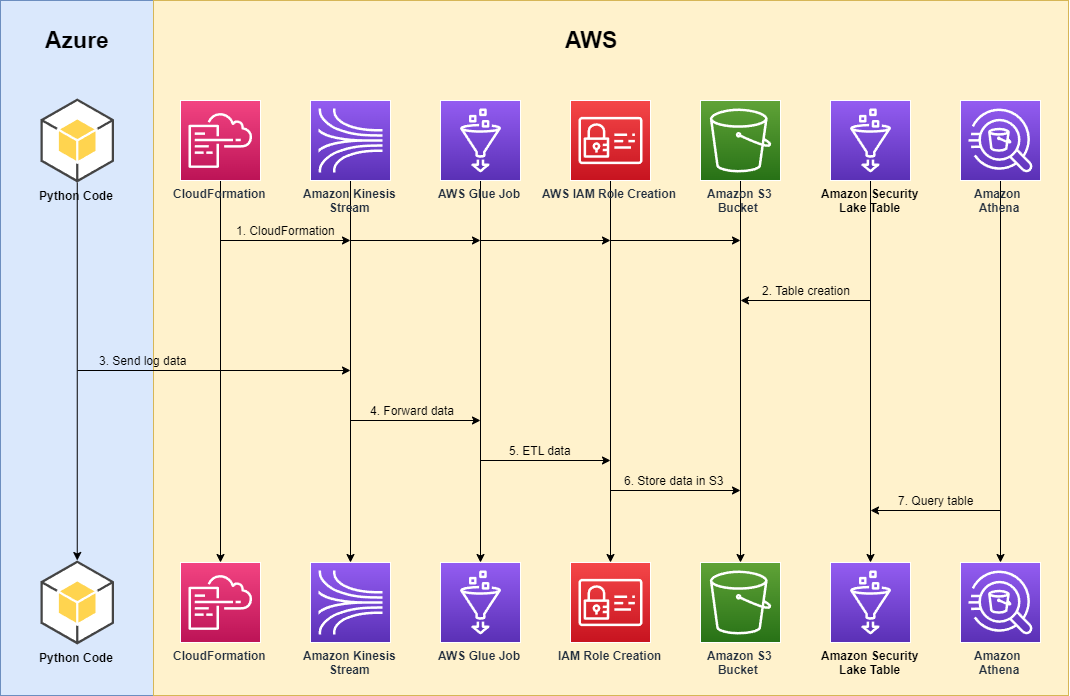
Figure 1 shows how to configure data to travel from an Azure event hub to Amazon Security Lake.

Figure 1: Solution architecture

Figure 1: Solution architecture

As shown in Figure 1, the solution involves the following steps:

  1. An AWS user instantiates the required AWS services and features that enable the process to function, including AWS Identity and Access Management (IAM) permissions, Kinesis data streams, AWS Glue jobs, and Amazon Simple Storage Service (Amazon S3) buckets, either manually or through an AWS CloudFormation template, such as the one we will use in this post.
  2. In response to the custom source created from the CloudFormation template, a Security Lake table is generated in AWS Glue.
  3. From this point on, Azure activity logs in their native format are stored within an Azure cloud event hub within an Azure account. An Azure function is deployed to respond to new events within the Azure event hub and forward these logs over the internet to the Kinesis data stream that was created in the preceding step.
  4. The Kinesis data stream forwards the data to an AWS Glue streaming job fronted by the Kinesis data.
  5. The AWS Glue job then performs the extract, transfer, and load (ETL) mapping to the appropriate Open Cybersecurity Schema Framework (OCSF) (specified for API Activity events at OCSF API Activity Mappings).
  6. The Azure events are partitioned with respect to the required partitioning requirements in Amazon Security Lake tables and stored in S3.
  7. The user can query these tables by using Amazon Athena alongside the rest of their data inside Amazon Security Lake.

Prerequisites

Before you implement the solution, complete the following prerequisites:

  • Verify that you have enabled Amazon Security Lake in the AWS Regions that correspond to the Azure Activity logs that you will forward. For more information, see What is Amazon Security Lake?
  • Preconfigure the custom source logging for the source AZURE_ACTIVITY in your Region. To configure this custom source in Amazon Security Lake, open the Amazon Security Lake console, navigate to Create custom data source, and do the following, as shown in Figure 2:
    • For Data source name, enter AZURE_ACTIVITY.
    • For Event class, select API_ACTIVITY.
    • For Account Id, enter the ID of the account which is authorized to write data to your data lake.
    • For External Id, enter “AZURE_ACTIVITY-<YYYYMMDD>
    Figure 2:  Configure custom data source

    Figure 2: Configure custom data source

For more information on how to configure custom sources for Amazon Security Lake, see Collecting data from custom sources.

Step 1: Configure AWS services for Azure activity logging

The first step is to configure the AWS services for Azure activity logging.

  1. To configure Azure activity logging in Amazon Security Lake, first prepare the assets required in the target AWS account. You can automate this process by using the provided CloudFormation template — Security Lake CloudFormation — which will do the heavy lifting for this portion of the setup.

    Note: I have predefined these scripts to create the AWS assets required to ingest Azure activity logs, but you can generalize this process for other external log sources, as well.

    The CloudFormation template has the following components:

    • securitylakeGlueStreamingRole — includes the following managed policies:
      • AWSLambdaKinesisExecutionRole
      • AWSGlueServiceRole
    • securitylakeGlueStreamingPolicy — includes the following attributes:
      • “s3:GetObject”
      • “s3:PutObject”
    • securitylakeAzureActivityStream — This Kinesis data stream is the endpoint that acts as the connection point between Azure and AWS and the frontend of the AWS Glue stream that feeds Azure activity logs to Amazon Security Lake.
    • securitylakeAzureActivityJob — This is an AWS Glue streaming job that is used to take in feeds from the Kinesis data stream and map the Azure activity logs within that stream to OCSF.
    • securitylake-glue-assets S3 bucket — This is the S3 bucket that is used to store the ETL scripts used in the AWS Glue job to map Azure activity logs.

    Running the CloudFormation template will instantiate the aforementioned assets in your AWS delegated administrator account for Amazon Security Lake.

  2. The CloudFormation template creates a new S3 bucket with the following syntax: securityLake-glue-assets-<ACCOUNT-ID><REGION>. After the CloudFormation run is complete, navigate to this bucket within the S3 console.
  3. Within the S3 bucket, create a scripts and temporary folder in the S3 bucket, as shown in Figure 4.
    Figure 4: Glue assets bucket

    Figure 4: Glue assets bucket

  4. Update the Azure AWS Glue Pyspark script by replacing the following values in the file. You will attach this script to your AWS Glue job and use it to generate the AWS assets required for the implementation.
    • Replace <AWS_REGION_NAME> with the Region that you are operating in — for example, us-east-2.
    • Replace <AWS_ACCOUNT_ID> with the account ID of your delegated administrator account for Amazon Security Lake — for example, 111122223333.
    • Replace <SECURITYLAKE-AZURE-STREAM-ARN> with the Kinesis stream name created through the CloudFormation template. To find the stream name, open the Kinesis console, navigate to the Kinesis stream with the name securityLakeAzureActivityStream<STREAM-UID>, and copy the Amazon Resource Name (ARN), as shown in the following figure.

      Figure 5: Kinesis stream ARN

      Figure 5: Kinesis stream ARN

    • Replace <SECURITYLAKE-BUCKET-NAME> with the name of your data lake S3 bucket root name — for example, s3://aws-security-data-lake-DOC-EXAMPLE-BUCKET.

    After you replace these values, navigate within the scripts folder and upload the AWS Glue PySpark Python script named azure-activity-pyspark.py, as shown in Figure 6.

    Figure 6: AWS Glue script

    Figure 6: AWS Glue script

  5. Within your AWS Glue job, choose Job details and configure the job as follows:
    • For Type, select Spark Streaming.
    • For Language, select Python 3.
    • For Script path, select the S3 path that you created in the preceding step.
    • For Temporary path, select the S3 path that you created in the preceding step.
  6. Save the changes, and run the AWS Glue job by selecting Save and then Run.
  7. Choose the Runs tab, and make sure that the Run status of the job is Running.
    igure 7: AWS Glue job status

    Figure 7: AWS Glue job status

At this point, you have finished the configurations from AWS.

Step 2: Configure Azure services for Azure activity log forwarding

You will complete the next steps in the Azure Cloud console. You need to configure Azure to export activity logs to an Azure cloud event hub within your desired Azure account or organization. Additionally, you need to create an Azure function to respond to new events within the Azure event hub and forward those logs over the internet to the Kinesis data stream that the CloudFormation template created in the initial steps of this post.

For information about how to set up and configure Azure Functions to respond to event hubs, see Azure Event Hubs Trigger for Azure Functions in the Azure documentation.

Configure the following Python script — Azure Event Hub Function — in an Azure function app. This function is designed to respond to event hub events, create a connection to AWS, and forward those events to Kinesis as deserialized JSON blobs.

In the script, replace the following variables with your own information:

  • For <SECURITYLAKE-AZURE-STREAM-ARN>, enter the Kinesis data stream ARN.
  • For <SECURITYLAKE-AZURE-STREAM-NAME>, enter the Kinesis data stream name.
  • For <SECURITYLAKE-AZURE-STREAM-KEYID>, enter the AWS Key Management Service (AWS KMS) key ID created through the CloudFormation template.

The <SECURITYLAKE-AZURE-STREAM-ARN> and securityLakeAzureActivityStream<STREAM-UID> are the same variables that you obtained earlier in this post (see Figure 5).

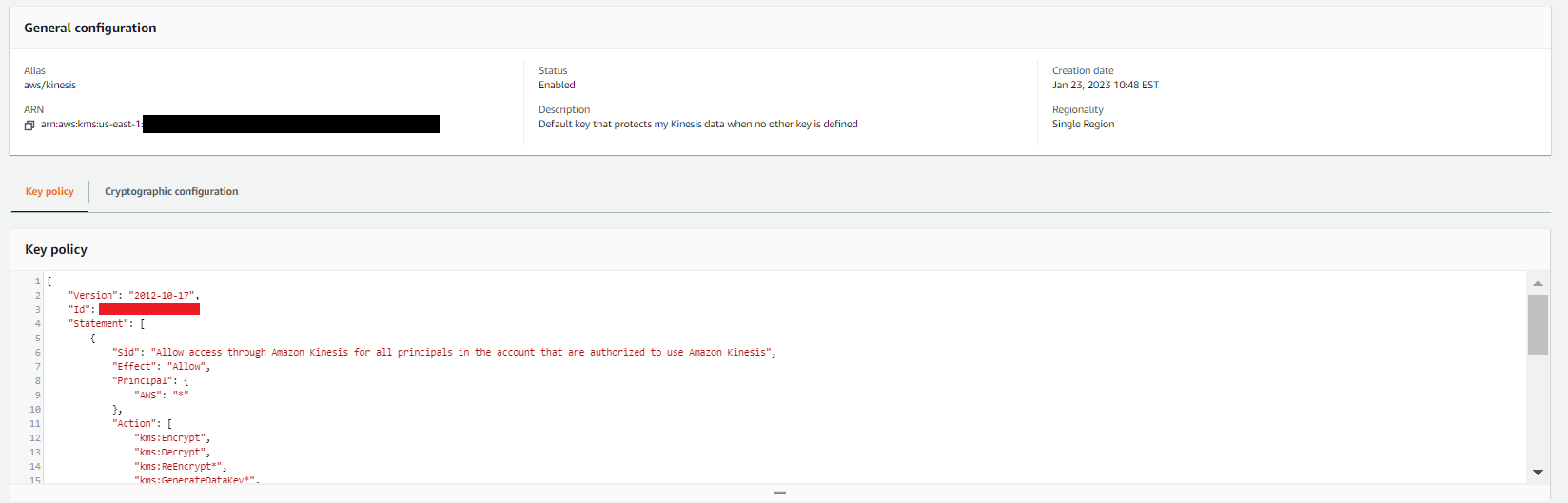
You can find the AWS KMS key ID within the AWS KMS managed key policy associated with securityLakeAzureActivityStream. For example, in the key policy shown in Figure 8, the <SECURITYLAKE-AZURE-STREAM-KEYID> is shown in line 3.

Figure 8: Kinesis data stream inputs

Figure 8: Kinesis data stream inputs

Important: When you are working with KMS keys retrieved from the AWS console or AWS API keys within Azure, you should be extremely mindful of how you approach key management. Improper or poor handling of keys could result in the interception of data from the Kinesis stream or Azure function.

It’s a best security practice to use a trusted key management architecture that uses sufficient encryption and security protocols when working with keys that safeguard sensitive security information. Within Azure, consider using services such as the AWS Azure AD integration for seamless and ephemeral credential usage inside of the azure function. See – Azure AD Integration – for more information on how the Azure AD Integration works to safeguard and manage stored security keys and help make sure that no keys are accessible to unauthorized parties or stored as unencrypted text outside the AWS console.

Step 3: Validate the workflow and query Athena

After you complete the preceding steps, your logs should be flowing. To make sure that the process is working correctly, complete the following steps.

  1. In the Kinesis Data Streams console, verify that the logs are flowing to your data stream. Open the Kinesis stream that you created previously, choose the Data viewer tab, and then choose Get records, as shown in Figure 9.
    Figure 9: Kinesis data stream inputs

    Figure 9: Kinesis data stream inputs

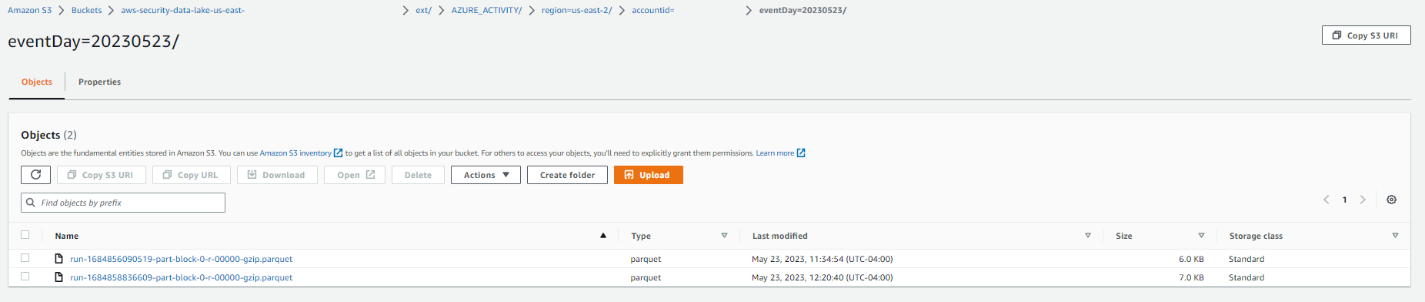
  2. Verify that the logs are partitioned and stored within the correct Security Lake bucket associated with the configured Region. The log partitions within the Security Lake bucket should have the following syntax — “region=<region>/account_id=<account_id>/eventDay=<YYYYMMDD>/”, and they should be stored with the expected parquet compression.
     Figure 10: S3 bucket with object

    Figure 10: S3 bucket with object

  3. Assuming that CloudTrail logs exist within your Amazon Security Lake instance as well, you can now create a query in Athena that pulls data from the newly created Azure activity table and examine it alongside your existing CloudTrail logs by running queries such as the following:
    SELECT 
        api.operation,
        actor.user.uid,
        actor.user.name,
        src_endpoint.ip,
        time,
        severity,
        metadata.version,
        metadata.product.name,
        metadata.product.vendor_name,
        category_name,
        activity_name,
        type_uid,
    FROM {SECURITY-LAKE-DB}.{SECURITY-LAKE-AZURE-TABLE}
    UNION ALL
    SELECT 
        api.operation,
        actor.user.uid,
        actor.user.name,
        src_endpoint.ip,
        time,
        severity,
        metadata.version,
        metadata.product.name,
        metadata.product.vendor_name,
        category_name,
        activity_name,
        type_uid,
    FROM {SECURITY-LAKE-DB}.{SECURITY-LAKE-CLOUDTRAIL-TABLE}

    Figure 11:  Query Azure activity and CloudTrail together in Athena

    Figure 11: Query Azure activity and CloudTrail together in Athena

For additional guidance on how to configure access and query Amazon Security Lake in Athena, see the following resources:

Conclusion

In this blog post, you learned how to create and deploy the AWS and Microsoft Azure assets needed to bring your own data to Amazon Security Lake. By creating an AWS Glue streaming job that can transform Azure activity data streams and by fronting that AWS Glue job with a Kinesis stream, you can open Amazon Security Lake to intake from external Azure activity data streams.

You also learned how to configure Azure assets so that your Azure activity logs can stream to your Kinesis endpoint. The combination of these two creates a working, custom source solution for Azure activity logging.

To get started with Amazon Security Lake, see the Getting Started page, or if you already use Amazon Security Lake and want to read additional blog posts and articles about this service, see Blog posts and articles.

If you have feedback about this blog post, submit comments in the Comments section below. If you have questions about this blog post, start a new thread on Amazon Security Lake re:Post or contact AWS Support.

Want more AWS Security news? Follow us on Twitter.

Adam Plotzker

Adam Plotzker

Adam is currently a Security Engineer at AWS, working primarily on the Amazon Security Lake solution. One of the things he enjoys most about his work at AWS is his ability to be creative when exploring customer needs and coming up with unique solutions that meet those needs.

Amazon Security Lake is now generally available

Post Syndicated from Ross Warren original https://aws.amazon.com/blogs/security/amazon-security-lake-is-now-generally-available/

Today we are thrilled to announce the general availability of Amazon Security Lake, first announced in a preview release at 2022 re:Invent. Security Lake centralizes security data from Amazon Web Services (AWS) environments, software as a service (SaaS) providers, on-premises, and cloud sources into a purpose-built data lake that is stored in your AWS account. With Open Cybersecurity Schema Framework (OCSF) support, the service normalizes and combines security data from AWS and a broad range of security data sources. This helps provide your team of analysts and security engineers with broad visibility to investigate and respond to security events, which can facilitate timely responses and helps to improve your security across multicloud and hybrid environments.

Figure 1 shows how Security Lake works, step by step. In this post, we discuss these steps, highlight some of the most popular use cases for Security Lake, and share the latest enhancements and updates that we have made since the preview launch.

Figure 1: How Security Lake works

Figure 1: How Security Lake works

Target use cases

In this section, we showcase some of the use cases that customers have found to be most valuable while the service was in preview.

Facilitate your security investigations with elevated visibility

Amazon Security Lake helps to streamline security investigations by aggregating, normalizing, and optimizing data storage in a single security data lake. Security Lake automatically normalizes AWS logs and security findings to the OCSF schema. This includes AWS CloudTrail management events, Amazon Virtual Private Cloud (Amazon VPC) Flow Logs, Amazon Route 53 Resolver query logs, and AWS Security Hub security findings from Amazon security services, including Amazon GuardDuty, Amazon Inspector, and AWS IAM Access Analyzer, as well as security findings from over 50 partner solutions. By having security-related logs and findings in a centralized location, and in the same format, Security Operations teams can streamline their process and devote more time to investigating security issues. This centralization reduces the need to spend valuable time collecting and normalizing logs into a specific format.

Figure 2 shows the Security Lake activation page, which presents users with options to enable log sources, AWS Regions, and accounts.

Figure 2: Security Lake activation page with options to enable log sources, Regions, and accounts

Figure 2: Security Lake activation page with options to enable log sources, Regions, and accounts

Figure 3 shows another section of the Security Lake activation page, which presents users with options to set rollup Regions and storage classes.

Figure 3: Security Lake activation page with options to select a rollup Region and set storage classes

Figure 3: Security Lake activation page with options to select a rollup Region and set storage classes

Simplify your compliance monitoring and reporting

With Security Lake, customers can centralize security data into one or more rollup Regions, which can help teams to simplify their regional compliance and reporting obligations. Teams often face challenges when monitoring for compliance across multiple log sources, Regions, and accounts. By using Security Lake to collect and centralize this evidence, security teams can significantly reduce the time spent on log discovery and allocate more time towards compliance monitoring and reporting.

Analyze multiple years of security data quickly

Security Lake offers integration with third-party security services such as security information and event management (SIEM) and extended detection and response (XDR) tools, as well as popular data analytics services like Amazon Athena and Amazon OpenSearch Service to quickly analyze petabytes of data. This enables security teams to gain deep insights into their security data and take nimble measures to help protect their organization. Security Lake helps enforce least-privilege controls for teams across organizations by centralizing data and implementing robust access controls, automatically applying policies that are scoped to the required subscribers and sources. Data custodians can use the built-in features to create and enforce granular access controls, such as to restrict access to the data in the security lake to only those who require it.

Figure 4 depicts the process of creating a data access subscriber within Security Lake.

Figure 4: Creating a data access subscriber in Security Lake

Figure 4: Creating a data access subscriber in Security Lake

Unify security data management across hybrid environments

The centralized data repository in Security Lake provides a comprehensive view of security data across hybrid and multicloud environments, helping security teams to better understand and respond to threats. You can use Security Lake to store security-related logs and data from various sources, including cloud-based and on-premises systems, making it simpler to collect and analyze security data. Additionally, by using automation and machine learning solutions, security teams can help identify anomalies and potential security risks more efficiently. This can ultimately lead to better risk management and enhance the overall security posture for the organization. Figure 5 illustrates the process of querying AWS CloudTrail and Microsoft Azure audit logs simultaneously by using Amazon Athena.

Figure 5: Querying AWS CloudTrail and Microsoft Azure audit logs together in Amazon Athena

Figure 5: Querying AWS CloudTrail and Microsoft Azure audit logs together in Amazon Athena

Updates since preview launch

Security Lake automatically normalizes logs and events from natively supported AWS services to the OCSF schema. With the general availability release, Security Lake now supports the latest version of OCSF, which is version 1 rc2. CloudTrail management events are now normalized into three distinct OCSF event classes: Authentication, Account Change, and API Activity.

We made various improvements to resource names and schema mapping to enhance the usability of logs. Onboarding is made simpler with automated AWS Identity and Access Management (IAM) role creation from the console. Additionally, you have the flexibility to collect CloudTrail sources independently including management events, Amazon Simple Storage Service (Amazon S3) data events, and AWS Lambda events.

To enhance query performance, we made a transition from hourly to daily time partitioning in Amazon S3, resulting in faster and more efficient data retrieval. Also, we added Amazon CloudWatch metrics to enable proactive monitoring of your log ingestion process to facilitate the identification of collection gaps or surges.

New Security Lake account holders are eligible for a 15-day free trial in supported Regions. Security Lake is now generally available in the following AWS Regions: US East (Ohio), US East (N. Virginia), US West (Oregon), Asia Pacific (Singapore), Asia Pacific (Sydney), Asia Pacific (Tokyo), Europe (Frankfurt), Europe (Ireland), Europe (London), and South America (São Paolo).

Ecosystem integrations

We have expanded our support for third-party integrations and have added 23 new partners. This includes 10 source partners — Aqua Security, Claroty, Confluent, Darktrace, ExtraHop, Gigamon, Sentra, Torq, Trellix, and Uptycs — enabling them to send data directly to Security Lake. Additionally, we have integrated with nine new subscribing partners — ChaosSearch, New Relic, Ripjar, SOC Prime, Stellar Cyber, Swimlane, Tines, Torq, and Wazuh. We have also established six new services partners, including Booz Allen Hamilton, CMD Solutions, part of Mantel Group, Infosys, Insbuilt, Leidos, and Tata Consultancy Services.

In addition, Security Lake supports third-party sources that provide OCSF security data. Notable partners include Barracuda Networks, Cisco, Cribl, CrowdStrike, CyberArk, Lacework, Laminar, NETSCOUT, Netskope, Okta, Orca, Palo Alto Networks, Ping Identity, Tanium, The Falco Project, Trend Micro, Vectra AI, VMware, Wiz, and Zscaler. We have integrated with various third-party security, automation, and analytics tools. This includes Datadog, IBM, Rapid7, SentinelOne, Splunk, Sumo Logic, and Trellix. Lastly, we have partnered with service partners such as Accenture, Eviden , Deloitte, DXC Technology, Kyndryl, PwC, and Wipro, that can work with you and Security Lake to deliver comprehensive solutions.

Get help from AWS Professional Services

The AWS Professional Services organization is a global team of experts that can help customers realize their desired business outcomes when using AWS. Our teams of data architects and security engineers engage with customer Security, IT, and business leaders to develop enterprise solutions. We follow current recommendations to support customers in their journey to integrate data into Security Lake. We integrate ready-built data transformations, visualizations, and AI/machine learning (ML) workflows that help Security Operations teams rapidly realize value. If you are interested in learning more, reach out to your AWS Professional Services account representative.

Summary

We invite you to explore the benefits of using Amazon Security Lake by taking advantage of our 15-day free trial and providing your feedback on your experiences, use cases, and solutions. We have several resources to help you get started and build your first data lake, including comprehensive documentation, demo videos, and webinars. By giving Security Lake a try, you can experience firsthand how it helps you centralize, normalize, and optimize your security data, and ultimately streamline your organization’s security incident detection and response across multicloud and hybrid environments.

 
If you have feedback about this post, submit comments in the Comments section below. If you have questions about this post, contact AWS Support.

Want more AWS Security news? Follow us on Twitter.

Author

Ross Warren

Ross is a Senior Product SA at AWS for Amazon Security Lake based in Northern Virginia. Prior to his work at AWS, Ross’ areas of focus included cyber threat hunting and security operations. Outside of work, he likes to spend time with his family, bake bread, make sawdust and enjoy time outside.

Nisha Amthul

Nisha Amthul

Nisha is a Senior Product Marketing Manager at AWS Security, specializing in detection and response solutions. She has a strong foundation in product management and product marketing within the domains of information security and data protection. When not at work, you’ll find her cake decorating, strength training, and chasing after her two energetic kiddos, embracing the joys of motherhood.

Jonathan Garzon

Jonathan Garzon

Jonathan is a Senior Product Management leader at AWS with a passion for building products with delightful customer experiences and solving complex problems. He has launched and managed products in various domains, including networking, cybersecurity, and data analytics. Outside of work, Jonathan enjoys spending time with friends and family, playing soccer, mountain biking, hiking, and playing the guitar.

Three key security themes from AWS re:Invent 2022

Post Syndicated from Anne Grahn original https://aws.amazon.com/blogs/security/three-key-security-themes-from-aws-reinvent-2022/

AWS re:Invent returned to Las Vegas, Nevada, November 28 to December 2, 2022. After a virtual event in 2020 and a hybrid 2021 edition, spirits were high as over 51,000 in-person attendees returned to network and learn about the latest AWS innovations.

Now in its 11th year, the conference featured 5 keynotes, 22 leadership sessions, and more than 2,200 breakout sessions and hands-on labs at 6 venues over 5 days.

With well over 100 service and feature announcements—and innumerable best practices shared by AWS executives, customers, and partners—distilling highlights is a challenge. From a security perspective, three key themes emerged.

Turn data into actionable insights

Security teams are always looking for ways to increase visibility into their security posture and uncover patterns to make more informed decisions. However, as AWS Vice President of Data and Machine Learning, Swami Sivasubramanian, pointed out during his keynote, data often exists in silos; it isn’t always easy to analyze or visualize, which can make it hard to identify correlations that spark new ideas.

“Data is the genesis for modern invention.” – Swami Sivasubramanian, AWS VP of Data and Machine Learning

At AWS re:Invent, we launched new features and services that make it simpler for security teams to store and act on data. One such service is Amazon Security Lake, which brings together security data from cloud, on-premises, and custom sources in a purpose-built data lake stored in your account. The service, which is now in preview, automates the sourcing, aggregation, normalization, enrichment, and management of security-related data across an entire organization for more efficient storage and query performance. It empowers you to use the security analytics solutions of your choice, while retaining control and ownership of your security data.

Amazon Security Lake has adopted the Open Cybersecurity Schema Framework (OCSF), which AWS cofounded with a number of organizations in the cybersecurity industry. The OCSF helps standardize and combine security data from a wide range of security products and services, so that it can be shared and ingested by analytics tools. More than 37 AWS security partners have announced integrations with Amazon Security Lake, enhancing its ability to transform security data into a powerful engine that helps drive business decisions and reduce risk. With Amazon Security Lake, analysts and engineers can gain actionable insights from a broad range of security data and improve threat detection, investigation, and incident response processes.

Strengthen security programs

According to Gartner, by 2026, at least 50% of C-Level executives will have performance requirements related to cybersecurity risk built into their employment contracts. Security is top of mind for organizations across the globe, and as AWS CISO CJ Moses emphasized during his leadership session, we are continuously building new capabilities to help our customers meet security, risk, and compliance goals.

In addition to Amazon Security Lake, several new AWS services announced during the conference are designed to make it simpler for builders and security teams to improve their security posture in multiple areas.

Identity and networking

Authorization is a key component of applications. Amazon Verified Permissions is a scalable, fine-grained permissions management and authorization service for custom applications that simplifies policy-based access for developers and centralizes access governance. The new service gives developers a simple-to-use policy and schema management system to define and manage authorization models. The policy-based authorization system that Amazon Verified Permissions offers can shorten development cycles by months, provide a consistent user experience across applications, and facilitate integrated auditing to support stringent compliance and regulatory requirements.

Additional services that make it simpler to define authorization and service communication include Amazon VPC Lattice, an application-layer service that consistently connects, monitors, and secures communications between your services, and AWS Verified Access, which provides secure access to corporate applications without a virtual private network (VPN).

Threat detection and monitoring

Monitoring for malicious activity and anomalous behavior just got simpler. Amazon GuardDuty RDS Protection expands the threat detection capabilities of GuardDuty by using tailored machine learning (ML) models to detect suspicious logins to Amazon Aurora databases. You can enable the feature with a single click in the GuardDuty console, with no agents to manually deploy, no data sources to enable, and no permissions to configure. When RDS Protection detects a potentially suspicious or anomalous login attempt that indicates a threat to your database instance, GuardDuty generates a new finding with details about the potentially compromised database instance. You can view GuardDuty findings in AWS Security Hub, Amazon Detective (if enabled), and Amazon EventBridge, allowing for integration with existing security event management or workflow systems.

To bolster vulnerability management processes, Amazon Inspector now supports AWS Lambda functions, adding automated vulnerability assessments for serverless compute workloads. With this expanded capability, Amazon Inspector automatically discovers eligible Lambda functions and identifies software vulnerabilities in application package dependencies used in the Lambda function code. Actionable security findings are aggregated in the Amazon Inspector console, and pushed to Security Hub and EventBridge to automate workflows.

Data protection and privacy

The first step to protecting data is to find it. Amazon Macie now automatically discovers sensitive data, providing continual, cost-effective, organization-wide visibility into where sensitive data resides across your Amazon Simple Storage Service (Amazon S3) estate. With this new capability, Macie automatically and intelligently samples and analyzes objects across your S3 buckets, inspecting them for sensitive data such as personally identifiable information (PII), financial data, and AWS credentials. Macie then builds and maintains an interactive data map of your sensitive data in S3 across your accounts and Regions, and provides a sensitivity score for each bucket. This helps you identify and remediate data security risks without manual configuration and reduce monitoring and remediation costs.

Encryption is a critical tool for protecting data and building customer trust. The launch of the end-to-end encrypted enterprise communication service AWS Wickr offers advanced security and administrative controls that can help you protect sensitive messages and files from unauthorized access, while working to meet data retention requirements.

Management and governance

Maintaining compliance with regulatory, security, and operational best practices as you provision cloud resources is key. AWS Config rules, which evaluate the configuration of your resources, have now been extended to support proactive mode, so that they can be incorporated into infrastructure-as-code continuous integration and continuous delivery (CI/CD) pipelines to help identify noncompliant resources prior to provisioning. This can significantly reduce time spent on remediation.

Managing the controls needed to meet your security objectives and comply with frameworks and standards can be challenging. To make it simpler, we launched comprehensive controls management with AWS Control Tower. You can use it to apply managed preventative, detective, and proactive controls to accounts and organizational units (OUs) by service, control objective, or compliance framework. You can also use AWS Control Tower to turn on Security Hub detective controls across accounts in an OU. This new set of features reduces the time that it takes to define and manage the controls required to meet specific objectives, such as supporting the principle of least privilege, restricting network access, and enforcing data encryption.

Do more with less

As we work through macroeconomic conditions, security leaders are facing increased budgetary pressures. In his opening keynote, AWS CEO Adam Selipsky emphasized the effects of the pandemic, inflation, supply chain disruption, energy prices, and geopolitical events that continue to impact organizations.

Now more than ever, it is important to maintain your security posture despite resource constraints. Citing specific customer examples, Selipsky underscored how the AWS Cloud can help organizations move faster and more securely. By moving to the cloud, agricultural machinery manufacturer Agco reduced costs by 78% while increasing data retrieval speed, and multinational HVAC provider Carrier Global experienced a 40% reduction in the cost of running mission-critical ERP systems.

“If you’re looking to tighten your belt, the cloud is the place to do it.” – Adam Selipsky, AWS CEO

Security teams can do more with less by maximizing the value of existing controls, and bolstering security monitoring and analytics capabilities. Services and features announced during AWS re:Invent—including Amazon Security Lake, sensitive data discovery with Amazon Macie, support for Lambda functions in Amazon Inspector, Amazon GuardDuty RDS Protection, and more—can help you get more out of the cloud and address evolving challenges, no matter the economic climate.

Security is our top priority

AWS re:Invent featured many more highlights on a variety of topics, such as Amazon EventBridge Pipes and the pre-announcement of GuardDuty EKS Runtime protection, as well as Amazon CTO Dr. Werner Vogels’ keynote, and the security partnerships showcased on the Expo floor. It was a whirlwind week, but one thing is clear: AWS is working harder than ever to make our services better and to collaborate on solutions that ease the path to proactive security, so that you can focus on what matters most—your business.

For more security-related announcements and on-demand sessions, see A recap for security, identity, and compliance sessions at AWS re:Invent 2022 and the AWS re:Invent Security, Identity, and Compliance playlist on YouTube.

If you have feedback about this post, submit comments in the Comments section below.

Anne Grahn

Anne Grahn

Anne is a Senior Worldwide Security GTM Specialist at AWS based in Chicago. She has more than a decade of experience in the security industry, and has a strong focus on privacy risk management. She maintains a Certified Information Systems Security Professional (CISSP) certification.

Author

Paul Hawkins

Paul helps customers of all sizes understand how to think about cloud security so they can build the technology and culture where security is a business enabler. He takes an optimistic approach to security and believes that getting the foundations right is the key to improving your security posture.