When running container workloads, you need to understand how software vulnerabilities create security risks for your resources. Until now, you could identify vulnerabilities in your Amazon Elastic Container Registry (Amazon ECR) images, but couldn’t determine if these images were active in containers or track their usage. With no visibility if these images were being used on running clusters, you had limited ability to prioritize fixes based on actual deployment and usage patterns.
Starting today, Amazon Inspector offers two new features that enhance vulnerability management, giving you a more comprehensive view of your container images. First, Amazon Inspector now maps Amazon ECR images to running containers, enabling security teams to prioritize vulnerabilities based on containers currently running in your environment. With these new capabilities, you can analyze vulnerabilities in your Amazon ECR images and prioritize findings based on whether they are currently running and when they last ran in your container environment. Additionally, you can see the cluster Amazon Resource Name (ARN), number EKS pods or ECS tasks where an image is deployed, helping you prioritize fixes based on usage and severity.
Second, we’re extending vulnerability scanning support to minimal base images including scratch, distroless, and Chainguard images, and extending support for additional ecosystems including Go toolchain, Oracle JDK & JRE, Amazon Corretto, Apache Tomcat, Apache httpd, WordPress (core, themes, plugins), and Puppeteer, helping teams maintain robust security even in highly optimized container environments.
Through continual monitoring and tracking of images running on containers, Amazon Inspector helps teams identify which container images are actively running in their environment and where they’re deployed, detecting Amazon ECR images running on containers in Amazon Elastic Container Service (Amazon ECS) and Amazon Elastic Kubernetes Service (Amazon EKS), and any associated vulnerabilities. This solution supports teams managing Amazon ECR images across single AWS accounts, cross-account scenarios, and AWS Organizations with delegated administrator capabilities, enabling centralized vulnerability management based on container images running patterns.
In the Amazon Inspector console, I navigate to General settings and select ECR scanning settings from the navigation panel. Here, I can configure the new Image re-scan mode settings by choosing between Last in-use date and Last pull date. I leave it as it is by default with Last in-usedate and set the Image last in use date to 14 days. These settings make it so that Inspector monitors my images based on when they were running in the last 14 days in my Amazon ECS or Amazon EKS environments. After applying these settings, Amazon Inspector starts tracking information about images running on containers and incorporating it into vulnerability findings, helping me focus on images actively running in containers in my environment.
After it’s configured, I can view information about images running on containers in the Details menu, where I can see last in-use and pull dates, along with EKS pods or ECS tasks count.
When selecting the number of Deployed ECS Tasks/EKS Pods, I can see the cluster ARN, last use dates, and Type for each image.
For cross-account visibility demonstration, I have a repository with EKS pods deployed in two accounts. In the Resources coverage menu, I navigate to Container repositories, select my repository name and choose the Image tag. As before, I can see the number of deployed EKS pods/ECS tasks.
When I select the number of deployed EKS pods/ECS tasks, I can see that it is running in a different account.
In the Findings menu, I can review any vulnerabilities, and by selecting one, I can find the Last in use date and Deployed ECS Tasks/EKS Pods involved in the vulnerability under Resource affected data, helping me prioritize remediation based on actual usage.
In the All Findings menu, you can now search for vulnerabilities within account management, using filters such as Account ID, Image in use count and Image last in use at.
Key features and considerations Monitoring based on container image lifecycle – Amazon Inspector now determines image activity based on: image push date ranging duration 14, 30, 60, 90, or 180 days or lifetime, image pull date from 14, 30, 60, 90, or 180 days, stopped duration from never to 14, 30, 60, 90, or 180 days and status of image running on the container. This flexibility lets organizations tailor their monitoring strategy based on actual container image usage rather than only repository events. For Amazon EKS and Amazon ECS workloads, last in use, push and pull duration are set to 14 days, which is now the default for new customers.
Image runtime-aware finding details – To help prioritize remediation efforts, each finding in Amazon Inspector now includes the lastInUseAt date and InUseCount, indicating when an image was last running on the containers and the number of deployed EKS pods/ ECS tasks currently using it. Amazon Inspector monitors both Amazon ECR last pull date data and images running on Amazon ECS tasks or Amazon EKS pods container data for all accounts, updating this information at least once daily. Amazon Inspector integrates these details into all findings reports and seamlessly works with Amazon EventBridge. You can filter findings based on the lastInUseAt field using rolling window or fixed range options, and you can filter images based on their last running date within the last 14, 30, 60, or 90 days.
Comprehensive security coverage – Amazon Inspector now provides unified vulnerability assessments for both traditional Linux distributions and minimal base images including scratch, distroless, and Chainguard images through a single service. This extended coverage eliminates the need for multiple scanning solutions while maintaining robust security practices across your entire container ecosystem, from traditional distributions to highly optimized container environments. The service streamlines security operations by providing comprehensive vulnerability management through a centralized platform, enabling efficient assessment of all container types.
Enhanced cross-account visibility – Security management across single accounts, cross-account setups, and AWS Organizations is now supported through delegated administrator capabilities. Amazon Inspector shares images running on container information within the same organization, which is particularly valuable for accounts maintaining golden image repositories. Amazon Inspector provides all ARNs for Amazon EKS and Amazon ECS clusters where images are running, if the resource belongs to the account with an API, providing comprehensive visibility across multiple AWS accounts. The system updates deployed EKS pods or ECS tasks information at least one time daily and automatically maintains accuracy as accounts join or leave the organization.
PS: Writing a blog post at AWS is always a team effort, even when you see only one name under the post title. In this case, I want to thank Nirali Desai, for her generous help with technical guidance, and expertise, which made this overview possible and comprehensive.
(This survey is hosted by an external company. AWS handles your information as described in the AWS Privacy Notice. AWS will own the data gathered via this survey and will not share the information collected with survey respondents.)
Amazon EC2 P6-B200 instances accelerate a broad range of GPU-enabled workloads but are especially well-suited for large-scale distributed AI training and inferencing for foundation models (FMs) with reinforcement learning (RL) and distillation, multimodal training and inference, and HPC applications such as climate modeling, drug discovery, seismic analysis, and insurance risk modeling.
When combined with Elastic Fabric Adapter (EFAv4) networking, hyperscale clustering by EC2 UltraClusters, and advanced virtualization and security capabilities by AWS Nitro System, you can train and serve FMs with increased speed, scale, and security. These instances also deliver up to two times the performance for AI training (time to train) and inference (tokens/sec) compared to EC2 P5en instances.
You can accelerate time-to-market for training FMs and deliver faster inference throughput, which lowers inference cost and helps increase adoption of generative AI applications as well as increased processing performance for HPC applications.
EC2 P6-B200 instances specifications New EC2 P6-B200 instances provide eight NVIDIA B200 GPUs with 1440 GB of high bandwidth GPU memory, 5th Generation Intel Xeon Scalable processors (Emerald Rapids), 2 TiB of system memory, and 30 TB of local NVMe storage.
Here are the specs for EC2 P6-B200 instances:
Instance size
GPUs (NVIDIA B200)
GPU memory (GB)
vCPUs
GPU Peer to peer (GB/s)
Instance storage (TB)
Network bandwidth (Gbps)
EBS bandwidth (Gbps)
P6-b200.48xlarge
8
1440 HBM3e
192
1800
8 x 3.84 NVMe SSD
8 x 400
100
These instances feature up to 125 percent improvement in GPU TFLOPs, 27 percent increase in GPU memory size, and 60 percent increase in GPU memory bandwidth compared to P5en instances.
P6-B200 instances in action You can use P6-B200 instances in the US West (Oregon) AWS Region through EC2 Capacity Blocks for ML. To reserve your EC2 Capacity Blocks, choose Capacity Reservations on the Amazon EC2 console.
Select Purchase Capacity Blocks for ML and then choose your total capacity and specify how long you need the EC2 Capacity Block for p6-b200.48xlarge instances. The total number of days that you can reserve EC2 Capacity Blocks is 1-14 days, 21 days, 28 days, or multiples of 7 up to 182 days. You can choose your earliest start date for up to 8 weeks in advance.
Now, your EC2 Capacity Block will be scheduled successfully. The total price of an EC2 Capacity Block is charged up front, and the price doesn’t change after purchase. The payment will be billed to your account within 12 hours after you purchase the EC2 Capacity Blocks. To learn more, visit Capacity Blocks for ML in the Amazon EC2 User Guide.
When launching P6-B200 instances, you can use AWS Deep Learning AMIs (DLAMI) to support EC2 P6-B200 instances. DLAMI provides ML practitioners and researchers with the infrastructure and tools to quickly build scalable, secure, distributed ML applications in preconfigured environments.
(This survey is hosted by an external company. AWS handles your information as described in the AWS Privacy Notice. AWS will own the data gathered via this survey and will not share the information collected with survey respondents.)
Starting today, you can use AWS CodeBuild Docker Server capability to provision a dedicated and persistent Docker server directly within your CodeBuild project. With Docker Server capability, you can accelerate your Docker image builds by centralizing image building to a remote host, which reduces wait times and increases overall efficiency.
From my benchmark, with this Docker Server capability, I reduced the total building time by 98 percent, from 24 minutes and 54 seconds to 16 seconds. Here’s a quick look at this feature from my AWS CodeBuild projects.
AWS CodeBuild is a fully managed continuous integration service that compiles source code, runs tests, and produces software packages ready for deployment. Building Docker images is one of the most common use cases for CodeBuild customers, and the service has progressively improved this experience over time by releasing features such as Docker layer caching and reserved capacity features to improve Docker build performance.
With the new Docker Server capability, you can reduce build time for your applications by providing a persistent Docker server with consistent caching. When enabled in a CodeBuild project, a dedicated Docker server is provisioned with persistent storage that maintains your Docker layer cache. This server can handle multiple concurrent Docker build operations, with all builds benefiting from the same centralized cache.
Using AWS CodeBuild Docker Server Let me walk you through a demonstration that showcases the benefits with the new Docker Server capability.
For this demonstration, I’m building a complex, multi-layered Docker image based on the official AWS CodeBuild curated Docker images repository, specifically the Dockerfile for building a standard Ubuntu image. This image contains numerous dependencies and tools required for modern continuous integration and continuous delivery (CI/CD) pipelines, making it a good example of the type of large Docker builds that development teams regularly perform.
# Copyright 2020-2024 Amazon.com, Inc. or its affiliates. All Rights Reserved.
#
# Licensed under the Amazon Software License (the "License"). You may not use this file except in compliance with the License.
# A copy of the License is located at
#
#    http://aws.amazon.com/asl/
#
# or in the "license" file accompanying this file.
# This file is distributed on an "AS IS" BASIS, WITHOUT WARRANTIES OR CONDITIONS OF ANY KIND, express or implied.
# See the License for the specific language governing permissions and limitations under the License.
FROM public.ecr.aws/ubuntu/ubuntu:20.04 AS core

ARG DEBIAN_FRONTEND="noninteractive"

# Install git, SSH, Git, Firefox, GeckoDriver, Chrome, ChromeDriver,  stunnel, AWS Tools, configure SSM, AWS CLI v2, env tools for runtimes: Dotnet, NodeJS, Ruby, Python, PHP, Java, Go, .NET, Powershell Core,  Docker, Composer, and other utilities
COMMAND REDACTED FOR BREVITY
# Activate runtime versions specific to image version.
RUN n $NODE_14_VERSION
RUN pyenv  global $PYTHON_39_VERSION
RUN phpenv global $PHP_80_VERSION
RUN rbenv  global $RUBY_27_VERSION
RUN goenv global  $GOLANG_15_VERSION

# Configure SSH
COPY ssh_config /root/.ssh/config
COPY runtimes.yml /codebuild/image/config/runtimes.yml
COPY dockerd-entrypoint.sh /usr/local/bin/dockerd-entrypoint.sh
COPY legal/bill_of_material.txt /usr/share/doc/bill_of_material.txt
COPY amazon-ssm-agent.json /etc/amazon/ssm/amazon-ssm-agent.json

ENTRYPOINT ["/usr/local/bin/dockerd-entrypoint.sh"]
This Dockerfile creates a comprehensive build environment with multiple programming languages, build tools, and dependencies – exactly the type of image that would benefit from persistent caching.
In the build specification (buildspec), I use the docker buildx build . command:
To enable the Docker Server capability, I navigate to the AWS CodeBuild console and select Create project. I can also enable this capability when editing existing CodeBuild projects.
I fill in all details and configuration. In the Environment section, I select Additional configuration.
Then, I scroll down and find Docker server configuration and select Enable docker server for this project. When I select this option, I can choose a compute type configuration for the Docker server. When I’m finished with the configurations, I create this project.
Now, let’s see the Docker Server capability in action.
The initial build takes approximately 24 minutes and 54 seconds to complete because it needs to download and compile all dependencies from scratch. This is expected for the first build of such a complex image.
For subsequent builds with no code changes, the build takes only 16 seconds and that shows 98% reduction in build time.
Looking at the logs, I can see that with Docker Server, most layers are pulled from the persistent cache:
The persistent caching provided by the Docker Server maintains all layers between builds, which is particularly valuable for large, complex Docker images with many layers. This demonstrates how Docker Server can dramatically improve throughput for teams running numerous Docker builds in their CI/CD pipelines.
Additional things to know Here are a couple of things to note:
Architecture support – The feature is available for both x86 (Linux) and ARM builds.
Pricing – To learn more about pricing for Docker Server capability, refer to the AWS CodeBuild pricing page.
Availability – This feature is available in all AWS Regions where AWS CodeBuild is offered. For more information about the AWS Regions where CodeBuild is available, see the AWS Regions page.
(This survey is hosted by an external company. AWS handles your information as described in the AWS Privacy Notice. AWS will own the data gathered via this survey and will not share the information collected with survey respondents.)
Generative AI has brought many new possibilities to organizations. It has equipped them with new abilities to retire technical debt, modernize legacy systems, and build agile infrastructure to help unlock the value that is trapped in their internal data. However, many enterprises still rely heavily on legacy IT infrastructure, particularly mainframes and VMware-based systems. These platforms have been the backbone of critical operations for decades, but they hinder organizations’ ability to innovate, scale effectively, and reduce technical debt in an era where cloud-first strategies dominate. The need to modernize these workloads is clear, but the journey has traditionally been complex and risky.
The complexity spans multiple dimensions. Financially, organizations face mounting licensing costs and expensive migration projects. Technically, they must untangle legacy dependencies while meeting compliance requirements. Organizationally, they must manage the transition of teams who’ve built careers around legacy systems and navigate undocumented institutional knowledge.
AWS Transform directly addresses these challenges with purpose-built agentic AI that accelerates and de-risks your legacy modernization. It automates the assessment, planning, and transformation of both mainframe and VMware workloads into cloud based architectures, streamlining the entire process. Through intelligent insights, automated code transformation, and human-in-the-loop workflows, organizations can now tackle even the most challenging modernization projects with greater confidence and efficiency.
Mainframe workload migration AWS Transform for mainframe is the first agentic AI service for modernizing mainframe workloads at scale. The specialized mainframe agent accelerates mainframe modernization by automating complex, resource-intensive tasks across every phase of modernization — from initial assessment to final deployment. It streamlines the migration of legacy applications built on IBM z/OS Db2, including COBOL, CICS, DB2, and VSAM, to modern cloud environments–cutting modernization timelines from years to months.
Let’s look at a few examples of how AWS Transform can help you through different aspects of the migration process.
Code analysis – AWS Transform provides comprehensive insights into your codebase, automatically examining mainframe codebases, creating detailed dependency graphs, measuring code complexity, and identifying component relationships
Documentation – AWS Transform for mainframe creates comprehensive technical and functional documentation of mainframe applications, preserving critical knowledge about features, program logic, and data flows. You can interact with the generated documentation through an AI-powered chat interface to discover and retrieve information quickly.
Business rule extraction – AWS Transform extracts and presents complex logic in plain language so you can gain visibility into business processes embedded within legacy applications. This enables both business and technical stakeholders to gain a greater understanding of application functionality.
Code decomposition – AWS Transform offers sophisticated code decomposition tools, including interactive dependency graphs and domain separation capabilities, enabling users to visualize and modify relationships between components while identifying key business functions. The solution also streamlines migration planning through an interactive wave sequence planner that considers user preferences to generate optimized migration strategies.
Modernization Wave Planning – With its specialized agent, AWS Transform for mainframe creates prioritized modernization wave sequences based on code and data dependencies, code volume, and business priorities. It enables modernization teams to make data-driven, customized migration plans that align to their specific organizational needs.
Code refactoring – AWS Transform can refactor millions of lines of mainframe code in minutes, converting COBOL, VSAM, and DB2 systems into modern Java Spring Boot applications while maintaining functional equivalence and transforming CICS transactions into web services and JCL batch processes into Groovy scripts. The solution provides high-quality output through configurable settings and bundled runtime capabilities, producing Java code that emphasizes readability, maintainability, and technical excellence.
Deployments – AWS Transform provides customizable deployment templates that streamline the deployment process through user-defined inputs. For added efficiency, the solution bundles the selected runtime version with the migrated application, enabling seamless deployment as a complete package.
By integrating intelligent documentation analysis, business rules extraction, and human-in-the-loop collaboration capabilities, AWS Transform helps organizations accelerate their mainframe transformation while reducing risk and maintaining business continuity.
VMware modernization With rapid changes in VMware licensing and support model, organizations are increasingly exploring alternatives despite the difficulties associated with migrating and modernizing VMware workloads. This is aggravated by the fact that the accumulation of technical debt typically creates complex, poorly documented environments managed by multiple teams, leading to vendor lock-in and collaboration challenges that hinder migration efforts further.
AWS Transform is the first agentic AI service for VMware modernization of its kind that helps you to overcome those difficulties. It can offset risk and accelerate the modernization of VMware workloads by automating application discovery, dependency mapping, migration planning, network conversion, and EC2 instance optimization, reducing manual effort and accelerating cloud adoption.
The process is organized into four phases: inventory discovery, wave planning, network conversion, and server migration. It uses agentic AI capabilities to analyze and map complex VMware environments, converting network configurations into AWS built-in constructs and helps you to orchestrate dependency-aware migration waves for seamless cutovers. In addition, it also provides a collaborative web interface that keeps AWS teams, partners, and customers aligned throughout the modernization journey.
Let’s take a quick tour to see how this works.
Setting up Before you can start using the service, you must first enable it by navigating to the AWS Transform console. AWS Transform requires AWS IAM Identity Center (IdC) to manage users and setup appropriate permissions. If you don’t yet have IdC set up it will ask you to configure it first and return to the AWS Transform console later to continue the process.
With IdC available, you can then proceed to choosing the encryption settings. AWS Transform gives you the option to use a default AWS managed key or you can use your own custom keys through AWS Key Management Service (AWS KMS).
After completing this step, AWS Transform will be enabled. You can manage admin access to the console by navigating to Users and using the search box to find them. You must create users or groups in IdC first if they don’t already exist. The service console will help admins provision users who will get access to the web app. Each provisioned user receives an email with a link to set password and get their personalized URL for the webapp.
You interact with AWS Transform through a dedicated web experience. To get the url, navigate to Settings where you can check your configurations and copy the links to the AWS Transform web experience where you and your teams can start using the service.
Discovery AWS Transform can discover your VMware environment either automatically through AWS Application Discovery Service collectors or you can provide your own data by importing existing RVTools export files.
To get started, choose the Create or select connectors task and provide the account IDs for one or more AWS accounts that will be used for discovery. This will generate links that you can follow to authorize each account for usage within AWS Transform. You can then move on to the Perform discovery task, where you can choose to install AWS Application Discovery Service collectors or upload your own files such as exports from RVTools.
Provisioning The steps for the provisioning phase are similar to the ones described earlier for discovery. You connect target AWS accounts by entering their account IDs and validating the authorization requests which will then enable the next steps such as the Generate VPC configuration step. Here, you can import your RVTools files or NSX exports from Import/Export from NSX, if applicable, and enable AWS Transform to understand your networking requirements.
Review the proposed changes and, if you’re happy, start the deployment process of the AWS resources to the target accounts.
Deployment AWS Transform requires you to set up AWS Application Migration Service (MGN) in the target AWS accounts to automate the migration process. Choose the Initiate VM migration task and use the link to navigate to the service console, then follow the instructions to configure it.
After setting up service permissions, you’ll proceed to the implementation phase of the waves created by AWS Transform and start the migration process. For each wave, you’ll first be asked to make various choices such as setting the sizing preference and tenancy for the Amazon Elastic Compute Cloud (Amazon EC2) instances. Confirm your selections and continue following the instructions given by AWS Transform until you reach the Deploy replication agents stage, where you can start the migration for that wave.
After you start the waves migration process, you can switch to the dashboard at any time to check on progress.
With its agentic AI capabilities, AWS Transform offers a powerful solution for accelerating and de-risking mainframe and VMware modernization workloads. By automating complex assessment and transformation processes, AWS Transform reduces the time associated with legacy system migration while minimizing the potential for errors and business disruption enabling more agile, efficient, and future-ready IT environments within your organization.
Things to know Availability – AWS Transform for mainframe is available in US East (N. Virginia) and Europe (Frankfurt) Regions. AWS Transform for VMware offers different availability options for data collection and migrations. Please refer to the AWS Transform for VMware FAQ for more details.
Pricing – Currently, we offer our core features—including assessment and transformation—at no cost to AWS customers.
(This survey is hosted by an external company. AWS handles your information as described in the AWS Privacy Notice. AWS will own the data gathered via this survey and will not share the information collected with survey respondents.)
Welcome to the first Drive Stats of 2025. In case you missed it, the 2024 Drive Stats report was the last for long-time Drive Stats guru, Andy Klein, who is happily retired—off putting the “green” in greener pastures by working on his golf game. We–being Backblaze staff writer Stephanie Doyle and Chief Technical Evangelist Pat Patterson–are picking up where Andy left off, bringing you the metrics and analysis you know and love. Now, on to the numbers!
As of March 31, 2025, we had 312,831 drives under management. Of that total, there were 3,970 boot drives and 308,861 data drives. We’ll review their annualized failure rates (AFRs) as of Q1 2025, and we’ll dig into the average age of drive failure by model, drive size, and more. Along the way, we’ll share our observations and insights on the data presented and, this time around, we’ve got some exciting updates to share about how we produce Drive Stats. (Stay tuned, fellow Snowflake fans.)
As always, we look forward to your thoughts—we’ll see you in the comments section.
Sign up for the Drive Stats LinkedIn Live
Ready to dive deeper into the data? Tune in Thursday, May 15, 2025 at 10:00 a.m. PT, to query the new Drive Stats team, Stephanie Doyle and Pat Patterson. Feel free to drop us a line with any questions you want us to answer.
Q1 2025 hard drive failure rates
As mentioned above, at the end of Q1 2025, we were running 312,831 drives. During the quarter as a whole, however, we were monitoring a total of 318,426 drives; this count includes those that were taken out of service during the quarter, either because they failed or were only used temporarily.
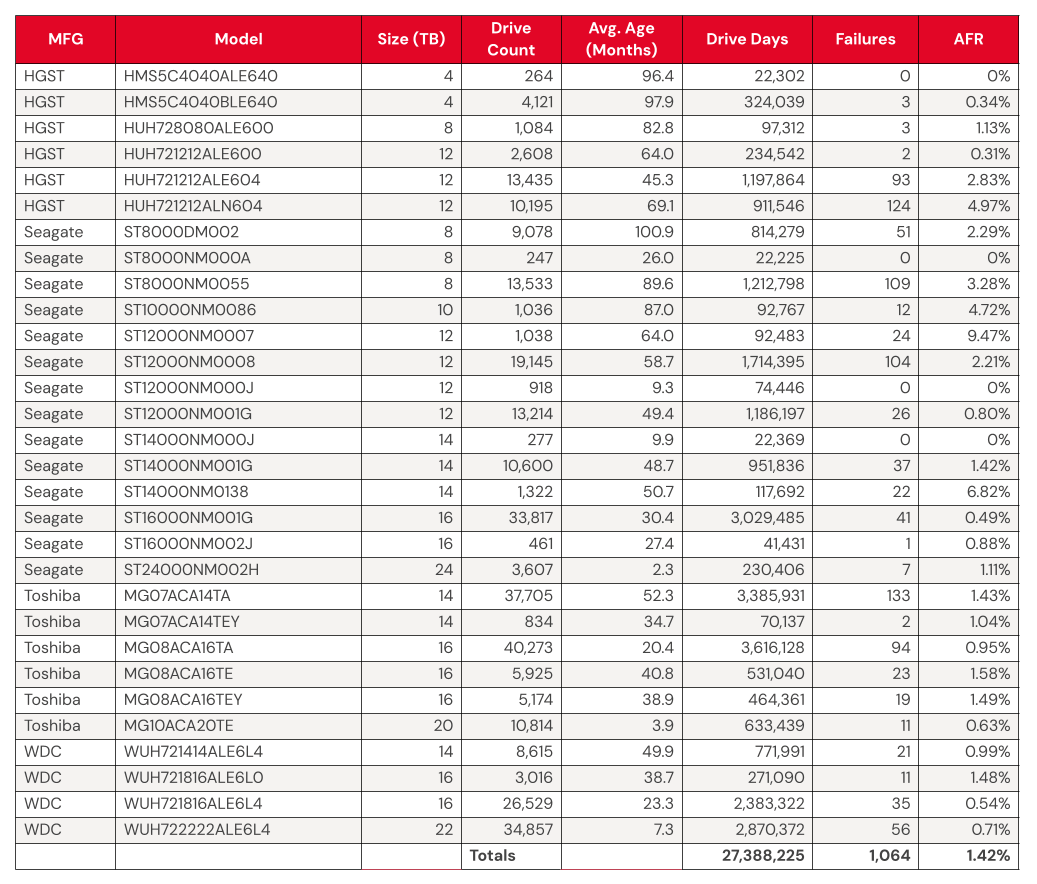
We’ll discuss the criteria we used in the next section of this report. Removing these drives leaves us with 317,833 hard drives to analyze. The table below shows the annualized failure rates (AFR) for Q1 2025 for this collection of drives.
Backblaze Hard Drive Failure Rates for Q1 2025
Reporting period January 1, 2025–March 31, 2025 inclusive Drive models with drive count > 100 as of March 31, 2025 and drive days > 10,000 in Q1 2025.
Notes and observations
The 4TB drives are hanging on and finishing strong. Good news: We have another quarter’s worth of data on our beloved 4TB drives (though the planned migration is well underway). True to their history, the 4TB drives showed wonderfully low failure rates, with yet another quarter of zero failures from model HMS5C4040ALE640 and 0.34% AFR from model HMS5C4040BLE640.
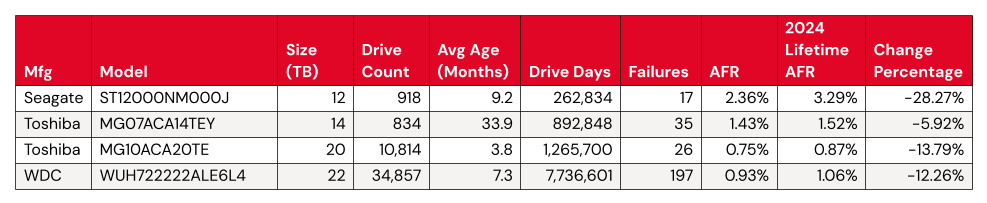
Keeping an eye on the 20TB+ pool. The 24TB Seagate (model ST24000NM002H) no longer has a perfect record, with eight failures for the quarter. Still, the drives put up a respectable 1.00% AFR. Meanwhile, the 20TB+ drives as a pool are averaging a 0.72% AFR, coming in lower than the overall failure rates—always a promising sign.
Zero failures for the quarter. Four drives get a gold star for zero failures this quarter:
The 4TB HGST (model HMS5C4040ALE640)
The Seagate 8TB (model ST8000NM000A)
Seagate 12TB (model ST12000NM000J)
Seagate 14TB (model ST14000NM000J)
Three out of the four also had zero failures last quarter, all but the Seagate 12TB.
The quarterly failure rate is slightly higher. The quarterly failure rate went up from 1.35% to 1.42%. As with the zero-failure club, our higher-end outlier AFRs show some of the usual suspects:
We noted earlier we removed 593 drives from consideration when we produced the table above covering Q4 2024. There are two primary reasons we did not consider these drive models.
Testing. These are drives of a given model that we monitor and collect Drive Stats data on, but are not considered production drives at this time. For example, drives undergoing certification testing to determine if they are performant enough for our environment are not included in our Drive Stats calculations.
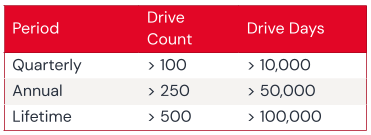
Insufficient data points. When we calculate the annualized failure rate for a drive model for a given period of time (quarterly, annual, or lifetime), we want to ensure we have enough data to reliably do so. Therefore we have defined criteria for a drive model to be included in the tables and charts for the specified period of time. Models that do not meet these criteria are not included in the tables and charts for the period in question.
Regardless of whether or not a given drive model is included in the charts and tables, all of the data for all of the drives we use is included in our Drive Stats dataset which you can download by visiting our Drive Stats page.
As with the Q4 quarterly results, we will apply these criteria to the annual and lifetime charts that follow in this report.
Lifetime hard drive failure rates
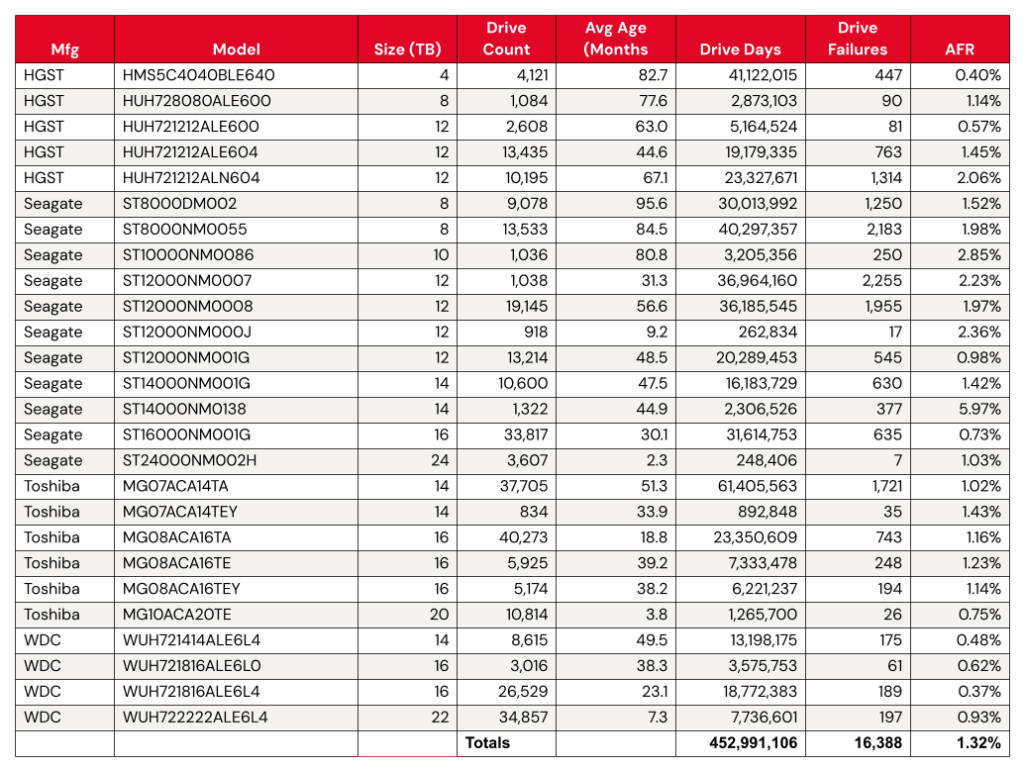
As of the end of Q1 2025, we were tracking 312,831 data hard drives. To be considered for the lifetime review, a drive model was required to have 500 or more drives as of the end of Q1 2025 and have over 100,000 accumulated drive days during their lifetime. When we removed those drive models which did not meet the lifetime criteria, we had 312,493 drives grouped into 26 models remaining for analysis as shown in the table below.
Backblaze Lifetime Hard Drive Failure Rates
Reporting period ending March 31, 2025 inclusive Drive models with > 500 drives and > 100,000 lifetime drive days
Notes and observations
The lifetime AFR remains steady, despite some drives having significant change. We see virtually no change in our overall lifetime AFR, which we last tracked at 1.31% in the 2024 Year-End Drive Stats Report. But, with some drive models showing significant change in year-over-year AFR, it’s worth digging in a little deeper.
Statistically significant improved AFRs:
Both the 12TB and the 14TB had the same number of failures (or nearly so). Meanwhile, the Toshiba 20TB and WDC 22TB had more failures, but added a significant number of drives to the fleet. Both of these activities increase the number of drive days we tracked for the model’s drive pool, so these results are unsurprising.
Statistically significant worsened AFRs:
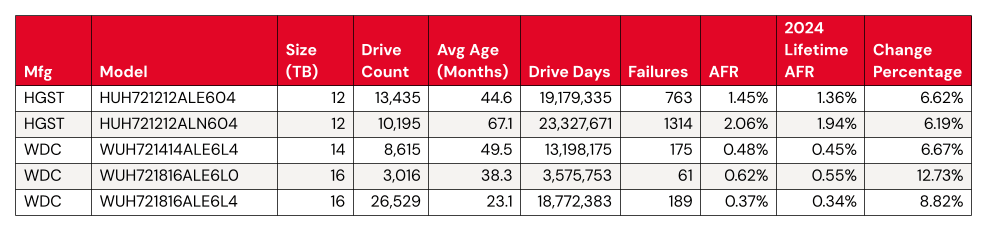
Meanwhile, we have a few things happening for the significantly worsened AFRs. The WDC drive models are all top performers from a failure perspective, even a change from .45 to .48 shows up in the numbers.
That leaves us with two HGST 12TB drives. Both come in above the average failure rate, at 1.45% (model: HUH721212ALE604) and 2.06% (model: HUH721212ALN604). We can give HUH721212ALE604 a pass—with the drive pool showing an average age of 67.1 months, or about five and a half years, it’s firmly on track with the expected pattern defined by the bathtub curve.
Where does that leave us with model HUH721212ALE604? We’ll keep an eye on it. Given that its AFR rate isn’t too far off from the total AFR of the Backblaze drive fleet, it’s not hugely concerning unless we see the rate of change continue.
What’s new with Drive Stats?
In taking on this report, our main focus was to ensure continuity with our decades-old dataset. That said, we also saw some opportunities to streamline the process of data collection, a continuation of the work that David Winings talked about in Overload to Overhaul: How We Upgraded the Drive Stats Data and Drive Stats Data Deep Dive: The Architecture. All of these things set us up for not just an easier time generating this report, but some bigger plans in the future. (We won’t tip our hand yet—but stay tuned.)
Drive Stats gets a Snowflake upgrade
When we first started tracking Drive Stats way back in 2013, data collection was very ad hoc. For the first few years, when Brian Beach was at the helm, we published stats once a year. When Andy took over in 2015, he moved to publishing quarterly data (starting in 2016). As the dataset grew, and Andy’s collection of lightweight desktop apps started to run out of steam, it became apparent that we needed to upgrade to more capable analytical tooling. For a variety of operational reasons, Andy was gamely running SQL queries against CSV data imported into a MySQL instance running on his laptop—and having to do a ton of manual data cleanup to boot. (Pun obviously intended.)
This year, with the help of our colleagues on the database engineering team (shoutout to Tom Roden—thanks so much!), we were able to get the Drive Stats data included in the Backblaze Snowflake instance. Gone are the days of us bugging folks for exports that take hours to process! We can run lightweight queries against a cached, structured table.
We started from Andy’s SQL queries and tweaked them a bit to match the logic and nomenclature of Snowflake fields. Once we had that worked out, the first thing we did was validate our methodology by running the Q4 Drive Stats numbers and comparing them to Andy’s—success.
It helps that Pat has experimented with our Drive Stats dataset in Trino and other analytical tools like Apache Iceberg, so it’s certainly not the first time he’s considered methodology and tooling for this problem. Going forward, we may further refine the process, but for now, the migration to Snowflake saved us a ton of time and manual data cleanup.
The Hard Drive Stats data
The complete dataset used to create the tables and charts in this report is available on our Hard Drive Test Data page. You can download and use this data for free for your own purpose. All we ask are three things: 1) you cite Backblaze as the source if you use the data, 2) you accept that you are solely responsible for how you use the data, and 3) you do not sell this data itself to anyone; it is free.
Good luck, and let us know if you find anything interesting.
Today, Amazon Web Services (AWS) announced plans to launch a new AWS Region in Chile by the end of 2026. The AWS South America (Chile) Region will consist of three Availability Zones at launch, bringing AWS infrastructure and services closer to customers in Chile. This new Region joins the AWS South America (São Paulo) and AWS Mexico (Central) Regions as our third AWS Region in Latin America. Each Availability Zone is separated by a meaningful distance to support applications that need low latency while significantly reducing the risk of a single event impacting availability.
Skyline of Santiago de Chile with modern office buildings in the financial district in Las Condes
The new AWS Region will bring advanced cloud technologies, including artificial intelligence (AI) and machine learning (ML), closer to customers in Latin America. Through high-bandwidth, low-latency network connections over dedicated, fully redundant fiber, the Region will support applications requiring synchronous replication while giving you the flexibility to run workloads and store data locally to meet data residency requirements.
AWS in Chile In 2017, AWS established an office in Santiago de Chile to support local customers and partners. Today, there are business development teams, solutions architects, partner managers, professional services consultants, support staff, and personnel in various other roles working in the Santiago office.
As part of our ongoing commitment to Chile, AWS has invested in several infrastructure offerings throughout the country. In 2019, AWS launched an Amazon CloudFront edge location in Chile. This provides a highly secure and programmable content delivery network that accelerates the delivery of data, videos, applications, and APIs to users worldwide with low latency and high transfer speeds.
AWS strengthened its presence in 2021 with two significant additions. First, an AWS Ground Station antenna location in Punta Arenas, offering a fully managed service for satellite communications, data processing, and global satellite operations scaling. Second, AWS Outposts in Chile, bringing fully managed AWS infrastructure and services to virtually any on-premises or edge location for a consistent hybrid experience.
In 2023, AWS further enhanced its infrastructure with two key developments, an AWS Direct Connect location in Chile that lets you create private connectivity between AWS and your data center, office, or colocation environment, and AWS Local Zones in Santiago, placing compute, storage, database, and other select services closer to large population centers and IT hubs. The AWS Local Zone in Santiago helps customers deliver applications requiring single-digit millisecond latency to end users.
The upcoming AWS South America (Chile) Region represents our continued commitment to fueling innovation in Chile. Beyond building infrastructure, AWS plays a crucial role in developing Chile’s digital workforce through comprehensive cloud education initiatives. Through AWS Academy, AWS Educate, and AWS Skill Builder, AWS provides essential cloud computing skills to diverse groups—from students and developers to business professionals and emerging IT leaders. Since 2017, AWS has trained more than two million people across Latin America on cloud skills, including more than 100,000 in Chile.
AWS customers in Chile AWS customers in Chile have been increasingly moving their applications to AWS and running their technology infrastructure in AWS Regions around the world. With the addition of this new AWS Region, customers will be able to provide even lower latency to end users and use advanced technologies such as generative AI, Internet of Things (IoT), mobile services, banking industry, and more, to drive innovation. This Region will give AWS customers the ability to run their workloads and store their content in Chile.
Here are some examples of customers in Chile using AWS to drive innovation:
Transbank, Chile’s largest payment solutions ecosystem managing the largest percentage of national transactions, used AWS to significantly reduce time-to-market for new products. Moreover, Transbank implemented multiple AWS-powered solutions, enhancing team productivity and accelerating innovation. These initiatives showcase how financial technology companies can use AWS to drive innovation and operational efficiency. “The new AWS Region in Chile will be very important for us,” said Jorge Rodríguez M., Chief Architecture and Technology Officer (CA&TO) of Transbank. “It will further reduce latency, improve security and expand the possibilities for innovation, allowing us to serve our customers with new and better services and products.”
AWS sustainability efforts in Chile AWS is committed to water stewardship in Chile through innovative conservation projects. In the Maipo Basin, which provides essential water for the Metropolitan Santiago and Valparaiso regions, AWS has partnered with local farmers and climate-tech company Kilimo to implement water-saving initiatives. The project involves converting 67 hectares of agricultural land from flood to drip irrigation, which will save approximately 200 million liters of water annually.
This water conservation effort supports AWS commitment to be water positive by 2030 and demonstrates our dedication to environmental sustainability in the communities where AWS operate. The project uses efficient drip irrigation systems that deliver water directly to plant root systems through a specialized pipe network, maximizing water efficiency for agricultural use. To learn more about this initiative, read our blog post AWS expands its water replenishment program to China and Chile—and adds projects in the US and Brazil.
Stay tuned We’ll announce the opening of this and the other Regions in future blog posts, so be sure to stay tuned! To learn more, visit the AWS Region in Chile page.
(This survey is hosted by an external company. AWS handles your information as described in the AWS Privacy Notice. AWS will own the data gathered via this survey and will not share the information collected with survey respondents.)
With Amazon EBS Provisioned Rate for Volume Initialization, you can create fully performant EBS volumes within a predictable amount of time. You can use this feature to speed up the initialization of hundreds of concurrent volumes and instances. You can also use this feature when you need to recover from an existing EBS Snapshot and need your EBS volume to be created and initialized as quickly as possible. You can use this feature to quickly create copies of EBS volumes with EBS Snapshots in a different Availability Zone, AWS Region, or AWS account. Provisioned Rate for Volume Initialization for each volume is charged based on the full snapshot size and the specified volume initialization rate.
This new feature expedites the volume initialization process by fetching the data from an EBS Snapshot to an EBS volume at a consistent rate that you specify between 100 MiB/s and 300 MiB/s. You can specify this volume initialization rate at which the snapshot blocks are to be downloaded from Amazon S3 to the volume.
With specifying the volume initialization rate, you can create a fully performant volume in a predictable time, enabling increased operational efficiency and visibility on the expected time of completion. If you run utilities like fio/dd to expedite volume initialization for your workflows like application recovery and volume copy for testing and development, it will remove the operational burden of managing such scripts with the consistency and predictability to your workflows.
Get started with specifying the volume initialization rate To get started, you can choose the volume initialization rate when you launch your EC2 instance or create your volume from the snapshot.
1. Create a volume in the EC2 launch wizard When launching new EC2 instances in the launch wizard of EC2 console, you can enter a desired Volume initialization rate in the Storage (volumes) section.
You can also set the volume initialization rate when creating and modifying the EC2 Launch Templates.
In the AWS Command Line Interface (AWS CLI), you can add VolumeInitializationRate parameter to the block device mappings when call run-instances command.
To learn more, visit block device mapping options, which defines the EBS volumes and instance store volumes to attach to the instance at launch.
2. Create a volume from snapshots When you create a volume from snapshots, you can also choose Create volume in the EC2 console and specify the Volume initialization rate.
Confirm your new volume with the initialization rate.
In the AWS CLI, you can use VolumeInitializationRate parameter and when calling create-volume command.
You can also set the volume initialization rate when replacing root volumes of EC2 instances and provisioning EBS volumes using the EBS Container Storage Interface (CSI) driver.
After creation of the volume, EBS will keep track of the hydration progress and publish an Amazon EventBridge notification for EBS to your account when the hydration completes so that they can be certain when their volume is fully performant.
Now available Amazon EBS Provisioned Rate for Volume Initialization is now available and supported for all EBS volume types today. You will be charged based on the full snapshot size and the specified volume initialization rate. To learn more, visit Amazon EBS Pricing page.
To learn more about Amazon EBS including this feature, take the free digital course on the AWS Skill Builder portal. Course includes use cases, architecture diagrams and demos.
(This survey is hosted by an external company. AWS handles your information as described in the AWS Privacy Notice. AWS will own the data gathered via this survey and will not share the information collected with survey respondents.)
When you’re moving exabytes of data, every network request, every CPU cycle, every byte matters. Recently, I had the chance to revisit a part of our system that’s been quietly humming along for years. With one small rethink, we helped give our download performance a serious boost.
The idea was almost laughably simple: combine two separate requests into one. But when you’re operating at massive scale, even a “simple” change can make a huge difference.
The challenge: Why we had 40 requests per download
Before the change, downloading a file meant:
A “download coordinator” pod would reach out across the 20 pods that make up a Vault to grab metadata.
Once it had those, it would figure out where the needed bytes lived.
Then it would go back and request the actual data.
That meant 40 separate requests just to get the ball rolling on every download.
The fix: Smarter reads with half the overhead
At some point, it clicked for me: why were we doing this in two steps? The original setup only pulled the bare minimum of data. But what if we just grabbed everything we needed at once? There wasn’t a good reason not to. So I refactored the process so that a pod could grab both the shard header and the data in a single request.
Now:
The coordinator still orchestrates the work.
The receiving pod reads the header, figures out what it needs, and pulls the data—all internally. By shifting this responsibility to the receiving pod, we eliminate a network round trip per pod—20 round trips in total.
The combined result is sent back to the coordinator in a single step.
After the fix, we’re still reading the same amount of data from disk, so disk I/O remains unchanged, but network performance improved significantly. Instead of kicking off 40 network operations, we’re down to about half that. Less traffic, less overhead, faster performance.
It was a simple fix, but the project required a significant amount of software engineering work as well. By shifting responsibilities to the “receiving pod” the coordinator needed to learn to perform lots of just-in-time reasoning about the nature of the download, which required rethinking how we architected portions of the download code.
Why it didn’t just instantly double download performance
If you’re thinking, “shouldn’t that make downloads twice as fast?”—not quite.
Here’s why: Big files get broken into “stripes” during download, and my change only optimizes the first stripe request. Smaller files (a big chunk of our traffic) see the full benefit because they often fit into a single stripe. For larger files, though, the improvement only affects a small part of the overall download, so the impact is more limited.
How we measured the impact
Measuring the real-world effect turned out to be trickier than I expected. Our download traffic isn’t steady; it’s spiky. Under normal conditions, our system wasn’t hitting capacity limits which made it hard to clearly see changes in download performance.
But in our dedicated performance testing environment, where we could send a controlled load of downloads, the improvement was crystal clear. With this change, our system could handle a much higher peak load—great news for handling things like backup surges, AI training runs, and large enterprise downloads.
Beyond download performance: System-wide benefits
One of the coolest side effects? This doesn’t just help customer downloads. It also speeds up internal operations like vault recomputing data drives and server-side copies.
By freeing up CPU cycles that used to be wasted on multiple requests, we open the door for better performance everywhere. And hey, maybe even some minor energy savings—less CPU load means less heat, less power.
What this taught me about optimization
When you’re trying to optimize a massive system, it’s tempting to chase performance with complicated solutions: more threads, smarter caches, fancier hardware.
But sometimes, the real win is just about thinking differently. Questioning assumptions. Asking, “Wait, why are we doing it this way?”
For me, this project was a great reminder that even at exabyte scale, the simplest solution can be the most impactful.
Starting today, you can now use Amazon Q Developer in GitHub in preview! This is fantastic news for the millions of developers who use GitHub on a daily basis, whether at work or for personal projects. They can now use Amazon Q Developer for feature development, code reviews, and Java code migration directly within the GitHub interface.
To demonstrate, I’m going to use Amazon Q Developer to help me create an application from zero called StoryBook Teller. I want this to be an ASP.Core website using .NET 9 that takes three images from the user and uses Amazon Bedrock with Anthropic’s Claude to generate a story based on them.
Let me show you how this works.
Installation
The first thing you need to do is install the Amazon Q Developer application in GitHub, and you can begin using it immediately without connecting to an AWS account.
You’ll then be presented with a choice to add it to all your repositories or select specific ones. In this case, I want to add it to my storybook-teller-demo repo, so I choose Only selected repositories and type in the name to find it.
This is all you need to do to make the Amazon Q Developer app ready to use inside your selected repos. You can verify that the app is installed by navigating to your GitHub account Settings and the app should be listed in the Applications page.
You can choose Configure to view permissions and add Amazon Q Developer to repositories or remove it at any time.
Now let’s use Amazon Q Developer to help us build our application.
Feature development When Amazon Q Developer is installed into a repository, you can assign GitHub issues to the Amazon Q development agent to develop features for you. It will then generate code using the whole codebase in your repository as context as well as the issue’s description. This is why it’s important to list your requirements as accurately and clearly as possible in your GitHub issues, the same way that you should always strive for anyway.
I have created five issues in my StoryBook Teller repository that cover all my requirements for this app, from creating a skeleton .NET 9 project to implementing frontend and backend.
Let’s use Amazon Q Developer to develop the application from scratch and help us implement all these features!
To begin with, I want Amazon Q Developer to help me create the .NET project. To do this, I open the first issue, and in the Labels section, I find and select Amazon Q development agent.
That’s all there is to it! The issue is now assigned to Amazon Q Developer. After the label is added, the Amazon Q development agent automatically starts working behind the scenes providing progress updates through the comments, starting with one saying, I'm working on it.
As you might expect, the amount of time it takes will depend on the complexity of the feature. When it’s done, it will automatically create a pull request with all the changes.
The next thing I want to do is make sure that the generated code works, so I’m going to download the code changes and run the app locally on my computer.
I go to my terminal and type git fetch origin pull/6/head:pr-6 to get the code for the pull request it created. I double-check the contents and I can see that I do indeed have an ASP.Core project generated using .NET 9, as I expected.
I then run dotnet run and open the app with the URL given in the output.
Brilliant, it works! Amazon Q Developer took care of implementing this one exactly as I wanted based on the requirements I provided in the GitHub issue. Now that I have tested that the app works, I want to review the code itself before I accept the changes.
Code review I go back to GitHub and open the pull request. I immediately notice that Amazon Q Developer has performed some automatic checks on the generated code.
This is great! It has already done quite a bit of the work for me. However, I want to review it before I merge the pull request. To do that, I navigate to the Files changed tab.
I review the code, and I like what I see! However, looking at the contents of .gitignore, I notice something that I want to change. I can see that Amazon Q Developer made good assumptions and added exclusion rules for Visual Studio (VS) Code files. However, JetBrains Rider is my favorite integrated development environment (IDE) for .NET development, so I want to add rules for it, too.
You can ask Amazon Q Developer to reiterate and make changes by using the normal code review flow in the GitHub interface. In this case, I add a comment to the .gitignore code saying, add patterns to ignore Rider IDE files. I then choose Start a review, which will queue the change in the review.
I select Finish your review and Request changes.
Soon after I submit the review, I’m redirected to the Conversation tab. Amazon Q Developer starts working on it, resuming the same feedback loop and encouraging me to continue with the review process until I’m satisfied.
Every time Q Developer makes changes, it will run the automated checks on the generated code. In this case, the code was somewhat straightforward, so it was expected that the automatic code review wouldn’t raise any issues. But what happens if we have more complex code?
Let’s take another example and use Amazon Q Developer to implement the feature for enabling image uploads on the website. I use the same flow I described in the previous section. However, I notice that the automated checks on the pull request flagged a warning this time, stating that the API generated to support image uploads on the backend is missing authorization checks effectively allowing direct public access. It explains the security risk in detail and provides useful links.
It then automatically generates a suggested code fix.
When it’s done, you can review the code and choose to Commit changes if you’re happy with the changes.
After fixing this and testing it, I’m happy with the code for this issue and move on applying the same process to other ones. I assign the Amazon Q development agent to each one of my remaining issues, wait for it to generate the code, and go through the iterative review process asking it to fix any issues for me along the way. I then test my application at the end of that software cycle and am very pleased to see that Amazon Q Developer managed to handle all issues, from project setup, to boilerplate code, to more complex backend and frontend. A true full-stack developer!
I did notice some things that I wanted to change along the way. For example, it defaulted to using the Invoke API to send the uploaded images to Amazon Bedrock instead of the Converse API. However, because I didn’t state this in my requirements, it had no way of knowing. This highlights the importance of being as precise as possible in your issue’s titles and descriptions to give Q Developer the necessary context and make the development process as efficient as possible.
Having said that, it’s still straightforward to review the generated code on the pull requests, add comments, and let the Amazon Q Developer agent keep working on changes until you’re happy with the final result. Alternatively, you can accept the changes in the pull request and create separate issues that you can assign to Q Developer later when you’re ready to develop them.
Code transformation You can also transform legacy Java codebases to modern versions with Q Developer. Currently, it can update applications from Java 8 or Java 11 to Java 17, with more options coming in future releases.
The process is very similar to the one I demonstrated earlier in this post, except for a few things.
First, you need to create an issue within a GitHub repository containing a Java 8 or Java 11 application. The title and description don’t really matter in this case. It might even be a short title such as “Migration,” leaving the description empty. Then, on Labels, you assign the Amazon Q transform agent label to the issue.
Much like before, Amazon Q Developer will start working immediately behind the scenes before generating the code on a pull request that you can review. This time, however, it’s the Amazon Q transform agent doing the work which is specialized in code migration and will take all the necessary steps to analyze and migrate the code from Java 8 to Java 17.
Notice that it also needs a workflow to be created, as per the documentation. If you don’t have it enabled yet, it will display clear instructions to help you get everything set up before trying again.
As expected, the amount of time needed to perform a migration depends on the size and complexity of your application.
Conclusion Using Amazon Q Developer in GitHub is like having a full-stack developer that you can collaborate with to develop new features, accelerate the code review process, and rely on to enhance the security posture and quality of your code. You can also use it to automate migration from Java 8 and 11 applications to Java 17 making it much easier to get started on that migration project that you might have been postponing for a while. Best of all, you can do all this from the comfort of your own GitHub environment.
(This survey is hosted by an external company. AWS handles your information as described in the AWS Privacy Notice. AWS will own the data gathered via this survey and will not share the information collected with survey respondents.)
Today, Amazon Q Developer introduces a new, interactive, agentic coding experience that is now available in the integrated development environments (IDE) for Visual Studio Code. This experience brings interactive coding capabilities, building upon existing prompt-based features. You now have a natural, real-time collaborative partner working alongside you while writing code, creating documentation, running tests, and reviewing changes.
Amazon Q Developer transforms how you write and maintain code by providing transparent reasoning for its suggestions and giving you the choice between automated modifications or step-by-step confirmation of changes. As a daily user of Amazon Q Developer command line interface (CLI) agent, I’ve experienced firsthand how Amazon Q Developer chat interface makes software development a more efficient and intuitive process. Having an AI-powered assistant only a q chat away in CLI has streamlined my daily development workflow, enhancing the coding process.
The new agentic coding experience in Amazon Q Developer in the IDE seamlessly interacts with your local development environment. You can read and write files directly, execute bash commands, and engage in natural conversations about your code. Amazon Q Developer comprehends your codebase context and helps complete complex tasks through natural dialog, maintaining your workflow momentum while increasing development speed.
To start, I select the Amazon Q icon in my IDE to open the chat interface. For this demonstration, I’ll create a web application that transforms Jupiter notebooks from the Amazon Nova sample repository into interactive applications.
I send the following prompt: In a new folder, create a web application for video and image generation that uses the notebooks from multimodal-generation/workshop-sample as examples to create the applications. Adapt the code in the notebooks to interact with models. Use existing model IDs
Amazon Q Developer then examines the files: the README file, notebooks, notes, and everything that is in the folder where the conversation is positioned. In our case it’s at the root of the repository.
After completing the repository analysis, Amazon Q Developer initiates the application creation process. Following the prompt requirements, it requests permission to execute the bash command for creating necessary folders and files.
With the folder structure in place, Amazon Q Developer proceeds to build the complete web application.
In a few minutes, the application is complete. Amazon Q Developer provides the application structure and deployment instructions, which can be converted into a README file upon request in the chat.
During my initial attempt to run the application, I encountered an error. I described it in Spanish using Amazon Q chat.
Amazon Q Developer responded in Spanish and gave me the solutions and code modifications in Spanish! I loved it!
After implementing the suggested fixes, the application ran successfully. Now I can create, modify, and analyze images and videos using Amazon Nova through this newly created interface.
The preceding images showcase my application’s output capabilities. Because I asked to modify the video generation code in Spanish, it gave me the message in Spanish.
Things to know Chatting in natural languages – Amazon Q Developer IDE supports many languages, including English, Mandarin, French, German, Italian, Japanese, Spanish, Korean, Hindi, and Portuguese. For detailed information, visit the Amazon Q Developer User Guide page.
Collaboration and understanding – The system examines your repository structure, files, and documentation while giving you the flexibility to interact seamlessly through natural dialog with your local development environment. This deep comprehension allows for more accurate and contextual assistance during development tasks.
Control and transparency – Amazon Q Developer provides continuous status updates as it works through tasks and lets you choose between automated code modifications or step-by-step review, giving you complete control over the development process.
Availability – Amazon Q Developer interactive, agentic coding experience is now available in the IDE for Visual Studio Code.
(This survey is hosted by an external company. AWS handles your information as described in the AWS Privacy Notice. AWS will own the data gathered via this survey and will not share the information collected with survey respondents.)
If you work with cloud storage and data lakes, you’re likely hearing the word “Iceberg” with increasing frequency, occasionally prefixed by “Apache”. What is Apache Iceberg, and how can you leverage it to efficiently store data in object stores such as Backblaze B2 Cloud Storage? I’ll answer both of those questions in this blog post.
But, first, join me on a brief trip back in time to the beginning of the twenty-first century, a long-ago time before the emergence of big data and cloud computing.
A timely shoutout to the Data Council conference
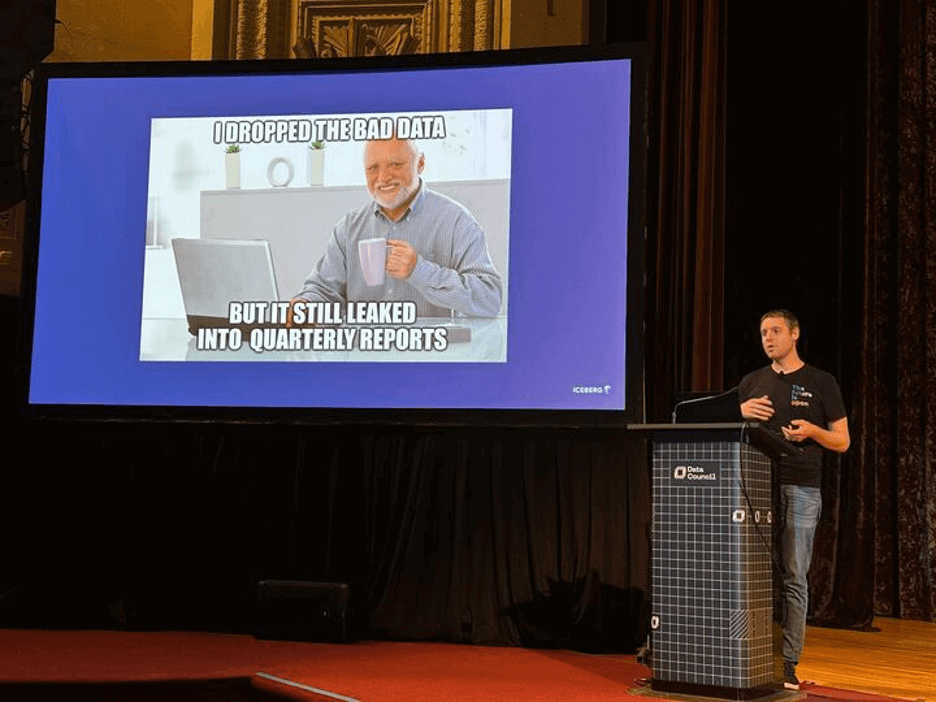
We recently attended the 2025 Data Council conference and caught Ryan Blue, co-creator of Apache Iceberg’s excellent presentation (featuring some very entertaining slides).
If you want to hear more about topics like this one, feel free to join us at Backblaze Weekly, an ongoing webinar series where we discuss all things Backblaze.
Ryan Blue speaking at the 2025 Data Council conference. Note: His shirt says “the future is open”. We agree!
CSV: The lingua franca of tabular data
In the early 2000s, if you were working with tabular data, you were likely using either a relational database management system (RDBMS), such as Oracle Database, or a spreadsheet, likely Microsoft Excel.
Data stored in an RDBMS is highly structured, meaning that it MUST conform to a predefined schema. For example, you might create an employee table with columns such as first name, last name, date of birth, hire date, and so on. The database schema holds metadata such as the name and data type of each column, whether that column must have a value, relationships between tables, and so on.
A spreadsheet, on the other hand, has some structure—data is arranged in rows and columns, similarly to an RDBMS–but each cell can contain anything: text, a number, a formula referencing other cells, even an image in today’s spreadsheets. We say that a spreadsheet is semi-structured data.
At the turn of the century, each database and spreadsheet had its own proprietary file format, optimized for its own requirements, and often not at all publicly documented, but the need to be able to exchange data between applications led to broad adoption of a file format to allow just that: comma-separated values, or CSV.
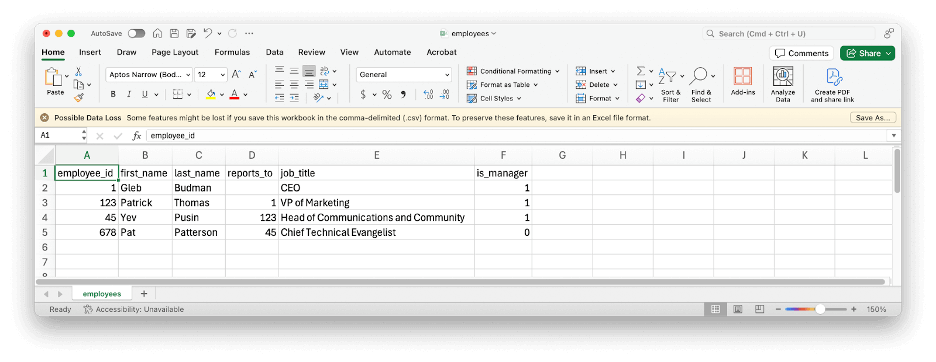
Here’s a simple example of some tabular data represented as CSV:
employee_id,first_name,last_name,reports_to,job_title,is_manager
1,Gleb,Budman,,CEO,1
123,Patrick,Thomas,1,"VP of Marketing",1
45,Yev,Pusin,123,"Head of Communications and Community",1
678,Pat,Patterson,45,"Chief Technical Evangelist",0
CSV is simple and flexible enough that it was easy for me to type that example up manually and import it into Microsoft Excel with no problems at all. Note that, as well as the commas, the double quotes in the CSV data are part of the file format, and do not appear in the imported data:
CSV has a lot of advantages: It’s simple; flexible; widely understood; the optional header line means that data can be somewhat self-describing; and it’s not controlled by any single vendor.
CSV does, however, also have a few disadvantages, including:
There’s no schema; nothing in that file expresses that the values in the first column, apart from the header, must be integers.
It’s difficult to represent complex or hierarchical datasets.
Data is stored as text, which is inefficient for numerical and repetitive data. Text representations of numbers occupy more storage than binary, and applications must convert them to binary when loading the file and convert them back to text when saving it.
Avro, Parquet and ORC: File formats for big data
The emergence of open-source distributed computing frameworks such as Apache Hadoop and, later, Apache Spark, in the first two decades of this century drove the creation and adoption of more efficient ways of storing tabular data. Avro, Parquet and ORC, all Apache projects, are binary file formats that address shortcomings of CSV, such as encapsulating schema alongside the data.
Avro, like CSV, is designed for row-oriented data, which makes it well-suited to use cases that involve appending new data to files. Parquet and ORC, in contrast, are column-oriented file formats, perfect for online analytical processing (OLAP) use cases where, for example, an application might read an entire column from a table to calculate the sum of its values. As well as storing numbers in a binary representation, Parquet and ORC can also reduce file size through compression strategies such as run-length encoding.
Here’s a concrete example: The Drive Stats data set for December 2024 occupies 3.7GB of storage in CSV format. As Parquet, the same data consumes just 242MB, a data compression ratio of more than 15:1.
Why does it matter if your dataset is smaller? Well, beyond just cost savings, which are amplified when dealing with huge datasets, smaller files mean that running queries against full datasets takes less time, which reduces server load, compute costs, and so on.
From file formats to table formats and data lakes
Apache Hadoop’s original use case was as an implementation of MapReduce, a programming model for manipulating large datasets. Engineers at Facebook, tasked with allowing SQL queries over datasets generated by Hadoop, created Apache Hive, and, with it, the Hive table format, which specified how to view a collection of files as a single logical table. The Hive table format in turn allowed organizations to create data lakes, repositories that store structured and semi-structured data in their original format for analysis by a wide range of tools, and, later, data lakehouses, which aim to combine the benefits of data lakes and traditional data warehouses by storing structured data using data lake tools and technologies.
A key concept of the Hive table format is partitioning, a way of organizing files to reduce the amount of data that must be read to process a query. Taking the Drive Stats dataset as an example, we can partition the files by year and month, so that each file has a prefix of the form:
/drivestats/year={year}/month={month}/
For example:
/drivestats/year=2024/month=12/
With this partitioning scheme, a system processing a query for hard drive statistics for, say, December 12, 2024, need only retrieve files with the above prefix. You might be wondering, “Why not partition the data on day, also, to further reduce the number of files that must be retrieved?” The answer depends on the data volume and access patterns. It’s much more efficient to partition data into fewer large files than many small files, so overly granular partitioning can actually impair performance.
It’s worth mentioning that file formats and table formats are largely independent of each other. You can use Avro, Parquet, ORC, or even CSV files with the Hive table format.
While the Hive table format served the big data community well for several years, it had a number of shortcomings:
Every query incurs a file list (“list objects”, in S3 API terms) operation, which is particularly expensive with cloud object storage, both in terms of time and API transaction charges.
Deleting or modifying data typically implies rewriting an entire data file, even if only a single row was affected.
Hive can only partition datasets on columns that are in the table schema. For example, the Drive Stats data set includes a date column, so to use it with Hive, we had to create additional, redundant, year and month columns.
Any changes to the data schema or partitioning strategy require affected files to be rewritten, making schema evolution problematic, if not infeasible, for large datasets.
As a result, vendors and the broader big data community formed a number of projects to define new table formats to succeed Hive, including Apache Iceberg, Apache Hudi, and Delta Lake, a Linux Foundation project.
Iceberg‘s features allow it to be used to organize huge data sets, efficiently and flexibly:
Table metadata including the list of files that comprise a table is stored as JSON data alongside the data files, eliminating the need to run an expensive list object operation for every query.
Schema evolution allows you to add, drop, update, or rename columns.
Hidden partitioning decouples partitioning from the table schema. For example, you can partition data like the Drive Stats dataset by year and month based on the existing date values, without creating additional columns.
Partition layout evolution allows you to modify your partitioning strategy as data volume or access patterns change.
Time travel allows you to query table snapshots.
Serializable isolation provides atomic table changes, ensuring readers never see inconsistent data.
Multiple concurrent writers use optimistic concurrency, retrying to ensure that compatible updates succeed while detecting conflicting writes.
Iceberg is widely supported across the big data ecosystem, with many applications and tools allowing you to store Iceberg tables in S3 compatible cloud object storage such as Backblaze B2. In this article, I’ll look at the simplest use case, running queries against the Drive Stats dataset, with three representative examples: Snowflake, Trino, and DuckDB.
Writing Iceberg data to Backblaze B2
I wrote a simple Python application, drivestats2iceberg, using the PyIceberg library, that converts the Drive Stats dataset from the zipped CSV files we publish to Parquet files in an Iceberg table stored in a Backblaze B2 Bucket. There are some useful techniques in drivestats2iceberg, and it is published on GitHub as open source, under the MIT license, so feel free to use it as a starting point for your own data conversion apps.
Querying Iceberg tables in Backblaze B2 from Snowflake
Snowflake is a data-as-a-service platform addressing a wide variety of use cases, including artificial intelligence (AI), machine learning (ML), collaboration across organizations, and data lakes.
As I mentioned above, Snowflake announced general availability of its Iceberg tables offering in June 2024, allowing you to manipulate Iceberg tables located on external volumes, outside your Snowflake warehouse, and query them alongside data in Snowflake-managed tables.
Snowflake’s Iceberg implementation is quite complicated, with different capabilities according to your choice of cloud object storage provider and whether you want Snowflake to manage your Iceberg catalog or use a catalog integration.
For our simple use case, where the Iceberg metadata and data files already exist in a Backblaze B2 Bucket, the first step is to create a Snowflake external volume, configuring it with suitable credentials and the location of the Drive Stats data.
Note: the application key shown in this Snowflake statement has read-only access to the drivestats-iceberg bucket. You can use it to query the Drive Stats data set from your own Snowflake instance or from other environments.
Next, you must create a catalog integration. The object store catalog integration simply reads Iceberg metadata from an external (to Snowflake) cloud storage location:
Now you can create an Iceberg table object that references the existing dataset. Note that Snowflake requires you to explicitly specify the metadata file to use for column definitions; this is typically the most recently created JSON file under the metadata prefix.
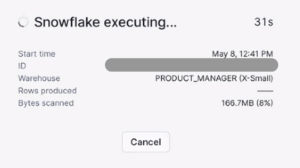
My x-small Snowflake warehouse executed the first three queries in a fraction of a second. As you might expect from its additional complexity, the last query took longer: 16 seconds.
Querying Iceberg tables in Backblaze B2 from Trino
To access the Drive Stats data set from Trino, you must configure its Iceberg connector with a catalog properties file. For example, to configure a catalog named drivestats_b2, create a file etc/catalog/drivestats_b2.properties:
Note that the above configuration file uses the same read-only credentials as the Snowflake example. You can use this configuration file as-is to explore the Drive Stats dataset using Trino.
Start the Trino server and CLI, then create a Trino schema with the location of the data, and set it as the default schema for subsequent queries:
CREATE SCHEMA drivestats_b2.ds_schema
    WITH (location = 's3://drivestats-iceberg/');
USE drivestats_b2.ds_schema;
The Trino Iceberg connector provides the register_table procedure for registering existing Iceberg tables into the metastore. Optionally, you can provide an additional metadata_file_name parameter if you wish to register the table with some specific table state, or if the connector cannot automatically figure out the metadata version to use.
Since you can query the table using the exact same SQL queries as in the Snowflake example, producing the exact same results, I won’t reproduce them here. Running Trino in a Docker container on my MacBook Pro, the first three queries executed in less than three seconds, the fourth took just over a minute.
Querying Iceberg tables in Backblaze B2 from DuckDB
DuckDB is an open-source column-oriented RDBMS, intended for in-process use: embedded in applications. There are DuckDB client APIs (also known as drivers) for many programming languages, including Python, Java, JavaScript (Node.js) and Go.
DuckDB is focused on the same kinds of use cases as Snowflake and Trino; it is effectively the OLAP equivalent to SQLite, which targets online transaction processing (OLTP) workloads.
To work with Iceberg tables in cloud object storage, you must install and load the httpfs and iceberg DuckDB extensions:
Now, you need to create a secret with your Backblaze B2 credentials.
Again, the application key shown here has read-only access to the Drive Stats dataset; you can use it to explore the data yourself if you like.
CREATE SECRET secret (
    TYPE s3,
    KEY_ID '0045f0571db506a0000000017',
    SECRET 'K004Fs/bgmTk5dgo6GAVm2Waj3Ka+TE',
    REGION 'us-west-004',
    ENDPOINT 's3.us-west-004.backblazeb2.com'
);
By default, queries against Iceberg tables in DuckDB use a SELECT ... FROM iceberg_scan(...) syntax, but you can define a schema and a view so that you can use the same SQL queries as with Snowflake and Trino:
First, a schema:
CREATE SCHEMA ds_schema;
USE ds_schema;
Then, a view:
CREATE VIEW drivestats AS
    SELECT *
    FROM iceberg_scan(
        's3://drivestats-iceberg/drivestats',
        version = '?',
        allow_moved_paths = true
    );
Note: the version = '?' parameter tells DuckDB to examine the table’s metadata files and “guess” which one corresponds to the latest version. This behavior is not enabled by default, so you must set unsafe_enable_version_guessing to true before you query the data, like this:
SET unsafe_enable_version_guessing = true;
That done, you can query the table using the exact same SQL queries as with Snowflake and Trino, with the exact same results. With DuckDB on my MacBook Pro, the first three queries took about 15–25 seconds; the fourth about 90 seconds.
Note that Snowflake, Trino and DuckDB are very different systems, with different trade-offs between cost, performance, and flexibility. I’ve included the execution times I saw to set your expectations when working with these tools, rather than as a point of comparison between them.
What’s next for Apache Iceberg?
Apache Iceberg is much more than a table format specification; it’s a broad, thriving ecosystem that is constantly innovating new features, tracking progress via its own GitHub repository. Here are a few technologies that are currently in active development:
Variant Data Type Support will offer a more efficient, versatile approach to managing hierarchical, JSON-like data, aligning with Apache Spark’s variant format.
Materialized Views will allow you to define a view as you usually would, in terms of a query against one or more existing views or tables, that is able to store data, like a table. On creation, the materialized view is populated with data and functions as a cache, serving its data in response to queries. The materialized view can be periodically refreshed to keep it in sync with its sources.
Geospatial Support will add Iceberg-native data types and operations storage and analysis of geospatial data, allowing you to define columns as points, lines and polygons, and use conditions such as “intersects” in queries.
I’ve only scratched the surface of Apache Iceberg in this blog post. Stay tuned for deeper dives into using Snowflake, Trino, DuckDB and more platforms and tools with the Iceberg table format and Backblaze B2 Cloud Storage.
Nova Premier joins the existing Amazon Nova understanding models available in Amazon Bedrock. Similar to Nova Lite and Pro, Premier can process input text, images, and videos (excluding audio). With its advanced capabilities, Nova Premier excels at complex tasks that require deep understanding of context, multistep planning, and precise execution across multiple tools and data sources. With a context length of one million tokens, Nova Premier can process extremely long documents or large code bases.
With Nova Premier and Amazon Bedrock Model Distillation, you can create highly capable, cost-effective, and low-latency versions of Nova Pro, Lite, and Micro, for your specific needs. For example, we used Nova Premier to distill Nova Pro for complex tool selection and API calling. The distilled Nova Pro had a 20% higher accuracy for API invocations compared to the base model and consistently matched the performance of the teacher, with the speed and cost benefits of Nova Pro.
Amazon Nova Premier benchmark evaluation We evaluated Nova Premier on a broad range of benchmarks across text intelligence, visual intelligence, and agentic workflows. Nova Premier is the most capable model in the Nova family as measured across 17 benchmarks as shown in the table below.
Nova Premier is also comparable to the best non-reasoning models in the industry and is equal or better on approximately half of these benchmarks when compared to other models in the same intelligence tier. Details of these evaluations are in the technical report.
Nova Premier is also the fastest and the most cost-effective model in Amazon Bedrock for its intelligence tier. For further details and comparison on pricing, please refer to the Bedrock pricing page.
Nova Premier can also be used as a teacher model for distillation, which means you can transfer its advanced capabilities for a specific use case into smaller, faster, and more efficient models like Nova Pro, Micro, and Lite for production deployments.
Using Amazon Nova Premier To get started with Nova Premier, you first need to request access to the model in the Amazon Bedrock console. Navigate to Model access in the navigation pane, find Nova Premier, and toggle access.
Once you have access, you can use Nova Premier through the Amazon Bedrock Converse API providing in input a list of messages from the user and the assistant. Messages can include text, images, and videos. Here’s an example of a straightforward invocation using the AWS SDK for Python (Boto3):
import boto3
import json

AWS_REGION = "us-east-1"
MODEL_ID = "us.amazon.nova-premier-v1:0"

bedrock_runtime = boto3.client('bedrock-runtime', region_name=AWS_REGION)
messages = [
    {
        "role": "user",
        "content": [
            {
                "text": "Explain the differences between vector databases and traditional relational databases for AI applications."
            }
        ]
    }
]

response = bedrock_runtime.converse(
    modelId=MODEL_ID,
    messages=messages
)

response_text = response["output"]["message"]["content"][-1]["text"]

print(response_text)
This example shows how Nova Premier can provide detailed explanations for complex technical questions. But the real power of Premier comes with its ability to handle sophisticated workflows.
Multi-agent collaboration use case Let’s explore a more complex scenario that showcases how Nova Premier works a multi-agent collaboration architecture for investment research.
The equity research process typically involves multiple stages: identifying relevant data sources for specific investments, retrieving required information from those sources, and synthesizing the data into actionable insights. This process becomes increasingly complex when dealing with different types of financial instruments like stock indices, individual equities, and currencies.
We can build this type of application using multi-agent collaboration in Amazon Bedrock, with Nova Premier powering the supervisor agent that orchestrates the entire workflow. The supervisor agent analyzes the initial query (for example, “What are the emerging trends in renewable energy investments?”), breaks it down into logical steps, determines which specialized subagents to engage, and synthesizes the final response.
For this scenario, I’ve created a system with the following components:
A supervisor agent powered by Nova Premier
Multiple specialized subagents powered by Nova Pro, each focusing on different financial data sources
Tools that connect to financial databases, market analysis tools, and other relevant information sources
When I submit a query about emerging trends in renewable energy investments, the supervisor agent powered by Nova Premier does the following:
Analyzes the query to determine the underlying topics and sources to cover
Selects the appropriate subagents specific to those topics and sources
Each subagent retrieves their relevant economic indicators, technical analysis, and market sentiment data
The supervisor agent synthesizes this information into a comprehensive report for review by a financial professional
Utilizing Nova Premier in a multi-agent collaboration architecture such as this streamlines the financial professional’s work and helps them formulate their investment analysis faster. The following video provides a visual description of this scenario.
The key advantage of using Nova Premier for the supervisor role is its accuracy in coordinating complex workflows, so that the right data sources are consulted in the optimal sequence and each subagent receives in input the correct information for their work, resulting in higher quality insights.
Multi-agent collaboration with model distillation Although Nova Premier provides the highest level of accuracy of its family of models, you might want to optimize latency and cost in production environments. This is where the strength of Nova Premier as a teacher model for distillation becomes interesting. Using Amazon Bedrock Model Distillation, we can customize Nova Micro from the results of Nova Premier for this specific investment research use case.
Unlike traditional fine-tuning that requires human feedback and labeled examples, with model distillation you can generate high-quality training data by having a teacher model produce the desired outputs, streamlining the data acquisition process.
Customer voices Some of our customers had early access to Nova Premier. This is what they shared with us:
“Amazon Nova Premier has been outstanding in its ability to execute interactive analysis workflows, while still being faster and nearly half the cost compared to other leading models in our tests,” said Curtis Allen, Senior Staff Engineer at Slack, a company bringing conversations, apps, and customers together in one place.
“Implementing new solutions built on top of Amazon Nova has helped us with our mission of democratizing finance for all,” said Dev Tagare, Head of AI and Data at Robinhood Markets, a company on a mission to democratize finance for all. “We’re particularly excited about the ability to explore new avenues like complex multi-agent collaborations that are not just highly performing but also cost effective and fast. The intelligence of Nova Premier and what it can transfer to the other models like Nova Micro, Nova Lite, and Nova Pro unlocks multi-agent collaboration at a performance, price, and speed that will make it accessible to everyday customers.”
“Accelerating real-world AI deployments—not just prototypes—requires the ability to build models that are specialized for the unique needs of real world applications,” said Henry Ehrenberg, co-founder of Snorkel AI, a technology company that empowers data scientists and developers to quickly turn data into accurate and adaptable AI applications. “We’re excited to see AWS pushing efficient model customization forward with Amazon Bedrock Model Distillation and Amazon Nova Premier. These new model capabilities have the potential to accelerate our enterprise customers in building production AI applications, including Q&A applications with multimodal data and more.”
Things to know
Nova Premier is available in Amazon Bedrock in the US East (N. Virginia), US East (Ohio), and US West (Oregon) AWS Regions today via cross-Region inference. With Amazon Bedrock, you only pay for what you use. For more information, visit Amazon Bedrock pricing.
Customers in the US can also access Amazon Nova models at https://nova.amazon.com, a website to easily explore our FMs.
Nova Premier is our best teacher for distilling custom variants of Nova Pro, Micro, and Lite, which means you can capture the capabilities offered by Premier in smaller, faster models for production deployment.
Nova Premier includes built-in safety controls to promote responsible AI use, with content moderation capabilities that help maintain appropriate outputs across a wide range of applications.
(This survey is hosted by an external company. AWS handles your information as described in the AWS Privacy Notice. AWS will own the data gathered via this survey and will not share the information collected with survey respondents.)
If you’re wrangling massive datasets for AI, machine learning (ML), high-performance compute (HPC), content delivery networks (CDNs), or analytics, you’re familiar with the trade-off: Pay a premium for the highest speeds, or compromise on performance to keep costs manageable.
Backblaze B2 Overdrive changes that. You can now move exabyte-scale datasets at up to terabit speeds without the eye-watering price tag. Starting at $15 per terabyte per month, Backblaze B2 Overdrive gives you the power to run data-intensive workloads at peak performance, with unlimited free egress and private networking options that keep things fast, secure, and predictable.
See it in action
Join our upcoming webinar with Pat Patterson, Chief Technical Evangelist and Dave Ngo, Chief Product Officer, to learn more about how B2 Overdrive supercharges your data.
What makes B2 Overdrive different?
B2 Overdrive offers a specialized cloud object storage solution at a fraction of competitors’ costs. Here’s what you get:
Up to 1Tbps throughput: In other words, the kind of speed that lets you move petabytes of data fast without complex architecture.
Unlimited free egress: Move as much data as you want, whenever you want, to wherever you want. Egress is totally free.
Private networking support: Transfer data at maximum speed through secure private networking connections to your infrastructure.
It’s built on the foundation of our always-hot cloud storage infrastructure, with no minimum file size requirements, no deletion fees, and powerful features like Event Notifications so you can build responsive and automated workflows. We’ll be sharing some of the innovations under the hood in the coming months—so, stay tuned to our series on the engineering behind performance.
Who’s it for?
The simple answer: The status quo isn’t cutting it. Today’s workloads demand both the ability to move massive datasets and predictable economics that don’t penalize success. B2 Overdrive challenges the assumption that mind-bending performance has to come with mind-boggling prices.
We need to store an insane amount of data and, at the same time, download it to different GPU clusters around the world, and for all that to not cost an insane amount of money. That’s why we chose Backblaze.
—Dean Leitersdorf, CEO and Co-Founder, Decart
Ready to go?
Backblaze B2 Overdrive is generally available today for organizations with multi-petabyte storage instances and workloads.
Want to learn more or see if it’s the right fit for your team? Get in touch with our Sales team—we’d love to talk about how we can help you ditch the trade-offs and go full speed ahead.
The newest AI models from Meta, Llama 4 Scout 17B and Llama 4 Maverick 17B, are now available as a fully managed, serverless option in Amazon Bedrock. These new foundation models (FMs) deliver natively multimodal capabilities with early fusion technology that you can use for precise image grounding and extended context processing in your applications.
Llama 4 uses an innovative mixture-of-experts (MoE) architecture that provides enhanced performance across reasoning and image understanding tasks while optimizing for both cost and speed. This architectural approach enables Llama 4 to offer improved performance at lower cost compared to Llama 3, with expanded language support for global applications.
Llama 4 Maverick 17B – A natively multimodal model featuring 128 experts and 400 billion total parameters. It excels in image and text understanding, making it suitable for versatile assistant and chat applications. The model supports a 1 million token context window, giving you the flexibility to process lengthy documents and complex inputs.
Llama 4 Scout 17B – A general-purpose multimodal model with 16 experts, 17 billion active parameters, and 109 billion total parameters that delivers superior performance compared to all previous Llama models. Amazon Bedrock currently supports a 3.5 million token context window for Llama 4 Scout, with plans to expand in the near future.
Use cases for Llama 4 models You can use the advanced capabilities of Llama 4 models for a wide range of use cases across industries:
Enterprise applications – Build intelligent agents that can reason across tools and workflows, process multimodal inputs, and deliver high-quality responses for business applications.
Multilingual assistants – Create chat applications that understand images and provide high-quality responses across multiple languages, making them accessible to global audiences.
Code and document intelligence – Develop applications that can understand code, extract structured data from documents, and provide insightful analysis across large volumes of text and code.
Customer support – Enhance support systems with image analysis capabilities, enabling more effective problem resolution when customers share screenshots or photos.
Content creation – Generate creative content across multiple languages, with the ability to understand and respond to visual inputs.
Research – Build research applications that can integrate and analyze multimodal data, providing insights across text and images.
Using Llama 4 models in Amazon Bedrock To use these new serverless models in Amazon Bedrock, I first need to request access. In the Amazon Bedrock console, I choose Model access from the navigation pane to toggle access to Llama 4 Maverick 17B and Llama 4 Scout 17B models.
The Llama 4 models can be easily integrated into your applications using the Amazon Bedrock Converse API, which provides a unified interface for conversational AI interactions.
Here’s an example of how to use the AWS SDK for Python (Boto3) with Llama 4 Maverick for a multimodal conversation:
import boto3
import json
import os

AWS_REGION = "us-west-2"
MODEL_ID = "us.meta.llama4-maverick-17b-instruct-v1:0"
IMAGE_PATH = "image.jpg"


def get_file_extension(filename: str) -> str:
    """Get the file extension."""
    extension = os.path.splitext(filename)[1].lower()[1:] or 'txt'
    if extension == 'jpg':
        extension = 'jpeg'
    return extension


def read_file(file_path: str) -> bytes:
    """Read a file in binary mode."""
    try:
        with open(file_path, 'rb') as file:
            return file.read()
    except Exception as e:
        raise Exception(f"Error reading file {file_path}: {str(e)}")

bedrock_runtime = boto3.client(
    service_name="bedrock-runtime",
    region_name=AWS_REGION
)

request_body = {
    "messages": [
        {
            "role": "user",
            "content": [
                {
                    "text": "What can you tell me about this image?"
                },
                {
                    "image": {
                        "format": get_file_extension(IMAGE_PATH),
                        "source": {"bytes": read_file(IMAGE_PATH)},
                    }
                },
            ],
        }
    ]
}

response = bedrock_runtime.converse(
    modelId=MODEL_ID,
    messages=request_body["messages"]
)

print(response["output"]["message"]["content"][-1]["text"])
This example demonstrates how to send both text and image inputs to the model and receive a conversational response. The Converse API abstracts away the complexity of working with different model input formats, providing a consistent interface across models in Amazon Bedrock.
For more interactive use cases, you can also use the streaming capabilities of the Converse API:
response_stream = bedrock_runtime.converse_stream(
    modelId=MODEL_ID,
    messages=request_body['messages']
)

stream = response_stream.get('stream')
if stream:
    for event in stream:

        if 'messageStart' in event:
            print(f"\nRole: {event['messageStart']['role']}")

        if 'contentBlockDelta' in event:
            print(event['contentBlockDelta']['delta']['text'], end="")

        if 'messageStop' in event:
            print(f"\nStop reason: {event['messageStop']['stopReason']}")

        if 'metadata' in event:
            metadata = event['metadata']
            if 'usage' in metadata:
                print(f"Usage: {json.dumps(metadata['usage'], indent=4)}")
            if 'metrics' in metadata:
                print(f"Metrics: {json.dumps(metadata['metrics'], indent=4)}")
With streaming, your applications can provide a more responsive experience by displaying model outputs as they are generated.
Things to know The Llama 4 models are available today with a fully managed, serverless experience in Amazon Bedrock in the US East (N. Virginia) and US West (Oregon) AWS Regions. You can also access Llama 4 in US East (Ohio) via cross-region inference.
As usual with Amazon Bedrock, you pay for what you use. For more information, see Amazon Bedrock pricing.
These models support 12 languages for text (English, French, German, Hindi, Italian, Portuguese, Spanish, Thai, Arabic, Indonesian, Tagalog, and Vietnamese) and English when processing images.
(This survey is hosted by an external company. AWS handles your information as described in the AWS Privacy Notice. AWS will own the data gathered via this survey and will not share the information collected with survey respondents.)
Today, I’m happy to announce the general availability of Amazon CloudFront SaaS Manager, a new feature that helps software-as-a-service (SaaS) providers, web development platform providers, and companies with multiple brands and websites efficiently manage delivery across multiple domains. Customers already use CloudFront to securely deliver content with low latency and high transfer speeds. CloudFront SaaS Manager addresses a critical challenge these organizations face: managing tenant websites at scale, each requiring TLS certificates, distributed denial-of-service (DDoS) protection, and performance monitoring.
With CloudFront Saas Manager, web development platform providers and enterprise SaaS providers who manage a large number of domains will use simple APIs and reusable configurations that use CloudFront edge locations worldwide, AWS WAF, and AWS Certificate Manager. CloudFront SaaS Manager can dramatically reduce operational complexity while providing high-performance content delivery and enterprise-grade security for every customer domain.
How it works In CloudFront, you can use multi-tenant SaaS deployments, a strategy where a single CloudFront distribution serves content for multiple distinct tenants (users or organizations). CloudFront SaaS Manager uses a new template-based distribution model called a multi-tenant distribution to serve content across multiple domains while sharing configuration and infrastructure. However, if supporting single websites or application, a standard distribution would be better or recommended.
A template distribution defines the base configuration that will be used across domains such as origin configurations, cache behaviors, and security settings. Each template distribution has a distribution tenant to represent domain-specific origin paths or origin domain names including web access control list (ACL) overrides and custom TLS certificates.
Optionally, multiple distribution tenants can use the same connection group that provides the CloudFront routing endpoint that serves content to viewers. DNS records point to the CloudFront endpoint of the connection group using a Canonical Name Record (CNAME).
CloudFront SaaS Manager in action I’d like to give you an example to help you understand the capabilities of CloudFront SaaS Manager. You have a company called MyStore, a popular e-commerce platform that helps your customer easily set up and manage an online store. MyStore’s tenants already enjoy outstanding customer service, security, reliability, and ease-of-use with little setup required to get a store up and running, resulting in 99.95 percent uptime for the last 12 months.
Customers of MyStore are unevenly distributed across three different pricing tiers: Bronze, Silver, and Gold, and each customer is assigned a persistent mystore.app subdomain. You can apply these tiers to different customer segments, customized settings, and operational Regions. For example, you can add AWS WAF service in the Gold tier as an advanced feature. In this example, MyStore has decided not to maintain their own web servers to handle TLS connections and security for a growing number of applications hosted on their platform. They are evaluating CloudFront to see if that will help them reduce operational overhead.
Let’s find how as MyStore you configure your customer’s websites distributed in multiple tiers with the CloudFront SaaS Manager. To get started, you can create a multi-tenant distribution that acts as a template corresponding to each of the three pricing tiers the MyStore offers: Bronze, Sliver, and Gold shown in Multi-tenant distribution under the SaaS menu on the Amazon CloudFront console.
To create a multi-tenant distribution, choose Create distribution and select Multi-tenant architecture if you have multiple websites or applications that will share the same configuration. Follow the steps to provide basic details such as a name for your distribution, tags, and wildcard certificate, specify origin type and location for your content such as a website or app, and enable security protections with AWS WAF web ACL feature.
When the multi-tenant distribution is created successfully, you can create a distribution tenant by choosing Create tenant in the Distribution tenants menu in the left navigation pane. You can create a distribution tenant to add your active customer to be associated with the Bronze tier.
Each tenant can be associated with up to one multi-tenant distribution. You can add one or more domains of your customers to a distribution tenant and assign custom parameter values such as origin domains and origin paths. A distribution tenant can inherit the TLS certificate and security configuration of its associated multi-tenant distribution. You can also attach a new certificate specifically for the tenant, or you can override the tenant security configuration.
When the distribution tenant is created successfully, you can finalize this step by updating a DNS record to route traffic to the domain in this distribution tenant and creating a CNAME pointed to the CloudFront application endpoint. To learn more, visit Create a distribution in the Amazon CloudFront Developer Guide.
Now you can see all customers in each distribution tenant to associate multi-tenant distributions.
By increasing customers’ business needs, you can upgrade your customers from Bronze to Silver tiers by moving those distribution tenants to a proper multi-tenant distribution.
During the monthly maintenance process, we identify domains associated with inactive customer accounts that can be safely decommissioned. If you’ve decided to deprecate the Bronze tier and migrate all customers who are currently in the Bronze tier to the Silver tier, then you can delete a multi-tenant distribution to associate the Bronze tier. To learn more, visit Update a distribution or Distribution tenant customizations in the Amazon CloudFront Developer Guide.
By default, your AWS account has one connection group that handles all your CloudFront traffic. You can enable Connection group in the Settings menu in the left navigation pane to create additional connection groups, giving you more control over traffic management and tenant isolation.
(This survey is hosted by an external company. AWS handles your information as described in the AWS Privacy Notice. AWS will own the data gathered via this survey and will not share the information collected with survey respondents.)
One thing we’ve witnessed in recent months is the expansion of context windows in foundation models (FMs), with many now handling sequence lengths that would have been unimaginable just a year ago. However, building AI-powered applications that can process vast amounts of information while maintaining the reliability and security standards required for enterprise use remains challenging.
For these reasons, we’re excited to announce that Writer Palmyra X5 and X4 models are available today in Amazon Bedrock as a fully managed, serverless offering. AWS is the first major cloud provider to deliver fully managed models from Writer. Palmyra X5 is a new model launched today by Writer. Palmyra X4 was previously available in Amazon Bedrock Marketplace.
Writer Palmyra models offer robust reasoning capabilities that support complex agent-based workflows while maintaining enterprise security standards and reliability. Palmyra X5 features a one million token context window, and Palmyra X4 supports a 128K token context window. With these extensive context windows, these models remove some of the traditional constraints for app and agent development, enabling deeper analysis and more comprehensive task completion.
With this launch, Amazon Bedrock continues to bring access to the most advanced models and the tools you need to build generative AI applications with security, privacy, and responsible AI.
As a pioneer in FM development, Writer trains and fine-tunes its industry leading models on Amazon SageMaker HyperPod. With its optimized distributed training environment, Writer reduces training time and brings its models to market faster.
Palmyra X5 and X4 models excel in various enterprise use cases across multiple industries:
Financial services – Palmyra models power solutions across investment banking and asset and wealth management, including deal transaction support, 10-Q, 10-K and earnings transcript highlights, fund and market research, and personalized client outreach at scale.
Healthcare and life science – Payors and providers use Palmyra models to build solutions for member acquisition and onboarding, appeals and grievances, case and utilization management, and employer request for proposal (RFP) response. Pharmaceutical companies use these models for commercial applications, medical affairs, R&D, and clinical trials.
Retail and consumer goods – Palmyra models enable AI solutions for product description creation and variation, performance analysis, SEO updates, brand and compliance reviews, automated campaign workflows, and RFP analysis and response.
Technology – Companies across the technology sector implement Palmyra models for personalized and account-based marketing, content creation, campaign workflow automation, account preparation and research, knowledge support, job briefs and candidate reports, and RFP responses.
Palmyra models support a comprehensive suite of enterprise-grade capabilities, including:
Adaptive thinking – Hybrid models combining advanced reasoning with enterprise-grade reliability, excelling at complex problem-solving and sophisticated decision-making processes.
Multistep tool-calling – Support for advanced tool-calling capabilities that can be used in complex multistep workflows and agentic actions, including interaction with enterprise systems to perform tasks like updating systems, executing transactions, sending emails, and triggering workflows.
Enterprise-grade reliability – Consistent, accurate results while maintaining strict quality standards required for enterprise use, with models specifically trained on business content to align outputs with professional standards.
Using Palmyra X5 and X4 in Amazon Bedrock As for all new serverless models in Amazon Bedrock, I need to request access first. In the Amazon Bedrock console, I choose Model access from the navigation pane to enable access to Palmyra X5 and Palmyra X4 models.
Here’s a sample implementation with the AWS SDK for Python (Boto3). In this scenario, there is a new version of an existing product. I need to prepare a detailed comparison of what’s new. I have the old and new product manuals. I use the large input context of Palmyra X5 to read and compare the two versions of the manual and prepare a first draft of the comparison document.
import sys
import os
import boto3
import re

AWS_REGION = "us-west-2"
MODEL_ID = "us.writer.palmyra-x5-v1:0"
DEFAULT_OUTPUT_FILE = "product_comparison.md"

def create_bedrock_runtime_client(region: str = AWS_REGION):
    """Create and return a Bedrock client."""
    return boto3.client('bedrock-runtime', region_name=region)

def get_file_extension(filename: str) -> str:
    """Get the file extension."""
    return os.path.splitext(filename)[1].lower()[1:] or 'txt'

def sanitize_document_name(filename: str) -> str:
    """Sanitize document name."""
    # Remove extension and get base name
    name = os.path.splitext(filename)[0]

    # Replace invalid characters with space
    name = re.sub(r'[^a-zA-Z0-9\s\-\(\)\[\]]', ' ', name)

    # Replace multiple spaces with single space
    name = re.sub(r'\s+', ' ', name)

    # Strip leading/trailing spaces
    return name.strip()

def read_file(file_path: str) -> bytes:
    """Read a file in binary mode."""
    try:
        with open(file_path, 'rb') as file:
            return file.read()
    except Exception as e:
        raise Exception(f"Error reading file {file_path}: {str(e)}")

def generate_comparison(client, document1: bytes, document2: bytes, filename1: str, filename2: str) -> str:
    """Generate a markdown comparison of two product manuals."""
    print(f"Generating comparison for {filename1} and {filename2}")
    try:
        response = client.converse(
            modelId=MODEL_ID,
            messages=[
                {
                    "role": "user",
                    "content": [
                        {
                            "text": "Please compare these two product manuals and create a detailed comparison in markdown format. Focus on comparing key features, specifications, and highlight the main differences between the products."
                        },
                        {
                            "document": {
                                "format": get_file_extension(filename1),
                                "name": sanitize_document_name(filename1),
                                "source": {
                                    "bytes": document1
                                }
                            }
                        },
                        {
                            "document": {
                                "format": get_file_extension(filename2),
                                "name": sanitize_document_name(filename2),
                                "source": {
                                    "bytes": document2
                                }
                            }
                        }
                    ]
                }
            ]
        )
        return response['output']['message']['content'][0]['text']
    except Exception as e:
        raise Exception(f"Error generating comparison: {str(e)}")

def main():
    if len(sys.argv) < 3 or len(sys.argv) > 4:
        cmd = sys.argv[0]
        print(f"Usage: {cmd} <manual1_path> <manual2_path> [output_file]")
        sys.exit(1)

    manual1_path = sys.argv[1]
    manual2_path = sys.argv[2]
    output_file = sys.argv[3] if len(sys.argv) == 4 else DEFAULT_OUTPUT_FILE
    paths = [manual1_path, manual2_path]

    # Check each file's existence
    for path in paths:
        if not os.path.exists(path):
            print(f"Error: File does not exist: {path}")
            sys.exit(1)

    try:
        # Create Bedrock client
        bedrock_runtime = create_bedrock_runtime_client()

        # Read both manuals
        print("Reading documents...")
        manual1_content = read_file(manual1_path)
        manual2_content = read_file(manual2_path)

        # Generate comparison directly from the documents
        print("Generating comparison...")
        comparison = generate_comparison(
            bedrock_runtime,
            manual1_content,
            manual2_content,
            os.path.basename(manual1_path),
            os.path.basename(manual2_path)
        )

        # Save comparison to file
        with open(output_file, 'w') as f:
            f.write(comparison)

        print(f"Comparison generated successfully! Saved to {output_file}")

    except Exception as e:
        print(f"Error: {str(e)}")
        sys.exit(1)

if __name__ == "__main__":
    main()
These models support English, Spanish, French, German, Chinese, and multiple other languages, making them suitable for global enterprise applications.
Using the expansive context capabilities of these models, developers can build more sophisticated applications and agents that can process extensive documents, perform complex multistep reasoning, and handle sophisticated agentic workflows.
To start using Writer Palmyra X5 and X4 models today, visit the Writer model section in the Amazon Bedrock User Guide. You can also explore how our Builder communities are using Amazon Bedrock in their solutions in the generative AI section of our community.aws site.
Let us know what you build with these powerful new capabilities!
(This survey is hosted by an external company. AWS handles your information as described in the AWS Privacy Notice. AWS will own the data gathered via this survey and will not share the information collected with survey respondents.)
The US East (Northern Virginia) Region was the first Region launched by Amazon Web Services (AWS), and it has seen tremendous growth and customer adoption over the past several years. Now hosting active customers ranging from startups to large enterprises, AWS has steadily expanded the US East (Northern Virginia) Region infrastructure and capacity. The US East (Northern Virginia) Region consists of six Availability Zones, providing customers with enhanced redundancy and the ability to architect highly available applications.
Today, we’re announcing that a new Availability Zone located in Maryland will be added to the US East (Northern Virginia) Region, which is expected to open in 2026. This new Availability Zone will be connected to other Availability Zones by high-bandwidth, low-latency network connections over dedicated, fully redundant fiber. The upcoming Availability Zone in Maryland will also be instrumental in supporting the rapid growth of generative AI and advanced computing workloads in the US East (Northern Virginia) Region.
All Availability Zones are physically separated in a Region by a meaningful distance, many kilometers (km) from any other Availability Zone, although all are within 100 km (60 miles) of each other. The network performance is sufficient to accomplish synchronous replication between Availability Zones in Maryland and Virginia within the US East (Northern Virginia) Region. If your application is partitioned across multiple Availability Zones, your workloads are better isolated and protected from issues such as power outages, lightning strikes, tornadoes, earthquakes, and more.
Geographic information for the new Availability Zone In March, we provided more granular visibility into the geographic location information of all AWS Regions and Availability Zones. We have updated the AWS Regions and Availability Zones page to reflect the new geographic information for this upcoming Availability Zone in Maryland. As shown in the following screenshot, the infrastructure for the upcoming Availability Zone will be located in Maryland, United States of America, for the US East (Northern Virginia) us-east-1 Region.
You can continue to use this geographic information to choose Availability Zones that align with your regulatory, compliance, and operational requirements.
Stay tuned We plan to make this new Availability Zone in the US East (Northern Virginia) Region generally available in 2026. As usual, check out the Regional news of the AWS News Blog so that you’ll be among the first to know when the new Availability Zone is open!
(This survey is hosted by an external company. AWS handles your information as described in the AWS Privacy Notice. AWS will own the data gathered via this survey and will not share the information collected with survey respondents.)
Today, we are announcing that AWS AppSync Events now supports data source integrations for channel namespaces, enabling developers to create more sophisticated real-time applications. With this new capability you can associate AWS Lambda functions, Amazon DynamoDB tables, Amazon Aurora databases, and other data sources with channel namespace handlers. With AWS AppSync Events, you can build rich, real-time applications with features like data validation, event transformation, and persistent storage of events.
With these new capabilities, developers can create sophisticated event processing workflows by transforming and filtering events using Lambda functions or save batches of events to DynamoDB using the new AppSync_JS batch utilities. The integration enables complex interactive flows while reducing development time and operational overhead. For example, you can now automatically persist events to a database without writing complex integration code.
First look at data source integrations
Let’s walk through how to set up data source integrations using the AWS Management Console. First, I’ll navigate to AWS AppSync in the console and select my Event API (or create a new one).
Persisting event data directly to DynamoDB
There are multiple kinds of data source integrations to choose from. For this first example, I’ll create a DynamoDB table as a data source. I’m going to need a DynamoDB table first, so I head over to DynamoDB in the console and create a new table called event-messages. For this example, all I need to do is create the table with a Partition Key called id. From here, I can click Create table and accept the default table configuration before I head back to AppSync in the console.
Back in the AppSync console, I return to the Event API I set up previously, select Data Sources from the tabbed navigation panel and click the Create data source button.
After giving my Data Source a name, I select Amazon DynamoDB from the Data source drop down menu. This will reveal configuration options for DynamoDB.
Once my data source is configured, I can implement the handler logic. Here’s an example of a Publish handler that persists events to DynamoDB:
To add the handler code, I go the tabbed navigation for Namespaces where I find a new default namespace already created for me. If I click to open the default namespace, I find the button that allows me to add an Event handler just below the configuration details.
Clicking on Create event handlers brings me to a new dialog where I choose Code with data source as my configuration, and then select the DynamoDB data source as my publish configuration.
After saving the handler, I can test the integration using the built-in testing tools in the console. The default values here should work, and as you can see below, I’ve successfully written two events to my DynamoDB table.
Here’s all my messages captured in DynamoDB!
Error handling and security
The new data source integrations include comprehensive error handling capabilities. For synchronous operations, you can return specific error messages that will be logged to Amazon CloudWatch, while maintaining security by not exposing sensitive backend information to clients. For authorization scenarios, you can implement custom validation logic using Lambda functions to control access to specific channels or message types.
Available now
AWS AppSync Events data source integrations are available today in all AWS Regions where AWS AppSync is available. You can start using these new features through the AWS AppSync console, AWS command line interface (CLI), or AWS SDKs. There is no additional cost for using data source integrations – you pay only for the underlying resources you use (such as Lambda invocations or DynamoDB operations) and your existing AppSync Events usage.
To learn more about AWS AppSync Events and data source integrations, visit the AWS AppSync Events documentation and get started building more powerful real-time applications today.
(This survey is hosted by an external company. AWS handles your information as described in the AWS Privacy Notice. AWS will own the data gathered via this survey and will not share the information collected with survey respondents.)
Since the launch of AWS Graviton processors in 2018, we have continued to innovate and deliver improved performance for our customers’ cloud workloads. Following the success of our Graviton3-based instances, we are excited to announce three new Amazon Elastic Compute Cloud (Amazon EC2) instance families powered by AWS Graviton4 processors with NVMe-based SSD local storage: compute optimized (C8gd), general purpose (M8gd), and memory optimized (R8gd) instances. These instances deliver up to 30% better compute performance, 40% higher performance for I/O intensive database workloads, and up to 20% faster query results for I/O intensive real-time data analytics than comparable AWS Graviton3-based instances.
Let’s look at some of the improvements that are now available in our new instances. These instances offer larger instance sizes with up to 3x more vCPUs (up to 192 vCPUs), 3x the memory (up to 1.5 TiB), 3x the local storage (up to 11.4TB of NVMe SSD storage), 75% higher memory bandwidth, and 2x more L2 cache compared to their Graviton3-based predecessors. These features help you to process larger amounts of data, scale up your workloads, improve time to results, and lower your total cost of ownership (TCO). These instances also offer up to 50 Gbps network bandwidth and up to 40 Gbps Amazon Elastic Block Store (Amazon EBS) bandwidth, a significant improvement over Graviton3-based instances. Additionally, you can now adjust the network and Amazon EBS bandwidth on these instances by up to 25% using EC2 instance bandwidth weighting configuration, providing you greater flexibility with the allocation of your bandwidth resources to better optimize your workloads.
Built on AWS Graviton4, these instances are great for storage intensive Linux-based workloads including containerized and micro-services-based applications built using Amazon Elastic Kubernetes Service (Amazon EKS), Amazon Elastic Container Service (Amazon ECS), Amazon Elastic Container Registry (Amazon ECR), Kubernetes, and Docker, as well as applications written in popular programming languages such as C/C++, Rust, Go, Java, Python, .NET Core, Node.js, Ruby, and PHP. AWS Graviton4 processors are up to 30% faster for web applications, 40% faster for databases, and 45% faster for large Java applications than AWS Graviton3 processors.
Instance specifications
These instances also offer two bare metal sizes (metal-24xl and metal-48xl), allowing you to right size your instances and deploy workloads that benefit from direct access to physical resources. Additionally, these instances are built on the AWS Nitro System, which offloads CPU virtualization, storage, and networking functions to dedicated hardware and software to enhance the performance and security of your workloads. In addition, Graviton4 processors offer you enhanced security by fully encrypting all high-speed physical hardware interfaces.
The instances are available in 10 sizes per family, as well as two bare metal configurations each:
Instance Name
vCPUs
Memory (GiB) (C/M/R)
Storage (GB)
Network Bandwidth (Gbps)
EBS Bandwidth (Gbps)
medium
1
2/4/8*
1 x 59
Up to 12.5
Up to 10
large
2
4/8/16*
1 x 118
Up to 12.5
Up to 10
xlarge
4
8/16/32*
1 x 237
Up to 12.5
Up to 10
2xlarge
8
16/32/64*
1 x 474
Up to 15
Up to 10
4xlarge
16
32/64/128*
1 x 950
Up to 15
Up to 10
8xlarge
32
64/128/256*
1 x 1900
15
10
12xlarge
48
96/192/384*
3 x 950
22.5
15
16xlarge
64
128/256/512*
2 x 1900
30
20
24xlarge
96
192/384/768*
3 x 1900
40
30
48xlarge
192
384/768/1536*
6 x 1900
50
40
metal-24xl
96
192/384/768*
3 x 1900
40
30
metal-48xl
192
384/768/1536*
6 x 1900
50
40
*Memory values are for C8gd/M8gd/R8gd respectively
Availability and pricing
M8gd, C8gd, and R8gd instances are available today in US East (N. Virginia, Ohio) and US West (Oregon) Regions. These instances can be purchased as On-Demand instances, Savings Plans, Spot instances, or as Dedicated instances or Dedicated hosts.
(This survey is hosted by an external company. AWS handles your information as described in the AWS Privacy Notice. AWS will own the data gathered via this survey and will not share the information collected with survey respondents.)
AI is rewriting the rules of technology, for better or worse. Arguably one of the most “for better and worse” areas? Ransomware. It’s a full blown billion dollar business, and AI is supercharging both the offense and defense.
Not only are we seeing AI give bad actors more sophisticated tools and campaigns to target business and consumers alike, we’re also seeing mitigation techniques and technologies deployed by good actors gain equally compelling AI-powered improvements.
In other words, welcome to the future—where your data is the hostage and the bots are negotiating. Let’s dig in.
Some stage-setting: How much is ransomware costing us?
Despite ransomware payments exceeding an eye-watering $1 billion in 2023—and despite some high profile attacks in 2024, one of which extracted $75 million from a single victim—ransomware attacks actually fell overall in 2024. High profile law enforcement activity, like those against LockBit and BlackCat contributed to a huge drop in the second half of 2024.
Don’t get too excited though: According to cryptocurrency tracing firm Chainanalysis, that still meant $814 million in 2024. And, the true cost of ransomware includes more than just payments extracted under threat.
The economic ripple effects of a ransomware attack can include losing C-level talent, having to lay off employees, and ongoing downtime or business closure. Industry-wide, cyber insurance is a growing industry, and 2024 saw a staggering 31% of claims come from third-party risk.
Perhaps most concerningly, ransomware attackers are increasingly using exfiltration as a tactic to double and triple extortion, even using exfiltration data to launch targeted distributed denial-of-service (DDoS) attacks. According to a Check Point’s 2025 Cyber Security Report, some new actors have emerged as exclusively “data-selling platforms,” hosting dedicated data leak sites (DLS) and negotiation platforms.
The good news
Machine learning (ML) tools have underpinned modern cyber security techniques for years now—with excellent results.
Sophisticated monitoring tools give us far more granular insights and alerts.
AI-driven behavioral analysis is making it easier to detect anomalies and preempt attacks before they escalate.
What does this mean for defending against ransomware attacks?
Enterprises now have access to security platforms that analyze network behavior in real time, flagging unusual access patterns or lateral movement before a full ransomware payload can deploy. These platforms rely on machine learning models trained on massive datasets of known attack vectors, which allows them to flag and quarantine suspicious activity with impressive accuracy.
The interesting thing is that common knowledge says that “the AI revolution” has been happening recently, and quickly. But, when it comes to cybersecurity defense, many tools have been using ML algorithms for at least two decades. Palo Alto Networks (WildFire), for example, has been using ML since 2003.
The line between “processing massive datasets and acting up on that info based on programmed parameters” and machine learning is subtle, but important. While the former follows set parameters, machine learning identifies patterns in data—sometimes with human guidance—to decide from multiple possible actions.
It’s like teaching an assistant a series of tasks they can eventually do on their own. When you think about the progression from basic automation to ML, AI, and deep learning, the shift from rule-based actions to autonomous, chained decisions starts to make a lot of sense.
Zero trust architecture, enhanced by AI, is also gaining momentum. Instead of relying on perimeter-based defenses, AI-enhanced systems enforce granular access controls and continuously verify user and device trust levels. In practice, what this means is that systems no longer assume that you are you on the other end—not without evidence. Combine this with real-time threat intelligence sharing and automated incident response, and enterprises can shorten the window between detection and mitigation drastically.
The bad news
Deep fakes are more convincing.
The ability to generate code means there are more attacks, and those attacks are more sophisticated and responsive.
Cyber criminals of all skill levels have access to more technical tools, including some that are specialized in malware.
Enterprises are adjusting to a new way of working, which can create vulnerabilities.
Generative AI, phishing, and deep fakes
The low-hanging fruit in this discussion is that it’s easy to use generative AI to create more convincing phishing attacks. In the past, bad grammar or non-localized language choices have been an easy way to quickly identify a phishing attack.
Assisted by generative AI, deep fakes of both the voice and video flavor are getting increasingly difficult to spot—so, while you know your CEO isn’t likely to text you to get a bunch of gift cards or send them company funds via Bitcoin or PayPal, you might believe a video of your CFO or a call from your CEO asking you to transfer funds to accounts that turn out to not be legitimate.
How is generated code being used by ransomware bad actors?
Just as generative AI models have made everyone a poet, they’re also widely used to generate code. Tools like GitHub Copilot have seen wide adoption amongst enterprises looking to generate and test code. Gartner reports that by 2027, 70% of professional developers will use AI-powered coding tools, up from less than 10% in 2023.
Given how AI code generation has made code generation easier on enterprises, it’s no surprise that the ransomware industry is following the same adoption trends. By January 2023, this had gone from a hypothetical to a reality, with ransomware bad actors of low levels of technical skill able to leverage LLMs to create malware scripts.
By July 2023, cybercriminals were already discussing WormGPT, a malicious chatbot trained on ChatGPT which removed standard guardrails against creating illegal or inappropriate content. And, cybersecurity protection firms had executed a proof of concept to demonstrate that AI could generate truly polymorphic code on the fly—a technique used to make it much easier to evade detection by antivirus programs. By July 2024, one study showed that ChatGPT 4 was able to exploit 87% of one-day vulnerabilities.
Couple that with the fact that ransomware bad actors have opposite success metrics vs. enterprises. Cyber criminals rely on enacting as many attacks as possible, and it only takes one of those attacks succeeding to see a significant upside. Enterprises, on the other hand, only need one failure to see a huge negative impact on their businesses.
What things can you implement to be ransomware ready?
Some of these recommendations are things that users can do on every platform they interact with, such as:
Creating good, strong, unique passwords, and preferably using a password manager: A good password manager reduces password reuse and helps ensure best practices are followed enterprise-wide.
Enabling multifactor authentication (MFA): Multi-factor authentication remains one of the strongest lines of defense, especially when paired with device verification and biometric options.
On the enterprise side of the house, frameworks like cyber resilience help teams protect data they’ve been entrusted with. And, AI-powered cyber security tools can be a powerful tool in any business’s toolbox. That can look like a number of different things, including:
Investing in AI-powered endpoint detection and response (EDR). These tools continuously monitor and analyze endpoint activities, flagging unusual behavior and isolating threats automatically.
Training teams on recognizing deep fakes and AI-enhanced phishing attempts. Security awareness training is evolving fast. Focused, frequent, and AI-aware sessions are critical for employees across departments.
Leveraging deception technology. Deploying decoy systems, fake credentials, and honeypots can help trap attackers early and gather valuable intel on their tactics.
Running tabletop simulations. Practicing breach scenarios—especially those involving AI-enabled threats—prepares teams to act decisively when seconds matter.
Cyber resilience isn’t static, and neither are the tools and tactics. One of the most important areas an enterprise can invest in is ongoing security and research. Enterprise leaders need to prioritize proactive measures. That means ongoing AI model audits, being nimble in response to new and changing best practices, and investing in cross-functional teams that bring together infosec, legal, and operational leadership.
The future of AI and ransomware
Let’s level with each other—separately, the AI and ransomware spaces are both changing quickly. When you combine AI and ransomware and try to define how they’re affecting each other, you’re on pretty slippery ground.
What we’re trying to do here is identify patterns that affect our everyday lives—but we’re also taking a peek at what folks are studying in the research realm, because quantum is just around the corner, and, frankly, too impactful to ignore.
So, tell us if we need an update, or if you have another opinion! The comments section is open and we’re happy to chat.
To provide the best experiences, we use technologies like cookies to store and/or access device information. Consenting to these technologies will allow us to process data such as browsing behavior or unique IDs on this site. Not consenting or withdrawing consent, may adversely affect certain features and functions.
Functional
Always active
The technical storage or access is strictly necessary for the legitimate purpose of enabling the use of a specific service explicitly requested by the subscriber or user, or for the sole purpose of carrying out the transmission of a communication over an electronic communications network.
Preferences
The technical storage or access is necessary for the legitimate purpose of storing preferences that are not requested by the subscriber or user.
Statistics
The technical storage or access that is used exclusively for statistical purposes.The technical storage or access that is used exclusively for anonymous statistical purposes. Without a subpoena, voluntary compliance on the part of your Internet Service Provider, or additional records from a third party, information stored or retrieved for this purpose alone cannot usually be used to identify you.
Marketing
The technical storage or access is required to create user profiles to send advertising, or to track the user on a website or across several websites for similar marketing purposes.