Tag Archives: news

Minimize AI hallucinations and deliver up to 99% verification accuracy with Automated Reasoning checks: Now available

Post Syndicated from Danilo Poccia original https://aws.amazon.com/blogs/aws/minimize-ai-hallucinations-and-deliver-up-to-99-verification-accuracy-with-automated-reasoning-checks-now-available/

Today, I’m happy to share that Automated Reasoning checks, a new Amazon Bedrock Guardrails policy that we previewed during AWS re:Invent, is now generally available. Automated Reasoning checks helps you validate the accuracy of content generated by foundation models (FMs) against a domain knowledge. This can help prevent factual errors due to AI hallucinations. The policy uses mathematical logic and formal verification techniques to validate accuracy, providing definitive rules and parameters against which AI responses are checked for accuracy.

This approach is fundamentally different from probabilistic reasoning methods which deal with uncertainty by assigning probabilities to outcomes. In fact, Automated Reasoning checks delivers up to 99% verification accuracy, providing provable assurance in detecting AI hallucinations while also assisting with ambiguity detection when the output of a model is open to more than one interpretation.

With general availability, you get the following new features:

  • Support for large documents in a single build, up to 80K tokens – Process extensive documentation; we found this can add up to 100 pages of content
  • Simplified policy validation – Save your validation tests and run them repeatedly, making it easier to maintain and verify your policies over time
  • Automated scenario generation – Create test scenarios automatically from your definitions, saving time and effort while helping make coverage more comprehensive
  • Enhanced policy feedback – Provide natural language suggestions for policy changes, simplifying the way you can improve your policies
  • Customizable validation settings – Adjust confidence score thresholds to match your specific needs, giving you more control over validation strictness

Let’s see how this works in practice.

Creating Automated Reasoning checks in Amazon Bedrock Guardrails
To use Automated Reasoning checks, you first encode rules from your knowledge domain into an Automated Reasoning policy, then use the policy to validate generated content. For this scenario, I’m going to create a mortgage approval policy to safeguard an AI assistant evaluating who can qualify for a mortgage. It is important that the predictions of the AI system do not deviate from the rules and guidelines established for mortgage approval. These rules and guidelines are captured in a policy document written in natural language.

In the Amazon Bedrock console, I choose Automated Reasoning from the navigation pane to create a policy.

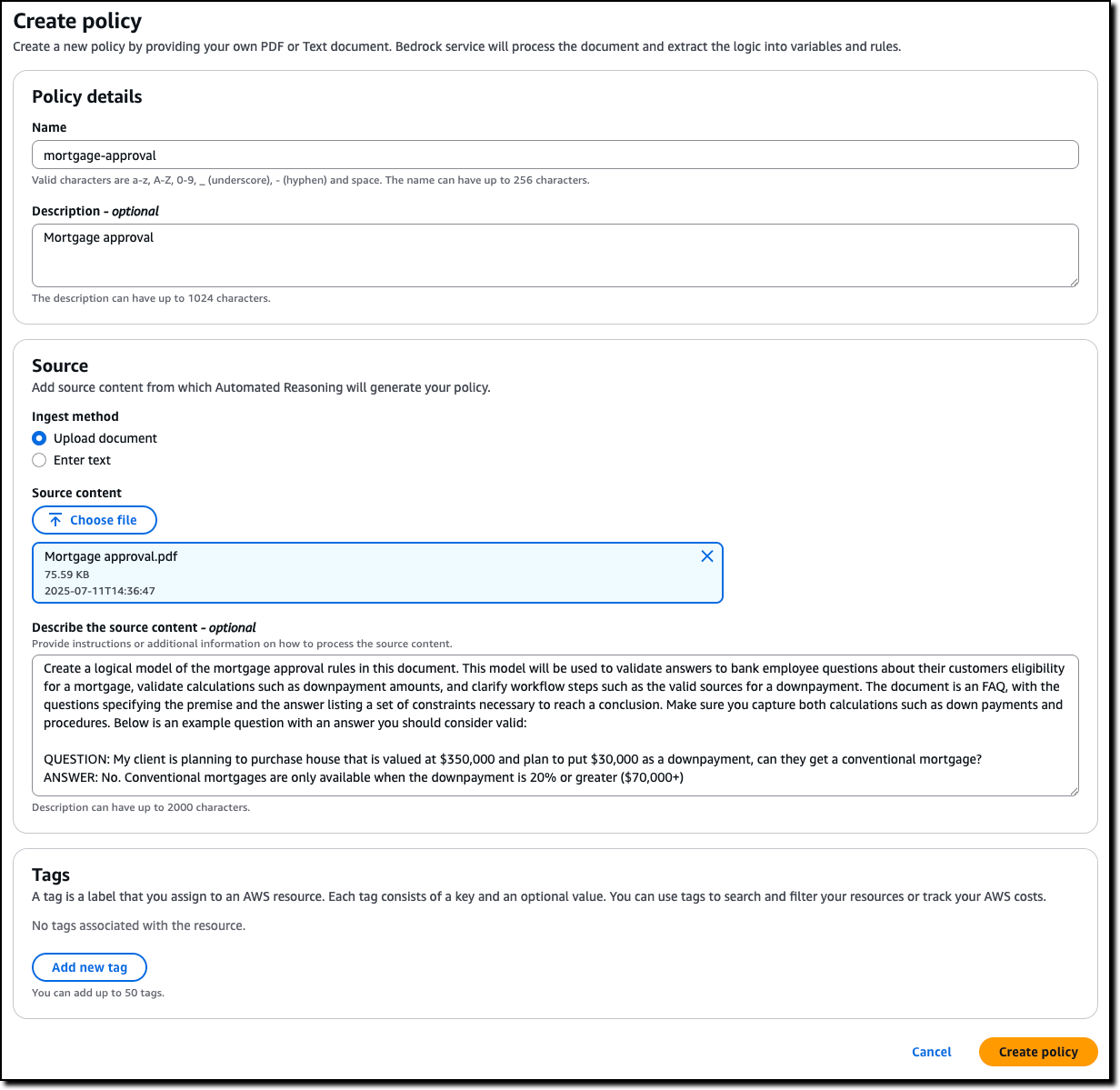
I enter name and description of the policy and upload the PDF of the policy document. The name and description are just metadata and do not contribute in building the Automated Reasoning policy. I describe the source content to add context on how it should be translated into formal logic. For example, I explain how I plan to use the policy in my application, including sample Q&A from the AI assistant.

Consoel screenshot.

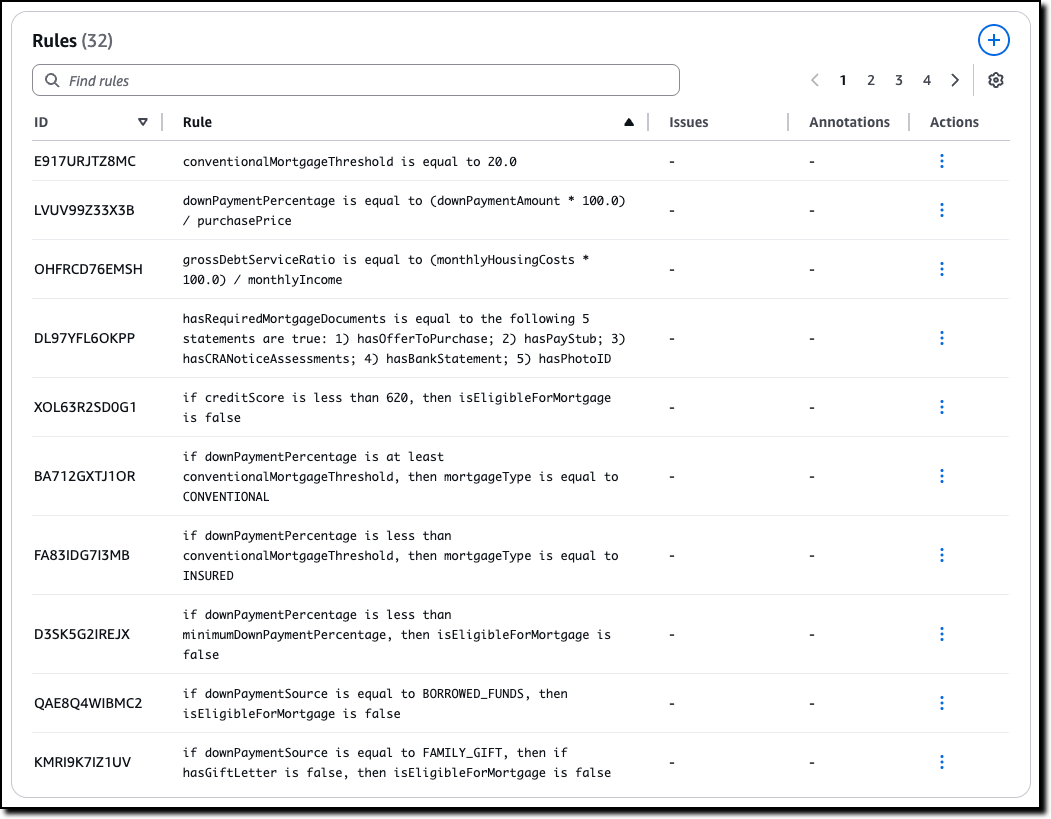
When the policy is ready, I land on the overview page, showing the policy details and a summary of the tests and definitions. I choose Definitions from the dropdown to examine the Automated Reasoning policy, made of rules, variables, and types that have been created to translate the natural language policy into formal logic.

The Rules describe how variables in the policy are related and are used when evaluating the generated content. For example, in this case, which are the thresholds to apply and how some of the decisions are taken. For traceability, each rule has its own unique ID.

Console screenshot.

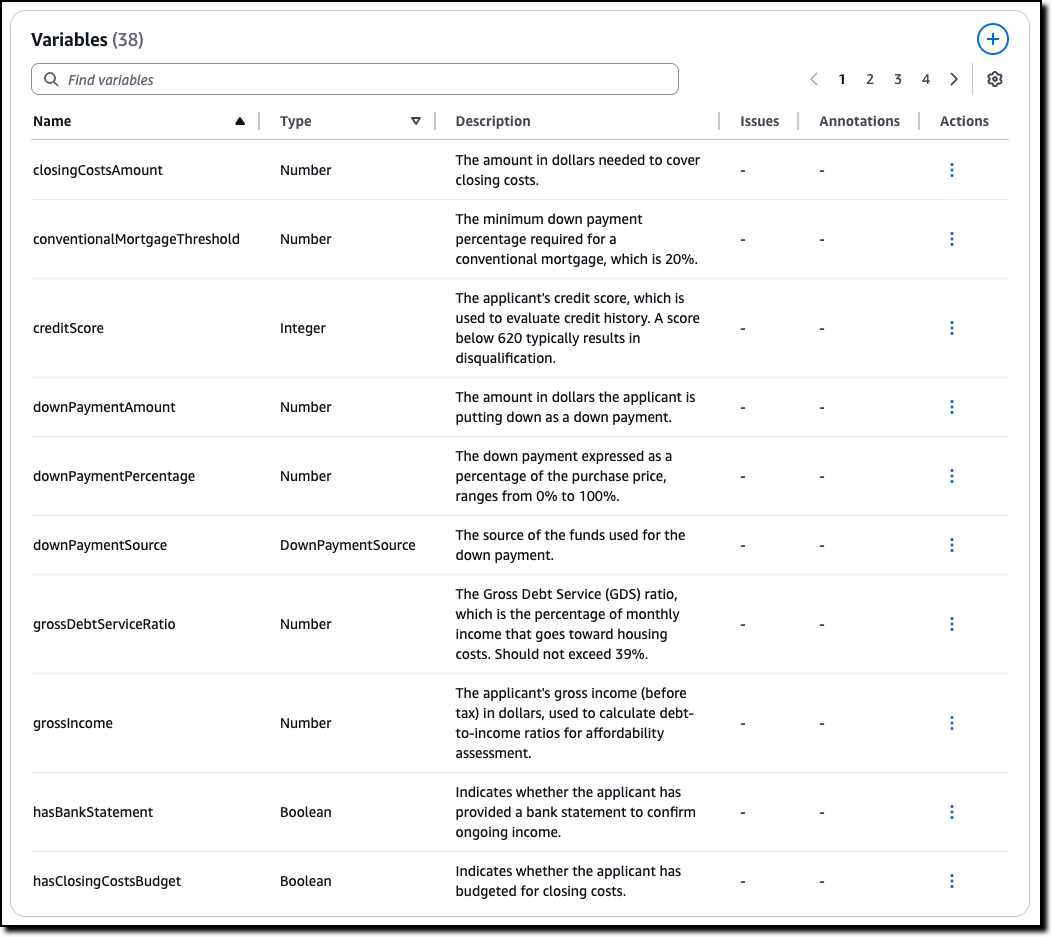
The Variables represent the main concepts at play in the original natural language documents. Each variable is involved in one or more rules. Variables allow complex structures to be easier to understand. For this scenario, some of the rules need to look at the down payment or at the credit score.

Console screenshot.

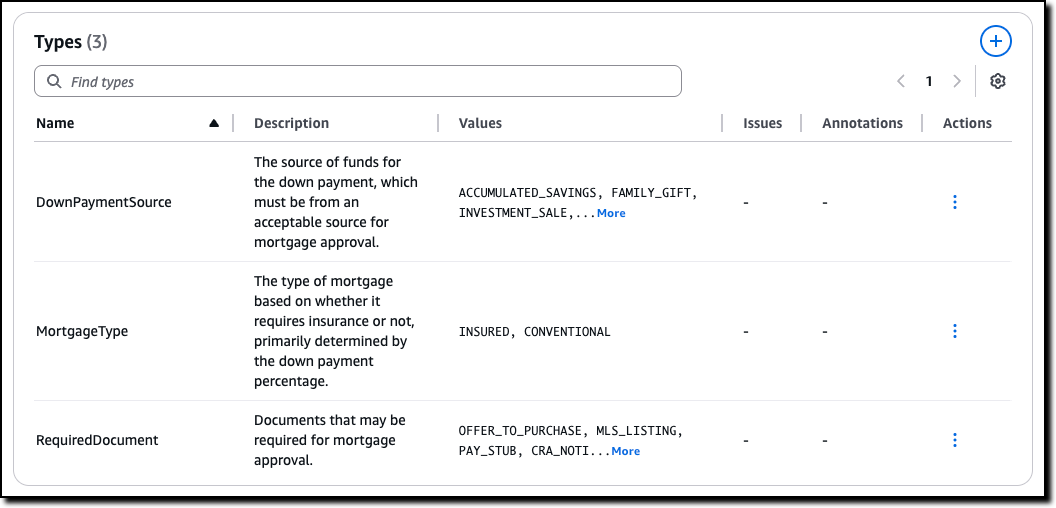
Custom Types are created for variables that are neither boolean nor numeric. For example, for variables that can only assume a limited number of values. In this case, there are two type of mortgage described in the policy, insured and conventional.

Console screenshot.

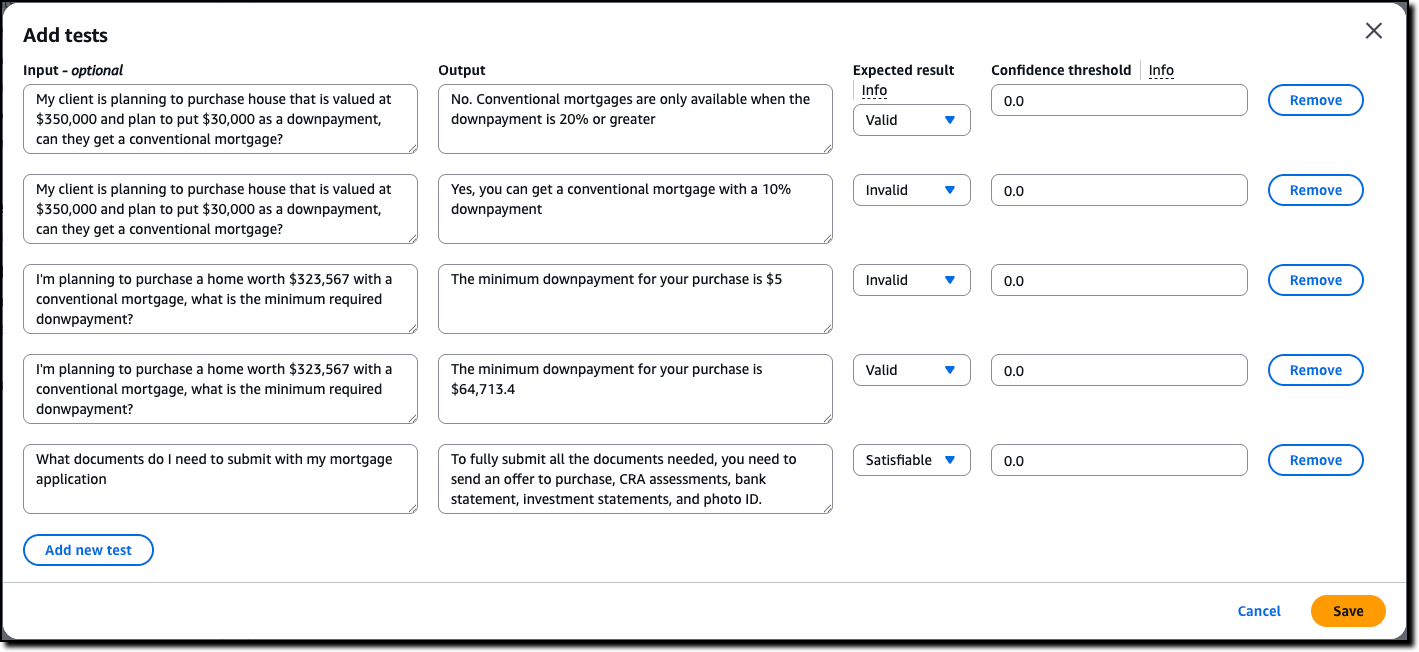
Now we can assess the quality of the initial Automated Reasoning policy through testing. I choose Tests from the dropdown. Here I can manually enter a test, consisting of input (optional) and output, such as a question and its possible answer from the interaction of a customer with the AI assistant. I then set the expected result from the Automated Reasoning check. The expected result can be valid (the answer is correct), invalid (the answer is not correct), or satisfiable (the answer could be true or false depending on specific assumptions). I can also assign a confidence threshold for the translation of the query/content pair from natural language to logic.

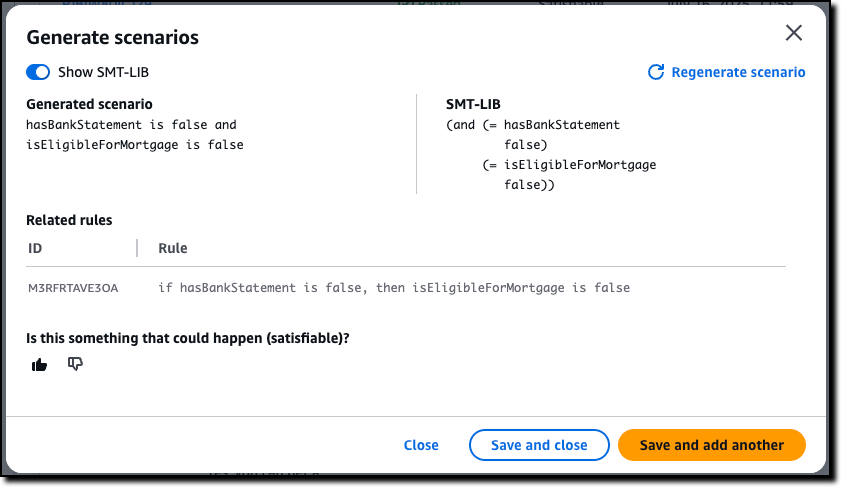
Before I enter tests manually, I use the option to automatically generate a scenario from the definitions. This is the easiest way to validate a policy and (unless you’re an expert in logic) should be the first step after the creation of the policy.

For each generated scenario, I provide an expected validation to say if it is something that can happen (satisfiable) or not (invalid). If not, I can add an annotation that can then be used to update the definitions. For a more advanced understanding of the generated scenario, I can show the formal logic representation of a test using SMT-LIB syntax.

Console screenshot.

After using the generate scenario option, I enter a few tests manually. For these tests, I set different expected results: some are valid, because they follow the policy, some are invalid, because they flout the policy, and some are satisfiable, because their result depends on specific assumptions.

Console screenshot.

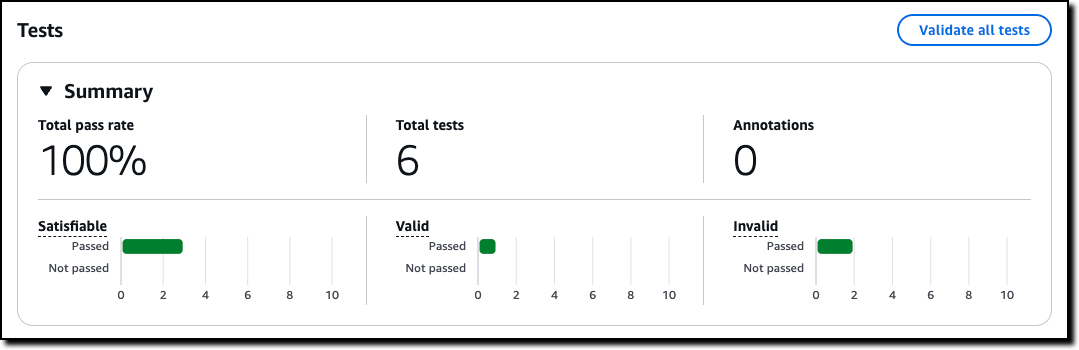
Then, I choose Validate all tests to see the results. All tests passed in this case. Now, when I update the policy, I can use these tests to validate that the changes didn’t introduce errors.

Console screenshot.

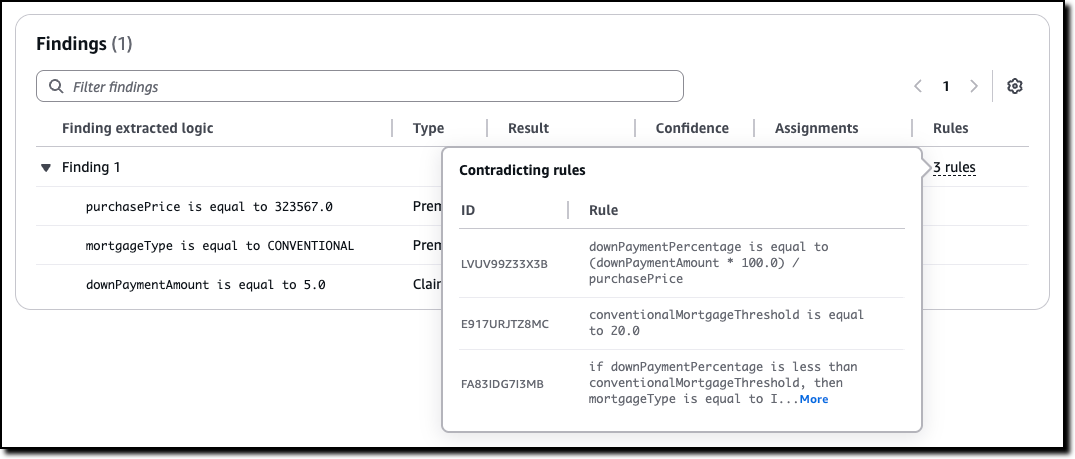
For each test, I can look at the findings. If a test doesn’t pass, I can look at the rules that created the contradiction that made the test fail and go against the expected result. Using this information, I can understand if I should add an annotation, to improve the policy, or correct the test.

Console screenshot.

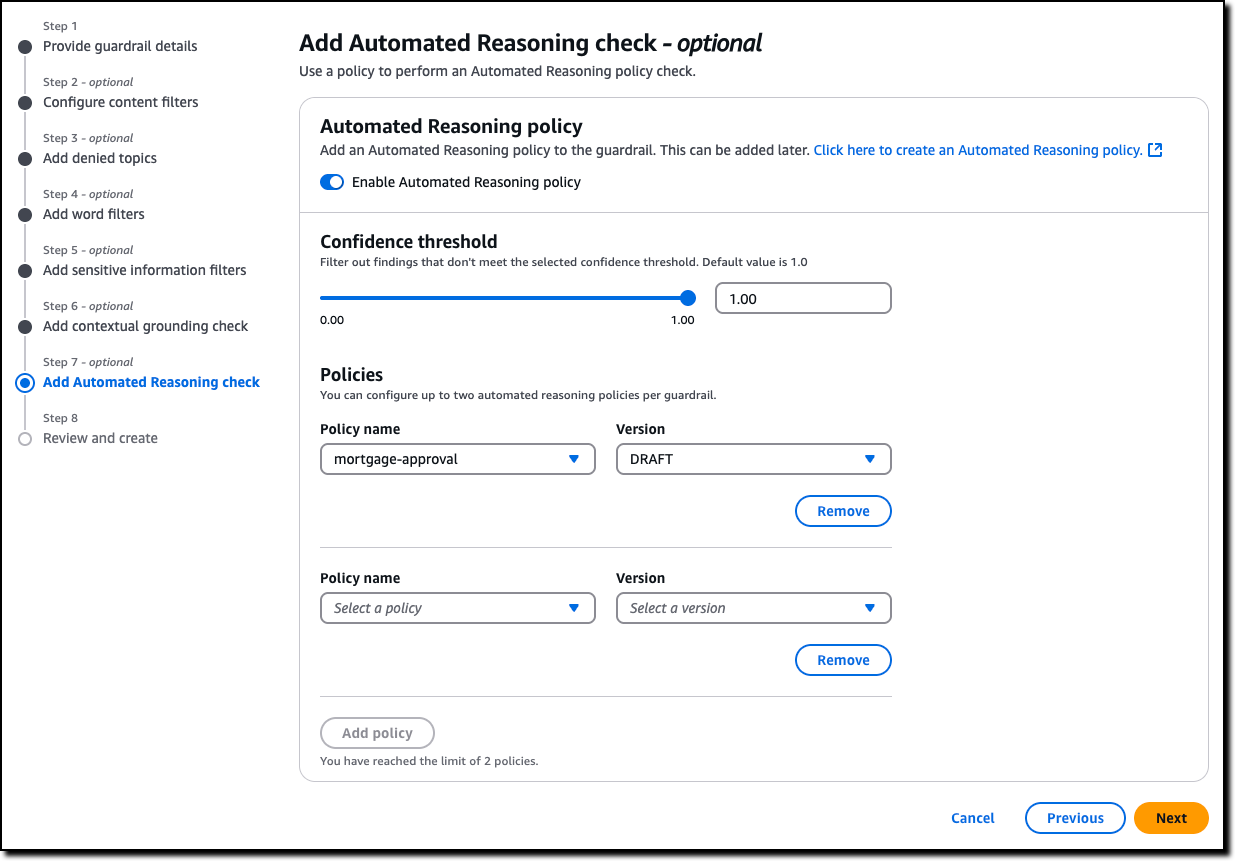
Now that I’m satisfied with the tests, I can create a new Amazon Bedrock guardrail (or update an existing one) to use up to two Automated Reasoning policies to check the validity of the responses of the AI assistant. All six policies offered by Guardrails are modular, and can be used together or separately. For example, Automated Reasoning checks can be used with other safeguards such as content filtering and contextual grounding checks. The guardrail can be applied to models served by Amazon Bedrock or with any third-party model (such as OpenAI and Google Gemini) via the ApplyGuardrail API. I can also use the guardrail with an agent framework such as Strands Agents, including agents deployed using Amazon Bedrock AgentCore.

Console screenshot.

Now that we saw how to set up a policy, let’s look at how Automated Reasoning checks are used in practice.

Customer case study – Utility outage management systems
When the lights go out, every minute counts. That’s why utility companies are turning to AI solutions to improve their outage management systems. We collaborated on a solution in this space together with PwC. Using Automated Reasoning checks, utilities can streamline operations through:

  • Automated protocol generation – Creates standardized procedures that meet regulatory requirements
  • Real-time plan validation – Ensures response plans comply with established policies
  • Structured workflow creation – Develops severity-based workflows with defined response targets

At its core, this solution combines intelligent policy management with optimized response protocols. Automated Reasoning checks are used to assess AI-generated responses. When a response is found to be invalid or satisfiable, the result of the Automated Reasoning check is used to rewrite or enhance the answer.

This approach demonstrates how AI can transform traditional utility operations, making them more efficient, reliable, and responsive to customer needs. By combining mathematical precision with practical requirements, this solution sets a new standard for outage management in the utility sector. The result is faster response times, improved accuracy, and better outcomes for both utilities and their customers.

In the words of Matt Wood, PwC’s Global and US Commercial Technology and Innovation Officer:

“At PwC, we’re helping clients move from AI pilot to production with confidence—especially in highly regulated industries where the cost of a misstep is measured in more than dollars. Our collaboration with AWS on Automated Reasoning checks is a breakthrough in responsible AI: mathematically assessed safeguards, now embedded directly into Amazon Bedrock Guardrails. We’re proud to be AWS’s launch collaborator, bringing this innovation to life across sectors like pharma, utilities, and cloud compliance—where trust isn’t a feature, it’s a requirement.”

Things to know
Automated Reasoning checks in Amazon Bedrock Guardrails is generally available today in the following AWS Regions: US East (Ohio, N. Virginia), US West (Oregon), and Europe (Frankfurt, Ireland, Paris).

With Automated Reasoning checks, you pay based on the amount of text processed. For more information, see Amazon Bedrock pricing.

To learn more, and build secure and safe AI applications, see the technical documentation and the GitHub code samples. Follow this link for direct access to the Amazon Bedrock console.

The videos in this playlist include an introduction to Automated Reasoning checks, a deep dive presentation, and hands-on tutorials to create, test, and refine a policy.

— Danilo
OpenAI open weight models now available on AWS

Post Syndicated from Danilo Poccia original https://aws.amazon.com/blogs/aws/openai-open-weight-models-now-available-on-aws/
AWS is committed to bringing you the most advanced foundation models (FMs) in the industry, continuously expanding our selection to include groundbreaking models from leading AI innovators so that you always have access to the latest advancements to drive your business forward.

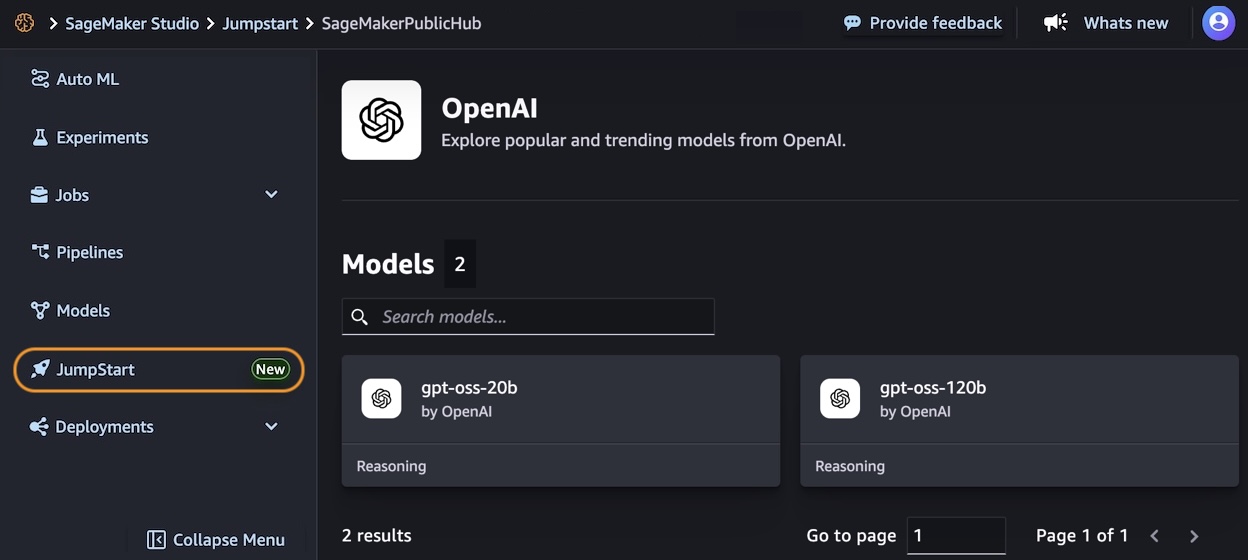
Today, I am happy to announce the availability of two new OpenAI models with open weights in Amazon Bedrock and Amazon SageMaker JumpStart. OpenAI gpt-oss-120b and gpt-oss-20b models are designed for text generation and reasoning tasks, offering developers and organizations new options to build AI applications with complete control over their infrastructure and data.

These open weight models excel at coding, scientific analysis, and mathematical reasoning, with performance comparable to leading alternatives. Both models support a 128K context window and provide adjustable reasoning levels (low/medium/high) to match your specific use case requirements. The models support external tools to enhance their capabilities and can be used in an agentic workflow, for example, using a framework like Strands Agents.

With Amazon Bedrock and Amazon SageMaker JumpStart, AWS gives you the freedom to innovate with access to hundreds of FMs from leading AI companies, including OpenAI open weight models. With our comprehensive selection of models, you can match your AI workloads to the perfect model every time.

Through Amazon Bedrock, you can seamlessly experiment with different models, mix and match capabilities, and switch between providers without rewriting code—turning model choice into a strategic advantage that helps you continuously evolve your AI strategy as new innovations emerge. At launch, these new models are available in Bedrock via an OpenAI compatible endpoint. You can point the OpenAI SDK to this endpoint or use the Bedrock InvokeModel and Converse API.

With SageMaker JumpStart, you can quickly evaluate, compare, and customize models for your use case. You can then deploy the original or the customized model in production with the SageMaker AI console or using the SageMaker Python SDK.

Let’s see how these work in practice.

Getting started with OpenAI open weight models in Amazon Bedrock
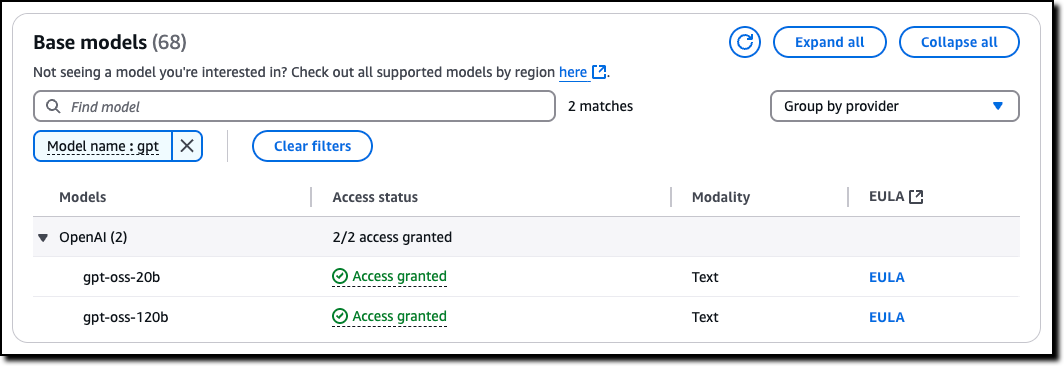
In the Amazon Bedrock console, I choose Model access from the Configure and learn section of the navigation pane. Then, I navigate to the two listed OpenAI models on this page and request access.

Console screenshot

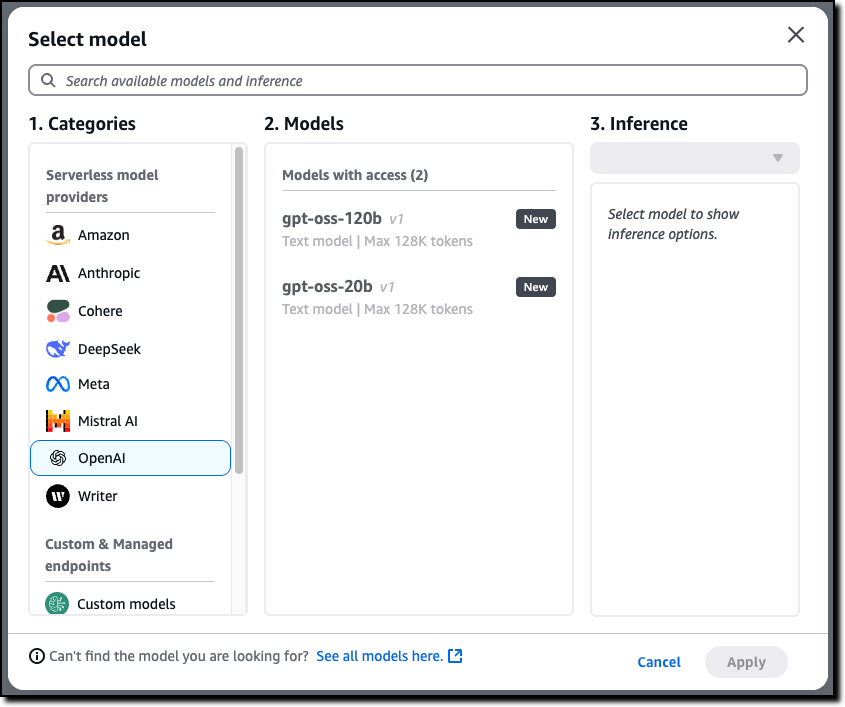
Now that I have access, I use the Chat/Test playground to test and evaluate the models. I select OpenAI as the category and then the gpt-oss-120b model.

Console screenshot

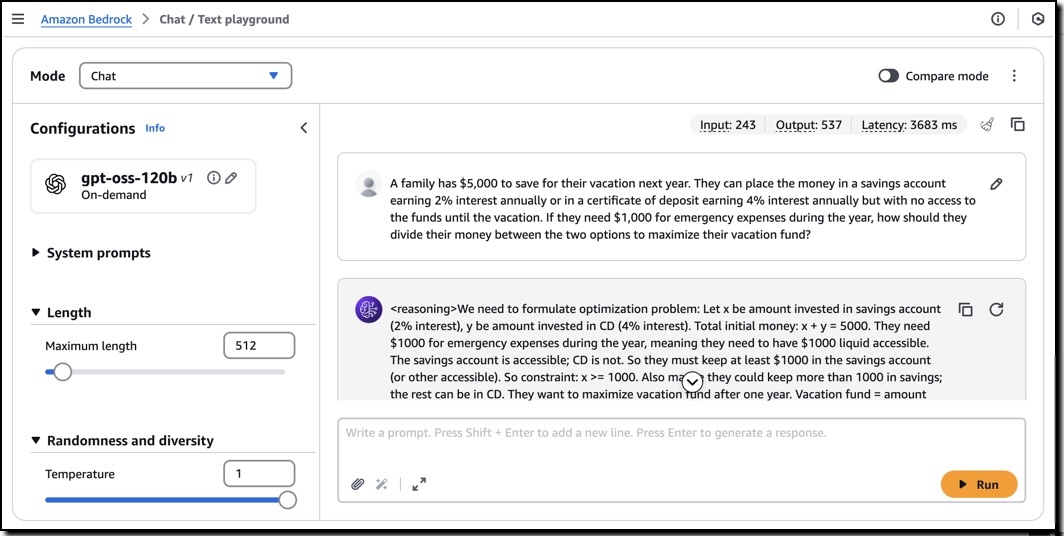
Using this model, I run the following sample prompt:

A family has $5,000 to save for their vacation next year. They can place the money in a savings account earning 2% interest annually or in a certificate of deposit earning 4% interest annually but with no access to the funds until the vacation. If they need $1,000 for emergency expenses during the year, how should they divide their money between the two options to maximize their vacation fund?

This prompt generates an output that includes the chain of thought used to produce the result.

I can use these models with the OpenAI SDK by configuring the API endpoint (base URL) and using an Amazon Bedrock API key for authentication. For example, I set this environment variables to use the US West (Oregon) AWS Region endpoint (us-west-2) and my Amazon Bedrock API key:

export OPENAI_API_KEY="<my-bedrock-api-key>"
export OPENAI_BASE_URL="https://bedrock-runtime.us-west-2.amazonaws.com/openai/v1"

Now I invoke the model using the OpenAI Python SDK.

client = OpenAI()

response = client.chat.completion.create(
    messages=[{
        "role": "user",
        "content": "Hello, how are you?"
    }],
    model="openai.gpt-oss-120b-1:0",
    stream=True
)

for item in response:
    print(item)

To build an AI agent, I can choose any framework that supports the Amazon Bedrock API or the OpenAI API. For example, here’s the starting code for Strands Agents using the Amazon Bedrock API:

from strands import Agent
from strands.models import BedrockModel
from strands_tools import calculator

model = BedrockModel(
    model_id="openai.gpt-oss-120b-1:0"
)
agent = Agent(
    model=model,
    tools=[calculator]
)

agent("Tell me the square root of 42 ^ 3")

I save the code (app.py file), install the dependencies, and run the agent locally:

pip install strands-agents strands-agents-tools
python app.py

When I am satisfied with the agent, I can deploy in production using the capabilities offered by Amazon Bedrock AgentCore, including a fully managed serverless runtime and memory and identity management.

Getting started with OpenAI open weight models in Amazon SageMaker JumpStart
In the Amazon SageMaker AI console, you can use OpenAI open weight models in the SageMaker Studio. The first time I do this, I need to set up a SageMaker domain. There are options to set it up for a single user (simpler) or an organization. For these tests, I use a single user setup.

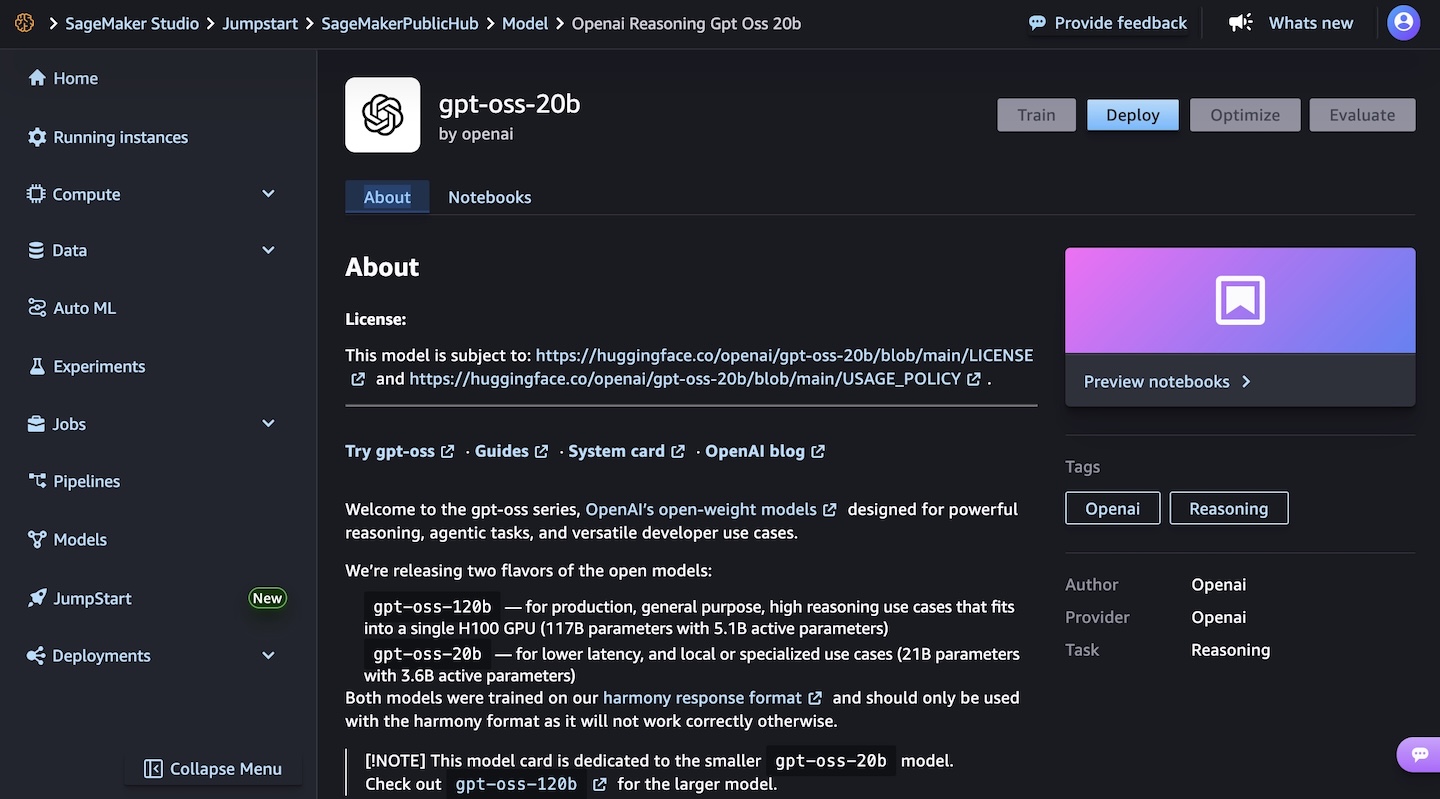
In the SageMaker JumpStart model view, I have access to a detailed description of the gpt-oss-120b or gpt-oss-20b model.

I choose the gpt-oss-20b model and then deploy the model. In the next steps, I select the instance type and the initial instance count. After a few minutes, the deployment creates an endpoint that I can then invoke in SageMaker Studio and using any AWS SDKs.

To learn more, visit GPT OSS models from OpenAI are now available on SageMaker JumpStart in the AWS Artificial Intelligence Blog.

Things to know
The new OpenAI open weight models are now available in Amazon Bedrock in the US West (Oregon) AWS Region, while Amazon SageMaker JumpStart supports these models in US East (Ohio, N. Virginia) and Asia Pacific (Mumbai, Tokyo).

Each model comes equipped with full chain-of-thought output capabilities, providing you with detailed visibility into the model’s reasoning process. This transparency is particularly valuable for applications requiring high levels of interpretability and validation. These models give you the freedom to modify, adapt, and customize them to your specific needs. This flexibility allows you to fine-tune the models for your unique use cases, integrate them into your existing workflows, and even build upon them to create new, specialized models tailored to your industry or application.

Security and safety are built into the core of these models, with comprehensive evaluation processes and safety measures in place. The models maintain compatibility with the standard GPT-4 tokenizer.

Both models can be used in your preferred environment, whether that’s through the serverless experience of Amazon Bedrock or the extensive machine learning (ML) development capabilities of SageMaker JumpStart. For information about the costs associated with using these models and services, visit the Amazon Bedrock pricing and Amazon SageMaker AI pricing pages.

To learn more, see the parameters for the models and the chat completions API in the Amazon Bedrock documentation.

Get started today with OpenAI open weight models on AWS in the Amazon Bedrock console or in Amazon SageMaker AI console.

– Danilo
Introducing Amazon Elastic VMware Service for running VMware Cloud Foundation on AWS

Post Syndicated from Micah Walter original https://aws.amazon.com/blogs/aws/introducing-amazon-elastic-vmware-service-for-running-vmware-cloud-foundation-on-aws/

Today, we’re announcing the general availability of Amazon Elastic VMware Service (Amazon EVS), a new AWS service that lets you run VMware Cloud Foundation (VCF) environments directly within your Amazon Virtual Private Cloud (Amazon VPC). With Amazon EVS, you can deploy fully functional VCF environments in just hours using a guided workflow, while running your VMware workloads on qualified Amazon Elastic Compute Cloud (Amazon EC2) bare metal instances and seamlessly integrating with AWS services such as Amazon FSx for NetApp ONTAP.

Many organizations running VMware workloads on premises want to move to the cloud to benefit from improved scalability, reliability, and access to cloud services, but migrating these workloads often requires substantial changes to applications and infrastructure configurations. Amazon EVS lets customers continue using their existing VMware expertise and tools without having to re-architect applications or change established practices, thereby simplifying the migration process while providing access to AWS’s scale, reliability, and broad set of services.

With Amazon EVS, you can run VMware workloads directly in your Amazon VPC. This gives you full control over your environments while being on AWS infrastructure. You can extend your on-premises networks and migrate workloads without changing IP addresses or operational runbooks, reducing complexity and risk.

Key capabilities and features

Amazon EVS delivers a comprehensive set of capabilities designed to streamline your VMware workload migration and management experience. The service enables seamless workload migration without the need for replatforming or changing hypervisors, which means you can maintain your existing infrastructure investments while moving to AWS. Through an intuitive, guided workflow on the AWS Management Console, you can efficiently provision and configure your EVS environments, significantly reducing the complexity to migrate your workloads to AWS.

With Amazon EVS, you can deploy a fully functional VCF environment running on AWS in a few hours. This process eliminates many of the manual steps and potential configuration errors that often occur during traditional deployments. Furthermore, with Amazon EVS you can optimize your virtualization stack on AWS. Given the VCF environment runs inside your VPC, you have full full administrative access to the environment and the associated management appliances. You also have the ability to integrate third-party solutions, from external storage such as Amazon FSx for NetApp ONTAP or Pure Cloud Block Store or backup solutions such as Veeam Backup and Replication.

The service also gives you the ability to self-manage or work with AWS Partners to build, manage, and operate your environments. This provides you with flexibility to match your approach with your overall goals.

Setting up a new VCF environment

Organizations can streamline their setup process by ensuring they have all the necessary pre-requisites in place ahead of creating a new VCF environment. These prerequisites include having an active AWS account, configuring the appropriate AWS Identity and Access Management (IAM) permissions, and setting up a Amazon VPC with sufficient CIDR space and two Route Server endpoints, with each endpoint having its own peer. Additionally, customers will need to have their VMware Cloud Foundation license keys ready, secure Amazon EC2 capacity reservations specifically for i4i.metal instances, and prepare their VLAN subnet information planning.

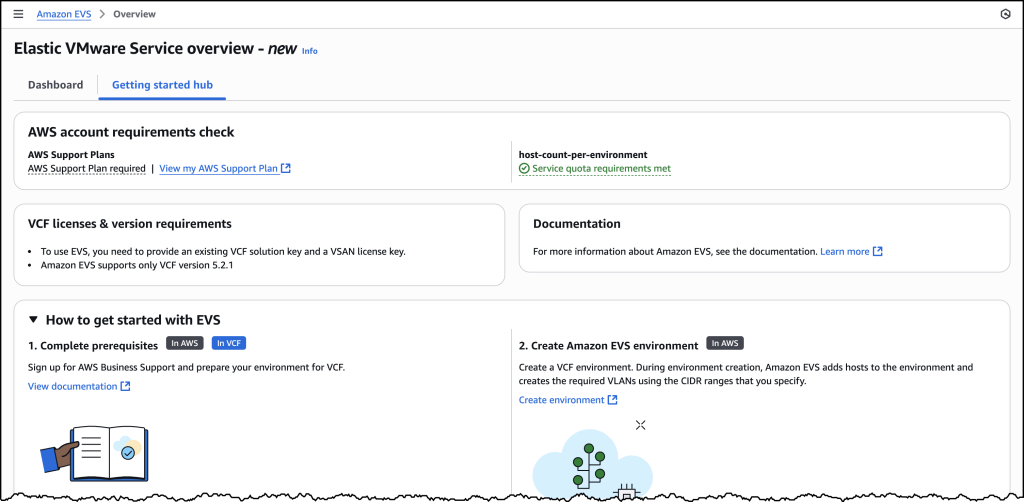
To help ensure a smooth deployment process, we’ve provided a Getting started hub, which you can access from the EVS homepage as well as a comprehensive guide in our documentation. By following these preparation steps, you can avoid potential setup delays and ensure a successful environment creation.

Screenshots of EVS onboarding

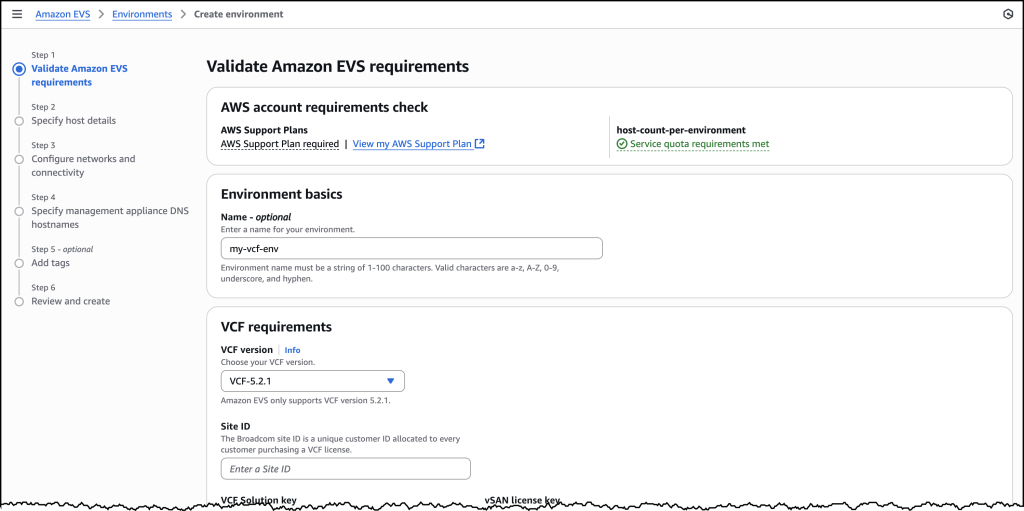
Let’s walk through the process of setting up a new VCF environment using Amazon EVS.

Screenshots of EVS onboarding

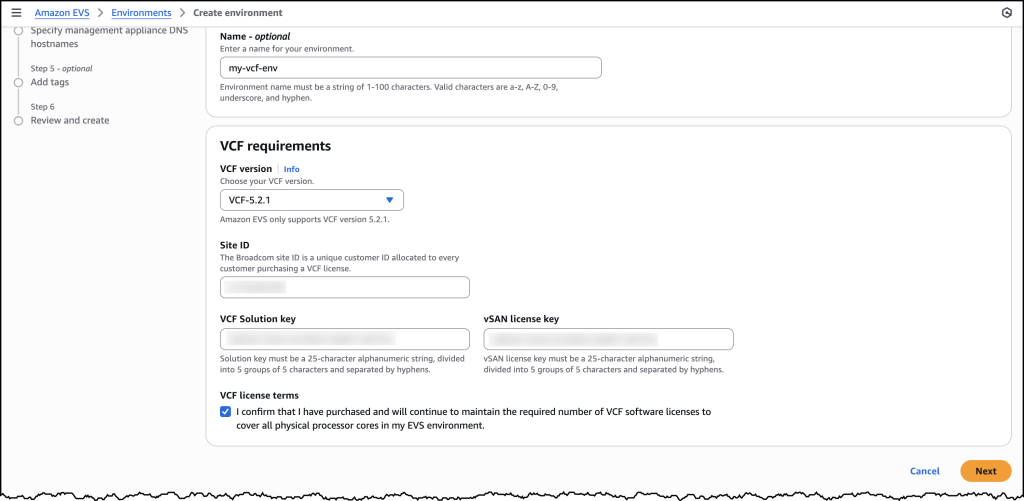
You will need to provide your Site ID, which is allocated by Broadcom when purchasing VCF licenses, along with your license keys. To ensure a successful initial deployment, you should verify you have sufficient licensing coverage for a minimum of 256 cores. This translates to at least four i4i.metal instances, with each instance providing 64 physical cores.

This licensing requirement helps you maintain optimal performance and ensures your environment meets the necessary infrastructure specifications. By confirming these requirements upfront, you can avoid potential deployment delays and ensure a smooth setup process.

Screenshots of EVS onboarding

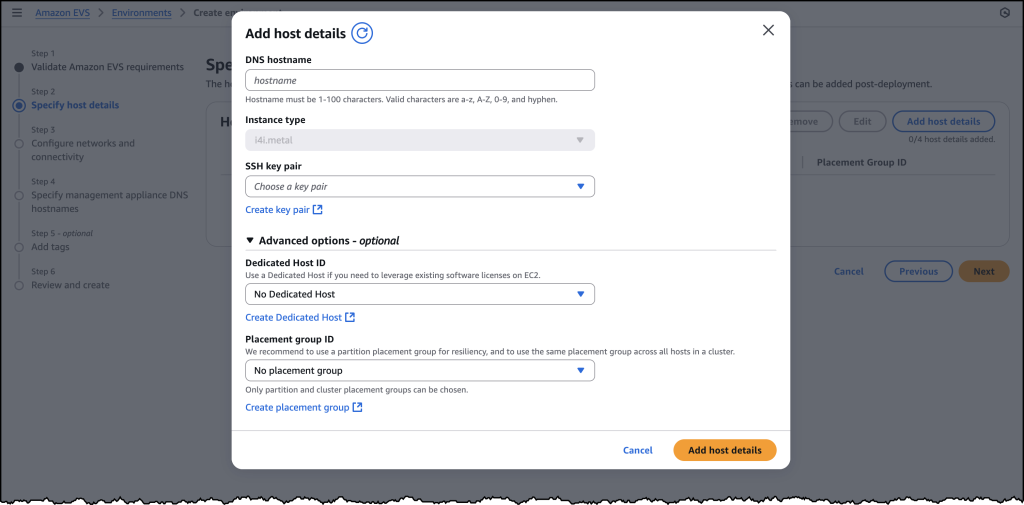
Once you have provided all the required details, you will be prompted to specify your host details. These are the underlying Amazon EC2 instances that your VCF environment will get deployed in.

Screenshots of EVS onboarding

Once you have filled out details for each of your host instances, you will need to configure your networking and management appliance DNS details. For further information on how to create a new VCF environment on Amazon EVS, follow the documentation here.

Screenshots of EVS onboarding

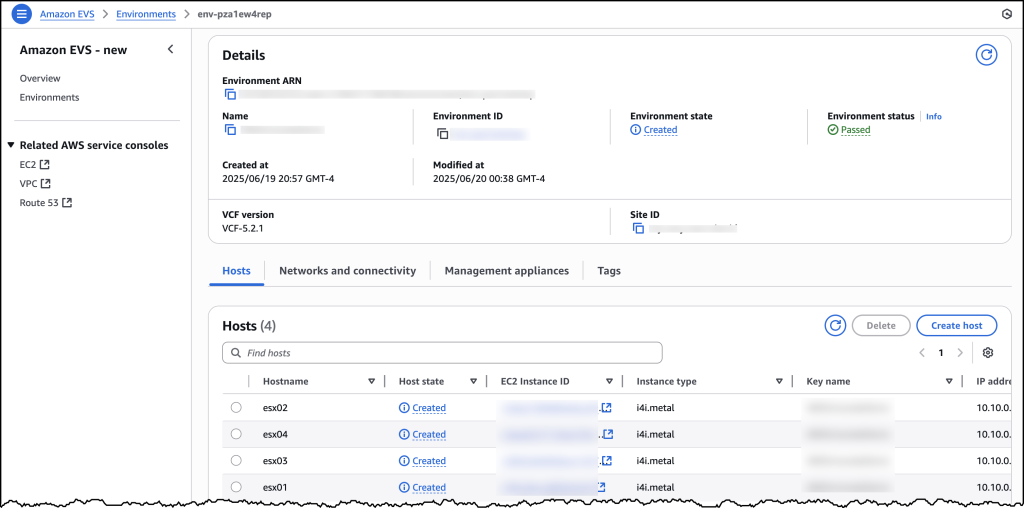
After you have created your VCF environment, you will be able to look over all of the host and configuration details through the AWS Console.

Additional things to know

Amazon EVS currently supports VCF version 5.2.1 and runs on i4i.metal instances. Future releases will expand VCF versions, licensing options, and more instance type support to provide even more flexibility for your deployments.

Amazon EVS provides flexible storage options. Your Amazon EVS local Instance storage is powered by VMware’s vSAN solution, which pools local disks across multiple ESXi hosts into a single distributed datastore. To scale your storage, you can leverage external Network File System (NFS) or iSCSI-based storage solutions. For example, Amazon FSx for NetApp ONTAP is particularly well-suited for use as an NFS datastore or shared block storage over iSCSI.

Additionally, Amazon EVS makes connecting your on-premises environments to AWS simple. You can connect from on-premises vSphere environment into Amazon EVS using a Direct Connect connection or a VPN that terminates into a transit gateway. Amazon EVS also manages the underlying connectivity from your VLAN subnets into your VMs.

AWS provides comprehensive support for all AWS services deployed by Amazon EVS, handling direct customer support while engaging with Broadcom for advanced support needs. Customers must maintain AWS Business Support on accounts running the service.

Availability and pricing

Amazon EVS is now generally available in US East (N. Virginia), US East (Ohio), US West (Oregon), Europe (Frankfurt), Europe (Ireland), and Asia Pacific (Tokyo) AWS Regions, with additional Regions coming soon. Pricing is based on the Amazon EC2 instances and AWS resources you use, with no minimum fees or upfront commitments.

To learn more, visit the Amazon EVS product page.

AWS Weekly Roundup: Amazon DocumentDB, AWS Lambda, Amazon EC2, and more (August 4, 2025)

Post Syndicated from Danilo Poccia original https://aws.amazon.com/blogs/aws/aws-weekly-roundup-amazon-documentdb-aws-lambda-amazon-ec2-and-more-august-4-2025/
This week brings an array of innovations spanning from generative AI capabilities to enhancements of foundational services. Whether you’re building AI-powered applications, managing databases, or optimizing your cloud infrastructure, these updates help build more advanced, robust, and flexible applications.

Last week’s launches
Here are the launches that got my attention this week:

Additional updates
Here are some additional projects, blog posts, and news items that I found interesting:

Upcoming AWS events
Check your calendars so that you can sign up for these upcoming events:

AWS re:Invent 2025 (December 1-5, 2025, Las Vegas) — AWS’s flagship annual conference offering collaborative innovation through peer-to-peer learning, expert-led discussions, and invaluable networking opportunities.

AWS Summits — Join free online and in-person events that bring the cloud computing community together to connect, collaborate, and learn about AWS. Register in your nearest city: Mexico City (August 6) and Jakarta (August 7).

AWS Community Days — Join community-led conferences that feature technical discussions, workshops, and hands-on labs led by expert AWS users and industry leaders from around the world: Australia (August 15), Adria (September 5), Baltic (September 10), and Aotearoa (September 18).

Join the AWS Builder Center to learn, build, and connect with builders in the AWS community. Browse here upcoming in-person and virtual developer-focused events.

That’s all for this week. Check back next Monday for another Weekly Roundup!

– Danilo
Introducing Amazon Application Recovery Controller Region switch: A multi-Region application recovery service

Post Syndicated from Sébastien Stormacq original https://aws.amazon.com/blogs/aws/introducing-amazon-application-recovery-controller-region-switch-a-multi-region-application-recovery-service/

As a developer advocate at AWS, I’ve worked with many enterprise organizations who operate critical applications across multiple AWS Regions. A key concern they often share is the lack of confidence in their Region failover strategy—whether it will work when needed, whether all dependencies have been identified, and whether their teams have practiced the procedures enough. Traditional approaches often leave them uncertain about their readiness for Regional switch.

Today, I’m excited to announce Amazon Application Recovery Controller (ARC) Region switch, a fully managed, highly available capability that enables organizations to plan, practice, and orchestrate Region switches with confidence, eliminating the uncertainty around cross-Region recovery operations. Region switch helps you orchestrate recovery for your multi-Region applications on AWS. It gives you a centralized solution to coordinate and automate recovery tasks across AWS services and accounts when you need to switch your application’s operations from one AWS Region to another.

Many customers deploy business-critical applications across multiple AWS Regions to meet their availability requirements. When an operational event impacts an application in one Region, switching operations to another Region involves coordinating multiple steps across different AWS services, such as compute, databases, and DNS. This coordination typically requires building and maintaining complex scripts that need regular testing and updates as applications evolve. Additionally, orchestrating and tracking the progress of Region switches across multiple applications and providing evidence of successful recovery for compliance purposes often involves manual data gathering.

Region switch is built on a Regional data plane architecture, where Region switch plans are executed from the Region being activated. This design eliminates dependencies on the impacted Region during the switch, providing a more resilient recovery process since the execution is independent of the Region you’re switching from.

Building a recovery plan with ARC Region switch
With ARC Region switch, you can create recovery plans that define the specific steps needed to switch your application between Regions. Each plan contains execution blocks that represent actions on AWS resources. At launch, Region switch supports nine types of execution blocks:

  • ARC Region switch plan execution block–let you orchestrate the order in which multiple applications switch to the Region you want to activate by referencing other Region switch plans.
  • Amazon EC2 Auto Scaling execution block–Scales Amazon EC2 compute resources in your target Region by matching a specified percentage of your source Region’s capacity.
  • ARC routing controls execution block–Changes routing control states to redirect traffic using DNS health checks.
  • Amazon Aurora global database execution block–Performs database failover with potential data loss or switchover with zero data loss for Aurora Global Database.
  • Manual approval execution block–Adds approval checkpoints in your recovery workflow where team members can review and approve before proceeding.
  • Custom Action AWS Lambda execution block–Adds custom recovery steps by executing Lambda functions in either the activating or deactivating Region.
  • Amazon Route 53 health check execution block–Let you to specify which Regions your application’s traffic will be redirected to during failover. When executing your Region switch plan, the Amazon Route 53 health check state is updated and traffic is redirected based on your DNS configuration.
  • Amazon Elastic Kubernetes Service (Amazon EKS) resource scaling execution block–Scales Kubernetes pods in your target Region during recovery by matching a specified percentage of your source Region’s capacity.
  • Amazon Elastic Container Service (Amazon ECS) resource scaling execution block–Scales ECS tasks in your target Region by matching a specified percentage of your source Region’s capacity.

Region switch continually validates your plans by checking resource configurations and AWS Identity and Access Management (IAM) permissions every 30 minutes. During execution, Region switch monitors the progress of each step and provides detailed logs. You can view execution status through the Region switch dashboard and at the bottom of the execution details page.

To help you balance cost and reliability, Region switch offers flexibility in how you prepare your standby resources. You can configure the desired percentage of compute capacity to target in your destination Region during recovery using Region switch scaling execution blocks. For critical applications expecting surge traffic during recovery, you might choose to scale beyond 100 percent capacity, and setting a lower percentage can help achieve faster overall execution times. However, it’s important to note that using one of the scaling execution blocks does not guarantee capacity, and actual resource availability depends on the capacity in the destination Region at the time of recovery. To facilitate the best possible outcomes, we recommend regularly testing your recovery plans and maintaining appropriate Service Quotas in your standby Regions.

ARC Region switch includes a global dashboard you can use to monitor the status of Region switch plans across your enterprise and Regions. Additionally, there’s a Regional executions dashboard that only displays executions within the current console Region. This dashboard is designed to be highly available across each Region so it can be used during operational events.

Region switch allows resources to be hosted in an account that is separate from the account that contains the Region switch plan. If the plan uses resources from an account that is different from the account that hosts the plan, then Region switch uses the executionRole to assume the crossAccountRole to access those resources. Additionally, Region switch plans can be centralized and shared across multiple accounts using AWS Resource Access Manager (AWS RAM), enabling efficient management of recovery plans across your organization.

Let’s see how it works
Let me show you how to create and execute a Region switch plan. There are three parts in this demo. First, I create a Region switch plan. Then, I define a workflow. Finally, I configure the triggers.

Step 1: Create a plan

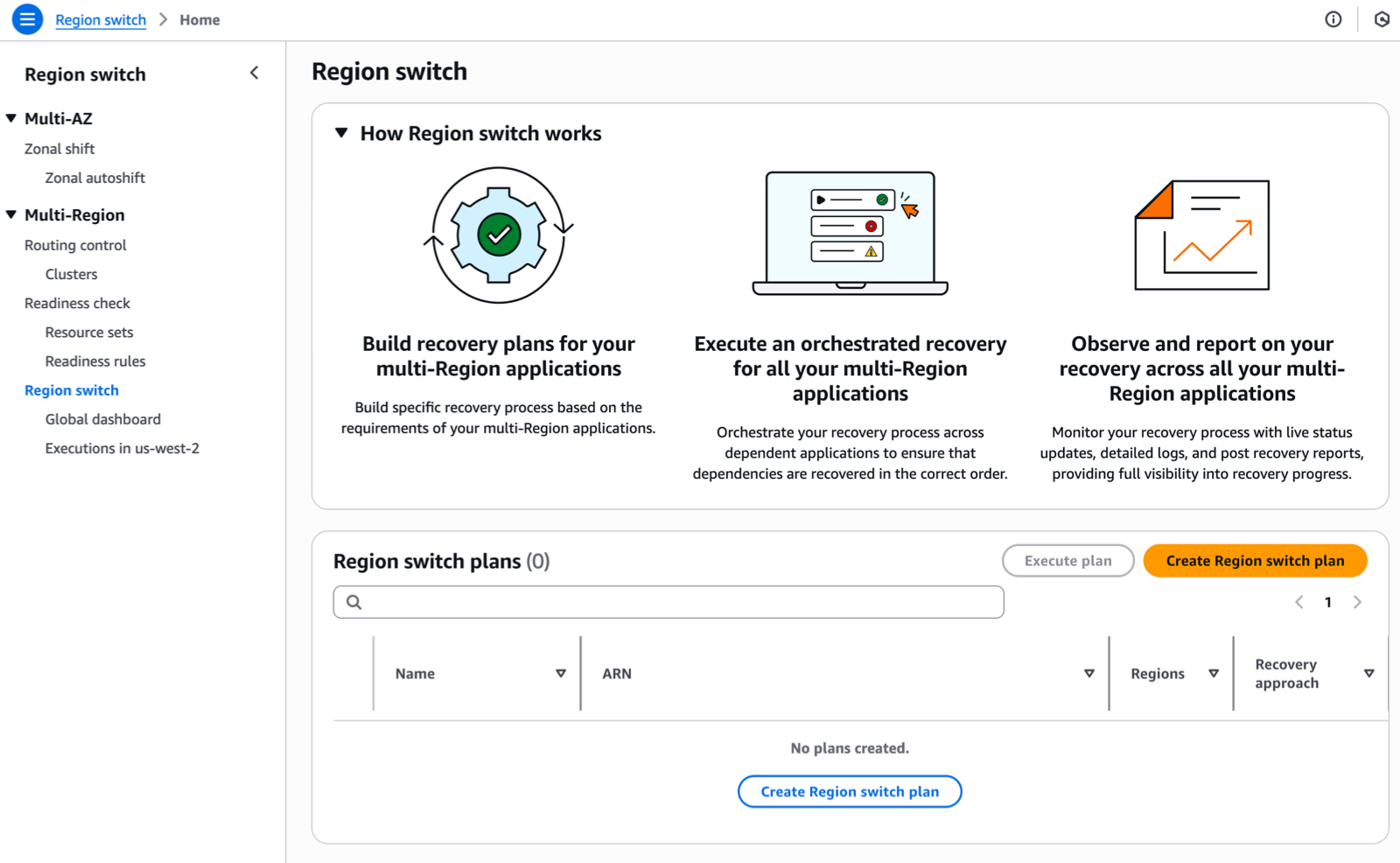
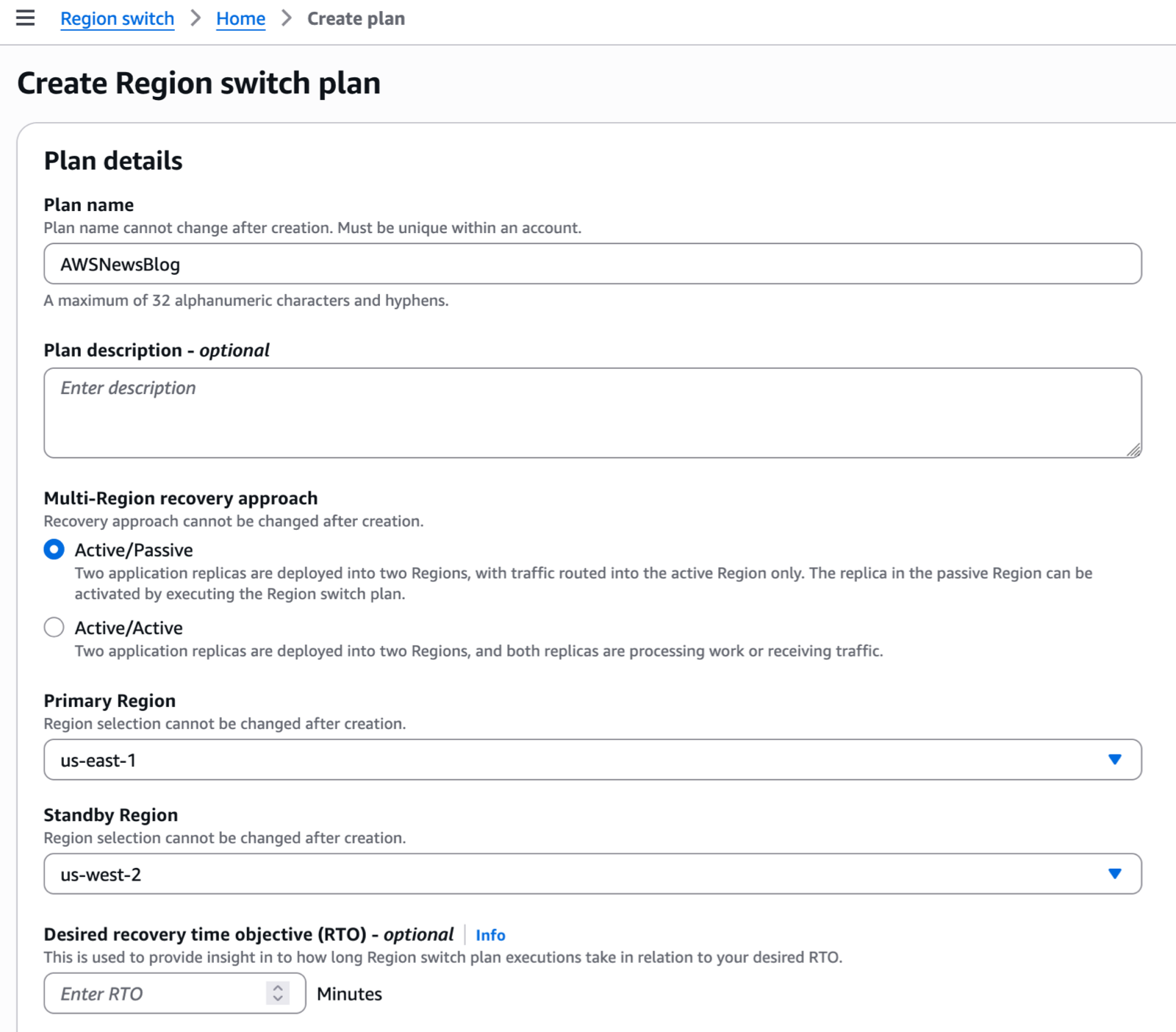
I navigate to the Application Recovery Controller section of the AWS Management Console. I choose Region switch in the left navigation menu. Then, I choose Create Region switch plan.

ARC Region switch - 1

After I give a name to my plan, I specify a Multi-Region recovery approach (active/passive or active/active). In Active/Passive mode, two application replicas are deployed into two Regions, with traffic routed into the active Region only. The replica in the passive Region can be activated by executing the Region switch plan.

Then, I select the Primary Region and Standby Region. Optionally, I can enter a Desired recovery time objective (RTO). The service will use this value to provide insight into how long Region switch plan executions take in relation to my desired RTO.

ARC Region switch - create plan

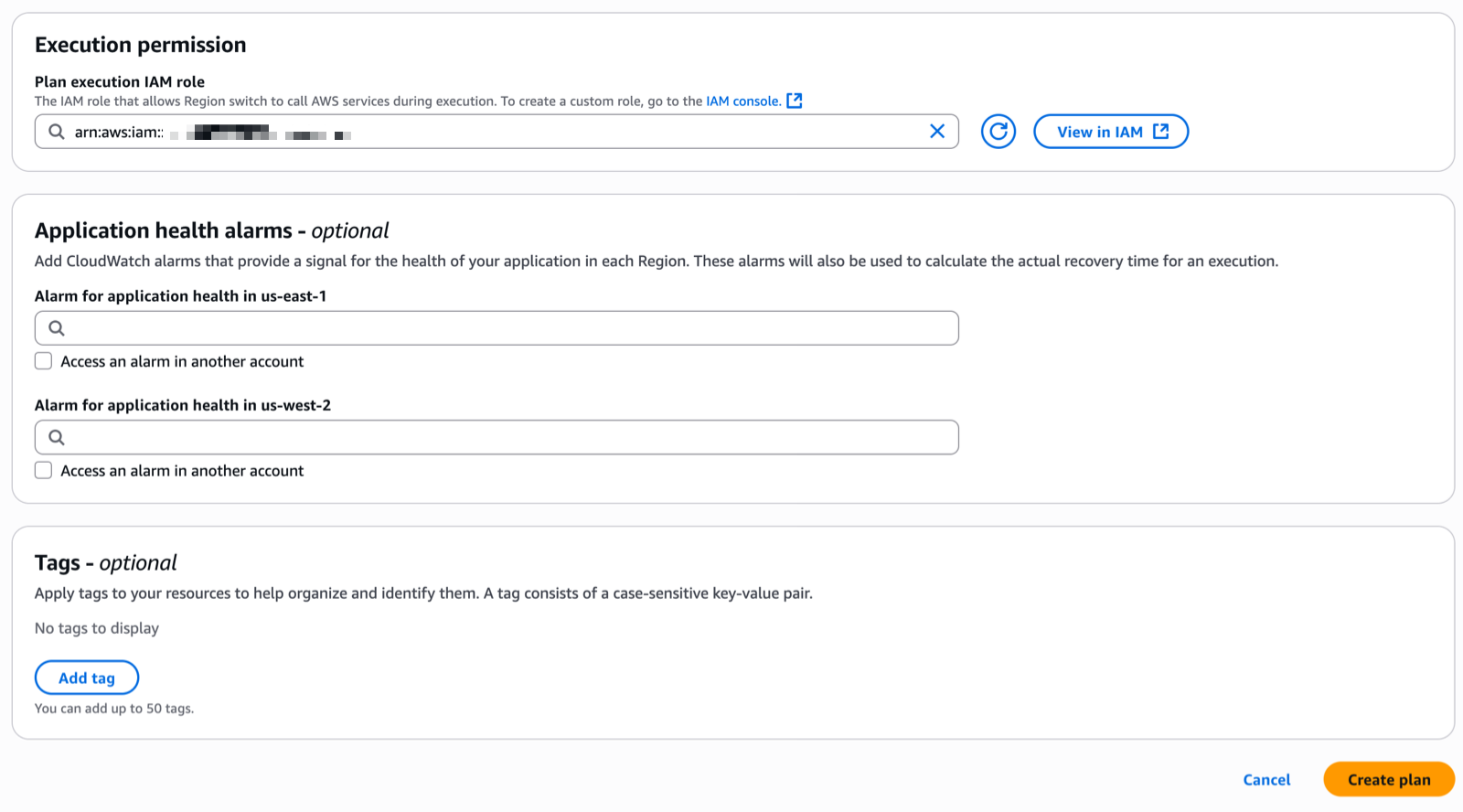
I enter the Plan execution IAM role. This is the role that allows Region switch to call AWS services during execution. I make sure the role I choose has permissions to be invoked by the service and contains the minimum set of permissions allowing ARC to operate. Refer to the IAM permissions section of the documentation for the details.

ARC Region switch - create plan 2Step 2: Create a workflow

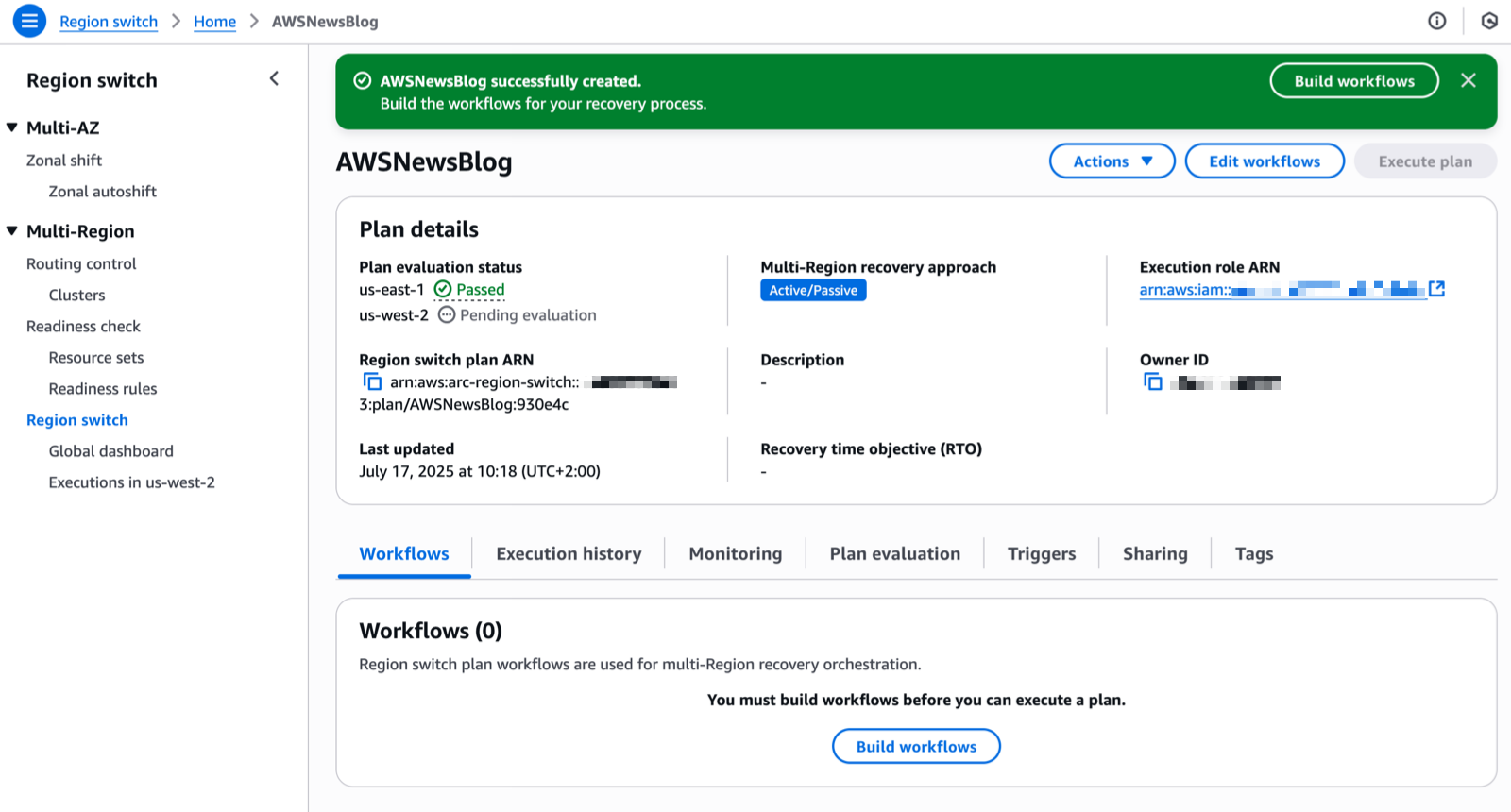
When the two Plan evaluation status notifications are green, I create a workflow. I choose Build workflows to get started.


ARC Region switch - status

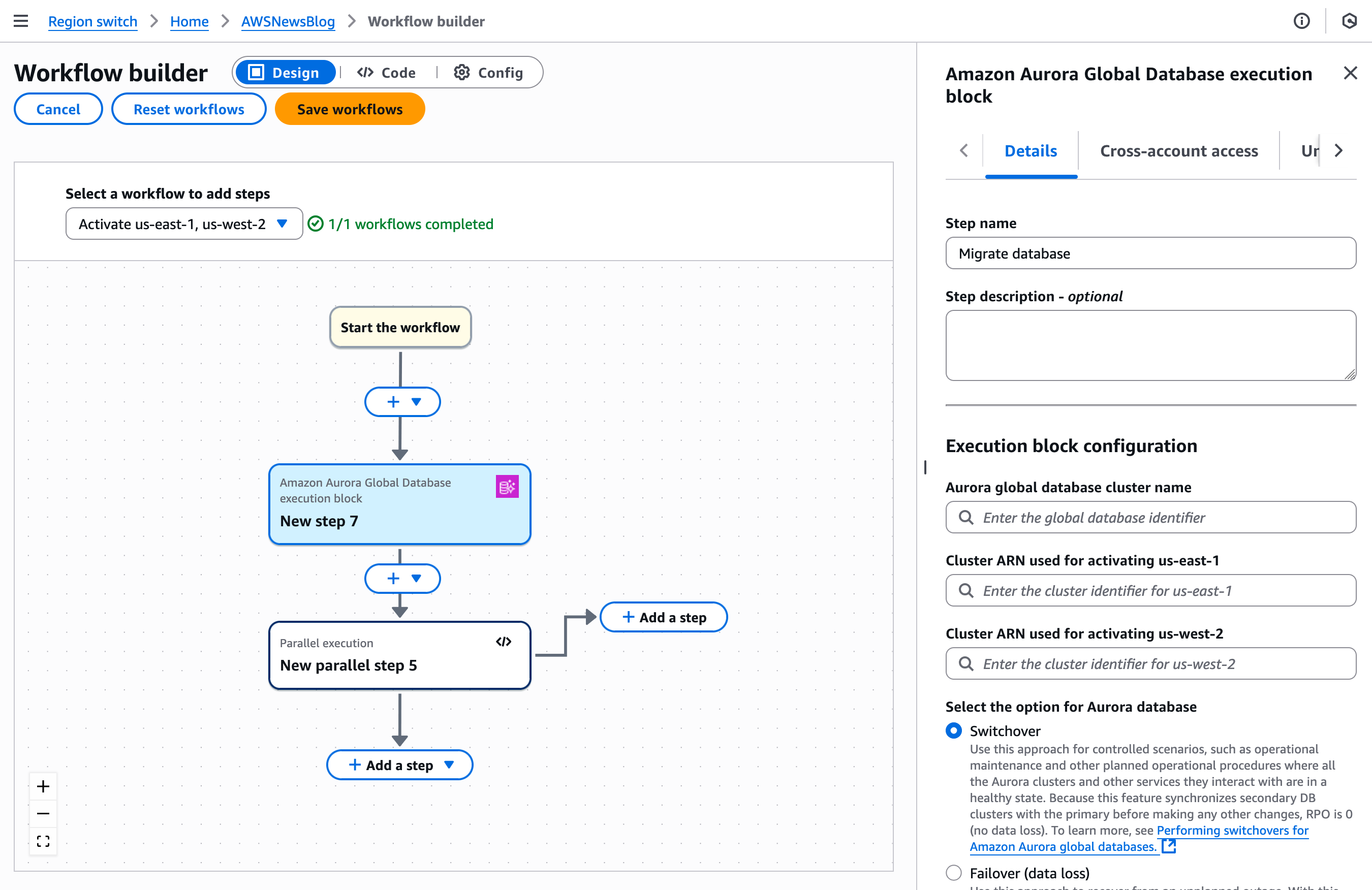
Plans enable you to build specific workflows that will recover your applications using Region switch execution blocks. You can build workflows with execution blocks that run sequentially or in parallel to orchestrate the order in which multiple applications or resources recover into the activating Region. A plan is made up of these workflows that allow you to activate or deactivate a specific Region.

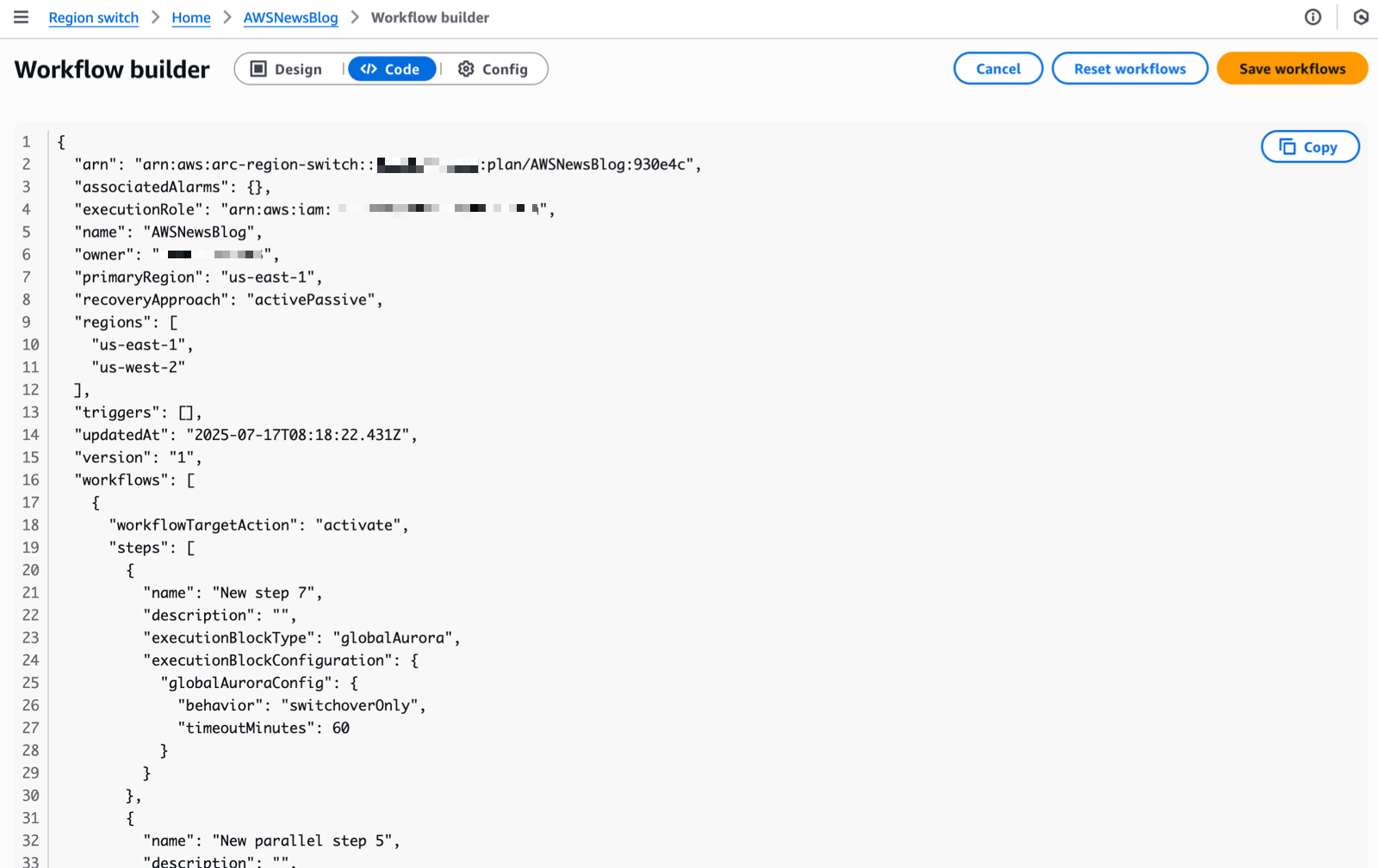
For this demo, I use the graphical editor to create the workflow. But you can also define the workflow in JSON. This format is better suited for automation or when you want to store your workflow definition in a source code management system (SCMS) and your infrastructure as code (IaC) tools, such as AWS CloudFormation.

ARC - define workflows

I can alternate between the Design and the Code views by selecting the corresponding tab next to the Workflow builder title. The JSON view is read-only. I designed the workflow with the graphical editor and I copied the JSON equivalent to store it alongside my IaC project files.

ARC - define workflows as code

Region switch launches an evaluation to validate your recovery strategy every 30 minutes. It regularly checks that all actions defined in your workflows will succeed when executed. This proactive validation assesses various elements, including IAM permissions and resource states across accounts and Regions. By continually monitoring these dependencies, Region switch helps ensure your recovery plans remain viable and identifies potential issues before they impact your actual switch operations.

However, just as an untested backup is not a reliable backup, an untested recovery plan cannot be considered truly validated. While continuous evaluation provides a strong foundation, we strongly recommend regularly executing your plans in test scenarios to verify their effectiveness, understand actual recovery times, and ensure your teams are familiar with the recovery procedures. This hands-on testing is essential for maintaining confidence in your disaster recovery strategy.

Step 3: Create a trigger

A trigger defines the conditions to activate the workflows just created. It’s expressed as a set of CloudWatch alarms. Alarm-based triggers are optional. You can also use Region switch with manual triggers.

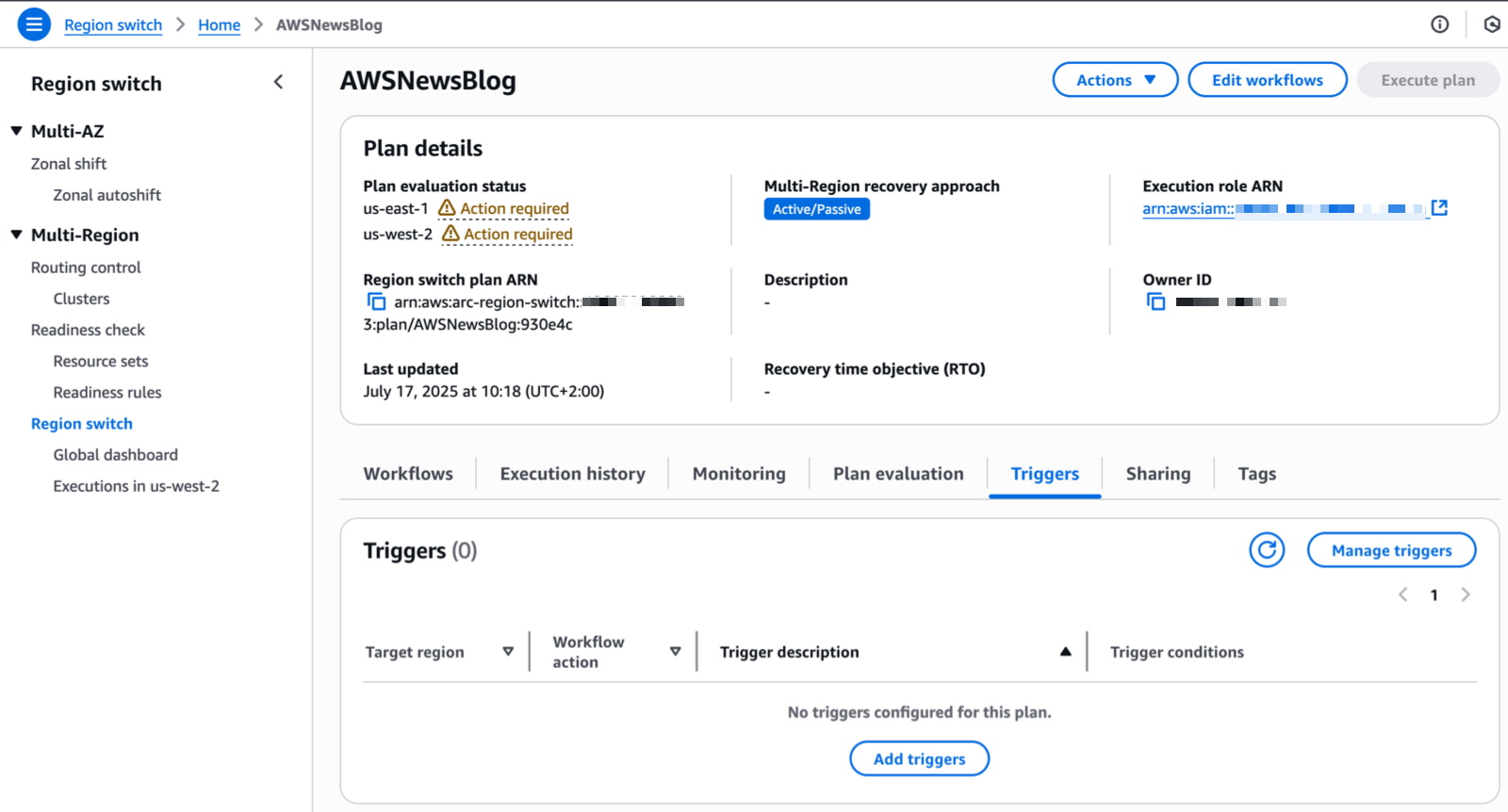
From the Region switch page in the console, I choose the Triggers tab and choose Add triggers.

ARC - Trigger

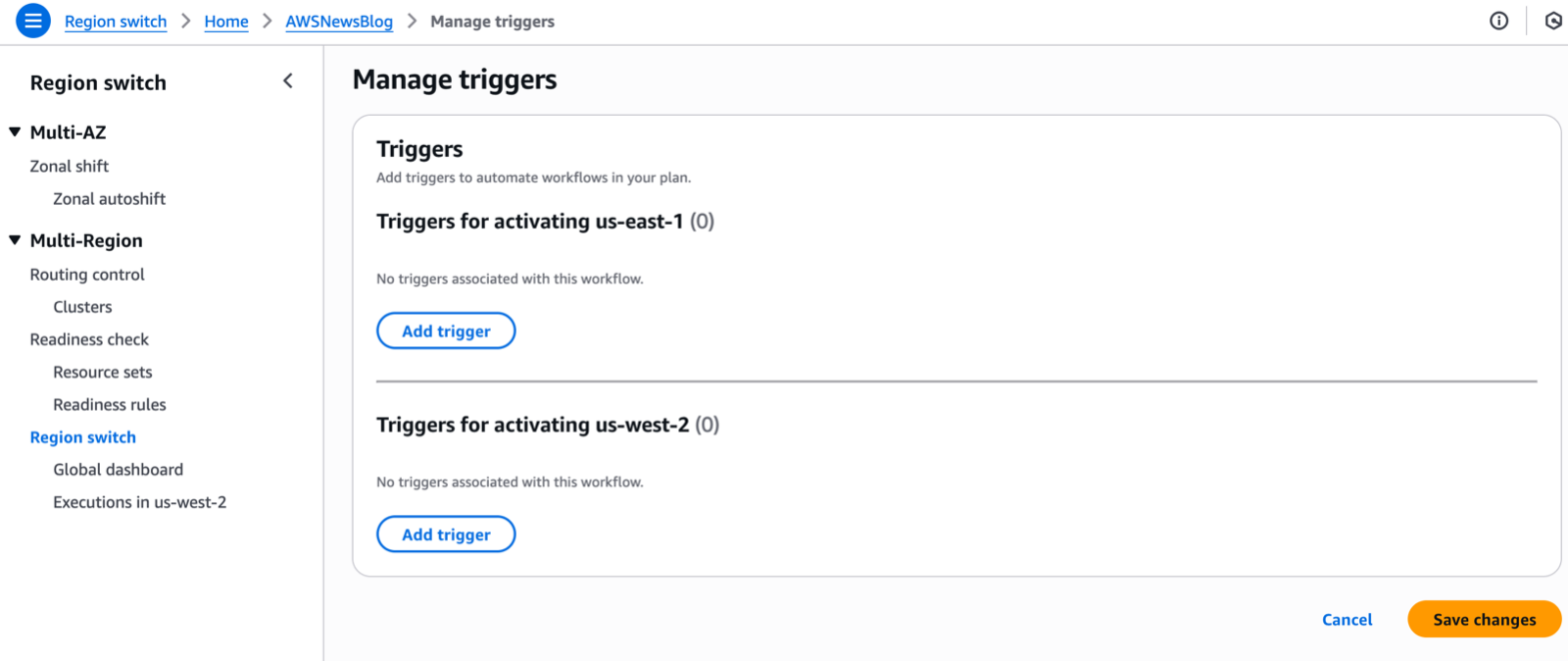
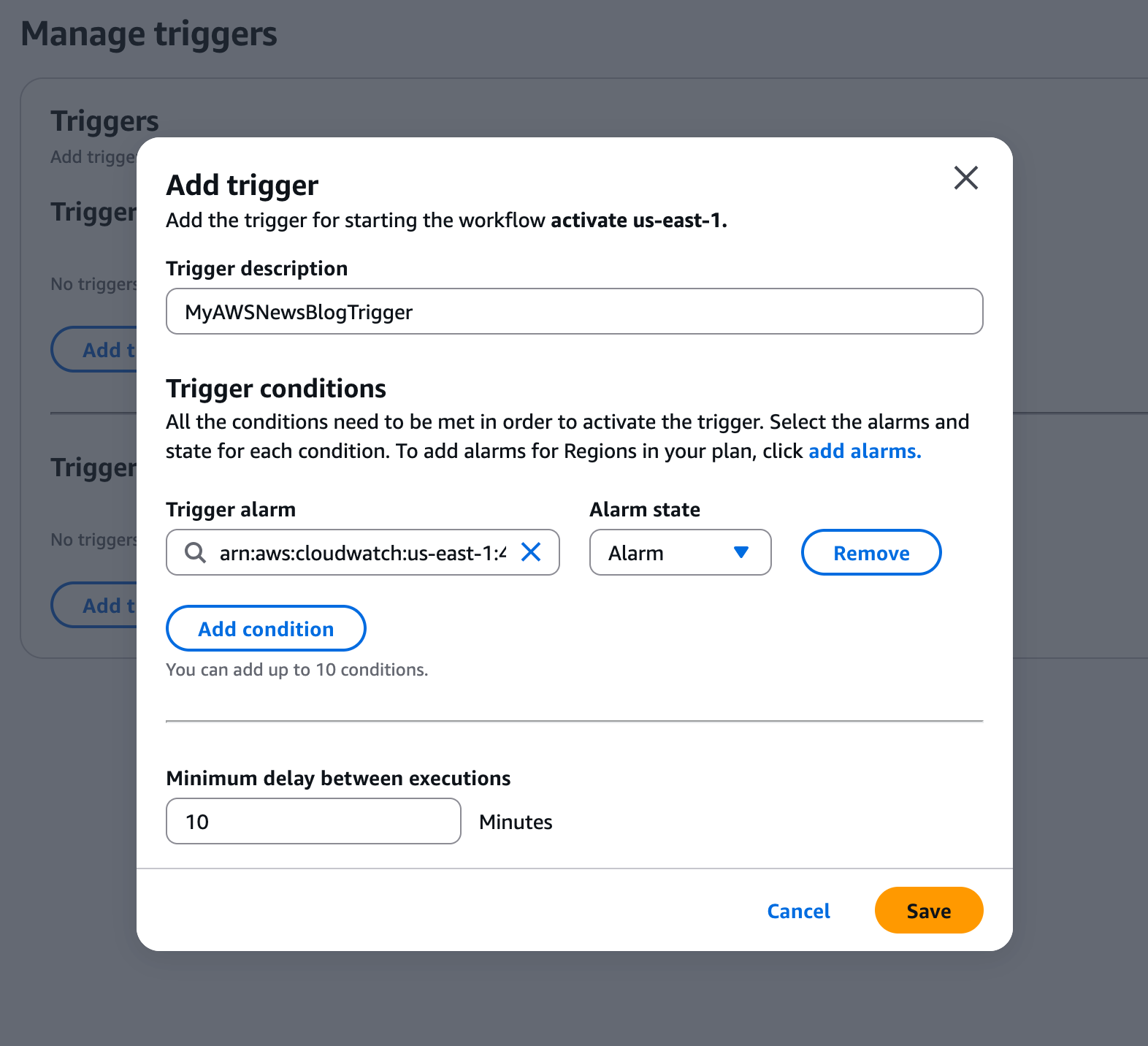
For each Region defined in my plan, I choose Add trigger to define the triggers that will activate the Region.ARC - Trigger 2Finally, I choose the alarms and their state (OK or Alarm) that Region switch will use to trigger the activation of the Region.

ARC - Trigger 3

I’m now ready to test the execution of the plan to switch Regions using Region switch. It’s important to execute the plan from the Region I’m activating (the target Region of the workflow) and use the data plane in that specific Region.

Here is how to execute a plan using the AWS Command Line Interface (AWS CLI):

aws arc-region-switch start-plan-execution \
--plan-arn arn:aws:arc-region-switch::111122223333:plan/resource-id \
--target-region us-west-2 \
--action activate

Pricing and availability
Region switch is available in all commercial AWS Regions at $70 per month per plan. Each plan can include up to 100 execution blocks, or you can create parent plans to orchestrate up to 25 child plans.

Having seen firsthand the engineering effort that goes into building and maintaining multi-Region recovery solutions, I’m thrilled to see how Region switch will help automate this process for our customers. To get started with ARC Region switch, visit the ARC console and create your first Region switch plan. For more information about Region switch, visit the Amazon Application Recovery Controller (ARC) documentation. You can also reach out to your AWS account team with questions about using Region switch for your multi-Region applications.

I look forward to hearing about how you use Region switch to strengthen your multi-Region applications’ resilience.

— seb

Amazon DocumentDB Serverless is now available

Post Syndicated from Channy Yun (윤석찬) original https://aws.amazon.com/blogs/aws/amazon-documentdb-serverless-is-now-available/

Today, we’re announcing the general availability of Amazon DocumentDB Serverless, a new configuration for Amazon DocumentDB (with MongoDB compatibility) that automatically scales compute and memory based on your application’s demand. Amazon DocumentDB Serverless simplifies database management with no upfront commitments or additional costs, offering up to 90 percent cost savings compared to provisioning for peak capacity.

With Amazon DocumentDB Serverless, you can use the same MongoDB compatible-APIs and capabilities as Amazon DocumentDB, including read replicas, Performance Insights, I/O optimized, and integrations with other Amazon Web Services (AWS) services.

Amazon DocumentDB Serverless introduces a new database configuration measured in a DocumentDB Capacity Unit (DCU), a combination of approximately 2 gibibytes (GiB) of memory, corresponding CPU, and networking. It continually tracks utilization of resources such as CPU, memory, and network coming from database operations performed by your application.

Amazon DocumentDB Serverless automatically scales DCUs up or down to meet demand without disrupting database availability. Switching from provisioned instances to serverless in an existing cluster is as straightforward as adding or changing the instance type. This transition doesn’t require any data migration. To learn more, visit How Amazon DocumentDB Serverless works.

Some key use cases and advantages of Amazon DocumentDB Serverless include:

  • Variable workloads – With Amazon DocumentDB Serverless, you can handle sudden traffic spikes such as periodic promotional events, development and testing environments, and new applications where usage might ramp up quickly. You can also build agentic AI applications that benefit from built-in vector search for Amazon DocumentDB and serverless adaptability to handle dynamically invoked agentic AI workflows.
  • Multi-tenant workloads – You can use Amazon DocumentDB Serverless to manage individual database capacity across the entire database fleet. You don’t need to manage hundreds or thousands of databases for enterprises applications or multi-tenant environments of a software as a service (SaaS) vendor.
  • Mixed-use workloads – You can balance read and write capacity in workloads that periodically experience spikes in query traffic, such as online transaction processing (OLTP) applications. By specifying promotion tiers for Amazon DocumentDB Serverless instances in a cluster, you can configure your cluster so that the reader instances can scale independently of the writer instance to handle the additional load.

For steady workloads, Amazon DocumentDB provisioned instances are more suitable. You can select an instance class that offers a predefined amount of memory, CPU power, and I/O bandwidth. If your workload changes when using provisioned instances, you should manually modify the instance class of your writer and readers. Optionally, you can add serverless instances to an existing provisioned Amazon DocumentDB cluster at any time.

Amazon DocumentDB Serverless in action
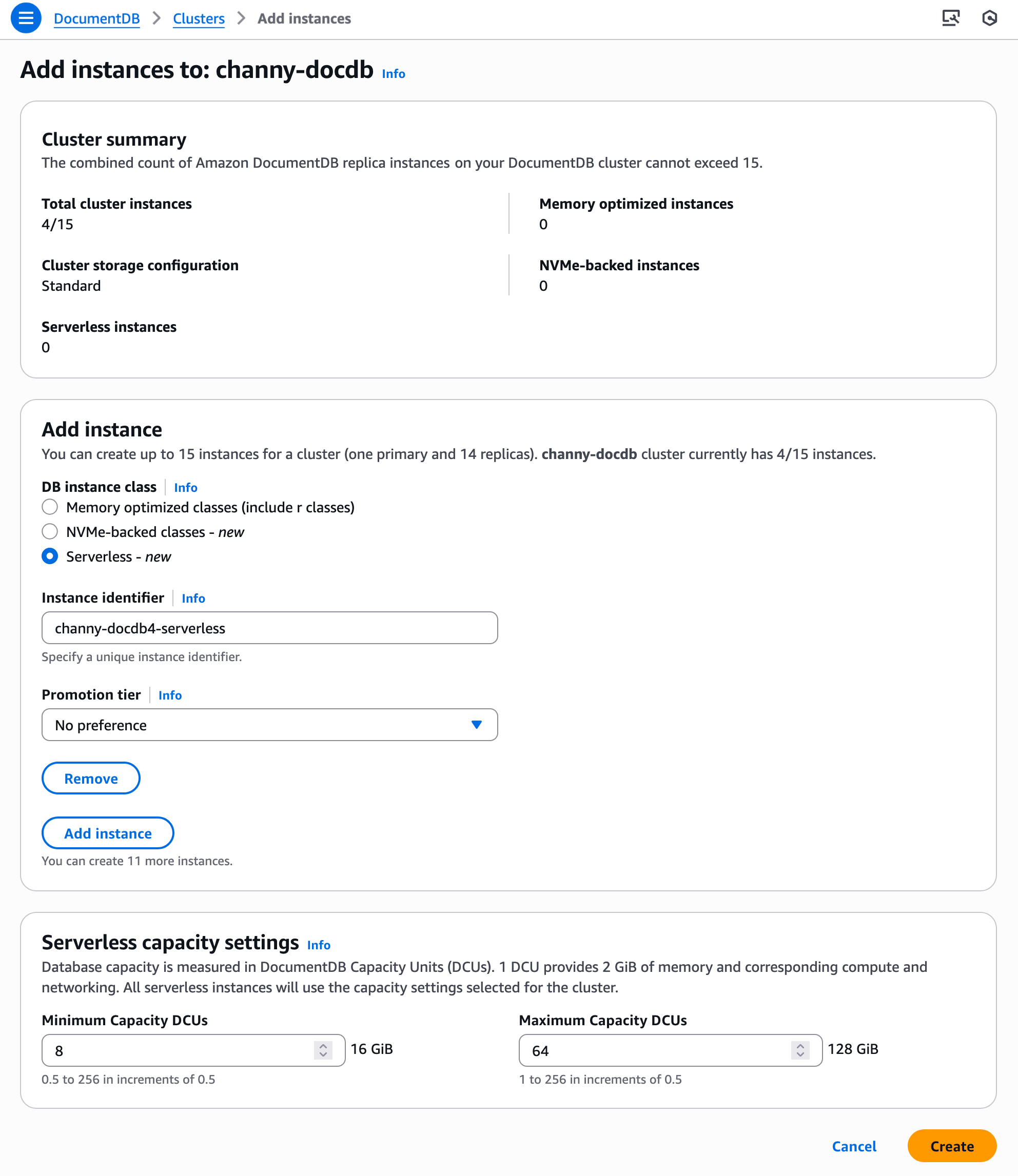
To get started with Amazon DocumentDB Serverless, go to the Amazon DocumentDB console. In the left navigation pane, choose Clusters and Create.

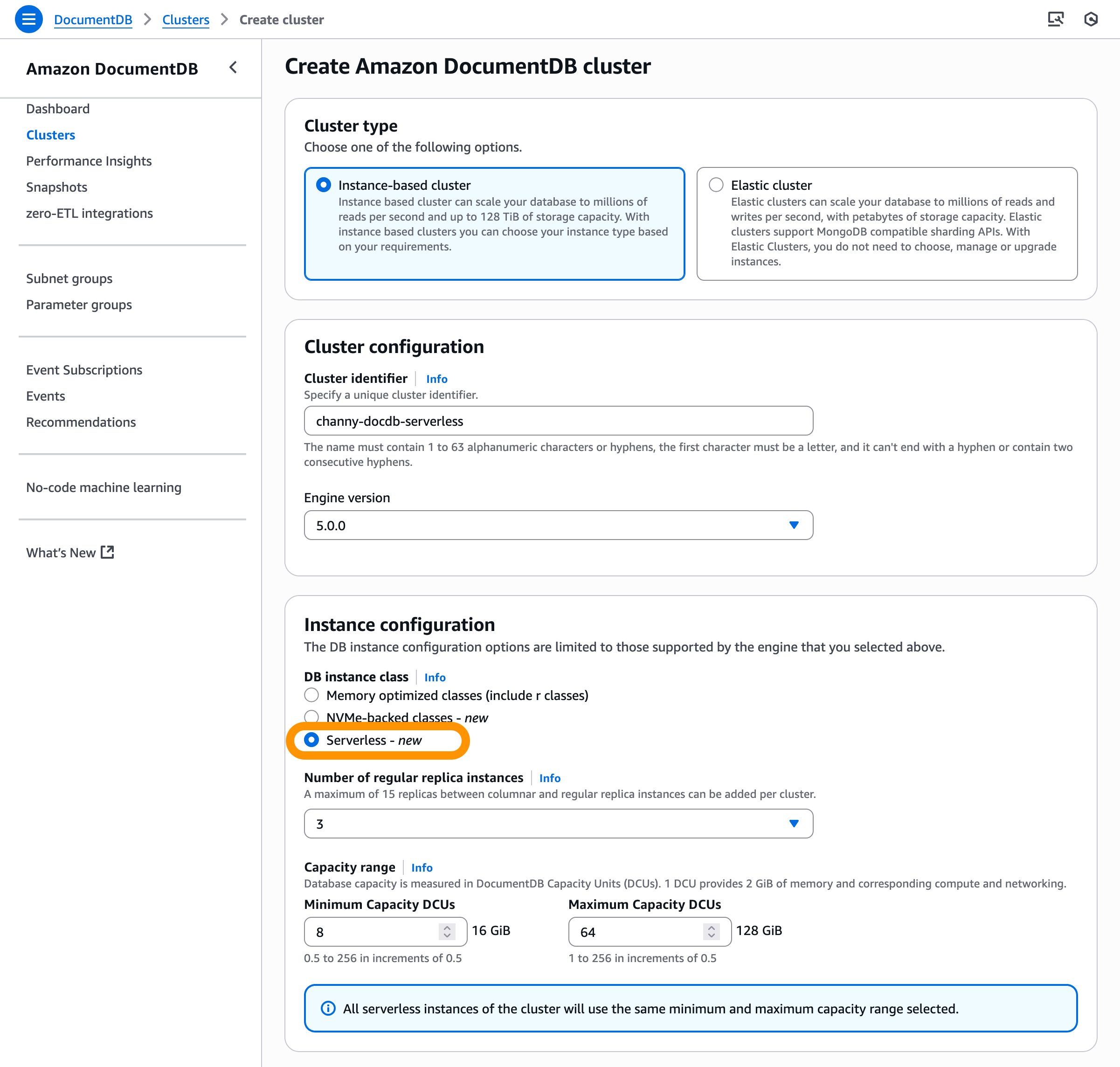
On the Create Amazon DocumentDB cluster page, choose Instance-based cluster type and then Serverless instance configuration. You can choose minimum and maximum capacity DCUs. Amazon DocumentDB Serverless is supported starting with Amazon DocumentDB 5.0.0 and higher with a capacity range of 0.5–256 DCUs.

If you use features such as auditing and Performance Insights, consider adding DCUs for each feature. To learn more, visit Amazon DocumentDB Serverless scaling configuration.

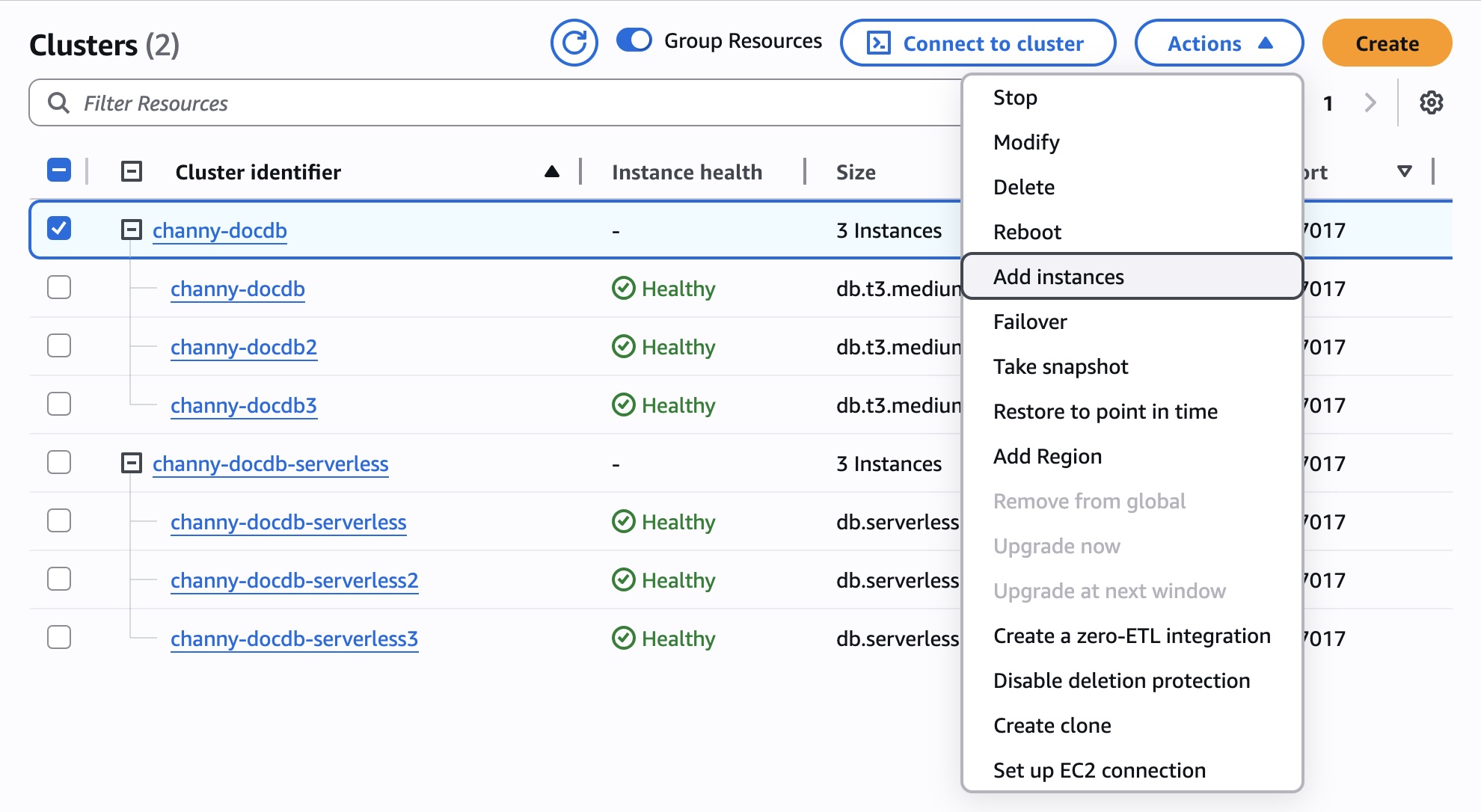
To add a serverless instance to an existing provisioned cluster, choose Add instances on the Actions menu when you choose the provisioned cluster. If you use a cluster with an earlier version such as 3.6 or 4.0, you should first upgrade the cluster to the supported engine version (5.0).

On the Add instances page, choose Serverless in the DB instance class section for each new serverless instance you want to create. To add another instance, choose Add instance and continue adding instances until you have reached the desired number of new instances. Choose Create.

You can perform a failover operation to make a DocumentDB Serverless instance the cluster writer. Also, you can convert any remaining provisioned Amazon DocumentDB instances to DocumentDB Serverless instances by changing an instance’s class or removing them from the cluster by deleting an Amazon DocumentDB instance.

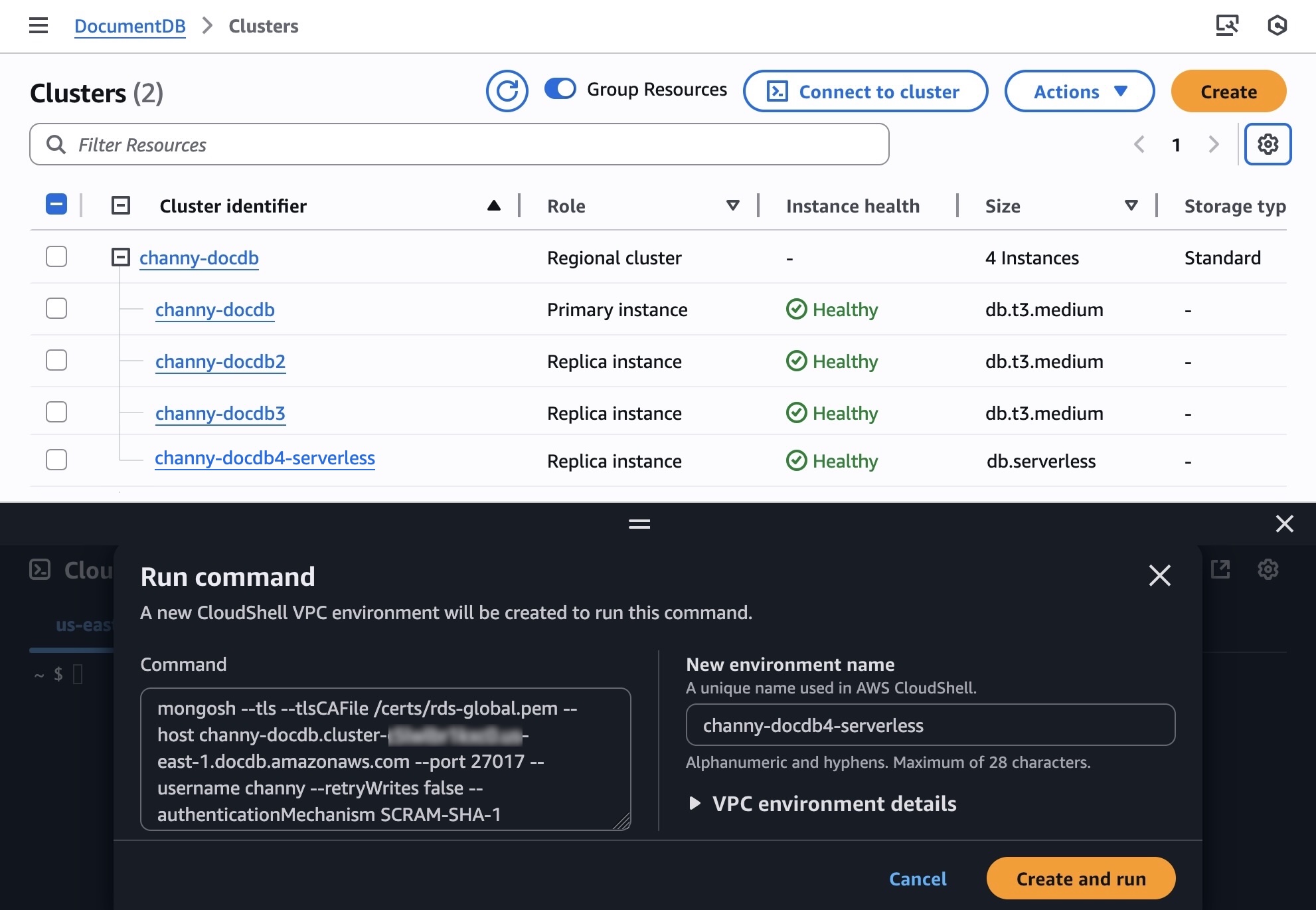
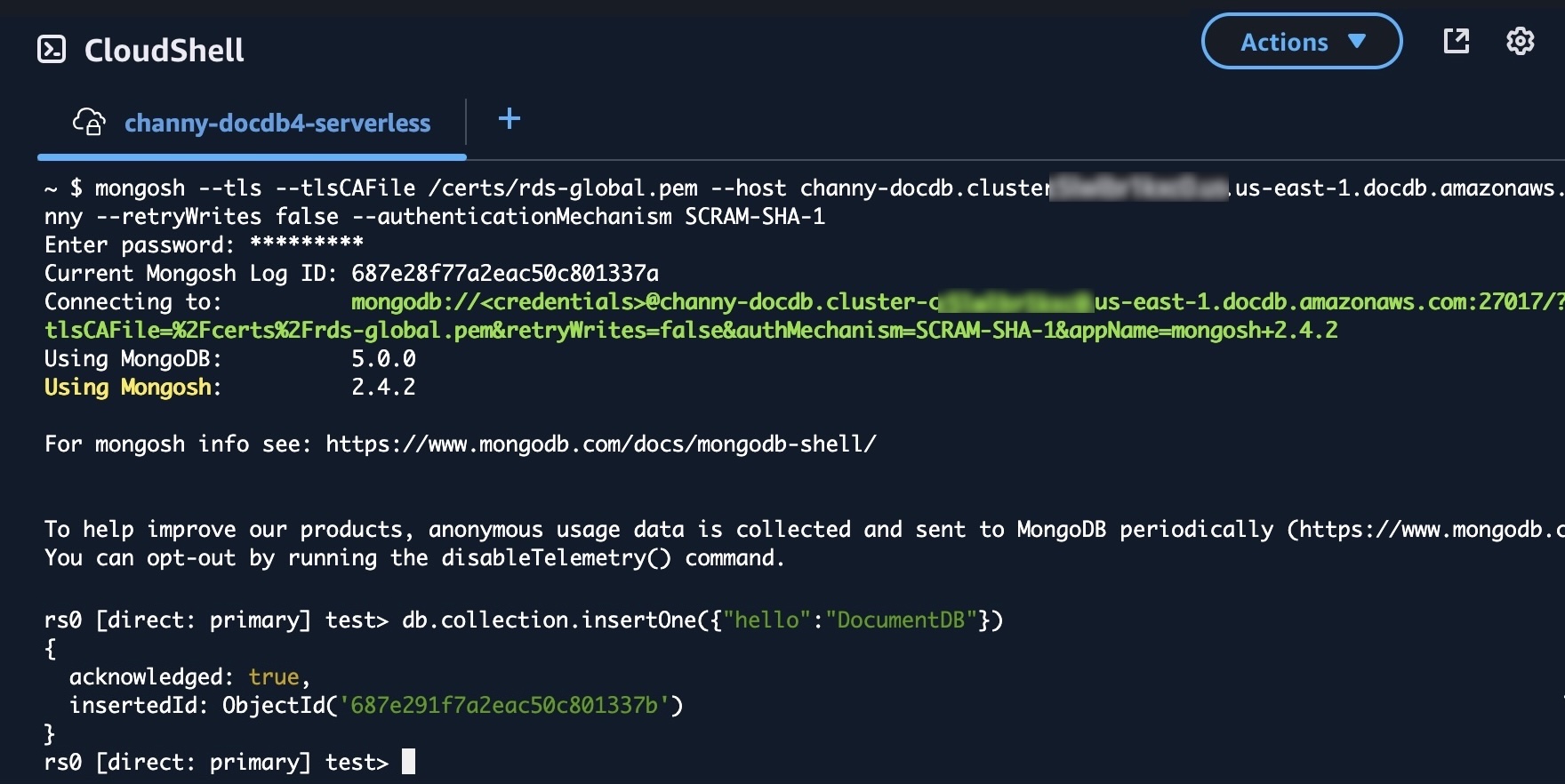
Now, you can connect to your Amazon DocumentDB cluster using AWS CloudShell. Choose Connect to cluster, and you can see the AWS CloudShell Run command screen. Enter a unique name in New environment name and choose Create and run.

When prompted, enter the password for the Amazon DocumentDB cluster. You’re successfully connected to your Amazon DocumentDB cluster, and you can run a few queries to get familiar with using a document database.

To learn more, visit Creating a cluster that uses Amazon DocumentDB Serverless and Managing Amazon DocumentDB Serverless in the AWS documentation.

Now available
Amazon DocumentDB Serverless is now available starting with Amazon DocumentDB 5.0 for both new and existing clusters. You only pay a flat rate per second of DCU usage. To learn more about pricing details and Regional availability, visit the Amazon DocumentDB pricing page.

Give these new features a try in the Amazon DocumentDB console and send feedback to AWS re:Post for Amazon DocumentDB or through your usual AWS Support contacts.

— Channy

AWS Weekly Roundup: SQS fair queues, CloudWatch generative AI observability, and more (July 28, 2025)

Post Syndicated from Micah Walter original https://aws.amazon.com/blogs/aws/aws-weekly-roundup-sqs-fair-queues-cloudwatch-generative-ai-observability-and-more-july-28-2025/

To be honest, I’m still recovering from the AWS Summit in New York, doing my best to level up on launches like Amazon Bedrock AgentCore (Preview) and Amazon Simple Storage Service (S3) Vectors. There’s a lot of new stuff to learn!

Meanwhile, it’s been an exciting week for AWS builders focused on reliability and observability. The standout announcement has to be Amazon SQS fair queues, which tackles one of the most persistent challenges in multi-tenant architectures: the “noisy neighbor” problem. If you’ve ever dealt with one tenant’s message processing overwhelming shared infrastructure and affecting other tenants, you’ll appreciate how this feature enables more balanced message distribution across your applications.

On the AI front, we’re also seeing AWS continue to enhance our observability capabilities with the preview launch of Amazon CloudWatch generative AI observability. This brings AI-powered insights directly into your monitoring workflows, helping you understand infrastructure and application performance patterns in new ways. And for those managing Amazon Connect environments, the addition of AWS CloudFormation for message template attachments makes it easier to programmatically deploy and manage email campaign assets across different environments.

Last week’s launches

  • Amazon SQS Fair Queues — AWS launched Amazon SQS fair queues to help mitigate the “noisy neighbor” problem in multi-tenant systems, enabling more balanced message processing and improved application resilience across shared infrastructure.
  • Amazon CloudWatch Generative AI Observability (Preview) — AWS launched a preview of Amazon CloudWatch generative AI observability, enabling users to gain AI-powered insights into their cloud infrastructure and application performance through advanced monitoring and analysis capabilities.
  • Amazon Connect CloudFormation Support for Message Template Attachments —AWS has expanded the capabilities of Amazon Connect by introducing support for AWS CloudFormation for Outbound Campaign message template attachments, enabling customers to programmatically manage and deploy email campaign attachments across different environments.
  • Amazon Connect Forecast Editing — Amazon Connect introduces a new forecast editing UI that allows contact center planners to quickly adjust forecasts by percentage or exact values across specific date ranges, queues, and channels for more responsive workforce planning.
  • Bloom Filters for Amazon ElastiCache — Amazon ElastiCache now supports Bloom filters in version 8.1 for Valkey, offering a space-efficient way to quickly check if an item is in a set with over 98% memory efficiency compared to traditional sets.
  • Amazon EC2 Skip OS Shutdown Option — AWS has introduced a new option for Amazon EC2 that allows customers to skip the graceful operating system shutdown when stopping or terminating instances, enabling faster application recovery and instance state transitions.
  • AWS HealthOmics Git Repository Integration — AWS HealthOmics now supports direct Git repository integration for workflow creation, allowing researchers to seamlessly pull workflow definitions from GitHub, GitLab, and Bitbucket repositories while enabling version control and reproducibility.
  • AWS Organizations Tag Policies Wildcard Support — AWS Organizations now supports a wildcard statement (ALL_SUPPORTED) in Tag Policies, allowing users to apply tagging rules to all supported resource types for a given AWS service in a single line, simplifying policy creation and reducing complexity.

Blogs of note

Beyond IAM Access Keys: Modern Authentication Approaches — AWS recommends moving beyond traditional IAM access keys to more secure authentication methods, reducing risks of credential exposure and unauthorized access by leveraging modern, more robust approaches to identity management.

Upcoming AWS events

AWS re:Invent 2025 (December 1-5, 2025, Las Vegas) — AWS’s flagship annual conference offering collaborative innovation through peer-to-peer learning, expert-led discussions, and invaluable networking opportunities.

AWS Summits — Join free online and in-person events that bring the cloud computing community together to connect, collaborate, and learn about AWS. Register in your nearest city: Mexico City (August 6) and Jakarta (August 7).

AWS Community Days — Join community-led conferences that feature technical discussions, workshops, and hands-on labs led by expert AWS users and industry leaders from around the world: Singapore (August 2), Australia (August 15), Adria (September 5), Baltic (September 10), and Aotearoa (September 18).

AWS Weekly Roundup: Kiro, AWS Lambda remote debugging, Amazon ECS blue/green deployments, Amazon Bedrock AgentCore, and more (July 21, 2025)

Post Syndicated from Donnie Prakoso original https://aws.amazon.com/blogs/aws/aws-weekly-roundup-kiro-aws-lambda-remote-debugging-amazon-ecs-blue-green-deployments-amazon-bedrock-agentcore-and-more-july-21-2025/

I’m writing this as I depart from Ho Chi Minh City back to Singapore. Just realized what a week it’s been, so let me rewind a bit. This week, I tried my first Corne keyboard, wrapped up rehearsals for AWS Summit Jakarta with speakers who are absolutely raising the bar, and visited Vietnam to participate as a technical keynote speaker in AWS Community Day Vietnam, an energetic gathering of hundreds of cloud practitioners and AWS enthusiasts who shared knowledge through multiple technical tracks and networking sessions.

What I presented was a keynote titled “Reinvent perspective as modern developers”, featuring serverless, containers, and how we can cut the learning curves and be more productive with Amazon Q Developer and Kiro. I got a chance to discuss with a couple of AWS Community Builders and community developers, who shared how Amazon Q Developer actually addressed their challenges on building applications, with several highlighting significant productivity improvements and smoother learning curves in their cloud development journeys.

As I head back to Singapore, I’m carrying with me not just memories of delicious cà phê sữa đá (iced milk coffee), but also fresh perspectives and inspirations from this vibrant community of cloud innovators.

Introducing Kiro
One of the highlights from last week was definitely Kiro, an AI IDE that helps you deliver from concept to production through a simplified developer experience for working with AI agents. Kiro goes beyond “vibe coding” with features like specs and hooks that help get prototypes into production systems with proper planning and clarity.

Join the waitlist to get notified when it becomes available.

Last week’s AWS Launches
In other news, last week we had AWS Summit in New York, where we released several services. Here are some launches that caught my attention:

Console to IDE Integration

ECS Blue-Green Deployments

AWS Free Tier Enhanced Benefits

  • Monitor and debug event-driven applications with new Amazon EventBridge logging — Amazon EventBridge now provides enhanced logging capabilities that offer comprehensive event lifecycle tracking with detailed information about successes, failures, and status codes. This new observability feature addresses microservices and event-driven architecture monitoring challenges by providing visibility into the complete event journey.

EventBridge Enhanced Logging

S3 Vectors Overview

  • Amazon EKS enables ultra-scale AI/ML workloads with support for 100k nodes per cluster — Amazon EKS now supports up to 100,000 worker nodes in a single cluster, enabling customers to scale up to 1.6 million AWS Trainium accelerators or 800K NVIDIA GPUs. This industry-leading scale empowers customers to train trillion-parameter models and advance AGI development while maintaining Kubernetes conformance and familiar developer experience.

EKS Ultra-Scale Performance Improvements

From AWS Builder Center
In case you missed it, we just launched AWS Builder Center and integrated community.aws. Here are my top picks from the posts:

Upcoming AWS events
Check your calendars and sign up for upcoming AWS and AWS Community events:

  • AWS re:Invent – Register now to get a head start on choosing your best learning path, booking travel and accommodations, and bringing your team to learn, connect, and have fun. If you’re an early-career professional, you can apply to the All Builders Welcome Grant program, which is designed to remove financial barriers and create diverse pathways into cloud technology.
  • AWS Builders Online Series – If you’re based in one of the Asia Pacific time zones, join and learn fundamental AWS concepts, architectural best practices, and hands-on demonstrations to help you build, migrate, and deploy your workloads on AWS.
  • AWS Summits — Join free online and in-person events that bring the cloud computing community together to connect, collaborate, and learn about AWS. Register in your nearest city: Taipei (July 29), Mexico City (August 6), and Jakarta (June 26–27).
  • AWS Community Days — Join community-led conferences that feature technical discussions, workshops, and hands-on labs led by expert AWS users and industry leaders from around the world: Singapore (August 2), Australia (August 15), Adria (September 5), Baltic (September 10), and Aotearoa (September 18).

You can browse all upcoming AWS led in-person and virtual developer-focused events.

That’s all for this week. Check back next Monday for another Weekly Roundup!

— Donnie

This post is part of our Weekly Roundup series. Check back each week for a quick roundup of interesting news and announcements from AWS!


Join Builder ID: Get started with your AWS Builder journey at builder.aws.com

Simplify serverless development with console to IDE and remote debugging for AWS Lambda

Post Syndicated from Micah Walter original https://aws.amazon.com/blogs/aws/simplify-serverless-development-with-console-to-ide-and-remote-debugging-for-aws-lambda/

Today, we’re announcing two significant enhancements to AWS Lambda that make it easier than ever for developers to build and debug serverless applications in their local development environments: console to IDE integration and remote debugging. These new capabilities build upon our recent improvements to the Lambda development experience, including the enhanced in-console editing experience and the improved local integrated development environment (IDE) experience launched in late 2024.

When building serverless applications, developers typically focus on two areas to streamline their workflow: local development environment setup and cloud debugging capabilities. While developers can bring functions from the console to their IDE, they’re looking for ways to make this process more efficient. Additionally, as functions interact with various AWS services in the cloud, developers want enhanced debugging capabilities to identify and resolve issues earlier in the development cycle, reducing their reliance on local emulation and helping them optimize their development workflow.

Console to IDE integration

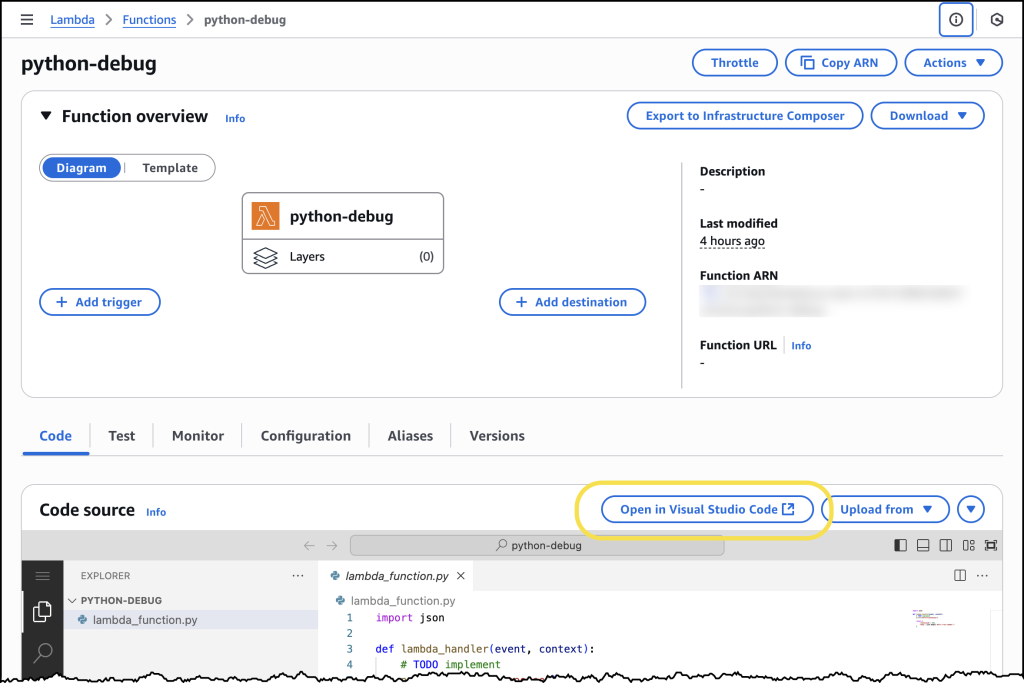
To address the first challenge, we’re introducing console to IDE integration, which streamlines the workflow from the AWS Management Console to Visual Studio Code (VS Code). This new capability adds an Open in Visual Studio Code button to the Lambda console, enabling developers to quickly move from viewing their function in the browser to editing it in their IDE, eliminating the time-consuming setup process for local development environments.

The console to IDE integration automatically handles the setup process, checking for VS Code installation and the AWS Toolkit for VS Code. For developers that have everything already configured, choosing the button immediately opens their function code in VS Code, so they can continue editing and deploy changes back to Lambda in seconds. If VS Code isn’t installed, it directs developers to the download page, and if the AWS Toolkit is missing, it prompts for installation.

To use console to IDE, look for the Open in VS Code button in either the Getting Started popup after creating a new function or the Code tab of existing Lambda functions. After selecting, VS Code opens automatically (installing AWS Toolkit if needed). Unlike the console environment, you now have access to a full development environment with integrated terminal – a significant improvement for developers who need to manage packages (npm install, pip install), run tests, or use development tools like linters and formatters. You can edit code, add new files/folders, and any changes you make will trigger an automatic deploy prompt. When you choose to deploy, the AWS Toolkit automatically deploys your function to your AWS account.

Screenshot showing Console to IDE

Remote debugging

Once developers have their functions in their IDE, they can use remote debugging to debug Lambda functions deployed in their AWS account directly from VS Code. The key benefit of remote debugging is that it allows developers to debug functions running in the cloud while integrated with other AWS services, enabling faster and more reliable development.

With remote debugging, developers can debug their functions with complete access to Amazon Virtual Private Cloud (VPC) resources and AWS Identity and Access Management (AWS IAM) roles, eliminating the gap between local development and cloud execution. For example, when debugging a Lambda function that interacts with an Amazon Relational Database Service (Amazon RDS) database in a VPC, developers can now debug the execution environment of the function running in the cloud within seconds, rather than spending time setting up a local environment that might not match production.

Getting started with remote debugging is straightforward. Developers can select a Lambda function in VS Code and enable debugging in seconds. AWS Toolkit for VS Code automatically downloads the function code, establishes a secure debugging connection, and enables breakpoint setting. When debugging is complete, AWS Toolkit for VS Code automatically cleans up the debugging configuration to prevent any impact on production traffic.

Let’s try it out

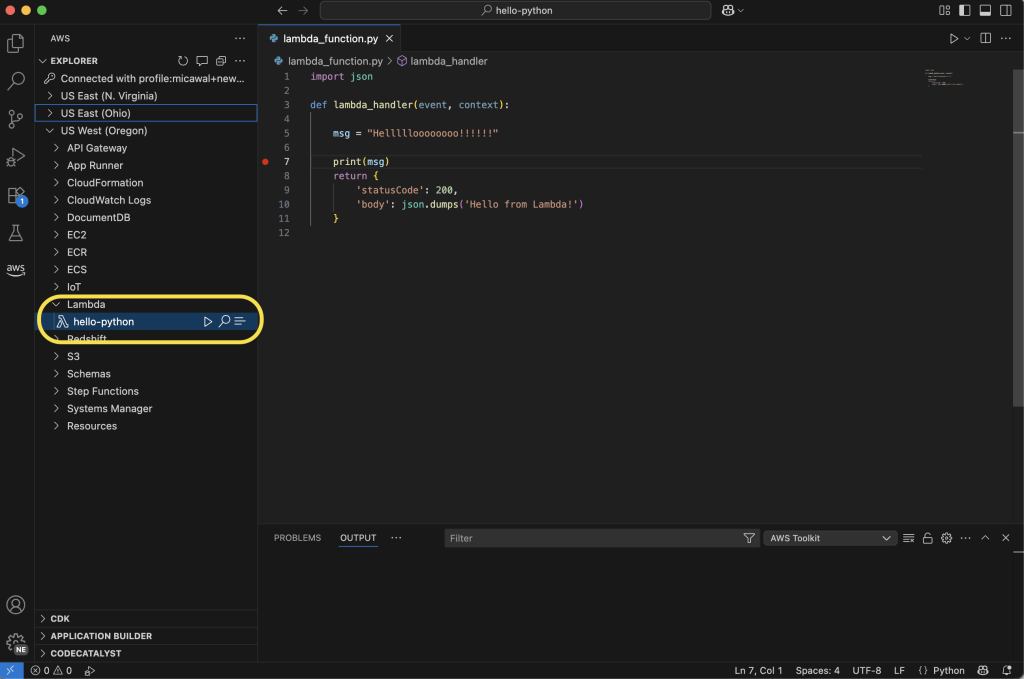
To take remote debugging for a spin, I chose to start with a basic “hello world” example function, written in Python. I had previously created the function using the AWS Management Console for AWS Lambda. Using the AWS Toolkit for VS Code, I can navigate to my function in the Explorer pane. Hovering over my function, I can right-click (ctrl-click in Windows) to download the code to my local machine to edit the code in my IDE. Saving the file will ask me to decide if I want to deploy the latest changes to Lambda.

Screenshot view of the Lambda Debugger in VS Code

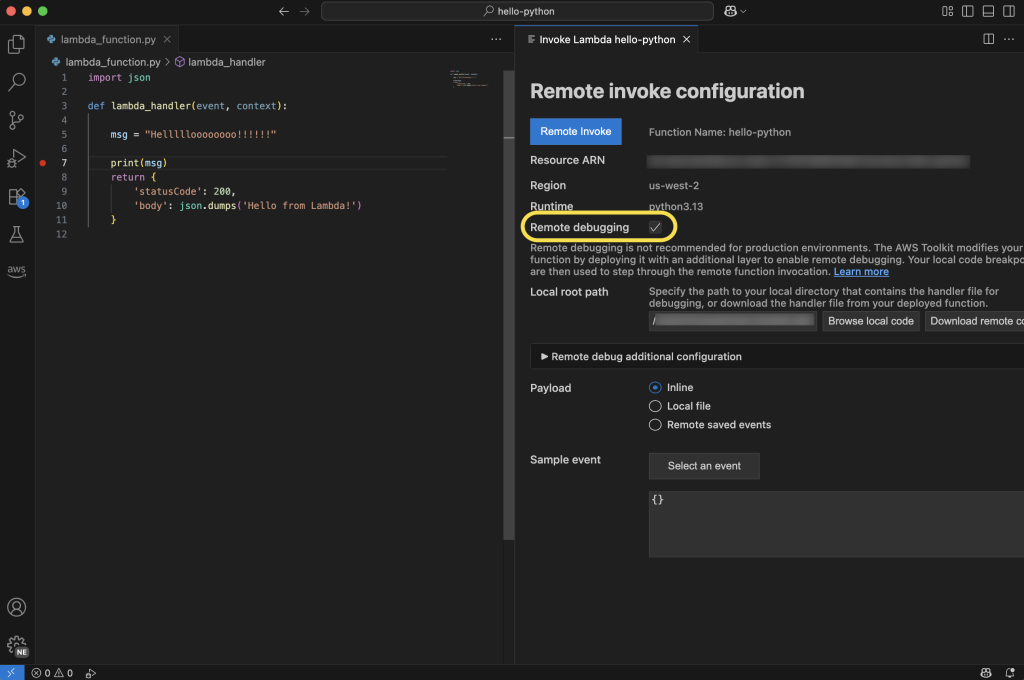
From here, I can select the play icon to open the Remote invoke configuration page for my function. This dialog will now display a Remote debugging option, which I configure to point at my local copy of my function handler code. Before choosing Remote invoke, I can set breakpoints on the left anywhere I want my code to pause for inspection.

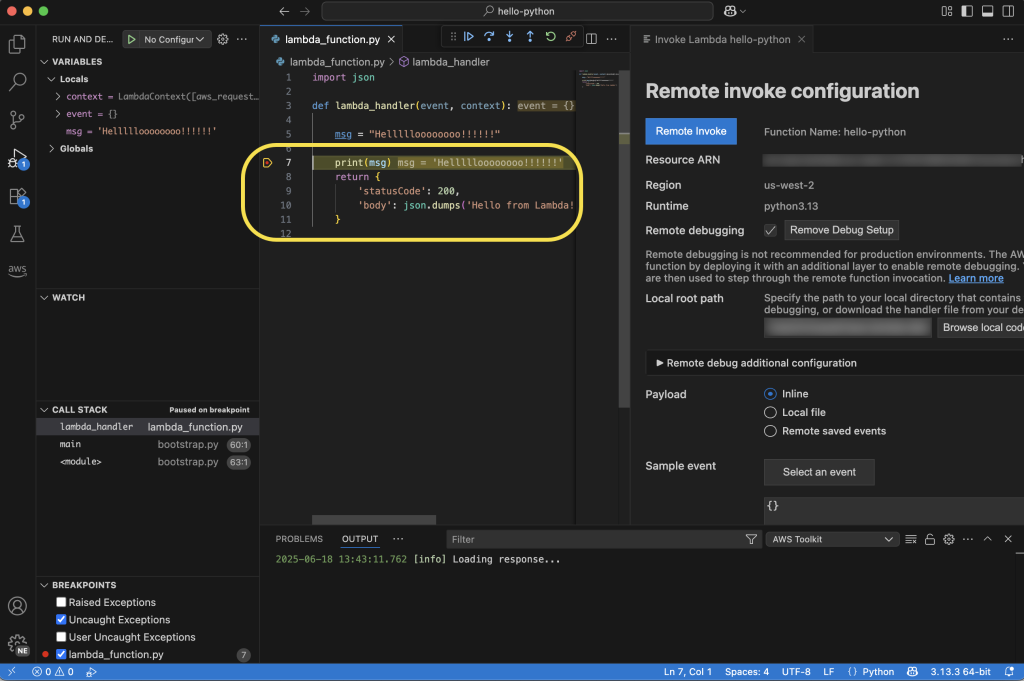
My code will be running in the cloud after it’s invoked, and I can monitor its status in real time in VS Code. In the following screenshot, you can see I’ve set a breakpoint at the print statement. My function will pause execution at this point in my code, and I can inspect things like local variable values before either continuing to the next breakpoint or stepping into the code line by line.

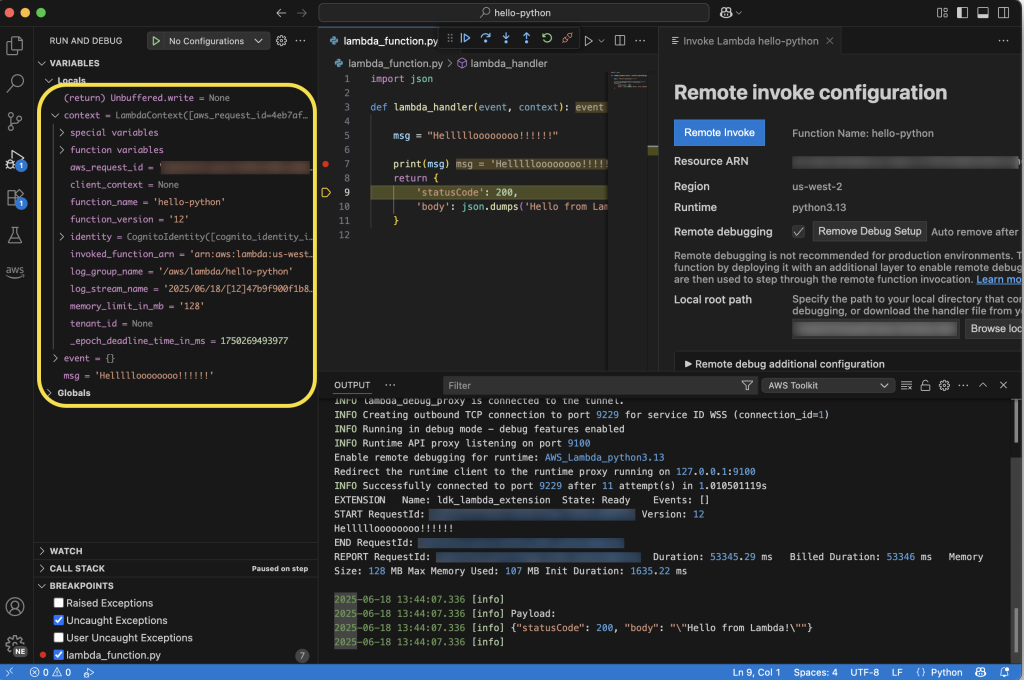
Here, you can see that I’ve chosen to step into the code, and as I go through it line by line, I can see the context and local and global variables displayed on the left side of the IDE. Additionally, I can follow the logs in the Output tab at the bottom of the IDE. As I step through, I’ll see any log messages or output messages from the execution of my function in real time.

Enhanced development workflow

These new capabilities work together to create a more streamlined development experience. Developers can start in the console, quickly transition to VS Code using the console to IDE integration, and then use remote debugging to debug their functions running in the cloud. This workflow eliminates the need to switch between multiple tools and environments, helping developers identify and fix issues faster.

Now available

You can start using these new features through the AWS Management Console and VS Code with the AWS Toolkit for VS Code (v3.69.0 or later) installed. Console to IDE integration is available in all commercial AWS Regions where Lambda is available, except AWS GovCloud (US) Regions. Learn more about it in Lambda and AWS Toolkit for VS Code documentation. To learn more about remote debugging capability, including AWS Regions it is available in, visit the AWS Toolkit for VS Code and Lambda documentation.

Console to IDE and remote debugging are available to you at no additional cost. With remote debugging, you pay only for the standard Lambda execution costs during debugging sessions. Remote debugging will support Python, Node.js, and Java runtimes at launch, with plans to expand support to additional runtimes in the future.

These enhancements represent a significant step forward in simplifying the serverless development experience, which means developers can build and debug Lambda functions more efficiently than ever before.

AWS AI League: Learn, innovate, and compete in our new ultimate AI showdown

Post Syndicated from Elizabeth Fuentes original https://aws.amazon.com/blogs/aws/aws-ai-league-learn-innovate-and-compete-in-our-new-ultimate-ai-showdown/

Since 2018, AWS DeepRacer has engaged over 560,000 builders worldwide, demonstrating that developers learn and grow through competitive experiences. Today, we’re excited to expand into the generative AI era with AWS Artificial Intelligence (AI) League.

This is a unique competitive experience – your chance to dive deep into generative AI regardless of your skill level, compete with peers, and build solutions that solve actual business problems through an engaging, competitive experience.

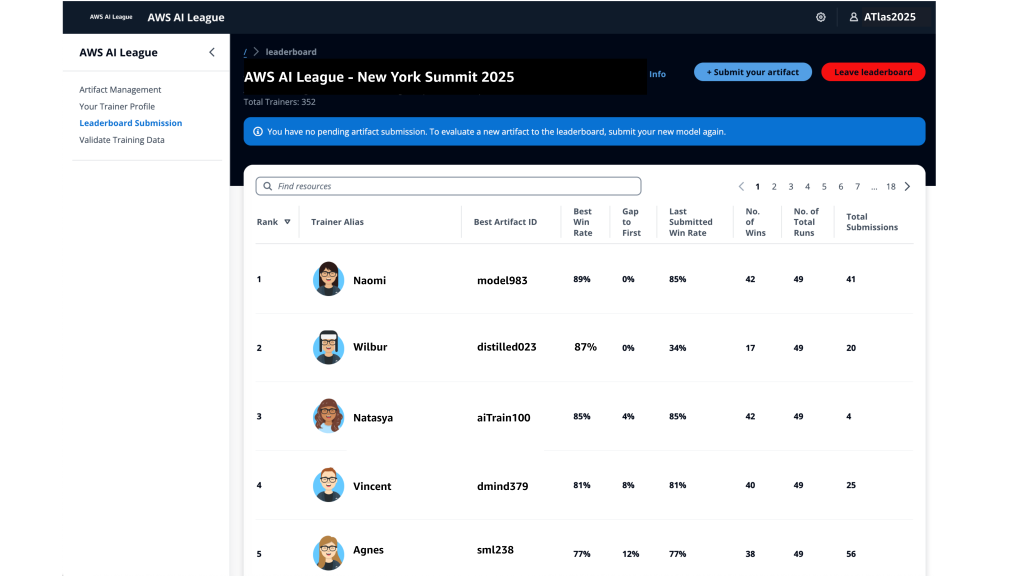
With AWS AI League, your organization hosts private tournaments where teams collaborate and compete to solve real-world business use cases using practical AI skills. Participants craft effective prompts and fine-tune models while building powerful generative AI solutions relevant for their business. Throughout the competition, participants’ solutions are evaluated against reference standards on a real-time leaderboard that tracks performance based on accuracy and latency.

The AWS AI League experience starts with a 2-hour hands-on workshop led by AWS experts. This is followed by self-paced experimentation, culminating in a gameshow-style grand finale where participants showcase their generative AI creations addressing business challenges. Organizations can set up their own AWS AI League within half a day. The scalable design supports 500 to 5,000 employees while maintaining the same efficient timeline.

Supported by up to $2 million in AWS credits and a $25,000 championship prize pool at AWS re:Invent 2025, the program provides a unique opportunity to solve real business challenges.

AWS AI League transforms how organizations develop generative AI capabilities
AWS AI League transforms how organizations develop generative AI capabilities by combining hands-on skills development, domain expertise, and gamification. This approach makes AI learning accessible and engaging for all skill levels. Teams collaborate through industry-specific challenges that mirror real organizational needs, with each challenge providing reference datasets and evaluation standards that reflect actual business requirements.

  • Customizable industry-specific challenges – Tailor competitions to your specific business context. Healthcare teams work on patient discharge summaries, financial services focus on fraud detection, and media companies develop content creation solutions.
  • Integrated AWS AI stack experience – Participants gain hands-on experience with AWS AI and ML tools, including Amazon SageMaker AI, Amazon Bedrock, and Amazon Nova, accessible from Amazon SageMaker Unified Studio. Teams work through a secure, cost-controlled environment within their organization’s AWS account.
  • Real-time performance tracking – The leaderboard evaluates submissions against established benchmarks and reference standards throughout the competition, providing immediate feedback on accuracy and speed so teams can iterate and improve their solutions. During the final round, this scoring includes expert evaluation where domain experts and a live audience participate in real-time voting to determine which AI solutions best solve real business challenges.

  • AWS AI League offers two foundational competition tracks:
    • Prompt Sage – The Ultimate Prompt Battle – Race to craft the perfect AI prompts that unlock breakthrough solutions. whether you detect financial fraud or streamlining healthcare workflows, every word counts as they climb the leaderboard using zero-shot learning and chain-of-thought reasoning.
    • Tune Whiz – The Model Mastery Showdown – Generic AI models meet their match as you sculpt them into industry-specific powerhouses. Armed with your domain expertise and specialized questions, competitors fine-tune models that speak your business language fluently. Victory goes to who achieve the perfect balance of blazing performance, lightning efficiency, and cost optimization.

As Generative AI continues to evolve, AWS AI League will regularly introduce new challenges and formats in addition to these tracks.

Get started today
Ready to get started? Organizations can host private competitions by applying through the AWS AI League page. Individual developers can join public competitions at AWS Summits and AWS re:Invent.

PS: Writing a blog post at AWS is always a team effort, even when you see only one name under the post title. In this case, I want to thank Natasya Idries, for her generous help with technical guidance, and expertise, which made this overview possible and comprehensive.

— Eli

Accelerate safe software releases with new built-in blue/green deployments in Amazon ECS

Post Syndicated from Donnie Prakoso original https://aws.amazon.com/blogs/aws/accelerate-safe-software-releases-with-new-built-in-blue-green-deployments-in-amazon-ecs/

While containers have revolutionized how development teams package and deploy applications, these teams have had to carefully monitor releases and build custom tooling to mitigate deployment risks, which slows down shipping velocity. At scale, development teams spend valuable cycles building and maintaining undifferentiated deployment tools instead of innovating for their business.

Starting today, you can use the built-in blue/green deployment capability in Amazon Elastic Container Service (Amazon ECS) to make your application deployments safer and more consistent. This new capability eliminates the need to build custom deployment tooling while giving you the confidence to ship software updates more frequently with rollback capability.

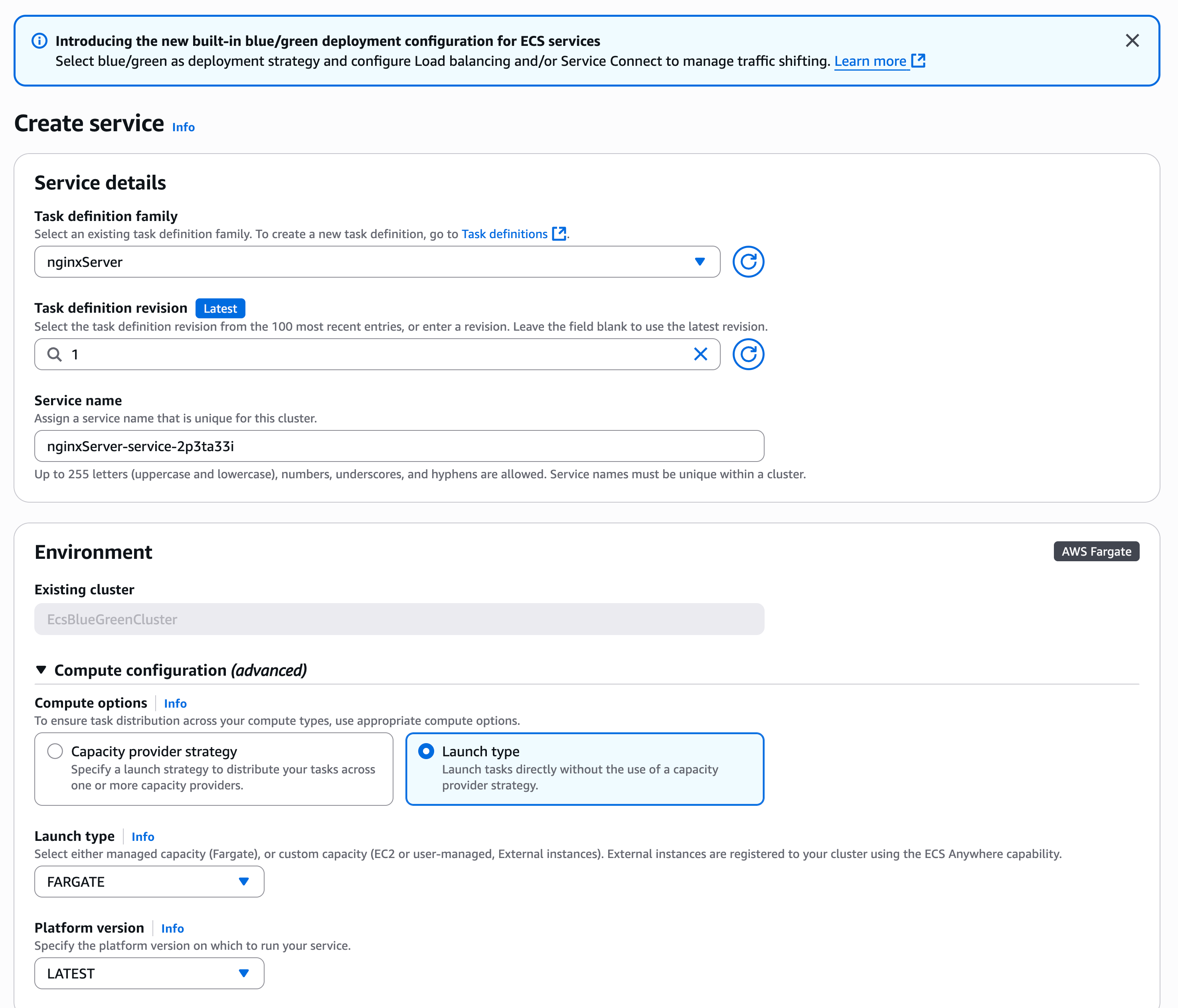
Here’s how you can enable the built-in blue/green deployment capability in the Amazon ECS console.

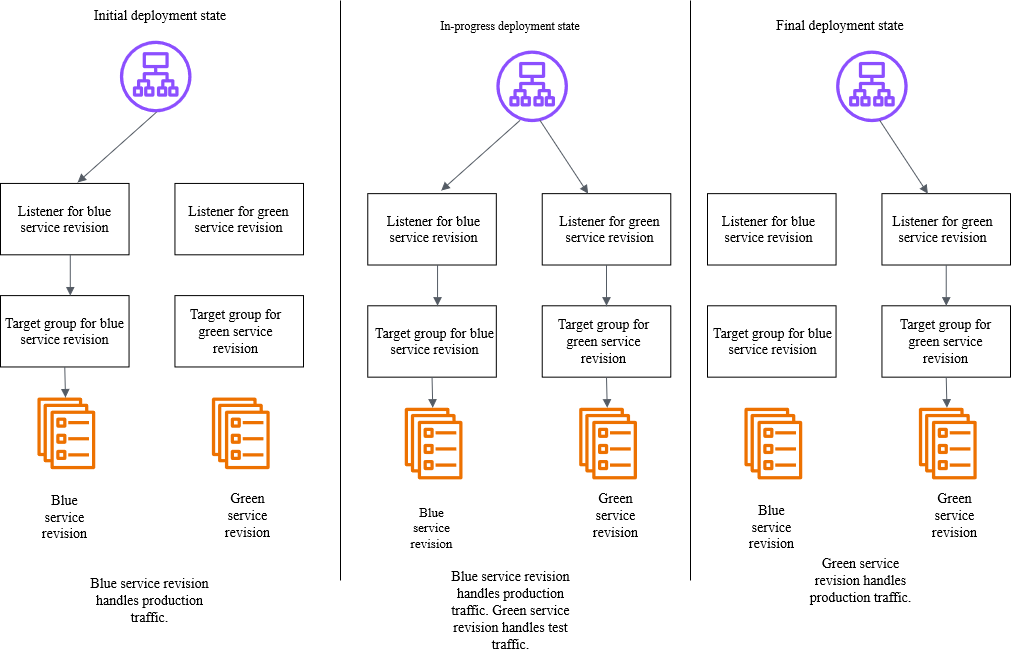
You create a new “green” application environment while your existing “blue” environment continues to serve live traffic. After monitoring and testing the green environment thoroughly, you route the live traffic from blue to green. With this capability, Amazon ECS now provides built-in functionality that makes containerized application deployments safer and more reliable.

Below is a diagram illustrating how blue/green deployment works by shifting application traffic from the blue environment to the green environment. You can learn more at the Amazon ECS blue/green service deployments workflow page.

Amazon ECS orchestrates this entire workflow while providing event hooks to validate new versions using synthetic traffic before routing production traffic. You can validate new software versions in production environments before exposing them to end users and roll back near-instantaneously if issues arise. Because this functionality is built directly into Amazon ECS, you can add these safeguards by simply updating your configuration without building any custom tooling.

Getting started
Let me walk you through a demonstration that showcases how to configure and use blue/green deployments for an ECS service. Before that, there are a few setup steps that I need to complete, including configuring AWS Identity and Access Management (IAM) roles, which you can find on the Required resources for Amazon ECS blue/green deployments Documentation page.

For this demonstration, I want to deploy a new version of my application using the blue/green strategy to minimize risk. First, I need to configure my ECS service to use blue/green deployments. I can do this through the ECS console, AWS Command Line Interface (AWS CLI), or using infrastructure as code.

Using the Amazon ECS console, I create a new service and configure it as usual:

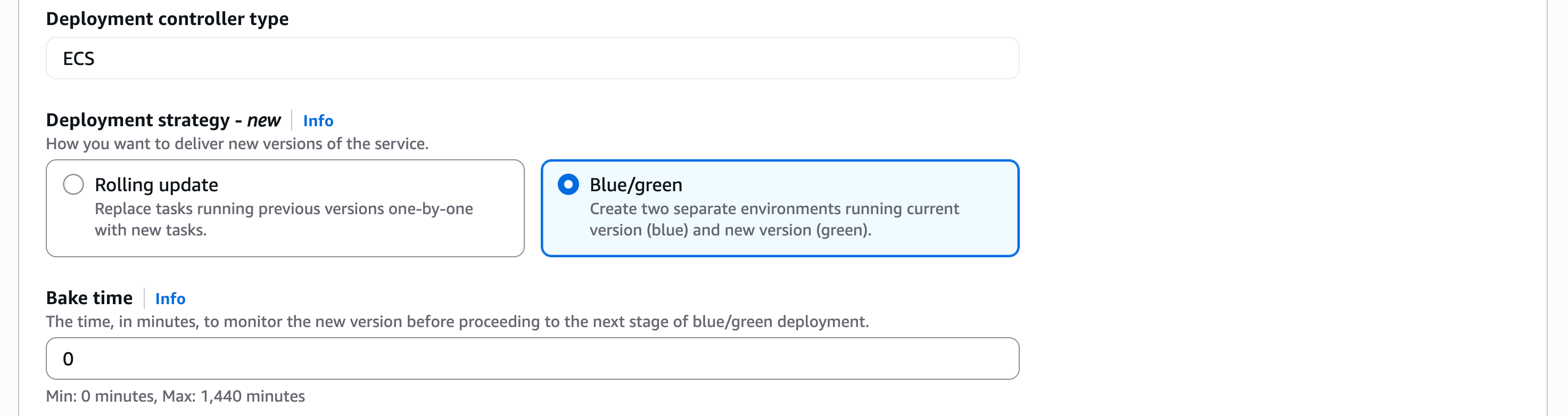
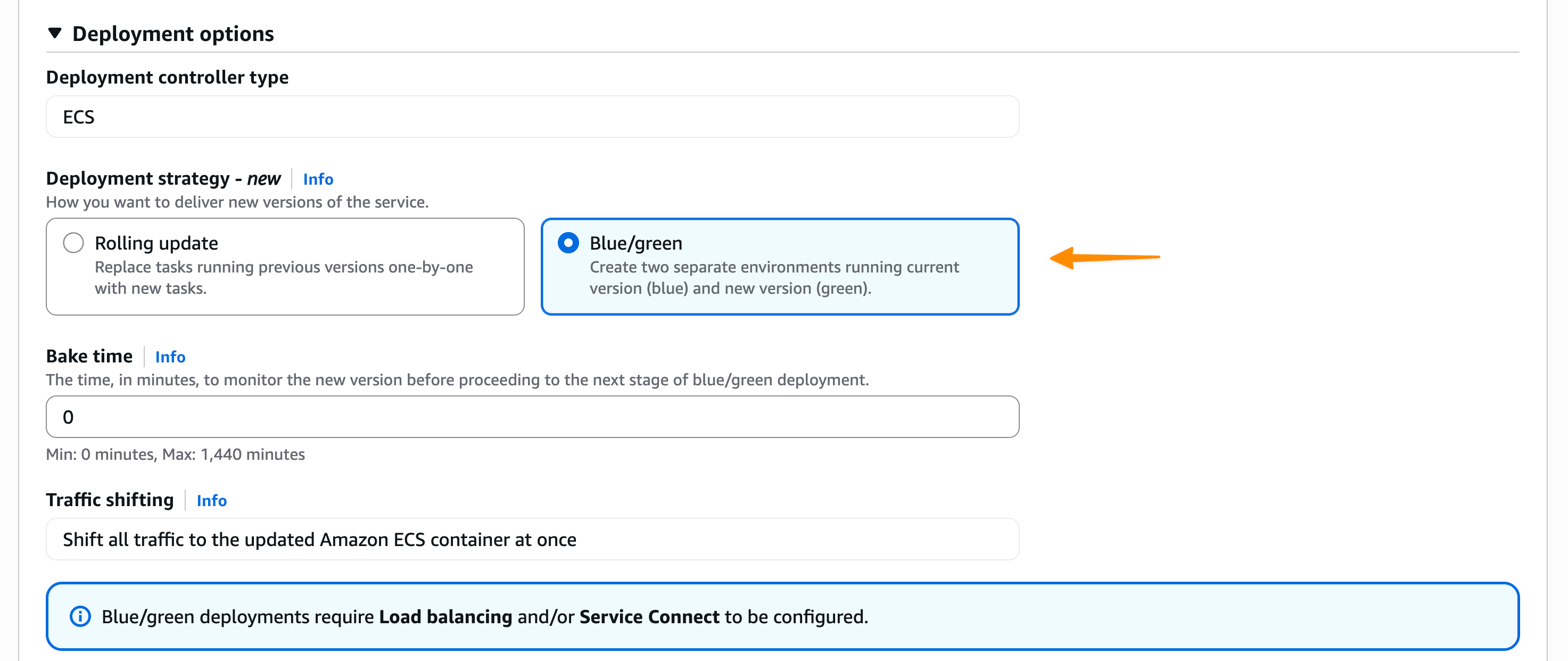
In the Deployment Options section, I choose ECS as the Deployment controller type, then Blue/green as the Deployment strategy. Bake time is the time after the production traffic has shifted to green, when instant rollback to blue is available. When the bake time expires, blue tasks are removed.

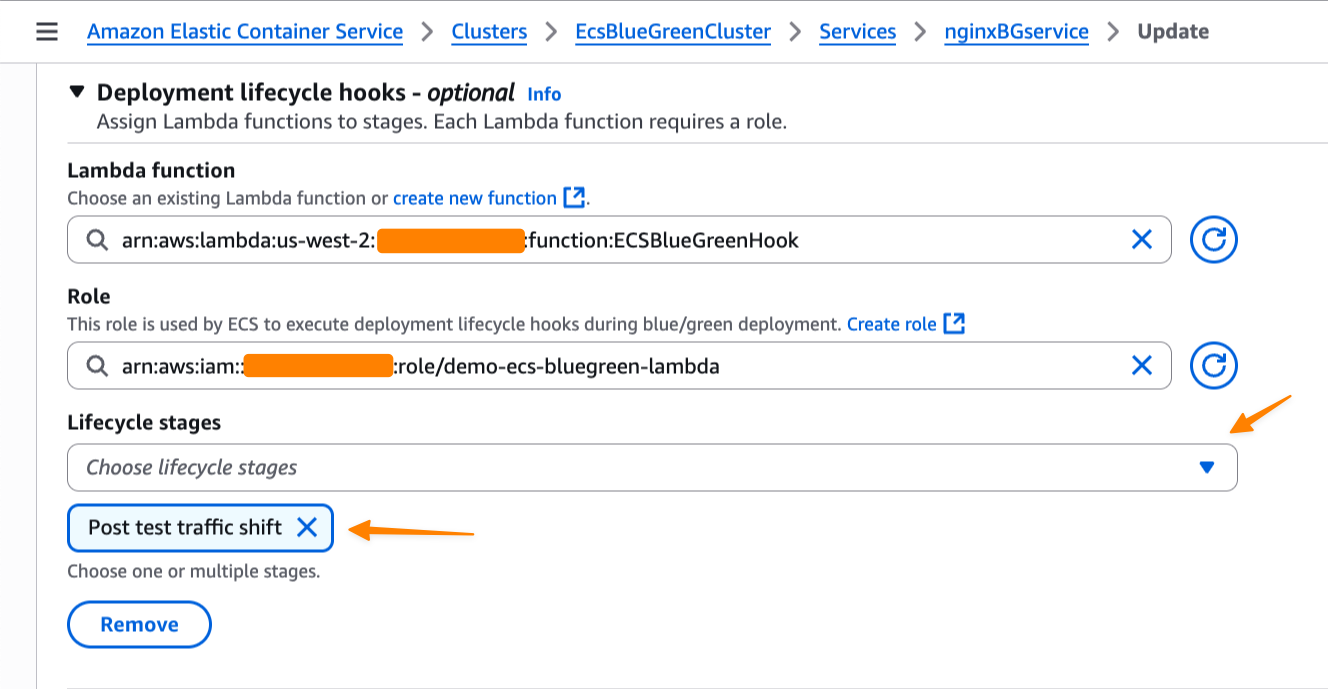
We’re also introducing deployment lifecycle hooks. These are event-driven mechanisms you can use to augment the deployment workflow. I can select which AWS Lambda function I’d like to use as a deployment lifecycle hook. The Lambda function can perform the required business logic, but it must return a hook status.

Amazon ECS supports the following lifecycle hooks during blue/green deployments. You can learn more about each stage on the Deployment lifecycle stages page.

  • Pre scale up
  • Post scale up
  • Production traffic shift
  • Test traffic shift
  • Post production traffic shift
  • Post test traffic shift

For my application, I want to test when the test traffic shift is complete and the green service handles all of the test traffic. Since there’s no end-user traffic, a rollback at this stage will have no impact on users. This makes Post test traffic shift suitable for my use case as I can test it first with my Lambda function.

Switching context for a moment, let’s focus on the Lambda function that I use to validate the deployment before allowing it to proceed. In my Lambda function as a deployment lifecycle hook, I can perform any business logic, such as synthetic testing, calling another API, or querying metrics.

Within the Lambda function, I must return a hookStatus. A hookStatus can be SUCCESSFUL, which will move the process to the next step. If the status is FAILED, it rolls back to the blue deployment. If it’s IN_PROGRESS, then Amazon ECS retries the Lambda function in 30 seconds.

In the following example, I set up my validation with a Lambda function that performs file upload as part of a test suite for my application.

import json
import urllib3
import logging
import base64
import os

# Configure logging
logger = logging.getLogger()
logger.setLevel(logging.DEBUG)

# Initialize HTTP client
http = urllib3.PoolManager()

def lambda_handler(event, context):
    """
    Validation hook that tests the green environment with file upload
    """
    logger.info(f"Event: {json.dumps(event)}")
    logger.info(f"Context: {context}")
    
    try:
        # In a real scenario, you would construct the test endpoint URL
        test_endpoint = os.getenv("APP_URL")
        
        # Create a test file for upload
        test_file_content = "This is a test file for deployment validation"
        test_file_data = test_file_content.encode('utf-8')
        
        # Prepare multipart form data for file upload
        fields = {
            'file': ('test.txt', test_file_data, 'text/plain'),
            'description': 'Deployment validation test file'
        }
        
        # Send POST request with file upload to /process endpoint
        response = http.request(
            'POST', 
            test_endpoint,
            fields=fields,
            timeout=30
        )
        
        logger.info(f"POST /process response status: {response.status}")
        
        # Check if response has OK status code (200-299 range)
        if 200 <= response.status < 300:
            logger.info("File upload test passed - received OK status code")
            return {
                "hookStatus": "SUCCEEDED"
            }
        else:
            logger.error(f"File upload test failed - status code: {response.status}")
            return {
                "hookStatus": "FAILED"
            }
            
    except Exception as error:
        logger.error(f"File upload test failed: {str(error)}")
        return {
            "hookStatus": "FAILED"
        }

When the deployment reaches the lifecycle stage that is associated with the hook, Amazon ECS automatically invokes my Lambda function with deployment context. My validation function can run comprehensive tests against the green revision—checking application health, running integration tests, or validating performance metrics. The function then signals back to ECS whether to proceed or abort the deployment.

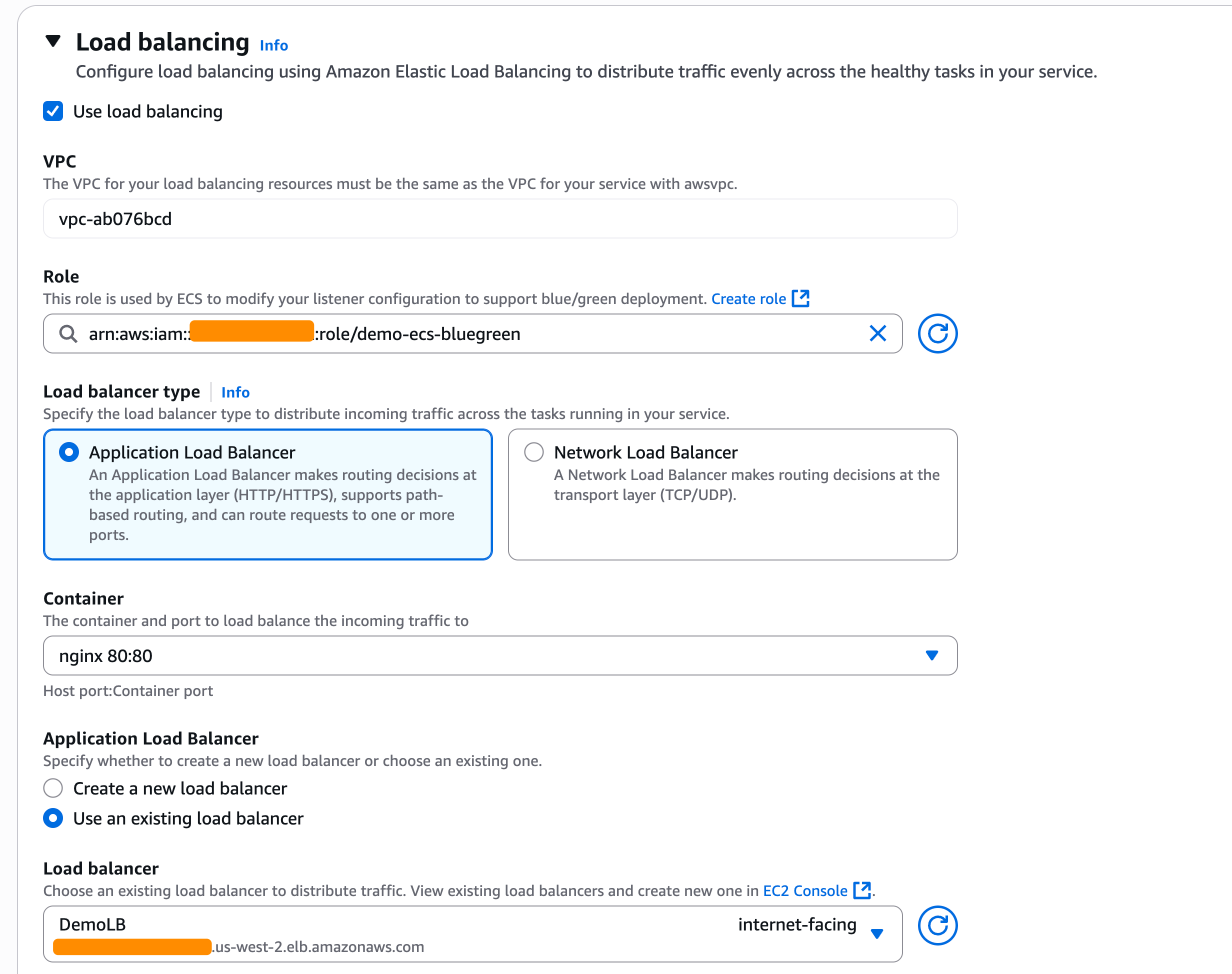
As I chose the blue/green deployment strategy, I also need to configure the load balancers and/or Amazon ECS Service Connect. In the Load balancing section, I select my Application Load Balancer.

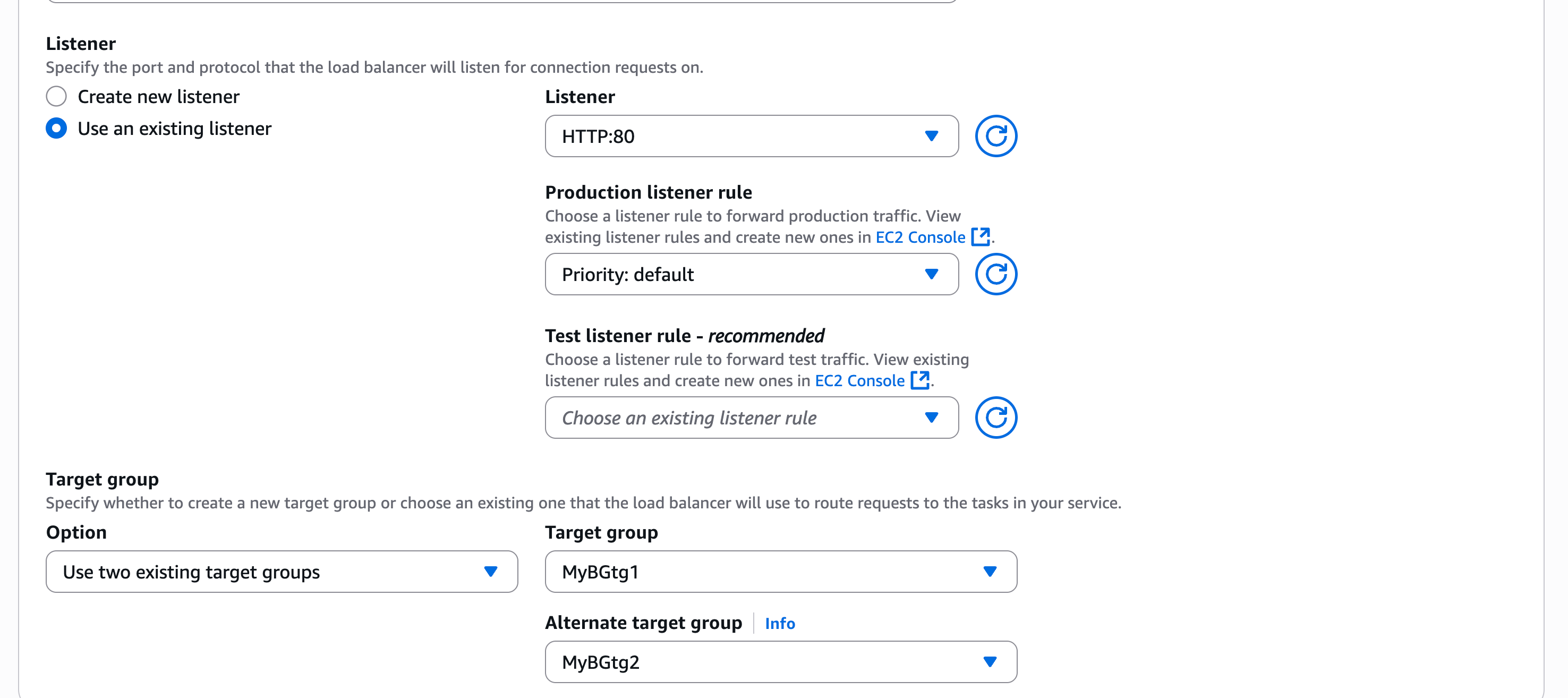
In the Listener section, I use an existing listener on port 80 and select two Target groups.

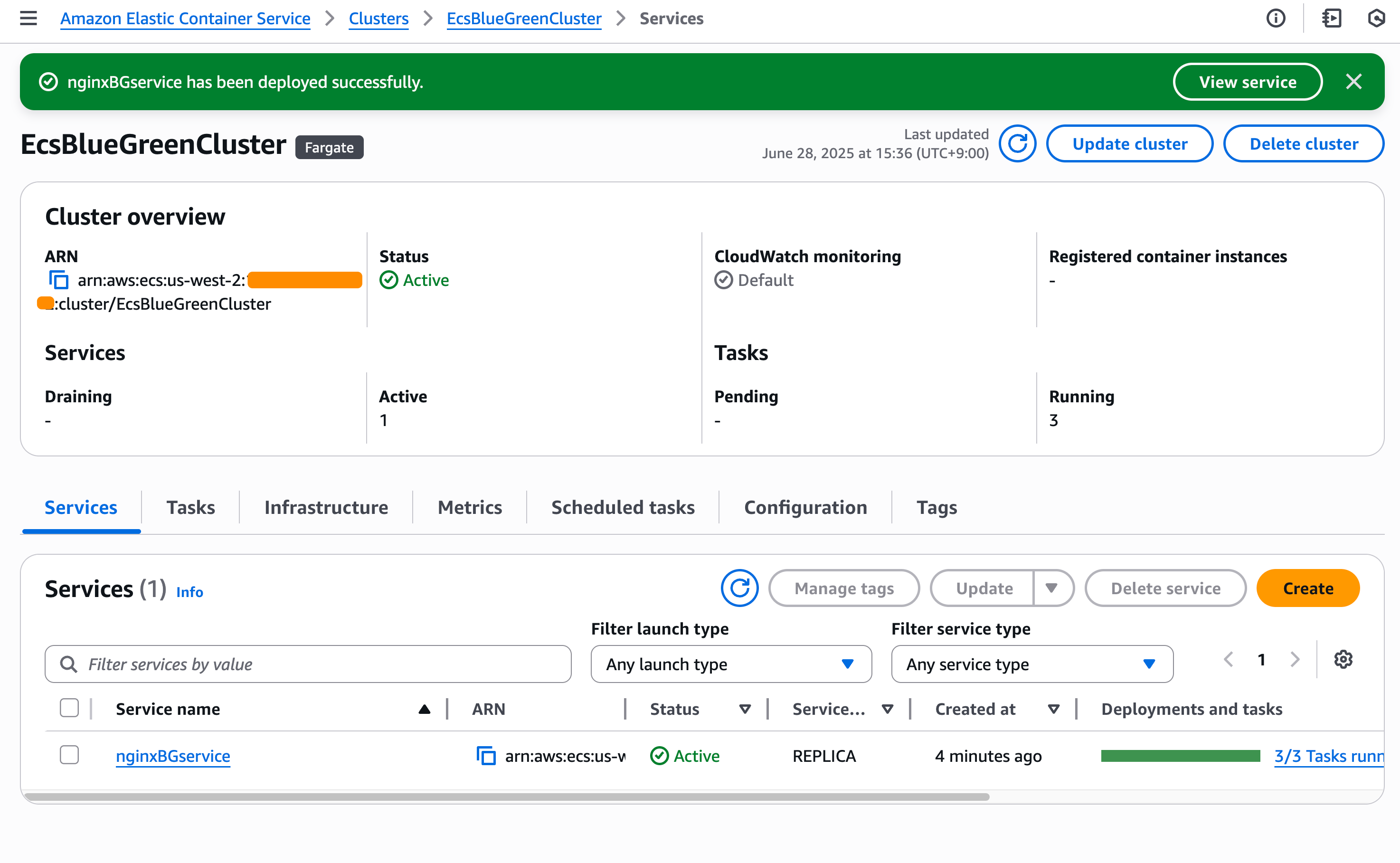
Happy with this configuration, I create the service and wait for ECS to provision my new service.

Testing blue/green deployments
Now, it’s time to test my blue/green deployments. For this test, Amazon ECS will trigger my Lambda function after the test traffic shift is completed. My Lambda function will return FAILED in this case as it performs file upload to my application, but my application doesn’t have this capability.

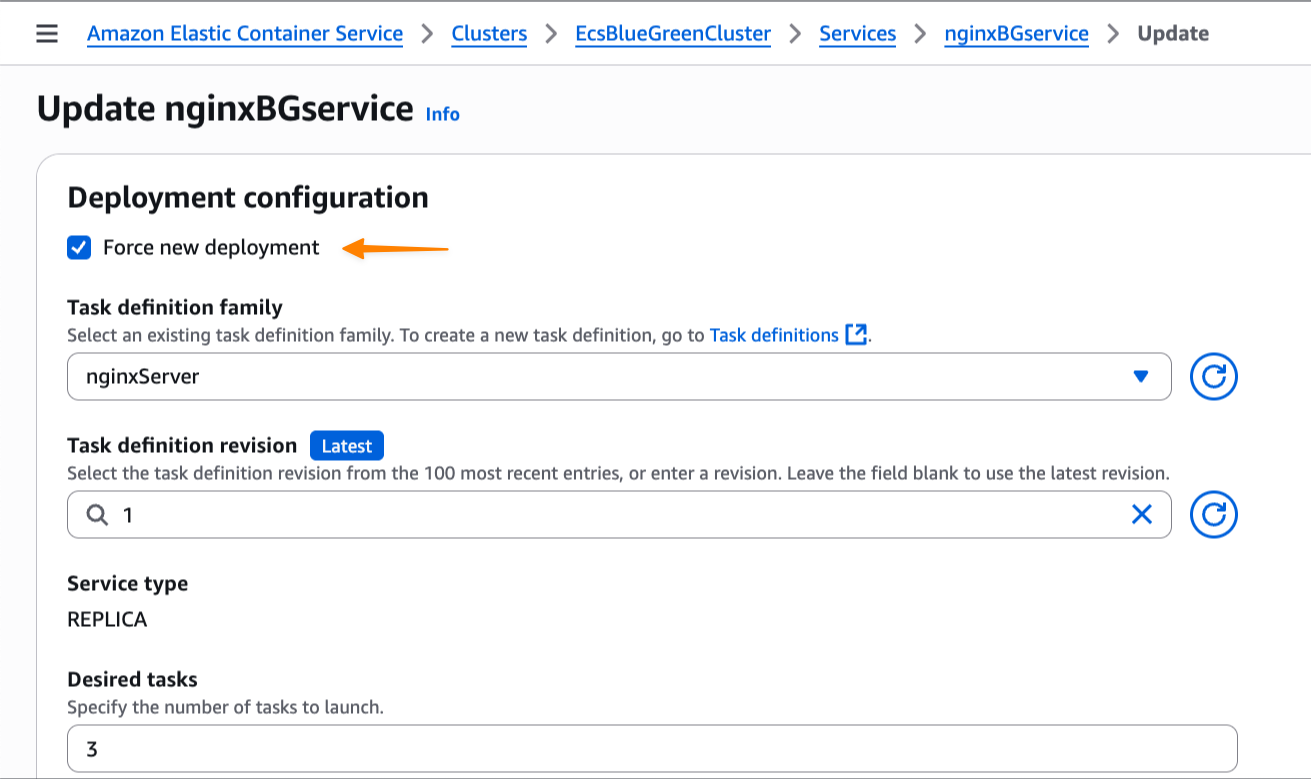
I update my service and check Force new deployment, knowing the blue/green deployment capability will roll back if it detects a failure. I select this option because I haven’t modified the task definition but still need to trigger a new deployment.

At this stage, I have both blue and green environments running, with the green revision handling all the test traffic. Meanwhile, based on Amazon CloudWatch Logs of my Lambda function, I also see that the deployment lifecycle hooks work as expected and emit the following payload:

[INFO]	2025-07-10T13:15:39.018Z	67d9b03e-12da-4fab-920d-9887d264308e	Event: 
{
    "executionDetails": {
        "testTrafficWeights": {},
        "productionTrafficWeights": {},
        "serviceArn": "arn:aws:ecs:us-west-2:123:service/EcsBlueGreenCluster/nginxBGservice",
        "targetServiceRevisionArn": "arn:aws:ecs:us-west-2:123:service-revision/EcsBlueGreenCluster/nginxBGservice/9386398427419951854"
    },
    "executionId": "a635edb5-a66b-4f44-bf3f-fcee4b3641a5",
    "lifecycleStage": "POST_TEST_TRAFFIC_SHIFT",
    "resourceArn": "arn:aws:ecs:us-west-2:123:service-deployment/EcsBlueGreenCluster/nginxBGservice/TFX5sH9q9XDboDTOv0rIt"
}

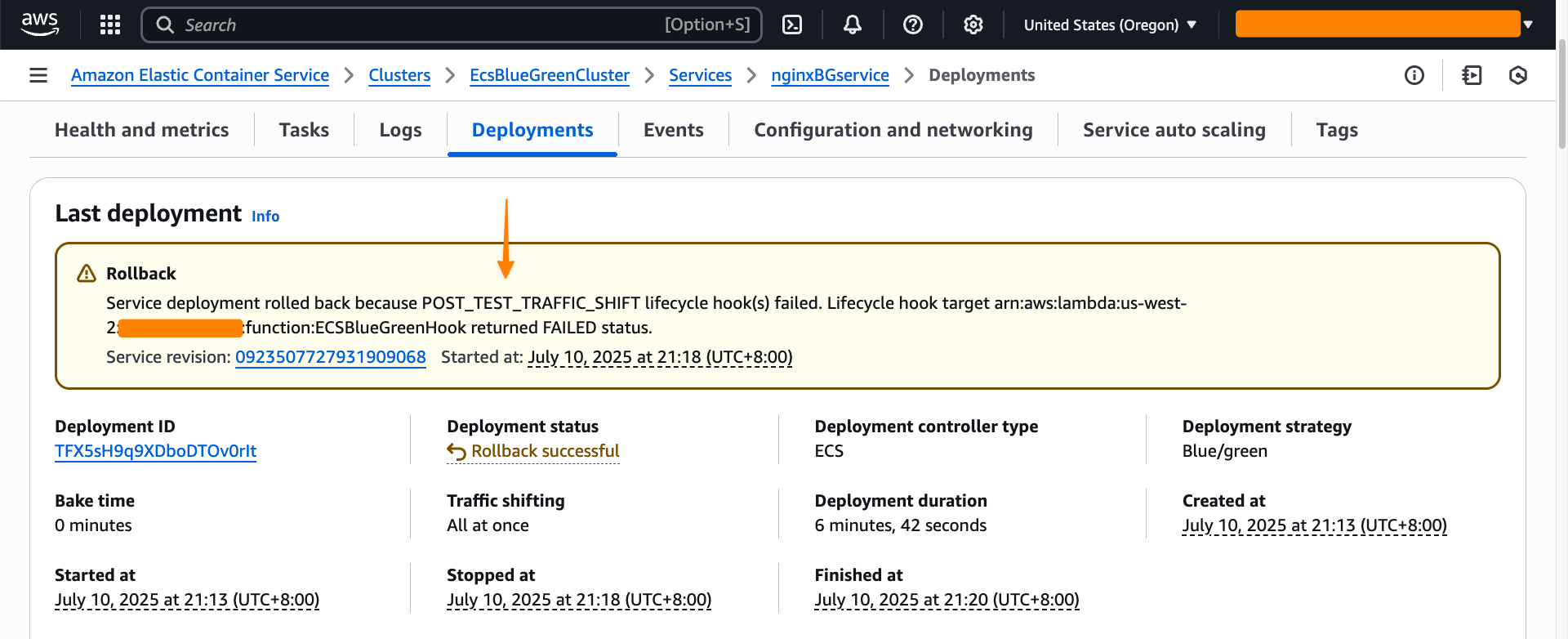
As expected, my AWS Lambda function returns FAILED as hookStatus because it failed to perform the test.

[ERROR]	2025-07-10T13:18:43.392Z	67d9b03e-12da-4fab-920d-9887d264308e	File upload test failed: HTTPConnectionPool(host='xyz.us-west-2.elb.amazonaws.com', port=80): Max retries exceeded with url: / (Caused by ConnectTimeoutError(<urllib3.connection.HTTPConnection object at 0x7f8036273a80>, 'Connection to xyz.us-west-2.elb.amazonaws.com timed out. (connect timeout=30)'))

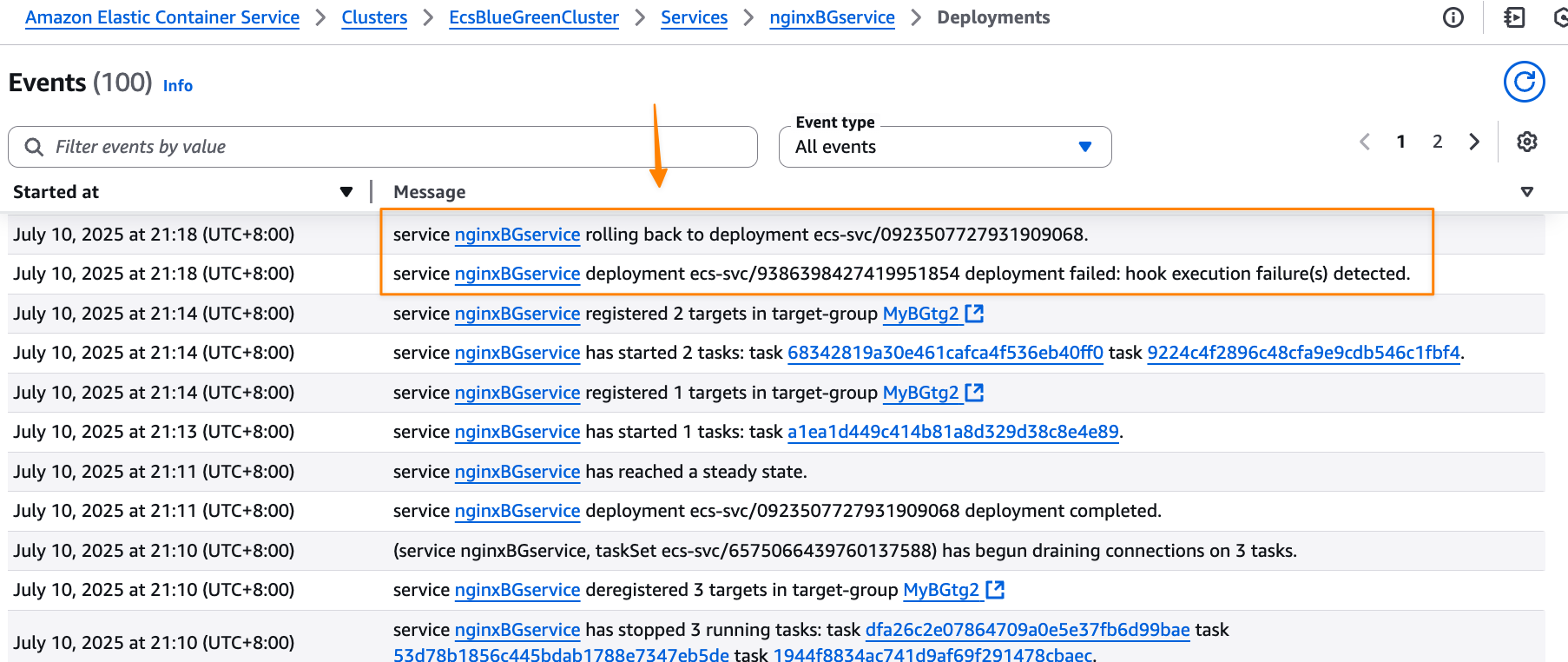
Because the validation wasn’t completed successfully, Amazon ECS tries to roll back to the blue version, which is the previous working deployment version. I can monitor this process through ECS events in the Events section, which provides detailed visibility into the deployment progress.

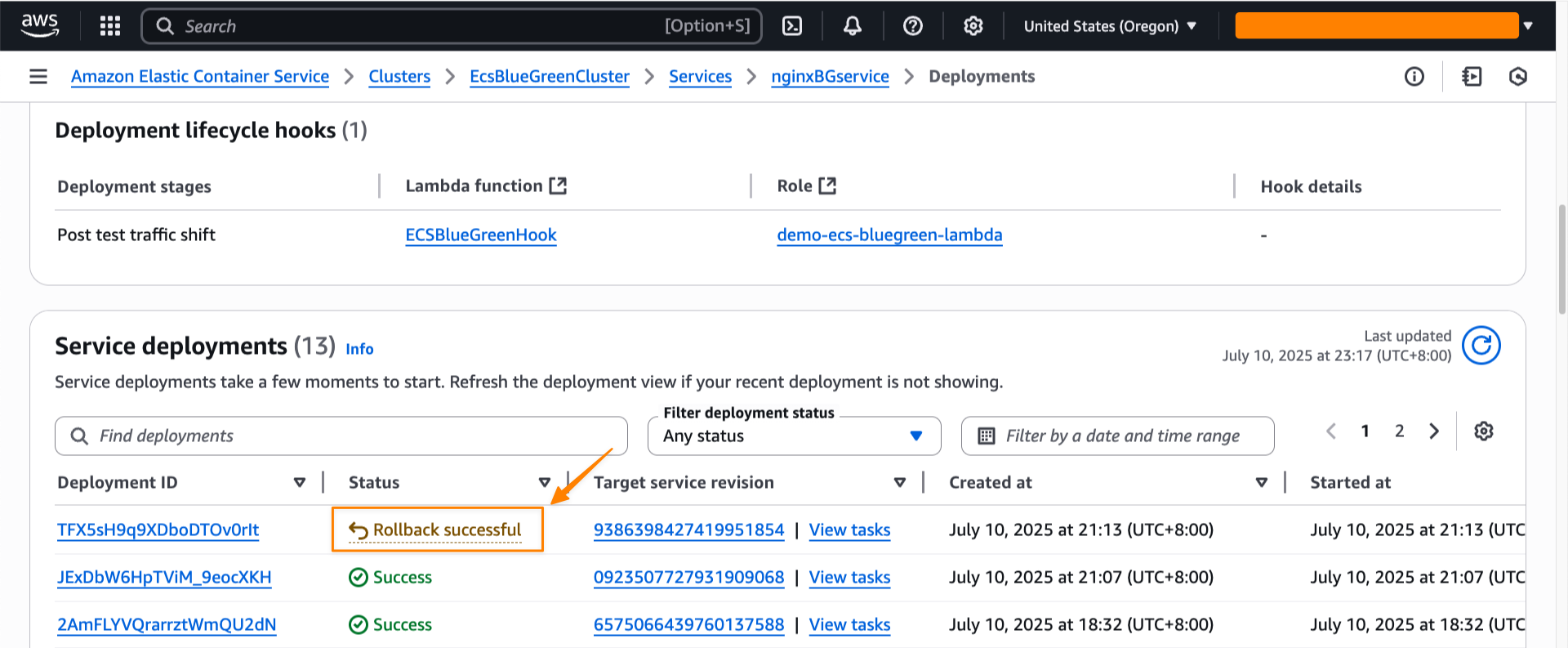
Amazon ECS successfully rolls back the deployment to the previous working version. The rollback happens near-instantaneously because the blue revision remains running and ready to receive production traffic. There is no end-user impact during this process, as production traffic never shifted to the new application version—ECS simply rolled back test traffic to the original stable version. This eliminates the typical deployment downtime associated with traditional rolling deployments.

I can also see the rollback status in the Last deployment section.

Throughout my testing, I observed that the blue/green deployment strategy provides consistent and predictable behavior. Furthermore, the deployment lifecycle hooks provide more flexibility to control the behavior of the deployment. Each service revision maintains immutable configuration including task definition, load balancer settings, and Service Connect configuration. This means that rollbacks restore exactly the same environment that was previously running.

Additional things to know
Here are a couple of things to note:

  • Pricing – The blue/green deployment capability is included with Amazon ECS at no additional charge. You pay only for the compute resources used during the deployment process.
  • Availability – This capability is available in all commercial AWS Regions.

Get started with blue/green deployments by updating your Amazon ECS service configuration in the Amazon ECS console.

Happy deploying!
— Donnie

Top announcements of the AWS Summit in New York, 2025

Post Syndicated from AWS News Blog Team original https://aws.amazon.com/blogs/aws/top-announcements-of-the-aws-summit-in-new-york-2025/

Today at the AWS Summit in New York City, Swami Sivasubramanian, AWS VP of Agentic AI, provided the day’s keynote on how we’re enabling customers to deliver production-ready AI agents at scale. See below for a roundup of the biggest announcements from the event.

Introducing Amazon Bedrock AgentCore: Securely deploy and operate AI agents at any scale (preview)
Amazon Bedrock AgentCore enables rapid deployment and scaling of AI agents with enterprise-grade security. It provides memory management, identity controls, and tool integration—streamlining development while working with any open-source framework and foundation model.

Announcing Amazon Nova customization in Amazon SageMaker AI
AWS now enables extensive customization of Amazon Nova foundation models through SageMaker AI across all stages of model training. Available as ready-to-use SageMaker recipes, these capabilities allow customers to adapt Nova understanding models across pre-training and post-training, including fine-tuning and alignment recipes to better address business-specific requirements across industries.

AWS Free Tier update: New customers can get started and explore AWS with up to $200 in credits
AWS is enhancing its Free Tier program with up to $200 in credits for new users: $100 upon sign-up and an additional $100 earned by completing activities with services like Amazon EC2, Amazon Bedrock, and AWS Budgets.

TwelveLabs video understanding models are now available in Amazon Bedrock
TwelveLabs video understanding models are now available on Amazon Bedrock and enable customers to search through videos, classify scenes, summarize content, and extract insights with precision and reliability.

Amazon S3 Metadata now supports metadata for all your S3 objects
Amazon S3 Metadata now provides comprehensive visibility into all objects in S3 buckets through live inventory and journal tables, enabling SQL-based analysis of both existing and new objects with automatic updates within an hour of changes.

Introducing Amazon S3 Vectors: First cloud storage with native vector support at scale (preview)
Amazon S3 Vectors is a new cloud object store that provides native support for storing and querying vectors at massive scale, offering up to 90% cost reduction compared to conventional approaches while seamlessly integrating with Amazon Bedrock Knowledge Bases, SageMaker, and OpenSearch for AI applications.

Streamline the path from data to insights with new Amazon SageMaker capabilities
Amazon SageMaker has introduced three new capabilities—Amazon QuickSight integration for dashboard creation, governance, and sharing, Amazon S3 Unstructured Data Integration for cataloging documents and media files, and automatic data onboarding from Lakehouse—that eliminate data silos by unifying structured and unstructured data management, visualization, and governance in a single experience.

Monitor and debug event-driven applications with new Amazon EventBridge logging
Amazon EventBridge now offers enhanced logging capabilities that provide comprehensive event lifecycle tracking, helping users monitor and troubleshoot their event-driven applications with detailed logs that show when events are published, matched against rules, delivered to subscribers, or encounter failures.

Amazon EKS enables ultra scale AI/ML workloads with support for 100K nodes per cluster
Amazon EKS now scales to 100,000 nodes per cluster, enabling massive AI/ML workloads with up to 1.6M AWS Trainium accelerators or 800K NVIDIA GPUs. This allows organizations to efficiently train and run large AI models while maintaining Kubernetes compatibility and existing tooling integration.

Announcing Amazon Nova customization in Amazon SageMaker AI

Post Syndicated from Betty Zheng (郑予彬) original https://aws.amazon.com/blogs/aws/announcing-amazon-nova-customization-in-amazon-sagemaker-ai/

Today, we’re announcing a suite of customization capabilities for Amazon Nova in Amazon SageMaker AI. Customers can now customize Nova Micro, Nova Lite, and Nova Pro across the model training lifecycle, including pre-training, supervised fine-tuning, and alignment. These techniques are available as ready-to-use Amazon SageMaker recipes with seamless deployment to Amazon Bedrock, supporting both on-demand and provisioned throughput inference.

Amazon Nova foundation models power diverse generative AI use cases across industries. As customers scale deployments, they need models that reflect proprietary knowledge, workflows, and brand requirements. Prompt optimization and retrieval-augmented generation (RAG) work well for integrating general-purpose foundation models into applications, however business-critical workflows require model customization to meet specific accuracy, cost, and latency requirements.

Choosing the right customization technique
Amazon Nova models support a range of customization techniques including: 1) supervised fine-tuning, 2) alignment, 3) continued pre-training, and 4) knowledge distillation. The optimal choice depends on goals, use case complexity, and the availability of data and compute resources. You can also combine multiple techniques to achieve your desired outcomes with the preferred mix of performance, cost, and flexibility.

Supervised fine-tuning (SFT) customizes model parameters using a training dataset of input-output pairs specific to your target tasks and domains. Choose from the following two implementation approaches based on data volume and cost considerations:

  • Parameter-efficient fine-tuning (PEFT) — updates only a subset of model parameters through lightweight adapter layers such as LoRA (Low-Rank Adaptation). It offers faster training and lower compute costs compared to full fine-tuning. PEFT-adapted Nova models are imported to Amazon Bedrock and invoked using on-demand inference.
  • Full fine-tuning (FFT) — updates all the parameters of the model and is ideal for scenarios when you have extensive training datasets (tens of thousands of records). Nova models customized through FFT can also be imported to Amazon Bedrock and invoked for inference with provisioned throughput.

Alignment steers the model output towards desired preferences for product-specific needs and behavior, such as company brand and customer experience requirements. These preferences may be encoded in multiple ways, including empirical examples and policies. Nova models support two preference alignment techniques:

  • Direct preference optimization (DPO) — offers a straightforward way to tune model outputs using preferred/not preferred response pairs. DPO learns from comparative preferences to optimize outputs for subjective requirements such as tone and style. DPO offers both a parameter-efficient version and a full-model update version. The parameter-efficient version supports on-demand inference.
  • Proximal policy optimization (PPO) — uses reinforcement learning to enhance model behavior by optimizing for desired rewards such as helpfulness, safety, or engagement. A reward model guides optimization by scoring outputs, helping the model learn effective behaviors while maintaining previously learned capabilities.

Continued pre-training (CPT) expands foundational model knowledge through self-supervised learning on large quantities of unlabeled proprietary data, including internal documents, transcripts, and business-specific content. CPT followed by SFT and alignment through DPO or PPO provides a comprehensive way to customize Nova models for your applications.

Knowledge distillation transfers knowledge from a larger “teacher” model to a smaller, faster, and more cost-efficient “student” model. Distillation is useful in scenarios where customers do not have adequate reference input-output samples and can leverage a more powerful model to augment the training data. This process creates a customized model of teacher-level accuracy for specific use cases and student-level cost-effectiveness and speed.

Here is a table summarizing the available customization techniques across different modalities and deployment options. Each technique offers specific training and inference capabilities depending on your implementation requirements.

Recipe Modality Training Inference
Amazon Bedrock Amazon SageMaker Amazon Bedrock On-demand Amazon Bedrock Provisioned Throughput
Supervised fine tuning Text, image, video
Parameter-efficient fine-tuning (PEFT) ✅ ✅ ✅ ✅
Full fine-tuning ✅ ✅
Direct preference optimization (DPO)  Text, image, video
Parameter-efficient DPO ✅ ✅ ✅
Full model DPO ✅ ✅
Proximal policy optimization (PPO)  Text-only ✅ ✅
Continuous pre-training  Text-only ✅ ✅
Distillation Text-only ✅ ✅ ✅ ✅

Early access customers, including Cosine AI, Massachusetts Institute of Technology (MIT) Computer Science and Artificial Intelligence Laboratory (CSAIL), Volkswagen, Amazon Customer Service, and Amazon Catalog Systems Service, are already successfully using Amazon Nova customization capabilities.

Customizing Nova models in action
The following walks you through an example of customizing the Nova Micro model using direct preference optimization on an existing preference dataset. To do this, you can use Amazon SageMaker Studio.

Launch your SageMaker Studio in the Amazon SageMaker AI console and choose JumpStart, a machine learning (ML) hub with foundation models, built-in algorithms, and pre-built ML solutions that you can deploy with a few clicks.

Then, choose Nova Micro, a text-only model that delivers the lowest latency responses at the lowest cost per inference among the Nova model family, and then choose Train.

Next, you can choose a fine-tuning recipe to train the model with labeled data to enhance performance on specific tasks and align with desired behaviors. Choosing the Direct Preference Optimization offers a straightforward way to tune model outputs with your preferences.

When you choose Open sample notebook, you have two environment options to run the recipe: either on the SageMaker training jobs or SageMaker Hyperpod:

Choose Run recipe on SageMaker training jobs when you don’t need to create a cluster and train the model with the sample notebook by selecting your JupyterLab space.

Alternately, if you want to have a persistent cluster environment optimized for iterative training processes, choose Run recipe on SageMaker HyperPod. You can choose a HyperPod EKS cluster with at least one restricted instance group (RIG) to provide a specialized isolated environment, which is required for such Nova model training. Then, choose your JupyterLabSpace and Open sample notebook.

This notebook provides an end-to-end walkthrough for creating a SageMaker HyperPod job using a SageMaker Nova model with a recipe and deploying it for inference. With the help of a SageMaker HyperPod recipe, you can streamline complex configurations and seamlessly integrate datasets for optimized training jobs.

In SageMaker Studio, you can see that your SageMaker HyperPod job has been successfully created and you can monitor it for further progress.

After your job completes, you can use a benchmark recipe to evaluate if the customized model performs better on agentic tasks.

For comprehensive documentation and additional example implementations, visit the SageMaker HyperPod recipes repository on GitHub. We continue to expand the recipes based on customer feedback and emerging ML trends, ensuring you have the tools needed for successful AI model customization.

Availability and getting started
Recipes for Amazon Nova on Amazon SageMaker AI are available in US East (N. Virginia). Learn more about this feature by visiting the Amazon Nova customization webpage and Amazon Nova user guide and get started in the Amazon SageMaker AI console.

–Betty

Introducing Amazon Bedrock AgentCore: Securely deploy and operate AI agents at any scale (preview)

Post Syndicated from Danilo Poccia original https://aws.amazon.com/blogs/aws/introducing-amazon-bedrock-agentcore-securely-deploy-and-operate-ai-agents-at-any-scale/

In just a few years, foundation models (FMs) have evolved from being used directly to create content in response to a user’s prompt, to now powering AI agents, a new class of software applications that use FMs to reason, plan, act, learn, and adapt in pursuit of user-defined goals with limited human oversight. This new wave of agentic AI is enabled by the emergence of standardized protocols such as Model Context Protocol (MCP) and Agent2Agent (A2A) that simplify how agents connect with other tools and systems.

In fact, building AI agents that can reliably perform complex tasks has become increasingly accessible thanks to open source frameworks like CrewAI, LangGraph, and Strands Agents. However, moving from a promising proof-of-concept to a production-ready agent that can scale to thousands of users presents significant challenges.

Instead of being able to focus on the core features of the agent, developers and AI engineers have to spend months building foundational infrastructure for session management, identity controls, memory systems, and observability—at the same time supporting security and compliance.

Today, we’re excited to announce the preview of Amazon Bedrock AgentCore, a comprehensive set of enterprise-grade services that help developers quickly and securely deploy and operate AI agents at scale using any framework and model, hosted on Amazon Bedrock or elsewhere.

More specifically, we are introducing today:

AgentCore Runtime – Provides sandboxed low-latency serverless environments with session isolation, supporting any agent framework including popular open source frameworks, tools, and models, and handling multimodal workloads and long-running agents.

AgentCore Memory – Manages session and long-term memory, providing relevant context to models while helping agents learn from past interactions.

AgentCore Observability – Offers step-by-step visualization of agent execution with metadata tagging, custom scoring, trajectory inspection, and troubleshooting/debugging filters.

AgentCore Identity – Enables AI agents to securely access AWS services and third-party tools and services such as GitHub, Salesforce, and Slack, either on behalf of users or by themselves with pre-authorized user consent.

AgentCore Gateway – Transforms existing APIs and AWS Lambda functions into agent-ready tools, offering unified access across protocols, including MCP, and runtime discovery.

AgentCore Browser – Provides managed web browser instances to scale your agents’ web automation workflows.

AgentCore Code Interpreter – Offers an isolated environment to run the code your agents generate.

These services can be used individually and are optimized to work together so developers don’t need to spend time piecing together components. AgentCore can work with open source or custom AI agent frameworks, giving teams the flexibility to maintain their preferred tools while gaining enterprise capabilities. To integrate these services into their existing code, developers can use the AgentCore SDK.

You can now discover, buy, and run pre-built agents and agent tools from AWS Marketplace with AgentCore Runtime. With just a few lines of code, your agents can securely connect to API-based agents and tools from AWS Marketplace with AgentCore Gateway to help you run complex workflows while maintaining compliance and control.

AgentCore eliminates tedious infrastructure work and operational complexity so development teams can bring groundbreaking agentic solutions to market faster.

Let’s see how this works in practice. I’ll share more info on the services as we use them.

Deploying a production-ready customer support assistant with Amazon Bedrock AgentCore (Preview)
When customers reach out with an email, it takes time to provide a reply. Customer support needs to check the validity of the email, find who the actual customer is in the customer relationship management (CRM) system, check their orders, and use product-specific knowledge bases to find the information required to prepare an answer.

An AI agent can simplify that by connecting to the internal systems, retrieve contextual information using a semantic data source, and draft a reply for the support team. For this use case, I built a simple prototype using Strands Agents. For simplicity and to validate the scenario, the internal tools are simulated using Python functions.

When I talk to developers, they tell me that similar prototypes, covering different use cases, are being built in many companies. When these prototypes are demonstrated to the company leadership and receive confirmation to proceed, the development team has to define how to go in production and satisfy the usual requirements for security, performance, availability, and scalability. This is where AgentCore can help.

Step 1 – Deploying to the cloud with AgentCore Runtime

AgentCore Runtime is a new service to securely deploy, run, and scale AI agents, providing isolation so that each user session runs in its own protected environment to help prevent data leakage—a critical requirement for applications handling sensitive data.

To match different security postures, agents can use different network configurations:

Sandbox – To only communicate with allowlisted AWS services.

Public – To run with managed internet access.

VPC-only (coming soon) – This option will allow to access resources hosted in a customer’s VPC or connected via AWS PrivateLink endpoints.

To deploy the agent to the cloud and get a secure, serverless endpoint with AgentCore Runtime, I add to the prototype a few lines of code using the AgentCore SDK to:

  • Import the AgentCore SDK.
  • Create the AgentCore app.
  • Specify which function is the entry point to invoke the agent.

Using a different or custom agent framework is a matter of replacing the agent invocation inside the entry point function.

Here’s the code of the prototype. The three lines I added to use AgentCore Runtime are the ones preceded by a comment.

from strands import Agent, tool
from strands_tools import calculator, current_time

# Import the AgentCore SDK
from bedrock_agentcore.runtime import BedrockAgentCoreApp

WELCOME_MESSAGE = """
Welcome to the Customer Support Assistant! How can I help you today?
"""

SYSTEM_PROMPT = """
You are an helpful customer support assistant.
When provided with a customer email, gather all necessary info and prepare the response email.
When asked about an order, look for it and tell the full description and date of the order to the customer.
Don't mention the customer ID in your reply.
"""

@tool
def get_customer_id(email_address: str):
    if email_address == "[email protected]":
        return { "customer_id": 123 }
    else:
        return { "message": "customer not found" }

@tool
def get_orders(customer_id: int):
    if customer_id == 123:
        return [{
            "order_id": 1234,
            "items": [ "smartphone", "smartphone USB-C charger", "smartphone black cover"],
            "date": "20250607"
        }]
    else:
        return { "message": "no order found" }

@tool
def get_knowledge_base_info(topic: str):
    kb_info = []
    if "smartphone" in topic:
        if "cover" in topic:
            kb_info.append("To put on the cover, insert the bottom first, then push from the back up to the top.")
            kb_info.append("To remove the cover, push the top and bottom of the cover at the same time.")
        if "charger" in topic:
            kb_info.append("Input: 100-240V AC, 50/60Hz")
            kb_info.append("Includes US/UK/EU plug adapters")
    if len(kb_info) > 0:
        return kb_info
    else:
        return { "message": "no info found" }

# Create an AgentCore app
app = BedrockAgentCoreApp()

agent = Agent(
    system_prompt=SYSTEM_PROMPT,
    tools=[calculator, current_time, get_customer_id, get_orders, get_knowledge_base_info]
)

# Specify the entrypoint function invoking the agent
@app.entrypoint
def invoke(payload, context: RequestContext):
    """Handler for agent invocation"""
    user_message = payload.get(
        "prompt", "No prompt found in input, please guide customer to create a json payload with prompt key"
    )
    result = agent(user_message)
    return {"result": result.message}

if __name__ == "__main__":
    app.run()

I install the AgentCore SDK and the starter toolkit in the Python virtual environment:

pip install bedrock-agentcore bedrock-agentcore-starter-toolkit

After I activate the virtual environment, I have access to the AgentCore command line interface (CLI) provided by the starter toolkit.

First, I use agentcore configure --entrypoint my_agent.py -er <IAM_ROLE_ARN> to configure the agent, passing the AWS Identity and Access Management (IAM) role that the agent will assume. In this case, the agent needs access to Amazon Bedrock to invoke the model. The role can give access to other AWS resources used by an agent, such as an Amazon Simple Storage Service (Amazon S3) bucket or a Amazon DynamoDB table.

I launch the agent locally with agentcore launch --local. When running locally, I can interact with the agent using agentcore invoke --local <PAYLOAD>. The payload is passed to the entry point function. Note that the JSON syntax of the invocations is defined in the entry point function. In this case, I look for prompt in the JSON payload, but can use a different syntax depending on your use case.

When I am satisfied by local testing, I use agentcore launch to deploy to the cloud.

After the deployment is succesful and an endpoint has been created, I check the status of the endpoint with agentcore status and invoke the endpoint with agentcore invoke <PAYLOAD>. For example, I pass a customer support request in the invocation:

agentcore invoke '{"prompt": "From: [email protected] – Hi, I bought a smartphone from your store. I am traveling to Europe next week, will I be able to use the charger? Also, I struggle to remove the cover. Thanks, Danilo"}'

Step 2 – Enabling memory for context

After an agent has been deployed in the AgentCore Runtime, the context needs to be persisted to be available for a new invocation. I add AgentCore Memory to maintain session context using its short-term memory capabilities.

First, I create a memory client and the memory store for the conversations:

from bedrock_agentcore.memory import MemoryClient

memory_client = MemoryClient(region_name="us-east-1")

memory = memory_client.create_memory_and_wait(
    name="CustomerSupport", 
    description="Customer support conversations"
)

I can now use create_event to stores agent interactions into short-term memory:

memory_client.create_event(
    memory_id=memory.get("id"), # Identifies the memory store
    actor_id="user-123",        # Identifies the user
    session_id="session-456",   # Identifies the session
    messages=[
        ("Hi, ...", "USER"),
        ("I'm sorry to hear that...", "ASSISTANT"),
        ("get_orders(customer_id='123')", "TOOL"),
        . . .
    ]
)

I can load the most recent turns of a conversations from short-term memory using list_events:

conversations = memory_client.list_events(
    memory_id=memory.get("id"), # Identifies the memory store
    actor_id="user-123",        # Identifies the user 
    session_id="session-456",   # Identifies the session
    max_results=5               # Number of most recent turns to retrieve
)

With this capability, the agent can maintain context during long sessions. But when a users come back with a new session, the conversation starts blank. Using long-term memory, the agent can personalize user experiences by retaining insights across multiple interactions.

To extract memories from a conversation, I can use built-in AgentCore Memory policies for user preferences, summarization, and semantic memory (to capture facts) or create custom policies for specialized needs. Data is stored encrypted using a namespace-based storage for data segmentation.

I change the previous code creating the memory store to include long-term capabilities by passing a semantic memory strategy. Note that an existing memory store can be updated to add strategies. In that case, the new strategies are applied to newer events.

memory = memory_client.create_memory_and_wait(
    name="CustomerSupport", 
    description="Customer support conversations",
    strategies=[{
        "semanticMemoryStrategy": {
            "name": "semanticFacts",
            "namespaces": ["/facts/{actorId}"]
        }
    }]
)

After long-term memory has been configured for a memory store, calling create_event will automatically apply those strategies to extract information from the conversations. I can then retrieve memories extracted from the conversation using a semantic query:

memories = memory_client.retrieve_memories(
    memory_id=memory.get("id"),
    namespace="/facts/user-123",
    query="smartphone model"
)

In this way, I can quickly improve the user experience so that the agent remembers customer preferences and facts that are outside of the scope of the CRM and use this information to improve the replies.

Step 3 – Adding identity and access controls

Without proper identity controls, access from the agent to internal tools always uses the same access level. To follow security requirements, I integrate AgentCore Identity so that the agent can use access controls scoped to the user’s or agent’s identity context.

I set up an identity client and create a workload identity, a unique identifier that represents the agent within the AgentCore Identity system:

from bedrock_agentcore.services.identity import IdentityClient

identity_client = IdentityClient("us-east-1")
workload_identity = identity_client.create_workload_identity(name="my-agent")

Then, I configure the credential providers, for example:

google_provider = identity_client.create_oauth2_credential_provider(
    {
        "name": "google-workspace",
        "credentialProviderVendor": "GoogleOauth2",
        "oauth2ProviderConfigInput": {
            "googleOauth2ProviderConfig": {
                "clientId": "your-google-client-id",
                "clientSecret": "your-google-client-secret",
            }
        },
    }
)

perplexity_provider = identity_client.create_api_key_credential_provider(
    {
        "name": "perplexity-ai",
        "apiKey": "perplexity-api-key"
    }
)

I can then add the @requires_access_token Python decorator (passing the provider name, the scope, and so on) to the functions that need an access token to perform their activities.

Using this approach, the agent can verify the identity through the company’s existing identity infrastructure, operate as a distinct, authenticated identity, act with scoped permissions and integrate across multiple identity providers (such as Amazon Cognito, Okta, or Microsoft Entra ID) and service boundaries including AWS and third-party tools and services (such as Slack, GitHub, and Salesforce).

To offer robust and secure access controls while streamlining end-user and agent builder experiences, AgentCore Identity implements a secure token vault that stores users’ tokens and allows agents to retrieve them securely.

For OAuth 2.0 compatible tools and services, when a user first grants consent for an agent to act on their behalf, AgentCore Identity collects and stores the user’s tokens issued by the tool in its vault, along with securely storing the agent’s OAuth client credentials. Agents, operating with their own distinct identity and when invoked by the user, can then access these tokens as needed, reducing the need for frequent user consent.

When the user token expires, AgentCore Identity triggers a new authorization prompt to the user for the agent to obtain updated user tokens. For tools that use API keys, AgentCore Identity also stores these keys securely and gives agents controlled access to retrieve them when needed. This secure storage streamlines the user experience while maintaining robust access controls, enabling agents to operate effectively across various tools and services.

Step 4 – Expanding agent capabilities with AgentCore Gateway

Until now, all internal tools are simulated in the code. Many agent frameworks, including Strands Agents, natively support MCP to connect to remote tools. To have access to internal systems (such as CRM and order management) via an MCP interface, I use AgentCore Gateway.

With AgentCore Gateway, the agent can access AWS services using Smithy models, Lambda functions, and internal APIs and third-party providers using OpenAPI specifications. It employs a dual authentication model to have secure access control for both incoming requests and outbound connections to target resources. Lambda functions can be used to integrate external systems, particularly applications that lack standard APIs or require multiple steps to retrieve information.

AgentCore Gateway facilitates cross-cutting features that most customers would otherwise need to build themselves, including authentication, authorization, throttling, custom request/response transformation (to match underlying API formats), multitenancy, and tool selection.

The tool selection feature helps find the most relevant tools for a specific agent’s task. AgentCore Gateway brings a uniform MCP interface across all these tools, using AgentCore Identity to provide an OAuth interface for tools that do not support OAuth out of the box like AWS services.

Step 5 – Adding capabilities with AgentCore Code Interpreter and Browser tools

To answer to customer requests, the customer support agent needs to perform calculations. To simplify that, I use the AgentCode SDK to add access to the AgentCore Code Interpreter.

Similarly, some of the integrations required by the agent don’t implement a programmatic API but need to be accessed through a web interface. I give access to the AgentCore Browser to let the agent navigate those web sites autonomously.

Step 6 – Gaining visibility with observability

Now that the agent is in production, I need visibility into its activities and performance. AgentCore provides enhanced observability to help developers effectively debug, audit, and monitor their agent performance in production. It comes with built-in dashboards to track essential operational metrics such as session count, latency, duration, token usage, error rates, and component-level latency and error breakdowns. AgentCore also gives visibility into an agent’s behavior by capturing and visualizing both the end-to-end traces, as well as “spans” that capture each step of the agent workflow including tool invocations, memory

The built-in dashboards offered by this service help reveal performance bottlenecks and identify why certain interactions might fail, enabling continuous improvement and reducing the mean time to detect (MTTD) and mean time to repair (MTTR) in case of issues.

AgentCore supports OpenTelemetry to help integrate agent telemetry data with existing observability platforms, including Amazon CloudWatch, Datadog, LangSmith, and Langfuse.

Step 7 – Conclusion

Through this journey, we transformed a local prototype into a production-ready system. Using AgentCore modular approach, we implemented enterprise requirements incrementally—from basic deployment to sophisticated memory, identity management, and tool integration—all while maintaining the existing agent code.

Things to know
Amazon Bedrock AgentCore is available in preview in US East (N. Virginia), US West (Oregon), Asia Pacific (Sydney), and Europe (Frankfurt). You can start using AgentCore services through the AWS Management Console , the AWS Command Line Interface (AWS CLI), the AWS SDKs, or via the AgentCore SDK.

You can try AgentCore services at no charge until September 16, 2025. Standard AWS pricing applies to any additional AWS Services used as part of using AgentCore (for example, CloudWatch pricing will apply for AgentCore Observability). Starting September 17, 2025, AWS will bill you for AgentCore service usage based on this page.

Whether you’re building customer support agents, workflow automation, or innovative AI-powered experiences, AgentCore provides the foundation you need to move from prototype to production with confidence.

To learn more and start deploying production-ready agents, visit the AgentCore documentation. For code examples and integration guides, check out the AgentCore samples GitHub repo.

Join the AgentCore Preview Discord server to provide feedback and discuss use cases. We’d like to hear from you!

— Danilo