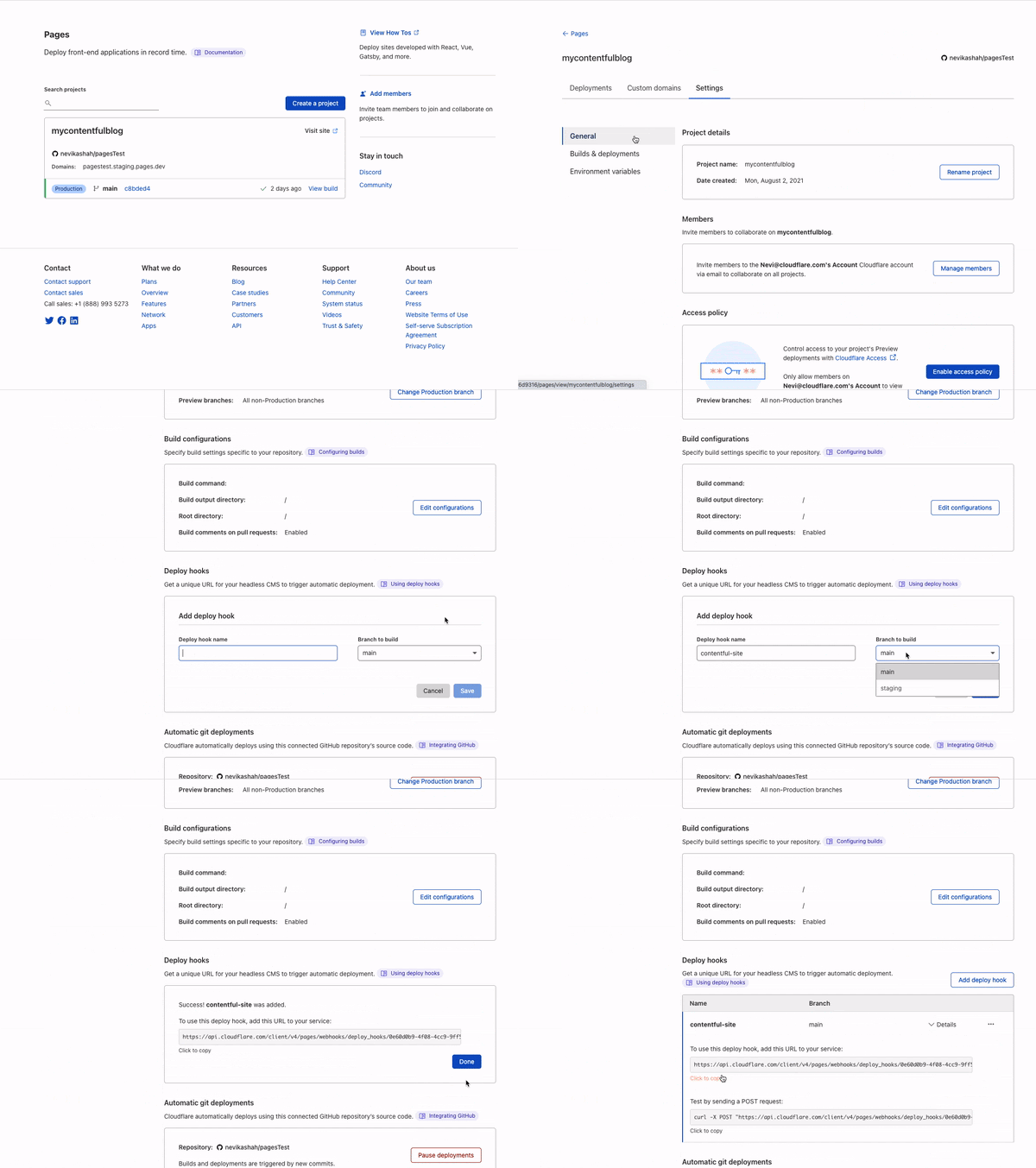
Tag Archives: Product News

Vary for Images: Serve the Correct Images to the Correct Browsers

Post Syndicated from Alex Krivit original https://blog.cloudflare.com/vary-for-images-serve-the-correct-images-to-the-correct-browsers/


Vary for Images: Serve the Correct Images to the Correct Browsers

Vary for Images: Serve the Correct Images to the Correct Browsers

Today, we’re excited to announce support for Vary, an HTTP header that ensures different content types can be served to user-agents with differing capabilities.

At Cloudflare, we’re obsessed with performance. Our job is to ensure that content gets from our network to visitors quickly, and also that the correct content is served. Serving incompatible or unoptimized content burdens website visitors with a poor experience while needlessly stressing a website’s infrastructure. Lots of traffic served from our edge consists of image files, and for these requests and responses, serving optimized image formats often results in significant performance gains. However, as browser technology has advanced, so too has the complexity required to serve optimized image content to browsers all with differing capabilities — not all browsers support all image formats! Providing features to ensure that the correct images are served to the correct requesting browser, device, or screen is important!

Serving images on the modern web

In the web’s early days, if you wanted to serve a full color image, JPEGs reigned supreme and were universally supported. Since then, the state of the art in image encoding has advanced by leaps and bounds, and there are now increasingly more advanced and efficient codecs like WebP and AVIF that promise reduced file sizes and improved quality.

This sort of innovation is exciting, and delivers real improvements to user experience. However, it makes the job of web servers and edge networks more complicated. As an example, until very recently, WebP image files were not universally supported by commonly used browsers. A specific browser not supporting an image file becomes a problem when “intermediate caches”, like Cloudflare, are involved in delivering content.

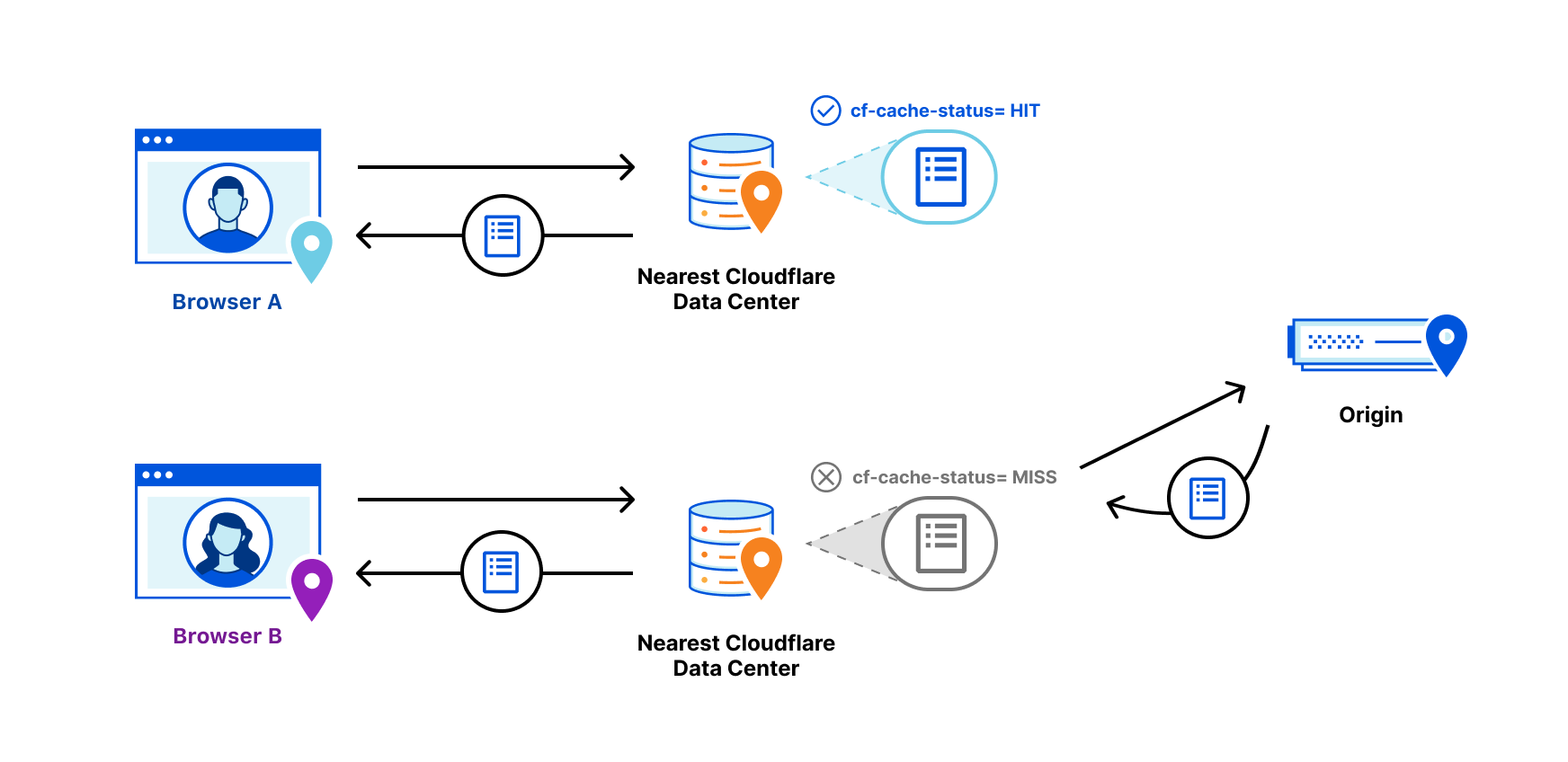
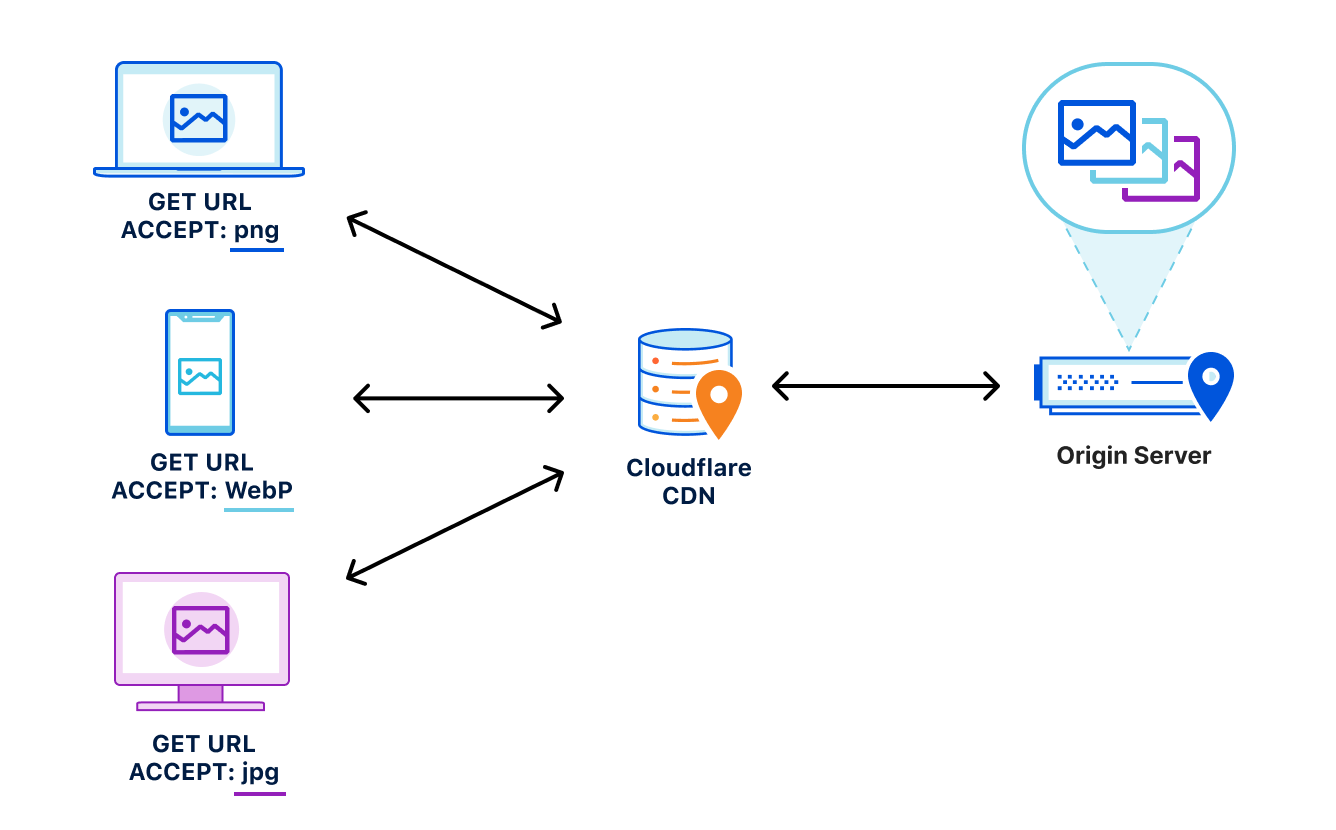
Let’s say, for example, that a website wants to provide the best experience to whatever browser requests the site. A desktop browser sends a request to the website and the origin server responds with the website’s content including images. This response is cached by a CDN prior to getting sent back to the requesting browser.

Now let’s say a mobile browser comes along and requests that same website with those images. In the situation where a cached image is a WebP file, and WebP is not supported by the mobile browser, the website will not load properly because the content returned from cache is not supported by the mobile browser. That’s a problem.

To help solve this issue, today we’re excited to announce our support of the Vary header for images.

How Vary works

Vary is an HTTP response header that allows origins to serve variants of the same content from a single URL, and have intermediate caches serve the correct variant to each user-agent that comes along.

Smashing Magazine has an excellent deep dive on how Vary negotiation works here.

When browsers send a request for a website, they include a variety of request headers. A fairly common example might look something like:

GET /page.html HTTP/1.1
Host: example.com
Connection: keep-alive
Accept:
text/html,application/xhtml+xml,application/xml;q=0.9,image/avif,image/webp,image/apng,*/*;q=0.8,application/signed-exchange;v=b3;q=0.9
User-Agent: Mozilla/5.0 (Macintosh; Intel Mac OS X 10_15_7) AppleWebKit/537.36 (KHTML, like Gecko) Chrome/91.0.4472.164 Safari/537.36
Accept-Encoding: gzip, deflate, br

As we can see above, the browser sends a lot of information in these headers along with the GET request for the URL. What’s important for Vary for Images is the Accept header. The Accept header tells the origin what sort of content the browser is capable of handling (file types, etc.) and provides a list of content preferences.

When the origin gets the request, it sees the Accept header which details the content preference for the browser’s request. In the origin’s response, Vary tells the browser that content returned was different depending on the value of the Accept header in the request. Thus if a different browser comes along and sends a request with different Accept header values, this new browser can get a different response from the origin. An example origin response may look something like:

HTTP/1.1 200 OK
Content-Length: 123456
Vary: Accept

How Vary works with Cloudflare’s cache

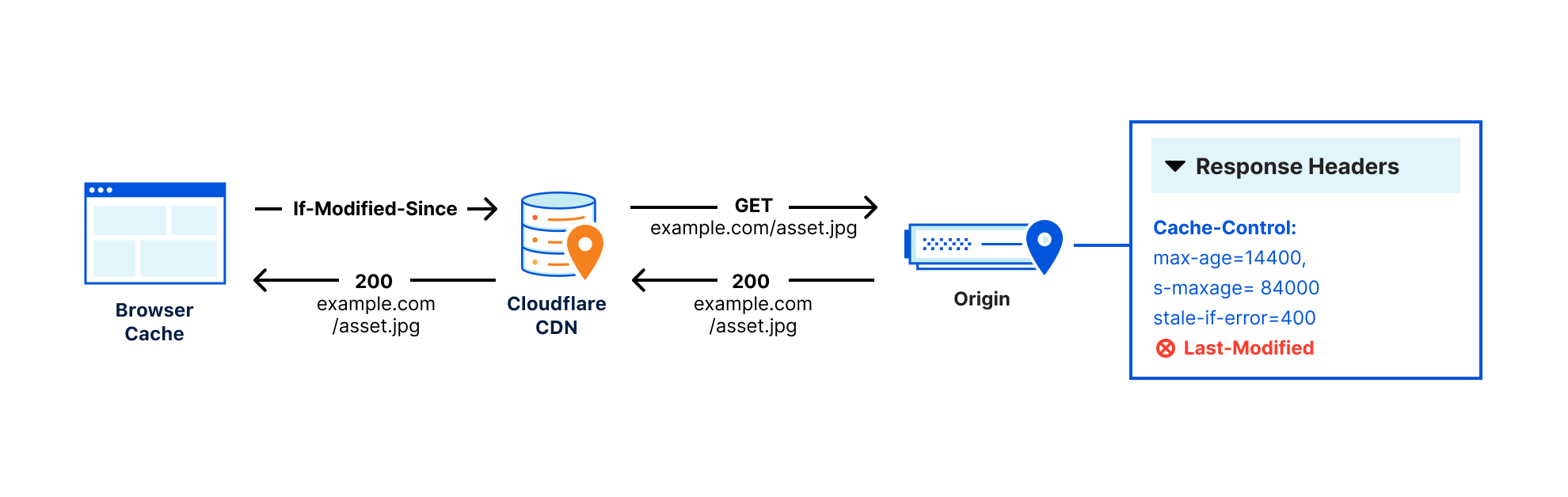
Now, let’s add Cloudflare to the mix. Cloudflare sits in between the browser and the origin in the above example. When Cloudflare receives the origin’s response, we cache the specific image variant so that subsequent requests from browsers with the same image preferences can be served from cache. This also means that serving multiple image variants for the same asset will create distinct cache entries.

Accept header normalization

Caching variants in intermediate caches can be difficult to get right. Naive caching of variants can cause problems by serving incorrect or unsupported image variants to browsers. Some solutions that reduce the potential for caching incorrect variants generally provide those safeguards at the expense of performance.

For example, through a process known as content-negotiation, the correct variant is directed to the requesting browser through a process of multiple requests and responses. The browser could send a request to the origin asking for a list of available resource variants. When the origin responds with the list, the browser can make an additional request for the desired resources from that list, which the server would then respond to. These redundant calls to narrow down which type of content that the browser accepts and the server has available can cause performance delays.
Vary for Images: Serve the Correct Images to the Correct Browsers

Vary for Images reduces the need for these redundant negotiations to an origin by parsing the request’s Accept header and sending that on to the origin to ensure that the origin knows exactly what content it needs to deliver to the browser. Additionally because the expected variant values can be set in Cloudflare’s API (see below), we make an end-run around the negotiation process because we are sure what to ask for and expect from the origin. This reduces the needless back-and-forth between browsers and servers.

How to Enable Vary for Images

You can enable Vary for Images from Cloudflare’s API for Pro, Business, and Enterprise Customers.

Things to keep in mind when using Vary:

  • Vary for Images enables varying on the following file extensions: avif, bmp, gif, jpg, jpeg, jp2, jpg2, png, tif, tiff, webp. These extensions can have multiple variants served so long as the origin server sends the Vary: Accept response header.
  • If the origin server sends Vary: Accept but does not serve the expected variant, the response will not be cached. This will be indicated with the BYPASS cache status in the response headers.
  • The list of variant types the origin serves for each extension must be configured so that Cloudflare can decide which variant to serve without having to contact the origin server.

Enabling Vary in action

Enabling Vary functionality currently requires the use of the Cloudflare API. Here’s an example of how to enable variant support for a zone that wants to serve JPEGs in addition to WebP and AVIF variants for jpeg and jpg extensions.

Create a variants rule:

curl -X PATCH
"https://api.cloudflare.com/client/v4/zones/023e105f4ecef8ad9ca31a8372d0 c353/cache/variants" \ 
	-H "X-Auth-Email: [email protected]" \ 
	-H "X-Auth-Key: 3xamp1ek3y1234" \ 
	-H "Content-Type: application/json" \ 
	--data 
'{"value":{"jpeg":["image/webp","image/avif"],"jpg":["image/webp","image/avif"]}}' 

Modify to only allow WebP variants:

curl -X PATCH 
"https://api.cloudflare.com/client/v4/zones/023e105f4ecef8ad9ca31a8372d0 c353/cache/variants" \ 
	-H "X-Auth-Email: [email protected]" \ 
	-H "X-Auth-Key: 3xamp1ek3y1234" \ 
	-H "Content-Type: application/json" \ 
	--data 
'{"value":{"jpeg":["image/webp"],"jpg":["image/webp"]}}' 

Delete the rule:

curl -X DELETE 
"https://api.cloudflare.com/client/v4/zones/023e105f4ecef8ad9ca31a8372d0c353/cache/variants" \ 
	-H "X-Auth-Email: [email protected]" \ 
	-H "X-Auth-Key: 3xamp1ek3y1234" 

Get the rule:

curl -X GET 
"https://api.cloudflare.com/client/v4/zones/023e105f4ecef8ad9ca31a8372d0c353/cache/variants" \
	-H "X-Auth-Email: [email protected]" \ 
	-H "X-Auth-Key: 3xamp1ek3y1234"

Purging variants

Any purge of varied images will purge all content variants for that URL. That way, if the image changes, you can easily update the cache with a single purge versus chasing down how many potential out-of-date variants may exist. This behavior is true regardless of purge type (single file, tag, or hostname) used.

Other image optimization tools available at Cloudflare

Providing an additional option for customers to optimize the delivery of images also allows Cloudflare to support more customer configurations. For other ways Cloudflare can help you serve images to visitors quickly and efficiently, you can check out:

  • Polish — Cloudflare’s automatic product that strips image metadata and applies compression. Polish accelerates image downloads by reducing image size.
  • Image Resizing — Cloudflare’s image resizing product works as a proxy on top of the Cloudflare edge cache to apply the adjustments to an image’s size and quality.  
  • Cloudflare for Images — Cloudflare’s all-in-one service to host, resize, optimize, and deliver all of your website’s images.

Try Vary for Images Out

Vary for Images provides options that ensure the best images are served to the browser based on the browser’s capabilities and preferences. If you’re looking for more control over how your images are delivered to browsers, we encourage you to try this new feature out.


Welcome to Speed Week and a Waitless Internet

Post Syndicated from John Graham-Cumming original https://blog.cloudflare.com/fastest-internet/

Welcome to Speed Week and a Waitless Internet

Welcome to Speed Week and a Waitless Internet

No one likes to wait. Internet impatience is something we all suffer from.

Waiting for an app to update to show when your lunch is arriving; a website that loads slowly on your phone; a movie that hasn’t started to play… yet.

But building a waitless Internet is hard. And that’s where Cloudflare comes in. We’ve built the global network for Internet applications, be they websites, IoT devices or mobile apps. And we’ve optimized it to cut the wait.

If you believe ISP advertising then you’d think that bandwidth (100Mbps! 1Gbps! 2Gbps!) is the be all and end all of Internet speed. That’s a small component of what it takes to deliver the always on, instant experience we want and need.

The reality is you need three things: ample bandwidth, to have content and applications close to the end user, and to make the software as fast as possible. Simple really. Except not, because all three things require a lot of work at different layers.

In this blog post I’ll look at the factors that go into building our fast global network: bandwidth, latency, reliability, caching, cryptography, DNS, preloading, cold starts, and more; and how Cloudflare zeroes in on the most powerful number there is: zero.

I will focus on what happens when you visit a website but most of what I say below applies to the fitness tracker on your wrist sending information up to the cloud, your smart doorbell alerting you to a visitor, or an app getting you the weather forecast.

Faster than the speed of sight

Imagine for a moment you are about to type in the name of a website on your phone or computer. You’ve heard about an exciting new game “Silent Space Marine” and type in silentspacemarine.com.

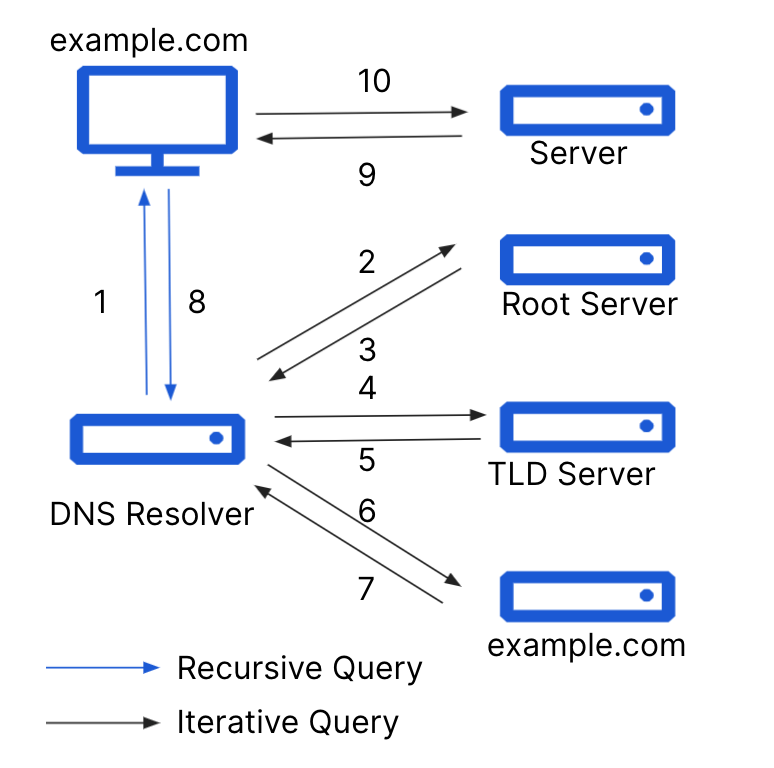
The very first thing your computer does is translate that name into an IP address. Since computers do absolutely everything with numbers under the hood this “DNS lookup” is the first necessary step.

It involves your computer asking a recursive DNS resolver for the IP address of silentspacemarine.com. That’s the first opportunity for slowness. If the lookup is slow everything else will be slowed down because nothing can start until the IP address is known.

The DNS resolver you use might be one provided by your ISP, or you might have changed it to one of the free public resolvers like Google’s 8.8.8.8. Cloudflare runs the world’s fastest DNS resolver, 1.1.1.1, and you can use it too. Instructions are here.

With fast DNS name resolution set up your computer can move on to the next step in getting the web page you asked for.

Aside: how fast is fast? One way to think about that is to ask yourself how fast you are able to perceive something change. Research says that the eye can make sense of an image in 13ms. High quality video shows at 60 frames per second (about 16ms per image). So the eye is fast!

What that means for the web is that we need to be working in tens of milliseconds not seconds otherwise users will start to see the slowness.

Slowly, desperately slowly it seemed to us as we watched

Why is Cloudflare’s 1.1.1.1 so fast? Not to downplay the work of the engineering team who wrote the DNS resolver software and made it fast, but two things help make it zoom: caching and closeness.

Caching means keeping a copy of data that hasn’t changed, so you don’t have to go ask for it. If lots of people are playing Silent Space Marine then a DNS resolver can keep its IP address in cache so that when a computer asks for the IP address the software can reply instantly. All good DNS resolvers cache information for speed.

But what happens if the IP address isn’t in the resolver’s cache. This happens the first time someone asks for it, or after a timeout period where the resolver needs to check that the IP address hasn’t changed. In order to get the IP address the resolver asks an authoritative DNS server for the information. That server is ‘authoritative’ for a specific domain (like silentspacemarine.com) and knows the correct IP address.

Since DNS resolvers sometimes have to ask authoritative servers for IP addresses it’s also important that those servers are fast too. That’s one reason why Cloudflare runs one of the world’s largest and fastest authoritative DNS services. Slow authoritative DNS could be another reason an end user has to wait.

So much for caching, what about ‘closeness’. Here’s the problem: the speed of light is really slow. Yes, I know everyone tells you that the speed of light is really fast, but that’s because us sentient water-filled carbon lifeforms can’t move very fast.

But electrons shooting through wires, and lasers blasting data down fiber optic cables, send data at or close to light speed. And sadly light speed is slow. And this slowness shows up because in order to get anything on the Internet you need to go back and forth to a server (many, many times).

In the best case of asking for silentspacemarine.com and getting its IP address there’s one roundtrip:

“Hello, can you tell me the address of silentspacemarine.com?”
“Yes, it’s…”

Even if you made the DNS resolver software instantaneous you’d pay the price of the speed of light. Sounds crazy, right? Here’s a quick calculation. Let’s imagine at home I have fiber optic Internet and the nearest DNS resolver to me is the city 100 km’s away. And somehow my ISP has laid the straightest fiber cable from me to the DNS resolver.

The speed of light in fiber is roughly 200,000,000 meters per second. Round trip would be 200,000 meters and so in the best possible case a whole one ms has been eaten up by the speed of light. Now imagine any worse case and the speed of light starts eating into the speed of sight.

The solution is quite simple: move the DNS resolver as close to the end user as possible. That’s partly why Cloudflare has built out (and continues to grow) our network. Today it stands at 250 cities worldwide.

Aside: actually it’s not “quite simple” because there’s another wrinkle. You can put servers all over the globe, but you also have to hook them up to the Internet. The beauty of the Internet is that it’s a network of networks. That also means that you don’t just plug into the Internet and get the lowest latency, you need to connect to multiple ISPs, transit networks and more so that end users, whatever network they use, get the best waitless experience they want.

That’s one reason why Cloudflare’s network isn’t simply all over the world, it’s also one of the most interconnected networks.

So far, in building the waitless Internet, we’ve identified fast DNS resolvers and fast authoritative DNS as two needs. What’s next?

Hello. Hello. OK.

So your web browser knows the IP address of Silent Space Marine and got it quickly. Great. Next step is for it to ask the web server at that IP address for the web page. Not so fast! The first step is to establish a connection to that server.

This is almost always done using a protocol called TCP that was invented in the 1970s. The very first step is for your computer and the server to agree they want to communicate. This is done with something called a three-way handshake.

Your computer sends a message saying, essentially, “Hello”, the server replies “I heard you say Hello” (that’s one round trip) and then your computer replies “I heard you say you heard me say Hello, so now we can chat” (actually it’s SYN then SYN-ACK and then ACK).

So, at least one speed-of-light troubled round trip has occurred. How do we fight the speed of light? We bring the server (in this case, web server) close to the end user. Yet another reason for Cloudflare’s massive global network and high interconnectedness.

Now the web browser can ask the web server for the web page of Silent Space Marine, right? Actually, no. The problem is we don’t just need a fast Internet we also need one that’s secure and so pretty much everything on the Internet uses an encryption protocol called TLS (which some old-timers will call SSL) and so next a secure connection has to be established.

Aside: astute readers might be wondering why I didn’t mention security in the DNS section above. Yep, you’re right, that’s a whole other wrinkle. DNS also needs to be secure (and fast) and resolvers like 1.1.1.1 support the encrypted DNS standards DoH and DoT. Those are built on top of… TLS. So in order to have fast, secure DNS you need the same thing as fast, secure web, and that’s fast TLS.

Oh, and by the way, you don’t want to get into some silly trade off between security and speed. You need both, which is why it’s helpful to use a service provider, like Cloudflare, that does everything.

Is this line secure?

TLS is quite a complicated protocol involving a web browser and a server establishing encryption keys and at least one of them (typically the web server) providing that they are who they purport to be (you wouldn’t want a secure connection to your bank’s website if you couldn’t be sure it was actually your bank).

The back and forth of establishing the secure connection incurs more hits on the speed of light. And so, once again, having servers close to end users is vital. And having really fast encryption software is vital too. Especially since encryption will need to happen on a variety of devices (think an old phone vs. a brand new laptop).

So, staying on top of the latest TLS standard is vital (we’re currently on TLS 1.3), and implementing all the tricks that speed TLS up is important (such as session resumption and 0-RTT resumption), and making sure your software is highly optimized.

So far getting to a waitless Internet has involved fast DNS resolvers, fast authoritative DNS, being close to end users to fast TCP handshakes, optimized TLS using the latest protocols. And we haven’t even asked the web server for the page yet.

If you’ve been counting round trips we’re currently standing at four: one for DNS, one for TCP, two for TLS. Lots of opportunity for the speed of light to be a problem, but also lots of opportunity for wider Internet problems to cause a slow-down.

Skybird, this is Dropkick with a red dash alpha message in two parts

Actually, before we let the web browser finally ask for the web page there are two things we need to worry about. And both are to do with when things go wrong. You may have noticed that sometimes the Internet doesn’t work right. Sometimes it’s slow.
The slowness is usually caused by two things: congestion and packet loss. Dealing with those is also vital to giving the end user the fastest experience possible.

In ancient times, long before the dawn of history, people used to use telephones that had physical wires connected to them. Those wires connected to exchanges and literal electrical connections were made between two phones over long distances. That scaled pretty well for a long time until a bunch of packet heads came along in the 1960s and said “you know you could create a giant shared network and break all communication up into packets and share the network”. The Internet.

But when you share something you can also get congestion and congestion control is a huge part of ensuring that the Internet is shared equitably amongst users. It’s one of the miracles of the Internet that theory done in the 1970s and implemented in the 1980s has allowed the network to support real time gaming and streaming video while allowing simultaneous chat and web browsing.

The flip side of congestion control is that in order to prevent a user from overwhelming the network you have to slow them down. And we’re trying to be as fast as possible! Actually, we need to be as fast as possible while remaining fair.

And congestion control is closely related to packet loss because one way that servers and browsers and computers know that there’s congestion is when their packets get lost.

We stay on top of the latest congestion control algorithms (such as BBR) so that users get the fastest, fairest possible experience. And we do something else: we actively try to work around packet loss.

Technologies like Argo and our private fiber backbone help us route around bad Internet weather that’s causing packet loss and send connections over dedicated fiber optic links that span the globe.

More on that in the coming week.

It’s happening!

And so, finally your web browser asks the web server for the web page with an innocent looking GET / command. And the web server responds with a big blob of HTML and just when you thought things were going to be simple, they are super complicated.

The complexity comes from two places: the HTTP protocol is now on its third major version, and the content of web pages is under the control of the designer.

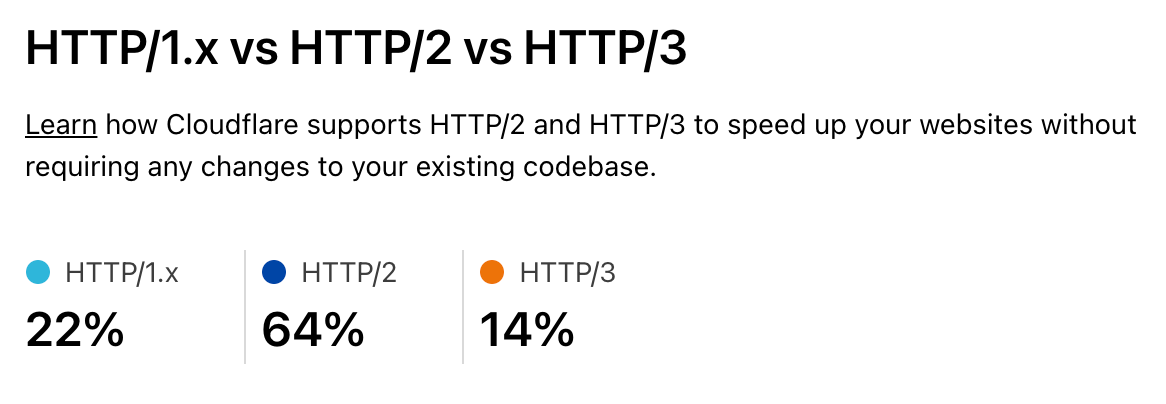
First, protocols. HTTP/2 and HTTP/3 both provide significant speedups for web sites by introducing parallel request/response handling, better compression and ways to work around congestion and packet loss. Although HTTP/1.1 is still widely used, these newer protocols are the majority of traffic.

Cloudflare Radar shows HTTP/1.1 has dropped into the 20% range globally.

Welcome to Speed Week and a Waitless Internet

As people upgrade to recent browsers on their computers and devices the new protocols become more and more important. Staying on top of these, and optimizing them is vital as part of the waitless Internet.

And then comes the content of web pages. Images are a vital part of the web and delivering optimized images right-sized and right-formatted for the end user device plays a big part in a fast web.

But before the web browser can start loading the images it has to get and understand the HTML of the web page. This is wasteful as the browser could be downloading images (and other assets like fonts of JavaScript) while still processing the HTML if it knew about them in advance. The solution to that is for the web server to send a hint about what’s needed along with the HTML.

More on that in the coming week.

Imagical

One of the largest categories of content we deliver for our customers consists of static and animated images. And they are also a ripe target for optimization. Images tend to be large and take a while to download and there are a vast variety of end user devices. So getting the right size and format image to the end user really helps with performance.

Getting it there at the right time also means that images can be loaded lazily and only when the user scrolls them into visibility.

But, traditionally, handling different image formats (especially as new ones like WebP and AVIF get invented), different device types (think of all the different screen sizes out there), and different compression schemes has been a mess of services.

And chained services for different aspects of the image pipeline can be slow and expensive. What you really want is simple storage and an integrated way to deliver the right image to the end user tailored just for them.

More on that in the coming week.

Cache me if you can

As I mentioned in the section about DNS, a few thousand words ago, caching is really powerful and caching content near the end user is super powerful. Cloudflare makes extensive use of caching (particularly of images but also things like GraphQL) on its servers. This makes our customers’ websites fast as images can be delivered quickly from servers near the end user.

But it introduces a problem. If you have a lot of servers around the world then the caches need to be filled with content in order for it to be ready for end users. And the more servers you add the harder it gets to keep them all filled. You want the ‘cache hit ratio’ (how often content is served from cache without having to go back to the customer’s server) to be as high as possible.

But if you’ve got the content cached in Casablanca, and a user visits your website in Chennai they won’t have the fastest content delivery. To solve this some service providers make a deliberate decision not to have lots of servers near end users.

Sounds a bit crazy but their logic is “it’s hard to keep all those caches filled in lots of cities, let’s have only a few cities”. Sad. We think smart software can solve that problem and allow you to have your cache and eat it. We’ve used smart software to solve global load balancing problems and are doing the same for global cache. That way we get high cache hit ratios, super low latency to end users and low load on customer web servers.

More on that in the coming week.

Zero Cool

You know what’s cooler than a millisecond? Zero milliseconds.

Back in 2017 Cloudflare launched Workers, our serverless/edge computing platform. Four years on Workers is widely used and entire companies are being built on the technology. We added support for a variety of languages (such as COBOL and Rust), a distributed key-value store, Durable Objects, WebSockets, Cron Triggers and more.

But people were often concerned about cold start times because they were thinking about other serverless platforms that had significant spool up times for code that wasn’t ready to run.

Last year we announced that we eliminated cold starts from Workers. You don’t have to worry. And we’ll go deeper into why Cloudflare Workers is the fastest serverless platform out there.

More on that in the coming week.

And finally…

If you run a large global network and want to know if it’s really the fastest there is, and where you need to do work to keep it fast, the only way is to measure. Although there are third-party measurement tools available they can suffer from biases and their methodology is sometimes unclear.

We decided the only way we could understand our performance vs. other networks was to build our own like-for-like testing tool and measure performance across the Internet’s 70,000+ networks.

We’ll also talk about how we keep everything fast, from lightning quick configuration updates and code deploys to logs you don’t have to wait for to ludicrously fast cache purges to real time analytics.

More on that in the coming week.

Welcome to Speed Week*

*Can’t wait for tomorrow? Go play Silent Space Marine. It uses the technologies mentioned above.

What’s new with Cloudflare for SaaS?

Post Syndicated from Dina Kozlov original https://blog.cloudflare.com/whats-new-with-cloudflare-for-saas/

What’s new with Cloudflare for SaaS?

What’s new with Cloudflare for SaaS?

This past April, we announced the Cloudflare for SaaS Beta which makes our SSL for SaaS product available to everyone. This allows any customer — from first-time developers to large enterprises — to use Cloudflare for SaaS to extend our full product suite to their own customers. SSL for SaaS is the subset of Cloudflare for SaaS features that focus on a customer’s Public Key Infrastructure (PKI) needs.

Today, we’re excited to announce all the customizations that our team has been working on for our Enterprise customers — for both Cloudflare for SaaS and SSL for SaaS.

Let’s start with the basics — the common SaaS setup

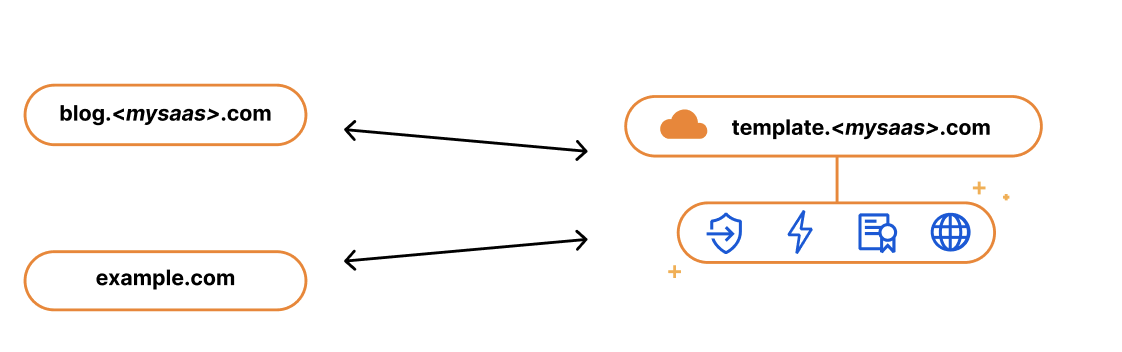
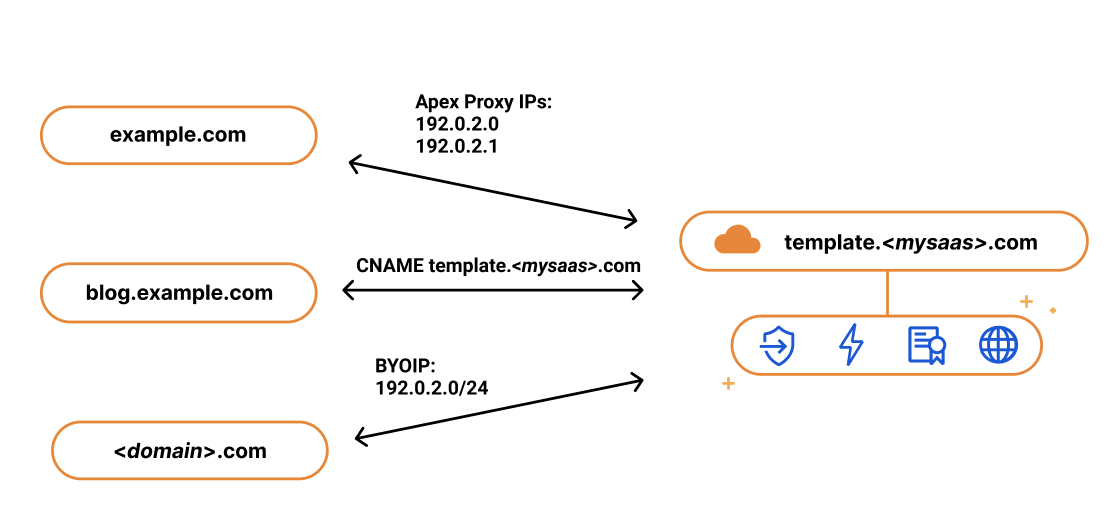
If you’re running a SaaS company, your solution might exist as a subdomain of your SaaS website, e.g. template.<mysaas>.com, but ideally, your solution would allow the customer to use their own vanity hostname for it, such as example.com.

The most common way to begin using a SaaS company’s service is to point a CNAME DNS record to the subdomain that the SaaS provider has created for your application. This ensures traffic gets to the right place, and it allows the SaaS provider to make infrastructure changes without involving your end customers.

What’s new with Cloudflare for SaaS?

We kept this in mind when we built our SSL for SaaS a few years ago. SSL for SaaS takes away the burden of certificate issuance and management from the SaaS provider by proxying traffic through Cloudflare’s edge. All the SaaS provider needs to do is onboard their zone to Cloudflare and ask their end customers to create a CNAME to the SaaS zone — something they were already doing.

The big benefit of giving your customers a CNAME record (instead of a fixed IP address) is that it gives you, the SaaS provider, more flexibility and control. It allows you to seamlessly change the IP address of your server in the background. For example, if your IP gets blocked by ISP providers, you can update that address on your customers’ behalf with a CNAME record. With a fixed A record, you rely on each of your customers to make a change.

While the CNAME record works great for most customers, some came back and wanted to bypass the limitation that CNAME records present. RFC 1912 states that CNAME records cannot coexist with other DNS records, so in most cases, you cannot have a CNAME at the root of your domain, e.g. example.com. Instead, the CNAME needs to exist at the subdomain level, i.e. www.example.com. Some DNS providers (including Cloudflare) bypass this restriction through a method called CNAME flattening.

Since SaaS providers have no control over the DNS provider that their customers are using, the feedback they got from their customers was that they wanted to use the apex of their zone and not the subdomain. So when our SaaS customers came back asking us for a solution, we delivered. We call it Apex Proxying.

Apex Proxying

For our SaaS customers who want to allow their customers to proxy their apex to their zone, regardless of which DNS provider they are using, we give them the option of Apex Proxying. Apex Proxying is an SSL for SaaS feature that gives SaaS providers a pair of IP addresses to provide to their customers when CNAME records do not work for them.

Cloudflare starts by allocating a dedicated set of IPs for the SaaS provider. The SaaS provider then gives their customers these IPs that they can add as A or AAAA DNS records, allowing them to proxy traffic directly from the apex of their zone.

While this works for most, some of our customers want more flexibility. They want to have multiple IPs that they can change, or they want to assign different sets of customers to different buckets of IPs. For those customers, we give them the option to bring their own IP range, so they control the IP allocation for their application.

What’s new with Cloudflare for SaaS?

Bring Your Own IPs

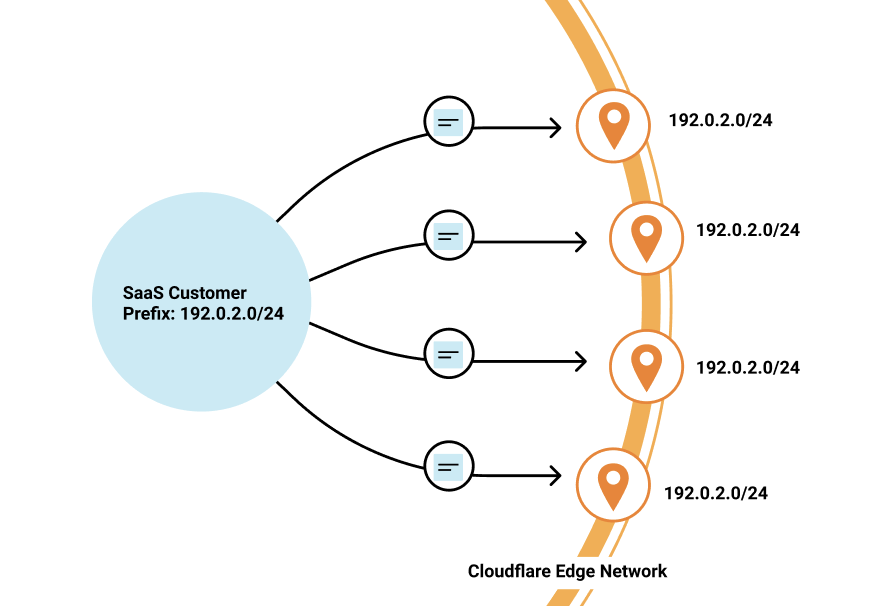
Last year, we announced Bring Your Own IP (BYOIP), which allows customers to bring their own IP range for Cloudflare to announce at our edge. One of the benefits of BYOIP is that it allows SaaS customers to allocate that range to their account and then, instead of having a few IPs that their customers can point to, they can distribute all the IPs in their range.

What’s new with Cloudflare for SaaS?

SaaS customers often require granular control of how their IPs are allocated to different zones that belong to different customers. With 256 IPs to use, you have the flexibility to either group customers together or to give them dedicated IPs. It’s up to you!

While we’re on the topic of grouping customers, let’s talk about how you might want to do this when sending traffic to your origin.

Custom Origin Support

When setting up Cloudflare for SaaS, you indicate your fallback origin, which defines the origin that all of your Custom Hostnames are routed to. This origin can be defined by an IP address or point to a load balancer defined in the zone. However, you might not want to route all customers to the same origin. Instead, you want to route different customers (or custom hostnames) to different origins — either because you want to group customers together or to help you scale the origins supporting your application.

Our Enterprise customers can now choose a custom origin that is not the default fallback origin for any of their Custom Hostnames. Traditionally, this has been done by emailing your account manager and requesting custom logic at Cloudflare’s edge, a very cumbersome and outdated practice. But now, customers can easily indicate this in the UI or in their API requests.

Wildcard Support

Oftentimes, SaaS providers have customers that don’t just want their domain to stay protected and encrypted, but also the subdomains that fall under it.

We wanted to give our Enterprise customers the flexibility to extend this benefit to their end customers by offering wildcard support for Custom Hostnames.

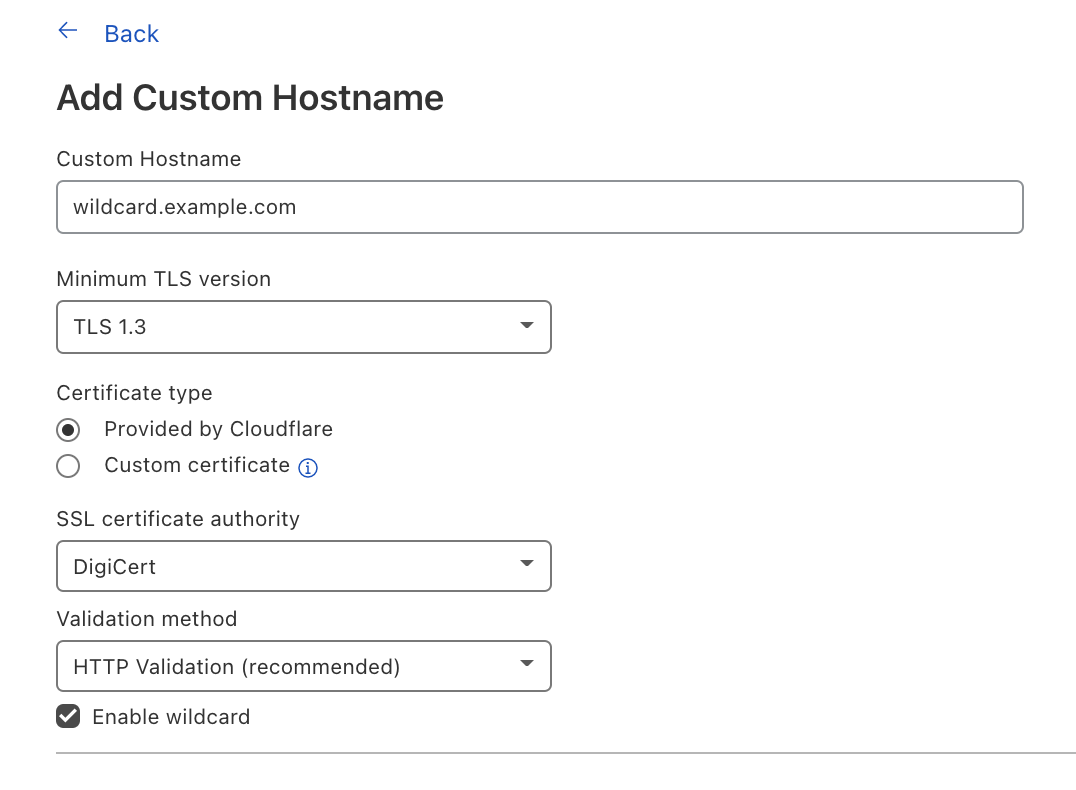
Wildcard Custom Hostnames extend the Custom Hostname’s configuration from a specific hostname — e.g. “blog.example.com” — to the next level of subdomains of that hostname, e.g. “*.blog.example.com”.

To create a Custom Hostname with a wildcard, you can either indicate Enable wildcard support when creating a Custom Hostname in the Cloudflare dashboard or when you’re creating a Custom Hostname through the API, indicate wildcard: “true”.

What’s new with Cloudflare for SaaS?

Now let’s switch gears to TLS certificate management and the improvements our team has been working on.

TLS Management for All

SSL for SaaS was built to reduce the burden of certificate management for SaaS providers. The initial functionality was meant to serve most customers and their need to issue, maintain, and renew certificates on their customers’ behalf. But one size does not fit all, and some of our customers have more specific needs for their certificate management — and we want to make sure we accommodate them.

CSR Support/Custom certs

One of the superpowers of SSL for SaaS is that it allows Cloudflare to manage all the certificate issuance and renewals on behalf of our customers and their customers. However, some customers want to allow their end customers to upload their own certificates.

For example, a bank may only trust certain certificate authorities (CAs) for their certificate issuance. Alternatively, the SaaS provider may have initially built out TLS support for their customers and now their customers expect that functionality to be available. Regardless of the reasoning, we have given our customers a few options that satisfy these requirements.

For customers who want to maintain control over their TLS private keys or give their customers the flexibility to use their certification authority (CA) of choice, we allow the SaaS provider to upload their customer’s certificate.

If you are a SaaS provider and one of your customers does not allow third parties to generate keys on their behalf, then you want to allow that customer to upload their own certificate. Cloudflare allows SaaS providers to upload their customers’ certificates to any of their custom hostnames — in just one API call!

Some SaaS providers never want a person to see private key material, but want to be able to use the CA of their choice. They can do so by generating a Certificate Signing Request (CSR) for their Custom Hostnames, and then either use those CSRs themselves to order certificates for their customers or relay the CSRs to their customers so that they can provision their own certificates. In either case, the SaaS provider is able to then upload the certificate for the Custom Hostname after the certificate has been issued from their customer’s CA for use at Cloudflare’s edge.

Custom Metadata

For our customers who need to customize their configuration to handle specific rules for their customer’s domains, they can do so by using Custom Metadata and Workers.

By adding metadata to an individual custom hostname and then deploying a Worker to read the data, you can use the Worker to customize per-hostname behavior.

Some customers use this functionality to add a customer_id field to each custom hostname that they then send in a request header to their origin. Another way to use this is to set headers like HTTP Strict Transport Security (HSTS) on a per-customer basis.

Saving the best for last: Analytics!

Tomorrow, we have a very special announcement about how you can now get more visibility into your customers’ traffic and — more importantly —  how you can share this information back to them.

Interested? Reach out!

If you’re an Enterprise customer, and you’re interested in any of these features, reach out to your account team to get access today!

Quick Tunnels: Anytime, Anywhere

Post Syndicated from Rishabh Bector original https://blog.cloudflare.com/quick-tunnels-anytime-anywhere/

Quick Tunnels: Anytime, Anywhere

Quick Tunnels: Anytime, Anywhere

My name is Rishabh Bector, and this summer, I worked as a software engineering intern on the Cloudflare Tunnel team. One of the things I built was quick Tunnels and before departing for the summer, I wanted to write a blog post on how I developed this feature.

Over the years, our engineering team has worked hard to continually improve the underlying architecture through which we serve our Tunnels. However, the core use case has stayed largely the same. Users can implement Tunnel to establish an encrypted connection between their origin server and Cloudflare’s edge.

This connection is initiated by installing a lightweight daemon on your origin, to serve your traffic to the Internet without the need to poke holes in your firewall or create intricate access control lists. Though we’ve always centered around the idea of being a connector to Cloudflare, we’ve also made many enhancements behind the scenes to the way in which our connector operates.

Typically, users run into a few speed bumps before being able to use Cloudflare Tunnel. Before they can create or route a tunnel, users need to authenticate their unique token against a zone on their account. This means in order to simply spin up a Tunnel testing environment, users need to first create an account, add a website, change their nameservers, and wait for DNS propagation.

Starting today, we’re excited to fix that. Cloudflare Tunnel now supports a free version that includes all the latest features and does not require any onboarding to Cloudflare. With today’s change, you can begin experimenting with Tunnel in five minutes or less.

Introducing Quick Tunnels

When administrators start using Cloudflare Tunnel, they need to perform four specific steps:

  1. Create the Tunnel
  2. Configure the Tunnel and what services it will represent
  3. Route traffic to the Tunnel
  4. And finally… run the Tunnel!

These steps give you control over how your services connect to Cloudflare, but they are also a chore. Today’s change, which we are calling quick Tunnels, not only removes some onboarding requirements, we’re also condensing these into a single step.

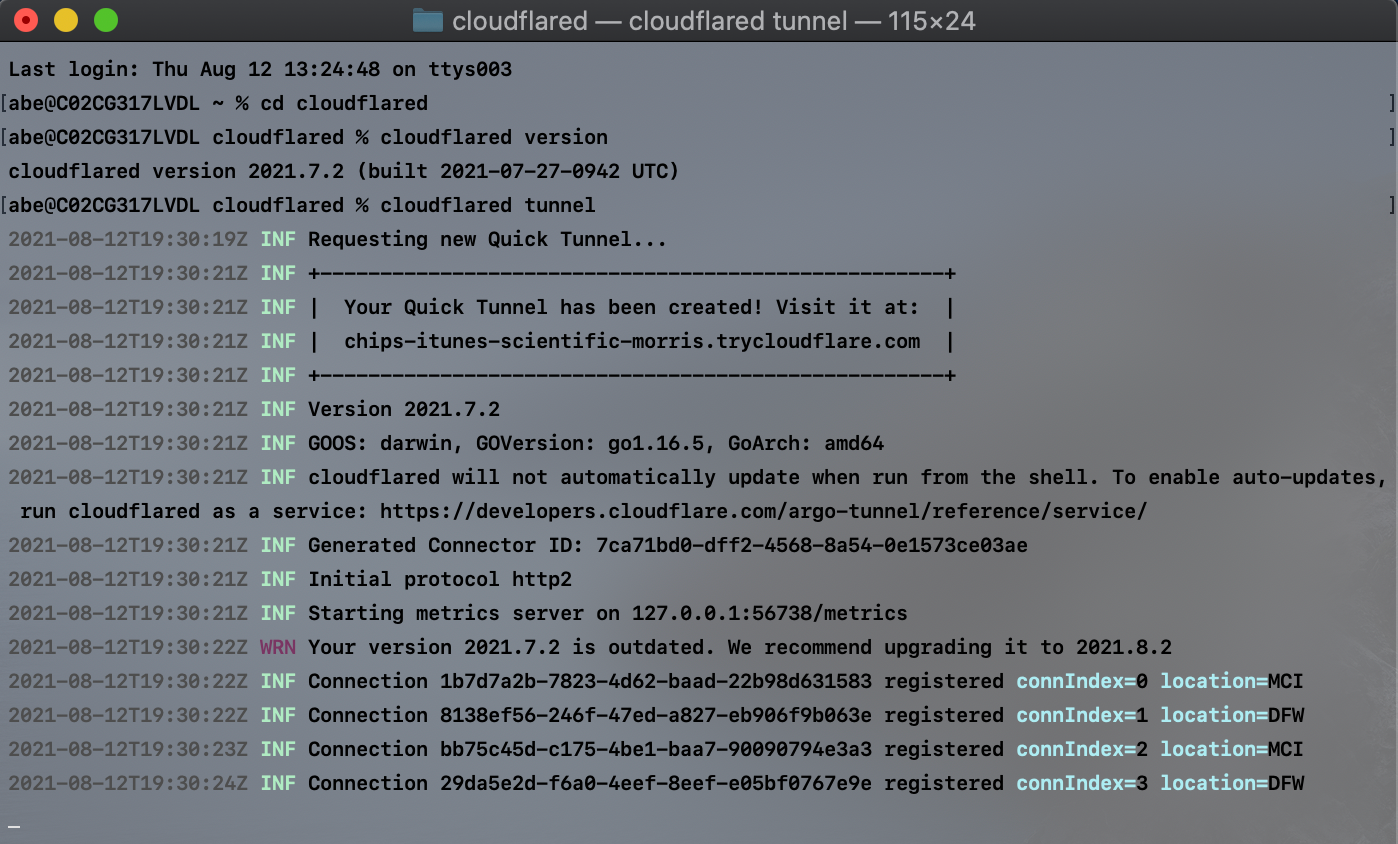
If you have a service running locally that you want to share with teammates or an audience, you can use this single command to connect your service to Cloudflare’s edge. First, you need to install the Cloudflare connector, a lightweight daemon called cloudflared. Once installed, you can run the command below.

cloudflared tunnel

Quick Tunnels: Anytime, Anywhere

When run, cloudflared will generate a URL that consists of a random subdomain of the website trycloudflare.com and point traffic to localhost port 8080. If you have a web service running at that address, users who visit the subdomain generated will be able to visit your web service through Cloudflare’s network.

Configuring Quick Tunnels

We built this feature with the single command in mind, but if you have services that are running at different default locations, you can optionally configure your quick Tunnel to support that.

One example is if you’re building a multiplayer game that you want to share with friends. If that game is available locally on your origin, or even your laptop, at localhost:3000, you can run the command below.

cloudflared tunnel ---url localhost:3000

You can do this with IP addresses or URLs, as well. Anything that cloudflared can reach can be made available through this service.

How does it work?

Cloudflare quick Tunnels is powered by Cloudflare Workers, giving us a serverless compute deployment that puts Tunnel management in a Cloudflare data center closer to you instead of a centralized location.

When you run the command cloudflared tunnel, your instance of cloudflared initiates an outbound-only connection to Cloudflare. Since that connection was initiated without any account details, we treat it as a quick Tunnel.

A Cloudflare Worker, which we call the quick Tunnel Worker, receives a request that a new quick Tunnel should be created. The Worker generates the random subdomain and returns that to the instance of cloudflared. That instance of cloudflared can now establish a connection for that subdomain.

Meanwhile, a complementary service running on Cloudflare’s edge receives that subdomain and the identification number of the instance of cloudflared. That service uses that information to create a DNS record in Cloudflare’s authoritative DNS which maps the randomly-generated hostname to the specific Tunnel you created.

The deployment also relies on the Workers Cron Trigger feature to perform clean up operations. On a regular interval, the Worker looks for quick Tunnels which have been disconnected for more than five minutes. Our Worker classifies these Tunnels as abandoned and proceeds to delete them and their associated DNS records.

What about Zero Trust policies?

By default, all the quick Tunnels that you create are available on the public Internet at the randomly generated URL. While this might be fine for some projects and tests, other use cases require more security.

Quick Tunnels: Anytime, Anywhere

If you need to add additional Zero Trust rules to control who can reach your services, you can use Cloudflare Access alongside Cloudflare Tunnel. That use case does require creating a Cloudflare account and adding a zone to Cloudflare, but we’re working on ideas to make that easier too.

Where should I notice improvements?

We first launched a version of Cloudflare Tunnel that did not require accounts over two years ago. While we’ve been thrilled that customers have used this for their projects, Cloudflare Tunnel evolved significantly since then. Specifically, Cloudflare Tunnel relies on a new architecture that is more redundant and stable than the one used by that older launch. While all Tunnels that migrated to this new architecture, which we call Named Tunnels, enjoyed those benefits, the users on this option that did not require an account were left behind.

Today’s announcement brings that stability to quick Tunnels. Tunnels are now designed to be long-lived, persistent objects. Unless you delete them, Tunnels can live for months, an improvement over the average lifespan measured in hours before connectivity issues disrupted a Tunnel in the older architecture.

These quick Tunnels run on this same, resilient architecture not only expediting time-to-value, but also improving the overall tunnel quality of life.

What’s next?

Today’s quick Tunnels add a powerful feature to Cloudflare Tunnels: the ability to create a reliable, resilient tunnel in a single command, without the hassle of creating an account first. We’re excited to help your team build and connect services to Cloudflare’s network and on to your audience or teammates. If you have additional questions, please share them in this community post here.

Introducing logs from the dashboard for Cloudflare Workers

Post Syndicated from Ashcon Partovi original https://blog.cloudflare.com/workers-dashboard-logs/

Introducing logs from the dashboard for Cloudflare Workers

Introducing logs from the dashboard for Cloudflare Workers

If you’re writing code: what can go wrong, will go wrong.

Many developers know the feeling: “It worked in the local testing suite, it worked in our staging environment, but… it’s broken in production?” Testing can reduce mistakes and debugging can help find them, but logs give us the tools to understand and improve what we are creating.

if (this === undefined) {
  console.log("there’s no way… right?") // Narrator: there was.
}

While logging can help you understand when the seemingly impossible is actually possible, it’s something that no developer really wants to set up or maintain on their own. That’s why we’re excited to launch a new addition to the Cloudflare Workers platform: logs and exceptions from the dashboard.

Starting today, you can view and filter the console.log output and exceptions from a Worker… at no additional cost with no configuration needed!

View logs, just a click away

When you view a Worker in the dashboard, you’ll now see a “Logs” tab which you can click on to view a detailed stream of logs and exceptions. Here’s what it looks like in action:

Each log entry contains an event with a list of logs, exceptions, and request headers if it was triggered by an HTTP request. We also automatically redact sensitive URLs and headers such as Authorization, Cookie, or anything else that appears to have a sensitive name.

If you are in the Durable Objects open beta, you will also be able to view the logs and requests sent to each Durable Object. This is a great tool to help you understand and debug the interactions between your Worker and a Durable Object.

For now, we support filtering by event status and type. Though, you can expect more filters to be added to the dashboard very soon! Today, we support advanced filtering with the wrangler CLI, which will be discussed later in this blog.

console.log(), and you’re all set

It’s really simple to get started with logging for Workers. Simply invoke one of the standard console APIs, such as console.log(), and we handle the rest. That’s it! There’s no extra setup, no configuration needed, and no hidden logging fees.

function logRequest (request) {
  const { cf, headers } = request
  const { city, region, country, colo, clientTcpRtt  } = cf
  
  console.log("Detected location:", [city, region, country].filter(Boolean).join(", "))
  if (clientTcpRtt) {
     console.debug("Round-trip time from client to", colo, "is", clientTcpRtt, "ms")
  }

  // You can also pass an object, which will be interpreted as JSON.
  // This is great if you want to define your own structured log schema.
  console.log({ headers })
}

In fact, you don’t even need to use console.log to view an event from the dashboard. If your Worker doesn’t generate any logs or exceptions, you will still be able to see the request headers from the event.

Advanced filters, from your terminal

If you need more advanced filters you can use wrangler, our command-line tool for deploying Workers. We’ve updated the wrangler tail command to support sampling and a new set of advanced filters. You also no longer need to install or configure cloudflared to use the command. Not to mention it’s much faster, no more waiting around for logs to appear. Here are a few examples:

# Filter by your own IP address, and if there was an uncaught exception.
wrangler tail --format=pretty --ip-address=self --status=error

# Filter by HTTP method, then apply a 10% sampling rate.
wrangler tail --format=pretty --method=GET --sampling-rate=0.1

# Filter using a generic search query.
wrangler tail --format=pretty --search="TypeError"

We recommend using the “pretty” format, since wrangler will output your logs in a colored, human-readable format. (We’re also working on a similar display for the dashboard.)

However, if you want to access structured logs, you can use the “json” format. This is great if you want to pipe your logs to another tool, such as jq, or save them to a file. Here are a few more examples:

# Parses each log event, but only outputs the url.
wrangler tail --format=json | jq .event.request?.url

# You can also specify --once to disconnect the tail after receiving the first log.
# This is useful if you want to run tests in a CI/CD environment.
wrangler tail --format=json --once > event.json

Try it out!

Both logs from the dashboard and wrangler tail are available and free for existing Workers customers. If you would like more information or a step-by-step guide, check out any of the resources below.

Data protection controls with Cloudflare Browser Isolation

Post Syndicated from Tim Obezuk original https://blog.cloudflare.com/data-protection-browser/

Data protection controls with Cloudflare Browser Isolation

Data protection controls with Cloudflare Browser Isolation

Starting today, your team can use Cloudflare’s Browser Isolation service to protect sensitive data inside the web browser. Administrators can define Zero Trust policies to control who can copy, paste, and print data in any web based application.

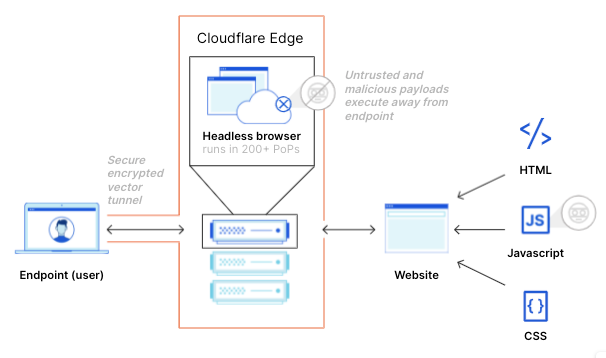
In March 2021, for Security Week, we announced the general availability of Cloudflare Browser Isolation as an add-on within the Cloudflare for Teams suite of Zero Trust application access and browsing services. Browser Isolation protects users from browser-borne malware and zero-day threats by shifting the risk of executing untrusted website code from their local browser to a secure browser hosted on our edge.

And currently, we’re democratizing browser isolation for any business by including it with our Teams Enterprise Plan at no additional charge.1

A different approach to zero trust browsing

Web browsers, the same tool that connects users to critical business applications, is one of the most common attack vectors and hardest to control.

Browsers started as simple tools intended to share academic documents over the Internet and over time have become sophisticated platforms that replaced virtually every desktop application in the workplace. The dominance of web-based applications in the workplace has created a challenge for security teams who race to stay patch zero-day vulnerabilities and protect sensitive data stored in self-hosted and SaaS based applications.

In an attempt to protect users and applications from web based attacks, administrators have historically relied on DNS or HTTP inspection to prevent threats from reaching the browser. These tools, while useful for protecting against known threats, are difficult to tune without false-positives (negatively impacting user productivity and increasing IT support burden) and ineffective against zero day vulnerabilities.

Browser isolation technologies mitigate risk by shifting the risk of executing foreign code from the endpoint to a secure environment. Historically administrators have had to make a compromise between performance and security when adopting such a solution. They could either:

  • Prioritize security by choosing a solution that relies on pixel pushing techniques to serve a visual representation to users. This comes at the cost of performance by introducing latency, graphical artifacts and heavy bandwidth usage.

OR

  • Prioritize performance by choosing a solution that relies on code scrubbing techniques to unpack, inspect and repack the webpage. This model is fragile (often failing to repack leading to a broken webpage) and insecure by allowing undetected threats to compromise users.

At Cloudflare, we know that security products do not need to come at the expense of performance. We developed a third option that delivers a remote browsing experience without needing to compromise on performance and security for users.

  • Prioritize security by never sending foreign code to the endpoint and executing it in a secure remote environment.
  • Prioritize performance sending light-weight vector instructions (rather than pixels) over the wire and minimize remote latency on our global edge network.
Data protection controls with Cloudflare Browser Isolation

This unique approach delivers an isolated browser without the security or performance challenges faced by legacy solutions.

Data control through the browser

Malware and zero-day threats are not the only security challenges administrators face with web browsers. The mass adoption of SaaS products has made the web browser the primary tool used to access data. Lack of control over both the application and the browser has left administrators little control over their data once it is delivered to an endpoint.

Data loss prevention tools typically rely on pattern recognition to partially or completely redact the transmission of sensitive data values. This model is useful for protecting against an unexpected breach of PII and PCI data, such as locations and financial information but comes at the loss of visibility.

The redaction model falls short when sensitive data does not fit into easily recognizable patterns, and the end-users require visibility to do their job. In industries such as health care, redacting sensitive data is not feasible as medical professions require visibility of patient notes and appointment data.

Once data lands in the web browser it is trivial for a user to copy-paste and print sensitive data into another website, application, or physical location. These seemingly innocent actions can lead to data being misplaced by naive users leading to a data breach. Administrators have had limited options to protect data in the browser, some even going so far as to deploy virtual desktop services to control access to a SaaS based customer relationship management (CRM) tool. This increased operating costs, and frustrated users who had to learn how to use computer-in-a-computer just to use a website.

One-click to isolate data in the browser

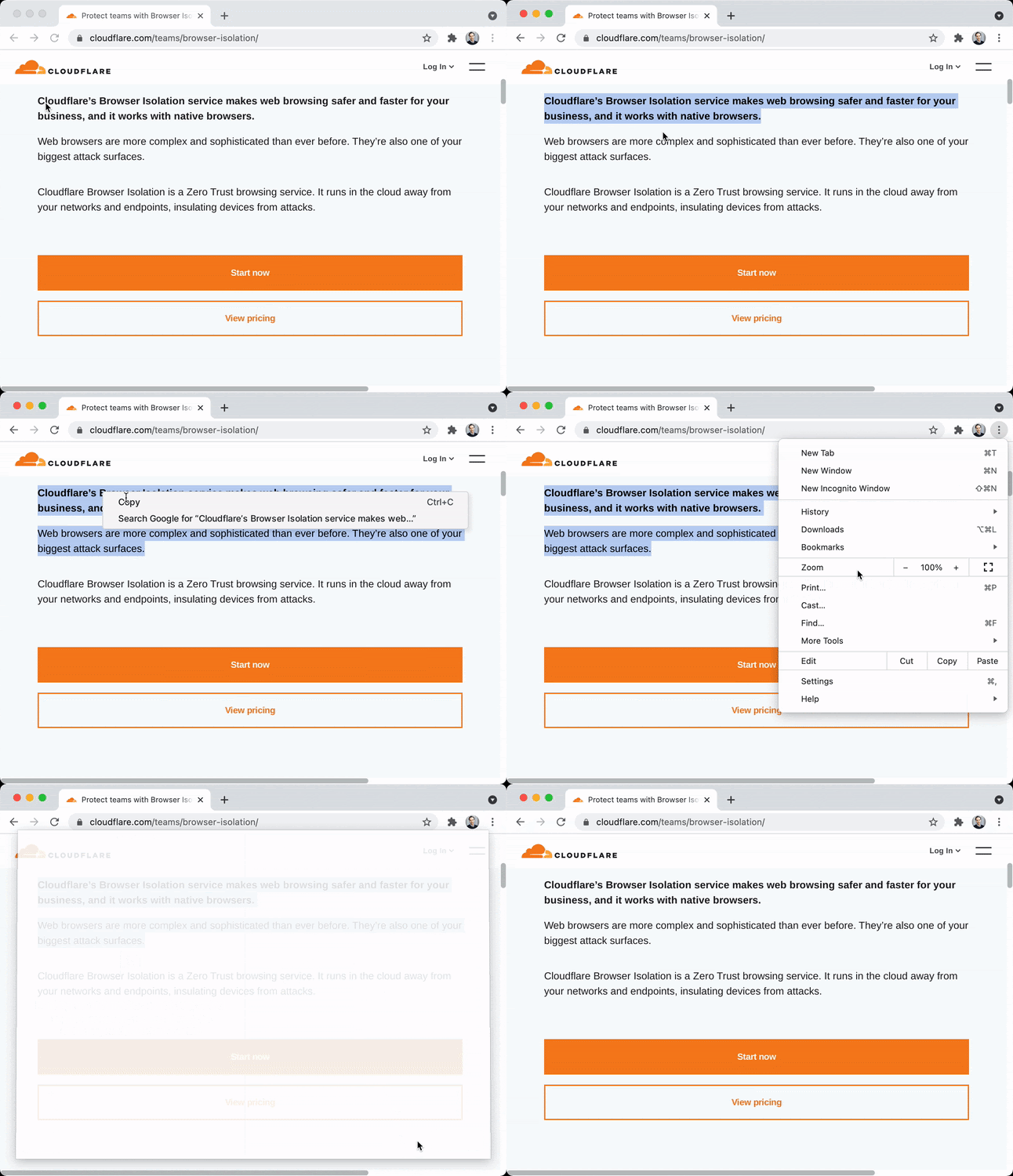
Cloudflare Browser Isolation executes all website code (including HTML) in the remote browser. Since page content remains on the remote browser and draw instructions are only sent to the browser, Cloudflare Browser Isolation is in a powerful position to protect sensitive data on any website or SaaS application.

Administrators can now control copy-paste, and printing functionality with per-rule granularity with one click in the Cloudflare for Teams Dashboard. For example, now administrators can build rules that prevent users from copying information from your CRM or that stop team members from printing data from your ERP—without blocking their attempts to print from external websites where printing does not present a data loss risk.

From the user’s perspective websites look and behave normally until the user performs a restricted action.

Data protection controls with Cloudflare Browser Isolation

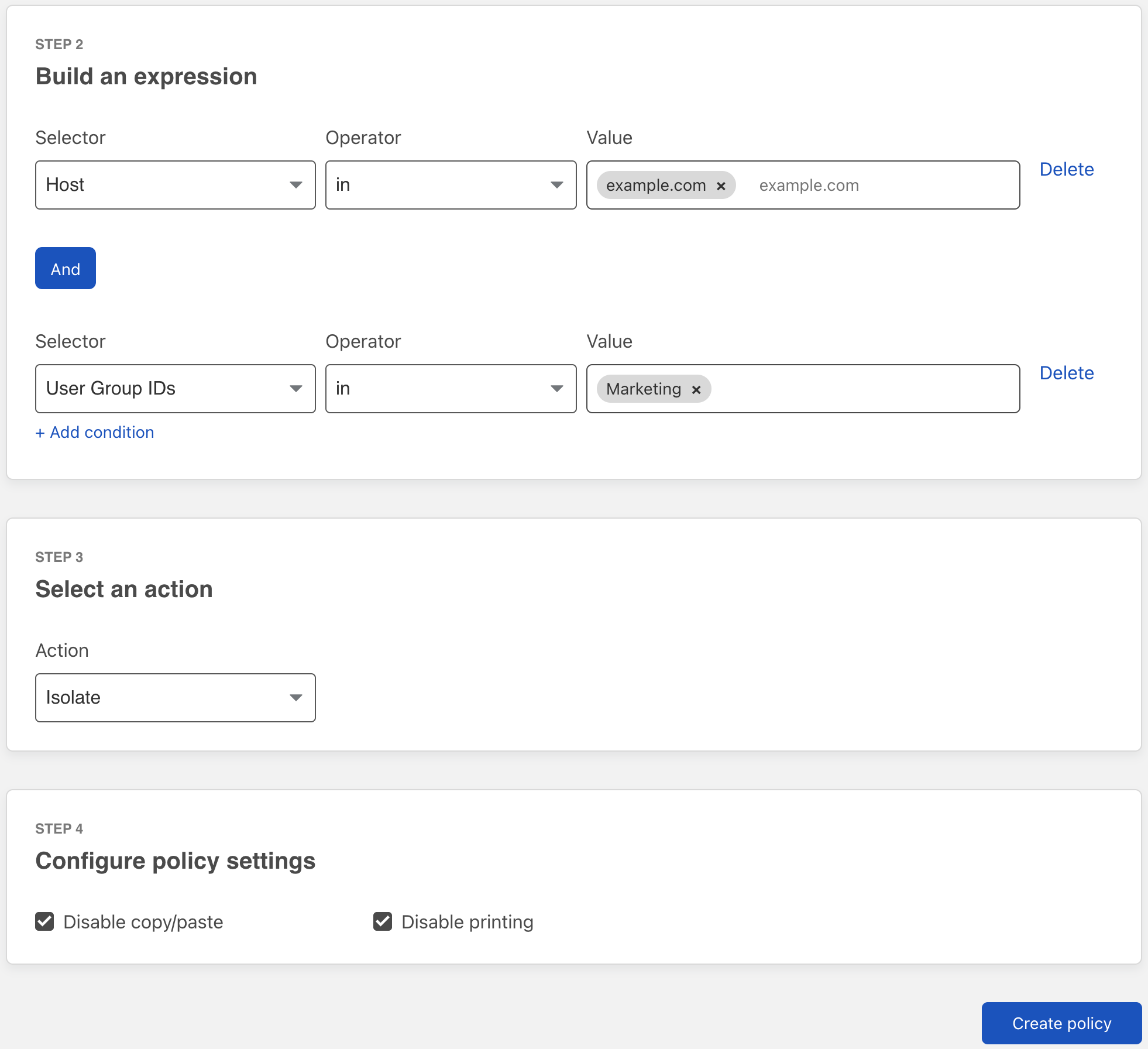
Copy-paste and printing control can be configured for both new and existing HTTP policies in the Teams Dashboard.

  1. Navigate to the Cloudflare for Teams dashboard.
  2. Navigate to Gateway → Policies → HTTP.
  3. Create/update an HTTP policy with an Isolate action (docs).
  4. Configure policy settings.
Data protection controls with Cloudflare Browser Isolation

Administrators have flexibility with data protection controls and can enable/disable browser behaviours based on application, hostname, user identity and security risk.

What’s next?

We’re just getting started with zero trust browsing controls. We’re hard at work building controls to protect against phishing attacks, further protect data by controlling file uploading and downloading without needing to craft complex network policies as well as support for a fully clientless browser isolation experience.

Democratizing browser isolation for any business

Historically, only large enterprises had justified the cost to add on remote browser isolation to their existing security deployments. And the resulting loosely-integrated solution fell short of achieving Zero Trust due to poor end-user experiences. Cloudflare has already solved these challenges, so businesses achieve full Zero Trust security including browser-based data protection controls without performance tradeoffs.

Yet it’s not always enough to democratize Zero Trust browser isolation for any business, so we’re currently including it with our Teams Enterprise Plan at no additional charge.1 Get started here.

…….
1. For up to 2000 seats until 31 Dec 2021

Capturing Purpose Justification in Cloudflare Access

Post Syndicated from Molly Cinnamon original https://blog.cloudflare.com/access-purpose-justification/

Capturing Purpose Justification in Cloudflare Access

The digital world often takes its cues from the real world. For example, there’s a standard question every guard or agent asks when you cross a border—whether it’s a building, a neighborhood, or a country: “What’s the purpose of your visit?” It’s a logical question: sure, the guard knows some information—like who you are (thanks to your ID) and when you’ve arrived—but the context of “why” is equally important. It can set expectations around behavior during your visit, as well as what spaces you should or should not have access to.

Capturing Purpose Justification in Cloudflare Access
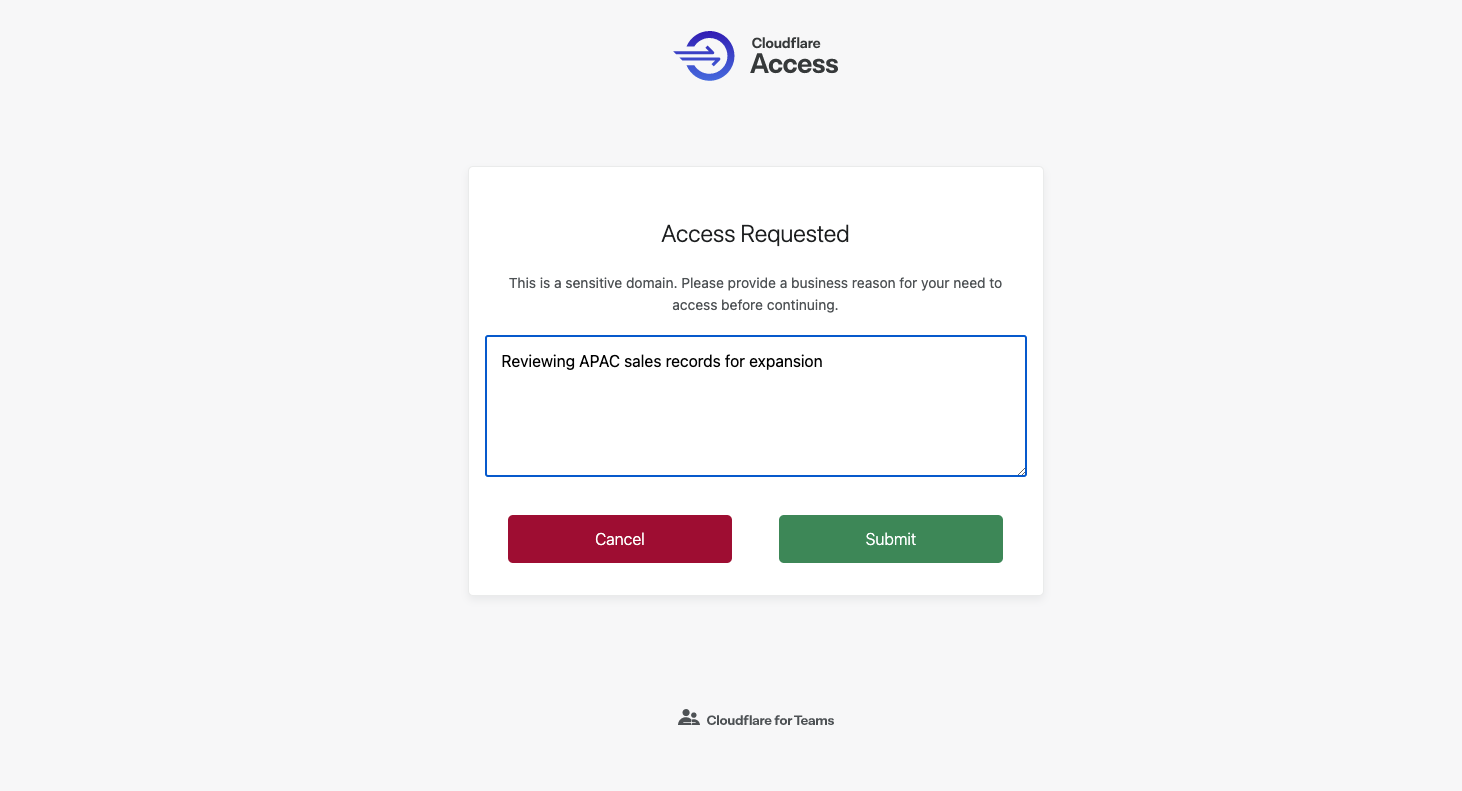
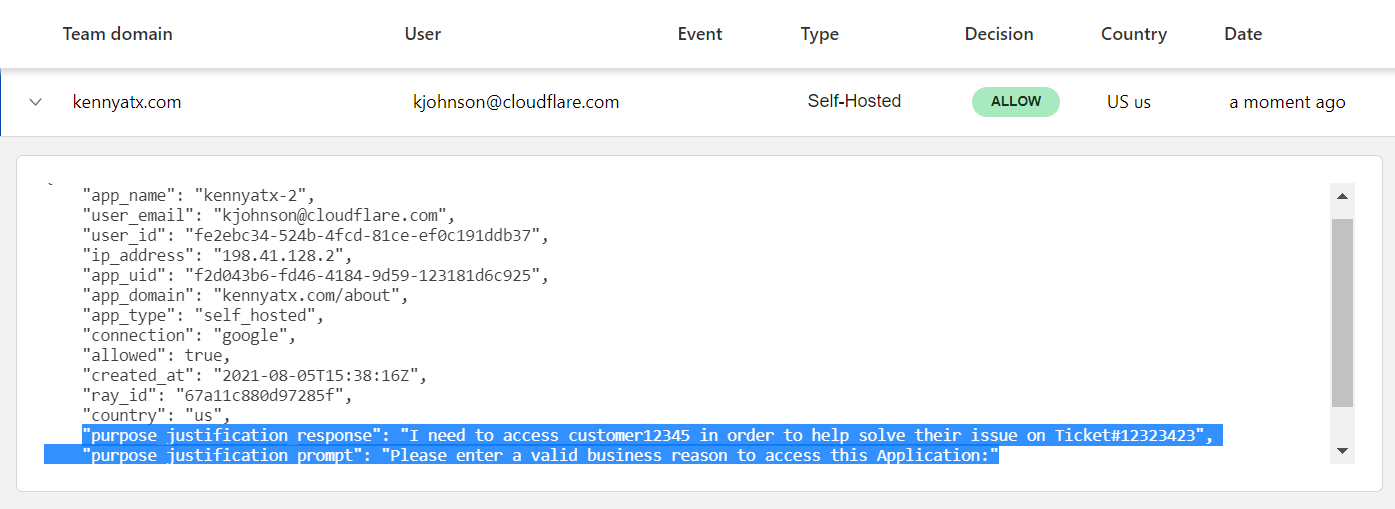
The purpose justification prompt appears upon login, asking users to specify their use case before hitting submit and proceeding.

Digital access follows suit. Recent data protection regulations, such as the GDPR, have formalized concepts of purpose limitation and data proportionality: people should only access data necessary for a specific stated reason. System owners know people need access to do their job, but especially for particularly sensitive applications, knowing why a login was needed is just as vital as knowing who, when, and how.

Starting today, Cloudflare for Teams administrators can prompt users to enter a justification for accessing an application prior to login. Administrators can add this prompt to any existing or new Access application with just two clicks, giving them the ability to:

  • Log and review employee justifications for accessing sensitive applications
  • Add additional layers of security to applications they deem sensitive
  • Customize modal text to communicate data use & sharing principles
  • Help meet regulatory requirements for data access control (such as GDPR)

Starting with Zero Trust access control

Cloudflare Access has been built with access management at its core: rather than trusting anyone on a private network, Access checks for identity, context and device posture every time someone attempts to reach an application or resource.

Behind the scenes, administrators build rules to decide who should be able to reach the tools protected by Access. When users need to connect to those tools, they are prompted to authenticate with one of the identity provider options. Cloudflare Access checks their login against the list of allowed users and, if permitted, allows the request to proceed.

Some applications and workflows contain data so sensitive that the user should have to prove who they are and why they need to reach that service. In this next phase of Zero Trust security, access to data should be limited to specific business use cases or needs, rather than generic all-or-nothing access.

Deploying Zero Trust purpose justification

We created this functionality because we, too, wanted to make sure we had these provisions in place at Cloudflare. We have sensitive internal tools that help our team members serve our customers, and we’ve written before about how we use Cloudflare Access to lock down those tools in a Zero Trust manner.

However, we were not satisfied with just restricting access in the least privileged model. We are accountable to the trust our customers put in our services, and we feel it is important to always have an explicit business reason when connecting to some data sets or tools.

We built purpose justification capture in Cloudflare Access to solve that problem. When team members connect to certain resources, Access prompts them to justify why. Cloudflare’s network logs that rationale and allows the user to proceed.

Purpose justification capture in Access helps fulfill policy requirements, but even for enterprises who don’t need to comply with specific regulations, it also enables a thoughtful privacy and security framework for access controls. Prompting employees to justify their use case helps solve the data management challenge of balancing transparency with security — helping to ensure that sensitive data is used the right way.

Capturing Purpose Justification in Cloudflare Access
Purpose justification capture adds an additional layer of context for enterprise administrators.

Distinguishing Sensitive Domains

So how do you distinguish if something is sensitive? There are two main categories of  applications that may be considered “sensitive.” First: does it contain personally identifiable information or sensitive financials? Second, do all the employees who have access actually need access? The flexibility of the configuration of Access policies helps effectively distinguish sensitive domains for specific user groups.

Purpose justification in Cloudflare Access enables Teams administrators to configure the language of the prompt itself by domain. This is a helpful place to remind employees of the sensitivity of the data, such as, “This application contains PII. Please be mindful of company policies and provide a justification for access,” or “Please enter the case number corresponding to your need for access.” The language can proactively ensure that employees with access to an internal tool are using it as intended.

Additionally, Access identity management allows Teams customers to configure purpose capture for only specific, more sensitive employee groups. For example, some employees need daily access to an application and should be considered “trusted.” But other employees may still have access, but should only rarely need to use the tool— security teams or data protection officers may view their access as higher risk. The policies enable flexible logical constructions that equate to actions such as “ask everyone but the following employees for a purpose.”

This distinction of sensitive applications and “trusted” employees enables friction to the benefit of data protection, rather than a loss of efficiency for employees.

Capturing Purpose Justification in Cloudflare Access
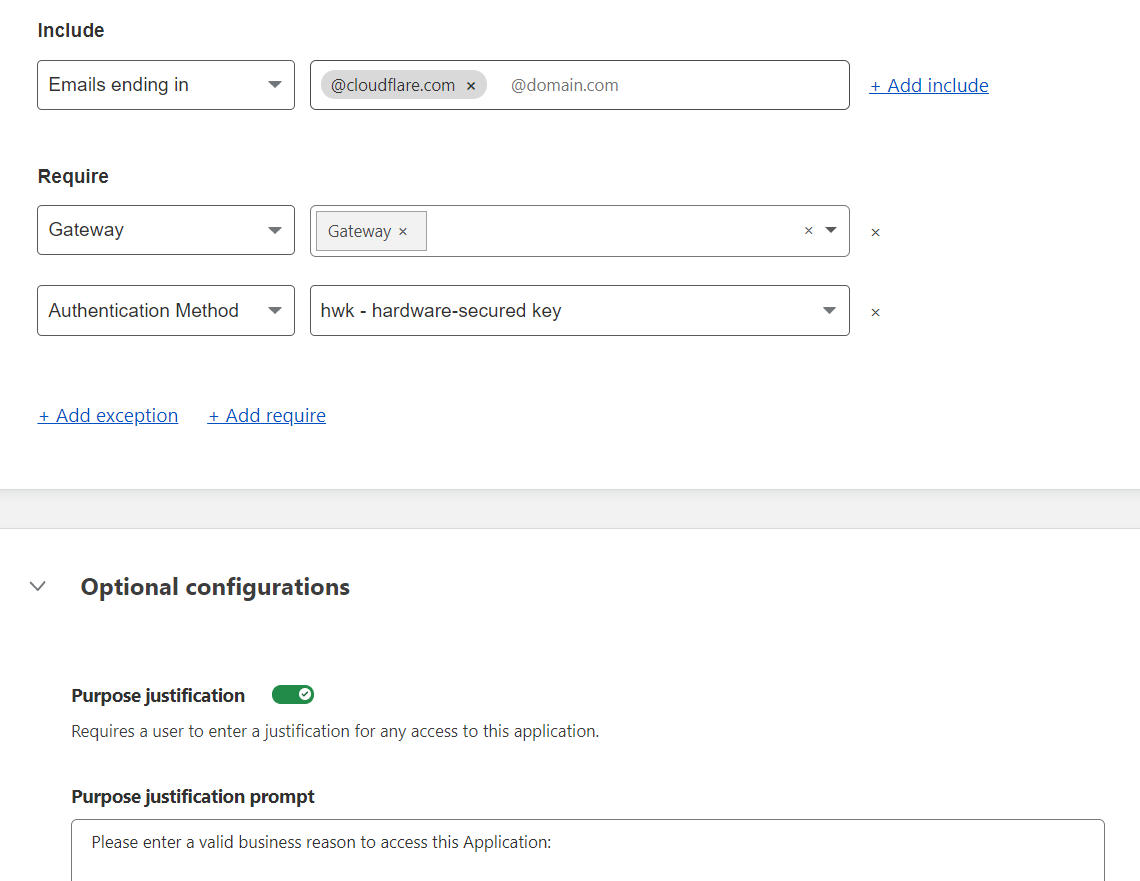
Purpose justification is configurable as an Access policy, allowing for maximum flexibility in configuring and layering rules to protect sensitive applications.

Auditing justification records

As a Teams administrator, enterprise data protection officer, or security analyst, you can view purpose justification logs for a specific application to better understand how it has been accessed and used. Auditing the logs can reveal insights about security threats, the need for improved data classification training, or even potential application development to more appropriately address employees’ use cases.

The justifications are seamlessly integrated with other Access audit logs — they are viewable in the Teams dashboard as an additional column in the table of login events, and exportable to a SIEM for further data analysis.

Capturing Purpose Justification in Cloudflare Access
Teams administrators can review the purpose justifications submitted upon application login by their employees.

Getting started

You can start adding purpose justification prompts to your application access policies in Cloudflare Access today. The purpose justification feature is available in all plans, and with the Cloudflare for Teams free plan, you can use it for up to 50 users at no cost.

We’re excited to continue adding new features that give you more flexibility over purpose justification in Access… Have feedback for us? Let us know in this community post.

6 New Ways to Validate Device Posture

Post Syndicated from Kyle Krum original https://blog.cloudflare.com/6-new-ways-to-validate-device-posture/

6 New Ways to Validate Device Posture

6 New Ways to Validate Device Posture

Cloudflare for Teams gives your organization the ability to build rules that determine who can reach specified resources. When we first launched, those rules primarily relied on identity. This helped our customers replace their private networks with a model that evaluated every request for who was connecting, but this lacked consideration for how they were connecting.

In March, we began to change that. We announced new integrations that give you the ability to create rules that consider the device as well. Starting today, we’re excited to share that you can now build additional rules that consider several different factors about the device, like its OS, patch status, and domain join or disk encryption status. This has become increasingly important over the last year as more and more people began connecting from home. Powered by the Cloudflare WARP agent, your team now has control over more health factors about the devices that connect to your applications.

Zero Trust is more than just identity

With Cloudflare for Teams, administrators can replace their Virtual Private Networks (VPNs), where users on the network were trusted, with an alternative that does not trust any connection by default—also known as a Zero Trust model.

Customers start by connecting the resources they previously hosted on a private network to Cloudflare’s network using Cloudflare Tunnel. Cloudflare Tunnel uses a lightweight connector that creates an outbound-only connection to Cloudflare’s edge, removing the need to poke holes in your existing firewall.

Once connected, administrators can build rules that apply to each and every resource and application, or even a part of an application. Cloudflare’s Zero Trust network evaluates every request and connection against the rules that an administrator created before the user is ever allowed to reach that resource.

For example, an administrator can create a rule that limits who can reach an internal reporting tool to users in a specific Okta group, connecting from an approved country, and only when they log in with a hardkey as their second factor. Cloudflare’s global network enforces those rules close to the user, in over 200 cities around the world, to make a comprehensive rule like the outlined above feel seamless to the end-user.

Today’s launch adds new types of signals your team can use to define these rules. By definition, a Zero Trust model considers every request or connection to be “untrusted.” Only the rules that you create determine what is considered trusted and allowed. Now, we’re excited to let users take this a step further and create rules that not only focus on trusting the user, but also the security posture of the device they are connecting from.

More (and different) factors are better

Building rules based on device posture covers a blind spot for your applications and data. If I’m allowed to reach a particular resource, without any consideration for the device I’m using, then I could log in with my corporate credentials from a personal device running an unpatched or vulnerable version of an operating system. I might do that because it is convenient, but I am creating a much bigger problem for my team if I then download data that could be compromised because of that device.

That posture can also change based on the destination. For example, maybe you are comfortable if a team member uses any device to review a new splash page for your marketing campaign. However, if a user is connecting to an administrative tool that manages customer accounts, you want to make sure that device complies with your security policies for customer data that include factors like disk encryption status. With Cloudflare for Teams, you can apply rules that contain multiple and different factors with that level of per-resource granularity.

Today, we are thrilled to announce six additional posture types on top of the ones you can already set:

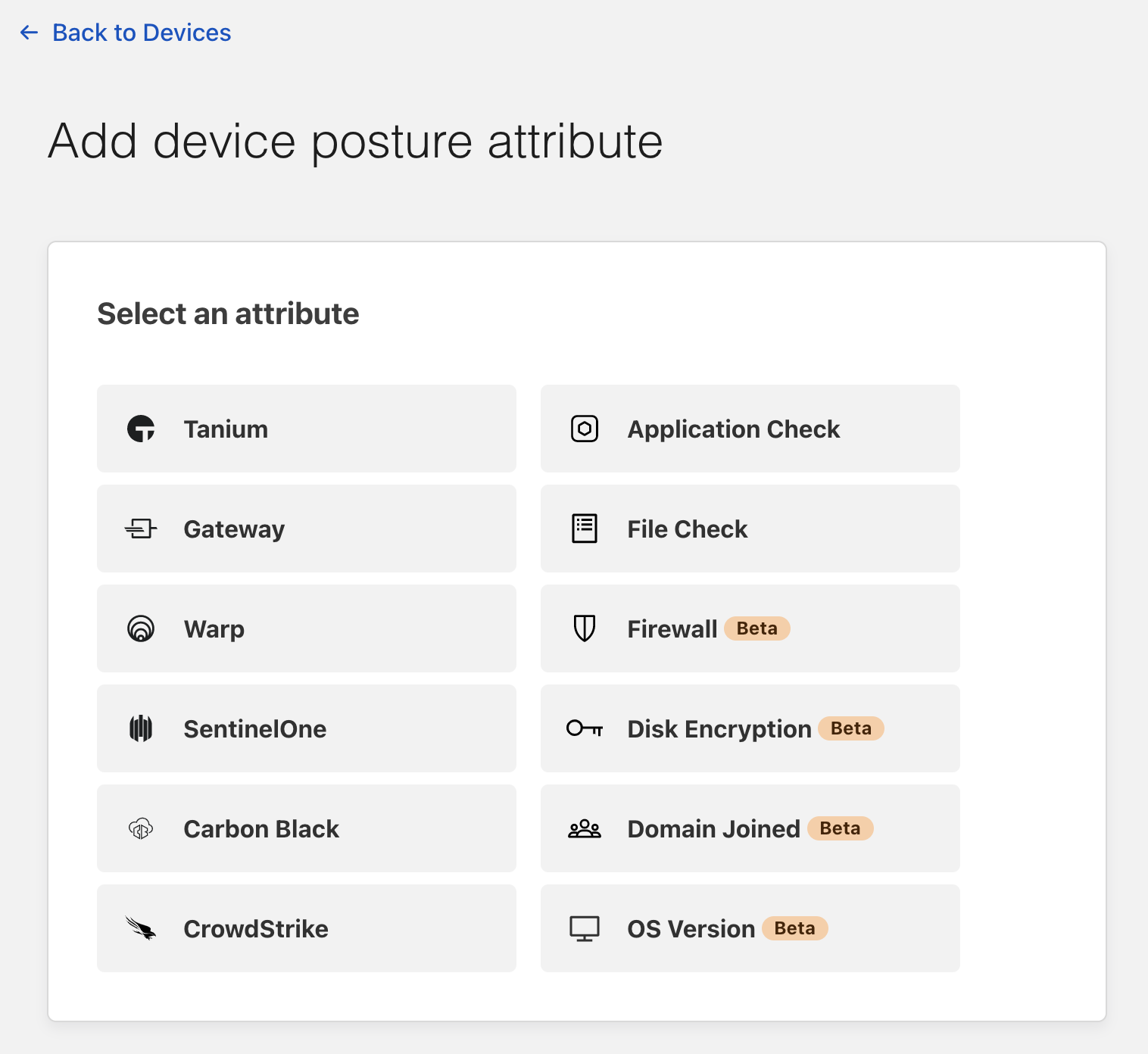
  1. Endpoint Protection Partners — Verify that your users are running one of our Endpoint Protection Platform providers (Carbon Black, CrowdStrike, SentinelOne, Tanium)
  2. Serial Number — Allow devices only from your known inventory pool
  3. Cloudflare WARP’s proxy — Determine if your users are connected via our encrypted WARP tunnel (Free, Paid or any Teams account)
  4. Cloudflare’s secure web gateway — Determine if your users are connecting from a device managed by your HTTP FIltering policies
  5. (NEW) Application Check — Verify any program of your choice is running on the device
  6. (NEW) File Check — Ensure a particular file is present on the device (such as an updated signature, OS patch, etc.)
  7. (NEW) Disk Encryption — Ensure all physical disks on the device are encrypted
  8. (NEW) OS Version — Confirm users have upgraded to a specific operating system version
  9. (NEW) Firewall — Check that a firewall is configured on the device
  10. (NEW) Domain Joined — Verify that your Windows devices must be joined to the corporate directory

Device rules should be as simple as identity rules

Cloudflare for Teams device rules can be configured in the same place that you control identity-based rules. Let’s use the Disk Encryption posture check as an example. You may want to create a rule that enforces the Disk Encryption check when your users need to download and store files on their devices locally.

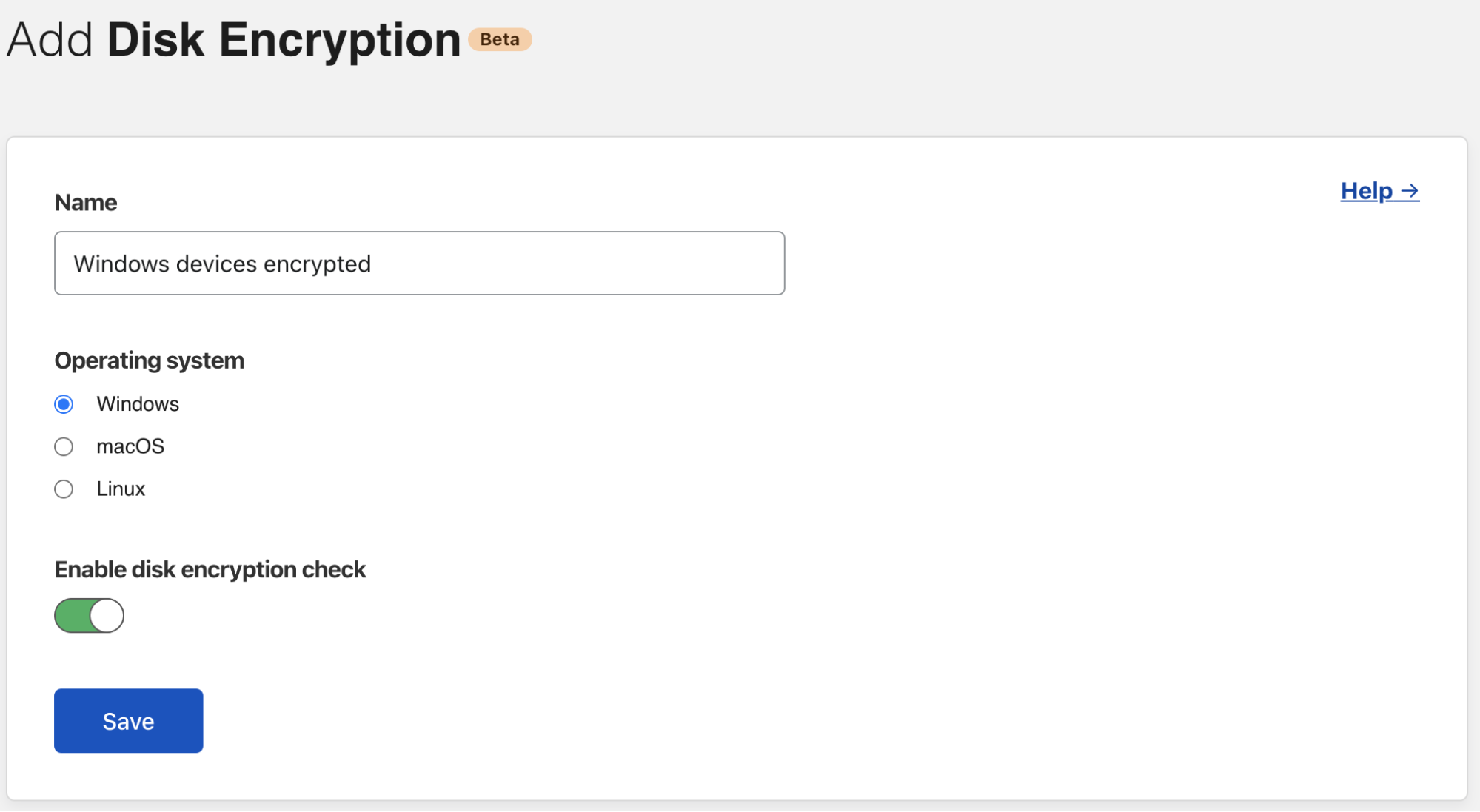
To build that rule, first visit the Cloudflare for Teams dashboard and navigate to the Devices section of the “My Team” page. Then, choose “Disk Encryption” as a new attribute to add.

6 New Ways to Validate Device Posture

You can enter a descriptive name for this attribute. For example, this rule should require Windows disk encryption, while others might require encryption on other platforms.

6 New Ways to Validate Device Posture

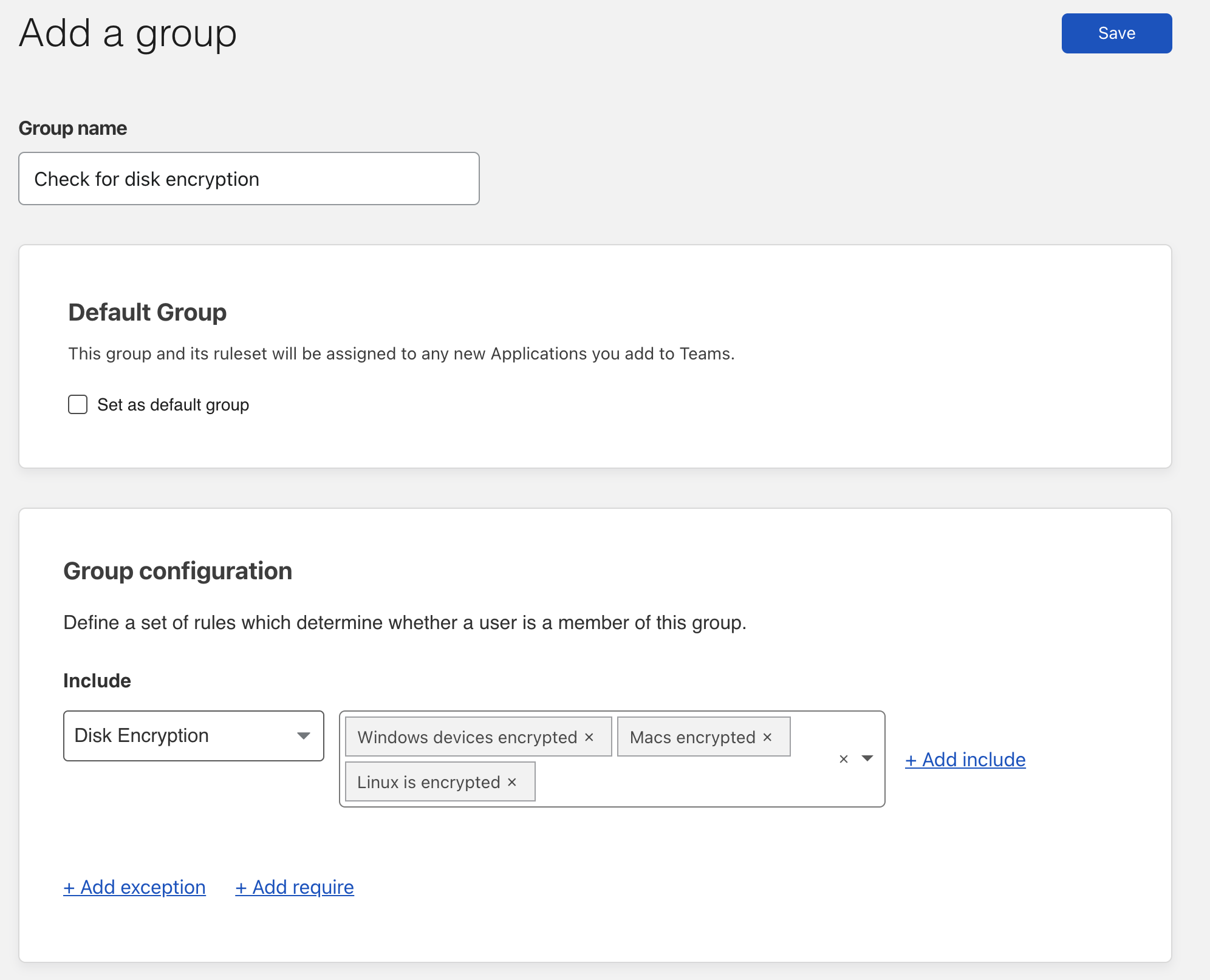
To save time, you can also create reusable rules, called Groups, to include multiple types of device posture check for reference in new policies later on.

6 New Ways to Validate Device Posture

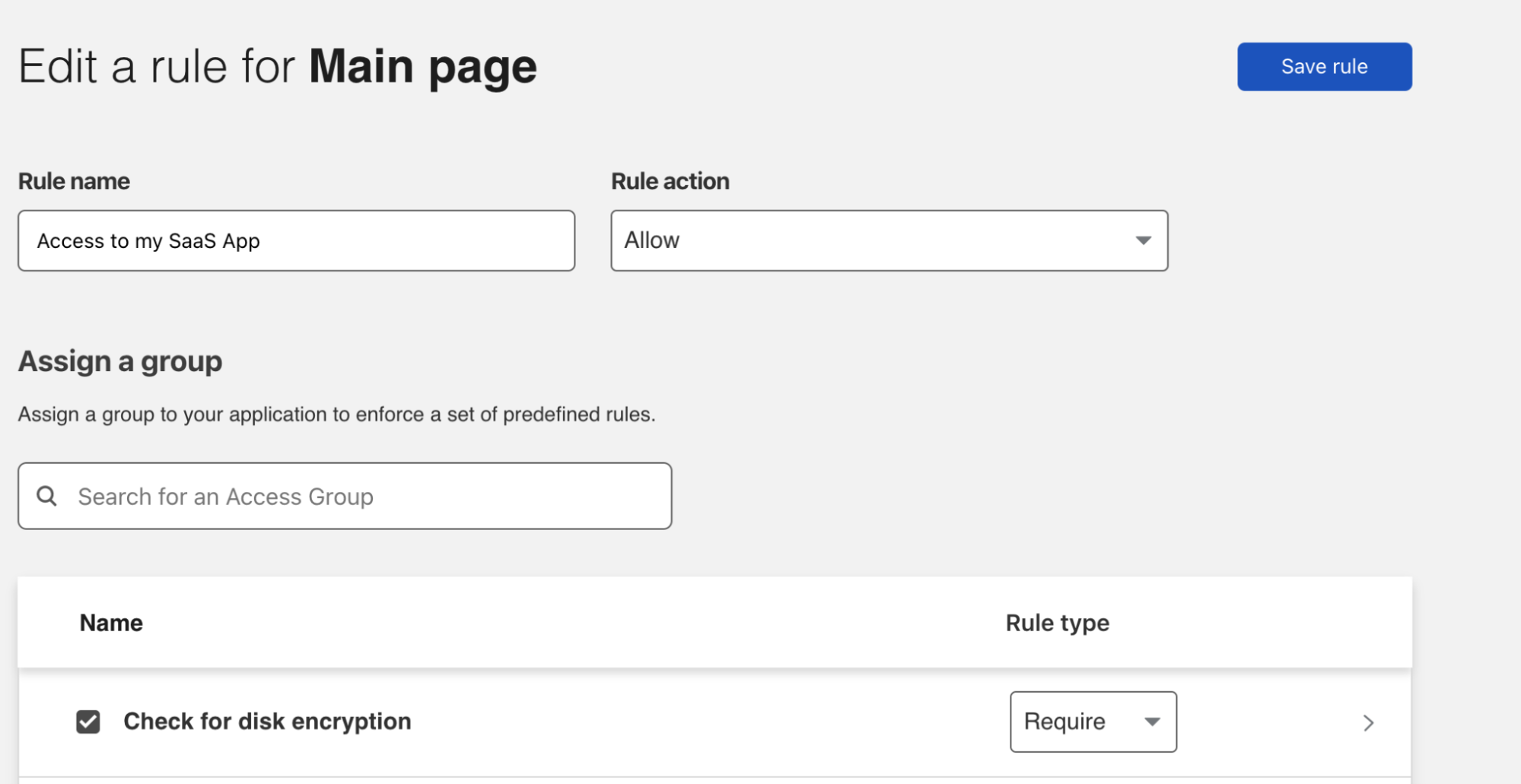
Now that you’ve created your group, you can create a Zero Trust Require rule to apply your Disk Encryption checks. To do that, navigate to Access > Applications and create a new application. If you already have your application in place, simply edit your application to add a new rule. In the Assign a group section you will see the group you just created—select it and choose a Require rule type. And finally, save the rule to begin enforcing granular, zero trust device posture checks on every request in your environment.

6 New Ways to Validate Device Posture

What’s next

Get started with exploring all device posture attributes in our developer docs. Note that not all posture types are currently available on operating systems and some operating systems don’t support them.

Is there a posture type we’re missing that you’d love to have? We’d love to hear from you in the Community.

Introducing Shadow IT Discovery

Post Syndicated from Abe Carryl original https://blog.cloudflare.com/introducing-shadow-it-discovery/

Introducing Shadow IT Discovery

Introducing Shadow IT Discovery

Your team likely uses more SaaS applications than you realize. The time your administrators spend vetting and approving applications sanctioned for use can suddenly be wasted when users sign up for alternative services and store data in new places. Starting today, you can use Cloudflare for Teams to detect and block unapproved SaaS applications with just two clicks.

Increasing Shadow IT usage

SaaS applications save time and budget for IT departments. Instead of paying for servers to host tools — and having staff ready to monitor, upgrade, and troubleshoot those tools — organizations can sign up for a SaaS equivalent with just a credit card and never worry about hosting or maintenance again.

That same convenience causes a data control problem. Those SaaS applications sit outside any environment that you control; the same reason they are easy for your team is also a potential liability now that your sensitive data is kept by third parties. Most organizations keep this in check through careful audits of the SaaS applications being used. Depending on industry and regulatory impact, IT departments evaluate, approve, and catalog the applications they use.

However, users can intentionally or accidentally bypass those approvals. For example, if your organization relies on OneDrive but a user is more comfortable with Google Drive, that user might decide to store work files in Google Drive instead. IT has no visibility into this happening and the user might think it’s fine. That user begins sharing files with other users in your organization, who also sign up with Google Drive, and suddenly an unsanctioned application holds sensitive information. This is “Shadow IT” and these applications inherently obfuscate the controls put in place by your organization.

Detecting Shadow IT

Cloudflare Gateway routes all Internet bound traffic to Cloudflare’s network to enforce granular controls for your users to block them from unknown security threats. Now, it also provides your team added assurance with a low-effort, high-visibility overview into the SaaS applications being used in your environment.

By simply turning on Gateway, all HTTP requests for your organization are aggregated in your Gateway Activity Log for audit and security purposes. Within the activity log, we surface pertinent information about the user, action, and request. These records include data about the application and application type. In the example above, the application type would be Collaboration and Online Meeting and the application would be Google Drive.

From there, Gateway analyzes your HTTP request in the Activity Log and surfaces your Shadow IT, by categorizing and sorting these seemingly miscellaneous applications into actionable insights without any additional lift from your team.

Introducing Shadow IT Discovery

Introducing Shadow IT Discovery

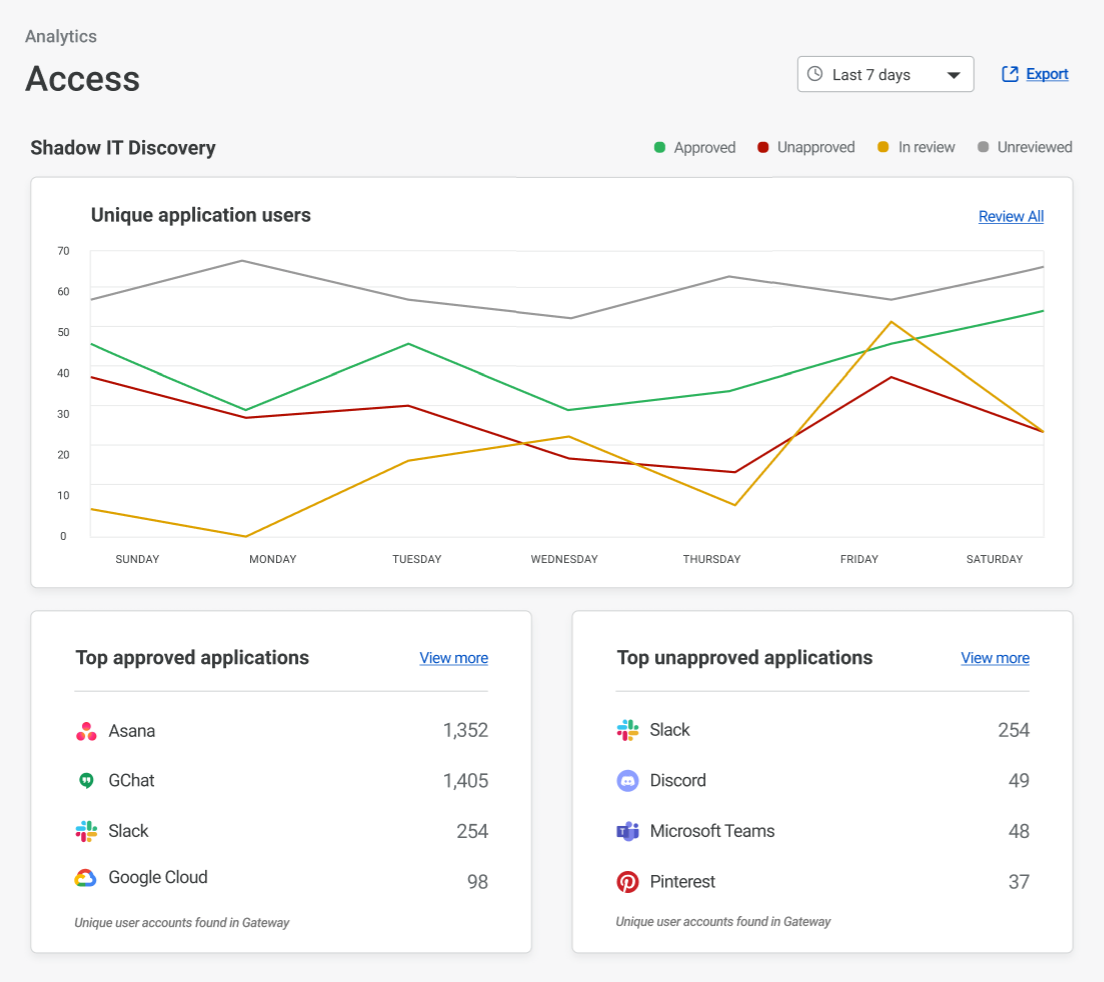
With Shadow IT Discovery, Cloudflare for Teams first catalogs all applications used in your organization. The feature runs in an “observation” mode first – all applications are analyzed, but default to “unreviewed.”

Your team can then review the applications found and, with just a couple clicks, designate applications approved or unapproved — either for a single application or in bulk.

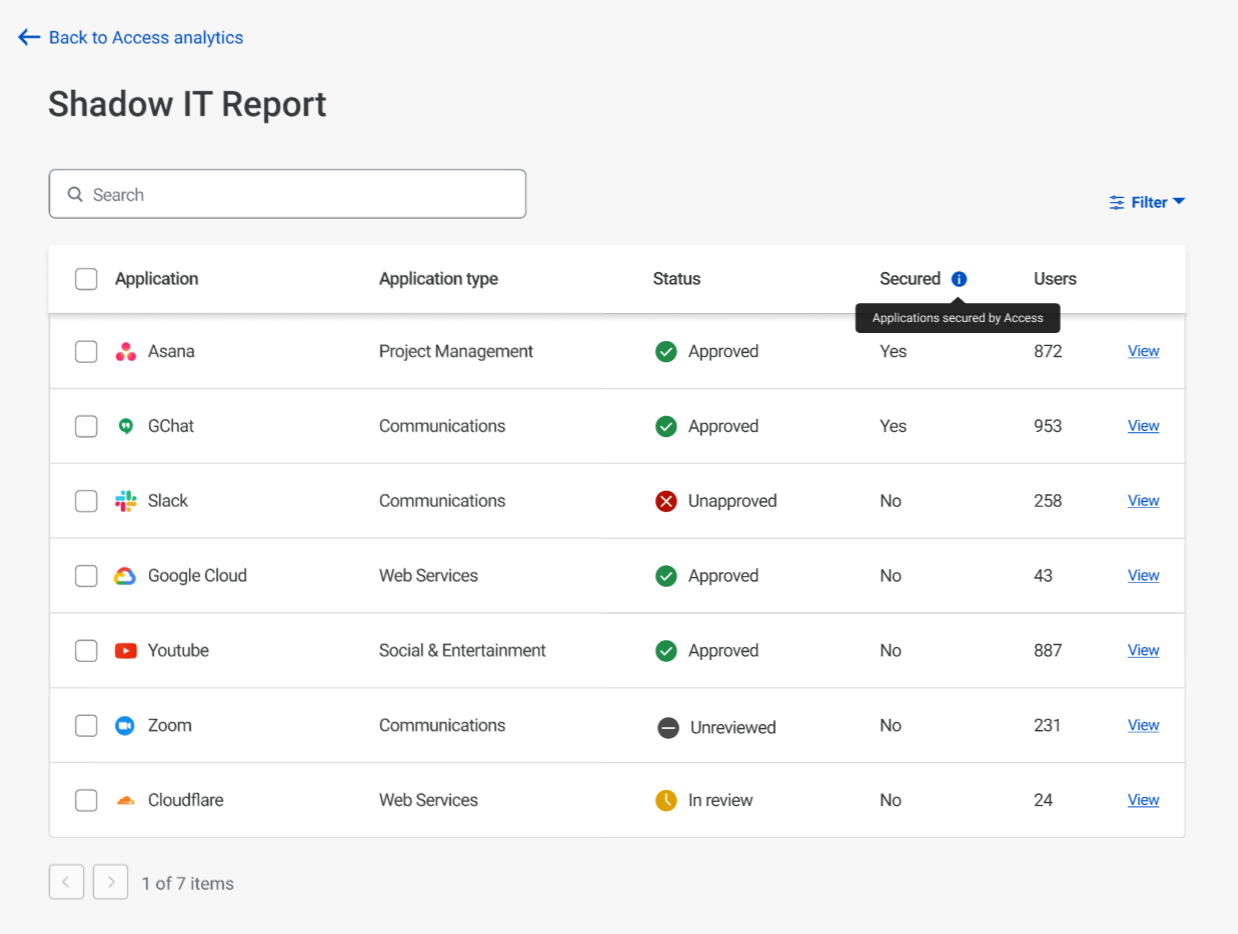
This allows administrators to easily track the top approved and unapproved applications their users are accessing to better profile their security posture. When drilling down into a more detailed view, administrators can take bulk actions to move multiple newly discovered applications at once. In this view, users can also filter on application type to easily identify redundancies in their organization.

Another feature we wanted to add was the ability to quickly highlight if an application being used by your organization has already been secured by Cloudflare Access. You can find this information in the column titled Secured. If an application is not Secured by Access, you can start that process today as well with Access for SaaS. (We added two new tutorials this week!)

Introducing Shadow IT Discovery

When you mark an application unapproved, Cloudflare for Teams does not block it outright. We know some organizations need to label an application unapproved and check in with the users before they block access to it altogether. If your team is ready, you can then apply a Gateway rule to block access to it going forward.

Saving IT cost

While we’re excited to help IT teams stop worrying about unapproved apps, we also talked to teams who feared they were overspending for certain approved applications.

We want to help here too. Today’s launch counts the number of unique users who access any one application over different time intervals. IT teams can use this data to check usage against licenses and right size as needed.

Without this feature, many administrators and our own internal IT department were losing sleep each night wondering if their users were circumventing their controls and putting them at risk of attack. Additionally, many administrators are financially impacted as they procure software licenses for their entire organization. With Shadow IT Discovery, we empower your team to anticipate popular applications and begin the assessment process earlier in the procurement lifecycle.

What’s next

We’re excited to announce Shadow IT and can’t wait to see what you’ll do with it. To get started, deploy HTTP filtering for your organization with the Cloudflare for Teams client. In the future, we’ll also be adding automation to block unapproved applications in Gateway, but we can’t wait to hear what else you’d like to see out of this feature.

More devices, fewer CAPTCHAs, happier users

Post Syndicated from Wesley Evans original https://blog.cloudflare.com/cap-expands-support/

More devices, fewer CAPTCHAs, happier users

More devices, fewer CAPTCHAs, happier users

Earlier this year we announced that we are committed to making online human verification easier for more users, all around the globe. We want to end the endless loops of selecting buses, traffic lights, and convoluted word diagrams. Not just because humanity wastes 500 years per day on solving other people’s machine learning problems, but because we are dedicated to making an Internet that is fast, transparent, and private for everyone. CAPTCHAs are not very human-friendly, being hard to solve for even the most dedicated Internet users. They are extremely difficult to solve for people who don’t speak certain languages, and people who are on mobile devices (which is most users!).

Today, we are taking another step in helping to reduce the Internet’s reliance on CAPTCHAs to prove that you are not a robot. We are expanding the reach of our Cryptographic Attestation of Personhood experiment by adding support for a much wider range of devices. This includes biometric authenticators — like Apple’s Face ID, Microsoft Hello, and Android Biometric Authentication. This will let you solve challenges in under five seconds with just a touch of your finger or a view of your face — without sending this private biometric data to anyone.

You can try it out on our demo site cloudflarechallenge.com and let us know your feedback.

In addition to support for hardware biometric authenticators, we are also announcing support for many more hardware tokens today in the Cryptographic Attestation of Personhood experiment. We support all USB and NFC keys that are both certified by the FIDO alliance and have no known security issues according to the FIDO Alliance Metadata service (MDS 3.0).

Privacy First

Privacy is at the center of Cryptographic Attestation of Personhood. Information about your biometric data is never shared with, transmitted to, or processed by Cloudflare. We simply never see it, at all. All of your sensitive biometric data is processed on your device. While each operating system manufacturer has a slightly different process, they all rely on the idea of a Trusted Execution Environment (TEE) or Trusted Platform Module (TPM). TEEs and TPMs allow only your device to store and use your encrypted biometric information. Any apps or software running on the device never have access to your data, and can’t transmit it back to their systems. If you are interested in digging deeper into how each major operating system implements their biometric security, read the articles we have linked below:

Apple (Face ID and Touch ID)

Face ID and Touch ID Privacy
Secure Enclave Overview

Microsoft (Windows Hello)

Windows Hello Overview
Windows Hello Technical Deep Dive

Google (Android Biometric Authentication)

Biometric Authentication
Measuring Biometric Unlock Security

Our commitment to privacy doesn’t just end at the device. The WebAuthn API also prevents the transmission of biometric information. If a user interacts with a biometric key (like Apple TouchID or Windows Hello), no third party — such as Cloudflare — can receive any of that biometric data: it remains on your device and is never transmitted by your browser. To get an even deeper understanding of how the Cryptographic Attestation of Personhood protects your private information, we encourage you to read our initial announcement blog post.

Making a Great Privacy Story Even Better

While building out this technology, we have always been committed to providing the best possible privacy guarantees. The existing assurances are already quite strong: as described in our previous post, when using CAP, you may disclose a small amount of information about your authentication hardware — at most, its make and model. By design, this information is not unique to you: the underlying standard requires that this be indistinguishable from thousands of others, which hides you in a crowd of identical hardware.

Even though this is a great start, we wanted to see if we could push things even farther. Could we learn just the one fact that we need — that you have a valid security key — without learning anything else?

We are excited to announce that we have made great strides on answering that question by using a form of the next generation of cryptography called Zero Knowledge Proofs (ZKP). ZKP prevents us from discovering anything from you, other than the fact that you have a device that can generate an approved certificate that proves that you are human.

If you are interested in learning more about Zero Knowledge Proofs, we highly recommend reading about it here.

Driven by Speed, Ease of Use, and Bot Defense

At the start of this project we set out three goals:

  1. How can we dramatically improve the user experience of proving that you are a human?
  2. How can we make sure that any solution that we develop centers around ease of use, and increases global accessibility on the Internet?
  3. How do we make a solution that does not harm our existing bot management system?

Before we deployed this new evolution of our CAPTCHA solution, we did a proof of concept test with some real users, to confirm whether this approach was worth pursuing (just because something sounds great in theory doesn’t mean it will work out in practice!). Our testing group tried our Cryptographic Attestation of Personhood solution using Face ID and told us what they thought. We learned that solving times with Face ID and Touch ID were significantly faster than selecting pictures, with almost no errors. People vastly preferred this alternative, and provided suggestions for improvements in the user experience that we incorporated into our deployment.

This was even more evident in our production usage data. While we did not enable attestation with biometrics providers during our first phase of the CAP roll out, we did record when people attempted to use a biometric authentication service. The highest recorded attempt solve rate besides YubiKeys was Face ID on iOS, and Android Biometric Authentication. We are excited to offer those mobile users their first choice of challenge for proving their humanity.

One of the things we heard about in testing was — not surprisingly — concerns around privacy. As we explained in our initial launch, the WebAuthn technology underpinning our solution provides a high level of privacy protection. Cloudflare is able to view an identifier shared by thousands of similar devices, which provides general make and model information. This cannot be used to uniquely identify or track you — and that’s exactly how we like it.

Now that we have opened up our solution to more device types, you’re able to use biometric readers as well. Rest assured that the same privacy protections apply — we never see your biometric data: that remains on your device. Once your device confirms a match, it sends only a basic attestation message, just as it would for any security key. In effect, your device sends a message proving that “yes, someone correctly entered a fingerprint on this trustworthy device”, and never sends the fingerprint itself.

We have also been reviewing feedback from people who have been testing out CAP on either our demo site or through routine browsing. We appreciate the helpful comments you’ve been sending, and we’d love to hear more, so we can continue to make improvements. We’ve set up a survey at our demo site. Your input is key to ensuring that we get usability right, so please let us know what you think.

Introducing Deploy Hooks for Cloudflare Pages

Post Syndicated from Nevi Shah original https://blog.cloudflare.com/introducing-deploy-hooks-for-cloudflare-pages/

Introducing Deploy Hooks for Cloudflare Pages

Introducing Deploy Hooks for Cloudflare Pages

With Cloudflare Pages, deploying your Jamstack applications is easier than ever — integrate with GitHub and a simple git push deploys your site within minutes. However, one of the limitations of Pages was that triggering deployments to your site only happens within the confines of committing to GitHub. We started thinking about how users who author content consistently on their site — our bloggers and writers — may not always be editing their copy directly via the code but perhaps through a different service. Headless content management systems (CMSs) are a simple solution to solve this problem, allowing users to store their backend content through an editing interface as a service for an application like Pages.

It made us wonder: what if we could trigger deployments based on updates made in other places rather than just via GitHub? Today, we are proud to announce a new way to connect your Pages application with your headless CMSs and databases: introducing Deploy Hooks for Pages.

What’s a headless CMS?

Headless CMSs such as Contentful, Ghost and Sanity.io allow optimization of content formatting for any type of interface. With tools like these, you can leverage a “decoupled” content management model where all you need to focus on is writing your content within the CMS editing interface and let its API handle the rest!

Sounds great! What’s the catch?

We started thinking about the implications for those of you who integrate with these headless tools and what your workflow might look like as it relates to Pages. You would build, for example, your blog application on Pages but update all of your content directly on your headless CMS and may make changes to your content three to four times a day. So how exactly does the data from your CMS show up on your Pages site and stay in sync? Enter Deploy Hooks!

What are Deploy Hooks?

Deploy Hooks are URLs created on Pages that accept an HTTP POST request to trigger new deployments outside the realm of a git command. Instead of manually redeploying your site via another git push, any time you update the content within your chosen headless CMS, the Deploy Hook will automatically send a real-time update to Pages. On the Pages side, once these updates are received, a new site build will be triggered to include any new data or content detected. It’s that easy!

Introducing Deploy Hooks for Cloudflare Pages

How can I create a Deploy Hook?

To set up your deploy hook, navigate to the Deploy Hooks section in your Pages project’s settings. In this section there are two input parameters needed to properly configure your deploy hook and obtain your URL:

  1. Deploy Hook Name: You can name your deploy hook something like “Contentful” or “My Blog” to identify which source the Deploy Hook is monitoring. A unique name for each deploy hook will also help you to differentiate hooks in the event that you create multiple Deploy Hooks for your Pages site.
  2. Branch to Build: You can specify which branch will be built and deployed when the URL is requested with the Deploy Hook. This is especially helpful if you’d like to stage your changes first instead of pushing directly to your production branch.
Introducing Deploy Hooks for Cloudflare Pages

How can I use a Deploy Hook with my headless CMS?

You can put the unique URL provided in the dashboard into just about any service that accepts a Deploy Hook URL. In a headless CMS, you can create and configure a new webhook and, depending on the tool, you can sometimes choose which events you’d like to trigger deployments. Once you’ve configured this webhook, you can paste the Deploy Hook URL provided by Pages to connect your chosen CMS with your Pages project. After that, you’re all set to update content in your headless tool.

What else can I do with a Deploy Hook?

After creating your Deploy Hook, Pages also provides you with the HTTP POST request snippet with your URL that looks something like this:

curl -X POST "https://api.cloudflare.com/client/v4/pages/webhooks/deploy_hooks/ 66c5dd3a-989f-4ba7-a6e2-6d2695524d7”

Every time you execute the snippet, you will trigger a new build to your Pages site. In addition to utilizing this snippet for a forced deployment within your command line, you can also customize your CI/CD pipeline and trigger deployments only under certain conditions. For example, you only want to deploy if there were changes within specific directories and only after an extensive test suite passes. Additionally, this snippet is useful for scheduling a CRON trigger to initiate builds on a specific timeline or cadence. Read more about how to use Pages deploy hooks in our docs.

Try it for yourself!

Sound like fun? Try it for yourself using our tutorial, How to Build a Blog Using Nuxt.js and Sanity.io on Cloudflare Pages or create your own. We can’t wait to see what you build on Pages with Deploy Hooks!

P.S. — we’re hiring!

Want to help us shape the future of development on the web? Join our team!

Helping Keep Governments Safe and Secure

Post Syndicated from Sam Rhea original https://blog.cloudflare.com/helping-keep-governments-safe-and-secure/

Helping Keep Governments Safe and Secure

Helping Keep Governments Safe and Secure

Today, we are excited to share that Cloudflare and Accenture Federal Services (AFS) have been selected by the Department of Homeland Security (DHS) to develop a joint solution to help the federal government defend itself against cyberattacks. The solution consists of Cloudflare’s protective DNS resolver which will filter DNS queries from offices and locations of the federal government and stream events directly to Accenture’s analysis platform.

Located within DHS, the Cybersecurity and Infrastructure Security Agency (CISA) operates as “the nation’s risk advisor.”1 CISA works with partners across the public and private sector to improve the security and reliability of critical infrastructure; a mission that spans across the federal government, State, Local, Tribal, and Territorial partnerships and the private sector to provide solutions to emerging and ever-changing threats.

Over the last few years, CISA has repeatedly flagged the cyber risk posed by malicious hostnames, phishing emails with malicious links, and untrustworthy upstream Domain Name System (DNS) resolvers.2 Attackers can compromise devices or accounts, and ultimately data, by tricking a user or system into sending a DNS query for a specific hostname. Once that query is resolved, those devices establish connections that can lead to malware downloads, phishing websites, or data exfiltration.

In May 2021, CISA and the National Security Agency (NSA) proposed that teams deploy protective DNS resolvers to prevent those attacks from becoming incidents. Unlike standard DNS resolvers, protective DNS resolvers check the hostname being resolved to determine if the destination is malicious. If that is the case, or even if the destination is just suspicious, the resolver can stop answering the DNS query and block the connection.

Earlier this year, CISA announced they are not only recommending a protective DNS resolver — they have launched a program to offer a solution to their partners. After a thorough review process, CISA has announced that they have selected Cloudflare and AFS to deliver a joint solution that can be used by departments and agencies of any size within the Federal Civilian Executive Branch.

Helping keep governments safer

Attacks against the critical infrastructure in the United States are continuing to increase. Cloudflare Radar, where we publish insights from our global network, consistently sees the U.S. as one of the most targeted countries for DDoS attacks. Attacks like phishing campaigns compromise credentials to sensitive systems. Ransomware bypasses traditional network perimeters and shuts down target systems.

The sophistication of those attacks also continues to increase. Last year’s SolarWinds Orion compromise represents a new type of supply chain attack where trusted software becomes the backdoor for data breaches. Cloudflare’s analysis of the SolarWinds incident observed compromise patterns that were active over eight months, during which the destinations used grew to nearly 5,000 unique subdomains.

The increase in volume and sophistication has driven a demand for the information and tools to defend against these types of threats at all levels of the US government. Last year, CISA advised over 6,000 state and local officials, as well as federal partners, on mechanisms to protect their critical infrastructure.

At Cloudflare, we have observed a similar pattern. In 2017, Cloudflare launched the Athenian Project to provide state, county, or municipal governments with security for websites that administer elections or report results. In 2020, 229 state and local governments, in 28 states, trusted Cloudflare to help defend their election websites. State and local government websites served by Cloudflare’s Athenian Project increased by 48% last year.

As these attacks continue to evolve, one thing many have in common is their use of a DNS query to a malicious hostname. From SolarWinds to last month’s spearphishing attack against the U.S. Agency for International Development, attackers continue to rely on one of the most basic technologies used when connecting to the Internet.

Delivering a protective DNS resolver

User activity on the Internet typically starts with a DNS query to a DNS resolver. When users visit a website in their browser, open a link in an email, or use a mobile application, their device first sends a DNS query to convert the domain name of the website or server into the Internet Protocol (IP) address of the host serving that site. Once their device has the IP address, they can establish a connection.

Helping Keep Governments Safe and Secure
Figure 1. Complete DNS lookup and web page query

Attacks on the Internet can also start the same way. Devices that download malware begin making DNS queries to establish connections and leak information. Users that visit an imposter website input their credentials and become part of a phishing attack.

These attacks are successful because DNS resolvers, by default, trust all destinations. If a user sends a DNS query for any hostname, the resolver returns the IP address without determining if that destination is suspicious.

Some hostnames are known to security researchers, including hostnames used in previous attacks or ones that use typos of popular hostnames. Other attacks start from unknown or new threats. Detecting those requires monitoring DNS query behavior, detecting patterns to new hostnames, or blocking newly seen and registered domains altogether.

Protective DNS resolvers apply a Zero Trust model to DNS queries. Instead of trusting any destination, protective resolvers check the hostname of every query and IP address of every response against a list of known malicious destinations. If the hostname or IP address is in that list, the resolver will not return the result to the user and the connection will fail.

Building a solution with Accenture Federal Services

The solution being delivered to CISA, Cloudflare Gateway, builds on Cloudflare’s network to deliver a protective DNS resolver that does not compromise performance. It starts by sending all DNS queries from enrolled devices and offices to Cloudflare’s network. While more of the HTTP Internet continues to be encrypted, the default protocol for sending DNS queries on most devices is still unencrypted. Cloudflare Gateway’s protective DNS resolver supports encrypted options like DNS over HTTPS (DoH) and DNS over TLS (DoT).

Next, blocking DNS queries to malicious hostnames starts with knowing what hostnames are potentially malicious. Cloudflare’s network provides our protective DNS resolver with unique visibility into threats on the Internet. Every day, Cloudflare’s network handles over 800 billion DNS queries. Our infrastructure responds to 25 million HTTP requests per second. We deploy that network in more than 200 cities in over 100 countries around the world, giving our team the ability to see attack patterns around the world.

We convert that data into the insights that power our security products. For example, we analyze the billions of DNS queries we handle to detect anomalous behavior that would indicate a hostname is being used to leak data through a DNS tunneling attack. For the CISA solution, Cloudflare’s datasets are further enriched by applying additional cybersecurity research along with Accenture’s Cyber Threat Intelligence (ACTI) feed to provide signals to detect new and changing threats on the internet. This dataset is further analyzed by data scientists using advanced business intelligence tools powered by artificial intelligence and machine learning.

Working towards a FedRAMP future

Our Public Sector team is focused on partnering with Federal, State and Local Governments to provide a safe and secure digital experience. We are excited to help CISA deliver an innovative, modern, and cost-efficient solution to the entire civilian federal government.

We will continue this path following our recent announcement that we are currently “In Process” in the Federal Risk and Authorization Management Program (FedRAMP) Marketplace. The government’s rigorous security assessment will allow other federal agencies to adopt Cloudflare’s Zero Trust Security solutions in the future.

What’s next?

We are looking forward to working with Accenture Federal Services to deliver this protective DNS resolver solution to CISA. This contract award demonstrates CISA’s belief in the importance of having protective DNS capabilities as part of a layered defense. We applaud CISA for taking this step and allowing us to partner with the US Government to deliver this solution.

Like CISA, we believe that teams large and small should have the tools they need to protect their critical systems. Your team can also get started using Cloudflare to secure your organization today. Cloudflare Gateway, part of Cloudflare for Teams, is available to organizations of any size.

—

1https://www.cisa.gov/about-cisa
2See, for example, https://www.cisa.gov/sites/default/files/publications/Addressing_DNS_Resolution_on_Federal_Networks_Memo.pdf; https://media.defense.gov/2021/Mar/03/2002593055/-1/-1/0/CSI_Selecting-Protective-DNS_UOO11765221.PDF

The Cloudflare Startup Enterprise Plan: helping new startups bootstrap

Post Syndicated from Jade Q. Wang original https://blog.cloudflare.com/the-cloudflare-startup-enterprise-plan-helping-new-startups-bootstrap/

The Cloudflare Startup Enterprise Plan: helping new startups bootstrap

The Cloudflare Startup Enterprise Plan: helping new startups bootstrap

Early in the life of most startups, there is a time of incredible hustle, creative problem solving, and making the impossible possible through out-of-the-box thinking and elbow grease. Grizzled veterans, who have lived through those days of running on coffee and shoestring budgets, look back on that time and fascinate the newcomers with war stories of back in the day, of adventures and first wins, when they kept the lights on by sheer force of will.

To help early stage startups get going, Cloudflare is giving away one year of the Startup Enterprise plan to all early stage startups in participating accelerator programs. That early stage time is special for product development, and entrepreneurs unlock worlds of possibilities when they have advanced tools on their hands, such as the power of the Cloudflare network.

What’s included in the Startup Enterprise plan?

In addition to the core offerings in the Pro and Business plans (e.g., CDN, DNS, WAF, custom SSL cert, 50 page rules), when founders sign up for the Startup Enterprise plan they’ll get special access to:

  • Cloudflare Workers: 50 million requests / month.
    • Deploy serverless code instantly across the globe to give it exceptional performance, reliability, and scale.
  • Cloudflare for Teams: 50 seats.
    • Zero Trust security platform, unified network security as-a-service built natively into the Cloudflare network
  • Cloudflare Stream: 500K min/month; 100K minutes storage.
    • An affordable, scalable, on-demand video platform with simple, comprehensive APIs.

Additionally, when there are new Cloudflare products that are still in early access, participants on the Startup Enterprise plan can tell us about their use case for the product managers’ consideration for early access.

What startups are eligible for the Startup Enterprise plan?

To be eligible for the Startup Enterprise plan, a startup must be currently enrolled in a participating accelerator program or be a recent graduate. Additional eligibility criteria will be listed on the vendor perk info page of the accelerator program.

Get started

  • If you are a founder in a participating accelerator program, find the Cloudflare perk from your program’s vendor perk page and follow the instructions there.
  • If you are a founder in a program that is not yet a partner, drop us a line at [email protected], or ask the folks who run the vendor perk program at your accelerator program to drop us a line at [email protected].If you run or work for an accelerator program, or are friends with folks who do, do drop us a line at [email protected]. We’d love to make our tools available to your portfolio companies.

Working with those who protect human rights around the world

Post Syndicated from Joao Sousa Botto original https://blog.cloudflare.com/working-with-those-who-protect-human-rights-around-the-world/

Working with those who protect human rights around the world

Working with those who protect human rights around the world

Over the past few years, we’ve seen an increasing use of Internet shutdowns and cyberattacks that restrict the availability of information in communities around the world. In 2020, Access Now’s #KeepItOn coalition documented at least 155 Internet shutdowns in 29 countries. During the same period, Cloudflare witnessed a five-fold increase in cyberattacks against the human rights, journalism, and non-profit websites that benefit from the protection of Project Galileo.

These disruptive measures, which put up barriers to those looking to use the Internet to express themselves, earn a livelihood, gather and disseminate information, and participate in public life,  affect the lives of millions of people around the world.

As described by the UN Human Rights Council (UNHRC), the Internet is not only a key means by which individuals exercise their rights to freedom of opinion and expression, it “facilitates the realization of a range of other human rights” including “economic, social and cultural rights, such as the right to education and the right to take part in cultural life and to enjoy the benefits of scientific progress and its applications, as well as civil and political rights, such as the rights to freedom of association and assembly.” The effect of Internet disruptions are particularly profound during elections, as they disrupt the dissemination and sharing of information about electoral contests and undermine the integrity of the democratic process.

At Cloudflare, we’ve spent time talking to human rights defenders who push back on governments that shut down the Internet to stifle dissent, and on those who help encourage fair, democratic elections around the world. Although we’ve long protected those defenders from cyberattacks with programs like Project Galileo, we thought we could do more. That is why today, we are announcing new programs to help our civil society partners track and document Internet shutdowns and protect democratic elections around the world from cyberattacks.

Radar Alerts

Internet shutdowns intended to prevent or disrupt access to or dissemination of information online are widely condemned, and have been described as “measures that can never be justified under human rights law.” Nonetheless, the UN Special Rapporteur on the rights to freedom of peaceful assembly and of association recently reported that Internet shutdowns have increased in length, scale, and sophistication, and have become increasingly challenging to detect. From January 2019 through May 2021, the #KeepItOn coalition documented at least 79 incidents of protest-related shutdowns, including in the context of elections.

Cloudflare runs one of the world’s largest networks, with data centers in more than 100 countries worldwide and one billion unique IP addresses connecting to Cloudflare’s network. That global network gives us exceptional visibility into Internet traffic patterns, including the variations in traffic that signal network anomalies. To help provide insight to these Internet trends, Cloudflare launched Radar in 2020, a platform that helps anyone see how the Internet is being used around the globe. In Radar one can visually identify significant drops in traffic, typically associated with an Internet shutdown, but these trend graphs are most helpful when one is already looking for something specific.

Working with those who protect human rights around the world
Radar chart for Internet Traffic in Uganda, showing a significant change for January 13-15

Internally Cloudflare has had an alert system for potential Internet disruptions, that we use as an early warning to shifts in network patterns and incidents. This internal system allows us to see these disruptions in real-time, and after many conversations with civil society groups that track and report these shutdowns, such as The Carter Center, the International Foundation for Electoral Systems, Internet Society, Internews, The National Democratic Institute and Access Now, it was clear that they would benefit from such a system, fine-tuned to report Internet traffic drops quickly and reliably. We then built an additional validation layer and a notification system that sends notifications through various channels, including e-mail and social media.

“In the fight to end internet shutdowns, our community needs accurate reports on internet disruptions at a global scale. When leading companies like Cloudflare share their data and insights, we can make more timely interventions. Together with civil society, Cloudflare will help #KeepItOn.”
— Peter Micek, General Counsel, Access Now

“Internet shutdowns undermine election integrity by restricting the right of access to information and freedom of expression. When shutdowns are enacted, reports of their occurrence are often anecdotal, piecemeal, and difficult to substantiate. Radar Alerts provide The Carter Center with real-time information about the occurrence, breadth, and impact of shutdowns on an election process. This information enables The Carter Center to issue evidence-backed statements to substantiate harms to election integrity and demand the restoration of fundamental human rights.”
— Michael Baldassaro, Senior Advisor, Digital Threats to Democracy at The Carter Center.

“Internet censorship, throttling and shutdowns are threats to an open Internet and to the ability of people to access and produce trustworthy information. Internews is excited to see Cloudflare share its data to help raise the visibility of shutdowns around the world.”
— Jon Camfield, Director of Global Technological Strategy, Internews

Working with those who protect human rights around the world

Now, as we detect these drops in traffic, we may still not have the expertise, backstory or sense of what is happening on the ground when this occurs — at least not in as much detail as our partners. We are excited to be working with these organizations to provide alerts on when Cloudflare has detected significant drops in traffic with the hope that the information is used to document, track and hold institutions accountable for these human rights violations.

If you are an organization that tracks and reports on Internet shutdowns and would like to join the private beta, please contact [email protected] and follow the Cloudflare Radar alert Twitter page.

Crawler Hints: How Cloudflare Is Reducing The Environmental Impact Of Web Searches

Post Syndicated from John Graham-Cumming original https://blog.cloudflare.com/crawler-hints-how-cloudflare-is-reducing-the-environmental-impact-of-web-searches/

Crawler Hints: How Cloudflare Is Reducing The Environmental Impact Of Web Searches

Crawler Hints: How Cloudflare Is Reducing The Environmental Impact Of Web Searches

Cloudflare is known for innovation, for needle-moving projects that help make the Internet better. For Impact Week, we wanted to take this approach to innovation and apply it to the environmental impact of the Internet. When it comes to tech and the environment, it’s often assumed that the only avenue tech has open to it is harm mitigation: for example, climate credits, carbon offsets,  and the like. These are undoubtedly important steps, but we wanted to take it further — to get into harm reduction. So we asked — how can the Internet at large use less energy and be more thoughtful about how we expend computing resources in the first place?

Cloudflare has a global view into the traffic of the Internet. More than 1 in 6 websites use our network, and we observe the traffic flowing to and from them continuously. While most people think of surfing the Internet as a very human activity, nearly half of all traffic on the global network is generated by automated systems.

We’ve analyzed this automated traffic, from so-called “bots,” in order to understand the environmental impact. Most of the bot traffic is malicious. Cloudflare protects our clients from this malicious traffic and, in doing so, mitigates their environmental impact. If these bots were not stopped by Cloudflare, they would generate database requests and force dynamic page generation on services far less efficient than Cloudflare’s network.

We even went a step further, committing to plant trees to offset the carbon cost of our bot mitigation services. While we’d love to be able to tell the bad actors to think of the environment and stop running their bots, we don’t think they’d listen. So, instead, we aim to mitigate them as efficiently as possible.

But there’s another type of bot that we don’t want to go away: good bots that index the web for useful reasons. These good bots represent more than 5% of global Internet traffic. The majority of this good bot traffic comes from what are known as search engine crawlers, and they are critical to making the web navigable.

Large-Scale Problems, Large-Scale Opportunities

Online search remains magical. Enter a query into a box on a search engine like Google, Bing, Yandex, or Baidu and, in a fraction of a second, get a list of web resources with information on whatever you’re looking for. To make this magic happen, search engines need to scour the web and, simplistically, make a copy of its contents that are stored and sorted on their own systems to be quickly retrieved whenever needed.

Companies that run search engines have worked hard to make the process as efficient as possible, pushing the state-of-the-art in terms of server and data center efficiency. But there remains one clear area of waste: excessive crawl.

At Cloudflare, we see traffic from all the major search crawlers. We’ve spent the last year studying how often these good bots revisit a page that hasn’t changed since they last saw it. Every one of these visits is a waste. And, unfortunately, our observation suggests that 53% of this good bot traffic is wasted.

The Boston Consulting Group estimates that running the Internet generated 2% of all carbon output, or about 1 billion metric tonnes per year. If 5% of all Internet traffic is good bots, and 53% of that traffic is wasted by excessive crawl, then finding a solution to reduce excessive crawl could help save as much as 26 million tonnes of carbon cost per year. According to the U.S. Environmental Protection Agency, that’s the equivalent of planting 31 million acres of forest, shutting down 6 coal-fired power plants forever, or taking 5.5 million passenger vehicles off the road.

Obviously, it’s not quite that simple. But suffice it to say there’s a big opportunity to make a meaningful impact on the environmental cost of the Internet if we are able to ensure that any search engine only crawls once or whenever it changes.

Recognizing this problem, we’ve been talking with the largest operators of good bots for the last several years to see if, together, we could address the issue.

Crawler Hints

Today, we’re excited to announce Crawler Hints. Crawler Hints provide high quality data to search engine crawlers on when content has been changed on sites using Cloudflare, allowing them to precisely time their crawling, avoid wasteful crawls, and generally reduce resource consumption of customer origins, crawler infrastructure, and Cloudflare infrastructure in the process. The cherry on top: because search engine crawlers now receive signals on when content is fresh, the search experiences powered by these “good bots” will improve, delighting Internet users at large with more relevant and useful content. Crawler Hints is a win for the Internet and a win for the Internet’s energy footprint.

With Crawler Hints, we expect to make crawling a bit more tractable by providing an additional heuristic to bot developers that will allow them to know when content has been changed or added to a site instead of relying on preferences or previous changes that might not reflect the true change cadence for a site.

How will this work?

At its simplest we want a way to proactively tell a search engine when a page has changed, rather than having to wait for the search engine to discover a change has happened. Search engines actually typically have a few ways to tell them about when an individual page or group of pages changes.

For example, you can ask Google to recrawl a website, and they’ll do so in “a few days to a few weeks”.

If you wanted to efficiently tell Google about changes you’d have to keep track of when Google last crawled the page and tell them to recrawl when a change happens. You wouldn’t want to tell Google every time a page changes as there’s a time delay between requesting a recrawl and the spider coming to visit. You could be telling Google to come back during the gap between the request and the spider coming to call.

And there isn’t just one search engine and new search crawlers get created. Trying to keep search engines up to date as your site changes, efficiently, would be messy and very difficult. This is, in part, because this model does not contain explicit information about when something changed.

This model just doesn’t work well. And that’s partly why search engine crawlers inevitably waste energy recrawling sites over and over again regardless of whether there is something new to find.

However, there is an existing mechanism used by search engines to discover the structure of websites that’s perfect: the sitemap. The sitemap is a well-defined, open protocol for telling a crawler about the pages on a site, when they last changed and how often they are likely to change.

Sitemaps have some limitations (on number of URLs and bytes) but do have a mechanism for large sites with millions of URLs. But building sitemaps can be complex and require special software. Getting a consistent, up to date sitemap for a website (especially one that uses different technologies) can be very hard.

That’s where Cloudflare comes in. We see what pages our customers are serving, we know which ones have changed (either by hash value or timestamp) and so can automatically build a complete record of when and which pages have changed.

And we can keep track of when a search crawler visited a particular page and only serve up exactly what changed since last time. Since we can keep track of this on a per-search engine basis it can be very efficient. Each search engine gets its own automagically updated list of URLs or sitemap of just what’s changed since their last visit.

And it adds absolutely no load to the origin website. Cloudflare can tell a search engine in almost real-time about a page’s modifications and provide a view of what changed since their last visit.

The sitemaps protocol also contains a priority for a page. Since we know how often a page is visited we can also hint to a search engine that a page is seen frequently by visitors and thus may be more important to add to the index than another page.

There are a few details to work out, such as how a search engine should identify itself to get its personalized list of URLs, but the protocol is open and in no way depends on Cloudflare. In fact, we hope that every host and Cloudflare-like service will consider implementing the protocol. We plan to continue to work with the search and hosting communities to refine the protocol in order to make it more efficient. Our goal is to ensure that search engines can have the freshest index, content creators will have their new content optimally indexed, and a big chunk of unnecessary Internet traffic, and the corresponding carbon cost, will disappear.

Conclusion

Crawler Hints doesn’t just benefit search engines. For our customers and origin owners, Crawler Hints will ensure that search engines and other bot-powered experiences will always have the freshest version of your content, translating into happier users and ultimately influencing search rankings. Crawler Hints will also mean less traffic hitting your origin, improving resource consumption and limiting carbon impact. Moreover, your site performance will be improved as well: your human customers will not be competing with bots!

And for Internet users? When you interact with bot-fed experiences — which we all do every day, whether we realize it or not, like search engines or pricing tools — these will now deliver more useful results from crawled data, because Cloudflare has signaled to the owners of the bots the moment they need to update their results.

Finally, and perhaps the one we’re most excited about, for the Internet more generally: it’s going to be greener. Energy usage across the web will be greatly reduced.

Win win win. The types of outcomes that bring us to work every day, and what we think of in helping to build a better Internet.

This is an exciting problem to solve, and we look forward to working with others that want to help the Internet be more efficient and performant while reducing needless energy consumption. We plan on having more news to share on this front soon. If you operate a bot that relies on content freshness and are interested in working with us on this project, please email [email protected].

Yandex prioritizes long-term sustainability over short-lived success, and joins the global community in its pursuit of climate change mitigation. As a part of its commitment to quality service and user experience, Yandex focuses on ensuring relevance and usability of search results. We believe that a Cloudflare’s solution will strengthen search performance by improving the accuracy of returned results, and look forward to partnering with Cloudflare on boosting the efficiency of valuable bots across the Internet.

“DuckDuckGo is supportive of anything that makes search more environmentally friendly and better for end users without harming privacy. We’re looking forward to working with Cloudflare on this proposal.”
– Gabriel Weinberg, CEO and Founder, DuckDuckGo.

Nearly a year ago (the Internet Archive’s Wayback Machine partnered with Cloudflare) to help power their “Always Online” service and, in turn, to have the Internet Archive learn about high-quality Web URLs to archive. That win-win partnership has been a huge success for the Wayback Machine and, in turn, our partners, as it has helped ensure we better fulfill our mission to help make the Web more useful and reliable by backing up, and making available for future generations, much of the public Web. Building on that ongoing relationship with Cloudflare, the Internet Archive is thrilled to start using this new “Crawler Hints” service. With it, we expect to be able to do more with less. To be able to focus our server and bandwidth resources on more of the Web pages that have changed, and less on those that have not. We expect this will have a material impact on our work. The fact the service also promises to reduce the carbon impact of the Web overall makes it especially worthwhile and, as such, we are proud to be part of the effort.
–– Mark Graham, Director, the Wayback Machine at the Internet Archive

Introducing Smart Edge Revalidation

Post Syndicated from Alex Krivit original https://blog.cloudflare.com/introducing-smart-edge-revalidation/

Introducing Smart Edge Revalidation

Introducing Smart Edge Revalidation

Today we’re excited to announce Smart Edge Revalidation. It was designed to ensure that compute resources are synchronized efficiently between our edge and a browser. Right now, as many as 30% of objects cached on Cloudflare’s edge do not have the HTTP response headers required for revalidation. This can result in unnecessary origin calls. Smart Edge Revalidation fixes this: it does the work to ensure that these headers are present, even when an origin doesn’t send them to us. The advantage of this? There’s less wasted bandwidth and compute for objects that do not need to be redownloaded. And there are faster browser page loads for users.

So What Is Revalidation?

Introducing Smart Edge Revalidation

Revalidation is one part of a longer story about efficiently serving objects that live on an origin server from an intermediary cache. Visitors to a website want it to be fast. One foundational way to make sure that a website is fast for visitors is to serve objects from cache. In this way, requests and responses do not need to transit unnecessary parts of the Internet back to an origin and, instead, can be served from a data center that is closer to the visitor. As such, website operators generally only want to serve content from an origin when content has changed. So how do objects stay in cache for as long as necessary?

One way to do that is with HTTP response headers.

When Cloudflare gets a response from an origin, included in that response are a number of headers. You can see these headers by opening any webpage, inspecting the page, going to the network tab, and clicking any file. In the response headers section there will generally be a header known as “Cache-Control.” This header is a way for origins to answer caching intermediaries’ questions like: is this object eligible for cache? How long should this object be in cache? And what should the caching intermediary do after that time expires?

How long something should be in cache can be specified through the max-age or s-maxage directives. These directives specify a TTL or time-to-live for the object in seconds. Once the object has been in cache for the requisite TTL, the clock hits 0 (zero) and it is marked as expired. Cache can no longer safely serve expired content to requests without figuring out if the object has changed on the origin or if it is the same.

If it has changed, it must be redownloaded from the origin. If it hasn’t changed, then it can be marked as fresh and continue to be served. This check, again, is known as revalidation.

We’re excited that Smart Edge Revalidation extends the efficiency of revalidation to everyone, regardless of an origin sending the necessary response headers

How is Revalidation Accomplished?

Two additional headers, Last-Modified and ETag, are set by an origin in order to distinguish different versions of the same URL/object across modifications. After the object expires and the revalidation check occurs, if the ETag value hasn’t changed or a more recent Last-Modified timestamp isn’t present, the object is marked “revalidated” and the expired object can continue to be served from cache. If there has been a change as indicated by the ETag value or Last-Modified timestamp, then the new object is downloaded and the old object is removed from cache.

Revalidation checks occur when a browser sends a request to a cache server using If-Modified-Since or If-None-Match headers. These request headers are questions sent from the browser cache about when an object has last changed that can be answered via the ETag or Last-Modified response headers on the cache server. For example, if the browser sends a request to a cache server with If-Modified-Since: Tue, 8 Nov 2021 07:28:00 GMT the cache server must look at the object being asked about and if it has not changed since November 8 at 7:28 AM, it will respond with a 304 status code indicating it’s unchanged. If the object has changed, the cache server will respond with the new object.

Introducing Smart Edge Revalidation

Sending a 304 status code that indicates an object can be reused is much more efficient than sending the entire object. It’s like if you ran a news website that updated every 24 hours. Once the content is updated for the day, you wouldn’t want to keep redownloading the same unchanged content from the origin and instead, you would prefer to make sure that the day’s content was just reused by sending a lightweight signal to that effect, until the site changes the next day.

The problem with this system of browser questions and revalidation responses is that sometimes origins don’t set ETag or Last-Modified headers, or they aren’t configured by the website’s admin, making revalidation impossible. This means that every time an object expires, it must be redownloaded regardless of if there has been a change or not, because we have to assume that the asset has been updated, or else risk serving stale content.

Introducing Smart Edge Revalidation

This is an incredible waste of resources which costs hundreds of GB/sec of needless bandwidth between the edge and the visitor. Meaning browsers are downloading hundreds of GB/sec of content they may already have. If our baseline of revalidation is around 10% of all traffic and in initial tests, Smart Edge Revalidation increased revalidation just under 50%, this means that without a user needing to configure anything, we can increase total revalidations by around 5%!

Such a large reduction in bandwidth use also comes with potential environmental benefits. Based on Cloudflare’s carbon emissions per byte, the needless bandwidth being used could amount to 2000+ metric tons CO2e/year, the equivalent of the CO2 emissions from more than 400 cars in a year.

Revalidation also comes with a performance improvement because it usually means a browser is downloading less than 1KB of data to check if the asset has changed or not, while pulling the full asset can be 100sKB. This can improve performance and reduce the bandwidth between the visitor and our edge.

How Smart Edge Revalidation Works

When both Last-Modified and Etag headers are absent from the origin server response, Smart Edge Revalidation will use the time the object was cached on Cloudflare’s edge as the Last-Modified header value. When a browser sends a revalidation request to Cloudflare using If-Modified-Since or If-None-Match, our edge can answer those revalidation questions using the Last-Modified header generated from Smart Edge Revalidation. In this way, our edge can ensure efficient revalidation even if the headers are not sent from the origin.

Smart Edge Revalidation will be enabled automatically for all Cloudflare customers over the coming weeks. If this behavior is undesired, you can always ensure that Smart Edge Revalidation is not activated by confirming your origin is sending ETag or Last-Modified headers when you want to indicate changed content. Additionally, you could have your origin direct your desired revalidation behavior by making sure it sets appropriate cache-control headers.

Smart Edge Revalidation is a win for everyone: visitors will get more content faster from cache, website owners can serve and revalidate additional content from Cloudflare efficiently, and the Internet will get a bit greener and more efficient.

Smart Edge Revalidation is the latest announcement to join the list of ways we’re making our network more sustainable to help build a greener Internet — check out posts from earlier this week to learn about our climate commitments, Green Compute with Workers, Carbon Impact Report, Pages x Green Web Foundation partnership, and crawler hints.

Green Hosting with Cloudflare Pages

Post Syndicated from Nevi Shah original https://blog.cloudflare.com/green-hosting-with-cloudflare-pages/

Green Hosting with Cloudflare Pages

At Cloudflare, we are continuing to expand our sustainability initiatives to build a greener Internet in more than one way. We are seeing a shift in attitudes towards eco-consciousness and have noticed that with all things considered equal, if an option to reduce environmental impact is available, that’s the one widely preferred by our customers. With Pages now Generally Available, we believe we have the power to help our customers reach their sustainability goals. That is why we are excited to partner with the Green Web Foundation as we commit to making sure our Pages infrastructure is powered by 100% renewable energy.

The Green Web Foundation

As part of Cloudflare’s Impact Week, Cloudflare is proud to announce its collaboration with the Green Web Foundation (GWF), a not-for-profit organization with the mission of creating an Internet that one day will run on entirely renewable energy. GWF maintains an extensive and globally categorized Green Hosting Directory with over 320 certified hosts in 26 countries! In addition to this directory, the GWF also develops free online tools, APIs and open datasets readily available for companies looking to contribute to its mission.

Green Hosting with Cloudflare Pages

What does it mean to be a Green Web Foundation partner?

All websites certified as operating on 100 percent renewable energy by GWF must provide evidence of their energy usage and renewable energy purchases. Cloudflare Pages have already taken care of that step for you, including by sharing our public Carbon Emissions Inventory report. As a result, all Cloudflare Pages are automatically listed on GWF’s  public global directory as official green hosts.

After these claims were approved by the team at GWF, what do I have to do to get certified?

If you’re hosting your site on Cloudflare Pages, absolutely nothing.

All existing and new sites created on Pages are automatically certified as “green” too! But don’t just take our word for it. With our partnership with GWF and as a Pages user, you can enter your own pages.dev or custom domain into the Green Web Check to verify your site’s green hosting status. Once the domain is shown as verified, you can display the Green Web Foundation badge on your webpage to showcase your contributions to a more sustainable Internet as a green-hosted site. You can obtain this badge by one of two ways:

  1. Saving the badge image directly.
  2. Adding the provided snippet of HTML to your existing code.
Green Hosting with Cloudflare Pages

Helping to Build a Greener Internet

Cloudflare is committed to helping our customers achieve their sustainability goals through the use of our products. In addition to our initiative with the Green Web Foundation for this year’s Impact Week, we are thrilled to announce the other ways we are building a greener Internet, such as our Carbon Impact Report and Green Compute on Cloudflare Workers.

We can all play a small part in reducing our carbon footprint. Start today by setting up your site with Cloudflare Pages!

“Cloudflare’s recent climate disclosures and commitments are encouraging, especially given how much traffic flows through their network. Every provider should be at least this transparent when it comes to accounting for the environmental impact of their services. We see a growing number of users relying on CDNs to host their sites, and they are often confused when their sites no longer show as green, because they’re not using a green CDN. It’s good to see another more sustainable option available to users, and one that is independently verified.” – Chris Adams, Co-director of The Green Web Foundation

Announcing Project Pangea: Helping Underserved Communities Expand Access to the Internet For Free

Post Syndicated from Marwan Fayed original https://blog.cloudflare.com/pangea/

Announcing Project Pangea: Helping Underserved Communities Expand Access to the Internet For Free

Announcing Project Pangea: Helping Underserved Communities Expand Access to the Internet For Free

Half of the world’s population has no access to the Internet, with many more limited to poor, expensive, and unreliable connectivity. This problem persists despite large levels of public investment, private infrastructure, and effort by local organizers.

Today, Cloudflare is excited to announce Project Pangea: a piece of the puzzle to help solve this problem. We’re launching a program that provides secure, performant, reliable access to the Internet for community networks that support underserved communities, and we’re doing it for free1 because we want to help build an Internet for everyone.

What is Cloudflare doing to help?

Project Pangea is Cloudflare’s project to help bring underserved communities secure connectivity to the Internet through Cloudflare’s global and interconnected network.

Cloudflare is offering our suite of network services — Cloudflare Network Interconnect, Magic Transit, and Magic Firewall — for free to nonprofit community networks, local networks, or other networks primarily focused on providing Internet access to local underserved or developing areas. This service would dramatically reduce the cost for communities to connect to the Internet, with industry leading security and performance functions built-in:

  • Cloudflare Network Interconnect provides access to Cloudflare’s edge in 200+ cities across the globe through physical and virtual connectivity options.
  • Magic Transit acts as a conduit to and from the broader Internet and protects community networks by mitigating DDoS attacks within seconds at the edge.
  • Magic Firewall gives community networks access to a network-layer firewall as a service, providing further protection from malicious traffic.

We’ve learned from working with customers that pure connectivity is not enough to keep a network sustainably connected to the Internet. Malicious traffic, such as DDoS attacks, can target a network and saturate Internet service links, which can lead to providers aggressively rate limiting or even entirely shutting down incoming traffic until the attack subsides. This is why we’re including our security services in addition to connectivity as part of Project Pangea: no attacker should be able to keep communities closed off from accessing the Internet.

Announcing Project Pangea: Helping Underserved Communities Expand Access to the Internet For Free

What is a community network?

Community networks have existed almost as long as commercial subscribership to the Internet that began with dial-up service. The Internet Society, or ISOC, describes community networks as happening “when people come together to build and maintain the necessary infrastructure for Internet connection.”

Most often, community networks emerge from need, and in response to the lack or absence of available Internet connectivity. They consistently demonstrate success where public and private-sector initiatives have either failed or under-deliver. We’re not talking about stop-gap solutions here, either — community networks around the world have been providing reliable, sustainable, high-quality connections for years.

Many will operate only within their communities, but many others can grow, and have grown, to regional or national scale. The most common models of governance and operation are as not-for-profits or cooperatives, models that ensure reinvestment within the communities being served. For example, we see networks that reinvest their proceeds to replace Wi-Fi infrastructure with fibre-to-the-home.

Cloudflare celebrates these networks’ successes, and also the diversity of the communities that these networks represent. In that spirit, we’d like to dispel myths that we encountered during the launch of this program — many of which we wrongly assumed or believed to be true — because the myths turn out to be barriers that communities so often are forced to overcome.  Community networks are built on knowledge sharing, and so we’re sharing some of that knowledge, so others can help accelerate community projects and policies, rather than rely on the assumptions that impede progress.

Myth #1: Only very rural or remote regions are underserved and in need. It’s true that remote regions are underserved. It is also true that underserved regions exist within 10 km (about six miles) of large city centers, and even within the largest cities themselves, as evidenced by the existence of some of our launch partners.

Myth #2: Remote, rural, or underserved is also low-income. This might just be the biggest myth of all. Rural and remote populations are often thriving communities that can afford service, but have no access. In contrast, the need for urban community networks are often egalitarian, and emerge because the access that is available is unaffordable to many.

Myth #3: Service is necessarily more expensive. This myth is sometimes expressed by statements such as, “if large service providers can’t offer affordable access, then no one can.”  More than a myth, this is a lie. Community networks (including our launch partners) use novel governance and cost models to ensure that subscribers pay rates similar to the wider market.

Myth #4: Technical expertise is a hard requirement and is unavailable. There is a rich body of evidence and examples showing that, with small amounts of training and support, communities can build their own local networks cheaply and reliably with commodity hardware and non-specialist equipment.

These myths aside, there is one truth: the path to sustainability is hard. The start and initial growth of community networks often consists of volunteer time or grant funding, which are difficult to sustain in the long-term. Eventually the starting models need to transition to models of “willing to charge and willing to pay” — Project Pangea is designed to help fill this gap.

What is the problem?

Communities around the world can and have put up Wi-Fi antennas and laid their own fibre. Even so, and however well-connected the community is to itself, Internet services are prohibitively expensive — if they can be found at all.

Two elements are required to connect to the Internet, and each incurs its own cost:

  • Backhaul connections to an interconnection point — the connection point may be anything from a local cabinet to a large Internet exchange point (IXP).
  • Internet Services are provided by a network that interfaces with the wider Internet, and agrees to route traffic to and from on behalf of the community network.

These are distinct elements. Backhaul service carries data packets along a physical link (a fibre cable or wireless medium). Internet service is separate and may be provided over that link, or at its endpoint.

The cost of Internet service for networks is both dominant and variable (with usage), so in most cases it is cheaper to purchase both as a bundle from service providers that also own or operate their own physical network. Telecommunications and energy companies are prime examples.

However, the operating costs and complexity of long-distance backhaul is significantly lower than the costs of Internet service. If reliable, high capacity service were affordable, then community networks could extend their knowledge and governance models sustainably to also provide their own backhaul.

For all that community networks can build, establish, and operate, the one element entirely outside their control is the cost of Internet service — a problem that Project Pangea helps to solve.

Why does the problem persist?

On this subject, I — Marwan — can only share insights drawn from prior experience as a computer science professor, and a co-founder of HUBS c.i.c., launched with talented professors and a network engineer. HUBS is a not-for-profit backhaul and Internet provider in Scotland. It is a cooperative of more than a dozen community networks — some that serve communities with no roads in or out — across thousands of square kilometers along Scotland’s West Coast and Borders regions. As is true of many community networks, not least some of Pangea’s launch partners, HUBS’ is award-winning, and engages in advocacy and policy.

During that time my co-founders and I engaged with research funders, economic development agencies, three levels of government, and so many communities that I lost track. After all that, the answer to the question is still far from clear. There are, however, noteworthy observations and experiences that stood out, and often came from surprising places:

  • Cables on the ground get chewed by animals that, small or large, might never be seen.
  • Burying power and Ethernet cables, even 15 centimeters below soil, makes no difference because (we think) animals are drawn by the electrical current.
  • Property owners sometimes need to be convinced that 8 to 10 square meters to build a small tower in exchange for free Internet and community benefit is a good thing.
  • The raising of small towers, even that no one will see, is sometimes blocked by legislation or regulation that assumes private non-residential structures can only be a shed, or never taller than a shed.
  • Private fibre backbone installations installed with public funds are often inaccessible, or are charged by distance even though the cost to light 100 meters of fibre is identical to the cost of lighting 1 km of fibre.
  • Civil service agencies may be enthusiastic, but are also cautious, even in the face of evidence. Be patient, suffer frustration, be more patient, and repeat. Success is possible.
  • If and where possible, it’s best to avoid attempts to deliver service where national telecommunications companies have plans to do so.
  • Never underestimate tidal fading — twice a day, wireless signals over water will be amazing, and will completely disappear. We should have known!

All anecdotes aside, the best policies and practices are non-trivial — but because of so many prior community efforts, and organizations such as ISOC, the APC, the A4AI, and more, the challenges and solutions are better understood than ever before.

How does a community network reach the Internet?

First, we’d like to honor the many organisations we’ve learned from who might say that there are no technical barriers to success. Connections within the community networks may be shaped by geographical features or regional regulations. For example, wireless lines of sight between antenna towers on personal property are guided by hills or restricted by regulations. Similarly, Ethernet cables and fibre deployments are guided by property ownership, digging rights, and the presence or migration of grazing animals that dig into soil and gnaw at cables — yes, they do, even small rabbits.

Once the community establishes its own area network, the connections to meet Internet services are more conventional, more familiar. In part, the choice is influenced or determined by proximity to Internet exchanges, PoPs, or regional fibre cabinet installations. The connections with community networks fall into three broad categories.

Colocation. A community network may be fortunate enough to have service coverage that overlaps with, or is near to, an Internet eXchange Point (IXP), as shown in the figure below. In this case a natural choice is to colocate a router within the exchange, near to the Internet service provider’s router (labeled as Cloudflare in the figure). Our launch partner NYC Mesh connects in this manner. Unfortunately, being that exchanges are most often located in urban settings, colocation is unavailable to many, if not most, community networks.

Announcing Project Pangea: Helping Underserved Communities Expand Access to the Internet For Free

Conventional point-to-point backhaul. Community networks that are remote must establish a point-to-point backhaul connection to the Internet exchange. This connection method is shown in the figure below in which the community network in the previous figure has moved to the left, and is joined by a physical long-distance link to the Internet service router that remains in the exchange on the right.

Announcing Project Pangea: Helping Underserved Communities Expand Access to the Internet For Free

Point-to-point backhaul is familiar. If the infrastructure is available — and this is a big ‘if’ — then backhaul is most often available from a utility company, such as a telecommunications or energy provider, that may also bundle Internet service as a way to reduce total costs. Even bundled, the total cost is variable and unaffordable to individual community networks, and is exacerbated by distance. Some community networks have succeeded in acquiring backhaul through university, research and education, or publicly-funded networks that are compelled or convinced to offer the service in the public interest. On the west coast of Scotland, for example, Tegola launched with service from the University of Highlands and Islands and the University of Edinburgh.

Start a backhaul cooperative for point-to-point and colocation. The last connection option we see among our launch partners overcomes the prohibitive costs by forming a cooperative network in which the individual subscriber community networks are also members. The cooperative model can be seen in the figure below. The exchange remains on the right. On the left the community network in the previous figure is now replaced by a collection of community networks that may optionally connect with each other (for example, to establish reliable routing if any link fails). Either directly or indirectly via other community networks, each of these community networks has a connection to a remote router at the near-end of the point-to-point connection. Crucially, the point-to-point backhaul service — as well as the co-located end-points — are owned and operated by the cooperative. In this manner, an otherwise expensive backhaul service is made affordable by being a shared cost.

Announcing Project Pangea: Helping Underserved Communities Expand Access to the Internet For Free

Two of our launch partners, Guifi.net and HUBS c.i.c., are organised this way and their 10+ years in operation demonstrate both success and sustainability. Since the backhaul provider is a cooperative, the community network members have a say in the ways that revenue is saved, spent, and — best of all — reinvested back into the service and infrastructure.

Why is Cloudflare doing this?

Cloudflare’s mission is to help build a better Internet, for everyone, not just those with privileged access based on their geographical location. Project Pangea aligns with this mission by extending the Internet we’re helping to build — a faster, more reliable, more secure Internet — to otherwise underserved communities.

How can my community network get involved?

Check out our landing page to learn more and apply for Project Pangea today.

The ‘community’ in Cloudflare

Lastly, in a blog post about community networks, we feel it is appropriate to acknowledge the ‘community’ at Cloudflare: Project Pangea is the culmination of multiple projects, and multiple peoples’ hours, effort, dedication, and community spirit. Many, many thanks to all.
______

1For eligible networks, free up to 5Gbps at p95 levels.

Welcome to Cloudflare Impact Week

Post Syndicated from Matthew Prince original https://blog.cloudflare.com/welcome-to-cloudflare-impact-week/

Welcome to Cloudflare Impact Week

Welcome to Cloudflare Impact Week

If I’m completely honest, Cloudflare didn’t start out as a mission-driven company. When Lee, Michelle, and I first started thinking about starting a company in 2009 we saw an opportunity as the world was shifting from on-premise hardware and software to services in the cloud. It seemed inevitable to us that the same shift would come to security, performance, and reliability services. And, getting ahead of that trend, we could build a great business.

Welcome to Cloudflare Impact Week
Matthew Prince, Michelle Zatlyn, and Lee Holloway, Cloudflare’s cofounders, in 2009.

One problem we had was that we knew in order to have a great business we needed to win large organizations with big IT budgets as customers. And, in order to do that, we needed to have the data to build a service that would keep them safe. But we only could get data on security threats once we had customers. So we had a chicken and egg problem.

Our solution was to provide a basic version of Cloudflare’s services for free. We reasoned that individual developers and small businesses would sign up for the free service. We’d learn a lot about security threats and performance and reliability opportunities based on their traffic data. And, from that, we would build a service we could sell to large businesses.

And, generally, Cloudflare’s business model made sense. We found that, for the most part, small companies got a low volume of cyber attacks, and so we could charge them a relatively small amount. Large businesses faced more attacks, so we could charge them more.

But what surprised us, and we only discovered because we were providing a free version of our service, was that there was a certain set of small organizations with very limited resources that received very large attacks. Servicing them was what made Cloudflare the mission-driven company we are today.

The Committee to Protect Journalists

If you ever want to be depressed, sign up for the newsletter of the Committee to Protect Journalists (CPJ). They’re the organization that, when a journalist is kidnapped or killed anywhere in the world, negotiates their release or, far too often, recovers their body.

I’d met the director of the organization at an event in early 2012. Not long after, he called me and asked if I wanted to meet three Cloudflare customers who were in town. I didn’t, I have to confess, but Michelle pushed me to take the meeting.

On a rainy San Francisco afternoon the director of CPJ brought three African journalists to our office. All three of them hugged me. One was from Ethiopia, another was from Angola, and the third they wouldn’t tell us his name or where he was from because he was “currently being hunted by death squads.”

For the next 90 minutes, I listened to stories of how the journalists were covering corruption in their home countries, how their work put them constantly in harm’s way, how powerful forces worked to silence them, how cyberattacks had been a constant struggle, and how, today, they depended on Cloudflare’s free service to keep their work online. That last bit hit me like a ton of bricks.

After our meeting finished, and we saw the journalists out, with Cloudflare T-shirts and other swag in hand, I turned to Michelle and said, “Whoa. What have we gotten ourselves into?”

Becoming Mission Driven

I’ve thought about that meeting often since. It was the moment I realized that Cloudflare had a mission beyond just being a good business. The Internet was a critically important resource for those three journalists and many others like them. At the same time, forces that sought to limit their work would use cyberattacks to shut them down. While we hadn’t set out to ensure everyone had world-class cybersecurity, regardless of their ability to pay, now it seemed critically important.

With that realization, Cloudflare’s mission came naturally: we aim to help build a better Internet. One where you don’t need to be a giant company to be fast and reliable. And where even a journalist, working on their own against daunting odds, can be secure online.

This is why we’ve prioritized projects that give back to the Internet. We launched Project Galileo, which provides our enterprise-grade services to organizations performing politically or artistically important work. We launched the Athenian Project to help protect elections against cyber attacks. We launched Project Fair Shot to make sure the organizations distributing the COVID-19 vaccine had the technical resources they needed to do so equitably.

Welcome to Cloudflare Impact Week

And, even on the technical side, we work hard to make the Internet better even when there’s no clear economic benefit to us, or even when it’s against our economic benefit. We don’t monetize user data because it seems clear to us that a better Internet is a more private Internet. We enabled encryption for everyone even though, when we did it, it was the biggest differentiator between our free and paid plans and the number one reason people upgraded. But clearly a better Internet was an encrypted Internet, and it seemed silly that someone should have to pay extra for a little bit of math.

Our First Impact Week

This week we kick off Cloudflare’s first Impact Week. We originally conceived the idea of the week as a way to highlight some of the things we were doing as a company around our environmental, social, and governance (ESG) initiatives. But, as is the nature of innovation weeks at Cloudflare, as soon as we announced it internally our team started proposing new products and features to take some of our existing initiatives even further.

So, over the course of the week, in addition to talking about how we’ve built our network to consume less power we’ll also be demonstrating how we’re increasingly using hyper power-efficient Arm-based servers to achieve even higher levels of efficiency in order to lessen the environmental impact of running the Internet. We’ll launch a new Workers option for developers who want to be more environmentally conscious. And we’ll announce an initiative in partnership with other leading Internet companies that we hope, if broadly adopted, could cut down as much as 25% of global web traffic and the corresponding energy wasted to serve it.

We’ll also focus on how we can bring the Internet to more people. While broadband has been a revolution where it’s available, rural and underserved-urban communities around the world still suffer from slow Internet speeds and limited ISP choice. We can’t completely solve that problem (yet) but we’ll be announcing an initiative that will help with some critical aspects.

Finally, as Cloudflare becomes a larger part of the Internet, we’ll be announcing programs both to monitor the network’s health, affirm our commitments to human rights, and extend our protections of critical societal functions like protecting elections.

When I first was trying to convince Michelle that we should start a business together, I pitched her a bunch of ideas. Most of them involved finding a clever way to extract rents from some group or another, often for not much benefit to society at large. Sitting in an Ethiopian restaurant in Central Square, I remember so clearly her saying to me, “Matthew, those are all great business ideas. But they’re not for me. I want to do something where I can be proud of the work we’re doing and the positive impact we’ve made.”

That sentence made me go back to the drawing board. The next business idea I pitched to her turned out to be Cloudflare. Today, Cloudflare’s mission remains helping build a better Internet. And, as we kick off Impact Week, we are proud to continue to live that mission in everything we do.

Introducing Workers Usage Notifications

Post Syndicated from Aly Cabral original https://blog.cloudflare.com/introducing-workers-usage-notifications/

Introducing Workers Usage Notifications

Introducing Workers Usage Notifications

So you’ve built an application on the Workers platform. The first thing you might be wondering after pushing your code out into the world is “what does my production traffic look like?” How many requests is my Worker handling? How long are those requests taking? And as your production traffic evolves overtime it can be a lot to keep up with. The last thing you want is to be surprised by the traffic your serverless application is handling.  But, you have a million things to do in your day job, and having to log in to the Workers dashboard every day to check usage statistics is one extra thing you shouldn’t need to worry about.
Today we’re excited to launch Workers usage notifications that proactively send relevant usage information directly to your inbox. Usage notifications come in two flavors. The first is a weekly summary of your Workers usage with a breakdown of your most popular Workers. The second flavor is an on-demand usage notification, triggered when a worker’s CPU usage is 25% above its average CPU usage over the previous seven days. This on-demand notification helps you proactively catch large changes in Workers usage as soon as those changes occur whether from a huge spike in traffic or a change in your code.

As of today, if you create a new free account with Workers, we’ll enable both the weekly summary and the CPU usage notification by default. All other account types will not have Workers usage notifications turned on by default, but the notifications can be enabled as needed. Once we collect substantial user feedback, our goal is to turn these notifications on by default for all accounts.
The Worker Weekly Summary

The mission of the Worker Weekly Summary is to give you a high-level view of your Workers usage automatically, in your inbox, without needing to sign in to the Worker’s dashboard. The summary includes valuable information such as total request counts, duration and egress data transfer, aggregated across your account, with breakouts for your most popular Workers that include median CPU time. Where duration accounts for the entire time your Worker spends responding to a request, CPU time is the time a script spends in computational work on the Cloudflare edge, discounting any time spent waiting on network requests, including requests to third-party APIs.

Introducing Workers Usage Notifications

Workers Usage Report

Where the Workers Weekly Summary provides a high-level view of your account usage statistics, the Workers Usage Report is targeted, event-driven and potentially actionable. It identifies those Workers with greater than a 25% increase in CPU time compared to the average of the previous 7 days (i.e., those Workers taking significantly more CPU resources now than in the recent past).

While sometimes these increases may be no surprise, perhaps because you’ve recently pushed a new deployment that you expected to do more CPU heavy work, at other times they may indicate a bug or reveal that a script is unintentionally expensive. The Workers Usage Report gives us an opportunity to let you know when a noticeable change in your compute footprint occurs, so that you can remedy any potential problems right away.

Introducing Workers Usage Notifications

Enabling Notifications

If you’d like to explicitly opt in to notifications, you can start off by clicking Add in the Notifications section of the Cloudflare zone dashboard.

Introducing Workers Usage Notifications

After clicking Add, note the two new entries below “Create Notifications” under the “Workers” Product:

Introducing Workers Usage Notifications

Click on the Select box in line with “ Weekly Summary” for the weekly roll-up, which will then allow you to configure email recipients, webhooks or connect the notification to PagerDuty.

Introducing Workers Usage Notifications

Clicking Select next to “Usage Report” for CPU threshold notifications will send you to a similar configuration experience where you can customize email recipients and other integrations.

Introducing Workers Usage Notifications

What’s next?

As mentioned above, we’re enabling notifications by default for all new free plans on Workers. Before rolling out these notifications by default to all our users, we want to hear from you. Let us know your experience with our Workers usage notifications by joining our Developer Community discord or by sending feedback via the survey in the email notifications.

Our Workers Weekly Summary and on-demand CPU usage notification are just the beginning of our journey to support a wide range of useful, relevant notifications that help you get visibility into your deployments. We want to surface the right usage information, exactly when you need it.