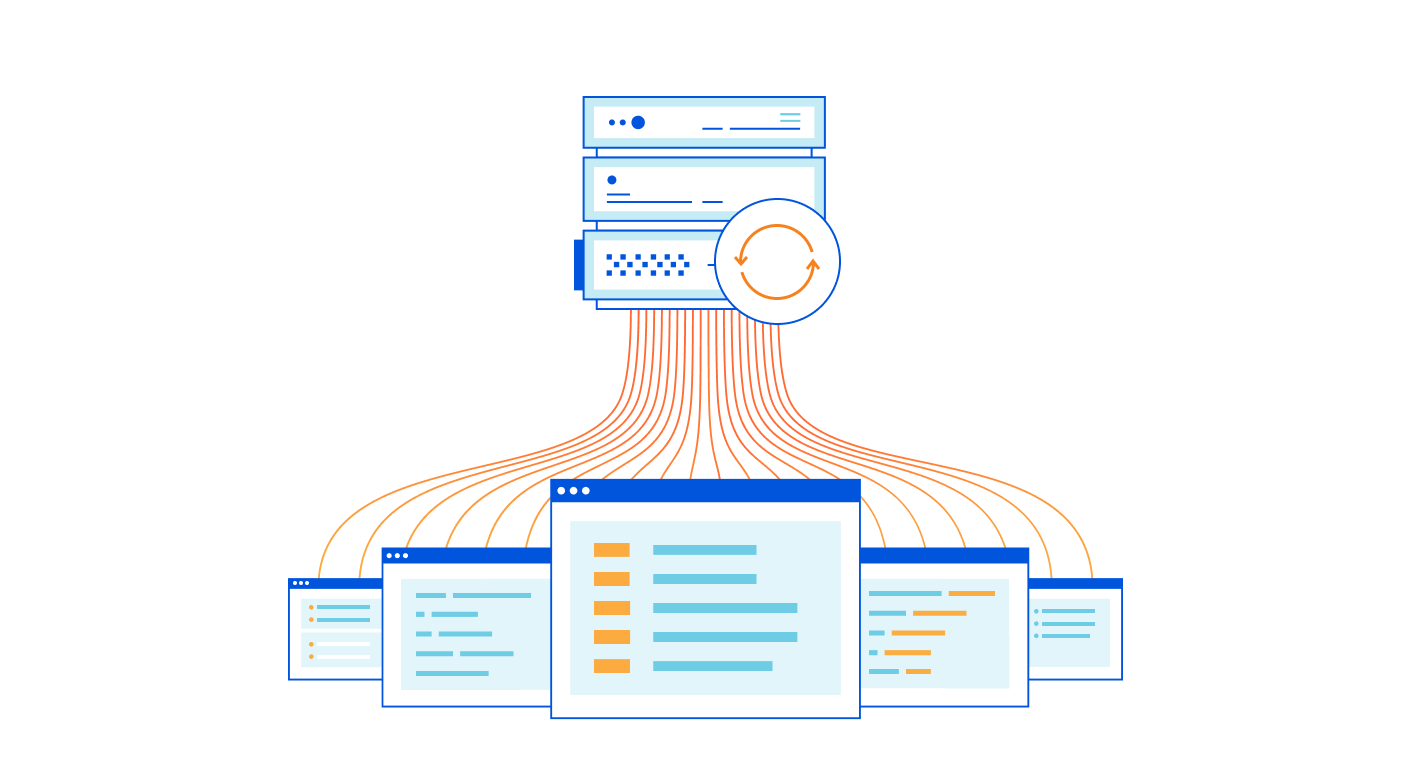
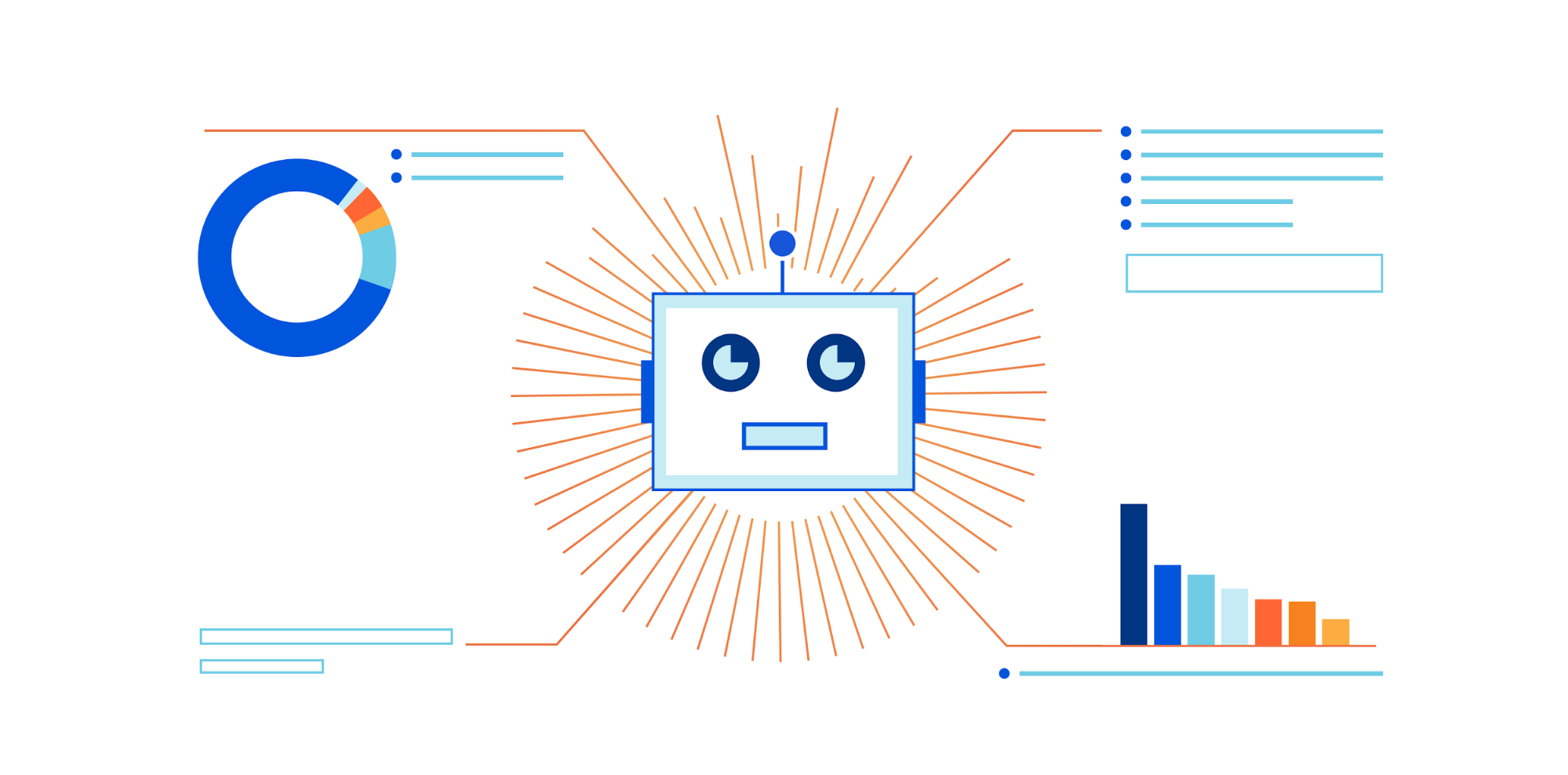
Today we’re excited to announce Origin Error Rate notifications: a new, sophisticated way to detect and notify you when Cloudflare sees elevated levels of 5xx errors from your origin.
In 2019, we announced Passive Origin Monitoring alerts to notify you when your origin goes down. Passive Origin Monitoring is great — it tells you if every request to your origin is returning a 521 error (web server down) for a full five minutes. But sometimes that’s not enough. You don’t want to wait for all of your users to have issues; you want to be notified when more users than normal are having issues before it becomes a big problem.
Calculating Anomalies
No service is perfect — we know that a very small percentage of your origin responses are likely to be 5xx errors. Most of the time, these issues are one-offs and nothing actually needs to be done. However, for Internet properties with very high traffic, even a very small percentage could potentially be a large number. If we alerted you for every one of these errors, you would never stop getting useless notifications. When it comes to notifying, the question isn’t whether there are any errors, but how many errors need to exist before it’s a problem.
So how do we actually tell if something is a problem? As humans, it’s relatively easy for us to look at a graph, identify a spike, and think “hmm, that’s not supposed to be there.” For a computer it gets a little more complicated. Unlike humans, who have intuition and can exercise judgement in grey areas, a computer needs an exact set of criteria to tell whether something is out of the ordinary.
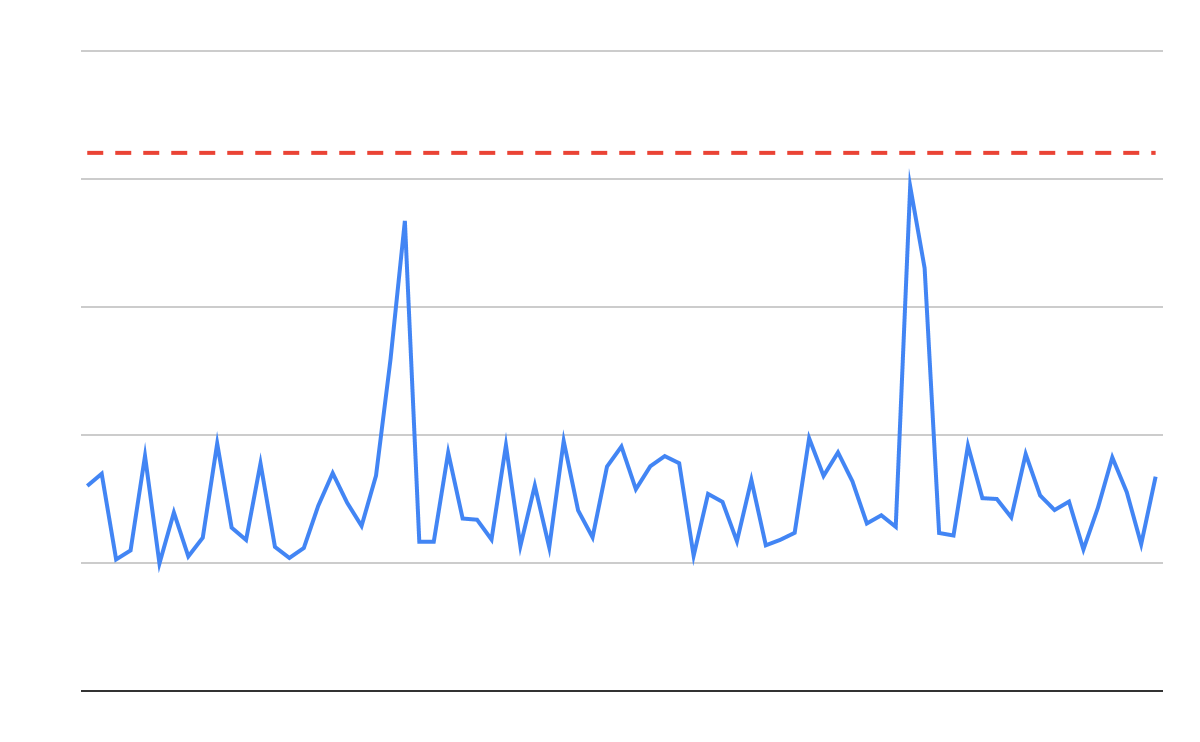
The simplest way to detect abnormalities in a time series dataset is to set a single threshold — for example, “notify me whenever more than 5% of the requests to my Internet properties result in errors.” Unfortunately, it’s really hard to pick an effective threshold. Too high and you never actually get notified; too low, and you’re drowning in notifications:
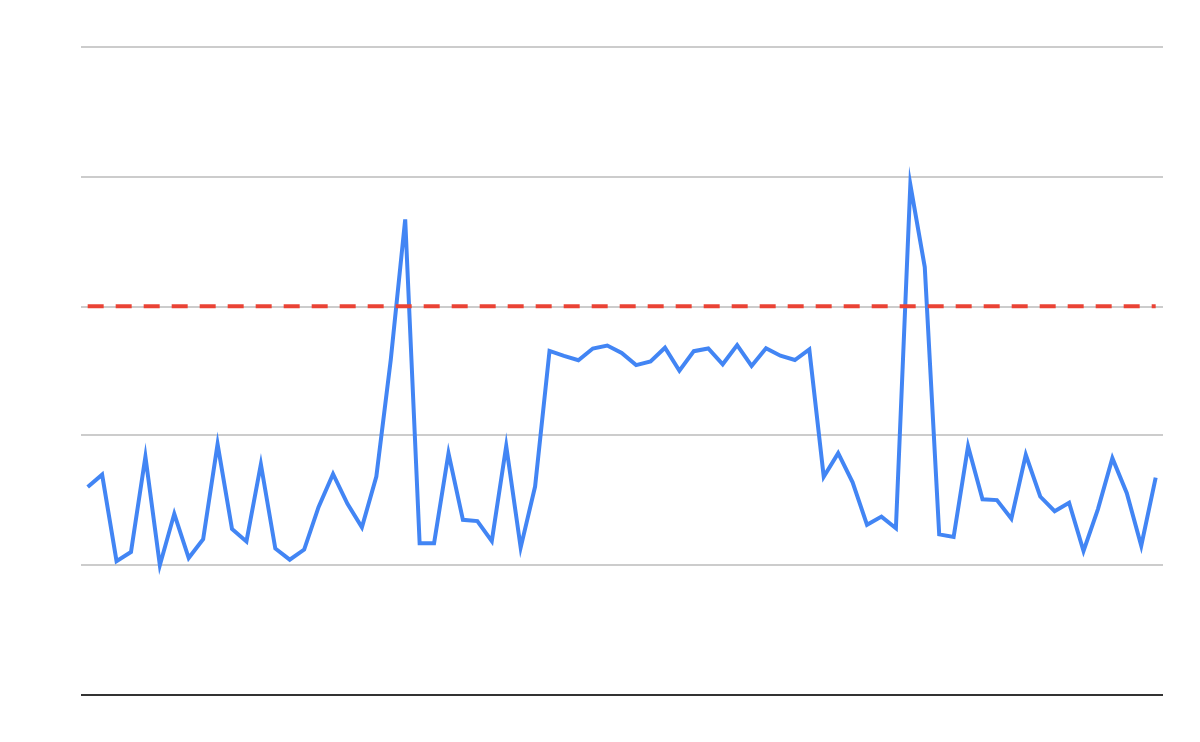
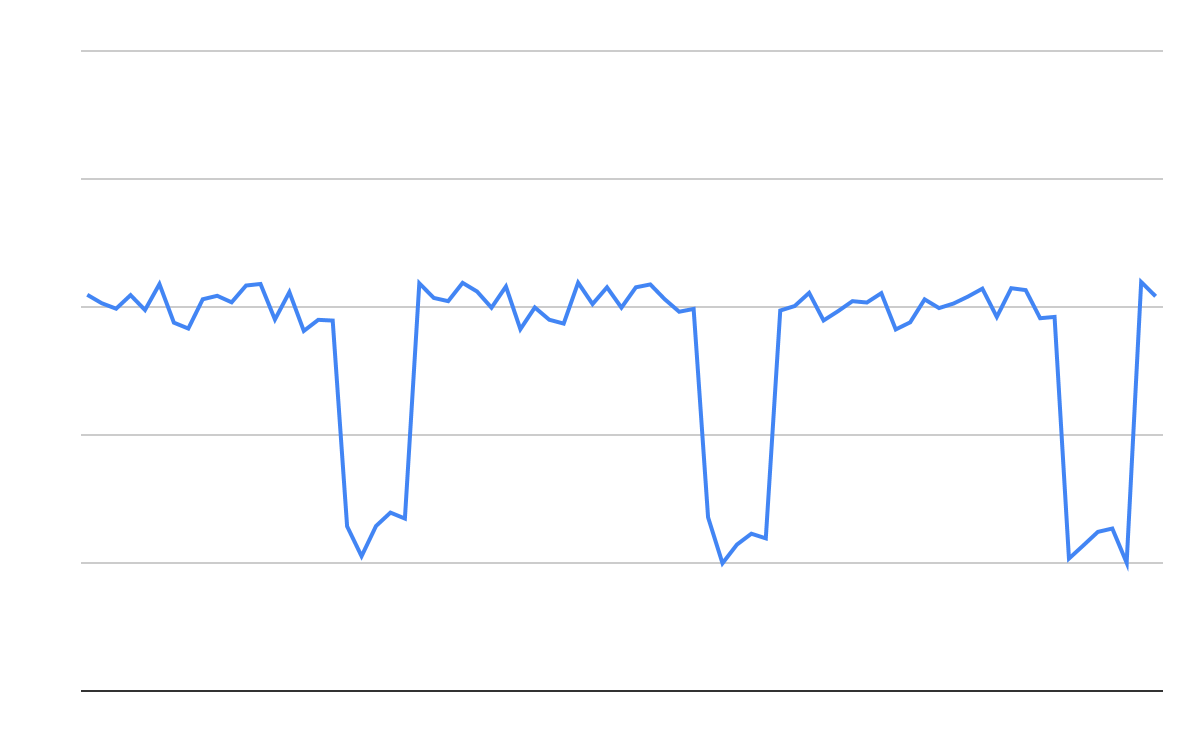
Even when we find that happy medium, we can still miss issues that burn “low and slow”. This is where there’s no obvious, dramatic spike, but something has been going a little wrong for a long time:
We can try layering on multiple thresholds. For example: notify you if the error rate is ever over 10%, or if it’s over 5% for more than five minutes, or if it’s over 2% for more than 10 minutes. Not only does this quickly become complicated, but it also doesn’t account for periodic issues, such as kubernetes pods restarting or deployments going out at a regular interval. What if the error rate is over 5% for only four minutes, but it happens every five minutes? We know that a lot of your end users are being affected, but even the long set of rules listed above wouldn’t catch it.
So thresholds probably aren’t sophisticated enough to detect origin issues. Instead, we turn to the Google SRE Handbook for alerting based on Service Level Objectives (SLOs). An SLO is a part of an agreement between a customer and a service provider. It’s a defined metric and value that both parties agree on. One of the most common types of SLOs is availability, or “the service will be available for a certain percentage of the time”. In this case, the service is your origin and the agreement is between you and your end users. Your end users expect your origin to be available a certain percent of the time.
If we revisit our original concept, we know that you’re comfortable with your origin returning a certain number of errors. We define that number as your SLO. An SLO of 99.9 means that you’re OK with 0.01% of all of your requests over a month being errors. Therefore, 0.01% of all the requests that reach your origin is your total error budget — you can have this many errors in a month and never be notified, because you’ve defined that as acceptable.
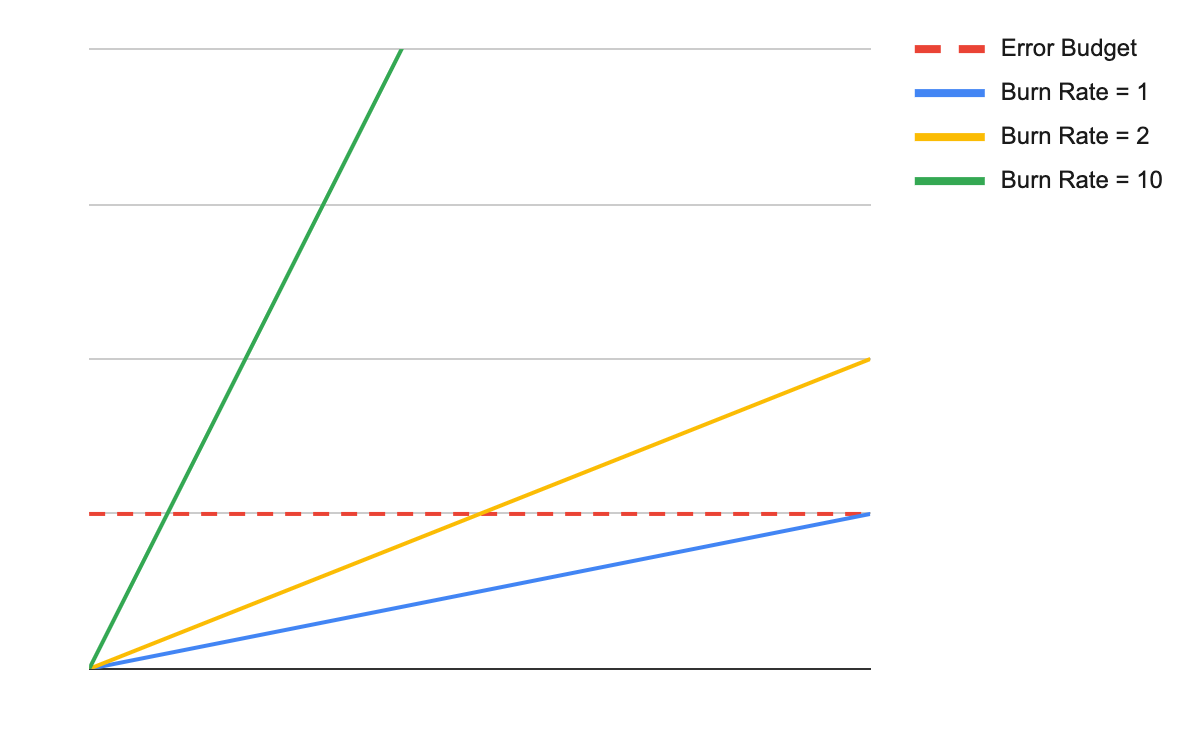
What you really want to know is when you’re burning through that error budget too quickly — this probably means that something is actually going wrong (instead of a one-time occurrence). We can measure a burn rate to gauge how quickly you’re burning through your error budget, given the rate of errors that we’re currently seeing. A burn rate of one means that the entirety of the error budget will be used up exactly within the set time period — an ideal scenario. A burn rate of zero is even better since we’re not seeing any errors at all, but ultimately is pretty unrealistic. A burn rate of 10 is most likely a problem — if that rate keeps up for the full month, you’ll have had 10x the number of errors than you originally said was acceptable.
Even when using burn rates instead of thresholds, we still want to have multiple criteria. We want to measure a short time period with a high burn rate (a short indicator). This covers your need to “alert me quickly when something dramatic is happening.” But we also want to have a longer time period with a lower burn rate (a long indicator), in order to cover your need to “don’t alert me on issues that are over quickly.” This way we can ensure that we alert quickly without sending too many false positives.
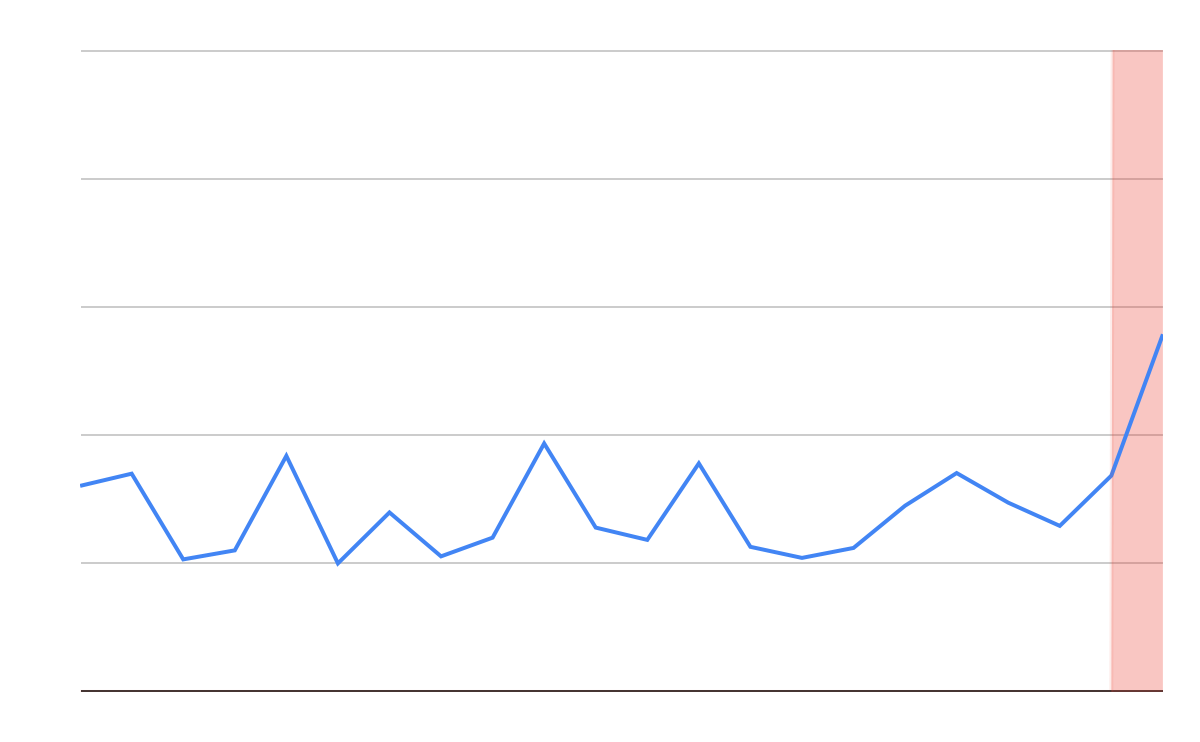
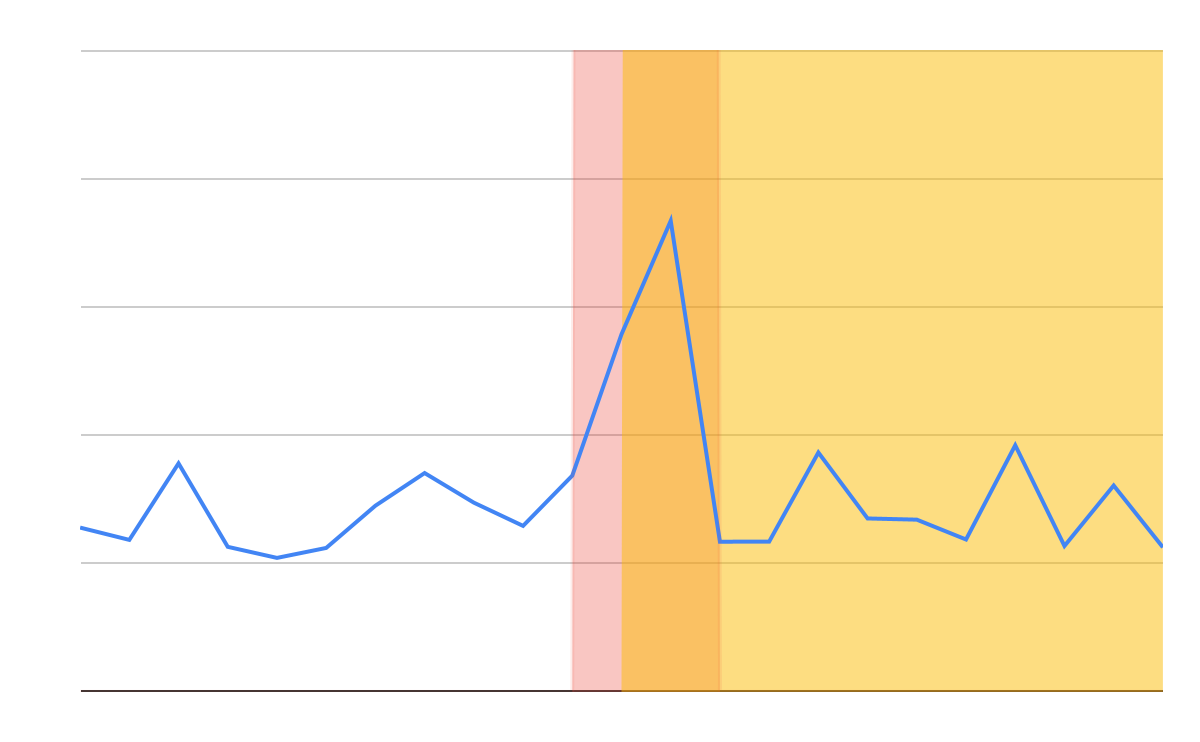
Let’s take a look at the life of an incident using this methodology. In our first measurement, the short indicator tells us it looks like something is starting to go wrong. However, the long indicator is still within reasonable bounds. We’re not going to sound the alarm yet.
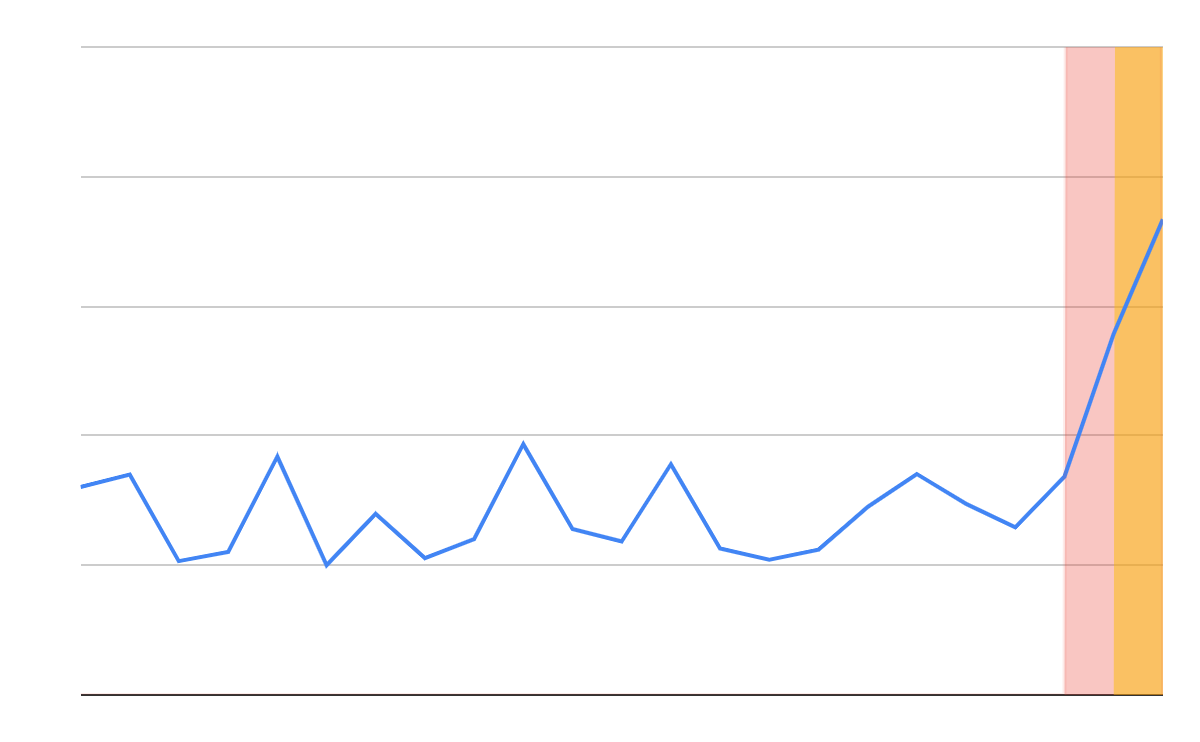
When we measure next, we see that the problem is worse. Now we’re at the point where there are enough errors that not only is the short indicator telling us there’s something wrong, but the long indicator has been impacted too. We feel confident that there’s a problem, and it’s time to notify you.
A couple cycles later, the incident is over. The long indicator is still telling us that something is wrong, because the incident is still within the long time period. However, the short indicator shows that nothing is currently concerning. Since we don’t have both indicators telling us that something is wrong, we won’t notify you. This keeps us from sending notifications for incidents that are already over.
This methodology is cool because of how well it responds to different incidents. If the original spike had been more dramatic, it would have triggered both the long and short indicators immediately. The more errors we’re seeing, the more confident we are that there’s an issue and the sooner we can notify you.
Even with this methodology, we know that different services behave differently. So for this notification, you can choose the Service Level Objective (SLO) you want to use to monitor your Internet property: 99.9% (high sensitivity), 99.8% (medium sensitivity), or 99.7% (low sensitivity). You can also choose which Internet properties you want to monitor — no need to be notified for test properties or lower priority domains.
Getting started today
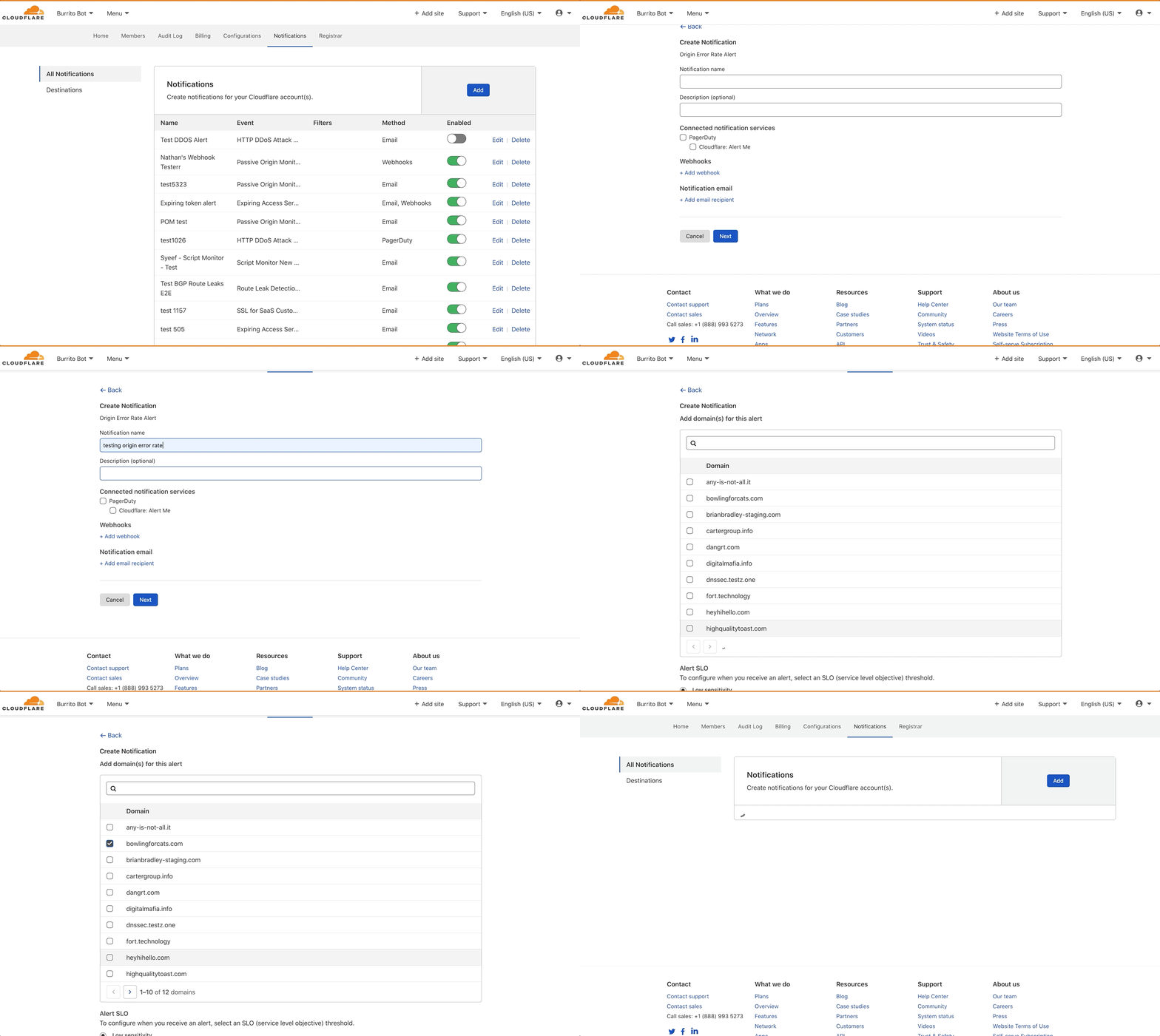
HTTP Origin Error Rate notifications can be configured in the Notifications tab of the dashboard. Select Origin Error Rate Alert as your alert type. As with all Cloudflare notifications, you’re able to name and describe your notification, and choose how you want to be notified. From there, you can select which domains you want to monitor, and at what SLO.
This notification is available to all Enterprise customers. If you’re interested in monitoring your origin, we encourage you to give it a try.
Applications expect specific inputs in order to perform optimally. Techniques used to shape inputs to meet an application’s requirements might include normalizing the URLs to conform to a consistent formatting standard, rewriting the URL’s path and query based on different conditions and logic, and/or modifying headers to indicate an application’s specific information. These are expensive to run and complex to manage. Cloudflare can help you to offload the heavy lifting of modifying requests for your servers with Transform Rules. In this blog we will cover the nuts and bolts of the functionality.
Origin server🤒 : Thank you so much for offloading that for me, Cloudflare
Cloudflare edge servers😎 : No problem, buddy, I have taken care of that for you
Why do people need Transform Rules?
When it comes to modifying an HTTP/HTTPS request with normalization, rewriting the URLs, and/or modifying headers, Cloudflare users often use Cloudflare Workers, code they craft that runs on Cloudflare’s edge.
Cloudflare Workers open the door to many possibilities regarding the amount of work that can be done for your applications, close to where your end users are located. It provides a serverless execution environment that allows you to create application functionality without configuring or maintaining infrastructure. However, using a Worker to modify the request is kind of like wearing a diving suit in a kiddie pool. Therefore, a simple tool to modify requests without Workers has long been wanted.
It’s in this context that we looked at the most common request modifications that customers were making, and built out Transform Rules to cover them. Once Transform Rules were announced we anticipated they’d become the favourite tool in our customers’ tool box.
What do Transform Rules do?
URL Normalization: normalizes HTTP requests to a standard format which then allows you to predictably write security rule filters.
URL Rewrite: static and dynamic rewrites of the URL’s path and/or query string based on various attributes of the request.
Header Modify: add or remove static or dynamic headers (based on Cloudflare specific attributes) to requests based on different various attributes of the request.
URL Normalization
Bad actors on the Internet often encode your URLs to attack your applications because encoded URLs can bypass some security rules. URL Normalization transforms the request URL from encoded to unencoded before Cloudflare’s security features, so no one can bypass the firewall rules you configure.
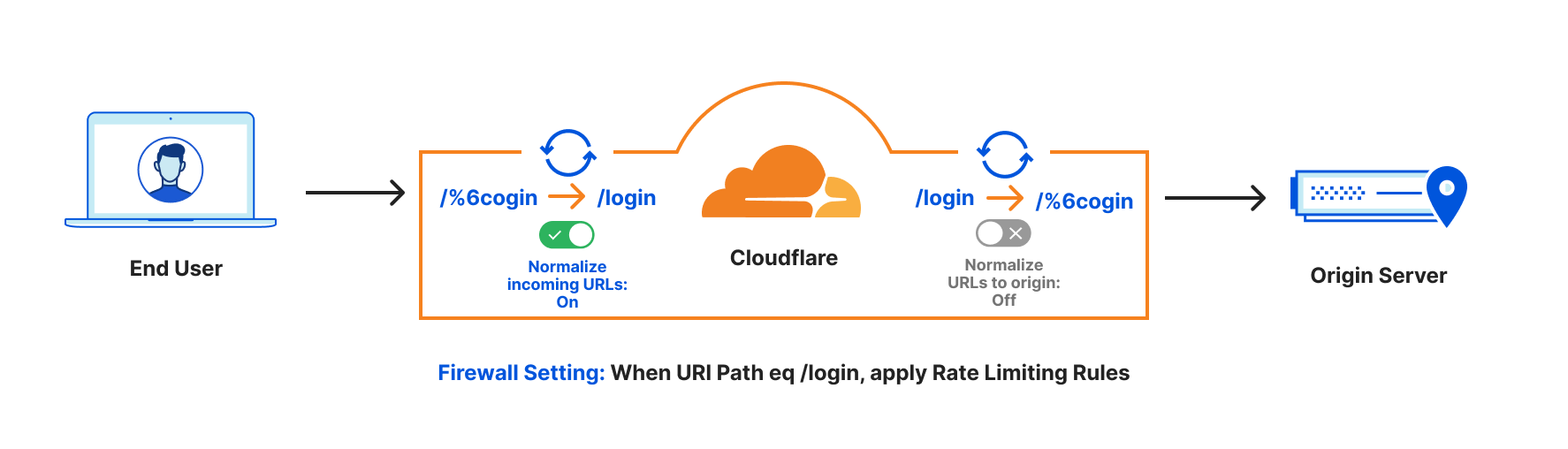
For example, say you had a rate limiting rule for the path “/login” but someone sent the request as “/%6cogin”. Illustrated below:
You😤: Rate Limiting for https://www.example.com/login to avoid brute force attacks.
Attacker😈: You think you can stop me? I will issue massive requests to https://www.example.com/%6cogin to bypass your rate limiting rule.
Without URL Normalization, the request would bypass the rate limiting rule, but with URL Normalization the request is converted from the URL path /%6cogin to /login before the rule is applied.
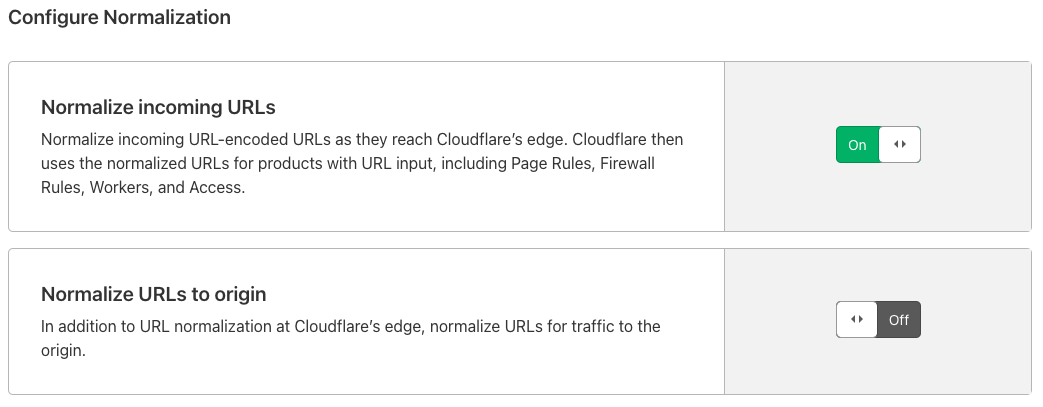
By default, URL Normalization is enabled for all the zones on Cloudflare at Cloudflare’s edge, and disabled when going to origins. This means incoming URLs will be decoded to standard format before any Cloudflare security execution. When going back to the origins, we will use the original URL. In this way, no encoded URL can bypass security features and the origin also can see the original URL.
The default settings are flexible to adjust if you need. This FAQ page has more information about URL Normalization.
URL Rewrite
When talking about URL Rewrites, we always want to distinguish them from URL Redirects. They are like twins. Rewrites is a server-side modification of the URL before it is fully processed by the web server. This will not change what is seen in the user’s browser. Redirects forward URLs to other locations via a 301 or 302 HTTP status code. This will change what is seen in the user’s browser. You can do a URL Redirect with “Forwarding URL” in Cloudflare Pages Rules. Page Rules trigger actions whenever a request matches one of the URL patterns you define.
Transform Rules come into play when we need to use URL Rewrite. This allows you to rewrite a URL’s path and/or query string based on the logic of your applications. The rewrite can be a fixed string (which we call ‘static’) or a computed string (called ‘dynamic’) based on various attributes of a request, like the country it came from, the referrer, or parts of the path. These rewrites come before products such as Firewall Rules, Page Rules, and Cloudflare Workers.
Static URL Rewrite Example
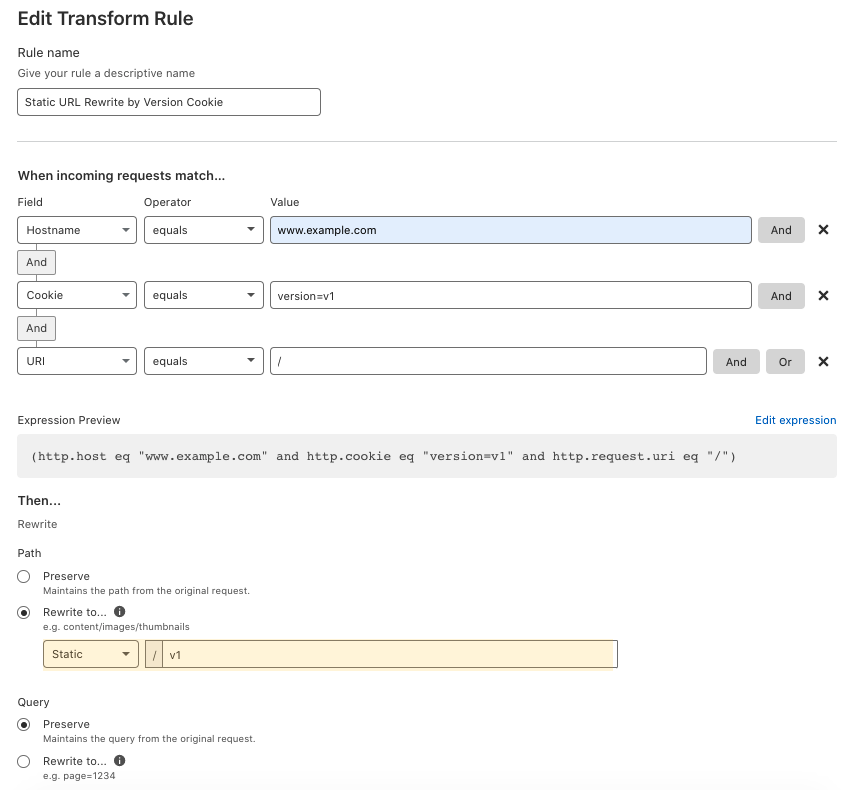
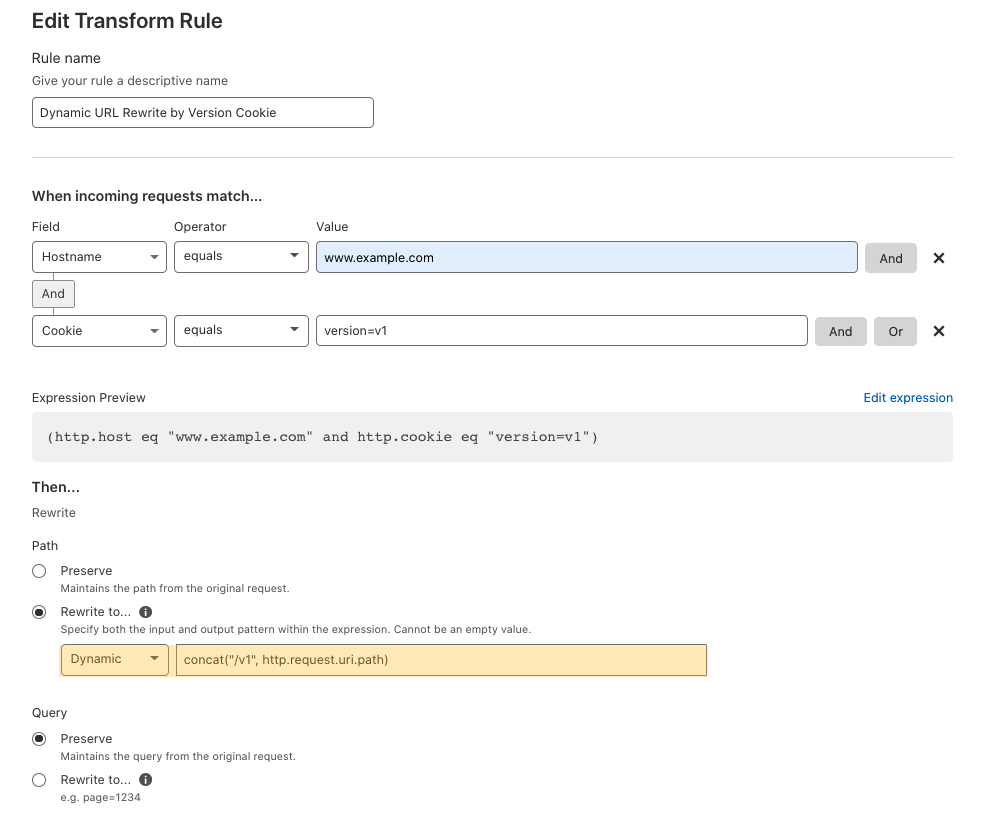
When visitingwww.example.com with a cookie of version=v1, you want to rewrite the URL to www.example.com/v1when going to the origin server. In this case, the end-user facing URL will not change, but the content will be the /v1’s content. This is a static URL rewrite. It only does rewrites when end users visit the URL www.example.com with cookie version=v1. It can help you to do A/B testing when rolling out new content.
Dynamic URL Rewrite Example
When visiting any URL of www.example.com with a cookie of version=v1, you want to rewrite the request by adding /v1/ to the beginning of the URL for v1 content, when going to the origin server.
In this use case, when end users visit www.example.com/Literaturelibrary/book1314with cookie version=v1,Cloudflare will rewrite the URL towww.example.com/v1/Literaturelibrary/book1314.
When end users visit www.example.com/fictionlibrary/book52/line43/universewith cookie version=v1,Cloudflare will rewrite the URL towww.example.com/v1/fictionlibrary/book52/line43/universe.
In this case, the URL visible in the client’s browser will not change, but the content returned will be from the /v1 location. This is a dynamic URL rewrite, so it applies the rewrite to all URLs when end users visit with the cookie.
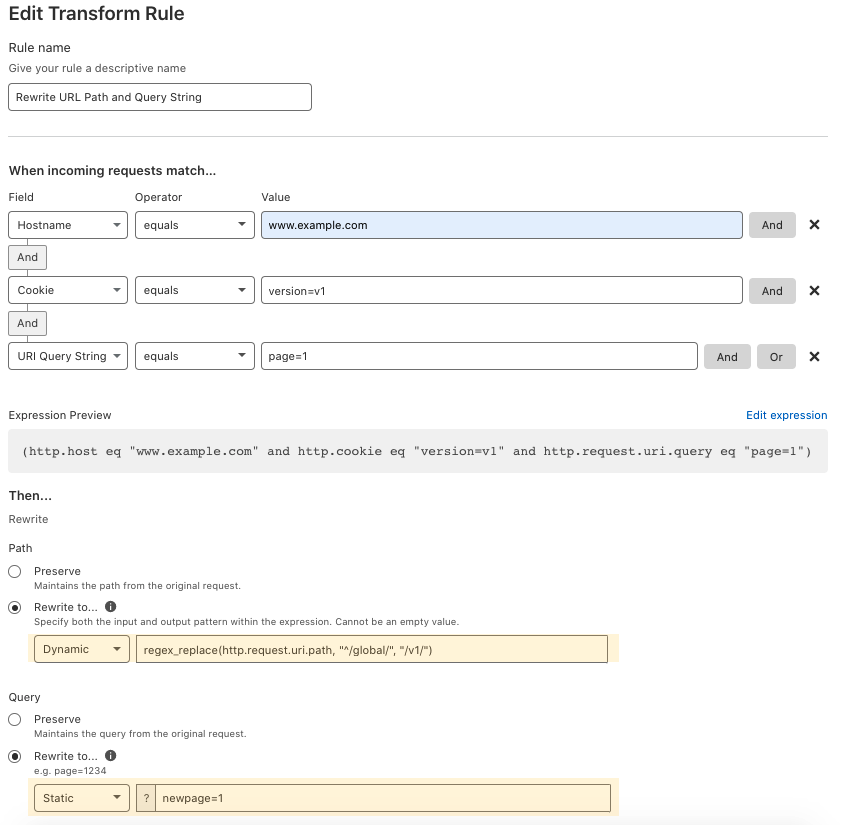
Another Dynamic URL Rewrite Example
When visiting any URL of www.example.com with a cookie of version=v1 and query string of page=1 that has /globalin the beginning of the URL, this rule rewrites the request by replacing /globalin the beginning for the URL with /v1 and updates the query string to newpage=1, when going to the origin server.
When end users visit www.example.com/global/Literaturelibarary/book1013?page=1with cookie of version=v1, Cloudflare will rewrite the URL towww.example.com/v1/Literaturelibarary/book1013?newpage=1.
And when end users visit www.example.com/global/fictionlibarary/book52/line43/universe?page=1with cookie of version=v1, Cloudflare will rewrite the URL towww.example.com/v1/fictionlibarary/book52/line43/universe?newpage=1.
In this case, the end-user facing URLs will not change, but the content will be v1’s content. This is a dynamic URL rewrite, so it applies the rewrite to all URLs when end users visit with the cookie of version=v1 and a query string of page=1.
Header Modify
Adding/removing request headers of the requests when going to origin servers. This is one of the most requested features of customers using Cloudflare Workers, especially those sending the Bot Score as a request header to origin. You can use this feature to add/remove strings and non-strings, and static or dynamic request header values.
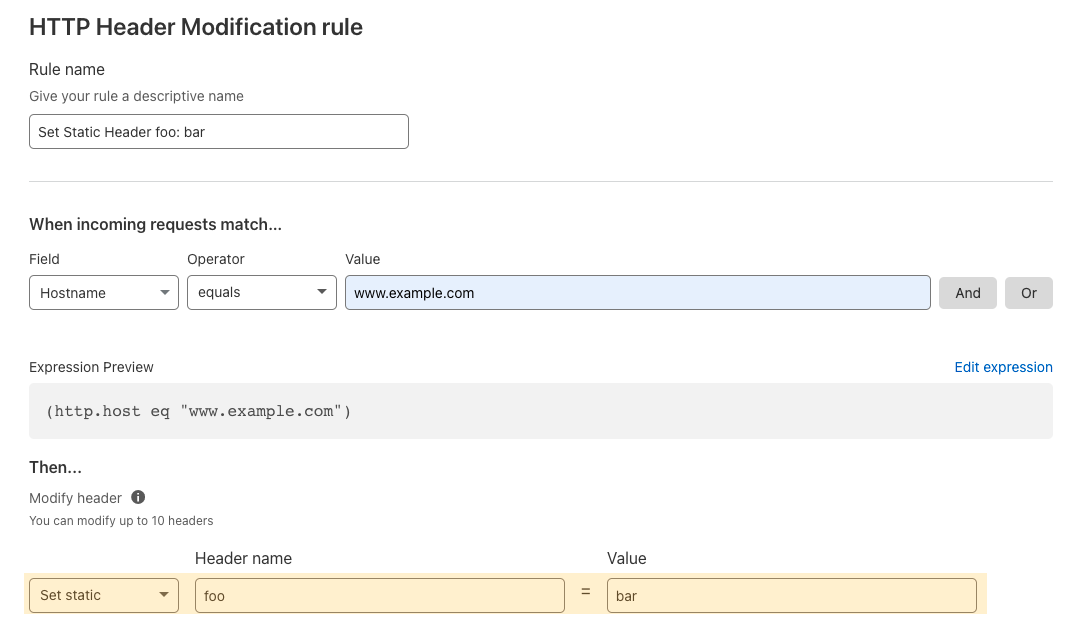
Set Static header: Adds a static header and value to the request and sends it to the origin.
For example, add a request header such as foo: bar only when the requests have the hostname of www.example.com.
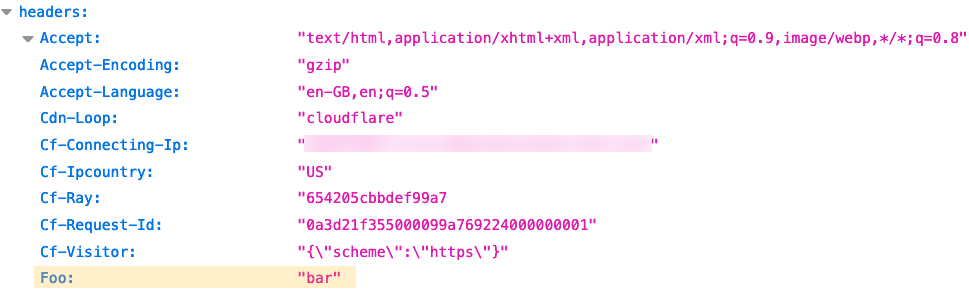
With the above setting, Cloudflare appends a static header Foo: bar to your origin when this rule triggers. Here is what the origin should see.
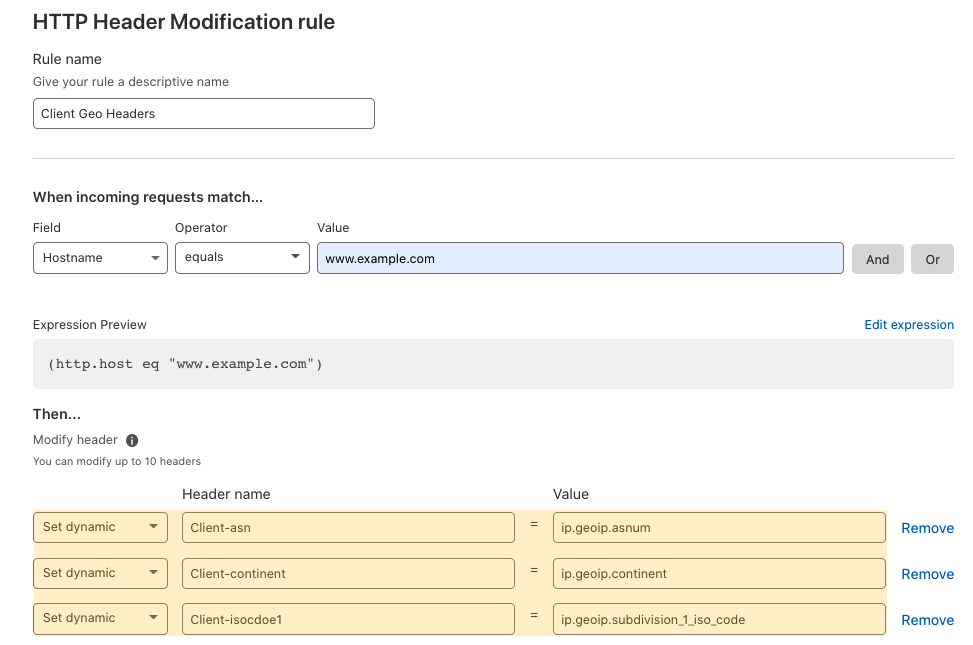
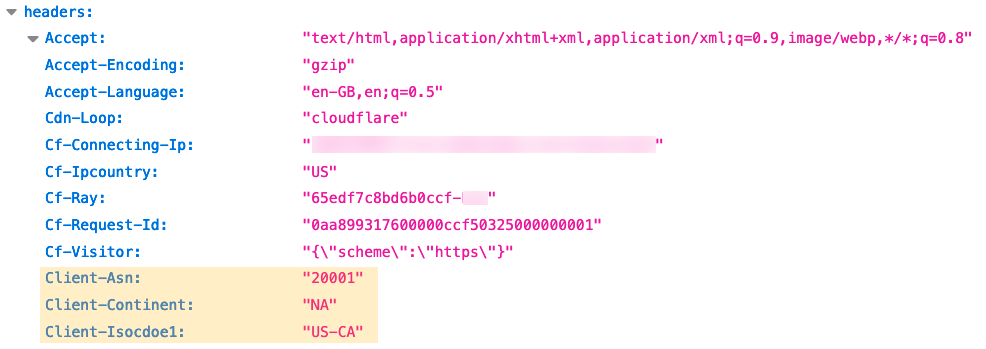
Set Dynamic header : Adds a dynamic header value from the computed field, like the end user’s geolocation.
The dynamic request headers are added.
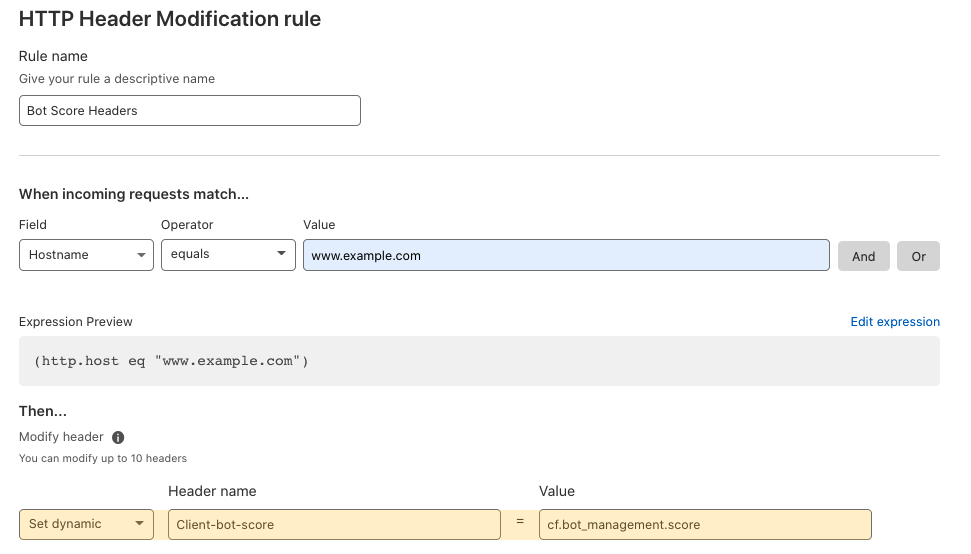
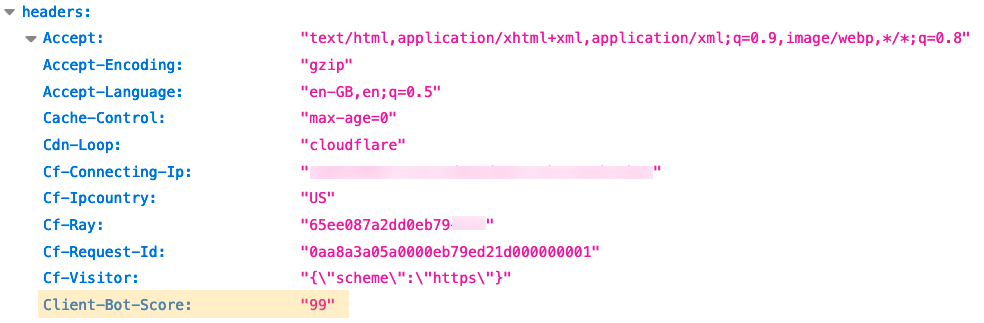
Set Dynamic Bot Management headers: Cloudflare Bot Management protects applications from bad bot traffic by scoring each request with a “bot score” from 1 to 99. With Bot Management enabled, we can send the bot score to the origin server as a request header via Transform Rules.
The bot score header is added.
It has never been easier
With Transform Rules, you can modify the request with URL Normalization, URL Rewrites, and HTTP Header Modification with easy settings to power your application. There’s no script required for Cloudflare to offload those duties from your origin servers. Just like Optimus Prime says “Autobots, transform and roll out!”, Cloudflare says “Requests, transform and roll out!”.
A couple of months ago, we announced the general availability of Cloudflare Pages: the easiest way to host and collaboratively develop websites on Cloudflare’s global network. It’s been amazing to see over 20,000 incredible sites built by users and hear your feedback. Since then, we’ve released user-requested features like URL redirects, web analytics, and Access integration.
We’ve been listening to your feedback and today we announce two new features: rollbacks and the Pages API. Deployment rollbacks allow you to host production-level code on Pages without needing to stress about broken builds resulting in website downtime. The API empowers you to create custom functionality and better integrate Pages with your development workflows. Now, it’s even easier to use Pages for production hosting.
Rollbacks
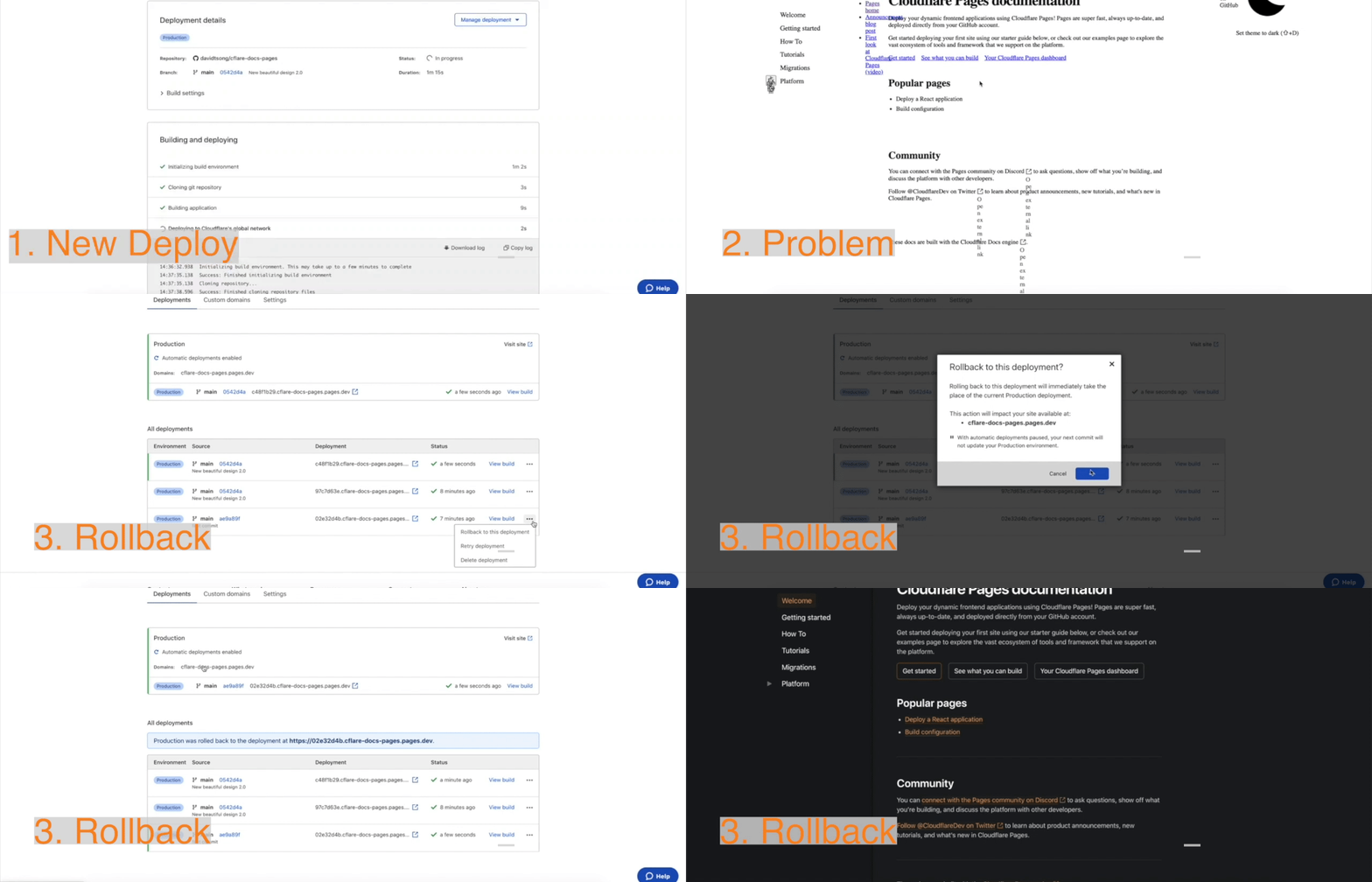
You can now rollback your production website to a previous working deployment with just a click of a button. This is especially useful when you want to quickly undo a new deployment for troubleshooting. Before, developers would have to push another deployment and then wait for the build to finish updating production. Now, you can restore a working version within a few moments by rolling back to a previous working build.
To rollback to a previous build, just click the “Rollback to this deployment” button on either the deployments list menu or on a specific deployment page.
API Access
The Pages API exposes endpoints for you to easily create automations and to integrate Pages within your development workflow. Refer to the API documentation for a full breakdown of the object types and endpoints. To get started, navigate to the Cloudflare API Tokens page and copy your “Global API Key”. Now, you can authenticate and make requests to the API using your email and auth key in the request headers.
For example, here is an API request to get all projects on an account.
Try out an API request with one of your projects by replacing {account_id}, {deployment_id},{email}, and {auth_key}. You can find your account_id in the URL address bar by navigating to the Cloudflare Dashboard. (Ex: 41643ed677c7c7gba4x463c4zdb9563c).
Refer to the API documentation for a full breakdown of the object types and endpoints.
Using the Pages API on Workers
The Pages API is even more powerful and simple to use with workers.new. If you haven’t used Workers before, feel free to go through the getting started guide to learn more. However, you’ll need to have set up a Pages project to follow along. Next, you can copy and paste this template for the new worker. Then, customize the values such as {account_id}, {project_name}, {auth_key}, and {your_email}.
const endpoint = "https://api.cloudflare.com/client/v4/accounts/{account_id}/pages/projects/{project_name}/deployments";
const email = "{your_email}";
addEventListener("scheduled", (event) => {
  event.waitUntil(handleScheduled(event.scheduledTime));
});
async function handleScheduled(request) {
  const init = {
    method: "POST",
    headers: {
      "content-type": "application/json;charset=UTF-8",
      "X-Auth-Email": email,
      "X-Auth-Key": API_KEY,
      //We recommend you store API keys as secrets using the Workers dashboard or using Wrangler as documented here https://developers.cloudflare.com/workers/cli-wrangler/commands#secret
    },
  };
  const response = await fetch(endpoint, init);
  return new Response(200);
}
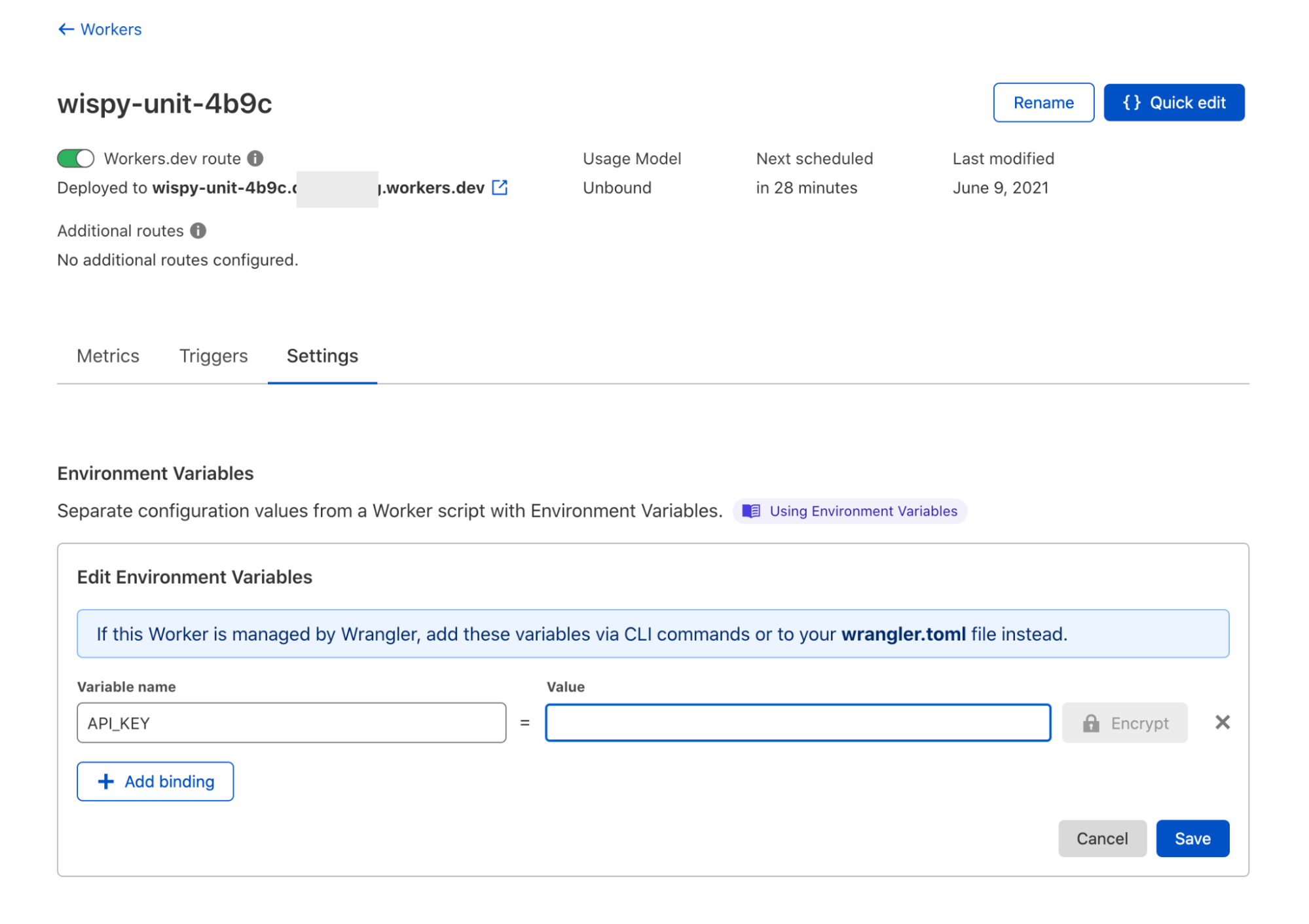
To finish configuring the script, click the back arrow near the top left of the window and click on the settings tab. Then, set an environment variable “API_KEY” with the value of your Cloudflare Global key and click “Encrypt” and then “Save”.
The script just makes a POST request to the deployments’ endpoint to trigger a new build. Click “Quick edit” to go back to the code editor to finish testing the script. You can test out your configuration and make a request by clicking on the “Trigger scheduled event” button in the “Schedule” tab near the tabs saying “HTTP” and “Preview”. You should see a new queued build on your Project through the Pages dashboard. Now, you can click “Save and Deploy” to publish your work. Finally, back to the worker settings page by clicking the back arrow near the top left of the window.
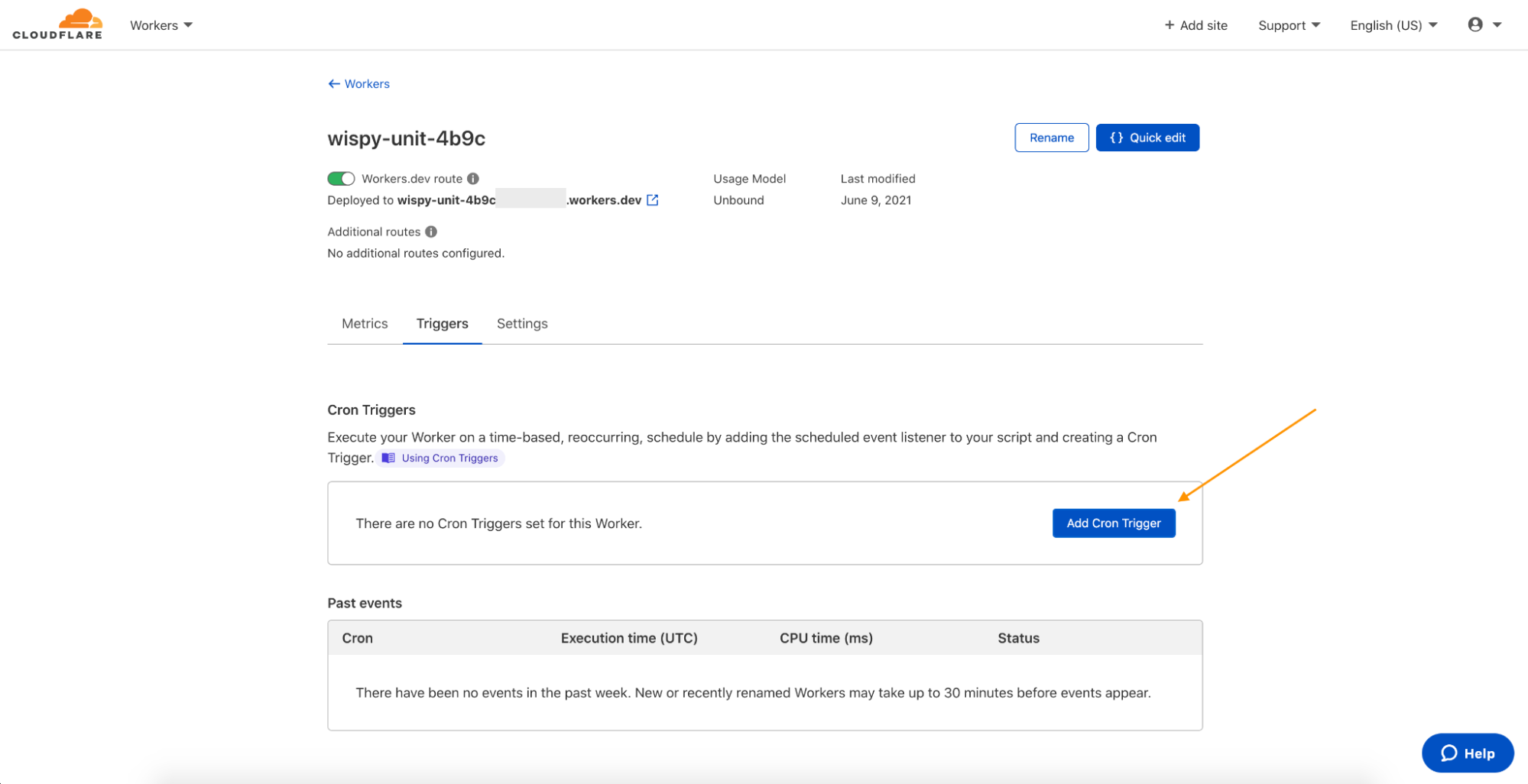
All that’s left to do is set a cron trigger to periodically run this Worker on the “Triggers tab”. Click on “Add Cron Trigger”.
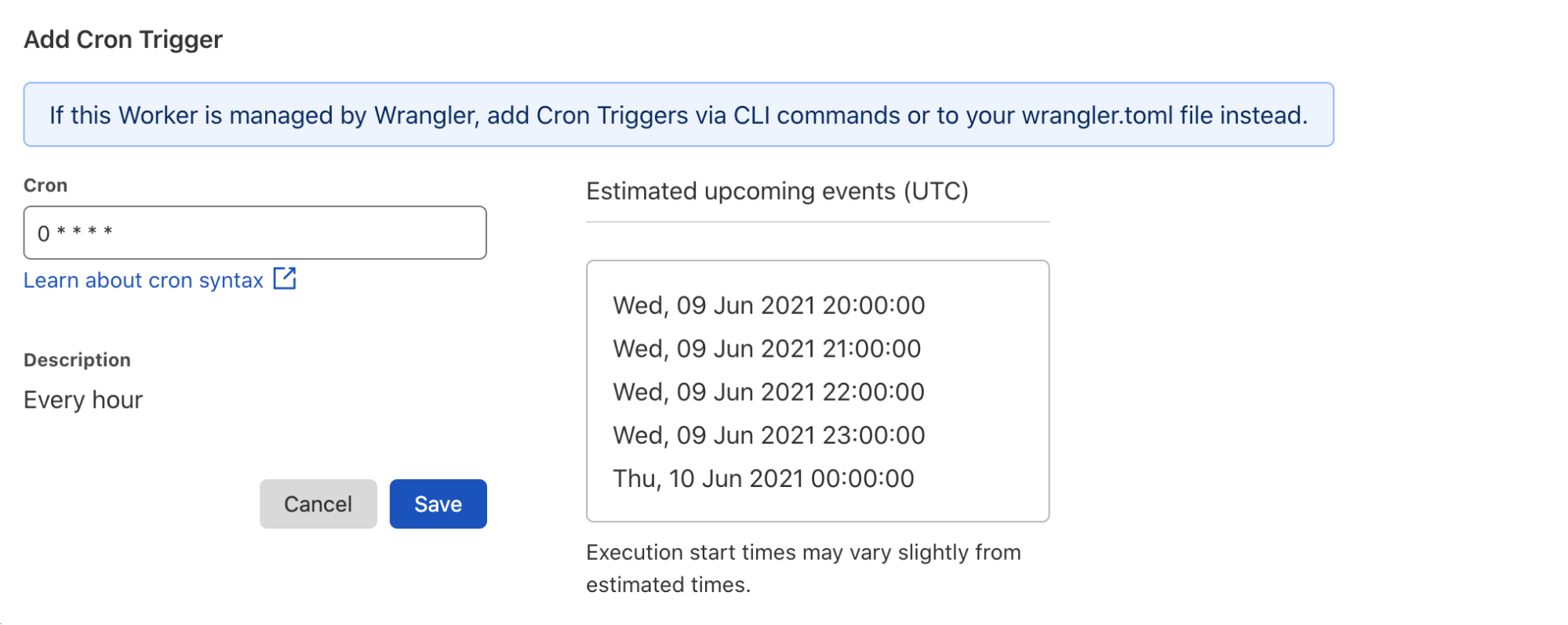
Next, we can input “0 * * * *” to trigger the build every hour.
Finally, click save and your automation using the Pages API will trigger a new build every hour.
2. Deleting old deployments after a week: Pages hosts and serves all project deployments on preview links. Suppose you want to keep your project relatively private and prevent access to old deployments. You can use the API to delete deployments after a month so that they are no longer public online. This is easy to do on Workers using Cron Triggers.
3. Sharing project information: Imagine you are working on a development team using Pages to build our websites. You probably want an easy way to share deployment preview links and build status without having to share Cloudflare accounts. Using the API, you can easily share project information, including deployment status and preview links, and serve this content as HTML from a Cloudflare Worker.
Find the code snippets for all three examples here.
Conclusion
We will continue making the API more powerful with features such as supporting prebuilt deployments in the future. We are excited to see what you build with the API and hope you enjoy using rollbacks. At Cloudflare, we are committed to building the best developer experience on Pages, and we always appreciate hearing your feedback. Come chat with us and share more feedback on the Workers Discord (We have a dedicated #pages-help channel!).
We are excited to announce a new look and new capabilities for Cloudflare Logs! Customers on our Enterprise plan can now configure Logpush for Firewall Events and Network Error Logs Reports directly from the dashboard. Additionally, it’s easier to send Logs directly to our analytics partners Microsoft Azure Sentinel, Splunk, Sumo Logic, and Datadog. This blog post discusses how customers use Cloudflare Logs, how we’ve made it easier to consume logs, and tours the new user interface.
New data sets for insight into more products
Cloudflare Logs are almost as old as Cloudflare itself, but we have a few big improvements: new datasets and new destinations.
Cloudflare has a large number of products, and nearly all of them can generate Logs in different data sets. We have “HTTP Request” Logs, or one log line for every L7 HTTP request that we handle (whether cached or not). We also provide connection Logs for Spectrum, our proxy for any TCP or UDP based application. Gateway, part of our Cloudflare for Teams suite, can provide Logs for HTTP and DNS traffic.
Today, we are introducing two new data sets:
Firewall Events gives insight into malicious traffic handled by Cloudflare. It provides detailed information about everything our WAF does. For example, Firewall Events shows whether a request was blocked outright or whether we issued a CAPTCHA challenge. About a year ago we introduced the ability to send Firewall Events directly to your SIEM; starting today, I’m thrilled to share that you can enable this directly from the dashboard!
Network Error Logging(NEL) Reports provides information about clients that can’t reach our network. To enable NEL Reports for your zone and start seeing where clients are having issues reaching our network, reach out to your account manager.
Take your Logs anywhere with an S3-compatible API
To start using logs, you need to store them first. Cloudflare has long supported AWS, Azure, and Google Cloud as storage destinations. But we know that customers use a huge variety of storage infrastructure, which could be hosted on-premise or with one of our Bandwidth Alliance partners.
Starting today, we support any storage destination with an S3-compatible API. This includes:
And best of all, it’s super easy to get data into these locations using our new UI!
“As always, we love that our partnership with Cloudflare allows us to seamlessly offer customers our easy, plug and play storage solution, Backblaze B2 Cloud Storage. Even better is that, as founding members of the Bandwidth Alliance, we can do it all with free egress.” — Nilay Patel, Co-founder and VP of Solutions Engineering and Sales, Backblaze.
Push Cloudflare Logs directly to our analytics partners
While many customers like to store Logs themselves, we’ve also heard that many customers want to get Logs into their analytics provider directly — without going through another layer. Getting high volume log data out of object storage and into an analytics provider can require building and maintaining a costly, time-consuming, and fragile integration.
Because of this, we now provide direct integrations with four analytics platforms: Microsoft Azure Sentinel, Sumo Logic, Splunk, and Datadog. And starting today, you can push Logs directly into Sumo Logic, Splunk and Datadog from the UI! Customers can add Cloudflare to Azure Sentinel using the Azure Marketplace.
“Organizations are in a state of digital transformation on a journey to the cloud. Most of our customers deploy services in multiple clouds and have legacy systems on premise. Splunk provides visibility across all of this, and more importantly, with SOAR we can automate remediation. We are excited about the Cloudflare partnership, and adding their data into Splunk drives the outcomes customers need to modernize their security operations.” — Jane Wong, Vice President, Product Management, Security at Splunk
“Securing enterprise IT environments can be challenging – from devices, to users, to apps, to data centers on-premises or in the cloud. In today’s environment of increasingly sophisticated cyber-attacks, our mutual customers rely on Microsoft Azure Sentinel for a comprehensive view of their enterprise. Azure Sentinel enables SecOps teams to collect data at cloud scale and empowers them with AI and ML to find the real threats in those signals, reducing alert fatigue by as much as 90%. By integrating directly with Cloudflare Logs we are making it easier and faster for customers to get complete visibility across their entire stack.” — Sarah Fender, Partner Group Program Manager, Azure Sentinel at Microsoft
“As a long time Cloudflare partner we’ve worked together to help joint customers analyze events and trends from their websites and applications to provide end-to-end visibility to improve digital experiences. We’re excited to expand our partnership as part of the Cloudflare Analytics Ecosystem to provide comprehensive real-time insights for both observability and the security of mission-critical applications and services with our Cloud SIEM solution.” — John Coyle, Vice President of Business Development for Sumo Logic
“Knowing that applications perform as well in the real world as they do in the datacenter is critical to ensuring great digital experiences. Combining Cloudflare Logs with Datadog telemetry about application performance in a single pane of glass ensures teams will have a holistic view of their application delivery.” — Michael Gerstenhaber, Sr. Director of Product, Datadog
Why Cloudflare Logs?
Cloudflare’s mission is to help build a better Internet. We do that by providing a massive global network that protects and accelerates our customers’ infrastructure. Because traffic flows across our network before reaching our customers, it means we have a unique vantage point into that traffic. In many cases, we have visibility that our customers don’t have — whether we’re telling them about the performance of our cache, the malicious HTTP requests we drop at our edge, a spike in L3 data flows, the performance of their origin, or the CPU used by their serverless applications.
To provide this ability, we have analytics throughout our dashboard to help customers understand their network traffic, firewall, cache, load balancer, and much more. We also provide alerts that can tell customers when they see an increase in errors or spike in DDoS activity.
But some customers want more than what we currently provide with our analytics products. Many of our enterprise customers use SIEMs like Splunk and Sumo Logic or cloud monitoring tools like Datadog. These products can extend the capabilities of Cloudflare by showcasing Cloudflare data in the context of customers’ other infrastructure and providing advanced functionality on this data.
To understand how this works, consider a typical L7 DDoS attack against one of our customers. Very commonly, an attack like this might originate from a small number of IP addresses and a customer might choose to block the source IPs completely. After blocking the IP addresses, customers may want to:
Search through their Logs to see all the past instances of activity from those IP addresses.
Search through Logs from all their other applications and infrastructure to see all activity from those IP addresses
Understand exactlywhat that attacker was trying to do by looking at the request payload blocked in our WAF (securely encrypted thanks to HPKE!)
Set an alert for similar activity, to be notified if something similar happens again
All these are made possible using SIEMs and infrastructure monitoring tools. For example, our customer NOV uses Splunk to “monitor our network and applications by alerting us to various anomalies and high-fidelity incidents”.
“One of the most valuable sources of data is Cloudflare,” said John McLeod, Chief Information Security Officer at NOV. “It provides visibility into network and application attacks. With this integration, it will be easier to get Cloudflare Logs into Splunk, saving my team time and money.”
A new UI for our growing product base
With so many new data sets and new destinations, we realized that our existing user interface was not good enough. We went back to the drawing board to design a more intuitive user experience to help you quickly and easily set up Logpush.
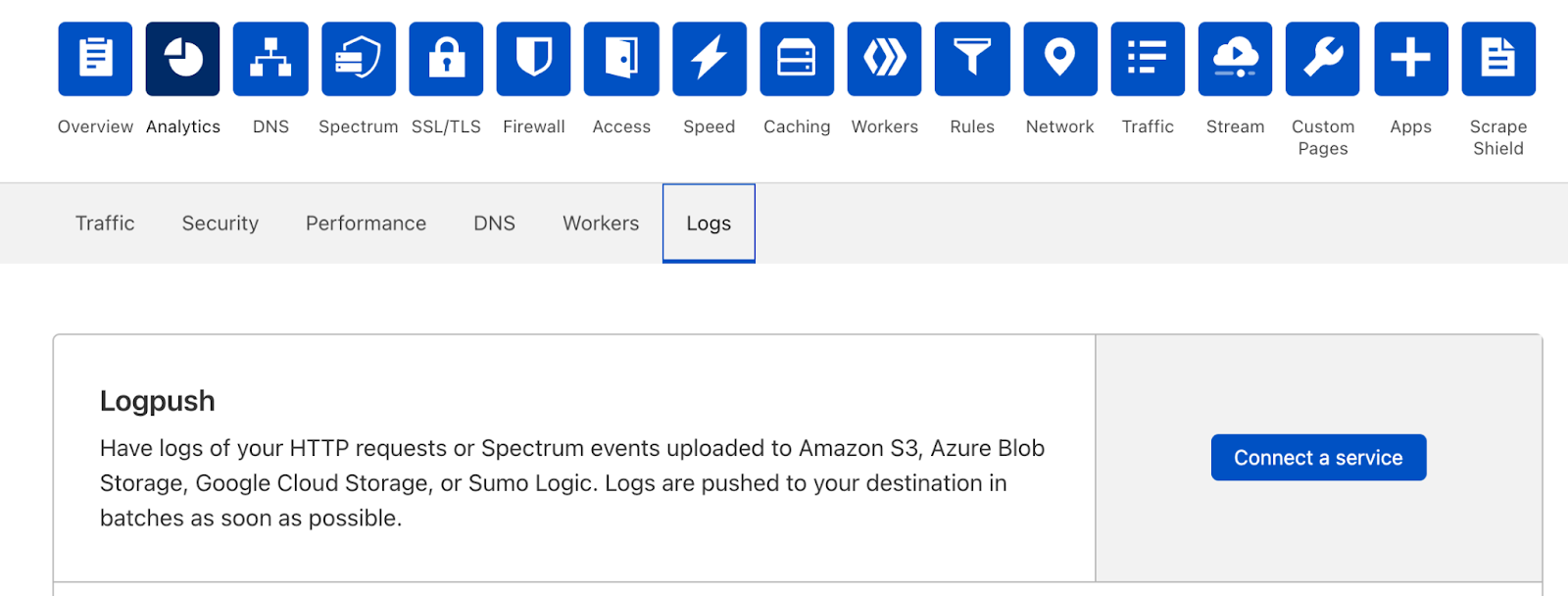
You can still set up Logpush in the same place in the dashboard, in the Analytics > Logs tab:
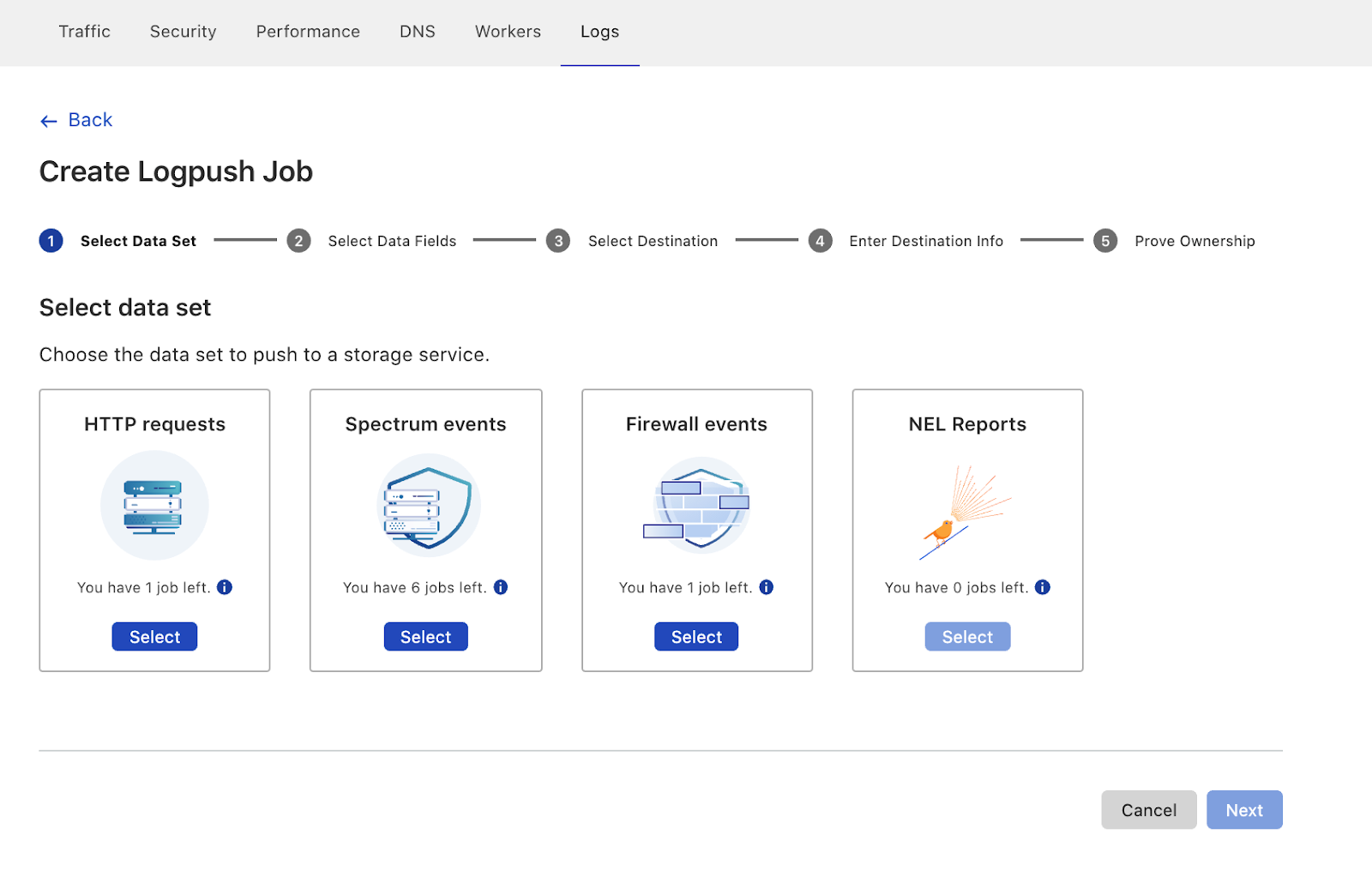
The new UI first prompts users to select the data set to push. Here you’ll also notice that we’ve added support for Firewall Events and NEL Reports!
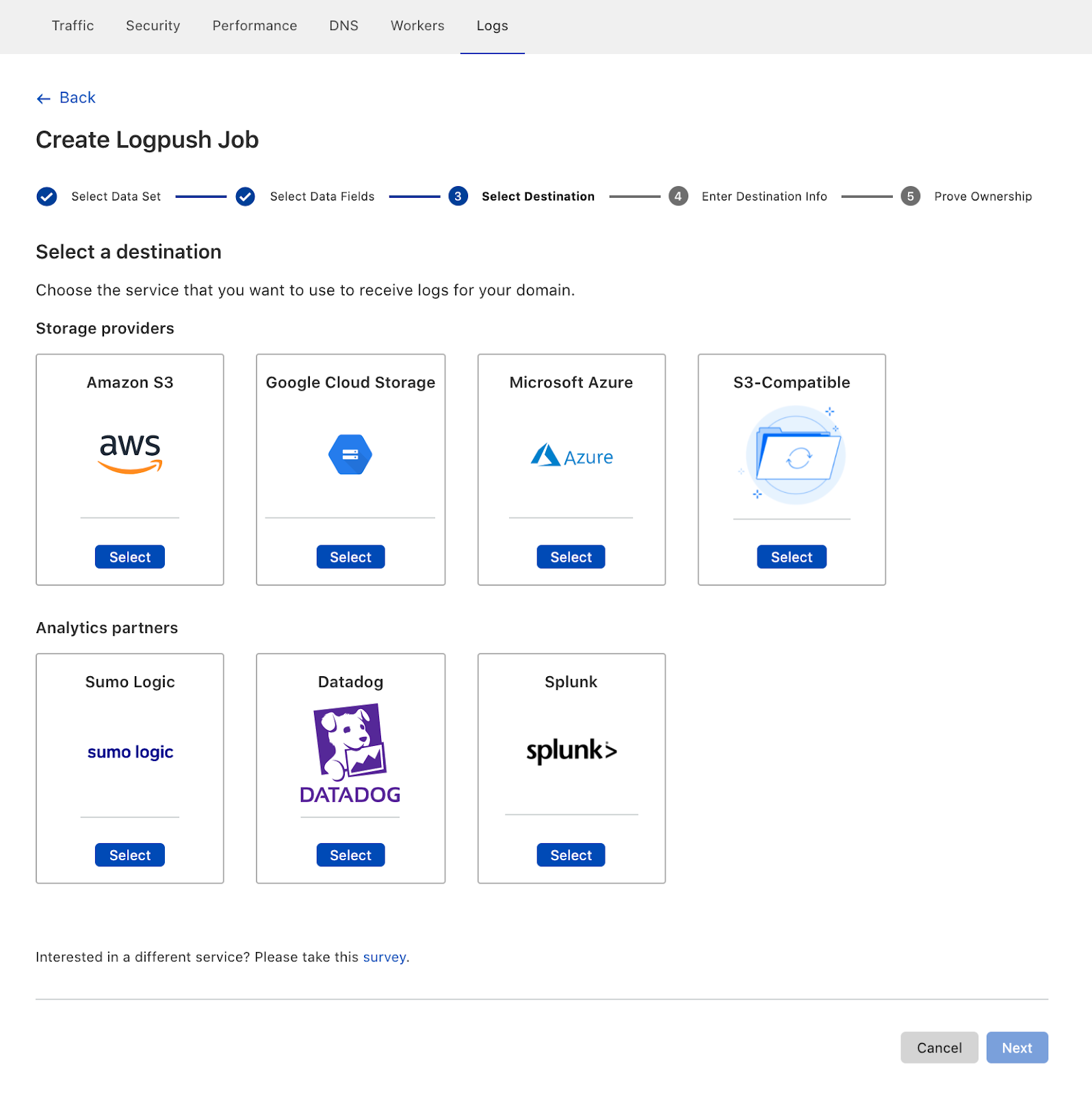
After configuring details like which fields to push, customers can then select where the Logs are going. Here you can see our three new destinations, S3-compatible storage, Sumo Logic, Datadog and Splunk:
Coming soon
Of course, we’re not done yet! We have more Cloudflare products in the pipeline and more destinations planned where customers can send their Logs. Additionally, we’re working on adding more flexibility to our logging pipeline so that customers can configure to send Logs for the entire account, plus filter Logs to just send error codes, for example.
Ultimately, we want to make working with Cloudflare Logs as useful as possible — on Cloudflare itself! We’re working to help customers solve their performance and security challenges with data at massive scale. If that sounds interesting, please join us! We’re hiring Systems Engineers for the Data team.
Last October we released WARP for Desktop, bringing a safer and faster way to use the Internet to billions of devices for free. At the same time, we gave our enterprise customers the ability to use WARP with Cloudflare for Teams. By routing all an enterprise’s traffic from devices anywhere on the planet through WARP, we’ve been able to seamlessly power advanced capabilities such as Secure Web Gateway and Browser Isolation and, in the future, our Data Loss Prevention platforms.
Today, we are excited to announce Cloudflare WARP for Linux and, across all desktop platforms, the ability to use WARP with single applications instead of your entire device.
What is WARP?
WARP was built on the philosophy that even people who don’t know what “VPN” stands for should be able to still easily get the protection a VPN offers. It was also built for those of us who are unfortunately all too familiar with traditional corporate VPNs, and need an innovative, seamless solution to meet the challenges of an always-connected world.
Enter our own WireGuard implementation called BoringTun.
The WARP application uses BoringTun to encrypt traffic from your device and send it directly to Cloudflare’s edge, ensuring that no one in between is snooping on what you’re doing. If the site you are visiting is already a Cloudflare customer, the content is immediately sent down to your device. With WARP+, we use Argo Smart Routing to use the shortest path through our global network of data centers to reach whomever you are connecting to.
Combined with the power of 1.1.1.1 (the world’s fastest public DNS resolver), WARP keeps your traffic secure, private and fast. Since nearly everything you do on the Internet starts with a DNS request, choosing the fastest DNS server across all your devices will accelerate almost everything you do online.
Bringing WARP to Linux
When we built out the foundations of our desktop client last year, we knew a Linux client was something we would deliver. If you have ever shipped software at this scale, you’ll know that maintaining a client across all major operating systems is a daunting (and error-prone) task. To avoid these pitfalls, we wrote the core of the product in Rust, which allows for 95% of the code to be shared across platforms.
Internally we refer to this common code as the shared Daemon (or Service, for Windows folks), and it allows our engineers to spend less time duplicating code across multiple platforms while ensuring most quality improvements hit everyone at the same time. The really cool thing about this is that millions of existing WARP users have already helped us solidify the code base for Linux!
The other 5% of code is split into two main buckets: UI and quirks of the operating system. For now, we are forgoing a UI on Linux and instead working to support three distributions:
Ubuntu
Red Hat Enterprise Linux
CentOS
We want to add more distribution support in the future, so if your favorite distro isn’t there, don’t despair — the client may in fact already work with other Debian and Redhat based distributions, so please give it a try. If we missed your favorite distribution, we’d love to hear from you in our Community Forums.
So without a UI — what’s the mechanism for controlling WARP? The command line, of course! Keen observers may have noticed an executable that already ships with each client called the warp-cli. This platform-agnostic interface is already the preferred mechanism of interacting with the daemon by some of our engineers and is the main way you’ll interact with WARP on Linux.
Installing Cloudflare WARP for Linux
Seasoned Linux developers can jump straight to https://pkg.cloudflareclient.com/install. After linking our repository, get started with either sudo apt install cloudflare-warp or sudo yum install cloudflare-warp, depending on your distribution.
Once you’ve installed WARP, you can begin using the CLI with a single command:
warp-cli --help
The CLI will display the output below.
~$ warp-cli --help
WARP 0.2.0
Cloudflare
CLI to the WARP service daemon

USAGE:
    warp-cli [FLAGS] [SUBCOMMAND]

FLAGS:
        --accept-tos    Accept the Terms of Service agreement
    -h, --help          Prints help information
    -l                  Stay connected to the daemon and listen for status changes and DNS logs (if enabled)
    -V, --version       Prints version information

SUBCOMMANDS:
    register                    Registers with the WARP API, will replace any existing registration (must be run
                                before first connection)
    teams-enroll                Enroll with Cloudflare for Teams
    delete                      Deletes current registration
    rotate-keys                 Generates a new key-pair, keeping the current registration
    status                      Asks the daemon to send the current status
    warp-stats                  Retrieves the stats for the current WARP connection
    settings                    Retrieves the current application settings
    connect                     Asks the daemon to start a connection, connection progress should be monitored with
                                -l
    disconnect                  Asks the daemon to stop a connection
    enable-always-on            Enables always on mode for the daemon (i.e. reconnect automatically whenever
                                possible)
    disable-always-on           Disables always on mode
    disable-wifi                Pauses service on WiFi networks
    enable-wifi                 Re-enables service on WiFi networks
    disable-ethernet            Pauses service on ethernet networks
    enable-ethernet             Re-enables service on ethernet networks
    add-trusted-ssid            Adds a trusted WiFi network, for which the daemon will be disabled
    del-trusted-ssid            Removes a trusted WiFi network
    allow-private-ips           Exclude private IP ranges from tunnel
    enable-dns-log              Enables DNS logging, use with the -l option
    disable-dns-log             Disables DNS logging
    account                     Retrieves the account associated with the current registration
    devices                     Retrieves the list of devices associated with the current registration
    network                     Retrieves the current network information as collected by the daemon
    set-mode
    set-families-mode
    set-license                 Attaches the current registration to a different account using a license key
    set-gateway                 Forces the app to use the specified Gateway ID for DNS queries
    clear-gateway               Clear the Gateway ID
    set-custom-endpoint         Forces the client to connect to the specified IP:PORT endpoint
    clear-custom-endpoint       Remove the custom endpoint setting
    add-excluded-route          Adds an excluded IP
    remove-excluded-route       Removes an excluded IP
    get-excluded-routes         Get the list of excluded routes
    add-fallback-domain         Adds a fallback domain
    remove-fallback-domain      Removes a fallback domain
    get-fallback-domains        Get the list of fallback domains
    restore-fallback-domains    Restore the fallback domains
    get-device-posture          Get the current device posture
    override                    Temporarily override MDM policies that require the client to stay enabled
    set-proxy-port              Set the listening port for WARP proxy (127.0.0.1:{port})
    help                        Prints this message or the help of the given subcommand(s)
You can begin connecting to Cloudflare’s network with just two commands. The first command, register, will prompt you to authenticate. The second command, connect, will enable the client, creating a WireGuard tunnel from your device to Cloudflare’s network.
Once you’ve connected the client, the best way to verify it is working is to run our trace command:
~$ curl https://www.cloudflare.com/cdn-cgi/trace/
And look for the following output:
warp=on
Want to switch from encrypting all traffic in WARP to just using our 1.1.1.1 DNS resolver? Use the warp-cli set-mode command:
~$ warp-cli help set-mode
warp-cli-set-mode

USAGE:
    warp-cli set-mode [mode]

FLAGS:
    -h, --help       Prints help information
    -V, --version    Prints version information

ARGS:
    <mode>     [possible values: warp, doh, warp+doh, dot, warp+dot, proxy]
~$ warp-cli set-mode doh
Success
Protecting yourself against malware with 1.1.1.1 for Families is just as easy, and it can be used with either WARP enabled or in straight DNS mode:
~$ warp-cli set-families-mode --help
warp-cli-set-families-mode

USAGE:
    warp-cli set-families-mode [mode]

FLAGS:
    -h, --help       Prints help information
    -V, --version    Prints version information

ARGS:
    <mode>     [possible values: off, malware, full]
~$ warp-cli set-families-mode malware
Success
A note on Cloudflare for Teams support
Cloudflare for Teams support is on the way, and just like our other clients, it will ship in the same package. Stay tuned for an in-app update or reach out to your Account Executive to be notified when a beta is available.
We need feedback
If you encounter an error, send us feedback with the sudo warp-diag feedback command:
When WARP launched in 2019, one of our primary goals was ease of use. You turn WARP on and all traffic from your device is encrypted to our edge. Through all releases of the client, we’ve kept that as a focus. One big switch to turn on and you are protected.
However, as we’ve grown, so have the requirements for our client. Earlier this year we released split tunnel and local domain fallback as a way for our Cloudflare for Teams customers to exclude certain routes from WARP. Our consumer customers may have noticed this stealthily added in the last release as well. We’ve heard from customers who want to deploy WARP in one additional mode: Single Applications. Today we are also announcing the ability for our customers to run WARP in a local proxy mode in all desktop clients.
When WARP is configured as a local proxy, only the applications that you configure to use the proxy (HTTPS or SOCKS5) will have their traffic sent through WARP. This allows you to pick and choose which traffic is encrypted (for instance, your web browser or a specific app), and everything else will be left open over the Internet.
Because this feature restricts WARP to just applications configured to use the local proxy, leaving all other traffic unencrypted over the Internet by default, we’ve hidden it in the advanced menu. To turn it on:
1. Navigate to Preferences -> Advanced and click the Configure Proxy button.
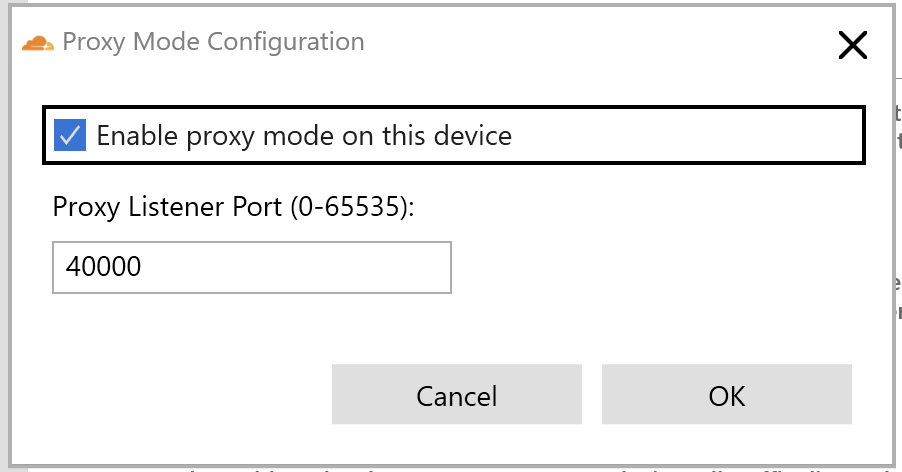
2. On the dialog that opens, check the box and configure the port you want to listen on.
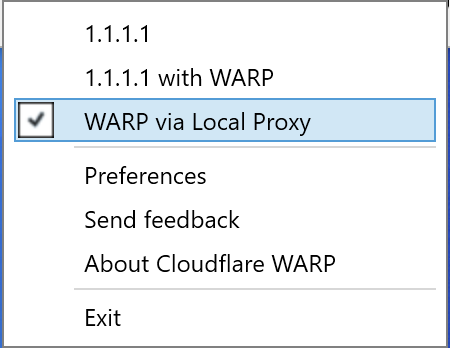
3. This will enable a new mode you can select from:
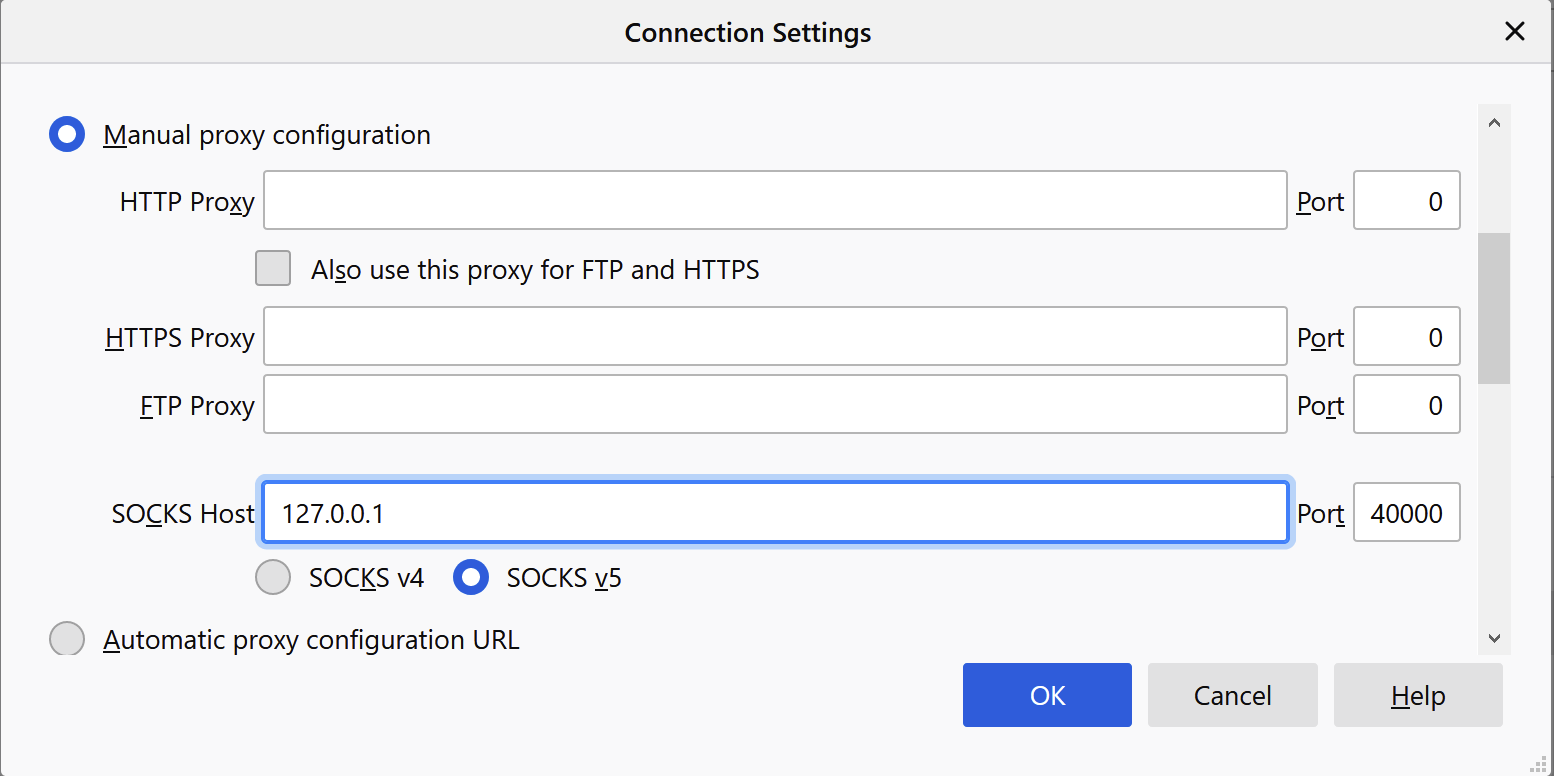
To configure your application to use the proxy, you want to specify 127.0.0.1 for the address and the value you specified for a port (40000 by default). For example, if you are using Firefox, the configuration would look like this:
Download today
You can start using these capabilities right now by visiting https://one.one.one.one. We’re super excited to hear your feedback.
In January, we announced the Cloudflare Waiting Room, which has been available to select customers through Project Fair Shot to help COVID-19 vaccination web applications handle demand. Back then, we mentioned that our system was built on top of Cloudflare Workers and the then brand new Durable Objects. In the coming days, we are making Waiting Room available to customers on our Business and Enterprise plans. As we are expanding availability, we are taking this opportunity to share how we came up with this design.
What does the Waiting Room do?
You may have seen lines of people queueing in front of stores or other buildings during sales for a new sneaker or phone. That is because stores have restrictions on how many people can be inside at the same time. Every store has its own limit based on the size of the building and other factors. If more people want to get inside than the store can hold, there will be too many people in the store.
The same situation applies to web applications. When you build a web application, you have to budget for the infrastructure to run it. You make that decision according to how many users you think the site will have. But sometimes, the site can see surges of users above what was initially planned. This is where the Waiting Room can help: it stands between users and the web application and automatically creates an orderly queue during traffic spikes.
The main job of the Waiting Room is to protect a customer’s application while providing a good user experience. To do that, it must make sure that the number of users of the application around the world does not exceed limits set by the customer. Using this product should not degrade performance for end users, so it should not add significant latency and should admit them automatically. In short, this product has three main requirements: respect the customer’s limits for users on the web application, keep latency low, and provide a seamless end user experience.
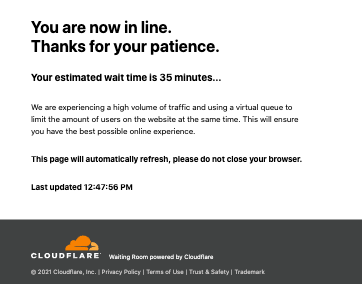
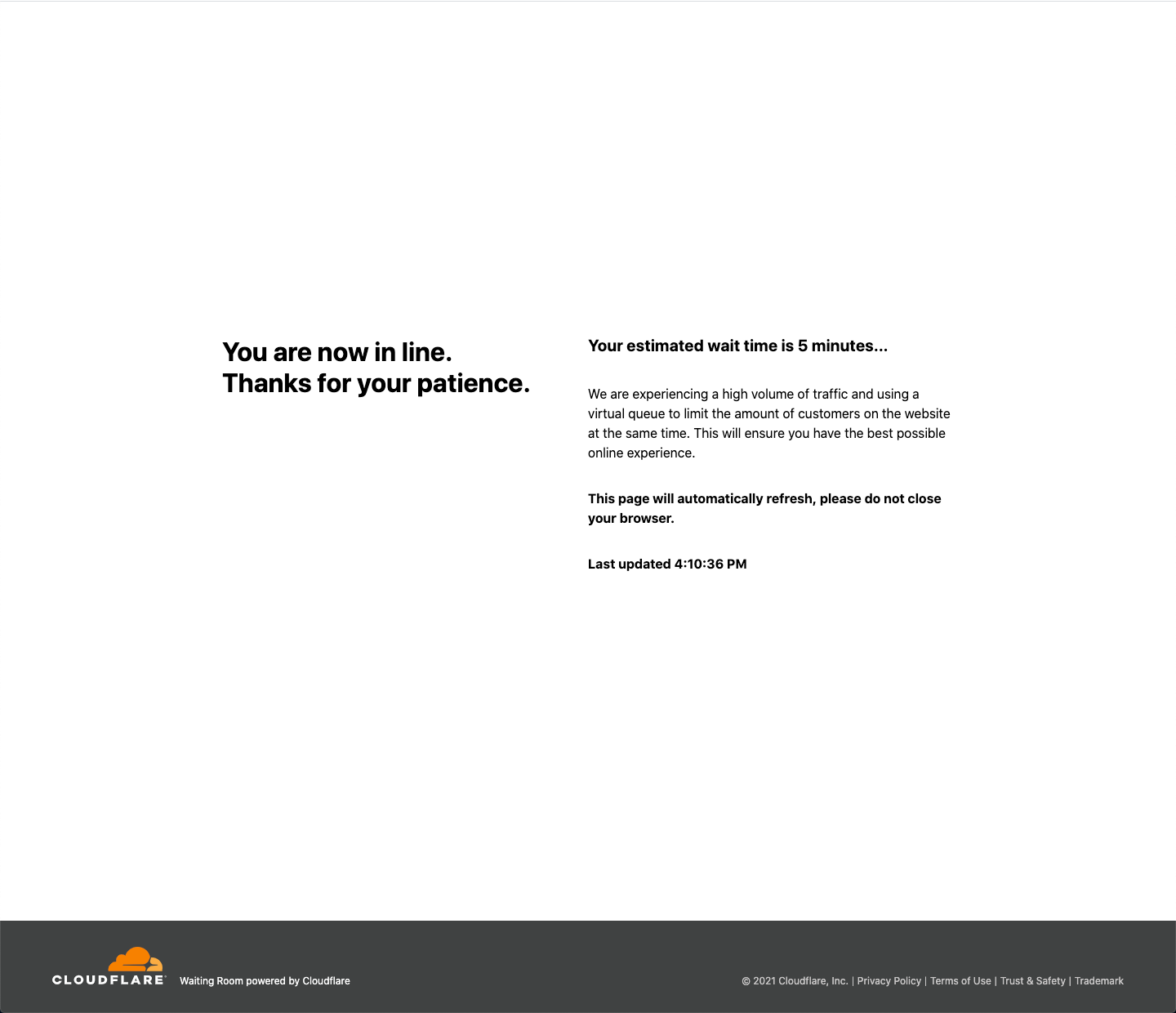
When there are more users trying to access the web application than the limits the customer has configured, new users are given a cookie and greeted with a waiting room page. This page displays their estimated wait time and automatically refreshes until the user is automatically admitted to the web application.
Configuring Waiting Rooms
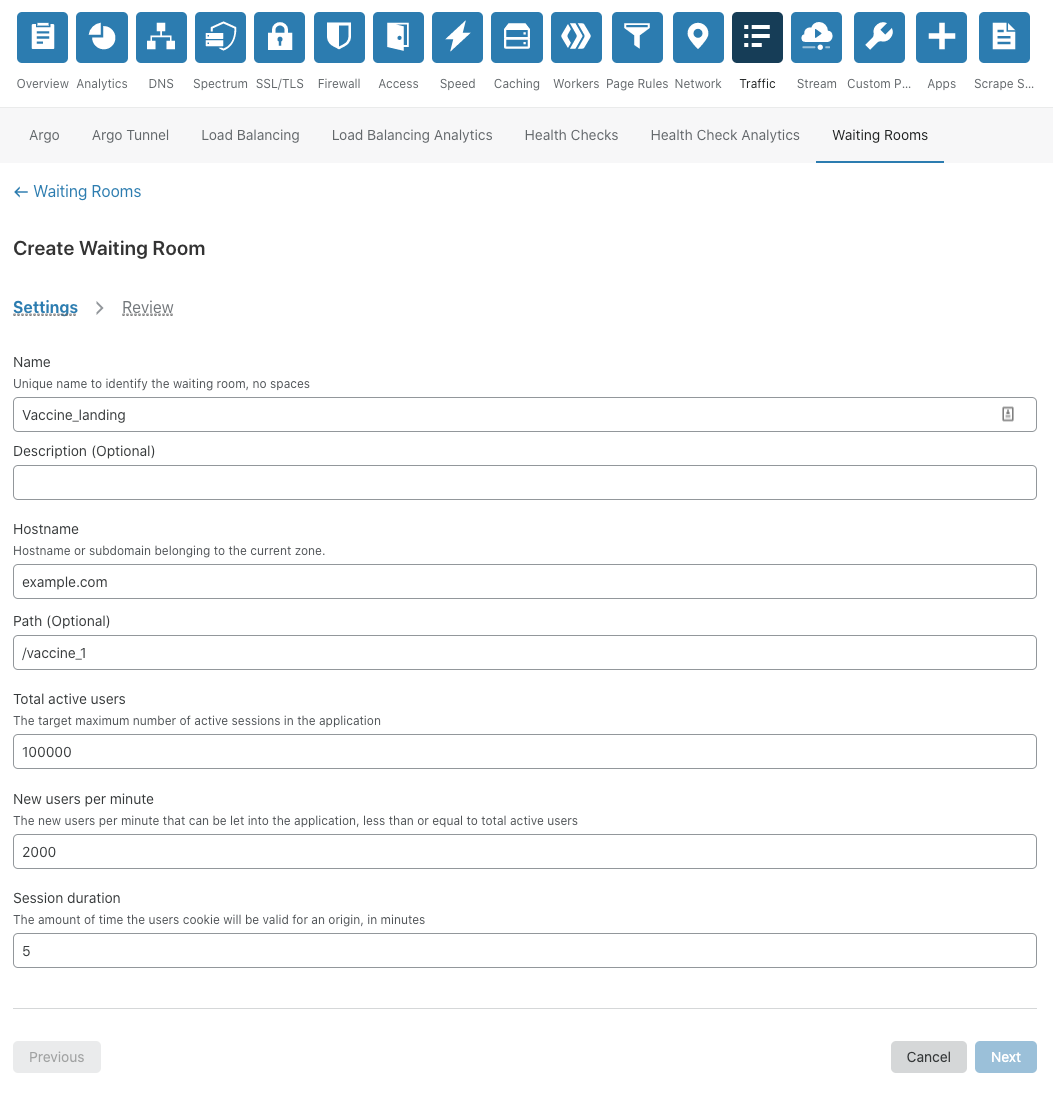
The important configurations that define how the waiting room operates are:
Total Active Users – the total number of active users that can be using the application at any given time
New Users Per Minute – how many new users per minute are allowed into the application, and
Session Duration – how long a user session lasts. Note: the session is renewed as long as the user is active. We terminate it after Session Duration minutes of inactivity.
How does the waiting room work?
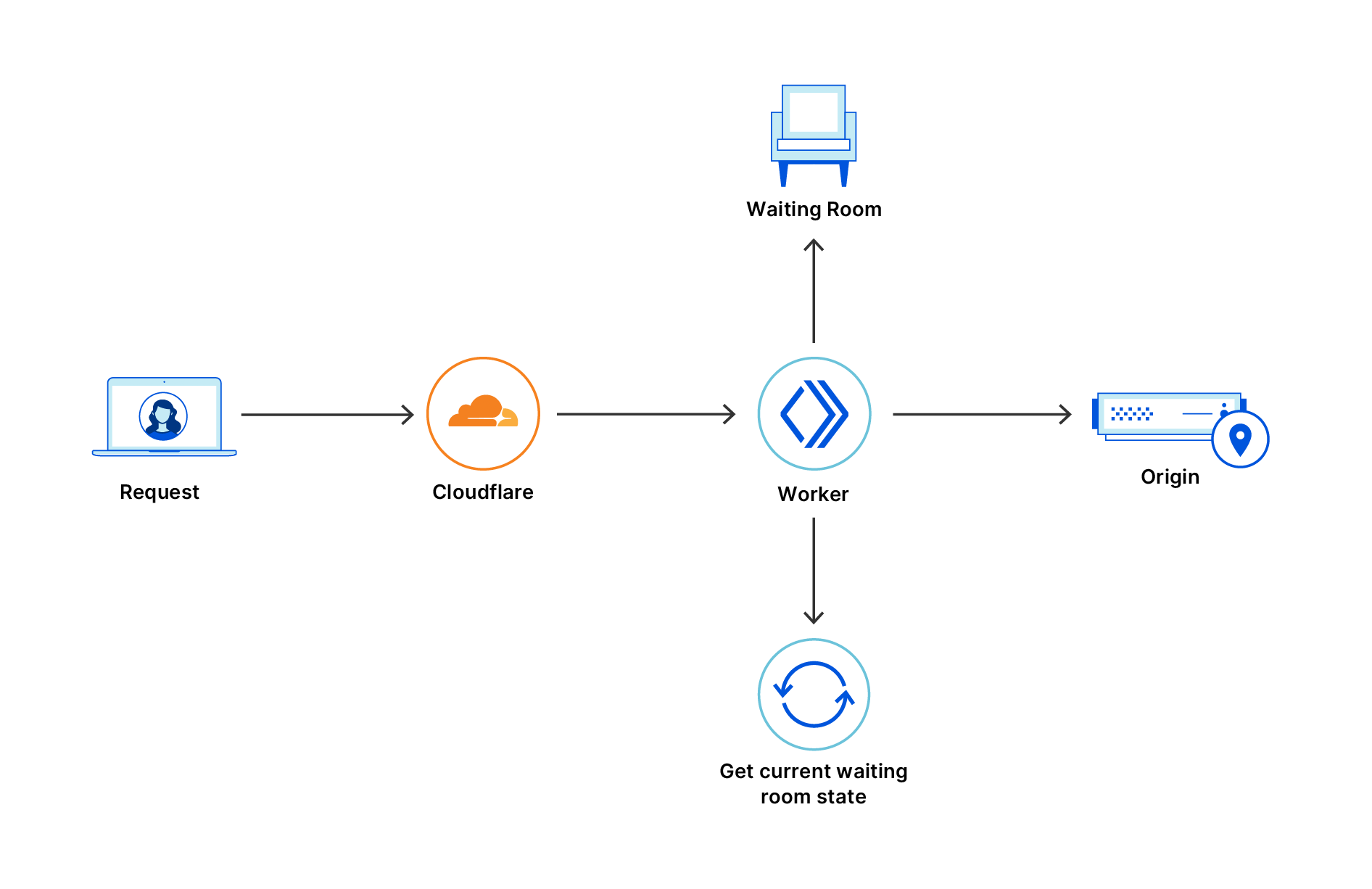
If a web application is behind Cloudflare, every request from an end user to the web application will go to a Cloudflare data center close to them. If the web application enables the waiting room, Cloudflare issues a ticket to this user in the form of an encrypted cookie.
Waiting Room Overview
At any given moment, every waiting room has a limit on the number of users that can go to the web application. This limit is based on the customer configuration and the number of users currently on the web application. We refer to the number of users that can go into the web application at any given time as the number of user slots. The total number of users slots is equal to the limit configured by the customer minus the total number of users that have been let through.
When a traffic surge happens on the web application the number of user slots available on the web application keeps decreasing. Current user sessions need to end before new users go in. So user slots keep decreasing until there are no more slots. At this point the waiting room starts queueing.
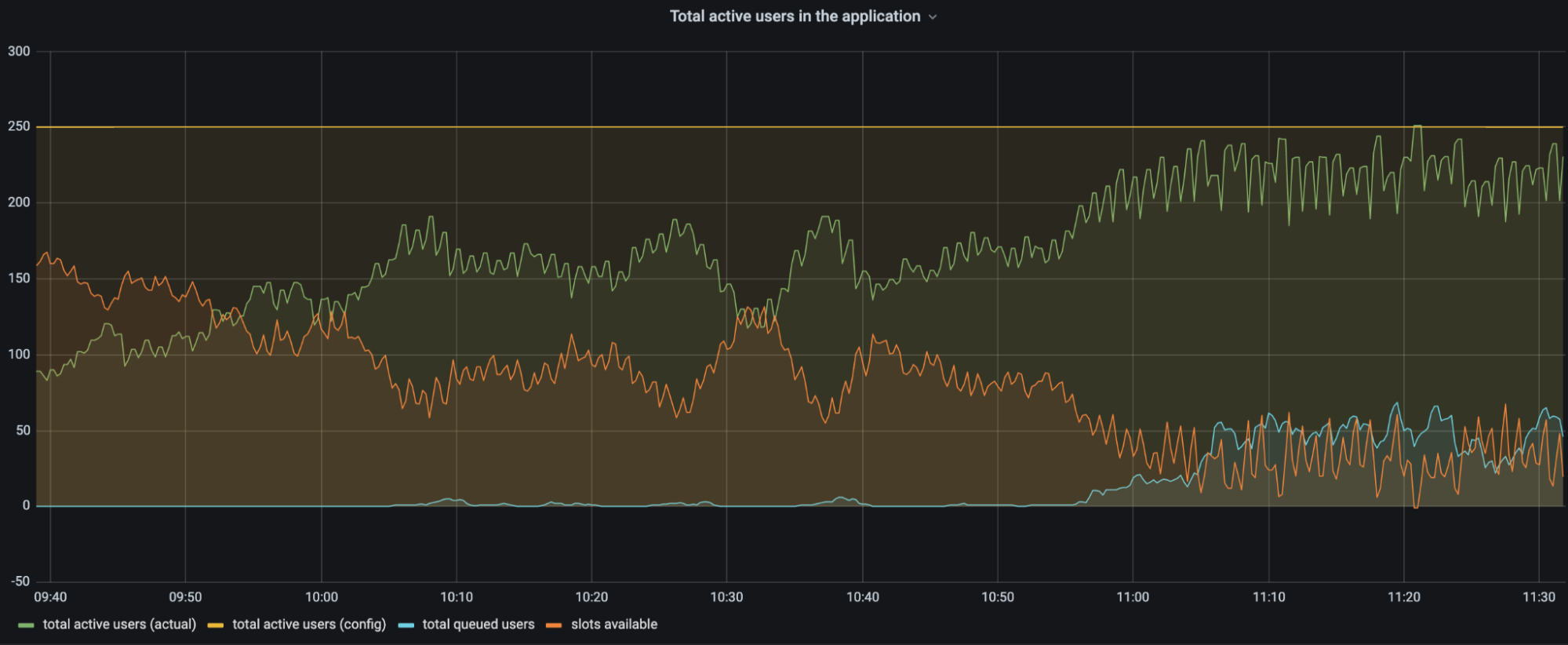
The chart above is a customer’s traffic to a web application between 09:40 and 11:30. The configuration for total active users is set to 250 users (yellow line). As time progresses there are more and more users on the application. The number of user slots available (orange line) in the application keeps decreasing as more users get into the application (green line). When there are more users on the application, the number of slots available decreases and eventually users start queueing (blue line). Queueing users ensures that the total number of active users stays around the configured limit.
To effectively calculate the user slots available, every service at the edge data centers should let its peers know how many users it lets through to the web application.
Coordination within a data center is faster and more reliable than coordination between many different data centers. So we decided to divide the user slots available on the web application to individual limits for each data center. The advantage of doing this is that only the data center limits will get exceeded if there is a delay in traffic information getting propagated. This ensures we don’t overshoot by much even if there is a delay in getting the latest information.
The next step was to figure out how to divide this information between data centers. For this we decided to use the historical traffic data on the web application. More specifically, we track how many different users tried to access the application across every data center in the preceding few minutes. The great thing about historical traffic data is that it’s historical and cannot change anymore. So even with a delay in propagation, historical traffic data will be accurate even when the current traffic data is not.
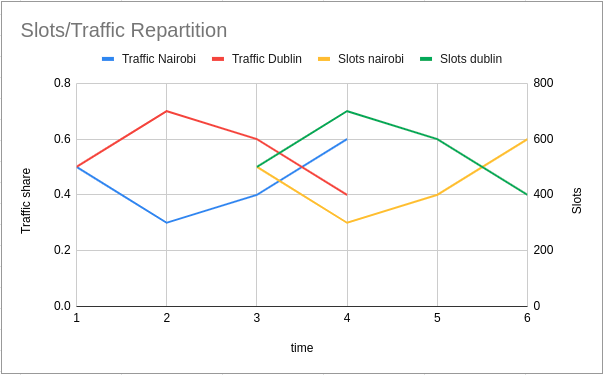
Let’s see an actual example: the current time is Thu, 27 May 2021 16:33:20 GMT. For the minute Thu, 27 May 2021 16:31:00 GMT there were 50 users in Nairobi and 50 in Dublin. For the minute Thu, 27 May 2021 16:32:00 GMT there were 45 users in Nairobi and 55 in Dublin. This was the only traffic on the application during that time.
Every data center looks at what the share of traffic to each data center was two minutes in the past. For Thu, 27 May 2021 16:33:20 GMT that value is Thu, 27 May 2021 16:31:00 GMT.
For the minute Thu, 27 May 2021 16:33:00 GMT, the number of user slots available will be divided equally between Nairobi and Dublin as the traffic ratio for Thu, 27 May 2021 16:31:00 GMT is 0.5 and 0.5. So, if there are 1000 slots available, Nairobi will be able to send 500 and Dublin can send 500.
For the minute Thu, 27 May 2021 16:34:00 GMT, the number of user slots available will be divided using the ratio 0.45 (Nairobi) to 0.55 (Dublin). So if there are 1000 slots available, Nairobi will be able to send 450 and Dublin can send 550.
The service at the edge data centers counts the number of users it let into the web application. It will start queueing when the data center limit is approached. The presence of limits for the data center that change based on historical traffic helps us to have a system that doesn’t need to communicate often between data centers.
Clustering
In order to let people access the application fairly we need a way to keep track of their position in the queue. A bucket has an identifier (bucketId) calculated based on the time the user tried to visit the waiting room for the first time. All the users who visited the waiting room between 19:51:00 and 19:51:59 are assigned to the bucketId 19:51:00. It’s not practical to track every end user in the waiting room individually. When end users visit the application around the same time, they are given the same bucketId. So we cluster users who came around the same time as one time bucket.
What is in the cookie returned to an end user?
We mentioned an encrypted cookie that is assigned to the user when they first visit the waiting room. Every time the user comes back, they bring this cookie with them. The cookie is a ticket for the user to get into the web application. The content below is the typical information the cookie contains when visiting the web application. This user first visited around Wed, 26 May 2021 19:51:00 GMT, waited for around 10 minutes and got accepted on Wed, 26 May 2021 20:01:13 GMT.
{
  "bucketId": "Wed, 26 May 2021 19:51:00 GMT",
  "lastCheckInTime": "Wed, 26 May 2021 20:01:13 GMT",
  "acceptedAt": "Wed, 26 May 2021 20:01:13 GMT",
 }
Here
bucketId – the bucketId is the cluster the ticket is assigned to. This tracks the position in the queue.
acceptedAt – the time when the user got accepted to the web application for the first time.
lastCheckInTime – the time when the user was last seen in the waiting room or the web application.
Once a user has been let through to the web application, we have to check how long they are eligible to spend there. Our customers can customize how long a user spends on the web application using Session Duration. Whenever we see an accepted user we set the cookie to expireSession Duration minutes from when we last saw them.
Waiting Room State
Previously we talked about the concept of user slots and how we can function even when there is a delay in communication between data centers. The waiting room state helps to accomplish this. It is formed by historical data of events happening in different data centers. So when a waiting room is first created, there is no waiting room state as there is no recorded traffic. The only information available is the customer’s configured limits. Based on that we start letting users in. In the background the service (introduced later in this post as Data Center Durable Object) running in the data center periodically reports about the tickets it has issued to a co-ordinating service and periodically gets a response back about things happening around the world.
As time progresses more and more users with different bucketIds show up in different parts of the globe. Aggregating this information from the different data centers gives the waiting room state.
Let’s look at an example: there are two data centers, one in Nairobi and the other in Dublin. When there are no user slots available for a data center, users start getting queued. Different users who were assigned different bucketIds get queued. The data center state from Dublin looks like this:
This information from data centers are reported in the background and aggregated to form a data structure similar to the one below:
activeUsers: 201, // 151(Nairobi) + 50(Dublin)
buckets:
[
  {
    key: "Thu, 27 May 2021 15:54:00 GMT",
    data:
    {
      waiting: 2, // 2 users from (Nairobi)
    },
  }
  {
    key: "Thu, 27 May 2021 15:55:00 GMT",
    data:
    {
      waiting: 50, // 20 from Nairobi and 30 from Dublin
    }
  },
  {
    key: "Thu, 27 May 2021 15:56:00 GMT",
    data:
    {
      waiting: 60, // 20 from Nairobi and 40 from Dublin
    }
  }
]
The data structure above is a sorted list of all the bucketIds in the waiting room. The waiting field has information about how many people are waiting with a particular bucketId. The activeUsers field has information about the number of users who are active on the web application.
Imagine for this customer, the limits they have set in the dashboard are
Total Active Users – 200 New Users Per Minute – 200
As per their configuration only 200 customers can be at the web application at any time. So users slots available for the waiting room state above are 200 – 201(activeUsers) = -1. So no one can go in and users get queued.
Now imagine that some users have finished their session and activeUsers is now 148.
Now userSlotsAvailable = 200 – 148 = 52 users. We should let 52 of the users who have been waiting the longest into the application. We achieve this by giving the eligible slots to the oldest buckets in the queue. In the example below 2 users are waiting from bucket Thu, 27 May 2021 15:54:00 GMT and 50 users are waiting from bucket Thu, 27 May 2021 15:55:00 GMT. These are the oldest buckets in the queue who get the eligible slots.
If there are eligible slots available for all the users in their bucket, then they can be sent to the web application from any data center. This ensures the fairness of the waiting room.
There is another case that can happen where we do not have enough eligible slots for a whole bucket. When this happens things get a little more complicated as we cannot send everyone from that bucket to the web application. Instead, we allocate a share of eligible slots to each data center.
As we did before, we use the ratio of past traffic from each data center to decide how many users it can let through. So if the current time is Thu, 27 May 2021 16:34:10 GMT both data centers look at the traffic ratio in the past at Thu, 27 May 2021 16:32:00 GMT and send a subset of users from those data centers to the web application.
When a request comes from a user we look at their bucketId. Based on the bucketId it is possible to know how many people are in front of the user’s bucketId from the sorted list. Similar to how we track the activeUsers we also calculate the average number of users going to the web application per minute. Dividing the number of people who are in front of the user by the average number of users going to the web application gives us the estimated time. This is what is shown to the user who visits the waiting room.
In the case above for a user with bucketId Thu, 27 May 2021 15:56:00 GMT, there are 60 users ahead of them. With 30 activeUsersToWebApplication per minute, the estimated time to get into the web application is 60/30 which is 2 minutes.
Implementation with Workers and Durable Objects
Now that we have talked about the user experience and the algorithm, let’s focus on the implementation. Our product is specifically built for customers who experience high volumes of traffic, so we needed to run code at the edge in a highly scalable manner. Cloudflare has a great culture of building upon its own products, so we naturally thought of Workers. The Workers platform uses Isolates to scale up and can scale horizontally as there are more requests.
The Workers product has an ecosystem of tools like wrangler which help us to iterate and debug things quickly.
Workers also reduce long-term operational work.
For these reasons, the decision to build on Workers was easy. The more complex choice in our design was for the coordination. As we have discussed before, our workers need a way to share the waiting room state. We need every worker to be aware of changes in traffic patterns quickly in order to respond to sudden traffic spikes. We use the proportion of traffic from two minutes before to allocate user slots among data centers, so we need a solution to aggregate this data and make it globally available within this timeframe. Our design also relies on having fast coordination within a data center to react quickly to changes. We considered a few different solutions before settling on Cache and Durable Objects.
Idea #1: Workers KV
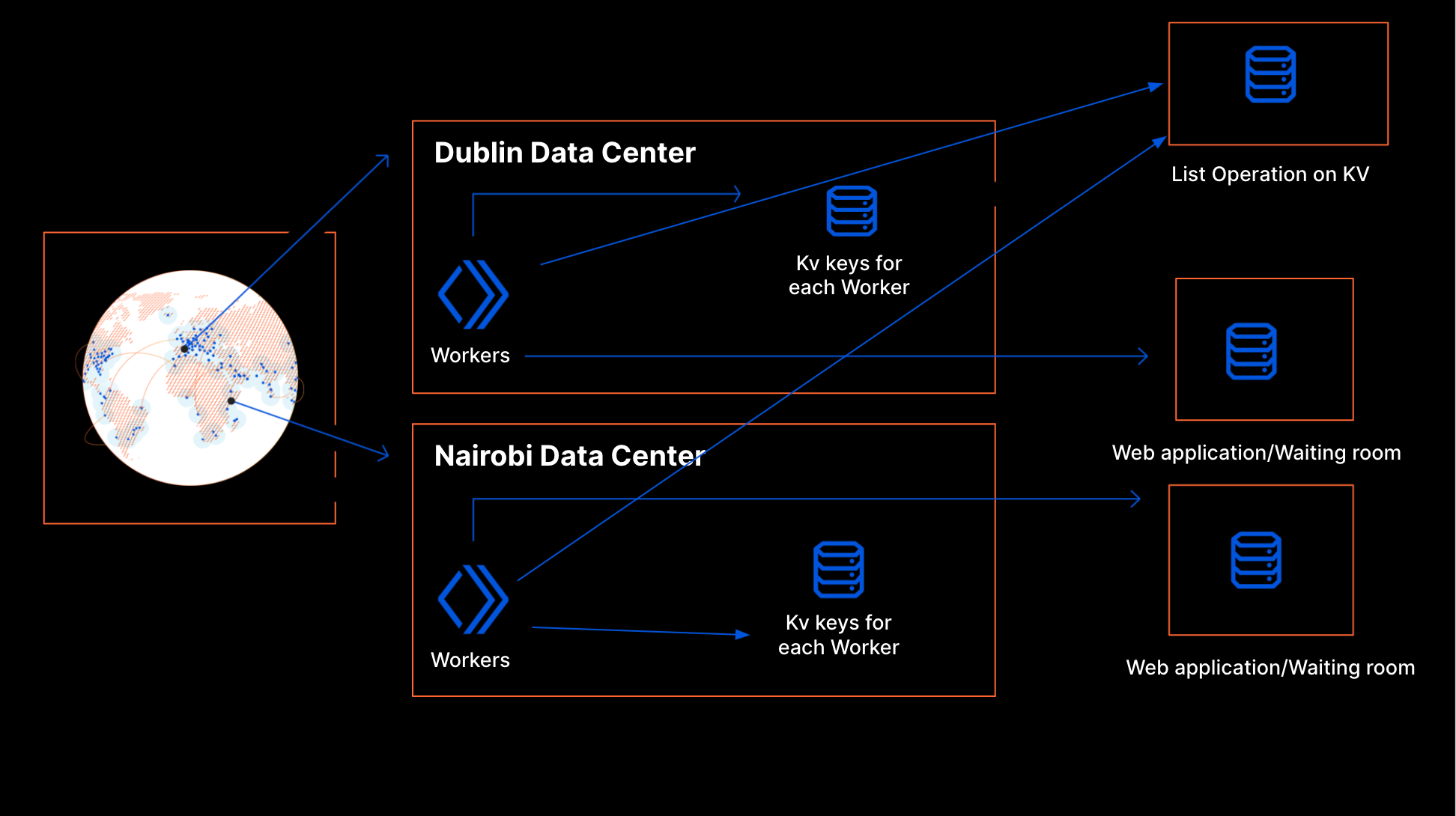
We started to work on the project around March 2020. At that point, Workers offered two options for storage: the Cache API and KV. Cache is shared only at the data center level, so for global coordination we had to use KV. Each worker writes its own key to KV that describes the requests it received and how it processed them. Each key is set to expire after a few minutes if the worker stopped writing. To create a workerState, the worker periodically does a list operation on the KV namespace to get the state around the world.
Design using KV
This design has some flaws because KV wasn’t built for a use case like this. The state of a waiting room changes all the time to match traffic patterns. Our use case is write intensive and KV is intended for read-intensive workflows. As a consequence, our proof of concept implementation turned out to be more expensive than expected. Moreover, KV is eventually consistent: it takes time for information written to KV to be available in all of our data centers. This is a problem for Waiting Room because we need fine-grained control to be able to react quickly to traffic spikes that may be happening simultaneously in several locations across the globe.
Idea #2: Centralized Database
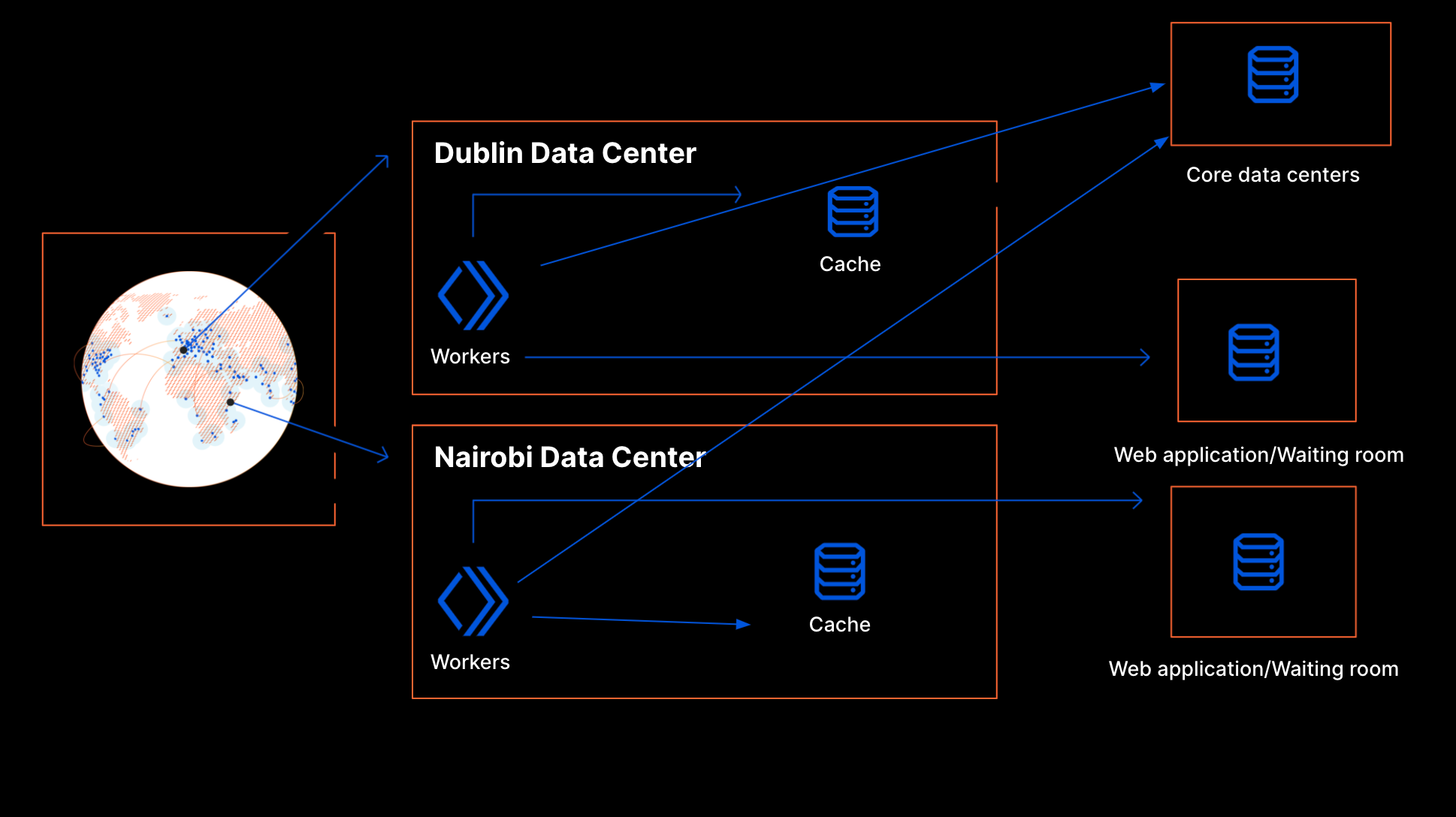
Another alternative was to run our own databases in our core data centers. The Cache API in Workers lets us use the cache directly within a data center. If there is frequent communication with the core data centers to get the state of the world, the cached data in the data center should let us respond with minimal latency on the request hot path. There would be fine-grained control on when the data propagation happens and this time can be kept low.
Design using Core Data centers
As noted before, this application is very write-heavy and the data is rather short-lived. For these reasons, a standard relational database would not be a good fit. This meant we could not leverage the existing database clusters maintained by our in-house specialists. Rather, we would need to use an in-memory data store such as Redis, and we would have to set it up and maintain it ourselves. We would have to install a data store cluster in each of our core locations, fine tune our configuration, and make sure data is replicated between them. We would also have to create a proxy service running in our core data centers to gate access to that database and validate data before writing to it.
We could likely have made it work, at the cost of substantial operational overhead. While that is not insurmountable, this design would introduce a strong dependency on the availability of core data centers. If there were issues in the core data centers, it would affect the product globally whereas an edge-based solution would be more resilient. If an edge data center goes offline Anycast takes care of routing the traffic to the nearby data centers. This will ensure a web application will not be affected.
The Scalable Solution: Durable Objects
Around that time, we learned about Durable Objects. The product was in closed beta back then, but we decided to embrace Cloudflare’s thriving dogfooding culture and did not let that deter us. With Durable Objects, we could create one global Durable Object instance per waiting room instead of maintaining a single database. This object can exist anywhere in the world and handle redundancy and availability. So Durable Objects give us sharding for free. Durable Objects gave us fine-grained control as well as better availability as they run in our edge data centers. Additionally, each waiting room is isolated from the others: adverse events affecting one customer are less likely to spill over to other customers.
Implementation with Durable Objects Based on these advantages, we decided to build our product on Durable Objects.
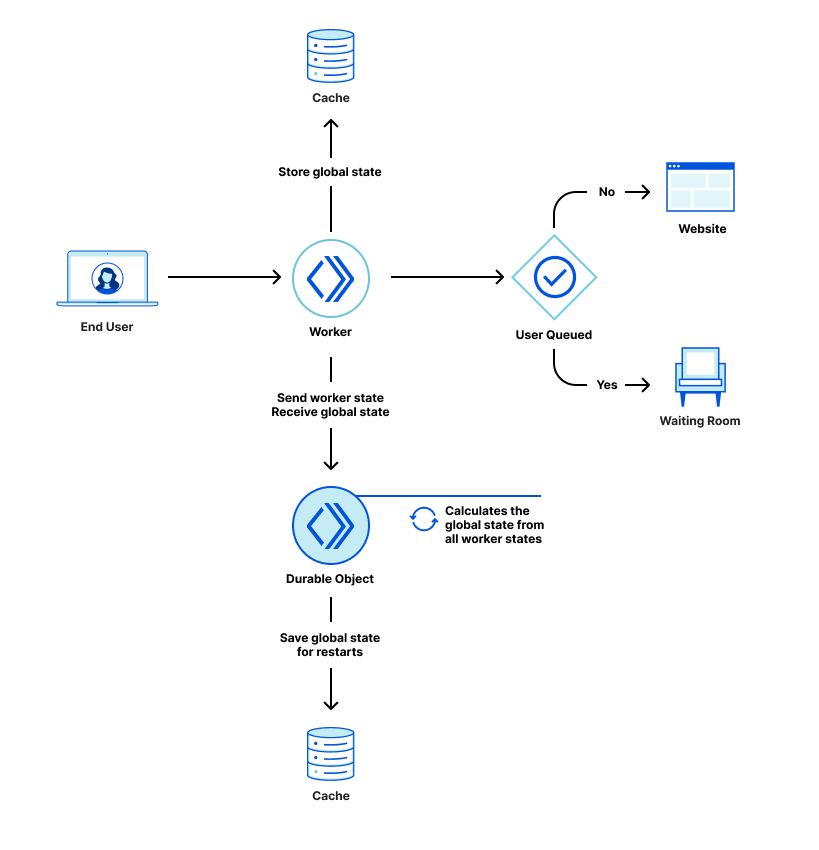
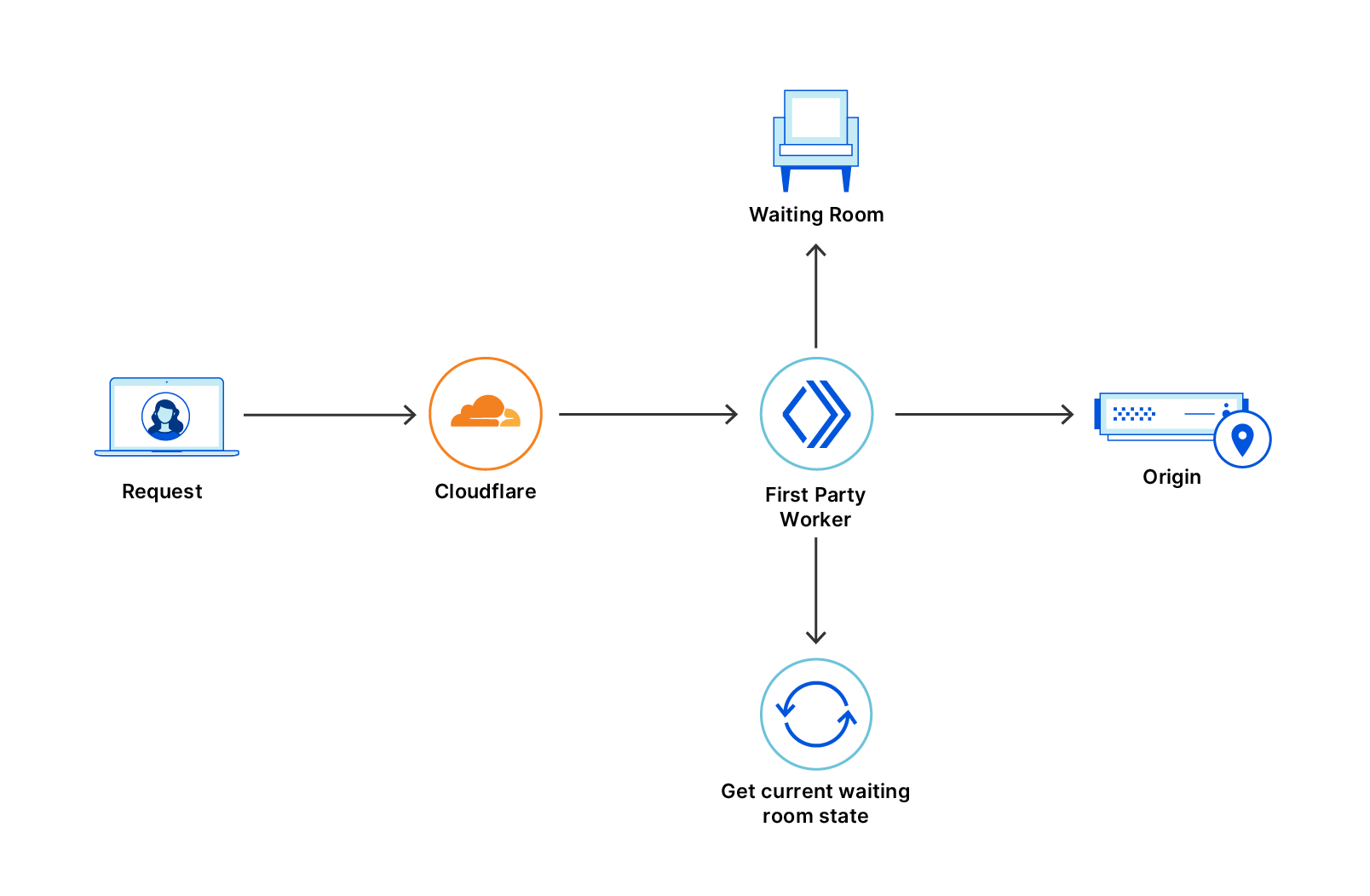
As mentioned above, we use a worker to decide whether to send users to the Waiting Room or the web application. That worker periodically sends a request to a Durable Object saying how many users it sent to the Waiting Room and how many it sent to the web application. A Durable Object instance is created on the first request and remains active as long as it is receiving requests. The Durable Object aggregates the counters sent by every worker to create a count of users sent to the Waiting Room and a count of users on the web application.
A Durable Object instance is only active as long as it is receiving requests and can be restarted during maintenance. When a Durable Object instance is restarted, its in-memory state is cleared. To preserve the in-memory data on Durable Object restarts, we back up the data using the Cache API. This offers weaker guarantees than using the Durable Object persistent storage as data may be evicted from cache, or the Durable Object can be moved to a different data center. If that happens, the Durable Object will have to start without cached data. On the other hand, persistent storage at the edge still has limited capacity. Since we can rebuild state very quickly from worker updates, we decided that cache is enough for our use case.
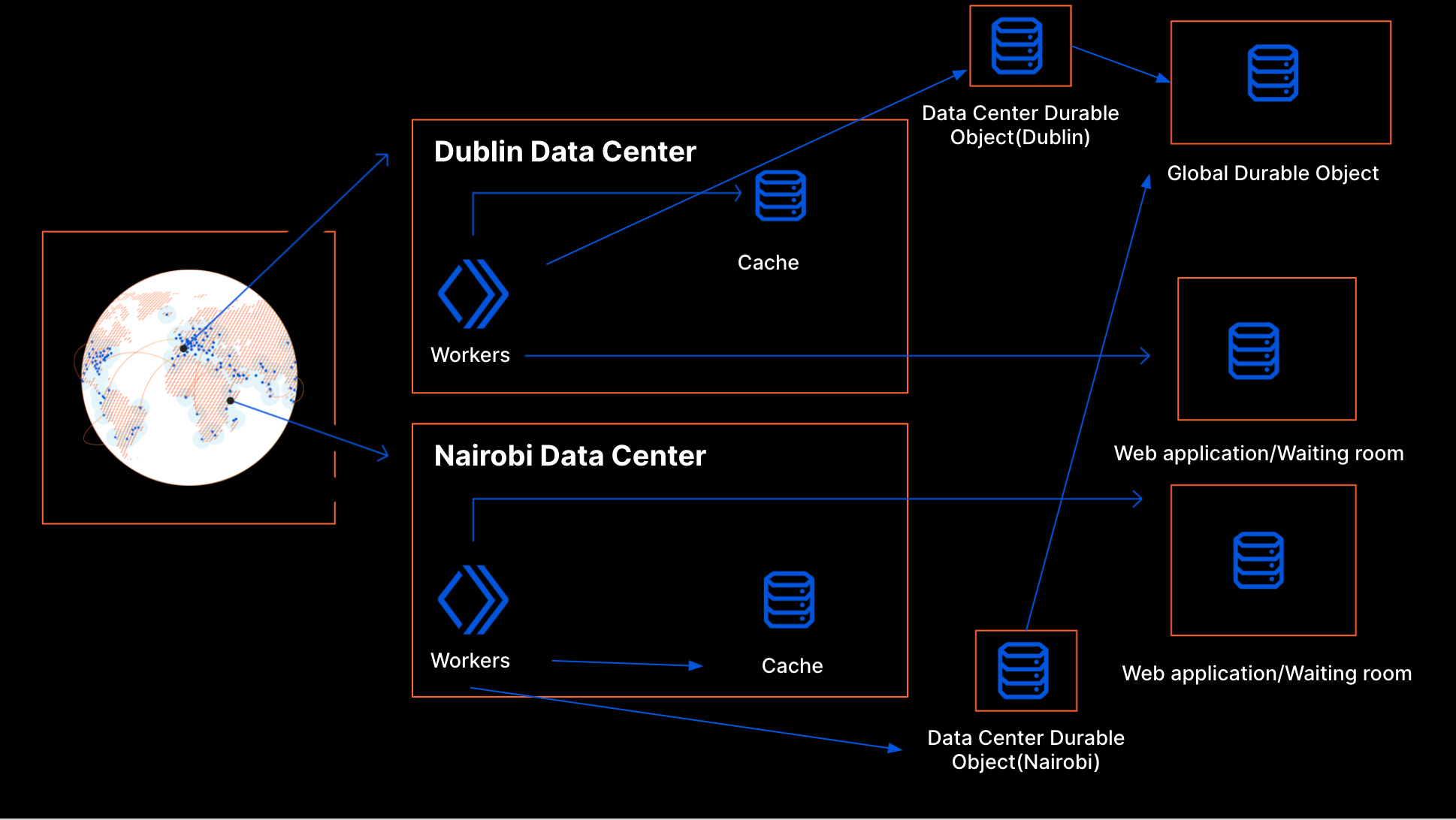
Scaling up When traffic spikes happen around the world, new workers are created. Every worker needs to communicate how many users have been queued and how many have been let through to the web application. However, while workers automatically scale horizontally when traffic increases, Durable Objects do not. By design, there is only one instance of any Durable Object. This instance runs on a single thread so if it receives requests more quickly than it can respond, it can become overloaded. To avoid that, we cannot let every worker send its data directly to the same Durable Object. The way we achieve scalability is by sharding: we create per data center Durable Object instances that report up to one global instance.
Durable Objects implementation
The aggregation is done in two stages: at the data-center level and at the global level.
Data Center Durable Object When a request comes to a particular location, we can see the corresponding data center by looking at the cf.colo field on the request. The Data Center Durable Object keeps track of the number of workers in the data center. It aggregates the state from all those workers. It also responds to workers with important information within a data center like the number of users making requests to a waiting room or number of workers. Frequently, it updates the Global Durable Object and receives information about other data centers as the response.
Worker User Slots
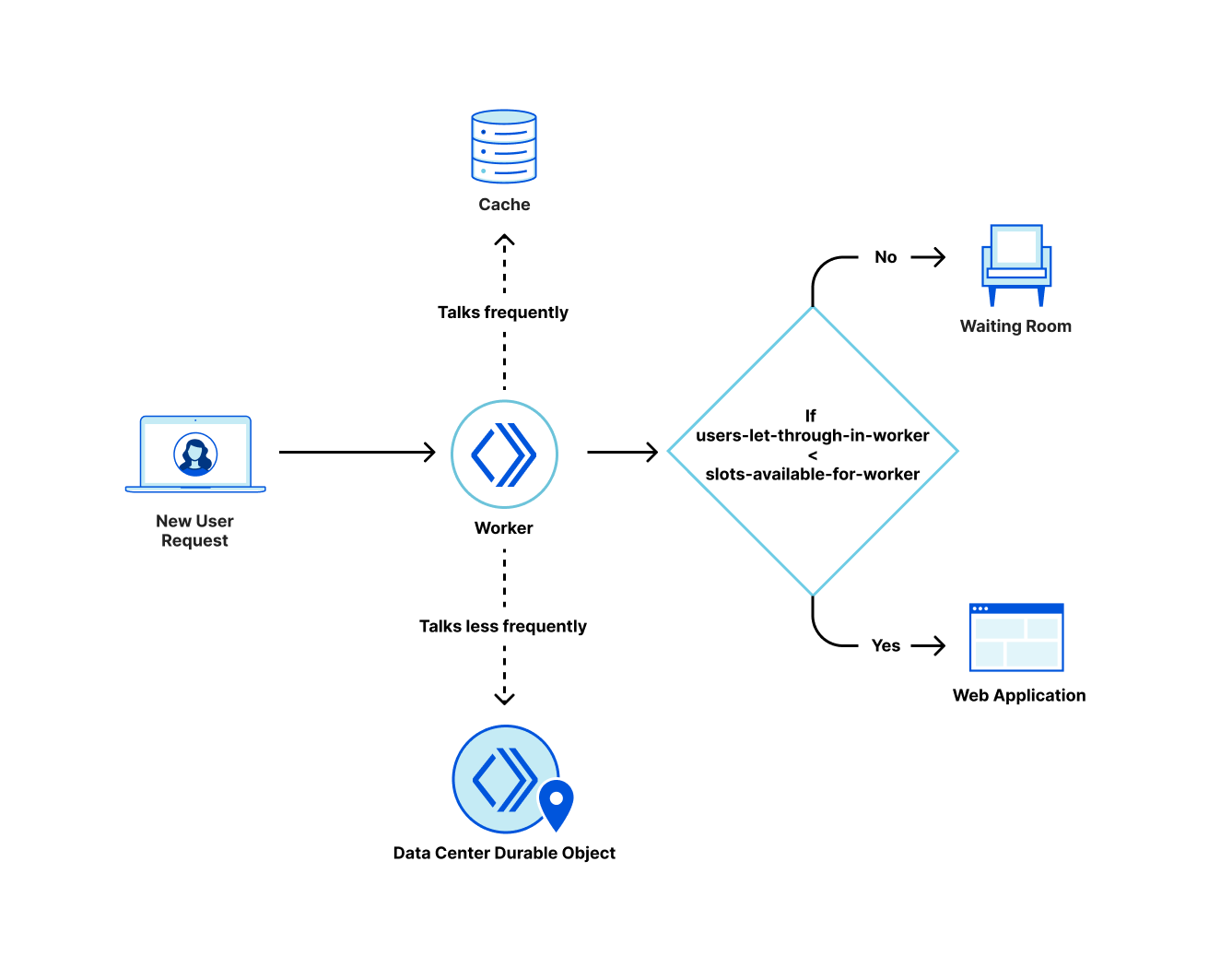
Above we talked about how a data center gets user slots allocated to it based on the past traffic patterns. If every worker in the data center talks to the Data Center Durable Object on every request, the Durable Object could get overwhelmed. Worker User Slots help us to overcome this problem.
Every worker keeps track of the number of users it has let through to the web application and the number of users that it has queued. The worker user slots are the number of users a worker can send to the web application at any point in time. This is calculated from the user slots available for the data center and the worker count in the data center. We divide the total number of user slots available for the data center by the number of workers in the data center to get the user slots available for each worker. If there are two workers and 10 users that can be sent to the web application from the data center, then we allocate five as the budget for each worker. This division is needed because every worker makes its own decisions on whether to send the user to the web application or the waiting room without talking to anyone else.
Waiting room inside a data center
When the traffic changes, new workers can spin up or old workers can die. The worker count in a data center is dynamic as the traffic to the data center changes. Here we make a trade off similar to the one for inter data center coordination: there is a risk of overshooting the limit if many more workers are created between calls to the Data Center Durable Object. But too many calls to the Data Center Durable Object would make it hard to scale. In this case though, we can use Cache for faster synchronization within the data center.
Cache
On every interaction to the Data Center Durable Object, the worker saves a copy of the data it receives to the cache. Every worker frequently talks to the cache to update the state it has in memory with the state in cache. We also adaptively adjust the rate of writes from the workers to the Data Center Durable Object based on the number of workers in the data center. This helps to ensure that we do not take down the Data Center Durable Object when traffic changes.
Global Durable Object
The Global Durable Object is designed to be simple and stores the information it receives from any data center in memory. It responds with the information it has about all data centers. It periodically saves its in-memory state to cache using the Workers Cache API so that it can withstand restarts as mentioned above.
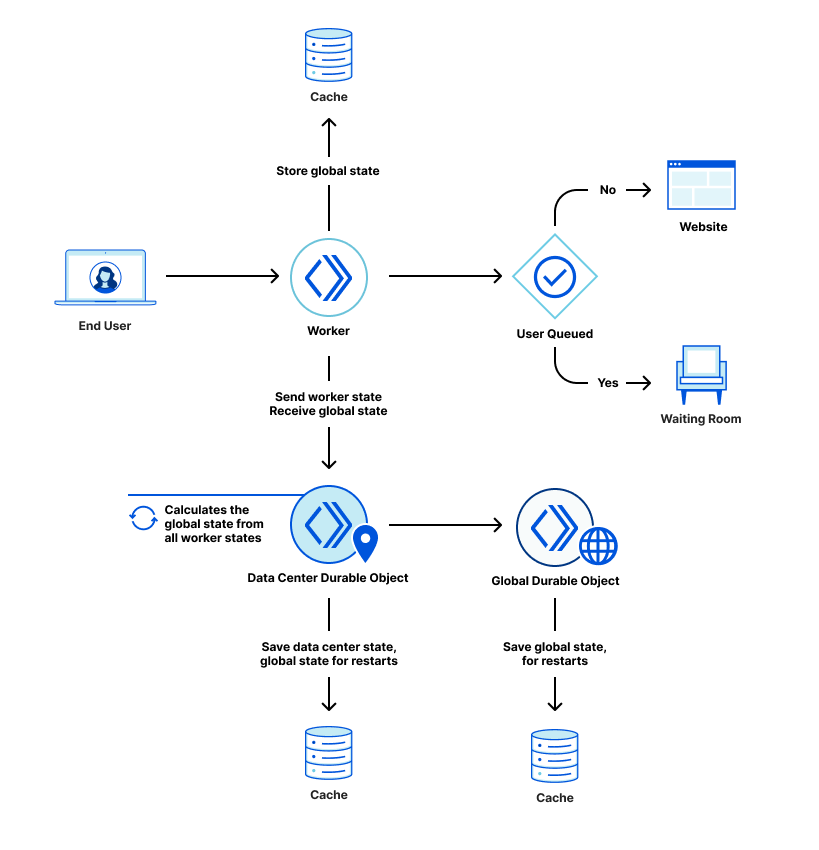
Components of waiting room
Recap
This is how the waiting room works right now. Every request with the enabled waiting room goes to a worker at a Cloudflare edge data center. When this happens, the worker looks for the state of the waiting room in the Cache first. We use cache here instead of Data Center Durable Object so that we do not overwhelm the Durable Object instance when there is a spike in traffic. Plus, reading data from cache is faster. The workers periodically make a request to the Data Center Durable Object to get the waiting room state which they then write to the cache. The idea here is that the cache should have a recent copy of the waiting room state.
Workers can examine the request to know which data center they are in. Every worker periodically makes a request to the corresponding Data Center Durable Object. This interaction updates the worker state in the Data Center Durable Object. In return, the workers get the waiting room state from the Data Center Durable Object. The Data Center Durable Object sends the data center state to the Global Durable Object periodically. In the response, the Data Center Durable Object receives all data center states globally. It then calculates the waiting room state and returns that state to a worker in its response.
The advantage of this design is that it’s possible to adjust the rate of writes from workers to the Data Center Durable Object and from the Data Center Durable Object to the Global Durable Object based on the traffic received in the waiting room. This helps us respond to requests during high traffic without overloading the individual Durable Object instances.
Conclusion
By using Workers and Durable Objects, Waiting Room was able to scale up to keep web application servers online for many of our early customers during large spikes of traffic. It helped keep vaccination sign-ups online for companies and governments around the world for free through Project Fair Shot: Verto Health was able to serve over 4 million customers in Canada; Ticket Tailor reduced their peak resource utilization from 70% down to 10%; the County of San Luis Obispo was able to stay online during traffic surges of up to 23,000 users; and the country of Latvia was able to stay online during surges of thousands of requests per second. These are just a few of the customers we served and will continue to serve until Project Fair Shot ends.
In the coming days, we are rolling out the Waiting Room to customers on our business plan. Sign up today to prevent spikes of traffic to your web application. If you are interested in access to Durable Objects, it’s currently available to try out in Open Beta.
Customers choose Cloudflare for our network performance, privacy and security. Cloudflare Network Interconnect is the best on-ramp for our customers to utilize our diverse product suite. In the past, we’ve talked about Cloudflare’s physical footprint in over 200+ data centers, and how Cloudflare Network Interconnect enabled companies in those data centers to connect securely to Cloudflare’s network. Today, Cloudflare is excited to announce expanded partnerships that allows customers to connect to Cloudflare from their own Layer 2 service fabric. There are now over 1,600 locations where enterprise security and network professionals have the option to connect to Cloudflare securely and privately from their existing fabric.
Interconnect Anywhere is a journey
Since we launched Cloudflare Network Interconnect (CNI) in August 2020, we’ve been focused on extending the availability of Cloudflare’s network to as many places as possible. The initial launch opened up 150 physical locations alongside 25 global partner locations. During Security Week this year, we grew that availability by adding data center partners to our CNI Partner Program. Today, we are adding even more connectivity options by expanding Cloudflare availability to all of our partners’ locations, as well as welcoming CoreSite Open Cloud Exchange (OCX) and Infiny by Epsilon into our CNI Partner Program. This totals 1,638 locations where our customers can now connect securely to the Cloudflare network. As we continue to expand, customers are able to connect the fabric of their choice to Cloudflare from a growing list of data centers.
Fabric Partner
Enabled Locations
PacketFabric
180+
Megaport
700+
Equinix Fabric
46+
Console Connect
440+
CoreSite Open Cloud Exchange
22+
Infiny by Epsilon
250+
“We are excited to expand our partnership with Cloudflare to ensure that our mutual customers can benefit from our carrier-class Software Defined Network (SDN) and Cloudflare’s network security in all Packetfabric locations. Now customers can easily connect from wherever they are located to access best of breed security services alongside Packetfabric’s Cloud Connectivity options.” – Alex Henthorn-Iwane, PacketFabric’s Chief Marketing Officer
“With the significant rise in DDoS attacks over the past year, it’s becoming ever more crucial for IT and Operations teams to prevent and mitigate network security threats. We’re thrilled to enable Cloudflare Interconnect everywhere on Megaport’s global Software Defined Network, which is available in over 700 enabled locations in 24 countries worldwide. Our partnership will give organizations the ability to reduce their exposure to network attacks, improve customer experiences, and simplify their connectivity across our private on-demand network in a matter of a few mouse clicks.” – Misha Cetrone, Megaport VP of Strategic Partnerships
“Expanding the connectivity options to Cloudflare ensures that customers can provision hybrid architectures faster and more easily, leveraging enterprise-class network services and automation on the Open Cloud Exchange. Simplifying the process of establishing modern networks helps achieve critical business objectives, including reducing total cost of ownership, and improving business agility as well as interoperability.” – Brian Eichman, CoreSite Senior Director of Product Development
“Partner accessibility is key in our cloud enablement and interconnection strategy. We are continuously evolving to offer our customers and partners simple and secure connectivity no matter where their network resides in the world. Infiny enables access to Cloudflare from across a global footprint while delivering high-quality cloud connectivity solutions at scale. Customers and partners gain an innovative Network-as-a-Service SDN platform that supports them with programmable and automated connectivity for their cloud and networking needs.” – Mark Daley, Epsilon Director of Digital Strategy
Uncompromising security and increased reliability from your choice of network fabric
Now, companies can connect to Cloudflare’s suite of network and security products without traversing shared public networks by taking advantage of software-defined networking providers. No matter where a customer is connected to one of our fabric partners, Cloudflare’s 200+ data centers ensure that world-class network security is close by and readily available via a secure, low latency, and cost-effective connection. An increased number of locations further allows customers to have multiple secure connections to the Cloudflare network, increasing redundancy and reliability. As we further expand our global network and increase the number of data centers where Cloudflare and our partners are connected, latency becomes shorter and customers will reap the benefits.
Let’s talk about how a customer can use Cloudflare Network Interconnect to improve their security posture through a fabric provider.
Plug and Play Fabric connectivity
Acme Corp is an example company that wants to deliver highly performant digital services to their customers and ensure employees can securely connect to their business apps from anywhere. They’ve purchased Magic Transit and Cloudflare Access and are evaluating Magic WAN to secure their network while getting the performance Cloudflare provides. They want to avoid potential network traffic congestion and latency delays, so they have designed a network architecture with their software-defined network fabric and Cloudflare using Cloudflare Network Interconnect.
With Cloudflare Network Interconnect, provisioning this connection is simple. Acme goes to their partner portal, and requests a virtual layer 2 connection to Cloudflare with the bandwidth of their choice. Cloudflare accepts the connection, provides the BGP session establishment information and organizes a turn up call if required. Easy!
Let’s talk about how Cloudflare and our partners have worked together to simplify the interconnectivity experience for the customer.
With Cloudflare Network interconnect, availability only gets better
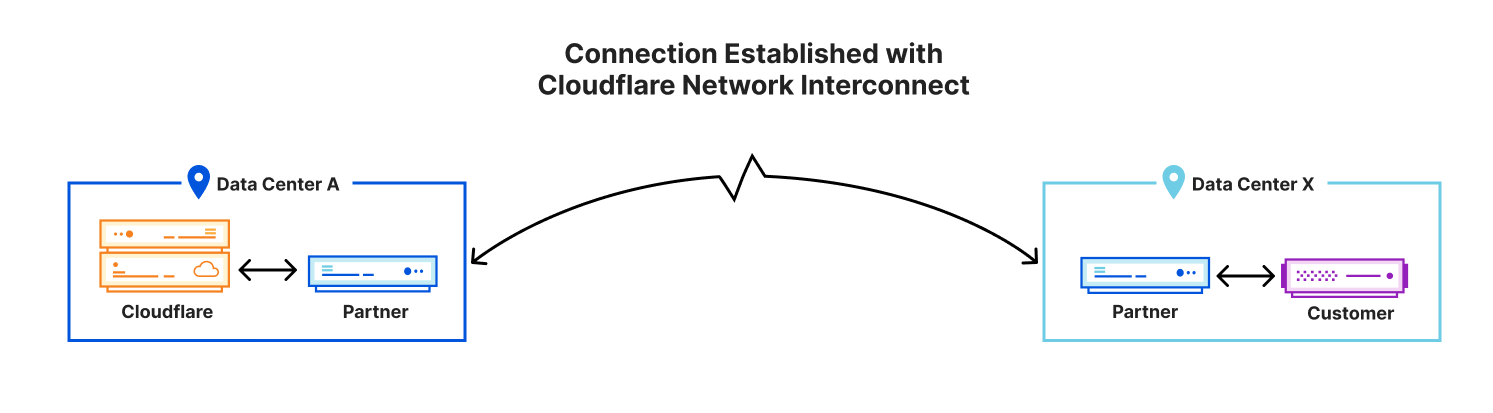
Connection Established with Cloudflare Network Interconnect
When a customer uses CNI to establish a connection between a fabric partner and Cloudflare, that connection runs over layer 2, configured via the partner user interface. Our new partnership model allows customers to connect privately and securely to Cloudflare’s network even when the customer is not located in the same data center as Cloudflare.
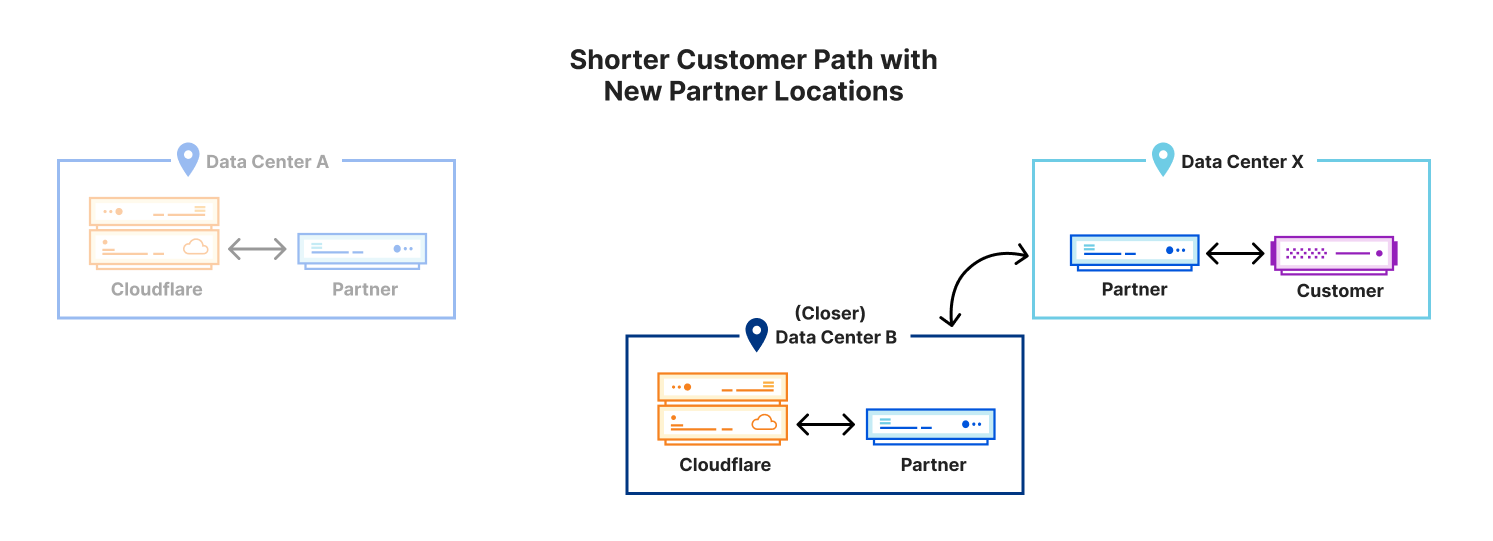
Shorter Customer Path with New Partner Locations
The diagram above shows a shorter customer path thanks to an incremental partner-enabled location. Every time Cloudflare brings a new data center online and connects with a partner fabric, all customers in that region immediately benefit from the closer proximity and reduced latency.
Network fabrics in action
For those who want to self-serve, we’ve published documentation that details the steps in provisioning these connections. You can find the steps for each partner below:
As we expand our network, it’s critical we provide more ways to allow our customers to connect easily. We will continue to shorten the time it takes to set up a new interconnection, drive down costs, strengthen security and improve customer experience with all of our Network On-Ramp partners.
If you are using one of our software-defined networking partners and would like to connect to Cloudflare via their fabric, contact your fabric partner account team or reach out to us using the Cloudflare Network Interconnect page. If you are not using a fabric today, but would like to take advantage of software-defined networking to connect to Cloudflare, reach out to your account team.
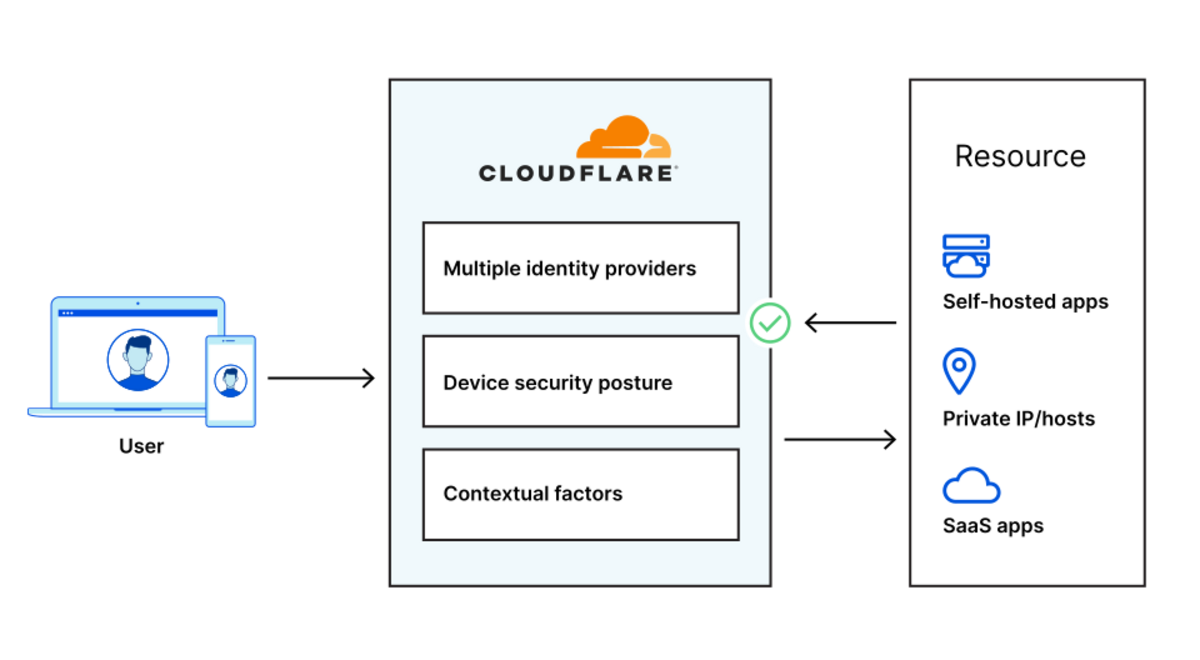
Starting today, you can build identity-aware, Zero Trust network policies using Cloudflare for Teams. You can apply these rules to connections bound for the public Internet or for traffic inside a private network running on Cloudflare. These rules are enforced in Cloudflare’s network of data centers in over 200 cities around the world, giving your team comprehensive network filtering and logging, wherever your users work, without slowing them down.
Last week, my teammate Pete’s blog post described the release of network-based policies in Cloudflare for Teams. Your team can now keep users safe from threats by limiting the ports and IPs that devices in your fleet can reach. With that release, security teams can now replace even more security appliances with Cloudflare’s network.
We’re excited to help your team replace that hardware, but we also know that those legacy network firewalls were used to keep private data and applications safe in a castle-and-moat model. You can now use Cloudflare for Teams to upgrade to a Zero Trust networking model instead, with a private network running on Cloudflare and rules based on identity, not IP address.
To learn how, keep reading or watch the demo below.
Deprecating the castle-and-moat model
Private networks provided security by assuming that the network should trust you by virtue of you being in a place where you could physically connect. If you could enter an office and connect to the network, the network assumed that you should be trusted and allowed to reach any other destination on that network. When work happened inside the closed walls of offices, with security based on the physical door to the building, that model at least offered some basic protections.
That model fell apart when users left the offices. Even before the pandemic sent employees home, roaming users or branch offices relied on virtual private networks (VPNs) to punch holes back into the private network. Users had to authenticate to the VPN but, once connected, still had the freedom to reach almost any resource. With more holes in the firewall, and full lateral movement, this model became a risk to any security organization.
However, the alternative was painful or unavailable to most teams. Building network segmentation rules required complex configuration and still relied on source IPs instead of identity. Even with that level of investment in network segmentation, organizations still had to trust the IP of the user rather than the user’s identity.
These types of IP-based rules served as band-aids while the rest of the use cases in an organization moved into the future. Resources like web applications migrated to models that used identity, multi-factor authentication, and continuous enforcement while networking security went unchanged.
But private networks can be great!
There are still great reasons to use private networks for applications and resources. It can be easier and faster to create and share something on a private network instead of waiting to create a public DNS and IP record.
Also, IPs are more easily discarded and reused across internal networks. You do not need to give every team member permission to edit public DNS records. And in some cases, regulatory and security requirements flat out prohibit tools being exposed publicly on the Internet.
Private networks should not disappear, but the usability and security compromises they require should stay in the past. Two months ago, we announced the ability to build a private network on Cloudflare. This feature allows your team to replace VPN appliances and clients with a network that has a point of presence in over 200 cities around the world.
Zero Trust rules are enforced on the Cloudflare edge
While that release helped us address the usability compromises of a traditional VPN, today’s announcement handles the security compromises. You can now build identity-based, Zero Trust policies inside that private network. This means that you can lock down specific CIDR ranges or IP addresses based on a user’s identity, group, device or network. You can also control and log every connection without additional hardware or services.
How it works
Cloudflare’s daemon, cloudflared, is used to create a secure TCP tunnel from your network to Cloudflare’s edge. This tunnel is private and can only be accessed by connections that you authorize. On their side, users can deploy Cloudflare WARP on their machines to forward their network traffic to Cloudflare’s edge — this allows them to hit specific private IP addresses. Since Cloudflare has 200+ data centers across the globe, all of this occurs without any traffic backhauls or performance penalties.
With today’s release, we now enforce in-line network firewall policies as well. All traffic arriving to Cloudflare’s edge will be evaluated by the Layer 4 firewall. So while you can choose to enable or disable the Layer 7 firewall or bypass HTTP inspection for a given domain, all TCP traffic arriving to Cloudflare will traverse the Layer 4 firewall. Network-level policies will allow you to match traffic that arrives from (or is destined to) data centers, branch offices, and remote users based on the following traffic criteria:
Source IP address or CIDR in the header
Destination IP address or CIDR in the header
Source port or port range in the header
Destination port or port range in the header
With these criteria in place, you can enforce identity-aware policies down to a specific port across your entire network plane.
Get started with Zero Trust networking
There are a few things you’ll want to have configured before building your Zero Trust private network policies (we cover these in detail in our previous private networking post):
Install cloudflared on your private network
Route your private IP addresses to Cloudflare’s edge
Deploy the WARP client to your users’ machines
Once the initial setup is complete, this is how you can configure your Zero Trust network policies on the Teams Dashboard:
1. Create a new network policy in Gateway.
2. Specify the IP and Port combination you want to allow access to. In this example, we are exposing an RDP port on a specific private IP address.
3. Add any desired identity policies to your network policy. In this example, we have limited access to users in a “Developers” group specified in the identity provider.
Once this policy is configured, only users in the specific identity group running the WARP client will be able to access applications on the specified IP and port combination.
And that’s it. Without any additional software or configuration, we have created an identity-aware network policy for all of my users that will work on any machine or network across the world while maintaining Zero Trust. Existing infrastructure can be securely exposed in minutes not hours or days.
What’s Next
We want to make this even easier to use and more secure. In the coming months, we are planning to add support for Private DNS resolution, Private IP conflict management and granular session control for private network policies. Additionally, for now this flow only works for client-to-server (WARP to cloudflared) connections. Coming soon, we’ll introduce support for east-west connections that will allow teams to connect cloudflared and other parts of Cloudflare One routing.
Over the past year, Cloudflare Gateway has grown from a DNS filtering solution to a Secure Web Gateway. That growth has allowed customers to protect their organizations with fine-grained identity-based HTTP policies and malware protection wherever their users are. But what about other Internet-bound, non-HTTP traffic that users generate every day — like SSH?
Today we’re excited to announce the ability for administrators to configure network-based policies in Cloudflare Gateway. Like DNS and HTTP policy enforcement, organizations can use network selectors like IP address and port to control access to any network origin.
Because Cloudflare for Teams integrates with your identity provider, it also gives you the ability to create identity-based network policies. This means you can now control access to non-HTTP resources on a per-user basis regardless of where they are or what device they’re accessing that resource from.
A major goal for Cloudflare One is to expand the number of on-ramps to Cloudflare — just send your traffic to our edge however you wish and we’ll make sure it gets to the destination as quickly and securely as possible. We released Magic WAN and Magic Firewall to let administrators replace MPLS connections, define routing decisions, and apply packet-based filtering rules on network traffic from entire sites. When coupled with Magic WAN, Gateway allows customers to define network-based rules that apply to traffic between whole sites, data centers, and that which is Internet-bound.
Solving Zero Trust networking problems
Until today, administrators could only create policies that filtered traffic at the DNS and HTTP layers. However, we know that organizations need to control the network-level traffic leaving their endpoints. We kept hearing two categories of problems from our users and we’re excited that today’s announcement addresses both.
First, organizations want to replace their legacy network firewall appliances. Those appliances are complex to manage, expensive to maintain, and force users to backhaul traffic. Security teams deploy those appliances in part to control the ports and IPs devices can use to send traffic. That level of security helps prevent devices from sending traffic over non-standard ports or to known malicious IPs, but customers had to deal with the downsides of on-premise security boxes.
Second, moving to a Zero Trust model for named resources is not enough. Cloudflare Access provides your team with Zero Trust controls over specific applications, including non-HTTP applications, but we know that customers who are migrating to this model want to bring that level of Zero Trust control to all of their network traffic.
How it works
Cloudflare Gateway, part of Cloudflare One, helps organizations replace legacy firewalls and upgrade to Zero Trust networking by starting with the endpoint itself. Wherever your users do their work, they can connect to a private network running on Cloudflare or the public Internet without backhauling traffic.
First, administrators deploy the Cloudflare WARP agent on user devices, whether those devices are MacOS, Windows, iOS, Android and (soon) Linux. The WARP agent can operate in two modes:
DNS filtering: WARP becomes a DNS-over-HTTPS (DoH) client and sends all DNS queries to a nearby Cloudflare data center where Cloudflare Gateway can filter those queries for threats like websites that host malware or phishing campaigns.
Proxy mode: WARP creates a WireGuard tunnel from the device to Cloudflare’s edge and sends all network traffic through the tunnel. Cloudflare Gateway can then inspect HTTP traffic and apply policies like URL-based rules and virus scanning.
Today’s announcement relies on the second mode. The WARP agent will send all TCP traffic leaving the device to Cloudflare, along with the identity of the user on the device and the organization in which the device is enrolled. The Cloudflare Gateway service will take the identity and then review the TCP traffic against four criteria:
Source IP or network
Source Port
Destination IP or network
Destination Port
Before allowing the packets to proceed to their destination, Cloudflare Gateway checks the organization’s rules to determine if they should be blocked. Rules can apply to all of an organization’s traffic or just specific users and directory groups. If the traffic is allowed, Cloudflare Gateway still logs the identity and criteria above.
Cloudflare Gateway accomplishes this without slowing down your team. The Gateway service runs in every Cloudflare data center in over 200 cities around the world, giving your team members an on-ramp to the Internet that does not backhaul or hairpin traffic. We enforce rules using Cloudflare’s Rust-based Wirefilter execution engine, taking what we’ve learned from applying IP-based rules in our reverse proxy firewall at scale and giving your team the performance benefits.
Building a Zero Trust networking rule
SSH is a versatile protocol that allows users to connect to remote machines and even tunnel traffic from a local machine to a remote machine before reaching the intended destination. That’s great but it also leaves organizations with a gaping hole in their security posture. At first, an administrator could configure a rule that blocks all outbound SSH traffic across the organization.
As soon as you save that policy, the phone rings and it’s an engineer asking why they can’t use a lot of their development tools. Right, engineers use SSH a lot so we should use the engineering IdP group to allow just our engineers to use SSH.
You take advantage of rule precedence and place that rule above the existing rule that affects all users to allow engineers to SSH outbound but not any other users in the organization.
It doesn’t matter which corporate device engineers are using or where they are located, they will be allowed to use SSH and all other users will be blocked.
One more thing
Last month, we announced the ability for customers to create private networks on Cloudflare. Using Cloudflare Tunnel, organizations can connect environments they control using private IP space and route traffic between sites; better, WARP users can connect to those private networks wherever they’re located. No need for centralized VPN concentrators and complicated configurations–connect your environment to Cloudflare and configure routing.
Today’s announcement gives administrators the ability to configure network access policies to control traffic within those private networks. What if the engineer above wasn’t trying to SSH to an Internet-accessible resource but to something an organization deliberately wants to keep within an internal private network (e.g., a development server)? Again, not everyone in the organization should have access to that either. Now administrators can configure identity-based rules that apply to private networks built on Cloudflare.
What’s next?
We’re laser-focused on our Cloudflare One goal to secure organizations regardless of how their traffic gets to Cloudflare. Applying network policies to both WARP users and routing between private networks is part of that vision.
We’re excited to release these building blocks to Zero Trust Network Access policies to protect an organization’s users and data. We can’t wait to dig deeper into helping organizations secure applications that use private hostnames and IPs like they can today with their publicly facing applications.
We’re just getting started–follow this link so you can too.
Network-layer DDoS attacks are on the rise, prompting security teams to rethink their L3 DDoS mitigation strategies to prevent business impact. Magic Transit protects customers’ entire networks from DDoS attacks by placing our network in front of theirs, either always on or on demand. Today, we’re announcing new functionality to improve the experience for on-demand Magic Transit customers: flow-based monitoring. Flow-based monitoring allows us to detect threats and notify customers when they’re under attack so they can activate Magic Transit for protection.
Magic Transit is Cloudflare’s solution to secure and accelerate your network at the IP layer. With Magic Transit, you get DDoS protection, traffic acceleration, and other network functions delivered as a service from every Cloudflare data center. With Cloudflare’s global network (59 Tbps capacity across 200+ cities) and <3sec time to mitigate at the edge, you’re covered from even the largest and most sophisticated attacks without compromising performance. Learn more about Magic Transit here.
Using Magic Transit on demand
With Magic Transit, Cloudflare advertises customers’ IP prefixes to the Internet with BGP in order to attract traffic to our network for DDoS protection. Customers can choose to use Magic Transit always on or on demand. With always on, we advertise their IPs and mitigate attacks all the time; for on demand, customers activate advertisement only when their networks are under active attack. But there’s a problem with on demand: if your traffic isn’t routed through Cloudflare’s network, by the time you notice you’re being targeted by an attack and activate Magic Transit to mitigate it, the attack may have already caused impact to your business.
On demand with flow-based monitoring
Flow-based monitoring solves the problem with on-demand by enabling Cloudflare to detect and notify you about attacks based on traffic flows from your data centers. You can configure your routers to continuously send NetFlow or sFlow (coming soon) to Cloudflare. We’ll ingest your flow data and analyze it for volumetric DDoS attacks.
Send flow data from your network to Cloudflare for analysis
When an attack is detected, we’ll notify you automatically (by email, webhook, and/or PagerDuty) with information about the attack.
Cloudflare detects attacks based on your flow data
You can choose whether you’d like to activate IP advertisement with Magic Transit manually – we support activation via the Cloudflare dashboard or API – or automatically, to minimize the time to mitigation. Once Magic Transit is activated and your traffic is flowing through Cloudflare, you’ll receive only the clean traffic back to your network over your GRE tunnels.
Activate Magic Transit for DDoS protection
Using flow-based monitoring with Magic Transit on demand will provide your team peace of mind. Rather than acting in response to an attack after it impacts your business, you can complete a simple one-time setup and rest assured that Cloudflare will notify you (and/or start protecting your network automatically) when you’re under attack. And once Magic Transit is activated, Cloudflare’s global network and industry-leading DDoS mitigation has you covered: your users can continue business as usual with no impact to performance.
Example flow-based monitoring workflow: faster time to mitigate for Acme Corp
Let’s walk through an example customer deployment and workflow with Magic Transit on demand and flow-based monitoring. Acme Corp’s network was hit by a large ransom DDoS attack recently, which caused downtime for both external-facing and internal applications. To make sure they’re not impacted again, the Acme network team chose to set up on-demand Magic Transit. They authorize Cloudflare to advertise their IP space to the Internet in case of an attack, and set up Anycast GRE tunnels to receive clean traffic from Cloudflare back to their network. Finally, they configure their routers at each data center to send NetFlow data to a Cloudflare Anycast IP.
Cloudflare receives Acme’s NetFlow data at a location close to the data center sending it (thanks, Anycast!) and analyzes it for DDoS attacks. When traffic exceeds attack thresholds, Cloudflare triggers an automatic PagerDuty incident for Acme’s NOC team and starts advertising Acme’s IP prefixes to the Internet with BGP. Acme’s traffic, including the attack, starts flowing through Cloudflare within minutes, and the attack is blocked at the edge. Clean traffic is routed back to Acme through their GRE tunnels, causing no disruption to end users – they’ll never even know Acme was attacked. When the attack has subsided, Acme’s team can withdraw their prefixes from Cloudflare with one click, returning their traffic to its normal path.
When the attack subsides, withdraw your prefixes from Cloudflare to return to normal
Get started
To learn more about Magic Transit and flow-based monitoring, contact us today.
Around the world government and medical organizations are struggling with one of the most difficult logistics challenges in history: equitably and efficiently distributing the COVID-19 vaccine. There are challenges around communicating who is eligible to be vaccinated, registering those who are eligible for appointments, ensuring they show up for their appointments, transporting the vaccine under the required handling conditions, ensuring that there are trained personnel to administer the vaccine, and then doing it all over again as most of the vaccines require two doses.
Cloudflare can’t help with most of that problem, but there is one key part that we realized we could help facilitate: ensuring that registration websites don’t crash under load when they first begin scheduling vaccine appointments. Project Fair Shot provides Cloudflare’s new Waiting Room service for free for any government, municipality, hospital, pharmacy, or other organization responsible for distributing COVID-19 vaccines. It is open to eligible organizations around the world and will remain free until at least July 1, 2021 or longer if there is still more demand for appointments for the vaccine than there is supply.
Crashing Registration Websites
The problem of vaccine scheduling registration websites crashing under load isn’t theoretical: it is happening over and over as organizations attempt to schedule the administration of the vaccine. This hit home at Cloudflare last weekend. The wife of one of our senior team members was trying to register her parents to receive the vaccine. They met all the criteria and the municipality where they lived was scheduled to open appointments at noon.
When the time came for the site to open, it immediately crashed. The cause wasn’t hackers or malicious activity. It was merely that so many people were trying to access the site at once. “Why doesn’t Cloudflare build a service that organizes a queue into an orderly fashion so these sites don’t get overwhelmed?” she asked her husband.
A Virtual Waiting Room
Turns out, we were already working on such a feature, but not for this use case. The problem of fairly distributing something where there is more demand than supply comes up with several of our clients. Whether selling tickets to a hot concert, the latest new sneaker, or access to popular national park hikes it is a difficult challenge to ensure that everyone eligible has a fair chance.
The solution is to open registration to acquire the scarce item ahead of the actual sale. Anyone who visits the site ahead of time can be put into a queue. The moment before the sale opens, the order of the queue can be randomly (and fairly) shuffled. People can then be let in in order of their new, random position in the queue — allowing only so many at any time as the backend of the site can handle.
At Cloudflare, we were building this functionality for our customers as a feature called Waiting Room. (You can learn more about the technical details of Waiting Room in this post by Brian Batraski who helped build it.) The technology is powerful because it can be used in front of any existing web registration site without needing any code changes or hardware installation. Simply deploy Cloudflare through a simple DNS change and then configure Waiting Room to ensure any transactional site, no matter how meagerly resourced, can keep up with demand.
Recognizing a Critical Need; Moving Up the Launch
We planned to release it in February. Then, when we saw vaccine sites crashing under load and frustration of people eligible for the vaccine building, we realized we needed to move the launch up and offer the service for free to organizations struggling to fairly distribute the vaccine. With that, Project Fair Shot was born.
Government, municipal, hospital, pharmacy, clinic, and any other organizations charged with scheduling appointments to distribute the vaccine can apply to participate in Project Fair Shot by visiting: projectfairshot.org
Giving Front Line Organizations the Technical Resources They Need
The service will be free for qualified organizations at least until July 1, 2021 or longer if there is still more demand for appointments for the vaccine than there is supply. We are not experts in medical cold storage and I get squeamish at the sight of needles, so we can’t help with many of the logistical challenges of distributing the vaccine. But, seeing how we could support this aspect, our team knew we needed to do all we could to help.
The superheroes of this crisis are the medical professionals who are taking care of the sick and the scientists who so quickly invented these miraculous vaccines. We’re proud of the supporting role Cloudflare has played helping ensure the Internet has continued to function well when the world needed it most. Project Fair Shot is one more way we are living up to our mission of helping build a better Internet.
Today, we are excited to announce Cloudflare Waiting Room! It will first be available to select customers through a new program called Project Fair Shot which aims to help with the problem of overwhelming demand for COVID-19 vaccinations causing appointment registration websites to fail. General availability in our Business and Enterprise plans will be added in the near future.
Wait, you’re excited about a… Waiting Room?
Most of us are familiar with the concept of a waiting room, and rarely are we excited about the idea of being in one. Usually our first experience of one is at a doctor’s office — yes, you have an appointment, but sometimes the doctor is running late (or one of the patients was). Given the doctor can only see one person at a time… the waiting room was born, as a mechanism to queue up patients.
While servers can handle more concurrent requests than a doctor can, they too can be overwhelmed. If, in a pre-COVID world, you’ve ever tried buying tickets to a popular concert or event, you’ve probably encountered a waiting room online. It limits requests inbound to an application, and places these requests into a virtual queue. Once the number of users in the application has reduced, new users are let in within the defined thresholds the application can handle. This protects the origin servers supporting the application from being inundated with too many requests, while also ensuring equity from a user perspective — users who try to access a resource when the system is overloaded are not unfairly dropped and forced to reconnect, hoping to join their chance in the queue.
Why Now?
Given not many of us are going to live concerts any time soon, why is Cloudflare doing this now?
Well, perhaps we aren’t going to concerts, but the second order effects of COVID-19 have created a huge need for waiting rooms. First of all, given social distancing and the closing of many places of business and government, customers and citizens have shifted to online channels, putting substantially more strain on business and government infrastructure.
Second, the pandemic and the flow-on consequences of it have meant many folks around the world have come to rely on resources that they didn’t need twelve months earlier. To be specific, these are often health or government-related resources — for example, unemployment insurance websites. The online infrastructure was set up to handle a peak load that didn’t foresee the impact of COVID-19. We’re seeing a similar pattern emerge with websites that are related to vaccines.
Historically, the number of organizations that needed waiting rooms was quite small. The nature of most businesses online usually involve a more consistent user load, rather than huge crushes of people all at once. Those organizations were able to build custom waiting rooms and were integrated deeply into their application (for example, buying tickets). With Cloudflare’s Waiting Room, no code changes to the application are necessary and a Waiting Room can be set up in a matter of minutes for any website without writing a single line of code.
Whether you are an engineering architect or a business operations analyst, setting up a Waiting Room is simple. We make it quick and easy to ensure your applications are reliable and protected from unexpected spikes in traffic. Other features we felt were important are automatic enablement and dynamic outflow. In other words, a waiting room should turn on automatically when thresholds are exceeded and as users finish their tasks in the application, let out different sized buckets of users and intake new ones already in the queue. It should just work. Lastly, we’ve seen the major impact COVID-19 has made on users and businesses alike, especially, but not limited to, the health and government sectors. We wanted to provide another way to ensure these applications remain available and functional so all users can receive the care that they need and not errors within their browser.
How does Cloudflare’s Waiting Room work?
We built Waiting Room on top of our edge network and our Workers product. By leveraging Workers and our new Durable Objects offerings, we were able to remove the need for any customer coding and provide a seamless, out of the box product that will ‘just work’. On top of this, we get the benefits of the scale and performance of our Workers product to ensure we maintain extremely low latency overhead, keep estimated times presented to end users accurate as can be and not keep any user in the queue longer than needed. But building a centralized system in a decentralized network is no easy task. When requests come into an application from around the world, we need to be able to get a broad, accurate view of what that load looks like inbound and outbound to a given application.
Request going through Cloudflare without a Waiting Room
These requests, as fast as they are, still take time to travel across the planet. And so, a unique edge case was presented. What if a website is getting reasonable traffic from North America and Europe, but then a sudden major spike of traffic takes place from South America – how do we know when to keep letting users into the application and when to kick in the Waiting Room to protect the origin servers from being overloaded?
Thanks to some clever engineering and our Workers product, we were able to create a system that almost immediately keeps itself synced with global demand to an application giving us the necessary insight into when we should and should not be queueing users into the Waiting Room. By leveraging our global Anycast network and over 200+ data centers, we remove any single point of failure to protect our customers’ infrastructure yet also provide a great experience to end-users who have to wait a small amount of time to enter the application under high load.
Request going through Cloudflare with a Waiting Room
How to setup a Waiting Room
Setting up a Waiting Room is incredibly easy and very fast! At the easiest side of the scale, a user needs to fill out only five fields: 1) the name of the Waiting Room, 2) a hostname (which will already be pre-populated with the zone it’s being configured on), 3) the total active users that can be in the application at any given time, 4) the new users per minute allowed into the application, and 5) the session duration for any given user. No coding or any application changes are necessary.
We provide the option of using our default Waiting Room template for customers who don’t want to add additional branding. This simplifies the process of getting a Waiting Room up and running.
That’s it! Press save and the Waiting Room is ready to go!
For customers with more time and technical ability, the same process is followed, except we give full customization capabilities to our users so they can brand the Waiting Room, ensuring it matches the look and feel of their overall product.
Lastly, managing different Waiting Rooms is incredibly easy. With our Manage Waiting Room table, at a glance you are able to get a full snapshot of which rooms are actively queueing, not queueing, and/or disabled.
We are very excited to put the power of our Waiting Room into the hands of our customers to ensure they continue to focus on their businesses and customers. Keep an eye out for another blog post coming soon with major updates to our Waiting Room product for Enterprise!
Cloudflare has always been about democratizing the Internet. For us, that means bringing the most powerful tools used by the largest of enterprises to the smallest development shops. Sometimes that looks like putting our global network to work defending against large-scale attacks. Other times it looks like giving Internet users simple and reliable privacy services like 1.1.1.1. Last week, it looked like Cloudflare Pages — a fast, secure and free way to build and host your JAMstack sites.
We see a huge opportunity with Cloudflare Pages. It goes beyond making it as easy as possible to deploy static sites, and extending that same ease of use to building full dynamic applications. By creating a seamless integration between Pages and Cloudflare Workers, we will be able to host the frontend and backend together, at the edge of the Internet and close to your users. The Linc team is joining Cloudflare to help us do just that.
Today, we’re excited to announce the acquisition of Linc, an automation platform to help front-end developers collaborate and build powerful applications. Linc has done amazing work with Frontend Application Bundles (FABs), making dynamic backends more accessible to frontend developers. Their approach offers a straightforward path to building end-to-end applications on Pages, with both frontend logic and powerful backend logic in one bundle. With the addition of Linc, we will accelerate Pages to enable richer and more powerful full-stack applications.
Combining Cloudflare’s edge network with Linc’s approach to server-side rendering, we’re able to set a new standard for performance on the web by delivering the speed of powerful servers close to users. Now, I’ll hand it over to Glen Maddern, who was the CTO of Linc, to share why they joined Cloudflare.
Linc and the Frontend Application Bundle (FAB) specification were designed with a single goal in mind: to give frontend developers the best possible tools to build, review, refine, and deploy their applications. An important piece of that is making server-side logic and rendering much more accessible, regardless of what type of app you’re building.
Static vs Dynamic frontends
One of the biggest problems in frontend web development today is the dramatic difference in complexity when moving from generating static sites (e.g. building a directory full of HTML, JS, and CSS files) to hosting a full application (traditionally using NodeJS and a web server like Express). While you gain the flexibility of being able to render everything on-demand and customised for the current user, you increase your maintenance cost — you now have servers that you need to keep running. And unless you’re operating at a global scale already, you’ll often see worse end-user performance as your requests are only being served from one or maybe a couple of locations worldwide.
While serverless platforms have arisen to solve these problems for backend services and can be brought to bear on frontend apps, they’re much less cost-effective than using static hosting, especially if the bulk of your frontend assets are static. As such, we’ve seen a rise of technologies under the umbrella term of “JAMstack”; they aim at making static sites more powerful (like rebuilding based off CMS updates), or at making it possible to deploy small pieces of server-side APIs as “cloud functions”, along with each update of your app. But it’s still fundamentally a limited architecture — you always have a static layer between you and your users, so the more dynamic your needs, the more complex your build pipeline becomes, or the more you’re forced to rely on client-side logic.
FABs took a different approach: a deployment artefact that could support the full range of server-side needs, from entirely static sites, apps with some API routes or cloud functions, all the way to full server-side streaming rendering. We also made it compatible with all the cloud hosting providers you might want, so that deploying becomes as easy as uploading a ZIP file. Then, as your needs change, as dynamic content becomes more important, as new frameworks arise that offer increasing performance or you look at moving which provider you’re hosting with, you never need to change your tooling and deployment processes.
The FAB approach
Regardless of what framework you’re working with, the FAB compiler generates a fab.zip file that has two components: a server.js file that acts as a server-side entry point, and an _assets directory that stores the HTML, CSS, JS, images, and fonts that are sent to the client.
This simple structure gives us enough flexibility to handle all kinds of apps. For example, a static site will have a server.js of only a few auto-generated lines of server-side code, just enough to add redirects for any files outside the _assets directory. On the other end of the spectrum, an app with full server rendering looks and works exactly the same. It just has a lot more code inside its server.js file.
On a server running NodeJS, serving a compiled FAB is as easy as fab serve fab.zip, but FABs are really designed with production class hosting in mind. They make use of world-class CDNs and the best serverless hosting platforms around.
When a FAB is deployed, it’s often split into these component parts and deployed separately. Assets are sent to a low-cost object storage platform with a CDN in front of it, and the server component is sent to dedicated serverless hosting. It’s all deployed in an atomic, idempotent manner that feels as simple as uploading static files, but completely unlocks dynamic server-side code as part of your architecture.
That generic architecture works great and is compatible with virtually every hosting platform around, but it works slightly differently on Cloudflare Workers.
Workers, unlike other serverless platforms, truly runs at the edge: there is no CDN or load balancer in front of it to split off /_assets routes and send them directly to the Assets storage. This means that every request hits the worker, whether it’s triggering a full page render or piping through the bytes for an image file. It might feel like a downside, but with Workers’ performance and cost profile, it’s quite the opposite — it actually gives us much more flexibility in what we end up building, and gets us closer to the goal of fully unlocking server-side code.
To give just one example, we no longer need to store our asset files on a dedicated static file host — instead, we can use Cloudflare’s global key-value storage: Workers KV. Our server.js running inside a Worker can then map /_assets requests directly into the KV store and stream the result to the user. This results in significantly better performance than proxying to a third-party asset host.
What we’ve found is that Cloudflare offered the most “FAB-native” hosting option, and so it’s very exciting to have the opportunity to further develop what they can do.
Linc + Cloudflare
As we stated above, Linc’s goal was to give frontend developers the best tooling to build and refine their apps, regardless of which hosting they were using. But we started to notice an important trend — if a team had a free choice for where to host their frontend, they inevitably chose Cloudflare Workers. In some cases, for a period, teams even used Linc to deploy a FAB to Workers alongside their existing hosting to demonstrate the performance improvement before migrating permanently.
At the same time, we started to see more and more opportunities to fully embrace edge-rendering and make global serverless hosting more powerful and accessible. But the most exciting ideas required deep integration with the hosting providers themselves. Which is why, when we started talking to Cloudflare, everything fell into place.
We’re so excited to join the Cloudflare effort and work on expanding Cloudflare Pages to cover the full spectrum of applications. Not only do they share our goal of bringing sophisticated technology to every development team, but with innovations like Durable Objects starting to offer new storage paradigms, the potential for a truly next-generation deployment, review & hosting platform is tantalisingly close.
Across multiple cultures around the world, this time of year is a time of celebration and sharing of gifts with the people we care the most about. In that spirit, we thought we’d take this time to give back to the developer community that has been so supportive of Cloudflare for the last 10 years.
Today, the path from an idea to a website is paved with good intentions
Websites are the way we express ourselves on the web. It doesn’t matter if you’re a hobbyist with a blog, or the largest of corporations with millions of customers — if you want to reach people outside the confines of 140 280 characters, the web is the place to be.
As a frontend developer, it’s your responsibility to bring this expression to life. And make no mistake — with so many frontend frameworks, tooling, and static site generators at your disposal — it’s a great time to be in your line of work.
That is, of course, right up until the point when you’re ready to show your work off to the world. That’s when things can start to get a little hairy.
At this point, continuing to keep things local rather than committing to source starts to become… irresponsible. But then: how do you quickly iterate and maintain momentum? As you change things, you need to make sure those changes don’t get lost — saving them to source control — while keeping in sync with what’s currently deployed to production.
There are no great solutions.
If you’re in a larger organization, you might have a DevOps organization devoted to exactly that: automating deployments using Continuous Integration (CI) tooling.
Most CI tooling, however, is quite cumbersome, and for good reason — to allow organizations to customize their automation, regardless of their stack and setup. But for the purpose of developing a website, it can still feel like an unnecessary and frustrating diversion on the road to delivering your web project. Configuring a .yaml file, adding and removing commands, waiting minutes for each build to run, and praying to the CI gods at each one that these are the right commands. Hopelessly rerunning the same build over and over, and expecting a different result.
Often, hours are lost. The process stands in the way of you and doing your best work.
Cloudflare Pages: letting frontend devs do what they do best
We think there’s a better way.
With Cloudflare Pages, we set out to simplify every step along the journey by tying deployment to your existing development workflow.
Seamless Git integration, with builds built-in
With Cloudflare Pages, all you have to do is select your repo, and tell us which framework you’re using. We’ll take care of chanting CI incantations on your behalf, while you keep doing what you were already doing: git commit and git push your changes — we’ll build and deploy them for you.
As the project grows, so do the stakes, and the number of collaborators.
For a site in production, changes need to be reviewed thoroughly. As the reviewer, looking at the code, and skimming for red flags only gets you so far. To thoroughly review, you have to commit or git stash your changes, pull down locally, get it running to make sure it actually works — looking at code alone won’t catch everything!
The other developers on the team are not the only stakeholders. There are designers, marketers, PMs who want to provide feedback before the changes go out.
Unique preview URLs
With Cloudflare Pages, each commit gets its own unique URL. Preview URLs make it easier to get meaningful code reviews without the overhead of pulling down the branch. They also make it easier to get feedback from PMs, designers and marketers on the latest iteration, bridging the gap between mocks and code.
Infinite staging
“Does anyone mind if I take over staging?” might also sound like a familiar question. With Cloudflare Pages, each feature branch will have its own dedicated consistent alias, allowing you to have a consistent URL for the latest changes.
With Preview and Production environments, all feature branches and preview links will be built with preview variables, so you can experiment without impacting production data.
When you’re ready to deploy to production, we’ll redeploy to production for you with the updated production environment variables.
Collaboration for all
Collaboration is the key to building amazing websites and products — the more the merrier! As a security company, we definitely don’t want you sharing password and credentials. Which is why we provide multi user access for free for unlimited users — invite all your friends, on us!
Modern sites with modern standards
We all know premature optimization is a cardinal sin, but once your project is in front of customers you want to have the best performance possible. If it’s successful, you also want it to be available!
Today, this is time you have to spend optimizing performance (chasing those 100 lighthouse scores), and scaling, from a few to millions of users.
Luckily, we happen to know a thing or two about running a global network of 200 data centers though, so we’ve got you covered.
With Pages, your site is deployed directly to our edge, milliseconds away from customers, and at global scale.
The latest web standards are fun to read about on Hacker News but not fun to implement yourself. With Cloudflare Pages, we’ll do the heavy lifting to keep you ahead of the curve: IPv6, HTTP/3, TLS 1.3, all the latest image formats.
Oh, and one more thing
We’re really excited for developers and their teams to use Cloudflare Pages to collaborate on the best static sites together. There’s just one thing that didn’t sit quite right with us: why stop at static sites?
What if we could make building full-blown, dynamic applications just as easy?
Although APIs are a core part of the JAMstack, today that refers primarily to the robust API economy developers have access to. And while that’s great, it’s not always enough. If you want to build your own APIs, and store user or application data, you need more than third party APIs. What to do, though?
Well, this is the point at which it’s mighty helpful we’ve already built a global serverless platform: Cloudflare Workers. Workers allows frontend developers to easily write scalable backends to their applications in the same language as the frontend, JavaScript.
Over the coming months, we’ll be working on integrating Workers and Pages into a seamless experience. It’ll work the exact same way Pages does: just write your code, git push, and we’ll deploy it for you. The only difference is, it won’t just be your frontend, it’ll be your backend, too. And just to be clear: this is not just for stateless functions. With Workers KV and Durable Objects, we see a huge opportunity to really enable any web application to be built on this platform.
We’re super excited about the future of Pages, and how with the power of Cloudflare Workers behind it, it represents a bold vision for how new applications are going to be built on the web.
But you know the thing about gifts? They’re no good without someone to receive them. We’d love for you to sign up for our beta and try out Cloudflare Pages!
PS: we’re hiring!
Want to help us shape the future of development on the web? Join our team.
Over the past week, you’ve heard how Cloudflare is making it easy for our customers to control where their data is stored and protected.
We’re not the only ones building these data controls. Around the world, companies are working to figure out where and how to store customer data in a way that is compliant with data localization obligations. For developers, this means new deployment models and new headaches — wrangling infrastructure in multiple regions, partitioning user data based on location, and staying on top of the latest rules from regulators.
Durable Objects, currently in limited beta, already make it easy for customers to manage state on Cloudflare Workers without worrying about provisioning infrastructure. Today, we’re announcing Jurisdictional Restrictions for Durable Objects, which ensure that a Durable Object only stores and processes data in a given geographical region. Jurisdictional Restrictions make it easy for developers to build serverless, stateful applications that not only comply with today’s regulations, but can handle new and updated policies as new regulations are added.
How Jurisdictional Restrictions Work
When creating a Durable Object, developers generate a unique ID that lets a Cloudflare Worker communicate with the Object.
Let’s say I want to create a Durable Object that represents a specific user of my application:
async function handle(request) {
    let objectId = USERS.newUniqueId();
    let user = await USERS.get(objectId);
}
The unique ID encodes metadata for the Workers runtime, including a mapping to a specific Cloudflare data center. That data center is responsible for handling the creation of the Object and maintaining a routing table entry, so that a Worker can communicate with the Object if the Object migrates to another Cloudflare data center.
If the user is an EU data subject, I may want to ensure that the Durable Object that handles their data only stores and processes data inside of the EU. I can do that when I generate their Object ID, which encodes a restriction that this Durable Object can only be handled by a data center in the EU.
async function handle(request) {
    let objectId = USERS.newUniqueId({jurisdiction: "eu"});
    let user = await USERS.get(objectId);
}
There are no servers to spin up and no databases to maintain. Handling a new set of regional restrictions will be as easy as passing a different string at ID generation.
Today, we only support the EU jurisdiction, but we’ll be adding more based on developer demand.
By setting restrictions at a per-object level, it becomes easy to ensure compliance without sacrificing developer productivity. Applications running on Durable Objects just need to identify the jurisdictional rules a given Object should follow and set the corresponding rule at creation time. Gone is the need to run multiple clusters of infrastructure across cloud provider regions to stay compliant — Durable Objects are both globally accessible and capable of partitioning state with no infrastructure overhead.
In the future, we’ll add additional features to Jurisdictional Restrictions — including the ability to migrate your Objects between Jurisdictions to handle changes in regulations.
Under the hood with Durable Object ID generation
Durable Objects support two types of IDs: system-generated, where the system creates a unique ID for you, and user-generated, where a user passes in an identifier to access the Durable Object. You can think of the user-provided identifier as a seed to a hash function that determines the data center the object starts in.
By default with system-generated IDs, we construct the ID so that it maps to a data center near the Worker that generated the ID. This data center is responsible for creating the Object and storing a routing record if that Object migrates.
If the user passes in a Jurisdictional Restriction, we instead encode in the ID a mapping to a jurisdiction, which encodes a list of data centers that adhere to the rules of the Jurisdictional Restriction. We guarantee that the data center we select for creating the Object is in this list and that we will not migrate the Object to a data center that isn’t in this list. In the case of the ‘eu’ jurisdiction, that maps to one of Cloudflare’s data centers in the EU.
For user-generated IDs, though, we cannot encode this data in the ID, since we must use the string the user passed us to generate the ID! This is because requests may originate anywhere in the world, and they need to know where to find an Object without depending on coordination. For now, this means we do not support Jurisdictional Restrictions in combination with user-generated IDs.
Join the Durable Objects limited beta
Durable Objects are currently in an invite-only beta, while we scale up our systems and build out additional features. If you’re interested in using Durable Objects to meet your compliance requirements, reach out to us with your use case!
One of the great arts of software engineering is making updates and improvements to working systems without taking them offline. For some systems this can be rather easy, spin up a new web server or load balancer, redirect traffic and you’re done. For other systems, such as the core distributed data store which keeps millions of websites online, it’s a bit more of a challenge.
Quicksilver is the data store responsible for storing and distributing the billions of KV pairs used to configure the millions of sites and Internet services which use Cloudflare. In a previous post, we discussed why it was built and what it was replacing. Building it, however, was only a small part of the challenge. We needed to deploy it to production into a network which was designed to be fault tolerant and in which downtime was unacceptable.
We needed a way to deploy our new service seamlessly, and to roll back that deploy should something go wrong. Ultimately many, many, things did go wrong, and every bit of failure tolerance put into the system proved to be worth its weight in gold because none of this was visible to customers.
The Bridge
Our goal in deploying Quicksilver was to run it in parallel with our then existing KV distribution tool, Kyoto Tycoon. Once we had evaluated its performance and scalability, we would gradually phase out reads and writes to Kyoto Tycoon, until only Quicksilver was handling production traffic. To make this possible we decided to build a bridge – QSKTBridge.
Our bridge replicated from Kyoto Tycoon, sending write and delete commands to our Quicksilver root node. This bridge service was deployed on Kubernetes within our infrastructure, consumed the Kyoto Tycoon update feed, and wrote the batched changes every 500ms.
In the event of node failure or misconfiguration it was possible for multiple bridge nodes to be live simultaneously. To prevent duplicate entries we included a timestamp with each change. When writing into Quicksilver we used the Compare And Swap command to ensure that only one batch with a given timestamp would ever be written.
First Baby Steps In To Production
Gradually we began to point reads over a loopback interface from the Kyoto Tycoon port to the Quicksilver port. Fortunately we implemented the memcached and the KT HTTP protocol to make it transparent to the many client instances that connect to Kyoto Tycoon and Quicksilver.
We began with DOG, DOG is a virtual data center which serves traffic for Cloudflare employees only. It’s called DOG because we use it for dog-fooding. Testing releases on the dog-fooding data center helps prevent serious issues from ever reaching the rest of the world. Our DOG testing went suspiciously well, so we began to move forward with more of our data centers around the world. Little did we know this rollout would take more than a year!
Replication Saturation
To make life easier for SREs provisioning a new data center, we implemented a bootstrap mechanism that pulls an entire database from a remote server. This was an easy win because our datastore library – LMDB – provides the ability to copy an entire LMDB environment to a file descriptor. Quicksilver simply wrapped this code and sent a specific version of the DB to a network socket using its file descriptor.
When bootstrapping our Quicksilver DBs to more servers, Kyoto Tycoon was still serving production traffic in parallel. As we mentioned in the first blogpost, Kyoto Tycoon has an exclusive write lock that is sensitive to I/O. We were used to the problems this can cause such as write bursts slowing down reads. This time around we found the separate bootstrap process caused issues. It filled the page cache quickly, causing I/O saturation, which impacted all production services reading from Kyoto Tycoon.
There was no easy fix to that, to bootstrap Quicksilver DBs in a datacenter we’d have to wait until it was moved offline for maintenance, which pushed the schedule beyond our initial estimates. Once we had a data center deployment we could finally see metrics of Quicksilver running in the wild. It was important to validate that the performance was healthy before moving on to the next data center. This required coordination with the engineering teams that consume from Quicksilver.
The FL (front line) test candidate
Many requests reaching Cloudflare’s edge are forwarded to a component called FL, which acts as the “brain”. It uses multiple configuration values to decide what to do with the request. It might apply the WAF, pass the request to Workers and so on. FL requires a lot of QS access, so it was the perfect candidate to help validate Quicksilver performance in a real environment.
Here are some screenshots showing FL metrics. The vertical red line marks the switchover point, on the left of the line is Kyoto Tycoon, on the right is Quicksilver. The drop immediately before the line is due to the upgrade procedure itself. We saw an immediate and significant improvement in error rates and response time by migrating to Quicksilver.
The middle graph shows the error count. Green dot errors are non-critical errors: the first request to Kyoto Tycoon/Quicksilver failed so FL will try again. The red dot errors are the critical ones, they mean the second request also failed. In that case FL will return an error code to an end user. Both counts decreased substantially.
The bottom graph shows the read latency average from Kyoto Tycoon/Quicksilver. The average drops a lot and is usually around 500 microseconds and no longer reaches 1ms which it used to do quite often with Kyoto Tycoon.
Some readers may notice a few things. First of all, it was said earlier that the consumers were reading through the loopback interface. How come we experience errors there? How come we need 500us to read from Quicksilver?
At that time Cloudflare had some old SSDs and these could sometimes take hundreds of milliseconds to respond and this was affecting the response time from Quicksilver hence triggering read timeout from FL.
That was also obviously increasing the average response time above.
From there, some readers would ask why using averages and not percentiles? This screenshot dates back to 2017 and at that time the tool used for gathering FL metrics did not offer percentiles, only min, max and average.
Also, back then, all consumers were reading through TCP over loopback. Later on we switched to Unix socket.
Finally, we enabled memcached and KT HTTP malformed request detection. It appears that some consumers were sending us bogus requests and not monitoring the value returned properly, so they could not detect any error. We are now alerting on all bogus requests as this should never happen.
Spotting the wood for the trees
Removing Kyoto Tycoon on the edge took around a year. We’d done a lot of work already but rolling Quicksilver out to production services meant the project was just getting started. Thanks to the new metrics we put in place, we learned a lot about how things actually happen in the wild. And this let us come up with some ideas for improvement.
Our biggest surprise was that most of our replication delays were caused by saturated I/O and not network issues. This is something we could not easily see with Kyoto Tycoon. A server experiencing I/O contention could take seconds to write a batch to disk. It slowly became out of sync and then failed to propagate updates fast enough to its own clients, causing them to fall out of sync. The workaround was quite simple, if the latest received transaction log is over 30 seconds old, Quicksilver would disconnect and try the next server in the list of sources.
This was again an issue caused by aging SSDs. When a disk reaches that state it is very likely to be queued for a hardware replacement.
We quickly had to address another weakness in our codebase. A Quicksilver instance which was not currently replicating from a remote server would stop its own replication server, forcing clients to disconnect and reconnect somewhere else. The problem is this behavior has a cascading effect, if an intermediate server disconnects from its server to move somewhere else, it will disconnect all its clients, etc. The problem was compounded by an exponential backoff approach. In some parts of the world our replication topology has six layers, triggering the backoff many times caused significant and unnecessary replication lag. Ultimately the feature was fully removed.
Reads, writes, and sad SSDs
We discovered that we had been underestimating the frequency of I/O errors and their effect on performance. LMDB maps the database file into memory and when the kernel experiences an I/O error while accessing the SSD, it will terminate Quicksilver with a SIGBUS. We could see these in kernel logs. I/O errors are a sign of unhealthy disks and cause us to see spikes in Quicksilver’s read and write latency metrics. They can also cause spikes in the system load average, which affects all running services. When I/O errors occur, a check usually finds such disks are close to their maximum allowed write cycles, and further writes will cause a permanent failure.
Something we didn’t anticipate was LMDB’s interaction with our filesystem, causing high write amplification that increased I/O load and accelerated the wear and tear of our SSDs. For example, when Quicksilver wrote 1 megabyte, 30 megabytes were flushed to disk. This amplification is due to LMDB copy-on-write, writing a 2 byte key-value (KV) pair ends up copying the whole page. That was the price to pay for crashproof storage. We’ve seen amplification factors between 1.5X and 80X. All of this happens before any internal amplification that might happen in an SSD.
We also spotted that some producers kept writing the same KV pair over and over. Although we saw low rates of 50 writes per second, considering the amplification problem above, repetition increased pressure on SSDs. To fix this we just drop identical KV writes on the root node.
Where does a server replicate from?
Each small data center replicates from multiple bigger sites and these replicate from our two core data centers. To decide which data centers to use, we talk to the Network team, get an answer and hardcode the topology in Salt, the same place we configure all our infrastructure.
Each replication node is identified using IP addresses in our Salt configuration. This is quite a rigid way of doing things, wouldn’t DNS be easier? The interesting thing is that Quicksilver is a source of DNS for customers and Cloudflare infrastructure. We do not want Quicksilver to become dependent on itself, that could lead to problems.
While this somewhat rigid way of configuring topology works fine, as Cloudflare continues to scale there is room for improvement. Configuring Salt can be tricky and changes need to be thoroughly tested to avoid breaking things. It would be nicer for us to have a way to build the topology more dynamically, allowing us to more easily respond to any changes in network details and provision new data centers. That is something we are working on.
Removing Kyoto Tycoon from the Edge
Migrating services away from Kyoto Tycoon requires identifying them. There were some obvious candidates like FL and DNS which play a big part in day-to-day Cloudflare activity and do a lot of reads. But the tricky part to completely removing Kyoto Tycoon is in finding all the services that use it.
We informed engineering teams of our migration work but that was not enough. Some consumers get less attention because they were done during a research activity, or they run as part of a team’s side project. We added some logging code into Kyoto Tycoon so we could see who exactly was connecting and reached out directly to them. That’s a good way to catch the consumers that are permanently connected or connect often. However, some consumers only connect rarely and briefly, for example at startup time to load some configuration. So this takes time.
We also spotted some special cases that used exotic setups like using stunnel to read from the memcached interface remotely. That might have been a “quick-win” back in the day but its technical debt that has to be paid off; we now strictly enforce the methods that consumers use to access Quicksilver.
The migration activity was steady and methodical and it took a few months. We deployed Quicksilver per group of data centers and instance by instance, removing Kyoto Tycoon only when we deemed it ready. We needed to support two sets of configuration and alerting in parallel. That’s not ideal but it gave us confidence and ensured that customers were not disrupted. The only thing they might have noticed is the performance improvement!
Quicksilver, Core side, welcome to the mouth of technical debt madness
Once the edge migration was complete, it was time to take care of the core data centers. We just dealt with 200+ data centers so doing two should be easy right? Well no, the edge side of Quicksilver uses the reading interface, the core side is the writing interface so it is a totally different kind of job. Removing Kyoto Tycoon from the core was harder than the edge.
Many Kyoto Tycoon components were all running on a single physical server – the Kyoto Tycoon root node. This single point of failure had become a growing risk over the years. It had been responsible for incidents, for example it once completely disappeared due to faulty hardware. In that emergency we had to start all services on a backup server. The move to Quicksilver was a great opportunity to remove the Kyoto Tycoon root node server. This was a daunting task and almost all the engineering teams across the company got involved.
Note: Cloudflare’s migration from Marathon to Kubernetes was happening in parallel to this task so each time we refer to Kubernetes it is likely that the job was started on Marathon before being migrated later on.
The diagram above shows how all components below interact with each other.
From KTrest to QSrest
KTrest is a stateless service providing a REST interface for writing and deleting KV pairs from Kyoto Tycoon. Its only purpose is to enforce access control (ACL) so engineering teams do not experience accidental keyspace overlap. Of course, sometimes keyspaces are shared on purpose but it is not the norm.
The Quicksilver team took ownership of KTrest and migrated it from the root server to Kubernetes. We asked all teams to move their KTrest producers to Kubernetes as well. This went smoothly and did not require code changes in the services.
Our goal was to move people to Quicksilver, so we built QSrest, a KTrest compatible service for Quicksilver. Remember the problem about disk load? The QSKTBridge was in charge of batching: aggregating 500ms of updates before flushing to Quicksilver, to help our SSDs cope with our sync frequency. If we moved people to QSrest, it needed to support batching too. So it does. We used QSrest as an opportunity to implement write quotas. Once a quota is reached, all further writes from the same producer would be slowed down until the quota goes back to normal.
We found that not all teams actually used KTrest. Many teams were still writing directly to Kyoto Tycoon. One reason for this is that they were sending large range read requests in order to read thousands of keys in one shot – a feature that KTrest did not provide. People might ask why we would allow reads on a write interface. This is an unfortunate historical artefact and we wanted to put things right. Large range requests would hurt Quicksilver (we learned this from our experience with the bootstrap mechanism) so we added a cluster of servers which would serve these range requests: the Quicksilver consumer nodes. We asked the teams to switch their writes to KTrest and their reads to Quicksilver consumers.
Once the migration of the producers out of the root node was complete, we asked teams to start switching from KTrest to QSrest. Once the move was started, moving back would be really hard: our Kyoto Tycoon and Quicksilver DB were now inconsistent. We had to move over 50 producers, owned by teams in different time zones. So we did it one after another while carefully babysitting our servers to spot any early warning which could end up in an incident.
Once we were all done, we then started to look at Kyoto Tycoon transaction logs: is there something still writing to it? We found an obsolete heartbeat mechanism which was shut down.
Finally, Kyoto Tycoon root processes were turned off to never be turned on again.
Removing Kyoto Tycoon from all over Cloudflare ended up taking four years.
No hardware single point of failure
We have made great progress, Kyoto Tycoon is no longer among us, we smoothly moved all Cloudflare services to Quicksilver, our new KV store. And things now look more like this.
The job is still far from done though. The Quicksilver root server was still a single point of failure, so we decided to build Quicksilver Raft – a Raft-enabled root cluster using the etcd Raft package. It was harder than I originally thought. Adding Raft into Quicksilver required proper synchronization between the Raft snapshot and the current Quicksilver DB. Sometimes there are situations where Quicksilver needs to fall back to asynchronous replication to catch up before doing proper Raft synchronous writes. Getting all of this to work required deep changes in our code base, which also proved to be hard to build proper unit and integration tests. But removing single points of failure is worth it.
Introducing QSQSBridge
We like to test our components in an environment very close to production before releasing it. How do we test the core side/writer interface of Quicksilver then? Well the days of Kyoto Tycoon, we used to have a second Quicksilver root node feeding from Kyoto Tycoon through the KTQSbridge. In turn, some very small data centers were being fed from that root node. When Kyoto Tycoon was removed we lost that capability, limiting our testing. So we built QSQSbridge, which replicates from a Quicksilver instance and writes to a Quicksilver root node.
Removing the Quicksilver legacy top-main
With Quicksilver Raft and QSQSbridge in place, we tested three small data centers replicating from the test Raft cluster over the course of weeks. We then wanted to promote the high availability (HA) cluster and make the whole world replicate from it. In the same way we did for Kyoto Tycoon removal, we wanted to be able to roll back at any time if things go wrong.
Ultimately we reworked the QSQSbridge so that it builds compatible transaction logs with the feeding root node. That way, we started to move groups of data centers underneath the Raft cluster and we could, at any time, move them back to the legacy lop-main.
We started with this:
We moved our 10 QSrest instances one after another from the legacy root node to write against the HA cluster. We did this slowly without any significant issue and we were finally able to turn off the legacy top-main.This is what we ended up with:
And that was it, Quicksilver was running in the wild without a hardware single point of failure.
First signs of obsolescence
The Quicksilver bootstrap mechanism we built to make SRE life better worked by pulling a full copy of a database but it had pains. When bootstrapping begins, a long lived read transaction is opened on the server, it must keep the DB version requested intact while also applying new log entries. This causes two problems. First, if the read is interrupted by something like a network glitch the read transaction is closed and the version of the DB is not available anymore. The entire process has to start from scratch. Secondly, it causes fragmentation in the source DB, which requires somebody to go and compact it.
For the first six months, the databases were fairly small and everything worked fine. However, as our databases continued to grow, these two problems came to fruition. Longer transfers are at risk of network glitches and the problem compounds, especially for more remote data centers. Longer transfers mean more fragmentation and more time compacting it. Bootstrapping was becoming a pain.
One day an SRE reported than manually bootstrapping instances one after another was much faster than bootstrapping all together in parallel. We investigated and saw that when all Quicksilver instances were bootstrapping at the same time the kernel and SSD were overwhelmed swapping pages. There was page cache contention caused by the ratio of the combined size of the DBs vs. available physical memory.
The workaround was to serialize bootstrapping across instances. We did this by implementing a lock between Quicksilver processes, a client grabs the lock to bootstrap and gives it back once done, ready for the next client. The lock moves around in round robin fashion forever.
Unfortunately, we hit another page cache thrashing issue. We know that LMDB mostly does random I/O but we turned on readahead to load as much DB as possible into memory. But again as our DBs grew, the readahead started evicting useful pages. So we improved the performance by… disabling it.
Our biggest issue by far though is more fundamental: disk space and wear and tear! Each and every server in Cloudflare stores the same data. So a piece of data one megabyte in size consumes at least 10 gigabytes globally. To accommodate continued growth you can add more disks, replace dying disks, and use bigger disks. That’s not a very sustainable solution. It became clear that the Quicksilver design we came up with five years ago was becoming obsolete and needed a rethink. We approach that problem both in the short term and long term.
The long and short of it
In the long term we are now working on a sharded version of Quicksilver. This will avoid storing all data on all machines but guarantee the entire dataset is in each data center.
In the shorter term we have addressed our storage size problems with a few approaches.
Many engineering teams did not even know how many bytes of Quicksilver they used. Some might have had an impression that storage is free. We built a service named “QSusage” which uses the QSrest ACL to match KV with their owner and computes the total disk space used per producer, including Quicksilver metadata. This service allows teams to better understand their usage and pace of growth.
We also built a service name “QSanalytics” to help answer the question “How do I know which of my KV pairs are never used?”. It gathers all keys being accessed all over Cloudflare, aggregates these and pushes these into a ClickHouse cluster and we store these information over a 30 days rolling window. There’s no sampling here, we keep track of all read access. We can easily report back to engineering teams responsible for unused keys, they can consider if these can be deleted or must be kept.
Some of our issues are caused by the storage engine LMDB. So we started to look around and got quickly interested in RocksDB. It provides built in compression, online defragmentation and other features like prefix deduplication.
We ran some tests using representative Quicksilver data and they seemed to show that RocksDB could store the same data in 40% of the space compared to LMDB. Read latency was a little bit higher in some cases but nothing too serious. CPU usage was also higher, using around 150% of CPU time compared to LMDBs 70%. Write amplification appeared to be much lower, giving some relief to our SSD and the opportunity to ingest more data.
We decided to switch to RocksDB to help sustain our growing product and customer bases. In a follow-up blog we’ll do a deeper dive into performance comparisons and explain how we managed to switch the entire business without impacting customers at all.
Conclusion
Migrating from Kyoto Tycoon to Quicksilver was no mean feat. It required company-wide collaboration, time and patience to smoothly roll out a new system without impacting customers. We’ve removed single points of failure and improved the performance of database access, which helps to deliver a better experience.
In the process of moving to Quicksilver we learned a lot. Issues that were unknown at design time were surfaced by running software and services at scale. Furthermore, as the customer and product base grows and their requirements change, we’ve got new insight into what our KV store needs to do in the future. Quicksilver gives us a solid technical platform to do this.
Route many different local services through many different URLs, with only one cloudflared
I work on the Argo Tunnel team, and we make a program called cloudflared, which lets you securely expose your web service to the Internet while ensuring that all its traffic goes through Cloudflare.
Say you have some local service (a website, an API, a TCP server, etc), and you want to securely expose it to the internet using Argo Tunnel. First, you run cloudflared, which establishes some long-lived TCP connections to the Cloudflare edge. Then, when Cloudflare receives a request for your chosen hostname, it proxies the request through those connections to cloudflared, which in turn proxies the request to your local service. This means anyone accessing your service has to go through Cloudflare, and Cloudflare can do caching, rewrite parts of the page, block attackers, or build Zero Trust rules to control who can reach your application (e.g. users with a @corp.com email). Previously, companies had to use VPNs or firewalls to achieve this, but Argo Tunnel aims to be more flexible, more secure, and more scalable than the alternatives.
Some of our larger customers have deployed hundreds of services with Argo Tunnel, but they’re consistently experiencing a pain point with these larger deployments. Each instance of cloudflared can only proxy a single service. This means if you want to put, say, 100 services on the internet, you’ll need 100 instances of cloudflaredrunning on your server. This is inefficient (because you’re using 100x as many system resources) and, even worse, it’s a pain to manage 100 long-lived services!
Today, we’re thrilled to announce our most-requested feature: you can now expose unlimited services using one cloudflared. Any customer can start using this today, at no extra cost, using the Named Tunnels we released a few months ago.
Named Tunnels
Earlier this year, we announced Named Tunnels—tunnels with immutables ID that you can run and stop as you please. You can route traffic into the tunnel by adding a DNS or Cloudflare Load Balancer record, and you can route traffic from the tunnel into your local services by running cloudflared.
You can create a tunnel by running $ cloudflared tunnel create my_tunnel_name. Once you’ve got a tunnel, you can use DNS records or Cloudflare Load Balancers to route traffic into the tunnel. Once traffic is routed into the tunnel, you can use our new ingress rules to map traffic to local services.
Map traffic with ingress rules
An ingress rule basically says “send traffic for this internet URL to this local service.” When you invoke cloudflared it’ll read these ingress rules from the configuration file. You write ingress rules under the ingresskey of your config file, like this:
$ cat ~/cloudflared_config.yaml

tunnel: my_tunnel_name
credentials-file: .cloudflared/e0000000-e650-4190-0000-19c97abb503b.json
ingress:
 # Rules map traffic from a hostname to a local service:
 - hostname: example.com
   service: https://localhost:8000
 # Rules can match the request's path to a regular expression:
 - hostname: static.example.com
   path: /images/*\.(jpg|png|gif)
   service: https://machine1.local:3000
 # Rules can match the request's hostname to a wildcard character:
 - hostname: "*.ssh.foo.com"
   service: ssh://localhost:2222
 # You can map traffic to the built-in “Hello World” test server:
 - hostname: foo.com
   service: hello_world
 # This “catch-all” rule doesn’t have a hostname/path, so it matches everything
 - service: http_status:404
This example maps traffic to three different local services. But cloudflaredcan map traffic to more than just addresses: it can respond with a given HTTP status (as in the last rule) or with the built-in Hello World test server (as in the second-last rule). See the docs for a full list of supported services.
You can match traffic using the hostname, a path regex, or both. If you don’t use any filters, the ingress rule will match everything (so if you have DNS records from different zones routing into the tunnel, the rule will match all their URLs). Traffic is matched to rules from top to bottom, so in this example, the last rule will match anything that wasn’t matched by an earlier rule. We actually require the last rule to match everything; otherwise, cloudflaredcould receive a request and not know what to respond with.
Testing your rules
To make sure all your rules are valid, you can run
$ cat ~/cloudflared_config_invalid.yaml

ingress:
 - hostname: example.com
   service: https://localhost:8000

$ cloudflared tunnel ingress validate
Validating rules from /usr/local/etc/cloudflared/config.yml
Validation failed: The last ingress rule must match all URLs (i.e. it should not have a hostname or path filter)
This will check that all your ingress rules use valid regexes and map to valid services, and it’ll ensure that your last rule (and only your last rule) matches all traffic. To make sure your ingress rules do what you expect them to do, you can run
$ cloudflared tunnel ingress rule https://static.example.com/images/dog.gif
Using rules from ~/cloudflared_config.yaml
Matched rule #2
        Hostname: static.example.com
        path: /images/*\.(jpg|png|gif)
This will check which rule matches the given URL, almost like a dry run for the ingress rules (no tunnels are run and no requests are actually sent). It’s helpful for making sure you’re routing the right URLs to the right services!
Per-rule configuration
Whenever cloudflaredgets a request from the internet, it proxies that request to the matching local service on your origin. Different services might need different configurations for this request; for example, you might want to tweak the timeout or HTTP headers for a certain origin. You can set a default configuration for all your local services, and then override it for specific ones, e.g.
ingress:
  # Set configuration for all services
  originRequest:
    connectTimeout: 30s
 # This service inherits all the default (root-level) configuration
 - hostname: example.com
   service: https://localhost:8000
 # This service overrides the default configuration
 - service: https://localhost:8001
   originRequest:
     connectTimeout: 10s
     disableChunkedEncoding: true
For a full list of configuration options, check out the docs.
What’s next?
We really hope this makes Argo Tunnel an even easier way to deploy services onto the Internet. If you have any questions, file an issue on our GitHub. Happy developing!
Bots — both good and bad — are everywhere on the Internet. Roughly 40% of Internet traffic is automated. Fortunately, Cloudflare offers a tool that can detect and block unwanted bots: we call it Bot Management. This is the most recent platform in our long history of detecting bots for our customers. In fact, Cloudflare has always offered some form of bot detection. Over the past two years, our team has focused on building advanced detection engines, innovating as bots become more sophisticated, and creating new features.
Today, we are releasing Bot Analytics to help you visualize your automated traffic.
Background
It’s worth including some background for those who are new to bots.
Many websites expect human behavior. When I shop online, I behave as anyone else would: I might search for a few items, read reviews when I find something interesting, and eventually complete an order. This is expected. It is a standard use of the Internet.
Unfortunately, without protection these sites can be ripe for exploitation. Those shoes I was looking at? They are limited edition sneakers that resell for five times the price. Sneaker hoarders clamor at the chance to buy a pair (or fifty). Or perhaps I just added a book to my cart: there are probably hundreds of online retailers that sell the same book, each one eager to offer the best price. These retailers desperately want to know what their competitors’ prices are.
You can see where this is going. While most humans make good use of the Internet, some use automated tools to perform abuse at scale. For example, attackers will deplete sneaker inventories by using automated bots to check out quickly. By the time humans click “add to cart,” bots have already paid for shipping. Humans hardly stand a chance. Similarly, online retailers keep track of their competitors with “price scraping” bots that collect pricing information. So when one retailer lowers a book price to $10, another retailer’s bot will respond by pricing at $9.99. This is how we end up with weird prices like $12.32 for toilet paper. Worst of all, malicious bots are incentivized to hide their identities. They’re hidden among us.
Not all bots are bad. Cloudflare maintains a list of verified good bots that we keep separated from the rest. Verified bots are usually transparent about who they are: DuckDuckGo, for example, publicly lists the IP addresses it uses for its search engine. This is a well-intentioned service that happens to be automated, so we verified it. We also verify bots for error monitoring and other tools.
Enter: Bot Analytics
As discussed earlier, we built a Bot Management platform that intelligently detects bots on the Internet, allowing our customers to block bad ones and allow good ones. If you’re curious about how our solution works, read here.
Beginning today, we are going to show you the bots that reach your website. You can see these bots with a new tool called Bot Analytics. It’s fast, accurate, and loaded with information. You can query data up to one month in the past with no noticeable lag. To accomplish this, we exposed the data with GraphQL and paired it with adaptive bitrate (ABR) technology to dynamically load content. If you already have Bot Management added to your Cloudflare account, Bot Analytics is included in your service. Open up your dashboard and let’s take a tour…
The Tour
First: where to go? Bot Analytics lives under the Firewall tab of the dashboard. Once you’re in the Firewall, go to “Overview” and click the second thumbnail on the left. Remember, Bot Management must be added to your account for full access to analytics.
It’s worth noting that Enterprise sites without Bot Management can see a snapshot of their bot traffic. This data is updated in real time and should help you determine if you have a bot problem. Generally speaking, if you have a double-digit percentage of automated traffic, you might be spending more on origin costs than you have to. More importantly, you might be losing revenue or sensitive information to inventory hoarding and credential stuffing.
“Requests by bot score” is the first section on the page. Here, we show traffic over time, but we split it vertically by the traffic type. Green segments represent verified bots, while shades of purple and blue show varying degrees of bot/human likelihood.
“Bot score distribution” is next. This shows similar data, but we display it horizontally without the notion of time. Use the slider below to filter on subsets of traffic and watch the rest of the page adapt.
We recommend that you use the slider to find your ideal bot threshold. In other words: what is the cutoff for suspicious traffic on your site? We generally consider traffic below 30 to be automated, but customers might choose to challenge traffic below 40 or block traffic below 10 (you can even do both!). You should set a threshold that is ambitious but not too aggressive. If your traffic looks like the example below, consider setting a threshold at a “drop off” point like 3 or 14. Why? Notice that the request density is very high near scores 1-2 and 12-13. Many of these requests will have similar characteristics, meaning that the scores immediately above them (3 and 14) offer some differentiating quality. These are the most promising places to segment your bot rules. Notably, not every graph is this pronounced.
“Bot score source” sits lower on the page. Here, you can examine the detection engines that are responsible for scoring your traffic. If you can’t remember the purpose of each engine, simply hover over the tooltip to view a brief description. Customers may wonder why some requests are flagged as “not computed.” This commonly occurs when Cloudflare has issued an error page on your behalf. Perhaps a visitor’s request was met with a gateway timeout (error 504), in which case Cloudflare responded with a branded error page. The error page would not have warranted a challenge or a block, so we did not spend time calculating a bot score. We published another blog post that provides an overview of the most common sources, including machine learning and heuristics.
“Top requests by source” is the final section of Bot Analytics. Although it’s not quite as colorful as the sections above, this section grounds Bot Analytics in highly specific data. You can filter or exclude request attributes, including IP addresses, user agents, and ASNs. In the next section, we’ll use this to spot a bot attack.
Let’s Spot A Bot Attack!
First, I’m going to use the “bot score source” tool to select the most obvious bot requests — those detected by our heuristics engine. This provides us with the following information, some of which has been redacted for privacy reasons:
I already suspect a correlation between a few of these attributes. First, the IP addresses all have very similar request counts. No human would access a site 22,000 times, and the uniformity across IPs 2-5 suggests foul play. Not surprisingly, the same pattern occurs for user agents on the right. User agents tell us about the browser and device associated with a particular request. When Bot Analytics shows this much uniformity and presents clear anomalies in country and ASN, I get suspicious (and you should too). I’m now going to filter on these anomalies to see if my instinct is right:
The trends hold true — to be sure, I briefly expanded the table and found nine separate IP addresses exhibiting the same behavior. This is likely an aggressive content scraper. Notably, it is not marked as a verified bot, so Bot Management issued the lowest possible score and flagged it as “automated.” At the top of Bot Analytics, I will narrow down the traffic and keep the time period at 24 hours:
The most severe attacks come and go. This traffic is clearly sustained, and my best guess is that someone is frequently scraping the homepage for content. This isn’t the most malicious of attacks, but content is still being taken. If I wanted to, I could set a firewall rule to target this bot score or any of the filters I used.
Try It Out
As a reminder, all Enterprise customers will be able to see a snapshot of their bot traffic. Even if you don’t have Bot Management for your site, visit the Firewall for some high-level insights that are updated in real time.
And for those of you with Bot Management — check out Bot Analytics! It’s live now, and we hope you’ll have fun using it. Keep your eyes open for new analytics features in the coming months.
Earlier this week, we announced Cloudflare One™, a unified approach to solving problems in enterprise networking and security. With Cloudflare One, your organization’s data centers, offices, and devices can all be protected and managed in a single control plane. Cloudflare’s network is central to the value of all of our products, and today I want to dive deeper into how our network powers Cloudflare One.
Over the past ten years, Cloudflare has encountered the same challenges that face every organization trying to grow and protect a global network: we need to protect our infrastructure and devices from attackers and malicious outsiders, but traditional solutions aren’t built for distributed networks and teams. And we need visibility into the activity across our network and applications, but stitching together logging and analytics tools across multiple solutions is painful and creates information gaps.
We’ve architected our network to meet these challenges, and with Cloudflare One, we’re extending the advantages of these decisions to your company’s network to help you solve them too.
Distribution
Enterprises and some small organizations alike have team members around the world. Legacy models of networking forced traffic back through central choke points, slowing down users and constraining network scale. We keep hearing from our customers who want to stop buying appliances and expensive MPLS links just to try and outpace the increased demand their distributed teams place on their network.
Wherever your users are, we are too
Global companies have enough of a challenge managing widely distributed corporate networks, let alone the additional geographic dispersity introduced as users are enabled to work from home or from anywhere. Because Cloudflare has data centers close to Internet users around the world, all traffic can be processed close to its source (your users), regardless of their location. This delivers performance benefits across all of our products.
We built our network to meet users where they are. Today, we have data centers in over 200 cities and over 100 countries. As the geographical reach of Cloudflare’s network has expanded, so has our capacity, which currently tops 42 Tbps. This reach and capacity is extended to your enterprise with Cloudflare One.
The same Cloudflare, everywhere
Traditional solutions for securing enterprise networks often involve managing a plethora of regional providers with different capabilities. This means that traffic from two users in different parts of the world may be treated completely differently, for example, with respect to quality of DDoS attack detection. With Cloudflare One, you can manage security for your entire global network from one place, consolidating and standardizing control.
Capacity for the good & the bad
With 42 Tbps of network capacity, you can rest assured that Cloudflare can handle all of your traffic – the clean, legitimate traffic you want, and the malicious and attack traffic you don’t.
Scalability
Every product on every server
All of Cloudflare’s services are standardized across our entire network. Every service runs on every server, which means that traffic through all of the products you use can be processed close to its source, rather than being sent around to different locations for different services. This also means that as our network continues to grow, all products benefit: new data centers will automatically process traffic for every service you use.
For example, your users who connect to the Internet through Cloudflare Gateway in South America connect to one of our data centers in the region, rather than backhauling to another location. When those users need to reach an origin located on the other side of the world, we can also route them over our private backbone to get them there faster.
Commodity hardware, software-based functions
We built our network using commodity hardware, which allows us to scale quickly without relying on one single vendor or getting stuck in supply chain bottlenecks. And the services that process your traffic are software-based – no specialized, third-party hardware performing specific functions. This means that the development, maintenance, and support for the products you use all lives within Cloudflare, reducing the complexity of getting help when you need it.
This approach also lets us build efficiency into our network. We use that efficiency to serve customers on our free plan and deliver a more cost-effective platform to our larger customers.
Connectivity
Cloudflare interconnects with over 8,800 networks globally, including major ISPs, cloud services, and enterprises. Because we’ve built one of the most interconnected networks in the world, Cloudflare One can deliver a better experience for your users and applications, regardless of your network architecture or connectivity/transit vendors.
Broad interconnectivity with eyeball networks
Because of our CDN product (among others), being close to end users (“eyeballs”) has always been critical for our network. Now that more people than ever are working from home, eyeball → datacenter connectivity is more crucial than ever. We’ve spoken to customers who, since transitioning to a work-from-home model earlier this year, have had congestion issues with providers who are not well-connected with eyeball networks. With Cloudflare One, your employees can do their jobs from anywhere with Cloudflare smoothly keeping their traffic (and your infrastructure) secure.
Extensive presence in peering facilities
Earlier this year, we announced Cloudflare Network Interconnect (CNI), the ability for you to connect your network with Cloudflare’s via a secure physical or virtual connection. Using CNI means more secure, reliable traffic to your network through Cloudflare One. With our highly-connected network, there’s a good chance we’re colocated with your organization in at least one peering facility, making CNI setup a no-brainer. We’ve also partnered with five interconnect platforms to provide even more flexibility with virtual (software-defined layer 2) connections with Cloudflare. Finally, we peer with major cloud providers all over the world, providing even more flexibility for organizations at any stage of hybrid/cloud transition.
Making the Internet smarter
Traditional approaches to creating secure and reliable network connectivity involve relying on expensive MPLS links to provide point to point connection. Cloudflare is built from the ground-up on the Internet, relying on and improving the same Internet links that customers use today. We’ve built software and techniques that help us be smarter about how we use the Internet to deliver better performance and reliability to our customers. We’ve also built the Cloudflare Global Private Backbone to help us even further enhance our software and techniques to deliver even more performance and reliability where it’s needed the most.
This approach allows us to use the variety of connectivity options in our toolkit intelligently, building toward a more performant network than what we could accomplish with a traditional MPLS solution. And because we use transit from a wide variety of providers, chances are that whoever your ISP is, you already have high-quality connectivity to Cloudflare’s network.
Insight
Diverse traffic workload yields attack intelligence
We process all kinds of traffic thanks to our network’s reach and the diversity of our customer base. That scale gives us unique insight into the Internet. We can analyze trends and identify new types of attacks before they hit the mainstream, allowing us to better prepare and protect customers as the security landscape changes.
We also provide you with visibility into these network and threat intelligence insights with tools like Cloudflare Radar and Cloudflare One Intel. Earlier this week, we launched a feature to block DNS tunneling attempts. We analyze a tremendous number of DNS queries and have built a model of what they should look like. We use that model to block suspicious queries which might leak data from devices.
Unique network visibility enables Smart Routing
In addition to attacks and malicious traffic across our network, we’re paying attention to the state of the Internet. Visibility across carriers throughout the world allows us to identify congestion and automatically route traffic along the fastest and most reliable paths. Contrary to the experience delivered by traditional scrubbing providers, Magic Transit customers experience minimal latency and sometimes even performance improvements with Cloudflare in path, thanks to our extensive connectivity and transit diversity.
Argo Smart Routing, powered by our extensive network visibility, improves performance for web assets by 30% on average; we’re excited to bring these benefits to any traffic through Cloudflare One with Argo Smart Routing for Magic Transit (coming soon!).
What’s next?
Cloudflare’s network is the foundation of the value and vision for Cloudflare One. With Cloudflare One, you can put our network between the Internet and your entire enterprise, gaining the powerful benefits of our global reach, scalability, connectivity, and insight. All of the products we’ve launched this week, like everything we’ve built so far, benefit from the unique advantages of our network.
We’re excited to see these effects multiply as organizations adopt Cloudflare One to protect and accelerate all of their traffic. And we’re just getting started: we’re going to continue to expand our network, and the products that run on it, to deliver an even faster, more secure, more reliable experience across all of Cloudflare One.
Earlier this week, we announced Cloudflare One™, our comprehensive, cloud-based network-as-a-service solution. Cloudflare One improves network performance and security while reducing cost and complexity for companies of all sizes.
Cloudflare One is built to handle the scale and complexity of the largest corporate networks. But when it comes to network security and performance, the industry has focused all too often on the largest of customers with significant budgets and technology teams. At Cloudflare, we think it’s our opportunity and responsibility to serve everyone, and help companies of all sizes benefit from a better Internet.
This is Zero Trust Week at Cloudflare, and we’ve already talked about our mantra of Zero Trust for Everyone. As a quick refresher, Zero Trust is a security framework that assumes all networks, devices, and Internet destinations are inherently compromised and therefore should not be trusted. Cloudflare One facilitates Zero Trust security by securing how your users connect to corporate applications and the Internet at large.
As a small business network administrator, there are fundamentally three things you need to protect: devices, applications, and the network itself. Below, I’ll outline how you can secure devices whether they are in your office (DNS Filtering) or remote (WARP+ and Gateway), as well as applications and your network by moving to a Zero Trust model of security (Access).
By design, Cloudflare One is accessible to teams of any size. You shouldn’t need a massive IT department or a Fortune 500 budget to connect to your tools safely. On Tuesday, we announced a new free plan which provides many of the features of Cloudflare One, including DNS filtering, Zero Trust access, and a management dashboard – for up to 50 users at no cost.
Starting now, your team can begin deploying Cloudflare One in your organization in just a few simple steps.
Step 1: Protect offices from threats on the Internet with DNS Filtering (10 minutes) Step 2: Secure remote workers connecting to the Internet with Cloudflare WARP+ (30 minutes) Step 3: Connect users to applications without a VPN with Cloudflare Access (1 hour) Step 4: Block threats and data loss on devices with a Secure Web Gateway (1 hour) Step 5: Add Zero Trust to your SaaS applications (2 hours)
1. Start blocking malicious sites and phishing attempts in 10 minutes
The Internet can be a dangerous place with malware and threats lurking everywhere. Protecting employees from threats on the Internet requires a way to inspect and filter their traffic. That starts with DNS-level filtering that can quickly and easily eliminate known malicious sites as well as restrict access to potentially dangerous neighborhoods on the Internet.
When your devices connect to a website, they start by sending a DNS query to a DNS resolver to find the IP address of the hostname for that site. The resolver responds and the device initiates the connection. That initial query creates two challenges for your team’s security:
Most DNS queries are unencrypted. ISPs can spy on DNS queries made by your employees and corporate devices while they work from home. Even worse, a malicious actor could modify responses to launch an attack.
DNS queries can resolve to malicious hostnames. Team members can click on links that lead to phishing attacks or malware downloads.
Cloudflare One can help keep that first query private and stop devices from inadvertently requesting a known malicious hostname.
Start by signing up for a Cloudflare account and navigating to the Cloudflare for Teams dashboard.
Next, set up a location. You’ll be prompted to create a location which you can do if you want to protect the DNS queries of an office network. Simply deploy Gateway’s DNS filtering for your office by changing your network’s router to point to the assigned Gateway IP address.
Cloudflare operates 1.1.1.1, the world’s fastest DNS resolver. We’ve built Cloudflare Gateway’s DNS filtering tools on top of that same architecture so that your team has faster and safer DNS.
Now you can easily create a Gateway DNS policy to filter security threats or specific content categories.
Then use the Gateway dashboard to monitor queries that are allowed or blocked.
Then navigate to the dashboard on the “Overview” tab and see your traffic including what you are blocking and allowing.
2.Next, protect all of your remote employees and send all traffic through Cloudflare over an encrypted connection
Employees who used to connect to the Internet through your office network now connect from hundreds or thousands of different home networks or mobile hotspots to do their jobs. That traffic relies on connections that might not be private.
You can use Cloudflare One to route all team member traffic over an encrypted, accelerated path to the Internet with Cloudflare WARP. Cloudflare WARP is available as an application that your team members can install on macOS, Windows, iOS, and Android. The client will route all of their device’s traffic to a nearby Cloudflare data center over Cloudflare’s implementation of a technology called WireGuard.
When they connect, Cloudflare One uses WARP+, our implementation of WARP that uses the Argo Smart Routing service to find the shortest path through our global network of data centers to reach the user’s destination.
Your team can begin using Cloudflare WARP today. Navigate to the Cloudflare for Teams dashboard and purchase the Cloudflare Gateway or Cloudflare for Teams Standard plan. Once purchased, you can create a rule to determine who in your organization can use Cloudflare WARP.
Your end users can launch the client, input your team’s organization name, and login to begin using WARP+. Alternatively, you can deploy the application with settings preconfigured using an device management solution like JAMF or InTune.
Cloudflare WARP seamlessly integrates with Gateway’s DNS filtering to bring secure, encrypted, DNS resolution to roaming devices. Users can input the DoH subdomain of a location in your Cloudflare for Teams account to begin using your organization’s DNS filtering settings wherever they work.
3. Replace your VPN with Cloudflare Access
When we were a smaller team and relied on a VPN, our IT help desk received hundreds of tickets complaining about our VPN. Some of these descriptions might look familiar.
We built Cloudflare Access as a way to replace using a VPN as the gatekeeper to applications. Cloudflare Access follows a model known as Zero Trust security where Cloudflare’s network, by default, does not trust any connection. Every user attempting to reach an application has to prove they should be allowed to access that application based on rules that administrators configure. With our new Teams free plan, up to 50 seats of Access are available at no cost.
That sounds like adding a burden, but Cloudflare Access integrates with your team’s identity provider and single sign-on (SSO) options to make any application feel as seamless as a SaaS application with SSO. Even if your team does not have a corporate identity provider, you can integrate Access with free services like GitHub and LinkedIn, so your employees and partners can authenticate without adding cost.
For hosted applications, you can connect your origin to Cloudflare’s network without opening holes in your firewall using Argo Tunnel. Cloudflare’s network will accelerate the traffic from that origin to your users along fast lanes using our global private backbone.
When your team members need to connect to an application, they can visit it directly or start from a custom app launcher for your team. When they arrive, they’ll be prompted to login with your identity provider and Access will check their identity, and other characteristics like country of login, against rules that you create in the Cloudflare for Teams dashboard.
Cloudflare’s free plan includes up to 50 seats of Cloudflare Access at no cost so that your team can begin
4. Add a Secure Web Gateway to block threats and file loss
With Cloudflare WARP, all of the traffic leaving your devices now routes through Cloudflare’s network. However, threats and data loss can hide inside of that traffic. You can add Cloudflare Gateway’s HTTP filtering to your team’s Cloudflare WARP usage to block threats and file loss. For example, if your team uses Box you can restrict all file uploads to other cloud based storage services to ensure everything stays in one, approved place.
To get started, navigate to the Policies section of the Cloudflare for Teams dashboard. Select the HTTP tab to begin building rules that inspect traffic for potential issues like known malicious URLs or files being uploaded to unapproved destinations.
To inspect traffic, you’ll need to download and install a certificate on the enrolled devices. Once installed, you can enable HTTP filtering from the Policies tab to begin enforcing the policies that you created and capturing event logs.
5. Bring Zero Trust rules to your SaaS applications
If you don’t have self-hosted applications, or also use SaaS applications, you can still bring the same Zero Trust rules to the SaaS applications that your team uses with Cloudflare Access for SaaS – wherever they live. With Access for SaaS, companies can now centrally manage user access and security monitoring for all applications.
You can integrate Cloudflare Access as an identity provider to any SaaS application that supports SAML SSO. That integration will send all login attempts through Cloudflare’s network to your configured identity providers and enforce rules that you control.
Access for SaaS still includes the ability to run multiple identity providers simultaneously. When users login to the SaaS application, they’ll be prompted to pick the identity provider they need, or we’ll send them directly to the only provider you want to use for that application.
Once deployed, Access for SaaS gives your team high visibility, with low effort, into every login to both internal and SaaS applications. You can use the new Access for SaaS feature as part of the Cloudflare for Teams free plan for up to 50 users.
6. Soon: Protect small business office networks
Cloudflare’s Magic Transit™ product takes everything we learned protecting our own network from IP-layer attacks and extends that security to our customers who operate their own IP address space. By protecting that network, customers also benefit from performant and reliable IP connectivity to the Internet.
Today, some of the largest enterprises in the world rely on Magic Transit to keep their business safe from attack. We plan to extend that same protection and connectivity to teams who operate smaller networks in upcoming releases.
What’s next?
Cloudflare One represents our vision for the future of the corporate network, and we’re just getting started adding products and features that help teams move to that model. That said, your team shouldn’t have to wait to begin connecting through Cloudflare and securing your data and applications with our network.
To get started, sign up for a Cloudflare account and follow the steps above. If you have any questions on setting up Cloudflare One as a small business, or large enterprise, please let us know in this community forum post.
The collective thoughts of the interwebz
Manage Consent
To provide the best experiences, we use technologies like cookies to store and/or access device information. Consenting to these technologies will allow us to process data such as browsing behavior or unique IDs on this site. Not consenting or withdrawing consent, may adversely affect certain features and functions.
Functional
Always active
The technical storage or access is strictly necessary for the legitimate purpose of enabling the use of a specific service explicitly requested by the subscriber or user, or for the sole purpose of carrying out the transmission of a communication over an electronic communications network.
Preferences
The technical storage or access is necessary for the legitimate purpose of storing preferences that are not requested by the subscriber or user.
Statistics
The technical storage or access that is used exclusively for statistical purposes.The technical storage or access that is used exclusively for anonymous statistical purposes. Without a subpoena, voluntary compliance on the part of your Internet Service Provider, or additional records from a third party, information stored or retrieved for this purpose alone cannot usually be used to identify you.
Marketing
The technical storage or access is required to create user profiles to send advertising, or to track the user on a website or across several websites for similar marketing purposes.