404 Media has a story about Proton Mail giving subscriber data to the Swiss government, who passed the information to the FBI.
It’s metadata—payment information related to a particular account—but still important knowledge. This sort of thing happens, even to privacy-centric companies like Proton Mail.
As demand for AI infrastructure keeps climbing, a new wave of providers is proving there’s real appetite for something other than the traditional hyperscaler model. They’re moving fast, specializing deeply, and building strong businesses around the layers that matter most to their customers: GPU access, high-performance compute, AI services, and developer experience.
That momentum is real, as is the next bottleneck. For many neoclouds, the challenge is no longer just how to deliver more compute. It’s how to deliver a more complete platform without taking on all the complexity of becoming a full-stack cloud provider. And that usually brings teams to the same question: Sshould we build our own storage layer?
Key points: Why should neoclouds care about specialized storage?
Neoclouds are capturing a major market opportunity by specializing in compute, AI, and high-performance infrastructure instead of trying to replicate the hyperscaler model. But without an independent, S3 compatible storage layer, many providers run into a split-stack problem: compute lives on the neocloud while data stays in a major cloud, bringing egress fees, friction, and architectural sprawl.
Teams that decide to build storage themselves often underestimate what that really means. Whether the path is open-source software like Ceph or purpose-built hardware, the result is often the same: Slower execution, more operational burden, and less focus on the product that actually differentiates the business.
The stronger strategy is to treat storage as a specialized tech stack layer and intentionally partner to solve the need, so internal teams can stay focused on compute, AI services, and customer experience.
Backblaze gives neoclouds an S3 compatible object storage backbone that can be integrated quickly, scaled immediately, and delivered without the overhead of building and operating storage from scratch.
The real neocloud opportunity is specialization
The shift toward neoclouds is really a shift toward specialization.
For years, the default assumption in cloud infrastructure was that the winning model looked like a hyperscaler: Build the entire stack, own every layer, and expand horizontally into as many services as possible. That model produced scale, but it also produced operational sprawl, complexity, and costs that many customers are increasingly motivated to avoid.
Neoclouds are succeeding because they’re taking the opposite path. Instead of trying to be everything to everyone, they’re building best-of-breed platforms around targeted workloads and high-value services. That’s especially true in AI, where performance, cost control, and speed matter more than a long menu of loosely related products.
But the closer a neocloud gets to becoming a full platform, the more pressure it faces to solve for storage.
The split-stack problem gets expensive
Without integrated object storage, customers often end up in a split-stack architecture. They run compute on a neocloud, but keep their data parked in a major cloud provider, which creates problems quickly.
For example: Large training datasets, model checkpoints, and output artifacts have to move across environments, costs become harder to predict, egress charges start to shape architecture decisions, and performance can suffer when storage and compute are no longer designed to work together.
At that point, storage becomes a core requirement for offering a platform that feels complete, efficient, and economically viable.
So teams ask the obvious question: should we build it ourselves?
Building storage usually means building a second company inside your company
This is where the conversation often gets framed too narrowly.
On paper, the decision can look straightforward: deploy open-source software such as Ceph, or design purpose-built hardware for tighter control over performance and economics.
In reality, both paths create the same strategic problem. They pull engineering focus away from your core platform and into a long-term storage business you never actually meant to start.
That matters because storage is not just infrastructure. It is an operating discipline. It comes with its own tuning, scaling, durability trade-offs, support burden, procurement risk, migration complexity, and day-two operational entropy.
Once you build it, you own all of it.
The software trap: Ceph is open source, not low overhead
Ceph is often the default option for teams exploring S3 compatible storage because it appears flexible, proven, and relatively accessible on commodity hardware.
And to be clear, Ceph can be powerful. But there’s a big difference between deploying Ceph and running it well at scale.
In production, Ceph demands specialized expertise. Teams have to manage CRUSH maps, OSD tuning, replication behavior, rebalancing events, and the network impact that comes with those changes. Those are not occasional tasks. They are part of the ongoing operational load.
That burden grows as environments get larger and more performance-sensitive.
For AI and high-performance compute use cases, generic Ceph deployments can also become throughput bottlenecks. When storage ceilings start constraining training jobs or data-intensive workflows, the problem is no longer confined to the storage team. It starts affecting the value of your core compute offering.
And migration is rarely simple. Because data is distributed across the cluster in ways that are optimized for internal resilience, moving out of a Ceph environment can become a resource-heavy extraction exercise that introduces risk to live workloads.
So while Ceph may reduce license costs up front, it can create a much more expensive operational reality over time.
The hardware trap: more control, more rigidity
For some neocloud teams, custom storage hardware feels like the more strategic answer.
The logic is easy to understand: if storage is critical, why not optimize the hardware and software stack together and get more predictable performance?
The issue is that custom storage hardware rarely stays clean and predictable for long.
Supply chains change. Drive capacities shift. Components become harder to source consistently. Architectures designed around one hardware profile suddenly have to absorb another. This dynamic can leave teams paying for density they can’t fully use or reworking systems to accommodate equipment that wasn’t part of the original plan.
Durability management adds another layer of complexity. As systems age, parity strategies and erasure coding decisions may need to change to maintain reliability. That can reduce usable capacity, increase cost per terabyte, and trigger compute-intensive re-encoding processes at exactly the wrong time.
Then there’s the networking layer. At scale, object storage is not just disks and nodes. It also depends on a traffic management architecture capable of handling massive ingress and egress flows without introducing opaque failure points. Whether you build around open source components or buy expensive hardware appliances, you’re signing up for another category of highly specialized infrastructure work.
And all of that comes with a capital model that is harder to unwind. Hardware investments lock teams into depreciation cycles and planning assumptions that may not match where the market is headed next.
The strategic shift: own differentiation, not every layer
The most important shift here is not technical. It’s organizational.
At a certain point, the storage question becomes a question of where your best people should spend their time.
Should your engineers be tuning replication policies, planning hardware refreshes, and troubleshooting storage network behavior?
Or should they be improving the platform features your customers actually choose you for?
For most neoclouds, the answer is clear.
Their advantage comes from how well they deliver compute, how quickly they adapt to AI demand, how smooth their developer experience feels, and how effectively they help customers run modern workloads. That is where focus compounds. That is where differentiation lives.
Storage matters enormously, but that does not mean it has to be built in-house.
Storage works better as a specialized utility
The neocloud ecosystem works best when providers can connect to open, specialized layers instead of rebuilding the entire stack themselves.
When storage is treated as a utility rather than an internal R&D project, teams can move faster and stay aligned with what the business actually needs. They avoid procurement cycles, reduce operational overhead, and eliminate a category of complexity that would otherwise keep expanding over time.
Equally importantly, they can offer customers a more complete and coherent platform without forcing data to remain trapped in legacy cloud environments.
How Backblaze helps neoclouds move faster
Backblaze gives neoclouds an independent, S3-compatible object storage backbone that can plug into existing compute, AI, and container workflows without requiring a storage buildout from scratch.
That means teams can:
Integrate with existing tooling: Use a drop-in, API-compatible storage layer that works with existing workflows, SDKs, CLIs, and infrastructure tools.
Reduce operational burden: Offload the complexity of durability engineering, bit-rot protection, fleet management, and storage operations.
Avoid punitive egress economics: In Backblaze-powered and colocated partner environments, move data between compute and storage without the cost friction that often comes with major cloud architectures.
Scale immediately: Go from terabytes to exabytes without waiting on hardware procurement, deployment schedules, or expansion projects.
Keep teams focused: Direct engineering effort toward the product roadmap instead of a second internal storage program.
Backblaze also brings the underlying scale and performance neoclouds need to support modern AI and data-intensive workloads, including up to 1Tbps aggregate throughput, 11 nines of annual durability, a 99.9% uptime SLA, and enterprise security and compliance capabilities.
Build what matters
Neoclouds are winning because they know where to specialize.
That focus is their strength. It is also their opportunity.
The fastest path to a stronger platform is not to recreate every layer of the cloud stack. It is to build the parts that make your business distinct, then connect them to the right partners for the rest.
Storage is too important to ignore, but it is also too easy to underestimate.
If you want to move faster, serve customers better, and keep your roadmap centered on what makes your platform valuable, don’t turn storage into a distraction.
Build what matters. Let Backblaze handle the storage.Interested in learning how Backblaze supports neocloud platforms? Explore B2 Neo or talk with our team about building a more open, AI-ready storage architecture.
Someone jumped at the opportunity to steal $4.4 million in crypto assets after South Korea’s National Tax Service exposed publicly the mnemonic recovery phrase of a seized cryptocurrency wallet.
The funds were stored in a Ledger cold wallet seized in law enforcement raids at 124 high-value tax evaders that resulted in confiscating digital assets worth 8.1 billion won (currently approximately $5.6 million).
When announcing the success of the operation, the agency released photos of a Ledger device, a popular hardware wallet for crypto storage and management.
However, the images also showed a handwritten note of the wallet recovery phrase, which serves as the master key that allows restoring the assets to another device.
The authorities failed to redact that info, allowing anyone to transfer into their account the assets in the cold wallet.
Reportedly, shortly after the press release was published, 4 million Pre-Retogeum (PRTG) tokens, worth approximately $4.8 million at the time, were transferred out of the confiscated wallet to a new address.
I’m skeptical about—and not qualified to review—this new result in factorization with a quantum computer, but if it’s true it’s a theoretical improvement in the speed of factoring large numbers with a quantum computer.
This is a current list of where and when I am scheduled to speak:
I’m giving the Ross Anderson Lecture at the University of Cambridge’s Churchill College at 5:30 PM GMT on Thursday, March 19, 2026.
I’m speaking at RSAC 2026 in San Francisco, California, USA, on Wednesday, March 25, 2026.
I’m part of an event on “Canada and AI Sovereignty,” hosted by the University of Toronto’s Munk School of Global Affairs & Public Policy, which will be held online via Zoom at 4:00 PM ET on Monday, March 30, 2026.
I’m speaking at DemocracyXChange 2026 in Toronto, Ontario, Canada, on April 18, 2026.
In 2025, Google, Amazon, Microsoft and Meta collectively spent US$380 billion on building artificial-intelligence tools. That number is expected to surge still higher this year, to $650 billion, to fund the building of physical infrastructure, such as data centers (see go.nature.com/3lzf79q). Moreover, these firms are spending lavishly on one particular segment: top technical talent.
Meta reportedly offered a single AI researcher, who had cofounded a start-up firm focused on training AI agents to use computers, a compensation package of $250 million over four years (see go.nature.com/4qznsq1). Technology firms are also spending billions on “reverse-acquihires”—poaching the star staff members of start-ups without acquiring the companies themselves. Eyeing these generous payouts, technical experts earning more modest salaries might well reconsider their career choices.
Academia is already losing out. Since the launch of ChatGPT in 2022, concerns have grown in academia about an “AI brain drain.” Studies point to a sharp rise in university machine-learning and AI researchers moving to industry roles. A 2025 paper reported that this was especially true for young, highly cited scholars: researchers who were about five years into their careers and whose work ranked among the most cited were 100 times more likely to move to industry the following year than were ten-year veterans whose work received an average number of citations, according to a model based on data from nearly seven million papers.1
This outflow threatens the distinct roles of academic research in the scientific enterprise: innovation driven by curiosity rather than profit, as well as providing independent critique and ethical scrutiny. The fixation of “big tech” firms on skimming the very top talent also risks eroding the idea of science as a collaborative endeavor, in which teams—not individuals—do the most consequential work.
Here, we explore the broader implications for science and suggest alternative visions of the future.
Astronomical salaries for AI talent buy into a legend as old as the software industry: the 10x engineer. This is someone who is supposedly capable of ten times the impact of their peers. Why hire and manage an entire group of scientists or software engineers when one genius—or an AI agent—can outperform them?
That proposition is increasingly attractive to tech firms that are betting that a large number of entry-level and even mid-level engineering jobs will be replaced by AI. It’s no coincidence that Google’s Gemini 3 Pro AI model was launched with boasts of “PhD-level reasoning,” a marketing strategy that is appealing to executives seeking to replace people with AI.
But the lone-genius narrative is increasingly out of step with reality. Research backs up a fundamental truth: science is a team sport. A large-scale study of scientific publishing from 1900 to 2011 found that papers produced by larger collaborations consistently have greater impact than do those of smaller teams, even after accounting for self-citation.2 Analyses of the most highly cited scientists show a similar pattern: their highest-impact works tend to be those papers with many authors.3 A 2020 study of Nobel laureates reinforces this trend, revealing that—much like the wider scientific community—the average size of the teams that they publish with has steadily increased over time as scientific problems increase in scope and complexity.4
From the detection of gravitational waves, which are ripples in space-time caused by massive cosmic events, to CRISPR-based gene editing, a precise method for cutting and modifying DNA, to recent AI breakthroughs in protein-structure prediction, the most consequential advances in modern science have been collective achievements. Although these successes are often associated with prominent individuals—senior scientists, Nobel laureates, patent holders—the work itself was driven by teams ranging from dozens to thousands of people and was built on decades of open science: shared data, methods, software and accumulated insight.
Building strong institutions is a much more effective use of resources than is betting on any single individual. Examples demonstrating this include the LIGO Scientific Collaboration, the global team that first detected gravitational waves; the Broad Institute of MIT and Harvard in Cambridge, Massachusetts, a leading genomics and biomedical-research center behind many CRISPR advances; and even for-profit laboratories such as Google DeepMind in London, which drove advances in protein-structure prediction with its AlphaFold tool. If the aim of the tech giants and other AI firms that are spending lavishly on elite talent is to accelerate scientific progress, the current strategy is misguided.
By contrast, well-designed institutions amplify individual ability, sustain productivity beyond any one person’s career and endure long after any single contributor is gone.
Equally important, effective institutions distribute power in beneficial ways. Rather than vesting decision-making authority in the hands of one person, they have mechanisms for sharing control. Allocation committees decide how resources are used, scientific advisory boards set collective research priorities, and peer review determines which ideas enter the scientific record.
And although the term “innovation by committee” might sound disparaging, such an approach is crucial to make the scientific enterprise act in concert with the diverse needs of the broader public. This is especially true in science, which continues to suffer from pervasive inequalities across gender, race and socio-economic and cultural differences.5
Need for alternative vision
This is why scientists, academics and policymakers should pay more attention to how AI research is organized and led, especially as the technology becomes essential across scientific disciplines. Used well, AI can support a more equitable scientific enterprise by empowering junior researchers who currently have access to few resources.
Instead, some of today’s wealthiest scientific institutions might think that they can deploy the same strategies as the tech industry uses and compete for top talent on financial terms—perhaps by getting funding from the same billionaires who back big tech. Indeed, wage inequality has been steadily growing within academia for decades.6 But this is not a path that science should follow.
The ideal model for science is a broad, diverse ecosystem in which researchers can thrive at every level. Here are three strategies that universities and mission-driven labs should adopt instead of engaging in a compensation arms race.
First, universities and institutions should stay committed to the public interest. An excellent example of this approach can be found in Switzerland, where several institutions are coordinating to build AI as a public good rather than a private asset. Researchers at the Swiss Federal Institute of Technology in Lausanne (EPFL) and the Swiss Federal Institute of Technology (ETH) in Zurich, working with the Swiss National Supercomputing Centre, have built Apertus, a freely available large language model. Unlike the controversially-labelled “open source” models built by commercial labs—such as Meta’s LLaMa, which has been criticized for not complying with the open-source definition (see go.nature.com/3o56zd5)—Apertus is not only open in its source code and its weights (meaning its core parameters), but also in its data and development process. Crucially, Apertus is not designed to compete with “frontier” AI labs pursuing superintelligence at enormous cost and with little regard for data ownership. Instead, it adopts a more modest and sustainable goal: to make AI trustworthy for use in industry and public administration, strictly adhering to data-licensing restrictions and including local European languages.7
Principal investigators (PIs) at other institutions globally should follow this path, aligning public funding agencies and public institutions to produce a more sustainable alternative to corporate AI.
Second, universities should bolster networks of researchers from the undergraduate to senior-professor levels—not only because they make for effective innovation teams, but also because they serve a purpose beyond next quarter’s profits. The scientific enterprise galvanizes its members at all levels to contribute to the same projects, the same journals and the same open, international scientific literature—to perpetuate itself across generations and to distribute its impact throughout society.
Universities should take precisely the opposite hiring strategy to that of the big tech firms. Instead of lavishing top dollar on a select few researchers, they should equitably distribute salaries. They should raise graduate-student stipends and postdoc salaries and limit the growth of pay for high-profile PIs.
Third, universities should show that they can offer more than just financial benefits: they must offer distinctive intellectual and civic rewards. Although money is unquestionably a motivator, researchers also value intellectual freedom and the recognition of their work. Studies show that research roles in industry that allow publication attract talent at salaries roughly 20% lower than comparable positions that prohibit it (see go.nature.com/4cbjxzu).
Beyond the intellectual recognition of publications and citation counts, universities should recognize and reward the production of public goods. The tenure and promotion process at universities should reward academics who supply expertise to local and national governments, who communicate with and engage the public in research, who publish and maintain open-source software for public use and who provide services for non-profit groups.
Furthermore, institutions should demonstrate that they will defend the intellectual freedom of their researchers and shield them from corporate or political interference. In the United States today, we see a striking juxtaposition between big tech firms, which curry favour with the administration of US President Donald Trump to win regulatory and trade benefits, and higher-education institutions, which suffer massive losses of federal funding and threats of investigation and sanction. Unlike big tech firms, universities should invest in enquiry that challenges authority.
We urge leaders of scientific institutions to reject the growing pay inequality rampant in the upper echelons of AI research. Instead, they should compete for talent on a different dimension: the integrity of their missions and the equitableness of their institutions. These institutions should focus on building sustainable organizations with diverse staff members, rather than bestowing a bounty on science’s 1%.
References
Jurowetzki, R., Hain, D. S., Wirtz, K. & Bianchini, S. AI Soc. 40, 4145–4152 (2025).
Larivière, V., Gingras, Y., Sugimoto, C. R. & Tsou, A. J. Assoc. Inf. Sci. Technol. 66, 1323–1332 (2015).
Aksnes, D. W. & Aagaard, K. J. Data Inf. Sci. 6, 41–66 (2021).
Li, J., Yin, Y., Fortunato, S. & Wang, D. J. R. Soc. Interface 17, 20200135 (2020).
Graves, J. L. Jr, Kearney, M., Barabino, G. & Malcom, S. Proc. Natl Acad. Sci. USA 119, e2117831119 (2022).
…iPhone and iPad are the first and only consumer devices in compliance with the information assurance requirements of NATO nations. This enables iPhone and iPad to be used with classified information up to the NATO restricted level without requiring special software or settings—a level of government certification no other consumer mobile device has met.
This is out of the box, no modifications required.
Canada has a choice to make about its artificial intelligence future. The Carney administration is investing $2-billion over five years in its Sovereign AI Compute Strategy. Will any value generated by “sovereign AI” be captured in Canada, making a difference in the lives of Canadians, or is this just a passthrough to investment in American Big Tech?
Forcing the question is OpenAI, the company behind ChatGPT, which has been pushing an “OpenAI for Countries” initiative. It is not the only one eyeing its share of the $2-billion, but it appears to be the most aggressive. OpenAI’s top lobbyist in the region has met with Ottawa officials, including Artificial Intelligence Minister Evan Solomon.
All the while, OpenAI was less than open. The company had flagged the Tumbler Ridge, B.C., shooter’s ChatGPT interactions, which included gun-violence chats. Employees wanted to alert law enforcement but were rebuffed. Maybe there is a discussion to be had about users’ privacy. But even after the shooting, the OpenAI representative who met with the B.C. government said nothing.
When tech billionaires and corporations steer AI development, the resultant AI reflects their interests rather than those of the general public or ordinary consumers. Only after the meeting with the B.C. government did OpenAI alert law enforcement. Had it not been for the Wall Street Journal’s reporting, the public would not have known about this at all.
Moreover, OpenAI for Countries is explicitly described by the company as an initiative “in co-ordination with the U.S. government.” And it’s not just OpenAI: all the AI giants are for-profit American companies, operating in their private interests, and subject to United States law and increasingly bowing to U.S. President Donald Trump. Moving data centres into Canada under a proposal like OpenAI’s doesn’t change that. The current geopolitical reality means Canada should not be dependent on U.S. tech firms for essential services such as cloud computing and AI.
While there are Canadian AI companies, they remain for-profit enterprises, their interests not necessarily aligned with our collective good. The only real alternative is to be bold and invest in a wholly Canadian public AI: an AI model built and funded by Canada for Canadians, as public infrastructure. This would give Canadians access to the myriad of benefits from AI without having to depend on the U.S. or other countries. It would mean Canadian universities and public agencies building and operating AI models optimized not for global scale and corporate profit, but for practical use by Canadians.
Imagine AI embedded into health care, triaging radiology scans, flagging early cancer risks and assisting doctors with paperwork. Imagine an AI tutor trained on provincial curriculums, giving personalized coaching. Imagine systems that analyze job vacancies and sectoral and wage trends, then automatically match job seekers to government programs. Imagine using AI to optimize transit schedules, energy grids and zoning analysis. Imagine court processes, corporate decisions and customer service all sped up by AI.
We are already on our way to having AI become an inextricable part of society. To ensure stability and prosperity for this country, Canadian users and developers must be able to turn to AI models built, controlled, and operated publicly in Canada instead of building on corporate platforms, American or otherwise.
Switzerland has shown this to be possible. With funding from the federal government, a consortium of academic institutions—ETH Zurich, EPFL, and the Swiss National Supercomputing Centre—released the world’s most powerful and fully realized public AI model, Apertus, last September. Apertus leveraged renewable hydropower and existing Swiss scientific computing infrastructure. It also used no illegally pirated copyrighted material or poorly paid labour extracted from the Global South during training. The model’s performance stands at roughly a year or two behind the major corporate offerings, but that is more than adequate for the vast majority of applications. And it’s free for anyone to use and build on.
The significance of Apertus is more than technical. It demonstrates an alternative ownership structure for AI technology, one that allocates both decision-making authority and value to national public institutions rather than foreign corporations. This vision represents precisely the paradigm shift Canada should embrace: AI as public infrastructure, like systems for transportation, water, or electricity, rather than private commodity.
Apertus also demonstrates a far more sustainable economic framework for AI. Switzerland spent a tiny fraction of the billions of dollars that corporate AI labs invest annually, demonstrating that the frequent training runs with astronomical price tags pursued by tech companies are not actually necessary for practical AI development. They focused on making something broadly useful rather than bleeding edge—trying dubiously to create “superintelligence,” as with Silicon Valley—so they created a smaller model at much lower cost. Apertus’s training was at a scale (70 billion parameters) perhaps two orders of magnitude lower than the largest Big Tech offerings.
An ecosystem is now being developed on top of Apertus, using the model as a public good to power chatbots for free consumer use and to provide a development platform for companies prioritizing responsible AI use, and rigorous compliance with laws like the EU AI Act. Instead of routing queries from those users to Big Tech infrastructure, Apertus is deployed to data centres across national AI and computing initiatives of Switzerland, Australia, Germany, and Singapore and other partners.
The case for public AI rests on both democratic principles and practical benefits. Public AI systems can incorporate mechanisms for genuine public input and democratic oversight on critical ethical questions: how to handle copyrighted works in training data, how to mitigate bias, how to distribute access when demand outstrips capacity, and how to license use for sensitive applications like policing or medicine. Or how to handle a situation such as that of the Tumbler Ridge shooter. These decisions will profoundly shape society as AI becomes more pervasive, yet corporate AI makes them in secret.
By contrast, public AI developed by transparent, accountable agencies would allow democratic processes and political oversight to govern how these powerful systems function.
Canada already has many of the building blocks for public AI. The country has world-class AI research institutions, including the Vector Institute, Mila, and CIFAR, which pioneered much of the deep learning revolution. Canada’s $2-billion Sovereign AI Compute Strategy provides substantial funding.
What’s needed now is a reorientation away from viewing this as an opportunity to attract private capital, and toward a fully open public AI model.
This essay was written with Nathan E. Sanders, and originally appeared in The Globe and Mail.
Това ми го разказа днес на улицата един състудент, сега шеф на болнично отделение. Промених идентифициращите подробности, за опазване на лекарската тайна (а нищо чудно и той да не ми е казал истинските). Ето разказа му, по памет:
—-
Когато ни докараха баба Гана, не ѝ обърнах особено внимание. Дребничка и съсухрена, 92 години, конгестивна кардиомиопатия, вероятно още не повече от месец живот дори с що-годе прилично лечение. Най-близки роднини – внуци на починала вече нейна сестра, някъде из чужбините, може дори да не знаят, че тя съществува. Някаква съседка разбрала, че тя вече няма сили да става от леглото, и звъннала на Бърза помощ.
– Човек не е тук завинаги, сине – каза ми тя, докато я преглеждах. – Пък аз стоях доста. От наборите ми на село един няма жив вече, всичките ме чакат горе. А за какво още да се бавя? Пущайте ме, да си ходя…
Ама работата ни е да спираме тези като нея, не да ги пускаме. Назначих ѝ лечение, отметнах другите грижи за деня… До края на смяната оставаше половин спокоен час. Забих тайно един фас в кабинета, да ми олекне малко, и тръгнах да видя пациентите.
Тя беше в последната стая. Като ме видя, ме изгледа с един пронизителен поглед и се усмихна беззъбо:
– Нещо угрижен ми се видиш, сине. Сподели, па току-виж ти олекне.
– То са си мои проблеми, бабо. Защо да те товаря с тях?
– Сине, аз вече ни да копам мога, ни сено и вода да сипя на добитъка. Ама да изслушам човек още ставам. Да има смисъл някакъв от мене. Па и споделена болка – половин болка. Думай.
Права беше. Пък и наистина имах нужда да споделя.
– Не се разбираме с жената. Уж двайсет и пет години заедно, деца изгледахме, ама някак… вече не сме същите. Изстинахме един към друг, мислим да се развеждаме…
– Че сте изстинали иди го кажи на някой млад, сине, не на мене. Ако си изстинал към нея, ще си намусен ли, че ще се развеждате, или ще се радваш?
Въздъхнах и приседнах до леглото ѝ.
– Така е, бабо Гано. Много хубаво мина между нас, тежи ми да се разделим. Ама някак не се разбираме вече…
– Видиш ли кожухчето ми? Ей там, на закачалката. Донеси ми го, да ти покажа нещо… Видиш ли това тук? И това?
– Ми… кръпки. Това кожухче на колко години е бе, бабо? То е кръпка до кръпка.
– Анджак, сине. Купи ми го Митю, преди вече повече от седемдесе години… Гледай го хубаво. Ще познаеш ли кое от него си е оттогава? Не мож, щото няма такова. И кожата му е подменяна цялата, един път това парче, друг път онова. И копчета съм губила и подменяла, и на джебовете плата… По мойто време не хвърляхме нещата като тръгнат да се късат, сине. Кърпехме ги и те стояха. Нищо старо да не остане, новото и по-добро ставаше. На туй кожата беше преди една тъничка, джиджава, за млада булка. Като почнаха да се трупат лазарниците, и кръпките почнаха да са от по-дебела кожа, по-топла. Вече не бях същата, та че кожухчето се е прокъсало беше добре дошло, и то да се промени с мен. И ми е хубаво, пази ме, другар ми е цял живот…
Изгледах я въпросително – какво искаше да ми каже? Бях карал нощна смяна преди дневната, едвам се държах от умора и не ми просветваше.
– И семейството е като дреха, сине. Няма как да го носиш и да не се протрива и къса. Ама не го ли запуснеш доде се разпадне съвсем, не е за хвъргане, нищо че у магазина има нови и лъскави. Кърпиш го и му слагаш кръпки според трябването. Ще се променяте и двамата, времето и камъка не жали. И че семейството ви се е протрило е добре, ако имате акъл да го закърпите, вместо да го хвърлите. Ще го пригодите по както сте се променили, да ви е сгодно сега. А като остареете още – пак. Доде ви има.
– То ако беше толкова лесно. И аз пробвам, пък ми се струва, че и жената пробва. Ама все нещо не ни се получава.
– Ми иди ѝ купи нещо, сине. Нещо само за нея, дето никой друг файда няма от него. Може да е дребно и евтино, ама без повод да е, ей така. Женско чадо е, хич да не ѝ личи, няма как да не се зарадва. – Тя се усмихна беззъбо. – Утре пак, или направи нещо за нея. Кога ти е трудно и късаш от твоето време, да види тя, че ти е скъпа… Първите пъти ще минават без следа, като шепа вода на съвсем пресъхнала земя. Ама сипваш ли пак и пак и пак, ще дойде време земята да омекне. Щом не сте истински изстинали един към друг, има в тая дреха още хляб, закърпете я. И я направете по каквито сте станали, не като кога сте били млади и щури. Сега не ви е сгодна, щото вие сте вече други. Пробвай…
Няколко дни по-късно пък една от сестрите, също напоследък угрижена и с ядове, направо за една нощ стана друг човек. Какво точно е било – не знам, може на жените да е казала, на мен не е. Ама разбрах, че си е говорила две нощни дежурства с баба Гана.
Още два дни по-късно Стефанов един ден дойде угрижен. Някакъв проблем с детето му, също не разбрах какъв точно, нали уж съм им шеф и пред мен не говорят много. Ама и той седя два часа при баба Гана и си говори с нея, нищо че не ѝ е лекуващият. И като излезе, му се бяха развеяли облаците от физиономията.
Съседката ѝ по стая също се промени. Млада жена, петдесетинагодишна, и проблемът ѝ не е наистина сериозен, ама се беше предала духом. Чудехме се какво да я правим. Ама и тя тръгна нагоре – придоби воля за живот, почна да се усмихва… Ще ми е странно причината да е различна от разговор с баба Гана.
Три седмици по-късно като че ли цялото отделение вече не беше същото. Персоналът ходеше по коридорите усмихнат и винаги готов да помогне с нещо. Бойка чистачката, дето преди се мусеше като ѝ кажеш да измие коридора, сама се хвана и изми прозорците. Болните също придобиха кураж и оптимизъм. То вярно че моите семейни неща като се пооправиха, и аз станах друг човек, и нали съм шефът, то се предава надолу. Пък и сигурно по виждам хубавото, като ми е по-леко на главата. Ама съм сигурен, че не е само от мен.
Та, миналата седмица влиза при мен Минков, той ѝ е лекуващият:
– Шефе, баба Гана нещо почва да потъва. Май ѝ се поизчерпват ресурсите вече. Можем ли да направим нещо?…
Сепнах се. Въпреки тежката диагноза, бях приел баба Гана като някаква даденост. А сега…
– Имаш ли предложение?
Минков ме изгледа малко колебливо, след това изстреля името на едно лекарство. Замислих се и кимнах:
– Не го покрива здравната каса, а е кошмарно скъпо. Но признавам, може би е подходящо за нейния случай… Как мислиш да го осигурим?
– Предлага се като (Минков назова търговската марка и фармацевтичната фирма). Шефе, ти нали имаше някакви връзки с тях? Дали биха отпуснали поне една-две опаковки – пробно, рекламно? Ще им направим каквато реклама е нужна… Или поне да го дадат с отстъпка? Пък аз ще дам колкото мога, и други в отделението ще дадат…
Грабнах телефона. От представителството на фирмата се опитаха да ме отсвирят, но изнахалствах и се свързах със зам-шефа им. Може би го помниш, Кирчо, беше в трети поток. Падна молене и обещания за услуги, но се нави да отпусне пет опаковки на промоционална цена, под половината на официалната на едро. Говорих след това със счетоводството ни, излъгах ги, че става дума за един от нас – пренасочиха тихомълком едни пари, останали от ремонта преди два месеца. Пак не стигаха, ама персоналът на отделението събрахме разликата.
Та, и сега отделението ни е слънчево. Ходим на работа с удоволствие. Май с повече удоволствие от всякога. Имаме си в една от стаите деветдесет и две годишно слънчице. Дето който е влязал при нея, всекиго е намерила как да стопли.
Още не е за нагоре. Лекарството я постегна прилично, а още не сме го свършили. Вече кроя схеми как да ѝ подсигуря още един курс. Няма да е лесно, де. Ама като разказах на жената историята, сама предложи ремонтът на банята да изчака. И тая нощ двамата… абе, сещаш се, за пръв път от сигурно две-три години вече. Май семейството ни ще го бъде.
Другите от персонала също се стегнаха, вече събират пари. Стефанов говорил с някакъв роднина от друго фармацевтично представителство – ако предложим добри условия, ще докарат едни тестове на лекарства да са при нас. Аз днес убеждавах шефа на болницата, да видим ще разреши ли. Успеем ли да ѝ изкараме още един курс, с малко късмет ще може да издържи ендоскопска подмяна на митралната клапа, това ще я позакрепи още малко. Стане ли, ще говоря с Националната кардиология, да видим ще ги убедя ли…
Та, лекуваме я баба Гана… ама май тя повече лекува нас.
Countries around the world are becoming increasingly concerned about their dependencies on the US. If you’ve purchase US-made F-35 fighter jets, you are dependent on the US for software maintenance.
The Dutch Defense Secretary recently said that he could jailbreak the planes to accept third-party software.
Unlike previous Wi-Fi attacks, AirSnitch exploits core features in Layers 1 and 2 and the failure to bind and synchronize a client across these and higher layers, other nodes, and other network names such as SSIDs (Service Set Identifiers). This cross-layer identity desynchronization is the key driver of AirSnitch attacks.
The most powerful such attack is a full, bidirectional machine-in-the-middle (MitM) attack, meaning the attacker can view and modify data before it makes its way to the intended recipient. The attacker can be on the same SSID, a separate one, or even a separate network segment tied to the same AP. It works against small Wi-Fi networks in both homes and offices and large networks in enterprises.
With the ability to intercept all link-layer traffic (that is, the traffic as it passes between Layers 1 and 2), an attacker can perform other attacks on higher layers. The most dire consequence occurs when an Internet connection isn’t encrypted—something that Google recently estimated occurred when as much as 6 percent and 20 percent of pages loaded on Windows and Linux, respectively. In these cases, the attacker can view and modify all traffic in the clear and steal authentication cookies, passwords, payment card details, and any other sensitive data. Since many company intranets are sent in plaintext, traffic from them can also be intercepted.
Even when HTTPS is in place, an attacker can still intercept domain look-up traffic and use DNS cache poisoning to corrupt tables stored by the target’s operating system. The AirSnitch MitM also puts the attacker in the position to wage attacks against vulnerabilities that may not be patched. Attackers can also see the external IP addresses hosting webpages being visited and often correlate them with the precise URL.
This is a very weird story about how squid stayed on the menu of Byzantine monks by falling between the cracks of dietary rules.
At Constantinople’s Monastery of Stoudios, the kitchen didn’t answer to appetite.
It answered to the “typikon”: a manual for ensuring that nothing unexpected happened at mealtimes. Meat: forbidden. Dairy: forbidden. Eggs: forbidden. Fish: feast-day only. Oil: regulated. But squid?
Squid had eight arms, no bones, and a gift for changing color. Nobody had bothered writing a regulation for that. This wasn’t a loophole born of legal creativity but an oversight rooted in taxonomic confusion. Medieval monks, confronted with a creature that was neither fish nor fowl, gave up and let it pass.
In a kitchen governed by prohibitions, the safest ingredient was the one that caused the least disturbance. Squid entered not with applause, but with a shrug.
Bonus stuffed squid recipe at the end.
As usual, you can also use this squid post to talk about the security stories in the news that I haven’t covered.
OpenAI is in and Anthropic is out as a supplier of AI technology for the US defense department. This news caps a week of bluster by the highest officials in the US government towards some of the wealthiest titans of the big tech industry, and the overhanging specter of the existential risks posed by a new technology powerful enough that the Pentagon claims it is essential to national security. At issue is Anthropic’s insistence that the US Department of Defense (DoD) could not use its models to facilitate “mass surveillance” or “fully autonomous weapons,” provisions the defense secretary Pete Hegseth derided as “woke.”
It all came to a head on Friday evening when Donald Trump issued an order for federal government agencies to discontinue use of Anthropic models. Within hours, OpenAI had swooped in, potentially seizing hundreds of millions of dollars in government contracts by striking an agreement with the administration to provide classified government systems with AI.
Despite the histrionics, this is probably the best outcome for Anthropic—and for the Pentagon. In our free-market economy, both are, and should be, free to sell and buy what they want with whom they want, subject to longstanding federal rules on contracting, acquisitions, and blacklisting. The only factor out of place here are the Pentagon’s vindictive threats.
AI models are increasingly commodified. The top-tier offerings have about the same performance, and there is little to differentiate one from the other. The latest models from Anthropic, OpenAI and Google, in particular, tend to leapfrog each other with minor hops forward in quality every few months. The best models from one provider tend to be preferred by users to the second, or third, or 10th best models at a rate of only about six times out of 10, a virtual tie.
In this sort of market, branding matters a lot. Anthropic and its CEO, Dario Amodei, are positioning themselves as the moral and trustworthy AI provider. That has market value for both consumers and enterprise clients. In taking Anthropic’s place in government contracting, OpenAI’s CEO, Sam Altman, vowed to somehow uphold the same safety principles Anthropic had just been pilloried for. How that is possible given the rhetoric of Hegseth and Trump is entirely unclear, but seems certain to further politicize OpenAI and its products in the minds of consumers and corporate buyers.
Posturing publicly against the Pentagon and as a hero to civil libertarians is quite possibly worth the cost of the lost contracts to Anthropic, and associating themselves with the same contracts could be a trap for OpenAI. The Pentagon, meanwhile, has plenty of options. Even if no big tech company was willing to supply it with AI, the department has already deployed dozens of open weight models—whose parameters are public and are often licensed permissively for government use.
We can admire Amodei’s stance, but, to be sure, it is primarily posturing. Anthropic knew what they were getting into when they agreed to a defense department partnership for $200m last year. And when they signed a partnership with the surveillance company Palantir in 2024.
Read Amodei’s statement about the issue. Or his January essay on AIs and risk, where he repeatedly uses the words “democracy” and “autocracy” while evading precisely how collaboration with US federal agencies should be viewed in this moment. Amodei has bought into the idea of using “AI to achieve robust military superiority” on behalf of the democracies of the world in response to the threats from autocracies. It’s a heady vision. But it is a vision that likewise supposes that the world’s nominal democracies are committed to a common vision of public wellbeing, peace-seeking and democratic control.
Regardless, the defense department can also reasonably demand that the AI products it purchases meet its needs. The Pentagon is not a normal customer; it buys products that kill people all the time. Tanks, artillery pieces, and hand grenades are not products with ethical guard rails. The Pentagon’s needs reasonably involve weapons of lethal force, and those weapons are continuing on a steady, if potentially catastrophic, path of increasingautomation.
So, at the surface, this dispute is a normal market give and take. The Pentagon has unique requirements for the products it uses. Companies can decide whether or not to meet them, and at what price. And then the Pentagon can decide from whom to acquire those products. Sounds like a normal day at the procurement office.
But, of course, this is the Trump administration, so it doesn’t stop there. Hegseth has threatened Anthropic not just with loss of government contracts. The administration has, at least until the inevitable lawsuits force the courts to sort things out, designated the company as “a supply-chain risk to national security,” a designation previously only ever applied to foreign companies. This prevents not only government agencies, but also their own contractors and suppliers, from contracting with Anthropic.
The government has incompatibly also threatened to invoke the Defense Production Act, which could force Anthropic to remove contractual provisions the department had previously agreed to, or perhaps to fundamentally modify its AI models to remove in-built safety guardrails. The government’s demands, Anthropic’s response, and the legal context in which they are acting will undoubtedly all change over the coming weeks.
But, alarmingly, autonomous weapons systems are here to stay. Primitive pit traps evolved to mechanical bear traps. The world is still debating the ethical use of, and dealing with the legacy of, land mines. The US Phalanx CIWS is a 1980s-era shipboard anti-missile system with a fully autonomous, radar-guided cannon. Today’s military drones can search, identify and engage targets without direct human intervention. AI will be used for military purposes, just as every other technology our species has invented has.
The lesson here should not be that one company in our rapacious capitalist system is more moral than another, or that one corporate hero can stand in the way of government’s adopting AI as technologies of war, or surveillance, or repression. Unfortunately, we don’t live in a world where such barriers are permanent or even particularly sturdy.
Instead, the lesson is about the importance of democratic structures and the urgent need for their renovation in the US. If the defense department is demanding the use of AI for mass surveillance or autonomous warfare that we, the public, find unacceptable, that should tell us we need to pass new legal restrictions on those military activities. If we are uncomfortable with the force of government being applied to dictate how and when companies yield to unsafe applications of their products, we should strengthen the legal protections around government procurement.
The Pentagon should maximize its warfighting capabilities, subject to the law. And private companies like Anthropic should posture to gain consumer and buyer confidence. But we should not rest on our laurels, thinking that either is doing so in the public’s interest.
This essay was written with Nathan E. Sanders, and originally appeared in The Guardian.
An unknown hacker used Anthropic’s LLM to hack the Mexican government:
The unknown Claude user wrote Spanish-language prompts for the chatbot to act as an elite hacker, finding vulnerabilities in government networks, writing computer scripts to exploit them and determining ways to automate data theft, Israeli cybersecurity startup Gambit Security said in research published Wednesday.
[…]
Claude initially warned the unknown user of malicious intent during their conversation about the Mexican government, but eventually complied with the attacker’s requests and executed thousands of commands on government computer networks, the researchers said.
Anthropic investigated Gambit’s claims, disrupted the activity and banned the accounts involved, a representative said. The company feeds examples of malicious activity back into Claude to learn from it, and one of its latest AI models, Claude Opus 4.6, includes probes that can disrupt misuse, the representative said.
Standardizing CDK construct properties across a large organization requires repetitive manual effort that scales poorly as teams and repositories grow. Development teams working with AWS Cloud Development Kit (AWS CDK) must apply the same configuration properties across similar resources to meet security, compliance, and operational standards but manual configuration leads to drift, maintenance burden, and compliance gaps. In this post, you learn how to use Property Injection, a feature introduced in AWS CDK v2.196.0, to automatically apply default properties to constructs without modifying existing code.
The Challenge of Infrastructure Standardization
Organizations implementing infrastructure as code face a fundamental tension between developer productivity and operational consistency. CDK provides abstractions for defining cloud resources, but ensuring compliance with organizational security policies, compliance requirements, and operational standards requires repetitive manual configuration. Consider this scenario: an organization’s security policy requires that all SecurityGroups disable outbound traffic by default. Development teams must apply these settings to every SecurityGroup:
new SecurityGroup(stack, 'api-sg', {
  vpc: myVpc,
  allowAllOutbound: false,        // Required by security policy
  allowAllIpv6Outbound: false     // Required by security policy
});

new SecurityGroup(stack, 'db-sg', {
  vpc: myVpc,
  allowAllOutbound: false,        // Same configuration repeated
  allowAllIpv6Outbound: false     // Same configuration repeated
});
This manual approach creates four specific problems:
Configuration drift: Teams omit required properties or apply them inconsistently
Maintenance burden: Policy updates require coordinated changes across multiple repositories and teams
Developer friction: Repetitive configuration tasks slow development velocity and increase cognitive load
Compliance gaps: Manual processes introduce human error, creating security or compliance violations
Custom construct libraries address these challenges but require refactoring every construct instantiation in existing code and create learning curves for development teams already familiar with standard CDK patterns.
Introducing Property Injection
AWS CDK Property Injection addresses these challenges by automatically applying default properties to constructs without requiring changes to existing code.
Property Injection is a feature introduced in AWS CDK v2.196.0 that intercepts construct creation and automatically applies organizational defaults. With this approach, you can enforce standards consistently while preserving existing development workflows and code patterns.
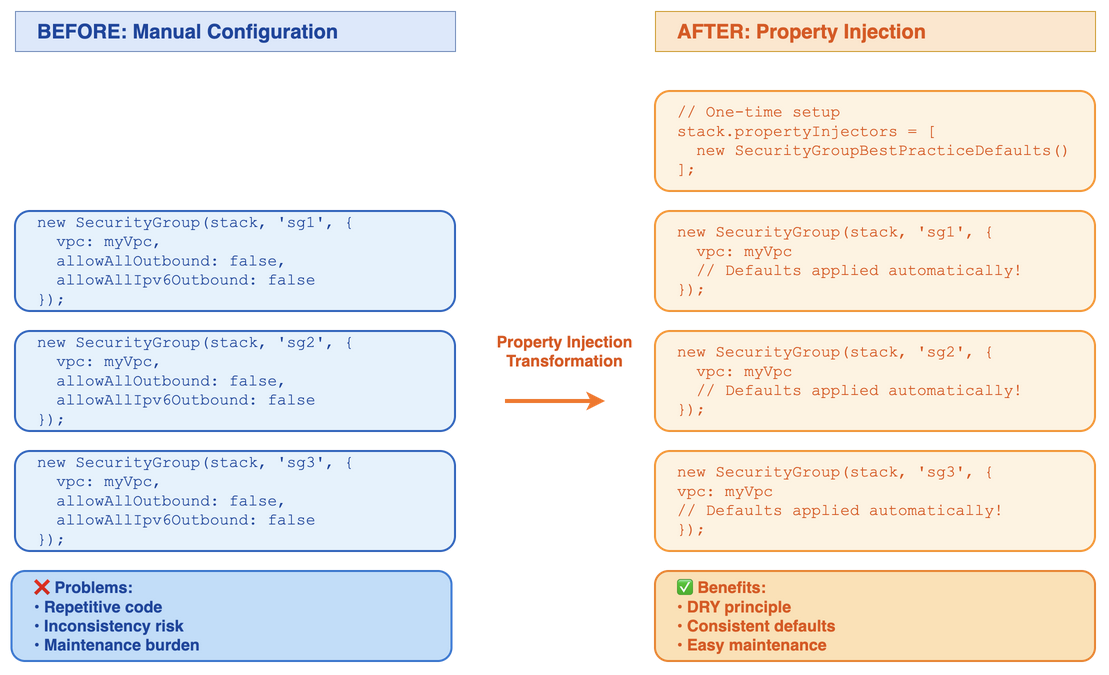
After implementing Property Injection, the same SecurityGroup creation requires only the vpc parameter, security defaults are applied automatically:
// Your existing code remains unchanged
new SecurityGroup(stack, 'my-sg', {
  vpc: myVpc
  // Security defaults applied automatically by Property Injection
});
The key benefits of this approach include:
Zero-impact adoption: Existing CDK code continues to work without modification
Centralized policy management: Standards are defined once and applied automatically
Consistent enforcement: Policies are applied uniformly across all applications and teams
Reduced maintenance overhead: Policy updates require changes in only one location
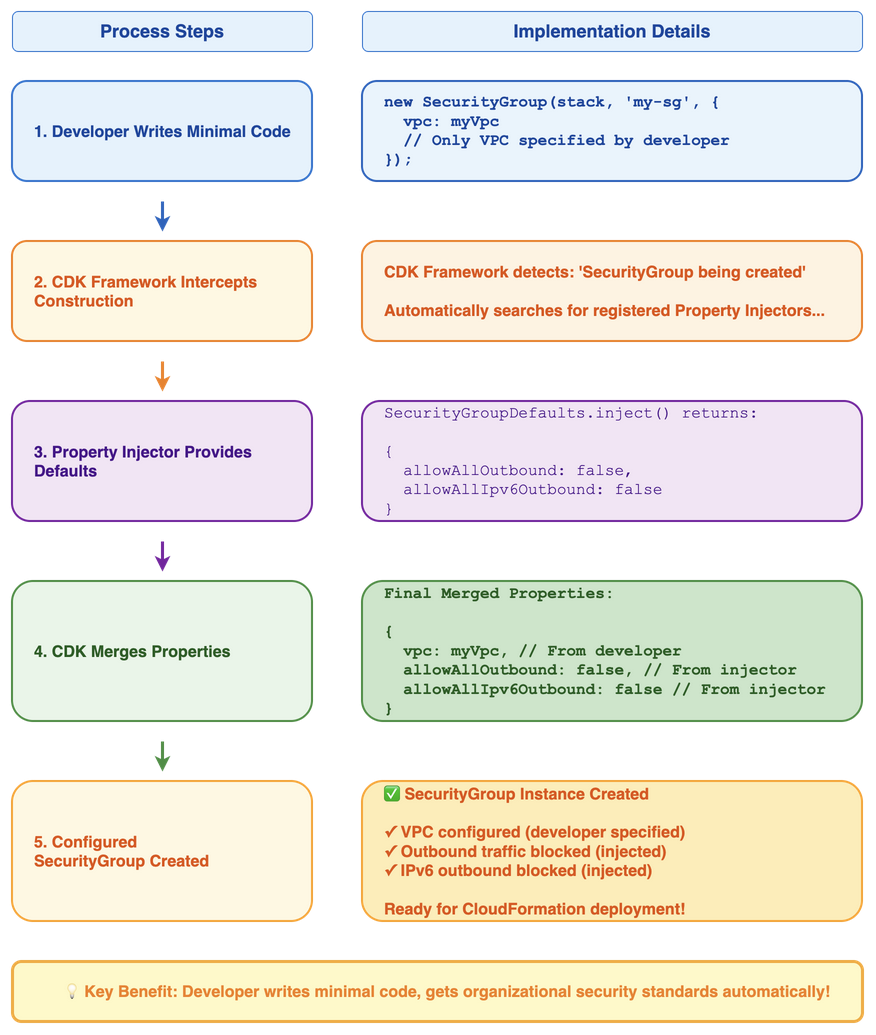
Figure 1: CDK Property Injection Mechanism
Property Injection operates transparently within CDK, intercepting construct creation to apply predefined defaults before merging them with any properties explicitly provided by developers. This ensures that organizational standards are consistently applied while maintaining the flexibility for developers to override defaults when specific use cases require it.
Understanding the Implementation Approach
Property Injection works by implementing the IPropertyInjector interface, which allows you to define default properties for specific construct types. These injectors are registered with CDK stacks and automatically apply their defaults during construct instantiation. The implementation follows three steps: define the defaults you want to apply, register the injector with your stack, and let CDK handle the automatic application of these defaults to matching constructs.
Implementation Guide
This section shows you how to implement Property Injection for SecurityGroup constructs.
Step 1: Create a Property Injector
Create a class that implements the IPropertyInjector interface:
import { Stack } from 'aws-cdk-lib';
import { SecurityGroupDefaults } from './security-defaults';

const stack = new Stack(app, 'MyStack', {
  propertyInjectors: [
    new SecurityGroupDefaults()
  ]
});
Step 3: Use Constructs Normally
Create constructs as usual. The injector applies defaults automatically:
// This SecurityGroup receives the injected defaults:
// - allowAllOutbound: false
// - allowAllIpv6Outbound: false
new SecurityGroup(stack, 'my-sg', {
  vpc: myVpc
});

// You can override defaults when necessary
new SecurityGroup(stack, 'special-sg', {
  vpc: myVpc,
  allowAllOutbound: true  // Overrides the injected default
});
Figure 2: CDK Code Before vs After Property Injection
Property Injection vs L2 Constructs
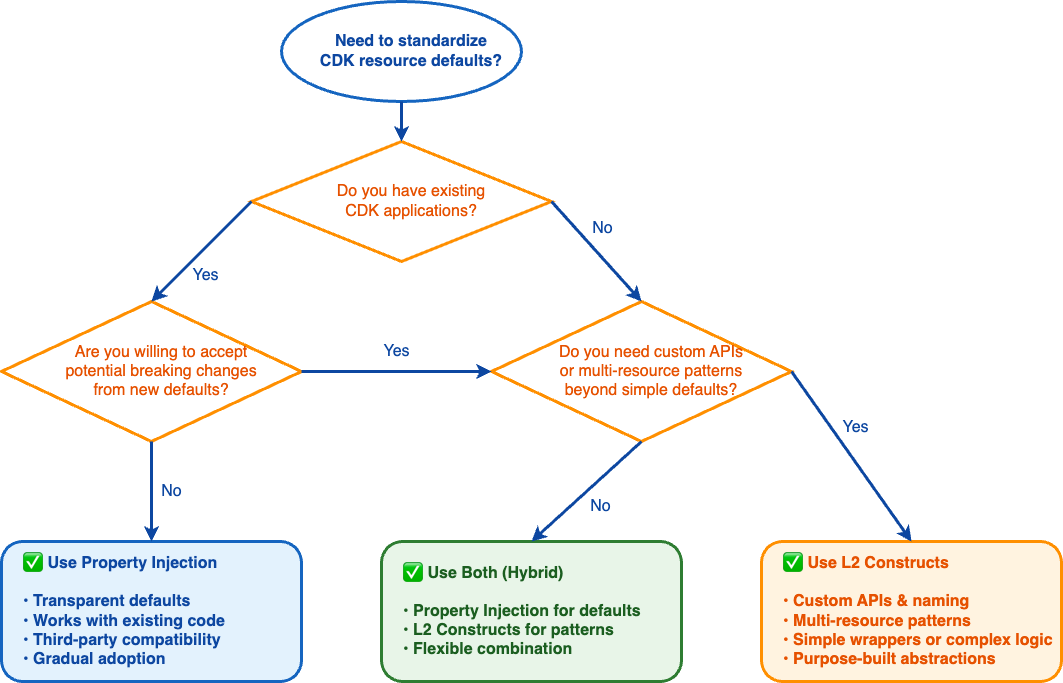
You can achieve the same enforcement of default properties by creating custom L2 constructs with built-in defaults. However, Property Injection is better suited for standardizing existing codebases without refactoring, while L2 Constructs are better suited for new projects where you want custom APIs and multi-resource abstractions.
Figure 3: Decision Tree – Property Injection vs L2 Constructs
Implementation Comparison
Consider an application with multiple SecurityGroup instantiations that need standardized security defaults.
L2 Construct approach requires creating a custom construct and updating each instantiation:
// Step 1: Create custom L2 construct
export class SecureSecurityGroup extends SecurityGroup {
  constructor(scope: Construct, id: string, props: SecurityGroupProps) {
    super(scope, id, {
      allowAllOutbound: false,
      allowAllIpv6Outbound: false,
      ...props
    });
  }
}

// Step 2: Update each instantiation throughout your codebase
// Change from:
new SecurityGroup(stack, 'sg1', { vpc: myVpc })
new SecurityGroup(stack, 'sg2', { vpc: myVpc })
new SecurityGroup(stack, 'sg3', { vpc: myVpc })

// To:
new SecureSecurityGroup(stack, 'sg1', { vpc: myVpc })
new SecureSecurityGroup(stack, 'sg2', { vpc: myVpc })
new SecureSecurityGroup(stack, 'sg3', { vpc: myVpc })
Property Injection works with existing construct calls, requiring no changes to how developers instantiate SecurityGroups or other constructs. This approach overrides constructs from external libraries and can be implemented without modifying existing code. Developers continue using familiar CDK APIs without learning new interfaces.
L2 Constructs require updating all constructor calls throughout your codebase. This approach cannot modify third-party construct creation since you must change each instantiation to use your custom construct. Implementation requires refactoring existing code and developers must learn your custom construct APIs instead of standard CDK interfaces. L2 constructs serve multiple purposes beyond complex business logic – simple L2 constructs provide domain-specific naming conventions and cleaner APIs, while complex L2 constructs orchestrate three or more resources and implement business rules.
When to Choose Each Approach
Choose Property Injection when you need to standardize existing infrastructure. Property Injection excels in scenarios where you already have CDK applications deployed and need to apply consistent defaults retroactively. Property Injection works transparently with existing code, requiring no changes to how developers instantiate constructs. This makes it useful when you have existing CDK applications that you want to standardize without disrupting current development workflows.
Property Injection also solves the challenge of applying defaults to constructs from third-party libraries. Since you cannot modify external library code, Property Injection enforces organizational standards on any construct type, regardless of its source. Additionally, when you want to implement standards without changing existing code, Property Injection operates at the framework level, automatically applying defaults during construct instantiation without requiring developers to modify their existing implementations.
Choose L2 Constructs when you need custom APIs or multi-resource patterns. L2 Constructs provide the right abstraction when you want to create purpose-built interfaces that differ from standard CDK APIs. This includes simple wrappers with domain-specific naming, complex business logic, validation rules, or multi-resource orchestration patterns. L2 Constructs excel when you want to create opinionated APIs that simplify common patterns by hiding complexity behind intuitive interfaces.
L2 Constructs suit new application development where you can design the API from the start. This approach creates purpose-built abstractions that match your organization’s specific use cases and terminology. Unlike Property Injection, which applies defaults to existing construct APIs, with L2 Constructs you can design entirely new APIs that directly represent your business domain and operational patterns.
Implementation Patterns
Stack Integration Methods
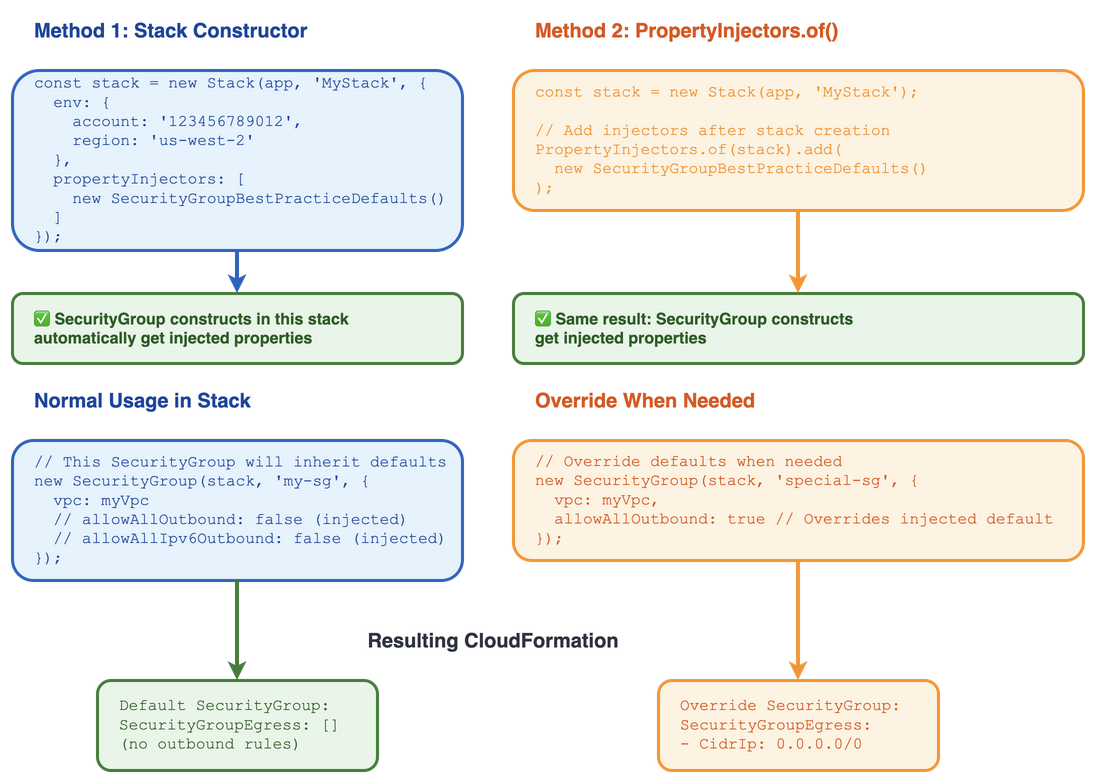
The CDK provides two methods for adding Property Injectors to stacks:
const stack = new Stack(app, 'MyStack');
PropertyInjectors.of(stack).add(new SecurityGroupDefaults());
Both methods produce the same result. Choose the method that best fits your existing code structure. For more details, see the PropertyInjectors API documentation.
Organization-Wide Implementation
For organization-wide standardization, create a shared library of injectors:
// @myorg/cdk-injectors package
export const ORGANIZATION_INJECTORS: IPropertyInjector[] = [
  new SecurityGroupDefaults(),
  new LambdaFunctionDefaults(),
  new S3BucketDefaults(),
];

// Teams import and use the shared injectors
import { ORGANIZATION_INJECTORS } from '@myorg/cdk-injectors';

const stack = new Stack(app, 'TeamStack', {
  propertyInjectors: ORGANIZATION_INJECTORS
});
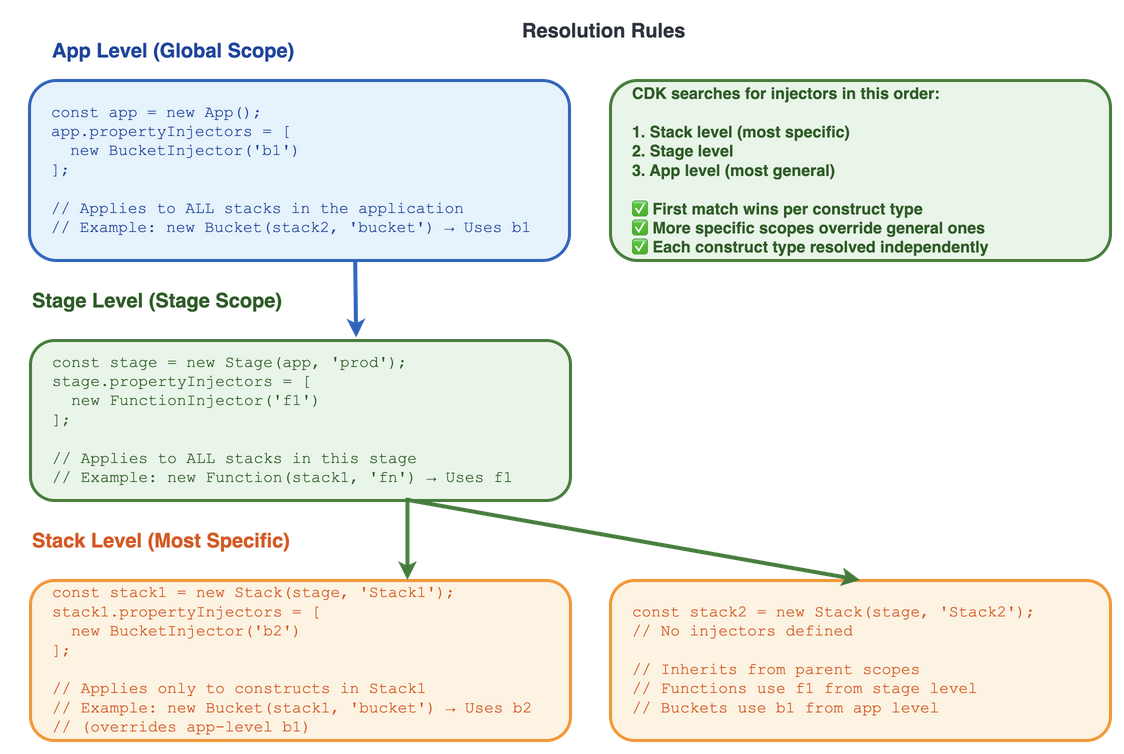
Scope Hierarchy
Property Injectors can be applied at different levels in the CDK construct tree:
App level: Applies to all stacks in the application
Stage level: Applies to all stacks within a specific stage
Stack level: Applies only to constructs within a specific stack
CDK searches for applicable injectors starting from the construct’s immediate parent scope and moving upward. The first matching injector for each construct type is used.
Best Practices
When implementing Property Injection, begin with high-impact constructs like SecurityGroups, VPCs, and Lambda functions that require repetitive configuration.
These constructs have the highest frequency of misconfiguration and the most direct compliance impact, making them the most valuable targets for early adoption.
Document your defaults by explaining what properties your injectors provide and why. Include examples and link to relevant policies that drive the requirements. With this documentation, developers can understand standards and make informed override decisions.
Write automated tests using CDK testing utilities to verify that injectors apply expected defaults. Test both standard scenarios and cases where developers override properties to prevent regressions when updating injector logic.
Version injectors carefully using semantic versioning principles because changes affect all applications. Coordinate updates across teams and provide migration guides for breaking changes or changes to default values.
Design override mechanisms so that developers can handle edge cases while benefiting from organizational standards. Property Injection operates as defaults, not restrictions, so design injectors to merge gracefully with developer-specified properties.
Limitations and Considerations
Property Injection operates as a default mechanism rather than a compliance enforcement system. Developers retain the ability to override injected properties, which means organizations cannot rely solely on Property Injection for strict compliance requirements. For teams that need mandatory compliance, combine Property Injection with CDK Aspects or AWS Config rules to validate and enforce standards.
The feature works exclusively with L2 constructs, as documented in the official AWS CDK guidance. The IPropertyInjector interface targets specific L2 construct types, and L1 (CloudFormation) constructs use different instantiation patterns that bypass the property injection mechanism entirely. Organizations with L1 construct usage need alternative standardization approaches.
Property Injection introduces debugging complexity because injected properties do not appear directly in application code. Developers troubleshooting construct behavior must understand which injectors apply to specific construct types and how those injectors modify properties. This hidden behavior requires documentation that lists each injector, the properties it sets, and the policy it enforces, along with clear naming conventions to maintain code clarity.
The feature requires CDK v2.196.0 or later, which affects adoption timelines for organizations using older CDK versions. Teams must plan upgrade paths and test compatibility before implementing Property Injection across their applications.
Conclusion
Property Injection provides a mechanism for applying consistent default properties to CDK constructs without requiring changes to existing code. This approach reduces repetitive configuration, improves consistency, and simplifies maintenance of CDK applications. Property Injection is the right choice for organizations that need to standardize construct configurations across existing codebases while preserving developer workflows. When combined with proper testing and documentation, Property Injection becomes a reliable foundation for infrastructure governance across your organization.
To provide the best experiences, we use technologies like cookies to store and/or access device information. Consenting to these technologies will allow us to process data such as browsing behavior or unique IDs on this site. Not consenting or withdrawing consent, may adversely affect certain features and functions.
Functional
Always active
The technical storage or access is strictly necessary for the legitimate purpose of enabling the use of a specific service explicitly requested by the subscriber or user, or for the sole purpose of carrying out the transmission of a communication over an electronic communications network.
Preferences
The technical storage or access is necessary for the legitimate purpose of storing preferences that are not requested by the subscriber or user.
Statistics
The technical storage or access that is used exclusively for statistical purposes.The technical storage or access that is used exclusively for anonymous statistical purposes. Without a subpoena, voluntary compliance on the part of your Internet Service Provider, or additional records from a third party, information stored or retrieved for this purpose alone cannot usually be used to identify you.
Marketing
The technical storage or access is required to create user profiles to send advertising, or to track the user on a website or across several websites for similar marketing purposes.