Security updates for Thursday

Post Syndicated from jake original https://lwn.net/Articles/976006/

Security updates have been issued by Debian (python-pymysql), Fedora (chromium, mingw-python-requests, and thunderbird), Mageia (perl-Email-MIME and qtnetworkauth5 & qtnetworkauth6), Red Hat (gdisk and python39:3.9 and python39-devel:3.9 modules), SUSE (freerdp, gdk-pixbuf, gifsicle, glib2, java-1_8_0-ibm, kernel, libfastjson, libredwg, nodejs16, python, python3, python36, rpm, warewulf4, and xdg-desktop-portal), and Ubuntu (gst-plugins-base1.0, python-werkzeug, and tpm2-tss).

Cloudflare acquires BastionZero to extend Zero Trust access to IT infrastructure

Post Syndicated from Kenny Johnson original https://blog.cloudflare.com/cloudflare-acquires-bastionzero


We’re excited to announce that BastionZero, a Zero Trust infrastructure access platform, has joined Cloudflare. This acquisition extends our Zero Trust Network Access (ZTNA) flows with native access management for infrastructure like servers, Kubernetes clusters, and databases.

Security teams often prioritize application and Internet access because these are the primary vectors through which users interact with corporate resources and external threats infiltrate networks. Applications are typically the most visible and accessible part of an organization’s digital footprint, making them frequent targets for cyberattacks. Securing application access through methods like Single Sign-On (SSO) and Multi-Factor Authentication (MFA) can yield immediate and tangible improvements in user security.

However, infrastructure access is equally critical and many teams still rely on castle-and-moat style network controls and local resource permissions to protect infrastructure like servers, databases, Kubernetes clusters, and more. This is difficult and fraught with risk because the security controls are fragmented across hundreds or thousands of targets. Bad actors are increasingly focusing on targeting infrastructure resources as a way to take down huge swaths of applications at once or steal sensitive data. We are excited to extend Cloudflare One’s Zero Trust Network Access to natively protect infrastructure with user- and device-based policies along with multi-factor authentication.

Application vs. infrastructure access

Application access typically involves interacting with web-based or client-server applications. These applications often support modern authentication mechanisms such as Single Sign-On (SSO), which streamline user authentication and enhance security. SSO integrates with identity providers (IdPs) to offer a seamless and secure login experience, reducing the risk of password fatigue and credential theft.

Infrastructure access, on the other hand, encompasses a broader and more diverse range of systems, including servers, databases, and network devices. These systems often rely on protocols such as SSH (Secure Shell), RDP (Remote Desktop Protocol), and Kubectl (Kubernetes) for administrative access. The nature of these protocols introduces additional complexities that make securing infrastructure access more challenging.

  • SSH Authentication: SSH is a fundamental tool for accessing Linux and Unix-based systems. SSH access is typically facilitated through public key authentication, through which a user is issued a public/private key pair that a target system is configured to accept. These keys must be distributed to trusted users, rotated frequently, and monitored for any leakage. If a key is accidentally leaked, it can grant a bad actor direct control over the SSH-accessible resource.
  • RDP Authentication: RDP is widely used for remote access to Windows-based systems. While RDP supports various authentication methods, including password-based and certificate-based authentication, it is often targeted by brute force and credential stuffing attacks.
  • Kubernetes Authentication: Kubernetes, as a container orchestration platform, introduces its own set of authentication challenges. Access to Kubernetes clusters involves managing roles, service accounts, and kubeconfig files along with user certificates.

Infrastructure access with Cloudflare One today

Cloudflare One facilitates Zero Trust Network Access (ZTNA) for infrastructure resources with an approach superior to traditional VPNs. An administrator can define a set of identity, device, and network-aware policies that dictate if a user can access a specific IP address, hostname, and/or port combination. This allows you to create policies like “Only users in the identity provider group ‘developers’ can access resources over port 22 (default SSH port) in our corporate network,” which is already much finer control than a VPN with basic firewall policies would allow.

However, this approach still has limitations, as it relies on a set of assumptions about how corporate infrastructure is provisioned and managed. If an infrastructure resource is configured outside of the assumed network structure, e.g. SSH over a non-standard port is allowed, all network-level controls may be bypassed. This leaves only the native authentication protections of the specific protocol protecting that resource and is often how leaked SSH keys or database credentials can lead to a wider system outage or breach.

Many organizations will leverage more complex network structures like a bastion host model or complex Privileged Access Management (PAM) solutions as an added defense-in-depth strategy. However, this leads to significantly more cost and management overhead for IT security teams and sometimes complicates challenges related to least-privileged access. Tools like bastion hosts or PAM solutions end up eroding least-privilege over time because policies expand, change, or drift from a company’s security stance. This leads to users incorrectly retaining access to sensitive infrastructure.

How BastionZero fits in

While our goal for years has been to help organizations of any size replace their VPNs as simply and quickly as possible, BastionZero expands the scope of Cloudflare’s VPN replacement solution beyond apps and networks to provide the same level of simplicity for extending Zero Trust controls to infrastructure resources. This helps security teams centralize the management of even more of their hybrid IT environment, while using standard Zero Trust practices to keep DevOps teams productive and secure. Together, Cloudflare and BastionZero can help organizations replace not only VPNs but also bastion hosts; SSH, Kubernetes, or database key management systems; and redundant PAM solutions.

BastionZero provides native integration to major infrastructure access protocols and targets like SSH, RDP, Kubernetes, database servers, and more to ensure that a target resource is configured to accept connections for that specific user, instead of relying on network level controls. This allows administrators to think in terms of resources and targets, not IP addresses and ports. Additionally, BastionZero leverages OpenPubKey, an open source library that uses two forms of authentication to generate an OpenID Connect (OIDC) token, which avoids single point of failure risks inherent to a standalone Identity Provider.

BastionZero will add the following capabilities to Cloudflare’s SASE platform:

  • The elimination of long-lived keys/credentials through frictionless infrastructure privileged access management (PAM) capabilities that modernize credential management (e.g., SSH keys, kubeconfig files, database passwords) through a new ephemeral, decentralized approach.
  • A DevOps-based approach for securing SSH connections to support least privilege access that records sessions and logs every command for better visibility to support compliance requirements. Teams can operate in terms of auto-discovered targets, not IP addresses or networks, as they define just-in-time access policies and automate workflows.
  • Clientless RDP to support access to desktop environments without the overhead and hassle of installing a client on a user’s device.

What’s next for BastionZero

The BastionZero team will be focused on integrating their infrastructure access controls directly into Cloudflare One. During the third and fourth quarters of this year, we will be announcing a number of new features to facilitate Zero Trust infrastructure access via Cloudflare One. All functionality delivered this year will be included in the Cloudflare One free tier for organizations less than 50 users. We believe that everyone should have access to world-class security controls.

We are looking for early beta testers and teams to provide feedback about what they would like to see with respect to infrastructure access. If you are interested in learning more, please sign up here.

Monitor new Zabbix releases natively

Post Syndicated from Brian van Baekel original https://blog.zabbix.com/monitor-new-zabbix-releases-natively/28105/

In this blog post, I’ll guide you through building your own template to monitor the latest Zabbix releases directly from the Zabbix UI. Follow the simple walkthrough to know how.

Introduction

With the release of Zabbix 7.0, it is possible to see which Zabbix version you are running and what the latest version is:

A great improvement obviously but (at least in 7.0.0rc1) I am missing the triggers to notify me and perhaps also really interesting, there is nothing available about older versions.

Once I saw the above screenshot, I became curious about where that data actually came from, and what’s available. A quick deep-dive into the sourcecode ( https://git.zabbix.com/projects/ZBX/repos/zabbix/browse/ui/js/class.software-version-check.js#18 ) gave away the URL that is used for this feature: https://services.zabbix.com/updates/v1 Once you visit that URL you will get a nice JSON formatted output:

{
  "versions": [
    {
      "version": "5.0",
      "end_of_full_support": true,
      "latest_release": {
        "created": "1711361454",
        "release": "5.0.42"
      }
    },
    {
      "version": "6.0",
      "end_of_full_support": false,
      "latest_release": {
        "created": "1716274679",
        "release": "6.0.30"
      }
    },
    {
      "version": "6.4",
      "end_of_full_support": false,
      "latest_release": {
        "created": "1716283254",
        "release": "6.4.15"
      }
    }
  ]
}

And as you may know, Zabbix is quite good at parsing JSON formatted data. So, I built a quick template to get this going and be notified once a new version is released.

In the examples below I used my 6.4 instance, but this also works on 6.0 and of course 7.0.

Template building

Before we jump into the building part, it’s important to think of the best approach for this template. I think there are 2:

  • Create 1 HTTP item and a few dependent items for the various versions
  • Create 1 HTTP item, a LLD rule and a few item prototypes.

I prefer the LLD route, as that is making the template as dynamic as possible (less time to maintain it) but also more fun to build!

Let’s go.

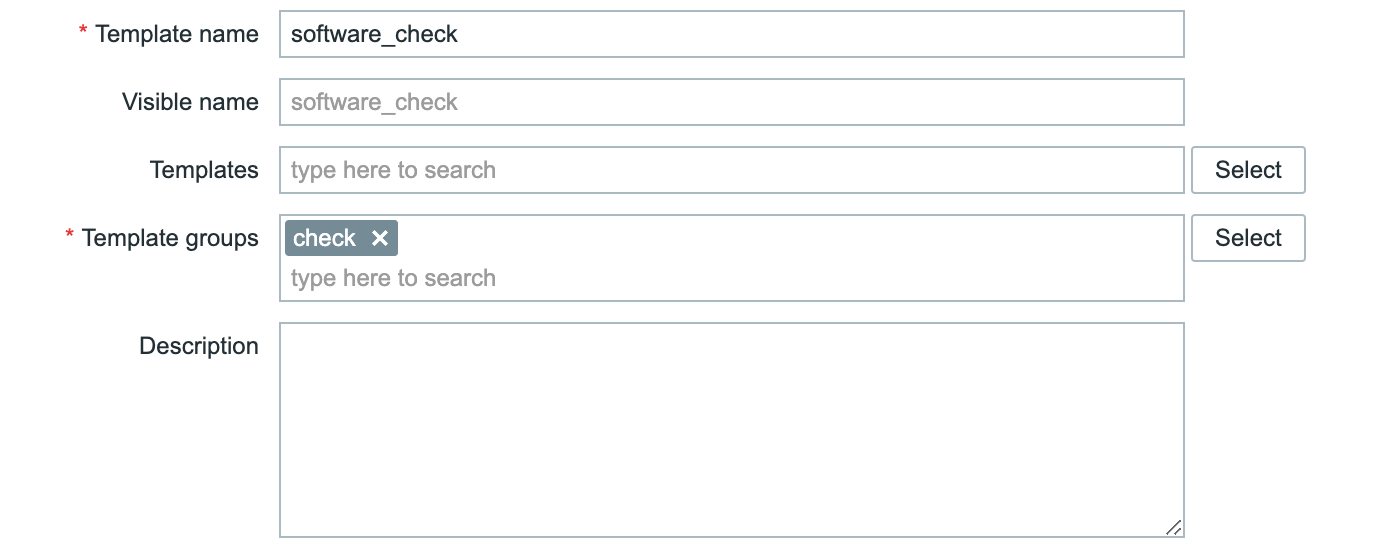
First, you go to Data Collection -> Templates and create a new template there:

Of course, you can change the name of the template and the group. It’s completely up to you.

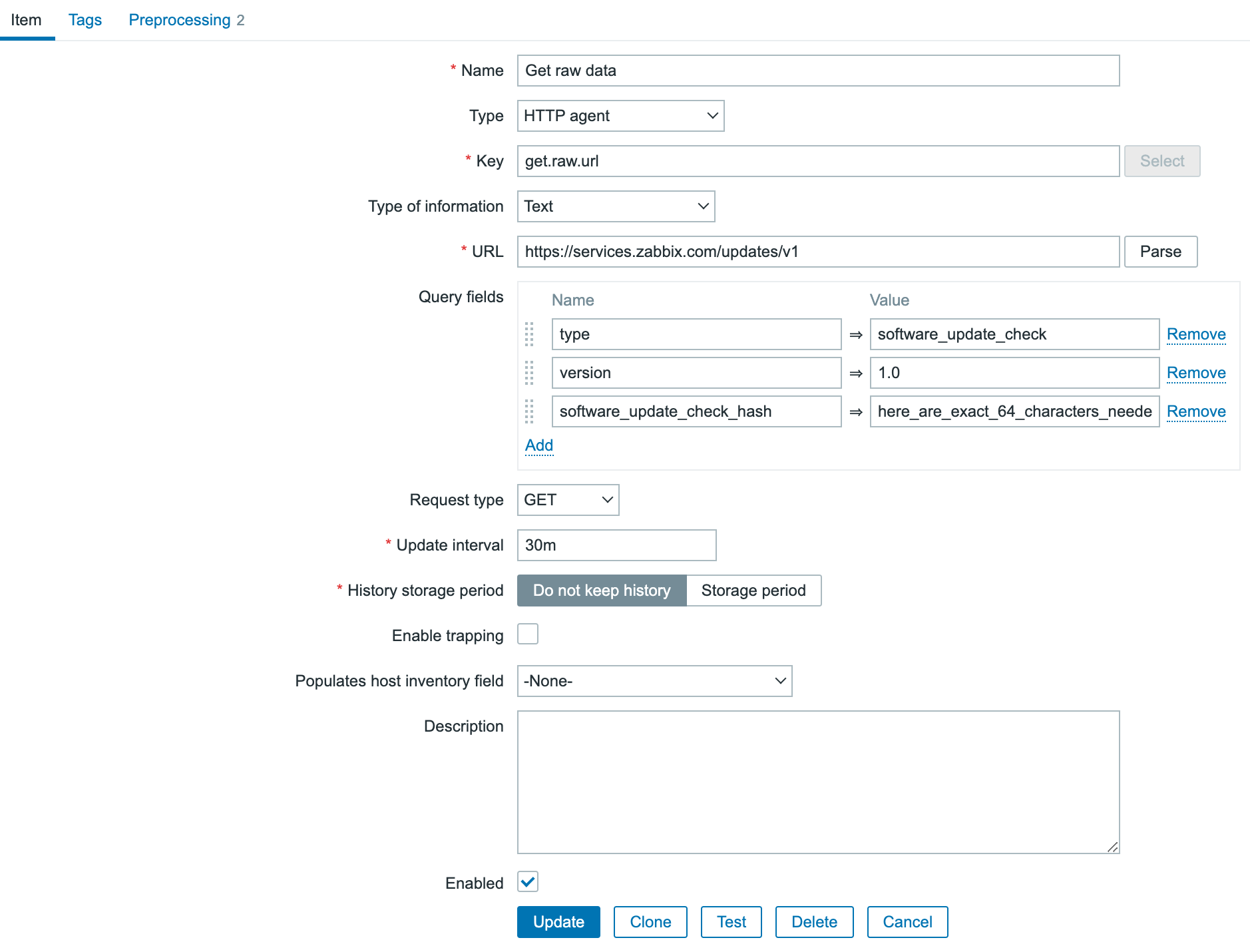
Once the template is created, it’s still an empty shell and we need to populate it. We will start with a normal item of type HTTP agent:

(note: screenshot is truncated)

We need to add 3 query fields:

  • ‘type’ with value ‘software_update_check’
  • ‘version’ with value ‘1.0’
  • ‘software_update_check_hash’ with a 64 characters: you can do funny things here 😉 for the example i just used ‘here_are_exact_64_characters_needed_as_a_custom_hash_for_zabbix_’

As we go for the LLD route, I already set the “History Storage period” to “Do not keep history”. If you are building the template, it’s advised to keep the history and make sure you’ve got data to work with for the rest of the template. Once everything works, go back to this item and make sure to change the History storage period.

In the above screenshot, you can see I applied 2 preprocessing steps already.

The first is to replace the text ‘versions’ with ‘data’. This is done because Zabbix expects an array ‘data’ for its LLD logic. That ‘data’ is not available, so I just replaced the text ‘versions’. Quick and dirty.
The second preprocessing step is a “discard unchanged with heartbeat”. As long as there is no new release, I do not care about the data that came in, yet I want to store it once per day to make sure the item is still working. With this approach, we monitor the URL every 30 minutes so we get ‘quick’ updates but still do not use a lot of disk space.

The result of the preprocessing configuration:

Now it’s time to hit the “test all steps” button and see if everything works. The result you’ll get is:

{
  "data": [
    {
      "version": "5.0",
      "end_of_full_support": true,
      "latest_release": {
        "created": "1711361454",
        "release": "5.0.42"
      }
    },
    {
      "version": "6.0",
      "end_of_full_support": false,
      "latest_release": {
        "created": "1716274679",
        "release": "6.0.30"
      }
    },
    {
      "version": "6.4",
      "end_of_full_support": false,
      "latest_release": {
        "created": "1716283254",
        "release": "6.4.15"
      }
    }
  ]
}

This is almost identical to the information directly from the URL, except that ‘versions’ is replaced by ‘data’. Great. So as soon as you save this item we will monitor the releases now (don’t forget to link the template to a host otherwise nothing will happen)!
At the same time, this information is absolutely not useful at all, as it’s just a text portion. We need to parse it, and LLD is the way to go.

In the template, we go to “Discovery rules” and click on “Create discovery rule” in the upper right corner.
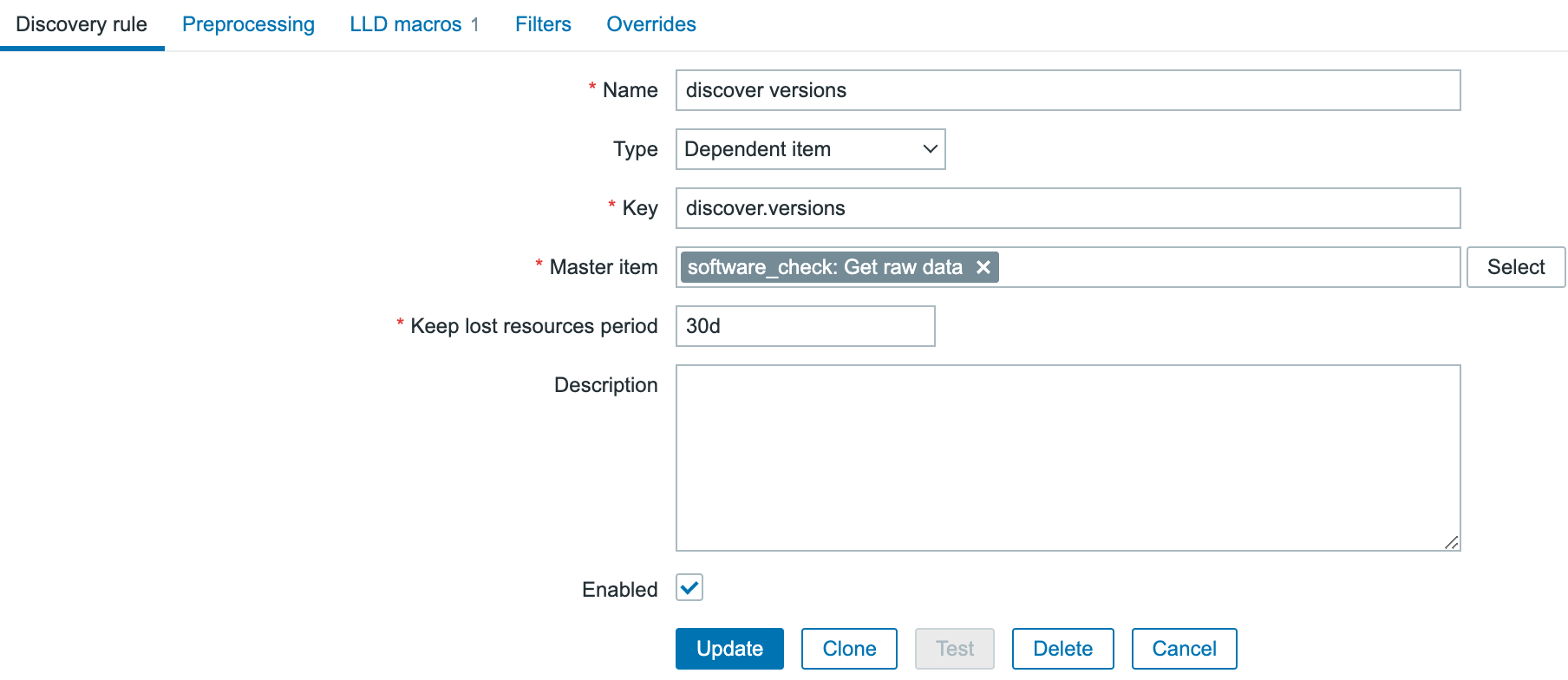
Now we create a new LLD rule, which is not going to query the website itself, but will get its information from the HTTP agent we’ve just created.

In the above screenshot, you see how it’s configured. a name, type ‘Dependent item’ some key just because Zabbix requires a key, and the Master item is the HTTP agent item we just created.

Now all data from the http agent item is pushed into the LLD rule as soon as it’s received, and we need to create LLD macros out of it. So in the Discovery rule, you jump to the 3rd tab ‘LLD macros’ and add a new macro there:

{#VERSION} with JSONPATH$..version.first()

Once this is done save the LLD rule and let’s create some item prototypes.

The first item prototype is the most complicated, the rest are “copy/paste”, more or less.

We create a new item prototype that looks like this:

As the type is dependent and it is getting all its information from the HTTP agent master item, there is preprocessing needed to filter out only that specific piece of information that is needed. You go to the preprocessing tab and add a JSONpath step there:


For copy/paste purposes: $.data.[?(@.version=='{#VERSION}’)].latest_release.created.first()
There is quite some magic happening in that step. We tell it to use a JSONpath to find the correct value, but there is also a lookup:

[?(@.version=='{#VERSION}')]

What we are doing here is telling it to go into the data array, look for an array ‘version’ with the value {#VERSION}. Of course that {#VERSION} LLD macro is going to be replaced dynamically by the discovery rule with the correct version. Once it found the version object, go in and find the object  ‘latest_release’ and from that object we want the value of ‘created’. Now we will get back the epoch time of that release, and in the item we parse that with Unit unixtime.

Save the item, and immediately clone it to create the 2nd item prototype to get the support state:

Here we change the type of information and of course the preprocessing should be slightly different as we are looking for a different object:

JSONPath:

$.data.[?(@.version=='{#VERSION}')].end_of_full_support.first()

Save this item as well, and let’s create our last item to get the minor release number presented:

The preprocessing is again slightly different:

JSONPath:

$.data.[?(@.version=='{#VERSION}')].latest_release.release.first()

At this point you should have 1 master item, 1 LLD rule and 3 Item prototypes.

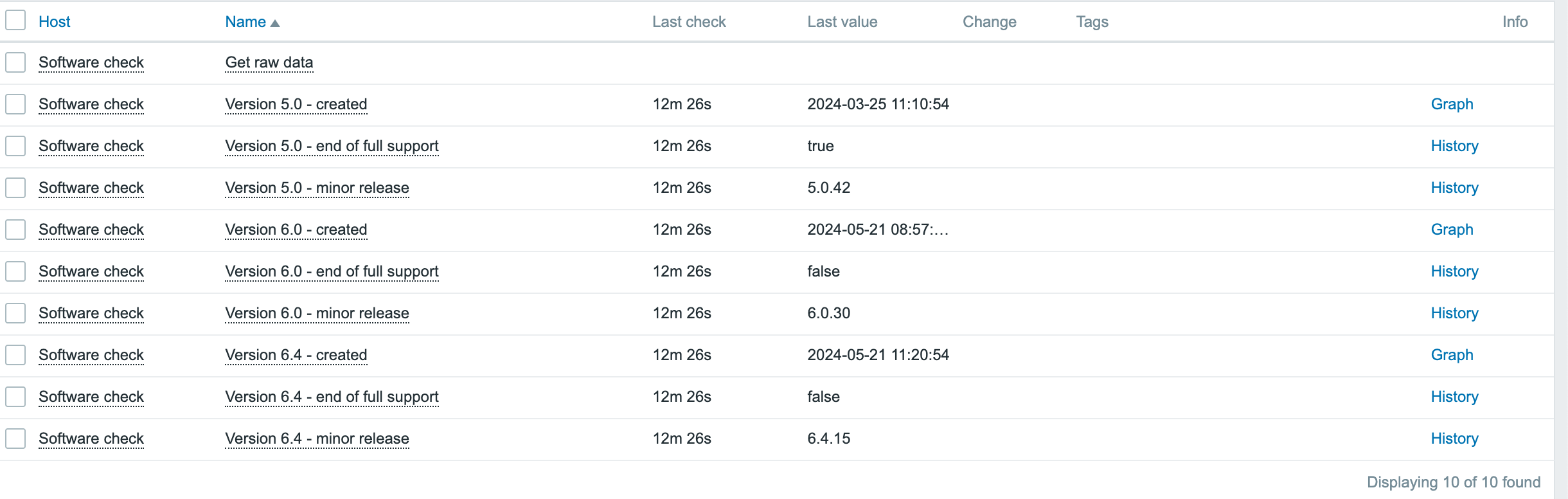
Now, create a new host, and link this template to it. Fairly quick you should see data coming in and everything should be nicely parsed:

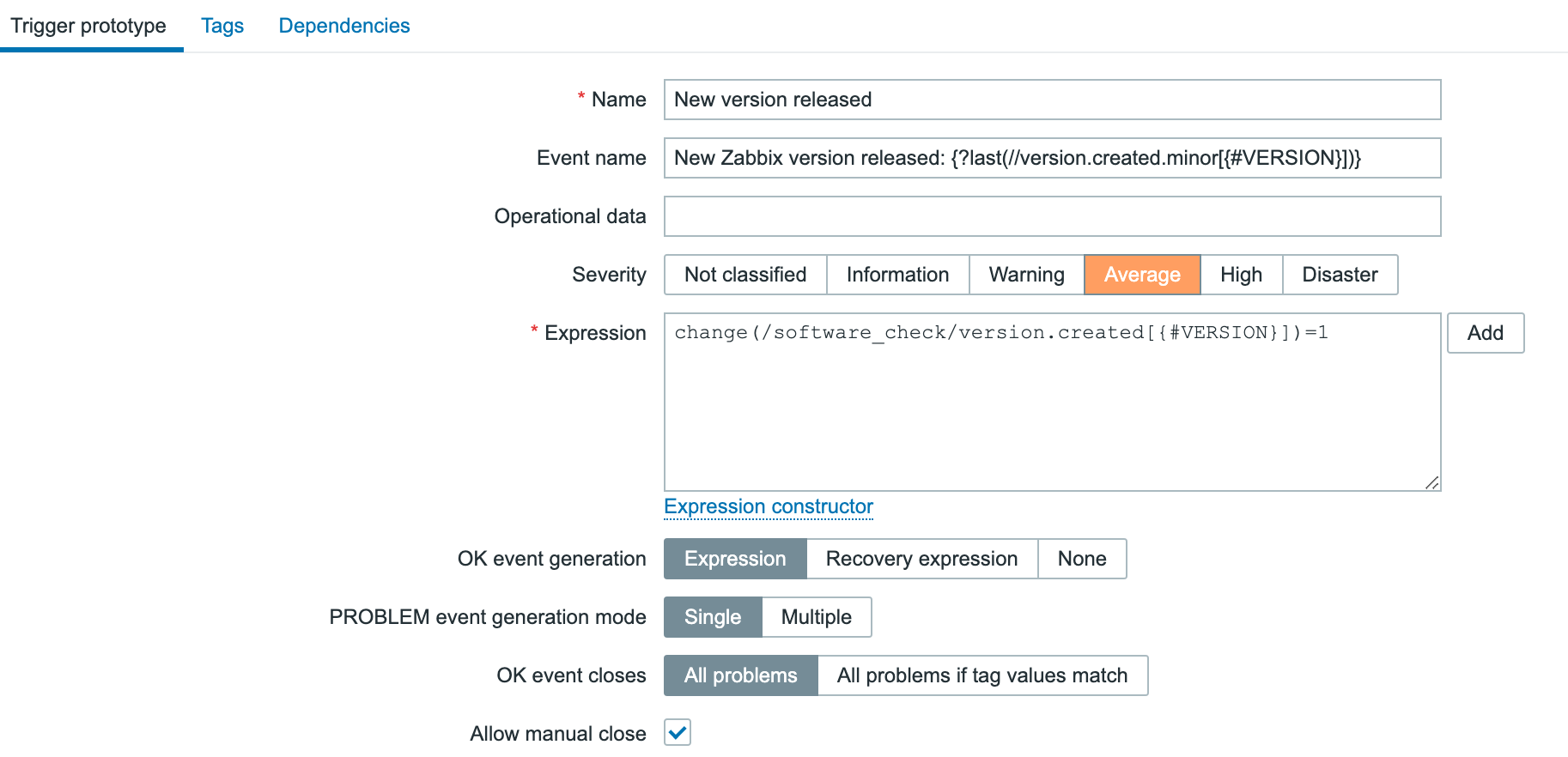
The only thing that is missing now is a trigger to get alerted once a new version has been released, so let’s go back into the template, discovery rule and find the trigger prototypes. Create a new one that looks like this:

Since we populated the even name as well, our problem name will reflect the most recent version already:


Enjoy your new template! 🙂

The post Monitor new Zabbix releases natively appeared first on Zabbix Blog.

Supply Chain Attack against Courtroom Software

Post Syndicated from Bruce Schneier original https://www.schneier.com/blog/archives/2024/05/supply-chain-attack-against-courtroom-software.html

No word on how this backdoor was installed:

A software maker serving more than 10,000 courtrooms throughout the world hosted an application update containing a hidden backdoor that maintained persistent communication with a malicious website, researchers reported Thursday, in the latest episode of a supply-chain attack.

The software, known as the JAVS Viewer 8, is a component of the JAVS Suite 8, an application package courtrooms use to record, play back, and manage audio and video from proceedings. Its maker, Louisville, Kentucky-based Justice AV Solutions, says its products are used in more than 10,000 courtrooms throughout the US and 11 other countries. The company has been in business for 35 years.

It’s software used by courts; we can imagine all sort of actors who want to backdoor it.

The Clubs Conference is coming back

Post Syndicated from Tom Hadfield original https://www.raspberrypi.org/blog/the-clubs-conference-is-coming-back/

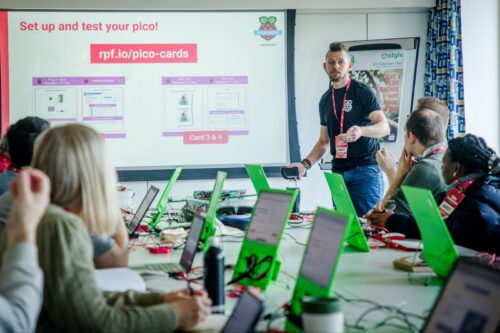
Following the huge success of last year’s Clubs Conference, we are delighted to announce that we will be hosting the second-ever Clubs Conference on Saturday 30 November and Sunday 1 December 2024 in Cambridge, UK.

Two educators at a conference.

The event will be a weekend of learning and connecting for volunteers and educators involved in Code Club, CoderDojo, and other initiatives we support. We’d love for you to join us!

What you can look forward to

This year, we’re bringing the conference home to our offices in the centre of Cambridge.

On Friday 29 November, you’ll have the opportunity to register early and attend an informal networking event with community members, including the Foundation team. 

Saturday 30 November and Sunday 1 December will be filled with learning and development opportunities for you, including:

  • Thought-provoking talks and discussions
  • Hands-on, easy-to-follow workshops exploring a range of coding and digital making activities and related topics
  • Opportunities to connect with a diverse range of volunteers and educators

Join us to learn from your peers running clubs in various contexts, develop your digital making skills, and share your own insights. We look forward to learning with you.

Two smiling educators hold the Code Club posters.

Interested in attending or contributing to the Clubs Conference?

If you think you might want to attend the Clubs Conference, please fill in our form to express your interest. We will then get in touch when you can book your tickets. Tickets will be £5 for both days combined.

An educator delivers a presentation during a workshop.

Part of what made last year’s Clubs Conference so special was the range of exciting activities led by community members. If you’d like to host or co-host an activity this year, please also indicate this in the expression of interest form. We’ll be in touch in a few weeks to ask you more about your plans.

Possible activities include:

  • Workshops
  • Discussion sessions
  • Talks
  • Project demonstrations

Check out last year’s talks for inspiration.

Bursaries for participants in the UK and Ireland

If you would love to participate but you feel the costs of travelling would prevent you, you may be able to apply for a travel bursary. 

To be eligible for a bursary, you need to:

  • Be registered as a club leader or volunteer at a Code Club or CoderDojo within the UK or Ireland
  • Be available to attend the Clubs Conference in Cambridge on both Saturday 30 November and Sunday 1 December 2024

Please let us know whether you require a travel bursary when you fill in the expression of interest form.

If you’re not in the UK or Ireland and have any questions about travel, please send us a message through our contact page using the subject ‘Clubs Conference’.

If you have any suggestions about the Clubs Conference, we’d love to hear them. Let us know through the contact page, or on social with the tag #ClubsCon24.

The post The Clubs Conference is coming back appeared first on Raspberry Pi Foundation.

Избори 2024 – секциите в чужбина

Post Syndicated from Боян Юруков original https://yurukov.net/blog/2024/izbori24-sekcii-2/

На 9-ти юни ще се проведат избори за Народно събрание и Европейски парламент. Остават само дни и имаме на разположение доста секции в чужбина, в които да упражним правото си на глас. Министерство на външните работи вече излезе с адресите на 673 места, където ще има 769 секции. В последните два дни промениха адресите на 5 от тях, което беше отразено на картата.

Ето няколко съвета по процедурата на гласуване и важни неща, които е добре да имате предвид:

  • Изборният ден започва в 7:00 сутринта местно време и свършва в 8:00 часа вечерта
  • Може да гласува всеки български гражданин независимо дали е подал заявление или не
  • Секциите отбелязани горе са актуални към 30-ти май. Възможно е в следващата седмица да има промени или корекции. Затова Ви препоръчвам да проверите преди изборния ден отново на картата и на сайта на МВнР.
  • Независимо от отбелязаната в заявлението Ви секция, може да гласувате където и да е в чужбина
  • При влизане в изборната секция кажете ясно дали искате да гласувате както за народно събрание, така и за европейски парламент или само за единия вот. Въз основа на това ще предоставят правилните декларации
  • В чужбина може да гласува всеки български гражданин независимо от обичайното му пребиваване. Това означава, че ако пътувате зад граница по работа или на почивка, може да упражните гласа си в близка до Вас секция. Отново, няма значение дали сте подавали заявление.
  • За Европейските парламент в чужбина може да гласуват само български граждани, чието обичайно пребиваване е в рамките на Европейския съюз. Това означава, че ако пътувате извън ЕС, но живеете в него, ще може все пак да гласувате за българските кандидати в секциите в посолствата ни след попълване на декларация.
  • За българските кандидати за Европейски парламент може да гласувате единствено, ако не сте гласували и нямате намерение да гласувате за кандидати на друга държава. След изборите има стриктна проверка за това.
  • Ако все пак сте в България по време на изборите, може да гласувате само по постоянен адрес. Тогава попълвате приложение 18, че не сте гласували в чужбина и са длъжни да Ви отбележат. Присъствате в списъка и след името Ви е отбелязано МВнР
  • В чужбина за народно събрание има възможност да гласувате само за партия/коалиция. Възможност за преференции, каквито има в страната, има само за европейски парламент. Причината за това е ефективното блокиране на МИР Чужбина от една страна и липсата на дистанционно гласуване от друга. Така гласът Ви само помага на конкретната коалиция да влезе в парламента. Запознайте се и с бюлетините за народно събрание и европейски парламент.
  • Препоръчвам да се гласува с машина. Гласуването с машина гарантира, че гласът Ви ще бъде преброен и няма шанс да бъде отбелязан като невалиден.
  • Препоръчвам да се гласува възможно най-рано, тъй като опитът показва, че с хартиено гласуване с напредването на деня стават струпвания на някои места. Ако имате съмнения и спомени за такива и имате друга близка секция с по-малко натоварване, препоръчваме да отидете там. На картата на Glasuvam.org може също да споделяте и преглеждате обратна връзка от други колко са чакали на това място.

В този смисъл, ако живеете в България, но на 9-ти сте на почивка или по работа извън страната, е достатъчно да отидете в която и да е секция зад граница с лична карта или паспорт и може да гласувате. Няма нужда от предварително заявление или други документи. Единственото ограничение е, че не може да гласувате с преференции за народно събрание, но можете за европейски парламент. Ако сте в Гърция, например, ще намерите адресите на секциите на картата.

The post Избори 2024 – секциите в чужбина first appeared on Блогът на Юруков.

Какъв искате да бъде вашият премиер?

Post Syndicated from Емилия Милчева original https://www.toest.bg/kakuv-iskate-da-bude-vashiyat-premier/

Какъв искате да бъде вашият премиер?

Предизборно скандалът с билбордовете с ликовете на Николай Денков (ПП–ДБ), Бойко Борисов (ГЕРБ) и Делян Пеевски (ДПС) и надпис „Какъв искате да бъде вашият премиер?“ може да се окаже по-ефективен от самите билбордове. По-всяка вероятност винилът с изображенията ще си стои до изборите на 9 юни, тъй като „Продължаваме промяната“ – „Демократична България“ обжалват решението на Централната избирателна комисия (ЦИК) за свалянето им. Върховният административен съд ще реши дали да ги има. 

ЦИК се произнесе по жалбата на ГЕРБ, откъдето се позоваха на чл. 183, ал. 4 от Изборния кодекс.

Забранява се използването на агитационни материали, които застрашават живота и здравето на гражданите, частната, общинската и държавната собственост и безопасността на движението, както и на материали, които накърняват добрите нрави, честта и доброто име на кандидатите. В агитационните материали се забранява използването на герба или знамето на Република България или на чужда държава, както и религиозни знаци или изображения.

В жалбата си от ПП–ДБ пък казват, че няма как въпросът за премиера да се окачестви като нарушение на добрите нрави, тъй като и Борисов, и Пеевски са заявявали, че са подходящи за поста. Спорът влезе в дневния ред на медиите, а Денков направи видеообръщение, в което призова Борисов на публичен дебат.

Разбрах, че Борисов се е разсърдил за един плакат. Защо? Не знам. За да няма сърдити, каня го на публичен дебат по някоя от обществените телевизии. И двамата сме били премиери, и двамата сега сме кандидати… Нека хората да видят и сами да преценят.

Какъв искате да бъде вашият премиер?
Снимка: „Продължаваме промяната“ / Facebook

Елементарно, Уотсън!

Но в кого всъщност е прицелен този билборд? Избирателите на ПП–ДБ и преди не са гласували за Борисов, респективно ГЕРБ, нито за санкционирания за корупция от САЩ и Великобритания Пеевски. Нещо повече – протестирали са срещу тях, „мафията“ и „завладяната държава“ и бяха обявили, че никога няма да се коалират с ГЕРБ. За ДПС дори и дума не ставаше. Но все пак ги получиха пакетно, сглобени като евроатлантическо и конституционно мнозинство, с куп закони и някои кадрови попълнения на регулатори като Българската народна банка например.

Така че подобни визуализации са и обидни за избирателите на ПП–ДБ – високообразовани, предимно градски хора, както показват данни от екзитполовете на последните избори. 

Негласуващите също няма да се възпламенят от билбордовете, за да подкрепят политическата сила, която издигна акад. Николай Денков за премиер. Впрочем казва ли тази политическа сила, че Денков ще бъде отново нейната номинация за министър-председател? До момента няма такъв сигнал. За негласуващите и апатичните ще са нужни много повече усилия от един билборд с плашила. 

На теория за лидера на ГЕРБ съществуват опции да стане премиер за четвърти път, тъй като се очертава партията му да е първа политическа сила. Практиката обаче показва, че партийните лидери вече не се котират за министър-председатели поради трудните коалиции. Съпредседателят на ДПС Пеевски няма никакви шансове – не само заради санкциите за корупция, но и заради незаличимата си кариера на олигарх. А министерски пост би бил твърде незначителен за този български могул. Също като един от своите ментори – почетния председател на ДПС Ахмед Доган, той предпочита ролята на кукловод. 

Не е най-добрият маркетинг

В бизнеса или в политиката умният маркетингов подход не е окалване на конкуренцията, а изтъкване на собствените силни страни. Концепцията за т.нар. положително позициониране препоръчва да се избягва директната критика на конкурентни продукти или услуги. Причината е, че това може да повлияе негативно на имиджа, понеже се тълкува като отчаян ход. В политическата история на Прехода влезе примерът с доклада, който през 2001 г. президентът Петър Стоянов извади срещу конкурента си Богомил Бонев – и в крайна сметка спечели Георги Първанов.

Нямаха особен ефект един сайт и клип от 2009 г., за чийто създател беше сочен тогавашният съветник на премиера Станишев Азер Меликов. „Ако подкрепиш Бойко, печели Костов!“ беше посланието и на клипа, и на сайта boykostov.org. Но отговорът дойде от само себе си – гласуваш ли за Станишев, получаваш и Доган, а същото лято ГЕРБ, явяваща се за първи път на парламентарни избори, победи с рекордните 1 678 641 гласа. Днес се бори за не повече от 700 000.

Така че печелившата тактика в тази кампания на разделение, насъскване и омраза би била да се подчертаят уникалните характеристики и предимства на едните пред другите.

Смятат ли лидерите на ПП–ДБ, че Борисов не е подходящ за министър-председател, след като печели почти всички избори от повече от десетилетие? Борисов червена линия ли е за коалиране? Ами Пеевски? Това са въпроси, чиито отговори не могат да чакат за-след-изборите, нито да бъдат оставени на досещане по подразбиране от феновете на билбордовете с „Какъв искате да бъде вашият премиер“. 

Тактика с билбордове

Някои казват, че билбордовете са демоде, но съвсем не са изживели времето си, стига да бъдат добре интегрирани в по-широка мултимедийна стратегия, поставени в зони с висок трафик и насочени към конкретни демографски групи.

Например през 2020 г. по време на президентската кампания на Байдън–Харис в различните щати в САЩ бяха поставяни билбордове с различни послания. В Питсбърг и Филаделфия в щата Пенсилвания те съдържаха съобщения за плановете на Байдън за здравеопазване и работни места, насочени към „сините якички“. В Детройт, щата Мичиган, акцентът беше върху възстановяването на автомобилната индустрия и подкрепата за профсъюзите, а в Милуоки, Уисконсин, бяха фокусирани върху расовата справедливост и реформата на полицията.

В българските кампании билбордовете по традиция показват политици в цял ръст или до кръста, често със скръстени ръце, предизборен слоган и номер на бюлетината (плюс преференция). Понякога, но само понякога, има любопитни заявки като онази на кандидата за президент на „Ред, законност, справедливост“ Атанас Семов през 2011 г. На неговия плакат стоеше надпис „Ще уволня Бойко Борисов“. Но Борисов изкара още два управленски мандата, а Семов стана конституционен съдия.

Какъв искаме да бъде следващият премиер ли? За начало – смел лидер и почтен човек. 

Let’s Encrypt Continues Partnership with Princeton to Bolster Internet Security

Post Syndicated from Let's Encrypt original https://letsencrypt.org/2024/05/30/princeton-partnership/

Let’s Encrypt is proud to have been partnering with the Center for Information Technology Policy team at Princeton University since 2018 to bolster defenses against Border Gateway Protocol (BGP) attacks. We’re thrilled to continue this partnership thanks to renewed funding from the Open Technology Fund.

“Let’s Encrypt has played a pivotal role in driving our research around protecting against BGP attacks and preventing the disruption such attacks can cause. We’re grateful for the partnership with Let’s Encrypt, as the largest Certificate Authority, in this critical work.” – Jennifer Rexford, Provost, Princeton University

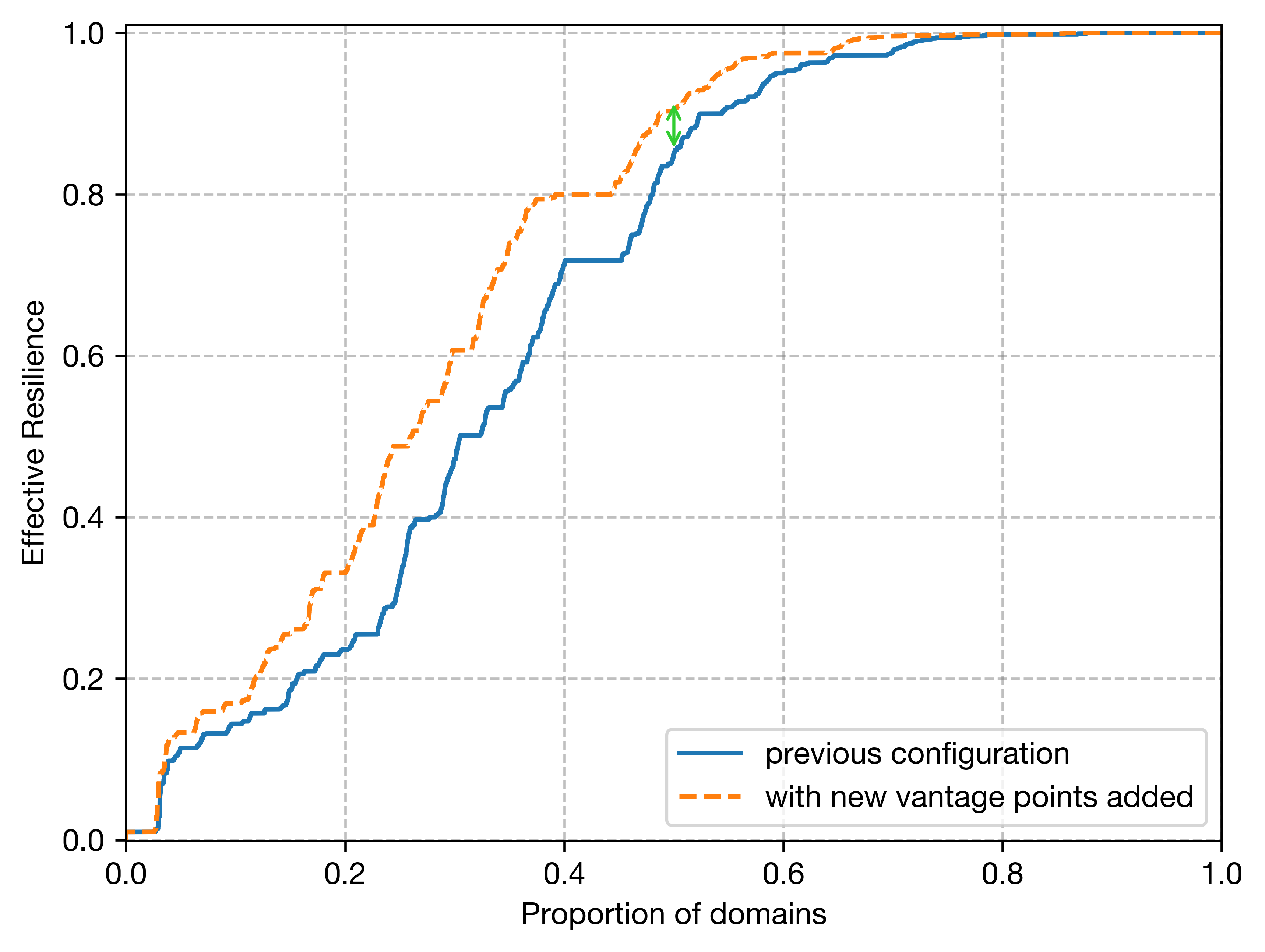
To date, our work with Princeton has focused on defending against BGP attacks on domain control validation via Multi-Perspective Issuance Corroboration (MPIC). This year, Let’s Encrypt is adding two new remote perspectives for domain validation. This means we will make five total validation requests, one from the primary datacenter and four from remote perspectives (previously two). Increased perspectives provide more domain validation security, thus improving visibility and protection against BGP attacks.

Additional global vantage points increase resilience of Let’s Encrypt issuance. Source: Princeton Center for Information Technology Policy

Additionally, we will be facilitating the adoption of ACME Renewal Information (ARI) in order to enable certificate authorities (CAs) to maintain continuity of service in a mass revocation/replacement event. If a BGP attack does occur, ARI will allow CAs to quickly and automatically revoke and replace certificates associated with the victim domain. Learn more about how to integrate ARI into an existing ACME client.

Our team will be working with the research groups of Professor Prateek Mittal to provide secure data related to increased perspectives and ARI, and contributing to research analysis and discoveries.

We’d like to thank Princeton University for their partnership on this important work, and Open Technology Fund for making it possible.

Internet Security Research Group (ISRG) is the parent organization of Let’s Encrypt, Prossimo, and Divvi Up. ISRG is a 501(c)(3) nonprofit. If you’d like to support our work, please consider getting involved, donating, or encouraging your company to become a sponsor.

Let’s Encrypt Continues Partnership with Princeton to Bolster Internet Security

Post Syndicated from Let's Encrypt original https://letsencrypt.org/2024/05/30/princeton-partnership.html

Let’s Encrypt is proud to have been partnering with the Center for Information Technology Policy team at Princeton University since 2018 to bolster defenses against Border Gateway Protocol (BGP) attacks. We’re thrilled to continue this partnership thanks to renewed funding from the Open Technology Fund.

“Let’s Encrypt has played a pivotal role in driving our research around protecting against BGP attacks and preventing the disruption such attacks can cause. We’re grateful for the partnership with Let’s Encrypt, as the largest Certificate Authority, in this critical work.” – Jennifer Rexford, Provost, Princeton University

To date, our work with Princeton has focused on defending against BGP attacks on domain control validation via Multi-Perspective Issuance Corroboration (MPIC). This year, Let’s Encrypt is adding two new remote perspectives for domain validation. This means we will make five total validation requests, one from the primary datacenter and four from remote perspectives (previously two). Increased perspectives provide more domain validation security, thus improving visibility and protection against BGP attacks.

Additional global vantage points increase resilience of Let’s Encrypt issuance. Source: Princeton Center for Information Technology Policy

Additionally, we will be facilitating the adoption of ACME Renewal Information (ARI) in order to enable certificate authorities (CAs) to maintain continuity of service in a mass revocation/replacement event. If a BGP attack does occur, ARI will allow CAs to quickly and automatically revoke and replace certificates associated with the victim domain. Learn more about how to integrate ARI into an existing ACME client.

Our team will be working with the research groups of Professor Prateek Mittal to provide secure data related to increased perspectives and ARI, and contributing to research analysis and discoveries.

We’d like to thank Princeton University for their partnership on this important work, and Open Technology Fund for making it possible.

Internet Security Research Group (ISRG) is the parent organization of Let’s Encrypt, Prossimo, and Divvi Up. ISRG is a 501(c)(3) nonprofit. If you’d like to support our work, please consider getting involved, donating, or encouraging your company to become a sponsor.

Introducing support for Apache Kafka on Raft mode (KRaft) with Amazon MSK clusters

Post Syndicated from Kalyan Janaki original https://aws.amazon.com/blogs/big-data/introducing-support-for-apache-kafka-on-raft-mode-kraft-with-amazon-msk-clusters/

Organizations are adopting Apache Kafka and Amazon Managed Streaming for Apache Kafka (Amazon MSK) to capture and analyze data in real time. Amazon MSK helps you build and run production applications on Apache Kafka without needing Kafka infrastructure management expertise or having to deal with the complex overhead associated with setting up and running Apache Kafka on your own. Since its inception, Apache Kafka has depended on Apache Zookeeper for storing and replicating the metadata of Kafka brokers and topics. Starting from Apache Kafka version 3.3, the Kafka community has adopted KRaft (Apache Kafka on Raft), a consensus protocol, to replace Kafka’s dependency on ZooKeeper for metadata management. In the future, the Apache Kafka community plans to remove the ZooKeeper mode entirely.

Today, we’re excited to launch support for KRaft on new clusters on Amazon MSK starting from version 3.7. In this post, we walk you through some details around how KRaft mode helps over the ZooKeeper approach. We also guide you through the process of creating MSK clusters with KRaft mode and how to connect your application to MSK clusters with KRaft mode.

Why was ZooKeeper replaced with KRaft mode

The traditional Kafka architecture relies on ZooKeeper as the authoritative source for cluster metadata. Read and write access to metadata in ZooKeeper is funneled through a single Kafka controller. For clusters with a large number of partitions, this architecture can create a bottleneck during scenarios such as an uncontrolled broker shutdown or controller failover, due to a single-controller approach.

KRaft mode addresses these limitations by managing metadata within the Kafka cluster itself. Instead of relying on a separate ZooKeeper cluster, KRaft mode stores and replicates the cluster metadata across multiple Kafka controller nodes, forming a metadata quorum. The KRaft controller nodes comprise a Raft quorum that manages the Kafka metadata log. By distributing the metadata management responsibilities across multiple controller nodes, KRaft mode improves recovery time for scenarios such as uncontrolled broker shutdown or controller failover. For more details on KRaft mode and its implementation, refer to the KIP-500: Replace ZooKeeper with a Self-Managed Metadata Quorum.

The following figure compares the three-node MSK cluster architecture with ZooKeeper vs. KRaft mode.

Amazon MSK with KRaft mode

Until now, Amazon MSK has supported Kafka clusters that rely on ZooKeeper for metadata management. One of the key benefits of Amazon MSK is that it handles the complexity of setting up and managing the ZooKeeper cluster at no additional cost. Many organizations use Amazon MSK to run large, business-critical streaming applications that require splitting their traffic across thousands of partitions. As the size of a Kafka cluster grows, the amount of metadata generated within the cluster increases proportionally to the number of partitions.

Two key properties govern the number of partitions a Kafka cluster can support: the per-node partition count limit and the cluster-wide partition limit. As mentioned earlier, the metadata management system based on ZooKeeper imposed a bottleneck on the cluster-wide partition limitation in Apache Kafka. However, with the introduction of KRaft mode in Amazon MSK starting with version 3.7, Amazon MSK now enables the creation of clusters with up to 60 brokers vs. the default quota of 30 brokers in ZooKeeper mode. Kafka’s scalability still fundamentally relies on expanding the cluster by adding more nodes to increase overall capacity. Consequently, the cluster-wide partition limit continues to define the upper bounds of scalability within the Kafka system, because it determines the maximum number of partitions that can be distributed across the available nodes. Amazon MSK manages the KRaft controller nodes at no additional cost.

Create and access an MSK cluster with KRaft mode

Complete the following steps to configure an MSK cluster with KRaft mode:

  1. On the Amazon MSK console, choose Clusters in the navigation pane.
  2. Choose Create cluster.
  3. For Cluster creation method, select Custom create.
  4. For Cluster name, enter a name.
  5. For Cluster type¸ select Provisioned.
  6. For Apache Kafka version, choose 3.7.x.
  7. For Metadata mode, select KRaft.
  8. Leave the other settings as default and choose Create cluster.

When the cluster creation is successful, you can navigate to the cluster and choose View client integration information, which will provide details about the cluster bootstrap servers.

Adapt your client applications and tools for accessing MSK clusters with KRaft mode

With the adoption of KRaft mode in Amazon MSK, customers using client applications and tools that connect to ZooKeeper to interact with MSK clusters will need to update them to reflect the removal of ZooKeeper from the architecture. Starting with version 1.0, Kafka introduced the ability for admin tools to use the bootstrap servers (brokers) as input parameters instead of a ZooKeeper connection string, and started deprecating ZooKeeper connection strings starting with version 2.5. This change was part of the efforts to decouple Kafka from ZooKeeper and pave the way for its eventual replacement with KRaft mode for metadata management. Instead of specifying the ZooKeeper connection string, clients will need to use the bootstrap.servers configuration option to connect directly to the Kafka brokers. The following table summarizes these changes.

. With Zookeeper With KRaft
Client and Services bootstrap.servers=broker:<port> or zookeeper.connect=zookeeper:2181 (deprecated) bootstrap.servers=broker:<port>
Admin Tools kafka-topics --zookeeper zookeeper:2181 (deprecated) or kafka-topics —bootstrap-server broker:<port> … —command-config kafka-topics —bootstrap-server broker:<port> … —command-config

Summary

In this post, we discussed how Amazon MSK has launched support for KRaft mode for metadata management. We also described how KRaft works and how it’s different from ZooKeeper.

To get started, create a new cluster with KRaft mode using the AWS Management Console, and refer to the Amazon MSK Developer Guide for more information.


About the author

Kalyan Janaki is Senior Big Data & Analytics Specialist with Amazon Web Services. He helps customers architect and build highly scalable, performant, and secure cloud-based solutions on AWS.

Establishing a data perimeter on AWS: Analyze your account activity to evaluate impact and refine controls

Post Syndicated from Achraf Moussadek-Kabdani original https://aws.amazon.com/blogs/security/establishing-a-data-perimeter-on-aws-analyze-your-account-activity-to-evaluate-impact-and-refine-controls/

A data perimeter on Amazon Web Services (AWS) is a set of preventive controls you can use to help establish a boundary around your data in AWS Organizations. This boundary helps ensure that your data can be accessed only by trusted identities from within networks you expect and that the data cannot be transferred outside of your organization to untrusted resources. Review the previous posts in the Establishing a data perimeter on AWS series for information about the security objectives and foundational elements needed to define and enforce each perimeter type.

In this blog post, we discuss how to use AWS logging and analytics capabilities to help accelerate the implementation and effectively operate data perimeter controls at scale.

You start your data perimeter journey by identifying access patterns that you want to prevent and defining what trusted identities, trusted resources, and expected networks mean to your organization. After you define your trust boundaries based on your business and security requirements, you can use policy examples provided in the data perimeter GitHub repository to design the authorization controls for enforcing these boundaries. Before you enforce the controls in your organization, we recommend that you assess the potential impacts on your existing workloads. Performing the assessment helps you to identify unknown data access patterns missed during the initial design phase, investigate, and refine your controls to help ensure business continuity as you deploy them.

Finally, you should continuously monitor your controls to verify that they operate as expected and consistently align with your requirements as your business grows and relationships with your trusted partners change.

Figure 1 illustrates common phases of a data perimeter journey.

Figure 1: Data perimeter implementation journey

Figure 1: Data perimeter implementation journey

The usual phases of the data perimeter journey are:

  1. Examine your security objectives
  2. Set your boundaries
  3. Design data perimeter controls
  4. Anticipate potential impacts
  5. Implement data perimeter controls
  6. Monitor data perimeter controls
  7. Continuous improvement

In this post, we focus on phase 4: Anticipate potential impacts. We demonstrate how to analyze activity observed in your AWS environment to evaluate impact and refine your data perimeter controls. We also demonstrate how you can automate the analysis by using the data perimeter helper open source tool.

You can use the same techniques to support phase 6: Monitor data perimeter controls, where you will continuously monitor data access patterns in your organization and potentially troubleshoot permissions issues caused by overly restrictive or overly permissive policies as new data access paths are introduced.

Setting prerequisites for impact analysis

In this section, we describe AWS logging and analytics capabilities that you can use to analyze impact of data perimeter controls on your environment. We also provide instructions for configuring them.

While you might have some capabilities covered by other AWS tools (for example, AWS Security Lake) or external tools, the proposed approach remains applicable. For instance, if your logs are stored in an external security data lake or your configuration state recording is performed by an external cloud security posture management (CSPM) tool, you can extract and adapt the logic from this post to suit your context. The flexibility of this approach allows you to use the existing tools and processes in your environment while benefiting from the insights provided.

Pricing

Some of the required capabilities can generate additional costs in your environment.

AWS CloudTrail charges based on the number of events delivered to Amazon Simple Storage Service (Amazon S3). Note that the first copy of management events is free. To help control costs, you can use advanced event selectors to select only events that matter to your context. For more details, see CloudTrail pricing.

AWS Config charges based on the number of configuration items delivered, the AWS Config aggregator and advanced queries are included in AWS Config pricing. To help control costs, you can select which resource types AWS Config records or change the recording frequency. For more details, see AWS Config pricing.

Amazon Athena charges based on the number of terabytes of data scanned in Amazon S3. To help control costs, use the proposed optimized tables with partitioning and reduce the time frame of your queries. For more details, see Athena pricing.

AWS Identity and Access Management Access Analyzer doesn’t charge additional costs for external access findings. For more details, see IAM Access Analyzer pricing.

Create a CloudTrail trail to record access activity

The primary capability that you will use is a CloudTrail trail. CloudTrail records AWS API calls and events from your AWS accounts that contain the following information relevant to data perimeter objectives:

  • API calls performed by your identities or on your resources (record fields: eventSource, eventName)
  • Identity that performed API calls (record field: userIdentity)
  • Network origin of API calls (record fields: sourceIPAddress, vpcEndpointId)
  • Resources API calls are performed on (record fields: resources, requestParameters)

See the CloudTrail record contents page for the description of all available fields.

Data perimeter controls are meant to be applied across a broad set of accounts and resources, therefore, we recommend using a CloudTrail organization trail that collects logs across the AWS accounts in your organization. If you don’t have an organization trail configured, follow these steps or use one of the data perimeter helper templates for deploying prerequisites. If you use AWS services that support CloudTrail data events and want to analyze the associated API calls, enable the relevant data events.

Though CloudTrail provides you information about parameters of an API request, it doesn’t reflect values of AWS Identity and Access Management (IAM) condition keys present in the request. Thus, you still need to analyze the logs to help refine your data perimeter controls.

Create an Athena table to analyze CloudTrail logs

To ease and accelerate logs analysis, use Athena to query and extract relevant data from the log files stored by CloudTrail in an S3 bucket.

To create an Athena table

  1. Open the Athena console. If this is your first time visiting the Athena console in your current AWS Region, choose Edit settings to set up a query result location in Amazon S3.
  2. Next, navigate to the Query editor and create a SQL table by entering the following DDL statement into the Athena console query editor. Make sure to replace s3://<BUCKET_NAME_WITH_PREFIX>/AWSLogs/<ORGANIZATION_ID>/ to point to the S3 bucket location that contains your CloudTrail log data and <REGIONS> with the list of AWS regions where you want to analyze API calls. For example, to analyze API calls made in the AWS Regions Paris (eu-west-3) and North Virginia (us-east-1), use eu-west-3,us-east-1. We recommend that you include us-east-1 to retrieve API calls performed on global resources such as IAM roles.
    CREATE EXTERNAL TABLE IF NOT EXISTS cloudtrail_logs (
        eventVersion STRING,
        userIdentity STRUCT<
            type: STRING,
            principalId: STRING,
            arn: STRING,
            accountId: STRING,
            invokedBy: STRING,
            accessKeyId: STRING,
            userName: STRING,
            sessionContext: STRUCT<
                attributes: STRUCT<
                    mfaAuthenticated: STRING,
                    creationDate: STRING>,
                sessionIssuer: STRUCT<
                    type: STRING,
                    principalId: STRING,
                    arn: STRING,
                    accountId: STRING,
                    userName: STRING>,
                ec2RoleDelivery: STRING,
                webIdFederationData: MAP<STRING,STRING>>>,
        eventTime STRING,
        eventSource STRING,
        eventName STRING,
        awsRegion STRING,
        sourceIpAddress STRING,
        userAgent STRING,
        errorCode STRING,
        errorMessage STRING,
        requestParameters STRING,
        responseElements STRING,
        additionalEventData STRING,
        requestId STRING,
        eventId STRING,
        readOnly STRING,
        resources ARRAY<STRUCT<
            arn: STRING,
            accountId: STRING,
            type: STRING>>,
        eventType STRING,
        apiVersion STRING,
        recipientAccountId STRING,
        serviceEventDetails STRING,
        sharedEventID STRING,
        vpcEndpointId STRING,
        tlsDetails STRUCT<
            tlsVersion:string,
            cipherSuite:string,
            clientProvidedHostHeader:string
        >
    )
    PARTITIONED BY (
    `p_account` string,
    `p_region` string,
    `p_date` string
    )
    ROW FORMAT SERDE 'org.apache.hive.hcatalog.data.JsonSerDe'
    STORED AS INPUTFORMAT 'com.amazon.emr.cloudtrail.CloudTrailInputFormat'
    OUTPUTFORMAT 'org.apache.hadoop.hive.ql.io.HiveIgnoreKeyTextOutputFormat'
    LOCATION 's3://<BUCKET_NAME_WITH_PREFIX>/AWSLogs/<ORGANIZATION_ID>/'
    TBLPROPERTIES (
        'projection.enabled'='true',
        'projection.p_date.type'='date',
        'projection.p_date.format'='yyyy/MM/dd', 
        'projection.p_date.interval'='1', 
        'projection.p_date.interval.unit'='DAYS', 
        'projection.p_date.range'='2022/01/01,NOW', 
        'projection.p_region.type'='enum',
        'projection.p_region.values'='<REGIONS>',
        'projection.p_account.type'='injected',
    'storage.location.template'='s3://<BUCKET_NAME_WITH_PREFIX>/AWSLogs/<ORGANIZATION_ID>/${p_account}/CloudTrail/${p_region}/${p_date}'
    )

  3. Finally, run the Athena query and confirm that the cloudtrail_logs table is created and appears under the list of Tables.

Create an AWS Config aggregator to enrich query results

To further reduce manual steps for retrieval of relevant data about your environment, use the AWS Config aggregator and advanced queries to enrich CloudTrail logs with the configuration state of your resources.

To have a view into the resource configurations across the accounts in your organization, we recommend using the AWS Config organization aggregator. You can use an existing aggregator or create a new one. You can also use one of the data perimeter helper templates for deploying prerequisites.

Create an IAM Access Analyzer external access analyzer

To identify resources in your organization that are shared with an external entity, use the IAM Access Analyzer external access analyzer with your organization as the zone of trust.

You can use an existing external access analyzer or create a new one.

Install the data perimeter helper tool

Finally, you will use the data perimeter helper, an open-source tool with a set of purpose-built data perimeter queries, to automate the logs analysis process.

Clone the data perimeter helper repository and follow instructions in the Getting Started section.

Analyze account activity and refine your data perimeter controls

In this section, we provide step-by-step instructions for using the AWS services and tools you configured to effectively implement common data perimeter controls. We first demonstrate how to use the configured CloudTrail trail, Athena table, and AWS Config aggregator directly. We then show you how to accelerate the analysis with the data perimeter helper.

Example 1: Review API calls to untrusted S3 buckets and refine your resource perimeter policy

One of the security objectives targeted by companies is ensuring that their identities can only put or get data to and from S3 buckets belonging to their organization to manage the risk of unintended data disclosure or access to unapproved data. You can help achieve this security objective by implementing a resource perimeter on your identities using a service control policy (SCP). Start crafting your policy by referring to the resource_perimeter_policy template provided in the data perimeter policy examples repository:

{
  "Version": "2012-10-17",
  "Statement": [
    {
      "Sid": "EnforceResourcePerimeterAWSResourcesS3",
      "Effect": "Deny",
      "Action": [
        "s3:GetObject",
        "s3:PutObject",
        "s3:PutObjectAcl"
      ],
      "Resource": "*",
      "Condition": {
        "StringNotEqualsIfExists": {
          "aws:ResourceOrgID": "<my-org-id>",
          "aws:PrincipalTag/resource-perimeter-exception": "true"
        },
        "ForAllValues:StringNotEquals": {
          "aws:CalledVia": [
            "dataexchange.amazonaws.com",
            "servicecatalog.amazonaws.com"
          ]
        }
      }
    }
  ]
}

Replace the value of the aws:ResourceOrgID condition key with your organization identifier. See the GitHub repository README file for information on other elements of the policy.

As a security engineer, you can anticipate potential impacts by reviewing account activity and CloudTrail logs. You can perform this analysis manually or use the data perimeter helper tool to streamline the process.

First, let’s explore the manual approach to understand each step in detail.

Perform impact analysis without tooling

To assess the effects of the preceding policy before deployment, review your CloudTrail logs to understand on which S3 buckets API calls are performed. The targeted Amazon S3 API calls are recorded as CloudTrail data events, so make sure you enable the S3 data event for this example. CloudTrail logs provide request parameters from which you can extract the bucket names.

Below is an example Athena query to list the targeted S3 API calls made by principals in the selected account within the last 7 days. The 7-day timeframe is set to verify that the query runs quickly, but you can adjust the timeframe later to suit your specific requirements and obtain more realistic results. Replace <ACCOUNT_ID> with the AWS account ID you want to analyze the activity of.

SELECT
  useridentity.sessioncontext.sessionissuer.arn AS principal_arn,
  useridentity.type AS principal_type,
  eventname,
  JSON_EXTRACT_SCALAR(requestparameters, '$.bucketName') AS bucketname,
  resources,
  COUNT(*) AS nb_reqs
FROM "cloudtrail_logs"
WHERE
  p_account = '<ACCOUNT_ID>'
  AND p_date BETWEEN DATE_FORMAT(CURRENT_DATE - INTERVAL '7' day, '%Y/%m/%d') AND DATE_FORMAT(CURRENT_DATE, '%Y/%m/%d')
  AND eventsource = 's3.amazonaws.com'
  -- Get only requests performed by principals in the selected account
  AND useridentity.accountid = '<ACCOUNT_ID>'
  -- Keep only the targeted API calls
  AND eventname IN ('GetObject', 'PutObject', 'PutObjectAcl')
  -- Remove API calls made by AWS service principals - `useridentity.principalid` field in CloudTrail log equals `AWSService`.
  AND useridentity.principalid != 'AWSService'
  -- Remove API calls made by service-linked roles in the selected account
    AND COALESCE(NOT regexp_like(useridentity.sessioncontext.sessionissuer.arn, '(:role/aws-service-role/)'), True)
  -- Remove calls with errors
  AND errorcode IS NULL
GROUP BY
  useridentity.sessioncontext.sessionissuer.arn,
  useridentity.type,
  eventname,
  JSON_EXTRACT_SCALAR(requestparameters, '$.bucketName'),
  resources

As shown in Figure 2, this query provides you with a list of the S3 bucket names that are being accessed by principals in the selected account, while removing calls made by service-linked roles (SLRs) because they aren’t governed by SCPs. In this example, the IAM roles AppMigrator and PartnerSync performed API calls on S3 buckets named app-logs-111111111111, raw-data-111111111111, expected-partner-999999999999, and app-migration-888888888888.

Figure 2: Sample of the Athena query results

Figure 2: Sample of the Athena query results

The CloudTrail record field resources provides information on the list of resources accessed in an event. The field is optional and can notably contain the resource Amazon Resource Names (ARNs) and the account ID of the resource owner. You can use this record field to detect resources owned by accounts not in your organization. However, because this record field is optional, to scale your approach you can also use the AWS Config aggregator data to list resources currently deployed in your organization.

To know if the S3 buckets belong to your organization or not, you can run the following AWS Config advanced query. This query lists the S3 buckets inventoried in your AWS Config organization aggregator.

SELECT
  accountId,
  awsRegion,
  resourceId
WHERE
  resourceType = 'AWS::S3::Bucket'

As shown in Figure 3, buckets expected-partner-999999999999 and app-migration-888888888888 aren’t inventoried and therefore don’t belong to this organization.

Figure 3: Sample of the AWS Config advanced query results

Figure 3: Sample of the AWS Config advanced query results

By combining the results of the Athena query and the AWS Config advanced query, you can now pinpoint S3 API calls made by principals in the selected account on S3 buckets that are not part of your AWS organization.

If you do nothing, your starting resource perimeter policy would block access to these buckets. Therefore, you should investigate with your development teams why your principals performed those API calls and refine your policy if there is a legitimate reason, such as integration with a trusted third party. If you determine, for example, that your principals have a legitimate reason to access the bucket expected-partner-999999999999, you can discover the account ID (<third-party-account-a>) that owns the bucket by reviewing the record field resources in your CloudTrail logs or investigating with your developers and edit the policy as follows:

{
  "Version": "2012-10-17",
  "Statement": [
    {
      "Sid": "EnforceResourcePerimeterAWSResourcesS3",
      "Effect": "Deny",
      "Action": [
        "s3:GetObject",
        "s3:PutObject",
        "s3:PutObjectAcl"
      ],
      "Resource": "*",
      "Condition": {
        "StringNotEqualsIfExists": {
          "aws:ResourceOrgID": "<my-org-id>",
          "aws:ResourceAccount": "<third-party-account-a>",
          "aws:PrincipalTag/resource-perimeter-exception": "true"
        },
        "ForAllValues:StringNotEquals": {
          "aws:CalledVia": [
            "dataexchange.amazonaws.com",
            "servicecatalog.amazonaws.com"
          ]
        }
      }
    }
  ]
}

Now your resource perimeter policy helps ensure that access to resources that belong to your trusted third-party partner aren’t blocked by default.

Automate impact analysis with the data perimeter helper

Data perimeter helper provides queries that perform and combine the results of Athena and AWS Config aggregator queries on your behalf to accelerate policy impact analysis.

For this example, we use the s3_scp_resource_perimeter query to analyze S3 API calls made by principals in a selected account on S3 buckets not owned by your organization or inventoried in your AWS Config aggregator.

You can first add the bucket names of your trusted third-party partners that are already known in the data perimeter helper configuration file (resource_perimeter_trusted_bucket parameter). You then run the data perimeter helper query using the following command. Replace <ACCOUNT_ID> with the AWS account ID you want to analyze the activity of.

data_perimeter_helper --list-account <ACCOUNT_ID> --list-query s3_scp_resource_perimeter

Data perimeter helper performs these actions:

  • Runs an Athena query to list S3 API calls made by principals in the selected account, filtering out:
    • S3 API calls made at the account level (for example, s3:ListAllMyBuckets)
    • S3 API calls made on buckets that your organization owns
    • S3 API calls made on buckets listed as trusted in the data perimeter helper configuration file (resource_perimeter_trusted_bucket parameter)
    • API calls made by service principals and SLRs because SCPs don’t apply to them
    • API calls with errors
  • Gets the list of S3 buckets in your organization using an AWS Config advanced query.
  • Removes from the Athena query’s results API calls performed on S3 buckets inventoried in your AWS Config aggregator. This is done as a second clean-up layer in case the optional CloudTrail record field resources isn’t populated.

Data perimeter helper exports the results in the selected format (HTML, Excel, or JSON) so that you can investigate API calls that don’t align with your initial resource perimeter policy. Figure 4 shows a sample of results in HTML:

Figure 4: Sample of the s3_scp_resource_perimeter query results

Figure 4: Sample of the s3_scp_resource_perimeter query results

The preceding data perimeter helper query results indicate that the IAM role PartnerSync performed API calls on S3 buckets that aren’t part of the organization, giving you a head start in your investigation efforts. Following the investigation, you can document a trusted partner bucket in the data perimeter helper configuration file to filter out the associated API calls from subsequent queries:

111111111111:
  network_perimeter_expected_public_cidr: [
  ]
  network_perimeter_trusted_principal: [
  ]
  network_perimeter_expected_vpc: [
  ]
  network_perimeter_expected_vpc_endpoint: [
  ]
  identity_perimeter_trusted_account: [
  ]
  identity_perimeter_trusted_principal: [
  ]
  resource_perimeter_trusted_bucket: [
    expected-partner-999999999999
  ]

With a single command line, you have identified for your selected account the S3 API calls crossing your resource perimeter boundaries. You can now refine and implement your controls while lowering the risk of potential impacts. If you want to scale your approach to other accounts, you just need to run the same query against them.

Example 2: Review granted access and API calls by untrusted identities on your S3 buckets and refine your identity perimeter policy

Another security objective pursued by companies is ensuring that their S3 buckets can be accessed only by principals belonging to their organization to manage the risk of unintended access to company data. You can help achieve this security objective by implementing an identity perimeter on your buckets. You can start by crafting your identity perimeter policy using policy samples provided in the data perimeter policy examples repository.

{
  "Version": "2012-10-17",
  "Statement": [
    {
      "Sid": "EnforceIdentityPerimeter",
      "Effect": "Deny",
      "Principal": "*",
      "Action": "s3:*",
      "Resource": [
        "arn:aws:s3:::<my-data-bucket>",
        "arn:aws:s3:::<my-data-bucket>/*"
      ],
      "Condition": {
        "StringNotEqualsIfExists": {
          "aws:PrincipalOrgID": "<my-org-id>",
          "aws:PrincipalAccount": [
            "<load-balancing-account-id>",
            "<third-party-account-a>",
            "<third-party-account-b>"
          ]
        },
        "BoolIfExists": {
          "aws:PrincipalIsAWSService": "false"
        }
      }
    }
  ]
}

Replace values of the aws:PrincipalOrgID and aws:PrincipalAccount condition keys based on what trusted identities mean for your organization and on your knowledge of the intended access patterns you need to support. See the GitHub repository README file for information on elements of the policy.

To assess the effects of the preceding policy before deployment, review your IAM Access Analyzer external access findings to discover the external entities that are allowed in your S3 bucket policies. Then to accelerate your analysis, review your CloudTrail logs to learn who is performing API calls on your S3 buckets. This can help you accelerate the removal of granted but unused external accesses.

Data perimeter helper provides queries that streamline these processes for you:

Run these queries by using the following command, replacing <ACCOUNT_ID> with the AWS account ID of the buckets you want to analyze the access activity of:

data_perimeter_helper --list-account <ACCOUNT_ID> --list-query s3_external_access_org_boundary s3_bucket_policy_identity_perimeter_org_boundary

The query s3_external_access_org_boundary performs this action:

  • Extracts IAM Access Analyzer external access findings from either:
    • IAM Access Analyzer if the variable external_access_findings in the data perimeter variable file is set to IAM_ACCESS_ANALYZER
    • AWS Security Hub if the same variable is set to SECURITY_HUB. Security Hub provides cross-Region aggregation, enabling you to retrieve external access findings across your organization

The query s3_external_access_org_boundary performs this action:

  • Runs an Athena query to list S3 API calls made on S3 buckets in the selected account, filtering out:
    • API calls made by principals in the same organization
    • API calls made by principals belonging to trusted accounts listed in the data perimeter configuration file (identity_perimeter_trusted_account parameter)
    • API calls made by trusted identities listed in the data perimeter configuration file (identity_perimeter_trusted_principal parameter)

Figure 5 shows a sample of results for this query in HTML:

Figure 5: Sample of the s3_bucket_policy_identity_perimeter_org_boundary and s3_external_access_org_boundary queries results

Figure 5: Sample of the s3_bucket_policy_identity_perimeter_org_boundary and s3_external_access_org_boundary queries results

The result shows that only the bucket my-bucket-open-to-partner grants access (PutObject) to principals not in your organization. Plus, in the configured time frame, your CloudTrail trail hasn’t recorded S3 API calls made by principals not in your organization on buckets that the account 111111111111 owns.

This means that your proposed identity perimeter policy accounts for the access patterns observed in your environment. After reviewing with your developers, if the granted action on the bucket my-bucket-open-to-partner is not needed, you could deploy it on the analyzed account with a reduced risk of impacting business applications.

Example 3: Investigate resource configurations to support network perimeter controls implementation

The blog post Require services to be created only within expected networks provides an example of an SCP you can use to make sure that AWS Lambda functions can only be created or updated if associated with an Amazon Virtual Private Cloud (Amazon VPC).

{
  "Version": "2012-10-17",
  "Statement": [
    {
      "Sid": "EnforceVPCFunction",
      "Action": [
          "lambda:CreateFunction",
          "lambda:UpdateFunctionConfiguration"
       ],
      "Effect": "Deny",
      "Resource": "*",
      "Condition": {
        "Null": {
           "lambda:VpcIds": "true"
        }
      }
    }
  ]
}

Before implementing the preceding policy or to continuously review the configuration of your Lambda functions, you can use your AWS Config aggregator to understand whether there are functions in your environment that aren’t attached to a VPC.

Data perimeter helper provides the referential_lambda_function query that helps you automate the analysis. Run the query by using the following command:

data_perimeter_helper --list-query referential_lambda_function

Figure 6 shows a sample of results for this query in HTML:

Figure 6: Sample of the referential_lambda_function query results

Figure 6: Sample of the referential_lambda_function query results

By reviewing the inVpc column, you can quickly identify functions that aren’t currently associated with a VPC and investigate with your development teams before enforcing your network perimeter controls.

Example 4: Investigate access denied errors to help troubleshoot your controls

While you refine your data perimeter controls or after deploying them, you might encounter API calls that fail with an access denied error message. You can use CloudTrail logs to review those API calls and use the record to investigate the root-cause.

Data perimeter helper provides the common_only_denied query, which lists the API calls with access denied errors in the configured time frame. Run the query by using the following command, replacing <ACCOUNT_ID> with your account ID:

data_perimeter_helper --list-account <ACCOUNT_ID> --list-query common_only_denied

Figure 7 shows a sample of results for this query in HTML:

Figure 7: Sample of the common_only_denied query results

Figure 7: Sample of the common_only_denied query results

Let’s say you want to review S3 API calls with access denied error messages for one of your developers who uses a role called DevOps. You can update, in the HTML report, the input fields below the principal_arn and eventsource columns to match your lookup.

Then by reviewing the columns principal_arn, eventname, isAssumableBy, and nb_reqs, you learn that the role DevOps is assumable through a SAML provider and performed two GetObject API calls that failed with an access denied error message. By reviewing the sourceipaddress field you discover that the request has been performed from an IP address outside of your network perimeter boundary, you can then advise your developer to perform the API calls again from an expected network.

Data perimeter helper provides several ready-to-use queries and a framework to add new queries based on your data perimeter objectives and needs. See Guidelines to build a new query for detailed instructions.

Clean up

If you followed the configuration steps in this blog only to test the solution, you can clean up your account to avoid recurring charges.

If you used the data perimeter helper deployment templates, use the respective infrastructure as code commands to delete the provisioned resources (for example, for Terraform, terraform destroy).

To delete configured resources manually, follow these steps:

  • If you created a CloudTrail organization trail:
    • Navigate to the CloudTrail console, select the trail your created, and choose Delete.
    • Navigate to the Amazon S3 console and delete the S3 bucket you created to store CloudTrail logs from all accounts.
  • If you created an Athena table:
    • Navigate to the Athena console and select Query editor in the left navigation panel.
    • Run the following SQL query by replacing <TABLE_NAME> with the name of the created table:
      DROP TABLE <TABLE_NAME>

  • If you created an AWS Config aggregator:
    • Navigate to the AWS Config console and select Aggregators in the left navigation panel.
    • Select the created aggregator and select Delete from the Actions drop-down list.
  • If you installed data perimeter helper:
    • Follow the uninstallation steps in the data perimeter helper README file.

Conclusion

In this blog post, we reviewed how you can analyze access activity in your organization by using the CloudTrail logs to evaluate impact of your data perimeter controls and perform troubleshooting. We discussed how the log events data can be enriched using resource configuration information from AWS Config to streamline your analysis. Finally, we introduced the open source tool, data perimeter helper, that provides a set of data perimeter tailored queries to speed up your review process and a framework to create new queries.

For additional learning opportunities, see the Data perimeters on AWS page, which provides additional material such as a data perimeter workshop, blog posts, whitepapers, and webinar sessions.

If you have feedback about this post, submit comments in the Comments section below. If you have questions about this post, start a new thread on the AWS Security, Identity, and Compliance re:Post or contact AWS Support.

Want more AWS Security news? Follow us on X.
Achraf Moussadek-Kabdani

Achraf Moussadek-Kabdani

Achraf is a Senior Security Specialist at AWS. He works with global financial services customers to assess and improve their security posture. He is both a builder and advisor, supporting his customers to meet their security objectives while making security a business enabler.

Tatyana Yatskevich

Tatyana Yatskevich

Tatyana is a Principal Solutions Architect in AWS Identity. She works with customers to help them build and operate in AWS in the most secure and efficient manner.

Бенямин Нетаняху – между опазването на Израел и борбата за лично политическо оцеляване

Post Syndicated from Искрен Иванов original https://www.toest.bg/benyamin-netanyahu-mejdu-opazvaneto-na-izrael-i-borbata-za-lichno-politichesko-otselyavane/

Бенямин Нетаняху – между опазването на Израел и борбата за лично политическо оцеляване

Фигурата на Бенямин Нетаняху винаги е предизвиквала и продължава да предизвиква противоречиви реакции сред евреите по цял свят. За някои Нетаняху остава един от символите на еврейската държава – привържениците му го описват като най-големия политически лидер на Израел от Давид Бен Гурион насам. Противниците му пък го смятат за консервативен и краен държавник, който използва еврейската държава и религиозните ѝ доктрини, за да гарантира политическото си оцеляване и да ухажва избирателите си. 

Но един факт е неоспорима историческа реалност, която и двете фракции няма как да отрекат: Нетаняху е политикът, който най-дълго е служил като премиер на Израел досега – близо две десетилетия. 

За този период доверието в неговата партия „Ликуд“, макар и колебливо, се радва на устойчива положителна тенденция, за която много израелски политици могат само да мечтаят. В биографията на Нетаняху се вижда съчетание на най-доброто от интелектуалната традиция на юдаизма с няколко образователни и научни степени от водещи американски университети – Масачузетския технологичен институт и Харвард. 

По време на Студената война в Белия дом го наричат „любимецът на Рейгън“, а няколко десетилетия по-късно той шокира политиците в САЩ, като състави коалиционно правителство с ултраконсервативното хасидско крило в Израел. 

Как се стигна дотук и защо името на този израелски лидер предизвиква толкова разностранни оценки и сред най-демократично мислещите му колеги на Запад?

Държавата Израел като политико-цивилизационна концепция

Съществуват много подходи към осмислянето на Държавата Израел като политическа система. Това, което ги обединява, е, че те приемат като отправна точка за съществуването ѝ Втората световна война. За западната мисъл – особено за държавите, които победиха във войната – съществуването на Израел винаги се е свързвало с един своеобразен жест на международната общност към еврейския народ, преживял кошмара на Холокоста. 

Макар и достоверен в исторически план, този подход е силно подвеждащ, тъй като не взема предвид предобразите на еврейската държава, дали тласък на модерния ционизъм, които по-късно унгарският поет Теодор Херцел ще синтезира в произведенията си.

Макар създаването на Израел и последващата подкрепа от САЩ винаги да се считат за даденост в системата на международните отношения, много изследователи пропускат факта, че еврейската културна традиция има доста по-дълбоки корени, които сами по себе си предпоставят съществуването на държавност много преди гръко-римските образци на Платон и Аристотел, с които Европа така се гордее. В този смисъл представянето на Запада като приемник на античния свят е политическа реалност, но тя не важи за Израел, макар днес той да е обвързан със западните държави повече от всякога. 

Съществуват няколко основни характеристики, които изграждат принципа на израелската държавност, и те далеч не могат да бъдат изчерпани само с политическата идеология на ционизма.

Както пише в своите произведения покойният американски политолог Даниел Истън, крайъгълен камък на еврейското политическо цяло е заветът на Бог с народа му. Идеята за еманципирането на еврейския народ от езическия свят в лицето на Египет и сключването на завет (договор с Бога) поставят началото на онова културно-историческо цяло, което по-късно ще положи предобраза на еврейската държава върху руините на Ханаан. Този свещен за евреите акт има ключова роля за изграждането на израелската държавност, тъй като позиционира Израел като самостоятелна и самобитна цивилизация със своя култура и обичаи. Затова Истън говори за „еврейско политическо цяло“, което под водачеството на Мойсей достига Обетованата земя, където реализира на практика този завет с Бога. 

Ето защо политическите корени на израелската държава не следва да се търсят единствено във връзката, която съществува между нея и САЩ, или пък в Холокоста, а много по-назад – в една епоха, която предшества западната цивилизация. Макар по-късно идеята за еврейска държава да е силно повлияна от модерния европейски национализъм, нейните корени продължават да черпят вдъхновение от свещените книги на юдаизма и от преданието на еврейските старейшини, съхранило народа през вековете.

Вторият елемент от израелската държавност се отнася до самата политическа концепция за обединение на евреите. За разлика от християнството и исляма, които имат силен сантимент към монархията, юдаизмът я приема не като „богоизбрана“, а като наложена от хората. Затова и религията има ключова роля за осмислянето на Израел като държавно обединение, тъй като без нея съществуването му би било равнозначно на онова, което английският философ Томас Хобс дефинира като „мъртъв Левиатан“ – държавно тяло, служещо само за да налага реда и да управлява. 

Това е и причината, поради която концепцията за израелската държавност съвършено се отличава от идеологиите на либерализма и консерватизма, смятани за най-висшия философски продукт на западната политическа мисъл. Макар модерната политическа и съдебна система на Израел да почива върху тези светски образци, съществуването на реда в държавата е вдъхновено от Мойсеевия закон, който, наред с интерпретацията на старейшините, е ключов за осмислянето на справедливостта като категория в юдаизма. Или казано с други думи, по същия начин, по който не можеш да осмислиш Китай, без да четеш Конфуций и следреволюционните автори едновременно, така не можеш да разбереш Израел, без да си запознат с юдаизма и политическите образци на ционизма.

И накрая, Израел няма как да бъде разбран извън своята антитеза – антисемитизма. Това, разбира се, не означава, че държавата дължи съществуването си единствено на антисемитизма – теза, застъпвана именно от антисемитските движения в Европа, много от които са автори на редица конспиративни теории в това отношение.

По-скоро става дума за факта, че борбата с антисемитизма винаги е заемала и ще заема ключово място в политиката на Израел, тъй като антисемитската идеология отрича всичко онова, в което вярват евреите. И тук не говорим единствено за Холокоста, но и за епизодичните прояви на антисемитизъм при гоненията от времето на Римската империя, Испанската инквизиция, Романовата династия в Русия и разбира се, неразказаната история на фашистката фракция в Британия в лицето на Чембърлейновите последователи и аристократичната фамилия Моузли, призоваващи към съюз с Хитлер срещу Сталин.

Тези исторически епизоди са живи и до днес в политическото самосъзнание на Израел, но за жалост, често са и повод за спекулации от страна на ултраконсервативните кръгове в страната. В съвременния политически дебат дори съществува спор дали светът вече не става свидетел на нова вълна от антисемитизъм, която избухна след атаките на „Хамас“ срещу Израел от октомври 2023 г. На Нетаняху се падна нелекият жребий да преведе Израел през този период на несигурност и нестабилност, който може да се окаже пагубен и за неговата политическа кариера.

Защо Нетаняху?

Всъщност Нетаняху има незавидната съдба да се окаже между чука и наковалнята точно когато Израел е най-малко готов да воюва. Как се стигна дотук и защо държава, която се слави като една от най-неуязвимите в света, стана жертва на подобен атентат? 

Първата и основна причина се крие в самото разделение на израелското общество. Историята на Израел ясно сочи, че винаги когато държавата е била разделена, последиците са били фатални за единството или съществуването ѝ. В конкретния случай е доста трудно да търсим едностранно вината за подобно разделение, но факт е, че то се изостри след началото на протестите срещу спорната съдебна реформа, която правителството на Нетаняху се опита да прокара. В тези условия обществото в Израел беше силно разединено, а хората, които протестираха по улиците, едва ли си даваха сметка, че техните протести ще отслабят държавата до такава степен, че тя няма да може да отчете нарастващата заплаха от „Хамас“. 

Пренебрегнати бяха и предупрежденията от САЩ, които на няколко пъти алармираха израелското правителство, че се готви атентат. Последва катастрофално разделение в сектора за сигурност и той от своя страна приоритизира вътрешния ред пред външните заплахи, чието неутрализиране се считаше за даденост. 

Втората причина за сложната ситуация бяха ултраконсервативните партньори на Нетаняху. Ако Биби управляваше сам, сигурно щеше да му бъде доста по-лесно да постигне консенсус с протестиращите и да възстанови реда в държавата, но когато властта му зависи от хора, възприемащи Израел като лъва от Сион, който трябва да унищожи древния Вавилон, нещата стоят по различен начин. 

Нетаняху всъщност се оказа в ситуацията, в която се намираше американският президент Джордж Буш-младши след терористичните атентати от 11 септември 2001 г. Тогава Буш се озова в лапите на пуританското крило в САЩ, което призова за кръстоносен поход срещу исляма и беше основен гарант, че републиканците ще удържат двете камари на Конгреса.

В тези условия Буш нареди САЩ да нападнат Ирак и Афганистан, но след началото на двете операции той беше „посъветван“ от кликата си да остави американските войски в региона до пълното изкореняване на талибаните и „Ал-Кайда“. Самият президент нямаше такова желание, защото Америка беше започнала сериозно да задлъжнява на Китай, а Русия постепенно се съвземаше след първия мандат на Путин. Но тъй като все пак на момчето от Тексас му се искаше още един мандат в Белия дом, прие да удължи американското военно присъствие в региона за неопределен период.

Третата причина може да бъде търсена в политическите качества на самия Нетаняху. Като прагматичен политик израелският премиер си дава сметка, че войната в ивицата Газа не е просто военностратегически, а геополитически залог. Големият проблем тук е, че Нетаняху не е любимец на демократите и в този смисъл няма безусловната подкрепа на САЩ.

Тук е мястото да кажем, че няма президент на САЩ, който да е направил повече за Израел от Джо Байдън. Още като млад сенатор Байдън оглавява няколко комисии в Конгреса, които в продължение на години формират основите на израелската отбранителна индустрия, много преди „Железен купол“. Именно Байдън застава зад Израел дори като вицепрезидент, когато Барак Обама иска да свие американския чадър над Тел Авив. Но проблемът с Байдън е, че в момента също е в доста деликатна ситуация, тъй като доминиращата позиция в неговата партия е, че демократите подкрепят Израел, но не и Нетаняху.

Ето защо президентът на САЩ и неговите съветници решиха да оттеглят подкрепата си за военните операции на Израел на думи, но не и на дела. Това е видимо от действията на Вашингтон, който говори за спиране на подкрепата за Израел, но в същото време последователно лансира свой план за примирие в ивицата Газа.

Нетаняху и новото разделение в Израел

Накрая е добре да споменем, че наред с всичко друго Нетаняху има „късмета“ да управлява в условията на сложна геополитическа надпревара, чийто изход ще реши бъдещето на глобалната политика за следващите десетилетия.

В този смисъл Нетаняху не успя да предвиди, че собствената му политика може да послужи за инструмент в ръцете на държави като Русия за отслабването на американското глобално лидерство. Огромният успех на Москва в Близкия изток далеч не е военното ѝ присъствие в Сирия или опитите ѝ да играе ролята на държава покровител на Иран. Успехът се състои в това, че Русия успя да „скара“ еврейското лоби в САЩ с Израел. Мостът, който крепеше единството между двете държави, беше подронен и от китайската позиция, че създаването на независима палестинска държава ще поправи една историческа несправедливост. 

Това ще има сериозни, ако не и катастрофални последици както за бъдещето на Израел, така и за бъдещето на Америка като глобален лидер, тъй като този неин статут почива именно върху системата от съюзи и върху образа, който си е извоювала след края на Втората световна война. Ако този мост напълно рухне – което все пак е малко вероятно дори в случай че Доналд Тръмп спечели втори мандат, – тогава едва ли ще се намери съюзник на САЩ, който да не се усъмни в силата на обещанията им.

Eдва ли ще се намери либерал в Америка, който да не осъди нечовешката стратегия на Израел в Газа. Големият проблем е, че такива коментари вече се чуват и от либерали, и от консерватори, а ироничното е, че много хора в Израел и САЩ обвиняват за това политическата коректност, защото тя е отслабила двете държави и съюза между тях.

Но ако погледнем внимателно как тази нова вълна от ценности набира сила в САЩ и Европа, ще видим, че тя тръгва именно от лобистките кръгове. Mного движения, имащи и свои лобита в полза на демократите (например Black Lives Matter), сега подкрепят палестинската кауза, въпреки че преди началото на войната не бяха така ангажирани с нея, а по-скоро приоритизираха своята кауза. Тоест палестинската кауза вече е припозната като своя. Съответно Израел е заклеймен като вреден, а Нетаняху – като корумпиран политик, който се бори единствено за политическото си оцеляване.

Или казано с други думи, Нетаняху се превърна в заложник на геополитическото разделение между „либералните“ и „консервативните“ евреи. Първите – с мнозинство в САЩ, а вторите – в Израел. Първите – виждащи идващия месия като метафора в юдаизма, която изразява надеждата на еврейския народ за по-добър живот, а вторите – възприемащи го като реална личност, която следва да се появи съгласно вярата на бащите им.

Такива разделения са налице във всички монотеистични религии и щом погледнем историята, ще видим кога свършват те – когато една от тези фракции се наложи над другата по начин, който да формира нови културно-цивилизационни образци на подражание. До момента и едната, и другата фракция намират начин да съжителстват в полза на целия народ, независимо от различията помежду си. Съществуването и благоденствието на Израел и неговите добри съюзнически отношения с Америка са основните приоритети, около които либерали и консерватори са сплотили своите усилия. Този съюз се пропука, когато влиянието на Америка в глобален план започна да отслабва, а Русия взе под крилото си „Хамас“.

С атаката срещу Израел „Хамас“ индиректно извоюва за Москва още една „победа“. Русия показа на Израел колко много го „обича“ Европа и колко е солидарна в подкрепата си за него – дотолкова, че жилищни сгради в Берлин осъмнаха с нарисувани Давидови звезди, а месеци по-късно Международният наказателен съд поиска заповед за арест за Нетаняху.

В крайна сметка какво би било бъдещето на Израел в една така динамично развиваща се система на все по-очертаващ се двуполюсен свят? Ако либералното крило, за което вече стана дума, надделее, то либерализацията на Израел ще бъде неизбежна. В най-добрият случай това ще доведе до протести и период на латентна нестабилност, а в най-лошия – до нова, още по-голяма война в Близкия изток.

Тъй като консервативните кръгове в страната няма да приемат ценностна рамка, която е чужда на еврейската традиция, Израел може да отслабне дотолкова, че да стане напълно зависим от американската помощ и позиция. Причината – самата държава няма как да съществува без този консервативен пояс, защото, както вече стана ясно, той е стимул за политическо вдъхновение на голяма част от избирателите в страната. 

Ако пък консерваторите успеят да се наложат в сблъсъка, това ще запрати Израел в руския лагер, което няма как да не се отрази на системата от съюзи, върху които почива глобалното лидерство на Вашингтон. Не защото Израел обича Русия повече от Америка, а защото мрази да бъде унижаван и от враговете, и от приятелите си.

[$] Fedora approves shipping pre-built macOS binaries

Post Syndicated from jzb original https://lwn.net/Articles/975445/

The Asahi Linux project works
to support Linux on Apple Silicon hardware. The
project’s flagship
distribution is the Fedora
Asahi Remix
, which has its own installer (rather than Anaconda) to
accommodate the unique requirements of installing on Apple’s
hardware. Previously the installer was built by the Asahi project, but it has asked for (and received) an exception
from the Fedora
Engineering Steering Committee
(FESCo) to include two binaries
from upstream open-source projects so that the installer can be built on Fedora
infrastructure.

Results from the 2024 FreeBSD Community Survey Report

Post Syndicated from jzb original https://lwn.net/Articles/975807/

The FreeBSD Foundation has announced
the 2024
FreeBSD Community Survey Report
. The report provides a summary of
1,446 responses to an anonymous online survey of FreeBSD users. It
provides insights into user profiles, typical usage, how the FreeBSD
project is viewed, as well as recommendations for expanding the
FreeBSD community and contributor base:

Currently fewer than half of users consider FreeBSD their daily
driver; Individuals are less likely than Corporate Users to consider
FreeBSD primary. The barrier seems to be less about software and more
about hardware support, particularly around Wi-Fi drivers (which are
at the top of the wish list for the Foundation to focus on in the
coming year). A relatively high number of those who don’t consider
FreeBSD their main OS say they would consider doing so with hardware
support for desktops and laptops that was equivalent to Linux.

The raw
data
for the survey is available as well.

AWS analytics services streamline user access to data, permissions setting, and auditing

Post Syndicated from Sébastien Stormacq original https://aws.amazon.com/blogs/aws/aws-analytics-services-streamline-user-access-to-data-permissions-setting-and-auditing/

I am pleased to announce a new use case based on trusted identity propagation, a recently introduced capability of AWS IAM Identity Center.

Tableau, a commonly used business intelligence (BI) application, can now propagate end-user identity down to Amazon Redshift. This has a triple benefit. It simplifies the sign-in experience for end users. It allows data owners to define access based on real end-user identity. It allows auditors to verify data access by users.

Trusted identity propagation allows applications that consume data (such as Tableau, Amazon QuickSight, Amazon Redshift Query Editor, Amazon EMR Studio, and others) to propagate the user’s identity and group memberships to the services that store and manage access to the data, such as Amazon Redshift, Amazon Athena, Amazon Simple Storage Service (Amazon S3), Amazon EMR, and others. Trusted identity propagation is a capability of IAM Identity Center that improves the sign-in experience across multiple analytics applications, simplifies data access management, and simplifies audit. End users benefit from single sign-on and do not have to specify the IAM roles they want to assume to connect to the system.

Before diving into more details, let’s agree on terminology.

I use the term “identity providers” to refer to the systems that hold user identities and group memberships. These are the systems that prompt the user for credentials and perform the authentication. For example, Azure Directory, Okta, Ping Identity, and more. Check the full list of identity providers we support.

I use the term “user-facing applications” to designate the applications that consume data, such as Tableau, Microsoft PowerBI, QuickSight, Amazon Redshift Query Editor, and others.

And finally, when I write “downstream services”, I refer to the analytics engines and storage services that process, store, or manage access to your data: Amazon Redshift, Athena, S3, EMR, and others.

Trusted Identity Propagation - high-level diagram

To understand the benefit of trusted identity propagation, let’s briefly talk about how data access was granted until today. When a user-facing application accesses data from a downstream service, either the upstream service uses generic credentials (such as “tableau_user“) or assumes an IAM role to authenticate against the downstream service. This is the source of two challenges.

First, it makes it difficult for the downstream service administrator to define access policies that are fine-tuned for the actual user making the request. As seen from the downstream service, all requests originate from that common user or IAM role. If Jeff and Jane are both mapped to the BusinessAnalytics IAM role, then it is not possible to give them different levels of access, for example, readonly and read-write. Furthermore, if Jeff is also in the Finance group, he needs to choose a role in which to operate; he cannot access data from both groups in the same session.

Secondly, the task of associating a data-access event to an end user involves some undifferentiated heavy lifting. If the request originates from an IAM role called BusinessAnalytics, then additional work is required to figure out which user was behind that action.

Well, this particular example might look very simple, but in real life, organizations have hundreds of users and thousands of groups to match to hundreds of datasets. There was an opportunity for us to Invent and Simplify.

Once configured, the new trusted identity propagation provides a technical mechanism for user-facing applications to access data on behalf of the actual user behind the keyboard. Knowing the actual user identity offers three main advantages.

First, it allows downstream service administrators to create and manage access policies based on actual user identities, the groups they belong to, or a combination of the two. Downstream service administrators can now assign access in terms of users, groups, and datasets. This is the way most of our customers naturally think about access to data—intermediate mappings to IAM roles are no longer necessary to achieve these patterns.

Second, auditors now have access to the original user identity in system logs and can verify that policies are implemented correctly and follow all requirements of the company or industry-level policies.

Third, users of BI applications can benefit from single sign-on between applications. Your end-users no longer need to understand your company’s AWS accounts and IAM roles. Instead, they can sign in to EMR Studio (for example) using their corporate single sign-on that they’re used to for so many other things they do at work.

How does trusted identity propagation work?
Trusted identity propagation relies on standard mechanisms from our industry: OAuth2 and JWT. OAuth2 is an open standard for access delegation that allows users to grant third-party user-facing applications access to data on other services (downstream services) without exposing their credentials. JWT (JSON Web Token) is a compact, URL-safe means of representing identities and claims to be transferred between two parties. JWTs are signed, which means their integrity and authenticity can be verified.

How to configure trusted identity propagation
Configuring trusted identity propagation requires setup in IAM Identity Center, at the user-facing application, and at the downstream service because each of these needs to be told to work with end-user identities. Although the particulars will be different for each application, they will all follow this pattern:

  1. Configure an identity source in AWS IAM Identity Center. AWS recommends enabling automated provisioning if your identity provider supports it, as most do. Automated provisioning works through the SCIM synchronization standard to synchronize your directory users and groups into IAM Identity Center. You probably have configured this already if you currently use IAM Identity Center to federate your workforce into the AWS Management Console. This is a one-time configuration, and you don’t have to repeat this step for each user-facing application.
  2. Configure your user-facing application to authenticate its users with your identity provider. For example, configure Tableau to use Okta.
  3. Configure the connection between the user-facing application and the downstream service. For example, configure Tableau to access Amazon Redshift. In some cases, it requires using the ODBC or JDBC driver for Redshift.

Then comes the configuration specific to trusted identity propagation. For example, imagine your organization has developed a user-facing web application that authenticates the users with your identity provider, and that you want to access data in AWS on behalf of the current authenticated user. For this use case, you would create a trusted token issuer in IAM Identity Center. This powerful new construct gives you a way to map your application’s authenticated users to the users in your IAM Identity Center directory so that it can make use of trusted identity propagation. My colleague Becky wrote a blog post to show you how to develop such an application. This additional configuration is required only when using third-party applications, such as Tableau, or a customer-developed application, that authenticate outside of AWS. When using user-facing applications managed by AWS, such as Amazon QuickSight, no further setup is required.

setup an external IdP to issue trusted token

Finally, downstream service administrators must configure the access policies based on the user identity and group memberships. The exact configuration varies from one downstream service to the other. If the application reads or writes data in Amazon S3, the data owner may use S3 Access Grants in the Amazon S3 console to grant access for users and groups to prefixes in Amazon S3. If the application makes queries to an Amazon Redshift data warehouse, the data owner must configure IAM Identity Center trusted connection in the Amazon Redshift console and match the audience claim (aud) from the identity provider.

Now that you have a high-level overview of the configuration, let’s dive into the most important part: the user experience.

The end-user experience
Although the precise experience of the end user will obviously be different for different applications, in all cases, it will be simpler and more familiar to workforce users than before. The user interaction will begin with a redirect-based authentication single sign-on flow that takes the user to their identity provider, where they can sign in with credentials, multi-factor authentication, and so on.

Let’s look at the details of how an end user might interact with Okta and Tableau when trusted identity propagation has been configured.

Here is an illustration of the flow and the main interactions between systems and services.

Trusted Identity Propagation flow

Here’s how it goes.

1. As a user, I attempt to sign in to Tableau.

2. Tableau initiates a browser-based flow and redirects to the Okta sign-in page where I can enter my sign-in credentials. On successful authentication, Okta issues an authentication token (ID and access token) to Tableau.

3. Tableau initiates a JDBC connection with Amazon Redshift and includes the access token in the connection request. The Amazon Redshift JDBC driver makes a call to Amazon Redshift. Because your Amazon Redshift administrator enabled IAM Identity Center, Amazon Redshift forwards the access token to IAM Identity Center.

4. IAM Identity Center verifies and validates the access token and exchange the access token for an Identity Center issued token.

5. Amazon Redshift will resolve the Identity Center token to determine the corresponding Identity Center user and authorize access to the resource. Upon successful authorization, I can connect from Tableau to Amazon Redshift.

Once authenticated, I can start to use Tableau as usual.

Trusted Identity Propagation - Tableau usage

And when I connect to Amazon Redshift Query Editor, I can observe the sys_query_history table to check who was the user who made the query. It correctly reports awsidc:<email address>, the Okta email address I used when I connected from Tableau.

Trusted Identity Propagation - audit in Redshift

You can read Tableau’s documentation for more details about this configuration.

Pricing and availability
Trusted identity propagation is provided at no additional cost in the 26 AWS Regions where AWS IAM Identity Center is available today.

Here are more details about trusted identity propagation and downstream service configurations.

Happy reading!

With trusted identity propagation, you can now configure analytics systems to propagate the actual user identity, group membership, and attributes to AWS services such as Amazon Redshift, Amazon Athena, or Amazon S3. It simplifies the management of access policies on these services. It also allows auditors to verify your organization’s compliance posture to know the real identity of users accessing data.

Get started now and configure your Tableau integration with Amazon Redshift.

— seb

PS: Writing a blog post at AWS is always a team effort, even when you see only one name under the post title. In this case, I want to thank Eva Mineva, Laura Reith, and Roberto Migli for their much-appreciated help in understanding the many subtleties and technical details of trusted identity propagation.

A plea for more thoughtful comments

Post Syndicated from corbet original https://lwn.net/Articles/975597/

When redesigning the LWN site in 2002, we thought long and hard about
whether the ability to post comments should be part of it; LWN had not
offered that feature for the first four years of its existence. There were
already plenty of examples of how comments can go bad by then, but we
decided to trust our readers to keep things under control. Much of the
time, that trust has proved justified, but there have been times where
things have not gone so well. This time is quickly becoming one of those
others.