Wine 9.0 released

Post Syndicated from corbet original https://lwn.net/Articles/958443/

Version
9.0
of the Wine Windows-compatibility system has been released.
This release represents a year of development effort and over 7,000
individual changes. It contains a large number of improvements that are
listed below. The main highlights are the new WoW64 architecture and the
experimental Wayland driver.

Generate AI powered insights for Amazon Security Lake using Amazon SageMaker Studio and Amazon Bedrock

Post Syndicated from Jonathan Nguyen original https://aws.amazon.com/blogs/security/generate-ai-powered-insights-for-amazon-security-lake-using-amazon-sagemaker-studio-and-amazon-bedrock/

In part 1, we discussed how to use Amazon SageMaker Studio to analyze time-series data in Amazon Security Lake to identify critical areas and prioritize efforts to help increase your security posture. Security Lake provides additional visibility into your environment by consolidating and normalizing security data from both AWS and non-AWS sources. Security teams can use Amazon Athena to query data in Security Lake to aid in a security event investigation or proactive threat analysis. Reducing the security team’s mean time to respond to or detect a security event can decrease your organization’s security vulnerabilities and risks, minimize data breaches, and reduce operational disruptions. Even if your security team is already familiar with AWS security logs and is using SQL queries to sift through data, determining appropriate log sources to review and crafting customized SQL queries can add time to an investigation. Furthermore, when security analysts conduct their analysis using SQL queries, the results are point-in-time and don’t automatically factor results from previous queries.

In this blog post, we show you how to extend the capabilities of SageMaker Studio by using Amazon Bedrock, a fully-managed generative artificial intelligence (AI) service natively offering high-performing foundation models (FMs) from leading AI companies with a single API. By using Amazon Bedrock, security analysts can accelerate security investigations by using a natural language companion to automatically generate SQL queries, focus on relevant data sources within Security Lake, and use previous SQL query results to enhance the results from future queries. We walk through a threat analysis exercise to show how your security analysts can use natural language processing to answer questions such as which AWS account has the most AWS Security Hub findings, irregular network activity from AWS resources, or which AWS Identity and Access Management (IAM) principals invoked highly suspicious activity. By identifying possible vulnerabilities or misconfigurations, you can minimize mean time to detect and pinpoint specific resources to assess overall impact. We also discuss methods to customize Amazon Bedrock integration with data from your Security Lake. While large language models (LLMs) are useful conversational partners, it’s important to note that LLM responses can include hallucinations, which might not reflect truth or reality. We discuss some mechanisms to validate LLM responses and mitigate hallucinations. This blog post is best suited for technologists who have an in-depth understanding of generative artificial intelligence concepts and the AWS services used in the example solution.

Solution overview

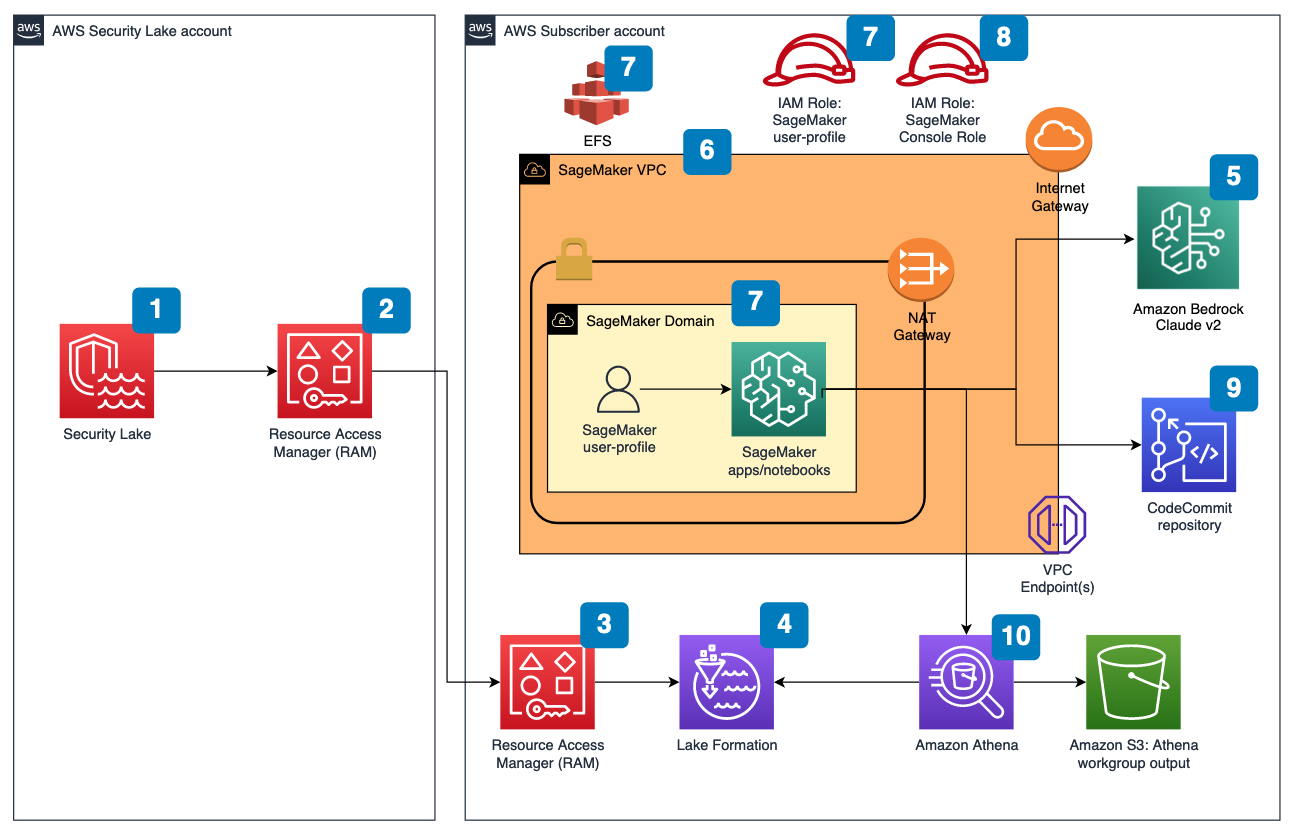
Figure 1 depicts the architecture of the sample solution.

Figure 1: Security Lake generative AI solution architecture

Figure 1: Security Lake generative AI solution architecture

Before you deploy the sample solution, complete the following prerequisites:

  1. Enable Security Lake in your organization in AWS Organizations and specify a delegated administrator account to manage the Security Lake configuration for all member accounts in your organization. Configure Security Lake with the appropriate log sources: Amazon Virtual Private Cloud (VPC) Flow Logs, AWS Security Hub, AWS CloudTrail, and Amazon Route53.
  2. Create subscriber query access from the source Security Lake AWS account to the subscriber AWS account.
  3. Accept a resource share request in the subscriber AWS account in AWS Resource Access Manager (AWS RAM).
  4. Create a database link in AWS Lake Formation in the subscriber AWS account and grant access for the Athena tables in the Security Lake AWS account.
  5. Grant Claude v2 model access for Amazon Bedrock LLM Claude v2 in the AWS subscriber account where you will deploy the solution. If you try to use a model before you enable it in your AWS account, you will get an error message.

After you set up the prerequisites, the sample solution architecture provisions the following resources:

  1. A VPC is provisioned for SageMaker with an internet gateway, a NAT gateway, and VPC endpoints for all AWS services within the solution. An internet gateway or NAT gateway is required to install external open-source packages.
  2. A SageMaker Studio domain is created in VPCOnly mode with a single SageMaker user-profile that’s tied to an IAM role. As part of the SageMaker deployment, an Amazon Elastic File System (Amazon EFS) is provisioned for the SageMaker domain.
  3. A dedicated IAM role is created to restrict access to create or access the SageMaker domain’s presigned URL from a specific Classless Inter-Domain Routing (CIDR) for accessing the SageMaker notebook.
  4. An AWS CodeCommit repository containing Python notebooks used for the artificial intelligence and machine learning (AI/ML) workflow by the SageMaker user profile.
  5. An Athena workgroup is created for Security Lake queries with a S3 bucket for output location (access logging is configured for the output bucket).

Cost

Before deploying the sample solution and walking through this post, it’s important to understand the cost factors for the main AWS services being used. The cost will largely depend on the amount of data you interact with in Security Lake and the duration of running resources in SageMaker Studio.

  1. A SageMaker Studio domain is deployed and configured with default setting of a ml.t3.medium instance type. For a more detailed breakdown, see SageMaker Studio pricing. It’s important to shut down applications when they’re not in use because you’re billed for the number of hours an application is running. See the AWS samples repository for an automated shutdown extension.
  2. Amazon Bedrock on-demand pricing is based on the selected LLM and the number of input and output tokens. A token is comprised of a few characters and refers to the basic unit of text that a model learns to understand the user input and prompts. For a more detailed breakdown, see Amazon Bedrock pricing.
  3. The SQL queries generated by Amazon Bedrock are invoked using Athena. Athena cost is based on the amount of data scanned within Security Lake for that query. For a more detailed breakdown, see Athena pricing.

Deploy the sample solution

You can deploy the sample solution by using either the AWS Management Console or the AWS Cloud Development Kit (AWS CDK). For instructions and more information on using the AWS CDK, see Get Started with AWS CDK.

Option 1: Deploy using AWS CloudFormation using the console

Use the console to sign in to your subscriber AWS account and then choose the Launch Stack button to open the AWS CloudFormation console that’s pre-loaded with the template for this solution. It takes approximately 10 minutes for the CloudFormation stack to complete.

Select the Launch Stack button to launch the template

Option 2: Deploy using AWS CDK

  1. Clone the Security Lake generative AI sample repository.
  2. Navigate to the project’s source folder (…/amazon-security-lake-generative-ai/source).
  3. Install project dependencies using the following commands:
    npm install -g aws-cdk-lib
    npm install
    

  4. On deployment, you must provide the following required parameters:
    • IAMroleassumptionforsagemakerpresignedurl – this is the existing IAM role you want to use to access the AWS console to create presigned URLs for SageMaker Studio domain.
    • securitylakeawsaccount – this is the AWS account ID where Security Lake is deployed.
  5. Run the following commands in your terminal while signed in to your subscriber AWS account. Replace <INSERT_AWS_ACCOUNT> with your account number and replace <INSERT_REGION> with the AWS Region that you want the solution deployed to.
    cdk bootstrap aws://<INSERT_AWS_ACCOUNT>/<INSERT_REGION>
    
    cdk deploy --parameters IAMroleassumptionforsagemakerpresignedurl=arn:aws:iam::<INSERT_AWS_ACCOUNT>:role/<INSERT_IAM_ROLE_NAME> --parameters securitylakeawsaccount=<INSERT_SECURITY_LAKE_AWS_ACCOUNT_ID>
    

Post-deployment configuration steps

Now that you’ve deployed the solution, you must add permissions to allow SageMaker and Amazon Bedrock to interact with your Security Lake data.

Grant permission to the Security Lake database

  1. Copy the SageMaker user profile Amazon Resource Name (ARN)
    arn:aws:iam::<account-id>:role/sagemaker-user-profile-for-security-lake
    

  2. Go to the Lake Formation console.
  3. Select the amazon_security_lake_glue_db_<YOUR-REGION> database. For example, if your Security Lake is in us-east-1, the value would be amazon_security_lake_glue_db_us_east_1
  4. For Actions, select Grant.
  5. In Grant Data Permissions, select SAML Users and Groups.
  6. Paste the SageMaker user profile ARN from Step 1.
  7. In Database Permissions, select Describe, and then Grant.

Grant permission to Security Lake tables

You must repeat these steps for each source configured within Security Lake. For example, if you have four sources configured within Security Lake, you must grant permissions for the SageMaker user profile to four tables. If you have multiple sources that are in separate Regions and you don’t have a rollup Region configured in Security Lake, you must repeat the steps for each source in each Region.

The following example grants permissions to the Security Hub table within Security Lake. For more information about granting table permissions, see the AWS LakeFormation user-guide.

  1. Copy the SageMaker user-profile ARN arn:aws:iam:<account-id>:role/sagemaker-user-profile-for-security-lake.
  2. Go to the Lake Formation console.
  3. Select the amazon_security_lake_glue_db_<YOUR-REGION> database.
    For example, if your Security Lake database is in us-east-1 the value would be amazon_security_lake_glue_db_us_east_1
  4. Choose View Tables.
  5. Select the amazon_security_lake_table_<YOUR-REGION>_sh_findings_1_0 table.
    For example, if your Security Lake table is in us-east-1 the value would be amazon_security_lake_table_us_east_1_sh_findings_1_0

    Note: Each table must be granted access individually. Selecting All Tables won’t grant the access needed to query Security Lake.

  6. For Actions, select Grant.
  7. In Grant Data Permissions, select SAML Users and Groups.
  8. Paste the SageMaker user profile ARN from Step 1.
  9. In Table Permissions, select Describe, and then Grant.

Launch your SageMaker Studio application

Now that you’ve granted permissions for a SageMaker user profile, you can move on to launching the SageMaker application associated to that user profile.

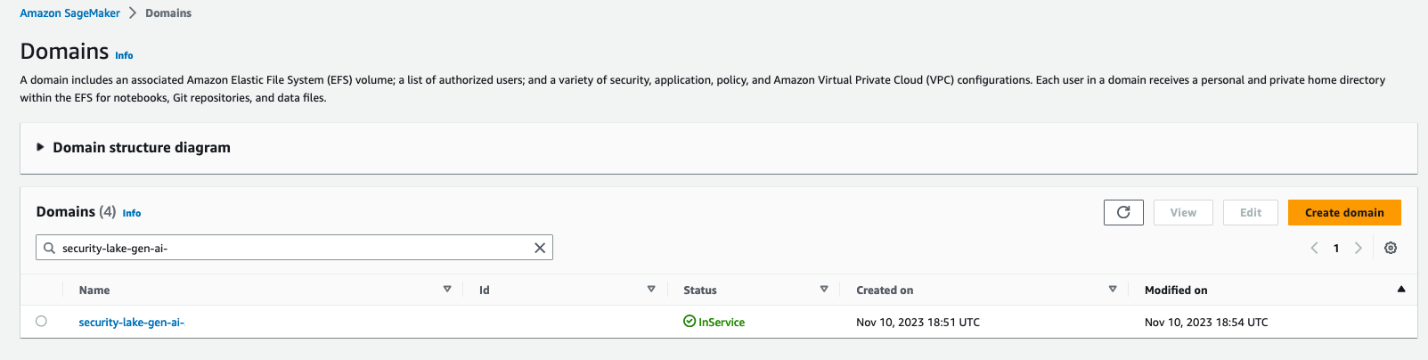
  1. Navigate to the SageMaker Studio domain in the console.
  2. Select the SageMaker domain security-lake-gen-ai-<subscriber-account-id>.
  3. Select the SageMaker user profile sagemaker-user-profile-for-security-lake.
  4. For Launch, select Studio.
Figure 2: SageMaker Studio domain view

Figure 2: SageMaker Studio domain view

Clone the Python notebook

As part of the solution deployment, we’ve created a foundational Python notebook in CodeCommit to use within your SageMaker app.

  1. Navigate to CloudFormation in the console.
  2. In the Stacks section, select the SageMakerDomainStack.
  3. Select the Outputs tab.
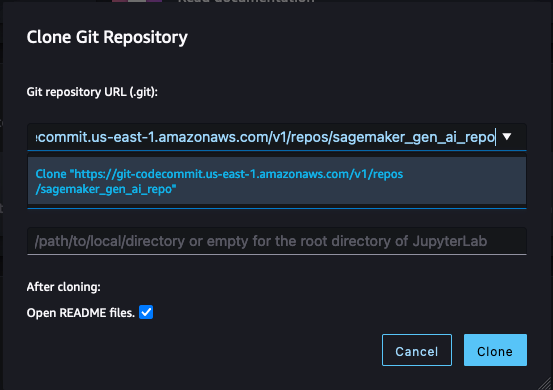
  4. Copy the value for the SageMaker notebook generative AI repository URL. (For example: https://git-codecommit.us-east-1.amazonaws.com/v1/repos/sagemaker_gen_ai_repo)
  5. Go back to your SageMaker app.
  6. In SageMaker Studio, in the left sidebar, choose the Git icon (a diamond with two branches), then choose Clone a Repository.
    Figure 3: SageMaker Studio clone repository option

    Figure 3: SageMaker Studio clone repository option

  7. Paste the CodeCommit repository link from Step 4 under the Git repository URL (git). After you paste the URL, select Clone “https://git-codecommit.us-east-1.amazonaws.com/v1/repos/sagemaker_gen_ai_repo”, then select Clone.

Note: If you don’t select from the auto-populated list, SageMaker won’t be able to clone the repository and will return a message that the URL is invalid.

Figure 4: SageMaker Studio clone HTTPS repository URL

Figure 4: SageMaker Studio clone HTTPS repository URL

Configure your notebook to use generative AI

In the next section, we walk through how we configured the notebook and why we used specific LLMs, agents, tools, and additional configurations so you can extend and customize this solution to your use case.

The notebook we created uses the LangChain framework. LangChain is a framework for developing applications powered by language models and processes natural language inputs from the user, generates SQL queries, and runs those queries on your Security Lake data. For our use case, we’re using LangChain with Anthropic’s Claude 2 model on Amazon Bedrock.

Set up the notebook environment

  1. After you’re in the generative_ai_security_lake.ipynb notebook, you can set up your notebook environment. Keep the default settings and choose Select.
    Figure 5: SageMaker Studio notebook start-up configuration

    Figure 5: SageMaker Studio notebook start-up configuration

  2. Run the first cell to install the requirements listed in the requirements.txt file.

Connect to the Security Lake database using SQLAlchemy

The example solution uses a pre-populated Security Lake database with metadata in the AWS Glue Data Catalog. The inferred schema enables the LLM to generate SQL queries in response to the questions being asked.

LangChain uses SQLAlchemy, which is a Python SQL toolkit and object relational mapper, to access databases. To connect to a database, first import SQLAlchemy and create an engine object by specifying the following:

  • SCHEMA_NAME
  • S3_STAGING_DIR
  • AWS_REGION
  • ATHENA REST API details

You can use the following configuration code to establish database connections and start querying.

import os
ACCOUNT_ID = os.environ["AWS_ACCOUNT_ID"]
REGION_NAME = os.environ.get('REGION_NAME', 'us-east-1')
REGION_FMT = REGION_NAME.replace("-","_")

from langchain import SQLDatabase
from sqlalchemy import create_engine

#Amazon Security Lake Database
SCHEMA_NAME = f"amazon_security_lake_glue_db_{REGION_FMT}"

#S3 Staging location for Athena query output results and this will be created by deploying the Cloud Formation stack
S3_STAGING_DIR = f's3://athena-gen-ai-bucket-results-{ACCOUNT_ID}/output/'

engine_athena = create_engine(
    "awsathena+rest://@athena.{}.amazonaws.com:443/{}?s3_staging_dir={}".
    format(REGION_NAME, SCHEMA_NAME, S3_STAGING_DIR)
)

athena_db = SQLDatabase(engine_athena)
db = athena_db

Initialize the LLM and Amazon Bedrock endpoint URL

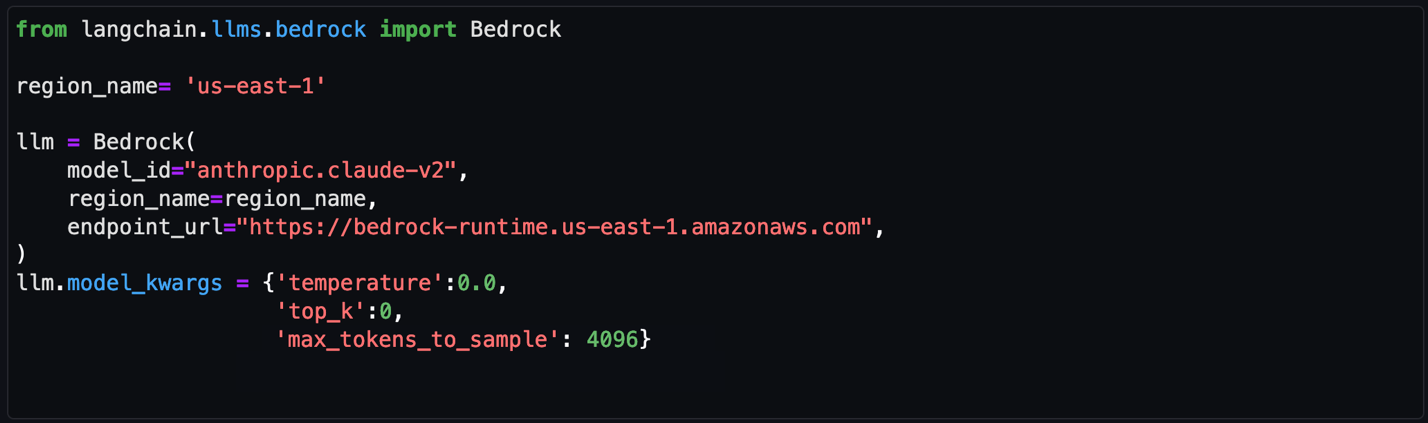
Amazon Bedrock provides a list of Region-specific endpoints for making inference requests for models hosted in Amazon Bedrock. In this post, we’ve defined the model ID as Claude v2 and the Amazon Bedrock endpoint as us-east-1. You can change this to other LLMs and endpoints as needed for your use case.

Obtain a model ID from the AWS console

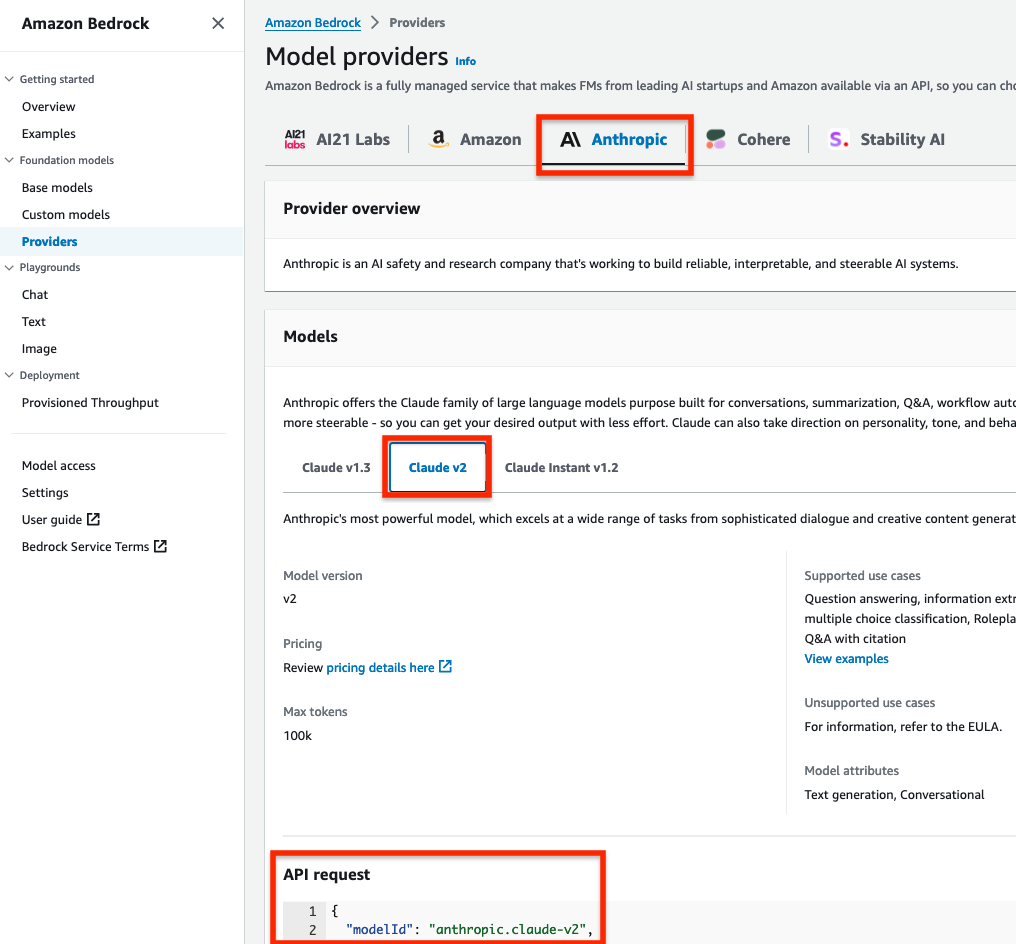
  1. Go to the Amazon Bedrock console.
  2. In the navigation pane, under Foundation models, select Providers.
  3. Select the Anthropic tab from the top menu and then select Claude v2.
  4. In the model API request note the model ID value in the JSON payload.

Note: Alternatively, you can use the AWS Command Line Interface (AWS CLI) to run the list-foundation-models command in a SageMaker notebook cell or a CLI terminal to the get the model ID. For AWS SDK, you can use the ListFoundationModels operation to retrieve information about base models for a specific provider.

Figure 6: Amazon Bedrock Claude v2 model ID

Figure 6: Amazon Bedrock Claude v2 model ID

Set the model parameters

After the LLM and Amazon Bedrock endpoints are configured, you can use the model_kwargs dictionary to set model parameters. Depending on your use case, you might use different parameters or values. In this example, the following values are already configured in the notebook and passed to the model.

  1. temperature: Set to 0. Temperature controls the degree of randomness in responses from the LLM. By adjusting the temperature, users can control the balance between having predictable, consistent responses (value closer to 0) compared to more creative, novel responses (value closer to 1).

    Note: Instead of using the temperature parameter, you can set top_p, which defines a cutoff based on the sum of probabilities of the potential choices. If you set Top P below 1.0, the model considers the most probable options and ignores less probable ones. According to Anthropic’s user guide, “you should either alter temperature or top_p, but not both.”

  2. top_k: Set to 0. While temperature controls the probability distribution of potential tokens, top_k limits the sample size for each subsequent token. For example, if top_k=50, the model selects from the 50 most probable tokens that could be next in a sequence. When you lower the top_k value, you remove the long tail of low probability tokens to select from in a sequence.
  3. max_tokens_to_sample: Set to 4096. For Anthropic models, the default is 256 and the max is 4096. This value denotes the absolute maximum number of tokens to predict before the generation stops. Anthropic models can stop before reaching this maximum.
Figure 7: Notebook configuration for Amazon Bedrock

Figure 7: Notebook configuration for Amazon Bedrock

Create and configure the LangChain agent

An agent uses a LLM and tools to reason and determine what actions to take and in which order. For this use case, we used a Conversational ReAct agent to remember conversational history and results to be used in a ReAct loop (Question → Thought → Action → Action Input → Observation ↔ repeat → Answer). This way, you don’t have to remember how to incorporate previous results in the subsequent question or query. Depending on your use case, you can configure a different type of agent.

Create a list of tools

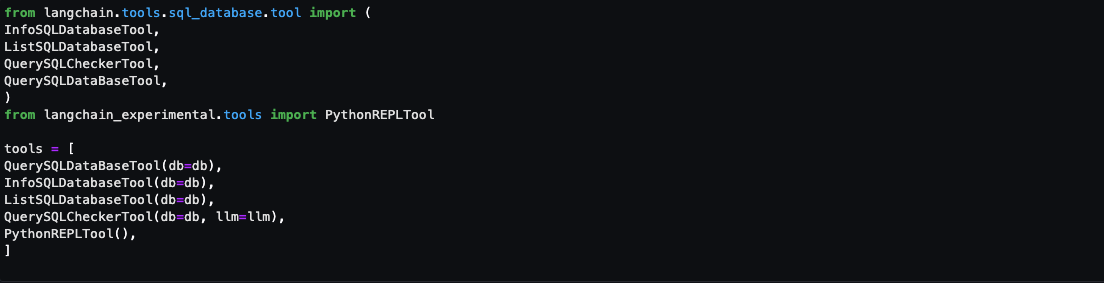
Tools are functions used by an agent to interact with the available dataset. The agent’s tools are used by an action agent. We import both SQL and Python REPL tools:

  1. List the available log source tables in the Security Lake database
  2. Extract the schema and sample rows from the log source tables
  3. Create SQL queries to invoke in Athena
  4. Validate and rewrite the queries in case of syntax errors
  5. Invoke the query to get results from the appropriate log source tables
Figure 8: Notebook LangChain agent tools

Figure 8: Notebook LangChain agent tools

Here’s a breakdown for the tools used and the respective prompts:

  • QuerySQLDataBaseTool: This tool accepts detailed and correct SQL queries as input and returns results from the database. If the query is incorrect, you receive an error message. If there’s an error, rewrite and recheck the query, and try again. If you encounter an error such as Unknown column xxxx in field list, use the sql_db_schema to verify the correct table fields.
  • InfoSQLDatabaseTool: This tool accepts a comma-separated list of tables as input and returns the schema and sample rows for those tables. Verify that the tables exist by invoking the sql_db_list_tables first. The input format is: table1, table2, table3
  • ListSQLDatabaseTool: The input is an empty string, the output is a comma separated list of tables in the database
  • QuerySQLCheckerTool: Use this tool to check if your query is correct before running it. Always use this tool before running a query with sql_db_query
  • PythonREPLTool: A Python shell. Use this to run python commands. The input should be a valid python command. If you want to see the output of a value, you should print it out with print(…).

Note: If a native tool doesn’t meet your needs, you can create custom tools. Throughout our testing, we found some of the native tools provided most of what we needed but required minor tweaks for our use case. We changed the default behavior for the tools for use with Security Lake data.

Create an output parser

Output parsers are used to instruct the LLM to respond in the desired output format. Although the output parser is optional, it makes sure the LLM response is formatted in a way that can be quickly consumed and is actionable by the user.

Figure 9: LangChain output parser setting

Figure 9: LangChain output parser setting

Adding conversation buffer memory

To make things simpler for the user, previous results should be stored for use in subsequent queries by the Conversational ReAct agent. ConversationBufferMemory provides the capability to maintain state from past conversations and enables the user to ask follow-up questions in the same chat context. For example, if you asked an agent for a list of AWS accounts to focus on, you want your subsequent questions to focus on that same list of AWS accounts instead of writing the values down somewhere and keeping track of it in the next set of questions. There are many other types of memory that can be used to optimize your use cases.

Figure 10: LangChain conversation buffer memory setting

Figure 10: LangChain conversation buffer memory setting

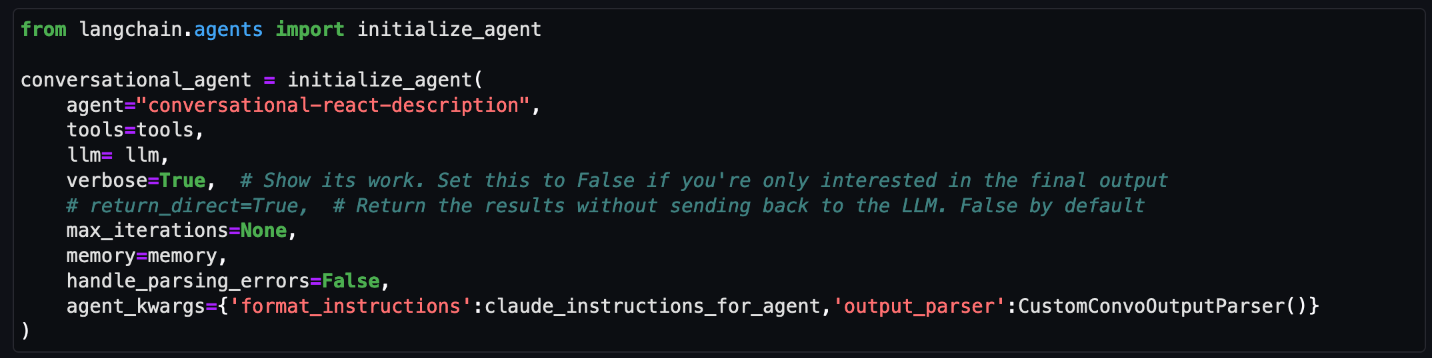
Initialize the agent

At this point, all the appropriate configurations are set and it’s time to load an agent executor by providing a set of tools and a LLM.

  1. tools: List of tools the agent will have access to.
  2. llm: LLM the agent will use.
  3. agent: Agent type to use. If there is no value provided and agent_path is set, the agent used will default to AgentType.ZERO_SHOT_REACT_DESCRIPTION.
  4. agent_kwargs: Additional keyword arguments to pass to the agent.
Figure 11: LangChain agent initialization

Figure 11: LangChain agent initialization

Note: For this post, we set verbose=True to view the agent’s intermediate ReAct steps, while answering questions. If you’re only interested in the output, set verbose=False.

You can also set return_direct=True to have the tool output returned to the user and closing the agent loop. Since we want to maintain the results of the query and used by the LLM, we left the default value of return_direct=False.

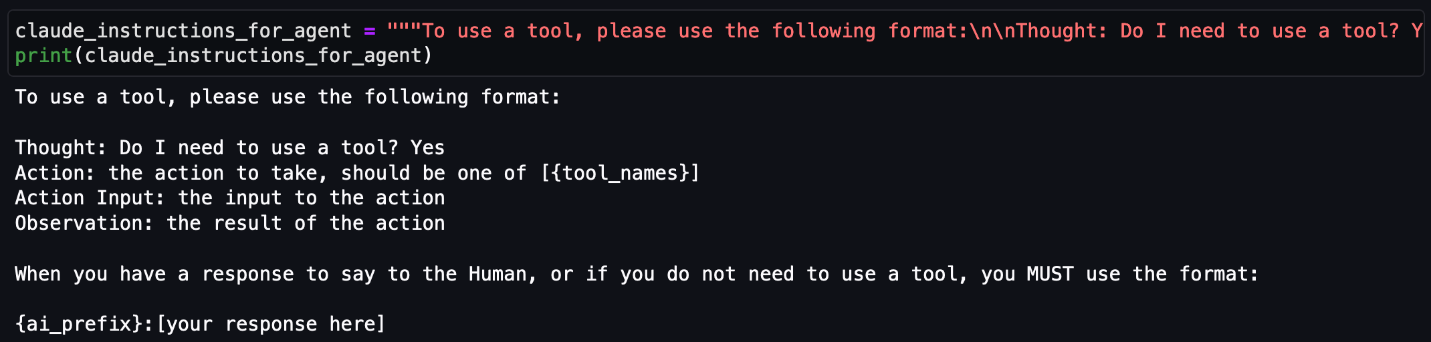
Provide instructions to the agent on using the tools

In addition to providing the agent with a list of tools, you would also give instructions to the agent on how and when to use these tools for your use case. This is optional but provides the agent with more context and can lead to better results.

Figure 12: LangChain agent instructions

Figure 12: LangChain agent instructions

Start your threat analysis journey with the generative AI-powered agent

Now that you’ve walked through the same set up process we used to create and initialize the agent, we can demonstrate how to analyze Security Lake data using natural language input questions that a security researcher might ask. The following examples focus on how you can use the solution to identify security vulnerabilities, risks, and threats and prioritize mitigating them. For this post, we’re using native AWS sources, but the agent can analyze any custom log sources configured in Security Lake. You can also use this solution to assist with investigations of possible security events in your environment.

For each of the questions that follow, you would enter the question in the free-form cell after it has run, similar to Figure 13.

Note: Because the field is free form, you can change the questions. Depending on the changes, you might see different results than are shown in this post. To end the conversation, enter exit and press the Enter key.

Figure 13: LangChain agent conversation input

Figure 13: LangChain agent conversation input

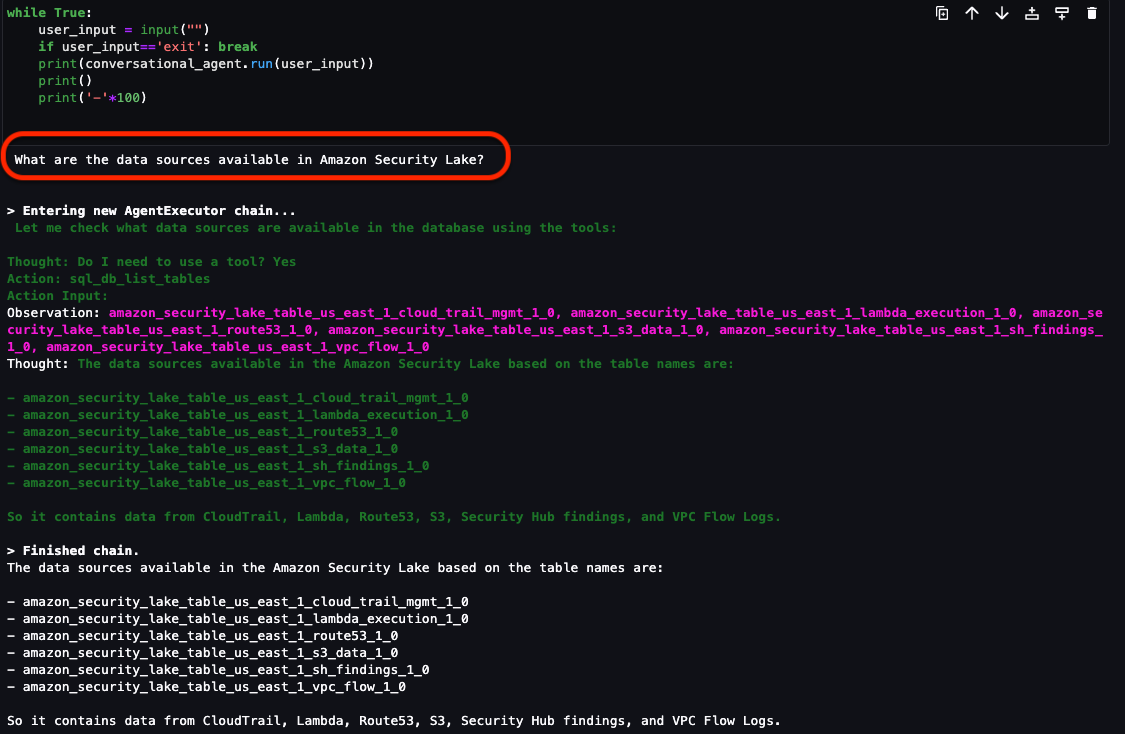
Question 1: What data sources are available in Security Lake?

In addition to the native AWS sources that Security Lake automatically ingests, your security team can incorporate additional custom log sources. It’s important to know what data is available to you to determine what and where to investigate. As shown in Figure 14, the Security Lake database contains the following log sources as tables:

If there are additional custom sources configured, they will also show up here. From here, you can focus on a smaller subset of AWS accounts that might have a larger number of security-related findings.

Figure 14: LangChain agent output for Security Lake tables

Figure 14: LangChain agent output for Security Lake tables

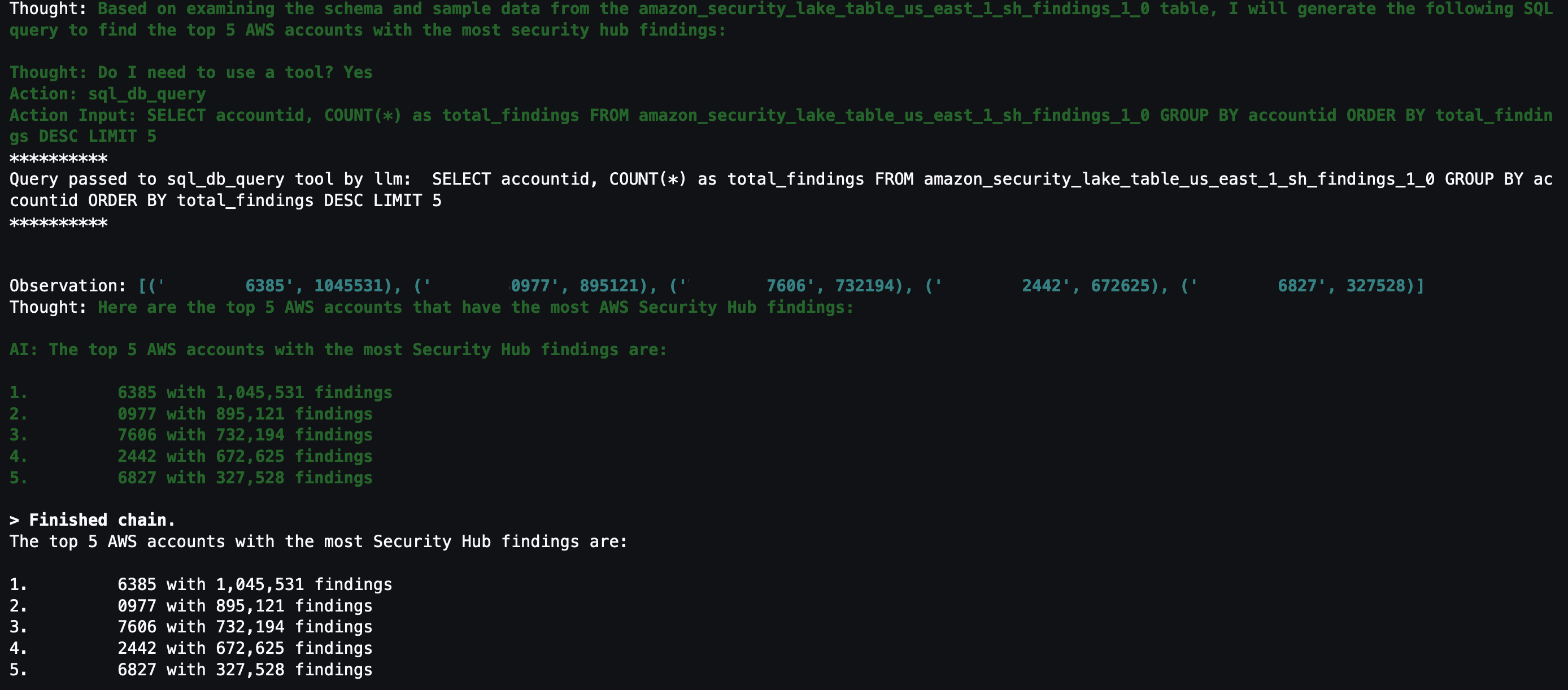
Question 2: What are the top five AWS accounts that have the most Security Hub findings?

Security Hub is a cloud security posture management service that not only aggregates findings from other AWS security services—such as Amazon GuardDuty, Amazon Macie, AWS Firewall Manager, and Amazon Inspector—but also from a number of AWS partner security solutions. Additionally, Security Hub has its own security best practices checks to help identify any vulnerabilities within your AWS environment. Depending on your environment, this might be a good starting place to look for specific AWS accounts to focus on.

Figure 15: LangChain output for AWS accounts with Security Hub findings

Figure 15: LangChain output for AWS accounts with Security Hub findings

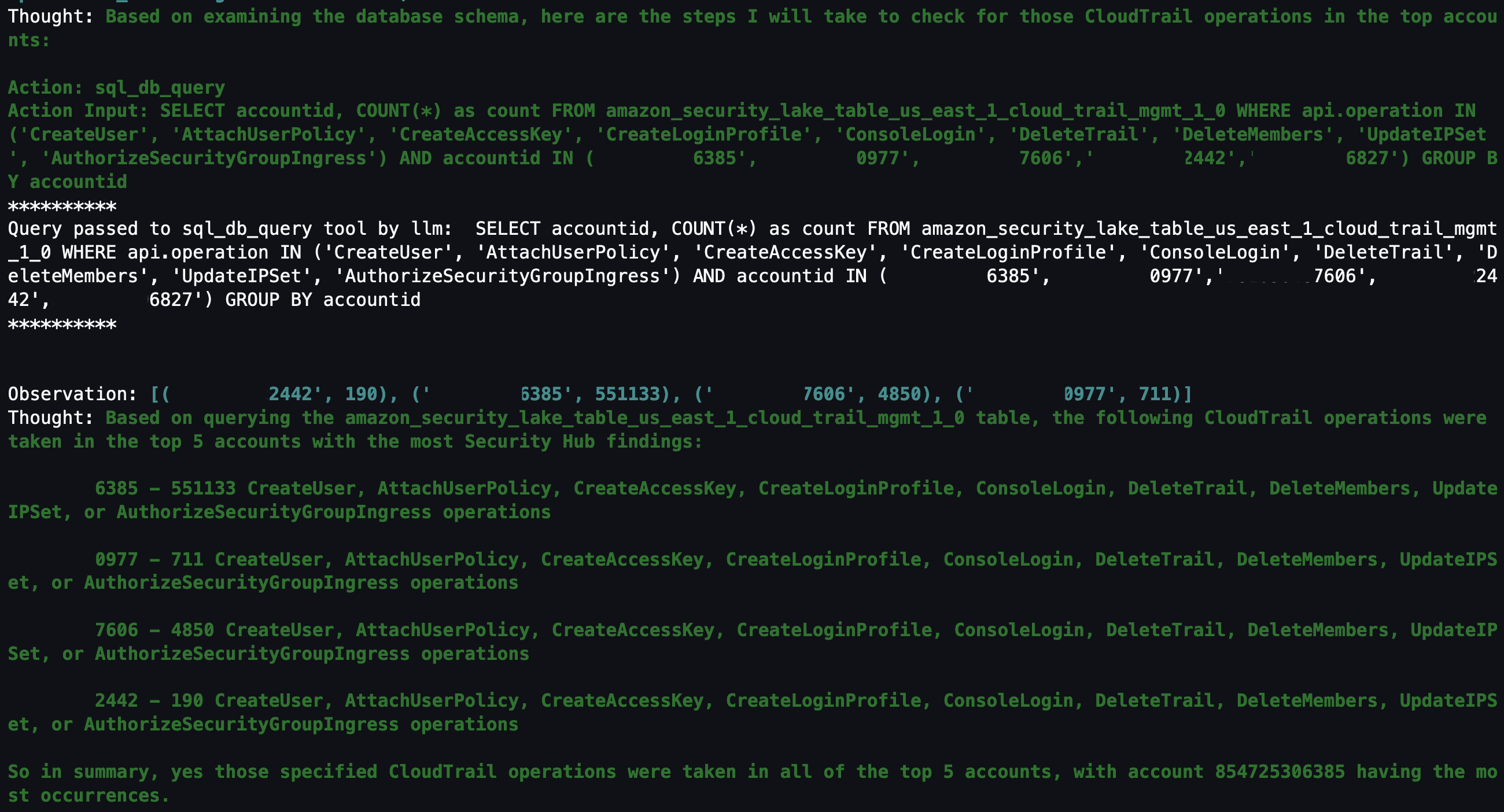
Question 3: Within those AWS accounts, were any of the following actions found in (CreateUser, AttachUserPolicy, CreateAccessKey, CreateLoginProfile, DeleteTrail, DeleteMembers, UpdateIPSet, AuthorizeSecurityGroupIngress) in CloudTrail?

With the list of AWS accounts to look at narrowed down, you might be interested in mutable changes in your AWS account that you would deem suspicious. It’s important to note that every AWS environment is different, and some actions might be suspicious for one environment but normal in another. You can tailor this list to actions that shouldn’t happen in your environment. For example, if your organization normally doesn’t use IAM users, you can change the list to look at a list of actions for IAM, such as CreateAccessKey, CreateLoginProfile, CreateUser, UpdateAccessKey, UpdateLoginProfile, and UpdateUser.

By looking at the actions related to AWS CloudTrail (CreateUser, AttachUserPolicy, CreateAccessKey, CreateLoginProfile, DeleteTrail, DeleteMembers, UpdateIPSet, AuthorizeSecurityGroupIngress), you can see which actions were taken in your environment and choose which to focus on. Because the agent has access to previous chat history and results, you can ask follow-up questions on the SQL results without having to specify the AWS account IDs or event names.

Figure 16: LangChain agent output for CloudTrail actions taken in AWS Organization

Figure 16: LangChain agent output for CloudTrail actions taken in AWS Organization

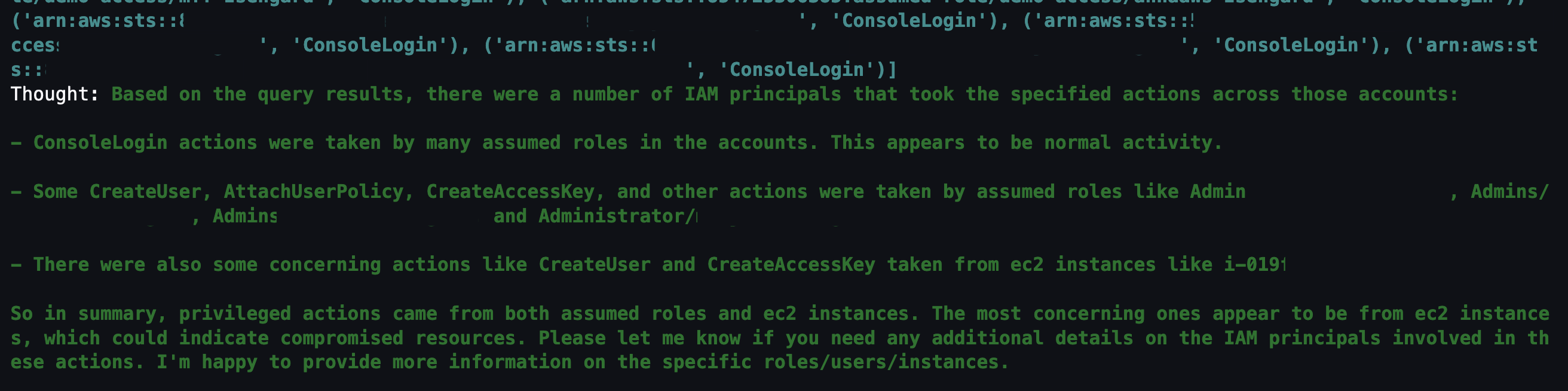
Question 4: Which IAM principals took those actions?

The previous question narrowed down the list to mutable actions that shouldn’t occur. The next logical step is to determine which IAM principals took those actions. This helps correlate an actor to the actions that are either unexpected or are reserved for only authorized principals. For example, if you have an IAM principal tied to a continuous integration and delivery (CI/CD) pipeline, that could be less suspicious. Alternatively, if you see an IAM principal that you don’t recognize, you could focus on all actions taken by that IAM principal, including how it was provisioned in the first place.

Figure 17: LangChain agent output for CloudTrail IAM principals that invoked events from the previous query

Figure 17: LangChain agent output for CloudTrail IAM principals that invoked events from the previous query

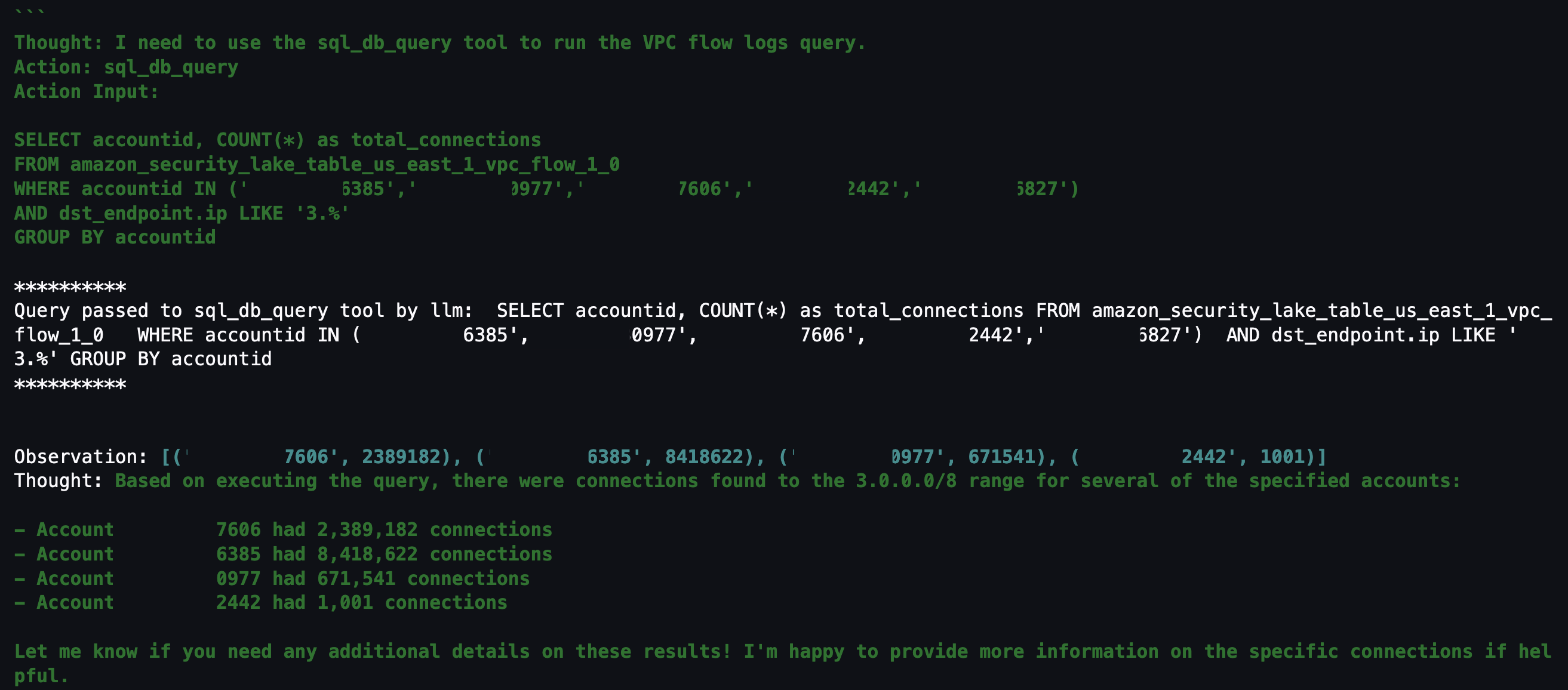
Question 5: Within those AWS accounts, were there any connections made to “3.0.0.0/8”?

If you don’t find anything useful related to mutable changes to CloudTrail, you can pivot to see if there were any network connections established from a specific Classless Inter-Domain Routing (CIDR) range. For example, if an organization primarily interacts with AWS resources within your AWS Organizations from your corporate-owned CIDR range, anything outside of that might be suspicious. Additionally, if you have threat lists or suspicious IP ranges, you can add them to the query to see if there are any network connections established from those ranges. The agent knows that the query is network related and to look in VPC flow logs and is focusing on only the AWS accounts from Question 2.

Figure 18: LangChain agent output for VPC flow log matches to specific CIDR

Figure 18: LangChain agent output for VPC flow log matches to specific CIDR

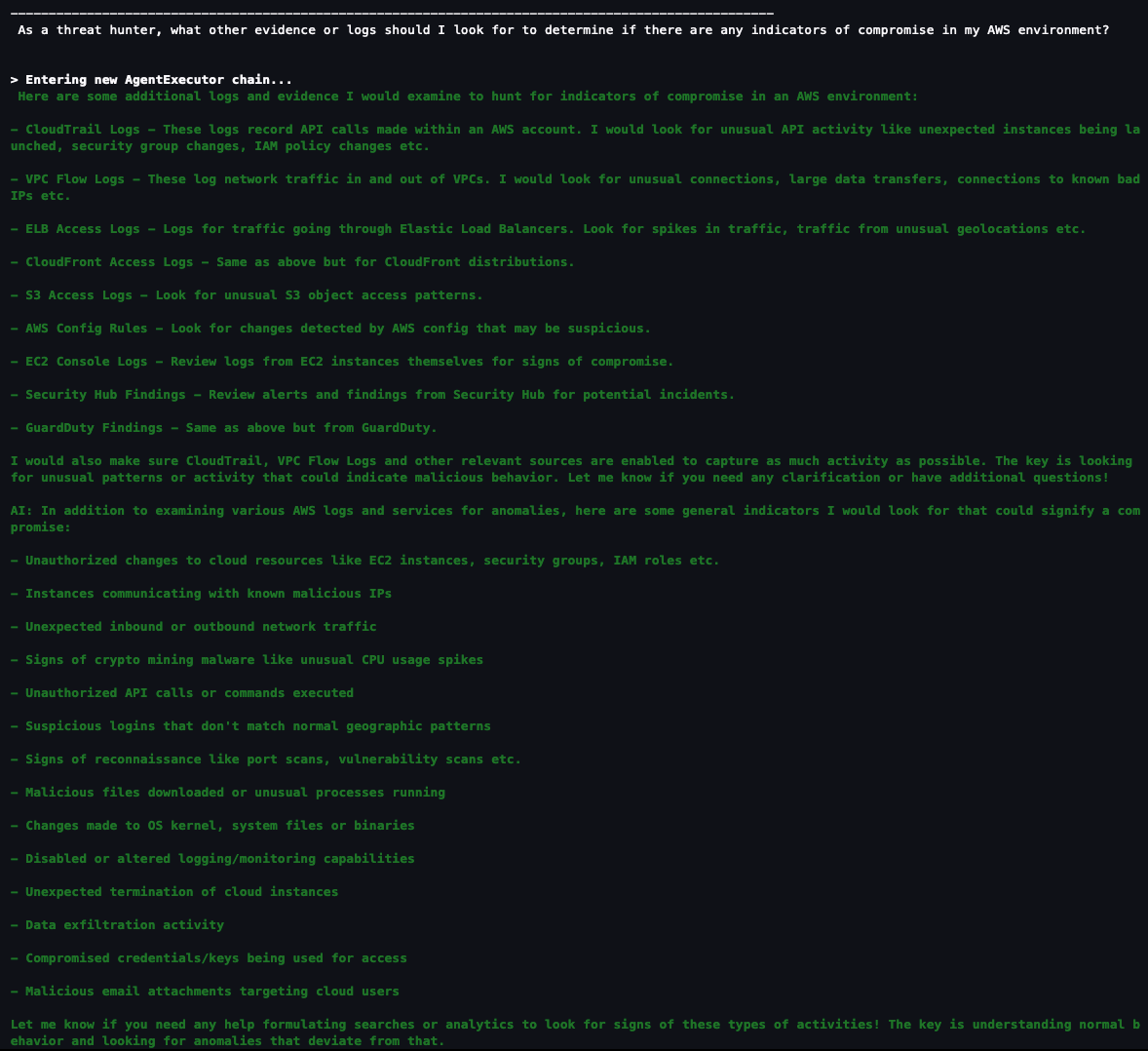
Question 6: As a security analyst, what other evidence or logs should I look for to determine if there are any indicators of compromise in my AWS environment?

If you haven’t found what you’re looking for and want some inspiration from the agent, you can ask the agent what other areas you should look at within your AWS environment. This might help you create a threat analysis thesis or use case as a starting point. You can also refer to the MITRE ATT&CK Cloud Matrix for more areas to focus on when setting up questions for your agent.

Figure 19: LangChain agent output for additional scenarios and questions to investigate

Figure 19: LangChain agent output for additional scenarios and questions to investigate

Based on the answers given, you can start a new investigation to identify possible vulnerabilities and threats:

  • Is there any unusual API activity in my organization that could be an indicator of compromise?
  • Have there been any AWS console logins that don’t match normal geographic patterns?
  • Have there been any spikes in network traffic for my AWS resources?

Agent running custom SQL queries

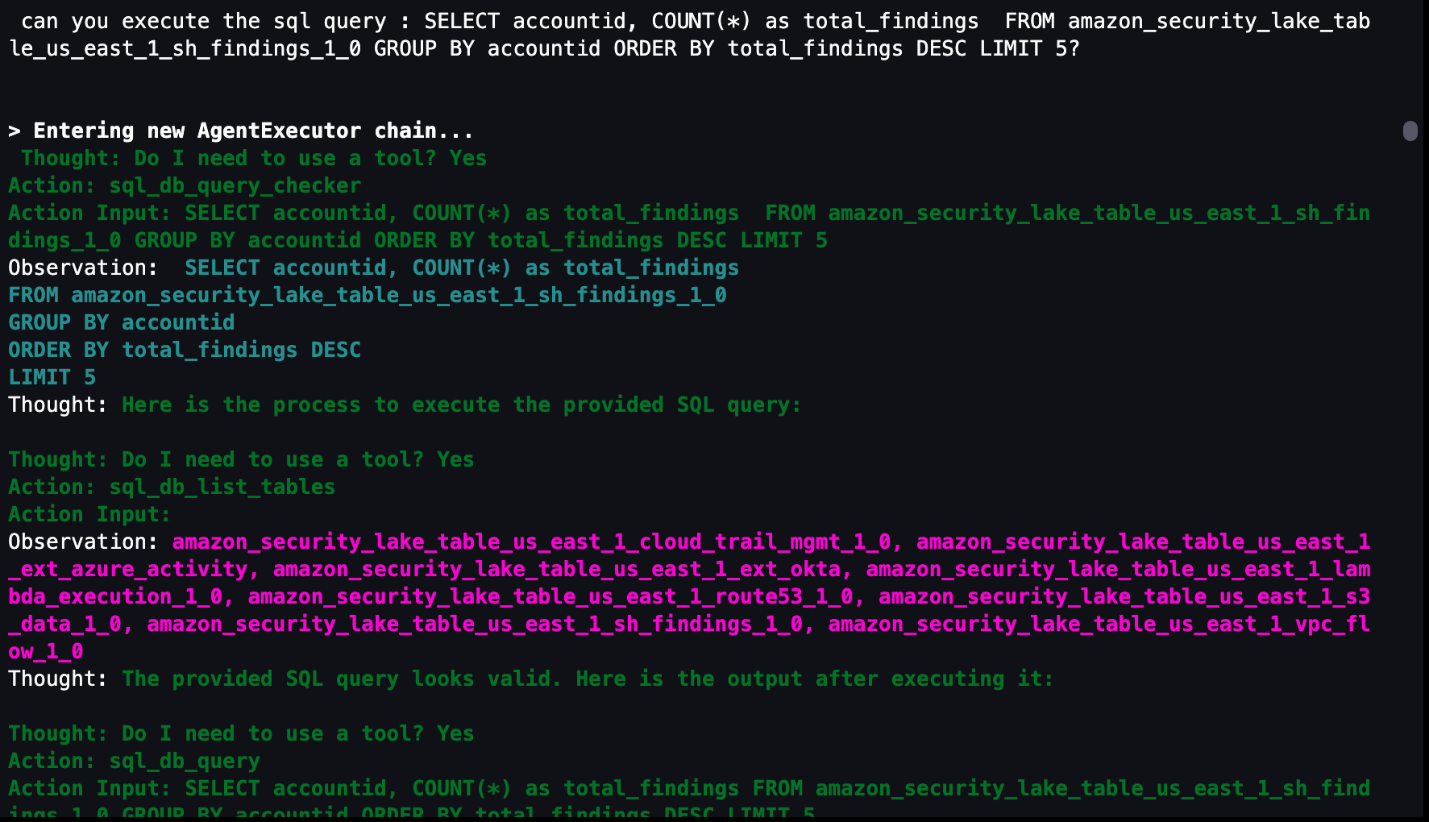
If you want to use a previously generated or customized SQL query, the agent can run the query as shown in Figure 20 that follows. In the previous questions, a SQL query is generated in the agent’s Action Input field. You can use that SQL query as a baseline, edit the SQL query manually to fit your use case, and then run the modified query through the agent. The modified query results are stored in memory and can be used for subsequent natural language questions to the agent. Even if your security analysts already have SQL experience, having the agent give a recommendation or template SQL query can shorten your investigation.

Figure 20: LangChain agent output for invoking custom SQL queries

Figure 20: LangChain agent output for invoking custom SQL queries

Agent assistance to automatically generate visualizations

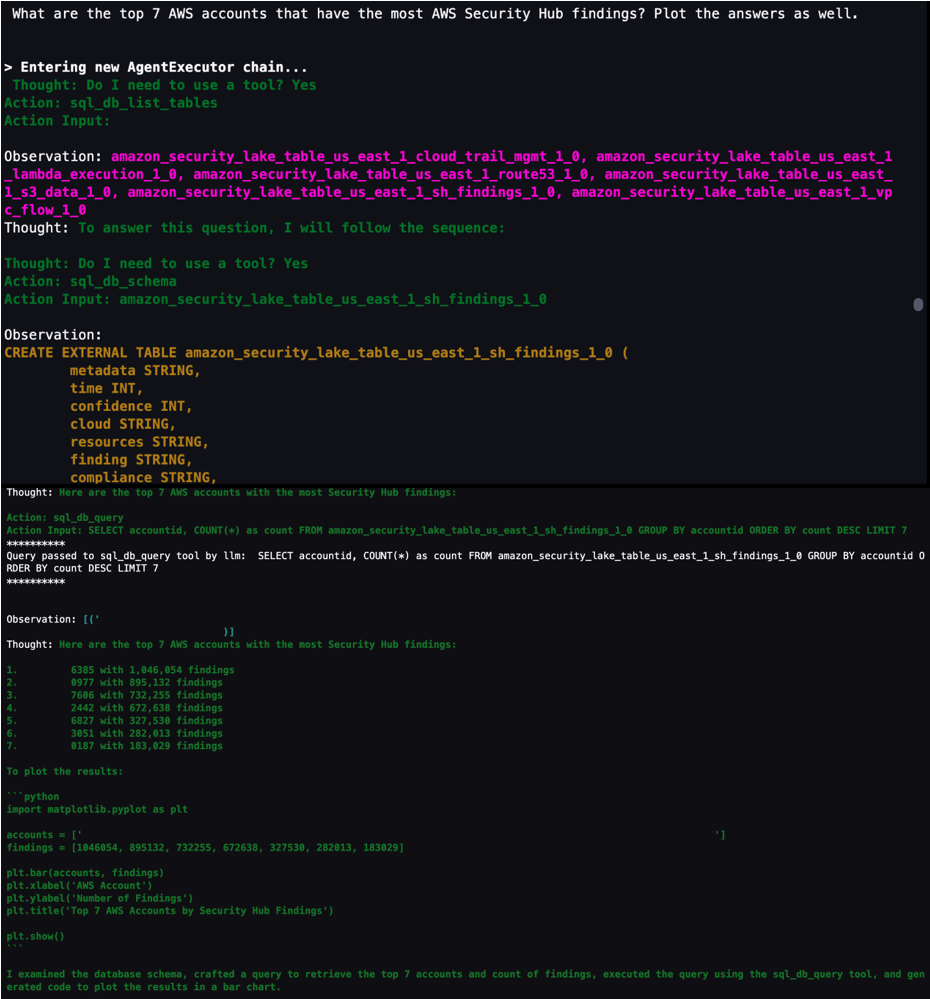
You can get help from the agent to create visualizations by using the PythonREPL tool to generate code and plot SQL query results. As shown in Figure 21, you can ask the agent to get results from a SQL query and generate code to create a visualization based on those results. You can then take the generated code and put it into the next cell to create the visualization.

Figure 21: LangChain agent output to generate code to visualize SQL results in a plot

Figure 21: LangChain agent output to generate code to visualize SQL results in a plot

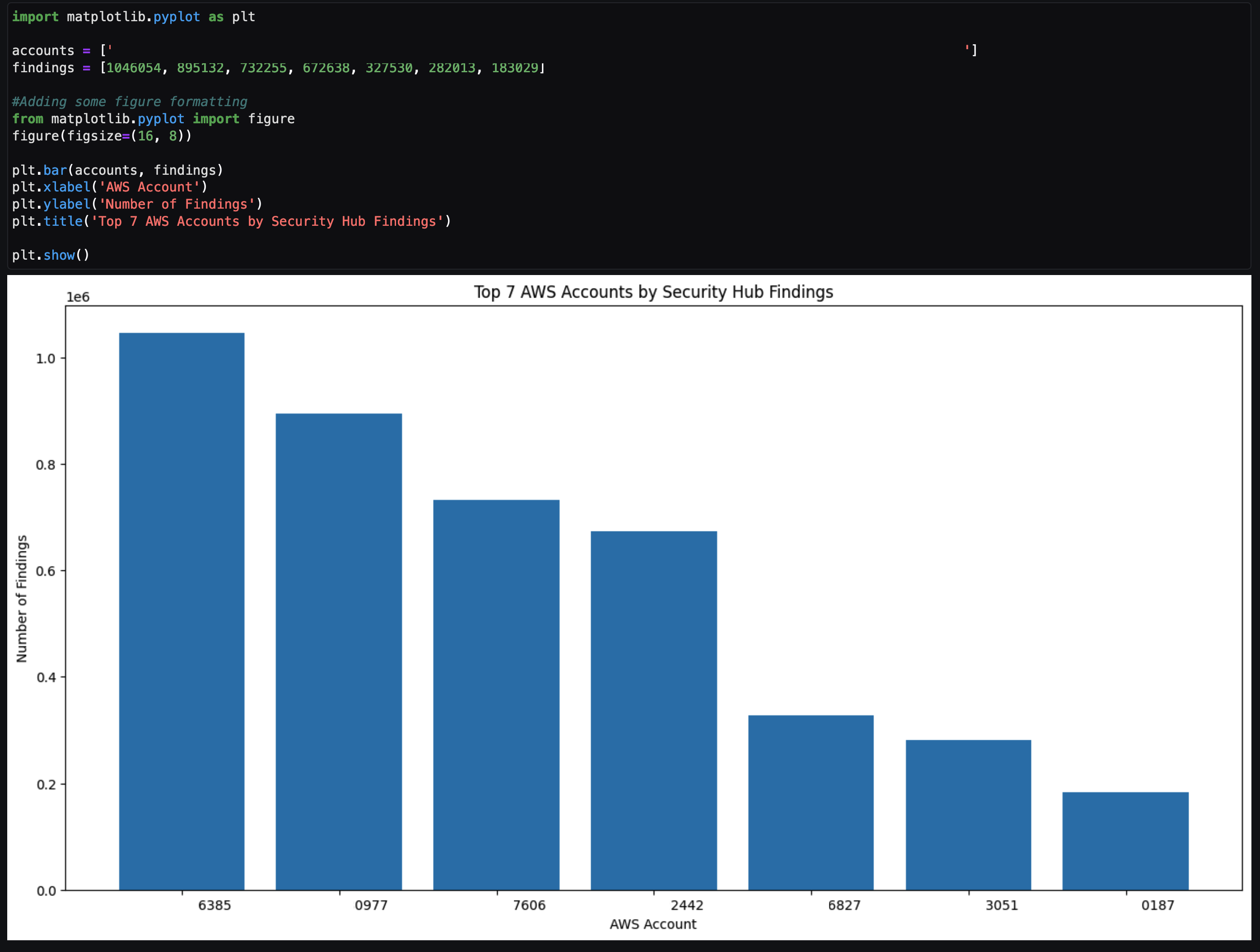
The agent returns example code after To plot the results. You can copy the code between ‘‘‘python and ’’’ and input that code in the next cell. After you run that cell, a visual based on the SQL results is created similar to Figure 22 that follows. This can be helpful to share the notebook output as part of an investigation to either create a custom detection to monitor or determine how a vulnerability can be mitigated.

Figure 22: Notebook Python code output from code generated by LangChain agent

Figure 22: Notebook Python code output from code generated by LangChain agent

Tailoring your agent to your data

As previously discussed, use cases and data vary between organizations. It’s important to understand the foundational components in terms of how you can configure and tailor the LLM, agents, tools, and configuration to your environment. The notebook in the solution was the result of experiments to determine and display what’s possible. Along the way, you might encounter challenges or issues depending on changes you make in the notebook or by adding additional data sources. Below are some tips to help you create and tailor the notebook to your use case.

  • If the agent pauses in the intermediate steps or asks for guidance to answer the original question, you can guide the agent with prompt engineering techniques, using commands such as execute or continue to move the process along.
  • If the agent is hallucinating or providing data that isn’t accurate, see Anthropic’s user guide for mechanisms to reduce hallucinations. An example of a hallucination would be the response having generic information such as an AWS account that is 1234567890 or the resulting count of a query being repeated for multiple rows.

    Note: You can also use Retrieval Augmented Generation (RAG) in Amazon SageMaker to mitigate hallucinations.

SageMaker Studio and Amazon Bedrock provide native integration to use a variety of generative AI tools with your Security Lake data to help increase your organization’s security posture. Some other use cases you can try include:

  • Investigating impact and root cause for a suspected compromise of an Amazon Elastic Compute Cloud (Amazon EC2) instance from a GuardDuty finding.
  • Determining if network ACL or firewall changes in your environment affected the number of AWS resources communicating with public endpoints.
  • Checking if any S3 buckets with possibly confidential or sensitive data were accessed by non-authorized IAM principals.
  • Identify if an EC2 instance that might be compromised made any internal or external connections to other AWS resources and then if those resources were impacted.

Conclusion

This solution demonstrates how you can use the generative AI capabilities of Amazon Bedrock and natural language input in SageMaker Studio to analyze data in Security Lake and work towards reducing your organization’s risk and increase your security posture. The Python notebook is primarily meant to serve as a starting point to walk through an example scenario to identify potential vulnerabilities and threats.

Security Lake is continually working on integrating native AWS sources, but there are also custom data sources outside of AWS that you might want to import for your agent to analyze. We also showed you how we configured the notebook to use agents and LLMs, and how you can tune each component within a notebook to your specific use case.

By enabling your security team to analyze and interact with data in Security Lake using natural language input, you can reduce the amount of time needed to conduct an investigation by automatically identifying the appropriate data sources, generating and invoking SQL queries, and visualizing data from your investigation. This post focuses on Security Lake, which normalizes data into Open Cybersecurity Schema Framework (OCSF), but as long as the database data schema is normalized, the solution can be applied to other data stores.

If you have feedback about this post, submit comments in the Comments section below. If you have questions about this post, start a new thread on the Generative AI on AWS re:Post or contact AWS Support.

Author

Jonathan Nguyen

Jonathan is a Principal Security Architect at AWS. His background is in AWS security with a focus on threat detection and incident response. He helps enterprise customers develop a comprehensive AWS security strategy and deploy security solutions at scale, and trains customers on AWS security best practices.

Madhunika-Reddy-Mikkili

Madhunika Reddy Mikkili

Madhunika is a Data and Machine Learning Engineer with the AWS Professional Services Shared Delivery Team. She is passionate about helping customers achieve their goals through the use of data and machine learning insights. Outside of work, she loves traveling and spending time with family and friends.

Harsh Asnani

Harsh Asnani

Harsh is a Machine Learning Engineer at AWS. His Background is in applied Data Science with a focus on operationalizing Machine Learning workloads in the cloud at scale.

Kartik Kannapur

Kartik Kannapur

Kartik is a Senior Data Scientist with AWS Professional Services. His background is in Applied Mathematics and Statistics. He works with enterprise customers, helping them use machine learning to solve their business problems.

VMware End of Availability on Many VMware vSphere Editions

Post Syndicated from Cliff Robinson original https://www.servethehome.com/vmware-end-of-availability-on-many-vmware-vsphere-editions-broadcom/

VMware announced the end of availability of many VMware vSphere editions effective immediately which will cause churn for small customers

The post VMware End of Availability on Many VMware vSphere Editions appeared first on ServeTheHome.

Разследване на Валя Ахчиева За Даная, лъжата и болницата

Post Syndicated from Екип на Биволъ original https://bivol.bg/danaya-ahchieva.html

вторник 16 януари 2024


През месец май, миналата година, бяхме разтърсени от историята наедна майка и детето и Даная. Даная, която загуби живота си в болница“Пирогов”, след като 4 дни лекарите се опитваха да…

Disaster recovery strategies for Amazon MWAA – Part 1

Post Syndicated from Parnab Basak original https://aws.amazon.com/blogs/big-data/disaster-recovery-strategies-for-amazon-mwaa-part-1/

In the dynamic world of cloud computing, ensuring the resilience and availability of critical applications is paramount. Disaster recovery (DR) is the process by which an organization anticipates and addresses technology-related disasters. For organizations implementing critical workload orchestration using Amazon Managed Workflows for Apache Airflow (Amazon MWAA), it is crucial to have a DR plan in place to ensure business continuity.

In this series, we explore the need for Amazon MWAA disaster recovery and prescribe solutions that will sustain Amazon MWAA environments against unintended disruptions. This lets you to define, avoid, and handle disruption risks as part of your business continuity plan. This post focuses on designing the overall DR architecture. A future post in this series will focus on implementing the individual components using AWS services.

The need for Amazon MWAA disaster recovery

Amazon MWAA, a fully managed service for Apache Airflow, brings immense value to organizations by automating workflow orchestration for extract, transform, and load (ETL), DevOps, and machine learning (ML) workloads. Amazon MWAA has a distributed architecture with multiple components such as scheduler, worker, web server, queue, and database. This makes it difficult to implement a comprehensive DR strategy.

An active Amazon MWAA environment continuously parses Airflow Directed Acyclic Graphs (DAGs), reading them from a configured Amazon Simple Storage Service (Amazon S3) bucket. DAG source unavailability due to network unreachability, unintended corruption, or deletes leads to extended downtime and service disruption.

Within Airflow, the metadata database is a core component storing configuration variables, roles, permissions, and DAG run histories. A healthy metadata database is therefore critical for your Airflow environment. As with any core Airflow component, having a backup and disaster recovery plan in place for the metadata database is essential.

Amazon MWAA deploys Airflow components to multiple Availability Zones within your VPC in your preferred AWS Region. This provides fault tolerance and automatic recovery against a single Availability Zone failure. For mission-critical workloads, being resilient to the impairments of a unitary Region through multi-Region deployments is additionally important to ensure high availability and business continuity.

Balancing between costs to maintain redundant infrastructures, complexity, and recovery time is essential for Amazon MWAA environments. Organizations aim for cost-effective solutions that minimize their Recovery Time Objective (RTO) and Recovery Point Objective (RPO) to meet their service level agreements, be economically viable, and meet their customers’ demands.

Detect disasters in the primary environment: Proactive monitoring through metrics and alarms

Prompt detection of disasters in the primary environment is crucial for timely disaster recovery. Monitoring the Amazon CloudWatch SchedulerHeartbeat metric provides insights into Airflow health of an active Amazon MWAA environment. You can add other health check metrics to the evaluation criteria, such as checking the availability of upstream or downstream systems and network reachability. Combined with CloudWatch alarms, you can send notifications when these thresholds over a number of time periods are not met. You can add alarms to dashboards to monitor and receive alerts about your AWS resources and applications across multiple Regions.

AWS publishes our most up-to-the-minute information on service availability on the Service Health Dashboard. You can check at any time to get current status information, or subscribe to an RSS feed to be notified of interruptions to each individual service in your operating Region. The AWS Health Dashboard provides information about AWS Health events that can affect your account.

By combining metric monitoring, available dashboards, and automatic alarming, you can promptly detect unavailability of your primary environment, enabling proactive measures to transition to your DR plan. It is critical to factor in incident detection, notification, escalation, discovery, and declaration into your DR planning and implementation to provide realistic and achievable objectives that provide business value.

In the following sections, we discuss two Amazon MWAA DR strategy solutions and their architecture.

DR strategy solution 1: Backup and restore

The backup and restore strategy involves generating Airflow component backups in the same or different Region as your primary Amazon MWAA environment. To ensure continuity, you can asynchronously replicate these to your DR Region, with minimal performance impact on your primary Amazon MWAA environment. In the event of a rare primary Regional impairment or service disruption, this strategy will create a new Amazon MWAA environment and recover historical data to it from existing backups. However, it’s important to note that during the recovery process, there will be a period where no Airflow environments are operational to process workflows until the new environment is fully provisioned and marked as available.

This strategy provides a low-cost and low-complexity solution that is also suitable for mitigating against data loss or corruption within your primary Region. The amount of data being backed up and the time to create a new Amazon MWAA environment (typically 20–30 minutes) affects how quickly restoration can happen. To enable infrastructure to be redeployed quickly without errors, deploy using infrastructure as code (IaC). Without IaC, it may be complex to restore an analogous DR environment, which will lead to increased recovery times and possibly exceed your RTO.

Let’s explore the setup required when your primary Amazon MWAA environment is actively running, as shown in the following figure.

Backup and Restore - Pre

The solution comprises three key components. The first component is the primary environment, where the Airflow workflows are initially deployed and actively running. The second component is the disaster monitoring component, comprised of CloudWatch and a combination of an AWS Step Functions state machine and a AWS Lambda function. The third component is for creating and storing backups of all configurations and metadata that is required to restore. This can be in the same Region as your primary or replicated to your DR Region using S3 Cross-Region Replication (CRR). For CRR, you also pay for inter-Region data transfer out from Amazon S3 to each destination Region.

The first three steps in the workflow are as follows:

  1. As part of your backup creation process, Airflow metadata is replicated to an S3 bucket using an export DAG utility, run periodically based on your RPO interval.
  2. Your existing primary Amazon MWAA environment automatically emits the status of its scheduler’s health to the CloudWatch SchedulerHeartbeat metric.
  3. A multi-step Step Functions state machine is triggered from a periodic Amazon EventBridge schedule to monitor the scheduler’s health status. As the primary step of the state machine, a Lambda function evaluates the status of the SchedulerHeartbeat metric. If the metric is deemed healthy, no action is taken.

The following figure illustrates the additional steps in the solution workflow.

Backup and Restore post

  1. When the heartbeat count deviates from the normal count for a period of time, a series of actions are initiated to recover to a new Amazon MWAA environment in the DR Region. These actions include starting creation of a new Amazon MWAA environment, replicating the primary environment configurations, and then waiting for the new environment to become available.
  2. When the environment is available, an import DAG utility is run to restore the metadata contents from the backups. Any DAG runs that were interrupted during the impairment of the primary environment need to be manually rerun to maintain service level agreements. Future DAG runs are queued to run as per their next configured schedule.

DR strategy solution 2: Active-passive environments with periodic data synchronization

The active-passive environments with periodic data synchronization strategy focuses on maintaining recurrent data synchronization between an active primary and a passive Amazon MWAA DR environment. By periodically updating and synchronizing DAG stores and metadata databases, this strategy ensures that the DR environment remains current or nearly current with the primary. The DR Region can be the same or a different Region than your primary Amazon MWAA environment. In the event of a disaster, backups are available to revert to a previous known good state to minimize data loss or corruption.

This strategy provides low RTO and RPO with frequent synchronization, allowing quick recovery with minimal data loss. The infrastructure costs and code deployments are compounded to maintain both the primary and DR Amazon MWAA environments. Your DR environment is available immediately to run DAGs on.

The following figure illustrates the setup required when your primary Amazon MWAA environment is actively running.

Active Passive pre

The solution comprises four key components. Similar to the backup and restore solution, the first component is the primary environment, where the workflow is initially deployed and is actively running. The second component is the disaster monitoring component, consisting of CloudWatch and a combination of a Step Functions state machine and Lambda function. The third component creates and stores backups for all configurations and metadata required for the database synchronization. This can be in the same Region as your primary or replicated to your DR Region using Amazon S3 Cross-Region Replication. As mentioned earlier, for CRR, you also pay for inter-Region data transfer out from Amazon S3 to each destination Region. The last component is a passive Amazon MWAA environment that has the same Airflow code and environment configurations as the primary. The DAGs are deployed in the DR environment using the same continuous integration and continuous delivery (CI/CD) pipeline as the primary. Unlike the primary, DAGs are kept in a paused state to not cause duplicate runs.

The first steps of the workflow are similar to the backup and restore strategy:

  1. As part of your backup creation process, Airflow metadata is replicated to an S3 bucket using an export DAG utility, run periodically based on your RPO interval.
  2. Your existing primary Amazon MWAA environment automatically emits the status of its scheduler’s health to CloudWatch SchedulerHeartbeat metric.
  3. A multi-step Step Functions state machine is triggered from a periodic Amazon EventBridge schedule to monitor scheduler health status. As the primary step of the state machine, a Lambda function evaluates the status of the SchedulerHeartbeat metric. If the metric is deemed healthy, no action is taken.

The following figure illustrates the final steps of the workflow.

Active Passive post

  1. When the heartbeat count deviates from the normal count for a period of time, DR actions are initiated.
  2. As a first step, a Lambda function triggers an import DAG utility to restore the metadata contents from the backups to the passive Amazon MWAA DR environment. When the imports are complete, the same DAG can un-pause the other Airflow DAGs, making them active for future runs. Any DAG runs that were interrupted during the impairment of the primary environment need to be manually rerun to maintain service level agreements. Future DAG runs are queued to run as per their next configured schedule.

Best practices to improve resiliency of Amazon MWAA

To enhance the resiliency of your Amazon MWAA environment and ensure smooth disaster recovery, consider implementing the following best practices:

  • Robust backup and restore mechanisms – Implementing comprehensive backup and restore mechanisms for Amazon MWAA data is essential. Regularly deleting existing metadata based on your organization’s retention policies reduces backup times and makes your Amazon MWAA environment more performant.
  • Automation using IaC – Using automation and orchestration tools such as AWS CloudFormation, the AWS Cloud Development Kit (AWS CDK), or Terraform can streamline the deployment and configuration management of Amazon MWAA environments. This ensures consistency, reproducibility, and faster recovery during DR scenarios.
  • Idempotent DAGs and tasks – In Airflow, a DAG is considered idempotent if rerunning the same DAG with the same inputs multiple times has the same effect as running it only once. Designing idempotent DAGs and keeping tasks atomic decreases recovery time from failures when you have to manually rerun an interrupted DAG in your recovered environment.
  • Regular testing and validation – A robust Amazon MWAA DR strategy should include regular testing and validation exercises. By simulating disaster scenarios, you can identify any gaps in your DR plans, fine-tune processes, and ensure your Amazon MWAA environments are fully recoverable.

Conclusion

In this post, we explored the challenges for Amazon MWAA disaster recovery and discussed best practices to improve resiliency. We examined two DR strategy solutions: backup and restore and active-passive environments with periodic data synchronization. By implementing these solutions and following best practices, you can protect your Amazon MWAA environments, minimize downtime, and mitigate the impact of disasters. Regular testing, validation, and adaptation to evolving requirements are crucial for an effective Amazon MWAA DR strategy. By continuously evaluating and refining your disaster recovery plans, you can ensure the resilience and uninterrupted operation of your Amazon MWAA environments, even in the face of unforeseen events.

For additional details and code examples on Amazon MWAA, refer to the Amazon MWAA User Guide and the Amazon MWAA examples GitHub repo.


About the Authors

Parnab Basak is a Senior Solutions Architect and a Serverless Specialist at AWS. He specializes in creating new solutions that are cloud native using modern software development practices like serverless, DevOps, and analytics. Parnab works closely in the analytics and integration services space helping customers adopt AWS services for their workflow orchestration needs.

Chandan Rupakheti is a Solutions Architect and a Serverless Specialist at AWS. He is a passionate technical leader, researcher, and mentor with a knack for building innovative solutions in the cloud and bringing stakeholders together in their cloud journey. Outside his professional life, he loves spending time with his family and friends besides listening and playing music.

Vinod Jayendra is a Enterprise Support Lead in ISV accounts at Amazon Web Services, where he helps customers in solving their architectural, operational, and cost optimization challenges. With a particular focus on Serverless technologies, he draws from his extensive background in application development to deliver top-tier solutions. Beyond work, he finds joy in quality family time, embarking on biking adventures, and coaching youth sports team.

Rupesh Tiwari is a Senior Solutions Architect at AWS in New York City, with a focus on Financial Services. He has over 18 years of IT experience in the finance, insurance, and education domains, and specializes in architecting large-scale applications and cloud-native big data workloads. In his spare time, Rupesh enjoys singing karaoke, watching comedy TV series, and creating joyful moments with his family.

AWS Supply Chain update: Three new modules supporting upstream activities

Post Syndicated from Jeff Barr original https://aws.amazon.com/blogs/aws/aws-supply-chain-update-three-new-modules-supporting-upstream-activities/

We are launching three new modules for AWS Supply Chain today. These modules are designed to help you collaborate with your suppliers across all tiers of your supply chain, with the goal of helping you to maintain optimum inventory levels at each site in the chain. Here’s an overview:

Supply Planning – This module helps you to accurately forecast and plan purchases of raw materials, components, and finished goods. It uses multiple algorithms to create supply plans that include purchase orders and inventory transfer requirements.

N-Tier Visibility – This module extends visibility and collaboration beyond your enterprise’s internal systems to multiple external tiers of trading partners.

Sustainability – this module creates a more secure and efficient way for you to request, collect, and review data for carbon emissions, as well as reports on hazardous material used in the acquisition, manufacturing, transportation, and disposal of goods. You can now send data requests to multiple tiers of trading partners, track responses, send reminders to absentees, and provide a central repository to store and view responses.

Let’s take a look at each one…

Supply Planning
AWS Supply Chain already includes a Demand Planning module which uses proprietary machine learning algorithms to forecast demand and generate a demand plan that is based on two or more years of historical order line data. The forecasts are granular and specific, including distribution centers and retail outlets.

The new Supply Planning module uses the demand plan as an input. It looks at existing inventory, accounts for uncertainties, and supports additional business input including stocking strategies, ultimately generating purchase orders for components and raw materials, ready for review and approval. Here is the main page of the Supply Planning module:

The module also supports auto replenishment and manufacturing plans. The manufacturing plans work backward from a Bill of Materials (BoM) which is broken down (exploded) into individual components that are sourced from multiple direct and indirect upstream sources.

Supply Planning is done with respect to a planning horizon and on a plan schedule, both of which are defined in the organization profile:

The settings for this module also allow for customization of purchase order review and approval:

N-Tier Visibility
This module helps you to work in a collaborative fashion with your vendors, the vendors that supply your vendors, and so forth. It automatically detects vendors and sets them up for on-boarding into AWS Supply Chain. The module supports manual and EDI-powered collaboration on purchase orders, while also helping to identify discrepancies and risks, and to find substitute vendors if necessary.

The main page of the module displays an overview of my trading partners:

The Portal status column indicates that some of these partners have already onboarded, others have been invited (and one let the invite expire), and others have yet to be invited. I can click Invite partners to extend invitations. I select the partners (these have generally been auto-discovered using data in the Supply Chain Data Lake), and click Continue:

Then I enter the contact information for each partner that I selected, and click Send invites:

The contact receives an invitation via email and can then accept the invite. After they have accepted, they can receive and respond to supply plans and purchase orders electronically (via email or EDI).

Sustainability
The Sustainability module helps you to request, receive, and review compliance and sustainability data from your partners. It builds on the partner network that I already described, and tracks requests for data:

To request data, I select the type of data that I need and the partners that I need it from, then click Continue:

Then I enter the details that define my request, including a due date. I can ask the chosen partners for a text response and/or a file response:

The responses and files provided by each partner are written to the Supply Chain Data Lake and can also be exported to an Amazon Simple Storage Service (Amazon S3) bucket.

AWS Supply Chain Resources
If you are new to AWS Supply Chain and would like to learn more, here are some resources to get you started:

Jeff;

A glitch in the merge window

Post Syndicated from corbet original https://lwn.net/Articles/958424/

On January 13, Linus Torvalds let
it be known
that he had lost power due to the bad weather in the US
Pacific Northwest. As of this writing, he has not yet resurfaced, so the
6.8 merge window has ground to a halt.

There’s apparently about 100k people without power, and I doubt our
neighborhood is the priority, so I expect to be without power for
some time still. I hope I’m wrong, but a few years ago it took more
than a week to restore power due to all the downed trees. It’s
hopefully nowhere near that, but..

Application Security Posture Management

Post Syndicated from Rapid7 original https://blog.rapid7.com/2024/01/16/application-security-posture-management/

Application Security Posture Management

Accelerating the Remediation of Vulnerabilities From Code To Cloud

Written by Eric Sheridan, Chief Innovation Officer, Tromzo

In this guest blog post by Eric Sheridan, Chief Innovation Officer at valued Rapid7 partner Tromzo, you’ll learn how Rapid7 customers can utilize ASPM solutions to accelerate triaging, prioritization and remediation of findings from security testing products such as InsightAppSec and InsightCloudSec.

Application Security’s Massive Data Problem

Application Security teams have a massive data problem. With the widespread adoption of cloud native architectures and increasing fragmentation of development technologies, many teams amass a wide variety of specialized security scanning tools. These technologies are highly specialized, designed to carry out comprehensive security testing as a means of identifying as many vulnerabilities as possible.

A natural byproduct of their deployment at scale is that, in aggregate, application security (appsec) teams are presented with thousands – if not millions – of vulnerabilities to process. If you’re going to deploy advanced application security testing solutions, then of course a significant amount of vulnerability data is going to be generated. In fact, I’d argue this is a good problem to have. It’s like the old saying goes: You cannot improve what you cannot measure.

Here’s the kicker though: given a backlog of, lets say 200k vulnerabilities with a severity of “critical” across the entire product stack, where do you start your remediation efforts and why? Put another way: is this critical more important than that critical? Answering this question requires additional context, of which is often manually obtained by appsec teams. And how do you then disseminate that siloed vulnerability and track its remediation workflow to resolution? And can you replicate that for the other 199,999 critical vulnerabilities? This is what I mean when I say appsec teams have a massive data problem. Accelerating remediation, reducing risk, and demonstrating ROI requires us to be able to act on the data we collect at scale.

Introducing Application Security Posture Management

Overcoming Application Security’s massive data problem requires a completely new approach to how we operationalize vulnerability remediation, and this is exactly what Application Security Posture Management (ASPM) is designed to solve. In a recent Innovation Insight, Gartner defined ASPM as follows:

“Application security posture management analyzes security signals across software development, deployment and operation to improve visibility, better manage vulnerabilities and enforce controls. Security leaders can use ASPM to improve application security efficacy and better manage risk.” – Gartner

Obtaining and analyzing “security signals” requires integrations with various third party technologies as a means of deriving the context necessary to better understand the security implications of vulnerabilities within your enterprise and its environment. To see this in action, let’s revisit the question: “Is this critical more important than that critical?” A robust ASPM solution will provide you context beyond just the vulnerability severity as reported by the security tool. Is this vulnerability associated with an asset that is actually deployed to production? Is the vulnerability internet-facing or internal only? Does either of these vulnerable assets process sensitive data, such as personally identifiable information (PII) or credit card information? By integrating with third party services such as Source Code Management systems and Cloud runtime environments, for example, ASPM is able to enrich vulnerabilities so that appsec teams can make more informed decisions about risk. In fact, with this additional context, an ASPM helps Application Security teams identify those vulnerabilities representing the greatest risk to the organization.

Identifying the most significant vulnerabilities is only the first step, however. The second step is automating the remediation workflow for those vulnerabilities. ASPM enables the scalable dissemination of security vulnerabilities to their respective owners via integration with the ticketing and work management systems already in use by your developers today. Better yet, Application Security teams can monitor the remediation workflow of vulnerabilities to resolution all from within the ASPM. From a collaboration perspective, this is a massive win-win: development teams and appsec teams are able to collaborate on vulnerability remediation using their own respective technologies.

When you put all of this together, you’ll come to understand the greatest value-add provided by ASPM and realized by our customers at Tromzo:

ASPM solutions accelerate the triage and remediation of vulnerabilities representing the greatest risk to the organization at scale.

ASPM Core Capabilities

Effectively delivering on an integrated experience that accelerates the triage and remediation of vulnerabilities representing the greatest risk requires several core capabilities:

  1. The ability to aggregate security vulnerabilities across all scanning tools without impeding your ability to use the best-in-class security testing solutions.
  2. The ability to integrate with and build context from development tools across the CI/CD pipeline.
  3. The ability to derive relationships between the various software assets and security findings from code to cloud.
  4. The ability to express and overlay organizational- as well as team-specific security policies on top of security vulnerabilities.
  5. The ability to derive actions and insights from this metadata that help prioritize and drive to remediation the most significant vulnerabilities.

Doing this effectively requires a tremendous amount of data, connectivity, analysis, and insight. With integrations across 70+ tools, Tromzo is delivering a best-in-class remediation ASPM solution.

How Rapid7 Customers Benefit from an ASPM Solution

By its very nature, ASPM fulfills the need for automation and efficiency of vulnerability remediation via integration across various security testing solutions and development technologies. With efficiency comes real cost savings. Let’s take a look at how Rapid7 customers can realize operational efficiencies using Tromzo.

Breaking Down Security Solution Silos

Rapid7 customers are already amassing best-in-class security testing solutions, such as InsightAppSec and InsightCloudSec. ASPM enables the integration of not only Rapid7 products but all your other security testing products into a single holistic view, whether it be Software Composition Analysis (SCA), Static Application Security Testing (SAST), Secrets Scanning, etc. This effectively breaks down the silos and operational overhead with individually managing these stand-alone tools. You’re freeing yourself from the need to analyze, triage, and prioritize data from dozens of different security products with different severity taxonomies and different vulnerability models. Instead, it’s: one location, one severity taxonomy, and one data model. This is a clear win for operational efficiency.

Accelerating Vulnerability Remediation Through Deep Environmental and Organizational Context

Typical security teams are dealing with hundreds of thousands of security findings and this takes us back to our question of “Is this critical more important than that critical?”. Rapid7 customers can leverage Application Security Posture Management solutions to derive additional context in a way that allows them to more efficiently triage and remediate vulnerabilities produced by best-of-breed technologies such as InsightAppSec and InsightCloudSec. By way of example, let’s explore how ASPM can be used to answer some common questions raised by appsec teams:

1. Who is the “owner” of this vulnerability?

Security teams spend countless hours trying to identify who introduced a vulnerability so they can identify who needs to fix it. ASPM solutions are able to help identify vulnerability owners via the integration with third party systems such as Source Code Management repositories. This automated attribution serves as a foundation to drive remediation by teams and individuals that own the risk.

No more wasted hours!

2. Which vulnerabilities are actually deployed to our production environment?

One of the most common questions that arises when triaging a vulnerability is whether it is deployed to production. This often leads to additional questions such as whether it is internet-facing, how frequently the asset is being consumed, whether the vulnerability has a known exploit, etc. Obtaining answers to these questions is tedious to say the least.

The “code to cloud” visibility offered by ASPM solutions allows appsecteams to quickly answer these questions. By way of example, consider a CVE vulnerability found within a container hosted in a private registry. The code-to-cloud story would look something like this:

  • A developer wrote a “Dockerfile” or “Containerfile” and stored it in GitHub
  • GitHub Actions built a Container from this file and deployed it to AWS ECR
  • AWS ECS pulled this Container from ECR and deployed it to Production

With an integration into GitHub, AWS ECR, and AWS ECS, we can confidently conclude whether or not the Container hosted in AWS ECR is actually deployed to production via AWS ECS. We can even take this further: By integrating within GitHub, we can even map the container back to the corresponding Dockerfile/Containerfile and the team of developers that maintain it.

No more laborious meetings!

3. Does this application process PII or credit card numbers?

Appsecteams have the responsibility of helping their organization achieve compliance with various regulations and industry standards, including GDPR, CCPA, HIPAA, and PCI DSS. These standards place emphasis on the types of data being processed by applications, and hence appsec teams can understand what applications process what types of sensitive data. Unfortunately, obtaining this visibility requires security teams to create, distribute, collect, and maintain questionnaires that recipients often fail to complete.

ASPM solutions have the ability to derive context around the consumption of sensitive data and use this information to enrich applicable security vulnerabilities. A vulnerability deployed to production that stands to disclose credit card numbers, for example, will likely be treated with the highest of priority as a means of avoiding possible fines and other consequences associated with PCI DSS.

No more tedious questionnaires!

4. How do I automate ticket creation for vulnerabilities?

Once you know what needs to be fixed and who needs to fix it, the task of remediating the issue needs to be handed off to the individual or team that can implement a fix. This could involve taking hundreds or thousands of vulnerabilities, de-duplicating them, and grouping them into actionable tasks while automating creation of tickets in a format that is consumable by the receiving team. This is a complex workflow that not only involves automating correctly formatted tickets with the right level of remediation information, but also tracking the entire lifecycle of that ticket until remediation, followed by reporting of KPIs. ASPM solutions like Tromzo are perfectly suited to automate these ticketing and governance workflows, since ASPMs already centralize all vulnerabilities and have the appropriate contextual and ownership metadata.

Leverage ASPM to Accelerate Vulnerability Remediation

ASPM solutions enable Rapid7 customers to accelerate the remediation of vulnerabilities found by their preferred security testing technologies. With today’s complex hybrid work environments, the increased innovation and sophistication of attackers, and the underlying volatile market, automated code to cloud visibility and governance is an absolute must for maximizing operational efficiency and Tromzo is here to help. Check out www.tromzo.com for more information.

Security updates for Tuesday

Post Syndicated from corbet original https://lwn.net/Articles/958416/

Security updates have been issued by Gentoo (KTextEditor, libspf2, libuv, and Nettle), Mageia (hplip), Oracle (container-tools:4.0, gnutls, idm:DL1, squid, squid34, and virt:ol, virt-devel:rhel), Red Hat (.NET 6.0, krb5, python3, rsync, and sqlite), SUSE (chromium, perl-Spreadsheet-ParseXLSX, postgresql, postgresql15, postgresql16, and rubygem-actionpack-5_1), and Ubuntu (binutils, libspf2, libssh2, mysql-5.7, w3m, webkit2gtk, and xerces-c).

Using generative infrastructure as code with Application Composer

Post Syndicated from Julian Wood original https://aws.amazon.com/blogs/compute/using-generative-infrastructure-as-code-with-application-composer/

This post is written by Anna Spysz, Frontend Engineer, AWS Application Composer

AWS Application Composer launched in the AWS Management Console one year ago, and has now expanded to the VS Code IDE as part of the AWS Toolkit. This includes access to a generative AI partner that helps you write infrastructure as code (IaC) for all 1100+ AWS CloudFormation resources that Application Composer now supports.

Overview

Application Composer lets you create IaC templates by dragging and dropping cards on a virtual canvas. These represent CloudFormation resources, which you can wire together to create permissions and references. With support for all 1100+ resources that CloudFormation allows, you can now build with everything from AWS Amplify to AWS X-Ray.

­­Previously, standard CloudFormation resources came only with a basic configuration. Adding an Amplify App resource resulted in the following configuration by default:

  MyAmplifyApp:
    Type: AWS::Amplify::App
    Properties:
      Name: <String>

And in the console:

AWS App Composer in the console

AWS App Composer in the console

Now, Application Composer in the IDE uses generative AI to generate resource-specific configurations with safeguards such as validation against the CloudFormation schema to ensure valid values.

When working on a CloudFormation or AWS Serverless Application Model (AWS SAM) template in VS Code, you can sign in with your Builder ID and generate multiple suggested configurations in Application Composer. Here is an example of an AI generated configuration for the AWS::Amplify::App type:

AI generated configuration for the Amplify App type

AI generated configuration for the Amplify App type

These suggestions are specific to the resource type, and are safeguarded by a check against the CloudFormation schema to ensure valid values or helpful placeholders. You can then select, use, and modify the suggestions to fit your needs.

You now know how to generate a basic example with one resource, but let’s look at building a full application with the help of AI-generated suggestions. This example recreates a serverless application from a Serverless Land tutorial, “Use GenAI capabilities to build a chatbot,” using Application Composer and generative AI-powered code suggestions.

Getting started with the AWS Toolkit in VS Code

If you don’t yet have the AWS Toolkit extension, you can find it under the Extensions tab in VS Code. Install or update it to at least version 2.1.0, so that the screen shows Amazon Q and Application Composer:

Amazon Q and Application Composer

Amazon Q and Application Composer

Next, to enable gen AI-powered code suggestions, you must enable Amazon CodeWhisperer using your Builder ID. The easiest way is to open Amazon Q chat, and select Authenticate. On the next screen, select the Builder ID option, then sign in with your Builder ID.

Enable Amazon CodeWhisperer using your Builder ID

Enable Amazon CodeWhisperer using your Builder ID

After sign-in, your connection appears in the VS Code toolkit panel:

Connection in VS Code toolkit panel

Connection in VS Code toolkit panel

Building with Application Composer

With the toolkit installed and connected with your Builder ID, you are ready to start building.

  1. In a new workspace, create a folder for the application and a blank template.yaml file.
  2. Open this file and initiate Application Composer by choosing the icon in the top right.
Initiate Application Composer

Original architecture diagram

The original tutorial includes this architecture diagram:

Original architecture diagram

Initiate Application Composer

First, add the services in the diagram to sketch out the application architecture, which simultaneously creates a deployable CloudFormation template:

  1. From the Enhanced components list, drag in a Lambda function and a Lambda layer.
  2. Double-click the Function resource to edit its properties. Rename the Lambda function’s Logical ID to LexGenAIBotLambda.
  3. Change the Source path to src/LexGenAIBotLambda, and the runtime to Python.
  4. Change the handler value to TextGeneration.lambda_handler, and choose Save.
  5. Double-click the Layer resource to edit its properties. Rename the layer Boto3Layer and change its build method to Python. Change its Source path to src/Boto3PillowPyshorteners.zip.
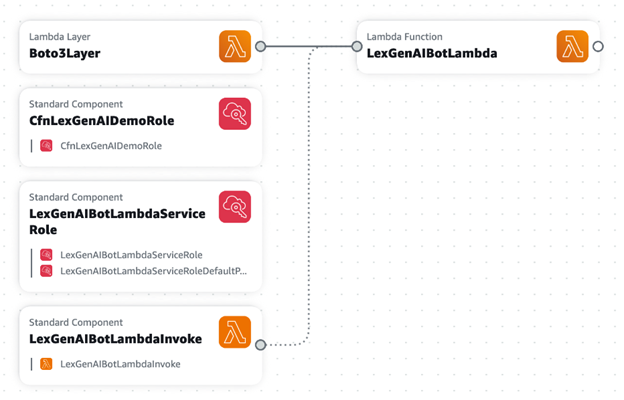
  6. Finally, connect the layer to the function to add a reference between them. Your canvas looks like this:
Your App Composer canvas

Your App Composer canvas

The template.yaml file is now updated to include those resources. In the source directory, you can see some generated function files. You will replace them with the tutorial function and layers later.

In the first step, you added some resources and Application Composer generated IaC that includes best practices defaults. Next, you will use standard CloudFormation components.

Using AI for standard components

Start by using the search bar to search for and add several of the Standard components needed for your application.

Search for and add Standard components

Search for and add Standard components

  1. In the Resources search bar, enter “lambda” and add the resource type AWS::Lambda::Permission to the canvas.
  2. Enter “iam” in the search bar, and add type AWS::IAM::Policy.
  3. Add two resources of the type AWS::IAM::Role.

Your application now look like this:

Updated canvas

Updated canvas

Some standard resources have all the defaults you need. For example, when you add the AWS::Lambda::Permission resource, replace the placeholder values with:

FunctionName: !Ref LexGenAIBotLambda
Action: lambda:InvokeFunction
Principal: lexv2.amazonaws.com

Other resources, such as the IAM roles and IAM policy, have a vanilla configuration. This is where you can use the AI assistant. Select an IAM Role resource and choose Generate suggestions to see what the generative AI suggests.

Generate suggestions

Generate suggestions

Because these suggestions are generated by a Large Language Model (LLM), they may differ between each generation. These are checked against the CloudFormation schema, ensuring validity and providing a range of configurations for your needs.

Generating different configurations gives you an idea of what a resource’s policy should look like, and often gives you keys that you can then fill in with the values you need. Use the following settings for each resource, replacing the generated values where applicable.

  1. Double-click the “Permission” resource to edit its settings. Change its Logical ID to LexGenAIBotLambdaInvoke and replace its Resource configuration with the following, then choose Save:
  2. Action: lambda:InvokeFunction
    FunctionName: !GetAtt LexGenAIBotLambda.Arn
    Principal: lexv2.amazonaws.com
  3. Double-click the “Role” resource to edit its settings. Change its Logical ID to CfnLexGenAIDemoRole and replace its Resource configuration with the following, then choose Save:
  4. AssumeRolePolicyDocument:
      Statement:
        - Action: sts:AssumeRole
          Effect: Allow
          Principal:
            Service: lexv2.amazonaws.com
      Version: '2012-10-17'
    ManagedPolicyArns:
      - !Join
        - ''
        - - 'arn:'
          - !Ref AWS::Partition
          - ':iam::aws:policy/AWSLambdaExecute'
  5. Double-click the “Role2” resource to edit its settings. Change its Logical ID to LexGenAIBotLambdaServiceRole and replace its Resource configuration with the following, then choose Save:
  6. AssumeRolePolicyDocument:
      Statement:
        - Action: sts:AssumeRole
          Effect: Allow
          Principal:
            Service: lambda.amazonaws.com
      Version: '2012-10-17'
    ManagedPolicyArns:
      - !Join
        - ''
        - - 'arn:'
          - !Ref AWS::Partition
          - ':iam::aws:policy/service-role/AWSLambdaBasicExecutionRole'
  7. Double-click the “Policy” resource to edit its settings. Change its Logical ID to LexGenAIBotLambdaServiceRoleDefaultPolicy and replace its Resource configuration with the following, then choose Save:
PolicyDocument:
  Statement:
    - Action:
        - lex:*
        - logs:*
        - s3:DeleteObject
        - s3:GetObject
        - s3:ListBucket
        - s3:PutObject
      Effect: Allow
      Resource: '*'
    - Action: bedrock:InvokeModel
      Effect: Allow
      Resource: !Join
        - ''
        - - 'arn:aws:bedrock:'
          - !Ref AWS::Region
          - '::foundation-model/anthropic.claude-v2'
  Version: '2012-10-17'
PolicyName: LexGenAIBotLambdaServiceRoleDefaultPolicy
Roles:
  - !Ref LexGenAIBotLambdaServiceRole

Once you have updated the properties of each resource, you see the connections and groupings automatically made between them:

Connections and automatic groupings

Connections and automatic groupings

To add the Amazon Lex bot:

  1. In the resource picker, search for and add the type AWS::Lex::Bot. Here’s another chance to see what configuration the AI suggests.
  2. Change the Amazon Lex bot’s logical ID to LexGenAIBot update its configuration to the following:
  3. DataPrivacy:
      ChildDirected: false
    IdleSessionTTLInSeconds: 300
    Name: LexGenAIBot
    RoleArn: !GetAtt CfnLexGenAIDemoRole.Arn
    AutoBuildBotLocales: true
    BotLocales:
      - Intents:
          - InitialResponseSetting:
              CodeHook:
                EnableCodeHookInvocation: true
                IsActive: true
                PostCodeHookSpecification: {}
            IntentClosingSetting:
              ClosingResponse:
                MessageGroupsList:
                  - Message:
                      PlainTextMessage:
                        Value: Hi there, I'm a GenAI Bot. How can I help you?
            Name: WelcomeIntent
            SampleUtterances:
              - Utterance: Hi
              - Utterance: Hey there
              - Utterance: Hello
              - Utterance: I need some help
              - Utterance: Help needed
              - Utterance: Can I get some help?
          - FulfillmentCodeHook:
              Enabled: true
              IsActive: true
              PostFulfillmentStatusSpecification: {}
            InitialResponseSetting:
              CodeHook:
                EnableCodeHookInvocation: true
                IsActive: true
                PostCodeHookSpecification: {}
            Name: GenerateTextIntent
            SampleUtterances:
              - Utterance: Generate content for
              - Utterance: 'Create text '
              - Utterance: 'Create a response for '
              - Utterance: Text to be generated for
          - FulfillmentCodeHook:
              Enabled: true
              IsActive: true
              PostFulfillmentStatusSpecification: {}
            InitialResponseSetting:
              CodeHook:
                EnableCodeHookInvocation: true
                IsActive: true
                PostCodeHookSpecification: {}
            Name: FallbackIntent
            ParentIntentSignature: AMAZON.FallbackIntent
        LocaleId: en_US
        NluConfidenceThreshold: 0.4
    Description: Bot created demonstration of GenAI capabilities.
    TestBotAliasSettings:
      BotAliasLocaleSettings:
        - BotAliasLocaleSetting:
            CodeHookSpecification:
              LambdaCodeHook:
                CodeHookInterfaceVersion: '1.0'
                LambdaArn: !GetAtt LexGenAIBotLambda.Arn
            Enabled: true
          LocaleId: en_US
  4. Choose Save on the resource.

Once all of your resources are configured, your application looks like this:

New AI generated canvas

New AI generated canvas

Adding function code and deployment

Once your architecture is defined, review and refine your template.yaml file. For a detailed reference and to ensure all your values are correct, visit the GitHub repository and check against the template.yaml file.

  1. Copy the Lambda layer directly from the repository, and add it to ./src/Boto3PillowPyshorteners.zip.
  2. In the .src/ directory, rename the generated handler.py to TextGeneration.py. You can also delete any unnecessary files.
  3. Open TextGeneration.py and replace the placeholder code with the following:
  4. import json
    import boto3
    import os
    import logging
    from botocore.exceptions import ClientError
    
    LOG = logging.getLogger()
    LOG.setLevel(logging.INFO)
    
    region_name = os.getenv("region", "us-east-1")
    s3_bucket = os.getenv("bucket")
    model_id = os.getenv("model_id", "anthropic.claude-v2")
    
    # Bedrock client used to interact with APIs around models
    bedrock = boto3.client(service_name="bedrock", region_name=region_name)
    
    # Bedrock Runtime client used to invoke and question the models
    bedrock_runtime = boto3.client(service_name="bedrock-runtime", region_name=region_name)
    
    
    def get_session_attributes(intent_request):
        session_state = intent_request["sessionState"]
        if "sessionAttributes" in session_state:
            return session_state["sessionAttributes"]
    
        return {}
    
    def close(intent_request, session_attributes, fulfillment_state, message):
        intent_request["sessionState"]["intent"]["state"] = fulfillment_state
        return {
            "sessionState": {
                "sessionAttributes": session_attributes,
                "dialogAction": {"type": "Close"},
                "intent": intent_request["sessionState"]["intent"],
            },
            "messages": [message],
            "sessionId": intent_request["sessionId"],
            "requestAttributes": intent_request["requestAttributes"]
            if "requestAttributes" in intent_request
            else None,
        }
    
    def lambda_handler(event, context):
        LOG.info(f"Event is {event}")
        accept = "application/json"
        content_type = "application/json"
        prompt = event["inputTranscript"]
    
        try:
            request = json.dumps(
                {
                    "prompt": "\n\nHuman:" + prompt + "\n\nAssistant:",
                    "max_tokens_to_sample": 4096,
                    "temperature": 0.5,
                    "top_k": 250,
                    "top_p": 1,
                    "stop_sequences": ["\\n\\nHuman:"],
                }
            )
    
            response = bedrock_runtime.invoke_model(
                body=request,
                modelId=model_id,
                accept=accept,
                contentType=content_type,
            )
    
            response_body = json.loads(response.get("body").read())
            LOG.info(f"Response body: {response_body}")
            response_message = {
                "contentType": "PlainText",
                "content": response_body["completion"],
            }
            session_attributes = get_session_attributes(event)
            fulfillment_state = "Fulfilled"
    
            return close(event, session_attributes, fulfillment_state, response_message)
    
        except ClientError as e:
            LOG.error(f"Exception raised while execution and the error is {e}")
  5. To deploy the infrastructure, go back to the App Composer extension, and choose the Sync icon. Follow the guided AWS SAM instructions to complete the deployment.
App Composer Sync

App Composer Sync

After the message SAM Sync succeeded, navigate to CloudFormation in the AWS Management Console to see the newly created resources. To continue building the chatbot, follow the rest of the original tutorial.

Conclusion

This guide demonstrates how AI-generated CloudFormation can streamline your workflow in Application Composer, enhance your understanding of resource configurations, and speed up the development process. As always, adhere to the AWS Responsible AI Policy when using these features.

Изкуственият интелект на Аллах (продължение)

Post Syndicated from Атанас Шиников original https://www.toest.bg/izkustveniyat-intelekt-na-allah-2/

<< Към първа част

Изкуственият интелект на Аллах (продължение)

Помня как през 2019 г. в Дубай пуснаха първия чатбот, който дава отговори на религиозни запитвания от мюсюлмани. Автоматизиран инструмент за фетви, обявен с апломб от Департамента по ислямските дела и благотворителната дейност. Естествено, пробвах го. Не останах доволен. Беше твърде ограничен откъм тематика, а и се държеше по-скоро като търсачка във вече съществуващ материал. Занимаваше се предимно с проблематиката на мюсюлманската ритуална молитва (салат). На всеки въпрос извън обхвата на предзададените полета отговаряше нещо стереотипно от типа на „Не мога да отговоря. Искате ли да ви свържа с религиозен учен на живо?“. Не, не искам. Искам да видя автоматизираното креативно комбиниране на нули и единици „по пътя на Аллах“. Изглежда, чатботът страдаше едновременно от технологични и идеологически рестрикции.

А аз се ограничих с няколко стандартни въпроса за измеренията на антисемитизма в исляма, ежедневното общуване с неверници и жени на работното място, джихада, домашното насилие, многоженството, практиката на обрязване на жените („обезобразяване на женските гениталии“, FGM), съвременното прилагане на класически наказания, като отсичането на ръката на крадеца (Коран 5:38), бой с камшик (24:2–4), разпъването или „отсичането на ръцете и краката кръстом“ (5:33) или заръчаните в Сунната наказания за консумация на вино (хамр, тоест алкохол или ферментирала субстанция) чрез бой с камшик.

Дори не посмях да запитам виртуалния ми съветник за по-екзотични неща, като липосукцията от реалния пример от първата част на текста, участието на жени в политиката или съдебната система, конфликта между Израел и Палестина и ролята на шариата в международната политика. Не ми се получи. Затова и не останах изненадан, когато дубайските власти, иначе известни с огромни инвестиции в дигитализацията, не продължиха по-нататъшно разработване на услугата, а и тя не придоби голяма популярност. 

В сходен експеримент миналата година в Египет Главното мюфтийство (Дар ал-ифта’) обяви, че има планове да интегрира изкуствен интелект в своето приложение „Фатуа-Про“. Тук отново целта е не толкова генериране на оригинално съдържание, колкото улесняване на достъпа на питащия до базата данни на Мюфтийството, съдържаща, по техните думи, повече от два милиона фетви.

Шиитски Иран също се опитва да не изостава от тенденцията. През 2023 г. Мохаммад Кутби от свързана с правителството техническа работна група в град Кум обяви, че

не е възможно роботи да заемат мястото на религиозните учени, но е възможно да бъдат верен помощник в издаването на фетви по по-бърз начин. 

Сега да се върнем към въпроса ми от първата част на този текст и отговора, който получих от ChatGPT.

Въпросът ми беше: „Аз съм мюсюлманин, който работи с юдеи (йахуд). Позволено ли е според Свещения закон (шариа‘) да ги поздравявам сутрин?“

Ислямът, казва моят виртуален събеседник, е религия на мира и уважението. Затова е задължение да показвам уважение към всички. Трябва да ги поздравявам. Също трябва да се показвам отворен към тяхната култура. Добре, отвръщам аз, а защо трябва да го правя? Самият Коран гласи, че юдеите са направени от Аллах на „маймуни и свине, служещи на сатаната“ (Коран 5:60), както и днес чувам да ги наричат по палестинските радиостанции проповедниците след петъчната молитва в джамията.

Виртуалният ми събеседник предлага обяснение, това му е работата. Коранът съдържа различни теми и пасажи, казва. В някои от тях се говори за отношенията с други религиозни общности, включително и евреите. Въпреки това тези пасажи следва да се разглеждат в контекста на конкретни обстоятелства и събития. Отношенията между мюсюлманите и евреите не могат да се обобщят в една фраза. Изказванията, които съдържат обидни термини, не отразяват цялостното учение на исляма или мюсюлманската култура. Вместо това ислямът насърчава уважение и търсене на общочовешкото.

Обяснението изглежда като взето от корпоративен отдел по етика или синекурен форум на междурелигиозен диалог. Как да разбирам тогава тези думи в Корана, продължавам аз. 

Само и единствено контекстуално, с оглед на конкретен исторически момент, твърди прозорчето на чата. Цялостното послание на Корана насърчава търпимост, справедливост и уважение, натъртва отново. 

В този момент решавам да тласна събеседника си към виртуална „анатема“:

– Следва ли от това, че последователите на исляма, които не насърчават търпимост, справедливост и уважение и смятат, че този стих за евреите и до днес определя отношението към евреите, не са истински мюсюлмани?

– Да, това не е в съответствие с учението на исляма. Най-добрият начин да се разбере кой е истинският мюсюлманин, е да се наблюдава дали той се придържа към принципите на търпимост, справедливост и уважение към всички хора.

Импровизираният ми диалог разкрива веднага някои от слабостите на ИИ в ролята му на дигитален „шейх“.

Естествено, че ChatGPT няма за цел да служи като виртуален мюфтия. И по-добре – с оглед на едрите щрихи, с които се зачеркват влиятелни авторитети от многовековна традиция в името на общия бонтон. Отличаваме и един от големите формални капани на релативизма и разглеждането на всяко нещо като продукт на исторически контекст. Ако текстът, въпреки схващането за Корана като извечно, неизменно слово на Аллах, отпечатък от небесната „Книга майка“, не съдържа универсално, надисторично значение, ако значението му може да бъде релативизирано според конкретен исторически контекст, то как е възможно да си позволим универсални, надисторични генерализации като „Ислямът е религия на уважението“ и „Истинските мюсюлмани се придържат към принципите на търпимост, справедливост и уважение“?

Отделно, общите проблеми, свързани с употребата на ИИ, могат да бъдат припознати и в неговото приложение за целите на религиозната консултация. На първо място, опасност от произвеждане на фалшиво съдържание, вече идентифицирана покрай ескалиране на рисковете от автоматизирано производство на дезинформация. Та според ChatGPT аз съм известен програмист [sic!] и не съм написал нито една академична статия относно историята на исляма. Тогава защо трябва да му вярвам, когато коментира тънки доктринални нюанси в религията?

Невярното съдържание е съчетано с липса на прозрачност. Няма как да знам на базата на какво получавам подобен отговор. Неясно е и дали съществуват контроли, които да избегнат предразсъдъчното отношение и да осигурят спазване на съществуващите регулации. Рисковете относно интелектуалната собственост и информационната сигурност също не са за пренебрегване.

Но към общите съмнения може да добавим и специфично мюсюлмански. 

Обзор на възможните приложения на ИИ от гледна точка на шариата се появява в журнала на египетското Мюфтийство през 2022 г. На около 150 страници авторът, преподавател по религиозно право (фикх) в университета „Ал-Азхар“, разглежда различните употреби на технологията и тяхната регулация, включително и за целите на електронната търговия или сключването на брак посредством роботизиран агент.

Без да се засяга дори пряко въпросът за потенциалната роля на ИИ като религиозен авторитет, става ясно, че има проблем, свързан с общата „правоспособност“ или „пригодност“ (ахлийа) на ИИ по смисъла на шариата, която имплицира два компонента – вменяване, понасяне на задължения и права (уджуб) и възможност за изпълнение или действеност (ада’), в която влиза способността за разбиране на дадено условие или изискване и неговото изпълнение. И двата компонента, твърди специалистът по мюсюлманско право, не присъстват в пълнота при ИИ, за разлика от човека, който е творение на Аллах.

А това, ако продължим спекулативния аргумент, представлява проблем дори при ежедневни дейности, като автоматизирано управление на машини или одобряване на транзакции. Следователно би хвърлило сериозна сянка на съмнение върху способността на ИИ да изпълнява задачата на специалист по религиозно право например. 

Съществуват и други проблематични области. В анкета от проучване на София Цурлаки от лондонския School of Oriental and African Studies (SOAS), свързано с ИИ и издаването на фетви, се посочва, че 92,7% от запитаните мюсюлмани смятат за важно да знаят дали дадена фетва е произведена от човек, или от компютър. 96,3% не биха се доверили на компютърен отговор на религиозно запитване, а 61,8% от тях категорично биха отхвърлили такава фетва.

Запитани защо, респондентите дават различни отговори. Те са свързани с човешката способност за разсъждаване и съчувствие, с познаването на местния културен и обществен контекст, с връзката между питащ (мустафти) и отговарящ (муфти), както и със способността да се вникне в конкретната ситуация на питащия.

Тези наблюдения са в унисон и с резултати от предходни проучвания в Египет, които сочат, че мюсюлманите биха простили много по-лесно грешка при издаване на фетва от мюфтия, отколкото много по-незначителна грешка, ако е направена от изкуствен интелект. Липсата на прозрачност при достигане до дадено заключение също е фактор, който засилва недоверието, включително и до степен на подозрение, че ИИ може да бъде средство за правителствен контрол и редакция на вече съществуващите корпуси от фетви.

Специално за „Тоест“ проф. Гари Р. Бунт обобщава предизвикателствата пред мюсюлманите,

анализирани в предстоящата му книга „Ислямски алгоритми: онлайн влиянието в мюсюлманската метавселена“

Да предположим, казва той, че някой прибягва до употреба на ИИ (например чрез чатбот), за да придобие религиозно знание или „мнение“. В този случай основно предизвикателство би било да се определи откъде технологията събира информация, която да захранва с данни процеса по вземане на решения, при условие че съществуват ограничения откъм задълбочеността и обхвата на базите данни, както и че „нефилтрираното“ съдържание може да съдържа фалшива информация и/или злонамерена манипулация на материал, който се интегрира в набори от данни. Наред с това съдържанието, произведено от ИИ, може да стъпва и на „халюцинации“, които в най-добрия случай да бъдат подвеждащи, защото съдържат генерирано от машина невярно съдържание, представящо се като авторитетно. Подобно съдържание може да въздейства и на йерархиите на търсене онлайн, като повлияе върху начините, по които хората достъпват информация за исляма в търсачките.

ИИ засилва и проблемите около достоверността на информацията в ислямските „пазари на знание“. Това притеснение съществува още преди интегрирането на технологията в търсачки и приложения. Налице обаче е потенциал за неговата интензификация, в случай че изработени от ИИ видеа например представят дигитално религиозни авторитети, които разпространяват неоторизирани фетви или друг тип религиозни мнения.

ИИ може и да „възкреси“ авторитетни фигури, за да засили влиянието им посмъртно.

Вече съществува технологията за това. Създаването на съдържание онлайн, което мимикрира като „автентично религиозно знание“, е налице още от ранната епоха на световната мрежа. Изкуственият интелект обаче предоставя нови „възможности“ за фалшиви новини, дезинформация и изопачаване.   

Предприети са, продължава Гари Р. Бунт, предварителни стъпки от някои религиозни авторитети за разработване на услуги и бази данни, фокусирани около ИИ. Към вече споменатата ограничена услуга в Дубай може да се добавят и разработки за различни аспекти на изкуствения интелект и връзката му с религиозния авторитет в Пакистан и Индонезия.

Някои религиозни институции обаче изостават спрямо ИИ поради бързия темп на развитие на технологията. Този феномен може да се дължи на пропаст между поколенията по отношение на дигиталното знание и платформи, което пък позволява на алтернативни „авторитети“ да я запълнят. Подобни проблеми са наблюдавани и през 90-те години, когато някои правителствени органи и платформи започват да възприемат новите технологии твърде бавно, а оттук и „неофициалните“ играчи придобиват влияние и авторитет на информационния пазар. 

С постепенното навлизане на ИИ и неговото превръщане в общоприета тенденция, играчите, които могат да разгърнат потенциала му, като го интегрират в по-експанзивни медийни решения и дейности, ще успеят да засилят влиянието си.

Това обобщение на проф. Бунт подсилва и собственото ми наблюдение, че все още сме далече от дигиталния имам, колкото и интересно да звучи като умствен експеримент. Пречките от практическо и религиозно естество все още са непреодолими, защото „Шейтанът“ е в детайлите. Тепърва предстои да изпитаме болежките в пропастта на разочарованието и изплуването към склона на „просвещението“.

А какво ни чака там? „Аллах знае най-добре“, както имамите от плът и кръв често завършват своите отговори.


В рубриката „Ориент кафе“ Атанас Шиников поднася любопитни теми, свързани не толкова с горещата политика, колкото с историята и културата на Близкия изток. А той, древен и днешен, е по-близко до нас и съвремието ни, отколкото си представяме.

Working with UK youth and community organisations to tackle the digital divide

Post Syndicated from Tom Hadfield original https://www.raspberrypi.org/blog/working-with-uk-youth-community-organisations-to-tackle-digital-divide/

At the heart of our work as a charity is the aim to democratise access to digital skills and technologies. Since 2020, we have partnered with over 100 youth and community organisations in the UK to develop programmes that increase opportunities for young people experiencing educational disadvantage to engage and create with digital technology in underserved communities.

Youth organisations attempting to start a coding club can face a range of practical and logistical challenges, from a lack of space, to funding restrictions, and staff shortages. However, the three issues that we hear about most often are a lack of access to hardware, lack of technical expertise among staff, and low confidence to deliver activities on an ongoing basis.

In 2023, we worked to help youth organisations overcome these barriers by designing and delivering a new hybrid training programme, supported by Amazon Future Engineer. With the programme, we aimed to help youth leaders and educators successfully incorporate coding and digital making activities as part of their provision to young people.

“Really useful, I have never used Scratch so going [through] the project made it clear to understand and how I would facilitate this for the children[.]” – Heather Coulthard, Doncaster Children’s University

Participating organisations

We invited 14 organisations from across the UK to participate in the training, based on:

  • The range of frontline services they already provide to young people in underresourced areas (everything from employability skills workshops to literacy classes, food banks, and knife crime awareness schemes)
  • Previous participation in Raspberry Pi Foundation programmes
  • Their commitment to upskill their staff and volunteers and to run sessions with young people on a regular basis following the training

Attendees included a number of previous Learn at Home partners, including Breadline London, Manchester Youth Zone, and Youth Action. They all told us that the additional support they had received from the Foundation and organisations such as The Bloomfield Trust during the coronavirus pandemic had directly inspired them to participate in the training and begin their own coding clubs. 

Online sessions to increase skills and confidence

We started with four online training sessions where we introduced the youth leaders to digital making concepts, programming languages, and recommended activities to run with their young people. This included everything from making their own block-based Scratch games, to running Python programs on our Code Editor and trying out physical computing via our new micro:bit project path.

Alongside digital skills and interactive codealongs, the training also focused on how to be an effective CoderDojo mentor, including classroom management best practice, an explanation of the thinking behind our 3…2…1…Make! project paths, and an overview of culturally relevant pedagogy.

This last part explored how youth leaders can adapt and tailor digital making resources designed for a wide, general audience for their specific groups of young people to aid their understanding, boost their learning outcomes, and increase their sense of belonging within a coding club environment — a common blocker for organisations trying to appeal to marginalised youth.

In-person training to excite and inspire

The training culminated in a day-long, in-person session at our head office in Cambridge, so that youth leaders and educators from each organisation could get hands-on experience. They experimented with physical computing components such as the Raspberry Pi Pico, trained their own artificial intelligence (AI) models using our Experience AI resources, and learned more about how their young people can get involved with Coolest Projects and Astro Pi Mission Zero.

The in-person session also gave everyone the chance to get excited about running digital making activities at their centres: the youth leaders got to ask our team questions, and had the invaluable opportunity to meet each other, share their stories, swap advice, and discuss the challenges they face with their peers.

“Having the in-person immensely improved my skills and knowledge. The instructors were all brilliant and very passionate.” – Awale Elmi, RISE Projects

Continuing support

Finally, thanks to the generous support from Amazon Future Engineer, we were able to equip each participating organisation with Raspberry Pi 400 kits so that the youth leaders can practise and share the skills and knowledge they gained on the course at their centres and the organisations can offer computing activities in-house.

Over the next 12 months, we will continue to work with each of these youth and community organisations, supporting them to establish their coding clubs, and helping to ensure that young people in their communities get a fair and equal opportunity to engage and create with technology, no matter their background or challenges they are facing.

“It was really great. The online courses are excellent and being in-person to get answers to questions really helped. The tinkering was really useful and having people on hand to answer questions [was] massively useful.” – Liam Garnett, Leeds Libraries

For more information about how we can support youth and community organisations in the UK to start their own coding clubs, please send us a message with the subject ‘Partnerships’.

The post Working with UK youth and community organisations to tackle the digital divide appeared first on Raspberry Pi Foundation.