Power neural search with AI/ML connectors in Amazon OpenSearch Service

Post Syndicated from Aruna Govindaraju original https://aws.amazon.com/blogs/big-data/power-neural-search-with-ai-ml-connectors-in-amazon-opensearch-service/

With the launch of the neural search feature for Amazon OpenSearch Service in OpenSearch 2.9, it’s now effortless to integrate with AI/ML models to power semantic search and other use cases. OpenSearch Service has supported both lexical and vector search since the introduction of its k-nearest neighbor (k-NN) feature in 2020; however, configuring semantic search required building a framework to integrate machine learning (ML) models to ingest and search. The neural search feature facilitates text-to-vector transformation during ingestion and search. When you use a neural query during search, the query is translated into a vector embedding and k-NN is used to return the nearest vector embeddings from the corpus.

To use neural search, you must set up an ML model. We recommend configuring AI/ML connectors to AWS AI and ML services (such as Amazon SageMaker or Amazon Bedrock) or third-party alternatives. Starting with version 2.9 on OpenSearch Service, AI/ML connectors integrate with neural search to simplify and operationalize the translation of your data corpus and queries to vector embeddings, thereby removing much of the complexity of vector hydration and search.

In this post, we demonstrate how to configure AI/ML connectors to external models through the OpenSearch Service console.

Solution Overview

Specifically, this post walks you through connecting to a model in SageMaker. Then we guide you through using the connector to configure semantic search on OpenSearch Service as an example of a use case that is supported through connection to an ML model. Amazon Bedrock and SageMaker integrations are currently supported on the OpenSearch Service console UI, and the list of UI-supported first- and third-party integrations will continue to grow.

For any models not supported through the UI, you can instead set them up using the available APIs and the ML blueprints. For more information, refer to Introduction to OpenSearch Models. You can find blueprints for each connector in the ML Commons GitHub repository.

Prerequisites

Before connecting the model via the OpenSearch Service console, create an OpenSearch Service domain. Map an AWS Identity and Access Management (IAM) role by the name LambdaInvokeOpenSearchMLCommonsRole as the backend role on the ml_full_access role using the Security plugin on OpenSearch Dashboards, as shown in the following video. The OpenSearch Service integrations workflow is pre-filled to use the LambdaInvokeOpenSearchMLCommonsRole IAM role by default to create the connector between the OpenSearch Service domain and the model deployed on SageMaker. If you use a custom IAM role on the OpenSearch Service console integrations, make sure the custom role is mapped as the backend role with ml_full_access permissions prior to deploying the template.

Deploy the model using AWS CloudFormation

The following video demonstrates the steps to use the OpenSearch Service console to deploy a model within minutes on Amazon SageMaker and generate the model ID via the AI connectors. The first step is to choose Integrations in the navigation pane on the OpenSearch Service AWS console, which routes to a list of available integrations. The integration is set up through a UI, which will prompt you for the necessary inputs.

To set up the integration, you only need to provide the OpenSearch Service domain endpoint and provide a model name to uniquely identify the model connection. By default, the template deploys the Hugging Face sentence-transformers model, djl://ai.djl.huggingface.pytorch/sentence-transformers/all-MiniLM-L6-v2.

When you choose Create Stack, you are routed to the AWS CloudFormation console. The CloudFormation template deploys the architecture detailed in the following diagram.

The CloudFormation stack creates an AWS Lambda application that deploys a model from Amazon Simple Storage Service (Amazon S3), creates the connector, and generates the model ID in the output. You can then use this model ID to create a semantic index.

If the default all-MiniLM-L6-v2 model doesn’t serve your purpose, you can deploy any text embedding model of your choice on the chosen model host (SageMaker or Amazon Bedrock) by providing your model artifacts as an accessible S3 object. Alternatively, you can select one of the following pre-trained language models and deploy it to SageMaker. For instructions to set up your endpoint and models, refer to Available Amazon SageMaker Images.

SageMaker is a fully managed service that brings together a broad set of tools to enable high-performance, low-cost ML for any use case, delivering key benefits such as model monitoring, serverless hosting, and workflow automation for continuous training and deployment. SageMaker allows you to host and manage the lifecycle of text embedding models, and use them to power semantic search queries in OpenSearch Service. When connected, SageMaker hosts your models and OpenSearch Service is used to query based on inference results from SageMaker.

View the deployed model through OpenSearch Dashboards

To verify the CloudFormation template successfully deployed the model on the OpenSearch Service domain and get the model ID, you can use the ML Commons REST GET API through OpenSearch Dashboards Dev Tools.

The GET _plugins REST API now provides additional APIs to also view the model status. The following command allows you to see the status of a remote model:

GET _plugins/_ml/models/<modelid>

As shown in the following screenshot, a DEPLOYED status in the response indicates the model is successfully deployed on the OpenSearch Service cluster.

Alternatively, you can view the model deployed on your OpenSearch Service domain using the Machine Learning page of OpenSearch Dashboards.

This page lists the model information and the statuses of all the models deployed.

Create the neural pipeline using the model ID

When the status of the model shows as either DEPLOYED in Dev Tools or green and Responding in OpenSearch Dashboards, you can use the model ID to build your neural ingest pipeline. The following ingest pipeline is run in your domain’s OpenSearch Dashboards Dev Tools. Make sure you replace the model ID with the unique ID generated for the model deployed on your domain.

PUT _ingest/pipeline/neural-pipeline
{
  "description": "Semantic Search for retail product catalog ",
  "processors" : [
    {
      "text_embedding": {
        "model_id": "sfG4zosBIsICJFsINo3X",
        "field_map": {
           "description": "desc_v",
           "name": "name_v"
        }
      }
    }
  ]
}

Create the semantic search index using the neural pipeline as the default pipeline

You can now define your index mapping with the default pipeline configured to use the new neural pipeline you created in the previous step. Ensure the vector fields are declared as knn_vector and the dimensions are appropriate to the model that is deployed on SageMaker. If you have retained the default configuration to deploy the all-MiniLM-L6-v2 model on SageMaker, keep the following settings as is and run the command in Dev Tools.

PUT semantic_demostore
{
  "settings": {
    "index.knn": true,  
    "default_pipeline": "neural-pipeline",
    "number_of_shards": 1,
    "number_of_replicas": 1
  },
  "mappings": {
    "properties": {
      "desc_v": {
        "type": "knn_vector",
        "dimension": 384,
        "method": {
          "name": "hnsw",
          "engine": "nmslib",
          "space_type": "cosinesimil"
        }
      },
      "name_v": {
        "type": "knn_vector",
        "dimension": 384,
        "method": {
          "name": "hnsw",
          "engine": "nmslib",
          "space_type": "cosinesimil"
        }
      },
      "description": {
        "type": "text" 
      },
      "name": {
        "type": "text" 
      } 
    }
  }
}

Ingest sample documents to generate vectors

For this demo, you can ingest the sample retail demostore product catalog to the new semantic_demostore index. Replace the user name, password, and domain endpoint with your domain information and ingest raw data into OpenSearch Service:

curl -XPOST -u 'username:password' 'https://domain-end-point/_bulk' --data-binary @semantic_demostore.json -H 'Content-Type: application/json'

Validate the new semantic_demostore index

Now that you have ingested your dataset to the OpenSearch Service domain, validate if the required vectors are generated using a simple search to fetch all fields. Validate if the fields defined as knn_vectors have the required vectors.

Compare lexical search and semantic search powered by neural search using the Compare Search Results tool

The Compare Search Results tool on OpenSearch Dashboards is available for production workloads. You can navigate to the Compare search results page and compare query results between lexical search and neural search configured to use the model ID generated earlier.

Clean up

You can delete the resources you created following the instructions in this post by deleting the CloudFormation stack. This will delete the Lambda resources and the S3 bucket that contain the model that was deployed to SageMaker. Complete the following steps:

  1. On the AWS CloudFormation console, navigate to your stack details page.
  2. Choose Delete.

  1. Choose Delete to confirm.

You can monitor the stack deletion progress on the AWS CloudFormation console.

Note that, deleting the CloudFormation stack doesn’t delete the model deployed on the SageMaker domain and the AI/ML connector created. This is because these models and the connector can be associated with multiple indexes within the domain. To specifically delete a model and its associated connector, use the model APIs as shown in the following screenshots.

First, undeploy the model from the OpenSearch Service domain memory:

POST /_plugins/_ml/models/<model_id>/_undeploy

Then you can delete the model from the model index:

DELETE /_plugins/_ml/models/<model_id>

Lastly, delete the connector from the connector index:

DELETE /_plugins/_ml/connectors/<connector_id>

Conclusion

In this post, you learned how to deploy a model in SageMaker, create the AI/ML connector using the OpenSearch Service console, and build the neural search index. The ability to configure AI/ML connectors in OpenSearch Service simplifies the vector hydration process by making the integrations to external models native. You can create a neural search index in minutes using the neural ingestion pipeline and the neural search that use the model ID to generate the vector embedding on the fly during ingest and search.

To learn more about these AI/ML connectors, refer to Amazon OpenSearch Service AI connectors for AWS services, AWS CloudFormation template integrations for semantic search, and Creating connectors for third-party ML platforms.


About the Authors

Aruna Govindaraju is an Amazon OpenSearch Specialist Solutions Architect and has worked with many commercial and open source search engines. She is passionate about search, relevancy, and user experience. Her expertise with correlating end-user signals with search engine behavior has helped many customers improve their search experience.

Dagney Braun is a Principal Product Manager at AWS focused on OpenSearch.

За Школо и софтуера в обществения сектор

Post Syndicated from Bozho original https://blog.bozho.net/blog/4206

Школо е продадено на британска компания. В стартъп света това е добра новина – успешен exit за българска компания. Но предвид, че Школо обработва данните на хиляди ученици, има и притеснения от това развитие.

Обективно, дали собствеността на фирмата е българска или от друга държава, която прилага европейското законодателство за защита на данните, разлика няма. Дори не би трябвало данните да напускат контрола на българското дружество, но дори да го направят един ден, Великобритания избра да запази GDPR в своето законодателство, а британският регулатор е един от най-добрите, така че аз нямам притеснения за данните.

Между другото, данните на всички ученици се обработват и от Майкрософт от много време, защото всеки ученик своя акаунт има право на безплатен офис пакет.

Винаги, когато става дума за софтуер, държавата трябва да осмисли рисковете от дългосрочно обвързване с частен доставчик и да ги претегли спрямо ползите от това. Дори да избере външен доставчик, трябва да има право да прекрати договора и да продължи да разполага с данните – нещо, което Школо предоставя.

Данните се изпращат и в централната система на МОН (НЕИСПУО), т.е. училищата не са вързани за доставчика. Това е устойчиво решение и добра практика както от страна на държавата, така и от страна на доставчика.

Появиха се и твърдения, че Школо е безплатно (и съответно продава данните на децата). Това не е вярно – Школо има договори с училища и те не са безвъзмездни.

Школо е пример за това как частната инициатива дава много по-добри резултати от „централното планиране“ на държавата, особено когато става дума за потребителски софтуер. Държавата има много по-голям ресурс да изгради система за електронни дневници, но Школо е предпочитано от учители, родители и ученици, защото се грижи за потребителя, а не просто „да изпълни нормативните изисквания“.

Държавата е „вързана“ да използва т.нар. waterfall модел, който е остарял, но следва от Закона за обществените поръчки – изготвя се едно голямо задание, то се възлага, това отнема много време и накрая ако резултатът не отговаря на очакванията, няма много какво да се направи, освен да де поръча надграждане. Този модел трябва да се промени, за да може системите, които държавата неизбежно се налага да изгради, да са по-добри (и вече работим по такъв модел).

От гледна точка на частния сектор, работата с държавни структури е рискова (освен аутсорсинга) – политически решения могат да застрашат бизнес модела, напр.. Моят съвет към стартъпите по принцип е да избягват да работят с публичния сектор, най-вече защото временни не успехи не показват т.нар. product-market fit. Но училища, болници и други разпределени структури на обществения сектор предоставят възможен бизнес модел, с ползи за гражданите.

В заключение, смятам, че продажбата на Школо не носи риск за данните на учениците или за системата на образованието. Може да ни служи за пример как да използваме софтуер без да сме заключени за него. И за стимул държавата да подобри процесите си по изграждане на софтуер, защото в много случаи няма пазарен стимул за изграждане на твърде специализиран софтуер за нуждите на държавата.

Материалът За Школо и софтуера в обществения сектор е публикуван за пръв път на БЛОГодаря.

A developer’s second brain: Reducing complexity through partnership with AI

Post Syndicated from Eirini Kalliamvakou original https://github.blog/2024-01-17-a-developers-second-brain-reducing-complexity-through-partnership-with-ai/


As adoption of AI tools expands and the technology evolves, so do developers’ expectations and perspectives. Last year, our research showed that letting GitHub Copilot shoulder boring and repetitive work reduced cognitive load, freed up time, and brought delight to developers. A year later, we’ve seen the broad adoption of ChatGPT, an explosion of new and better models, and AI agents are now the talk of the industry. What is the next opportunity to provide value for developers through the use of AI? How do developers feel about working more closely with AI? And how do we integrate AI into workflows in a way that elevates developers’ work and identity?

The deeper integration of AI in developers’ workflows represents a major change to how they work. At GitHub Next we recently interviewed 25 developers to build a solid qualitative understanding of their perspective. We can’t measure what we don’t understand (or we can measure it wrong), so this qualitative deep dive is essential before we develop metrics and statistics. The clear signal we got about developers’ motivations and openness is already informing our plans, vision, and perspective, and today we are sharing it to inform yours, too. Let’s see what we found!

Finding 1: Cognitive burden is real, and developers experience it in two ways

The mentally taxing tasks developers talked about fell into two categories:

  • “This is so tedious”: repetitive, boilerplate, and uninteresting tasks. Developers view these tasks as not worth their time, and therefore, ripe for automation.
  • “This hurts my brain”: challenging yet interesting, fun, and engaging tasks. Developers see these as the core tasks of programming. They call for learning, problem solving and figuring things out, all of which help them grow as engineers.

AI is already making the tedious work less taxing. Tools like GitHub Copilot are being “a second pair of hands” for developers to speed them through the uninteresting work. They report higher satisfaction from spending more of their energy on interesting work. Achievement unlocked!

But what about the cognitive burden incurred by tasks that are legitimately complex and interesting? This burden manifests as an overwhelming level of difficulty which can discourage a developer from attempting the task. One of our interviewees described the experience: _“Making you feel like you can’t think and [can’t] be as productive as you would be, and having mental blockers and distractions that prevent you from solving problems.”_That’s not a happy state for developers.

Even with the advances of the last two years, AI has an opportunity to provide fresh value to developers. The paradigm for AI tools shifts from “a second pair of hands” to “a second brain,” augmenting developers’ thinking, lowering the mental tax of advanced tasks, and helping developers tackle complexity.

Where do developers stand on partnering with AI to tackle more complex tasks?

Finding 2: Developers are eager for AI assistance in complex tasks, but we have to get the boundaries right

The potential value of helping developers with complex tasks is high, but it’s tricky to get right. In contrast to tedious tasks, developers feel a strong attachment to complex or advanced programming tasks. They see themselves as ultimately responsible for solving complex problems. It is through working on these tasks that they learn, provide value, and gain an understanding of large systems, enabling them to maintain and expand those systems. This developer perspective is critical; it influences how open developers are to the involvement of AI in their workflows, and in what ways. And it sets a clear—though open-ended—goal for us to build a good “developer-AI partnership” and figure out how AI can augment developers during complex tasks, without compromising their understanding, learning, or identity.

Another observation in the interviews was that developers are not expecting perfection from AI today—an answer that perhaps would have been different 12 months ago. What’s more, developers see themselves as supervising and guiding the AI tools to produce the appropriate-for-them output. Today that process can still be frustrating—and at times, counterproductive—but developers’ view this process as paying dividends long-term as developers and AI tools adapt to each other and work in partnership.

Finding 3: Complex tasks have four parts

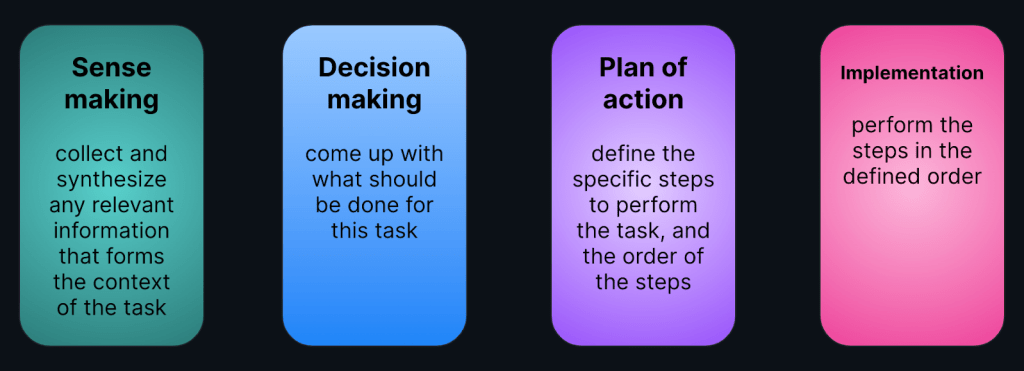
At this point, we have to introduce some nuances to help us think about what the developer-AI partnership and its boundaries might look like. We talk about tasks as whole units of work, but there is a lot that goes on, so let’s give things a bit of structure. We used the following framework that recognizes four parts to a task:

Diagram that outlines a framework that recognizes four parts to a task: sense making, decision making, plan of action, and implementation.

This framework (slightly adapted) comes from earlier research on automation allocation logic and the interface of humans and AI during various tasks. The framework’s history, and the fact that it resonated with all our interviewees, makes us confident that it’s a helpful way to think about complex software development tasks. Developers may not always enjoy such a neatly linear process, but this is a useful mechanism to understand where AI assistance can have the most impact for developers. The question is where are developers facing challenges, and how open they are to input and help from AI.

Finding 4: Developers are open to AI assistance with sense making and with a plan of action

Developers want to get to context fast but need to find and ingest a lot of information, and often they are not sure where to begin. “The AI agent is way more efficient to do that,” one of the interviewees said, echoed by many others. At this stage, AI assistance can take the form of parsing a lot of information, synthesizing it, and surfacing highlights to focus the developer’s attention. While developers were eager to get AI assistance with the sense making process, they pointed out that they still want to have oversight. They want to see what sources the AI tool is using, and be able to input additional sources that are situationally relevant or unknown to the AI. An interviewee put it like this: “There’s context in what humans know that without it AI tools wouldn’t suggest something valuable.”

Developers also find it overwhelming to determine the specific steps to solve a problem or perform a task. This activity is inherently open-ended—developers suffer from cognitive load as they evaluate different courses of actions and attempt to reason about tradeoffs, implications, and the relative importance of tighter scope (for example, solving this problem now) versus broader scope (for example, investing more effort now to produce a more durable solution). Developers are looking for AI input here to get them past the intimidation of the blank canvas. Can AI propose a plan—or more than one—and argue the pros and cons of each? Developers want to skip over the initial brainstorming and start with some strawman options to evaluate, or use as prompts for further brainstorming. As with the process of sense making, developers still want to exercise oversight over the AI, and be able to edit or cherry-pick steps in the plan.

Finding 5: Developers are cautious about AI autonomy in decision making or implementation

While there are areas where developers welcome AI input, it is equally important to understand where they are skeptical about it, and why.

Perhaps unsurprisingly, developers want to retain control of all decision making while they work on complex tasks and large changes. We mentioned earlier how developers’ identity is tied to complex programming tasks and problems, and that they see themselves ultimately responsible and accountable for them. As such, while AI tools can be helpful by simplifying context and providing alternatives, developers want to retain executive oversight of all decisions.

Developers were also hesitant to let AI tools handle implementation autonomously. There were two concerns at the root of developers’ reluctance:

  • Today’s AI is perceived as insufficiently reliable to handle implementation autonomously. That’s a fair point; we have seen many examples of models providing inaccurate results to even trivial questions and tasks. It may also be a reflection of the technical limitations today. As models and capabilities improve, developers’ perceptions may shift.
  • AI is perceived as a threat to the value of developers. There was concern that autonomous implementation removes the value developers contribute today, in addition to compromising their understanding of code and learning opportunities. This suggests a design goal for AI tools: aiding developers to acquire and refresh mental models quickly, and enabling them to pivot in and out of implementation details. These tools must aid learning, even as they implement changes on behalf of the developer.

What do the findings mean for developers?

The first wave of AI tools provide a second pair of hands for developers, bringing them the delight of doing less boilerplate work while saving them time. As we look forward, saving developers mental energy—an equally finite and critical resource—is the next frontier. We must help developers tackle complexity by also arming them with a second brain. Unlocking developer happiness seems to be correlated with experiencing lower cognitive burden. AI tools and agents lower the barriers to creation and experimentation in software development through the use of natural language as well as techniques that conserve developers’ attention for the tasks which remain the province of humans.

We anticipate that partnership with AI will naturally result in developers shifting up a level of abstraction in how they think and work. Developers will likely become “systems thinkers,” focusing on specifying the behavior of systems and applications that solve problems and address opportunities, steering and supervising what AI tools produce, and intervening when they have to. Systems thinking has always been a virtuous quality of software developers, but it is frequently viewed as the responsibility of experienced developers. As the mechanical work of development is transferred from developers to AI tooling, systems thinking will become a skill that developers can exercise earlier in their careers, accelerating their growth. Such a path will not only enable more developers to tackle increasing complexity, but will also create clear boundaries between their value/identity and the role that AI tools play in their workflow.

We recently discussed these implications for developers in a panel at GitHub Universe 2023. Check out the recording for a more thorough view!

How are we using these findings?

Based on the findings from our interviews, we realize that a successful developer-AI partnership is one that plays to the strengths of each partner. AI tools and models today have efficiency advantages in parsing, summarizing, and synthesizing a lot of information quickly. Additionally, we can leverage AI agents to recommend and critique plans of action for complex tasks. Combined, these two AI affordances can provide developers with an AI-native workflow that lowers the high mental tax at the start of tasks, and helps tackle the complexity of making larger changes to a codebase. On the other side of the partnership, developers remain the best judges of whether a proposed course of action is the best one. Developers also have situational and contextual knowledge that makes their decisions and implementation direction unique, and the ideal reference point for AI assistance.

At the same time, we realize from the interviews how critical steerability and transparency are for developers when it comes to working with AI tools. When developers envision deeper, more meaningful integration of AI into their workflows, they envision AI tools that help them to think, but do not think for them. They envision AI tools that are involved in the act of sense making and crafting plans of action, but do not perform actions without oversight, consent, review, or approval. It is this transparency and steerability that will keep developers in the loop and in control even as AI tools become capable of more autonomous action.

Finally, there is a lot of room for AI tools to earn developers’ trust in their output. This trust is not established today, and will take some time to build, provided that AI tools demonstrate reliable behavior. As one of our interviewees described it: “The AI shouldn’t have full autonomy to do whatever it sees best. Once the AI has a better understanding, you can give more control to the AI agent.” In the meantime, it is critical that developers can easily validate any AI-suggested changes“The AI agent needs to sell you on the approach. It would be nice if you could have a virtual run through of the execution of the plan,” our interviewee continued.

These design principles—derived from the developer interviews—are informing how we are building Copilot Workspace at GitHub Next. Copilot Workspace is our vision of a developer partnering with AI from a task description all the way to the implementation that becomes a pull request. Context is derived from everything contained in the task description, supporting developers’ sense making, and the AI agent in Copilot Workspace proposes a plan of action. To ensure steerability and transparency, developers can edit the plan and, once they choose to implement it, they can inspect and edit all the Copilot-suggested changes. Copilot Workspace also supports validating the changes by building and testing them. The workflow ends—as it typically would—with the developer creating a pull request to share their changes with the rest of their team for review.

This is just the beginning of our vision. Empowering developers with AI manifests differently over time, as tools get normalized, AI capabilities expand, and developers’ behavior adapts. The next wave of value will come from evolving AI tools to be a second brain, through natural language, AI agents, visual programming, and other advancements. As we bring new workflows to developers, we remain vigilant about not overstepping. Software creation will change sooner than we think, and our goal is to reinforce developers’ ownership, understanding, and learning of code and systems in new ways as well. As we make consequential technical leaps forward we also remain user-centric—listening to and understanding developers’ sentiment and needs, informing our own perspective as we go.

Who did we interview?

In this round of interviews, we recruited 25 US-based participants, working full-time as software engineers. Eighteen of the interviewees (72%) were favorable towards AI tools, while seven interviewees (28%) self-identified as AI skeptics. Participants worked in organizations of various sizes (64% in Large or Extra-Large Enterprises, 32% in Small or Medium Enterprises, and 4% in a startup). Finally, we recruited participants across the spectrum of years of professional experience (32% had 0-5 years experience, 44% had 6-10 years, 16% had 11-15 years, and 8% had over 16 years of experience).

We are grateful to all the developers who participated in the interviews—your input is invaluable as we continue to invest in the AI-powered developer experience of tomorrow.

The post A developer’s second brain: Reducing complexity through partnership with AI appeared first on The GitHub Blog.

Училище за родители

Post Syndicated from original https://www.toest.bg/uchilishte-za-roditeli/

Училище за родители

Тази тема пристига при вас с активното съдействие на едно обикновено градско училище в България, наричащо само̀ себе си „иновативно“. Училище, разполагащо с учебна база, на която биха завидели почти всички останали училища, дори и частните. В същото време то, въпреки всички възможности, не допуска дори вероятността да стане част от толкова нужната промяна не просто в материалната среда, а в реалното обновяване на междучовешките отношения. 

Първите учители на всеки човек са неговите родители. Отглеждането на дете е задача, която изисква умения и желание. Немалко родители, за щастие, се подготвят за новите си отговорности, посещавайки някой от многобройните курсове, в които научават доста за кърменето, здравето, хигиената, съня и общо взето, всичко, което спада към родителските грижи за новороденото.

Родителството не приключва с този много интензивен етап, но пък мнозина спират дотук с обучението си как да бъдат родители и каква е образователната им роля в живота на детето. А тепърва предстоят години с предизвикателства, каквито неизбежно се появяват в образователните периоди, през които преминава детето.

Една от първите промени е усещането, че с влизането на детето в образователната система преставаш да си родител и се превръщаш в обслужващ персонал, отговарящ за битовите нужди на ученика. И като обслужващ персонал родителите, оказва се, нямат място в учебния процес. За някого това твърдение може да е пресилено, но не са екзотика предупрежденията „Родителите дотук“, разпечатани на А4 и залепени на входната врата я на детска градина, я на училище.

Образователните институции

Първата спирка в обществените образователни институции е детската ясла. Едно от най-важните условия, на които трябва да отговорите при кандидатстването за място в нея, е детето да има навършени 10 месеца. На тригодишна възраст то преминава в следващия етап – детска градина. Училището е след още три години – на навършени шест или седем години детето започва първи клас.

Когато и да встъпите официално в системата на образованието в качеството си на родител, много бързо ще установите как оставате пред вратата, до която завеждате детето. Буквално.

Гранична полиция

Всеобща практика в България е учебното заведение да има строг контрол на допускане на външни лица – каквито са и родителите. Като родител дори нямате право да влезете в двора, да не говорим за допускане до сградата. Там се влиза само при изискана от вас извънредна среща (факт е, че в днешно време почти няма учебно заведение, което да ви откаже) или за насрочена според всички правилници и наредби родителско-учителска среща.

Въпреки това сме много далече от страни като Германия например, където са широко разпространени два модела на преход към новата среда на детето. И в берлинския, и в мюнхенския модел се залага на плавното и емоционално подкрепено преминаване на детето към новите важни хора в живота му, в случая – учителите или обгрижващия го персонал. В продължение на седмици родителите съпътстват детето в опознаването и свикването с предизвикателствата на новата среда.

Щом още от яслената възраст на децата ни не можем да разчитаме на подкрепа и достъп, то не трябва да очакваме да ни допускат и в следващите важни етапи от образователното развитие, например в първи, пети и осми клас. Отговорността ни се свежда до изхранване, осигуряване на подслон и чисти дрехи и заплащане на нужните такси и учебни материали. Връзката с образованието е прекъсната и тя остава двупосочна: дете–учител. 

Не е чудно тогава колко незаинтересовани са повечето родители от учебния процес, след като те под никаква форма не са включени, нито дори допуснати до него.

Образование, възпитание и отглеждане

Закон за предучилищното и училищното образование

Чл. 3. (1) Образованието като процес включва обучение, възпитание и социализация.
(2) Образованието е национален приоритет и се реализира в съответствие със следните принципи:
[…]
11. ангажираност на държавата, общините и юридическите лица с нестопанска цел, работодателите, родителите и други заинтересовани страни и диалог между тях по въпросите на образованието.

Социализацията, особено на по-малките деца, преминава основно по две оси – на семейството и на училището. Въпреки това двете страни, свързани чрез най-малкото си общо кратно – детето – поддържат по-скоро декларативни отношения. Често се стига до опити да се отделят едно от друго трите предизвикателства и основни цели на учители и родители – обучение, възпитание и социализация. 

Чуваме възмущението на учителите как възпитанието е домашна работа, те не можели да обучават невъзпитани деца. Чуваме и недоволството на родителите, че образованието в училище е крайно недостатъчно за реалния живот извън него. А всъщност няма как да бъде сложена граница между обучение и възпитание, те взаимно изграждат конструкта на образованието.

Но ако се съгласим с най-всеобхватната дефиниция за образование – че то е процес, който трае през целия ни живот, – може би е добре да си дадем сметка, че годините в училище наистина са прекалено малко, за да ограничим образованието само до случващото се в този период. И че може би най-важната цел на престоя в училище е не научаването и рецитирането на факти, а именно придобиването на умения да създаваме общност и да живеем в нея. Да се научим на търпение, диалог и сътрудничество. Няма как да стане, ако трите страни в тези отношения – учител, родител, ученик – не намерят общ език.

Образованието като активен процес, при който индивидът се развива самостоятелно чрез социалните си контакти, има за главна цел да стимулира развитието на отделния ученик. В същото време образователните процеси не се ограничават до място или време, защото освен в училище те протичат и в семейството, в социалните заведения, в групи с връстници, в дейности през свободното време. Защо тогава формалното, неформалното и информалното образование нямат допирни точки?

Социалното, емоционалното, телесното и духовното развитие на детето са продукт на предадените му ценности и правила. А не са ли точно те пресечната точка между родители и учители?

Приобщаващо образование за всички

Може би сте чували за приобщаващото образование, което така щедро се споделя като ценност от много училища и живее главно в нормативните актове на общините и на Министерството на образованието и науката. Приобщаващо образование е осигуряването на достъп до качествено образование на всички деца, включително и на изоставащите ученици, на живеещите в отдалечени райони, на децата с увреждания и т.н. Но нека да вземем произволен клас, за да онагледим какво би могло да означава приобщаващо образование в буквалния смисъл. Нито ще открием топлата вода, нито би отнело много време и ресурси. 

Ако в класа са записани 25 ученици, а една учебна година има приблизително 30 учебни седмици, то се открива възможност поне по един родител от семейство да гостува на децата всяка седмица. За учебен час не е нужно да е дълго. Един клас е извадка на обществото и сред родителите на учениците в него може да се намерят специалисти и служители от най-различни области и изпълнителски нива. Няма ли да е окриляващо за децата да видят в действие знанието, което трупат? Няма ли да се отвори пред тях врата, виждайки как върви животът в другите семейства с други професии?

Ако неуверената художничка в шести клас, идваща от семейство, в което не е имало творец преди нея, се запознае с историята на някой като себе си, вече минал по неутъпканата пътека? Или пък увлеченият по кулинарията деветокласник, който не знае дали точно това е призванието му, отиде на учебно посещение в семейния ресторант на родителите на свой съученик? Дали няма поне малко да изравним разликите в произхода, социалния статус и най-вече във възможността за по-добро бъдеще? 

Всяка учебна година МОН обявява „Национален календар за изяви по интереси на децата и учениците за учебната [конкретна] година“. В сух табличен вид са изброени всички изяви със срок и място на провеждане, както и с организаторите им. В случай че не сте от амбициозните родители, които търсят целенасочено всяка възможност за обиране на награди и медали, е много малко вероятно да попаднете на този календар.

Ако разговорът с учителите обаче започне по-рано, например в началото на учебната година, с една неформална опознавателна среща, излизаща извън рамката на оценките и изпитванията, то е много вероятно общото ви дело – детето – да тръгне уверено и ориентирано по пътя на собствените си интереси и силни страни. И като нищо накрая ще се поздравим с по-доволен и щастлив бъдещ член на обществото, който участва активно в развитието му в демократично, социално и културно отношение.

Едва когато смелите станат разумни и разумните – смели, наистина ще се почувства онова, което в миналото често пъти по погрешка е било установявано: напредъкът на човечеството.

Второ подразделение на предговора към „Хвърчащата класна стая“ на Ерих Кестнер, превод Владимир Мусаков


Светът се променя с бясна скорост. Професиите, в които ще се развиват поколенията, започващи днес образователния си път, все още не са измислени. Подготвена ли е нашата образователна система, за да отговори на тези предизвикателства? Какво може и трябва да се промени? А как?

Веднъж месечно в рубриката „Възможното образование“ ще говорим за промяната – такава, каквато искаме да я видим, за добрите примери и за посоките, в които може би е добре да обърне поглед българската образователна система.

Building a security-first mindset: three key themes from AWS re:Invent 2023

Post Syndicated from Clarke Rodgers original https://aws.amazon.com/blogs/security/building-a-security-first-mindset-three-key-themes-from-aws-reinvent-2023/

Amazon CSO Stephen Schmidt

Amazon CSO Stephen Schmidt

AWS re:Invent drew 52,000 attendees from across the globe to Las Vegas, Nevada, November 27 to December 1, 2023.

Now in its 12th year, the conference featured 5 keynotes, 17 innovation talks, and over 2,250 sessions and hands-on labs offering immersive learning and networking opportunities.

With dozens of service and feature announcements—and innumerable best practices shared by AWS executives, customers, and partners—the air of excitement was palpable. We were on site to experience all of the innovations and insights, but summarizing highlights isn’t easy. This post details three key security themes that caught our attention.

Security culture

When we think about cybersecurity, it’s natural to focus on technical security measures that help protect the business. But organizations are made up of people—not technology. The best way to protect ourselves is to foster a proactive, resilient culture of cybersecurity that supports effective risk mitigation, incident detection and response, and continuous collaboration.

In Sustainable security culture: Empower builders for success, AWS Global Services Security Vice President Hart Rossman and AWS Global Services Security Organizational Excellence Leader Sarah Currey presented practical strategies for building a sustainable security culture.

Rossman noted that many customers who meet with AWS about security challenges are attempting to manage security as a project, a program, or a side workstream. To strengthen your security posture, he said, you have to embed security into your business.

“You’ve got to understand early on that security can’t be effective if you’re running it like a project or a program. You really have to run it as an operational imperative—a core function of the business. That’s when magic can happen.” — Hart Rossman, Global Services Security Vice President at AWS

Three best practices can help:

  1. Be consistently persistent. Routinely and emphatically thank employees for raising security issues. It might feel repetitive, but treating security events and escalations as learning opportunities helps create a positive culture—and it’s a practice that can spread to other teams. An empathetic leadership approach encourages your employees to see security as everyone’s responsibility, share their experiences, and feel like collaborators.
  2. Brief the board. Engage executive leadership in regular, business-focused meetings. By providing operational metrics that tie your security culture to the impact that it has on customers, crisply connecting data to business outcomes, and providing an opportunity to ask questions, you can help build the support of executive leadership, and advance your efforts to establish a sustainable proactive security posture.
  3. Have a mental model for creating a good security culture. Rossman presented a diagram (Figure 1) that highlights three elements of security culture he has observed at AWS: a student, a steward, and a builder. If you want to be a good steward of security culture, you should be a student who is constantly learning, experimenting, and passing along best practices. As your stewardship grows, you can become a builder, and progress the culture in new directions.
Figure 1: Sample mental model for building security culture

Figure 1: Sample mental model for building security culture

Thoughtful investment in the principles of inclusivity, empathy, and psychological safety can help your team members to confidently speak up, take risks, and express ideas or concerns. This supports an escalation-friendly culture that can reduce employee burnout, and empower your teams to champion security at scale.

In Shipping securely: How strong security can be your strategic advantage, AWS Enterprise Strategy Director Clarke Rodgers reiterated the importance of security culture to building a security-first mindset.

Rodgers highlighted three pillars of progression (Figure 2)—aware, bolted-on, and embedded—that are based on meetings with more than 800 customers. As organizations mature from a reactive security posture to a proactive, security-first approach, he noted, security culture becomes a true business enabler.

“When organizations have a strong security culture and everyone sees security as their responsibility, they can move faster and achieve quicker and more secure product and service releases.” — Clarke Rodgers, Director of Enterprise Strategy at AWS
Figure 2: Shipping with a security-first mindset

Figure 2: Shipping with a security-first mindset

Human-centric AI

CISOs and security stakeholders are increasingly pivoting to a human-centric focus to establish effective cybersecurity, and ease the burden on employees.

According to Gartner, by 2027, 50% of large enterprise CISOs will have adopted human-centric security design practices to minimize cybersecurity-induced friction and maximize control adoption.

As Amazon CSO Stephen Schmidt noted in Move fast, stay secure: Strategies for the future of security, focusing on technology first is fundamentally wrong. Security is a people challenge for threat actors, and for defenders. To keep up with evolving changes and securely support the businesses we serve, we need to focus on dynamic problems that software can’t solve.

Maintaining that focus means providing security and development teams with the tools they need to automate and scale some of their work.

“People are our most constrained and most valuable resource. They have an impact on every layer of security. It’s important that we provide the tools and the processes to help our people be as effective as possible.” — Stephen Schmidt, CSO at Amazon

Organizations can use artificial intelligence (AI) to impact all layers of security—but AI doesn’t replace skilled engineers. When used in coordination with other tools, and with appropriate human review, it can help make your security controls more effective.

Schmidt highlighted the internal use of AI at Amazon to accelerate our software development process, as well as new generative AI-powered Amazon Inspector, Amazon Detective, AWS Config, and Amazon CodeWhisperer features that complement the human skillset by helping people make better security decisions, using a broader collection of knowledge. This pattern of combining sophisticated tooling with skilled engineers is highly effective, because it positions people to make the nuanced decisions required for effective security that AI can’t make on its own.

In How security teams can strengthen security using generative AI, AWS Senior Security Specialist Solutions Architects Anna McAbee and Marshall Jones, and Principal Consultant Fritz Kunstler featured a virtual security assistant (chatbot) that can address common security questions and use cases based on your internal knowledge bases, and trusted public sources.

Figure 3: Generative AI-powered chatbot architecture

Figure 3: Generative AI-powered chatbot architecture

The generative AI-powered solution depicted in Figure 3—which includes Retrieval Augmented Generation (RAG) with Amazon Kendra, Amazon Security Lake, and Amazon Bedrock—can help you automate mundane tasks, expedite security decisions, and increase your focus on novel security problems.

It’s available on Github with ready-to-use code, so you can start experimenting with a variety of large and multimodal language models, settings, and prompts in your own AWS account.

Secure collaboration

Collaboration is key to cybersecurity success, but evolving threats, flexible work models, and a growing patchwork of data protection and privacy regulations have made maintaining secure and compliant messaging a challenge.

An estimated 3.09 billion mobile phone users access messaging apps to communicate, and this figure is projected to grow to 3.51 billion users in 2025.

The use of consumer messaging apps for business-related communications makes it more difficult for organizations to verify that data is being adequately protected and retained. This can lead to increased risk, particularly in industries with unique recordkeeping requirements.

In How the U.S. Army uses AWS Wickr to deliver lifesaving telemedicine, Matt Quinn, Senior Director at The U.S. Army Telemedicine & Advanced Technology Research Center (TATRC), Laura Baker, Senior Manager at Deloitte, and Arvind Muthukrishnan, AWS Wickr Head of Product highlighted how The TATRC National Emergency Tele-Critical Care Network (NETCCN) was integrated with AWS Wickr—a HIPAA-eligible secure messaging and collaboration service—and AWS Private 5G, a managed service for deploying and scaling private cellular networks.

During the session, Quinn, Baker, and Muthukrishnan described how TATRC achieved a low-resource, cloud-enabled, virtual health solution that facilitates secure collaboration between onsite and remote medical teams for real-time patient care in austere environments. Using Wickr, medics on the ground were able to treat injuries that exceeded their previous training (Figure 4) with the help of end-to-end encrypted video calls, messaging, and file sharing with medical professionals, and securely retain communications in accordance with organizational requirements.

“Incorporating Wickr into Military Emergency Tele-Critical Care Platform (METTC-P) not only provides the security and privacy of end-to-end encrypted communications, it gives combat medics and other frontline caregivers the ability to gain instant insight from medical experts around the world—capabilities that will be needed to address the simultaneous challenges of prolonged care, and the care of large numbers of casualties on the multi-domain operations (MDO) battlefield.” — Matt Quinn, Senior Director at TATRC
Figure 4: Telemedicine workflows using AWS Wickr

Figure 4: Telemedicine workflows using AWS Wickr

In a separate Chalk Talk titled Bolstering Incident Response with AWS Wickr and Amazon EventBridge, Senior AWS Wickr Solutions Architects Wes Wood and Charles Chowdhury-Hanscombe demonstrated how to integrate Wickr with Amazon EventBridge and Amazon GuardDuty to strengthen incident response capabilities with an integrated workflow (Figure 5) that connects your AWS resources to Wickr bots. Using this approach, you can quickly alert appropriate stakeholders to critical findings through a secure communication channel, even on a potentially compromised network.

Figure 5: AWS Wickr integration for incident response communications

Figure 5: AWS Wickr integration for incident response communications

Security is our top priority

AWS re:Invent featured many more highlights on a variety of topics, including adaptive access control with Zero Trust, AWS cyber insurance partners, Amazon CTO Dr. Werner Vogels’ popular keynote, and the security partnerships showcased on the Expo floor. It was a whirlwind experience, but one thing is clear: AWS is working hard to help you build a security-first mindset, so that you can meaningfully improve both technical and business outcomes.

To watch on-demand conference sessions, visit the AWS re:Invent Security, Identity, and Compliance playlist on YouTube.

If you have feedback about this post, submit comments in the Comments section below.

Want more AWS Security news? Follow us on Twitter.

Clarke Rodgers

Clarke Rodgers

Clarke is a Director of Enterprise Security at AWS. Clarke has more than 25 years of experience in the security industry, and works with enterprise security, risk, and compliance-focused executives to strengthen their security posture, and understand the security capabilities of the cloud. Prior to AWS, Clarke was a CISO for the North American operations of a multinational insurance company.

Anne Grahn

Anne Grahn

Anne is a Senior Worldwide Security GTM Specialist at AWS, based in Chicago. She has more than 13 years of experience in the security industry, and focuses on effectively communicating cybersecurity risk. She maintains a Certified Information Systems Security Professional (CISSP) certification.

Now Available: Enterprise Control for Computer Backup

Post Syndicated from Yev original https://www.backblaze.com/blog/2024-enterprise-control-announcement/

A decorative image showing a person at two computers with the Backblaze logo on a cloud in the background.

If you’re responsible for protecting company data, you know that any number of things can jeopardize the data on workstations, be it human error or natural disaster. It’s your job to reduce risk, but to do that you need the ability to fine-tune your backup systems.

Backblaze Computer Backup gives you an easy, automatic, centrally-managed solution for backup. And, starting today IT administrators can take greater control of their endpoint backups—from how employees authenticate to what they can and cannot restore—with the introduction of our new Enterprise Control for Backblaze Computer Backup.   

Ready to Turn the Dials?

Enterprise Control is available for enterprises with more than 20 Computer Backup licenses at an additional $2 per license. To take advantage of greater administrative control, contact a Sales representative. Learn more about how to set up Enterprise Control by visiting our technical documentation on the subject.

What’s New in Enterprise Control?

Whether you’re an IT manager or an MSP responsible for protecting business data, Enterprise Control allows you to meet your full business continuity and data security standards for workstation data and better support a hybrid and remote workforce. Here’s what you can do with Enterprise Control:

  • Fine-Grained Access Permissions: Manage access to group member data on a granular level for enterprise operations. This includes control over members’ ability to delete their own backups, admin’s ability to delete member backups, and admin’s permissions for restoring data on a member’s behalf. 
  • Advanced Single Sign-On: Enable OpenID Connect (OIDC) single sign-on (SSO) and the ability to use tools like Okta and Azure Active Directory in addition to GSuite and Microsoft. This enhances security control, allowing you to ramp up authentication practices, verifying member identity and streamlining identity management.
  • Group Management Controls: Prevent members from leaving a group, taking data with them, or ordering restore hard drives or snapshot hard drives without permission. You also have the option to hide the ability to update the client through the desktop app, rename or purge end user backups from the web application, and prevent Group members from updating the client app on their own. 
  • Compliance Support: Benefits businesses who are mandated to apply greater controls given compliance, cyber insurance, or heightened recovery point objective (RPO) and recovery time objective (RTO) requirements.

We’ve been using Backblaze to reliably back up our 400 endpoints for years. We’re excited at the possibility of having even more control to meet our growing administration and data protection needs with this new Computer Backup with Enterprise Control solution.

—Sintya Pappagallo, IT Manager, North Point Ministries

Enterprise Control Gives You The Guardrails

Backblaze Computer Backup reduces IT burden with its simplicity, and consistently ranked as Wirecutter’s Best Online Cloud Backup Service. Now, we’ve wrapped that simplicity with the enterprise features larger organizations require so you can reduce risk, achieve compliance, and better support your cybersecurity and disaster recovery goals. 

How to Upgrade to Enterprise Control

Enterprise Control is available for Groups with 20 or more Computer Backup licenses. To take advantage of Enterprise Control or to purchase Backblaze Computer Backup for your organization, contact your Sales representative. Or, learn more about how to implement Enterprise Control by visiting our technical documentation article.

If you have additional feature requests, please visit our Product Portal or let us know in the comments below.

The post Now Available: Enterprise Control for Computer Backup appeared first on Backblaze Blog | Cloud Storage & Cloud Backup.

Code Written with AI Assistants Is Less Secure

Post Syndicated from Bruce Schneier original https://www.schneier.com/blog/archives/2024/01/code-written-with-ai-assistants-is-less-secure.html

Interesting research: “Do Users Write More Insecure Code with AI Assistants?“:

Abstract: We conduct the first large-scale user study examining how users interact with an AI Code assistant to solve a variety of security related tasks across different programming languages. Overall, we find that participants who had access to an AI assistant based on OpenAI’s codex-davinci-002 model wrote significantly less secure code than those without access. Additionally, participants with access to an AI assistant were more likely to believe they wrote secure code than those without access to the AI assistant. Furthermore, we find that participants who trusted the AI less and engaged more with the language and format of their prompts (e.g. re-phrasing, adjusting temperature) provided code with fewer security vulnerabilities. Finally, in order to better inform the design of future AI-based Code assistants, we provide an in-depth analysis of participants’ language and interaction behavior, as well as release our user interface as an instrument to conduct similar studies in the future.

At least, that’s true today, with today’s programmers using today’s AI assistants. We have no idea what will be true in a few months, let alone a few years.

Повикахме виетнамци, а дойдоха хора

Post Syndicated from Светла Енчева original https://www.toest.bg/povikahme-vietnamtsi-a-doydoha-hora/

Повикахме виетнамци, а дойдоха хора

Сигурно вече сте чули – планира се нов внос на работна ръка от Виетнам, след като спогодбата, в резултат на която 35 000 граждани на азиатската държава работеха в България, а още 5000 следваха висше образование, беше прекратена през 1991 г. Новината за нова спогодба между двете страни, която да бъде подписана до края на годината, беше разпространена във връзка с посещението на българска парламентарна делегация в Социалистическа република Виетнам. Това стана, след като в края на 2023 г. министърът на икономиката Богдан Богданов заяви, че недостигът на работна ръка в България може да се компенсира със 100 000 работници от трети страни.

Както и по времето на социализма, така и сега не се очаква, че виетнамските граждани ще останат в България след изтичането на временните им трудови договори. Затова в планираното споразумение между двете държави ще се уточни и как ще се провежда реинтеграцията им, след като се върнат в родината си.

„Капитал“ припомня, че преди 15 години, по време на правителството на Сергей Станишев, също имаше идея за внасяне на работна ръка от Виетнам. Тя обаче не се реализира поради глобалната икономическа криза, довела до масово съкращаване на работни места. За последните 15 години населението на България е намаляло, а на Виетнам се е увеличило с 10 милиона.

Трудовата миграция от и към България по времето на социализма

По времето на социализма трудовата миграция се извършва по силата на междуправителствени договори с държави, които също са социалистически или поне с недемократично управление. Това гарантира, че след изтичане на договорите им за заетост работниците ще се върнат в собствените си страни. В България пристигат виетнамци, а българи заминават на гурбет предимно в СССР (основно в северната Република Коми) или в Северна Африка.

Трудовите дестинации за българите са такива, че те да не се изкушават много да останат в тях, след като се „напечелят“. В Коми е студено, а начинът на живот и културата в Северна Африка са твърде различни от тези в България. Отклонения от очакването стават предимно по любов, като в тези случаи обикновено оставащата/отиващата в чуждата страна е жената. Българи си довеждат съпруги от Русия, а някои българки се омъжват в Северна Африка и остават там.

В края на 70-те и началото на 80-те години Либия (по личните ми спомени) изглежда далеч по-добре от България, с гладко асфалтирани пътища и изобилие от западни стоки по магазините. В същото време по площадите там се извършват публични екзекуции, които се излъчват по телевизията. Може да се видят огромни паркинги, пълни не с коли, а с мъже, които се молят. А местните жени в буквалния смисъл нямат думата – те се придвижват по улиците увити в бели чаршафи и захапали края им.

Либийската държава също не очакваше чуждестранните работници да останат за постоянно, поради което и не полагаше усилия да ги интегрира. В Бенгази например беше изграден квартал специално за чужденци, а българските деца посещаваха българско училище или съответно българска детска градина. Арабският език беше нужен само за справяне във всекидневни ситуации, примерно при пазаруване.

Аналогично, не се очаква и виетнамците да останат в България завинаги. В началото на 90-те години на миналия век, когато спогодбата с Виетнам е прекратена, България вече не е социалистическа държава, но се намира в период на несигурност и сериозни икономически проблеми. Малко чуждестранни работници биха пожелали да останат в такава страна, дори да са имали такава идея в началото.

Какво се обърква с гастарбайтерите

Терминът „гастарбайтер“ означава „гостуващ работник“. Той започва да се употребява в немскоезичните страни още от 40-те години на миналия век, но добива особена популярност от 50-те години нататък. Днес обаче се употребява предимно в пейоративен смисъл и в кавички, за да се подчертаят негативните последствия от една сбъркана миграционна политика. Как се стига дотам?

По време на икономическия възход след Втората световна война нараства потребността от работна ръка. Швейцария например внася работници от по-бедната Италия, а Западна Германия – от Турция. Чуждестранните работници са наречени „гостуващи“, защото се очаква, че след изтичане на договорите им те автоматично ще се приберат по родните си места. Само че много от тях приемат страната, в която работят, за своя втора родина. И решават да останат.

Тъй като приемащите страни не са си представяли гастарбайтерите да се интегрират от местните общества, оставането им се превръща в проблем, а самите чуждестранни работници скоро започват да се възприемат като врагове. Това се задълбочава по време на икономическата криза в началото на 70-те. През 1973 г. Германия прекратява приемането на работници от всички страни с изключение на Италия. Година по-късно отхлабва мерките за секторите, които изпитват най-голяма потребност от работна ръка.

„Повикахме работна сила, а дойдоха хора“. И една песен

„Повикахме работна сила, а дойдоха хора“, пише през 60-те години швейцарският писател Макс Фриш по повод трудовите имигранти от Италия. Цитатът обаче става нарицателно за гастарбайтерите в Западна Германия и най-вече за тези от Турция.

През 80-те години турският музикант Джем Караджа, който е работил известно време в Германия, записва на немски език песента „Дойдоха хора“. В нея той перифразира цитата от Макс Фриш и пее:

Докато имаше много работа,
даваха ни мръсната работа.
Но когато дойде голямата криза,
казахте, че ние сме виновни за нея.
Не искате културата ни,
нито да бъдете с нас.
Искате само да ни виждате като чужди,
така че оставаме непознати и там, и тук.

Днес повече от една четвърт от населението на Германия е с миграционен произход, като най-голям е делът на хората с произход от Турция. Някои от тях са добре интегрирани, включително стават политици – например земеделският министър Джем Йоздемир, който е първият федерален министър от турски произход в страната.

Много турци в Германия обаче живеят в капсулирани общности. Една от основните причини за това е дългогодишният отказ те да бъдат интегрирани в германското общество. Защото са приемани като „гастарбайтери“, които ще си тръгнат. Когато държавата започва да полага усилия да ги интегрира, те вече са развили собствена субкултура и са свикнали германците да не ги харесват. Затова няма как интеграцията да е безпроблемна.

Предизвикателства пред евентуалната виетнамска имиграция в България

Понастоящем в Германия живеят над 200 000 души с виетнамски произход, като по-голяма е концентрацията им в източната част на страната. Този факт има своите исторически основания – преди обединението на страната в Западна Германия виетнамците пристигат основно като бежанци, а в Източна – чрез междудържавна спогодба, както в България. Но тъй като стандартът в Източна Германия е по-висок, отколкото в социалистическа България, десетки хиляди граждани на азиатската държава намират начин да заобиколят ограниченията и да останат.

Днес виетнамците се славят като една от най-добре интегрираните имигрантски общности в Германия, както и на Запад. Че могат да се интегрират успешно и в България, е достатъчно да дадем пример с главната редакторка на „Тоест“ Ан Фам. По степен на владеене на българския книжовен език тя съперничи на създателката на сайта „Как се пише“, коректор и доктор по български език Павлина Върбанова.

За разлика от 80-те или от 1991 г., днес България е страна членка на ЕС, която се очаква скоро да стане част от Шенгенското пространство и еврозоната. При нова спогодба с Виетнам не може да разчитаме, че всички виетнамски работници до един ще се върнат в родината си след изтичането на договорите. Отказът да се допусне, че част от тях току-виж останат, може да доведе до проблеми.

Развитието на миграционните изследвания обикновено става популярно постфактум, след дългогодишно упорство да се приеме фактът, че миграция съществува. България възприема себе си единствено като страна на емиграция, не и на имиграция. Затова и не полага особени усилия да интегрира чужденци. В страната има авторитетни изследователи на миграцията, като проф. Анна Кръстева, но на този етап не изглежда държавата да взема под внимание техните достижения.

Не е нужно България да повтаря грешката на Германия отпреди 50 и повече години. „Топлата вода“ вече е открита – известно е, че трудовите мигранти не са само работна ръка, а човешки същества със собствена воля. Които може и да решат да останат.

[$] Julia v1.10: Performance, a new parser, and more

Post Syndicated from jake original https://lwn.net/Articles/958337/

The new year arrived bearing a new version of Julia, a general-purpose, open-source
programming language
with a focus on high-performance
scientific computing
.
Some of Julia’s unusual features are Lisp-inspired
metaprogramming, the ability to examine compiled representations of code in
the REPL or in a “reactive
notebook
“, an advanced type and dispatch system, and a sophisticated,
built-in package manager.
Version 1.10 brings big increases in
speed and developer convenience,
especially improvements in code precompilation and loading times. It also
features a new parser written in Julia.

Wine 9.0 released

Post Syndicated from corbet original https://lwn.net/Articles/958443/

Version
9.0
of the Wine Windows-compatibility system has been released.
This release represents a year of development effort and over 7,000
individual changes. It contains a large number of improvements that are
listed below. The main highlights are the new WoW64 architecture and the
experimental Wayland driver.

Generate AI powered insights for Amazon Security Lake using Amazon SageMaker Studio and Amazon Bedrock

Post Syndicated from Jonathan Nguyen original https://aws.amazon.com/blogs/security/generate-ai-powered-insights-for-amazon-security-lake-using-amazon-sagemaker-studio-and-amazon-bedrock/

In part 1, we discussed how to use Amazon SageMaker Studio to analyze time-series data in Amazon Security Lake to identify critical areas and prioritize efforts to help increase your security posture. Security Lake provides additional visibility into your environment by consolidating and normalizing security data from both AWS and non-AWS sources. Security teams can use Amazon Athena to query data in Security Lake to aid in a security event investigation or proactive threat analysis. Reducing the security team’s mean time to respond to or detect a security event can decrease your organization’s security vulnerabilities and risks, minimize data breaches, and reduce operational disruptions. Even if your security team is already familiar with AWS security logs and is using SQL queries to sift through data, determining appropriate log sources to review and crafting customized SQL queries can add time to an investigation. Furthermore, when security analysts conduct their analysis using SQL queries, the results are point-in-time and don’t automatically factor results from previous queries.

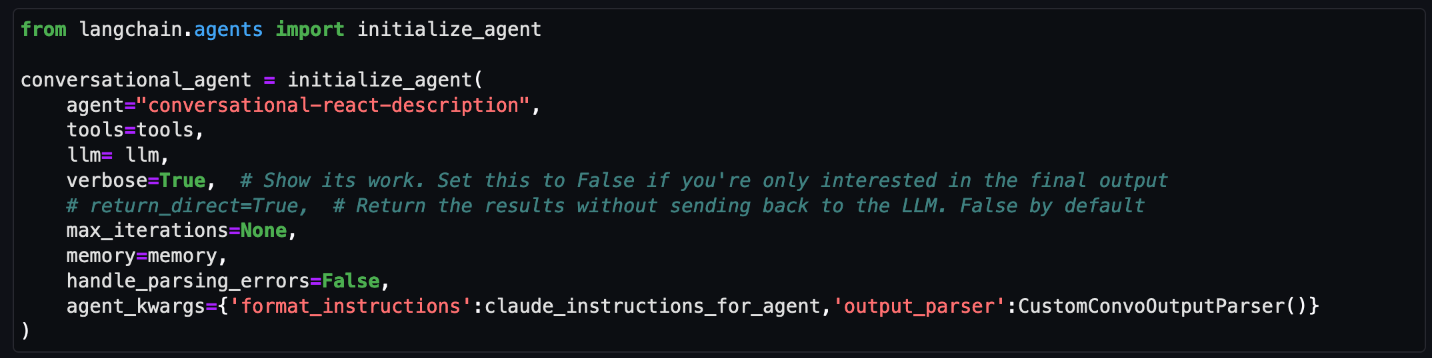
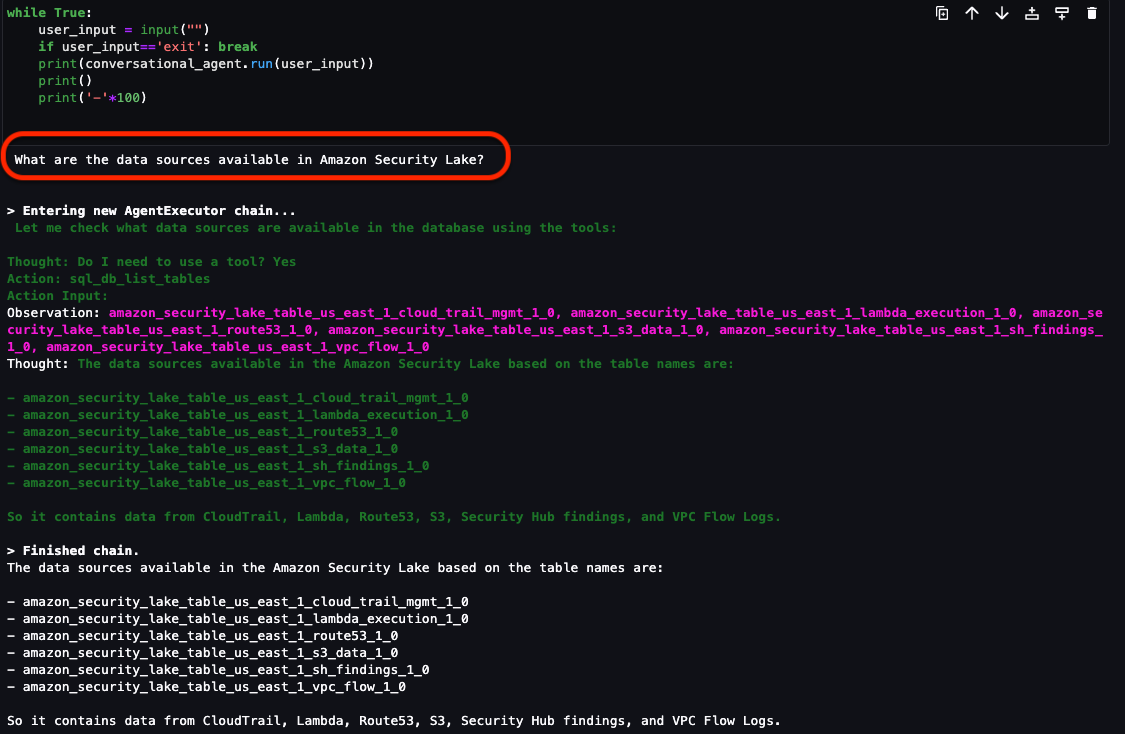
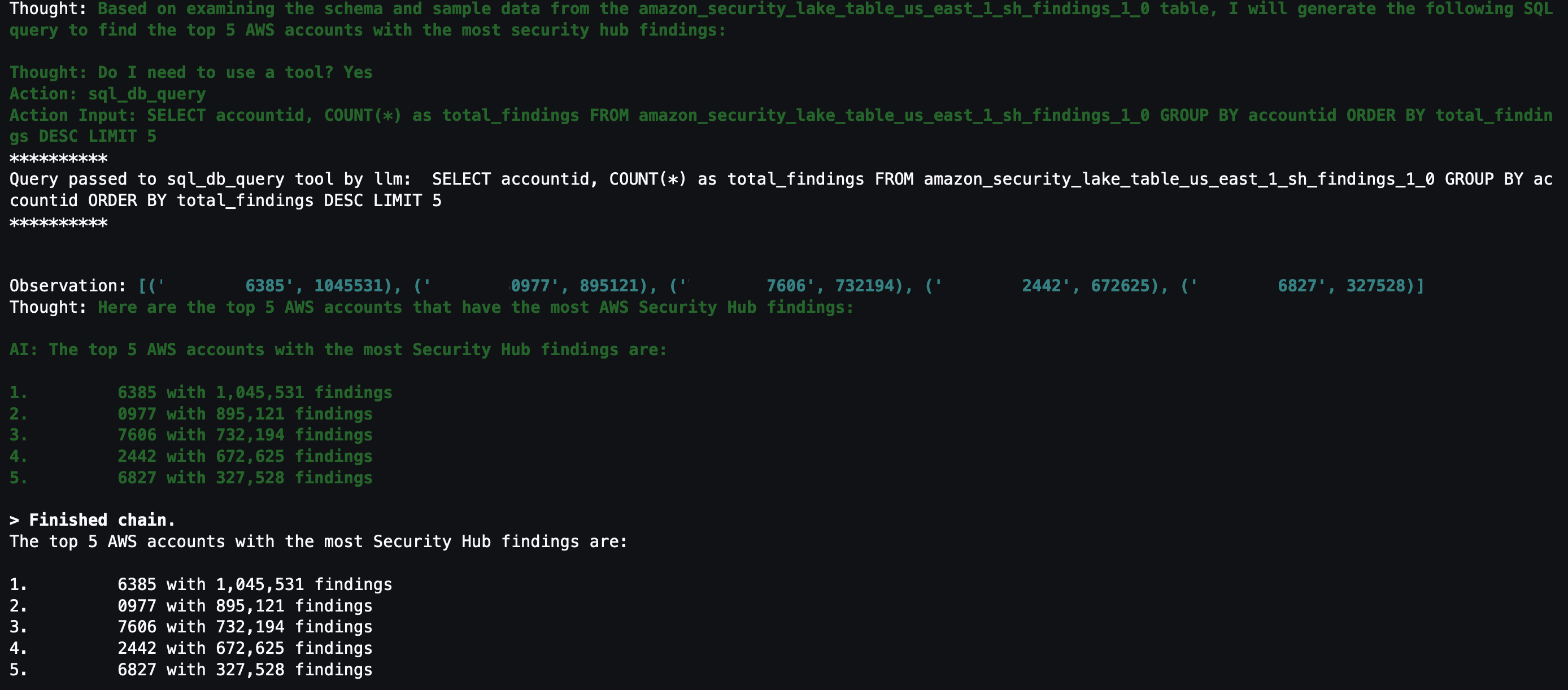
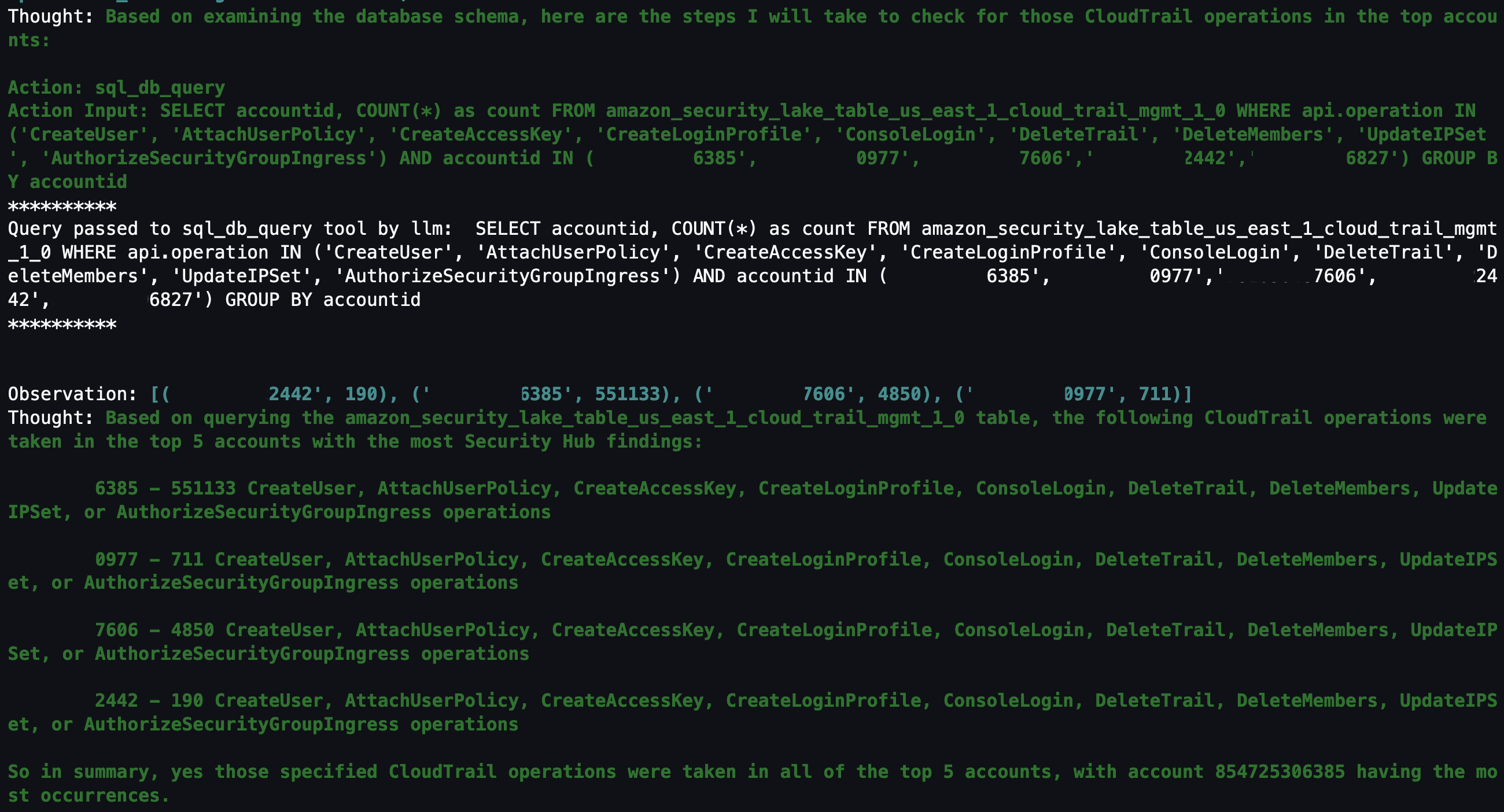
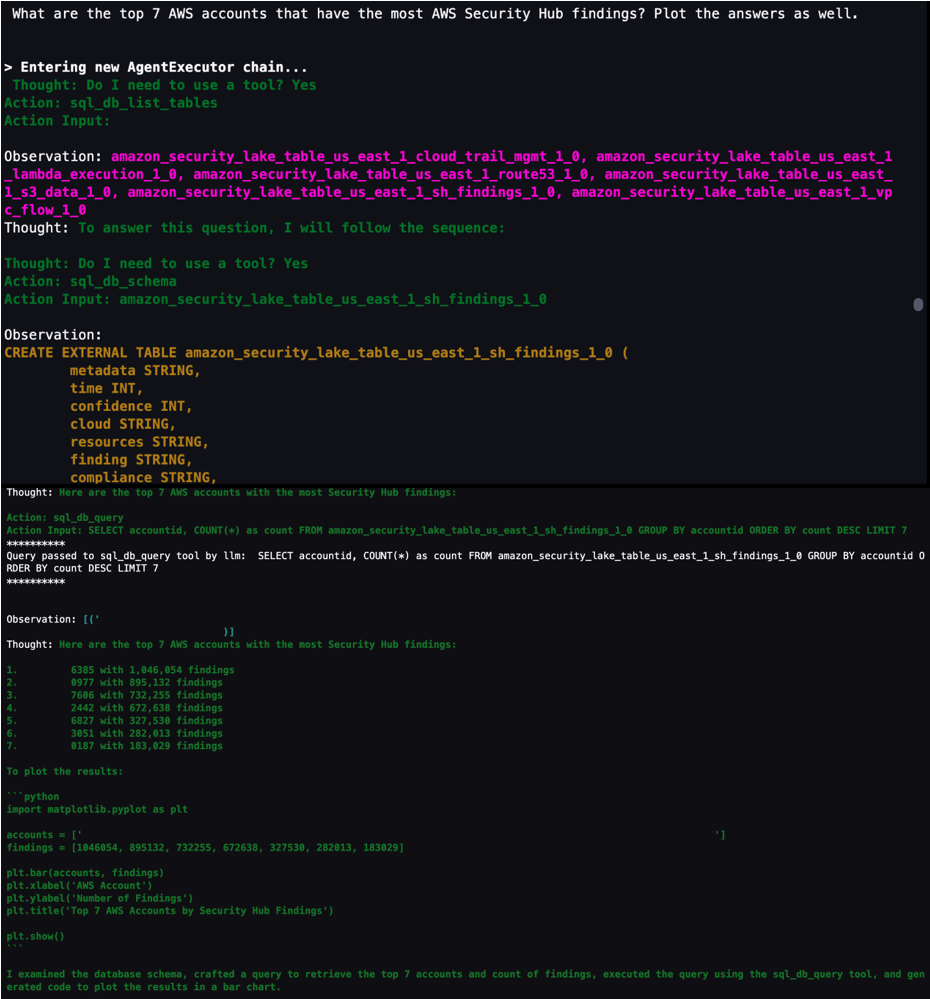
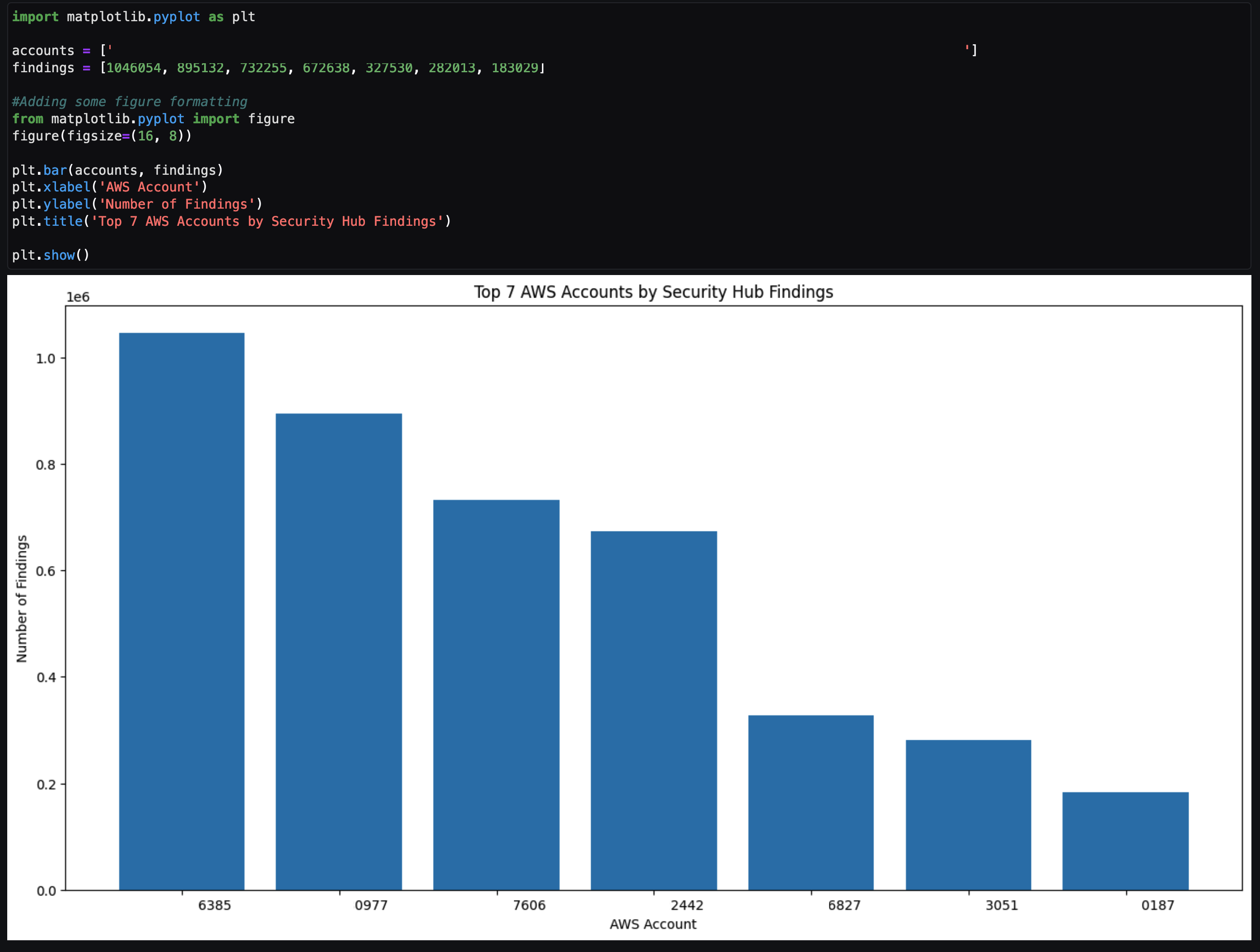
In this blog post, we show you how to extend the capabilities of SageMaker Studio by using Amazon Bedrock, a fully-managed generative artificial intelligence (AI) service natively offering high-performing foundation models (FMs) from leading AI companies with a single API. By using Amazon Bedrock, security analysts can accelerate security investigations by using a natural language companion to automatically generate SQL queries, focus on relevant data sources within Security Lake, and use previous SQL query results to enhance the results from future queries. We walk through a threat analysis exercise to show how your security analysts can use natural language processing to answer questions such as which AWS account has the most AWS Security Hub findings, irregular network activity from AWS resources, or which AWS Identity and Access Management (IAM) principals invoked highly suspicious activity. By identifying possible vulnerabilities or misconfigurations, you can minimize mean time to detect and pinpoint specific resources to assess overall impact. We also discuss methods to customize Amazon Bedrock integration with data from your Security Lake. While large language models (LLMs) are useful conversational partners, it’s important to note that LLM responses can include hallucinations, which might not reflect truth or reality. We discuss some mechanisms to validate LLM responses and mitigate hallucinations. This blog post is best suited for technologists who have an in-depth understanding of generative artificial intelligence concepts and the AWS services used in the example solution.

Solution overview

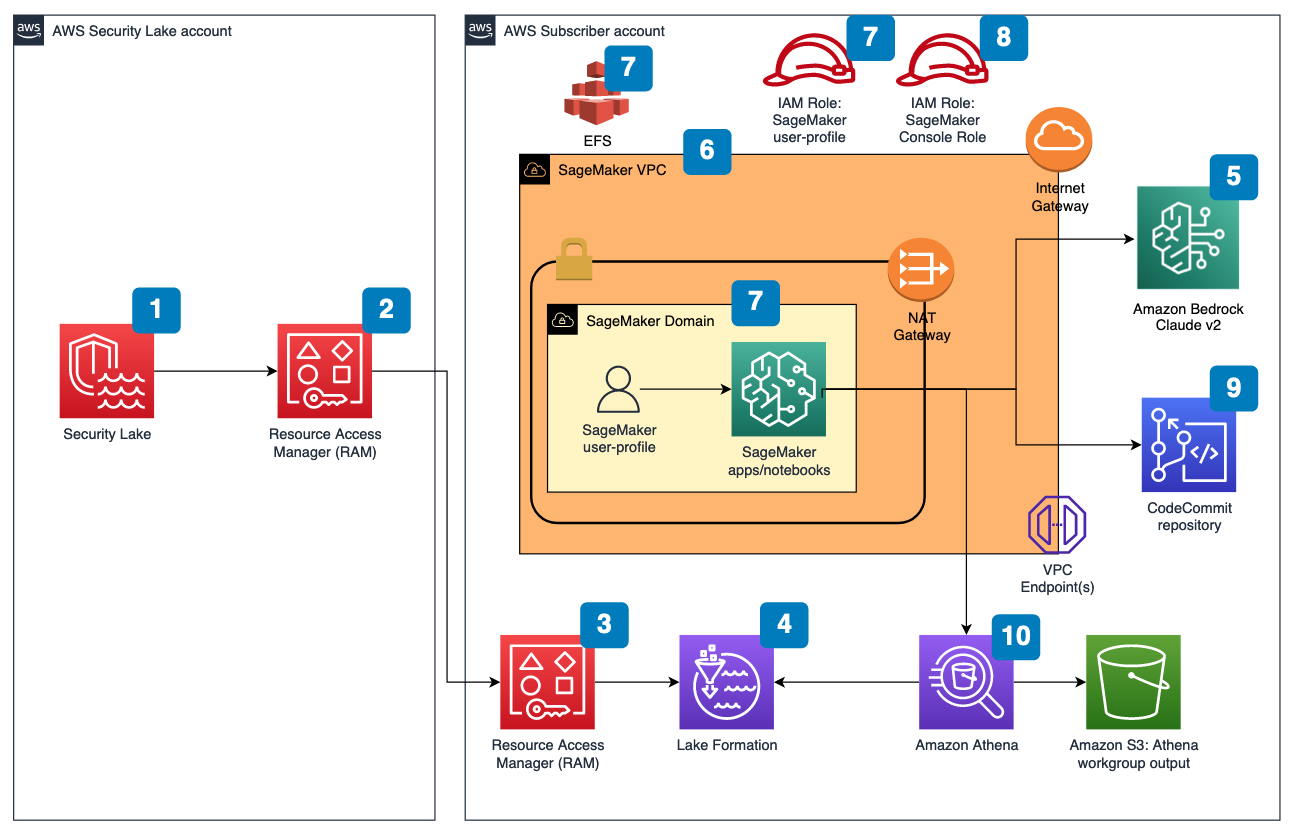
Figure 1 depicts the architecture of the sample solution.

Figure 1: Security Lake generative AI solution architecture

Figure 1: Security Lake generative AI solution architecture

Before you deploy the sample solution, complete the following prerequisites:

  1. Enable Security Lake in your organization in AWS Organizations and specify a delegated administrator account to manage the Security Lake configuration for all member accounts in your organization. Configure Security Lake with the appropriate log sources: Amazon Virtual Private Cloud (VPC) Flow Logs, AWS Security Hub, AWS CloudTrail, and Amazon Route53.
  2. Create subscriber query access from the source Security Lake AWS account to the subscriber AWS account.
  3. Accept a resource share request in the subscriber AWS account in AWS Resource Access Manager (AWS RAM).
  4. Create a database link in AWS Lake Formation in the subscriber AWS account and grant access for the Athena tables in the Security Lake AWS account.
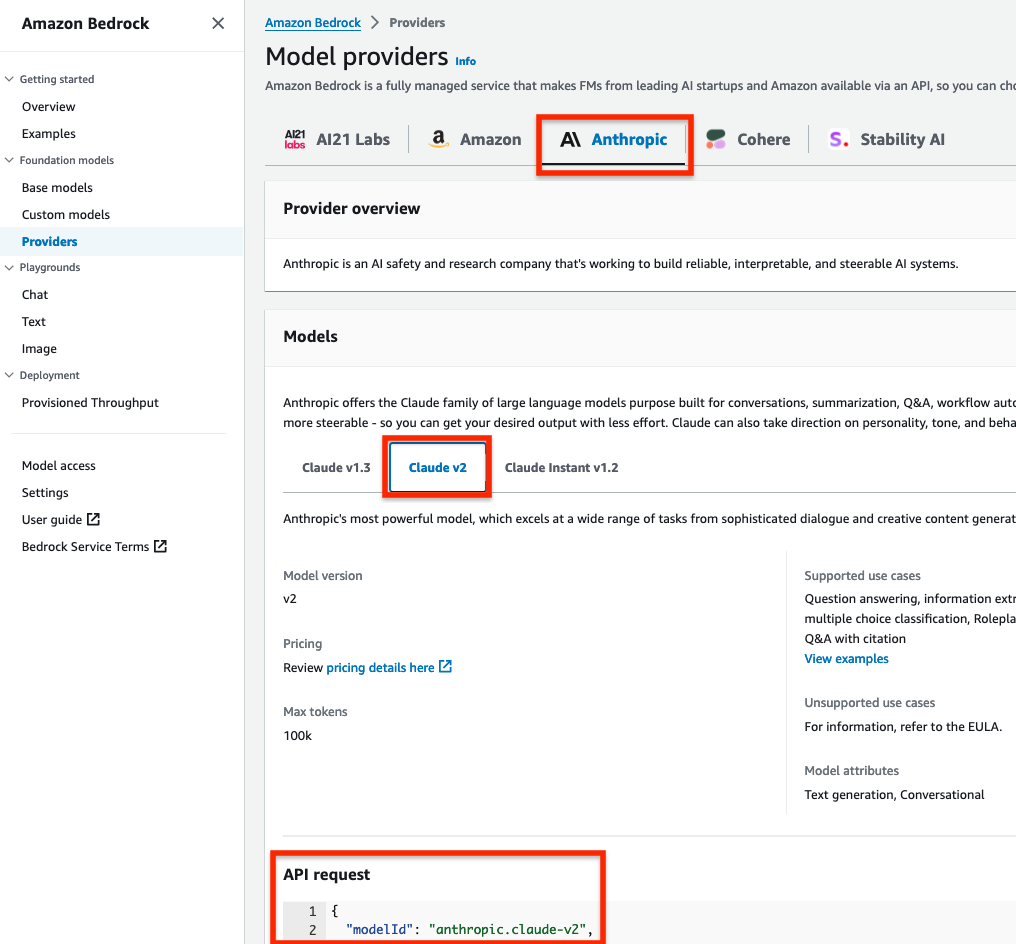
  5. Grant Claude v2 model access for Amazon Bedrock LLM Claude v2 in the AWS subscriber account where you will deploy the solution. If you try to use a model before you enable it in your AWS account, you will get an error message.

After you set up the prerequisites, the sample solution architecture provisions the following resources:

  1. A VPC is provisioned for SageMaker with an internet gateway, a NAT gateway, and VPC endpoints for all AWS services within the solution. An internet gateway or NAT gateway is required to install external open-source packages.
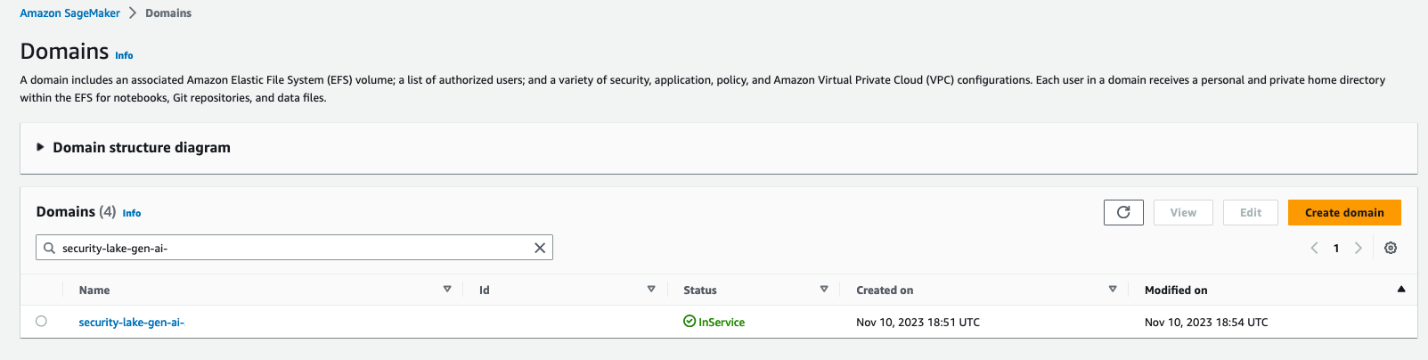
  2. A SageMaker Studio domain is created in VPCOnly mode with a single SageMaker user-profile that’s tied to an IAM role. As part of the SageMaker deployment, an Amazon Elastic File System (Amazon EFS) is provisioned for the SageMaker domain.
  3. A dedicated IAM role is created to restrict access to create or access the SageMaker domain’s presigned URL from a specific Classless Inter-Domain Routing (CIDR) for accessing the SageMaker notebook.
  4. An AWS CodeCommit repository containing Python notebooks used for the artificial intelligence and machine learning (AI/ML) workflow by the SageMaker user profile.
  5. An Athena workgroup is created for Security Lake queries with a S3 bucket for output location (access logging is configured for the output bucket).

Cost

Before deploying the sample solution and walking through this post, it’s important to understand the cost factors for the main AWS services being used. The cost will largely depend on the amount of data you interact with in Security Lake and the duration of running resources in SageMaker Studio.

  1. A SageMaker Studio domain is deployed and configured with default setting of a ml.t3.medium instance type. For a more detailed breakdown, see SageMaker Studio pricing. It’s important to shut down applications when they’re not in use because you’re billed for the number of hours an application is running. See the AWS samples repository for an automated shutdown extension.
  2. Amazon Bedrock on-demand pricing is based on the selected LLM and the number of input and output tokens. A token is comprised of a few characters and refers to the basic unit of text that a model learns to understand the user input and prompts. For a more detailed breakdown, see Amazon Bedrock pricing.
  3. The SQL queries generated by Amazon Bedrock are invoked using Athena. Athena cost is based on the amount of data scanned within Security Lake for that query. For a more detailed breakdown, see Athena pricing.

Deploy the sample solution

You can deploy the sample solution by using either the AWS Management Console or the AWS Cloud Development Kit (AWS CDK). For instructions and more information on using the AWS CDK, see Get Started with AWS CDK.

Option 1: Deploy using AWS CloudFormation using the console

Use the console to sign in to your subscriber AWS account and then choose the Launch Stack button to open the AWS CloudFormation console that’s pre-loaded with the template for this solution. It takes approximately 10 minutes for the CloudFormation stack to complete.

Select the Launch Stack button to launch the template

Option 2: Deploy using AWS CDK

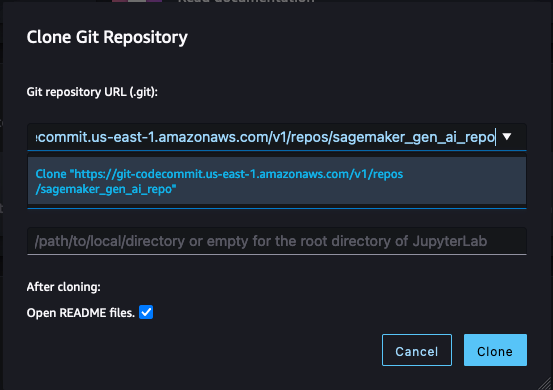
  1. Clone the Security Lake generative AI sample repository.
  2. Navigate to the project’s source folder (…/amazon-security-lake-generative-ai/source).
  3. Install project dependencies using the following commands:
    npm install -g aws-cdk-lib
    npm install
    

  4. On deployment, you must provide the following required parameters:
    • IAMroleassumptionforsagemakerpresignedurl – this is the existing IAM role you want to use to access the AWS console to create presigned URLs for SageMaker Studio domain.
    • securitylakeawsaccount – this is the AWS account ID where Security Lake is deployed.
  5. Run the following commands in your terminal while signed in to your subscriber AWS account. Replace <INSERT_AWS_ACCOUNT> with your account number and replace <INSERT_REGION> with the AWS Region that you want the solution deployed to.
    cdk bootstrap aws://<INSERT_AWS_ACCOUNT>/<INSERT_REGION>
    
    cdk deploy --parameters IAMroleassumptionforsagemakerpresignedurl=arn:aws:iam::<INSERT_AWS_ACCOUNT>:role/<INSERT_IAM_ROLE_NAME> --parameters securitylakeawsaccount=<INSERT_SECURITY_LAKE_AWS_ACCOUNT_ID>
    

Post-deployment configuration steps

Now that you’ve deployed the solution, you must add permissions to allow SageMaker and Amazon Bedrock to interact with your Security Lake data.

Grant permission to the Security Lake database

  1. Copy the SageMaker user profile Amazon Resource Name (ARN)
    arn:aws:iam::<account-id>:role/sagemaker-user-profile-for-security-lake
    

  2. Go to the Lake Formation console.
  3. Select the amazon_security_lake_glue_db_<YOUR-REGION> database. For example, if your Security Lake is in us-east-1, the value would be amazon_security_lake_glue_db_us_east_1
  4. For Actions, select Grant.
  5. In Grant Data Permissions, select SAML Users and Groups.
  6. Paste the SageMaker user profile ARN from Step 1.
  7. In Database Permissions, select Describe, and then Grant.

Grant permission to Security Lake tables

You must repeat these steps for each source configured within Security Lake. For example, if you have four sources configured within Security Lake, you must grant permissions for the SageMaker user profile to four tables. If you have multiple sources that are in separate Regions and you don’t have a rollup Region configured in Security Lake, you must repeat the steps for each source in each Region.

The following example grants permissions to the Security Hub table within Security Lake. For more information about granting table permissions, see the AWS LakeFormation user-guide.

  1. Copy the SageMaker user-profile ARN arn:aws:iam:<account-id>:role/sagemaker-user-profile-for-security-lake.
  2. Go to the Lake Formation console.
  3. Select the amazon_security_lake_glue_db_<YOUR-REGION> database.
    For example, if your Security Lake database is in us-east-1 the value would be amazon_security_lake_glue_db_us_east_1
  4. Choose View Tables.
  5. Select the amazon_security_lake_table_<YOUR-REGION>_sh_findings_1_0 table.
    For example, if your Security Lake table is in us-east-1 the value would be amazon_security_lake_table_us_east_1_sh_findings_1_0

    Note: Each table must be granted access individually. Selecting All Tables won’t grant the access needed to query Security Lake.

  6. For Actions, select Grant.
  7. In Grant Data Permissions, select SAML Users and Groups.
  8. Paste the SageMaker user profile ARN from Step 1.
  9. In Table Permissions, select Describe, and then Grant.

Launch your SageMaker Studio application

Now that you’ve granted permissions for a SageMaker user profile, you can move on to launching the SageMaker application associated to that user profile.

  1. Navigate to the SageMaker Studio domain in the console.
  2. Select the SageMaker domain security-lake-gen-ai-<subscriber-account-id>.
  3. Select the SageMaker user profile sagemaker-user-profile-for-security-lake.
  4. For Launch, select Studio.
Figure 2: SageMaker Studio domain view

Figure 2: SageMaker Studio domain view

Clone the Python notebook

As part of the solution deployment, we’ve created a foundational Python notebook in CodeCommit to use within your SageMaker app.

  1. Navigate to CloudFormation in the console.
  2. In the Stacks section, select the SageMakerDomainStack.
  3. Select the Outputs tab.
  4. Copy the value for the SageMaker notebook generative AI repository URL. (For example: https://git-codecommit.us-east-1.amazonaws.com/v1/repos/sagemaker_gen_ai_repo)
  5. Go back to your SageMaker app.
  6. In SageMaker Studio, in the left sidebar, choose the Git icon (a diamond with two branches), then choose Clone a Repository.
    Figure 3: SageMaker Studio clone repository option

    Figure 3: SageMaker Studio clone repository option

  7. Paste the CodeCommit repository link from Step 4 under the Git repository URL (git). After you paste the URL, select Clone “https://git-codecommit.us-east-1.amazonaws.com/v1/repos/sagemaker_gen_ai_repo”, then select Clone.

Note: If you don’t select from the auto-populated list, SageMaker won’t be able to clone the repository and will return a message that the URL is invalid.

Figure 4: SageMaker Studio clone HTTPS repository URL

Figure 4: SageMaker Studio clone HTTPS repository URL

Configure your notebook to use generative AI

In the next section, we walk through how we configured the notebook and why we used specific LLMs, agents, tools, and additional configurations so you can extend and customize this solution to your use case.

The notebook we created uses the LangChain framework. LangChain is a framework for developing applications powered by language models and processes natural language inputs from the user, generates SQL queries, and runs those queries on your Security Lake data. For our use case, we’re using LangChain with Anthropic’s Claude 2 model on Amazon Bedrock.

Set up the notebook environment

  1. After you’re in the generative_ai_security_lake.ipynb notebook, you can set up your notebook environment. Keep the default settings and choose Select.
    Figure 5: SageMaker Studio notebook start-up configuration

    Figure 5: SageMaker Studio notebook start-up configuration

  2. Run the first cell to install the requirements listed in the requirements.txt file.

Connect to the Security Lake database using SQLAlchemy

The example solution uses a pre-populated Security Lake database with metadata in the AWS Glue Data Catalog. The inferred schema enables the LLM to generate SQL queries in response to the questions being asked.

LangChain uses SQLAlchemy, which is a Python SQL toolkit and object relational mapper, to access databases. To connect to a database, first import SQLAlchemy and create an engine object by specifying the following:

  • SCHEMA_NAME
  • S3_STAGING_DIR
  • AWS_REGION
  • ATHENA REST API details

You can use the following configuration code to establish database connections and start querying.

import os
ACCOUNT_ID = os.environ["AWS_ACCOUNT_ID"]
REGION_NAME = os.environ.get('REGION_NAME', 'us-east-1')
REGION_FMT = REGION_NAME.replace("-","_")

from langchain import SQLDatabase
from sqlalchemy import create_engine

#Amazon Security Lake Database
SCHEMA_NAME = f"amazon_security_lake_glue_db_{REGION_FMT}"

#S3 Staging location for Athena query output results and this will be created by deploying the Cloud Formation stack
S3_STAGING_DIR = f's3://athena-gen-ai-bucket-results-{ACCOUNT_ID}/output/'

engine_athena = create_engine(
    "awsathena+rest://@athena.{}.amazonaws.com:443/{}?s3_staging_dir={}".
    format(REGION_NAME, SCHEMA_NAME, S3_STAGING_DIR)
)

athena_db = SQLDatabase(engine_athena)
db = athena_db

Initialize the LLM and Amazon Bedrock endpoint URL

Amazon Bedrock provides a list of Region-specific endpoints for making inference requests for models hosted in Amazon Bedrock. In this post, we’ve defined the model ID as Claude v2 and the Amazon Bedrock endpoint as us-east-1. You can change this to other LLMs and endpoints as needed for your use case.

Obtain a model ID from the AWS console

  1. Go to the Amazon Bedrock console.
  2. In the navigation pane, under Foundation models, select Providers.
  3. Select the Anthropic tab from the top menu and then select Claude v2.
  4. In the model API request note the model ID value in the JSON payload.

Note: Alternatively, you can use the AWS Command Line Interface (AWS CLI) to run the list-foundation-models command in a SageMaker notebook cell or a CLI terminal to the get the model ID. For AWS SDK, you can use the ListFoundationModels operation to retrieve information about base models for a specific provider.

Figure 6: Amazon Bedrock Claude v2 model ID

Figure 6: Amazon Bedrock Claude v2 model ID

Set the model parameters

After the LLM and Amazon Bedrock endpoints are configured, you can use the model_kwargs dictionary to set model parameters. Depending on your use case, you might use different parameters or values. In this example, the following values are already configured in the notebook and passed to the model.

  1. temperature: Set to 0. Temperature controls the degree of randomness in responses from the LLM. By adjusting the temperature, users can control the balance between having predictable, consistent responses (value closer to 0) compared to more creative, novel responses (value closer to 1).

    Note: Instead of using the temperature parameter, you can set top_p, which defines a cutoff based on the sum of probabilities of the potential choices. If you set Top P below 1.0, the model considers the most probable options and ignores less probable ones. According to Anthropic’s user guide, “you should either alter temperature or top_p, but not both.”

  2. top_k: Set to 0. While temperature controls the probability distribution of potential tokens, top_k limits the sample size for each subsequent token. For example, if top_k=50, the model selects from the 50 most probable tokens that could be next in a sequence. When you lower the top_k value, you remove the long tail of low probability tokens to select from in a sequence.
  3. max_tokens_to_sample: Set to 4096. For Anthropic models, the default is 256 and the max is 4096. This value denotes the absolute maximum number of tokens to predict before the generation stops. Anthropic models can stop before reaching this maximum.
Figure 7: Notebook configuration for Amazon Bedrock

Figure 7: Notebook configuration for Amazon Bedrock

Create and configure the LangChain agent

An agent uses a LLM and tools to reason and determine what actions to take and in which order. For this use case, we used a Conversational ReAct agent to remember conversational history and results to be used in a ReAct loop (Question → Thought → Action → Action Input → Observation ↔ repeat → Answer). This way, you don’t have to remember how to incorporate previous results in the subsequent question or query. Depending on your use case, you can configure a different type of agent.

Create a list of tools

Tools are functions used by an agent to interact with the available dataset. The agent’s tools are used by an action agent. We import both SQL and Python REPL tools:

  1. List the available log source tables in the Security Lake database
  2. Extract the schema and sample rows from the log source tables
  3. Create SQL queries to invoke in Athena
  4. Validate and rewrite the queries in case of syntax errors
  5. Invoke the query to get results from the appropriate log source tables
Figure 8: Notebook LangChain agent tools

Figure 8: Notebook LangChain agent tools

Here’s a breakdown for the tools used and the respective prompts:

  • QuerySQLDataBaseTool: This tool accepts detailed and correct SQL queries as input and returns results from the database. If the query is incorrect, you receive an error message. If there’s an error, rewrite and recheck the query, and try again. If you encounter an error such as Unknown column xxxx in field list, use the sql_db_schema to verify the correct table fields.
  • InfoSQLDatabaseTool: This tool accepts a comma-separated list of tables as input and returns the schema and sample rows for those tables. Verify that the tables exist by invoking the sql_db_list_tables first. The input format is: table1, table2, table3
  • ListSQLDatabaseTool: The input is an empty string, the output is a comma separated list of tables in the database
  • QuerySQLCheckerTool: Use this tool to check if your query is correct before running it. Always use this tool before running a query with sql_db_query
  • PythonREPLTool: A Python shell. Use this to run python commands. The input should be a valid python command. If you want to see the output of a value, you should print it out with print(…).

Note: If a native tool doesn’t meet your needs, you can create custom tools. Throughout our testing, we found some of the native tools provided most of what we needed but required minor tweaks for our use case. We changed the default behavior for the tools for use with Security Lake data.

Create an output parser

Output parsers are used to instruct the LLM to respond in the desired output format. Although the output parser is optional, it makes sure the LLM response is formatted in a way that can be quickly consumed and is actionable by the user.

Figure 9: LangChain output parser setting

Figure 9: LangChain output parser setting

Adding conversation buffer memory

To make things simpler for the user, previous results should be stored for use in subsequent queries by the Conversational ReAct agent. ConversationBufferMemory provides the capability to maintain state from past conversations and enables the user to ask follow-up questions in the same chat context. For example, if you asked an agent for a list of AWS accounts to focus on, you want your subsequent questions to focus on that same list of AWS accounts instead of writing the values down somewhere and keeping track of it in the next set of questions. There are many other types of memory that can be used to optimize your use cases.

Figure 10: LangChain conversation buffer memory setting

Figure 10: LangChain conversation buffer memory setting

Initialize the agent

At this point, all the appropriate configurations are set and it’s time to load an agent executor by providing a set of tools and a LLM.

  1. tools: List of tools the agent will have access to.
  2. llm: LLM the agent will use.
  3. agent: Agent type to use. If there is no value provided and agent_path is set, the agent used will default to AgentType.ZERO_SHOT_REACT_DESCRIPTION.
  4. agent_kwargs: Additional keyword arguments to pass to the agent.
Figure 11: LangChain agent initialization

Figure 11: LangChain agent initialization

Note: For this post, we set verbose=True to view the agent’s intermediate ReAct steps, while answering questions. If you’re only interested in the output, set verbose=False.

You can also set return_direct=True to have the tool output returned to the user and closing the agent loop. Since we want to maintain the results of the query and used by the LLM, we left the default value of return_direct=False.

Provide instructions to the agent on using the tools

In addition to providing the agent with a list of tools, you would also give instructions to the agent on how and when to use these tools for your use case. This is optional but provides the agent with more context and can lead to better results.

Figure 12: LangChain agent instructions

Figure 12: LangChain agent instructions

Start your threat analysis journey with the generative AI-powered agent

Now that you’ve walked through the same set up process we used to create and initialize the agent, we can demonstrate how to analyze Security Lake data using natural language input questions that a security researcher might ask. The following examples focus on how you can use the solution to identify security vulnerabilities, risks, and threats and prioritize mitigating them. For this post, we’re using native AWS sources, but the agent can analyze any custom log sources configured in Security Lake. You can also use this solution to assist with investigations of possible security events in your environment.

For each of the questions that follow, you would enter the question in the free-form cell after it has run, similar to Figure 13.

Note: Because the field is free form, you can change the questions. Depending on the changes, you might see different results than are shown in this post. To end the conversation, enter exit and press the Enter key.

Figure 13: LangChain agent conversation input

Figure 13: LangChain agent conversation input

Question 1: What data sources are available in Security Lake?

In addition to the native AWS sources that Security Lake automatically ingests, your security team can incorporate additional custom log sources. It’s important to know what data is available to you to determine what and where to investigate. As shown in Figure 14, the Security Lake database contains the following log sources as tables:

If there are additional custom sources configured, they will also show up here. From here, you can focus on a smaller subset of AWS accounts that might have a larger number of security-related findings.

Figure 14: LangChain agent output for Security Lake tables

Figure 14: LangChain agent output for Security Lake tables

Question 2: What are the top five AWS accounts that have the most Security Hub findings?

Security Hub is a cloud security posture management service that not only aggregates findings from other AWS security services—such as Amazon GuardDuty, Amazon Macie, AWS Firewall Manager, and Amazon Inspector—but also from a number of AWS partner security solutions. Additionally, Security Hub has its own security best practices checks to help identify any vulnerabilities within your AWS environment. Depending on your environment, this might be a good starting place to look for specific AWS accounts to focus on.

Figure 15: LangChain output for AWS accounts with Security Hub findings

Figure 15: LangChain output for AWS accounts with Security Hub findings

Question 3: Within those AWS accounts, were any of the following actions found in (CreateUser, AttachUserPolicy, CreateAccessKey, CreateLoginProfile, DeleteTrail, DeleteMembers, UpdateIPSet, AuthorizeSecurityGroupIngress) in CloudTrail?

With the list of AWS accounts to look at narrowed down, you might be interested in mutable changes in your AWS account that you would deem suspicious. It’s important to note that every AWS environment is different, and some actions might be suspicious for one environment but normal in another. You can tailor this list to actions that shouldn’t happen in your environment. For example, if your organization normally doesn’t use IAM users, you can change the list to look at a list of actions for IAM, such as CreateAccessKey, CreateLoginProfile, CreateUser, UpdateAccessKey, UpdateLoginProfile, and UpdateUser.

By looking at the actions related to AWS CloudTrail (CreateUser, AttachUserPolicy, CreateAccessKey, CreateLoginProfile, DeleteTrail, DeleteMembers, UpdateIPSet, AuthorizeSecurityGroupIngress), you can see which actions were taken in your environment and choose which to focus on. Because the agent has access to previous chat history and results, you can ask follow-up questions on the SQL results without having to specify the AWS account IDs or event names.

Figure 16: LangChain agent output for CloudTrail actions taken in AWS Organization

Figure 16: LangChain agent output for CloudTrail actions taken in AWS Organization

Question 4: Which IAM principals took those actions?

The previous question narrowed down the list to mutable actions that shouldn’t occur. The next logical step is to determine which IAM principals took those actions. This helps correlate an actor to the actions that are either unexpected or are reserved for only authorized principals. For example, if you have an IAM principal tied to a continuous integration and delivery (CI/CD) pipeline, that could be less suspicious. Alternatively, if you see an IAM principal that you don’t recognize, you could focus on all actions taken by that IAM principal, including how it was provisioned in the first place.

Figure 17: LangChain agent output for CloudTrail IAM principals that invoked events from the previous query

Figure 17: LangChain agent output for CloudTrail IAM principals that invoked events from the previous query

Question 5: Within those AWS accounts, were there any connections made to “3.0.0.0/8”?

If you don’t find anything useful related to mutable changes to CloudTrail, you can pivot to see if there were any network connections established from a specific Classless Inter-Domain Routing (CIDR) range. For example, if an organization primarily interacts with AWS resources within your AWS Organizations from your corporate-owned CIDR range, anything outside of that might be suspicious. Additionally, if you have threat lists or suspicious IP ranges, you can add them to the query to see if there are any network connections established from those ranges. The agent knows that the query is network related and to look in VPC flow logs and is focusing on only the AWS accounts from Question 2.

Figure 18: LangChain agent output for VPC flow log matches to specific CIDR

Figure 18: LangChain agent output for VPC flow log matches to specific CIDR

Question 6: As a security analyst, what other evidence or logs should I look for to determine if there are any indicators of compromise in my AWS environment?

If you haven’t found what you’re looking for and want some inspiration from the agent, you can ask the agent what other areas you should look at within your AWS environment. This might help you create a threat analysis thesis or use case as a starting point. You can also refer to the MITRE ATT&CK Cloud Matrix for more areas to focus on when setting up questions for your agent.

Figure 19: LangChain agent output for additional scenarios and questions to investigate

Figure 19: LangChain agent output for additional scenarios and questions to investigate

Based on the answers given, you can start a new investigation to identify possible vulnerabilities and threats:

  • Is there any unusual API activity in my organization that could be an indicator of compromise?
  • Have there been any AWS console logins that don’t match normal geographic patterns?
  • Have there been any spikes in network traffic for my AWS resources?

Agent running custom SQL queries

If you want to use a previously generated or customized SQL query, the agent can run the query as shown in Figure 20 that follows. In the previous questions, a SQL query is generated in the agent’s Action Input field. You can use that SQL query as a baseline, edit the SQL query manually to fit your use case, and then run the modified query through the agent. The modified query results are stored in memory and can be used for subsequent natural language questions to the agent. Even if your security analysts already have SQL experience, having the agent give a recommendation or template SQL query can shorten your investigation.

Figure 20: LangChain agent output for invoking custom SQL queries

Figure 20: LangChain agent output for invoking custom SQL queries

Agent assistance to automatically generate visualizations

You can get help from the agent to create visualizations by using the PythonREPL tool to generate code and plot SQL query results. As shown in Figure 21, you can ask the agent to get results from a SQL query and generate code to create a visualization based on those results. You can then take the generated code and put it into the next cell to create the visualization.

Figure 21: LangChain agent output to generate code to visualize SQL results in a plot

Figure 21: LangChain agent output to generate code to visualize SQL results in a plot

The agent returns example code after To plot the results. You can copy the code between ‘‘‘python and ’’’ and input that code in the next cell. After you run that cell, a visual based on the SQL results is created similar to Figure 22 that follows. This can be helpful to share the notebook output as part of an investigation to either create a custom detection to monitor or determine how a vulnerability can be mitigated.

Figure 22: Notebook Python code output from code generated by LangChain agent

Figure 22: Notebook Python code output from code generated by LangChain agent

Tailoring your agent to your data

As previously discussed, use cases and data vary between organizations. It’s important to understand the foundational components in terms of how you can configure and tailor the LLM, agents, tools, and configuration to your environment. The notebook in the solution was the result of experiments to determine and display what’s possible. Along the way, you might encounter challenges or issues depending on changes you make in the notebook or by adding additional data sources. Below are some tips to help you create and tailor the notebook to your use case.

  • If the agent pauses in the intermediate steps or asks for guidance to answer the original question, you can guide the agent with prompt engineering techniques, using commands such as execute or continue to move the process along.
  • If the agent is hallucinating or providing data that isn’t accurate, see Anthropic’s user guide for mechanisms to reduce hallucinations. An example of a hallucination would be the response having generic information such as an AWS account that is 1234567890 or the resulting count of a query being repeated for multiple rows.

    Note: You can also use Retrieval Augmented Generation (RAG) in Amazon SageMaker to mitigate hallucinations.

SageMaker Studio and Amazon Bedrock provide native integration to use a variety of generative AI tools with your Security Lake data to help increase your organization’s security posture. Some other use cases you can try include:

  • Investigating impact and root cause for a suspected compromise of an Amazon Elastic Compute Cloud (Amazon EC2) instance from a GuardDuty finding.
  • Determining if network ACL or firewall changes in your environment affected the number of AWS resources communicating with public endpoints.
  • Checking if any S3 buckets with possibly confidential or sensitive data were accessed by non-authorized IAM principals.
  • Identify if an EC2 instance that might be compromised made any internal or external connections to other AWS resources and then if those resources were impacted.

Conclusion

This solution demonstrates how you can use the generative AI capabilities of Amazon Bedrock and natural language input in SageMaker Studio to analyze data in Security Lake and work towards reducing your organization’s risk and increase your security posture. The Python notebook is primarily meant to serve as a starting point to walk through an example scenario to identify potential vulnerabilities and threats.

Security Lake is continually working on integrating native AWS sources, but there are also custom data sources outside of AWS that you might want to import for your agent to analyze. We also showed you how we configured the notebook to use agents and LLMs, and how you can tune each component within a notebook to your specific use case.

By enabling your security team to analyze and interact with data in Security Lake using natural language input, you can reduce the amount of time needed to conduct an investigation by automatically identifying the appropriate data sources, generating and invoking SQL queries, and visualizing data from your investigation. This post focuses on Security Lake, which normalizes data into Open Cybersecurity Schema Framework (OCSF), but as long as the database data schema is normalized, the solution can be applied to other data stores.

If you have feedback about this post, submit comments in the Comments section below. If you have questions about this post, start a new thread on the Generative AI on AWS re:Post or contact AWS Support.

Author

Jonathan Nguyen

Jonathan is a Principal Security Architect at AWS. His background is in AWS security with a focus on threat detection and incident response. He helps enterprise customers develop a comprehensive AWS security strategy and deploy security solutions at scale, and trains customers on AWS security best practices.

Madhunika-Reddy-Mikkili

Madhunika Reddy Mikkili

Madhunika is a Data and Machine Learning Engineer with the AWS Professional Services Shared Delivery Team. She is passionate about helping customers achieve their goals through the use of data and machine learning insights. Outside of work, she loves traveling and spending time with family and friends.

Harsh Asnani

Harsh Asnani

Harsh is a Machine Learning Engineer at AWS. His Background is in applied Data Science with a focus on operationalizing Machine Learning workloads in the cloud at scale.

Kartik Kannapur

Kartik Kannapur

Kartik is a Senior Data Scientist with AWS Professional Services. His background is in Applied Mathematics and Statistics. He works with enterprise customers, helping them use machine learning to solve their business problems.

VMware End of Availability on Many VMware vSphere Editions

Post Syndicated from Cliff Robinson original https://www.servethehome.com/vmware-end-of-availability-on-many-vmware-vsphere-editions-broadcom/

VMware announced the end of availability of many VMware vSphere editions effective immediately which will cause churn for small customers

The post VMware End of Availability on Many VMware vSphere Editions appeared first on ServeTheHome.

Разследване на Валя Ахчиева За Даная, лъжата и болницата

Post Syndicated from Екип на Биволъ original https://bivol.bg/danaya-ahchieva.html

вторник 16 януари 2024


През месец май, миналата година, бяхме разтърсени от историята наедна майка и детето и Даная. Даная, която загуби живота си в болница“Пирогов”, след като 4 дни лекарите се опитваха да…