All posts by Channy Yun (윤석찬)

New Amazon EC2 P6-B200 instances powered by NVIDIA Blackwell GPUs to accelerate AI innovations

Post Syndicated from Channy Yun (윤석찬) original https://aws.amazon.com/blogs/aws/new-amazon-ec2-p6-b200-instances-powered-by-nvidia-blackwell-gpus-to-accelerate-ai-innovations/

Today, we’re announcing the general availability of Amazon Elastic Compute Cloud (Amazon EC2) P6-B200 instances powered by NVIDIA B200 to address customer needs for high performance and scalability in artificial intelligence (AI), machine learning (ML), and high performance computing (HPC) applications.

Amazon EC2 P6-B200 instances accelerate a broad range of GPU-enabled workloads but are especially well-suited for large-scale distributed AI training and inferencing for foundation models (FMs) with reinforcement learning (RL) and distillation, multimodal training and inference, and HPC applications such as climate modeling, drug discovery, seismic analysis, and insurance risk modeling.

When combined with Elastic Fabric Adapter (EFAv4) networking, hyperscale clustering by EC2 UltraClusters, and advanced virtualization and security capabilities by AWS Nitro System, you can train and serve FMs with increased speed, scale, and security. These instances also deliver up to two times the performance for AI training (time to train) and inference (tokens/sec) compared to EC2 P5en instances.

You can accelerate time-to-market for training FMs and deliver faster inference throughput, which lowers inference cost and helps increase adoption of generative AI applications as well as increased processing performance for HPC applications.

EC2 P6-B200 instances specifications
New EC2 P6-B200 instances provide eight NVIDIA B200 GPUs with 1440 GB of high bandwidth GPU memory, 5th Generation Intel Xeon Scalable processors (Emerald Rapids), 2 TiB of system memory, and 30 TB of local NVMe storage.

Here are the specs for EC2 P6-B200 instances:

Instance size GPUs (NVIDIA B200) GPU
memory (GB)
vCPUs GPU Peer to peer (GB/s) Instance storage (TB) Network bandwidth (Gbps) EBS bandwidth (Gbps)
P6-b200.48xlarge 8 1440 HBM3e 192 1800 8 x 3.84 NVMe SSD 8 x 400 100

These instances feature up to 125 percent improvement in GPU TFLOPs, 27 percent increase in GPU memory size, and 60 percent increase in GPU memory bandwidth compared to P5en instances.

P6-B200 instances in action
You can use P6-B200 instances in the US West (Oregon) AWS Region through EC2 Capacity Blocks for ML. To reserve your EC2 Capacity Blocks, choose Capacity Reservations on the Amazon EC2 console.

Select Purchase Capacity Blocks for ML and then choose your total capacity and specify how long you need the EC2 Capacity Block for p6-b200.48xlarge instances. The total number of days that you can reserve EC2 Capacity Blocks is 1-14 days, 21 days, 28 days, or multiples of 7 up to 182 days. You can choose your earliest start date for up to 8 weeks in advance.

Now, your EC2 Capacity Block will be scheduled successfully. The total price of an EC2 Capacity Block is charged up front, and the price doesn’t change after purchase. The payment will be billed to your account within 12 hours after you purchase the EC2 Capacity Blocks. To learn more, visit Capacity Blocks for ML in the Amazon EC2 User Guide.

When launching P6-B200 instances, you can use AWS Deep Learning AMIs (DLAMI) to support EC2 P6-B200 instances. DLAMI provides ML practitioners and researchers with the infrastructure and tools to quickly build scalable, secure, distributed ML applications in preconfigured environments.

To run instances, you can use AWS Management Console, AWS Command Line Interface (AWS CLI) or AWS SDKs.

You can integrate EC2 P6-B200 instances seamlessly with various AWS managed services such as Amazon Elastic Kubernetes Services (Amazon EKS), Amazon Simple Storage Service (Amazon S3), and Amazon FSx for Lustre. Support for Amazon SageMaker HyperPod is also coming soon.

Now available
Amazon EC2 P6-B200 instances are available today in the US West (Oregon) Region and can be purchased as EC2 Capacity blocks for ML.

Give Amazon EC2 P6-B200 instances a try in the Amazon EC2 console. To learn more, refer to the Amazon EC2 P6 instance page and send feedback to AWS re:Post for EC2 or through your usual AWS Support contacts.

Channy


How is the News Blog doing? Take this 1 minute survey!

(This survey is hosted by an external company. AWS handles your information as described in the AWS Privacy Notice. AWS will own the data gathered via this survey and will not share the information collected with survey respondents.)

Accelerate the transfer of data from an Amazon EBS snapshot to a new EBS volume

Post Syndicated from Channy Yun (윤석찬) original https://aws.amazon.com/blogs/aws/accelerate-the-transfer-of-data-from-an-amazon-ebs-snapshot-to-a-new-ebs-volume/

Today we are announcing the general availability of Amazon Elastic Block Store (Amazon EBS) Provisioned Rate for Volume Initialization, a feature that accelerates the transfer of data from an EBS snapshot, a highly durable backup of volumes stored in Amazon Simple Storage Service (Amazon S3) to a new EBS volume.

With Amazon EBS Provisioned Rate for Volume Initialization, you can create fully performant EBS volumes within a predictable amount of time. You can use this feature to speed up the initialization of hundreds of concurrent volumes and instances. You can also use this feature when you need to recover from an existing EBS Snapshot and need your EBS volume to be created and initialized as quickly as possible. You can use this feature to quickly create copies of EBS volumes with EBS Snapshots in a different Availability Zone, AWS Region, or AWS account. Provisioned Rate for Volume Initialization for each volume is charged based on the full snapshot size and the specified volume initialization rate.

This new feature expedites the volume initialization process by fetching the data from an EBS Snapshot to an EBS volume at a consistent rate that you specify between 100 MiB/s and 300 MiB/s. You can specify this volume initialization rate at which the snapshot blocks are to be downloaded from Amazon S3 to the volume.

With specifying the volume initialization rate, you can create a fully performant volume in a predictable time, enabling increased operational efficiency and visibility on the expected time of completion. If you run utilities like fio/dd to expedite volume initialization for your workflows like application recovery and volume copy for testing and development, it will remove the operational burden of managing such scripts with the consistency and predictability to your workflows.

Get started with specifying the volume initialization rate
To get started, you can choose the volume initialization rate when you launch your EC2 instance or create your volume from the snapshot.

1. Create a volume in the EC2 launch wizard
When launching new EC2 instances in the launch wizard of EC2 console, you can enter a desired Volume initialization rate in the Storage (volumes) section.

You can also set the volume initialization rate when creating and modifying the EC2 Launch Templates.

In the AWS Command Line Interface (AWS CLI), you can add VolumeInitializationRate parameter to the block device mappings when call run-instances command.

aws ec2 run-instances \
    --image-id ami-0abcdef1234567890 \
    --instance-type t2.micro \
    --subnet-id subnet-08fc749671b2d077c \
    --security-group-ids sg-0b0384b66d7d692f9 \
    --key-name MyKeyPair \
    --block-device-mappings file://mapping.json

Contents of mapping.json. This example adds /dev/sdh an empty EBS volume with a size of 8 GiB.

[
    {
        "DeviceName": "/dev/sdh",
        "Ebs": {
            "VolumeSize": 8
            "VolumeType": "gp3",            
            "VolumeInitializationRate": 300
		 } 
     } 
]

To learn more, visit block device mapping options, which defines the EBS volumes and instance store volumes to attach to the instance at launch.

2. Create a volume from snapshots
When you create a volume from snapshots, you can also choose Create volume in the EC2 console and specify the Volume initialization rate.

Confirm your new volume with the initialization rate.

In the AWS CLI, you can use VolumeInitializationRate parameter and when calling create-volume command.

aws ec2 create-volume --region us-east-1 --cli-input-json '{
    "AvailabilityZone": "us-east-1a",
    "VolumeType": "gp3",
    "SnapshotId": "snap-07f411eed12ef613a",
    "VolumeInitializationRate": 300
}'

If the command is run successfully, you will receive the result below.

{
    "AvailabilityZone": "us-east-1a",
    "CreateTime": "2025-01-03T21:44:53.000Z",
    "Encrypted": false,
    "Size": 100,
    "SnapshotId": "snap-07f411eed12ef613a",
    "State": "creating",
    "VolumeId": "vol-0ba4ed2a280fab5f9",
    "Iops": 300,
    "Tags": [],
    "VolumeType": "gp2",
    "MultiAttachEnabled": false,
    "VolumeInitializationRate": 300
}

You can also set the volume initialization rate when replacing root volumes of EC2 instances and provisioning EBS volumes using the EBS Container Storage Interface (CSI) driver.

After creation of the volume, EBS will keep track of the hydration progress and publish an Amazon EventBridge notification for EBS to your account when the hydration completes so that they can be certain when their volume is fully performant.

To learn more, visit Create an Amazon EBS volume and Initialize Amazon EBS volumes in the Amazon EBS User Guide.

Now available
Amazon EBS Provisioned Rate for Volume Initialization is now available and supported for all EBS volume types today. You will be charged based on the full snapshot size and the specified volume initialization rate. To learn more, visit Amazon EBS Pricing page.

To learn more about Amazon EBS including this feature, take the free digital course on the AWS Skill Builder portal. Course includes use cases, architecture diagrams and demos.

Give this feature a try in the Amazon EC2 console today and send feedback to AWS re:Post for Amazon EBS or through your usual AWS Support contacts.

— Channy

How is the News Blog doing? Take this 1 minute survey!

(This survey is hosted by an external company. AWS handles your information as described in the AWS Privacy Notice. AWS will own the data gathered via this survey and will not share the information collected with survey respondents.)

In the works – New Availability Zone in Maryland for US East (Northern Virginia) Region

Post Syndicated from Channy Yun (윤석찬) original https://aws.amazon.com/blogs/aws/in-the-works-new-availability-zone-in-maryland-for-us-east-n-virginia-region/

The US East (Northern Virginia) Region was the first Region launched by Amazon Web Services (AWS), and it has seen tremendous growth and customer adoption over the past several years. Now hosting active customers ranging from startups to large enterprises, AWS has steadily expanded the US East (Northern Virginia) Region infrastructure and capacity. The US East (Northern Virginia) Region consists of six Availability Zones, providing customers with enhanced redundancy and the ability to architect highly available applications.

Today, we’re announcing that a new Availability Zone located in Maryland will be added to the US East (Northern Virginia) Region, which is expected to open in 2026. This new Availability Zone will be connected to other Availability Zones by high-bandwidth, low-latency network connections over dedicated, fully redundant fiber. The upcoming Availability Zone in Maryland will also be instrumental in supporting the rapid growth of generative AI and advanced computing workloads in the US East (Northern Virginia) Region.

All Availability Zones are physically separated in a Region by a meaningful distance, many kilometers (km) from any other Availability Zone, although all are within 100 km (60 miles) of each other. The network performance is sufficient to accomplish synchronous replication between Availability Zones in Maryland and Virginia within the US East (Northern Virginia) Region. If your application is partitioned across multiple Availability Zones, your workloads are better isolated and protected from issues such as power outages, lightning strikes, tornadoes, earthquakes, and more.

With this announcement, AWS now has four new Regions in the works—New Zealand, Kingdom of Saudi Arabia, Taiwan, and the AWS European Sovereign Cloud—and 13 upcoming new Availability Zones.

Geographic information for the new Availability Zone
In March, we provided more granular visibility into the geographic location information of all AWS Regions and Availability Zones. We have updated the AWS Regions and Availability Zones page to reflect the new geographic information for this upcoming Availability Zone in Maryland. As shown in the following screenshot, the infrastructure for the upcoming Availability Zone will be located in Maryland, United States of America, for the US East (Northern Virginia) us-east-1 Region.

You can continue to use this geographic information to choose Availability Zones that align with your regulatory, compliance, and operational requirements.

After the new Availability Zone is launched, it will be available along with other Availability Zones in the US East (Northern Virginia) Region through the AWS Management Console, AWS Command Line Interface (AWS CLI), and AWS SDKs.

Stay tuned
We plan to make this new Availability Zone in the US East (Northern Virginia) Region generally available in 2026. As usual, check out the Regional news of the AWS News Blog so that you’ll be among the first to know when the new Availability Zone is open!

To learn more, visit the AWS Global Infrastructure Regions and Availability Zones page or AWS Regions and Availability Zones in the AWS documentation and send feedback to AWS re:Post or through your usual AWS Support contacts.

Channy


How is the News Blog doing? Take this 1 minute survey!

(This survey is hosted by an external company. AWS handles your information as described in the AWS Privacy Notice. AWS will own the data gathered via this survey and will not share the information collected with survey respondents.)

AWS Weekly Roundup: Upcoming AWS Summits, Amazon Q Developer, Amazon CloudFront updates, and more (April 21, 2025)

Post Syndicated from Channy Yun (윤석찬) original https://aws.amazon.com/blogs/aws/aws-weekly-roundup-upcoming-aws-summits-amazon-q-developer-amazon-cloudfront-updates-and-more-april-21-2025/

Last week, we had the AWS Summit Amsterdam, one of the global Amazon Web Services (AWS) events that offers you the opportunity to learn from technical and industry leaders, and meet AWS experts and like-minded professionals. In particular, most AWS Summits have Developer and Community Lounges in their exhibition halls.

AWS Summit Amsterdam - DevLoungeA photo taken by Thembile Martis in AWS Summit Amsterdam 2025

Here, you can experience generative AI services for developers or participate in developer sessions prepared by the AWS community. You can also take a turn at the prize wheel, where you can receive special gifts after signing up for AWS Builder ID to use Amazon Q Developer, AWS Skill Builder, AWS re:Post, and AWS Community for developers.

Check your schedule and join an AWS Summit in a city near you: Bangkok (April 29), London (April 30), Poland (May 5), Bengaluru (May 7–8), Hong Kong (May 8), Seoul (May 14–15), Dubai (May 21), Tel Aviv (May 28), Singapore (May 29), Stockholm (June 4), Sydney (June 4-5), Hamburg (June 5), Washington, D.C, (June 10–11), Madrid (June 11), Milan (June 18), Shanghai (June 19–20), Mumbai (June 19), and Tokyo (June 25–26).

Last week’s launches
Here are some launches that got my attention:

  • GitLab Duo with Amazon Q – GitLab Duo with Amazon Q is generally available for Self-Managed Ultimate customers, embedding advanced agent capabilities for software development. It also supports Java modernization, enhanced quality assurance, and code review optimization directly in GitLab’s enterprise DevSecOps platform. To learn more, read the DevOps blog post or visit the Amazon Q Developer integrations page to learn more.
  • Amazon Q Developer in the Europe (Frankfurt) Region – Amazon Q Developer Pro tier customers can now use and configure Amazon Q Developer in the AWS Management Console and in the integrated development environment (IDE) to store data in the Europe (Frankfurt) Region. It performs inference in European Union (EU) Regions giving them more choice over where their data resides and transits. To learn more, read the blog post.
  • New 223 AWS Config rules in AWS Control Tower – AWS Control Tower supports an additional 223 managed Config rules in Control Catalog for various use cases such as security, cost, durability, and operations. With this launch, you can now search, discover, enable and manage these additional rules directly from AWS Control Tower and govern more use cases for your multi-account environment. To learn more, visit the AWS Control Tower User Guide.
  • Amazon CloudFront Anycast Static IPs support for apex domains – You can easily use your root domain (for example, example.com) with CloudFront. This new feature simplifies DNS management by providing only three static IP addresses instead of the previous 21, making it easier to configure and manage apex domains with CloudFront distributions. To learn more, visit the CloudFront Developer Guide for detailed documentation and implementation guidance.
  • AWS Lambda@Edge advanced logging controls – This feature improves how Lamgda function logs are captured, processed, and consumed at the edge. This enhancement provides you with more control over your logging data, making it easier to monitor application behavior and quickly resolve issues. To learn more, read the Compute blog post, the Lambda Developer Guide, or the CloudFront Developer Guide.
  • New AWS Wavelength Zone in Dakar, Senegal – With this first Wavelength Zone in sub-Saharan Africa in a partnership with Sonatel, an affiliate of Orange, independent software vendors (ISVs), enterprises, and developers can now use AWS infrastructure and services to support applications with data residency, low latency, and resiliency requirements. AWS Wavelength is available in 31 cities across the globe in a partnership with seven telecommunication companies. To learn more, visit AWS Wavelength and get started today.

For a full list of AWS announcements, be sure to keep an eye on the What’s New with AWS? page.

Other AWS news
Here are some additional news items that you might find interesting:

From community.aws
Here are my personal favorites posts from community.aws:

Upcoming AWS events
Check your calendars and sign up for these upcoming AWS events:

  • AWS re:Inforce – Mark your calendars for AWS re:Inforce (June 16–18) in Philadelphia, PA. AWS re:Inforce is a learning conference focused on AWS security solutions, cloud security, compliance, and identity. You can subscribe for event updates now!
  • AWS Partners Events – You’ll find a variety of AWS Partner events that will inspire and educate you, whether you are just getting started on your cloud journey or you are looking to solve new business challenges.
  • AWS Community Days – Join community-led conferences that feature technical discussions, workshops, and hands-on labs led by expert AWS users and industry leaders from around the world: Istanbul, Turkey (April 25), Prague, Czech Republic (April 25), Yerevan, Armenia (May 24), Zurich, Switzerland (May 25), and Bengaluru, India (May 25).

You can browse all upcoming in-person and virtual events.

That’s all for this week. Check back next Monday for another Weekly Roundup!

Channy

This post is part of our Weekly Roundup series. Check back each week for a quick roundup of interesting news and announcements from AWS!


How is the News Blog doing? Take this 1 minute survey!

(This survey is hosted by an external company. AWS handles your information as described in the AWS Privacy Notice. AWS will own the data gathered via this survey and will not share the information collected with survey respondents.)

Announcing up to 85% price reductions for Amazon S3 Express One Zone

Post Syndicated from Channy Yun (윤석찬) original https://aws.amazon.com/blogs/aws/up-to-85-price-reductions-for-amazon-s3-express-one-zone/

At re:Invent 2023, we introduced Amazon S3 Express One Zone, a high-performance, single-Availability Zone (AZ) storage class purpose-built to deliver consistent single-digit millisecond data access for your most frequently accessed data and latency-sensitive applications.

S3 Express One Zone delivers data access speed up to 10 times faster than S3 Standard, and it can support up to 2 million GET transactions per second (TPS) and up to 200,000 PUT TPS per directory bucket. This makes it ideal for performance-intensive workloads such as interactive data analytics, data streaming, media rendering and transcoding, high performance computing (HPC), and AI/ML trainings. Using S3 Express One Zone, customers like Fundrise, Aura, Lyrebird, Vivian Health, and Fetch improved the performance and reduced the costs of their data-intensive workloads.

Since launch, we’ve introduced a number of features for our customers using S3 Express One Zone. For example, S3 Express One Zone started to support object expiration using S3 Lifecycle to expire objects based on age to help you automatically optimize storage costs. In addition, your log-processing or media-broadcasting applications can directly append new data to the end of existing objects and then immediately read the object, all within S3 Express One Zone.

Today we’re announcing that, effective April 10, 2025, S3 Express One Zone has reduced storage prices by 31 percent, PUT request prices by 55 percent, and GET request prices by 85 percent. In addition, S3 Express One Zone has reduced the per-GB charges for data uploads and retrievals by 60 percent, and these charges now apply to all bytes transferred rather than just portions of requests greater than 512 KB.

Here is a price reduction table in the US East (N. Virginia) Region:

Price Previous New Price reduction
Storage
(per GB-Month)
$0.16 $0.11 31%
Writes
(PUT requests)
$0.0025 per 1,000 requests up to 512 KB $0.00113 per 1,000 requests 55%
Reads
(GET requests)
$0.0002 per 1,000 requests up to 512 KB $0.00003 per 1,000 requests 85%
Data upload
(per GB)
$0.008 $0.0032 60%
Data retrievals
(per GB)
$0.0015 $0.0006 60%

For S3 Express One Zone pricing examples, go to the S3 billing FAQs or use the AWS Pricing Calculator.

These pricing reductions apply to S3 Express One Zone in all AWS Regions where the storage class is available: US East (N. Virginia), US East (Ohio), US West (Oregon), Asia Pacific (Mumbai), Asia Pacific (Tokyo), Europe (Ireland), and Europe (Stockholm) Regions. To learn more, visit the Amazon S3 pricing page and S3 Express One Zone in the AWS Documentation.

Give S3 Express One Zone a try in the S3 console today and send feedback to AWS re:Post for Amazon S3 or through your usual AWS Support contacts.

Channy

Meet the AWS News Blog team!

Post Syndicated from Channy Yun (윤석찬) original https://aws.amazon.com/blogs/aws/meet-the-aws-news-blog-team/

Now that Jeff Barr has retired from the AWS News Blog as of December last year, the AWS News Blog team will keep sharing the most important and impactful AWS product launches the moment they become available. I want to quote Jeff’s last comment on the future of the News Blog again:

Going forward, the team will continue to grow and the goal remains the same: to provide our customers with carefully chosen, high-quality information about the latest and most meaningful AWS launches. The blog is in great hands and this team will continue to keep you informed even as the AWS pace of innovation continues to accelerate.

Since 2016, Jeff has been building the AWS News Blog as a team. Currently, we’re a group of 11 bloggers working in North America, South America, Asia, Europe, and Africa. We co-work with AWS product teams, testing new features firsthand on behalf of customers, and delivering key details in the News Blog the way Jeff has always done.

The Leadership Principles for AWS News Bloggers that Jeff shared on LinkedIn are a textbook for anyone writing for customers in tech companies. They’re the fundamentals that can help you understand and get started blogging quickly, and we’ll continue to stick to these principles with our team. This is why the AWS News Blog is different from other tech companies’ product news channels.

Voices from blog writers
You may be familiar with the names of News Blog writers, but you may not have had the chance to hear about them. Let us introduce ourselves!

Channy Yun (윤석찬)

I’m honored to continue Jeff’s legacy as a new lead blogger of the News Blog team; he is my role model. When I joined AWS in 2014, the first thing I did was to create the AWS Korea Blog and I started translating Jeff’s blog posts into the Korean language. During the journey, I learned how to write accurate, honest, and powerful guides to help customers get started with new AWS products and features.

Danilo Poccia

Since my first News Blog post in 2018, I have learned so much by being part of this team. Working with product managers and service teams is always an amazing experience. I am interested in serverless, event-driven architectures, and AI/ML. It’s incredible how technologies like generative AI are becoming part of software development implicitly (through AI-enabled development tools) and explicitly (by using models in code).

Sébastien Stormacq

I’m fortunate to have been a part of this team since 2019. When I don’t write posts, I produce episodes of the AWS Developers Podcast and le podcast AWS en français. I also work with the teams for Amazon EC2 Mac, AWS SDK for Swift, and the CodeBuild and CodeArtifact teams trying to make the AWS Cloud easier to use for Apple developers. My pet project is the Swift Runtime for AWS Lambda.

Veliswa Boya

The Amazon Leadership Principles (LPs) guide all that we do here at AWS, including the work we do as authors of the News Blog. As a developer advocate, I’ve taken the guidance of the LPs and used it to guide members of the AWS community who are looking to create technical content, especially those new in their technical content creation journey.

Donnie Prakoso

Just like brewing coffee, being a blog author has been a mix of fun, challenge, and reward. I’ve been particularly fortunate to observe how customer obsession is built into AWS teams. I’ve seen how they work backwards, transforming your feedback into services or features. I genuinely hope that you enjoy reading our articles and look forward to the next chapter of the News Blog team.

Esra Kayabali

As an author, I’m committed to delivering timely information about the latest AWS innovations and launches to our global audience of builders, developers, and technology enthusiasts. I understand the importance of providing clear, accurate, and actionable content that helps you use AWS services effectively. Happy reading everyone!

Matheus Guimaraes

My specialties are .NET development and microservices, but I’ve always been a jack-of-all-trades and writing for this blog helps me to keep my knife sharp across all corners of modern technology, while also helping others do the same. Thousands of people read the AWS News Blog and use it as a go-to source to keep up with what’s new and to help them make decisions, so I know that what we are doing is meaningful work with huge impact.

Prasad Rao

Through my blogs, I strive to highlight not just the “what” of new services, but also the “why” and “how” they can transform businesses and user experiences. As a solutions architect specializing in Microsoft Workloads on AWS, I help customers migrate and modernize their workloads and build scalable architecture on AWS. I also mentor diverse people to excel in their cloud careers.

Elizabeth Fuentes

Every time I start writing a new blog, I feel honored to be part of this team, to be able to experiment with something new before it’s released, and to be able to share my experience with the reader. This team is made up of specialists of all levels and from multiple countries and together, we are a multicultural and multi-specialty team. Thank you, reader, for being here.

Betty Zheng (郑予彬)

Joining the News Blog team has transformed how I communicate about technology. With an ever-curious mindset, I approach each new announcement aiming to make innovative services accessible and engaging. By bringing my unique and diverse perspective to technical content, I strive to help developers truly enjoy exploring our latest technologies.

Micah Walter

As a senior solutions architect, I support enterprise customers in the New York City region and beyond. I advise executives, engineers, and architects at every step along their journey to the cloud, with a deep focus on sustainability and practical design.

I also want to give credit to our behind-the-scenes editor-in-chief, Jane Watson, and program manager, Jane Scolieri, who play an essential role in helping us get product launch news to you as soon as it happens, including the 60 launches we announced in one week at re:Invent 2024!

Share your feedback
At AWS, we are customer obsessed. We’re always focused on improving and providing a better customer experience, and we need your feedback to do so. Take our survey to share insights about your experience with the AWS News Blog and suggestion for how we can serve you even better.

This survey is hosted by an external company. AWS handles your information as described in the AWS Privacy Notice. AWS will own the data gathered via this survey and will not share the information collected with survey respondents.

Channy

Amazon S3 Tables integration with Amazon SageMaker Lakehouse is now generally available

Post Syndicated from Channy Yun (윤석찬) original https://aws.amazon.com/blogs/aws/amazon-s3-tables-integration-with-amazon-sagemaker-lakehouse-is-now-generally-available/

At re:Invent 2024, we launched Amazon S3 Tables, the first cloud object store with built-in Apache Iceberg support to streamline storing tabular data at scale, and Amazon SageMaker Lakehouse to simplify analytics and AI with a unified, open, and secure data lakehouse. We also previewed S3 Tables integration with Amazon Web Services (AWS) analytics services for you to stream, query, and visualize S3 Tables data using Amazon Athena, Amazon Data Firehose, Amazon EMR, AWS Glue, Amazon Redshift, and Amazon QuickSight.

Our customers wanted to simplify the management and optimization of their Apache Iceberg storage, which led to the development of S3 Tables. They were simultaneously working to break down data silos that impede analytics collaboration and insight generation using the SageMaker Lakehouse. When paired with S3 Tables and SageMaker Lakehouse in addition to built-in integration with AWS analytics services, they can gain a comprehensive platform unifying access to multiple data sources enabling both analytics and machine learning (ML) workflows.

Today, we’re announcing the general availability of Amazon S3 Tables integration with Amazon SageMaker Lakehouse to provide unified S3 Tables data access across various analytics engines and tools. You can access SageMaker Lakehouse from Amazon SageMaker Unified Studio, a single data and AI development environment that brings together functionality and tools from AWS analytics and AI/ML services. All S3 tables data integrated with SageMaker Lakehouse can be queried from SageMaker Unified Studio and engines such as Amazon Athena, Amazon EMR, Amazon Redshift, and Apache Iceberg-compatible engines like Apache Spark or PyIceberg.

With this integration, you can simplify building secure analytic workflows where you can read and write to S3 Tables and join with data in Amazon Redshift data warehouses and third-party and federated data sources, such as Amazon DynamoDB or PostgreSQL.

You can also centrally set up and manage fine-grained access permissions on the data in S3 Tables along with other data in the SageMaker Lakehouse and consistently apply them across all analytics and query engines.

S3 Tables integration with SageMaker Lakehouse in action
To get started, go to the Amazon S3 console and choose Table buckets from the navigation pane and select Enable integration to access table buckets from AWS analytics services.

Now you can create your table bucket to integrate with SageMaker Lakehouse. To learn more, visit Getting started with S3 Tables in the AWS documentation.

1. Create a table with Amazon Athena in the Amazon S3 console
You can create a table, populate it with data, and query it directly from the Amazon S3 console using Amazon Athena with just a few steps. Select a table bucket and select Create table with Athena, or you can select an existing table and select Query table with Athena.

2. Create tables with Athena

When you want to create a table with Athena, you should first specify a namespace for your table. The namespace in an S3 table bucket is equivalent to a database in AWS Glue, and you use the table namespace as the database in your Athena queries.

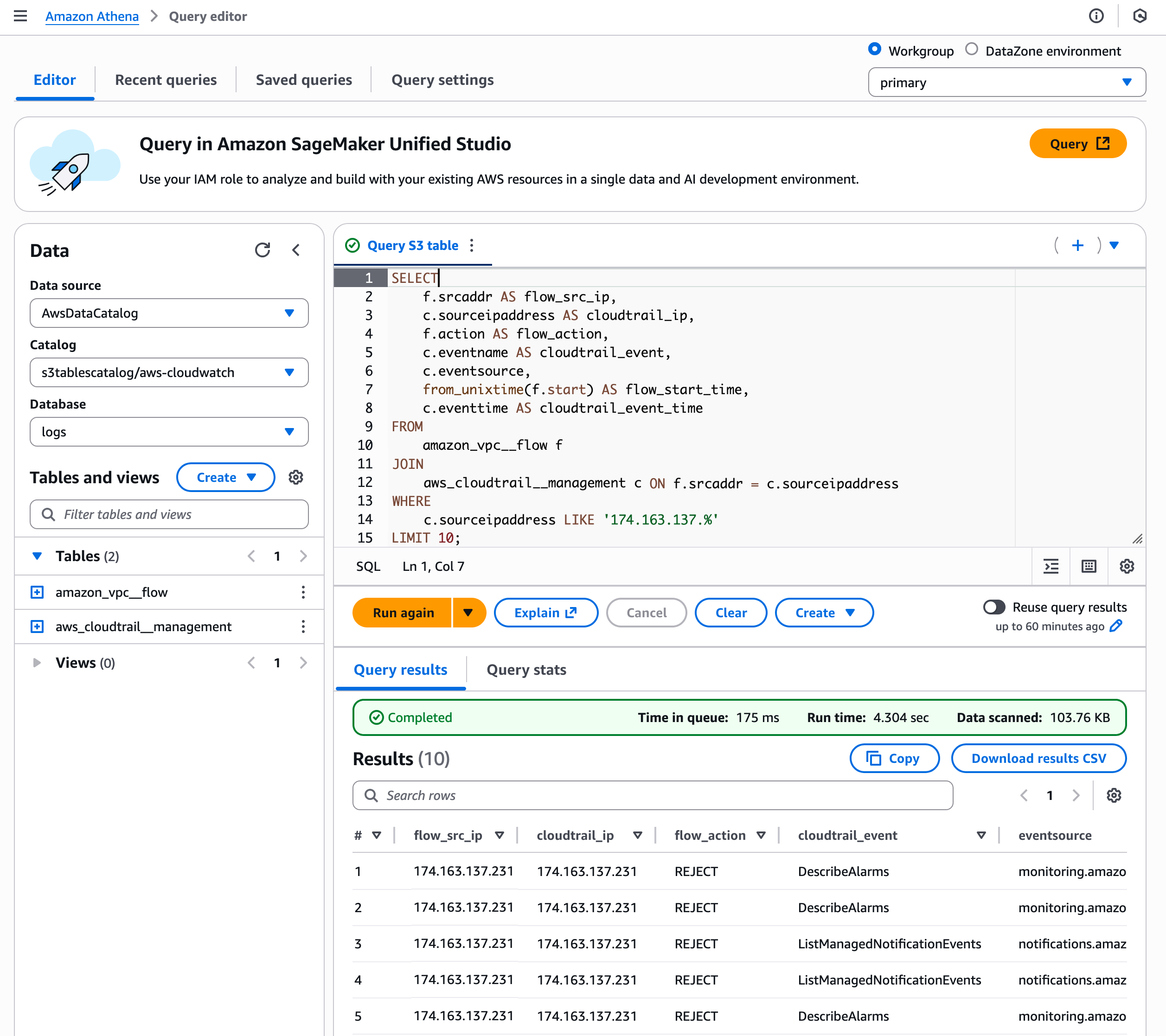
Choose a namespace and select Create table with Athena. It goes to the Query editor in the Athena console. You can create a table in your S3 table bucket or query data in the table.

2. Query with Athena

2. Query with SageMaker Lakehouse in the SageMaker Unified Studio
Now you can access unified data across S3 data lakes, Redshift data warehouses, third-party and federated data sources in SageMaker Lakehouse directly from SageMaker Unified Studio.

To get started, go to the SageMaker console and create a SageMaker Unified Studio domain and project using a sample project profile: Data Analytics and AI-ML model development. To learn more, visit Create an Amazon SageMaker Unified Studio domain in the AWS documentation.

After the project is created, navigate to the project overview and scroll down to project details to note down the project role Amazon Resource Name (ARN).

3. Project details in SageMaker Unified Studio

Go to the AWS Lake Formation console and grant permissions for AWS Identity and Access Management (IAM) users and roles. In the in the Principals section, select the <project role ARN> noted in the previous paragraph. Choose Named Data Catalog resources in the LF-Tags or catalog resources section and select the table bucket name you created for Catalogs. To learn more, visit Overview of Lake Formation permissions in the AWS documentation.

4. Grant permissions in Lake Formation console

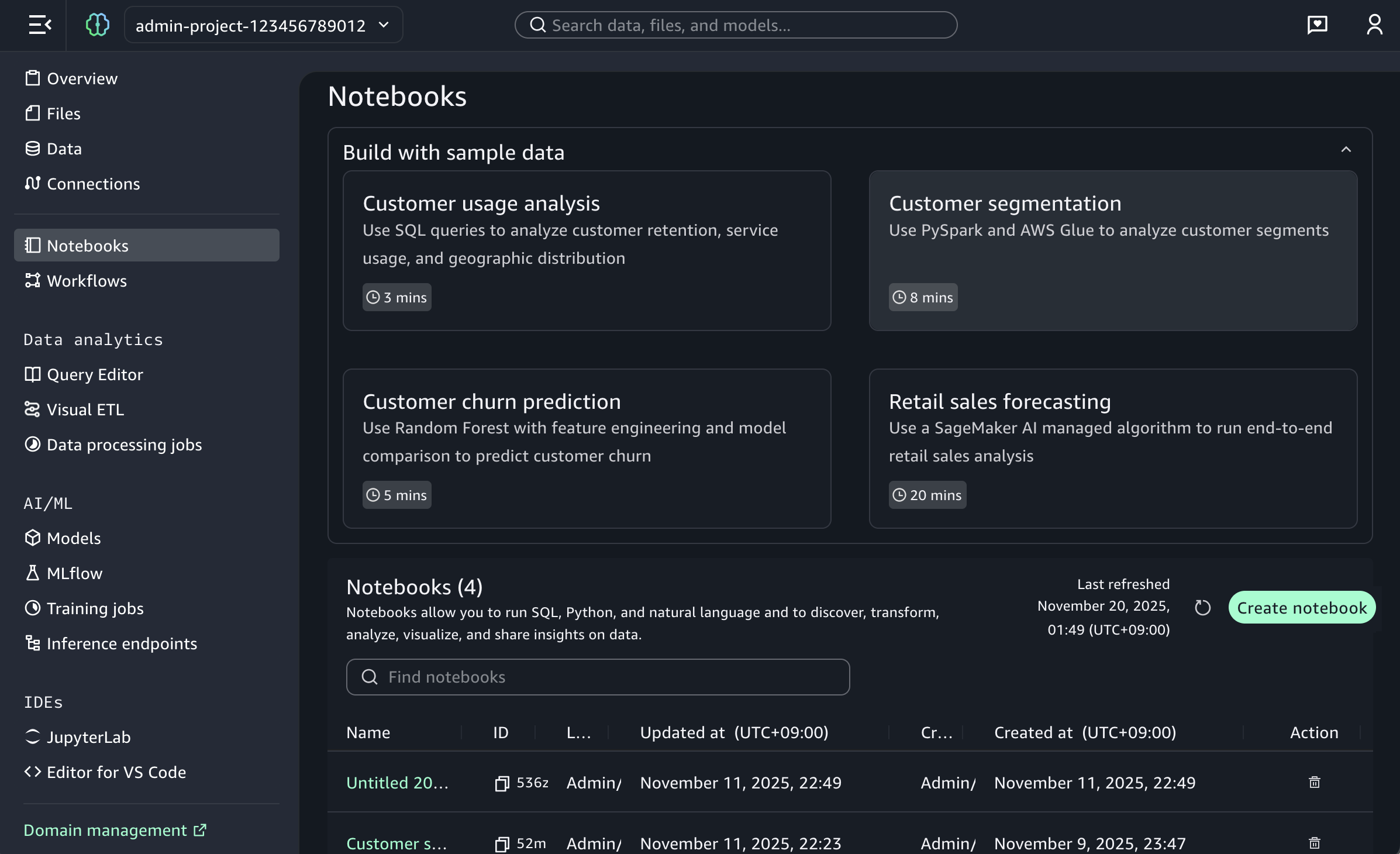
When you return to SageMaker Unified Studio, you can see your table bucket project under Lakehouse in the Data menu in the left navigation pane of project page. When you choose Actions, you can select how to query your table bucket data in Amazon Athena, Amazon Redshift, or JupyterLab Notebook.

5. S3 Tables in Unified Studio

When you choose Query with Athena, it automatically goes to Query Editor to run data query language (DQL) and data manipulation language (DML) queries on S3 tables using Athena.

Here is a sample query using Athena:

select * from "s3tablecatalog/s3tables-integblog-bucket”.”proddb"."customer" limit 10;

6. Athena query in Unified Studio

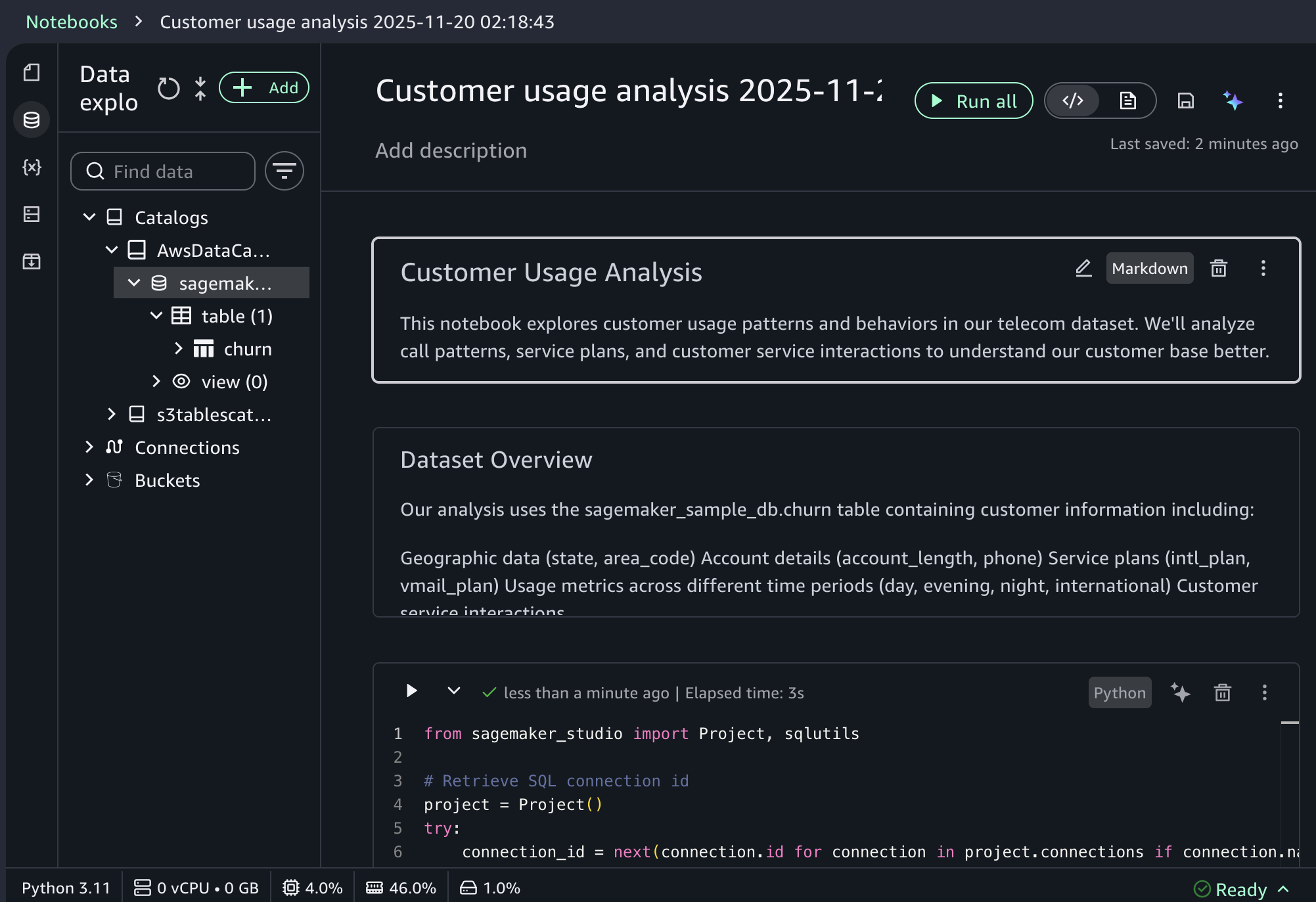
To query with Amazon Redshift, you should set up Amazon Redshift Serverless compute resources for data query analysis. And then you choose Query with Redshift and run SQL in the Query Editor. If you want to use JupyterLab Notebook, you should create a new JupyterLab space in Amazon EMR Serverless.

3. Join data from other sources with S3 Tables data
With S3 Tables data now available in SageMaker Lakehouse, you can join it with data from data warehouses, online transaction processing (OLTP) sources like relational or non-relational database, Iceberg tables, and other third party sources to gain more comprehensive and deeper insights.

For example, you can add connections to data sources such as Amazon DocumentDB, Amazon DynamoDB, Amazon Redshift, PostgreSQL, MySQL, Google BigQuery, or Snowflake and combine data using SQL without extract, transform, and load (ETL) scripts.

Now you can run the SQL query in the Query editor to join the data in the S3 Tables with the data in the DynamoDB.

Here is a sample query to join between Athena and DynamoDB:

select * from "s3tablescatalog/s3tables-integblog-bucket"."blogdb"."customer", 
              "dynamodb1"."default"."customer_ddb" where cust_id=pid limit 10;

To learn more about this integration, visit Amazon S3 Tables integration with Amazon SageMaker Lakehouse in the AWS documentation.

Now available
S3 Tables integration with SageMaker Lakehouse is now generally available in all AWS Regions where S3 Tables are available. To learn more, visit the S3 Tables product page and the SageMaker Lakehouse page.

Give S3 Tables a try in the SageMaker Unified Studio today and send feedback to AWS re:Post for Amazon S3 and AWS re:Post for Amazon SageMaker or through your usual AWS Support contacts.

In the annual celebration of the launch of Amazon S3, we will introduce more awesome launches for Amazon S3 and Amazon SageMaker. To learn more, join the AWS Pi Day event on March 14.

Channy

How is the News Blog doing? Take this 1 minute survey!

(This survey is hosted by an external company. AWS handles your information as described in the AWS Privacy Notice. AWS will own the data gathered via this survey and will not share the information collected with survey respondents.)

DeepSeek-R1 now available as a fully managed serverless model in Amazon Bedrock

Post Syndicated from Channy Yun (윤석찬) original https://aws.amazon.com/blogs/aws/deepseek-r1-now-available-as-a-fully-managed-serverless-model-in-amazon-bedrock/

As of January 30, DeepSeek-R1 models became available in Amazon Bedrock through the Amazon Bedrock Marketplace and Amazon Bedrock Custom Model Import. Since then, thousands of customers have deployed these models in Amazon Bedrock. Customers value the robust guardrails and comprehensive tooling for safe AI deployment. Today, we’re making it even easier to use DeepSeek in Amazon Bedrock through an expanded range of options, including a new serverless solution.

The fully managed DeepSeek-R1 model is now generally available in Amazon Bedrock. Amazon Web Services (AWS) is the first cloud service provider (CSP) to deliver DeepSeek-R1 as a fully managed, generally available model. You can accelerate innovation and deliver tangible business value with DeepSeek on AWS without having to manage infrastructure complexities. You can power your generative AI applications with DeepSeek-R1’s capabilities using a single API in the Amazon Bedrock’s fully managed service and get the benefit of its extensive features and tooling.

According to DeepSeek, their model is publicly available under MIT license and offers strong capabilities in reasoning, coding, and natural language understanding. These capabilities power intelligent decision support, software development, mathematical problem-solving, scientific analysis, data insights, and comprehensive knowledge management systems.

As is the case for all AI solutions, give careful consideration to data privacy requirements when implementing in your production environments, check for bias in output, and monitor your results. When implementing publicly available models like DeepSeek-R1, consider the following:

  • Data security – You can access the enterprise-grade security, monitoring, and cost control features of Amazon Bedrock that are essential for deploying AI responsibly at scale, all while retaining complete control over your data. Users’ inputs and model outputs aren’t shared with any model providers. You can use these key security features by default, including data encryption at rest and in transit, fine-grained access controls, secure connectivity options, and download various compliance certifications while communicating with the DeepSeek-R1 model in Amazon Bedrock.
  • Responsible AI – You can implement safeguards customized to your application requirements and responsible AI policies with Amazon Bedrock Guardrails. This includes key features of content filtering, sensitive information filtering, and customizable security controls to prevent hallucinations using contextual grounding and Automated Reasoning checks. This means you can control the interaction between users and the DeepSeek-R1 model in Bedrock with your defined set of policies by filtering undesirable and harmful content in your generative AI applications.
  • Model evaluation – You can evaluate and compare models to identify the optimal model for your use case, including DeepSeek-R1, in a few steps through either automatic or human evaluations by using Amazon Bedrock model evaluation tools. You can choose automatic evaluation with predefined metrics such as accuracy, robustness, and toxicity. Alternatively, you can choose human evaluation workflows for subjective or custom metrics such as relevance, style, and alignment to brand voice. Model evaluation provides built-in curated datasets, or you can bring in your own datasets.

We strongly recommend integrating Amazon Bedrock Guardrails and using Amazon Bedrock model evaluation features with your DeepSeek-R1 model to add robust protection for your generative AI applications. To learn more, visit Protect your DeepSeek model deployments with Amazon Bedrock Guardrails and Evaluate the performance of Amazon Bedrock resources.

Get started with the DeepSeek-R1 model in Amazon Bedrock
If you’re new to using DeepSeek-R1 models, go to the Amazon Bedrock console, choose Model access under Bedrock configurations in the left navigation pane. To access the fully managed DeepSeek-R1 model, request access for DeepSeek-R1 in DeepSeek. You’ll then be granted access to the model in Amazon Bedrock.

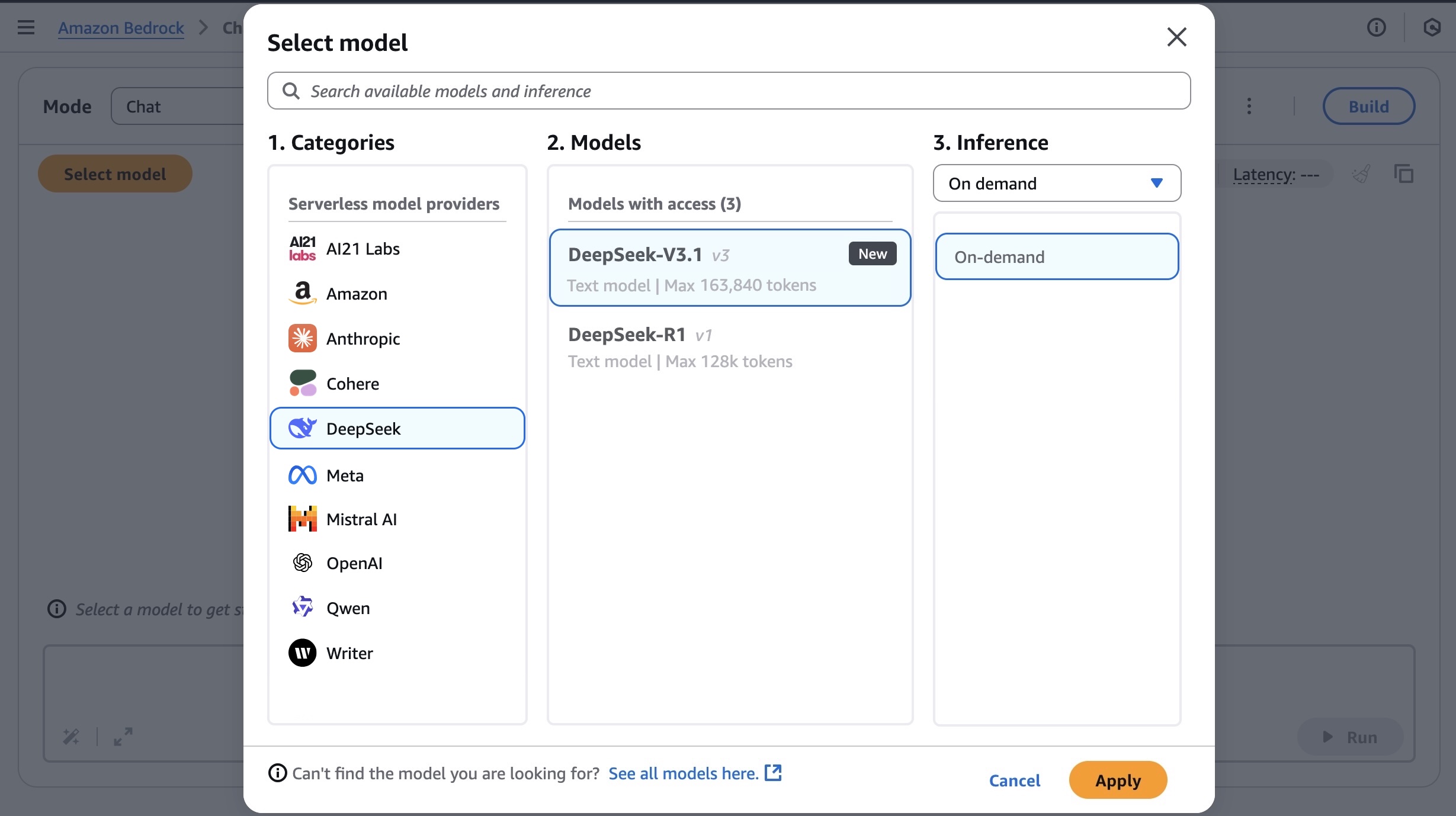
Next, to test the DeepSeek-R1 model in Amazon Bedrock, choose Chat/Text under Playgrounds in the left menu pane. Then choose Select model in the upper left, and select DeepSeek as the category and DeepSeek-R1 as the model. Then choose Apply.

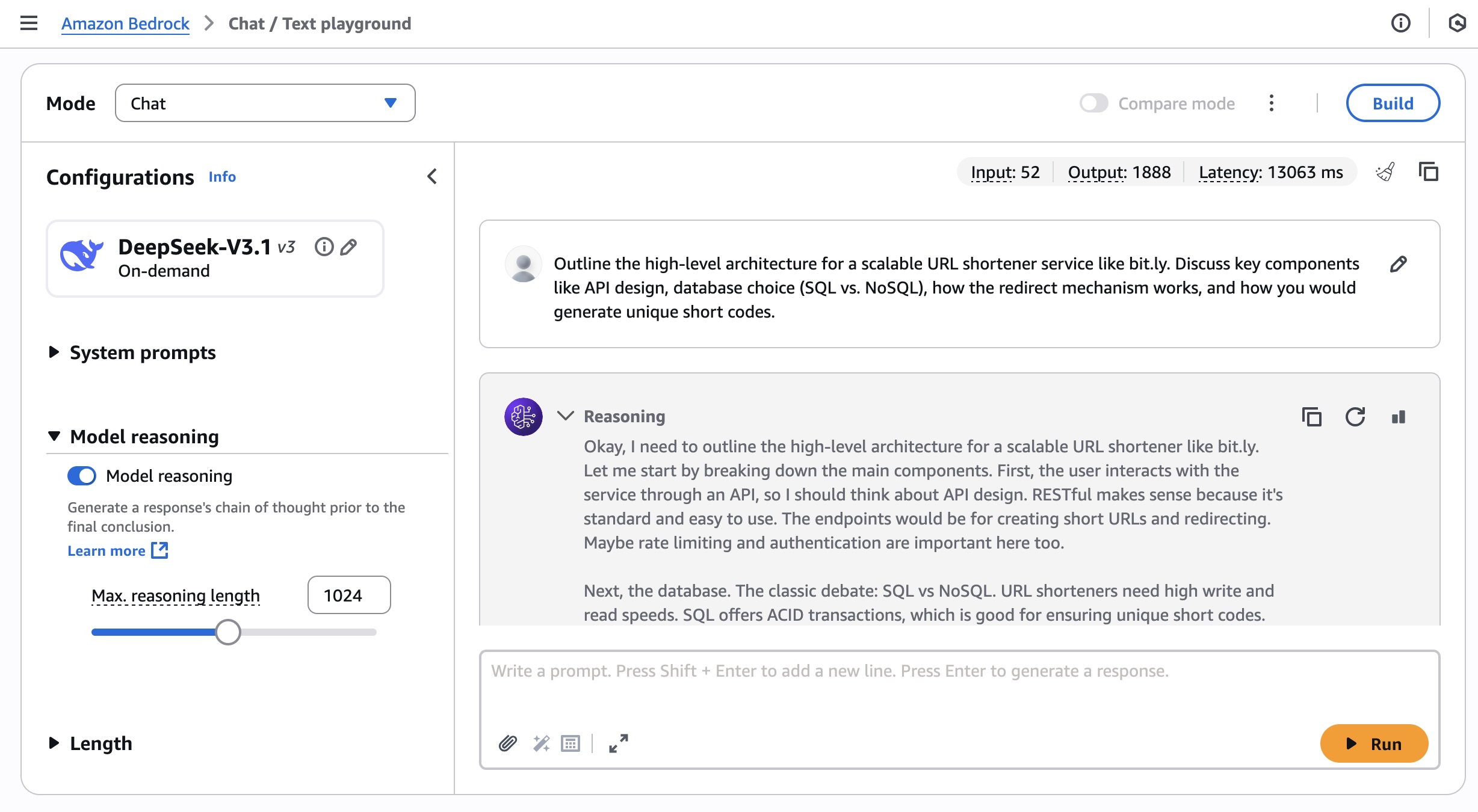
Using the selected DeepSeek-R1 model, I run the following prompt example:

A family has $5,000 to save for their vacation next year. They can place the money in a savings account earning 2% interest annually or in a certificate of deposit earning 4% interest annually but with no access to the funds until the vacation. If they need $1,000 for emergency expenses during the year, how should they divide their money between the two options to maximize their vacation fund?

This prompt requires a complex chain of thought and produces very precise reasoning results.

To learn more about usage recommendations for prompts, refer to the README of the DeepSeek-R1 model in its GitHub repository.

By choosing View API request, you can also access the model using code examples in the AWS Command Line Interface (AWS CLI) and AWS SDK. You can use us.deepseek.r1-v1:0 as the model ID.

Here is a sample of the AWS CLI command:

aws bedrock-runtime invoke-model \
     --model-id us.deepseek-r1-v1:0 \
     --body "{\"messages\":[{\"role\":\"user\",\"content\":[{\"type\":\"text\",\"text\":\"[n\"}]}],max_tokens\":2000,\"temperature\":0.6,\"top_k\":250,\"top_p\":0.9,\"stop_sequences\":[\"\\n\\nHuman:\"]}" \
     --cli-binary-format raw-in-base64-out \
     --region us-west-2 \
     invoke-model-output.txt

The model supports both the InvokeModel and Converse API. The following Python code examples show how to send a text message to the DeepSeek-R1 model using the Amazon Bedrock Converse API for text generation.

import boto3
from botocore.exceptions import ClientError

# Create a Bedrock Runtime client in the AWS Region you want to use.
client = boto3.client("bedrock-runtime", region_name="us-west-2")

# Set the model ID, e.g., Llama 3 8b Instruct.
model_id = "us.deepseek.r1-v1:0"

# Start a conversation with the user message.
user_message = "Describe the purpose of a 'hello world' program in one line."
conversation = [
    {
        "role": "user",
        "content": [{"text": user_message}],
    }
]

try:
    # Send the message to the model, using a basic inference configuration.
    response = client.converse(
        modelId=model_id,
        messages=conversation,
        inferenceConfig={"maxTokens": 2000, "temperature": 0.6, "topP": 0.9},
    )

    # Extract and print the response text.
    response_text = response["output"]["message"]["content"][0]["text"]
    print(response_text)

except (ClientError, Exception) as e:
    print(f"ERROR: Can't invoke '{model_id}'. Reason: {e}")
    exit(1)

To enable Amazon Bedrock Guardrails on the DeepSeek-R1 model, select Guardrails under Safeguards in the left navigation pane, and create a guardrail by configuring as many filters as you need. For example, if you filter for “politics” word, your guardrails will recognize this word in the prompt and show you the blocked message.

4. Apply the Bedrock Guardrails to the DeepSeek-R1 model

You can test the guardrail with different inputs to assess the guardrail’s performance. You can refine the guardrail by setting denied topics, word filters, sensitive information filters, and blocked messaging until it matches your needs.

To learn more about Amazon Bedrock Guardrails, visit Stop harmful content in models using Amazon Bedrock Guardrails in the AWS documentation or other deep dive blog posts about Amazon Bedrock Guardrails on the AWS Machine Learning Blog channel.

Here’s a demo walkthrough highlighting how you can take advantage of the fully managed DeepSeek-R1 model in Amazon Bedrock:

Now available
DeepSeek-R1 is now available fully managed in Amazon Bedrock in the US East (N. Virginia), US East (Ohio), and US West (Oregon) AWS Regions through cross-Region inference. Check the full Region list for future updates. To learn more, check out the DeepSeek in Amazon Bedrock product page and the Amazon Bedrock pricing page.

Give the DeepSeek-R1 model a try in the Amazon Bedrock console today and send feedback to AWS re:Post for Amazon Bedrock or through your usual AWS Support contacts.

Channy

Updated on March 10, 2025 — Fixed a screenshot of model selection and model ID.

AWS Weekly Roundup: AWS Developer Day, Trust Center, Well-Architected for Enterprises, and more (Feb 17, 2025)

Post Syndicated from Channy Yun (윤석찬) original https://aws.amazon.com/blogs/aws/aws-weekly-roundup-aws-developer-day-trust-center-well-architected-for-enterprises-and-more-feb-17-2025/

Join us for the AWS Developer Day on February 20! This virtual event is designed to help developers and teams incorporate cutting-edge yet responsible generative AI across their development lifecycle to accelerate innovation.

In his keynote, Jeff Barr, Vice President of AWS Evangelism, shares his thoughts on the next generation of software development based on generative AI, the skills needed to thrive in this changing environment, and how he sees it evolving in the future.

Get a first look at exciting technical deep-dive and product updates about Amazon Q Developer, AWS Amplify, and GitLab Duo with Amazon Q. You get the chance to explore real-world use cases, live coding demos, interactive sessions, and community spotlight sessions with Christian Bonzelet (AWS Community Builder), Hazel Saenz (AWS Serverless Hero), Matt Lewis (AWS Data Hero), and Johannes Koch (AWS DevTools Hero). Please sign up for this event now!

Last week’s launches
Here are some launches that got my attention:

Updating AWS SDK defaults for AWS STS – As we shared upcoming changes to the AWS Security Token Service (AWS STS) global endpoint to improve the resiliency and performance of your applications, we’re updating two defaults of AWS Software Development Kits (AWS SDKs) and AWS Command Line Interfaces (AWS CLIs) on July 31st 2025 – the default AWS STS service to regional, and the default retry strategy to standard. We recommend that you test your application before the release to avoid an unexpected experience after updating.

Introducing the AWS Trust CenterChris Betz, CISO at Amazon Web Services (AWS), shared AWS Trust Center, a new online resource communicating how we approach securing your assets in the cloud. This resource is a window into our security practices, compliance programs, and data protection controls that demonstrates how we work to earn your trust every day.

AWS CloudTrail network activity events for VPC endpoint – This feature provides you with a powerful tool to enhance your security posture, detect potential threats, and gain deeper insights into your VPC network traffic. This feature addresses your critical needs for comprehensive visibility and control over your AWS environments.

AWS Verified Access support for non-HTTP resources – AWS Verified Access now extends beyond HTTP apps to provide VPN-less, secure access to non-HTTP resources like Amazon Relational Database Service (Amazon RDS) databases, enabling improved security and enhanced user experience for both web applications and database connections. To learn more, visit the Verified Access endpoints page and a video tutorial.

New subnet management of Network Load Balancer (NLB) – NLBs were previously restricted to only adding subnets in new Availability Zones, and they now support full subnet management, including removal of subnets, matching the capabilities of Application Load Balancer (ALB). This enhancement offers organizations greater control over their network architecture and brings consistency to AWS load balancing services.

Meta SAM 2.1 and Falcon 3 models in Amazon SageMaker JumpStart – You can use Meta’s Segment Anything Model (SAM) 2.1 with state-of-the-art video and image segmentation capabilities in a single model. You can also use the Falcon 3 family with five models ranging from 1 to 10 billion parameters, with a focus on enhancing science, math, and coding capabilities. To learn more, visit SageMaker JumpStart pretrained models and Getting started with Amazon SageMaker JumpStart.

For a full list of AWS announcements, be sure to keep an eye on the What’s New with AWS? page.

Other AWS news
Here are some additional news items that you might find interesting:

AWS Documentation updateGreg Wilson, a lead of AWS Documentation, SDK, and CLI teams shared an insightful blog post about the progress, challenges, and what’s next for technical documentation for 200+ AWS services. It includes AWS Decision Guides for choosing the right service for specific needs; optimizing documents for readability, such as doubled code samples; and improving usability, such as dark mode and auto-suggest with top global navigation controls. You can also learn about how we use generative AI to help create technical documents.

AWS Well-Architected for Enterprises – This is a new free digital course designed for technical professionals who architect, build, and operate AWS solutions at scale. This intermediate-level course will help you optimize your cloud architecture while aligning to your business goals. The course takes approximately 1 hour to complete and includes a knowledge check at the end to reinforce your learning.

Integrating AWS with .NET Aspire – The .NET team at AWS has been working on integrations for connecting your .NET applications to AWS resources. Learn about how to automatically deploy AWS application resources using Aspire.Hosting.AWS NuGet package for NET Aspire, an open source framework building cloud-ready applications.

Upcoming AWS events
Check your calendars and sign up for these upcoming AWS events:

AWS Innovate: Generative AI + Data – Join a free online conference focusing on generative AI and data innovations. Available in multiple geographic regions: APJC and EMEA (March 6), North America (March 13), Greater China Region (March 14), and Latin America (April 8).

AWS Summits – Join free online and in-person events that bring the cloud computing community together to connect, collaborate, and learn about AWS. Register in your nearest city: Paris (April 9), Amsterdam (April 16), London (April 30), and Poland (May 5).

AWS GenAI Lofts – GenAI Lofts offer collaborative spaces and immersive experiences for startups and developers. You can join in-person GenAI Loft San Francisco events such as Built on Amazon Bedrock demo nights (April 19), SageMaker Unified Studio Demo for Startups (April 21), and Hands-on with Agentic Graph RAG Workshop (April 25). GenAI Loft Berlin has its Opening Day on February 24 and goes to March 7.

AWS Community Days – Join community-led conferences that feature technical discussions, workshops, and hands-on labs led by expert AWS users and industry leaders from around the world: Karachi, Pakistan (February 22), Milan, Italy (April 2), Bay Area – Security Edition (April 4), Timișoara, Romania (April 10), and Prague, Czeh Republic (April 29).

AWS re:Inforce – Mark your calendars for AWS re:Inforce (June 16–18) in Philadelphia, PA. AWS re:Inforce is a learning conference focused on AWS security solutions, cloud security, compliance, and identity. You can subscribe for event updates now!

You can browse all upcoming in-person and virtual events.

That’s all for this week. Check back next Monday for another Weekly Roundup!

Channy

This post is part of our Weekly Roundup series. Check back each week for a quick roundup of interesting news and announcements from AWS!

DeepSeek-R1 models now available on AWS

Post Syndicated from Channy Yun (윤석찬) original https://aws.amazon.com/blogs/aws/deepseek-r1-models-now-available-on-aws/

During this past AWS re:Invent, Amazon CEO Andy Jassy shared valuable lessons learned from Amazon’s own experience developing nearly 1,000 generative AI applications across the company. Drawing from this extensive scale of AI deployment, Jassy offered three key observations that have shaped Amazon’s approach to enterprise AI implementation.

First is that as you get to scale in generative AI applications, the cost of compute really matters. People are very hungry for better price performance. The second is actually quite difficult to build a really good generative AI application. The third is the diversity of the models being used when we gave our builders freedom to pick what they want to do. It doesn’t surprise us, because we keep learning the same lesson over and over and over again, which is that there is never going to be one tool to rule the world.

As Andy emphasized, a broad and deep range of models provided by Amazon empowers customers to choose the precise capabilities that best serve their unique needs. By closely monitoring both customer needs and technological advancements, AWS regularly expands our curated selection of models to include promising new models alongside established industry favorites. This ongoing expansion of high-performing and differentiated model offerings helps customers stay at the forefront of AI innovation.

This leads us to Chinese AI startup DeepSeek. DeepSeek launched DeepSeek-V3 on December 2024 and subsequently released DeepSeek-R1, DeepSeek-R1-Zero with 671 billion parameters, and DeepSeek-R1-Distill models ranging from 1.5–70 billion parameters on January 20, 2025. They added their vision-based Janus-Pro-7B model on January 27, 2025. The models are publicly available and are reportedly 90-95% more affordable and cost-effective than comparable models. Per Deepseek, their model stands out for its reasoning capabilities, achieved through innovative training techniques such as reinforcement learning.

Today, you can now deploy DeepSeek-R1 models in Amazon Bedrock and Amazon SageMaker AI. Amazon Bedrock is best for teams seeking to quickly integrate pre-trained foundation models through APIs. Amazon SageMaker AI is ideal for organizations that want advanced customization, training, and deployment, with access to the underlying infrastructure. Additionally, you can also use AWS Trainium and AWS Inferentia to deploy DeepSeek-R1-Distill models cost-effectively via Amazon Elastic Compute Cloud (Amazon EC2) or Amazon SageMaker AI.

With AWS, you can use DeepSeek-R1 models to build, experiment, and responsibly scale your generative AI ideas by using this powerful, cost-efficient model with minimal infrastructure investment. You can also confidently drive generative AI innovation by building on AWS services that are uniquely designed for security. We highly recommend integrating your deployments of the DeepSeek-R1 models with Amazon Bedrock Guardrails to add a layer of protection for your generative AI applications, which can be used by both Amazon Bedrock and Amazon SageMaker AI customers.

You can choose how to deploy DeepSeek-R1 models on AWS today in a few ways: 1/ Amazon Bedrock Marketplace for the DeepSeek-R1 model, 2/ Amazon SageMaker JumpStart for the DeepSeek-R1 model, 3/ Amazon Bedrock Custom Model Import for the DeepSeek-R1-Distill models, and 4/ Amazon EC2 Trn1 instances for the DeepSeek-R1-Distill models.

Let me walk you through the various paths for getting started with DeepSeek-R1 models on AWS. Whether you’re building your first AI application or scaling existing solutions, these methods provide flexible starting points based on your team’s expertise and requirements.

1. The DeepSeek-R1 model in Amazon Bedrock Marketplace
Amazon Bedrock Marketplace offers over 100 popular, emerging, and specialized FMs alongside the current selection of industry-leading models in Amazon Bedrock. You can easily discover models in a single catalog, subscribe to the model, and then deploy the model on managed endpoints.

To access the DeepSeek-R1 model in Amazon Bedrock Marketplace, go to the Amazon Bedrock console and select Model catalog under the Foundation models section. You can quickly find DeepSeek by searching or filtering by model providers.

After checking out the model detail page including the model’s capabilities, and implementation guidelines, you can directly deploy the model by providing an endpoint name, choosing the number of instances, and selecting an instance type.

You can also configure advanced options that let you customize the security and infrastructure settings for the DeepSeek-R1 model including VPC networking, service role permissions, and encryption settings. For production deployments, you should review these settings to align with your organization’s security and compliance requirements.

With Amazon Bedrock Guardrails, you can independently evaluate user inputs and model outputs. You can control the interaction between users and DeepSeek-R1 with your defined set of policies by filtering undesirable and harmful content in generative AI applications. The DeepSeek-R1 model in Amazon Bedrock Marketplace can only be used with Bedrock’s ApplyGuardrail API to evaluate user inputs and model responses for custom and third-party FMs available outside of Amazon Bedrock. To learn more, read Implement model-independent safety measures with Amazon Bedrock Guardrails.

Amazon Bedrock Guardrails can also be integrated with other Bedrock tools including Amazon Bedrock Agents and Amazon Bedrock Knowledge Bases to build safer and more secure generative AI applications aligned with responsible AI policies. To learn more, visit the AWS Responsible AI page.

Refer to this step-by-step guide on how to deploy the DeepSeek-R1 model in Amazon Bedrock Marketplace. To learn more, visit Deploy models in Amazon Bedrock Marketplace.

2. The DeepSeek-R1 model in Amazon SageMaker JumpStart
Amazon SageMaker JumpStart is a machine learning (ML) hub with FMs, built-in algorithms, and prebuilt ML solutions that you can deploy with just a few clicks. To deploy DeepSeek-R1 in SageMaker JumpStart, you can discover the DeepSeek-R1 model in SageMaker Unified Studio, SageMaker Studio, SageMaker AI console, or programmatically through the SageMaker Python SDK.

In the Amazon SageMaker AI console, open SageMaker Unified Studio or SageMaker Studio. In case of SageMaker Studio, choose JumpStart and search for “DeepSeek-R1” in the All public models page.

You can select the model and choose deploy to create an endpoint with default settings. When the endpoint comes InService, you can make inferences by sending requests to its endpoint.

You can derive model performance and ML operations controls with Amazon SageMaker AI features such as Amazon SageMaker Pipelines, Amazon SageMaker Debugger, or container logs. The model is deployed in an AWS secure environment and under your virtual private cloud (VPC) controls, helping to support data security.

As like Bedrock Marketpalce, you can use the ApplyGuardrail API in the SageMaker JumpStart to decouple safeguards for your generative AI applications from the DeepSeek-R1 model. You can now use guardrails without invoking FMs, which opens the door to more integration of standardized and thoroughly tested enterprise safeguards to your application flow regardless of the models used.

Refer to this step-by-step guide on how to deploy DeepSeek-R1 in Amazon SageMaker JumpStart. To learn more, visit Discover SageMaker JumpStart models in SageMaker Unified Studio or Deploy SageMaker JumpStart models in SageMaker Studio.

3. DeepSeek-R1-Distill models using Amazon Bedrock Custom Model Import
Amazon Bedrock Custom Model Import provides the ability to import and use your customized models alongside existing FMs through a single serverless, unified API without the need to manage underlying infrastructure. With Amazon Bedrock Custom Model Import, you can import DeepSeek-R1-Distill Llama models ranging from 1.5–70 billion parameters. As I highlighted in my blog post about Amazon Bedrock Model Distillation, the distillation process involves training smaller, more efficient models to mimic the behavior and reasoning patterns of the larger DeepSeek-R1 model with 671 billion parameters by using it as a teacher model.

After storing these publicly available models in an Amazon Simple Storage Service (Amazon S3) bucket or an Amazon SageMaker Model Registry, go to Imported models under Foundation models in the Amazon Bedrock console and import and deploy them in a fully managed and serverless environment through Amazon Bedrock. This serverless approach eliminates the need for infrastructure management while providing enterprise-grade security and scalability.
Refer to this step-by-step guide on how to deploy DeepSeek-R1 models using Amazon Bedrock Custom Model Import. To learn more, visit Import a customized model into Amazon Bedrock.

4. DeepSeek-R1-Distill models using AWS Trainium and AWS Inferentia
AWS Deep Learning AMIs (DLAMI) provides customized machine images that you can use for deep learning in a variety of Amazon EC2 instances, from a small CPU-only instance to the latest high-powered multi-GPU instances. You can deploy the DeepSeek-R1-Distill models on AWS Trainuim1 or AWS Inferentia2 instances to get the best price-performance.

To get started, go to Amazon EC2 console and launch a trn1.32xlarge EC2 instance with the Neuron Multi Framework DLAMI called Deep Learning AMI Neuron (Ubuntu 22.04).

Once you have connected to your launched ec2 instance, install vLLM, an open-source tool to serve Large Language Models (LLMs) and download the DeepSeek-R1-Distill model from Hugging Face. You can deploy the model using vLLM and invoke the model server.

To learn more, refer to this step-by-step guide on how to deploy DeepSeek-R1-Distill Llama models on AWS Inferentia and Trainium.

You can also visit the DeepSeek-R1-Distill-Llama-8B or deepseek-ai/DeepSeek-R1-Distill-Llama-70B model cards on Hugging Face. Choose Deploy and then Amazon SageMaker. From the AWS Inferentia and Trainium tab, copy the example code for deploy DeepSeek-R1-Distill Llama models.

Since the release of DeepSeek-R1, various guides of its deployment for Amazon EC2 and Amazon Elastic Kubernetes Service (Amazon EKS) have been posted. Here is some additional material for you to check out:

Things to know
Here are a few important things to know.

  • Pricing – For publicly available models like DeepSeek-R1, you are charged only the infrastructure price based on inference instance hours you select for Amazon Bedrock Markeplace, Amazon SageMaker JumpStart, and Amazon EC2. For the Bedrock Custom Model Import, you are only charged for model inference, based on the number of copies of your custom model is active, billed in 5-minute windows. To learn more, check out the Amazon Bedrock Pricing, Amazon SageMaker AI Pricing, and Amazon EC2 Pricing pages.
  • Data security – You can use enterprise-grade security features in Amazon Bedrock and Amazon SageMaker to help you make your data and applications secure and private. This means your data is not shared with model providers, and is not used to improve the models. This applies to all models—proprietary and publicly available—like DeepSeek-R1 models on Amazon Bedrock and Amazon SageMaker. To learn more, visit Amazon Bedrock Security and Privacy and Security in Amazon SageMaker AI.

Now available
DeepSeek-R1 is generally available today in Amazon Bedrock Marketplace and Amazon SageMaker JumpStart. You can also use DeepSeek-R1-Distill models using Amazon Bedrock Custom Model Import and Amazon EC2 instances with AWS Trainum and Inferentia chips.

Give DeepSeek-R1 models a try today in the Amazon Bedrock console, Amazon SageMaker AI console, and Amazon EC2 console, and send feedback to AWS re:Post for Amazon Bedrock and AWS re:Post for SageMaker AI or through your usual AWS Support contacts.

Channy

Luma AI’s Ray2 video model is now available in Amazon Bedrock

Post Syndicated from Channy Yun (윤석찬) original https://aws.amazon.com/blogs/aws/luma-ai-ray-2-video-model-is-now-available-in-amazon-bedrock/

As we preannounced at AWS re:Invent 2024, you can now use Luma AI Ray2 video model in Amazon Bedrock to generate high-quality video clips from text, creating captivating motion graphics from static concepts. AWS is the first and only cloud provider to offer fully managed models from Luma AI.

On January 16, 2025, Luma AI introduced Luma Ray2, the large–scale video generative model capable of creating realistic visuals with natural, coherent motion with strong understanding of text instructions. Luma Ray2 exhibits advanced capabilities as a result of being trained on Luma’s new multi-modal architecture. It scales to ten times compute of Ray1, enabling it to produce 5 second or 9 second video clips that show fast coherent motion, ultra-realistic details, and logical event sequences with 540p and 720p resolution.

With Luma Ray2 in Amazon Bedrock, you can add high-quality, realistic, production-ready videos generated from text in your generative AI application through a single API. Luma Ray2 video model understands the interactions between people, animals, and objects, and you can create consistent and physically accurate characters through state-of-the-art natural language instruction understanding and reasoning.

You can use Ray2 video generations for content creation, entertainment, advertising, and media use cases, streamlining the creative process, from concept to execution. You can generate smooth, cinematic, and lifelike camera movements that match the intended emotion of the scene. You can rapidly experiment with different camera angles and styles and deliver creative outputs for architecture, fashion, film, graphic design, and music.

Let’s take a look at the impressive video generations by Luma Ray2 that Luma has published.

Get started with Luma Ray2 model in Amazon Bedrock
Before getting started, if you are new to using Luma models, go to the Amazon Bedrock console and choose Model access on the bottom left pane. To access the latest Luma AI models, request access for Luma Ray2 in Luma AI.

To test the Luma AI model in Amazon Bedrock, choose Image/Video under Playgrounds in the left menu pane. Choose Select model, then select Luma AI as the category and Ray as the model.

For video generation models, you should have an Amazon Simple Storage Service (Amazon S3) bucket to store all generated videos. This bucket will be created in your AWS account, and Amazon Bedrock will have read and write permissions for it. Choose Confirm to create a bucket and generate a video.

I will generate a 5-second video with 720P and 24 frames per second with 16:9 aspect ratio for my prompt.

Here is an example prompt and generated video. You can download it stored in the S3 bucket.
a humpback whale swimming through space particles

Here are another featured examples to demonstrate Ray2 model.

Prompt 1: A miniature baby cat is walking and exploring on the surface of a fingertip

Prompt 2: A massive orb of water floating in a backlit forest

Prompt 3: A man plays saxophone by @ziguratt

Prompt 4: Macro closeup of a bee pollinating

To check out more examples and generated videos, visit the Luma Ray2 page.

By choosing View API request in the Bedrock console, you can also access the model using code examples in the AWS Command Line Interface (AWS CLI) and AWS SDKs. You can use luma.ray-v2:0 as the model ID.

Here is a sample of the AWS CLI command:

aws bedrock-runtime invoke-model \
    --model-id luma.ray-v2:0 \
    --region us-west-2 \
    --body "{\"modelInput\":{\"taskType\":\"TEXT_VIDEO\",\"textToVideoParams\":{\"text\":\"a humpback whale swimming through space particles\"},\"videoGenerationConfig\":{\"seconds\":6,\"fps\":24,\"dimension\":\"1280x720\"}},\"outputDataConfig\":{\"s3OutputDataConfig\":{\"s3Uri\":\"s3://your-bucket-name\"}}}"
     invoke-model-output.txt

You can use Converse API examples to generate videos using AWS SDKs to build your applications using various programming languages.

Now available
Luma Ray2 video model is generally available today in Amazon Bedrock in the US West (Oregon) AWS Region. Check the full Region list for future updates. To learn more, check out the Luma AI in Amazon Bedrock product page and the Amazon Bedrock Pricing page.

Give Luma Ray2 a try in the Amazon Bedrock console today, and send feedback to AWS re:Post for Amazon Bedrock or through your usual AWS Support contacts.

Channy

Stable Diffusion 3.5 Large is now available in Amazon Bedrock

Post Syndicated from Channy Yun (윤석찬) original https://aws.amazon.com/blogs/aws/stable-diffusion-3-5-large-is-now-available-in-amazon-bedrock/

As we preannounced at AWS re:Invent 2024, you can now use Stable Diffusion 3.5 Large in Amazon Bedrock to generate high-quality images from text descriptions in a wide range of styles to accelerate the creation of concept art, visual effects, and detailed product imagery for customers in media, gaming, advertising, and retail.

In October 2024, Stability AI introduced Stable Diffusion 3.5 Large, the most powerful model in the Stable Diffusion family at 8.1 billion parameters trained on Amazon SageMaker HyperPod, with superior quality and prompt adherence. Stable Diffusion 3.5 Large can accelerate storyboarding, concept art creation, and rapid prototyping of visual effects. You can quickly generate high-quality 1-megapixel images for campaigns, social media posts, and advertisements, saving time and resources while maintaining creative control.

Stable Diffusion 3.5 Large offers users nearly endless creative possibilities, including:

  • Versatile Styles – You can generate images in a wide range of styles and aesthetics, including 3-dimentional, photography, painting, line art, and virtually any visual style you can imagine.
  • Prompt Adherence – You can use Stable Diffusion 3.5 Large’s advanced prompt adherence to closely follow your text prompts, making it a top choice for efficient, high-quality performance.
  • Diverse Outputs – You can create images representative of the diverse world around you, featuring people with different skin tones and features, without the need for extensive prompting.

Today, Stable Image Ultra in Amazon Bedrock has been updated to include Stable Diffusion 3.5 Large in the model’s underlying architecture. Stable Image Ultra, powered by Stability AI’s most advanced models, including Stable Diffusion 3.5, sets a new standard in image generation. It excels in typography, intricate compositions, dynamic lighting, vibrant colors, and artistic cohesion.

With the latest update of Stable Diffusion models in Amazon Bedrock, you have a broader set of solutions to boost your creativity and accelerate image generation workflows.

Get started with Stable Diffusion 3.5 Large in Amazon Bedrock
Before getting started, if you are new to using Stability AI models, go to the Amazon Bedrock console and choose Model access on the bottom left pane. To access the latest Stability AI models, request access for Stable Diffusion 3.5 Large in Stability AI.

To test the Stability AI models in Amazon Bedrock, choose Image/Video under Playgrounds in the left menu pane. Then choose Select model and select Stability AI as the category and Stable Diffusion 3.5 Large as the model.

You can generate an image with your prompt. Here is a sample prompt to generate the image:

High-energy street scene in a neon-lit Tokyo alley at night, where steam rises from food carts, and colorful neon signs illuminate the rain-slicked pavement.

By choosing View API request, you can also access the model using code examples in the AWS Command Line Interface (AWS CLI) and AWS SDKs. You can use stability.sd3-5-large-v1:0 as the model ID.

To get the image with a single command, I write the output JSON file to standard output and use the jq tool to extract the encoded image so that it can be decoded on the fly. The output is written in the img.png file.

Here is a sample of the AWS CLI command:

$ aws bedrock-runtime invoke-model \
   --model-id stability.sd3-5-large-v1:0 \
   --body "{\"text_prompts\":[{\"text\":\"High-energy street scene in a neon-lit Tokyo alley at night, where steam rises from food carts, and colorful neon signs illuminate the rain-slicked pavement.\",\"weight\":1}],\"cfg_scale\":0,\"steps\":10,\"seed\":0,\"width\":1024,\"height\":1024,\"samples\":1}" \
   --cli-binary-format raw-in-base64-out \
   --region us-west-2 \
/dev/stdout | jq -r '.images[0]' | base64 --decode > img.jpg

Here’s how you can use Stable Image Ultra 1.1 to include Stable Diffusion 3.5 Large in the model’s underlying architecture with the AWS SDK for Python (Boto3). This simple application interactively asks for a text-to-image prompt and then calls Amazon Bedrock to generate the image with stability.stable-image-ultra-v1:1 as the model ID.

import base64
import boto3
import json
import os

MODEL_ID = "stability.stable-image-ultra-v1:1"

bedrock_runtime = boto3.client("bedrock-runtime", region_name="us-west-2")

print("Enter a prompt for the text-to-image model:")
prompt = input()

body = {
    "prompt": prompt,
    "mode": "text-to-image"
}
response = bedrock_runtime.invoke_model(modelId=MODEL_ID, body=json.dumps(body))

model_response = json.loads(response["body"].read())

base64_image_data = model_response["images"][0]

i, output_dir = 1, "output"
if not os.path.exists(output_dir):
    os.makedirs(output_dir)
while os.path.exists(os.path.join(output_dir, f"img_{i}.png")):
    i += 1

image_data = base64.b64decode(base64_image_data)

image_path = os.path.join(output_dir, f"img_{i}.png")
with open(image_path, "wb") as file:
    file.write(image_data)

print(f"The generated image has been saved to {image_path}")

The application writes the resulting image in an output directory that is created if not present. To not overwrite existing files, the code checks for existing files to find the first file name available with the img_<number>.png format.

To learn more, visit the Invoke API examples using AWS SDKs to build your applications to generate an image using various programming languages.

Interesting examples
Here are a few images created with Stable Diffusion 3.5 Large.

Prompt: Full-body university students working on a tech project with the words Stable Diffusion 3.5 in Amazon Bedrock, cheerful cursive typography font in the foreground.
Prompt: Photo of three potions: the first potion is blue with the label "MANA", the second potion is red with the label "HEALTH", the third potion is green with the label "POISON". Old apothecary.
Prompt: Photography, pink rose flowers in the twilight, glowing, tile houses in the background. Prompt: 3D animation scene of an adventurer traveling the world with his pet dog.

Now available
Stable Diffusion 3.5 Large model is generally available today in Amazon Bedrock in the US West (Oregon) AWS Region. Check the full Region list for future updates. To learn more, check out the Stability AI in Amazon Bedrock product page and the Amazon Bedrock Pricing page.

Give Stable Diffusion 3.5 Large a try in the Amazon Bedrock console today and send feedback to AWS re:Post for Amazon Bedrock or through your usual AWS Support contacts.

Channy

New Amazon EC2 High Memory U7inh instance on HPE Server for large in-memory databases

Post Syndicated from Channy Yun (윤석찬) original https://aws.amazon.com/blogs/aws/new-amazon-ec2-high-memory-u7inh-instance-on-hpe-server-for-large-in-memory-databases/

Today we’re announcing the general availability of Amazon Elastic Compute Cloud (Amazon EC2) U7inh instance, a new addition to EC2 High Memory family, built in collaboration with Hewlett Packard Enterprise (HPE). Amazon EC2 U7inh instance runs on the 16-socket HPE Compute Scale-up Server 3200, and are built on the AWS Nitro System to deliver a fully integrated and managed experience consistent with other EC2 instances.

Powered by the fourth generation Intel® Xeon® Scalable processors (Sapphire Rapids), U7inh instance supports 32 TB of memory and 1920 vCPUs. This instance offers the highest compute performance, largest compute and memory size in the Amazon Web Services (AWS) Cloud for running large, mission-critical database workloads, like SAP HANA.

In May 2024, we launched U7i instances to support up to 896 vCPUs and up to 32 TB of memory, which our enterprise customers could use to successfully migrate their large mission-critical in-memory databases to AWS and benefit from the flexibility, scalability, reliability, and cost advantages that AWS offers.

As customers continue to scale their business applications, they wanted the performance combined with the additional CPUs and memory along with SAP certification to generate real-time business insights. Other customers that currently run on-premises with HPE servers have also asked how we can help them migrate to AWS to take advantage of cloud benefits while continuing to use HPE hardware.

Here are the detailed specs of new U7inh instance:

Instance name vCPUs Memory (DDR5) EBS bandwidth Network bandwidth
U7inh-32tb.480xlarge 1920 32,768 GiB 160 Gbps 200 Gbps

U7inh instance offers up to two times vCPUs and 1.6 times EBS bandwidth in a single instance, compared with the largest U7i instance. You can run your largest in-memory database workloads like SAP HANA or seamlessly migrate workloads running on HPE hardware to AWS.

U7inh instance supports Amazon Linux, Red Hat Enterprise Linux, and SUSE Enterprise Linux Server. Operating system support for SAP HANA workloads on High Memory instances include: SUSE Linux Enterprise Server 15 SP3 for SAP and above and Red Hat Enterprise Linux 8.6/9.0 for SAP and above.

U7inh instance is SAP certified to run Business Suite on HANA (SoH), Business Suite S/4HANA, Business Warehouse on HANA (BW), and SAP BW/4HANA in production environments. U7inh instance is also certified for scale-out SAP HANA OLTP workloads such as S/4HANA and customers can deploy up to four U7inh instance (128TB) in a cluster for even larger SAP HANA workloads.

To learn more about how to migrate, visit Migrating SAP HANA on AWS to an EC2 High Memory Instance in the SAP HANA on AWS Guides and AWS Launch Wizard for SAP in the AWS Launch Wizard User Guide.

Now available
Amazon EC2 U7inh instance is available in the US East (N. Virginia) and US West (Oregon) AWS Regions.

To learn more, visit the U7i instance product page and send feedback to AWS re:Post for EC2 or through your usual AWS Support contacts.

Channy

Accelerate foundation model training and fine-tuning with new Amazon SageMaker HyperPod recipes

Post Syndicated from Channy Yun (윤석찬) original https://aws.amazon.com/blogs/aws/accelerate-foundation-model-training-and-fine-tuning-with-new-amazon-sagemaker-hyperpod-recipes/

Today, we’re announcing the general availability of Amazon SageMaker HyperPod recipes to help data scientists and developers of all skill sets to get started training and fine-tuning foundation models (FMs) in minutes with state-of-the-art performance. They can now access optimized recipes for training and fine-tuning popular publicly available FMs such as Llama 3.1 405B, Llama 3.2 90B, or Mixtral 8x22B.

At AWS re:Invent 2023, we introduced SageMaker HyperPod to reduce time to train FMs by up to 40 percent and scale across more than a thousand compute resources in parallel with preconfigured distributed training libraries. With SageMaker HyperPod, you can find the required accelerated compute resources for training, create the most optimal training plans, and run training workloads across different blocks of capacity based on the availability of compute resources.

SageMaker HyperPod recipes include a training stack tested by AWS, removing tedious work experimenting with different model configurations, eliminating weeks of iterative evaluation and testing. The recipes automate several critical steps, such as loading training datasets, applying distributed training techniques, automating checkpoints for faster recovery from faults, and managing the end-to-end training loop.

With a simple recipe change, you can seamlessly switch between GPU- or Trainium-based instances to further optimize training performance and reduce costs. You can easily run workloads in production on SageMaker HyperPod or SageMaker training jobs.

SageMaker HyperPod recipes in action
To get started, visit the SageMaker HyperPod recipes GitHub repository to browse training recipes for popular publicly available FMs.

You only need to edit straightforward recipe parameters to specify an instance type and the location of your dataset in cluster configuration, then run the recipe with a single line command to achieve state-of-art performance.

You need to edit the recipe config.yaml file to specify the model and cluster type after cloning the repository.

$ git clone --recursive https://github.com/aws/sagemaker-hyperpod-recipes.git
$ cd sagemaker-hyperpod-recipes
$ pip3 install -r requirements.txt.
$ cd ./recipes_collections
$ vim config.yaml

The recipes support SageMaker HyperPod with Slurm, SageMaker HyperPod with Amazon Elastic Kubernetes Service (Amazon EKS), and SageMaker training jobs. For example, you can set up a cluster type (Slurm orchestrator), a model name (Meta Llama 3.1 405B language model), an instance type (ml.p5.48xlarge), and your data locations, such as storing the training data, results, logs, and so on.

defaults:
- cluster: slurm # support: slurm / k8s / sm_jobs
- recipes: fine-tuning/llama/hf_llama3_405b_seq8k_gpu_qlora # name of model to be trained
debug: False # set to True to debug the launcher configuration
instance_type: ml.p5.48xlarge # or other supported cluster instances
base_results_dir: # Location(s) to store the results, checkpoints, logs etc.

You can optionally adjust model-specific training parameters in this YAML file, which outlines the optimal configuration, including the number of accelerator devices, instance type, training precision, parallelization and sharding techniques, the optimizer, and logging to monitor experiments through TensorBoard.

run:
  name: llama-405b
  results_dir: ${base_results_dir}/${.name}
  time_limit: "6-00:00:00"
restore_from_path: null
trainer:
  devices: 8
  num_nodes: 2
  accelerator: gpu
  precision: bf16
  max_steps: 50
  log_every_n_steps: 10
  ...
exp_manager:
  exp_dir: # location for TensorBoard logging
  name: helloworld 
  create_tensorboard_logger: True
  create_checkpoint_callback: True
  checkpoint_callback_params:
    ...
  auto_checkpoint: True # for automated checkpointing
use_smp: True 
distributed_backend: smddp # optimized collectives
# Start training from pretrained model
model:
  model_type: llama_v3
  train_batch_size: 4
  tensor_model_parallel_degree: 1
  expert_model_parallel_degree: 1
  # other model-specific params

To run this recipe in SageMaker HyperPod with Slurm, you must prepare the SageMaker HyperPod cluster following the cluster setup instruction.

Then, connect to the SageMaker HyperPod head node, access the Slurm controller, and copy the edited recipe. Next, you run a helper file to generate a Slurm submission script for the job that you can use for a dry run to inspect the content before starting the training job.

$ python3 main.py --config-path recipes_collection --config-name=config

After training completion, the trained model is automatically saved to your assigned data location.

To run this recipe on SageMaker HyperPod with Amazon EKS, clone the recipe from the GitHub repository, install the requirements, and edit the recipe (cluster: k8s) on your laptop. Then, create a link between your laptop and running the EKS cluster and subsequently use the HyperPod Command Line Interface (CLI) to run the recipe.

$ hyperpod start-job –recipe fine-tuning/llama/hf_llama3_405b_seq8k_gpu_qlora \
--persistent-volume-claims fsx-claim:data \
--override-parameters \
'{
  "recipes.run.name": "hf-llama3-405b-seq8k-gpu-qlora",
  "recipes.exp_manager.exp_dir": "/data/<your_exp_dir>",
  "cluster": "k8s",
  "cluster_type": "k8s",
  "container": "658645717510.dkr.ecr.<region>.amazonaws.com/smdistributed-modelparallel:2.4.1-gpu-py311-cu121",
  "recipes.model.data.train_dir": "<your_train_data_dir>",
  "recipes.model.data.val_dir": "<your_val_data_dir>",
}'

You can also run recipe on SageMaker training jobs using SageMaker Python SDK. The following example is running PyTorch training scripts on SageMaker training jobs with overriding training recipes.

...
recipe_overrides = {
    "run": {
        "results_dir": "/opt/ml/model",
    },
    "exp_manager": {
        "exp_dir": "",
        "explicit_log_dir": "/opt/ml/output/tensorboard",
        "checkpoint_dir": "/opt/ml/checkpoints",
    },   
    "model": {
        "data": {
            "train_dir": "/opt/ml/input/data/train",
            "val_dir": "/opt/ml/input/data/val",
        },
    },
}
pytorch_estimator = PyTorch(
           output_path=<output_path>,
           base_job_name=f"llama-recipe",
           role=<role>,
           instance_type="p5.48xlarge",
           training_recipe="fine-tuning/llama/hf_llama3_405b_seq8k_gpu_qlora",
           recipe_overrides=recipe_overrides,
           sagemaker_session=sagemaker_session,
           tensorboard_output_config=tensorboard_output_config,
)
...

As training progresses, the model checkpoints are stored on Amazon Simple Storage Service (Amazon S3) with the fully automated checkpointing capability, enabling faster recovery from training faults and instance restarts.

Now available
Amazon SageMaker HyperPod recipes are now available in the SageMaker HyperPod recipes GitHub repository. To learn more, visit the SageMaker HyperPod product page and the Amazon SageMaker AI Developer Guide.

Give SageMaker HyperPod recipes a try and send feedback to AWS re:Post for SageMaker or through your usual AWS Support contacts.

Channy

Meet your training timelines and budgets with new Amazon SageMaker HyperPod flexible training plans

Post Syndicated from Channy Yun (윤석찬) original https://aws.amazon.com/blogs/aws/meet-your-training-timelines-and-budgets-with-new-amazon-sagemaker-hyperpod-flexible-training-plans/

Today, we’re announcing the general availability of Amazon SageMaker HyperPod flexible training plans to help data scientists train large foundation models (FMs) within their timelines and budgets and save them weeks of effort in managing the training process based on compute availability.
At AWS re:Invent 2023, we introduced SageMaker HyperPod to reduce the time to train FMs by up to 40 percent and scale across thousands of compute resources in parallel with preconfigured distributed training libraries and built-in resiliency. Most generative AI model development tasks need accelerated compute resources in parallel. Our customers struggle to find timely access to compute resources to complete their training within their timeline and budget constraints.

With today’s announcement, you can find the required accelerated compute resources for training, create the most optimal training plans, and run training workloads across different blocks of capacity based on the availability of the compute resources. Within a few steps, you can identify training completion date, budget, compute resources requirements, create optimal training plans, and run fully managed training jobs, without needing manual intervention.

SageMaker HyperPod training plans in action
To get started, go to the Amazon SageMaker AI console, choose Training plans in the left navigation pane, and choose Create training plan.

For example, choose your preferred training date and time (10 days), instance type and count (16 ml.p5.48xlarge) for SageMaker HyperPod cluster, and choose Find training plan.

SageMaker HyperPod suggests a training plan that is split into two five-day segments. This includes the total upfront price for the plan.

If you accept this training plan, add your training details in the next step and choose Create your plan.

After creating your training plan, you can see the list of training plans. When you’ve created a training plan, you have to pay upfront for the plan within 12 hours. One plan is in the Active state and already started, with all the instances being used. The second plan is Scheduled to start later, but you can already submit jobs that start automatically when the plan begins.

In the active status, the compute resources are available in SageMaker HyperPod, resume automatically after pauses in availability, and terminates at the end of the plan. There is a first segment currently running and another segment queued up to run after the current segment.

This is similar to the Managed Spot training in SageMaker AI, where SageMaker AI takes care of instance interruptions and continues the training with no manual intervention. To learn more, visit the SageMaker HyperPod training plans in the Amazon SageMaker AI Developer Guide.

Now available
Amazon SageMaker HyperPod training plans are now available in US East (N. Virginia), US East (Ohio), US West (Oregon) AWS Regions and support ml.p4d.48xlarge, ml.p5.48xlarge, ml.p5e.48xlargeml.p5en.48xlarge, and ml.trn2.48xlarge instances. Trn2 and P5en instances are only in US East (Ohio) Region. To learn more, visit the SageMaker HyperPod product page and SageMaker AI pricing page.

Give HyperPod training plans a try in the Amazon SageMaker AI console and send feedback to AWS re:Post for SageMaker AI or through your usual AWS Support contacts.

Channy

Maximize accelerator utilization for model development with new Amazon SageMaker HyperPod task governance

Post Syndicated from Channy Yun (윤석찬) original https://aws.amazon.com/blogs/aws/maximize-accelerator-utilization-for-model-development-with-new-amazon-sagemaker-hyperpod-task-governance/

Today, we’re announcing the general availability of Amazon SageMaker HyperPod task governance, a new innovation to easily and centrally manage and maximize GPU and Tranium utilization across generative AI model development tasks, such as training, fine-tuning, and inference.

Customers tell us that they’re rapidly increasing investment in generative AI projects, but they face challenges in efficiently allocating limited compute resources. The lack of dynamic, centralized governance for resource allocation leads to inefficiencies, with some projects underutilizing resources while others stall. This situation burdens administrators with constant replanning, causes delays for data scientists and developers, and results in untimely delivery of AI innovations and cost overruns due to inefficient use of resources.

With SageMaker HyperPod task governance, you can accelerate time to market for AI innovations while avoiding cost overruns due to underutilized compute resources. With a few steps, administrators can set up quotas governing compute resource allocation based on project budgets and task priorities. Data scientists or developers can create tasks such as model training, fine-tuning, or evaluation, which SageMaker HyperPod automatically schedules and executes within allocated quotas.

SageMaker HyperPod task governance manages resources, automatically freeing up compute from lower-priority tasks when high-priority tasks need immediate attention. It does this by pausing low-priority training tasks, saving checkpoints, and resuming them later when resources become available. Additionally, idle compute within a team’s quota can be automatically used to accelerate another team’s waiting tasks.

Data scientists and developers can continuously monitor their task queues, view pending tasks, and adjust priorities as needed. Administrators can also monitor and audit scheduled tasks and compute resource usage across teams and projects and, as a result, they can adjust allocations to optimize costs and improve resource availability across the organization. This approach promotes timely completion of critical projects while maximizing resource efficiency.

Getting started with SageMaker HyperPod task governance
Task governance is available for Amazon EKS clusters in HyperPod. Find Cluster Management under HyperPod Clusters in the Amazon SageMaker AI console for provisioning and managing clusters. As an administrator, you can streamline the operation and scaling of HyperPod clusters through this console.

When you choose a HyperPod cluster, you can see a new Dashboard, Tasks, and Policies tab in the cluster detail page.

1. New dashboard
In the new dashboard, you can see an overview of cluster utilization, team-based, and task-based metrics.

First, you can view both point-in-time and trend-based metrics for critical compute resources, including GPU, vCPU, and memory utilization, across all instance groups.

Next, you can gain comprehensive insights into team-specific resource management, focusing on GPU utilization versus compute allocation across teams. You can use customizable filters for teams and cluster instance groups to analyze metrics such as allocated GPUs/CPUs for tasks, borrowed GPUs/CPUs, and GPU/CPU utilization.

You can also assess task performance and resource allocation efficiency using metrics such as counts of running, pending, and preempted tasks, as well as average task runtime and wait time. To gain comprehensive observability into your SageMaker HyperPod cluster resources and software components, you can integrate with Amazon CloudWatch Container Insights or Amazon Managed Grafana.

2. Create and manage a cluster policy
To enable task prioritization and fair-share resource allocation, you can configure a cluster policy that prioritizes critical workloads and distributes idle compute across teams defined in compute allocations.

To configure priority classes and fair sharing of borrowed compute in cluster settings, choose Edit in the Cluster policy section.

You can define how tasks waiting in queue are admitted for task prioritization: First-come-first-serve by default or Task ranking. When you choose task ranking, tasks waiting in queue will be admitted in the priority order defined in this cluster policy. Tasks of same priority class will be executed on a first-come-first-serve basis.

You can also configure how idle compute is allocated across teams: First-come-first-serve or Fair-share by default. The fair-share setting enables teams to borrow idle compute based on their assigned weights, which are configured in relative compute allocations. This enables every team to get a fair share of idle compute to accelerate their waiting tasks.

In the Compute allocation section of the Policies page, you can create and edit compute allocations to distribute compute resources among teams, enable settings that allow teams to lend and borrow idle compute, configure preemption of their own low-priority tasks, and assign fair-share weights to teams.

In the Team section, set a team name and a corresponding Kubernetes namespace will be created for your data science and machine learning (ML) teams to use. You can set a fair-share weight for a more equitable distribution of unused capacity across your teams and enable the preemption option based on task priority, allowing higher-priority tasks to preempt lower-priority ones.

In the Compute section, you can add and allocate instance type quotas to teams. Additionally, you can allocate quotas for instance types not yet available in the cluster, allowing for future expansion.

You can enable teams to share idle compute resources by allowing them to lend their unused capacity to other teams. This borrowing model is reciprocal: teams can only borrow idle compute if they are also willing to share their own unused resources with others. You can also specify the borrow limit that enables teams to borrow compute resources over their allocated quota.

3. Run your training task in SageMaker HyperPod cluster
As a data scientist, you can submit a training job and use the quota allocated for your team, using the HyperPod Command Line Interface (CLI) command. With the HyperPod CLI, you can start a job and specify the corresponding namespace that has the allocation.

$ hyperpod start-job --name smpv2-llama2 --namespace hyperpod-ns-ml-engineers
Successfully created job smpv2-llama2
$ hyperpod list-jobs --all-namespaces
{
 "jobs": [
  {
   "Name": "smpv2-llama2",
   "Namespace": "hyperpod-ns-ml-engineers",
   "CreationTime": "2024-09-26T07:13:06Z",
   "State": "Running",
   "Priority": "fine-tuning-priority"
  },
  ...
 ]
}

In the Tasks tab, you can see all tasks in your cluster. Each task has different priority and capacity need according to its policy. If you run another task with higher priority, the existing task will be suspended and that task can run first.

OK, now let’s check out a demo video showing what happens when a high-priority training task is added while running a low-priority task.

To learn more, visit SageMaker HyperPod task governance in the Amazon SageMaker AI Developer Guide.

Now available
Amazon SageMaker HyperPod task governance is now available in US East (N. Virginia), US East (Ohio), US West (Oregon) AWS Regions. You can use HyperPod task governance without additional cost. To learn more, visit the SageMaker HyperPod product page.

Give HyperPod task governance a try in the Amazon SageMaker AI console and send feedback to AWS re:Post for SageMaker or through your usual AWS Support contacts.

Channy

P.S. Special thanks to Nisha Nadkarni, a senior generative AI specialist solutions architect at AWS for her contribution in creating a HyperPod testing environment.

New Amazon Q Developer agent capabilities include generating documentation, code reviews, and unit tests

Post Syndicated from Channy Yun (윤석찬) original https://aws.amazon.com/blogs/aws/new-amazon-q-developer-agent-capabilities-include-generating-documentation-code-reviews-and-unit-tests/

Last year at AWS re:Invent, we previewed Amazon Q Developer, a generative AI–powered assistant for designing, building, testing, deploying, and maintaining software across integrated development environments (IDEs) such as Visual Studio, Visual Studio Code, JetBrains IDEs, Eclipse (preview), JupyterLab, Amazon EMR Studio, or AWS Glue Studio.

You can also use Amazon Q Developer in the AWS Management Console, AWS Console Mobile Application, Amazon CodeCatalyst, AWS Support, AWS website, or through Slack and Microsoft Teams with AWS Chatbot.

Due to the rapid pace of innovation, we announced the general availability of Amazon Q Developer in April and added more capabilities, such as supporting AWS Command Line Interface (AWS CLI), Amazon SageMaker Studio, AWS CloudShell, as well as inline chat for seamless coding operations in your IDE. AWS was also named as a Leader in the first Gartner Magic Quadrant for AI Code Assistants.

Amazon Q Developer has agents that can generate real-time code suggestions based on your comments and existing code, bootstrap new projects from a single prompt (/dev), automate the process of upgrading and transforming legacy Java applications with the Amazon Q Developer transformation capability (/transform), generate customized code recommendations from your private repositories securely, and quickly understand what resources are running in your AWS account with a simple prompt.

Today, we’re expanding Amazon Q Developer agent capabilities for: 1) enhanced documentation in codebases (/doc), 2) supporting code reviews to detect and resolve security and code quality issues (/review), and 3) generating unit tests automatically and improving test coverage (/test) across the software development lifecycle in your preferred IDE or GitLab Duo with Amazon Q (in preview), which is one of the most popular enterprise DevOps platforms.

Get started with Amazon Q Developer agents for software development capabilities
To get started with all the new capabilities, you can install the latest Amazon Q IDE extension for your favorite IDEs. Sign in for the Free or Pro Tier of Amazon Q Developer, and open your project in your IDE. You can authenticate for the Free Tier with AWS Builder ID or for the Pro Tier with AWS IAM Identity Center.

1. Enhanced documentation in codebases
You can now generate comprehensive documentation, such as readmes and data flow diagrams about the codebase in your preferred IDE. With Amazon Q Developer handling the labor-intensive task of documentation, you can focus your efforts on designing and authoring code—all while maintaining quality based on software engineering best practices.

To start the documentation with your IDE, open the chat panel and type /doc.

Now you can create a README or update an existing README in your project. It will scan source files, create knowledge graph, summarize source files, and generation documents. When complete, check out the created REAME file and choose Accept to use this document in the code editor.

2. Supporting code reviews to detect and resolve code quality issues
You can identify and resolve a spectrum of code quality issues pertaining to code smells, anti-patterns, naming convention violations, potential bugs, logical errors, code duplication, poor documentation and security vulnerabilities, as well as AWS best practices across your IDE or GitLab repository.

This automated code review process empowers your development teams to save substantial time, improve productivity, and maintain consistency in code quality, ultimately enabling faster feature releases while adhering to security standards and best practices.

To start the code reviews with your IDE, open the chat panel and type /review.

Amazon Q Developer will review your project or a particular file you select and identify issues before code commit, provide a list of findings from where you can follow up with Amazon Q to find solution, and generate on-demand code fixes inline. When complete, check out the suggested code fixes for code issues and choose Accept Fix to apply the changes in the code editor.

3. Generating unit tests automatically and improving test coverage
You can automate the unit test process from identifying test cases to writing unit tests for your project files. Within unit tests, you can generate basic cases such as boundary conditions, null values, off-by-1 cases, and checking multiple input types.

To start the unit test workflow with your IDE, open the chat panel and type /test.

Amazon Q Developer will generate unit tests in your specific source file, place them into the relevant test file and self-debug test errors. When complete, choose View diff to check out the generated unit tests in the code editor. Then, you can accept or reject the generated unit tests.

Now available
Three new Amazon Q Developer agent capabilities for software development are now available in all AWS Regions where Amazon Q Developer is available.

To learn more, visit the Amazon Q Developer product page and the latest blog posts in the AWS DevOps & Developer Productivity Blog channel. My team also focuses on creating content on Amazon Q Developer that directly supports software developers’ jobs-to-be-done, enabled and enhanced by generative AI in the Amazon Q Developer Center and Community.aws.

Give new Amazon Q Developer agent capabilities a try in your favorite IDE with AWS Builder ID and send feedback to AWS re:Post for Amazon Q Developer or through your usual AWS Support contacts.

Channy

Build faster, more cost-efficient, highly accurate models with Amazon Bedrock Model Distillation (preview)

Post Syndicated from Channy Yun (윤석찬) original https://aws.amazon.com/blogs/aws/build-faster-more-cost-efficient-highly-accurate-models-with-amazon-bedrock-model-distillation-preview/

Today, we’re announcing the availability of Amazon Bedrock Model Distillation in preview that automates the process of creating a distilled model for your specific use case by generating responses from a large foundation model (FM) called a teacher model and fine-tunes a smaller FM called a student model with the generated responses. It uses data synthesis techniques to improve response from a teacher model. Amazon Bedrock then hosts the final distilled model for inference giving you a faster and more cost-efficient model with accuracy close to the teacher model, for your use case.

Customers are excited to use the most powerful and accurate FMs on Amazon Bedrock for their generative AI applications. But for some use cases, the latency associated with these models isn’t ideal. In addition, customers are looking for better price performance as they scale their generative AI applications to many billions of user interactions. To reduce latency and be more cost-efficient for their use case, customers are turning to smaller models. However, for some use cases, smaller models can’t provide optimal accuracy. Fine-tuning models requires an additional skillset to create the high-quality labeled datasets to increase model accuracy for customer’s use cases.

With Amazon Bedrock Model Distillation, you can increase the accuracy of a smaller-sized student model to mimic a higher-performance teacher model with the process of knowledge transfer. You can create distilled models that for a certain use case, are up to five times faster and up to 75 percent less expensive than original large models, with less than two percent accuracy loss for use cases such as Retrieval Augmented Generation (RAG), by transferring knowledge from a teacher model of your choice to a student model in the same family.

How does it work?
Amazon Bedrock Model Distillation generates responses from teacher models, improves response generation from a teacher model by adding proprietary data synthesis, and fine-tunes a student model.

Amazon Bedrock employs various data synthesis techniques to enhance response generation from the teacher model and create high-quality fine-tuning datasets. These techniques are tailored to specific use cases. For instance, Amazon Bedrock may augment the training dataset by generating similar prompts, effectively increasing the volume of the fine-tuning dataset.

Alternatively, it can produce high-quality teacher responses by using provided prompt-response pairs as golden examples. At preview, Amazon Bedrock Model Distillation supports Anthropic, Meta, and Amazon models.

Get started with Amazon Bedrock Model Distillation
To get started, go to the Amazon Bedrock console and choose Custom models in the left navigation pane. Now you have three customization methods: Fine-tuning, Distillation, and Continued pre-training.

Choose Create Distillation job to start fine-tuning your model using model distillation.

Enter your distilled model name and job name.

Then, choose the teacher model and, based on your choice of the teacher model, select a student model from the list of available student models. The teacher and the student model must be from the same family. For example, if you choose Meta Llama 3.1 405B Instruct model as a teacher model, you can only choose either Llama 3.1 70B or 8B Instruct model as a student model.

To generate synthetic data, set the value of Max response length, an inference parameter to determine the response generated by the teacher model. Choose the distillation input dataset located in your Amazon Simple Storage Service (Amazon S3) bucket. This input dataset presents the prompts or golden prompt-response pairs for your use case. The input files must be in the dataset format according to your model. To learn more, visit Prepare the datasets in the Amazon Bedrock User Guide.

Then, choose Create Distillation job after setting up the Amazon S3 location to store the distillation output metrics data and permissions to write to Amazon S3 on your behalf.

After the distillation job is created successfully, you can track the training progress on the Jobs tab, and the model will be available on the Models tab.

Using production data with Amazon Bedrock Model Distillation
If you want to reuse your production data for distillation and skip generating teacher responses again, you do so by turning on model invocation logging to collect invocation logs, model input data, and model output data for all invocations in your AWS account used in Amazon Bedrock. Adding request metadata helps you to easily filter invocation logs at a later point.

request_params = {
    'modelId': 'meta.llama3-1-405b-instruct-v1:0',
    'messages': [
        {
            'role': 'user',
            'content': [
                {
                    "text": "What is model distillation in generative AI?"
                }
            ]
        }
    },
    'requestMetadata': {
    "ProjectName": "myLlamaDistilledModel",
    "CodeName": "myDistilledCode"
    }
}
response = bedrock_runtime_client.converse(**request_params)
pprint(response)
---
'output': {'message': {'content': [{'text': '\n''\n'
    'Model distillation is a technique in generative AI that involves training a smaller,'
    'more efficient model (the '"student") to mimic the behavior of a larger, '
    'more complex model '(the "teacher"). The goal of model distillation is to'
    'transfer the knowledge and capabilities of the teacher model to the student model,'
    'allowing the student to perform similarly well on a given task, but with much less computational'
    'resources and memory.\n'
    '\n'}]
    }
}

Next, when using Amazon Bedrock Model Distillation, select a teacher model whose accuracy you want to aim for your use case and a student model that you want to fine-tune. Then give access to Amazon Bedrock to read your invocation logs. Here, you can specify the request metadata filters so that only specific logs, which are valid for your use case, are read to fine-tune the student model. The teacher model selected for distillation and the model used in the invocation logs must be the same if you want Amazon Bedrock to reuse the responses from invocation logs.

Inference from your distilled model
Before using the distilled model, you need to purchase Provisioned Throughput for Amazon Bedrock and then use the resulting distilled model for inference. When you purchase Provisioned Throughput, you can select a commitment term, choose the number of model units, and check estimated hourly, daily, and monthly costs.

You can complete the model distillation job using AWS APIs, AWS SDKs, or the AWS Command Line Interface (AWS CLI). To learn more about using the AWS CLI, visit Code samples for model customization in the AWS documentation.

Things to know
Here are a few important things to know.

  • Model distillation aims to increase the accuracy of the student model to match the performance of the teacher model for your specific use case. Before you begin model distillation, we recommend that you evaluate different teacher models for your use case and select the teacher model that works well for your use case.
  • We recommend optimizing your prompts for your use case against which you find the teacher model accuracy to be acceptable. Submit these prompts as the distillation input data.
  • To choose a corresponding student model to fine-tune, evaluate the latency profiles of different student model options for your use case. The final distilled model will have the same latency profile as the student model that you select.
  • If a specific student model already performs well for your use case, then we recommend using the student model as is instead of creating a distilled model.

Join the preview!
Amazon Bedrock Model Distillation is now available in preview in the US East (N. Virginia) and US West (Oregon) AWS Regions. Check the full Region list for future updates. To learn more, visit Model Distillation in the Amazon Bedrock User Guide.

You pay the cost to generate synthetic data by the teacher model and the cost to fine-tune the student model during model distillation. After the distilled model is created, you pay the cost to store the distilled model monthly. Inference from the distilled model is charged under Provisioned Throughput per hour per model unit. To learn more, visit the Amazon Bedrock Pricing page.

Give Amazon Bedrock Model Distillation a try in the Amazon Bedrock console today and send feedback to AWS re:Post for Amazon Bedrock or through your usual AWS Support contacts.

Channy

New Amazon EC2 P5en instances with NVIDIA H200 Tensor Core GPUs and EFAv3 networking

Post Syndicated from Channy Yun (윤석찬) original https://aws.amazon.com/blogs/aws/new-amazon-ec2-p5en-instances-with-nvidia-h200-tensor-core-gpus-and-efav3-networking/

Today, we’re announcing the general availability of Amazon Elastic Compute Cloud (Amazon EC2) P5en instances, powered by NVIDIA H200 Tensor Core GPUs and custom 4th generation Intel Xeon Scalable processors with an all-core turbo frequency of 3.2 GHz (max core turbo frequency of 3.8 GHz) available only on AWS. These processors offer 50 percent higher memory bandwidth and up to four times throughput between CPU and GPU with PCIe Gen5, which help boost performance for machine learning (ML) training and inference workloads.

P5en, with up to 3200 Gbps of third generation of Elastic Fabric Adapter (EFAv3) using Nitro v5, shows up to 35% improvement in latency compared to P5 that uses the previous generation of EFA and Nitro. This helps improve collective communications performance for distributed training workloads such as deep learning, generative AI, real-time data processing, and high-performance computing (HPC) applications.

Here are the specs for P5en instances:

Instance size vCPUs Memory (GiB) GPUs (H200) Network bandwidth (Gbps) GPU Peer to peer (GB/s) Instance storage (TB) EBS bandwidth (Gbps)
p5en.48xlarge 192 2048 8 3200 900 8 x 3.84 100

On September 9, we introduced Amazon EC2 P5e instances, powered by 8 NVIDIA H200 GPUs with 1128 GB of high bandwidth GPU memory, 3rd Gen AMD EPYC processors, 2 TiB of system memory, and 30 TB of local NVMe storage. These instances provide up to 3,200 Gbps of aggregate network bandwidth with EFAv2 and support GPUDirect RDMA, enabling lower latency and efficient scale-out performance by bypassing the CPU for internode communication.

With P5en instances, you can increase the overall efficiency in a wide range of GPU-accelerated applications by further reducing the inference and network latency. P5en instances increases local storage performance by up to two times and Amazon Elastic Block Store (Amazon EBS) bandwidth by up to 25 percent compared with P5 instances, which will further improve inference latency performance for those of you who are using local storage for caching model weights.

The transfer of data between CPUs and GPUs can be time-consuming, especially for large datasets or workloads that require frequent data exchanges. With PCIe Gen 5 providing up to four times bandwidth between CPU and GPU compared with P5eand P5e instances, you can further improve latency for model training, fine-tuning, and running inference for complex large language models (LLMs) and multimodal foundation models (FMs), and memory-intensive HPC applications such as simulations, pharmaceutical discovery, weather forecasting, and financial modeling.

Getting started with Amazon EC2 P5en instances
You can use EC2 P5en instances available in the US East (Ohio), US West (Oregon), and Asia Pacific (Tokyo) AWS Regions through EC2 Capacity Blocks for ML, On Demand, and Savings Plan purchase options.

I want to introduce how to use P5en instances with Capacity Reservation as an option. To reserve your EC2 Capacity Blocks, choose Capacity Reservations on the Amazon EC2 console in the US East (Ohio) AWS Region.

Select Purchase Capacity Blocks for ML and then choose your total capacity and specify how long you need the EC2 Capacity Block for p5en.48xlarge instances. The total number of days that you can reserve EC2 Capacity Blocks is 1–14, 21, or 28 days. EC2 Capacity Blocks can be purchased up to 8 weeks in advance.

When you select Find Capacity Blocks, AWS returns the lowest-priced offering available that meets your specifications in the date range you have specified. After reviewing EC2 Capacity Blocks details, tags, and total price information, choose Purchase.

Now, your EC2 Capacity Block will be scheduled successfully. The total price of an EC2 Capacity Block is charged up front, and the price does not change after purchase. The payment will be billed to your account within 12 hours after you purchase the EC2 Capacity Blocks. To learn more, visit Capacity Blocks for ML in the Amazon EC2 User Guide.

To run instances within your purchased Capacity Block, you can use AWS Management Console, AWS Command Line Interface (AWS CLI) or AWS SDKs.

Here is a sample AWS CLI command to run 16 P5en instances to maximize EFAv3 benefits. This configuration provides up to 3200 Gbps of EFA networking bandwidth and up to 800 Gbps of IP networking bandwidth with eight private IP address:

$ aws ec2 run-instances --image-id ami-abc12345 \
  --instance-type p5en.48xlarge \
  --count 16 \
  --key-name MyKeyPair \
  --instance-market-options MarketType='capacity-block' \
  --capacity-reservation-specification CapacityReservationTarget={CapacityReservationId=cr-a1234567}
--network-interfaces "NetworkCardIndex=0,DeviceIndex=0,Groups=security_group_id,SubnetId=subnet_id,InterfaceType=efa" \
"NetworkCardIndex=1,DeviceIndex=1,Groups=security_group_id,SubnetId=subnet_id,InterfaceType=efa-only" \
"NetworkCardIndex=2,DeviceIndex=1,Groups=security_group_id,SubnetId=subnet_id,InterfaceType=efa-only" \
"NetworkCardIndex=3,DeviceIndex=1,Groups=security_group_id,SubnetId=subnet_id,InterfaceType=efa-only" \
"NetworkCardIndex=4,DeviceIndex=1,Groups=security_group_id,SubnetId=subnet_id,InterfaceType=efa" \
"NetworkCardIndex=5,DeviceIndex=1,Groups=security_group_id,SubnetId=subnet_id,InterfaceType=efa-only" \
"NetworkCardIndex=6,DeviceIndex=1,Groups=security_group_id,SubnetId=subnet_id,InterfaceType=efa-only" \
"NetworkCardIndex=7,DeviceIndex=1,Groups=security_group_id,SubnetId=subnet_id,InterfaceType=efa-only" \
"NetworkCardIndex=8,DeviceIndex=1,Groups=security_group_id,SubnetId=subnet_id,InterfaceType=efa" \
"NetworkCardIndex=9,DeviceIndex=1,Groups=security_group_id,SubnetId=subnet_id,InterfaceType=efa-only" \
"NetworkCardIndex=10,DeviceIndex=1,Groups=security_group_id,SubnetId=subnet_id,InterfaceType=efa-only" \
"NetworkCardIndex=11,DeviceIndex=1,Groups=security_group_id,SubnetId=subnet_id,InterfaceType=efa-only" \
"NetworkCardIndex=12,DeviceIndex=1,Groups=security_group_id,SubnetId=subnet_id,InterfaceType=efa" \
"NetworkCardIndex=13,DeviceIndex=1,Groups=security_group_id,SubnetId=subnet_id,InterfaceType=efa-only" \
"NetworkCardIndex=14,DeviceIndex=1,Groups=security_group_id,SubnetId=subnet_id,InterfaceType=efa-only" \
"NetworkCardIndex=15,DeviceIndex=1,Groups=security_group_id,SubnetId=subnet_id,InterfaceType=efa-only" \
"NetworkCardIndex=16,DeviceIndex=1,Groups=security_group_id,SubnetId=subnet_id,InterfaceType=efa" \
"NetworkCardIndex=17,DeviceIndex=1,Groups=security_group_id,SubnetId=subnet_id,InterfaceType=efa-only" \
"NetworkCardIndex=18,DeviceIndex=1,Groups=security_group_id,SubnetId=subnet_id,InterfaceType=efa-only" \
"NetworkCardIndex=19,DeviceIndex=1,Groups=security_group_id,SubnetId=subnet_id,InterfaceType=efa-only" \
"NetworkCardIndex=20,DeviceIndex=1,Groups=security_group_id,SubnetId=subnet_id,InterfaceType=efa" \
"NetworkCardIndex=21,DeviceIndex=1,Groups=security_group_id,SubnetId=subnet_id,InterfaceType=efa-only" \
"NetworkCardIndex=22,DeviceIndex=1,Groups=security_group_id,SubnetId=subnet_id,InterfaceType=efa-only" \
"NetworkCardIndex=23,DeviceIndex=1,Groups=security_group_id,SubnetId=subnet_id,InterfaceType=efa-only" \
"NetworkCardIndex=24,DeviceIndex=1,Groups=security_group_id,SubnetId=subnet_id,InterfaceType=efa" \
"NetworkCardIndex=25,DeviceIndex=1,Groups=security_group_id,SubnetId=subnet_id,InterfaceType=efa-only" \
"NetworkCardIndex=26,DeviceIndex=1,Groups=security_group_id,SubnetId=subnet_id,InterfaceType=efa-only" \
"NetworkCardIndex=27,DeviceIndex=1,Groups=security_group_id,SubnetId=subnet_id,InterfaceType=efa-only" \
"NetworkCardIndex=28,DeviceIndex=1,Groups=security_group_id,SubnetId=subnet_id,InterfaceType=efa" \
"NetworkCardIndex=29,DeviceIndex=1,Groups=security_group_id,SubnetId=subnet_id,InterfaceType=efa-only" \
"NetworkCardIndex=30,DeviceIndex=1,Groups=security_group_id,SubnetId=subnet_id,InterfaceType=efa-only" \
"NetworkCardIndex=31,DeviceIndex=1,Groups=security_group_id,SubnetId=subnet_id,InterfaceType=efa-only"
...

When launching P5en instances, you can use AWS Deep Learning AMIs (DLAMI) to support EC2 P5en instances. DLAMI provides ML practitioners and researchers with the infrastructure and tools to quickly build scalable, secure, distributed ML applications in preconfigured environments.

You can run containerized ML applications on P5en instances with AWS Deep Learning Containers using libraries for Amazon Elastic Container Service (Amazon ECS) or Amazon Elastic Kubernetes Service (Amazon EKS).

For fast access to large datasets, you can use up to 30 TB of local NVMe SSD storage or virtually unlimited cost-effective storage with Amazon Simple Storage Service (Amazon S3). You can also use Amazon FSx for Lustre file systems in P5en instances so you can access data at the hundreds of GB/s of throughput and millions of input/output operations per second (IOPS) required for large-scale deep learning and HPC workloads.

Now available
Amazon EC2 P5en instances are available today in the US East (Ohio), US West (Oregon), and Asia Pacific (Tokyo) AWS Regions and US East (Atlanta) Local Zone us-east-1-atl-2a through EC2 Capacity Blocks for ML, On Demand, and Savings Plan purchase options. For more information, visit the Amazon EC2 pricing page.

Give Amazon EC2 P5en instances a try in the Amazon EC2 console. To learn more, see Amazon EC2 P5 instance page and send feedback to AWS re:Post for EC2 or through your usual AWS Support contacts.

Channy

New physical AWS Data Transfer Terminals let you upload to the cloud faster

Post Syndicated from Channy Yun (윤석찬) original https://aws.amazon.com/blogs/aws/new-physical-aws-data-transfer-terminals-let-you-upload-to-the-cloud-faster/

Today, we’re announcing the general availability of AWS Data Transfer Terminal, a secure physical location where you can bring your storage devices and upload data faster to the AWS Cloud.

The first Data Transfer Terminals are located in Los Angeles and New York, with plans to add more locations globally. You can reserve a time slot to visit your nearest location and upload data rapidly and securely to any AWS public endpoints, such as Amazon Simple Storage Service (Amazon S3), Amazon Elastic File System (Amazon EFS), or others, using a high throughput connection. Using AWS Data Transfer Terminal, you can significantly reduce the time of ingesting data with high throughput connectivity in the location near by you. You can upload large datasets from fleets of vehicles operating and collecting data in metro areas for training machine learning (ML) models, digital audio and video files from content creators for media processing workloads, and mapping or imagery data from local government organizations for geographic analysis.

After the data is uploaded to AWS, you can use the extensive suite of AWS services to generate value from your data and accelerate innovation. You can also bring your AWS Snowball devices to the location for upload and retain the device for continued use and not rely on traditional shipping methods.

Getting started with AWS Data Transfer Terminal
You can find the availability of a location in the AWS Management Console and reserve the date and time to visit. Then, you can visit the location, make a connection between your storage device and S3 bucket, initiate the transfer of your data, and validate that your transfer is complete.

Go to the AWS Data Transfer Terminal console, then choose Get started.

Choose Create Transfer Team and make a team by adding the team’s name and description with agreement of service terms and conditions. You can add your team members for personal or group reservation in the team setting.

To reserve your time and location, choose Create Reservation.

In the first step, choose your team, a process owner to manage your reservation, and team members to visit the location for the data transferring job. Now, you can choose a location of Data Transfer Terminal facility and set your preferred visiting time. You’ll pay for the space reservation at an hourly rate for your reserved time.

To secure your reservation, choose Next and Create after reviewing the reservation details.

After your reservation is requested, you can find your upcoming reservations in the team page. You can check the reservation status or cancel your reservation.

On your reserved date and time, visit the location and confirm access with the building reception. You’re escorted by building staff to the floor and your reserved room of the Data Transfer Terminal location.

Don’t be surprised if there are no AWS signs in the building or room. This is for security reasons to keep your work location as secret as possible.

Visiting a pilot Terminal
Instead of me visiting a Data Transfer Terminal location where I live in Seoul, Jeff Barr visited a pilot location near him in Seattle to test uploading data as my team member.

The room is equipped with a patch panel, fiber optic cable, and a personal computer. The patch panel is installed inside a wall mount rack or small floor rack to allow additional space on the desk table. With the personal computer, you can see how to remote access to the server during data transfer process.

Here is Jeff’s feedback about visiting and working at the pilot facility.
When I arrived at the building, I was kindly escorted in and able to work easily using the instructions provided at the time of reservation. This location provides me with direct access to AWS global network infrastructure in a secure and on-demand format. I am excited to see how customers use AWS Data Transfer Terminal to more quickly get data into the cloud where they can more rapidly innovate and build on AWS.

Thanks, Jeff, for visiting the facility and doing the uploading job in my place!

Now available
AWS Data Transfer Terminal is now available today in Los Angeles and New York, with plans to add more locations globally.
You’ll be charged for on-demand use per hour for each location. There will be no per GB charge for the data transfer if you upload data into AWS Regions in the same continent of your location. To learn more, visit the Data Transfer Terminal pricing page.
Give AWS Data Transfer Terminal a try in the AWS Management Console. To learn more, refer to the Data Transfer Terminal page and send feedback through your usual AWS Support contacts.

Channy