All posts by Channy Yun (윤석찬)

Introducing Amazon OpenSearch Service and Amazon Security Lake integration to simplify security analytics

Post Syndicated from Channy Yun (윤석찬) original https://aws.amazon.com/blogs/aws/introducing-amazon-opensearch-service-zero-etl-integration-for-amazon-security-lake/

Today, we’re announcing the general availability of Amazon OpenSearch Service zero-ETL integration with Amazon Security Lake. This integration enables organizations to efficiently search, analyze, and gain actionable insights from their security data, streamlining complex data engineering requirements and unlocking the full potential of security data. It’s a new way to in-place query and analyze logs in Security Lake that minimizes the need to duplicate data and reduces the operational overhead of managing custom data pipelines. You can directly query your Security Lake data, saving the costs of moving data.

With OpenSearch Service zero-ETL integration with Security Lake, you can use the rich analytics capabilities of OpenSearch Dashboards to query and visualize your data in Security Lake. You can also analyze multiple data sources within a single tool and a single schema, the Open Cybersecurity Schema Framework (OCSF) schema to help with threat-hunting and investigation scenarios.

For time-sensitive investigations and monitoring, you can optionally boost query performance by enabling additional accelerations such as indexed views and dashboards in Amazon OpenSearch Service when you need fast and frequent access to a subset of your data. These capabilities provide complete visibility into all your data stored in Security Lake, regardless of the log volume, to support security investigations, better understanding of your security posture, and gain security-relevant insights.

Getting started with direct queries with Amazon Security Lake
You can get started in a few steps. First, you need to enable Security Lake by creating a Security Lake subscriber. Then, you enable a data connection in Amazon OpenSearch Service. This will automatically create an OpenSearch Serverless collection to store your direct query results and indices.

1. Enable Security Lake and setup permissions for a data lake

To enable Security Lake in the AWS Management Console, specify the data sources that you want to collect such as Amazon Route 53 DNS queries, AWS CloudTrail logs, Amazon VPC Flow logs, and AWS Security Hub findings and your AWS Regions. I chose several Regions and set the Amazon Simple Storage Service (Amazon S3) storage class and roll-up Regions to consolidate data.

Security Lake offers a 15-day trial at no cost so you can deploy it across your organization with the desired data sources and estimate the costs specific to your organization.

Once the enablement is complete, all collected data is ingested into an Amazon Simple Storage Service (Amazon S3) bucket in your account.

To access Security Lake data from an account other than the Security Lake delegated admin account, you should create an AWS Lake Formation subscriber to access and query data from AWS Glue tables associated with Security Lake. Enter the AWS account and external ID that’s authorized to access Security Lake and select the data sources to be accessed. Lake Formation provides cross-account permissions for security analysts to access data in the lake.

After you create the query subscriber, you can go to the account where you plan to deploy your OpenSearch resources and accept the AWS Resource Access Manager (AWS RAM) share that is shared by the Security Lake delegated admin account. The subscriber account will show the share status as pending until it’s manually accepted.

To learn more, visit Enabling Security Lake using the console and Create query subscriber procedures in the Amazon Security Lake User Guide.

2. Create a data connection with OpenSearch Service

You can create a zero-ETL integration in a few steps. In the OpenSearch Service console of the subscriber’s account, choose Connected data source in the Data connections section of the left navigation pane. You can then choose Security Lake as a data source type.

In the next step, you can set up the IAM permissions for accessing the Security Lake data source using the zero-ETL integration. It will also automatically create an OpenSearch Serverless collection and an OpenSearch application.

After the connection is created, you can select one of the pre-built OpenSearch dashboards that periodically query your data in Security Lake to create visualizations. You can create a dashboard using templates for VPC Flow Logs, WAF logs, and CloudTrail data sources in Security Lake.

The following is an example of a pre-built dashboard for VPC Flow logs.

To learn more about data connection, visit Data connections and permissions in the Amazon OpenSearch Service Developer Guide.

3. Query Security Lake data in the OpenSearch Dashboard

To directly query your Security Lake data in OpenSearch Dashboards, go to the Discover page.

In the Discover page, you can use the data picker workflow to locate on a specific Security Lake table to query. There is one table for each Security Lake log source.

After making a selection, you can choose the query language that you want to use, either PPL (Piped Processing Language) or SQL (Structured Query Language), and then write and run your query. The following is a PPL sample result:

You can also choose to search and run a pre-built query template to start your query. There are more than 200 SQL and PPL queries that cover all AWS log sources that are available in Security Lake. You can use the search box to find queries that you’re interested in. For example, search for “VPC Flow” to see all queries related to VPC Flow logs. There’s a description explaining each query and when you might want to use it.

If you want to perform multiple queries on the same data set, for example to support security investigations, you can create an on-demand indexed view for the results of your direct query. After the results are ingested into an OpenSearch index, you can perform low-latency subsequent queries and analysis using analytics features in OpenSearch.

To create an indexed view, choose Create indexed view and select a specified query, an index name, and a time range. After the view is created, the query results will be ingested and available to query as part of the newly created index under available indexed views.

To learn more, visit Searching data in the Amazon OpenSearch Service Developer Guide.

Now available
Amazon OpenSearch Service zero-ETL integration with Amazon Security Lake is now available in the US East (Ohio), US East (N. Virginia), US West (Oregon), Asia Pacific (Mumbai), Asia Pacific (Singapore), Asia Pacific (Sydney), Asia Pacific (Tokyo), Europe (Frankfurt), Europe (Ireland), Europe (London), Europe (Paris), South America (São Paulo), and Canada (Central) AWS Regions.

OpenSearch Service separately charges for only the compute needed (as OpenSearch Compute Units) to query your external data in addition to maintaining indexes in OpenSearch Service. For more information, see Amazon OpenSearch Service Pricing.

Give it a try and send feedback to the AWS re:Post for Amazon OpenSearch Service or through your usual AWS Support contacts.

Channy

Use your on-premises infrastructure in Amazon EKS clusters with Amazon EKS Hybrid Nodes

Post Syndicated from Channy Yun (윤석찬) original https://aws.amazon.com/blogs/aws/use-your-on-premises-infrastructure-in-amazon-eks-clusters-with-amazon-eks-hybrid-nodes/

Today, we’re announcing the general availability of Amazon Elastic Kubernetes Service (Amazon EKS) Hybrid Nodes, a new feature that you can use to attach your on-premises and edge infrastructure as nodes to EKS clusters in the cloud.

With Amazon EKS Hybrid Nodes, you can unify Kubernetes management across cloud and on-premises environments and take advantage of the scale and availability of Amazon EKS in all the places your applications need to run. You can use your existing on-premises hardware, while offloading the responsibility for managing Kubernetes control planes to EKS and conserving on-premises capacity for your workloads. Using Amazon EKS Hybrid Nodes, you can adopt consistent operational practices and tooling across your cloud and on-premises environments.

Amazon EKS Hybrid Nodes expands our support for hybrid Kubernetes deployments, adding to Amazon EKS on AWS Outposts and Amazon EKS Anywhere, which we introduced previously. You can compare how Kubernetes and hardware components are managed with each of the EKS hybrid deployment options.

Component EKS on Outposts EKS Hybrid Nodes EKS Anywhere
Hardware Managed by AWS Managed by customer
Kubernetes control plane Hosted and managed by AWS Hosted and managed by customer
Kubernetes nodes Amazon EC2 Customer-managed physical or virtual machines

When you use Amazon EKS Hybrid Nodes to attach your on-premises and edge infrastructure to EKS clusters, you can use other Amazon EKS features and integrations, including Amazon EKS add-ons, Pod Identities, cluster access entries, cluster insights, and extended Kubernetes version support. Amazon EKS Hybrid Nodes inherently integrates with AWS services including AWS Systems Manager, AWS IAM Roles Anywhere, Amazon Managed Service for Prometheus, Amazon CloudWatch, and Amazon GuardDuty for centralized monitoring, logging, and identity management.

Get started with Amazon EKS Hybrid Nodes
Here are steps to use Amazon EKS Hybrid Nodes. First, create an EKS cluster and specify your on-premises node and pod subnets. After setting up network connectivity and AWS Identity and Access Management (AWS IAM) permissions for your on-premises environment, run the Amazon EKS Hybrid Nodes CLI (nodeadm) on each host that will join the cluster. When hybrid nodes join your cluster, required networking components, such as kube-proxy and CoreDNS, are automatically installed. Before your hybrid nodes become ready to serve applications, you must install a compatible Container Network Interface (CNI) driver. The Cilium and Calico CNI drivers are supported for use with Amazon EKS Hybrid Nodes.

1. Prerequisites

You must have certain prerequisites in place before your on-premises infrastructure can join your EKS cluster as hybrid nodes, including the following:

  • Hybrid network connectivity from your on-premises environment to and from AWS using with AWS Site-to-Site VPN, AWS Direct Connect, or another virtual private network (VPN) solution
  • A virtual private cloud (VPC) with routes in its routing table for your on-premises node and, optionally, pod networks, with your virtual private gateway (VGW) or transit gateway (TGW) as the target
  • Infrastructure in the form of physical or virtual machines
  • Operating system that is compatible with hybrid nodes
  • Either AWS IAM Roles Anywhere or AWS Systems Manager set up to authenticate your hybrid nodes with the control plane
  • An EKS cluster IAM role and an EKS Hybrid Nodes IAM role

You can use Amazon Linux 2023, Ubuntu 20.04, Ubuntu 22.04, Ubuntu 24.04, or Red Hat Enterprise Linux (RHEL) 8 and 9 as the node operating system for your hybrid nodes. AWS supports the hybrid nodes integration with these operating systems but doesn’t provide support for the operating systems themselves. You’re responsible for operating system provisioning and management.

To learn more, visit Prerequisites for EKS Hybrid Nodes in the Amazon EKS User Guide.

2. Create EKS cluster and enable hybrid nodes

Go to the Amazon EKS console and start to create your EKS cluster. In the Step 2 Specify networking screen, turn on Specify the CIDR blocks for your on-premises environments that you will use for hybrid nodes in the Configure remote networks to enable hybrid nodes option.

The Classless Inter-Domain Routing (CIDRs) of remote nodes and pods need to be RFC-1918 IPv4 IPv4 addresses, and they can’t overlap with the VPC CIDR or the EKS cluster Kubernetes service CIDR. Additionally, the remote node CIDR and the remote pod CIDR can’t overlap. Specifying a pod CIDR block is required if you will run webhooks on your nodes or if your CNI doesn’t use NAT for pod addresses as pod traffic leaves your nodes.

You can also create an EKS cluster using AWS Comand Line Interface (AWS CLI), eksctl, and AWS CloudFormation. To enable your cluster for Amazon EKS Hybrid Nodes, use the remote-network-config flag to specify your remote node and, optionally, your remote pod CIDR blocks.

$ aws eks create-cluster --name channy-hybrid-cluster --region=us-east-1 \
    --role-arn arn:aws:iam::012345678910:role/eks-cluster-role \
    --resources-vpc-config subnetIds=subnet-1234a11a,subnet-5678b11b \
    --remote-network-config \
{"remoteNodeNetworks":[{"cidrs":["10.80.0.0/16"]}],"remotePodNetworks":[{"cidrs":["10.85.0.0/16"]}]}}

Your cluster must be configured with API or API_AND_CONFIG_MAP cluster access authentication modes. Create an Amazon EKS access entry for your EKS Hybrid Nodes IAM role to enable nodes to join the cluster.

$ aws eks create-access-entry \
  --cluster-name my-hybrid-cluster \
  --principal-arn arn:aws:iam::012345678910:role/eksHybridNodesRole \ 
  --type HYBRID_LINUX

Amazon EKS Hybrid Nodes use temporary IAM credentials provisioned by AWS Systems Manager hybrid activations or AWS IAM Roles Anywhere to authenticate with the EKS cluster. Before connecting your on-premises nodes, you must either create an AWS Systems Manager hybrid activation or add certificates and keys to your nodes for use with AWS IAM Roles Anywhere. To learn more, visit Prepare credentials for EKS Hybrid Nodes in the Amazon EKS User Guide.

3. Connect your hybrid nodes to the EKS cluster

You’re now ready to connect Amazon EKS Hybrid Nodes to your EKS cluster. You can use the Amazon EKS Hybrid Nodes CLI (nodeadm) to simplify the installation, configuration, and registration of your hosts as hybrid nodes. nodeadm automatically installs the required AWS Systems Manager or IAM Roles Anywhere components when you run the nodeadm install command.

You can run the nodeadm install process on each running host, or you can run nodeadm install as part of your operating system build pipelines to produce an image with the components needed to join your host to an EKS cluster.

$ nodeadm install 1.31 --credential-provider <ssm, iam-ra>
{"level":"info","ts":...,"caller":"...","msg":"Loading configuration","configSource":"file://nodeConfig.yaml"}
{"level":"info","ts":...,"caller":"...","msg":"Validating configuration"}
{"level":"info","ts":...,"caller":"...","msg":"Validating Kubernetes version","kubernetes version":"1.30"}
{"level":"info","ts":...,"caller":"...","msg":"Using Kubernetes version","kubernetes version":"1.30.0"}
{"level":"info","ts":...,"caller":"...","msg":"Installing SSM agent installer..."}
{"level":"info","ts":...,"caller":"...","msg":"Installing kubelet..."}
{"level":"info","ts":...,"caller":"...","msg":"Installing kubectl..."}
{"level":"info","ts":...,"caller":"...","msg":"Installing cni-plugins..."}
{"level":"info","ts":...,"caller":"...","msg":"Installing image credential provider..."}
{"level":"info","ts":...,"caller":"...","msg":"Installing IAM authenticator..."}
{"level":"info","ts":...,"caller":"...","msg":"Finishing up install..."}

Create a nodeConfig.yaml file on each host that contains the information required to connect to your EKS cluster. Here is an example nodeConfig.yaml that uses AWS Systems Manager hybrid activations.

apiVersion: node.eks.aws/v1alpha1
kind: NodeConfig
metadata:
  name: hybrid-node
spec:
  cluster:
    name: my-cluster
    region: us-east-1
  hybrid:
    roleArn: arn:aws:iam:012345678910:role/eksHybridNodesRole
    ssm:
      activationCode: <activation-code>
      activationId: <activation-id>

Now, run nodeadm on each host.

$ nodeadm init -c file:/// nodeConfig.yaml

If the preceding command is completed successfully, your hybrid node has joined your EKS cluster. You can verify this in the Amazon EKS console or with the kubectl get nodes command. Before your hybrid nodes have status as Ready, you must install a compatible CNI. To learn more, visit Install CNI for EKS Hybrid Nodes in the Amazon EKS User Guide.

4. View and manage connected your hybrid nodes in EKS console

Now that the nodes are ready, you can view your hybrid nodes and the resources running on them in the EKS console.

You’re responsible for managing your hybrid nodes and updating the software they run. You can update to the latest version of the Amazon EKS Hybrid Nodes CLI to pull in the latest fixes and updates and upgrade Kubernetes versions. To learn more, visit Upgrade EKS Hybrid Nodes in the Amazon EKS User Guide.

Now available
Amazon EKS Hybrid Nodes is now available in all AWS Regions except the AWS GovCloud (US) Regions and the China Regions.

There are no upfront commitments or minimum fees, and you pay for the hourly usage of your EKS cluster and EKS Hybrid Nodes as you use them. EKS clusters with your hybrid nodes have the same per cluster per hour cost as EKS clusters with nodes running in AWS Cloud for both standard and extended support. Additionally, EKS clusters with your hybrid nodes incur an hourly fee per hybrid node vCPU. To learn more, visit the Amazon EKS pricing page.

Give EKS Hybrid Nodes a try in the Amazon EKS console. To learn more, visit the EKS Hybrid Nodes documentation and send feedback to AWS re:Post for EKS or through your usual AWS Support contacts.

Channy

Streamline Kubernetes cluster management with new Amazon EKS Auto Mode

Post Syndicated from Channy Yun (윤석찬) original https://aws.amazon.com/blogs/aws/streamline-kubernetes-cluster-management-with-new-amazon-eks-auto-mode/

Today, we’re announcing the general availability of Amazon Elastic Kubernetes Service (Amazon EKS) Auto Mode, a new capability to streamline Kubernetes cluster management for compute, storage, and networking, from provisioning to on-going maintenance with a single click. You can achieve higher agility, performance, and cost-efficiency by eliminating the operational overhead of managing the cluster infrastructure required to run production-grade Kubernetes applications at scale on Amazon Web Services (AWS).

Customers choose Amazon EKS because they can use the open standards and portability of Kubernetes with the security, scalability, and availability of AWS cloud. While Kubernetes gives advanced customers deep controls over application operations, other customers find managing the components required for production-grade Kubernetes applications to be complex and labor-intensive.

With the EKS Auto Mode, you can automate cluster management without deep Kubernetes expertise, because it selects optimal compute instances, dynamically scales resources, continuously optimizes costs, manages core add-ons, patches operating systems, and integrates with AWS security services. AWS expands its operational responsibility in EKS Auto Mode compared to customer-managed infrastructure in your EKS clusters. In addition to the EKS control plane, AWS will configure, manage, and secure the AWS infrastructure in EKS clusters that your applications need to run.

You can now get started quickly, improve performance, and reduce overhead, enabling you to focus on building applications that drive innovation instead of on cluster management tasks. EKS Auto Mode also reduces the work required to acquire and run cost-efficient GPU-accelerated instances so that your generative AI workloads have the capacity they need when they need it.

Get started with Amazon EKS Auto Mode
To get started, go to the Amazon EKS console and start to create your EKS cluster. You’ll have two options, Quick configuration (with EKS Auto Mode) and Custom configuration.

After you choose quick configuration, enter your cluster name and Kubernetes version, IAM roles, VPC subnets. You can view configuration default values in EKS Auto Mode whether you can edit after the cluster is created.

EKS Auto Mode enables the following Kubernetes capabilities in your EKS cluster:

  • Compute auto scaling and management
  • Application load balancing management
  • Pod and service networking and network policies
  • Cluster DNS and GPU support
  • Block storage volume support

When you choose Create, your EKS cluster with Auto Mode will be deployed in minutes with a single click.

If you choose the custom configuration option, you can customize other aspects of your cluster. You can use EKS Auto Mode in this option too.

You can also create an EKS Auto Mode cluster using AWS Command Line Interface (AWS CLI), eksctl, and AWS CloudFormation. Run the following eksctl command to create a new EKS Auto Mode cluster with:

$ eksctl create cluster --name=<cluster-name> --enable-auto-mode

To learn more, visit Create cluster with EKS Auto Mode in the Amazon EKS User Guide.

If you want to enable EKS Auto Mode for an existing EKS cluster, choose Manage in the EKS Auto Mode section of the Overview tab in the EKS cluster detail page.

Select the box next to Use EKS Auto Mode to enable the EKS Auto Mode. You can unselect the EKS Auto Mode that will be configured in the cluster. The default is to create both a system and a default node pool and a node class.

You can also migrate from Karpenter, EKS Managed Node Groups, and EKS Fargate to EKS Auto Mode. To learn more, visit Enable EKS Auto Mode on existing EKS clusters in the Amazon EKS User Guide.

To meet your workload requirements, you can configure specific aspects of your EKS Auto Mode clusters. While EKS Auto Mode manages most infrastructure components automatically, you can customize node networking settings, node compute resources, storage class settings, and application load balancing behaviors while maintaining the benefits of automated infrastructure management. To learn more, visit Change EKS Auto cluster settings in the Amazon EKS User Guide.

Now, you can deploy different types of workloads to Amazon EKS clusters running in EKS Auto Mode. We provide key workload patterns including sample applications, load-balanced web applications, stateful workloads using persistent storage, and workloads with specific node placement requirements. Each example includes complete manifests and step-by-step deployment instructions that you can use as templates for your own applications. To learn more, visit Run workloads in EKS Auto Mode clusters in the Amazon EKS User Guide.

Now available
Amazon EKS Auto Mode is now available in all commercial AWS Regions except China Regions where Amazon EKS is available. You can enable EKS Auto Mode in any EKS cluster running Kubernetes 1.29 and above with no upfront fees or commitments—you pay for the management of the compute resources provisioned, in addition to your regular EC2 costs. To learn more, visit Amazon EKS pricing page.

Please register for the online webinar: Simplifying Kubernetes operations with Amazon EKS Auto Mode on December 12, 2024 to learn more about how EKS Auto Mode can accelerate your time to deploy workloads to production and reduce the operational overheads of Kubernetes. To learn more, visit Automate cluster infrastructure with EKS Auto Mode in the Amazon EKS User Guide.

Give EKS Auto Mode a try in the Amazon EKS console and send feedback to AWS re:Post for EKS or through your usual AWS Support contacts.

Channy

Introducing storage optimized Amazon EC2 I8g instances powered by AWS Graviton4 processors and 3rd gen AWS Nitro SSDs

Post Syndicated from Channy Yun (윤석찬) original https://aws.amazon.com/blogs/aws/introducing-storage-optimized-amazon-ec2-i8g-instances-powered-by-aws-graviton4-processors-and-3rd-gen-aws-nitro-ssds/

Today, we’re announcing the general availability of Amazon EC2 I8g instances, a new storage optimized instance type to provide the highest real-time storage performance among storage-optimized EC2 instances with the third generation of AWS Nitro SSDs and AWS Graviton4 processors.

AWS Graviton4 is the most powerful and energy efficient processor we have ever designed for a broad range of workloads running on EC2 instances using a 64-bit ARM instruction set architecture. AWS Nitro System SSDs are custom built by AWS and offer high I/O performance, low latency, minimal latency variability, and security with always-on encryption.

EC2 I8g instances are the first instance type to use third-generation AWS Nitro SSDs. These instances offer up to 22.5 TB local NVME SSD storage with up to 65 percent better real-time storage performance per TB and 60 percent lower latency variability compared to the previous generation I4g instances. Based on the AWS Graviton4 processors, I8g instances deliver up to 60 percent better compute performance and two times larger caches compared to I4g.

I8g instances offer up to 96 vCPUs, 768 GiB of memory, and 22.5 TB of storage to deliver more compute and storage choices compared with I4g instances.

Instance name vCPUs Memory (Gib) Storage (GB) Network bandwidth (Gbps) EBS bandwidth (Gbps)
I8g.large 2 16 468 up to 10 up to 10 Gbps
I8g.xlarge 4 32 937 up to 10 up to 10 Gbps
I8g.2xlarge 8 64 1,875 up to 12 up to 10 Gbps
I8g.4xlarge 16 128 3,750 up to 25 up to 10 Gbps
I8g.8xlarge 32 256 7,500
(2 x 3,750)
up to 25 10 Gbps
I8g.12xlarge 48 384 11,520
(3 x 3,750)
up to 28.125 15 Gbps
I8g.16xlarge 64 512 15,000
(4 x 3,750)
up to 37.5 20 Gbps
I8g.24xlarge 96 768 22,500
(6 x 3,750)
up to 56.25 20 Gbps
I8g.metal-24×1 96 768 22,500
(6 x 3,750)
up to 56.25 30 Gbps

You can use I8g instances for I/O intensive workloads that require low latency access to data such as transactional databases (MySQL and PostgreSQL), real-time databases, NoSQL databases, (Aerospike, Apache Druid, MongoDB) and real-time analytics such as Apache Spark.

Additionally, I8g instances are built on the AWS Nitro System, which offloads CPU virtualization, storage, and networking functions to dedicated hardware and software to enhance the performance and security of your workloads. The Graviton4 processors offer you enhanced security by fully encrypting all high-speed physical hardware interfaces.

Things to know
Here are some things that you should know about EC2 I8g instances:

  • Operating system – EC2 I8g instances support Amazon Linux 2023, Amazon Linux 2, CentOS Stream 8 or newer, Ubuntu 18.04 or newer, SUSE 15 SP2 or newer, Debian 11 or newer, Red Hat Enterprise 8.2 or newer, CentOS 8.2 or newer, FreeBSD 13 or newer, Rocky Linux 8.4 or newer, Alma Linux 8.4 or newer, and Alpine Linux 3.12.7 or newer.
  • Networking – You can use I8g instances in storage intensive workloads that typically have burst network usage patterns. All I8g instance sizes have burst network bandwidth and can burst more than 60 minutes, depending on the instance sizes, to support the majority of the workloads requiring instance storage data hydration, backup, and snapshot over the network.
  • Migration – If you’re using I4g instances now, you will have straightforward experience migrating storage intensive workloads to I8g instances because these instances offer similar memory and storage ratios to existing I4g instances.

Now available
Amazon EC2 I8g instances are now available in the US East (N. Virginia) and US West (Oregon) AWS Regions through On-Demand instances, Savings Plans, Spot Instances, Dedicated Instances, or Dedicated Hosts.

Give EC2 I8g instances a try in the Amazon EC2 console. To learn more, visit the EC2 I8g instances page and send feedback to AWS re:Post for EC2 or through your usual AWS Support contacts.

Channy

Announcing future-dated Amazon EC2 On-Demand Capacity Reservations

Post Syndicated from Channy Yun (윤석찬) original https://aws.amazon.com/blogs/aws/announcing-future-dated-amazon-ec2-on-demand-capacity-reservations/

Customers use Amazon Elastic Compute Cloud (Amazon EC2) to run every type of workload imaginable, including web hosting, big data processing, high-performance computing (HPC), virtual desktops, live event streaming, and databases. Some of these workloads are so critical that customers asked for the ability to reserve capacity for them.

To help customers flexibly reserve capacity, we launched EC2 On-Demand Capacity Reservations (ODCRs) in 2018. Since then, customers have used capacity reservations (CRs) to run critical applications like hosting consumer websites, streaming lives sporting events and processing financial transactions.

Today, we’re announcing the ability to get capacity for future workloads using CRs. Many customers have future events such as product launches, large migrations, or end-of-year sales events like Cyber Monday or Diwali. These events are critical, and customers want to ensure they have the capacity when and where they need it.

While CRs helped customers reserve capacity for these events, they were only available just-in-time. So customers either needed to provision the capacity ahead of time and pay for it or plan with precision to provision CRs just-in-time at the start of the event.

Now you can plan and schedule your CRs up to 120 days in advance. To get started you specify the capacity you need, the start date, delivery preference, and the minimum duration you commit to use the capacity reservation. There are no upfront charges to schedule a capacity reservation. After Amazon EC2 evaluates and approves the request, it will activate the reservation on the start date, and customers can use it to immediately launch instances.

Getting started with future-dated capacity reservations
To reserve your future-dated capacity, choose Capacity Reservations on the Amazon EC2 console and select Create On-Demand Capacity Reservation, and choose Get started.

To create a capacity reservation, specify the instance type, platform, Availability Zone, platform, tenancy, and number of instances you are requesting.

future-dated-2a

In the Capacity Reservation details section, choose At a future date in the Capacity Reservation starts option and choose your start date and commitment duration.

future-dated-1a

You can also choose to end the capacity reservation at a specific time or manually. If you select Manually, the reservation has no end date. It will remain active in your account and continue to be billed until you manually cancel it. To reserve this capacity, choose Create.

future-dated-4

After you create your capacity request, it appears in the dashboard with an Assessing status. During this state, AWS systems will work to determine if your request is supportable which is usually done within 5 days. Once the systems determine the request is supportable, the status will be changed to Scheduled. In rare cases, your request may be unsupported.

On your scheduled date, the capacity reservation will change to an Active state, the total instance count will be increased to the amount requested, and you can immediately launch instances.

After activation, you must hold the reservation for at least the commitment duration. After the commitment duration elapses, you can continue to hold and use the reservation if you’d like or cancel it if no longer needed.

Things to know
Here are some things that you should know about the future-dated CRs:

  • Evaluation – Amazon EC2 considers multiple factors when evaluating your request. Along with forecasted supply, Amazon EC2 considers how long you plan to hold the capacity, how early you create the Capacity Reservation relative to your start date, and the size of your request. To improve the ability of Amazon EC2 to support your request, create your reservation at least 56 days (8 weeks) before the start date. You need to submit a request for at least 100 vCPUs for only C, M, R, T, I instance types. The recommended minimum commitment for most requests will be 14 days.
  • Notification – We recommend monitoring the status of your request through the console or Amazon EventBridge You can use these notifications to trigger automation or send an email or text update. To learn more, visit Send an email when events happen using Amazon EventBridge in the Amazon EventBridge User Guide.
  • Pricing – Future dated capacity reservations are billed just like regular CRs. It is charged at the equivalent On-Demand rate whether you run instances in reserved capacity or not. For example, if you create a future dated CR for 20 instances and run 15 instances, you will be charged for 15 active instances and for 5 unused instances in the reservation including the minimum duration. Savings Plans apply to both unused reservations and instances running on the reservation. To learn more, visit Capacity Reservation pricing and billing in the Amazon EC2 User Guide.

Now available
Future dated EC2 Capacity Reservations are now available today in all AWS Regions where Amazon EC2 Capacity Reservations are available.

Give Amazon EC2 Capacity Reservations a try in the Amazon EC2 console. To learn more, visit On-Demand Capacity Reservations in the Amazon EC2 User Guide and send feedback to AWS re:Post for Amazon EC2 or through your usual AWS Support contacts.

Channy

AWS Weekly Roundup: 197 new launches, AI training partnership with Anthropic, and join AWS re:Invent virtually (Nov 25, 2024)

Post Syndicated from Channy Yun (윤석찬) original https://aws.amazon.com/blogs/aws/aws-weekly-roundup-197-new-launches-ai-training-partnership-with-anthropic-and-join-aws-reinvent-virtually-nov-25-2024/

Last week, I saw an astonishing 197 new service launches from AWS. This means we are getting closer to AWS re:Invent 2024! Our News Blog team is also finalizing blog posts for re:Invent to introduce some awesome launches from service teams for your reading pleasure.

The most interesting news is that we’re expanding our strategic collaboration with Anthropic as our primary training partner for development of our AWS Trainium chips. This is in addition to being their primary cloud provider for deploying Anthropic’s Claude models in Amazon Bedrock. We’ll keep pushing the boundaries of what customers can achieve with generarive AI technologies with these kinds of collaborations.

Last week’s launches
Here are some AWS bundled feature launches:

Amazon Aurora – Amazon Aurora Serverless v2 now supports scaling to 0 Aurora Capacity Units (ACUs). With 0 ACUs, you can now save cost during periods of database inactivity. Instead of scaling down to 0.5 ACUs, the database can now scale down to 0 ACUs. Amazon Aurora is now compatible with MySQL 8.0.39 and PostgreSQL 17.0 in the Amazon RDS Database preview environment.

Amazon Bedrock – You can quickly build and execute complex generative AI workflows without writing code with the general availability of Amazon Bedrock Flows (previously known as Prompt Flows). Amazon Bedrock Knowledge Bases now supports binary vector embeddings for building Retrieval Augmented Generation (RAG) applications. Amazon Bedrock also introduce a preview launch of Prompt Optimization to rewrite prompts for higher quality responses from foundational models (FMs). You can use AWS Amplify AI kit to easily leverage your data to get customized responses from Bedrock AI models to build web apps with AI capabilities such as chat, conversational search, and summarization.

Amazon CloudFront – You can use gRPC applications in Amazon CloudFront that allows bidirectional communication between a client and a server over HTTP/2 connections. Amazon CloudFront introduces Virtual Private Cloud (VPC) origins to deliver content from applications hosted in VPC private subnets, and Anycast Static IPs to provide you with a dedicated list of IP addresses for connecting to all CloudFront edge locations worldwide. You can also conditionally change or update origin servers on each request with origin modification within CloudFront Functions, and use new log configuration and delivery options.

Amazon CloudWatch – You can use field indexes and log transformation to improve log analytics at scale in the CloudWatch Logs. You can also use enhanced search and analytics experience and runtime metrics support with CloudWatch Application Signals, and percentile aggregation and simplified events-based troubleshooting directly from the web vitals anomaly in CloudWatch Real User Monitoring (RUM).

Amazon Cognito – You can secure user access to your applications with passwordless authentication, including sign-in with passkeys, email, and text message. Amazon Cognito introduces Managed Login, hosted sign-in and sign-up experience that customers can personalize to align with their company or application branding. Cognito launches new user pool feature tiers: Essentials and Plus as well as a new developer-focused console experience. To learn more, visit Donnie’s blog post.

Amazon Connect – You can use new customer profiles and outbound campaigns to help you proactively address customer needs before they become potential issues. Amazon Connect Contact Lens now supports creating custom dashboards, as well as adding or removing widgets from existing dashboards. With new Amazon Connect Email, you can receive and respond to emails sent by customers to business addresses or submitted via web forms on your website or mobile app.

Amazon EC2 – You can shift the launches of EC2 instances in an Auto Scaling Group (ASG) away from an impaired Availability Zone (AZ) to quickly recover your unhealthy application in another AZ with Amazon Application Recovery Controller (ARC) zonal shift and zonal autoshift. Application Load Balancer (ALB) now supports HTTP request and response header modification giving you greater controls to manage your application’s traffic and security posture without having to alter your application code.

AWS End User Messaging (aka Amazon Pinpoint) – You can now track feedback for messages sent through the SMS and MMS channel, explicitly block or allow messages to individual phone numbers overriding your country rule settings, and cost allocation tags for SMS resources to track spend for each tag associated with a resource. AWS End User Messaging also now support integration with Amazon EventBridge.

AWS Lambda – You can use Lambda SnapStart for Python and .NET functions to deliver as low as sub-second startup performance. AWS Lambda now supports Amazon S3 as a failed-event destination for asynchronous invocations and Amazon CloudWatch Application Signals to easily monitor the health and performance of serverless applications built using Lambda. You can also use a new Node.js 22 runtime and Provisioned Mode for event source mappings (ESMs) that subscribe to Apache Kafka event sources.

Amazon OpenSearch Service – You can scale a single cluster to 1000 data nodes (1000 hot nodes and/or 750 warm nodes) to manage 25 petabytes of data. Amazon OpenSearch Service introduces Custom Plugins, a new plugin management option to extend the search and analysis functions in OpenSearch.

Amazon Q Business – You can use tabular search to extract answers from tables embedded in documents ingested in Q Business. You can drag and drop files to upload and reuse any recently uploaded files in new conversations without uploading the files again. Amazon Q Business now supports integrations to Smartsheet in general, and Asana, Google Calendar in preview to automatically sync your index with your selected data sources. You can also use Q Business browser extensions for Google Chrome, Mozilla Firefox, and Microsoft Edge.

Amazon Q Developer – You can ask questions directly related to the AWS Management Console page you’re viewing, eliminating the need to specify the service or resource in your query. You can also use customizable chat responses generated by Q Developer in the IDE to securely connect Q Developer to your private codebases to receive more precise chat responses. Finally, you can use voice input and output capabilities in the AWS Console Mobile App along conversational prompts to list resources in your AWS account.

Amazon QuickSight – You can use Layer Map to visualize custom geographic boundaries, such as sales territories, or user-defined regions, and Image Component to upload your images directly for a variety of use cases, such as adding company logos. Amazon QuickSight also provides the ability to import visuals from an existing dashboard or analysis into your current analysis and Highcharts visuals to create custom visualizations using the Highcharts Core library in preview.

Amazon Redshift – You can ingest data from a wider range of streaming sources from Confluent Managed Cloud and self-managed Apache Kafka clusters on Amazon EC2 instances. You can also use enhanced security defaults which helps you adhere to best practices in data security and reduce the risk of potential misconfigurations.

AWS System Manager – You can use a new and improved version of AWS Systems Manager that brings a highly requested cross-account, and cross-Region experience for managing nodes at scale. AWS Systems Manager now supports instances running Windows Server 2025, Ubuntu Server 24.04, and Ubuntu Server 24.10.

Amazon S3 – You can configure S3 Lifecycle rules for S3 Express One Zone to expire objects on your behalf and append data to objects in S3 Express One Zone. You can also use Amazon S3 Express One Zone as a high performance read cache with Mountpoint for Amazon S3. Amazon S3 Connector for PyTorch now supports Distributed Checkpoint (DCP), improving the time to write checkpoints to Amazon S3.

Amazon VPC – You can use Block Public Access (BPA) for VPC, a new centralized declarative control that enables network and security administrators to authoritatively block Internet traffic for their VPCs. Amazon VPC Lattice now provides native integration with Amazon ECS, easily to deploy, manage, and scale containerized applications.

There’s a lot more launch news that I haven’t covered here. See AWS What’s New for more details.

See you virtually in AWS re:Invent
AWS re:Invent 2023Next week we’ll hear the latest news from AWS, learn from experts, and connect with the global cloud community in Las Vegas. If you come, check out the agenda, session catalog, and attendee guides before your departure.

If you’re not able to attend re:Invent in person, we’re offering the option to livestream our Keynotes and Innovation Talks. With the registration for online pass, you will have access to on-demand keynote, Innovation Talks, and selected breakout sessions after the event. You can also register with AWS Builder ID, a personal account that enables one-click event registration and provides access to many AWS tools and services.

Please stay tuned in the next week!

Channy

AWS named as a leader again in the Gartner Magic Quadrant for Distributed Hybrid Infrastructure

Post Syndicated from Channy Yun (윤석찬) original https://aws.amazon.com/blogs/aws/aws-named-as-a-leader-again-in-the-gartner-magic-quadrant-for-distributed-hybrid-infrastructure/

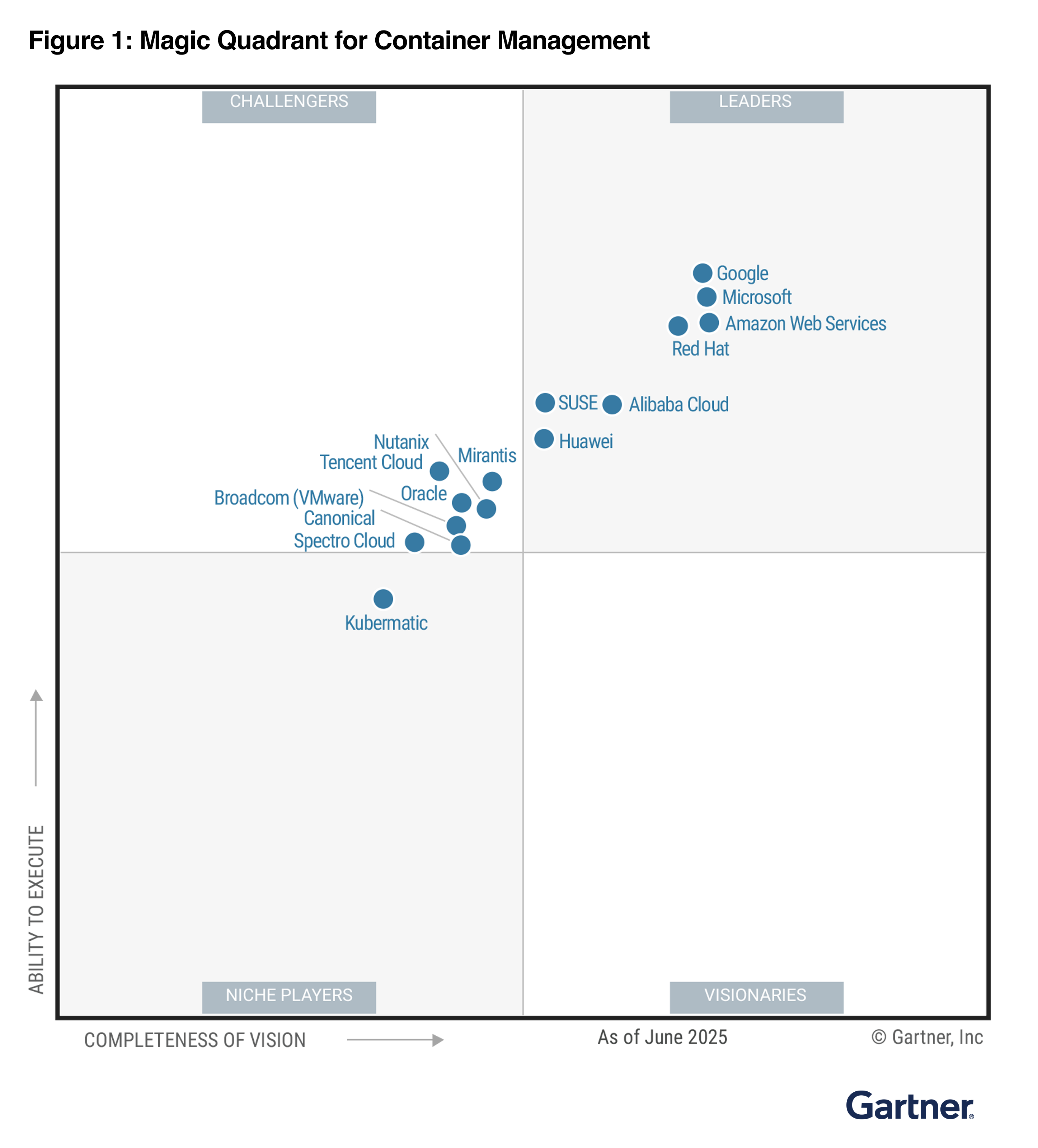
Gartner published the second Magic Quadrant for Distributed Hybrid Infrastructure (DHI), which includes Amazon Web Services (AWS) as a leader again. AWS has three products in this DHI portfolio: AWS Outposts, AWS Snowball, and AWS Local Zones. In the accompanying Gartner’s Critical Capabilities for DHI, AWS is ranked number one in four out of six use cases evaluated by Gartner—including hybrid infrastructure management, edge computing, assured workloads, and artificial intelligence & machine learning (AI/ML)—and among the top two in the use case of container management.

Gartner evaluates 10 DHI providers based on their Ability to Execute, which measures a vendor’s capacity to deliver its products or services effectively, and Completeness of Vision, which assesses a vendor’s understanding of the market and its strategy for future growth.

Here is the graphical representation of the 2024 Gartner Magic Quadrant for DHI.

Gartner recognized AWS strengths as:

  • Leading public cloud provider – AWS DHI solutions appeal to AWS public cloud customers that want to extend their infrastructure to their data center and edge locations, while also migrating from their remaining private cloud infrastructure.
  • As-a-service delivery – The fully managed infrastructure delivery of AWS Outposts simplifies operations and enables a hands-off, single-vendor approach to infrastructure management, including integration with some on-premises technologies.
  • AWS support – Gartner clients report high satisfaction with the AWS worldwide support and services team.

We believe this leader placement reflects our innovation at the edge of the cloud for workloads that require low latency, local data processing, data residency, or migration with on-premises interdependencies. At AWS, we extend the same AWS infrastructure, AWS services, APIs, and tools wherever you need them for a truly consistent cloud experience.

Whether your workloads are running in the AWS Regions, in metro areas with AWS Local Zones, on premises with AWS Outposts, in the telco networks with AWS Wavelength, or at the far edge with AWS Snow Family, you can standardize on the same cloud operating model for all your applications. You can streamline developer workflow by standardizing on a common set of continuous integration and continuous deployment (CI/CD) pipelines. It also reduces the time, resources, operational risk, and maintenance downtime required to manage IT infrastructure.

As examples of accelerated innovation, we have added the latest generation of GPU-backed instances to Local Zones to better support ML workloads and expanded the number of locations. We have made Outposts available in more countries and added AWS services supported on Outposts to facilitate migration and disaster recovery, such as AWS Elastic Disaster Recovery and Amazon Route 53 Resolver to improve application availability and performance.

In addition, we have improved the disconnection tolerance for container-based workloads on Outposts by making it possible for customers to run both the Kubernetes control plane and nodes locally, and we enhanced its capabilities for multi-rack Outposts deployments.

Access the complete 2024 Gartner Magic Quadrant for DHI report to learn more.

Channy

Gartner does not endorse any vendor, product or service depicted in its research publications and does not advise technology users to select only those vendors with the highest ratings or other designation. Gartner research publications consist of the opinions of Gartner’s research organization and should not be construed as statements of fact. Gartner disclaims all warranties, expressed or implied, with respect to this research, including any warranties of merchantability or fitness for a particular purpose.

GARTNER is a registered trademark and service mark of Gartner and Magic Quadrant is a registered trademark of Gartner, Inc. and/or its affiliates in the U.S. and internationally and are used herein with permission. All rights reserved.

AWS Lambda SnapStart for Python and .NET functions is now generally available

Post Syndicated from Channy Yun (윤석찬) original https://aws.amazon.com/blogs/aws/aws-lambda-snapstart-for-python-and-net-functions-is-now-generally-available/

Today, we’re announcing the general availability of AWS Lambda SnapStart for Python and .NET functions that delivers faster function startup performance, from several seconds to as low as sub-second, typically with minimal or no code changes in Python, C#, F#, and Powershell.

In November 28, 2022, we introduced Lambda SnapStart for Java functions to improve startup performance by up to 10 times. With Lambda SnapStart, you can reduce outlier latencies that come from initializing functions, without having to provision resources or spend time implementing complex performance optimizations.

Lambda SnapStart works by caching and reusing the snapshotted memory and disk state of any one-time initialization code, or code that runs only the first time a Lambda function is invoked. Lambda takes a Firecracker microVM snapshot of the memory and disk state of the initialized execution environment, encrypts the snapshot, and caches it for low-latency access.

When you invoke the function version for the first time, and as the invocations scale up, Lambda resumes new execution environments from the cached snapshot instead of initializing them from scratch, improving startup latency. Lambda SnapStart makes it easy to build highly scalable and responsive applications in Python and .NET using AWS Lambda.

For Python functions, startup latency from initialization code can be several seconds long. Some scenarios where this can occur are – loading dependencies (such as LangChain, Numpy, Pandas, and DuckDB) or using frameworks (such as Flask or Django). Many functions also perform machine learning (ML) inference using Lambda, and need to load ML models during initialization – a process that can take tens of seconds depending on the size of the model used. Using Lambda SnapStart can reduce startup latency from several seconds to as low as sub-second for these scenarios.

For .NET functions, we expect most use cases to benefit because .NET just-in-time (JIT) compilation takes up to several seconds. Latency variability associated with initialization of Lambda functions has been a long-standing barrier for customers to use .NET for AWS Lambda. SnapStart enables functions to resume quickly by caching a snapshot of their memory and disk state. Therefore, most .NET functions will experience significant improvement in latency variability with Lambda SnapStart.

Getting started with Lambda SnapStart for Python and .NET
To get started, you can use the AWS Management Console, AWS Command Line Interface (AWS CLI) or AWS SDKs to activate, update, and delete SnapStart for Python and .NET functions.

On the AWS Lambda console, go to the Functions page and choose your function to use Lambda SnapStart. Select Configuration, choose General configuration, and then choose Edit. You can see SnapStart settings on the Edit basic settings page.

You can activate Lambda functions using Python 3.12 and higher, and .NET 8 and higher managed runtimes. Choose Published versions and then choose Save.

When you publish a new version of your function, Lambda initializes your code, creates a snapshot of the initialized execution environment, and then caches the snapshot for low-latency access. You can invoke the function to confirm activation of SnapStart.

Here is an AWS CLI command to update the function configuration by running the update-function-configuration command with the --snap-start option.

aws lambda update-function-configuration \
  --function-name lambda-python-snapstart-test \
  --snap-start ApplyOn=PublishedVersions

Publish a function version with the publish-version command.

aws lambda publish-version \
  --function-name lambda-python-snapstart-test

Confirm that SnapStart is activated for the function version by running the get-function-configuration command and specifying the version number.

aws lambda get-function-configuration \
  --function-name lambda-python-snapstart-test:1

If the response shows that OptimizationStatus is On and State is Active, then SnapStart is activated, and a snapshot is available for the specified function version.

"SnapStart": { 
    "ApplyOn": "PublishedVersions",
    "OptimizationStatus": "On"
 },
 "State": "Active",

To learn more about activating, updating, and deleting a snapshot with AWS SDKs, AWS CloudFormation, AWS Serverless Application Model (AWS SAM), and AWS Cloud Development Kit (AWS CDK), visit Activating and managing Lambda SnapStart in the AWS Lambda Developer Guide.

Runtime hooks
You can use runtime hooks to run code executed before Lambda creates a snapshot or after Lambda resumes a function from a snapshot. Runtime hooks are useful to perform cleanup or resource release operations, dynamically update configuration or other metadata, integrate with external services or systems, such as sending notifications or updating external state or to fine-tune your function’s startup sequence, such as by preloading dependencies.

Python runtime hooks are available as part of the open source Snapshot Restore for Python library, which is included in Python managed runtime. This library provides two decorators @register_before_snapshot to run before Lambda creates a snapshot and @register_after_restore to run when Lambda resumes a function from a snapshot. To learn more, visit Lambda SnapStart runtime hooks for Python in the AWS Lambda Developer Guide.

Here is an example Python handler to show how to run code before checkpointing and after restoring:

from snapshot_restore_py import register_before_snapshot, register_after_restore

def lambda_handler(event, context):
    # handler code

@register_before_snapshot
def before_checkpoint():
    # Logic to be executed before taking snapshots

@register_after_restore
def after_restore():
    # Logic to be executed after restore

You can also use .NET runtime hooks available as part of the Amazon.Lambda.Core package (version 2.5 or later) from NuGet. This library provides two methods RegisterBeforeSnapshot() to run before snapshot creation and RegisterAfterRestore() to run after resuming a function from a snapshot. To learn more, visit Lambda SnapStart runtime hooks for .NET in the AWS Lambda Developer Guide.

Here is an example C# handler to show how to run code before checkpointing and after restoring:

public class SampleClass
{
    public SampleClass()
    { 
        Amazon.Lambda.Core.SnapshotRestore.RegisterBeforeSnapshot(BeforeCheckpoint); 
        Amazon.Lambda.Core.SnapshotRestore.RegisterAfterRestore(AfterRestore);
    }
    
    private ValueTask BeforeCheckpoint()
    {
        // Add logic to be executed before taking the snapshot
        return ValueTask.CompletedTask;
    }

    private ValueTask AfterRestore()
    {
        // Add logic to be executed after restoring the snapshot
        return ValueTask.CompletedTask;
    }

    public APIGatewayProxyResponse FunctionHandler(APIGatewayProxyRequest request, ILambdaContext context)
    {
        // INSERT business logic
        return new APIGatewayProxyResponse
        {
            StatusCode = 200
        };
    }
}

To learn how to implement runtime hooks for your preferred runtime, visit Implement code before or after Lambda function snapshots in the AWS Lambda Developer Guide.

Things to know
Here are some things that you should know about Lambda SnapStart:

  • Handling uniqueness – If your initialization code generates unique content that is included in the snapshot, then the content will not be unique when it’s reused across execution environments. To maintain uniqueness when using SnapStart, you must generate unique content after initialization, such as if your code uses custom random number generation that doesn’t rely on built-in-libraries or caches any information such as DNS entries that might expire during initialization. To learn how to restore uniqueness, visit Handling uniqueness with Lambda SnapStart in the AWS Lambda Developer Guide.
  • Performance tuning – To maximize the performance, we recommend that you preload dependencies and initialize resources that contribute to startup latency in your initialization code instead of in the function handler. This moves the latency associated with heavy class loading out of the invocation path, optimizing startup performance with SnapStart.
  • Networking best practices –The state of connections that your function establishes during the initialization phase isn’t guaranteed when Lambda resumes your function from a snapshot. In most cases, network connections that an AWS SDK establishes automatically resume. For other connections, review the Maximize Lambda SnapStart performance in the AWS Lambda Developer Guide.
  • Monitoring functions – You can monitor your SnapStart functions using Amazon CloudWatch log stream, AWS X-Ray active tracing, and accessing real-time telemetry data for extensions using the Telemetry API, Amazon API Gateway and function URL metrics. To learn more about differences for SnapStart functions, visit Monitoring for Lambda SnapStart in the AWS Lambda Developer Guide.

Now available
AWS Lambda SnapStart for Python and .NET functions are available today in US East (N. Virginia), US East (Ohio), US West (Oregon), Asia Pacific (Singapore), Asia Pacific (Sydney), Asia Pacific (Tokyo), Europe (Frankfurt), Europe (Ireland), and Europe (Stockholm) AWS Regions.

With the Python and .NET managed runtimes, there are two types of SnapStart charges: the cost of caching a snapshot per function version that you publish with SnapStart enabled, and the cost of restoration each time a function instance is restored from a snapshot. So, delete unused function versions to reduce your SnapStart cache costs. To learn more, visit the AWS Lambda pricing page.

Give Lambda SnapStart for Python and .NET a try in the AWS Lambda console. To learn more, visit Lambda SnapStart page and send feedback through AWS re:Post for AWS Lambda or your usual AWS Support contacts.

Channy

AWS Weekly Roundup: 20 years of AWS News Blog, Express brokers for Amazon MSK, Windows Server 2025 images on EC2, and more (Nov 11, 2024)

Post Syndicated from Channy Yun (윤석찬) original https://aws.amazon.com/blogs/aws/aws-weekly-roundup-20-years-of-aws-news-blog-express-brokers-for-amazon-msk-windows-server-2025-images-on-ec2-and-more-nov-11-2024/

Happy 20th Anniversary of the AWS News Blog! 🎉🥳🎊 On November 9, 2004, Jeff Barr published his first blog post. At the time, he started a personal blog site using TypePad. He wanted to speak to his readers with his personal voice, not the company or team.

On April 29, 2014, we created a new AWS blog site and migrated all posts to that page. There are currently over 4,300 posts on the AWS News Blog, with Jeff contributing over 3,200 of them.

Since December 2016, the AWS News Blog has added new writers, but we are still following Jeff’s leadership principals for AWS News Bloggers in accordance with Day One. What’s unique about the AWS News Blog is that the blog writers get to use the features of the product team in advance, following the Customer Obsession leadership principle, and focus on walk-throughs of how customers can quickly use them to save time, with the Frugality principle.

I am very grateful for Jeff’s fundamental and pivotal role over the past 20 years, and I look forward to the next 20 years!

Last week’s launches
Here are some launches that got my attention:

New Express brokers for Amazon MSK – Express brokers are a new broker type for Amazon MSK Provisioned designed to deliver up to three times more throughput per broker, scale up to 20 times faster, and reduce recovery time by 90 percent as compared to standard Apache Kafka brokers. Express brokers come preconfigured with Kafka best practices by default, support all Kafka APIs, and provide the same low-latency performance, so you can continue using existing client applications without any changes.

New Amazon Kinesis Client Library 3.0 – You can now reduce compute costs to process streaming data by up to 33 percent with Kinesis Client Library (KCL) 3.0, compared to previous KCL versions. KCL 3.0 introduces an enhanced load balancing algorithm that continuously monitors resource utilization of the stream processing workers and automatically redistributes the load from overutilized workers to other underutilized workers. To learn more, read the AWS Big Data Blog post.

Microsoft Windows Server 2025 images on Amazon EC2 – We now support Microsoft Windows Server 2025 with License Included (LI) Amazon Machine Images (AMIs), providing customers with an easy and flexible way to launch the latest version of Windows Server. By running Windows Server 2025 on Amazon EC2, customers can take advantage of the security, performance, and reliability of AWS with the latest Windows Server features. To learn more about running Windows Server 2025 on Amazon EC2, visit Windows Workloads on AWS.

Anthropic’s Claude 3.5 Haiku model in Amazon Bedrock – Claude 3.5 Haiku is the next generation of Anthropic’s fastest model, combining rapid response times with improved reasoning capabilities, making it ideal for tasks that require both speed and intelligence. Claude 3.5 Haiku improves across every skill set and surpasses even Claude 3 Opus, the largest model in Anthropic’s previous generation, on many intelligence benchmarks—including coding. To learn more, read the AWS News Blog post.

Amazon Bedrock Prompt Management GA – You can simplify the creation, testing, versioning, and sharing of prompts in Amazon Bedrock Prompt Management. At general availability, we added new features that provide enhanced options for configuring your prompts and enabling seamless integration for invoking them in your generative AI applications, such as structured prompts and Converse and InvokeModel API integration. To learn more, read the AWS Machine Learning blog post.

Six new synthetic generative voices for Amazon Polly – The generative engine is Amazon Polly’s most advanced text-to-speech (TTS) model leveraging the generative AI technology. We added six new synthetic female-sounding generative voices: Ayanda (South African English), Léa (French), Lucia (European Spanish), Lupe (American Spanish), Mía (Mexican Spanish), and Vicki (German). This extends thirteen voices and nine locales to provide you with more options of highly expressive and engaging voices.

Amazon OpenSearch Service Extended Support – We announce the end of Standard Support and Extended Support timelines for legacy Elasticsearch versions and OpenSearch Versions. Standard Support ends on Nov 7, 2025, for legacy Elasticsearch versions up to 6.7, Elasticsearch versions 7.1 through 7.8, OpenSearch versions from 1.0 through 1.2, and OpenSearch versions 2.3 through 2.9. With Extended Support, for an incremental flat fee over regular instance pricing, you continue to get critical security updates beyond the end of Standard Support. To learn more, read the AWS Big Data Blog post.

For a full list of AWS announcements, be sure to keep an eye on the What’s New at AWS page.

Other AWS news
Here are some additional news items that you might find interesting:

CEO’s visiting at AWS data center – Matt Garman, CEO of AWS, had a great time visiting one of our AWS data centers recently, and was able to get a look at the continuous innovation delivered by the team. Of course, it’s no surprise that Amazon’s senior executives visit fulfillment centers, contact centers, and data centers, to do real work for customers. AWS data centers are designed for customers in every aspect, for maximum resilience, performance, and energy efficiency.

AWS supports small businesses, creates jobs, sets up sustainability initiatives, and develops educational programs near AWS data centers. Get the latest updates – AWS in your community: Here’s what’s happening near data centers across the US on About Amazon News.

Amazon Q Business at Amazon – I introduced an Amazon story to use Code transformation in Amazon Q Developer to migrate more than old 30,000 Java applications to Java 17 version. It saved over 4,500 developer years of effort compared to previous manual jobs and saved the company $260 million in annual by moving to the latest Java version.

Here is another dogfooding story of Amazon Q Business at Amazon. Amazon built an internal chatbot with Amazon Q Business and it has resolved over 1 million internal Amazon developer questions, reducing time spent churning on manual technical investigations by more than 450,000 hours.

Our team onboarded Amazon Q Business with millions of internal documents and integrated Q Business into the tools our team use every day. Now, instead of waiting hours for responses to complex technical questions on Q&A boards or Slack channels, developers can get answers in seconds.

TOURCast at PGA TOUR – If you enjoy golf, this news will be of interest to you. The PGA TOUR debuted TOURCast in Japan at the 2024 ZOZO Championship to capture and disseminate better statistical data and bring fans closer to the game based on new scoring system called ShotLink, powered by CDW. This marks the first time the PGA TOUR has been able to bring this technology to Asia, leveraging the flexibility and scalability of AWS to overcome unique challenges.


PGA TOUR volunteer setting up GPS equipment on the fairway at ZOZO championship that will input specific shot data and feed back to Shotlink Select Plus. [IMAGE: PGA TOUR]

They’ve completely rebuilt their scoring system over the past two years on a new cloud stack. With AWS cloud, whether data comes from high-tech radar systems, cameras, or manual input, the system processes it all seamlessly.

Upcoming AWS events
Check your calendars and sign up for these AWS events:

AWS GenAI LoftsAWS GenAI Lofts are about more than just the tech, they bring together startups, developers, investors, and industry experts. Whether you’re looking to gain deep insights, or get your questions answered by generative AI pros, our GenAI Lofts have you covered, and provide everything you need to start building your next innovation. Join events in São Paulo (through November 20), and Paris (through November 25).

AWS Community Days – Join community-led conferences that feature technical discussions, workshops, and hands-on labs led by expert AWS users and industry leaders from around the world: Jakarta, Indonesia (November 23), Kochi, India (December 14).

AWS re:Invent – You can still register for the annual learning event, taking place December 2–6 in Las Vegas. Surprisingly Andy Jassy, CEO of Amazon said he will come back and participate in AWS re:Invent this year. He said “As always, the priority is to make this a learning event so customers can take nuggets back and change their own customer experiences and businesses. We’ll also have a bunch of goodies for you that we’ll announce and that we think folks will like.” Let’s meet there!

You can browse all upcoming in-person and virtual events.

That’s all for this week. Check back next Monday for another Weekly Roundup!

Channy

This post is part of our Weekly Roundup series. Check back each week for a quick roundup of interesting news and announcements from AWS!

Introducing Express brokers for Amazon MSK to deliver high throughput and faster scaling for your Kafka clusters

Post Syndicated from Channy Yun (윤석찬) original https://aws.amazon.com/blogs/aws/introducing-express-brokers-for-amazon-msk-to-deliver-high-throughput-and-faster-scaling-for-your-kafka-clusters/

Today, we’re announcing the general availability of Express brokers, a new broker type for Amazon Managed Streaming for Apache Kafka (Amazon MSK). It’s designed to deliver up to three times more throughput per-broker, scale up to 20 times faster, and reduce recovery time by 90 percent as compared to Standard brokers running Apache Kafka. Express brokers come preconfigured with Kafka best practices by default, support Kafka APIs, and provide the same low latency performance that Amazon MSK customers expect, so they can continue using existing client applications without any changes.

Express brokers provide improved compute and storage elasticity for Kafka applications when using Amazon MSK provisioned clusters. Amazon MSK is a fully-managed AWS service that makes it easier for you to build and run highly available and scalable applications based on Apache Kafka.

Let’s dive deeper into some of the key features that Express brokers have and the benefits they provide:

  • Easier operations with hands-free storage management – Express brokers offer unlimited storage without preprovisioning, eliminating disk-related bottlenecks. Cluster sizing is simpler, requiring only ingress and egress throughput divided by recommended per-broker throughput. This removes the need for proactive disk capacity monitoring and scaling, simplifying cluster management and improving resilience by eliminating a potential failure source.
  • Fewer brokers with up to three times throughput per broker – Higher throughput per broker allows for smaller clusters for the same workload. Standard brokers’ throughput must account for client traffic and background operations, with m7g.16xl Standard brokers safely handling 154 MBps ingress. Express brokers use opinionated settings and resource isolation, enabling m7g.16xl size instances to safely manage up to 500 MBps ingress without compromising performance or availability during cluster events.
  • Higher utilization with 20 times faster scaling – Express brokers reduce data movement during scaling, making them up to 20 times faster than Standard brokers. This allows for more quicker and reliable cluster resizing. You can monitor each broker’s ingress throughput capacity and add brokers within minutes, eliminating the need for over-provisioning in anticipation of traffic spikes.
  • Higher resilience with 90 percent faster recovery – Express brokers are designed for mission-critical applications requiring high resilience. They come preconfigured with best-practice defaults, including 3-way replication (RF=3), which reduce failures due to misconfiguration. Express brokers also recover 90 percent faster from transient failures compared to standard Apache Kafka brokers. Express brokers’ rebalancing and recovery use minimal cluster resources, simplifying capacity planning. This eliminates the risk of increased resource utilization and the need for continuous monitoring when right-sizing clusters.

You have choice options in Amazon MSK depending on your workload and preference:

MSK provisioned MSK Serverless
Standard brokers Express brokers
Configuration range Most flexible Flexible Least flexible
Cluster rebalancing Customer managed Customer managed
but up to 20x faster
MSK managed
Capacity management Yes Yes (compute only) No
Storage management Yes No No

Express brokers lower costs, provide higher resiliency, and lower operational overhead, making them the best choice for all Kafka workloads. If you prefer to use Kafka without managing any aspect of its capacity, its configuration, or how it scales, then you can choose Amazon MSK Serverless. This provides a fully abstracted Apache Kafka experience that eliminates the need for any infrastructure management, scales automatically, and charges you on a pay-per-use consumption model that doesn’t require you to optimize resource utilization.

Getting started with Express brokers in Amazon MSK
To get started with Express brokers, you can use the Sizing and Pricing worksheet that Amazon MSK provides. This worksheet helps you estimate the cluster size you’ll need to accommodate your workload and also gives you a rough estimate of the total monthly cost you’ll incur.

The throughput requirements of your workload are the primary factor in the size of your cluster. You should also consider other factors, such as partition and connection count to arrive at the size and number of brokers you’ll need for your cluster. For example, if your streaming application needs 30 MBps of data ingress (write) and 80 MBps data egress (read) capacity, you can use three express.m7g.large brokers to meet your throughput needs (assuming the partition count for your workload is within the maximum number of partitions that Amazon MSK recommends for an m7g.large instance).

The following table shows the recommended maximum ingress, egress, and partition counts per instance size for sustainable and safe operations. You can learn more about these recommendations in the Best practices section of Amazon MSK Developer Guide.

Instance size Ingress (MBps) Egress (MBps)
express.m7g.large 15.6 31.2
express.m7g.4xlarge 124.9 249.8
express.m7g.16xlarge 500.0 1000.0

Once you have decided the number and size of Express brokers you’ll need for your workload, go to the AWS Management Console or use the CreateCluster API to create an Amazon MSK provisioned cluster.

When you create a new cluster on the Amazon MSK console, in the Broker type option, choose Express brokers and then select the mount of compute capacity that you want to provision for the broker. As you can see in the screen shot, you can use Apache Kafka 3.6.0 version and Graviton-based instances for Express brokers. You don’t need to preprovision storage for Express brokers.

You can also customize some of these configurations to further fine-tune the performance of your clusters according to your own preferences. To learn more, visit Express broker configurations in the Amazon MSK developer guide.

To create an MSK cluster in the AWS Command Line Interface (AWS CLI), use the create-cluster command.

aws kafka create-cluster \
    --cluster-name "channy-express-cluster" \
    --kafka-version "3.6.0" \
    --number-of-broker-nodes 3 \
    --broker-node-group-info file://brokernodegroupinfo.json

A JSON file named brokernodegroupinfo.json specifies the three subnets over which you want Amazon MSK to distribute the broker nodes.

{
    "InstanceType": "express.m7g.large",
    "BrokerAZDistribution": "DEFAULT",
    "ClientSubnets": [
        "subnet-0123456789111abcd",
        "subnet-0123456789222abcd",
        "subnet-0123456789333abcd"
    ]
}

Once the cluster is created, you can use the bootstrap connection string to connect your clients to the cluster endpoints.

With Express brokers, you can scale vertically (changing instance size) or horizontally (adding brokers). Vertical scaling doubles throughput without requiring partition reassignment. Horizontal scaling adds brokers in sets of three and and allows you to create more partitions, but it requires partition reassignment for new brokers to serve traffic.

A major benefit of Express brokers is that you can add brokers and rebalance partitions within minutes. On the other hand, rebalancing partitions after adding Standard brokers can take several hours. The graph below shows the time it took to rebalance partitions after adding 3 Express brokers to a cluster and reassigning 2000 partitions to each of the new brokers.

As you can see, it took approximately 10 minutes to reassign these partitions and utilize the additional capacity of the new brokers. When we ran the same experiment on an equivalent cluster comprising of Standard brokers, partition reassignment took over 24hours.

To learn more about the partition reassignment, visit Expanding your cluster in the Apache Kafka documentation.

Things to know
Here are some things you should know about Express brokers:

  • Data migration – You can migrate the data in your existing Kafka or MSK cluster to a cluster composed of Express brokers using Amazon MSK Replicator, which copies both the data and the metadata of your cluster to a new cluster.
  • Monitoring – You can monitor your cluster composed of Express brokers in the cluster and at the broker level with Amazon CloudWatch metrics and enable open monitoring with Prometheus to expose metrics using the JMX Exporter and the Node Exporter.
  • Security – Just like with other broker types, Amazon MSK integrates with AWS Key Management Service (AWS KMS) to offer transparent server-side encryption for the storage in Express brokers. When you create an MSK cluster with Express brokers, you can specify the AWS KMS key that you want Amazon MSK to use to encrypt your data at rest. If you don’t specify a KMS key, Amazon MSK creates an AWS managed key for you and uses it on your behalf.

Now available
The Express broker type is available today in the US East (Ohio), US East (N. Virginia), US West (Oregon), Asia Pacific (Singapore), Asia Pacific (Sydney), Asia Pacific (Tokyo), Europe (Frankfurt), and Europe (Ireland), and Europe (Stockholm) Regions.

You pay an hourly rate for Apache Kafka broker instance usage (billed at one-second resolution) for Express brokers, with varying fees depending on the size of the broker instance and active brokers in your MSK clusters. You also pay a per-GB rate for data written to an Express broker (billed at per-byte resolution). To learn more, visit the Amazon MSK pricing page.

Give Express brokers for Amazon MSK a try in the Amazon MSK console. For more information, visit the Amazon MSK Developer Guide and send feedback to AWS re:Post for Amazon MSK or through your usual AWS support contacts.

Channy

Fine-tuning for Anthropic’s Claude 3 Haiku model in Amazon Bedrock is now generally available

Post Syndicated from Channy Yun (윤석찬) original https://aws.amazon.com/blogs/aws/fine-tuning-for-anthropics-claude-3-haiku-model-in-amazon-bedrock-is-now-generally-available/

Today, we are announcing the general availability of fine-tuning for Anthropic’s Claude 3 Haiku model in Amazon Bedrock in the US West (Oregon) AWS Region. Amazon Bedrock is the only fully managed service that provides you with the ability to fine-tune Claude models. You can now fine-tune and customize the Claude 3 Haiku model with your own task-specific training dataset to boost model accuracy, quality, and consistency to further tailor generative AI for your business.

Fine-tuning is a technique where a pre-trained large language model (LLM) is customized for a specific task by updating the weights and tuning hyperparameters like learning rate and batch size for optimal results.

Anthropic’s Claude 3 Haiku model is the fastest and most compact model in the Claude 3 model family. Fine-tuning Claude 3 Haiku offers significant advantages for businesses:

  • Customization – You can customize models that excel in areas crucial to your business compared to more general models by encoding company and domain knowledge.
  • Specialized performance – You can generate higher quality results and create unique user experiences that reflect your company’s proprietary information, brand, products, and more.
  • Task-specific optimization – You can enhance performance for domain-specific actions such as classification, interactions with custom APIs, or industry-specific data interpretation.
  • Data security – You can fine-tune with peace of mind in your secure AWS environment. Amazon Bedrock makes a separate copy of the base foundation model that is accessible only by you and trains this private copy of the model.

You can now optimize performance for specific business use cases by providing domain-specific labeled data to fine-tune the Claude 3 Haiku model in Amazon Bedrock.

In early 2024, we started to engage customers with a team of experts from the AWS Generative AI Innovation Center to help fine-tune Anthropic’s Claude models with their proprietary data sources. I’m happy to share that you can now fine-tune Anthropic’s Claude 3 Haiku model in Amazon Bedrock directly in the Amazon Bedrock console.

Get started with fine-tuning for Anthropic’s Claude 3 Haiku model in Amazon Bedrock
I will demonstrate how to easily fine-tune the Claude 3 Haiku model in Amazon Bedrock. To learn more about the fine-tuning workflow in detail, visit the AWS Machine Learning Blog post, Fine-tune Anthropic’s Claude 3 Haiku in Amazon Bedrock to boost model accuracy and quality.

To create a simple fine-tuning job in the Amazon Bedrock console, go to the Foundation models section in the navigation pane and select Custom models. In the Models section, select the Customize model button and then select Create Fine-tuning job.

Next, choose the model that you want to customize with your own data, give your resulting model a name, and optionally add encryption keys and any tags to associate with the model in the Model details section. Enter a name for the job and optionally add any tags for the job in the Job configuration section.

You can select the Amazon S3 location of the training dataset file and, if applicable, the validation dataset file in the Input data section.

Each dataset can be created using a JSON Lines (JSONL) file with multiple JSON lines using the single-turn or multi-turn messaging format. Each JSON line is a sample containing a system and message, an array of message objects.

I prepared some of the latest information about Anthropic’s Claude 3.5 Sonnet model in Amazon Bedrock. To learn more, visit Prepare the datasets in the Amazon Bedrock documentation.

{"system": "You are an helpful assistant.","messages":[{"role": "user", "content": "What’s the latest models to support Amazon Bedrock"},{"role": "assistant", "content": "Amazon Bedrock is a fully managed service that support Anthropic’s Claude 3 Sonnet, Haiku, and Opus models and the latest Claud 3.5 Sonnet model."}]}
{"system": "You are an helpful assistant.","messages":[{"role": "user", "content": "How long context window of Claude 3.5?"},{"role": "assistant", "content": "Anthropic's Claude 3 models have a 200,000 token context window enabling you to relay a large volume of information to Claude. This translates to roughly 150,000 words, or over 500 pages of material."}]}
{"system": "You are an helpful assistant.","messages":[{"role": "user", "content": "Is Claude 3.5 available in Bedrock?"},{"role": "assistant", "content": "Anthropic’s most intelligent and advanced model, Claude 3.5 Sonnet, demonstrates exceptional capabilities across a diverse range of tasks and evaluations while also outperforming Claude 3 Opus."}]}

In the Hyperparameters section, enter values for hyperparameters to use in training, such as epochs, batch size, and learning rate multiplier. If you’ve included a validation dataset, you can enable Early stopping, a technique used to prevent overfitting and stop the training process when the validation loss stops improving. You can set an early stopping threshold and patience value.

You can also select the output location where Amazon Bedrock should save the output of the job in the Output data section. Choose an AWS Identity and Access Management (IAM) custom service role with the appropriate permissions in the Service access section. To learn more, see Create a service role for model customization in the Amazon Bedrock documentation.

Finally, choose Create Fine-tuning job and wait for your fine-tuning job to start.

You can track its progress or stop it in the Jobs tab in the Custom models section.

After a model customization job is complete, you can analyze the results of the training process by looking at the files in the output Amazon Simple Storage Service (Amazon S3) folder that you specified when you submitted the job, or you can view details about the model.

Before using a customized model, you need to purchase Provisioned Throughput for Amazon Bedrock and then use the resulting provisioned model for inference. When you purchase Provisioned Throughput, you can select a commitment term, choose a number of model units, and see estimated hourly, daily, and monthly costs. To learn more about the custom model pricing for the Claude 3 Haiku model, visit Amazon Bedrock Pricing.

Now, you can test your custom model in the console playground. I choose my custom model and ask whether Anthropic’s Claude 3.5 Sonnet model is available in Amazon Bedrock.

I receive the answer:

Yes. You can use Anthropic’s most intelligent and advanced model, Claude 3.5 Sonnet in the Amazon Bedrock. You can demonstrate exceptional capabilities across a diverse range of tasks and evaluations while also outperforming Claude 3 Opus.

You can complete this job using AWS APIs, AWS SDKs, or AWS Command Line Interface (AWS CLI). To learn more about using AWS CLI, visit Code samples for model customization in the AWS documentation.

If you are using Jupyter Notebook, visit the GitHub repository and follow a hands-on guide for custom models. To build a production-level operation, I recommend reading Streamline custom model creation and deployment for Amazon Bedrock with Provisioned Throughput using Terraform on the AWS Machine Learning Blog.

Datasets and parameters
When fine-tuning Claude 3 Haiku, the first thing you should do is look at your datasets. There are two datasets that are involved in training Haiku, and that’s the Training dataset and the Validation dataset. There are specific parameters that you must follow in order to make your training successful, which are outlined in the following table.

Training data Validation data
File format JSONL
File size <= 10GB <= 1GB
Line count 32 – 10,000 lines 32 – 1,000 lines
Training + Validation Sum <= 10,000 lines
Token limit < 32,000 tokens per entry
Reserved keywords Avoid having “\nHuman:” or “\nAssistant:” in prompts

When you prepare the datasets, start with a small high-quality dataset and iterate based on tuning results. You can consider using larger models from Anthropic like Claude 3 Opus or Claude 3.5 Sonnet to help refine and improve your training data. You can also use them to generate training data for fine-tuning the Claude 3 Haiku model, which can be very effective if the larger models already perform well on your target task.

For more guidance on selecting the proper hyperparameters and preparing the datasets, read the AWS Machine Learning Blog post, Best practices and lessons for fine-tuning Anthropic’s Claude 3 Haiku in Amazon Bedrock.

Demo video
Check out this deep dive demo video for a step-by-step walkthrough that will help you get started with fine-tuning Anthropic’s Claude 3 Haiku model in Amazon Bedrock.

Now available
Fine-tuning for Anthropic’s Claude 3 Haiku model in Amazon Bedrock is now generally available in the US West (Oregon) AWS Region; check the full Region list for future updates. To learn more, visit Custom models in the Amazon Bedrock documentation.

Give fine-tuning for the Claude 3 Haiku model a try in the Amazon Bedrock console today and send feedback to AWS re:Post for Amazon Bedrock or through your usual AWS Support contacts.

I look forward to seeing what you build when you put this new technology to work for your business.

Channy

Amazon Aurora PostgreSQL Limitless Database is now generally available

Post Syndicated from Channy Yun (윤석찬) original https://aws.amazon.com/blogs/aws/amazon-aurora-postgresql-limitless-database-is-now-generally-available/

Today, we are announcing the general availability of Amazon Aurora PostgreSQL Limitless Database, a new serverless horizontal scaling (sharding) capability of Amazon Aurora. With Aurora PostgreSQL Limitless Database, you can scale beyond the existing Aurora limits for write throughput and storage by distributing a database workload over multiple Aurora writer instances while maintaining the ability to use it as a single database.

When we previewed Aurora PostgreSQL Limitless Database at AWS re:Invent 2023, I explained that it uses a two-layer architecture consisting of multiple database nodes in a DB shard group – either routers or shards to scale based on the workload.

  • Routers – Nodes that accept SQL connections from clients, send SQL commands to shards, maintain system-wide consistency, and return results to clients.
  • Shards – Nodes that store a subset of tables and full copies of data, which accept queries from routers.

There will be three types of tables that contain your data: sharded, reference, and standard.

  • Sharded tables – These tables are distributed across multiple shards. Data is split among the shards based on the values of designated columns in the table, called shard keys. They are useful for scaling the largest, most I/O-intensive tables in your application.
  • Reference tables – These tables copy data in full on every shard so that join queries can work faster by eliminating unnecessary data movement. They are commonly used for infrequently modified reference data, such as product catalogs and zip codes.
  • Standard tables – These tables are like regular Aurora PostgreSQL tables. Standard tables are all placed together on a single shard so join queries can work faster by eliminating unnecessary data movement. You can create sharded and reference tables from standard tables.

Once you have created the DB shard group and your sharded and reference tables, you can load massive amounts of data into Aurora PostgreSQL Limitless Database and query data in those tables using standard PostgreSQL queries. To learn more, visit Limitless Database architecture in the Amazon Aurora User Guide.

Getting started with Aurora PostgreSQL Limitless Database
You can get started in the AWS Management Console and AWS Command Line Interface (AWS CLI) to create a new DB cluster that uses Aurora PostgreSQL Limitless Database, add a DB shard group to the cluster, and query your data.

1. Create an Aurora PostgreSQL Limitless Database Cluster
Open the Amazon Relational Database Service (Amazon RDS) console and choose Create database. For Engine options, choose Aurora (PostgreSQL Compatible) and Aurora PostgreSQL with Limitless Database (Compatible with PostgreSQL 16.4).

For Aurora Limitless Database, enter a name for your DB shard group and values for minimum and maximum capacity measured by Aurora capacity units (ACUs) across all routers and shards. The initial number of routers and shards in a DB shard group is determined by this maximum capacity. Aurora PostgreSQL Limitless Database scales a node up to a higher capacity when its current utilization is too low to handle the load. It scales the node down to a lower capacity when its current capacity is higher than needed.

For DB shard group deployment, choose whether to create standbys for the DB shard group: no compute redundancy, one compute standby in a different Availability Zone, or two compute standbys in two different Availability Zones.

You can set the remaining DB settings to what you prefer and choose Create database. After the DB shard group are created, they’re displayed on the Databases page.

You can connect, reboot, or delete a DB shard group, or you can change the capacity, split a shard, or add a router in the DB shard group. To learn more, visit Working with DB shard groups in the Amazon Aurora User Guide.

2. Create Aurora PostgreSQL Limitless Database tables
As shared previously, Aurora PostgreSQL Limitless Database has three table types: sharded, reference, and standard. You can convert standard tables to sharded or reference tables to distribute or replicate existing standard tables or create new sharded and reference tables.

You can use variables to create sharded and reference tables by setting the table creation mode. The tables that you create will use this mode until you set a different mode. The following examples show how to use these variables to create sharded and reference tables.

For example, create a sharded table named items with a shard key composed of the item_id and item_cat columns.

SET rds_aurora.limitless_create_table_mode='sharded';
SET rds_aurora.limitless_create_table_shard_key='{"item_id", "item_cat"}';
CREATE TABLE items(item_id int, item_cat varchar, val int, item text);

Now, create a sharded table named item_description with a shard key composed of the item_id and item_cat columns and collocate it with the items table.

SET rds_aurora.limitless_create_table_collocate_with='items';
CREATE TABLE item_description(item_id int, item_cat varchar, color_id int, ...);

You can also create a reference table named colors.

SET rds_aurora.limitless_create_table_mode='reference';
CREATE TABLE colors(color_id int primary key, color varchar);

You can find information about Limitless Database tables by using the rds_aurora.limitless_tables view, which contains information about tables and their types.

postgres_limitless=> SELECT * FROM rds_aurora.limitless_tables;

 table_gid | local_oid | schema_name | table_name  | table_status | table_type  | distribution_key
-----------+-----------+-------------+-------------+--------------+-------------+------------------
         1 |     18797 | public      | items       | active       | sharded     | HASH (item_id, item_cat)
         2 |     18641 | public      | colors      | active       | reference   | 

(2 rows)

You can convert standard tables into sharded or reference tables. During the conversion, data is moved from the standard table to the distributed table, then the source standard table is deleted. To learn more, visit Converting standard tables to limitless tables in the Amazon Aurora User Guide.

3. Query Aurora PostgreSQL Limitless Database tables
Aurora PostgreSQL Limitless Database is compatible with PostgreSQL syntax for queries. You can query your Limitless Database using psql or any other connection utility that works with PostgreSQL. Before querying tables, you can load data into Aurora Limitless Database tables by using the COPY command or by using the data loading utility.

To run queries, connect to the cluster endpoint, as shown in Connecting to your Aurora Limitless Database DB cluster. All PostgreSQL SELECT queries are performed on the router to which the client sends the query and shards where the data is located.

To achieve a high degree of parallel processing, Aurora PostgreSQL Limitless Database utilizes two querying methods: single-shard queries and distributed queries, which determines whether your query is single-shard or distributed and processes the query accordingly.

  • Single-shard query – A query where all the data needed for the query is on one shard. The entire operation can be performed on one shard, including any result set generated. When the query planner on the router encounters a query like this, the planner sends the entire SQL query to the corresponding shard.
  • Distributed query – A query run on a router and more than one shard. The query is received by one of the routers. The router creates and manages the distributed transaction, which is sent to the participating shards. The shards create a local transaction with the context provided by the router, and the query is run.

For examples of single-shard queries, you use the following parameters to configure the output from the EXPLAIN command.

postgres_limitless=> SET rds_aurora.limitless_explain_options = shard_plans, single_shard_optimization;
SET

postgres_limitless=> EXPLAIN SELECT * FROM items WHERE item_id = 25;

                     QUERY PLAN
--------------------------------------------------------------
 Foreign Scan  (cost=100.00..101.00 rows=100 width=0)
   Remote Plans from Shard postgres_s4:
         Index Scan using items_ts00287_id_idx on items_ts00287 items_fs00003  (cost=0.14..8.16 rows=1 width=15)
           Index Cond: (id = 25)
 Single Shard Optimized
(5 rows) 

To learn more about the EXPLAIN command, see EXPLAIN in the PostgreSQL documentation.

For examples of distributed queries, you can insert new items named Book and Pen into the items table.

postgres_limitless=> INSERT INTO items(item_name)VALUES ('Book'),('Pen')

This makes a distributed transaction on two shards. When the query runs, the router sets a snapshot time and passes the statement to the shards that own Book and Pen. The router coordinates an atomic commit across both shards, and returns the result to the client.

You can use distributed query tracing, a tool to trace and correlate queries in PostgreSQL logs across Aurora PostgreSQL Limitless Database. To learn more, visit Querying Limitless Database in the Amazon Aurora User Guide.

Some SQL commands aren’t supported. For more information, see Aurora Limitless Database reference in the Amazon Aurora User Guide.

Things to know
Here are a couple of things that you should know about this feature:

  • Compute – You can only have one DB shard group per DB cluster and set the maximum capacity of a DB shard group to 16–6144 ACUs. Contact us if you need more than 6144 ACUs. The initial number of routers and shards is determined by the maximum capacity that you set when you create a DB shard group. The number of routers and shards doesn’t change when you modify the maximum capacity of a DB shard group. To learn more, see the table of the number of routers and shards in the Amazon Aurora User Guide.
  • Storage – Aurora PostgreSQL Limitless Database only supports the Amazon Aurora I/O-Optimized DB cluster storage configuration. Each shard has a maximum capacity of 128 TiB. Reference tables have a size limit of 32 TiB for the entire DB shard group. To reclaim storage space by cleaning up your data, you can use the vacuuming utility in PostgreSQL.
  • Monitoring – You can use Amazon CloudWatch, Amazon CloudWatch Logs, or Performance Insights to monitor Aurora PostgreSQL Limitless Database. There are also new statistics functions and views and wait events for Aurora PostgreSQL Limitless Database that you can use for monitoring and diagnostics.

Now available
Amazon Aurora PostgreSQL Limitless Database is available today with PostgreSQL 16.4 compatibility in the AWS US East (N. Virginia), US East (Ohio), US West (Oregon), Asia Pacific (Hong Kong), Asia Pacific (Singapore), Asia Pacific (Sydney), Asia Pacific (Tokyo), Europe (Frankfurt), Europe (Ireland), and Europe (Stockholm) Regions.

Give Aurora PostgreSQL Limitless Database a try in the Amazon Aurora console. For more information, visit the Amazon Aurora User Guide and send feedback to AWS re:Post for Amazon Aurora or through your usual AWS support contacts.

Channy

AWS named as a Leader in the first Gartner Magic Quadrant for AI Code Assistants

Post Syndicated from Channy Yun (윤석찬) original https://aws.amazon.com/blogs/aws/aws-named-as-a-leader-in-the-first-gartner-magic-quadrant-for-ai-code-assistants/

On August 19th, 2024, Gartner published its first Magic Quadrant for AI Code Assistants, which includes Amazon Web Services (AWS). Amazon Q Developer qualified for inclusion, having launched in general availability on April 30, 2024. AWS was ranked as a Leader for its ability to execute and completeness of vision.

We believe this Leader placement reflects our rapid pace of innovation, which makes the whole software development lifecycle easier and increases developer productivity with enterprise-grade access controls and security.

The Gartner Magic Quadrant evaluates 12 AI code assistants based on their Ability to Execute, which measures a vendor’s capacity to deliver its products or services effectively, and Completeness of Vision, which assesses a vendor’s understanding of the market and its strategy for future growth, according to Gartner’s report, How Markets and Vendors Are Evaluated in Gartner Magic Quadrants.

Here is the graphical representation of the 2024 Gartner Magic Quadrant for AI Code Assistants.

Here is the quote from Gartner’s report:

Amazon Web Services (AWS) is a Leader in this Magic Quadrant. Its product, Amazon Q Developer (formerly CodeWhisperer), is focused on assisting and automating developer tasks using AI. For example, Amazon Q Developer helps with code suggestions and transformation, testing and security, as well as feature development. Its operations are geographically diverse, and its clients are of all sizes. AWS is focused on delivering AI-driven solutions that enhance the software development life cycle (SDLC), automating complex tasks, optimizing performance, ensuring security, and driving innovation.

My team focuses on creating content on Amazon Q Developer that directly supports software developers’ jobs-to-be-done, enabled and enhanced by generative AI in Amazon Q Developer Center and Community.aws.

I’ve had the chance to talk with our customers to ask why they choose Amazon Q Developer. They said it is available to accelerate and complete tasks across the SDLC much more than general AI code assistants—from coding, testing, and upgrading, to troubleshooting, performing security scanning and fixes, optimizing AWS resources, and creating data engineering pipelines.

Here are the highlights that customers talked about more often:

Available everywhere you need it – You can use Amazon Q Developer in any of the following integrated development environment (IDE), including Visual Studio Code, JetBrains IDEs, AWS Toolkit with Amazon Q, JupyterLab, Amazon EMR Studio, Amazon SageMaker Studio, or AWS Glue Studio. You can also use Amazon Q Developer in the AWS Management Console, AWS Command Line Interface (AWS CLI), AWS documentation, AWS Support, AWS Console Mobile Application, Amazon CodeCatalyst, or through Slack and Microsoft Teams with AWS Chatbot. According to Safe Software, “Amazon Q knows all the ways to make use of the many tools that AWS provides. Because we are now able to accomplish more, we will be able to extend our automations into other AWS services and make use of Amazon Q to help us get there.” To learn more, visit Amazon Q Developer features and Amazon Q Developer customers.

Customizing code recommendations – You can get code recommendations based on your internal code base. Amazon Q Developer accelerates onboarding to a new code base to generate even more relevant inline code recommendations and chat responses (in preview) by making it aware of your internal libraries, APIs, best practices, and architectural patterns. Your organization’s administrators can securely connect Amazon Q Developer to your internal code bases to create multiple customizations. According to National Australia Bank (NAB), NAB has now added specific suggestions using the Amazon Q customization capability that are tailored to the NAB coding standards. They’re seeing increased acceptance rates of 60 percent with customization. To learn more, visit Customizing suggestions in the AWS documentation.

Upgrading your Java applicationsAmazon Q Developer Agent for code transformation automates the process of upgrading and transforming your legacy Java applications. According to an internal Amazon study, Amazon has migrated tens of thousands of production applications from Java 8 or 11 to Java 17 with assistance from Amazon Q Developer. This represents a savings of over 4,500 years of development work for over a thousand developers (when compared to manual upgrades) and performance improvements worth $260 million dollars in annual cost savings. Transformations from Windows to cross-platform .NET are also coming soon! To learn more, visit Upgrading language versions with the Amazon Q Developer Agent for code transformation in the AWS documentation.

Access the complete 2024 Gartner Magic Quadrant for AI Code Assistants report to learn more.

Channy

Gartner Magic Quadrant for AI Code Assistants, Arun Batchu, Philip Walsh, Matt Brasier, Haritha Khandabattu, 19 August, 2024.

Gartner does not endorse any vendor, product or service depicted in its research publications and does not advise technology users to select only those vendors with the highest ratings or other designation. Gartner research publications consist of the opinions of Gartner’s research organization and should not be construed as statements of fact. Gartner disclaims all warranties, expressed or implied, with respect to this research, including any warranties of merchantability or fitness for a particular purpose.

GARTNER is a registered trademark and service mark of Gartner and Magic Quadrant is a registered trademark of Gartner, Inc. and/or its affiliates in the U.S. and internationally and are used herein with permission. All rights reserved.

Announcing AWS Parallel Computing Service to run HPC workloads at virtually any scale

Post Syndicated from Channy Yun (윤석찬) original https://aws.amazon.com/blogs/aws/announcing-aws-parallel-computing-service-to-run-hpc-workloads-at-virtually-any-scale/

Today we are announcing AWS Parallel Computing Service (AWS PCS), a new managed service that helps customers set up and manage high performance computing (HPC) clusters so they seamlessly run their simulations at virtually any scale on AWS. Using the Slurm scheduler, they can work in a familiar HPC environment, accelerating their time to results instead of worrying about infrastructure.

In November 2018, we introduced AWS ParallelCluster, an AWS supported open-source cluster management tool that helps you to deploy and manage HPC clusters in the AWS Cloud. With AWS ParallelCluster, customers can also quickly build and deploy proof of concept and production HPC compute environments. They can use AWS ParallelCluster Command-Line interface, API, Python library, and the user interface installed from open source packages. They are responsible for updates, which can include tearing down and redeploying clusters. Many customers, though, have asked us for a fully managed AWS service to eliminate operational jobs in building and operating HPC environments.

AWS PCS simplifies HPC environments managed by AWS and is accessible through the AWS Management Console, AWS SDK, and AWS Command-Line Interface (AWS CLI). Your system administrators can create managed Slurm clusters that use their compute and storage configurations, identity, and job allocation preferences. AWS PCS uses Slurm, a highly scalable, fault-tolerant job scheduler used across a wide range of HPC customers, for scheduling and orchestrating simulations. End users such as scientists, researchers, and engineers can log in to AWS PCS clusters to run and manage HPC jobs, use interactive software on virtual desktops, and access data. You can bring their workloads to AWS PCS quickly, without significant effort to port code.

You can use fully managed NICE DCV remote desktops for remote visualization, and access job telemetry or application logs to enable specialists to manage your HPC workflows in one place.

AWS PCS is designed for a wide range of traditional and emerging, compute or data-intensive, engineering and scientific workloads across areas such as computational fluid dynamics, weather modeling, finite element analysis, electronic design automation, and reservoir simulations using familiar ways of preparing, executing, and analyzing simulations and computations.

Getting started with AWS Parallel Computing Service
To try out AWS PCS, you can use our tutorial for creating a simple cluster in the AWS documentation. First, you create a virtual private cloud (VPC) with an AWS CloudFormation template and shared storage in Amazon Elastic File System (Amazon EFS) within your account for the AWS Region where you will try AWS PCS. To learn more, visit Create a VPC and Create shared storage in the AWS documentation.

1. Create a cluster
In the AWS PCS console, choose Create cluster, a persistent resource for managing resources and running workloads.

Next, enter your cluster name and choose the controller size of your Slurm scheduler. You can choose Small (up to 32 nodes and 256 jobs), Medium (up to 512 nodes and 8,192 jobs), or Large (up to 2,048 nodes and 16,384 jobs) for the limits of cluster workloads. In the Networking section, choose your created VPC, subnet to launch the cluster, and security group applied to your cluster.

Optionally, you can set the Slurm configuration such as an idle time before compute nodes will scale down, a Prolog and Epilog scripts directory on launched compute nodes, and a resource selection algorithm parameter used by Slurm.

Choose Create cluster. It takes some time for the cluster to be provisioned.

2. Create compute node groups
After creating your cluster, you can create compute node groups, a virtual collection of Amazon Elastic Compute Cloud (Amazon EC2) instances that AWS PCS uses to provide interactive access to a cluster or run jobs in a cluster. When you define a compute node group, you specify common traits such as EC2 instance types, minimum and maximum instance count, target VPC subnets, Amazon Machine Image (AMI), purchase option, and custom launch configuration. Compute node groups require an instance profile to pass an AWS Identity and Access Management (IAM) role to an EC2 instance and an EC2 launch template that AWS PCS uses to configure EC2 instances it launches. To learn more, visit Create a launch template And Create an instance profile in the AWS documentation.

To create a compute node group in the console, go to your cluster and choose the Compute node groups tab and the Create compute node group button.

You can create two compute node groups: a login node group to be accessed by end users and a job node group to run HPC jobs.

To create a compute node group running HPC jobs, enter a compute node name and select a previously-created EC2 launch template, IAM instance profile, and subnets to launch compute nodes in your cluster VPC.

Next, choose your preferred EC2 instance types to use when launching compute nodes and the minimum and maximum instance count for scaling. I chose the hpc6a.48xlarge instance type and scale limit up to eight instances. For a login node, you can choose a smaller instance, such as one c6i.xlarge instance. You can also choose either the On-demand or Spot EC2 purchase option if the instance type supports. Optionally, you can choose a specific AMI.

Choose Create. It takes some time for the compute node group to be provisioned. To learn more, visit Create a compute node group to run jobs and Create a compute node group for login nodes in the AWS documentation.

3. Create and run your HPC jobs
After creating your compute node groups, you submit a job to a queue to run it. The job remains in the queue until AWS PCS schedules it to run on a compute node group, based on available provisioned capacity. Each queue is associated with one or more compute node groups, which provide the necessary EC2 instances to do the processing.

To create a queue in the console, go to your cluster and choose the Queues tab and the Create queue button.

Enter your queue name and choose your compute node groups assigned to your queue.

Choose Create and wait while the queue is being created.

When the login compute node group is active, you can use AWS Systems Manager to connect to the EC2 instance it created. Go to the Amazon EC2 console and choose your EC2 instance of the login compute node group. To learn more, visit Create a queue to submit and manage jobs and Connect to your cluster in the AWS documentation.

To run a job using Slurm, you prepare a submission script that specifies the job requirements and submit it to a queue with the sbatch command. Typically, this is done from a shared directory so the login and compute nodes have a common space for accessing files.

You can also run a message passing interface (MPI) job in AWS PCS using Slurm. To learn more, visit Run a single node job with Slurm or Run a multi-node MPI job with Slurm in the AWS documentation.

You can connect a fully-managed NICE DCV remote desktop for visualization. To get started, use the CloudFormation template from HPC Recipes for AWS GitHub repository.

In this example, I used the OpenFOAM motorBike simulation to calculate the steady flow around a motorcycle and rider. This simulation was run with 288 cores of three hpc6a instances. The output can be visualized in the ParaView session after logging in to the web interface of DCV instance.

Finally, after you are done HPC jobs with the cluster and node groups that you created, you should delete the resources that you created to avoid unnecessary charges. To learn more, visit Delete your AWS resources in the AWS documentation.

Things to know
Here are a couple of things that you should know about this feature:

  • Slurm versions – AWS PCS initially supports Slurm 23.11 and offers mechanisms designed to enable customers to upgrade their Slurm major versions once new versions are added. Additionally, AWS PCS is designed to automatically update the Slurm controller with patch versions. To learn more, visit Slurm versions in the AWS documentation.
  • Capacity Reservations – You can reserve EC2 capacity in a specific Availability Zone and for a specific duration using On-Demand Capacity Reservations to make sure that you have the necessary compute capacity available when you need it. To learn more, visit Capacity Reservations in the AWS documentation.
  • Network file systems – You can attach network storage volumes where data and files can be written and accessed, including Amazon FSx for NetApp ONTAP, Amazon FSx for OpenZFS, and Amazon File Cache as well as Amazon EFS and Amazon FSx for Lustre. You can also use self-managed volumes, such as NFS servers. To learn more, visit Network file systems in the AWS documentation.

Now available
AWS Parallel Computing Service is now available in the US East (N. Virginia), AWS US East (Ohio), US West (Oregon), Asia Pacific (Singapore), Asia Pacific (Sydney), Asia Pacific (Tokyo), Europe (Frankfurt), Europe (Ireland), Europe (Stockholm) Regions.

AWS PCS launches all resources in your AWS account. You will be billed appropriately for those resources. For more information, see the AWS PCS Pricing page.

Give it a try and send feedback to AWS re:Post or through your usual AWS Support contacts.

Channy

P.S. Special thanks to Matthew Vaughn, a principal developer advocate at AWS for his contribution in creating a HPC testing environment.

How AWS powered Prime Day 2024 for record-breaking sales

Post Syndicated from Channy Yun (윤석찬) original https://aws.amazon.com/blogs/aws/how-aws-powered-prime-day-2024-for-record-breaking-sales/

The last Amazon Prime Day 2024 (July 17-18) was Amazon’s biggest Prime Day shopping event ever, with record sales and more items sold during the two-day event than any previous Prime Day event. Prime members shopped for millions of deals and saved billions across more than 35 categories globally.

I live in South Korea, but luckily I was staying in Seattle to attend the AWS Heroes Summit during Prime Day 2024. I signed up for a Prime membership and used Rufus, my new AI-powered conversational shopping assistant, to search for items quickly and easily. Prime members in the U.S. like me chose to consolidate their deliveries on millions of orders during Prime Day, saving an estimated 10 million trips. This consolidation results in lower carbon emissions on average.

We know from Jeff’s annual blog post that AWS runs the Amazon website and mobile app that makes these short-term, large scale global events feasible. (check out his 2016, 2017, 2019, 2020, 2021, 2022, and 2023 posts for a look back). Today I want to share top numbers from AWS that made my amazing shopping experience possible.

Prime Day 2024 – all the numbers
Here are some of the most interesting and/or mind-blowing metrics:

Amazon EC2 – Since many of Amazon.com services such as Rufus and Search use AWS artificial intelligence (AI) chips under the hood, Amazon deployed a cluster of over 80,000 Inferentia and Trainium chips for Prime Day. During Prime Day 2024, Amazon used over 250K AWS Graviton chips to power more than 5,800 distinct Amazon.com services (double that of 2023).

Amazon EBS – In support of Prime Day, Amazon provisioned 264 PiB of Amazon EBS storage in 2024, a 62 percent increase compared to 2023. When compared to the day before Prime Day 2024, Amazon.com performance on Amazon EBS jumped by 5.6 trillion read/write I/O operations during the event, or an increase of 64 percent compared to Prime Day 2023. Also, when compared to the day before Prime Day 2024, Amazon.com transferred an incremental 444 petabytes of data during the event, or an increase of 81 percent compared to Prime Day 2023.

Amazon Aurora – On Prime Day, 6,311 database instances running the PostgreSQL-compatible and MySQL-compatible editions of Amazon Aurora processed more than 376 billion transactions, stored 2,978 terabytes of data, and transferred 913 terabytes of data.

Amazon DynamoDB – DynamoDB powers multiple high-traffic Amazon properties and systems including Alexa, the Amazon.com sites, and all Amazon fulfillment centers. Over the course of Prime Day, these sources made tens of trillions of calls to the DynamoDB API. DynamoDB maintained high availability while delivering single-digit millisecond responses and peaking at 146 million requests per second.

Amazon ElastiCache – ElastiCache served more than quadrillion requests on a single day with a peak of over 1 trillion requests per minute.

Amazon QuickSight – Over the course of Prime Day 2024, one Amazon QuickSight dashboard used by Prime Day teams saw 107K unique hits, 1300+ unique visitors, and delivered over 1.6M queries.

Amazon SageMaker – SageMaker processed more than 145B inference requests during Prime Day.

Amazon Simple Email Service (Amazon SES) – SES sent 30 percent more emails for Amazon.com during Prime Day 2024 vs 2023, delivering 99.23 percent of those emails to customers.

Amazon GuardDuty – During Prime Day 2024, Amazon GuardDuty monitored nearly 6 trillion log events per hour, a 31.9% increase from the previous year’s Prime Day.

AWS CloudTrail – CloudTrail processed over 976 billion events in support of Prime Day 2024.

Amazon CloudFront – CloudFront handled a peak load of over 500 million HTTP requests per minute, for a total of over 1.3 trillion HTTP requests during Prime Day 2024, a 30 percent increase in total requests compared to Prime Day 2023.

Prepare to Scale
As Jeff noted in every year, rigorous preparation is key to the success of Prime Day and our other large-scale events. For example, 733 AWS Fault Injection Service experiments were run to test resilience and ensure Amazon.com remains highly available on Prime Day.

If you are preparing for a similar business-critical events, product launches, and migrations, I strongly recommend that you take advantage of newly-branded AWS Countdown, a support program designed for your project lifecycle to assess operational readiness, identify and mitigate risks, and plan capacity, using proven playbooks developed by AWS experts. For example, with additional help from AWS Countdown, Legal Zoom successfully migrated 450 servers with minimal issues and continues to leverage AWS Countdown Premium to streamline and expedite the launch of SaaS applications.

We look forward to seeing what other records will be broken next year!

Channy & Jeff;

AWS Weekly Roundup: Mithra, Amazon Titan Image Generator v2, AWS GenAI Lofts, and more (August 12, 2024)

Post Syndicated from Channy Yun (윤석찬) original https://aws.amazon.com/blogs/aws/aws-weekly-roundup-mithra-amazon-titan-image-generator-v2-aws-genai-lofts-and-more-august-12-2024/

When Dr. Swami Sivasubramanian, VP of AI and Data, was an intern at Amazon in 2005, Dr. Werner Vogels, CTO of Amazon, was his first manager. Nineteen years later, the two shared a stage at the VivaTech Conference to reflect on Amazon’s history of innovation—from pioneering the pay-as-you-go model with Amazon Web Services (AWS) to transforming customer experiences using “good old-fashioned AI”—as well as what really keeps them up at night in the age of generative artificial intelligence (generative AI).

Asked if competitors ever kept him up at night, Dr. Werner insisted that listening to customer needs—such as guardrails, security, and privacy—and building products based on those needs is what drives success at Amazon. Dr. Swami said he viewed Amazon SageMaker and Amazon Bedrock as prime examples of successful products that have emerged as a result of this customer-first approach. “If you end up chasing your competitors, you are going to end up building what they are building,” he added. “If you actually listen to your customers, you are actually going to lead the way in innovation.” To learn four more lessons on customer-obsessed innovation, visit our AWS Careers blog.

For example, for customer-obsessed security, we build and use Mithra, a powerful neural network model to detect and respond to cyber threats. It analyzes up to 200 trillion internet domain requests daily from the AWS global network, identifying an average of 182,000 new malicious domains with remarkable accuracy. Mithra is just one example of how AWS uses global scale, advanced artificial intelligence and machine learning (AI/ML) technology, and constant innovation to lead the way in cloud security, making the internet safer for everyone. To learn more, visit the blog post of Chief Information Security Officer at Amazon CJ Moses, How AWS tracks the cloud’s biggest security threats and helps shut them down.

Last week’s launches
Here are some launches that got my attention:

Amazon Titan Image Generator v2 in Amazon Bedrock – With the new Amazon Titan Image Generator v2 model, you can guide image creation using a text prompt and reference images, control the color palette of generated images, remove backgrounds, and customize the model to maintain brand style and subject consistency. To learn more, visit my blog post, Amazon Titan Image Generator v2 is now available in Amazon Bedrock.

Regional expansion of Anthropic’s Claude models in Amazon Bedrock – The Claude 3.5 Sonnet, Anthropic’s latest high-performance AI model, is now available in US West (Oregon), Europe (Frankfurt), Asia Pacific (Tokyo), and Asia Pacific (Singapore) Regions in Amazon Bedrock. The Claude 3 Haiku, Anthropic’s compact and affordable AI model, is now available in Asia Pacific (Tokyo) and Asia Pacific (Singapore) Regions in Amazon Bedrock.

Private IPv6 addressing for VPCs and subnets – You can now address private IPv6 for VPCs and subnets with Amazon VPC IP Address Manager (IPAM). Within IPAM, you can configure private IPv6 addresses in a private scope, provision Unique Local IPv6 Unicast Addresses (ULA) and Global Unicast Addresses (GUA), and use them to create VPCs and subnets for private access. To learn more, visit see the Understanding IPv6 addressing on AWS and designing a scalable addressing plan and VPC documentation,

Up to 30 GiB/s of read throughput in Amazon EFS – We are increasing the read throughput to 30 GiB/s, extending simple, fully elastic, and provisioning-free experience of Amazon EFS to support throughput-intensive AI and ML workloads for model training, inference, financial analytics, and genomic data analysis.

Large language models (LLMs) in Amazon Redshift ML – You can use pre-trained publicly available LLMs in Amazon SageMaker JumpStart as part of Amazon Redshift ML. For example, you can use LLMs to summarize feedback, perform entity extraction, and conduct sentiment analysis on data in your Amazon Redshift table, so you can bring the power of generative AI to your data warehouse.

Data products in Amazon DataZone – You can create data products in Amazon DataZone, which enable the grouping of data assets into well-defined, self-contained packages tailored for specific business use cases. For example, a marketing analysis data product can bundle various data assets such as marketing campaign data, pipeline data, and customer data. To learn more, visit this AWS Big Data blog post.

For a full list of AWS announcements, be sure to keep an eye on the What’s New at AWS page.

Other AWS news
Here are some additional news items that you might find interesting:

AWS Goodies by Jeff Barr – Want to discover more exciting news about AWS? Jeff Barr is always in catch-up mode, doing his best to share all of the interesting things that he finds or that are shared with him. You can find his goodies once a week. Follow his LinkedIn page.

AWS and Multicloud – You might have missed a great article about the existing capabilities AWS has and the continued enhancements we’ve made in multicloud environments. In the post, Jeff covers the AWS approach to multicloud, provides you with some real-world examples, and reviews some of the newest multicloud and hybrid capabilities found across the lineup of AWS services.

Code transformation in Amazon Q Developer – At Amazon, we asked a small team to use Amazon Q Developer Agent for code transformation to migrate more than 30,000 production applications from older Java versions to Java 17. By using Amazon Q Developer to automate these upgrades, the team saved over 4,500 developer years of effort compared to what it would have taken to do all of these upgrades manually and saved the company $260 million in annual savings by moving to the latest Java version.

Contributing to AWS CDKAWS Cloud Development Kit (AWS CDK) is an open source software development framework to model and provision your cloud application resources using familiar programming languages. Contributing to AWS CDK not only helps you deepen your knowledge of AWS services but also allows you to give back to the community and improve a tool you rely on.

Upcoming AWS events
Check your calendars and sign up for these AWS events:

AWS re:Invent 2024 – Dive into the first-round session catalog. Explore all the different learning opportunities at AWS re:Invent this year and start building your agenda today. You’ll find sessions for all interests and learning styles.

AWS Innovate Migrate, Modernize, Build – Learn about proven strategies and practical steps for effectively migrating workloads to the AWS Cloud, modernizing applications, and building cloud-native and AI-enabled solutions. Don’t miss this opportunity to learn with the experts and unlock the full potential of AWS. Register now for Asia Pacific, Korea, and Japan (September 26).

AWS Summits – The 2024 AWS Summit season is almost wrapping up! Join free online and in-person events that bring the cloud computing community together to connect, collaborate, and learn about AWS. Register in your nearest city: São Paulo (August 15), Jakarta (September 5), and Toronto (September 11).

AWS Community Days – Join community-led conferences that feature technical discussions, workshops, and hands-on labs led by expert AWS users and industry leaders from around the world: New Zealand (August 15), Colombia (August 24), New York (August 28), Belfast (September 6), and Bay Area (September 13).

AWS GenAI Lofts – Meet AWS AI experts and attend talks, workshops, fireside chats, and Q&As with industry leaders. All lofts are free and are carefully curated to offer something for everyone to help you accelerate your journey with AI. There are lofts scheduled in San Francisco (August 14–September 27), São Paulo (September 2–November 20), London (September 30–October 25), Paris (October 8–November 25), and Seoul (November).

You can browse all upcoming in-person and virtual events.

That’s all for this week. Check back next Monday for another Weekly Roundup!

Channy

This post is part of our Weekly Roundup series. Check back each week for a quick roundup of interesting news and announcements from AWS!